
#ue4-general
1 messages · Page 1148 of 1
 hoary seal
 drowsy snow
Isn't there an option to change blend space's playback rate in anim graph?
 calm widget
drowsy snow
Isn't there an option to change blend space's playback rate in anim graph?
calm widget
drowsy snow
Isn't there an option to change blend space's playback rate in anim graph?
Possibly. I'm quite new to these animation blueprints not sure what the best way to go about it is. Care to elaborate a bit?
 shadow estuary
having an issue where decal im trying to spawn isnt on top of the ground, any tips

 dusk nebula
What's the best way to display multiple cameras on the same screen?
 tall crypt
total noob here... I was asked today by a client to make an unreal project, I have no idea where to start, where is the best place inside this Discord to get started or to see about getting one on one tutoring?
 rain lantern
tall crypt
total noob here... I was asked today by a client to make an unreal project, I ha...
rain lantern
tall crypt
total noob here... I was asked today by a client to make an unreal project, I ha...
I recommend checking out https://learn.unrealengine.com/
shadow estuary
anyone have a good way to just slap an emmisive material on a mesh and make it go around the outlines of the mesh
 real heath
You can use a fresnel node, potentially with a clamp
shadow estuary
i did get the material working ok
but when i add it to the mesh
it doesnt show
 real heath
It's quite faint. Is your main scene too bright and over powering it? Try turning off some lights in your scene or bumping the emmissive strength way up to test
shadow estuary
Do I need to map it to the mesh somehow
I'll try that
i dont think the material knows to go on the outline of the obj
i think thats the issue
maybe i need to do it with post processing
real heath
How does it look on the mesh?
It should only show the outline, it won't show the original mesh AND the outline
 plush yew
So I get that its a lot of math and involves scripting but Unity has a easy solution for this while im not aware unreal engine having. Do I really need multiple skeletons to have a character creation blueprint or can unreal somehow interpret where my morph is moving and allow the bones to follow https://streamable.com/ibvi12

i wont call this a limitation but it certainly feels like one lol
i know this is high level game dev stuff and why most games only let you move the bones around rather than switching blend shapes for most things but surely this has gotten easier over the years right?
then again Autodesk Maya is still duplicating rigs just to switch between blend shapes in 2022 so maybe this is it lmao
 polar sorrel
hi guys, quick question, any good sites or channels to learn ue4 blueprinting from ?
shadow estuary
real heath
How does it look on the mesh?
It shows nothing I think because I had to add a 3rd material slot and it doesn't know what to do with it
real heath
Oh, yeah that comes down to uv mapping. You can probably do what you want in your base material
Just take those nodes and add them to your original material
 rain ingot
Can I follow an Unreal Engine 4 course using Unreal engine 5?
like say I want to learn unreal engine 5 but there aren't that many good courses out there since its relatively new, and I have no experience with UE4 either, Can I follow a UE4 course on UE5 or would it be completely different, I am familiar with C++
shadow estuary
real heath
Just take those nodes and add them to your original material
I could but I wanna be able to turn it on and off based on wether a unit in the game is selected, and I was hoping to make it generic so I can just slap it on any mesh
That helped me tho I think imma have to use postfix or soemthing
real heath
You can add a scalar parameter as a multiplier and when you spawn the unit create a new material instance dynamic, and then on selection change that paramter
That's probably the better way as less shaders and less drawcalls are required
shadow estuary
Hmmmmm okay I'll look into it, tyvm
 indigo steeple
Will it affect a games loading time if I was to sort all of the ammo and weapons and wearables into their own folders for each individual item? Like in my Inventory folder where I keep my Item Database and Structure BP's, if I did a Weapons/Ammo folder and then a Ammo folder in that one and then a folder for each ammo itself. My need to sort stuff sometimes gets annoying and I don't want that to heavily affect my project. lol
 frigid thicket
Is there an optimization channel that's better to post to? If not I had a question about the stats you get from running the stat scenerendering commmand.
As you can see there is significantly more draw calls for Deferred Shading Scene Renderer but I can't find out what this means online

It's more confusing to me since I'm currently using forward shading
 versed wing
So I’m trying to create animations for different characters that have the same UE mannequin rig, (running, attacking etc) is it possible for them to have separate animations even if they have the same rig. I’ve tried changing the Animations for one character but then they just apply to the other characters as well…How do I separate the animations?
calm widget
versed wing
So I’m trying to create animations for different characters that have the same U...
Probably create or duplicate the animation blueprint so you can swap them out for each character.
 narrow mauve
I'm reminded why I prefer c++...

 proven aspen
simply collapse it into a function
 narrow mauve
HAHAHAH RIGHT
 oak patio
I definitely feel like there is no way, that has to be like that
narrow mauve
oh for sure
there's definitely a better way
Ive only been at this a couple years
I'm shit at it still
I usually do this in c++ but I got lazy and started all this in blueprints and now Im regretting it
lol
narrow mauve
I feel like the irony is that blueprints starts to become a convoluted mess
once you get too deep
oak patio
blueprints is nice and clean and easy until it isnt
narrow mauve
^
 dapper oak
basically
you start prototyping stuff and its all going well until you run into one thing that only works in c++ so then youre stuck
 jolly rampart
how do i make enemy ai rotate smoothly? i looked it up and the option isnt there... help?
oak patio
lerp it, however,if you decide to learn behaviour trees, they have smooth rotation for looking at a target
if you are just doing it in bp
lerp from rotation A to rotation B
using a timeline
rain ingot
does UE4 and UE5 vfx/particle system work relatively the same?
or does UE5 have new things added/changed things
plush yew
is it better to animate in Blender then export it to ue4? i want to animate cinematic animations first before game design
or do i animate in ue4?
oak patio
Cinematic sequences are probably best in ue4, but things like weapon and character animation are best in blender
tall crypt
where do I change the pan function... currently when I click the wheel and drag right, the scene goes left and when I drag down, it goes up?
when I add a plane how can I dimensionally tell it what size to be? I see the scale and location (xyz) inputs, but there isn't anything for specific size?
 raw beacon
Awesome, thank you! I will try that out 😄
 remote badge
What would be the reason for my character's skeletal mesh having incorrect scaling vs just adding the skeletal mesh to the world?
 tall crypt
how do you get that "dude" model into your scene so I can scale the size of my area?

NM, I got it
raw beacon
hey, about combining rotations, I now have my UE open, but cannot find any combine rotation nodes. I've seen other people have it in their context menus, so i'm not sure why i'm missing it 😦
remote badge
combine rotator.
raw beacon
I dont have a combine rotator showing in control rig
I see a combinerotators in animBP
 small pewter
Hey, I have a general question : Imagine a game like Fall Guys, instead of having each minigame being on its own level, will it be possible (I think it's possible but the question is more like in terms of optimization) to have all the minigames on the same level (in different area of the level) to prevent people from having loading times ? Like I would like to not have loading times and at the same time I don't want my game to be laggy, so is it possible ? Maybe by spawning and despawning the minigames assets when not needed ?
Please ping me if any answer 🙂
 devout gorge
Hello. Is there a way to render out an image sequence from the level sequencer while the level is running/playing? the reason is there are some actor animations that can't be placed in the level sequencer, but I want to capture their animations in the render. thanks
plush yew
is there a good channel to discuss character creation systems? I have been creating a tool runtime tool for daz and reallusion users, what it does so far is detect your library, pull in clothing hair morphs and auto populates a in game ui you can customize your characters with, converts hair cards to particles and a lot more features ima leave so this doesnt become a wall of text
the hurdle ive reached is morphs bones do not follow the morph vertex positions, this is normal they never were meant to do that anyway
however in some games they do so you can apply morphs that affect the characters height and such
 valid depot
devout gorge
Hello. Is there a way to render out an image sequence from the level sequencer w...
valid depot
devout gorge
Hello. Is there a way to render out an image sequence from the level sequencer w...
Best bet would be to use Take Recorder, which will let you record the actor animations that are happening in Play Mode. After you finish recording you can then load it up in Sequencer and do the Image Sequence render from there
plush yew
i noticed there is a function called get skeleton ref pose
does this mean i can have multiple skeletons and my character bp can update its skeleton bone x,y,z on the fly?
i know this is over most peoples heads and a lot of games dont include this feature because of how complex it is but if anyone understood what im talking about please share your expertise
devout gorge
valid depot
Best bet would be to use Take Recorder, which will let you record the actor anim...
Thank you! I'll give that a shot.
 storm parcel
When using Set View Target With Blend, there are black borders during the transition. How do I fix that?
plush yew
ok this seems to sort of work
TArray<FVector> MyOffsets;
TArray<FName> MyBoneNames;
FReferenceSkeleton NewSkeletonRef;
FReferenceSkeleton RefSkeleton = MeshCmp->SkeletalMesh->Skeleton->GetReferenceSkeleton();
TArray<FMeshBoneInfo> SkelRefBonesInfo = RefSkeleton.GetRefBoneInfo();
FReferenceSkeletonModifier SkeletonModifier(NewSkeletonRef, MeshCmp->SkeletalMesh->Skeleton);
TArray<FTransform> BonesRestBonesTr = RefSkeleton.GetRefBonePose();
for (int j = 0; j < MyOffsets.Num(); j++)
{
FTransform boneTransform;
int32 SkeletonIndex = RefSkeleton.FindBoneIndex(MyBoneNames[j]);
if (SkeletonIndex >= 0)
{
    // get rest bone for this bone
    FTransform boneRestTr = BonesRestBonesTr[SkeletonIndex];
    boneTransform.SetLocation(boneRestTr.GetLocation() + (MyOffsets[j] * Value));
    boneTransform.SetRotation(boneRestTr.GetRotation());

    // update pose transform
    FMeshBoneInfo boneInfo;
    boneInfo.ExportName = SkelRefBonesInfo[SkeletonIndex].ExportName;
    boneInfo.Name = SkelRefBonesInfo[SkeletonIndex].Name;
    boneInfo.ParentIndex = SkelRefBonesInfo[SkeletonIndex].ParentIndex;
    SkeletonModifier.Add(boneInfo, boneTransform);
}
}
if there are any game devs here or just hobbiest with a deep understanding of unreal engine could you give me some pointers on making bones update with morph positions
basically what im trying to create is a skeleton that morphs with the characters blendshapes
but this is very poorly documented in unreal engines faq and not used on many games because of this
im very new to C+ so if this can also be done with blueprints id like to do that
and i realze this is actual game dev territory and i wont find much solution in a hobbist space but im hoping someone smarter than me will see it and be like "ah u dum dum this is all u had to do"
plush yew
I'm trying to import an .uasset from an unpacked game that is on version 4.24, I tried to open in in 4.27.1 but it didn't see it - is there any reason why?
I'm trying to download the right version now from github
 reef turtle
Hello. Need a bit of help in unreal. I have a flickering light setup for police lights in my scene. I need to offset the lights so that red and blue lights are not flickering together. I am using a time node and some some sine function. Just need to find a way to offset one. Here is a screenshot of my material setup. Thanks you for the help.
 remote badge
reef turtle
Hello. Need a bit of help in unreal. I have a flickering light setup for police ...
remote badge
reef turtle
Hello. Need a bit of help in unreal. I have a flickering light setup for police ...
add pi/2 after the multiply on either but not both
reef turtle
remote badge
add pi/2 after the multiply on either but not both
Thank you for the help. Noob alert ! How to add the expression. Which node should I use?
 brisk obsidian
plush yew
TArray<FVector> MyOffsets;
TArray<FName> MyBoneNames;
FReferenceSkeleton NewSke...
brisk obsidian
plush yew
TArray<FVector> MyOffsets;
TArray<FName> MyBoneNames;
FReferenceSkeleton NewSke...
About to head off for the evening so can't go too in depth but a couple of comments to hopefully get you started:
- You're passing in
NewSkeletonRefto yourReferenceSkeletonModifierbut you never assign it anything so there's no reference skeleton to modify. - You're making a copy when you assign
GetReferenceSkeletonyou'd either need to make your variable a reference or you'd need to assign the modifiedRefSkeletonto your mesh at the end withSetRefSkeleton - Even if you did make it a reference you're modifying the
ReferenceSkeletonon theSkeletonasset, this won't affect your mesh as theSkeletalMeshcontains its ownRefSkeleton. You probably wantMeshCmp->SkeletalMesh->GetReferenceSkeleton() - You're calling
Addon the modifier which is used for adding new bones however it looks like you're modifying an existing bone so you probably want to useUpdateRefPoseTransforminstead - If you are indeed adding new bones then you need to ensure they have a unique bone name
- The Modifier only applies when it is destroyed so you'll want to wrap the modification in a scope using
{ }and then only use the new reference skeleton outside the scope at the end
remote badge
reef turtle
Thank you for the help. Noob alert ! How to add the expression. Which node shoul...
 reef turtle
Thank you so much

 neon bough
raw beacon
I dont have a combine rotator showing in control rig
neon bough
raw beacon
I dont have a combine rotator showing in control rig
because rotators aren't really used in control rig, you have to work with quaternions
so quat1 * quat2 is the combination of both
shadow estuary
trying to put a decal on the floor where cursor is but its not showing up, i think its UNDER the floor
any tips?

 trim trail
is there a way to install ue4 without epic launcher and without compiling source from github?
plush yew

this will speed up, right?
It's taking like half a century
(building ue4 from source code)
 oblique tangle
hi all! i've got an issue with widget edges that's doing my head in, and was wondering if it could be fixed in engine
pretty much, the widget edges don't have AA being applied to them (makes sense), but it's resulting in really jagged edges, is there any fix to this?

probably can't see it in the image unless it's opened up
 sharp crest
oblique tangle
hi all! i've got an issue with widget edges that's doing my head in, and was won...
sharp crest
oblique tangle
hi all! i've got an issue with widget edges that's doing my head in, and was won...
Maybe change the texture settings
Of that img
sharp crest
plush yew
https://prnt.sc/1eIuofu9sTgd
No way to speed it up
oak patio
I mean a nice juicy 64 core threadripper might, but its a tad extreme
shadow estuary
when i put the decal draw on character it works
but on controller it doesnt work
i am using it to spawn a decal at mouse position because a player has many characters
is there a better way?
maybe put it in a ui widget or something?
tall crypt
can someone explain to me why I even though I saved this project (see image) and it even shows this image on the project thumbnail... but when I open the project it's just the default Unreal scene?

 rigid spruce
tall crypt
can someone explain to me why I even though I saved this project (see image) and...
rigid spruce
tall crypt
can someone explain to me why I even though I saved this project (see image) and...
change your Editor Start Level to your new Map inside the project settings
tall crypt
where in Project settings do I find this?
okay, i found it, but I don't understand what or why it is saving "versions" and then not loading them?
shadow estuary
you can have many maps in unreal, hows it supposed to know which one you want loaded by default if you dont tell it
 urban flower
yo thanks alot
 timber patio
has anybody met the problem that every time when I reboot my computer (at home), then compile my project , will takes about 180 - 200 seconds to compile , but after that , I edit some file and rebuild , the compile time get back to normal (about 10-30 seconds) , the same project on other computer , also just takes 10-30 seconds to compile , so weired
plus , I do not edit engine source code
 timid meteor
yes
i cant manupulate mine meshes anymore

help pls
in an instant my pivot point disipeared
its back

lol
didnt do anything
 small ridge
how can I clamp the falling velocity of a character? using the character movement component
urban flower
are many models on the quixel website free?
timber patio
I'm not sure. Compter at my home is powerful than other , the main difference is CPU , at my home is AMD CPU , others are Intel
RAM at my home is 32G , the other two is 16GB, all of them are both SSD
the weired thing is reboot computer at home , then the first compile time takes so long
if rebooting emptires cache , why the other computer rebooting , compile time at the first time is same as other time ?
thank you , I got it. May the reason which cause this problem is I changed derived data cache file to HDD (at my home) , but other computer remains at SSD
timber patio
yes , I checkd the config file , no infuluence , problem not solve 😢
urban flower
im so glad that many pixel bridge models are all free, i can now finish my project lmao
drowsy snow
urban flower
im so glad that many pixel bridge models are all free, i can now finish my proje...
Just make sure you don't leech them for making final renders with other renderers.
Them megascans are all free only for UE users.
 sullen cloud
i reduced all my textues in editor. So will they be reduced in the Sphipped package too? Or is another step needed?
 drowsy snow
sullen cloud
i reduced all my textues in editor. So will they be reduced in the Sphipped pack...
drowsy snow
sullen cloud
i reduced all my textues in editor. So will they be reduced in the Sphipped pack...
Why not do it on per platform basis?
urban flower
drowsy snow
Just make sure you don't leech them for making final renders with other renderer...
yea i only use ue
sullen cloud
drowsy snow
Why not do it on per platform basis?
i dont get i thre, it says max lod and says 16500
what am i missing?
drowsy snow
sullen cloud
i dont get i thre, it says max lod and says 16500
Window -> Developer Tools -> Device Profiles
sullen cloud
yes
drowsy snow
Then adjust the Max LOD Settings on each texture groups in a platform config
sullen cloud
i dont have texture groups`
i check
its evrywher 16000 something

i just want all are 2k
i changed alreaeydy all with the max texture size
but the GPU impact is 8 Gigs memory on packaged
drowsy snow
sullen cloud
i check
I sure bloody check them. The categories are your texture group size, and they're not read-only
 drowsy snow
sullen cloud
i just want all are 2k
drowsy snow
sullen cloud
i just want all are 2k
Want some reassurance? Here's me editing the value of the Max LOD Size, no photoshop or image doctoring.
 sullen cloud
oh so jsut put there the wished max texture value?? @drowsy snow
yes seems like it ok i try this thanks a lot
calm widget
timid meteor
didnt do anything
That's not the pivot point though. That's the translation gizmo, which appears on the pivot/object origin. Either way you press G, hides/shows scene icons, grid and such.
urban flower
for some reason i deleted a landscape and made a new one but now ue became really laggy
calm widget
Not a lot to go on
 real bolt
Hello, how would i reference a slider from blueprint utility widget ? I am able to cast it but i dont know what object does it wants as an input
 drowsy snow
real bolt
Hello, how would i reference a slider from blueprint utility widget ? I am able ...
drowsy snow
real bolt
Hello, how would i reference a slider from blueprint utility widget ? I am able ...
Why not the other way around?
drowsy snow
The problem is that Editor Utility BPs are basically Editor objects, and could be irrelevant in packaging. It should be ed-util widgets referencing to some actor in the map, not some actor referencing ed-util BP
sullen cloud
drowsy snow
Why not the other way around?
sorry one more question. Which ways except reducing texturesize can reduce the memoryusage of a GPU? still have 6GB usage
 warm canyon
sullen cloud
sorry one more question. Which ways except reducing texturesize can reduce the m...
warm canyon
sullen cloud
sorry one more question. Which ways except reducing texturesize can reduce the m...

Overview of Unreal Insights application profiling tool
drowsy snow
warm canyon
https://docs.unrealengine.com/4.27/en-US/TestingAndOptimization/PerformanceAndPr...
Isn't Unreal Insight CPU centric?
 rocky epoch
sullen cloud
sorry one more question. Which ways except reducing texturesize can reduce the m...
rocky epoch
sullen cloud
sorry one more question. Which ways except reducing texturesize can reduce the m...
Reusing textures can save a lot. Also optimising them to use the correct size (not using a big texture on a small object, but that is about reducing texsize).
Mixed channel textures maybe?
 sick patio
dumb question: there's no such thing as one box trigger to open up all the sliding doors, individually? or do i have to make 12 box triggers and 24 on overlap bp?
or should i just put "use other door" on all the other doors and just allow 1 sliding doors to open LOL
 grim shadow
Hey, anyone know how to make an burger making system? Like, you need to place bread first, then something and then something to make it work
 opaque yew
word it properly, compile the idea and then ask again
 kindred depot
Is there a way to bulk edit collisions? like remove all from every selected ass4et placed?
 tawdry python
is there a way to fix the rotation of a skeletal mesh when you don't have the source mesh?
the issue is that it's messing up with my component rotation now the roll is the pitch and the pitch is the roll
yeah but you can't change it for characters no?
I think I'll save the original rotation and apply it every time I want to change the rotation of the mesh
I could change the rotation from import settings but it's kinda sad that you can't reimport a mesh without exporting it
but since rotating a mesh seems to kinda be the golden standard I can't assume other meshes won't be rotated too
yeah 😆
tall crypt
I have two of the "third person characters" in my scene... is there a way to look through their "eyes"?
 rotund scroll
add another camera component, use the SetViewTargetWithBlend node
sick patio
@plush yew can you answer my question?
tall crypt
@rotund scroll I see where I can add a camera with the Cinematic "placed" menu... is there another menu option that gives that option you mentioned?
sick patio
tall crypt
I have two of the "third person characters" in my scene... is there a way to loo...
look up "true first person"
 rotund scroll
tall crypt
<@!224571781862653952> I see where I can add a camera with the Cinematic "placed...
rotund scroll
tall crypt
<@!224571781862653952> I see where I can add a camera with the Cinematic "placed...
oh this is inside the character actor itself
rotund scroll
I think if they're new they won't be able to answer your question
 rose tiger
how do i make specifi collisions for a mesch for ue4 on blender?
sick patio
no, you are not new, no?
that's a blender question
i mean, i know the answer, but i'm lawful good. i must adhere to strictly unreal engine questions here
@plush yew is there a such thing as one box trigger to open up all the sliding doors, individually? or do i have to make 12 box triggers and 24 on-overlap bp?
is that a node?
oak patio
sick patio
<@456226577798135808> is there a such thing as one box trigger to open up all th...
Couldnt you make 1 general box trigger, than on overlap with the player, cast to you door_master, using an actor refernece you set in the world, then off of the cast, dk a general open function
Thats how i di triggers ans buttons, make a general event in a master class, then cast to it, using an object reference i set in the editor
sick patio
oh so the player is ... wait
oak patio
If you wanted multiple doors to be opened by 1 trigger, make an array of references, and for each
sick patio
i don't want all the sliding doors to the supermarket to open, just the two he's trying to go through... right?
oak patio
I can give an example in about an hour, but im in class rn lmao
oak patio
sick patio
i don't want all the sliding doors to the supermarket to open, just the two he's...
Yeah
sick patio
oh my, i can wait
oak patio
I can show you in an hour, but it would look a bit sus if i open ue4 when im meant to be doing c++ in class lol
sick patio
you can DM me in an hour. i am in no rush. i work for myself
oak patio
Cool cool, ill probs @ yoh in this channel cause its there for other peolle as well then
sick patio
ah excellent
oak patio
Unless anyone else takes the wheel before then
Dumber version: get all memory addresses currently active in the OS and try them all for a door pointer
sick patio
woah, that sounds like programming, we don't take kindly to no programming round here
oak patio
👀
sick patio
an array of doors? wait... i have sliding doors, regular doors, and turnstiles. are you saying i can array all of them, in one array?
oak patio
It can
But your smart version si basically what i said
You just have an array of doors to open, then add object references to it in viewport
Then on overlap, loop through that array, using those doors to cast to a master class, and call 'open'
Then you just specialise open for each child
Works for buttons too
Bonus points if you just have general interactables, cause then you can use the same trigger for doors, windows, traps etx.
sick patio
all of these "doors"


 oak patio
True
But its not like the cast is that bad
They look nice
Its not spaghetti
How dare you
sick patio
yeah my purpose is NOT to have 100 blueprints just on doors
oak patio
Adding none doors wouldnt do anything anyway cause the cast would fail so no biggie
sick patio
this would be #4 too?
 oak patio
Those precious 2 seconds
But ueah just make a master class like lorash said
Then an array of it
sick patio

i'm lost on you two
or you two are losing me
ok so i need to learn about arrays, transforms, parents,
SIDE NOTE: one guy said make a camera ... thing to slide open the door, with keyframes
is he for more movie making?
and he did collision, not trigger box
sick patio

Hey guys, in today's Unreal Engine 4 Tutorial, I'm going to be showing you how to create an automatic sliding door, which opens when you walk in-front of it, and closes when you walk away from it. It also plays a sound effect as it opens and closes.
New Matinee (Level Sequence) Tutorial: https://youtu.be/-aApmzxl874
Unreal Engine 4 Tutorials P...
@oak patio i thought you were in school? did @plush yew distract you?
kindred depot
this is where i learned how to do this 😛

Unreal Engine
A set to build your own self storage with props
sick patio
he's using matinee legacy?
is it just ANOTHER way to do it?
i had never seen that done before, until today
oh
 slender egret
My lighting always does that for a bit too! Sticks at 0 then moves on surely but slowly
sick patio
ok so then the question is, is there a reason to use squencer for this?
yes
sequencer is artist friendly?
slender egret
holy nice landscapes batman
theres some really great free water packs on the epic marketplace
oak patio
A timeline may be nicer as everything is in one place but thats just personal preference
sick patio
wait, i have a ... tangential question. i notice that ... artists? ... do time lapse environment videos, and they do stuff like place road, sidewalk, side post, electric post, power lines, all 100 times, each by hand, and i'm like... do they not know about splines? ... and is that because i'm learning blueprint from mathy people, instead of artsy people?
oak patio
The only thing splines are good for is fences, change my mind
slender egret
@twilit hill heres the water from the Water Materials Pack
 sick patio
so cuppatea and lorash are mathy people
oak patio
Maths was my favourite subject
sick patio
splines are good for literally making a whole tunnel environment portions, and portion of road with sidewalk stuff and then varying all of that, to create a totally non tiled environment
 haughty hound
Hello, if i drag & drop an extra pawn (the same im controlling), is there a way ingame to unpossess current and possess the new one?
oak patio
But domt get me wrong, i am doinf more than my fair share of graphic design and modelling
slender egret
haughty hound
Hello, if i drag & drop an extra pawn (the same im controlling), is there a way ...
Im pretty sure just a basic possess function
oak patio
haughty hound
Hello, if i drag & drop an extra pawn (the same im controlling), is there a way ...
If thwyre the same why would you do that
oak patio
sick patio
splines are good for literally making a whole tunnel environment portions, and p...
Splines are also quite expensive iirc
sick patio
oh?
haughty hound
oak patio
If thwyre the same why would you do that
coz im checking data displayed in the console mode
oak patio
Ah, yeah if you have a reference to it you can just possess the secind
sick patio
@plush yew so just do the mathy way, not the sequencer way?
slender egret
haughty hound
coz im checking data displayed in the console mode
Did you know Aragorn was originally cast to be Nicolas Cage
sick patio
kindred depot
this is where i learned how to do this 😛
thank you
haughty hound
oak patio
Ah, yeah if you have a reference to it you can just possess the secind
is there a shortcut to switch possession?
kindred depot
sick patio
thank you
that door is well worth 10 dollars ngl
sick patio
wait, i thought it was a tutorial
slender egret
haughty hound
is there a shortcut to switch possession?
You can set shortcuts
sick patio
awww
kindred depot
its a paid asset that has exactly what you where saying
sick patio
oh you copied the guy?
slender egret
haughty hound
is there a shortcut to switch possession?
bind it to a key, like 1, 2, E, whatever and it should be able to quickly possess between the two
slender egret
haughty hound
is there a shortcut to switch possession?

A How To Guide for possessing different pawns in Unreal Engine 4.
kindred depot
Yeah, i learned how the animation blueprint and blueprint was done with that door just from that asset.
haughty hound
slender egret
https://docs.unrealengine.com/4.26/en-US/InteractiveExperiences/HowTo/PossessPaw...
thx
sick patio
I was trying to make an endless runner, and a guy made one, and I think he made a 3 node spline, with buildings and FENCES and streets and obstacles, with splines
he didn't explain how, so I gave up
 mental helm
Making systems with splines isn't too bad, a lot of getting the length, looping placement of assets, figuring out if you want them just placed or deformed, adding start/end pieces, etc
oak patio
I think the only time i used splines was to make a wooden palisade
mental helm

I've used them for hand rails, skating rails, roads, background neighborhoods, etc
You can always convert them into static assets if they start taking a long time to generate or modify
sick patio
but could you, do like that guy did and make a road, with sidewalk, with lampost, with mailbox, with wall, with building, and vary it all, at each iterration of the spline (if i'm making any sense)
mental helm
Yup. I often use the input splines to generate the spline that actually deforms meshes, or have a road spline that generates a sidewalk spline you can then tweak, with driveway splines going to houses
kindred depot
I really wish this guy sold or released this asset.
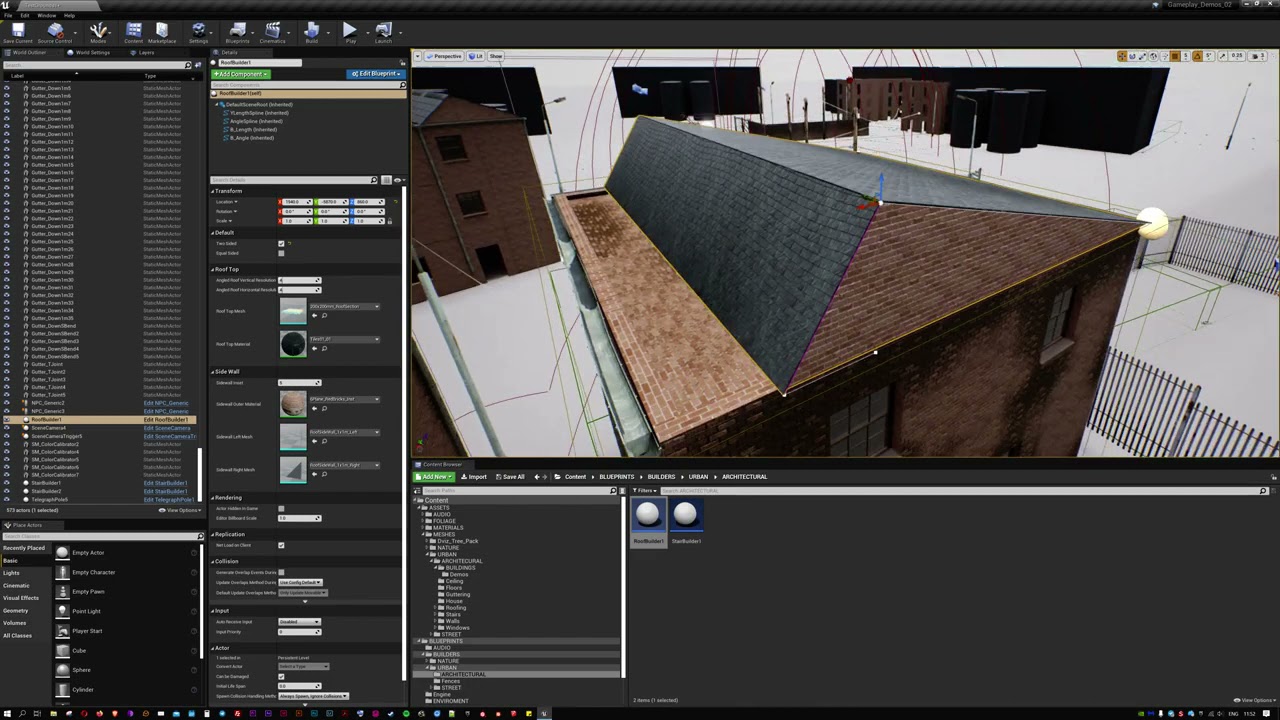
I have a lot of roofs to build out for my current project and found placing endless angled modular parts a chore + they wouldn't lead to much variety. In response I've developed this roof builder blueprint that places static meshes based on a set of splines that are easy to manipulate. It allows for the choice of materials and a simple set of ro...
oak patio
mental helm
Yup. I often use the input splines to generate the spline that actually deforms ...
Is it possible to make a spline that can detect crossroads and stuff, and then fill a closed loop with sidewalk
Never really dine them that much outside of the basics, cause I did want to use a spline for my roads, but my issue is the sidewalk wouldnt line up
sick patio
ok speaking of animations, could I set and in game, clock (tracking the literal time of day, in the game) and have stuff automatically... lights go out at 10pm, and come on at 8am? doors open and lock, same time, etc?
kindred depot
yupp.
hard to accomplish tho
ultra dynamic sky can do this
but not the clock system but you can get the time of day with uds and make the asset work with the time of day coming from uds
sick patio
so something like this... but stuff IN the world does all that https://www.youtube.com/watch?v=x3xBtPIVWEs

This video explains how to create a day/night cycle in Unreal Engine 4, including a moon and working clock, as requested by isaiah games on discord. Topics covered: Material functions, post-processing, blueprint scripting, level blueprints, HUD elements, animation timelines.
LINKS:
Moon Tutorial - https://youtu.be/thF80XvnqMo
Colored Fog Tutori...
uds?
kindred depot
paid asset.
sick patio
oh ultra dynamic sky... got it
oak patio
I just need to make a system where it can detect closed loops and fill with sidewalk, and detect intersections and choose the right mesh
Not even sure if its possible
I suppose i could just pain a sidewalk onto a land scape and that would solve it
 full knoll
Hey peeps, where is the best place to find experienced animators?
oak patio
Probably somewhere like Dice, but for a real answer we have job board channels, read #instructions to get startd
kindred depot
oak patio
I suppose i could just pain a sidewalk onto a land scape and that would solve it
why not just use a spline as the mesh and put the curbs in yourself?
oak patio
Cause im not sure how i would line up the square mesh with a curved road
And ideally it would be automated cause it would save me a lot of time in future projects
kindred depot
do the best you can, then like i said use a material that is world aligned so you can overlap the meshes with out them having a seizure.
then you just right click convert to static mesh
oak patio
Again
kindred depot
the curved yes
oak patio
I dint know the best way
kindred depot
this was my downfall as well on my first sidewalks, lesson learned 🙂
oak patio
How would that work kn somethinf like cornerw though, where the sidewalk would stick through the road mesh
Would i have a road with side walk attached, then fill in manually
Then have my material world alligned so no z fighting madness
kindred depot
you make REALLY TINY squares to cover it up and i use a rounded mesh that came from block out pack. That was it does not poke out.
oak patio
Cause otherwise it woukd be a procedural mesh is the only way i coukd see that working
kindred depot
or old school bsp
oak patio
Or iw there any point in the sidewalk mesh, wheb i coukd just flatten a landscape to the curb level, and then paint the material on
Cause there will be a landscale too
Just road on top
oak patio
Alrighty theb
I need to look into world alligned materials, havent done anythinf with mats other than copy an outline mat, and the standard base colour, roughness, normal
I cannot type on phone i stg
oak patio
Now that sounds wonderful
kindred depot
you know when you put a same materialled mesh on a mesh and it glitches?
yeah fixes that
oak patio
Yeah z fighting
Oooh
I want to get a waveform from the ingame music and use it as displacement to deform the sidewalk
Reactive side walk
kindred depot
sounds cool af
oak patio
Absolutely useless, but would be funny
kindred depot
i mean, everything is worth doing. might be useless but if you wanted to see it happen and want to make it a reality do it lol
oak patio
I may one day when i dont have any serious things going on, but with uni deadlines coming up and a steam release i need to work on, my time is stretched thin
 pallid talon
In the new UE5 Preview 1, there is no longer an option in the Project Settings for "Extend default luminance range in Auto Exposure settings". Which means high lux values will always get blown out. What is the fix for this now?
 wispy heart
Hey guys quick question, if I wanted to get the name of the texture that has been used on a tile in a terrain of unreal engine, how could I do that?
 tender ember
Hello I was wondering what program do you people use for terrain creation? are there any good free ones? or maybe you use 3D software like Blender, Max or C4D
wispy heart
No no that's how you would do it within Unreal Engine itself, but I want to do it through the code in visual studio.
Do I access the current landscape instance and search it to obtain the texture names?
drowsy snow
wispy heart
No no that's how you would do it within Unreal Engine itself, but I want to do i...
I'm sure this is #cpp territory question
wispy heart
drowsy snow
I'm sure this is <#221799439008923648> territory question
I shall move my question there then, thanks!
 red condor
I'm having an issue where after respawning my third person character the character's camera sometimes starts jerking around. It happens consistently, on the third respawn and then every 4th respawn after that. I'm destroying the last character before possessing the new one. Any ideas what could be causing this?
 oak patio
tender ember
Hello I was wondering what program do you people use for terrain creation? are t...
oak patio
tender ember
Hello I was wondering what program do you people use for terrain creation? are t...
You can do good terrain in ue4, alternatives could be the voxel plugin, or tools like world creator that can generate heightmaps for terrain
tender ember
oak patio
You can do good terrain in ue4, alternatives could be the voxel plugin, or tools...
by good terrain you mean hand scultping with ue tools?
oak patio
Yeah you can definitely get good results from that
tender ember
I found tutorials on height maps but all of them require a lot of steps and further photoshop/other editor work. and for example in blender it's just one click
oak patio
There are heightmap generators, you can paint your own heightmap, or learning the sculpting tools can be good
tender ember
yeah but when I bring it in UE it's going to be a mesh and not a landscape mesh right?
kindred depot
i used to use this to make terrains in ue xD https://www.worldpainter.net/
WorldPainter is an interactive graphical map generator for the game Minecraft. It offers tools similar to those of a normal paint program to shape and mould the terrain, paint materials, trees, snow and ice, etc. on top of it and much more.
red condor
tender ember
yeah but when I bring it in UE it's going to be a mesh and not a landscape mesh ...
you'd want to convert it to a heightmap - I haven't got that far yet
but it should be doable since it follows heightmap conventions
tender ember
red condor
you'd want to convert it to a heightmap - I haven't got that far yet
oh yeah you're right I'm gonna look into that
yeah heightmaps are so fun to work with
red condor
I do like the sculpting in UE4, it all depends how much landscape you need
A small level would be fun to sculpt, a giant world would be long-winded
kindred depot
voxel plugin is the most amazing tool to sculpt with lol
red condor
i need to take a look at that one
 earnest gyro
Is it good to go through all of the unreal online tutorials or are there some that are more important then others?
kindred depot
worth every penny.
tender ember
I'm just starting out in UE as an environment artist so I wanna know all the tools available. as well as landscape creation. so before I start learning auto-landscape materials and RVTs I need to understand how to create a high quality landscape mesh first:)
tender ember
earnest gyro
Is it good to go through all of the unreal online tutorials or are there some th...
idk I'm watching everything that is relevant to what I do
earnest gyro
tender ember
idk I'm watching everything that is relevant to what I do
ok thats what I thought I should do but wasnt sure ty
tender ember
for example I'm not a gamer I use UE for cinematic purposes so I don't watch tutorials for game creation etc.
earnest gyro
right
drowsy snow
earnest gyro
Is it good to go through all of the unreal online tutorials or are there some th...
Choose the one that suit best to your needs.
Though they have yet to make courses on Niagara (or maybe my search results were spotty)
sick patio
QUESTION: in an adventure ... with slight rpg elements. where you play a character... wake up, get out of bed, get dressed (fairly instantly) grab toast, walk out the door, get in the car and head to work: what is a good setting, for real life time to game time, where you can do that morning sequence to go to work for an in game hour, and get to work, and not be like sims ... where the guy sits down and 30 minutes just passed by.
kindred depot
is there a way to increase the scale of the map, with out adjusting the characters height or the objects height? every time i move scale up, it unlocks from a position that its located in
sick patio
landscape mode?
 sick patio
 drowsy snow
sick patio
QUESTION: in an adventure ... with slight rpg elements. where you play a charact...
drowsy snow
sick patio
QUESTION: in an adventure ... with slight rpg elements. where you play a charact...
What's the question? I don't see question marks.
red condor
I think the question is about time scale
sick patio
in game time, vs real time... what's a happy medium?
not rushed, but not an actual hour to hour
red condor
(sorry that shouldn't have been a reply, bad at discord xD)
red condor
sick patio
in game time, vs real time... what's a happy medium?
It should relate to the size of your game world
sick patio
right now my sun is running a marathon across the sky
drowsy snow
sick patio
in game time, vs real time... what's a happy medium?
If you want to make time based mobile game, use real time.
sick patio
well right now, my game world... or this level, is the default landscap size, which is 8x8... ? pretty big?
red condor
rethinking my reply, it depends on more factors really
kindred depot
To fix my issue, group everything. then use scale gizmo.
red condor
like what the player is waiting for to happen, how much it should feel like a 'wait'
sick patio
well i don't want the player to get out of bed, grab toast and the it be already noon
drowsy snow
sick patio
well right now, my game world... or this level, is the default landscap size, wh...
8km x 8km is already big by open world game standard.
tender ember
I found this
https://youtu.be/dUEPieo26nk

In this video, I will show you how to create a displacement map or a height map using Blender 2.8 in a few easy steps. I will also show you how to apply a displacement/height map to a plane in order to place all information on the mesh.
NOTE - These results work best when the object is between 0 and 1 blender unit.
Please show your support an...
red condor
it will depend on the types of actions, the feel of the game, whether its realistic or cartoony, etc
tender ember
super easy
red condor
Maybe the easiest is to try it in real time first and then see if it feels fun
If it feels like a drag, speed it up
sick patio
i'm thinking Heavy rain... almost exactly that feel,
i think heavy rain day and night was static to the scene, no?
red condor
yep
drowsy snow
sick patio
i think heavy rain day and night was static to the scene, no?
It is static.
sick patio
so maybe skip the dynamic day/night?
drowsy snow
So basically you don't have to worry much about constantly changing day night cycle.
Just set the sun rotation after certain quests.
sick patio
oh i wanted the world to be alive.... shops to close, street lamps to come on... at dusk or whatever, so the player got the idea of the passage of time
red condor
aha
sick patio
and the streets to empty
red condor
so it's open world?
drowsy snow
The one game that's came to mind is Mafia 2
drowsy snow
It's an open world game with fixed times
sick patio
and technically it was open, but you HAD to get somewhere and do something
red condor
yeah, you'll need to adjust it probably as you make your quests
and based on how much you want the player to feel like they're rushing
drowsy snow
That's very similar to Mafia 2
The time passes based on the quest
sick patio
um i wanted everything to occur in one day... and 90% of the game to happen at night (because ... horror)
drowsy snow
sick patio
um i wanted everything to occur in one day... and 90% of the game to happen at n...
I don't think open world format is necessary
But you can make the game trapped in constant night
Reminds me of the final sections of Final Fantasy 15
The game is night all the time until it's completed
 red condor
well maybe haha
it's easy to do
if you know it takes place over a single day, at least you have a limitation there
red condor
if you make the time ratio x4, you need 6 hours worth of content for a playthorugh
haha
xD
sick patio
i'm setting the event tick... delta to... 4 and it's blazing across the sky at breakneck speed
drowsy snow
sick patio
i might as well make skyrim horror?
Look up gameplays on Final Fantasy 15, particularly after Altissia part. The entire world is trapped in constant night time, and gave the gloomy vibe throughout.
sick patio
or i'm not understanding
drowsy snow
That kind of vibe might be what you're looking for
red condor
I'm not referring to sun speed at all
but the sun moving at x4 speed shouldn't be that fast xD
sick patio
ok i'll look that up, never even seen 15
red condor
the sun moving x4 is still pretty dang slow
drowsy snow
Like holy shit the latter part felt kinda depressing to play in person
It's constant night time, monsters everywhere, the bros started to split apart, sacrifices are made...
sick patio
here's what I have and the night and day function are the same


so are you saying ... per quest... adjust ... the time maybe? like ... do quest ABC and by C it's midnight?
drowsy snow
sick patio
here's what I have and the night and day function are the same
If I get this right, you want the daytime section to be in a time limit?
red condor
I think the whole game is time limited
once the day is over, you're done
unless I'm misunderstanding
drowsy snow
That doesn't sound fun tbh
red condor
ahh
sick patio
I think mafia proceeded with regular day/night no?
red condor
yeah ignore everything I said then xD
drowsy snow
sick patio
I think mafia proceeded with regular day/night no?
Mafia has fixed time progressions.
sick patio
oh
drowsy snow
Basically time changes only when you complete the quests
sick patio
let me go look at mafia and taht ff 15 then and probably heavy rain again?
red condor
yep, if there's no actual timelimit, just move the sun after each quest
you have no choice, becasue you don't know how long the player will take
sick patio
wait... and the 2 males in that game where they break out of prison, by the end of the game it's dusk and night
that was fixed too?
drowsy snow
sick patio
that was fixed too?
Yes.
sick patio
oh
sick patio
then day/night is really for open world, rpg adventure?
red condor
pretty much
drowsy snow
sick patio
then day/night is really for open world, rpg adventure?
Yeah.
red condor
if you need it to get to night at a certain point in your story, you can't leave it up to chance
if the player waits til it gets light again, then progresses and its suddenly night, it would look weird
sick patio
so the game mode can just set the time to... afternoo... boom dusk ... boom night?
red condor
sure, or at key points throughout missions if they're longer
sick patio
ok
red condor
do this, it gets a bit darker
(gradually xD)
but not past the point where you want it to for where you are in the story
that's the complex option
sick patio
then i have to learn ... what ... time of day looks like. got it
drowsy snow
My preference in this scenario would be either:
- constant day night cycle, but in key missions, freeze the time, and in the later parts, gradually become constant night (FF15 route)
- fixed day night cycle, with progression based on linear quest completion (Mafia route)
- Daytime serves as cutscene, the entire game is night time with no time progression.
I think those three are reasonably fun and plausible.
sick patio
now i'm remembering all the games that had day/night and it... it's all a light... vampire the maskquerade ... day and night ... was all forced. they weren't real days and i didn't really go to bed at night. somtimes the day lasted 20 minutes, sometimes 5
red condor
yup xD
video games
game dev has a lot of those realisation moments
you are pulling back the curtain xD
sick patio
ok guys thanks
 red condor
 broken lily
is the ground a landscape?
 jolly anvil
UE5P- Anyone know how to get android to show up as a supported platform to configure for VR?
broken lily
red condor
is the ground a landscape?
No just a mesh
red condor
does it look the same if you set your light to movable?
red condor
cool, so I might be wrong but I think this could be to do with your lightmap on the mesh
have you made a manual lightmap UV for it?
red condor
aha gotcha
so yeah its to do with scale I think
you could increase the lightmap resolution for the mesh
or use multiple smaller planes
or use a flat landscape
or use dynamic lighting
or import a properly lightmap-unwrapped mesh
broken lily
thx appreciate the help a lot. I will probably just use the landscape
full knoll
can a <@&213101288538374145> please message me i need some help,
Thank you in advance 😄
or admin either will be just as good 😄
 maiden swift
full knoll
can a <@&213101288538374145> please message me i need some help,
Thank you in a...
maiden swift
full knoll
can a <@&213101288538374145> please message me i need some help,
Thank you in a...
Ping us if someone is violating the rules or you need us to pin a message or something like that. If you need help with Unreal, ask in one of the many channels we have.
full knoll
maiden swift
Ping us if someone is violating the rules or you need us to pin a message or som...
yeah i'm having problems trying to create a job post, and i need some help understanding how it works, Thank you for your fast response 😄
maiden swift
Please read the #instructions.
If you need further assistance, DM me so we can keep this channel clear for Unreal things.
full knoll
maiden swift
Please read the <#780559951663857724>.
i did, i'm autistic and the description is vague
so I am asking if one of the staff can please help me
maiden swift
Like I said, send me a DM if the instructions aren't clear. 👍
full knoll
maiden swift
Like I said, send me a DM if the instructions aren't clear. 👍
Thank you 😄
 drifting cloak
howdy folks need some help will creating c++classes to link up arr to my unreal project.
I honestly have no idea how to do it, my experience with C++ is arduinos, and i was informed that such a process is complicated
feel free to ping me with responses
 tired abyss
Does any of the infinite blade assets come with any animations? looking for some blocking stuff
plush yew
i was watching a tutorial on a sliding blueprints door but the tutorial used matinee acgors and i believe they were deprecated, so i was wondering what i shoild use instead and how id implement it
drowsy snow
tired abyss
Does any of the infinite blade assets come with any animations? looking for some...
Not the characters, I'm afraid.
tired abyss
rip, was looking for some melee swing blocking animations
"place holder"
i mean
not blocking as in blocking a projectile
lmao
jolly anvil
Do we know which sdk ue5p wants for Android Oculus?. Same q for visual studios.
red condor
plush yew
i was watching a tutorial on a sliding blueprints door but the tutorial used mat...
A common approach is to use a timeline to update the door mesh world position (often using a spline for the travel path)
remote badge
tired abyss
Does any of the infinite blade assets come with any animations? looking for some...
Quick rigging question, do these bones look fine? The animation is horrifically glitching out in UE
 red condor
janked bones
remote badge
I'm using Send to UE plugin and I tested it on the default character rig, worked fine
I've also rigged a basic gun
This sk mesh freaks out though
So I should just start over and try again?
red condor
I had problems with Send to UE and skeletal meshes
but standard fbx export works fine
if you set the settings right
tired abyss
remote badge
Quick rigging question, do these bones look fine? The animation is horrifically ...
I do not see a root bone at 0,0,0
remote badge
tired abyss
I do not see a root bone at 0,0,0
I removed the root bone because I was getting an extra parent in the skeleton tree
 tired abyss
thats for unity mostly
well most situations
but normally, a good practice for ue4 is to have a root bone at 0,0,0
as far as i remember
thats why mixamo stuff shatters in ue4 for retarget and other things
because theres no root
red condor
These are the blender fbx settings that work for me with blender/ue4, for skeletal meshes and animations


in case you want to try without Send to UE4
(note you can save as a preset once you've set them up)
remote badge
tired abyss
but normally, a good practice for ue4 is to have a root bone at 0,0,0
Ok I switched up the tree

no change
 remote badge
red condor
in case you want to try without Send to UE4
remote badge
red condor
in case you want to try without Send to UE4
If I send without the plugin, the animation is still messed up, but it also gets scaled down to a ridiculously tiny size
not the mesh, just when I apply an animation to it
plush yew
red condor
A common approach is to use a timeline to update the door mesh world position (o...
i dont know how id do that
red condor
i can't remember but i think it should be 0.01 (corrected) meters - whatever the Send to plugin sets it to by default
remote badge
red condor
your scene size needs to be adjusted
this?

the dimensions are realistic, I've tried messing with different magnitudes and units but no luck
red condor
plush yew
i dont know how id do that

In this video, we'll learn a few fundamentals like:
- What is a Blueprint Class?
- What is a class in software development?
- What is inheritance?
You'll then learn how to build a door in Blueprint scripting using a timeline and trigger volume.
As mentioned in the video, if you want to learn more about fundamental object oriented programming ...
remote badge
It either makes the mesh huge/tiny, or the mesh is properly scaled and the animation becomes tiny
plush yew
ok thanks
red condor
remote badge
this?
yep, thats it.
if you have the sendtoUE enabled, the scene will be set up correctly and you can still use standard fbx export
that's my exact setup. It took me a while to get everything working
remote badge
red condor
yep, thats it.
it's just tiny all the time with 0.01 meters
 red condor
are you using the fbx export settings I posted?
also is the character and armature's scale 1?
remote badge
Yea
If I multiply the scale by 100, it goes back to the original problem
Normal scale but anims are messed up still
drowsy snow
Apply the scale.
red condor
yup
drowsy snow
with the animation already being done, I think it's too late. The unit scaling has to be set up as early as possible.
Once there's LocRot keyframe, it has to be redone.
red condor
yeah, all transforms should really be applied to make things not wonky
and that would mess up anims
remote badge
drowsy snow
Apply the scale.
multiplied the scale by 100, then applied, but the animations are still tiny
also these aren't my animations, just from the starter content, they work fine on the default character
drowsy snow
remote badge
also these aren't my animations, just from the starter content, they work fine o...
So you're retargeting?
remote badge
drowsy snow
So you're retargeting?
I'm importing the sk mesh, then assigning the skeleton to the default characters
I make sure the naming and bone structure is in the same style
 drowsy snow
remote badge
I'm importing the sk mesh, then assigning the skeleton to the default characters
drowsy snow
remote badge
I'm importing the sk mesh, then assigning the skeleton to the default characters
And the skelmesh comes from Blender first?
drowsy snow
remote badge
This is pretty much irrelevant to the case at hand
remote badge
drowsy snow
And the skelmesh comes from Blender first?
yea I downloaded the rig from sketchfab, deleted unused bones and reassigned the vertices, then renamed the structure to match the humanoid convention
drowsy snow
remote badge
yea I downloaded the rig from sketchfab, deleted unused bones and reassigned the...
Okay, so in Blender, adjust the unit scaling to 0.01 and scale (and apply!) everything up 100x. Export the skelmesh as FBX, bring in to Unreal, and then retarget the animations to that skemesh
remote badge
I did that, and then scaled up 100x + applied. I'm trying to just import the skeletal mesh and use it in place of the default sk mesh. I don't want to duplicate all my animations and anim bp with retargetting since I plan to expand those in the future

 loud pike
Any idea why i cant see the static mesh in the Blueprint but i can see it in the scene ?
 red condor
oh sorry
i misread xDD
are you zoomed in too close?
try zooming out with the scrollwheel
loud pike
i created the BP as a child from another BP
red condor
you might be inside the mesh
jolly anvil
red condor
https://youtu.be/3NpM8v-ukEY
Best istruction videos in any industry ever. a true educator

 amber shuttle
press F
red condor
jolly anvil
Best istruction videos in any industry ever. a true educator
I know!!! Such a shame she stopped posting videos...
loud pike
amber shuttle
press F
Fixed it 😄
amber shuttle
easy 😄
drowsy snow
remote badge
I did that, and then scaled up 100x + applied. I'm trying to just import the ske...
FWIW you might as well ditch Manny's skeleton and roll up with the custom skelmesh's skeleton, and use it as the new base skeleton
drowsy snow
red condor
I know!!! Such a shame she stopped posting videos...
I think at one point she got recommended in one of the official UE Community Spotlight
remote badge
drowsy snow
FWIW you might as well ditch Manny's skeleton and roll up with the custom skelme...
So here's the result of retargetting... I did one jogging animation to test and still no luck
 oak patio
looks fine to me 👀
plush yew
how do i find how far an actor is off the ground?
remote badge
plush yew
how do i find how far an actor is off the ground?
line trace
red condor
plush yew
how do i find how far an actor is off the ground?
using a line trace
plush yew
how do i do that, im new to blueprints
 lucid grove
Is there a way to set delay before transition in animation bp?
plush yew
wait nvm ive fixed it
drowsy snow
remote badge
So here's the result of retargetting... I did one jogging animation to test and ...
perfect.
red condor
lucid grove
Is there a way to set delay before transition in animation bp?
not sure if that's possible in the animBP itself, but you could delay setting the variable that allows the animation to trigger?
perhaps using a 'delay' node
drowsy snow
imma sleep kthxbye
lucid grove
red condor
not sure if that's possible in the animBP itself, but you could delay setting th...
There is no nodes in transitions like in ordinary blueprints. The only way I can do it with external animnotifies.
red condor
I meant you could do it outside the animBP
it depends on how you have things setup
is there a bool variable that allows the transition to happen? Say that's set in the character - you could delay the bool being set
before it gets to the animBP
you could add another condition if needed to not mess up your existing logic, and delay that one instead
does that make sense?
remote badge
 lucid grove
red condor
does that make sense?
lucid grove
red condor
does that make sense?
Thats what im talking about - the only way to do that is ouside transition rules.
red condor
yep - that's why I'm suggesting to do it in, for example, the character blueprint
so if the transition rule is ExampleBool must be true
and that bool is based on a bool the character has
plush yew
can someone help
red condor
then when you want to change the value in the character blueprint, you just add a delay before you do
that way the animbp won't get notified until the delay is up
and your anim is delayed
plush yew
i followed a tutorial on a door opening/closing (https://www.youtube.com/watch?v=3NpM8v-ukEY) and when the door closes, it goes too high and idk how to fix it
red condor
plush yew
i followed a tutorial on a door opening/closing (https://www.youtube.com/watch?v...
can you post your blueprint?
plush yew
ok
 jovial quarry
I recently made a few updates in BP to one of my characters in my game. PIE used to load in a seconds or less but now takes probably 15 seconds to load in but runs smoothly once it does. Any idea what I should look into to correct this issue? The items I added are simple nodes on the character objects I was already updating in my gameplayability.
plush yew
 plush yew
idk
red condor
the float curve in the 'close' timeline needs to go down from 1 to 0
if its the same as the first timeline itll just go up again
o wait I'm wrong
because you're reversing it from the end
hmm
i did the tutorial a long time back unfortunately, but it worked
jovial quarry
plush yew
idk
Can you show me what's happening? You say it goes up too high, what does that look like?
plush yew
plush yew
red condor
because you're reversing it from the end
i did it a bit different
but its the same if u know what i mean
red condor
ah
plush yew
instead of putting a number in i got the location so its the same for all instances
basically instead of manually finding out the z value i just got it from the "getactorlocation" node
remote badge
yea all of them are skeleton and root/pelvis are animation scaled
plush yew
but i dont know what im doing wrong
jovial quarry
can you show me your timeline?
plush yew
 jovial quarry
It looks like you are just moving the door too far based on the size of your door.
 desert flare
Hey, do anyone know about a good tutorial/guide for how to implement a moving vehicle with physics for unreal?
plush yew
jovial quarry
It looks like you are just moving the door too far based on the size of your doo...
what would i have to change
red condor
plush yew
what would i have to change
either the distance, or the door size :)
ideally you would have a precise mesh size and travel distance
plush yew
red condor
either the distance, or the door size :)
how would i change the distance
jovial quarry
Update the values on your timeline
plush yew
to..
red condor
make sure you understand the concept of the timeline, and the values it is affecting
jovial quarry
play with the values on your door Z axis and see what happens
plush yew
i changed the last frame to 0 and it went half way and still went too far at the end
jovial quarry
setup a little trigger or something and then set the values to different itnervals to see what happens so you have a good understanding of what's actually ahppening
Youb asically just copied code from a tutorial and are stuck at "why doesn't it work? I want X to happen."
instead of seeing it programmatically and fixing it
red condor
the question is how far do you expect the door to go? the engine can't guess, you have to tell it.
plush yew
what im confused about is why it goes extra far on the up and not down, even though i change the values?
red condor
one thing worth noting is the video is a simplified example
jovial quarry
you need to play with this to see what is actually happening
plush yew
jovial quarry
"too far" isn't a thing
going further up than down
red condor
you might find it convenient to use a spline like I mentioned before
jovial quarry
setup some way to change the values ingame
It probably isn't man. You just don't see it that way.
red condor
then your timeline can move the door along the spline and back, its easier to visualise the distance
jovial quarry
You are directly changing the actor's location. The engine isn't doing anything else or bumping it up or down more or less
red condor

We begin our look at splines and their many uses. This episode we take a look at how we can use them to create moving platforms and elevators.
Support me on my Patreon and see episodes 2 weeks early: https://www.patreon.com/ryanlaley
this shows how to move something along a spline
if you combine the two videos, you can get something working just how you want it
plush yew
jovial quarry
You are directly changing the actor's location. The engine isn't doing anything ...
well i dont know what im doing different on the door closing than going up
plush yew
red condor
if you combine the two videos, you can get something working just how you want i...
okay thanks 🙂
red condor
but you'll still need to set everything up correctly. The spline simplifies things visually
jovial quarry
plush yew
well i dont know what im doing different on the door closing than going up
You don't appear to be doing anything differently. But we can't see everything so we can't say what the deal is. If your door isn't lined up correctly or isn't the correct size to fit that opening, it may be giong just as far one way as the other but still looks funny. I would do what Geoff said as I don't think moving your actors around directly like that is probably the best way but honestly I haven't done much of that myself
red condor
I gotta go eats, good luck 👍
tender ember
I can't delete a folder it says failed to load assets and whn I open the lot it is empty
jovial quarry
tender ember
I can't delete a folder it says failed to load assets and whn I open the lot it ...
I'd try restarting the editor.
tender ember
it's all bridge stuff I tried reinstalling the bridge but it keeps on downloading some parts of the stuff and disregarding others
I asked for help but they said to reinstall so I guess I'm gonna do that again
tender ember
jovial quarry
I'd try restarting the editor.
thanks💛 I'll try that after I reinstall it
tall crypt
I downloaded the UE 4.27 from the site... but when I launch the epic gamer launcher it shows me UE 4.23.1 ?
 quasi lake
hello!
can someone pls help me, i've disabled all print strings in my project somehow (probably accidentally pressing some kind of hotkey)
how can I turn them on back?
plush yew
red condor
if you combine the two videos, you can get something working just how you want i...
for some reason the spline isnt working
tender ember
jovial quarry
I'd try restarting the editor.
can't do it still:( does anyone know what this means?
 tall crypt
NM, just figured it out... I have to get use to the way EU works
plush yew
hey does anyone know how do i fix this bug where it doesnt show my components
 jovial quarry
plush yew
for some reason the spline isnt working
jovial quarry
plush yew
for some reason the spline isnt working
You have to try to run down the issues and come back when you think you may have it narrowed down to more than "doesn't work". Most of doing this stuff is tracking down problems, not creating
jovial quarry
plush yew
hey does anyone know how do i fix this bug where it doesnt show my components
Can you click on the Graph and open it?
plush yew
jovial quarry
Can you click on the Graph and open it?
it opens my blueprints but i need my character to show up there
should be like this

sometimes from time to time it just bugs out and i cant see my components in some bps
jovial quarry
I've never seen that. If you delete that actor and start over, does it still do that?
No idea
plush yew
jovial quarry
I've never seen that. If you delete that actor and start over, does it still do ...
if i delete and start over it works just fine
plush yew
ye i'll probably do that, thank you anyways ^^
sharp crest
plush yew
sometimes from time to time it just bugs out and i cant see my components in som...
show pic?..
plush yew
plush yew
hey does anyone know how do i fix this bug where it doesnt show my components
@sharp crest
 plush yew
yes i tried but there is not such a window for it
sharp crest
wdym???
sharp crest
it's literally these
 plush yew
i cant find those in windows
sharp crest
also you can go to window and reset layout
plush yew
oh okay
 plush yew
ye its that thank you
sharp crest
👍
 timid spade
i use dual render scopes with rendertexture and scenecapturecomponent2d
how can i add the prism effect near the edges of the scope lens (rainbow effect) to my ue4 game scope
 fading hull
for some reason when I load this asset into my map, the move thing(X, Y, Z) axis mover is far away from the object, is there a way to fix this?
 timid spade
fading hull
for some reason when I load this asset into my map, the move thing(X, Y, Z) axis...
timid spade
fading hull
for some reason when I load this asset into my map, the move thing(X, Y, Z) axis...
change origin
fading hull
What do you mean?
fading hull
No, this is UE5
fading hull
I didn't make the model, it's from a asset pack, I just wanted to make some maps
Soul City
timid spade
all models have origins
the origin is where the centre of the model is
youd need to put that model in blender or maya (for example) and move the origin to where youd like it to be
fading hull
Can I change that in Unreal Engine?
amber shuttle
yea you cant
 grim ore
timid spade
timid spade
how can i add the prism effect near the edges of the scope lens (rainbow effect)...
grim ore
timid spade
timid spade
how can i add the prism effect near the edges of the scope lens (rainbow effect)...
if anyone knows how to do this please lmk
devout gorge
Hey, does anyone know if it's possible to use udims with opacity mask? I keep getting this error just on a basic material when pluging in the opacity mask.

Thank you, hacky will work.
amber shuttle
i was just banned from gamedev discord for being straight
tender ember
What’s up with UE4 and Quixel Bridge Megascans? It doesn’t import half of the stuff I checked. Constant problems with it and I’m reinstalling it for the 3rd time now. Does anyone else have any problems exporting from it?
timid spade
amber shuttle
i was just banned from gamedev discord for being straight
whoever banned you is dumb
 sinful tendon
Is there a tutorial on how to make a tower defense game or can someone tell me how to spawn an enemy and have it follow a waypoint system.
amber shuttle
i believe there are plenty?
sinful tendon
amber shuttle
i believe there are plenty?
link me one
tall crypt
what causes there to be "light" on the inside along the edges of the wall and roof... the geo is overlapping?
 sinful tendon
What's the best way to learn more about how to use blueprints. i bought books and watched tutorials but the resorses don't seem to be enough.
 austere whale

SARAMALACARA - TOMBOY (Videoclip oficial)
#SARAMALACARA #TOMBOY
Escucha TOMBOY
https://bfan.link/tomboy
Follow Saramalacara
https://www.instagram.com/badfacesara/
https://twitter.com/saramalacara_
Contacto: mgmt@bohemiangroove.com.ar
Prod by EVAR
Rec by Lamadrid
Mix by 7AM Mixing
Master by Mike Bozzi
Dirigido x Noduermo & Santiago Chaher
...
does anyone know if they used
that like iphone ar scan
for the segments in this video like at 0:10
red condor
I'm having an issue where after respawning my third person character the character's camera sometimes starts jerking around. It happens consistently, on the third respawn and then every 4th respawn after that. I'm destroying the last character before possessing the new one. Any ideas what could be causing this?
 jolly rampart
when i am making the enemy shoot missiles, how do i make it only collide with the player? ask for any screenshots if needed
drowsy snow
jolly rampart
when i am making the enemy shoot missiles, how do i make it only collide with th...
Check if player character overlaps with it, and only player character.
Of course if that's not putting into account blast damage or friendly fire on enemies.
jolly rampart
drowsy snow
Check if player character overlaps with it, and only player character.
Of cours...
ill send a video
jolly rampart
drowsy snow
Check if player character overlaps with it, and only player character.
Of cours...
sorry abt the music btw
drowsy snow
jolly rampart
sorry abt the music btw
I can mute and replace it with jazz.
drowsy snow
jolly rampart
What about the BP code you have right now? Also you don't seem to show the logic you have in action.
timid spade
sinful tendon
Is there a tutorial on how to make a tower defense game or can someone tell me h...
watch ryan laley's ai tutorials
you need to set up your enemy to follow waypoints
regardless, its pretty easy to do (if you just need something simple)
i will dm the series to you
it helped me a lot
timid spade
jolly rampart
when i am making the enemy shoot missiles, how do i make it only collide with th...
also, use collision channels. project settings -> collision and in your character bp set the option in physics tab i believe its called collision type
you can make it so certain things wont collide with each other based on their channel
jolly rampart
timid spade
also, use collision channels. project settings -> collision and in your characte...
OH
that is something that i was unaware of
 steep flax
Hi, any one have any opinions about mixing low poly with a higher poly grapichs?
jolly rampart
steep flax
Hi, any one have any opinions about mixing low poly with a higher poly grapichs?
itd probably be a little weird and unpolished
depending on how you execute it
drowsy snow
steep flax
Hi, any one have any opinions about mixing low poly with a higher poly grapichs?
Highly depends on the game's art direction
steep flax
jolly rampart
depending on how you execute it
i like really new to creating games and i have been looking at "synty studios" low poly assetpacks and i really dont like how the ground and water look and was thinking of changing them to highher quality
jolly rampart
steep flax
i like really new to creating games and i have been looking at "synty studios" l...
that could look messy
it all depends on how you execute it
that goes for anything though
steep flax
jolly rampart
that could look messy
ok ok, i did also google that shading and lighting is a huge deal with low poly games so i guess that would probly help with the uglyness
i mean i cant seem to find any other asset packs that have a huge selection that are not low poly.... could just be that im new and dont really know how to or where to look
drowsy snow
steep flax
i mean i cant seem to find any other asset packs that have a huge selection that...
There are lots of those from stuff like iClone, Daz (though many had horror stories with the integration), our own MetaHuman Creator
steep flax
is there like a generall rule about buying or using free assets for the meaning of publishing the games like how do i know if they are free to use for anything? @drowsy snow
drowsy snow
steep flax
is there like a generall rule about buying or using free assets for the meaning ...
It really depends on the licence, but stuff from Marketplace are generally okay to use.
steep flax
drowsy snow
It really depends on the licence, but stuff from Marketplace are generally okay ...
the unreal engine market place?
oak patio
steep flax
the unreal engine market place?
generally if you want something super customised like you want, you will have to do it yourself, I don't reccomend mixing art styles as that looks messy
 merry bison
In my endless runner game I'd like to continuously spawn a floor in front of and ahead of the player and destroy it once the player passes it. What's a good approach to achieve this?
In my mind I'm thinking of counting from the player's world location and add a number to that then spawn a floor there.. Is that a smart approach or is there a better way?
drifting cloak
anyone know of any tutorials that can help me with adding arr module to my ue4.25 project?
I understand that I need to use C++ in order to create an SDK for it. but I have little experience in such
merry bison
Tbh, I've thought of this too. Maybe like having a bunch of them "rotate".
I'll fiddle around with this approach I think.
Thanks
drifting cloak
Application Request routing
yeah, because i know it's complicated and people saying "it's complicated and hard" doesn't help me sovle it
i was shared a github page but that involved creating SDK from exsisting games and that's not what i need.
i need either a sdk specifically for arr module to mesh with 4.25
or a tutorial to help me create them (the latter would much be preferred)
merry bison
Question though, before I start changing my code. With the tiles moving, wouldn't my player actor also move with them, backwards?
drifting cloak
i have iis 7.0
from what i've been told is that i need to use C++ and vs to create my sdks for the project
oh, okay
that's what i was told.
My goal is to put in the arr module that unreal asks for when i try to open the project
 rare frost
Hey! Can anyone think of why, in editor, using "Join Session" for the Client and "Create Session" for the Server would work fine. But creating a Listen Server via the command line, and a Client that joins the server by command line would create replication errors like "No owning connection for actor".
 rare frost
Maybe it has something to do with using 127.0.0.1 instead of my computers local network IP. this is all LAN, btw.
drifting cloak
drifting cloak
<:Cinnamontoastfuck:930536359347748924>
yeeeesh. yeah it seems that it's gonna be a lot of bs trying to find this.
i'll have to ask a few people ig
 slate vessel
Can anyone tell me why the grass has this odd shadowing at its base? I don't think it used to do this either that or ive only just spotted it
 plush yew
https://streamable.com/x6nev2 So Maya has always been the go to for rigging but i feel like if you have the willpower Blender actually blows it out of the water, its only been a few months and I cant imagine going back to maya for rigging or animating game characters

I would like some advice however, about materials character customization blueprints and some things regarding the getskeletalrestpose component. I feel like if i could gather a handful of amatures we could make something gainful and legitamate
Yikes
no
daz to unreal bridge is super broken
diffamorphic allows you to get it into blender
then you can do the rest form there pretty easy
i delete the daz skeleton
and just use autorig pro
its pretty good
and then from there i add more drivers
like the base is good but then i add corrective morphs n stuff
proven aspen
I'm shocked at Blender's competence with linking scenes to a master rig. You can even add new constraints to controls. It's really impressive. Way better than I was able to do with max xrefs. I wish it was better about things like multi-selection, though. And they really need to move away from the "rig controls are bones" thing.
neon bough
why do you swap the skeleton for your own?
DAZ rig is pretty neat for animation
specially if you have pretty much support for bones driving JCM shape keys
plush yew
My full steps is I add the daz character from daz to blender using diffamorphic addon, i create a udim material for the entire body/face/arms/legs so it can be colored n crud all at once in unreal, i then use my hair conversion script to generate alembic groom groups from the hair cards, i do the same for eyebrows and lashes and add them all to the same material group and then make an alpha for them to be customized later, i then use diffamorphic to add all the morphs i want from my daz library and then use gret addon to transfer the bone x,y,z to match the morph targets and create a seperate skeleton for every morph that affects height and then i export to unreal, in unreal inside my character animbp i make a getskeletalrestpose function for each morph changing height and scale so that it swaps to the skeleton that works with it in game. The process is much longer these are just the main steps i can ramble off the top and all of the addons are free, if you have trouble obtaining my hair converter i dont mind sharing it via dms. Also I do not use jcms because it is much better to properly weight paint the mesh than to make morphs for every little pose lol


daz is good, as a base. If you use daz as is youll get a crappy product i think it is a good library of resources to use as a base for creating stuff with
ill be making a full tutorial on all of this sometime soon
neon bough
proper weight painting doesn't replace JCMs
plush yew
and then a seperate tutorial on blendshapes and swapping skeletons in realtime since every triple a game with character customization does this yet nobody in the hobbyspace seems to know about it lol
proper weight painting doesnt replace jcms
then you need to better wieght paint lol
neon bough
no, you have to understand what JCMs are for
plush yew
most of the jcms i release for daz are made from exporting as fbx after painting and posing
lol
bro agree to disagree lol i dont like using jcms
neon bough
if you bend your arm, your biceps will "grow", how do you archive that with proper weight painting?
 magic field
What are some good resources to learn Unreal Engine???
plush yew
ben if you really dont know the answer to that question you just asked please learn about weight painting, it will save you a lot of time not using jcms lol
https://www.youtube.com/watch?v=4LoX3zXzWhY this video might help you
neon bough
guess i have to learn what weight painting is...
magic field
What are some good resources to learn Unreal Engine???
neon bough
just admit that your "proper weight paint makes JCMs obsolete" statement was nonsens
instead of attacking me to learn proper weight painting
 ember cypress
magic field
I want to do Virtual Production with the HTC Vives
ember cypress
magic field
I want to do Virtual Production with the HTC Vives
https://www.unrealengine.com/en-US/onlinelearning-courses/welcome-to-film-and-television
You could start with this learning path, then.

Unreal Engine
In this course, you’ll get a foundation in using Unreal Engine for film and TV projects, including how to use the multi-track editor and Materials system, how to set up camera values for virtual production, and more.
magic field
ember cypress
https://www.unrealengine.com/en-US/onlinelearning-courses/welcome-to-film-and-te...
I appreciate it!
I'm not sure what constitutes a "Good" Developer but I would like to Focus my attention on the difficult stuff ya know?
At the height of difficulty I imagine c++ Programming and blue prints
I have experience in Audio Software like Logic Pro X and Ableton
neon bough
then unreal dmx stuff might be worth checking out
magic field
It really helped me to reverse engineer songs,, Seeing the song structure
neon bough
the 4 chords?
slender egret
Cant leave/unpossess vehicle? Any ideas?
magic field
So i hope to find environments that i can use as a template to learn and tweak
Are there any resources for free? 3d Models and 3d environments
neon bough
magic field
So i hope to find environments that i can use as a template to learn and tweak
you can checkout https://www.twitch.tv/deadmau5/videos?filter=archives&sort=time the oberhasli things stuff is most of the time unreal/ableton related
magic field
neon bough
you can checkout <https://www.twitch.tv/deadmau5/videos?filter=archives&sort=tim...
Thanks Ben! I'll check it out.
 desert verge
I'd like to make a game like Warlord Organ Trading Simulator, should I work on improving UI art?
magic field
Ideally I would find a decent environment and a 3d model that is already skeleton rigged.. Then control the model with HTC vive Trackers.
oak patio
desert verge
I'd like to make a game like Warlord Organ Trading Simulator, should I work on i...
how can we know that if we have no idea of your current skills
magic field
Not sure how much processing power i need..
neon bough
not much, check the free stuff on the unreal marketplace there may be some useful things
desert verge
oak patio
how can we know that if we have no idea of your current skills
Lol true, i'd know how to program everything from it since its a click based game
magic field
But it hope a GeForce RTX 3070 will suffice
desert verge
I'm just horrid at UI stuff
neon bough
it will, if you don't do crazy stuff xD
magic field
Crazy stuff doesn't even sound "crazy" compiling shaders and lighting??

The reason i got into Virtual Production.. He makes it seem feasible
One man, Mocap suit and iphone xr for facial mocap
neon bough
and maybe years of experience with stuff like that
magic field
I can wrap my head around the concept of 3d modeling and environment building
 marble coral
Hey, any idea if I could put a question regarding some work with a ue4 mannequin in blender in this server?
 worldly spear
anyone know why when i import an alembic to Unreal I get this weird ghosting issue at render time?
desert verge
magic field
I thought this was from Avatar
magic field
Lol some guy named Cory that is groundbreaking in Virtual Production
Matt Workman is another person that is highly regarded in the field
magic field
I can imagine it's much more dificult to create a game that runs on Unreal Engine than using it for it's environment creation
What i really need to do is familiarized with the Menus and master the Key commands
 random forum
Anyone ever get an issue where whenever they hit the "Browse to" button in an asset, it will REFUSE to send it to Content Browser file system, and instead open Content Browser 2..... not matter how many times you close the window!?
calm widget
Any easy way to add.. inertia? Not sure how straight forward that is so i'll just show you. But i want the character to not stop in his tracks when running into a slope.
 next sierra
Hey yall. How do I fix the lighting in this area?

It should be dark except where the spotlight is pointing.
tall crypt
If I have this kit of lights in fbx, how hard is it in UE to add actual illumination to these models?
 drifting cloak
can i get unreal to not check for a particular module?
I cannot find this arr module anywhere and want to jsut tell it not to check it.
if stuff breaks then i'll go back, i need this working
plush yew
Hi, is there any way to set fixed window ratio when resize window?
I'm packaging to Windows 10 but there was only enable/disable resize options, not resize with fixed ratio.
 silk sandal
Does anyone here know how to do an in game screenshot function that doesnt use the command function so it can be done packaged?
drowsy snow
tall crypt
If I have this kit of lights in fbx, how hard is it in UE to add actual illumina...
It's as easy as making a blueprint and putting together the mesh and a couple of light probes. Couple that with volumetric fog, it just works.
The point light serve as the emissive illumination, with small radius just illuminating the bulb area. Then the spot light is for the spot light.

 drowsy snow
silk sandal
Does anyone here know how to do an in game screenshot function that doesnt use t...
drowsy snow
silk sandal
Does anyone here know how to do an in game screenshot function that doesnt use t...
Why not let the player use the screenshotting tool provided by the OS?
drowsy snow
tall crypt
If I have this kit of lights in fbx, how hard is it in UE to add actual illumina...
For reference, just the BP actor itself. The emissive light component is moved with relative position. I also make some quick light setter to unify the parameters across the light probes.

 tall crypt
@drowsy snow i'm brand new to UE, I just youtube'd what you said above and I'm watching some tutorials, thank you for answering!
your diagram looks scary complicated...? is all that needed for one light?
drowsy snow
tall crypt
your diagram looks scary complicated...? is all that needed for one light?
Nah, it's pretty simple, just to unify the settings for two of the light probes so that I don't have to go through the light component in the map for adjusting things. From the top:
-
Just toggling the shadow casting for the spot light, to save on performance
-
Set light intensity for the spot light and the emissive bulb light, with the latter 1/8 of the spot light's
-
Toggling volumetric light shaft of the spot light, to save on performance (used for lighting from the camera)
-
Set the light colour on both light probes at the same time
 rancid lagoon
I am trying to make a multiplayer game, and am having trouble. How do i connect to a server that is not on my local machine? I am using AWS computer to host my server files, but when i type in hte IP adress of the the ASW computer, i cant connect. How do i fix that?
drowsy snow
rancid lagoon
I am trying to make a multiplayer game, and am having trouble. How do i connect ...
tall crypt
is there a trick to getting "Bridge" to show up in UE? I've installed it, opened it and UE, and closed and re-opened both of them... still no bridge?
drowsy snow
tall crypt
is there a trick to getting "Bridge" to show up in UE? I've installed it, opened...
Are you in UE4 or UE5?
drowsy snow
tall crypt
4.27
Close the editor, install the plugin via Quixel Bridge app, make sure it points to your engine's Plugins directory (e.g. D:\Unreal Engine\UE_4.27\Engine\Plugins), and then launch the editor again once it's done installing.
tall crypt
did all that, and bridge keeps giving me an error that says unreal isn'r runninf even though I have it open...?
 drowsy snow
tall crypt
did all that, and bridge keeps giving me an error that says unreal isn'r runninf...
drowsy snow
tall crypt
did all that, and bridge keeps giving me an error that says unreal isn'r runninf...
Have you tried installing it?
Also make sure it's installed to the right directory, and enabled in Plugins list

 hybrid sky
how do i create a character "mesh" for a pawn where it's just a 2d image?
like (sorry for the horrible link idk examples ) this? https://youtu.be/VTtH9dVYOjw?t=65

2d pawn in 3d space
 dull dew
can we shoot with raycasts in unreal?
drowsy snow
dull dew
can we shoot with raycasts in unreal?
Yes, just do a linetrace forward.
tall crypt
@drowsy snow thanks... its working now!
plush yew
Hi, is there any way to set fixed window ratio when resize window?
I'm packaging to Windows 10 but there was only enable/disable resize options, not resize with fixed ratio.
tall crypt
can I create custom parameters for imported fbx models, that will only effect the models initially created orientation? https://www.youtube.com/watch?v=S1sl0aFA7fE

Can I customize Unreal Engine Parameters for imported models