#ue4-general
1 messages · Page 1133 of 1
 rancid lynx
if you press SHIFT + S + the windows key, you can take a tiny picture and share it so we can see what you see
else we are just guessing based on your question with nearly no details.
other than "it sucks"
 warm plume
Ty I'll do that in few!! I'll share more details and pic to show u what I mean
 plush yew
how do you make textures that fit perfectly on selected model and go all over the model like clothes lol? for example laptop texture having detailed real screen on it?

these kind of textures
 bright sigil
plush yew
these kind of textures
bright sigil
plush yew
these kind of textures
You make the model first, unwrap it, then texture it
plush yew
bright sigil
You make the model first, unwrap it, then texture it
i downloaded free model, gonna put image on plane and then put it in front of laptop model screen lol
 fervent stag
hello, can someone assist in identifying an issue I'm having? I had a mesh customized and now that its in the project when I try to align it with other roads I'm noticing that the X & Y coordinates shift no matter where I set the pivot point. Is this an issue with the meshes editing? If so, how can it be corrected?
 chrome swallow
Hello everyone. I hope some one may be of service. I would ask this in the UE4 Answerhub, but they are read only at the moment. Any how, I am trying to build the lighting for my project and keep getting a Lightmass Crashed error all the time and hope someone may help me to understand why and how to solve this. This is the error I keep getting.

 pallid talon
Question, there used to be a chart when using World Composition to tell you how to spit your images into parts on Unreal's documentation, but I can not find it. Have they removed it??
For example, it might say, use 2017x2017 to get 8x8 tiles, etc....
For creating landscapes.
 dire parcel
hello mr @bright sigil
update on the fix.
basically the youtuber that i followed is the one who messed up in the video, i should have read the comments but i basically had to remove it and me and my friend worked on a better system
 split jasper
Hey general question to the experienced: If you're opening up Photoshop or whatever to make a UI icon, and you're not quite sure how big you need it to be, what do you set your starting canvas size as?
pallid talon
split jasper
Hey general question to the experienced: If you're opening up Photoshop or whate...
Your UI image or button should tell you what size it is, regardless of your canvas size. You should start there to know what resolution to make your actual graphic icon.
 mortal grotto
If i made a virtual gallery from a third person multi player template with selectable characters in UE5, would it be possible to host this online and allow others to connect and hangout?
split jasper
pallid talon
Your UI image or button should tell you what size it is, regardless of your canv...
I love the faith you have, that I've designed these UI elements already and just need the images for them. But I'm afraid it is misplaced.
My flow is the other way around, first I make the icon, then I kinda mess around with sizing until it looks right
pallid talon
split jasper
I love the faith you have, that I've designed these UI elements already and just...
Then I'd recommend you know your device and desired on screen size. Both of these options can be changed here -
 split jasper
pallid talon
Then I'd recommend you know your device and desired on screen size. Both of the...
split jasper
pallid talon
Then I'd recommend you know your device and desired on screen size. Both of the...
By canvas size I meant like the photoshop canvas size for new icon images
pallid talon
Right, those settings I just told you will tell you the x and y space you have to work with, then you set that in your photoshop canvas, now you can start making your icons in photoshop and the results will be 1-1 when you bring them into UE.
split jasper
Mannn they won't tell me the x and y I have to work with, because I dont know what amount of the screen I'm gonna give to this icon, because I haven't made it yet
pallid talon
split jasper
Mannn they won't tell me the x and y I have to work with, because I dont know wh...
Bottom left corner of Unreal.. It tells me.
 split jasper
It tells you the screen size lol that's not the size of any icon on it
pallid talon
Then you're stuck between a rock and a hard place, if you're not going to drag in an icon to know the size, since you need to start in photoshop first, then you'll never know the size you'll need....
split jasper
Like lets say you're designing this image link icon on discord. It would be very difficult to size it BEFORE you knew the icon design. It's far easier to design the icon first, THEN size it appriorately to fit the UI

 neon bough
just make it any power of 2
split jasper
neon bough
just make it any power of 2
Why? I usually do even hundreds
neon bough
32x32, 64x64, 128x128, .... are common icon sizes
pallid talon
split jasper
Why? I usually do even hundreds
 neon bough
and say goodbye to pixel perfect design with UMG
pallid talon
Exactly what Ben said...
split jasper
neon bough
and say goodbye to pixel perfect design with UMG
Is there any disadvantage to making icon images fucking huge and downscaling them later?
neon bough
vram usage (guess you mean downscale in UE?)
split jasper
I suppose I could make it huge in PS, put it into UE and figure out how big it should actually be, and then downscale it in PS and reimport?
I'm mostly wondering how other people go about that
neon bough
i pick the one where i expect it to look good on 4k, and let unreal handle the scaling
guess the vram usage is negligible when not using too many textures
and for most icons i use a font anyways, as it scales fine to any resolution
 ruby quarry
I keep running to an issue that I haven't found a solution for yet. At some point while using Unreal, currently 4.27 but it was happening in 4.26 as well, my menus stop working. When I select one it will flash on screen for a moment and then go away. However, it's not actually gone. Depending on the click, the menu could actually still be there and if I move the mouse pointer into where it should be and click again, whatever option was at that location will be activated. This is obviously a pain in the ass since I can't exactly know which option is where. Additionally, it kind of seems that when this happens, I can no longer properly right click and move around the scene. The right click is much more interested in selecting whatever object is under the mouse pointer when I press it. The only way I can get it to sort of work right is if I'm already moving the mouse when I click it. Does anyone know what I'm talking about and how to fix or prevent it? Thanks.
plush yew
Hey guys, I'm still learning networking with Unreal engine, are there any business that I can use hosting servers for? With full control of shutting down/restarting for maintenance if needed? Or does everything have to be self hosted from your local machine?
split jasper
plush yew
Hey guys, I'm still learning networking with Unreal engine, are there any busine...
May I introduce you to Amazon Web Services
plush yew
I did read about aws but don’t know completely if it’ll be suitable enough? Will it?
split jasper
AWS has a lot of problems and an absolutely brutal learning curve at times, but like 80% of the internet already runs on it
There's probably some game-specific hosting solutions if you just want, like, multiplayer servers, which are going to do a lot of the work for you
But if what you want is just a server, or a DB (relational or no-sql), or a DNS endpoint, or a REST API, etc, AWS has got you on those basic building blocks
plush yew
Right, thank you so much
split jasper
I'm ex-amazon, I used various AWS bullshit for hosting everything for 6 years.
 opaque plover
I think I found an engine bug in 4.27.2, I'd love if someone could replicate and confirm.
- Create a new project which has a SkySphere, like the 3rd person template
- Add the very short blueprint below in the level blueprint, and make LightSource movable
- Play with two players in Listen As Server mode
You should see a very different lighting between Client and Server (Server is orange everywhere, see screenshot).
I also wonder if it happens in UE5.

 plush yew
Hello guys.A simple level is taking 500 mb on ram.Tell me how can I debug it like which asset is taking more memory.Here are some of my stats.Plz help me guys


The last image is of simple level.
 mild phoenix
plush yew
Hello guys.A simple level is taking 500 mb on ram.Tell me how can I debug it lik...
mild phoenix
plush yew
Hello guys.A simple level is taking 500 mb on ram.Tell me how can I debug it lik...
Did you debug it on mobile?
How much ram its taking in mobile
plush yew
mild phoenix
How much ram its taking in mobile
I used stat unit to get that mem stats
mild phoenix
Using unreal landscape?
plush yew
Yes for main level
mild phoenix
What ram is for other levels?
plush yew
mild phoenix
Using unreal landscape?
But on last image which is a empty level with a simple ui it is still taking 500 mb.Is there any way I can see which asset taking more memory??
I have two levels
One is with simple menu to join an ip which takes 500 mb
Main desert level takes 1.3gb
mild phoenix
I will check it
But my level with landscape
And big ue water system
With large ocean
takes 130mb
Check your assets
On level
And some project settings
plush yew


 hearty tinsel
Question:
is there a cheap method of fading the edges of a material? Ive imported this game asset whose texture UV pans on the Z axis however as you can see it abruptly ends which makes it look ugly. In the game (World of warcraft), this mesh/texture fades out towards the top. I wanted to replicate this effect in Unreal.
Any advice?
 plush yew
Reference viewer and size map for my simple level
Is there any way to know which assets take which memory @mild phoenix
 sick patio
um, I'm following this 50 part tutorial on materials. right about now, I have a function, in a function,in a function,in a function in a function, in a function,in a function is my computer gonna be ok? and how is this gonna play? I have rain drops, puddles, ripples, water droplets, water rivulets, pooling water, wind blowing over the top of water, in a water bucket. When I put this on top of a mesh, is it going to explode?
mild phoenix
plush yew
Is there any way to know which assets take which memory <@785072103056474114>
I forgot actually I am not near my pc
But you can follow this step maybe it will help

How to reduce the size of your packaged game.
Its for size but maybe there is something that will help
plush yew
Packaging size is fine but the ram consumption is too much.
Thanks for helping.Let me know if you find any tools to debug memory
 low geyser

 pastel laurel
hearty tinsel
Question:
is there a cheap method of fading the edges of a material? Ive import...
pastel laurel
hearty tinsel
Question:
is there a cheap method of fading the edges of a material? Ive import...

Multiply your opacity by that
Also make sure you set it up to dither for performance
in fact

Tutorial here! https://youtu.be/H2ByNo-nMdY
Hey everyone! We were messing around on Twitch the other day experimenting with Distance Fields and figured out a way to make any mesh conform to the shape of any nearby surfaces. As we had just finished an awesome mesh-based falling sand shader we decided to go ALL THE WAY and apply the same effect t...
Just watch that, he has a full tutorial on how to do it
He also covers vertex snapping, which it looks like blizzard did to the cliff wall, also
Is there an actual room here for shaders?
 whole hazel
is there a possibility to set a Niagara asset on loop?
currently it only plays once and I couldn't find an option to make it "loop" so it plays all the time
pastel laurel
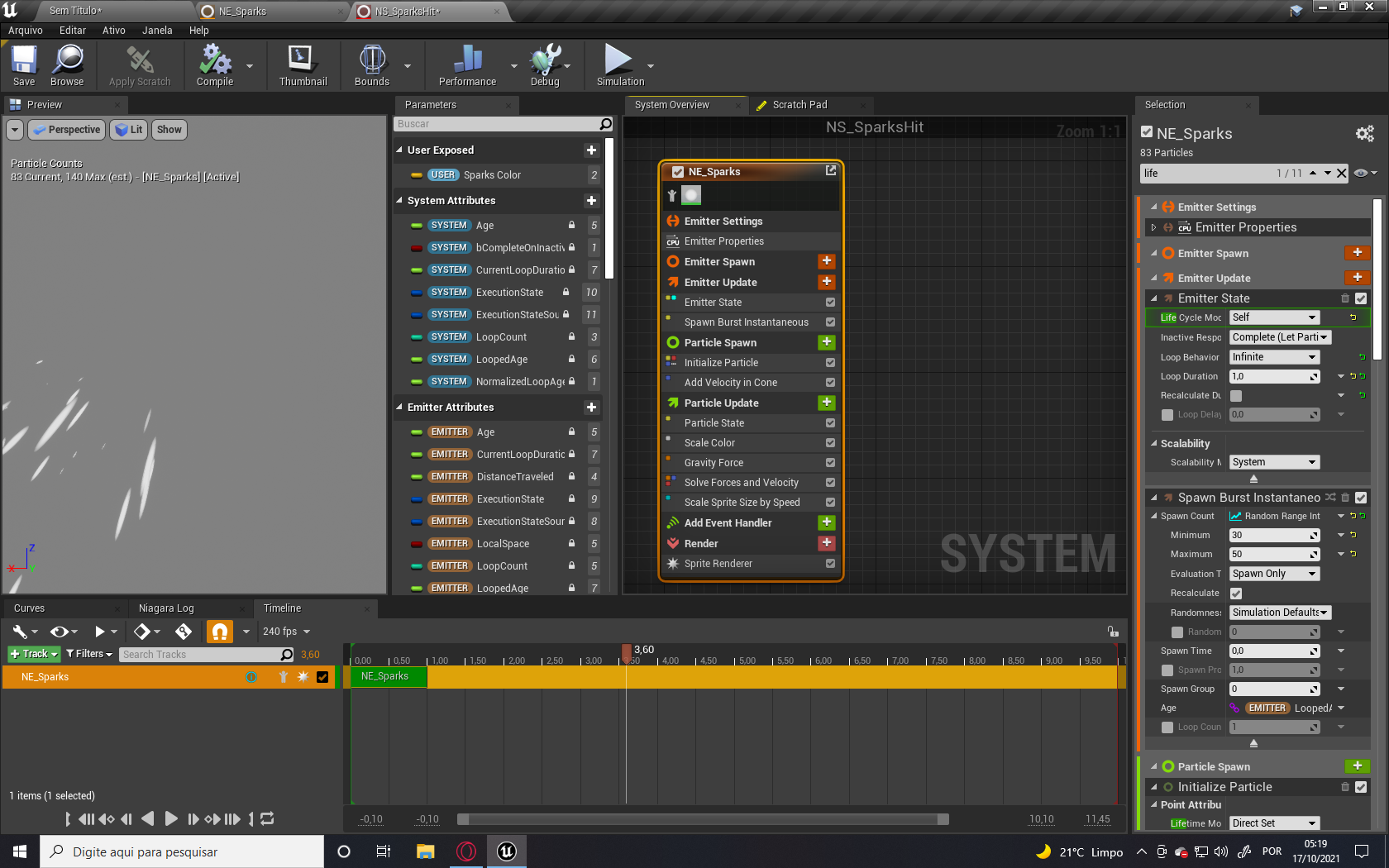
There is an option under the emitter state called loop behavior, you can set it to infinite, loop or once.
@whole hazel
whole hazel
pastel laurel
There is an option under the emitter state called loop behavior, you can set it ...
sorry to ask but where's the emitter state?
pastel laurel
https://realtimevfx.com/uploads/default/original/3X/0/7/0744e3adeccb91f31065c5742d3951f4518669ab.png
 pastel laurel
haha all good
pastel laurel
Happy I can help, my man
Okay Yall, I got one
Trying to make a GPU shader recreation of conways game of life
No idea what the approach would be to look at a pixel, and then change the state of the pixels around it based on its surrounding
anyone point me to an approach or something, please? pretty please?
dire parcel
thank you!
plush yew
Also when I am decreasing my texture size it is not getting reflected in ram consumed.Does anyone know why it happens.
Max texture size 256 -> ram 680MB
Max texture size 1 -> ram 680MB
 thorny drift
anyone familiar with using physics constraint for spring simulations?
 pastel laurel
plush yew
Also when I am decreasing my texture size it is not getting reflected in ram con...
pastel laurel
plush yew
Also when I am decreasing my texture size it is not getting reflected in ram con...
Because thats very likely less than 64kb? Images are very efficient
pastel laurel
 normal cradle
Any ideas why my Water Body Ocean behaves like this?
normal cradle
Any ideas why my Water Body Ocean behaves like this?
Whats the issue here? Sorry im not seeing it
normal cradle
Maybe i understand it wrong. but when watching the feature highlight video dragging in an water body ocean, made everything water except whats in the spline, and also added a curve to make the spline a bit elevated
But here i just have a giant square
plush yew
@pastel laurel but in my level sizemap textures are taking so much space??
normal cradle
https://youtu.be/d5Ft7UaYayM?t=221 Talking about that section of the video

Exploring the amazing new water capabilities introduced in Unreal Engine 4.26, Epic Games’ Sjoerd de Jong talks you through the basics of setting up an ocean, a lake, and a river. Then, he dives into more advanced features and possibilities that showcase how you can tap into the water rendering through other parts of the engine by making objects...
pastel laurel
normal cradle
https://youtu.be/d5Ft7UaYayM?t=221 Talking about that section of the video
That is normal behavior. He is using a mountain so it comes in naturally, you are using a flat plane
use a large sphere and see if theres a difference
 oblique whale
Any good way to reduce packaging size? mine usually takes like 30 min lmao idk why
normal cradle
🙀 Desperation leads to success i guess, insteadof moving my landscape to 0,0,0 i created a new one at 0,0,0 and that suddenly made the difference, i cant quite see why but honestly up to this point i don't even care anymore xD
@pastel laurel i had a mountain before and it didnt clip around it, it still was that weird rectangle
oblique whale
oblique whale
Any good way to reduce packaging size? mine usually takes like 30 min lmao idk w...
.
normal cradle
appaernlty i had z-axis problems
pastel laurel
plush yew
<@363911519957811210> but in my level sizemap textures are taking so much space...
What is a size map texture, and how big are they?
Oh you mean the performance profiling tool?
plush yew
Yes.Here is my size map for the level
pastel laurel
? Haha are you posting something?
 plush yew
A texture is on average 9mb
plush yew
@pastel laurel here is my sizemap and one texture details.These are from my computer screenshot.

 oblique whale
Any good way to reduce packaging size? mine usually takes like 30 min lmao idk w...
oblique whale
oblique whale
Any good way to reduce packaging size? mine usually takes like 30 min lmao idk w...
guys
someone pls
plush yew
Is it first time??
oblique whale
nope
plush yew
Go to packaging section and turn on compressed cooked packages.Go to maps selection and add maps only you need.Also try to disable unnecessary plugins
pastel laurel
Okay, my guy
You have dropped the resources to 11kb of ram use
but the disk size is still gonna be that big for a 2k image
like, you're still storing a 2k file on disk here
plush yew
So in my ram am i storing 11kb or 2k size??
plush yew
Then my ram consumption is matching to sizemap of my level .DO you know why??
pastel laurel
in your GPU you are only using 11kb
Yeah, you still have to load the whole image in ram I think
plush yew
Then what is the point of max texture size??.I dont get it.Thanks for helping bro.
I think i need to reduce them somehow
pastel laurel
For GPU memory
So you have the images stored on disk, which is super slow to access
but permanent, for when you turn your computer off
When you load the game, you transfer that to RAM, which is must faster, and can be written and loaded from without being permanant
and then the GPU, which draws the graphics, gets sent textures from RAM which is very slow compared to the speed of a GPU, so it stores those textures in its local memory to be used and drawn
GPU memory is historically very small compared to ram, which is very small compared to HDD space
So apparently you want to look into using lodbias
 tawdry zealot
Hello
I have a 30 sec gameplay video and i wanna know what CVars can cause such a texture disturbance, can someone help me?
pastel laurel
plush yew
I think i need to reduce them somehow
Have you actually tried packaging it? Like, the editor isnt going to destroy or change source files
otherwise you just need to re-import them smaller
 tawdry zealot
I have a 30 sec gameplay video and i wanna know what CVars can cause such a text...
tawdry zealot
tawdry zealot
I have a 30 sec gameplay video and i wanna know what CVars can cause such a text...
 plush yew
@pastel laurel okay then I will package I will let you know.Without los bias there is no change in packed game.Now I applied lod bias.I will let you know if there is any change.By the way on standalone there is no change even after applying lod bias
tawdry zealot
Its induced by a player but i dont know how
Textures come back to normal when the character approach them
So this can be done with r.MipMapLODBias? I wanna reproduce this corruption (is not my gameplay)
Here is a better look, i wanna achieve this for myself and i think is induced via UserCustom.ini
pastel laurel
Is there a way to make a material take its output as input?
other than reallllyyyy slow render targets?
I just want the output of what it does to be the input of what it should now do
Im running conways game of life on GPU
so each cell is calculated, and then the next frame needs to be calculated based on those results
 digital anchor
just use a render target, theres nothing slow about them
pastel laurel
Yeah thats what I wanna do, but render targets are like 40ms
tawdry zealot
The video is not a complaint, that is a "feature" to reduce lag and the "maker" doesn't wanna realease that thing which corrupts the textures like that, so, i want to corrupt the textures, but i dont know how
pastel laurel
I dont understand how pumping a texture from GPU memory to ram and back again isnt slow
digital anchor
well, why are you doing this
pastel laurel
My understanding is that you need to take a dynamic material instance, reference it in blueprint, have blueprint draw the render target, and then send that render target back into the material as a texture parameter
is that not the case?
digital anchor
exactly but none of this involves cpu
the 'sending the render target as parameter' is just setting a texture reference, theres no sending data involved
plush yew
@pastel laurel lod bias is not decreasing size of ram consumption.
pastel laurel
Also, is the material locked to frame rate? Can I do this as fast as the GPU can go? How do I force it to run again between draw calls?
 tiny zodiac
My game is flickering and slow in certain part. It seems the problem is HairGuideInterpolation. I tried disabling it to verify if this was the problem, and it fixed it but it also made my characters balled :(. What should i do to fix the problem and still keep the hair of my characters?
 digital anchor
you can run multiple passes in a single frame, but of course you wont see it happening, the visuals will be locked to framerate
pastel laurel
digital anchor
you can run multiple passes in a single frame, but of course you wont see it hap...
How do I instigate that, though
its fine if I dont see it, its calculating the simulation, i can watch it at desktop framerate, no problems
digital anchor
you can call draw to RT multiple times, if your material is properly referencing the RT it should work like youre stepping the simulation
fluid ninja live does a lot of rendering in a single frame
really fast too
digital anchor
yep
pastel laurel
okay okay
im sold
Slate does the same job in about 25% of the time on average, theres just no way to read from a slate canvas to a material to my knowledge
its fast enough, but its still slow
Yeah?
and draws them to a canvas
in a quater of the time
Being able to render something at 60fps does not an efficient process make
 plush yew
Bro lod bais is not decreasing ram consumption.
pastel laurel
You already have the answer my man
If ram is your enemy then the filesize has to go
i've never had an issue with it and i've never developed for target platforms with less that 16 gigs of ram, so I admit i've never aggressively optimized textures im sorry
google is full of people asking how to drop texture memory size tho
oblique whale
does anyone know why this happens even tho i have 1000gb of free space?
its when i package my game
pastel laurel
Also I didnt say it, thanks for the help guys
whole hazel
is there a BP class that allows you to stop all sources of background audio or sound effects?
I want to add that as I have a bg music on my project and upon death, I want a BP that would stop all sources of audio playing
oblique whale
oblique whale
does anyone know why this happens even tho i have 1000gb of free space?
guys
pastel laurel
You didnt post anything
 pastel laurel
whole hazel
is there a BP class that allows you to stop all sources of background audio or s...
pastel laurel
whole hazel
is there a BP class that allows you to stop all sources of background audio or s...
Not exposed to blueprints
whole hazel
I guess I need to make a variable that's linked to the background music first then make an array with all audio sources, connect it to the main BP and use bp class "Stop"
would that do the trick?
pastel laurel
But, you can make a sound emitter blueprint yourself that has a speaker, and a mute blueprint interface
plush yew
Not a problem.Thanks for help bengaman
pastel laurel
just do a get all bp of class 'speakerbp' and shoot a mute event at it
oblique whale
oblique whale
when i package my game
@pastel laurel
pastel laurel
Are you on windows? Does ue4 have permission to write to that drive?
Do to that drive, right click and go new->text document. Are you prompted for admin?
plush yew
i cant work because of a 7.5 mb update that just wont update.
 pastel laurel
oblique whale
<@!363911519957811210>
pastel laurel
oblique whale
<@!363911519957811210>
It could also be your VaultCache, which is needed for temporary storage , if theres not enough space there
Alright yall im going to bed
Best of luck, hope whatever youre all doing goes really well
 modest dirge
Whats the best chat for noobs to ask for help?
ruby quarry
modest dirge
Whats the best chat for noobs to ask for help?
Completely depends on the question. There are channels for specific topics so try your best to put your question in the right place. If you ask in the wrong channel, someone will let you know and unfortunately it may not always feel like a friendly reminder. Do you have a current issue?
modest dirge
ruby quarry
Completely depends on the question. There are channels for specific topics so tr...
Okay thanks! Yeah I'm trying to texture a cave model I've created in Adobe Medium VR and imported into Unreal Engine. I think the UV is too messy and when I build the lighting I get black patches everywhere. I want to tile and rock texture on the object but based on all the videos I've been looking at my fear is that the Adobe Medium Mesh is too dirty and incomprehensible to texture and build light on. The textures are all stretched in random places when I tile on the cave walls
 fallen escarp
Hi can i have some help with something
I was wondering if anyone would know how to fix something I’ve been having trouble with
chrome swallow
Where may I post a question in reference to light building in ue4 and not listed in the #more-resources?
fallen escarp
Ive downloaded a game called “the unreal cube” and it wont open on my computer. When i click on it the screen goes black but the game menu doesn’t appear? Does anyone know how to get the game to load as it keeps not responding???
The game is made in unreal engine
ruby quarry
modest dirge
Okay thanks! Yeah I'm trying to texture a cave model I've created in Adobe Mediu...
Hmmm, Never used that. You could start in #graphics, but you might also want to find a good Adobe Medium forum and see if anyone there is doing what you're doing. Could take a long time to find someone here that uses Medium. Is that free or is there a cost for it?
ruby quarry
chrome swallow
Where may I post a question in reference to light building in ue4 and not listed...
Try #graphics. Depending on the question you might get sent to #level-design
fallen escarp
Can anyone help with my problem
modest dirge
ruby quarry
Hmmm, Never used that. You could start in <#221799195806400512>, but you might a...
Its free and its really good because its very tactile and hands on. I dont think it provides very good meshes though. Good idea Ill look for some medium users!
ruby quarry
fallen escarp
Ive downloaded a game called “the unreal cube” and it wont open on my computer. ...
Have you tried restarting your computer?
ruby quarry
modest dirge
Its free and its really good because its very tactile and hands on. I dont think...
Hmm, I might check that out! Thnaks.
fallen escarp
I’ve tried: restarting the computer, uninstalling antivirus, reinstalling the game,
Ive tried a lot of things
ruby quarry
fallen escarp
I’ve tried: restarting the computer, uninstalling antivirus, reinstalling the ga...
Where did you get it from?
chrome swallow
Have you tryed to redownloading the game to see if it may been a bad download? Has happened to me a few times
fallen escarp
As you can see the game is open but it isn’t responding as shown in the task manger, its not as bad download as the game used to work fine but recently it hasn’t been responding

 thick herald
Not really something this server can help with
fallen escarp
The game was made in unreal engine.
thick herald
This server is for people making games
fallen escarp
Like the issue is UE4 isn’t opening
chrome swallow
You can try asking the designer of the game for assistance
fallen escarp
I have an he said that its a problem on my end
chrome swallow
I have a lighting issue and can not ask in the Epic AnswerHub since it is temp down and read only.
chrome swallow
great thanks
ruby quarry
I just downloaded it and tried it out and it sort of works fine for me. I got hung up on some polys almost instantly so it's not really ready for playing. It's a 3 year old super early alpha version so I'd just accept that it's got issues and find something else. There could be a pile of things on your system causing it to not load. Your graphics card might not be new enough, or is too new. Who knows...
fallen escarp
ruby quarry
I just downloaded it and tried it out and it sort of works fine for me. I got hu...
Wait what…. I think you have the wrong game
ruby quarry
fallen escarp
Wait what…. I think you have the wrong game
It was the only Cube game I could find on Gamejolt. Cube, based on the movies?
fallen escarp
.,..
I meant this game

Game Jolt
🎮 This is the Cube. Where simple tasks, become epic challenges. You have 9 lives to beat 7 increasingly difficult games. Skill and nerve is needed to beat it. So, have you got what it takes to...
@ruby quarry
ruby quarry
fallen escarp
<@185056271689318401>
Not sure why it didn't show up in a search for me, but I downloaded it and tried it out and it worked fine for me. Only other thing I can suggest is to go through your system and apply any updates to everything, especially your video card drivers. Other than that, I've got nothing.
fallen escarp
yeah ive updated everything
 tired verge
first image is my texture, but in the material editor it's much brighter than the original image? ive tried the sRGB setting but no luck

 oblique whale
does anyone know why my packagin failes and says "not enough disk space available"? even tho i have 1000gb of free space lol?
 jovial osprey
oblique whale
does anyone know why my packagin failes and says "not enough disk space availabl...
jovial osprey
oblique whale
does anyone know why my packagin failes and says "not enough disk space availabl...
Check your many drives. It may be temp files
oblique whale
jovial osprey
Check your many drives. It may be temp files
wdym
jovial osprey
sorry?
oblique whale
wdym = what do you mean
jovial osprey
oblique whale
wdym
like, have a few tens of gigs free on EVERY drive you've got
case maybe UE stores temp files there, depens on where is UE and your project and where your Windows 10 libraries are set up
oblique whale
i have 30gigs free on the first one, second one i have 600gb and third one 1000gb
where are my temp files located
maybe i could delete them
jovial osprey
How big is your content folder ?
I'd advise to keep at least 3 times a much free space on every drive you've got as the content folder size
 visual oasis
I'm sort of new to C++ and Unreal Engine, I was wondering If I should start with UE4 or UE5 because most courses are in UE4 and I don't know if the stuff they teach on their will also be on UE5.
 drowsy snow
visual oasis
I'm sort of new to C++ and Unreal Engine, I was wondering If I should start wit...
drowsy snow
visual oasis
I'm sort of new to C++ and Unreal Engine, I was wondering If I should start wit...
Most of the high level stuff are interchangeable, so start with UE4.
visual oasis
ok
 humble wagon
Hello ,I am new to this group .I am from film background mostly ,but I have made many scenes in Unreal Engine.My question is how is GI faked in Games? If its static I assume the skylightis baked in lightmaps ,but isnt it very expensive to do so ?
 pearl sentinel
Hey Folks, UE 4.26 crashes after I close the project with this message, can anyobne decipher it?
Unhandled Exception: EXCEPTION_ACCESS_VIOLATION 0x000000000000000a
D3D12Core
dxgi
dxgi
dxgi
dxgi
dxgi
dxgi
dxgi
dxgi
dxgi
D3D12Core
D3D12
D3D12Core
UE4Editor_D3D12RHI!FD3D12Resource::~FD3D12Resource() [D:\Build++UE4\Sync\Engine\Source\Runtime\D3D12RHI\Private\D3D12Resources.cpp:286]
UE4Editor_D3D12RHI!FD3D12Resource::`scalar deleting destructor'()
UE4Editor_D3D12RHI!FD3D12DeferredDeletionQueue::ReleaseResources() [D:\Build++UE4\Sync\Engine\Source\Runtime\D3D12RHI\Private\D3D12Resources.cpp:125]
UE4Editor_D3D12RHI!FD3D12Adapter::Cleanup() [D:\Build++UE4\Sync\Engine\Source\Runtime\D3D12RHI\Private\D3D12Adapter.cpp:914]
UE4Editor_D3D12RHI!FD3D12DynamicRHI::Shutdown() [D:\Build++UE4\Sync\Engine\Source\Runtime\D3D12RHI\Private\D3D12RHI.cpp:243]
UE4Editor_RHI!RHIExit() [D:\Build++UE4\Sync\Engine\Source\Runtime\RHI\Private\DynamicRHI.cpp:322]
UE4Editor!FEngineLoop::Exit() [D:\Build++UE4\Sync\Engine\Source\Runtime\Launch\Private\LaunchEngineLoop.cpp:4221]
UE4Editor!GuardedMain() [D:\Build++UE4\Sync\Engine\Source\Runtime\Launch\Private\Launch.cpp:182]
UE4Editor!GuardedMainWrapper() [D:\Build++UE4\Sync\Engine\Source\Runtime\Launch\Private\Windows\LaunchWindows.cpp:137]
UE4Editor!WinMain() [D:\Build++UE4\Sync\Engine\Source\Runtime\Launch\Private\Windows\LaunchWindows.cpp:268]
UE4Editor!__scrt_common_main_seh() [d:\agent_work\5\s\src\vctools\crt\vcstartup\src\startup\exe_common.inl:288]
kernel32
ntdll
whole hazel
hello, I was working on a UE5 project for days now and upon trying to open it right now, I received the following message which is pretttttty weird...

can someone explain what's going on?
that is pretty strange, I've never gotten that message
moreover why open a copy when the whole project is made on UE5 and I try to open it on the same version of UE
would make sense if I launched UE4 and I tried to open the project
 unborn stone
Hello is there a way to add my c++ scripts to my blueprinted game project?
drowsy snow
unborn stone
Hello is there a way to add my c++ scripts to my blueprinted game project?
File -> New C++ Class
unborn stone
alright thanks, but earlier i did this and got an error for missing files or summet let me chack what the error is
nevermind i think it works now
 faint delta
hey all, having a weird issue where I cannot assign a property an asset that I created using the Python Editor API. I'm generating PaperFlipbooks from a bunch of .png files from Blender. Creating Sprites from PNGs, then Flipbooks from Sprites is no issue: the flipbooks appear as they should, both in File Explorer and Unreal. However, when I go into my NPC blueprint, and try to assign him one of these flipbooks, I get a weird warning: LogUObjectGlobals: Warning: LoadPackage can't find package /Game/Sprites/BaseMale/Idle/ and it does not select the generated flipbook asset.
Now, if I create a new flipbook from the NPC blueprint, and even put that asset it in that directory that supposedly wont load, it works just fine. Any hints would be greatly appreciated.

 blissful trail
im trying to do a line trace in multiplayer but it dont work to well

basically for some reason it does 2 line traces

 fossil nexus
Hi. What is a good Character program to make realistic characters for Unreal Engine ?
Daz3D, Character Creator? MakeHuman? So many options 😕, which one is more compatible with UE4?
drowsy snow
Also I've seen several people struggle with Daz more
 marsh swallow
I can no longer see Physics Volume brushes in the editor. what did I accidently do? i was able to see them and i must have pressed something, but i looked and my Show settings for BSP and Phsyics are all checked.
 violet goblet
in a character blueprint in the viewport can i pause or deactivate the animation?

found it

 compact holly
Can anyone help, I have two clothing items on my character and both are colliding/clipping with each other and also colliding with itself. I have tried setting the Self Collision Radius up and the collision thickness and its not helping anything.

 normal forge
Hey, is there anyone that know how (if possible) to mod UE4/5 games that don't have mod feature using C++? I mean adding new features/changing them (not cheating) with C++. I know that modding with blueprints is possible, but with C++?
 drowsy snow
normal forge
Hey, is there anyone that know how (if possible) to mod UE4/5 games that don't h...
drowsy snow
normal forge
Hey, is there anyone that know how (if possible) to mod UE4/5 games that don't h...
Modding with BP without the editor is not possible, actually.
plush yew
where can I ask question regarding c++ code
plush yew
ty
 tame mauve
I have a question
So I want to create a server client game where users can upload their own addons and I want the content to go to the server and I wanna keep the game running on the server and not have it where the game has to be restarted everytime someone uploads an addon. How would I do this?
Feel free to dm me
 cerulean geyser
how do i run an event from a level blueprint?
for example i want to cast from an object or from the persistent level into a sublevel and run one of the events from there
 velvet spade
trying to follow this tutorial and the mannequin is yellow when i do the first few steps in the video
 final rain

 quiet finch
i imported something from blender??

this is how it looks in blender

what the fuck could have caused this??
i reimported and it got worse

scratch that everything is fucked
 plush yew
how would i make interplanetery gravity? for instance, as you get closer to planets that gravity will affect you and you can walk around on that planet. btw planets are to scale
or is that just not possible
 echo forge
@plush yew you'll want to research Conic Sections
It's a hard problem (like, extraordinarily hard); conic sections are a heuristic approximation wherein you effectively only simulate the dominant source of gravity
There is a total solution for it, but it's extremely processing intensive and relies on some physics that haven't been solved in any form except for iterative approximation, which means it's very slow and computationally intensive.
There's an implementation of it for Kerbal Space Program in this mod: https://forum.kerbalspaceprogram.com/index.php?/topic/162200-wip181-191-1101-1110–2-1122-principia—version-hardy-released-2022-01-02—n-body-and-extended-body-gravitation/
Kerbal Space Program Forums
The source code is available on GitHub under the MIT license. Abstract This mod aims to replace KSP's unstable physics integration with a higher-order symplectic integrator, adding n-body Newtonian gravitation in the process. Acronyms Spoiler ACS: Attitude Control System AMD: Advanced Micro Devic...
TLDR: You may want realistic gravity, but you actually don't want it, due to how much it costs
If your solar system is static, you can do a variation where you precompute dominant gravitation sources and apply the two nearest ones, instead of using conic sections to simulate only the nearest... You'll run into time-stability issues, but if you can resolve those (another hard problem), you'll have a near-perfect approximation of gravity at a cheaper price
plush yew
interesting, it does sound like a very complicated task that would require a VERY fast computer. but i plan to have multiple full sized planets and interplanetary travel
oh and vr
echo forge
if you want to do it in VR, you're going to need to run gravitational simulation (and probably even physics in general) outside of the thread and with a lower priority.
Some of the computations in the realistic gravity calculation can take hundreds of milliseconds per second
 pallid anchor
id say just have a basic gravity simulation
echo forge
conic sections are cheap, and high-fidelity-enough that you can write KSP atop them
pallid anchor
i dont think a VR game could handle all of that
echo forge
It could, but you would have to make sacrifices: the game has to run without it, essentially- and then corrections come from the external simulation
 calm pollen
how could I make an object move upwards infinitely? where I can keep track of/change the speed of it with a variable
 winter rain
Have you guys had the bug where you try to drag off a node, and the node menu flashes for a second and then disappears? I can fix it by restarting but then it eventually comes back
echo forge
winter rain
Have you guys had the bug where you try to drag off a node, and the node menu fl...
I think I saw a patch for that recently... Which version are you on?
winter rain
4.27.2
calm pollen
winter rain
Have you guys had the bug where you try to drag off a node, and the node menu fl...
try uninstalling whichever ue version you have and reinstall it
plush yew
echo forge
Some of the computations in the realistic gravity calculation can take hundreds ...
https://www.youtube.com/watch?v=bcTqFA23P9Y, this is a plugin available on the ue4 store and it appears to be a simplified version of what i am aiming to do. of course i would need to add many more factors into his vr engine but its a good place to start

Free gravity project and plugin! This functionality is missing by default in Unreal Engine 4, because there is only horizontal (z axis) gravity.
If you like this free resource please check our KS campaign: https://www.kickstarter.com/projects/teradgames/astrocolony
Website: http://tefeldev.com/
Article: http://tefeldev.com/directional-gravity/...
echo forge
calm pollen
how could I make an object move upwards infinitely? where I can keep track of/ch...
Maybe set its velocity once and disable gravity on it?
Its physics velocity is a variable in the physics engine- you can then assign it:
https://docs.unrealengine.com/4.26/en-US/BlueprintAPI/Physics/SetPhysicsLinearVelocity/
Set Physics Linear Velocity
pallid anchor
anyway, anyone good with photoshop? I need to make a thatch roof for a game asset, went looking around and found a vid from quixels medieval environment series. mine wont be as detailed, of course because it needs to actually run lol. In the video he uses Houdini to re arrange many texture atlases into 3 atlases, even stacking different cards on top of the other. he says its possible in photoshop but idk. You have to deal with multiple images needing to be perfectly aligned, 2 of which have padding so you cant just cut them out lol, I feel like its not possible without Houdini. If it is not or is stupidly complicated I might try to find some other way to go about it but I would really really like to use the megascanned atlas'
echo forge
plush yew
https://www.youtube.com/watch?v=bcTqFA23P9Y, this is a plugin available on the u...
Where's it at on the store?
echo forge
pallid anchor
anyway, anyone good with photoshop? I need to make a thatch roof for a game asse...
Look for a haybale asset on megascans and use that texture; create a normal map where depth is the inverse of brightness
plush yew
its called Directional & Planet Gravity, https://www.unrealengine.com/marketplace/en-US/product/directional-planet-gravity

Unreal Engine
Free vector gravity for planets and directions. GravityMovementComponent allows you to control gravity direction and force for physics and movement.
echo forge
plush yew
its called Directional & Planet Gravity, https://www.unrealengine.com/marketplac...
This appears to use nearest-source gravitation- all the plugin gives you is "gravity goes in a direction"
they're picking the source by which "planet" actor is closest
pallid anchor
ill find a way, im in a team of artists atm and maybe they can help me
plush yew
that is accurate but it is an interesting consept without a clear place to start
echo forge
pallid anchor
ill find a way, im in a team of artists atm and maybe they can help me
Kasper, I gave you a workaround up above that lets you have a placeholder for now which should be realistic enough to prevent anyone from noticing it
echo forge
plush yew
that is accurate but it is an interesting consept without a clear place to start
It'll be useful to start with; Conic Sections will get you much further
calm pollen
@echo forge adding the velocity sort of works, but how would I keep track of the speed w/ a variable? I'm trying to make it so that the platform will be able to get faster as the player collects items
echo forge
Get Physics Linear Velocity
it's already a variable- it's just stored in the physics engine
Trigger an event when the player collects items, and set the new velocity there
if the player is on the platform, things are going to be more complicated- that's a kinematic
calm pollen
yeah the player is gonna be on the platform
this is a 2d game btw, not sure if that effects anything but really all that is happening is the platform is making the illusion that the player sprite is falling, and by collecting items, the platform speed will be changed higher or lower
echo forge
Set Simulate Physics
this'll make the platform have infinite momentum, if you set Simulate to false
that'll prevent the player's weight or other collisions from affecting the platform, so you can make it move "on rails"
calm pollen
ok i just made is "Set Simulate Phsyics on beginplay, but nothing happens during the level
how would i make it move? probably a dumb question
echo forge
set it to kinematic, disable gravitation on it, and then set its velocity
when you need to change its velocity, just change it ^^
being kinematic prevents anything else from altering the velocity- it will always stay at exactly the last one you set
calm pollen
how exactly would I set it to kinematic lol i thought that was for bones?
sorry if these seem obvious
echo forge
IK is for bones
Kinematics are a subtype of physics- they affect physical objects, but physical interactions cannot affect them.
echo forge
the last link I sent
calm pollen
 echo forge
That makes it kinematic, yep
calm pollen
ohh ok so that makes it now able to react to certain things
sorry i thought that was supposed to move it
calm pollen
ok, so now how would I make it move up in the first place though
echo forge
Set its velocity
echo forge
echo forge
set it to kinematic, disable gravitation on it, and then set its velocity
This and the message afterward is the full set of instructions
calm pollen
ok i get it now
thanks so much 🙂
wait nvm its still not going anywhere @echo forge
echo forge
so you:
- set it to kinematic
- disabled gravity
- set its velocity
Right?
calm pollen
yes
i tried an "AddForce" node too and still nothing idk why
@echo forge got it nvm
sorry
echo forge
For everyone wondering why: Kinematics are immune to force- they need velocity set directly
 abstract eagle
Does anyone have tips on creating character customization for my project?
 leaden hawk
Has anyone successfully implemented metahumans with working root fix & working hands fix & useless bones removed?
Retargeting is not the issue. I want the extra bones removed
As described in this reddit post https://www.reddit.com/r/unrealengine/comments/s0wqfv/metahuman_animation_bottleneck_fix_saved_5ms_on/
reddit
12 votes and 1 comment so far on Reddit
 ancient lotus
is it possible to change what character movement component a character is using in blueprint? or does the character need to be derived from a c++ class to change it
calm pollen
ancient lotus
is it possible to change what character movement component a character is using ...
i believe there are very complicated ways to override the movement, but if you want the best/most effective way c++ is 100% the way to do it
ancient lotus
calm pollen
i believe there are very complicated ways to override the movement, but if you w...
any idea what those ways may be? im doing a tutorial series on my plugin and was curious if i could just keep the example project bp only
 unique wraith
Is anyone familiar with a persistant "Unreal Engine is exiting due to D3D device being lost." crash and know how to fix it?
I've tried everything online!
 scarlet birch
unique wraith
Is anyone familiar with a persistant "Unreal Engine is exiting due to D3D device...
scarlet birch
unique wraith
Is anyone familiar with a persistant "Unreal Engine is exiting due to D3D device...
Update your GPU drivers, if that doesn't work downgrade them or if NVidia install studio drivers.
or if all else fails ... https://substance3d.adobe.com/documentation/spdoc/gpu-drivers-crash-with-long-computations-tdr-crash-128745489.html

On Windows, this window will appear if Substance 3D Painter detects that the current TDR value is below a specific limit (10 seconds)....
 tall sorrel
how would I go about making all my materials switch to their respective rain / snow function input when it starts raining or snowing?
it seems tedious and very unoptimized to set the lerp value on every single material instance, so surely there is a way to universally lerp I guess you could call it
plush yew
ancient lotus
is it possible to change what character movement component a character is using ...
Make an EditDefaultOnly, BlueprintReadOnly TSubclassOf<UCharacterMovementComponent> MyCharacterMovementComponent
And so people can use their own in BP ?
plush yew
plush yew
Make an EditDefaultOnly, BlueprintReadOnly TSubclassOf<UCharacterMovementCompone...
and you do the stuff needed in the cpp constructor
plush yew
I saw in some videos that you can customize the ue4 editor, but the plugin that does this doesn't work, does anyone know how I can customize my editor in a different way?
echo forge
It'd help if you linked which plugin you're describing, Niko, but generally: yes, plugins can customize many aspects of the editor- and you can make your own version of the engine to change it beyond that to a much larger degree
 rigid bridge
how is the ue4.26/4.27/5 water system. heard its a little lackluster
i heard it doesnt work with world comp which is a massive bummer
are there any alternative water systems that you can get for free or cheap which have the full feature set and work with worldcomp
 olive orchid
Question. Kind of basic I feel like I should know.. but.. do assets cost more to the system than a how complex the landscape is?..in other words, if I build a mountain with some megascan images & add collision to make them physical, would it run better than sculpting the mountain with the landscape tool?
 rough siren

 rigid bridge
olive orchid
Question. Kind of basic I feel like I should know.. but.. do assets cost more to...
rigid bridge
olive orchid
Question. Kind of basic I feel like I should know.. but.. do assets cost more to...
well yeah cuz mega scans assets r photoscanned
rough siren
Can anyone clarify if this will cause an array overflow, if i duplicate the Blueprint.


 wheat rose

Another UE4 TIP
Retargeting
olive orchid
Well.. is that assets in general or only the megascan.. I was using that as an example @rigid bridge
I don’t claim to know what u know
rigid bridge
olive orchid
Well.. is that assets in general or only the megascan.. I was using that as an e...
ah i see
so mountain general rock or smth that resembles a mountain
well point still stands. in most cases scultiping a material instance is less costly than adding assets
olive orchid
Ok, thanks.. I’m new to all this just trying to learn as much of “backend” as the actual building.. I appreciate the help
 winter wedge
hey guys just a very general query
is there a way to make sure the armature meshes don't clip to objects
in level sequence
and do i need some ik or something
eg to make sure characters stay on their feets and all
drowsy snow
olive orchid
Question. Kind of basic I feel like I should know.. but.. do assets cost more to...
Actually, you can use static mesh as the landscape, megascans included.
You'd just need more work on handling the LOD.
olive orchid
Ok.. I was just talking abt how much it affects the system.. I’ve built things both ways.. just got me thinking abt the least resource intensive way to get it done.. Thanks
 dapper oak
is there a way to make a component ignore the collisions of a specific component / actor or do i have to get creating on how I setup collision channels?
 modest trench
dapper oak
is there a way to make a component ignore the collisions of a specific component...
modest trench
dapper oak
is there a way to make a component ignore the collisions of a specific component...
Try "Ignore actor when moving"
it appears to be for kinematic (non physics based) collision only? not sure exactly
worth a shot
dapper oak
the only one i can find is Ignore Owning Actor which isnt really what i'm looking for. Ill have a look around but thanks anyway
modest trench
dapper oak
the only one i can find is Ignore Owning Actor which isnt really what i'm lookin...

I'm not lying lol
modest trench
kind of a strange name
also consider doing it vice-versa (the other way around) just to be sure
ack, I misspelled actor
 sinful burrow
hi. im converted my blueprint project to c++ and i got this.
ue4.26 source
 sinful burrow
hi. im converted my blueprint project to c++ and i got this.
ue4.26 source
sinful burrow
sinful burrow
hi. im converted my blueprint project to c++ and i got this.
ue4.26 source
fixed
 rich stream
Hello. I'm new to this server as well as new to Unreal Engine. I've tried using it in the past but haven't had the storage space until recently. Sorry if this isn't the right chat, but what are some quick beginner tips/general advice for starting out?
 pine wedge
good morning
 strong schooner
Wow geometry nodes inside unreal..
https://mobile.twitter.com/AlterMeshPlugin

We are building a plugin to use Geometry Nodes inside Unreal!
by @AechmeaStudios
Tweets
61
Followers
1066
 Twitter
 shadow violet
Why do i have 120 fps while playing in editor and only 60 while playing standalone?
pine wedge
@shadow violet VSync enabled?
shadow violet
disabled
modest trench
shadow violet
Why do i have 120 fps while playing in editor and only 60 while playing standalo...
check T.maxfps in standalone
modest trench
sure vsync isn't being forced on by nvidia control panel?
pine wedge
change your screens hz and see if that affects FPS. if yes it is vsync
 red pond
guys, is it possible to enable path tracing in game mode (with some command line argument or something)?
shadow violet
modest trench
sure vsync isn't being forced on by nvidia control panel?
i have amd
and card doest cut fps in other games
should not stetted
modest trench
this sounds stupid but I swear setting T.maxfps to a value lower than 300 helps
I'm considering reading the source to figure out why
could be a quirk of my own PC for all I know
shadow violet
doesnt work 😭
modest trench
google says it was an issue in 4.23
shadow violet
i use 4.27 source build
 summer cobalt
Hey everyone !
Are there available ressources on how to check Blockchain data in Unreal Engine through Blueprint ? Accessing things like transactions per second information, number of wallet addresses, etc etc
echo forge
summer cobalt
Hey everyone !
Are there available ressources on how to check Blockchain data i...
Aside from a store plugin that adds C++ modules to do it or a complicated web of HTTP request processing from a remote service, that's almost certainly not a thing
 sour trellis
Before I deliver a p2p content; how can I add license or create a special license for my customer?
echo forge
Licensing content depends on your legal jurisdiction, but generally you can just pick one and roll with it, assuming the content you're delivering is compatible with the licenses it was built upon
Choose a License
Non-judgmental guidance on choosing a license for your open source project
 tropic jasper
Heyo everyone, quick question. ive opened a C++ project and i still want to use full BP functionality. it seems i can still do that but wanted to make sure there are no settings im missing (this is a group project and some people use BP's some people use c++)
Everyone will be running visual studio, but im no coder so im unsure of what other compliers there is
gotcha thank you very much. would that Ini setting be done on my build that published to p4 so upon downloading everyone will have it ready and then we can forget about it
is it like this? or do i remove the first line hahha

@plush yew
oh this project hasnt been committed yet. im currently just setting it up ready for the init commit
Just making sure its all working ahha

This thing?
 gaunt abyss
@mild phoenix ☝️
mild phoenix
Sorry
gaunt abyss
No worries 🙂
tropic jasper
thank you @plush yew ❤️
tropic jasper
Ah, what's the other approach that allows me to publish it to p4? and collab on the project? (sorry new to source control and c++ :D)
tropic jasper
So using the INI method, i cant use perforce at all or is it certain things i just cant push
hahaha gotcha, so the builds thing you said not to push. what exactly are the builds so i dont fuck anything up later down the line
oki gotcha
As a side question then, when pushing to p4 can i just push everything over and leave out binaries so nothing breaks
and just get people to input that line of code
into binaries
gotcha
yeah i thought there were
just not found a p4ignore file yet
ill have a looksie
oh shit my bad i was getting config and bin mixed up
yeah getcha
its in config already done
cool cool
need to learn how the p4 ignnoreworks now ahha
i mean just the process of where goes ect
its the main directory isnt it
i am
oh okay
ill walk the dog and do that
haha
seems easier
 autumn latch
Calculate direction goes back and forth between -180 and 180 when I walk backwards, how can I solve this?


 leaden hawk
Calc direction differently
With different data sources
Try not using the Calc Direction node and do the math manual in BP.
Or just use the Normalize node lol. But you would get readings of 0-180 on both sides
autumn latch
hmm ok i will try to do it manually
leaden hawk
Compare actor rotation with look-at rotation
Get forward vector of your velocity * 100
Get look at rotation from Actor to this ^
Might be all u need depending on if you want your data to be World relevant North East etc... or relative to the direction youre looking
 analog notch
ive been trying to learn ue4 for like 3 weeks now, but ive noticed that its quite hard to find learning resources that aren't ONLY visual scripting, i want to have a balance between the two (cpp and blueprints). what should be my learning source?
leaden hawk
Do some BP and then follow a conversion guide
During the process of converting you will discover a personal balance between the 2 for your project
 shut stump
Hello
I'm doing a bit of distro hopping in linux and trying things out, I also have UE projects I worked on windows, not serious programming tho, I had the idea to try to play a bit with UE4 Editor on Linux, or building from source code ...
 noble barn
Hey there! Any of you experienced with the K2Node system? Breaking my head trying to understand how to spawn an intermediate variable in a custom K2Node to return it as an output-pin.
shut stump
Then I had the idea to try to create a native linux application using UE, but then I realized I don't really have to build from source on linux, nor run the UE Editor on linux to be able to deploy a project on Linux right?
 wheat hare
Nah
UE4 is veddy versitile
U can develop on windows and deploy to Linux if u want to
shut stump
However, my development of the project to be deployed as native linux app, would need to be developed for linux APIs and ways of doing things, so I think then I would need to be on linux, or to be able to test it out in real time ?
 lyric arch
yaurait il un plugin de design pour ue 5 ?
drowsy snow
shut stump
However, my development of the project to be deployed as native linux app, would...
You can cross compile to Linux binary from Windows.
It should just works, especially if you're sporting Vulkan, but you're going to have some headache with drivers in Linux.
In many cases, Linux gamers opted to use compatibility layers like Wine/Proton or going through KVM as opposed to go with native binary.
Often times making native Linux binary from UE is just not worth the hassle.
shut stump
drowsy snow
You can cross compile to Linux binary from Windows.
Right, when I used UE on Win I saw all the Linux stuff, but usually didn't install any of that, so those files are basically the references to linux stuff so I wouldn't need to be on a linux host to be able to access devices by just typing /dev/sda ... well my case is special, I'm trying to interact with the Linux OS and potentially the kernel it self from UE if that's possible at all, if it takes some source code edits I would need to be on a linux host I presume.
drowsy snow
shut stump
Right, when I used UE on Win I saw all the Linux stuff, but usually didn't insta...
You don't really need WSL, and it's not like you can passthrough GPU to a WSL VM anyway.
And why do you need kernel level access for a game?
shut stump
For example, I would need UE4 to be able to access filesystems, disks, removable storage, list files and all of the details that various native linux utilities have at disposal, perhaps I would use them under the hood and feed them to UE, no need to duplicate and program that functionality, but just so UE has as good access as possible in terms of real-time so it's low-latency
drowsy snow
The only reasonable reason to get kernel level access is anti-cheat system, but that's about it
shut stump
drowsy snow
And why do you need kernel level access for a game?
Hehe, it's not actually a game, that's the thing, it's just one experimental idea I had, it also ties in with my other idea for amateur radio integration
drowsy snow
Unless you want to make Sysadmin game like how someone ported Doom as a Sysadmin tool
shut stump
That's interesting, I could say my idea is similar but not quite the same
drowsy snow
drowsy snow
Unless you want to make Sysadmin game like how someone ported Doom as a Sysadmin...
(and yes this is a thing)
https://www.cs.unm.edu/~dlchao/flake/doom/
shut stump
drowsy snow
The only reasonable reason to get kernel level access is anti-cheat system, but ...
I don't know that much about linux in detail myself yet so I'm not sure if I'm saying things right, I was doing Kubuntu basics for years now I went deeply into it for a couple of months, I'm not sure if I need kernel access to be honest, if the idea involves perhaps one little part might need it
I guess I'll just install the linux tools on Windows first, see what possibilities the Blueprints provide
I do have to build from source anyway if I would want to develop with C++ on Linux right? Just as VS is needed on MS right?
drowsy snow
shut stump
I don't know that much about linux in detail myself yet so I'm not sure if I'm s...
Game engine alone are fine with high level stuff. Like, you have no real reason to go that deep into kernel level with a game engine.
If what you need to make is a slightly fancy sysadmin tools, using game engine in the mix might not be a good idea.
shut stump
The thing is, I don't actually need to be developing on Linux, strictly speaking, the end result, the completed project would need to be yes, but that doesn't help if I can't interface with Linux from other OSes, it doesn't really help if I see the results on Windows giving me results what it looks the windows thinks about itself, filesystems, hardware etc, even tho it's all validated "to work on Linux", not quite sure.
drowsy snow
shut stump
The thing is, I don't actually need to be developing on Linux, strictly speaking...
You know what, let's cut to the chase.
What kind of app are you going to make?
Why do you really need access as deep as kernel level?
shut stump
So if I go to blueprints and I do for example "Blueprint: Query partition details drive /dev/sda1" or something like that, or "ls /home" ... that's just not work on Windows, unless /dev/sda1 is a multi-platform variable and it would result it "C:" on Windows.
But I don't need it to work on Windows, since only intended for Linux. Testing that on Windows would be pointless.
drowsy snow
shut stump
So if I go to blueprints and I do for example "Blueprint: Query partition detail...
Okay, I think you're really that hesitant to cut to the chase and answering my question above, and honestly I can't blame you, but I'll give you this.
Unreal C++ have macros that can be used for portion of the code to run only in specific platform.
shut stump
Perhaps kernel is not needed for that, don't really know yet.
drowsy snow
No kernel level access bullshit required, just this:
#if PLATFORM_LINUX
     // your Linux specific code here
#endif
I also don't believe such Blueprints to be available out of the box so it's probably going to take a project in C++, but hey forces me to fiddle with building from source, I wanted to learn more linuxy stuff and programming in general for quite some time anyway.
drowsy snow
shut stump
I also don't believe such Blueprints to be available out of the box so it's prob...
I mean, that macro is going to be handled by Unreal Header/Build Tool, but I'm not stopping you from going lower level than necessary.
shut stump
Then I noticed officially building from source and developing UE Editor is only set up with Ubuntu, but I had this distro for quite a while so I wanted to use anything other than Ubuntu, so I guess I have more challenges customizing the setup to work with another distro I end up picking first, I already have the first one, however I would like to check ahead how much dependencies UE needs before I attempt, it might be too much effort and take a lot of community work before it's buildable so I'd like to avoid that, and rather pick a different distro.
drowsy snow
shut stump
Then I noticed officially building from source and developing UE Editor is only ...
UE doesn't tied to specific distro. It could work on Fedora, Archie or maybe even Kali for all I know.
shut stump
I read some of the docs, but is the list of common lib/package dependencies anywhere? Or you only get prompts once you try to build?
drowsy snow
shut stump
I read some of the docs, but is the list of common lib/package dependencies anyw...
Gitdeps should handle those stuff for you, but honestly it's #linux territory.
shut stump
Ah okay than that's good to hear, it probably doesn't need that much, as a full game engine they probably make everything they need themselfs.
Allright indeed.
 frosty dune
I am new here new to ur4 too I am crashing in ur4
Plz help
So what actually happens is actually i was making somthimg placing models and other thing and than i am done and clicked on save all and all suddenly stopped i waited for 15 min nothing happen alt+f4 was not working too and than I remove battery and place it and open laptop than the ur4 start crashing I tried today too still not working I am sending photo of the crash


I am worried plz help
shut stump
Wait so what if I want to just normally install UE on Linux, I can't find the Epic Games Launcher for Linux which is needed to open "Get UE" links on websites apparently, I'm on OpenSUSE here and the download gives me a .MSI setup file
drowsy snow
Ouch, the photo makes me dizzy ngl
drowsy snow
shut stump
Wait so what if I want to just normally install UE on Linux, I can't find the Ep...
There is no EGL for Linux.
Linux dwellers have to build UE from source code.
shut stump
Ah right, so no way around that ...
drowsy snow
frosty dune
I am new here new to ur4 too I am crashing in ur4
Plz help
So what actually ha...
How much is your laptop's RAM?
shut stump
Is there plans that there will be, I mean, just takes UE installer no need to have EGL, they may have other reasons I guess or it's hard to provide updated binaries each day.
drowsy snow
shut stump
Is there plans that there will be, I mean, just takes UE installer no need to ha...
Because EGL manages anything with vanilla UE4 installation, and marketplace stuff.
FWIW, one can just use Windows for doing development, and use cross compiler toolchain.
frosty dune
drowsy snow
How much is your laptop's RAM?
4 gb
drowsy snow
frosty dune
4 gb
Figured.
4 GB is barely fit for UE and anything else.
shut stump
drowsy snow
Because EGL manages anything with vanilla UE4 installation, and marketplace stuf...
Sure but it's not like EGL is required on Windows right?, I used to close it down when I was using UE4, launching the UE4Editor.exe directly also worked, tho later I think they forced auto-EGL launch but still wasn't required afterward, unless things have changed in the past year.
drowsy snow
shut stump
Sure but it's not like EGL is required on Windows right?, I used to close it dow...
It has been this way since early UE4 days.
And EGL was very different back then
frosty dune
drowsy snow
Figured.
4 GB is barely fit for UE and anything else.
You mean it lags right?
drowsy snow
frosty dune
You mean it lags right?
Not just lags, but running at all.
frosty dune
But ur4 runs smoothly before that happend
I think the problem start when I suddenly off the laptop by removing battery
shut stump
drowsy snow
It has been this way since early UE4 days.
Have you actually ever tried to force kill EGL process while running UE4Editor? I quit the EGL in it's tray "Quit" and didn't notice it in process list, I was most active around UE4.18-23
frosty dune
Cuz thats the only option remained
drowsy snow
frosty dune
But ur4 runs smoothly before that happend
"smoothly" is not what I would describe it. I had lots of crashes when I had only 4 GB of RAM.
shut stump
I never had any trouble running UE4Editor without EGL
drowsy snow
shut stump
Have you actually ever tried to force kill EGL process while running UE4Editor? ...
Way more often than you might think, actually. I often notice it sucks up Internet connection when it fails to sign in in the background.
shut stump
So now, did they make it a requirement?
Oh, nevermind lol, I was just about to log into my Windows on a different machine and update it there, I had not ran it in more than a year on that machine, and iwll see in a bit.
 gilded lichen
Hello, I'm getting my menus dissappearing. Is this statement that I'm replying to still valid?
 spare kernel
there was a patch released somewhere
gilded lichen
oh
spare kernel
like a registry file one
gilded lichen
ok, I'll have a look for it
spare kernel
i applied that, restarted pc, no issues on latest drivers
let me see if i can find it
gilded lichen
oh, thank you
frosty dune
drowsy snow
"smoothly" is not what I would describe it. I had lots of crashes when I had onl...
So how did you manage that crashes
spare kernel
gilded lichen
spare kernel
https://nvidia.custhelp.com/app/answers/detail/a_id/5157/~/after-updating-to-nvi...
Maybe pin this, just in case. Or remove the old one 🙂
 hot sigil
is it possible to create clothing items/ weapons in unreal engine 5 or do u gotta use 4?
frosty dune
Any tips
thick herald
Don't eat yellow snow.
 neat geyser
4 years into using UE4, and I finally have the confidence to ask. How do I save all project changes without exiting the engine?
Well, Thank you!
thick herald
There is always this cleverly hidden option.. 😄
 frosty dune
I am new here new to ur4 too I am crashing in ur4
Plz help
So what actually ha...
frosty dune
frosty dune
I am new here new to ur4 too I am crashing in ur4
Plz help
So what actually ha...
Hello anybody can help?
plush yew
guys i get small stripes all over my scene over everything, models, landscape etc. and problem is local since same project works fine on other machines. i tried other projects and they open fine, so my gpu isn't dying, i know that for sure, any ideas?!
 sand plinth
how to make a character overlap other characters?
sand plinth
sand plinth
how to make a character overlap other characters?
nvm, I fixed it
 grim ore
@frosty dunetry a new project and see if the error still happens
winter rain
Is it possible to have a text array with variables within it? Like if I have one element say "Walk [feet] feet" and then somehow output that text with [feet] being filled in with whatever value the variable 'feet' is?
drowsy snow
grim ore
<@!820551420293021696>try a new project and see if the error still happens
The process name was "UE4-", so it's likely he got the crash when opening UE4Editor.exe without project
 narrow igloo
winter rain
Is it possible to have a text array with variables within it? Like if I have one...
narrow igloo
winter rain
Is it possible to have a text array with variables within it? Like if I have one...
You need a format node probably
sand plinth
winter rain
Is it possible to have a text array with variables within it? Like if I have one...
this?
 narrow igloo
Append also works if you are using strings. But if you want to have localizible text you need to use format
frosty dune
grim ore
<@!820551420293021696>try a new project and see if the error still happens
Hello
But the problem is when I start the UR4 after 35% it shows that the ur4 is crashed
frosty dune
grim ore
<@!820551420293021696>try a new project and see if the error still happens
I dont want the project I just want to start the UR4
sand plinth
narrow igloo
Append also works if you are using strings. But if you want to have localizible ...
you can just convert from one type to other, why not
winter rain
narrow igloo
You need a format node probably
Like this? Have the { } format within the array and it should output correctly?
 narrow igloo
Name the 0 pin to feet
The pin has to line up with the text in brackets
If I remember correctly
winter rain
Not sure how to do that, when I connect the GET node, it doesn't give me the feet pin. But if I just type in {feet} into the Format node, it does
winter rain
Thank you
grim ore
@frosty duneso you started the launcher, click on launch for your version of Unreal Engine, and it crashes before you can create/select a project?
frosty dune
grim ore
<@!820551420293021696>so you started the launcher, click on launch for your vers...
Yes
I am worried
grim ore
in the launcher, where you choose launch, there is a drop down menu with verify or repair, use that and see if it helps
frosty dune
Ok I will try that tomorrow
THANKS
 prime willow
@grim ore if youre freee i really really really have a sincere question about teenager based or small shrinking morphs
https://gyazo.com/42f5ba9844d198e0345a0def2469448b
^ this happens when i use a youth morph

i heard it could be quadtritic skinning issues <-idk what that means and how to put it into unreal, or it could be because allegedly unreal engine hates it when the scale of the mesh is changed tho i have never heard and couldnt find anything useful about that on line or on forums
i guess im wondering whats the best way to have teenage characters ingame, be it baking morphs or a term i can google to make a solution for such
 summer sluice
hi all, trying to locate the mesh causing a physics issue in my error log, i don't have an object named 1800... i tried repairing 1, 18, 180. but none of them solve it. any ideas how it renames things so i can try to track it down?
 drowsy snow
prime willow
https://gyazo.com/42f5ba9844d198e0345a0def2469448b
^ this happens when i use a y...
drowsy snow
prime willow
https://gyazo.com/42f5ba9844d198e0345a0def2469448b
^ this happens when i use a y...
Maybe try to have an invisible "base pose" skelmesh where the animation actually take place, and a visual skelmesh where animBP is just Copy Pose From Mesh.
 fallow pulsar
How do I switch between skeletons and meshes? Every time I select a new skeleton it just loads it ontop of the controller icon and spawns the previous pawn
neon bough
that's because those morphs in daz also scale the skeleton
which doesn't happen in unreal @prime willow
drowsy snow
fallow pulsar
How do I switch between skeletons and meshes? Every time I select a new skeleton...
Uh, what? Skeletons can't be used as is without skelmesh.
drowsy snow
neon bough
that's because those morphs in daz also scale the skeleton
Say what? Really?
neon bough
yes
fallow pulsar
I imported a mixamo character and rigged with animations. can't switch to it
neon bough
thats the reason why many daz morphs look like shit in unreal
drowsy snow
fallow pulsar
I imported a mixamo character and rigged with animations. can't switch to it
Ohhh... Mixamo characters 🤔
Start by changing the skelmesh in your character BP.
neon bough
at some point i considered making an importer for the DAZ morphs which is able to scale the bones, but not sure if it's worth the effort for my project
they are basically json files which contain all the necessary informations
and DAZ has fairly decent documentation about that somewhere if you want to make one :>
fallow pulsar
drowsy snow
Ohhh... Mixamo characters 🤔
Start by changing the skelmesh in your character B...
So I can't have both and dynamically switch between them?
 twilit hill

 neon bough
you want to switch the character?
usually you switch the skeletalmesh on your skeletal mesh component
neon bough
you may also have to change your animation blueprint if they don't share the same skeleton
fallow pulsar
That was the whole point why I wanted to have separate skeletons
drowsy snow
fallow pulsar
That was the whole point why I wanted to have separate skeletons
You can have multiple skelmeshes use one skeleton together.
fallow pulsar
Anyway I can flip a setting that eliminates sliding or do I have to set the speed manually?
I like the way advanced locomotion does it
drowsy snow
fallow pulsar
Anyway I can flip a setting that eliminates sliding or do I have to set the spee...
Depends on how you want to tackle foot sliding.
Mixamo rig is so unorthodox I doubt it'll work fine, but additive foot IK trace can be a good starting point.
 naive dune
Epic noooo, you didn't acquire Ziva Dynamics?
drowsy snow
naive dune
Epic noooo, you didn't acquire Ziva Dynamics?
3Lateral / Cubic Motion are better lmao
naive dune
Yeah, the latest demo from Ziva looks good though
and I don't know of a commercial face trainer, making blendshapes/rig for custom head meshes, for 3L/CM
I know Cubic Motion does offer animation services though, but price point is not exactly indie
 paper escarp
Hood: Outlaws & Legends
does anyone know how to download the version of umodel from here that can extract security breach correctly?
 light wigeon
hi
 burnt dew
dues UEediter need Karen for something like using spit joycon for input
 vast sable
Bruh
 dull hazel
what is the point of making a empty c++ class
drowsy snow
Also good to convert BP only project to C++ project if you want to use plugins from GitHub or intended for different versions (YMMV)
drowsy snow
paper escarp
does anyone know how to download the version of umodel from here that can extrac...
We don't talk about asset ripping in this server.
Goddamn FNAF SB shenanigans...
paper escarp
alright
but damn sucks taht its impossible to actualy view the animations on umodel for security breach
 lime sorrel
how can i decrease my level's builtdata size? It alone contributes to 90% of the project's size (1.5GB)
I tried setting lightmap resolution adjustment to 50% but that didn't change anything
prime willow
neon bough
which doesn't happen in unreal <@!517804295874281474>
wait so if the skeleton doesnt scale
the skeleton wont break?
@drowsy snow also wot
drowsy snow
prime willow
<@!325627930484932608> also wot
brb opening my editor
prime willow
tyt
❤️
@neon bough What if i used morph importer?
via diffoemorphic or for some rreason found a way to unhinge the morphs from skeleton drivers?
fallow pulsar
how do I set up speed parameters
ex:press W to walk, press shift + W to run sort of thing, because the blendspace animation keeps spazzing out
neon bough
i don't know of any way to make it work currently @prime willow
i've scaled all my morphs to fit to my skeleton
prime willow
neon bough
i don't know of any way to make it work currently <@!517804295874281474>
my weird way of possibly bipassing it
is to find a way to use the youth morph without changgng the height
neon bough
maybe with daz to unreal bridge
prime willow
or at least a youth styled body shape
that doesnt change height than i just scale them down with size
xD
or use different meshes
that have the youth baked in
drowsy snow
prime willow
via diffoemorphic or for some rreason found a way to unhinge the morphs from ske...
This is what I'm referring to
 prime willow
drowsy snow
This is what I'm referring to
prime willow
drowsy snow
This is what I'm referring to
and this would allow shrinked little peoples xD
 eager granite
hi so me and my friend are new to ue5 and want to use github to collaborate with each other and with the code, however, when we try do this using the plugin for it and stuff, it doesnt work
does anyone have any advice or tips?
drowsy snow
eager granite
hi so me and my friend are new to ue5 and want to use github to collaborate with...
eager granite
what that
sorry i am a complete newbie lol
ah right
i think i understand what it is
cheers
 mild agate
Does anyone get the "crash" error when they close a project?
prime willow
@neon bough I may be able to fix the issue
i have an idea
the morphs scale the skeleton
and is that only possible when morphs are skeleton drivers?
if so i have a addon for blender that'll unlink morphs from the driver
and through mesh morpher i could reimport the morphs easily


 waxen crypt
Hello guys
is this a bug with 4.27 where whenever i delete the starter content and just close the project and reopen it auto generates or there is a new setting im not aware of?
also i find that it can also revert all engine settings for some odd reasons ( mainly the Global Local DDC) and i do store it in diff location not to fill up my C drive and others like memo usage and fps on the top left
i alrdy did
but still whenever i open any project it does that
?? im sorry i dont get what u mean?
but mainly i rarely use starter content anyways and i recently was looking one of my old projects and ik it didnt have starter contents but found it there so deleted it and re-opened and it auto put one again whenever i modify or try to delete the starter content it always puts a new one which i never asked for
 azure topaz
does anyone have any idea how can i fix this bug on UE4
when im writing a Blueprint and i can do whatever i want for about 5-10 min or 15, and then it bugs, and i have to restart the UE4 so it can work again
any idea's?
 severe beacon
Anyone know how to trigger a ragdoll during an animation in the sequencer?
waxen crypt
azure topaz
when im writing a Blueprint and i can do whatever i want for about 5-10 min or 1...
does it freeze or crash?
waxen crypt
whats the error?
azure topaz
im in the app
its like
im writing a BP or im something, and then after 5-10min max 15,it wont open the search list for blueprints
it bugs after that time, and then i have to restart UE4 so it can be fixed
waxen crypt
does it show any crash errors or something?
waxen crypt
clean ur redirects
 golden niche
Is there any type of game I am not allowed to make?
plush yew
can you place meshes in circle automatically somehow?
there was some plugin for free, but I don't remember name and not sure if it was capable to do that
drowsy snow
golden niche
Is there any type of game I am not allowed to make?
Any type of game that can actually get you arrested.
 pure void
Can anyone explain to me the difference between game instance and save game object?
golden niche
drowsy snow
Any type of game that can actually get you arrested.
So epic cant say what I cant or cant do?
neon bough
plush yew
don't add bitcoin miner in your game
don't promote stupid ideas here
golden niche
The EULA isnt clear
drowsy snow
golden niche
So epic cant say what I cant or cant do?
Unless you put Unreal Engine logo (or trademark), no.
drowsy snow
golden niche
So epic cant say what I cant or cant do?
But you're still subject to general law
I think the line for gambling is getting blurred nowadays
cough gacha cough lootboxes
Also wasn't Godot backed by a gambling firm?
golden niche
Yea
neon bough
i think epic doesn't really care as long as you pay your 5% when you reach that point
and you are just subject to state laws, and they can be widely different from country to country
e.g.: in some countries even free gambling in games isn't allowed
drowsy snow
neon bough
i think epic doesn't really care as long as you pay your 5% when you reach that ...
Though there's also trademark use limitation.
Of course Epic don't want UE to be associated with nefarious content
neon bough
and you can't put the unreal/epic logo in your project without authorization of epic
drowsy snow
neon bough
and you can't put the unreal/epic logo in your project without authorization of ...
||Unlike Unity||

neon bough
do they really care about the content or don't they want their logo on bad optimized games? 😄
golden niche
Lol
neon bough
and not be associated with the slideshow some games deliver
rich stream
so actual breeches of the law are a no-no, but proof of concept projects are 100% ok?
drowsy snow
neon bough
do they really care about the content or don't they want their logo on bad optim...
Unity is kinda out of touch nowadays anyway, so that's that. Despite their "best" effort with cinematic demo that can't be downloaded as a whole.
drowsy snow
rich stream
so actual breeches of the law are a no-no, but proof of concept projects are 100...
Well, if it's for proof of concept for a game that going to be built on another engine, then by all means.
Using off the shelf engine for prototyping isn't an outlandish concept
(RE7 was prototyped in Unity)
 cedar wave
drowsy snow
Also wasn't Godot backed by a gambling firm?
cedar wave
drowsy snow
Also wasn't Godot backed by a gambling firm?
Yes. A gambling company said, "Hey, have some money" and an open-source project said, "Gee, thanks. We're underfunded as it is"
rich stream
neon bough
what do you wanna proof?
I just want to play around with some movement systems along with combat systems to see if I can get inspirations from different sources to play nice with eachother, and if not then what could be done (if anything) to help them work together.
plush yew

This is 3 minutes beginner tutorial how to create meshes in a radial locations.
followed this tutorial but it spawns only one mesh
or I missed something and need to fix it?

No description provided
drowsy snow
At least Epic being both more talking and more working results in quality over quantity
Though admittedly the running fearmonger that UE can't run on lower end hardware won't be going away anytime soon.
 dusk nebula
to be fair, the common complaint I see about UE4 is that it's "only made for big studios and Unity has better documentation" or something similarly dumb
drowsy snow
dusk nebula
to be fair, the common complaint I see about UE4 is that it's "only made for big...
Well, Unity did have better docs, but I think the problem is the fearmonger that Unreal is "only made for big studios" and "not low end hardware friendly"
The former is plain bogus - Unreal is free to use, UDN exclusivity is just the support channel and maybe even earlier access to UE5, and that's it. No tiering on the editor itself, small and big can get the same engine, with complete source code access.
The latter is also bogus, but not baseless. But then it's relative to the project, as doing something intensive in Unreal is just as demanding in Unity (if not more demanding due to lack of solid optimisation tools)
 marble leaf
hey everyone, how can I delete my complex collision for a mesh that i imported? rn when i click on it it crashes Unreal for some reason
drowsy snow
Don't get me started with Unity post yearly version.
I can say Unity 5 was good, at least from a beginner perspective, then it went downhill after the yearly version.
marble leaf
marble leaf
hey everyone, how can I delete my complex collision for a mesh that i imported? ...
if my character collides with it at a fast pace it also crashes the program, i have a custom collsion that i've imported for it as well but still can't delete the old complex collision
drowsy snow
marble leaf
hey everyone, how can I delete my complex collision for a mesh that i imported? ...
Is deleting complex collision actually a thing?
marble leaf
i've seen it done
or maybe deleting simple is only a thing?
i've seen people select the collision and then delete it though in a tutorial
drowsy snow
Complex collision is basically per poly collision, but FWIW it's either removing simple collision or disable collision in static mesh component in BP
marble leaf
hmm thanks i'm going to try that and then have my custom collision as an invisible mesh in the same blueprint
any idea why it might be crashing my program?
it was causing issues in 4.26.2 then i upgraded to 4.27.2 and it works in game but selecting it in the static mesh viewer causes issues as well as collision in a packaged build
drowsy snow
Never tried it, IMO not worth the effort
marble leaf
any suggestions on how to get around this? i've tried reimporting the object but it still crashes immediately if i select the collision
 visual mica
Is there a particular channel for people to ask extremely basic questions C: ?
violet goblet
what is the "term" called when i have animation playing but i want to influence one single bone
like i have a "aim offset" and i want that a single bone form that "aim offset" overwrites completely the basic animation
(hell that sounds complicated 😄 )
marble leaf
okay my issue was resolved, i had to re-export from blender oof
drowsy snow
violet goblet
what is the "term" called when i have animation playing but i want to influence ...
Slots.
 peak ravine
Brother anyone here knows how to exclude engine content? packaging for mobile, empty project without starter content size is 96mb. I tried PakBlacklist-Development.txt to exclude content but no success. iam attaching pic of this txt file. I tested to remove engine sky from engine content but no success

 flat axle
How do you get a reference to the level blueprint?
split jasper
flat axle
How do you get a reference to the level blueprint?
Note to new viewers, this was asked and answered elsewhere
rigid bridge
spawning a fireball projectile
collides with ai fine
problem is that
it doesnt damage the ai
^ my code
ruby quarry
How can I stop Unreal from selecting things when I right click, yet keep all the other functionality it has by default?
plush yew
can you select area that is not affected by fog in same map?
plush yew
Hello guys.I am doing memory profile of my game.Here i found a tracked memory is taking too much.Can i know what it is??
 plush yew
Plz take a look at this forum post where i mentioned several details in cleared way @neon bough

Unreal Engine Forums
Hello sir.I am currently facing some memory issue for my mobile game. I took a simple empty level and it is having size map as follows The reference viewer is as follows Despite having simple level when i load the level on my device it is taking 500 mb ram Here is the screenshot of my mobile Here is the memory profiling tool info ...
My size map for my level is 500 kb.But ram is taking around 500 mb
spare kernel
@plush yew you also have a lot other things being loaded
like engine modules, etc
these all consume ram also
plush yew
But i think 500 mb too much.Other people can load much complex levels with 300 mb.Mine despite being simple level takes 500 mb. @spare kernel plz take a look at forum post i posted above
Here are some images of that level:


My size map takes 500 kb.But in mobile it takes 500 mb ram.
neon bough
that's probably mainly engine internals that take up the memory, i'm not familiar enough with that level of optimization, you may want to disable all runtime plugins which you don't use to reduce the amount
plush yew
Here are my logs for my game.YOu can see plugins i am loading
How to know which assest takes this much memory in unreal insights??
plush yew
It says tracked total is taking is taking 500 mb in profiler tool but it is not saying what is taking more mb in tracled total
neon bough
it's probably mesh/textures and all that combined
plush yew
What material format from the autodesk programs works best with Unreal Engine
if I want my albedo/rough/normal/metal textures to come in placed in the right slots which material type will allow this
@neon bough you can look at memory used by meshes and textures at bottom of profile data.Their sum is not equal to tracked data
plush yew
plush yew
Hello guys.I am doing memory profile of my game.Here i found a tracked memory is...
Here is the image
if I use the pbr material type in maya they come in perfect as USD, but i have reasons not to import using usd stage in unreal
so if im not using usd
which format is best for fbx types
the omni pbr surface only works with usd sadly but it is good
 azure field
Just out of curiosity, is there an unreal mannequin FBX that exists that is not triangulated? It doesnt even have to be skinned
 neon bough
but its triangulated
you can still try to convert the tris to quads, but you may have to fix some stuff on your own
bright sigil
you will, i tried quadrangulating before, the model from engine is already triangulated when it was imported
azure field
The original file, to my knowledge, was created in maya. it wont be triangulated.
thats what im after
im working in max and i want to reskin it to our biped. skinning it to a biped while triangulated is a waste of time
additionally, converting tris back into polys is like 2+ days worth of work and i know that maya file exists.
unless its this kind of situation:

 rain badger
I accidentally closed something in my main editor window. I don't remember what it was exactly (it was last week I hadn't had the chance to jump back into the engine until now).
But it was whatever was above the 'place actor' tab. I think it would be the modes tab (see picture). But I can't find out how to get it back. Does someone know how to get it back? (it might not be the modes tab. I really can't remember what was there.)
[version 4.27]
 azure field
thank you ahead of time if someone knows
bright sigil
azure field
im working in max and i want to reskin it to our biped. skinning it to a biped w...
the skinning of the mannquin wouldn't be that bad, its a mechanical setup not organic, skinning is per bone, there isn't really blending of weights
bright sigil
rain badger
I accidentally closed something in my main editor window. I don't remember what ...
check the Window menu, you can restore it from there
azure field
bright sigil
the skinning of the mannquin wouldn't be that bad, its a mechanical setup not or...
right, im a technical animator, i follow. being that its all carapace, i can select the whole object and dirty skin each panel to 1 bone at a time.
i just wanted to use the unreal mannequin to explain twist bones to my students is all.
bright sigil
azure field
right, im a technical animator, i follow. being that its all carapace, i can sel...
ahh
maybe its less effort to bring in their rig so it's already skinned since it uses twists
rain badger
bright sigil
check the Window menu, you can restore it from there
I went through the Windows menu and nothing seemed to restore it for me. I even tried to load the 'default editor layout' and that didn't restore it either unfortunately.
bright sigil
rain badger
I went through the Windows menu and nothing seemed to restore it for me. I even ...
what does your editor layout look like currently?
azure field
im gonna try that old ARTV system. It looks like the asset store is providing the maya file with it.
I downloaded the pack, but i need unreal 10-21 and i recently took my old versions out. so im reinstalling.

that wireframe looks right
bright sigil
azure field
im gonna try that old ARTV system. It looks like the asset store is providing th...
i guess since you just want the quaded model from it.... I use maya and just brought in the rig + model so it was already skinned
 azure field
bright sigil
what does your editor layout look like currently?
azure field
bright sigil
what does your editor layout look like currently?
@rain badger post a screenshot
rain badger
azure field
<@!196766602090381312> post a screenshot
Did it not post?
azure field
rain badger
Did it not post?
sorry mate, i posted my comment at the exact same time as you posted the screenshot. we got it 😄
rain badger
azure field
sorry mate, i posted my comment at the exact same time as you posted the screens...
Haha no worries, I thought that was the case
bright sigil
rain badger
I accidentally closed something in my main editor window. I don't remember what ...
you have this, it got moved in recent versions - they're now all under a section called Modes (along the top bar of icons)
rain badger
bright sigil
you have this, it got moved in recent versions - they're now all under a section...
Oh, that's right. I see it there. Do you have an idea of what I closed there then? Maybe I'm just imagining something else was there. Or am just used to seeing the modes tab there.
bright sigil
that's what use to be there, what you have doesnt look wrong
rain badger
Haha, okay great. I'm probably just used to seeing 'modes' there. Thank you so much, it was unnecessarily distracting me from my work. 😅
rigid bridge
yeah i accidentally dmed someone while tryna dm him
my b
do people usually respond to unpaid/ revshare jobs?
eager granite
hi so me and my friend are new to ue5 and want to use github to collaborate with each other and with the code, however, when we try do this using the plugin for it and stuff, it doesnt work
azure field
man, this situation im in is like a pit. do you guys know how to check to see where the engine is installed? i know where my projects are... im looking for the epic installation location itself.
bright sigil
C drive usually
azure field
im shocked that it isnt located in my c:\program files\epic games folder
bright sigil
thats where it goes by default
modest trench
azure field
man, this situation im in is like a pit. do you guys know how to check to see wh...
I would recommend installing an actually useful search program like Everything and searching for the filename UE4Editor.exe
bright sigil
maybe you installed somwhere else
azure field
modest trench
I would recommend installing an actually useful search program like Everything a...
this?
modest trench
yep. it's ram heavy but will find filenames no matter where they are
unlike windows search
I use it to track down inis and things
azure field
modest trench
yep. it's ram heavy but will find filenames no matter where they are
thank you, ill check it out. never heard of it until today. thank you ;
modest trench
make sure to exit it from the tray after because it's pretty fat
 azure field
i cant stand that. i typically use the search bar in the explorer... upper right hand corner thing
rigid bridge
azure field
i cant stand that. i typically use the search bar in the explorer... upper right...
yeah thats better
still booty cheeks
bright sigil
its appalling how slow and crappy it is - compared to web searching which takes less time
azure field
wtf. i just did a search for UE4Editor.exe and a notepad file popped up
bright sigil
and the search doesn't even take you to the file location
modest trench
azure field
wtf. i just did a search for UE4Editor.exe and a notepad file popped up
if you are using 5 it might be called UnrealEditor.exe
azure field
its 4, but i can search for that too
azure field
bright sigil
and the search doesn't even take you to the file location
found it. thank you guys
bright sigil
well where was it?
azure field
it was this UE4Editor.exe
different drive cause i was out of HD space. i completely forgot that i installed a new hard drive before i went into the hospital for covid pneumonia
bright sigil
sucks to hear, sounds right though, installed to my 1tb for the same reason
vault loves to eat up space
azure field
i really appreciate the help. this whole time ive still been looking for that damned maya file.
i found it though. checking now
eager granite
hi so me and my friend are new to ue5 and want to use github to collaborate with each other and with the code, however, when we try do this using the plugin for it and stuff, it doesnt work
modest trench
eager granite
hi so me and my friend are new to ue5 and want to use github to collaborate with...
check out the pins in #source-control
 cloud aurora
Although I am personally of no use what is visually Buggy about this?
 fresh musk
Tires are shaking
eager granite
modest trench
check out the pins in <#375019235853729805>
Ok thanks
 dense tartan
Hi. Is it possible to export video but in two layers ? I want to add real footage characters but do the compositing in another software
I have some stuff in front of the characters so i need two video layers to put them in between
 ionic pollen
im very new to unreal engine and im making a horror game and want to know how to make a horror game AI, can anyone help?
i use ue4
 red bison
Im about to start putting together a project Ive been planning and doing all the pre build technical stuff for years. Should I go ahead and start with Unreal 4 or wait for 5, will it be easy to move projects to UR 5 or should I just wait? The extra time until it releases is not a problem as there is still lots to do but if moving projects over will be easy I would start now.
dense tartan
Hey. Is it possible to render two videos passes, one with the whole subway, and one with the metal bars in front of the character only ? To then do the compositing in after effect instead of having to integrate the character in unreal editor ?


 carmine lance
- Does anyone know a good inventory by weight and if it is possible that... I do not know how to write .. but that the backpack has its own inventory (extender) ..
- Is possible to do als melee things .. to be from inventory, character equipment
 stiff bane
carmine lance
1. Does anyone know a good inventory by weight and if it is possible that... I d...
stiff bane
carmine lance
1. Does anyone know a good inventory by weight and if it is possible that... I d...
isnt it as simple as giving all items a weight in a int or float and checking if it would be more then the max inventory weight and adding and subtracting it from the total weight when equip unequip?
 cursive sky
Hey, I'm setting up keybinds the player can edit in the options menu and need help. Since move forward and backward are both controlled by one inputaxis how can i have 2 binds control that for forward and backward
 ebon marlin
am I going insane or should I be able to input this transform's rotation without it messing up other values? https://gfycat.com/LiquidTintedGoldfinch
 drowsy snow
ebon marlin
am I going insane or should I be able to input this transform's rotation without...
drowsy snow
ebon marlin
am I going insane or should I be able to input this transform's rotation without...
Control Rig?
ebon marlin
Nope, just an FTransform property in some class
If I manually paste the desired rotation ((Pitch=-90.000000,Yaw=-90.000000,Roll=0.000000)) it does end up in an equivalent rotation
so it probably does some maths and instead of presenting me with what I inputted, it presents me with an equivalent rotation, not very user friendly :(
 brazen umbra
hi guys,i currently doing a endless runner game,i modeled a city view on maya and make it spawning through blueprint on UE4,the problem is my character always falls into the ground while i hit play,but if i put a plane from geomentry on unreal it runs,can anyone help me to fix it
wheat hare
U must add collision
And make sure your collider and your player pawn are on the same layer
 indigo harbor
hi guys, does anyone know where is the auto replay bottom in sequence editor, I can't find it ...
 jovial perch
i have 2 GPUs. one with half GB vram and one with 2 GB vram. when i set unreal to use the half GB vram GPU it works just fine (its laggy tho) but when i try to set it to use the 2GB vram GPU it just crashes when i open a project
drowsy snow
jovial perch
i have 2 GPUs. one with half GB vram and one with 2 GB vram. when i set unreal ...
What are those GPUs?
 tired reef

 brazen umbra
wheat hare
U must add collision
brazen umbra
wheat hare
U must add collision
yes i made that using blueprint and i created collision to block all,but its not working
jovial perch
drowsy snow
What are those GPUs?
one is AMD integrated and one is AMD RadeonT RX 640 - this is the 2 GB
and i dont think the gpu is broken, it works just fine on any game
 quaint heron
anyone know whats happening here? its like doing this weird foggy moving thing and its only on my pc even if i share the file to other computers. i have a
-tuf gaming b550m plus
-amd ryzen7 5800x-core
_32gb ram
oh and like the video it, only happens why i turn on ray tracing
drowsy snow
jovial perch
one is AMD integrated and one is AMD RadeonT RX 640 - this is the 2 GB
Maybe try upgrading or clean install the drivers. It's not NVIDIA so latest drivers shouldn't exhibit severe issues