#ue4-general
1 messages · Page 1023 of 1
 autumn elbow
 paper crest
perhaps u should move the animation frame to 71 and check the value

 still moat
Also use the "Get Scaled Box extent" node instead of the property
autumn elbow

anyway, just wanted to check and make sure I'm not crazy. Thanks
me? I'm working on the paragon style distance matching thing
 worthy oyster
@grim ore your solution kills the next part of the tutorial series...
autumn elbow
what are you making ? @worthy oyster
worthy oyster
applying locked and unlocked state to an door
worthy oyster
i had problems with the code in the tutorial then it works fine with the new code but now i found out the locked state wont work with it
autumn elbow
What are you using to lock and unlock ?
worthy oyster
did you watched the video? a variable with boolean jammed into a branch and set it to false
worthy oyster
well...thats why im here
worthy oyster
once again did oyu watched the video? she sais it should never be able to be opened but it works normaly on me even with false set it to that
autumn elbow
you have it plugged in to revese
worthy oyster
autumn elbow
you have it plugged in to revese
where should i plug it else in?
autumn elbow
read through your graph... IF isDoorLocked : OpenDoor
thats what you have it set to
ooos
worthy oyster
ist it set to that?
if door is locked "false" = dont play the animation
autumn elbow
then you mark it to true, and the door shouldnt open
 narrow mauve
I dont get custom collisions. The landscape is set to block all collisions and the custom collision therefor is set to block..yet any object that uses it falls right through
huh
worthy oyster
why does it work on her at false and on me on true?
 chrome beacon
I'm in serious troubles... after trying to move the engine into my new ssd drive, using the same directory, and being forced to reinstall it I got a crash trying to open a project. I did a verification from the launcher and I got no message saying there was something wrong. I tried to reopen the same project and then another project getting a crash each time . The message I got each time the crash happened was this:
LoginId:__________________________________________
EpicAccountId:___________________________________
Assertion failed: Info.GlobalIdentifier != FGuid() [File:D:/build/++UE5/Sync/Engine/Source/Runtime/Core/Private/Misc/DataDrivenPlatformInfoRegistry.cpp] [Line: 269] Platform Android didn't have a valid GlobalIdentifier set in DataDrivenPlatformInfo.ini
UnrealEditor_Core
UnrealEditor_Core
UnrealEditor_Core
UnrealEditor_Core
UnrealEditor
UnrealEditor
UnrealEditor
UnrealEditor
UnrealEditor
kernel32
ntdl||l
I have no idea what all that stuff means an what to do to fix the issue
 plush yew
How do I check the size of assets on quixel bridge before downloading them?
 ember geode
autumn elbow
i remember my first door tutorial
ember geode
autumn elbow
i remember my first door tutorial
How long it took you to grasp it?
 brisk rock
does smb know if there any way how to export full mesh of metahuman?
ember geode
Give em no clothes.
plush yew
Yes @whole abyss
ember geode
No.
plush yew
You can
chrome beacon
Anybody who could help me to figure out what the issue I mentioned above is all about!?
plush yew
@whole abyss
Create - visual effects - post process volume and then you should be able to figure out the rest.
ember geode
Ya. I somehow did it before. Exported the full body mesh. They still default with underwears though.
worthy oyster
i have no idea about anything yet so you need to explain to me what i should set to what and where it is
 whole abyss
plush yew
<@81433262831968256>
Create - visual effects - post process volume and then you...
whole abyss
plush yew
<@81433262831968256>
Create - visual effects - post process volume and then you...
Is post process volumes just so the effects only happen while inside it?
plush yew
You can mate it effect it indefinitely
Go to post process volume details , scroll down to post process volume settings and you'll see the option "infinite extent(unbound)" check it to make it effect everything inside and outside your PPV
 devout swift
While the GameInstance is good for keeping track of things that are persistent across map loads, the GameMode is the one that you'd use to keep track of things that should get reset when the map is reloaded?
For example, like keeping track of how many enemies there are left in a given level in a simple top down shooter game.
worthy oyster
i could fucking cry right now
i take a break right now it sucks to dont know where the goddamn error is
chrome beacon
I did take a break myself and when I came back I had an even worse surprise nobody seems able to address...
I try posting it again, hoping somebody can try to help me
LoginId:__
EpicAccountId:___Assertion failed: Info.GlobalIdentifier != FGuid() [File:D:/build/++UE5/Sync/Engine/Source/Runtime/Core/Private/Misc/DataDrivenPlatformInfoRegistry.cpp] [Line: 269] Platform Android didn't have a valid GlobalIdentifier set in DataDrivenPlatformInfo.ini
UnrealEditor_Core
UnrealEditor_Core
UnrealEditor_Core
UnrealEditor_Core
UnrealEditor
UnrealEditor
UnrealEditor
UnrealEditor
UnrealEditor
kernel32
ntdl||l
chrome beacon
I guess because is an Android plugin issue perhaps? If Android is the issue, can't I just disable Android from my engine installation somehow!?
me either, I dunno why this never happened before. All I can suppose is this is happening after moving from a drive to another. I believe I installed the Android stuff in prevision of future projects, not so essential really
it happens with any projet I try to open
I did the verification already and didn't give any notice
the launcher didn't recognize the moved installation and reinstalled it completely
I'll try that one
I checked the old installation and actually there was no Android installed
yep
now I know why it was 53GB instead of the 12-13GB of the original one...
I guess that when installing it for the first time I unchecked several parts the launcher tries to install as a default
chrome beacon
Does anybody know if there is a list of assets which are compatible with the 5.0!?
 glass egret
i need help from someone who knows a bit about exporting animations from blender to unreal
animation gets messed up
its a baked animation so i dont know why
will pay
should take 5min tops
 soft tree
@glass egret I haven't tried importing animations yet, but have you used the blender unreal plugin?
its supposed to import with all the correct settings right into unreal
glass egret
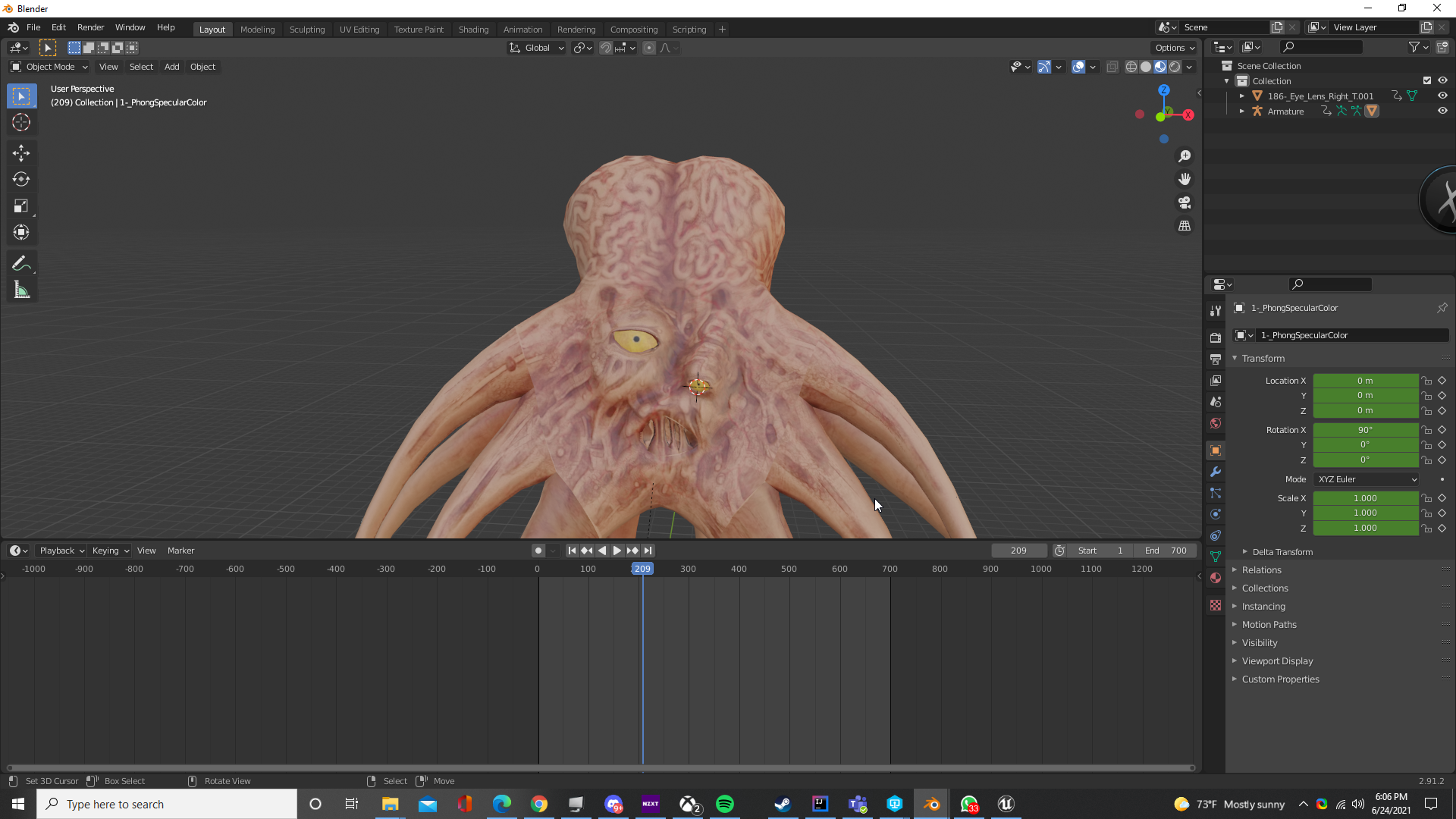
when imported to unreal the eye lid doesnt open anymore
and the brain doesnt pulse
plush yew
@glass egret try to create an action!

if I am not mistaken, last time I tried to import a mesh with an animation without creating an action it did not shew
#################################################
I am still having problems getting this to print what is supposed to...

I tried to "add widget; show in view-port" in the pawn, player state without a result...
the EventGraph where this function is override looks like this,

there is other turnaround for getting key input?
plush yew
plush yew
I tried to "add widget; show in view-port" in the pawn, player state without a r...
the call of the widget works, since it locks my player functionality.. however the print shewing the keys pressed \ released do not! 😐
glass egret
plush yew
<@!141380556578357248> try to create an action!
whats set recursive mean
plush yew
idk what you trying to chat
glass egret
the plugin
u need to
Export recursive Export self object and all children
how do i do that
lect the asset you want to export and set the Export type property to "Export recursive".
select the asset you want to export and set the Export type property to "Export recursive".
how do i do that
plush yew
if you are typing about the Unreal plugin to Blender, they did a live stream about it on their Youtube channel
there is 4 hours of tutorials there, but the first one should be enough I think
but I do not know much about blender, only low-poly stuff and simple animations (I mostly use video references to set walking, running ones; so zero tweaking of F-curves & other stuff)
I got so much trouble trying to export skeletons of vehicles that I just gave up and went for a hover one 😄
 rancid lagoon
I have a huge 50 GB model and its on google drive, but i want to be able to stream that data into my game without having to store the model on the players computer. Any ideas?
 hoary silo
@plush yew go into the project settings and search for "enable transport" and disable "enable transport" under the "Plugins - UDP Messaging" section
The same thing happens to me whenever I make a new project, not sure what's causing it but disabling that setting solves the issue
hope that helps
 calm pollen
Hey how do I size widgets so that if the player's device screen is not the usual dimensions (1080x1920) For instance a screen size being a (640x1136)
if that makes sense idk how to word it exactly ^^^
hoary silo
yeah that does
select the widget that you want to be affected
then press this:

then press the image all the way in the bottom right:

then set all of the offsets to 0

did that work?
hoary silo
@calm pollen
 light thunder
Is there anyway to access/randomize the starting point of an animation - on the animation blueprint?
glass egret
can i send someone the blend file and they export it for me
calm pollen
hoary silo
<@!682289272518213632>
yup thanks 🙂
glass egret
i dmd u
 lofty sandal
glass egret
https://i.imgur.com/rNi1iJD.png
lofty sandal
glass egret
https://i.imgur.com/rNi1iJD.png
loving this ^
autumn elbow
@ember geode grasp what? door?
 jaunty wharf
Does anyone have any optimization tips? currently I'm having around 15-20 FPS hovewer im running on old 1050gtx and on max settings as I haven't implemented option to scale down settings in menu. That amount of fps is kinda unplayable. Also all LODs are set up so that's a thing I know about 🙂 Thanks in advance
 glass egret
will pay someone 10 dollars to get this exported where it works. every animation is working except the eye
autumn elbow
What if it's not you, but Unreal 5? Its still buggy.
Try it in 4.26 and see if it works.
glass egret
im in 4.26 if ir talking to me
 tame matrix
Does anyone have any Youtube channels or websites with free Unreal tutorials? 🙂 I'm currently learning from UnrealSensei but I'm looking for some more content, thankyou! Feel free to tag/pm me 😄
Also letting me know of any other kinds of Unreal4 learning resources would be really appreciated
plush yew
do u know my ssd crashed and my projects were lost . can you tell me how can i prevent it from happening it in future
 marsh sparrow
source control
plush yew
marsh sparrow
source control
what source control ??
 devout whale
Can someone please tell me the latest version of ue4 ? Thanks
rancid lagoon
the latest version of UE4 is 4.26, but they have UE5 on early access
rancid lagoon
tame matrix
Does anyone have any Youtube channels or websites with free Unreal tutorials? 🙂...
yes, there is Smart Poly (https://www.youtube.com/channel/UCp1e34nrTQqVXkNU5ekH9CQ) and there is the Unreal Engine official youtube channel

YouTube
Smart Poly is a channel dedicated to educational content ranging from game development, 3d modeling, and much more. I upload tutorials every Tuesday and Thursday, and then usually a fun video on Saturday. I like to create games and play them! Subscribe with notifications so you can know when I go live next time if you want to come test my games ...
there is also Usico (https://www.youtube.com/channel/UCQv4mwerZLQVe3wPbsMc-qw)

YouTube
Here at Uisco I make tutorials and games assets which help people make games using Unreal Engine 4
New videos on Wednesday and Saturdays
tame matrix
Thanks man 😄 much appreciated!
 grim ore
epic games has free content as well on their website
rancid lagoon
Is it possible to make a game where you download it onto your computer, but when you play it it fetches some of the data (i.e. really big 3d model files) from the cloud or something? That way the game is still light on the computer?
grim ore
yes but not out of the box, that is custom code. there is probably plugins/marketplace stuff to help with that for a price
rancid lagoon
what would that be called?
grim ore
no real name, maybe remote patching or remote downloading. its something that a MMO would use for example so maybe look for a patching system?
googling UE4 game patcher returned some results
but based on your question it seems like you dont want it to be on the PC, but usually thats not going to happen it has to be somewhere even temporary (like html stuff does). Cloud Streaming would be the solution to nothing on the PC
chrome beacon
Hello. Can somebody help me to fix this damn thing "Platform HoloLens didn't have a valid GlobalIdentifier set in DataDrivenPlatformInfo.ini" that causes crashes as soon as I open any 4.26 project, please. I've been going crazy with that in the last 24 hours! Thanks so much...
I checked the installed plugins and for some unknown reason it says no plugin is installed, which makes no sense
Where are supposed to be stored the installed plugins? Not the storage of the packages but the storage of the enabled ones.
 kindred viper
either in the project plugins folder or the engine plugins folder
chrome beacon
@kindred viper I checked there and the plugins are all there but the engine says are not installed
it's forcing me to reinstall/enable them all
How is it possible that I find no reference to that at all, anywhere!?
all the information I get are misleading and not addressing my specific issue, which must be a common issue
 leaden dust
What is the best blender to unreal workflow plugin?
leaden dust
I was thinking the same thing although there are a bunch of them floating around
kindred viper
@leaden dustdepends what you need to do. If it's skeletal meshes there are 3 workflows. each with their own benefits and pitfalls. If its static meshes, it's pretty straight forward in terms of exporting to FBX. If it's physics you can use alembic and scale it 100 (presuming you keep the meters scaling that is default in blender as its best for the physics side)
 tropic plinth
Somone knows how to exclude components from Apply Radial Damale?
I have some bigger Trigger Spheres on some actors, but they should not be considered for Apply Radial damage as hit. But they will. Documentation says, radial damage is only applied on component which blocks visibility channel. But this seems to be buggy or I miss something:
https://docs.unrealengine.com/4.26/en-US/BlueprintAPI/Game/Damage/ApplyRadialDamagewithFalloff/
From Documentation: "Will only hit components that block the Visibility channel."
But it also hits sphere which are set to visibility ignore:

 covert hedge
anyone would know how to hide engine C++ files/folder in the content explorer?
thanks  it was a pain to navigate through and i couldn't find this button somehow
worthy oyster
Can someone recommend a tutorial for beginners in unreal engine? I’m from blender and it’s really confusing to me
plush yew
https://youtu.be/qeKDRqWtGV0 this might help
Check out my Unreal Engine 4 courses:
►Souls-Like Action RPG with Multiplayer: https://devaddict.teachable.com/p/souls-like-action-rpg-game-with-multiplayer
►Multiplayer First Person Shooter with Dedicated Servers: https://devaddict.teachable.com/p/multiplayer-fps-inspired-by-cs-go
►Multiplayer Top-Down Dungeon...
@worthy oyster
worthy oyster
plush yew
https://youtu.be/qeKDRqWtGV0 this might help
I just watched like 10 minutes of that but it’s already confusing to me I watched a series from make games with katie it’s build up like the dich it tutorial from blender guru and he’s talking already about classes and blueprints and c++
plush yew
@worthy oysterthats okay it will take some time getting use to, but its best to start small like learning how to place objects how to import them etc then learn lighting level design and blueprints etc its just going to take some time getting use to, you dont have to understand it yet in a couple days youll already have a small game going
 harsh ginkgo
Does anyone know why this wildcard bug in the map has not been fixed yet, even though it was reported in 2019? It's a joke?


 bitter iris
trying to set position of another widget through blueprints but it always seems to appear in the top left. I got the location from a box i placed where I want the widget to appear any ideas why it only stays in the top left
nvm done it
 chrome beacon
Has anyone moved the VaultCache to a new drive? I need a little helpt with that... thanks
 flint stone
Hi, I'm not sure where to post this. I'm trying to research digging and cave creation during runtime in UE. There are a lot of articles where this has been inquired about since 2015 or even earlier, but none that have given me a conclusion on the matter. Most articles point at Voxel as the solution, but I wonder if there any other alternatives out there or in the works.
chrome beacon
flint stone
Hi, I'm not sure where to post this. I'm trying to research digging and cave cre...
Voxel seems definitely the only ready-made solution, as far as i know. Unless you're capable of creating an alternative yourself I see no other option but I can be wrong.
 eternal osprey
Hi Peoples!
Do you know if there is a way make the ObjectPositionWS UE4 node work in VR build?
I tried to replace it with the ActorPositionWS node but it's still not working
flint stone
I wouldn't mind trying, as I do have a solution in mind. Maybe someone has some references to which classes are used in landscaping, just to spare me the time of searching. 😄
chrome beacon
Can somebody help me to clear my doubts about this procedure?

That warning in orange is scaring me off, I'm terrified my stuff can go lost someway
I don't want to re-download all that stuff once again. Please
what does it mean with "restart"?
I know what it does but I'm just alarmed by possible bad consequences
I want to avoid that "worst case"
 lucid grove
flint stone
I wouldn't mind trying, as I do have a solution in mind. Maybe someone has some ...
lucid grove
flint stone
I wouldn't mind trying, as I do have a solution in mind. Maybe someone has some ...
Just to clarify - you want to create cave on landscape or system that allow player to make one?
 spiral flint
flint stone
spiral flint
flint stone
@lucid grove a system that allows the player to make one.
 elder crest
is there anyone awake and knowlegable to help me with a rigging issue? i have asked several other servers and everyone seems stumped.
whole abyss
I've made a simple player entity movement with blueprints. Should i could i convert that to c++ ?
 fierce tulip
@vernal dock that should go in #work-in-progress
whole abyss
I'm also a bit unsure on general stuff. For example. The player has a spring arm and camera. Can all of that be made in c++ also? Should it?
And if so does that mean the whole object is just a c++ object, or is it a normal regular object with c++ components
sorry if it's confusing questions, just wanna understand this
 vernal dock
fierce tulip
<@!245789334156869634> that should go in <#225448516376461313>
vernal dock
fierce tulip
<@!245789334156869634> that should go in <#225448516376461313>
thanks i did
 sly condor
you can have a special material writing in the custom depth / stencil buffer, and then use a post process to paint white where the custom stencil is written. I did it that way in our game and works.
 obtuse path
Is it me, or are a lot of the API documentations returning 404 not found over the past few days?
 night vale
i cant see whats in the target layers

i added 3

but i cant see any
it dosent show up in the target layers
i renamed the layers and it fixed it!
plush yew
Hello! Does anyone have experience with Kickstarter (or similar) to fund a project? Do you have any suggestions?
fierce tulip
my main suggestion is to not rely on it.
if you need to financially rely on it, you might end up being very disappointing.
having said that, it kinda feels out of the scope of this channel so might be better suited in #lounge
worthy oyster
plush yew
https://youtu.be/qeKDRqWtGV0 this might help
30:40 it doesnt work to get them down as he said
"holding down ctrl and then press the end key"
 full lodge
Someone tried to launch UE4 (4.26) on Ubuntu 20.04????
I am getting error of vulkan driver...
plush yew
fierce tulip
my main suggestion is to not rely on it.
if you need to financially rely on it, ...
Thanks - I'll ask in the #lounge, I just didn't see a channel that best fit my question.
full lodge
On AMD card works well, but on Nvidia does not...
plush yew
full lodge
I am getting error of vulkan driver...
Is the error Failed to load yulkan driver

 drowsy snow
Aren't NVIDIA's Linux drivers notorious for being wonky?
worthy oyster
worthy oyster
30:40 it doesnt work to get them down as he said
?
drowsy snow
full lodge
On AMD card works well, but on Nvidia does not...
If you have NVIDIA GPU, you'd might as well setup a kernel VM running Windows, complete with CPU pinning and alike.
NVIDIA's Linux drivers are notorious for being wonky, based on reports in forums and alike.
plush yew
full lodge
I am getting error of vulkan driver...
try sudo apt install vulkan-utils
 crimson crater
What are epic online services for?
drowsy snow
crimson crater
What are epic online services for?
It's what it says on the tin, an epic set of backend services for games, especially for online games.
fierce tulip
btw, happy birthday @keen birch
 thick herald
fierce tulip
btw, happy birthday <@!112595378796249088>
thick herald
fierce tulip
btw, happy birthday <@!112595378796249088>
#lounge 😄 😄 sorry. Not Sorry. 😄
 keen birch
Thanks Luos 😄
 frozen stratus
@drowsy snow That automotive material error we talked about is caused by applying certain materials to skeletal mesh. Once applied it will break it on static meshes too and error will be saved to the material through the project. So can only use these materials on static meshes. To fix it, if this error is already there, need to remove the material from skeletal meshes and reimport related broken master material to the project... just sharing this, maybe will be useful to someone later
elder crest
Can anyone help me with a BC issue?


im using these 2 assets but i cannot rip the projectiles to the gun mounts and doing it via BP doesn't seem to work because all the modular items are BC
i can stream if need be if anyone can help me solve said issue
 coarse turtle
Do you know where CallStack option is located in UE4.26?
 cloud stone
I'm trying to create a blueprint where you click on a static mesh actor and an ai that I have set going through a navigation path should start going backwards. Anyway I
I'm having trouble referencing the static mesh actor in blueprints
So how would I bring the actor into a blueprint to further work with it?
drowsy snow
cloud stone
I'm trying to create a blueprint where you click on a static mesh actor and an a...
I think Blueprint Interfaces might be a good fit for this.
worthy oyster
what do i need to do to add a sound to a node? in the video there is jsut a black image but on mine is a computer with books i think
 warm hornet
Anyone compile a custom UE build from source? Do you have to use VS 2017 or can you use a more recent version?
drowsy snow
warm hornet
Anyone compile a custom UE build from source? Do you have to use VS 2017 or can ...
Custom build - compiles and works fine with VS 2019
 worthy oyster
how do i close this back up?
plush yew
plush yew
there is other turnaround for getting key input?
UHUL! I got what is wrong. You need to set "bIsFocusable" variable, however, by following the tutorial on lvl80 website, I thought it was to create an "IsFocusable" one myself and not use the (already created) engine one... So now I got keyboard input showing on the PrintString!
 thick herald
flip flop on the overlap
worthy oyster
this switch like if i hit it again it toggles
how to setup a flip flop?
give me a second i might have it
thick herald

What is the Flip Flop Node in Unreal Engine 4 Blueprints?
Source Files: https://github.com/MWadstein/wtf-hdi-files
 dusty lava
Hey Guys, does anyone know how to use a console command to freeze the camera in game but not freeze the frame, is that possible?
I found a command for FreezeAt but I can't seem to get it working properly
drowsy snow
worthy oyster
i figured it out...how long are you guys in like doing this?
4 years.
worthy oyster
oh wow im doing like 2-3 years blender and decided to make a game with a friend so im learning unreal now...
drowsy snow
dusty lava
Hey Guys, does anyone know how to use a console command to freeze the camera in ...
Any reason not to pause the game?
dusty lava
It would need to freeze the camera due some behavior from remoting into a device, I need to do some profiles and a console command to freeze the position would be super useful
worthy oyster
i looked once into blender 2.7 and was scared to touch it so i deleted it again (i was about 10? 11?) so one day i downloadd blender again and modelled stuff and im getting better now i made recently my first car
plush yew
does anyone knows in which situation I would not want this as my anchor in widgets?

I really do not know, in my head this is the alpha-ômega solution
drowsy snow
plush yew
does anyone knows in which situation I would not want this as my anchor in widge...
Generally widgets that aren't filling the entire screen, like game HUD
plush yew
drowsy snow
Generally widgets that aren't filling the entire screen, like game HUD
oh gosh, thanks for the sparkle
hahaha what a noob I was
drowsy snow
HUDs are better using single point anchors (or stretch either horizontally or vertically, depending on the game)
 worn granite
Yeah consider ultrawides
plush yew
so in my case (the quest for setting a Terminal window inside the game), would be better setting the anchor as mid-bottom instead the one I pointed?
 worn granite
Middle anchor makes sense for some UI elements like a quest list maybe. Side anchor would be better for a map, perhaps.
Full screen anchor takes away that utility and now you're working exclusively in the proportions of the screen and not the actual size
drowsy snow
worn granite
Yeah consider ultrawides
Also 4:3 displays
(I know some people still using those and it's what they have)
worthy oyster
thats messing with my eyes
 worn granite
Anchors and then relative offset and pivot, all together make for a very nice system
worthy oyster
i call it the motionblurrplate
chrome beacon
This nightmare never ends... I keep on crashing even on newly created projects reinstalling the assets connected to HoloLens... but this issue keeps coming and is seriously driving me mad. This is part of the message I get with the crash... Platform HoloLens didn't have a valid GlobalIdentifier set in DataDrivenPlatformInfo.ini
drowsy snow
worthy oyster
why does it do that?
BTW consider remuxing the video or reducing its file size.
worthy oyster
drowsy snow
BTW consider remuxing the video or reducing its file size.
can you read still the text if i do so?
this is how its intended to be (its a tutorial)
 drowsy snow
worthy oyster
can you read still the text if i do so?
drowsy snow
worthy oyster
can you read still the text if i do so?
Texts often survive in high level of compressions.
worthy oyster
worthy oyster
didnt changed anything
i changed it to 100 and it doesnt changed anything
why cant i just reverse it? i mean i did the same on the door animation too?
but it works like that hmmm
 worthy forge
Where should someone look to find Freelancers for 2D Sprites
 finite dew
Can anyone explain why my character is still moving when I move my mouse but cannot move on the menu ? Thanks

Nvm I'll find the issue tomorrow
 mild jetty
i wonder if blueprints are a mandatory thing to know about
i was going to skip it so that I don't feel like a casual
and then I thought
what if the company I work for only uses blueprints?
worthy oyster
worthy oyster
but it works like that hmmm
@plush yew
drowsy snow
mild jetty
i wonder if blueprints are a mandatory thing to know about
Generally you'd want to learn both BP and C++
And yes, many studios use Blueprints in their UE4 game development.
Also here's the thing:
Using Blueprints in Unreal Engine is not an embarrassment.
light thunder
sly condor
you can have a special material writing in the custom depth / stencil buffer, an...
lol that was a month ago
drowsy snow
worthy oyster
btw this is now the smallest bitrate i can set it to <@!325627930484932608>
Use software like Handbrake to better compress it. 42 MB for 1 minute video is ridiculous for the web.
drowsy snow
mild jetty
i was going to skip it so that I don't feel like a casual
Don't tell me you're just looking for some ego boost/l33t h4x0r status from typing something in Visual Studio/Rider 
worthy oyster
whats this then
 tender marten
I everyone, someone succeeded to adding in-app purchase on his android game ?
 mild jetty
drowsy snow
Don't tell me you're just looking for some ego boost/`l33t h4x0r` status from ty...
mild jetty
drowsy snow
Don't tell me you're just looking for some ego boost/`l33t h4x0r` status from ty...
no?
 sly condor
light thunder
lol that was a month ago
sly condor
light thunder
lol that was a month ago
lol better late than never XD
mild jetty

 brisk mirage
Hey maybe I am wrong But there is no way for me to make the clothes I bought for my ue4 character that are bought rig and have them work? I have watch many videos none of them show how to make it work and the cloth simulator only seem to work just on flags? Not jeans or shirts boots etc any help bought many clothes for my survival game would like to have player switch out clothes in runtime. Like if it get cold they can craft pants then move to equip then they equip? or am I asking to much?
drowsy snow
mild jetty
*no?*
Good luck packaging UE projects without it 
(Though there's a standalone build tool for VS)
mild jetty
of course I need it
drowsy snow
My point is that in Unreal Engine 4 (and 5), BP and C++ go hand in hand. You want to learn both of them, and bring your BPs to superpower with C++ low level scripting.
Why do they have to feel casual to begin with, and why does it matter? Ego is not a good thing in gamedev.
For instance, doing asset referencing in UE C++ is a huge pain in the arse.
worthy oyster
thanks 😄
i just tried some exploits and i cna lock the door if its open xD

like it wont go up anymore
yay fixed a problem on my own 😄
worn granite
drowsy snow
For instance, doing asset referencing in UE C++ is a huge pain in the arse.
technically you can do it in an elegant way without ever involving BP. You can make full games with only C++ and not do things in a terrible way.
It just isn't as effective as allowing yourself the combination
grim ore
Never use BP, never use C++. Rewrite the engine in pure 6502 ASM and run it on a NES and be done with it, that would prove your hardcore
mild jetty
drowsy snow
Why do they have to feel casual to begin with, and why does it matter? Ego is no...
it matters on a personal level. when I see my friends, they will find something to diss each other about, and visual programming is one of those things 🤡
fierce tulip
wonder how many of them shipped games XD
grim ore
still idiots
mild jetty
yep
drowsy snow
mild jetty
it matters on a personal level. when I see my friends, they will find something ...
Then write your own game engine lmao
Use overcomplicated language if you want to bring your ego up to eleven, like Fortran or Assembly x86
grim ore
write your own programming language like other game devs...
fierce tulip
pff, why start at writing your own game engine, create your own hardware, an OS to run on it, and take it from there
drowsy snow
Even create competitor to PICO-8 for all I care.
grim ore
yeah be like wozniak!
seriously tho... if you plan on using Unreal Engine you will use Blueprints, if you want to fight it then use another engine.
Visual Scripting is great tho, Game Builder Garage on the Switch is a fun way to get people into programming. I've been having a blast with it
fierce tulip
make your own tools to mine them, and your own factory to melt the ores down, and another to construct them
"advanced gamedev simulator"
mild jetty
drowsy snow
Then write your own game engine lmao <:Kotohoops:808693236398424084>
Use overco...
or you know
I could just lie to them 🤷♀️
one of them said they'd make their own game engine
but that was 3 years ago, and i see no game engine
drowsy snow
mild jetty
I could just lie to them 🤷♀️
Or even better: Don't bother with them.
You do you.
Use Unreal Engine if you're comfortable with it, and it's what your project needs.
grim ore
"Ya'll make fun of Blueprints, I'm gonna be over here making an actual game"
drowsy snow
mild jetty
but that was 3 years ago, and i see no game engine
The real flex would be making a tangible progress, even if it's using UE4 (or any other publicly available game engine). 
lucid grove
Hey fellas! Can somebody suggest a way to make those sheer cliffs? Seems like landscape editor doesn't allow me to do that
 fierce tulip
meshes
grim ore
the overhanging one?
lucid grove
grim ore
the overhanging one?
yep
drowsy snow
lucid grove
Hey fellas! Can somebody suggest a way to make those sheer cliffs? Seems like la...
Use static meshes.
grim ore
then what Luos suggested, meshes
lucid grove
Yeah i thought about it but couldnt find any look a like both on marketplace and megascans
grim ore
unfortunately I dont think the built in landscape system supports concave like that
drowsy snow
lucid grove
Yeah i thought about it but couldnt find any look a like both on marketplace and...
Creating / sculpting your own is always an option.
lucid grove
drowsy snow
Creating / sculpting your own is always an option.
Im not 3d-artist, thats not an option to me 🙂
grim ore
hire someone, or try your best to make it work
its the never ending cycle of being a specialist
drowsy snow
At least in Blender, you could quickly made rough shape of the concave ground, subdivide, and displace it.
And you don't necessarily have to be a 3D artist for it.
fierce tulip
you can still use the landscape for the top-grass part, mask out the side where you need meshes, and find some rock meshes. i think recoloring that epic cave-scene rocks and using those could work
lucid grove
drowsy snow
At least in Blender, you could quickly made rough shape of the concave ground, s...
True, but i want to focus only on 3-4 things at a time. Dont want to be average on everything 🙂
drowsy snow
fierce tulip
you can still use the landscape for the top-grass part, mask out the side where ...
Though I don't think this is a good idea, given how "low res" landscape planes are in Manny scale.
drowsy snow
lucid grove
True, but i want to focus only on 3-4 things at a time. Dont want to be average ...
Alternatively you can assemble it by kitbashing mossy rock assets.
lucid grove
drowsy snow
Alternatively you can assemble it by kitbashing mossy rock assets.
I have a problem mostly with its sheer part, probably need to look closely on MS library
drowsy snow
lucid grove
I have a problem mostly with its sheer part, probably need to look closely on MS...
Don't get too rigid with Megascans stuff, BTW. Improvise and kitbash the assets.
fierce tulip
drowsy snow
Though I don't think this is a good idea, given how "low res" landscape planes a...
worked for most games ive worked on, just depends on needs/wants/whatever
grim ore
spend some time in real life learning to be a propmaster for film and tv, work on those kit bashing skills in real life 🙂
this poor poor delusional person heh
 fierce tulip
F
 stiff beacon
So, can anyone help me with general tips and how better experienced users do things like this? I got the idea to recreate a certain Monastery because it looked cool, and i realized I could probably do it with just using the geometric shapes the program has. My question is though, do most people do the same or do they make their own models or find megascans?
drowsy snow
stiff beacon
So, can anyone help me with general tips and how better experienced users do thi...
BSPs are only used for blocking out levels at best, not to make meshes.
grim ore
look at the content examples project, look at the level building map
drowsy snow
Also many AAA games uses Megascans nowadays.
lucid grove
grim ore
this poor poor delusional person heh
Maybe he is young! I was always kinda jealous when teenagers start to be interested in development, and not like me at the age of 29.
 junior shadow
hey all, respect your skills and theme. weve been making soldier of fortune 2 to work on UE , we need to finish the project, you can pm me for details
lucid grove
Im 31 atm and those few years of learning flashed right in front of my eyes
 prime willow
well i wanted to make an mmo by myself too so i know the feels ;-;
stiff beacon
drowsy snow
Also many AAA games uses Megascans nowadays.
Megascans do look amazing of course, but I kind of feel like they take a lot of the fun away from making and designing games
grim ore
@lucid grovehe could be, still delusional they just might not know it yet heh
prime willow
settled for multiplayer game with solo play
drowsy snow
lucid grove
Im 31 atm and those few years of learning flashed right in front of my eyes
Age doesn't really matters for starting development
drowsy snow
stiff beacon
Megascans do look amazing of course, but I kind of feel like they take a lot of ...
The fun from reinventing the wheels? or the fun of making an actual progress in the project?
 fast kernel
thats good cause im 25 and i started today lol
 worn peak
Im having a lag using 'set actor loc' + lerp nodes to move a actor, but move smoothly using 'move component to' any ideia why the lag ?
drowsy snow
I was a modder when I was an 8 years old kid (and still is), delved into game dev a decade later.
lucid grove
drowsy snow
Age doesn't really matters for starting development
There is few benefits: when you are young you have more free time and more energy, whats more important: less problems ha 😄
But when you older you more concentrated and what seems to me more important is that you have much more critical thinking.
worn peak
its possible to increase the 'tick' on a timeline node ?
drowsy snow
prime willow
well i wanted to make an mmo by myself too so i know the feels ;-;
I'm also thinking about making an MMO (sort of PAST FUTURE ONLINE), but I know it's going to be a huge undertaking for me, so I start with single player game (but applying some MP practices because I'm using replication for replay system)
fast kernel
im trying to create a stadium, but go absolutely no idea how to go about it, theres not much how to threads out there
drowsy snow
I mean, my project funding is basically my own personal savings at the moment, and I can't afford to get going with MMO.
prime willow
likewise >:3
grim ore
@worn peaknot really? the timeline runs on tick and the value is based on time that is passed since the last time it fired. What did you need done?
drowsy snow
prime willow
im still having ik issues tbh
What kind of issues?
prime willow
model still floops
if i choose a different bone setup via tearing bones out
i lose face rig :/
so im at a lost but trying a new tutorial to get ik working
hopefully ill make some progress
worn peak
oh u answered on this chat, sorry the mention on the 'bp' chat
i need to move a simple static mesh within 1sec, doing it with lerp+setActorLocation
when i do with lerp+setLoc seems visually like i have 10fps
when I do with moveComponent seems like playing with 60fps
 cedar wave
grim ore
this poor poor delusional person heh
cedar wave
grim ore
this poor poor delusional person heh
It's kind of a rite of passage at this point.
grim ore
maybe your code is weird? it should move at your FPS
but generally no, its going to update the timeline at the tick rate
drowsy snow
prime willow
if i choose a different bone setup via tearing bones out
Can you describe your current setup? (Can PM if you felt it'll going to make the channel "dirty")
worn peak
the code, any possible error at this part ?
 prime willow
drowsy snow
Can you describe your current setup? (Can PM if you felt it'll going to make the...
prime willow
drowsy snow
Can you describe your current setup? (Can PM if you felt it'll going to make the...
sure lemme try it again and ill show
grim ore
yes
your start and end when lerping should be fixed
so your changing your start every frame to the current start which means its going to not lerp right
get and save current location as start location -> start timeline -> lerp from current saved start location to the fixed end location
worn peak
but its fixed, no ?
im moving more than one actor
any K 'index' its for a single actor
grim ore
are you not getting it every frame and then setting it that same frame to the new location?
get actor location is going into A on the lerp, then you are lerping and putting that as the new location
next frame your getting the new location, and repeating right?
this results in your starting being closer to the ending every frame which means the distance it moves is not fixed over time
grim ore
maybe im reading it wrong but it looks like what I am describing. is the location you get changing over time that you feed into the Lerp A?
drowsy snow
Control Rig (sort of)
worn peak
its like,
k==0,
get actor location of ArrayActor[0] and use it on Lerp A
get location of TargetPointArray[0] and use it on Lerp B
then set it on SetActorLoc
k==1...
grim ore
yes look at this

lerp should be like the top, your moving from 0 to 1 over time and 0.5 is in the middle
drowsy snow
Though it would be a too much of a stretch if you consider Control Rig as anim BP (which is officially considered as rig BP)
grim ore
your 0 or start point never moves so 0.5 is in the middle
 paper ginkgo
so i got the modular robots off the store which is free. but im only given the option to create new project. and when i go into my own project and try to import the blueprints over the folders are empty. How would i add the content to my own project?
grim ore
if you change your start location , bottom picture in red, then your 0.5 is now more like 0.75 since your 0 to 1 is now condensed
drowsy snow
paper ginkgo
so i got the modular robots off the store which is free. but im only given the o...
Right click the assets -> Migrate
grim ore
yeah your start location on a lerp has to stay the start location, it never changes or else your distance grows or shrinks
worn peak
the input LerpA its been updated too so ?
grim ore
so grab your start locations, put them into a new array, and use that as your starts as you loop
drowsy snow
paper ginkgo
so i got the modular robots off the store which is free. but im only given the o...
(ignore that I'm using SoundWave to demonstrate this)
 grim ore
yep instead of get current actor location, just get your stored actor locations that you stored before you started the timeline
worn peak
btw theres something like 'temporary variable' to use it just for that moment
or i should create a whole new array to save it
grim ore
theres no real temp variable outside functions, I would just make a new one
worn peak
oks
grim ore
you could try Make Array but I personally have no guarantee it would stay alive while the timeline was running in the event (makes me feel dirty)
paper ginkgo
drowsy snow
Right click the assets -> Migrate
hmmm i think somethings wrong with my comp lol
drowsy snow
Procedural animation in UE4 is possible in anim BP and/or Control Rig.
You may also look for Power IK plugin that have support for this.
paper ginkgo
whenever i try and open folders it takes forver to load/freezes
grim ore
@paper ginkgowhat version of the engine is YOUR project in, what version of the engine is THE ROBOT PACK in?
paper ginkgo
im in 4.26 and the project is too
light thunder
Is there any tutorial for using nav meshes in conjuction with streaming levels? I keep getting editor crashes and am wondering if I am doing something fundamentally wrong - my main point is my recast nav actor is on the persistant level, I've done that but I don't see why it's crashing when I have streaming levels that contain their own nav meshes - ```Unhandled Exception: EXCEPTION_ACCESS_VIOLATION 0x00000000
UE4Editor_NavigationSystem!FRecastTileGenerator::MarkDynamicAreas() [D:\Build++UE4\Sync\Engine\Source\Runtime\NavigationSystem\Private\NavMesh\RecastNavMeshGenerator.cpp:3842]
UE4Editor_NavigationSystem!FRecastTileGenerator::GenerateNavigationDataLayer() [D:\Build++UE4\Sync\Engine\Source\Runtime\NavigationSystem\Private\NavMesh\RecastNavMeshGenerator.cpp:3496]
UE4Editor_NavigationSystem!FRecastTileGenerator::GenerateNavigationData() [D:\Build++UE4\Sync\Engine\Source\Runtime\NavigationSystem\Private\NavMesh\RecastNavMeshGenerator.cpp:3812]
UE4Editor_NavigationSystem!FRecastTileGenerator::GenerateTile() [D:\Build++UE4\Sync\Engine\Source\Runtime\NavigationSystem\Private\NavMesh\RecastNavMeshGenerator.cpp:2647]
UE4Editor_NavigationSystem!FRecastTileGenerator::DoWork() [D:\Build++UE4\Sync\Engine\Source\Runtime\NavigationSystem\Private\NavMesh\RecastNavMeshGenerator.cpp:2047]
UE4Editor_NavigationSystem!FAsyncTask::DoWork() [D:\Build++UE4\Sync\Engine\Source\Runtime\Core\Public\Async\AsyncWork.h:272]
UE4Editor_NavigationSystem!FAsyncTask::DoThreadedWork() [D:\Build++UE4\Sync\Engine\Source\Runtime\Core\Public\Async\AsyncWork.h:296]
UE4Editor_Core!FQueuedThread::Run() [D:\Build++UE4\Sync\Engine\Source\Runtime\Core\Private\HAL\ThreadingBase.cpp:855]
UE4Editor_Core!FRunnableThreadWin::Run() [D:\Build++UE4\Sync\Engine\Source\Runtime\Core\Private\Windows\WindowsRunnableThread.cpp:86]```
grim ore
ok so then migrating should work like suggested
drowsy snow
light thunder
Is there any tutorial for using nav meshes in conjuction with streaming levels? ...
Typically you'd use dynamic nav "meshes" for streaming levels (or open world scenarios)
paper ginkgo
grim ore
ok so then migrating should work like suggested
the issue im having rn is i can hit migrate but my folder finer runs superrr slow, its been doing this for a couple days now
like my folder select is frozen rn
 buoyant isle
hey guys I got a question, I have a BP that makes a bullet hole spawn on overlapping bullet everything works good but the bullet hole is getting render at like 2-3 meters past this it desperate. where can you set the render distance on this type of effects ?
grim ore
@paper ginkgowell it usually has to find all associated assets which then ends up loading them in memory so it could be causing that. if the versions are the same copying the raw folder in windows should work if you move it to the same location
drowsy snow
buoyant isle
hey guys I got a question, I have a BP that makes a bullet hole spawn on overlap...
Assuming you're using decals:
 buoyant isle
yeah decals sorry I didnt had the project open about to go out ^^
paper ginkgo
grim ore
<@!566121809087430657>well it usually has to find all associated assets which th...
maybe, would be nice to know if somethings wrong with my comp xd even when i try to open my folder normally it takes minutes to load uip
buoyant isle
drowsy snow
Assuming you're using decals:
thanks a lot sire I will plug that when i'm back having a really big render distance on this type of thing is really important for gamaplay,ty
grim ore
@paper ginkgocheck your task manager and event log in windows
light thunder
drowsy snow
Typically you'd use dynamic nav "meshes" for streaming levels (or open world sce...
What do you mean? I am adding the nav mesh bounds volume to my streaming level
paper ginkgo
grim ore
<@!566121809087430657>check your task manager and event log in windows
alright so that worked but when i try and drag over i get this error LogAssetTools: Warning: Failed to import 'C:\Users\jdhey\OneDrive\Documents\Unreal Projects\ModularLowPolyRobots\Content\ModularLowPolyRobots\Meshes\RobotBodies\SM_BodyLarge_Type1.uasset'. Unknown extension 'uasset'.
grim ore
you need to copy the content from project to project, not importing
so in file explorer copy the folder you want from the directory it's in in the robot project into the same folder structure in your new project, then open the editor
plush yew
hello
i had a unreal crash
LoginId:2d934fae47c23e39236ccd9ca1ae3e15
EpicAccountId:47aa5b17e7a84fe4ab7b64a9fc7e493e
Unhandled Exception: EXCEPTION_ACCESS_VIOLATION writing address 0x000002542203f6b4
UE4Editor_Water!FWaterQuadTree::FNode::AddNodes() [D:\Build++UE4\Sync\Engine\Plugins\Experimental\Water\Source\Runtime\Private\WaterQuadTree.cpp:315]
UE4Editor_Water!FWaterQuadTree::FNode::AddNodes() [D:\Build++UE4\Sync\Engine\Plugins\Experimental\Water\Source\Runtime\Private\WaterQuadTree.cpp:322]
UE4Editor_Water!FWaterQuadTree::FNode::AddNodes() [D:\Build++UE4\Sync\Engine\Plugins\Experimental\Water\Source\Runtime\Private\WaterQuadTree.cpp:322]
UE4Editor_Water!FWaterQuadTree::FNode::AddNodes() [D:\Build++UE4\Sync\Engine\Plugins\Experimental\Water\Source\Runtime\Private\WaterQuadTree.cpp:322]
UE4Editor_Water!FWaterQuadTree::FNode::AddNodes() [D:\Build++UE4\Sync\Engine\Plugins\Experimental\Water\Source\Runtime\Private\WaterQuadTree.cpp:322]
UE4Editor_Water!FWaterQuadTree::FNode::AddNodes() [D:\Build++UE4\Sync\Engine\Plugins\Experimental\Water\Source\Runtime\Private\WaterQuadTree.cpp:322]
UE4Editor_Water!FWaterQuadTree::FNode::AddNodes() [D:\Build++UE4\Sync\Engine\Plugins\Experimental\Water\Source\Runtime\Private\WaterQuadTree.cpp:322]
UE4Editor_Water!FWaterQuadTree::FNode::AddNodes() [D:\Build++UE4\Sync\Engine\Plugins\Experimental\Water\Source\Runtime\Private\WaterQuadTree.cpp:322]
UE4Editor_Water!FWaterQuadTree::FNode::AddNodes() [D:\Build++UE4\Sync\Engine\Plugins\Experimental\Water\Source\Runtime\Private\WaterQuadTree.cpp:322]
UE4Editor_Water!FWaterQuadTree::AddWaterTilesInsideBounds() [D:\Build++UE4\Sync\Engine\Plugins\Experimental\Water\Source\Runtime\Private\WaterQuadTree.cpp:513]
UE4Editor_Water!FWaterQuadTree::AddOceanRecursive() [D:\Build++UE4\Sync\Engine\Plugins\Experimental\Water\Source\Runtime\Private\WaterQuadTree.cpp:764]
UE4Editor_Water!UWaterMeshComponent::RebuildWaterMesh() [D:\Build++UE4\Sync\Engine\Plugins\Experimental\Water\Source\Runtime\Private\WaterMeshComponent.cpp:414]
UE4Editor_Water!UWaterMeshComponent::Update() [D:\Build++UE4\Sync\Engine\Plugins\Experimental\Water\Source\Runtime\Private\WaterMeshComponent.cpp:504]
UE4Editor_Water!UWaterSubsystem::Tick() [D:\Build++UE4\Sync\Engine\Plugins\Experimental\Water\Source\Runtime\Private\WaterSubsystem.cpp:193]
UE4Editor_Engine!FTickableGameObject::TickObjects() [D:\Build++UE4\Sync\Engine\Source\Runtime\Engine\Private\Tickable.cpp:151]
UE4Editor_UnrealEd!UEditorEngine::Tick() [D:\Build++UE4\Sync\Engine\Source\Editor\UnrealEd\Private\EditorEngine.cpp:1748]
UE4Editor_UnrealEd!UUnrealEdEngine::Tick() [D:\Build++UE4\Sync\Engine\Source\Editor\UnrealEd\Private\UnrealEdEngine.cpp:426]
UE4Editor!FEngineLoop::Tick() [D:\Build++UE4\Sync\Engine\Source\Runtime\Launch\Private\LaunchEngineLoop.cpp:4836]
UE4Editor!GuardedMain() [D:\Build++UE4\Sync\Engine\Source\Runtime\Launch\Private\Launch.cpp:169]
UE4Editor!GuardedMainWrapper() [D:\Build++UE4\Sync\Engine\Source\Runtime\Launch\Private\Windows\LaunchWindows.cpp:137]
UE4Editor!WinMain() [D:\Build++UE4\Sync\Engine\Source\Runtime\Launch\Private\Windows\LaunchWindows.cpp:268]
UE4Editor!__scrt_common_main_seh() [d:\agent_work\5\s\src\vctools\crt\vcstartup\src\startup\exe_common.inl:288]
kernel32
ntdll
someone can help me?
is a proyect of months
drowsy snow
plush yew
LoginId:2d934fae47c23e39236ccd9ca1ae3e15
EpicAccountId:47aa5b17e7a84fe4ab7b64a9f...
Are you using the Water plugin?
plush yew
yes
drowsy snow
All bets are off.
It's still super experimental and super broken anyway.
plush yew
can i fix it?
worthy oyster
ive got a problem so i tried to import a model of my first car and its just insible and it just kills kinda the whole car


 drowsy snow
plush yew
can i fix it?
drowsy snow
plush yew
can i fix it?
For starters, don't use it.
drowsy snow
worthy oyster
ive got a problem so i tried to import a model of my first car and its just insi...
Make sure the unit scaling is set to 0.01

(and scale existing object 100x)
worthy oyster
drowsy snow
Make sure the unit scaling is set to 0.01
its bad to have it on 1 right?
drowsy snow
It's because an Unreal unit equates to centimetre, not a metre.
And no, changing Length to Centimetres won't do anything.
worthy oyster
oh wait found it

i cant move it and there arent textures on it and its all messed up....god its fustrating i think the reason its mostly seperated is bcs the loopcuts are too close to each other and its merging the mesh?
i think unreal hates me if i would do this

jep i wonder how this one is modeled


i can import it into blender 
i pressed on export selected is this the right one?

@plush yew?
plush yew
plush yew
can i fix it?
?
worthy oyster
it worked but why are there so many?

dude this mesh makes no sense to me it looks so clean but its so weird

god unreal kills my blender knowledge already i want to press wasd to move around 😦
what are lods?
light thunder
worthy oyster
what are lods?
This is your problem, probably - check in blender you essentially will have 4 "copies" of the mesh, each more detailed
depending on how you import them and merged in blender it can, well, fuck things up
highly suggest you get the unreal blender pipeline tool setup and working
worthy oyster
pipeline?
light thunder
pipeline is an industry term for the flow/path that game assets take ship
3D modeler builds a mesh, a texture artist applies materials to that mesh, a rigger sets up the mesh for animation, animator makes animation - but in this context, it's the way you get it from one program, like blender, into a game engine, like unreal
worthy oyster
light thunder
3D modeler builds a mesh, a texture artist applies materials to that mesh, a rig...
the problem is if you are only one person you need to have a brain like 3 times the size
light thunder
Then don't do it, find something you enjoy doing
It's a lot to learn and you have to think about your WHY for doing it
worthy oyster
well... doing a game but i need to do that to make my games like rig a car a character and stuff
light thunder
Don't try to build a house in one go, you build it brick by brick
start small and just be patient
take a class like udemy or skillshare or youtube series
worthy oyster
same in blender but after 3 days of learning forgot the controlls of blender viewport is kinda lost right? 😄
light thunder
did you take a class on it?
worthy oyster
on what unreal or blender?
light thunder
or did you just poke your head in and try to do stuff? nothing wrong with that but you're going to have a harder time
worthy oyster
if you talk about blender i just go with it scince 2.83 i believe bcs as i saw 2.7 the first time with about 10 or 11 maybe 12 years old i just instantly quit and went back with the new user friendly environment tried modeling stuff and took a break like 1-2 years then im back again and idk how but got really got at modeling and did my first car few weeks ago (scroll up thre is it) and unreal is for now following a tutorial series on youtube and experiment with it like i did in blender
@light thunder
 tepid widget
hey, I have a basic question in installing addons for blender for unreal.
light thunder
worthy oyster
if you talk about blender i just go with it scince 2.83 i believe bcs as i saw 2...
Highly recommend you take your time and just do a udemy course - you'll get through it in a few weeks but you'll cover so much ground
worthy oyster
udemy course?
tepid widget
I would like to install the blender tools, I have downloaded the github folder, however when installing the addons, the tutorial video selects a packed zip file. However the addon I am using is already a folder, not packed. And it is 3 .py files. so I am not sure how to install it.
light thunder
worthy oyster
udemy course?
yes google it and the courses are like 10 or 20 bucks when they are on sale and they are on sale all the time
worthy oyster
well yeah thats a problem i dont have any budget
light thunder
Reach out to the instructor of one of the class, they might give you a class for free or even email udemy explaining it
because they want you to start using Udemy that way, they might just give you one for free
ember geode
tepid widget
I would like to install the blender tools, I have downloaded the github folder, ...
Just select the folder instead of the zip
Or just repack it.
worthy oyster
light thunder
Highly recommend you take your time and just do a udemy course - you'll get thro...
for blender or unreal now?
light thunder
worthy oyster
for blender or unreal now?
both ideally
if the instructors can't/won't give you one, then reach out to udemy themselves - in which case I'd recommend an unreal course as blender has probably more content that's less to do with programming, but it all depends
 hidden tendon
Does anyone know what sort of settings to use for the new collider plugin in UE5? My results are pretty terrible so far, the ones in the Valley of the Ancient look much better that what I've come up with.

 fallow hornet
I have a sequence setup with a camera cut on frame 1, frame 2, frame 3, and frame 4. When I render this out through mrq it is just rendering frame 1 over and over again. It will switch to the camera cut but bounce back to frame 1
rancid lagoon
fallow hornet
I have a sequence setup with a camera cut on frame 1, frame 2, frame 3, and fram...
you need to change that setting when you render it
fallow hornet
What is the setting that needs to be changed
devout swift
I was having an issue where UE was taking up 9GB of RAM. I discovered that this actually happens whenever I open the Window > Developer Tools > Session Frontend tab. Once I open that tab, UE's RAM usage goes from ~600MB to ~9GB. Does this happen for anyone else or just me?
If it's not just me, is there a way to stop Session Frontend from doing this? Once it goes up to 9GB RAM usage, it doesn't go back down even after I close the Session Frontend tab.
I use Session Frontend for automated testing but not really for CPU/RAM profiling so I don't need it do be running whatever it's running in the background that makes my RAM usage spike up to 9GB.
 rancid lagoon
fallow hornet
What is the setting that needs to be changed
rancid lagoon
fallow hornet
What is the setting that needs to be changed
are you using movie render queue or the render in the sequencer?
fallow hornet
mrq
rancid lagoon
?
fallow hornet
Movie render queue
rancid lagoon
k
fallow hornet
it only occurs with anti-aliasing settings turned on
rancid lagoon
is this for in game footage?
fallow hornet
no
rancid lagoon
right before you render you can set how much you want to render (from what frame to what frame). It sets its self to 1-1 for some reason for me. You might want to check that. If that doesnt work then idk whats going on
 midnight ferry
Just curious if anyone has experienced an issue were Event Begin Overlap only triggers one time, even if the actor overlaps multiple actors. I am guessing an actor that is overlapping cannot trigger event begin overlap on a second actor unless it is no longer overlapping the first?
prime willow
https://gyazo.com/483e52bc78e2c912b214c72d1bf9a604
My ik's are no where near what the tutorial loooks like for doing just as he intended
and i have no idea what to do to fix it xD
rancid lagoon
midnight ferry
Just curious if anyone has experienced an issue were Event Begin Overlap only tr...
yes i have. i think there is a check box that says repeating or something??
devout swift
Ok maybe my issue with RAM can't be solved.
Could any kind soul try the following? I just want to confirm it's not just me...
- Open any project in UE
- Open the Window > Developer Tools > Session Frontend tab,
- Open Task Manager and see if UE's RAM usage goes up by several gigabytes after you open Session Frontend
prime willow
so my ram and gpu spiked after opening it
from 10% to 50% nearly on both
and im running a $4k rig o-o;
ryzen 3900 and the works
midnight ferry
rancid lagoon
yes i have. i think there is a check box that says repeating or something??
I don't want it to trigger more than once but if my main actor steps on two objects I need it to register both, not just the first one touched. Wouldn't repeating mean kind of like on tick it keeps triggering?
 frozen pond
i have sword actor that colides with my character body - how to proper set that to work ?
devout swift
prime willow
so my ram and gpu spiked after opening it
oh wow, I see, thanks for trying. At least it's good to know it's not my PC or my UE installation that's messed up. Still, I wonder why that tab needs so much RAM 🤔
rancid lagoon
midnight ferry
I don't want it to trigger more than once but if my main actor steps on two obje...
yeah. ive never had to do that yet so i dont know srry
devout swift
Do you guys think I should make a bug report that the Session Frontend tab is increasing RAM usage by 8GB? Maybe it has a memory leak? or is this intended behavior?
worthy oyster
light thunder
if the instructors can't/won't give you one, then reach out to udemy themselves ...
i have a serius question where is the difference between watching a class and doing a tutorial where you do kind of the same?
In this lesson we'll learn how to create basic input events in UE4 in order to do cool things when players press keys or buttons. We'll also learn about the difference between player controllers and player pawns, how to set up a controller and pawn, and about UE4's game mode system.
More information about game modes can be found here: https://w...
 austere knoll
Trying to convert Materials to use Virtual textures for a UDIM workflow, and maybe im completely blind but i cant find a param in the material graph for VT's , any clue's?
light thunder
UE4Editor_NavigationSystem!FRecastTileGenerator::MarkDynamicAreas() [D:\Build++UE4\Sync\Engine\Source\Runtime\NavigationSystem\Private\NavMesh\RecastNavMeshGenerator.cpp:3842]
UE4Editor_NavigationSystem!FRecastTileGenerator::GenerateNavigationDataLayer() [D:\Build++UE4\Sync\Engine\Source\Runtime\NavigationSystem\Private\NavMesh\RecastNavMeshGenerator.cpp:3496]
UE4Editor_NavigationSystem!FRecastTileGenerator::GenerateNavigationData() [D:\Build++UE4\Sync\Engine\Source\Runtime\NavigationSystem\Private\NavMesh\RecastNavMeshGenerator.cpp:3812]
UE4Editor_NavigationSystem!FRecastTileGenerator::GenerateTile() [D:\Build++UE4\Sync\Engine\Source\Runtime\NavigationSystem\Private\NavMesh\RecastNavMeshGenerator.cpp:2647]
UE4Editor_NavigationSystem!FRecastTileGenerator::DoWork() [D:\Build++UE4\Sync\Engine\Source\Runtime\NavigationSystem\Private\NavMesh\RecastNavMeshGenerator.cpp:2047]
UE4Editor_NavigationSystem!FAsyncTask::DoWork() [D:\Build++UE4\Sync\Engine\Source\Runtime\Core\Public\Async\AsyncWork.h:272]
UE4Editor_NavigationSystem!FAsyncTask::DoThreadedWork() [D:\Build++UE4\Sync\Engine\Source\Runtime\Core\Public\Async\AsyncWork.h:296]
UE4Editor_Core!FQueuedThread::Run() [D:\Build++UE4\Sync\Engine\Source\Runtime\Core\Private\HAL\ThreadingBase.cpp:855]
UE4Editor_Core!FRunnableThreadWin::Run() [D:\Build++UE4\Sync\Engine\Source\Runtime\Core\Private\Windows\WindowsRunnableThread.cpp:86]``` random violet
halp! i clicked or pressed something and now my ground has this green layer over it, but only in editor. when i go into preview its not there. can anyone tell me what it is and how to get rid of it?

@plush yewthank you!
that's what i figured it was. it looked like it was showing everywhere i could move. learned something new!
 iron linden
Quick question to any developers experienced with local multiplayer features; any decals that have been spawned in my racing game (I have dropshadow decals under all of the racers to help with grounding them to the track) disappear in splitscreen mode except for in the latest spawned player's viewport. Is there an easily overlooked fix to this issue that I have missed in my efforts to fix it?
For example; if 4 players are playing, the dropshadows are not visible in the viewports of players 1-3, but work fine in player 4's viewport.
 dire parcel
I am getting this freezing, any fix?
tropic plinth
Somone knows how to exclude components from Apply Radial Damage?
I have some bigger Trigger Spheres on some actors, but they should not be considered for Apply Radial damage as hit. But they will. Documentation says, radial damage is only applied on component which blocks visibility channel. But this seems to be buggy or I miss something:
https://docs.unrealengine.com/4.26/en-US/BlueprintAPI/Game/Damage/ApplyRadialDamagewithFalloff/
From Documentation: "Will only hit components that block the Visibility channel."
But it also hits sphere which are set to visibility ignore. Here a screenshot of collision setting of hit sphere.
 hidden tendon
tropic plinth
Somone knows how to exclude components from Apply Radial Damage?
I have some big...
hidden tendon
tropic plinth
Somone knows how to exclude components from Apply Radial Damage?
I have some big...
Look into object channels... maybe that will work
tropic plinth
of course, tried to set everything to ignore, still triggered. For me it seems "Apply Radial Damage with fall off" triggers damage on every actor which has query collision on
light thunder
Dear NavMesh: Go Fuck Yourself
 prime willow
how does one find help with powerIK's
i have an issue where my mesh snaps in half every time he walks on the steps

 clear hornet
So I click compile, BP is fine. But when I click compile while that BP is in the scene, it's crashes the engine with array index >= 0
I revert to previous file, this now crashes engine when compiling
 late olive
not really sure where to put this but I have a problem

I imported a model from zbrush that I gave a little decimation, and for some reason, while it wasn't visible in Zbrush, the holes are visible in Unreal Engine
Is there a way to make sure this doesn't happen?
 smoky timber
Hey there guys! Has anyone tried out "Horror Engine" from Unreal Marketplace?
 sturdy pebble
So can someone here tell me where I can find a good Unreal Engine tutorial
sturdy pebble
thx
plush yew
I have a child overlay to a widget overlay, what function do I need to use to move the child overlay around relative to the space of the widget/parent-overlay
narrow mauve
Hm. Is there a way to get the distance along a spline of where the component overlapped? So when it does overlap a component and I attach it to the spline it doesn't snap to the front..but it adheres to that very position of interaction
 final edge
Hi there. I'm planning to switch to Unreal Engine from JME3, a java engine. I'm not that far in development, but I also want a Nintendo Switch release. Should I download UE4 or UE5?
narrow mauve
UE4. UE5 is in early access and chalk full of bugs
what you learn in UE4 will transfer to UE5 anyway
UE5 is essentially the same thing, improved UI and additional features
sturdy pebble
Yeah well im gonna go learn cpp then go to unreal
narrow mauve
sturdy pebble
So can someone here tell me where I can find a good Unreal Engine tutorial
Hundreds allover youtube just search for them. Mathew Wadstein does good stuff
sturdy pebble
K
 hazy galleon
Is there any way to solve this issue? If i render from the sequencer (not movie render quene) the video or image sequence is playing 4 times faster than its supposed to. the project is set at 60 fps however i get the same issue when it is set at 24 fps
plush yew
i am not good with materials or lighting what so ever, but i was just wondering how could i get rid of these shadows on my grass? ive tried to use unlit but it didnt work how i wanted it to, it is possible to even do so? if there is ha i hevent found anything yet

the shadows give it a weird look from some angles
drowsy snow
hazy galleon
Is there any way to solve this issue? If i render from the sequencer (not movie ...
Have you make sure delay every frame is set to 0 in the export settings?
 lament shore
Im trying to back my first big project up, but some source files are not arranged properly. Is there an easy way to package everything up, including all source files, and move it all together to a new computer?
drowsy snow
lament shore
Im trying to back my first big project up, but some source files are not arrange...
 light thunder
plush yew
i am not good with materials or lighting what so ever, but i was just wondering ...
light thunder
plush yew
i am not good with materials or lighting what so ever, but i was just wondering ...
there should be a settings in foliage to draw a dynamic/static shadow, you should be able to disable it there
 fringe pivot
The red cross means there is a problem with the component I guess? Water volumes doesn't render at all except the ocean one. What's wrong?

 ember compass
Hello everyone, I need help very quickly - I need to finish my lab in 3 hours to pass it
But visual studio highlights red my code, almost all of it
And it has more than 100 mistakes
The code fragment

The main meme is that it worked on ue4 in someone's video, but doesn't work in eu5 when I try to compile it
What is the possible solution?
light thunder
I've noticed that for some reason none of this level's static meshes have simple collision - they DO have complex collision - I just want these AI to walk on them normally, so what is the most performant thing to do? just add a few box collisions to the mesh asset itself? or is there a simple toggle like use complex as simple but for AI?
(I'm also wondering if this is also causing nav mesh problems for me )

the mesh in question - you can see I've started to draw some simple box ones on it - but I wanted to check for other options before I redid all these assets
 fringe pivot
@ember compass you could try posting an image where the code is actually visible, and the compiler output.
 drowsy snow
ember compass
drowsy snow
ember compass
Oh wait, this is C++ problem?
#cpp then
ember compass
well, I 100% sure that this code is right
it worked there
https://www.youtube.com/watch?v=XmQJxgo0ELI

I enjoy any type of puzzles, anything that challenges my mind... mazes have a unique charm, they are a good set for a mystical fantasy game...
If I could, I would enjoy a real maze every now and then. Meanwhile, I have a virtual one right here for you!
For this example, I am using a straightforward algorithm, but! It is perfect for mini-game whe...
lament shore
drowsy snow
that doesn't pack up source files that only packages the references to the source files
i transfer the zipped items to the other computer and it is mostly invisible because it has none of the source files for textures and models
 random pagoda
If you are making a game that needs quick reskins and customization here is an ADVANCED workflow I've found and tested in my own project to get that done. You can make weapon or character skins SUPER FAST and do it DIRECTLY inside the engine! Heres the intro to the series! Let me know if these videos helped you by leaving a like, comment or even a sub!

What is GOOD DEV GODS!? In this short series I want to show you an ADVANCED texturing workflow I found that will take your asset pipeline to the NEXT LEVEL! Even though I am using substance painter this workflow also works if your using Quixel Mixer except the steps are a bit different. Let me know if you need help with anything and if you have ...
 versed spindle
any idea why this is happening with my hair?

 inland flicker
Will my game lag if I use 4k megascan ground textures?
 red herald
when trying to make a blendspace animation i might have fucked up something and now whenever i change direction from walking to left to right there's no smooth animation and it just ticks instantly to the opposite direction without basically moving
does anyone have an idea of what to do ?
plush yew
when it comes to ground textures you can get away with just using 2k textures, since theyre going to be covered by grass meshes anyways.
 harsh shell
what is the best IDE for c++ preferably free just wanna do this for some fun not to serious
 signal bone
hey
whats better
Making a complete 3d model of a house
or making each house asset separately
and then merging it inside the engine
red herald
i believe making a model is basically having to modify the model on the program meanwhile a house which each assets allow for more customization
and faster organization but = less performance
signal bone
Right
red herald
what are you doing Fellow troll
signal bone
Lol
well im trying to make a 3d structure
didnt decided yet what
just for practice and testing
ember compass
how to change centre of object in blueprint editor?
how to make the centre in the centre
 signal bone
i think thats done inside your modelling software
 hot ledge
Hey friends I’m trying to accelerate my car but I want my spring arm to slowly rotate to face the way the car is facing
Anyone know to go about it
brisk mirage
Hey any one how I would go about fixing root motion on my animal? Bought the asset of cdtrader I ask him he told me I need to redo the animation of the root movement?
red herald
@ember compass use the snapping for trying to allocate it in the center
ember compass
red herald
<@!333709210636386324> use the snapping for trying to allocate it in the center
what is snapping?)))))

 ember compass
 ember compass
or I get this
 red herald
so sorry to not be helpful
that's a nice looking maze
@ember compass try to ask for help in #ue5-general
i believe this channel is related to lower versions
such as UE4
Does anyone have solution for this problem ? i cannot make the transition between animation smooth and i followed step by step a tutorial but this happens
apparently i needed to put interpolation
but now walking backwards is wacky
chrome beacon
Five hours... 5h later and still the same issue over and over and over, with every attempt to open an UE4.26 project. Are more than 3 days by now, no solution of any sort. No useful online info by googling, no clue by anybody around here. Absolute zero improvements after any possible any attempt to find an effective solution. Same output, even after uninstalling the Android platform...:
Assertion failed: Info.GlobalIdentifier != FGuid() [File:D:/build/++UE5/Sync/Engine/Source/Runtime/Core/Private/Misc/DataDrivenPlatformInfoRegistry.cpp] [Line: 269] Platform Android didn't have a valid GlobalIdentifier set in DataDrivenPlatformInfo.ini
UnrealEditor_Core
UnrealEditor_Core
UnrealEditor_Core
UnrealEditor_Core
UnrealEditor
UnrealEditor
UnrealEditor
UnrealEditor
UnrealEditor
kernel32
ntdll
Any help would save me from another serious nervous breakdown. Any help, any clue, any given direction would be cool. Thanks in advance.
red herald
when did this started hapening ?
chrome beacon
After I moved from an HDD to an SSD.
red herald
there might be a missing file then, something didn't load up correctly and the error says it
chrome beacon
I made an exact copy using the same directory/filespath, 4.26 went reinstalled by downloading it all again
chrome beacon
I did a verification from the launcher and all looked fine
red herald
DataDrivenPlatforminforegistry.cpp
chrome beacon
I'm all eyes
red herald
Platform android din't have a valid globalldentifier
chrome beacon
I uninstalled Android thinking that might have helped
chrome beacon
my goodness...
red herald
but if the log says something
it might be that
don't always be sure
at this point i suggest you to check correctly for any missing file and carefully reading the log
chrome beacon
I checked several times, all seemed in the right place
red herald
what's a globalidentifier ? let's find out
signal bone
Hey Fal can you help me out with textures?
red herald
sure
chrome beacon
I goggled that but got no resolutive result
red herald
well i did the same now and you're right
let me help for a second stolas and i'll be back to you
signal bone
im making this brick texture and idk how to make a bumpoffset and texture world aligned at the same time
 lusty kite
How do i use the water plugin?
red herald
send a screens stolas
chrome beacon
I'm so out of any other option by now...
signal bone
lusty kite
How do i use the water plugin?
search it on the engine and drag drop it to the scene
red herald
a bump map is what makes it look like 3D ?
 lusty kite
signal bone
search it on the engine and drag drop it to the scene
lusty kite
signal bone
search it on the engine and drag drop it to the scene
And where do i search it on the entire engine?
signal bone
this makes so the texture infinitely repeats itself
signal bone
lusty kite
And where do i search it on the entire engine?
first plugins, and check if you have it enable then on place actors
 lusty kite
signal bone
first plugins, and check if you have it enable then on place actors
lusty kite
signal bone
first plugins, and check if you have it enable then on place actors
I tried that, couldnt find it.
signal bone
and then i have this for bumpoffset
red herald
lusty kite
And where do i search it on the entire engine?
go in plugins and you'll find it, enable it and then on the place actor section there must be the entities of the plugin
mmhhh
lusty kite
red herald
go in plugins and you'll find it, enable it and then on the place actor section ...
Cant find it tho
signal bone
but i cant connect the bumpoffset to the basecolor because its using a texture object

 lusty kite
red herald
lusty kite
red herald
Its enabled for me
lusty kite
This is the whole list
 signal bone
had you restarted your engine
lusty kite
red herald
then restart UE
Already restarted after installing the plugin
signal bone
after enabling it
lusty kite
signal bone
after enabling it
Yes
lusty kite
4.26.2
red herald
check in volumes
lusty kite
red herald
check in volumes
Where are volumes?
 signal bone
Fal dm me the tutorial btw
lusty kite
red herald
Where can i find this menu?
signal bone
here
signal bone
lusty kite
Where can i find this menu?
 lusty kite
Ok
 red herald
ok back
lusty kite
Yup found it. Thx!
red herald
so stolas you want to put bumpmap into a looping texture
let's see if i can find something on youtube for your needs
lusty kite
 signal bone
also, put your ligthing in movable so you dont have to constantly rebuilt light
lusty kite
red herald
use the others
Others make a huge mess
 red herald
did you made this texture ?
signal bone
uh, if i drew the texture? yes
red herald
anyway you can connect multiple nodes to one
 azure ridge
So i'm using Add Movement Input to move my character in the direction they are facing. I've got them going at a good speed, but the problem is then the direction makes an immediate 180, there's this "inertia" that has to be overcome to start moving that direction. Is there any way to avoid this?
signal bone
not if they dont relate
red herald
can you show me the entire BP of the texture in DM ?
lusty kite
Added river and it doesnt load
 red herald
the water textures aren't loaded yet
lusty kite
So i gotta wait?
red herald
yup
chrome beacon
Solution Ammo 0/100 | Health 1/100 | Desperation Level 100/100 | SelfIrony 50/100
chrome beacon
I feel already in a game. Hardcore Mode!
red herald
play ultrakill
chrome beacon
no game installed yet, seriously speaking...
I was thinking about reinstalling the Android part...
the download would take quite a long time
red herald
what is your project about ?
never heard of this android part
are you making a mobile game ?
chrome beacon
I'm just valuating various assets
red herald
was it a lot of work ?
chrome beacon
I've got several ideas for different games but I'm also learning, so it's hard to say where I am right now
red herald
at this make a new project
since you had to change from hdd to sdd
probably corrupt data
and start over
with the knowledge you have now you can recover quickly
chrome beacon
a mobile game is one of the options but not mandatory, that's why I had no problem uninstalling the Android platform but didn't fix the issue so I really dunno at this point
I started a new project but also new projects get the same result
red herald
reinstall UE ?
lucid grove
I cant figure out why my characters ai move to gets aborted

The thing is - if i disable On Fail node - its moving just fine
red herald
what the hell is this
chrome beacon
red herald
reinstall UE ?
I did...I had no alternative... the launcher didn't recognized the installation I moved there from the old drive
so I had to let it do its own thing reinstalling it
red herald
@chrome beacon , at this point wait for some Hi-tech guy and ask him
chrome beacon
took ages
chrome beacon
no problem
at least you tried
I definitely appreciated that
Hi-tech Guy Needed 📢 [desperation move]
drowsy snow
Not hi-tech about mobile nor VR/AR
chrome beacon
I knew it was a desperation move...
I did gladly get rid of the Android part btw
but didn't work out either
 drowsy gull
I meet something strange.
Can your material with domain set to 'volume' have an extinction input?
 drowsy snow
drowsy gull
Can your material with domain set to 'volume' have an extinction input?
drowsy snow
drowsy gull
Can your material with domain set to 'volume' have an extinction input?
Extinction = Opacity
drowsy gull
I know this
But mine can't have an available extinction input if I set it to volume domain
 dapper oak
anyone know how i might fix Unable to start Program "C:\Program Files\Epic Games\UE_4.26\Engine\Intermediate\Build\Unused\UE4.exe" The system cannot find the file specified. with VS community
red herald
seems like it cannot find the exe or some dll file
wan't to know a 100% fix ?
re-install UE4
always works
 toxic cliff
Hi does anyone know why I can't find the the volumetric cloud blueprints that become available after activating the volumetrics plugin?
only found these 2 and they not the 1s that were available previously🤔
 lucid grove
 lunar garnet
they're on high quality
lunar garnet
they're on high quality
Check Export settings inside Bridge. If you already have some assets that have only LOD5, delete them and re-export
lunar garnet
theres no place for the export settings

 dry latch
my gamemode doesn't change when I switch level, even tho I set overite on both of thoses levels..
 drowsy snow
lunar garnet
theres no place for the export settings
drowsy snow
lunar garnet
theres no place for the export settings
Bridge in UE5 is quite deep, you don't need an export button.
lunar garnet
ah
drowsy snow
Though you don't want to use UE5 for remotely productive use at the moment
inland flicker
Are materials supposed to govern material instances? Like a "Wood" material should handle all "Wood" instances such as Birch, Oak, Elm, etc.?
drowsy snow
inland flicker
Are materials supposed to govern material instances? Like a "Wood" material shou...
Depends on how you setting up the material and sampling the textures.
inland flicker
I'm trying to set up 2 different types of wood, with 2 different types of footstep SFX. Is there any way to manage this with instances or should I just make two separate materials like Wood1 and Wood2?
drowsy snow
inland flicker
I'm trying to set up 2 different types of wood, with 2 different types of footst...
Physical materials can be set independently in the instance or in individual materials.
junior shadow
hey guys how can i open a project made on 4.25.3 version ? i need to download 4.25.3 version only ?
because it cant compile from newer version
drowsy snow
junior shadow
hey guys how can i open a project made on 4.25.3 version ? i need to download 4....
4.25's C++ code isn't really a huge difference to 4.26, it should compile just fine.
Though what error do you get exactly?

 lunar garnet
every single asset is appearing as lod5 except for vegetation like grass and all that
junior shadow
iv found this , is this the engine or just source code ?
im looking for 4.25.4 version
ok
from launcher its only the new version i guess
i see only 1
and cant find on github
dry latch
dry latch
my gamemode doesn't change when I switch level, even tho I set overite on both o...
anyone has an idea ? I need help ^^
junior shadow

i have the newest version i dont need new version i need previous version
i dont have this + button
now iv found
Library
you didnt mentioned its in library
i was confused
thanks
 vital kiln
I have a quick question. Can i use GPU lightmass for Stylize scenes? Any ideas how should i bake my lightmaps for Stylized art game?
chrome beacon
Situation goes even worse. I uninstalled both Android and HoloLens and now I got this:
Assertion failed: Info.GlobalIdentifier != FGuid() [File:D:/build/++UE5/Sync/Engine/Source/Runtime/Core/Private/Misc/DataDrivenPlatformInfoRegistry.cpp] [Line: 269] Platform HoloLens didn't have a valid GlobalIdentifier set in DataDrivenPlatformInfo.ini
UnrealEditor_Core
UnrealEditor_Core
UnrealEditor_Core
UnrealEditor_Core
UnrealEditor
UnrealEditor
UnrealEditor
UnrealEditor
UnrealEditor
kernel32
ntdll
tepid widget
I have a question about blender tools:
chrome beacon
which is now alike the substitute of this previous error:
Assertion failed: Info.GlobalIdentifier != FGuid() [File:D:/build/++UE5/Sync/Engine/Source/Runtime/Core/Private/Misc/DataDrivenPlatformInfoRegistry.cpp] [Line: 269] Platform Android didn't have a valid GlobalIdentifier set in DataDrivenPlatformInfo.ini
UnrealEditor_Core
UnrealEditor_Core
UnrealEditor_Core
UnrealEditor_Core
UnrealEditor
UnrealEditor
UnrealEditor
UnrealEditor
UnrealEditor
kernel32
ntdll
worthy oyster
can i change the size of actors after i spawned them?
chrome beacon
Can somebody help me to fix that absolute nightmare lasting almost 72 hours?
Any Epic Super Hero with Super Powers to help me with this crucial thing!??
drowsy snow
chrome beacon
Any Epic Super Hero with Super Powers to help me with this crucial thing!??
Use UE4. Thanks.
chrome beacon
I'm using UE4
I dunno why that error talks about UE5, I'm trying to open my UE4 projects
UE5 is working fine, my issue it's an UE4 issue, here why I'm even more confused about all this
I have, installed, UE4.6.2 and UE5EA engines
When using UE4 all the projects give that error
the first that happened it was related to HoloLens, so I installed HoloLens and at that point the same error, but related to Android this time, came up.
In both cases they refer to a missing valid GlobalIdentifier set in DataDrivenPlatformInfo.ini
worthy oyster
why doesnt it change in size?

 plush shoal
If anyone has ever worked with UDK (unreal engine 3) please hit me up
chrome beacon
Two identical errors:
[Line: 269] Platform HoloLens didn't have a valid GlobalIdentifier set in DataDrivenPlatformInfo.ini
[Line: 269] Platform Android didn't have a valid GlobalIdentifier set in DataDrivenPlatformInfo.ini
Must be a single solution working for both, at thispoint, I believe
 modest trench
Time to find what that file is supposed to be on a regular install
modest trench
Download "Everything" (file searching tool) and look for it
chrome beacon
what do you mean with Everything?
modest trench
chrome beacon
what do you mean with Everything?
https://www.voidtools.com/ try finding the ini with this
chrome beacon
I did find them with regular search
worthy oyster
is there a change in scale node? i couldnt find any
chrome beacon
modest trench
https://www.voidtools.com/ try finding the ini with this
I already have their locations and I'm surprised twice because I uninstalled both Android and HoloLens, by the launcher, but are both still there
 tender parcel
Hello i have a big problem in UE4.
I'm in a multiplayer game but for somes reason, since 2 days i need to "unfocus" the windows to have some modifications (UMG actualisation for example), also, sometimes i cant moves players etc. but it work on standalone ..
Any explanation ? Thanks in advance
worthy oyster
working now thx 😄
 chrome beacon
I already have their locations and I'm surprised twice because I uninstalled bot...
chrome beacon
chrome beacon
I already have their locations and I'm surprised twice because I uninstalled bot...
Have I to delete their folders manually after doing that with the launcher, that seems to not actually delete them when uninstalling them?
plush yew
I want to make a gun with cloth simulation (a part of gun of course) Should I import this part separately, or would cloth simulation work even if all combined?
chrome beacon
What I don't get really is why my projects, which have no plugin installed yet, do crash opening them because of those plugins, like in HoloLens case?
A #troubleshooting channels is so much needed here, I believe, by the way.
 hearty walrus

 tepid spoke
Hey
worthy oyster
how do i get this menu? it doesnt pop up on mine


 shy aspen
has anyone played around with moisture levels and height maps in unreal for materials
 compact loom
Unreal crashes when i do a little bit of terrain sculpting... 😨
LoginId:b8e660e84c16e52ca65de494a67e6db2
EpicAccountId:fa684428e26847c8a2cf510a1727799f
Assertion failed: InTexture->IsAsyncCacheComplete() [File:D:/Build/++UE4/Sync/Engine/Source/Runtime/Landscape/Private/LandscapeEditInterface.cpp] [Line: 5676]
UE4Editor_Core
UE4Editor_Core
UE4Editor_Landscape
UE4Editor_Landscape
UE4Editor_Landscape
UE4Editor_LandscapeEditor
UE4Editor_LandscapeEditor
UE4Editor_LandscapeEditor
UE4Editor_LandscapeEditor
UE4Editor_UnrealEd
UE4Editor_UnrealEd
UE4Editor_UnrealEd
UE4Editor_UnrealEd
UE4Editor
UE4Editor
UE4Editor
UE4Editor
UE4Editor
kernel32
ntdll
what does that mean?
plush yew
compact loom
Unreal crashes when i do a little bit of terrain sculpting... 😨
Ensure you GPU and other drivers are up to date.
Ensure you are using your dedicated graphics card and not your onboard.
Downclock your GPU if you are overclocking.
Check your Power Supply to ensure it is outputting enough power to handle high demand applications.
compact loom
I guess my laptop just wants to die. Well if I go slowly with chance it might work and not crash too often.
worthy oyster
i made a simple main menu and if i press play it opens up with the menu but if i compile it it jumps straight into the game can someone explain that to me?
drowsy snow
plush yew
Ensure you GPU and other drivers are up to date.
Ensure you are using your dedic...
Mako-rin? 
plush yew
drowsy snow
Mako-rin? <:MakoHype:816726421858025492>
??
plush yew
compact loom
I guess my laptop just wants to die. Well if I go slowly with chance it might wo...
your pc specs
compact loom
uuuuh i always forgot where i can see them
plush yew
compact loom
uuuuh i always forgot where i can see them
best way to go to task manager
then performance
compact loom
this?
 plush yew
click your gpu
compact loom
 plush yew
compact loom
this?
plush yew
compact loom
this?
 plush yew
compact loom
plush yew
compact loom
your pc is better than mine
compact loom
oh
plush yew
but in my pc it doesnt lag
or crash
is there any running application
using your resources
compact loom
well that's weird. Maybe the issue comes from some of the meshes on my level
drowsy snow
compact loom
LoginId:b8e660e84c16e52ca65de494a67e6db2
EpicAccountId:fa684428e26847c8a2cf510a1...
What about your crash log (not the callstack)?
compact loom
I also had google chrome running
plush yew
compact loom
I also had google chrome running
how many tabs are open
compact loom
like 5
plush yew
chrome uses ample of resources
compact loom
and where can i find the crash log of unreal?
drowsy snow
your project folder -> Saved -> Crashes
Find by the most recent one
You're using 4.0? really?
 compact loom
well it's not in here sadly
 drowsy snow
your project folder -> Saved -> Crashes
drowsy snow
drowsy snow
your project folder -> Saved -> Crashes
@compact loom
Just to give you idea on the directory:

(ignore the Windows 11 icons 😛 )
 drowsy snow
Well that didn't helpful. Seems like you don't have debugging symbols installed.
plush yew
may the answers of this may work
https://answers.unrealengine.com/questions/724678/project-crashing-on-startup-7.html
dont see the question
drowsy snow
compact loom
Also I just realised this is from 2020...
compact loom
oh
plush yew
lol
plush yew
compact loom
this should be more useful 😅
compact loom
?
drowsy snow
It stops after Building textures

Is the error consistently occurs when dealing with landscapes? @compact loom
drowsy snow
I'd sus on your GPU - it has something to do with the heightmap processing.
light thunder
What the HELL is going on with this nav mesh - this is just the landscape - I've deleted everything I can find (and unhidden it) and even deleted landscape splines (though that should do nothing) this is a new nav mesh that I've added
i've edited the landscape

I'm getting these crazy holes that make no sense
adding a cube to it - can something be BAKED in this world?
 drowsy snow
light thunder
I'm getting these crazy holes that make no sense
drowsy snow
light thunder
I'm getting these crazy holes that make no sense
Do these holes actually affect the AI navigation?
light thunder
yes
It's the most baffling thing it seems like something is baked - I've deleted everything on that map that I could find
fucking crop circles on my nav mesh

there's no order, it's like a light map bake
 oblique tangle
Hey everyone! Super random, but I'm trying to put together a wall running system, but I've run into a roadblock with regards to the rotations and lining them up with anims! I've got the major parts of the system all figured out, but I'm having troubles with figuring out how to deal with rotations, and in particular, whether the player should be perpendicular to the wall, or 'on' the wall as if it is the player's new 'ground' - sorry for the vague descriptions, it's hard to describe the rotations through text! I'll link a video of what I'm trying to achieve, and the two types of rotations that I'm describing - not too sure if the system I'm trying to replicate switches between both rotations, or sticks with just one


^ System I'm trying to replicate
