#ue4-general
1 messages · Page 995 of 1
 dawn phoenix
 grim ore
yep not jumping ahead here. defining the goal first.
so you have 6 variables, is this all you are saving or is there multiple copies of this STRUCT? like for example 10 items (each a STRUCT) you want to save?
dawn phoenix
grim ore
so you have 6 variables, is this all you are saving or is there multiple copies ...
multiple copies because is an inventory system
 plush yew
How can I add greenery to the walls?
dawn phoenix
so this vars corresponds to items created in inventory
grim ore
ok so each STRUCT is supposed to represent 1 set of data (an item). so how are you storing these items?
like how is the player keeping track of them
right now in that code that you are showing nothing should be working right
dawn phoenix
grim ore
ok so each STRUCT is supposed to represent 1 set of data (an item). so how are ...
I am saving them in an interface to keep it in all game maps
and now I just want them to stay when exiting the game
grim ore
so somewhere right now you have an array of these items?
dawn phoenix
I create it by adding items
 grim ore
yep so somewhere there is an array already created called Inventory Data? where is this at
 grim ore
Where is this Inventory Data array at right now? the one in the picture where you add and remove from it
 light thunder
I should totally know this - but why does a break event show a YELLOW picture versus the Red circle?
grim ore
it hasnt been compiled (the blueprint), its weird...
dawn phoenix
grim ore
Where is this Inventory Data array at right now? the one in the picture where yo...
Inside instance
grim ore
its when I sorta disables it for no good reason (it has a reason, who knows)
dawn phoenix
and here is how i add items to it

maybe im doing all bad and should not use an array
grim ore
@dawn phoenixthen your save function needs to get this array and save it in the saver game object
your issue is your not doing that, your save game code is not saving the array to the save game object
 native dew
stupid question: is it possible to download older version of UE4 from epic game launcher?
grim ore
yes, click the + and then the drop down in the launcher
dawn phoenix
native dew
stupid question: is it possible to download older version of UE4 from epic game ...
yes, just select version in left key
 dawn phoenix
grim ore
your issue is your not doing that, your save game code is not saving the array t...
dawn phoenix
grim ore
your issue is your not doing that, your save game code is not saving the array t...
thanks for help, im going to try doing it in other way without break
grim ore
You can do whatever you want, it doesnt change the key issue here that you are not saving your array to the save game object
native dew
looks like my game launcher bugged out, can't even install latest version lol

 native dew
I only have this. I think something wrong happened during installation. Will reinstall.
 grim ore
click on library
native dew
AHHH thanks!
dawn phoenix
grim ore
You can do whatever you want, it doesnt change the key issue here that you are n...
Doing so if it should be saved, right?

I am updating the inventory data of the save game
dawn phoenix
dawn phoenix
I am updating the inventory data of the save game
inside*
grim ore
assuming that the Inventory Data array on the left is what you are using to store the data then yes, its setting the variable in the save game object to that data then you are saving it to disk
dawn phoenix
well this is driving me crazy because I am saving the information there but even saving (without receiving errors) when loading the inventory items they still do not appear, I must have some other problem
but at least I can breathe knowing the proper way to save an array! so thanks
nvm here is error

 scenic moon
anyone knows if there is a device profile for exposure compensation?
something like r.ExposureCompensation ?
grim ore
@dawn phoenixyep you need to click on the error lines to go to the node it has an issue with, then debug it. when is it happening
like I said before your code is not going to work how it was written.
your loading doesnt need the break and such now if you are saving the entire array, it can just load the save game object from disk then set the local variable in there to the same as the one it loaded from the save game object
this should be the basics

loading loads up an existing game, then gets the saved inventory array from it, and sets it to the local inventory array that is in that blueprint
saving sets the saved inventory array to match the local inventory array and then saves it to disk
 timber birch
Does anyone know this issue? Everytime i remove a mesh from the map, all the foliage is gone temporary aswell. It comes back right away if i sculpt the landscape a bit or wait a long time.
dawn phoenix
grim ore
saving sets the saved inventory array to match the local inventory array and the...
Thanks! I have managed to find the problem I was not creating the reference of my savegame when starting the game, therefore when starting it a non-existent reference was called in the saving process, adding the load event in the beginplay I have solved the saving problem
 coral lotus
heyo, does anyone know why my DOF has so many artefacts..? DOF is being calculated w/ the camera

 drowsy snow
coral lotus
heyo, does anyone know why my DOF has so many artefacts..? DOF is being calculat...
drowsy snow
coral lotus
heyo, does anyone know why my DOF has so many artefacts..? DOF is being calculat...
What kind of artifacts?
coral lotus
well on the edges of the switches (yellow and red) the DOF seems to be calculating it wrong..? Hang on, i'll find a better image
This happens when I reduce the aperture to 1.2 @drowsy snow
 drowsy snow
coral lotus
well on the edges of the switches (yellow and red) the DOF seems to be calculati...
drowsy snow
coral lotus
well on the edges of the switches (yellow and red) the DOF seems to be calculati...
Isn't that how focus worked in real life too? Small objects that out of focus will "vanish".
coral lotus
yeah but not like that...
 coral lotus
drowsy snow
Isn't that how focus worked in real life too? Small objects that out of focus wi...
coral lotus
drowsy snow
Isn't that how focus worked in real life too? Small objects that out of focus wi...
@drowsy snow
 frank jolt
I could use some advice. I am currently trying to render out a shot that has a pretty simple but large landscape using movie render queue. Every time I go to render, the VRAM maxes out and I get the gpu crash error. In the viewport, the scene is only using about 3gb of VRAM, but when I try to render, VRAM that usage jumps up to 8gb and crashes. Any solutions of making this landcape render work? (Also as a note, the scene is pretty much just the landscape and a few low poly models with 2k textures)
drowsy snow
frank jolt
I could use some advice. I am currently trying to render out a shot that has a p...
Maybe try using lesser screen percentage with temporal upsampling?
 potent bridge
is there a quick way to delete all unreferenced assets?
or does project packing do that?
 kindred viper
asset cleaner plugin on the marketplace
 compact holly
hey guys. How to drag a body in unreal? I have a socket on a hand of the NPC that I want the player character to attach to with ragdoll enabled. It snaps to the location but when the NPC character walks away the Players body just jerks around on the floor and isnt dragged by the NPC. I am using the AttachActorToActor. Target is the player... parent is the NPC with the socket as the right hand socket

 maiden swan
Hi I'm new here!
https://tenor.com/view/hello-wave-cute-anime-cartoon-gif-7537923

 opaque wing
Question: How to reduce texture memory when you dont have many textures (less than 200) & most of them 2k foliage is 500 rocks are 2k & trees are 4k
im using 7000mb
timber birch
@opaque wing You can ask yourself does that Foliage really need 2k textures. etc. etc., That is one of the options.
native dew
does this happen every time a level is loaded? Or just the first time?

 modest trench
just the fist time loaded until something changes that requires all shaders to be recompiled
all shaders will need recompilation if you change to forward rendering/dx12/raytracing etc
new content imported to the project will also need to be compiled on first load (marketplace assets etc)
native dew
aha, but if I add meshes/textures etc it's all good?
modest trench
if their materials are already compiled nothing will need to be compiled
native dew
modest trench
new content imported to the project will also need to be compiled on first load ...
but only that content? everything doesn't get recompiled?
ok thanks!
modest trench
compiling shaders is one case where having a lot of CPU cores can really help but realistically you won't need to recompile everything that often
at least I don't lol
native dew
yeah my 5600x 6 core is 100% utilized lool
opaque wing
timber birch
<@!463764047922462730> You can ask yourself does that Foliage really need 2k tex...
I meant foliage is 500, most textures are 2k
?
What is that if you dont mind
Ah ok, im using brushify & they do wind control & fading, still think it would work?
ok, thanks
 distant cobalt
Can you tell UE4 to push automatically on source control? and not have to go into the git gui and push that first.
 grand cradle
Anyone know how to toggle off the red/green axis lines in the viewport?

NM I found it: this is the snapgrid lines, which I had set to 1,000. Setting it smaller makes the lines thinner.
 edgy coral
anyone mind helping me?
ive been trying for a couple days now to work on getting camera rotation with my middle mouse button
ive pretty much removed any camera rotation / zoom i had in my blueprints because i got triggered
https://gyazo.com/368fa23881193f80e43957170a2f1ae0 this is what i had in regards to it

 strong crag
What would be the appropriate channel to ask about taking a complex mesh and baking it to a much simpler one for use in Unreal?
 eager phoenix
Hello everyone, I'm new to Unreal and had a quick question: Is it possible to get the bounds of another object inside of a material? There is Object Bounds, but I'd like to grab the bounds of a specific actor in my shader. I see there is the GetActorBounds node in Blueprints but that is not available in the the material context. Thank you.
kindred viper
@eager phoenix There is an Object Bounds node in materials.
Expressions that output a vector value, such as a position or normal.
 dreamy schooner
I don't suppose any of you happen to be absolute lovers of VR and specifically how to hook the rumble to static meshes that don't have physics?
I was imagining an collision box rumble effect but I'm an absolute noob.
Can trade 10 minute doodle of whatever your heart desires.
light thunder
What would cause a render target to add this blue hue to it? first picture is the original, second is the RT
light thunder
dreamy schooner
I don't suppose any of you happen to be absolute lovers of VR and specifically h...
what? I might be able to help you
drowsy snow
dreamy schooner
I don't suppose any of you happen to be absolute lovers of VR and specifically h...
I can't stand VR, got motion sickness easily out of it. But I guess faking it by Create Force Feedback in BP would do.
 fallow hornet
Anyone know of a free vehicle auto rig plugin/script for Maya or Max?
dreamy schooner
drowsy snow
I can't stand VR, got motion sickness easily out of it. But I guess faking it by...
It is often thankless! I also need glasses so ive been playtesting in blurry vision hahaha
 rare skiff
Excuse me, somebody know what other steps i need to check to have physics bones working on run time? i already checked the flag simulate physics and looks correctly on the physics asset view
eager phoenix
Hi @kindred viper thanks I'm already using the Object Bounds node. It's close but not quite there. Basically I'm trying to use world position coordinates to drive UVs. It works perfectly when manually feeding the world coordinates, but when I use Object Bounds there is a little hickup. Because my geometry is instances coming from Houdini Engine (a tiled floor pattern) it picks up small offsets from these individual tiles somehow and basically gives me jittered-looking UVs. That's why I was wondering if it was possible to grab the bounds of a different object into the material context.
If that was possible I would just generate auxiliary geo that matches the bounds of my tiled floor and use that to drive the UVs
kindred viper
ah I wouldn't know about that. I actually had to ask some friends to answer the previous question 🙂
eager phoenix
No worries, i appreciate it. Its not a showstopper, ultimately the geometry isnt moving and I can just feed it specific world coords.
plush yew
I return!
light thunder
regular game view -

then when I play through a render target

What am I missing there, why is it BLUE ?
drowsy snow
plush yew
I return!
Welcome back!
drowsy snow
light thunder
then when I play through a render target
That's quite grotesque...
Although any reason for using Render Targets?
light thunder
drowsy snow
That's quite grotesque...
Although any reason for using Render Targets?
Need them for making binoculars in VR
drowsy snow
VR
Yep, I'm afraid I can only help you that far. God knows if there's VR only quirk with Render Targets.
 acoustic comet
hi, when i use vs2019 debug attach the ue4 project server, it crushed, the ue4 server project run under WSL ubuntu

 icy egret
hi, I have a small question
If I want "Location" and "Rotation", which node will be light?
Transform node will be heavier cost than two nodes?
 drowsy snow
icy egret
hi, I have a small question
If I want "Location" and "Rotation", which node will...
drowsy snow
icy egret
hi, I have a small question
If I want "Location" and "Rotation", which node will...
Transform node also putting into account Scale, so separate Get Location and Get Rotation should save you one getter (which is not that much even in tick)
icy egret
drowsy snow
Transform node also putting into account Scale, so separate Get Location and Get...
okay thanks!
 subtle saffron
Hi All! I am trying to animate the intensity of the HDRI backdrop that is lighting my scene. I added the HDRI Backdrop in the sequencer by clicking the green "+ Track" button but the HDRI backdrop doesn't have any options that I can add keyframes on.
How can I animate the intensity?
kindred viper
@subtle saffroncreate a blueprint actor which will act as basically an Event manager for it. So in the event, you handle the intensity value. Then you use the sequencer to trigger the event.
you can use this method for anything that can't be handled/doesn't show up in sequencer
subtle saffron
Ah ok. I don't have much experience with the blueprints but I will look into it now
Thankyou
kindred viper
shouldn't take too long. Just for this purpose. 🙂
subtle saffron
Tried to look for it but couldn't figure out how to do it

is it the Add Component button or the Edit Blueprint button
drowsy snow
Edit Blueprint, then mark the Intensity variable as Exposed to Cinematics.
subtle saffron
drowsy snow
Edit Blueprint, then mark the Intensity variable as Exposed to Cinematics.
ok. trying nw
Pretty sure I am missing some critical component in the graph...I created a set intensity node and checked the xposed to cinematics but it doesn't work

 old nimbus
I'm looking for a friend who I can learn Unreal Engine with
 untold yacht
https://gyazo.com/227b278564868e7c42e70b081841f452
Hi i have this Custom Charachters Bones "rigged to the mannequins Bones". and i had to attach it to the Charachter Mesh but why is it not merging or W/E anyone know ?
 icy egret
Hi again
sorry for asking noob question
How to get AI controller's owner actor?
"Get parent actor" and "Get Owner" node always say "Accessed None", so I can't get the character references...

 drowsy snow
icy egret
Hi again
sorry for asking noob question
How to get AI controller's owner actor?
...
drowsy snow
icy egret
Hi again
sorry for asking noob question
How to get AI controller's owner actor?
...
I think AI Controllers are always not owned by another actor.
icy egret
I find "Get controlled pawn" node and it works fine, thanks
strong crag
Ok, major problem. I keep clearing out space on my Boot Drive, then I start messing with Unreal and my boot drive goes from 12-15 GBs free to 2 in a few hours. I've uninstalled unnecessary Windows apps, cleaned out Junk files with Revo Uninstaller and even removed another Windows Profile I had after moving the important files from it to my D drive (Games and Storage). Also, I even have all my projects saved on my D drive, not C (Windows Boot Drive). For the last 4 days I've been really struggling with this and now I don't know what the hell to do.
I've also scanned for viruses and malware and there is nothing.
old nimbus
How much is 100 Intensity converted into Candela?
drowsy snow
old nimbus
How much is 100 Intensity converted into Candela?
1 cd = 625 unitless
drowsy snow
No, but Slate Brush can take both UTexture and UMaterial.
 civic mauve
Hey guys, i made a scene and i want to render it in 4k in portrait, how can i do that?
pls help thank you
drowsy snow
civic mauve
Hey guys, i made a scene and i want to render it in 4k in portrait, how can i d...
Use either Sequencer's exporter or Movie Render Queue.
civic mauve
yea, i used sequencer but which option should i change to make it portrait?
drowsy snow
Change the resolution, and don't forget to change the camera's aspect ratio (or filmback if you use cine camera)
 plush yew
drowsy snow
Welcome back!
plush yew
drowsy snow
Welcome back!
Sorry I went back to sleep xD
drowsy snow
civic mauve
is this 4k portrait? right?
That's pillarboxed, not true portrait.
drowsy snow
plush yew
Sorry I went back to sleep xD
Damn sleepyhead xD
civic mauve
drowsy snow
That's pillarboxed, not true portrait.
oh yea, how can i fix it
drowsy snow
civic mauve
oh yea, how can i fix it
Change the resolution in the export settings.
plush yew
Yeah I've been hibernating lately idk why tho D:
civic mauve
i set it to 4k and i need it in 4k actually
drowsy snow
civic mauve
i set it to 4k and i need it in 4k actually
You know that having portrait is basically swapping the height and width, right?
civic mauve
yea
actually i am making it for a client and he said he need the render in 4k portrait
drowsy snow
civic mauve
actually i am making it for a client and he said he need the render in 4k portra...
There is an option to manually set the width and height of the image in the export settings. The option is neatly labelled "Custom"
 drowsy snow
Swap the width and height.
 strong crag
Got it! Got rid of derived data cache and moved it after I was able to get the editor to load again.
That was a nightmare!
Anybody got any suggestions on how to make sure that folder gets deleted periodically, after it gets to a certain size?
drowsy snow
strong crag
Anybody got any suggestions on how to make sure that folder gets deleted periodi...
I don't think you can internally. Derived Data Cache primarily used to store compiled shaders.
 solemn wraith
Hey guys I want to start with ue4 (open world game) and I’m wondering if 32gb of ram would be enough?
strong crag
I just deleted it, changed where it was stored and I was able to open up my project. The only hitch was I had to Open In Folder from the Unreal Engine Launcher and run it from Windows Explorer.
I mean with some kind of external software.
Yeah, I just watched some videos and found out about that.
I remembered it from before, I just had a case of the dumbs and didn't think "Hey, maybe UE4 has a way to change where it's stored. Lemme check." Lol!
I was also scared I was going to break something by deleting it. Nope, it's fine.
solemn wraith
Hey Xanti do you mind tell what’s your ram memory?
strong crag
32 GB System, 6 GB Video.
I'll tell ya' my PC runs sooooo much better now that I got rid of that and moved it.
The DDC.
 honest vale
strong crag
Anybody got any suggestions on how to make sure that folder gets deleted periodi...
honest vale
strong crag
Anybody got any suggestions on how to make sure that folder gets deleted periodi...
write a powershell script that gets executed periodically by the task scheduler. Then just have the script check the folder size and delete it if it's above some threshold
strong crag
Powershell. Ok.
So, uhhhh, me no super-user. Me kinda' dumb. How me do?
I found something about making a .bat file and using Scheduler to run it periodically.
Alright, got it.
I just made a .bat file and used Task Scheduler to do it every few days.
I'll look into Power Shell later.
 versed lion
Hey guys, quick question, i have a particle system attached to a projectile but as soon as the projectile shoots the particle system starts flashing in a weird way
Anyone know what causes this problem \ how to fix it?
 serene peak
where do i learn how to use unreal engine?
 prime willow
serene peak
where do i learn how to use unreal engine?
prime willow
serene peak
where do i learn how to use unreal engine?
learn unrealengine
or youtube channels tbh
the epic games launcher also has a learn tab
serene peak
like which ones are good?
prime willow
all of them
serene peak
so many are outdated
prime willow
most still stand for whast they teach
and some require a tiny bit of google searching to adjust to the changes
serene peak
like where did you learn?
prime willow
ive used youtube channel videos
and the learn tab
however the learn engine webpage and tab is better than youtubing for your education imo
dreamy schooner
serene peak
like where did you learn?
haha im learning Unreal at the moment too. There's no one good resource for it. You basically start and then from there you google your questions as they come up. The first video I watched was 4 hours long and was great for learning fundamentals.
prime willow
^
dreamy schooner

Unreal Engine tutorial for beginners! In this free tutorial we will go over everything you need to know to get started in Unreal Engine 4. You will learn how to install Unreal Engine, navigate the 3D viewport, create materials and worlds, sculpt landscapes, paint foliage, program in Unreal using Blueprints, and end with creating a photorealistic...
prime willow
my best advice is, youtube/learn tab your questions or issues followed by forum searching if none of those help come here for help though understand its not the best to rely on peoplke here for help
as its a more if they can and want
but it helps you have more sources than one for your needs
dreamy schooner
enjoy your first step! 🙂
serene peak
thanks cant wait
prime willow
dreamy schooner
https://www.youtube.com/watch?v=_a6kcSP8R1Y&list=PLcfsIduvth4NfSav_msF3k7C-VB2eN...
that was my first unreal engine tutorial best one i found for explaining unreal though it was 4 hours long
compact holly
strong crag
What would be the appropriate channel to ask about taking a complex mesh and bak...
I use Marmoset Toolbag for this. You need to create a low poly of the same mesh first with UV’s. Bake it in MT and then bring in your Low poly into unreal with the baked normal and add it to your texture.
dreamy schooner
prime willow
that was my first unreal engine tutorial best one i found for explaining unreal ...
right? So thorough! I'm lucky that I had the time to follow it step by step over a couple of days. Can't wait for more content from that guy.
prime willow
yeah his content is amazing and i still reference the video from time to time :3
i sat through it in a day but repeated a bunch of its steps for nearly 8 hours sdfgh
serene peak
prime willow
that was my first unreal engine tutorial best one i found for explaining unreal ...
could you send me the link for this cos like ill take the time oiver a few months or something
prime willow
youll be vlearning unreal for years before you really get to a point where you can whip your mouse and games are forged elegantly lol

Unreal Engine
Unreal Online Learning is a free learning platform that offers hands-on video courses and guided learning paths.
prime willow
yesh :3
coral lotus
hey, been tackling this problem for a few days, anyone know why these artefacts are appearing with my DOF..?
 plush yew
and how does this work where you control camera with smartphone?
how do i set that as the player hands?

 vocal herald
Why when i double click on blueprint nodes or click "go to definition" it finishes reading C++ symbols and nothing happens after that
drowsy snow
vocal herald
Why when i double click on blueprint nodes or click "go to definition" it finish...
It's likely that you have the binary build installed from the launcher, and can't find the source header file of an engine function.
 radiant sun
Is it wise to always add a player start, even if you manage everything yourself and you don't set a game mode?
Like, you use possess instead of player start
drowsy snow
radiant sun
Is it wise to always add a player start, even if you manage everything yourself ...
PlayerStart actor is not the textbook way of doing things in Unreal.
It's more useful if you're making arena shooters and alike, but you still can run away with your own spawners.
I'd argue that PlayerStart is Unreal's remnant of its first person shooter engine roots.

 radiant sun
drowsy snow
I'd argue that PlayerStart is Unreal's remnant of its first person shooter engin...
radiant sun
drowsy snow
I'd argue that PlayerStart is Unreal's remnant of its first person shooter engin...
Ah right, thanks ❤️
plush yew
plush yew
how do i remove it?
ping at help pls
 verbal urchin
hi im really new to unreal, looked up a tutorial for buoyancy, copied it but my raft keeps flipping upside down when it hits the water and floats upside down instead, why is this?

 robust marten
I don't suppose anyone here has any experience with Mobile Development, do they? On Clicked works with all my UI elements but if I try to use On Clicked on say, a characters Capsule Component, it only works on PC, tapping the capsule does nothing on mobile. Just curious as to why that is.....
 vestal goblet
Does anyone know what might be causing an animation montage to just, not play sections at all?
plush yew
what is difference between rider and visual studio
kindred viper
one will charge you after a trial. The other will annoy you with intellisense until you find an alternative
Rider is good by all accounts, but so is Visual Studio. It depends how much of the VS slow-motion lookups for syntax/refs/includes you can put up with.
plush yew
so what is your reference
kindred viper
my preference is visual studio because I don't get charged for it. However I can't seem to get Visual Assist (VAX) working and my intellisense is slower than my bank balance rising. I have used it for years though and I know how to use it without any of that.
 pastel ginkgo
Why do my shadows become static when I check "cast ray tracing shadows" on my directional light?
kindred viper
perhaps #graphics people will know more. I'd take a guess and saw the material/object doesn't have the RTX flag enabled or something.
 versed pier
May have asked this in the wrong channel, thinking it goes here.
If I'm exporting a design to fbx, then importing it to unreal, what settings do I use to keep the design in one piece? When I import the items I just get individual parts [for example, if I'm building a chair I just want to export then import the finished product, but what I'm getting is 4 legs a seat and a backrest. Obviously I'm missing something)

 long thicket
so, if im not mistaken, ue5 is supposed to release in preview in early 2021, we're in mid 2021 and I cant find any news about it
kindred viper
thats because there is no news to hear
versed pier
Aaaaah hidden away. I missed it thanks
kindred viper
The thing is, its gonna be one of the biggest game dev event days in 7 or 8 years when it lands. You will know when we do
fallow hornet
Anyone ever have the ocean disappear in the standalone. If I do a play test within the editor it's there but if I do a play test in the standalone it's gone.
long thicket
kindred viper
thats because there is no news to hear
Just asking, if they claimed it would be released in early 2021, and it doesnt, I would expect some kind of an update by mid 2021
kindred viper
thats a bit presumptuous really. They are not required to keep us informed of anything. It's a case of "when it's ready, we will know".
long thicket
never said they're required, but if you make a claim, you should be able to clarify why you couldnt live up to that claim
kindred viper
lol
that is presumptuous too
anyway. When we hear something, we will email you personally
long thicket
fine, my bad, I came off presumptious, all i meant is, they could have easily announced a delay to the project, without explaining why. Because right now when I search on google, it says early 2021 when we're past that
 thick herald
Thing is, we all know delays happen. So if it's not out yet in preview, then it's been delayed. Having someone official point out it's been delayed is a bit redundant 🙂
The old saying of "It's ready when it's ready" applies 🙂
kindred viper
@long thicketits all good. But software sometimes needs extra time, especially with an all-in-one industry suite like UE5. Not to mention it has revolutionary new tech. It's gonna be worth the wait and the longer it takes, the better the software will be. Have faith in Epic. But if you want more news, sign up to the newsletter and you will find out when we do. Or you can join a studio willing to license the engine and perhaps will get it early.
 versed burrow
Ayo Marc remember me 👋🏾
long thicket
thick herald
Thing is, we all know delays happen. So if it's not out yet in preview, then it'...
Yes, i agree, it is a bit redundant, but its redundant in May. Say it was announced in Feb that its going to be delayed, then that would be diff
kindred viper
I barely remember my own name half the time. Also there are many Joshuas and not all of them are biblical trees 🙂
kindred viper
ahh yeah I remember that one time I helped someone. seemed so long ago 😄 Honestly im joking but I help many people daily.
long thicket
kindred viper
<@!306402301554196480>its all good. But software sometimes needs extra time, esp...
yup, im happy to wait, although i also cant wait, but hey, whatever it takes to get a good product
versed burrow
..
kindred viper
im with you on that. I want to get the heads up and learn it ASAP
 true ridge
Is there a type of "OnPossess" node for actors? Something triggered when an actor is possessed?
kindred viper
@true ridge yes but it's an over-ridden event. So in your Pawn blueprint goto the function panel, drop down the "Override" and its there

 cedar wave
kindred viper
im with you on that. I want to get the heads up and learn it ASAP
cedar wave
kindred viper
im with you on that. I want to get the heads up and learn it ASAP
I just want to hear more about the scripting language, lol. BP is fine and all - but text-based > visual for me personally.
kindred viper
its called Unreal Verse and will be crap like python. That's all I know 😄 Seriously Im sure it will have great usage but it looks awful.
Tim isn't a dummy though. He's been plotting this out with his teams for a long time.
cedar wave
Yeah - I was NOT a fan of skookumscripts sytanx choice. But I'm holding my thoughts until I see more of it instead of a quick (possibly accidental) glimpse.
kindred viper
yeah time will tell on that one. Hopefully it helps everyone, including the deep dive C++ coders
solemn wraith
I have a question whos making a game on ue4, what cpu do you use?
kindred viper
@solemn wraith I used an AMD Thunderbird 600mhz single core with 128mb of ram and a 40gb hard drive.
kindred viper
well that was the spec of my first PC and frankly, it would still be usable, just slow :p
 limpid arch
ah okay i thought about older developments
kindred viper
the GPU would need SM5 but hey... cant have everything right? 😄
limpid arch
To answer it, I'm using one machine with a ryzen 5 3600x and another with an intel core... dang forgot the name
kindred viper
I remember having to upgrade my GPU during UDK development because they switched to a higher base shader model for the rendering of gridlines, so I went months with no grid. That was nice :/
kindred viper
you can post in here. But its better to post on Pastebin and link it
limpid arch
its just a small screenshot
kindred viper
it may require a log file to get to the bottom of the error tbh. The usual error messages are more of the result, not the cause
limpid arch
I'd describe what causes the error
i mean i know which blueprint causes it
I'll post the whole error if needed
kindred viper
tickle it
limpid arch
This one comes up for one BP class I'm editing... I tried rebuilding the BP completely and it always comes back. I suspect the spawn actor nodes because it always happens after using those, but I'm not sure
 kindred viper
@plush yewyou dont say if its physics or animation or a flat world location or interped. Some more info would help
honest vale
could be that your torque amount is too small
kindred viper
@plush yewahh this is the issue you have been trying to fix since last night. I'd say take the advice people gave you already and figure it out. There is obviously something you are doing wrong. Perhaps use the template project to get an idea.
honest vale
as in you're multiplying it with 0
multiply it with something large like 50000 or so
solemn wraith
cedar wave
"whos making a game on ue4" - uhhhh all of us?
Not me
kindred viper
@limpid arch it looks like a solid error message. It needs a fully qualified path. Can you show the path?
solemn wraith
Oh sorry, I thought it’s unity discord
limpid arch
kindred viper
<@!377172496987717653> it looks like a solid error message. It needs a fully qu...
It's so weird because that "O" appears nowhere XD And I don't really know which path it means, I'm using BP only
kindred viper
thats why I asked for a log file.
the error messages it spits out are the result, not the cause. It takes logs to get the proper information from the callstack and such
limpid arch
Alrighty I'll have a look then, haven't worked with log files in UE4 yet, is that in the game folder somewhere or engine folder
distant cobalt
[2021.05.14-14.39.38:705][  0]LogWindows: Windows GetLastError: The operation was completed successfully. (0)
[2021.05.14-14.40.38:726][  0]LogWindows: Error: === Critical error: ===
[2021.05.14-14.40.38:726][  0]LogWindows: Error:
[2021.05.14-14.40.38:726][  0]LogWindows: Error: Assertion failed: Module [File:D:/UnrealEngine/UnrealEngine-4.26.2-release/Engine/Source/Runtime/Core/Private/Modules/ModuleManager.cpp] [Line: 359]
[2021.05.14-14.40.38:726][  0]LogWindows: Error: WebBrowser
[2021.05.14-14.40.38:726][  0]LogWindows: Error:
[2021.05.14-14.40.38:726][  0]LogWindows: Error:
[2021.05.14-14.40.38:726][  0]LogWindows: Error:
[2021.05.14-14.40.39:085][  0]LogExit: Executing StaticShutdownAfterError
[2021.05.14-14.40.40:045][  0]LogWindows: FPlatformMisc::RequestExit(1)
[2021.05.14-14.40.40:045][  0]LogCore: Engine exit requested (reason: Win RequestExit)
[2021.05.14-14.40.40:100][  0]Log file closed, 05/14/21 16:40:40
why i get this error?
UE 4.26.2
kindred viper
because you triggered an assertion. It means it expected something that HAS to be valid. And it wasn't. So it failed.
kindred viper
make whatever it was valid
distant cobalt
i use the redpoint games eos
kindred viper
no
distant cobalt
[2021.05.14-14.39.38:442][  0]LogNativeClassHierarchy: Verbose: Native class hierarchy updated for 'AddContentDialog' in 0.0004 seconds. Added 0 classes and 0 folders.
[2021.05.14-14.39.38:448][  0]LogNativeClassHierarchy: Verbose: Native class hierarchy updated for 'SceneOutliner' in 0.0003 seconds. Added 2 classes and 0 folders.
[2021.05.14-14.39.38:472][  0]LogSlate: Took 0.000287 seconds to synchronously load lazily loaded font '../../../Engine/Content/Slate/Fonts/Roboto-Regular.ttf' (155K)
[2021.05.14-14.39.38:474][  0]LogSlate: Took 0.000199 seconds to synchronously load lazily loaded font '../../../Engine/Content/Slate/Fonts/Roboto-Bold.ttf' (160K)
[2021.05.14-14.39.38:479][  0]LogSlate: Took 0.000255 seconds to synchronously load lazily loaded font '../../../Engine/Content/Editor/Slate/Fonts/FontAwesome.ttf' (139K)
[2021.05.14-14.39.38:481][  0]LogSlate: Took 0.000192 seconds to synchronously load lazily loaded font '../../../Engine/Content/Slate/Fonts/DroidSansMono.ttf' (77K)
[2021.05.14-14.39.38:619][  0]LogRenderer: Reallocating scene render targets to support 2428x572 Format 10 NumSamples 1 (Frame:1).
[2021.05.14-14.39.38:705][  0]LogModuleManager: Warning: ModuleManager: Unable to load module 'WebBrowser'  - 0 instances of that module name found.
[2021.05.14-14.39.38:705][  0]LogOutputDevice: Warning:
post it to pastebin please
limpid arch
okay i was lazy sorry xD
kindred viper
@distant cobalt looks like you need to make sure the web browser module is added to your target build cs file
distant cobalt
ah ok nice
limpid arch
https://pastebin.com/QfM4eLru is this okay
Pastebin
Pastebin.com is the number one paste tool since 2002. Pastebin is a website where you can store text online for a set period of time.
 native dew
I just wanna say thank god that UE4 build from source worked perfectly. :) took 50min!
kindred viper
@limpid arch this seems to be a bug. This answerhub should help you. https://answers.unrealengine.com/questions/1001553/cannot-create-softobjectpath-with-short-package-na.html
@plush yewdude you can barely get a physics ball to move. I'd start with some learn.unrealengine.com courses first
plush yew
plush yew
how do i remove it?
anyone?
kindred viper
@plush yew what is the question?
limpid arch
kindred viper
<@!377172496987717653> this seems to be a bug. This answerhub should help you. ...
oh yeah i've read that post, unfortunately i tried doing everything, even recreating the whole blueprint from zero and it happens again :/
kindred viper
@plush yewYOU didn't get it. Someone else told you how to do it. YOU wasted time not being able to do it when you could do basic courses or look in the example projects. Im not trying to insult you by saying this. Its fact.
plush yew
plush yew
i have a border.....
@kindred viper
limpid arch
Lol wtf did i miss something
kindred viper
@plush yew not entirely sure
@limpid archdont worry about it. Just get stressed with people who waste other people's time.
plush yew
 limpid arch
ah i understand.. in my case I'll maybe try some stuff and the last thing i'd like to try is remaking my stuff in another version of UE4 since it seems to be a bug :/
kindred viper
I dont think that will help as another version will still read the file as nonenone
plush yew
i accidentlly removed that map lol
 kindred viper
Source Control would be the appropriate attempt at reverting it, but if thats not possible I wouldn't know what to say
plush yew
plush yew
i accidentlly removed that map lol
what do i do
limpid arch
"NoneNone" could be searched better, in my case it's just "0" which makes searching in files impossible xD
kindred viper
@limpid archIf you have visual studio installed with a source build, you can debug with breakpoints and step through to see exactly what file and where it is.
plush yew
plush yew
what do i do
??
kindred viper
I think it might be something in the map file that loads as default but it could be an object within that map too
@plush yewsource control
 kindred viper
you don't have source control. You should have source control. Unfortunately unless you have an autosaved version of the level, its gone.
plush yew
kindred viper
you don't have source control. You should have source control. Unfortunately un...
i have it here

i just do not see any map on my screen
 finite dew
How can I make my character crack from a egg ? I have the animations I just dont know how to set it up

But how could I spawn my character the second the egg breaks
plush yew
plush yew
i have it here
help please
finite dew
Oh. I'll try that in a bit. I'm quite new lol
plush yew
what do i do
 finite dew
Where can put the location of it ?

 faint roost
Am I going nuts or did 4.26 start making blueprint nodes transparent when you don't currently have them selected. Like this
 dawn phoenix
faint roost
Am I going nuts or did 4.26 start making blueprint nodes transparent when you do...
dawn phoenix
faint roost
Am I going nuts or did 4.26 start making blueprint nodes transparent when you do...
Using it (4.26.2) and it does not happen to me but I do have a horrible flickering of windows when using two monitors ..
 sand birch
Is there a unreal tutorial for a 2d fps like classic doom. I know its probably easier in unity but I love unreal and prefer it
 worldly lynx
How to change the name of Player in Server and name of Player in Client? I want them to be different, so I can use Linetrace for killing and playing animation montage.
then I can use this line of code : if (Hit.GetActor()->GetName() == "xxx")
{
Dead();
}
dawn phoenix
sand birch
Is there a unreal tutorial for a 2d fps like classic doom. I know its probably e...

Here is the first in a series of videos where I will showcase my progress in creating Doom in UE4! I hope you enjoyed the video!
kindred viper
@sand birch you could make DooM in a shader these days. But if you look at how they made the original (or Wolfenstein) they use a fairly simple system of BSP and raycasting based on the info in the map files.
grim ore
@worldly lynxtry using tags instead, using names is less reliable
 thick nebula
hi guys
Where should I look to learn making a character and having its animations make his weapons hit enemies?
think dark souls, or for honor
where do I learn to make something like that
kindred viper
there isn't really one place. It's a collection of learning paths. From knowing the core basics of the engine, plus animation workflows and beyond. I'd have to ask how experienced you are with the engine
thick nebula
not so much
I used a lot of unity
I was asking in hopes that you'd have some resources
grim ore
the same basics you used in Unity would apply to UE4
 golden river
hello everybody, what's the current wisdom for blender to UE4 scale thing?I'm using blender 2.92 and ue4.26 and without changing units or anything things seem to work fine...mostly...except when they don't...and sometimes i get axis switches without changing any settings anywhere. So, uh, anybody?
kindred viper
the rule is use the default millimetres with 0.01
sorry metres.
You can leave the default values if you want, but you will have to scale your objects by a factor of 100 to get them right and nobody wants that as you are better have a 1.0, 1.0, 1.0 scale on entry
sand birch
@dawn phoenix if im not mistaken thats not a tutorial. I'm having a hard time figuring out how to do it. Its probably possible yeah but I want to know how
 pale verge
Can someone tell me why I have gray squares popping up with my particle effects?
sand birch
So I mean would making a doom clone even be easier than just a regular fps? I might want it for art reasons but still.
kindred viper
nothing is easier than making an FPS. It's literally already made with this engine. Just install the first person project.
pale verge
how would I go about fixing it?
sand birch
I know but if I wanted it to be more 2d doom clone how would that work.
kindred viper
@sand birchuse your imagination. Just make everything on the same Z-height.
sand birch
I guess nvm if I want to do something like that one day I'll figure it out
pale verge
I dont know how to fix it 😅
golden river
kindred viper
the rule is use the default millimetres with 0.01
the strange thing is when I export from blender without setting it to .01, things are the right size in the level editor, but not in the mesh editor. And sometimes importing meshes separately one will be way bigger than the other
kindred viper
if you are not in need of physics at all with Blender, I guess you can set it to Centimetres with a 1.0 scale. That will give a 1:1 ratio between the apps but will break any physics used on the blender side. Just something to think about in case you ever need it
you will have to adjust the grid size though or it may look like you have a really large grid
but I have had no problem using metres and 0.01 or just rescaling it on export
golden river
no need for any physics in blender, but i got quite a complicated scene with lots of objects and collision meshes, and things seem to break in inconsistent ways. anyway, will give that a shot
thanks!
pastel ginkgo
Is it possible to export a scene from 3ds max into unreal and have all of the materials applied in unreal as they should be? Or do you need to create new materials?
kindred viper
no its not. You can import a base structure for your materials that keeps the names but a lot of the functionality will be missing. It might keep a texture reference and thats about it.
fallow hornet
anyone know why the ocean would disappear in a standalone play test? If I play test within the engine the ocean shows up, but if I use the standalone player the ocean disappears.
 storm venture
ive been away from ue4 for a bit so i forget the terminology, but when i open a project, it stores temp files on my drive to speed up that project (built shaders and stuff i believe), anyone know where i can change that folder's location?
storm venture
aha! that's it! thanks 🙂
golden river
you might have to delete the older one manually, at least i had to last week, or it will linger around forever
versed pier
Where can i find the default dimensions of the static mesh actors? For example if I drag down a plane and I know exactly how big I need to scale it... how do I find how big it starts as?
 sonic granite
I'm trying to bring a sky material from an example level to my level, I selected the material for the sky in the contents browser and exported it. But when I go to import it in my level, it doesn't even show up in the folder. I double checked and it was exported as a .COPY file. So, why can't I import it into my level?
plush yew
why is the object's collision is like flat and not like its shape?
 grim ore
open up the mesh and look at the collision for it
 grim ore
double click the mesh, then show the collision for it
plush yew
for some reason i do not see the map here, only at launch
 grim ore
 grim ore
I dunno, I dont know what yours looks like. That is how you see the current collision mesh and settings
plush yew
grim ore
I dunno, I dont know what yours looks like. That is how you see the current coll...
 grim ore
then click collision at the top and turn on simple collision
plush yew
grim ore
then click collision at the top and turn on simple collision
oh, ty!
plush yew
grim ore
then click collision at the top and turn on simple collision
did it, still floating :/
 grim ore
when you turn on simple collision it will show you in that editor the simple collision, you should see an outline for the collision when you do that
that will show you why your collision is not on the mesh
I have no idea what yours looks like you have not shown it yet
plush yew
yep
 grim ore
 grim ore
like on this chair you can see the green line that shows the collision for this chair
yes that is why your collision is not on the item. You need to create collision that matches the item, or remove the collision and set it to
 dawn phoenix
grim ore
like on this chair you can see the green line that shows the collision for this ...
dawn phoenix
grim ore
like on this chair you can see the green line that shows the collision for this ...
It has nothing to do with the conversation but I just realized that you are WTF is ?, Thank you for your incredible work providing knowledge
plush yew
grim ore
yes that is why your collision is not on the item. You need to create collision...
where can i find it?
grim ore
in the collision panel in the details panel


 grim ore
yes, default is simple (your green box), complex means use the actual mesh itself
it costs more to do it but sometimes you need to if your mesh is weird
plush yew
grim ore
yes, default is simple (your green box), complex means use the actual mesh itsel...
tysm for the help!
why dont i see the level on the screen?
 grim ore
you dont have a viewport open
plush yew
grim ore
you dont have a viewport open
how do i open that?
grim ore
the easiest way might be to go to Window -> Load Layout -> default
kindred viper
oh cheers. I told you to use that setting like 3 days ago but you know.... :p
golden river
back to my blender scaling issues - I just noticed that if i import directly into the content editor (without having changed any units in blender) the scale of the objects comes through fine,but if i do 'import into level' it makes the meshes 1% of the size, then scales them by 100. this is a pain because i need to do 'import into level" in order to have all my meshes organized neatly in a blueprint
versed pier
Can you get textures to apply to the inside of a cube? Took the roof off to quickly make a box for the space but i'm able to see through the internal elements
Is there a better way to get the same effect?
Sorry, how do I see which material is two sided?
 unique kraken
uhm so i have a problem....
i have 7k anims in my file and all of them are like 7 units to hight

helpu
grim ore
too tall on the Z?
if so when you import you can scale down the Z so they are shorter, or you can reimport them and adjust it on the reimport
unique kraken
i think i forgot my default offset in z when i imported my last char
but i cant reimport all anims
but would importing a new char without that offset, offset my anims?!
 pulsar cape
hi everyone which channel is the best to ask a question regarding rigging a vehicle from blender to unreal? thank you
unique kraken
i made a vid on that, bcs i fought with that for like 4 days
kindred viper
Honestly the best source of information on that is the official page for vehicles. Just follow it letter by letter, word for word and you won't go wrong. Skip anything and it will break.
kindred viper
yes it is Ive done vehicle for years mate
kindred viper
like I said, follow it word for word. Its the exact way to do it
unique kraken
no bcs scaling and axis issues are not mentioned there. it hast to be absolutly correctly exported or literally nothing makes sense anymore
kindred viper
the only difference might be the Maya terminology of xform resetting which is called transform reset in blender
well I wont argue it with you. I'll just say it again. The official docs are the only way to do it.
unique kraken
disagreed
kindred viper
good for you but you are wrong
unique kraken
official docs do not mention everything u need. so for a fact im not
kindred viper
did you know... an idiot wins every argument because he doesn't stop when he already lost the argument? Feel free to have the last word.
unique kraken
yea thats why u didnt stop^^
gg
okey does anyone know why when i import a new char onto my skeleton,
it offsets all my anims heigher?
 past stag
How is voxel terrain created?
kindred viper
with voxels oddly enough. Raymarched for relative locations
past stag
kindred viper
with voxels oddly enough. Raymarched for relative locations
I mean...
I would want to create diggable terrain
kindred viper
if I were you I'd save lots of time and buy Phyronnax's voxel plugin
https://voxelplugin.com/ (if I had a referral code I'd be minted for the amount of times I've recommended this)

Voxel Plugin
Create infinite terrains procedurally using in-engine tools. Edit landscapes in realtime. Join an active community and benefit from frequent updates!
past stag
kindred viper
if I were you I'd save lots of time and buy Phyronnax's voxel plugin
I guess I am not going to get voxel terrain right now, I have more serious things to worry about before that :D
kindred viper
well if you want to just have a day off and play with it, there is a free version you can mess around with
past stag
kindred viper
well if you want to just have a day off and play with it, there is a free versio...
thanks anyway, I can take a look at that
I also have serious problem deciding if I should do my game with Unreal or Unity, as I am more familiar with unity but at the same time I would like to learn unreal
kindred viper
if it saves you time, do it in Unity. There is no point wasting time on game dev. It takes too long as it is
versed pier
Quick question, do BSP not reflect light at until they're made into a static mesh?
pulsar cape
hi everyone which channel is the best to ask a question regarding rigging a vehicle from blender to unreal? thank you
kindred viper
im sure I said check the offical docs earlier
pulsar cape
me?
kindred viper
its the literal case for creation of vehicle assets.
pulsar cape
where do i find offical docs
kindred viper
yes you 🙂

you find it via google and a search term. Unfortunately this isn't a search engine, its a help channel.
pulsar cape
I just need someone who could answer a question real quick cause Im trying to watch a tutorial but Im trying to rig a truck which has 6 wheels instead of 4
how would I go around naming the other rear 2
its like 2 & 4 like a tractor trailer
kindred viper
ok thats a bit specific. It might be covered there but I'll check
pulsar cape
ok thank you

see like this
unlike a car which has only 4
how would I go about naming the end 2
 kindred viper
yeah I know what you are getting at here. The wheel assets are named front / back on a 4 wheeled vehicle. This probably doesn't matter and you could just use the back wheels for the back 4. However last time I did this setup I faked the middle two wheels so Im actually interested to know myself now. I presume it will just work allocating the back wheels
kindred viper
the bone setup is the key here. The wheels are re-usable. But they are assigned to bones in the setup
yeah numberically differentiating them would be ideal, but it really shouldn't matter as long as the you map them to the right bone
pulsar cape
ok great thank you!
 pulsar cape
also real quick, if I did some mesh edits to the overall body of the truck is it something easy to throw into unreal if I setup the handling already for the wheels etc?
basically saying I already rig and make the truck driveable but I edited the Body so like edits to the interior etc
modeling wise^
kindred viper
as long as the skeleton is setup right, the mesh shouldn't really matter as long as it doesn't interfere with the physics assets on the wheels
pulsar cape
ok good thanks you
kindred viper
no worries have fun
pulsar cape
thanks, can't wait to start fooling around with unreal
question, what is the difference between the standard tutorials on rigging to unreal and chaos which looks to be more recent?
regarding vehicle rigging
kindred viper
virtually none. I recently did a chaos vehicle and set it up the same way I always have. I was surprised because I expected changes.
pulsar cape
is their anything special about this new feature of chaos vehicles, downsides or a prefered one to go with in your opinion?
plush yew
i have a unreal crash
Fatal error: [File:D:/Build/++UE4/Sync/Engine/Source/Runtime/RenderCore/Private/RenderingThread.cpp] [Line: 907]
Rendering thread exception:
Fatal error!
Crash in runnable thread RenderThread 0
help please
 desert ocean
If i load my car in 3d-Viewer it looks like this:

 gilded lichen
Hello, what would be the best way to create a height map in ue4? this height map will then be applied to a landscape but I want the height map to be randomized.
desert ocean
But in unreal engine like this what did i wrong?

 winged notch
dos any one know to fix this

^ Ray Tracing ( On ) ^

^ Ray Tracing ( Off ) ^
dos anyone know how to fix this
winged notch
desert ocean
But in unreal engine like this what did i wrong?
check that normals
@desert ocean https://www.youtube.com/watch?v=Z--dnYonag0
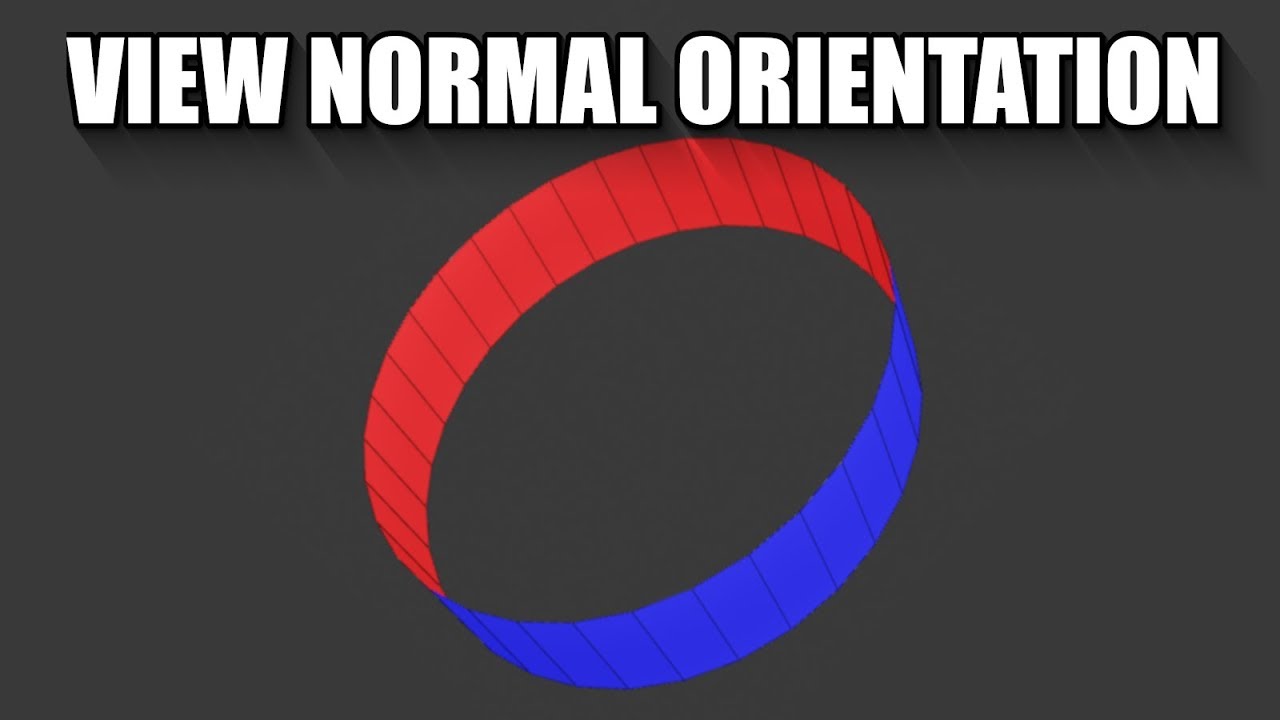
SUPPORT THESE TUTORIALS https://www.patreon.com/cg_matter
MY WEBSITE https://www.cgmatter.com
In this blender (2.8) tutorial we go over another method for viewing normals, this one is specifically designed for making viewing face orientation much easier.
Step 1: Pick an object and go to overlays
Step 2: Enable face orientation (in the geometr...
@desert ocean Select the Red Faces and press ( Alt + N ) than Select ( Flip ) than you are all good
winged notch
gilded lichen
Hello, what would be the best way to create a height map in ue4? this height map...
what are you trying to make ?
desert ocean
winged notch
<@!433684057642106882> Select the Red Faces and press ( Alt + N ) than Select ( ...
Thank you i will try Later
winged notch
no problem
 dull pelican
Hello, im new here, and im not sure how this works, but I recently started using the Unreal engine, and I have like beginners questions ? Is there a place to post those questions, or better yet a live channel I could hop into to get help ?
kindred viper
@dull pelican http://learn.unrealengine.com is a great place to start. Sign up with your Epic ID, then do the introduction courses. By the time you have run through a few hours worth, you will feel like a game dev god.
 lucid grove
Hey fellas, anybody encountered memory leak with latest windows and nvidia drivers update?
dull pelican
I have not experienced this particular issue, but I don't have NVIDIA
drowsy snow
dull pelican
I have not experienced this particular issue, but I don't have NVIDIA
You DON'T NEED to have NVIDIA GPU to use Unreal Engine. AMD and Intel GPUs of all things worked well with Unreal for years.
 finite quail
Hi im newbe in unrel
i want to open metahuman character system but i dont know how i want to import my model into blender
pls help me ?!?
i download unreal and i installed quixel bridge
but i dont know where is that metahuman character maker tools
kindred viper
you dont use metahumans with Blender really. Not unless you are an expert with them. You should be using Maya as its got a system setup for it already
they come with so many morph targets that most of the time if you do anything, it will break or over-write what is there
drowsy snow
finite quail
Hi im newbe in unrel
i want to open metahuman character system but i dont know ...
Export the mesh from Unreal as FBX, and import it to Blender.
Make some clothing or hairs there, and when done, bring it back to Unreal.
Although there are Blender design quirks that would make quite a hassle when working with MetaHuman models, so Maya would be your best bet (and I never used Maya for my entire life)
 opaque leaf
Hey everyone!
I just started with unreal, and I want to ask whether I should download the latest engine or the older ones? Since my laptop is not that all good, I wish not to burden it too much.
Just how much difference between each version? Would I miss some important features if I use the older versions?
drowsy snow
opaque leaf
Hey everyone!
I just started with unreal, and I want to ask whether I should dow...
Using older version doesn't guarantee blistering performance in potatoes (in fact, later versions actually have better performances due to better optimisations and quality of life rendering features)
You will definitely miss out tonnes of quality of life features if you're going with older versions, and many plugins abandon those versions as well.
opaque leaf
drowsy snow
Using older version doesn't guarantee blistering performance in potatoes (in fac...
I see, so older doesn't mean faster. Got it. Thanks for answering.
 abstract cradle
Anyone know https://gyazo.com/b1b7c126f77b2bbd3045cbd33f86f3ef
How do I apply foilage to the sides of my landscape here? I used "Flatten" tool with falloff. And I can't seem to paint foilage on the sides of this landscape, only the top.


 hearty idol
It's a streaming manager ^^
 spare kernel
but streaming what?
i assume its textures
but damn that is pretty high
right but i am trying to track down why it starts off low
and by middle of game its at 8ms
so more looking at what is causing it to grow
constantly every frame?
🤔
pastel ginkgo
How would I lengthen this window? Scaling stretches the edges.
 drowsy snow
pastel ginkgo
How would I lengthen this window? Scaling stretches the edges.
drowsy snow
pastel ginkgo
How would I lengthen this window? Scaling stretches the edges.
Edit them manually in your DCC software.
 quaint snow
would anybody help me to understand it??
blueprint class is deprecated, cannot derive a child blueprint!
quaint snow
well, i was trying to do that for the ThirdPersonCharacter (blueprint class)
so, what could i do if i'd want to duplicate this class to modify it for other goals?
 fallen patrol
can you send the link of the website
prime willow
Unreal Engine
Unreal Online Learning is a free learning platform that offers hands-on video courses and guided learning paths.
fallen patrol
thanks
fallen patrol
Ok
prime willow
if you cant find suitable learning resources from there you can always scavange around forums and youtube videos
and pick stuff from there
people here will also help from time to time but its more of on a if they want or care to and or know how to
so typically using this discord for assistance should be a last resort lol
plush yew
help me please
LoginId:2d934fae47c23e39236ccd9ca1ae3e15
EpicAccountId:47aa5b17e7a84fe4ab7b64a9fc7e493e
Unhandled Exception: EXCEPTION_ACCESS_VIOLATION reading address 0x0000000000000000
UE4Editor_Engine!EvaluatePreshader() [D:\Build++UE4\Sync\Engine\Source\Runtime\Engine\Private\Materials\MaterialUniformExpressions.cpp:969]
UE4Editor_Engine!FUniformExpressionSet::FillUniformBuffer() [D:\Build++UE4\Sync\Engine\Source\Runtime\Engine\Private\Materials\MaterialUniformExpressions.cpp:1157]
UE4Editor_Engine!FMaterialRenderProxy::EvaluateUniformExpressions() [D:\Build++UE4\Sync\Engine\Source\Runtime\Engine\Private\Materials\MaterialShared.cpp:2544]
UE4Editor_Engine!FMaterialRenderProxy::UpdateDeferredCachedUniformExpressions() [D:\Build++UE4\Sync\Engine\Source\Runtime\Engine\Private\Materials\MaterialShared.cpp:2738]
UE4Editor_Renderer!FPrimitiveSceneInfo::CacheMeshDrawCommands() [D:\Build++UE4\Sync\Engine\Source\Runtime\Renderer\Private\PrimitiveSceneInfo.cpp:223]
UE4Editor_Renderer!FPrimitiveSceneInfo::AddStaticMeshes() [D:\Build++UE4\Sync\Engine\Source\Runtime\Renderer\Private\PrimitiveSceneInfo.cpp:550]
UE4Editor_Renderer!FPrimitiveSceneInfo::AddToScene() [D:\Build++UE4\Sync\Engine\Source\Runtime\Renderer\Private\PrimitiveSceneInfo.cpp:712]
UE4Editor_Renderer!FScene::UpdateAllPrimitiveSceneInfos() [D:\Build++UE4\Sync\Engine\Source\Runtime\Renderer\Private\RendererScene.cpp:4052]
UE4Editor_Engine!TEnqueueUniqueRenderCommandType<UpdateAllPrimitiveSceneInfosForSingleComponent'::8'::UpdateAllPrimitiveSceneInfosCmdName,<lambda_60234836336f383bc5c9dc1c117d2456> >::DoTask() [D:\Build++UE4\Sync\Engine\Source\Runtime\RenderCore\Public\RenderingThread.h:183]
UE4Editor_Engine!TGraphTask<TEnqueueUniqueRenderCommandType<UpdateAllPrimitiveSceneInfosForSingleComponent'::8'::UpdateAllPrimitiveSceneInfosCmdName,<lambda_60234836336f383bc5c9dc1c117d2456> >
::ExecuteTask() [D:\Build++UE4\Sync\Engine\Source\Runtime\Core\Public\Async\TaskGraphInterfaces.h:886]
UE4Editor_Core!FNamedTaskThread::ProcessTasksNamedThread() [D:\Build++UE4\Sync\Engine\Source\Runtime\Core\Private\Async\TaskGraph.cpp:709]
UE4Editor_Core!FNamedTaskThread::ProcessTasksUntilQuit() [D:\Build++UE4\Sync\Engine\Source\Runtime\Core\Private\Async\TaskGraph.cpp:601]
UE4Editor_RenderCore!RenderingThreadMain() [D:\Build++UE4\Sync\Engine\Source\Runtime\RenderCore\Private\RenderingThread.cpp:373]
UE4Editor_RenderCore!FRenderingThread::Run() [D:\Build++UE4\Sync\Engine\Source\Runtime\RenderCore\Private\RenderingThread.cpp:509]
UE4Editor_Core!FRunnableThreadWin::Run() [D:\Build++UE4\Sync\Engine\Source\Runtime\Core\Private\Windows\WindowsRunnableThread.cpp:86]
 tiny sonnet
the owner of a player pawn is the player controller right?
plush yew
alright check this out, you think of a feature, you make the code, you do a test run, works first try
 quiet raft
hi is there a way to increase editor font size?
old nimbus
Hey, where can I find completed renders in the server or some other server?
drowsy snow
Flippin eck, this channel felt spammy already.
quiet raft
auto reimport requires directories to be already present? it detected the changes and i accepted the import but files are not in content browser
plush yew
pastel ginkgo
How would I lengthen this window? Scaling stretches the edges.
bsp
and then convert to sm
 frigid girder
Hi guys, I was looking for resources on controlling the sequencer programmatically in c++. For eg, consider the simple scenario where I keyframe a CubeMesh to move in a direction across some frames. I can easily accomplish this in the sequencer editor ui. I wanted to achieve the same simple task entirely in c++. The larger goal is to build a set of helpers that can create animations entirely programmatically, only viewing/tweaking/playing with the animation would be done in editor. Any ideas on where in the docs/any other reference I should be looking at? Is this possible at all? Are the actions we do in sequencer editor like keyframing etc even exposed as c++ apis? Searched a little on this, but seems most guides are around using the editor in ui itself, didn't find much on c++ side. Thanks a ton.
drowsy snow
frigid girder
Hi guys, I was looking for resources on controlling the sequencer programmatical...
I'm attempting to do the same, making animation keyframes from MIDI data in C++, but I don't have strong leads even now. Perhaps you could trace instructions from creating keyframes in the Sequencer's source code, but reverse engineering it and dissecting the entire UE4 source code on my own is already exhaustive enough.
And don't ask me about finding another lead on this - I already resorted to just create script in Blender instead, and export it as FBX animation data.
pastel ginkgo
How do you properly apply a glossiness texture to a material?
drowsy snow
pastel ginkgo
How do you properly apply a glossiness texture to a material?
Use one minus (invert) on the glossiness texture, and feed it to Roughness.
Glossiness = -Roughness
 oblique crystal
Hey guys, I'm new to the server and to Unreal in general, recently I've been creating a level but experiencing a weird glitch? Where some parts of the map seem to have an invisible region that randomly will mess with my movement. Sometimes if I spam the controls it'll fix itself, but overall the glitch persists. Any advice, or help would be greatly appreciated. 🙂
Here is a video of the glitch, if anyone can help 🙂
pastel ginkgo
And a bump map feeds into a normalfromheightmap?

 distant totem
I thought you could use the new modeling mode to assign material slots instead of needing to re import from DCC, am I missing the tool somewhere?
kindred viper
http://learn.unrealengine.com check out the Introduction courses here. There is a lot of them in the Course listing, but start with the ones that interest you that are Introductions and you will learn enough to get going. @swift basin
honest vale
argh
I had bought this particle effect package a while ago to be used as hit effects
sonic granite
Hi friends, how come when I disable visibility on some geometry in the world outliner they still show up in my final render with movie render queue?
honest vale
now I realize that none of the particle systems treat +X axis as forward
sonic granite
It also shows up in the game mode.
honest vale
instead they are all done so that the debris/particles are shot upward on +Z axis always
meaning I can't just use impact normal from traces as rotation
sure it can be fixed by adding some amount of rotation to it but it's just annoying...
 true falcon
That's the most first world country problem I've ever heard, and that's saying something
 pine glade
Hey Im trying to attach camera boom to mesh but I cant change parent socket and I dont know how to do it via cpp. Can someone help me please?
 astral phoenix
Heey, i have problem everytime i start up my project it says ''Did not shutdown cleanly last time do you like to use auto save?'' but i saved last time i had the project open, im losing abit of my progress everytime, how can i fix this? 🙂
plush yew
Hello, I have a question, (r.Streaming.PoolSize) I have a huge overflow, it can cause a big loss of FPS on the game?
drowsy snow
plush yew
Hello, I have a question, (r.Streaming.PoolSize) I have a huge overflow, it can ...
Worst case scenario is that your textures will stuck appearing at lower mipmap LOD.
plush yew
drowsy snow
Worst case scenario is that your textures will stuck appearing at lower mipmap L...
ok so it doesn't matter, because currently in full ultra I'm at 70 FPS on my game and I have mini freeze spikes, I have no idea why, with many debugs, lights all green on map etc I can't find.
I don't know how to use a profiler to see what's wrong with the game
and for the fps
I'm going to look at the textures, but I have to see why I have a huge drop in FPS too
Isn't there a profiler tool to see what consumes the most and who makes this loss of FPS?
Thanks man!
So I'm going to look at this.
 burnt tangle
Hey I just have question related to optimizing game for better performance, So when in our game we have really huge world, right? And I don't want load every textures and shadow and colissions of level, only load it at specific radius around the player character to get more fps.
So how to do this?
drowsy snow
Load Save From Slot?
Of course, putting consoles into consideration, you can't have absolute path of the save files.
untold yacht

Hey guys this is displaying the health % from a floating varaible
i want it to show % health from a Integer Variable what formula do you recomend ?
drowsy snow
untold yacht
Hey guys this is displaying the health % from a floating varaible
i want it to ...
Current HP / Max HP
plush yew
can we create a custom trigger
drowsy snow
plush yew
can we create a custom trigger
Yes.
plush yew
do i have to create a blueprint actor
drowsy snow
Yes.
 vestal raptor
Hello, Visual Studio is really slow is there anything I can do about it?
plush yew
vestal raptor
Hello, Visual Studio is really slow is there anything I can do about it?
u can use Rider
vestal raptor
*IntelliSense is slow for Unreal Engine
vestal raptor
plush yew
u can use Rider
I will try it, thanks
plush yew
why when the triger triggers it doesn,t open the level

i used this then also

yeah ty
what should be the number for fading
 plush yew
is the duration in seconds ??
spare kernel
yes
plush yew
okk
when do i need to call the fade function

in betwn the get current level and open level or in the end
 dusky inlet
Try identify the issue, why is it not working? Isolate the issue and then address it
plush yew
well i have just started learning so i dont know properly
plush yew
okk let me try
 paper oriole
guys quick question, i am new on unreal engine how can i delete my levels?
dusky inlet
Select level in content browser, hit delete
spare kernel
select it in editor and hit delete key
dusky inlet
😂
 dusky inlet
Good job :)
paper oriole
i cannot find it..
drowsy snow
paper oriole
i cannot find it..
Look closer.

Or, you know, just select the map in Content Browser and press Delete key.
paper oriole

wanna delete these things
in my content browser i dont have any of them
sry guys ik its the easiest thing but i really dont know
drowsy snow
Searching from Content folder works.
 paper oriole
okay i checked again i filtered and i saw it now thanks buddy
paper oriole
drowsy snow
Searching from Content folder works.
thank you.
 tough pagoda
Hello, I have a question!
What's differences between FString::Printf and TEXT()? When I need to use them, in what cases.
I know that FString::Printf creates FString object.
But what else differences.
gilded lichen
Hello, I want to create the landscape for a game I'm making with a friend over the summer. The landscape will be randomised for each save the player has, what I can't figure out is how to randomise the generation of the height map used by the landscape and how I would apply that height map? Hope some one can help. I'm guessing I'll need to use some sort of plugin.
drowsy snow
gilded lichen
Hello, I want to create the landscape for a game I'm making with a friend over t...
Voxels are still a surefire way to have procedural landscape.
finite dew
I was wondering if I hire someone to work on my project how can they work on it ?
drowsy snow
finite dew
I was wondering if I hire someone to work on my project how can they work on it ...
Source control.
finite dew
Ah ok
Thanks :)
 pliant trench
Dumb question: But my homemade actors have a big ball when working in the editor. I want to hide it or make it smaller.
tough pagoda
Thanks mate!
astral phoenix
Heey, i have problem everytime i start up my project it says ''Did not shutdown cleanly last time do you like to use auto save?'' but i saved last time i had the project open, im losing abit of my progress everytime, how can i fix this? 🙂
tough pagoda
astral phoenix
Heey, i have problem everytime i start up my project it says ''Did not shutdown ...
You verified files of UE4?
Just, do check.
It can solve your problem.
I mean in EGS app.
astral phoenix
What do u mean? do i need to verifie my engine?
tough pagoda
Unreal Engine -> Library.

 fringe jetty
pog
astral phoenix
im doing that now, lets see what happens 😄
tough pagoda
Gotcha!
 plush yew
tough pagoda
Player Start.
plush yew
tough pagoda
Player Start.
??
tough pagoda
plush yew
??

 tough pagoda
Can you open World Settings please? And show all screenshot, please.


 plush yew
ohhhhhhhhhhh i got iyt
tough pagoda
You solved it?
tough pagoda
Well, I saw it when looked on image.
I glad that you found solution.
Have a good day!
 muted minnow
Hey, can anyone suggest a method of doing a character air & ground dash? I attempted to do it via a launch character, delay, and another launch character either override xyz to stop the character after the dash. It works ok in the air, but on the ground results are really inconsistent. I’ve tried messing with ground friction during the dash but still doesn’t feel right. Alternative suggestion on how to implement?
astral phoenix
@tough pagoda my engine just got done verifie and did not say anything, so it was good all along or wut?
pine glade
Hey I was looking to implement some animations to my project and I saw this tutorial: https://www.youtube.com/watch?v=DOU5gvSlfPE&t=316s so I followed it. Everything is OK but when I tried to implement sprinting the animations were weirdly jittering. Does anyone know how to fix it?

In this video, I'll show you how to switch between default Third Person template control player rotation system to character rotation based on camera rotation. This is the most used for Third Person video games nowadays.
Support me on Ko-Fi for my current indie game development at Loish Games
https://ko-fi.com/loish
#ue4 #tutorial #gamedev
 charred tapir
I just realized my materials Emissives are not working for Skeletal Meshes.
I am on 4.25

I figured it out. Particle color was multipling

 frozen pond
hi, small question, do i need to make aimoffset for each weapon type i have? (they have diffrent animations)
tough pagoda
astral phoenix
<@!282513929920446465> my engine just got done verifie and did not say anything,...
Hm, interesting dances by Engine. Sorry, I sew your message only now.
Well, I don't know what magic causes it.
plush yew
how do i set that to the crosshair? i googled and did not find anything
 drowsy snow
plush yew
how do i set that to the crosshair? i googled and did not find anything
drowsy snow
plush yew
how do i set that to the crosshair? i googled and did not find anything
No one stopped you from replacing it in lieu of crosshairs made with UMG widgets.
plush yew
drowsy snow
No one stopped you from replacing it in lieu of crosshairs made with UMG widgets...
hmmm i working with ue only 2 days
gilded lichen
gilded lichen
Hello, I want to create the landscape for a game I'm making with a friend over t...
If I was to do this without a plugin, what would be the best way?
drowsy snow
gilded lichen
If I was to do this without a plugin, what would be the best way?
Code yourself some procedural mesh generation or a runtime terrain deformation system.
Things that worked in editor might not worked in runtime.
plush yew
plush yew
hmmm i working with ue only 2 days
@drowsy snow
Hey guys I made a tutorial about making an aim assistant in unreal engine,here the full tutorial for you guys 😉 I hope it will be helpful https://youtu.be/mXMWEWmur6k

In this video I am going to show to all of you guys how to make a full aim assist / auto aim / auto enemy detection system.
This aimbot will make you become a professional sniper, and make the gameplay extremely easy.
Features of the aim assist system:
- detect enemy
- show enemy's life percent
- fast auto aim to the enemy
Project file UE4.2...
 jolly sinew
Has anyone encountered this error in 4.26?
It crashes my editor several times a day when I hit compile on a blueprint without saving it first or when I hit play on a game without saving the level :/ I mean, sometimes I just forget to hit save
 plush yew
how do i set that to the crosshair? i googled and did not find anything

 onyx nest
Does anyone have some recommendations for tutorials (I have no experience)
quiet raft
does ue come with something to merge ao/rough/metal into orm?
plush yew
i want to resume the game with esc button, why cant i?
 plush yew
quiet raft
its default hotkey in editor to stop playing
plush yew
quiet raft
its default hotkey in editor to stop playing
no, it is a in game menu
this a button that returns the player to the game from the menu

i want to make that with esc button too
@quiet raft
 olive mason
how can i share my project with my friend?
prime willow
source code i believe but dont take my word for it i have never attempted such xD
quiet raft
olive mason
how can i share my project with my friend?
i raised local git (gogs) instance to avoid using paid/limited storage providers, so now we have a very high speed high capacity lfs enabled git
 simple robin
Hi all! Has anyone ever used a tool like SourceTrail or a different one to generate a UML Class diagram automatically from a C++ UE4 Project? Have you found any good programs to do that and get an overview of a codebase relationships?
quiet raft
cool part is we can store all the source art right in the repository, as there are no size limits and 1.5 gigs of assets takes just seconds to pull/push
 merry bison
So I replaced a static mesh in my floor BP. From the engine built-in cube to my own mesh. After that the floor doesn't get affected by the sky colors anymore.
Tried to figure out what setting might've caused this but haven't really found anything. Anyone knows what I mean and how to fix the floor?
nvm found it 🙂
kindred viper
visual studio community
 autumn grail
Hello does someone know why my niagara emitter lag with only 100 particles and one point force ?
plush yew
how can me and my friend work on the same project without being in the same area?
merry bison
plush yew
how can me and my friend work on the same project without being in the same area...
source control i guess
merry bison
don't worry, me too
plush yew
merry bison
don't worry, me too
so how do i do it?
merry bison
This document overviews the Source Control features.
plush yew
hm alright ill try it out ty
merry bison
np
kindred viper
source control only does so much. Multi-user sessions are good too. Discord communication is really becoming essential too. As is all communication
merry bison
never heard of multi-user sessions.
plush yew
kindred viper
source control only does so much. Multi-user sessions are good too. Discord comm...
arent multi user sessions for local?
merry bison
kindred viper
source control only does so much. Multi-user sessions are good too. Discord comm...
Get multiple users on different computers into a shared Unreal Editor session, collaborating live to build content together.
kindred viper
yeah
plush yew
kindred viper
<@456226577798135808> no you can do it remote
how? i have a dynamic ip
kindred viper
@plush yewits not like it changes every 5 seconds. cmon now
plush yew
kindred viper
<@456226577798135808>its not like it changes every 5 seconds. cmon now
im pretty sure it only works for static ips correct me if im wrong?
kindred viper
digging into blueprints and such is pretty cool. The editor has some quirks which relate to what is the active object at the time (ie. tabbed objects) but file management stuff is barebones easy @plush yew
@plush yewyour IP is static until it changes.
plush yew
kindred viper
<@456226577798135808>your IP is static until it changes.
hm alright ill try it out
merry bison
This multi-editing thing sounds awesome tbh.
kindred viper
this is Epic. Everything is Epic. Even the fails are Epic 🙂
finite dew
Is it possible to use unity assets in unreal engine ?
kindred viper
of course but it depends on the asset. If its just a mesh/skmesh, then sure. There are always assets that are engine specific but generally if it exports you can import.
merry bison
Aren't Unity assets in an Unity-specific format?
kindred viper
thats why I said if it can export. .obj, .fbx, .dae etc
 late stag
I want to make like a mech combar game how would i start
late stag
late stag
I want to make like a mech combar game how would i start
i want it to be wave based
kindred viper
Xyloid you need to do the courses at learn.unrealengine.com
merry bison
tbh, my experience with courses on that site isn't that good. Last course I took https://learn.unrealengine.com/course/3754335 - was a guy talking BS for 2 hours while everything he built was sped up like 5x. Didn't learn anything.
kindred viper
maybe that would be something to do with you and your learning process.
late stag
ok
merry bison
kindred viper
if the truth hurts, dont listen
you don't know me and you haven't taken the course to be able to judge the course, your comment was unnecessary and confrontative
kindred viper
Not everyone has the same learning capability. That's not an insult. Its a fact. Some people learn the first time around, some people need to take it in a few times. Some are visual, some are kinetic and need hands on. It's not an insult. It's how it works.
if you are offended, that's not my intention.
for all I know about you, you could have the attention span of a gnat. You might have distractions in real life. It's honestly not meant to be taken as an insult. Perhaps my direct comment was too close to the bone. Who knows.
merry bison
kindred viper
for all I know about you, you could have the attention span of a gnat. You migh...
You sound angry. Take a break from the computer and go for a walk.
merry bison
kindred viper
im not angry, im direct.
"direct" without having any facts you spit out insult after insult
kindred viper
ok now you can leave my island.
merry bison
kindred viper
ok now you can leave my island.
take that 2 hour course then come back and tell me about learning capabilities
kindred viper
it was a blockout course. Basically "put block here". "replace block later".
merry bison
kindred viper
it was a blockout course. Basically "put block here". "replace block later".
I'm standing outside your window. Staring up in your room, the one with the light on, where you sit. Come to the window...
untold yacht
hey guys, Question
https://gyazo.com/3a0bf52fdfd8fde0e725b9ec895f2cca
Gyazo
Gyazo
i downloaded a annimation from "mixamo" and uploadede the skeleton that im going to use
https://gyazo.com/82a5607a52c0837f52cf490c16ba98c6
how can this happen ? its glitching out ?
the prewiev looks fine but not when implementing


hm what dose that mean ? or is it a setting ?
@plush yew
👍
on it
untold yacht
@plush yewHm enabeling/disabeling root motion dident do anything :/
 tawny pier
I started getting these errors while following a tutorial and I don't know what to do.

all these variables it's supposed to have can't be found.
tawny pier
4.27?
tawny pier
I'm sorry is there a separate channel for getting help?
 knotty slate
i dont thikn so
well
we are discussing about the engine version
i dont think theres a category for that
 dark depot
@knotty slate you can download the current version of 4.27 by downloading the engine off git but no the launcher version is planned for "summer"
merry bison
knotty slate
is 4.27 out?
no
merry bison
autumn grail
anyone?
Try to ask your question with more detailed info and maybe someone will pick it up.
autumn grail
I have a character template i made in 3d , its is a BP which is instanciated in my character BP
the template BP contain a camera
tawny pier
If I put off updating so I can make sure I know how to use this version first, will that cause any problems?
autumn grail
i want to switch view from my character camera to the camera inside the template BP
kindred viper
@autumn grail Set View Target With Blend.
 crystal pine
Hello you beautiful people! I am completely new to UE4. 👋
tawny pier
FYI it's marginally less frustrating than EU 4.
 elder pumice
Hey guys, recently I've been practicing lightning interior kitchens in the day and night time set in UNREAL 4. Any tips to improve this?
In the night lightning I've just added spot lights + point lights ( to achieve the realistic light bulbs sensation ), also added some reflection effects to make it pop more. Do I have to adjust something and add fill lights?

In the day lightning I've used the skylight + fill lights and also the reflection effects

 iron idol
How should I start learning unreal engine
I have almost no experience of game development
crystal pine
I have a question and I will stay on topic as best as possible since english is not my first language, so I am sorry if my grammer is unreadable. So since I am a Blender user and wanted to know, on scale 1 to 10, how hard is it to learn UE4 compared to other 3 dimensiona softwares out there?
versed burrow
elder pumice
Woah I love that
iron idol
Thanks
autumn grail
@kindred viper thank you , but i wanted to have a spefici camera for implementing specific behaviour with its variable
gilded lichen
Hello, when I open any of my unreal projects, it opens the internet and tries to go to an epic website? Why is this?
finite dew
Is it illegal if I send paid assets to random ?
drowsy snow
finite dew
Is it illegal if I send paid assets to random ?
Illegal, unless you pay for it and distributed to team who worked on your closed source project that used it.
finite dew
Can I send it to a person who is helping me on 1 thing ?
Because hes only helping me on 1 thing that's all. But he may help in the future aswell
drowsy snow
finite dew
Because hes only helping me on 1 thing that's all. But he may help in the future...
unless you pay for it and distributed to team who worked on your closed source project that used it.
finite dew
Oh that's good then. :D
 fierce tulip
just be clear to that person that they are not allowed to use it outside your project.
elder pumice
Ok thanks I’ll try out that 🙂
quiet raft
is there a way to clear streaming pool?
 cosmic matrix
hi,
If i set bAlwaysRelevant to true and SetOwner to nullptr is actor will still replicates?
finite dew
fierce tulip
just be clear to that person that they are not allowed to use it outside your pr...
Ah I see. The person did say he would delete them afterwards. But then again i can never be too sure lol.
 short willow
btw, is there some default class that store a list of textures?(so picking random textures from a collection)


 digital anchor
top one creates and sets the target material
short willow
oohhh...make sense.
so the bottom one is just create but you need to assign later.
what about the flag part?
do we ever use that for any meaningful reason?
just none and transient
 copper parrot
Im not sure where to ask this question. Im currently going through a course on using the OnlineSubsystem and working with steam and am trying to figure out if you can create a steam app through steamworks at any point in development or if you have to have a nearly finished game get approved first to try and get an app id
copper parrot
oh thank you for the reply this is some great news
 idle dragon
So I have an int counter that counts each section of a tunnel. And I have a bool that controlls if the ceiling of the tunnel is hidden or open. How do I make it so when the bool switches on, it applies to the next 15 counts of the int counter, but then switches off?
I hope I made sense.
this directed to me?
@plush yew
pliant trench
Should we have a channel for discussing game architectures?
drowsy snow
pliant trench
Should we have a channel for discussing game architectures?
Aren't we already have #aec-visualization and #level-design?
pliant trench
I mean the overall design of the software and assets. Data flow, which libraries to use, what add ons work with what, etc.
short willow

what are those dark lines come from after build lighting?
I set the quality to medium but doesn't seems to fix it
I also set my shader back to some default ones(50% base color)
still same result as shown
pliant trench
Check your texture coordinates. It looks like your seam may be too close to another edge. Give your texture islands more room to breath. It looks like the shadow mapping is hitting texture coords it shouldn't...
short willow
hmmmm....let me check this is just the editor sphere
drowsy snow
hashtag Fully Dynamic Lighting For The Winner
pliant trench
Hashtag: Will never run on mobile.
drowsy snow
hashtag Nintendo Switch is better than mobile
short willow
ohhhhh....change to a lower polygon one kinda works?
how do you preview a static mesh's UV in editor?
that's why....so here is the EditorSphere UV

that explains the dark lines
pliant trench
@short willowThis is what happens when you reuse UVs or get islands too close together: https://youtu.be/PRMr7EcBGzA?t=1443

This is my workflow to model in Blender, texture using Substance tools and then export that to Unreal Engine. I also show how to deal with overlapping texture coordinates, using Substance Textures in Blender and Unreal and other, various issues that crop up.
I learned blender from Ian Hubert's videos... and it shows... Works great in Blender.
short willow
lol, it's EditorSphere, I didn't even create that, it's from the engine content
but good to know about this, I am not the modeling guy usually.
 midnight lichen
Hey does anyone know why UE recommends VS 2017 over VS 2019?
short willow
eh, I think mostly because DCC plugins are stuck with vs2017
(what the DCC recommends)
the compilers/libs/etc are pretty much all latest, just the IDE are older I believe.
but now it defaults to 2019 if you have both installed no?
drowsy snow
pliant trench
I learned blender from Ian Hubert's videos... and it shows... Works great in Ble...
I see you followed Ianhubertism as well
midnight lichen
short willow
eh, I think mostly because DCC plugins are stuck with vs2017
Gotcha, thanks. DCC = digital content creation?
short willow
yeah, like maya houdini, etc.
there are some OSS libs that kinda only supports auto detection upto 2017 if they don't have the cmake files/version that auto sets to vs 2019
do note, that's only my guess, on official doc it already say 2019 for 4.25 or later
just the github readme not updated
Tips, tricks, and techniques for setting up Visual Studio to work with Unreal Engine

but it is true that some DCC plugin still say you should compile with vs2017 or sometimes even older for compatibility.
midnight lichen
short willow
but now it defaults to 2019 if you have both installed no?
not sure. I was using 2019 only for a while but after upgrading to VS 2019 16.9.5 I kept getting a build error for even an FPS template project: error MSB3073: exited with code 6 for the [1/5] dte80a.tlh build action. I made other changes to my environment, too (like installing NVIDIA Nsight integration etc.) and couldn't pin the cause down. I have now nuked my setup reinstalling everything and recompiling source
and then I kept seeing "2017" everywhere so I asked here
short willow
hmmmm....I actually have both 2017/2019 installed
and I only ever did like the chaos demo project recently
last time I build the editor from source is like ages ago(like 4.8~)
midnight lichen
I have to customize the editor because I don't know how to get direct access to vertex buffers otherwise
 wanton tiger
Hey! Sorry for the inconvenience, I have a really big question. This could be said to be made with Unreal Engine, right? https://youtu.be/CJBzmrziow8?t=179

If you would love to help Tencent Anime to provide more subtitles, please contact Tencent Facebook: https://www.facebook.com/WeTVofficial
欢迎订阅腾讯动漫频道!
Subscribe Now!
http://bit.ly/wetvanime
斗罗大陆,每日于北京时间20时更新2集
Updating daily at 8:00 PM (20:00) GMT+8.
简介
《斗罗大陆》讲述了唐门外门弟子唐三,因偷学内门绝学为唐门所不容,跳崖明志时却发现没有死,反而以另外一个身份来到了另一个世界,一个属于武魂的世界,名叫斗罗大陆。这里没有魔法,没有斗气...
midnight lichen
I don't know of a UE API that lets me modify them without copying the entire buffers over again
midnight lichen
wanton tiger
Hey! Sorry for the inconvenience, I have a really big question. This could be sa...
seems like UE could do that. I'm new though
short willow
it's from Tencent so most likely UE
the end credit doesn't show the engine used, cause for linear media it's not required.
kindred viper
everything can be done in UE.
drowsy snow
Even the latest Corridor short is done entirely in Unreal Engine.
https://www.youtube.com/watch?v=Phd9Jdlg3xQ

Join Our Website: https://bit.ly/Crew_Membership
Watch the BTS on the Corridor Crew channel tomorrow!
Thanks to our Partners for Making this Possible:
Motion Captured with Xsens Suit: http://bit.ly/Xsens_MoCap_Suit
Character Creator 3: https://corridor.video/Reallusion_3Dsoftware
Unreal Engine: http://bit.ly/UE4
#CharacterCreator #iClone #Actor...
They also get Epic MegaGrants because of it so congrats to them 🥳
 quiet hawk
can any help me to open a file its was in 4.17 iguess
sonic granite
While rendering my images out of movie render queue, my fire particles stops moving half way through my sequence. What's going on? They're just paused in the air.
drowsy snow
quiet hawk
can any help me to open a file its was in 4.17 iguess
Is it a marketplace asset?
 wintry fossil
Hi, uh im new to unreal and wanted some help on making my animation smoother, as you can see the dog comes to abrupt stops when following the player, and i need it to come to a smooth stop when i stop. Can anyone help? Please @me because i wont keep this tab open
drowsy snow
wintry fossil
Hi, uh im new to unreal and wanted some help on making my animation smoother, as...
Try create animation for the doggo to stop walking, and in-between state machine from walk to idle. Also look for state machine blending in the transitions.
drowsy snow
By testing it on your hardware, and estimate it from there.
 prime bramble
hi
 severe chasm
Im currently having an issue where my ComponentBeginOverlap node is firing at the same time was my ComponentEndOverlap which is causing headaches for onscreen prompts
pastel ginkgo
Anyone know how to recreate this? https://www.youtube.com/watch?v=ttghcA4kUQU&list=LL&index=3&ab_channel=Bluedrake42

Download free games from my website! ► https://www.bluedrake42.com
Get Steam keys for my games on Patreon! ► https://link.bluedrake42.com/patreon
★ Follow me off Youtube! ★
Buy my games on Steam! ► https://link.bluedrake42.com/drakelinglabs
My music on Spotify ► https://link.bluedrake42.com/johari
My Twitter Page ► https://link.bluedrake42.com/...
kindred viper
@pastel ginkgo i think thats nvidia caustics with RTX
pastel ginkgo
kindred viper
<@!684518119351386325> i think thats nvidia caustics with RTX
Yeah I'm looking into it now. https://developer.nvidia.com/unrealengine Looks like you need to download NVIDIA RTX Caustics Branch but the link is down.
NVIDIA Developer
Unreal Engine World’s most open and advanced real-time 3D creation platform. Continuously evolving to serve not only its original purpose as a state-of-the-art games engine, today it gives creators across industries the freedom and control to deliver cutting-edge content, interactive experiences, and immersive virtual worlds.
abstract cradle
Anyone know, when I alt tab inside a blue print. It doesn't alt tab to the other window I was just in?
How can I fix this?
 blissful trail
woops lol
 untold yacht
https://gyazo.com/3a0682b622f5c2efc176fc33ba755e38
how can i fix this annimation

the legs are all messy
 rustic valley
untold yacht
https://gyazo.com/3a0682b622f5c2efc176fc33ba755e38
how can i fix this annimatio...
rustic valley
untold yacht
https://gyazo.com/3a0682b622f5c2efc176fc33ba755e38
how can i fix this annimatio...
Looks like it doesn't have any root motion
untold yacht
yeah well ive tried applying root and disabing it makes no difference /;

like so
@rustic valley
rustic valley
untold yacht
yeah well ive tried applying root and disabing it makes no difference /;
Then it might be the export of the animation that is the problem, not the import
untold yacht
@rustic valleywell i uploaded my unit to "mixamo" and choose the annimation and on their prewiev it looks fine but when it gets in Ue4 it looks like this :/
you mean from the export from mixamo then ?
rustic valley
Yes

 rustic valley
If I remember correctly, the mannequin in UE4 doesn't mesh well with Mixamo, I think it might because its root bone is called pelvis instead, or something like that, I had to go through a lot of trouble when I tried to make Mixamo animations work with Synty models (including converting animations using a third party software)