#ue4-general
1 messages · Page 963 of 1
 plush yew
 grim ore
well you would enable it to enable the checbox, then uncheck the checkbox on the right to disable it. then adjust the normal AO intensity. If still nothing its not that
theres other stuff but its literally like "do i have AO or not" and thats not your issue 😦
plush yew
Yep, I did what you said, but no change, sadly. When I'm zooming in on high detail objects, my AO gets significantly more detailed, I guess that is normal or could that be a lead?
grim ore
ok weird option but are you using baked lighting or dynamic?
plush yew
all lights are moveable
grim ore
yep I am out of ideas... thats... odd
plush yew
Uhm, I have RVT in my main project, but I doubt that has anything to do with it.
grim ore
last thought was you were using baked AO and had normal AO off
RVT just enabled tho right, none should be in that scene ?
but im testing it as well lol
plush yew
Correct. I also have mesh distance fields enabled and "support sky atmosphere affecting height fog".
If you want to try, those are my Configuration Settings, since I doubt it is something in the level, but.... just if you're bored xD
grim ore
welp just turning on RVT didnt stop it
plush yew
Works fine in my other projects too, so... it is just this unfortunate child.
 azure sierra
is it possible to use the buoyancy component on a player character? i added it but im not sure i know how to use it . right now im using collision volumes to kind of maintain buoyancy without it just thought it would be cool if i could use it
azure sierra
oh dude! hey i love your videos my man!
grim ore
@plush yew this is the issue r.SSGI.Enable=True , disabling Screen Space Global Illumination fixes it
 sick escarp
Oh you're the WTF is guy 😄
azure sierra
tomatoes?
plush yew
So I just put in r.SSGI.Enable=False and that does the trick?? °___°
sick escarp
Has definitely helped me a lot when documentation has been lackluster or when I've needed a practical example
grim ore
"SSGI does it's own AO that's identical to GTAO, so none of the normal AO parameters are functional."

you can disable it in the project settings
plush yew
Did I enable that or is that default?
grim ore
definitely not default
 strong crag
If it says Beta, it's probably not default. Just saying. 😉
grim ore
no mention of it killing AO in the docs tho so not really your fault
strong crag
I wonder if that could be something that could be communicated to Epic that they could put in the Docs or something.
 grim ore
feedback can definitely be given to them , https://docs.unrealengine.com/en-US/BuildingWorlds/LightingAndShadows/ScreenSpaceGlobalIllumination/index.html is the page and on the bottom of it is the feedback button

and I know they have someone dedicated to that thread
 opal lark
Hello guys. how can I change material on my characters gun mesh. I know i have to cast to it but I,m confused, Can you help out ?
What i mwan to say is I want to change when he passes a trigger in level BP
grim ore
@opal lark you would need to show more code probably, but if you are going thru a trigger it has the actor that triggered it as a pin in the event (this is probably your player?). you would take that actor, cast it to your specific characters class, then take that output and get your gun from it. then you could change the material on the mesh.
you would need to learn about materials, material instancing, material parameters, and general blueprint communication along with the way parent/child inheritence and hierarchies work
opal lark
Thanks Matt when my characters outside in rain Im changing his material
 tame patrol
Is anyone familiar with this error?

it only happens in a compiled version of the game. Editor works fine
 worn granite
azure sierra
is it possible to use the buoyancy component on a player character? i added it b...
worn granite
azure sierra
is it possible to use the buoyancy component on a player character? i added it b...
I'd check it out. Maybe it works.
If it doesn't work straight away, not really, you'd have to disable the character movement component and enable bouyancy.
unless you mean pawn, then yeah go nuts

 candid mist
No. From "As CH Player Character" you need to drag out the gun.
worn granite
maybe they are overlapping an in world gun
(but the reference does connect to both casts so I guess not a possibility)
candid mist
Yeah we'd need to see your setup, how the gun is referenced in the character. Is it a component, a child actor, or are they separate?
opal lark
They are separate
candid mist
Try this then?
 worn granite
or you can do another cast based of Cast Failed
generally if a cast passes you can't cast the original pointer to an unrelated type
it either is a player or it is a gun. casting doesn't change it.
opal lark
Ok thanks
 mystic barn
Help me find what I am looking for: Which 4.26 water actor do I use if i want an infinite plane of water without the splines for landmass? Is such a thing .. a thing?
Thank you for any assistance.
 scenic moon
Anyone has used the BSP to Static mesh tool?
for me it's just deleting it
and not creating anything
sick escarp
I understand the problem but how do I fix it?

 dusty heath
Trying to use sequencer to animate the sky sphere from the default project. If I rotate the sunlight by hand, the light direction changes but nothing happens to the sky colour until I click ‘refresh material’ on the skysphere. Rotating the light in sequencer has a similar effect - how can I get sequencer to update the sky colour?
 spare kernel
right click your project in VS, and set it as Startup project @sick escarp
sick escarp
Thanks
While I'm at it, downloaded vs 2019 and I'm getting the error C4800 and according to Microsoft it should be disabled by default
It says I need to go to Advanced in c/c++ properties but I don't have such a tab
grim ore
@dusty heath it won’t do it automatically. You have to call the refresh material event inside of it by hand if you want which is not efficient. There is a new sky atmosphere setup that can do this much more efficiently.
 true falcon
Someday I want to make a two-man robbery game called "Schittz & Giggles" , thought I'd just share that
 surreal gyro
Is this how you're supposed to animate models?
 strong crag
Sorry Neon, reacted to wrong post.
surreal gyro
?
Also, uh, why does the first person example have no actual body?
It's just the arms
scenic moon
why would it have?
 steady vale
Y doesnt it work when i place a water body?
I have water plugin enabled
But still the water doesnt show up as i drag and drop
 dense gate
I think you needed a landscape to get it to work
But I'm not sure myself, I reverted to the long-ago-free UIWS
steady vale
I have a landscape
steady vale
dense gate
I think you needed a landscape to get it to work
Did u also face the same problem?
dense gate
I don't exactly remember, the last time I tried was on the preview it got released, almost half a year ago
I do remember that I got it to work but it was disappointing compared to the plugin I was already using
 olive ibex
Is there a chat/channel for completely new people? I'm brand new to designing/unreal engine, but i have a bunch of free assets already
plush yew
olive ibex
Is there a chat/channel for completely new people? I'm brand new to designing/un...
There are all skill levels in this server. During peak hours, there are typically many people willing to help newbies — so long as you ask a specific question.
 winter gale
https://twitter.com/RyanJon2040/status/1372068933650448384?s=19
https://twitter.com/RyanJon2040/status/1372431322023555075?s=19

Quick #UE4 Tip number 131.
Import dialog when re-importing.
https://t.co/IiZXDayUzm
#unrealtips #UETips #unrealdev #indiegamedev #gamedev #indiedev #screenshotsaturday #UnrealEngine
 Twitter
·
Twitter
·
Quick #UE4 Tip number 132.
Format text with plural form.
https://t.co/wIBvtPz2Yd
#unrealtips #UETips #unrealdev #indiegamedev #gamedev #indiedev #screenshotsaturday #UnrealEngine
 Twitter
·
Twitter
·
 fierce forge
hello, i painted with red (vertex) my foliage with blender, but in ue4 i can see just white when i toggle the vertex colors, why ?
 past stag
Is there a way to change the thread count used for building project with custom source engine without engine reguild?
candid mist
@scenic moon Yeah I wanted to used BSP for something simple first time in a long time 2 days ago and encountered it too (deleted BSP but didn't actually create a Static Mesh in the folder I wanted or in the scene). Didn't research yet if this is a known bug or what.
 spark relic
Quick one. How do I add debug symbols to the engine? I don't seem to have the options in my drop down menu in the Epic Launcher as everyone on the internet suggests.
 candid mist
@fierce forge You probably had this on Ignore (I think that is the default). Next time you have to mind this setting in the import mesh popup. After the fact, you can still change it the Details panel when you open the mesh. You'll just need to reimport the mesh then (there's a button for that on the toolbar at the top of the asset window).
 fierce forge
thx
spark relic
spark relic
Quick one. How do I add debug symbols to the engine? I don't seem to have the op...
I just reinstalled the engine where they give you the options. -__-
 rigid belfry
is there any actor that does not lose any information on level changes by default?
i am pretty sure the game mode gets refreshed everytime you switch levels, right?
candid mist
@rigid belfry I thought Game Mode still carries on between levels, but in case you're right then try Game State? https://docs.unrealengine.com/en-US/InteractiveExperiences/Framework/GameMode/index.html
Overview of the Game Mode and Game State
rigid belfry
yeah the game mode fires begin play every time i load a new level, which means any values it had gets refreshed
 jagged halo
what may cause this light bleeding? I've noticed it worsen the farther away from the point light I am, and that increasing the wall size somewhat solves it
which is annoying since it's a top-down game, so my camera is necessarily far from the point light (which is dynamic and follows the player)
 pure sorrel
how do you get the unreal cube look?
 drowsy snow
This.
I also used Game Instance, primarily for persistent variables (active quests, player stats, and gameplay settings) and those which are needed for save data.
pure sorrel
to make a rolling ball do i use a pawn or player controller?
drowsy snow
pure sorrel
to make a rolling ball do i use a pawn or player controller?
Pawn.
You could handle all the physics inside the Pawn class, and possess the ball to Player Controller
rigid belfry
when using the open level node, how do i know when the level has finally opened? shouldnt there be an event firing?
drowsy snow
drowsy snow
You could handle all the physics inside the Pawn class, and possess the ball to ...
I think you could just copy bits from Rolling ball example and modify the controls and whatnot to your heart's content.
drowsy snow
rigid belfry
when using the open level node, how do i know when the level has finally opened?...
I think this is the job for Async Level Streaming. The engine do froze when opening level with Open Level node.
drowsy snow
rigid belfry
when using the open level node, how do i know when the level has finally opened?...
If you're making loading screens, typically you want a mostly empty persistent level, and stream in sub-level(s) containing the level stuff. When you're done with the level, you could unload the sub-level and stream in another.
Or you could probe the C++ stuff to make loading screens with Open Level node, so that the engine didn't froze when loading a new level, but it's a tad more difficult.
 worldly cipher
why does every ue4 tutorial maker allways have the learning symbol blinking
like whats wrong with them
drowsy snow
worldly cipher
why does every ue4 tutorial maker allways have the learning symbol blinking
I guess to make the video less static when talking? I don't know lol
 sage dove
Well, if you never disable it, whats going to stop it from blinking
worldly cipher
i spend like 10% of the tutorial looking at that symbol just wanting to click it away
sage dove
I really don't care about it blinking, been blinking for years lol
worldly cipher
i dont like you as a person
sage dove
You just wish you had my patience :3
drowsy snow
Mine's been blinking as well
At least I know the engine didn't freezing lol
worldly cipher
your engines freeze?
drowsy snow
At times, yea
worldly cipher
mine doesnt but i literally bought a ryzen 7 3800 for it
drowsy snow
Probably because I switching apps often or doing something insane
worldly cipher
speaking of which, has anyone ever managed to get over 32gb of memory?
the max i can get is 25gb
literally dont know what peeps do with 128gigs
drowsy snow
Nope. 8 GB RAM here.
drowsy snow
My PC is 8 gigs of RAM.
Training me to optimise my game hard
worldly cipher
i just opened a bunch of tabs and it barely made a dent
you using ddr4 ram hoodie guy?
drowsy snow
DDR3.
worldly cipher
ah rip
drowsy snow
At least I'm more "down to earth" when it comes to optimising memory load lol
sage dove
drowsy snow
At least I'm more "down to earth" when it comes to optimising memory load lol
Great mindset
 exotic thicket
if I run UE4, modded Minecraft, VirtualBox and some other apps I'm sure I could hit 32 gigs lol
but no it's not a regular occurence that it goes past 20'ish :P
sage dove
Substance designer, couple instances of maya, ue, a dozen browser pages, photoshop, and premiere
And 32 is already not enough hahah
drowsy snow
sage dove
Great mindset
It's like setting limitations the hard way, just like how they do it back in the older days.
My mindset is getting the game to run good at lower end hardware, so that gamers with higher end hardware can scale up no problem.
sage dove
Aye, I mean in general, just seeing the positives, the ways you win from the situation. Instead of whining about deficiencies, thats a great mindset anywhere!
pure sorrel
how to attach existing blueprint to new object like a cube
 daring tundra
Quick question: Where would be the proper place to make a suggestion for the Discord server?
sage dove
pure sorrel
how to attach existing blueprint to new object like a cube
Select the object, there is a big blue button to add BP to the right
Where the details are
pure sorrel
i can only see add folder
drowsy snow
A bit dummy question: How do you make BP splines looked like PCB traces (not straight line but not curved either)?
sage dove
Well they are straight lines
So you just put down enough points to make that shape
There probably is some way to code that, but i am not a programmer, can't say for sure
 worthy plaza
Need a little help, how do receive damage when hitted by a blueprint class? (which is a static mesh with rotation movement)
pure sorrel
i dont understand i dont see thhe variables i created in my blueprint on my cube
sage dove
You haven't set them to be public
sage dove
worthy plaza
Need a little help, how do receive damage when hitted by a blueprint class? (whi...

How do I use Basic Collision options for making stuff interact with other stuff in Unreal Engine 4
Source Files: https://github.com/MWadstein/wtf-hdi-files
drowsy snow
I'm sorry

 bitter oasis
Hello everyone!
I am new to unreal engine and followed a few guides and tutorials.
Now I want to test a little around and have some questions that I do not find answers to on google.
Hopefully someone from here could lead me in the right direction 🙂
The idea is creating a small landscape-'chunk' and in a second routine appending another chunk to it.
The input would be like an array of floats where each value represents the height of a point of the landscape.
F.e. the input [0, 0, 0, 0] would generate a flat landscape with 4 points all having the height 0
The next input again [0, 0, 0, 0] would now append another such landscape to one of the sides of the existing one.
How would I approach this?
Are there blueprint solutions to this?
bitter oasis
Yes I have done similar things in godot. But as I understand the landscape works different from meshes in f.e. taking heightmaps?
sage dove
Landscape in ue is a special tool for making terrains out of heightmaps, yes
bitter oasis
Does that mean I need to create a greyscale image from the floats and feed the image to a new terrain?
drowsy snow
Small landscape chunk?
Maybe World Composition is the way to go 🤔
sage dove
Any object can be the "landscape", characters can walk over any surface with collisions
The landscape tool is just a way to make a landscape with a height map, yes grayscale image
But you can just as easily generate your landscape
Procedurally
Through code, or bp, and then of course you don't need any images
 green venture
Just checking, when you release a packaged game, it does not contain the dedicated server does it
sage dove
Can't comment on that one tbh, i thought a dedicated server is a computer that hosts all the operations
sage dove
bitter oasis
Does that mean I need to create a greyscale image from the floats and feed the i...
So, depending on the kind of game you are making, you would use one of those methods. Games like GTA V which have a predefined set landscape are created using that heighmap method, and in that case there is no code required at all
While games where random terrain is needed, and is made on the fly, you would generate it by constructing points like you first mentioned
bitter oasis
Do you have a code or bp example for this maybe? Or something else that can lead me to solving this?
green venture
bitter oasis
Hello everyone!
I am new to unreal engine and followed a few guides and tutorial...
My game rely on a similar system
I have a map of chunk TMap<FVector, Data> chunks
Then a coroutine will go throught, find missing piece and generate them one by one
Like brute force the vectors based on player position
sage dove
bitter oasis
Do you have a code or bp example for this maybe? Or something else that can lead...

On this episode of Inside Unreal, our Technical Artist and UK Evangelist Arran Langmead will explore the procedural mesh component and how it can be used to build art tools in the engine. He'll demonstrate an example of this with a stylized tree generator that uses a mixture of splines and random mesh generation to create foliage elements. These...
green venture
But that's only because it's streamed. If yours is all loaded at once, you dont need to do anything that complicated
bitter oasis
Yes I actually want to test streaming from remote
green venture
Then that co-routine will use the Procedural Mesh Component to build the mesh, as Asterios mentionned
bitter oasis
What game are you working on @green venture ?
 bitter oasis
sage dove
https://youtu.be/1ksgB6hYGrE
bitter oasis
sage dove
https://youtu.be/1ksgB6hYGrE
I will check this out, thank you @sage dove
green venture
Yeah the link Asterios gave you will help with the gen itself, then you need to plug this into your map as mentionned.
Also depending on how complex your gen is, you might not need any kind of async/coroutine system, just generate 1 or 2 chunks per frame
Since it's only a HM it will work
sage dove
No problem, hope you find what you need. It will take a while. This stuff is not simple hahah.
But there are definitely several ways to do what yiu want, i am just busy, can't describe it all, going to need to do some more digging.
Also watch the stream about ue4 landscape system, to know what it does
green venture
Also you mentioned a remote, streaming the level throught network is not an easy task either. THings you want to look at are, how to simplify your array to remove redundancy, how much can you "guess"/generate client side, and may be compression
sick escarp
Am I not supposed to have a lot more options and tabs in the property page? 🤔
 green venture
I have the same I think it's due to UBT but Im not sure
sick escarp
You mean for me?
If so I'll just go back to VS 2017, I can't bother trying to fix stuff when the all the fixes I have looked at seems to have options that I don't
sick escarp
I barely go in there but the few time I have I recall there being at least two times as many options
I just wanna be able to turn off error c4800
I've added a line the chain build tools but I can't seem to rebuild the engine 🤷♂️
drowsy snow
Anyone experiencing some CDO constructor error thing about Magic Leap popping up?
Error: CDO Constructor (MagicLeapARPinRenderer): Failed to find /MagicLeapPassableWorld/MagicLeapARPinInfoActor.MagicLeapARPinInfoActor_C
I'm not even using Magic Leap, so the error doesn't affect anything in my case, but it's still annoying because it pops up on startup.
green venture
sick escarp
I just wanna be able to turn off error c4800
in your own code ?
#pragma warning( disable : 4800)
sick escarp
I know but I can't bother doing it for every single unit that has the error
 indigo glade
drowsy snow
I'm sorry
indigo glade
drowsy snow
I'm sorry
what happens when you click "Straighten connection"?
green venture
sick escarp
I know but I can't bother doing it for every single unit that has the error
Not sure then.. Try #cpp may be ?
drowsy snow
indigo glade
what happens when you click "Straighten connection"?
This is already "Straighten Nodes"
I just set the curvature to the extreme for the lols

 harsh tiger
Does anyone know what could be causing the green light on the bird? The only light in this scene is a static directional light for the sun
 drowsy snow
The settings are in the Editor Preferences -> Graph Editors
 drowsy snow
harsh tiger
Does anyone know what could be causing the green light on the bird? The only lig...
drowsy snow
harsh tiger
Does anyone know what could be causing the green light on the bird? The only lig...
I guess Screen Space GI or Light Propagation GI doing that
harsh tiger
Is there one specific area I need to look? Like is this an issue with the skeleton mesh for the bird or a setting on the direction light etc?
sky light maybe?
drowsy snow
It's either something to do with SSGI, the subsurface material, or the static skylight 🤔
harsh tiger
This is the material for the eagle

I'll disable the sky light and rebuild lighting and see if that changes anything
could indirect lighting intensity being set to 2 be the cause?
drowsy snow
Don't forget to change the build quality to something higher than Preview. Maybe that's also the cause.
harsh tiger
It's set to production 👍 luckily it's a small scene
drowsy snow
harsh tiger
could indirect lighting intensity being set to 2 be the cause?
That may be the case. Mine is set to 1, although I'm working with 100% dynamic lighting.
harsh tiger
Cheers mate, this has been an issue for a long time. It just seems random. Sometimes I'll build the lighting and its fine and other times it's green
 rocky radish
harsh tiger
Does anyone know what could be causing the green light on the bird? The only lig...
rocky radish
harsh tiger
Does anyone know what could be causing the green light on the bird? The only lig...
looks like indirect lighting to me
drowsy snow
And with intensity of 2, that would make the GI stronger and spread larger than it should
harsh tiger
Turning off the sky light didn't work hah
 rocky radish
try decreasing the indirect lighting intensity
harsh tiger
I've set it to 1 for the sun and sky light, rebuilding now
It's crazy how difficult it can be to get the perfect lighting in a scene
Am I crazy or is this a little less green now?

Trying it again with the indirect light set to 0
drowsy snow
What if you lift up the bird further away from the ground?
harsh tiger
The green is gone now, just looks a little dark
 plush yew
I accidentally close state machine blueprint, how do I reopen them?
harsh tiger
I'll try that next and let you know
Can indirect lighting use decimal values? Or would 0.6 get rounded to 1?
harsh tiger
drowsy snow
What if you lift up the bird further away from the ground?
The green fades away
 hybrid epoch
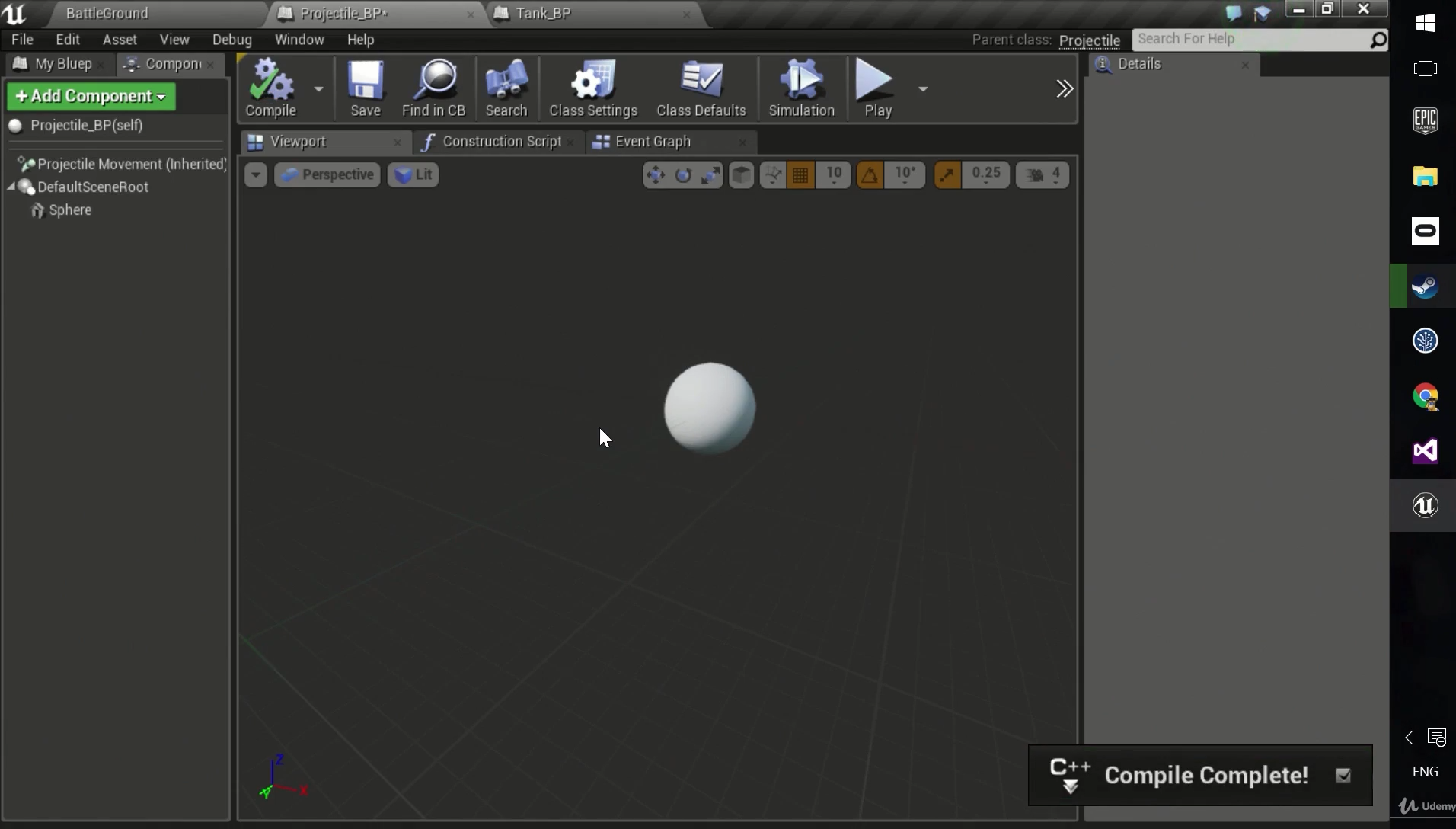
Hey guys, I'm going through a course and I can't make ProjectMovementComponent to show up in UE4 editor(4.26) on a blueprint class.
So there's Projectile that inherits from Actor class and then there's Projectile_BP Blueprint class that inherits from the Projectile class.
Teacher adds ProjectileMovement field in the Projectile.h file:
UProjectileMovementComponent* ProjectileMovement = nullptr;
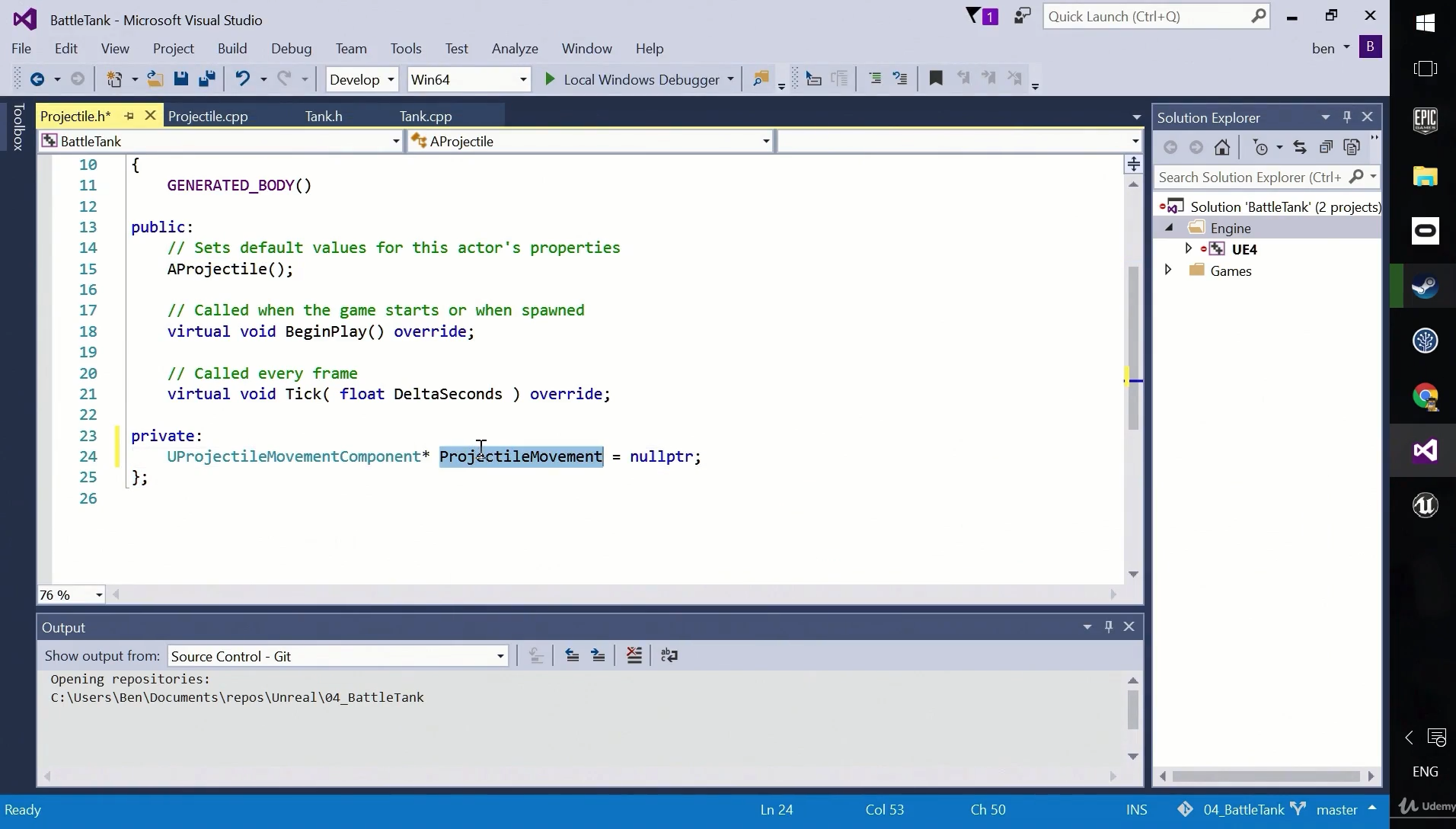
Then he creates it in the constructor:
ProjectileMovement = CreateDefaultSubobject<UProjectileMovementComponent>(FName("Projectile Movement"));
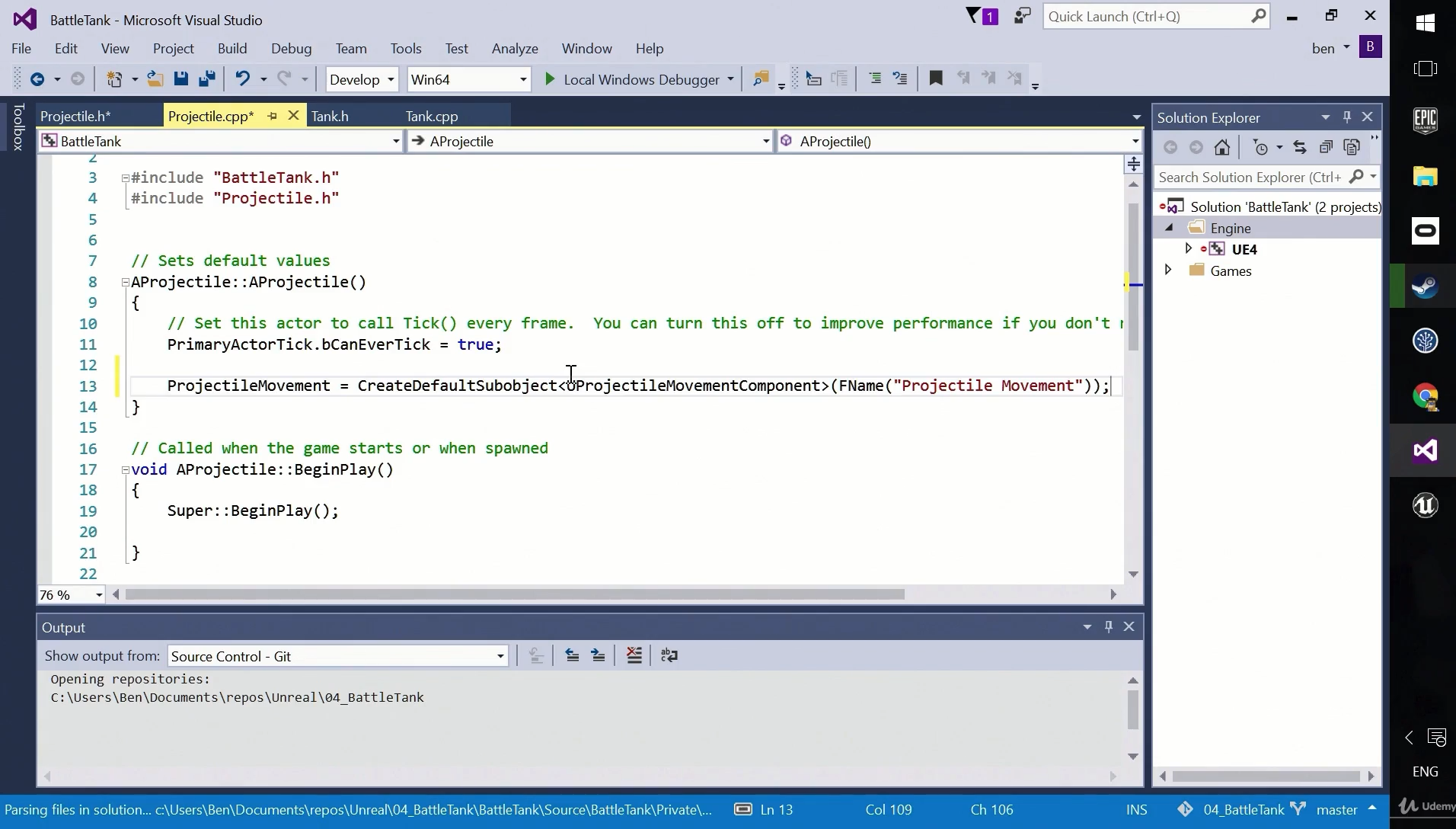
And then he gets Project Movement (Inherited) component in the Editor:
https://i.imgur.com/3vZD1cz.png
So these were his screenshots. Now here are my screenshots, I did the exact same as him(unless I missed something):
https://i.imgur.com/M0Sk2Ny.png
https://i.imgur.com/W97xWLZ.png
https://i.imgur.com/tK3fIUk.png
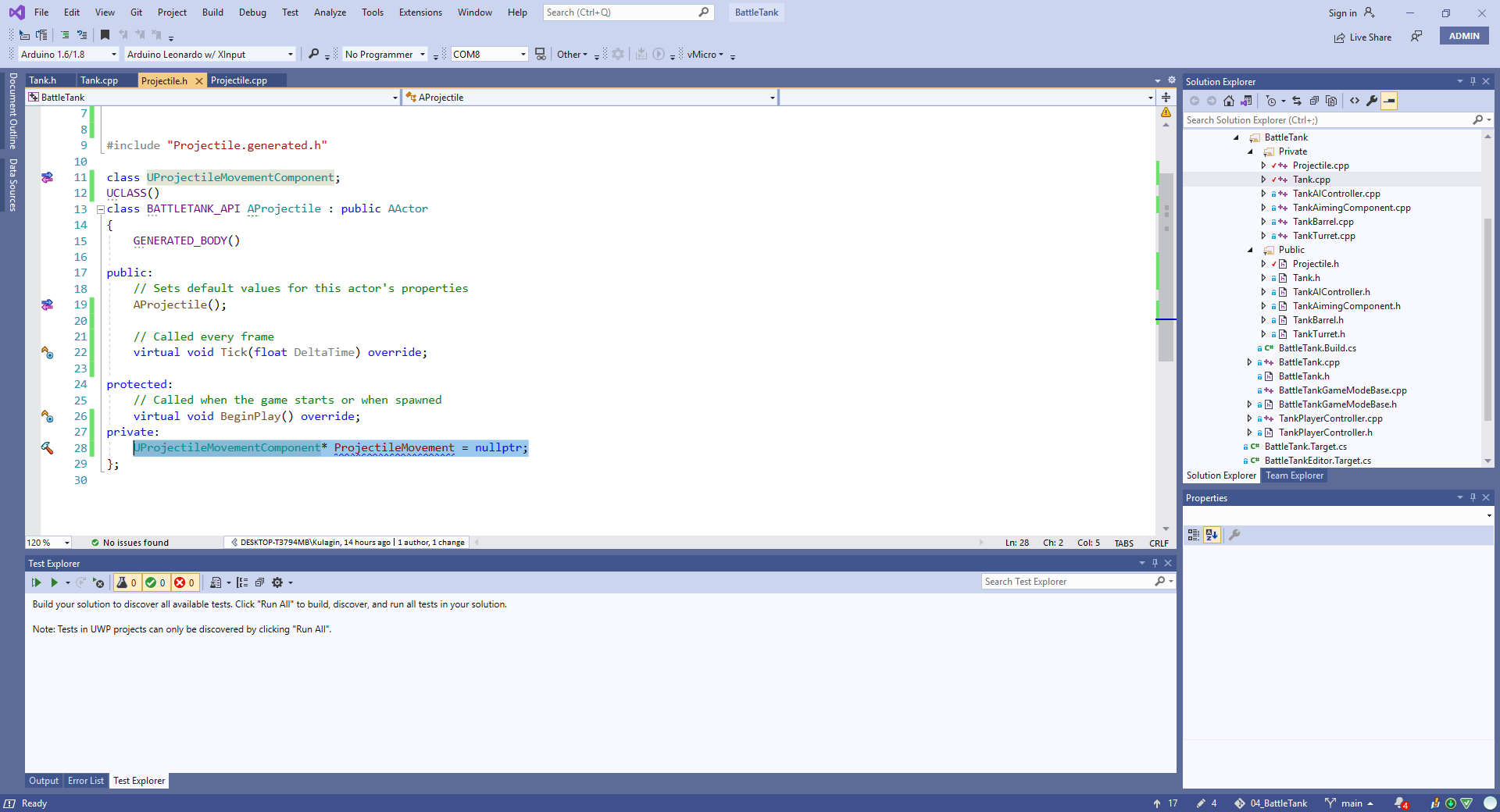
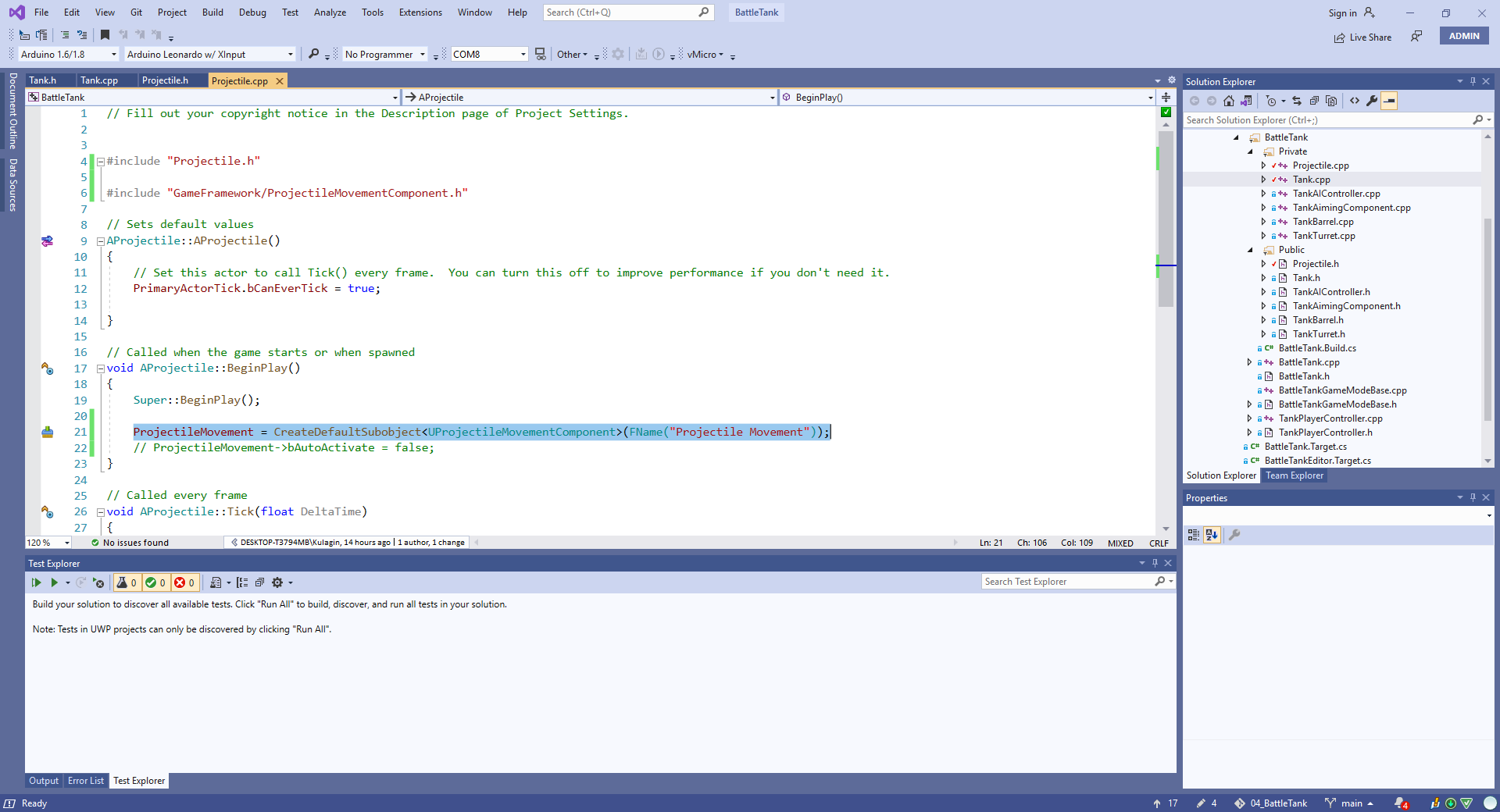
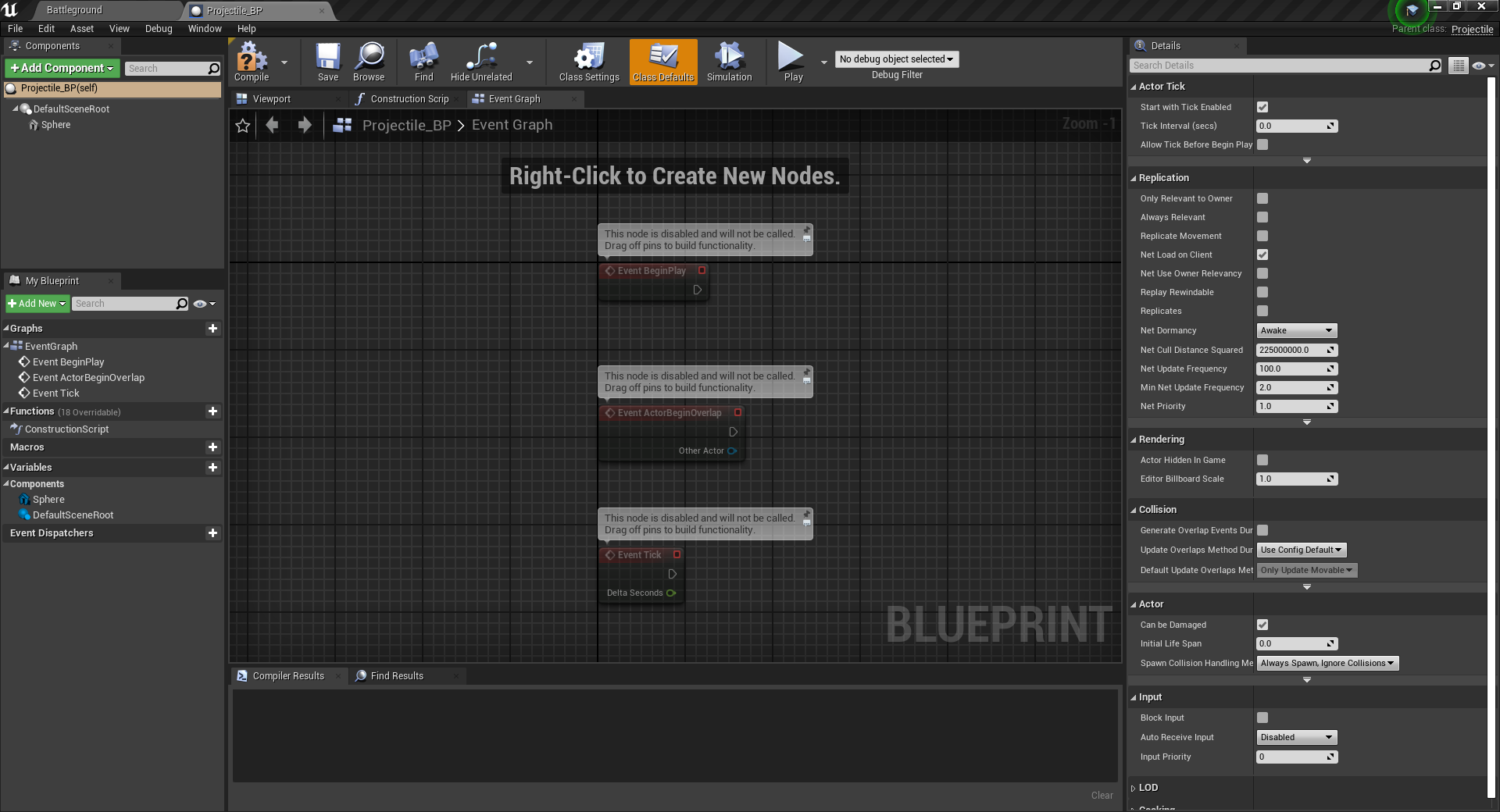
I closed Projectile_BP tab, built the solution from the UE4 editor and it refuses to show. Projectile_BP does inherit from the Projectile as you can see in the top right corner. And I even closed and started my UE4 Editor to make sure it isn't it. I also made sure that all files are saved before building.
Now I don't know what to do because it looks like it should work. Even more, there's Tank class and TankAimingComponent, and TankAimingComponent shows up on the tank when I follow the exact same pattern: Tank inherits from Actor and TankAimingComponent is an Actor component, it is just created by me and not present in the engine by default:
https://i.imgur.com/63DZyU7.png
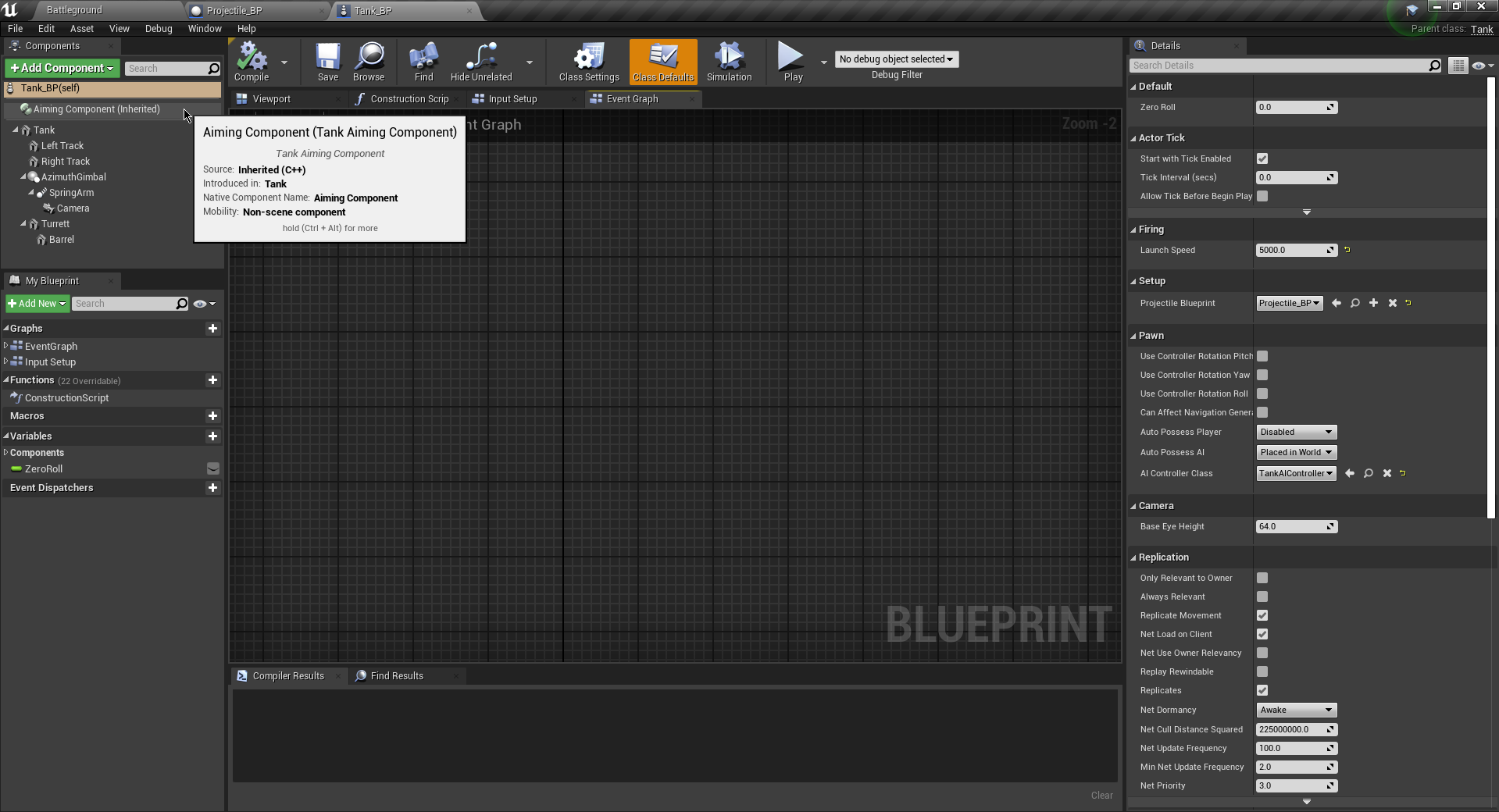
Wall of text but I don't know how to create issue like this with less text/images
 frank oar
Hey guys,
I could really do with a little help.
I need to ask some questions about the UE to rigify addon for blender.
(It is for sending animations and rigs between Blender and Unreal)
Please give me an @ if you have any experience with it.
I am sure these would be simple questions if you have used it before...
harsh tiger
Same effect without the AO map
hybrid epoch
Fixed it, the problem was is that I was creating my ProjectileMovement in the BeginPlay method and teacher creating it in the AProjectile contstructor.
I checked everything I could think of that could go wrong but I completely missed this.
 dense knoll
How do you make 3D objects appear only to the owner?
like actors that get spawned in as 3D hud elements
but are only visible from that players view
candid mist
There are Owner No See and Only Owner See checkboxes for Primitive Components
try making the player the Owner of these components
(for me it worked when the Character (Pawn) was the Owner... didn't work when I set Player Controller as the Owner (and it should I think, as the tooltips say the ownership can be indirect)... oh maybe it would work if I also set the Pawns to be owned by the Controller, ow that I think of it (for some reason IIRC stuff doesn't really have owners by default in Unreal)
mystic barn
Can someone point me to how to reparent a material instance inside editor?
candid mist
 mystic barn
Much obliged. Thank you. I sometimes forget that scrollbar goes further down than i thought! 😄
dense knoll
how do you make a widget only get added to a single players screen instead of all player screens?
 earnest violet
I'm trying to get it where when you collect all three boxes you sucessfully complete the mission and it activates a mission complete notification. I have an integer value of 1 and add it to every subsection of the mission There are 3 crates by using ++ increment integer. I then run a branch to see whether 3 has been reached. Please see screenshot.

It's not working! Anyone have any ideas that can help please?
 maiden otter
earnest violet
It's not working! Anyone have any ideas that can help please?
maiden otter
earnest violet
It's not working! Anyone have any ideas that can help please?
@earnest violet How about hooking the branch's false to a print string, and printing the value of your int? Might help you get an idea
earnest violet
@maiden otter Hi JX! 🙂 I'm just trying to get it to only give me the mission complete notification when I ccollect the last crate. Would a simple boolean work?
maiden otter
You could use a bool for if they've collected the final crate yeah. It wouldn't care if they've collected any previous crates if you do it that way though.
earnest violet
U pick the creates up in order
maiden otter
Well then that sounds like it'd work to me
earnest violet
DO u know how to connect them up m8? Below is a screenshot of the code before pins are connect and all3crates boolean is what I'm checking
 maiden otter
Sorry is all this called when you hit the final crate or any one of the crates?
earnest violet
Just when you collect the final crate
maiden otter
If thats the case then really you dont even need a bool, if this event is unique to the last crate, you could just go straight from destroy actor to display global notification. Unless you need to be able to check if the final crate was destroyed from somewhere else, in which case you can set the bool to true before displaying the notification
opal lark
Anyone ever had trouble when one of the action keys i mapped for interact. stops working in map. but works fine in another ?
maiden otter
Are the maps using the same PlayerController, Character, and GameMode? @opal lark
 glacial vector
Anyone know why grade fails to launch when trying to launch on quest 2? Failed to run gradle.bat
Shit has been bothering me for 20 hours and no documentation
opal lark
@maiden otter All the other controls works just the e key stopped working its weird
 copper flicker
@harsh tiger that is a LOT of green... ^ ^
the problem with it is really the color palette overall
plush yew
My pain causing volume is not working at all could you guys help me? All i did was drag it in from the place actors tab and I saw a video of someone using it and it just worked and i have used it before as well worked perfectly fine but now it just did not do anything.
harsh tiger
It is a lot of green, but theres a lot of grass and trees. Not really any other colour I can use. Only option I can think of is a darker green colour
 surreal tundra
 copper flicker
F5, you can always have blue grass and yellow trees
surreal tundra
how do i change color on this material?
maiden otter
opal lark
<@!124344863234719746> All the other controls works just the e key stopped worki...
Very odd... Is there anything special about how youre checking the E key? Might be worth adding some print statements to see if it ever receives the keypress even if logic past that is failing for some reason?
surreal tundra
its a blinking white light and i want it to be green
plush yew
plush yew
My pain causing volume is not working at all could you guys help me? All i did w...
please someone
copper flicker
in fact, I would encourage you to look at some inspiring art with well chosen color palettes.
plush yew
searched it up for 3 days now could not find anything
copper flicker
colors don't have to be taken literally. you don't have to make a green forest.. real forests have many colors, and light changes that to even more colors
I think there are too many beginner artists that try to do simple, literal translations, in terms of shape and color
like.. this is a TREE
it's supposed to look like a trunk and a round thing
and it's supposed to be brown and green
wrong
😄
look at great art, nature, so on......
there is so much variation and amazingness
plush yew
plush yew
My pain causing volume is not working at all could you guys help me? All i did w...
please I need help im desperate
harsh tiger
I get where your coming from, but in this instance it does have to be green grass and green trees
copper flicker
on top of that... good color palettes require you to understand Color. it works for realism, it works especially for stilized worlds
who decided it has to be?
😛
harsh tiger
turning off indirect lighting fixed the green light bounce issue. Just made it darker in some areas which is easily solvable
opal lark
@maiden otter It must be it works on another level in the same project but not my map
 tired quest
Hello, i have some issues with lighting and reflections, can i have some help please ?
 copper flicker
in any case, it doesn't look good, it's not good art direction, and... that would be my 2 cents 😄
plush yew
plush yew
My pain causing volume is not working at all could you guys help me? All i did w...
please someone send help
copper flicker
lazy, stop spamming
harsh tiger
copper flicker
in any case, it doesn't look good, it's not good art direction, and... that woul...
Thank you for the feedback
copper flicker
@harsh tiger my pleasure, hope it helped
a bit
and I hope you won't take it too harshly
plush yew
ok ill stop
copper flicker
lazy, it's pretty basic stuff, look at a youtube video, figure out what's missing
harsh tiger
Not at all mate, what you suggested would fix the green bounce if I made it a dark brown or something for mud. Just unfortunately that isn't an option in this case
plush yew
copper flicker
lazy, it's pretty basic stuff, look at a youtube video, figure out what's missin...
tryed to did not find anything
copper flicker
ok, one last thing I could say about the super green forest.. is that it's all too saturated
look at farcry primal
lots of forest everywhere
amazing artwork
and it was supposed to be green and realistic
yeah, I know you have tech problems, but I wanted to touch a bit on the art side
😄
harsh tiger
It's a game designed for kids mate, around 10 years old. From what we've seen they prefer bright playful colours more than realism
opal lark
 copper flicker
sure, but you still should be in control of your color palettes, like a painter would 😄 I mean don't use everything saturated. it simply doesn't work well, for any human, any age.. I think
opal lark
Here,s a pic of my level design Im going for the old school resi feel
 noble bridge
Hey guys, I have a problem.
(I used This tutorial https://youtu.be/3uW7CgmrKAo). While I was making a dialogue system I stumbled apon a problem.
The interaction enabled message spawns at different places.

This is the start of a new series covering how to make a more advanced dialogue system than the previous one I had made. This one features questions and responses all using the behaviour tree as a make shift dialogue tree. In this first episode I show off the final product and start things off with setting up how to show a interact message such ...
(Here it is, on the left)

It can spawn everywhere
Even behind the screen
opal lark
There no Vibrancy even for kids
noble bridge
?!!!
opal lark
Does not feel Alive
 stray smelt
Where do I find the 4.26 sky examples they have in the feature video? With the volumetric clouds and lightning
 fierce tulip
@opal lark #work-in-progress for just showing off stuff
opal lark
Yeah i sent it to the wrong place
 stuck garnet
Hi all, is there a way to place a group of objects in a circle at a specified distance from the center and in a specified order? Thank you!
copper flicker
@harsh tiger quick example of cute colorful green stuff, where there is strong art direction.
 stray smelt
stuck garnet
Hi all, is there a way to place a group of objects in a circle at a specified di...
stray smelt
stuck garnet
Hi all, is there a way to place a group of objects in a circle at a specified di...
you would have to create it using blueprint
copper flicker
 copper flicker
wow.. I was hoping the 2 pics get posted together... eh
harsh tiger
They look great mate 👍
copper flicker
@noble bridge it could be many things?.. I think you have more chance to get a reply if you ask something more focused and specific.
stuck garnet
stray smelt
you would have to create it using blueprint
Thank you for your answer. I’m afraid I’m very inexperienced with blueprints. Are there any existing systems you could recommend?
noble bridge
copper flicker
<@!474609061770428426> it could be many things?.. I think you have more chance t...
How can I be more specific?
stray smelt
stuck garnet
Thank you for your answer. I’m afraid I’m very inexperienced with blueprints. Ar...
I think there are some things on marketplace where you can create fractal-like patterns with an input object. Still, I would recommend getting into the basics of blueprints and trying it for yourself. It's easier than it looks and at some point you'd have to look into blueprints anyway
copper flicker
by trying to debug yourself first, and when you encounter a problem, as about that, specifically
ask *
basically, you're saying. here's a tutorial I'm following. somewhere.. along the line... something broke
stuck garnet
stray smelt
I think there are some things on marketplace where you can create fractal-like p...
Alright, thanks for the advice!
noble bridge
copper flicker
basically, you're saying. here's a tutorial I'm following. somewhere.. along the...
I said that I have a problem with an interaction enabled message
Basically it an "press e to Interact" message widget or an x button icon as I have
copper flicker
ok so u create a widget, you set its position... and you follow the tut and place the same nodes
noble bridge
I did
But
The icon's position I made was static
But when I started playing the game it was spawning in different positions
Even behind the screen
copper flicker
see, u start to offer more info about what you did differently from the tut, that's useful
noble bridge
I did follow the tutorial perfectly
But because I have a first person game mode it works weird
noble bridge
Cause in the 3rd person game mode the camera is static I think
copper flicker
I'm not sure what you mean. but I'd try to replicate the tutorial precisely, just to learn, and seee if that works
if it does, try to see what differences there are between your case and the tut example
yes, it's more work
jagged halo
can I debug the material instance parameters?
I'm not sure how to access them while the editor is running
 leaden gyro
ive been trying to get unreal source code, ive linked my github to my epic games, i made sure it was the right account, i got the email saying i was invited to join epic games, but i still can't find UnrealEngine
(just realized i should have asked in #engine-source
 desert leaf
Does anyone know if it's possible to change the default location of importing vault items to projects. Like right now it's set up for all of them to be added to the Content folder in a project, can I change it to go to Content/subfolder and if I can where can I do that?
surreal tundra
hey everyone
i need to do this same function

but in a blueprint

how to do that? any tips?
grim ore
@leaden gyro did you go to the github for epic games?
grim ore
so if you are signed into your account and go here what does it show? https://github.com/EpicGames
 grim ore
yeah the public version of the repos, gotcha. what about here? https://github.com/settings/organizations
leaden gyro
it says im not a member of any organizations
grim ore
ugh.. so no link to click on in the email?
leaden gyro
only links
 grim ore
yup thats the right thing
only thing I could think of is it has you logged into the wrong account
leaden gyro
i only have one github account
grim ore
welp somewhere they have you set up 😦

 grim ore
so clicking join does that?
I would say just try again then. unlink it on your epic games profile page and relink it
 knotty heron
Is it possible to make another pawn move with my characters root motion, like attach an enemy to my capsule and make it move in the same direction?
grim ore
you can attach an actor to another actor yep
leaden gyro
lol to think i'd need need to do all of this just to load levels in ue ;-;
YESSS
IT WORKS!
grim ore
yay
 little vector
Does anyone know what causes this problem?
Assertion failed: OwningNode [File:D:\Build++UE4\Sync\Engine\Source\Runtime\Engine\Classes\EdGraph/EdGraphPin.h] [Line: 482]
Resetting collision and trace channels. My character and animbp is reverted automatically by the engine.

 round hemlock
Hey Guys, I want to save that an enemy got killed by the player. I dont really know how to do this the best way, but If I cast to savegame BP on death, what object reference can I use for that? I only know load game from slot
grim ore
@little vector did you have a trace channel that is no longer there?
little vector
grim ore
<@!271753216989986827> did you have a trace channel that is no longer there?
Both trace channels and collisions are gone in the engine.
I can't save my character anymore.
grim ore
maybe try putting it back so the line trace can find it then change it away from that one then remove it again?
@round hemlock you need to keep track of that enemy some how, you cant just plug in that enemy and save its object to a save file. So you need a unique tag, or id, or something that you keep track of in your save game that when you load it finds that enemy by its unique ID and removes it/prevents it from spawning
as for your casting question, you would either load an existing save game from disk then update it and save it again, or you would create a new save game, update it, then save it
round hemlock
Hey man, hmm I have Id system which is exposed to spawn. you mean its okay if I do "ondeath->async load from slot-> cast to enemy save" I was thinking it maybe bad for performance when the save file is growing.
I could make multiple save containers though.
grim ore
as long as you do it before you destroy the actor it should be ok but if you plan on doing this quite often, just store the save game somewhere persistent like the game mode
then you can update the file while its in memory and every so often/fixed time/save point save it to disk
alternately you could just store your "changes" to the save game somewhere like your game mode then when you save you merge in these changes
round hemlock
okay I think I look into the game mode stuff, I only actually save it when the player leaves the sublevel. so you mean I use the "get game mode" node is that correct?
grim ore
yep the game mode is a persistent object that is loaded up when your map loads and goes away when the map is destroyed. Its a base framework item, handles stuff like spawning characters,etc.
but a good general container to keep common stuff relevant to the level
little vector
grim ore
maybe try putting it back so the line trace can find it then change it away from...
Thanks for reply. It seems to just delete it sometimes. It's done it twice now. I've made full recovery from p4v now and hope that it doesn't happen again.
grim ore
😦
round hemlock
okay thats what I was searching for then. thank you very much so far.
plush yew
how hard is multiplayer in ue4?
 full estuary
New here so Hi 🙂
I have question, I am trying to install Unreal from the epic games launcher for the very first time, after 1 hour and 30 minutes to get to 84% it seemed to just stall so I cancelled it, I looked online for the install size of UE4 and got different answers ranging from 11 gig to 50 gig, when checking how far the install had actually got to the install folder was over 90 gig, is this right? I haven't had it installed before ever, thanks for any answer
so trying again so thought I'd ask if i am just being impatient, I have a really fast net connection too
grim ore
theres a few things, first being what you chose when you installed it. different options change the size
I can say my .26 install folder is 58.6GB but thats install size not download size
full estuary
I just clicked install lol and it started to install
grim ore
if you click on the downloads button on the bottom left when installing it will tell you what its doing. ITs possible at that percent it was uncompressing the install files
ok the default size is probably about 10gb download
full estuary
if this one fails, maybe it doesn't like being installed on an external HDD
grim ore
that should be fine, its probably just the speed and it needs more time. watch the downloads menu
plush yew
anyone know when i imported a 3d model from blender to UE4 its see through (only object to be behave this way)
 grim ore
your normals are flipped?
plush yew
not sure, ill check ill google that
plush yew
grim ore
your normals are flipped?
where do i check this setting? is it under static mesh when you select the object?
 simple meadow
Hey everyone, packaging question. I have an exe and it always prompts users for admin rights before running it. Some users are locked down on some work machines and do not have full admin access so they can't run the package... Anyway to disable this in UE4 or is it purely a windows issue?
plush yew
grim ore
your normals are flipped?
Found it, thanks!
 dry latch
any Blueprint developer would like to do a trade of skills with a audio technical designer ? I would like to merge 2 marketplace kits !
 lucid jetty
Greetings you smexy people! I am been getting bothered by something lately. For some reason, my thumbnails are updated real time via a camera angle some of my blueprints!

I just want to clear it. I want the default thumbnail of Unreal 4.
How do I solve this? 😦

Anything related to "thumbnails" is not here too D:
grim ore
thumbnail mode is part of the content browser, option in the bottom right
lucid jetty
grim ore
thumbnail mode is part of the content browser, option in the bottom right
I know, it allows me to edit it but doesn't tell me how to clear it to default 😦
opal lark
My Character wont collide with my cloth any ideas thanks
grim ore
well what do you expect the default to be?
 lucid jetty
But I didn't ask to render anything... It just started on its own 😦
grim ore
you have something in there that renders dont you?
lucid jetty
Of course it got components in it, but that doesn't mean Unreal should make a thumbnail of it?
I got other blueprints that have the default thumbnail, that also got components in!
grim ore
shrug I dunno then. If there is a 3d stage to render in the blueprint it uses that as the thumbnail
lucid jetty
I understand, thanks for trying to help, I will continue to check around. ❤️
 deft raven
Hi, anyone know a method to contact unreal engine team (epic games?) for asking about copyright question?
I need to know the copyright about demo scene
grim ore
epic content or something else?
deft raven
The demo of boy and a kite and the medieval qui le map
grim ore
those are learning content so you can use that content in unreal engine
stuck garnet
Hi all, is it possible to use 16K HDRI backdrops in UE4 or is the maximum resolution capped at 4K?
 dusky slate
Does anyone know how i can access Montage Notifys in my Character Blueprint?
grim ore
@dusky slate anim notifies? they end up in the animation blueprint.
dusky slate
any way to get them into the character blueprint?
grim ore
tell the character to do whatever when it triggers in the anim bp
dusky slate
welp okay
grim ore
i guess technically you could create an event dispatcher in the anim bp for the notify and have it called when it triggers then have the character bind an event to it
dusky slate
ok, thanks
deft raven
grim ore
those are learning content so you can use that content in unreal engine
Understood, but is not okay for commercial? I thinking for a visual project, so using commercially the render of images and videos from unreal engine,
I see a video of a guy exporting materials from medieval map into another projects, is that allowed? I don’t understand this, if is only for “learn and study” or can I use this demo for commercial, (images and videos)
grim ore
it is ok for commercial
it is licensed for use in UE4, you can do whatever you want with it in UE4. https://www.unrealengine.com/en-US/eula/publishing
the majority of content released by epic is licensed as UE Only Content which means you can use it how you want in the engine, rarely they will release third party content and it will say that its not for XXX use
 grim ore
yep
grim ore
what folder are you putting the source code in?
grim ore
well you are downloading the source code somewhere, what is the full folder name
grim ore
so c:\UnrealEngine-4.24.3-release
leaden gyro
C:\Users\cbswi\OneDrive\Documents\Programs\UnrealEngine-4.24.3-release
grim ore
why would you put it in your one drive folder
leaden gyro
idk my pc messed something up so it made everything one drive
grim ore
you should put it somewhere closer to root yes, if you have a single drive it should be c:\whatever
you should not have any errors when you run the setup file
leaden gyro
k moved it should i rename it to like, "UE4.24" or something
grim ore
I wouldnt use a period personally, maybe UE4_24
leaden gyro
okay uve been so helpful today ty!
dusky slate
Okay, does anyone know a Fix?
For some time now, when i have Unreal in Fullscreen, my Monitor sometimes starts going black and turns back on, over and over again.
And another problem, when i use Unreal for some time, for no reason my Menus (when i try to add a Node for example) instantly close themselfs or just flicker.
grim ore
the pinned messages say the second one is related to newer drivers and/or multi monitors
dusky slate
yikes, i just downgraded to the 461.40 driver, still buggy...
imma try an even older one
fuck Nvidia
grim ore
i use 460.79 personally
dusky slate
i will try 461.09
opal lark
just a quick question My enemy has a collision box when the player overlaps, it it plays the battle music, but the problem is i need it just to play the first time because when hes dead, the enemy the music stops
grim ore
what is causing it to play more than once?
grim ore
doesnt that box go away when they are destroyed?
or they can go in and out of the box during combat is the issue?
opal lark
Yes but i mean if he attacks and I run. when he catches me itll trigger the sound everytime
grim ore
you can use a do one node after the overlap so it only triggers once
opal lark
I tried that but for some reason it messes up my annimation he freezes
grim ore
you might have other code that needs to happen every time then, move the music to the end so it only happens once or redo the way your music works. depending on how you are playing it you could check to see if its currently playing before playing it
opal lark
Ok thanks good idea
leaden gyro
@grim ore sorry to bother again, but still gives me error
 grim ore
weird. if your folder is shorter it should work fine
opal lark
@grim ore Thanks Matt worked like a charm mate
grim ore
yay
opal lark
@grim ore

Still stuck with this rain thing thou
I can get it to work on characters clothes but not weapon
grim ore
well you never tell it what weapon to change
 runic lotus
Anybody know how to cast the target (type Gameplay Ability Object Reference) from Break GameplayEventData into the target (type Gameplay Ability Object Reference) for ApplyGameplayEffectToTarget?
nvm figured it out, im dumb (for those searching later, target refers to the gameplay ability, target data is where you want to stick the target for the effect info, you can create it from an actor reference with the function Ability Target Data from Actor)
opal lark
@grim ore Sorry Matt what do you mean do i Hve to add another node ?
grim ore
I mean you never tell it what weapon to change, where in that code do you say "this weapon is the one I want to change" @opal lark
grim ore
casting to luger says "treat this as a luger", but you still need a this
imagine you have 10 of theses luger's in the world, how would this script right there know the EXACT luger you want?
thats what you need to figure out
assuming its part of the overlapped or other actor, there is a start
 pseudo pecan
Hello everyone! I wondering how do you guys manage massive buildings with tons of assets, decals, lights to move them to another map exactly same way? Just copy-paste (seems to be dumb way) or merging actors somehow?
If i try to select all needed assets - my computer start melting, how to move them correctly
grim ore
if you want to reuse a group of actors like this, you could convert them into a blueprint then re use the blueprint
but yeah nothing wrong with copy paste
pseudo pecan
as i know blueprint work only with static meshes in it? how to add there light actors?
and how to "unblueprint" assets back when they moved
grim ore
you wouldnt unblueprint it, and no blueprints work with many many more things. all the light actors in your scene have an equivalent light component
if the other map has nothing in it you could always just duplicate the map and start working in the duplicate
you could even techically start using sub levels where your building is it's own sublevel
dusky slate
Does anyone have a 8 Way Root Motion Locomotion pack that he can recommend? i am desperatly searching for one and can't find any good ones
pseudo pecan
@grim ore i've got my main map in the game and i try to add asset from store on in
grim ore
its a pack of assets and you want to move something pre built on a sample map?
#level-design might have a better solution than what I suggested but those are my ideas if you want to keep it as is.
pseudo pecan
@grim ore it's superstore asset with many meshes on their places on it
@grim ore just wonder if there any hidden way get this kind of work done
@grim ore thanks for the help
grim ore
no real hidden way. Converting to blueprint is probably the easiest
recently added was instancing levels so that might be an interesting way to try it. You basically turn the level into a reusable level that you can then spawn in or bring in multiple times
fierce tulip


We’ve all had our fair share of awkward moments 🤭
Here are a few of ours—now, share your funniest "oops" moments below! #AwkwardMomentsDay https://t.co/FyQzE9T9ur
Twitter
·
 runic fern
Hi Guys Here is better 😄
....
I want to Make the Valve Wheel Start from the Hand Position not Jumping to the Hand Position ..
Like when i catch it from left it will start count from the current value
 distant jewel
Building lighting: 0% 😩
plush yew
does anyone have any ideas how I can implement a tab targetting system that doesn't just involve giant overlap volumes and foreach loops? I have my targetting UI sorted perfectly I just need a way to select enemies.
plush yew
anyone having problem with epic launcher ?
 frozen pond
hi, question about creating main menu: should i create special map and set it to start map in project? and then from that load game/start new ?
grim ore
@plush yew whats wrong with doing it that way?
@frozen pond I create my main menu separately in a map since there is no reason to load up game logic for the things normally in my main menu, so yes your idea is sound
plush yew
I just thought a bit expensive flying around with a big collision volume attached?
grim ore
it might be but alternatives? there is doing that check manually every so often. there are traces every so often. there is maintaining an agrro list and using it
i would make sure your first idea is bad first tho
 rich condor
Matt is it possible for you to help me? My hud wont hid during my level sequence and I'm not sure why.
 snow berry
Hey all!
I've been attempting to make a Video Texture for 3 days now. I've followed every video and for some reason my video textures keep coming out looking like this.
Ive tried projecting onto a static mesh, as well as on a Image in a UI Widget.
Not sure how to fix this. My file reference is correct

 lament star
Is anyone else experiencing some project settings getting reset every time the editor gets reopened? It's specifically physics settings in my case:

on 4.26.1 btw, 4.26 had this issue too
grim ore
@snow berry how did you create that material?
snow berry
I have created it both by right clicking the video itself and by simply selecting to have a video material created during video upload
grim ore
when you double click the new media player, and then double click the video on the bottom left in that list does it play the video?
snow berry
yep!

 surreal tundra
hey! why does this happen
grim ore
yup. ok now how did you test it?
snow berry
Ive dragged the material onto a flat plane and nothing happens
grim ore
well the plane shows the new material now right?
snow berry
nope lol
grim ore
on the right side it doesnt show as the material?
grim ore
ok so it does show it as the material in element 0 tho in the details on it?
 snow berry
yep!
grim ore
@surreal tundra your material is one sided plus your mesh doesnt have normals on both sides (its only facing 1 way, you only have a face on one side). fix the mesh to have 2 sides, or set the two sided checkbox in the material
ok so if you open up the media player and tell it to play does it play in the world like this?
 snow berry
hmm ill try that. one sec
grim ore
so its playing in the media player and the material in the world
snow berry
Ok yea it plays
grim ore
yep then your material is fine, you never tell the media player to play
snow berry
wtfff lmao
grim ore
well its just a material, its not going to do anything unless you tell it. your media player doesnt exist anywhere in the world so it has nothing to do.
snow berry
reading now
grim ore
the bottom half, covers adding in an audio source if you want sound then the rest is setting up your media player and opening its source and letting it play (assuming it has auto play on, otherwise you tell it to play after opening)
@rich condor you want the UI to hide during playback? your going to need to tell it to hide then you can use an event on the track start or you can look at the Cinematic section of the level sequence actor and tell it to hide hud and see if that works \
 rich condor
Hi thank you! So the hud that I'm using is called ac main widget handler. I've tried to click the hide hud but it still doesn't seem to.
 snow berry
grim ore
<https://docs.unrealengine.com/en-US/WorkingWithMedia/MediaFramework/HowTo/FileM...
snow berry
grim ore
<https://docs.unrealengine.com/en-US/WorkingWithMedia/MediaFramework/HowTo/FileM...
you rock! it worked! i feel like i followed those same instruction a billion times from all the videos i watched and it never worked. thanks Matt!
surreal tundra
@grim ore amazing - thank you so much!
grim ore
whoot double yay
@rich condor there is a chance the hide hud just hides the older HUD class and not UMG. You are going to have to hide the UMG widget you created
so where do you create it?
rich condor
I believe it's created here. I'm using a template that I bought off the marketplace so I don't really know where things really are, I'm sorry but thank for helping.
 grim ore
yep thats a component but it has to be on something then in order to work
perhaps on the character for example?
if so you can either not spawn the character on level load or your going to need to do something else to prevent it from being created
rich condor
Hmmm I think not spawning the character on the level load might work but I've never done that before.
grim ore
you would change the game mode for that level to not have a default pawn, or you can make a new game mode and set it up like that
 distant totem
You can generate complex blocking volumes from meshes, but can you generate BSP geometry from a mesh?
bitter oasis
Is it possible to generate a landscape from an array of floats in blueprint or code?
grim ore
you shouldnt need or want to generate BSP, its not as performant as static meshes @distant totem
is that shader file in your project?
 obtuse egret
it's in the engine 4.26 file
grim ore
but you put it in there?
distant totem
grim ore
you shouldnt need or want to generate BSP, its not as performant as static meshe...
True, but this is just a render so performance isn't an issue. I need to put a hole in the wall of a house and I don't have the source mesh, just wanted a quick fix lol. Cheers
distant totem
obtuse egret
it's in the engine 4.26 file
did you modify a default engine material?
grim ore
@distant totem turn on the modeling tools plugin and you can use those to do that
obtuse egret
distant totem
did you modify a default engine material?
mmmm I don't think so
grim ore
your engine should not have those, mine doesnt
distant totem
wow thanks! Didn't know you could modify existing geometry with it like in hammer editor, cheers!
grim ore
but ignoring that, try putting #include "/Engine/Shaders/Public/FP16Math.ush" as the code line and compile and see what happens
grim ore
ah ha, might have found something
 rich condor
Matt you are right. I tried changing the game mode to first person mode and to none and it didnt show but it seems like the only way to do it that way is to have two levels, one for cutscenes and one for the actual level to be played. Is that a good way of making a game? Thank you for your help!
grim ore
if your cut scene doesnt have to take place in the level it makes it easier yep
@obtuse egret so /Engine auto maps to /Engine/Shaders in that engine version so you dont need that part in your include is the issue. yours would be like /Engine/Tests/01/S_T_01.ush
the /Engine automatically unfolds to <Engine Version>/Engine/Shaders
obtuse egret
aha interesting
grim ore
but regardless.... I dont have those engine shaders so thats weird
maybe for another platform I dont have installed, totally possible
which part is the case?
obtuse egret
grim ore
<@!322392441011437578> so /Engine auto maps to /Engine/Shaders in that engine ve...
.
grim ore
look at the screenshot I posted
I got that error once I tried to map another virtual directory incorrectly (/Project)
grim ore
yep yep, learned something new 🙂
plush yew
i just installed UE4 on a new computer and when i start a new project the launcher just sits at 45% forever. why is this?
 torpid dragon
Hi, can anyone please borrow me 5 minutes so I can ask some questions? I'm pretty much lost o n where to start learning, so..
I'm on the voice chat, thx
plush yew
plush yew
i just installed UE4 on a new computer and when i start a new project the launch...
It's probably compiling shaders.
If you wait it out, it'll eventually load. It typically only has to do that once in my experience.
plush yew
torpid dragon
Hi, can anyone please borrow me 5 minutes so I can ask some questions? I'm prett...
If you check the pinned messages, there's a number of helpful links to get started.
i let it sit for 15 minutes and it did nothing. for how fast this computer is it shouldnt take that long
plush yew
plush yew
i let it sit for 15 minutes and it did nothing. for how fast this computer is it...
Heh, I've heard 2 hours before 
with a 2080 i dont see that happening
I think compilation is on the CPU
Do you have a lot of threads?
not sure. its a Intel 10th gen i7
Thread count is correlated to compile times, so I'm over here with 4 threads…
Takes a while 😅
But others have 32 threads and rip through it.
if i open an existing project, it opens right away but any new project sits at 45%.
If it needs to compile, there's no avoiding the CPU chewing through it.
torpid dragon
plush yew
If you check the pinned messages, there's a number of helpful links to get start...
ty
plush yew
plush yew
if i open an existing project, it opens right away but any new project sits at 4...
I think there are ways to get a better look at what is actually happening, but I can't give direction. I think people recommend checking your activity monitor and verifying your CPU is basically maxing out while that's happening.
ok so apparently it only does it if i have raytracing enabled.
which is weird because i have an RTX 2080. don't those have raytracing
It still sounds like you haven't yet compiled what's necessary for that type of project.
Run time performance will certainly use the GPU to render things, but this alleged compilation step is your CPU... and has to happen at least once.
bitter oasis
Please help I do not find any guide or information on how to create a landscape (not mesh) from blueprints or code and also modify it there
Can someone point me in the right direction
dry latch
anyone knows why my editor crashes when editing splines in landscape mode ?
spare kernel
no one can help with that
distant jewel
Ugh my lighting won't build
spare kernel
go get the debug symbols from the launcher and crash again, and come back @dry latch
dry latch
okay!
distant jewel
Hey quick question, I'm trying to get my lighting to build but it's not happening. My CPU keeps hitting 100% but my ram is barely being used and my GPU is just chilling.
Oh god, I opened up my swarm agent and this seems like a lot "Scene surface area calculated at 6.940 million units (0.032% of the estimated 21923.969 million units)"
dry latch
@spare kernel okay I did crash again! What should I do
spare kernel
post the crash
dry latch
Unhandled Exception: EXCEPTION_ACCESS_VIOLATION writing address 0x0000000000000002
UE4Editor_Landscape!FLandscapeEditDataInterface::SetHeightData() [D:\Build++UE4\Sync\Engine\Source\Runtime\Landscape\Private\LandscapeEditInterface.cpp:371]
UE4Editor_Landscape!ALandscape::ClearLayer() [D:\Build++UE4\Sync\Engine\Source\Runtime\Landscape\Private\LandscapeEditLayers.cpp:5997]
UE4Editor_Landscape!ALandscape::UpdateLandscapeSplines() [D:\Build++UE4\Sync\Engine\Source\Runtime\Landscape\Private\LandscapeEditLayers.cpp:6172]
UE4Editor_Landscape!ALandscape::UpdateLayersContent() [D:\Build++UE4\Sync\Engine\Source\Runtime\Landscape\Private\LandscapeEditLayers.cpp:4987]
UE4Editor_Landscape!ALandscape::TickLayers() [D:\Build++UE4\Sync\Engine\Source\Runtime\Landscape\Private\LandscapeEditLayers.cpp:5302]
UE4Editor_Landscape!ULandscapeSubsystem::Tick() [D:\Build++UE4\Sync\Engine\Source\Runtime\Landscape\Private\LandscapeSubsystem.cpp:122]
UE4Editor_Engine!FTickableGameObject::TickObjects() [D:\Build++UE4\Sync\Engine\Source\Runtime\Engine\Private\Tickable.cpp:151]
UE4Editor_UnrealEd!UEditorEngine::Tick() [D:\Build++UE4\Sync\Engine\Source\Editor\UnrealEd\Private\EditorEngine.cpp:1748]
UE4Editor_UnrealEd!UUnrealEdEngine::Tick() [D:\Build++UE4\Sync\Engine\Source\Editor\UnrealEd\Private\UnrealEdEngine.cpp:426]
UE4Editor!FEngineLoop::Tick() [D:\Build++UE4\Sync\Engine\Source\Runtime\Launch\Private\LaunchEngineLoop.cpp:4836]
UE4Editor!GuardedMain() [D:\Build++UE4\Sync\Engine\Source\Runtime\Launch\Private\Launch.cpp:169]
UE4Editor!GuardedMainWrapper() [D:\Build++UE4\Sync\Engine\Source\Runtime\Launch\Private\Windows\LaunchWindows.cpp:137]
UE4Editor!WinMain() [D:\Build++UE4\Sync\Engine\Source\Runtime\Launch\Private\Windows\LaunchWindows.cpp:268]
UE4Editor!__scrt_common_main_seh() [d:\agent_work\5\s\src\vctools\crt\vcstartup\src\startup\exe_common.inl:288]
kernel32
ntdll
spare kernel
that is not good, i would go report that to Unreal
glacial vector
Guys, seems like no one can help me. I am looking at this fucking recursive loop in Unreal
When trying to launch my build to the quest 2
Discovered Node 74ufhdheh383h4 on Connection 127.0.0.1:6666
Is the error
Will get stuck in launch for 4 hours there
On that discovered node and it has not taken a single fix
spare kernel
you just asked that in #virtual-reality, you can either wait for a response, or ask on the unreal forums/answerhub if no one is replying here. maybe no one knows the answer here.
#rules number 7, don't cross post into multiple channels. You asked in the correct channel, then asked here.
 lime gull
Is it possible to use a flipbook in a widget? And if not, how Might I animated an image inside a widget
plush yew
hello could someone assist me?
I followed a tutorial on setting up a character and animations and blendspace in unreal engine 4
when the character moves they just slide across the floor in an idle pose
 trim silo
Can i just say that whoever runs unreal engine twitter this person is awesome
plush yew
plush yew
when the character moves they just slide across the floor in an idle pose
Sounds like your blend space is not connected to your animation blueprint output pose
Or the axes in your blend space aren’t connected to the appropriate variables.
plush yew
ty for responding
 fickle coral
Hello,
I'm having one of those WTF moments and i can't understand what's happening or why it is happening.
I'm new to UE4 so it's understandable but still, i tried everything i learned and nothing worked.
I get this error and can't compile i traced the source of the problem and i saw that the interface that contains the function is the problem or rather the function itself with the "count" but i tried to delete the input and type again "ammo" but it wouldn't let me, it changes automatically to the last thing that was typed in there.
It's the first time that i see something like this, not being able to type the name of the input and having this issue...
Please any help would be highly appreciated!
Thank you very much in advance!


 ember token
Which engine runs faster on low-spec PC for FPS
Unity URP or UE4 mobile pipeline
plush yew
fickle coral
Hello,
I'm having one of those WTF moments and i can't understand what's happen...
There is a typo here

I'm not sure if that's related to your problem, but still worth a fix 😛
fickle coral
plush yew
There is a typo here
yeah, cause i try to type Ammo and it goes back to Ammmo or anything that was previously typed
plush yew
You did it on purpose to avoid naming conflict?
fickle coral
i thought that might fix it, i went from Ammo to Ammmo and then couldn't go back, the error persisted and nothing changed
plush yew
fickle coral
it's really weird that i can't change the Input name, it changes back
 latent flume
Quick question. Is a Tarray thread safe?
glacial vector
Anyone know what to do if the question you have has been asked for 5 years on answer hub with no solution?
 thin tendon
Asking in here is probably going to get you better results
glacial vector
Where could I go?
Like the epic devs consider this bug a "You're screwed, have had the bug listed on back burner for 3 years"
Back burner*
It is entirely a problem with Android but no on in mobile knows it and no one in VR knows it :/
thin tendon
Just ask the question mate. I often come across stuff with no answer. Sometimes the best you can do is come in here and periodically ask until someone who knows sees it.
plush yew
Hi
leaden gyro
how do i enable this

i want to allow unversioned content
@grim ore sorry to ping but if you are on could you help
(anyone please)
distant totem
glacial vector
It is entirely a problem with Android but no on in mobile knows it and no one in...
are you not using the oculus branch?
leaden gyro
can someone help with something:
unreal engine would go through the startup sequence of the editor, and eventually was read this line from the INI
so in this class EditorServer.cpp, There is
bool UEditorEngine::Map_Load(const TCHAR* Str, FOutputDevice& Ar)
And that Str string should actually be /Game/Maps/YourCookedMapNameNoExtension
what does this mean
btw following a tutorial to have cooked levels in editor
dang support is dead today
 velvet magnet
glacial vector
Where could I go?
velvet magnet
glacial vector
Where could I go?
You’re most likely stuck if you or nobody else can fix it. The usual practice is to just go in and fix it yourself, or just switch to a different software
leaden gyro
wdsawdsaw
 balmy venture
Quick question if anyone has a clue: if someone else bakes a level using GPU lightmass, and I pull that level from Perforce without having ray tracing or GPU lightmass enabled, shouldn't I still be able to see those baked results?
leaden gyro
caw
runic fern

balmy venture
Think I got it. I only need to turn on GPU lightmass, virtual texturing and virtual texturing lightmaps :p I don't think RT is needed on to show the lightmaps
winter gale
Quick #UE4 Tip number 133.
Press tab key to open context menu.
https://t.co/wZriZhVhbM
#unrealtips #UETips #unrealdev #indiegamedev #gamedev #indiedev #screenshotsaturday #UnrealEngine
 Twitter
·
Twitter
·
 stone stump
yo guys do yall know the fake trees that devolopers put on the background of games where the player is not going maybe to represent a forest is there any tutorials for it because i was searching for it for a long time now.
please if anyone know tag me
 ivory stag
stone stump
yo guys do yall know the fake trees that devolopers put on the background of gam...
ivory stag
stone stump
yo guys do yall know the fake trees that devolopers put on the background of gam...
Here this as a tutorial for foliages you just could use that as backround https://youtu.be/wEzl79UMJeY

The quickest and easiest way to create levels and scenes is by using procedural components. Today we're back with another Unreal Engine tutorial in which we'll take a look over a neat system of procedural foliage in UE4.
This might sound complicate at first since usually procedural stuff is a headache to set up but I guarantee it, the way Epic G...
plush yew
Does anyone know why my grass looks nice zoomed in but zoomed out turns into garbage? I want a topdown view, so this really kills it.

Who knows, depends on how you set the grass up
literally just the default quixel shader, I thought it might be a common problem.
thin tendon
Probably LODS
plush yew
Where do I change the LODs for zooming out?
thin tendon
Just find the mesh for your grass. Open the static mesh. Then adjust the screensize settings for each LOD
plush yew
will do, thanks 👍
thin tendon
@plush yew This is a very powerful setting. You can also adjust the number of LODs used. And the amount of reduction for each one. This is one of the best ways to increase performance. Play around with the settings. You will eventually find a set up that works for you
plush yew
Will that also affect shadows? In my screenshot it seems that for some reason they are disappearing too, I'm not sure how that would be related to the LODs.
thin tendon
yeah and you can also set the shadow distances in the foliage tool as well
plush yew
Does someone know why pain causing volume does not work I have used it before and it work fine but now i dragged it in and it just did not work
That sounds super promising, thank you so much!
leaden gyro
anyone who has too much time on their hands, here is how to get cooked maps into ue.
i am about to give up
stone stump
ivory stag
Here this as a tutorial for foliages you just could use that as backround https:...
thx
plush yew
Hello guys
fierce forge
how i can paint foliage without getting a tree in a tree ?
 thin tendon
There is an option so that you can't place foliage on bsp static mesh etc. Its one of those play with the foliage tool settings
 steel shell
i move an actor via setrelativelocation, but the collision doesnt work (the actor moves through walls). how can i make setrelativelocation obey the collisions?
 arctic drum
Trying some basic multiplayer stuff in UE4 for the first time, how could I easily index each player? Give player 1 a value of 1 in a float, player 2 a value of 2, ect, something like that. Currently this project is only splitscreen though I'd like to try and get bare bones basic steam integration going soon so I can test with some friends, so I also want to make sure no code will conflict with that.
Trying to do this so the player can't accidentally shoot himself, since currently due to the charging system, if charged enough the projectile can get large enough that it clips the player hitbox thus hitting the player. This also happens if you dodge/run forward while shooting as the projectiles don't travel that fast.
 icy halo
Quick question. My water wont use cube maps? Its the water in 4.26.1
why is this. Is there an option im missing?
 leaden dust
@fierce forge There's a setting for minimum distance between 2 pieces of foliage
I don't know what it's called exactly though
frank oar
Does anyone use UE to Rigify ?
(Blender to UE addon)
I thought it was going to be a game changer when watching the live streams but there isnt much information on how to use it.
 craggy trench
Hi, i have a problem with the ue4 editor, i dont know what shortcut i pressed but my editor is now freeze with that lines, can u help me to unfreeze that? Thank you

solution: drag and drop one editor window.
frank oar
problem solved ?
frank oar
good on you 😄
thin tendon
@arctic drum Why would you need to index? The methods I have all seen look for ownership and stuff by getting the interacting player
 sturdy plinth
I have a question for you guys, I am a Unity Asset store tool developper and I just started to dig in Unreal to do the same on it.
To set some context, I often have like 50+ tools in the same project (see picture). these tools need to be standalone, so when I have for exemple an QuaternionLibrary script, I usually duplicate it in all the tools that need it (duplicate is gross, I know, but for the asset store purpose it's better).
And I use Assembly & nameSpace to clrearly separate my tools & script, so if 2 scripts have the same name, it doesn't matter. (and I manage dependency between assembly extremly carefully, so If I want to sell ONE tool, I am SURE it doesn't have dependency with another tool)
I want to do the same kind of stuff in Unreal. My simple goad for now is:
- having 2 plugins, each of them with the same QuatenionLibraryExtension. This exension expose function to blueprint.
My question is: I don't find any documentation of ceating assembly to separate forlder, like in Unity.
What happend if 2 static function from 2 different plugin have the same name & method exposed to blueprint ? (is that even possible ?) How to add some sort of context to it ?
If we can't create assembly inside folder to separate stuff like in unity, how does it work ?
Thanks you!
 exotic thicket
afaik if you have two libraries that expose a node with the exact same name, it'll just show up like that
Some Node Category
- Some Node Name
Some Other Node Category - Some Node Name
sturdy plinth
mmm thanks, so in that exemple, (if I have one project, with 2 plugins inside).
From a TestBluePrint inside the project (not in plugin), it will automaticly have access to both method ? and there is no way to restrict that using assembly definition like in Unity ?
exotic thicket
Blueprint nodes that are exposed from plugins are available "globally" yeah
Well, it depends slightly on context. If your plugin has a function library which effectively contains static functions, those will be globally available. If your plugin provides a custom actor or such, then the functions on that custom actor would only be available in the context of said actor
sturdy plinth
ok I see, so if I want to expose a static function to blueprint, I have to be extra careful with the category in the UFUNCTION. But for static function now shown up in blueprint, as long as they are in they respective plugin, one plugin can't access another without PublicDependencyModuleNames.Add("OtherPluginModuleName");
exotic thicket
Yeah I believe that is the case. The category is just a sorting helper, so even if you had two with the same category, they would still show up (I think, although I've never tried it) - You would be able to differentiate them by hovering it as it says "Target is Name of Your Function Library" or such on it
sturdy plinth
yeah ok perfect, in unity for MenuItem stuff, my architecture is always: "UnityEssentials/NameOfPlugin/stuff", So I will do that into the category.
Thanks mate! I have a better idea of my future workflow now!
exotic thicket

past stag
Why is 3d model created in blender and exported by send2unreal plugin appearing facing wrong way in Unreal Engine?
And I am assuming +x is forward in Unreal
Model facing forward in blender. That extruded side is front

In unreal:

Or do I need to rotate that in Blender to match ue4 forward
I do think send2ue plugin should make sure its properly rotated
fierce tulip
i dont use blender, but i have the same issue with max, so not surprised there
 dire aspen
why me flashes my unreal engine?
 thick zenith
When childing a playable character to some platform actor in the world hierarchy/outline, and moving the parent actor seems to not only move the child in the world, but also move in relation to the parent. Basically moving the parent actor 10 units causes the child character to move 20. What am I doing wrong?
exotic thicket
past stag
I do think send2ue plugin should make sure its properly rotated
not sure about send2ue, but in blender for unreal or whatever it's called, the export dialog has an option to add extra rotation which can be used to fix things like this
past stag
exotic thicket
not sure about send2ue, but in blender for unreal or whatever it's called, the e...
that apply transform option?
exotic thicket
Not sure, in Blender for UE it looks like this

 sly pollen
I have been getting this D3D crash pretty constantly over the last few weeks. I have tried disabling geforce experience, stopping any overclocking, changing graphics driver, disabling integrated graphics, firewall, literally everything that's suggested and it still crashes with the smallest things (such as hovering over level blueprint).
Does anyone have any other suggestions? I tried in the project settings changing the directx/vulkan whatever but it has no effect, it's still crashing really often and it's driving me nuts after 2 years of no crashes!

 unique timber
How can I show the skeleton bones in the skeletal mesh editor?
plush yew
how to re add already installed engine ?
fierce tulip
@sly pollen if what you tried does not work... ue4 might be hitting something thats broken/bad on the gpu. could be a driver, could be hardware... iunno. hope it solves soon.
worn granite
sturdy plinth
I have a question for you guys, I am a Unity Asset store tool developper and I j...
yo I already did the quaternion library
also the information you got is accurate, and if you wanted to restrict it to particular types of BP you COULD but it isn't trivial and you can't (or, rather, shouldn't) restrict by literal bp type
But youd have to make all your functions BlueprintInternalOnly (or whatever the name is), and then make a subclass of UK2Node_CallFunction so that you can control what graphs (and indeed UBlueprints) the nodes are visible in
You are unlikely to be able to have a duplicate set of functions and have any individual class "see" only one set
worn granite
worn granite
yo I already did the quaternion library
but yeah, idk if it's an example or if you want to undercut (feel free to do so), but it's been a thing for a while.
I'd also take feedback on improving it.
you would have to push the params into the material, but yes you're looking for a switch in the material
you can't execute arbitrary code in a material, at least in terms of referencing external state
what part are you stuck on? from my perspective Ive told you the steps already
exotic thicket
you need to add a parameter into your material which controls this choice, which you can then update from your BP if you create a dynamic material instance
Scalar probably since they don't do bools afaik
worn granite
@ebon linden be a lot better for you if you learned how to set material parameters
and also how to use them
Guide for setting up and using Material Parameters
What are Material Parameters in Unreal Engine 4
ffs, how do both places that are always good not go over the BP side
okay I can't find a webpage to link
but there is a node literally called set parameter (or you can at least search for that) which will set the parameter.
?
there's a material expression called a switch?
otherwise if it won't take params you can push in, you can use the if material expr
past stag
exotic thicket
Not sure, in Blender for UE it looks like this
hmm.. Which one of those is better? That which you might be using: https://github.com/xavier150/Blender-For-UnrealEngine-Addons or https://github.com/EpicGames/BlenderTools

GitHub
I have created this addons for export asset from Blender to Unreal Engine 4 - xavier150/Blender-For-UnrealEngine-Addons
 stiff verge
i clearly don't understand how reflections work in unreal..
what is this?
lighting is baked, I got a box reflection capture as well
exotic thicket
past stag
hmm.. Which one of those is better? That which you might be using: https://githu...
The one I'm using is the xavier150 one - I don't really know how it differs from the EpicGames one :)
At least in my use it's worked pretty well, exporting static and skeletal meshes etc. mostly problem-free... but I'm not really a particularly advanced user
past stag
exotic thicket
The one I'm using is the xavier150 one - I don't really know how it differs from...
One difference might be that with xavier150's one you have to manually import the mesh into ue4?
Because with that EpicGames one you just click one button inside blender and it goes straight to unreal
stiff verge
i'm using the epic games one and it's neat
1 click update.. if you modify you won't have to reimport
but this means you can't move the files in unreal browser so it gets messy
past stag
yeah, if you do move files in there, then there will be same mesh in multiple locations
you need to have some centralized mesh folder from which you move your meshes to proper folders after every change
stiff verge
but yeah you guys use glass materials sometimes?
past stag
stiff verge
but yeah you guys use glass materials sometimes?
well.. I tried
But I haven't looked at it in unreal
stiff verge
i'm trying to figure out why my glass is all weird I tried different tutorials but I usually get bad reflections
exotic thicket
My glass material is just a regular translucent material with nothing fancy lol
stiff verge
ah
i want some roughness and reflections
i'm coming from blender cycles.. where i just press f12 ans everything is gorgeous
game engines ar emuch more work
 charred remnant
While exporting the character from daz, the hair meshes change their positions slightly and it ends up revealing a bald spot. The character looks fine in the daz viewport, but after importing it to UE using the bridge plugin, that is when this problem arises. Can anyone help me?

 stuck schooner
anyone else experiencing UE4.26.1 freezing?? Just will not respond. No reaction whatsoever. Even can't End Task via Task Manager. Only option is to restart my computer.
stuck schooner
sly pollen
I have been getting this **D3D** crash pretty constantly over the last few weeks...
Which GPU and CPU have you got? And is it a laptop?
sly pollen
stuck schooner
Which GPU and CPU have you got? And is it a laptop?
Nvidia GeForce GTX 1650, 2.4GHz Core i5-9550H and yeah it's a laptop (not ideal I know!)
I think I may have sorted it out though: something I hadn't done is reinstalled DirectX or verified UE4. Since doing so I haven't had a crash yet (in about 25 mins of use) whereas before it was crashing every 5-10 mins before. It might still crash, not sure yet, but it's definitely putting up a much better fight than before!
For context I have used the engine very smoothly without any issues of crashing for the last 2 years, this is a very recent issue. I'm hoping that all the methods have finally fixed it.
 bold orbit
Anyone know why my material isn't showing?
 grim ore
your sizing your texture coordinates to 0?
bold orbit
I put it on 1x1
 bold orbit
This is the tutorial I'm following https://www.youtube.com/watch?v=Gh0im2_2Chg
Hit that SUBSCRIBE button and notification bell to stay tuned!
Check out our Patreon to help us continue making video games!
https://www.patreon.com/AuroraGameworks
Facebook: https://www.facebook.com/AuroraGameworks
Twitter: https://twitter.com/AuroraGameworks
OUR PATREONS!
George Far...
I'm doing what the guy says but I'm not getting the same result
bold orbit
Trying to scale a texture
grim ore
the texture coordinate node is going into what node
bold orbit
Into multiply, which is then going into the texture sample node
grim ore
and what else is going into the multiply?
bold orbit
The texture scale parameter
grim ore
yep and what value does it have right now?
bold orbit
Fixed it lol, thx
grim ore
rubber ducky it when having a problem, just walk the code outloud
 wooden bear
Is there really no hotkey for increment/decrement grid scale?
 leaden gyro
When’s ue 5 coming out lol
 calm pollen
is it possible to export textures from unreal engine as images?
i lost my image file but its still in unreal lol
calm pollen
leaden gyro
When’s ue 5 coming out lol
they said early this year i think but idk
dry latch
I haven't found a solution to this crash
Happening when editing splines in landscape mode
Unhandled Exception: EXCEPTION_ACCESS_VIOLATION writing address 0x0000000000000002
UE4Editor_Landscape!FLandscapeEditDataInterface::SetHeightData() [D:\Build++UE4\Sync\Engine\Source\Runtime\Landscape\Private\LandscapeEditInterface.cpp:371]
UE4Editor_Landscape!ALandscape::ClearLayer() [D:\Build++UE4\Sync\Engine\Source\Runtime\Landscape\Private\LandscapeEditLayers.cpp:5997]
UE4Editor_Landscape!ALandscape::UpdateLandscapeSplines() [D:\Build++UE4\Sync\Engine\Source\Runtime\Landscape\Private\LandscapeEditLayers.cpp:6172]
UE4Editor_Landscape!ALandscape::UpdateLayersContent() [D:\Build++UE4\Sync\Engine\Source\Runtime\Landscape\Private\LandscapeEditLayers.cpp:4987]
UE4Editor_Landscape!ALandscape::TickLayers() [D:\Build++UE4\Sync\Engine\Source\Runtime\Landscape\Private\LandscapeEditLayers.cpp:5302]
UE4Editor_Landscape!ULandscapeSubsystem::Tick() [D:\Build++UE4\Sync\Engine\Source\Runtime\Landscape\Private\LandscapeSubsystem.cpp:122]
UE4Editor_Engine!FTickableGameObject::TickObjects() [D:\Build++UE4\Sync\Engine\Source\Runtime\Engine\Private\Tickable.cpp:151]
UE4Editor_UnrealEd!UEditorEngine::Tick() [D:\Build++UE4\Sync\Engine\Source\Editor\UnrealEd\Private\EditorEngine.cpp:1748]
UE4Editor_UnrealEd!UUnrealEdEngine::Tick() [D:\Build++UE4\Sync\Engine\Source\Editor\UnrealEd\Private\UnrealEdEngine.cpp:426]
UE4Editor!FEngineLoop::Tick() [D:\Build++UE4\Sync\Engine\Source\Runtime\Launch\Private\LaunchEngineLoop.cpp:4836]
UE4Editor!GuardedMain() [D:\Build++UE4\Sync\Engine\Source\Runtime\Launch\Private\Launch.cpp:169]
UE4Editor!GuardedMainWrapper() [D:\Build++UE4\Sync\Engine\Source\Runtime\Launch\Private\Windows\LaunchWindows.cpp:137]
UE4Editor!WinMain() [D:\Build++UE4\Sync\Engine\Source\Runtime\Launch\Private\Windows\LaunchWindows.cpp:268]
UE4Editor!__scrt_common_main_seh() [d:\agent_work\5\s\src\vctools\crt\vcstartup\src\startup\exe_common.inl:288]
kernel32
ntdll
 late olive
does anyone have any idea on how to fix the "failed to launch editor" error?
if it helps, the only version i hgave installed currently is greyed out

wait maybe its because i pulled out the drive with the editor...
grim ore
@calm pollen you should be able to right click the texture in the content browser, go to asset actions, and export
 orchid plume
heyo again lads, any of you know how i could change the colour of a plane every 4 seconds or something similar? trying to get it to match up with some music
grim ore
you can change a material using material parameters
grim ore
so nothing will control it? it will just randomly change colors
orchid plume
yeah i guess, sticking between 5 colours if possible but
grim ore
well materials are what go on your mesh, and parameters are used to change how the material looks at runtime
 stoic comet
Anyone here can reverse engineering?
 fierce thunder
has anyone had the issue when unreal is open for a while and being used, the screen starts to flicker and blackscreen out of no where?
grim ore
from the pinned messages "Anyone experiencing menus disappearing/going invisible, flickering editor, degraded editor experience, try downgrading your nvidia drivers. Commonly reported working versions: 461.40 and 460.89 and below."
fierce thunder
thankyou
 grim ore
the actual issue is way before that
but based on what I can see if its a gradle issue you might need to make sure the SDK and agreements are accepted in your options
 lavish creek
is enabled
distant jewel
Hey I imported some fbx models and I'm getting BADsize for my player start, this is a collision issue right? I can just turn off collision if my player is just viewing this objects and not interacting with them?
worn granite
@distant jewel if it clips slightly it will say this
but yes you can turn off collision for visual only objects and it'll work
distant jewel
Should I do that for the individual models or can I turn off collision at the parent class bp?
grim ore
the player start having a bad size is the capsule, just move the capsule out of the ground
lavish creek
@grim ore check dms
grim ore
I dont have them enabled

 grim ore
well half of your error is cut off on the right
lavish creek
 grim ore
welp theres the error in red, have you tried googling it? it looks like an android issue not a ue4 issue.
lavish creek
the first red eror or second?
grim ore

are you using the correct version of the android sdk/ndk for that version of the engine? and is it targetting the right android version?
 grim ore
welp if you are using 4.26 it doesnt want NDK 22 so that could be it
distant jewel
grim ore
the player start having a bad size is the capsule, just move the capsule out of ...
Adjusting location didn't change it, on start I would end up spawning below the capsule location - clipping into the ground. I deleted and put player start back in and it looks fine but if I move it at all I get a bad size error.
Its fine for now, I'll fix it later.
grim ore
@distant jewel it sounds like the pivot point on the mesh you are using for your player is not correct
lavish creek
how can i see what vers im using on ue
grim ore
the player start is just a placeholder for where your player starts
distant jewel
I bet one of the pivot points on one of my models is off.
distant jewel
I imported a model with a bunch of parts and when I scaled them they went everywhere and the pivot point for it is messed up now that I think about it.
grim ore
@lavish creek it should be the one that is detected during project startup, if it showed anywhere it would be in the output log. But if you followed the instructions it would be correct (not 22)
 timber birch
Question, if i have a blueprint with a attacking plant inside, is there any way i can scatter/procedurally place multiple blueprints of those on a map? or is that bad practice all together?
grim ore
@timber birch sounds like its just automating manually placing them, dont see a problem with that. You could make a blueprint to do that for you
timber birch
Thank you Mathew, ill investigate that possibility.
 covert onyx
Hello, for some time I have been trying to solve the following problem without success. I have a glass material that I use for my front and rear light, the material is pretty nice, on the viewport render but once I render, the front light becomes weird like on this picture while the rear light is like on the viewport... Can you help me ?

In viewport


 grim ore
@lavish creek did you uninstall ndk22 then follow the instructions so it installs the correct android version and sets up the variables?
grim ore
I linked the instruction page, did you follow it?
@lime gull maybe try masked instead of opacity?
lavish creek
That with install android studio?
grim ore
yep its the link I linked with full instructions
lime gull
When I use Masked the background is either solid white or solid black
 kind kettle
i have a single component that when i use on multiple blueprints i run into an issue where when i rebuild the component all versions of it become linked together. IE i edited a variable in one bp and it will effect the others. However if i delete the component form the bp and re-add it i can individually re-edit them all again. what is the solution?
lime gull
the texture min and max alpha are 0 and 1 respectively, unless you mean somewhere else


 lime gull
 grim ore
yep that has alpha. Any reason you are doing additive? on the material
lime gull
Thats what the tutorial I followed said to do, but I changed it to masked and then replaced the Alpha with Alpha Masked
all working now
grim ore
yay
fierce forge
hello, how i can set the grass color as the ground like this:

 pallid rock
Hey friends- noob question here. Are Quixel megascans super burdensome from a computing perspective? In other words, if I build a scene from some Quixel megascan assets, are they an expensive from a cpu/gpu standpoint?
dry latch
Hey, does anyone knows what is this about ? (18 lines) It happens when I edit my splines position / rotation in the Landscape editor
runic lotus
Is there a tutorial that anyone would recommend for slate / creating custom umg widgets?
plush yew
pallid rock
Hey friends- noob question here. Are Quixel megascans super burdensome from a co...
You configure the resolution you want when you export, and there’s a whole host of other settings like draw distance and LODs that could impact performance.
So generally I’d say no, they aren’t prohibitively expensive on hardware.
 limpid egret
fierce forge
hello, how i can set the grass color as the ground like this:
limpid egret
fierce forge
hello, how i can set the grass color as the ground like this:
It's super simple, look up "Runtime Virtual Texturing" (RVT)
pallid rock
plush yew
You configure the resolution you want when you export, and there’s a whole host ...
Thanks a ton jlmakes!
 stark ledge
fierce forge
hello, how i can set the grass color as the ground like this:
stark ledge
fierce forge
hello, how i can set the grass color as the ground like this:
Two main methods.
- Write to virtual texture from the terrain shader with the colour in and sample in the grass shader.
- If you don't want to add VT support you have to have the terrain colour material as a material function and call that from grass shader, but that's generally more expensive unless you have a simple terrain material.
 hearty dagger
anyone know why my brush is so huge

the size is on .0009
even if i set it to .00001 its to big
and it wont let me go lower
plush yew
Do you know guys how can i solve problem. I can't launch my project at unreal engine 4.26.1, i can create new project, but he also cant launch. I was making check at launcher.
frozen pond
hello, i got array of structs, is there a way to filter it by enum inside of that struct or i should loop on it ?
 mellow pebble
would it be okay if I asked to take a survey in here?
I am researching unreal engine developer habits & usage of the software
plush yew
Instead of manually choosing the static mesh in the details tab, can I do it by blueprint?
 mellow pebble
you may be able to drag off Return Value and ask "Set Static Mesh"
plush yew
Oh wow, that worked!! Thank you so much!
mellow pebble
np!
earnest violet
How do you remove a certain widget with set visibility plz? I know this is a basic question but I got stuck. Many thx! 🙂
Can anyone help me plz. I can't progress until it's fixed. This is a major downer. =/
 broken heath
@earnest violet but didn’t u already answer? With set visibility?
plush yew
Is there a way to use the "Add Static Mesh Component" to another mesh in the hirearchi as a children?
Found it!
 hasty pewter
can someone please clarify if the 1 mil revenue limit includes kickstarter funds?