#ue4-general
1 messages · Page 935 of 1
 amber ibex
 cosmic carbon
Hello guys, i have an issue for last 2 weeks and i couldn't fix it, im wondering if anyone had the same issue or know how to fix it
the 'uppeerarm twist' bone is so weird when im in game mode
 stark marsh
ok so i have some parts working, but i want i now need to do is from this manager actor
i need to basically say if my player overlaps (a box trigger) then do something
but the player and the box trigger are nothing to do with this manager actor
i need to say in my manager actor that if my player overlaps a trigger box (do something) and if they exit the trigger box (do something)
hmm i guess i could make the trigger box literally a part of the manager actor idk
no that wouldnt work
 grim ore
so before now you used generic trigger boxes and the level blueprint right?
grim ore
it did but you see the issue with it, no exandability and no way to re use it
if you went to a new level you would have to redo all of that code again
stark marsh
all i want is to do the exact same things as what i was doing in the level blueprint in it's own thing
grim ore
you can do what you just said, the triggers can be a part of the manager
or your triggers could be sentient robots from the future that handle themselves and report back in to a central intelligence
stark marsh
what and just have a differant manager for each door?
or one manager could control all doors in the level?
grim ore
so the goal of this manager is just to keep track of keys collected and the status of doors?
stark marsh
yes, to open some special doors i need to collect a key
grim ore
does the key open and close or how does the key come into play beyond "i have a key" when you need to check for a key
stark marsh
and i'd need a specific key to open a specific door too, not just any old key
i just have a key object that when my player touches it sets a "haskey" to true
oh and the key object is referenced in the level blueprint too, to decide whether the player has touched it or not, to decide whether to set "haskey" to true
grim ore
blueprint door actor. door keeps track of which key is needed to open it (enum is easiest). door can be told to open or close somehow (proximity, one time open/close based on an event, etc.). the door is stand alone and just reacts to what it is told to do and it keeps track of which key it needs (doesnt care if you have it or not, it just knows which one it needs)
door manager (dont know why this is a separate thing and not in the player but shrug) keeps track of all doors in the world that are of this door type (can get them all at startup, or assign them at design time)
stark marsh
this will probably be an easy solution but it is double doors
so two seperate game objects that open
grim ore
door manager has an event to "store" a key when its told a key was collected, it keeps track of keys it has told to keep track of and doesnt care how many keys there are or ones it does not have
stark marsh
here, the purple thing is the key, the two rectangles are the doors and the box trigger in front of them is what opens them (if i have the key)
grim ore
door manage has an event to look thru the doors it knows about, find out what key it needs, checks to see if it has that key, and opens/closes it based on what you want it to do. It tells the door to open or close and the door handles it
yep how many doors, if its up or down, if its a slide, doesnt matter the door itself handles the open and close event
if your using a trigger like that then the door can go "hey door manager, I am this key do you have it?" and the door manager can go "I do have that key" and then the door goes "cool, you have the key let me open myself"
stark marsh
i don't know how i'd do this if i have two seperate door objects, that are used to make a double door
grim ore
the door blueprint has the trigger, the door blueprint has the static mesh(es) that makes up the look of the door, the door blueprint has the events that open or close the door mesh(es)
you can have 4 different door blueprints (same parent or use an interface) and all that matters is they hold the key type and they have those open and close events and a trigger I guess
the funny part is I have a video on basically teaching communication using doors thats in progress but not done yet lol
this is also why I hate the level blueprint because people eventually get stuck and have to unlearn the level blueprint and learn real blueprints
stark marsh
i will try to have the door manager just as a script on the triggerbox that tells the doors to open
and i can just tell it through casting to my player that i have the key or not
 proper stump
Hey, i want to create a simple controlled pawn... controller from input, something like the character blueprint, that can use a static mesh and not a skeletal mesh + capsule - those are not needed.. which base class do i need here?
 thick herald

YouTube
stark marsh
thanks i'll take a look
proper stump
in other words, can i use the character base class for a simple cube? it seem to accept only skeletal mesh...
 sudden dragon
I'm pretty sure you can just create a pawn class and create a player controller class. Then posses the pawn on Begin Play of the controller class. You would also need to make sure the Game Mode is using your created player controller.
proper stump
i've done that, the problem is i'm not receiving keyboard input (pretty sure), and also i've added a camera and a spring arm to the pawn, how do i make that camera become the default camera when the game starts? just like a 3rd person character
I am receiving input, never mind that.
any idea about the camera behaviour?
sudden dragon
Do you have any other actors/characters in the world? If you click on your pawn's camera there should be an option to set default camera (can'tremember its exact name).
I mean click on its camera component.
stark marsh
inside an actors blueprint i need to detect input but it's not working for some reason
can the input only be done inside the actual players blueprints or something?
i need to be able to open a door by pressing a key if im in a certain area, but its not working
proper stump
@sudden dragon thanks, found it
sudden dragon
stark marsh
inside an actors blueprint i need to detect input but it's not working for some ...
What does your code look like?
stark marsh
literally just this
sudden dragon
So... the print string isn't being printed?
stark marsh
no
i tried to make a cutscene play when i was in a certain area and e was pressed at first and that didnt work
so then i simplified it to literally just pressing a key down an printing a string and still doesnt work
 lucid grove
Heya
lucid grove
I know its probably common question, but materials not my thing. Our sword with metallic and roughness has this black reflection on bottom.
sudden dragon
As in is this inside your player character?
lucid grove
It have same black reflection on bottom no matter whats surround it
Only rotating mesh changing its reflection
UE forums misleading to opposite solutions
sudden dragon
stark marsh
it is in a seperate actor in the scene
Well that's why it won't work, because you aren't possessing this other actor, so it's not going to take input. What exactly are you trying to do in this other actor.
stark marsh
the actor is a trigger box for opening a door
sudden dragon
We should probably have a 1on1 to discuss this further I think.
 plush yew
anyone know how to fix this? I just was messing with level sequences and then closed the engine, then when I opened it again this happened and I cant use these things anymore
grim ore
@plush yew restart the editor or reset the layout to defaults (windows menu at the bottom)
@lucid grove so the question here is where is your reflection coming from?
lucid grove
grim ore
<@!667566391444111380> so the question here is where is your reflection coming f...
its more about what to do about that black reflection on low roughness objects like polished swords
its visible only from different angles
but i wonder where its coming from also yes
grim ore
what is the sword reflecting
yep thats the key to understanding the issue
im assuming its using screen space reflections and a cube/hdri map
lucid grove
probably yes, its clean 3d person object
plush yew
grim ore
<@456226577798135808> restart the editor or reset the layout to defaults (window...
Just dragged out the place actors tab and it worked 😄
 meager stag
Anyone here used https://www.unrealengine.com/marketplace/en-US/product/stylized-modular-character? Not sure how to use single setup in an existing custom character BP
 cosmic forge
I don't see changes when I enable ray tracing global illumination in my post process volume. Do I have to start a ray traced project to be able to see differences?
 sonic cliff
Hi anybody know how rotate pivot point in unreal? After importing from 3ds max with datasmith the pivot is pointing backwards...
so when i want my actor to follow a path is going backwards..
sonic cliff
i can try to help you i am doin cinematics
sonic cliff
iv been all afternoon to solve my problem
 honest lily
how can i make a new notify
(im making footsteps sounds)
nevermind
i found it 😄
well
how can i make a skeleton notify?
sonic cliff
i am amazed how something so simple like rotation a fukin pivot can be so difficult in unreal
 bold hornet
anybody had this issue while trying to build?
 kindred viper
excuse me whilst I replace my eyes with lightbulbs
bold hornet
😄
lucid grove
grim ore
im assuming its using screen space reflections and a cube/hdri map
I have a feeling that its not a finished answer? 🙂
i tried, its become all black ha
grim ore
@sonic cliff it’s not an ue4 issue is the issue. You need to fix your source asset or reimport it with the adjusted rotation
lucid grove
grim ore
<@307900658445582336> it’s not an ue4 issue is the issue. You need to fix your s...
So eh... what those reflections? 🙂
sonic cliff
grim ore
<@307900658445582336> it’s not an ue4 issue is the issue. You need to fix your s...
Yeah finally did it like thank you. Before i was trying to import a car with wheels attached and no way to get in theyre place. Finally did it in datasmith and rotating the pivot before export in 3dsmax
sonic cliff
grim ore
<@307900658445582336> it’s not an ue4 issue is the issue. You need to fix your s...
Do you know how to import hierarchy in a fbx to have all parts in place and maintaining theyre own pivot per part?
amber ibex
Hello, a little question out of curiousity: Is it able to set variables public via a node? For example, could I only set the variable ,,Location" to public (and display it in the details panel of the actor) when the boolean ,,Spawns Box?" gets checked in the details panel?
 halcyon prawn
Try again since the server is more active today. Can someone point me in the direction of some tutorial or documentation on setting up video screens in game? Think advertising billboards etc
plush yew
halcyon prawn
Try again since the server is more active today. Can someone point me in the dir...
what do you mean? Static images? Embedded videos? multiples render targets?
how do you fix missing faces like this????

Gumroad
this is the model I'm using

 crimson furnace
Does anyone know how to fix this? When I am working within the engine it can crash at an given time and always gives me the same error, I have been having this for multiple weeks now and have used different versions and reinstalled the engine too. I have no clue on why this is happening and how to fix it, any help will be greatly appreciated.
plush yew
@crimson furnace Unfortunately you need to install the debugging symbols in your editor, because currently all we know is that you have an error 🙂 you can Modify your current editor installation using epic launcher
After that you should be able to get the far more comprehensive error message
crimson furnace
Alright, let me do that now, thanks.
plush yew
e.g.: exactly which class and which line in the code
crimson furnace
Alright, I will download it and see, just strange how I am always getting this crash, even on empty projects...
 signal jetty
Hi where do I find the models
It kinda looks like this
I’m trying to make land
On UE4 I use Blender
 muted wigeon
Is it worth waiting until UE5 comes out to learn UE?
 ancient lotus
no
muted wigeon
ancient lotus
no
Really?, I'd assume they'll introduce new U.I for UE or something?
ancient lotus
whatever you learn now will help you make the transition to UE5. for example unity and UE4 and GoDot have different interfaces, but what you learn in one engine will help you in the rest
 weary basalt
The chances of it being radically different is extremely low
ancient lotus
and who knows, im pretty confident that it will be quite a similar interface, why change it
weary basalt
Start with UE4 now and you will at least know your way around the Editor
And become familiar with Blueprint etc
As those things wont change.
muted wigeon
That's a good point, yeah I'll get UE4 downloaded.
muted wigeon
weary basalt
And become familiar with Blueprint etc
I read somewhere so probably bullshit but I heard that blueprints aren't the way to go compared to C++
weary basalt
Nonsense
Choose the right tool for the job.
Both C++ and Blueprint have their pros and cons
muted wigeon
I heard it gives bad performance or something, it's been a while so I'm probably forgetting context
weary basalt
Learn both
C++ can give you bad performance if you dont know what your doing.
Same goes for Blueprint
Profile your code, identify bottlenecks, fix them.
muted wigeon
I'm assuming with memory leak, coming from Java, C# and a tiny bit of Swift, my hand wont be held for that shit 😦
weary basalt
Doesnt matter if its C++ or Blueprint
Yes it will, UE4 provides memory management
With UObject types
Via the reflection system
ancient lotus
heavy performance intensive things should be written in c++, but at the same time blueprint will be faster to create it with (sometimes) but at a performance cost (unless your c++ code is a nightmare lol). if its something on the simple less demanding side, go with blueprint if you want. for example what i do for menus. if i have something intensive that needs to be done in a menu (which i make and create the functionality for with blueprint), i will create a blueprintfunctionslibrary and rewrite the function that is slow in blueprint in c++. from there i simply call the c++ function to handle whatever it is that needs to be done. usually ill do this for things when working with iterations over large arrays and nested loops. something that may have a soso decent compute time. this way you get the benefit of the speed of c++ (again unless you write it out poorly), with the simplicity of blueprint. you can make them work together very well thanks to UE's reflection system. dont feel the need to stick to one or the other, use c++ where its appropriate, use blueprint where its appropriate
but ultimately can you make a full game in blueprint? yes. is it a good idea to mix some of that blueprint with c++ in certain areas? yes
muted wigeon
ancient lotus
heavy performance intensive things should be written in c++, but at the same tim...
I took a screenshot of this, thank you. It honestly is very insightful for me. I'm assuming learning where C++ and blueprints is appropriate comes with learning through UE4/UE5
ancient lotus
pretty much. think of it like this. a light switch, its a simple toggle, you would just literally be calling a function that turns on/off the light. that can be done effortlessly in blueprint very quick, no need to use c++ to do that. (not the greatest example here) lets say your iterating through an inventory to see which item contains X. well if you have hundreds of items in your inventory and certain things in your inventory have their own inventory space (think escape from tarkov where you can have cases inside of your backpack that have their own inventory slots), well that you would want to create a c++ function for to save a bit on speed
another example is creating and setting up classes. lets say i have a firearm class that i want to create. i create this class as a c++ class, i create the skeletal mesh component (the model of the gun), i create the functionality to shoot/reload and all of that fancy jazz as well as specify certain variables that i want to be able to access inside of blueprint such as magazine ammo and total ammo. once the class is created i right click on it in Unreal Engine and click Create Blueprint Derived Class. this will make a blueprint class that uses my c++ firearm class. in that blueprint class i can effortlessly select things like what mesh to use for that class, how much ammo the magazine for that firearm will hold, whats the total ammo that firearm can have, what animations will it use and all of that easily in little drop down boxes and input boxes right inside of the editor and change it within seconds.
 fierce tulip

How to determine whether or not you should be using Blueprints or C++.
ancient lotus
^ that. if you have never done any programming in any language before and are completely new to it, blueprint will probably be where you want to start
 grim juniper
fierce tulip
fierce tulip
https://www.youtube.com/watch?v=flEtQBPtBTc
grim juniper
fierce tulip
fierce tulip
https://www.youtube.com/watch?v=flEtQBPtBTc
should have pinned that years ago
muted wigeon
ancient lotus
another example is creating and setting up classes. lets say i have a firearm cl...
Yeah that makes sense. I've done programming before; mainly in Java/C# (Not for Unity but I have messed with Unity) and I'm learning Swift.
signal jetty
https://www.youtube.com/watch?v=flEtQBPtBTc
@fierce tulip both
How to determine whether or not you should be using Blueprints or C++.
fierce tulip
you dont have to tell me :p
 molten anchor
can someone potentially help me
im trying to open the engine and my first project
and it just keeps saying this
[2/15] SharedPCH.Engine.ShadowErrors.cpp
ERROR: Unable to rename C:\Users\ninja\OneDrive\Documents\Unreal Projects\Nig\HorrorScary\Intermediate\Build\Win64\HorrorScaryEditor\Development\Engine\SharedPCH.Engine.ShadowErrors.h.txt.tmp to C:\Users\ninja\OneDrive\Documents\Unreal Projects\Nig\HorrorScary\Intermediate\Build\Win64\HorrorScaryEditor\Development\Engine\SharedPCH.Engine.ShadowErrors.h.txt
and it wont let me open it
 latent sonnet
Can anyone help with this? I've heard that this might happen if you have two editors running but that isn't the case for me.
 astral ravine
So I need collision for a ring so i can stack multiple rings inside each other. they also will need physics so im at a loss to how to add a correct ring shape where the inner area is hollow.
 drifting geode
@astral ravine just a guess, but I think you would need to use multiple boxes, each covering some part of the ring - the count depends on how accurate you want this to be.
astral ravine
the accuracy needs to be good, but i've also seen people do this with physically enabled gears and they worked
drifting geode
as far as i know, collision shapes are always convex
astral ravine
maybe i just need to use blender to seperate the mesh into multiple smaller segments
drifting geode
looks like 12 convex shapes for the teeths and 1 for the inner part (which is just a cylinder)
UE probably will generate collision boxes for each part, but they still will be convex and you will loose the visual quality of the shape
astral ravine
I could probably use like 12 box shapes
astral ravine
yeah thats what im thinking
drifting geode
you will have to check the naming conventions for collision shapes when exporting your fbx
drifting geode
depends on the shape, but as long as you ware working with "primitives" you probably can build stuff like this procedually
astral ravine
think i found what im looking for https://github.com/calben/UnrealConvexHullGenerator

GitHub
A Blender addon that generates convex collision hulls for concave objects in Unreal Engine. - calben/UnrealConvexHullGenerator
drifting geode
cool
 tribal harness
can you put .uasset files that are from previous UE version in current UE project?
 light thunder
normally I can move a skeletal mesh during simulation mode - but not I can't - what is wrong with this mesh exactly that prevents me from moving it - but it won't move now and I'm not sure why. It also **fails when trying to keep simulation changes **
 next badger
@tribal harness yes, you can move up in version, but not the other way
tribal harness
next badger
<@!790103276501860383> yes, you can move up in version, but not the other way
ok, do you know how i would go about doing that?
next badger
doing what?
tribal harness
putting old version into new version, cause when i try to import the assets, nothing shows up
next badger
you don't import them
tribal harness
wdym
next badger
you copy them form one Contents folder to another...make sure all the paths under Content folder stay the same
next badger
double check if your new project is same or newer version of ue4
tribal harness
ok
 pallid talon
Does anyone know how to get a translucent material to refract when another object has refraction?
I have a sphere with refraction (fresnel) and the floor under it has translucent mateiral, but its not refracting...
 opaque talon
Hello everyone, I'm having trouble where whenever I try to render a movie sequence in Unreal, the video keeps going dark and you only see the emissive glowing. I tried playing the lights a lot but it keep going back to dark whenever I render again. Does anyone know what can be causing this?
 twilit jasper
Is there a way to optimize this? I'm using Megascans for the terrain material and the grass. I'm using a distance blend for the terrain, a low lightmap (4) for the grass, and cull distance. Still can't go past 80 FPS. (I've got a good graphics card, without grass runs +144.). What am I doing wrong here?
twilit jasper
twilit jasper
Is there a way to optimize this? I'm using Megascans for the terrain material an...
btw; this is a compiled version, using shipping build config (the production one let's say)
twilit jasper
twilit jasper
Is there a way to optimize this? I'm using Megascans for the terrain material an...
And shader complexity seems ok.
LODs seems to be property loaded too :/
molten anchor
man im never gonna be able to run this engine with these errors lmfao
 somber rover
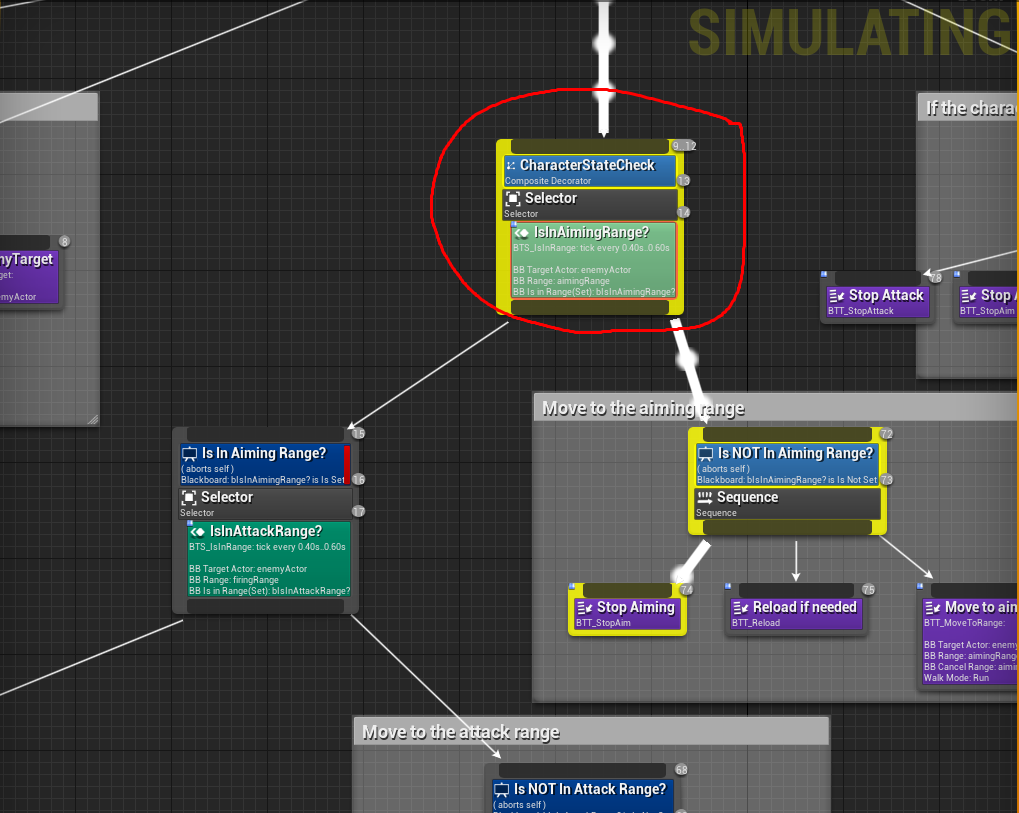
Anyone get me going in the right direction? Got an asset off the market and 4.26 breaks the AI from attacking the player. I debugged the behavior tree and this is where I'm getting stuck and I have no idea where to start looking.
4.25 Behavior Tree https://prnt.sc/ylfbwc
4.26 Behavior Tree https://prnt.sc/ylf9fl


 spare kernel
well you are not in Aiming Range
so its shooting over to the next branch
so i would be checking the IsInAimingRange service (the green node)
to see why its failing
somber rover
spare kernel
well you are not in Aiming Range
I can't see anything different, i even installed 4.25 and it seems nothing has changed that I can tell, still semi-new to UE4
somber rover
he said he knows the problem but he don't have time to fix it and won't say what exactly the problem is
spare kernel
that is unfortunate
i can't really help without seeing what that service is doing
but that is the issue inside that. so i would recommend looking at that, and finding out what is failing it to change to the AimingRange branch
somber rover
alright thanks, i'll start there
 fluid wave
hello guys
i got some problem
I woke up today and my unreal engine project does not want to build to windows
im using unreal engine 4.26
it says the following error in the log
ERROR: Windows SDK must be installed in order to build this target.
but yesterday i was having no problem
 inner cloak
Can someone tell me how to fix the extra large capsule as shown with the arrows ? Other capsules are normal !
plush yew
I tried packaging my game and I got the error " 'Location of a file' has malformed tag" anyone know how to fix this?
 timid spade
how would i stop a rotatingmovement after the actor has hit something?
 primal onyx
Hi everyone, I am learning how material work: I am experimenting with tessellation. Can I apply tessellation from a material only, or can I do it from the mesh (lets say a plane)?
 cobalt thunder
primal onyx
Hi everyone, I am learning how material work: I am experimenting with tessellati...
cobalt thunder
primal onyx
Hi everyone, I am learning how material work: I am experimenting with tessellati...
I've only ever seen it used via materials, because that would update the geo that the material is applied to. Not sure what tessellating a mesh would give you that a subdivision level could by default
primal onyx
thank you, I succeeded importing an already tessellated mesh from blender, I am now looking at the results
plush yew
Are you not able to exclude blueprints from being nativized anymore?
It doesn't seem to be working on my end
plush yew
Hey guys, I just want to focus primarily on gameplay programming without having to waste time learning other things like 3d modelling and what not as that's my career goal. What do you think is the best course of action I should take in the case that I want to make prototypes to show off my skills on a CV?
 brittle sundial
Does anyone happen to know any good tutorials/courses/videos/assets I could watch/buy that would help assist me in learning how to make an MMO database for Ue4?
I haven't been able to find much of anything suitable for a newbie to that specific topic in UE4, but I may not be searching the right way. Please @ me if you reply thanks
 inland aurora
maybe cause mmo is no newbie topic
 hazy timber
hi guys.. anyone know how to get 4.26-Chaos preview on mac?
 honest vale
@honest lily without knowing what you did with the material it's pretty difficult to help you
honest lily
@honest vale i went to mixamo.com
and i found a zombie
i downloaded
with all the materials and the skeleton
honest vale
open the material and see what it is doing
 hushed wind
Hi! How can I make navmesh ignore a specific object?
honest vale
I'm going to guess that's wrong
 pseudo pulsar
honest vale
pseudo pulsar
honest vale
you should go through the basic engine documentation, it'll help you
amber ibex
Hello, a little question out of curiousity: Is it able to set variables public via a node? For example, could I only set the variable ,,Location" to public (and display it in the details panel of the actor) when the boolean ,,Spawns Box?" gets checked in the details panel?
plush yew
fluid wave
ERROR: Windows SDK must be installed in order to build this target.
Did you uninstall your windows sdk
Because that is one way of that error occuring
amber ibex
Does someone know why my LinetraceByChannel goes through a static mesh inside of a blueprint, collision preset to default, but would register a hit if its the same mesh, same settings placed outside the BP?
 royal stirrup
Hey, guys! I'm wondering is there something like Fmod for unreal? Some good tools for sound design? I was working with fmod under Unity and it's such a good tool, but looks like unreal support is not main focus of developers of fmod and integration is not even close to unity and very buggy.
 quasi ore
 tawdry kestrel

This is a tutorial series where i will show you guys how to setup a true FPS character with the following features:
- Camera system.
- Locomotion setup.
- Turn in place mechanic.
- Hand IK system.
- Weapon ADS (Aim down sights) system.
- Weapon sway mechanic.
Join my discord server to get help from me or other members
https://discord.gg/Gw...
plush yew
@plush yew Ask again in #career-chat 🙂
 dire coral
supper off topic to ask but can someone help me with some Math "Trigonometry" exactly if so plz DM or tag becose i need some help for this one
 steady owl
@grim ore Thank you for the amazing tutorials! I have just watched your "Random Rooms using Level Streaming" tutorial and was wondering if you'd still go with this approach today (loading sublevel and then manually moving an actor inside the level that parents everything to the correct spawn location) vs using Create Instance or Load Level Instance and manually setting the transforms there? Thanks
 still tangle
How can I add joystick as an widget?
plush yew
fierce tulip
https://www.youtube.com/watch?v=flEtQBPtBTc
What is the profiler
 main bolt
Hey i need help, Anyone know what the bottom two boxes are called I tried looking through all the names and cant find them..
the tesellation one and the one below the displacement map
amber ibex
Arent these just normal parameters?
still tangle
plush yew
The buttons? You need to create them
Nope, joystick
I don't want to use the unreal one
somber rover
So from my problem yesterday.
This part of the tree breaks from 4.25 to 4.26 https://prnt.sc/ynfwkr
I opened up the Is In Aiming Range? node and I can't see any difference from 4.25 to 4.26. This is what's inside and they both look the same, any idea where else to look and see what 4.26 broke? https://prnt.sc/yng299


and this is 4.25 where the behavior tree actually works properly https://prnt.sc/ynhayr
I'm just unsure if it's something simple that I'm just not looking in the right spot, or if it's something 4.26 breaks that beyond my UE4 knowledge, but I get no error reports
 amber ibex
maybe put a delay after the first animation in the length of the animation?
plush yew
How do i make an area not affected by sky light?
 high berry
if anyone has a couple mins, would they mind helping me out with something? my blueprint isn't quite working, it isn't particularly deep/complex so hopefully won't be too hefty to glance over it and see where i've gone wrong :))
 worn peak
this node remove all instances of a item on a array
which node removes only one instance of repeated items on a array ?
 covert pollen
use a find node, and then remove the specific index it finds?
 tame cosmos
Hi, this might be a long shot but I opened my project today and was met with this error, then when I tried to re-apply my landscape material, it went dark like this. Any material instances of this parent also go dark if I click on them, really weird. Has anybody seen this before?
covert pollen
@worn peak
worn peak
btw question about other thing
somber rover
So, looking at it on 4.26 IsInAttackRange is never becoming true even tho I'm standing right beside the AI https://prnt.sc/ynma9e
But on 4.25 standing right beside the AI makes IsInAttackRange turn to TRUE https://prnt.sc/ynmena

 plush yew
can i prioritize drawing a mesh on top of the landscape? so that there is no z fighting?
ideally the landscape is not drawn within the bounds of the mesh
is that possible?
grim ore
@steady owl the new instance method is probably better but in the end I think the result is the same for simple levels. If a more complex level I like instances.
worn peak
If i have a variable (array), proper way to pass it between levels its using gameInstance ?
plush yew
anybody using 4.26.1 ? my movie render pipeline stuck on white screen. :/
amber ibex
Does someone know why my LinetraceByChannel goes through a static mesh inside of a blueprint, collision preset to default, but would register a hit if its the same mesh, same settings placed outside the BP?
covert pollen
amber ibex
Does someone know why my LinetraceByChannel goes through a static mesh inside of...
is ignore-self turned on?
amber ibex
yeah just fixed it, didnt know that ignore self is about the blueprint, i thought its maybe abt the trace itself
 dark oriole
Hi guys, what's the consensus about Live Coding?
 undone magnet
Hi. Does anybody know how you can change the text color in "Textbox Multiline" within a widget? Unlike the other boxes, I cannot find the option. lol
fluid wave
@plush yew i did not uninstall the sdk
Yesterday it was giving properly and now its showing me some error when i want to build to windows
I got stuck here
i will be glad if someone can help me with this
i am new to unreal engine
im using unreal engine 4.26
grim ore
do you have visual studio installed?
 west jewel
I have a strange issue with importing a heightmap into 4.26.1 No matter what map I use (even ones that were fine in 4.25, the outcome is Miecraft like with weird tarraces instead of a smooth lanscape. Any idea what I might be doing wrong?
fluid wave
@grim ore yes
plush yew
anybody using 4.26.1 ? my movie render pipeline stuck on white screen. :/ ?
fluid wave
Yesterday i could build with no error and today i keep getting this error
grim ore
run the VS installer and look for the window 8 and 10 SDK's and see if they are installed
 modern juniper
Hello Guys , There is any way to export UE4.25 project to HTML5
Any plugin or something or new packing format to upload on web ?
grim ore
there is a seperate HTML plugin for that now, its community driven instead of epic.
fluid wave
@grim ore ok i will check that
modern juniper
@grim ore Really Thanks for your reply!!! Have a nice day 🙂
plush yew
west jewel
I have a strange issue with importing a heightmap into 4.26.1 No matter what map...
for me it works normally..
west jewel
yep - for some reason it works if I specify a png16 format when creating the bitmap, not sure if I remember having to do that before. thanks
modern juniper
There is any alternative way to export project to HTML5 ?
grim ore
@haughty ledge what do you have for a video card?
vega 3 is very poor, low settings and resolution scale as low as you can handle it is all you can do
30fps is better than most
plush yew
hey guys
amber ibex
hey
 inner vine
@plush yew probably, if you have a modern, fast CPU with a lot of cores then compiling will be faster on an SSD, as a HDD won't be able to keep up. What device Windows is installed on doesn't matter.
 compact plover
No
inner vine
It'll mostly depend on the CPU
A slow hard drive could bottleneck it, but with an SSD this probably won't be an issue.
 verbal remnant
hey
can someone help me i have a problem
everytime i load into a blueprint this happends
plush yew
@inner vine okay so my cpu is modern. I will install unreal in SSD but my windows will be installed in HDD probably unreal will work as fast as ssd's speed right? with CPU ..
inner vine
@plush yew I don't think the drive the engine itself is installed on matters a lot (unless you're compiling the engine itself too), but you'd certainly want your project stored on the SSD.
plush yew
hey guys, whos expirienced with animations?
@inner vine Okay thanks for your attention. I think shader or game compile time will be reduced, if I store my project & engine in SSD
 maiden obsidian
can someone please help me with intellisense for vs 2019 community with ue4, it just doesnt seem to work with ue
intellisense worked well with other general c++ projects i made
 mossy nymph
its pretty terrible
Visual Assist, Resharper, or Rider for UE are the options you have @maiden obsidian
Rider for UE is standalone IDE, currently free
Resharper and VA have free trials iirc
maiden obsidian
but it says the build would expire in 30days
mossy nymph
i personally use rider to write code, and VS to debug it
maiden obsidian
wao
i have worked with unity for the past year and a half and after trying some ue4, damn its so different
okay, i got rider for ue4 and now i have time till 31st may, thanks a lot @mossy nymph
yo now the rider source code plugin does not work for ue4 4.26.1 it says that theres no compatible engines installed, any way i can do this, maybe even manually?
light thunder
normally I can move a skeletal mesh during simulation mode - but for one mesh I can't - what is wrong with this mesh exactly that prevents me from moving it? - I'm trying to position a ragdoll in the world a certain way and then when I am happy, either keep the simulation changes and make a static mesh out of it, or just directly make a static mesh out of it while the game is simulating - what do I need to look at one the mesh? I've confirmed it is using the epic default manniquin S
I've tried making sure that the mesh has collision and it does (obviously because it does fall onto things when I hit simulate, but I can't move it after the fact)
 earnest charm
Sometimes when I click play with selected view port or save the level unreal engine freezes. I waited for a while to check if it would respond but it won't I also can't close UE in task manager. Is this something to do with settings or my specs?
 worldly stump
is there anyway to expose GetUniqueID from PlayerState without C++?
 deep viper
I would like to have this black/white image function as a mask for a second image. (Such that it only renders the portion inside the white area). How can I achieve this?
EDIT: Thanks! 👍 (lerp it is)
grim ore
lerp (Linear Interpolate) node, that mask can go into the alpha
light thunder
@grim ore Can you advise what a skeletal mesh needs to have set so that you can move it during simulation? I'm setting it to simulate, it ragdolls down , but I can't adjust it - other SKs I can't - but I can't figure out what is different between them, they are using the epic manniquin
plush yew
When i try runnign a UE4 game, i end up getting this error:
Fatal Error: [File:C:\UnrealEngine-4.21\UnrealEngine-4.21\Engine\Source\Runtime\Windows\D3D11RHI\Private\D3D11Util.cpp] [Line: 200] Unreal Engine is exiting due to D3D device being lost. [Error: 0x887A0006 - 'HUNG']
I cant figure out any updated ways to fix this error, can anyone help?
light thunder
plush yew
When i try runnign a UE4 game, i end up getting this error:
```Fatal Error: [Fil...
It's saying something is wrong with your DirectX11 - so try updating directx and your video card drivers
plush yew
light thunder
It's saying something is wrong with your DirectX11 - so try updating directx and...
Alright, i'll see how it goes
plush yew
light thunder
It's saying something is wrong with your DirectX11 - so try updating directx and...
Would updating to X12 be fine?
light thunder
plush yew
Would updating to X12 be fine?
AFAIK, updating directx to 12 "should" update 11 as well, but it's not guaranteed - more likely your video card drivers are screwing it up - if you want to save time, see if you can get a friend to try to run it, if they can't, that points to your system being an issue
plush yew
light thunder
AFAIK, updating directx to 12 "should" update 11 as well, but it's not guarantee...
ahh alright
 pastel yarrow
I have a general question and I am not sure where to put it
I have an issue with a static camera, and for some reason it moves without any commands given
light thunder
plush yew
ahh alright
You could also try updating to a later version (make a copy for sure) and then see, it could also be a engine bug but those tend to be rarer than operator error
plush yew
light thunder
You could also try updating to a later version (make a copy for sure) and then ...
Alright, thanks for the help
Anyone know if there is a way I can have different controls based on the pawn the player is possessing? A video would be great if one exists but I can't find one (at least not yet)
 thorny perch
trying to fetch some data from an API using VaRest and then some different json plugins to save to a formatted json file, not getting thee result I like though. Has anyone here ever parsed an api and saved to a formatted file?
in reality I should have 12500 rows of formatted data but the string gives me 1 LOOOONG row
light thunder
plush yew
Anyone know if there is a way I can have different controls based on the pawn th...
I'd watch a video on "input stack" and understand how that works - if you do, you can put input on any pawn - so the controls can change - it's better though generally to have an actor that you make that just handles different inputs
think of it as an input manager
Makes it more modular for you to adjust the controls without touching your characters/pawns at all
plush yew
thank you I will do that!
light thunder
plush yew
thank you I will do that!
Make sure you understand how input is "consumed" - you'll save yourself a lot of headaches - and get in the habit of always doing simple print/breakpoints when you first start on setting up controls, that way you know immediately if it doesn't work, you know something ELSE is consuming that input
plush yew
Let's hope my brain is big enough to understand this lol will try to find some good videos on this and study them
light thunder
The concept is simple enough but if you don't realize what it is, things will simply not work and you won't know why
plush yew
Thank you for saving me future headaches then lol
 calm pollen
i dont mean to interrupt sorry
plush yew
I just have two pawns the player controls and yeah it was annoying having the controls doing weird things for either one or another
and no worries 😄
light thunder
Can someone advise why I am able to move one physics actor during simulation but I can't do it to a skeletal mesh?
I am able to move the skeletal mesh (it's epics) that this other mesh is built on and tied to
plush yew
anything new to ue5?
 tired escarp
stupid question
max textures for landscape
like in terms of materials to be simple
if you want
 scarlet birch
Alot.
inner vine
You mean like the max amount of layers?
scarlet birch
You can use shared wrapping and virtual textures.
 celest vapor
can I use C++ plugins in a blueprint project along with packaging the project? ( i do have the redistribuatable C++ stuff installed_
next badger
@celest vapor you can use plugins in a bp project if those plugins provide a bp interfaces
some plugins purely for c++
"redistributables C++" are just libraries for most generic apis in windows
celest vapor
ahh okay, so like a plugin that is only using C++ for something, lets say blockout tools for example is a C++ plugin but can be used in Blueprint projects?
next badger
@celest vapor it depends on how author made it...
is it mentioned on description that it has BP interfaces/can work on bp projects?
 torn atlas
any way i can fix this glass bug?
next badger
@torn atlas it's hard to tell what's happening on this image
torn atlas
next badger
<@!287837505909161984> it's hard to tell what's happening on this image
I've got the camera inside of a helmet, and i made the glass of that helmet transparent; but some parts of the glass are refracting things in a weird way, those are the sections i marked.
i tried turning off double sided, but that didn't fix anything.
here's the glass from the outside so you can see the shape of the surface i'm working with.
 gloomy ginkgo
guys how can I wait for an event to complete its job before continuing?
next badger
@torn atlas question, why would you do that? by placing a glass in front of the camera you basically dropping framerate of the game by half
torn atlas
next badger
<@!287837505909161984> question, why would you do that? by placing a glass in fr...
is there a way to get the same effect without using glass?
next badger
@gloomy ginkgo event dispatchers generally Asynchronous (async) so they won't stall the cpu thread, but most of the function calls a still completely synchronous, and only calculated in order
you need to describe your issue better
@torn atlas distortion? reflection on the glass?
torn atlas
i guess both?
i want it to look like actual glass.
next badger
@torn atlas post process is your way then, it can distort the image (i don't recommend it, better will be to rewrite the camera projection function, will be cheaper and you won't lose details), and you can make overlay effect from existing rendered gbuffer
you can ask more in #graphics
torn atlas
Just in case i decide not to use that set up, can the glass big i have be fixed?
deep viper
Can I record my UE4 editor session in some way? I tried using an outside application called Obvs, but the outputted video was very laggy.
grim ore
OBS is what I use. You could try shadowplay if using nvidia
 hard quarry
Are there any drawbacks if I only use HierarchicalInstancedStaticMeshes instead of StaticMeshes?
honest lily
hi guys
next badger
@torn atlas well, those may be the faces that are not using smothed normals with the rest of the glass, try to fix the normals
torn atlas
next badger
<@!287837505909161984> well, those may be the faces that are not using smothed n...
The glass doesn't have a normal.
grim ore
@honest lily is this multiplayer, how are you setting animations and such
grim ore
play it in single player, not multi, and see if it stutters
 wanton lotus
honest lily
wanton lotus
honest lily
What does that blend space look like? I've never seen crouching bool used in a blend space before. Usually you would have a separate crouching blend space and have a separate crouching state.
Then the transition to and from that crouching state depends on the crouching bool.
 sick plank
sick plank
sick plank
im trying to add a uhd but isnt working
wanton lotus
sick plank
im trying to add a uhd but isnt working
Did you set that hud blueprint as your default hud in your gamemode blueprint?
sick plank
let me see
honest lily
grim ore
play it in single player, not multi, and see if it stutters
well yeah
it worked
but why is it lagging in multiplayer?
grim ore
its not lagging ,your having a sync issue
honest lily
is it easy to fix that?
sick plank
wanton lotus
Did you set that hud blueprint as your default hud in your gamemode blueprint?
but how do i see that. sorry but im new to unreal
honest lily
wanton lotus
sick plank
but how do i see that. sorry but im new to unreal
You probably haven't made a new gamemode blueprint yet. You will want to start there. Then it is a few settings like image above.
grim ore
@honest lily did you mess with any of your replication settings? like setting your mesh to replicate
honest lily
grim ore
<@!280685104127541249> did you mess with any of your replication settings? like...
no i didnt
grim ore
generally that would do it, make sure none of your components are set to replicate in that character
honest lily
sick plank
wanton lotus
You probably haven't made a new gamemode blueprint yet. You will want to start t...
thanks that worked
grim ore
and all of them are set like that? capsule, mesh, camera, etc./
grim ore
ok so have you put any code into the character?
grim ore
are you saying that fixed it, or you unchecked those for another reason?
grim ore
so... did you add any code to your character?
honest lily
you mean blueprint
plush yew
if i make an asset for a widget im going to reuse due to the size and shape being perfect for a start menu set of options
honest lily
grim ore
so... did you add any code to your character?
yes
plush yew
do i have to make the ui asset over and over for each widget set using the asset
grim ore
sure, blueprint or c++. and those two checkboxes should be checked
plush yew
like a basic square for example
 grim ore
@plush yew user widgets show up on the bottom of your widget list in the widget designer on the bottom
grim ore
its very common to re use them
plush yew
oh
so i can use the murican flag over and over as the back drop for lets say equipment based widget options as the background everything lays on? o.o
grim ore
im not quite getting it
your flag would just be a texture, usually on an image, and that can just go inside any other widget
plush yew
o.o
yeah like um
you know the picture asset backdrop start menu's use or description windows
i was wondering if i can use them for multiple different widgets like emotes option, or equip weapon menu
grim ore
can you show an example?
i mean yes you should be able to re use anything if you design it like that yes
plush yew
Like let's say that box and such was the emote window with a preview viewport and all
Can I use that for a different set of options based on non emote animations hence a different widget set of options or such but using the same assets
grim ore
so just a generic window then you put stuff on it? sure
grim ore
you could define a widget to be a container basically that is styled the way you want then all of your other widget would use that as the base
plush yew
So I can use the same set of backdrop assets or whatever its called for mtiple options
Ah
So I can
Yay
I thought I needed a thousand clones ._.
grim ore
usually if something is the same across more than 1 thing you should re use it
plush yew
Ah okie okie
grim ore
separate your visual from your data and design it so you just change the data
plush yew
And I can use as many different shapes for multiple options
Like different boxes for different widgets even though said.box may cover 2 or even 7 different data sets
grim ore
if you design it yes. For example an icon in a game may all look like different items but its 1 icon widget in the end that you design with things like the text and image being a variable. then in game you would use that base icon widget and then fill in the data such as the words and the icon when you actually display it to the user.
so you create 1 widget that has place holders, then at runtime you fill in those placeholders and at runtime make copies of that widget for each thing you need
plush yew
Ah that's a bit crunchy for me to digest but I apologize for making you explain i just wanted to know if it was possible so I can go figure it out later as I'm still at the first steps of making a widget
I appreciate it nonetheless as I didn't wanna waste your time walking me through this
grim ore
technically anything is possible if you have the skill 🙂
plush yew
Sorry sorry >,.,<
And yes I've started to notice that with unreal and irs exciting as heck
I have big plans!
Mechanically that may change the scope and design of future triple A games if I can make it work
Every day I get closer and closer and its really unedging in a good way >3<
grim ore
if you look at the widgets that epic gives you btw, its basically the same thing. Look at the button. your arent making a button from scratch, all the visuals and all the code, every time you want a button. You use the button user widget that epic gave you and just change settings on it to get the one you want.
a calculator would be the same way for example, you would make a "calc button" widget that would look the way you want and do what you want (pass a number to something) and in the end just copy that widget 10 times and set each one to have a different number
plush yew
Ah so one widget system can string into a bunch of other widget options which in game would be equipment, settings, emotes, friends list etc etc
grim ore
but your copying of the widget is for the end, its not 10 literal user widgets in your project but 1 customized 10 times
plush yew
O.O
So
One super functional widget
That slides into different forms
For which needs are needed
So
In silly terms
Digimon evolution!
Same Digimon infinite forms
grim ore
yep, or as many as you need. you might have one that is say an equipment icon, another that is an emote icon, another that is a skill icon, etc. they could all technically be based on the same "base icon" which defines the color and size and texture in the background and then each one changes what it needs. parent/child
plush yew

All of my yes
All of it
Also Mathew!
I've been learning about state machines
And holy shit that is such an incredible function
The potential is insane
grim ore
yep lots of potential just have to learn it
plush yew
Yeah I learned a bit for animation blendslace
Space
Amd realized the crazy jankiness you can use for that
And wowowow I wanna see how far it can go mechanically
 vapid cave
I am beginner in making games is unreal engine good for me or unity
 hoary silo
quick question, where would be the best place to store server tick for networking
grim ore
@vapid cave learn both, decide on which one works best for you and your project
plush yew
Okie thanksies guys appreciate it
vapid cave
grim ore
<@!652240920737087507> learn both, decide on which one works best for you and yo...
Actually unity but i like how unreal engine work
grim ore
do your project in Unity then since finishing it is the point of doing it, then evaluate Unreal for your next one
sick plank
im watching a tutorial on yt and the green box saiyng get controller doesnt appear. it can substituted or im doing something wrong?
the video was released on 2015
grim ore
nope its still there, you are just not doing it the way they are
see the check box in the top right of your window, content sensitive
that means its going to fill in things based on what you are doing. He dragged off the Controller so the engine knows you want to get something related to that. You probablt right clicked and typed controller so it doesnt know you want to do the same thing as him and guessed difference since you are in the actor
sick plank
grim ore
that means its going to fill in things based on what you are doing. He dragged ...
ok thks
grim ore
also which version of the engine are you using?
double also you arent following the video since his is a character and yours is an actor so expect issues like this
light thunder
Just checking - but putting Vertex Painting into a Material will propagate to all of it's instances right?
 tidal sail
hey
how can i get all elements from an array?
i'm trying to change the material from all actors of one class
somber rover
What would break a project from 4.25 to 4.26? 4.26 kills my AI and they don't attack the player anymore, been searching for 2 days and still can't figure it out
grim ore
what happens when you debug and walk thru it?
somber rover
The AI apparently isn't in "range" of the player anymore even tho I'm standing right beside them
grim ore
yep so what happens when you debug it? have you done that to check the results of your tasks and services
tidal sail
that way it only changes the material of one cube
somber rover
I get hung on this https://prnt.sc/ynoazr
 grim ore
@tidal sail debug it, walk thru the loop and make sure its getting more than one cube
@somber rover I gotcha but... do you know how to debug that?
somber rover
grim ore
<@!201791937227784192> debug it, walk thru the loop and make sure its getting mo...
I do not
timid spade
yo how would i set up 2 different player models for first person view and what others see?
grim ore
open up that service and use F9 to stop it on one of the nodes, probably something in the beginning or after an if check so you can get it to stop and you can look directly at the results
somber rover
alright thanks, going to do that now
grim ore
@timid spade if this is multiplayer there are options for meshes to be hidden from that player and let other people see it
grim ore
it should add a breakpoint if you are on a node you want it to stop on
you can also right click and toggle breakpoint
timid spade
@grim ore should i use a camera controller if im running a setup like that? i plan on adding camera shake
grim ore
i dont think you would need one, the built in player camera manager can handle shake if needed
light thunder
I've got vertex painting hooked up and it's working - next step is I'd like to paint a texture on it and use a mask - I can get the texture part I think but the mask throws me off, because the material doesn't use that - anyone recommend a video that shows this? most of the stuff I found was doing dynamic hitmask stuff which I don't need
That or how to reference a material instance in ANOTHER material - ....
somber rover
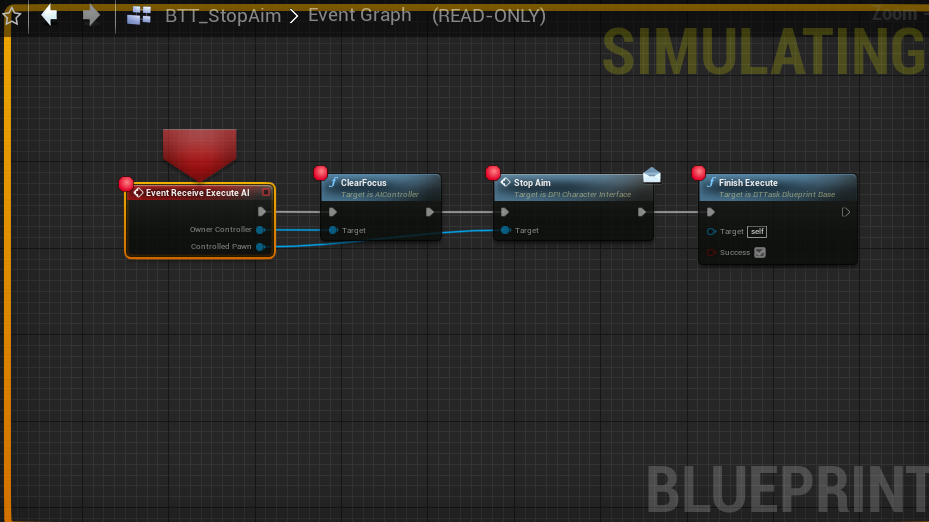
Hmm, so it keeps throwing me here when I play the game in editor https://prnt.sc/yoj0jj
 grim ore
yes that would be it pausing, the big red arrow, and letting you see what is going on
but i didnt think the issue was on the stop aim task?
you would go into the thingy that is not doing what it should be, whichever node/code has the issue and tell it to stop when that happens. (just breakpoint one node, it stops when it hits that). then you can walk thru the code and watch what is happening so you can figure out why its not doing what you want
so come back when its doing that
timid spade
also would anyone here know how to do procedural aim down sights
 rancid lynx
when I "CAST TO STONE" and then try to "GET STATIC MESH" its returning the default mesh from a default "Stone", not the actual stone from the "Other actor". does casting to a class point to a "new" actor? or should it reference the variables from the "other" HIT object? (( or perhaps the cast isnt the issue ?))
somber rover
When I went to the thingy that's not doing what it should it takes me to that same StopAim node
rancid lynx
i want to get the static mesh from the other actor, not a generic stone
next badger
torn atlas
The glass doesn't have a normal.
all geometry has, it's how 3d graphics work
rancid lynx
oh, maybe my 'target' is being overwritten twice. nevermind
hmm i dont htink so , ill try and test it
yea, my hit overlap was hitting two objects, nevermind sorry
torn atlas
next badger
all geometry has, it's how 3d graphics work
When i imported the model, the glass was an opaque texture using nothing more than a base color, while indeed all other parts of the model did have normals.
I actually deleted it's base color node and built it a new one from scratch. (not sure why just did.)
i can assure you it does not have a normal, and as far as i can tell, never did.
since it has no details, is it possible for me to just give it a blank normal?
next badger
@torn atlas don't be confused by normal map and normals...normal map is an overlay
next badger
but actual geometry has some normals, and they may be interpolated or not...in your case it seems like there're some hard edges that change the smoothing (interpolation of a normal)
@torn atlas normals:
light thunder
Well, even without the mask I guess
next badger
@torn atlas as you may see on my image, there are points where normals split...you may have similar on your glass
torn atlas
next badger
but actual geometry has some normals, and they may be interpolated or not...in y...
okay.
hold on.
i've made a big mistake.
this whole time i've been thinking of a Normal Map without realizing what it was.
okay, Normals.
got it.
next badger
normal map is an overlay, that is rendered on top of actual normals
torn atlas
in that case i'll have to fix the glass in blender.
any way to quickly replace a models mesh in unreal, or will i have to do the whole import process again?
next badger
@torn atlas yep, if the normals there are split, you may select the hard edge and change it to smooth
at least it's how i remember blender does smoothing
@torn atlas right click - rreimport
 sterile tulip
torn atlas
next badger
<@!287837505909161984> right click - rreimport
sterile tulip
torn atlas
next badger
<@!287837505909161984> right click - rreimport
nice, thanks.
sterile tulip
I closed my UE4 editor but its still running in my background, what is it doing?
next badger
@plush yew you can...you need to google "ue4 texture baking" i think it was a guide by epic on one of the streams
sterile tulip
its slowing down my computer
next badger
@plush yew then you need to make an emissive material and plug vertex color there to make it - color

Announce post: https://forums.unrealengine.com/showthread.php?147444
In this training stream Sam Deiter discusses how create 2D Textures of complex Materials via a number of different ways inside UE4. We will be using Blueprints & Render Targets, World Position Offset and the High Resolution Screenshot tool. Sam also looks at how to use the LOD...
@plush yew yes, but material baking is useful stuff, in case you will need it once
i.e. you can bake material that is made in ue4
somber rover
yea, I have no idea. I'll just HOPE the dev can update the asset soon, he been saying since 4.26 came out he was going to update it just hasn't yet
 olive solstice
Hey guys , I got a small problem with getting my crosshair into my game , here's a video of the problem.
I used to manage to do it just fine with normal line traces , I used to do traces using the camera itself. But using the ALSV4 ( Advanced Locomotion System Pack V4 ) there's no camera for the player in the char blueprint , so I had to run the line trace from the muzzle socket of the weapon.
Anybody got a solution to this?
grim ore
well theres got to be something showing the screen....
next badger
@olive solstice You need to line trace from the crosshair, then you need to run linetrace from the muzzle to the point you are aiming with the camera, but it will have weird results sometimes
https://www.youtube.com/watch?v=3hlUK1zToEQ
MVP (Minimum Viable Product) Series showing how to create the basic prototype for a FPS (First Person Shooter) from scratch in Unreal Engine 4.
In Part 4 we will be setting up our Line Trace so we can simulate firing a simple projectile weapon. We will use debugging to verify it is working but not actually hooking anything up to the event for ...
grim ore
easiest way might be to use the player camera manager and get it's location to trace from
next badger
hm...i'm talking about difference between muzzle line of view and camera line of view
olive solstice
Thank you guys for the help , I'll try using the GetPlayerCameraManager method first
somber rover
What's the red line mean? its not getting called? https://prnt.sc/yojmt4
 next badger
@somber rover it means task fails (shows fail if hovered)
olive solstice
Here's a video of it after using the GetPlayerCameraManager Function , it worked.
But isn't the trace supposed to start from the muzzle socket instead? like isn't that what actually happens when firing a real life weapon ( sorry if this question seems too dumb lol ).
grim ore
its supposed to start wherever you want, its a game
next badger
@olive solstice well, i've explained that you need to run trace twice
@somber rover https://www.youtube.com/watch?v=kEI4Ez-WnJQ

What are the Decorator Nodes in the Behavior Tree in Unreal Engine 4
Source Files: https://github.com/MWadstein/wtf-hdi-files
grim ore
games are like 99% faking stuff and 1% making the fake stuff look cool
your not actuall firing a bullet and letting physics handle it from the weapon? nope just make it look good lol
next badger
@grim ore and 50% they look dumb, but funny
light thunder
well, 100% of games are fake lol
next badger
@light thunder no way...was a Cake lie???
olive solstice
olive solstice
Here's a video of it after using the GetPlayerCameraManager Function , it worked...
Believe it or not , I actually did that method while setting up my line trace but I felt like it was way too Unrealstic so I didn't even bother to test it with the cross hair I had.
But anyway guys thank you so much for your help!
Sorry for bothering you with a newbie question like that
somber rover
alright thanks for the help anyways, DEV said he would give a refund if i couldn't fix it so just gonna refund it and get ultimate character instead
grim ore
at some point you might want to spend some time learning to debug and fix problems if you plan on using other peoples work. You dont want to get to a point where you re mission critical and cant fix something because you dont know how it works and cant fix it @somber rover
light thunder
next badger
<@!273265779175194624> no way...was a Cake lie???
No, it is nutricious
somber rover
grim ore
at some point you might want to spend some time learning to debug and fix proble...
I know, i've just spent 2 days trying to fix it and i've asked the dev several times but he won't say what exactly needs fixing, he just keeps saying he don't have time to fix it and he knows it's broke.
So it's kinda frustrating and making me want to quit agian
 shadow oak
hey guys have a problem accross 3 computers 1 has 1080ti 1 has 2x 2080ti and another has a RTX3090 and opening any scene with ray tracing on crashes with out of memory error when it shouldnt
ive increase paging file space any ideas?
grim ore
any scene or certain project?
weary basalt
Dont ask to ask, just ask.
 brisk tide
I am importing a huge model from 3ds max with lots of textures into Unreal. Everything comes over fine, except all the materials imported are not two sided. I have to click each and every material to open, check the two sided mark and save. Is there any way to quickly apply this to all the materials at once?
lol ok 🙂
hard quarry
@brisk tide Bulk Edit via Property Matrix
Select all your materials -> Right click -> Asset actions -> Bulk edit
brisk tide
Ah! Thank you! 🙂 Will try it now!
light thunder
I have if I have a master material that references 10 different textures, but those same textures are also loaded in a different material instance during runtime, I know it's additional drawcalls but it's not more texture memory used right?
brisk tide
@hard quarry There seems to be only "Bulk Export" no Bulk edit?
hard quarry
@light thunder There doesnt seem to be one if you try it with materials
I don't know why that is
light thunder
brisk tide
I am importing a huge model from 3ds max with lots of textures into Unreal. Ever...
did you recalculate your normals in max?
brisk tide
@light thunder Strange, it doesn't show for me...here's a screen shot:
light thunder
Dude, there is something wrong with your geometry
making all your materials doublesided is not the way
brisk tide
I tried reimporting, but same issue.
light thunder
the solution could be easier than you think
and there is a way to setup your materials so that they come over good but unfortunately @plush yew is probably right, it happens less often that materials come over fine than they don't
brisk tide
@plush yew I will keep that in mind next time 🙂 I just started using unreal couple of months back, on and off, so still exploring.
 potent bridge
Question, how would you lot go about assigning abilities to weapons that can be picked up? Is it possible to cast to the weapon the player is holding?
Each weapon does not have the same ability.
grim ore
its possible to do anything. what is "holding" the weapon?
brisk tide
@plush yew ok, will check it out. @plush yew @hard quarry @light thunder Thanks 🙂
potent bridge
@grim ore It would be the player. I'm not making enemies have these abilities because well, thats way too many animation setuips.
setups*
grim ore
yes but what is "holding" the weapon. what do you mean by holding
potent bridge
Oh, attach command.
grim ore
ok so its a skeletal mesh attached to the character? how do you attach it
potent bridge
Considering doing it by a hitbox.
grim ore
i assumed it was a mesh btw, it could be an actor bp or static mesh.
potent bridge
I'm not actually at my PC right now. And I don't even have a weapon in place, just thinking the whole thing through.
grim ore
ah yeah need to think it thru. but yes you can cast to anything, or talk to anything as long as you can reference it
if the abilities are part of the weapon, then it would be a blueprint and an actor you attach otherwise its just a mesh for looks and the weapon "abilities" are data in the player
potent bridge
I'm planning on using the "Get Attached Actors", then get actors with tag "Weapon", and promoting that to a variable as my reference.
grim ore
at some point you have to determine what is being attached, no reason you would not already store that variable
either at design time its already on the player and you have the reference there, or at runtime you have to have "something" to attach and you have it then
potent bridge
Wait a minute. I can just cast from the weapon to the player to do its animation tbh.
grim ore
in one of mine I had 2 actor components on my character, each one represented what was held in one of the hands.
so all I did was set what blueprint was in each hand and then i had a reference to it and all relevant data as needed
potent bridge
Yeah, of course. You need to know whats in the players hand.
grim ore
you can do that as well, weapon -> player yep
for mine my weapons are stand alone actors that contain all the info I need such as its stats, the meshes, even the animations that should be played when using it and the player just said "yo weapon I need this info" and it got it
 thorny sedge
@grim ore how do you cast to the weapon in this scenario?
grim ore
I dont, I use interfaces
thorny sedge
I can never figure out the wildcard when casting to actors
potent bridge
So I'd think the "Get Attached Actors" node is going to be the best for me. And yes, thats how I was planning to do it, storing instance editable variables for what ability is assigned to it, how much damage it does, ect.
thorny sedge
Ok @grim ore thanks homes
potent bridge
But BPI is probably good as well.
grim ore
if you dont know how casting or references work you will have that issue, you have to learn
@potent bridge no reason to get the attached actors, you should never need that because at some point you already have a reference to what is being attached before you attach it
thorny sedge
@grim ore I don’t think I don’t know how they work it’s specifically this type of actor though and nobody seems to be able to help and I can’t find any info on it
grim ore
or if its set up at design time you know where it is going
potent bridge
Oh god casting and references have been a pain for me for the longest time, I still don't fully understand how it works.
thorny sedge
This type of item or whatever. Actors are the only thing
grim ore
just ignore casting to start with, the key is you need to know WHAT exactly you want to talk to
define it, where is it, how does it exist, what class is it, why do I want to talk to it
then figure out how can I identify that one item
then figure out how to get that one item
then you can cast if you need to since you already know what it is and where it is and how to get it
thorny sedge
Oh actually that cleared it up for me thanks so much! @grim ore
grim ore
casting it just saying "hey this human is matt" instead of "hey this is a human" you still need to know EXACTLY what human you are talking about
grim ore
that is step #2 and 3 above
thorny sedge
@grim ore btw I didn’t realize u were the WTF guy haha I’ve used those twice that’s so cool thank u
grim ore
what is that item you want to get a reference to? it has to exist somewhere right?
can you identify that exact item, not just "hey its a door" but "hey its that door right there"
potent bridge
Yeah.
grim ore
then where is the door?
how did the door get there. who needs to talk to the door and when?
design time for both answers? make a public variable.
potent bridge
But heres the thing mathew, you can swap out multiple weapons. Reading the data only when its picked up is going to cause issues.
grim ore
thats why i read the data when I need it from the weapon
potent bridge
thats why I suggested the "Get Attached Actors" method.
grim ore
I have an actor component in my character called left hand
I just ask the left hand for its animation when I need it and it gives it to me
its always going to be accurate since I ask it when I need it
 calm bough
I watch your tutorial videos all the time
grim ore
for you at some point you are going "hey this weapon I have a reference to, attach yourself" and that reference is what you use to talk to it. at some point you lose the weapon? then you make the reference nothing. You get a new weapon? guess what you have that reference again.
potent bridge
Ohh that makes sense.
So even just switching it out in inventory, I know what I want to attach anyway, and I can promote that to a variable.
grim ore
yep if your going "hey item in this slot, your now in the inventory" and that item was in a weapon slot you now can make the reference to current weapon nothing. You swap into that weapon slot? make that reference equal to that weapon now
potent bridge
Only thing I'm thinking, would I have to do this for literally every single weapon type? I know you can cast to a class, but thats not quite multiple weapons.
potent bridge
Like, I have a Sword BP, A Bow BP, A Greatsword BP.
grim ore
casting means you arent planning ahead
potent bridge
Ah yeah, BPI works.
grim ore
interface has "get weapon damage" or "get weapon stats" and your blueprint has it and it returns that info
doesnt care if its a sword or a teddy bear
thorny sedge
@grim ore any decent interface tutorials?
grim ore
technically if you had a base "weapon bp" class that had the stats you could cast to that weapon bp instead of the "sword" or "shield" but really.... interfaces
potent bridge
I'm sure Mathew has a tutorial on his channel regarding BPIs
grim ore
it feels really weird when you start separating stuff but a well planned out system is great to work with
potent bridge
Well, I was initially planning on storing the damage weapons as instance editable values so each weapon can be modified for balancing.
Not even a weapon of the exact same type is going to share the same stats.
grim ore
i have 2 hands. main and off. i have weapons that use one or two hands. each weapon knows what it can do damage wise and what animations it should play. the player just goes "hey main hand do you have something?" when it attacks and if it does it goes "hey main hand, thats awesome. so uh I want to play the first animation in this combo can you do that?" and the weapon goes "sure here is the animation" and then the animation plays and i might go "hey weapon whats the next attack in the combo" and the weapon can go "hey I dont have any more, reset the combo" and the player goes "cool, thanks for the info" It can even handle two handed weapons since they go in the "off hand" and when its going "hey mian hand do you have something?" and it goes "no i dont" the player then asks the off hand for the same info.
potent bridge
So if I'm thinking correctly, you can make a BPI to get all those weapon stats and send them to the player.
grim ore
yep if using stats you can have a bpi function that returns back the stats when the player asks or the inventory asks or the stat screen asks or whoever like even the damage calculation function can just ask it
potent bridge
I just remembered functions can take inputs so that helped the cause.
grim ore
just eventually it seems weird with everything talking to everyone and it not all in one place but thats good
potent bridge
So a weapon can store what animations the player is allowed to play as well huh?, along with the damage, durability, what ability it has (and therefore the animation it should play.)
grim ore
if its data no reason it cant store it
potent bridge
Now I'm starting to understand BPIs a bit better, yeah, defo better than casting.
somber rover
well..i made some type of progress. i went around on the behavior tree just checking and unchecking different things and the AI kinda attacks sometimes now
potent bridge
I need to go review my maths at some point, trig and quadratic equations especially.
grim ore
maaaaaths..... soooo much brain hurting
potent bridge
(I don't know how I've gotten this far without remembering them tbh.)
Glad to hear that programmers don't always like maths.
grim ore
so like this is what a weapon might look like right now in the content browser
one unique actor per weapon because thats the way I wanted to do it, but no reason it couldnt all be data in a data table
potent bridge
I see.
I've never used data tables actually. Need to look into those.
I also must ask, what are some good uses for C++? I'm in the programming side of games dev, but I feel like I've gotten WAY too comfortable with blueprints, that my text-based code knowledge might be slipping.
grim ore
and while it might look funky all this does is get the next animation from the current weapon
and with a setup like this any weapon can have any number of attacks in its combo and the system just "works"
potent bridge
Yeah I see the logic behind that.
grim ore
and it falls back to asking the right weapon if it has montage in the case left hand is non existant (so perhaps a 2 handed weapon or no weapon at all)
I dont use C++ if I can help it. It has its good points. Most people dont need it (most people dont make large projects or even finish anything). If you need it you will know.
some people just try and jam C++ into the engine to do everything and its not designed like that. BP and C++ should be used for whatever they are best at
potent bridge
This project is a side thing to do while I do other coursework, or when I'm bored.
 random forum
Anyone know how to turn off friend requests in the launcher? I just wanna ue4 dev. I don't use the launcher to play games. I don't want friend requests.
grim ore
like why make this weapon actor in C++ when I can do it in BP and visually see all of the parts
potent bridge
BPs are snips of C++ code essentially if I'm right?
grim ore
every Blueprint has C++ behind it
if you do something in blueprints and you like it enough to move it to C++, its not hard at all just to 1:1 the code
so if you learn the engine with blueprints all of that knowledge of how it works transfers
potent bridge
Urgh, seems like most people at the University I'm going to prefer Unity, its going to be a bother jumping back into C# after using BPs for so long.
grim ore
it is but eventually you get back into it, plus later this year BOLT will be integrated into the main release and you can get your Visual stuff back
potent bridge
Well. It depends on how many programmers are in the group.
Since most of the work is all group project stuff.
grim ore
well if they adopt bolt 2 which is supposed to support VS <-> C# then you should be fine
if not wack them on the head since its just another tool and it works fine with their grandpa code
potent bridge
It's an awesome course as you're put into a games dev like environment from Day 1.
grim ore
sounds like fun
potent bridge
See, I don't mind C# on its own, but Unitys UI, Come on, its so clunky to me.
Can't ever find what I wanna find.
I mean I'm still gonna look into C++, could be useful someday.
grim ore
yep should just use what you need when you need it. hard core math or functions, sure toss it in C++. some basic structure, sure toss it in C++. expose it all to blueprints so your UMG can handle it, sure why not. its all harmony
potent bridge
By the way, you attended GDC. Did you do a presentation or were you just there as an audience member?
 thorn hazel
@grim ore Just a simple question about your experience in specific regarding UE4 running on Linux. Have you tried it/done it?
 ember token
Modifiying rendering code in source code version
Why new function defined in ush files are not available in .usf files?
While other existed functions work ok
 woven basalt
Hey guys I'm new to this server and I wanted to ask a question about game Dev. So far I've made a simple endless runner and a little first person game using blueprints by following tutorials so I have some basic knowledge in unreal. So my question is, what are the basic steps you need to take to make an adventure story game? For example, Step one, make health and HUD, step two, level design etc etc.. Previously I've been following tutorials but this time I wanna do it on my own but I'm a little lost on where to start and how to go about doing it. Thanks in advance.
light thunder
If you reference the same texture that another material is using, and they are both loaded in the scene, it only counts against your texture memory loaded ONCE, right?
plush yew
woven basalt
Hey guys I'm new to this server and I wanted to ask a question about game Dev. S...
There is not really a universal guide for such things, it is very much dev dependent.
However I would suggest once you have some of the game Ideas planned out, start developing the core game loop.
light thunder
woven basalt
Hey guys I'm new to this server and I wanted to ask a question about game Dev. S...
I would take an online course, they have them, I even think for an adventure game
check out udemy or the unreal official courses too
woven basalt
plush yew
There is not really a universal guide for such things, it is very much dev depen...
So basically do whatever I think would be right or the next step?
light thunder
make a first person shooter or third person shooter will still give you the skills to make an adventure game, mostly those are differently just because it uses a different camera setup and gameplay mechanics
plush yew
woven basalt
So basically do whatever I think would be right or the next step?
Yes, just plan what you need to do and then think logically about what things you should make first.
Eg: Making a hud is not much use until you have made up the components for the hud.
woven basalt
light thunder
make a first person shooter or third person shooter will still give you the skil...
I have made a "true" first person survival horror game following someone's tutorial but it wasnt really survival or horror, for example the quests in the game were get firewood, make campfire, find key then leave without any good horror or survival aspect to it, but I learned a lot from it.
woven basalt
plush yew
Yes, just plan what you need to do and then think logically about what things yo...
Alright, thanks. I was just scared I may do the wrong things in the wrong order so it screws me up later in development
plush yew
There are two aspects to games for me: Mechanical aspect(The logical part that goes into a game) and Artistic aspect(The emotional part that goes into the game). Tutorials often focus on the mechanical aspect and thus games that strictly follow a tutorial are not very artistic.
plush yew
woven basalt
Alright, thanks. I was just scared I may do the wrong things in the wrong order ...
Do you know what a core gameplay loop is?
woven basalt
That's true yeah, I gotta watch specific tutorials on level design to get better at it
woven basalt
plush yew
Do you know what a core gameplay loop is?
Kindof?
I'm just assuming what it means because tbh I've never heard that term
plush yew
It is the basic thing that the player of your game is going to spend his time doing.
woven basalt
Ah so like health, sprinting, inventory system and so on?
plush yew
Not really
woven basalt
Oh crap then I'm kinda lost then sorry
plush yew
Think about Super Mario bros.

This gif shows Mario's core gameplay loop pretty well.
woven basalt
Killing enemys and collecting power ups?
plush yew
And traversing yes.
woven basalt
Ah okay now I get it
plush yew
Mario Runs----->Kills enemies------------->Gets Powerups-----------
^----------------------------------------------------------------------------
See a loop
woven basalt
Ohh I see
plush yew
Everything else is tacked on top of this loop
this loop is always a good place to start development
woven basalt
That's actually really helpful, thank you!
plush yew
You are welcome, feel free to contact me if you run into problems.
woven basalt
I will, thank you and to the other people who helped me :)
potent bridge
@woven basalt Similar to mechanic cycles as well, another good thing is if your mechanics lead back to your central idea, take RPGs. You attack to kill stuff, you upgrade your weapon to kill stuff. You buy new weapons which you then use to kill stuff, You gain XP to get stronger and kill more stuff, you use combos to kill stuff faster (so you can kill more), Make sense?
At least, thats a basic example my tutor showed me, but its great for planning your game.
grim ore
@thorn hazel I have and it’s usable but not first party for the editor. I’ve done it on a chrome book and on an intel pc. Biggest issue is needing Vulkhan support in newer versions since they are trying to deprecate OpenGL.
@potent bridge I’ve never presented at gdc proper, just a guest but I did present one year at the epic learning summit which was fun
woven basalt
potent bridge
<@!296376584829403138> Similar to mechanic cycles as well, another good thing is...
Ooo yeah it doesn't always have to be a complete literal loop, that's good to keep in mind!
thorn hazel
grim ore
<@451730408636416000> I have and it’s usable but not first party for the editor....
Hi, thanks for replying. Can you explain what do you mean by "not first party for the editor". I'm more of an artist then a programmer. I understood the rest.
I'm currently using Fedora 33 workstation edition linux under VMware, and I do have a AMD GPU, so vulkan support is there both in software & hardware levels. What I'm curious is the benefits of using Unreal Engine on Linux. I would also like to explore installing it on FreeBSD (since I use that more than Linux).
- I'm assuming a noticeable increase in performance for the same level of hardware resources due to native C++ support, in my future projects.
- Have you had any other major issues while using it on Linux? I'm assuming there shouldn't be many that need a workaround. Since Linux is officially supported.
- Potential other long term benefits.
The other thing is I'm just moving away from Windows completely.
grim ore
@thorn hazel while it’s officially supported it’s not as supported as say windows. That’s what I mean by it’s not first party for the editor. The Linux community for the editor and engine are small and since most of them are using Linux they are tech savvy enough to usually fix any issues they run into. In terms of performance I wouldn’t expect it to be any better on Linux compared to windows just simply due to more people supporting windows for both software and hardware.
In the end say a bug crops up in windows and in Linux with the same severity. The percent of people who report it to epic would be skewed favorably for windows as more user base so more potential for the issue and more crash reports. When epic is triaging the engine and fixing things the windows issue may end up getting higher priority just simply due to it being noticed easier. Add on things such as most dev environments are probably windows and VS at epic just due to the market share.
thorn hazel
grim ore
In the end say a bug crops up in windows and in Linux with the same severity. T...
yeah that makes sense. So, How best to keep in touch with those using UE4 on linux? You said the community is small..
grim ore
You can look for normal meshes in fbx format to do that. There are a few model stores out there or look for kitbash kits. @jolly anchor
@thorn hazel there is a Linux channel here and there are the forums.
thorn hazel
I see.. I really didn't notice the linux channel since I haven't had that much use for it till now. Thank you again, it helps a lot bro 🙂
 velvet magnet
plush yew
Do you know what a core gameplay loop is?
velvet magnet
plush yew
Do you know what a core gameplay loop is?
It is interesting with unreal engine as the core gameplay loop is very abstracted. Took me forever to figure out initially because I initially tried to approach it with the smaller game engine approach of "let me try and program directly to it" when that is not really what you are supposed to do at all
 thin tendon
Does anyone know what the best method would be for blending decals with the surface underneath? I tried making mine slightly transparent so you can see the details in the surface underneath but this fades the color of the decal way too much.
light thunder
Is it possible to change any parameter from a material instance from INSIDE Details panel of say, a static mesh
thorny sedge
@light thunder try “create dynamic material” and that vein of nodes. I forget exactly all the nodes or I would just tell u
Create material instance??
shadow oak
@grim ore ive tried market place abandoned factory, downtown west modular pack, modern city down town
plush yew
how can i use als v4 camera system for crosshair ? im trying to make shooting but i can't get als camera system Thanks 🙂
 wary wave
you'd be best asking that in whatever support channels exist for that marketplace asset
light thunder
Why is this particle so downplayed when I play (technically simulate mode) (the simulation mode is in the beginning, then you can see I end play and go back to editor where flames are normal
huh, it seems like simulate's limitation is on particles?
plush yew
hey guys why i cant change Lightmap Coordinate Index to a specific mesh ? do you know how can i solve this problem ? thank you in advance ❤️
timid spade
ive just converted from true third person to first person/3rd person viewmodel mix
but my first person viewmodel cannot look up or down, just side to side
how would i go about fixing that
 fallen orchid
anyone else missing the default templates in 4.26.1?
I didnt see anything on google
 loud panther
Hi may I ask a Question?
plush yew
loud panther
Hi may I ask a Question?
No need to ask for asking XD
loud panther
Has Anyone Tried Rendering out 16k Video?
I wonder if RTX 3090 will be enough to do such Thing
plush yew
Can 3090 handle 16K?
wary wave
can anything?
fallen orchid
better question y 16k
wary wave
not to mention the disk space needed for uncompressed 16k video would be insane
 rose cloud
Anyone know if you. can use SceneCapture2D to render live 3D inside a UI, in such a way that the "scene" you use doesn't have to be part of the main level scene?
I want to display live 3D in a UI menu and it should work regardless of what level you're in
wary wave
one second of 16k video (ignoring audio) at 30fps = 15.2GB
loud panther
I may buy some Hard Drives
I am wondering about the VRAM
if RTX 3090 Can't I would have to get Quadros
plush yew
You can do upto 8k I think.
I think 16k will be possible, but would need some fiddling.
loud panther
Ok Thanks
 lapis bronze
light thunder
Why is this particle so downplayed when I play (technically simulate mode) (the ...
lapis bronze
light thunder
Why is this particle so downplayed when I play (technically simulate mode) (the ...
Your editor view is previewing a lower quality
@light thunder
https://i.imgur.com/didpn0r.png
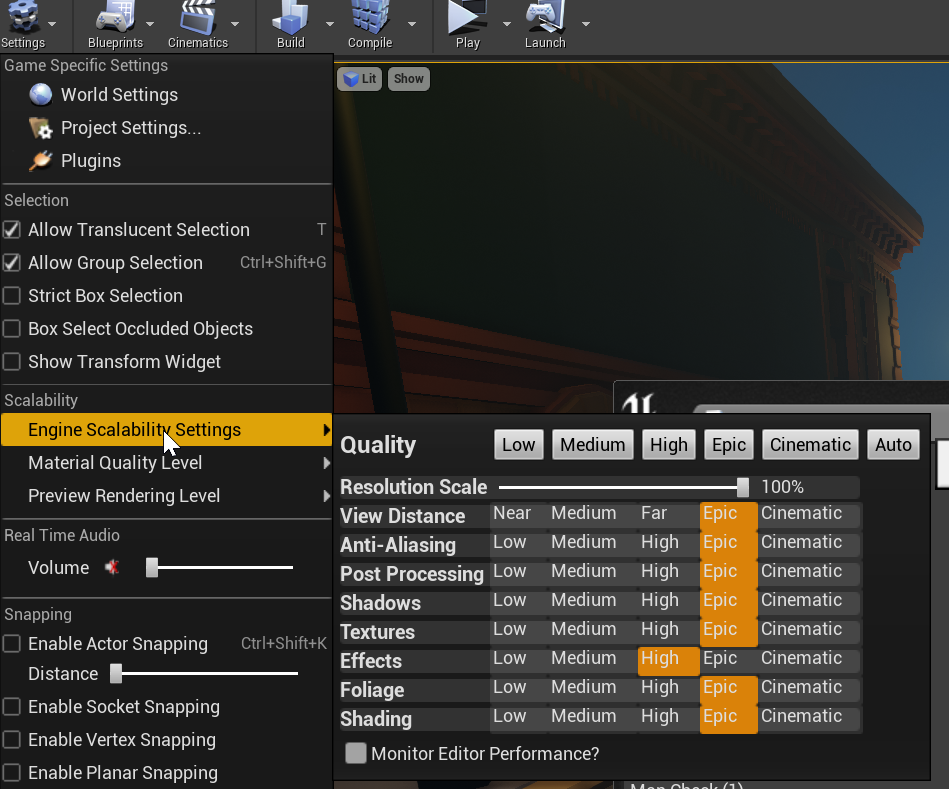


 brittle tundra
hey there don't know where to post this... Is it usefull to async load a LEVEL/MAP before opening it ?
 tough solar
maiden obsidian
yo now the rider source code plugin does not work for ue4 4.26.1 it says that th...
tough solar
maiden obsidian
yo now the rider source code plugin does not work for ue4 4.26.1 it says that th...
starting 4.25 it's bundled in UE
inner cloak
i have a mesh that i want to have in 10 colors .. is it better to use 10 mesh and apply the material on each or is there a way to just change the material when needed ?
honest lily
hi guys
guys
how can i play the death animation only once
i want my player to stay on the floor
inner cloak
is there not a "do once" node ?
honest lily
i tried it but when it does the montage he wakes up
plush yew
Loop is most likely enabled 🙂
honest lily
oh
let me check
well
where can i find the loop
i went to the animation
but
there is not any loop
inner cloak
Must be a setting in your playanim ?
honest lily
plush yew
Let's see the settings on your montage itself
honest lily
inner cloak
Oh, your condition is wrong i think.. you use "<" instead of "<="
inner cloak
strange
honest lily
i cant find the loop thing
plush yew
Now let's look at the tab next to it, the animation blueprint settings
plush yew
plush yew
I'm looking for your animation sequence settings
Assuming I'm not sending you on a wild goose chase ,The setting should be somewhere in your animation blueprint, maybe if you take some time to sift through your animation sequences and see if any of them has something similar to the picture 🙂
due to logistical reasons, I don't use montages, but only sequences. I'm not sure if there is a significant difference between them...
honest lily
i cant find this because i havent put it in my animation blueprint
because its animation montage
plush yew
having something like supercollider inside unreal is too advanced regarding programming skills?
I mean, a GUI that you can type the commands to control the server.
 stark ledge
It's perfectly possible, but depends on your personal programming skill level 🙂
You'd need to develop a new plugin and integrate the library that way, then expose the relevant bits to BP
 kind void
Does anyone have a “clubhouse” invite to spare? I’m a game dev character artist who would love to exchange tips/advice for one. Sorry if this is the wrong place for this. Thank you.
 arctic flame
Hi all, I have an orthographic camera that I use when I open my mini-map. I want to have touch controls like in Google Maps where I can drag the map around using one finger/mouse cursor.
How can I convert the screen-space touch locations into world-space so that I can accurately move the camera/the map under the finger?
 vestal goblet
okay, i've been kinda getting by but i really need to know, how do i cycle between the different tools? (landscape, geometry etc)
sick plank
vestal goblet
okay, i've been kinda getting by but i really need to know, how do i cycle betwe...
in the tools bar select modes and change them
 dire remnant
quick question where is the setting to change this directory?
I don't want anything on my C drive at all really
sick plank
when u create a new project u have to select a new directory.
dire remnant
this is the not the project directory
sick plank
i think if u reinstall the unreal in the another disk will work
plush yew
Unreal ties some user folders as temp folders. You can create symlinks to another hard drive. You can search online for how to do this kind of folder redirection @dire remnant
And redirect the folder it's complaining about to your different hard drive, At the software level the unreal engine will not know the difference 😄
@arctic flame If you look at the player controller class from the Top-down template, there is a MoveToTouchLocation that should give you some ideas...
 dire dirge
Hey guys! Wanted to ask if there is a plugin that lets you remove unused assets from a project. But I want it to have the ability to choose a specific folder from which I want to remove them and not from the whole project. Thanks!
dire remnant
@plush yew thanks i think this is the one.
 crimson lake
hello dear legends of unreal slackers
r.setres does jackshit when you build the game
can anyone aid this poor man who has to pitch his project in 4 hours
in how to set resolution in a built game
god bless
scarlet birch
"Game User Settings"
sick plank
sick plank
my pawn its not moving
anyone can help
plush yew
@sick plank Can you confirm you have NavMeshBoundsVolume in your level, and your pawn is inside it. Also enable navigation and see if the green stuff pops up
sick plank
plush yew
<@!716682235029225502> Can you confirm you have `NavMeshBoundsVolume` in your le...
where do i found that
plush yew
why am I getting this error although I already included the #include "GameFramework/Actor
 frail portal
Is it possible to downgrade my version from 4.24 to 4.22? I have my reasons but asking if it's possible?
Blueprints
fierce tulip
nope
 clear shard
Can you migrate all assets to previous version?
fierce tulip
wont work
clear shard
Damn
frail portal
Ugh I don't mean to be an ass but it wasnt epic of epic to remove html5 from ue4 4.24 onwards that I gotta do the super complicated method
fierce tulip
i can understand that sentiment