#ue4-general
1 messages · Page 924 of 1
 paper sluice
 uncut fulcrum
There should be a depth parameter somewhere I think
 iron nexus
If I lose the config folder for a project what will I need to re-do? I'm not sure what's stored in there so I'm having a hard time telling what's missing.
 grim ore
@fluid wagon are you trying to duplicate something in the world? if so you have to hold alt and drag on one of the transform manipulator widgets like the move or rotate
@iron nexus project specific configs usually if using a template if you mean the main config folder. If you mean the saved/config its stuff that you changed
 fluid wagon
yeah, ah ok. Thanks. I know my questions are trivial but im learnin
iron nexus
grim ore
<@!158056361903521793> project specific configs usually if using a template if y...
So like, action mappings are stored in there right?
grim ore
if its a template yep
@paper sluice for an overlay they are drawn in the order they are children that you can see on the left. make the progress bar above the text so its drawn first
paper sluice
oh yeah, cheers for that, i assumed it's like photoshop and shit where the one above is above
grim ore
would be nice but nope, its generally the draw order top to bottom unless things are drawn at the same time and then there is a z order
paper sluice
ah ok cheers :)
 potent bridge
is it possible to constain the player to a plane using a node? I want it to be triggered on/off
grim ore
actor? pawn? character?
grim ore
you would get it like any other node. That one specifically targets a primitive component (like a scene root) so you would drag off the component that you want to set this on and it should show up
 glad loom
Hello, in level blueprint I create all my widgets, how do I add one widget I already created in another blueprint? I can't create it in that blueprint, I need to use the one I created at first. I tried the get all widgets of type but that doesn't get the created blueprint, it get just the instance of it I think it's called
grim ore
you dont create anything in your level blueprint if you can help it, you cant get anything OUT of it if you need to
so you would create widgets somewhere that might make sense or all of them in a central place like the HUD class or game mode or player or etc.
glad loom
And then I can cast to that and get the created widget?
grim ore
if you can get to where you put them yes, stuff like the game mode and HUD can be accessed from pretty much anywhere
glad loom
Oh alright, thanks. And then to get the created widget do I just get it like any other variable?
grim ore
assuming you saved it to a variable after creating it yes
glad loom
Oh alright, thank you very much for the help
 warm hornet
Anyone know if EG has plans for UE to support multiple GPUs?
 fierce tulip
as of 4.15 you have alternate frame rendering
fierce tulip
browse marketplace's free content
 spare kernel
Possibly some of the free asset sites for models you can import in also
 vivid stratus
so, anyone having this problem? 
Downloaded and enabled the plugin, restarted the engine and nothing 
the entire "terraforming" of river, oceans, lake works, but they do not "show"
 vague lion
grim ore
you would get it like any other node. That one specifically targets a primitive...
vague lion
grim ore
you would get it like any other node. That one specifically targets a primitive...
doesnt work...
grim ore
@vague lion what are you trying to get it from or where? show us
grim ore
the get physics angular velocity right?
grim ore
ok and what are you trying to get it from?
grim ore
do you have a plane mesh in that blueprint?
vague lion
yes
grim ore
is the issue you cant find that exact node (since they have been replaced) or you cant get any of the get physics velocity nodes?
I can get them no problem from a static mesh
vague lion
i can get get physics liner velocity and linear velocity at point and the ones you send
*linear
grim ore
yes the get physics angular velocity in degrees is the one you want now
vague lion
ok thx
grim ore
from the source code /** * Get the angular velocity of a single body, in degrees per second. * @param BoneName If a SkeletalMeshComponent, name of body to get velocity of. 'None' indicates root body. */ UE_DEPRECATED(4.18, "Use GetPhysicsAngularVelocityInDegrees instead.") UFUNCTION(BlueprintCallable, Category="Physics", meta=(UnsafeDuringActorConstruction="true", DeprecatedFunction, DeprecationMessage="Use GetPhysicsAngularVelocityInDegrees instead")) FVector GetPhysicsAngularVelocity(FName BoneName = NAME_None) const { return GetPhysicsAngularVelocityInDegrees(BoneName); }
vague lion
but what about this point?
grim ore
that would be your plane mesh in that blueprint that you are using, I assume a static mesh component but I dont know what you are doing or following
vague lion
ok i will try it. thx
ok i found a updated version of this blueprint but thanks for your help
*an
 scenic moon
where is this on 4.26?
 midnight wren
where is target arm length
grim ore
@scenic moon I have those showing up in my .26
@midnight wren Target Arm Length is a property on a spring arm
scenic moon
i don't see them on 4.26
grim ore
do you have the place actors window turned on?
scenic moon
yeah, i just found out, it wasn't called like that on 4.24
that;'s why it didnt bring my attention
 rough knoll
is there any way to play more than one animation at once in the animation editor window? my mag in animation for my gun is slightly ahead of my mag in animation for my arms and i want to have them both play at the same time so i can get the play rates right
 hasty gorge
so do I need to differentiate my code between the PIE and the "real game"?
I'm still trying to figure out how to do something as simple as send a message to the output log when I mouse over a static mesh
but even though my player controller says to show the mouse cursor, when I use the editor, they take the mouse cursor away anyway
grim ore
you shouldnt need to keep separate code but some things do behave differently
your mouse cursor should behave basically the same as long as its in the viewport
hasty gorge
so how would I make it so the code that should work with the mouse over events actually... work
grim ore
did you check to see if its an actual issue in the editor? or just assuming thats the problem
hasty gorge
cause again, unless I make the player controller's viewport a static camera, if I click within the editor, it will always take away the mouse cursor
grim ore
what do you mean clicking within the editor? the viewport or the editor windows
hasty gorge
I honestly dont know what the problem is anymore, other than something I'm completely missing
the viewport
grim ore
I can say just enabling the show mouse cursor in the player controller, setting the game mode to use this new player controller, and in a new level using the third person template I never lose the mouse cursor
hasty gorge
well I have those all set up already, and it still takes away the cursor
except I dont have the third person template
grim ore
usually if you click in the viewport and lose the cursor its due to the ui mode being game only
hasty gorge
so maybe it has something in the background that is added
grim ore
but even then if you are showing the mouse cursor it shouldnt disappear unless you tell it to
so perhaps your not actually showing it?
hasty gorge
this is my player controller code
{
    bShowMouseCursor = true;
    bEnableMouseOverEvents = true;
}

void ACardPlayerController::BeginPlay()
{
    UE_LOG(LogTemp, Warning, TEXT("Begun Player"));
    Super::BeginPlay();
    UWidgetBlueprintLibrary::SetInputMode_GameAndUI(this);
    InitializeUI();
}```and just to clarify, that UE_LOG is showing up, so the BeginPlay() is working
so I clearly set it to Game and UI
grim ore
so to clarify is it disappearing when you click the mouse and move it then comes back when you stop? or it disappears completely when you click and never comes back when you release?
hasty gorge
when I click on the viewport the first time I have started the game itself, it never comes back unless I move the mouse outside the viewport
and then disappears whenever I mouse over the viewport again
as if it's being "blocked" by the viewport
grim ore
hmm. well I know game and ui will absorb the mouse when you click it due to it now being the game taking input and not the ui
but it should come back when you release. comment out the set input mode line and see what happens
hasty gorge
k
grim ore
a
hasty gorge
okay now what happens is I click once
and the mouse cursor not only never comes back, but I cant even move my mouse outside the viewport and onto the other editor windows
the only thing I can do is move the controller around in a first person view
but again, no mouse cursor is showing regardless
grim ore
yeah you have something else changing the mode then
something else is overriding the show mouse cursor boolean
hasty gorge
what could it be?
I'm using the default empty project, so I dont have any extraneous code
grim ore
try setting that boolean in the begin play rather than the initializer
hasty gorge
okay
grim ore
I work with BP 99% of the time but recreating your code in BP I get the exact result if show mouse cursor is not enabled
hasty gorge
nothing has changed
new code
{
    UE_LOG(LogTemp, Warning, TEXT("Begun Player"));
    Super::BeginPlay();
    bShowMouseCursor = true;
    bEnableMouseOverEvents = true;
    //UWidgetBlueprintLibrary::SetInputMode_GameAndUI(this);
    InitializeUI();
}```what does InitializeUI do?
hasty gorge
currently nothing
grim ore
ugh. ok so at this point I would try to narrow down if its the custom Player controller or not. I would make a new blueprint player controller, just go in and check the show mouse cursor boolean and nothing else, then override the game mode to use that new one in your world settings or project settings
just basically swap out your C++ PC for a BP one
hasty gorge
okay I actually commented out that function and now it works super different
the mouse cursor no longer disappears
but now I can only move with WASD
grim ore
soo.... initialize ui does something?
hasty gorge
I mean, technically yes, but only if a particular pointer variable is not null
and I made it null
but commenting it fully now changed the entire viewport behavior
grim ore
were you in a first person camera setup or third person?
hasty gorge
I think first person currently
right now I can move my perspective around by holding the mouse button
grim ore
keep in mind if you are used to just moving the mouse around to move the viewport it wont work if you have input mode set to game and ui. the game has to have input to take mouse input and you do that by clicking and holding the mouse button down (either one)
hasty gorge
and I move around with WASD and ctrl/space for verticality
grim ore
yep that is expected
It sounds like you are using the default pawn which is basically a ghost/fly mode
hasty gorge
no my player controller is inheriting off of APlayerController
so it's not just a pawn, I dont think
grim ore
your player controller is not the same as your pawn, your player controller controls a pawn which should be the default if using the default game mode
hasty gorge
I'm using my own game mode object though
grim ore
so everything you are explaining sounds correct and working as intended
hasty gorge
except now I have a staticmeshactor in the scene with code to send a message to the logs if I mouse over
and it still doesnt work
and this is even when I holding left click down and move it around in the viewport
this StaticMeshActor is my "card" in my card game
and this is the code in it so far
{
    UE_LOG(LogTemp, Warning, TEXT("Begun"));
    OnBeginCursorOver.AddDynamic(this, &ACard::OnMouseOverCard);
}


void ACard::OnMouseOverCard(AActor* TouchedActor)
{
    UE_LOG(LogTemp, Warning, TEXT("Moused Over"));
    if (GEngine)
    {
        GEngine->AddOnScreenDebugMessage(-1, 2, FColor::Red, TEXT("Mouse Over"));
    }
}```ok so your missing a few things
what input mode are you using now, ui and game or just game?
grim ore
well did you change back your player controller to game and ui?
grim ore
ok so it sounds like game only, which is fine as long as you have a mouse cursor on the screen
hasty gorge
so why is the mouse over not working?
grim ore
is this card derived from static mesh actor, or is this an actor with a static mesh component?
hasty gorge
class CARD_GAME_API ACard : public AStaticMeshActor
{
    GENERATED_BODY()

public:
    UFUNCTION()
        void OnMouseOverCard(AActor* TouchedActor);

protected:
    ACard();
    virtual void BeginPlay() override;
    //virtual void NotifyActorBeginCursorOver() override;
};```ok so derived from. Where are you setting up the mesh it is using? in the editor?
hasty gorge
I just inserted a box staticmeshactor in the scene and then made a blueprint of it
then made the parent class of that blueprint this Card class
grim ore
ah....
hasty gorge
was that a bad thing?
grim ore
probably not just a weird way to go about doing it. normally you would just make a blueprint out of your C++ class
hasty gorge
how?
grim ore
right click the C++ class
or create a new BP like normal and use that as the class
I can say that this BP code in the blueprint does work for me, but I havent tested the pure C++ way yet
hasty gorge
so it has to be done in the component?
okay wtf
I did what you said to do
basically make a blueprint class of my Card UClass
and I added a static mesh and put it in the scene
and NOW IT WORKS
I seriously dont understand why though
grim ore
it might have been the way the blueprint you created had the static mesh
or the static mesh that you used when you created that did not have collision
because yep I tested it and it worked as well lol
lets try it the other way
oh also when you say box static mesh actor do you mean a box brush or the default cube?
hasty gorge
the default cube
grim ore
yep super weird I added a cube from the place actors, went to blueprint and made a new bp and chose actor when it asked for the class. went into the bp and changed its parent class to my custom C++ class and it worked.
something must have just gone wonky but yeah the normal way is to right click the C++ and make it or choose it as the parent when making a BP form the new BP list
atleast it's progress 🙂
hasty gorge
yes
now the next step is figuring out how to allow the player to move the card around when holding the mouse button
grim ore
should be fun
 plush yew
hi there
i have a pawn that constantly face the player and i want it to move forward as well, how can i do this?
 muted wren
what is a good way to get started with unreal?
should i just sign up for a udemy course?
 wary wave
the Unreal Learning portal likely has a good place to start
 shell compass
Hmm... what's a good way to have a vector smoothly change randomly?
wary wave
linear interpolation to a new random vector over time
shell compass
Feels like it would have the potential to have times where it stops and then start acceleration to the next point over and over
But I think I figured out a way
Perlin Noise
Never used it before, but it seems to smoothly and randomly change a value from -1 to 1 over time
 light thunder
Anyone familiar with cable components - I can't figure out how to unattach it during game play
wary wave
'unattach'?
light thunder
it attaches to something when you set it up
I want cancel that but so far it doesn't seem to do that
I'm deleting the component it was attached to, then setting the End Locatio n
wary wave
setting end location works, but what do you mean deleting the component it was attached to?
light thunder
Basically I'm trying to split a wire - so I have 3 wires - one that is the wire before it "breaks" I fall an object into it and then when it looks like it would break, I toggle visibility and destroy it, then I toggle visibility of two other cable actors, that were prepositioned to take over as the "broken wire"
wary wave
oh, that is almost certainly not going to work
light thunder
you can see it here, that's actually 3 cable components - a single "before" and two - one is left and the other is right
you can see it there, it works great actually
wary wave
I think you might need to dip into C++ to get the effect you want
but I'd expect the physics sim to go nuts
light thunder
the trick is to only simulate physics on the object the cables are attached too, not on themselves
light thunder
don't know what to tell you, it works okay and then as soon as it hits the ground, I turn off simulate physics on their attached actor, which is basically a sphere I use as a "Fall Helper"
I'm like 95% there, Just can't figure out what I'm doing wrong with the end attach location
You can see right there where the two cables meet (that was the origin of the sphere actor they were attached to, that got destroyed)
same thing again, but on the left one, I'm setting it's location to 0,0,0,so it should be halfway across the map or at least, not there
crap, that's relative, that's right
wary wave
so what is the ACTUAL problem you're trying to solve?
you're deleting the sphere, and what is happening that is an issue?
light thunder
I can't set the location of the ends of those cables, after the fact
it looks fine there because that water tower is blocking it
but it won't always be the case
wary wave
end location is going to be relative to the actor they're attached to
(I assume, that's why it attached to something)
light thunder
so it would be better to just spawn an empty actor near where the falling sphere was, before it gets deleted, and just set them attached to that then
wary wave
have you considered just not deleting the thing they're attached to?
why are you destroying the sphere in the first place?
light thunder
If you delete the thing they are attached to, this happens (and that end loc relative thing kicks in )
I'm destroying it to basically break the connection to them, but I'm realizing I need to set them attached to something else
wary wave
have them both attached to two different things
light thunder
I'm going to add two components that are children of the falling sphere, slightly offset above them - when it falls, they will too, and I can attach them to the respective wires (and the falling sphere itself, I will just turn off physics for, not destroy)
wary wave
that sounds like a reasonable approach
light thunder
I'm actually thrilled I was able to get this to look even half decent
they still won't "unattached"
 rancid lynx
does Player pawn get stuck in LANDMASS SPLINE Terrain ?? I keep Occassionally randomly getting stick.
light thunder
@wary wave how does this component still have a reference if I've destroyed it? Not much is going on, I figured .2 seconds would be enough for it to be gone - that would explain why my set attach end to cpomonents will not work
wary wave
it doesn't have a reference
light thunder
rancid lynx
delays are a terrible hack . careful with that trap.
i barely know what im doing. so idk
wary wave
yeah, I seldom use them and really don't recommend them
in any case garbage collection probably hasn't run yet
light thunder
even without it, why would these not attach to something new?
wary wave
I recall cable components can't do that without C++ changes
one end is more or less fixed
they're implemented assuming the thing they're attached to is static
and that just the end location changes, if anything
light thunder
that's fine, why can't I change the end location then?
wary wave
it's been ages since I've used them, but I'm pretty sure you can
I used them a while back in a prototype where the player could walk around with one end, and connect it to different nodes as an example
pretty sure that was just setting the end vector
light thunder
doesn't work, look -
wary wave
but going back to your original implementation, you could literally just start with the two cables attached to different things
light thunder
duh
wary wave
I don't see a reason to try to reattach them to something else later?
light thunder
makes seens, just two falling spheres
plush yew
do you know how i can make the ai move forward?
i have a character that look towards the player constantly , do you know how i can move it in the direction where it look?
plush yew
plush yew
do you know how i can make the ai move forward?
Yes
Do not make the node pin of pawn to self. It will not move
For the pawn, type get controlled pawn
@plush yew actually, it's not a pawn anymore, it's a character blueprint
Oh
Then use "get player controller" @plush yew
alright i'll try
Because I have a project where the AI goes to the pawn when the AI sees the pawn
Can you also create a MOBA game in Unreal Engine??
yes you can ofc
me its an fps
Oh ok
@plush yew ^thank you it work perfectly !
plush yew
plush yew
<@456226577798135808> ^thank you it work perfectly !
Your welcome!
 kind dew
Would anyone mind helping me playtest my game?
kind dew
It's a multiplayer first person game like rocket league with parkour and grapple hooks instead of cars
plush yew
kind dew
It's a multiplayer first person game like rocket league with parkour and grapple...
Ok I wanna see it
Mine is a shooting racing car game
 lusty night
output says "please update your code to the new api before upgrading to the next release otherwise the project wont compile" how do i do that
plush yew
Is there any way to speed up the download of a downloading asset?
 stable garnet
 frail jewel
Does anyone know where the white texture piece gets hooked to?
frail jewel
Does anyone know where the white texture piece gets hooked to?
Change your material blend mode to opacity masked and pug into that
Is there a change to how we import UCX_ collisions in 4.26? It changes the names because they conflict and therefore doesn't work
works fine in 4.25 and older
frail jewel
stable garnet
Change your material blend mode to opacity masked and pug into that
Cheers man, thanks!
 solid glade
Hi
Could someone please help me confirm whether or not a SkyLight actor is enough to light up a scene?
A video I watched (https://www.youtube.com/watch?t=364&v=EyVAL46uE_I) *seemed *to have done that, but I might be missing a step. A sky sphere?
Could it be the skydome material?
In my case, it only worked once I added a BP_Sky_Sphere from Place Actors, to light up the scene with SkyLIght
and that blueprint has a skydome in it
However, if I would only add alone the skydome from that BP in the scene, it would still not light up
 fathom monolith
Can I redistribute a modified version of Unreal Engine, through say a github repo, for a mod editor.
plush yew
How does one limit the morph target slider so only a portion of it is user out of the full slider In engine
Or what key words can i Google to figure it out my self C;
 latent pivot
sup. i'm creating a helm that i want to attach to a socket on a skeletal mesh. unfortunately, i need to use multiple meshes for the one helm to look complete. does it make sense to put both of these skeletal meshes into a blueprint? can i attach a blueprint into a socket?
 lapis bronze
i'd use master pose component
@latent pivot
https://docs.unrealengine.com/en-US/AnimatingObjects/SkeletalMeshAnimation/WorkingwithModularCharacters/index.html
Describes the different methods you can use to create modular characters comprised of multiple Skeletal Meshes.
latent pivot
damn, good call @lapis bronze
lapis bronze
np~
plush yew
Any good name idea for my horror project?
"Unpaid college tuition"
Or
"fiscal responsibility"
 winter hollow
Yo if I wanted to design a "mini-landscape" (something you can stand over in VR like you're at a table) Can I start with a small landscape and then scale it down later once I place all the props and textures?
or should I approach this differently
plush yew
Yes to both
winter hollow
How would you do it
plush yew
You can add landscapes through the subtool set
1 sec ill post it
Modes near source control
Than add iirc
plush yew
After you setup like this you can delete extra panels via add or delete
You cn spawn a smaller one as well
winter hollow
a tile or two will be a good size I think
plush yew
By changing the new landscape options
winter hollow
but will this effect the resolution for sculpting and painting?
plush yew
Not reqlly
winter hollow
because since it's so small I will need a fine resolution
plush yew
Its just removing chunks
No you can use a single tile than scale up via add
Or importing landscape assets from import option
winter hollow
thanks snow
plush yew
plush yew
Just like life
Yes
Plus my game is scary
A straight forward funnel from womb to dirt
No
With anogy throughout the journey
Agony*
kinda
a

A creature horror game
Like my drunken nonexistent dad D;
In all sincerity
nvm
Dont focus so much on the name
Thats something that comes with time
I just found the name??
However names are like sumarries to a game or content
Ok
A term or phrase of word(s) that capture the games content as perfect as you can so dont think so hard into it yet
Your game make change violently and your name will cease to fit as aesthetically as you'd please
winter hollow
i deleted all but one tile and messed with the resolution
hopefully this works. I need to have little AI with navmesh on that and texture it up
Thanks!
plush yew
You can iirc change that later however if you're just testing a function
Save your assets and mechanics after your successful and you can import it into another project regardless of scale size or current setup
I just scared myself on my own horror game
winter hollow
good job
winter hollow
add vr support
plush yew
^
Dude thats gonna kill me the most!
I added then it almost killed me
Men the model creature I created is so goddamn killing me
 novel rover
what is firebase?
And what does it do?
plush yew
novel rover
what is firebase?
And what does it do?
Firebase is like google but a 90s version and its most likely trash
novel rover
plush yew
Firebase is like google but a 90s version and its most likely trash
so Im assuming its unnecessary for ads
 broken heath
How do i contact with my pc within unreal , like importing a picture from my pc in game?
fluid wagon
hey quick question. I sped up my camera speed and kinda forgot how i did it.. i was watching videos and dont remember which video it was in. Been studying UE4 for like 10 hrs now
plush yew
fluid wagon
hey quick question. I sped up my camera speed and kinda forgot how i did it.. i ...
An FPS game??
fluid wagon
well 3rd person shooter... i kinda messed some stuff up and tryin to fix it
plush yew
Do you mean in engine camera movement or camera blueprint?
If in engine top right corner of viewport
Should say a number between 1 -8
fluid wagon
awesome that fixed that issue...
plush yew
Your welcome hun~
fluid wagon
was trying to adjust the camera angle so it was sort of above the player a bit but...
when i go to undo it, wont let me undo it
plush yew
One moment
Seems like fish eye modifier
I don't know how to undo it but Google can answer that easily
If that's fish eye lens of course ^^;
fluid wagon
um i didnt do that i think.. is there a way to set the camera to default?
plush yew
Not sure I mostly understand landscaping. ^^;
fluid wagon
buildings and stuff? or just landscape/water stuff
plush yew
Just basic landscaping and foliage sorts
fluid wagon
can i DM you and pick your brain?
plush yew
please help when im build my lighting all my tree/foliage is black Thanks 🙂
plush yew
Hello guys how do I change skeleton to a skeletal mesh? The slot is Grey
 sharp violet
can someone suggest me the a good tutorial to begin in ue4
 tribal current
I'm using 4.26. InstanceStaticMesh will introduce seams.
I'm pretty sure The mesh is accurate(Examined in Houdini) and the transform data is correct
plush yew
sharp violet
can someone suggest me the a good tutorial to begin in ue4
Do you wanna create a horror game for your first game??
@sharp violet https://www.youtube.com/watch?v=QJpfLkEsoek&t=1092s
Get the full UE4 course:
https://bit.ly/36lJS3S
Unreal C++ Beginner Tutorial:
https://youtu.be/1dl91ORwmy8
In this video you are going to learn how to build a very simple game using Unreal Engine and Blueprint.
The goal of this lesson is to get you aquainted with the absolute basics of:
- The Unreal Editor
- Simple AI
- Events in Blueprint
-...
fluid wagon
so i started a new level thinking it would fix the camera issue...
no luck... any help would be greatly appreciated
wish i knew what i did to break the camera
plush yew
@fluid wagon You know you can go use the third person template??
fluid wagon
ok so i restarted and the map stuff i was working on is gone.. but camera still up close and on the side
 misty terrace
I made an inventory with a stacking system, but when i pick up a stackable item, the first actor disappears like how its meant to, but any stackable item after that the actor doesn't delete. Anyone know why this might be? Heres the bit of code that deletes the actor normaly
or blueprint i mean
plush yew
misty terrace
I made an inventory with a stacking system, but when i pick up a stackable item,...
WAIT
My horror project has an inventory system
Let me open my project then screenshot the Blueprints
misty terrace
Thanks
plush yew
My project is compiling shaders since I imported new stuffs
Wait
Let me search my 700 folders in my Blueprints folder
misty terrace
ok lol
fluid wagon
plush yew
@misty terrace Item visibility and item sorting
fluid wagon
ok so fixed the camera a little... except now when i press forward it does this
plush yew
And also @misty terrace the rest of my others are in C++
fluid wagon
so is it the manikin? or the camera i messed up?
plush yew
fluid wagon
so is it the manikin? or the camera i messed up?
Might be the camera
fluid wagon
idk how to fix it then. ive gone thru all the settings
been trying to google how to reset the thing
plush yew
fluid wagon
idk how to fix it then. ive gone thru all the settings
You mean Blueprints??
fluid wagon
plush yew
What engine are you using? UE4.26-CHAOS??
plush yew
fluid wagon
4.26
Chaos or just 4.26??
fluid wagon
just 4.26
plush yew
fluid wagon
just 4.26
Then I dont know how to solve this shit since I am on 4.25 and a first person horror game developer
Which my game looks like its made in Unity engine
Ima go recreate my third person game
plush yew
misty terrace
thaks <@456226577798135808>
Your welcome!
Now time to recreate that tps game i created then ima not do it
 naive reef
Guys I imported an asset from Quixel Bridge, but on UE4 my character goes through it, how do I make it solid
 brave shard
who knows the fastest way to make animations for equipments?
like the hand animation for example
it's for a 3rd person game
 honest vale
naive reef
Guys I imported an asset from Quixel Bridge, but on UE4 my character goes throug...
honest vale
naive reef
Guys I imported an asset from Quixel Bridge, but on UE4 my character goes throug...
you need to make a collision model for it
the editor can automatically make you one in the static mesh asset viewer
or you can make one yourself if the automatic generation produces bad results
 clever vault
 plush yew
i forgot how to do it
plush yew
anyone here know how i can rig my character in maya for unreal engine?
hi there, i would like to make the "damagevalue" of my object equal to the "attack" value to another object called visagemechant, i try to do it like this but i got an error, any idea on how to do this?
broken heath
plush yew
hi there, i would like to make the "damagevalue" of my object equal to the "atta...
Does the other actor exist in scene
plush yew
@broken heath yes the problem is on the "set damagevalue"
broken heath
How many of the other actor do u have in ur scene
plush yew
no other only editorcubes
broken heath
Then
Use , Get all actors of class
And choose the class
Then drag out put “get” leave index at 0 , since its only 1
plush yew
Can you create a 3d parkour game in unreal engine???
broken heath
U can create anything
plush yew
Because the 3d parkour thing was my first game in unity and wanna recreate it
broken heath
Yes u can
broken heath
Parkour games arent much so , it would be great if u make a good one
plush yew
K
broken heath
There’s a decent parkour assets in market place if u want smth ready
plush yew
I just bought some
@broken heath sorry but where i should connect the "get" after that
And I imported some fall guys assets
@plush yew you want to do smth like mirror's edge?
broken heath
Can u show me a screenshot of what u did
After get u, would drag ur variable out of the get
broken heath
The variable u want
 daring sequoia
Okay idk whats happening but i downloaden ue thing morning and i launched it now i wanna launch it again but when i press the launch button nothing happends! Plz someone help
plush yew
daring sequoia
Okay idk whats happening but i downloaden ue thing morning and i launched it now...
Have you tried turning it on and off again?
daring sequoia
My laptop or epic games?
plush yew
daring sequoia
My laptop or epic games?
Both
Close epic launcher and your laptop then open them again
daring sequoia
Okay ill try
plush yew
Did it work??
daring sequoia
Lol i dont know how but i opend my laptop and unreal editor opend just out of nowhere thanks
plush yew
Your welcome
 narrow plaza
I am getting a strange animation bug in my characters legs (they fold into themselves) when running into a WaterBodyLake in 4.26 - is this a known issue? Example at - https://youtu.be/5fqxsXk29KM
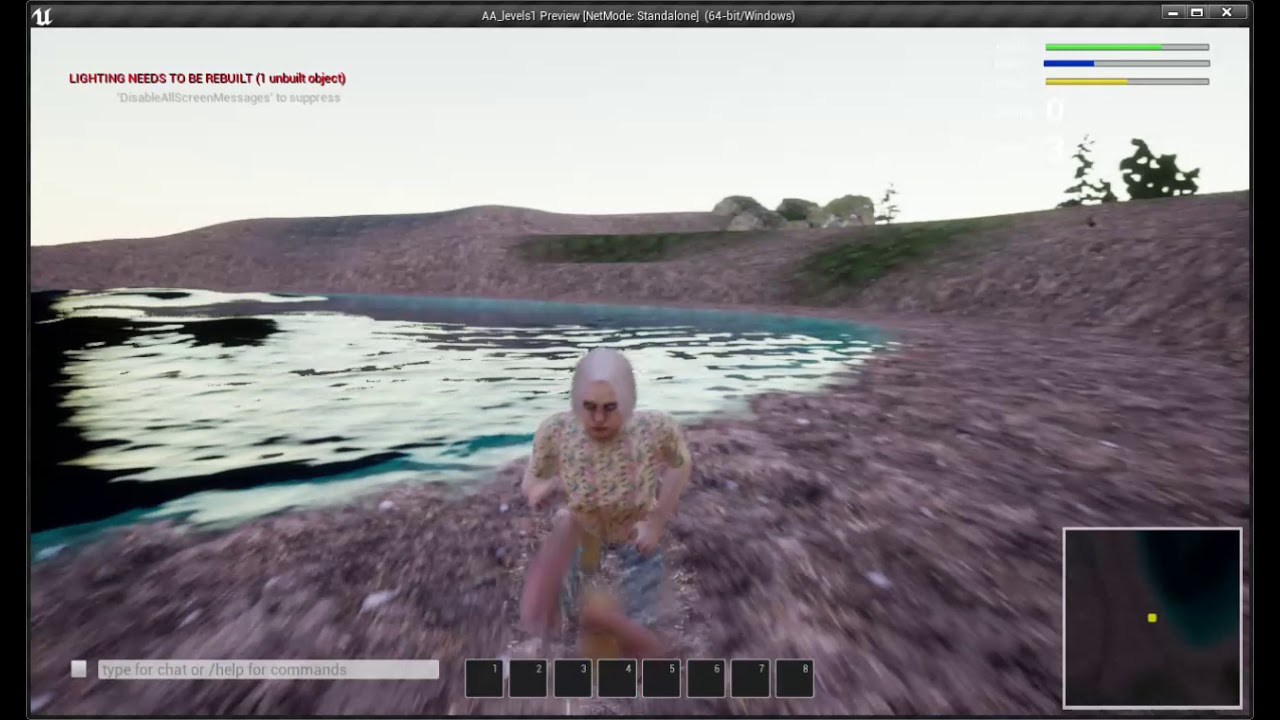
I am using the Universal Character System for the sanct game, and when they run near this Lake (UE 4.26 - WaterBodyLake), the legs fold under themselves.
Note sure if it is a problem with the UCS or with the the way I am setting up the lake. Please comment if you have any tips!
broken heath
plush yew
thats what i did
Sry bk , did u fix it?
plush yew
@broken heath no but its okay i'll do it in another way
broken heath
It should work, you did it right but the damage value is from another actor too?
broken heath
IS damage value your character? Connect its target to ( get player character)
plush yew
its from the firstpersoncharacter actor
light thunder
how do you set an actor to ignore force from a certain physics direction? I want something to fall but not get pushed when it does (or clamp this range)
I can't really use a physics constraint because this involves cable components and they don't like that
plush yew
@plush yew what do you need help with
daring sequoia
@plush yew i think i know what the problem was
The laptop has just passed away its gone now lol i may be able to back it up but xd
plush yew
Ok
 wanton lotus
You might want to bookmark this video. Almost guaranteed one of the first problems you will run into will have to do with getting 2 separate blueprints to communicate: https://www.youtube.com/watch?v=EM_HYqQdToE

Announce Post: https://forums.unrealengine.com/showthread.php?101051
This Training Stream takes a look at Blueprint Communication. We find that Unreal Developers of all levels can sometimes struggle through the concepts behind moving data between objects. So in this video we'll take a look at the different ways to make Blueprints talk to one an...
A good place to actually start all depends on your current project idea.
 sterile tulip
 eager radish
Hello, im trying to make online sessions work as the first part of my test game, the multiplayer seems to work but I'm having trouble with replication, the client sees the things that are caused by the server but not viceversa, Thanks
 queen wasp
Having the weirdest bug when copying a blueprint with a construction script, while placing a new actor of same type from content browser works fine, something goes wrong in the construction script when copy/paste with ctrl-c ctrl-v
The error started with 4.26, worked before
 golden spruce
guys i have a question i am skilled i mean i know how to do pretty much everything but i did never a complete project but i want to know if i have an ide where to start
queen wasp
Trying to track down where the bug happens..
broken heath
@golden spruce hi u know everything like what
golden spruce
i mean i developed before in roblox studio and i was doing games on my own so so i learned ui design modeling scripting animating and the other stuff but when i decided to start using ue4 i found myself lost and i belief the best way to learn is practice so i wanted an advice so i can learn
thx for replying
broken heath
I saw a youtube video a guy talking about ideas lemme share it

Get 10% off Squarespace w/ promo code THOMASBRUSH: https://www.squarespace.com/thomasbrush
In this video, I discuss ways to ensure you can come up with good and creative new ideas for making good games.
You can also check out my video where I talked about my experience going skydiving here: https://youtu.be/dBguET8rbn0
Begin your journey to...
 zealous crane
I just built the lighting in ue4 and everything turned black
golden spruce
lol
maybe you should change something in the lit or unlit settings i am not expert i am a begginer but maybe
zealous crane
no that's not it
golden spruce
lol
ok let me try again maybe you used a wrong lightning color
i mean black for example
 rocky radish
try increasing the light(s) intensity
golden spruce
i think he said it turned black after building light
 fierce summit
did u delete ur sky light?
golden spruce
yo guys i have a rigged mesh i created in blender should i make the animations in blender or i can just create it using ue4
queen wasp
So, all branches of my custom made trees have correct transforms, they're visible and not hidden in game, still they don't show up, a random number of branches show up sometimes, but never all that should.. :S
plush yew
Hey, Silly question, Im trying to add actors into my bp so I can use them for the AI MoveTo command
do I cast them?
or is there a simpler way
queen wasp
I've debugged all steps of the making of the branches in the construction script, checked the transforms after setrelativetransform and checked visible and hiddeningame, all is correct, but in the editor? sometimes no branches, sometimes a few
It used to work before 4.26
Only happens with actors copy-pasted, not with actors placed from content browser, which makes it weird
golden spruce
hey guys ihave alot of problems
i have alot of problems
first
this was low poly in blender
and the where is the texture
and i think the rig is gone as well
pls help
 vernal compass
Hey guys. i have a video in main menu and when i click start game this appear and goes back to main menu with this error. does anyone know how to fix?
golden spruce
wait for ur turn
plush yew
Hey guys, I'm trying to have a lerp go back and forth (so from 0 to 1, then from 1 to 0, then repeat that). Is there any way that I can make this easily?
This is for a material by the way
vernal compass
@golden spruce i just asked. im not trying to go first
golden spruce
ok bruh
vernal compass
because someone might know your problem and other person might know mine
 civic mauve
Hey guys, so i was messing around with voxel plugin free, i wonder how can i add trees to my voxel world?
pls help
 tough pagoda
Get all actor from class.
tough pagoda
civic mauve
Hey guys, so i was messing around with voxel plugin free, i wonder how can i add...
3D model?
Pre-made?
civic mauve
i am using voxel plugin free
civic mauve
i got some trees from market place, i wanna add them
civic mauve
no, i made a voxel world using that plugin, and i am sculpting my voxel landscape, but how can i add tress to it?
tough pagoda
civic mauve
no, i made a voxel world using that plugin, and i am sculpting my voxel landscap...
Made low poly.
civic mauve
i wanna add tress
tough pagoda
Blender and so on.
queen wasp
Seems like a serious bug with construction scripts in 4.26 somewhere, as when I worked on this blueprint for a while suddenly I got a linker error with something else totally unrelated while trying to save the map .. well, one can hope someone has found it and fixed it already and all I have to do is wait ..
tough pagoda
U have already trees?
tough pagoda
Shift+3.
civic mauve
i wanna add them
 final rain
hello
 lucid grove
heya guys. I wonder can i use some wetness decals to made clothes of my character looks wet instead of changing materials.
I have modular characters with hundreds of meterials
civic mauve
tough pagoda
yes i tried, but i cant add them to this voxel world,
tough pagoda
Hm...
 stable relic
Hey guys, Im trying to decide on what would be better for making footsprint:
- Decals (I discarded it right away because it seems to be a drawcall each, never used them)
- RVT I have a basic system working and it works fine. No extra drawcalls but the overhead of using RVT
- Use the stencil buffer in a post processing mat (Im fine using only emissive)
- Instance static mesh
Thoughts?
 exotic thicket
Pooled decals seem like it would do the trick unless you have some need to have a lot of them visible
(pooled as in you have say max 100 of them, and as you hit the limit, the last one is swapped out as the most recent)
 dim osprey
Hi, I want to give custom block id to my blocks (actors). I tried blueprint component but its single for a one actor. How can I do that?
sharp violet
plush yew
Do you wanna create a horror game for your first game??
i would love to create a horror game as my first game
 vernal thicket
Anyone know an efficient way to communicate between an actor and the players blueprint? currently using a cast on begin play and setting a variable for it, but as the number of actors has increased, the frame rates have decreased lol
 versed forge
sharp violet
i would love to create a horror game as my first game
versed forge
sharp violet
i would love to create a horror game as my first game
Im working on a horror game rn as my first game
xD
sharp violet
versed forge
Im working on a horror game rn as my first game
nice
versed forge

In part 2 of the series I explain how we can use actor references to communicate between actors and open up a whole new world of interaction inside of blueprints.
Part 1 - Events: https://youtu.be/S9KforwzAAU
Part 3 - Vector Math: https://youtu.be/CEitcZWFr3Y
Would you guys say this tutorials for blueprints as good?
cuz im new
sharp violet
i will see it afterwards
versed forge
oh ok
golden spruce
yo can you help me
sharp violet
a big problem is coming
versed forge
help what?
sharp violet
gtg bye
versed forge
see ya!
sharp violet
she is typing
versed forge
oh eh ok
sharp violet
from past 2 inutes
versed forge
yeah i see that
golden spruce
i uloaded a 3d mob i created in blender a rigged one but for some reason when i upload it it becomes smooth it was low poly and the rig is deleted
 reef field
Heloo
sharp violet
what the
sharp violet
me too
reef field
I'm having some issues while importing a mesh, something to do with normals. Anyone that could help? I'd really appreciate it 🙂
golden spruce
i think i have the same problem
reef field
haha f
I'm sorry, I don't know how to solve that problem
Have you tried opening the mesh in a different program to see if the problem is in unreal or if it is the export you made?
vernal thicket
@golden spruce check the models normals inside blender.
reef field
opt/alt + n for checking the normals

 crimson panther
Hey I’m looking to pay someone with experience in working with ue4 & GIT to help set up version control & GIT for a couple indie devs. I’m having trouble collaboration with some friends, any help would be appreciated. And preferably can walk us through a good process for pushing changes. Thanks!
reef field
Anyone know why the keyhole sees through the back of the mesh? It's supposed to be solid, only happens in unreal, blender and c4d don't do that
 obsidian nimbus
backface culling?
reef field
obsidian nimbus
backface culling?
thank you thank you!!
obsidian nimbus
np 🙂
eager radish
Hey, im having trouble with multiplayer in my tests, when i try to connect the other player its like the second player takes control over the first and the first doesnt move anymore, the only one that moves is the second one
 worn peak
the default level on the project settings is the level that will be first opened when executing the game, right ?
winter hollow
So I've got some grass I made that I'm applying a wind effect to based on linear gradient
Whenever I have the SM placed manually it acts PERFECT! But when I use the foliage tool with the landscape the wind effect is essentially...multiplied. It's much more aggressive and seems to affect the entire grass mesh instead listening to the gradient
Any idea?
vernal compass
does anyone know why i click the start button i get this message from advanced car controls map?
spare kernel
What message ?
lucid grove
That might be newbie question, but i have this rain effect in material normal map. Its working great on flat surfaces, but when i try to use it with specular materials it seems to apply it as a flat surface over main material.
Is that how specular map working or im doing something wrong?
 karmic ermine
im looking for some constructive critism on my portfolio, if anyone has the time, could you dm me? and ill send you a link to my artstation
vernal compass
spare kernel
What message ?
the red error
 knotty heron
@vernal compass If you mean the lighting needs to be rebuilt error just click on build next to play and choose lighting only
vernal compass
still keep appearing
knotty heron
it comes back every time you add an object that casts shadows
midnight wren
why is my event graph read only
worn peak
i have a variable inside a level blueprint, its possible to acess this variable on another blueprint ?
 hazy crystal
hey guys, this might be a bit of a stupid question but I'm stumped. since no input commands are done in blueprints anymore (i.e. Spacebar -> Spawn Actor etc.) and is done through Project Settings -> Inputs, I'm getting sort of stuck. I want to do something super simple , in my VR game I just want to swap two actors in and out in the scene when the trigger is pressed but I can't seem to find any information about how to do that with the changes since 4.24. Does anyone have any ideas?
hazy crystal
think I figured it out - you have to create the action in 'Action Mappings' in project settings - inputs first. For example, I want to swap actor. so create a 'Swap Actor' action mapping, then choose your input (spacebar, trigger etc.) Then you can reference it in level blueprint or your pawn blueprint
plush yew
how do i get the position of a pawn?
wanton lotus
plush yew
how do i get the position of a pawn?
GetActorLocation
 clever axle
can you designate levels as singleplayer only? I want a main menu with characters doing emotes and such but the game is MP so it expects some server logic here
 fierce forge
hello, is there a way to make a actor to do nothing, like to do nothing if it should, i want to decrease blueprint time and tick time
 gleaming hedge
any one know some free tree assets?
i really need them
but i couldn't find anything
i can only find assets that are not free
spare kernel
@gleaming hedge pretty sure you asked that yesterday, and we gave you the same answer
@fierce forge disable tick on it
but reducing Blueprint Time and Tick time is no magical button
you need to optimize your stuff
fierce forge
@spare kernel it's a voxel world with chunks
uncut fulcrum
You can change tick interval in "class defaults"
fierce forge
Not big difference
uncut fulcrum
What are you looking to do then?
spare kernel
yeah i mean you asked how to make an actor do nothing
and actor will do nothing if placed in a level with tick disabled and nothing else on it.
fierce forge
you said "you need to optimize your stuff"
spare kernel
yes
if you are using a lot of Blueprint Time
then you are running a lot of stuff constantly that is being called into the BP vm.
fierce forge
how i can optimize adding a index to a array ?
spare kernel
C++
BP is really not suited for doing long computational things
especially if you want performance
uncut fulcrum
Are you checking at the start of each tick if your actor should be doing anything in it's current tick?
Essentially just adding an idle state
fierce forge
spare kernel
C++
it will help a lot ?
spare kernel
well C++ is always going to be faster than BP, that is a known fact, but without knowing what you are doing
spare kernel
fierce forge
how i can optimize adding a index to a array ?
Can you show what you are doing?
latent pivot
anyone here experienced with the master pose component?
 dawn gull
Are there any plugins that allow me to take a section of BP code and turn it into a custom C++ node?
spare kernel
@dawn gull no
dawn gull
@spare kernel well is there a way to use BP nativation (probably spelled that wrong) for the PIE editor?
lucid grove
heya
i was working with my landscape and for some reason with some small actions (changes inside material) i get this result
before i could fix that with reloading editor, but now it doesnt help
uncut fulcrum
This probably isn't your solution but I had that happen once and the issue was I exceeded the limit of texture samplers and had to set the texture sample to "shared wrap" or something along those lines
lucid grove
Yeah, i read about that. But the fun thing is that i removed 4 layers some time ago, so it should be even lighter then before
uncut fulcrum
that's probably not it then
lucid grove
Important thing - material working ok on smaller lanscapes
winter hollow
Are there any alternatives to the foliage painter tool for terrains?
I've increased the density as high as it can go but i need more
(painting small grass on a small static mesh)
plush yew
hello, I'm trying to get an actors location to the blackboard, How do I do that? its just an empty pawn somewhere on the map that I wanna move around.
 valid trail
Hello, does anyone know if it is possible to show a website in ue4
fierce tulip
if you google "ue4 ingame website" you should get all the info you need :)
 merry zephyr
guys how many poly count can ue4 take and how would i know if it is too much
for example is 50 thousand polys too big for a donut ? how many polys would be suitable for an object this size
 worn mirage
What is this?
fierce tulip
@merry zephyr use as many as you need, can always optimize later.
 nimble warren
worn mirage
What is this?
nimble warren
worn mirage
What is this?
Equal vector
worn mirage
nimble warren
Equal vector
But it has |= not ==
merry zephyr
so it wouldnt matter if the donut fbx file is 60 megabytes ?
worn mirage
 strong vortex
Not Equal
strong vortex
Not Equal
Ah is a ! not |
fierce tulip
@merry zephyr no, though that donut better be worth it
merry zephyr
many high poly objects would affect performance right ?
fierce tulip
yes, though thats why we have stuff like LOD's and other tricks.
having said that, for example: if you only see that donut from a meter away, you should prolly lower the amount of polygons.
merry zephyr
alright thank you 👍
nimble warren
For some reason when i do open level, navigation mesh breaks in game, anyone know how to fix?
 latent sonnet
I can no longer build lighting.
plush yew
Hopefully this is on-topic as its UE related.
So much improved in Unreal Engine 1 technology.
Sweeny please make this engine indie-license friendly...
fierce tulip
@plush yew while not ue4, at least post it in #share-your-stream <_<
lucid grove
heya
im still struggle with layers on my landscape
when i apply more then 3 layers i got this gray bug
I have shared: wrap on all my textures
plush yew
fierce tulip
<@456226577798135808> while not ue4, at least post it in <#243521438647058433> <...
Alright. I will post it there.
winter hollow
thanks @iron raptor!
 inner cloak
I tried to migrate the M_Metal_Chrome material from the default TestProject, the one with a bunch of materials, but i see errors after its been migrated ! Is there a way to fix this ?
inner cloak
probably near end of 2021
Unreal Engine 5 will be available in preview in early 2021, and in full release late in 2021, supporting next-generation consoles, current-generation consoles, PC, Mac, iOS, and Android.
plush yew
inner cloak
probably near end of 2021
I also got word that some companies already acquired a copy of it.
Like Ninja Theory.
fierce tulip
everything thats not custom build by ninja theory for senua (or any X company for Y game for that matter) we'll get as well
plush yew
That is worrysome...
 severe gorge
Upgrading between versions seems to always create random, unknown issues, or corruption of files that you don't even notice until later on. What procedure do you guys recommend to ensure data integrity upon upgrading between unreal versions?
I've had entire blueprints become corrupt, maps as well
novel rover
hmmm when using admob do I need to implement google mobile ads sdk?
https://www.youtube.com/watch?v=kSh8-quhFHM
It says to do this in google's documentation
but it doesnt say it anywhere on the UE4 documentation

In this video we’re covering how to get started by importing the Google Mobile Ads SDK into an Android project.
Leave your comments down below and let us know what you think.
Subscribe to the Google AdMob YouTube channel for tutorials, technical tips and product best practices.
Links:
Google AdMob Quick Start Android: https://developers.go...
clever axle
am I doing something wrong if I got a spotlight with max candela and it barely lights up anything even a bit?
 kindred viper
would anyone know of someone who has used javascript to animate UMG widgets?
plush yew
severe gorge
Upgrading between versions seems to always create random, unknown issues, or cor...
I usually wait until hotfixes release before I consider moving to a new engine version. The same might as well apply with a new engine entirely. It did take years before I moved to UE4 from UE3 after all, and the only thing that finally convinced me to do so was an engine-breaking barrier and dead-end with Flash Pro CS6.
Still a LOT of progress I was forced to forfeit...
And I had to delay my project release schedule again.
What is special about UE5 is at least it promises to transfer UE4 projects without crumbling them. The only means to transfer levels was dead in its early alpha stages UDKImport. I had to manually import levels from UDK to UE4 via a BSP export trick to 3DS Max, then weld the edges and vertices, as well as flip faces.
plush yew
Old yet special.
Too bad Epic faltered with fixing important bugs with the engine. DX11 was experimental and an unstable mess.
Working on a game via Engine and UDKBase scripts invited unwanted glitch that breaks the Archetype functionality, forcing me to reinstall UDK and repackage my project.
severe gorge
what were u even making
plush yew
The only work around was use UTGame classes. I had little problem with a fan-made game I use to work on going this route besides that it felt like a UT3 mod with benefits.
With the old Maze Qore, I wanted to start from scratch and use engine-extended classes. This proved a tedious task due to the engine glitch and bugs.
 inner flume
where did this go in 4.26?
dawn gull
Wait, when is UE5 coming out?
 grim juniper
This year
 tall pilot
honestly with godot 4 coming out this year i don't know if UE5 stands a chance 
dawn gull
Even if Godot is super good with the next update it still won’t have tutorials/resources for the things I want to do
 wheat dew
 winged ridge
How do I make my game default window mode?
So the game always open up in window mode?
 dim ermine
how do I best learn to rapid prototype in blueprints, or in essence, improve my prototyping skills? I feel as though just doing courses wouldn't be enough. Any recommended strategies or things to do?
I assume just thinkin of a game idea I want to try and make is a good way to start, but im not sure what's the best way to go about it to effectively improve myself without wasting a ton of time doing the wrong things
 vernal matrix
Is there a way to transition control types based on if you are in water or land?
spare kernel
@dim ermine best way is to just ti they stuck in. Learn and when you feel.confident start a new project and start again using all you learnt.
Damn mobile lol
 quasi lynx
https://gyazo.com/2a320db978a478c23d87607ced8aaceb
Anyone know why my character turns into a balloon when I try to ragdoll? Or what the solution is?
 pliant creek
Does anyone know if there is a solid guide or wiki or anything for the Voxel Plugin for UE4? Free or Pro. PReferably free.
inner cloak
is there a way to set the origin of a mesh to be at the bottom of the mesh ?
 soft imp
I accidentally set my ue4 project to rtx and now I can’t go back on it and I did it on a non rtx gpu. Does anyone know what to do?
 median hound
im pretty sure u can disable it in project settings
plush yew
quasi lynx
https://gyazo.com/2a320db978a478c23d87607ced8aaceb
Anyone know why my character...
your phisics assets is wrong
plush yew
quasi lynx
https://gyazo.com/2a320db978a478c23d87607ced8aaceb
Anyone know why my character...
you need to set the physic assets to like real human a lot tutorial on youtube
quasi lynx
Yeah? Okay thanks, I’ll take a look... any tutorials in particular you can recommend? To be clear, the sk does have a physics asset, but I guess it’s not set up properly.
 formal pebble
I have a pawn which is a camera, and I'm using it in the game mode default pawn with its own controller, how can I move the character independently of the camera? Do I need a new controller for the player and how I set it in the game mode since I'm using the camera, or should I just leave the camera pawn out of game mode? and how am I going to control the camera?
 austere scroll
So i made my own mesh with a skeleton and a rig and everything , then i retargeted the default "Third person template" animations to my character . but it turned out severely deformed , any idea why or how to fix it ?
 boreal epoch
What would I want to modify if I wanted to add a slight "glow" to a material?
ie I have a sword and I want it to emit a glow of some type
uncut fulcrum
plug values superior to 1 into "emissive color" of your material
boreal epoch
hmm okay. That's what I thought but i have a glow texture and it just turns the entire weapon white
plush yew
how do i make weapon straps to physics ?
boreal epoch
uncut fulcrum
What does your material graph look like?
boreal epoch
is this what youre referring to
(please note that these are not my textures but textures provided to me via a model producer on turbosquid)
as in someone made this weapon, material, and textures and uploaded them for others
uncut fulcrum
Yes, the material is displaying the way it should, since the texture you plugged into "emissive color" is white/gray. If you add a multiply node between your emissive texture and the "emissive color", your material will glow depending on how much you're multiplying. Although it doesn't look like that emissive texture is what it should be
boreal epoch
ah, gotcha. so then to have it keep the original textures on the weapon while providing the glow what would i need to do? the weapon is supposed to look like this:
while also containing the glow around the sword (as if it was emitting it) rather than making the weapon itself white. Maybe its base is higher than what it needs to be and i should multiply by a decimal to decrease it
this is the weapon with the emissive color attached and no multiplication
uncut fulcrum
If you only want parts of your weapon to glow, that texture you have plugged into emissive color won't work (Unless you try subtracting a value and rounding the output maybe) but I don't think it's supposed to be an emissive texture
uncut fulcrum
yeah ^^
uncut fulcrum
and it makes sense, look at the roughness texture
yeah cause it's probably in case some engines use "gloss" instead of roughness
boreal epoch
oh maybe
didnt consider that
just out of curiosity how would i apply a glow effect to a weapon then if i have no texture to base it off of? as its a master sword i think itd be neat to have it emit a blueish glow
not sure how possible it is because i have no ue texturing experience
i pluged gloss into the roughness section and tbh it looks a lot nicer so im gonna use that 
uncut fulcrum
The best way would be to make a texture for it (it's easy if you know what to do). You could also try doing some shader magic, like plugging "fresnel" into your emissive color
boreal epoch
i do not know what to do  ill try the other option
uncut fulcrum
and if you play with values a bit you could get a fun result
 rich spoke
Hey guys, can you help me with notifies please?
I can't understand how to add them. In various tutorials and UE documentation interface doesn't look like this
It looks like this instead
Do I have to change it somehow?
Please
boreal epoch
@uncut fulcrum quick yt video cleared it up for me. thanks!
uncut fulcrum
no prob
boreal epoch
well it kinda works
at high values it looks like a huge glow
at small values it looks like its skinned light blue lol
that's a blue color * 0.03
if i times it by 1 or higher it looks like this:
the process:
any help with getting this to be more like a glow and less of a gloss-over would be grear
uncut fulcrum
If you multiply by more than 1 it should actually glow. Although it depends on your post-process settings, but by default it should glow
boreal epoch
well i need the glow to emanate
not be stuck to the weapon
so its more of an aura of a glow around it
with the actual sword still visible
uncut fulcrum
Yes post-process handles that
broken heath
Did u try to increase the rgb values above 1
boreal epoch
yes
uncut fulcrum
well if you want an aura, then you're looking for something else than glow applied as a texture on your object
boreal epoch
started with 50 lol
uncut fulcrum
but a glow will give you an "aura"
uncut fulcrum
if you want just the aura then you need to look into something other than glow
broken heath
Sphere masking helped me make an outline glow but idk if u shd do the same
broken heath
Connect the texture to base color
uncut fulcrum
Did you try playing around with fresnel, it could get something close to what you want
boreal epoch
i dont know how fresnel stuff works and it was asking for some values that I dont know how to properly define
so i chose the route of just making a glow texture
broken heath
Did u connect texture to base color and emission?
boreal epoch
Everything else works perfectly arche
the sword has its own look
the glow is just something additional im adding
so yes the base color and everything else has something connected to it
if you scroll up some i attached my texture graph
broken heath
Did u connect the texture to emission too?
broken heath
Oh lets see
boreal epoch
thats the glow, it goes to Emissive Color
i added that after the fact probably so it wont be in that photo
uncut fulcrum
He doesn't have an emissive texture
boreal epoch
I do now, one sec
forgot about that
sorry about that
if you look there i have a blue color multiplied, and that goes into my emissive
and creates the glow i uploaded just a few minutes ago
any value between 1 - 50 on "Emissive" creates the same glow
broken heath
Multiply that by the texture too
boreal epoch
any value below 1 just shades the weapon blue
broken heath
Try to add sphere mask with scAlar values connect them to emission and check
boreal epoch
ill give it a try but i dont know much about texture related stuff so im not sure how sphere masks work
its asking for the A and B as well as radius and hardness
broken heath
Yes
Set them as
ScAlars
And test some values
But for a and b i think it supposed to be the texture
In one of them
And color in another maybe
boreal epoch
if I attach Emission and Color to A and B it just defaults to white again
not even containing the glow
yeah its just removing the glow entirely
not sure that a sphere mask will work for this
uncut fulcrum
I don't see any problem with your interface
rich spoke
I can't understand how to add notifies in my animation. In various tutorials and UE documentation interface doesn't look like this
It looks like this instead
merry zephyr
Guys will I still be able to use UE4 normally after UE5 gets released,cause UE5 needs specs that I don't have
plush yew
Fast Runner or Speed Runner or I Am Speed name for my parkour project?
boreal epoch
got it close to where i want it but now i have this issue, where its like reflecting
how would i go about fixing that? This is for a game that I do not own but rather mod for
uncut fulcrum
remove lens flare from post process volume or camera
boreal epoch
merry zephyr
Guys will I still be able to use UE4 normally after UE5 gets released,cause UE5 ...
Given that UE5 isnt even out and basically all games use UE4 if they use UE at all, i imagine UE4 support will be around for awhile
so i would assume yes for a good while it would be usable
boreal epoch
not sure how postprocessing works on textures, where do i set that?
uncut fulcrum
it's not in your textures, it's in your camera (and possibly post-process volume in your level)
boreal epoch
ah i see
okay
not sure how realistic that is in the modding scene's current state
but i'll see what i can do
plush yew
uncut fulcrum
<@456226577798135808> I am speed imo
K
plush yew
How do I create a respawn system using blueprints???
 pulsar badge
Guys do anyone know when ue5 gonna be available for us to try?
plush yew
pulsar badge
Guys do anyone know when ue5 gonna be available for us to try?
January 2022
pulsar badge
I thought it was 2021
plush yew
2022 for me
 mighty cipher
I don't know where to ask it but I'm getting a weird bug with my mouse cursor inside Unreal Engine. The cursor is always a crosshair. Has anyone come across this particular problem?
pulsar badge
Did u try relauching
mighty cipher
sure. This has been an issue for I don't know how many months now
I remember that I set some kind of "Default Mouse Cursor" setting for game project. But somehow that setting translated over to the editor itself.
plush yew
mighty cipher
I don't know where to ask it but I'm getting a weird bug with my mouse cursor in...
have you tried turning it on and off again?
mighty cipher
@plush yew yeah, didn't help though. Might have to just reinstall the engine in its entirety.
plush yew
mighty cipher
<@456226577798135808> yeah, didn't help though. Might have to just reinstall the...
K
plush yew
The lighting thing?
 turbid halo
no I mean the surface , why does it look so weird? Up close it looks great but when I'm far away the pattern annoys me :/
 worldly lynx
Would anyone like to collaborate with me on a fantasy top-down game? something like Diablo, i am a programmer and I need an artist and the first goal of this project is to level up our ability and then we can set other goals
send me a private message if you are interested
 crisp flame
im making a tower defense game for a uni project and for the longest time i was confused why i just couldnt get it to look right
turns out i needed to set the camera with a low field of view
and very far away
so theres no distortion due to depth

plush yew
Lol I am recreating GTAV but its 3d
pulsar badge
It's tiling
versed forge
[PLZ HELP]
So im new to unreal engine and is watching a tutorial on basic blueprinting
in the tutorial he is usin basic 3rd person shooter
In the tutorial he is showing how to make a spinning cube, he is creating a linetrace when the player shoots and if the object is a worldynamic collision (like the spinning cube) then the spin will stop. Now on hes tutorial when he tries it out, the linetrace starts from the guns barrel and is going straight forward in the direction of the crosshairs. The problem for me is that the linetrace is going in a totally different direction and angle, not in the direction of the crosshairs but i can't understand what im doing wrong?
And here is the blueprint im working with
pulsar badge
When u go close it's not so noticable
@turbid halo
When u back up you can see all of the tiles
 silk pumice
is there a hotkey to adjust the foliage paint tool brush size?
 sudden glen
plush yew
sudden glen
plush yew
You need to create a material and add it on the mesh
sterile tulip
the wheel and some parts like the black parts are imported, but the blue body part is not colored
some parts are correctly colored but some parts arent
 dire lantern
