#ue4-general
1 messages · Page 917 of 1
 pastel yarrow
 drifting snow
does adding an element to an array in the details panel does anything at all ?
when a print the length it stays 0 even if I added stuff in it
 unique knot
Just realized there's a "Retriggerable Delay" node. My life has changed forever
 median marten
 narrow plaza
unique knot
Just realized there's a "Retriggerable Delay" node. My life has changed forever
narrow plaza
unique knot
Just realized there's a "Retriggerable Delay" node. My life has changed forever
That's cool, but its a shame it doesn't work in a function (anyone know of a simple delay like command we can use in functions?)
narrow plaza
 autumn flame
Alternative is a Macro
autumn flame
Alternative is a Macro
Yes, I suppose I should be using callback events - I haven't got to that stage yet, but I started playing with animations and I often think - if only I could delay for exactly 2.32 seconds while that animation runs the code would be so much easier 🙂
 storm blade
So where would I go if I have any questions or need help with Robo Recall mods?
narrow plaza
storm blade
So where would I go if I have any questions or need help with Robo Recall mods?
probably Marketplace?
 weary lion
Trying to get the inheritance from ThirdPersonBP from complete rpg system onto Advanced locomotion character BP, set TP-BP to be the parent. but i'm unsure how to resolve the speed float error so i can compile, i would super appreciate some help on this
 plush yew
Copy pasting the error log would be more useful than the Screenshot
 grim ore
in the saved folder
 digital steeple
Hey guys I have a question. If I were to ask how to do something in UE. Would you prefer it as 1. Text 2. Pics & Text or 3. A short vid? I know it depends but what seems most likely to understand/replyable?
grim ore
whatever is correct
crash log, text. why is this shadow blotchy, picture. when I move my camera it kinda vibrates, video. etc.
digital steeple
I mean that’s what “levels” bps are for. I’ve made small maps but only with the geometry defaults.
weary lion
would it be better if i copy and paste the error messages from the log directly to the chat rather then adding a file?
Dons, questions is making me rethink sending over a file lol
digital steeple
For your character? I believe what you are looking for is in the player character bp under the details panel after you click on the capsule or character on the top left
digital steeple
weary lion
Dons, questions is making me rethink sending over a file lol
Lol it was unrelated to u,
weary lion
i know, just some discord rooms dont want ppl sending files
digital steeple
Gotcha
weary lion
im unsure if i should copy and paste the error messages from my computer or if sending the direct log is okay
 golden bane
digital steeple
For your character? I believe what you are looking for is in the player charact...
golden bane
digital steeple
For your character? I believe what you are looking for is in the player charact...
yea i want to set the actor rotation yaw based on player input so if A key is pressed the character rotates to the left
weary lion
[2021.01.12-04.37.42:042][573]LogBlueprint: Error: [AssetLog] C:\Users\Gameg\Documents\Unreal Projects\ALS\Content\AdvancedLocomotionV4\Blueprints\CharacterLogic\ALS_Base_CharacterBP.uasset: [Compiler] The property associated with Speed 0 could not be found in '/Game/AdvancedLocomotionV4/Blueprints/CharacterLogic/ALS_Base_CharacterBP.ALS_Base_CharacterBP_C'
🙂
digital steeple
golden bane
yea i want to set the actor rotation yaw based on player input so if A key is pr...
Idk exactly what you mean but use “set actor rotation” and give it a rotator in the direction you want
golden bane
digital steeple
Idk exactly what you mean but use “set actor rotation” and give it a rotator in ...
I have this and it works well but only if the camera is in a certain pos
golden bane
digital steeple
Idk exactly what you mean but use “set actor rotation” and give it a rotator in ...
the values get inverted if the camera is looking the other way, do you know how to fix this?
 icy egret
hi I need help
In the editor, my animation work correctly
but In PIE, animation won't play, still stop.
why??
 median hound
i think u gotta press spacebar
icy egret
in the editor, it's ok
So, if I press space bar, it will play
but in PIE, it won't
This is what I want to say
Only in the editor, animation works
I think setting is all ok, but it won't play
plush yew
Looks like you might not be triggering the animation in Pie?
median hound
cant u drag the animation into the world for it to play? or if something is needed to happen before it plays the anim, anim blueprint
icy egret
I just D&D into the world and it won't play
other animation like character movement works correctly, but only this animation not
 topaz pebble
Where do I download a version of UE that is not listed in the launcher?
 kindred viper
@topaz pebble github
icy egret
does someone knows good free asset sites like desireFX?
 rose cloud
Anyone know how I can make a function wait to exit until an animation is finished? I can't seem to use events within a function
 winter gale

Buy Me a Coffee
You can visualize bone weight in Skeletal Mesh Editor by enabling Selected Bone Weight from Character -> Mesh toolbar.
rose cloud
My master UI widget has a switch function which switches between other widgets which each have their own in and out function
I'd like to get it working so the switch mechanism can call the out function for one widget, then wait till it's animation is done to call the in function for the next widget
I've tried using bind to animation finished etc, but I can't create events from the event / delegate nodes, seemingly because I'm inside a function
 solar swift
what am i doing wrong here? i cant switch between the shoulder swing arm & camera AND the follow swing arm & camera
plush yew
solar swift
what am i doing wrong here? i cant switch between the shoulder swing arm & camer...
Sorry I don’t use .cpp I use Blueprints and .cs
rose cloud
on that note is it possible to set a variable in C++ to expect a type of a blueprint class?
 jovial needle
hey if anyone can tell me why my html5 packaging is going on forever and this log is identical everytime i will do something great for you 😉 (ps Im actually a girl),
rose cloud
IE I have BP_ButtonOne parented by BP_RootButton, and I want to set a variable to expect a type of BP_RootButton
 scenic hornet
When I add an asset collection from marketplace to a project.. does the assetts remain available to other projects?
Brand new here
 tough pagoda
No more Christmas logo? 😢
kindred viper
anyone know a good doxygen style project scanner for blueprint documentation? Im writing out a wiki and it's getting stupid now.
 copper flicker
@jovial needle are html 5 builds worth worrying about these days?.. from what I know html5 is not well supported by UE
ok so in this example, my question is.. will the function be called 3 times?
and therefore if there are random numbers generated in the function.. they will be different for each time we run it?
 regal mulch
Pure function would. Non-pure not.
copper flicker
so that means the chosen player and its spcial state and its iundex.. will not be related?
regal mulch
Unless you only return one single value without any overhead, you don't want to use pure anyway in UE4
 clear tapir
is there a tool to convert blueprints to c++ do you guys think
copper flicker
so in my case I should be fine
 proud narwhal
Does anyone know of a good free tutorial of how I can make a virtual flythough of my map? I want to set a route and have the camera follow it, stop at points, look around, etc
regal mulch
clear tapir
is there a tool to convert blueprints to c++ do you guys think
No, you can only use https://docs.unrealengine.com/en-US/ProgrammingAndScripting/Blueprints/TechnicalGuide/NativizingBlueprints/index.html
Which does it for you, but not the same readable C++ you would write yourself. That's only for performance reasons.

Technical guide for programmers exposing gameplay elements to Blueprints.
copper flicker
@clear tapir just copy nodes and paste into a txt editor
clear tapir
proud narwhal
Does anyone know of a good free tutorial of how I can make a virtual flythough o...
proud narwhal
ok thanks I will look
topaz pebble
No, it was banned in the "No Mixing of Blueprints and C++ Conference" of 1927
plush yew
It is optimal to have a mix of BP and c++ @clear tapir
clear tapir
lol
Thanks
I just prefer c++ over blueprints but most tutorials on doing things are bp
clear tapir
Nice
regal mulch
But it's good to have some sort of "end point" in BPs to easier set up your classes
Visually that is
clear tapir
Oh ok
plush yew
C++ for core gameplay and performance intensive things, BP for prototyping ideas.
regal mulch
Yeeeah, but also no. You can have BPs in production. You can make full games in BP if you feel like it and you don't need any C++ support or you don't reach performance issues.
It's always a matter of when you start finding problems you can't resolve in BPs alone.
 cursive coral
Does anyone know how to remove the terrain default insert when using the water plugin so I can just have the water only and use my premade terrain. Thanks either that or how to fix this
 dim arch
pretty sure they are dependant on eachother
cursive coral
cursive coral
dim arch
pretty sure they are dependant on eachother
Ok thanks, do you know how I can place it onto my terrain and lift the water depth up terrain rather than having only about 10cm of water😂
dim arch
nope sorry havent used the new water system
cursive coral
Ok thanks for trying anyway, do you know anyone here who I can tag who may know anything?
 lucid grove
heya, is there a way to hide bones inside actor in not main skeletal mesh?
copper flicker
does anyone else get a black box instead of various right click actions in UE interface these days?... like this box:
is black
lucid grove
Perhaps I should explain what I'm doing. I know this is a very clumsy way, but still.
I have modular characters and to them I added another module from another set that I am only interested in the head, but the mesh goes as a whole character. I added this skeleton mesh of the character-made it use animations of the main mesh (which is hidden) and everything is fine, however I need to remove unnecessary parts of the skeleton. Simply put, leave only the head.
Hide bone by name apparently works only on the main mesh.
copper flicker
I use 4.24.3
Jake, not sure what you're doing, but can't you simply hide parts of the mesh?
I could be wrong tho, I haven't worked with multi-parts skeletal meshes in UE
I presume you want to hide the mesh, not the skeleton..
copper flicker
@unique kraken I agree
 fierce tulip
prolly wont
 unique kraken
im absoluty on edge
copper flicker
every single window or tab was designed by a different person
unique kraken
whoever created the ui and the editor interface shouldnt jsut be fired but sued
copper flicker
haha
unique kraken
im actually srs
copper flicker
I'm sure a lot of people worked on that UI
unique kraken
im not even kidding, i love ue4, this distroys the whole user experience
copper flicker
I'm sure the company loves it, it's been around for ages
unique kraken
who had this brain far idea to hide, "hiding unhiding" stuff in sub SUB windows, then it doesnt change it in the outline and you also have to go into a sub SUB window
copper flicker
UIs are like religions. some people are very dedicated.. others hate it
unique kraken
then its not ordered so you try to select those 1px lines in the editor missclick, so restart, accidently move something, ctrl z breaks the editor, close window restart
holy
omfg
no
i used so many programms all adobe, blender c4d maya max substance
this is the pinical of the iceberg
omfg
copper flicker
xx, take a break, calm down, bake some cake, come back and... look at UE4 again with new eyes 😛
you mean pinnacle
😛
unique kraken
yea im taking a break, but taht will not change, this is ridiculous
yea maybe idk, english isnt my native language plus havent slept in 30h
copper flicker
a lot of people use UE4 despite the silly UI
and yeah, lack of sleep can drive people off the edge
been there
I understand
😄
I have all sorts of problems with UIs in most software I use
unique kraken
well in most of them ur somwhat able to select efficently what u want
copper flicker
only the simplest, most standardized software UIs.. are let's say.. not problematic
unique kraken
i dont get why they dont just copy blenders, i know most ppl dont like it at the start, but its srsly the most efficent there is
copper flicker
but there seems to be a severe lack of standardization in this world of UIs
well, see, I don't like Blender at all
and the UI and UX is my main reason
I'm a Maya guy. Maya is a mess too... but I'm used to it.
and back in the day, Maya was a lot more homogeneous
unique kraken
thats totally okey, but fact is you wont be able to get a more intuitive ui, workflow then u have in blender once u got used it.
sure u can have ur own taste but facts talk for themself
copper flicker
nowadays... Autodesk added all sorts of addons that have nothing to do with Maya
unique kraken
for example, gizmos, should be deleted for ever
erase them
noone actually needs that
copper flicker
Blender, for me at least, has ONE major problem. it relies on remembering a TON of hotkeys
and doesn't give you any other option
unique kraken
thats the thing, yes. but they are highly intuitive
copper flicker
Maya has like... at least 5 options for reaching commands
no, they are not intuitive, and I have no MEMORY
so I can't use software that require remembering 100 hotkeys
I can remember a few.... only
LD
😄
unique kraken
yea they are.
g,r,s are for movement, then x,y,z to work on a axis,
type in some numbers if u want.
h is for hide, alt is always to undo stuff,
so alt h is unhide
so if g is movement and alt is undo
alt g is reset position
copper flicker
how do you open up menus to create skeletons for example?
copper flicker
I've never used Shift A in any software
unique kraken
i mean, you can also just press add on top
copper flicker
GRS?.... for movement??....
unique kraken
g=grab
r=rot
s=scale
copper flicker
mean these are in no way standards of any ot her software
unique kraken
can be combine with a axis, so press x if u want
you want to scale it times 2
press 2
copper flicker
in fact, a lot of apps use Maya standards these days
unique kraken
its just move
copper flicker
and I used tons of 3D apps, for like.. 2 decades
well, see, GRAB is nonsense. Move or Translate make sense
so.. lack of standards
or more like.. disrespect to existing standards
copper flicker
no, grab is simply not a word I'd ever use for moving
and I've never seen it used
also, movement keys are usually WER
their position on the keyboard is more important than what the letters represent
 grim flame
you mean transform keys
grim flame
I do like WER
but I'm used to blender also
and I also use Lightwave, so my brain is fried
and Unity..
copper flicker
I see all sorts of apps that try to connect letters with command names... like... Sort is S, and Sort All would be Ctrl S. that breaks an important STANDARD that says Ctrl S should always be SAVE
grim flame
I leave stuff at their default keybinds, otherwise you can't follow any tutorial and you lose funcionality in some cases
copper flicker
Lightwave.. omg... that app....
-__-
I was forced to learn it, in 2 weeks, for animation reasons, for a job
it was ODD
it has no UNDO... for most actions
the community finds that perfectly normal
grim flame
the most tweaked for me is lightwave, I've been using it for like 25 years so my keybinds and plugin set is highly customized. I am way faster in LW than anything else.. but I'm trying to move to blender (6 months now)
copper flicker
it's like a software from another world
copper flicker
I tried blender a few times too. not for it ready yet.
not ready for it yet. I mean..
😛
grim flame
the most alien software I've ever leaned was Zbrush
copper flicker
yeah, Z is another monster
grim flame
that was so strange
copper flicker
once again, artists.... disrespecting standards.... and being original
originality in UIs is catastrophic
grim flame
the first versions would place you in a weird 2d mode by default.. if you loaded a 3d object you would paint with it instead of on it.
copper flicker
when I tell someone... Oh Wow, and ORIGINAL UI!!.. at first they think I'm pleasantly surprised
😄
grim flame
same when somebody lets me drive their car.. Where in the heck are the winshield wipers on this thing?
copper flicker
yeah, Zbrush is.... not a 3D app
and a lot fo Z users don't even know that
Z is a deep canvas, where you rotate a 3d object
not a 3D space, where you move and rotate a camera around
that alone was a huge put off fort me, for a really long time
but then... Z has amazing tools
grim flame
Now by default zbrush lands you in object edit mode so it's not as shocking at first
fierce tulip
grim flame
the first versions would place you in a weird 2d mode by default.. if you loaded...
this would piss me off so much when i just got started with zbrush hehe
grim flame
it was the first software in my life that I could not figure out without looking up a tutorial, a huge hit on my ego.
unique kraken
i legit got muted bcs i complained about that topic. just getting more and more ridiculous today
copper flicker
what, where, here?
I think it does matter how you complain..
I don't think I've ever been muten, anywhere.. I could be wrong tho. ^ ^
I've been muted in Warframe!! cuz I said something naughty
fierce tulip
ranting that people should get fired and sued over poor ui gets you a strike yes
unique kraken
that wasnt a rant that was a honest oppinion and i gave a reason to it
i do actually believe it destoyes the user experience
fierce tulip
the great things about opinions is that you dont need to shout all of em from rooftops
copper flicker
well, you were angry about things
it's not a good way to start a complaint or argument
unique kraken
yea and getting muted for beeing somewhat emotional in a otherwhise silent chat, thats unreasonable
copper flicker
hehe... I guess there are rules
people make rules man
😄
we live in a world of rules
unique kraken
<,< i dont.i just stated that i got muted for a rediculous reason. you picked this up again.
i know for a while already how unreasonable this discord is
fierce tulip
well, go then.
copper flicker
myeah, it's a chatroom, it's very useful actually.. if you wanna learn UE stuff
but at the cost of having to obey the rules
unique kraken
i dont disobey them. isnt this here supposed to be the open chat?
 wary wave
unique kraken
i dont disobey them. isnt this here supposed to be the open chat?
wary wave
unique kraken
i dont disobey them. isnt this here supposed to be the open chat?
this is a channel for talking about the Unreal Engine
unique kraken
also i disagree with this discord beeing very helpfull.
it really seems like the ppl with helpfull knowledge keep for themself
copper flicker
u just accused the rules... let's say.... of being unreasonable.
mods can take that personally, and ban u, for accusing them, or the system in place
grim flame
but UI and 3d modeling apps is Unreal related in my book
copper flicker
myeah, that is true tho, this is a general Unreal chat, not a general.. 3D chat
haven't thought of that
but I also didn't get banned. yet
^ ^
fierce tulip
unless chat is super active, some deviation from ue4 into other aspects of gamedev is fine. same for short bursts of offtopic chat. if it gets out of hand we ask to move it to lounge.
copper flicker
fair enough. and thanks!
fierce tulip
as for xerb's rant, i know the feeling and frustration, ive had my share of outbursts.
its just... dont say it here man, its not the place.
unique kraken
where else?
can i write them directly?
i stand to what i say
and would tell them that directly into there face, even in a non angry state
 late verge
hello!
bit of a weird question, but does anyone know where i can find some nice dirt mask textures that are ready to be imported straight into UE4? specifically for my cinematic cameras.
grim flame
I could spam the chat with texture repositories
or you could look in the engine content
fierce tulip
try your diary for instance.
imagine being at a workplace and people either say that about you, or your boss hears you saying that about a colleague.
if you honestly think thats fine, please refrain from giving your opinion.
grim flame
ther are some noise textures that might work
unique kraken
i mean you can easily export ur own from blender or just make one in ue4
or ps or something
 clever axle
I have these RVO settings but my characters still bump into each other when I use MoveToLocation, anyone know what else I need to do? https://i.imgur.com/yAmHzSK.png

 north arrow
Hey all, I have a couple of mixamo animations (jump and grab ledge and hanging from ledge) but the hanging animation is offset from the end position of the grab animation so the character glitches backwards when swapping between them.
Is this something I need to learn Blender to fix or is there something I can do in UE4 to make them align properly?
Thanks.
plush yew
I'm working with an open world map and it sometimes crashes when I click Play or Save and it's a bit annoying as I lose everything I had done before. Is there a way to solve this problem?
so im not sure which channel this does in, but heres my question: Is it possible to edit game files such as engine.ini to point to an LUT file, or add values for an LUT file outside of the game creation. For context, I want to apply an LUT to a game created in Unreal that I did not create.
cursive coral
plush yew
I'm working with an open world map and it sometimes crashes when I click Play or...
Sounds silly but do you meet the specs of unreal engine/ram availability
plush yew
cursive coral
Sounds silly but do you meet the specs of unreal engine/ram availability
ye i have 16gb of ram, an i7-7700k and a gtx 1080 and i also use an ssd nvme
also ram usage is less than 4gb
cursive coral
plush yew
ye i have 16gb of ram, an i7-7700k and a gtx 1080 and i also use an ssd nvme
Huh, thats unusal then, I was just checking as if you didnt have that good specs then it would be thay
That
But now youve said it I am not sure
How did you create the open world map?
One massive landscape or smaller segments?
Joined together
plush yew
cursive coral
One massive landscape or smaller segments?
I don't think I understand but I believe massive landscape?
i mean
i just have one landscape
cursive coral
Ok, do you have a screenshot at all?
plush yew
I'm stuck in saving right now
has been at 33% for more than 15 minutes
also it says process not responding from task manager
can i send you the log file?
cursive coral
I can try, I am relativley new to ue4 but I can have a look
plush yew
cursive coral
Having a look now, how many assets are in your world
plush yew
2266 actors
i don't know what to do right now, the only thing i can do is closing the process from the task manger
but i don't wanna lose everything again :c
proud narwhal
is there any way to do simple UV stuff in UE? I just want to apply a sticker on a model that currently just has a single material applied
cursive coral
Is it multiple levels or just one?
plush yew
cursive coral
Is it multiple levels or just one?
just one
fierce tulip
@proud narwhal why not use decals?
cursive coral
I mean 2000 actors is a lot. But it shouldn't take that long to save
Have you got any other background processes running
Like what is task manager saying for your system running information;cpu, gpu etc
plush yew
cursive coral
I mean 2000 actors is a lot. But it shouldn't take that long to save
i think its' probably crashed since usually it gets 5/10 seconds to save
plush yew
cursive coral
Like what is task manager saying for your system running information;cpu, gpu et...
proud narwhal
going to be in VR and I was told decals can cause performance decrease, there will also be about 50 of these models duplicated and moved around so thought a texture would be best
fierce tulip
you can try to use the texture crop material function, there should be one available.
plush yew
:\
cursive coral
How much would you lose if you end task?
plush yew
cursive coral
How much would you lose if you end task?
not that much luckily
cursive coral
I think thats your only option
plush yew
also I don't think there are any problems in the log file
plush yew
cursive coral
I think thats your only option
yep i'm doing it right now......
cursive coral
Then when you load back in send another screenshot of like the whole world just so I can visualise what is trying to be saved
cursive coral
plush yew
also I don't think there are any problems in the log file
I couldnt see anything unusual like a failure
Ive just had another look
Something is going on with some failures here and there
plush yew
cursive coral
Then when you load back in send another screenshot of like the whole world just ...
lmao clouds makes everything red
plush yew
cursive coral
mh, i'm not even using that blueprint
plush yew
cursive coral
And click levels
plush yew
cursive coral
Do you usually leave lighting build till the end?
never did it tbh
it would takes years
cursive coral
plush yew
never did it tbh
Have you updated to ue 4.26?
plush yew
cursive coral
Have you updated to ue 4.26?
yep
cursive coral
plush yew
it would takes years
Thats why I do it as I go along😂
Lighting build is the only thing sticking out like a sore thumb to me
plush yew
i'll try to do that :c
cursive coral
Everything else looks relativley normal
I was about to say save first......
But thats not an option😂
Side note do you know anything about the new water plugin?
plush yew
just saved the whole project and it takes less than 5 seconds
plush yew
cursive coral
Side note do you know anything about the new water plugin?
i heard about that but i never tried it
cursive coral
plush yew
just saved the whole project and it takes less than 5 seconds
Thats one way to do it
plush yew
cursive coral
Thats one way to do it
yeah it's like 70% gonna save everything and 30% it will crash
cursive coral
plush yew
i heard about that but i never tried it
Its because I am having issues with the terrain when using it😂
cursive coral
plush yew
yeah it's like 70% gonna save everything and 30% it will crash
I reccomend highly building lighting since 10000 is a lot😂
plush yew
cursive coral
Its because I am having issues with the terrain when using it😂
oh i don't really know sorry :
i'm still using a plane with a water material
plush yew
cursive coral
I reccomend highly building lighting since 10000 is a lot😂
yepp gonna do it right now hope it won't make too much
cursive coral
plush yew
ty so much for your time!
cursive coral
This is whats happening with me
cursive coral
plush yew
yepp gonna do it right now hope it won't make too much
I have noticed a faster build time
Set some lighting such as your atmospheric directional to movable as well if you haven't allready
 thick herald
@cursive coral do you have a landscape in your scene?
cursive coral
thick herald
<@!729073263191392358> do you have a landscape in your scene?
Yep
cursive coral
plush yew
ty so much for your time!
No worries, happy to attempt to help. Good luck!
cursive coral
thick herald
<@!729073263191392358> do you have a landscape in your scene?
Is that the issue?
thick herald
Is the landscape at 0,0,0?
No, the water system needs a landscape to work. It also needs it to be at 0,0,0 or close enough to it, ***I think *** if I'm remembering the live stream correctly
thick herald
Other than that I'm not sure tbh
thick herald
could also be bugged, as it's still experiemental
cursive coral
I think it is going to be most likley bugged, since its new. But its annoying. Since I dont know any other way to get my ocean in the game
 tender cloud
can someone help please, Im outputing UE via blackmagic (new editor) but I get error:
LogMediaIOCore: Error: Can not start the capture. The Render Target size doesn't match with the requested size. SceneViewport: 0,0 MediaOutput: 1920,1080
I've checked everywhere and the resolutions are 1920x1080. I know 0 is for auto detect but I cannot find anywhere where its 0
 vital wedge
Does anyone know how to disable this window from appearing when the game crashes?
 tropic plinth
About BaseScalability.ini: Is it possible to move BaseScalability.ini to project folder and use the project defined BaseScalability.ini instead the engine folder file? I want to use settings for BaseScalability.ini project wise and also save within project folders.
I searched forums, reddit, etc. I often find the questions, but never answered.
 loud meadow
help
narrow plaza
vital wedge
Does anyone know how to disable this window from appearing when the game crashes...
Probably not - that message means something went seriously wrong and the game doesn't know what to do.
fierce tulip
less swearing would be nice
narrow plaza
loud meadow
help
have you tried Save All > Close UE4 > rebuild everything?
 inland aurora
and for gosh sake watch your language!
 obtuse path
Hey all - one of my coworkers is having a crash when attempting to open the engine. They're running a super beefed up machine (some mega ryzen card and an RTX 3080 with all drivers up to date).
Hitting this crash on 4.25:
Fatal error: [File:D:/Build/++UE4/Sync/Engine/Source/Runtime/RenderCore/Private/RenderingThread.cpp] [Line: 855]
 forest zinc
Hey everyone, I'm trying to figure out if a weapon prop is owned by the client or not, this code works for all of the clients but doesnt work for the listen server... could anyone point me in the right direction?
clear tapir
If I want to have my project with both blueprints and c++ should I create the project as a blueprint project?
 devout bone
I can't use the launcher
plush yew
Is it normal that after one hour the lighting building is still at 0%?
narrow plaza
plush yew
Is it normal that after one hour the lighting building is still at 0%?
Sometimes - if you have a large level with lots of stuff. Or, if you are like me and drag in 100's of trees and props on a potato computer you can enjoy 4 hours of build lighting
plush yew
narrow plaza
Sometimes - if you have a large level with lots of stuff. Or, if you are like me...
yep i have 2261 actors but my pc is pretty good
if after an hour is still at 0% then it would really take years to complete
narrow plaza
plush yew
if after an hour is still at 0% then it would really take years to complete
are they complex meshes like trees or simple structures. Have a look in Build Menu > Lighting Info > Lighting Static Meshinfo to see how big your level is
narrow plaza
devout bone
I can't use the launcher
Try rebooting, then maybe reinstall. That happens sometimes
tender cloud
LogMediaIOCore: Error: Can not start the capture. The Render Target size doesn't match with the requested size. SceneViewport: 0,0 MediaOutput: 1920,1080
Can someone help about this, not sure where is the problem, googled everything. Where do you change SceneViewport resolution?
wary wave
presumably you can't find it because you don't have an instanced static mesh component in your actor.
no problem
vital wedge
narrow plaza
Probably not - that message means something went seriously wrong and the game do...
Thanks for the info :) although I think there should be the way to disable that from appearing
 dawn gull
Is there a way that after a certain distance I just unload a mesh and when I get closer it loads it back in? I can’t really just delete it then add it back because it’s a procedural mesh component and it takes forever to load.
devout bone
It works ya
clear tapir
dawn gull
Is there a way that after a certain distance I just unload a mesh and when I get...
dawn gull
Ok I’ll take a look
plush yew
clear tapir
If I want to have my project with both blueprints and c++ should I create the pr...
its best to make a C++ project and add blueprints in there, but it can go both ways if you make a blueprints project you can still make a C++ class
proud narwhal
I download and set up blender to try and do some UV texturing stuff, I have added the UE plugin for it https://www.unrealengine.com/en-US/blog/download-our-new-blender-addons I can export from blender to UE fine, but cannot get it to import from UE to blender
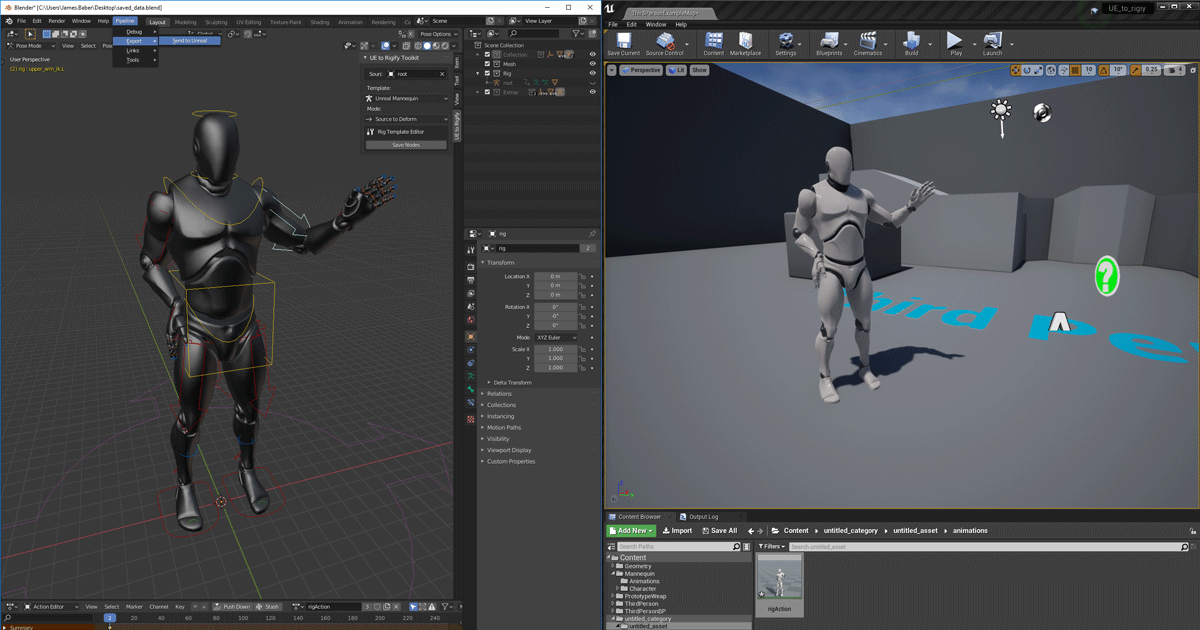
Unreal Engine
We’ve released two new, free addons that greatly streamline the workflow between Blender and Unreal Engine.
clear tapir
plush yew
its best to make a C++ project and add blueprints in there, but it can go both w...
Oh ok. Any particular reason for this?
plush yew
well if you make a C++ project first you wont have any errors and less issues when making blueprints as well, but in a blueprints project you will need to make the C++ folder in order to do that you need to make a C++ class but theres going to be some errors such as header and module problems, it is a little confusing to be honest
obtuse path
obtuse path
Hey all - one of my coworkers is having a crash when attempting to open the engi...
For anyone who gets this issue - changing Nvidia from Game Ready drivers to Studio drivers apparently fixed the issue
unique kraken
@proud narwhal bcs thats not what that add on does
proud narwhal
so it for exporting from blender to UE only? not the other way around?
unique kraken
exactly, beside characters but for that you need ue4... tools or so...? wich comes with blender to ue4
but u still need to manually set up retargeting nodes
 midnight bolt
is there an easy way to add global uv world aligned tiling to bridge master material for megascans?
plush yew
narrow plaza
are they complex meshes like trees or simple structures. Have a look in Build Me...
?
i also tried deleting saved folder but it still stuck at 0%
 oblique tangle
Bit random, but how would one go about replicating this? Player is contrained to the pole spinning in a direction with the velocity/momentum taken into consideration with the speed of the spinning and being launched off. Any response would be greatly appreciated
narrow plaza
plush yew
?
is this your first project or first build? It can take a surprising amount of time. You have your project on a local SSD drive and not on a network share?
plush yew
narrow plaza
is this your first project or first build? It can take a surprising amount of ti...
nah it's not my first project but could like the 3rd time i do light building in years
also my project is on an SSD nvme
can deleting the llightmass volume help?
narrow plaza
plush yew
can deleting the llightmass volume help?
I am no expert on lighting, and have stuffed up my map many times playing around with settings while learning - so not sure about the lightmass [though if you delete it I am pretty sure lighting will rebuild].
I find now it is best to build early and build often (at least once a day)
 rough knoll
I have a cliff lining a river which is made of ~100-200 individual cliff meshes. Would combining all of these meshes into one mesh save performance?
 spare latch
hi 0/ im new to unreal and wondering if i should learn Cascade or Niagara first ? Ive heard that Niagara is the better of the two but more complex
fierce tulip
@spare latch cascade will be phased out at some point, i'd suggest niagara
(doing the same atm, after 7 or so years of cascade)
spare latch
fierce tulip
<@!217661200165634048> cascade will be phased out at some point, i'd suggest nia...
Cool thanks 😃
 remote bloom
can anyone help me out, im trying to run UE and it basically instantly crashes as soon as I load it up and start making a folder
is the error i get
wary wave
if you don't install debugging symbols, your crashes are meaningless
but at a guess, you have Dx12 and raytracing enabled, and your machine doesn't support one, or both of them
remote bloom
wary wave
but at a guess, you have Dx12 and raytracing enabled, and your machine doesn't s...
This was sort of my initial suspicion
wary wave
it was the best guess I could give from the stack - you should really install the debugging symbols
remote bloom
to switch from dx12 to another version is that within the project settings?
or is it just the inherant dx my windows has
honestly its totally baffling as I also have a machine with a 3090 and I get the exact same crashes
 next badger
@remote bloom it's a driver issue crash
remote bloom
Ah gpu driver, interesting. Is there anywhere that lists what drivrs are compatible with unreal or is it a guessing game?
next badger
@remote bloom it's not ue4 related issue
remote bloom
hmmm UE4 is the only thing that instacrashes on my machine which runs programs like maya and substance fine.
even mari, which is almost purely gpu based
next badger
but all of those are not game engines...
they barely scrape the usage of GPU
nvwgf2umx driver is a common issue, GIYF
remote bloom
Yeah Mari runs almost purely on the gpu, its a film/tv 3d painting application and I have no issues with it. It runs 100's of 2k to 32k textures but still i have no issue. I can try rolling drivers back for UE4 but its just baffling im getting the instacrashes on 2 seperate machines with 2 different gpu's
fierce tulip
some people seem to have better luck with the nvidia studio ready drivers
next badger
@fierce tulip i only use studio ones
fierce tulip
i cant, because then i cant use all 4 of my monitors for some reason
remote bloom
hmm interesting
I will try studio drivers, thanks for the help folks. Does Unreal have a list somewhere of supported drivers for cards versions?
cos all i can find is people posting questions on like loads of different forums
next badger
any DX11-12 compatible gpu
fierce tulip
^, though nvidia drivers can be a bit fiddly with some dx12/raytracing stuff from what ive been reading
next badger
ifaik raytracing still marked as beta in ue4
remote bloom
Yeah it really took the wind out of my sails when I got 3090, loaded up unreal and it instantly crashed T_T
next badger
all 3000 series are well supported
remote bloom
Yeah id have thought so, i tried uninstalling UE 3 times but still kept getting the crashes
next badger
the issue caused by drivers, corrupted. improperly installed, faulty etc
remote bloom
Thanks, I will keep trying different driver combos until i find 1 that works
rough knoll
rough knoll
I have a cliff lining a river which is made of ~100-200 individual cliff meshes....
still looking for an answer on this question.
clear tapir
Do you guys think I should go through the blood and sweat of learning c++ for unreal
or should I just use blueprints
clear tapir
rough knoll
still looking for an answer on this question.
General tips and tricks for optimizing content and level design.
Unreal Engine Forums
For discussions about Materials, Textures, Lighting, Particle Systems, and Post Process Effects.
Very large amount of resources
plush yew
clear tapir
Do you guys think I should go through the blood and sweat of learning c++ for un...
C++ is basically blueprints just a little different, it is a little harder but get WAY easier after about a week of learning it, it is again basically blueprints but, theres no wrong choice you can always learn C++ later
plush yew
yeah, most of them use a whole different engine to
 runic fern
Hello guys
If anyone working with Playfab how can i get the server BuildId and The SessionId im using custom servers
 midnight gate
hey ugh im trying to play some niagra particles its a simple explosion and i guess spawning it or activating it does not work/
this doesnt fire cause i have controls disabled
 vernal tinsel
I am working on a bridge using the spline component, but my mesh is getting stretched in, at the start of the mesh, and it stretches out in the middle
plush yew
2 hours and still building lighting: 0%
midnight gate
how do i set niagra material in runtime?
 past stag
Is there anything i can do to fix that?
remote bloom
@next badger @fierce tulip For anyone having same issue, I had to roll back all the way to 452.06 driver version to have it working!
thank you for the help
 quiet raft
hi i want "preview" text on objects gone, i understand its from unbaked lightmap, i dont plan to use lightmaps
next badger
@quiet raft open the world settings tab find the lightmap there and disable it
quiet raft
disabled, trying to rebuild lighting as instructed and nothing happens
plush yew
clear tapir
Somethings wrong
how can i find out what's wrong
next badger
@quiet raft you have no static lights?
clear tapir
quiet raft
i have no idea its the default scene
clear tapir
Unreal Engine Forums
For discussions about Materials, Textures, Lighting, Particle Systems, and Post Process Effects.
next badger
@quiet raft yep it has
quiet raft
so lightmaps are gone, but the preview is still showing up
whatever ill deal with this later
i remember it was an issue years ago it still is apparently
fierce tulip
@remote bloom phew, glad you got it working
quiet raft
next badger
@quiet raft that is not an answer if you're going to use fully dynamic lighting
quiet raft
what do you mean?
plush yew
which are faster between movable and static lights?
why that would be me? 😆 im busy coding my mmorpg
plush yew
plush yew
which are faster between movable and static lights?
i mean in order to reduce building lights time
quiet raft
i assume movable wont be baked
plush yew
so if i set every light to movable then the light building should be shorter?
quiet raft
found this
next badger
@quiet raft it's like "Low Gas" lamp, you just turned one off.
Static lighting is way more performant. Dynamic shadows will kill most of the GPUs at some point.
quiet raft
@next badger i know, thanks
next badger
@quiet raft yep, that is whole project setting, World tab is per level
quiet raft
however despite both flags disabled
plush yew
next badger
this checkbox also reduces shader compilation time
it also reduces light building time?
next badger
@plush yew of course...if it's disabled there is no lighting
@quiet raft you need to rebuild one to reset the lightmaps
quiet raft
as i said before already cleared the lightmaps
 chilly sun
hey bois n girls..
export quickie- do I place all these in center of scene before exporting; do I put their origins at world center before exporting; do I keep as it is and Im fine?
(clock and 2 hands separate geometries so I can make a working watch)
ayyy noo make it smaller LUL sry kinda big pic
Im not sure if changing origins / positions before export will affect how easy they are to work with once imported
quiet raft
typically you want every 3d object's pivot to be in zero on export
also aligned consistently
i.e. your arrows should point in the same direction
but it also depends on your software/exporter/format
yes
first thing i did
so that one, the in project settings, finally r.AllowStaticLighting 0 in console
and now the project refuses to load
shaders right
plush yew
it's stucked on caching irradiance photons, any solution?
 worldly stump
massive bot like mount and blade
where u have like 999 bots on the map fighting each other
quiet raft
can this button be clicked in such a way that does "one click open bp editor"
i tried all variations, lmb,rmb,mmb, with all mod keys
next badger
@quiet raft CTRL+E
plush yew
Guys do I need to use delta time for inputevents?
quiet raft
@next badger thank you
grim ore
@plush yew you shouldn't need to unless there is a reason why you need your input to be consistent across time
 clever vault
hey guys hear me out
what if i take all this rocks and make them low poly using an ai

Unreal Engine
Moody and unique, this set of ultra-realistic assets represent the most intricately-detailed scans added to the library. From stark cliffs to rich flora, discover the iconic landscape of Iceland.
plush yew
OMFG its Mathew! I meant input axis event, does ue4 read every deltatime or it is raw input?
clever vault
will it be worth or garbage?
median hound
worth
 meager frigate
when i first started messing around with unreal I was able to make the lines that represent the collisions thicker, but now I cant figure out how to do it for the life of me. I could have swore it was an option in its details, anyone know what I'm talking about?
could have swore it was near where you change its color
grim ore
@plush yew also if you test by adjusting the tick of the actor that is taking input you will find that it just runs every frame as long as frames are running
so yes its every delta time if you mean every frame tick
 spare osprey
Story based games have multiple switching of environments like some gameplay in a certain environment and then according to story flow, we might be moving to another environment. Do they create those environments in different levels or there's another work around for that?
quiet raft
are there TAA settings anywhere?
grim ore
@spare osprey define environment? same world but snow, sun, fog, etc? you can adjust the colors and materials to do that. Different world such as large mountains then sweeping plains? different levels or one large landmass
 rotund jacinth
Has anyone here seen a bug on release builds where occasionally a level will not load indirect lighting+ Reflections? Rebooting the game always fixes it. We have had this reported intermittently through multiple unreal engine builds. I have seen it on my machine in builds (but never in the editor or PIE) and its probably something like a 1/1000 chance to occur.
spare osprey
grim ore
<@!676091112414380083> define environment? same world but snow, sun, fog, etc?...
Have you played life is strange?
grim ore
nope
spare osprey
Hmm then let me explain
Like lets say, we are making a story based game. Game starts with player in the kind of house exterior environment, you have some gameplay and cinematics there. and then when you are done with it, your scene switches to police station environment. And so on this kind of flow according to story. Are they all in separate levels? Or it could even be a night environment with completely different lighting from previous environment we were playing in. Hope you understand
grim ore
you could do either, chances are they would be separate levels
there are also lighting scenarios you can swap in and out if you want the same "location" to have different lighting
so house is one level with day and night lighting, then park is another level with day lighting, then school is another level with night lighting, etc.
spare osprey
So if I need 20 different kind of environments in story, I will be making 20 different levels?
grim ore
putting each environment or "location" for your project in it's own map/level lets you adjust the mood uniquely without worry about affecting something else
for something like that yep, just like a movie you might have multiple sets for each scene
spare osprey
Alright if you think that's the best way
fierce tulip
@clever vault you can already download lower poly (lower lods) from those quixel meshes.
quiet raft
crashed unreal, nice. im seeking alternatives to unity hdrp, and unreal crashes on me with exactly the same oom due to some internal rendering error
the irony
grim ore
not saying its the best way, every project might have a different work flow, but for what you are asking that seems to be normal
spare osprey
One more question, let's say I have menu of of my game, I wanna show a live background like render a complete scene behind it, then when player moves to episodes menu, it shows a live preview of environment on hover events of each episode's button, what should I do about it? Create their videos ? Or render actual scenes ? If actual scenes then how in that case
grim ore
either one works depending on your goal. you can easily load and unload maps in real time so you could just make small scenes that you load in the background of your menu if you want
spare osprey
Won't it be transfering me to a new scene of that environment?
quiet raft
you take a camera, you render its output into a rendertexture, you slap that texture on ui element
grim ore
you can stream in and out levels anytime you want. Your main menu would be in one level with nothing in the background, then you can stream in your park or house or whatever in the background for visuals
it doesnt need to be a full complete working level just the models and such to visually represent what you want
spare osprey
Right gotcha. So for that I might be needing realtime lighting or it can be done with baked too?
 fallen flower
Just tried out quixel for the first time, and my Bronze looks more like pale pink plastic.
grim ore
@spare osprey either one works, baked puts it into the level/map so it would load in that lighting with it
spare osprey
But might be performance costly as compared to pre rendered videos on ui. Thanks for help. I will see what fits my requirements
plush yew
please please i'm crying my lighting is still stuck at 0% can someone help me
spare osprey
Don't panic. Keep calm :v
past stag
Any cpp text tutorial (for unreal engine) for beginner? i know c++ so no need for that.
spare osprey
if your scene has lot of stuff to build lighting for then wait, in my case it stays on 0 for some time
plush yew
spare osprey
if your scene has lot of stuff to build lighting for then wait, in my case it st...
I've been waiting for 5135 seconds
wary wave
do you have a lightmass importance volume encompassing your scene?
plush yew
and it is still stuck here
plush yew
wary wave
do you have a lightmass importance volume encompassing your scene?
yes
i have 11 lightmass importance volume
spare osprey
grim ore
<@!676091112414380083> either one works, baked puts it into the level/map so it ...
Just realized I was watching your video on level streaming XDD
wary wave
usually you only need one really
grim ore
is your task manager showing stuff is going on? if so wait longer
wary wave
in any case if it's taking a huge amount of time, it could be a lot of things, scene complexity, number of light sources etc
you may have set the number of bounces really high
grim ore
theres only 4 things going on there so your machine might not be very strong or your dev settings are not updated for your cpu to use all cores/threads
plush yew
grim ore
is your task manager showing stuff is going on? if so wait longer
yes but it will take years if it continues at this speed
plush yew
wary wave
in any case if it's taking a huge amount of time, it could be a lot of things, s...
and how can i see what is causing this delay in building light?
grim ore
what is your CPU on that machine?
plush yew
grim ore
what is your CPU on that machine?
i have an i7-7700k
it's on 91% usage
also my project & ue4 are on an ssd nvme
here a screenshot from my task manager
wary wave
try running a build in preview / low settings and see how long it takes
max quality build will take a very long time
grim ore
enabled dev settings
wary wave
we use a server farm for those and it's still an overnight process
plush yew
wary wave
try running a build in preview / low settings and see how long it takes
that's what i'm actually doing
plush yew
grim ore
enabled dev settings
okay
grim ore
and make sure your processor count is set to 7 or 8
you have an 8 thread machine, it should show 7 or 8 lines
wary wave
I mean it's already using 6 threads, so processor count is probably good
you don't want it to use all threads because it'll lock the machine 😄
grim ore
oh blah I thought that was 4 lol
plush yew
grim ore
and make sure your processor count is set to 7 or 8
it was at 6
grim ore
too much orange lol but yeah 6 threads is gonna take a while
wary wave
honestly, I suspect the problem is the scene then
grim ore
but like ambershee mentioned this is just a raw power versus settings thing
wary wave
how big is it? what's in it? how many lights, etc
grim ore
you dont have enough power for what you want to do ^^
wary wave
how many bounces in the lighting settings? how high res are the lightmaps on everything?
lucid grove
heya
plush yew
wary wave
how big is it? what's in it? how many lights, etc
there are 2 directional lights, 1 skylight and 34 pointlight
lucid grove
can somebody remind me how can i retarget\reroute facial morphs?
I remember i did it sometime ago, but can rememeber how
plush yew
the scene it's kinda big
plush yew
grim ore
you dont have enough power for what you want to do ^^
any recommended cpu for this type of thing?
grim ore
fast as you can afford basically or a ton of fast ones lol
wary wave
if the scene is big, this is likely the problem unfortunately
grim ore
or uh... start making the scene more optimized for your hardware
wary wave
to put things in perspective, our maps are probably about 1.5km x 1.5km with very high detail lightmaps, but generally only one directional light and one skylight
plush yew
this is the lighting static mesh info..... idk if this could be useful
wary wave
we use two 16-core threadrippers to build lighting overnight
plush yew
wary wave
we use two 16-core threadrippers to build lighting overnight
wow.....
i should definitely change my cpu
wary wave
1.4GB of lightmaps is gonna take some time to generate haha
plush yew
wary wave
1.4GB of lightmaps is gonna take some time to generate haha
there's a way to decrease it? even a bad looking light would be okay
i mean
i don't care about the lighting
wary wave
decrease the resolution on your meshes
 solid oracle
hey guys im kinda new to unreal engine and have a doubt about level sharing
wary wave
our scene has these stats for perspective;
solid oracle
solid oracle
hey guys im kinda new to unreal engine and have a doubt about level sharing
how do i and my friends work on same level at the same time
wary wave
you don't
there is a feature in the engine that kinda allows multiplayer editing
but it is not a generally accepted workflow
instead you probably want to be using multiple streaming levels
plush yew
wary wave
decrease the resolution on your meshes
and how can i do that?
wary wave
not my field, try #graphics or #level-design for that kind of info
 latent lance
Hello guys I have a huge problem lately, i uninstalled and reinstalled 4.26 and I still have this weird bug were i can't create any c++ project
The linked file is my unreal editor error at the project creation
solid oracle
wary wave
instead you probably want to be using multiple streaming levels
u talking about this https://docs.unrealengine.com/en-US/Basics/Levels/LevelsWindow/index.html
Use the Levels window to manage your persistent level and sublevels.
wary wave
that would be it yeah
 stiff sail
is there a way for me to easily do mathematical functions without stringing tons of builtin math functions together?
wary wave
stiff sail
is there a way for me to easily do mathematical functions without stringing tons...
math expression nodes
solid oracle
so was looking for an alternative
wary wave
solid oracle
we are trying this already
should be feasible, though from what I'm aware gitlab isn't great for binaries. A lot of studios use perforce
solid oracle
wary wave
should be feasible, though from what I'm aware gitlab isn't great for binaries. ...
suggest anyother then
and if u can then could you also send me a tutorial for that
cursive coral
plush yew
and how can i do that?
Your still having issues then :(
wary wave
I suspect you shouldn't have too much difficulty finding a UE4 tutorial for Perforce
 fathom rapids
Hello everyone, I would like to import a mesh as a skeletal mesh but my problem is that since it's in 2 part, it make me 2 skeletal meshs on import, any fix?
 worn mirage
I'm attempting to save the transform and class type in a game save slot. It seems to work in that it iterates through the array without error on game load but nothing is spawned. 😦
 potent bridge
I think I'm missing something with heightmaps, it wont let me put ANY of these in
plush yew
cursive coral
Your still having issues then :(
yep i tried for the whole day to build the lighting but it has been stuck at 0%
but maybe i've just fixed
worn mirage
@fathom rapids Why not combine them before importing them?
potent bridge
Always getting this checkered texture for some reason
no matter what I put in the box
fathom rapids
worn mirage
<@!207894908063842304> Why not combine them before importing them?
I'm using a special effect on one, and if I merge it's gonna be a mess :(
worn mirage
There are several options for "combining" meshes but you could use a Physics Constraint Actor to connect them.
Other option would be merging the actors.
solid oracle
wary wave
should be feasible, though from what I'm aware gitlab isn't great for binaries. ...

In this webinar, Senior Technical Marketing Manager Daryl Obert and Technical Artist Matthew Doyle demonstrate a unique collaboration workflow in Unreal Engine.
The Multi-User Editor is a powerful tool that enables multiple artists to make changes simultaneously to the same Unreal Engine project safely and reliably. Updates happen on the fly f...
wary wave
yeah, that's the multiplayer editor thingo, but that's really uncommon
fathom rapids
worn mirage
There are several options for "combining" meshes but you could use a Physics Con...
Ok thanks, I'm gonna see what I can do
wary wave
I've never heard of a serious project actually using it
solid oracle
i tried using it but it made my internet slow
and because it helps me in doing realtime changes with my teammate watching it
stiff sail
wary wave
math expression nodes
thats nice. but i cant use negative numbers. y=-x^2+180
solid oracle
it could make ones work easier
cursive coral
plush yew
but maybe i've just fixed
Has it fixed it?
plush yew
cursive coral
Has it fixed it?
yay
my lightmap value was 1024 instead of 4 for each static mesh
cursive coral
has that improved the build time now?
 vale silo
4.26.1 - when?!
plush yew
cursive coral
have you attempted saving
yep it's working perfectly
cursive coral
we got there in the end, it just took a lot of guesses
that the only thing with game developments
theres always another problem
like I may have sorted my water issue out by starting the whole thing over, but there will be something else eventually show up
pleased you sorted it
inland aurora
it works, but I feel like the center moves?
is this the person we do not speak of its name
. . . . ?
fierce tulip
anything can be unsafe to work with if you dont know what you are doing, this also includes blueprints as much as it includes cpp
also, there is no unrealscript for ue4, at least not that i know of. and its cpp portion is kinda different than regular cpp.
but if you are just getting started and have some general coding knowledge, try blueprints, and take it from there.
 digital anchor
lol
fierce tulip
his problem tbh, and its far from unsafe
digital anchor
i think hes telling you he dont wanna work for you
grim ore
it sounds like you need a better programmer
and by that I mean one willing to work for and with you
if its his job to do the programming in UE4 for you, and he refuses to do it then it's him
Blueprints are part of Unreal Engine, you will be unable to avoid them even if programming the majority of the game in C++. if he refuses to use them then you will have problems using UE
inland aurora
so why are you forcing him to change engines?
grim ore
Blueprints are blueprints. they re visual coding using graphs and other types of tools
even if he avoids stuff like making systems in blueprints you still have systems such as the UI and animation that use blueprints
anyone can use blueprints
anyone can use anything it just takes time to learn. If he has experience in other language blueprints will be easy to pick up as it's standard OOP just with a visual flair
as for the idea C++ is unsafe... well.... that's a weird way to put it
 obsidian nimbus
also they are c++ 😛
 ornate forge
I don't think safety matters for games that much... unless it's a multiplayer game maybe
obsidian nimbus
im not sure what part he means is unsafe
grim ore
he might just be used to the way C# works with unity and does not want to adapt to a new engine
digital anchor
hes not wrong but its the way it is ¯_(ツ)_/¯
grim ore
so its definitely not him... not at all
stiff sail
sounds like a bitch
ornate forge
Is there an approximate release date for Unreal 5 yet?
grim ore
preview early this year, release later this year
both subject to the world exploding changing these times
he can come here and ask the dumb questions
ornate forge
I wonder if Unreal 5 will be friendlier to custom scripting languages, like UnrealCLR and SkookumScript
grim ore
welp theres not much you can do to make him use it, but like anything there are good and bad parts and good and bad ways to use it. Any programming language can be bad
 chrome swallow
May I ask a dumb question a sec?
grim ore
UE5 has nothing planned for any new or custom scripting languages but who knows. Verse is planned for the fortnite stuff but its reaaaaaaally high level scripting
@chrome swallow you can always ask
chrome swallow
When I add a Directional Light to my project, my FPS will drop by half if not more? Say from 30 fps down to 10 fps. Will go back up to 30 when I remove it. Any idea how to fix it?
ornate forge
grim ore
UE5 has nothing planned for any new or custom scripting languages but who knows....
So Verse isn't intended for making games from scratch?
grim ore
@chrome swallow disable shadows on the directional light,or turn the light into static lighting and build lighting. My guess would be the dynamic shadows are causing your issue
@ornate forge no one really knows for sure, just what they showed us, but all they showed us was a preview for the fortnite editor and it being used at a super high level to "script" some game modes
chrome swallow
That brings another question. When I do that and try to rebuild, the swarm will quite with no error in log
after exporting lighting
grim ore
does it give a failed message or just finish quickly?
chrome swallow
Nothing noted after the shut down
ornate forge
So many questions, can't wait to tinker with Unreal 5
grim ore
you might not have any static lighting to build then
chrome swallow
finishes quick as in never begins the lighting process
Hmm, interesting. Thanks for your time
grim ore
check to see if your lights are set to movable or stationary/static and go from there
ornate forge
Are there any rumors about ECS in Unreal 5?
grim ore
yep movable is dynamic lighting, so nothing will build for that its all realtime
chrome swallow
ANy how, thanks for some tips on what to look for. Most appreciated.
obsidian nimbus
there is some ECS stuff in sequencer right now
chrome swallow
I do have some braziers and torches that are set for static but this is where the issue is. My landscape works fine, just not the building map
Err, building as in my castle that is on a different map than the landscape
vale silo
the way things have been going, I don't really care for UE5 at this point. I just want to get 4.26.1+ and 4.27.x in 2021 with those VR issues fixed!
lucid grove
Can somebody help me with face morph remap? I have face animation i made with facelink sometimes ago, but i changed my head model to another one with almost some face morphs, but different names.
So now instead of this
I got this
Im almost sure there is some remap option inside animation bleprint
But cant remember where
 hot vessel
hi - is it safe to assume that the fiollowing line near the end of a crash log, is telling me that i dont have enough RAM to bake my lighting?
[2021.01.12-17.32.20:782][812]LogMemory: Warning: Freeing 33554432 bytes from backup pool to handle out of memory.
and then it shows an overview of the different pools, before ending the log
 clear delta
how do i make a Widget Component be visible through objects?
right now it is clipping through
inland aurora
Ah boys, I cleaned it up, its so beautiful
 distant jewel
For persistent variables do you have to create them in the level blueprint or ?
potent bridge
So this comes up when I try to build lighting, would anyone have any idea as to why this happens?
nevermind, a project reload fixed it
grim ore
@clear delta you would have to adjust the material so it draws over everything if it's clipping, or switch to screen space which draws over everything
@distant jewel what do you mean by persistent variables? what do they persist thru
distant jewel
Just so they are available to access on every blueprint
I want to set up a variable that indicates what is going on with the game. Like is it pre-event, during-event, post-event
grim ore
well that wont work since nothing can get access to the level blueprint
chances are the game mode is what you want to use
distant jewel
Game mode! Ok looking into that now!
clear delta
So basically I would need to set the texture through Dynamic Material Texture?
and use the brush?
hot vessel
potent bridge
So this comes up when I try to build lighting, would anyone have any idea as to ...
I could be wrong, but i read it as your UV lightmap not containing the same mesh as the mesh it is connected to, if that makes sense
potent bridge
@hot vessel It's fixed anyway, but that may be it
past stag
Is there a way to reset enabled plugins to default?
fierce tulip
remove them from the uproject is one way
past stag
okay. Thanks 🙂
Is there some text based Unreal c++ tutorial?
Because i would need to learn unreal engine c++, i already know basic c++.
 delicate mica
Hello! I have a burning dilemma.
I am trying to export a simple UE4 game to HTML5, then render it somehow in a front end js framework like angular or react. Has anyone ever done anything like this?
I tried all day today to insert the html into a react component. Since the game relies on outside scripts I wasn’t able to get the scripts running in conjunction with the inserted html in the react component.
Any perspective I’d appreciate.
grim ore
@past stag there are various C++ tutorials on the offical docs page
 light thunder
didn't they switch out apex for the chaos in 4.26?
past stag
yeah, i think yes
 tardy stump
Hey, a question: Which one is faster when I don't care about array indexes? TArray::RemoveAll or TArray::RemoveAllSwap ?
 nimble warren
Because it was laggy now there’s a Separate version with chaos 
past stag
I am not sure what project to start. I have an idea on my mind, but its pretty big
 modest trench
Try making something smaller first?
 past stag
does unreal engine have IK?
inland aurora
yes
inland aurora
what do you mean
past stag
like in Unity, so you can rotate bones so your characters head is facing towards object
inland aurora
do you mean Inverse Kinematic systems
past stag
yeah
inland aurora
yes it does
past stag
Thanks 🙂
inland aurora
If you wanna see some animation tips and tricks go check out locomotion system in marketplace
It's a nice way to see how animation system works in ue4 and what you can do with it
past stag
Okay.
inland aurora
Advanced Locomotion System V4
past stag
Are all of those Unreal Engine default enabled plugins necessary/useful)?
past stag
because i dont know what some of them does, so then i dont know what to disable
there are clear ones like for apple, but some are that i dont know what they do
is there some list somewhere where is all default plugins and what they do?
inland aurora
I don't know, but it probably is
but maybe you focus on the wrong thing right now
Have you finished what you wanna do, and going to package your project right now and wanna get rid of unnecessary plugins?
past stag
😄 no
Do you know what to do with gamemodebase class? because i am not sure where to put those properties, because of no class inside the file
wait. it has the class in .h file
 hoary holly
Might be far fetched
But has anyone been able to compile the chaos preview with the nvidia RTXGI branch?
 tender bluff
what could be causing sparkly flickering when using ray tracing
i am so confused, i up the samples and it still happens!
cursive coral
Does anyone have any tips for level design for an open world game? Thanks
 rain crypt
One of the texture maps doesn’t tile.

As a beginner and novice, I'll explore the new Volumetric Cloud system in Unreal Engine 4.26
Timestamps:
10:33 The VolumetricCloud actor
15:22 Explore the Cloud Material Instance
19:30 Cloud Material parent and graph
Guerilla Games...
distant jewel
Dumb question, can you create a class that contains actors of varying different types (like cube, cylinder, sphere)? I want to use "Get All Actors of Class" to spawn them into my level individually.
 gray kindle
lads does anyone know why my lake fills up like that?
devout bone
Unreal take long time 2 load
cursive coral
I shall give that a go, I know the effect I want but I cant visualise it on my screen so this should help
cursive coral
gray kindle
lads does anyone know why my lake fills up like that?
Its quite funny actually because this channel is probably fed up of me asking water questions since it seems troublesome atm
Since there isnt many tutorials
But I can only think that either you havent enabled allow edit layers
Or
cursive coral
Nothing complex
They just drag it in and its instantly perfect
I always copy exact and it goes bizzare
I imagine you may have to increase water depth?
Does anyone know why my water doesnt change colour either?
I change all the colours of the material but the water remains dark blue?
 deft haven
Does it take a lot of hours to learn unreal engine c++ and make games only with c++ if you already know all the essential parts of c++ likes classes arrays object oriented programming etc?
cursive coral
cursive coral
gray kindle
yeah every tutorial i see is a guy making basic river
^ie😂
gray kindle
i tried a lot of things, none works. when i change the water depth it "leaks" but still doesnt do anything
seems like its broken tbh
cursive coral
gray kindle
i tried a lot of things, none works. when i change the water depth it "leaks" bu...
Non of my settings do anything for water
I think it is just broke beyond repair at this point
The only thing I can think it change the boundary slightly
Yep, I am leaving my water as it is till they add stuff, at the moment I am just using it to help me not put buildings in my ocean😂
distant jewel
Nvmd Got it!
gray kindle
thats what happens when i change height 😄
i mean... yeah it is, but that was one of the key advertised features of 4.26
plush yew
so when I package and zip my project then unzip the files again, and open the uproject up, everything goes missing
does anyone know how to fix that?
gray kindle
i will just make a plane with a water material, will be easier
cursive coral
gray kindle
i will just make a plane with a water material, will be easier
I just want a tropical beach with water
plush yew
like it saves the content, config, and uproject but when I open the project nothing comes up
devout bone
Unreal Engine won't start when I click launch
cursive coral
But I get an ocean that looks like it belongs on titan😂
plush yew
broooooo wtf
plush yew
this is actually so fucked
cursive coral
devout bone
Unreal Engine won't start when I click launch
You running it off an external hard drive
devout bone
No
cursive coral
gray kindle
do u need to change colour?
Yeah, I have changed material colour but nothings changing
gray kindle
Thanks! i will check that out now
devout bone
On an internal hard drive
cursive coral
devout bone
No
Do you have multiple harddrives? Ie:ssd and hdd
devout bone
No
gray kindle
cursive coral
Yeah, I have changed material colour but nothings changing
i actually managed to change it before, let me see how i did it
cursive coral
gray kindle
i actually managed to change it before, let me see how i did it
I follow the tutorial but nothing changes, give it a go anyway and let me know.
cursive coral
devout bone
I only have a laptop
Im on a laptop dw
Its a gaming laptop
But its still a laptop
devout bone
When I click launch nothing happens
plush yew
is there currently a bug in UE where I can't package zip up my game
cursive coral
plush yew
**is there currently a bug in UE where I can't package zip up my game**
Not sure, I haven't got anywhere near that stage yet sorry
cursive coral
devout bone
When I click launch nothing happens
Have you tried right clicking and choosing rum
Run
plush yew
bro this is so cancerous there is literally no reason why it shouldnt work
gray kindle
cursive coral
I follow the tutorial but nothing changes, give it a go anyway and let me know.
are u changing absorption?
gray kindle
i changed mine and it worked
cursive coral
gray kindle
i changed mine and it worked
Ive even tried in new projects
devout bone
cursive coral
Have you tried right clicking and choosing rum
Right click wat
gray kindle
maybe u messed up the master material for good xd
cursive coral
Does it save changes on the plugin not on the project?
cursive coral
devout bone
Right click wat
Unreals desktop icon
cursive coral
gray kindle
maybe u messed up the master material for good xd
I think I probably have😂
I ended up with pitch black water at one point
cursive coral
Thats unusual, what does a google search on the error code display?
grim ore
thats pretty common if you are installing it and dont pay attention to the pre req popup
just have to close it all down and try again
 thorn island
greetings
thorn island
Any major differences between 4.20.x and 4.26
distant jewel
I've set up a 4 actors in a class and I'm trying to loop through and spawn each one but I'm not getting anything to happen
I'm assuming it's due to my Get All Actors Of Class
but not sure why...
Wait, I'm not doing anything once I call them. Double wait, I don't have any in the world. I'm trying to bring them in. I'm going to think about this some more.
 nova kernel
quick question,
Is it worth building with "World Composition" for large maps, or will it be abandoned with the new UE5?
And are there any updates on any releases for UE5? or still no?
I dont want to use World Composition if it will be not worth it, though dont want to delay our project in development for something that might be updated in several months by now,
Suggestions? Ideas? info?
thorn island
What do you mean
narrow plaza
distant jewel
You need to pass the array from GetAll Actors of class into your For loop - or add them to the ShuffleArray - at the moment you wont get anything unless ShuffleArray is prepopulated with something
plush yew
@viscid tusk this is like asking people why your computer is blue screening
Is it frequent? Does it occur when you open a particular level/run any particular process? Try and single out the issue.
 viscid tusk
plush yew
<@584040104021196802> this is like asking people why your computer is blue scree...
viscid tusk
plush yew
<@584040104021196802> this is like asking people why your computer is blue scree...
it happens when i try to run pavlov. I think it might be confused because i recently upgraded my ram from 8 to 16.
it happens every time i try to run the game.
distant jewel
@narrow plaza Thanks duncan.
I think I made a mistake making when I added my Actors to a parent class I created. I have these cubes I'm using as placeholders that are different textures so I can tell them apart. They are labeled "Actor_A". "Actor_B" up to D. I put them all in a parent class and when I went to add them their names weren't there BUT "Actor_A_C" "Actor_B_C" etc etc was.
plush yew
sounds like something to do with this pavlov thing then. Idk I have never used it or know what it is
 arctic horizon
pavlov is a game. This is probably the wrong server to ask about issues with specific games.
distant jewel
I'm using cubes as placeholders, each has their own actor BP, and I changed there class to all be something new I named Actor Array BP
Does anyone know why _C might have been added to their names generating an array of them?
Oh wait is that added automatically because its a class ?


 gloomy gull
wow
 proper perch
Struggling with learning how to properly UV wrap in blender and be able to export mesh as fbx and import into UE4 without tangent/binormal errors. Anyone able to point me in the right direction?
plush yew
i hate blender with a flying spoon
but god do i love unreal engine
i wish i could skip past all of the blender stuff and just make the game D:
dim arch
you could use premade assets
plush yew
but than it wont be how i imagine it in my brain D:
i wish to make the sexy'est fighter ever
with a hint of pokemon U:
and sum yugimans too because wynaut
 gilded plinth
hmm, dunno why this basic Q never occurred to me. Is there a way to set the game instance from a BP? Maybe in a construction script? Or does the game instance spawn before any of that?
i'm iterating on a few maps and they use different game instances. it's painful going into project settings to change every level
dim arch
the game instance class is set in project settings
dim arch
you cant change it while the game is running
gilded plinth
it's can you set it elsewhere?
Roger, but is there maybe an editor hack or something to tie a game instance to a level?
so that once i hit play it uses x game instance
dim arch
so, you want to make an editor only script which checks which level you are launching into, and set the game instance accordingly?
gilded plinth
yup
that'd do it!
something of that sort
it's just for iterating because we're kinda building two games in one project right now
eventually we'll migrate out the second game
but right now we can't
dim arch
well, you could make a script to do that possibly, or just use the game instance that way it was intended
gilded plinth
how am i not using it the way it is intended?