#ue4-general
1 messages · Page 912 of 1
 edgy latch
 sleek spear
in unreal can i ignore an objects uv coordinates and map textures with global planar or cubic mapping or something?
 worn granite
@hasty gorge dynamic_cast, of sorts
 hasty gorge
worn granite
<@206953000135032842> dynamic_cast, of sorts
hasty gorge
worn granite
<@206953000135032842> dynamic_cast, of sorts
what does that mean in this case?
worn granite
you asked what Cast does
worn granite
in short, take an initialized object and if it is of the right type, give a typecast pointer
since C++ and BP are statically typed, one must refer to an object by the proper type as opposed to dynamically typed languages where you can attempt to use any function or property without the objects type
hasty gorge
UCardsSingleton* DataInstance = Cast<UCardsSingleton>(GEngine->GameSingleton);
So in this case, if GameSingleton and UCardsSingleton are of the same type, then DataInstance will return a pointer?
 hollow sentinel
anyone knows how can i make the animation start at frame 11, instead of frame 1?
worn granite
hasty gorge
`UCardsSingleton* DataInstance = Cast<UCardsSingleton>(GEngine->GameSingleton);`...
no
I mean, not with the strictest definitions of those words
hasty gorge
sry I was trying to find a simplified version of what this line does
if that's not it, then I still dont get it
worn granite
GameSingleton is an object. If it is a UCardsSingleton, then DataInstance will be valid
DataInstance doesn't return anything, Cast does
DataInstance could be said to contain the returned value
hasty gorge
how do you change GameSingleton to be a UCardsSingleton (or any type you want)?
worn granite
DataInstance and GameSingleton here are actually referencing the same object
worn granite
hasty gorge
how do you change GameSingleton to be a UCardsSingleton (or any type you want)?
you don't
casting does not alter the underlying object
 plush yew
I need help from a pause menu level.
Set inputmode UI only (execute)-> cast to GameIsPaused (object)-> (none) //An error
worn granite
Okay let me see if I can give a metaphor
You find yourself in a garage next to a vehicle of some sort. It's covered with a tarp. You designate the vehicle as AVehicle* TheGarageCar:.
You cannot quite make out what sort it is. You only care to know if it is a pickup or a coupe.
APickup* GaragePickup = Cast<APickup>(TheGarageCar);
ACoupe* GarageCoupe = Cast<ACoup>(TheGarageCar);
When you lift the tarp, you discover it indeed is a coupe.
GaragePickup will be null, but GarageCoupe refers of course to the original vehicle. Because your mental model has been updated, you know that you can get into the back seat directly from outside, but should not tow anything.
plush yew
How do I add voicelines?
worn granite
The metaphor breaks down because you know TheGarageCar is certainly NOT a pickup, and is in fact a coupe... but in programming you cannot use that pointer to treat TheGarageCar as if it were a coupe.
You have to specifically refer to it with GarageCoupe.
hasty gorge
but for GameSingleton specifically, it's only said to be some UObject that is made when the game initializes
worn granite
Both monikers refer to the same entity. Removing the tarp (or casting) do not cause the vehicle to change type. It was never a pickup
hasty gorge
how would it ever be anything but a UObject?
worn granite
It can be a derivative to UObject
hasty gorge
isn't almost anything a derivative of it?
plush yew
for a stair model do i have to make custom collisions for it? or is there something within the engine i can use
worn granite
much like a pickup is a specific type of vehicle.
hasty gorge
in that case, why would the person who coded this bother keeping the Cast function there?
worn granite
They are not changing the core engine
Garages store vehicles. When you decide to park a sports car in one, do you tear apart the garage to have it specifically house a sports car?
plush yew
How do I add voicelines with subtitles or just a text
worn granite
So here, you wouldn't expect the engine to give you a pointer which refers to objects by their game module type
 subtle sage
Hey does UE4 Shader Compilation time/performance depend most heavily on core/thread count? (I assume?)
plush yew
Really I need voicelines with subtitles or a text for the beginning of the game
worn granite
I couldn't tell, really
plush yew
worn granite
I couldn't tell, really
Who? Me?
subtle sage
is a 9900k a worthy contender for acceptable performance?
Yeah, well, wasn't sure if there was a bottleneck somewhere else as well, EG: GPU
(Not that it would be relevant with a 3080)
subtle sage
My 8600k takes aeons to compile 500 shaders which is pretty much every time i do anything xD
worn granite
@hasty gorge do you understand what is going on with that example?
subtle sage
worn granite
I'm sure <#221799195806400512> will know specifically
Alrighty
plush yew
Guys how do I make my project -> template from the marketplace?
 terse jewel
I grabbed a package, Ultra Dynamic Sky, from the marketplace, and it works great. But others seem to get an error when loading the project now. I can't replicate it on my machine. The error is: Fatal error: [File:D:/Build/++UE4/Sync/Engine/Source/Runtime/CoreUObject/Private/UObject/LinkerLoad.cpp] [Line: 4148] K2Node_CustomEvent /Game/UltraDynamicSky/Blueprints/Ultra_Dynamic_Weather.Ultra_Dynamic_Weather:EventGraph.K2Node_CustomEvent_1: Serial size mismatch: Got 2412, Expected 3106
Can anyone help debug what's going on here? I'm not expecting it to be a package specific problem but I could be wrong.
 idle stump
If I'm building a computer, what will help most for compiling shaders, etc? Does it keep scaling up with as many cores as you can give it? Right now I'm on a quad core i5, 16gb RAM, SSD and if I create a new project and create 1 shader it takes like a full minute to compile - sometimes longer.
And will more threads help or just real cores?
 celest vapor
Can switching cameras and camera fades cause issues with clicking on actors
worn granite
it shouldn't, no
if you can reproduce the issue in a project with only clicking on actors, then I would expect that to be a problem with the engine
celest vapor
I have a Pokemon type battle system in my game and I fade to black then swap cameras for combat and then do the reverse when combat ends but after combat then the player cant click on any actors that have clicked on functionality
subtle sage
Hey.. anyone know why TextureVariation doesn't seem to be working when I pass it (grass mat function) into a landscape material from a material function?
plush yew
celest vapor
I have a Pokemon type battle system in my game and I fade to black then swap cam...
Are you changing game modes when you fade in and out?
celest vapor
No, Its all in one persistent level
with sublevels loaded in for generation but thats about it
celest vapor
yeah
i'm just dumb. I was taking the normal hud widget and setting it to invisible but when combat ends it would set it to "visible" but the canvas panel apparently blocks the clicks
plush yew
Hmm, so how did ya solve that?
plush yew
plush yew
💩Noone is minding me
What did ya need mate?
celest vapor
instead of setting the hud widget to visible I set it to "Not Hit-Testable (Self Only)"
plush yew
I see.
Well I don't because I am not good with UI, but I guess I will go read what that setting does.
plush yew
plush yew
What did ya need mate?
Voice lines with subtitles, respawn system, vehicle system, what is the OWO thing from the marketplace? Lol, Models(I already have models)
AI system from the GTAV
An easteregg
thingy thingy
I can’t remember the thingy thingy
That's a lot.
celest vapor
plush yew
Well I don't because I am not good with UI, but I guess I will go read what that...
It means that when a click happens it wont give a hit result on the widget but the stuff underneath will
plush yew
celest vapor
It means that when a click happens it wont give a hit result on the widget but t...
Uhh what?
So now you cannot click your widget?
I can help you Bush Fire.
Button?
celest vapor
its okay I fixed it. xPorg
plush yew
plush yew
What part about the voice lines did ya need X?
Hmm I have the voicelines but I don’t know how to import them with subtitles
So you have voice lines and Subtitles, and wanna learn to connect them?
My game is like 50% of GTAV and 50% of Cyberpunk 2077
plush yew
plush yew
So you have voice lines and Subtitles, and wanna learn to connect them?
No im just gonna watch the tutorial.
And a streamer getting rickrolled for 24hours
👍
plush yew
plush yew
My game is like 50% of GTAV and 50% of Cyberpunk 2077
That's ambitious.
plush yew
plush yew
That's ambitious.
Plus my dad tried GTAV he liked it because he can fly 🤣
He didn’t try Cyberpunk 2077
 median hound
anyone use chaos? if so can i build it with 4.6
plush yew
just curious when making low poly models should i use textures for it or just use the material? both ways are good i just dont want to waste a lot of time
 kindred viper
low poly would be textures. you don't want to go low poly them abuse the framerate by adding extra drawcalls. But it all depends on your style
plush yew
ok thanks
 tranquil falcon
Does it make more sense to model a sidewalk as a separate mesh from the overall landscape mesh? Doesn't seem optimal to "sculpt" the side walk...Is this industry standard/best practice?
kindred viper
I'd make it a mesh. Pretty sure everyone else would too.
there would be a case for using the landscape tool to apply it though. Let's say you wanted it to blend the materials with the landscape materials. It would probably be better to be the landscape rather than some extraneous material that gets the landscape materials and does the maths
tranquil falcon
Got it. Thanks for the input. Seems to make sense to do it that way.
 fair field
This is a slightly higher-level question to make sure I'm on the right track. I'm looking to do base building in a similar way to Subnautica / NMS. In those games, you don't build "walls" - you build rooms / prefabricated rooms like corridors. When you join 2 rooms together - the connecting wall disappears and you get a larger room. In subnautica - you could connect a tube to one of these rooms, and you get a custom wall which is a mix of both types connecting the two.
From a design standpoint - I was thinking I create a Room blueprint, with its own mesh for everything except these connectable walls - then a Connection ActorComponent to represent each modular wall. When a player builds a new room, it'll have to check if it is adjacent to any walls - and if so, change the Connection ActorComponent's mesh to either be invisible, or be some custom mesh.
Does this sound reasonable?
Some thoughts: I suppose technically if you put 2 cubes together, there are actually 2 "walls" connecting, so I'd have to remove both for them to make a larger room.
 candid grove
@fair field I had a similar thing trying to make a hole in a mesh for a golf ball hole, I ended up using s sphere mask. You could probably do something similar to make it so the wall doesn't show, then use collision channels to allow passage
square mask or something
I'm trying to figure out the angle to apply an impulse. its based on the cameras location, I'm am trying to zero out the up/down rotation (Z?), this isn't working, as I look up and down the x/y rotation is changing. What am I doing wrong?
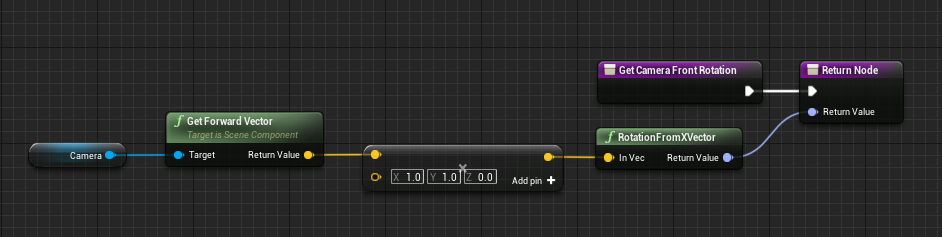
 fiery copper
I think its because the rotation from XVector can not deal with the modified vector, this works (zeroing out the unwanted rotations)
 storm vapor
How can I disappear this text ?And is this text still appear when project pakacged ?
plush yew
storm vapor
How can I disappear this text ?And is this text still appear when project pakacg...
It means the texture is streaming in a pool. Your welcome 🙂
Jk what did you do?
plush yew
storm vapor
How can I disappear this text ?And is this text still appear when project pakacg...
Did you packaged a 83.315GB texture?
hi,can anyone help me ?
i am learning a course on udemy,in that there is a skelton model female
i want a male skelton model
this is my chat with the instructor
as he told he used the unreal engine providede skelton model
it is femalle
i asked him how can i get male skelton
this is the female skelton model
i want male
where can i get it from unreal ?
can anyone can help me ?
please ?
please help
please help me sirs
please
 green prairie
Hi Guys.. Please help... Everytime I stop play in editor, these notifications pops up in the buttom right corner, and I have to click dismiss on each on of them manually to remove them.. It's driving my crazy, cause they are obscuring the details panel...
How do I turn those off?
plush yew
please help me first,then help him
i asked the help first
please help me
hi,can anyone help me ?
i am learning a course on udemy,in that there is a skelton model female
i want a male skelton model
this is my chat with the instructor
as he told he used the unreal engine providede skelton model
it is femalle
i asked him how can i get male skelton
this is the female skelton model
i want male
where can i get it from unreal ?
can anyone can help me ?
please ?
please help
AhalyaToday at 12:50
please help me sirs
please
storm vapor
plush yew
Did you packaged a 83.315GB texture?
WOW is it 83.315 GB texture ? Hell no, I didn't packaged yet. But if i packaged, 83gb texture will become packaged ?
Is it 83,315 gb texture or 83gb texture ?
But my project is 11 gb
plush yew
@green prairie its best to find out whats causing the error and try fixing it there might be something to stop showing the error on your screen but its best to try fixing it so there wont be any problems in the future
green prairie
plush yew
<@!530314384858152960> its best to find out whats causing the error and try fix...
Yes of course, but I'm a beginner, and have no idea how to fix these errors, the game works fine, and I will fix them when I get better.. The problem is, these error pop ups came with the latest update.. Not the errors, but the small pop up windows.. Normally it would just open up the message log window, which I have docked somewhere, to it was hidden.. but now these pop up, and there MUST be a way to turn them off, I have looked every where in the editor settings
 flint trench
^^ 9/10 times you needed an is valid check on the object you called
plush yew
@storm vapor it should be mb not gb but this might help what your looking for https://answers.unrealengine.com/questions/343646/texture-streaming-pool-over.html
@green prairie im not really sure to be honest but again you should look into the log
green prairie
plush yew
<@!530314384858152960> im not really sure to be honest but again you should loo...
Hmm.. I guess I HAVE to now 😦
plush yew
green prairie
Hmm.. I guess I HAVE to now 😦
its all good, you can do it theres also always the magic of google as well 🙂
green prairie
plush yew
its all good, you can do it theres also always the magic of google as well 🙂
Thanks for the pep talk 🙂
Alright... This is my main Error right now, it pops up as soon as I hit play...
"Gorm" is the player character
And I call the player in the event graph... I mean, it works fine in game.. I just get an error every time
plush yew
hmm im not use to animation BP cause i havent dont them in a while but im sure someone can help with it
what i remember tho when trying to tansition animations or whatever i just made a branch and used the "Armed" what you use to see if it was true etc
 civic otter
I'm having a really difficult time getting an image sequence to work in my media player. the output log tells me: LogWmfMedia: Error: Failed to resolve URL img://../../../../../Unreal Projects/Bunker/Content/Movies/sec_cam_overlay: The scheme of the given URL is unsupported.
I copied this question over to cinematics as well, but I could really use some help.
I've tried putting the images straight into the movies folder, no luck. I put them in a folder in the movies folder, no luck. I've tried countless things for about 3 hours now with no luck. Following the guide on the website for playing an image sequence with not a single iota of luck. Are jpgs the problem??
plush yew
Woah, just installed UE for the first time since I used the inital release years a go
It's changed so much
civic otter
Can someone tell me what I'm doing wrong please?
green prairie
plush yew
what i remember tho when trying to tansition animations or whatever i just made ...
I can't use branches in AnimBP.. So, there's that 😦
plush yew
green prairie
I can't use branches in AnimBP.. So, there's that 😦
When in your characters bp make a boolean and then in your anim bp you can use cast to (your character) then get that boolean
green prairie
plush yew
When in your characters bp make a boolean and then in your anim bp you can use c...
I found the problem... I should not cast to the character from begin play.. I should Cast from "Event Blueprint Update Animation", that solved the problem... Thanks for forcing me to look into this 🙂
plush yew
Haha your welcome, it's good to look into these things if you can never figure it out I understand how that feels INTENSE FRUSTRATION
green prairie
plush yew
Haha your welcome, it's good to look into these things if you can never figure i...
I'm basically working using the trial and error method 🙂 A very slow and frustrating way of working, but I'm learning a lot.. And actually right now, I have zero errors on my main character 🙂 So thanks again. Looked into the rest of the errors while at it... I feel like "IsValid" is solving all my errors 🙂
civic otter
I know exactly how that feels. I'm like 90% sure the problem I'm having is something silly but I've been spending like 5 hours trying to get this stupid image sequence to work lmao
 proud narwhal
how come if I make a material from fresh it will present me with the bluprint window, but if I open an existing material I just see the preview and details tab?
civic otter
You sure that's not a material instance that you're opening?
It sounds like a material instance.
proud narwhal
if its an instance how do I find the original?
civic otter
in the details tab, look for the parent material and click on the magnifying glass icon
proud narwhal
Ahh thats what parents are
civic otter
Yep, parent is the base material, you set it up once, then you can create instances where you just change certain paramaters without having to rebuild the whole material each time.
 barren vale
i will be making a start on my game and learning at the same time, i will require the help of some one that is able to help me with some server side and package details, really i will just new to chew someones ear with some questions and pointers via discord voice chat for maybe an hour or two, this will be paid work of course.
if you are able to help with package, game lunch, updates and server side things then pls contact me via DM.
if you are unable to help me with this then pls dont message me. there will be a very good chance i will require help later on at different points
proud narwhal
Is this the "correct" way for me to be making a material from a texture?
civic otter
Yes, but the texcoord input is typically redundant unless you have more than one set of coordinates in a mesh and want to specify which to use for what material/texture
civic otter
Cool, then yeah that's fine. I mean, if it looks good, it can't be wrong, right? lol
proud narwhal
😄
civic otter
Who knows how to use an image sequence?
I did it successfully once and have not been able to reproduce that luck since. I could really use a hand.
 chilly sun
^ dayum, we got called out man... 😄
civic otter
Here's someone demanding people DM him and I'm having a hard time just getting a question answered. Lmao! Good luck with that kind of attitude 😛
proud narwhal
Once I have placed a decal I am unable to select and move it
 brittle gulch
Hi guys! Is there a way to create my own vault content? I'd like to get stuff transferred from a project to another without having to migrate.
proud narwhal
civic otter
Make sure game view is off, then click on the widget, not the decal.
proud narwhal
game view is off, there is no widget to select
oh turning it on and off again makes it appear
plush yew
Hello guys, I’ve created a sleep system without a day night cycle, the problem is that during the night I don’t have a moon. Is it a bad idea to add a big sphere far in the sky with an emissive color and hide it during the day?
GUYS PLEASE HELP MEEEE !
i am asking help for a 2 hours
plush yew
plush yew
GUYS PLEASE HELP MEEEE !
Send a photo
hi,can anyone help me ?
i am learning a course on udemy,in that there is a skelton model female
i want a male skelton model

this is my chat with the instructor
as he told he used the unreal engine providede skelton model
it is femalle
i asked him how can i get male skelton
\
If you have an instructor ask to him
 wary wave
instructor literally told you where to get it
wary wave
"You can create any of the Unreal sample projects"
plush yew
wher can i get sample projects
Create new project and select a template
Go to the character and there will be the mesh
i want character like this
not the marqu
white character
I think you can’t use the mannequin skeletal mesh on a normal mesh
i want a male character,please tell me where can get it free?
wary wave
you asked for a skeleton, not for a character
plush yew
Exactly
Skeletal mesh and mesh are different things
yeah look
What
i want thes thing of a character
Meshes
There should be the skeletal mesh too
materials , meshes and textures
wher can i get that type
i want ta male character
civic otter
It's called google, or the unreal marketplace
plush yew
ok
I usually create a character on maya/blender, paint on substance and import in unreal
civic otter
There are plenty of free characters on the unreal marketplace.
civic otter
How is there nothing there??
plush yew
means a character for paid
You don’t need to search “character” they are not called like that
They have specific names
civic otter
There are hundreds of thousands of assets available, many of them for free.
plush yew
wat i want to search there
civic otter
just browse the characters section lol
plush yew
when i searched character,it show 2 only
civic otter
plush yew
Wait. You want a male version of your character but instructor told you where to get the base skeletal mesh of unreal...
plush yew
civic otter
Bruh that snow deformation is really cool
I want it
iyeah
i opened it and searched
free
then i got
Ok select the one that you prefer
this much only freee !
but there is no character the instructer used
proud narwhal
Any idea whats causing this with my decal? on the ceiling scaled to 0.1,0.1,0.1 it works fine but if I duplicate it to the wall it looks all strange
plush yew
Yea... do you expect ue4 to be completely free? If you want free stuff you need to create ur own
plush yew
proud narwhal
Any idea whats causing this with my decal? on the ceiling scaled to 0.1,0.1,0.1...
Rotate it
The second decal
The arrow is where it goes
proud narwhal
tried x,y, and z but non of them seem to work
plush yew
bro,but instructor's character is free
Bruh the arrow is pointing down...
but there ios no such type characterthere ?
proud narwhal
plush yew
Bruh the green zone is where it effects
It should be on the mesh that you want it
And the arrow is pointing up not on the wall
proud narwhal
ok so the arrow points towards the surface you want it on
plush yew
Yes
civic otter
Yeah, press E to switch to the rotate widget, and grab the handle perpendicular to the wall and rotate it 90 degrees
plush yew
can i use this character for free ?
Yes why not it’s free
means,in my game and market that game /
?
any copyright issue ?
Yes but it would be bad cuz everyone can use it
plush yew
plush yew
any copyright issue ?
No there should be no issue in ue4
ok
I suggest you to model a character on blender... then do what you prefer
Or maya
proud narwhal
got it thanks
plush yew
Np
civic otter
Anything you get from the marketplace can be used in any production. The problem is everyone can download that so you'll find it in many games. Nobody wants a game where the character they play is in a bunch of other games. @plush yew
plush yew
problem problem problem
Select 4.25
bro there is no problem if you select another version
Its just not updated
oh no !
What
wat can i do now ?
Click on 4.26 and select 4.25
i am already did a big project
in 4.26
You don’t have to copy it..
Bro listen to me
i need this in that project
Can you listen to me I’ll tell you how to fix it
ok
Click on 4.26 and select 4.25... it will update a 4.25 file in a 4.26 project (it won’t change the project)
civic otter
@plush yew Do you know about image sequences? lol
civic otter
I can't get them to work in my project for the life of me.
plush yew
civic otter
Got a sequence of images, tried jpg and png, they are in content/movies/sequencename
plush yew
civic otter
I can't get them to work in my project for the life of me.
I told you that I know them, not that I know how to use them xD that is a big problem
civic otter
Ballzack! LMAO
civic otter
@plush yew If you want help with something, add words to go with your pictures. I don't get what you're showing us here.
plush yew
plush yew
I think you should export one of these models and atleast change the face
how?
i hav a doubt
Blender? Maya?
He is not happy
civic otter
I'm actually using one of these dudes in my project right now, but I changed the shirt and pants.
plush yew
c
hee the character is not there
i ant blendspace chracter skelton
Bro... that is the skeleton no the mesh
yeah i want that
You won’t find it in skeletal mesh
how ?
here no skelton mesh folder
wat to do ?
i am mad !
civic otter
Dude, there is NEVER a skeletal mesh folder lmao
civic otter
So what's the problem, drag that into your scene?
plush yew
plush yew
That is the character put it in ur game mode
no,i want to create a blendspace
with the character
Its literally drag and drop, you already have animations
no no no
plush yew
plush yew
The first folder...
in the course the instructor create a blendspace
What do you want to do with that character?
Main game character?
civic otter
So do that what the instructor did?
plush yew
./GenerateProjectFiles.sh: line 33: /d/UnrealEngineM/Engine/Build/BatchFiles/Linux/../../../Binaries/ThirdParty/Mono/Linux/bin/mono: cannot execute binary file: Exec format error
i tried everything
i searched and did whatever everyone was saying
plush yew
civic otter
So do that what the instructor did?
yeah
plush yew
plush yew
./GenerateProjectFiles.sh: line 33: /d/UnrealEngineM/Engine/Build/BatchFiles/Lin...
It happens when you open BP?
If yes try disabling auto saves
no, when i build unreal engine from source
Oh idk then
plush yew
plush yew
Ok?
Can you tell me the problem? Ur only sending photos
lok that this
is blenspace
plush yew
plush yew
And there is literally an hole in this character, this happens when the skeletal mesh is not compatible with the character
plush yew
plush yew
And there is literally an hole in this character, this happens when the skeletal...
that no problem,instructor already fixed it in later videos
please tell wart to do
he used a character
female
i want it's male
civic otter
Stop wanting it to be a male. You are clearly not ready for that yet. Just finish the tutorial and change it to a male later when you're done.
plush yew
Bruh you are downloading characters from the ue4 marketplace and using the skeletal mesh from the instructor... that thing is bad
You can’t use the same skeletal mesh for every character
Its not universal
hey nman !!!!!!!!!!!!!!!!!!!!!!!
why u r not understanding me
civic otter
You want it male. We understand.
plush yew
u r not understanding wat i am saying
civic otter
Unfortunately to make that happen, you're going to have to put more work in than I think you're ready for.
plush yew
Blendspace are for animations not for skeletal mesh related stuff
civic otter
Just downloading a dude won't make it work. each character is configured differently.
plush yew
civic otter
Just downloading a dude won't make it work. each character is configured differe...
Exactly
i righ click and create belendspace
here the downloaded character is not there
Bro you literally have an instructor
talk to him
he is nopt responding
plush yew
everyone is telling that this is the best server
and no one know anything
wat u r telling,don't u hav shame
to tell u know everything
Bro we told you everything but ur not listening. Tell me the problem and not just “blendspace”
civic otter
Maybe we do know but you don't like the help we're trying to provide, so instead you get angry, which won't help you get any help.
Humility is the key to getting others to want to help you.
plush yew
😡😡
u r just making fool of me
the time u take for making fooll can be used to hhelp me
why u r not doing that ?
 formal maple

plush yew
bro you literally have an instructor but ur asking help to us... if you don’t tell me the problem we can’t help.
formal maple
what
plush yew
plush yew
bro you literally have an instructor but ur asking help to us... if you don’t te...
i am teling it many times
You just said “blendspace”
i want a Skeletal_Male
You want a mesh or a skeletal mesh?
plush yew
plush yew
That is a skeleton, it won’t change ur character but if you use it on another mesh it won’t work.
i want everything
Ok... open blender create a character, add bones rig the character paint him in substance painter and import in unreal.
civic otter
Then make it, it will help you learn, as a game developer, to make a 3D character that is exactly what you want.
hollow sentinel
@plush yew is there anywhere on your computer SK_Male?
formal maple
yea guys tbh saying that to him isnt really helpful cus it doesnt solve his problem
he's using the scanned 3D people pack which includes male models
and he's saying there is no skeleton for the male models
plush yew
formal maple
yea guys tbh saying that to him isnt really helpful cus it doesnt solve his prob...
He wants a male character but he was talking about blendspace
civic otter
We know, we directed him there in the first place 😛
civic otter
formal maple
and he's saying there is no skeleton for the male models
Actually, that's not what he's saying. I know, because I have that pack, and there are in fact skeletal models, and animations.
plush yew
formal maple
yea guys tbh saying that to him isnt really helpful cus it doesnt solve his prob...
hwe onlu understand my problem
Ok but the problem is... if u have an instructor that probably is very good in ue4 why are u asking here?
formal maple
he's saying he can't find it. im not saying that it doesnt exist
formal maple
yeah. he tried to create a blendspace but the skeleton he wants isnt there
plush yew
yeah
you only can understand
that people,i said it many times and also showed pics but
not understanding
formal maple
do the male characters use the UE4 mannequin skeleton perhaps?
plush yew
civic otter
Actually, that's not what he's saying. I know, because I have that pack, and the...
Ok then why he has everything?
civic otter
@plush yew Did you follow the tutorial past this blendspace portion of the tutorial, or did you stop there to try and change the model?
 forest tree
plush yew
civic otter
<@456226577798135808> Did you follow the tutorial past this blendspace portion o...
forest tree
plush yew
civic otter
<@456226577798135808> Did you follow the tutorial past this blendspace portion o...
try changing model
civic otter
Why not just finish the tutorial, then come back to change the model after you understand the whole lesson?
 karmic wagon
tanks
civic otter
Army Tanks?
plush yew
he told thanks
civic otter
He said tanks. Like military tanks, or tanks filled with explosive liquids, or oxygen tanks
 civic otter
Maybe, who knows. He could have been asking about props to use in a UE4 game. There are lots of great tanks on the marketplace, or even in quixel megascans, which is free for unreal users. 🙂
civic otter
Not military tanks, no, but there are gas tanks and barrels 🙂
plush yew
Yea I want military tanks not gas tanks
civic otter
Then I'd go to sketchfab
plush yew
😂😂😂😂🤣🤣🤣🤣
plush yew
No I prefer doing it by myself
civic otter
Good, make it bespoke.
plush yew
hey,hey stop it
civic otter
Stop what now?
plush yew
wat are u guys talking
plush yew
plush yew
hey,hey stop it
You don’t like tanks? Sorry let’s talk about water bottles
no,talk about furt
Furry?
😂😂
civic otter
I don't know what furt is.
plush yew
Fart*
civic otter
maybe yurt? Those things are really cool, I wonder if there are any on the marketplace
plush yew
fart
coming from back
Why progress bar look so good in Other games but my bar looks trash?

this is fart
civic otter
Oh, here is a free tank. https://sketchfab.com/3d-models/vege-tank-1d1229db02df41449b55991b30711684

5 a day !
Ready to game engine, fully rigged, colliders volumes included.
Can move turret in yaw and pitch. - Vege tank - Download Free 3D model by Willy Decarpentrie (@skudgee) [1d1229d]
plush yew
civic otter
Oh, here is a free tank. https://sketchfab.com/3d-models/vege-tank-1d1229db02df4...
Bruh
This is not plants vs zombies
civic otter
CC Attribution license I believe. Use it in whatever you want if you give credit to the original artist 🙂
No, it's discord. #confuse
civic otter
I'm not sure what is confusing you. We were talking about tanks, so I shared one
civic otter
This is a very nice tank, even if it shoots cabbages instead of missiles
plush yew
civic otter
This is a very nice tank, even if it shoots cabbages instead of missiles
.
why u guys don't hav a role ?
U don’t have a role too
🤔🤔🤔🤔
quick question, just trying to export mannequin from unreal to blender but unsure what fbx version to export to (only just started blender learning) i have the latest version of blender
civic otter
I would just pick the default option. It typically works well for me
@plush yew Have you tried and failed yet?
plush yew
nah was just curious, just wanted to see what others recommended 😛
civic otter
Yeah, usually the default settings work for getting a mesh into blender from unreal.
plush yew
thanks 😄
 tiny vigil
Hi i wasnt sure where to ask this but my question is about the Virtual textures option in ue4 where can i find more info on it specifically and also if i make a normal texture into a virtual texture will that help in performance also please @ me thank you
karmic wagon
there's an APC iin free assets, but i said tanks cuz asking issues in discord is so discombobulated
plush yew
i made a main menu
and when i click on play nothing happends
even tho i made the open level node
can anyone help me
 hushed kraken
Hello
plush yew
hi
hushed kraken
Just poppin in
checking out unreal
Ive been working with unity for like a year
time to see whats the fuss about unreal
though now I gotta learn C++
sad
 dawn gull
I think they have the same lighting and physics but idk and Unreal has a beginner friendly GUI (not that that matters to you), AI is easier to set up, so is physics mixed with animations (so you can push someone like they’re a rag doll while they’re trying to walk) and my favorite is that it’s open source so you can fix bugs you find
@hushed kraken
In my opinion Unity is better for 2D games and Unreal is better for 3D games
Both are powerful as you’ve probably seen for Unity
hushed kraken
Well Im checking out unreal for mainly one reason only:
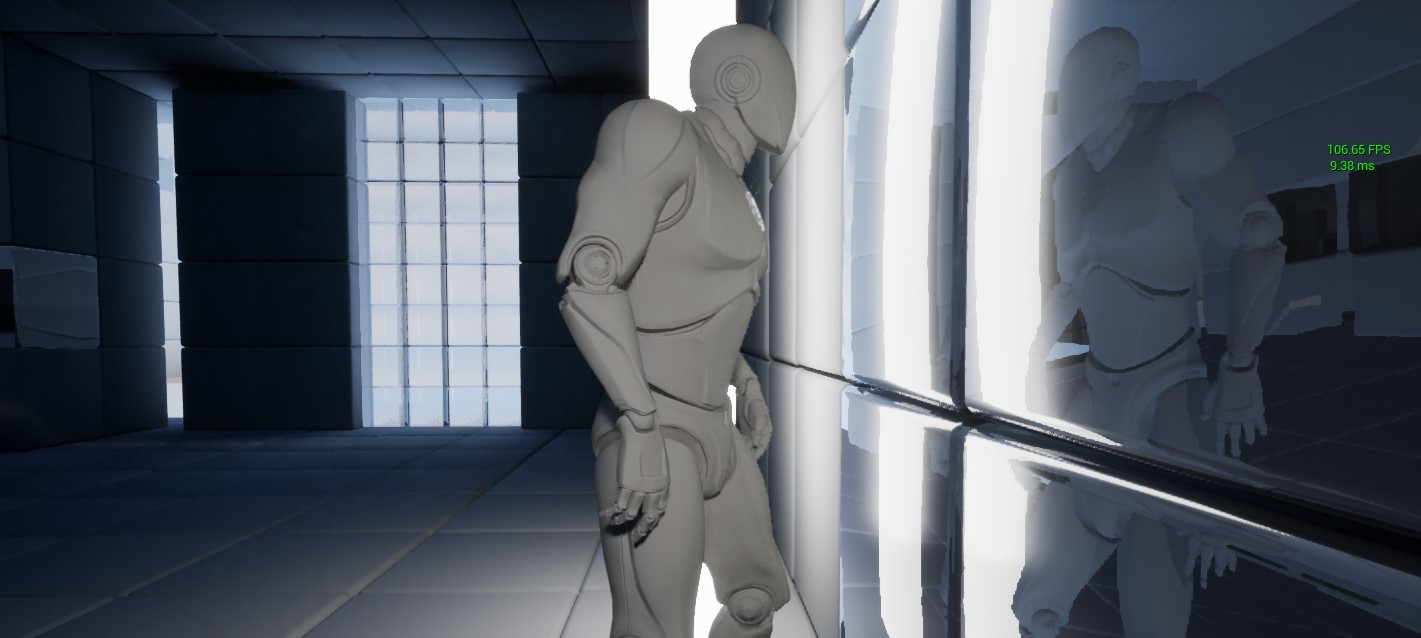
Ray tracing in Unreal Engine 4 is a powerful and flexible lighting system. It’s powerful because of its accuracy and quality. Never have you had the ability to do things like shadows and reflections…
I have a fancy RTX 2070 Super... and I dont use it for horse crap... and I love making things
so I wanted to create a 3D game that supported TRUE raytracing
Not the crappy PBR raytracing like in unity's DX12 HD Render Pipeline
proud narwhal
how do I change the location of the origin of an item? I think its the origin, its the bit you drag about and use to interact with the object, mine is way outside of the model center
hushed kraken
dawn gull
Ray tracing breaks my decade old GPU so I’ve never been able to use it
I know the feeling... for the past like 5 years Ive used a PC from 2009
I only recently (Within this year) invest 1500 so I could build a new one
I bought the parts separately because theyre much cheaper then prebuilt PCs
Totally worth it
I can run practically anything now
dawn gull
@proud narwhal try opening the model in blender and moving everything to the center
Yeah, I bet that’s awesome
proud narwhal
can it not be done in the editor? I do not have blender installed
hushed kraken
Yup just open in blender... Shift+S, origin to geometry, export
hushed kraken
proud narwhal
can it not be done in the editor? I do not have blender installed
Unreal engine is a game engine, not a model editor
hushed kraken
If you want to create 3D games
you should have a 3D editor
blender is pretty much the best one for most users
and its free
Oh my god
WHY DOES IT TAKE SO LONG TO INSTALL
proud narwhal
guess I will download that then
hushed kraken
I have a beast PC and I have a 600 dollar router that transfers over 700 MBPS to my computer
YET THIS STILL TOOK AN HOUR
WHAT... THE... HELL
hushed kraken
dawn gull
Lmao try compiling the source code
Fk no
hushed kraken
Yeah thats what I thought
this single install was over 10gb
Man I guess Unity beats unreal in the installation and speed area of development
dawn gull
I use 4.25 because I’m not bothered to update and I probably don’t have enough space
hushed kraken
I can install one of the 4 main available daily builds in like 10 minutes
dawn gull
Yeah 100 percent Unity beats for installing
hushed kraken
ah well
I guess Ill just wait for it to finish and check out the result
I honestly just want to see the limits and capabilities of unreal
unfortunately I always come across the same issue with 3D games....
That is; Because I have an above average computer, I often add more content than most users can handle, and when I build a game in unity, it wounds up being able to run on only high end devices
Especially in 3D
dawn gull
The thing I like the post is when you start preview mode it goes to a stop button instead of changing the color of the play button
hushed kraken
lol thats a very specific difference you like
dawn gull
I always steal my sisters laptop if I want to see if computers can handle my game
 tough pagoda
What to do with this?
hushed kraken
dawn gull
I always steal my sisters laptop if I want to see if computers can handle my gam...
I just dig up my old windows 10 laptop thats sitting at the bottom of a shelf somewhere
tough pagoda
He is moving and he is jerky.
hushed kraken
Its hard to believe that nearly a year and a half ago... I played video games on a laptop
how far Ive gone in in such a short time
dawn gull
Yeah im on the Kerbal Space Program discord and pretty much everyone is playing on a laptop
and they complain that Kerbal is too slow
tough pagoda
What to do. In mesh panel t-pose is moving. I dunno what to do. Anybody can help me?
hushed kraken
No idea dude, Im a C# / Unity developer whos never opened unreal before
dawn gull
Just get ready from people who ask a question, wait 2 minutes, and ask again
dawn gull
But unreal downloads zips, extracts them, and then "cleaning up" is just deleting the zips
hushed kraken
blender, unity, unreal, even smaller communities just for languages, like SO Chat Javascript / C#, and discord channels for programming
its always the same
new users are just like that
dawn gull
Yeah
hushed kraken
ayyye Im opening unreal finally
dawn gull
poggers
 dawn gull
also get ready for getting stuck at 45% when projects load, thats the percentage when shaders get loaded in
dawn gull
I was compiling shaders for 3 days straight only to realize I could have avoided literally all of that by deleting a water shader i wasn't using
hushed kraken
Like this scene I rendered for a twitch banner for my profile
I accidentally had a hyper-realistic material loaded and it froze blender for like 30 minutes trying to load
And I had to close it and lost a crap ton of progress
dawn gull
Yikes
hushed kraken
If you ever use blender to render stuff
youll know how well its known for crashing
the great transparent-white screen of death
"Blender is not responding"
you know youre done for
and all your progress is lost
Like... I totally didnt just waste 60 minutes creating an insanely complex wood shader
only to crash from a subdivision
and lose it all
#LifeWithBlender
dawn gull
That sucks
Oh, and also a lot of Unreal users are kinda toxic and hate Unity. That's my one biggest downside to Unreal Engine, but it can easily be avoided and there arent a lot of people like that here
hushed kraken
Haha, its the same way over in the unity discords
youll find a lot of unreal haters
its the same way the 3DS Max / Maya / Cinema4D communities all have a passionate hate towards Blender
and blender has a passionate hate against all of them
¯_(ツ)_/¯
dawn gull
"I payed $2000 for this, so I hate this free program that is better"
hushed kraken
lol
seriously
Blender is nice because its got a wide variety of tools (Modeling, Sculpting, Painting, 3D Sketching, Shading, Rendering, Weight Painting, UV Editing, Compositing, Video Editing, Video Sequencing, and a shit ton more)
and other tools that are expensive as hell and can solely do modeling / sculpting and rendering
well theyre just sad because they wasted their money
dawn gull
Yeah, I've had zBrush and honestly Blender's sculpting is just as good
Blender just doesn't have the fancy features
hushed kraken
yup
but some people are even bigger brain:
COMBINE all of the tools
Instead of hating them separately
Like, if you combine a workflow of Substance Painter, Blender and Unity / Unreal engine, you can quickly setup amazing looking assets
Hey whats better for beginners.... Blueprint or C++?
I know alot about programming and I want to learn C++, but I dont know anything about blueprint
I have no idea if Id want it or not
or what it even is
Im assuming its unreal's own script language
dawn gull
Blueprints is good, but there are definitely limitations. It's a little bit slower, but you can convert it to C++ when you package beforehand and it's the same speed
Yes
It's pretty much just visual C++
hushed kraken
makes sense
In that case, Ill just go with C++
no point crippling my learning path by using visual scripting
dawn gull
Good plan
hushed kraken
especially since ive already been working with over 5 languages
might as well learn another :L
dawn gull
I've also heard rumors of Unreal Engine 5 having C# support natively
 fierce tulip

How to determine whether or not you should be using Blueprints or C++.
hushed kraken
my tiny 15 year old brain cant handle this crap anymore lol
too many programming languages
too many different applications and learning systems
lmfao why am I torturing myself with this...
dawn gull
It's good to start from a young age
hushed kraken
yes, but... theres so much going on in my life that it can be a little stressful
im currently listening to a live class from highschool
meanwhile looking for a job
and also doing art, music, gamedev, and studying programming languages
its definitely a lot
dawn gull
If I show games I've made and say "I've been using Unreal Engine since I was 8" and have at least an associates degree I should be able to get some pretty good jobs
Yeah I only do music, game dev, and programming
Oh, and cyber security
Cyber Security is the most fun
hushed kraken
really?
dawn gull
What?
hushed kraken
hmm... personally, out of everything I do, 3D art and programming are the most fun
with programming though, I better enjoy webdev then anything
I love being able to just design whatever the hell I want
Like... I just made this yesterday https://mistersircode.com/
 winter gale

Quick #UE4 Tip number 90.
You can zoom in pretty close in Blueprint Graphs by holding Ctrl key and scrolling mouse wheel up.
#unreal #unrealtips #unrealdev #indiegamedev #gamedev #indiedev #screenshotsaturday #UnrealEngine

 Twitter
·
proud narwhal
Twitter
·
proud narwhal
is there any plugins or anything built in that will allow me to "paint" textures onto walls?
hushed kraken
proud narwhal
is there any plugins or anything built in that will allow me to "paint" textures...
Use blender, it has a texture paint and UV editor.
fierce tulip
@proud narwhal if you know how to set up a terrain material, the same approach can work for meshes
iirc there is a tool on mp that allows you to draw directly on meshes
proud narwhal
the problem is I am importing a model using datasmith, there are around 50 different walls that need to be painted, and thats a lot of individual models to upen in blender and do the texture painting stuff Sir Code is talking about
fierce tulip
i think a big issue --looking back at using the datasmith arugement you made yesterday-ish-- is the workflow you have?
i mean, i'd make sure everything is prepared before even importing a mesh. sure iterations can come later, but by the time you import stuff shouldnt most stuff be set up properly?
 dense knoll
Once UE5 releases is it possible to mod it to be more optimized for flight?
or mod UE4 to be better at flight games
proud narwhal
The architecture firm that made the building model is no longer in contract with us, and even if it was I would not have the authority to ask them to make changes, I mean the revit model is good enough as they used it to construct the building 🤔
proud narwhal
an entire team would have worked on this revit model, I am just a lone worker thats been asked to convert it into a VR enviroment 😄
fierce tulip
ouch, good luck
dense knoll
also any way to create 3d reactive fire and explosion effects
proud narwhal
They know its not in my usual skillset to do this, so its best efforts only, but I would still like it to look nice and adding textures would make it 100x better, its just finding a way to easily apply textures to individual faces
 dim arch
@dense knoll check out fluidninja plugin
dense knoll
its 30 USD
dim arch
Well its possible with niagara but would take longer
@proud narwhal datasmith can process revit files and you can script material setup
Visual dataprep
dense knoll
is there a way to do it with Cascade?
Niagara tanks on performance and also screws up the clouds
dim arch
You can but its been discontinued
dense knoll
ok
proud narwhal
no thats not the problem, I do not think I have explained correctly, I can easily swap out textures in the model without any trouble, its when you get to difficult models, heres an example, one wall will texture fine, the other wall will not, being able to easily split the wall or apply the texture to the ouside and not the other side of the glass is what I am trying to do
Even if I were to go into the model, edit the mesh, and texture it, there would be no way for me to know where to split it as I cannot tell where the glass divider would be 😟
dim arch
Ah yeah, well that surface is probably one face, not really possible
You would need to either split the face and apply two seperate material IDs (may be possible in modelling toolkit)
proud narwhal
I could do it with decals but that seems like a really dumb way of doing it
dim arch
Or apply a material to the surface and paint a mask to switch between the material types (but you need a seperate texture for each differently shaped surface )
You could make a material which projects a boxmask, if its a square area
But its probably more efficient to split the surface and apply two seperate materialIDs
proud narwhal
yeah the problem with splitting the surface is I would need to guess where to split it as I do not know where that glass partition falls
unless I can split it from the main window without having to open the individual model?
plush yew
is it possible to make the closest landscape tile invisible in a tiled landscape?
dim arch
@proud narwhal if you have revit, just split it there, if not, export all the meshes (batch export in UE) and make the splits where you need to
You can merge all staticmeshes in the scene as one mesh to see where you need to make the split
 craggy grove
Does that mesh have a seperate material?
dim arch
The other way is to use vertex/texture paint on the surface, or use a boxmask
proud narwhal
vertex/texture paint on the surface, how do I do that?
craggy grove
In the overall building are these meshes at the same place?
proud narwhal
not sure I understand what you mean
dim arch
Its not really a good idea bc you need a seperate texture for each different shaped area you want to mask
You can use a boxmask3d and make material instances with different positions for the boxmask
Mesh Paint is a tool for interactively painting vertex colors on Meshes in the Editor Viewport.
You can either paint vertex colors, or assign a texture to paint onto
This page describes settings for various parts of the Mesh Paint Tool.
Check texture weight painting
proud narwhal
ok thanks I will take a look at this
dim arch
Theres no way to edit meshes in the world tho, there is a modelling toolkit, you could measure out where the window is and then possibly make the split in the modelling toolkit
@lusty carbon most the template projects support it, you need to set up input bindings in project settings (gamepad) and use the event in bp
plush yew
Hello guys, I’ve created a sleep system without a day night cycle, the problem is that during the night I don’t have a moon. Is it a bad idea to add a big sphere far in the sky with an emissive color and hide it during the day?
Give me some ideas please
 still moat
@plush yew
Perhaps you can look into how the default skysphere is made as it has a sun and replicate it with a moon texture instead?
plush yew
Huhh yea that should work I’ll try now thanks
 wanton lotus
@plush yew You can follow this tutorial. The next one also allows the moon to have phases: https://www.youtube.com/watch?v=iLRDfj9K99w&list=PLNTm9yU0zou7kKcN7091Rdr322Qge5LNA&index=22

Project Files : https://www.patreon.com/CodeLikeMe/posts?tag=source code
Support my work on Patreon : https://www.patreon.com/CodeLikeMe
In Unreal, There is no moon in the default skysphere material. In this episode, i'll explain how to add a moon to by extending the default skysphere and the skysphere material. As the moon will be rendered by...
plush yew
I dont really know where to write this but i need help with a thing im building
I'm having an issue with lighting. I've tried changing the meshes, recomputing normals, changing light, mesh and build settings. Than I tried playing around with the Directional Light. But for some strange reason I keep getting these black spots and can't get rid of it.
I know it is a shadow issue, because problem disapears when I disable the shadowcasting of directional light.
wanton lotus
Might want to throw that in #work-in-progress. It will get drowned out pretty quick in this general channel.
 cedar wave
<@&213101288538374145> Idan actually seemingly just went through each channel (I only checked the first couple) and posted it.
wanton lotus
Or just spam other channels, haha, just noticed.
 buoyant graniteBOT
:triangular_flag_on_post: ToMango12#7703 received strike 1. As a result, they were muted for 10 minutes.
fierce tulip
!purge @rain ridge 50
buoyant graniteBOT
Please enter a number between 1 and 50.
The timer expired. Please start again.
 exotic cave
@plush yew : Interesting issue...you're sure the normals are okay?
That really, really looks like mangled normals to me. You might want to manually check the meshes and the normals if you can.
plush yew
@exotic cave Those are assets from quixel. I've tried to look at the normals, recalculated them. But with no avail.
exotic cave
Could be your shadow bias
plush yew
I'll check that than
buoyant graniteBOT
Please enter a number between 1 and 50.
fierce tulip
40
exotic cave
An overview of the Lighting example level, example 6.1: Self Shadowing Accuracy
They are indeed self-shadowing artifacts you're getting, at least in the sense that the objects are indeed only wrongly shading themselves.
That article isn't great, lemme see if I can find another.
A fully dynamic light capable of changing all of its properties during runtime.
 rain ridge
yay i can talk
exotic cave
If not, it's quite possible you actually found a broken Quixel rock. I only see the artifacts on one particular kind of rock in that scene.
Might want to let them know, and find a substitute.
 random lodge
I'm having an issue with sockets. I want to attach a helmet to one of the enemies I have placed in the level, but leave the others without helmets.
I added a socket to one of the bones, and in the preview I can attach the helmet and things looks just fine, but in the level editor I can't seem to find a way to do it.
The helmet is of couse movable, but have I forgotten another setting? It's a staticMeshActor in this case, but I also tried with creating a blueprint but it did not help.
I tried to right click the helmet and attach it to the correct enemy, but I never gets to pick a socket and it just gets attached as a child actor.
I was told to select the helmet and click the socket, but the helmet is only attached as a child actor.
I enabled Socket Snapping but it does not seem to do anything.
All tutorials I have found explains how I should add it using blueprint or c++, but that would attach it to all the enemies, and I would like to not have a bunch of code in blueprint/c++ to only attach it to the socket for one particular actor when I believe this should be possible to do in the level editor.
plush yew
It is all the rocks, it also depends on camara & light angle. Thx for pointing out the shadow bias. I hope that will help.
exotic cave
It looks awfully extreme for just shadow bias. It looks like broken normals to me. Recalculating them won't help much if they're too badly wrecked, and though I do think it's possible to do something that will just recalculate them based on the overall shape of the object I can't recall how.
It might actually be a broken Quixel rock, and if so Quix/Epic need to know about that.
 brisk bridge
Hi everyone. Can someone recommend a good tutorial for Pawn Movement Techniques with Blueprint?
plush yew
exotic cave
It looks awfully extreme for just shadow bias. It looks like broken normals to ...
So I've tweaked shadow bias. Doesn't work. Nothing really changes.
Than I added the rocks individually by their own (instead of brushing it with foliage tool) and they have no single artifact.
So something is happening with the meshes when I use it as a foliage.
Googling this problem doesn't give me any solution sadly.
wanton lotus
random lodge
I'm having an issue with sockets. I want to attach a helmet to one of the enemie...
You do need to set it up in the blueprint first. Add a mesh component (skeletal or static, probably static for your helmet) to the character, attach it to the socket, but then leave the mesh set to "none". Now in the details of the character in your level, you can select that mesh component and manually change its mesh to the helmet as needed.
plush yew
on the tubes you see regulair rocks, imported the normal way. The rest is foiliage tool
exotic cave
I mean, you need to check your foliage actor settings then
Yeah
Exactly
I didn't think of that but I'm sure that's it, @plush yew
That looks like a lightmap on something that needs to be like 16+ automatically downsized to 4
UE will indeed do that.
random lodge
wanton lotus
You do need to set it up in the blueprint first. Add a mesh component (skeletal ...
Will try it out, thanks!
But what if it was a socket in a hand, and I wanted to attach an actor that contained other actors, like particles and stuff?
plush yew
That makes some sense, I will look further into it! Thx
wanton lotus
random lodge
Will try it out, thanks!
But what if it was a socket in a hand, and I wanted to ...
That would work too, you can use child actor component instead of mesh component.
exotic cave
I do a lot of foliage work, I have a pack on Marketplace
Check and see if that's on. If it's on, turn it off. If that doesn't work, turn it back on and way up (to a power of 2)
 tulip ibex
hey have anybody got editor stutters in 4.26? I just downloaded it and opened an empty project and FPS drops to 0 for a moment every 5 seconds in a loop even when it's idle
definitely noticeable when panning around the scene with the camera
dim arch
I wonder if its possible to make an unreal helpbot using gpt-3 and scraping answerhub
plush yew
exotic cave
I went even this high and nothing changes on the models. Do I have to rebrush them? (Rebrushing doesn't change it)
exotic cave
No, it might not be lightmap specifically then
Uhhh
When's the last time you actually rebuilt your lighting?
1024 is way too high
Like, 16-64 should be fine for most game work
 lusty carbon
How can I define the RMB click on a xbox controller?
random lodge
wanton lotus
That would work too, you can use child actor component instead of mesh component...
Worked like a charm when I used a child actor! Thanks!
exotic cave
It doesn't need to be 1024. 16 is a great guess for anything that might be having issues. 8 is, for that matter.
I can't even see cinematic renders needing a 1k lightmap res, though I admit I don't know enough about the internals.
Set it to 16, then rebuild your lights is my advice.
plush yew
It is for cinematic - we even don't build lights that often and use only movable lights and no static. But I'll start building it... see if that helps.
exotic cave
Lightmaps don't need to be that high to look great
I haven't had to go outside the range 4-64 myself, though would love to hear from others.
proud narwhal
Figured out a way to do it
exotic cave
Still, rebuild first. Lots of times when there are shadows where they shouldn't be, it's because UE hasn't rebuilt its lightmaps/shadowmaps.
 stiff sail
is there a way to to compare an actors location to another actor. in way thats, the only way i can explain, time on a clock. i.e. actor2 is at actor1s 3 o clock. and actor3 is at 8 and so on. but of course it wouldn't be in time.
wanton lotus
lusty carbon
How can I map the RMB click on a xbox controller?
Not sure if there is a built-in way to do this, but you can do it with C++. Haven't tested it myself, but this code may help: https://answers.unrealengine.com/questions/206312/simulate-left-click-with-abutton-of-gamepad.html#answer-container-886828
lusty carbon
Funny, you'd think this must have a built in obvious way to do.
I only use BP . thanks tho
 marsh grail
i got a weird issue in unreal, im trying to add view bobbing to my first person camera but every tutorial tells me to add the camerashake blueprint, but i don't have that blueprint. The tutorials ive seen also tell me to add an action called "client play camera shake", which i also dont have. Don't really know what to do at all at this point.
exotic cave
@stiff sail : Absolutely. Every actor has a transform.
wanton lotus
lusty carbon
I only use BP . thanks tho
That code will create new nodes for you to use in blueprints. That example is to simulate the LMB down and up states. You can then copy it all to have it do RMB as well.
exotic cave
Modifying the location, rotation, and scale of Actors placed in levels.
stiff sail
thx
exotic cave
You can check transforms from blueprints or code
plush yew
exotic cave
Still, rebuild first. Lots of times when there are shadows where they shouldn't...
I made the directional light/sun static. It works now. No strange shadows. Thx for the support!
exotic cave
Transform
@plush yew : Unfortunately that's still a weird, suboptimal solution in my eyes.
@plush yew seems to know even more about this than I do
I'ma let him field it
:>
dawn gull
I'm trying to package my project and it fails, I don't see anything in the log. What's going on?
exotic cave
Most well formed UE projects can handle either static or dynamic lighting without issue
And it's a requirement to get listed on Marketplace.
If static works for ya, great. :>
plush yew
well, it works... and I can work around it! And now it is time to go home 😄 thx again guys.
exotic cave
If you find you need dynamic lights after all, ponk's link is a great place to start
Could indeed be a distance field thing
wanton lotus
 narrow sonnet
Hey is there any channel to ask for help on anything
narrow sonnet
Hey is there any channel to ask for help on anything
Always look for a channel that is relevant to the question. If you cannot find a suitable channel, then just ask here. Make your question as clear as possible as well as provide screenshots/video if able to.
narrow sonnet
Aight, I have a question about cheat manager and dll’s
I don’t really see a channel for sumn like that
Cheat manager for UE tho
Lol
Though I would to know a bit more about what you mean about Fortnite pak explorer? Do you mean Fmodel?
So yeah, was just wondering if anyone had a cheat manager dll
 austere scroll
this isnt specifically ue4 but alot of devs use this website for organizing tasks
anyone knows the name ?
exotic cave
Looks interesting! I don't know it sadly
austere scroll
ok , i'll check that one
wary wave
please don't spam the channels
 gray kindle
yo is there a way to bulk change pivot points of meshes?
 maiden swift
Just posted this month's free Marketplace content in #unreal-news. There's some tasty stuff this month. 🙂
gray kindle
smoke builder? yeees
maiden swift
gray kindle
yo is there a way to bulk change pivot points of meshes?
I don't think so. I think if you want to permanently change a pivot point, you have to do it in your DCC software (Maya, Blender, etc.).
gray kindle
Thanks, that what i thought 🙂 i have read on unreal engine forum a post from 4 years ago when someone was talking about it in a changelist of a "recent update"
 grim ore
you can perm change it with the new mesh editing tools, but that cant be scripted yet
gray kindle
sadly i bought a pack with 220 meshes in a single fbx file, and when i import them all to unreal each one of them has giant pivot offset
i could fix them manually, but that is going to take some time, so thats why i asked 😅
im actually surprised that unreal split them all into separate objects
 whole quarry
Arent they seperate objects?
gray kindle
they are, but i thought that if i import 1 fbx wile with, lets say, 10 objects in it, i will have all 10 of them merged together in 1 mesh
i honestly never tried doing that before as i always split each object into separate fbx file
 light thunder
is there a way to take a sketetal mesh, drop it in something by simulating physics like a ragdoll, and then save the position as a static mesh? @grim ore
Would take me so much less time than manually editing their bones into position, and it's impossible to set what I need as a preview mesh
like if I wanted a body in that truck, but have the truck on it side, it would be a lot easier to manually move the bones into position but I can't
lusty carbon
wanton lotus
That code will create new nodes for you to use in blueprints. That example is to...
Unreal Engine Forums
All
I was wondering how I can mimic the standard functionality of the left mouse click with an input from a Gamepad?
Example - I have created an Accept button
Last comment is my solution 🙂
grim ore
@light thunder drag your skeletal mesh into the world, make sure it has simulate physics on so it does physics. turn on simulate for the play options (not play in editor but simulate so just physics turn on) move it where you want it and such, right click on it and tell it to keep simulation changes. then it will ask you if you want to save this new position in a new animation file
light thunder
That's fantastic, thank you
dawn gull
How do I move my camera down a tiny bit and then be able to move it back up?
I'm trying to make it so you crouch down a little bit before you jump and then when you release you jump. I have it so it jumps when I release already
plush yew
So im currently creating an environment with pre-existing assets and a lot of these assets (that all come from the same pack) have this jitter effect on them in the shadows. https://youtu.be/JeP0ORfXhqg I had to make it a unlisted video since discord cant take videos that are larger than a few MB.

 light thunder
grim ore
<@!273265779175194624> drag your skeletal mesh into the world, make sure it has ...
light thunder
grim ore
<@!273265779175194624> drag your skeletal mesh into the world, make sure it has ...
What's the trick to making the ragdoll pay attention to complex collision, versus simple?
plush yew
As seen in the video it mostly appears in the shadows when im not looking at it from straight forward. Does anyone know how to fix this issue or at least reduce the effect of this?
light thunder
Is the affect there when you open up a problem asset as a static mesh and look at it in the mesh display window?
basically, dbl click it on the content browser, when you are selecting the static mesh
plush yew
not as much, only underneath small creases and edges where there is an actual shadow
Hi Everyone! Where should I store logic for switching levels by some events happening in a game?
light thunder
game state or game instance
plush yew
So i made a Main menu in Ue4.
I watched this tutorial: https://youtu.be/b-FTdRAbZPI
And now when i press on Play nothing happends.
How do i fix that?
If anyone knows how to fix that, Ping me
grim ore
no one here can literally help you with a question missing all that info
light thunder
This keeps happening FNAF too, like, if you listen, you can learn how to ASK questions that will get answered
plush yew
Because i wanted a animated main menu
light thunder
Why haven't you done a course yet
don't just do youtube unless you are going to do a series
your knowledge will be forever fragmented
grim ore
its too bad there are no UMG videos on the official learn website that include main menus
plush yew
and this time i'm not going to beg for help
light thunder
Probably shouldn't, good call
plush yew
I wanted a short tutorial
grim ore
shortcuts are exactly why this happens to you
plush yew
i also found 1hr tutorials
grim ore
unless you are capable of figuring this out on your own, you need a more in depth and robust learning path
anyways back to the question, we have no idea what happens or is supposed to happen when you press play. Your literally giving us no information on what you are doing. the only answer we could possibly give is "you did something wrong"
learn to debug, look at the output log, and check your work.
 brave oriole
Hi guys, Question For my Online Multiplayer practice,
Does any of you happen to have a tutorial/article/project file or any form of example that works with a GameState? It would be really helpful since right now I'm trying to figure it out myself, which kinda works but just very slowly. So some form of example would be glorious ^^
grim ore
you said nothing happns when you press play, these people are saying they have something happen when they press play
plush yew
oh
random lodge
Did the main menu tutorial youtube guy film that while on a plane or something?
light thunder
brave oriole
Hi guys, Question For my Online Multiplayer practice,
Does any of you happen t...
You've read through the Network Compendium?
plush yew
i'm going to watch it again
maybe i did something wrong
Oh
I found part 2
wah
i didin't see it before
sorry
light thunder
@grim ore You are a beautiful, beautiful man, THANK YOU! I was going to just generate a pose because it would be more performant, but I think I'll leave it this way - this is actually a good example what a seizure induced by increased intracranial pressure
Although when I do try to keep animation, it says no properties were changed
not sure why
brave oriole
light thunder
You've read through the Network Compendium?
thnx for reply! no not yet, where can I find it?
 spring forge
Hello, guys and gals! I'm trying to make light shafts from spotlights by means of Exponential height fog. The problem I encounter is that it's showing up and quickly disappears only when I click a mouse button in the viewport (the orange one in the video). Volumetric fog option is enabled in Exponential Height Fog properties. Viewport is switched to Cinematic Quality, "Show volumetric fog" option is enabled. There's a Post Process Volume in a scene, Exposure Min an Max Brightness options are set to 1. Tried both on Unreal Engine 4.24.3 and 4.26. Where I do err, can someone tell me?
brave oriole
light thunder
http://cedric-neukirchen.net/Downloads/Compendium/UE4_Network_Compendium_by_Cedr...
Sweet thanks! This might be just what I needed, I'll read through it
light thunder
@grim ore It keeps saying No Properties Copied - the online docs give no parameters about the correct workflow for this, can you advise? Only found some older engine bugs that referenced this error, maybe you know
I've tried swapping out animation blueprints, having them set or not set, pausing the simuation
grim ore
is that the base skeletal mesh in the scene you are using or an animation?
grim ore
yep that one.
light thunder
Yep, and I'm using this playmode
I am enabling physics two seconds into the game but I can't see how that would cause an issue
grim ore
ah dont do that, just enable it in the properties after you drop the instance in
light thunder
oh really? I had to pause it because I wanted time to see his dumb face fall lol
I guess it starts the animation at play and me changing in the middle screws it up
grim ore
well I can say I dropped it in, checked the checkbox, hit simulate, then right click and told it to save and got this
I got the no properties changed whenever it using the properties that are the same now as when it started with
or I tried to save it out twice
light thunder
it won't overwrite any pose will it?
grim ore
doesnt seem to, it created a new animation file
light thunder
this is baffling
LogEditorViewport: Clicking on Actor (context menu): SkeletalMeshActor (rp_nathan_rigged_003_ue4) only thing my log says, no other error message besides "no properties were collected"
This look okay?
source control issue maybe
grim ore
Save Physics
grim ore
moving it while in the scene? while simulating?
light thunder
yeah i tried but it immediately moved him back
grim ore
yeah it will do that if you dont use enough force. its like a string on him with elastic. depending on how much weight and mass it has you might have to fling it
as every frame it always trying to go down
but if you just put him where you want before then turn on physics then simulate it should be close enough
stiff sail
is there a way to get a actors rotation on the z relative to a second actors location?
light thunder
I can't move anything in simulation mode
is there some other key I'm supposed to press?
grim ore
shouldnt be, you saw exactly what I did in a new project
light thunder
beyond trying ot move statics I mean
 runic fern
hi guys is something changed with Steam Advanced Sessions Plugin in 24.3 ? it wont working i've set everything
light thunder
grim ore
shouldnt be, you saw exactly what I did in a new project
I was able to get it to work for the UE4 manniquin skeleton
grim ore
ugh so some setting on your SK
light thunder
must be, can't move him at all
grim ore
damn
light thunder
I've always had trouble with those assets, like if I go to edit their animation sequences and make their eyes blink, and I try to save it, it crashes unreal
I guess you have to do this with the original skeleton itself, not skeletal meshes
Still, this is 20x easier than messing with blender to make ragdolls
yeah, easy stuff there
grim ore
its in the animation editor at the top
light thunder
grim ore
its in the animation editor at the top
Is he supposed to actually move? I don't see him moving and I thought I made him move during simulation, and I've set the animation to loop, in case it was quick and I might have missed it
well here is the problem....it doesn't save the whole animation lol (which really makes sense)
but I guess if you wanted to make a falling animation baked, you'd just blend between the original animation and the final pose there, but I am super basic at that
runic fern
its happend to me once when i changed the Physics of the Character
light thunder
can it actually save it from simulation, the entire animation?
runic fern
Specially if you are using a Physics Based Animation
grim ore
it cant it just saves the changed keys/properties at that moment in time
basically the keyframe differences between the start and the current
I think... and this is barely thinking. if you need to capture an entire actual "stuff happening" clip you can look into using sequence recorder
light thunder
but that would be a render of the scene? or does it actually record the transform data?
grim ore
the latter
light thunder
and without asking for an entire tutorial on animation, how do I get this to say, come from that idle position? I'm not sure how it would look naturally, because falling due to gravity updates you differently than just the difference between an idle stand and this
grim ore
light thunder
grim ore
the latter
wow that is pretty robust
grim ore
if you have the end animation you can just set it up in a blend space and drive it with a variable
0-100 lets say with idle as the 0 and the falling as the 100 then drive it over time with whatever
or even put them in a sequence itself and have it blend between the 2 over time
 frozen pond
any idea why my water body looks like this?
light thunder
grim ore
if you have the end animation you can just set it up in a blend space and drive ...
how do I get another sequence into one sequence, to like keyframe it at the beginning like you are syaing
grim ore
well its 2 animation clips right?
light thunder
yep
grim ore
the idle then the falling, you put them both in one sequence clip
light thunder
The person responsible for the entire layout of the animation system in Unreal, probably lost their wife to an animator or something
It is ridiculously un-intuitive
grim ore
its in various places yes lol