#ue4-general
1 messages · Page 873 of 1
 kindred dagger
 dawn gull
 quick kelp
anyone know how to convert an object (along with its data) to a string?
i was thinking of converting the object into a JSON string but UE4 doesn't provide tools to help with that
 rugged heron
 median hound
is set relative location the same as set world location
 cosmic matrix
hi,
i correctly replicate an array of uobject* from an actor compoent but i can't replicate a array of struct containing a pointer and a integer. Do anyone have indication on how can i do that. I override IsSupportedForNetworking() from the base object and return true and replicate variables inside. then in the component i replicate the array and override ReplicateSubobjects with a loop to iterate over each object and call replicatesubpject
kindred dagger
tell me someone here knows anything about pawnsensing 😂
 dim kelp
Pardon me, i thought there was a channel for performance questions but I can’t find it now. What is the right channel to ask questions about that?
 brazen forge
How much time would it take to make a basic FPS game similar to CoD? To make it clear, with basic i mean excluding the whole fancy garbage from the game that no one needs, like "4k textures that take up 200GB" and so on. More something like Black Ops 2, normal graphics, perk system, lvling weapons, networking and similar.
I'm asking it because i play CoD since over 10 years and i hate each series that came after Ghosts
cosmic matrix
years and 100 guys
brazen forge
So how is that taking years and 100 guys, are they sleeping or something?
brazen forge
But how does it take 100 guys and years of development?
cosmic matrix
there are like 300+ guys on cod to be honest
median hound
because i assume they dont get free models
brazen forge
Ok, i buy 1 map... enough for the start, 2 characters, good and bad soldier, I add 2 weapons, M4 and AK... I take basic attachments like dot sight and fast grip and stock etc... then i create a match system, no skill based, random one...
cosmic matrix
assuming some sutio helping us
brazen forge
@cosmic matrix You realized that I said NO FANCY STUFF, i can not imagine needing 100 people to make the most basic FPS game
Do you need to buy BMW or FORD to build a car? NO you can do it in your garage
cosmic matrix
what do you mean by basic fps lol
^^
using home made engine?
or industry engine?
that doesn t have any sense basic fps ^^
brazen forge
Home made engine 😂 You realized that this is UE4 server right?
median hound
ohh it probably takes a while cuz i think they make their own engine
cosmic matrix
i don t know you talking about cod how use home made stuff
brazen forge
Simple line trace hit detection no crap like Battlefield
median hound
i dont think cod used unity or ue4
cosmic matrix
depending your team skill, budget to by asset etc
brazen forge
Forget it, this getting to stupid for me
cosmic matrix
a wepon asset can save you 2 weaks of work maybe more etc
brazen forge
Basic FPS, 2 people come up with making a self made game engine i can only face palm to this.
The next guy will come up with creating a new CPU and GPU architecture for my basic FPS.
 restive eagle
🍿
cosmic matrix
very basic fps like 2 people minecraft style etc can be made in 2 weak
 elfin grove
Just a bug check: why does the bp parent's construction script getting called in the child one, even when there is no connection between the nodes?
elfin grove
yeah: after putting a dummy node there, it's not getting called anymore
cosmic matrix
what stuff do your construction script (parent)
elfin grove
why?
cosmic matrix
cause if you dont want to be call you don t need it ^^
elfin grove
I need it in my parent bp tho
cosmic matrix
try making a return node
elfin grove
if there is no node connected to the construction script in the child bp, then it calls it's parent
interesting btw
cosmic matrix
yeah call a return node
elfin grove
can't
cosmic matrix
oh
elfin grove
found some forum post tho: https://answers.unrealengine.com/questions/801176/view.html?sort=oldest
cosmic matrix
yeah very strange
 plush yew
jk
 idle goblet
So I tried to install unreal, but it says the epic games launcher is open, and it can’t install, but it is not open, what’s wrong
elfin grove
@cosmic matrix I think I'll just move out the spawn stuff from the construction script to BeginPlay
no mess there
cosmic matrix
yeah
 shut glen
how can i open a map for 5 seconds and then open another one?
idle goblet
I need help with installing unreal engine
elfin grove
press install?
cosmic matrix
^^
idle goblet
It says that epic games launcher is open, so it won’t install but the launcher isn’t open
elfin grove
you can't install it without the launcher being open, so I don't know what are you talking about
shut glen
GameModeBlueprint btw
@elfin grove ty man
idle goblet
Ok I’ll try that
 dull trench
Hi! Does anyone knows if it's normal on a ListenServer to have 4 PlayerStates with only 2 player connected?
 ocean grove
Hello I
ocean grove
Is there a good channel for asking really novice questions? I'm just starting to try and work with UE4 and it's going extremely slowly.
 remote mist
Is 4.26 stable enough to build a project with or should I still use 4.25
 dense gate
Don't use previews for something you'll be releasing, simple as that
You can use the preview for development if you're looking for a specific feature
Though results may vary
dense gate
I use it since it has chaos and I've really liked that system since its first preview
remote mist
I might just wait for the actual release since it'll probably be out in few weeks
ocean grove
Does anyone have a particular work flow method for developing a level?
Or any tips or videos (tutorials) they can recommend?
dense gate
I have a standard set of placeholder materials and box out everything first
 torpid shadow
Very general question here, but I'm working on a map for my game and the map gets WAY too dark while I'm trying to build things. Anyone have some suggestions on settings, I want it to be dark for the game but I haven't added the post process yet. I'm just talking about the default settings for unreal, its gets really dark.
 jolly jungle
i have free megascans, and I was wondering what would happen if i threw the textures into minecraft using shaders to render the pbr. would i be allowed to do this as long as i didnt give anyone the pack and just messed around with it myself?
 earnest violet
I swear this fuckking engine is seriously aggrevating me. For ever problem I solve. It throws up 5 more. FUK this shit!
It's okay I'm chilled now
Can anyone help me solve my packaging error. SCREENSHOT IS ABOVE. THX
How anyone manages to get a game made is beyond me
I am seriously thinking about selling my rig and buying a tablet
20 years tied to a fucking parasite MACHINE
anyone?
I had it working but installed a menu asset pack and now its fukked
Please help me. I feel like pulling my hair out
 wary wave
you have blueprint compilation errors, it says fairly specifically where the problem is
earnest violet
Ok thx! can u tell me what blueprint plz?
and thx for pointingt that out it a big help. THX! 🙂
median hound
why is it light in the dark
jolly jungle
i have free megascans, and I was wondering what would happen if i threw the textures into minecraft using shaders to render the pbr. would i be allowed to do this as long as i didnt give anyone the pack and just messed around with it myself?
idle goblet
Ok I’m confused, I was told that the epic launcher needs to be open, but the installation still doesn’t work, why?
earnest violet
can anyone help me locate the blueprint that's responsible for not compiling? THX see screen below
 grim ore
it tells you in the error messages
grim ore
scroll to the right on some of them as the full names are there
 light thunder
I'm getting some pointer null errors (it seems) when trying to build a few HLODs - does anyone have more reference or can offer a resource so I can learn more about this system? The information MUST exist, but where is it?
HAPPY HLOD NO FINDING OF COMPREHENSIVE REFERENCE ANNIVERSARY!!! - THREE YEARS OF ASKING AND NO ACTUAL REFERENCE PROVIDED!!! Seriously, wth does epic engineer's look up? why is this stuff hidden? I've watched the livestream and checked official docs, there must be some other information about troubleshooting/best practices - Read below and see all the times I've asked for 3 years just search "from: Blakestr#7507 HLOD"
Blakestr10/09/2019
@grim ore Do you know of a comprehensive body of knowledge for the HLOD system? None of your videos I could find talks about it, and considering how integral they were for Fortnite, you think there'd be more information about them.Blakestr08/16/2019
Any hero here want to recommend some good HLOD settings or a resource that explains those settings as best practices, other than the Epic Livestream on HLOD a few years back?Blakestr01/06/2019
@crisp fable There's hardly any info on that backend system for proxy meshes / HLOD...if you find anything let me know,Blakestr 10/11/2018
I am looking for someone who has worked with HLOD's but I can never find anyone, even though they are used extensively in Fortnite there is hardly any information about them beyond one livestreamBlakestr 09/26/2018
what's the correct process to build HLODBlakestr 01/25/2018
HLOD's are so undocumentedBlakestr 11/26/2017
I'm looking for more information but beyond Epic's livestream there isn't much...there's like 10 or 20 unasnwered questions in the forums and plenty of, "I don't know HLOD's that well"Blakestr 11/22/2017
@Nick Darnell any ideas? HLod's are awesome but I couldn't find any documentation on thisBlakestr 11/21/2017
Anyone help me with HLOD's....I'm trying to understand whether I should do multiple levels...
earnest violet
Yeah I got it THX it's fixed now. Some dodgy programmed asset pack. Just a few nodes needed refreshing! 🙂
 frozen pond
how i can set value in map variable type ?
i mean in blueprint
@light thunder wrong map
i mean this map
yeah i see that node but my problem is i need to change one of X values
key that i need to change changes over gameplay
light thunder
You've watched the WTF video on this right?
median hound
variables cant be across levels without game instance but can weapons be?
light thunder
i believe they will persist through game instance
this item crashes unreal when it tries to build HLOD's - any idea why?
 grave nebula
@light thunder Congratz on your anniversary
earnest violet
I choose for my project Desktop and maximum quality is there anyway to change a project setting back to scalable and for mobile?
grim ore
its in the project settings
earnest violet
where abouts m8
grim ore
did you look in project settings?
grim ore
theres only about 50, but the on you want is target hardware
earnest violet
yeah i got it thx 🙂
 summer prism
Hi! I´m looking to deactivate post processing volume from a specific map outside of the editor, does anyone know how to achieve this? I have been searching a solution without success
 crisp fable
 unreal comet
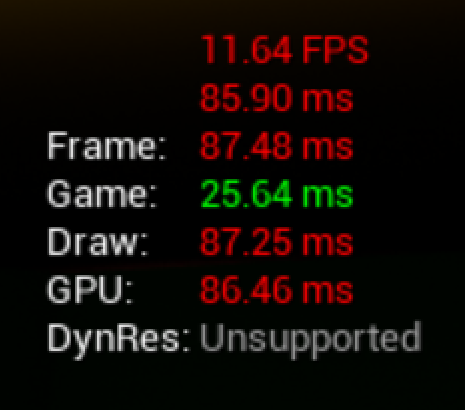
@supple cove So me and my friend both have high end PC's and my game just uses the default mannequin and default test level with no materials. So there is no stress on performance with regards to that. The issue is that we start the game at 200+ FPS and then both of us gradually at the same time over the period of 30 minutes lose frames. It's gradual so you don't notice it happening but the longer you play, the lower your FPS goes. My game just spawns zombies every wave and you kill them to progress to the next wave. So nothing different is happening. I cap out the max number of zombies allowed alive at one time so it's never higher than 20. It feels like something is building up over time or something? I'm not sure if it's network related, or if it's something else, but it happens to both host/server and clients. I'm open for any ideas as to what could be the issue
 kindred viper
sounds like a memory leak of some kind
unreal comet
What causes a memory leak?
grim ore
a hole in the memory
unreal comet
so I need some dementia medicine? 😉
grim ore
a place to start is do you ever change the level, a complete new level
unreal comet
I server travel from the lobby level to the actual level
grim ore
once or every time you finish playing?
 balmy seal
Hello Everyone, Kotah here; Hey so I*'m just now introducing myself for learning coding languages, I started off with HTML and CSS. I've yet to try out my first website, But I've recently ran into C language, more specifically C++. I downloaded Unreal Engine to start my dipping of Indie Game development.. It's...troublesome with the amount of learning to proceed with, but what're some basic starting projects to advance my coding ability?
grim ore
@balmy seal learn C++ outside of the engine, then apply it to UE4
balmy seal
Kind of like a C++ projects before advancing to BP's?
unreal comet
Once, unless everyone dies, then they can either go back to lobby or restart the level. But I have noticed that when restarting the level using the node in Gamemode, clients tend to crash randomly sometimes
grim ore
I would guess your spawning system never frees up old enemies and eventually it's holding them all
look into implementing a pool for those actors
@balmy seal like learning C++ the normal way, learning how C++ works without touching UE4. Learning the C++ language and how UE4 uses it is going to be more difficult as UE4 does things with the language that is not easy to pick up on at first
and it could be anything you spawn causing the memory issue, even your sounds so look at making sure you have a complete cycle of spawn -> destroy -> de reference for all your items. The profiler can tell you where your memory is going
balmy seal
Thank you MathewW, I appreciate that advice, it's amazing how much there is to all of this
unreal comet
@grim ore Right now I spawn actor from class, then destroy actor when he dies. So I need to de reference him somehow?
unreal comet
I'll have to look, it's been a while since I made it. I dont think so. I believe I add to an integer number for counting them
grim ore
if you dont then it might be something else. Might just want to run a profiler on it after a while or some tests like; start profiler, spawn in 20 enemies, wait a few seconds destroy 20 enemies, wait a minute. look at the memory graph
the other alternative is just don't let the map idle, figure out your crashing problem and send them back to a new map and close the old one
 pallid talon
Question, when importing a Tiled Landscape, you're able to change the tiled location by going into the "World Compositor", selecting the tiles, and moving them around. But it appears they only move in large snapping increments. Is it possible to move these tiles more precisely?
unreal comet
I've used the net profiler and didn't see any spikes. I'm guessing there are other profilers? I'll have to research them. What do you mean about letting the map idle? Clients only crash sometimes when the server tries to restart the level. I thought it was the "Restart level" node so I tried using "server travel" to the same level but clients still randomly crash with references to random things in their error code
 supple cove
@supple cove So me and my friend both have high end PC's and my game just uses the default mannequin and default test level with no materials. So there is no stress on performance with regards to that. The issue is that we start the game at 200+ FPS and then both of us gradually at the same time over the period of 30 minutes lose frames. It's gradual so you don't notice it happening but the longer you play, the lower your FPS goes. My game just spawns zombies every wave and you kill them to progress to the next wave. So nothing different is happening. I cap out the max number of zombies allowed alive at one time so it's never higher than 20. It feels like something is building up over time or something? I'm not sure if it's network related, or if it's something else, but it happens to both host/server and clients. I'm open for any ideas as to what could be the issue
@unreal comet It sounds like memory leak happening probably due to your zombies. The game might be keeping the dead ones on your memory and that causes the framedrops. That's what i think
grim ore
well I mean by idle is keeping the same map running
unreal comet
I thought by using server travel it unloads the level and the reloads it. Unless it's different for traveling to the same level
@supple cove Thanks. 🙂 You guys are all concurring on that same suggestion and it makes sense to me. I'll try redoing my spawn system and see what I can come up with.
dull trench
check your Stat Unit
grim ore
try and identify the issue first
dull trench
see what is causing the lag
 pliant rose
@grim ore listened a lot of you lately comrade... ty for your effort in social evolution
dull trench
Hey, I know that image MathewW. Didn't you make tutorial on Youtube or something?
grim ore
I have!
dull trench
Oh, you are the Wtf videos! I like your tutorial. Super usefull, thank you for all !
unreal comet
@dull trench @grim ore I definitely want to identify it. It's been driving me crazy. Someone told me to go into the DefaultEngine.ini and raise the network bandwidth limits. I did that but it only kicks the can down the road, so instead of lagging at wave 8, we lag at wave 20. So something is still going on.
dull trench
@unreal comet Enter in your console Stat Unit. Watch what increase
grim ore
oh weird so allowing more network traffic reduces the FPS loss?
dull trench
In my knowledge, Networking won't affect your fps except if your Game thread is taking a hit
And if it is the case, you have a loop somewhere you don't clear correctly and it's getting heavier
unreal comet
I didn't get to test myself after raising the bandwidth. I was told by my testers that it started lagging again only way later in the game. So I can't confirm that the FPS was tied to it. I guess what I really need to do it have a clear test plan on how to monitor and what to monitor and then play test it. From what you guys are suggesting I too think it's my spawn system because I loop through a bunch of arrays in order to pick where to spawn zombies. I do it based on where the player's are and the distance to a zombie spawner. So it's doing a lot of calculations on a loop
grim ore
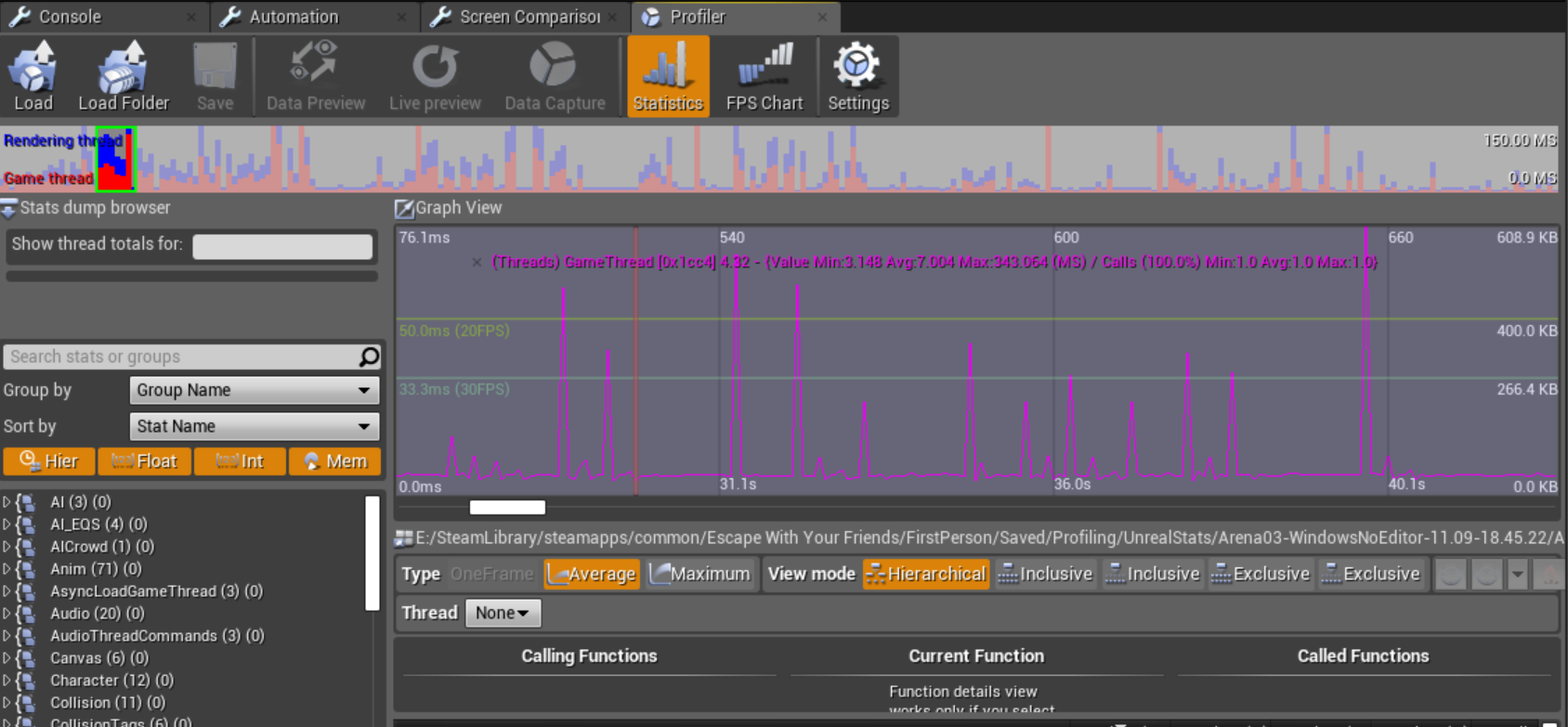
look at using the full profiler, it can tell you what it's doing over time
 lucid mountain
hey guys! i'm new to unreal engine, so sorry if this is a dumb question. Is unreal engine a good engine for allowing the player to dig tunnels/caves? I heard the best way to do that in UE4 is to make the game voxel
pallid talon
Does anyone know how to move world tiles (landscapes) without needing the "World Composition"? It only moves it in 10,000 units and I need more precise movements.
lucid mountain
I haven't tried using voxels before. I'm not looking to make a block based game like minecraft. Instead, i'd rather have more realistic graphics. Is that possible in a voxel based game? Also, would I be able to still use assets from the marketplace? I assume most of the assets would not be voxel based?
 wanton lotus
@lucid mountain there is a free voxel plugin on the marketplace.

Unreal Engine
State-of-the-art Voxel Plugin with powerful editor & runtime tools
unreal comet
@grim ore Thanks for your help. 🙂 I'm watching a video on it now. 🙂
lucid mountain
@wanton lotus oh, very cool! The graphics look quite realistic too! Would i still be able to use non-voxel based assets from the marketplace with this plugin? Like character models and such
wanton lotus
@lucid mountain Yes, of course. The free version is missing certain features though, but it will allow you to sculpt the world.
plush yew
does anyone know how to make a cliff side thing for materials? as in im making a landscape and i want a cliff besides painting it myself it does it by itself like at a certain hight it changes the texture, i dont do materials alot soo i dont know what im doing
lucid mountain
@wanton lotus do you think i will need the pro version to be able to do what i want to do (allow players to dig tunnels, caverns) and fully release the game?
wanton lotus
That can all be done with free version
lucid mountain
ok thank you very much!
 azure roost
Is there any planned official support for Tensorflow or Python in Unreal?
 covert hedge
neural network much?
i think people made a plugin so you could use c# in unreal, you could probably find one for python
also i'm pretty sure tensorflow exists as a c++ library so you could use it
plush yew
yes thank you
light thunder
@grave nebula lol thanks, It's the only way I know how to be sane
 eager stump
hi guys i am not sure if i am at the right place here.
i wanna learn to modeling with unreal engine. i once upon a time used zmodeler (3d modeling for games, especially gta vice city/sanandreas). so its been a while and i need to learn from zero again.
time changed alot, people dont use forums as much as by then. free software seems to be gotten ALOT more professional then thoose times.
I didnt knew where to look at. bcs unreal engine seems way too multifunctional, that i cannot find tutorials for my purpose.
i wanna learn how to build models, be it buildings or cars or living things like animals etc. -->modeling/texturing got priority. one day maybe some animation
i need to start from basics. that means how does the program work/ how to set polygons etc. all the tools stuff i need to use.
mh..ok
 stiff tundra
I've got a question on the groom splines in ue4 for xgen alembic cache. (Sorry for the ugly screenshot, trying this out) I seem to have a strange collision issue or maybe cv issue. Not sure. I've played around with the collision settings in the groom settings but nothing seems to get the hair closer to the sphere. I was hoping someone here could help me or point me in the right tab for this discussion. 🙂
opp spoke too soon nvrm. 🙂
light thunder
What are some good HLOD settings? anyone ?
earnest violet
Does anyone know how to change to a different level when the last one is complete plz? Basically I want it so when you kill the boss it changes level
Anyone???
median hound
open level?
earnest violet
Yeah it is open level I guess but how to trigger it
earnest violet
Yeah I gotta find it
I got an asset pack u see
It's a basic top down space shooter only cost £13.80 not bad
median hound
yeah make it open level once he dies
light thunder
How do I actually VIEW these stock HLOD generation settings???????
plush yew
you have to add a <= i think to the health of the boss/health bar then when it hits zero you can add an open level or a loading screen then in the widget bp you can add open level after a delay
earnest violet
I will try and locate boss. Thx a million m8. I mean that. It wasn't meant to ssound saracstic. Just thought I'd clear that up 🙂
 digital anchor
@light thunder you wanna view the default settings?
create a blueprint out of it, the defaults of the blueprint will be the defaults of that class
light thunder
thank you!
that's weird though - i'm using the HLOD default settings - but my project is generating different clusters (like instead of having an HLOD mesh of 10 combined SM, it is only 2
earnest violet
@median hound Yeah thx man. I can now sucessfully change levels after boss fight. Thx a heap m8! 🙂
median hound

earnest violet
who is that? LOL at pic of face
 fervent fog
Im trying to get this climbing code to work but then ever i grab the same object it teleports me under my map. i am also new to unreal engine code and using Marco Ghislanzoni's vr climbing system tutorial on youtube
light thunder
Should I be concerned about this, if I'm not using mobile?
basically it's a 65k vertex mode -
err,r vertex limit
but I don't know how to shut that off or force 32 bit mode
and why is it saying 5k items need to be rebuilt for my lighting if I"ve taken every actors and made proxy meshes- don't you only need to build lights for the HLOD's then?
 rotund scroll
anyone know if edge extrusion exists in the new modeling tools?
Should I be concerned about this, if I'm not using mobile?
@light thunder reckon you can make it go away by removing mobile as your shipping platforms in project settings
earnest violet
Here's a shocker! I got another problem. Me... Problems... Never! 🙂
Basically on my first level the virtual stick for mobile show up and I can use them but when I change levels the sticks are gone. Anyone know why plz? thx! 🙂
Anyone???
earnest violet
NAH! plain old vanilla default i should say m8y
dull trench
@unreal comet Did you find your problem?
unreal comet
@dull trench No. 😦
earnest violet
@plush yew any idea m8
dull trench
@unreal comet Have you let the game run and check the Stat Unit?
unreal comet
I ran a test by myself for about an hour and didn't experience any FPS drop and my "Stat UNIT" looked fine. I saved a file for the profiler but I have no clue how to read it.
So I don't know if it's network related or what
dull trench
:/ Do you run your test with multiple clients?
unreal comet
I did last night when I experienced the FPS drop and the lag. But today I only tested by myself
Last night I tested with one other person. Today I tested solo.
dull trench
Can't you just set multiple Players in your unreal?
plush yew
it could also be a problem in the project settings
unreal comet
I didn't know if I'd get the results I needed. I watched a video by epic and they said to use a packaged game. But I can run a test like that and see.
project settings?

That's my solo test from earlier
dull trench
Well, pacakage game is great for live test and dev profiling, but for fast debugg you better use the PIE
unreal comet
Yea I have some things they recomended written down such as turn off smooth fps and make sure to minimize the engine while testing
But I still don't know what I'm looking for
plush yew
@earnest violet you should maybe look into it in the project setting and the ui see whats out of place or it could just be a bug i need more detail of whats happening as in is it in the mobile preview? when you start the game then it shuts off, there might be another reason tho in the player character you might need to create widget and put it as the ui if its not also mabye in the level bp aslwell
just copied and past this if your not looking in your messages
it could be many things tho, im not a mobile dev so im not the best person to help you with it but it just sounds like the ui disapears when your opening a level which is easy to fix its not a bug you just need to create a widget on the next level or if you havent yet create it in the player bp
 keen moss
hey all, im having a weird issue with Unreal. when a client opens my unreal scene in editor on their machines, it shows random pieces of geo that are out of place and out of scale
as they move around the scene, the pieces change/move, dissapear etc
anyone experience this?
 next nebula
can anyone whos decent with VR dm me about an issue?
too much activity always here xD
 manic pawn
@keen moss is that in 4.25.4 ?
rotund scroll
too much activity always here xD
@next nebula I mean there's an entire channel dedicated to answering VR questions in #virtual-reality
keen moss
it was created in 4.24 the client i believe moved it to 4.25 yes
earnest violet
@plush yew Thx man. That gives me something to go on! I think I'll have create a widget with virtual Joysticks for each level. No drama. But just one thing, how the darn do I add interactable Virtual Joysticks to a Widget. Cheers for helping m8! 🙂
keen moss
@manic pawn
manic pawn
very interesting
 cyan cargo
I'm using my mouse location with a physics handle to grab and move meshes around in my static view, but sometimes my held objects in my physics handle jump around or away from my mouse location while holding it....???
any help?
manic pawn
have seen the same issue at work, map created in 4.24, moved to 4.25, now sometimes when you open it in the editor it just fucks up
random pieces snapping all over the place and scaling weirdly as if the transforms buffer was getting mixed up
keen moss
have u found a solution?
manic pawn
wasn't able to investigate it yet
keen moss
dang
manic pawn
just reloading the editor tends to fix the issue for long enough to ignore it
it never breaks in packaged
plush yew
@earnest violet its best if you add the widget to the player bp instead of adding it to every level but if there already is a widget in your player bp there might be a bug when opening other levels or something isnt right but other then that i think your fine and your welcome
earnest violet
@plush yew Thx once more. How do I add the virtual joysticks to a widget m8?
rotund scroll
@keen moss perhaps consider creating a new level, add it as a sublevel, move all the actors over, then use that as the new level?
unreal comet
@dull trench Ok so IDK if this is helpful but I made a full auto weapon just now that has infinite bullets and shoots forever. This way I can simply make the host start shooting and then sit back and watch him kill zombies. I did so and after a few minutes I started getting bad performance. I know in reality this kind of constant shooting would probably not exist but do you think maybe the killing of zombies plus what's involved with shooting a bullet is causing the issue? https://i.gyazo.com/52e9bd78ff404c866c0da1125b053b8b.png
 kindred dagger
Anyone know anything about SphereTraceForObjects.... (I'm doing object outlines for game items)
In a pickle here lol
keen moss
@rotund scroll the environment is already a series of sublevels, but i can always try making a new one
rotund scroll
or maybe even try something as simple as duplicating your levels
if it's the conversion from .24 to .25 that screwed it
maybe that'll fix it
plush yew
@earnest violet if its the default its going to have a different name, its probably best if you make your own, makes it easier to find but im not sure what its called you might have to make a widget and add them in it or see if you can find the widget
keen moss
@rotund scroll ill give that a shot
earnest violet
@plush yew I know where to find the reference but I don't know what node I search for
plush yew
@earnest violet to create a widget type, create widget > add to viewport. to make the cursor not show add a right click and type player controller then drag out from player controller and type show mouse cursor drag from viewport and put it in the show mouse cursor then one more thing and again its optional drag from shoe mouse cursor and type input mode game only theres also ui ect
oh and also in the create widget node make sure you use the joysticks again im not sure what the default ones are called but in sure you can find it easily
kindred dagger
Does anyone know anything about stopping a SphereTrace? I got my trace to outline the interactable object in the scene but I'm not able to get it to stop outlining. 😦
earnest violet
@plush yew I am not too sure what you're talking about friend. Here's a screenshot of what I've done. See below for screenshot. 🙂
 bleak raven
Anyone know how id fix this collision issue. I only want the collision event to trigger once.
plush yew
@earnest violet you dont need the second one im not sure why you added that you just need one create widget and you should be fine
earnest violet
I need the first widget to change level name
Which one shou;ld I keep? the joystick one?
@plush yew Thx m8. You were right. It now works! Whoohoo! Nice one buddy! 🙂
plush yew
if you want to make a hud like health bars ect you just need to put them into the joystick widget and thats kind of it you dont need to add widget after widget unless its something like a main menu ect
earnest violet
@plush yew I need two widgets. I have two widgets running on my level blueprint. One is for level name and the other is for Joysticks but the joysticks don't show up when I have two widgets on the same level blueprint.
Sorry ifI come across as dumb but I am still a newbie =/
plush yew
@earnest violet oh so there on the level bp? if they are add the joysticks like the create widget in the player bp and by the way the remove all widgets might also be another reason why its not showing its removing every single widget theres a better way of doing it but its gonna take a while to figure out
i unreal would add something like that an easy node to hide a certain widget kind of like remove from parent but for other bps instead of the widget bp
besides like having to make it myself
 blissful trail
bruh when i try and launch my game unreal just freezes. i can use standalone game and playtest...
ive waited 30 minuites by the way and its still frozen
earnest violet
@plush yew Is there anyway to destroy a widget as soon as I enter the level m8?
plush yew
@earnest violet there is but its gonna take some time, im making models for my game right now
there are multiple ways of doing it but ill search for something simple and easy
blissful trail
it finally unfroze and gave me this error
plush yew
heres one way, this might be for an older version tho ive never really done it this way before and im not sure if it will work but you could try it it you like
 dire fjord
My xbox controller works fine while testing in editor, but in the packaged version, it doesn't seem to work. Anyone know what's up with that?
plush yew
are you using inputs or are you using the bp as in are you using action/axis mappings or are you searching it in the bp?
dire fjord
I'm using Inputs
all configured in the project settings
I've just heard from someone else that their controller works fine in the built version.
I'm using one of the original xbox controllers the 2.4ghz ones not the bluetooth ones
plush yew
is it plugged in correctly?
light thunder
try to build lightings on preview quality and it crashes - I had the sublevel and the lighting level visible so what am I doing wrong?
plush yew
it also might have something to do in the windows settings
light thunder
doubt it's a system issue running i7, 7700k, 1080TI, 32gb ram
dire fjord
@plush yew Yes, because it's working in the editor.
just not in the packaged version strange
if I open the steam overlay, and go to controller config, the controller works there
I can navigate that menu, but that's it
plush yew
@dire fjord it might be a bug you should probably do some research on it find out whats going on with it, or if might be an issue with the bps you should maybe double check it see if you added something or did something in the panel ect
dire fjord
I'm thinking it's the gamepad since another persons is, I don't normally use a gamepad with steam games, so maybe I haven't get it set up right for steam
plush yew
maybe, steam also had a gamepad meant for steam but it could be alot of things really maybe look and see if there are any logs of it like errors ect
blissful trail
every time i run i get this any way to fix ???
"fatal error C1083: Cannot open include file: 'UnrealNetwork.h': No such file or directory"
dire fjord
@plush yew It's something to do with steam. If i exit steam and launch the game, the controls work fine
plush yew
im not sure if there are custom keybinds for controllers on steam but if there is mabye look into it, or look into the controller settings
dire fjord
Yeah I've literally never used a controller on steam before, so it should all be default. I'll head to steam forums and check there.
plush yew
ok
light thunder
what did I do wrong here exactly?
median hound
a lil bit too dark
 feral crow
Can someone try and help me in #plugin-dev ? 🙂
 round tangle
what did I do wrong here exactly?
@light thunder too many lights with too much intensity or check your post process volume
 feral patio
Im looking to develop a game in unreal engine that works with VR and PC. Anybody know if valve index will work with unreal?
 rich furnace
hi guys I am trying to import a webcam to ue4
but the list is empty
it is supposed to show webcam as well as my OBS virtual camera
but in ue4 its empty
earnest violet
Does anyone know what node I call to play a cgi movie before the game starts. I have movie ready to go but I'm not sure how to go about it
And what video format does UE4 undestand?
 tiny sonnet
ayo, i cant instal ue4 in programs files, despite running epic in administrator mode, i keep getting error DP-06, if it comes to the worst, ill install it elsewhere but anyone have a clue? I'm updating from 4.23 to 4.25 btw
dull trench
@unreal comet Do you ever delete bullet? Decals? Undelete actors like vfx?
@unreal comet Blood decal/splash
unreal comet
I've been looking. I found a few "spawn sound at location" that should be play sound. Do those destroy by themselves or no?
dull trench
I think you need to set something to auto-destroy sound, but that should not impact your GPU
unreal comet
True. I do spawn a muzzleflash emitter attached to the muzzle for every shot.
dull trench
That should impact your CPU, not the GPU. IF you do F5, do you see something red/pink/white?
Like, maybe your muzzle flash become invisible but are still rendered?
unreal comet
It only appears when I shoot, then goes away like normal
dull trench
Do a Grab GPU capture with Ctrl + Shift + ,
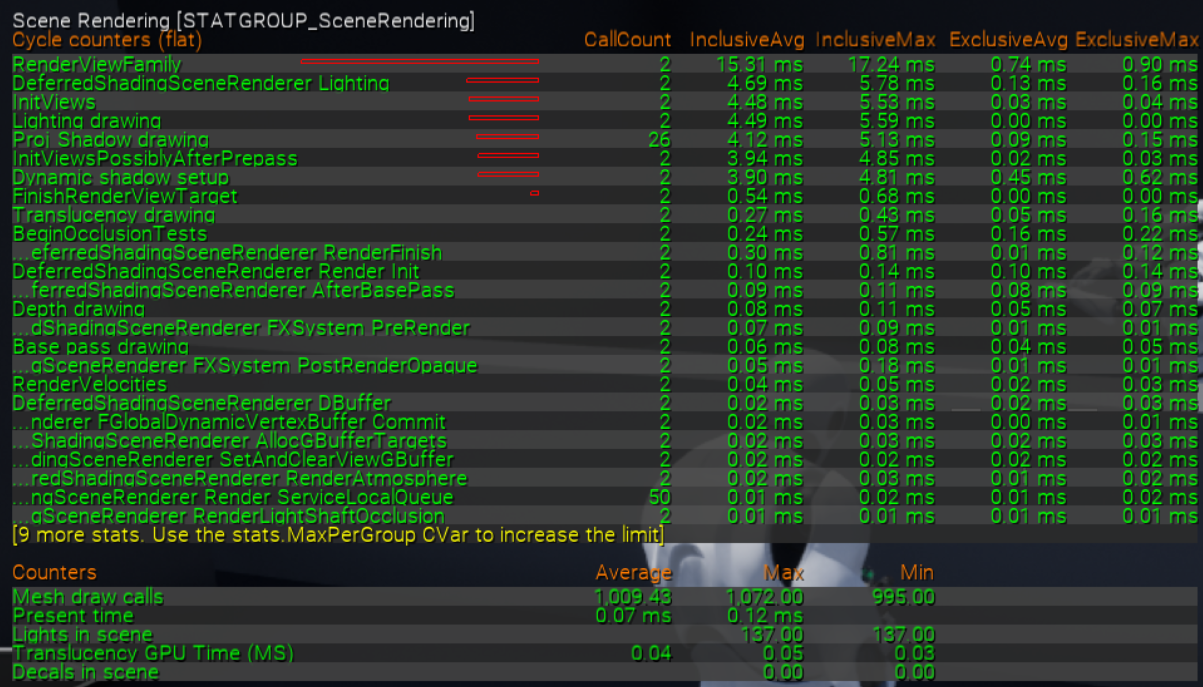
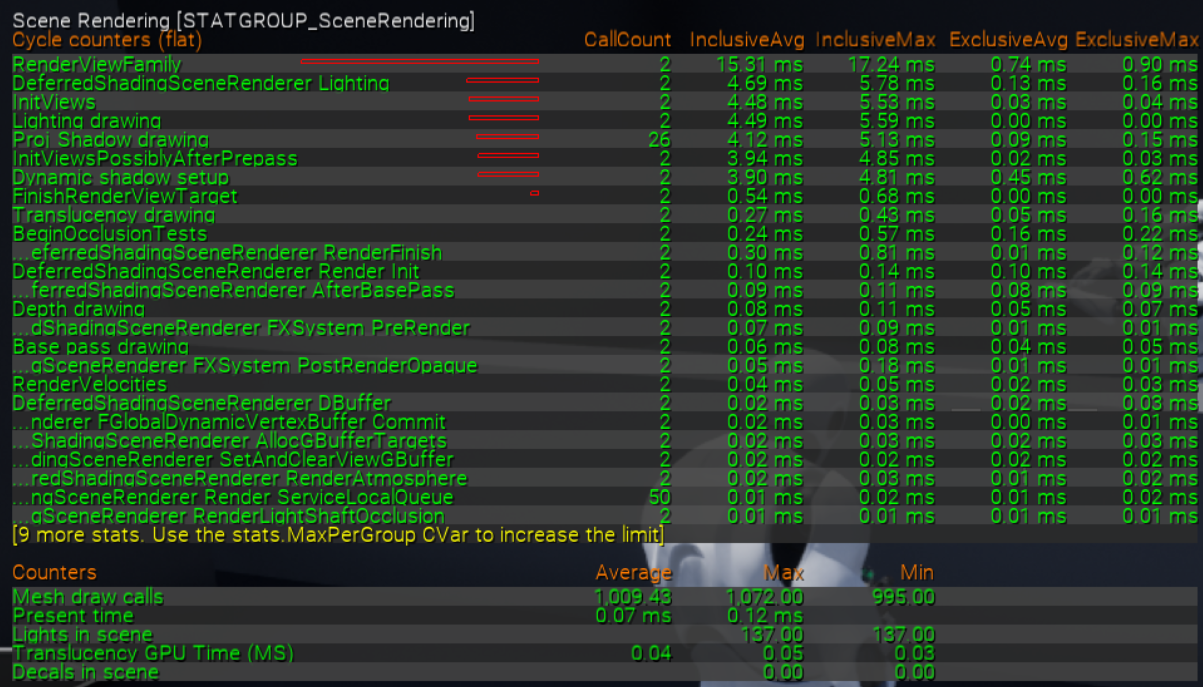
Also, capture your stat scenerendering please
remote mist
Somehow I feel like there should be a bit more light in the forest than this.
dull trench
Definitely
remote mist
I like the light effect, just need to increase the strength
Which component is blocking the light though
dull trench
Do you bake lighting?
remote mist
Not sure what that means
dull trench
Are you using lightmap + Build Lighting using the build button?
remote mist
I just clicked build lighting only at the top
dull trench
Which one are your Sky light / Directional light (sun) set on Static / Stationnary / Movable?
remote mist
Sky light is set to static, the Directional Light is set to Moveable
 dull trench
That mean you must use Lightmap and Lighting bake solution.
Does your grass have a UV 1 Channel to allow lighting to be bake on it?
1k draw call should be fine
@remote mist You need to read this, that will be great help 🙂 : https://docs.unrealengine.com/en-US/Engine/Rendering/LightingAndShadows/Basics/index.html
The basics of placing lights into levels and setting them up.
remote mist
This is what my grass used:
dull trench
For huge exterior level, I would trash the static lighting and go full dynamic.
remote mist
Changing the Sky light to Moveable?
remote mist
Okay I'll build the lighting again and see what that did
Hmm, that doesn't render the lighting at all when I select that function
dull trench
Have you set your Sky light and Directional mobility to: Movable?
dull trench
and you clicked on Build?
remote mist
Yeah if I uncheck the force option and click build again it starts going to through light rendering
but if I enable it and click build, the picture above is what I get
dull trench
I think I see a shadow. You might want to reduce your light intensity of your sun to something near : 10 and your skylight to 1. The skylight render a cubemap to set intensity in the level, you don't want to have a very bright sky material
remote mist
but I haven't tried building the lighting yet after swapping everything to moveable so I'm going through that atm to see what that gives me
dull trench
That will do nothing. Moveable can't be baked
 barren flume
dull trench
barren flume
dull trench
@barren flume You probably missing Game development with C++ tools for you Visual Studio
remote mist
Brightness of my Sun is at 500, that might be the culprit
feral patio
If I start developing a game Right now and want to make it vr compatible later. is that possible?
dull trench
Oh.. I don't think I can help here Sandman
@feral patio Yes
@remote mist Set brightness to 10
median hound
for values how do i enable slider i forgot
 grim beacon
Idk where to ask this question
Does anybody know a way to set a bone "owner no see" ?
Like a bone by itself without effecting the other bones in the skeletal mesh
remote mist
Although building the lighting still isn't doing anything
dull trench
@remote mist And it should do nothing.
remote mist
Okay so the shadows I'm getting are accurate representations of the lighting in my level now
 icy egret
https://i.gyazo.com/4e0afe0c120a4875db136adcab9cff16.mp4
someone please help me
I don't know how to express it, but you can see it is bit strange
median hound
haha
median hound
show bp
icy egret
To shoot floor or wall when they are nearest objects from muzzle, I use 3 line trace
problem will happen when "nearest object from muzzle isn't wall or floor" and "nearest object from camera is wall or floor"
remote mist
Think I fixed it
median hound
what happens if ur not moving n shoot
icy egret
In beginning of video, I don't move
namely, same thing happen
I want line trace from camera not to detect wall
 stable ore

FULL VERSION of this VIDEO TUTORIAL you can see at: https://bit.ly/2DXWbJp
This beginner tutorial gives you the ability to learn the fundamentals of the Unreal Engine user interface and its components. After introducing you to the interface and functionality, you will learn i...
What kinda sorcery is this?
icy egret
okay so I come up how to solve it
Using line trace for each distance will works fine
however, I don't know how to line trace for each distance
like 1m~2m, 2m~3m, 3m~4m....
does someone know how to line trace for each distance?
median hound
first line trace try x9000
icy egret
you want to say "set 9000 UE unit to the end of linetrace"?
icy egret
I did it
actually the problem is solved, but this change happen another problem that I can't shoot anything which is in between 0m~9km
because bullets won't travel to center between 0m~9km
that's why I set it 100
unreal comet
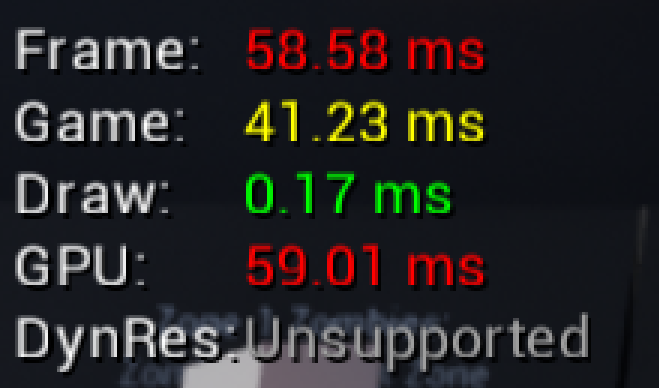
@dull trench @grim ore Ok so I tested with a friend and we narrowed down what happens. Basically everything is good until a Client shoots non stop for a long period of time while killing zombies. I created a test weapon that has infinite ammo and let the Client sit and blast the zombies as they spawned in. What happened was the client was fine, but the Host/Server's FPS tanked. I was the Host/Server and my FPS went from 100+ to 11 FPS. Clients on the other hand were still at 80+ FPS. Then when my FPS tanked it made all clients start to lag and "rubber banding" started happening. So It's like the clients are overloading the server which in return causes the lag back to all clients. Here is a screenshot of the host/server player at it's worst: https://i.gyazo.com/0fdd16e3a1e0892f5d8152f22e08876e.png

 honest vale
that high draw time means you're swamping the render thread on CPU side of things
unreal comet
So what does that mean since those are my numbers and I was literally just standing there doing nothing? I was the host. The client's numbers were all green and fine but he's the one shooting his gun.
 rancid bramble
Is there a fix for SSR flickering caused by disabling AA?
 midnight jetty
I am watching a bunch of tutorials trying to learn to program a game with blueprint and I think I’m learning quite a bit of the basic stuff. I’m worried that I will forget all this stuff down the road though when I start learning more of the advanced stuff. Anyone have any tips or advice for me?
rancid bramble
@midnight jetty It depends what kind of game you're creating, but I would say that most of the time you're going back to the "basics" anyway. Even when you know the advanced stuff. You can't avoid floats, vectors, for instance. 🙂
@midnight jetty What sort of games do you like to make?
rich furnace
packaging results in this error plz help: https://pastebin.com/MgqcKsqT
Pastebin
Pastebin.com is the number one paste tool since 2002. Pastebin is a website where you can store text online for a set period of time.
rancid bramble
@rich furnace Doesn't tell me much, that log, but do you happen to use source control?
round tangle
rancid bramble
Any fix for the flickering Screen Space Reflections (SSR), other than changing to TAA? I hear some shipped games after UE 4.19 have had this issue when turning off AA.
 flat isle
Need help, hopefully this is the right channel to ask about it. I have a face whose expression is controlled by morph targets. I am also using alembic hair for brows and eyelashes. Is there a way to animate the alembic hair with morph target?
plush yew
hey guys
something wrong here...
any helpers?
cant you just reinstall visual studios? or update it to the latest version?
i did
i repaired it
what about ue4?
it's the latest version i downloaded from github
latest release
25.4
there might be corrupt files or something went wrong, what were you trying to do?
generate project files
so that i can compile UE4 from source
i did setup.bat as it says on the github page
it downloaded dependencies
then i clicked GenerateProjectFiles.bat
and then i get this
I'm using MSVC v142 - VS 2019 C++ x64/x86 build tools (v14.22)
is this the correct one?
maybe reinstall it? if it keeps happening you might have to go to the forums or do some research why its happening
what's platform.winmd?
windows software devkit
that's the problem
ok let's try this now and see. Ill repair it
and then generate project files
@plush yew i sent you a link to something that might help
im missing a devkit
that's why
cuz of the new version of windows
oh ok yeah, i havent updated windows yet soo
 shell surge
Hello
I really need help
one of my levels got fucked up and is there a way to open some autosave or backup file before it got fucked up ?
honest vale
you haven't built level lighting
shut glen
i cant
honest vale
why not
the reason you have preview text all over your level is because those are unbuilt preview shadows
rancid bramble
@shell surge I assume you haven't made any backups of the files. Someone correct me, if I'm wrong, but maybe your Operating System has made backups for a longer timeline? Don't revert your OS, if you don't know what you're doing though. Just an idea.
rancid bramble
But are you sure your level is corrupted?
shell surge
there are deleted meshes and lighting from it
rancid bramble
Maybe something in your level, an actor, is corrupted?
rancid bramble
If they are not in the backup level file then you can't
So if I understand correctly, you removed lighting and meshes from your level, saved, and you want them back?
You simply need to have a level file with those lighting and meshes or it's not possible
 austere hinge
Does anybody have the link for 4.25 + gameworks?
Currently I have 4.21 0lento gameworks build
 thin flume
I made an enemy blueprint with ai preception hearing and sight.... everything is working fine but my enemy can see player through walls
I dont want my enemy to see player through walls
I googled everything dont seems to work for me
rancid bramble
@thin flume See if your walls have collision set to BlockAllDynamic and if so, try changing it to BlockAll
shell surge
@rancid bramble I have autosaves and backup files
but whew I try to open them
they miss the lights and the meshes too
wtf
rancid bramble
Hmm one possibility is that you had/have multiple levels open and the lights and meshes were on those level and never in the level you open?
shell surge
what happened is I created a new level and then deleted the lights and meshes cos i didnt need them there
but for some reason they got deleted from the old level too
rancid bramble
@thin flume If you havent done so yet, you can use the tilde button on keyboard to get the debug display and from 4, if I remember, you can see the perception components in action. Might help to see, if the vision is blocked or not.
@shell surge It sounds like you had them in the persistent level and what you deleted were not copies.
shell surge
even if so, I deleted them from the scene only
why I can't restore them now from autosaves or backup files ?
quick kelp
whats the best way to convert an Object in UE4 into a string with all its data? someone recommended i look into turning objects into JSON files and then use a plugin to turn JSON files into string. is there another way that is easier to achieve?
 fluid lance
Can anyone point me to some documentation on what the experimental "skeletalmesh simulation component" is? Can't find any info on it.
 native bough
I am a beginner I didn't know how to make a vehicle whose I can change color adding logos, add custom accessories in game shop can some one guide me
shell surge
@rancid bramble when I try to open an older level from the content browser, it says
"failed to load assets"
rancid bramble
Does it open the level at all? @shell surge
 sterile tulip
Can someone help me??
this is my map
but look what happens when I press play
 wind gate
i think i had something similar lately
check your directional light
send a screenshot of the settings please
(plus you havent build the lighting yet)
@sterile tulip
sterile tulip
yes I havent build but the lightning works when I am not playing
just when I press play its broken
wouldnt it not work on both if it were build related
wind gate
it doesnt amtter if you havent build, the editor and the game mode some times differ by a lot
okay scroll more in your settings, go somewhere there is a volumetric scattering setting, the exact above must be somethng like "indirect lighting"
what is the number there?
sterile tulip
wind gate
okay change the indirect lighting intensity to 0 and press play (you might need to build the lighting to see the difference but for now press play with the 0 and report back)
wind gate
you mean the directional light? well, that depends to what is the purpose of each light generally. I don't think that would affect your play in that way
generally 0 on the above setting isnt optimal, try 0.1 and let me know how it looks. Generally wth the 0 did you see any difference?
or excactly the same?
sterile tulip
It will take some time because my pc is a little slow right now
wind gate
try with the 0 first i would say, but you will need to go with trial and error.
sterile tulip
Why can it not just use the same lightning from editor in play mode?
wind gate
not exactly, the editor is a preview, the play goes on and simulates your setting. That's how I've come to understand it, I can't explain it other way. Maybe someone could chime in and clarify that better
as the 0 setting, turning that down will remove all the indirect ligting, so maybe try to build with 0.1 first and see
and if you go at 0 eventually (cause this might work for you) try manipulating the Indirect lighting through a post process volume, cause it is kinda usuful generally for your Global Illumination.
@sterile tulip
sterile tulip
is there a way to only build a small area of the map or do I have to build the entire map each time?
wind gate
i do not know about any feature like this but a quick way to do soomething similar is to create a new map with everything (directional light, skylight, reflections, exponensial fog etc.) and only a smaaall portion of your geomatry (lets say the area around the car)
if the are is a huge landscape then just skip it I guess. That is a quick way to have a faster lighting build but DO expect differences from your original map since... well... the geometry is different.
I suggest that since for you you just wanna evaluate your lighting settings, as i said trial and error
@sterile tulip
btw I just realized the setting was there in the first screenshot lol
 fallen flower
If I make changes to an actor inside the Editor Content is there any way to restore it? Those changes apply to every project that uses that engine, right?
wind gate
Probably but I'm not sure. What is the exact path? The best way generally to do something like this is copy paste I guess? Like, copy the asset (and any dependencies) and paste it in a custom folder in the Content folder. @fallen flower
btw if you really wanna test that, create a folder or a pic and see if it stays available in other projects
fallen flower
No, I don't want to keep the changes. I accidentally changed some settings on a actor Datasmith placed in my level. It's EditorSphere specifically.
I only later realized it was Engine Content.
 rotund yew
Guys how do loading screens work
i have mine as a widget
so i can have the loading screen as a variable
like if you select this charecter, the Charecter in the loading screen changes and the background does too
So how do i Loading Screen 👁️👄👁️
(ping when respond)
rancid bramble
Does anyone get working Screen space reflections (SSR) without using Temporal AA (TAA)?
There's no mention of any problems in Epic's docs on SSR. Which is no surprise. There's only obscure issue logs that are marked unresolved or backlogged.
@rotund yew Follow some Widget tutorials on interactive widgets like menus and you'll learn to do what you want.
light thunder
this HLOD asset looks jacked - is that simple because it will only been seen like in my second picture?
wind gate
@fallen flower are you sure that datasmith placed an engine content on import, that's weird
 vocal herald
Lads. Why the f when I use set world rotation for actor/component its not exact? When I want to rotate an actor by 90 degrees it rotates by 89.999
 queen plover
Guys I would like to know if unreal has a feature that I have recently discovered in Unity that seems to be very useful. I havent found anything on the web so thats why i am asking here
Is there a way to have a catalog of assets that can be loaded from a server (like Amazon S3) at runtime with Unreal?
Unity has the Addresables system
Does it exist or is it in the roadmap? I find it very useful for exporting to Oculus Quest 2 as it runs on Android and having a small apk that can retrieve assets from a server at runtime seems pretty useful
digital anchor
not sure, but have you seen this https://answers.unrealengine.com/questions/109485/stream-an-asset-from-the-internet.html?
 wicked frigate
Hi guys ... Is there any way or any plugin to make an AI system with python?
sterile tulip
what do I do now?
reducing indirect lighting in light setting doesnt change anything
wind gate
no this is exactly what i meant, now the editor is "accurately" representing the settings.
so, did you did what i suggested? created a new map?
for faster build
sterile tulip
but I want it to look like the editor before the building
queen plover
@digital anchor Thanks! The problem is that i dont see it like a built in feature, i havent found a documentation page on the engine that shows how to do it with examples of remote assets
wind gate
yeah i know, but thats's impossible unless you fix your settings. lets see what else we can do...
let me know please whether you created a new map and what exists there @sterile tulip
vocal herald
is there really no way to set exact rotation? my logic wont work cause I built it expecting my actor to move along X and Y axis. But because of scuffed rotation values it moves slightly diagonaly
 regal mulch
Depends on your rotation values. There are always numbers it can't show exactly so it "rounds"
1.f 0.f 0.f should work though if it's just about the X Axis
wary wave
that's as exact as it's going to get
vocal herald
and i set my actor to movement to be normal to forward vector
and now when I expect it to move along X axis it slightly moves along Y axis and it breaks my logic
wary wave
I don't think you'd even notice a 0.000001 degree offset
dull trench
drag static mesh on it
plush yew
procedural or random. Just inside that area.
 dim merlin
Maybe use Splines @plush yew
plush yew
Planets are procedurally generated so i cant put splines to it.
wary wave
just math it?
plush yew
Can something like clamp be used with lerp?
wary wave
generate a point that is within the ring radius, but not within the interior radius
just generate a random value 0-1, then map that 0-1 range to interior-exterior radius
you only need an X and a Y coord
 potent bridge
How would I remove collision from a Landscape? Setting its preset to NoCollision doesn't work.
never mind
rancid bramble
i want to set 90 180 270 0
@vocal herald
but its always 89.9999 179.9999
That's normal. No problem there. It's a bit annoying in an OCD way, but what can we do...
And if you are expecting it to equal to an integer somewhere then usually you have an error threshold of 0.0001 or something.
plush yew
how do you add more detailed textures to your landscape? decals?
all i see are tutorials using giant brushes to paint landscape materials
but what if you want specific more detailed textures?
 ancient kayak
is there a way to lerp a material attribute and the alpha is WorldAlignedBlend.
plush yew
did anyone go from 1700x --> 3950x ? did your compile times / build lighting improve much? I think my newer system isn't pushing ue4 as fast as it should but idk
midnight jetty
I’m new, and i don’t understand when I’m supposed to use “get/set relative transform/location/rotation/scale vs. world transform/location/rotation/scale. Anyone have any tips?
icy egret
someone please help me
I have problem that enemies who are stopping become invincible
when they are moving, I can damage them, but when it comes to stopping, I can't give them any damage
why??
I didn't edit about god mode
 carmine lily
Hey everyone, I'm trying to use the Master sequence, but for some reason my cameras is not playing properly. I saw on YT tutorial and also on the UE Forums that I need to put a Camera Cut in each shot before load it in a Master Sequence, but even after I create the camera cut in all shots the master sequencer still is not detecting my cameras, can anyone please give any suggestion about what is happening?
 inner cloak
@vocal herald that is also something i find annoying
 worn anvil
Can Unreal games run well on low end PCs?
grim ore
No you need at least a p4 with 4gb ram
cyan cargo
4.26 Preview just dropped
Preview 7
got excited and thought it was full release -_-
still awesome though
grim ore
@plush yew I went from a 2700x to 3950x and I cut my compile times of master branch down from say 35m to 12m
dull trench
@sterile tulip Could be smoothing group issue or bad UV on the terrain
 steady tree
Has anyone ever seen a Landscape getting kinda like culled/hidden on a component level? Basically I have a 8x8km landscape ( 16 in total ) and when I hit play, I basically can only see max 4 of tiles of one of the landscape tiles, that get culled as well once I reach a certain Distance - max draw distance is set to 0 and sadly I can't show images due work related - It feels like ue4 is cutting the one landscape into multiple little landscapes, I've never seen anything like it. I made a new Project and loaded in the landscape, works totally fine weirdly.
carmine lily
Just sharing the solution about the Master Sequencer.
Well, after load all the shots on the sequencer you must need select the little camera on the corner of the Shots. 🙄
This is so annoying, since that the shots is already on the timeline, we don't need to select the shot, but anyway, it is what it is.
thanks
 molten bobcat
Hey guys/gals
Anybody experiencing freezes after updating win10 and ue to 4.25.4 ?
Everything worked just fine before but suddenly now whatever i open it freezes pretty much instantly forcing me to force shut down my laptop
molten bobcat
i already tried to create a new project -> Same thing
Uninstalled and re-downloaded -> same thing...
I really don't want to format my laptop if it's something not from me... any help?
kindred dagger
@young schooner is the reflection still there when you remove the reflection volume thats in between the two peoples feet?
wind gate
Guys, I want to find this Get Key function but I only find a simpler one (green without the white nodes)... did anything change? What am I doing wrong?
as you probably get im pretty new on blueprints so yeah, pardon my naiveness lol
wary wave
one is a pure function, one is not
the pure function (green) will execute every single time the result output is connected to something
the blue one will cache the result, and the function executes only once
wary wave
you don't, they're two different nodes
without context, I don't know why one is and one isn't
you can still 'cache the result' by saving it into a variable though
 misty cargo
Here's a tip for all u don't do everything do anything don't let yourself do everything and not allow u to do anything
It's important for coding
wary wave
what
wind gate
@wary wave yeah right so i am just trying to capture the inputs coming from user
i am following this article to create a terminal
wary wave
right, and their example is using a non-pure function?
it's probably just an engine version difference in that case
wind gate
they use that, I called the On Key Down and I find everything except this one. I figured it might be an engine version difference
Ive done this, but i feel i wont get the display im looking for
grim ore
why do you feel it wont work?
for all intent and purposes the result from the pure node and the execute node in this case are going to be the same, they probably went in and cleaned it up since having a caching version didnt make sense for this node
 solemn siren
As in the tutorial video at 10:54
My preview
I am following this tutorial for outlining actor
https://www.youtube.com/watch?v=1XqXvVFN5i4&ab_channel=UnrealCG
Can anyone please help me point out where I'm making the mistake? I'm following it exactly as shown
plush yew
I have a question
How do you import Fortnite .umaps / .uassets to unreal ?
 young schooner
@young schooner is the reflection still there when you remove the reflection volume thats in between the two peoples feet?
@kindred dagger hey tony yeah the reflection is the same
wind gate
@grim ore allright, that makes me feel better. For now ive created a Widget bp, done the "taking and processing inputs from the user"part and added the OnKeyDown function. Don't really know how I place it on the actuall mesh and stuff yet but I guess ill figure that as i've done with the rest soon lol! Oh and I really appreciate your tutorials on YT! 😄
median hound
nick i think u just open ue4 content folder and put it in as a folder
plush yew
for me ?
median hound
thats what i did for uasset
median hound
make a project
plush yew
a new one ?
median hound
no
ill show in scs
right click show in explorer then drag the uasset file in dere
median hound
click that square thingy
plush yew
k
median hound
bottom left
plush yew
then ?
grim ore
@plush yew the .uasset has version info in it, it has to match the editor in order to open up. If you dont have the Fortnite editor it will not work
median hound
huh
grim ore
you cant get the fortnite editor
elfin grove
fortnite editor... is this guy drunk or high?
median hound
i thought u were just trying to import uassets from fortnite nick
plush yew
yeah, but @grim ore said something about it
like if I don't have it, it won't work
so I guess I can't ?
grim ore
ue4 asset files have the editor version/build as part of it, unless you have that version/build it doesnt just drop in and open.
I would assume (i never tried) that the fortnite assets are a special build and will not just open up in a launcher build of the engine
median hound
try nick
plush yew
try nick
@median hound Try what ?
median hound
putting the uasset in the folder where uassets go maybe that will work
plush yew
sadly didn't work
median hound
whats the error msg
plush yew
there is no error message
kindred dagger
@young schooner check the material properties/details. See if you can turn down the specular or possible take the material to a third party software to edit it. The material itself must have too high of reflective properties. Possibly turn down the specular + turn up the roughness a bit to get rid of the hard reflections
plush yew
it just doesn't appear
median hound
only if u can open it in blender like fbx rip
wind gate
@plush yew you know that these assets are copyrighted tho and you can't use them on any of your commercial projects, right?
plush yew
anyone have ryzen 3950x? pmme pls
wind gate
oh boy, how do I find this Filter string?? ( i feel so uncanny messing with these, Im just jumping from design lol)
on widget bp
young schooner
@young schooner check the material properties/details. See if you can turn down the specular or possible take the material to a third party software to edit it. The material itself must have too high of reflective properties. Possibly turn down the specular + turn up the roughness a bit to get rid of the hard reflections
@kindred dagger thanks bro
kindred dagger
@young schooner sure man let me know if that fixes it
young schooner
@young schooner sure man let me know if that fixes it
@kindred dagger should i change the property for the floor or the Plan
kindred dagger
click the mesh that has the bad reflections, find the material it uses in the details panel. Either edit the specular and roughness in the mesh details or double click the material and edit the specular and roughness there (which is usually best)
Make sure to save & apply
young schooner
click the mesh that has the bad reflections, find the material it uses in the details panel. Either edit the specular and roughness in the mesh details or double click the material and edit the specular and roughness there (which is usually best)
@kindred dagger tried bro the reflection is fine the viewing angle is different
sent u the picture please let me know
 gleaming narwhal
Unreal Build: Virtual Production is live on YouTube: https://youtu.be/fouytUxd2tk

Coming to you from the comfort of your own home on Tuesday, November 10, Unreal Build: Virtual Production is a free half-day virtual event that showcases incredible projects and innovations from film and television industry trailblazers.
 upbeat aurora
@late verge you can use DragonFly Virtual Camera Plugin with any tracking data source.
light thunder
How do I convert a mesh so that it only uses one material, like the way the HLOD system merges them all down
ocean grove
Hey guys I'm following a tutorial on Youtube that uses "Cast to FirstPersonCharacter" for interacting with a door - but I'm in VR gameplay and not sure what the equivalent would be?
 west phoenix
@ocean grove cast it to whatever your player actor is called
 wicked shale
Can someone help me with using an animation whilst using fabrik? I think I need to turn the alpha down whilst the animation plays then bring it back up but I can't get it to work smoothly because there is a delay involved also so with the ways I've tried it waits until the animation is over then snaps back on instead of smoothly moving back whilst the delay/animation is going off
ocean grove
@west phoenix I think that's VR Pawn, lemme check if that works! I think I tried that and compile kicked out an error but I probably hooked a node up wrong.
 barren lake
ue4 light mode
ocean grove
Couldn't find it, but I'm going to figure out what my player actor is called and then see what cast applies to it!
west phoenix
@ocean grove yeah, the tutorial is probably just casting it to player to make sure it's a player actor who is trying to interact with the door
ocean grove
Yup that's exactly what it's doing.
 stoic widget
Hey guys, I want yo give myself a shot in game dev, should I start with Unity or UE4 as a beginner ?
I'm pretty familiar with some languages tho
west phoenix
@stoic widget try both and see which one clicks more with you 🙂
stoic widget
@stoic widget try both and see which one clicks more with you 🙂
@west phoenix yea I think I'll just try both for some time and see how it goes
ocean grove
I just deleted the door I was working on...
I thought I was deleting a node and deleted the whole class.
covert hedge
i think 2D projects are more easily achieved with unity @stoic widget
 outer ocean
 stoic widget
For now, I'll stick out with 2d projects to learn the basics and jump to ue4 when I'm ready for 3d I think
misty cargo
@covert hedge 2d projects can still happen in unreal u just have to keep it on one axis or in a widget
stoic widget
Is there any course/tutorials you guys can recommend me ?
median hound
yt
grim ore
read the pinned messages in this channel
and older does not mean not good or not working
stoic widget
Oh my bad should've checked the pinned messages
misty cargo
Yeah .... About that don't use map variables in 4.22
Unless u want to be in a whole lot of pain
They seem to bug out a lot
stoic widget
Is there a specific reason for that ?
covert hedge
well, why would he use 4.22 if he just starts, 4.26 is almost upon us 
next nebula
Does anyone know how to attach a collision sphere to the default mannequin hand?
so that it can track the hand?
theres no default mannequin hand bp
for vr
so Im lost
median hound
are lights suppose to be this bright at 1cd?
stoic widget
well, why would he use 4.22 if he just starts, 4.26 is almost upon us
@covert hedge I want to be outdated to sound like a veteran UE4 dev


 covert hedge

 astral marsh
guys, tips to optimize a level?
median hound
level streaming?
grim ore
@next nebula there are hands in the VR template, have you tried in there?
 verbal eagle
Hey everyone, I'm curious, If you were going to take beauty shots of an in progress VR project, How would you do so?
next nebula
MathewW do you mind if I DM you?
verbal eagle
What do you think is the best way to present in progress VR work...in unreal.... I'm using a Quest2.
ocean grove
Hey Nutrition I might have a youtube tutorial for you
next nebula
that would be lovely CYP466
ocean grove
sent it, not sure if it's relevant
grim ore
@next nebula so you are using the VR template and found the hands? what is the issue
next nebula
this is where I added the socket
mannequin skeleton
thanks for the video cyp466 ill look at it
grim ore
yep if you added the socket there then what is the issue?
next nebula
I want a collision sphere on it so that I can detect input
when my other hand is in there and I release an object, it attaches to that socket
is this correct?
grim ore
have you tried using the test maps that come with the vr template? one of them has you picking up objects
next nebula
grim ore
it shows how that works
next nebula
yeah ik
motion controller map
but thats different thats a bp_pickup object
Im trying to make a sphere collision to trac kthe hand and whenever I let go of something inside it snaps to the socket
grim ore
the engine tracks the hands for you automatically
next nebula
yes
grim ore
and you can keep track of items you pickup
so when you let it go you just want it snapped to the hand socket?
next nebula
I forgot to mention the box collision is attached to camera
so hold on
let me start over cause Im confusing myself
I added a socket to the hand
Right hand
with my left hand, If I let go of an object inside of a collision that I want to track the right hand, it will snap to the socket
kind of like storing an item on your wrist
not on your hand
its on the back of the wrist of the right hand
so how can this be achieved
grim ore
you dont need to attach the collision to the hand socket, if its a child of the mesh it will follow the mesh
but I do understand now. You could make the collision a child of the hand mesh and whenever you let go of something on the left hand you can check if its inside that collision component
next nebula
yeah I was just trying to put a collision on the hand
where the socket was
alright one moment
let me look at this
heres my issue
how could I put a collision child on the hand
when there is no bp class
grim ore
look at the overlapping nodes
you just add the collision as a child of the hand, in the blueprint
if you look at the blueprint now it already has 3 children
grim ore
if you go to your motion controller pawn, and go thru the code one of the first things it does is spawn in the controllers
light thunder
I just realized the marketplace was having all the downloaded content saved on my OS drive and I'm out of space - I've set a new folder but will it move the stuff there automatically or do I need to manually do it?
grim ore
@light thunder it will not be automatic
you can add the collision in the motion controller blueprint that it spawns in yes, you can see in my first screenshot I added it
grim ore
you can check for collisions similar to what the hand does already but when you drop the item with the left controller
it checks the sphere that is attached to the hand and looks for things that it is overlapping then does wahtever it wants
grim ore
your trying to do some complicated stuff without knowing how the engine works or vr.
that code is basic but you need to know which actor you want to attach and if its overlapping the drop off point
next nebula
yeah
ocean grove
Is the motion controller pawn considered the actor that you would cast to?
light thunder
you need to watch the epic livestream dude
next nebula
I took the bp of the default cube and duplicated it and turned its mesh into a rock
so I wanna reference that
light thunder

Announce Post: https://forums.unrealengine.com/showthread.php?101051
This Training Stream takes a look at Blueprint Communication. We find that Unreal Developers of all levels can sometimes struggle through the concepts behind moving data between objects. So in this video we'...
this will save you days of frustration
Trust me.
next nebula
Thanks for the link.
light thunder
you can try the "figure it out as you go" but it's better to get some of these questions answered BEFORE you have to ask them
like @grim ore says, you need to at least grasp how the different systems tie together
ocean grove
@light thunder thanks mate! I'm just learning UE for VR so this helps me too!
light thunder
the other general piece of advice - if you guys learn how to phrase a question correctly, it tends to answer itself, or lead to more specific questions that are easier to answer
"how do I make a gun shoot" is impossible to answer directly, here is how a specific question would be easier to answer - "My gun is firing in game but the bullets are ignoring my actors even though I have them set to the block on the same collision channel, where do I need to look next?
next nebula
yes
light thunder
about 80% of the time, I will write a question here to post and I'll realize a new question to ask/area to check, I google that, check it and it works, then I delete my question before I've even submitted it
the one exception is the HLOD system - NO ONE knows how it work or optimal settings, there is no information on for anything in depth, and if you want to know more about the system beyond what the basic docs tell you or the livestream, the information is not available, right @grim ore
grim ore
I have idea lol. I don't even know if I have touched that yet
I think I tried it once with like a bunch of cubes but that might have been just the normal instanced meshes
light thunder
well please do, it's like a trade secret for epic or something
amazingly powerful but there's no troubleshooting info
but like, in 20 minutes of building or so, I reduced draw calls by 50% at least, with zero quality impact that I could discern
and it's like, a friggin requirement for anything mobile or VR
grim ore
I won't argue it would be nice to have the ability to just walk up to an engine dev and go "hey how the hell does this tech work that you made" and get a nice chat about it
could barely get enough time back in the day from them for that but now with the plague 😦
next nebula
hahahaha
light thunder
Depending how long I could talk to them about it (a few days probably) i would literally remove one of my fingers (my choice though)
sooo much stuff could be answered/comprehended for that
grim ore
one key takeaway tho is...... some of that stuff is just implemented enough for them to use for their specific use lol
next nebula
Well thanks for the link Blakestr
Im going to watch the whole thing
and take some notes
light thunder
that's true - but they made fortnite run on mobile for it, so even a simple writeup about their assets used and their asset budget, given in context of the HLOD system, would be invaluable
I'd be willing to be it's behind the custom license and that magical forum I hear about
one day when I'm a big boy developer, they will tell me
grim ore
I bet it's not lol
next nebula
Im collaborating with a friend to make a low poly vr game with some components so this tutorial will be helpful
grim ore
like so much stuff is just added to make stuff happen and that's it
next nebula
thanks 🙂
light thunder
it's funny you say that because I thought about looking at the fortnite credits and trying to figure out who was the person who worked on that system and just try to track them down to talk to them but it's too generalized for me to figure it out I should probably just email someone and ask them who worked on the system
next nebula
hey quick question
is there a recommended way of taking notes
through notepad on PC or writing
which one do you think is better
light thunder
Don't take notes instead use the spacebar to pause the video and do what they actually do - you are going to learn by doing
It will take you probably twice as long to watch the video but you'll learn more that way than you would in a month of screwing around on your own
next nebula
ohhh good idea
light thunder
Beyond that you'll figure out what to remember to write down in terms of essential crap - like execution order matters if you haven't spawned an item you won't be able to ever reference it unless it exists in the world
 languid ocean
Cant see alpha brush in viewport does anyone have this problem?
light thunder
When they start with the video they'll tell you we're using this third person template or whatever just download and use that
light thunder
VR is simply a different camera
I use my VR headset about 10% of the time if that at all
light thunder
You're mainly checking to make sure things look good and controls feel good
Nope I would do non-vr while you're learning the basics of the engine
next nebula
fair enough
light thunder
if you do one of the live streams for VR by all means but you want to be able to use what they're using and not get distracted by other things
next nebula
do you know any beginner live streams for their VR?
light thunder
They have one for getting you start with VR but I would do the blueprint one first
next nebula
Ok
light thunder
That or I would definitely invest the time in one of the unreal courses on udemy or skillshare or whatever
next nebula
thanks for the advice
light thunder
Np, I've been there (I still am there technically)
next nebula
I will be here for a while 😆
 high flint
Anyone having an idea how to make the “electric” effect from Wattson’s(apex legends) electric fences ? (Mainly how to connect the effect between those “fence spots”)
feral crow
Which Visual Studio C++ component do I need to export games?
PackagingResults: Warning: No Visual C++ installation was found. Please download and install Visual Studio 2017 with C++ components.
UATHelper: Packaging (Windows (64-bit)):   ERROR: Visual Studio 2019 must be installed in order to build this target.
PackagingResults: Error: Visual Studio 2019 must be installed in order to build this target```can you build light while playing the game?
light thunder
nope
light thunder
but you can use dynamic lighting, so it will light that item
but it just won't be cheap like statically built lights are
median hound
dynamic lights dont need build?
light thunder
technically they do, but they are built dynamically or when you actually run the game
median hound
so when it spawns it builds?
light thunder
think of it this way - if you have a building and the ground next to it, and neither are going to move, the static built lights can calculate : what would this ground look like if a building was next to it and blocked the light source we are using as a sun or light source in general, what would it look like? When it figures this out, it saves this, because those items are static and so the way the light affects the ground isn't going to change, because the ground, the wall, and the light, are never going to move
median hound
why when i build lights my lights dim out to black but when i change intens and change it back then it comes back
light thunder
depends how you are lighting the scenario - do a search for light, skylight, directionalight , and make sure those light assets are on the same level and you don't have multiples
btw, building your lights, doesn't change how the game looks at all, it just saves the way it looks so the engine doesn't have to calculate
but if you experiment, if you build lights next to a box and the box casts a shadow, after building, if you move the box, you'll see it shadow remains
median hound
light thunder
and then you'll see a red message in the editor that says, "1 item needs to having lighting built" or something like that
median hound
when i build lights
median hound
my area is in a dark room and i put a light static its good until i build then it goes dark
light thunder
does it say "Lit" there?
 tropic plinth
Hello, somebody can give me a hint why RenderViewFamily can be ultra high by having low draw calls at the same time? Till now I thought for high basepass and RenderViewFamily drawcalls are the pinpoint. I can not pin point the reason I get very low frame rate on slower PCs at the moment. Question with screenshot also on answerhub: https://answers.unrealengine.com/questions/994847/renderviewfamily-ultra-high-but-low-drawcalls.html
I found no channel for "rendering" nor for "performance" so I hope this general channel is correct
 deep viper
Question regarding lifetime of AActors. So if I understand correctly, all AActors exist within a Level, and for as long as the Level exists the AActor will not be garbage collected. But if the level is unloaded (and if no other existing UObject are referencing the actor through a UProperty) then the Actor is GC'd.
But if my game instance has a UProperty pointing to the AActor, will this let the actor live after the level he is inside of is unloaded?
young schooner
Hey Guys
Any idea where can we get Unreal engine DMX Fixture library for Dot2