#ue4-general
1 messages · Page 865 of 1
 hasty wharf
 plush yew
were can i ask more about character making and master composing ?
yes but in unreal engine you need to animate them right ?
there has to be an base animation character or something
yeah me to with blender, but its hard xD
 austere oxide
Hey, I'm kinda new to ue, anyone know how to fix whatever is happening to my lighting?
plush yew
yes i know that haha 😄 im 5 years in the industry xD
the animation and Master Pose Component is my last thing i have to learn
thanks lorash
austere oxide
 mint umbra
Hey guys, is there an option to scale up the size of spline points? Finding it difficult to select spline points within a mesh, and they're barely visible.
Merely the icon, for easier selection
austere oxide
K thanks, I'll try and figure it out again.
 unkempt coyote
Hello, for anyone interested, my students are doing a live presentation of their final thesis about Virtual Production and Unreal. The link is here: https://eu.bbcollab.com/guest/fd650752fa6c4222bfad87d6072df0eb (sorry, just for italian speaking people)
 open wadi
Hi everyone, quick question - I am loading a series of posts, akin to a forum, where each post has a profile image (stored on a remote API endpoint). I think it would be unnecessary to re-download the profile image for a given user over and over, so I was thinking of adding a local variable to "cache" these images. What would be the best method to do this?
 lucid grove
Is it possible to finish timer at runtime? Like i have 3 sec left but want to fire custom event from it right now.
lucid grove
It will fire custom event attached to it?
 covert hedge
i thought you wanted to finish a timer? as in, cancel its execution, i might have misunderstood
lucid grove
Yeah i want to fire its handle event before timer finished. Found a lot ways to cancel it, but not to finish it
covert hedge
well, just make it call a function and call the same function when you cancel it, noone will be the wiser
 upbeat epoch
is there anything else that can mess up animation rertarget?....all my bones are named identical and the base pose is the same, yet the hips/thighs always end up pushed outward
 dire sentinel
https://cdn.discordapp.com/attachments/660585049896386604/770660709268717568/unknown.png
https://cdn.discordapp.com/attachments/660585049896386604/770661082061996082/unknown.png
anyone know why my atmospheric fog wont work?
if i use sky atmosphere it looks like shit
i still wanna see the skysphere
@ me with replies please


 misty parrot
Does anyone know how to turn the physics on an object? I had it working where my character collided with an object, and it tumbled around, but now it doesn’t tumble anymore. My character just goes over it.
 thick herald
Anyone care to hazard a guess as to why 'get bounding box' wouldn't return any values (x,y,z) for a static mesh?
 lusty carbon
Help, I suddenly get no shadows in baked static light
 warm hornet
I have an fbx imported with the tri's in the mesh clearly visible. Anyone know if there is some fbx import setting that will help smooth the normals?
 serene birch
don't "Recompute Normals" I guess
it's weird that it's checked on by default though? I mean, I find it weird thinking about it
warm hornet
Thanks! yes simple fix.
 tawdry lion
Hi guys sorry to ask, so in my case I want to apply dynamic texture on mesh by using classes. However they said the mesh undefined
 grim ore
well... the errors say your thingy doesnt exist, does it exist?
tawdry lion
yes under a folder
grim ore
well you need the mesh to work with and you dont have a mesh in there. Where do you define or get your mesh from?
also.... doing this in the tick? not good
 dim merlin
Hi guys, anyone knows when 4.26 might be released?
grim ore
between today and UE5
grim ore
seriously, there is no ETA but we are on what preview 4? I would expect atleast 7 or 8 out of this version and normally 1 a week
its the last on the roadmap but people think we might get a .27 as well
grim ore
a few versions have hit 7 and 8, this is a "big" one
grim ore
@tawdry lion ok so you need to make it an exposed parameter you can set at runtime or design time or you need to get the instance of it in the scene to work with
dim merlin
so i havent really done research, but would we expect a new interface for UE5 ? (i guess its obvious though)
im both excited about 4.26 and ofcource UE5
grim ore
as far as I know we havent seen any ui stuff for UE5, just like at runtime stuff
we can hope tho, they have been changing stuff lately like with the new modes button in .25
dim merlin
so ive heard often that much stuff regarding engine interface is hardcoded, i mean, wouldnt that be a rewrite for interface ?
tawdry lion
How to make it as expose parameter? sorry to ask
dim merlin
e.g. ability to support styles for editor
tawdry lion
is it by
UStaticMesh* RustedCube = Cast<UStaticMesh>(StaticLoadObject(UStaticMesh::StaticClass(), nullptr, TEXT("/Game/RustExample/RustedCube")));?
grim ore
@tawdry lion as this is Cpp you might want to get some help in #cpp or check out the tutorials. And that code would work to get a static mesh reference but not one in your scene (your basically making a new one from your content browser)
if I had to guess I would think they wont support styling the editor directly. It's all exposed and people have done tuff like that but at the code level. They added in layouts but actual styles seems less "Epic way" as its more style over function
dim merlin
So actually i still kinda 'think' it will change in layout totally, e.g. compare UDK and UE4 ?
grim ore
thats a good question and we will know in a few months hopefully 🙂
considering they're promoting the fact that ue4 -> ue5 for projects I have a feeling its more an iterative change if anything
dim merlin
yeah, ive heard that to.. i kinda doubt its like a converter or kinda like a fix...
so e.g. there are alot of editor plugins.. sounds a little to hard to convert them to a totally new interface
grim ore
yep
but who knows, its got a long preview window so maybe they just throw out the old and remake it all lol
what else do we have to do during these times
tawdry lion
Ok thank you MathewW
grim ore
you can open both, just make 2 entries one for each
yeah i was trying to verify on the docs but cant find it, I jus open both. If I had to guess I would say udp. You can try both 🙂
 rough knoll
can i view a sound attenuation sphere?
as in visualize it sort-of like you can with a collision sphere
nvm it already does that i assumed it didn't
ok.. why can't i hear anything?
even when i get into the inner circle i can hear absolutely nothing
covert hedge
@tawdry lion NULL is different from nullptr btw
NULL is a preprocessor macro, usually defined to 0 if i'm not mistaken, nullptr is actually a C++ keyword, not a macro 
usually it never triggers anything to use NULL but you might aswell use nullptr everywhere :p
serene birch
there is no reason to ever use NULL in C++, nullptr will always work better
(unless you write a C header explicitly)
open wadi
I have a UTC-timestamp being returned from my API I need to format to a proper datetime via BPs - such as converting to October 27th, 2020 at 9:45 PM. Anyone have an example of this?
Well, it looks like I can just pull off the UTC datetime and use various functions, but two issues:
-
GetMonth appears to be returning an integer, is there a node to do this without me having to write a bunch of compare operations to convert 10 to October, etc?
-
I need to convert the timestamp to the proper time based on the local machine's UTC offset, what node does that?
 glossy marten
fuck
dim merlin
its supposed to be released in 2077 right? 🙂
 wary wave
...and this has what to do with UE4?
 austere viper
For 1) I don't know if there's a built-in for this, but a Select node can save you a bunch of comparisons. Add one pin with a string value for each month, and send the month integer to it. The output will be the selected string.
 bleak raven
hey guys, any tips as to how to set up these animations without setting Root motion to everything? I hear montages are useful but im unsure how to implement in the project im working on (Currently playing around with TPS Multiplayer pack)
Ive hooked up the roll animations before with different projects but part of the process was to set root motion everything. Unfortunately when i did it with this package it messed up a lot of other animations
plush yew
@scenic oasis why u block me and remove me from everything
 earnest junco
there is a setting for "use root motion with montage only" @bleak raven
 fossil shadow
Hello guys! Anyone knows how to fix this type of problem on landscape triangle count?
 ornate forge
How do I make my C++ events useable in level blueprints? Let's say I have an actor that reacts to the player pressing the use key, I need to wire this event to opening a door in my level
bleak raven
@earnest junco The project is already on that and when I try to set it up I get the following
earnest junco
looks like your anim bp is set up with sections, so its only playing on the upper body
bleak raven
is there a way to override the sections when playing the animation?
The animation works when I plug it into Play Animation but my character goes into the tpose and i get a bunch of errors
 restive zinc
i have a particle system that spawns ar 5.56 bullets how do i make it for it to make a bullet drop sound when it collides on the ground anyone know
the bullets come out of the shell eject of my gun
then hit the ground and collide >>> make sound
grim ore
I see a few videos on the googles about that, have you tried them?
 wide trench
Anyone know if GetAxisDeltaRotation is safe to override if I want to apply a custom rotation curve instead of a fixed rotationrate?
 hardy jewel
covert hedge
hardy jewel
covert hedge
wouldn't it be marked final if it wasn't safe to overload?
wide trench
@covert hedge Makes sense, I'm a bit new to the Unreal engine itself. While it might codewise be safe to overwrite I was just thinking it might have more dependencies lower in the engine and mess up logic elsewhere. I'm just going to try and see if it bites me in the ass later.
covert hedge
well, try it you'll see if it fucks anything up
restive zinc
@grim ore can you send the link that you are seeing these videos about?
on particle collision play sound video
im not seeing these videos
that you are seeing
restive zinc
@grim ore thank you
 green prairie
I'm getting a ton of "is pending Kill" errors.. I've read somewhere that "isValid" is the solution, and while it does seem to work.. There MUST be a nicer way of doing it, as IsValid can only take in 1 thing pr note.. Meaning I can't plug in all my meshes into ONE IsValid... What do I do?
Here's a screenshot.. It's a simple Gem Pickup, that rotates and animates up and down. When I pick up the Gem, I get errors.. It works, but I get errors..
Btw, I love you all!! ❤️
grim ore
which part throws the errors?
I assume the timeline part? if so you can stop the timeline once it detects an invalid mesh for example
green prairie
Main mesh is usually an error... It attemps the up and down animation timeline, after the gem is destroyed,. or something like that.. I'm sorry, I'm a newbie here
grim ore
so does this entire path of code run while its not valid, or does it start the timeline and at some point it becomes invalid and it keeps trying to do the timeline animation?
but yes checking for is valid is the correct way to prevent this if you have a chance at doing something if something can be destroyed.
there is another is valid node that returns a boolean, you can use one of those per item and AND check them and only do whatever if they are all valid
green prairie
Here is the full code... It runs on tick
grim ore
ugh why are you playing the timeline on tick?
grim ore
you can start the timeline once and set it to loop internally if that is what you want (assuming this is what the timeline does)
green prairie
I tried other ways, It just doesn't work on anything else than tick... What I tried
yes
oh, I can....?
grim ore
your one timeline can handle all of this movement of the item if you want it to. and yes when you open the timeline at the top is loop
you can also have it auto play
green prairie
oh snap.... So I just run it from event begin play?
grim ore
your one timeline could have a track for the up and down movement, nad a track for rotation(s) and then it plays them over the time you want
yes from begin play or turn on auto play and you never have to call it
its weird but it works
grim ore
I assume this gem is destroyed and the timeline keeps trying to play it?
green prairie
Yes, I think that is exactly what's happening
Even when it's destroying, the timeline keeps going
grim ore
if you destroy the actor completely it should auto stop the timeline but I could be wrong but a simple check on if the actor itself is pending destroy can check as well
would have to actually see the log and see which nodes exactly are failing and when to track it down
green prairie
grim ore
yeah its not just the timeline, you can see the rotation in there as well
your tick is still firing is the issue
if you end up using the tick you can just do an is valid right after the tick and check for the main mesh and go from there that would solve this issue
if not the timeline should auto kill itself when the actor is
green prairie
Thank you.. I will try
If I do like this.. Like you said.. It seems to work :-D
Thanks for the help @grim ore
plush yew
Can i get an instance or reference to the graphic settings in game so I can alter them? Like altering the fps, shadows, vsync, Alias
Where are they located?
 violet ice
I dont want to cast in my anim blueprint every frame is there any way i can avoid this?
grim ore
@plush yew look at the game user settings object as well as the console variables to handle them
@violet ice you should be able to use the begin play event to get the item and save it to a variable of the casted type so you only have to do it once.
@ebon linden yes. They use both depending on the weapon type.
violet ice
@grim ore I get a warning for the first 2 frames is that okay?
grim ore
Depends on what your doing but it sounds like the item you want doesn’t exist yet. You could use a valid check to eliminate that error.
Or delay doing whatever your doing perhaps.
violet ice
Im probably going to set the variable in the constructor of the anim blueprint in c++
grim ore
You can use a particle effect for the visual.
 wheat oak
Hi there! I’m looking for someone who can help me recreate a cloud animation I’ve done in Houdini (vdb volume which can’t be exported as alembic) in Unreal using either Cascade or Niagara to be deployed on Hololens 2. I can provide the obj mesh, the reference animation and the documentation for deloploying for AR. If interested please contact me for further information. Thanks!
The animation is not at all complex, just an object turning into a cloud
 sleek spear
i am a bit confused. i get 5fps and my gpu is 30% used. why is that? how can i look into it?
plush yew
Do standard 3D models work in VR or does VR need special types of 3d models?
 narrow glen
hey! im kinda new to unreal and i wanted to know how to make a sword and combat system like this one https://www.youtube.com/watch?v=i5IBtgwGN00&t=82s

Hey I'll be at Twitchcon in a week, if you're there, feel free to DM me on Twitter or something, I'd love to meet you!
Ronin 2072 is a Cyberpunk Roguelite based in a neo-Tokyo city called 'The Layered City' focused on fluid free-form movement and combat, you're a masterless s...
if u guys can help me out
that would be awesome
 humble yacht
How do i reduce the turn amount of the character
 inner cloak
Does anyone know where to find the "World Buidling - Schematic" course document presented in the following Video https://learn.unrealengine.com/course/3537476/module/6853933?moduletoken=UHxxnDLPW8SmVJsdWUxZx7PSCGfI4FGKT9UJqWqAhsvgTJwq1FzFhMSl6bK-0YbV&LPId=113226 ?
plush yew
How do i reduce the turn amount of the character
@humble yacht When you say amount, do you mean speed?
oh noooo.. i got the material bug when enabling forward rendering
😭 NOOO
open wadi
Hi everyone, I have a question. I have a datetime field returned from my API - I want to convert the month into a proper month name, like October. Is there a node for this or do I have to launch a big compare operation to manually convert 1 to January, 2 to February, so forth?
 turbid vigil
can anyone help me out with and padding issue?
 regal mulch
@open wadi not sure there is a function but more than a switch on int or a SelectString is not needed. Def no Branch needed.
inner cloak
Just have an array of all the months and select the index for the month needed.
 quick plover
has someone used a leap motion controller for hand tracking?
 celest vapor
when spawning a grid of meshes, is it possible to use the "x,y" locations of each mesh to find a location on an image?
that image being some sort of perlin noise to be used as an offset on the z axis?
 devout swift
are impure (blue) blueprint functions run every time their output is referenced?
celest vapor
@devout swift As for 'impure' functions I do not believe so.
(someone correct me if im wrong)
 rocky radish
are impure (blue) blueprint functions run every time their output is referenced?
@devout swift pretty sure they do
 dawn gull
How do I detect not just when a actor enters a Box Collider, but when anything gets inside? (Like, the floor or a landscape)
 mental helm
Is anyone able to follow this UE4 doc? https://docs.unrealengine.com/en-US/Engine/Content/Tools/RenderToTextureTools/3/index.html I'm getting stuck on the render the imposters step
the camera when playing isn't using the top down view, and "ke * rendertextures" or "rendertextures" do nothing
 reef kite
Hi! I’m currently an indie game developer looking for animators, character makers, musicians, and artists who particularly work with UE4! We our currently working on a mobile open world survival game and looking for a team to work for free and fun! And once profit hits we’d distribute that cash! If anyone is interested, be sure to DM me! Thanks
mental helm
@reef kite Try #looking-for-talent
reef kite
Thank you
 tiny eagle
i'm having trouble making a water shader that works off of texturesamples in 4.25, anyon w where to start?
no aniation, basically still ocean
 chrome sky
ok i desperately need help
i did something very stupid
can someone tell me where this is so i can find it and replace
grim ore
where what is?
double click on the macro instance. It seems like you made a macro then deleted it
chrome sky
i didnt make this thats the problem
devout swift
Is there a way to detect when two colliders start touching each other and when they stop touching?
For example, my two colliders are my character capsule collider and a wall's collider (which can't overlap).
grim ore
who made it?
grim ore
its not likely you deleted an engine macro
perhaps it was part of a plugin that is not enabled
chrome sky
yeah but its just comparing strings
grim ore
do you have any idea what it was called?
based on the name at the top it doesnt look like a built in set of functions
grim ore
well i mean thats called lib_string which doesnt seem part of ue4
chrome sky
hm....u might have a point
the only reason why i even though i made a huge mistake in the first place is that i have been having difficulty loosing data between levels with a game instance
specifically with a string so i thought this was it
but the wat ur describing this it may be something compeltely different
thanks tho
grim ore
it could be, you will have to figure out where that code came from
chrome sky
fair
narrow glen
:( no one responded
grim ore
your question was super generic. how do I make a game...
break it down into the parts you need to learn and try and learn those or ask questions about those parts, not the entire system
 rotund scroll
anyone know anything about behavior tree decorators and how they interact with each other? I have a situation where two opposing decorators somehow cause the node they're on to not trigger at all. (e.g. on true it should trigger the node, on false it should move away from the node)
 abstract plank
@rotund scroll https://youtu.be/gH88ZKB1_IE
The documentation team has been hard at work expanding and improving the documentation for AI. Wes Bunn will be in the studio to talk about these improvements and show us a sneak peak of what's coming!
ANNOUNCEMENT POST
https://forums.unrealengine.com/unreal-engine/events/164...
rotund scroll
@abstract plank do you have a time code for that or?
abstract plank
Umm, let me see, 48 minutes?
rotund scroll
@abstract plank I can't really see the connection between this and my question other than... they're both decorators? the case he's using is not the same
abstract plank
You didn't specify what decorator you're using.
rotund scroll
my own, but the content of the decorator doesn't matter. it's the relationship between decorators
abstract plank
Then what's the problem with the video? He talks about what decorators are and how they influence or interact with things
rotund scroll
well I looked forward and all I saw was single decorator rudimentary AI stuff. I don't see anywhere he's using two or more decorators on one node
abstract plank
It's a basic overview, it's not advanced.
But they specifically cover a decorator that ends current active event tree on update of a custom variable. The exact thing you're trying to accomplish.
Not sure why you need 2 for that though
rotund scroll
because in my case one will switch the behavior tree to the current branch where it will stay. since it cannot abort it cannot go back to the path of least resistance
hence why I asked the question quite specifically
the case he's using is not comparable
it's nowhere near advanced enough
abstract plank
You say specifically, but your question was super generic and vague with little to no detail
Or screenshot reference
rotund scroll
I did ask it quite specifically about relationships between decorators, so not that vague. but you're welcome to read it in greater detail over in #gameplay-ai, screenshots and all
abstract plank
I can't figure out how your question is fundamentally different from the instance I provided. The only thing I can see, is that you're just doing things wrong to begin with.
Your saying you can't get the active tree to abort and switch to another path, yet I literally showed you the solution to that in that video. They don't cover much with decorators in it, but they do very specifically cover aborting one path to go to another path and back. Which is literally what you are trying to accomplish.
rotund scroll
you showed me a video clip of a basic template setup. this wouldn't work for me for reasons I've already gone over. if you don't know the answer that's fine. but that video doesn't have anything to do with what I'm trying to do
abstract plank
That's not a basic template setup, it's a method you can use for any template.
You have a variable, that variable returns either true or false, the path the tree takes is dependent on which one it is. The decorator rests the tree back to the start when that variable is updated or changed. That's it, its basic as fuck, it's plain rudimentary AI behavior tree logic. And unless you do it in c++ I'm pretty sure it's practically the only method that works properly
rotund scroll
yeah except I have a case that it doesn't cover since the tree does not return when the variable is false. I've already said this
 supple totem
Your best bet is to post screen caps of tree and decorator code in #gameplay-ai
abstract plank
He did, but he hid all the logic so it's effectively useless
supple totem
Oh haha you have
rotund scroll
I've already said that the decorator doesn't matter in this case, it happens for any decorator. what other logic do you need?
 rigid rock
in 4.24 theres an option to Force No Precomputed Lighting. Does anyone know what the equivalent is in 4.25?
in lightmas lightmaps
abstract plank
I'll continue the talk in ai
rigid rock
maybe it's precompute visibility?
humble yacht
@humble yacht When you say amount, do you mean speed?
@plush yew Yeah, its the same thing, in a way
 quick kelp
how can i get the unreal engine source code to build it?
humble yacht
github ?
quick kelp
yeah, i followed their guide, but even after linking my account, it still says 404 page not found when i click on the link for UE4 source code
its supposed to be this https://github.com/EpicGames/UnrealEngine
did they take it down or is it a problem with my account?
grim ore
@rigid rock it should be the same in .25 in the world settings.
humble yacht
grim ore
@quick kelp your account. If you don’t see it when you go to the main epic games GitHub and just see like the sign up folders your account is not linked.
quick kelp
yep, already did that
grim ore
It could take some time.
quick kelp
alright, i'll give it some time
grim ore
It shouldn’t take too long. It should show when you are on your main repo on GitHub as an organization in the top left.
humble yacht
quick kelp
yeah, and then authorized it from github, and in my connected page on epic its shows "connected"
quick kelp
now thats the problem, epic games is not there in organizations
humble yacht
try to link your epic account with your github again
and make sure its the right github account
maybe you might need to email confirm ?
quick kelp
I was pretty sure its the right github since i only created github account once and it had the same profile picture when i was linking it with epic
but i'll try relinking and see
didn't work
i'll try a few things and comeback if i have any success
okay nvm problem solved it self, recieved an email to join epic organization just now, i guess it was just the email being late
 rigid rock
my player keeps spawning outside my skydome
 wet spire
That doesn't sound like how it's supposed to work
Unless that's a new feature you're working on, in that case, I find that approach interesting and Id like to learn more.
rigid rock
It's like being stuck in space but instead of falling to earth you bounce off earth and fall down into a black hole
 dapper kestrel
Anyone got their Quest 2 working with Unreal in the Engine yet? My headset is not showing up, I have the VIVE installed, and it doesnt see the QUest, I have Virtual Desktop installed and working, Oculus, Revive and SideQuest set up...HOw do I get the Quest 2 to show up in the Steam VR like my VIVE used to so I can do VR preview in Unreal with my Quest 2...any help is GREATLY appreciate thanks!
abstract plank
@rigid rock delete the character spawn location there
grim ore
@dapper kestrel you dont need steam vr for testing with the quest. You need to either set it up as a quest and use the android distribution or use oculus software and oculus link and ue4 editor will find it
you cant use it as a pure quest with the ue4 editor directly for vr preview in the editor as the quest is android based, you can deploy right to the quest as an android build without an issue but if you want to use the vr editor you set up oculus link and use that
dapper kestrel
@grim ore thanks. I have the Oculus Link and Software, and want to run it hardwire to preview in the Unreal Editor, but it doesnt show up as a headset in Steam VR, which launches with Unreal ENgine for VR stuff. Any suggestions? thanks
grim ore
well you dont need steamvr for the vr stuff in ue4, you enable the oculus VR stuff and it will work fine
as for it not showing up in steamvr, does it show up in the oculus software correctly?
the only reason steamvr launches with ue4 is you have steamvr installed and the steamvr plugin is enabled by default
grim ore
my only other hints are make sure the headset is on and shows up on oculus link in the oculus software, make sure the oculus vr plugin is enabled, and start up the editor with the headset on and connected it only does the detect at start.
 versed spear
Did ue4 every add in a feature for saving blueprint tabs? I would like to group blueprints and save them some how so that I can open the groups of blueprints when I need them in say one click or a macro.
plush yew
Hello guys I made this with the outline when I hover my mouse over mesh but I want to set the material of the mesh to be with the default for the chair not parameter and then after I hover my mouse over the mesh to create the outline
this is the material
rough knoll
how would i make a beam go in a circle in niagara
 scenic fox
 placid yarrow
Anybody else getting this kind of glitch from time to time using 4.25.4?
 vestal copper
Say i wanted to create an environment/landscape in my choice of 3D software (blender for example) and port it into ue4, are there any good resources to show me how to do this correctly/efficiently?
Ue4’s built-in terrain editor lacks the abilities i need to make the environment i want and ive tried a plugin to help expand it’s functionality but its a bit buggy and i keep losing progress. Im comfortable with making environments in blender and want to know if i can feasibly make potentially open world maps to port into ue4. Would optimization be an issue? Would it work with some of ue4’s built-in features like level streaming and terrain painting? I just need answers to these questions or resources that have answers
Note* i dont mean with full props and assets included, i mainly mean terrain itself
 heavy yew
I have cooking/VR/Rift issue
Game plays ok in VR preview in editor. The target 90FPS dips to 45 erratically and I started chasing that down.
Tried cooking the game and cooked version (and launching from win explorer) has major issues. I get solid 90FPS on the mirrored capture on monitor until the moment I put the HMD on my head (so it switches on and activates VR). Then framerate collapses to 8 FPS.
Profiler gives me this:
4.24 and Oculus Rift (non S)
If this is bad channel for this, let me know and I will kill here. VR AR channel is so quiet that resorted to the general
here details of that item
 idle needle
Hi everyone! I've created two UI variables and they are getting on my class defaults to get initialized. Does someone know how to remove them from the class defaults? By having them here, it feels like they should be initialized when they shouldn't. Thanks 
wary wave
it's probably something like the navigation mesh being updated in real time
there's an editor config setting you can use to turn it off
then you'll have to build it manually when you want it instead
though that's distance fields, not nav mesh
I'm not sure if there is something you can diddle to toggle those building in real time
I suspect not, since it makes sense to be able to see it
I assume you're actually using said distance fields and can't just disable the feature?
I don't think it is normally enabled by default
 sinful bone
Hey guys 🙂 I want to create a system for my VFX, which are played by pressing certain keys (for example space bar). Certain niagara systems will start/stop playing and some meshes are supposed to be moved for the effect. How should I approach this? I've never done any animating in Unreal.
In Unity you have the animator with a controller, is there something equal in Unreal or would I just program it in a blueprint?
wary wave
Sequencer, probably
 rose quartz
Im using Tiles as map and now i want to start to check it with a character i did put in a Playerstart into the tile i want to check. but when i press play im getting only a blue sky with a character in it
sinful bone
@wary wave would that be the standard choice? the effect would play, if the character interacts with the world (e.g. press action key on door and door plays vfx).
wary wave
yes, trigger the sequence through a blueprint
 thorn plank
Btw is it possible to put a timer to raycast debug line, so that it lasts set amount of seconds? That'd be super cool.
 split tundra
Does each GameMode have their own GameInstance instance? Like, if I were to change to a different level with a different GameMode but with the same GameInstance class as the previous one, would they share the same instance or they would be different?
lucid grove
Heya, cant find a way to check overlap of component on another actor
Right now my sword overlap is colliding with first collision it found (and its not character mesh\capsule) but other box collision for interaction used for other tasks
quick kelp
@split tundra same Game Instance with same values
Game Instance belongs to the client of the game
so its the same from when you launch the game till you close it
split tundra
So it's effectively one single instance for the whole game
Alright, thank you
Should I be keeping my player info in there then? Like stats, inventory and whatnot, since it persists for the whole duration of the game's uptime
quick kelp
yeah you could do that if you want it to transfer across levels
split tundra
Got it, thank you for your time!
 gilded needle
@rose quartz if you have not figured this out yet, try moving the player start a touch above the surface of your landscape. I have found if it is in the ground at all I will fall through.
 round fossil
Hello, I'm new with Unreal Engine. I was working on a VR project and something weird is happening. I'm using SetMaterial from a material array. However, when i play in viewport, I can see material getting updated. But it doesn't update in Oculus Quest. Any ideas?
covert hedge
did you login to your facebook account? 
 teal tulip
@placid yarrow that kinda looks like a drivers problem or something, you got last drivers for GPU etc ?
placid yarrow
@teal tulip, thanks, I'll check that.
sinful bone
Is there a way to set variables in a better way? I have a bunch more to set and if I continue like this it will take sooo much horizontal space?
placid yarrow
@sinful bone c++ 😉
sinful bone
no thanks 😦
heavy yew
@sinful bone you can always collapse to a macro or function to keep it tidy
plush yew
anyone here got access to dlss?
rough knoll
how do i make a loop?
(this is if player responds no to the purchase and it should go back to the options instead of restarting the tree or exiting it)
plush yew
hello
im new
@plush yew hello, new, do you have access to dlss 2.0?
@plush yew no
do u know what dlss is
no
do you wanna know wht it does 😄
i just saw at ue4 video
 sharp oasis
Hello,how can i fix the error?😫
plush yew
sure
@sharp oasis i think put isinair
@plush yew it can double double up your fps 😄
@plush yew what is that?
sharp oasis
@plush yew what is isinair?
plush yew
the IS IN AIR
var
if im not wrong
@sharp oasis except its diffrent than the third person template
 primal karma
@sharp oasis you need to add a boolean, for example bool = Is_Running, Is Running == then attach it to the result.
 next badger
@narrow glen What part of it exactly you can't understand how to make?
 shell hamlet
could anyone tell me where did this go?
plush yew
@shell hamlet what?
shell hamlet
the mode where you can put out basic primitives, and make a wall or something
in 4.26
plush yew
ohh idk i never use 4.26
shell hamlet
plush yew
i have no idea lol
sinful bone
@sinful bone you can always collapse to a macro or function to keep it tidy
@heavy yew will do, thank you
hasty wharf
whats the most efficient way to change LOD Bias for my entire project before packaging? i tried to run it on my slower pc and was getting max 10 fps. trying to increase performance
shell hamlet
I am using 4.25.4 sorry, I tought it was 4.26, put its the same interface
shell hamlet
thanks I will try
narrow glen
@narrow glen What part of it exactly you can't understand how to make?
@next badger the entire kinda combat system
shell hamlet
haha yes that did it, thank you so much
plush yew
np
next badger
@narrow glen i don't see any specific combat "system" in the video, all actions are separate it seems
@plush yew if you ask about animation, show a video...also #animation
 timber mountain
i can't see active or deactive actor option in ue4 ... how i can deactive an actor as default and active it in the game by nodes ?
next badger
@timber mountain if deactivating means "ticking" there's - https://www.youtube.com/watch?v=ypOUbSDbhHs

What are the Tick Enabled Nodes in Unreal Engine 4
Source Files: https://github.com/MWadstein/wtf-hdi-files
shell hamlet
@plush yew they have something better now, the modeling mode
plush yew
@shell hamlet what is that?
timber mountain
@next badger thanks for your help. no i want only somethings like Set Active node in editor viewport.
what i should to do if i want to set deactive a component in default
next badger
@timber mountain set active is for components
narrow glen
@next badger at around 0:58
timber mountain
@next badger i know but how i can deactive an actor in viewport ?
what do you do if you want to have a deactive component when game starts
next badger
@narrow glen still nothing, there is no system in what i see
next badger
@narrow glen those are just separate functions, you may build them on gameplay abilities plugin ( #gameplay-ability-system ) but it handles only the logic of management
next badger
@timber mountain you can untick "Auto Activate" on a component
timber mountain
@next badger i have this option only on my particle component.
not in static mesh or a collision.
next badger
@timber mountain static mesh can not tick by default
you can check it by bCanEverTick variable
 wintry prawn
I am using the Panoramic Capture plugin. I have a machine with a 32core AMD Threadripper at 4ghz. I am trying to churn out these pano captures faster, the CPU is only at 2% utilization. Is there way to increase how much unreal uses in that case? On my other machines its like maxing out my i7, but that thread ripper has so much headroom.
next badger
@wintry prawn both of the PCs have the same GPU/SSDs?
wary wave
GPU will be the limiting factor
hasty wharf
whats the most efficient way to change LOD Bias for my entire project before packaging? i tried to run it on my slower pc and was getting max 10 fps. trying to increase performance
rose quartz
im using a procedural foliage spawner on my map now i add some tree`s to it but now i need to set the collision to block the player walk trough the tree where do i need to set it because i change the mesh to Complex collision and also to block the pawn but still i can walk trough it what do i need to do
shell hamlet
if you bring in a fbx mesh, would you be able to sculpt and use paint on it? I am not talking about vertex paint
 copper flicker
howdy y'all! I have a problem with r.ExposureOffset
it works just fine in editor... and it worked until now in the built game too
all of a sudden it stopped working.. in the built game
after doing a full rebuild
it still works in the editor
any idea?..
or maybe how to debug this..?
serene birch
isn't that setting available in a postprocessvolume too?
copper flicker
I'm using the Player's post process
simple example
this works fine in engine
it stopped working in the built game
O o
scalability settings seem fine, both in game and in editor
exposure is still working even with the lowest settings
 royal trail
So, i have a kinda weird issue i'd like some opinions on
The engine freezes and then crashes when i try to delete, duplicate or rename objects in the content browser window.
It seems to work fine when playing the game in window and when modifying levels.
What do y'all think it is?
wary wave
it's checking references etc
this is normal
well, the crash isn't normal
but hitching is
royal trail
hmm, any clue as to what might be causing the crash?
Possibly related:
How important is this data share thingie?
 hexed dagger
hey
i'm making a horror game
though idk what to choose between raytracing disabled and raytracing enabled
shell hamlet
@plush yew you can model inside Unreal with it
hexed dagger
I want good graphics but also good performance too
is raytracing performance hungry?
?
shell hamlet
yes
hexed dagger
so for good graphics & good performance should I keep it turned off?
hexed dagger
well I don't make it only for me
shell hamlet
I have Intel Coffee Lake i7
copper flicker
raytracing is not for this generation of gpus
hexed dagger
so raytracing off?
copper flicker
r.ExposureOffset anyone?.. any idea why it could fail to work?
 sturdy trench
i've heard 4.26 is coming out with replicated floatingpawnmovement but cant see it on changelog, anyone knows about it?
Unreal Engine Forums
PREVIEW!
Preview 1 of the upcoming 4.26 release is available now on the Launcher and GitHub. We are making this Preview available so that our developer community can try our new features and help us catch issues before the final release. As fixes are implemented, we will rele...
copper flicker
uhhhh... so..... I found the issue. and it's IN sane
if I build a Shipping build.. r.ExposureOffset doesn't work
if I build a development build, it works
why??..
I can't find any info about this anywhere
other than that shipping and dev builds are a bit different.. and shipping is more optimized
 rare skiff
Guys, is possible to change the mesh over particle lifetime?
grim ore
shipping strips out dev stuff yep but from what I can tell you should still be able to do that. Are you sure the command is actually firing off?
copper flicker
but if it breaks exposure.. that's pretty terrible for me
how can I tell if the command is firing off...
grim ore
well is your 3 key actually doing anything?
grim ore
how do you know
grim ore
you cant use print strings in shipping builds
copper flicker
oh wow... ok..
but console commands still work?
I mean I rely on them to work
and other than exposure, they seem to be ok....
like for setting rez and fullscreen
grim ore
yep so it should work, have you tried calling it on start without the keyboard command
copper flicker
ok so I built another one, I pushed a dialogue box from my game, for testing. dialogue shows up when I press 3. exposure... nope
yes, I am calling it from both gamemode and player
and it's supposed to fade from dark
it doesn't.. anymore. only in dev builds
so it's a pretty simple case I think. the console command doesn't do anything on its own. maybe.. there are some settings that are enabled by Shipping, that break that?
that console command works
so console cmds are clearly.. not dead
 ember fiber
Shipping also does not have a console. I am not sure, but it could very well be that a lot of console commands just not work in Shipping.
copper flicker
is there another way to change exposure tho?
 honest vale
@sturdy trench where did you hear about the replicated pawn movement component?
sturdy trench
on #multiplayer 1 month ago
ember fiber
I guess you can change it on the post process volume.
sturdy trench
dont remember who said that but he was very sure replicated pawn movement exists on 4.26
copper flicker
hmmm... if the post process volume lets you mess with it in bp
I've been setting everything via console commands
dunno if it's even possible any other way
grim ore
yep super weird it doesnt work in shipping, but it should. The post process stuff should be similar as it has 3 modes for exposure as well as compensation in both directions
 charred stirrup
Hello. I need help. I made a projektail for a shot when the button was turned on, but when the shot button was pressed, one projectile red ball flew out, how can I make the projektail fly out sequentially when the shot button is held down?
blueprint
hasty wharf
whats the most efficient way to change LOD Bias for my entire project before packaging? i tried to run it on my slower pc and was getting max 10 fps. trying to increase performance
copper flicker
@grim ore so it's a bug?..
any idea how to move exposure up n down without console?
grim ore
I cnt tell if its a bug or not, but it seems like it might be unless they want that command to not work in shipping
copper flicker
I don't need exposure to be automatic only.. I use it for flashes and fade in outs
maybe there's another way...
grim ore
might need to look at doing something like a umg widget overlay then or submitting the bug to epic
copper flicker
well, if they fix the bug it would be in a future build. I use a past build
😄
yeah, widgets.. are indeed a solution. just not as simple
grim ore
well its in .26 for sure
grim ore
yeah it might not be a bug then but on purpose
copper flicker
that's an evil purpose
-___-
I wonder if I can simply ignore this and only use dev builds
I don't suppose Steam would argue
or know
?
does it matter to Steam if you publish an Unreal shipping build, or any other build type?
hasty wharf
so best way to improve performance on an older system. currently getting 10fps
sg.texturequality 3
lod.bias 1
r.raytracing 0
any more?
hasty wharf
grim ore
turn the scalability down to low and thats aboot it. maybe swap to forward rendering
if your getting 10fps your going to want to look at the machine and not lowering ue4
grim ore
I assume all integrated GPU then?
hasty wharf
thinking the same
game runs extremely laggy when on the main level, menu is fine
lighting seems to cause the most ms there,
grim ore
well check to see if there is a dedicated gpu, if not yep thats about normal for an iGPU
 astral phoenix
Hey, idk where this goes, but is it possible to make a IOS game and get it on you iphone without paying 100$ just to get it on your own phone?
grim ore
yes but it doesnt work for longer than a week
astral phoenix
why not longer?
serene birch
how about writing to the exposure compensation property in a PPVolume?
grim ore
is this a template? did you change anything? do you have a player
astral phoenix
@grim ore what do u mean i only can have a IOS game for 1 week if i do it for free?
grim ore
unless you pay for a dev license you can only test on device for 1 week then it becomes invalid
serene birch
well you can resign a new version then I suppose
grim ore
yep its just basically a 1 week signing license and you can renew it whenever just if you dont the app dies
but for testing it works fine
astral phoenix
so i can just keep renew the same license without paying?
grim ore
yep
serene birch
there are supposedly tools to help you do that kind of hack to nearly have native sideloading of apps in iPhone
though I think they added more stringent restrictions on that "dev backdoor"
like some limitation to a couple apps at most
 median hound
should i use quixel bridge because when i imported a high detail thing then put some good lighting to make it better it wouldnt create the game without errors
this was it the error was about lighting where the number goes down i think its building lighting or doign something about it and it gets stuck on a number forever
oh it was stuck on compiling shaders.
 indigo anvil
I did a Overhead Name & Health bar, the thing is that on the game itself, i can't see the progress bar on the widget that is over the character's head
Why is that happening?
I can see only the Text (Name)
grim ore
is it turned backwards?
indigo anvil
what do u mean by that?
grim ore
the progress bar is a texture, if its in the world it might be turned backwards so you are seeing the back of it
we can only guess since we can't see what you are seeing
 trim trail
I guess some of you watched AMD announcement, I'm curious what are your thoughts?
open wadi
Quick Q: I have a map that where the key > value is "String" > "Texture 2D". I want to add an item to this map - what BP node should I use for this?
 autumn elbow
Is there a Destructor, a ~AActor, in blueprints? I'm looking to track the scope/lifetime of a class.
@open wadi Map Add
rose quartz
Whats the best way to reorginize the Content in windows explore or with unreal Engine and move them "Downpart is that when i move it, It doesnt move all or remove directory`s"
 brave holly
Unreal Engine will support ray tracing AMD GPU 6000?
trim trail
should, the question is when. IIRC amd isn't done with their rt implementation yet
open wadi
lol, well thank you Thor.
Yes that is working fine, which presents a new issue.
I have a GI map var I would like to use to cache my downloaded images, where the string holds the URL on my API endpoint and the key is a Texture 2D (which is what images I download appear as in Unreal).
However, when I attempt to add a downloaded image to my map, the string of course works fine, but I cannot use the downloaded image (which works fine with "Set Brush from Texture Dynamic).
It appears a 2D Dynamic Texture Object reference is not compatible with a 2D Texture Object reference.
Is it somehow possible to get the image AFTER it's downloaded, and thus is no longer "dynamic"?
indigo anvil
we can only guess since we can't see what you are seeing
@grim ore the space is set to Screen though
 glacial belfry
Hey guys, anyone had any success finding out how to start the new remote control web interface in the 4.26 preview? I can find out how to make the preset with all the different variables, but no idea how to launch the web server
indigo anvil
Is there a way to overcome that problem, when i use a widget within the character, and set the space to Screen - it ignores the "Owner no see"?
THANKS
open wadi
For example, here's someone asking "how to convert a 2D Texture Dynamic to a 2D texture": https://answers.unrealengine.com/questions/879433/how-to-convert-texture-2d-dynamic-to-texture-2d.html
And of course, he does what I do, where you set an image using the "Set Brush from Texture Dynamic" node, that's easy enough. But the thing is, I need to be able to reference that texture once it is no longer dynamic, once it is complete.
Ehh, screw it, I'll just change the map key type to 2D dynamic and see if that works. Disregard.
So then, let me ask this - if I keep a map var of where the Key > Value types are "String" > "2D Texture Dynamic", where "String" is the URL of the image and "2D Texture Dynamic" is the image once downloaded (via the Download Image node), if I store the dynamic result of the image download a value in this map, and then later use this value to set images (via the "Set brush from texture dynamic" node), will this prevent the image from being re-downloaded?
 bronze sorrel
is it best practice to just have an empty map open as a base and then putting widget blueprints over it for a main menu or is there a better approach to this?
plush yew
how I do make good open world map?
with maybe world machine
like 64 km x 64km
or 8 x 8
earnest junco
Start by making a good small map
 frosty moss
What's the best setup people use who do UE4 + Blender?
 spare sun
wdym setup
 wispy kite
Hello everybody, I hope you all have a good day.
We all watched AMD's Big Navi of 6800XT.
Do you think is it worth it to buy 6800XT over 3080 and 3090 for 3D production works like Substance Painter and Unreal Engine 4? Since I know that all professional software trust Nvidia than AMD for better performance.
 thorn scarab
4.26 preview 5. Chaos is fracture mode doesn't show up in Editor
anyone having same issue?
earnest junco
thats too broad of a question
 nocturne hawk
Hello. I am looking to move to unreal engine for rendering but I am having an issue. where would I go to, to get help with this?
 narrow mauve
rocky radish
narrow mauve
rocky radish
Hello. I am looking to move to unreal engine for rendering but I am having an issue. where would I go to, to get help with this?
@nocturne hawk be more specific please. what is your issue about?
nocturne hawk
well I didnt want to put it in here incase I wasnt supposed to but here
when I plug in my metalic map
it goes black
opening up the same object and materials look find when I open them up in the content browser
 shut glen
i wanna deal damage to the overlaping actors
 sullen rain
Is the new RX 6000 series graphics card good choice instead of rtx 3080 for unreal engine?
shut glen
how could i do that?
Is the new RX 6000 series graphics card good choice instead of rtx 3080 for unreal engine?
@sullen rain depends
sullen rain
I just saw the launch and got excited
 dark depot
like its not outyet... when its released people can test that
sullen rain
the price difference and performance compared to rtx 3090 is just amazing
rocky radish
Is the new RX 6000 series graphics card good choice instead of rtx 3080 for unreal engine?
@sullen rain in my opinion, yes, mainly because of the higher amounts of vram and higher clock speeds
but the vram speeds may be lower because rx 6000 cards are using gddr6 instead of gddr6x
dark depot
@shut glen event on any overlap / apply damage both are built in systems
rocky radish
its also cheaper than the 3080(MSRP and also im talking about the 6800 xt) if im not mistaken, so its definitly worth considering the rx 6000 series instead of the rtx 3000 cards
like a sphere
@shut glen there's an event called 'On Component Begin Overlap', you should use that instead depending on what you want to do
shut glen
like this ?
rocky radish
right click your sphere collision component->add event->on component begin overlap
shut glen
Ok thanks
rocky radish
np
plush yew
@shut glen https://www.youtube.com/watch?v=UneAoM979uc&list=PLL0cLF8gjBprG6487lxqSq-aEo6ZXLDLg&index=3

In today's video we take a look at how we can setup a player health and armor variable that we can use later on in the series for healing and killing the player.
We also go over how we can get those values displayed on the screen in the form of a health & armor bar on the HUD...

In today's video we set up our regenerating armor system and create a basic damaging function for when the player loses health. We go over the maths used to differentiate between when the player should lose health or armor.
► Resources: https://www.devsquadacademy.com/resourc...
in order that should help
shut glen
ty
plush yew
np
how to make 64km x 64km (forest, mountain and grasslands biome) island worldmachine and ue4?
rose quartz
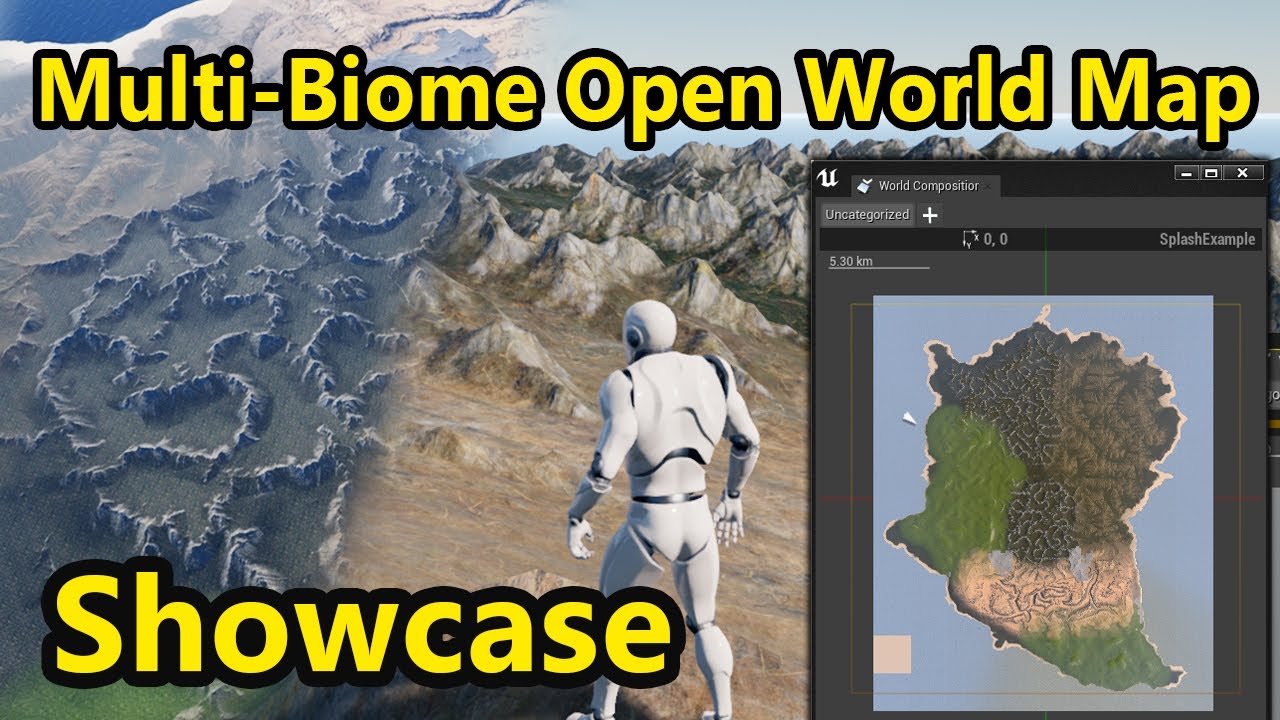
Hello guys, and welcome! I just wanted to make a quick showcase of what I've been working on these past few days. An Open World Map in Unreal Engine 4, that features multiple biomes such as canyons, desert, grasslands, mountains and more. The full tutorial / project files will...
rose quartz
Well thats the way you set it up in unreal engine or in worldmachien with realistic Gov files
plush yew
ok
versed spear
Anyone know if the source code that handles blueprint tabs in the editor is somewhere in source code?
 tired lynx
i read the above statement regarding the rx 6000 series but is there any word on how good the 6000 series will be for raytracing vs the 3000 series
really sick of nvidia dicking around with the 3000 release but also extremely wary of amd for professional work
tired lynx
feels like there is no easy/clear option this gen as the 3080 would be my no brainer pick if i could actually get one
i mean
i know it’s clearly not out
was more asking in the vein of leaks etc people may have heard
shut glen
how can i change a collision preset with blueprints?
 past pilot
not sure where to put this but does anyone have any resources to show or know how to deal with players placing items and removing the foliage around the object placed? I know i could likely overlap the grass and have the game remove it but i kind of want to "disable" it, in case they remove the placed item. If i just turn it completely translucent, will it still be processed by the gpu even though its isnt technically visible?
 proven cradle
@plush yew what black things and what corners?
plush yew
wait
spare sun
sounds like ao
 solemn goblet
HELP, all of a sudden my fucking project file is gone.... The content and everything else is ther ebut the project to launch the blue icon is gone what the fuck?
somebody deleted my fucking unreal project file or what
proven cradle
thats called Ambient Occlusion
spare sun
ok looks like ao too
@solemn goblet you mean in the launcher? Your project files are also stored on ur hard drive so if you know where you placed it you could also just open the .uproject file
proven cradle
@spare sun maybe the .uproject is what he refers as the "blue icon"
so if this is gonna there is no way of this project to open
spare sun
its not uncommon for shortcuts to disappear but this should be in the project folder
solemn goblet
yea somebody deleted that shit
I recovered it
idk if tis going to work loading now
 zinc shore
if you cant find it you can make a new project and replace all the files with your content folder and config that's what i do
solemn goblet
thx will do, after I back this shit up lol
spare sun
yea as long as you have the assets
zinc shore
always make backups they will save you so much
solemn goblet
for sure thx, scared straight right now
I managed to recover it using the program "recuva" all is well now sweet
dawn gull
How do I make a box trigger detect everything, and not just actors?
 frozen pond
so i want to create riding on spline(pipes in game), any idea how should it work ? player character can't just stick to spline as it need to simulate physic like falling etc.
zinc shore
@dawn gull what do you mean like are you looking for actor components
dawn gull
No, I need it to detect overlapping with geometry too
zinc shore
by geometry is it meshes placed in your level
dawn gull
by geometry is it meshes placed in your level
@zinc shore Yes
zinc shore
oh i was asking what the official rat band ment by geomatry since hes tring to detect overlaps
zinc shore
oh
well in that case it should be an actor
try makin overlap events print what their overlapping so they know if its overlaping it
dawn gull
Whenever I right click to make an event I get "OnComponantBeginOverlap" and I tell it to do something on that but it only does it when I jump on top of an actor, I think I probably worded it wrong. By geometry I meant like Box Brush.
zinc shore
you talking about a BSP
zinc shore
dose it have collision because I'm pretty sure it should be able to overlap but ive never done a overlap event for a bsp so IDK
dawn gull
Yeah, it has collision
If this isn't gonna work is there a way to manually program the OnLand event?
zinc shore
are you spawning the actor in during runtime because sometimes overlap events don't work if the actor checking for overlaps spawned in overlapping an object
also you could try a sphere cast
zinc shore
sometimes overlaps don't work as well so i will sometimes just do a sphere cast
median hound
someone help? when i open up my character this happens
zinc shore
@median hound if you haven't already restart the editor
zinc shore
just close unreal and open your project again
median hound
i did
zinc shore
what are you trying to open
zinc shore
have you received any errors or warnings
median hound
no
zinc shore
maybe your computer needs restart I've had problems where i had to restart to fix UE if that doesn't work then it might be corrupt
rose quartz
If i press play from here my character is always going to 0.0
how is that possible i did check under play current camera location
median hound
its probably because the character has no serious changes 2 it like ai
 rancid lynx
soop
in the menus up top, click window (or another) and look for "details"
the details tab got closed
happen to me last week
i know "get all actors of class" is heavy on the cpu, but im curious, is "get all with tag" much faster? is there a tag list somewhere that makes it much faster? or is it the same generic "search all, and check for tags?
also, im curious how slow and heavy "get player pawn" is. that probably much safer to spam, right?
spare sun
depends on what you consider spam but yes, it's probably faster. Also I wouldn't be surprised if getting by class is faster than getting by tag, seeing that tag operates on a string.
median hound
anyone know abt compiling shaders being stuck
 dawn bloom
 stark marsh
how do i get the grass to be denser
i've put it max density but it's still not very dense
rocky radish
my object turns about 220 degrees
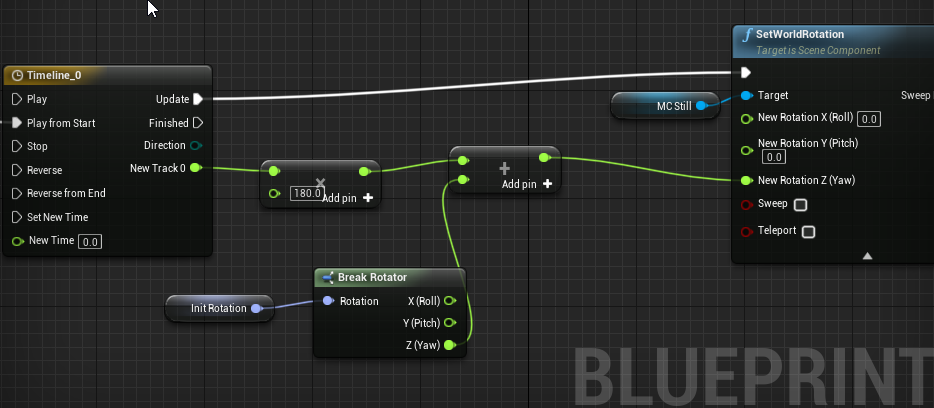
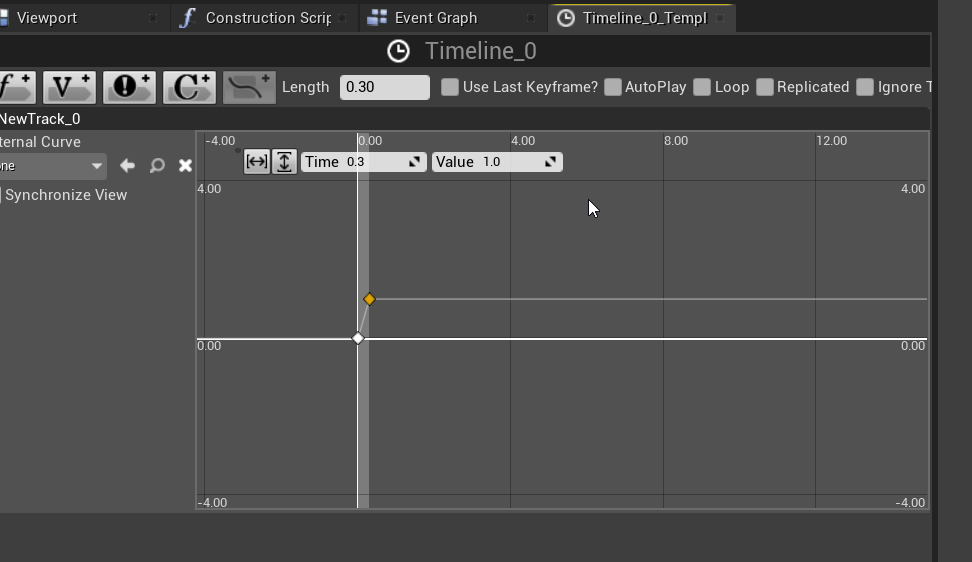
@dawn bloom after you're multiplying the value you're also adding more to it, so thats why its rotating 220 degrees instead of 180
median hound
can someone help on something so im making like a pistol shooting thingy with a muzzle flash but the thing is when i hold it down the muzzle keeps flashing i only want it to flash per click
 abstract plank
@stark marsh your grass density mostly depends on the grass mesh you are using
 void barn
 gloomy gull
How would anyone suggest creating a flashbang effect
I was going to use a particle effect, but now I'm thinking of a skybox sphere going around the player's head with an intense light in it
inner cloak
how can i tell the current version of UE4 for a project?
gloomy gull
@plush yew that sounds good, post processing
@inner cloak should be in the bottom right corner of the thumbnail pic
@void barn that’s pretty sick 🤩
inner cloak
Is there not a way to get the version from some config file or such ?
 thick knoll
Hey guys, I want to use Ansel to take 360 panoramas at high quality, but for some reason it won't install with the lataest drivers (or any) has anyone had this issue?
inner cloak
all i see is this:
 silk lintel
@inner cloak when i open the .uproject file of my project i see this:
yours should look the same unless you changed it
besides the name ofc
maybe crypto settings? you could just switch it to 4.25, there shouldn't be an issue there
inner cloak
Argh .. ok, i understand, that engine version has been edited a while back ... that is why no version ..
silk lintel
ok np
silk lintel
np
median hound
Anyone know how to make a better collision then a capsule for a character
supple totem
The character class needs the capsule, you'd have to code your own pawn if you want it gone
But you can adjust capsule size. And you can enable it disable collision on certain channels for the capsule and the character mesh
plush yew
Can I disable sleeping for the character capsule? I noticed the collision against fast moving objects is much worse when the character is standing still than moving, and I'm trying to understand why.
I get that it's not how you are supposed to use a character class, and there's plenty work arounds suggested around. I'm just trying to understand how it happens.
bleak raven
Anyone know how to make the cover system in this pack more like mass effect's? https://youtu.be/w1E2o-heJxU?t=359

BUY MASS EFFECT 2: https://amzn.to/3f7iFVq
Some footage of combat from Mass Effect 2 (PC), playing as a Soldier on Insanity difficulty.
the cover system works well in the TPS pack but its too easy to detach from cover
bleak raven
@primal karma not mine, its a game called mass effect
also i dont think it was made on unreal but idk might be custom engine
primal karma
Oh so you did not remake it
plush yew
ohh cool nice work
primal karma
I thought you remake it
plush yew
@bleak raven very cool
primal karma
Mass effect was made in Unreal Engine 3
plush yew
how do you make the cover systme
primal karma
UDK
bleak raven
@plush yew thats what im trying to figure out lol
plush yew
ohh
bleak raven
i didnt make it, im trying to get something similar
plush yew
ok
primal karma
@bleak raven mass effect was made in UE3
bleak raven
cool, now im more convinced i can make something similar with the right set up
primal karma
Yes
plush yew
@bleak raven https://www.youtube.com/watch?v=FMcW7t5ivEg

In this video we give our player the ability to take cover behind an object and allow them to move around while in cover. This is a longer video as there is a lot to cover, but it will get all that is necessary to begin hiding in cover.
In this video I'm a bit sick so my voi...
cool tutorial
bleak raven
oh that look good!! Thanks!
median hound
anyone use quixel bridge with unreal
plush yew
yeah why?
median hound
i get stuck at compiling shaders
median hound
yeahh
plush yew
wait i will send screnshot
median hound
ok
primal karma
Try making it 4k or 1k
plush yew
see the directional light set it to moveaable
median hound
does 2k not work?
plush yew
when you set it to moveable no need build
median hound
ill try it out
plush yew
yeah
median hound
so i should set all lightings to moveable?
primal karma
I use 4k
primal karma
My speed is 100
plush yew
100kb?
primal karma
Mbps
plush yew
omgg thats bigg
primal karma
Yeah
primal karma
Oh okay
plush yew
@median hound is it works
primal karma
If i upgrade to 5G internet it will be 500 MBPS to 1 GBPS
median hound
im gonna import a rock and put lighting on it and try to package it give sec
open wadi
Anyone know how to get rid of this error: [2020.10.29-03.27.04:787][ 72]LogSlateStyle: Warning: Unable to find Slate Widget Style 'VMainMenu-SubNav-Default'. Using FTextBlockStyle defaults instead.
plush yew
hmmm
open wadi
I presume I renamed the widget at some point, so now my logs indicate this over and over. Where do I set the "Slate Widget Style"?
plush yew
idk lol
open wadi
I found this article, where the user in their shipped game has a similar error regarding a specific font: https://answers.unrealengine.com/questions/585401/lots-of-slate-warnings-in-shipped-game.html
But in my case, it's not a font, but an overall "Slate Widget Style"
 open breach
i recently deleted the 4.35 version of Unreal Engine from WIndows explorer. Now I am trying to re-install it, but it shows this in the EPIC launcher:
Does anyone know how I can re-install this? I tried going to the Library tab in the Epic Games Launcher , but there is nothing there
median hound
i reinstalled unreal by going to the download site
plush yew
@open breach you can t download?
median hound
i uninstalled epicgames and unreal then went to download site to download it all
open breach
@plush yew from where?
plush yew
ue4 from launcher ?
open breach
Ive installed teh EPic Launcher 3 times now.
plush yew
then wahts is the problem
open breach
have a look at the photo. THere is nothing there that shows download.
plush yew
go to library and instal ue4
open breach
never mind. Ths confusing because there is a Library on the left and a Library in the UE page. found it !
plush yew
@median hound no problem have fun
 neat forge
Anyone know how to get a line trace to detect landscape? My line trace is going right through the landscape and I need it to block it
plush yew
ohh wnna see my line trace code?
neat forge
I am using blueprints
neat forge
That would be nice then, does the landscape block it from running? Or generate a result?
Mine just ignores it
Oh wait I got it
I was doing something wrong
median hound
how do i adjust the collision sphere without it changing the mesh
i select the collision size it and it keeps sizing the mesh
plush yew
did you set to shild?
plush yew
hmmmm
plush yew
@feral crow what windows you use
 limpid oracle
Has anyone paid to get their steam store page artwork done?
 feral crow
@feral crow what windows you use
@plush yew it worked before I had to reinstall windows on it
plush yew
@feral crow because my friend have problem with dll and he install windows 10 it works lol
feral crow
@feral crow because my friend have problem with dll and he install windows 10 it works lol
@plush yew how to fix?
feral crow
..
feral crow
Obviously 10 ._.
plush yew
if 10 idk how o fix it
feral crow
Latest
plush yew
ohh idk lol
 analog blaze
 gloomy gull
I finished the flash bang for my game, I’m open to questions if anyone has any
feral crow
Yep I fixed it @analog blaze
 sterile tulip
Is there a way to store the variables and save game in steam servers? Or are the save games only stored locally on their pc?
 silent raven
How did you guys learn Unreal? Just glossed over the #more-resources and didn't see any "help links" or anytihng.
GameDev tv and Udemy?
open wadi
Halfcourt Yeet: Take a pet, sacrifice him or her, then pray to the Gods while eating bacon.
Hi everyone, question - I'm trying to dynamically insert posts pulled from my API (and place into an array) into a scroll box. I have a "individual post" widget created, I create it, then I set all the parameters from the post to the newly-created widget, then I "add child" to the scroll box, yet nothing appears. Presuming the "individual post" widget is designed correctly, is there anything incorrect with this "create child" segment?
 jagged nexus
Excuse me if this is the wrong chat to ask, but is there any tutorials on creating "modular" weapons (with various) extensions, I am pretty new to the concept
versed spear
@silent raven first I learned object oriented programming. When you finish learning about that should then know about variable types. That would be boolen that is for your true or false statements. Everything else is just understanding that blueprints can be objects in your world. When you create objects in your world you need to use cast nodes to pass information and set information on these objects. Think of it this way. When your character blueprint object gets created it sets all the values it needs like exp hp ... Then you pass this information to other objects based on tools Ue4 gives you like collision boxes. There many tools to pass object references back and forth to the object that need access to their information. So basically if you can get inputs and outputs down along with creating variables for any type of object that is in your game. Your on a good track to jumping into Ue4.
silent raven
Thanks! Already know C++ and am using the Source Engine, screwing around with that, and I want to transition to UE4
versed spear
you will have no issue.
because you have that experience. I would look into learning how to expose c++ to blueprint. It will make your skill very valuable.
silent raven
Mm, and to delve into the engine more. Yes! And to get into the process of assimilating all the different types of objects.
versed spear
mhm my type of guy
silent raven
Ha, thanks. I have a lot of stuff I'd like to try with source since I have a much better grasp of the engine and absolutely love all of its games -- but I need to make myself transition, no matter what. I appreciate the info.
 lavish oriole
hey guys does anyone know how i could change the black bars when you constrain the aspect ratio to a material?
rough knoll
little bit confused... shouldn't this be working?
breakpoints tell me everything is being set as it should
nevermind im just stupid
i forgot the finish execute node
lusty carbon
Any max users ?


 plush yew
hello guys I want to make a real time in my project but idk how to google it, like I wrote in yt "how to make a real time for a game in ue 4" and I don't find this what I am looking
I am looking for this:
lucid grove
Heya, anyone experienced with simple widget alignment?
I want to make name and E button centered
plush yew
create the widget and inside the widget set the things to be centered> @lucid grove
lucid grove
Well its my widget 🙂
lucid grove
i did it
plush yew
go inside your widget and move the text on the center
thay's it
show me
i did it
@lucid grove here is not centered
lucid grove
lucid grove
sure, normal procedure as always
There is two elements: E (image) button and text layer
All inside Horizontal Box
plush yew
okay
so check in other places if you create the widget
maybe you double it somewhere
idk
lucid grove
E and Name should be sticked, but box should be centered
lucid grove
Two horizontal boxes fixed the problem
 marble pollen
Does anyone know what might cause random spikes in "Transform or Renderdata" & "Post Tick Component Update" when monitoring Stat Game? Can't find much online.
rough knoll
why is this still teleporting even though i have it set up to interpolate
(it's not because current and target are swapped, same effect when they aren't.)
 warped tangle
reduce interp speed
split tundra
Greetings, I'm working on a 2D game and regarding different resolutions, is there any way to keep the pixel ratio correct as to avoid to get jagged sprites?
Dunno, like, is there any way to set an internal game resolution and just upscale / downscale it correctly on resolution change to keep the pixel fidelity?
plush yew
I am looking for this:
@plush yew can someone tell me?
sinful bone
Is there a way to save a variable/reference inside the material editor? For example I take the vertex color R channel, multiply it by a scalar and then save that value to use it in other places inside the material so I don't have to get the vertex color and mulitply it again and again?
thick knoll
I am using Ansel in UE4, does anyone know why the image is coming out super exposed when I do a 360, vs a screenshot?