#ue4-general
1 messages · Page 860 of 1
 sharp oasis
https://discordapp.com/channels/187217643009212416/225448446956404738/766656192688422922 Can some one help me?
 lament barn
Why don't these colors get exported to UE4 as a .fbx?
In Blender, I unwrapped the cube, assigned faces with color, exported as FBX and in Unreal it's plain.
 empty crest
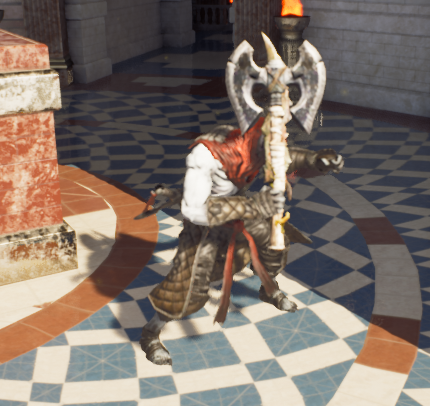
https://i.imgur.com/sFyYzKX.png lol I forgot to unequip the other item so now it's a stabby axe
 polar verge
I'm looking for a game development guide on "small characters in big worlds" concepts. I need to learn proper scaling, best practices, etc.
Well I just found this article. If anyone is interested. -> https://www.gamedesigning.org/learn/game-scale/
The Ultimate Resource for Video Game Design
Have you ever seen a real-life giant? If you’re a long-time wrestling fan or an avid viewer of The Princess Bride, you probably know about Andre the Giant (or Fezzik, in The Princess Bride). And if you don’t know about Andre the Giant, well… all you really need to know is that...
 karmic sage
Hello there! I'm learning the engine and I would like to take notes on a pdf. Is there the possibility to get one from the online documentation?
 rotund scroll
I'm looking for a game development guide on "small characters in big worlds" concepts. I need to learn proper scaling, best practices, etc.
@polar verge generally you would want to set metrics for the world that would then define the size of your characters. metrics are usually set from two core variables: the player's camera and the game speed
empty crest
@karmic sage I don't know of official pdf's but you can try printing to pdf. If you have Adobe suite I think they have a driver included, otherwise you'll have to get a free one like cutepdf, then you just ctrl+p the page you want to keep and select the proper driver and print to file.
The built in print-to-file drivers in Windows 10 have their own formats that you probably don't want to use
xps or open xps files for the Microsoft xps document writer, and a prn file for the onenote driver 😛
polar verge
@rotund scroll Where would I set metrics in the camera? Not seeing that as an option. Or maybe I'm misunderstanding.
rotund scroll
@rotund scroll Where would I set metrics in the camera? Not seeing that as an option. Or maybe I'm misunderstanding.
@polar verge you're misunderstanding. there is no "setting" for this. this is part of the design process. you decide how the camera is. if it's first person or third person or a sidescroller or whatever. based on those choices, you will have to make a choice about how big the world is, in terms of gameplay collision
then, you have to decide on the game speed as well. if you're doing a racing game or a really fast paced game like quake 3 arena or unreal tournament, then your metrics need to be bigger because you have to accommodate rapid movement and give players time to brace for turns etc.
polar verge
Ahh I see. That's making more sense. Thank you.
rotund scroll
the reason camera is important is because it's the player's viewpoint in the world, so everything has to be scaled relative to that
if you're doing first person, putting the camera higher up would indicate that your character is massive, lower would indicate miniature etc.
 lucid grove
Anyone have experience with footsteps sounds on layered material?
 winter gale
https://twitter.com/RyanJon2040/status/1315898814574800897?s=19
https://twitter.com/RyanJon2040/status/1316261202280894465?s=19
https://twitter.com/RyanJon2040/status/1316623590226366465?s=19
https://twitter.com/RyanJon2040/status/1316985977987076096?s=19

Quick #UE4 Tip number 6.
Want an easier way to get random items from an Array? Follow this method.
#unreal #unrealengine #unrealtips #unrealdev #indiegamedev #gamedev #indiedev

 Twitter


Quick #UE4 Tip number 7.
Want to see variables from your parent class? Enable "Show Inherited Variables" from My Blueprint tab.
#unreal #unrealengine #unrealtips #unrealdev #indiegamedev #gamedev #indiedev
 Twitter
Quick #UE4 Tip number 8.
Want to make a performance friendly bobbing effect? Use this material graph.
#unreal #unrealengine #unrealtips #unrealdev #indiegamedev #gamedev #indiedev
 Twitter
Quick #UE4 Tip number 9.
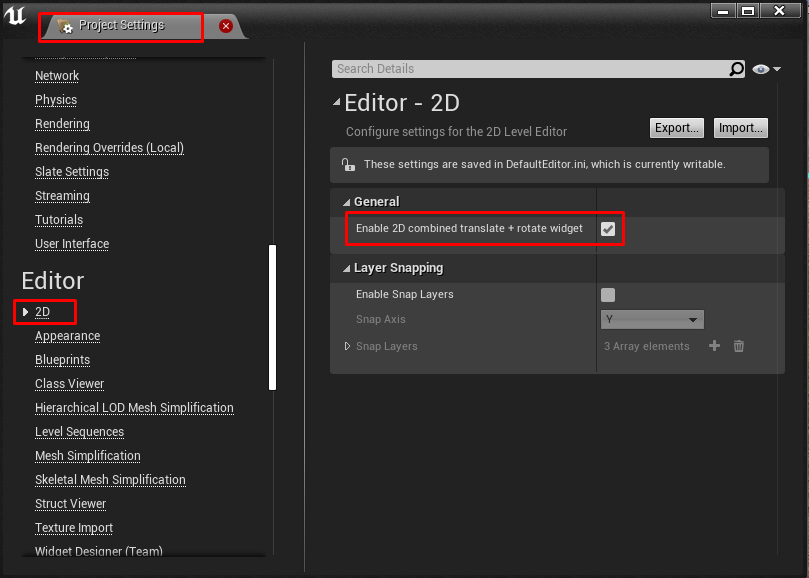
Constantly moving/rotating your actors? Of course you do! So Enable Combined Translate/Rotate Widget and Enable 2D combined translate + rotate widget.
#unreal #unrealengine #unrealtips #unrealdev #indiegamedev #gamedev #indiedev
 Twitter

 zinc shore
how can i make a curser that a gamepad joystick can move around the screen
 sterile tulip
https://i.gyazo.com/aff641aad0704031aec10570280cca46.mp4
@oblique tangle That looks nice
lucid grove
https://www.google.com/search?q=ue4+virtual+cursor
@grim ore heya. Just to end yesterday discussion about this material brighten up scene. It was autoexposure after all. I had hidden post-process volume.
 grim ore
seriously lol?
lucid grove
yep
grim ore
oy
 warm hornet
Can anyone tell me is there a way to have your cmd settings, ie stat fps and any custom layout you have created to load automatically when you create a new project?
Right now I need to manually load my custom layout and enter 'stat fps' every time i create a new project.
rotund scroll
modifying some of the ini files I'm sure can help out with that @warm hornet
karmic sage
@karmic sage I don't know of official pdf's but you can try printing to pdf. If you have Adobe suite I think they have a driver included, otherwise you'll have to get a free one like cutepdf, then you just ctrl+p the page you want to keep and select the proper driver and print to file.
@empty crest thanks Gary
empty crest
👍
zinc shore
for a virtual curser I've seen plugins for it but is it possible in BP or do i have to use a plugin
grim ore
yes it is possible in blueprints
 exotic thicket
...a virtual curser?
like, something that swears?

sorry I know you probably meant cursor but...lol
grim ore
did you look at the link I gave you, there is atleast 1 video on how to do it
zinc shore
how would i do it like would i set the mouse cursers position
i saw sompthing on useing a gamepad to move a crosshair i assume i would do the same but instead set the mouse cursor position
zinc shore
oh ok
now can i set the widget focus to be what ever is under the mouse cursor so the gamepad can press the button
sterile tulip
the new water system makes everything so much easier and faster
and real clouds are also a nice feature
zinc shore
I've heard the clouds are performance intensive so far
but i haven't used them my self so idk if that's true
sterile tulip
Yeah you will have to put it in the graphics settings
So whoever has a decent build can activate it
 timid frost
How I can make objects be able to fall down by itself like book or photo hanging on the wall
Need help
sterile tulip
Activate physics
 ornate forge
Check the "Simulate Physics" box in the properties
timid frost
No when my character reach that a certain point then
sterile tulip
You make a collision box in the object bp
And make a node for on overlap with the collision box
And activate physics
timid frost
Should I try to associate it with trigger box
Or blubblub your method is better
I tried it its working thanks alot for your support
sterile tulip
No problem
timid frost
Can u help me in one more thing
zinc shore
how can it make it where hitting A on my gamepad clicks where ever the mouse cursor is and not the user focus
timid frost
Dude I am totally new just you can say noob
timid frost
Dude 8 gb ram is enough for unreal to make 3rd games
No he sent message in the chat sort out the problem but I am not be able to solve any and no one was answering him
 harsh tiger
does anyone know of the best approach to make a word search with UMG? i cant find anything like this on google or the marketplace
 runic fern
hello guys
how can i make the 3D Widget High Resolution like Phone and PC and Screen in this game ..
https://youtu.be/HP8mqE1xCSg?t=34

SAVING PEOPLE AFTER A TERRIBLE CAR CRASH! - Accident Gameplay. Today Camodo Gaming checks out Accident Game. Become a journalist who researches old car accident cases. Obtain evidence and reconstruct the events to discover what really happened.
Check out these games:
Brick R...
 plush yew
@dire sentinel Did you fix your problem because I believe I found out how to fix it.
 dire sentinel
@plush yew the one wizh normal maps being dark or the one with volumetric fog not working
 quartz grotto
how to make an rpg game?
 hot pine
I remember rumours about an improved unrealbot a few months ago. Those still rumours?
how to make an rpg game?
@quartz grotto dedication, knowledge and a team
 hot pine
Lol no
quartz grotto
Hah
 hidden aurora
If you are new to game dev, start small. Youll thank me later.
plush yew
@dire sentinel the one with the volumetric fog not working.
 golden niche
Is there a way to increase editor available memory?
Its capped at 2GB
And I got way more than that
 quick shell
What makes feet connect to the ground and make it so your character isn’t floating on stairs
plush yew
@dire sentinel In Details panel scroll down to rendering and make sure visible is checked.
 open wadi
I'm reading this - is it true you cannot do file transfers via VaRest? I can do them with Postman just fine.
If so, ridiculous.
I'm trying to simply allow users to upload a profile picture to my node API, which I've coded in full and confirmed works fine via Postman.
Has anyone written any file upload functionality with VaRest or another utility?
 silent harbor

READ DESCRIPTION:If you know more quicker or more clean ways, go ahead and share it in the comments :) This is just my approach.Hey Guys!In this video we will be covering how to create a simple system that allows us to create various self building structures in unreal engine 4...
delete if not allowed, but here is a ue4 tutorial. Some of you benefit from it so I figured
 brisk shadow
does anyone have any good resources I could read about combining projects?
my current plan is to just map out all of the components so i understand how each asset flows and then figure out the best way to link them based off of that
one of them handles all of the movement and stuff on the players pawn blueprint and the other handles it all in the player controller blueprint.
this is probably the wrong channel
 frank oar
Hi,
Does anyone have any advice for setting up scale between unreal engine and Blender ?
frank oar
@ionic oxide thank you!, I forgot where to go to view the unreal unit...
know where I can find it ?
 acoustic lion
Hi, anyone has 5 minutes, to help me create 2 sets of fps arms from 2 characters ? I get some errors when I'm trying to import to UE4. I'm using Maya so I think i'm not exporting them properly.
 ionic oxide
@frank oar Can't remember where exactly, but it is mentioned in a lot of streams
Translate your Unity knowledge into UE4 so you can get up to speed quickly.
There is a section for units just ctrl + F to find
 tawdry lion
Hi, im new to unreal engine, may I ask? I want to know on how we can determine what object can be destroyed when hit by an actor depending on the name (for example: if the name of the object is at least has "EditorCube...", it will be destroyed if hit by the player, while the other object with different name wont be destroyed).
I had done this so far, but cant figure it out in the end
ionic oxide
HitResult is a struct, you can't compare it with a string
also your if statement is wrong because you need two equal sign to compare "=="
plush yew
wader!
tawdry lion
Thank you, right now i almost solve the issue, however i cannot find the C++ code that will allow us to execute the if function which determined by at least it has "EditorCube" name inside it
tags? at where Ponkkis?
Sorry, im really bad at this
 icy mulch
I'm having trouble my wigdet is not showing in the packaged version
 supple totem
So in general you don't want to compare strings in gameplay code
Are these cubes all of the same class?
Or inherit from same class?
And yeah ponkiss is right too that you can use gameplay tags
tawdry lion
I dont know how to assign tags... and i dont know what class is actually... cause my lecture didnt explain anything to me
Im really sorry for burdening you guys...
Thank you for the video Ponkkis... However, my lecturer strictly told us not to use blueprints...
zinc shore
For UMG dose anyone know a tutorial on how to make glassy transparent UI material like this windows and iOS do
 rocky radish
For UMG dose anyone know a tutorial on how to make glassy transparent UI material like this windows and iOS do
@zinc shore you can add a blur to your widget
 tender pecan
@tawdry lion https://docs.unrealengine.com/en-US/API/Runtime/Engine/GameFramework/AActor/ActorHasTag/index.html
See if this actor's Tags array contains the supplied name tag
zinc shore
Can I make it have a blurry transparency
tawdry lion
@tender pecan I see... so using tag are easier... so i need to assign the component tag one by one.?
tender pecan
@tawdry lion AActor.Tags, USceneComponent.Tags. So you can add tags in Actors, or Components for finding within Actors. You can add them in code once. If you have 5 cubes. They will all have the same tag. If you want to refer to a specific actor out of thousands, maybe tag is not the best way to do it. All depends on what you want to do really. If you have different actors, with different tags, like 'Player', or 'Enemy' then it becomes useful. If you only have one cube, with tag Cube. not sure. 🙂
 stoic stream
I have a somewhat similar question !
tawdry lion
Ok thank you everyone for helping me, I found my answer 😄
tender pecan
@stoic stream I would look at debug logging with a debug switch. https://unrealcpp.com/debug-logging/ OR add a blueprint debug HUD component somewhere useful, like on the actor that fires the projectile perhaps, and hook up text fields to update the HUD as things happen can also work.
A tutorial site dedicated to using C++ in Unreal Engine 4. This site is meant for game developers wanting to learn how to begin using c++ in UE4.
stoic stream
thank you @tender pecan sorry, I'm new to Unreal
uhmm...
what I'm trying to do is add more time in CountDown class
tender pecan
so you need a reference to that instance of the CountDown object in wherever you want to access it from, then increase the time in question.
 regal zephyr
Hello guys! Could you please tell me why turning up " mesh distance field " makes my reflection on the scene dark and narrow?
with mesh distance field
withouth mesh distance field
tender pecan
@stoic stream To get a reference is quite simple, as long as your class is an actor, spawned in the world (so ue manages its lifecycle and thread safety). you can use actoriterator<CountDown>, or find actor by tag, or add it to your game instance as a property for example.
get that reference in beginplay, or in tick if !IsValid for example, so it only needs to get it once, as begin play is not reliable if all spawn at beginning of level, you cant guarantee spawn order.
then simply add to the time in question if that reference is valid in the onHit event..
 lofty fractal
Is there an equivalent to UEngine::AddOnScreenDebugMessage that doesn't get compiled out when the project is built for Shipping? (I want to send simple messages to the player)
tender pecan
@lofty fractal you can build for debug. it will keep those. only shipping version is excluded . but it may be more user friendly and clean to use a HUD for that. 🙂
 raven island
https://gyazo.com/f79ea524ee95b46914306c58b6c8ccb7 how would i use my box blueprint there as a target?

 pale salmon
hey guys, i just made this radio on substance painter but when i bring it to unreal it's all messed up
in substance
in unreal
someone knows how to fix it
tender pecan
@pale salmon did you follow the workflow guide set by allegorithmic? https://docs.substance3d.com/spdoc/unreal-engine-4-144998459.html
Base Color must be sRGB and all that jazz.

Unreal Engine 4
pale salmon
@pale salmon did you follow the workflow guide set by allegorithmic? https://docs.substance3d.com/spdoc/unreal-engine-4-144998459.html
Base Color must be sRGB and all that jazz.
@tender pecan I didn't even know there was one
Unreal Engine 4
thank you
it happened the same thing at places that was supposed to be chromed
 sick meteor
has anyone tried out the water system in 4.26 preview 3?
sterile tulip
No but I heard its not finished and there are bugs
 scenic moon
is there any ETA for 4.26 official release?
 cedar jetty
@sweet flume any idea where i should put my print string? my issue is my ammo is not "reloading" aka going from 0 to 1
lofty fractal
@lofty fractal you can build for debug. it will keep those. only shipping version is excluded . but it may be more user friendly and clean to use a HUD for that. 🙂
@tender pecan I was thinking about doing that but wouldn't there also be performance considerations not building for Shipping?
 mystic holly
Does anyone want to make a game together for fun?
tender pecan
@lofty fractal yes, especially if its already running like a 3 legged hippo
 maiden sundial
Is it a bad idea to create an giant BoxBrush(X=50.000, Y=50.000, Z=50) to use it as an ocean(just with an material) ?
lofty fractal
Yeah...
tender pecan
@lofty fractal i would say maybe if its going to be for sale to the general public, or released as a commercial game, just make a HUD for it. it should take about 5 minutes. 🙂
and then in stead of adding msg to player controller screen, just set a UMG HUD msg on player screen, and have a timer or animation in HUD tick to fade out the msg after a while. and set text to nothing again. that way you only have ot worry about setting the text, and not the timer too. let the ui do that.
 dense gate
Can Character Step On
 swift sleet
I have this projectile predict path by trace channel and whenever I move the camera it jitters back and forward is there a way to make it smoother. I really appreciate the help 🙂
 bleak copper
You know... stuff would be a whole lot easier if PlayerStarts root component was at the bottom of the capsule lol.
I'm guessing this was done so typical FPS characters wouldn't need an offset for their capsule???
Curious the history of this decision.
Or I guess yeah the root component doesn't have an offset, so you would be allowed to have the capsule be the root. Right.
Actually wait UE2 and UE3 didn't have components IIRC... right. Wait, or did they???
 muted plinth
Hello everyone,
Thought I'd reach out to the channel and ask if anyone has gotten virtual texturing w/ UDIM's to work right? I tried a method from this video (https://www.youtube.com/watch?v=OCqUPRoG9K0) but unfortunately my textures from Substance are still in the 0-1 space. Really need this to work- as I have 20 tiles and I've gotten no where close.

This video I will go though and show you how to use UDIMS in unreal engine. I will go through the whole process so you don't hit any walls and hopefully this helps you out on your journey!
 lofty hornet
UE3 had components, UE2 didn't as far as I'm aware
 dawn bloom
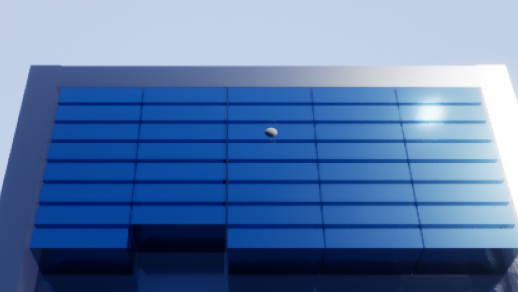
when I do a level transition into this level
I get that weird white bump in the middle
but when I just open this level, that bump doesn't exist
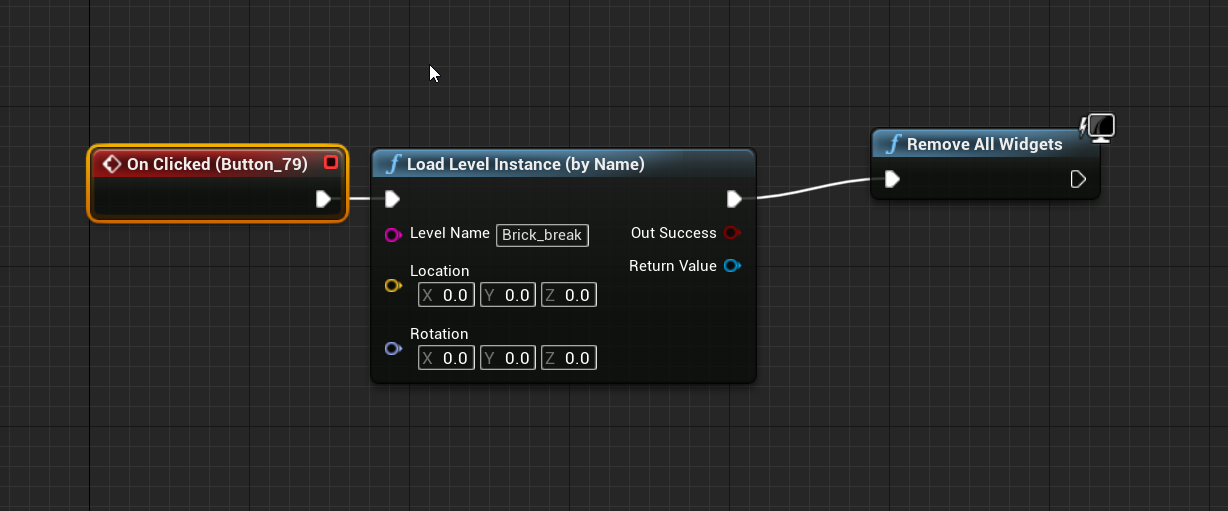
this is how I transition from the beginning level to the next btw
I load the main menu level with widgets, and there is a button you press that takes you to the next level and removes all widgets
fixed it
used open level instead
 gilded needle
raven island
gilded needle
raven island
is there a way to make like an invisible roof to a room that blocks out sky light but is see trough and can be clicked trough for top down character?
alright thx
scenic moon
Is there any way to move an installed version of the engine and re-link it with the launcher?
i don't feel like re-download the whole engine just to change the path
raven island
@plush yew it works good thx a lot
sterile tulip
How did you guys learn blueprints
raven island
i learned most of the basic stuff from youtube, personally i watched a cannel named virtus something
quick shell
What makes feet connect to the ground and make it so your character isn’t floating on stairs
plush yew
is there any easy way to get all controllers on the server?
i can see playerstates but not controllers
 kind zephyr
Hi Guys, I'm not sure if it's the place for but here my question:
- There is any way to prevent Unreal to close the opened properties panel when we do an "Undo"? (ex: change rotation, undo, bim, properties is close.We have to resect the component in the list)
 rigid dove
@quick shell Foot IK
quick shell
im talking about this
is thier a setting for it or do you have to code it yourself?
rigid dove
Little column A, little column B.
rigid dove
Inverse Kinematic systems allow for reactive animation, such as foot placement on non-planar terrain.
There's also tons of tutorials out there. tl;dw, there's some nodes that help, as well as manual approaches
Same general ideas are used in every engine though. Some IK solver (usually 2-bone) on a leg, raycast towards ground to find surface normal, move IK target to normal, Bob's your uncle
There's also tons of marketplace assets that do some version if you're looking for plug and play
 proud pasture
hey guys, anyone know why I can't seem to access the Update Sun direction function in Blue prints?
I'm using 4.25
open wadi
I have a question: I have an array of strings and I need to execute a find operation on an array element with a specific value - is there a way to do this without manually iterating through the loop?
Akin to a map find operation?
Or is a for each with break the only option here?
plush yew
What's the best way to switch the camera of a player on the client side (not server side)
Helo
Can I publish a free game for free?
 lethal bison
what are some optimizations one could do right after starting a project
 rotund zodiac
Hey guys! From your experience, how would you implements a Multiplayer Voice Chat, for about 10-15 people in any single game?
Also, must record each of the players session/channel separately. No sound FX or design needed, just simple chat and synchronized recording.
Preferably using BP
thank you!
plush yew
this water is stunning
sterile tulip
Yep
 fervent sigil
@plush yew Make sure in Blender to select both the parent skeleton and the child mesh, and not just the parent
plush yew
Hello, I have a small issue, for some reason it is taking a really long time to saves maps, the map has little assets on it, but the project files are on an external hard drive...
fervent sigil
@plush yew saving map is pretty much made from a 2 step-process; serializing the objects to binary and then writing it to disk.
Either the sum of your objects is big (regardless of the amount of them), or the disk is slow.
plush yew
@fervent sigil The problem has only started occurring when I created a project on the external drive.
 bleak hound
is there any way i can change location of deriveddatacache?
fervent sigil
@bleak hound Looks like it can be done through a config file and the editor:
https://answers.unrealengine.com/questions/255793/derived-data-cache-1.html#comment-726429-form
https://answers.unrealengine.com/questions/112733/how-to-move-derived-data-cache-folder.html
 dark stag
general quesion... UE any fun for procedural mesh making?
eq.. modelling this is just as easy... but why the hell not in UE?
should i be looking into a procedural UE method for doing this?
 sudden oriole
just wondering... why are my maps black when I make a new one?
 hollow compass
its a blank
dark stag
just an empty void
sudden oriole
I have a light
dark stag
ok
sudden oriole
directional
hollow compass
but no object
sudden oriole
nothing
dark stag
thats not how light works
sudden oriole
oh?
dark stag
yeah ever been to space?
sudden oriole
what about the default map though?
sudden oriole
yeah I gotcha
dark stag
there ya go 😄
dark stag
because you didnt make one
sudden oriole
how do I?
dark stag
left side
sudden oriole
and then?
hollow compass
you will have to duplicate the default map and name it something else.
dark stag
nothign wrong with learning how to create a sky as well. should be good to know for later. buyt yeah, just copy the default map
sudden oriole
heh ok
 grave nebula
should i be looking into a procedural UE method for doing this? Procedural mesh making is totally doable through procedural mesh component, but that would involve having tools developed for you. It is more practicable to use already existing software such as Houdini for that. @dark stag
dark stag
yeah, ive got houdini rocking here... just wasnt aware of any pipelines or methods in UE
not scurred to make my own, just never really looked into it
been hardsurface modelling mostly till i thought... why am i doing this.
thanks man
sudden oriole
ah I fixed it, I didn't have a BP_Sky_Sphere in place
sudden oriole
new it had to do with a skybox
 grim juniper
@sudden oriole If you make a new map through File -> New Level then you can choose a template level with some stuff in it. If you just create a new level in the content browser it'll be completely empty by default
sudden oriole
ah cool thanks a lot!
plush yew
generally there is no support for modeling in UE. you can make basic shapes but any extrusions or chamfering isn't really going to work
not as in your image anyways
 lilac ember
kek since when does deadmaus learned ue4
 scarlet birch
@dark stag Houdini would definitely be an easy way to do something like that. You could setup parameters in Houdini for the number of iterations, tube section lengths, final cube size etc... If you put it into an HDA tool it could be used inside UE to create and modify it from parameters. The Boxcutter tool they showed off in the new release might be helpful too with those cutouts on the top.
 kind pumice
anyone happen to know if 4.26's in-engine water feature works on mobile?
 candid falcon
lol, is Deadmau5 here? awesome
anyone know if there are any guides for IK kinda like the Scavanger Vehicle from Unreal Tournament 3?
sudden oriole
he invented wix i heard 😛
@plush yew "I made this cool website with Wix"
kind pumice
@dark stag there's also a pipeline from houdini to UE4 for procedural stuff, but it's not like the procedural mesh component (which is super tough to figure out lol)
I haven't played around with it, but it does look like you could do some pretty creative stuff with it
manipulating the parameters to the beat and whatnot could give some interesting results
 rotund yew
is there a more efficient way of doing this or is what im doing the best method (i bet its the worst)
(ping me when respond)
kind pumice
hmmm why is true going into it?
rotund yew
oop old code
it used to b-
wait i messed it up, the done this was was so it could pick a random number once, but i removed that random numbere and only now im seeing i need it
ill fix and resend
@kind pumice basiccaly this
its the the bg of the loading screen is charecter related and random
it works fine, i just want to know any more effiecient method
(anyone who responds pls ping me ;-;)
kind pumice
@rotund yew the only thing that comes to mind right off the bat is that you might want to have an array of characters instead of looking for each one manually - then set the character loading screen to the characters index value... that way if you add more characters in the future you won't have to go back through your BPs to add a bunch of stuff. (or forget too and spend an hour wondering why if you're me)
you'd just have to add a new character to the array and it would naturally work
rotund yew
i will learn what arrays are then, thanks!
kind pumice
np!
rotund yew
already confused X.X
 burnt drum
hey all.. wondering has anyone here used HLOD extensively?
kind pumice
you wouldn't want to make it in the BP, but instead as a variable
burnt drum
it seems like the generated HLOD won't flush even after deleting them (the assets remain in content browser )
rotund yew
i found out yes!!
kind pumice
then in my case I get a random one, but you can also get the specific index and check what's in each index
rotund yew
kind pumice
Exactly!
kind pumice
they're super useful for lots of stuff. good thing to know
rotund yew
i know the concept of arrays, i think i should know how to do dis
(watch me fail missrebly)
kind pumice
lol that's how it goes!
you could also do an array of characters and get the display name of the object in each slot of the array, instead of doing an array of strings
rotund yew
Ok so this is keening more to a dataset
Like it has 2 values
array slot 1 has a String and a intiger
is it possible to do that?
Slot 1 = String: Giorno; Int: 18 (< amount of loading screens)
kind pumice
ehhh getting over my head at that point lol. Someone else might be able to get deeper into it. I bounce back and forth between game dev and music production so I'm not a master of either LOL
 kind pumice
hah I was just about to say that - you're looking for maps!
something I've never used and probably should
 covert hedge
ue4 maps are dank  no for each (key,value) node
rotund yew
also it has nothing ;-;
kind pumice
Yeah I'm already thinking of uses for them in my procedural apartment building monstrosity lmao
covert hedge
you can use the "key" node
or the "value" node
iirc
it's pretty stupid they didn't implement a loop for maps in blueprints
kind pumice
... that is kind of odd
rotund yew
god i feel my brain shrinking now
covert hedge
it is odd, but that's the wya it is
i had to do stuff in c++ just because iterating through map is a pain in blueprints
 rare skiff
Guys, i have big conflict between StreamingLevels for a soft loading screen, and manage bgm through gamestates
Ok i cant change the gameMode using streaming level, but i cant chagne the gamestate on runtime neither?
 dim merlin
Hi, anyone uses blueprint brushes for landscape, and knows why it might NOT work on 4.25.3 ?
there are no presets..
 autumn grail
Hello , how can i simply replace the third person camera in the back of my character when he is climbing
Please
grim juniper
@dim merlin is the landmass plugin enabled?
dim merlin
I diddnt enabled it, cant even find it
I searched for 'landmass' in plugins..
u maybe know in what category it is in plugins?
grim juniper
I'm in 4.26p3 right now and it's under Other here. Not sure if it's different in 4.25
grim juniper
Were you searching the Installed section rather than Built-In? I think it defaults to the Installed section when you open the plugins tab
dim merlin
grim juniper
yeah, it's searching the Installed section instead of Built-In
grim juniper
In 4.26 they added an all section to the top which fixes this search issue
dim merlin
thanks, so, btw still see a bug as i was actually be able to select blueprint brush while the plugin is not enabled..
kind pumice
you guys know if the in-engine water is supposed to be compatible with mobile platforms?
 vague granite
Does anyone know a hotkey to change the camera speed in the editor?
Since I often do detailed work after moving a large world, I find it troublesome to change it with the mouse…Thankyou.
grim juniper
@kind pumice I think so since it was built for Fortnite
kind pumice
Ahhh that makes sense. Should have thought of that lmao
zinc shore
i made a simple BP function that lets the gamepad move the cursor but how can i set user focus to be what ever the mouse cursor is over so my gamepad can press the button
kind pumice
you mean like using Find Look at Rotation then setting the camera's rotation to that value?
autumn grail
when i push action button, my character is stuck on the ladder and i want the camera to go precesily in his back to climb in front of the ladder
plush yew
i have a huge bug where a variable keeps resetting to it's default value randomly while in game. Online seems lots of people have had this problem. Anyone experienced this before?
is it possible to get a free character body for a game?
any site/software or something
yeah Epic Marketplace has plenty in Epic Games Launcher, Marketplace (it's in the unrela engine section), Epic Games Content
realistic?
yes, very
were used in a AAA title
you basically have a license to export them with the skeleton and sort of model them a bit different, and reimplement
only in UE tho
but not for free
i think they are free as long as it's Unreal Engine
 regal mulch
Depends on what you are downloading
grim juniper
The Paragon characters is what they're talking about. Epic released them for free
regal mulch
Marketplace is obviously mostly paid stuff.
plush yew
no i mena in Epic Games Content
regal mulch
There is a Free Section that gets updated every month (they remain yours after getting them, but are only free for that month)
plush yew
their stuff
regal mulch
And there is a Permanently Free section
That probably also has some Epic Games stuff
plush yew
yes that is in free
regal mulch
Despite that you have all the Content examples outside of the Marketplace
Ultimately, you might want to handle all of this as placeholders though, but that's up to you
plush yew
he's looking for AAA quality dude
regal mulch
Right, that magic "AAA" that everyone wants
Either way, that are you sources for Free Characters
plush yew
well either you can make them yourself or you can't it's that simple
why are you spamming?
regal mulch
If there is none in that list that serves your needs you might need to buy one from the Marketplace or hire someone.
plush yew
i highly doubt someone looking for a free HQ model is that interested in exactly the thing in mind
 unique timber
How do you update the C++ Classes in the editor?
regal mulch
Define "update"
unique timber
I moved a class into a new folder and it doesn't show it
The old class is there if I "view in explorer" it takes me to a blank explorer window
The new folder doesn't show at all
regal mulch
If you move C++ files you'll have to regenerate the Visual Studio Solution and recompile.
unique timber
Already regenerated VS solution and compiled
regal mulch
With the Editor closed?
unique timber
What?
regal mulch
Did you close the Editor before doing those two steps
Or did you keep it open throughtout that process?
unique timber
Right clicked on .uproject file > Generate Visual Studio project files
with editor closed
regal mulch
Right, if you closed the Editor, Regenerated the Project files and recompiled the Editor in DevEditor, then it should work.
You are talking about the C++ files visible in the Content Browser of the Editor itself,. right?
regal mulch
Well, open Visual Studio and either rightclick your Project in the Solution Explorer and hit "BUILD" or press the button at the top that Builds the Project, Starts the Editor and Attaches VS to it.
Regenerating alone won't be enough
That only updates the Visual Studio Solution, as the name suggests.
Your Editor works on the Binaries that Visual Studio compiles for you
If you regerate the VS Files but you don't recompile your project, it will just open and use old binaries
regal mulch
Cheers
zinc shore
can i prevent the left joystick from navigating UMG since it moves the cursor and just use the d pad for normal navigation
regal mulch
I think that's hardcoded
FNavigationConfig::FNavigationConfig()
    : bTabNavigation(true)
    , bKeyNavigation(true)
    , bAnalogNavigation(true)
    , AnalogNavigationHorizontalThreshold(0.50f)
    , AnalogNavigationVerticalThreshold(0.50f)
{
    AnalogHorizontalKey = EKeys::Gamepad_LeftX;<<<<<<<<<<<<<<<<<<<<<<<<<<<<<<<<<<<<<<<<<<<<<<<<<<<<<<<<<<<<<<<<<<
    AnalogVerticalKey = EKeys::Gamepad_LeftY;

    KeyEventRules.Emplace(EKeys::Left, EUINavigation::Left);
    KeyEventRules.Emplace(EKeys::Gamepad_DPad_Left, EUINavigation::Left);

    KeyEventRules.Emplace(EKeys::Right, EUINavigation::Right);
    KeyEventRules.Emplace(EKeys::Gamepad_DPad_Right, EUINavigation::Right);

    KeyEventRules.Emplace(EKeys::Up, EUINavigation::Up);
    KeyEventRules.Emplace(EKeys::Gamepad_DPad_Up, EUINavigation::Up);

    KeyEventRules.Emplace(EKeys::Down, EUINavigation::Down);
    KeyEventRules.Emplace(EKeys::Gamepad_DPad_Down, EUINavigation::Down);
}
EUINavigation FNavigationConfig::GetNavigationDirectionFromAnalogInternal(const FAnalogInputEvent& InAnalogEvent)
{
    if (bAnalogNavigation)
    {
        FUserNavigationState& UserState = UserNavigationState.FindOrAdd(InAnalogEvent.GetUserIndex());

        if (InAnalogEvent.GetKey() == AnalogHorizontalKey)<<<<<<<<<<<<<<<<<<<<<<<<<<<<<<<<<<<<<<<<<<<<<<<<<<<<<<<<<<<<<<<<<<
        {
            if (InAnalogEvent.GetAnalogValue() < -AnalogNavigationHorizontalThreshold)
            {
                return EUINavigation::Left;<<<<<<<<<<<<<<<<<<<<<<<<<<<<<<<<<<<<<<<<<<<<<<<<<<<<<<<<<<<<<<<<<<
            }
            else if (InAnalogEvent.GetAnalogValue() > AnalogNavigationHorizontalThreshold)
            {
                return EUINavigation::Right;<<<<<<<<<<<<<<<<<<<<<<<<<<<<<<<<<<<<<<<<<<<<<<<<<<<<<<<<<<<<<<<<<<
            }
            [...]
        }
        [...]
    }
    [...]
}
The function is virtual, but not sure you can define your own FNavigationConfig
Goes a bit beyond of what I tried to do with UMG
@zinc shore
NavigationConfig(MakeShared<FNavigationConfig>())
Also looks very "hardcoded" in the SlateApplication.cpp
zinc shore
Ok I’ll try that but my power went out so I’ll have to wait till tonight
regal mulch
I didn't suggest anything that you could try :P
zinc shore
Oh
regal mulch
I'm more or less stating that I don't see it being possible to prevent the stick from navigating
zinc shore
Oh ok
regal mulch
But I could be wrong. Just basing this on the code i found
zinc shore
I know a plugin that disabled it but it was in an old version of UE
regal mulch
I see a boolean bAnalogNavigation
Let's see if that offers something to disable this
zinc shore
Where is it located
grim juniper
It's silly how that is still an issue. You really have to make your own solution to handle UMG input without touching engine code at least
regal mulch
Yeah whenever we implemented Focus Navigation we at least needed C++. And usually also had to perform multiple source changes to fix bugs or disable/override default behavior.
zinc shore
Right now I can kind of hack it by setting user focus to something else when moving cursor with game pad but it’s buggy
regal mulch
Seems like you can call "SetNavigationConfig" on the SlateApplication
autumn grail
Please can someone help me , i dont know how to replace the cameraBoom in the back of my character
regal mulch
But yeah, C++
autumn grail
set world rotation dosent work
How to replace only the camera via nodes
found
i replaced add movement input by add input vector with character movement component
 haughty falcon
hello i am having an issue where i am trying to import and make a custom sprite sheet however it is not showing me the option and the ui keeps cutting off
i know i am meant to right-click press sprite actions then create a sprite sheet and then flipbook etc.
yet the option wont show the images are png's at 64X64
 tawdry oyster
I need help with texturing basic cubes.
I rescaled cubes into walls, but when material is applied, texture stretchs instead of repeating itself. How to counter this effect and apply texture without changing its scale?
plush yew
@fervent sigil Thank you so much. I got it into Unreal Engine 4. Now I don't know what to do to make it move and all that stuff.
 ivory urchin
My unreal froze is it a lost cause or should I wait?
 twin inlet
not sure where to ask this, but does anyone have an idea why a mesh after importing it into ue with custom collision may have no collision prims?
may there be a limit on the poly count of UCX mesh, or some kind of rules? I have a similar model that has its collision properly imported
 uncut vigil
@twin inlet it has to be convex geometry. are there multiple collision meshes? UE is very nitpicky about it
@tawdry oyster use worldaligned textures?
twin inlet
@uncut vigil I think its not convex geometry - its a small floor of a building, including windows and so
what's weird is that another model that is basically exactly the same imports just fine
uncut vigil
Hmmm have to see it. Its either convex geometry or naming error
twin inlet
Cant be a naming error - replaced the collision mesh with a simple cube and it imports fine while having the same name
I'll check the geometry again, maybe there's some weird shenanigans happening, like one vertex being offset by a bit making it rly concave
plush yew
Hey guys I recently made a character in Blender and imported it into Unreal Engine 4, I want my character to be played in first person mode, how do I make him my main character? I opened up the first person default map in Unreal Engine 4.
what now?
tawdry oyster
@uncut vigil I made material out of textures loaded from a set of files.
I don't know anything about world aligned textures. How to find out?
twin inlet
@plush yew
its a long journey
to make the game first person, just shove the camera inside char's head and make it so it follows the animation
then you'd have to retarget the animations to the character
then replace the character model in the third person character blueprint and so on
check out this vid series
https://www.youtube.com/watch?v=0mgm16ki8zM
uncut vigil
@tawdry oyster you have to google it
tawdry oyster
Found some video with Minecraft style cubes. It's what I suspected. Looks convenient indeed.
@uncut vigil Thanks for a tip. I'll investigate this subject, now that I know where to look.
plush yew
@twin inlet Thank you, I'll follow the tutorial, hope it works.
dense gate
One thing I'd recommend so it saves you some performance, try to have a chunk that's made out of a procedural mesh
Spawning a kphjillion actors for each cube won't be optimized
plush yew
what are you guys working on?
 wheat shore
hi guys can someone help me?
twin inlet
@wheat shore what's your issue? :D
dense gate
Check out #gameplay-ai
wheat shore
ok
 dire linden
I opened a 4.24 project in 4.25. Unreal created a new copy of the project but it didn't load the right way. I didn't want to go to 4.25 anyway (accidentally updated) so I installed Unreal 4.24 again. But now if I open my original project it has the same problem as it had in 4.25. My skydome is totally black and the skylight doesn't emit any light. Any idea what could cause something like this? I googled a bit but can't seem to find anyone with the same problem.
 grand walrus
does anyone have any clue as to why my blood decals would be reflecting this much?
I am not very good at the materials side of things, but if I can just turn off reflections altogether, that'd be ok.
(mat domain: def decal
blend mode: translucent
decal b mode: translucent
shading model: default lit)
plush yew
@dire linden updating the engline destroyed my other project once and i dont know how to fix it so i just make backups whenever i can
dense gate
@grand walrus turn off "receives decals" for your character's mesh
That's not a reflection, that's just the decal extending into them
grand walrus
i realized that shortly after posting, but also realized that receives decals can't be turned off in my case.
i think the answer is to try to mask out the decal on the floor using customstencil
dense gate
You can make the decal have a tiny size too
If your surface is flat, should be possible
grand walrus
what do you mean size here? is there a 3d thing going on?
dense gate
The decal is basically a box
dense gate
Depends on your decal's rotation
grand walrus
yes, i see. i am multiplying size, but i think i multiply whole vector
i need to just focus on whichever 2 axises matter to me
dense gate
Generally the X is what defines the size from top to bottom, if you've added your decal with a pitch = 90
grand walrus
i will math around and see where it gets me, understanding why it is happening is really key, so ty for that
dense gate

 narrow mauve
I've been avoiding megascans foliage thinking it wouldnt be well optimized
holy I was wrong
 willow river
how do you guys render gizmo in game?
 west stream
I'm trying to make my grass mesh move using a simplegrasswind node and have created a uv mask and colour the lower parts black and grey so the mesh doesn't move at the bottom. When I do this the animation works fine in the material preview but it doesn't move at all in the level - any ideas?
This is how I have set up the material
 glass adder
Hello! Guys, how to write the captured 2D texture to an array and then save\loading?
Only through export to disk? Are there other options?
 dawn gull
How can I make soft bodies without installing NVIDIA Flex?
 merry gazelle
anyone know how to fix the issue where reparenting a blueprint to pawn or characters causes the camera to jerk forwards and backwards rapidly?
I've disabled the event graphic, construction script, removed all excess components, etc. I've narrowed it down to reparenting
 cosmic matrix
By importing an animation i got a "bug" inside.
The right hand is deform but shouldn t be deform like that cause left hand isn t and use same rig and same keyframe anyone know where does this bug came from?
in red unexpected thing.
In green good thing.
Same mesh same hierarchy both side i can t understand the result.
 oak sedge
Hello. I've played a game created with Unreal Engine 4 that has a manual save system and an auto-save system. The automatic saves happen when walking along certain spots in the game. They cause the game to freeze for two seconds. I would like to disable them to avoid those freezes, and I would rather save manually regardless.
Does Unreal Engine 4 have a general way to disable automatic save systems of games, by editing a file, like "Engine.ini", or by using a console command? (I can access the console in this game.)
I've contacted the developers, but I doubt they would add a method to disable auto-saving for me, so I decided to ask here in case this engine has a way to force it off.
 rapid ridge
Hello Guys, I have a question that has been bugging me since two years. How come I (almost) always need to "force delete" my assets? How can I set everything up that I don't need to force delete it? I mean I broke all references, I saved all and still the only option is to force delete...
 mint sequoia
They're still loaded in memory
Restart editor and don't open them would do it for sure
 safe dock
Guys, how can I adjust the speed of a rolling ball? I tried to add friction to both the ball and the ground but that didn't work
sterile tulip
Maybe increase the weight
 storm glen
Guys, one thing: I can use marketplace assets to make my own game and publish it, right?
I didn’t understand well how that works
exotic thicket
Marketplace assets are yours to do as you please for UE projects
More details on that here https://www.unrealengine.com/en-US/marketplace-faq
 lusty spruce
can i have help with sommething
i was just working in a blank world, adding the code for the movement (and the input) but for some reason when i checked the camera in game, it only moved left to right, the up and down code is setup and inputed, yet it wont work
;o
 sullen zodiac
hello, why is it happening: I am creating a material and setting the roughness to be like a mirror, and then in the game the material has a photo of a building on it?
its like it copy paste the building from material preview
lusty spruce
hmm
oh
i know why
its mirroring the area that materials are built in (the area whre u are now) , thats the backround of the build area
 austere viper
Do you have any reflection captures set up?
It looks like it's using the default cubemap of the epic HQ.
austere viper
Okay. Try going into Place actors, and drag out a Sphere Reflection Capture into your level. Roughly speaking is will capture the area around the sphere, so you should put it in the hallway you are showing me, and in any room space where you want reflective materials to reflect the area around them.
sullen zodiac
I have the cubemap in skylight yes
safe dock
Guys, really... I am at this for days... How can I add a ball that doesn't outrun me...? Please help me...
sullen zodiac
now i noticed that, without it my scene looks bad
I have set the default UE4 cubemap in skylight
so whats the proper way to have reflections and not having this building?
is it even possible for the engine to figure out the reflections itself or i should create a cubemap that matches the environment I am building
safe dock
Guys, really... I am at this for days... How can I add a ball that doesn't outrun me...? Please help me...
sullen zodiac
Switching the sky light's light settings to SLS Capture Scene looks like all I needed 👍
lusty spruce
please
help
me
@snow crown can u help me, nobody will help and ive gone through 3 discord servers, this is such a simple problem nobody will fix it
sullen zodiac
@lusty spruce maybe the force is to light to move the object ?
 unreal comet
I know Unreal doesnt support backward compatibility with older engine versions but is there a way to get a small level from 4.25 back into 4.23? No blueprints just a level full of meshes, lights etc.
dawn bloom
so uh I made my friend play my game
and he said in some spots
the platform is very shiny
verbatim "eye rape"
I wonder if you guys have had similar problems and how you solved it
exotic thicket
increase material roughness to reduce shininess? I dunno
dawn bloom
hmm ok
plush yew
Why wont this transform let me have a solid, round number? Every time I swap both numbers to be rounded it messes up and changes back to a decimal (It does matter in this case because I keep seeing tearing when two actors are offset that should be aligned)
At random just one or two pixels will be off and it looks weird
grave nebula
Just a bit of floating point impressions. Nothing to worry about.
grim juniper
At those small of numbers it shouldn't be perceivable
 dreamy cipher
Is there a way to add multiplayer in unreal engine
rocky radish
Is there a way to add multiplayer in unreal engine
@dreamy cipher https://docs.unrealengine.com/en-US/Gameplay/Networking/QuickStart/index.html
Create a simple multiplayer game in C++.
dreamy cipher
thankyou
grim juniper

🎮 Unreal Engine Replication Series - Part 1: What is Replication?
👋 Welcome to the Replication Series! This beginner tutorial series dives deep into how Unreal Engine handles Replication. Understand more than just the "how" and explore the "why" behind important concepts tha...
rocky radish
Setting up networked games for multiplayer.
warm hornet
Am I correct in assuming the new GPULightmass in 4.26 is essentially a quicker way of creating your baked lightmaps using the GPU and Raytracing instead of the CPU?
If so should you disable any RayTraced GI when using it?
plush yew
anyone like this glacier simulation:
plush yew
i'm having trouble locating the various tools for landscapes, etc. in my Left-Side panel, can i drag them out from the top-left icon?
kinda afrad to, i customized my tools perfectly, since update, can't find foliage tool
 brittle adder
 sturdy apex
does anyone have any links on how to create sockets in Blender for UE4 that does not require bones?
supple totem
Dunno about blender. But you can add sockets to meshes in engine
sturdy apex
can you put a socket precisely on a lone vertex that has been imported from blender?
or just a lone vertex I should say
supple totem
I don't see why not? Open up the asset in Ue4 and add a mesh socket
See what happens
 grave pollen
plush yew
grave pollen
plush yew
TY @ Skuba
 marsh loom
While working with some blueprints my engine crashed out of nowhere. Moreover, it doesn't opens back up. It gives the same error over and over again. I changed the editor startup level to a blank one and finally managed to open the project. However, whenever i try to open a blueprint the projects crashes again with the same error.
The error leads to this line in one of the engine folders called MembersReference.h
And now my whole project is gone and I'm both furious to my self and the engine. I would really appreciate the help you will be saving me lots of hair! Thanks in advance!!
 grim junco
i need help
 sharp idol


 wary wave
@marsh loom - you will need to delete the offending asset that's causing it most likely
if you are lucky, Unreal saved a backup (you can find autosaves in the saved directory)
also, this is why you should be using version control
it feels like it's every week someone manages to come in here with an imploded project that isn't recoverable because they're not using version control, heh
marsh loom
Yeah, i wish i knew something like that existed but you never know you need it until something like this happens
I will check for the backups and other than that do you think there would be another way?
wary wave
not easily
sullen zodiac
can I smooth the edges? the lines are very pixelated
mystic holly
Can anyone help me with github? I keep getting this message "fatal: the remote end hung up unexpectedly
Everything up-to-date" when I try to publish branch in my respository
scarlet birch
@sturdy apex Scroll down until you get to sockets. https://docs.unrealengine.com/en-US/Engine/Content/Importing/FBX/StaticMeshes/index.html
Setting up, exporting, and importing Static Meshes using the FBX content pipeline.
 candid brook
Is there really no "Hide Owned" filter option on the Marketplace? I can't find it anywhere, but surely it's there somewhere ... right..?
marsh loom
@wary wave Was lucky enough to have a auto backup to save months of work. Thanks for the help and i will move on the version control
 sullen dagger
Heyo, I am new to Unreal Engine
sullen zodiac
@sterile tulip open the window to get fresh air
 oblique tangle
Yo, could I get some opinions from peeps who know a bit more about lighting than me? I'm trying to recreate the style of Ultimate Spider-Man, and have succeeded with Spidey himself, but am struggling hard with recreating the lighting/style of the original game in regards to the environment - I'm 99% sure the buildings/textures are unlit, but whenever I try to recreate it in engine, it just looks horribly wrong, Any opinions/comments would be greatly appreciated, cheers!
plush yew
Im pretty sure youre good with the lighting, its just that your buildings dont have the same cartoony textures as the original @oblique tangle
sullen zodiac
look how many black borders there are
its like the wireframe of every 3d object has a black border
oblique tangle
@plush yew Exact same textures as USM, ripped from the PC port lul
lusty spruce
anyone know the code for the up and down movement on blank unreal engine lol? i have it setup but it aint working, left to right and moveemnt is
its simple so
lusty spruce
please someone help, this is so simple yet i cant find whats the reason it wont worrrkkk
candid brook
@lusty spruce up down movement for what exactly? You mean the camera for the viewport? Or, do you mean for a Pawn?
lusty spruce
nevermindd ughhh i figured it out
srsly it was that simple
i forgot to check the box that is labeled for properties as the Pitch one
BRuhhh
dawn bloom
I want to get free backgrounds
liike star backgrounds or something
is there a place to get that?
plush yew
@dawn bloom you can use spacescape for skyboxes
 violet frost
when i run my packaged game in d3d12 mode and i alt tab out i get a "gpu crashed or D3D device removed" error. its not happening in d3d11 mode. using unreal version 4.25. anybody else having issues like that? what could be the cause?
it also just happens when it has started in full screen, i can tab out just fine when i turn it to windowed via alt+enter. even when i turn it back to full screen after that it works fine.
 bronze sorrel
anybody here good with vehicles? i have a simple wheeled vehicle and the tires are all sideways on it.
id send a screenshot but i dont know how
candid brook
@violet frost dumb question, but you've checked your renderer settings to see if maybe d3d12 got disabled or something? I think it's under the windows platform settings. Or was it Rendering... hmm
bronze sorrel
plush yew
@oblique tangle your houses look the same as the houses in usm youtube videos, theyre definitely unlit and some textures probably just appear more cartoonish
candid brook
@bronze sorrel dang that car must have generous turning radius. it'd make parallel parking a breeze
sullen zodiac
@lusty spruce congratz on solving it
plush yew
is there an IF i could use for jump? Like doing an action if you press jump AND do something else
exotic thicket
you could probably check if a specific key is down in the jump event, or you could set a boolean value from the key events and compare etc.
plush yew
Yeah ill try it with space bar since the pressed jump boolean didnt work
candid brook
create a custom delegate?
plush yew
has anyone experienced the mouse cursor jumping to the top-left of the screen when running published projects?
 fluid viper
What the best approach to do short fur? (stuffed animals) I see various offerings in the marketplace and some unreal tech previews.. Anyone that did something like that recently?
 analog blaze
for what purpose
you can do it with parallax occlusion
@fluid viper
bump offsets work too
you have to play with them to figure out what you prefer
last resort tessellation lol
fluid viper
Well right now I'm a bit on a cross road, working on some animation clips of 2 stuff lion animals.. It's looking ok when rendering in Redshift but it's quite slow. So I'm looking into alembic-ing then mesh from houdini into unreal and do sone environment work in there.. And get some fur on the lions m
analog blaze
well the above 3 are real-time
fluid viper
There are mains as well, I sim the guides in Houdini, hope to do those in unreal as well
analog blaze
and can be done inside ue4
fluid viper
Yeah I was hoping that, just never done fur/hair in unreal and deadline is in a few weeks so I'm hoping for some clues on what to use
analog blaze

Use Mannequin and Bind Groom To Skeleton Mesh - 100.000 Hair Strands
https://mega.nz/#!wzIRxQZS!hj0mhk0HpidFCIPWrcGYyqd3c9vQ-EbnWF_6UNP_t2E
import with x (-90) y (0) z (180)
Works best with UE4.25/4
or:
Uassets : put it in your Project/Content/Groom Folder ( If you don't...
fluid viper
Doesn't matter if it's rendering in 1fps, it will be offline rendering only.. So as photo real as possible
analog blaze
or you can use that
i think that has the best results
since it was made for that purpose
 echo verge
Anyone working with UE in Linux?
 opaque plover
Is there a way to actually store a data table as Json? I know we can import and export, but I’d like to be always sure it’s consistent with the text version
exotic thicket
I think you'd have to just use the datatable as a way to import it into UE and whenever you edit, you'd edit the source JSON file
plush yew
is there any way to pass in parameters at this point when a new client joins the server? Or do you have to send a request to client after this for the variable first
 robust oar
regal mulch
robust oar
regal mulch
@robust oar Top Left of your Viewport has those settings
@plush yew You can pass Strings along with the connection string when you utilize C++ or connect via IP.
Otherwise, if you use the JoinSession Node, you have no access to that.
Despite strings, no you can't send anything with it and need to wait for them to fully connect.
But you don't have to request the Client to send stuff as you could also use their PlayerController BeginPlay + IsLocalPlayerController to send an RPC to the Server.
plush yew
@regal mulch Got it, thanks! Ill just send a request to the client side of the controller when it joins
sharp oasis
Can some one help me with targeting the bones?
hot pine
Is linear interpolation an expensive operation?
sharp oasis
This is as far as i have gone is my first time retargeting bones and i am soo lost,idk what to do now ,Can some one help ?
 radiant sleet
Im literally learning unreal blender and substance painter all at same time
its kinda making sense doe
heres a character im working on for a game
first time using substance hopefully results will improve
plush yew
guys would it work to have a character from "character creator 3"?
is it a good choise?
 latent moth
all, i’d like to use a mobile phone to allow a player look around in a world (compass, gyros,...). I can’t seem to find a starting point in UE. Can someone point me in a direction?
 lusty carbon
My caustics decal is only visible in Unlit mode
Once I go Lit it's invisible. Any ideas?
dim merlin
@plush yew i have my characters from CC3
when importing them, they are fully setup for retargeting , and works almost without any issue
But u should use their free plugin:
https://www.reallusion.com/character-creator/unreal-engine-auto-setup.html
Automate the process of digital human shader assignment and characterization for Unreal Engine 4.
plush yew
hi all quick question - if I call a function in a gamemode, does it impact any other running function or event in the gamemode? Or can I call a function in the gamemode (which blocks THAT processing path until done) and in the mean time other events and functions can run in the gamemode called from elsewhere?
 hexed coyote
Hi everyone hope you all having a good day, quick question, i imported a material from bridge , but when i try to apply it , it shows on the details tab but not on the viewport anyone knows why this could be happening. I'm using a box Brush and have displacement enabled on the megascans plugin. Thanks in advance.
runic fern
Can Someone help me with TV Screen Reflection with some Finger print on it
Material xD
fervent sigil
@hexed coyote Try to use a cube instead
hexed coyote
Yeah i though of that but um trying to add another brush as subtractive to make a hole for a door but with that i can´t.
 delicate elk
Hello,
I have a quick problem/question.
I am loading Skeletal Meshes and Animation Blueprints through a datatable, however, when creating a shipping packaged project, it first didnt want to run because of the animBP dynamic loading from the datatable, i fixed that (i think) by adding the animation blueprint folder to the force-cook directories in the project settings.
However, I can not see the skeletal mesh of the enemy (that uses the animation blueprint), although i've also added this mesh folder to the force-cook directory.
Anyone that can help me with this?
fervent sigil
@hexed coyote I remember there are properties on a material, on which things it can be applied to. The only thing I can think of
hexed coyote
well thanks anyway @fervent sigil
fluid viper
is it me or is it not possible to bind a groom to an alembic geometry cache (with constant topo and uvs). Can't use a skeletal mesh in this case
plush yew
hello everyone i'm super new to ue4 i have one quick question, How can i change the size and the rotation of the tiles of the material on my landscape? i dont like how it tiles actually
currently*
hexed coyote
@plush yew go to the material properties you have an option there
plush yew
thank you a lot, can you tell me where i can find the material properties idk it yet hehe sorry
@hexed coyote
hexed coyote
double click on the material and it will open a windows with the properties @plush yew
on the right side of the editor
 vagrant hornet
when ue5
plush yew
@hexed coyote oh alright you talk about this, i'm sorry but it open the blueprint of the material on the landscape material i use (its a material with different layer so i can paint the landscape) 😓
zinc shore
how do i make a user interface material like this
plush yew
https://www.youtube.com/watch?v=cNdTP08QWlA
0:35 - 0:40 How can I make a character climb tress like that

Hell Pie [DreamHack Anaheim 2020] Trailer
coming to PC / Steam in late 2020
Developer: Sluggerfly
Publisher: Sluggerfly
Hell Pie is a 3d-Platformer experience unlike most others. Play as Bowner, demon of bad taste, "accompanied" by Nugget the angel, sent to the overworld f...
dim merlin
@zinc shore Just look for blur inside UMG
plush yew
@hexed coyote btw thank you for your help i found how to do it
 weary void
 edgy gulch
everything flickers with anit-aliasing on, any clue why that happens?
cosmic matrix
Hello,trying bp when i use the following code i get both time the same result i think in cpp that s not the case anyone can tell me if i make an error somewhere?
 vivid stratus
So, am I the only one with loading meshes stuck at XX%?
 mortal cedar
Dear god
edgy gulch
everything flickers with anit-aliasing on, any clue why that happens?
@edgy gulch can anyone help?
rocky radish
Dear god
i once got 200k compiling shaders
plush yew
hello guys I am trying to make s shader for my strategy project from august 2020 but I can't still make it, noone could help me, I watched the whole yt for thess videos ,read the whole do and when I do it, it doesn't work 😦 , if someone can help me tag me or dm me, will appreciate it a lot
 tiny eagle
could anyone tell me how to enable Legacy interface in UE4?
i think it's 4.26
i'm looking in editor settings- Appearace, and it'ss not there
looked in all settings but so many
@autumn grail maybe add a node to lock player rotation when moving forward upon ladder interaction?
autumn grail
thank you , what node it is
tiny eagle
lock same as before interaction
well you must use umm, not sure which, i think i have a tutorial
i'll look at the tutorial and docs and see which onee
autumn grail
thank you vmch
tiny eagle
just in-case you're faster this is the doc i learned aabout how to lock Character Camera Yaw and player rotation together: https://docs.unrealengine.com/en-US/Gameplay/HowTo/CharacterMovement/Blueprints/index.html
A How To Guide for Setting Up Character Movement in Blueprints.
so i would assume if you lock player rotation in a node to control before/after interaction start, it will wwork 100%
in your AnimBP:
that looks solid to me, not ssure if you've done that tho
sorry for double letters, my keyboard is a really old Dell
big chunky keys
might not even need to adjust nodes
plush yew
hello guys I am trying to make s shader for my strategy project from august 2020 but I can't still make it, noone could help me, I watched the whole yt for thess videos ,read the whole do and when I do it, it doesn't work 😦 , if someone can help me tag me or dm me, will appreciate it a lot
tiny eagle
@plush yew
plush yew
yes?
tiny eagle
feel free to DM me the layout in material editor
plush yew
I am having a few problems with migrating assets, anyone know a lot about the migration of assets between projects that could possibly help?
tiny eagle
i would search docs, i've migrated a few assets but they were very simple with no references to MM's except just plain SM's with regular old materials
"asset Migrate with References"
because if you need something that is encrrypted or protcted, or maybe even something else, some files will be copied but you'll get that error, some will not
plush yew
Well, I brought something from the marketplace, it was a complete project, when I migrated it to my main project Shift to sprint, C to Crouch do not work...
In the example level that the asset provided.
tiny eagle
hmm, it is geneerally best to copy/paste using Windows exxplorer, the Entire Content folder, of the Asset pack, into your project, and resatrt editor to discover assets, maybe it wil auto update without exiting tho
plush yew
@tiny eagle I have fixed it. As I migrated it to a different project it did not have the right input mapping for Shift and Crouch.
tiny eagle
yeah BP's can break upon migrating sometimes, i just copy the content foloders and delete everything i dont want after
autumn grail
@tiny eagle Have you find the node? because changing settings of character movement dont work plz
tiny eagle
it wasn't actually a node, hmm, when i opened my CharAnimBP it controlled mouse movement with Yaw and everything was fine, player only rotated with mouse movement (camera) but this was 3rd person
maybe untick control player movement with mouse Yaw and see if you can BP a control to set desired rotation of player to Not rotate when interacting with laddder?
 vague scaffold
I know this is silly, but I accidentally the SM_Plane mesh from my Engine Content. I thought I was deleting the plane in the Outliner, not the plane in the Content folder.
So, now I can't create a plane, and any other project that relies on the plane does not work correctly.
Is there a way to recover this lost engine content, or does this mean I have to reinstall the engine?
tiny eagle
verify files in EGL
it will download it for you
exit editor first
verifying costs less time than a reinstall for missing files
vague scaffold
Thanks, found it hidden under the arrow next to the launch label on the engine icon.
tiny eagle
hmm ok
couldn't be sure if it was completely gone from the engine itself
seems it wouldn't be noww that i thin of it
i wonder if anyone knows how to enable Legacy Interface in UE 4.26
my toolbars are now under the top row and i would like the old-school toolbars for foliage paainting, i know they're big buttons but i work on a 60"HDTV as monitor
googled legacy settingss and nothing
vague scaffold
That worked Alex. I have access to creating a plane!
 hybrid light
why am I getting this
Accessed None trying to read property
call func_get controller return value
hexed coyote
I everyone, im having a problem applying a material to a box from megascans, it shows on the details tab, but not on the viewport anyone knows why this may be happening??
 low lynx
That happened to mine too. Still don't know how to solve
tiny eagle
in my particular engine version it isn't there, i found Modes, in 4.26, which allows for using any tool in the editor, one at a time, so ty, but it doesn't work ffor my editor
candid falcon
so I'm trying to referance a 4.15 project and it seems to want to use oculas?
I don't have it set up right now so I just close out of it
when the project load it closes after a short peiod of time
I did not have this problem before why do I have it now, and how do I fix it?
 rapid gulch
Tutorial recommendations for a working vehicle? C++ or Blueprints, doesn't matter
 civic briar
hey any body can use unreal engine 4 really good and pro please text me
dim merlin
anyone around using world composition and layers/blueprint brush?
grand walrus
is there a limit to decals?
after having made a particle system that splats out a decal on collision, i
noticed some inconsistencies with it not always working.
seemingly after a limit is hit
 crisp thicket
anyone know why the destructable mesh component on my actor is not showing?
rocky radish
Hello, for some reason my map is hidden and clicking the eye icon is having no effect - level is just black
@plush yew try re-opening the level
plush yew
its ok it was the wrong level lol.
plush yew
hello excuse me i have a problem, i painted all the landscape but it does that , do you know how to fix this?
grim ore
what does your material look like?
 calm shale
Hey everyone! there is a help channel in here? I got some troubleshooting with collision and material/textures. (very noob, only 2 days into it)
plush yew
its a material with 3 layer of texture (rock grass sand)
grim ore
make sure your texture samples are set to shared for the domain
plush yew
alright but before the textures applied correctly
 open mirage
AEEUGHHHH im gonna ROFL
AAAAAAUHHHHHH IM ROFLING
 flint temple
I hate doing this.
Avoid working with @analog timber if possible. They will refuse to pay you and start a payment dispute at the drop of a hat. They will poorly spec out the design, expecting much more than is reasonable, including multiple iterations/revisions for minimal to no pay, to cover their lack of thoroughness (by design?). I am not the first person to have a dispute with them by their own admission and from looking back at their server chat history.
I am posting this as a warning to others, especially those just starting off, to avoid a predatory business actor.
TL;DR: @analog timber is bad business and not worth your time.
plush yew
quick question what can i do to get the camera X location and perform an action if its a specific number
flint temple
break the camera's actor location. use an "InRange" node for the x axis and go from there
plush yew
thanks man
flint temple
np
hybrid light
why am I getting this
Accessed None trying to read property
call func_get controller return value
can anyone help me
flint temple
Is this in your pawn/character blueprint?
hybrid light
yeah character bp
flint temple
Do you have your controller set in the game mode?
hybrid light
yeah
found a fix just now
I changed it to get player controller
@flint temple is this a good way of doing it
its camera reset btw
flint temple
Depends on what you're trying to do
 light thunder
Is this what I want for streaming levels in?
I'm building a data table to hold various level data, including the actual levels themselves
hybrid light
Depends on what you're trying to do
@flint temple camera reset to default position
light thunder
Is there a level reference to a specific level like in the content browser?
no way to pick from the content browser?
 fierce forge
Hello , how I can make when player 1 look at a widget the widget to be rotated to him , and player 2 look at the widget , it to be rotated to him ?
In a mp game
dense gate
@light thunder right click level, copy reference, leave only the path to the level itself
light thunder
so if I wanted to use that on a data table? make a structure with an array of those maybe?
dense gate
Yeah, you could do that
light thunder
what type am I doing?
dense gate
Ah
Data table is generally class agnostic
You can slot that regardless of what you need it on
light thunder
It's be nice to have a picker there since I'll be having like 50 levels at least
dense gate
Data tables search with names which are significantly more optimized than strings
light thunder
But I take your point, just need to make a structure with the actual level names and be sure they are accurate and use that as a picker, just hook the output from that to the stream level function
dense gate
I feel like you're making a roguelike
 fierce forge
Can somebody help ?
dense gate
Would that be shared between the players?
fierce forge
@dense gate wdym ?
dense gate
Whatever happens on the widget is synchronised between the players
fierce forge
so the player 1 should see player 3 name tag in the front of the his camera and player 2 should see player 3 name tag in the front of his camera
like for p1 the widget rotation to be one and for p2 to be another one
i got how to do this for sp but how to do this for mp ?
 fierce forge
ok
dense gate
Name tags should be clientside only
fierce forge
i think
dense gate
I don't see how another player goes into that interaction
fierce forge
i just want to make the widget to face the camera
 late verge
i have a camera moving towards a building in my cinematic, and i am seeing a ton of shadow and AO flickering. any way i can go about fixing this?
there's gotta be some setting in my lighting blueprint that'll get rid of it
been stuck on this for days
dense gate
I think there was a screen position widget
 past cobalt
If im trying to add a custom collision to an actor how would I do that
dense gate
On your widget component, under User Interface, set Space to Screen
fierce forge
@dense gate it is working but "owner no see" will not work
dense gate
On the widget component, make sure Component Replicates is false
fierce forge
it is
dense gate
On your pawn BP, in the begin play, if IsLocallyControlled, set widget component invisible
fierce forge
tnx
dense gate
Did that work?
fierce forge
yes
dense gate
plush yew
Hey guys, I need help.
plush yew
It's about my character I made in blender I'm having issues importing it into Unreal.
sterile tulip
Is there a difference between making objectives work for singleplayer vs in multiplayer? If I make objectives/quests in singleplayer will it work in multiplayer too?
dense gate
This has been a recurring thing these days
For multiplayer you have to synchronise
If it's an array or god forbid a map, you have to update with RPCs
plush yew
It keeps saying I have multiple root names even though I don't. Or maybe because of the names on the bones it picks up (for example, lowl.r r as in root)
sterile tulip
I have been looking at tutorials how to make quests. Should I look for quest tutorials specifially made for multiplayer? @plush yew
dense gate
You have to parent all the bones to that root
plush yew
Ohhhhh I forgot to do that.
 plush yew
I made a walking animation will it automatically detect as a walking animation when I try to walk?
sterile tulip
Okay I will watch some more tutorials
dense gate
You'll have to do that in the animation BP
And that's where I suggest you ask #animation
dense gate
There should be a kphjillion vids or answers if you look it up
plush yew
Okay I'll try that 🙂
dense gate
As in
Hmmmmm
Generally you'd have a root bone that isn't part of the rig
It's useful for root motion animations and such
And then every other bone has (in majority cases) pelvis as its root, as is your case here
I'd suggest asking in #animation
I've done only some basics of custom meshes so I won't be of much help
 static bramble
Any ideas why my child component spawns at world origin no matter where I place my BP
Even with me using Child.SetupAttachment(RootComponent) ??
Has to be something simple but been driving me nuts for longer than I care to admit
dense gate
Are you trying to attach a component in realtime?
plush yew
how do you do that I try selecting all the bones (root last) and then when I press CTRL+P it gives me a whole bunch of options instead of the two actual options it's supposed to give me when I do it right which is keep offset or connected?
static bramble
Nope, just trying to create a simple actor lmao
should be attached at runtime considering it's a cpp class and defined in the constructor


 grand walrus
what is the most effective way to get blood on a character mesh?
dense gate
Spawn decal attached
grand walrus
ok, i think i realize the reason why decals won't work; my mesh is low poly and the decal slide is extreme
there is some weird method to do with dynamic hitmasks, taking textures or something, idk
i'll probably have to look into that method
dense gate
Dynamic texture I guess
plush yew
ok give me a sec because im eating
 torpid notch
Im looking for a UE4 Blueprint beginner to advance tutorial. Any recommendations?
plush yew
devsquad has something to offer for everyone
supple totem
@static bramble is a root comp set? Also have you reset editor?
 next badger

Learn what's new in the latest Houdini update. The software will be released on Tues, October 20.
Join us on October 28-29 for the H18.5 HIVE - two days of masterclasses presented by some of the developers, TDs and artists who worked on the new features. Details will be poste...
 last dove
anyone know of any free alternatives to visual assist X? I've searched for some but haven't found any
last dove
damn that sucks
next badger
Jet brains provided Rider for Ue4 for free until the end of the 2020, not sure if it still available (it should have resharper in it)
 arctic horizon
It is, it's free until the full release which is supposed to be some time in 2021. https://www.jetbrains.com/lp/rider-unreal/

JetBrains: Developer Tools for Professionals and Teams
Smart C++ and Blueprints support to craft the best games with Unreal Engine
 royal oar
hey I know you guys probably get this a lot, but I'm trying to start out learning unreal, I already know c++ to I'd say somewhere in-between intermediate and advanced level, I've used the unity engine before but I'm trying to learn unreal because of the power it offers, where should I start? sorry if this is a dumb question I just don't really know where I should begin
next badger
@royal oar https://learn.unrealengine.com/
static bramble
@supple totem Yeah root comp is set, I'll try to reset editor, didn't think about that, just trusted the hot reload worked but I guess that's not always the case
royal oar
hm wait never mind this looks pretty new to me
royal oar
which ones would you recommend starting with? just the default ones it recommends?
supple totem
But even then I think changes in constructor often need engine resets
 hexed badger
Hi. A question. Is UE5 an extension of 4.26 or is it developed seperately?
next badger
it is a descendant of 4.26
static bramble
@supple totem That fixed it, thanks a million, it was driving me nuts lol
plush yew
Hi, how do I set mesh LODs based on meshes already inside my project? Rather than having to reimport
I already have the LODs I need but as separate meshes
 regal creek
Hi folx. Just getting into Unreal (from C4D) - and have two beginner questions. I'm building a landscape scene as a learning project. Two things are stumping me:
First, grass. I've got the trees looking pretty decently lit, but the grass is absolute hot garbage. Super dark shadows. I understand how to use the foliage tool - but why is the shadowing on the grass like 10x as dark as on the trees? This happens even when the grass is painted on with a very low density:
Secondly - I have a material set up with an opacity map. My red channel controls how much of the gradient reveals the object. Is there a way to keyframe this, so on frame 1 the red channel would be at 0.0 and at frame 900 the red channel would be at 25.0?
Thank you!
next badger
@plush yew not aware if that's possible, maybe it is, but never heard of it
You can import specific lods in to existing meshes.
@regal creek to make realistic looking foliage use two sided foliage shader, masked grass will look odd w/o custom normals anyway
regal creek
Oh, sorry if I wasn't clear - the two questions aren't related. The mask material isn't the grass, it's for a different part of the project
next badger
to make animations in shader you have to use Dynamic Instance Materials linked to BPs
regal creek
The grass materials are imported from MegaScans
next badger
if they are megascans, your lighting needs to be adjusted, not the material of the grass
regal creek
Ah, I see. Right now I'm using a SkyLight with an HDRI of an outdoor sky. Is there a better lighting setup to use to toubleshoot these dark shadows? Something simpler?
next badger
w/o main direct light source they may look wrong
regal creek
I see. Let me try to add a direct light source. And I'll also look into Dynamic Instance Materials. Thank you!
dense gate
Opacity mask means that your material is either fully opaque or fully transparent
To get something in the middle, make your material translucent
next badger
@dense gate no it's not...ue4 may use dithered translucency to make opaque shader look transparent