#ue4-general
1 messages · Page 858 of 1
 golden niche
 grim ore
what do you want to attach to a socket
golden niche
a katana
grim ore
ok so what is the inherited component?
golden niche
my character
grim ore
maybe show what you are trying to do?
if your katana is part of the character you should be able to attach it to the skeletal mesh if that is your goal
golden niche
grim ore
yep so wht are you trying to do?
golden niche
?
grim ore
there is no parent for the item you are selecting
that is saying "hey attach this item to a socket in the parent" but that is the parent
 wind night
Hi Guys! I have a question, is it possible to create an array of components? I mean, I have components in my actor and I need iterate over components in selected order. How I can do it?
grim ore
you would add the katana to your character, and make it a child of the parent you want to attach it to (I assume the arms) then you can choose the socket on the arms
golden niche
?
grim ore
yep your making the sword a child of the camera
is the camera supposed to be the parent? where is the socket you want to attach the sword to
grim ore
@wind night it certainly looks like you can similar to this
grim ore
do it without voice, that is what I am doing lol
just use pre canned callouts in male and female because why not, also expands your target platforms as Phantasmophobia uses cortana
 opal lark
Are you working on a ghost game now then matt ?
grim ore
but anyways to answer the question there are a few free plugins and paid ones that support basic voice recognition
working on a private variant for the quest itself for learning material
grim ore
yep. Its also a good way to learn as well by duplicating existing properties
I don't like playing it tethered and the replication is pretty simple so it makes a good target for oculus quest directly
its kinda freaky. I played it at first on vr and... I really hate the movement controls (plan on fixing that) but the vibe is very creepy.
then I tried it on the laptop in bed and... still got creeped out
its got Single and multi, with varying missions in difficulty and recommended party size
opal lark
mines gonna be a bit more realistic
grim ore
what got me is you dont know what type of ghost it is when you start so you could end up with just an easy ID or end up having to fight off a demon so once you are deep in a house and the lights go out.... its eerie
and yes both myself and my friend when playing have screamed very loudly when we end up with a bad ghost coming after us
its a good game to examine and try and figure out the mechanics and how they work
 dawn gull
Is it possible to programmatically set a particle's instance parameters?
 lucid grove
Why this happen with my terrain when i paint it?
 shell hamlet
stupid suggestion from a fresh unreal user, but have you trid build ?
Anyone know why I get this?
 plush yew
Hello guys, I imported one shop model that was made by 3d artist and when I import it and try to enter inside of it through the empty space for the door I can't enter-how I can fix this problem? I tried to play with the collusion settings, I added box collusion, used simple collusion as complex, used complex as simple and it stil doesn't work, my 3d artist sent me this: https://www.youtube.com/watch?v=3QwbhZ9dlL4
When I import the mesh I disabled the option "auto generate collusion" but unfortunatelly again doesn't work
@plush yew
can someone help me?

Here I show you a quick tutorial on how to set a custom collision in Blender for Unreal Engine.
grim ore
what does it say in the bottom log screen @shell hamlet
wind night
@wind night it certainly looks like you can similar to this
@grim ore is it only options? I want something for level designer, but I expose Order parameter and sort componentes in begin play 🙂
grim ore
there might be other options, I really dont know what you are trying but you cant really expose and get the blueprints components from what I can tell
shell hamlet
@grim ore
grim ore
all of the nodes to the left of that error node are float 3 (3 colors, R G and B) and then you are trying to put those 3 values into the alpha which is a Float 1 (R)
your basically saying blend between A and B by 0 to 100% but you are trying to put in 3 numbers when it wants 1 number so you need to figure out exactly what you are trying to do
shell hamlet
He ( the one with the tutorial) don't get this error:
He get it only before connecting anything
 narrow mauve
I have a landscape material that works just as it should on one landscape..but not on a tiled landscape. It only shows up when I paint...it dissappears whenever I reload the map...and its also a really low blurry quality. I am baffled.
shell hamlet
@grim ore also there is no errors what so ever before trying to use this nodes inside the Material Function
what I am trying to do is to put all these nodes inside 1 single node ( material function)
 short trellis
#PortfolioDay works here?
 idle needle
Hi everyone! For any random reason, my project got stucked at 75%. Any had this issue before?
 steep thistle
Are you trying to open your project? @idle needle
idle needle
Compile it, from c++.
I made 0 changes. I've tried to re-generate visual studio files, but doesn't work either.
shell hamlet
@grim ore I don't want to be a PIA but I think this is a problem in newer versions of Unreal
 ornate forge
Is there a way to possess a pawn by its default controller in Blueprints without specifying the controller manually?
shell hamlet
@grim ore solved, you was right, I had output from RGB, wich is a 3 float, so I output from R instead , thanks man
@lucid grove this is a texture problem ? or is it a lighting problem?
lucid grove
@lucid grove this is a texture problem ? or is it a lighting problem?
@shell hamlet Probably material. I have changed material just to check and all looks fine
The only difference between them - i have 10 layers in this one and only 6 in working one
Another one - compiling shaders now happens after almot every terrain actions
 vagrant hornet
ue5 seems cool
 faint roost
here's an off the wall question: is it possible to possess a pawn that exists in a level different than the one you're currently in?
 hushed cedar
@faint roost i don't think that is possible unless both levels are sub levels in the same persistent level, i might be wrong
 rough knoll
how do i go about changing a variable of the character hit
this is inside my TPC and it damages the person firing
but i want it to damage the TPC of the player that got hit
and i assumed hooking hit character (defined from a hit actor hit result) to a cast would do that
but i guess not
ornate forge
How do I set up my first trace channel to ignore trigger volumes?
Nevermind, figured it out
 merry gazelle
Is there a way to use this camera tracking node but instead of tracking an external actor, track a child component?
I'm sure I could do something with the manual settings, but would rather use the tracking if it's possible
 exotic thicket
Dunno if you can track a component, but you could spawn an empty actor, attach it to your component, and then track the actor
merry gazelle
yeah I was thinking about that too, I'll give that a go. I think it would be a good option to add perhaps
rough knoll
how do i set up damage replication by gun (editing a players health value when shot, and also updating the health bar in the hud) with a line trace.
 crimson vapor
I get this error whenever i open up unreal
Failed to load /Game/NewMaterial.NewMaterial Referenced by Plane
any ideas why
i always get this at the start
I did not even create a plane yet
faint roost
@hushed cedar thanks for letting me know! I was kinda worried that’d be the case 😬
grim ore
what part is "this" ?
grim ore
thats the world grid
 versed lion
Fixed
plush yew
Hey, how can I remove the Gameplay debugger pls ?
 sterile tulip
When will 4.26 get released
sterile tulip
Can I upgrade my project from 4.25 to 4.26 or would that cause problems
When its out
 sacred swan
can i have some help with levels please?
grim ore
you can upgrade yes, there is no way of knowing if it will cause problems so make a copy and try it
sacred swan
unreal is saying this:
it doesnt recognise umap file
when i try and drag my level in from the backup folder
unknown extension "umap"
sterile tulip
Thanks ✌️
grim ore
the .umap file is the converted asset, it is not an asset you can import. you would need to put it in the correct folder in your project @sacred swan
 dawn bloom
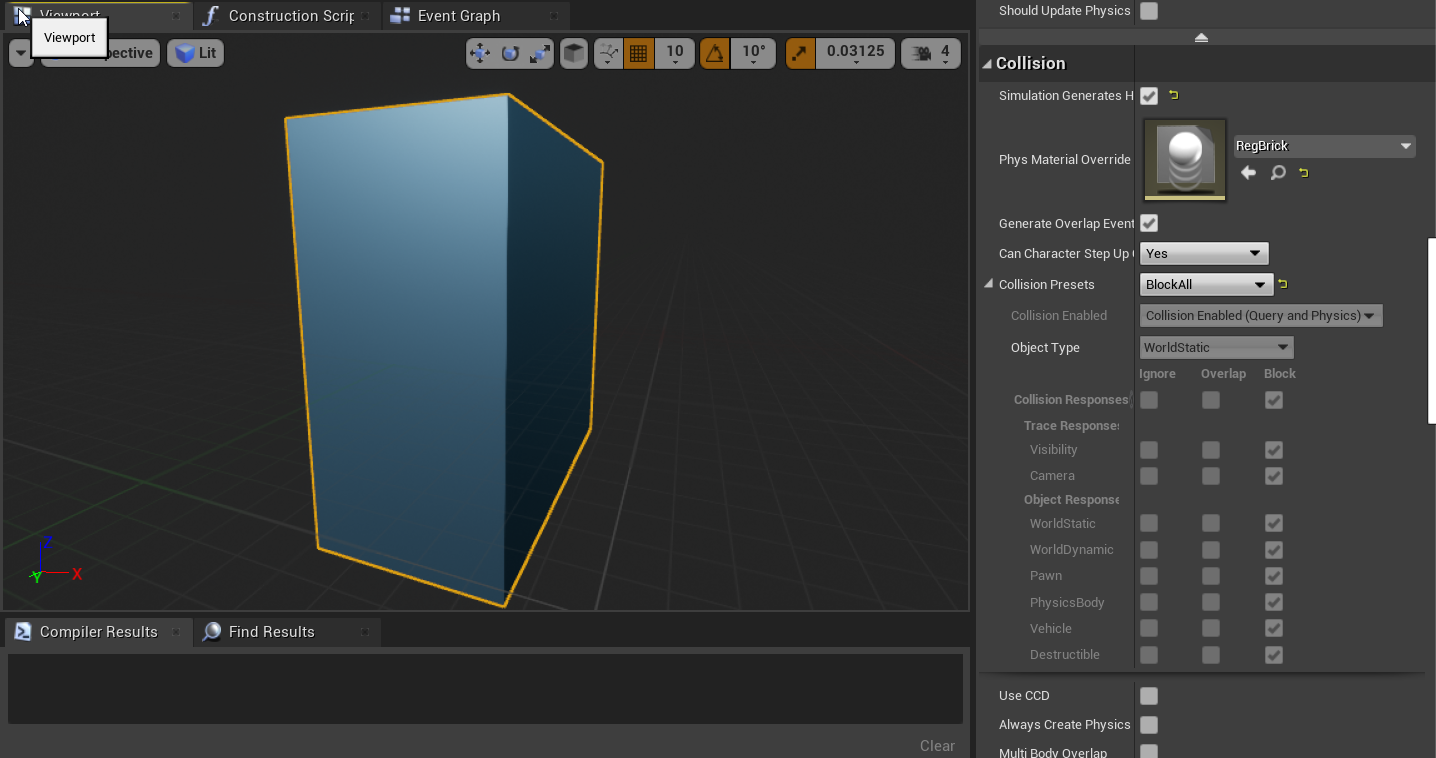
my ball goes through this break
brick*
any ideas why?
(the ball gets blocked by a regular static mesh wall for the record)
grim ore
what is this brick? how was it made or where did it come from. does it have collision?
dawn bloom
oh wait let me check, figured collision box auto generated
sacred swan
@grim ore my level has just disappeared, any thoughts on how to get it back?
dawn bloom
well apparently it didn't thanks @grim ore
grim ore
restore it from your last backup
sacred swan
how do i do that lol
grim ore
well you would have to back it up in the first place, I assume you did not
sacred swan
grim ore
in the saved folder in the project there might be auto saves, you can try and get one from there
sacred swan
grim ore
welp find the latest version of the file, rename it to what it was before and put it where it was before in the project then load the project
grim ore
what was the name of the map?
grim ore
I would assume Untitled based on those names
so find the newest one, whatever has the newest date, and copy it back where it should be. it looks like in the content folder in your project. then rename it to just Untitled.umap and open the project
sacred swan
ty
ill post if it works
nothing shows
it literally just disappeared from my content
grim ore
wrong folder
sacred swan
content
grim ore
in the content folder, not the root of the project
grim ore
and files should not just disappear so if it did you have a drive issue or you deleted it
sterile tulip
to create backups, do I just go in the save file in the explorer and copy it
sacred swan
its gone
not showing
i have the untitled build data
i keep it on a portable hard drive
and take it to a different pc
grim ore
delete the build data and try again
but if its still not showing up when you restart the editor then it might be corrupted, you can try an older vesion perhaps
grim ore
definitely weird, it should work
 past cobalt
I’m trying to import a character and got a this what do I do
sacred swan
does it matter that i save it on a portable harddrive
grim ore
@sacred swan it could, your drive could have corrupted it. but the backup should have worked
@past cobalt you dont have a valid character you are importing
sacred swan
oh well
ill just start again, atleast I have my bps.
make sure to keep separate backups
so it doesnt happen again
grim ore
look into using proper source control that is remote so you can try and recover for this
past cobalt
What does that mean
sacred swan
what file type are you using @past cobalt
grim ore
@past cobalt what does your characer look like in your art program? how did you export it? what did you export? the engine is saying you exported nothing it can use
past cobalt
Okay thank you
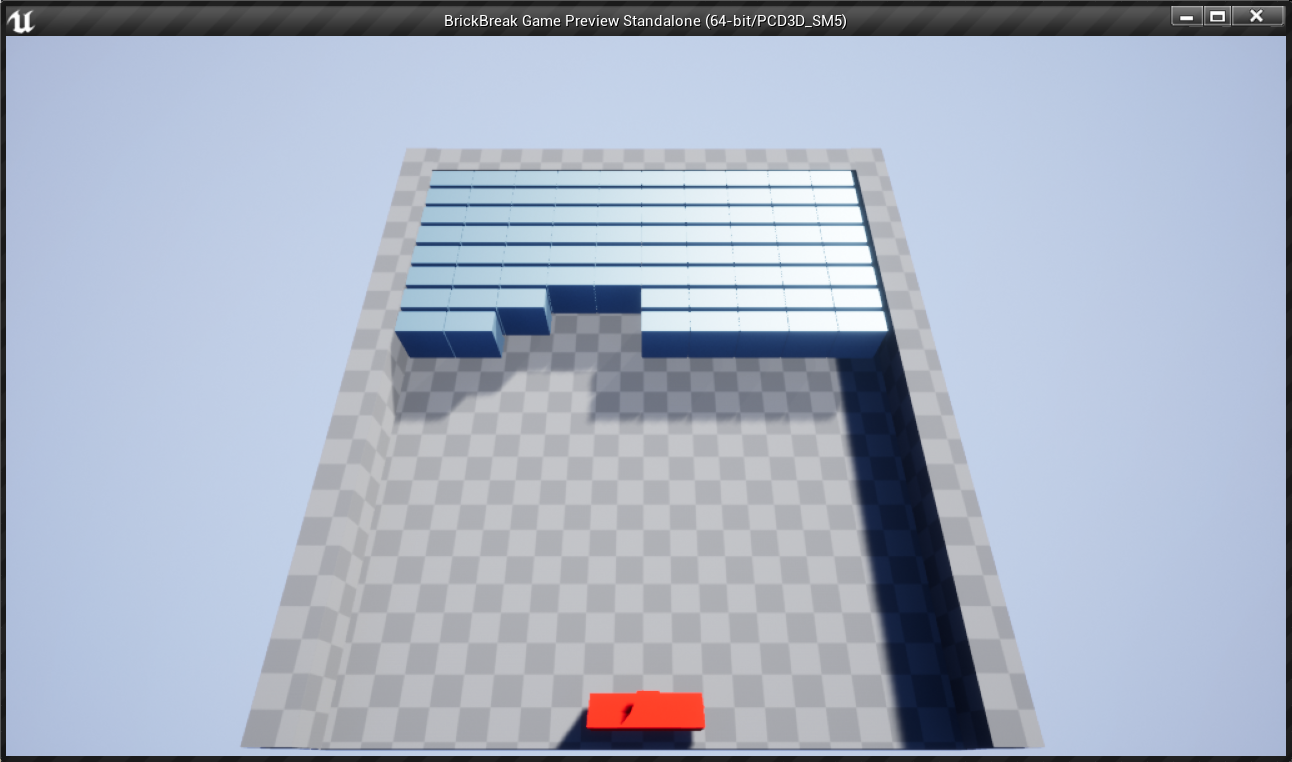
 versed spear
lambda and dynamodb vs game spark vs Amazon S3 and Save game object who do you think won in the database matchup?
past cobalt
@grim ore I fixed it thank you
 sudden oriole
Is that that game about hitting the ball into the blocks to make them disappear?
 jovial maple
Hey guys, I have a hardware-based question. Are DRAM-less SSD's okay to work with UE4? Or do I need to invest a lot more in a expensive Samsung?
sudden oriole
Huh? I'm pretty sure you can run it on anything that isn't like really old
Usually more of a cpu, gpu, ram thing
sacred swan
@grim ore cheers
i tried again
think i may have not capitalised the U in Untitled lol
grim ore
ahh that would do it
@jovial maple dram mainly causes issues with longer sustained loads, most of your assets will be smaller so you should be fine. with that said, dram cache drives are better overall
grim ore
yep try and track down the broken assets without saving anything, then reopen the project and just those assets and try and fix them, then the other ones should be ok
looks like your drive ate your project, not much you can do but try and fix it and learn to use better source control
sacred swan
brand new hard drive as well
grim ore
yeah but its an external drive so those have inherent issues
sacred swan
i used onedrive before
and i transferred a month long project over
because i was formatting my pc
it uploaded only the folders and their names with no content in them
grim ore
yep one drive/google drive/drop box are all sub par as well
sacred swan
grim ore
proper source control, like git or svn or perforce, is recommended
plush yew
people i need help
plush yew
you need to flip your faces
plush yew
oh
 unique kraken
this is why this is so confusing wth
 cedar jetty
having a issue where i cant seem to get the transform of the shirt right on my character all the clothing aspects are seperate and it seems almost impossible to do this manually any suggestions?
unique kraken
omg they were flipped 🤦♂️ was just hard to see
grim ore
it sorta looks like one of the faces is backwards based on those normal lines
plush yew
oh lol
unique kraken
yea they are 🤦♂️ but bcs of the directions the flipped normals show i thought they were right
actually no
wtf
grim ore
@cedar jetty is the transform of the shirt, the pivot, way below the bottom of it? Im guessing it is which means its probably got the same pivot as the character (at the bottom) and if you have it as a child of the character mesh its going to be incorrect. does that seem right
grim ore
rotate the screen so you are inside that edge, see if the face shows up to indicate the normal is backwards or if its completely missing
unique kraken
but this one object wtf
plush yew
@cedar jetty i think you need to child it with the body in your 3d program
@unique kraken ahahahhahaaha
cedar jetty
@grim ore its a skeletal mesh component child to my mesh im assuming i would need to go into blender to correct it?
plush yew
@cedar jetty yeah it should stick together in blender
how do i set an idle animation timer?
cedar jetty
its werid because they have it perfectly fine in here but i do notice a size diffrence
grim ore
well thats all one mesh is why
cedar jetty
grim ore
what is in the Mesh part of that structure?
cedar jetty
@grim ore its just this?:
grim ore
its also possible they moved all of the items down, we cant really see how this is set up
@plush yew so it goes to idle after a certain time? you would have an idle animation in your anim blueprint and have it trigger playing it based on a timer you check every so often.
plush yew
i want an animation to play after 20 seconds of being idle
Yeah Im in the anim bp right now but i dont know how to set up a timer for the transition
grim ore
you have a few options, are you using montages or just anim sequences for the animations?
for example I might use the animation norify system to put a "animation finished" notify on each of my animations I cared about. Then in the anim graph whenever it fired off I would set a timer inside the notify in the anim bp event graph that after X seconds it set a variable in the anim graph that was used to tell my animation system to go to the idle state or play whatever. Naturally tho I assume you should already be idling if doing nothing so I guess this is for special idles
another way is in the player you keep track of the any key event, you can set up an input event in the settings to fire off on "Any Key" and you keep track of whenever any key is pressed and start an idle timer or counter and reset it every time a key is pressed. at some point it should go off and then you can tell your anim bp to do whatever
plush yew
Yes Im already idling, this is for a sleeping type animation
ill use the anykey method i think i know how it works
I just thought, is there not a way to check for how long this normal idling animation has been playing and then based on this transition into the sleeping anim?
Then you wouldnt have to constantly check for key inputs
ill use the anykey method i think i know how it works
NO WAY when i said this it was because i watched your video on it before lmao
 dreamy sleet
Who can help me make a maze
plush yew
didnt realize it was you
grim ore
you could use a montage for your idle
set it up to do the normal idle a few times then you put your sleep idle in there with it set to loop just the sleep idle, this would be a super easy way to do it.
so Idle -> Idle -> Idle -> Idle -> Sleep <- (set sleep to loop)
I think that would be like super simple lol
unique kraken
hmm is there a way to get glass fully reflective as if it would be solid?
grim ore
i overcomplicated it as well lol you dont need a separate section for each animation just the range lol
 marsh swallow
Heya @grim ore I am trying to help out Galidar with the Oceanology Plugin. Were hitting a little wall. We have a nice component that works during play, but not in PIE/Simulation because it requires the active camera to give its image to a RT.
Do you know of ANY way to access the PIE camera?
plush yew
this is the most helpful thing
grim ore
you might be able to get the ative camera using he editor utilities but I want to say I tried it and it didnt work 😦
 opal carbon
how do I add animations?
sterile tulip
Does it cost money to add multiplayer to a game
grim ore
it can be done for free or for a cost depending on what you want
sterile tulip
10 players doing pvp
 obsidian wasp
I'm trying to apply a knockback when I hit an enemy. Launch Character/Add Impulse both seem to be a bit weird when the enemy is pathing. If I hit an enemy who is mid-air or just waiting around they fly like crazy, but they hardly get knocked back at all when on the ground. Any easy way to get something like this working properly?
 mossy nymph
stop pathfollowing while its knocked back
 dense tangle
Greetings gentlemen, have anyone encountered the problem with localization not "catching" all targets? For example, I have following targets:
With two similar cultures set on all targets, "Dialogs" for example I can see in my game and this target works very fine with both of the cultures, but other targets like"Missions", for example, do not catch any translation of any culture (still catch "Sources" changes though). I ve gathered, recompiled, danced with timbrel like thousand times. All *.manifest, *.archive, even *.locres look very fine, but localization system does not want to enable translation in game. What could I look to find out where is the problem? Desperately need help.
 mystic holly
versed spear
mystic holly
versed spear
what game?
dawn bloom
where do you guys get free textures
exotic thicket
Quixel Megascans, free for UE projects
 atomic viper
would anyone know how to replace the first character gun?
dawn bloom
@exotic thicket I signed in with my account but it still asks for payment details
exotic thicket
Have you connected your epic account into it?
dawn bloom
yup
exotic thicket
Hmm, I can't remember whether it asked me for those details or not 🤔
dawn bloom
alright I got it
worked after downloading bridge

which one am I supposed to use?
not sure how to import textures
 odd loom
sry for the question but is megascans free for commercial use or personal use only ?
im using unreal of course
 vernal matrix
So what is the best way to go about killing actor then eating it, i am making a dino game, need to eat fish, i have the health, hunger and thirst set up, and have the add thirst and hunger variables up, so i can walk though a trigger box and it will give me water and such, but how do i add that to for something i kill
@odd loom commercial
odd loom
ok
plush yew
@dawn bloom use the images drag and drop it into the blank space on the bottom of the screen in ue4 make a material and put the images where they need to be
plush yew
can someone please post the link to the most helpful tutorial to help make beautiful third person games
vernal matrix
i dont think there is just one tutorial on that my friend
just search unreal engine for beginners in youtube
and try to find a long series
plush yew
albedo should be alpha ect there is another way of importing the textures tho on the buttom left of ue4 well close to the middle you will see add new and next to that is import @dawn bloom
vernal matrix
there are several, with like 26 epispodes you will learn a lot
plush yew
maybe it'll be worth it.
vernal matrix
if you want to do unreal, gotta start from the bottom and slowly climb up, it takes a long time to get
plush yew
@plush yew DevSquad is a youtube channel for beginners
vernal matrix
yeah and the more you learn, the better you will get at wording what your looking for, finding more tutorials
plush yew
makes tps fps and rpgs ect
dawn bloom
@plush yew yah I found a guide, there is a way to export directly ue4 using Bridge
no need to do anything
plush yew
ok i never used bridge before i usually make my own textures but om happy to help
yeah, I've used Bridge before and I really recommend everyone who uses Unreal Engine to give it a look.
Anyone know how to make curved walls?
in ue4 or blender?
UE4
Gone through some tutorials about "splines"
you could try using splines ive never done curved walls before but here ill send you a video on how to use splines

How to create road track using spline and spline mesh in Unreal Engine 4.how to use both Spline and Spline Mesh Components.road track generator tool in UE4.
Export roadtrack mesh as FBX.
Import roadtrack mesh in UE4.
Create Actor BluePrint.
Create ConstructionScript to at...
its old but still works
there are multiple ways of doing it tho
heres something a little better tho and sorry for spam

We continue to look at splines and their many uses in this episode. Spline meshes allow you to procedurally create meshes such as pipes, wires, and roads easily in engine. We look at two types here: ones with a flexible section length, and ones with fixed length sections.
Sup...
 karmic cloud
does anyone here use quixel bridge?
plush yew
I do.
 vale osprey
I tried porting my model to Unreal, yet I came back with this. Anybody know how to fix this?
dawn bloom
You guys know when you apply a material the pattern endless repeats and looks unnatural on a large surface
How do you remedy that?
 barren flume
Accidentally switched the shader model thing to android and now the unreal engine project is crashing on startup
 pliant rose

I've been pondering for a while of how people rigged their characters to the UE4 mannequins skeleton. Since most Marketplace assets are this way, it's insanely useful as you can completely avoid any kind of retargeting and rebuilding animations blueprints. Made it short and tr...
 safe dock
Hey guys, regarding ball physics, I have material physics for the ball and for the ground with 5000 friction each but the ball keeps rolling fast and it stops after a very long time. How can I set it up so that I can run with the ball?
 radiant sleet
how do I set up state machine so when my character moves he switches animations
I have another animation
this is all I have so far
LIke is there a way for the animation blueprint
to get if the player is running
does that make any sense?
 sinful bone
Hey Unreal experts! Can someone give me a hint how to create this kind of effect in unreal? In Unity I've used a trail renderer, which was a child of the sphere object to make it follow the object and create this trail. How could this be achieve in Unreal?
I need to create a trail for a ship similar to Zelda's Windwaker

 heavy tundra
Hello guys I have assigned 2 skeletons together and now all my animations aren't working anymore. Anyone can help me return them back to normal?
 verbal shoal
So..got a brand new rtx 3090 and unreal keeps crashing when opening some of the purchased environments i have. Any ideas, guys? My RTX2070 opens the same scene without a problem.
 gritty finch
hey guys please help me
i am creating a web app. I want to have a gaming section, where there is an download icon beside the game. When the user downloads, a new folder is created within the computer for that game. After the game is downloaded, play icon appears. Can user open that game which is in computer from the play icon in web? Please let me know. Any resources will be helpful
 mint umbra
Hey guys. I'm trying to import a tiled build from World Machine into UE4 using World Composition. I've exported weightmaps for each layer, which is 256 each, 1009x1009 resolution 16x16 tiles. So, there's approx. 8 layers that have 256 files each ready for import. However, importing the map makes the engine crash. Does anyone have some tips/suggestions? Crash code:
LoginId:e643187543e5d2941e541b8a6e74058c
EpicAccountId:5b7c2a4e85f3451fb76d8567477922db
Fatal error: [File:D:/Build/++UE4/Sync/Engine/Source/Runtime/Engine/Private/ShaderCompiler/ShaderCompiler.cpp] [Line: 314] ShaderCompileWorker crashed! Fatal error: [File:D:/Build/++UE4/Sync/Engine/Source/Runtime/Core/Private/GenericPlatform/GenericPlatformMemory.cpp] [Line: 186] Ran out of memory allocating 7560240 bytes with alignment 0 0x00007ff8d65e3b29 KERNELBASE.dll!UnknownFunction [] 0x00007ff84351a306 ShaderCompileWorker-Core.dll!ReportAssert() [] 0x00007ff84351d998 ShaderCompileWorker-Core.dll!FWindowsErrorOutputDevice::Serialize() [] 0x00007ff8433b1c6d ShaderCompileWorker-Core.dll!FOutputDevice::LogfImpl() [] 0x00007ff84321c68c ShaderCompileWorker-Core.dll!FGenericPlatformMemory::OnOutOfMemory() [] 0x00007ff84324f418
Looks like it ran out of memory. Would lowering the engine's graphic quality maybe help me out in this situation?
 loud knoll
break it into smaller chunks or and load a few chunks at a time
like try 8 tiles as an export see if that works
mint umbra
Can I actually import like 50% of the landscape at one tiled import, and then the next 50%? I.e I just import 50% of the height outputs and 50% of the weight layers? Is that what you mean?@loud knoll
loud knoll
I am assuming you can select a few sections of what you want to export and just export that
or you could bring it into another program is that is a pain and break it up there
also 8 layers is a lot of layers
I maxed out with 6
I could be that the 8 layers is the issue and not the rest of the data
it also depends on your machines memory and all that
mint umbra
Hmmm alright, I see. Well, I'll try to import sections of the map and see if that works wonders or not 🙂
loud knoll
I had to force it to use 6 layers it was having troubles
6 layers + 6 layers of normal maps
but this was a few years ago
gritty finch
Please look at my question too
mint umbra
Oh, I've already run a testmap of 8k resolution which handled 10 layers quite nicely, but that wasn't tiled and importing the weightmaps was very straightforward 🙂
 lusty carbon
Error when baking at around 1%
 zenith flower
Then engine needs to stop nulling out bad references when re-saving files, unless explicitly asked to. K, thanks.
@lusty carbon You are showing the bottom of the calls stack, which is usually useless info
lusty carbon
Seems like my lightmaps are all too large and I've run out of memory
loud knoll
@mint umbra yeah it could have been my hardware at the time, I think I was using a 580GTX then moved 1080GTX so I am not sure how much more I could do now with a 2070S
@mint umbra If you done this all before then I would need to see what is crashing, do you have debug symbols and image of the crash?
mint umbra
I can send you a screenshot if the engine crashes, it's importing the height files now 🙂
loud knoll
@lusty carbon how much memory do you have on your system right now?
 cosmic axle
Hey guys, so I have been researching and it seems that I must fill some forms before I distribute my game. I saw that are 2: the Notification of Release form, and the Payment/Royalty tracking. The Notification of Release I must fill for sure. But my question is, do I have to fill the Payment/Royalty tracking as well or I only have to fill this one when I achieve the 1.000.000 (when I start paying 5% to Epic)?
lusty carbon
@loud knoll 32GB
zenith flower
Whoa, you haven't singed that yet? You are supposed to sign it when you start developing your game, or else you forfeit your rights to the 5% at 1 million. You have to pay 5% on ANY amount now!
lusty carbon
But I think I know what the problem is
zenith flower
@cosmic axle
cosmic axle
Actually I'm am asking this before I start developing
So which I must fill?
Both of them?
zenith flower
Nah, im just fucking with you. If I wasn't so busy, I would keep pulling your chain by telling you to read the fine print xD
Idk
cosmic axle
Hahahahaah that was a good one
loud knoll
@lusty carbon well you can see what is happening you just need to figure out what needs a lightmap and or reducing the quality until you actually generate it
zenith flower
It would have been great, if you were like 5 years in xD
cosmic axle
So seriously, do you know about this forms?
It would have been great, if you were like 5 years in xD
Hahaah yeah
cosmic axle
Hm I see, thx anyway, I think I'll email Epic then
merry gazelle
Should "get player character" be available in a blueprint node? For some reason I can't access player, pawn, character, etc node (even with case sensitive off)
 glacial pecan
I got the dreaded "X could not be compiled. try rerbuilding from source manually." in a project that's NOT built from source, but does include the source files for a plugin...
anyone know what to do? the plugin doesn't have a .sln file to build itself, like I've seen suggestions on the web...

 mint umbra
Oh, alright, I didn't know that 🙂 Yeah I've rebooted, gonna try again with a 1x1 tile import, previously it was a 6x6. Using 4.24 btw
 dim merlin
Hi, i just installed 4.26 Preview 2, the new water plugin should be within it? cant find
zenith flower
I was supposed to make it into preview 2 because it didn't make the cut for preview 1
Either its a plugin you need to enable
or its not ready yet
dim merlin
seems its still not included in preview 2
but well, i dont think preview 2 is even being updated right? (that never happens)
so we might say it didn't made it to preview 2 to 😦
dim merlin
@plush yew good question, i was thinking the same yesterday
 ripe coral
I have a blueprint function in which I want to access a "Join Session" function. I have access to this function in the event graph but not in my custom blueprint function, why?
Ah thanks! 🙂
 kindred orbit
Would you guys say that it's generally easier to create 2d games than 3d?
dim merlin
@plush yew one thing i found helpfull is to use git so be able to revert files
might be possible to revert without closing the editor
 rancid lynx
when importing textures, how do i get rid of this trash compression? i opened the image in UE4, i selected "lowest compression - biggest file size" the difference was quite trivial.
 fervent sigil
@rancid lynx What's lowest? There should be various different compression implementations you can choose from
fervent sigil
Screenshot
fervent sigil
Look at the Compression Setting. Also, can you show the image outside and inside UE4, so we can see the difference the compression is making?
ripe coral
This is making no sense. Why is the error telling me there is no variable in session_item? I am not even accessing a variable in session_item
fervent sigil
@ripe coral is Attemptnig To Join is a variable. At least that is what that node is
rancid lynx
sure. one moment. i painted myself in krita, i wouldnt be here if they were similar. brb
ripe coral
@fervent sigil I know. It is locasted in Lobby Game Mode BP
And I am trying to access it
But it tells me that the variable is not in session_item
fervent sigil
@rancid lynx np, just trying to see if I could give you better direction when I know what kind of detail is being "destroyed" in compression
@ripe coral Make sure to recompile it
ripe coral
@plush yew I cant compile it
rancid lynx
it may be a tga thing on export, the opened tha is alittle worse.
ripe coral
@plush yew BEcause of this error
rancid lynx
I see banding in both programs, maybe the ue4 light is higher, so its easier to see
fervent sigil
@ripe coral I believe it's looking at the variable inside Lobby Game Mode BP, not the session_item. Verify that is compiled.
After that, recreate the "set is... " node
rancid lynx
but the color range seems very much less in ue4
ripe coral
@fervent sigil Okay I will try it
rancid lynx
srgb settings are the same, enabled.
fervent sigil
@rancid lynx I can't help you with the general bands, but only suggest you try different format. Specifically sometimes UE4 made the image brighter when the file was png (compared to tga). Generally the imamge look fine, just with more light. You can try to show "unlit" mode, it should be better.
Regarding those 2 specific faces, I believe it's about the normals
rancid lynx
i agree, but the greens also appear much more ranomized
ripe coral
@fervent sigil Okay restarted the engine. Compiled my Gamemode BP again. Recreated the set nodes and now it is working. thanks!
fervent sigil
@rancid lynx Try unlit mode. how does it look now?
rancid lynx
okilldo
the same. just 20 percent brighter. my light engine is pretty balanced. it took me 2 years to figure out
i usee less directional light than normal, and a little extra global and exposure
terrain and other meshes look fine. it seems to be common when i use "grandient" from 1 shade of green to another darker green
if i use grandient blends in krita, or anything else, the banding becomes much more extreme.
other colors around
the other colors look much smoother
saved as TGA from krita, just like normal
fervent sigil
@rancid lynx Can you show the image in the texture editor in UE4?
dim merlin
Hey guys so, ive been asking around for really months about virtual texturing, noone knows, trying again:
Does anyone its even possible to update a runtime virtual texture at runtime.. ?
rancid lynx
the picture above was "UE4" and "krita.
fervent sigil
yeah but it wasn't the texture editor, it was the scene
rancid lynx
i put ue4 on the left and krita on the right, of my monitor
ok ill do now
i do see some banding on krita. i guess the extra ue4 lighting makes it stand out more
fervent sigil
That doesn't look the same?
fervent sigil
It just looks more zoomed in on the left tbh
rancid lynx
but it is kinda the same. ill try some blur in krita, maybe thatll help
fervent sigil
try open it in an external program like gimp btw?
I trust gimp more than UE4 and Krita tbh
it will tell you for sure if there are any blue/brown pixels in there or not.
rancid lynx
thanks. i might learn gimp again. the interface pushed me away
fervent sigil
you don't need to learn it, you just need to open it and use the color picker. But yeah the interface isn't very intuitive, I agree
rancid lynx
krita wasnt either X_x hehe
fervent sigil
it's better than gimp imo :p
golden niche
I touched somethin in my character and now I can only look left or right
plush yew
Hello guys, I imported one shop model that was made by 3d artist and when I import it and try to enter inside of it through the empty space for the door I can't enter-how I can fix this problem? I tried to play with the collusion settings, I added box collusion, used simple collusion as complex, used complex as simple and it stil doesn't work, my 3d artist sent me this: https://www.youtube.com/watch?v=3QwbhZ9dlL4
When I import the mesh I disabled the option "auto generate collusion" but unfortunatelly again doesn't work
Here I show you a quick tutorial on how to set a custom collision in Blender for Unreal Engine.
if someone can help me, please tag me or write in DM
rancid lynx
auto generate collisions works very well, but it does not like convex shapes, for example , it will not understand the empty space inside a pot - pan - barrel.
anything auto generated wont understand "innter empty space" very well, especially box style.
but creating collisions manually is really easy.
plush yew
okay so how to fix this problem?
rancid lynx
well you could manually add a box - cube for each wall. and set the sizes inside unreal really quickly.
goto "collisions, on the top bar, add a "box" collision, then "SCALE" so that its roughtly allighed with a wall, then move it into place. you could create 4 collisions for each wall, 1 for floor and ceiling or, ill try and find the "blender" it yourself because its not that hard "Tutorial" on google
just needs practice an two hours to jack with testing
this will get ya going in the right direction quickly if you want manual control
i barely know what im doing
 supple totem
getting this issue suddently where I can't create new assets until I reset editor, all new options are greyed out.
plush yew
it doesn't work again 😦 @rancid lynx
ah why it doesn't work
I remembered the last year when I had problem with this and the modeler could fix it
fervent sigil
@supple totem I had a similar issue where a drag operation was always in progress. You could try dragging a docked tab to somewhere. You don't have to actually drop it, you can cancel it
supple totem
thanks, I actually just figured it out. See how multiple folders are selected on far left?
so yeah similiar to a stuck drag
thanks
plush yew
I have other problem, when I don't sprint I made the energy to regenerate but slowly, the problem is that it doesn't stop regenerate, after it reach 100 it should stop but it doesn't, how to fix it?
fervent sigil
@plush yew Wrong screenshot? I don't see any energy
fervent sigil
@plush yew Delay is kind of werid but possible. Create widget make sense though inside a branch inside tick. It's usually inside a function called by tick, but still
@plush yew btw instead of delay, use the number you want (e.g. 5) "divided by 1", and multiply by time passed.
so if time passed is 1s, you'll add 5 * 1 = 5. If 2s has passed, you'll add 10. If 0.5 seconds passed, you'll add 2.5.
Anyway if you don't want to add stamina after 100, easiest thing would be to clamp it.
fervent sigil
clamp it. Clamp node
 humble yacht
Does anyone know how to achieve team based visibility in an multiplayer environment where
A team is made up on players
There are numerous teams
Only certain teams can see certain teams
 tight prawn
is there a guide on event dispatchers' "proper" usage ?
I don't want to have a ton of assigned events in my begin play
plush yew
I found the clamp node
what to do with it? @fervent sigil
nrm I fixed it
I am jesus
I am proud of myself
fervent sigil
👍
 hollow compass
does anybody know why launching a character down will not launch them faster than terminal velocity
 weary storm
Ok tmr
 serene birch
isn't that the very reason of existence of a terminal velocity stat?
hollow compass
ya but you will break terminal velocity if you are launched toward the mass pulling you?
ive altered it before to get it closer to 120mph like earth
but ive noticed that launch character does not break this
serene birch
physically, terminal velocity is because air friction starts slowing you down more than gravity accelerates if you go faster than that
as a result something falling too fast will slow down to reach terminal velocity, same that it would accelerate to reach it if too slow
hollow compass
ya but if you had thrust would you not accelerate?
serene birch
likely in UE4 the physics for this "terminal velocity" paramter are pretty simplified and just coded as a flat cap on vertical velocity
hollow compass
define actual falling and set accordingly?
plush yew
another problem guys that I remembered is I want to make when the character dies:
- set game paused - working
- popup widget that you are dead- working
- in this widget there is text and button revive, this button revive needs to do these things:
- set the thirsty and hungry to 100 -working
- teleport the character from the begining of the game, I mean to teleport you on the coordinates where the "PlayerStart" is - this part idk how to do it
can someone help me?
I will be more than happy, thank you in advance
any idea for this problem? @fervent sigil
fervent sigil
I would just create a variable in the player called "Spawn Point", and in BeginPlay will set it to the current place.
Then use that variable
@plush yew
 digital rover
hello anyone know how we can get an image to unreal from database ?
lusty carbon
Question- when I build a project with tons of assets that I don't use. do they go into the final build aswell and contribute to its size?
fervent sigil
@lusty carbon Try asking in #packaging
plush yew
good suggestion
if I keep setting the thirsty and hungry to 100 will it be problem? just asking
@plush yew Or if you dont need any check points, you could just simply restart the level with 'open level' node
@plush yew it works, but when I click revive it seems like it freezes and after 5-10 seconds then loads, idk how to ifx this laggy stuff-hmmm, any idea?
 mental helm
I'm trying to follow this doc, https://docs.unrealengine.com/en-US/Engine/Content/Tools/RenderToTextureTools/3/index.html and I'm stuck on the Render the Imposters step, it mentions "bring up the console using the ~ key and type "ke * rendertextures" at the console and hit enter." that isn't saving the textures, rendertextures doesn't look like a valid console command and there's no auto complete suggestion for it
humble yacht
Anyone know how to create teams in a multiplayer environment where players of the same team are visible only amongst themselves ?
 dire sentinel
https://cdn.discordapp.com/attachments/371739852758319114/765957913020989480/unknown.png
does anyone know how I can make the normal map shadows brighter?
my model looks really dark and noisy with a strong normal map because of the shadowns, but without it it looks boring and flat. so how cna i make the shadows ligher?

these
they are really dark compared to the shadows created by the mesh
mental helm
Don't use an AO texture, if it's a tiling normal map, decrease the intensity of the normal map
 tall wraith
Hello, does anyone know how to un-inherit a camera in a third person cpp file
dreamy sleet
how do i make a maze in unreal
 warm portal
Hello guys, I am trying to create a modification by using Unreal Engine 4.18 and when I cook my mod by default this version create .uasset with .uexp file. I need to cook mesh only in uasset without uexp. Can someone tell me please how to turn off this system which split one uasset on two files?
grim ore
@dreamy sleet it depends on if it needs to be random or not. IF it does look into procedural generation, there are docs and videos on it. There is also a learn example on the launcher
dreamy sleet
@grim ore ok thanks
plush yew
hey guys I recently installed the polygon plug-in and it told me to restart the engine and I did but when I look for it in plug ins it says it's already installed even though it's not an option in the modes tab.
grim ore
which plugin?
plush yew
grim ore
yep read the decription for it
grim ore
the actual mesh editing in the viewport is the modeling tools plugin
plush yew
are there any plugins that make I don't know how to say this
like making modern home easy
 hushed wind
Hello! How i can change decal drawing distance ?
tall wraith
No one in here even helps
 wet trout
youve got to be specific
 regal zephyr
Hello, can anyone suggest a good learning book regarding lighting ?
grim ore
no but I found this course recently https://www.youtube.com/playlist?list=PLdpurtWV5ijk7FBQGCelufo9dGSom6cN3
 clear coyote
hello! I prepared an asset with several meshes and textures and made a blueprint out of it. the problem is that when I try to import that to another project all the references to my meshes are gone and I can't see the asset on the viewport. any idea?
I tried to do this in 2 ways: migrating the folder to the other project's content and simply copy pasting the folders on the windows explorer
grim ore
copy pasting in the folder is not the best way, how did you migrate?
clear coyote
right click on the parent folder to the ones in the picture->migrate->select all dependencies on the list->select the other porject's content folder
grim ore
when it showed the dependencies did it list the missing content? the ones you say are gone
clear coyote
hmmm let me check
grim ore
I would try migrating the object you want, not the folder, so migrate the blueprint and it should show all required files by default
clear coyote
It did check everything, yes
okay I'll try
it worked! thanks! do you know why all the way around isnt working?
migrating the folder I mean
now.. one more question, this migrated it to a new folder with the name of my original project's folder name, but on the new project I'd like to keep it organized and have it on a different one, how can I do that?
grim ore
I dont know why the folder wouldnt work, Ive never migrated a folder. perhaps you arent really migrating anything that way since the folder has nothing required
clear coyote
I see
grim ore
you can move items around in the content browser or rename it if you need
clear coyote
I've been using the folder migrate so far and never got that issue
grim ore
just make sure you right click the folders after you move it and fix up redirectors
clear coyote
sweet. thanks!
 tender haven
like making modern home easy
@plush yew ?
are you asking about Architectural Visualisation type of design?
Autodesk has a bunch of apps for this and you could use a free trial... it's not "easy", but there are lots of tutorials and resources
if you want something super easy as an intro into layout and placement, IKEA has planning tools and I think a 3D renderer
plush yew
@tender haven yes please.
 open wadi
Anyone know how to generate an "open file" dialogue on Mac or Windows?
via Blueprints?
I'm searching the web for examples and finding conflicting information on this topic.
weary storm
Wsh
sterile tulip
Projects will be upgradable to UE5 once its out
sterile tulip
It will take 1 year tho
They said it will be released end of 2021
Previews for testing will be available early 2021
opal lark
what node can i use to randomize light etc
dawn bloom
You guys know when you apply a material the pattern endless repeats and looks unnatural on a large surface
How do you remedy that?
 fierce forge
hello , i'm making a open world game and i have over 200 NPCs with complex AI , what types of optimization i can use to get more fps ?
 left elk
So VR Editor in 4.24, 4.25, and 4.26 Preview 2.
Using the Vive Pro HMD and Controllers.
The Undo function is basically broken. Swipe Right-to-Left doesn't Undo anything. I can tap Right then tap Left on the trackpad and have it work.. sometimes. Any idea what's going wrong?
More generally, for the VR Editor, can I access the Control scheme web somewhere?
open wadi
Hi everyone: I'm trying to manually install a plugin into my 4.25 project - according to documentation, the plugins directory is mean to be ProjectName/Source/Engine/Plugins: https://docs.unrealengine.com/en-US/Engine/Basics/DirectoryStructure/index.html
Overview of the directories that make up the engine and game projects.
Yet I do not see this directory within my project, despite having multiple plugins installed and enabled.
Normally I use the Unreal marketplace to install and manage plugin, but this particular plugin is not available on the marketplace.
Never mind, it's in the c:\Program Files\Epic Games\UE_4.25\Engine\Plugins directory, disregard.
 subtle orchid
Hello! How i can change decal drawing distance ?
@hushed wind
hushed wind
thank you so much for what I did without you)
 vernal relic
any mathematician? what is this kind of function?
plush yew
Helloo!
Unreal engine does not support WebGL?
But was possible in older versions?
Anyone could explain me please?
I'm confused!
crimson vapor
What is the generic term for this box (add input movement) called
is it connector?
or node?
or function
 warm hornet
Anyone able to tell me how to delete projects from Epic Launcher WITHOUT deleting your actual project files? Can't believe this isn't a feature... argh
 summer matrix
iv downloaded the free park tree asset from the store and the folder is empty?
 delicate coral
Does anybody here use a rigify and Uefy 2. Please for everything holy and unholy. Going to need some help
exotic thicket
@warm hornet copy your project folder somewhere else, then delete project from EGL.. probably not ideal but should work.
 abstract prism
allright im having a issue
i just downloaded the quixel bridge plugin and finally got it working but i cant start ue4 up now
 rich furnace
anybody know if Media Textures can support .webm videos?
abstract prism
is nobody gonna swer me
answer*
i need to get ue4 working again
all i try and do is open ue4 and that message pops up
 whole quarry
i just downloaded the quixel bridge plugin and finally got it working but i cant start ue4 up now
@abstract prism appearently you didnt get it to work then?
rich furnace
The Media Framework has "Allow Non Standard Codecs" does this mean it can be made to support m3u8, or webm?
rich furnace
Technical information regarding Media Framework in Unreal Engine 4.
abstract prism
and remco i dont understand why i cant start ue4
its saying python console isnt there despite clearly being there
exotic thicket
There's no such thing as "interrupting" in chats like this unless they are literally pestering you directly. Asking other questions during other conversations is normal and acceptable
abstract prism
ok fair enough
i just i was slightly expecting more support from ue4's featured discord server
exotic thicket
Keep in mind that everyone here are either other UE4 users or volunteers :)
whole quarry
The error said it cant find it
whole quarry
Did you try to search it online?
abstract prism
no id figured id ask a human being who can give a more direct answer than a search engine
whole quarry
Searching online first is a good starting point
abstract prism
theres a fix ive found but it doesnt appear to work anymore
hell this just appears to be a general issue with bridge
that the devs are looking into but will take a while
grim ore
remove the plugin from your engine -> problem solved
and its not a general issue with bridge, its when its installed incorrectly this happens
abstract prism
yeah ive been installing it with there installer mathew
4.25 installer is glitched\
grim ore
I have it working on 4.25 on another machine and in a sec I will have it installed fresh on this one
abstract prism
i can install and delete it 100 times and it wont work for me
hold up mathew lets get in a call so i stream my screen
abstract prism
dude
ive reinstalled and deleted it 5 dozen times now
same issue
anyways ill try a few dozen more times
abstract prism
bruh allright
grim ore
abstract prism
let me explain how im installing it
grim ore
well I would hope the proper way
install bridge, run bridge, during setup of bridge point to an empty folder somewhere to hold stuff and choose unreal engine as the engine being used. sign into your epic account when the program starts. Find something and click download. Go into the export settings once downloaded, choose the correct engine version then point the installation folder to the engine base folder, wait for install of plugin to finish. start project you want the item in. once it is open click export and wait for the item to export to the project.
and don't do this on a Ryzen APU... its torture lol
2k was a much smarter choice
abstract prism
download asset > export settings > unreal engine > download plugin > engine version 4.25 > select installation folder > C:\Program Files\Epic Games\UE_4.25\Engine\Plugins > select folder > wait to install > open ue4 > gets to 75% >
every time
abstract prism
that was where i was told to install it
so where is it supposed to go for plugin install
grim ore
welp the correct folder to select is the root of your engine
it will then install it in the plugins folder correctly
but if you still have it installed in the wrong place in the first place it has to be corrected, the engine needs to start up normally
grim ore
make sure the engine starts up normally or doing it again isnt going to help
 grim juniper
I hear the new water feature is in Preview 3 that released a few hours ago 
abstract prism
yeah mathew it aint working
nvm
i hadnt finnished installing it
just did
and im getting the same results
grim ore
did you fix the error in the first place?
grim ore
did you fix the error in the first place?
abstract prism
the python console not found
grim ore
yes, if you have not fixed that then installing it correctly is not going to remove the bad install
abstract prism

Quixel
Hi,
I have some input that might help others finding this post. I wasted a lot of hours tracking my issue down and I hope my information might prevent others from doing the same.
I'm new to Quixel ...
how am i supposed to fix it when it is caused by incorrect install which ive tried your way the reccomended way and the solution in this
what i need
is a fucking step by step instruction
grim ore
if you never fixed the first issue, you cant just "install it correctly"
grim ore
all you are doing is arguing with someone trying to help saying "nuh uh, i dont want to do it that way"
abstract prism
thats not what im saying
look just give me step by step
thats all im looking for
grim ore
did you ever fix the issue in the first place? can you start the editor without the error
abstract prism
no i cant mathew
grim ore
ok so trying to reinstall it is not going to fix this issue, we have to remove he bad install first
abstract prism
thats what ive been doing
grim ore
what do your settings show in bridge?
abstract prism
grim ore
yep so thats the issue
what does your plugins folder look like, the entire folder, in your 4.25 install
abstract prism
grim ore
go into your support folder
I am willing to bet you will find a plugins and utils folder
abstract prism
abstract prism
done
grim ore
your local library path in megascans needs to be fixed, its a blank folder NOT the engine folder
so pick something like c:\megascans or something else
then re open UE4
abstract prism
what is the damn engine folder is it not litterally engine
grim ore
there is a good chance starting bridge up again if its not already open will redownload the plugin in the wrong spot until you change that
that does not say engine folder
 scarlet birch
Checking that it's not a folder managed by one drive will also make life easier.
 lethal vapor
Guys im having problem with VR Preview in Unreal engine with quest 2. its grayed out. any solutions to get it working?
grim ore
that says local library path, it does not say engine folder there
that is a separate folder you chose when it was installed
grim ore
thats nothing we are concerned about
your local library path in bridge needs to be changed
the settings in bridge
it needs to be a new blank folder where the plugin temp files and your downloaded assets from megascans can be saved
abstract prism
grim ore
sure why not
abstract prism
save changes then???
grim ore
yep close out bridge if you have to
just make sure the support folder and temp folder did not get put back into the plugins folder then restart the editor
abstract prism
crap forgot to do that
but it seems they arnt
and it works
editor starts up
look im sorry if i was a bit mean
grim ore
now you can go back into bridge, download an asset, make sure the correct folders are chosen in the export options, and export
abstract prism
where do i export say folliage to
grim ore
bridge exports to a megascans folder in the project you have open, or another folder if you change those settings in the project
abstract prism
please be a bit more specific
grim ore
about what? cant be more specific than that
grim ore
after it imports them you can move them, they go into the megascans folder
abstract prism
k
sterile tulip
What graphics card do you guys program with
abstract prism
i program with a rx xfx 580 8gb xxx edition
grim ore
750ti to a 3080 depending on the machine
abstract prism
and a i5-6400 cpu i was gonna get a 2700x but my mom cheaped out on ram and only got 2400 mhz
a 2700x cpu along with a compatible motherboard
so we had to return the barebones kit
grim ore
I ran my 2700x with 2400 memory for a while, its not a ton slower
abstract prism
the dim slots on the motherboard didnt support 2400
grim ore
oh super weird
abstract prism
either that or they were generally broken durring shipping
man the pc looked sick
supple totem
mattheww you have god like patience
grim ore
5 kids
supple totem
haha
sterile tulip
I have 12gb 800 mhz ram
warm hornet
Hi guys
Don't see a hardware channel so thought I'd ask here.
I have twin Titan Volta GPU's gathering dust on an idle PC and am wondering about raytracing.
After some googling get mixed results.
Will I be able to enable raytracing in UE4 on this PC?
And if so does Unreal benefit from multiple GPUs?
Thanks in advance for any feedback.
grim ore
https://www.nvidia.com/en-us/geforce/news/geforce-gtx-ray-tracing-coming-soon/ , if the card is on this list it works (poorly) I stand corrected, it would be adequate for testing
and no for multi gpu and sli is annoying. you can get it to "work" but anything beyond learning how it works would be unusable
plush yew
I've got a particle emitter that I want to loop until a boolean on the BP is false, then it should destroy itself after the last emitted particle finishes its time. I could just delete the system but then all the particles very clearly vanish all at once, I'd prefer to have the sytem delete itself once the particles are finished doing their thing. How can I do that with blueprints?
grim ore
I assumed the TV was closerer to the TXP but I am wrong, you can get adequate testing performance out of the TV but without the dedicated cores you will lose out on some stuff
plush yew
like I've got smoke plumes coming out of a source and once I get rid of the source I need the particles to just finish their lifetime then expire. If I outright delte the emitter once the source is gone then the smoke will disappear all at once
figured it out, it's the deactivate node
Hey guys, I need help.
I'm getting this feeling like I'm gonna faint every time I look at the screen and I realize why now.
It's the effect in unreal that adjusts your eyes to the lighting
how do I turn it off?
idk how to turn it off but you could temporarily avoid it by going into unlit mode
I'd also like to know how to turn it off though
 formal quiver
in post process, you can turn off the adaption by setting both variables to the same number
I think the default is 2? I don't have UE open, so I can't verify
plush yew
thank you
formal quiver
npnp
plush yew
@plush yew did you find out how to?
Yeah thanks I caught their answer
okay I'm glad, I just wanted to confirm you got it as well.
thanks!
guys
is there any way to make something happen on collision with an object
Im trying to make my character transform into another character as soon as it hits water
and i have no clue how to do so
sterile tulip
Make first character invisible, make 2. Character visible when entering water
hushed cedar
every object in a blueprint has these events that you can use and collision hit is one of them, scroll down when you select something in a blueprint
sterile tulip
Have both characters in characters blueprint
scarlet birch
An overview of how Collision and Collision Responses operate in Unreal Engine 4.
plush yew
@sterile tulip you can put two meshes there?
sterile tulip
I think so
grim ore
you need to define what you mean by transform. is this completely different everything, or just visuals
plush yew
@hushed cedar you mean in the Character blueprint?
@grim ore its a new character model with a new rig
hushed cedar
plush yew
similar but different
grim ore
so its a different skeletal mesh?
hushed cedar
these are what i mean
plush yew
@hushed cedar ohh i see
yes its a new skeletal mesh
i dont need a transform animation, a quick exchange would be enough
grim ore
does it have different animations than the one that the character is already using
grim ore
then you can swap out the animation blueprint and the skeletal mesh and it should work, unless this is a separate control scheme as well
you can do something like was shown above, your water can have a begin overlap event and you can swap it out when they enter and when they end you can swap it back out. Might want to do some cooldown timers or something similar otherwise just going in and out will pop you back and forth over and over unless that is what you want
plush yew
Yeah i think it wouldn't have a different control scheme so this should work
I'll try your suggestions now thanks everyone!
 thick herald
Genuinely thought there would be more chat about the water. How odd.. 😄
grim juniper
nice icon
sterile tulip
Whats water
thick herald
wet stuff falls from the sky and fills oceans and lakes and rivers etc
plush yew
@thick herald is water wet tho
 zinc shore
is there a way i can tell if a key was pressed in a widget blueprint
grim juniper
Aw man, looks like water splines don't have the extra visualizers unless the blueprint is a child of one of the water classes. I was looking forward to using the extra visualizers for other things since you can't make your own visualizers in blueprint yet
Plus I don't see any extra nodes to get the values of depth, width and velocity
humble yacht
How do i disable the spawn of a playercontroller/actor if you're the server
So the server can be a pure server with only client playercontrollers/pawns
 arctic horizon
@humble yacht if you are asking about how to create a headless/dedicated server (i.e. you just want a console window that doesn't render anything) you can find information here: https://docs.unrealengine.com/en-US/Gameplay/Networking/HowTo/DedicatedServers/index.html
How to set up and package a dedicated server for your project.
A dedicated server shouldn't count as a player so it won't spawn a pawn or controller for it.
arctic horizon
Not sure I follow what you're asking.
humble yacht
So i have a main menu level, its basically a ui
When you press the host button you host/create a game session
And then you need to open another instance of the game
And clicking the find game from the main menu will find you the game session you created in the other instance
versed spear
I think that is more game mode
arctic horizon
If you want one client to host a game then it's not a dedicated server you're looking for so you can ignore what I posted.
versed spear
do you run gamelift local? look into that
sterile tulip
Maybe they arent yet available in the preview @grim juniper
arctic horizon
If you want to host dedicated servers somewhere you can look into things like gamelift or playfab. There's nothing in unreal that works out of the box for that, hosting and spinning up servers is not in the engine's purview.
If all you want is to change what kind of controller or pawn spawns for the host that's probably something you can control from your gamemode.
versed spear
there are some good aws plugins on the market that would get you through all the dev work of exposing that code to blueprints
grim juniper
Maybe they arent yet available in the preview @grim juniper
@sterile tulip I'm actually able to find the Depth using this node. Just need to figure out the property names for the others
Width is "RiverWidth"
sterile tulip
Is that handled via blueprints?
grim juniper
Yeah, I'm testing in a blueprint that's a child of the Water Body class so that I can use the visualizers.
sterile tulip
Have they added volumetric clouds in the preview?
grim juniper
Volumetric clouds have been in since preview 1
grim juniper
I'm not really the guy to ask about performance, but I will say that it doesn't slow down my empty test scene at all. I remember the experimental test version of volumetric clouds from previous engine versions would slow it down massively
sterile tulip
I remember in Ac Odyssey, volumetric clouds were like the most expensive setting
But also when looking at flight simulator for example
Volumetric clouds can add alot to your game when you have vertical heights in it
plush yew
Why does my ActorEndOverlap not work? The BeginOverlap works and transforms my Character into the other Mesh, but i cant seem to get out of it
grim juniper
Velocity is "WaterVelocityScalar"
I'm no expert, but these property names are all over the place
plush yew
should the bottom one not work the same as the top one?
grim ore
not unless you re changing the entire blueprint
plush yew
wait im dumb
grim ore
the begin is checking for one actor, the end is checking for another. All you are doing is changing parts of the actor not the entire thing
grim ore
your cast should be the same for both yes
plush yew
but when i press play now im in first person huh
grim ore
unhook it and play again and see what happens, if it fixes it that is weird. are you anywhere near this item you are overlapping?
plush yew
Ok so my character was just invisible for some reason but relaunching the project fixed it
grim ore
yay
dawn bloom





not sure what I did wrong here 😛
wait whats the different between actually releasing a game and packaging it
grim ore
packaging it is when you make it ready for release, it turns it into an executable
dawn bloom
packaging it via "package project" and "project launcher" seem to do different things
grim ore
you would be packging it using package project from the file menu unless you knew what you were doing with the project launcher
grim ore
is that packaging it or doing the launcher?
because you shouldnt have a manifest file in there
dawn bloom
that manifest file was just via packaging
grim ore
maybe delete that folder and try again, using file -> package project -> platform
but that also looks like it is trying to run it from the project folder so its definitely not packaged right
grim ore
Which folder is this in?
if this is in your project you can just leave it alone and package it correctly to a new different non project directory
obsidian wasp
Does the Friendly/Neutral/Enemy system for AIPerception work with blueprints? Or would I have to set it up with C++?
grim ore
C++, you cant modify it with pure BP
obsidian wasp
Crap, I was really hoping that wouldn't be the case 😦 But thanks for the quick answer!
plush yew
Hi all, hoping an expert can help me once again. I was hoping the "Random Unit Vector in Cone in Degrees" would add some variance to the projectile direction here, but the weapon shoots straight. What am I missing? Thanks!
exotic thicket
You need to randomize the projectile's rotation. You're rotating its position which doesn't really do anything
vernal matrix
anyone have experience with github and source control?
plush yew
thanks zomg, will take a look
I'm trying to use a mask for my smoke material, I only want the red part of the texture to appear, the rest should be transparent. How can I do this?
at the moment I get the red texture filled in with the other parameter which is great but rather than being transparent the black parts are solid black
arctic horizon
@plush yew drag the red channel of your mask texture to the opacity output of the material
plush yew
thanks I plugged it into the mask thing actually and it works even though its greyed out
I deleted my old account and made a new one on the same e-mail address and now I can’t log into the forums or post questions on the answering hub. Any ideas on how to fix that?
dawn bloom
When start in a given level, my object spawns on "player start"
however when I start in a level and transition to that given level, nothing spawns at "player start"
what could I be doing wrong?
 trim silo
how can i spawnn decals on instanced grass? there is no receive decall option anywhere, i'm sure it used to work for me
 echo oar
@vernal matrix Github is great for programmers but not good for managing assets. It's best to use Perforce/SVN for in engine source control.
 hot pine
What's everybody doing in the vc
fervent sigil
@vernal matrix Github is great for programmers but not good for managing assets. It's best to use Perforce/SVN for in engine source control.
@echo oar I'm using git-lfs btw
echo oar
@fervent sigil I tried git-lfs, Lots of hoops to jump through and it failed pushes often. This was years ago, havent tried again since.
fervent sigil
@echo oar True. I never tried SVN or Perforce, I heard perforce is good. Didn't hear much about SVN tbh (in UE4 context).
echo oar
Perforce is really powerful, but wicked expensive if you have alot of users, svn works well but leaves alot of the management up to the user
 flat trail
Im not sure where to ask this question but here we go
We are using a computer to run an LED screen ndisplay with surround. Does two graphic cards increase performance?
And is Sli supported for ue4 yet?
echo oar
SLI is not supported in editor
You can utilize SLI in your packaged applications though
flat trail
Hmmm, interesting
echo oar
the more screens you ahve the more machines you need
they scale together
and you can use gen lock to sync everyhting
flat trail
So one computer cant run an led screen alone?
echo oar
it can, i assumed by using ndisplay, you had more than one
flat trail
Well, we are doing a twst project for a music production, qfter this we will invest in more equipment to sync camera, genlock and more
Since the budget is low for the technical stuff (as usual) we are expected to use 1 computer since we cant achieve genlock without proper equipment
echo oar
yea, then your limited by the performance of your scene, total resolution and hardware inputs.
flat trail
Yeah thats what i thought. We have the possibilty to use one more graphicscard from another computer, so my main question is if this will improve performance at all
echo oar
only if you package it. which i havent tried or looked into for ndisplay use.
 surreal laurel
Are volumetric clouds expensive, and/or suitable for a basic indie game that ideally could be played on a range of systems?
 rancid bramble
Have a problem with streaming levels. It seems to make new assets for loaded streaming level with UEDPIE_0 prefix. I gather this must be related to Play In Editor, but why does it make these? It's a problem because it doesn't seem to let me save a level after UEDPIE versions of it have been created. Only fix I found are to delete these assets or restart UE. Anyone know what this is about?
 willow vapor
Does anyone here have experience in tracking changes of text for localisation after gathering text (loc dashboard) and delivering .po to external parties? Can I use the manifest or something else to see changes/additions the next time I run gather?
echo oar
@surreal laurel They can be optimized or replaced with a substitute for lower end systems, assuming it isnt critical to your gameplay mechanics.
glacial pecan
are there more places than this one to disable other platforms?
I get a complaint about Android on a plugin I'm trying to build
echo oar
@rancid bramble Use Standalone, it better represents your game logic. I really only use PIE for checking art and navigation.
rancid bramble
Alright, thanks @echo oar 🙂
sinful bone
Quick question: I'm trying to debug a normal map and I would like to see what kind of range it has (red values going from -1 to 1? from 0 to 1? from 0.2342 to 0.2384?). What would be good way to find out this information?
serene birch
RenderDoc
 low brook
Anyone know why I always start UE4Editor instead of Unreal Engine? It always seemed to be the same thing but we currently try to test our game and we use the right click play option to do so. Thing is.. I dont have that button and i THINK its because I am starting a "different" program
sinful bone
@serene birch what's renderdoc?
low brook
I have searched for Unreal Engine in the directory and its just not there
echo oar
@sinful bone photoshop histogram and info panel
serene birch
ah if you have the file itself at hand probably that Photoshop can do 😄
RenderDoc is a kind of "renderer debugger/inspector"
echo oar
renderdoc is awesome, but theres a learning curve there 😄
surreal laurel
If I wanted to have a specific light have a custom glare, Is there a setting for that buried somewhere or do I need to make a material and plane and code the thing myself?
echo oar
glare, meaning lens flare?
surreal laurel
yeah
echo oar
the post process version is global
so youll need to place it yourself, and update its location if needed
for a specific one
sinful bone
thanks guys! 🙂
 frank iron
Anyone here have ulnar nerve or carpal tunnel?
trim silo
Is there ANY way to interact and detect collision of foliagetype ??
 balmy sage
well hello there
trim silo
Also why instanced foliage doesn't work with decals?
Unreal is making me so sad sometimes 😦
When simple stuff in theory turns out to be super complicated
ehhhhhhhhhhhhhhhhhhhhhhhhhhhhhhhhhhhhhhhh
or maybe it's just me being bad
serene birch
is your foliage translucent?
trim silo
you mean the material?
foliage isn't translucent
material itself is masked
All i want is to literally change my grass material to make it look like it's burned
or place a decal over it
so it appears like it's burned
but for some reason that is super complicated with the instanced foliage
decals literally are placed under the grass
and they don't go over it
serene birch
there is a flag for meshes to receive decals or not