#ue4-general
1 messages · Page 853 of 1
 dusty cape
The touch/gesture documentation seems to reference mobile a lot (as expected) so I'm unsure if that is the right direction to head down.
 tall wraith
Is anyone active at the moment. I really need help
 sacred sun
Don't jump
 lament hemlock
So this an in general question about unreal engine itself while playing games, bear in mind every other game works perfectly on my system, JUST those that are on unreal I have issues with.
For the last year I've been unable to play anything on unreal engine, as they crash after short amounts of time, usually with the same error message, usually with DEVICE HUNG somewhere in there. A recent error message in SQUAD was this.
unreal engine is exiting due to d3d device being lost device hung
I'm just, at a loss of what to do, I've tried so many things to get games to work that run on unreal but I can't, some of my favs are on unreal too...
For reference I have a ASUS STRIX 1080 ROG, i7 7700, 32gb DDR4 Corsair vengance.
Any help would be appreciated...
 manic pawn
try removing gpu overclock or underclocking it manually
lament hemlock
I'm abit unsure how to do that...
 dull lake
how do I generate a random point within a sphere? any ideas?
 viscid plinth
never had to do that before, but my first instinct would be https://karthikkaranth.me/blog/generating-random-points-in-a-sphere/
Visualization of different methods of generating random points inside a sphere
there might be an unreal specific shortcut but the idea is to use math to create points using the radius of the sphere and the center
with a random number generator
dull lake
the problem is my sphere is actually a squashed sphere. so more of an egg shape
 wary wave
then you're not finding a random point in a sphere, and the math is going to get a lot more complicated
wary wave
unfortunately, if you have to ask, I think you're going to struggle
but the answer is in this paper:
https://www.onera.fr/sites/default/files/297/C013_-_Dezert_-_YBSTributeMonterey2001.pdf
dull lake
essentially i want an actor to move around within a sphere at random. I wrote a blueprint that picks a random point within an area but that area is bigger than my squashed sphere. i ahve an on hit going so it will pick another locaiton if it collides with the walls of the squashed sphere. it works for the most part but it likes to wiggle its way outside of the sphere sometimes sadly
 grim ore
@lament hemlock look at msi afterburner and reducing your core clock or any overclocks/volts on it. I have this same issue with my new card when I was trying to undervolt it and was not giving it enough power. You machine/card just might be having problems and needs to be lower power draw
 austere viper
It can be easier to tell if a point is inside a poly (particularly if it's a convex hull) than to randomly generate a point inside it. One approach might be to generate a point inside a sphere that fully contains your sphere shape, and discard it (and generate another, or find the closest point inside) if it is not inside the convex hull.
 distant totem
If you were to open 2 instances of the editor, both on the same project, to edit 2 separate levels simultaneously, will there be any conflicts when saving between the two instances?
 cedar jetty
@distant totem yes you get a unkown save error trust me i had 2 open by accident and it would not let me save anything
wary wave
It can be easier to tell if a point is inside a poly (particularly if it's a convex hull) than to randomly generate a point inside it. One approach might be to generate a point inside a sphere that fully contains your sphere shape, and discard it (and generate another, or find the closest point inside) if it is not inside the convex hull.
not a terrible suggestion, so long as your hull makes up the majority of sphere!
 slate vessel
Has anyone in here had experience using the Fireworks particle asset created by Tom Shannon? I don't understand how to get it to work within a sequencer, like how to trigger the shells etc
distant totem
@cedar jetty thank you, I saw forum posts saying some were able too, and some weren't so wondering which it was in peoples experience. cheers 🍻
 wary estuary
Hi guys/gals,
Have an issue after installing Bridge on Unreal. Says it is for 4.22 so isn't compatible however now I'm unable to open Unreal.
I've followed some steps online but it's asking me to delete UnrealEnginePython folder or MegascasPlugins folder - I have neither. Don't suppose someone could assist?
cedar jetty
im trying to figure out a good spawning system for my zombie game location wise i have a few ideas but i need suggestions on the best way to tackle this my ideas are
making a outer area for the zombies to spawn and have a little pathway to enter the players play area only issue is how would i prevent only the player from not going into the zombies spawn
i already have a good round system setup its the locations im having trouble with in regards to making one area avaliable only to a specific character in this case the zombies
 narrow mauve
You think it's possible to pull off a 50x20km in multiplayer
cedar jetty
@wary estuary what error are you getting when you try to open unreal
wary estuary
Plugin 'UnrealEnginePython' failed to load because module 'PythonConsole' could not be found. Please ensure the plugin is properly installed, otherwise consider disabling the plugin for this project.
grim ore
@wary estuary did you check your engine folder for those plugins?
cedar jetty
@wary estuary Close all instances of Unreal Engine and Bridge.
- Now go to the Plugins folder of your Epic Games directory. It should be located as,
<Your Epic Games Directory>\UE_4.XX\Engine\Plugins
Within the Plugins folder, locate the subfolder titled UnrealEnginePython or, if installing to a version more recent than 4.22, MegascansPluginand DELETE them.
(Now the installed Livelink is removed from Unreal Engine)
- Go to the Plugins folder of your Megascans Library directory. In case, you're unaware where your Megascans Library is located, you can find it from within Bridge, go to Edit > Settings and it will be listed as the Local Library Path within the Settings window.
-Within the Plugins folder, locate the subfolder titled Unreal and delete it.
did you try this?
wary estuary
Yep
cedar jetty
then idk ive never used bridge so i cant really be of much help
grim ore
ok so is the error when opening a project or when opening the engine?
wary estuary
Opening the engine
cedar jetty
@grim ore anyway to block a specific player from an area kinda like a blocking volume but instead of blocking everyone from going through it you would in my case let the zombies go through but have the player be blocked
grim ore
then yeah the files have to be there somewhere
 nimble moat
 dense knoll
whens UEV comming out?
 fiery fiber
Can someone point me at some documentation describing what happens when UE creates .uexp files? I'd like to understand why a static mesh file goes from a few KB to 200MB when cooked and packaged into a PAK
 viral veldt
Is anyone familiar with the one-file-per-actor workflow for 4.26 described in this video? https://www.youtube.com/watch?v=w3tTbVNkuwA&feature=youtu.be&t=2049

This talk by Epic Games Principal Technical Artist Ryan Brucks covers how the Fortnite team at Epic Games used the new and updated worldbuilding tools in Unreal Engine to create Chapter 2 of the chart-topping game.
Tools covered include the layered landscape system, custom br...
Was curious if it it in Preview 1 and how to enable it
austere viper
not a terrible suggestion, so long as your hull makes up the majority of sphere!
@wary wave Yeah. You don't want a high miss rate, or this gets terrible fast :D.
 humble yacht
How can i send RPC in ActorComponents
 weary basalt
The same way you send RPCs with AActors
viscid plinth
@dull lake I think you could squash the points after the fact
basically find a point in a sphere, squash the final location in the squashed direction by the same value
it'd work fine, to his point of saying the math is more complicated I believe is not entirely true
as math can be made easier to the point of not even needing to do the math if you have enough of the variables
and god willing the circumstances permit it
sometimes in ue4 I believe you can get a random point and check if it intersects if you have a more complicated mesh than a sphere
 open wadi
I have a question: I am making a video player and I want to have a timestamp that is updated as the seconds tick by, or (of course) jumps to the proper timestamp when the user moves the slider around the progress bar.
In general, should I have the "current time" string update every tick? That seems like overkill.
 sterile tulip
Is it possible in UE4 to achieve render quality like C4D or blender?
viscid plinth
ue4 has raytracing and pbr so yea
render quality nowadays is up to you
@open wadi you should do it every 60 ticks
if you want to be captain careful
honestly just do it every tick, umg isn't going to care
 timber minnow
Does anyone knows why the landscape grass type won't show when i build my game . In the editor if i press play , i can see all the grasstype but not in build. i use world compo, it might be the cause ?
sterile tulip
Did you turn off the visibility @timber minnow
viscid plinth
A guide to binding properties inside UMG.
this is an easier way to do it if you aren't already
timber minnow
@sterile tulip on what ?
i can see the grass from landscape grass type on editor or if i play in editor, but not when i build the game to an .exe
grim ore
does it not show up at all, the grass mesh and material, or is the material simply not there and the mesh is greyish
 cosmic cove
Yea make sure your tiles are setup correctly and all loaded while making the main current.
While editing
viscid plinth
X axis is north south and Y is east west right?
west east*
1.0 is up, -1.0 down, Y is 1.0 east, -1.0 west?
cosmic cove
X is horizontal
 dull quest
is it possible to cull server data spherically from client?
 wild barn
I have a question about creating a Dynamic Skill tree window if someone has a few mins
 hollow ore
Last call for September goodies. Tomorrow we feast again!

Unreal Engine
Featuring content from underground bunkers to the far-reaching stars of space skyboxes, this month’s 10 free items have something for everyone.

 granite kraken
Hello everyone
 dense gate
Hello there
hollow ore
SFX would be very much welcome
granite kraken
This is my first time working with the Unreal Engine, have worked with others in the past.
Just wondering of anyone would have some tips and tricks on how to get started in UE4.
dense gate
Set a simple goal and follow steps to reach it
hollow ore
@granite kraken start in the online learning portal
hollow ore
On the launcher under unreal engine at the top
It says Learn I think and when you click it you will get a link to online learning.
granite kraken
Alrighty, I'll have a look. Thanks bud!
hollow ore
YW
 delicate moon
im running into a problem with trying to start my first project is this where i can find help?
grim ore
you can try
delicate moon
when ever i try to start a new project it fails to compile and gives me the error code LNK1158: cannot run'mt.exe'
 lethal bison
hey guys any word by epic on the engine crashes on ver 4.24+?
been using 4.23 for a while now (latest stable) and it makes me worriead about how I would use 4.26 when it releases
delicate moon
i've tried to look it up but i cant seem to find anything
it only seems to happen when i try to make a project with C++ as a base instead of blueprint
 upper fulcrum
on the LNK1158 everything I saw people were able to fix by updating the SDK
 zinc shore
is their a way i can use physics along with the normal movement of a character movement or is that not possible
dense gate
You can specify deceleration
zinc shore
like could i use add force wile still being able to use add movement input
dense gate
There's "launch character"
 queen mirage
anyone know how to fix this tiling
dense gate
I assume you're doing a road
One of the easier ways is to have the asphalt material and then make the stripe into a decal
Alternatively, if you're doing it modularly, make a custom mesh that fits your size needs
Or add a TexCoord * 0.1 in the material editor
Though generally the integrated meshes have more triangles than you expect so if you'll have many of those modules, I'd recommend against it
queen mirage
ok ill try the decals thank you
 flat axle
How do I make actors fall faster?
dense gate
I think there was a gravity scale for the component/actor, not sure though
flat axle
I've only got an enable gravity checkbox
I've tried turning linear and angular dampening way up, and way down.
The Actors(Dice) are still falling slow compared to what it should be.
 exotic thicket
You could apply a force on tick to push them down faster
sterile tulip
I cant get the wheel collisions to be in the position of the wheels
it stays under the car but not where the wheels are
queen mirage
i think you have to make a function
sterile tulip
in the tutorial he didnt made a function
I am doing everything what the tutorial says
but it doesnt work
 eternal anvil
pog
sterile tulip
The wheel collisions dont connect to the bones
dull lake
how do i get collision to work on something without simulate physics turned on
sterile tulip
Im having a problem with my wheels
When I steer left, the front wheels steer left, and when I steer right, the back wheels steer right. I only want the front wheels to steer left and right
humble yacht
Does OnlyOwnerSee handle collisions, that is, ignoring it
 blissful trail
ay so every time i click the launch button my unreal engine freezes then eventually crashes
 dreamy sleet
what is a good city map that has house that you can go in
 rancid lynx
can you use SINE - COSINE inside a Actor Blueprint? I know how to do it in a material. can you NOT? I know how to manually timeline it but, wouldnt a coSine node be faster and less memory ?
 barren lake
Hows the new ue4 preview
humble yacht
How do you determine if you store a variable in player controller vs character
sterile tulip
the new ue4 is wuwu
viscid plinth
so uh, do I need to use quaternion to make something pitch and yaw correctly?
mouse X -> local yaw rotation, mouse Y -> local pitch rotation
causing it to essentially wobble uncontrollably
individually they are fine
blissful trail
is there a way to detect a double click in a window title bar area ?
viscid plinth
Anyone know how to fix mouse cursor locking to window preventing mouse delta from working?
nvm, got it, terrible fix but works
 cedar zinc
Guys I know this is not a good question to ask in an Unreal Engine discord server, but what do you think WILL BE the most powerful game engine to develop games in future (2021, even late 2021)?
I'm asking because I read about Nanite and Lumen and that made me think that Unreal will take over Unity, but I know Unity is going to do something avout it.
Basically I don't know what engine to start with, since I used both engines for a very few hours and I figured it's better to start with a 2D but Unreal is not that much "2D friendly"
Also, if someone had a RECENT experience in switching engines (in both directions), how painful and time consuming is it? Do you have to "start over" if you switch from Unreal to Unity (or vice versa) or is it a similar environment in both engines just with different names to call things?
 cosmic granite
Hello, can someone please help me out here? Does the Post Processing in the project settings affect the final render? Or is it just for the Engine Viewpoint?
 plush yew
Anyone know how to get emitted particles to react to light? I'm only able to get my smoke emitters to work if there's an emissive color hooked up to the material and I can't figure out how to get the smoke to darken in the shade and brighten in the light
 hexed badger
@cedar zinc You can create amazing games in both of those engines and what matters the most is basics like knowing your lights, uv's, 3d models, how to create gameplay, how to plan a game, how to plan a level and build it. Engine is just a tool that you use to create. You can transfer all of your knowledge anytime to any software. ofc there is always differences but when you will have experience in doing one or two games you will have an easier task in doing it in other engine
 limpid oracle
The monthly free content is coming out today, right?
I heard it’s the first Tuesday of every month
Place your bets on what it could be!
exotic thicket
Something I'm never going to use would be my bet lol
EasyMultiSave is probably the only one I've actually used out of the ones I've got so far 🤔
limpid oracle
The animal models and UI stuff have been my favorites so far. Environments are good too.
plush yew
Does anyone know why hair seems to disappear when the color is set to a darker tone but looks normal when set to light tones?
 faint aspen
Hello experts 🙂 I just started using unreal engine, I wonder if anyone have any ideas on how to accomplish a game like Bards tale or Eye of the beholder? a viewport with the 3d world and a GUI surrounding it. I would like to use Blueprints if possible. thanks.
 feral sierra
How long for 4.26 preview 2 to come? Days? Weeks?
plush yew
Hello guys, good morning
Ive set night mode but for some reason the plants are shining
what should a noob as me do to fix this?
Hi, does anybody knows why the reflections doesn't show the refractions? I have a mirror that shows me an opaque black glass, but the glass is transparent 😅
 covert hedge
did you rebuild lightning @plush yew 
 weak cypress
anyone good with cpp?
plush yew
yall know if the PIE resolution is limited to QHD?
things look way sharper when i launch the preview in "standalone game" mode and the console UI is smaller as it should look like that in 4K
 hybrid light
my fov when sprinting is not smooth and kind of jittering
any chance anyone help me fix it
❓
plush yew
Try using a lerp
And are you sure you have setted the timeline correctly(its curve)?
@hybrid light
 sour slate
hello devs someone can help me to replicate this?? https://mobile.twitter.com/hippowombat/status/1188785795915599872
my programming skills are pretty bad ahah

I then capture what's seen in this PP mat and write it to a render target using a scene capture 2d component in an actor. Since I need to pass some info to my river material, I made some Material Collection Parameters...
 Twitter
 fleet cosmos
I can't open the Project Settings in any of my projects in 4.25.3 it crashs the editor, I already complete reinstalled the editor and created a clean project and the same problem happens. Assertion failed: bSucceed [File:D:/Build/++UE4+Licensee/Sync/Engine/Source/Runtime/RenderCore/Private/ShaderResource.cpp] [Line: 370]
 rough knoll
when are the free for the month for october released?
 thick herald
of course there is. They do it when they do it in their timezone.
 chrome agate
In about an hour and a half. There’s a countdown timer link on the #fab channel
Can’t wait to see what they’ll have this month
thick herald
I can, it's not as if I put off buying something I need just in case it's free.
plush yew
Hi can anyone explain the blender - ue4 bone scaling workaround for me? I get the basics of it (scale by 100, apply scale, scale down by 0.01, don't apply scale) but I have a little confusion at each step as to whether you scale both the armature and mesh, or just the armature.
 placid orbit
Hi all, I want to integrate discord into our game server and I've heard from over there to use webhooks. Any thoughts on the best method to implement HTTP GET/POST from a Unreal dedicated server or webhooks in general?
 light thunder
@placid orbit there is a discord plugin on the marketplace - I haven't checked it out but it might save you some time
placid orbit
Yeah, the problem is I want to send discord messages from my dedicated server, which will liekly not have discrod client installed.
Those plugins are meant for end-user integration in your game and I need something headless that just works on the dedicated server to send alerts, notices, etc.
Open to other ideas than discord also.
exotic thicket
You could perhaps write a custom discord bot, which has a web server
then send requests to said web server from your unreal server
this way you could leverage existing libraries to talk to discord, not sure if one that could be easily integrated with UE exists
placid orbit
Well, if I could easily send HTTP requests from the unreal server, I could probably use Discord webhooks, not sure how to do that though.
Or what the easiest way to implement HTTP GET/POST and webhooks in unreal is.
 echo juniper
Hello, I am trying to manipulate Morph target run time, but not with a slider, since I wanted to play with Y and X axis.
I am not very familiar with widget. I made a circle png and drop it inside a canvas. When I hover it and click it, it move the morph I have set set. It works great, the only problem I have is that when I set the position of this canvas somewhere else on the screen, it dosent anymore. It is just affecting all the morph setting them to 1 (float value). Anyone would know whats wrong in my BP, or how should I do this ? Why I cant set another position than Y = 0 X = 0 for the canvas ?
Blueprint of the widget is here :
https://blueprintue.com/blueprint/6cibp_d2/
BlueprintUE
open wadi
I have a question: I am making a video player and I want to have a timestamp that is updated as the seconds tick by.
In general, should I have the "current time" string update every tick? That seems like overkill. Is there another way to update the string only as seconds pass by?
plush yew
very single time I try to start up Unreal, it goes into an unresponsive state (Unreal Engine is not responding, force quit, wait) and looking at the terminal, it is compiling shaders because they are not there, here is an example:
LogMaterial: Display: Missing cached shader map for material ClothMaterial, compiling.
After 20 minutes of compiling, it gets stuck here:
[2020.10.06-13.13.07:234][794]LogShaderCompilers: Display: Worker (2/5): shaders left to compile 1
Without fail, every single time, Unreal Freezes on 1 shader left, no matter how long I leave it alone or wait.
I am on the newest unreal release version from github, here is my system information:
OS: Ubuntu 20.04.1 LTS x86_64
Host: 81N8 Lenovo IdeaPad S340-15IWL
Kernel: 5.4.0-48-generic
DE: Gnome
CPU: Intel i7-8565U (8) @ 4.600GHz
GPU: Intel UHD Graphics 620
Memory: 3659MiB / 7862MiB```
After it gets stuck at 1 shader left, the only way to kill it is through the terminal (using ctrl+c)
Please @ me wanton lotus
@plush yew Have you tried removing your project's auto-generated folders, such as "Intermediate" or "Saved"? You can also rename them for testing. Then run your project again to let them rebuild from scratch.
plush yew
I can't even get into a project, it does this on start @wanton lotus
wanton lotus
Through your file explorer, you find the location of your project and rename or remove the generated folders.
plush yew
ah ok
so I'm in my 'Unreal Projects' folder, and there is nothing here
I just built it from source last night, and haven't gotten it to sucessfully create a project yet
all those logs are from when it first starts up with no projects created
well I just started it again, and it only needs to compile 2000 this time instead of 4000
rough knoll
this may be irrelevant but the integrated graphics might be rough for shaders
cedar zinc
@cedar zinc You can create amazing games in both of those engines and what matters the most is basics like knowing your lights, uv's, 3d models, how to create gameplay, how to plan a game, how to plan a level and build it. Engine is just a tool that you use to create. You can transfer all of your knowledge anytime to any software. ofc there is always differences but when you will have experience in doing one or two games you will have an easier task in doing it in other engine
@hexed badger thank you
plush yew
this may be irrelevant but the integrated graphics might be rough for shaders
it will be yes
I just don't want to develop on my pc, but if I have to I will
more at home on my laptop
hollow ore

Unreal Engine
Create the unexpected with 10 free products, including robust character sets, modular environments, and eerie ambience—available for free through October.
Spoopy stuff
 autumn grail
Hello , how to add to viewport the gameUI from the pauseMenuUi
i cant cast to player character from pauseUI
 restive eagle
did you drag from player character?
because then it will show all available options
if it still doesnt show for some reason, click the box "remove context sensitive"
but if you drag from "player character" return value it should appear, maybe you made a typo
plush yew
restive eagle
np, glad it helped
plush yew
plush yew
my player start position is 0 0 and my land position is 0 0 but why is the player start position at the corner of the land instead of in the middle of the land ?
autumn grail
Another problem , i cant access to Keyboard events from pauseMenu Ui
i want to leave pause menu when Enter key pressed
plush yew
Is there any way to get the "impact" point from a projectileMovement component?
restive eagle
@autumn grail did you set input mode to game or left ui?
plush yew
I mean, can I predict impact point of a ProjectileMovement with simulated phisics?
restive eagle
or nothing
restive eagle
and you set game to paused?
restive eagle
basiclly there are several approaches, not sure which is better but here we go
for your input to work you atleast need to use input game and ui
but that way your character will take all the inputs, like walking, jumping etc
plush yew
what's a landscape pivot ?
restive eagle
its the center, usually when you drag objects you see these three arrows and their location is that objects pivot
@autumn grail if you are going to pause the game then you will need to do this too
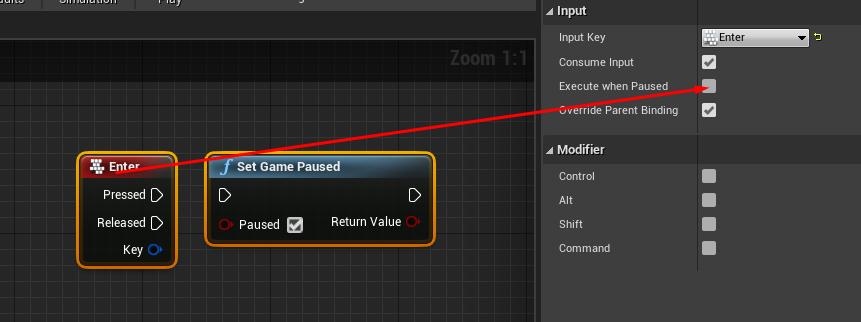
but once again when you want to use character inputs you need to keep input mode as game and ui, setting to only ui will disable all your inputs. you could add them to the widget too but it feels like unnecessary workaround
plush yew
aren't the 3 arrows and the pivot the same thing as the x y z valiues @ '' location '' under the '' transform '' ?
restive eagle
no, location and pivot is not the same
plush yew
i can't find the pivot of the landscape
restive eagle
im not a 3d modeler but to pit it simply its the 0.0.0 coordinates where the mesh is placed
landscape might not have a pivot, let me check
plush yew
i think it might have something to do with the fact that i have a land opened
it makes me kind of not have a mouse
 plush yew
nice, you found it
plush yew
maybe i don't see it because its within the player start
restive eagle
alt+middle mouse
and drag the arrow
just click on landscape anywhere and where the arrows appear thats the pivot
if you only need to change the pivot once in a placed level then you might get away with alt+middle mouse button
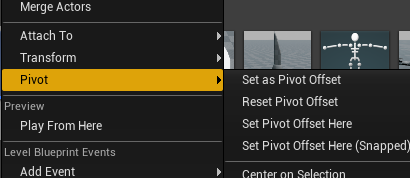
and then one of these options, forgot which one
probably the first one
restive eagle
press g
plush yew
okey g did something
restive eagle
and read what i wrote above
plush yew
i can see the pivot at the bottom left corner when i press g it doggles it on or off
restive eagle
it just hides all the things that wont be seen in game
plush yew
okey so.... you wrote '' no, location and pivot is not the same '' and '' im not a 3d modeler but to put it simply its the 0.0.0 co-ordinates where mesh is placed ''
what is mesh ?
and
how come location and pivot are not the same ?
restive eagle
oh wait but changing the pivot for landscape doesnt do much
just tested that, it always puts at the same corner
but if you imported your own landscape it should work, but i doubt you want to do this
plush yew
Hi all. Have a huge problem with actors and dictionaries. I have "Weapon" actors based on a base class. I want to keep the Weapon actor contained, so within the class i have both the model and variables such as ammo counts. This means I'm creating a dictionary of weapon actors and when I switch weapons, I pick out a new weapon from the dictionary and add it to my character. But the weapon I pick out doesn't have any proper root component or model. What am I missing?
restive eagle
pivot point is the center point of an object, it has nothing to do with location in game
plush yew
when i tryed to make landscape first day then it was at the center but now its at the corner i wanna learn how to put it into the center
ooog
oooh
restive eagle
or the origin point
plush yew
is this like nanite?
so i was sentering the landscape to itself not to the center point of the empty void
I guess my question is - can you have an actor that is stored in a variable but not yet spawned in the world?
is there no center point of the empty void ?
plush yew
okey
restive eagle
@plush yew you want to store classes
and spawn an actor from class
when switching weapons
plush yew
but i want to store variables in the class before that
so i guess for a "Weapon" actor, I'd need to store ammo of that weapon outside of the actual actor class
if I didn't want it in the world at that moment
hhahahahaha
plush yew
because "Weapon" is an actor.
restive eagle
yes, actors can store info
plush yew
let's say player has 5 weapons - I only have one weapon "actor" in the world at a time
how do i make the land's center point go to the center point of the void ?
the other 4 are referenced in the dictionary only
when i weapon switch, i get the next weapon actor, and attach that root component to my character
but root component is null when i do this
restive eagle
you could spawn all 5 weapons and each of them would store the info
just hide all 4 when not needed
restive eagle
i remember using object blueprint to store some stuff
but it was tied to the inventory
usually if i have 3 weapons, i would spawn 3 actors and attach to appropriate sockets. sure instead of that you could just attach a simple mesh but you wont win much by doing that
restive eagle
np, but to be clear you would need to have a 4th variable, lets call it "current weapon"
plush yew
dictionary has a key, i hold the current key
restive eagle
so every time you switch weapons you would pass your spawned actor ref to the current weapon
plush yew
and just isvisible false, isvisible true (and later handle animations)
restive eagle
if you are doing a multiplayer i could recommend one youtuber who has pretty neat systems
plush yew
please do
plush yew
yep, thanks!
 inner belfry
plush yew
inner belfry
plush yew
how do i make the land's center point go to the center point of the void ?
inner belfry
Been having this problem, can anyone help?
restive eagle
@plush yew make your own ladnscape in 3d modelling software and import it
not sure you can with a simple landscape, try googling
plush yew
where is the 3d modelling ?
wait you mean like make landscape in another program not in UN 4 ?
restive eagle
yup, then you will have your own point of origin
restive eagle
you an set the location of landscape to match the voids center
well gj then, i couldnt find anything on the net 😄
plush yew
i got the landscape center point to spawn where the center point of the empty void is
idk how i fixed it i literally deleted everything and did the exact same thing as before
but this time the 0.0.0 cube spawned in the center so the landscape is in the right place
i made the cube bigger so its easy to see
restive eagle
yeah just noticed the same, for me it was near 0.0.0
i had to drag it a bit when landscape was still a grid
oh but if you click on landscape it wont be 0.0.0
plush yew
oh
restive eagle
thats what i was trying to say before that its possible to align
for me i had to set x/y to -3000
depends on the size probably
plush yew
i tryed different zizes none were 0.0.0
hey
hey, why do's it say in red '' lighting needs to be rebuilt (64 unbuilt objects) '' ?
grim ore
because you are using static lighting and have not built your lighting
plush yew
what do you mean by '' have not built your lighting '' ?
plush yew
oh, where's the build button ?
restive eagle
pro tip: dont use lights then wont need to rebuild
but if you are constantly adding stuff you can click on directional light and set it to movable
or if you dont care about any of these messages (including print string), simply type disableallscreenmessages into your console, but keep in mind that it will only hide the message
dense gate
The new free assets are out, just an FYI for anyone waiting
No blog post yet, but you can grab off the marketplace right now
 thanks
grim ore
thanks
grim ore
unless its part of landmass, there is no water plugin
 gilded lichen
Hello, I'm making a tower defence system for uni, but I'm stuck for an idea on how to make the building system when it comes to the player placing a structure for it to then follow the cursor and turn green or red if you can or cant place the object.
I dont really want to use event tick but thats the only thought I've got at the min
 pliant owl
Im in a bit of a pinch on a project with a very close due date and need help with textures. what channel should i post details in?
 dim merlin
hi, anyone uses CC3 (realussion) ?
grim ore
@gilded lichen theres not much wrong with doing that, on tick you move the "ghost" structure to your cursor location in the world and you can use trace or collision objects to determine if its in a good place to place or not
or you trace out from the cursor each frame and find the closest "grid" point and then move the item if needed to the "grid" spot if needed
gilded lichen
ok, thank you
 oak stream
does ue4 back up project files?
open wadi
Never mind, looks like it's "make timespan"
grim ore
you can also probably just set the variable with no input and it should set it to defaults
you could also technically, since its a struct, just split the input on the Set node for your timespan variable without using a make
 whole quarry
@oak stream yes it does, somewhere in the projects folder
grim ore
the project does not get backed up, assets might get auto saves
oak stream
ok
grim ore
if the project folder is gone, refer to your source control
 terse shell
Does anyone know how Epic implemented their online code documentation and actual code documentation? They are the same, so does a job scan the source code and report metadata to insert into the webpage, or the other way around; scan the documentation and insert/update/delete comments in the code?
grim ore
it scans the source code and uses the comments to make the API docs. the other docs are all hand made
terse shell
thank you for that info Mr. Wadstein 🙂
BIG SHOUTOUT TO @grim ore , @gleaming narwhal
 jovial atlas
hi guys, i made a blank project to do some grey boxing and now i want to add a third person camera to it. i imported it into the files but im stuck on how to actually make my camera shown in that view when i press play, can anyone help?
grim ore
how did you import the files?
jovial atlas
this way then just selected third person camera
grim ore
the third person template? if so you now need to set your default pawn to use that. Or set your default game mode to the third person game mode. both are in project settings -> Maps and Modes
jovial atlas
thanks very much that worked 🙂
 potent bridge
I must ask, how would one add step tolerance to a player? I don't want it to get its torque based movement caught on every little tiny change on elevation.
narrow mauve
First time using runtime virtual texturing for a landscape. I have my rvt volume encompassing the landscape..the landscape is set to sample from it..the material is using the runtime virtual output and sample..but its black
 prisma marlin
does anybody knows why this specific mesh looks way darker than other objects which are opposite side of the direction light ?
 viral fractal
i struggle at understanding the unreal terrain system, is there a way to increase the vertex density, without increasing or decreasing the size of the landscape ?, like use 8xxxX8xxx resolution on a 1000x1000m landscape instead of 1xxxX1xxx
grim ore
@narrow mauve if you figure this out let me know, having the same issue and no one seems to have a good "fix'
 grand walrus
If I add a socket to my skeletal mesh, how can I reference the location of that added socket in BP?
the 2 pics provided are what I am working on and, as of right now, the line trace isn't working
grand walrus
yeah, so it's als v4, i am using the skeletal mesh provided in the system for updating held objects, but essentially it's valid
short answer yes it's in pawn
dense gate
So the Skeletal Mesh is your player character ainit?
How do you access what gun is equipped?
grand walrus
no, in this case the skel mesh is the rifle
that var
skel mesh = held object = rifle
dense gate

And neither of these locations return the correct vector?
Keep in mind socket location returns world location, not relative
grand walrus
they're not returning anything from what i can tell.
to be honest, it may have something to do with my fucked up import transforms and rotations
dense gate
So if you're adding it to your character's position, it'll return wrongly
 dense gate
Dunno why you'd even keep it vertically
grand walrus
hey, leave my spaghetti alone
it helps me visualize
i like keeping references close to the nodes i use them for
sort of like a stack
dense gate
You're subtracting the barrel from the barrel end
I think in this case your bullet would shoot backwards
dense gate
Run a print string with the vectors
dense gate
For math stuff, always have debug
I personally have nodes that print a value the moment it's used
grand walrus
yeah, i've got to get more into a flow with it. in most cases i debug my own code, but when i start following tutorials i ignore debug and just come back and comment over everything so i know what is actually going on
all this spaghooter, at least most of it, is other's work
dense gate
Ah
I've personally reached the point where there's pretty much nothing gameplay related that I haven't made myself
So it's easy for me to debug
But when it's someone else's code, it can become tough
grand walrus
i want to be there, but my head is in ai, not getting proper locomotion and gameplay elements.
i hate to be that guy, but i am totally chill with outsourcing other's work for my benefit
 grand walrus
i could spend a long time getting my own systems that won't be half as decent, or just go ahead and suck it up that als v4
is gud
and work on areas i can do better than the average, or at least bring my own twists
etc
ok, get socket location gets the world transforms
i think the issue is my skel mesh is fudged and i need to reimport / fix bones on it
 dry tapir
could someone help me find a good tutorial for streets/highways that when I make an intersection it uses a specific mesh for it? I am still fairly new to splines and still a bit lost on how to work them
 terse ferry
@regal mulch Pardon for interrupting... The audio plug in you wrote is great... I understand it's editor only... right ? Thanks !
plush yew
hello guys I'm interested in information what I find inside this package for those who have it thanks
Complete 3D Character Design & Animation Bundle
Select
$990.00
$1,472.00
 scenic moon
Is there any way to make collisions more visible while debugging?
like, thicker lines or other colors?
 regal mulch
@terse ferry You mean the one that gives you the frequency bands?
That's long discontinued and others have made copies of it. Pretty sure there is even marketplace stuff available. Not even sure if UE4 doesn't support this by now anyway.
And no, it was made so you can use it in packaged builds.
sterile tulip
what does ,,compiling shaders,, do?
regal mulch
But I loaded the files from the drive. Someone else made an importer that saves the data after importing a file to be reused as an asset.
I wasn't that good in editor extension at that point
plush yew
how do i build lights ?
 patent ibex
https://news.developer.nvidia.com/render-millions-of-direct-lights-in-real-time-with-rtx-direct-illumination-rtxdi/
So, waiting for the new nvidia branch i suppose
plush yew
you mean i dont have good enouch graphix card to not have the red X in the middle light ?
patent ibex
this should help you https://docs.unrealengine.com/en-US/Resources/ContentExamples/Lighting/2_2/index.html
An overview of the Lighting example level, example 2_2: Stationary Light
dense gate
You can't have 4 stationary lights overlapping
That's all
Dunno why you'd need a dir light from everywhere
patent ibex
that's actually 5
sterile tulip
does ,,building lighting,, use CPU or GPU to build it?
hybrid light
@plush yew yeah am using timeline correctly
my fov when sprinting is not smooth and kind of jittering
any chance anyone help me fix it
plush yew
@dense gate lights are pritty
dense gate
Have you tried looking into skylight?
Or at least making the lights dynamic with no shadow casting
plush yew
whats shadow casting ? the skylight diden't work
Overlapping
Stationary Lights are limited to a maximum of 4 being able to overlap at one time. Once you have 5 or more Stationary Lights overlapping, the one with the smallest radius will start casting dynamic shadows, which have a higher performance cost. You will also get warnings when rebuilding your lights. Here you can see 5 Stationary Lights placed close to one another. Notice that the fifth has a red X over it, indicating that it is now casting dynamic shadows.
patent ibex
@sterile tulip cpu currently
gpu is coming in 4.26
plush yew
so the big red X means its the light that has the shadow not that it dosen't work ?
rough knoll
"replication" question, why does this widget show on the other player's screen?
well i know why but i'm not sure how to fix it
it's spawning the widget attacheed to the guns root component whenever they walk in the range
dense gate
If your event is multicast, that's why
rough knoll
but i want it to not show for players out of the range
only players in the range
the range being a sphere collision
 trim silo
If i bought something off marketplace yesterday and today it's half price there isn't any way to get the half back right?
dense gate
When a player enters the sphere, get the controller, cast it to your player controller, then call owning client
plush yew
do's the red X mean that its the lamp that has shadows ? how can a lamp have shadows ?
rough knoll
then call owning client
@dense gate ?
sterile tulip
really? Do you know what compiling shaders does? @patent ibex
 robust prism
Usually when you have point lights, you have the ability to make it stationary, or moveable. I think your lights are moveable (they are able to create dynamic shadows).
dense gate
Instead of multicast, have your event as owning client
patent ibex
@sterile tulip it's.. compiling it so it could be loaded to GPU and used
rough knoll
this?
robust prism
@plush yew Change one of the lights to static.
dense gate
Get Player Controller 0 always returns the local controller, unless it's splitscreen
rough knoll
is there some way i can get the player index of the character that has walked into the range
dense gate
Do you have an event in your player controller that shows that GUI?
rough knoll
no, everything is done in the item blueprint for spawning the widget
plush yew
@robust prism okay but what are light shadows and how can a lamp have a shadow and stuff
dense gate
Make it so you call the event to open the GUI in the player controller
Making it into the item will make it tough to properly connect it
plush yew
is it like if corner light has dynamic shadow then the player or object moveing across it's field of view then the object or players shadow is whats called that corner lights shadow right ?
rough knoll
this function inside of the player controller? this is what creates the widget and spawns it at the gun root
dense gate
I'm trying to think how you've done it and what your idea is
And seeing this widget interaction in a function doesn't help
rough knoll
i only put those nodes in a function to clean things up
dense gate
Yeah, it makes sense, though I'd do it in event, basically the same thing but more convenient
rough knoll
they originally were just in the event graph
and have that event in the player controller?
dense gate
Ye
Basically, those nodes, but in the Player Controller graph
Quick tip: You can have more than 1 graph in a blueprint if you want to make it quicker to access
You can have a graph that has all your UI interactions, a graph that handles your controls, etc
 glossy marten
any ideas for finding people in my area that use unreal?
rough knoll
so i have this
dense gate
Run on owning client
Also, before you try and it doesn't work again
For the OnInteractionRangeEntered, drag out of the Character pin, Get Controller and put that into the cast node
rough knoll
ok, now just nothing's appearing
hybrid light
my fov when sprinting is not smooth and kind of jittering
any chance anyone help me fix it
anyone help
plush yew
is light shadow like if corner light has dynamic shadow then the player or object moveing across it's field of view then the object or players shadow is whats called that corner lights shadow right ?
rough knoll
this cast fails
dense gate
Is your default controller the controller you're trying to cast to
rough knoll
yes
rough knoll
dense gate
Weird as hell
dense gate
And it doesn't show the widget at all anymore?
rough knoll
no nothing shows
most likely because the cast is failing and it can't continue on
i also find the naming odd here
dense gate
You're printing the object name I'd assume
plush yew
the shadow of a light is the shadow of a moving object in the fov of the light right ?
dense gate
Generally each actor spawned gets <class><number> when it's spawned
So first player is Controller, then second player is Controller1
And it keeps on
rough knoll
okay, so what i see is that whatever controller is entering into the range is the controller that's null
if client 1 walks into the range, client 1 prints nothing for the controller and all others do
if client 2 (1) walks into the range, it prints nothing and all others (including client 1) do
dense gate
Ah, I need to see how I worked that out
rough knoll
also, not sure if it matters, but the character pin is a reference to ThirdPersonCharacter blueprint, not Player Character
dense gate
Ah, is this a template you're using?
rough knoll
wdym
dense gate
Is it some marketplace addon or something from the engine
Or you made it all yourself
rough knoll
the interaction widget thing was a tutorial on making widgets appear when you walk into a range and i kinda integrated it into my gun system
i did everything else related to the gun actor myself
dense gate
I'll need to see about that widget interaction thing
Currently I'm at a loss of how that was done
rough knoll
i dmed you
plush yew
the shadow of a light is the shadow of a moving object in the fov of the light right ?
Hello guys
I cant find any trees in Quixel Bridge, is that normal? Where you guys get your trees?
thick herald
Tree nurseries, £0.23 - £4.34 per tree
light thunder
LoadErrors: Failed to load /Game/FactoryDistrict/Materials/RoadLines_mat.RoadLines_mat Referenced by Intersection_2x2_lane
LogLinker: Warning: While loading '../../../../LiveSimMainline/Content/FactoryDistrict/Meshes/Intersection_2x2_lane.uasset' failed to load ``` beyond fixing redirectors in the content browser, what else should I do? There are many messages like that when I load up (and I'm sure it's causing unreal to rebuild 1.5k shaders every time I start the engine) the odd thing is, these assets appear to exist in the content browser, so what am I missing here???????? @grim oreAnyone know why my collision in the cloth simulation is very lack luster the cloth clips through the solid meshes no matter what. I set up the capsules from scratch, i re-imported but no matter what, doesnt work cloth goes through the solid parts, what are things one can do to make the cloth respect the collision capsules in the physics?
the shadow of a light is the shadow of a moving object in the fov of the light right ?
 limber mesa
anyone know how i can remove this gun?
plush yew
marketplace or you do your own in modeling software
@plush yew thanks!
humble yacht
How do i rotate the camera while i am drawing polygon
 drowsy tartan
What would you people recommend for a project to escape "tutorial hell"?
plush yew
I want my muzzle flash emitter to inherit the parent but I also want it to apply a roll in range. Unfortunately while I can get it to parent I can't get it to roll. The Max and Min vectors here seem to apply world rotations, not local rotations.
@drowsy tartan I hate watching tutorials, I'd much rather read a readup but until you're really well-versed with the engine you're gonna be stuck watching tutorials unfortunately. Maybe take a course or something but otherwise you just need to keep practicing til you're fully comfortable.
 lament star
Just took a look at the pull requests on github for the engine and the situation is really underwhelming, there's a big amount of good features and fixes that are skipped/ignored
 night bridge
plush yew
night bridge
plush yew
how do i make animated tenticals ?
 storm terrace
was the option moved so I could split the viewport into 4 different profile angles?
 tired spire
Does blackboard not hold arrays? Do I just hold all available targets in the AI_Char?
 tough panther
is there any chance that someone who has compiled the chaos source version can migrate the project to a project that can be opened by the 4.26 preview version?
tired spire
@storm terrace in the very upper right of that viewport there is a tiny box
tired spire
np
@night bridge
do you have the far left window open to see the file structure?
flat axle
How Do you send blueprint files to someone else?
 spiral belfry
How Do you send blueprint files to someone else?
@flat axle If its not to epic a BP select the whole thing and paste it into a notepad file
flat axle
okay, lets say I know how to convert a Blueprint to a notepad. How would I get it into a project after that
Okay, Did that, how do I not loose variables?
I tried that too, couldnt load up the uasset, (both ends)
Maybe im doing it wrong?
just drag and drop the uasset from the folder right?
 next jetty
Check the engine versions maybe?
flat axle
im trying to send the file to a different person
ill check the engine version tho, good idea
next jetty
Or, if you right click on the asset, then view dependencies, what appears there?
Like, if you're using a struct you made, you'll need to send that too
flat axle
so I should migrate the asset to a folder, then send the folder?
next jetty
Yeah migrating will get all the dependencies for you, good idea
flat axle
Thanks very much everyone
plush yew
someone know why this plats get 2d some times?
it depends the angle that I look to it, it becomes 2D
=/
Better examples:
Is it easy to fix?
good morning all
any idea why all my thumbnails have a default camera position and view, but one doesn't? each model is at origin
 surreal laurel
I want to make an animated post process material for water drops falling on the camera when it's raining. It looks like my options are using a flipbook node, or importing a video and creating a media player texture output. Is one better than the other in my use case? What's the difference, and which would get better performance?
 cold vortex
Guys, if I abruptly turn off my PC (or even crash) while Unreal Engine is still compiling shaders
can that, like, corrupt my project or mess anything up?
 frosty plover
i have no idea
grim ore
it could, it would just be temporary more than likely, and it would probably recover when you restarted the project
humble yacht
How do i get all the StaticMeshActors that are overlapping a StaticMeshActor
 torpid notch
So I am very confused. I am learning UE4, and I have created a Capsule that is my player, cameras, etc. I have a model that I want to use as my player "skin", and that model is a static mesh. When I load into the game, my static mesh does not collide with anything. However I have collision setup on the editor of the static mesh, and I set the Collision Presets to Blockall. I've looked on google and I can't seem to find an exact solution? Maybe I don't know where to look exactly, but was wondering if someone could help me?
grim ore
usually the root is the primary collider so that could be your issue
it also depends on how you are checking collision or moving the item
torpid notch
So to confirm. CapsuleComponent is the root correct?
grim ore
correct, and as that is a character the way it handles movement and such is different than a normal actor. And yes the primary capsule is the main way to collide when using a character
torpid notch
Hmmm. How would one get around all this? Is there not a way to make the player_skin a collidable object?
grim ore
it depends on what you are trying to use that player skin mesh for, if colliding when moving then no
torpid notch
I just want it as the player's model/skin. It's larger than the Capsule itself, so that is why it makes it an issue.
I want it to collide when moving into another object, whether it be a box, or other object, etc.
grim ore
yep then your going to have to scale it down then scale up the character to fit your needs
otherwise look into using a pawn instead and not a character and making your own movement code
plush yew
how do i make animated tenticals ?
grim ore
you create them in your DCC program like blender and animate them, probably a simple bone structure is fine
plush yew
i can't animate tenticals in unreal engine i have to import an animated tenticle from another program other then unreal engine ?
@grim ore
grim ore
you can animate them yes if you have them already in the engine, are they skeletal meshes or static meshes
 long thicket
Can someone help, i cant seem to export a sequence without the exposure being lower than what is in the viewport
plush yew
idk if i shold make skeletal or static mesh , i figured i make a geometry cone and then animate it @grim ore
i think mesh means that i import something to UN4
plush yew
help, error: no importance volume found and the scene is so large that the automatically synthesized volume will not yield good results.
Please add a tightly bounding lightmass importance volume to optimize your scene's quality and lighting build times.
and can't i make animated tenticals by making a cone geometry and animateing it ?
humble yacht
How to get all overlapping static objects
open wadi
Is there a "close source" equivalent to "open source" for a video file? I'm attempting to use a video as a background where I load it on-construct for a widget, then on button click, another video overlay plays to show the background transition, then it unloads the parent widget and loads a new one with a different background, and it's exhibiting all sorts of odd behavior - periodically not working on the second widget loaded, the screen going black for a second on widget transition, etc.
There's my code for playing the video background on widget load, and then when a single button a transition video is played, then the second widget is loaded with the different video background playing.
 worthy fox
Does UE4.26p2 have the new water system or is it still postponed?
 storm venture
hey so why does the auto exposure setting keep changing between "Min/Max Brightness" to "Min/Max EVO" or whatever the other setting is called? i thought it was engine versions but i just made a new project on 4.25 and it's back to "brightness".
terse ferry
And no, it was made so you can use it in packaged builds.
@regal mulch Really ? I've seen a lot of UE forum discussion that it doesn't get packaged...
@regal mulch talking about that... On second thought I think it belongs to Epic 🤔
humble yacht
How to fix No owning connection for actor
open wadi
Does remove from viewport totally unload a widget or leave it memory-resident and just remove it from the viewport?
storm venture
@open wadi if you've stored it in a variable, it will live, but if you never stored it, its killed
open wadi
Thank you @storm venture
 kind fable
hmmm high chances but just like @grim ore said it will be temporary .
open wadi
Is it possible to stop a video? There's play, rewind, open source, etc, but I don't see a simple "stop" option for a media player.
 brittle gulch
Hi guys, I have a BSP that I've placed on the floor. As the pivot point is in the middle of the BSP, the Z location of the object is something else than 0 (2000 in my case).
Now, I modified the pivot point and placed it at the bottom of the BSP. I used the function "Set as pivot offset" to save the pivot location.
However, the Z location of my object is still 2000, it's not 0. Why is that, and how can it be fixed?
Also, when I convert the BSP to a static mesh, the pivot returns at the center
 dapper kestrel
Hi guys, I am using Unreal 4.25.3 and suddenly my lighting wont build even after I have restarted. I haven't found any solution on the internet yet and thought I would ask here for help, thank you in advance.
 bleak hound
can anyone help me with creating non repetitive texture plz?
can someone help me how to make non-repetitive texture from megascans bridge to ue4?
 gusty trout
what laptop can run unreal engine
covert hedge
any. will it rrun without lagging is a whole topic tho
 undone escarp
Hello, have anyone tried working with Virtual textures in Unreal for multi UDIM workflow?
Coz for me its importing the UDIMs flipped in V direction.
Any fix that you are aware of?
Where as it is supposed to import the textures in this order
plush yew
after checking out and compiling the source, the project folder is more than 90GB. is there a way to make it smaller? Because i only have 90GB free
eg could i checkout the git folder to an external drive and tell the make files to install unreal engine to C:?
plush yew
thanks, i try that
 thick knoll
any reason why my sphere reflection would be black?
Got lightmass, dir light, atmosphere & skylight :/
I am using the 'sky atmosphere' method instead of sky BP -- if that makes any difference
im an idiot, fixed. Skylight was set to moveable instead of static/stationary so it was being ignored by the cubemaps (tutorial for the new sky told me to do it! xD)
 silk sundial
Question : If you intend to make a larger map / terrain / building would you create it in UE or use an external program like Blender?
 barren cargo
I have a small question, for a school project we're working on an RTS-like game, and I was wondering if it's recommended to work with 1:1 scale objects, or miniature? Since you're watching topdown scales might get pretty large, requiring things like pushing render distances
 fervent sigil
how can I scale a landscape after it's created?
dim merlin
select it in world outliner and scale it
dim merlin
did u disabled the landscape tool?
fervent sigil
what? how can one even disable a tool?
I am using world composition though, if it matters
dim merlin
hhm, okay so i think that matters
fervent sigil
:\ how can I scale the landscape in world composition then? the UI only allows you to move it from what I know
 supple totem
I think if you have landscape tool open you can set scale
 buoyant tide
Does anyone have a good tutorial for mobile touch where I want the player movement in the left joystick but looking around using screen touch where tapping in screen shoot fire
 lucid grove
hey, i didnt notice where i changed something and landscape now change its forms when moving closer
grand walrus
can anyone help with my lighting? there is currently no lighting in this scene at all, yet everything looks like it's being rendered unlit.
i have found a way to make everything dark, using my postprocess settings to set auto-exposure to manual, but when i do that i can't find any ways to bring any light in

my ppv settings
nvm i think i fixed it, i just wasn't adjusting my manual exposures correctly
 waxen shoal
Heya people, I have a question about vertex colors and vertex painting. It seems like vertex colors for all channels are 100% filled in by default on a mesh, so to get any result you have to erase instead. And removing vertex colors instead resets every channel to be filled in again. Seems backwards, am I missing something?
It appears that when I import a mesh from Maya that has no vertex colors (using replace or ignore in the vertex color import options) UE will instead fill the mesh with color
 glad ferry
Anyone around that can give me a hand with making this not happen?
I've tried everything I can think of.
silk sundial
Do you mean the hard line?
I've seen people obscure the hard line with other decals like particle emitters. Basically hide it, not fix it.
 rocky radish
can anyone help with my lighting? there is currently no lighting in this scene at all, yet everything looks like it's being rendered unlit.
i have found a way to make everything dark, using my postprocess settings to set auto-exposure to manual, but when i do that i can't find any ways to bring any light in
@grand walrus when you create an empty scene and put no lights in it, it will automatically make everything unlit. this issue is fixed when you put a light on your scene
 grand walrus
yeah, except that is not the issue
it has lights in it
it did, then i took them out
it was doing the same thing with a dir light
if i turn my shader off and set time of day to night, pitch black; if i turn my shader on, everything gets this weird unlit look
so, it's definitely my shader, just not sure what setting it would be.
lucid grove
How is it called when texture have some sort of bumps in it?
Like its flat, but looks like it has bumbps and curves in it
I have seen material for landscape that make it look more natural
and material itself on preview looked not like ordinary sphere, but like sphere with bumps on it
Im trying to understand this technique but dont know how to google it
light thunder
@lucid grove Those are usually called "normal maps" add that to your google search, I think they were called bump maps by the industry like 10 years ago
 half drum
Yo does this mean I can have UE4 as a library in any app/program on Linux/Android.
i.e. like you can embed Google Maps
https://youtu.be/CGRmH_sFg7s?t=98

Human-machine interfaces (HMI) are one of the next great frontiers for the automotive industry. At Epic Games, we’re committed to developing functionality that will empower HMI UI designers to create highly-engaging 2D/3D infotainment experiences. General Motors’ recently anno...
plush yew
help, error: no importance volume found and the scene is so large that the automatically synthesized volume will not yield good results.
Please add a tightly bounding lightmass importance volume to optimize your scene's quality and lighting build times.
and can't i make animated tenticals by making a cone geometry and animateing it ?
@plush yew no i have not tryed that, what's a lightmass importance volume ?
oh so the light wants to go forward forever but the cube is like na fam, u done u far enufffff
splended, imma go try to do the thing
glad ferry
@silk sundial Yes, the hard line but the line moves with the camera if I am at a low angle.
plush yew
@plush yew okay so the actor when i make it its a ball not a cube and i cant make it big or small
and how do i make skeletal mesh to make tentical ?
why wold i use another program and not do modeling and rigging in unreal engine ?
how do i make the actor cube i need to fix that error ?
@plush yew
okey
and how do i make the actor cube ?
@plush yew
basic - empty actor ?
basic - cube ?
because cube dosen't say it's an actor
okey
so i make that basic - cube
why do's the altitude of the cube have to be 5000 if the cube is only 100 tall ?
glad ferry
Anyone know why I lost my ability to edit splines on this procedural water?
In edit mode, I can see the splines, but the second I select the mesh, the spline vanishes.
 silk sleet
 drifting geode
hello! i am exporting FBX files from houdini and I would want to assign already existing materials in UE. seems to only work when the fbx get imported into the same folder of the material. is there a way to keep materials separated?
 vague scaffold
Is there a way to map the vault cache to the base content? I would like to pull from what I have downloaded, but I might not need the entire content folder copied into my project.
lament star
Where can i pull a random number from that's somehow linked to the a unique player in the current level? Should I use player state?
plush yew
@lament star U want a number linked to a unique player in a level but u want it to be random at the sametime?
How are they linked if it's random if I may ask
Anyone know how to get difference in time between 2 dates?
lament star
@lament star U want a number linked to a unique player in a level but u want it to be random at the sametime?
@plush yew nvm I figured it out
 marble sparrow
Hello somebody just showed me this channel and I've book marked it
 faint current
Hey guys, I've been following a tutorial and I'm stuck. I checked 5 times if I got everything right up to this point and it seems I have .
In the tutorial he seems to have a "Anime Montage" already set up and just asks that we make our own by right clicking and "Create Montage" on one of the animations
Easy enough but the problem is the AnimNotify!

This video is intended for those who are brand new to Unreal Engine 4 and want to jump into the engine and start creating a game. In this case, you'll learn how to make a top down shooter in about 2 hours. The goal with this video is for you to get comfortable with the engine ...
You can see (timestamped) he has that yellow bar to time when the attack will have collision
But when I create a "Anim Montage" while following the video, I don't have this yellow bar so I can't proceed in the video
This is mine and I'm sure I did everything correct so does anybody no how I add this in very simple terms since I am new?
restive eagle
Notifies are a system for setting up and receiving events in Animation Sequences to perform external actions.
the editor changed a bit in recent updates but you should be able to figure it out
there are examples inside documentation
faint current
I seen a comment mentioning that you can right click on "Notify" then "Add Notify..."
but when I right click on it (like in the guide) nothing pops up
restive eagle
thats how it was atleast in previous versions, havent played much with the new editor layout. maybe they moved some of the options elsewhere
plush yew
hey @restive eagle
faint current
Adding a Notify can be done by right-clicking on a Notify Track at the point in the animation you want the Notify to occur, and then choosing the type of Notify to add.
My problem is I don't seem to have a Notify track at all I think
dull lake
Why is this crashing UE4. I am trying to have 20 of the actor Rock spawn and get destroyed every 5 seconds. The untitled array is just a string with 20 blank parts.
dull lake
Why is this crashing UE4. I am trying to have 20 of the actor Rock spawn and get destroyed every 5 seconds. The untitled array is just a string with 20 blank parts.
@dull lake it works fine if I remove the for loop with the string array
dull lake
i thinnk i figured it out
 atomic viper
hello
I am having problems with my unreal engine, i cant even load it up because of the constant error crash
dull lake
i lied im still crashing ue4
atomic viper
marble sparrow
you are destroying every five seconds?? don't you think thats going to cause a memory leak?
are you causing an infinate loop or using the tick?
restive eagle
you will have to start debugging in order to figure whos causing that, first you can try disconnecting spawn event
and see if it still crashes or not
@dull lake
grim ore
@atomic viper run a repair on the engine and see if it helps
atomic viper
how can I do that?
grim ore
on the launcher, click the drop down next to the version
atomic viper
like the desktop launcher?
grim ore
yes
atomic viper
ohhhh i think I figured it out
PreviewShadowsIndicatorMaterialName
is gone
how do I bring that back? or how can I uninstall to re-install
atomic viper
how? I dont see those given options
 void kraken
Is the water plugin not available in 4.26 Preview?
grim ore
what deos your launcher look like, its in the drop down next to the engine version
plush yew
hey @gilded eagle
atomic viper
I dont see that
grim ore
atomic viper
oh, unreal engine wont even open all the way to that screen
grim ore
thats the launcher screen, so you have no engine installed?
atomic viper
ohhhh, I was on the screen
my bad
i kept looking on the desktop app, not the actual launcher
plush yew
why is 100 tall cube paralel to floor at 5000 altitude ?
if im 2 meeters tall im ganna be hovering over the land if im at 3000 altitude
 woven zealot
Has anybody used the new hair/fur/feather features in 4.26 preview 2?
I'm especially interested in the hair card generation feature that they mentioned in the preview summary
 quaint saddle
Hello all, this is my first post here. I have my Unreal Engines loaded on to a high Speed nvme drive, however I keep my project files on a Sata SSD. Will it make sense to transfer the current project I am working to the nvme, and will there be any perceptible performance difference? The read/write benchmark performance difference is attached in the pic. The rest of my hardware is pretty modest (R5 2600, 16Gb, 1050ti) so any performance increase will be welcome.
grim ore
@quaint saddle in the end it wont be huge difference, most read/writes are on save. the 1gb+ nvme stuff is mainly for transfers and lots of random access stuff like compiling the engine.
 spark turret
So, I'm working on a server build to store, but not necessarily host a game, just to crate al lthe files while in production and maybe later upgrade it to a networked server for testing. Anyone know the avg space requirements for a basic, not over modeled or over-actored environment with a couple maps, for a bot test in deathmatch style gameplay? I have a spare 1TB drive, but also have an isolated 6TB quickdrive meant for server operation. I do plan on some back end security between my storage and hosting servers in the long run, but Just don't know if I should waste the 6TB on a login storage server for base game files.
spark turret
Try 100.1 and see if that does anything different
I had some issues with even numbers when trying to get a tree to act right, it freaked out and turned sideways, but if I changes the size a tad it snapped into place
Oh nevermind, I see lmao, not the same issue, I read that wrong
 orchid shell
@spark turret You really should consider defining your own model for that. You shouldn't need to map or store anything other than what's mechanically relevant.
Might be just positions and orientation of non-static objects along with some AI state data. Or you could be trying to capture physics values, which could be worse.
I'm maybe off though. I'm understanding it though as you are wanting to "store, but not necessarily host, a game", which sounds like storing state of active games?
Or are you talking about some sort of host deployment server?
worthy fox
Moral question: if I buy something from the Marketplace that isn’t animated - can I send it to someone who can animate it for me; therefore literally giving the asset pack away to someone who hasn’t bought it..?
spark turret
Definitely a host for the game files, but not for udp network play, just want to build the game in one location as I'm sure the team I work with will probably not be in the same country or state, much less room as the server lol.
 lucid jetty
heya folks
"What are the spec requirements you would recommend for this engine. I have a 1050 ti with a core i5 6600k"
A friend is asking about Unreal Engine.
grim ore
recommend for doing whaat?
lucid jetty
Well doing simple 2D games.
grim ore
playing them or making them?
grim ore
those specs should be fine
lucid jetty
barely I suppose
plush yew
definitely fine, that's almost the exact same as what I use atm
grim ore
better than barely, barely is a 5th gen i3 with integrated gpu
grim ore
I have a 4770 (non k) with a 750ti I use at work and it works
plush yew
damn 750ti is pushing it ahah
woven zealot
@plush yew have you tried using any other versions? I would start by figuring out what engine version introduced the issues and then you can look to see how networking changed in that version
grim ore
nah the 750/1050ti cards are really good for no psu plug
woven zealot
I don't know how you guys use old 4 core CPUs for unreal, do you just wait literally hours for shaders to compile?
I'm using a 16 core and I want to upgrade because I still feel I'm waiting too much
plush yew
I mean I usually don't have that many shaders waiting to compline most of the time
compile*
@woven zealot I tried but there were different issues with all of them... I could get 4.25 to compile so I went with it...
woven zealot
I guess if you are doing mostly gameplay programming it would be OK
woven zealot
When I'm doing environments or testing assets I have to wait on shader compilation all the time
lucid jetty
or raytracing
plush yew
but yeah if I have like 2k shaders tryna compile I'll definitely throw a YouTube video on
woven zealot
ok yeah, what do you do if there are 10k shaders to compile?
or you have to build static lighting on a large open world?
plush yew
go to sleep ahaha
grim ore
yep its all about being reasonable. we dont try and do open world mmorpg's with the smaller machines 😉
lucid jetty
\o/
grim ore
i do smaller learning stuff on the slower machines, sequencer umg or other systems and the hard core work is on the pro machine
woven zealot
@plush yew you can't even get 4.20 to work?
woven zealot
I got a amd 16 core for like 600 bucks
totally worth it
I had a core i5 b4 it was night and day
grim ore
yep the 3950x is a beastie
plush yew
yeah I'm planning a big upgrade soon, grab the new 3000 series GPUs and a nice amd
grim ore
ah yeah the TR's are nice, a bit slower but still good for raw horsepower
woven zealot
yeah
@plush yew if you were using 4.19 you should be able to get 4.20 or 4.21 to run your game with almost no changes
see if the problem exists there, you just need to narrow it down so that you know what introduced the problem
plush yew
I will try that, thanks
grim ore
when you test it using the dedicated server in editor in .25 does it also have high latency?
 left elk
Multi-user editing. Anyone else ever have trouble seeing their fellow users when just using the Viewport (Non-VR) mode?
 spare kernel
anyone know what would cause screen tearing on some machines in packaged?
 inner spruce
Looking for an unreal programmer to add onto a grant proposal for Robot Prayers. If interested and for more details ....get in touch with me either here or my email- audri@audri.com
narrow mauve
Would it be more performant to have 400 tiles at 505x505 or 100 tiles at 1017x1017 for a 10x10km map
 empty dawn
I have a Actor that contains a few mesh is there a way I can turn off one of the meshs in the scene to see the others?
lethal bison
How can i decrease this shadow darkness with global light enabled?
@lucid grove
seems like auto exposure is your culprit not shadows exactly otherwise try shadow opacity on the light source
lucid grove
@lucid grove
seems like auto exposure is your culprit not shadows exactly otherwise try shadow opacity on the light source
@lethal bison can find opacity in light source.
 crimson vapor
Even if I put the text General Parameters in lower case it appears in uppercase in the panel. Any ideas on how to have the category in lowercase?
narrow mauve
Whats the difference between the ue4 installer from the publishing license and creators license? are the files actually any different
What about the source from github...
 burnt egret
Hello! I’m a bit new to UE4 and I can’t find any documentation of this specific issue anywhere. I’m hoping someone can help me here! Suddenly saving levels take absolutely forever and it always gets stuck at ProcessingExports. It ends up saving eventually but it’s really slow. Just started happening today. Does anyone know what causes this and how to fix it?
 green coral
Cancel: Stop saving all assets and return to the editor.
Retry: Attempt to save the asset again.
Continue: Skip saving this asset only.``` Any Idea what might be causing that?Damn, cant figure out
evening - part of character is completly black
Complete black at night
Only particles give some light
lucid grove
I will be very happy for any help, this is still the main and only problem that I return to every couple of days.
 zealous estuary
I just had to reinstall UE4 and VS vor the first time in forever.
Now whenever I try to build the game from VS, I get:
UnrealBuildTool : error : Unable to delete D:\UnrealProject\Binaries\Win64\UE4Editor-MyGame-Win64-DebugGame.dll
Does anyone know this problem?
I guess I'm missing some VS settings, but I can't remember which ones ^^
sterile tulip
evening - part of character is completly black
@lucid grove I have the same problem with trees. Dont know how to fix
Trees are black
terse shell
Has anyone else received an email from epicgamesux@epicgames.com about user research?
lucid grove
There must be the way for global lightning
Cause those shadows completely blacked part of the character in opposite of sub direction
sterile tulip
But in my case its only just the trees, other objects work
So maybe its something to do with the mesh settings
lucid grove
I’m so desperate probably gonna post on UE forums ha
sterile tulip
If you find an answer ping me
 tardy oxide
What would be the best channel to ask questions regarding the GameUserSettings class and the proper way to change graphics settings?
autumn grail
How to set the cameraBoom collision with the landscape and other objects plz
lament star
Does anyone know how to print text on the screen for debugging purposes like with the print text function but attached to actors in 3D space instead of the text being in the top left corner?
I saw some people do that and I want to know how, I can provide screenshots if this message isn't clear
tardy oxide
@lament star You probably want to look into adding Text Render Components to your actors.
lament star
@lament star You probably want to look into adding Text Render Components to your actors.
@tardy oxide Unfortunately that's not the case, the text render component is quite different from the print text function which looks like this
tardy oxide
Hmm... that I'm less familiar with. At that point I'd likely make a UMG widget class that follows a specified actor/component on tick, though I can see how that'd be annoying and messy.
lament star
Thank you for the tip, I was hoping this was a native engine feature
plush yew
anyone know how to create something like this for vitals?
tardy oxide
If it is, I'm unaware of it.
lament star
@plush yew reminds me of the stat unigraph command
plush yew
yeah but for in game use like heart beat/BPM
 fierce forge
is there a way to make like a bp library like you can in c++ and python , in c# ?
lament star
is there a way to make like a bp library like you can in c++ and python , in c# ?
@fierce forge pretty sure you can only use C++ or BP
glad ferry
Best way to deal with seeing different bodies of water while in a body water?
lament star
If it is, I'm unaware of it.
@tardy oxide found it!
DrawDebugString
for the life of me I cannot get my character to rotate his gun directly at the target
autumn grail
Please how to set camera collision for it not go through the landscape
plush yew
The orange number is the difference in rotation between the gun and the target, the target is the white diamond. No matter how I adjust the rotation to implement the orange number it doesn't work
 tiny sonnet
is there a way to make the arrows of movement, relative to rotation. My map is tilted 30 degrees so its a pain when i have to move things
long thicket
anyone got an idea why this is happening? It looks normal in viewport but like this in the final render
plush yew
does anyone know why i am getting a still image when im rendering a moving cinematic camera from the sequencer? ;;
long thicket
@plush yew Show your sequencer
open wadi
Is there anyway to set UE4 so that when you hit play (standalone), it auto-saves? Or the project will auto-save on compile?
so I don't have to manually click "save" every time I test the game?
plush yew
ctrl+shift+s is the hotkey, that'll stop you from manually clicking
open wadi
Correct, is there an option that will allow auto-save on compile?