#ue4-general
1 messages · Page 852 of 1
 hard quarry
So basically if you have an actor, which changes its appearance based on some public variables inside the construction script, you can never change it an will stick forever with the default appearance
 autumn grail
how to override input key with the same key with modifier?
 dire sentinel
anyone? :/
 lone ridge
https://www.reddit.com/r/unrealengine/comments/j4pqmu/light_shafts_only_show_when_looking_directly_at/ Basically need some help with this.
reddit
0 votes and 0 comments so far on Reddit
 coarse turtle
So I have a small town. My fps drops by half when I am in the town. I know about drawcalls and SM tris. How could It be optimized?
 long thicket
can somebody help me ?
Yes, I believe there is, but this is probably not the right server to ask about other games' settings/options @fierce forge
hard quarry
@fierce forge Well, I think you mean the culling distance
An overview of how to use the Cull Distance Volume to cull Actors in your Levels as specified distances based on their size.
lone ridge
Please, can anyone help me with my issue?
reddit
0 votes and 0 comments so far on Reddit
hard quarry
@lone ridge Do you have eye adaptation enabled
hard quarry
https://docs.unrealengine.com/en-US/Engine/Rendering/PostProcessEffects/AutomaticExposure/index.html
Automatic adjustment of scene exposure to simulate eye adaptation from changes in brightness
lone ridge
Yes @hard quarry
hard quarry
Can you disable it and look if the problem is still there?
lone ridge
That worked, thanks
Wait, it kinda fixed it? @hard quarry
It makes it visible from more angles but it still disappears
hard quarry
Are you using bloom?
https://docs.unrealengine.com/en-US/Engine/Rendering/PostProcessEffects/Bloom/index.html
Haloing to produce glow effects for bright objects such as lights.

Patreon: https://www.patreon.com/StevesTutorials Quick tutorial going over how to add and control the bloom and lens flare in the scene.
 cedar jetty
So i have a problem with modifying my AI speed
the spiders that are super small go at the speed of light and i dont know why
hard quarry
did you programm it yourself, or is it from the marketplace?
cedar jetty
@hard quarry i programmed it myself i bought the spider assets from the marketplace
hard quarry
did you use the scale property?
cedar jetty
does size effect speed?
hard quarry
can, dependent on the implementation
cedar jetty
ok ill try making the spiders bigger
hard quarry
try using the default scale, and look if it works as expected
does size effect speed?
@cedar jetty
Size itself not, scale does
cedar jetty
hmmm @hard quarry i tried default scale and it still moves pretty fast
hard quarry
but did it change at all?
cedar jetty
not really more or less closer to the same speed
the animations and movement work fine its the speed in general that causes the animation to glitch out since its going so fast
hard quarry
I am not really familiar with animations, but I am sure there are many ppl here who can help you
cedar jetty
its just the speed thats causing it i just need to figure out how to make the speed much slower
 queen wasp
So here's a scenario for thought: I have a static instanced mesh that contains a shoreline, I want a material that has the exact same texturing and material result as the landscape material, so it is rendered seamless in connection with the landscape.
I try exporting all layerinfos from the 8 layers in the landscape, then I copy the landscape material layers, use these imported layerinfos as textures to multiply with, then add together.
I also have added the layerinfo textures together to divide on per pixel (my guess in how weighted blending works) it is not a perfect match, I have to tweak a bit but it is close.. I use worldposition instead of landscape coords for UVs
I have two issues: 1. in streaming the level it differs from in editor, 2. it is not a perfect match without awkward tweaking of contrast/saturation ++
So, how does the actual landscapelayerblend node work internally? Am I missing something obvious?
Wishful thinking: have the landscapelayerblend node available in other materials but with a UV input since landscapecoordinates only works in landscape material.. To be able to extend the landscape with more detailed parts (like a higher res shoreline or mountains) but getting the same hand-painted landscape surface/textures/blending..
 fallen sierra
i have no programs/background programs running but unreal and discord and im using a nvidia 1060..what are the possible reasons im still getting this error????
queen wasp
@fallen sierra I have that same issue from time to time. I found a post on reddit that referred it to being a DirectX12 issue and it said to switch to DirectX11, I am trying this.. Other things I have tried is increasing the harddrive swapfile size in windows and clearing up more space on the C drive. I am just hoping it isn't my project that is getting too big. I have 8GB gfx mem. Sometimes a reboot fixes it too, but you're not alone.
 thorn condor
Hi there, I've created a pawn blueprint for a quadruped character out of PhysicsConstraints + Sphere Colliders and it moves just how i want it, and now the artist has just sent me a 3d model, I want to hide the spheres colliders and bind bones on the model to the spheres so it moves like the prototype, is there a way i can bind bones to physics simulated components?
fallen sierra
@queen wasp how often does UE crash this way for you?
thorn condor
 plush yew
hi guys can i have more explanations if i buy character creator 3, can i create any character? how does it work? Are there other fees ? thank you
queen wasp
@fallen sierra Seems to be periodical, sometimes all the time loading a project, I then clone an older project copy and copy/paste the newest assets into it and it sometimes works, I am not sure what it is but seems buggy.. It happens a lot in one day, but then the problem goes away for a while. I also wondered if I had a faulty harddrive or something, still not sure what it is.
It seems gfx memory gets filled when opening a project for me, it shouldn't load everything in the project at startup. It helps having a small startup map/level f.ex. but I also have had the issue when over time changing materials and compiling shaders again and again for tweaking..
All I know is that the error doesn't necessarily have to do with your amount of video memory, which confuses me more but that is what I read here and there..
 quiet token
i try to make it ship dock and it dont ? please help me to find problemed.
thorn condor
hmm anyone know how to move a skeletal mesh's bone from a blueprint?
 hollow ridge
Did the export size of 4.25 get even bigger? JUST THE ENGINE FILES ARE 120 MB... I started with a blank project about 30 minutes ago and wanted to send it to a friend
or is something wrong with my engine
 barren flume
I'm trying to change the emissive color of an emissive texture in the material with these switch param's but when I turn it on, it makes the entire model that color instead of just the part of that texture
The emissive texture looks like this
and this is what some of the what it looks like normally
 ebon spade
Any idea when 4.26 is releasing?
barren flume
nevermind I fixed it
plush yew
help. How do i make a bullet damage me with a sphere or box collider?
hollow ridge
@plush yew use an on component begin overlap with the collider and cast it to the bullet, then decrement your health
 ornate bobcat
Guys, i have a quick question
what is the difference between maximum quality and scalable 3D/2D ?
hollow ridge
no clue I always just leave my projects on maximum quality
ornate bobcat
I want to make a PS1-like game in UE and i really don't need quality haha
 steel patio
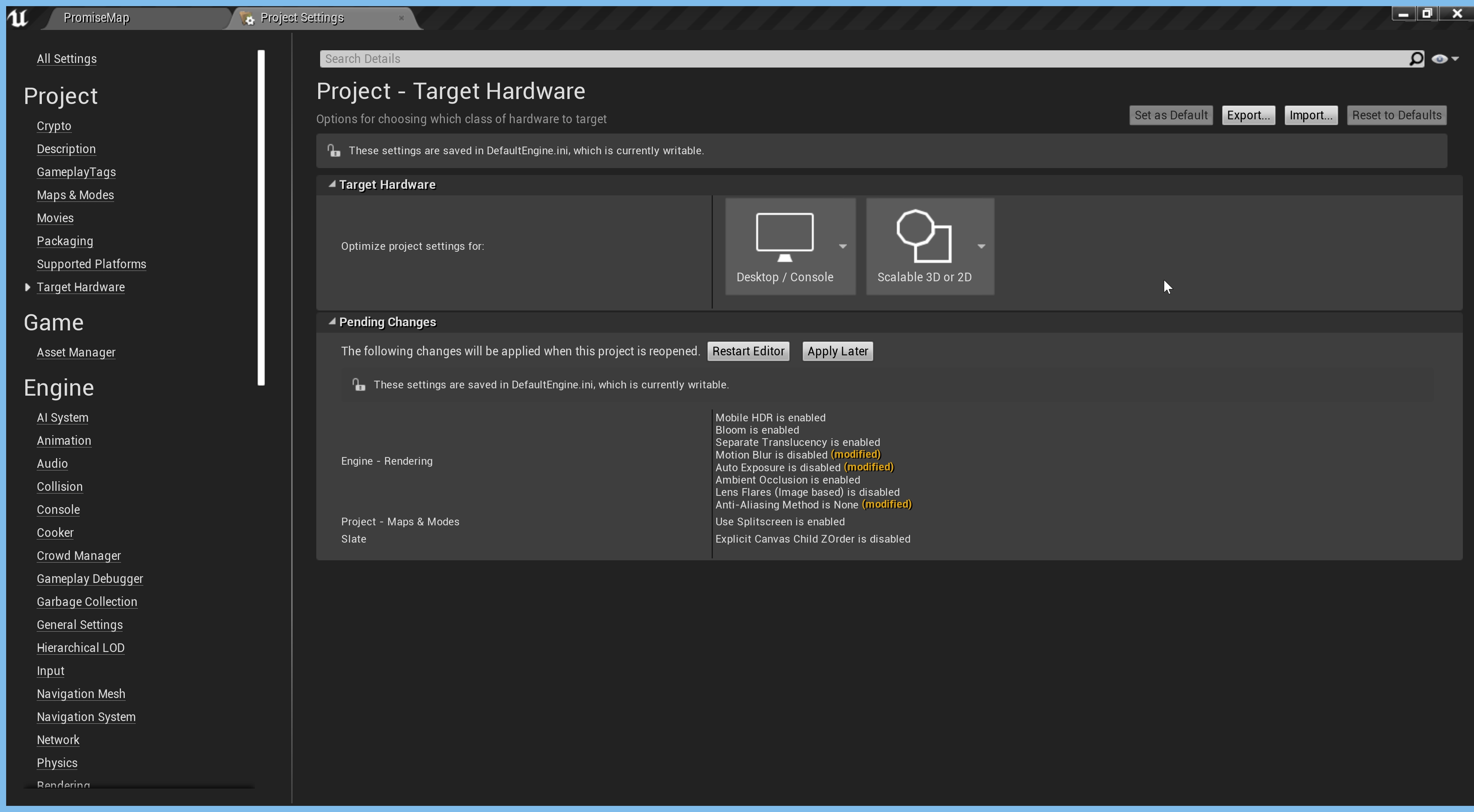 ornate bobcat
^yeah i saw it.
It's a great option actually 😳
 vernal ginkgo
I'm planning to re-use assets for a building I'm working in, I was looking for a way to dynamically erode the assets (rather the materials, erode the static meshes) that are outdoor (at compile time if possible, to avoid extra load at the runtime). I'm unsure what to look for exactly, can someone point me in the right direction?
 open wadi
I have a media player with a progress bar slider. This is the simple"seek" functionality that executes when you drag the slider placed above the seek bar.
Every time I drag the slider, instead of seeking to the new time, it resets the progress bar to zero (the beginning of the video, instead of seeking to the specified location).
This code came from a plugin and should work - what am I missing?
 fading pond
Where should I go to learn online multiplayer for my game? Trying to make a casual party game for steam and cannot find any good tutorials on youtube.
 dawn bloom
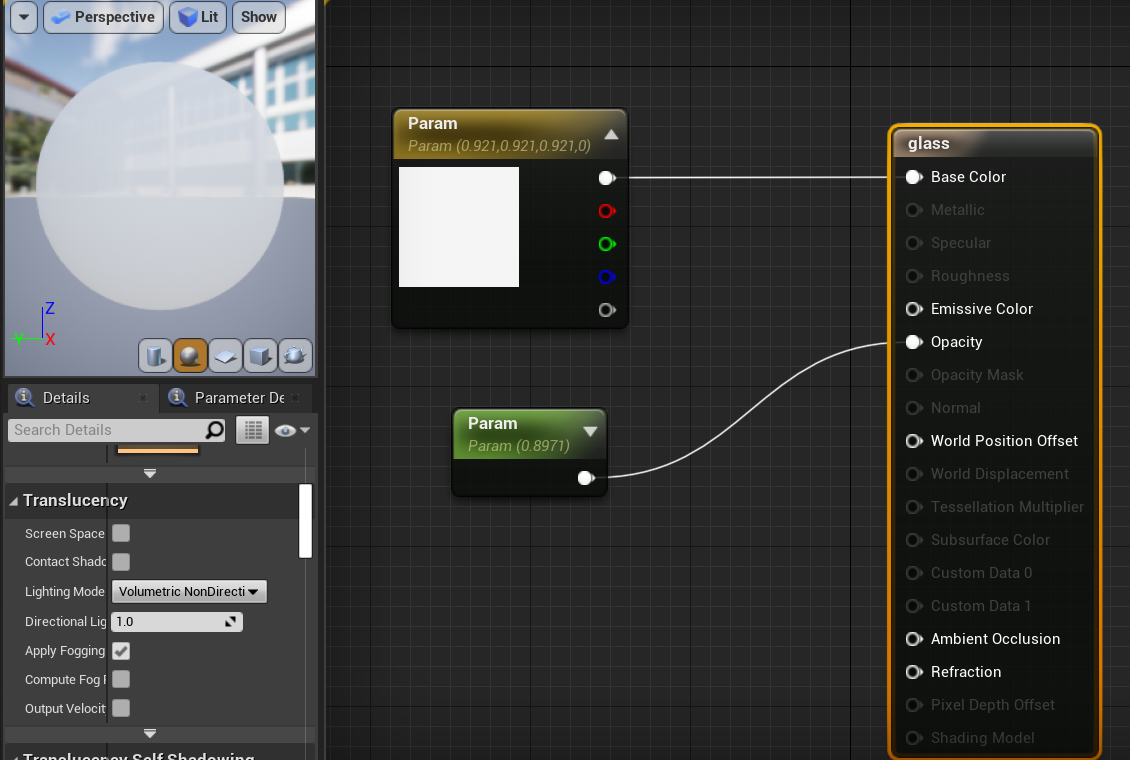
 lusty carbon
Looking for a way to replace all material references of objects
Like replace a certain material that is on multiple objects without doing one by one
how???
 fierce forge
@long thicket I mean a command in ue4 for like the render distance from minecraft
hello , i have a big world in my game and over 100 NPCs, how i can optimize the AI to get more fps ?
 autumn yew
Hey there :}
Hope everyone is doing well!
I am very very new to game design but have some coding background and just installed unreal engine today. Im curious, can I use blueprints and C++ both in one project?
fierce forge
yes @autumn yew
autumn yew
Ah thank you.
lusty carbon
How can I replace a material that is instances on multiple objects??
thorn condor
hmm every time i close a UE4 tab the editor hangs for maybe 30 seconds to 1 minute, any idea what would cause that?
 white heart
Hey has anyone here had any experience with Steam Audio? I am getting an editor crash everytime I try to export my scene
 scenic fox
can anyone help me? i've been waiting an hour and my shading compiling hasn't gone down
anybody please?
anyone?
 rich spoke
ANYONE
rich spoke
...and?
scenic fox
omg do you even know what a wild card is?
the fuck dude
bruh do the cast
and the connect the player character return value to the object
"object" being in the cast
ot it?
got it?
rich spoke
oh you mean this?
scenic fox
YES
rich spoke
ayy lmao
scenic fox
hmmmmmm
 dusky inlet
Just check the class of the output of try get pawn owner or get player character
 fresh yarrow
this doesn't really explain anything though @rich spoke check this https://answers.unrealengine.com/questions/561509/bug-anim-bp-cast-to-player-character-fails-if-anim.html you need apparently put it through a "isValid".
scenic fox
can anybody help me though?
rich spoke
i can't sorry
scenic fox
my shader compiling is always at 6
i need this to work
how can i check if its still compiling
dusky inlet
Check in task manager if a shadercompilerworker is active
dusky inlet
It could be collapsed
dusky inlet
Under ue4editor most likely
scenic fox
umm
dusky inlet
What's your cpu usage? Usually it would demand a lot
fresh yarrow
can you spam even more? @scenic fox look up optimizing packaging and reducing compiling shader time. it might help your build issue too.
rich spoke
Damn... it's not valid? What does it even mean?
fresh yarrow
@scenic fox also maybe you wanna ask in #packaging ? since it is a packaging issue apparently?
dusky inlet
Ikdfa, what's the output of try get pawn owner?
Just use a breakpoint on the is valid check and hover the output pin
fresh yarrow
@rich spoke literally in the comments "The isValid check essentially lets no signal pass unless you have a legitimate Parent Pawn. That stops the AnimBP preview instance from triggering anything."
rich spoke
fresh yarrow
is anim instance null maybe?
rich spoke
Anim instance? Where can I edit it?
It's my first work with animations, sorry if I look dumb.
fresh yarrow
@rich spoke maybe try a different tutorial or go back in the tutorial and see what you did wrong. it won't help you much patching this up somehow and then getting stuck a bit later because you didn't understood what you did
dusky inlet
Then just wait a while if the compiler worker is still doing work
fresh yarrow
understanding proper procedure with casting will help you later on. maybe look up ue4 bp casting tutorials?
rich spoke
My BP_Player has Character parent class. Does it affect somehow?
fresh yarrow
@rich spoke put the "return value" in the print string and see what it writes
scenic fox
yes
rich spoke
You mean this, right?
fresh yarrow
yeah
rich spoke
Nothing
fresh yarrow
in the console
rich spoke
fresh yarrow
but if it is nothing. then it is probably null. it doesn't exist. so you probably never instantiated it.
it is always a nice thing to check if something doesn't cast properly.
like I wrote. start in the tutorial new or find a different one
scenic fox
^
rich spoke
OH BRUH
lemme try it
oh wait how can it cast to the player and then check isvalid
if i can't even cast to player
plush yew
why cant you cast?
rich spoke
i don't know. cast just fails
plush yew
and you are using the get player character node?
fresh yarrow
this is bypassing the casting by just getting the player. you are trying to cast from the anim instance, which probably doesn't exist.
 summer edge
In a top down multiplayer game like Ludo, how can I assign same camera to multiple players? Currently I have added two cameras in my level and have assigned them to Player0 and Player1 but it shows the level from a random location.
plush yew
thats odd
rich spoke
@fresh yarrow @scenic fox @plush yew THANK YOUUUUUU
scenic fox
you are very welcome
plush yew
btw its best to not cast to the player constantly but instead promote the character to a variable like so
scenic fox
Yes in fact that is a good idea just drag out from the As third person character and click promote to variable
fresh yarrow
@summer edge could this doc help? https://docs.unrealengine.com/en-US/Gameplay/HowTo/UsingCameras/SwitchingCameras/index.html
An example of how to setup and trigger the use of multiple fixed camera angles.
fresh yarrow
@summer edge like just searching for "ue4" + your "how can I assign same camera to multiple players" brings up sooo many examples since apparently google understands your question better than me.
summer edge
@fresh yarrow in my case my camera is static and shared. Let me try what you suggested. Thanks.
autumn yew
I'm pretty proficient with c++ but have never made a game. I have an idea for a pretty simple Fps that I want to make but am not sure where to start in general.
I have been looking at some demo projects and various blueprints and assets I could get my hands on and have experience with cad, cinema 4d, blender, Maya and all of the Adobe stuffs for texturing.
Trying to decide if I should buy one of these prebaked 'fps' blueprints in the market place or if I should implement all my own code? Or if I should start with the template and edit / replace as I go.
scenic fox
bruh moment
you know where you should start

If you've ever wanted to create a first person shooter game but weren't sure where to start, this is the tutorial series for you. You'll learn everything you need to create an FPS from scratch using Unreal Engine 4.
You'll learn everything ranging from creating characters to ...
there
best series imo
autumn yew
Awesome! Thank you for this!
scenic fox
you're welcome
just note this is not multiplayer this is like a zombie sort of survival game i think
not entirely sure but i def suggest it
autumn yew
I'm sure I can adapt it to multi-player though no?
vernal ginkgo
I'm planning to re-use assets for a building I'm working in, I was looking for a way to dynamically erode the assets (rather the materials, erode the static meshes) that are outdoor (at compile time if possible, to avoid extra load at the runtime). I'm unsure what to look for exactly, can someone point me in the right direction?
ornate bobcat
Guys.. I'm here for some time but never been active...
if i want help on something what chat can i use?
nvm my problem was that my actor was hidden in game ¬¬
 knotty citrus
hello peoples
 stable ore
A random question, will UE5 have blueprints or something similar?
knotty citrus
i mean if it doesn't have blkueprints i wouldn't even consider it as unreal engine anymore lol
stable ore
Did UE3 have something like Blueprints?
fresh yarrow
@autumn yew if you use a lot of the systems that come with ue4 it isn't a monumental tasks adapting it to multiplayer, though you will need to adjust things. If you looking for mp. tom looman survival game c++(just google him, he has his own blog) has quite a few resources regarding that. that specific project is third person though but all other stuff also applies to fps and he goes over the replication stuff.
plush yew
cam anyone help
stable ore
yes?\
autumn yew
@jukejuke thank you very much!
stable ore
Did the installation finish properly? @plush yew
plush yew
Can CDO costructor errors cause engine and/or game crash?
No inital splash screen thing, or anything on task manager which in cludes a process which shows cpu usage each time at the moment the process is there but no CPU usage being show at all
yeah I have been using it yesterday with VR development and eventhingwas fine
fresh yarrow
@stable ore ue5 probably will have blueprints since a lot of their other systems like shader, niagara and so on also use some kind of blueprint system, they put so much work in it they will probably keep it. ue3 had "kismet" and "unrealscript", they ditched unrealscript and expanded on kismet.
stable ore
like UE4 just stopped working?
fresh yarrow
@plush yew ue4.25 or your project specifically? have you tried a blank project? else maybe try installing the preview 4.26?
plush yew
at the moment it's UE4.25 which refuses to open which then means my projects won't open
fresh yarrow
@plush yew even if you start from the launcher a different project? if you don't have one there should be some free in the marketplace from which you can make a new one. also on that note, I did have issues with oculus and steamvr fudging with my engine.
plush yew
just tried a different project that was using 4.24 and still nothing opens or anything happens
fresh yarrow
best bet, try installing a different engine or reinstalling 4.25 and see if it helps. the engine does love to break.
plush yew
okay I do have my oculus connect up via oculus link beta I'll stop that see if thats causing issues
i'm verify files at the moment just see if somehow some files have gone walkies that shouldn't have
fresh yarrow
@plush yew yeah I had issues with my rift s. there was some kind of error between oculus and steamvr, which probably froze one of the plugins maybe? not sure. I think I even reinstalled steamvr and several repluggings to clear it up
fierce forge
hello , do you think ue5 will have bp node generation like the visual scripting from unity ?
fresh yarrow
@fierce forge I answered that like 10 comments up
stable ore
WTH is this?
https://www.youtube.com/watch?v=FzyxY3QjhHg

FULL VERSION of this VIDEO TUTORIAL you can see at: https://bit.ly/2DXWbJp
This beginner tutorial gives you the ability to learn the fundamentals of the Unreal Engine user interface and its components. After introducing you to the interface and functionality, you will learn i...
plush yew
it's varifying something as it's taking it's time to do it. Also on my oculus it seems it have had issues when going into oculus link as when j just put it on i have just black so theres every chance the oculus link broke which could have messed with UE4 not sure how though that would interfere with the opening of UE$
knotty citrus
Hey guys, I know how to do the basics of creating a server then the other players can search for a server and join it. However, how would you do the design shown in fortnite (or LOL or something similar) where you just have to search for a game to join and not make one yourself (so not give the users the option to create a server)? Is there a asset on marketplace that already does this by any chance?
fresh yarrow
@fierce forge okay sorry then I think I misunderstood you
fierce forge
that mean if there is a new library in c++ it will generate nodes for bp
in the project
unity already have it so i hope ue5 will have it too
fresh yarrow
@fierce forge you can make custom bp nodes? I am unfamiliar with how unity does things, maybe the wrong discord for that either?
fierce forge
no
stable ore
UE4 has blueprints which is probably the best visual scripting solution out there. @fierce forge
fierce forge
i know but you know what i wanna say ?
unity have node generation like for a new library , if i make a library unity will detect it and it will make nodes for it
i hope ue5 will have this too
knotty citrus
hmmmm
fresh yarrow
not really sure how that is different to custom bp nodes though? have you looked up how the process of custom bp nodes looks like?
fierce forge
but the custom bp are made automatically by ue4 ?
fresh yarrow
@knotty citrus you wanna look into matchmaking through steam or epics own service "epic online serivces"
knotty citrus
i was going to use EOS but it's a bit too out of my range, I am hoping to use steam already though
fierce forge
like if there is something in c++ and there is no node in ue4 i can't use it
but in unity it will generate a node , and you will can use it
knotty citrus
so you mean to say, using steam to create the servers and therefore players will only need to join the server (created by steam)
fresh yarrow
@knotty citrus there are several tutorials I think for using the steam matchmaking. I think even some on yt by epic
fresh yarrow
@knotty citrus no, steam or eos will do the matchmaking. if you want to offer servers, and not let players auto create them for themselves by letting one host and others join. you will have to host them
knotty citrus
yes, i (being steam or EOS) would host them
fresh yarrow
probably using stuff like amazon gamelift, azure or even unity is offering such a service. pretty sure every single one of those services will have a tutorial for that.
knotty citrus
still crazy that epic is doing it for free
fresh yarrow
@knotty citrus the matchmaking part. steam matchmaking is also free. you need to pay yourself for a server or several.
except you let players host for themselves
knotty citrus
i was under the impression that that wouuld be free provided by epic
then again, haven't looked to deep into it
 cosmic cove
did someone say free ?
fresh yarrow
@knotty citrus nah, better read up. they have a very clear overview of that
knotty citrus
all i kept hearing was, free free free when they were releasing all that stuff
fresh yarrow
@knotty citrus read the details. server hosting will always cost you something. cloud is where the money is at currently
cosmic cove
create your own server. look up statistics , building on the steam platform is almost a waste of time. unless you created something truly special.
fresh yarrow
for prototyping. you can still use the matchmaking but use it to let players host for themselves. when you got a working product look into expanding it
cosmic cove
your server is free when you create one
knotty citrus
hence why everyone rents a server
but how many servers would i be outputting
one for each game
cosmic cove
these people try following trends or some type of easy way out. The key is your own server. now hosting ? much cheaper when the server is yours
knotty citrus
i was thinking of uploading the game to steam for the exposure adn also having it as a stadnalone that could be downloaded and isntalled on the computer
 lucid jetty
I see no problem on renting a server if you are getting money. I don't think it's an easy way out.
 crystal acorn
your own server isn't a cheap option either though....
crystal acorn
There really isn't a cheap option when it comes to servers, either you pay a big amount up front or you pay a lot over time.
lucid jetty
Also they are not THAT expensive if you are doing a smol business.
Some server providers are charging per connection etc.
cosmic cove
i host my own server for free. so i wouldnt know anything about any of that.
i can only tell you the better way
knotty citrus
following on your last piece of advise @fresh yarrow so you mean make it slient server model and then when it's ready to be released switch it to dedicated server
yea but how much can your server take? @cosmic cove
i'm guessing if you were running games like fortnite or league or warzone or something of the sort, and each game running requires its own server
it would be crazy
cosmic cove
i can push 80+ players. and if and when you need more then that. you pay for hosting. not server and hosting.
fresh yarrow
@knotty citrus depending on what kind of game you make. you need to consider a lot of things regarding replication. but for prototyping and first testing, it should be more than enough if you set it up that you can test it with a few friends or people interested in that. the part if it is hosted by players or dedicated or in the cloud, is solved and won't change your game much anyway. except you run into lags and such.
knotty citrus
yea i get you
the game my team and i are working on is basically kinda like a MOBA or battle royale (not exactly one)
so theres a lot being replicated in that sense
cosmic cove
i encourage you to create a dedicated server. which can be hosted anywhere by anyone.
fierce forge
hello , when will epic give the monthly things ?
knotty citrus
but then the trick would be hooking it up to the game? @cosmic cove
because for e.g. with steam it's simple
no sure my friend @fierce forge
cosmic cove
simple cost money. They use that against game developers.
your dedicated server is free created using ue4 source code
required space 200+ gigs
knotty citrus
i see where you're coming from
ill do some more research into it
thanks guys, i appreciate it @fresh yarrow @cosmic cove
cosmic cove
How to set up and package a dedicated server for your project.
if you need help just holler
knotty citrus
thanks 🙂
plush yew
it seems either verify files or disconnecting oculus from link beta seems to have solved my issue
 gilded dove
@knotty citrus there are several tutorials I think for using the steam matchmaking. I think even some on yt by epic
@fresh yarrow i would use steam matchmaking but gotta pay $100 to get a game on steam smh
 prisma marlin
does anybody know why some of my buildings are black after importing in unreal?
fresh yarrow
@plush yew yeah I think oculus fudges with stuff. The thing is I have the oculus and steamvr plugin on, maybe because both are on they sometimes clash?
knotty citrus
ahhh thanks for the info @gilded dove
i mean... if all goes well, I might probably pay that 100.
prisma marlin
@plush yew might be but why other objects are not black or maybe is it bug? i will apply the textures and bake it and will see whats wrong
gilded dove
Also EOS doesnt give you game servers only math
matchmaking
So essentially you need your own servers and eos only puts the players into ur servers
i think
someone told me that idk if correct tho
plush yew
does someone know how to create a LandscapeCoords Node in python?
@prisma marlin idk, maybe is just light
gilded dove
how do i get good multiplayer in my game? eos includes everything you need for multiplayer right?
plush yew
 long thicket
@fierce forge Ah alright, apologies then. I misunderstood
 vale bone
Had anyone else encountered this issue? it's driving me crazy - https://answers.unrealengine.com/questions/987824/standalone-does-not-shut-down-properly.html
It only happens when i Run as Client; in Offline mode it shuts down fine
maybe the server isn't closing properly?
plush yew
Someone knows how i set e.g. "Mapping Scale" of a LandscapeCoords in a Blueprint via Python?
plush yew
yes
i have many tiles and want to assign a texture to them
everything works so far, except setting the "Mapping Scale"
plush yew
@hard quarry I want to set the mapping scale automatically
I created the landscapeCoords in python like this: landscapeCoords = unreal.MaterialEditingLibrary.create_material_expression(material,
unreal.MaterialExpressionLandscapeLayerCoords,
-584, -200)
but setting landscapeCoords.set_editor_property("Mapping Scale", 2017) does not work
I get Exception: MaterialExpressionLandscapeLayerCoords: Failed to find property 'Mapping Scale' for attribute 'Mapping Scale' on 'MaterialExpressionLandscapeLayerCoords'
 lucid grove
Heya
Anyone had this problem with global lightning?
At some point (early morning) this glitch happens
Rest of the time everything is ok
Day, night, evening
Only some morning sun position i see this
plush yew
Can anyone help with a flipbook issue I am having? the dead animation flipbook I have plays higher than my normal sprite flipbooks.
plush yew
@hard quarry I solved it.. i needed to put mapping_scale. this is not so developer friendly
hard quarry
@plush yew ah ok, well I would not use python for that but Cpp, but it doesnt matter if you already have a working solution
 burnt crescent
Helppppppp
Guys I am trying to make a simple game for Android
But the floor is not visible on m device , it can be seen on unreal but not on android PLZZ help
 frosty lichen
hey there, having troubles with UE not launching and failing to create projects, any specific channel for that?
 covert hedge
@prisma marlin indie harry potter game? 
 civic charm
hi @west oak
 tired lynx
hmm
how do i temporarily hide assets placed by the foliage tool?
am working on a non-realtime scene but having the foliage active tanks my system to the degree that working in the project is harder
 potent bridge
whys the navmesh being weird?
 rotund jacinth
I have a player on a 1060 getting frequent crashing in our game. Unreal 4.25.3 with this error: LowLevelFatalError [File:Unknown] [Line: 198] Unreal Engine is exiting due to D3D device being lost. (Error: 0x887A0006 - 'HUNG') I see variations of this error on google. Suggestions?
 ornate hamlet
I remember seeing a presentation by epic on optimizing the AI in Fortnites Horde mode. I can't find it anymore, anyone remember where to find it?
 rare steppe
i made some basic enemies that walk around and follow the player but how do i make enemies that perform actiones within a range of the player
 marsh swallow
I have been researching and I think i am looking up the wrong terms. lol. I need to have a PP volume on a cave entrace to make it appear dark inside. I already have the post process for the cave itself and it works great but when looking inside its bright.
 light thunder
How do I really analyze input events in unreal? where do I begin - my controller works but not in the game ---I can't step through execution if nothing executes
rare steppe
im ok at making controllers what exactley is wrong
light thunder
Don't say check "VR" because those guys are slow to respond lol
I'm checking to see if my pawn has input, that's the right start right? it's been forever since I"ve messed with input in unreal and I hate the way unreal manages it
 scarlet birch
First make sure you're actually using the pawn and controller you want.
light thunder
done
but I can't see if they have input or not
I thought there was an "has input" function to check that
I was just literally going to tick through it
scarlet birch
Are there input events in both the controller and pawn? It's hard to just guess without more info but input could be consumed elsewhere
light thunder
What happened to "Set Input is Enabled?"
something like that
so, this does exist in the game
these events never fire
scarlet birch
I really haven't messed with VR at all but there are several motion controller inputs. Is the right one tied to the event in the Input setup?
You might try manually adding the actual input events and see if those work
light thunder
yeah those didn't work either
I think it has something to do with regenerating steam vr stuff
Where the heck is this Steam VR input dropdown...ugh
https://issues.unrealengine.com/issue/UE-86396 Motion Controllers fail to track during Launch On
scarlet birch
What UE version are you using?
scarlet birch
Yeah, it was a simple change too.
I'd like to help but I've not worked with VR. My process is usually start with an input viewer and make sure the OS is getting input then check it down the line until I get to the event I'm trying to trigger.
light thunder
WHERE do I find this actual button in the editor???
I really, really hate perforce - i get that certain files shouldn't be added to a depot but if you a new user that is likely to happen...but perforce's refusal to acknowledge oblitarated folders from depots and refusal to allow me to remove folders from workspaces, makes me want to choke something
 raven island
any1 know a good tutorial/series about cars and how to make them work
lucid grove
How can i fix that black shadow with global lightning enabled?
 trim silo
Does anyone have a good link to project upgrade guide? I wanna move 4.22 project to 4.25 version without breaking a lot of stuff
marsh swallow
Here is our Post Process for cave lighting (we are using DFAO, skylight dynamic moveable light, so we have lighting issues in caves), how can that be made to be a gradual transition and how can you turn around and look at the Post process to see it fade light inside
hollow ridge
I need some help I think my package size is way to big
marsh swallow
#packaging might turn up something, but make sure your only cooking your used maps and not everything in project settings
 nimble moat
what happened to the ue4 blackjack template? can i still get it somewhere?
 sacred sun
@raven island these vids show how to do car physics, i don't have any vids saved on animation or coding gear changes https://youtu.be/LG1CtlFRmpU https://youtu.be/ko6lDSSNhV8
raven island
thx ill have a look at those
tired lynx
hmm
would anybody be able to help me out with an issue i'm having with fog cards?
i'm using the fog card blueprint from epic's blueprint demo and i can't work out how to make it pan on the x axis instead of the z axis https://gyazo.com/b1afed058204ac821d2463a3e97ba5b0
 hasty wharf
trying to merge these two Static mesh actors. the clear bag and the money. whats the easiest method to do this for a noob?
i tried merge actors in unreal and it gives me this texture as a result?!
i dont wanta texture i want another SM. thoughts ideas help?!
 slow scarab
Hey guys, does anyone have any idea why my GameMode's default pawn does not spawn? It apparently does not spawn anything other than a CameraActor.

 shell compass
Anyone here working with VR managed to get haptics to work with Oculus Tocuh Controllers?
Neither Play Haptic Effect nor Set Haptics by Value does anything at all for me.
slow scarab
@cosmic cove Dude, if you don't want to help, just leave others be. No need for that, at all.
sacred sun
@slow scarab you could double check that all your bp's are saved/compiled.
slow scarab
Just did that, and everything's saved/compiled
sacred sun
@tired lynx open the fog material and change the speed parameter on the panner.
sacred sun
when your using baked lighting you have to unwrap the uv's of the model in such a way that unreal can make lightmaps for you, or you can make them yourself. looks like some of the normals of your model are inverted as well.
prisma marlin
i did check the normals and they r completely fine
cedar jetty
Having a issue where when i play a certain anim montage that i want it not only disables my input but it does not do the animation and the printstrings do not go off
it gets stuck somewhere and i cant figure out where
i use a diffrent animation however and it works perfectly fine
fresh yarrow
anyone got some recommendations for good open source projects in ue4? mostly to just have references for implementations? besides the one by epic
 vivid stratus
can I enable, in the editor
- camera collision with terrain/object?
- to show the damn x/y/z position of the camera right now? I keep loosing myself due to it

 hollow nacelle
anyone having an issue with quexel bridge? i've never used it before. but and i'm trying to export a surface. however. after installing the plugin to where i have the engine located it produces me an error. saying the following
Plugin 'MegascansPlugin' failed to load because module 'MegaScansPlugin' could not be found. Please ensure the plugin is properly installed, otherwise consider disabling the plugins for this project.
I follows online instructions. the only thing that's possibly different in my setup over these examples given is that i built the engine from source. so is there something extra i'm missing here or what?!?!
cedar jetty
ok so i found my issue its because its not in the animation blueprint
 dim swan
Henlo
Do someone know how to make a stand , from jojo bizarre adventure in unreal engine X) ?
 exotic thicket
Wouldn't that just be an AI character that follows you around?
 exotic thicket
You could call a function on the stand pawn or ai controller to trigger it from a keypress
dim swan
Thanks a lot 
 modest jetty
Hello! Im having an issue with my character not doing damage unless my blueprint window is open.. am i missing something? (to go further into detail, i can click play and run up to enemy and hit him 3 times to do enough damage to kill him, but that only works if i hit play when a character blueprint is open. If i hit play from the level screen with no blueprint open, it does not do damage to the enemy but the enemy will still play the 'hurt' animation. ) please help, im very confused by this one.. here is a video link to my issue to help better explain https://drive.google.com/file/d/1l74APldSS8o6k-9V7mcGkpAdADESFpZ1/view?usp=sharing Thanks!

Google Drive
 midnight bolt
does anyone know how do i export/use double UV layers, one for diffuse material, and the other for normal?
sacred sun
You add a second uv in whatever modeling program and export normally. The only difference in unreal is the texcoord node you have to select it and set it to use uv1 instead of the default uv0.
plush yew
Does anyone here have any experience with drop shadows? I've seen people recommend decals but they have some flaws and I haven't been able to find solutions for them.
sacred sun
That said using a different uv map for normals is kinda odd.
potent bridge
I'm not quite sure what to put in to the Object slot here, I'm trying to get variables from my Actor BP called "Button"
 edgy gulch
HI there
I am new to unreal engine
and I ran into a problem
I change view mode to unlit
and then back to lit
and everything went black
any idea on how to resolve it?
 deep viper
Do you have a light in the current scene?
deep viper
Good point. For the time being I'd recommend dropping a light for now. (I am unsure how a scene is visible without lights in it, not that experienced)
A [directional light] is the least bothersome I'd say. It's just an angle and intensity.
edgy gulch
Thank you so much!@deep viper , it worked.
deep viper
No problem. As long as you keep 1 of those in your level, it should keep the daqrkness away.
edgy gulch
ok
And one more thing, I am working on a laptop with a 1660ti, will there be any performance issues?
deep viper
A GPU (graphics) will bottleneck when you add more and more geometry and materials (just think of these as "surfaces"). It will take a llarge amount of models for you to see any performance drops. I'm using a 1050 Ti and am doing dandy.
edgy gulch
Thank you!
deep viper
I also recommend you "Zip up" your project whenever you add anything that takes you effort to avoid untangling any messes you make (its easy to break functionality when you're new) [File->Package Project ->Zip up File]. They are basically "save points" for development.
potent bridge
I'll ask one more time just in case its buried in the chat by now.
https://media.discordapp.net/attachments/225448446956404738/762445576784314378/unknown.png
What should I be putting in the object slot?

And the Button blueprint is an Actor which changes a value by 1 when touched by the player.
deep viper
That is a cast node. Just going to need a little context. This fucntion is returning a button?
Looking at the return node it seems like you want to return a "text" value
potent bridge
the general idea is I want to get my values from my Button blueprint (one you step on in-game)
Which are ButtonsPressed and TotalButtons
deep viper
So this function is in your Button's BP graph. (the blueprints inside the button)
potent bridge
hollow nacelle
man i'm seriously losing it man... i can't get this quixel bridge thing to work.... when i install the plugin it stops my engine from even launching... saying that that megascans couldn't be found or whatever.
potent bridge
Button BP
deep viper
Try adding a "self" node. If you succeed, connect this "self" to your [cast node]'s input.
potent bridge
 harsh tiger
i have a question about a VR project. i opened my project, but didn't have my oculus plugged in. i've now plugged in the headset, but i cant play in VR mode.
My question is, is it possible to refresh the editor to recognise a VR headset is connected without having to restart the editor?
deep viper
Alright. First lets try to define what "casting" is.
potent bridge
wrong tag
deep viper
My alter ego. (not rlly)
potent bridge
I mistagged you, sorry.
deep viper
Classes (or blueprints) can inherit or be derived from another class/blueprint.
potent bridge
Normally I use casting to get values from another BP, usually its fine if its a player since I can just use "Get Player Character" in Object.
deep viper
In this case, the reason why you can't cast is because your "button" is inheriting from "UI" (it is not inheriting from the primitive [button] blueprint/class. )
Classes must inherit from the class they want to be cast to. (A [Car] or [bike] can be cast into a [vehicle] class for example)
potent bridge
wut
fallen sierra
unreal just bluescreened my computer on top of other issues ive had with the program 😦
deep viper
Casting is hard to get your mind around. (it takes some time for it to sink in)
deep viper
One sec.
Check your "class settings" Then you'll see a "parent class" in the upper-right of your screen.
potent bridge
oh
I see
@deep viper Or more I would understand if the Class Options division came up in my details panel.
deep viper
That's a good hint.
deep viper
Does it say anything about it being a "data only blueprint"?
deep viper
UE4 is bizarre in that it lets you change the parent of a blueprint (super powerful)
potent bridge
this still makes no sense to me though, so its parent class is an Actor, right.
deep viper
If you NEED to cast it to a "button" I'd recommend making "button" the parent of your blueprint.
If its parent class is an actor, it means your blueprint is ALSO an "actor" (Your blueprint is an actor, but tis also whatever you blueprint's class is) And in order for your "actor" blueprint to do things actors can do, you would just need to "cast" it as an actor.
potent bridge
deep viper
Btw, just clarifying, who is an "actor" in your example? (I'm blindfolded atm)
potent bridge
sneaky, I'm just trying to reference the Button BP, thats all.
deep viper
Have you tried adding a "Button" variable? (Just shooting in the dark)
modest jetty
Anyone know why my character cant kill the enemy unless the blueprint window is open? I feel like this is something simple im missing... here's a video to better describe what my issue it https://drive.google.com/file/d/1l74APldSS8o6k-9V7mcGkpAdADESFpZ1/view?usp=sharing
Google Drive
 summer turret
do the new volumetric clouds cast shadows? like on the landscape?
deep viper
I'll be afk for a while, going to church. Good luck @potent bridge
exotic thicket
That bp window open thing is really strange 🤔
I've never even heard of any options that could possible cause something like that
scarlet birch
nah, it makes sense sort of. how are you getting the reference to what you're hitting?
hollow nacelle
How do i solve this?
 queen mirage
@hollow nacelle did you put it in the project folder
hollow nacelle
@queen mirage I have it in the engine/plugins folder of where i have the engine located.
it happens just from launching the engine
queen mirage
try putting it in the project
queen mirage
k
hollow nacelle
@queen mirage do you recommend i just place it in the root directory of the project?
queen mirage
here i just put it in the project you want and it worked
hollow nacelle
@queen mirage So now unreal opens. but i don't get the Green Megascans icon at the top center of my editor as demonstrated on so many examples before.
queen mirage
hmm
hollow nacelle
yeah that's what i'm trying to install
queen mirage
are u using bridge
hollow nacelle
i have bridge installed. but when i installed bridge it doesn't let me launch unreal anymore.
queen mirage
did u have unreal open when you first opened bridge and put the file locations in
hollow nacelle
no i didn't
I had unreal closed as per instructions that i followed in a few other videos i saw.
sacred sun
@potent bridge work it from the button side. Have the button get a reference to the widget and have the button call the function to update the text passing through a reference to itself
queen mirage
yeah. so can u use bridge at all
hollow nacelle
i can launch bridge. i can download the content
but i can't launch ue4 when i have the plugin installed.
when i remove the plugin i can launch ue4
hollow nacelle
@queen mirage at first i thought it was because i built the engine from source. but nothing online that i can find indicates that i need to do more than a person who downloads the engine off of the launcher.
even tried running as administrator.
queen mirage
when u go to upload a mat etc to your project do your settings look like this
except with your user and project
 bitter iris
you have no export location
hollow nacelle
it said Project Location was optional
queen mirage
u need to change install folder
queen mirage
to whaerever your project is
bitter iris
maybe project plugin folder? instead of engine plugin folder?
hollow nacelle
okay i'll give that a try.
hollow nacelle
okay so i changed the directory to be the root folder of my project
engine starts now. but then quixel bridge doesn't show up.
queen mirage
hmmm
scarlet birch
How did you install the plugin to the engine?@hollow nacelle
modest jetty
@scarlet birch im very new to unreal, this was the video I followed for it.. his seems to work fine. https://youtu.be/whrSf-N53XE - I appreciate any help!

In this part we will allow our player to do battle with the AI enemy! Leave anything you'd like to see in the comments below so I can work them in as I go!
UE4 Download: https://www.unrealengine.com/en-US/what-is-unreal-engine-4
Assets used: https://www.gameart2d.com/free-pla...
Sorry for delayed response!
scarlet birch
I'm not watching that.
queen mirage
here read this it might help

Quixel
This installation manual is geared towards Windows OS. For Mac users, please visit this article.
Before proceeding with plugin installation, make sure that Unreal Engine is closed on your machine.
...
scarlet birch
I'm asking how he did it
hollow nacelle
@scarlet birch I used the Bridge application the first time. then the second time i did it manually. but I've tried all sorts of things from having the plugin in the "Engine/plugins" folder. to having it in UE4 root directory. and in the project root directory. If i have it in the "Engine/plugins" folder UE4 stops launching. gives me an error.
In all the other directories, UE4 will launch but it wont have the Quixel plugin loaded.
scarlet birch
It's in the directory of the source build ?
hollow nacelle
yes
queen mirage
i gtg go good luck and i would read that forum
scarlet birch
did you rerun generate project files and then build the engine?
hollow nacelle
@queen mirage thanks man for the help i'll keep looking
@scarlet birch No. i built the engine and then installed the plugin later after i heard about it.
scarlet birch
Normally when I install a plugin to a source build I rerun generate project files and then build again. It will usually just compile the plugin.
hollow nacelle
@scarlet birch ohh okay. i'll give that a try.
deep viper
Anyone know if it is possible to "convert" a landscape [edit layer] into heightmap/sculpt information for the landscape? (UE4 will eventually lose performance if I just keep adding more and more landmass brushes)
hollow nacelle
@scarlet birch Installed the plugin as per the instructions. location is in "Engine/plugins/" i then proceeded to generate the files of the engine using the "GenerateProjectFiles.bat" launched the engine and still get the same error.
scarlet birch
you have to build
hollow nacelle
damn really? it shouldn't take that long right? I mean i should still have the intermediates to build quickly right haha!??!!? idk about waiting 4 hours just to see if a plugin worked haha
scarlet birch
it should only build the plugin and update a few files
hollow nacelle
alright cool. i'm building now then.
@scarlet birch I bow down to you good sir!!
@scarlet birch It works!
scarlet birch
cool
 final dawn
Can anyone help me with an issue? I am trying to make a spline based pillar where the spline mesh fills in the body peice. Right now I cant seem to properly get the spline to take in the positions and rotations of both cap pieces at the end properly so the tangents make the end part of the body not flush with the cap peice.
 zinc shore
how do i adda custem movment mode to my charater movment component
thorn condor
why would HUD object reference not be compatible with its own type?
 humble yacht
Whats the difference between player state and player controller ? How should and shouldnt they be used ?
sacred sun
Did you name your hud widget 'hud'? Maybe there's already a class called hud in the engine?
thorn condor
@sacred sun ahh yeah
 rough knoll
why does my suppressor (static mesh) rotate when i look around? (code related to it shown at the beginning)
thorn condor
hmm two options named HUD
rough knoll
you want the one with the UI icon
thorn condor
the one with the Heart?
rough knoll
yeah
sacred sun
Or you can drag out a line from the return value of the create widget node. When you release it, you will be given the option to promote to variable. So it just automatically gives you the right type.
rough knoll
why does my suppressor (static mesh) rotate when i look around? (code related to it shown at the beginning)
@rough knoll or can i just lock it in place?
i can't set it to static cause it won't attach to the gun properly
but stationary or moveable cause the weird rotation issue
it's attached to the socket as it should be
 grand scarab
Anyone have know a method for adding an engine to the launcher post 4.20? I looked for the manifest methods and all that, tried the register stuff
 ashen coral
[2020.10.05-02.46.46:340][ 0]LogInit: Warning: Could not initialize SDL: XRandR support is required but not available
[2020.10.05-02.46.46:340][ 0]LogInit: Warning: FLinuxSplashState::InitSplashResources() : InitSDL() failed, there will be no splash.
[2020.10.05-02.46.46:340][ 0]LogInit: Initializing SDL.
[2020.10.05-02.46.46:345][ 0]LogInit: Warning: Could not initialize SDL: XRandR support is required but not available
[2020.10.05-02.46.46:345][ 0]LogInit: Error: FLinuxApplication::CreateLinuxApplication() : InitSDL() failed, cannot create application instance.
[2020.10.05-02.46.46:345][ 0]LogCore: FUnixPlatformMisc::RequestExit(bForce=true, ReturnCode=1)
[2020.10.05-02.46.46:345][ 0]LogCore: FUnixPlatformMisc::RequestExit(1)
Has anyone dealt with this error?
 kind dew
Unreal is crashing everytime i open any file. how do i fixxx 😦 this is for my ludum dare project that's due tomorrow ahhh
This is my crash
first line:
Assertion failed: (Index >= 0) & (Index < ArrayNum) [File:D:\Build++UE4+Licensee\Sync\Engine\Source\Runtime\Core\Public\Containers/Array.h] [Line: 674] Array index out of bounds: 0 from an array of size 0
 misty siren
Unreal Engine Forums
keep getting this error after "launch", but in simulation everything works perfect, i get every single string from array with no exception. Heres code:
Did you look at this @kind dew
kind dew
hmmm yea but i'm not trying to launch yet
this is happening when i open any blueprint or map!
queen mirage
I'm sorry mods but I couldn't find a channel for links. Everyone pls join this minecraft server and say whatever u want
thorn condor
should GameMode's Event BeginPlay finish before Actor's Begin Play is fired?
hmm adding a delay to the Actor's Begin Play works so I'm guessing the order is undefined
is there any event that is fired on Actors after GameMode finishes BeginPlay?
tired lynx
hey! could somebody tell me how i can make 'cameratracker' my primary view port when i press play?
i'm also encountering an issue where my vive wand-controlled camera is only updating for like the first split second that i click on it, and immediately freezes. how can i fix this?
issue shown here: https://gyazo.com/f7568256674e69bd8d147fab7b862304
 ionic gyro
does anyone else have the problem where the emitters tab in the particle editor is too small to view all the emitters and there's no scrolling thing to click on?
exotic thicket
I've noticed that sometimes happens in random panels for me, if there's a thing you can expand/hide like a property group, that tends to fix the scrollbar
gilded dove
cant use unreal
gilded dove
everytime i launch it i get this tried veritfying it and reinstalling many times, still get this
scenic fox
@gilded dove go to
Program files
Epic games
and check if there is a folder called related to ue4
if there is
then close epic games
and launch it again
if not then uninstall unreal and reinstall it
gilded dove
tried those things many times
scenic fox
Hm 🤔
it probably didn't uninstall the engine properly
the launcher does that a lott
@gilded dove did u google search this?
gilded dove
might be that but was 100% fine before
it works if i launch it from the desktop shortcut i think
gilded dove
might get this song liscenced to legallly be able to use as a track in my game https://www.youtube.com/watch?v=eBZuHMtdPwc

Provided to YouTube by Monstercat
How We Win · FWLR
How We Win
℗ Monstercat 2018
Released on: 2018-08-20
Auto-generated by YouTube.
gilded dove
like im buying a liscence to use that song in my trailer of it im making soon
scenic fox
@gilded dove upgrade your storage
gilded dove
cant
gilded dove
blown money on investing in my game by hiring a few people etc
scenic fox
damn........im pretty sure you can buy a really cheap one though
i feel really bad for you
gilded dove
and bc of it lost my project fles
scenic fox
oof
scenic fox
good good
tired lynx
i've managed to fix the vive tracking but am still not sure how to actually make that camera my main view inside the viewport when running simulation
could anybody help?
 tawny fractal
fierce forge
tawny fractal
fierce forge
hello , is better to make the AI in event graph or in a behaviour tree ?
exotic thicket
It probably depends on the kind of things you're doing with it
 crude rock
Any Idea Why my FPS is dropping to 80, but neither CPU or GPU is Capped out? i dont have a framecap or anything
hollow nacelle
subtractive BSP still have collision? anyway to turn collision offf?
trying to make a prototype doorway. but the subtractive BSP i think is blocking me?
nvm. had a collision on the door frame :/ xD
lusty carbon
click dragging multiple assets in the content browser makes ue4 freeze WTFFFF
 winged crypt
Why are the re-import options greyed out for this static mesh? I want to re-import it "with new file"
winged crypt
@fierce forge Yes, using a BlueprintFunctionLibrary
Create the functions inside it, and you can call them everywhere else
winged crypt
Yeah, a BlueprintFunctionLibrary will let you do that, and the function can be accessed by any BP by default
tired lynx
for some reason when i export a sequence it does not export the sequenced camera, but instead the original camera that is simply still. anybody know why this might be?
winged crypt
Yeah, in BP
If you create a BP with this parent class
You can create functions, like usual
In BP
And then, in another BP, you can call those functions without referencing the function library or any other class
Those functions will be global and accessible by all other BPs, in BP
fierce forge
i can't access this , but i got it working
tired lynx
can anybody please help me with this? i have this project due imminently and google is providing no answers
exotic thicket
you have to go through this menu for the current version of UE I think
I wasn't able to select it as a parent either on 4.25.3
fierce forge
@exotic thicket yep
tired lynx
i am genuinely so lost. i have a camera cut track that is referencing the correct camera:
yet when i go to render movie, this is all i see:
and my viewport in the background jumps to god knows what view
what am i doing wrong?
 timber minnow
Does anyone knows why the landscape grass type won't show but only when i build my game . In the editor if i press play , i can see all the grasstype but not in build
i use world compo, it might be the cause ?
lusty carbon
How can I make a UI widget that its background is a camera in the scene looking from above?
 merry gazelle
I'm getting a lot of machine / processing noise from my speakers when I run Unreal. I realise a DAC will help, I'm just curious if there's anything I can change in the editor to help?
timber minnow
Does anyone knows why the landscape grass type won't show when i build my game . In the editor if i press play , i can see all the grasstype but not in build. i use world compo, it might be the cause ?
 mental apex
Is there a way to make someone see the whole body instead of just 2 hands with a gun in FPS mode?
exotic thicket
Yes, use a mesh that has more than just the hands
 hearty walrus


 elder haven
Is it possible to use vr headset with ray tracing enabled ?
 rapid ridge
Hey guys, do you know a way to detect Input device change? For example I want to have an event that fires either when I was playing with keyboard and mouse and then I switch to controller and vice versa.
timber minnow
Does anyone knows why the landscape grass type won't show when i build my game . In the editor if i press play , i can see all the grasstype but not in build. i use world compo, it might be the cause ?
 lusty mural
guys is there a way to see code behind blueprints?
covert hedge
you can nativize blue print so probably, but the code will be barely understandble
https://docs.unrealengine.com/en-US/Engine/Blueprints/TechnicalGuide/NativizingBlueprints/index.html

Technical guide for programmers exposing gameplay elements to Blueprints.
rough knoll
How do i make rotation 0 to 360 instead of -180 to 180?
x2 doesn't work because it still has negative values and it's still acting like it's on a 180 scale
 flat knot
@rough knoll Add 180. Unless I'm missing something in your question...? For less trivial remapping look at "Map Range" and "Map Range Clamped".
 fleet cosmos
Can someone please help, I can't open the Project Settings in any of my projects in 4.25 it crashs the editor
Assertion failed: bSucceed [File:D:/Build/++UE4+Licensee/Sync/Engine/Source/Runtime/RenderCore/Private/ShaderResource.cpp] [Line: 370]
I already complete reinstalled the editor and created a clean project to test
 sour scaffold
Hi Troops. I'm playing around with some product renders of a home listening device within UE 4.25.3. I've hit a wall when I try to have a movie play on screen, I can get it to work when I hit the Play button but I can't get it to get moving along when I'm using the Sequencer, it simply shows a frame. Can anyone point me in the right direction please?
Hold a second... I rendered out the sequence with the Movie que and it works. My bad.
covert hedge
queue ? 
light thunder
How do I TURN THIS MESSAGE OFF? It pops up EVERY SINGLE TIME I do ANYTHING? (3 times per action mapping)
better picture for context
 serene birch
I suspect TAA jitter doesn't work in orthographic view I guess
 errant dagger
Hi! My task is to register players with the main task of further collecting per-user statistics on their actions and hardware. It is necessary to track mainly gameplay and plot moments, record a voice, generate Heatmaps, collect statistics about sessions - when you played, how long you played, etc. To begin with, at least start with registration and the simplest gameplay moments.
where to look? who will advise what?
lusty carbon
Are loading screens even necessary or they're all just there to look good?
 grim ore
yes
some 3rd party software may require you show a logo or note that you are using the software for example, some games may need some time to preload some assets in the background,
lusty carbon
Is there any tutorials or docs about setting one up in Ue4?
exotic thicket
If you want to just display a loading screen to show some logos or stuff when your game is launched, you could probably just make a level that shows a UI widget which has that in it
and then loads into the actual menu level
There is also this for actual loading screens in C++ https://www.ue4community.wiki/legacy/loading-screen-243mzpq1
Overview In this tutorial I'll show you how to properly setup a self-contained Loading Screen System for your game - which will allow you to safely play movie files, audio clips or load a widget to...
timber minnow
Does anyone knows why the landscape grass type won't show when i build my game . In the editor if i press play , i can see all the grasstype but not in build. i use world compo, it might be the cause ?
lusty carbon
@exotic thicket Thanks!
light thunder
WHAT am I doing wrong here? if i want to enable input?
 graceful sky
Enable input
light thunder
ugh, thank you
covert hedge

deep viper
Is it possible to convert a landscape non-destructive layer into destructive hieght changes to the landscape?
harsh tiger
hello everyone, i'm trying to use this single property view to display the light colour in UMG. but it has no documentation and i've hit a brick wall
would someone mind shedding some light on how i'd use this feature please
https://answers.unrealengine.com/questions/958096/what-is-details-view-on-umg.html i've tried doing what this answer says, but still nothing
grim ore
how are you trying to use it?
harsh tiger
in a euw
well. a widget, but that widget in being used in a euw
i want to have a colour wheel
but i just need this one property
but i'm unsure how to get "light color"in the single property view
stable ore
My packaging is failing all the time. Can I get some help? Here's my log file. Sorry btw if I posted it in the wrong channel.
harsh tiger
either my understanding of "single property view" is very wrong. or i'm missing something
stable ore
@raven bane Use EventActorBeginOverlap
grim ore
@harsh tiger I beleive you might be, or is this a property on an object you are selecting in the world?
harsh tiger
i currently have this euw. it uses a get all actors of class for the lights on construct. then for each light i add a widget to the list and populate it with the info i need
 raven bane
why doesnt the component one work? @stable ore
harsh tiger
i want to add a "light colour" variable inbetween intensity and select. so my thought process was to use "single detail property" to get the light colour, but its not working how i planned haha
stable ore
why doesnt the component one work? @stable ore
@raven bane Not sure. I never use it tbh
harsh tiger
this doesn't work
grim ore
what does it say for in the single property view when you use it?
in editor it should give an error
 inland leaf
can i change the parent class of a blueprint ?
harsh tiger
just says "undefined"
grim ore
then you have the name wrong, are you sure your variable is not LightProperty
er LightColor
harsh tiger
an trying to set it this way doesn't work
grim ore
no space
also from testing Linear Color does not seem to be a supported property type so it wont show up under single property view
harsh tiger
im using this "light color" do i need to create a new variable?
so i cant use this method to change the light colour in the EUW?
light thunder
LogD3D11RHI: Display: Temp texture streaming buffer not large enough, needed 33554432 bytes ..... What do I need to do?
grim ore
@harsh tiger from what I can tell no, it looks like the single property only works with value types and a color is a struct (same with vector)
harsh tiger
hmmm, i'm sure i've seen a plugin somewhere that has done it. wonder how they got it to work
Unreal Engine
Simple Editor Tool to help navigate, locate and edit light sources quicker.
it's done in C++ which might be how it works
grim ore
or no reason that cant be an image widget with the color, i dont see the actual selector there
raven bane
My collision is still not working
grim ore
you assume that gives you a color picker widget in the engine
raven bane
@stable ore
stable ore
what are you tryina collide with?
harsh tiger
you assume that gives you a color picker widget in the engine
@grim ore yeahhh, i wish that was a feature
grim ore
but in testing the single property view out of the box does not allow structs to be chosen, when I try it directly on a linear color variable in a blueprint I get unsupported property
summer edge
How can I show on one player's screen other players' character/actor as ghosts?
raven bane
harsh tiger
interesting, it would be nice to see more documentation for this stuff
stable ore
what are you tryina collide with?
@stable ore @raven bane
raven bane
i want the blue ball collide with yellow ball
but yellow ball not generatting overlap events
stable ore
Ez. Select Blue Ball and add a sphere collision around it. Then retry
raven bane
generate the event with the collider?/
 blazing matrix
Hi guys, just joined the server as im very new to unreal(50% through the udemy complete unreal course) I'm doing a game jam but it needs to be online on itch.io. 2 players, we are thinking like fall guy, 1 person needs to get through the level avoiding obstacles, and the second player can shoot the first to try knock him off. I'm a bit lost in how to start getting the multiplayer stuff setup. i think the best option is to use a listen server. I watched "Network Multiplayer Fundamentals" on UEs YouTube page along with a few other "unreal Multiplayer tutorials" but none realy match what i need to do. Any suggestions?
fierce forge
hello , do somebody knows when epic will give the monthly marketplace free content ?
harsh tiger
hello , do somebody knows when epic will give the monthly marketplace free content ?
@fierce forge
should be tomorrow
stable ore
generate the event with the collider?/
@raven bane yes
light thunder
LogD3D11RHI: Display: Temp texture streaming buffer not large enough, needed 33554432 bytes
..... What do I need to do?
potent bridge
Stupid bug with my buttons system for some reason, but after the first buttons been pressed, no further buttons seem to add 1 to my counter.
 cosmic matrix
hi
trying retargeting animation on my character i gott a result like this:
which is not totally bad but arm are too offset from the body
The base animaton look like
When i m changing translation retageting arms get better position but mesh is totally deform and unusable
summer edge
How can I show on one player's screen other players' character/actor as ghosts?
@summer edge anyone???
 last dove
@summer edge are you asking about a spectator camera where you can spectate different people or like when you die you become a ghost spectator with free movement?
summer edge
@last dove no on my screen I want to see all other players character as ghosts.
last dove
assuming you have a separate model for a ghost character, just set all other player’s models to that model whenever you want them to be ghosts
if you don’t, just change the material to something you want
cosmic cove
In a blueprint setup a method for giving your player a material. when you get that done , you can throw in a branch and if is not owning player will return false into the ghost materials for other players.
last dove
^^
summer edge
@cosmic cove @last dove ohk thanks let me try
 dense gate
4.26 preview is one of the most stable I've seen
Maybe the most seamless transition I've had
 viscid plinth
contrast with unity versioning
lmfao.
I even read through explanations of what system to use when, what version, which ones are deprecated, still don't really understand
then try and find up to date documentation on that, AFTER you've even found what to use
absolutely nuts
cosmic cove
I recommend always using the latest version.
dense gate
I moved from 4.23 to 4.26 and after some adapting of plugin sources it all runs flawlessly
The only downside is that I get some error related to HTML5 but I should probs just not build it
 bright wharf
how do i make a button transparent but make the text on it stil visible?
dense gate
Have you looked into setting the style of the button?
bright wharf
lemme see
grim ore
the bone they are attached to is wrong, the name for the bone or socket?
thats the default position when they have nothing to attach to
grim ore
are those the bones or the physics objects?
grim ore
well did you create this skeletal mesh in another program and bring it in?
 sterile tulip
I just added a box and 4 spheres, I didnt add bones or rig it in another program
grim ore
then you wont be able to use this, the vehicle system wants a properly set up skeletal system
sterile tulip
oh, I need to rig and add bones in blender?
grim ore
yes https://docs.unrealengine.com/en-US/Engine/Physics/Vehicles/VehicleContentCreation/index.html there is an entire section on vehicles here https://docs.unrealengine.com/en-US/Engine/Physics/Vehicles/index.html
 dry tapir
does anyone have a pretty good idea on how splines work? I'm trying to make a road with the spline tool, but I want intersections n such as well, could someone point me in the right direction on how to do this?
grim ore
Super weird question. The arch vis interior example, the new on with ray tracing. if I enable the auto play on the first sequencer (master not max quality) and try and have it play in full viewport (F11) I get a hard UE4 crash. Anyone else experience this?
 dull lake
Quick question for everyone. I need to spawn these little creatures and have them randomly move around an area. This area takes place on the inside of a sphere and they are to move around randomly in anti gravity inside the sphere hopefully until they collide into each other or the outer walls of the sphere. I am hoping to use a character blueprint for this as it already has tracking with the navmesh and I will also be able to have them search out for each other and follow one another if desired. Only problem is i have no idea how to do this. Is there a way to have these objects float around througnout the inside of the sphere and move randomly. Any help would be appreciated.
plush yew
Okie so i has the serious question
can you make 3 completely different animations smoothely transition into each other
or do you have to have a in between animations to make it smoothe?
& how fast can proper animations for a situation that instantly appears that are culled be accessed and brought up to present itself
 cold vortex
blend space(?)
plush yew
like is there a bottlecap on how fast a pc or console in the new gen can find the right animations with everything going on as crazy as it could possibly get
@cold vortex blend space?
cold vortex
yes, do u know what a blendspace is?
cold vortex

Here we introduce ourselves to using an animation blendspace inside of Unreal Engine 4 and how they can be used to blend between animations based on axis data..
♥ Subscribe for new episodes weekly! http://bit.ly/1RWCVIN
♥ Don't forget you can help support the channel on Patr...
1:14
people often use blend spaces, for blending between walk, idle, and run animations
plush yew
Yeah that looks like the smoothe space thing im talking about
cold vortex
u can even add diagonal walk/run animations in there to make everything look smoother
cold vortex
Hmmm, based off what I've learned about blend spaces in Unity and Unreal, I don't think they are suitable for combo attacks
you'd probably use, like, uh
a montage
cold vortex
do you mainly use C++ or blueprint?
what i see is
people call the montage play function from blueprint/C++
to play the punch animation
plush yew
well at the moment im still learning the programs im more concerned if the theories are even possible so i dont dump time into a technological abyss xD
cold vortex
In this Unreal Engine video I show how to add an attack animation for the Paragon Crunch character.
The animation is played dynamically on left mouse press. To do this I create an animation montage for an attack animation, and add it to the animation blueprint of the Crunch c...
this guy does it with Blueprint
plush yew
oh huh
cold vortex
with C++, u can use
plush yew
o.o
cold vortex
the non-static member function:
ACharacter::PlayAnimMontage(UAnimMontage*);
so like linking them together via use of montage
and this would make the transitions smoothe as heck right x3
cold vortex
if u are using a character, of course. I think u might also be able to do it via either the animInstance object or the mesh idk
plush yew
not clunky and stuttery
cold vortex
and this would make the transitions smoothe as heck right x3
For the montage
there are
values u can edit
blendInTime, blendOutTime, playRate, loop count, blendouttrigger time
plush yew
ooo
cold vortex
time to trigger montage at
plush yew
that's really nice
you can manipulate at which parts they sink into each other
and with a smoothe touch of blur between the attacks it could look almost seemless lmao
plush yew
thanksies darling ❤️
plush yew
Yush :3
cold vortex
I just create my montages in C++ with this static function tbh:
UAnimMontage* UAnimMontage::CreateSlotAnimationAsDynamicMontage(UAnimSequenceBase* Asset, FName SlotNodeName, float BlendInTime, float BlendOutTime, float InPlayRate, int32 LoopCount, float BlendOutTriggerTime, float InTimeToStartMontageAt)
oh thats a pretty clean :3
okie well imma get back to worksies thanks really appreciate the assis!
plush yew
hmm?
cold vortex
I only watched like 30 seconds of it to see the code I wanted
he plays montage from C++
punch animation
plush yew
oh that's another thing ive been meaning to ask
cold vortex
he even makes sure it only plays from the middle of the torso and up
so the bottom of the body is still doing whatev animation it was previously doing
can be good for shooter
plush yew
which is completely unrelated
ill save his videos for later reference
but sincerely
if you find something like amazing features of functions you like
for example the phantasy star online 2 or black desert character creator
can't you legally steal all of it's core compenents and re-use or even advance upon it with legal issues
xD
cold vortex
idk
plush yew
like im sure game features & mechanics aren't legally binded to the games that make them especially if you're using it as a benchmark to go far beyond with o-o;
however if you steal their code or rework it can you get in trouble for using it as a study to build your own lmao
i only ask because some people say you cant re use or use a persons game code for anything but others say you can just take whatever someones done via code or whatnot, and i guess im confused on if it's like plagiarism where you cant use people's stuff or reference from it at all ;-;
plush yew
^ same
cold vortex
I would just create everything on my own from scratch
even if i copy the mechanics, I'm doing it my own way
plush yew
id rather do the same as it gives more control but can you learn from how someone else has done it or is that touchy legal ground o-o;
cold vortex
as long as u obtained the source code legally and u are not profiting or redistributing said illegally acquired code, I doubt anyone would care that u are just using it to learn
plush yew
oh okie that's good x-x;
i thought i had to invent every concept im going to build in unreal engine
okie okie thanksies
cold vortex
But, back on the topic of the blend space, if you're going to use a blend space, and you want to use an angle (also called direction by some) for the horizontal axis (which is what most people seem to do, then they use speed for the vertical axis), this might be a useful function:
float AMyCharacter::AngleBetween(FVector a, FVector b)
{
    a.Normalize();
    b.Normalize();
    float dotProduct = FVector::DotProduct(a, b);
    float result = UKismetMathLibrary::DegAcos(dotProduct);
    return b.X < a.X ? -result : result;
}
AngleBetween(FVector::UpVector, FVector::RightVector) should be 90
can make it blueprintcallable so u test it real quick while changing values or somethin' without recompiling C++ code, just to see if it works. Or u can test it entirely through C++ (almost forgot about uproperties tbh)
//in header
UPROPERTY(EditAnywhere)
FVector vector1;
UPROPERTY(EditAnywhere)
FVector vector2;
class APlayerController* controller = nullptr;

//in cpp
if(!controller)
  controller = UGamePlayStatistics::GetPlayerController(this,0);
if(controller->IsInputKeyDown(FKey("A"))
  UE_LOG(LogTemp,Warning, "The angle is:  %f", AngleBetween(vector1, vector2));
oh i see x.x
dang that's some snappy stuff~
okie ill go mess around with that and see what i can come up with :3
thanksies thanksies this really helps ❤️
ill look into blendspace and the unity mesh thing in a bit see how far this can be bent
light thunder
What's the file that I need to ensure is not in my source control to SAVE MY EDITOR's WINDOW LAYOUT?
 mighty frigate
hey guys, I want to make random loot based ARPG (Like Diablo or PoE). Want to spend a few hours each day on it, where is a good starting point to learn something like that?
covert hedge
uuh any good tutorials series i guess? 
mighty frigate
such as?
light thunder
udemy or other online courses, there are a bunch
mighty frigate
alright where is the right place for me to ask the question where I can actually get help then?
mighty frigate
sure ill swing back again to be told to google it xD
covert hedge
well if you want a goog starting point, watch tutorials or read them, try to build stuff, and when you can't find a way to make something then you'll ask some speficic which is easier to answer 🙂
 dusty cape
Anyone know what touch/mouse events are fired when PC laptop user does a 2-finger swipe up/down (attempting to scroll or simulate a mouse wheel up/down event)