#ue4-general
1 messages · Page 850 of 1
 grim ore
 cedar jetty
@grim ore im still having trouble with this so let me see if i can explain how its getting triggered so basically if you spam R enough times while shooting it completley disables your firing ability im having trouble understanding why as i have pring strings on reload and fire and still no sign of anything off
R = reload btw
and its so werid too cause after multiple tests sometimes it happens often and sometimes it dosent happen at all
sometimes my firing gets completley disabled just by one unlucky push of the R key too
i seem to have found a temporary fix by setting is reload bool to untrue when firing montage is completed
anyway to fix my zombies getting stuck at that spot that is outlined? this is for the stairs that apperently i can go up but AIs cant
 cosmic cove
hit p and your nav mesh will show you where AI can traverse. and any blocking volumes or obstructions will also prevent them from moving in those areas.
cosmic cove
no problem bud
cedar jetty
@cosmic cove anyway to update the nav mesh during gameplay?
cause that taxi u see in the image is a buyable debree and once bought it goes away or up rather but the AI thinks its still there
 exotic thicket
project settings has an option for runtime navmesh generation
you turn that on and it should just work.. I forget what it was called specificly tho
 hallow radish
anyone like trailer park boys here?
im making a demo game to try and pitch to the creators
 spark turret
Nice! Is that why you needed aliens?
lmao jkjk
I'm interested, good show, love to give input, if you need to hear it.
 exotic thicket
you could make a lot of games based on that
like.. a business game, a shooter, a survival game..
maybe an educational game where you learn to read with Ricky...

cedar jetty
any idea why my built game is displaying a plain white screen for other users when testing?
for me it obv dosent but for people on other Windows PCs it does
spark turret
Dude, a ragdoll game with Lahey!!! HAHAHAHAHAHHAHHA
Bouncing off Randy's belly
Alcohol spilling everywhere!
No blood splats, just booze marks
'Lahey Learns To Fly'
Start
|
|
|
V _ -----> Fly
' - . .'
belly)
exotic thicket
A karting game 🤔
 onyx rivet
Hey everyone I'm having this issues with UE4.24 and up where unreal just crashes after about 20 min of working. the scene could be blank and the engine just crashes. I've updated my drivers checked my firewall and re installed unreal / looked to google and followed tutorials but nothing is fixing it.
my PC is a 2080 super
Intel I5
16 gigs of ram
MSI motherboard.
can anyone help me out I'm out of ideas on this one.
grim ore
d3d device being lost is driver or hardware related most of the time. IF you reinstalled drivers then 😦
recent updates to the engine started to cause it more, people seem to say going back to .23 stops it for them. personally I never had it
 honest vale
could be anything tbh
anything from GPU overheating or being broken to driver issues to OS issues
cosmic cove
Looking for a very bored talented individual who can create body parts from the UE4 Manikin. I need the head, chest, legs, and each arm.
 restive yarrow
@cosmic cove you can post that in the #looking-for-talent section 🙂
 rugged elbow
Hey i get this weird dark edges on my terrain, any1 knows how to disable that?
Like a straight line drawn between two pictures it seems
so overall it looks boxes of textures in general
I am a newbie plz help
restive yarrow
@rugged elbow show an image
rugged elbow
Ohh
And can the textures look zoomed in
out*
it looks very zoomed in
im using megascans
restive yarrow
Yeah you can go in the material of the landscape , and place a node called "tex coordinates" you can hook it up to the UV of the texture
restive yarrow
@scenic fox Some of the engine files have been corrupted
rugged elbow
@restive yarrow Thank you soo much bro, for answering my basic questions
restive yarrow
you may wanna consider a re install
 scenic fox
ummmmmm
restive yarrow
@rugged elbow haha np 🙂
scenic fox
will i loose my project files @restive yarrow ?
restive yarrow
@scenic fox Create a new blank project with starter content and see if it says the same message
and no you will not loose your project
scenic fox
it happened when i started up unreal engine
restive yarrow
I also suggest you to make a copy of the project and store it somewhere
scenic fox
it also happened when i started up my project
scenic fox
but why did it happen
restive yarrow
it can happen if your PC shuts down while the engine is running
power outtage etc
scenic fox
ohhhh that did happen
restive yarrow
yes
scenic fox
can i still use my project?
restive yarrow
Yup do that
scenic fox
i don't have a pendrive or a external HDD
restive yarrow
Upload to google drive
scenic fox
ah ok
exotic thicket
you could.. just copy it to another dir on your PC 🤔
scenic fox
ye true but i can access this from another PC which is useful
Should i reinstall unreal though?
@restive yarrow so umm if i reinstall unreal engine will i loose my projects
will i?
guys how do i reinstall ue4
restive yarrow
Yes re install @scenic fox
scenic fox
will i loose my project files
but how do i reinstall?
@restive yarrow
uhhh
hello
 glass wren
Bro i am using unreal engine 4.25.3 and i build for Android cardboard my app is crashing when i try to open i research and found that something is wong in google vr plugin
Do you have any fix for it try to build for cardboard
What version you are using
If you have 4.20 please can you give me an specific file ,4.20 google vr plugin folder
If you can talk to me personally let me know
Help me
it been 1 week I am try to get it work
scenic fox
somebody help me lease
please
im uninstalling ue4
and installing it again
will i loose my project files
glass wren
No just back up them
scenic fox
so they will be gone?
so they will be gone?
damn it
somebody help
it doesn;t make sense will they still be there or will they not?
restive yarrow
your project will still be there
only the engine will be deleted
once you reinstall the engine, you can open your project again
scenic fox
umm its now saying "Repair" on epic games
help
somebody
help
pls
somebody?
help
please
glass wren
your project will still be there
@restive yarrow Bro i am using unreal engine 4.25.3 and i build for Android cardboard my app is crashing when i try to open i research and found that something is wong in google vr plugin
Do you have any fix for it try to build for cardboard
What version you are using
If you have 4.20 please can you give me an specific file ,4.20 google vr plugin folder
restive yarrow
@glass wren im using 4.25.3, ive never touched any android parts of the engine
cosmic cove
Uninstall the plugin
glass wren
@glass wren im using 4.25.3, ive never touched any android parts of the engine
@restive yarrow ohk thanks i think they broke google vr plugin again
Uninstall the plugin
@cosmic cove how and how to install it again
cosmic cove
Just delete it in th folder
glass wren
Uninstall the plugin
@cosmic cove i tried to update plugin but epic shut down the git hub and Google vr plugin git hub
Just delete it in th folder
@cosmic cove how i will install it
cosmic cove
Why would you install a plug in that breaks your project ?
 quick kelp
@scenic fox project is just the set of files in the project folder location. It has nothing to do on with the engine
glass wren
Why would you install a plug in that breaks your project ?bro i want it its very imp i need it to run google vr cardboard
@cosmic cove
quick kelp
In the top project folder there is an application with unreal icon, if you click it , it will ask you select the engine version for it.
Or it will launch your current default engine version
glass wren
@cosmic cove problem is that app is crashing in Android
Because of broken Libs of google vr plugin
scenic fox
guys somebody help me my install failed
somebody please help me
anybody
pls
help
 rich furnace
is there a better C++ UE4 documentation? What happened to the old one?
For example when I google "Set Input Mode UI" it gives me this page: https://docs.unrealengine.com/en-US/BlueprintAPI/Input/SetInputModeUIOnly/index.html
Set Input Mode UI Only
where are all the C++ documentations? I wish I had one place where I can just search for c++ stuffs
I am forced to google and click on different pages and it is adding to the learning curve
I've resorted to searching github source code....this is insane
rugged elbow
Hey ive this water asset and i was wondering should i spread it across the map and create landscape on top of it ? or just put it on some places.
I feel that it is causing performance issues
rich furnace
https://www.reddit.com/r/unrealengine/comments/a5ptrc/why_is_the_ue4_documentation_lacking_the_same/
reddit
85 votes and 47 comments so far on Reddit
this is such bullshit excuse
you absolutely need a C++ documentation not just at teh API level
this is completely a no starter for noobs like me. without a fully searcheable C++ documentation ow can we figure stuff out on our own?
"just look at the source code and figure it out because UE moves fast" is ridiculous
Completely bonkers this. I have to use archive.org to look up 2015 documentation!!!!! https://web.archive.org/web/20150303201029/https://docs.unrealengine.com/latest/INT/API/Runtime/Engine/GameFramework/FInputModeUIOnly/index.html
damn I actually think I have to reconsider UE4 now....I don't think I can continue.... do I really want to continue chasing people and watching vieos for every little thing because proper documentations dont exist? do I really wanna double the pain by using C++? Nobody bothers answering on answers.unrealengine.com or forums which is why I'm here but it clearly isn't a good alternative. Unity is looking really good right about now :/
 rich reef
@rich furnace https://docs.unrealengine.com/en-US/API/index.html
Unreal Engine API Reference
Information for programmers developing with Unreal Engine.
The docs are kinda mere but its not like its impossible to find what you're looking for, the search feature on the first link I sent is kinda good, you can also just type what youre looking for into google and you will typically find some kind of answer. Tho ofc Unity has a larger communityhttps://u.teknik.io/E1SIO.mp4
@rich furnace Also if you literally just add "C++" after what you said you searched for you will get C++ answers 😅 Quite obvious but, still
Unreal Engine Forums
For gameplay programmers writing C++ code.
scenic fox
somebody help i can't get over this error somebody please help
 sterile tulip
I will start developing in january
scenic fox
@sterile tulip can you help please literally no one is responding on the server
sterile tulip
Type the error code in google
scenic fox
i don't get any good results man\
 noble barn
@sterile tulip Is that the epic games launcher?
scenic fox
are you trying to tag me
noble barn
stupid question, but did you try just restarting your machine?
scenic fox
no actually yeah i haven;t
noble barn
what I would do is restart the machine, delete the folder(s), and reinstall
assuming you are trying to install a new engine version
noble barn
What version are you trying to install?
noble barn
yeah, maybe just try a restart, if the same error occurs again, delete the folder entirely and just redownload it
scenic fox
kk
sterile tulip
So
Does BeamNg use soft body simulations for the mesh collision? Or is it pre calculated?
rich reef
@scenic fox I had some crashing issue with UE4 a while back when using the market place version, no one could really figure out what was going on and it affected all engine versions.
For me, I solved it by trying the github version instead (Which didnt give my error).
So as a last resort, you could always do that
But first I would try running the launcher as an administrator, running UE4 as an administrator, and if neither of that works, try reinstalling the Epic Games launcher
scenic fox
I think deleting the folder and restarting my pc will work
rich reef
Might also be some corrupted config file, so if reinstalling stuff doesnt help, keep in mind that such files might not get uninstalled automatically (So googling around about where UE4s and Epic games launchers config files are located could also be worth a try)
 regal anchor
Can you get the Crypto key through C++?
rich reef
At least you got an error code, I didnt get any info about what the issue was with my issue 😛
scenic fox
I clicked the error code thing and epic gave me nothing
rich reef
You could try sending a bug report to Epic as well
If you send a message to there Fortnite support, you will actually get in touch with Epics developers, so they should be able to help you through there
Ive seen forum mods on Epics official forums tell ppl to do just that lol
scenic fox
By the way just so you know some of the files in ue4 got corrupted in the engine. So I wanted to reinstall the engine with a new version
rich reef
Yeah, thats why I suspect some config file or something alike being corrupted, which might not get erased when uninstalling using the launcher
scenic fox
I'm gonna delete the folder
rich reef
Make a backup first
rich reef
(Just drag it to your desktop or something)
rich reef
Theres also some Unreal Engine folder in %APPDATA% (Just went searching in finder now myself), tho honestly I dont think its related, its something you could try removing as well
Stuff in %APPDATA% typically never gets removed when uninstalling any apps
scenic fox
Okay
rich reef
(Tho put it back if it doesnt turn out to fix anything) 😛 I have no idea of its importance
scenic fox
So um I'm gonna take the old folder and just drag it to the desktop right?
I don't have to copy it or anything?
 lusty carbon
Hey, so I wanna flip my scene like a mirror. I used this https://forums.unrealengine.com/development-discussion/rendering/100961-flip-camera-image-by-postprocessing
Unreal Engine Forums
For discussions about Materials, Textures, Lighting, Particle Systems, and Post Process Effects.
To flip everything in the post process. But now my controls are inverted too. How can I fix this issue?
rich reef
@lusty carbon You wanna have a look in the blueprint event graph, find the movement input and multiply the vector values by -1 (if its using vectors)
rich reef
Seems like it
You could use the mesh viewer to display stats of each lod as well to confirm thats the case
 light thunder
although, if it has combined 10 meshes into 1 LOD actor, regardless of triangel count, won't that reduce the drawcall from 10 to 1 in that case?
lusty carbon
@rich reef I am trying to access a volume in LVL BP that on overlap my archvizcharacter flips X axis but I cant do it
Can't get access to its input events
 rustic magnet
anyone seen this? I've been getting them a lot and I'm spending more time rebuilding the project than doing actual development:
 harsh tiger
in terms of performance. is there much difference using the interface method?
or should i avoid both?
 olive depot
From my experience, there is almost always a way to avoid doing a "Get All X" at runtime, for performances' sake.
 graceful sky
Usually there are better ways to get references, but if you stay aware of its cost and dont use it recklessly (on things like tick) it's not superbad..
As Metox confirms tho, there's almost always a better way
olive depot
If you need to do it, you can do it during some kind of loading screen, if you want to, say, subscribe all your objects of a class to a particular event that only happens in that gamemode/map/whatever
graceful sky
Personally I've never had to use it once in any of my projects.
olive depot
Mhm, there's often another way. I only use it to bind events during a loading, and that's because I'm too lazy to explore another solution 
harsh tiger
awesome! thank you for the info
 static bane
The surfaces I import from Quixel Bridge never save! After each restart of my computer the Megascans folders are empty... What can I do about this?
 lucid grove
 covert hedge
uuh whats the shortcut to show grid or not in the 2D views? it disappeared and idk how to toggle it back on 
 hasty wharf
when i load into my game main menu, it shows my HUD for a split second before showing the actual menu, is this regular bahavior in the editor?
 west stream
Hi everyone, apologies if this is the wrong place the ask this! I'm having trouble with importing my textures. What happens is I import them into Unreal and then apply and save, but when I close ue4 and re-open the project a while later, only a handful of the textures are there, and the others have disappeared. It's usually the normal maps but sometimes the albedo as well. Any suggestions?
lusty carbon
How can I assign a new material to all objects that share the same other material?
west stream
Also what's weird is if I close the project and re-open Unreal straight away, they are still there?
cosmic cove
someone spoon feed meh !
sterile tulip
when I sculpt and make it higher, its like a stairway
how do I make it evenly go up and not jagged like this
can the triangles only be tilted at 45 degree angles or why does it make a stairway like that?
 left elk
Currently trying to set up a multi-user session over a network. Trying to add a new user, but during his overall setup, his UDP Messaging info (specifically Unicast Endpoint) keeps reverting to 0.0.0.0:0. Anyone know why that might be happening?
light thunder
Other than the epic livestream and the basic docs, does ANYONE have ANY additional information regarding HLOD's? Best practices, good HLOD asset settings, etc?
You can search this server's log and I ask this damn question every year or so
see?
cosmic cove
Someone spoon feed meh !
 dense gate
Yes pls
 spiral flint
does anyone know how to get the base ue4 skeleton into blender
so i can weight paint my model to it
 mighty cobalt
Project Settings -> Game - Loading Screen -> Startup Screen
Is there a way to set up foreground/background images to stretch, to support different screen aspect ratios?
 left zephyr
Hi, Does anyone know if Material Layering is indeed moving into Production in 4.26? I see it on the Trello board but I've read some conflicting comments about it in forums.
 real mist
noob here, so i apologize for such a basic question. Is there a way i can copy the thirdperson template and skeleton to my own thirdperson template/skeleton so if i make changes to the skeleton, like adding in sockets it does not effect all other templates/skeletons?
grim ore
well you can't really do that unless you edit the full template which I doubt you are doing. IF you are making a new project using that template, or adding it later, then you are editing local copies only
 plush yew
so are there technical difficulties that make video gameplay have to animate on a much lesser fluent and vibrant quality compared to rendered CGI like videos
im only asking because ive noticed games never move and have motion as good as cgi stuff in gaming
and i was thinking if thats because of spec issues or impossible for tech reasons atm
grim ore
gaming is normally not pre rendered is why, so it has to account for everything possible
plush yew
oh
grim ore
also pre rendered might takes minutes for frame and you kinda want to be playing your game faster than 0.01fps
real mist
@grim ore thank you for your response it is appreciated!
plush yew
so specs get in the performance with high quality animations
and
i guess you'd have to have an infinite ammount of animations to be as fluent as pre-rendered
which also hits performance even if culled
right?
grim ore
pre rendered is usually motion capture, so your animation is designed around an exact goal at that exact time at that exact setting.
plush yew
hmm
grim ore
so to do that in game you would either need every permutation of animation and be able to know what to play and when and smoothy move it or you use some kinematics to drive it based on targets like "my hand goes here" which leads to things looking "odd"
its like going into a bookstore and saying "give me 10 books" and hoping they get what you want or actually taking the time to tell them what you like and what you want and getting personalized results.
plush yew
so theoretically you could get gameplay to be as fluent as pre-rendered
it just means a infinite mass of work and foresight
grim ore
yep and even then it's not going to be as good as a pre defined setup
you might get close, but you can't get to 100%
plush yew
well i know i wont hit pre-rendered quality
but i feel animation could be really better i put the elbow grease into it x3
 wary wave
you won't ever get close in a real time renderer, just on the basis that your normal CGI frame for a blockbuster film can take 24+ hours to render
plush yew
hmm
wary wave
it's just a question of time spent rendering the image and all the work that goes into that behind the scenes
grim ore
at some point your product has to ship, its why production CGI has HUUUUUNDREDS if not THOUSANDS of people working on stuff
plush yew
well im in early retirement due to alot of finessing in life so i have forever to work on it though id like it to not be forever xD
another random but related question i cant find the answer to
does the performance of animations, weigh heavier on pc or console specs if their hyper realism like last of us 2 or destiny 2 in comparsion to something like um
shinobi striker

^ shinobi striker
this game being cel shaded low poly anime like in design
grim ore
animations are moving stuff, the more stuff you move the more it costs in theory
the "rendering" part of it is not really an issue
plush yew
so though even if barely at all it does weigh heavier
grim ore
you could have a low poly model with a high quality texture and have it look better than a high poly model with a low quality texture
of things being animated has more of an impact then the "quality" of it with recent hardware
plush yew
well true but i mean like high poly model would be more of a burden on specs i would assume than low poly due to more polys to move right?
grim ore
but # of animated doesnt mean animating 20 bones vs 40 bones, more like 100 animated meshes compared to 40 animated meshes
polys are not really an issue with current hardware
grim ore
I mean sure 1000000000000 polys are going to be an issue but realistic models are way less than that
plush yew
XD
 raven sand
guys I have a super nub question ... I haven't used particle systems in unreal yet, and noticed there's cascade and niagara ... should I just learn niagara, or both, or start with cascade?
grim ore
@raven sand Niagara is replacing/replaced Cascade
plush yew
to be clear meshes are like the whole entire model right like a table would be a full mesh or would each leg and flat top of the table be a mesh each
grim ore
yes to both, either one
raven sand
hmm 😅
grim ore
that last answer was to $ , you should use Niagara @raven sand
grim ore
yep and there are some official videos on the YT channel, some from unrealfest and inside unreal, and I watched a few personally on YT from some general devs
and there are of course niagara example maps in the learn content
raven sand
sweet
grim ore
did you follow the retarget docs?
spiral flint
yep
grim ore
what breaks for you?
grim ore
the deforms are more than likely due to your bones not matching, how off is your skeleton compared to the base skeleton?
spiral flint
grim ore
like the base skeleton for upper arm you have mapped to your wrist IK which seems wrong
spiral flint
i think having the hand ik wrong isnt the issue here lol
grim ore
your telling the engine that the upper arm bone position on the original skeleton should map to the wrist IK bone on your skeleton
spiral flint
does the same when it's on the hand
 native shuttle
Hi I’m new to unreal engine I hope to learn something from this server
grim ore
@native shuttle check out the pinned message in here for docs and tutorials and stuff, and welcome
spiral flint
it does exactly the same when i change it
native shuttle
Thank you
grim ore
This is upper arm R, this is no where near a wrist
spiral flint
it does exactly the same when i change it
@spiral flint
grim ore
all of them need to match as close as possible, ignoring missing bones if the base skeleton does not have it
grim ore
the screenshot you showed is NOT matching, what does it look like now?
you keep saying it is but the picture you showed says it is not
spiral flint
it does exactly the same when i change it
@spiral flint
it does exactly the same when i change it
@spiral flint
it does exactly the same when i change it
@spiral flint
grim ore
cool, good luck. maybe try #animation
spiral flint
Good fuckin lord
@plush yew thats clearly the only way i could get it into his head mate
it did.
 warped silo
Has anyone here been able to build Unreal Engine and Projects using a rack-mounted build solution running Windows Server? My main confusion is around video cards -- if I'm running on Windows Server and can manage to get drivers for desktop cards, shouldn't something like an RTX 2080 work? If not would I need to use a server GPU like a Quadro RTX or Tesla? Would these work for building Unreal and its projects through UBT?
plush yew
How can I attach an actor to a character in its blueprint components?
 open wadi
We have a series of remotely-hosted videos we want to allow the user to play (with full playback controls) within UMG widgets.
It is not practical that we package all these videos (which we update regularly) in the UE4 project itself, so we would prefer the videos remain remotely-hosted.
When developing a website, we simply embed the video files in a web page, which works fine with any number of video hosting services.
However, with this Unreal project, the experimental UE4 "Web Browser" widget component uses Chromium 59 on desktop and WebKit on mobile; WebKit is fine, but even the latest version of Chromium does not support the h.264 video codec, and as such is not compatible with the platform we currently use to host our video files (Wistia) and likely many other video hosting platforms.
The UE4 "video stream" widget provides no playback controls by default.
Given the available options, what is the recommended course of action to achieve this result?
 green coral
My PC crashed during Saving a Level, now after restart i can not see it?
is there a way to get it back?
 thick herald
check your autosaves in your project folder, in windows.
cedar jetty
green coral
you mean landscape?
cedar jetty
yes
green coral
it is by default, you need to create layer infos
cedar jetty
ive created those and still nothing @green coral
green coral
show screen of layers
cedar jetty
west stream
Does anyone know why some of my textures are not imported after I re open Unreal? It's usually the normal maps that are missing but I'm saving everything so I'm not sure why they aren't loading in...
green coral
@cedar jetty well if you don't have automaterial now you have to paint
grim ore
are you using 4.26 by chance?
cedar jetty
no im using 4.25.3
grim ore
do you have no lighting in the level ?
plush yew
it was what
cedar jetty
omg i wish marketplace sellers would make sure there intensity scale for skylight not 0.0
lol
green coral
xd
plush yew
bruh
character controller bp starting to look beautiful
ignore the object outline spaghetti
 crimson vapor
Any one knows how to edit the highlighted text, i have a plugin and the source files but i cannot find these strings in the plugin source files
grim ore
if its part o the plugin it would be in the source files
crimson vapor
i searched the exact string in the source files but did not get any hits
Any idea which classes should i search for, which are used to build this
or if there an option in unreal to edit the strings directly somehow and then export the plugin
grim ore
which plugin is this?
and no if this is a plugin you would edit it and compile it, you cant edit it in the engine
grim ore
ah, then yeah you need to find where in the source that is at
those are properties so they should be in one of the .h files
 grand prairie
Does anyone know how to fix this? I closed Unreal earlier and now when I tried restarting, it throws this error in the crash manager...
[File:D:/Build/++UE4+Licensee/Sync/Engine/Source/Runtime/CoreUObject/Private/UObject/Obj.cpp]
[Line: 204] Renaming an object
(StaticMeshComponent /Game/Blueprints/Inventory/Items/Actors/BP_WorldItem_BuildHammer.BP_WorldItem_BuildHammer_C:StaticMesh_REMOVED_747BB9B84E7A9931DC288A92F63EF80F)
on top of an existing object
(StaticMeshComponent /Game/Blueprints/Inventory/Items/Actors/BP_WorldItem_BuildHammer.BP_WorldItem_BuildHammer_C:StaticMesh_GEN_VARIABLE)
is not allowed```

Edit: NVM I decided to just delete the file and recreate it, it seemed to be an easier way than fixing an error even google did not find the same way (and the file was quite small yet)so guys i just updated unreal and this weird error popped up can anybody help? this is from the third person anim bp
help please guys
 pliant rose
masters
when i hit play, lets say i have a bp, with 4 parameters. I want to assign it as spell and be able to cast it in game, during simulation.
i assume i can create UI within bp area and there, tweak settings
when exit simulation, spawned child blueptint will be saved on location and its parameters too
this all is done live..
during play, if any1 can reference how to search this ability or material, or tips, would be great.grinning
thick herald
I see those in project folder, how do I load it?
@green coral If you copy the one you want to use and paste it into where you have your levels saved in the project - again this is all done in Windows, delete everything between 1 and .umap so it looks like TOP_1.umap. Load your project and you should have it back in whatever state it was in when that autosave was created.
scenic fox
@thick herald can you help me?
grand prairie
@scenic fox please be patient
scenic fox
I am very sorry. my apologies
thick herald
No I can't. Don't ping random people, if people can answer they will.
In addition since your question is to do with #animation you should try there. There are channels for most areas of UE4
crimson vapor
those are properties so they should be in one of the .h files
@grim ore Thanks found it, and yes its the U property. The reason i could not find it was because theres no string in Uproperty it converts the variable name to string(pretty interesting huh!)
scenic fox
Quick question: If i update unreal does it break a lot of things?
 ornate forge
Depends on how many features you are using
ornate forge
That never happened to me because of an Unreal update
grand prairie
Such a minor update should actually not break anything (at least from a general perspective, not 100% sure about Unreal)
ornate forge
I only get broken things when I update from 4.24 to 4.25
scenic fox
it did though
ornate forge
Can you prove it's the update?
It's very convenient to blame the engine for your own mistakes but it doesn't really help you finish the game
scenic fox
well.......im not entirely sure but i know for a fact i didn't break the animation or my AI
scenic fox
no i dont even know hat that is
 zenith venture
Hey I'm an architect very new to unreal engine - what components am I supposed to use with SunSky to create clouds? Volumetric plugin?
scenic fox
What bout Ai
plush yew
@grim ore I forgot to tell you earlier; but thanks again for your keen insight it's really really appreciated; and i apologize if i'm sort of a hassle at times ❤️
open wadi
There's a difficult name to reply to right there.
cosmic cove
Someone spoon feed meh !
plush yew
 cosmic cove
🤣
plush yew
❤️

 fossil ore
Is It possible to override the rules about run-time such as , spawn block in level and save it?
If you play/simulate, any new object added to the level will not be stored once you finish simulation/play.
 karmic basalt
Is there a way to tell the launcher I already have the engine installed somewhere?
 inland leaf
i am in a blueprint class ... and i cant invalidate my timerhandle. Or rather i can invalidate it, but i cant clear it because it works with an event.
Can i only work with function name in this instance?
 narrow mauve
Has it been talked about if nanite will work on landscapes and what that might mean for large worlds
thick herald
Is It possible to override the rules about run-time such as , spawn block in level and save it?
@fossil ore Yes. Simulate your scene and press something + K can't remember alt/ctrl/shift one of those probably, if I find out I'll up date this.
fossil ore
@thick herald It works with the objects ALREADY on level.
If you want to duplicate object, ALT + mouse movement will be ignored (preview yes, after no).
Duplicating object with intended shortcut/option will make new object appear & old object disappear (preview no, after yes)
This last thing really bothers me.
It there a way to have Crysis map editor in Unreal Engine (not game, editor) ?
thick herald
Sounds like you are wanting to use a savefile to store actors positions?
 cosmic veldt
Hey I'm trying to register player character to CrowdManager but calling this function from bp does not work. Any idea what should I do?
fossil ore
@thick herald I want to be able to create level with gameplay feedback.
Let me show you what I mean

 somber veldt
Man, the new CityParkEnvironment takes a long time to load!
 rotund jacinth
Earlier versions of our game have been in a single room. Dynamic shadows have been a single high resolution map with a short distance (length of room corner to corner). I am building these huge dynamically lit race tracks with time of day change and wanted to add either far shadows or more cascades. It appears only the 1st cascade is rendering- other cascades are cutting off the shadow distance. I have r.Shadow.CSM.MaxCascades turned up and that isn't helping.
 zinc shore
can i set which screen a windows spawns on when the game starts
raven sand
guys I have the stupidest problem but I really can't figure it out
I have a camera in the scene not connected to the player character (it's just parented on top of a custom actor blueprint), and no matter what I do the game just doesn't display its view ...
i tried unchecking "auto activate" on the one on player and checking it on the second camera, but when I start the game the view switches from inside the player's head
I also tried writing a script that literally sets active=false on the player's camera and active=true on the second camera, but that does the same ... even though if I pause and eject I can clearly see that the second camera is now showing a preview and the original one isn't
same thing happens even if I set the second one to activate ... it shows a preview when the game is paused, but for some reason when playing the game I still see things through the head of the player
does it need to be a camera actor? I'm only using a camera component
basically what I'm trying to do is have an RTS camera which moves independently from the player
 grim ore
@raven sand there is a node called "Set View Target with Blend" that is used to change the current player camera to a new one
raven sand
oh sweet that actually works, thanks! tho isn't it a bit weird that I do this in Event BeginPlay?
grim ore
no, why would it be?
raven sand
I dunno, feels like it should be a config on the player controller or something, instead of having it spawn its own camera and then instantly switch to my other one
grim ore
its due to there not being a default pawn that you are using, thats the config
nothing stopping you from using a default pawn that is just a camera
but since you want the default pawn to not use its default camera.....
raven sand
uhm, it's not really about what I want, I don't have enough experience to be able to tell what is the right way
rich furnace
the button seems squished, anybody know how to make the horizontal box stretch vertically to allow the buttons from being squished?
raven sand
does it even make sense for the camera to be the default player pawn?
rich furnace
also I keep hearing discord beeps but no mentions....is this a bug?
grim ore
@raven sand it does in the sense that UE4 does it yep. You have a pawn that is your viewport to your world basically so it would have a physical location in the world and a camera by default.
rich furnace
@rich reef yeah I finally found the appropriate docs for that. I might have overreacted as I was getting frustrated yesterday but managed to figure it out. Also I understand that its only this year that Unreal really has had lots of noobs like me make the jump because of the $1 mil cap. I will keep going with C++ and blueprints, I won't give up on UE yet
grim ore
@rich furnace if you want them to be larger set the size boxes they are in to be larger
ornate forge
Is there a console command to toggle temporal anti-aliasing?
rich furnace
@grim ore doesn't seem to be a way to make it larger
besides "Fill" when I use a large value it seems to stretch horizontally....is the horizontal box causing this?
grim ore
if your using a size box you are suposed to use the child layout options
you arent, so your not getting any use for the size box at all
if you want it taller set your height override to a size you want it to be
 hard quarry
Can I use a Instanced Static Mesh all the time, or is there any drawback if I overuse it?
cosmic veldt
Hey I'm trying to register player character to CrowdManager but calling this function from bp does not work. Any idea what should I do?
.h
public:
UFUNCTION(BlueprintCallable)
virtual void RegisterAsAgent();
.cpp
void ACoreAgentCharacter::RegisterAsAgent()
{
UCrowdManager* CrowdManager = UCrowdManager::GetCurrent(this);
if (CrowdManager)
{
CrowdManager->RegisterAgent(this);
}
}
 tall wraith
Hello, I am having a problem with my Microsoft Visual Studio Code. I am making a static mesh actor, but the code isn't highlighting or giving me suggestions to what it is i might be typing. Its like it isn't connected to Unreal? It was working yesterday.
Any ideas. Thank you.
zenith venture
Can anyone point me in the right direction why my light material isn't bright but black? The preview material shows like it would be working.
 deep viper
I used a custom trace channel so I could use it for detecting tiles and use a separate channel for detecting my landscape.. Turns out that disabling collision on my custom tile channel on my landscape causes my landscape to not collide with world static either.
rich furnace
when I'm compiling C++ in UE4 it crashes sometimes with the message like "pure virtual function called while application was running ue4"
any idea what could be causing this?
@cosmic cove I can't. stop. watching the fish.
grim ore
are you compiling with the editor open?
grim ore
then stop doing that. Its normally not a good thing to compile with the editor running
rich furnace
but I have to shut down visual studios 2019 everytime I wanna see a change?
grim ore
you can but you can run into issues. Its safer to shut down the editor, do your work, compile, and open it again.
you run the editor thru VS when you compile
rich furnace
so I can't have UE4 editor open at all when I'm compiling? damn
grim ore
you should not, you can, but you should not
you can use hot reload inside the editor, and there are times when its fine (like just changing whats inside a function)
but stuff like changing headers can cause weird stuff to happen
rich furnace
I see....I wonder if plugins could be causing this? I think I read some thread on that
grim ore
depends on the plugin but sure, lots of stuff could lol
rich furnace
I gotta upgrade computer immediately....starting UE4 takes a while each time
hence I am relying on hot reload but even this compilation takes a while
grim ore
unfortunately C++ is a pain to work with unless you know exactly what you can and cannot do and have a machine to back it up
@zenith venture what does the UV map look like on that cylinder? are you using built lighting (static) or dynamic (movable) ?
rich furnace
yeah I am going through the c++ tutorials and the hill is steep lol
but I need this in order to integrate Steam and Network Replication (down the road)
Gamelift too
 scarlet birch
You don't need to use C++ to use steam.
rich furnace
I really dont wanna pay hundreds of dollars for the Blueprint stuff
scarlet birch
Advanced sessions is free
rich furnace
I'm talkin about the Gamelift AWS blueprint....it is $300 CAD
scarlet birch
ah
grim ore
yep if you want to get into the trenches you have to learn the basics to integrate the external SDKs
rich furnace
yeah so right now I wanna get this C++ fundamental stuff on unreal out of the way before following the Gamelift C++ tutorials
grim ore
but we get access to EOS soon sooooo maybe
rich furnace
But the Replication Graphs....thats where the gold is
obviously my goal is to have high concurrent users per server....
(I am not building MMORPG)
deep viper
I made a Custom Object Channel called [GridTile]. I made two separate LineTrace functions, one checks the custom channel, the other one checks an existing channel (Either WorldStatic or WorldDynamic). Both traces work correctly on other Tiles or Landscape correspondingly. But wheh I disable [GridTile] Collision (custom channel_) on my landscape, the "WorldStatic" line trace no longer works.
It seems like setting my custom channel to [ignore] causes existing line trace channels to also ignore line traces. (I can't narrow down the problem, no leads, I already tried running 2 completely separate data structures for each line trace function but the problem persists).
EDIT: I bizarrely fixed it by changing an unrelated instruction. Not much I can learn from this, I need to be more conscious of my decisions from now on.
 dawn bloom
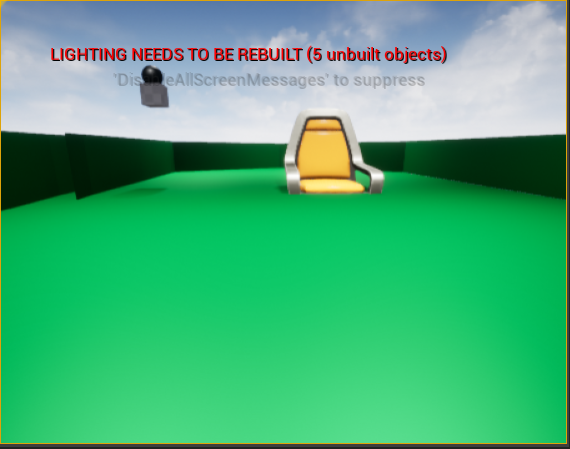
the chair sinks into the collision box
so does the ball (to the point where it isn't visible if it falls)
any fixes to this?
grim ore
@deep viper well it had to be related in some way doesnt it? what was it
deep viper
I replaced a statement that changed the 3D location of a mesh with a statement that set a "tile referencing" variable to a nullptr. After that, My Landscape linetrace was able to detect the landscape.
grim ore
maybe something needed to be compiled and it was stuck in a non trace state
deep viper
That sounds like the most likely explanation. Gotta make my changes at a more modular pace. I have a bad habit of tweaking multiple things at a time. (thankfully my functions are short)
grim ore
wait, change it back and see if it breaks again lol
zenith venture
@zenith venture what does the UV map look like on that cylinder? are you using built lighting (static) or dynamic (movable) ?
@grim ore Hey Mat - thanks for taking the time to help. I'm a little new but I was planning on adding seperate lights if needed for static or dynamic - for now I was just hoping it would aesthetically look like a light and not be used as a baked emissive material. Is this the wrong path and what is causing problems? I have the emissive for static lighting unchecked / false.
grim ore
well I ask mainly because if the mesh goes black when you build lighting but its fine before, or you move it, then its the light map. move the mesh in a direction and see if the material starts working
zenith venture
no go -
grim ore
ooof yep. does that material have a base color at all or just emissive?
zenith venture
just emissive
I was watching a tutorial lol and it had a base constant coloring mulltiplied by a emissive parameter into the emissive
 tired lynx
hey all! how can i view the array containing my device id's inside this? i'm trying to create a vive virtual camera but have reached a bit of a roadblock in terms of how much google can help me
zenith venture
grim ore
yep should work... need to debug if its the material or mesh, I doubt its the level. Just make a new material with 1 for the base color and drop it on it
zenith venture
hmm okay I'll keep messing with it
I checked the normals they appear correct
Thanks for the help Mat
grim ore
well if the 1 constant into base color (so just a white base color material) doesnt show up we knows its the mesh some how
grim ore
@tired lynx you would need to get the items out of it, use a GET node and get them out based on the index, or use a for each loop and loop thru them all
tired lynx
hmm, any idea which get node to use? there's quite a lot of them when just searching 'get'
i'll say this is literally my first blueprint from scratch too
grim ore
its literally called get, when you pull out and type get you get it
get a ref or copy would be fine depending on what you want to do
tired lynx
would this mean that the device id is zero?
(did copy and ref as i'm not sure which would be more suited)
grim ore
copy means the item returned from it is a copy of the item, any changes you make to it will be made to that copy and not the original item in the array. ref is a reference, you can make changes to the item you get directly
arrays are lists of stuff, so the get node says hey get me the first item, or the 2nd, or the whatever # you tell it
tired lynx
understood! so if i have a single controller connected to steamvr, and leave the get on zero, then it should hopefully be selecting that controller?
this is my wider node setup, for reference
grim ore
correct, if you have 1 controller and that array has 1 in it's list you would get 1 result in the array which would be index 0
and with what you are doing getting a reference is fine, you want to talk to the original and dont need a copy to work with
tired lynx
oh my god
it works, you're actually my hero
your channel seems like an excellent resource by the way. subscribed and saved a few videos to binge when i have the time
grim ore
🙂
zenith venture
@grim ore Hey Mat - I was just wondering does my post processing volume with bloom off causing the emissive not to function? Changing the mesh didnt work - I also tested throwing the material on multiple different static mesh and they all go black
tired lynx
out of interest, is there any way i can use the tracked camera just in the viewport without having to initialise 'play'
grim ore
oh yes, I beleive you need bloom for emissive which is why I was suggesting the plain base color material
@tired lynx all you can do is click on a camera and have it show the preview, or you can pilot it if you need to move it.
I dont think you can get valid tracking data for the camera unless you simulate or play
tired lynx
ah that seems fair
grim ore
mmm.. I take that back, there is a way but I dont know how it works lol. The multi user editing does just that
tired lynx
hahaha, it's not an essential feature. more of a curiosity really
well, you've definitely unlocked the next stage of tutorials for me. time to learn how to actually record tracking data and piece together some cinematics! 😌
grim ore
look into sequencer recording, it should do it out of the box. you would set up the actor to track and then tell it to record while you are playing and it will record to a sequencer track
@zenith venture i just tested and even with bloom off I still get the base white emissive color on mine, not black
rich furnace
c1xx: error C3859: Failed to create virtual memory for PCH c1xx: note: the system returned code 1455: The paging file is too small for this operation to complete. Does this mean I need to buy more ram?
grim ore
or try and increase your virtual memory/page file
spark turret
keep getting this err when firing, but when I check sim it's not ticked...
Invalid Simulate Options: Body (FirstPersonProjectile_C_13.Sphere FirstPersonProjectileMesh) is set to simulate physics but Collision Enabled is incompatible
zenith venture
@grim ore For whatever reason in my file - I have to crank up the value x1000. I think it might have to do with the sunsky blueprint I'm using to light the space.
 robust prism
How do I count the number of times a particular looping animation is played
 grim ore
@robust prism if you are using a montage you could have an anim notify and increase the count in the notify event.
 spare kernel
that spam was real..
 pseudo star
anyone know how to get discord rich presence working
 silk lintel
Okay, I figured out that the lag of the cable component has to do with frame rate. I set a fixed frame rate of 240 and it follows perfectly, but everything is also in super slow motion. Any idea what I can do?
plush yew
is there a better way to optimise this?
grim ore
@silk lintel are you updating the cable component at all? maybe check the tick of the component or actor and the tick phase and set it to after physics
 alpine laurel
i am trying to make a gun "jamming" system for my weapons, but i am unsure of the best way to go about that. So far all i have is a delay after firing the gun for30 seconds
is there a more efficient way to go about this?
grim ore
figure out when and how you want it to jam, when it does flip a boolean for jammed and set a timer. the timer should just unjam the boolean after X time. You can check for jammed wen firing or reloading or whatever and branch off instead of firing or whatever you play the jammed sound or whatever
alpine laurel
thanks. i was currently using a random in with a connect <= int on a true false
grim ore
you can use that for the actual determine if it should break, but do the rest for keeping track of if its jammed and for letting it unjam over time
 thorn dew
How can I change the default position of the skeleton rig?
grim ore
? can you show a screenshot
thorn dew
Let's say I want to lift the leg of the skeleton and want that to be the new default pose. If I hit save it doesn't save and if I hit Create Pose Asset > Current Pose it does not save the current pose to a pose asset. The only way to save a pose asset if from an animation. How can I change the default position of the skeleton though?
 autumn elbow
What terms would I use to google: add item to widget, and it modifies the character's weapon or ability, or clothing. Basically modifications based on what slots I have in my widget.
thorn dew
@autumn elbow widgets in general are made to be easy to use if made right. You drag and drop them on the BP and it work to give that thing those abilities. Something like what you are saying I'd probably program right in the BP. Each modification or ability could have a bool in the BP. If that bool is true have it turn on that part of the code.
autumn elbow
@thorn dew hey thanks for the reply! Unfortunately the combinations are somewhat unlimited. I'm building a building system. https://youtu.be/HGCRK-KLs5Y
 thorn dew
@autumn elbow It looks like it is working. Are you saying you want a special property to be added to the whole as the different parts are stuck together?
autumn elbow
the parts combined would add some functionality
thorn dew
to the whole?
autumn elbow
yup! If you could, can you come to #blueprint ?
thorn dew
what would be an example of what you want a part to do after being attached?
autumn elbow
Have you seen Kerbal Space Program?
plush yew
i think its a good start
autumn elbow
so they player can add 2 triggers
rich furnace
I've run into this issue: https://answers.unrealengine.com/questions/356577/view.html
I don't know wth happened I was running into compile issue. So I closed everything. Removed Intermediaries and Binaries folder. Regnerated visual studio
then I clicked the .uproject and it wouldn't open saying (build was done in another versino or something)
so I followed one of the naswers their to remove the "Module" section in the .uproject
now all my source is gone lol
my source files are there
but the project no longer shows any of the blueprints, interfaces, c++ classes
thank GOD I backed up my files
thorn dew
@autumn elbow if you want to do something like Kerbal where the different components kind of seem to work together in some way you are going to have to do some special sauce. The possibilities are also not endless. They never are. A computer cannot do endless or infinite ever.
Getting to how I would do it though is I would make a BP and decide on all the modules I wanted and everything every module would do. I import the visual representation of each. Next I put in the BP a way to build stuff physically together. Put in the BP an array to keep track of everything made during game play. Have everything placed in as an instance. Next you have to from the array data figure out how you want it to effect the whole. For example you have a truster at position x,y you need to have the BP add thrust in location x,y. If it is a fuel module have a fuel variable that gets a plus x depending on the size of the fuel. If you want that fuel to add weight in that area you need to also program in the center of gravity being off by x or whatever is calculated.
rich furnace
Project could not be compiled. Try building from source manually. "Visual studio builds everything fine"
I cannot load the project anymore it seems
grim ore
@thorn dew the reference pose of the skeleton is going to be in the A or T pose, you can't really change that.
the module section of your .uproject is the source code parts of it, if you removed the module then the project will assume there is no C++ code to load @rich furnace
you can alter animations and you can set up new poses to use for animations but your base skeleton is your base skeleton and all animations basically adjust from that
thorn dew
@grim ore Thank you. No wonder I couldn't figure it out after working on it for days.
autumn elbow
@thorn dew I built all that already. I'm stuck on the logic part of the build
I'm trying to think of a user friendly way, to get the logic hooked up
I was thinking skill tree type UI, but that's too complicated for users.
rich furnace
@grim ore yes I've added it back however I am back to square one. "Lesson1 could not be compiled. Try rebuilding from source manually"
where can I view the logs?
thorn dew
@autumn elbow You need to have set variables for each part. After that you need to figure out how each will effect the whole in some equation that is calculated. Maybe one makes it go forward, but slower if there are lots of modules. Then have calculation done to figure out how much slower based on # of modules. Forward movement = thrust/modules for example.
rich furnace
@grim ore LogInit: Warning: Incompatible or missing module: Lesson1
Running E:/UE_4.25/Engine/Binaries/DotNET/UnrealBuildTool.exe Development Win64 -Project="C:/Users/me/Documents/Unreal Projects/Lesson1/Lesson1.uproject" -TargetType=Editor -Progress -NoEngineChanges -NoHotReloadFromIDE
Creating makefile for Lesson1Editor (no existing makefile)
No other explanation
Visual Studio 2019 builds successfully
grim ore
deletete intermediate, delete the .sln, delete the binaries folder. make sure the .uproject has the module correct. then right click and regenerate the .sln file and se if it runs into any issues
autumn elbow
@thorn dew yea yea.. the math stuff I got. The UI interaction is what I'm after
grim ore
if no issues up to that point open the .uproject and let it rebuild without going into vs.
scenic fox
guys ummm my packaged failed can somebody check the output log and see if i can fix this?
anyone/
?
thorn dew
@autumn elbow the ui is just show for the user. It should have nothing to do with what it actually does.
scenic fox
By the way i did also update unreal so
rich furnace
@grim ore no dice, same message
scenic fox
uh..still no one? i can wait a few minutes
autumn elbow
@thorn dew unfortunately in my case the UI will have to do stuff. As the player will have to drag the icons to groups to make associations.
this is my current thought. I'm looking for alternatives
rich furnace
@grim ore It keeps saying Lesson1 (Project Name) module is missing
stil same message "Lesson1 could not be compiled. Try building from source manually"
grim ore
check to see if its actually missing from the binaries folder
thorn dew
@autumn elbow if the user drags something get the new position. The position goes into the equation. The equation says what happens. I don't see the problem.
scenic fox
._. man i wished i could fix packaged failed things
rich furnace
@grim ore binaries folder is empty
I don't understand how it could be working an hour ago and then now refuse to open
autumn elbow
@thorn dew that's basically where I'm stuck. connecting the drag thing, to update the equations.
The communication part.
grim ore
thats weird that is the only thing in the log @rich furnace
thorn dew
@rich furnace it could be corrupted if it is on a file sharing folder, virus, hard drive going bad, solar radiation. What about your backup?
scenic fox
i guess im going to redo the packaging
rich furnace
@thorn dew that doesn't explain what is happening
hard drive is brand new
it is NOT on a file sharing folder
I ran into this issue https://community.gamedev.tv/t/menuinterface-hides-class-member/122835/11 and then made a name change to one of the interfaces. I close everything, delete, binaries, intermediaries, regenerate visual studio. open uproject. "Lesson1 module not found"
I even changed it back to the original
autumn elbow
@rich furnace did you upgrade from a previous version?
rich furnace
@rich furnace upgrade what
autumn elbow
Your lesson 1 project
rich furnace
I don't follow
autumn elbow
Did you start it in 4.25
 azure coral
Heyo
autumn elbow
and it's a C++ project?
rich furnace
yes
autumn elbow
make a backup, delete all the extra folders, and regenerate ?
thorn dew
@autumn elbow if it is all part of a single BP the BP spawns the objects and when spawned they should be kept in a array. You can then get from array and find out all attributes of that object. After getting object say get x like location or whatever. Enter that into equations.
@rich furnace I don't get why you deleted stuff outside of the engine. That sounds like a bad idea on any day.
rich furnace
@thorn dew where di I say I deleted stuff outside the engine?
thorn dew
" I close everything, delete, binaries, intermediaries, regenerate visual studio."
rich furnace
I only removed the binaries, intermediareis in order to regenerate the visual studio files
which is normal and have never produced problems
this was before I had trouble opening the project
autumn elbow
you don't get any errors when you did the regen?
thorn dew
@rich furnace I don't do C++ coding in Unreal. I can't say what is what. I was saying in unreal engine it doesn't like things being renamed or things deleted.
autumn elbow
When you say open, you're clicking the .uproject file ya? Not from the epic launcher UI
rich furnace
yes
I had a back up from before. Copied over the binaries folder. It opens now but its missing stuff
@thorn dew I really can't recommend C++ right now. I am trying to just complete the fundamentals and I am struggling. I've worked with Python, Java, C#, PHP, Javascript, you name it. I've never had this much of an uphill
autumn elbow
I had similar issues, but it was because I upgraded engine versions. Not sure what happened to you.
thorn dew
@rich furnace I've heard that. C++ is such a root level code it makes it really hard to code for. More control, but so much harder to use.
autumn elbow
@thorn dew hey, Thanks for the help! I appreciate it.
thorn dew
@autumn elbow your welcome
scenic fox
bruh when i updated from 4.25.0 to 4.25.3 it broke a lot of my game, what the hell is unreal doing?
rich furnace
yeah I'm having a lot of doubts now about UE
scenic fox
Literally i updated because some of my engine files went corrupt
so i installed the new version and it broke
rich furnace
I also think how hard it would be to find developers for this and how expensive they would be
compared to Unity
scenic fox
Why doesn't unreal try to have good competion, epic games is a pretty big company
rich furnace
I think they only care about large companies because of royalty business model
it is an impressive tool....but man I don't know I think I've finally hit a point where I have to question
scenic fox
I hope epic games fixes the issues people are having in their projects in the next update
thorn dew
I find if I use any custom code from anywhere when i update it all goes to crap
it is better to stick with all in unreal stuff if you don't want it to break between versions
scenic fox
Bruh legit my AI controller went corrupt when i updated to 4.25.3 and it literally did not work
scenic fox
Even [packaging my game is a problem now
rich furnace
but the thing with BP is that you can get only so far
rich furnace
you need C++ ....but its ...you know the lack of documentation aside, its problems like this at teh engine level that really ruins the dev experience
I don't think many people approaching UE can put up with this
scenic fox
C++ i've actually never ever tried
rich furnace
like with what I'm doing right? literally just trying to create a way to bind some action to a button and I am having this much trouble
and I question is this really necessary
does it need to be this painful
scenic fox
Epic games made fortnite, they can fix their fucking engine
They have money and people to do it
so why......are they not?
thorn dew
the communication between BP does seem way more painful than it should be.
rich furnace
Tim Sweeney basically
he has a lot of of cash and thinks he can just throw money at the screen and hope it fixes things
like the Epic store for instance...the exclusives
scenic fox
im so fed up with unreal, i now question why it feels exactly the same 3 years ago
rich furnace
I'm 2 months in to UE and feel like maybe I should've used Unity instead
thorn dew
I'm sure Unity has some bad things too. For one not friendly if you don't know C#
scenic fox
i tried learning c# but eventually failed on some parts
rich furnace
oh they have a ton of documentation and tutorials, also C# is way way more easy than C++
scenic fox
yeah dragon is right
exotic thicket
Unity is probably more beginner friendly tbh
rich furnace
but all this complaining from little guys like us won't be heard
scenic fox
Yeah agreed.
exotic thicket
But it's kind of a mess in some places moreso than UE imo
rich furnace
we dont make any money for UE lmao
studios, companies do
@exotic thicket yes Unity has issues too
and I want to like UE badly too...I want to invest my time into this
thorn dew

Lauren Ridge and Richard Hinckley show you how to build a Match 3 game using C++ in combination with Blueprints. In this first part of the series, you'll get an overview of the game - including how to design your project utilizing both C++ and Blueprints - as well as starting ...
this might help you know C++ in unreal better
I don't understand a thing they say, but it is probably because I don't know c++
rich furnace
I guess my biggest complaint is not that C++ is hard....I knew that and I expected it....its just these unpredictability of the UE itself
like I shouldn't have corrupted projects like this
your shit should work regardless of engine updates
documentation needs to be better with examples
etc
well thats enough rant from me.....I' gonna take a break lol
thorn dew
I hear one good way to do C++ in unreal is to make it all in bp then only if the bp gets too big do you remake it in c++
rich furnace
this is getting to me
thorn dew
this way it stays fast
rich furnace
you know what BP is good. I love it
but stuff like Networking , Creating optimized servers you need C++ here
like I am learning these fundamentals so I can work with Replication Graphs
what's frustrating is that they have all these excellent tools and polished ways of doing things
its getting there that is the major major pain point
if they can address this...they could kill Unity (well maybe have some C# support or something like that)
grim ore
just realize that if you have problems, imagine what problems the 100s of devs working on AAA games like fortnite and such end up with
rich furnace
omg I can't imagine
scenic fox
prob like 3202130293210123210 bugs
thorn dew
The reason so much of unreal is modular is because it is made to be in a huge studio. You got one hundred people working on different parts at the same time and it is thrown together at the end. Then a small group figures out why it is not working before it is thrown out the door last second.
grim ore
there will always be pain points, and there can never be enough documentation or learning material to cover every subject or permutation of subjects 😦
rich furnace
I am beginning to understand why that AWS Gamelift blueprint plugin is $300
whew boy i need to take a break. thats the last rant you gonna read from me lol
thorn dew
doesn't epic have their own servers that can be used for free?
autumn elbow
use BP, or anything, but not c++
@thorn dew You have to do the opposite. Always have Cpp based project. It's easier to fix. A full bp project is very very difficult to debug as all the files are encrypted.
thorn dew
but you update to a new version of unreal with a C++ project and it all stops working. Worst I've had with a BP is a node got outdated and worked in legacy mode or I had to replace it.
autumn elbow
and I was able to fix it easily.
if your bp only project losses link to the module... then you are basically screwed.
Hopefully it was source controlled. 😂
the only way I found to fix a missing module in a only bp project is to make a new project and copy over the assets one by one.
there is a webinar with epic... I think it's "Advance Blueprints" or something like that... and they say for every bp class you make, be sure to have a Cpp class that it inherits from.
Also...I've learned NOT to remove the old engine version, before you upgrade your project to the new. After it is running in the new, then remove the old
Also... 100 tips and tricks by epic is a good vid to watch
restive yarrow
what does validate data assets do?
rich furnace
so seems like I am not the only one running into this issue: https://community.gamedev.tv/t/this-lecture-broke-the-game-cannot-open-source-file-tank-generated-h/50621/13
very similar to what happened to me
project just went corrupt. code compiles and nothing wrong with it
another one seems to suggest Visua lstudio registery issue https://answers.unrealengine.com/questions/718022/quickstart-project-wont-compile.html+&cd=12&hl=en&ct=clnk&gl=ca
 halcyon prawn
Quick question, is anyone here familiar with quixel mixer?
 queen wasp
"Out Of Videomemory" or "GPU Crashed or D3D device removed" has been regular offenders in me trying to load cloned projects now and then when adding new things, now I am trying to go back to DirectX11 since some Fortnite reddit post said a couple ppl had no issues with DirectX11, hmm.. Seems like a bug though?
rich furnace
hey guys I added some C++ files into Sources folder but they are not showing up.
okay I think I was able to reproduce the issue
deleting binaries folder in order to regenerate visual project seems to be the culprit...not sure why this is suggested often
so I created a new project
moved over the Sources and Content folder from my old project to this new one
c++ classes folder does not reflect this
(well at least I know what happened and how to avoid so I'm happy with that. )
guess I'm going to have to manually add them omg
 dire fjord
Several months ago..maybe a year ago I was looking at procedural animation and found this example project that had some stuff with like a a big character and a small character and it showed how to set it up to use ccdik and stuff to have their arm push the button properly. I've got a need for such a thing now, but with all the example projects I've got laying around, I can't for the life of me find it. Anyone know which one I'm talking about?
Is it possibly a learning tab project?
scenic fox
guys what does this mean
im packaging my rpoject
can anyone see what happened
and tell me
 stiff hawk
got a question... dont know where to put it in xD
Do you guys have a example for something like a fully free camera with roll support... or any guiding how to implement it?
 violet portal
Hey guys and gals,
Could I get some help, please?
I'm trying to set-up a video to play in unreal, but I'm getting this error in the Media Player:
scenic fox
can anyone help me?
violet portal
File type is webm, also I have tried with .mp4, same
scenic fox
please
what does my error mean
anyone please?
anyone ?
hello/
i did loose my internet so that could be why, but i have it back
UMM
the chat is ded
scenic fox
umm but what does it mean?
 weak cypress
will UE4 run on 4gb of ram?
weak cypress
will it run out of memory?
 lost ember
likely
 prisma marlin
Definitely
4gb is not enough because first of all u won't even have access to total 4gb ram on the first place
Second windows will occupy some
weak cypress
i am so screwed
prisma marlin
What kind of work u want to do in ue
weak cypress
make a 3d game
prisma marlin
Definitely not enough
weak cypress
ok so what about 8
dense gate
Manageable depending on your scale
dense gate
BUT
weak cypress
cpu-gpu doesnt matter right?
dense gate
I'd recommend having a 32 GB page file
weak cypress
it does have an ssd
weak cypress
i am looking to buy something rn
dense gate
I'd assume it's one of those cheap laptops
weak cypress
so thats why i am asking
dense gate
I'd guess an i3 at best if it's 4 GB RAM, unless you're looking at second hand tech from 10 years ago
weak cypress
its a ryzen 5 4500u
 weak cypress
8gb of ram
dense gate
6 core, 6 thread, 2.3~4 GHz
Back when I was on my laptop with an i7 (4c/8t @ 3 ghz) it was aight, but it also had a dedicated GPU
weak cypress
it does have a gpu
dense gate
If it's something like AMD Vega 8/10/11 then it's integrated
And that means it'll suck up the RAM
weak cypress
are there any better options?
dense gate
1 GB GPU might work, 2 GB is aight, the rest is a bonus
From a laptop standpoint, I'm not well versed
 hearty walrus
how would I go adding recoil to a gun system?
dense gate
I myself found good deals on stationary PCs this year so I'm skipping over looking for laptops
weak cypress
do i choose this?
hearty walrus
I use a GT710 with 2GB VRAM
dense gate
Depends on how you wanna do recoil
hearty walrus
there was a function for it, but it's in the now defunct UDK
dense gate
Mostly you'd force the player controller to add some pitch and/or yaw
hearty walrus
yes
dense gate
Does your camera have a relative rotation that isn't 0,0,0?
hearty walrus
?
at the moment, this is what it's doing
it works, but there's 2 problems:
- The movement is really jagged, and not smooth
- The camera doesn't automatically reset back down after the recoil stops
dense gate
One way I'd do it is actually force the camera rotation for the pawn
Come to think of it
hearty walrus
that sounds like it'll run into the same problems
dense gate
Depends
hearty walrus
since this is essentially forcing the camera rotation up by adding Pitch
weak cypress
so conclusion?
dense gate
RInterpTo
@weak cypress it'll work, but for small projects, or medium if you optimize well
hearty walrus
dense gate
6 core Ryzen is decent
hearty walrus
I've got a pretty low-end pc, unreal runs fine
dense gate
Should do you the job
hearty walrus
8GB DDR3(?), 2TB HDD, GT710, Intel i5 4th gen @ 3.00GHz
dense gate
My laptop was similar to that but this year I got an upgrade
Was i7-3632QM, HD 7650M
It ran decent
But with the scale of my project, it had issues
weak cypress
nah mine was horrible
dense gate
Yeah, yours is only 2 cores, lower frequency and a worse GPU
Anyway
The R5 4500U should work
At least a lot better than your old one
Make sure there's an option to upgrade RAM down the line
dense gate

 chilly olive
Hi
dense gate
@hearty walrus something like this is what I have in mind
weak cypress
ok what about a laptop with a 4500u, 8gb of ram (upgradable) , 128gb ssd @dense gate
hearty walrus
@dense gate will this fire on every tick?
or how do you modify it to only run after a bullet's been fired?
dense gate
Timelines but it might be a bastard
hearty walrus
yeah I was trying to avoid timelines
dense gate
There's no way to make it smoother otherwise
This essentially replaces a timeline but is more customizable on the curve
chilly olive
Is the gtx 1660 ti gud for ue4
dense gate
P good


