#ue4-general
1 messages · Page 847 of 1
 plush yew
 queen wasp
it is vram in ram. If you open taskmanager and check performance, scroll down to GPU and see the ram usage you see how much you have native on the GPU and how much in regular ram
plush yew
Actually
 sterile tulip
You need to add Lods man
plush yew
That's excellent for xbox I head xbox is 10 gb
plush yew
no xbox is 16 gb also
I started to read about the xbox and scroll it says the most The Most Powerful Xbox Ever
queen wasp
Yeah, I didn't find a lot of info googling here, for what uses texture target 2D and 3D ram, except my own made stuff which I will continue to try optimize
plush yew
I'm done lol

A few months ago, we revealed Xbox Series X, our fastest, most powerful console ever, designed for a console generation that has you, the player, at its center. When it is released this holiday season, Xbox Series X will set a new bar for performance, speed and compatibility, ...
queen wasp
*render target
plush yew
The most powerful ever....[really? this next gen is it really? or weaker then the first xbox]. Shakes head
Or yeah ram
Yeah 6gb is low
queen wasp
It will help with M2 drives being bigger, you can offload a lot of prerendered stuff on SSD perhaps
*dreaming: PCIE4 and SSD speeds/sizes
sterile tulip
Make distance buildings lower polygon and lower textured
And lower grass density on distance
This will give you more space
queen wasp
One thing to make an art project for display on a specced machine, another to make a game that will run on most possible players' machines.. I am aiming at 6GB but will try 4GB too, as a low minimum GPU of 1060, but IDK if I might have to settle on the 1660 6GB as minimum.
queen wasp
Game won't be finished before in a couple years though 🙂 probably.. been working on it 3 years now, come far but I just know there is a lot left to do
plush yew
I mean like rtx probably uses a bunch of power too. I don't think every company is just going to turn rtx on.
Then again it saves a ton of time and money
sterile tulip
What is the concept of your game
queen wasp
I aim for PC only first, not even sure how I could make console work, XBOX have keyboard but how many has it, well IDK I might try making it for consoles later, but aiming for PC first
sterile tulip
What is it about
plush yew
@queen wasp yeah i'd like to know
queen wasp
@sterile tulip well it is inspired by Starcraft, Aven Colony and other RTS games, yet different and not AAA I am just one guy 🙂
plush yew
i just wanna ask you guys
is anyone of you considering getting a RTX 30 card and which one?
 south ridge
@queen wasp very nice art style! Needs so much UI polishing, but I love the feel of it
sterile tulip
I could get the 3060
plush yew
keep working intrinsic
ok, cuz i am thinking of just waiting to see what AMD will have be4 i make a decision
queen wasp
@south ridge thanks 🙂 any ideas for polishing? Open for ideas.. the UI is rendered on the fly, with player theme, but I'm not sure how to improve it, any suggestions are always welcome 🙂
plush yew
I have a good 6 months to an year complete art overhaul but I'm ready
sterile tulip
When do you think AMD will release their cards
plush yew
november most likely?
sterile tulip
This year really?
Do they first release high end or lower end gpus. Or all at once?
plush yew
well yeah but idk if there will be any stock
@queen wasp This is mine also. did you ever notice it before on the forums? https://forums.unrealengine.com/community/work-in-progress/1794535-liberationteam-beta-playstation-ps5
Unreal Engine Forums
Good day everyone, I'd like to showcase my game LiberationTeam and also be a encouragement to many who is working in Unreal Engine or starting.
LiberationTeam is a third person 16 multiplayer online shooter which I planned for the PS4 which now I'm aiming for PS5 which relies...
queen wasp
I made wrappers for programming UMG widgets, for menus and all, theres a lot that can easily be changed
south ridge
@queen wasp your game view has a feel. Your UI currently does not have enough feel, it's just a debug level UI: small fonts, random colors, layout is somewhat spontaneous. I think it needs a much more solid cohesion between the art style of the UI and the game (for example, the choice of the fonts and such)
plush yew
i think high end are first but not sure this time around
south ridge
Basically
plush yew
I think you have the effort and time to work and you believe you have 3 years in
south ridge
If you don't have this already, you need to make a big document where you put in all inspirations for the game, current screenshots, identify the palletes, textures & other elements which are definitive for the feel of the game, then add those elements to your UI
sterile tulip
The 20 series were really overpriced but the 30 series price seem to be better now Idk if AMD will beat that
plush yew
You'll figure things out kinda to early to give a heavy opinion
queen wasp
@plush yew Nice!
south ridge
You need to identify what colors define your game and are most appropriate for use in the UI, the patterns which work well with your textures of the game world and such
plush yew
But do your best of course!!!
Thanks!!
im just wondering, is it possible to fill out a 24gb buffer inside ue4 editor? has anyone tried it?
south ridge
Bigger more distinctive text in a font that suits your game better
Bigger in perception, not neccessarily size
Sometimes the text can start feeling bigger if you put it proportionally to other elements nearby
queen wasp
Mmm, noted
plush yew
how much vram you guys use (on average)?
south ridge
This is the role of making progress bars thin, for example - to emphasize the weight of the progress bar relative to the progress bar label or other elements. This is the kinda stuff you need to go through, much of it can be done with intuition, just gotta have several eyes look at it and you gotta chase any feeling of "oddness" you get
queen wasp
@plush yew I couldn't even load my project a while back, the 24 GB native+shared vram gave me "out of video memory" :S
plush yew
I've been focusing on code and more toward PS4 now the plan is to project the game to ps5
Therefore the goal was 8gb
now like infinity
south ridge
For example, @queen wasp, your icons are rendered in same texture as your in-game world. So there is no distinction between a pumpkin in the UI and pumpkin as I would expect to find in the game world. This can be fixed by simply modulating the icons with some color or pattern in the UI - little details like this go a long way. Foreground & UI should live in its own world, background in its own, but they should feel related
plush yew
@queen wasp no but seriously...
queen wasp
@south ridge Yeah, I must admit I like the UI now 🙂 But am always open for constructive critique
south ridge
I think you're onto something with your current UI, so you just gotta make it more stylish and polish it more
queen wasp
"Everything can always get better" sort of
south ridge
No need to change layouts, just the relative proportions and colors and such
Your fonts have black outlines, but icons don't
Etc
queen wasp
@south ridge Yeah, I want it to look more detailed still not messy, I like that it is transparent, and the progressbars and stuff are animated, Icons are mostly 3D and rendered on the fly, the UI itself is also 3D and rendered on the fly with camo material for edges etc, but yeah wanting to improve it, many possible tricks.. like more 3D feel, better fonts agreed, and yeah
I have already polished some then, recently 🙂 no new screenshots but the fields of the icons and stats and stuff is better centered/positioned, sized
Yeah I would've liked dropshadow on the icons, and also on fonts really, instead of outline, but how ... 🙂
I can blur the mask renders possibly and have background black
Theres probably things I still have to learn with fonts in UMG, I vaguely remember having seen "drop shadow" somewhere..
there is outline-material too right? many possibilities..
Yet there could be more stuff in UMG, like filtered blends and stuff
south ridge
Yeah
queen wasp
I mostly use materials and rendered 3D though
south ridge
Less is more, so don't get too involved on the technical side - there's also the art side to it, proportions and such
Saying that now makes me want to make a game where the UI is integrated into a building facade haha
queen wasp
It would be nice to in-game be able to render an icon into a rendertarget, then make it a texture2D on the fly, so you could reuse one rendertarget
plush yew
Position yourself developer your game and when you fill complete in one area go back and polish
queen wasp
@south ridge hehee yah 🙂
I Imagine a future version of my game in AR, so you can play on the livingroom table f.ex. then doing the whole UI in 3D, planes, could use parallax and more
VR too, but yeah for now I stick with the traditional aim of desktop.
I also have been pondering what to do for ppl having wider screens..
@south ridge about the pumpkins, that is how it is now 🙂 most 3D icons are also used (with LOD) in the game
Been postponing like forever to make videos for that FB page and well, youtube etc.. Still want it more polished before first video 🙂
But seeing it all in action gives a better impression than just a screenshot..
"I will get around to post videos" I said like 1.5 years ago hehe
plush yew
@queen wasp I had a idea with art then it evolved then it evolved somemore and it evolved somemore. Now It'll be open world. Take your time. You said you have 3 more years get the gameplay down first
queen wasp
@plush yew Yah, I have a lot of the gameplay working already 🙂 3 years is how long I've worked on it, 2 years is how long I think I have left, but yeah it is finished when it is finished, no stress, no deadline
I parallel work on everything, I like to vary work, but yeah you always can go back and redo/better things when you learn new things, a lot has changed during these 3 years
I wake up sometimes after dreaming at night, with new ideas and visions
south ridge
@queen wasp I think you have a good feel for the project, do you have someone artsy to talk to a lot?
It can be tough to find the right kinda person with whom you can be on the same wavelength though
queen wasp
@south ridge Not really, I have some friends to bounce with, but they're not very artsy. I am though 🙂 Also a visual artist, been working on video effects for 10 years, and am also drawing pencil/pen drawings, but it would be nice to have more artsy people to bounce ideas with
 rich furnace
hey guys when I hide bunch of actors in the editor, it shows up again during play. How do I hide during play?
queen wasp
I have a lot of online friends that are artsy but not very into games
And a few that are but don't have time ..
south ridge
I think your art side of things is good, with someone who could be a second pair of eyes would be easier to track down what you can polish without changing your vision
queen wasp
@south ridge thanks, and definitely to have someone to get better feedback from would be nice.
rich furnace
how do I turn off all post process volumes?
 small crypt
So i have a blueprint with a static mesh component that is set to moveable. The blueprint is essentially a door that moves upwards when i interact with it. The issue i've run into is that the static mesh moves but the collider that was attached to the model doesn't move. Any help would be greatly appreatiated.
sterile tulip
Do you have pictures/video of your game @queen wasp
 radiant sleet
So will pawn always go to player start
Or is that only when there isn't a possessable pawn instance in level?
 solid glade
how do I turn off all post process volumes?
@rich furnace
Search for "enabled" in the Details tab of the PostProcessVolume
Untick it
also how do I "chop" this landscape into 4 smaller pieces? it is so laggy
@rich furnace
May I ask what kind of project this is?
Looks really cool.
How was the scenery made?
I am an architect myself, curious of this sort of scenes 😄
rich furnace
@solid glade https://www.unrealengine.com/marketplace/en-US/product/city-park-environment-collection

Unreal Engine
This package contains high quality nature assets. It is ideal for creating city parks, forests, and squares.
it is free
solid glade
Ah, this one
Yes, I havent tried it out yet.
Seems promising 😄
rich furnace
I have an old computer and I am trying to remove stuff so that it can actually run lol
solid glade
I see.
Sorry, I dont know how to chop a terrain to a given size or extent. I would like to know that as well
solid glade
MIgrate what you need to a new scene
rich furnace
@solid glade you mean create a new level and copy paste what I need? ah
solid glade
yes, thats the way you make a lighter version of the level you are currently working on
If by any chance the whole project is heavy, then make a new project and migrate to that new project.
But either way, save a new level. Delete anything you dont need.
Use the CTRL ALT marking tool to select multiple things you dont need. Delete from that level
rich furnace
how do I split an HISMA object? like that fence screenshot I posted above
like I can't select one individual object anymore clicking one of those actors marked HISMA seems to select many parts that were merged I assume
is it possible to copy paste between different projects?
solid glade
is it possible to copy paste between different projects?
@rich furnace yes, but first after you migrated them there
I use to migrate, so that the assets are there, and the copy-paste works in the level/world outliner
you copy their position, their setting etc
rich furnace
I see I can't just copy paste the assets
im gonna try right now
oh crap I clicked open project and it closed the editor!! noooooo
solid glade
how do I split an HISMA object? like that fence screenshot I posted above
@rich furnace select it, and press Ctrl B to find it in the Content Browser
What do you see there? Are they large as in the scene or in smaller pieces? Maybe it is a Blueprint, ie a set of multiple objects?
Maybe it is a group, therefore large?
rich furnace
when I click the actor (HISMA) it jsut automatically selects other objects
solid glade
I see I can't just copy paste the assets
@rich furnace Not the way you think/wish it was
migrate sends the asset "physically" to a new project
copy paste expects the object to be there, the reference to the "physical" asset.
you might want to copy it to the same place, so copy paste works for this purpose
but before that, migrate 🙂
rich furnace
This document covers how to migrate assets into other projects within the Content Browser
i thought you mean "migrate" like copying files and stuff manually lol
solid glade
when I click the actor (HISMA) it jsut automatically selects other objects
@rich furnace you gotta investigate a bit yourself or give more info
I wont be able to try out the exact scene myself now, so fumbling in the dark
possible scenarios
- the object is one single object
- multiple objects are grouped, you need to ungroup
- it is a blueprint, and inside it there are multiple objects
press ctrl-b in the level/world reveals the asset in the content browser
rich furnace
I will try reopening the map
solid glade
i thought you mean "migrate" like copying files and stuff manually lol
@rich furnace yes, I thought this is what you needed
rich furnace
I didn't know the actual migrate option existed in the editor
regardless I think its time to upgrade my computer there is no way I can work with this giant asset
rich furnace
omg its a miracle loaded within minutes
didn't have to wait hours like before I guess it was compiling shaders and caching it?
 rough knoll
why is the editor stuck at 45% initializing
 white heart
Anyone else having issues with Niagara in packaged games?
It seems the footstep effects I spawn crash the game
 dim merlin
hi, anyone knows there're any example projects for 4.26 preview 1 ?
 elder haven
Does anybody know how to use 4.26 gpu lightmass, how can I enable it ?
@rough knoll what version are you running ?
rough knoll
4.25.3
elder haven
arch viz ?
if arch viz it takes a while to open for the first time
or default if you have enabled something like raytracing
 vernal thicket
hi guys
if somethings visibility is toggled off, does this mean the engine is no longer rendering the object and therefore does not affect performance?
 restive yarrow
2 questions : Do double sides materials eat up more GPU memory? and does complex collision affect performance?
 covert hedge
hiagain
 lament star
has anyone tried the "FULL IK" stuff in the .26 preview?
 tender cloud
Hi all! I have a question regarding live video input. I want to have live input as static background in the viewport in full screen (not influenced by camera position, rotation, XYZ position). Does anyone know how to achieve that? Want to do something like AR
 cold vortex
can you use both?
@vagrant hornet Yes, you can use both
What I do is I make a C++ class, then I create a blueprint class that inherits from my C++ class so I can use the viewport of the Blueprint editor to position the camera and springarm
I do all my game logic in C++ though (you can do it in all in BP if you want)
Blueprint class just exists so I can do that, and follow the pattern I use in Unity
expose a variable to the blueprint editor with UPROPERTY(EditAnywhere), then I can change the variable's value in the details tab of the blueprint editor. So if I'm just testing speed or jump force values, I don't have to recompile C++ code every time.
I use blueprint nodes for UI (I create a widget then set the text in BP) l to display info that can help me debug, because I might change my mind about what I want to display, and I don't want to wait for C++ code to recompile for each change.
 hearty walrus
how do I make a proximity interact system?
so if you're near an object, and press Interact, something happens
BlueprintUE
here's my code
cold vortex
you could either create something like a UBoxComponent, then connect it to some onbeginoverlap function and check if the key is currently pressed.
Or, use a trace
I'd just do a trace when the user presses the interact button tbh
hearty walrus
this is only just a workaround, still didn't work
what I need to do is create a warning widget, and just left the Loading_Lockdown in for shits and giggles
here's what I want to loda
this is all in the HackInteraction blueprint
restive yarrow
2 questions : Do double sides materials eat up more GPU memory? and does complex collision affect performance?
@restive yarrow ?
 light thunder
@hearty walrus Whichever are your objects you are hacking - have their blueprints have an OnOverlap (or maybe an EndOverlap) and for the actor pin, cast to the player character so that everytime something overlaps with the hackable things in the world, they will check if those things happen to be the PLAYER, and if they are, then you can fire the function that displays the widgets you want
 thick gazelle
I'm trying to remove a project from launcher (deleting the project itself is not an option)
I've tried to removed every reference from the EditorSettings.ini files but it still shows up
(https://answers.unrealengine.com/questions/19098/need-to-delete-projectshow-do-i-do-that.html)
thick gazelle
I now nuked the entire UnrealEngine local appdata folder and restarted my pc and the project is still shown under my project
 exotic thicket
Have you considered just copying the project to a new folder and then deleting it via the Library in EGL?
This wouldn't delete the project
thick gazelle
i think it just looks for .uproject files
i've renamed it for now.. really silly that you can't ignore a project
aka hide it
plush yew
Hi i am new to unreal engine Does it need coding
or is it simmilar to scratch
Is it blocks
 celest cairn
@thick gazelle did you saved your project in ureal valut for example?
 summer matrix
what does this mean
celest cairn
@plush yew you could do what you prefer more, coding or blueprints (visual script) or even do both at the same time.
 uncut vigil
@summer matrix https://docs.unrealengine.com/en-US/Engine/Rendering/LightingAndShadows/LightMobility/StationaryLights/index.html
Light type that can change its color and brightness at runtime but cannot move, rotate or change influence size.
 magic pagoda
Anyone experienced this crash? I keep deleting the offending animations and then another animation pops up. Happens right away upon playing a build. Building in UE4 4.25.3
 alpine laurel
see how the camera glitches a bit when going backwards and turns to the side when moving left and right. how do i stop that (also please tag me if you have an answer)
hearty walrus
HURRY UP
celest cairn
hey guys, to update to 4.26 is it a new 12 GB or more to download or its a minor updates
P.S: my current version is 4.25
 open wadi
Has anyone every uploaded a file (multipart form) in UE4?
 thick herald
@celest cairn In addition to 4.25
celest cairn
thank you @thick herald
 feral sierra
has anyone tried the volumetric clouds on the 4.26 preview?
sterile tulip
Is UE4 Flex free?
 chilly sun
basics, trying to put a platform that moves between 2 other platforms. using SetRelativeLocation with Timeline and a 3second 1-0 or 1 - -1 track.
ButLoL: The platform moves to totally different location before doing the moving
it teleports then moves kind of as planned.. why the weird teleport?
cleaner view
setting, for the relative location, on loop should be adding
hearty walrus
what's going on? has it stopped?
chilly sun
there's an addlocation, and I tried that and it worked without teleporting, but had no limit (flew offscreen)
 unique timber
How do you close a blueprint window with the keyboard?
feral sierra
I'm trying to test the performance of the new volumetric clouds. I'm not getting any additional CPU or GPU usage when I use them.
I guess it's light but not this far, did I miss something?
unique timber
figured it out: Ctrl+F4
covert hedge
hi
alpine laurel
is there a free way to take a mixamo or other rigged model and properly retarget the animation starter pack asset skeleton to it?
 faint kite
Hello ! What are the minimum requirement tu run Unreal Engine ?
I saw they recommended 16 GB ram but i don't have that much except 8 GB ram
thick herald
Use this free program to convert animations to UE4 format, does single and batch. http://terribilisstudio.fr/?section=MC @alpine laurel

Terribilis Studio make indie games and assets for developers.
faint kite
I read somewhere on the contract about % Royalitie fee, what is that ?
thick herald
When your game makes 1,000,000 you pay 5% to Epic
faint kite
oh like Unity3D ? If i make 100k per year, i own 5% to Epic ?
thick herald
No, as I said, if your game grosses 1 million you then start to pay royalties.
faint kite
that is unlikely to happen for small indie
thick herald
yup, this means a lot of indies don't pay it. We keep that 5% 🙂
faint kite
that sound great deal for us, i wonder where it is profitable for them x)
thick herald
Oh, 8GB is going to give you potential issues. Unreal will probably run, but as to how well and how often you will encounter crashes due to lack of RAM is anyones guess
faint kite
you think 8GB and I7 is good enough ?
I hear for Unreal Engine high performance with graphic quality it require even more powerful so i was worry if my current setting is good enough, specialy after saw a Youtuber remake Zelda world
he really did a great job
thick herald
Depends on what you are doing I guess. It's certainly possible... but I suspect you'll have issues. i7 is fine, 8GB RAM is not.
faint kite
i knew it...the problem will came from the ram
 vague scaffold
Is there a camera from viewport feature? I am looking at a nice shot and I want a camera to be created that is transformed to the current view.
I guess it might be thought of as a camera from screenshot.
 zinc ledge
I want to make a simple multiplayer game just to learn how it all works, i tried to look for tutorials on youtube but every video i found just say step one buy this https://www.unrealengine.com/marketplace/en-US/product/aws-cognito-dynamodb-gamelift-lambda
but i dont want to buy a $250 multiplayer system. Does anyone know any other good tutorials?
 deep viper
Anyone know how to enable the [WaterBody]s in the 4.26 preview? From the looks of the youtube video it should be listed under actors, I cou7ldnt find any obvious water plugins to enable.
sterile tulip
in next updates
deep viper
I must have missed something in the 4.26 preview video, I totally thought it was the waterbody + volumetric one. (unless they released a version of 4.26 without these ex[erimental features initially, which I don't see the point in releasing)
hearty walrus
Unreal Engine Forums
Hey there. Yesterday I was playing around with some more advanced UI stuff in Unreal for my game, The Peacenet, that's entirely UI-based. Basically, I wanted
Following this tutorial. How do I do the section that mentions "I can't show the blueprint"?
 bright wharf
In the blueprint its facing the right way
But in the game its facing the wrong way, how do I fix?
alpine laurel
rotate?
bright wharf
wdym?
alpine laurel
either in the editor or in blender or whatever software you use
hearty walrus
just rotate it 90 degrees..
alpine laurel
i would recommend doing that whenever you have this problem, that way you wont have to rotate it if you use it again
bright wharf
thank you
alpine laurel
np
bright wharf
ill do my best to remebe
alpine laurel
so my sprint animation has the gun move towards the players chest and then move up and down a bit to look like running. how do i make it so the first part only plays once when the player sprints and then loop the up and down part in my animation bp
 flat axle
How do you wait for an object to land before you continue (without a delay node)
bright wharf
how do i change the collision component to the one ive made?
deep viper
Non-Destructive Landscape layers + Curves is bliss. Now I can design my level and never have to clean up or spend any time to add noise to my terrain.
 plain terrace
is it possible for the lighting to not look like this where the ceiling is pitch black
light settings for the spotlights im using
rough knoll
can i give planar reflections a tint?
 barren flume
Any idea why the decal material isn't showing the correct one?
it's only showing the default material
 wild cobalt
when moving around assets in folders and organizing it can take forever in UE4, am I able to do it in the windows folder or will it cause issues in the project?
wild cobalt
@thick herald any tips? I am trying to reorganize what I am doing for my project but it sometimes crashes when trying to move large folders around
thick herald
Maybe a RAM issue? Try moving bits at a time.
wild cobalt
Yeah that is the last resort solution it seems to a CPU disk issue as it will hit 100% and crash. I run an Intel i7
@thick herald its a shame they should have a way to move stuff around outside of UE4
 quiet finch
Anyone know how to fix crashing whever I try to test my game?
It happens whenever i import custom models into a scene
it will show up just fine, but whenever i try to play test, it crashes
bright wharf
I tried to import my animation from blender but my animation won't play how to fix
 severe ibex
Just gonna place this out there, but what poly count would yall consider is fine for a detailed prop for a high end project using VR? Ideally the top end of Oculus Quest 2?
It would be for work where the assets need to be very realistic but I assume limited by the Quest.
 lunar depot
does chaos support overlap between two non convex objects ??
 humble yacht
Is anyone familiar with replication in unreal ?
thick herald
Try #multiplayer
hearty walrus
how do I run an event every tick?
exotic thicket
call it from On Tick
 brazen forge
Hi, i clicked on Launch instead of Play, now the UE4 window stopped (doesn't show it crashed) and my CPU runs now at 80-100% -_- wat the hell have I done now? @thick notcheryone
Nvm It compiled the whole game, i'm such an idiot lol
 cedar jetty
anyway to fix or debug why its not cooking properly
i feel like i have corrupted packages i can run in editor perfectly fine its actually cooking them thats the issue
 pliant rose
CyberMen
any link to resources on quest design
plush yew
does anyone know how to fix this problem?
pliant rose
camera stuck?
 jovial needle
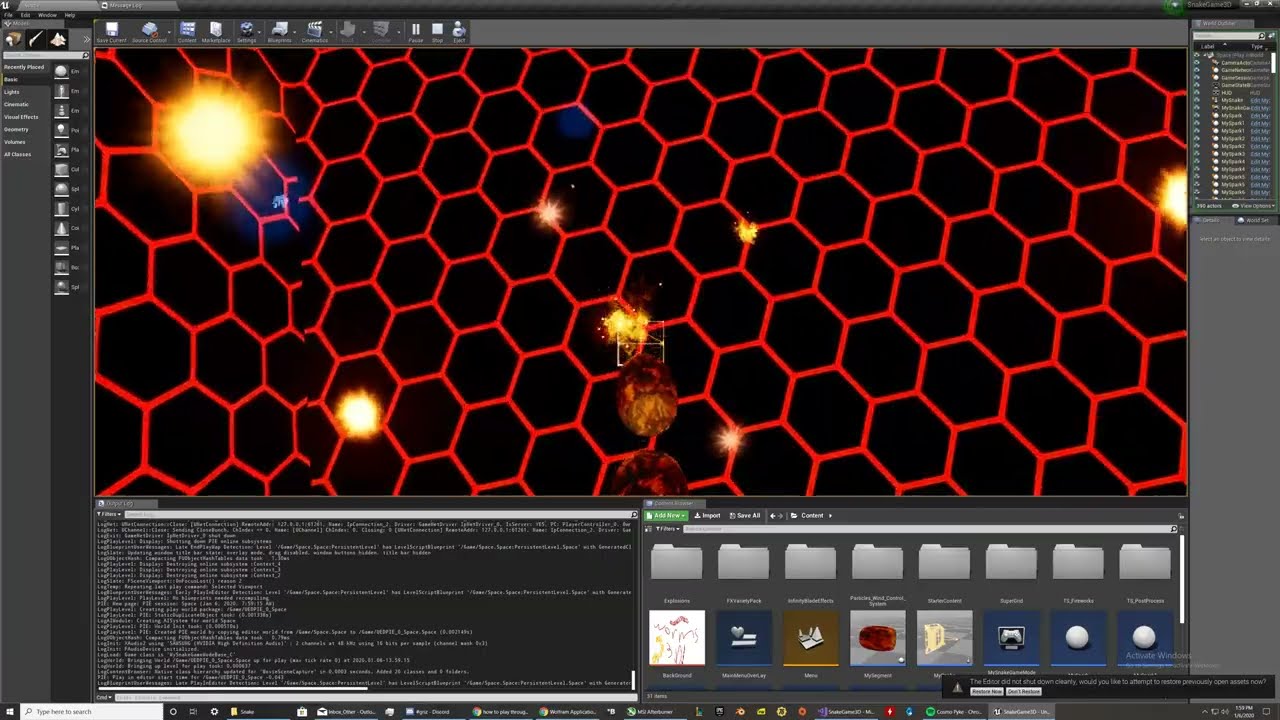
This is a demo of the C++ writing 3d Snake Game that I have programmed, the segment spawning, following, destruction, collision, and much more was programmed by me.
 mystic holly
I am importing a reload animation for my gun, when I import it the animations are seperate
The mag is a different animation, and the gun moving is also a separate animation
sterile tulip
Hello unreal slackers how is it slacking how many games have you slacked today
quiet finch
getting a working game because my unreal engine keep crashing
 honest rune
Are custom USaveGame types mapped 1 to 1 to their own file for each type you use?
quiet finch
whever i test with a custom model
honest rune
such as: USomeSaveGame saves to SomeGameSave.sav and USomeOtherSaveGame saves to SomeOtherGameSave.sav?
Ooh the SlotName is the resulting filename?
 real patrol
is there a certain channel discussing particle effects would fall under?
honest rune
 whole tree
Toad, are you using joints? is there a root bone which the two other animated joints are parented to?
 pallid talon
Question, on the "CityParkEnvironmentCollection" that was recently released. There are a LOT of HierarchicalInstancedStaticMesh, but their objects are an "Actor" that doesn't allow you to edit. How is this created? I'm using the benches as an example:
plush yew
anyone able to see why this is failing , its doing my head in
 plain leaf
Hey, when I import my character mesh from blender only two of the bulb things on its head have a transparency to them instead of being solid like the rest. Any way to fix this?
plush yew
are they using the same material ? , and have they been uv unwrapped ok ?
also what way are the normal facing
plain leaf
It's all the same material
The UV unwrapping is messed up a bit I think since I can't texture paint it properly right now
The bulbs also go transparent from any direction you look at it from
rough knoll
where is the parent actor variable
1st screenshot is from the struct and 2nd is from the data table
 winter zenith
Hey guys!
I had a question
I setup a sensitivity bar to change sens
and for some reason whenever my fps drops the mouse skips
 autumn grail
hello , which node i should use to change a valor by time
in the tutorial the guy use dynamic parameter
i have tried "time" node but dosent work
i cannot use time and sine becasue i want a linear progression
 dense knoll
how do i intigrate steam api v150 into ue4.25, ive tried initializing it via DefaultEngine.ini but it wont work
autumn grail
@plush yew there is no node timeline
plush yew
so it is a material thing, I dont know much about material nodes. I know you could use a parameter and change it in bp using a timeline to get that effect though
may not be what youre looking for though
autumn grail
No i want to make the valor of the world offest to change by time
i know time node + sine node
but it make bouncing
i want the flames of my fireball to burn linearly
 coarse turtle
The current preview version of UE4.26 has the water plugin but it doesn't work yet right??
open wadi
AIDS
 coarse wigeon
@coarse turtle It is not in the first preview it will be in the next tho
So 4.26 preview 2 will have the new water system
coarse turtle
Good to know thanks
restive yarrow
HLOD says rebuild, but the HLOD transitions are still working, should i rebuild or no?
plush yew
can someone PLEASE help me figure out why i get these artefacts (model is movable, already rebuilt light, lightmap is large )
 autumn elbow
As far as design, Do you guys think the inventory, and crafting system should be in the same system? I can't really think of any cons for making crafting apart of the inventory system.
 peak acorn
@median wigeon good stuff
rough knoll
the fuck man
why does ue4 crash when i close a project with compilation errors
now i cant fucking open it
celest cairn
@autumn grail i think panner node is what you looking for, check this:
https://www.youtube.com/watch?v=24mfLY7aQFQ

What is the Material Panner Node in Unreal Engine 4
Source Files: https://github.com/MWadstein/wtf-hdi-files
rich furnace
hey guys is there a way to do a log/profile to see which mesh/actors is causing bottlenecks
it seems like when my camera points at certain "busy" area it chugs to a halt but not when I look at other areas
pliant rose
CyberRace, any guidance towards vocabulary id or info link on: spawning actors while playing game/edit level while playing level > for BP that contains couple of texts.. i wonder if the question makes sence..
@plain leaf in edit mode shift+n to normalize , or smth.. the part you need is inside, got to flip
@rough knoll sometimes you have to refuck your work from start again, mb restoring lvl from auto back up in saved folder helps?
rough knoll
nope, im just accepting the fact that i lost 2 hours of work
atleast the whole project didn't get lost
it sucks dick but oh well
pliant rose
got to wipe it up, to sequre
speaking of which, its time to make a copy of mine... before level disapeared
 zinc oracle
any suggestions for where to learn UE4?
rough knoll
i've been getting alot of crashes lately
@zinc oracle there are getting started tutorials
zinc oracle
nice, where?
rough knoll
well what game are you aiming for
i started out from a guide for the game i was trying to make
hearty walrus
how do I run something every 2 seconds?
using a delay just resets itself
what the fuck how the fuck why the fuck does this code work
hearty walrus
what
okay so new problem figured that all out
the text still updates based on tick
restive yarrow
Does UE4 support crossplatform? and if i were to put it how can it be done?
 trim silo
does anyone have any links on how to add particle effects to UI?
I have this fire as well as the blue fire image and i want to animate it in Unreal
so it kinda flows and glows
any tips?
 civic lance
Guys can you recommend some interesting game concepts/topics that are good for an honours project? Like volumetric clouds, etc etc
 lucid jetty
umm guys

Why am I getting japanese errors?
Related to "is this a built-only thing?" o_O
 thin mantle
What is the Ideal poly count for zombies in a zombie survival game where I can have around 50 zombies at once spawned?
 neon pewter
hello i just went back to unreal after a couple of years of not using it and it seems very buggy any ideas?
exotic thicket
Maybe a graphics driver issue? Make sure all of that is up to date
neon pewter
my graphics driver is updated and i have RTX 2060 Super
 steel crown
Lately i have a weird issue in the editor. it seems i flipped some setting somewhere accidentally, but i dont even know where to start looking:
All vectors and linear colors are expanded by their components in the details panel
not just for post process but every actor
autumn grail
hello , i want to make a simple material wich deform the mesh with world position offset , it works fine ine the material preview , but when affected to a mesh , the offset move the entire mesh and dont deform it
 lime ridge
Hi guys! Could anyone help me with a thing i'm working on? I'm making a first person game where you need to run and hide. I have recently finished the animations I made for the character to hide inside a locker. I'm having a few problems though: (Models and animations made in blender) 1. The arms of the character have a root motion for the player to move from point A to point B (inside the locker), but when activating root motion in UE4, only the rotation works. 2. The camera has different animations, just like the arms and the locker (animation for opening, idle and closing) but importing the camera in the Sequencer doesn't let me choose which animation to play. 3. I don't know how to add Sequencer animations to the first person camera.
i'm sending the animations to give more context
you can see the thing between the shoulder bones, that's the root bone. I would like the player's position to depend on the one from the root motion but for some reason unreal removes all root motion animation (Yes, i have already checked enable root motion)
 radiant haven
does anyone have any links on how to add particle effects to UI?
@trim silo
Use FlipBooks for UI animations
Its like stop motion
get a greenscreen Fire effect and make stop motion images out of it Import into UE and create FLipbook for thos
trim silo
Thank you! Will look into that!
radiant haven
np
Guys can you recommend some interesting game concepts/topics that are good for an honours project? Like volumetric clouds, etc etc
@civic lance Brainstorm My Friend :0 What you want into your game We cant tell so...
alpine laurel
so i have 2 cameras as the child to the mesh for my character. the fps camera and the zoom camera. is there a way i can hide the mesh for the second camera?
radiant haven
hello , i want to make a simple material wich deform the mesh with world position offset , it works fine ine the material preview , but when affected to a mesh , the offset move the entire mesh and dont deform it
@autumn grail
Intensety is too high, in your preview its a sphere if you apply to other meshes itll will get other results
@alpine laurel https://forums.unrealengine.com/development-discussion/rendering/84116-hide-certain-meshes-from-a-specific-camera
Unreal Engine Forums
For discussions about Materials, Textures, Lighting, Particle Systems, and Post Process Effects.
alpine laurel
i know about that. just not working
this what it looks like
the problem is because i have 2 child cameras if i put owner no see, it will be invisible to both
radiant haven
@alpine laurel Currently WOrkin on it ah BTW Send Help Pls
alpine laurel
you rendering?
alpine laurel
compiling shaders and stuff slows my computer down like crazy
radiant haven
thing is that I am workin in a crazy huge enviroment atm
U see the small dot in the 2d top view
yeah thats the grid
alpine laurel
damn
alpine laurel
so as you can see i have the 2 cameras as a child of my characters mesh. when the user right clicks, it activates the second camera
i want to make it so the mesh is invisible to the second camera
radiant haven
@alpine laurel What about checking if the camera is active and make the mesh invisible ?
Use Hide Component or actor...
alpine laurel
thanks. i forgot about the visiblity node somehow
radiant haven
np
alpine laurel
damn it didnt work
alpine laurel
yeah thats what im doing
my other alternative is just set a scope ui with a black border to hide the gun
how do i make it so a skeletal mesh in my character is invisible to that player, but still casts a shadow?
already did
right after i asked i found it
covert hedge
uuh i have two meshes right next to each other, one of them is supposedly at x=-51 and the other is x=-349? wtf
I'm so confused
Changing between relative locaiton and world location doesn't do anything 
 faint veldt
Can anyone see an issue with this? It doesn't change my point light
I've tried printing the color as a string and it does seem to be making it correctly every 3 seconds, but the light color just doesn't set
plush yew
I bought 64GB 3200mhz DDR4 Memory today. Is that enough for unreal engine?
exotic thicket
@faint veldt is the light set to movable?
faint veldt
Yes
exotic thicket
Try using a range of 0 to 1 instead of 1 to 255
not sure but it might be using that instead
 brisk nimbus
Quick question...Trying to migrate a level to another project, but its not working properly.
Its just a level I used to test my main character and shading, and after migrating to another project, materials are not assigned properly/not working.
I just clicked on the level, migrated and left everything checked for export.
Also...How to I go about copying the migrated assets (assuming I get it working) to the proper folders in the master project?
faint veldt
not sure but it might be using that instead
@exotic thicket That actually worked wow lol, thanks
 bitter iris
weight painted, and rigged, but then character just poof's any ideas? no clue https://gyazo.com/128022f7635d5f3a601aff0107020bee

oh shoot yeh, hmm thanks 😄
will sort out the scale
 random holly
Hey guys! Anyone available to help me out for a minute please?
 half turtle
anyone knows how ot make unreal generate thumbnails for actors that use sprites?
 grave forge
@neon pewter i turned my setting down to low or medium on everything so it runs a lil quicker i still have to wait for few things as i add them and so on but they aint too bad maybe this will help you im thinkin maybe its a ram issue im only on 16gb but it can hit 100% if i try to do too much at one time ...
neon pewter
I found the issue
It was the raytracing
Apparently unreal goes nuts with raytracing enabled
Even if i have a gpu compatible
grave forge
i am looking for someone who is a little bit more experienced in the blueprint area than am cant be hard ive had a pc for 2 weeks or so lol but i need a working inventory system putting together if anyone had the time or has one already knocked up they dont mind me using ???? im just dipping my toes into the game develpment world but am looking to create a survival based game with hunter gathering aspects and also crafting anyone fancy helping me out for the pure joy and learning experience i would much appreciate it...... kevin.b.g.moore@gmail this best way to contact me day to day i would also like someone with the ability to import a character mesh and materials to make it look bit more legit... just basics there...
half turtle
inventories themselves are not hard to use or make, the difficult part is the UI for them...., its 11PM over here but in about 9 hours when i wake up if you want i can help you with the inventory
grave forge
inventories themselves are not hard to use or make, the difficult part is the UI for them...., its 11PM over here but in about 9 hours when i wake up if you want i can help you with the inventory
@half turtle i was following a video on this i managed to pick items up but cant get the HUD display to work or the picked up items displayed... ide appreciate the help but in 9 hours itll be 1am lmao maybe we can arrange a slightly better time as school run will kill me that morning haha
half turtle
well ill probably be on all day long tomorrow, so it can be either tomorrow a bit earlier than right now
or in your morning
i can already guess what you are having problems with, either you are not updating the UI, or adding the picked up item to our struct or array or both
 tacit onyx
Has anyone here used the Voxel Plugin and the UE4 foliage painter? Foliage painter is ignoring the voxel landscape. Video in January shows it's possible?
grave forge
@half turtle your like 7 hours ahead of me ill be back on by around 10am my time tomorrow for good few hours i believe that will be around 5pm for you if thats cool??
half turtle
sure
deep viper
I watched a couple of videos on world composition, I think I have a good idea of what it is. (breaks a big landscape into smaller more manageable levels).
For a game with a simple open world map, it's a no brainer. Just make a single [world composition] map.
But I wonder if it is possible / encouraged / intended for more than one map/level to have world composition enabled. (e.g. have multiple separate large levels subdivided into smaller sublevels). I don't see why this shouldn't be the case, but I still haven't found a resource indicating yes/no.
 cosmic veldt
I'm trying to save some space noticed how much space that \AppData\Local\UnrealEngine takes.
Does anyone know if it's possible to reduce the size of this folder does all of the files here necessary?
exotic thicket
I would imagine you can get rid of those version specific folders if you're not using those versions of the engine anymore
 vale silo
Does anyone know if Alembic geometry is rendered on GPU or CPU on mobile (Vulkan) platform? How is the performance compare to animated skeletal meshes ?
light thunder
What determines why unreal won't save editor settings, like favorite folders or customizations ? I keep doing things like this and it doesn't save between sessions
pliant rose
Excuse me,. can i or not record video with cine actor in sequencer OF audio visualized niagara particle AnD capture song as well or not? fuckery
 real ermine
Steam does not work in "Standalone Game" mode. But it works when I build the game. What could be the problem?
plain leaf
@pliant rose Cheers, will try that
 zinc shore
@real ermine make sure you have steam open when doing standalone mode or else it won’t work
plain leaf
Also anyone have any advice for not being able to actually "launch" a game from the editor? It doesn't work on 4.25 or the 4.26 preview, but it does work on 4.24
I've tried using just a fresh project each time, updated graphics drivers and there isn't much available on forums to help with this
real ermine
@zinc shore its open, but it doesnt work. The label at the bottom right does not appear
zinc shore
What engine version are you using
real ermine
4.25
 quick kelp
I'm having a problem where i have a UI button that i want the user to be able to hold down, everything works except that even though i hold down the UI button, it goes up on its own after few seconds. anyone know how to fix this?
update: problem resovled, just had to uncheck the focusable box for the button
zinc shore
I haven’t used steam in 4.25 but I have had a problem were sometimes steam just won’t see the standalone mode in 4.23 so this could be the same problem try restarting the editor or your pc if it still doesn’t work because that might fix it
 restive eagle
you need to make some changes in the engine.ini as well
like adding devappid
An overview of Online Subsystem Steam, including how to set up your project for distribution on Valve's Steam platform.
zinc shore
It should also have ID of 480 and if it works steam will say you’re playing space war I believe
restive eagle
well you wouldnt leave that field empty for sure
real ermine
you need to make some changes in the engine.ini as well
@restive eagle I did everything according to the instructions and it opens when I build the game
I haven’t used steam in 4.25 but I have had a problem were sometimes steam just won’t see the standalone mode in 4.23 so this could be the same problem try restarting the editor or your pc if it still doesn’t work because that might fix it
@zinc shore OK I'll try
restive eagle
just tested that on 4.23 and I only changed the config files like in the docs and added advanced steam session plugin
everything works fine in standalone
 lucid grove
Sup people
restive eagle
@real ermine also it can be that you dont have the binaries built for editor/development
alpine laurel
this really starting to piss me off. every time a make a new var, this happens. been doing it for a few days now. whats up with it
real ermine
@real ermine also it can be that you dont have the binaries built for editor/development
@restive eagle there are
exotic thicket
Mine does that unknown tab thing as well but only sometimes, it's pretty weird. Editor restart fixes it usually
lucid grove
Kinda stuck with array. I want to spawn 3 characters and made them a squad (like in RTS). Basicly after spawning them i can made an array, but cant figure out where to store it when click on squad.
This is my "squad"
With RMB i choose squad and AI move to mouse cursor.
alpine laurel
Mine does that unknown tab thing as well but only sometimes, it's pretty weird. Editor restart fixes it usually
@exotic thicket i have restarted it a few times already. i do that whenever it acts weird, but it still does it
 worthy fox
Just installed 4.26p1. Where do I find the new water/lake/ocean stuff?
lucid grove
nwm, figure it out
hearty walrus
how can I fix this colour banding?
vague scaffold
Why does my blank new project have to compile 6,700 shaders?
Is there a way to speed up new project creation. I just want a blank slate, to quickly open.
 clever bone
Im pulling my hair out over this problem
I have a BP with radial forces on it
which works
I add that BP as a child component to another BP
now it doesnt work
whats up with that?
vague scaffold
Perhaps it is inheriting the transform of the parent?
 agile thistle
@worthy fox shouldnt it be in the place actors window
clever bone
I dont think so @vague scaffold
the actor is from a custom C++ class, is there anything I need to add to make it work
the parent actor
worthy fox
@worthy fox shouldnt it be in the place actors window
@agile thistle Turns out it won’t be released for the public in a few months... 😭
clever bone
I've added forces in there without the child component and sitll doesnt work
agile thistle
@vague scaffold install the engine again, it could be changes in the default content
but idk honestly
vague scaffold
Right, download the 68Gb again. I don't think so...
agile thistle
no no, just create a new engine version
should be not more than 10gb
sry for confusion 😄
worthy fox
Timestamp 4:50 😑

Get a peek at the upcoming experimental Water tools releasing in UE 4.26! Ryan Brucks will start with a breakdown of the new Single Layer Water shading model and then show how Water Bodies create cohesive water features. We will then go over new features such as Gerstner Waves...
vague scaffold
The funny thing is, when I load up another project that is way more heavy than a blank new project, it comes up quickly.
agile thistle
oh yeah well its not a stable version better leave it out of it
yeah a new project always takes more time compiling shaders the first time its booted
vague scaffold
Is there any way to make a blank project have no shaders?
deep viper
@vague scaffold I believe that if you make all your light sources "moveable" it will not bother baking lighting until you add static/stationary light to your scene. Though I might be confusing shader compilation with something else.
 wooden vine
Guys, did someone tried to use send to unreal from the microsoft store version of Blender? Dont work for me, but looks like i do everything right, as documentation says.
vague scaffold
I feel like I am loading some template when I use the Film/Virtual Production Blank freature from the launcher. That template is way too heavy. So I would have to modify that template so it applies to all new projects. Not sure where that is located or how to do that.
rough knoll
can i find a variable by name?
 digital rover
is there any solution for unreal vehicle physics replication lag?
 regal mulch
@rough knoll To first answer the question: In C++ you probably can. Not sure how straight forward, but you can access properties of class via the reflection stuff UE4 has build in.
I would however suggest you state why you want to do that, to first see if you even need to find a variable by name.
rough knoll
i can't define an actor object reference as a default from a structure into a data table
regal mulch
@digital rover #multiplayer and I'm not sure what you mean, so if you post the question there, be a bit more descriptive.
Generally speaking, Physics + Multiplayer in UE4 is a no-go. Vehicles are usually client authoritive.
rough knoll
i have a variable in one of those actors
i want to define the actor object reference on begin play, and then get a variable by name from the actor object reference in the data table
as i can't just get a variable from an actor ref
regal mulch
i can't define an actor object reference as a default from a structure into a data table
What?
DataTables are static data. They can't have any references to things that exist only runtime.
So yeah, you can only reference a class of your BP, not an Instance.
Not quite sure yet what that has to do with "Finding by Name"
i want to define the actor object reference on begin play
How do you want to define that? Spawn the Actor or is it already in the Level?
and then get a variable by name from the actor object reference in the data table
That sounds like a strange setup. If you have an Instance of the Actor, why not accessing it directly?
as i can't just get a variable from an actor ref
Why not?
plush yew
Is it normal that my ue4 is running really slow when i literally have 64gb 3200mhz ddr4 memory???
regal mulch
If it's a default value, you could even get the ClassDefaults of the DataTable class entry.
Is it normal that my ue4 is running really slow when i literally have 64gb 3200mhz ddr4 memory???
Depends on the project you open I would say. Also CPU and GPU.
plush yew
is it literally a brank new project
plush yew
for example, when i drag a tree model to foliage, it freezes my ue4 for a really long time
regal mulch
Is that tree model very high poly maybe?
plush yew
i have rtx 2070, i5 9600k, 64gb ddr4 memory 5 tb storage
its from the free pack that epic released
the demo thing or whatever its called
regal mulch
Which of all the ones they released
plush yew
lemme check 1 sec
regal mulch
I would suggest you keep your resource monitor (the one from the task manager) open and check what is locking up.
plush yew
okay
regal mulch
CPU is not the strongest now-adays and whatever you have for a hard drive is also important
plush yew
Im using a tree from "Open World Demo Collection"
regal mulch
They should be optimized, so that's fine.
We have 2080 Supers with i9s and strong M2s at the office and sometimes the Editor locks up. Can't always be helped.
The CPU and whatever you use for storage could be a bottleneck though.
plush yew
i would guess its my cpu since i run it on a nvme ssd
it can't be my gpu since i have a rtx 2070 and it can for sure not be my memory
regal mulch
Yeah, you can see the CPU usage
Yeah I also doubt, GPU stuff is rarely a problem in new projects :D
rough knoll
What?
@regal mulch i have a variable named HasHolo? in a blueprint of my gun
i want it to get that variable and set it to true
and i want to check on tick for each gun if hasholo is true
if it is show the holo scope, if not don't
so i would get the actor class ref of my equipped gun and check if hasholo is true
you can't get variables from a class
regal mulch
Does "HasHolo" change during the game?
rough knoll
yes
regal mulch
You can get variables from a class
But only the defaults
If HasHolo is a fixed statement on each gun class, then that would be enough
However it feels more like you are lacking something to get this going easily.
I don't see the need for any of this yet. If you spawn your Weapon, you can modify that boolean on it, as long as you have an reference to that instance.
If you don't have an Instance or no weapon spawned yet, then why modifying a boolean? It kinda makes no sense to me yet.
 scarlet birch
Why check for it each tick instead of responding to it only when it changes?
 obsidian nimbus
the kite demo trees are kinda heavy
when you drag the same tree in the level again it should be instant tho
thick herald
They should be optimized, so that's fine.
@regal mulch Unfortunately that is not the case. many of those assets are terrible,
regal mulch
Well ok
rough knoll
@regal mulch weapons are spawned but the spawned weapon is not what is attached to the hand
the weapon on the ground that you pick up is irrelevant to what attaches to your hand
whats attached to the hand is the skeletal mesh defined in the data table
 fossil trellis
Man I really want to develop an indie game
but I can't comprehend programming
any good tutorials or courses maybe?
thick herald
Try the official Learning Hub, and there are tons of tutorials on youtube etc.
fossil trellis
@thick herald Thanks for responding. I know that there are tutorials on youtube but it doesn't focus on the genre type of game I want to code, there is only shooter or mobile tutorials
I want to create a game like "The first tree"
which is an indie game
kinda like a story driven game with awesome visuals
 tired lynx
hey, is there any way to install the megascans bridge plugin for unreal 4.26 preview?
regal mulch
@rough knoll Sounds like you don't do yourself the favor at that point. Defining something that obviously has more properties than just "SkeletalMesh" as just that comes with problems.
Pick up a Weapon by spawning a WeaponActor class and attach that. Then your setup should becomes a lot easier.
@tired lynx Usually by making sure there is a version compiled for that. But Preview versions shouldn't be used for production, so I doubt anyone invests time into compiling their plugins for it.
Just stay with 4.25 until 4.26 is fully released.
tired lynx
@regal mulch i wouldn't be using 4.26 if i didn't need 4.26
i guess i can import my assets into 4.25 and then open the project in 4.26 to add volumetrics and water stuff
regal mulch
Again, 4.26 preview verisons aren't meant to be used for production
tired lynx
ok
regal mulch
Even if you "need" 4.26, you should wait until it's released. You are basically using a test version.
There will be multiple Previews before it releases and each will serve as a "Find our bugs" candidate.
tired lynx
i understand
rough knoll
@rough knoll Sounds like you don't do yourself the favor at that point. Defining something that obviously has more properties than just "SkeletalMesh" as just that comes with problems.
Pick up a Weapon by spawning a WeaponActor class and attach that. Then your setup should becomes a lot easier.
@regal mulch the weapon system came with the inventory asset so i'm kinda just working with what i have
regal mulch
That's all I can tell you though. Gotta change the system then a bit.
rough knoll
i guess i have to find some other way because i don't really wanna change it that much
the most i can do with my system is put the attachment on the gun
but it either disappears every time you go off the weapon, or it gives every gun the weapon
fossil trellis
is it normal when compiling a game that it's stuck on (1)
 whole turtle
Hey there! o/ Does anyone have any suggestions/resources on how to achieve proper displacement in UE4? I'm getting tons of issues with the setup I've found: I have static meshes flickering a lot, tons of distortion, jagged lines, etc.. follows a printscreen of a quick material I've made to test this out:
 old sonnet
not sure where to ask this but is anyone having issues opening levels? I have the most recent Unreal version, made a level and can't open it. I already tried restarting my laptop
rough knoll
@regal mulch the weapon system came with the inventory asset so i'm kinda just working with what i have
@rough knoll i managed to do it
i made a skeletal mesh array named "weapons with holo", when equipped get the skeletal mesh of equipped weapon and add it to the array, and when you swap weapons check if the equipped skeletal mesh is in that array, and if not, it sets the optic mesh to none, if it does, it sets it to holo
humble yacht
Does anyone know what i can do with a simulated proxy character ?
 turbid plover
anyone had to fight the steam controller settings to get a controller to work?
the controller works fine in my project, but when i build it and play it, steam seems to start its controller software and it makes the controller not work
tired lynx
what would people say is the best workflow for transferring entire blender projects over to unreal?
 fierce forge
i there a way to use c# in ue4 like c++ ?
pliant rose
@fossil trellis copy past all from utube until you can build your game.. u got to understand the code.. be one with the code.. and it will be one with you
rough knoll
how can i optimize planar reflections
i have a massive one for my water and i get terrible lag with it
pliant rose
delete it
cedar jetty
@rough knoll have you tried turning the scaling quality down it could be something where your GPU simply can’t handle the max settings by default
 frigid needle
@fierce forge short answer is no.
fierce forge
@plush yew like UnrealCLR ?
rough knoll
@cedar jetty yeah i can turn it down to like 1 and still lag
(not an asset problem, my assets only have around 15-30k tris each)
unique timber
What do the yellow and orange dots mean in the World Outliner?
cedar jetty
@rough knoll you might wanna turn down how many triangles are drawn cause unless you have like “NASA pc” Of course it’s gonna lag
cedar jetty
Also I meant like changing the settings like graphical settings from MAX to Medium
 shy totem
I want to restrict a static mesh (vr motion controllers) to the x axis. clues?
sterile tulip
Hello
I have a question
Does the publisher or the developer get the payout from steam? Or does steam has a feature inside to split the income directly on steam between the publisher and developer? If I can get an answer it would be really helpfull!
thick herald
You get the cash and have to pay whoever you owe it too
rough knoll
how does one do buoyancy
scarlet birch
@hearty walrus It's not a bug. Arrays are zero based. You're trying to access an index that doesn't exist.
rough knoll
how do i check if a camera is inside a post process volume
and if so do something
i can't drag in the post process volume into a blueprint from the components list
 grim juniper
Best bugfix in 4.26. SSR works without TAA again
Also, the real time capture for skylights is amazing
 hasty wharf
how difficult is it to make a bag im carrying flimsy enough when i drop it on the ground it would flop around like in real life? instead of being a stiff board
quick kelp
anyone know how i can categorize areas of a terrain? i have game where the player places buildings but i only want him to be able to place buildings in certain parts of terrain, whats a possible way to achieve that?
 gilded crystal
Hey guys, I'm very new here. I got a question on importing models on Unreal. Say I want to import a room into Unreal, is it better to simplify the the whole thing (just planes) or is it better have some subdivision with even polygons?
hasty wharf
i migrated a complete room into my project
easiest way i found was to make a prefab then migrate that
so i didnt have to recreate the room again
just drag and drop
flat axle
does anyone know how to count how many times an interface gets called?
 toxic prairie
That's sculpting feature looks awesome anyone got some advanced modelling done ? https://youtu.be/iPdknzGqieE

In this free tutorial we will go over the fundamentals of 3D modeling and sculpting within Unreal Engine! We will only use the tools available in UE4 to create a delicious doughnut completely from scratch. 3D modeling in Unreal Engine is great and it can be very helpful for cr...
 quick lance
Well uh, I just started and I can't use the engine because I need a .NET framework SDK of version 4.6.0 or higher. Should I just go online and install one? What is it?
?
quick lance
C++
flat axle
open visual studio and you will be able to install it from there
quick lance
Yeah, I've installed it, but it ain't detecting it or something
flat axle
if youre positive you installed the right ones im not sure what the issue would be
sorry :S
quick lance
No worries, thanks for trying to help me out :)
 odd yarrow
Guys how do I re-import the starter package in my project? I accidently deleted the 3rd person character and all the blue prints for it. 🙂
half turtle
so anyone knows how to fix the issue of the engine not generating the thumbnails for sprite actors?
 signal jetty
 short trellis
hello there, i have done some work in ue4..i would like to ask is there any challenges here we can take to improve? or i have to improve by myself?
any road map maybe?
thats my previous work inside ue4
 cedar solar
Hey all, I am trying to understand the best way to change an enum in one BP, from a different BP. in my case there is a projectile attack BP that has several projectile types switched on ENUM, id like to be able to change that enum in another BP but I don't understand quite how to access that. I feel this would be a cast to the BP but in that case im not sure what the object reference would be. Any help is appreciated.
plush yew
super frustrated i am unable to access the multi-user services
ive tried every combination of plugin settings
my partner and i are connected over an intermediary vpn
watching his screen this button lights up and the searching completes
 elfin stream
So the new water stuff in 4.26. Are they using Gerstner Waves or FFT Waves?
 rustic leaf
Anyone know what the preview2 release schedule is since the water didn't make preview1?
 dark briar
can i keyframe sockets?
quick lance
Hey y'all, I'm getting this error when trying to start my first Unreal project.
ERROR: Could not find NetFxSDK install dir; this will prevent SwarmInterface from installing. Install a version of .NET Framework SDK at 4.6.0 or higher.
I tried installing a version of the .NET Framework SDK and I dunno if it was the right thing or what but it still ain't working
scarlet birch
Anyone used the ListView widget much? I'm having a rough time getting the widgets I'm adding to the list to size the way I want them to.
quick lance
Oop I got it working :0 Time to start my first Unreal project!
scarlet birch
Ugh. I solved it. After posting I realized the button had a gap between it and the border of the listView entry. I added a little negative padding to the top and bottom of it and it works fine now.
scarlet birch
is it using cpu?
plush yew
Is there a wag i can share my game to my friends?
quick lance
well, C++ is NOTHING like C#. That's pretty crazy. What are these #'s for?? I only ever used them for denoting regions in C#. This stuff's waack 🤠 Very interesting
A : symbol?? Only ever used those in switch statements. This is gonna be a bumpy ride
It's slowly becoming apparent that next to NONE of my experience with C# and Java is gonna come in handy here
plush yew
don't say that!
Your experience will be worth every penny, trust me
read a book if you have the time, or if you don't do like me and watch TheCherno videos
quick lance
Oh yeah, this TheCherno guy looks like he'll be pretty helpful. Thank you! I had no clue where to start lmao
 honest vale
programming java is programming
as is programming c#
as is programming c++
language specific things like syntax etc isn't what matters
it's how you think about the problems in general
quick lance
Well, yeah, I mean I didn't really mean that I was essentially without any helpful experience for learning C++. I suppose I was just a bit overwhelmed looking at this stuff. Like, destructors?? Not gonna lie, C++ seems so much more powerful and efficient if you've got a firm grasp on what you're doing
coarse turtle
Is there any alternative to ImposterBaker plugin but for UE4.25?
quick lance
But that's a good way of looking at it :) Programming has definitely taught me a different way of thinking
honest vale
no need for destructors in UE 4 generally 😛
quick lance
Yeahh good point. I was trying to think of situations where I would need to use a destructor and was kind of drawing a blank
scarlet birch
@coarse turtle https://docs.unrealengine.com/en-US/Engine/Content/Tools/RenderToTextureTools/index.html ?
Page that lists multiple links to pages that expand on the Render to Texture Blueprint tool
 dapper oak
so im trying to get setup to deploy games onto the oculus quest... I was searching around and apparently 4.25 needs android studio. Does that mean i can remove Codeworks from my PC or do I still need it
coarse turtle
@scarlet birch I followed one of the guide to create material. But how do I create the imposter mesh?
scarlet birch
It's the material that does it. It's sprites. Look at the part that's labeled render 3D imposter sprites.
feral sierra
it is possible to put multiple material on an object with colormap in Unreal? Without using Substance
scarlet birch
But to be honest really good LODs has given me pretty good performance a lot of times.
coarse turtle
That's the guide I followed. So let's say I updated the trees material now how do I add to my level?
scarlet birch
add a material slot to the mesh, set it to the imposter material, under the LOD options set the material for the LOD to the material
At least that's how I did it.
feral sierra
@scarlet birch what do you mean by imposter material? colormap or the one I want to add?
feral sierra
this action doesn't need specific settings in Blender? I saw in old tutorials for 3Dmax it needs to set the material ID
scarlet birch
Nope.
feral sierra
ok
then you apply the material by polygon/ vertex? it is possible through a color map?
scarlet birch
It really doesn't matter what the mesh is. It can just be a quad. At least that's the way I did it. I'm no expert on it though and I ended up not using them as performance was better for me another way.
You just render a sprite based on the view angle.
coarse turtle
Did you try the ImposterPlugin, if it works on UE4.25?
scarlet birch
Isn't that the same thing that is now in the engine?
coarse turtle
It has some automation, it seems, beside updating the mat.
feral sierra
ok now I got it, with blender, you can just put 2 materials on your mesh, put colors on it as a colormap would be on the selected faces, and then in Unreal in will be as a colormapped object so you can just change materials
 spiral flint
why is the arm texture not loading
feral sierra
@scarlet birch thanks
scarlet birch
I think we got our conversations crossed.
coarse turtle
Yea I'm going to try both again. TO see if it works.
spiral flint
sir
coarse turtle
If I use LOD on my trees, the leaf get reduced, which is bad from distance.
scarlet birch
@feral sierra I wasn't talking about what you asked. I missed that. I was referring to what was asked about imposters.
spiral flint
sir
coarse turtle
@plush yew When I click on Render Frames, it doesn't do anything. https://gyazo.com/f1a3dd7d6186aadad20c45d22a9187b6

THe Burks plugin with this instruction https://www.shaderbits.com/blog/octahedral-impostors
 hearty walrus
@hearty walrus It's not a bug. Arrays are zero based. You're trying to access an index that doesn't exist.
@scarlet birch I know, that's what I'm trying to fix
scarlet birch
The array is sized 19, you're trying to access index 19. There is no index 19. If size is 19 then indices are 0 to 18.
Beyond that you didn't show enough to be able to assume more.
coarse turtle
@scarlet birch So my imposter mat appear blank

So when I took the screenshot, it created 3 files. Base, Normal, and I assume the other one is mask.
spiral flint
@plush yew thats too hard for my baby brain
coarse turtle
@plush yew THis version works for me. ucianoJacomeli/ImpostorBaker
plush yew
Hi, does someone know how to add a uv texture to a material via python?
I successfully created the material via python, now I want to add a texture. The texture is already imported in the content browser
feral sierra
@scarlet birch oh I see..
plush yew
I can no longer find where to invert middle mouse pan... help?
Everywhere I look online, it's telling me to go to a settings page that doesn't exist...
 earnest violet
Can anyone help me with cull distance volumes please? I have a large area full of meshes with one cull distance volume set to something like 35000 for the size and cull distance set to something like 35750 and objects are disappearing far too close. If I set the cull distance to anything higher than that is cripples my framerate! =/
scarlet birch
setup better LODs.
 orchid pine
Hey guys.. Is there a place I could go to ask a question?
lucid grove
Why my AI perception stops working when there is multiply targets?
For example my AI looking at target. When there is only one target and then its gone (dead for example) and other target appears - all is fine,
But when there is two or more target he only looks at one and ignores others.
I have simple BP: look at actor with tag, shoot, decrease hp of target. When HP of target is < 0 then it destroy actor.
As i said - one target at a time is woking great: look at, shoot, kill.
When other target appears - all great.
But if there more then one target - it doing nothing.
 stone steeple
When you press clean instead of rebuild in the engine source solution on your build server 
exotic thicket
@lucid grove are you using perception or how are you triggering the attack?
lucid grove
Simple AIPerception on shooter and AIPerceptionStimuliSource on targets
 shell compass
Does anyone know if the Content Examples and other engine feature samples are actually updated for newer versions of the engine, or just switched to work with newer versions without any new/changed content?
exotic thicket
I'm guessing you're setting a target variable or something on perception update, and the shooter then attacks that target?
lucid grove
I'm guessing you're setting a target variable or something on perception update, and the shooter then attacks that target?
@exotic thicket on perception Updated i set "Actor Has Tag" bool and if true - starting custom event. Custom event rotates shooter to target, playing animation, spawn emitter and cast to target to decrease its health.
Basicly perception only gives direction to target and sphere by channel "shoot" at it.
exotic thicket
Right
I think the problem is that you're basically setting a target and once that target's gone, then it doesn't know what to do next
So once the target is no longer valid, you could check if there are any other targets visible and pick one to attack
You can for example use "get perceived actors" which you can call on the ai perception component
lucid grove
oh, never thought that aiperception have its own nods. gonna try it now! thanks, will be back
lime ridge
Hey guys, do you know anything about importing camera animations from any modelling program? (I'm using blender). I have a camera with 5 different animation, but if I put the camera in a Sequencer, it doesn't let me choose the other animations
lucid grove
You can for example use "get perceived actors" which you can call on the ai perception component
@exotic thicket Thanks! It works like a charm
 carmine venture
Hey guys, i am new in this server... it would be really helpful if you answer my "compatibility" question on stack overflow
this one

Stack Overflow
I have Intel core i7 and DirectX 11 but also have
Windows 8.1
Intel(R) HD Graphics 520
Will my laptop run unreal engine smoothly?? or there will be some problem...?
Can i be able to make really high
pls ping me or directly answer on stack overflow
 celest plume
Hi guys! I'm completely new to Unreal Engine just trying to add locomotion for VR controllers trying to follow this tutorial at 7:32 here: https://youtu.be/zlzBifkjXDk?t=452
When I try to connect the addition node to "New Transform Rotation" I get this error:

How to make advanced joystick locomotion for VR in Unreal Engine 4. This is a similar style of movement seen in games such as Pavlov, Zero Caliber and Skyrim:VR. Topics covered: Blueprint scripting, controller inputs. This tutorial was made using an Oculus Rift S headset, but ...
"Float is not compatible with rotator". Not sure what I'm doing wrong. Any help would be greatly appreciated.
 sleek solar
@carmine venture you need to get real GPU https://docs.unrealengine.com/en-US/GettingStarted/RecommendedSpecifications/index.html
Minimum and recommended hardware specifications and necessary software for developing with Unreal Engine.
 rocky radish
"Float is not compatible with rotator". Not sure what I'm doing wrong. Any help would be greatly appreciated.
@celest plume you need to split the 'new transform rotation'
right click it and split it to floats
thin mantle
Let's say I've made a third person shooter, to make it first person I have to make a pair of arms and animate them or with the full body I can play with camera settings?
celest plume
right click it and split it to floats
@rocky radish Thanks I'll give it a shot!
rocky radish
np
earnest violet
I was using a cull distance volume for my foliage and I have now deleted it but the foliage is NOT showing up anymore. Anyone care to say how come pleease? 🙂
hasty wharf
trying to dupliate the lighting frmo one project to the other. where can i control all of this?
the one on top when you start playing the lights will dim etc and theres more shadows
 idle prawn
Hello, I'm looking for a 3d modeler.
Paying: 50 dollars.
Model description
Something like this...
Time: it will take 5-10 minutes.
 wary wave
flat axle
wary wave
flat axle
How do I wait for an actor to stop moving before I continue the code? (Without Delay) {{Blueprints}}
exotic thicket
depends on how you're doing the movement
if you know the target position, you could measure distance to target on tick, and once the distance is short enough you do the next task
there's an ai move to task or something like this which can tell you when the move is done as well
flat axle
Random Distance from origin, I need to wait until it stops moving (Throwing Dice)
exotic thicket
you could probably measure velocity in that case, once it's close enough to 0 you continue
flat axle
What nodes would I use to do that?
exotic thicket
get velocity returns the velocity as a vector
exotic thicket
well yes, you would do this on tick or such, and you'd use a branch to check whether it's still moving
if it's not moving anymore, then you do whatever you want from your branch
flat axle
okay Ill try that for now, Thanks very much @exotic thicket
How Do I loop a branch so It keeps checking and waiting for a true value?
lucid grove
Heya. Some small question regarding quanity of characters.
Just in test purposes i spawned 30 low-poly basic mannequin characters (reduced them to ~1000 triangles from 16k) and fps dropped from 120 to 38.
Thats kinda big impact. Whats the reason of that?
 raven sand
hey guys, this is maybe a noob question, but I have a player actor with its own camera, and when I only have PlayerStart in the level it spawns the player with the camera correctly ... but if I instantiate the blueprint in the scene the camera somehow spawns in his head
celest plume
np
@rocky radish It worked! Thank you!
rocky radish
you're welcome
deep viper
Anyone know how to delete a [WorldCmposition] level along with all its tiled sub-levels?
hasty wharf
any idea how i can replicate this lighting into my project?
my light fixture doesnt light up
autumn grail
someone can tell me how to launch instances of fireballs with my character
the niagara fireball is ready
 mossy tundra
hey guys, anyone familiar here with the Live Link Face app? I'm trying to export my takes to say dropbox or drive storage, every time it give me failed error at the end.
lucid grove
hey guys, anyone familiar here with the Live Link Face app? I'm trying to export my takes to say dropbox or drive storage, every time it give me failed error at the end.
@mossy tundra Had same problem. In the end i recorded face in UE4 with Live Link Face and exported it from there.
mossy tundra
Ah man... Does this mean that there's no way I can get those clips somewhere out from the device.. 😐
 lofty ingot
Anyone know how I could go about adding advanced mesh cutting in my game? Sort of like being able to cut individual parts of a mesh like a branch on a tree, instead of cutting along a plane and chopping the entire mesh.
carmine venture
@carmine venture you need to get real GPU https://docs.unrealengine.com/en-US/GettingStarted/RecommendedSpecifications/index.html
@sleek solar I have more than minimum requirements... But not have the requirements which is shown here....
Minimum and recommended hardware specifications and necessary software for developing with Unreal Engine.
it's normally used in epic corporation... And I don't have it... But passed all the minimum requirements
 glossy folio
Hey everyone, is there any way to influence the order in which skeletal meshes' animations update? I'm using two-handed IK in my shooter project and out of the gates, my hands lag behind my gun a bit. The issue goes away entirely when I move the arms' tick group to "Post Update Work", which tells me that this is an execution order issue. However, I'd rather simply tell one animation blueprint to run before the other rather than move components to different groups. Is there a way to do this for anim graphs? "Add Tick Prerequisite" doesn't seem to be doing the trick here.
sleek solar
Intel HD Graphics is not a real GPU and won't work well with UE4, so you are below the minimum requirements @carmine venture
also would be nice to specify which i7 do you have
carmine venture
Intel HD Graphics is not a real GPU and won't work well with UE4, so you are below the minimum requirements @carmine venture
@sleek solar 😭
also would be nice to specify which i7 do you have
@sleek solar dont got u?
sleek solar
Saying "Intel core i7" means nothing, there are too many of them, maybe you have some old gen mobile i7 (which are really slow)
carmine venture
@sleek solar dont got u?
@carmine venture OK got u... I can't turn my lap on rn... Will tell u about it tommorow....
sleek solar
you might be able to run ue4 but on lowest possible settings at ~30fps inside the editor
 vagrant hornet
15 boosts
dont you get the picture at the top of the channel list now?
server banner
flat axle
Does anyone know how to get this to work?
autumn grail
can someone help me: I can't rotate the half part of my emitters in niagara system
its a fireball ans its trails
the smoke and the sparks rotate in the BP
but not the meteors
i have found , the velocity was in world mode
i just set it to coordinate space local
 thorny quest
Fatal error: [File:D:/Build/++UE4+Licensee/Sync/Engine/Source/Runtime/RHI/Private/PipelineStateCache.cpp] [Line: 139] Shader compilation failures are Fatal.
UE4Editor_RHI
UE4Editor_RHI
UE4Editor_Core
UE4Editor_Core
UE4Editor_Core
UE4Editor_Core
UE4Editor_Core
kernel32
ntdll
can anyone tell me whats going on?
 ancient steppe
Hi I’m very new to this can anyone recommend a good way to learn this
 grim ore
check out the pinned message in this channel at the top, there are resources there
 meager nimbus
Is the socket subsystem still in use?
I can't seem to get my mesh to snap to another mesh's socket, it becomes it's child but does not move to the corresponding socket location.
Anyone know what's up?
grim ore
how are you attaching it?
meager nimbus
Right clicking on actor > Attach to > Other Actor in level > socket name
autumn grail
Please i want to choose the axis where the object is deformed by the world position offset
sterile tulip
,,No smoothing group was found on the fbx,,
(Car model import)
What is smoothing group information doing and why do I need it to import a car model?
grim ore
@meager nimbus afer you attached it, it should retain the old offset. Did you zero out the location on the item so it would go to the socket and not be offset?
meager nimbus
@grim ore Right, that's right. Thanks for pointing that out. Issue solved.
autumn grail
@grim ore can you help me i m sure its trivial for you
grim ore
I am not an artist so nope, it would not be trivial for me 😦
autumn grail
ok
 fast bronze
@sterile tulip I wouldn't worry too much about the smoothing group, different 3D apps export smoothing info differently. As long as the object looks good in engine then it's good to go
meager nimbus
Please i want to choose the axis where the object is deformed by the world position offset
@autumn grail World position offset is a vector.
What do you want to do with the axis?
sterile tulip
is it adding smoothing by adding more polygons at the edges or how does it work? @fast bronze
fast bronze
@sterile tulip no its not adding anything, essentially its just how unreal handles edge smoothing which is how hard of an angle an edge must be before it 'smooths' the lighting at that edge
but like I said its not really anything to worry about assuming the mesh looks correct. Its just letting you know that during the import process that it didnt find a smoothing group
lucid grove
Hello @grim ore can you give me a hand, regarding quanity of characters?
Just in test purposes i spawned 40 low-poly basic mannequin characters (reduced them to ~1000 triangles from 16k) and fps dropped from 120 to 38. Nothing really tough inside BP.
Thats kinda big impact. Whats the reason of that?
grim ore
use the stat profiling tools to find out why
could be your gpu, could be your cpu, could be too many draw calls, could be etc. etc..
lucid grove
I have 1070 GTX, nothing else on test map
sterile tulip
thanks alot man. I think I will pick ,,face smoothing,, in export then @fast bronze
grim ore
yep we can guess random stuff or you can run the profile tools, even a stat unit or stat scenerendering, and find out what is taking so long
fast bronze
no problem, if you're exporting from blender I believe you'd want to use edge smoothing but try it out and see what works
 wild flare
Is it possible for my ue4 project (which is in .exe form) to be ported to google sites?
 static bane
Hey guys,
My UE4 Project crashed a few minutes ago, now I'm stuck with about 90% of used physical RAM all the time (even after computer reboot) in idle.
I've checked the resource manager and found that I've got 2 UE4Editor processes with a lot of usage. I can't terminate them.
Also tried using cmd in admin mode with taskkill /pid 29032 /T /F - did not work...
Please help me to get going again...
PS: The screenshot is taken after PC reboot with epic games launcher and unreal closed
grim ore
if you did a full reboot, not just the fast shutdown, then the tasks could not possibly be in memory still
static bane
How do I perform a full reboot? I've turned the computer off normally and turned off electricity for a few minutes
shutdown /s /f /t 0?
i'll try that. thank you
grim ore
in your power options see if fast startup is enabled
 narrow mauve
Who wants to help build the ultimate storm chasing experience? 100kmx100km 1:1 scale multiplayer map to be released in UE5
static bane
shutdown /s /f /t 0?
@static bane used this, worked like a charm. Thank you so much @grim ore
 topaz blade
Can anyone help me to solve flickering in editor full screen mode🙄🙄🙄
grim ore
what is flickering
 vagrant burrow
No idea where to dump all my hype about UE5 so imma do it here: I AM VERY EXCITED and would like to never again deal with LODs on static meshes against pls ty
honest vale
you'll still do it for anything that has vertex offset animations
because that stuff only works with static geometry
/hype is kil
honest vale
LODs for foliage
vagrant burrow
ew ew ew
quiet finch
I have a skeletal mesh in my model, but the skeleton isnt appering
Like i can't select it for a mesh with a skeletal mesh
vagrant burrow
What are you trying to do precisely?
quiet finch
Import arms to use
But they are not appering in the selection because my skelton didn't transfer over?
vagrant burrow
So you have a static mesh, but not a skeletal one?
quiet finch
yes
vagrant burrow
Did you check your import settings?
quiet finch
It brought in skeletons with another model though
vagrant burrow
And are you certain the skeleton is being imported?
quiet finch
Using the exact same settings
vagrant burrow
It's possible the input just doesn't contain skeletal data
quiet finch
Unless Blender isnt saving it like it saved the other ones
My previous model that brought in Skeletal data was in .fbx
And i'm using the same saving format
Exact same settings and all
deep viper
Some odd actor called [Actor-1] keeps popping up again and again my game level no matter how mjany times I delete it. Any reason why that might be?
quiet finch
What type of game do you want to make?
I've been watching a really good FPS tutorial
fossil trellis
well I'm interested into making story driven games
maybe also fps games
is there maybe a good tutorial? @quiet finch
quiet finch
Just search up Ryan Lanley Shooter Tutorials
fossil trellis
I'm currently doing a detective office enviroment
idk what I'm gonna do with it later
 round hawk
Yeah I don't think there are much story driven tutorials.
quiet finch
Same
fossil trellis
@round hawk That's the problem, idk how these other games such as "What remains of edith finch" and "firewatch" pulled it off
amazing games
quiet finch
But I got to a point where I can reload, shoot, use hitscan or projctile, and ADS
 unique kraken
sry a bit of a dumb question but i never did that, how do i leave a lvl and go back to the "file lvl?"
round hawk
That's the problem, idk how these other games such as "What remains of edith finch" and "firewatch" pulled it off
@fossil trellis Well maybe you are looking for the wrong tutorials... instead look at how you want to proceed a story... through quests or events... These sorts of tutorials can be found.
fossil trellis
where?
round hawk
And well think about what a genre for the story first, horror, adventure, sci-fi,rpg, fps or something like that and just search those up
Just on youtube or google search up UE4 Quests or UE4 Triggering events or trigger boxes.
fossil trellis
More of a adventure
unique kraken
anyone pls? its a very simple option im looking for
round hawk
I don't understand the file lvl?
quiet finch
Graphics isn't really an issue BTW, unreal has raytracing and stuff like that
unique kraken
the basic "lvl" you start in when you open ue4, its not a actual thing in the folder to open
i just want to go back to that
like "leave current lvl" or so
round hawk
Oh, that should be either saved somewhere in the content browser.
Level name depends on what template you used or the first template (if that saves level)?
To transfer levels from within game, it is just called Open Level
unique kraken
i just used a blank with starter content, created a new lvl while i just wanted to save the current as lvl