#ue4-general
1 messages · Page 835 of 1
 icy egret
 plush yew
Any mods
plush yew
@plush yew be sending mass dms asking for workers
Dude blocked me
Hes been doing this a while on alt acts bc this one is new
Use that my guy
He deleted msg btw
XD?
are you okay?
 robust oar
@smoky sonnet you might have it on event tick
 tame delta
When editing an animation sequence, how do you properly save the pose? https://i.imgur.com/lySKho1.png
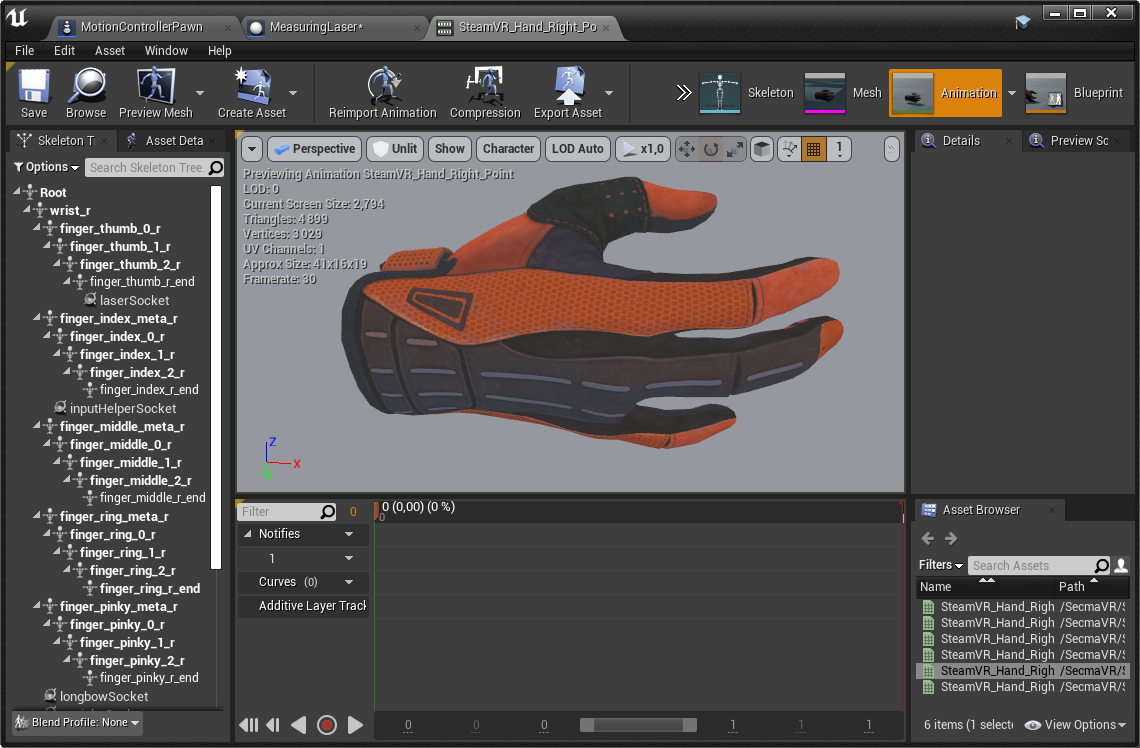
If I exit and reopen the actual sequence hasn't budged
 hasty osprey
So i have cloth physics on but my cloth folds itself like crazy, how do i make sure the cloths shape is mostly retained while it still moves with the wind?
 covert hedge

 proud narwhal
I have imported a png texture and created a new material, if I open the texture it renders correctly, however if I stick it on the material it looks crazy
it also looks weird in the content browser
 vestal ferry
hey ! so i launched a bake like 12 hours ago, i'm baking just the Directinal Light and the Skylight. (177 elements to build, the others are Movable). it's like this since like 10 hours, CPU usage is low, the RAM is like 4 gb. is it normal ? i'm baking in Medium. thanks
covert hedge
(how do you guys organize your projects ? I created a new one specifically to work on the AI of my main project but i'm wondering if that's worth it)
 shy sundial
What happens when I increase the numbers ? does the quality increase ?
 barren flume
So I finally was able to get a loading screen working but only issues I'm having is that when the streamed level loads my character doesn't spawn in and it doesn't spawn in at the player start and the other issue I'm having is the audio from the earlier level doesn't stop
okay I fixed the audio problem just still can't get my player to spawn
 smoky sonnet
how can i activate never distance culling for all objects/actors
robust oar
@smoky sonnet I think you need to manipulate them one by one, I suggest you to have one base mesh with the settings you need, and when u want to place a new mesh in the scene just duplicate it and change the mesh from the settings
robust oar
not really, my idea could help save some time xD
proud narwhal
fixed it, had to save it again as a tga, it clearly does not like the png
smoky sonnet
because i am working on a project with 5674 actors some are BP actors which has 3 to 4 meshes too
and now i need to change them manually
robust oar
oh
you can try asking in the unreal forums
there's some experienced people in there, they might help
barren flume
Okay now trying to setup like a tips thing in my text bind and I want it to select one of the text from the array
I tried using random integer but that just constantly changes the text to the next text in the array
covert hedge
where are you calling get text
covert hedge
what do you want it to do? display the array one line by one line whenever the user press a button or somethink? 
barren flume
No it's apart of the loading screen so either whenever the loading screen is added to the viewport it will display one of the text from the array. Or every few seconds the text will change to one of the other's on the array
covert hedge
won't you need some sort of timer or delay in that case?
barren flume
I can't find a timer or delay
in the widget graph
Or where should I connect a timer or delay to
covert hedge
let me pull up a widget graph
barren flume
covert hedge
you're in the even graph of your widget?
barren flume
yes
oh not in the event graph
i'll go there now
What would I put in the event graph?
 crude forum
hi everybody
my name is taha , iam a beginner in ue4
i have a problem when i want to import rigged character from 3ds max to ue4
but the program refused that , i dont knew why
any help please?
covert hedge
well if have something if you manage to call the vent @barren flume
 mild stone
covert hedge
mild stone
covert hedge
something like this should work. if you find a way to call the events 
mild stone
when i baked the light this shadow is appear any body can help?
i dnot know why and i try a lot of thing but is not fix
 civic cobalt
hi, why does metallic textured meshes appear black for me?
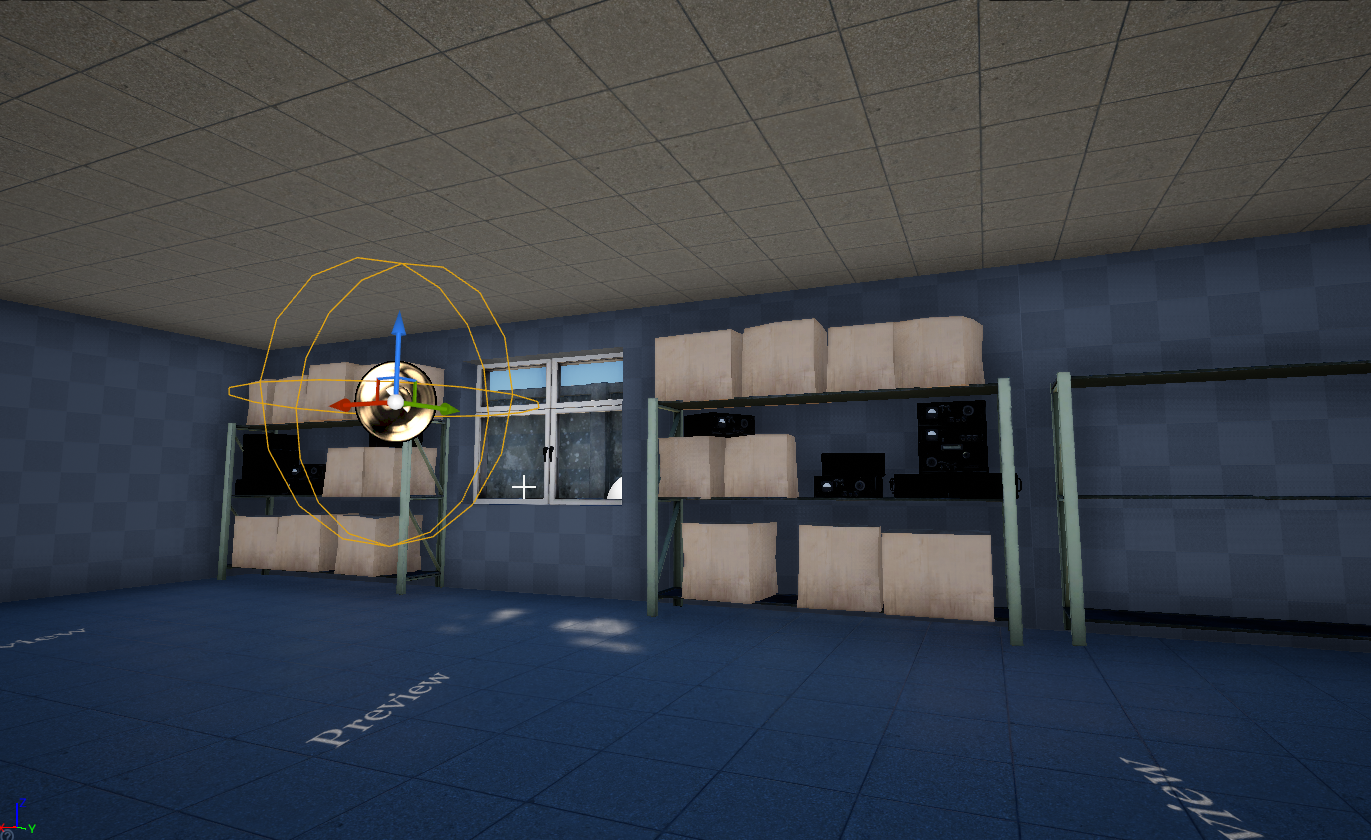
reflection probe doesnt help
barren flume
nope that didn't work
 honest vale
try building lighting
 regal mulch
Hey everyone, quick notice: If you receive DMs from people you never interacted with, asking you to help them or to join their project, please report them.
This is against the rules and I'm more than happy to hand out infractions for that.
 serene birch
your reflection probe seems to be pretty small
covert hedge

is there any way to access lightning informations? Wether it's 'built' lightning or dynamic one?
serene birch
that info tends to be big fat compressed textures that only really live in GPU memory, or for the dynamic shadows, literally only live there
covert hedge
what would be the best way to know if an area is in the shadows or lit, at runtime ?
serene birch
trace checks towards the light sources around?
 mortal cedar
is there any way to save the properties that you change at runtime? my world is proceedurally generated so I'm trying to test out lighting. but every time i stop the game it loses all the changes
nvm, its "keep simlation changes"
 open wadi
Got a question: I'm attempting to pull data from from node.js API to display in a widget, I've got VaRest going for authentication so I'm quite familiar, I'm looking for an example online of such dynamic behavior, how best to handle it so that it displays properly, etc.
Anyone have any such an example?
I suppose, obviously, I'd simply, on event construct of the widget, execute a VaRest call to the API end point and store the result in a variable, but what about the delay between getting that data and displaying the widget?
covert hedge
can't you call an event once the data is fethced to tell the widget to display it, and display a "fetching" message while it loads? 
barren flume
Still having issues trying to change the game mode after the level is streamed
It stay's on the menu game mode and player controller
even after changing the world override
 vast fossil
is there a way to print the string of a variables name ?
like a float variable named Power with the value of 10, and get the name "Power" out of it
covert hedge
nope
you have to manually do that
or you have to store all your variables in a map associating "name" and "value"; which is not optimal, and limited anyway
 grim ore
@barren flume if it’s level streaming. So one master level. You can’t swap the game mode the master level persists
barren flume
dang what would be a good way to still control the character?
grim ore
Game mode is just the defaults, you can still spawn in a controller and use it
grim ore
Did you spawn it in the use it to possess your pawn?
barren flume
I fixed it
 silent walrus
does anyone know how i can make this template look something like this?
barren flume
turns out I accidentally deleted my input config
 fresh eagle
This is paper 2d> how would i make it look something like this?
@silent walrus
does anyone know how i can make this template look something like this?
@silent walrus
And this is 3d template 3rd pp
silent walrus
bottem is 3d and top is 2d?
fresh eagle
Bottom is 2d
 frigid needle
You could potentially get some similar aesthetics in 3D, much like The Legend of Zelda: Link's Awakening. But if you're explicitly looking for pixel art, you're either going to want Paper2D, or potentially a different engine.
Paper2D isn't very well supported, so can be difficult to work with. But it is possible
fresh eagle
If u want to make it on 3d then premake it in blender and import it it becomes simpler
covert hedge
paper2D is full of weird fun glitches 
silent walrus
are there any good engines that support paper 2d?
frigid needle
I would personally recommend Godot, if you're looking to work in 2D.
silent walrus
this is implying that i cant use it in unreal
because i would assume that there would be some way to make it work on it
frigid needle
There is, yes, using the system called "Paper2D" in Unreal. There are some tutorials on it, and you can make it work. We're just giving you a warning that it's not well supported and has a lot of "fun" glitches to it.
There's also an option that if you wish to stick with Unreal, which no one here can blame you, you might look at investing in the plugin called "Pixel 2D" from the Unreal Marketplace
It's a plugin designed to enhance Unreal's 2D capabilities, and received a MegaGrant from Epic.
silent walrus
oh okay, ill look into that!
frigid needle
Their marketplace page has a number of links such as tutorials and a related Discord, so will probably be worth your time!
barren flume
okay so when it does possess the camera seems to jagged and the way it moves is weird
this is moving left and right
frigid needle
That's the one, PepJay
silent walrus
it does support 2d paper right?
 oblique tangle
Yo, bit of a random question but is it possible to manipulate/play around with quaternion rots in blueprints or is that just a C++ only thing?
frigid needle
Quaternions should be available in Blueprints, as well, to my knowledge.
Pixel 2D, Pep, supports and extends Paper2D, yes.
 whole quarry
Why would you use a 3D engine to make an 2D game tho? At least go for 2.5D then
or just use Unity like any sane 2D game dev would
covert hedge
quaternions ? you gonna play with rotating the world and stuff?
oblique tangle
lmao no, the rotation stuff i wanna do in engine is resulting in some horrible euler lock
last time i checked all the quat stuff was tied to C++ only so it's nice to know it works in bp now
covert hedge
was asking about world rotation cause i know someone made about adhesive gel in portal, which used quaternions.
the dude only did youtube video and never publicly released his work
frigid needle
@whole quarry because everyone has different needs, pipelines, and experience. The answer to "why" amounts to "I have my reasons", and then you do your best to answer what questions they have about it, instead of attempting to gatekeep someone just trying to make a game.
covert hedge
"fuck c#" is usually a good answer 
open wadi
Anyone here ever pulled data from a remote API and placed it in a variable to display in a HUD widget?
I'm adept at accessing the API and getting the data via VaRest, my question involves best practices in displaying the data, since there's going to be a slight delay in coming back from the API versus drawing the widget locally
frigid needle
@oblique tangle in case you needed confirmation, the Unreal Documentation has some information about using Quaternions in Blueprint.
oblique tangle
yeye thanks man, just had a look in engine and it's there - do you know when they added it in? I remember some people using plugins back in the day lol
frigid needle
No idea; the documentation doesn't mention anything about an introduction date
 tough vigil
anyone got a minute to hop in the support chat and help me real quick?
whole quarry
@frigid needle Not sure what you mean with 'gatekeepe', there is a reason epic discontinued paper2D...
open wadi
Ok, so check this: Say I want to pull data via VaRest from a remote API endpoint to display in a UMG widget. Can I use Event Pre Construct to run the API call to ensure the data is returned (and stored in a variable) before the Widget is drawn?
I've never used event pre construct before on widgets, so curious as to how that would work before I spent all the time building this out.
grim ore
pre construct is primarily used in the editor
covert hedge
why don't you keep the widget hidden until the data is completely fetched? 
grim ore
and you wouldnt want to hold up creation of an item waiting on a return from an API call, you would want to either put in temp data or just delay the entire widget visibility until you have the info
 dire sentinel
Anyone know why myy grass wind doesnt take vertex color into effect?
it just moves the same way everywhere
https://www.dropbox.com/s/nvjpu7e6mibgxf4/9agSDQX93m.mp4?dl=0
https://cdn.discordapp.com/attachments/371740260607983616/753292639494865016/unknown.png
https://cdn.discordapp.com/attachments/371740260607983616/753292560453206106/unknown.png


 grim ore
so widget create -> overlay with loading or whatever -> wait for all data to return -> update the widget -> remove the loading overlay. or widget create but hidden -> wait for all data to return -> update the widget -> show widget
 inner mist
Is it best to just start out making 3D games as a beginner if I want to pursue making 3D games or should I start out with 2D games?
 lime ruin
Doesnt really matter, just understand it will probably be low quality when you first start. Also, a good thing to note is that if you are a solo dev, you will be needing a ton of art assets (models, textures, animations, particles, materials, etc.) and thats before dealing with lighting. In my experience, its much easier to start witg 2D, because less art assets.
frigid needle
depends on your own learning capability. People often suggest starting to learn 2D because there's fewer dimensions to consider, which can help reduce complexity.
lime ruin
For my 2D games, i dont even bother with unreal, its not particularly designed well for 2D games from my experience, i tend to opt for unity for more unique 2D games.
dire sentinel
anyone?
inner mist
Yeah, I’m starting out with Unity then once I’m advanced I might switch to Unreal Engine
grim ore
make a game when you start out, doesnt matter what it is just make one. It could be pure UI, it could be a square rolling down a plain grey hill collecting purple orbs, it could be boxes in the air you jump on trying to get to a spinning torus in the sky, etc..
inner mist
Alright
lime ruin
@dire sentinel not sure, can take a look later tonight, not at my comp at the moment and cant really see screenshots well enough
dire sentinel
thanks in advance
also anyone know why my grass gets darker teh further away it is?
lime ruin
@inner mist
Id recommend following a tutorial on a 2D game from start to finish and publishing, that way you just follow along and get a feel for the workflow and common design techniques. Itll be lackluster, but well worth the investment. You can find such tutorials on youtube or udemy if you want to pay money for a bit more understanding. If you plan to dev for mobile devices, i highly recommend doing this because building and publishing for mobile devices can be tricky, especially with apple.
inner mist
Alright, thank you
lime ruin
Could be a lighting issue. Whats your lighting setup look like?
grim ore
@dire sentinel did you verify the vertex colors actually imported correctly from your DCC?
covert hedge
uuh how can we convert "child actor reference" to the correct type?
Cast always fail
grim ore
dunno, but there is a checkbox on import for it that might have not been checked?
grim ore
force it all to lod0 and see if its the lods
dire sentinel
how do i do that
grim ore
under LOD settings see if its set to 1 or a higher number, setting it to 1 would atleast force it all to lod0 or you can change the screen size of the other LODs to a higher number
grim ore
yeah I didnt think it was the lods but it was worth a check
dire sentinel
this is annoying
barren flume
Any idea what the most realistic walk speed would be?
grim ore
depends on the scale of your world and your animation speeds and your actors size in said world
barren flume
that was the first thing I read
grim ore
yep but thats all assuming a realistic world size as well and even that depends on if its first or third person
barren flume
third person
lime ruin
Anyone know how to stop all velocity along the z-axis for a character? Immediate stop affects the x, y, and z axis, which is messing up my glide functionality.
 cyan cargo
What's the best way to get "when every Nth word, insert _ into string"?
open wadi
What's the difference between a sizebox and a border?
grim ore
look at the split node @cyan cargo
cyan cargo
@grim ore thanks, I'll give it a look
 primal plank
This is a general question for ppl who are well versed in unreal. Some project can't be added after purchase. It only gives you the "create project" option (epic app) . So I don't know if there is a way you can transfer or incorporate them into other projects.
If not. Can I just manually copy the blueprints over ( by hand if needed) into my project and they work the same as the original project?
grim ore
create the new project then migrate over the assets from one project to another
do not copy
primal plank
Gotcha
open wadi
Here's my question: I have a border that contains my "get info" box, which is going to initially display a "loading" rich text element in the center, but after the data is loaded from the API, the "loading" text will be hidden, and the the "get info" box will be divided into two segments: the upper 2/3rds that contains a general description, and the bottom 1/3rd that contains some server stats.
I want to ensure that this box looks right on varying monitor sizes. Thus, should I be putting a "size box" to contain the rich text centered "loading" text, and another two for the upper 2/3rds general description and lower 1/3rd server stats?
Or is simply layering supplemental borders for this purpose within the main "get info" box border sufficient?
covert hedge
@primal plank copying work as a last resort, but you have to fix a bunch of redirectors and/or class names etc etc
open wadi
I suppose, a simpler way to ask: If you have a divided up widget box, do you need to layer borders + size boxes to ensure things appear correctly, or are just borders fine?
 worldly minnow
Hey guys whats the best way to add multiplayer into an unreal engine 3 game, iv heard memory editing may work but code injection between clients is a better way of going about it
grim ore
you can test that in the editor by dragging the bottom right corner of the panel in the umg editor. And what you need depends on how its gong to be set up. Size and Scale boxes plus proper anchoring is what you want. Putting it in a panel to make sure its correct helps as well
open wadi
Oh interesting Mathew, thank you.
grim ore
at the worst play in standalone window and just resize the window to test 🙂
covert hedge
isn't umg sort of deprecated due to slate ?
grim ore
umg is built on slate, slate is the underlying UI system
covert hedge
ah my bad
 celest vapor
I have a project that i've been working on and I packaged it for a friend to test and mess around with but he is using On board Graphics. (drivers are up to date) on a roughly 3-4 year old laptop, and is unable to run the game. It just refuses to start with the error message
https://cdn.discordapp.com/attachments/600823849663201281/750109124179787906/unknown.png
Is there something I could to to make the game compatible with his system?
 plush yew
i am having trouble installing epic games launcher and unreal engine
this is what pops up when i try installing
im not in safe mode and windows installer works for everything else
grim ore
@celest vapor there is no way of knowing if its compatible without knowing what it is or what your game is using for its rendering
package up a simple project, like a third person template and see if it crashes the same for him. If it doesnt then its your project
covert hedge
launch as admin maybe @plush yew
celest vapor
I packaged the blank project no starter content to test that and same thing happend @grim ore
celest vapor
@plush yew is the user on the computer you're using actually an administrator?
because to run it as an admin you need to be one
plush yew
wait wut
how do i log into admin account then
wait
i can test that stuff out myself
grim ore
if its still crashes then his PC might not be compatible. What is his GPU? maybe driver update/windows update as well.
grim ore
4.26 is already branched and master is now .27 so yeah week or so and we get a preview
celest vapor
@grim ore He uses on board graphics so he dosnt have a designated graphics card.
but strangely enough he can run Mordhau which also runs off of Unreal engine 4
grim ore
integrated gpu is still a gpu
celest vapor
Fair. but that is beyond me at the moment
grim ore
and later versions of UE4 have been upgrading the min requirement to launch/run UE4 so its possible that game is on an older version with lower GPU requirements.
dual monitors? maximum switching to fullscreen or exclusive fullscreen, lots of reasons
plush yew
i am admin account
u can't install as admin right?
ther is run as administrator
not install
nope
it is my own computer
no
i had some system problems before
I reinstalled win10
and did a diskcheck
lime ruin
@plush yew could be safe mode, privilege issue, compatibility issue, network issue, or corrupted install. Give me a sec and i can tell you how to check each.
plush yew
alright
I am not in safe mode
it says its already started
i think i tried editing the registry
ive tried everything i could find
lime ruin
Check if youre in safe mode:
Open a run prompt (cmd+r) and type msconfig then enter. Go to boot tab and look for safe boot option and make sure it is unchecked. If its checked, uncheck it and reboot.
lime ruin
Privilege Issue:
Type cmd in your windows search bar, bottem left, and right clicj CMD and run as admin. Use cmd to navigate to the file location of the installer and run it.
lime ruin
Type the path of the file and the file name, then hit enter
Example: C:/Users/Nezzy/Desktop/EpicInstaller.msi
silent walrus
do you guys think this would be a good class to take for me if i want to learn how to make 2d paper models for unreal?
https://www.gamedev.tv/p/gimp?coupon=1D3ABAD8

The 2D Game Artist online course. Learn how to make 2D art for games. From icons to animations. Using GIMP - the free Photoshop alternative.
lime ruin
Corrupted Installer:
Just download a new installer and trash the old one.
silent walrus
no i'm new to this and i'm just trying to figure out how to learn
and i havent used anything
lime ruin
@plush yew you type out path and just hit enter. Send screenshot and i can advise better.
silent walrus
@hearty rose so what do you think i should use ?
I own photoshop but im not sure how i would make a 2d model in it
i mean its one dimensional so techincally i could make it pretty easily right?
frigid needle
You need to adjust a bit of understanding before you proceed too far. Understand “Paper 2D” doesn’t refer to any sort of type of game, it’s just Unreal’s 2D Tool.
plush yew
@lime ruin still ddin't work
 still hemlock
question
Does anyone know a tutorial or blueprint asset for UE4, something like a VRChat avatar system
So people can select random avatars and import them
I'm talking anime characters gaming characters ect...
with the same animations
 severe robin
Is Unreal Engine OK for making simple top-down android games with possibly small download sizes. I wanted to use Unity but I want to practice my c++.
grim ore
it can be but small download is not without some work
severe robin
So, it is wiser to look elsewhere, then, unless I want to make a 3d game with lots of visual effects and such?
grim ore
doesnt matter the type of game, ue4 is not a small engine by default you can put in effort if you want to make a smaller download
plush yew
Hello I'm getting this issue, can someone please help.
It happens once I am trying to build to Windows
lime ruin
Check GPU Compatibility:
Open run prompt, cmd+r, type "dxdiag", go to display tab and look for name of your gpu. Check that against ue4 requirements posted online. Also check your cpu and memory and make sure those meet requirements. (Can be viewed in the system tab of you computer, can get to that with cmd+break)
Check GPU Compatibility:
Open run prompt, cmd+r, type "dxdiag", go to display tab and look for name of your gpu. Check that against ue4 requirements posted online. Also check your cpu and memory and make sure those meet requirements. (Can be viewed in the system tab of you computer, can get to that with cmd+break)
@Pepo#6919
@Pepo#6919
Sorry for delay in response, busy at the moment.
Also having connection issues XD
If its none of that and you have network connection, i guess try a restart of your comp. Still no luck, make sure your using the latest version of windows. After that, i have no clue, reimage your computer if your desparate XD
grim ore
@plush yew how are you trying to build? Try packaging the project
plush yew
File -> Package Project -> Windows (64-bit)
@grim ore
@lime ruin i logged onto administrator and I got the same error
lime ruin
@plush yew did you check your specs to see if their compatible with the epic launcher and check your winver (windows version) and make sure thats up to date?
plush yew
im sure about everything except graphics
i have an 10th gen i7 processor
16 gigs of ram
and definitely more than 1.5 gb of harddrive space
grim ore
It sounds like just plain windows went wonky and might need a reset assuming the windows system logs show nothing new.
You don’t have node installed by chance do you? It’s done that to me before.
 golden condor
Can you make "place actors" into meshes that exist within the content folder?
lime ruin
Your GPU is good
Good enough, so thats not issue. Let me look up error. Im curious about the node issue, never heard of that before.
 faint grotto
Anyone can help me out with xgen hair from maya to unreal engine to work perfectly fine ? As of now the hair on face sticks perfectly fine but the body hair drops as the simulations turned on
grim ore
@plush yew yes node.js. I was doing some work and debugging and used some debug environment variables that caused installers to stop working. random idea but you might look into it
plush yew
so should i uninstall it
grim ore
I cant say yes or no, I can just say I had that issue. it wasnt node.js itself it was the extra commands I was using to debug
@golden condor if you are asking can you make something a blueprint you can, but more than likely its already a blueprint if its in the left side
plush yew
grim ore
you can browse to where the blueprint is and make a copy if you need to
golden condor
I want to use the properties I have from modifying details of an actor as a new mesh
plush yew
theres prob some problem in the msiexec.exe thing
lime ruin
Try to manually start the windows installet service
plush yew
how
grim ore
maybe try and figure out the last thing you installed and see if it broke it.
lime ruin
Type services in the windows search bar, scroll down to windows installer, right click and click start
grim ore
@golden condor you can try clicking on blueprint at the top and make a new blueprint from what you have selected after you change it
plush yew
its already running
lime ruin
Then restart it
lime ruin
Nah, just the service
plush yew
the last thing i installed using windows installer was node
lime ruin
Prolly wont work, it might have been corrupted, which is a massive pain.
Oo, let me check somethin real quick then
plush yew
hmm i can uninstall anything with windows installer but node
golden condor
Wait, how do you hide all the folders that show up when you go messing with the plugins?
grim ore
the little options button in the bottom right of the content browser
lime ruin
@plush yew try this then send log file as screenshot...
open CMD as admin
then type:
msiexec /i C:\Users\nezzy\Downloads\EpicInstaller-10.17.0-unrealengine-a05af2ebe0984130b8dc40158db8b76f.msi /l*v C:\Users\nezzy\Desktop\log.txt
(instead of the path i used, use the path for your epicinstaller and use a different path for the log.txt file)
 zinc shore
is it possible to change the theme of the title bar areas buttons
plush yew
ok
lime ruin
@plush yew also, did you try uninstalling node.js with programs and features?
lime ruin
lol, sorry bout that, accidentally sent message before cleaning it up
lime ruin
on your own desktop?
plush yew
yes
lime ruin
tffff is happening XD
lime ruin
yea, and you cant open it?
ahh, looks like nothing was written to it because windows installer is all donked up
its empty right?
lime ruin
you cant uninstall from programs and features either?
I would follow this guide to make sure everything checks out...
https://support.microsoft.com/en-us/help/319624/windows-installer-service-could-not-be-accessed-error-message-when-ins#:~:text=The Windows Installer Service could,your support personnel for assistance.
lime ruin
sounds like nodejs did something, but ive never heard that issue before so idk. but def seems like windows installer is corrupted, misconfigured, or outdated. Plus, since mathew had the same issue, prolly something to do with nodejs, just idk personally
plush yew
yeah
lime ruin
repairing windows installer should fix the issue, which is on the guide i sent (link)
plush yew
i tried unregistering and reregistering but it didn't work
ok i will look
where is default properties
lime ruin
it gets pretty technical, so i'd create a backup if possible, or at least backup all of your files. Personally, I wouldn't even mess with this and just backup all files to an external, then reimage your hard drive with a new windows.
lime ruin
ignoremethod 2, its for windows 2000
plush yew
i dont wanna reinstall windows
grim ore
try running a soft reset in the windows settings or run the scan now for the system file checker https://support.microsoft.com/en-us/help/929833/use-the-system-file-checker-tool-to-repair-missing-or-corrupted-system
plush yew
ok will try
DISM.exe /Online /Cleanup-Image /RestoreHealth /Source**:C:\RepairSource\Windows /LimitAccess**
hmm
what would repair source be
wahtever
lemme get on admin account
grim ore
that is what you run if you need to not use the windows update source, just run the basic command above it or sfc /scannow
 hidden coyote
Hello new to unreal im pretty good with c# have a little experience with C++ from an old college course my class now is making me use blueprints and im not really getting the help I need from teachers. Could someone help me run through some homework im having trouble with?
its probly real simple for some of you just a blueprint for an array and cycling through with a for loop i just cant grasp the visual scripting thing
plush yew
ok i will try sfc /scannow
lime ruin
@grim ore you're knowledge on UE4 and windows system administration is kinda blowing my mind rn
plush yew
its gonna take a while
will soft resetting windows uninstall stuff
like if i have vscode installed will it uninstallt hat
lime ruin
yea, if your talking about performing a recovery that only keeps files, it will delete your apps, including vscode
plush yew
damn it
im getting a laptop
should i just do it on the laptop
or is this a big problem
lime ruin
just a simple reinstall though, looks like its only 68MB so not even a big download
idk what your asking, but just wait for the repair tool to finish and see if that fixes it first
plush yew
okay
golden condor
I made a copy of the blueprint but it doesn't work
civic cobalt
anyone know how to fix reflection probes when foce no precopute level?
lime ruin
i would just do the sfc /scannow
i know that one works, dism should work too, but like matthew said, dism is for if you cant use the windows update source, which you can
golden condor
like I can't use it as a mesh
lime ruin
Kk
 frozen pond
how i can stop AI from executing on actor ?
grim ore
disconnect its brain
 terse ferry
hh
plush yew
Hello guys, I'd like to put some drooping grass on my level, something like this :
In other words, the grass must point in one direction : down
Strangely, I can't find this type of grass on the marketplace or elsewhere.
civic cobalt
is grass growing on a wall?
plush yew
Yeah, but it's not ivy or vine, just some long grass
I can find many ivy or vine assets but not the type of grass that I'm talking
grim ore
can you find a real picture of it?
plush yew
I tried but no. I tried with keywords like "falling grass", "drooping grass", etc. but it gives me other types of vegetation each time 😦
Indeed it's just very simple grass, but pointing down, like in my screenshot
 crude tulip
One message removed from a suspended account.
plush yew
lol
civic cobalt
you can use blender to edit one of your current grass assets for example
plush yew
Yes, it exists, there is this grass just home, on the mound up above the ditch, haha 😛
@civic cobalt Good tips. I think I'll do if I can't find what I want.
grim ore
take a picture of it then
plush yew
@grim ore It's dark here. But ok, I'm gonna do it and I'm came back to post here ^^
 uneven fractal
 mystic holly
Can anyone help me in source control? Sorry to ask
 nocturne goblet
I'm not sure where to post this, please correct me if this is not the right channel.
I'm trying to play a video while following this tutorial: https://docs.unrealengine.com/en-US/Engine/MediaFramework/HowTo/FileMediaSource/index.html
I've also checked other tutorials, but they all seem to use this same method, doing the same steps. However, when selecting the video in the Media Player, I get this error:
LogMediaUtils: Error: Cannot play file://C:/Users/arthu/Documents/Unreal Projects/Exploring3/Content/Movies/a.mp4, because none of the enabled media player plug-ins support it:
LogMediaUtils: | MagicLeapMedia (only available on Lumin, but not on Windows)
LogMediaUtils: | MagicLeapMediaCodec (only available on Lumin, but not on Windows)
LogMediaUtils: | AndroidMedia (only available on Android, but not on Windows)
LogMediaUtils: | AvfMedia (only available on iOS, Mac, but not on Windows)
LogMediaUtils: | ImgMedia (URI scheme or file extension not supported)
LogMediaUtils: | MfMedia (only available on XboxOne, HoloLens, but not on Windows)
LogMediaUtils: | WebMMedia (URI scheme or file extension not supported)
LogMediaUtils: | WmfMedia (URI scheme or file extension not supported)
I've checked the plugins list but I don't see anything relevant. I've installed Windows Media player and I'm currently installing Windows Media Feature pack. I appreciate any help, thanks!
plush yew
Ok, I taked some pictures but it's really dry so there is almost not grass... Though I've finally find some pictures on internet which looks like what I want. It something like this : http://mgnliners.com/wp-content/uploads/2015/11/Hak-Macra-Green.jpg

 obsidian wasp
How would I go about rotating an actor around the Z-axis to face a specific forward vector in blueprints?
grim ore
do a reverse google image search on that and you can find common names for it
and then once you have the name you can "name" fbx in google and get models for it
 opaque vector
It would be sick if we could get a Unreal Engine specific blender channel
plush yew
@grim ore The grass that I posted is japanese forest grass. I don't think it's the grass I have home, lol. Mine is more like "Deschampsia cespitosa". It's something like this : https://b.3ddd.ru/media/cache/tuk_model_custom_filter_en/model_images/0000/0000/2332/2332459.5c38a5680c282.jpeg

 haughty wagon
Is there a way to actually view the child widgets in a UI element? I am adding dynamic inventory slots to a menu, and the print string is saying it's outputting it, but it only ever shows 1 item. So I'm wondering if it's there and there's some setting that I am missing. But I need to confirm that the child elements exist during runtime.
plush yew
But mine grows on all the vertical "face" of the mound. If I put the grass of the previous screenshot, just up above, on my mound vertically, it will looking a bit weird because the grass should all pointing downward... @grim ore
 maiden kindle
It's 2020. I tried moving two folders in the content editor. 6gb of ram and twenty minutes later UE4 decides to stop pretending to work.
 loud urchin
You have 6gb of RAM in 2020? 😛
maiden kindle
I have 32 but unreal decided 6 was enough to waste my time with
loud urchin
Oh lol 😂
 rough knoll
are landscape materials special
 dull lake
Is there anyone who can help me troubleshoot in unreal
rough knoll
because just putting a grass texture on it doesnt work\
maiden kindle
In a way. They can use the landscape nodes in material editor
rough knoll
do you have any idea why my landscape is just black when i put a mat on it
maiden kindle
Bad or incorrect lighting? Dodgy alpha value? Idk
rough knoll
well the material works fine when i use it on a plane
grim ore
show us your landscape texture
maiden kindle
Or you're not sampling it with proper UVs.
grim ore
the actual material you are using, and the MI settings in this case as well
or is it literally just a texture sampler into the base color
grim ore
that is the material instance, not the material
barren flume
but on top it's fine
rough knoll
i can't find the parent
grim ore
and its possible your material is not using share texture samplers which could cause the issue. Is this a new landscape in a new level or are there other things in there.
rough knoll
nvm
this
is there something in here you need to see
also note the black landscape isn't exclusive to this mat
its busted on all
grim ore
have you tried making a new level, add the landscape using this material, and seeing if it works in another level
also just making a new material with a simple color on it and trying it on the landscape
silent walrus
would you guys recommend using aseprite ?
barren flume
grim ore
it looks like your hallways are not very large or your settings for the nav mesh agents are very large or both, there is not enough room for it to allow a path to be made
rough knoll
it doesn't work in the other level
grim ore
also no idea what you have for collision settings on those meshes
rough knoll
and alright ill try the simple mat
grim ore
if the simple material works, one with just color, make sure your texture sample nodes are set to one of the shared settings for the sampler source
silent walrus
would you guys recommend using aseprite ?
barren flume
it's just set to block all
rough knoll
yeah i made a simple material with a bright pink color and it works
barren flume
and customized collision
haughty wagon
Ok so... I have a Uniform Grid and I guess the items stack on top of each other, cause if I do a wrap grid I get this:
Is there a particular gridcontainer or something I have to put an item into for a uniform grid?
barren flume
okay so I kinda did something using the recast nav mesh
haughty wagon
I see a "Slot as Grid Slot"
grim ore
children inside of a Uniform Grid Panel have row and column properties you need to set, it doesnt flow.
barren flume
Okay changing the max simplification is really helping out
silent walrus
, do you guys know any sprite sheet softwares?
haughty wagon
@grim ore ahhh ok
 pliant rose
Rise Cyber Race.. platforms animated by sequencing static meshes, sequencer controls by scale, not location... platform does not get player onto it.. always falls.. can reduce speed and run along. lol how to fix?
dull lake
I am trying to use the sequencer to trigger an event that is on my level blueprint. I have been trying for like an hour to figure out how but i just cant seem to do it. Would love any help!
pliant rose
event begin play
dull lake
what?
dull lake
no im trying to make it so every time one of those keyframes happens in the sequencer, the function in my level blueprint is executed
barren flume
Is there any way I could allow only certain pawn's through a blocking volume?
celest vapor
quick question. the default spectator pawn is not an abstract class right?
grim ore
if using sequencer you should be adding blueprint endpoints directly into the sequence
you really really dont want to use the level blueprint to hold events
@barren flume if its just a normal blocking volume and not using AI then yes you set up a special collision channel to ignore that pawns type
 cold thunder
How should you setup level blueprint code that you only want to run once? For example if I made the player start in a level and some code ran. Then the player leaves this level and comes back. I don't want the code to run again. Right now my problem is that it keeps running everytime I return to the level. How should I setup the code to only have it run once during gameplay? Thanks.
celest vapor
@cold thunder you can store a variable on your Game Instance. and then when the level loads you can check the game instance to see if it can run it.
or save games work if you want it to save if the game is closed
cold thunder
Interesting if I had a boolean variable change I just store to the Game Instance? What code deals with game instance? 🙂
Like what is it called in the blueprint nodes?
grim ore
Game Instance
cold thunder
Really? lol 😄
grim ore
its an object that is created when the game starts and is destroyed when the game ends
celest vapor
it persists between all levels
cold thunder
👍
 marsh swallow
I much prefer to hold a map of name:bool and keep the event and check it against game instance
otherwise your game instance might get quite full if you have many levels
cold thunder
Oh that is cool. If you save the game. (in game) does it carry over?
marsh swallow
then i just run the check in the level blueprint by getting game instance and checking the map.
cold thunder
@marsh swallow Nice I might try that
marsh swallow
but there is literally 100 ways to handle that honestly
cold thunder
That makes sense! I like it.
marsh swallow
but overall you would need to rely on game instance in one way or another
cold thunder
I see. That makes sense. I'm glad I asked. I really appreciate the help everyone.
😁
grim ore
if this is just a simple 1 time check nothing stops you from using the save game object to save/load out that you did the event
cold thunder
@grim ore Oh sweet. Yeah it is exactly that. I will do just that.
Thanks everyone will try it now. 😋
 mighty badge
hi somebody can tell me if it's a bug or what i created a new actor component i added 3 vector array with 3d from widgets and added component to actor and 3 elements to array and widgets are not showing
grim ore
is this a widget component or a user widget?
mighty badge
show 3D widget
grim ore
ok what does your code look like for it? does the widget show up in the viewport
marsh swallow
okay i screwed up the Show/Hide using outline/grid - default G key for UMG
what is the dang option/setting in Editor settings to rebind it. 😂 its been driving me nutz
mighty badge
grim ore
marsh swallow
you know the really sad thing... i never typed outline in editor settings after searching about 15 things.
and yet... i typed it up above.
-_-
Thanks Mathew.....
grim ore
neato
lime ruin
@plush yew matthew was the real mvp lol
plush yew
nah u both helped me out
time to learn cpp
i haven't touched cpp in months
i started learning rust instead
and now im back at square 1
ive learned a little cpp
need to review classes and public and private stuff
lime ruin
Glad i could help. GL
mild stone
plush yew
thanks
mild stone
hi guys i dont know why when i baked is be like this my some wall and floor any body have idea ?
grim ore
as a note if you do Windows Key + Print Screen it will just capture your currently selected window so you dont get both monitors
and that is the way lightmass works, its a seam due to using modular meshes. https://polycount.com/discussion/200584/why-cant-i-get-a-seamless-lightmap-even-with-the-most-simple-geometry
 spice canopy
That is part of the reason i use dynamic lighting only for my super simplified low poly hardly any shader stuff procedural mazes. And also because they are procedural.
Hey does anyone know if they are making a UModeler plugin for Unreal?
haughty wagon
Is there much added overhead if you create a LOT of different functions that do specific things, so you don't have a rats nest of blueprint lines going everywhere?
grim ore
there is very basic polygon editing/mesh editing in the engine right now
@haughty wagon you should be doing that. If something is re used, function/event it. If something is getting long, consolidate stuff into functions or collapse graphs.
haughty wagon
k
grim ore
some people even have rules like if a group of code is longer than 5 lines they make it a function for example.
haughty wagon
I'm creating an inventory system, and well... it doesn't work and I get confused with all the wires everywhere LOL
So I need to clean it up
grim ore
break it down into systems and make each system separate
haughty wagon
It's so weird not writing actual code ... and I don't know C++ other than cout >> "Hello World"; so
plush yew
std::cout << "Hello World\n";
you didn't do the << right
and it's bad practice to use namespace
and you forgot the new line
 rancid lynx
is it possible to import export the Saved colors on the top ?
rancid lynx
not manually X_x
plush yew
hmm
rancid lynx
i guess it sonly 20 colors, ill just do it manually X_x
plush yew
idk
rancid lynx
i clicked around. i think its not.
plush yew
lol
rancid lynx
i updated 24 to 25, and it didnt bring those colors
its gotta be a file saved somewhere X_x
 quick plover
How can I use an Audio Spectrum(Blueprint) node into a Shader?
grim ore
@rancid lynx this is what you want
and I found it here in the project folder (my project is named tpp)
rough knoll
how do i only migrate a level
not the character, or anything else
just purely the level
yes
silent walrus
does anyone here know how i can make my topdown game in unreal 2d like enter the gungeon or binding of isaac?
 karmic moth
I need to learn how to make the animation blueprint for an aim offset, let me know if you can help
 terse jewel
Enter the gungeon is actually a 3d game under the hood.
silent walrus
@terse jewel thats what i assumed but when i attempted to implement my sprite into unreal i couldnt connect it to my character
so does the game not use sprites?
or am i just trying to do it wrong
shy sundial
After finishing a project is it okay to delete the contents of a folder inside Appdata/Local/Unreal
grim ore
you would create a pawn with your own control scheme more than likely if you wanted to do top down 2d. Alternately look at the side scroller 2d template, it uses 2d and a character
silent walrus
would i be able to add a sprite to my pawn?
grim ore
@shy sundial UnrealEngine folder? if so yes but the next time you open UE4 you will have to remake the engine cache
@silent walrus yes, look at the side scroller 2d template for how they handle it or look at paper2d.
right now however 2d is not handled very easily and most people who use 2d in ue4 roll their own systems
shy sundial
@shy sundial UnrealEngine folder? if so yes but the next time you open UE4 you will have to remake the engine cache
@grim ore
Engine cache ? Stuff like Light data right ?
grim ore
engine cache like shaders for the engine and editor
silent walrus
shaders?
 tame rose
so are the characters from mixamo pre rigged?
I want to import characters straight into ue4 without ruining my current anims but sharing them
grim ore
#animation would know for sure but last I saw the skeleton that comes in from mixamo is not compatible with the skeleton that UE4 uses by default. You can retarget with some work.. lots of work sometimes
tame rose
dang I was just looking for like a step by step guide
grim ore
there probably is on youtube, just have to find an up to date one
plush yew
hey , im having a strange problem with my vehicle is anyone able to help ?
the back of the truck seems to be floating
grim ore
open the console and type in pxvis collision
this should show you the collision boxes, perhaps your back wheels are larger than the model
plush yew
cheers
thanks , there does seem to be something there
any idea what that black thing is in front of the rear wheels , ive triple checked the mesh ect and cant work out what it is
obsidian wasp
I have a bunch of static meshes that have their pivot point in their corner. I'd like to set the pivot point to the center.
Is there any way to either a) Permanently change the mesh assets' pivot points in the editor or b) Set the pivot point of a static mesh component/instanced static mesh component via blueprints c) Some other way that lets me rotate the meshes around the center when spawned as instanced static meshes?
Or is there simply no way around exporting the meshes, editing them in something like Blender and then re-importing them?
grim ore
pretty much unless you turn them into blueprints and use a parent scene component as the new pivot point
oh wait, no I take that back the new geometry tools can set pivots if i remember right
mystic holly
Can someone help me with my character going through a door that's collision is set to block all
mystic holly
me?
grim ore
and under transform in the modeling toolbar is edit pivot
 sullen sonnet
Is having generate overlap events on many objects bad? Like 100-1000 objects.
grim ore
that would depends on your project and its performance target. The only way to know for sure is to test and profile
obsidian wasp
Thanks a ton, Mathew 🙂
sullen sonnet
@grim ore im asking because of wall running mechanic. if i have 1000 walls to run on
is it bad?
grim ore
we dont know, you would have to test. you could also use a line trace to see if you are near a wall instead of overlap events. IT would probably be more performant if that is your worry
make a level with a couple hundred of your items with overlap events and see what fps it gives you, then a couple thousand and test
sullen sonnet
idk how to duplicate 1000 objects right away @grim ore
frigid needle
CTRL + Click objects either in the world or Shift+Click in the World Outliner, Right-click -> Duplicate (Or CTRL + W, if you're inclined to keyboard shortcuts)
Repeat that a few times, and suddenly 100 objects turns into 1000
sullen sonnet
there has to be better way lol
grim ore
there is, make an actor and have it spawn however many you want then test
sullen sonnet
ill do that
 stuck laurel
you guys have probably seen a dozen noobs ask this question, but I'll ask it again, copypasta from reddit... "Whenever I try to launch unreal engine 4.25 through epic games store, steam VR gets launched.
Do I have to have a VR device to use unreal engine 4.25? There's probably a ton of people who have asked this question."
sullen sonnet
How do i blend 2 animations in animgraph without using multiple states? Blend poses don't seem to work.
 scarlet birch
is there anyway to dampen all forces on a cable component?
stuck laurel
Sorry, guys do I have to have a VR setup to use unreal engine 4.25?
 fervent sigil
I'm trying to place foliage (tree) on my landscsape but it seems to put it in the air, as if it doesn't detect the landscape.
Is there any option I'm missing to make it work?
@stuck laurel nope
scarlet birch
Procedural volume or painting?
scarlet birch
You sure the origin of the mesh is set right?
fervent sigil
Pretty sure. It also works if I use it as grass type on one of the landscape layers.
How can I verify though?
stuck laurel
@fervent sigil thanks for the info, why does steam VR launcher immediately try to launch when I try using Unreal Engine 4.25?
scarlet birch
either way there's a z offset in the foliage you can set to some negative number to fix it.
Just open the mesh in UE and show the pivot
fervent sigil
@stuck laurel No idea. But I also have no idea what steam VR is since I don't have it. If you don't have VR or don't need it, try to uninstall it
scarlet birch
because VR is enabled by default
fervent sigil
@scarlet birch Pivot is a bit off ground, but it make sense since it's a tree (so part of it is below ground). It's way off from what's actually happening
scarlet birch
Show collision in the editor viewport? make sure there's not some volume blocking whatever channel it's painting to
stuck laurel
@fervent sigil I'll probably just launch with steam disabled. ext time. thanks for the help
fervent sigil
@scarlet birch Here's something weird actually: I noticed there's a filter option when painting, with checkboxes for Landscape Static Mesh and BSP enabled by default.
I unchecked all but Landscape and the brush doesn't show (nor work).
scarlet birch
pivot in UE is the origin from whatever modeling program you were using.
fervent sigil
mm yeah I think It's colliding with some of the meshes I've hidden
scarlet birch
uncheck everything but landscape, unless you need them.
fervent sigil
pivot in UE is the origin from whatever modeling program you were using.
@scarlet birch .. I know what origin is. Wasn't even related to what I said, so not sure what you just said that sentence honestly.
scarlet birch
Shouldn't ever need BSP
I don't know if you're stating the pivot from where it is in UE or if where it was set in your modeling program, so I wanted to clarify that UE ignores the pivot from a modeling program
 silk sundial
Question, If i want to make a large building where the player moves trough. Would you recommend using Geometry or creating external meshes in Blender?
fervent sigil
ok yeah got it. There were objects hidden in the scene (blocks phase in level design).
It seems the foliage tool doesn't ignore them even though they're hidden
I don't know if you're stating the pivot from where it is in UE or if where it was set in your modeling program, so I wanted to clarify that UE ignores the pivot from a modeling program
@scarlet birch To clarify I was looking at the pivot in UE
Anyway it works now - so thanks!
scarlet birch
cool
@silk sundial either way it's geometry. Whichever you prefer. Some people block out in blender some use BSP and then convert to static meshes.
fervent sigil
Question, If i want to make a large building where the player moves trough. Would you recommend using Geometry or creating external meshes in Blender?
@silk sundial I'm assuming by "using Geometry" you mean the cube meshes in UE:
Most people use external meshes for building because:
(1) They're not all simple meshes made from cube (e.g. circle building, balconies, etc)
(2) Optimization. Many times you'll need less than 8 faces the cube has, and when making a lot of building it's helpful
But yeah if you can use the UE4 cubes and it looks great - use it.
silk sundial
Thanks for the awnsers! I am going for a gothic themed building so I think i should invest into Blender as the walls for instance taper off and have decorations.
rough knoll
so i have a function set up to divide my throttle speed by 1000 to get a volume for my sound effect for my helicopter
my only problem is changing that volume when the game is running
i can't have it on a tick because the sound will endlessly loop on the first second of the sound earraping me
i can't have it start when i enter my helicopter because the volume will never change
open wadi
I have a question: I have a rich text block that I want to add characters to on the event graph side. What node should I use?
fervent sigil
Is there a way of painting a certain amount of tress/foliage in a circle with hole in it? Like a donut shape?
@scarlet birch If you know
@silk sundial fyi if it's just cosmetic, you can, and probably will want to, use textures for such effects
 viscid kiln
guys when i use UAT and i will add something like "maps=MainMenu.umap" then only this map should be in my build? Because right now i see that my build size has not changed but it should if it would have onmy mainmenu
open wadi
Question: I have text I'm pulling from an API that takes up multiple lines (akin to a message sent from the server). It appears a RText only allows for a single line, and the TextBoxes are all "editable",which I don't want. I don't need users editing these text boxes, so I don't want them editable. Is this possible, to have a multi-line non-editable text box that is set via an Event Graph node?
covert hedge
 why on earth would you allow random stranger to connect to your computer
unless you're running a VM in which case you're kitboga
crude tulip
One message removed from a suspended account.
fervent sigil
Kind of weird question, but I'm looking for the name of a structure which you can sometimes seen in (sometimes old) romantic movies, where couple marry.
The structure is small (maybe 10 people can fit into it), small, on a large land of grass.
Does it make sense to anyone?
serene birch

"The Tale of Eric and the Dread Gazebo" is a role-playing game-inspired anecdote, made famous by Richard Aronson (designer of The Ruins of Cawdor, a graphical MUD). Aronson's account first appeared in print in the APA Alarums and Excursions between 1985 and 1986. It was reprin...
fervent sigil
@serene birch Yes thank you! 🙂
plush yew

Watch how I Made Flappy Bird in Unreal Engine 4 with RTX support.
----------------------------------------Links----------------------------------------
My Patreon: https://www.patreon.com/fatdino
Follow me on Twitter: https://twitter.com/fat_dino_games/
Join my Discord server:...
just amazing
Hey can anyone help how to show a ui in that particular map
covert hedge
hmm?
plush yew
@plush yew Ya mean map as in map, or as in level?
 wary wave
anyone using Intelligent Delivery yet? It would seem to be almost entirely undocumented
covert hedge
one can instanciate any class that is a UObject right?
covert hedge
restrict movement component to a plane i'd presume
 plain pagoda
but I can still move after enabling this on begin play
covert hedge
you need to set a plane constraint in your movement probably
.
what would be the best class to derive from in order to create an ai 'overlord' so to speak? that manages AI state and broadcast message to them?
 snow harness
Hello people
I'm coming from offline rendering and want to start to learn UE4 for making enviroment art and other renders.
What would be a good place to start from?
covert hedge
guess i'll put that a class derived from levelscript class
viscid kiln
@snow harness I think that #aec-visualization will give you more answers 😛
 glad ferry
Hello everyone, Are there any advanced geometry and/or basic shapes packages out there I can get for more building options? I've looked and haven't found. Figured I was looking in the wrong places or with the wrong key words.
 haughty bear
@glad ferry https://www.unrealengine.com/marketplace/en-US/product/blocking-starter-pack this ?

Unreal Engine
Contains 364 StaticMeshs and others assets to facilitate the development of a project and create the blocking of your levels. Modular architecture, interact, lights, pipes, landscape mesh, vehicles, Buildings...
haughty bear
Its pretty cool i didn't know it existed in the marketplace too xD
 hushed dune
What's the key to use console commands?
fervent sigil
I remember there's a website where you can find arch designs of structures, but I can't seem to find it. Anyone knows what I'm talking about?
covert hedge
wouldn't it be cool if play in editor didn't crash the editor if it crashed?
covert hedge
 my AI can send message to an overlord
time to code the other way around now
 quick kelp
i see a baj
covert hedge
servers in common: vadikus  , ultimate idiota
  , neeem
  , sun with face (
  )
)
 lusty carbon
What's the correct way to create a panoramic backdrop for archviz project?
I currently have the panoramic image mapped to a cylinder but im quite sure it's not the right method. Got an ugly seam down the middle too
covert hedge
function overload can't exist in blueprints right? as in same name but different parameters?
smoky sonnet
hey can anyone help me my actors/blueprints has meshes and i want to see those actors anytime every where but for that i need to activate never distance culling is there a automatically way or any tip to do that i tried culldistnacevolume but this dont work
any help?
 wooden oyster
I have a blurry screen issue how do I fix it
 versed spear
Anyone here work with game spark?
versed spear
I would like to integrate action rpg inventory with game spark.
covert hedge
what is game spark
celest vapor
Quick question, can an EQS Query be ran on a player or is it only AI?
as in the player executes the Query
proud narwhal
Hi, I have a revit scene made up of about 8k actors, building lighting obviously takes a long time, I have disabled cast shadow on nearly everything thats not directly in the area I am working on, but this seems to have not sped up the lighting build at all....
 winter slate
I'd like to remove a talent listing as we resolved the issues and keep getting messaged. Can I do it myself or do I need a moderator?
scarlet birch
@fervent sigil
Is there a way of painting a certain amount of tress/foliage in a circle with hole in it? Like a donut shape?
I think so. You might be able to use aninvisiblenon-rendered landscape material layer and set the foliage asset to paint that layer. You also could use a collision shape and set it to paint a collision channel. Oh! if you use a procedural foliage volume you can set the brush volume to a collision shape. So you could use a hollow cylinder to paint it.
I lowered the spawning distance on those a lot just to show the shape
fervent sigil
@scarlet birch Not sure what you mean by the invisible landscape material layer, but yeah I found that too.
The only problem I have with the procedural foliage spawner is it only works when the landscape collision is set to static mesh, and I need it to be a different type ><
scarlet birch
You only need it set to that when you simulate it. You can change it afterwards.
fervent sigil
yeah thought about that too, I just wasn't sure if it's going to reset from time to time (e.g. deleting intermediate directory), at which point I'll need to change it back and forth again.
Do you know?
scarlet birch
As far as I know, it will only resimulate if you manually do it. Once it's painted it's locations are set.
I know I've set it to paint all kinds of collision, but it's been a while since I really experimented with it.
 digital rover
is it safe to delete intermediate folder of unreal source build directory after compiling a project?
fervent sigil
Yeah, but you need to regenerate the solution as well
@scarlet birch I think I'll just do it manually for now. I also need to have a hole in the cylinder. Not inside, on the edge, like a path to go inside the hollow cylinder.
scarlet birch
By invisible landscape layer I meant you could probably paint a landscape material or use a weight map to paint layers that are only used for foliage placement
fervent sigil
I actually have those, but that doesn't make it cylinder :p
scarlet birch
You could use it in combination with foliage blocking volumes to get just about any shape
fervent sigil
oh right I forgot about the blocking volume. That's true
I might give it a try then. And thanks!
scarlet birch
cool, np. It's given me something to think about too.
digital rover
what is the difference between build solution and particular project?
scarlet birch
Oh, wow, I'm going to have to play with that some more. I need to look at building custom brushes.
@digital rover You mean in VS?
You can build part of the solution without building it all. Like with a source build you might not want to build the whole project and just build what you need.
 crystal hare
I'm not home atm, but I have a game instance set up for my game to carry over inventory collected from level to level, but the stuff in my inventory keeps disappearing when I load into another level, even with the game instance set through the project settings. Suggestions?
covert hedge
uuh anyone would know why a cast from AActor* to AAIController* doesn't compile?
plush yew
@wooden oyster you figure it out?
seems like the game resolution is set to a really low amount
versed spear
@crystal hare It seems strait forward. Save values to game instance. load next map. retrieve values from game instance to set values in new map
scarlet birch
Are you using references to objects?
 rich reef
When you're in thumbnail edit mode, how do you strafe forwards/backwards?
(Please ping on reply ❤️ )
crystal hare
@versed spear thank you I'll try again tonight
 sly island
Silly question lol after i have taken an object, a vehicle for example that has its own blueprint setup where i can manipulate its color/decals/etc. but i manipulated those settings outside of the blueprint from the stage rather than doing it in the base blueprint, is there a way to have whats altered on stage outside the blue print saved back to the content browser folder? as a duplicate or no
versed spear
savegameobject?
grim ore
so you can convert it to a new blueprint class, it would save the current instance values (the values you changed in the viewport) to the new blueprint but the only downside is this is now a child of the blueprint class and not a "clone" with different settings
this menu lets you apply your changes back to the default object but it doesnt make a copy so use this only if you want to save your changes to the base class
if you want a duplicate with different values then duplicating it then changing it might be the only way
sly island
YESS! Thank you very much!
covert hedge
don't you need to set the value of the progress bar ?
grim ore
^^ you want to set it, not get it
covert hedge
so you probably need to use a set node on whichever variable is holding the progress
progress text is a variable that is bound to your user interface right?
your progress bar is probably bounded to a variable as well
you need to set that variable here, just like you set your text
grim ore
drag off the progress bar and set percent, dont get percent
covert hedge
a SET node 
grim ore
same as you set the text on the text boxes
covert hedge
^
grim ore
you are asking how to set the percent value on a progress bar, that has nothing to do with a data table
now if you are asking about math on how to make sure the percent is correct, thats different
can you explain what you are doing, this is confusing
if you are asking how to get a value from a data table, that would getting a value from a data table.
covert hedge
i understand you doing that for quest objectives for instance
so you're using datatable as game saves?
so
user update quest, gets a new win for the 6 wins quest
update data table, save it, GET the value out from the datatable, and SET the widget binded variable
try to always get one source of truth tho. stick with datatables and save/read them when you need to update, but don't update UI without updating table and vice-versa, that'll be a huge mess
grim ore
you do know you cant write to a data table at runtime right?
covert hedge
i don't, i don't use them
i'm not at the point where i need huge data sadly. still coding my AI 
plush yew
hi ! im getting crazy trying to make an game online please help !
covert hedge
can we prevent user from using certain blueprint nodes?
from blueprints i mean, not from c++ code exposed to blueprints or whatever
 late lake
Hi, I'm having this delightfully annoying issue with building my project. I'm using VS Community 2019 16.7.3 with UE4.24.3, and keep on failing to build because of ````Error MSB3073 The command "chcp 65001 >NUL"``` and Build.bat exiting with code 5. Google God seems to suggest that downgrading to VS 2017 is the one and only solution. Does anyone have other suggestions?
grim ore
you need the actual error, that is failing due to a compile error higher up in the chain
 lofty trail
Hey I’m new to unreal and was wondering whether someone can help me
 proven mauve
covert hedge
proven mauve
covert hedge
nice web page
lofty trail
So basically I have been trying to make an infinite runner like subway surfers
And when I switch lanes, if I’m near an obstacle it will glitch for a second and drag the character
It’s a minor glitch that holds the character back but it is very annoying
covert hedge
did you try drawing collision capsules in game and check if they are the source of that ?
lofty trail
I’m sorry I’m new so don’t really know aha
covert hedge
well from what i've gathered when you switch lanes your collisions gets messed up and the engine forces your character on a valid position
late lake
@grim ore turns out reinstalling and repairing vs community about 5 times does the trick?
lofty trail
@covert hedge that sounds about right, so what do you think I should do to correct it?
covert hedge
what's your function to switch lane
how is it implemented
you probably have a check or two to add there, checking if there's an obstacle in the "new" position you want the character to be, and correct the new position to not end up inside the obstacle but on the lane
 inland kettle
Hello friends,
i work with the current UE and i am looking for an easy way to calculate ETA (estimated time of arrival).
I have a moving actor flying to a target. The target is an actor that is not moving.
Does anyone have an idea?
covert hedge
can't you just calculate that with your actor speed?
unreal units/second so.. calculate distance to the other actor using their location and yours, and then get time by dividing distance by speed
roughly estimates the eta if im not mistaken
golden condor
Hey, my character is behaving in a weird way. When I press W while looking at it from the front it moves forward depending on its forward. How do I change this so it moves depending on what the camera is looking at?
 narrow mauve
Got a bit of a stupid question but uhm. ....I .....am not sure how to move this blueprint while simulating...
covert hedge
@lofty trail when you press which ever key to switch lanes it calls a function that forces your character into the other lane i guess, find that function and check how it's implemented
lofty trail
@covert hedge well i use the left and right key
covert hedge
that's not what i mean
there's probably somewhere, either in your player BP or character controller BP something that says "if the user press LEFT than go to left lane" and that function probably calculates the location of where your character will be once he switched
inland kettle
Thanks a lot @covert hedge !
I will test that right now. 🙂
golden condor
Any ideas about how to solve this?
covert hedge
@golden condor i think you must check the "use controller yaw" settings in the character movement component or something
not sure
narrow mauve
nevermind I got it.
lofty trail
@covert hedge it says that
plush yew
Hello everyone, how do I make objects inside a widget switcher clickable?
grim ore
@golden condor open up the third person template, does that do what you want? if so check out what is changed on its character blueprint and apply that to your character. the character movement component and pawn and spring arm ar what determine how things move based on the camera
there is a good chance this is the option you want to change on your character movement component
golden condor
My BP class is a pawn
Idk if that's a bad idea or not
Let me change the class and see if that works
golden condor
So, I did that and it doesn't work
 brave shard
basically only the things facing the directional light are actually lighted
what can i do to light the rest more?
grim ore
@golden condor you will just have to go thru the rotation settings for the pawn and the camera and set it up so it uses the camera orientation for it's movement
brave shard
@golden condor why don't u just see how the default 3rd person pack works?
it moves as u say
grim ore
is this from the rolling ball template? if so have you looked at it
golden condor
Should I switch fully to a character class?
grim ore
@brave shard the sky light is used to add an ambient light
brave shard
i know i'm already using it but i think im missing something
should i set something specific?
brave shard
in editor looks decent but in game everything not facing the directional light becomes black
oh ok u said character@golden condor
grim ore
did you try raising the intensity of the sky light?
golden condor
Should I go back to Pawn?
brave shard
yes
grim ore
but the biggest issue with stuff like that is you need to set up your baked lighting to use global illumination and if you arent using baked lighting your pretty much going to have to fake it. alot of the light we see in dark areas is just bounced lighting from lit areas
golden condor
Yeah, probably for the best
brave shard
i think u can still find something useful about how it works in 3d person template
so u can understand how the pawn turns with ur camera
golden condor
I do and I did everything that is standard about 3rd person games
But somehow idk why with a ball it doesn't work
grim ore
are you using the rolling ball template?
golden condor
Barely, started from it but changed a lot of it
grim ore
are you still using the input for the force on the ball?
golden condor
Yeah.
grim ore
if you look at those they are fixed directions
and enabling pawn control rotation on the spring arm
lets you rotate the pawn with the camera and then your inputs now add force in the direction the pawn is rotate
golden condor
grim ore
assuming of course you are changing the pawn rotation
golden condor
This worked lol
I know its just taping the worst solution ever lol
Don't judge me
grim ore
there are a few ways of doing it yep
plush yew
Is there any good tutorial to understand how to setup at best post processing for a level or I have to play with the settings until I'm satisfied?
golden condor
I think there was an asset a few months back all about post processing
You just used dials and it worked
 languid herald
I want to have a decal that acts as a shadow and project onto any surface below the player but I'm not sure how to go about it.
grim ore
look at learn.unrealengine.com and search for post process. There are a few courses including Post Process Essentials
golden condor
Is my solution a bad idea @grim ore ?
grim ore
and there is no best solution for post process, it needs to match your needs
your solution will work fine, there is more than one way to get the forward as long as you get it and use it
golden condor
Like, is it more expensive than yours?
grim ore
it probably is, mine just uses the forward or right direction and goes from there
but i doubt it matters in the end, its a small piece of code
languid herald
Like how to I get something like that but instead of being bound to the mouse's location it's bound to the player. I tried dissecting the top-down template but I can't figure it out.
inland kettle
@covert hedge Thank you again. It worked 🙂
covert hedge
qwik maff 
grim ore
@languid herald look up ue4 blob shadows
its also super simple just put a decal component on the player
languid herald
Alright
And yeah, i have a placeholder decal on my player, but moves with the player when it's suspended in air
grim ore
it should
you just make it as long as you want it unless you want a shadow that is always cast even if the player is 100000000 meters above the surface?
alternately on tick move the location of the decal to the surface below it so its always on the ground
 bright wharf
yo
im tryna change the projectile sped and it says 3000
what increment is it using?
languid herald
I'm not sure how high the player character will possibly be suspended at one point, but for now I will try out the blob shadow method, thanks!
 midnight root
HM changed size of character mesh, in thirdpersonBP , compiled, saved, now on play I get Pin for variable 'Crouching Input Open?' recreated, but the variable is missing.
wth ?? 4.24.3
size as in xyz
 silent harbor
https://gyazo.com/61aa47b4d33a35dd91b0420ad4d11ff0
does someone know why my rotation lag is jagged like this
https://gyazo.com/64533e1a4d64d1dc29cdcda68244ffc6
set up

 grim ore
do either of your spring arms have camera lag turned on?
also you probably shouldnt be using spring arms for first person
@bright wharf it depends on how you are setting the speed, but generally centimers is the unit in the engine and cm/s is the unit when referring to speed
silent harbor
Both @grim ore have it turned on. Why is spring arm an issue, everywhere i was recommended to use them. the spring arm that has my fps cam as child, the smooth rotation is flawless, on my fps arms however, it produces jaggy results, not sure why
grim ore
if you have 2 spring arms under eachother its possible they are fighting eachother
your lagging the camera behind the movement, then lagging the arms behind the movement of the lag for the camera
silent harbor
i had tried with 1, still could produce the same result unfortunately
 onyx hazel
Hello
bright wharf
@bright wharf it depends on how you are setting the speed, but generally centimers is the unit in the engine and cm/s is the unit when referring to speed
@grim ore thank u!
covert hedge
what's the best way to share elements between projects? modules?
grim ore
share what elements and how often and keeping them in sync or ?
 ebon marlin
general question - what would be the most convenient, clean way to define different bullet types, and also associate to each bullet type different properties (such as caliber, damage, etc)?
scarlet birch
@silent harbor That's a mess. You don't want your meshes parented to spring arms. You need to have just one spring arm in the parent-child chain and make the mesh the parent of it.
and you almost never need spring arms for first person.
 stray smelt
how can I make a decal as visible as possible despite lighting etc. hitting it? the decal is clear when there's not much lighting, but with directionalLight etc. it's getting washed out
silent harbor
I needed smooth movement, how could i replicate it? @scarlet birch
Without a spring arm, i usually dont have issues with it
scarlet birch
I don't understand what you're trying to achieve.
scarlet birch
Most of the time with First person you just attach the camera to the mesh. Weapon sway is usually achieved with an additive animation.
camera movement and weapon sway are not related.
frozen pond
how i can measure time using float value? like i got float value of 30 and i want something last 30 second, but input float can change meantime
silent harbor
I want the meshes to lag behind and the spring arm to my camera gives a really smooth movement. I really never had any issues with it before. On the forums i was recommended a spring arm so ill keep diggi g
You attach the camera to the mesh or mesh to the camera?
scarlet birch
The camera is attached to the mesh. If you want to use a spring arm it should be mesh>SpringArm>Camera.
A very small rotational lag might be what you're looking for.
 oak mango
guys, sorry if it's not fit here. I just released an opensource plugin called Async Loading Screen on GitHub: https://github.com/truong-bui/AsyncLoadingScreen
maybe this plugin can be useful for someone who is looking for a loading screen without Level Streaming.

GitHub
Async Loading Screen is a free and open-source plugin for Unreal Engine. Async Loading Screen allows you to easily configure a Loading Screen System in the project settings, and automatically add a...
 thick herald


 oak mango
thanks, already post it, sorry for multi-post 😄
silent harbor
btw the reason i want a spring arm component
it comes with awesome functionalities
midnight root
@grim ore sorry missed reply, I think was meant in part for me, faik no spring, but I m using defaults only
 tight prawn
I don't know where to ask this (maybe math stackexchange?)