#ue4-general
1 messages · Page 824 of 1
 surreal laurel
I have a lot of CameraAnims so I just want to get ahead of having to convert a bunch of objects down the line
 next badger
@surreal laurel what version are you on?
surreal laurel
4.24
 stark cipher
Hi guys. Im new in Unreal Engine's world. Can somebody help me with little problem? How can i set up the "hitbox" to an object?
(to get closer)
 cunning dagger
Hi guys. Im new in Unreal Engine's world. Can somebody help me with little problem? How can i set up the "hitbox" to an object?
@stark cipher what is that green stick? is it a blueprint?
or a static mesh?
stark cipher
I imported it as an object from Blender
stark cipher
What should i search in the collision? Here's 4-5 option
cunning dagger
What should i search in the collision? Here's 4-5 option
@stark cipher
 proud narwhal
all my map seems to have a very orangy tinit to it
next badger
@surreal laurel well, they've added Camera Animation Sequence in 4.25, but it's a different asset type...not sure if the conversion available just by right click
also some nodes in BP not work as is
stark cipher
Thanks guys for the help
next badger
@surreal laurel asked about conversion guide..."soon"
https://forums.unrealengine.com/unreal-engine/feedback-for-epic/documentation-feedback/1625105-feedback-on-the-new-docs-site?p=1803453#post1803453
Unreal Engine Forums
The sharp-eyed among you may have noticed a few changes in the look of our UE4 documentation site (https://docs.unrealengine.com/en-us/) this week. Along with the
*migration
 tight prawn
I need help tracking down and fixing a bug in the engine
anyone here available to do so ?
next badger
it depends
tight prawn
I found a bug in SkeletalMeshComponentPhysics
it seems there is a loop that doesn't check if the array length > 0
causing an out of bounds engine crash
next badger
and you have the crash callstack?
tight prawn
yes
this is the code that is causing the crash specifically L1627
one sec, let me do the crash once more and upload the callstack to gist

^ this is the crash call stack
I sadly have deleted my source build of the engine due to lack of space, and it will take forever to rebuild it
steps to replicate is to use any model other than the default mannequin
add physical animation component
finally in the character blueprint add the following code to "Even BeginPlay" https://blueprintue.com/blueprint/9no_ruum/
BlueprintUE
tight prawn
hummm, when using the same model on a new project it doesn't crash
next badger
@tight prawn well, it does work for me, jusm created an empty project added a simple 3 bones mesh and simulated it
tight prawn
it seems that it is only broken in the main project i develop
when using the same fbx in a different project, it doesn't crash
I just tried using a totally different mesh in my project, it crashes
next badger
@tight prawn cpp?
tight prawn
blueprints
tight prawn
is there a way to validate the assets ?
I have imported a completely different mesh on a different location with new SK mesh and physics asset
and it crashes
next badger
as far as i know...no
it just happened few times on my projects
you still running logic from the same BP?
or it's new BP with the new SK?
tight prawn
same logic, i'll create a new bp with the new sk
 mellow hollow
Why use Apply damage node at all? I mean why not just play your particle effects on hit and just subtract from max health some amount. What is the point of Apply damage?
next badger
@mellow hollow it's a Kismet node (means generic)
and it works with network replication, since it has an instigator reference
no need to use one if you don't need one
 zenith flower
So after spending two hours hunting a ghost reference to some widget, I have my answer:
Main widget, Child Widget.
Other widget, only containing Main widget, had a hard reference to Child Widget.
Fix: Delete Main Widget stuff, and recreate.
And no, there was no mistake in identifying which was which.
 pseudo sapphire
hi im having trouble with my animgraph my characters legs dont run and im not shure were im going wrong would appreciate the help
next badger
@pseudo sapphire make sure slots are set properly
most common issue with animations in ue4 afaik
pseudo sapphire
ah what am i missing in the slots sorry im new 2 this lol
tight prawn
@next badger you are correct, it seems my blueprint is corrupted 🤦
 willow marsh
I know this sounds silly, but can someone please explain what a variable map in the simplest terms possible? I'm having trouble understanding even after reading the documentation
proud narwhal
Why does my scene have a weird pinky/orangy tinge to it? I would like it to be as white as the texture thats displayed in the texture window
next badger
@pseudo sapphire slots are like layers...if the animation uses slot, it may blend only part of the bones
proud narwhal
like a bright daylight and not a sunset
next badger
@proud narwhal can you show from outside?
proud narwhal
its OK I fixed it, just needed to change something from 1 to 1.1, weird
pseudo sapphire
@next badger so do i need another node to set it to say upper boddy and lower boddy ?
pseudo sapphire
an thanx @next badger ill have a look
 white hornet
Hello ! I have just joined the discord because I have a question. I've just build a chroma room to use for online presentations, webinars, etc. The final rendered product, going out live, in our tests so far, had been, less than optimal. The image has a lot of artifacts, looks clunky and has a tiny bit of delay, as in, looks like it drags a little bit. My question is, is this a graphics card issue ? We're using a 1660 , it used 99% of the card when it's in use. We're thinking of upgrading to a Titan 8000 but we're worried we'll invest heavy into it and it won't fix the issue... My question is, do you guys think there could be another issue in the middle of it ?
next badger
Never heard of Titan 8000...quadro? 1660 is definitely low grade gpu, if you want to get 4k 60fps no matter what*, look towards 2080 ti
also ue4 is memory lover, 32-64gb of ram is okayish
white hornet
Sorry it's a quadro 8000 not titan
NVIDIA QUADRO RTX 8000
*
We want to get 1080p 60fps to stream it live without issues, right now, the main problem is the output of image quality, it looks bad and was wondering if that's the card
I'll upload a photo
proud narwhal
So I thought I fixed my lighting, but its still not correct, if I open a model in the model browser window it has a lot better lighting than where its placed in the scene
for some reason its darker, and the tops darker too
next badger
@proud narwhal well, model browser has own scene
proud narwhal
can I match that to my scene
next badger
@proud narwhal just to be clear...there is no sun inside buildings
proud narwhal
correct, but I was looking for some type of fullbright mode
next badger
no clue what that means
 plush yew
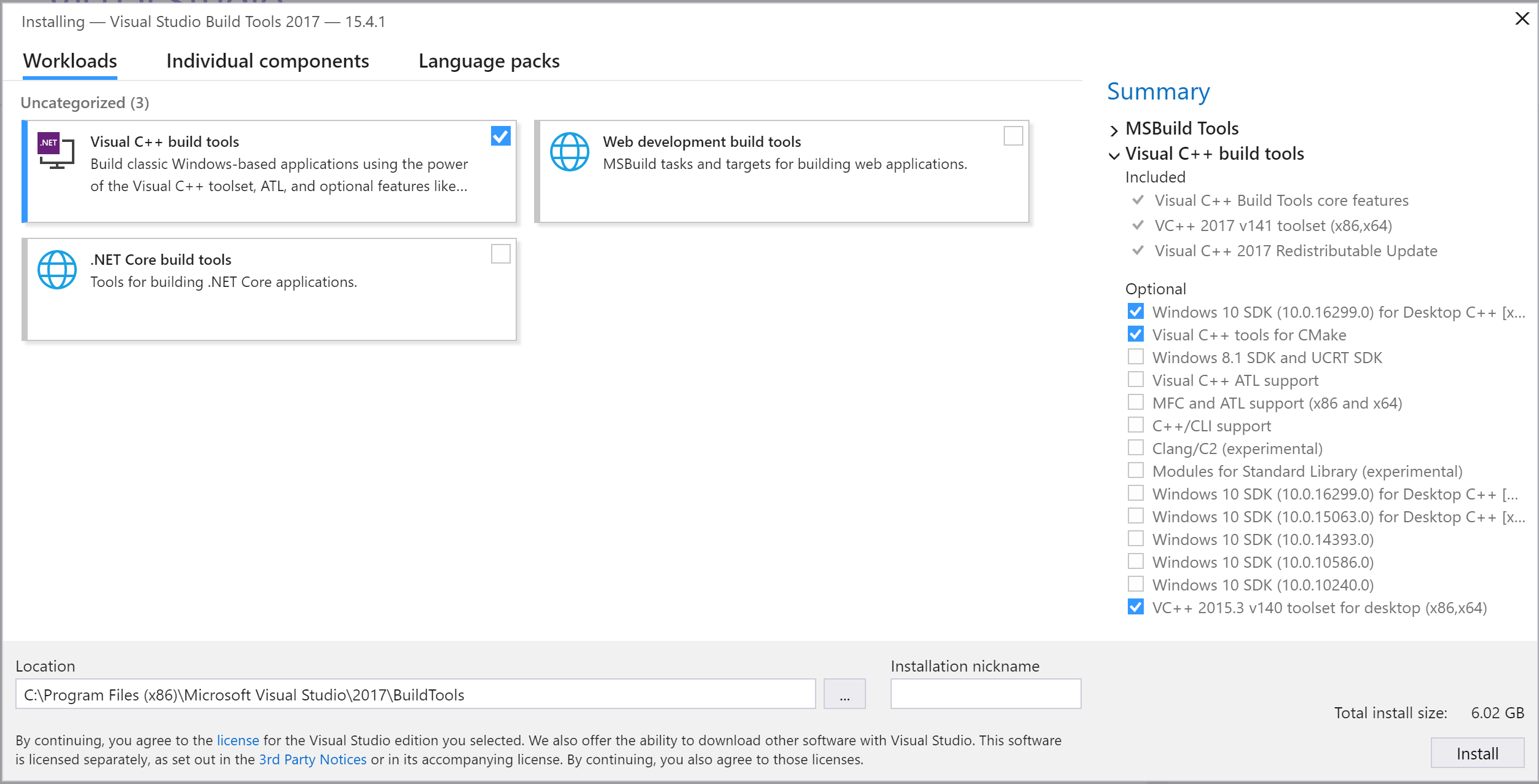
I clicked generate visual studio project files and got an error that said I need to install VC++2017 toolset
how do I install that?
I have visual studio 2017
next badger
@plush yew ue4 version?
proud narwhal
fullbright was what the goldsrc engine used to do, it would default to a full brightness mode until you added lighting to a map, but I guess that is a very dated concept now
plush yew
wait, I'll check
4.24
it says visual studio 2017 is installed but is missing the c++ toolchain
next badger
go in VS installer and find a VC++2017 toolset there, check it, and you done
next badger
@proud narwhal i guess, skylight is what you looking for...it acts like ambient lighting
proud narwhal
yes that might be it thank you
plush yew
Do I install this?
white hornet
Can I upload a video to youtube so you guys can see the quality of what I was talking about earlier ?
Or are we not allowed to link that here?
surreal laurel
@white hornet go for it, but put it on streamable much easier that way
next badger
 plush yew
so which installer do I get?
surreal laurel
I don't know why I have been so sparing with line traces, apparently they're cheap as hell
line, not shape that is
white hornet
@surreal laurel How do I do that ?
surreal laurel
just go to streamable and drop a video into your browser, don't need to log in or anything. then share the link
white hornet
it finished first xD
next badger
@plush yew ? no clue...most people here use Community versions...as it's free
plush yew
ok I'll just get the top one
white hornet
I'm wondering if that image quality is linked with the 1660 we're using, does it look like a graphics card issue ?
surreal laurel
but i mean it's up to you
plush yew
I don't have the workloads tab
next badger
well, cause you have not reached it yet
plush yew
oh.
ok so after, I clicked install and it just installed.
I didn't get the workloads tab.
did I get the wrong installer?
ohhh I see, community.
this time I have the workloads tab but not visual c++ tools.
which exact installer did you use to get that? @next badger
next badger
indeed...cause i've just downloaded it
white hornet
Sorry for repeating the question but finally got the video up, hope anyone can shine some light on this
plush yew
actually that's right isn't it?
next badger
@plush yew gamedev c++, the one checked on my screenshot
next badger
if you only need the toolset i believe it's core module
next badger
@white hornet are you feeding video through ue4?
Tips, tricks, and techniques for setting up Visual Studio to work with Unreal Engine 4.
 brittle gulch
Hi guys, is it possible to convert a landscape spline in a spline actor?
white hornet
@next badger yeah, it goes directly into ue4
plush yew
noooooooo
I got another error.
ERROR: Could not find NetFxSDK install dir; this will prevent SwarmInterface from installing. Install a version of .NET Framework SDK at 4.6.0 or higher.
I'm so confused.
 plain iris
next badger
plain iris
next badger
@plush yew well, install it...it's in this installer
next badger
NET Framework SDK 4.6.0
plush yew
Netfxsdk?
ok
is it .net desktop development?
@next badger sry for pinging again.
oh it is.
finally I've got it working.
 vale root
hey I've got a problem with a project I'm trying to transfer to my new workstation
everything works just fine except when I try running the game
cause when I do I'm being greeted with this screen
and this message log
 hearty walrus
I've got this basic UI working, but it feels really bland - how would I go improving on this?
plush yew
how do I update ue4 to 4.25?
next badger
open a launcher ->
plush yew
do I click launch?
next badger
you hit +
proud narwhal
can I attach a light to a model, for example a ceiling light which will then be automatically applied to all uses of it in a scene?
hearty walrus
plush yew
found it
hearty walrus
why does the progress bar fill at 10, instead of 100?
next badger
@hearty walrus incorrect math?
 magic jewel
@hearty walrus I actually think your minimalist UI is quite nice. I don't like the font though. It looks like a digital radio clock and not a HUD
But the simple bar and shape cut in from the top looks sleek
hearty walrus
really, the rest of the game has it's own over-the-top scifi look, and the UI just looks bland
I'll probably keep it in as an accessibility feature
magic jewel
You could look at UI from games like Crysis and Halo maybe if your character is wearing a visor
Or even stuff like Iron man
You can use tools on the web to analyse fonts from screenshots too
hearty walrus
Halo's UI is a big inspiration for this, actually
magic jewel
If for example you found a font but couldn't work out what it was
 wooden delta
I finished downloading unreal engine from some 3rd party software. It says it's master source and compiled(I have no idea what it is)?
So what should I do now to open it?
plush yew
Can you move procedural meshes in real time? you have to move them as a mesh and when u want them to be procmeshes you copy from static mesh?
 stark marsh
need some help i want to add an inventory and crafting system into my game
stark marsh
how do i add it to my project
it just says create project and not add to project
ok how
cool
thanks
so i can just use this and then expand on it then
like the system is in place already but i can just change out the ui and stuff to fit my game
is it simple to add your own items
like new ones in
can i easily replace the ui too
wooden delta
Can anyone help me?
stark marsh
my game is going to be a sort of survival crafting game
but it's a bit differant to most
since you're going to start off with no resources on the planet
and you have to plant everything first, then harvest them later, it doesn't start off with much at all
 rocky radish
What should I do so that Engine can run😕 ?
@wooden delta where did you download that from?
wooden delta
Just from a website
rocky radish
Just from a website
@wooden delta may i ask you what website? github?
wooden delta
Nope(I should have but i found it only when it was done)
rocky radish
i'd recommend you downloading the engine from the epic games launcher and if you want the ue4's source code you should download it through github
stark marsh
@plush yew i need help i can't find where it stored
how do i find where is stored a project
i just created one not looking where it saved to
wooden delta
I can't download from launcher 🥺
rocky radish
I can't download from launcher 🥺
@wooden delta why not?
wooden delta
Internet limits doesn't allow me
rocky radish
Internet limits doesn't allow me
@wooden delta dont allow or it just takes a long time? i need you to be a bit more specific.
 green sky
Hi everyone. Is it possible to share one unreal engine 4 install on dual boot system (Windows 8.1 & Windows 10) or would i have to install ue4, visaul studios and win 8.1 sdk on windows 10 seperately?
wooden delta
I used public WiFi to download in my phone. I can't take my PC with me to public wifi@rocky radish
rocky radish
I used public WiFi to download in my phone. I can't take my PC with me to public wifi@rocky radish
@wooden delta wait what do you mean download in your phone?
wooden delta
I downloaded the RAR format of unreal engine in parts
Extracted in PC
Lemme DM you link
rocky radish
ok but what i dont understand is why didnt you just install the epic games launcher and the engine through it?
wooden delta
Because I wanted some offline launcher
rocky radish
Because I wanted some offline launcher
@wooden delta from what i've seen from the files you've shown you're gonna have to build the engine in visual studio
wooden delta
Offline installer
rocky radish
and you're still taking the risk that the files you got are gonna give you malwares and such
wooden delta
How can I build that?
 little warren
Hey if anyone is good with animation state machines I'd appreciate a quick look in #animation
 jolly jungle
i wish megascans had more trees
next badger
@jolly jungle get open world example from epic, if you have no one yet
there are a lot of trees
jolly jungle
is there a free program that i can throw megascans bark and leafs into to make trees? like speedtree but free?
next badger
yep, Tree It is the only one afaik
 midnight flame
Hi does anyone know how to put a hole through plane. Im trying to do this so I can have a door
jolly jungle
looking into treeit
next badger
@midnight flame use blender, you can do it with ue4, but it's not a simple thing and i have not seen tutorials to give you a link
next badger
to make hole in mesh
midnight flame
Ok but I rather do it with ue4 even if its more complicated
I bought some assets for wall that I would like to use
jolly jungle
sometimes i hate my antivirus so much
magic jewel
Just use Windows defender and something like Malwarebytes + AdwCleaner lol
Unlikely that you need a dedicated realtime software outside of defender, it doesn't suck like it used to
@midnight flame Unreal is not equipped with the tools to do complicated modelling well, particularly boolean-style operations like what you're describing. Do it in a 3D program such as Blender, 3ds Max, Maya, Modo, etc
You can do simple boolean operations with BSP, but it's unlikely to be good looking.
 gaunt hedge
Hey guys ...quick question: direct light can only be movable ? Can’t it be baked ??
midnight flame
You might need to set it to static
next badger
@midnight flame oh...it seems like they've added a hole puncher
midnight flame
Really?
next badger
gaunt hedge
@midnight flame when I set it to anything else other than movable it disappears
next badger
midnight flame
ok thanks
next badger
magic jewel
Movable lights cast fully dynamic shadows. They can be changed at runtime entirely.
Stationary lights cast dynamic shadows onto movable objects, and bake static shadows for static objects. They cannot be moved at runtime, but their intensity and colour can be changed.
Static lights cast static shadows to everything, and cannot be changed at all without rebaking.
next badger
gaunt hedge
When i set my direct light to stationary and build light its effect disappears
When i set it back to movable it shows up again
magic jewel
Your Lightmaps are probably broken/inappropriate. Take screenshots of your level in Lit mode, Lighting Only mode (Alt+6), and Lightmap Mode (Alt+0)
wooden delta
I guess I figured out by myself
Unreal engine is on😊
 inland pivot
Remember you can only have 4 overlapping stationary lights. If 5 stationary lights overlap, one of them gets disabled
gaunt hedge
@magic jewel screenshots with direct light set to movable or stationary?
inland pivot
And the sun counts as a stationary light
gaunt hedge
I have only1 stationary light for now which is the sun
inland pivot
In that case I recommend doing what Subzero said above
magic jewel
both
gaunt hedge
Ok guys will run some few tests and get back to you, thank you guys
jolly jungle
wait am i allowed to use free megascans in treeit as long as the tree that will be exported will go straight to unreal and unreal only
little warren
Hey guys why does my montage window look completely different from this: https://docs.unrealengine.com/en-US/Engine/Animation/AnimMontage/Creation/index.html
Overview of creating an Animation Montage for use within Blueprints and Animation Blueprints.
mine looks like this
rocky radish
wait am i allowed to use free megascans in treeit as long as the tree that will be exported will go straight to unreal and unreal only
@jolly jungle i don't think you are because it says you're ONLY allowed to use it on unreal
 thorny horizon
Does anyone know how to fix an issue where the capsule component doesn't fully follow the mesh? I'm jumping but the capsule is well below me, making me not reach the desired height. Any way to ensure it sticks to wherever is the mesh is?
rocky radish
but i think you can create tree's from scratch on tree it
next badger
@rocky radish if you use Epic account to log in to Megascans - you ONLY allowed to use it in ue4
rocky radish
@rocky radish if you use Epic account to log in to Megascans - you ONLY allowed to use it in ue4
@next badger Enator18 was the one who asked it 😅 wrong @
jolly jungle
Yeah I’m just gonna do it I think
rocky radish
it doesnt matter if there will be some intermediate steps
@next badger wait so its allowed if i export it to unreal later?
next badger
"Unreal Unlimited" license is covered by EULA (same as Unreal Marketplace assets)
 dense knoll
how do i fix blender fbx files not importing correctly
next badger
@plush yew ahaha, i was typing that
next badger
@dense knoll are you sure that it's not just flipped normals?
next badger
what?
next badger
well...every triangle of geometry has normals
dense knoll
how do i find out wether the normals are invertedf?
next badger
you need to make a material and check Two Sided in it
dense knoll
oh
next badger
if the geometry will back - you have normals inverted
dense knoll
ok
next badger
this checkbox is expensive, so it's better to fix normals, than leave it enabled
@plush yew you can do that in ue4 now 🙂
dense knoll
do i do it in the import menu?
next badger
dense knoll
their are 320 meshes to my model
thorny horizon
Any one know how to make sure the mesh and capsule component stick with each other?
next badger
"stick" ?
thorny horizon
Yeah, I'm jumping and my mesh is higher than the capsule. The capsule is colliding with surfaces and making it look like my character stops in midair and not completing the jump to a surface.
Yet when I'm on the ground, they line up perfectly.
dense knoll
well fixed
next badger
@thorny horizon well, first, ue4 collision test for CMC leaves a gap between the surface and capsule
thorny horizon
Never mind, I found the issue. I had two different JumpZVelocitys set.
Thank you for the help, though!
 burnt ether
Hey Guys... I wonder how does the Tick node work exactly
since it's called per frame
does it mean it goes faster on higher framerates ?
 ancient grove
Does anyone know how to make hair in unreal look good? Setting the texture to be translucent makes it look pretty crappy here, it's just a single haircard texture
hair looks like this
plush yew
uhm I dont know if this is my computer or what but every time I open the game scene and go fullscreen mode it gets a little laggy
 dusk elk
anyone know of a way to force a specific LOD while i'm piloting a camera so I can work in another viewport at a lower LOD?
plush yew
h
 loud knoll
@dusk elk cant you open the model viewer and hard set the LOD in the model viewer then revert the change if the LODS are auto generated you could write down the values and then hard set it to the LOD level you want then change it back.
not sure
You just want to do this on one model or all the models?
 wispy adder
Is there any way to set it so that stamina is only taken away when the animation is used?
For example, I can spam space bar and lose all stamina and the jump only happens once/twice
dusk elk
i have a cinecamera at a certain point viewing a city
and i'd like to view LOD 0 from that camera but position buildings in another viewport at lod 1
6 individual buildings
6k
loud knoll
@dusk elk did you try the Far setting for that particular object?
 wild bear
Can someone explain me how to fix problem? When i export video from Sequencer i always get fps counter in right top corver, but i dont need it and dont see how to remove it
loud knoll
@wild bear You should be able to turn off the FPS counter in the editor windows before you start recording
wild bear
its turned of already
loud knoll
ok did you check the settings in the movie recording setup?
wild bear
checked but have not seen anything
loud knoll
are you running the game to record or doing it from the editor?
wild bear
-NOSCREENMESSAGE already present
loud knoll
ok
loud knoll
and it creates a standalone and the FPS are on when you do that right?
wild bear
avi 100% compression 1080, sometimes it disappear when i use custom resolution
yup
but sometimes custom dont work... 😄
loud knoll
run the standalone with out exporting just as a test do you see the FPS on then, if so disable them from the console
then try to export the movie again
loud knoll
standalone sometimes saves things
like res changes will revert and all that
hit the ~ type in stat fps
then type in exit
then try to capture the movie again
loud knoll
it is an attempt, one thing I noticed is that sometime when testing out lower settings they become the default when i do it from my menu options running in standalone then I cant remember what I do to fix it seems like I have to trick it into remembering the latest thing I did. so I am assuming it is the same issue.
 dire coral
can someone help i need to spawn a actor at a random location and move i to another like the fornite battle bus and it keeps giving me this error
 pallid yacht
@plush yew lft
plush yew
@pallid yacht, You do not have permission to use the talent command.
@astral copper, You do not have permission to use the talent command.
rocky radish
you have to DM the bot...
pallid yacht
oh ok sorry ^^
loud knoll
@dire coral Looks like the object hasn't spawned yet you are doing the move event on begin play, create a custom event and call that when the conditions are met like it is spawned.
dire coral
The move event is just a function that select random start and end points
dusk elk
@loud knoll i just ended up forcing LOD 0 as a quick way to see then switching back to LOD 1 to move things
Was hoping there was a way to force LOD 0 on a specific camera and work LOD 1 in viewport 2
loud knoll
@dire coral yes I see that but it hasn't spawned yet, that is why you are getting the None over and over again it is trying to find it, maybe add an isvalid? condition to the begin play event, but that will only trigger once, so if you create a function timer and try until the condition is met it will trigger once it is valid.
dusk elk
Now that I've forced LOD 0, my auto LOD's when up close don't work is there a command?
loud knoll
did you unforce LOD 0?
dusk elk
I've been going back and forth with r.forcelod 0 and 1 to move and view my changes, what's the unforce lod command?
loud knoll
I am sure it has auto in it 🙂 let me search
dusk elk
i tried r.forcelod auto
 ornate ice
Hey Anybody got any idea why I could be getting this issue in UE4
on blender is like this
dusk elk
try double siding your material and see if the face is backwards
ornate ice
how can I do that?
even so why is that looking like that?
its a single face
but in UE4 is a triangle
loud knoll
when the model is converted it turns it into triangles "triangulation"
do it in blender
turn on show normals
plush yew
Hi guys can someone help me?
loud knoll
face select or select the model then you should see that one normal going the wrong way, flip it, and then save export
@plush yew you have to ask a question or we dont know if we can help you
plush yew
Hi guys can someone help me?
@plush yew I want to know how can I export to windows in my linux pc, without doing dual boot
loud knoll
export what the entire game or just some assets?
loud knoll
can you build the windows platform under linux?
plush yew
I only have Linux and Android under export project
loud knoll
dont you need visual studio and all that?
did you enable windows is it a choice in the project settings?
ornate ice
will try that @plush yew
plush yew
On 24.3
ornate ice
it doesn't seem to be a double vertex issue
plush yew
P> will try that @plush yew
@ornate ice you using linux os? (I use the term "Linux os" as the pc operating system and not the exported game )
ornate ice
Windows @plush yew
 golden condor
Is RobotoTiny exclusive to the Starter Content?
plush yew
I see
plush yew
But I use Ubuntu 20.04 with ue4 25.3 and can't export the game to windows, hmmm...
loud knoll
@plush yew Sorry man I haven't used Linux with Unreal in a long time, no clue if you dont have the export choices it seems something is missing do they have a get started with linux section?
plush yew
Yes
plush yew
It's only build and qt Creator as editor 😂
 supple wyvern
loud knoll
supple wyvern
loud knoll
oh @plush yew I found this - https://docs.unrealengine.com/en-US/Platforms/Linux/GettingStarted/index.html
supple wyvern
🙂
loud knoll
I see something about it only support windows up to 4.14 but then you can do something to fix it
supple wyvern
@plush yew didnt work 😦
loud knoll
@plush yew Sorry it seems that is from WIndows to Linux not Linux to windows
supple wyvern
got it
loud knoll
@plush yew This thread might help https://community.gamedev.tv/t/using-linux-with-unreal-engine/4648

GameDev.tv
Is anyone here successfully following the course using Linux? If so, perhaps you guys can meet here and help each other out.
scroll down to shootzc seems like he has a long response with a of info
nah that one is all about getting to run on linux
@plush yew oh wait do you know if you have to enable some plugins to compile for windows from linux?
maybe it could be some options in the plugins
plush yew
I will look, thanks 😁
wild bear
@loud knoll Looks like scheme when you Play standalone > stat FPS > exit > render seq > loop it if need render again
loud knoll
@wild bear So it fixed it?
@wild bear I have stats off by default when I am working because I get distracted by the data until I am ready to look at it.
wild bear
yes, its strange fix, but its working
loud knoll
awesome
@wild bear imagine you are testing medium settings running low res then want to render a high res movie and it is stuck in med res mode that happened to me a few times.
@wild bear It was happening a lot when I was testing my menu options settings for video and then wanted to export the result to show people.
wild bear
and another what i have is that foliage not loaded from start in sequence export....and after couple seconds it fading in
loud knoll
@wild bear Yeah you can add a delay to it and I think it has an option to make sure everything is loaded.
depends on your hardware what the best choice is
 scenic fox
guys how do you make a room
i've been trying to do it for legit hours
and i cant
like i legit cannot
there is like a small gap in between my bsp(s) and i cant get the right placement for it
 cyan hatch
Hello. i have an object with a "On component hit" on it, to do something when the player is touching it. But if i enable th eobject collision while the player is on the same place, the placer is pushed, but the "On component hit" is not called. is there a way top make it colled at collision activation ?
 narrow mauve
Does anyone know if vector fields can be used to effect physics objects as well...I dont mean meshes in a particle system
hearty walrus
how do I create a cooldown progress bar of sorts?
narrow mauve
is that overlapping meshes Bustzee or just where your UV seam is
scenic fox
overlapping meshes
and i cant get it
to
not overlap
can you guys help
plsss
@narrow mauve can you tell me how to stop this thing
god damn everybody stopped speaking
AAAAA
narrow mauve
lmao
scenic fox
can you help
scenic fox
but i cant get it on the right place
narrow mauve
are you snapping to the unit son the grid
just turn it off to make fine adjustments
scenic fox
now it looks like this
wtf is happening
what the hell should i do?
but why is it doing that?
cunning dagger
does anyone know how to create assets for the animoffset?
plush yew
hey does anyone know what the best way is to how I can make the numbers actually like do something? (Im using blueprints)
the actual health bar works but the numbers dont do anything yet
cunning dagger
@plush yew are you using widgets?
if so, you need to bind the variable text to a function that is bind when the widget is created
that way, everytime your bar changes, it will also update the text
if you need more help, just send me a msg
 stray briar
can anyone help me with making my components editable in the blueprint editor?
i have created a blueprint extended from this c++ class
but i have nothing in the details panel of the blueprint editor
Ive just tried that, still the same thing :/
 digital anchor
stray briar
digital anchor
stray briar
thank you to both of you, its working as expected now :)
 runic fern
Hello Guys ... If i have a material for a long wall between 2 rooms Can i get the coord of texture for each room Like divide the wall for 2 Parts in Material
plush yew
Do Corpuscular (god rays) work with sun sky?
 digital badger
Other than this Docu reference: https://docs.unrealengine.com/en-US/Engine/Performance/Scalability/ScalabilityReference/index.html - is there any other settings recommended to be implemented associated with graphics?
Scalability options, properties, and console variables.
 cinder forge
Hey guys, am very new to this all have downloaded ur4. 25.
Am aiming small and often at the moment to try and learn as much as possible in my spare time.
Been following guides for simple things such as importing a object, texturing it and putting it on a base that spins and a small banana pick game.
Its been really interesting as have no previous experience but even the basics with blueprints so far have inspired thought into how could be expanded upon.
unreal seems to give even a tech caveman the chance to participate in something creative and enjoyable.
Wondered if any advice on some basic tutorials I could follow that you think provide good basic skill sets
inland pivot
The basic tutorials on the Unreal website are good. Tom Looman’s stuff is good too: tomlooman.com
Ryan Laley recently put up a new “game from scratch “ tutorial series: https://www.youtube.com/playlist?list=PL4G2bSPE_8uk84cmXmVO-uS8ioIXEJkh0

YouTube
digital badger
@cinder forge The best resource is the official UOL platform, available here: https://learn.unrealengine.com/home/dashboard
little warren
Guys is it me or does the montage UI look completely different to every tutorial out there?
there's no montage, sections, notify bar, etc..
 near pine
can someone help me in #cinematics
cinder forge
Thanks for the tip. On the official site tutorials. Will start working through them.
As all that start here my ambitions are huge but my skill base is 0. Hope to see you all soon wish me luck
And jc that looks really good series for what I'm aiming for. I just need get basic utilities down first then will try that tutorial
thorny horizon
This may be a dumb question but this is the first time I'm dealing with Niagara effects. How do I change the rotation and location of the effect? I'm trying to do that in the details window in the animation where I have the Notify State in, but the effect doesn't change location or rotation at all.
digital badger
Yeah I'm using that too - I more need a list of options I can implement
Dumb question really 😅
Thanks though
 errant venture
anyone know why I can't see people look up and down?
and I can only see them turn left and right
also, strafe has a question :)
near pine
how do i add animation to my cutscenes
cunning dagger
@near pine you mean this?
near pine
oh
cunning dagger
u need to track first an object
near pine
let me try that
cunning dagger
or whatever u want to animate in ur cutscene
cunning dagger
so happy to help u
cunning dagger
if u need something else just add asa friend, and i will be happy to help u
near pine
is it possible for the character to do an animation when it starts
so like if its in first person
i can make it like crawl backwards
cunning dagger
when the game begins?
cunning dagger
well u can only work with animations u have
like crawl backwards, if u dont have that animation
i dont think there is a simple way
cunning dagger
yes
stark marsh
need help my world just looks too flat
do you think it's because my ground textures aren't very detailed
something just looks really off about it
i put a detialed texture their and it looks fine
so i think it's because my texture is pretty much a solid colour
 crisp vault
Yeah I think it just looks a little weird because the colour is so flat and there aren't really any shadows to break it up a little
a little bit of variety in the texture will help I think
 limber swallow
Hello, is there a way to make an "inifite" timer, so I can measure, for example, how long the player takes to beat a level?
I made it by setting a timer's time to 9999999, but something tells me that's not right...
Game time in seconds returns an integer, that gets back to zero from time to time... I had some bugs because of that, so I'm not sure if it's reliable for this. Also, I would like to have milliseconds precision. Doing something like a speedrunner mode.
Then I have no idea why I was having the issue, haha
makes sense
Thank you 😄
 empty dawn
I have a package that was imported into my project, when I try and delete it from the engine, it crashes. Is it okay to delete the raw files from my file folder?
errant venture
and when i run the code and print the hp values, i can see them going down
however, if i print through the "get hp" function related to the progress bar, i see that get hp never changes
Any ideas on what could be going wrong?
@empty dawn i've deleted files from the folder before, just make sure you arent using the contents of the folder or stuff could get weird. idk if it's good practice though.
 autumn elbow
@errant venture does ur bar update?
little warren
Guys my bullet hole decals are only visible when I'm really close to them, like 1 meter close, any farther than this and it doesnt render, any fix for this?
errant venture
@autumn elbow yeah, it does. I put a print script in there and it printed many times
empty dawn
I tried that, still same thing. 😦
autumn elbow
@errant venture sorry.. maybe I'm misunderstanding where the issue is. You have a hp variable. The progress bar is updating as expected. What's the issue?
autumn elbow
@little warren maybe this? https://www.worldofleveldesign.com/categories/ue4/ue4-decals03-decals-do-not-render-in-indirect-light.php
Solution on how to make your decals render or show up in indirect static lighting or in shadow.
stark marsh
help
from the sides my grass looks dark
i want them to still cast shadows but just not look dark from a differant angle, so i can see them
i don't waht kind of lighting i have
i only have one directional light i think
plush yew
im getting a fatal error when i try to launch my packaged game, but it works when i run it as a standalone game in editor
 frozen pond
what i'm doing wrong? i want to play global camera shake but i just wont, i'm using ALS if that change anything
 azure vault
Any idea what would cause big frame drops every 1-2 seconds in the editor?
 haughty bear
anything illegal
 scenic oriole
I have a question (maybe a stupid one): If I have various packages from the market in my project and I want to (package) it for testing, I select package for windows and holly Christ it seems to run through all these market bought folders and trys to compile just "everything"! is that normal or am I doing it wrong?
 misty saddle
Anyone know how I can get a Unique Net ID from the owner of an actor?
on event begin overlap
 pseudo pulsar
Anyone get issues when using Blender to Unreal? Specifically I'm having a mesh not show up.
I'm exporting, and a bunch of the ones I'm trying to import do indeed import, but one doesn't. =/
It does import the texture & material though weirdly enough
Ahh fixed the issue!! I went into the folder to ass if the uasset for the object was there, and it was! So I closed Unreal, and deleted the uasset
Imported just fine after!
empty dawn
How long would you guys think it would take to write a plugin to create a blood decal system?
 worthy plaza
Obs are object?
misty saddle
Does anyone know if you can sell blueprints on the marketplace if they require Advanced Sessions?
 uneven fractal
 wide girder
as a beginner, why I find blueprint is more confusing than C++?
 frigid needle
Because everyone thinks and learns in different ways.
 tiny sonnet
U know your bad at lighting when your game looks better when laoidng shaders
That's me right ther lmao
plush yew
Has anyone been in the predicament of adding a new animation to an FBX export, and then struggling to import the extra animation into UE?
 austere jay
Hello, Does anyone know if they ever release the Unreal Anatomy Diagrams and where i could find them?
...Found it in the tutorial
 lethal flame
i want to make a walking simulator with an art style like Zelda: Breath of the Wild and Genshin Impact.
what assets would you recommend? what should i start with first? grass? water? skybox? sun? landscape elevation?
 outer abyss
can anyone help me to update UE4.25 using source build
in previous version there is a glitch(screen flickering) and now i want to update the with new one
so please help me to update using source build
 jagged salmon
I'm trying out POM in materials but I'm getting this blurry result. Anyone knows why this could be?
errant venture
Anyone have good resources on sessions? I know i want to have a player spectate while dead until the next game starts, but I don't know how to do the specate part or the create-next-game part.
Like, can you leave a session without destroying it?
 open wadi
Anyone ever leveraged html in a widget?
 barren flume
I was wondering how I could use directional hit reactions? I have animations for them too but I'm not really finding a lot of information when I search that up
surreal laurel
@barren flume I've never messed with that but i'd probably create a state machine for the reactions and create conditions for each animation based on what side of your character capsule registers a hit
 restive yarrow
i have something weird going on, I have one zombie skeletal mesh with a physical material called "Flesh" placed in each of its materials, similarly I have put the same physical material in my human base male skel mesh's materials, but the thing is when i shoot the zombie skel mesh, it prints out the hit physical material "flesh" and spawns the blood splatter emitter, but when I shoot the human skel mesh, it prints out the default physical material, spawning a concrete blast emitter ( which is set as the default phys material emitter )
I am using a projectile based bullet btw
surreal laurel
sure what's your address
 cosmic cove
you cant order pizzas from outa state
duh
where am i
what
come back in 3 years and ask that question
so annoying
surreal laurel
@ebon linden Looks like some kind of culling issue. Try putting the animation in an actor BP and drag that into your scene
surreal laurel
@ebon linden Found this, it might help https://answers.unrealengine.com/questions/153901/skeletal-mesh-disappearing.html
 turbid python
Hello, I have a weird problem.
I'm creating a local multiplayer, I want to control 1 character with keyboard and second with gamepad.
When I want to control one with gamepad that doesnt. I have done "Skip Assigning Gamepad to Player 1" check.
What happens when I do that check is that both character are spawned in the same Player Start and only one can be controller with keyboard, with gamepad nothing works anymore.
When I did the same thing to a template project, then it worked, but I can not seem to figure out what is the difference between my own project and template project
 abstract frigate
Hello, i have a question
I have version 4.21 of Unreal and i want to update to 4.25, is it going to download everything from the beginning like the templates and some other files?
loud knoll
@abstract frigate Yes it is a fresh you can set the options to remove things you don't want helps to reduce the size.
@plush yew all shapes and sizes man, who know how big each asset is going to be once you load it from the store.
abstract frigate
@abstract frigate Yes it is a fresh you can set the options to remove things you don't want helps to reduce the size.
@loud knoll ok thanks!
midnight flame
Hey. Im still using 4.24.3 and I want to upgrade to 4.25.3 but I want to port my projects. is that possible
 thick herald
Yes. make a back up copy first though in case it goes horribly wrong 😄
plush yew
dude
there is a ue4 version with rtx enhacement on github
wy we cant have this in luncher ?
DLSS TOO ’
?
 proper stump
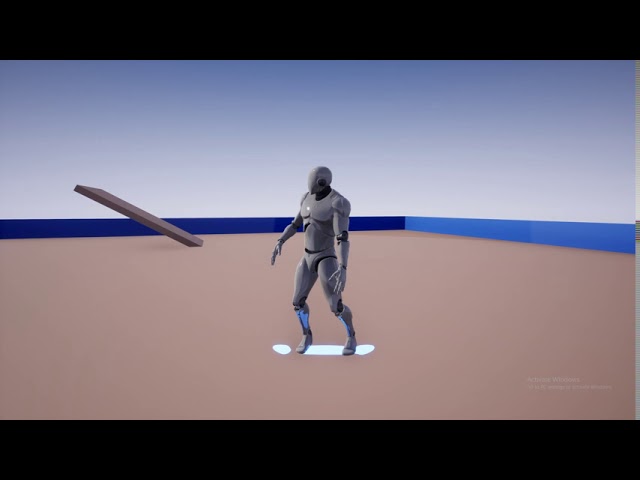
I've made a skateboard_bp with a skateboard static mesh, i attach the skateboard actor to the third person character - that works fine, but it is as if the skateboard doesnt have a rigid body... it goes through the ground......even when i set it's collision to block all
any idea why?
 heady fractal
Is there anyway to make some part of a static mesh move? Like for example rotate one leg of a chair in game
@proper stump maybe u don't have collision set on the wheels.....idk just a wild guess...sorry if I'm wasting Ur time
proper stump
I do have a collision, it's something with physics....
 serene birch
Is there anyway to make some part of a static mesh move? Like for example rotate one leg of a chair in game
split it into a separate mesh or make the chair a skeletal mesh (that's exactly what they are meant for after all)
 manic pawn
skeletal meshes are mostly meant for skinned animations, if you're making mechanical stuff with rigid parts it would be worth checking if it runs better as individual static sections
 dawn gull
How can I make the mannequin character bounce when you jump like this ball? I know you have to do it with capsule but you have to enable physics which makes it so you can't control the character
https://www.youtube.com/watch?v=1EzVZeNt00k

Check out my Patreon: http://bit.ly/TechnoNerd_Patreon
DON'T CLICK THIS: bit.ly/2vBhU2s
PLEASE LIKE AND SUBSCRIBE
And please request Tutorials.
 timid swift
Hey all I don’t know where to put this, but is anyone else having issues with Live Link intermittently freezing or not getting data?
tight prawn
Is it possible to "Apply Physical Animation Settings Below" with the exception to some bones ?
nvm i got it
heady fractal
Hey so....I have a moveable tank that a player can control and shoot with...but when a different tank shoots and hits me or I hit it, the tank goes off into the air flying and twirling. Is there a way to instead just make it twitch a bit and stay on the ground? Twitch in order to make it look like it absorbed the impact but was still really strong and sfuff
 exotic thicket
You can try increasing the tank's weight or reducing the projectile's weight
Or you can set it up so the tank doesn't physically react to the projectile, instead when hit it would play some predetermined animation of shake
plush yew
I'm trying to use the new hair system for a character creator, but I'm running into memory errors every time I try to build something to switch the hair
I know its new and in beta, but does anyone know any tricks for hair
heady fractal
@exotic thicket Ty.....that's a really good idea...ima try that
 proven minnow
I installed the SunPosition plugin and wanted to use the SunSky object from it, activated the Extend default luminance range in Auto Exposure settings and set the location, date and time for the SunSky object. However, my result does not look as expected, all textures are overexposed and white? Does anyone know a solution?
thick herald
Yup, change the luminance of the directional light in the details panel.
proven minnow
Thanks for your answer, I have now set the luminance from 75000.0 lux to 5 lux. Unfortunately it does not look very different.
thick herald
I tend to use a value of 2.75 or a little lower. Play with the skylight values as well.
 reef rune
How do I get started with UE?
SHould I start learning about pawns/character or level design or what is crucial
thick herald
Start with something simple you want to make 🙂 Find a tutorial that is similar to what you'd like to do, and go from there YouTube has tons of good channels but my 'go to' ones are Ryan laley or underscore. The official learning hub is a great place to start though. https://www.unrealengine.com/en-US/onlinelearning-courses

Unreal Engine
Unreal Online Learning is a free learning platform that offers hands-on video courses and guided learning paths.
reef rune
alright
I want to make planes/spaceship type of games
but youtube has almost to none
jesus
learning hub has so much damn stuff there
thick herald
This site by Elhoussine Mehnik (Ubisoft dev) https://ue4resources.com/projects has a lot of example projects etc to learn from inc flying 🙂
 reef rune
alright
thanks
is he using nodes or cpp?
cause I am pretty new to all this
where can I ask questions about blueprints
oh yes
found it
plush yew
anyone know how dead matter does there ADS system?
serene birch
@proven minnow all that is relative anyway
your problem is that the default sky works for outdoors
but your room is indoors
the amount of light inside the room you should have is tiny compared to the light outside in full sun
and so you get hit by something pretty hard/annoying
the skylight BLEEDS through obstacles
basically, if you want the inside to be correctly illuminated, you need the sunlight to be very strong because your room inside is illuminated mostly through multibounces
but if you make the sunlight very strong, the sky automatically emits a lot of light too
and the engine cannot really know that the room walls are "inside" so the skylight lights them up a lot
open wadi
I have a question: I'm interested in adding something akin to a "Facebook wall" to the UI of my app for user communication. My authentication system is done and I have a remote API I built in node.js. I can build such a thing via the web and node.js, but I'm wondering - is there a method for leveraging HTML in Widgets?
I'm finding various tutorials on "how to build a web browser in UE4 using a 3D object" and what not, but that's not exactly what I'm after.
serene birch
if your lighting is fully static, if should work fine though but it seems the skylight is dynamic
if your scene doesn't need both indoors and outdoors, instead of weakening the directional light power
lower the skylight power!
this should do the trick
or maybe you lack a reflection capture for inside the room
open wadi
Apparently there is a "web browser" plugin, is this the sole method for leveraging HTML in UMG widgets?
plush yew
I believe rotation Y is YAW and rotation X, Z is Pitch @reef rune
does anyone kknow how to change the dang font of Unreal
exotic thicket
There should be a default font option in project settings
plush yew
but it's not changing it
I have it built on linux - and I went into Editor Preferences and changed Log Font size to 13 and set as default
that was in editor preferences.. let me see
exotic thicket
if you go into the font asset's settings, it has a default size or something like that in there
that affects some of the font rendering
plush yew
this ?
exotic thicket
that should allow you to choose the font asset that's used by default, but if you open the actual asset itself there's a default size option
plush yew
im on linux so - if there is something I can do outside of unreal
open wadi
Anyone here have any experience using this marketplace add-on? https://www.unrealengine.com/marketplace/en-US/product/html-menus
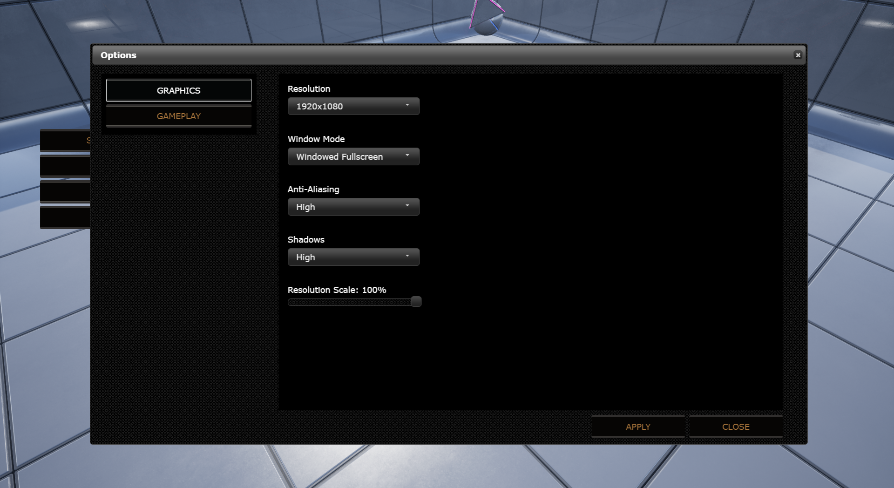
Use Offline HTML, Javascript and CSS to create an Menu, Web UI, Inventar system or more
Morning / afternoon @exotic thicket.
exotic thicket

plush yew
there are no assets listed .. hmm maybe thats why
exotic thicket
the default engine font is roboto iirc, it should be in the engine assets somewhere
plush yew
this is unbearable
doesn't look like there are any fonts that I can see.
Obviously it is using a font from somewhere or there wouldn't be any text at all
and then I got this ..
second time it's crashed trying to change the font.
I will probably just used windows
exotic thicket
you'll need to turn on display engine content from the content browser
the font is in Engine Content/Fonts
plush yew
I will try again
exotic thicket
or at least if you go to Engine Content in the content browser
plush yew
this is the 2nd time UE has crashed on my system.
plush yew
theres no font folder in Engine/Content
theres a fonts folder in SlateDebug
and thats it
it has LastResort
I may just copy some fonts over to a font directory and see if that helps
exotic thicket
scenic fox
if anyone can dm me how to make a lean in and out function that would be appreciated i literally made one and its not that smooth
its a time line but
its doesn't feel smooth at all
please
nobody is here lmao
 queen dirge
can i make a separate window just for my camera, to have it on the second monitor? can someone help me with this
 silent harbor
does anyone know why painting foliage breaks the shading of my grass
i get weird shadows, gradients on my grass mesh while manually placing works fine
plush yew
I have a fog in my level. My character walks through the fog. Is it possible to have some kind of box around the character that disables the smoke. I mean the box will follow the char and everything inside the box will be fogless. I tried postprocess component in my char with box extent but yeah that only affects the camera...Is what I ask even possible in anyway?
plush yew
np solved
plush yew
why does unreal have it's own string and int types? (FString and int32)
 bleak ravine
when i paint foilage i always get that problem. maybe overlapping issues? you could probably fix that in the specific foilage settings
 radiant haven
 bleak ravine
it's just the lighting that's messing up? or is it collision?
 glad loom
Hello, sorry if this has been asked before, but if the Apple lawsuit goes through, games made with Unreal Engine will not be available anymore? And all the developers that made their games with unreal engine would need to use something else to publish them on ios / mac ?
 halcyon flame
@glad loom two separate issues
plush yew
Hi guys and gals, I recently started with UE4 and encountered a problem while blocking out a environment in the editor.
Put down a Directional Light and built lighting and these weird shadows started popping up.
The windows are created with BSP Brushes, wall is additive and the openings are subtractive brushes. Is this caused by lightmass options, or due to the BSP Brushes?
 zenith shoal
DXR Spotlight contest https://developer.nvidia.com/DXR-spotlight has been closed over one month ago and there is no announcement of winners isn't it strange for you guys? O_O Maybe closed means cancelled?

NVIDIA Developer
Thank you so much for your submissions. The DXR Spotlight contest is now closed. NVIDIA is excited to announce our partnership with Microsoft, Epic Games, Razer, ASUS, and MSI on the DXR Spotlight contest. We’re looking for game developers and content creators to create tech d...
 vivid girder
Any idea when the next unreal game jam will be?
 solemn siren
Can anybody please suggest on how to select a topic for a college project in unreal engine from a technical point of view? I don't want to focus on the art aspect because of time constraints. I am expected to complete it in a year.
It would really be awesome to discuss things we can do with UE4 combined with other technologies, e.g. AI to develop something that can be useful in a certain industry.
stark marsh
can anyone help me with my grass it looks really dark from certain angles and i don't want that
others people grass is just normal looking from all angles
 harsh copper
Hey guys, anyone willing to help an unreal beginner with some dumb questions in PM?
 ember cliff
I have a dilemma, and Im looking for insight from exeperienced Unreal devs. Bonus point if also experienced in other engines.
Context : I come from Unity, and for my new project I wanted to switch to Unreal, notably because of Unity shortcoming on render pipelines and multiplayer.
My goal is to make a colony-building game, with some advanced features such as custom building drawing and so on.
Problem : I keep having serious setbacks with Unreal, mostly because of systems that work very differently than expected, or missing tools that I wouldnt have thought would be missing on such an engine (nesting actors, prefabs, save system ...). I am being very unproductive since I keep hitting unexpected walls.
Assumption : Unreal being a leading standard in game engine, I assume the problem comes from me and that maybe I dont understand some basic "philosophies" of Unreal, such blueprints, and this is the reason why things don't work as I expect.
Questions :
- Is Unreal appropriate to make a complex city/colony-builder game ? (I know its technically possible, but is this engine a wise choice for such a project ?)
- Is it possible to use blueprints as proper prefabs ? (Im thinking of a easily modifiable blueprint of a building with usable doors, items, pathnodes & so on), or are Blueprints not really fit for that purpose ?
- Has anyone had similar issues when first coming to Unreal, only to finally understand some concepts specific to that engine and everything clicking together ?
 pliant rose
hey OG, how to change Product Configuration Widget icons, they are too tricky for me
plush yew
@ember cliff 1 yes. 2 yes. If you build them robust. 3. yes Bonus: go to marketplace for some of your needs.
frigid needle
@ember cliff take a look on learn.unrealengine.com. There’s a course specifically for coming to Unreal from Unity that will help you understand some of the differences and how to make use of them.
 terse tree
Hi whenever I launch my game in UE to windows, can I get to see the directory folder?
ember cliff
@plush yew, @frigid needle thx. Ill give it another try
proven minnow
Why is my scene looks like painted?
terse tree
is anybody there? someone please tell me
plush yew
@proven minnow Looks beautiful tho. Do you have postprocess volume or settings on?
proven minnow
@plush yew Haha yeah looks awesome 😄 Should use it maybe later ^^
Yes i have an active postprocess volume, but this problem still exist if i delete it 😦
plush yew
well If you dont provide specifics or maybe a video I think I cant help you
maybe show some material nodes or something :O?
terse tree
Hi whenever I launch my game in UE to windows, can I get to see the directory folder?
surreal laurel
How do I properly get a reference to my Animation BP in an actor BP? I'm trying to call a BP interface on my animBP but nothing works. I have a variable with the type of my animBP but I can't set it's default value, nothing shows up
inland pivot
Get Anim Instance
surreal laurel
Lol I just figure that out separately, thanks though. there's always some alternative path, i would have never known to get the Anim Instance instead of the Anim BP itself. Why would it even work that way?
 scarlet birch
@queen dirge Open a new viewport window, put it on the monitor you want, click inside the viewport, select the camera you want to use in the world outliner, right click it and select pilot camera.
stark marsh
hello how much grass is too much
is 600k grass way too much
i have culling on though
ok so i've got nearly 1 million grass down
ill definately have culling on
it seems to run ok
i don't actually know how much grass is rendered in most games anyway
plush yew
hey guys im having a hard time getting some custom uasset to import into engine. I even copied it to the content folder in windows but the assets are just not showing up
 untold cipher
How would I go about making a trailer for my game? I made a basic one of me just showcasing the game with no fancy edits, but what could I do to make it better
 coarse veldt
Hey where do y'all usually go to commission 3D assets?
 vale silo
Has anyone figured out a way for facial anim capture using something else than iPhone ? (like Azure Kinect DK maybe)
 open eagle
how can I get the world location of a bone on a skeletal mesh
pseudo pulsar
Do you guys frequently change your import settings for RGBA textures? I'm asking since I notice a LOT of really bad compression in my textures, and changing my compression settings seems to fix it.
As an example this is Default
This is BC7
 final stratus
Any good text-based C++ courses you guys could recommend?
 bitter orchid
How would I go about making my collectables save to my save game? Currently when i restart from a checkpoint all of the collectables respawn intot he map and remove them from my character.
plush yew
does ue have a collab feature?
 blissful trail
any good way to make a mirror that looks decent ?
the reflections look kinda strange
 bold quartz
Greetings, a Planar Reflection actor might be what you are looking for.
blissful trail
ah when i enable planar reflections for some reason it gets stuck at 45%
bold quartz
might just need to be patient, just tested took maybe 2-3mins on my system
green sky
is anyone here using UE on dual boot windows?
bold quartz
also got hung at the 45%
green sky
@bold quartz did you enable the "use planar reflections" in the i think its editor or project settings
bold quartz
yes.. was just stating that it took a few mins for the project to load after enabling.
 digital cloud
I’m getting warnings about my player’s pawn (placed in the world and auto-possessing, rather than specified via GameMode) having a null StaticMesh. But I don’t need it to collide with anything! How do I suppress this warning?
sigh never mind. This appears to be due to a spine that had no spine.
plush yew
hey guys whatsup. i need help with AI behavior for my minions to fight enemies and towers like in a MoBa Game. lanes and waypoints are set up, minions walking nicely, but now i need them fight. is there a Mate who can help me quick out or code this for me ? i think its simple, but im absolut no c++ coder. i twould be great. stay gold all / dm me 😄
 brazen crow

 serene venture
Hey, Im trying to save some images downloaded at runtime into render targets so I can uses them on later replays (downloaded images seem to disappear each session), but when I do this, the render target comes out brighter than the original image. The gamma correction within it seems to do nothing. Any ideas about how to correct it?
blissful trail
any way to make a planar reflection disapear at a certain distance from the player ?
 urban iris
any way to make a planar reflection disapear at a certain distance from the player ?
@blissful trail my crude solution would be hiding planar reflection actor by getting distance in BP
 coral shoal
is 150gb source build normal now? i have a bunch of 1+gb .pch files in the intermediate folder which seems unusual
heady fractal
AAAAAAAAAAAAAAAAAAAAAAAAAAAAAAAAAAAAAAAAAA im losing my mind...nothing makes sense
loud knoll
@blissful trail probes? planer reflection settings?
@blissful trail https://docs.unrealengine.com/en-US/Engine/Rendering/LightingAndShadows/PlanarReflections/index.html
System for capturing and displaying local glossy reflections.
plush yew
Hey so random question? I’m super new to unreal engine and a little while ago I started watching and going through some of the unreal engine courses but they’re very long and there’s a lot of them and since I was doing it in like one night, I got super tired and discouraged, so it took me until now to hop back on the horse and now I’m gonna try learning again and since I know the courses are long and that if I start them now that’s what I’m going to be doing for the rest of the night. So I decided that before I start I wanted to come here and ask to see if the official unreal engine courses are where I should start, or if there’s another video course I should go to instead that I don’t know about that might be better to start from?
 late verge
is there a way to stop the launcher from opening in the background?
plush yew
Also sorry if that was a little off topic the server was going pretty slow so I decided just to pop it in here if that’s OK
autumn elbow
@plush yew the Offical Unreal Videos are kinda hard to follow. They should be used more as Reference.
There are a lot of tutorials on YT. I started with Kitatas.
Basically though... Learn the UI, Learn How to Import Stuff, learn how to make and apply Materials, Learn Blueprints. these are the very basics.
Then you can do Animations, FX, AI, etc
plush yew
Yeah I kind of gravitated to the official guide, since I didn’t really know where to start and especially because a lot of the YouTube videos i’ve seen didn’t go too far in depth on most things and so it was kind of hard to follow but the official unreal engine courses kind of did the opposite and went in depth into everything and it was hard to memorize it all and I felt a bit overloaded
autumn elbow
A really big issue with the unreal official is that the guys showing you stuff tend to forget how to do stuff. And they joke around a little too much.. well for me that is.
the docs, on the other hand, are very good
 open gorge
It really depends on the Youtube video imo
plush yew
@plush yew there's a pinned message in here that posts links to get started
open gorge
I remember I started watching Virtus at first. However once I picked up on engine stuff and understood more, a lot of the stuff he does on his channel is just straight bad
autumn elbow
I watched Virtus also
 feral hull
Guys, did they use vray for unreal in Rebirth?
autumn elbow
Virtus is good for beginner
plush yew
With the pins, are there any of them that I should specifically start with first or are there any videos people might be able to send that might get me started on the right track if you don’t mind
autumn elbow
You'll also find that a lot of the beginner video are just copies of the official unreal videos
open gorge
yeah
he explains things very well
I just don't agree with the way he does things is all
plush yew
@plush yew the way i did it was watching udemy tutorials and following along with other people at a higher-than-usual technical level. then i eventually extended the template base classes to my own games. probably the content examples in the unreal launcher, the unreal academy are good places. i never got "discouraged" with anything i ever did though because i love making games so i guess you just have to keep at it
open gorge
udemy has a ton of great courses
@plush yew do you know C++ or any other programming language?
autumn elbow
Udemy is great
plush yew
@autumn elbow 
autumn elbow
Wazzzzz uppp!
autumn elbow
it's hot! Heat wave
plush yew
haha yeah a/c on alot
plush yew
I used to know a little bit of C# when I dabbled with Unity when I was super young but don’t know any of it anymore and I don’t know like any C++
autumn elbow
I learn C++ in college. Then never used it for many, many years. 😂
open gorge
Well, if you understand the concepts of objected oriented programming, UE4 will be easier to pickup
plush yew
@autumn elbow yeah I’ll make sure to start there. I also took a screenshot of the message you sent in the beginning talking about the order I should learn things
open gorge
Granted, you can start learning UE4 at the same time and just pick up concepts
plush yew
@plush yew also I think I just end up getting discouraged too easily since I often feel like I just don’t know what I’m doing. I’ve just always found it hard to get into game development. Which is why although I’ve been interested for years, I’m only really trying to start now and I still haven’t technically even started
i feel that way all the time and yet have 5 games in development
you'll only become truly a master after several years
then it will be like painting with a paintbrush, until then it's just a journey and you're along for the ride
i really recommend doing it this way. have a thing to call "home". so if you develop your own game, you start from a template or some really well done tutorial online.
after you build that for long enough, you can build a following and start your own discord server and have like minded friends you work with @plush yew
autumn elbow
Oh gezz..thinking back... I did C++, then C# (3ds max), then Mel (Maya), then Java (photoshop and after effects), python and QT (Nuke), and now Bp and C++ (unreal)
It was a pain 😂
plush yew
mel.. gulp
i remember mel scripting. it was kind of cool but i didn't like it lol
java i hate. unreal blueprints are so me
i have no idea why java is so popular in github lol. it's just used on so many devices i guess
open gorge
I actually use Java with UE4 :/
you'll also find most programming languages are very similar
plush yew
Well I guess with all that it’s time to actually find some tutorials but I guess I should probably let unreal engine update first
@plush yew also when you start to build your own template game, differentiate it enough from the tutorial so it's not a copy. you want to make it your own. once you have a basis to start from you can keep adding stuff in
open gorge
templates are like boiler plate code
autumn elbow
just search Unreal beginners on YouTube. Youll get a lot of hits.
plush yew
template in the sense that you follow along from a tutorial. not an actual uproject template you download.
autumn elbow
I started with a simple PAC Man game. A yellow ball collecting cherries
plush yew
I think I’m gonna try and start by making some game jam level of detail type of game. Except instead of 24 hours or a week it’ll probably take me a lot longer but I think I really just need to get something done that works from start to finish even if it’s just small. Then I can work up from there
if you aren't prepared to spend a few years to make the game refined enough it will be difficult to do though. so i guess be prepared for the time sink
most independent titles like PoE and other games like that started from years of internal dev. a huge fan of PoE now, i'm looking at their game mechanics for my own >:) they basically copied diablo so .. whatever lol
autumn elbow
You can also specialize and work for a company. After the basics, spend time on a specific part of Unreal. Maybe... Materials, or FX, lighting, AI
plush yew
I think my real big goal is really just to make something or anything in VR but that feels pretty uhhhhhhhhhhhhhhh far away to say the least
autumn elbow
my first game job was FX stuff for the Oblivion engine. 😂
It's just another route if you don't want to do your own game... get really good at materials, FX, AI , or something
when you watch some of the official unreal features vid, you'll notice how the AI guys know very little of materials. 😂
the technical lighting guy knows little of animation.
plush yew
I’ve spent almost all of my life wanting to become a game developer and so for a little while I debated on whether or not I wanted to try and do AAA stuff or just stay indie and for now at least I’ve decided to mostly stick with Indie because of the level of freedom
plush yew
I’m only like 17 so I’ve still got a bit of preparing for life to do and honestly I’m not sure whether or not I’m even going to go to college. Since I’ve heard some mixed messages when it comes to college and game development, with some people saying it’s not worth in the slightest and some saying it’s absolutely essential
autumn elbow
My 2 cents on college.. not worth 80k I paid 😂
plush yew
Yeah that usually is the most common answer I see when it comes to the college question and game development
autumn elbow
I could have learned everything I learned in college from docs and YouTube.
BUT... the 1 on 1 with the teacher was really helpful.
and the homework and deadlines helped keep me on track.
if you do YouTube University, then you are pretty much at the mercy of YouTube and forums.
plush yew
I know a current ea developer who I gave the whole college question to and he kind of just essentially said that he wished he hadn’t gone to college since he believed it just wasn’t worth it and a lot of the stuff or at least the important stuff he learned was outside of college but he also said that it was way easier to break into the AAA industry because of said college
so pretty much if I decide to stick with indie I’m likely just going to try my luck and go through it online but then again it’s taken me this long to start sooooo uhhhhhhhhhhh it’s still something I’m kind of debating
autumn elbow
I had to take a lot of useless classes also just to get my degree.. Social Science, Literature, Native American Studies, drawing a bird. 😂
open gorge
College helps teach things in an organized way that online hasn't really managed to capture yet.
but honestly, most companies use resume reading programs that look for keywords, one of which would be degree
autumn elbow
I never had to show my degree anywhere
open gorge
I haven't either
but it's on my resume
¯_(ツ)_/¯
I definitely got more calls and interviews after I got that degree than before
autumn elbow
I don't have a resume... I have linked in 😂
 true falcon
The greatest benefit of doing proper academics is probably just learning what kinda tools there are in forms of methology, algorithms etc. If you're an autodidact it's good to read through some literature/wikipedia pages just to know what tools there are. That being said, I think you waste a lot of time with college and if you're interesting you can learn faster/better by yourself and in actual work experience
autumn elbow
is it? I haven't logged in in awhile. I do keep getting LinkedIn emails.
open gorge
@true falcon agreed
I spent majority of my classes working on projects at least semi related to the subject
but majority of the time it was UE4 C++
pseudo pulsar
Hello! Are there any downside to using BC7 for every texture compression?
My work uses a LOT of gradients (Very toon based), and default gives horrendous artifacts on the gradients.
true falcon
ah, thats more useful than many then 🙂 Guess you'll get some hard core vector math education that's useful anyways with most computer oriented educations
open gorge
yeah
but there was some stuff that was completely missed
like Quadtrees weren't even mentioned in passing
true falcon
I remember finding it extremely boring (I dropped out after a year) than found it interesting and useful when I learned it on my own because I needed it for some game stuff a few years later 🙂
open gorge
which are fairly important to at least know they exist
true falcon
must say, unless you're doing a game engine or a financial quant stuff, hard core mathematics in programming is fairly rare
open gorge
depends on the studio and role
I applied to one and they asked me about Quadtrees and I drew a blank
and it was for a junior position
can't know what I don't know exists
true falcon
yeah, I've never heard of that 🙂 It's like when I stumbled upon prefix tree's for doing some quick autocomplete, very crucial you know they exist
 forest ingot
I keep getting a "the follow modules are missing or built with a different engine version:" and then the game name when I try to open a project, it's a blueprint only project and compiling fails
open gorge
there's a whole world of types, algorithms, and design theories that just exist but are very niche
what does the compile error say?
forest ingot
the last thing I can view in the log is "target is up to date" and then how long it took, and then it closes and says it failed to compile
open gorge
you can look at the log in Saved/Logs
forest ingot
LogInit: Warning: Incompatible or missing module: Flavortown
Running C:/Program Files/Epic Games/UE_4.25/Engine/Binaries/DotNET/UnrealBuildTool.exe Development Win64 -Project="C:/Users/user/Perforce/Flavortown3/Flavortown/Flavortown.uproject" -TargetType=Editor -Progress -NoEngineChanges -NoHotReloadFromIDE
@progress push 5%
@progress pop
Target is up to date
Total execution time: 0.77 seconds
LogInit: Warning: Still incompatible or missing module: Flavortown
LogCore: Engine exit requested (reason: EngineExit() was called)
LogExit: Preparing to exit.
open gorge
hm
I've seen this error before
just trying to remember how I fixed it
@plush salmon I'm drawing a blank on how I fixed this, any ideas?
BP only project
 plush salmon
aaaaaaaaaaaaaaaaaaaaaaaaaa being summoned :v
The real question is why do you have a Module called Flavortown
forest ingot
it's the game name
open gorge
sorry, I figured summoning you was easier/faster than asking them to come to the scary #cpp channel
plush salmon
Lel
It's a blueprint only project? Are you sure that the project has never been c++ enabled (meaning has the project ever had a cpp class either through /Plugins or /Source)?
forest ingot
I just tried to generate visual studio project files and it said it can't because there are no C++ files
plush salmon
Have you tried clean starting the project? (Delete intermediate/build/binaries)
forest ingot
yeah
plush salmon
what happens if you create a new project and replace that project's config and content folders with your current one?
plush yew
Hey so I need a little creative help, since my mind is kind of drawing a blank. I’d like to start off with like a tiny little project (like think of game jam level of complexity) but I have no idea what I want to do. Anybody got any kind of ideas that might be fun and simple?
true falcon
@plush yew 3D Minesweeper with particle effects 😄
true falcon
"Flamingos doing taxes, in space"
 full prairie
I import a simple test mesh into the engine from Blender, and when I want to set up a costume colission I can't, can someone help please?