#ue4-general
1 messages · Page 815 of 1
 hybrid light
 restive eagle
the way you have now the orient will never be false
so you need to set orient as false when the branch is false
restive eagle
no.. try to think like that. when will orient be false in your case?
you dont have that in your logic
oh you changed it to false, then when it will be true?
hybrid light
i want to have it when am not moving
restive eagle
so when not moving is false
hybrid light
yeah
restive eagle
but when moving set it to true
you need to duplicate the orient
on both condition
if branch is false then orient is true, when branch is true then orient is false
and do the same with yaw
you could also even avoid using branch but since i cant open my unreal project i cant show you an example..
restive eagle
yup
restive eagle
this wont have an impact on the performance but its a good practice to use tick as less as possible
restive eagle
if thats what you needed then yes
hybrid light
only problem is the snap am getting
restive eagle
if you dont want to use a branch you could dirrectly drag from is moving to yaw/orient but you would need to use "not" for one of the values
hybrid light
from the mouse input
restive eagle
snap probably happens when you set orient to false
hybrid light
yeah
restive eagle
im not exactly sure what you are doing, since i cant access unreal atm i cant give you any other advice. just thought will give some hints. best i can do atm
hybrid light
Thx it works like i wanted
only problem is the snap just need to find a better way to smooth btw the 2

 novel summit
Does anybody know any good photogrammetry companies?
 narrow mauve
Question about optimization. Using the same texture for multiple objects is better for performance than each their own I'm assuming?
I'm making fence posts in blender and I can make multiple objects occupy the same UV and just export the each post as a seperate mesh that use the same texture..is this a good idea?
 open wadi
Question: Anyone know why my logs generate a NameOfMyProject.log and a NameOfMyProject_2.log? Both seem to be in use simultaneously.
 rigid ibex
I have the awesome UassetBrowser plugin but I have to restart to load it every time I start a new project, Is there a way to make plug-in always load with every project? I tried searching, and asking in plugins channel, but no luck..
 agile nova
hi. unreal engine is ready for ray traycing in games ? 🙂 i have low fps on gtx 1070ti 32gb ram. 8700k...
 plush yew
raytracing can be used for games, yeah. it can be resource-intensive if it isn't optimised well enough
rigid ibex
ya wait for the new 3000 RTX coming later this year..
 gusty dune
Could anyone recommend any tutorials for making shooter/adventure based levels in UE4 please?
open wadi
Anyone here leverage VaRest for executing JSON-based calls to a remote API endpoint?
 obsidian nimbus
i did once
open wadi
My question is I'm using a self-signed cert and I really have no desire to purchase a cert for this internal API endpoint, but VaRest is apparently using libcurl and, according to the UE4 logs, libcurl is rejecting the self-signed CA for obvious reasons, and I can disable this functionality in curl under normal conditions (such as if I was running curl from the CLI) by simply specifying the -k option.
plush yew
@gusty dune not having watched the entirety of it, this seems pretty in-depth:

Get full course:
https://bit.ly/36lJS3S
Please Subscribe: http://youtube.com/c/devslopes?sub_confirmation=1
Project Assets Download:
https://bit.ly/2IgYiq6
In this video you will learn how to make a first person shooter. Though the video is short, you will learn the core ...
obsidian nimbus
i used it to send json to google cloud functions
open wadi
Any idea how I might inject the -k option into the CURL statements used by VaRest or should I say fuck it and go purchasing a cert for an internal API endpoint?
gusty dune
Thanks @plush yew I'll check it out. I've got the mechanics sorted but it's mostly just environment building that I'm lost with
open wadi
I suppose I'd have to edit the code of the plugin itself, no?
obsidian nimbus
i dunno, i never had that problem
open wadi
lol, yes, I"m guessing the solution would be to use VS Code to search the code of the plugin, find the curl statement, and add the -k flag.
plush yew
I wasn't able to find anything about environment building or level design for UE4, sorry mate. hopefully that helps enough
obsidian nimbus
im not well known in that area and it just did what i wanted , guess somewhat lucky
open wadi
Or just say fuck it and buy a cert.
As If I haven't dropped enough on this project.
lol
Ok I'll figure it out, thanks anyway.
obsidian nimbus
google firebase does have its own tokens but i didnt really use em
it was straight up fire a cloud function
plush yew
globally, or on the assets that you're casting shadows from?
 lofty wave
globally
plush yew
you may want to check if there's a way to increase the mesh resolution for that railing/catwalk thing
lofty wave
Mesh resolution?
plush yew
mesh resolution as in, the number of triangles inside the mesh geometry of those railings
lofty wave
Actually before building the shadows look fine
lofty wave
I already had some weird bugs with building in the past
Building always seems to break everything
Glitch everything
plush yew
maybe it's some sort of shader or postFX technique that's getting applied after build that isn't visible in preview
plush yew
yeah, I have absolutely no clue. my experience with UE is limited especially with lighting
 magic jewel
The reason it looks fine before building the shadows is because the shadows are being calculated differently before and after building
Pre-Build, even if your light is static/stationary, then what you are seeing is dynamic placeholder shadows
lofty wave
Yeah theyre cached (I think)
magic jewel
Post-Build, shadows will be baked
magic jewel
Ok. The reason your baked shadows look awful is either: Your Lightmap resolution is too low, or your Lightmap is just awful
plush yew
ive seen this happening before with other people here often, why does baking cause the lighting to break so frequently?
magic jewel
A lot of people using the engine are just noodling with it without an underlying technical knowledge of what's going on
plush yew
myself, for example
magic jewel
When you bake lighting to make it static, you're baking the lighting information to a textuire
If the UVs of the object suck, then the resulting lightmap texture will also suck
similarly, if the resolution is too low, it'll suck
You can use different UVs for different TextureSets/Materials
lofty wave
Actually I havent even thought about the UV since the materials are all flat
I'll try
magic jewel
Notably, because UVing for Lightmaps is different to UVing for Color
So, open the Static mesh
Search for the setting Lightmap UV Coordinate
Then use the dropdown menu on the header to select that UV channel and display it
If the UVs look bad, then that's your problem
You can let Unreal attempt to automatically fix bad UVs for you. To do this, have 'Generate Lightmap UVs' enabled on import
lofty wave
magic jewel
The engine often does a good enough job, but for things like modular architecture, doing it manually gives the best results
Yes, that is not a good Lightmap UV
There is no padding
lofty wave
Would "Lightmap pack" in Blender also do the trick?
magic jewel
Reimport the object with Generate Lightmap UVs on and the engine might do a better job
I don't use Blender but I imagine if you flatten map the object and then use Blender's lightmap pack then it'll give you something usable yea
No overlapping UVs for lightmaps too
lofty wave
It makes this
magic jewel
(Hence why you use separate UVs for lightmap, and your main textures -- thats why there's options to specify which UV channel to use etc.) 🙂
Ok, that's a lot different
What do you mean when you say 'Materials are flat' before?
Your Materials aren't flat vectors, because there's a brick stone texture on it
magic jewel
But they have a texture applied?
Which means you must have reasonable UVs in the first UV channel
 inland pivot
Anyone get this thing where Sky Atmosphere time of day gets stuck at the top of the gizmo (the “midday” position) . Ctrl+L will still show the gizmo but no amount of mouse movement will affect it. It’s fine as long as it does not end up in that position but there’s no way to fix it when it does.
How about that, it also gets stuck if you move it straight down. Yay.
lofty wave
I just noticed that "Generate Lightmap UVs" was already checked
magic jewel
Yeah, having it on isn't an instant fix - when you have Generate Lightmap UVs enable, what it's doing is taking your UVs from the first channel, and then using them to create a second UV channel for the Lightmap
So if what's in the first channel isn't great, you won't get a good result
Can you screenshot your first and second UV channels for the object you're having difficulty with?
magic jewel
Yeah.. You need to assign proper UVs to all objects, even if you're just using flat colours
lofty wave
Ok should i try simply clicking Smart-Generate UVs in Blender?
magic jewel
Unwrap the object properly and then bring it into the engine with Generate Lightmap UVs enabled and your result should be much cleaner
I mean, anything would be better than the above UVs. 👀
So sure, try a flatten/smart unwrap in Blender
lofty wave
It would create this
Tough I can adjust the angle at which it determines to make a "cut"
magic jewel
Looks OK. Bring the object into the engine now, with those UVs, and then check the second channel
magic jewel
Not perfect, but much better
Search for a setting called Lightmap resolution
Increase it to 128, as a starting point. I believe default is 64
Next, search for Min Lightmap resolution and increase that to the same value as above
lofty wave
While trying to come up with a fix earlier I already set it to 512
magic jewel
Then, hit the 'apply' button in the build settings dropdown for the object
Ok, you can leave it at that - but that's quite high for a single piece of geometry - but it can wait
Search for Minimum Lightmap Resolution setting
Change it to like... 256 or something
Then hit the Apply button -- Think they're both in the Build Settings dropdown menu
Then look at the second UV channel again - you'll notice there's less padding
lofty wave
Should I try to build the lighting now? Ok
magic jewel
Under the Build tab, set your Lighting quality to something like Medium/High
lofty wave
Its on medium
magic jewel
Preview will always look ass. Preview is for when lighting artists working in highly static environments need to quickly iterate on changes
The result should be nice and crisp
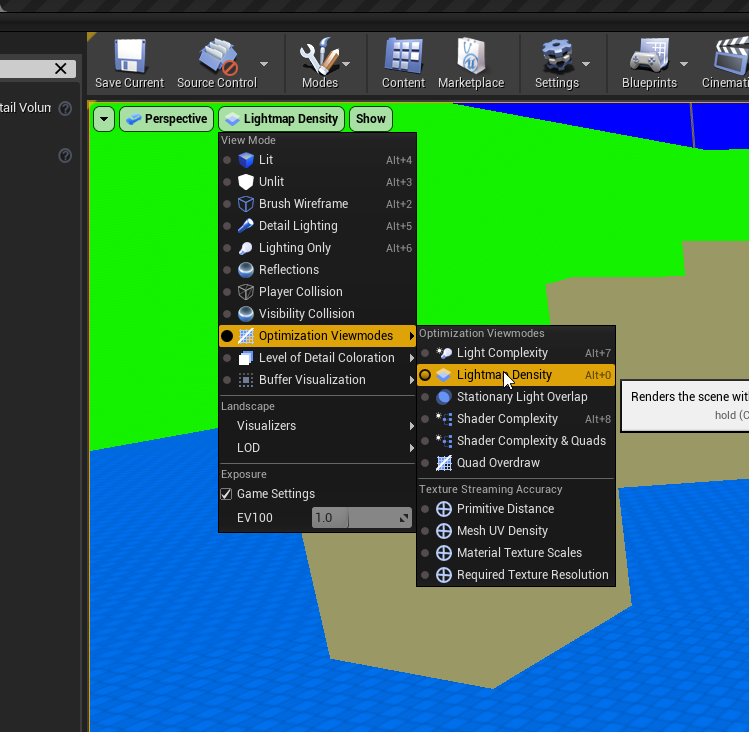
If you press Alt+0 you'll be able to see your Lightmap density in the viewport
lofty wave
Uhm....
magic jewel
Green = Good Red = Bit high Blue = Too low
lofty wave
magic jewel
Yeah - That's much better than before, when they were completely* broken?
This is where you can increase the lightmap resolution
So if that isn't good enough for you, bump it up to 256
Remember, it's being baked to a texture - so if the texture resolution isn't high enough, it'll look pixelated just like with any other texture
It also depends a lot on the type of light you're using
In my experience, Stationary lights look more crisp than static lights, even though both are 'baked' on static objects
IIRC Stationary lights combine a baked texture with a very low cost realtime sample which is why you can only have four nearby
Also, you're still on medium settings
Bump lightmap res to 256, up Lighting quality to high, and it'll look sharper
magic jewel
You might be justified at 512 then
Make sure to bump the min. lightmap resolution up and hit apply again to rebuild the lightmap, to account for your increased res
plush yew
you guys are doing an awesome job with this
magic jewel
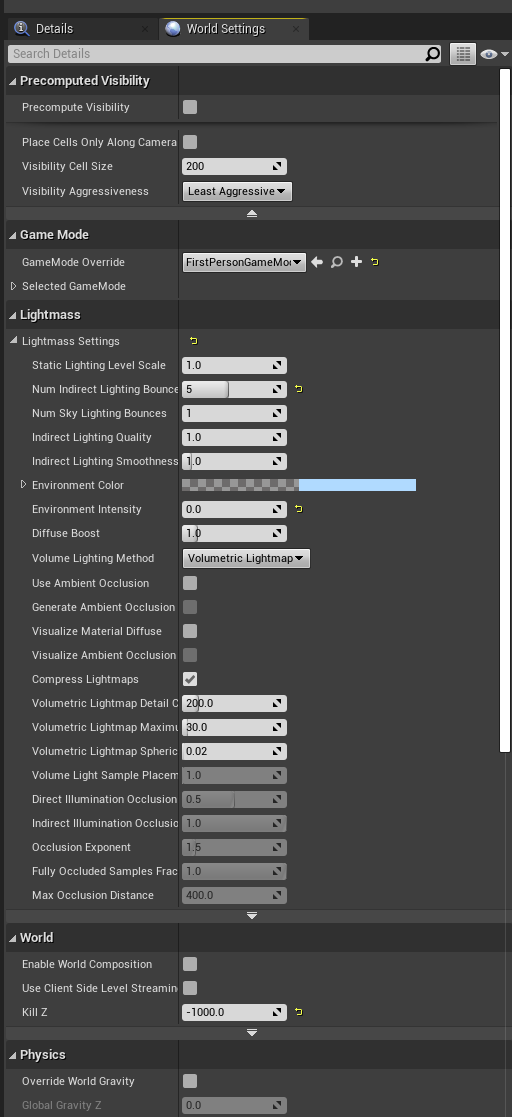
You can try increasing some of the Lightmass settings here to improve the light bake quality as well
(As you're probably figuring out, technical lighting is a lot of number tweaking)
plush yew
what is the difference between baking and cooking?
magic jewel
Baking is typically known as rendering something onto a texture
Cooking is where the project is built into it's executable/shippable version, wherein assets are often compressed and any unused assets are discarded
lofty wave
Isnt baking also when you have for example a physics simulation that you want to turn into a keyframed animation?
magic jewel
Maybe, generally it's just used as a way to say reprojecting/storing something in a cheaper format
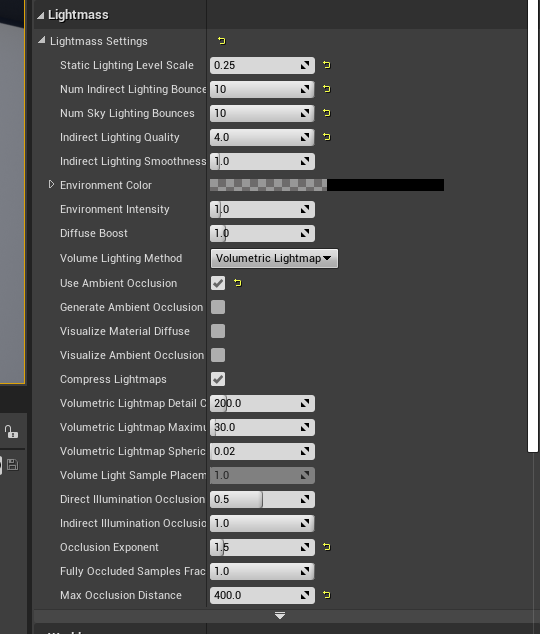
Settings like those might help tighten it up
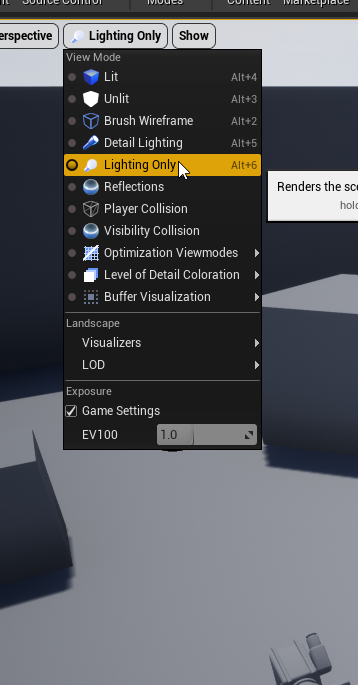
You can also use view modes to try and figure out what's wrong
Including Alt0 to view lightmap densities
It might also be worth you opening some sample scenes and looking closely at shadows in those
I don't think the result you have is bad, per se, especially if your camera is 3rd person
magic jewel
 magic jewel
You'll probably have to be in the viewport, for viewport shortcuts to work too
magic jewel
Yep. Increasing lightmap resolutions, upping build settings, will quickly start to get longer
lofty wave
Ok for some reason only every third diagonal line has a good resolution
I assume its because of the lightmaps?
magic jewel
Yes - basically what's happening is some of your UV shells are in the middle of a pixel
The ones which are snapped neatly to pixels will look cleaner
plush yew
@magic jewel do you know much about flight models? as in, how one would work in UE?
lofty wave
Well yeah they look WAY cleaner
magic jewel
Know nothing, sorry -- I'm an environment artist
It could also be that the UVs for some of those beams are squished
Since you did use an auto unwrap method
Which could have easily unwrapped some better than others
plush yew
alright, thought id ask. you seem REALLY good with what you're talking about at least
also hot damn those shadows look amazing
 open gorge
those look super clean
magic jewel
You could try switching to stationary lights, too, presuming you're using static atm
plush yew
Hello is there a way to change the engine background color so it isn't black/grey etc?
lofty wave
AFAIK no
magic jewel
Your scene appears to be outdoors too? This is just an exercise, I guess, but with an outdoor scene on current gen it's completely acceptable to use a Movable Directional Light for your Sunlight
 pliant rose
morning..dont waste highnes..
magic jewel
Or a stationary sun, if you don't need time of day and don't mind being limited to 3 stationary lights overlapping instead of 4
pliant rose
my volumetrics meshes and lights fading over distance.. what setting increases that distance?
lofty wave
Its from a sun
magic jewel
I would go back into Blender and have a look at the UVs. Relax them to make sure nothing is stretched/squished
lofty wave
I'll try the Lightmap Pack now
my volumetrics meshes and lights fading over distance.. what setting increases that distance?
@pliant rose If youre using a Exponential Height Fog this should help
Its under the section "Exponential Height Fog Component"
Ok this is what the new 2nd UV looks like now
pliant rose
@lofty wave Greatful! Played with it long time ago but: 0 to start how about end distance number.. is it related to world distance?
magic jewel
It's not the pack, per se, it's the unwrapping of the shells more likely
You can try and see if it's fixed it though
pliant rose
number too large
lofty wave
Do you mean "Fog Cutoff Distance"? @pliant rose
lofty wave
Now that I think about it I know why some lines are thicker than others
My mesh has these bars
And when they repeat there are two bars
open wadi
Ok I'm officially annoyed - I'm attempting to make a simple HTTPS POST to my node.js-based API endpoint, and I see that it's hitting my server properly, but it's not working, and the reason, according tot he UE4 logs is this: [2020.08.09-00.18.15:758][296]LogHttp: Warning: 000001E185830100: request failed, libcurl error: 60 (Peer certificate cannot be authenticated with given CA certificates)
At first I was using a self-signed cert for the endpoint, fair enough, I just went and purchased one and I'm still receiving this error.
How the hell do I determine what CAs VaRest / libcurl trusts, or otherwise how the hell do I disable CA checking (which could be done via the CLI, if I was simply using curl that way, via the -k param)?
I've deployed many PositiveSSL certs on websites without CA validity issue for normal web browsers. I have no idea how to determine what CAs libcurl likes. I'm building this on Windows if that's of use.
lofty wave
This is what it looks like now...
magic jewel
Did you Relax the UV islands?
lofty wave
What do you mean by that?
magic jewel
You can't rely on automatic unwrapping to generate a good set of UVs
Might be called Minimize Stretch in Blender
Relaxing UVs is to remove distortion, and make them all more uniform
lofty wave
That are all UV operations
pliant rose
u guys answering so many questions..
magic jewel
Can you share the FBX/Obj file for the object?
I'll try unwrap it properly quickly to show you
lofty wave
pliant rose
most of the answers come from Epic games employees? or higher level users that do not work for epic?
magic jewel
Most of the server's occupants will be hobbyists; some professional, and a few Epic staff use it unofficially
open wadi
lol, most people here do not work for Epic, no, if anyone.
I've been here for a couple months, there's one or two people that really know their shit across the board. MathewW is one of them.
narrow mauve
Anyone know what this is all about? Using splines to create this fence..but every new mesh on the spline is slightly offset ahead of it. I use it for roads all the time and never had this issue..I can't figure it out. At first I thought it was the origin of the mesh but that wasn't it either
pliant rose
fair.. so it is purposely generated self evolving organism.. morphing within the Dimension of CyberSpace.. Recently most of information on web is clutter fu so feeding curious mind is hard.. but learning UE4.. No problem..
lofty wave
I think I'll go now
I'll try some things tomorrow with a fresh mind
Thank you for your help @magic jewel
 rough knoll
I bought a build system from the marketplace and i have a slight issue. I need to use LMB to place things, but i have LMB as Fire for my shooting system
how do i turn off the shooting system LMB and turn on the build system LMB
narrow mauve
Omg. I know what it is..
magic jewel
@lofty wave I've relaxed the UVs on that model, so if you import that it might Lightmap better
plush yew
so i've given up trying to change appearance does anyone know how to fix this? i clicked reset and it still like it. hurts my eyes just looking at it
 terse pawn
Having some trouble understanding how Instigators/Owners work. Ideally I would like to call a method or update a property of the instigator/owner, but I can't seem to determine proper usage and nothing I've tried works. This is in C++ by the way.
 devout whale
What do you guys think are the main required plugins for a game, such as the gforce now screen recorder and such on
 rocky radish
What do you guys think are the main required plugins for a game, such as the gforce now screen recorder and such on
@devout whale depends on the game
devout whale
Just a fps game or something similar tbh
 storm lake
hello I need some basic help: https://prnt.sc/twgawm

the first one is someone elses screen
mine doesnt show that hierarchy button, why?
rocky radish
The first one is in the widget editor
rough knoll
I bought a build system from the marketplace and i have a slight issue. I need to use LMB to place things, but i have LMB as Fire for my shooting system
how do i turn off the shooting system LMB and turn on the build system LMB
storm lake
oh, how do I open that?
rocky radish
oh, how do I open that?
@storm lake by making a widget bp and double clicking it
storm lake
ok thank you I'll try 🙂
rocky radish
Np
 harsh ivy
By chance anyone know where the landscape edit tools for unreal are in the content browser. I want to add them to my player character.
@storm lake right click in content browser to create it
then user interface
then widget
or add new button
harsh ivy
np
 unreal sonnet
I really hate how I can spend thousands of hours making stuff in UE4 only to feel completely helpless and ignorant when I run into a basic C++ problem, like include paths getting messed up because of plugin dependencies and usage. I never learned how to do this, and I feel like the more effort I put into it, the worse everything gets.
storm lake
how do I make an image snap to grid when resizing in widget editor?
the grid only works for moving so far
 icy egret
hi guys I need help again
My gun mesh is blinking
how to fix it? I don't edit any LOD setting
plush yew
Hello there
I'm making a simple 3D platform game and I'd like to when we jump over one specific platform, this one flattens (then comes back to its initial shape when the character leaves the platform). Is it possible ?
I checked some tutos about the soft bodies physics but I'm not sure if it is what I need... 🤔
harsh ivy
maybe instead of physics just use animations that trigger on collision overlap events
 fresh oasis
Anyone familiar with any Unreal projects that dynamically generate their worlds at runtime as defined by file input, for example maybe using heightmaps and also maybe JSON for defining object generation and placement or anything like that?
There's a project I've been bouncing around trying to figure out how to get started which would involve heavily user-created worlds and content.
harsh ivy
Check out the voxel plugin

Voxel Plugin
Create infinite terrains procedurally using in-engine tools. Edit landscapes in realtime. Join an active community and benefit from frequent updates!
nevermind dosent do it by file
fresh oasis
huh neat
Well if it can serialize and make the areas persistent that'd be fine too
I was just using those as examples
harsh ivy
okay yeah it will work then
I'm using it now to get my dog to digg
you will need the pro tho to spawn objects with the terrain though
fresh oasis
There are other things I would integrate maybe with JSON like paths for stuff but that may solve my terrain problem
hmm the Pro features could be helpful too, will have to play with it and see
harsh ivy
yeah looking at it now and with pro you can import heightmaps
 sudden bridge
harsh ivy
sudden bridge
harsh ivy
great!
fresh oasis
Though with voxels, how can that run well with very large worlds? I'm not too familiar with how Voxels work technically but I imagine it to be pretty intensive
huh nevermind, I see now on the homepage
https://youtu.be/cmHAzu9d1es that's impressive

still need to fix dirt shininess, and play with the clouds more, since they are just a sphere and I am trying to fake that they have depth as best as I can
Because what I'm looking to make could be in the 100+km range of length, if not more
harsh ivy
Yeah voxel mixed with the new sky atmosphere in 4.25 can do that
So my dog is currently digging, good night!
 unique timber
what does it mean when i try to package with debug configuration: "ERROR: Targets cannot be built in the Debug configuration with this engine distribution."?
 eternal rain
I was recently advised that I might have to watch how high a spec level I require for my game. The PC I'm developing it on was put together 4 years ago (16GB RAM, i7-4790, GTX 980 Ti card). Say my game comes out 3 years from now: will most people likely have the power to run it? Or should I seek out testers with lower specs when it gets closer to coming together?
plush yew
@eternal rain can always check steam hardware survey for common configs. also Unreal Engine 4 Documentation > Get Started with UE4 > Hardware and Software Specifications
~3 years should aim at mid to mid-high tier. high tier is not necessary.
eternal rain
got ya. The game is still in its 'Pet Project' phase, with me as the only developer for now. A lot will have to happen if it's to become a real game.
Thus, I can see it not really being ready for another 3 years
plush yew
@eternal rain I'm the only developer for 5 games total, all owned entirely by me. But my system is then again i would say high spec.
Because I want to be able to experience the games, and other games I play for inspiration, with high fidelity. It's more developer experience, right? Why invest in mid spec hardware if you want to truly enjoy it.
Is the budget an issue?
eternal rain
So you've got some experience with these things
plush yew
If not - I would say save. Save and invest.
A little bit 🙂
If working on Unreal for many hours a day and not having friends because of it counts? :X
I like lots of things though. I'm not singularly focused on just UE. Still though the sheer volume of time spent is likely up there.
 marsh swallow
@plush yew 5 games. damn. are they all smaller games or are any of them larger more complex mechanics like an RPG style?
plush yew
They are all fully fleshed from concept. 2 are unity titles based on unity asset store templates , but the templates have been fully extended with custom graphics, and a fair amount of C# (3.5K lines).
The other 3 are all Unreal. Loving it. One of these three I am beginning officially today, it's in concept / early alpha using the gameplay ability system i'm super excited to test out.
eternal rain
Budget might be an issue if I really try to go big. While the specs above are what I mainly use, I picked up a new laptop recently so I could develop while (half-heartedly) watching TV shows. Laptop has an i7-9750-H; 32 GB ram, RTX 2060
plush yew
@eternal rain I've consistently done the following. Upgrade the rig to latest hardware, bid off previous gen hardware on ebay. you avoid capital loss that way.
also super important to look at pcpartpicker and sales rankings elsewhere to optimize cost to performance. look at places like gpu / cpu benchmarks. might help to benchmark some of your own system stuff with software to do so:
benchmarking (cpu, hdd, gpu,network): cinebench, crystaldiskmark, hdtune, fio, 3dmark, valley-benchmark, heaven-benchmark, iperf3
unreal exec times stay optimized, and everything works well this way.
eternal rain
My real budget questions are if I need to hire people to make 3D character models, which my game will need lots of.
For now I'm just working on making it mathematically functional
plush yew
If you do hire, i recommend paypal. avoids international wire transfer fees / has great cashback
eternal rain
I do use paypal for things.
As it is, I can probably only offer revenue share, contingent on the game going commercial.
plush yew
@eternal rain I've helped a lot of people with CPU builds. Saved some capital cost for them. if you have questions later, DM me. I'm available.
eternal rain
I'll keep that in mind when I think a need a new PC.
I'm just relieved I finally got a way to show a bunch of Menu Items without an Event Tick; I might re-fashion a bunch of my menus in light of the discovery
plush yew
Tick is very expensive, yes. You making sure to use stat game commands to check tick execution times right? (some great content on tick and exec times - Blueprints In-depth - Part 1 | Unreal Fest Europe 2019 | Unreal Engine the talk by the great Sjoerd de Jong on the Unreal Engine youtube channel
eternal rain
I'm not familiar with stat game; that a debugging tool? I heard about one
plush yew
press tilde (~) while in a level or blueprint and type stat game and observe the viewport window. works with other commands too : Unreal Engine 4 Documentation > Engine Features > Performance and Profiling > Stat Commands
eternal rain
ok
 kindred venture

This video is an unbiased as possible attempt to help you decide which game engine, Unreal Engine or Unity are right for you in 2020. We look at all aspects of both engines to help you see both the pros and cons of each engine and hopefully to make your decision a bit easier....
I really can't make my mind up at this point
plush yew
@kindred venture both are good
might consider deploying for both systems.
as i've done
eternal rain
Quick ?: How do I turn it off?
plush yew
type stat game or stat again in console
eternal rain
ah ok
kindred venture
Don't get me wrong the graphical and performance side of ue is just amazingly good but C++ and awful build times puts me off
plush yew
same here when i started. so i made a blueprint project, and then added a cpp class and simply compiled to enable C++. you don't have to use cpp when you start out and blueprints are very powerful and fun to use so you can use those.
eternal rain
As mentioned, I disconnected the Event Tick, but now I'm curious. I'm thinking I'll leave the nodes there disconnected and maybe do a comparison test later with the stat game
plush yew
yep that's the right use case. you can hold average ms values in that way and see which node execution flow works best
kindred venture
You may disagree but I'd encourage someone to learn the language instead cause languages like c# for unity or C++ for unreal can be used in so many fields outside game deving
Very good skill to invest in
kindred venture
indeed
plush yew
i kind of have to build the engine since i have a dedicated server for one of my games.. so
i'm also gameplay abilities and have some custom stuff in there
eternal rain
I learned some basic C++ in college, but the kind used in UE4 just seemed too different for me, so I said '* it; I'll make things with Blueprints'.
kindred venture
But out of the two i'd choose c# anyday which unity facilitates
plush yew
c# is more forgiving for sure.
more implicit code
then again C++ is lower level and therefore you have higher cpu optim there.
kindred venture
I don't wanna regret not choosing UE4 instad of unity 2020
plush yew
choose ue5 in late 2020? that's coming soon
kindred venture
then again C++ is lower level and therefore you have higher cpu optim there.
Yeah c++ can be upto 50% faster then c#
plush yew
kindred venture
Something that in the long run will help your game alot
Is there a road map for ue5
plush yew
@kindred venture it's mentioned in Unreal Engine for Next-Gen Games | Unreal Fest Online 2020 on the Unreal Engine youtube channel at t=1818s (30 min 18 seconds in the video)
great watch
kindred venture
thank you

Unreal Engine 5 empowers artists to achieve unprecedented levels of detail and interactivity, and brings these capabilities within practical reach of teams of all sizes through highly productive tools and content libraries.
Join Technical Director of Graphics Brian Karis and...
We can thank the 10yr olds on fortnite for funding this beautiful technology buying vbucks and emotes.
 storm venture
hey so im testing networking with a friend using standalone in editor, i use ?listen, he connects, it works, but its disgustingly stuttery. is it because of standalone? i dont wanna do any builds tonight to test
 dense hatch
it shouldn't be because of standalone, to my knowledge
storm venture
well thats worrisome, the animations were about 10 fps
i just finished a build and its bad in there too :\
dense hatch
i'm not the most versed in networking but i will give my two cents on what i speculate, until someone who knows a little more can help
are you not doing all of those animations on local client? the way i am interpreting the animations, i'm guessing you are doing the animations on his side and then passing along the result via network, but how i understand game networking is that the polling rate is typically lower than the framerate and then each client handles interpolation of transformations and animations
open gorge
what is your net update frequency set at?
do you see the same thing if you test by yourself locally?
storm venture
@open gorge local testing looks good, net update is at 100 with a 2 on min
open gorge
so the stutter doesn't happen on local tests at all?
storm venture
well theres maybe a slight slight amount, but nothing more than i would expect in MP
 crimson marten
what's going on
 hard reef
the stutter gives off a nice look tbh aesthetically pleasing if it was cell-shaded.
https://i.gyazo.com/85a6642aad5b77fd5c92a3fc483a6b99.mp4 im creating an endless runner.. just a personal project of mine. and my tiles seem to be duplicating on top of each other 🤔
hard reef
hopefully i can make it exact to how i want. im quite new to Unreal Engine so its a long process
crimson marten
well all I know how to do is spawn cubes and image textures XD
starting to learn though
open gorge
@storm venture a slight amount is to be expected on one machine, especially with a number of other processes running at once + 2-3 instances of your game running at once
it may just be your net
or your friends net
¯_(ツ)_/¯
You should try running 10 at once, that really bogs my machine down lol
hard reef
im hoping i can get the ps1 shaders to work after ive done with the basic mechanics. its a simple game, but i want it to mimic the original game from the ps1. it might not make sense, but once its all together it will
crimson marten
are you making like low poly models too
hard reef
yeah, i make a lot of low poly work. im making a mod for an N64 game, but i may move it to unreal engine if i can recreate ZeldaMM/OOT type feel. here is my wise tree. basically my version of the deku tree.
crimson marten
I love it
open gorge
are you planning on publishing this stuff?
hard reef
since its a zelda mod i try to reuse the sources like textures. other than that, everything like music, models and code is custom.
open gorge
Nintendo can be uhh kind of mean
hard reef
if i will change any IP
open gorge
yeye
don't want you to pour your heart and soul into a remake of zelda (as cool as it would be) only to be met by a cease and desist lol
hard reef
but if i move to unreal engine, i would just swap out any textures or NPCs that relate to it. ha 😉 well, thats why you keep it all behind closed doors and release a patch for the game.
open gorge
have you seen the UE4 OOT version?
hard reef
like ThirdQuest and The Missing Link mods, those were worked behind closed doors. Third Quest still is, im working with the team. we release a patch when its ready.
open gorge
it's pretty cool
hard reef
eh i know the guy behind the HD remake
crimson marten
Nintendo is kinda annoying XD
open gorge
oh cool 😄
hard reef
but ye, modding can be hard since you're limited to a maximum of like 1,500 polygons on real hardware.
crimson marten
how do people even figure out how to reverse engineer games to mod them XD
hard reef
this Buddha took a while its a temple entrance for a cistern. haha well, its taken to many years. we've got custom cutscenes. hopefully i can mimic everything in Unreal engine because thatll mean i have no limitations
crimson marten
how'd you get the textures for it
hard reef
i actually have the statue with me, i made it and took pictures then i split up the pictures into textures and basically wrapped it round.
heres a screenshot of the face texture
hard reef
whats GODOT?
hard reef
oh wow that looks so nice
hard reef
ive made a few 2d games back in college. i excel so much in pixel art, i made a giant pumping heart in a forest and it was as good as hyper light drifter (it was an inspiration) but i lost the files. the heart would pump blood around blossom trees while the trees were swaying.
open gorge
that sounds dope af
 true isle
hard reef
true isle
hard reef
its good. just make sure you have the right teacher. if you feel you cannot connect with them, id ask to change your course around so you have someone else. my mistake was staying in a class where i didnt feel like i could connect.
but the final year of college i felt great and was always wanting to stay and do more
crimson marten
that's good
 untold swallow
Hey
To avoid this add blacklist setting to DefaultEditor.ini [CookSettings] Windows.Game:/Script/UnrealEd.ProjectPackagingSettings
How do I do this? What's this basically?
crimson marten
jesus I thought you were a bot giving me a warning for a second XD
untold swallow
Uh dude I'm into engine Less than 2months lol
crimson marten
This is my first and I just downloaded it yesterday
untold swallow
Ah okay , got it xD
 true isle
open gorge
true isle
open gorge
you should try the #packaging channel.
untold swallow
I've messaged there since long, like a week but no responses
open gorge
oh
untold swallow
And it's kinda urgent for me
untold swallow
No issues Brother
First I was getting a warning saying that derived data cache is slow, then I moved The DDC to another drive,cool ?
Now I get something like this
LogCook: Display: Discovering localized assets for cultures: en UATHelper: Packaging (Android (ASTC)): LogCook: Display: Inisetting is different for Windows Game /Script/UnrealEd.ProjectPackagingSettings StagingDirectory 0, value (Path="D:/Epic Games/Final_Destiny - Copy") != (Path="D/Epic Games/Final_Destiny") invalidating cook UATHelper: Packaging (Android (ASTC)): LogCook: Display: To avoid this add blacklist setting to DefaultEditor.ini [CookSettings] Windows.Game:/Script/UnrealEd.ProjectPackagingSettings UATHelper: Packaging (Android (ASTC)): LogCook: Display: Clearing all cooked content for platform Android_ASTC UATHelper: Packaging (Android (ASTC)): LogCook: Display: Sandbox cleanup took 2.890 seconds for platforms Android_ASTC
@open gorge Can You get Something of it ?
untold swallow
Uhhh Okayy No issues :) have a Nice Day
open gorge
i'll see if I can dig anything up
but that LogCook: Display: Inisetting is different for Windows Game /Script/UnrealEd.ProjectPackagingSettings is interesting
untold swallow
What's that basically?
untold swallow
What?
open gorge
First I was getting a warning saying that derived data cache is slow, then I moved The DDC to another drive,cool ?
untold swallow
Yes the DDC is now in a new drive
untold swallow
No maybe, btw it's not being shown as an error , it's normal log
But still the package stops
untold swallow
Ok I'll try :)
open gorge
you should look into setting up an animation blueprint
it will save you a lot of headaches in the future
basically you can setup variables there that will reference your character
rough knoll
i have one for my main animations but i really dont want to go through the hell of connecting every single animation i have into this one
open gorge
and you can use a state machine to drive between different animations
rough knoll
thought there was an easier way
open gorge
well
you could always use anim montages for one off things
I generally use anim BP's for movement
and anim montages for actions
rough knoll
essentially whenever you enter the building mode then it shows a building animation and when the key to turn the mode off is pressed again then it turns it off
i just dont know if there's an easier way to do it other than state machines
open gorge
that's exactly what you would use a state machine for
that's the perfect usecase for it
you can just switch between 2 state machines
1 for regular movement
1 for building movement
you could possibly just do a blend animation
but that can get a wee bit complicated if you're unfamiliar with an animation pipeline
 rose girder
how do i get the level name to show in the viewport window like this?
 silent chasm
@rough knoll you could try blend poses by bool
 near iris
 hearty walrus
how do I merge a skybox?
I've got six faces of a skybox, because unreal didn't want to import the DDS from SpaceScape
 snow crown
 random holly
Thank you 🙂
 wet sphinx
how to compile ue4 so its not showing engine version in uncooked .uasset files ? as normaly there is ++UE4+Release-4.XX
rough knoll
how do i attach particles directly to a skeletal mesh
 rancid lynx
can anyone else suggest some ideas about walking enemies that dont use NavMesh? i was using collision spheres with physics impulses and line traces. i dont like the idea of pasting navmesh over the entire open world.
 frank oar
Can anyone please advise me how to set up scale between unreal and blender ?
My first project was a massive pain because I had so many issues wit this.
 zenith lily
stupid question but does anyone here use UE4 on a WD Blue drive? I'm planning on buying one specificly for UE4 Projects to be on but have no idea if its fast enough for that, UE4 itself would be on an M2 drive
lofty wave
@magic jewel After trying it out with your lightmap it still doesnt change
The res is on 512 and the build setting is on high
There is something else that causes this...
 toxic ingot
Every time I bake this model, it goes black (the material is completely white) and it's been driving me insane for the past 3 hours, most forums say to turn the lightmass importance value to 1 or make a lightmass importance volume but the value is already 1 and I've tried making a volume. Can anyone please help me?
toxic ingot
I made it in blender
lofty wave
Did you make UVs?
lofty wave
Yeah I know that feeling
 strong schooner
hi is there a workflow in sending blender soft body (rigid body etc) to unreal engine? Or should I just use VICO dynamics? Btw, I just know basic blueprints that is why I wanted to opt for VICO dynamics. thank you
 jolly jungle
was packaging for windows and got this error
UATHelper: Packaging (Windows (64-bit)): ERROR: Could not find NetFxSDK install dir; this will prevent SwarmInterface from installing. Install a version of .NET Framework SDK at 4.6.0 or higher.
PackagingResults: Error: Could not find NetFxSDK install dir; this will prevent SwarmInterface from installing. Install a version of .NET Framework SDK at 4.6.0 or higher.
UATHelper: Packaging (Windows (64-bit)): Took 0.7699973s to run UnrealBuildTool.exe, ExitCode=6
UATHelper: Packaging (Windows (64-bit)): UnrealBuildTool failed. See log for more details. (C:\Users\ewr20\AppData\Roaming\Unreal Engine\AutomationTool\Logs\C+Program+Files+Epic+Games+UE_4.25\UBT-SpaceDefender-Win64-Development.txt)
UATHelper: Packaging (Windows (64-bit)): AutomationTool exiting with ExitCode=6 (6)
UATHelper: Packaging (Windows (64-bit)): BUILD FAILED
PackagingResults: Error: Unknown Error
had blueprint navitization on and visual studio was installed and ue recognized it
 thin tendon
With a scene capture how can I make it only render a single actor and not the whole scene?
lofty wave
@jolly jungle Look at the logs
jolly jungle
ok
 shrewd pewter
Just using splines for the first time. Can anyone tell me how to close a loop?
I cant find an answer anywhere
untold swallow
While packaging ,First I had some warnings like Derived Data cache is slow , then I moved it to Other drive now my logs look like this
LogCook: Display: Discovering localized assets for cultures: en
UATHelper: Packaging (Android (ASTC)): LogCook: Display: Inisetting is different for Windows Game /Script/UnrealEd.ProjectPackagingSettings StagingDirectory 0, value (Path="D:/Epic Games/Final_Destiny - Copy") != (Path="D/Epic Games/Final_Destiny") invalidating cook
UATHelper: Packaging (Android (ASTC)): LogCook: Display: To avoid this add blacklist setting to DefaultEditor.ini [CookSettings] Windows.Game:/Script/UnrealEd.ProjectPackagingSettings
UATHelper: Packaging (Android (ASTC)): LogCook: Display: Clearing all cooked content for platform Android_ASTC
UATHelper: Packaging (Android (ASTC)): LogCook: Display: Sandbox cleanup took 2.890 seconds for platforms Android_ASTC
Nyonneeee PLEASE HELP, IM ASKING SINCE A WEEK AND I CANT STILL FIGURE OUT
 plush pagoda
remove your drive
untold swallow
What?
untold swallow
I'm a newbie, I didn't get much, could u explain?
U mean to delete everything from my pc drive?@plush pagoda
plush pagoda
You should.
lofty wave
Why?
untold swallow
What the heckkk, dude my whole game is ready ! Htf shall I reninstall ?
Sorry if I'm being rude
untold swallow
U sure?
plush pagoda
It doesn't remove your projects..
lofty wave
untold swallow
Ok Would that fix my issue???
lofty wave
Well it is reinstalling UE so if @plush pagoda is right then yes
untold swallow
@plush pagoda Bro would that fix my issue?
plush pagoda
It will.
plush pagoda
There was a bug. But they have fixed it.
Not everyone got this tho. Just a few people.
untold swallow
But I had installed 4.25.3 just a few days ago
plush pagoda
They've fixed it recently.
plush pagoda
👍
lofty wave
Wouldnt verify also work?
lofty wave
I was just asking
Verifying checks the files for errors
plush pagoda
Wouldnt verify also work?
@lofty wave I highly doubt that.
lofty wave
Ok
 plain iris
What is this called? I'm not sure how to word it when looking for a solution, Map clipping?
 viral fractal
A cow
thin tendon
I think your issue here is that you want your character to align to the terrain
viral fractal
Or no
plain iris
Mooo
viral fractal
Some... Panther ?
shrewd pewter
Just using splines for the first time. Can anyone tell me how to close a loop?
@shrewd pewter anyone?
plain iris
Aha! That got some tutorials, thank you Slim
 sinful sage
I have a vector array and every time I click to add a new vector its always created at the scene object position. How do I change it to add it at the last added vector position?
thin tendon
maybe create first then change it or move it
jolly jungle
i connected a switch pro controller to my windows computer, and I went into the controller settings and it was recognized as a controller and everything was working perfectly fine
but when i try to use it with unreal it doesnt work
sinful sage
I want to create a path but dont want to go back to the starting point whenever i add a new point is what i mean
jolly jungle
is there something else that I have to do to get the controller to work in unreal?
 grim juniper
@shrewd pewter in the spline's details
shrewd pewter
@shrewd pewter in the spline's details
@grim juniper Thanks so much. It was driving me mad 👍
jolly jungle
cant find any gamepad settings or anything
grim juniper
Does it work like an xbox controller?
jolly jungle
i think so
it worked with bizhawk (an snes emulator)
and when i open up the windows controller settings, and opened up the thing where u can view the inputs, everything seems to be working
but i dont have an xbox or ps controller to compare it to
this is the only pc controller i have
thin tendon
@jolly jungle There might not be any set up by default. I have been doing a fair bit of game-pad support stuff for my project. And seen a bunch of devices that are compatible with Unreal. But I think you will need to create a button event and bind them first.
jolly jungle
outside of unreal?
thin tendon
I thought you meant inside unreal
jolly jungle
yeah i did
and i created an input event and bound everything
i tried the face buttons as action inputs and the sticks as axis inputs
here are my bindings:
and it seems to act like a standard usb gamepad
thin tendon
but I thought you said it was a switch controller not a gamepad why is it bound to gamepad
jolly jungle
it is a switch controller that i connected to pc
is a gamepad not a controller?
the nintendo switch pro controller is the one that looks like an xbox controller and is compatible with pc
what is the difference between a gamepad and a controller
grim juniper
iirc there's XInput and DirectInput, and it has to be one of those I forget which
jolly jungle
?
grim juniper
In windows
jolly jungle
what are those
grim juniper
reddit
10 votes and 10 comments so far on Reddit
jolly jungle
ah
grim juniper
XInput is what you want I think
jolly jungle
whatever windows has as default seems to be working tho
it works with everything else except unreal
all of the things that support gamepads are working with them
i thought that unreal had direct controller support
grim juniper
¯_(ツ)_/¯
hearty walrus
using the advanced cell shader lite from the marketplace, none of the materials are rendering in the viewport
they all just display black
it's the same when playing
jolly jungle
this is me pressing a bunch of buttons when in the controller properties
hearty walrus
building lighting shows the world checkerboard material
jolly jungle
windows seems to recognize the controller and i was able to use it with an snes emulator that has controller support
but its just not working with unreal
jolly jungle
ok il try that
hearty walrus
nvm figured it out
turns out the materials are irrelevant, you need to use the post processing options
grim juniper
The RawInput plugin can read specific devices that don't conform to XInput standards.
jolly jungle
i have never heard of this xinput thing but i just want my game to work with controllers and this is the only pc compatible one i have
ok still not working, il look into xinput
grim juniper
You need to setup the inputs with the correct buttons and stuff. Not the gamepad stuff
I think
jolly jungle
do u need xinput for a usb controller?
 cold venture
I am kinda like a beginner. I have seen that people say learning both blueprints and c++ is beneficial. How do I implement both of them? Like when I start a project should I select blueprint or c++ and then what?
Sorry if the question is not in the right place.
jolly jungle
if ur a beginner, select blueprint
it is much easier to start out with
and this is a fine place to ask that kind of question
back to the controller thing, i just dont understand why its working with other controller compatible applications and not unreal
grim juniper

PCMAG
You can play your favorite Steam games with the Nintendo Switch Pro Controller easily. You can play other PC games with it too, but it's a bit harder. Here's how to do it.
magic jewel
@lofty wave You may just be hitting limitations of static lighting, I don't immediately know of anything else which would cause that. Maybe move the light's position slightly and see if that improves the result, or try Stationary if not already
jolly jungle
@grim juniper like i have said many times, it is already connected to the computer and works with other things, just not unreal
grim juniper
The thing near the bottom
jolly jungle
the light?
grim juniper
DirectInput to XInput
jolly jungle
oh in the article
magic jewel
@cold venture Having a firm understanding of a high level programming language makes it easier to understand what Blueprints are doing, and allows you to create your own functions etc. with a lot deeper control
grim juniper
I think what's happening is windows sees something like 'button 1' instead of like 'gamepad face button bottom'
magic jewel
If you're an artist, such as myself, it's unlikely that you'd ever need such levels of control or understanding; however, programmers wanting to build deeply complicated systems will benefit greatly from knowing a language like C# or C++ before using visual scripting such as Blueprints. Typically, visually scripting was implemented to build things faster and prototype, or for people like me who don't know a language deep enough - visual scripting simplifies it, but sacrifices fine control
hearty walrus
has anyone got advice on making a character from the ground up?
I've only got some loose plans, but I want to try and build a character for a game
jolly jungle
what kind of character
hearty walrus
luckily I can kinda cheat out detail because of ooh fancy shaders
grim juniper
Because those other things are setup to use those too, but not unreal. That RawInput plugin should work, but you need to know which button numbers are what and set that up in your project's input settings properly. It wouldn't know what is what
magic jewel
Question is too vague @hearty walrus
hearty walrus
third person, blueprint
jolly jungle
cool
hearty walrus
something like breath of the wild, but that's honestly down to shading
jolly jungle
are u talking about the looks or the code
for the looks, i cant help much, for the code, i cant help much (but slightly more)
hearty walrus
looks, really
jolly jungle
oh yeah, well im not an artist
hearty walrus
so essentially most things that aren't code
other than animation, I'm still gonna have to work something out for that one
magic jewel
If you haven't modelled a character before, just find a tutorial series on YouTube and follow it
There's no shortcuts to modelling anything - most people building photorealistic characters, for example, have years of experience doing it
cold venture
@magic jewel okay got it.
lofty wave
Actually iirc I already have set it on stationary
rocky radish
I am kinda like a beginner. I have seen that people say learning both blueprints and c++ is beneficial. How do I implement both of them? Like when I start a project should I select blueprint or c++ and then what?
Sorry if the question is not in the right place.
@cold venture you can add c++ classes after you selected a blueprint project if you want
terse pawn
@cold venture I'm fairly new as well but I've put this much together: you create your base classes, functionality and defaults in C++, expose those properties to the Editor/Blueprints, and then you can have easier control over setting those defaults inside the editor.
For instance, if I want to create a basic Player Character, I create a C++ class based on the Actor class from Unreal. In C++ I then add a camera boom and camera, a skeletal mesh component and a player movement component, and if I want those components to have defaults, I can set them in C++. From there, in the C++ header file I can expose those components to the Editor/Blueprints using UPROPERTY() and UFUNCTION(), and from there I can make changes to those components in real time instead of having to compile every time I want to make a minor change.
Blueprints are also very good for prototyping functionality that you want to implement but aren't 100% certain yet. You can test out ideas and once you have it figured out, it's pretty easy to translate to C++ from there, if you want.
plush yew
Hello everyone, can i ask why it take so long to package even a blank project in unreal ?
 thick herald
Yes, you can ask.
plush yew
I run unreal engine on internet cafe PC with medium spec, like win 10 64bit, duo core, medium VGA
when i run, a project like 3rd person temple, and i want to test packgage because in viewport, i run normally
this progress take too long, i have search for some trick and read UE guide but it do not work
i dont know how to fix it, could you give me some advice
because people say it normally took about 5~10 min to packgage with project about 2 GB size
😀
 warm bluff
yo yo, anyone knows if ue4 has a bp node to detect if device is connected to a network or not? ;o
 hybrid brook
Hi, when i zoom out, the object turned into this on the right, the problem is fixed when i increase the bound scale, but i have to do it for each of the object, is there an option to do it for every new object i bring into the scene?
this asset is a plant from Quixel Megascan
magic jewel
@plush yew duo core is not medium spec - Dual core CPU is below minimum recommended spec, so packaging a build will take much longer
Recommended budget-friendly processors for Unreal would be things like Ryzen 5 3600, or the Intel i5 10400
plush yew
@magic jewel thank you for the advice, i will see if i can manage one 😄
magic jewel
@hybrid brook That is LOD'ing - go into the objects LOD settings and adjust the reduction amount, or disable LODs by changing Minimum LODs to 0
plush yew
Hello, I don't have my player in the scene bc it's my main menu yet the player keeps spawning in any way? does anyone know how to fix this
 scarlet birch
Can you setup materials and UVs with the mesh editing tools?
Nvm, found it in the docs
plush yew
all i did to fix is just create new player controller etc
have everything as blank yet it is still spawning em in
😦
scarlet birch
Set it to default to a spectator spawn or something
then manually spawn the player or load a new level
if there's a player start get rid of it, gameMode handles this stuff you can override in the setting menu from the level editor toolbar
 unreal plume
InvalidDrawScale error, anyone know how i can ignore this and continue my light build?
fresh oasis
Anyone know of any proper documentation on origin rebasing? I'm not finding any proper official documentation on those settings on the official docs and not much else that's helpful community-wise
scarlet birch
What is it you're trying to figure out?@fresh oasis
fresh oasis
@scarlet birch Just details about the two options in the UE Editor about origin rebasing, but not finding any official documentation on them
One being for single-player the other for multi/networked
I think, only looked at them briefly
Like is it a turn on and it just works magically from there or what else needs to be done?
scarlet birch
I must be behind on something. I'm not aware of anything related to origin shifting that works with multiplayer out of the box.
It's basically just an offset to the world origin
fresh oasis
In Project Settings is one of them
Relevant thread about it https://forums.unrealengine.com/development-discussion/content-creation/1407222-world-origin-rebasing-multiplayer
Unreal Engine Forums
Hi, im wondering if anyone here has got the "enable multiplayer world origin rebasing" option working?
I have tried to enable it for my project (16
and I'm just a bit dumbfounded that this doesn't seem to be properly documented
scarlet birch
Ok, I don't remember what that does exactly. But I think it will give you different world origins on each client which has to then be accounted for.
It's been a few months since I messed with it.
fresh oasis
Some documentation on what to do with it or how to work with it would be nice
fresh oasis
Probably an obvious question but something I've been going in circles a bit on, I'm having some trouble figuring out whether to create a custom new Actor for something or to do it as a Component. Any generic advice on when to use one or the other, if that makes sense?
Surprisingly not finding anything helpful on this online either, but I see a good amount about just components so it sounds like the common go-to is that?
 vestal ferry
for some reason my unreal dosen't show up my foliage, even tho it's there...
anybody knows why ?
worls in preview
nevermind, it's back
 ocean hemlock
 maiden sundial
Maybe just a slow PC ?
Cuz i only have this problem with many referenced things, but even then it's not taking 15 minutes
Could also imagine that it could come from an HDD
 ornate ice

https://www.patreon.com/UE4tuts
Working on a Locomotion System Using DistanceMatching.Technique Used in UE4 Paragon.All the Animation that i m using are InPlace.Proper WalkStart With Proper Rotation Matching with Minimum FootSliding.
Don't forget to subscribe my YouTube channe...
Hey people this is a series which is about to start about distance matching a topic there is almost no info about in YouTube or outside
 bitter iris
hi guys, im trying to give these squares each from A1-H8, so that on my HUD it will show "Location: C3" For example, could anyone throw us a hand?
ornate ice
It's been done by friend so please let's give him some support
For anyone who is interested Distance Matching helps achieve this next gen movement in animations by allowing start and stop animations to be played with out the need of root motion
Which is great even for multiplayer games
And will allow to get that nice realistic look to you character when moving
Please feel free to check his YouTube channel and give him your support as not many people is explaining this kind of topics
Also he has an amazing Climb Tutorial Series for anyone interested
 plain terrace

vestal ferry
somebody knows why some textures works only in the viewport, not in a separate process ? (showed here separate process)
in the viewport
bitter iris
How come my begin overlaps dont automatically spawn if a player is already inside? i have to go outside and then enter it again
gusty dune
Is it normal for unreal to sometimes freeze your computer permanently when you open a level?
dense hatch
can you be more specific
 exotic thicket
If it has been configured in the controls section of your project, you should be able to add an event for it
ie. InputAction YourAction
jolly jungle
yeah but i dont want an event, i want a boolean
dense hatch
Is it normal for unreal to sometimes freeze your computer permanently when you open a level?
@gusty dune no...?
sounds like you will want to set a boolean when you trigger action and set false when it's ended...?
jolly jungle
yeah but bools get reset when you load a new level or restart the current one, i want one that stays
dense hatch
ok use gameinstance
jolly jungle
i basically have a sprinting thingy and i want it where if u die and go back to the beginning of the level, if you are still holding sprint, i want you to still be sprinting
how do i make a boolean that doesnt reset
dense hatch
global variables go in gameinstance https://docs.unrealengine.com/en-US/API/Runtime/Engine/Engine/UGameInstance/index.html
GameInstance: high-level manager object for an instance of the running game.
jolly jungle
im surprised that unreal doesnt have a boolean for the input actions built in
dense hatch
though for what you are doing you should probably have a setup where you have a key mapping and so you should be able to use "is input key held" node
jolly jungle
ok
scarlet birch
Just keep the value when you place the new pawn. You don't have to create a new controller or pawn when respawning.
gusty dune
Okay so I'm using my normal PC, decent specs, but every time I open a megascans demo map my entire computer freezes and I have to hard reset with the power button after waiting 10+ minutes
jolly jungle
i am just reload a new level when respawning
wow that was the worst grammer in a sentence that i have ever said
dense hatch
@jolly jungle you could do this
jolly jungle
ah
dense hatch
it will only work if your sprint key is hold not toggle logic if that makes sense
jolly jungle
is there a way to get what key is currently bound to sprint if i implement a binding system in the future?
i have an action event called sprint
dense hatch
probably go back a step, have a key mapping (map) that will set the sprint action binding and that check
jolly jungle
ok
is there really no way to get all of the keys bound to an action event? there is a way to bind them, how come not get them
also it didnt work
 tacit onyx
@jolly jungle You'll start understanding how to look for things a little better in a few months. but to save you a little time now, you get the keys of an action mapping like this.
tacit onyx
Have to start somewhere.
 potent veldt
what is the best course (free or not) for learn the basics to intermediate in UE ?
open gorge
You can also just name your action mapping Jump and call it directly no? @tacit onyx
the loop seems a little overkill
open wadi
Does anyone have any idea why UE4's logs like to randomly switch between writing to NameOfProject.log and NameOfProject_2.log?
It's quite annoying when trying to tail the logs via Get-Content -Wait
You either have to jump between two powershell instances or keep halting and launching back and forth based on which log UE4 has decided to use.
 tender pecan
i use tail -f *.log in cygwin, just tails any and all as it changes. 🙂
open wadi
Huh, yeah I suppose that's an idea, tail everything.
TAIL ALL THE LOGS
Question: does anyone in here know what all are the temporary directories you can safely delete within your project? For example, research indicates you can hose everything in /Saved other than /Saved/Config
I feel like there are other temporary directories that can be safely deleted and will regenerate on re-opening the project, what are those?
 quick plover
sup guys, I had a Recorded sequence with my character, is there a way to add more frames/movements to the recorded sequence?
is just my camera attached to the third person char, but I need to record a bit more and don't want to do all the recording again
tender pecan
@open wadi we only keep content , config and source. everything else can be deleted. things like intermediate, build, binaries, all of those can be whacked, but we just do that for backups. and copy to other machines.
open wadi
Thanks @tender pecan, much appreciated.
Anyone in here work with VaRest at all for doing JSON-based POSTs?
open wadi
Problem discord broken be.
plush yew
@open wadi I don't know
narrow mauve
I need help.
 mellow turret
what is the key to open the console while PIE?
narrow mauve
simple answer ...I just need tknow if I can or how I can enable edit layers for world composition
pliant rose
hi these textures for volumetrics, how to find or make them
hi, these textures for volumetric works.. wtf please how to find it or how to do it?
plush yew
Does anyone know any way to import a VDB smoke simulation to unreal currently?
open wadi
So no one in here uses VaRest for making HTTP POSTS to API endpoints?
No one deals with multiplayer auth?
Does anyone have any earthly clue why this BP code generates the error "LogVaRest: Warning: No field with name result of type String"?
I'm taking the VaRest result, getting the JSON object, then getting the string field for "result" which is confirmed being returned by the API endpoint, but this code apparently doesn't extract the JSON fields and their values as strings.
I've spent hours going over tutorials and the like and apparently there's no documentation on this and no tutorial that matches my issue.
Seems pretty GD simple.
I can't leverage the VaRest "Get Response Content as String" node because it returns the entire JSON object as a string
I just want to extract the "result" field from the JSON data and do a compare operation to see if it returned "success"
Quite possibly the most basic and fundamental JSON operation on the planet
Yet, despite the wide adoption of this plugin, there isn't a single post I can find anywhere, nor any tutorial, that accurately describes this simplistic process.
Also, in every tutorial I find, "Get Response Object" is an impure function, meaning it has an exec pin, yet apparently that was depreciated at some point because the only "get response object" node I can find within the VaRest nodes listed in a given UE4 graph are pure functions.
I'm even trying this format now, to which I receive the log error:
LogScript: Warning: Accessed None trying to read property CallFunc_GetField_ReturnValue
W_VLoginForm_C /Engine/Transient.GameEngine_0:GameInstance_0.W_VLoginForm_C_0
I mean should that code not be pulling the JSON object from the response, getting the value of the result field, and converting it to a string?
What the hell am I missing?
open gorge
@open wadi the logs are created per instance of the project. If you open editor first, it will be the first log. If you then launch standalone it will be 2
open wadi
Ahh, I see, very nice. So the _2 is because I'm using standalone simulation.
That's helpful, thank you @open gorge
So, any thoughts on why I can't simply extract the value of the "result" field from this JSON object?
open gorge
I'm not at my pc atm but I can look into it when I am.
 fathom tide
oh man this is annoying. My scatter instances from my HDA terrain aren't aligning with the HDA's heightfield on import. Is there any documentation that can point to this problem?
mellow turret
unreal is running in PIE with around 10-20 fps is there a way I can troubleshoot this issue? just ran a gpu benchmark and the gpu seems fine
gusty dune
Is there a way to make bullet decals move with an object that has physics enabled? Currently once an object moves the decal disappears Just needed to use AttachToComponent
 warm echo
I don't think
 midnight bolt
https://www.youtube.com/watch?v=TRVmRtMrsGg is this intro music available to download somewhere?

We're excited to have Sumo Digital on Inside Unreal this week! The team behind the Spy-on-The-Wall adventure game Spyder talks about their journey from day zero to the weeks after launch. Learn more about the mobile Apple Arcade game, as well as how the team overcame difficult...
 tiny sonnet
in a multiplayer environment, spawning in of enemies in a open world, would be in the gamemode bp right?
plush yew
i dont know if* this is the right chat, but i cant import my model, it says failed to import model unknown extension ".
and zometimes "zip"
 icy mulch
Hey I need some help I'm trying to make ai have music when it chases you then after it stops chasing you the music stops then if it sees you it plays again how would I do that
quick plover
why does my volumetric fog (ExpoHeigh) disappears when I apply Ray racing Translucency?
 next coral
hey guys i imported my sprites
and when i move
it faces the opposite direction
if I press D, i my sprite faces left
but i move right
rough knoll
are there any optimization tutorials out there?
thin tendon
@rough knoll https://www.youtube.com/watch?v=hcxetY8g_fs

This session by Sr. Dev Rel Tech Artist Zak Parrish explores performance concerns for shipping games, focusing on how to track down problem areas on both the CPU and GPU. Learn how to set up a test environment and how to employ the necessary tools to identify key performance p...
 jaunty cedar
Any good guides on developing plugins?
 knotty owl
anyone with experience on the "character skills" package, can any of you help me with multiplayer replication?
 cedar wave
Looking at the component list of BP - why are some of the components separated?
 wary sail
alright somehow I corrupted the SunSky default object in 4.24
has anyone else had a problem like this?
I deleted the object but somehow the engine default is messed up too and keeps rerouting nodes when I open my project
this is the broken object in question
how do I get it out of my project?
 shy sundial
Why is Blender Eevee's Material Editor almost realtime (Even for Complex Node setups ) and Unreal's Material editor takes a minimum 3-4 seconds to Preview a basic setup ?
Does anyone know the techincal stuff behind it ? (newbie here)
 timid crown
Is there a better way to simulate light from LED panels? I have 3 lights (R, G, B) sampling from an NDI texture... everything was fine when I had just 1 light (black and white), but as soon as I split it into three color channel lights, my FPS tanked hard. Is there a way to optimize this? Doesn't Unreal kinda hate lights stacked on each other?
 dreamy sleet
I'm making a main menu where can i get a picture for a play button and quit button and options from
jolly jungle
I want to learn blender to make models for games. I tried using the blender guru tut series and a few other ones but I found that they didn’t focus enough on the actual modeling itself and more on the composition of the shot which doesn’t matter at all when doing models for games. Does anyone know a more modeling focused tut series?
shy sundial
I want to learn blender to make models for games. I tried using the blender guru tut series and a few other ones but I found that they didn’t focus enough on the actual modeling itself and more on the composition of the shot which doesn’t matter at all when doing models for games. Does anyone know a more modeling focused tut series?
@jolly jungle There is no course for Modeling everything . The tutorials from Blenderguru teaches you the basic like how to pull push verts how to add textures materials . then you practice .
There's a tutorial series by Gleb Alexandrov but its focued on only hardsurface modeling.
jolly jungle
Ok
quick plover
guys, what's the easiest way to make a circular array? (for meshes)
shy sundial
Ok
@jolly jungle also theres a bunch of new beginner courses for blender 2.8 start to finish
thin tendon
@timid crown Thats a lot of landscape just for a menu
timid crown
@thin tendon I think youre confusing two posts, I'm not doing anything with a menu. Doing a real-time DJ stage in the desert
narrow mauve
Is enabling edit layers for landscapes not possible for world composition?
open gorge
@open wadi still having an issue?
rough knoll
how do i restore a gamesettings.ini file
i changed some settings in the project files and now my project will crash on launch
all other projects will launch and i've tried migrating to a new projetc
project*
is there even a way to get that back
open gorge
what did you modify?
resetting it can be a bit complicated
but you can copy your DefaultEngine.ini from one of your other projects and change some values in it to match your current project.
what's the exact error you're getting?
open gorge
check your saved/logs
rough knoll
i changed some settings with rendering
rough knoll
i don't have a log file that came from the crash that just happened
open gorge
can you copy and paste that to a github gist?
rough knoll
wdym
scarlet birch
Is it crashing when it first loads or after you click on something?



 open gorge
that's fine
rough knoll
theres nothing too important in there
scarlet birch
blueprint or c++ project
rough knoll
blueprint
rough knoll
rendering settings in the project files
cant remember what exactly i changed
project settings*
not really
the only thing i changed was the landscape material to see if that would change performance
changed it back right after
scarlet birch
just move the project config files to a directory outside the project and see if it starts
ah
The landscape material?
rough knoll
yes the landscape material
open gorge
ohhh
rough knoll
the material projected on the ground
scarlet birch
that's the issue