#ue4-general
1 messages · Page 812 of 1
 quick shell
 grim ore
in the main menu is where you can put it
quick shell
do i make a whole level with just the main meu?
grim ore
how much experience do you have with unreal engine?
grim ore
you need to do some more basic learning. check out the unreal online learning website, there are videos on UMG which is the UI system ue4 uses
quick shell
you said screen space ealier
grim ore
your asking questions but you dont know what you need
quick shell
is that some kind of level or just the screen having its space taken up
i need me a main menu
grim ore
your user interface for a main menu can be in a new level or an existing level, it can be anywhere you want it
 left shuttle
Is this the place to ask a question ?
grim ore
unless another channel is better
 plush yew
Why cant I mass edit collision settings for meshes?
Specifically the Use Complex Collision As Simple option
grim ore
because epic didn't allow it
plush yew
The only way to change those is manually?
left shuttle
Is this the place to ask a question ?
@left shuttle can someone tell me ..where do i have to go
grim ore
yep or possibly a python or utility widget script
 thorn scarab
I guessed if possible to make seamed world on the flat surface but keep all the specification of Earth. 8 cups of coffee, breakfast skipped, 4 pages of c++ code and viola. Completely new type of gameplay.
 ruby folio
Wut?
grim ore
@left shuttle you can ask the question here, or in another channel that is more appropriate for the type of question. we dont know the question, we can't tell you where to go.
left shuttle
Console / Grapic relatet
grim ore
well there is #graphics
and console specific stuff is generally under NDA and has it's own forums for support
ruby folio
What do you mean by console? Video game console?
 hard quarry
I cannot find "Get User Widget Object" does this node still exist?
https://answers.unrealengine.com/questions/379015/widget-component-changing-variables.html
left shuttle
Dev Console : for Example: r.Tonemapper.Sharpen 1. i would like to know how to apply settings like this for PERMA. so they are always ON in Standalone / Build game or even when im Playing in Editor.
 next coral
where should i learn to make games with blueprint. I understand learning the basics but if im making a game with my own mechanics i need to be able to know how to implement them
especially if they are unqiue
unique
grim ore
@hard quarry it is in .25 for sure
ruby folio
@next coral Lots of courses out there. Documentation YouTube. You just gotta search for it
next coral
okay
ruby folio
And when you get stuck, ask in #blueprint
grim ore
break down what you want to do into parts, learn how to do the parts, profit.
hard quarry
@grim ore ah... it is not accessable inside the Construction script..
left shuttle
@grim ore Any clue ?
grim ore
@left shuttle usually those are ran using the execute console command node inside your level or one of your important blueprints, perhaps the main level menu for example
left shuttle
@grim ore So i can not define them in a .ini file or such ?
grim ore
there is also a ConsoleVariables.ini file but i dont think it loads in packaged builds
left shuttle
hm... let me see if i can find them
grim ore
there is also a system settings in UserEngine.ini file apparently https://answers.unrealengine.com/questions/345459/hotfixes-are-resetting-consolevariablesini.html
 hearty walrus
(asking again since it got buried)
Can you add borders to GUI objects?
grim ore
there is a border widget you can use, or you can use an image widget behind another and use the box/border type
hearty walrus
I'm using the border widget
ruby folio
I made a grave error when I built this PC, and I only have a 256GB OS drive.
I am wondering what is the best method to move the derived data cache location.
Obviously I can alter it in the engine BaseEngine.ini... But that gets reset every engine update.
I hoped to alter the path within a projects editor settings. But that doesnt seem to allow me to use %GAMEDIR%
Any suggestions?
grim ore
did you change the Draw As type for the brush to border or box?
left shuttle
there is also a system settings in UserEngine.ini file apparently https://answers.unrealengine.com/questions/345459/hotfixes-are-resetting-consolevariablesini.html
@grim ore Thank you, i think im on the right way now.
hearty walrus
@grim ore ?
Using the image method I've got a border, but it's really thin
how can I make it thicker
grim ore
the draw as setting
hearty walrus
it's set to border
grim ore
then you need to make sure you have a good brush assigned to it, probably a solid white material
then adjust the margins
grim ore
what material are you using for the brush, what image
hearty walrus
no image
grim ore
then its going to display nothing
just make a simple material, set it to ui for the domain, plug in a single 1 into the final color (so it's white) then use that as your material for the brush
quick shell
is thier a middle to every level?
grim ore
what is a middle?
quick shell
origin?
grim ore
there is a 0,0,0 point yes
quick shell
is thier a hotkey to get to thier?
grim ore
not that I know of
you can make one using the viewport hotkeys once you get there
you can press CTRL-# to set a bookmark and use that # to go back to it later
quick shell
so it doesnt matter where i im in the big grid?
grim ore
if you are too far away it will cause issues yes, but that is very far away normally and a new level will put you at the origin
 terse pawn
Hey everyone. Still new and learning the engine (and C++ simultaneously but I have more of a handle on that). Quick q: what in the hell does bUsePawnControlRotation actually do? I'm going through the process of setting up a third person camera in my class, but I cannot for the life of me tell the difference in game whether true or false on either the camera OR the spring arm component, so I'd just like an idea of what I should be expecting so I can figure out why I'm not seeing a difference
 last dove
so like in a camera, if that bool is set to true, the camera will match the rotation of your mouse so if I move the mouse right, the camera will yaw to the right, same with left, up, and down
also you should only enable it on the camera or the spring arm, not both
terse pawn
I kind of figured on the latter part, but thank you so much for that explanation. I'm not entirely sure why I'm not seeing a difference but now that I know what it does I'm sure I'll be able to suss it out.
last dove
and the difference is only that if it's on the spring arm, the camera will orbit the base of the spring arm, but if the camera is on a spring arm that's extended to 30m and the camera is the one with that uses pawn control rotation, it will rotate in place at that point 30m away
terse pawn
thank you again
last dove
did that make sense though? I kinda explained that in a confusing way
 weak hemlock
I have this problemn that shadows are messed up does anyone know what causes this?
terse pawn
@last dove made perfect sense to me
last dove
ok cool lol
another way of saying it that's more simple is:
when camera takes input -> rotation point is at the camera
when spring arm takes input -> rotation point is at the base of the spring arm
anyone know why this statement might not be working? I have a similar line of code that works for jumping without throwing errors:
PlayerInputComponent->BindAction(TEXT("Crouch"), EInputEvent(IE_Pressed), this, &ACharacter::Crouch);
BindAction keeps getting marked as incorrect
@weak hemlock how far away is the object with the messed up shadows?
terse pawn
When I've done something similar, I didn't have EInputEvent(IE_Pressed) and instead just had IE_Pressed
weak hemlock
My fps is 30 ish
last dove
and really? I thought you had to use EInputEvent()
weak hemlock
how do I check if ambient cocclusion is on?
last dove
nvm, it's probably because your system isn't handling the scene too well
last dove
and you're getting 30 FPS??
weak hemlock
Yea
It is a pretty heavy demo scene
I just wanted to try some things
but these shadows mess it up
last dove
ok, ambient occlusion should be somewhere under post process effects I think
if it's turned off, turn it on
terse pawn
@last dove PlayerInputComponent->BindAction("Jump", IE_Pressed, this, &ACharacter::Jump); PlayerInputComponent->BindAction("Jump", IE_Released, this, &ACharacter::StopJumping); this is how I have mine set up and jump works as expected. that's not to say I necessarily think it's right as I am still very new, but it's the only difference i see
weak hemlock
Ambient occlusion on or off does not change the shadows
last dove
does it work with crouch @terse pawn
cause my jump works without an issue
it's just the crouch throws errors
try changing shadow distances or resolutions/quality if you can find a setting for it doggo
terse pawn
@last dove i don't have a crouch right now so i can't say but i'll try it out and see
last dove
those plants are all foliage right? none of them are hand placed?
weak hemlock
Yes
last dove
in the foliage tab, are they set to cast shadows?
I mean yeah, they're casting shadows but if they aren't then it could be a weird bug
weak hemlock
Well actually they are procedual
weak hemlock
There is 1 option recieve CSM shadows?
weak hemlock
dynamic
last dove
I got no clue then
try placing something in the world and see if the shadow is weird
if it isn't, try placing one static mesh that's the same as the plant
weak hemlock
Yeah I just think it is a 4.25 issue. It was an old project from 4.23 which I just converted to 4.25
weak hemlock
Yeah I kinda hoped i just missed something stupid
 astral sundial
does anyone know the blender to ue4 scaling trick?
 rocky radish
@near iris depends on the version of ue4 that you are using
rocky radish
then you have to use vs 2019
 near iris
alright, thanks
rocky radish
np
 autumn elbow
How would I go about Importin empty folders into Unreal ?
rocky radish
How would I go about Importin empty folders into Unreal ?
@autumn elbow why would you import empty folders? i guess you could create/copy paste them on file explorer (assuming you're using windows)
 lone kernel
hi guys, ive just graduated as a First Class Game Designer from the UK!
https://www.youtube.com/channel/UC16fGPP7x1XOipOaIqCzxXQ?view_as=subscriber Take a look at my YouTube, ive started with a few simple educational tutorials. A subscribe like and share would be much appriciated!

YouTube
Welcome to my channel! I am a game design student currently in the final year of uni and I am releasing content and tutorials to share my knowledge! Thank yo...
autumn elbow
yea, but wondering if I can do it when i drag my assets in. As to why.. On my drive I have Mesh, Materials, Textures, Icons. When I drag it in Mesh and Textures get created, the other 2 dont. I'd like it already there, so when I made the materials, I dont have to make folders. LoL It gets annoying. @rocky radish
 stiff bane
People. Mantinee still existing? Or it was removed from every version of UE4?
rocky radish
yea, but wondering if I can do it when i drag my assets in. As to why.. On my drive I have Mesh, Materials, Textures, Icons. When I drag it in Mesh and Textures get created, the other 2 dont. I'd like it already there, so when I made the materials, I dont have to make folders. LoL It gets annoying. @rocky radish
@autumn elbow idk if its possible tbh
plush yew
@autumn elbow Make an empty actor in your base content folder> Open Explorer> navigate to content folder> use the tree view to expand to where you can see all the lowest children in the file tree> Copy the empty actor into all of the lowest children> go back into unreal, it will have picked up all your tree structure> search for the empty actors name and delete all of them. Your structure will remain intact. - may have to possibly make proxy leaf nodes with placeholder uasset data to get around this limitation (the proxy uassets are not needed in internal part of the directory tree)
you can also place something like an Empty.cpp file at the leaf nodes, and the delete occurences of the file in UE
autumn elbow
😄 thats too much work for a smooth workflow
I'll just deal with it
I can script it also I guess
plush yew
that's an idea, what kind of script, batch?
autumn elbow
python
I'm working on a exporter for 3ds max now, I'll do some pipeline stuff for unreal after
terse pawn
@last dove thanks again for your help. you explaining that to me helped me figure out how to get the camera to move how i wanted.
plush yew
@autumn elbow blender has a send to unreal plugin that's pretty cool, epic released a vid about it on their youtube channel.
maybe we can talk about your python workflow later? i'm interested in experimenting with it in automation applications. 
 sage mountain
Is this the wrong chat to ask for advice in?
 rough knoll
can i group up variables and collapse them into categories in the side bar
because i have so many its hard to find some
 trim tapir
Yes, you can
Just select a variable and type the category in the menu on the right
You can also drag variables into existing categories that you have made
 steady zodiac
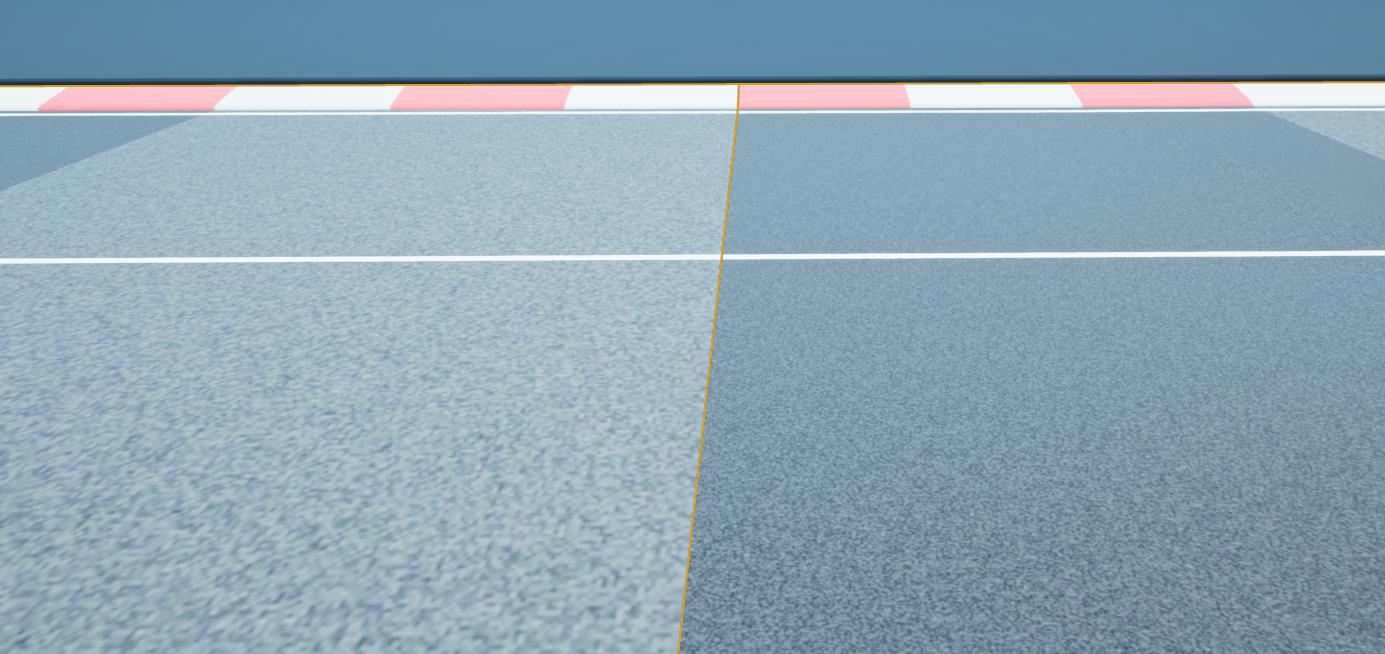
I'm trying to create a race track, but there are some issues. I snapped two race track objects, but the car (uses 4 down raycasts) detects a gap and launches itself upwards. I made sure there is no gap, how can I fix that?
https://i.imgur.com/AGMI9GF.jpeg
video: https://streamable.com/hlxx78

 void barn
if i lost my project file but i still have my exe left
can i revert my exe back to project file?
rough knoll
ok
how can i check if an event will do something and if it will then do something else
i have this here
i want to check before it executes the reserveammo deduction to see if that reserve ammo deduction will end up in the reserveammo being 0
and if it will do something else
im trying to put a system in place where if the reserve ammo will end up being 0 after reloading to add what the reserve ammo was
e.g. if someone has 4 in reserve and fires 10 shots out of the 20 in the magazine it goes up to 14 and not 20
last dove
@terse pawn np, I've gotta help people now because I used to berate @meager dove with tons of questions and he always helped me no matter what
 meager dove
 prisma wolf
hi guys, is there a way to transform a cinecamera to a different position in space without affecting the animation it has? Thanks
astral sundial
my cloth is not interacting with the phyisics bodies on my charecter. anyone know a way to fix this? i think it has to do with a blender scaling issue, which i am not sure how to fix. It might be easier if i had the cloth as a seperate skelital mesh in the same actor but i dont know how to make the cloth react properly if i do it that way.
 vale silo
@autumn elbow what engine version?
plush yew
Hey guys, took a few months off, anyone have a good workflow for blender to UE4? I cant seem to get the weapons and rig animations to export properly. always a problem, especially with the rig. Doing the regular UE4 Mannequin one and it always imports as T pose, even tried doing it with the MR mannequin tools
autumn elbow
@vale silo latest 4.25 with the latest update
 pale verge
Hi, I'm pretty new to Unreal and have an idea for a game but would like some pointers could someone help?
vale silo
I don't have this issue @autumn elbow but i am using default layout and I click "Import" button in the toolbar, not the one in the context menu
@pale verge YouTube
pale verge
@vale silo any good channels you'd recommend?
autumn elbow
same result if i click in the tool bar
vale silo
@pale verge not from the top of my head.. Just search for "making a game with UE4" or something like that.. Use your Google-foo 🙂
pale verge
@vale silo thanks!
vale silo
@autumn elbow try clean project ?
 paper thunder
Hey guys i wanted to have a player upload image ingame and use it as a material, do you have any idea how can i do this?
 sweet trout
is there anyway to uncap the fps in the editor. because right now for me its locked at 120
autumn elbow
NOTE TO ALL
Here is what happened... which is important for ya'll to keep an eye out. When you import, either using the Import button, or right click menu, Unreal saves that location. So, whenever you import again, it goes straight there. What happens if that location no longer exists? Well... it crashes.
@vale silo
I imported my asset. Unreal automatically bookmarked it. Then I later deleted that folder it was pointing to.
Crash! The way to clear the saved location is to navigate to a different location using some othre menu. I went to File > Import into Level ... imported some bullshit, and then deleted it. Tried it again and it was cleared. The import works again.
 plain iris
I've looked around the good ol' google for a fix for this but I seem to be missing files that people say to fix (binaries and such) I changed my game from a Blueprint project to a mixed
Does anyone know a fix to it?
autumn elbow
ohh chipz...
plain iris
Uh ohh
autumn elbow
I had the same issue.. I could not fix it.
plain iris
Okay, thankfully all I had was some ui and a character, easy enough to re-make
autumn elbow
i asked in the forum, and not one knew.
i can walk you through what i was told to do
didn't work for me, but might work for you
 alpine laurel
also why is my shipped game 1.6gb when i only have one small map?
autumn elbow
first and most important @plain iris .. you have to zip up ur project. make a backup
plain iris
Thank you N!!k, I think I'll just start over, it gives me a reason to practice
Oh that's smart, I will be doing that
autumn elbow
if you are starting over. you can go into your contents folder and copy out the assets files and place in your new project
The links, if you have links to different bps, will be broken, but you can fix it
plain iris
Ohhhh, that would be amazing!
autumn elbow
make your new project, copy the whole contents folder from the old to the new
plain iris
Thank you so much N!!k, I would never have thought of that!
autumn elbow
That was basically my fix to fix mine.
also...
you can right click on you uproject file, and choose generate visual studio project files.
After you backup your project, that is. lol
@alpine laurel try #packaging might be a more helpful place
 mellow hollow
Has anyone here had experience using UE4 on a cloud pc such as Amazon workspaces or Google cloud Desktop as a service (DaaS)?
void barn
if i lost my project file but i still have my exe left
can i revert my exe back to project file?
 oblique trail
Hey guys I
I'm pretty new to unreal and I was wondering if anyone had any good beginner tutorials
I'm trying to make a place shooting Angel flares. I have a camera, attached to the plane as a parent, as well as the two particle systems I created in Cascade. I want to move the plane in a straight line. Because the camera is attached to the plane, we we see the flares drop and fall away instead of layering directly ontop of each other
I need a good tutorial on how to move things in blueprint
 dapper ember
@oblique trail https://www.udemy.com/share/101Xs6AkUZeVhTQXw=/

Udemy
Code Your First Video Game in 100 minutes with Visual Scripting. Created in collaboration with Epic Games.
I really like Ben
He’s a good teacher.
oblique trail
You guys are amazing
alpine laurel
do i need the chaos plugins?
 solemn siren
Did anybody work with livelink?
oblique trail
all good any links are helpful.
I'm about to try and shotgun this https://www.youtube.com/playlist?list=PLL0cLF8gjBpqDdMoeid6Vl5roMl6xJQGC
Udemy is next. gl hf

YouTube
In this series we will be teaching you how to use the newly released, next generation engine unreal engine 4 to create your own games from scratch that are i...
alpine laurel
and side question. with ue 4.25.3 now whenever i try to save after exiting standalone, it says i cant cause i am still playing
plush yew
@oblique trail in that case check this out in Content Examples - Unreal Engine 4 Documentation > Samples and Tutorials > Content Examples > Blueprint Content Examples it has some blueprint examples for what you're looking for with the plane animation. I wish you luck on your quest in Unreal it's a great tool 
oblique trail
Ty fam
plush yew
can anyone tell me if my code is right? using UnrealBuildTool;
using System.Collections.Generic;
public class AdvancedLocomotionTarget : TargetRules
{
public AdvancedLocomotionTarget(TargetInfo Target) : base(Target)
{
Type = TargetType.Game;
DefaultBuildSettings = BuildSettingsVersion.V2;
bUsersSteam = true;
ExtraModuleNames.AddRange( new string[] { "AdvancedLocomotion" } );
}
}
 scarlet birch
isn't it supposed to be "bUsesSteam" ? @plush yew
 muted sequoia
Whenever i open a project on unreal engine it just freezes, and i have reset my whole computer, and reinstall every single app.I have verified my engine and I do not know what i should do.This is happening to all my projects, and the new projects I create.I have use unreal 4.25.3 and 4.24.3, i om currently trying it on the latest unreal engine.
plush yew
yeh haha
i got it fixed but still have one error
ERROR: Stage Failed. Missing receipt 'D:\Unreal Projects\AdvancedLocomotion\Binaries\Win64\AdvancedLocomotion.target'. Check that this target has been built.
scarlet birch
Idk, looks okay to me other than the steam thing.
 open wadi
Anyone work with the free Va Rest plugin for handling JSON requests?
 open gorge
the .cs files are there to help the engine build
@open wadi I used to, but I swapped to C++ as it was far neater and easier for me.
open wadi
Djriff - might you point me towards the files in question?
scarlet birch
Does it build in VS?
open wadi
Well, I'm not seeing a link to the code, I'm going toff the YouTube video.
plush yew
you talking to me?
open wadi
I'm just pausing the tutorial and studying what you did.
plush yew
or drop
scarlet birch
yeah, sorry, hate to over tag
plush yew
u can tag me as much as u want
open gorge
@open wadi ?
open wadi
@open gorge - Here's the video I'm studying:
open gorge
what files are you talking about?
open wadi

Discord Server : https://discord.gg/ZY26P6r
Support this channel on Patreon! https://www.patreon.com/TotallyUnreal
And basically, that one handles authentication properly.
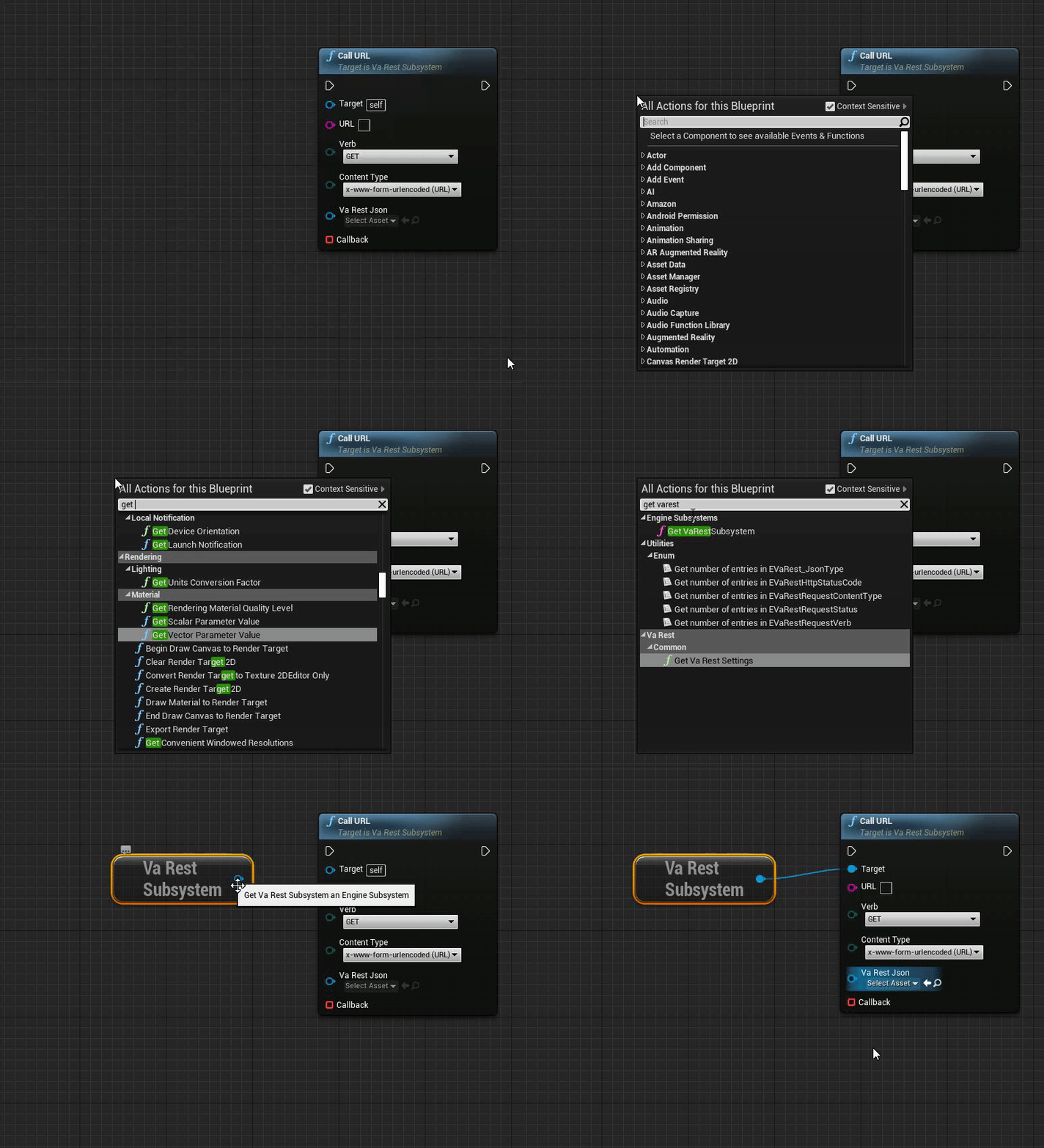
But there's an issue - at 6:05, he has a custom event for the "Call URL" callback
And I have no clue what is within that callback.
And I'm googling it, I assume I'll eventually find it somewhere.
But I need to just know what that custom even tcontains.
For handling the callback from the HTTP POST to my API endpoint I coded in node.js.
open wadi
I do.
I have everything set up correctly.
Until the callback.
And the issue is, @open gorge , is that I have no clue what's in the custom event specified at 6:05.
open gorge
right
open wadi
I've built the API, it's working perfectly.
open wadi
The red pen is present.
open gorge
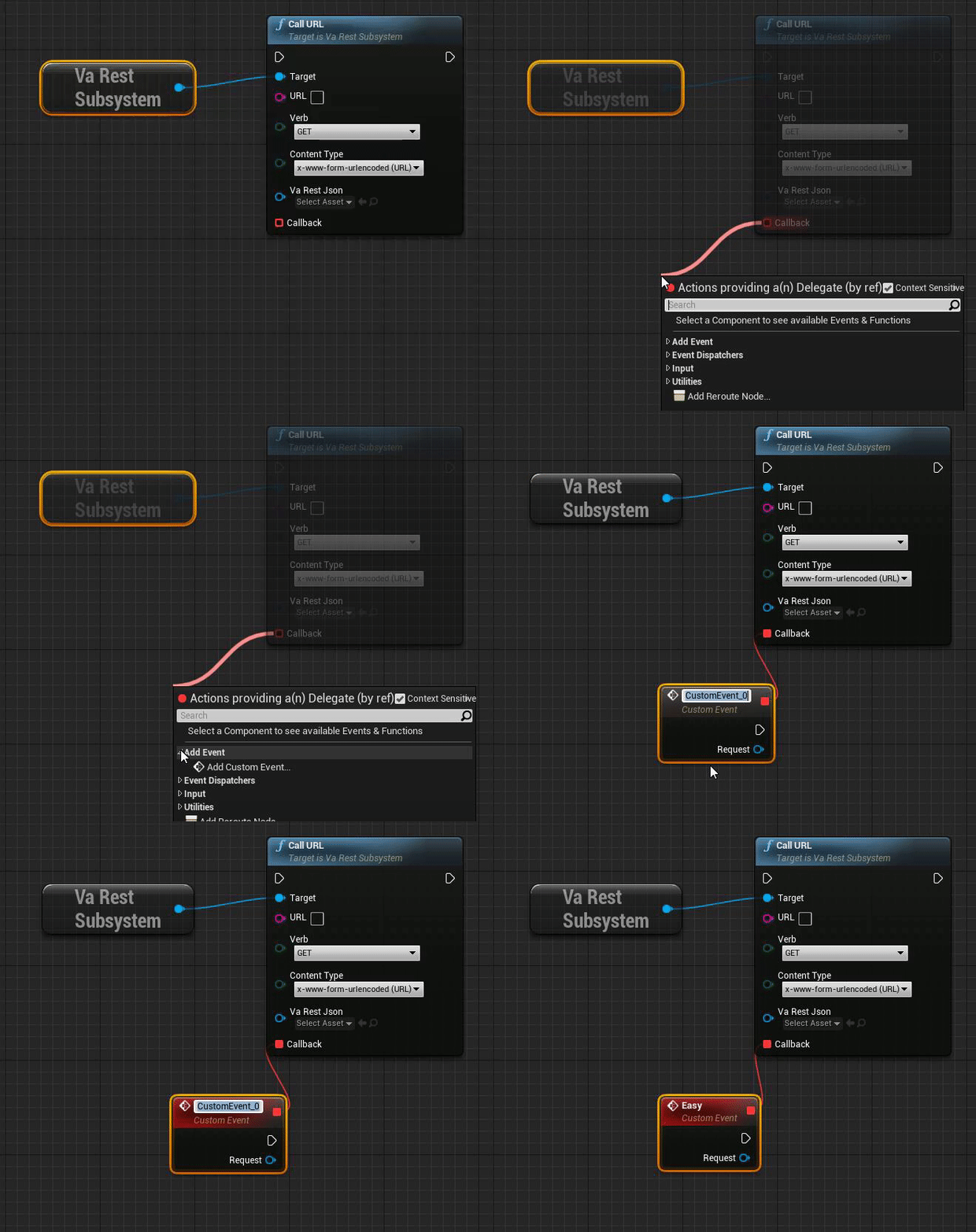
is drag off of it, and create an event
open wadi
Right.
open gorge
the variable will be supplied for you
open wadi
Hmm, I don't need to create a custom event?
open wadi
I drag off the pin and I get a specific dialogue, let me switch to my dev machine:
open gorge
it gives your custom event context
open wadi
It says the following:
"Actions provided by a(n) delegate (by reference)
Ok
I created the custom event.
open gorge
and you have your variable already there yeah?
open wadi
It's a free plugin.
open gorge
I don't need it
open wadi
Ok, one note - When I leverage "Call URL", I have a "target" input pin, which I don't see int he tutorial.
open gorge
I have an example though, similar concept
open wadi
And now that i've drug off this custom event
I have an error:" this blueprint (self) is not a VaRestSubsystem, therefore "Target" must have a connection
I have an additional pin - "Target"
That isn't present in the tutorial, perhap sthey added this since the person created the tutorial?
open gorge
nothing
plush yew
still cant fix my ;/
open gorge
unless they made it a subsystem
open wadi
Ok, so ignore the error?
open gorge
but give me a few to troubleshoot
plush yew
AdvancedLocomotion.Build.cs(13,3) : error CS0103: The name 'DynamicallyLoadedmodulenames' does not exist in the current context like it tells me this but everything is right
open gorge
are you building from source?
plush yew
i dunno lol
open wadi
This is what I'm seeing.
plush yew
i was kinda new to steam sub system plugin so i think
open wadi
Note the fun error.
If I hover over it gives me the bit about self not being a VaRest Subsystem
open gorge
that self error can be fixed like this: https://i.gyazo.com/4404e10eabc5e92ffca5fc9528b06383.gif
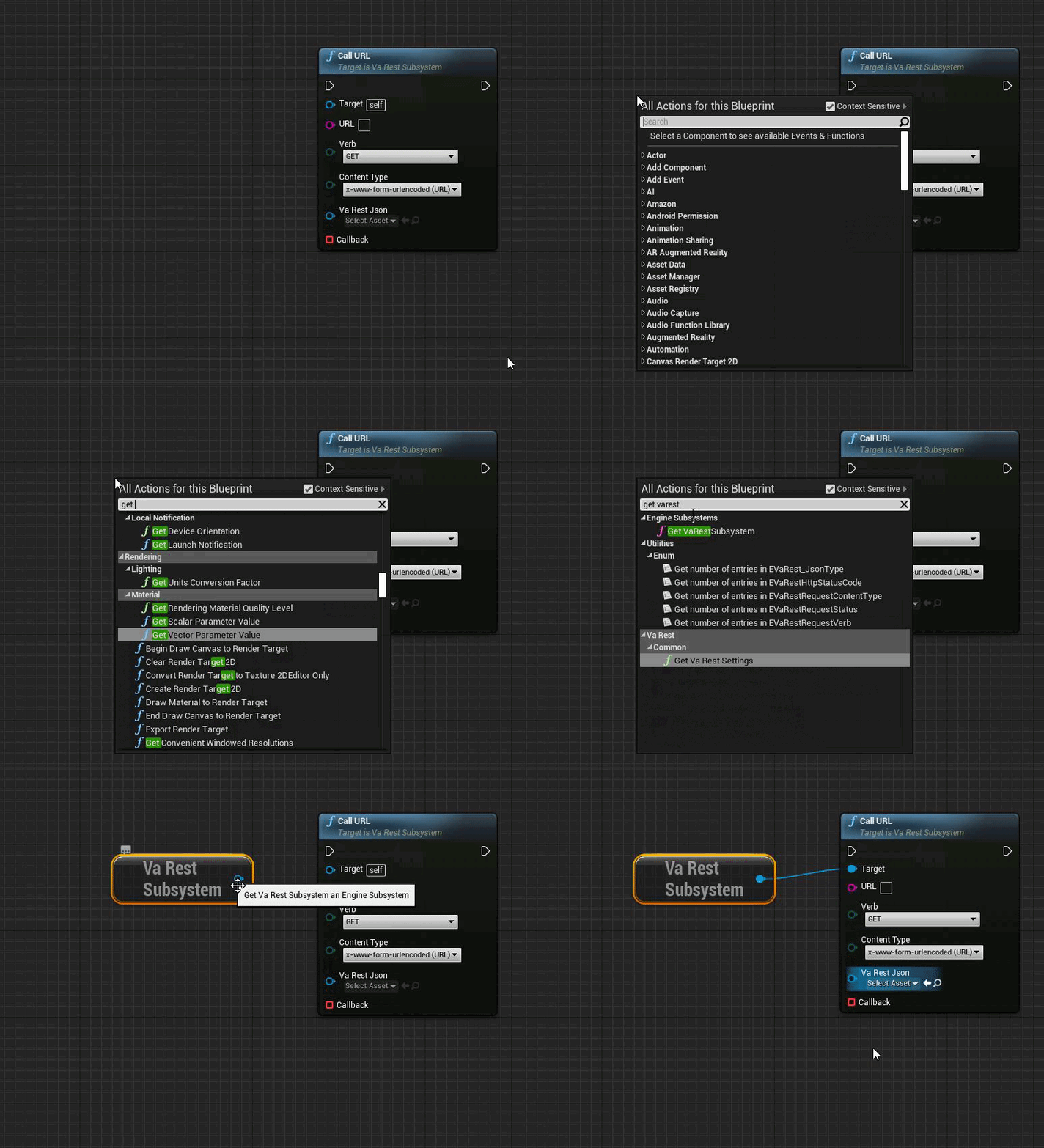
your custom event issue can be fixed like this: https://i.gyazo.com/0237a1efa3d6a05dd44130776becf96c.gif
 open gorge
@plush yew i mean are you building using UE4 Source, as in did you compile it yourself
open wadi
Thank you @open gorge, the issue being, I did that with the custom event, do I need to alter that custom event?
open gorge
nope
open gorge
you can use it as described in that video afaik
open wadi
And thank you for naming it "easy" as if to drive the point home.
plush yew
im building from ue4
open wadi
I now realize it is, in fact, easy.
open gorge
😛
plush yew
i was watching this vidhttps://www.youtube.com/watch?v=d4gQSXALyHU
Hey there DevSquad, today we setup our project to work with steam multiplayer, setting up visual studio, the advanced sessions plugin along with integrating the steam API into our Unreal Engine 4 project.
At the end of this video we'll be ready to start working on some multip...
open gorge
@plush yew so you compiled UE4 from source?
plush yew
nope
open gorge
ok
plush yew
i have it form the launcher
plush yew
could i maybe hop on a call with you if your not busy
open gorge
that Locomotion one
plush yew
yeh package error
plush yew
its the only error i see
open gorge
uhhh
plush yew
oh okay
open gorge
did you scroll up?
plush yew
let me take a new ss
open wadi
Now one last question - in the tutorial, the guide says that I should encrypt the "make json" statement and / or the POST statement so I'm not passing the username / password over the wire plaintext - any thoughts there?
plush yew
open wadi
He doesn't do this himself, he just mentions it should be done.
open gorge
@open wadi basically they want you to hash it or something like that. Then on your backend, you unhash it to get the password
standard security stuff
open wadi
right.
And I'm happy to encrypt / decrypt, might there be any examples?
Maybe leveraging a PSK?
Would that be the use of the API Key I declared on my server?
open wadi
Ideally I'd leverage something dynamic.
open gorge
personally, I just use an MD5 hash with a custom keyword
but there are tons of solutions out there
and libraries available
plush yew
i will brb but just ping me
open wadi
Like, taking the email address submitted and using it to generate a hash.
open gorge
@plush yew Can you scroll up more in that log and see if there's any other errors?
usually it's something silly but unreal doesn't like to tell you at the end.
open wadi
Djriff: Any libraries you recommend for that purpose?
open wadi
Or, alternatively, if I were to use an MD5 hash, would the keyword be preshared?
open gorge
but my backend is in java
open wadi
Between client and server?
open gorge
well you would obfuscate it in your own code
open wadi
Exactly.
open gorge
and just use the same keyword on the backend
or you can go totally insane
and private key it
open wadi
lol
open gorge
with a ridiculous level of encryption
plush yew
is nonew
open gorge
the world is your oyster friendo
open wadi
lmao
open gorge
can you copy and paste the entirety of it and post a gist
open wadi
I just need some example, guide or tutorial of implementation and I can take it from there?
open gorge
honestly
open wadi
-?
open gorge
your best bet is to google that
there are a ton of options
so you'd need to do some research on what's best for you
open wadi
Ok, what would I be googling in this particular instance?
Just throw out a relevant phrase
and I got it from there
open gorge
for simple testing/learning you're doing now you don't really need to worry about it
uhhh
let's see
Best encryption system to use with c++ and javascript
something along those lines
open wadi
Should I throw in UE4?
open gorge
nah
open gorge
you don't care about UE4 at that point
open wadi
Much appreciated.
open gorge
whoa nonono
open wadi
lol
plush yew
oops sorry
open gorge
xD
 plush yew
okay
open gorge
that's what I meant by post a gist lol
plush yew
oof
open gorge
just copy and paste what your output log for that package has
i'll see if anything sticks out
plush yew
oh lol

Gist
Build failed while packaging the project. GitHub Gist: instantly share code, notes, and snippets.
so that?
plush yew
ah ok
plush yew
that is it
plush yew
yes
open gorge
lol
plush yew
ah got it
plush yew
oh ok
open gorge
and you can just copy paste that entire file into gist
plush yew
yep
 wild marsh
C++ or blueprints is fine, just looking for something that's simple and reliable
muted sequoia
Whenever i open a project on unreal engine it just freezes, and i have reset my whole computer, and reinstall every single app.I have verified my engine and I do not know what i should do.This is happening to all my projects, and the new projects I create.I have use unreal 4.25.3 and 4.24.3, i om currently trying it on the latest unreal engine.
 kindred orbit
@muted sequoia what's your specs?
muted sequoia
@kindred orbit 8gb ram, 1tb ssd drive
core i5 10 gen cpu
kindred orbit
Damn that's definitelynot the problem then
muted sequoia
@kindred orbit i know
plain iris
What would the best route be to getting a dedicated MMO server? I'm still very new so something free and simple if possible. I was looking into Gamesparks but it seems they're quite out of date and incompatible? Any help would be amazing, even tutorial links.
rough knoll
can i like warp a button like you warp things in photoshop
because this rectangle does not fit and i want to freely change the shape of it
 manic pawn
no
the only thing you can do to buttons that actually affects the clickable area is render transform (scale, rotate, shear)
or (galaxy brain solution) contain it in another widget with clipping enabled, this allows you to cut the rectangle by another rectangle, creating some kind of convex shape
 shy saffron
plush yew
shy saffron
plush yew
@shy saffron, You do not have permission to use the talent command.
open gorge
Python is generally limited to editor scripting. Ue4 is mainly c++ based
kindred orbit
So I converted some blueprints to c++ and it doesn't look like any c++ I've seen before. Does it convert it similar to how most programmers would write in c++?
 weary basalt
@kindred orbit If you Nativized the Blueprints, then they will be extremely unfriendly to read.
kindred orbit
What would be the difference with a programmer?
weary basalt
That it wouldnt have things like generated strings postfixed to variable/function names to ensure no naming collisions occur etc etc
open gorge
it would also be way more readable
kindred orbit
Yea it just looks like random shit
weary basalt
Nativization is the Editors attempt at making a Blueprint into C++ be as readable as possible.
While ensuring that it can compile and run.
The easiest way to do that is to ensure without doubt that there are no conflicts.
By randomizing names etc
I would treat Nativization more as an optimization pass for a game you have completed and classes/blueprints that you dont intend on maintaining in the future.
For the simple fact that Nativization outputs mostly gibberish.
kindred orbit
So it's not necessarily for the use of learning c++ from bp I imagine
weary basalt
No i would not use it for that purpose.
Or recommend that as a method to do so.
Your more likely to just confuse yourself than anything else.
kindred orbit
What would you recommend then?
weary basalt
There is plenty of tutorials and example projects you can use as useful learning tools/resources.
kindred orbit
Bp does help with concept though
weary basalt
BP is excellent for iterating on concepts.
open gorge
I've used BP nativ to check out how BP does certain things too
which usually deep dives me into the engine where I learn the cpp way to do it
kindred orbit
Interesting
weary basalt
By all means you can use it for that, but as i stated, i dont think thats a wise choice when first learning.
open gorge
I don't disagree with you
but that's how I learned about Latent Actions
and that opened a big can of worms lol
weary basalt
Fair enough.
kindred orbit
Would you say that preference is the main factor in whether to use cpp or bp. Because I've heard many opinions
weary basalt
Id say its healthy to utilize both, they have their pros and their cons.
If you learn to use both and you learn what their strengths and weaknesses are, you arent limited in what you can potentially achieve.
kindred orbit
Thank you
 shrewd rain
is there any way to delete store packs like Kite demo faster? I've been deleting stuff from the project and it takes ages (like 2 or more hours) to delete one pack
 modern sinew
How hard would it be to make voice chat such that the voice comes from the player, and the further or closer you are changes the volume? And so that walls and stuff mostly block sound?
kindred orbit
Not too difficult I assume
 surreal laurel
@modern sinew I think it would just be a matter of attaching the audio component to the players character and enabling it's attenuation/occlusion. But then again i've never messed with networked voice chat so idk
 lucid socket
If you use Vivox it has that out of the box
surreal laurel
It's been a stretch since i've used UE and forget some really basic stuff - how do I spawn an actor through BP? Or just spawn a static mesh?
Add static mesh? is that it?
kindred orbit
SpawnActor?
Do you mean spawn into the game or add a component to the bp itself @surreal laurel
modern sinew
@surreal laurel Ok
surreal laurel
Oh i'm dumb I was in the Construction Script and the node wasn't popping up lol
kindred orbit
Lol
surreal laurel
Do you mean spawn into the game or add a component to the bp itself @surreal laurel
@kindred orbit It was both. Man I hate losing knowledge just from being away
kindred orbit
How long
surreal laurel
Few months
surreal laurel
I'm stacking a ton of stuff into my Character BP, i'm trying to figure out if it would be better off (and better optimized) if it was spread out into other BP's somehow. For example, a "building" ability, where the player can choose from a bunch of different actors on certain surfaces. Does it make the most sense to put that directly in the Char BP?
I'm sure it's use case specific, but i'm wondering in a general best practices sort of way
 thin tendon
I would personally create a building component to attach to the player
kindred orbit
Agreed@thin tendon
Keeps it more organized and also I'd you wanted to add that component to other things it would be much easier
@surreal laurel
plush yew
@sullen bane nice work on your game btw and sorry for the tag
surreal laurel
@thin tendon Ahh that's exactly what I was looking for, thanks
 dire coral
what is the setting called that when you look at an object is makes the brightness go up
i need to disable it
 tender pecan
'AutoExposure' or 'Eye Adaptation'
dire coral
thx
 sullen bane
@plush yew Thanks 🙂 i just made a new post on the forum for it. https://forums.unrealengine.com/community/released-projects/1797724-usurpator-kickstarter-and-steam-demo-live I hope it is ok to post it here.
Unreal Engine Forums
So it has been along time since we posted here! We launched our Kickstarter this Tuesday and are now on the fund us train :D also the game is now called Usurpator! :)(former Clans of Reign)
Please check us out and share!
Kickstarter and Steam Demo are both live!
https://you...
sullen bane
yea we do a playtest everyday for the whole campaign 🙂 so servers should have players on from time to time 🙂
hearty walrus
How do I fix this bug?
surreal laurel
hmm so I guess my follow-up question would be what's the best way to copy a bunch of code from one BP into a separate BP Component while keeping all the variables and stuff intact
plush yew
ah ok daone
surreal laurel
@hearty walrus You need to plug the actor into the object pin on the cast node
sullen bane
Thanks for checking it out Dessierror 🙂
hearty walrus
@surreal laurel what?
thin tendon
@hearty walrus What @surreal laurel is saying is correct. When you cast to a Blueprint. You aren't trying to access 1 particular instance of it but the actual saved blueprint. So to pass information (to work) it needs an object. So it knows which "End_Warning" its trying to access.
hearty walrus
what object do I use?
thin tendon
if the thing your accessing is the "End_Warning" it needs to have a relationship with it. So for example. I want to access and cast to Ball_BP. I need to get a Ball object or actor object to tell it what the ball is
surreal laurel
pull a string off of the object pin and when prompted, type in "Get Owner"
hearty walrus
surreal laurel
What kind of BP is End_Warning
hearty walrus
Widget
thin tendon
Get a copy of the widget. Then cast
hearty walrus
what.
surreal laurel
lol, some tuts might do you better than getting things explained here. just for a better basic understanding of how it works
but, if you just want to add a widget to the viewport, then the best way is probably creating the widget from inside the BP, referencing the widget BP, and then adding that to viewport
thin tendon
I would personally pre-create it. Then just hide show. And change details on the widget as needed.
surreal laurel
both work
here's an example of my option
select your widget from the circled dropdown. the node is called "Create Widget"
hearty walrus
I am the biggest dumbass on planet earth.
surreal laurel
aw bud
thin tendon
Don't even beat yourself up mate. I can't count the amount of times I have been pulling hair out after days and it turned out to be something super simple
hearty walrus
same
I legit forgot that bloody node existed!
😅
but hey, progress is progress.
surreal laurel
hmm Component BP's are tricky, what's the best way to send a custom event from the parent into the component?
thin tendon
parent to component? Just grab the component in the parent character. Drag out and type in the name of a custom event
near iris
hi guys
I watched a video on YouTube with a guy who was taking 3d models from something called Quixel
someone have got an idea about what is it and if it's usable in UE4.25?
near iris
wdym
 royal crest
unreal doesnt detect my materials
these
so i cant open my level since it uses these materials
how does that even happen
 compact juniper
When I hold down or release the mouse button, I get a value of 1 or 0. But when I hold down the touch it only increments from 1 onwards. What's up?
near iris
hi guys
compact juniper
plush yew
Would there be people here who are familiar with this Tutorial
https://www.youtube.com/playlist?list=PLfQ3pODBwOcaV1TdnqNWLTJ4wiUzEvXis

While most of it as fairly easy, and I am sure I have followed almost every single step of the Tutorial my character refuses to punch XD
near iris
Error
Could Not Export Assets. Please Check Log For Details
✕
Error
Could Not Send Data Over Port 13429
someone have an idea about how can I fix this?
in Quixel
steady zodiac
Anyone know how to fix this invisible gap? I don't know where this gap come from, it is one mesh
https://streamable.com/q6u4dp

collision:
https://i.imgur.com/ldnWbcZ.jpg
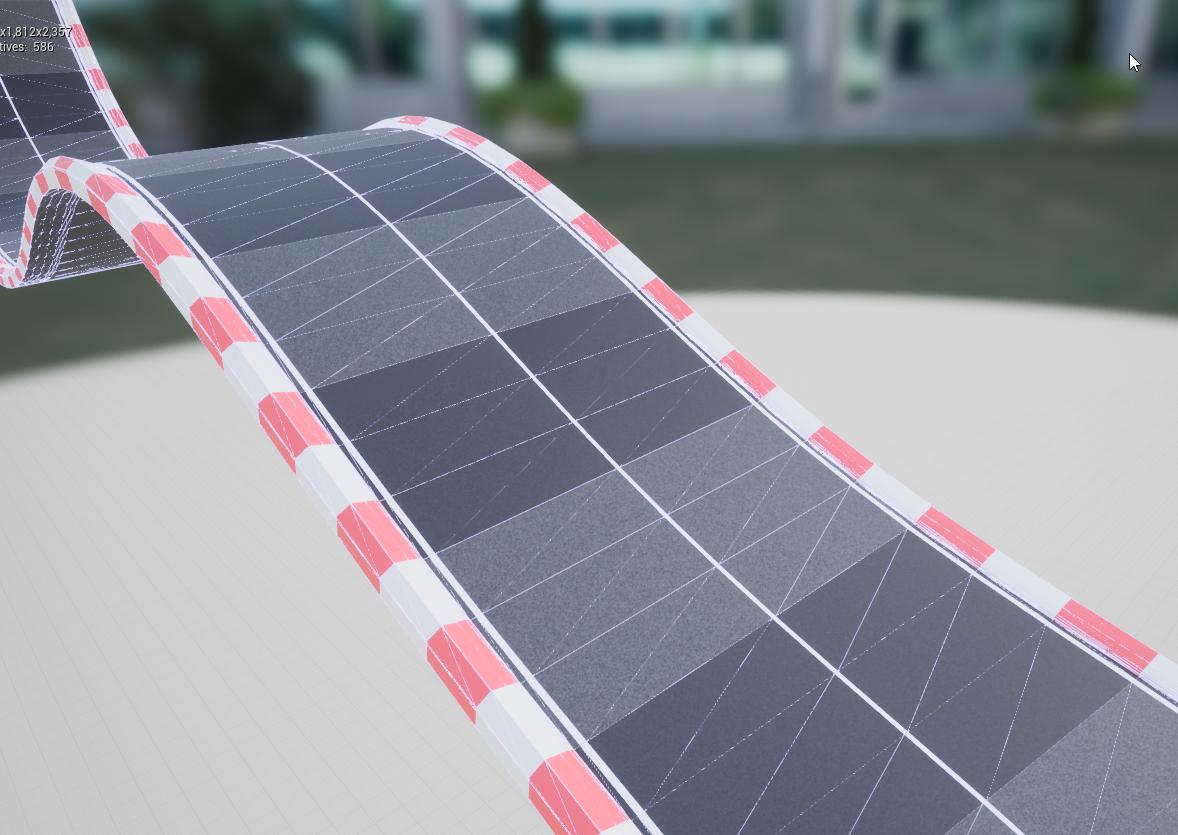
in blender:
https://i.imgur.com/DZorMVo.png
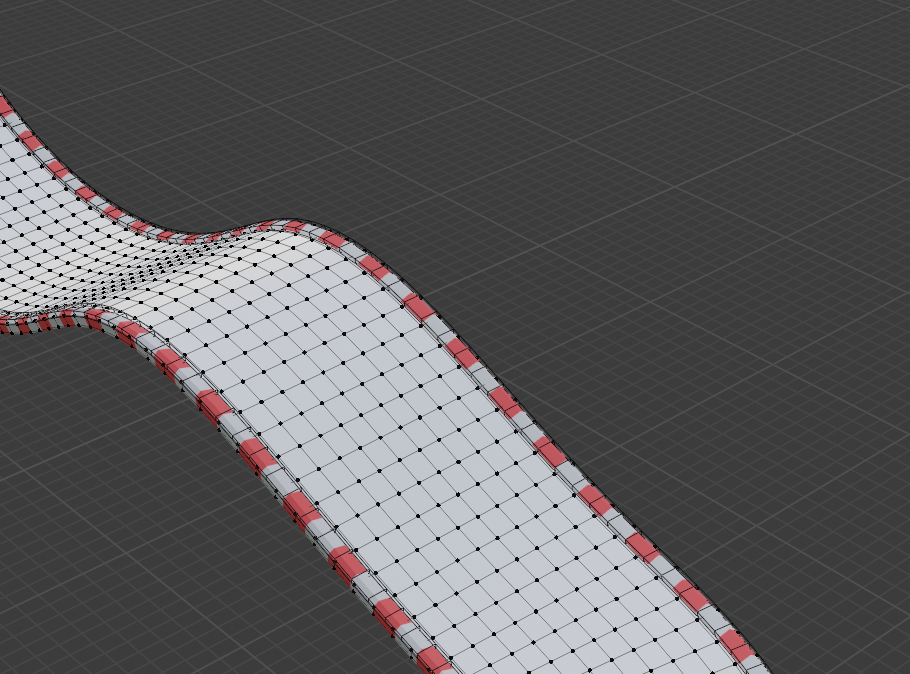
 somber quail
Look at your "simple collision" view. It's likely simplified collision causing the issue
Either make custom collision primitives or use complex collision as simple
steady zodiac
I have the same issue with complex collision as simple :/ the collisions I made in blender (white part of the track blender image is a cube that I've defined as collision (UCX)
 stuck linden
Does anyone know what to reference on object when casting to a actor
plush yew
I have problem with my Side Scroller character. I didn't have any of those Axis mapping like ''MoveRight'' ect. and now I have to add them.. Is this normal or Should I even do that ?
Im maybe watching wrong tutorial bc its for normal 3D...
I mean Not Side scroller
 grim juniper
@stuck linden You mean what to plug into the object pin? That'd be a reference to the actor you're wanting to cast to
 tired token
best way to learn about uproperties:
e.e
 fluid lance
I know it's an animation question, but that channel is mostly dead so: Is there any way to interrupt a running animation and force-transition into another state (Within the state machine)?
Context: I have ai's which roam around, and in certain situations stop and chat, then go back to roaming around. They stop to chat for a random time (2-7 secs). The State Machine gets passed a bool which is used as condition to transit into the "chatting" state.
The problem: Sometimes, the chatting animations aren't finished by the time the chatting ends, which doesn't allow the state machine to transition until after the animation sequence finishes. I want to force it to transition, otherwise, until the chatting animation ends, the pawn just slides away, stuck in chat animation for awhile before transitioning into the walk state.
-sry for long question 😛
grim ore
@fluid lance What are you currently using for your "enter chat" transition rule and your "exit chat" transition rule?
fluid lance
@grim ore Overlap>>"blsIsChatty" (on both NPCs) if(true)=>Set "blschatting" for both, delay for 2-7 secs, end chat through the same bools reversed.
and the same bool "is chatting" is used in the StateMachine
grim ore
why use the delay at all and not transition back when bIsIsChatty is false?
fluid lance
how do I control random chat time in some other way?
grim ore
how do you set the bIsIsChatty in the first place going to true?
fluid lance
sec ill ss
grim ore
it sounds like you have it almost right just not in the right places perhaps
fluid lance
grim ore
where does this tell the anim bp to play the animations?
or does your anim BP get it from the character on event update
fluid lance
grim ore
ok so that looks fine, if your transition rules are set up it should stop playing the animation when that is false shouldnt it?
 brave grove
Hey guys,
is there a way to find the ID of a vertex in a spline closest to a world location?
I know there is "Find Location Closest to World Location" on a spline but I actually want to find the point ID and not location itself.
fluid lance
if I could use an event to send the bool to the animbp I would but my experience with animations is fairly poor overall
plush yew
In regards to the query that I posted earlier, my anim montage of punching did not play because: I was dumb and used,the Play Montage Node, instead of Montage Play Node.
Yes I am stupid like that XD.
grim ore
you can send to the anim bp directly from your character if you want to do it that way (I would personally). get the skeletal mesh component -> get the Anim Instance variable -> Cast to your Anim BP Class -> Set/Get/Call Events
what is the transition rule back from conversation to walking as that is the issue right?
fluid lance
so it starts moving but doesn't go out of the chatting anim until it finished playing...
no, it's speed >=2 ---->walking
grim ore
yeah but why? if you want it to move back to idle or walking when they are done chatting....
make it so it moves back when they are done chatting
plush yew
Hmm, how about removing Idle with the Chatting animation
fluid lance
@grim ore i'll try it but it should be the same thing really, since while chatting the speed should b 0 so...i'll try
grim ore
I gotcha but if the goal is to do the transitions when you stop chatting it seems like you should use that as the rule
fluid lance
fair enough 😂
plush yew
Question, is the chatting animation only for the upper body and face
because if not, Walking------>Chatting--------->Walking should work, why would Idle be needed?
Just curious, not criticising the design choice
fluid lance
well, idle is for ...idling 😄
chatting is for chatting
aaanyway, it's not interrupting the anim regardless of rule changes 😐
same thing happens...
plush yew
So the npcs also Idle, I thought all of them just walked, talked, walked,talked..........
grim ore
what happens when you watch the state machine while its playing out in engine? in another window. Perhaps you have the transition time for the rule out too high?
fluid lance
it just "waits" for the anim to be finished and it's damn long
grim ore
also you have no conversation -> idle which seems like you might need
fluid lance
@grim ore can't watch the state machine because...bugs
if the AnimBP is open in runtime, it returns accessed none for the NPC class -.-
...yep 🙂
grim ore
oh hey
is your actual class this is on NPC_Base?
yep your anim bp is bad your getting a bad variable is the issue
have you compared this to the third person example on how it handles updates and getting the controlled pawn
fluid lance
well, it ignores basic stuff like not casting/tick which in my case would b nasty...Having 30 NPCs roaming around executing code and the animBP casting/tick to get some vars...I just set the var in the init anim bp then use the vars
grim ore
maybe see about transitioning this from the event update then in the anim bp and update those variables directly inside of the anim bp from the character like I mentioned before
that would atleast guarantee the anim bp gets the values from its character when it needs it
fluid lance
so firstly you really think the accessed none is real? I mean, i have break bp execution enabled on my project and it only breaks if the actual animbp is open, otherwise it works like it should
i was 100% it's just a bug
grim ore
well you are only setting that value once so if it fails the first time it never gets the valid value
fluid lance
then how does it act/work w/o it?
if it fails to grab it, it should return none sooner or later...right?
grim ore
it should anytime you access it yes. I cant see your flow and since you cant debug it for some reason you cant either for some reason
but if your transition rule -> idle to is IsWalking -> Not -> Transition Enter then when the boolean is set it should stop the animation and go back to idle but you say it is not
it might be helpful to try and send the boolean updates from the characters directly instead of using the event update and see what happens
fluid lance
it does work, so the state machine works fine. But only starts playing the walking/idle anims when the long-ass chatting anim is finished, it's not interrupting it.
grim ore
all I can suggest is what I suggested, you need to watch the anim bp running in the editor when you are playing to see what is going on with the flow
grim ore
it can be running but you need to watch the flow from each state in real time
fluid lance
oh lol ima total moron...ofc it returns none until the world is loaded up and the cast actually succeeds (sice the animbp runs in design-time just the same)...
grim ore
yeah there should be a try get pawn owner in an anim bp before any uses and such.
but you should also be able to debug this in editor using the anim preview options in the bottom right
have the state machine open, toggle on the is chatting and watch it, then uncheck it and make sure its flowing
fluid lance
@grim ore yea, it's something else apparently...the animbp/state machine is fine. For some reason, it starts moving sooner than the end of convo, so i must find a way to prevent that. Could it be some AI pathfind command which wasn't finished and it tries to pick back up on?
Ok..Two questions:
- I can use movementcomponent>disable movement. Where's/what's the name of the opposite function? since movementcomponent>enable movement doesn't exist.
- Is there any way to force the AI to cancel it's path and just forget about going anywhere?
grim ore
you can use #1, and read disable movemement you will see it sets the movement mode to none. you just set it back to walking probably
#2 depends on how you are moving the AI, some nodes have no way to abort but I think you might be able to call stop movement on most types
 bleak vault
hey, i'm trying to make an option string using the shortcut target and anything after a whitespace as well as the "#" symbol gets ignored. is this because of the Parse Option node or must the argument formatting be different?
 hybrid light
anyone?
stuck linden
is there anyway to make it so everything above the blueline is not seen or something so my world doesnt look like a flat earth
fluid lance
@stuck linden 😮 but the earth IS flat!
jk 😛
look into postprocessing materials
but really depends on what you want to do with that. Just hide the sky sphere?
@grim ore Thanks! did it, it was some other crap I did in the roam logic and didn't check against the later-added npc-to-npc chat 😐 Thanks for the help! 🙂
stuck linden
i want it to look like the water is infinite
fluid lance
try playing with fog so it'll "loose" in the horizon@stuck linden
stuck linden
will try ty
 stray smelt
is there a limit to number of scenecaptures?
made another one and it seems to overwrite the first even if they have separate textures/material
hybrid light
anyone? help
 pale token
Whaaat is it called when you take like a recording of your ue4 scene
I'm trying to figure out how to take a video of my model
with all the lightiiing and animatioooon
 ornate forge
@pale token Scene capture?
plush yew
is there any place I can get free terrain alpha brushes?
sweet trout
can anyone help me uncap the fps in the editor viewport. for me its locked at 120
grim ore
t.maxfps XXXX in the console to change your max fps
sweet trout
@grim ore how do i open the console
grim ore
~ (tilde) key on a US keyboard or go to the output log and the console is on the bottom
sweet trout
@grim ore whats the max value i can put?
grim ore
no idea, whatever you want probably. There might be some literal limit at some point as i doubt you could get over 1000 fps in general
I normally just go with 300 as that tends to be more than enough
grim ore
yay
 hardy lynx
hello, does anybody knows how to set pitch for AIController? I use SetControlRotation, but it affects only for Yaw.
Pitch automaticaly changes before animation blueprint. I think it may be some setting which chould change this behaviour
grim ore
is the character set to use control rotation for that variable? @hardy lynx
in the base properties for the character (pawn technically)
hardy lynx
@grim ore yes, but i thought it settings for user controller
 exotic thicket
How do you handle switching between dev/debug settings in your game vs. shipping settings? Eg. we have a bunch of gameplay systems that in their shipping configs are hard to debug so we need to switch a bunch of variables to different values a lot
(I can think of some ways to do it like having our dev and shipping settings as separate data actors or something and switching between)
grim ore
do you want to ship with the debug settings in the project just disabled or have them completely stripped out?
exotic thicket
Doesn't really matter at this point :)
Mostly just would like to have the production settings in one place so we don't constantly have to remember to switch the values back after working on the systems :P
grim ore
You can check for a launch/command line option on startup and store that somewhere like say game instance. Then anything that needs to be X or Y can check that value and act accordingly
then you can just specify that -debug or whatever in editor or on the command line when launching to choose between the 2
if you want to handle it in editor you dont even need to do that just set the same variable by hand and test accordingly
 wispy leaf
exotic thicket
wispy leaf
exotic thicket
Ah cool that'll help :) Thanks MathewW
grim ore
like painting on it?
grim ore
you would create a landscape material that has layers on it then paint down layers
plush yew
Good time of day. Planning to make weapon craft game. The start of the game should begin from stone age, so we will craft stone weapon. The idea is to make posibility to craft weapon with different shapes by redacting stones, woods and connecting it to each other by ropes.
The problem is that I can't figure out the best way how to make the redactable materials for craft. Have some ideas like using voxel, destructible and maybe procedural mesh component.
Can anybody share by their information how it possible to make?
grim ore
assuming that is what you are asking
 neat forge
Is there a node I could use to make a static mesh in an actor blueprint smoothly scale up/down?
hybrid light
still looking for help
hardy lynx
@grim ore maybe exists some manual for aiming AIController. All what i saw it using SetFocus, but its not smooth
grim ore
@neat forge you would want to look into interpolating (lerp or interp) the scale over time with something like a timeline
@hardy lynx you should be able to set the controller if it is using it, if not just change the rotation manually. IF you want to have it face something there is the Find Look at Rotation node that will give you the rotation between one item and another
hardy lynx
i try to change it manually but it works only in animation blueprint and Pitch all time to want return back to his old value
grim ore
@hybrid light have you tried debugging the code? What is your value when you land for the Z from the GetLastUpdateVeolocity?
@hardy lynx maybe you have something else changing it then, like a move to or something else.
hardy lynx
@grim ore it may works for Yaw but not for Pitch
pale token
Dumb questiiioonn
hybrid light
hardy lynx
ok i'l try
hybrid light
@grim ore this is my value for Z Velocity
grim ore
@hybrid light that's not debugging or showing the value when you land. When you land your z is going to be a negative number but you are checking for a huge positive number
so that is one issue
 fiery fiber
Digging around trying to find resources for a particle-based metaball system. Anyone know what happened to this project? all the links are dead : https://forums.unrealengine.com/community/work-in-progress/7881-metaballs-proof-of-concept?9493-Metaballs-Proof-of-Concept=
Unreal Engine Forums
Building something cool? Tell us about it!
plush yew
does someone know how to get a lot of items, into a new level? just copy pasting won't work right?
grim ore
yeah he meant to do exactly what I am asking you to do, make sure your Z is what you expect which it is not
hybrid light
in the character movement
grim ore
hybrid light
just did that am getting hug numbers -2800
grim ore
that would be the last update Z velocity then
hybrid light
now i add it to the float
grim ore
your code was fine, you just are not checking correctly
you are asking if it was above 700.0 and obviously it wont be when falling
it will be negative when falling and it seems like it might be larger than 700
jump your character off a few short things, then a few tall things. find the value you want then use that as the check
grim ore
because your doing it wrong
before you where checking if the number was greater than 700, it was not
now you are asking is 0 greater than 700, it is not
is your jump Z LESS THAN -whatevernumber is what you want to check
for example on here Its the same code as before for testing but now I ask if the number is less than -700 and if so I print big jump
grim ore
it also seems weird you have the is < node going into an enum, then that out into the animation when you could just use select instead of two
hybrid light
Well i was told to do it this way
grim ore
it works just seems like 1 extra step
hybrid light
thanks again for the help i will remove it then
grim ore
is the landing from high up? select hard or soft. Based on hard or soft play montage instead of is the landing from high up? select hard or soft montage
in the select node you can right click on any of the input pins on the left of it and change pin type
grim ore
🙂
hybrid light
Thx once again 😁
muted sequoia
Whenever i open a project on unreal engine it just freezes, and i have reset my whole computer, and reinstall every single app.I have verified my engine and I do not know what i should do.This is happening to all my projects, and the new projects I create.I have use unreal 4.25.3 and 4.24.3, i om currently trying it on the latest unreal engine.
grim ore
what does the task manager show is happening?
trim tapir
so i have a bug where the light intensity seems to double at random
each tile in the purple lake has a point light above it
I have checked to see if the tiles are duplicating but they are not
i dont think that the light intensity is edited anywhere
any1 have suggestions?
weird thing is is that it appears fine when exported
grim ore
its in the default settings for the blueprint when you open it
grim ore
try changing it back
 zinc girder
I just downloaded unreal engine and need help with vat number registration. I live in Canada and Vat number registration is something new to me.
help me. I don't know where and how to register for a vat number
 weak cypress
can unreal run on linux?
grim ore
you shouldnt need to fill out any of that info if just using the engine @zinc girder
@weak cypress yes
grim ore
no, you need to compile it for your distribution
weak cypress
ughh
zinc girder
unreal will not allow me to go past the form.
 modest agate
Excuse me, I'm trying to make a block pushable with a projectile, can anyone help me?
grim ore
which form @zinc girder ?
@modest agate it would depends on what you mean by pushable? If you just mean like reacting to physics look at the default first person template. It can fire projectiles and moves the boxes in the level.
modest agate
alright, thank you very much
plush yew
does someone have experience with a new level, and saving progress?
i can't figgure out to set it up, i'm scared to delete all my work xD
grim ore
set up what?
saving a level you created in the editor? just hit file save current
or click the save all button in the content browser
plush yew
I want the player to save progress in the game, i know how to do it in unreal.. haha
grim ore
have you checked out the docs or live streams on the save game object?
plush yew
i saw a lot of video's, but i could not figure it out how to get it working for me
grim ore
well that would depend all on how your project is designed and what you need to save and load
plush yew
i need to save a level, so the player is in the same level when they closed their game.
but the thing is, i did not made new levels.. i was making teleportations, but there is no save option for that.. 😦
grim ore
yes but 'save a level' is differerent for each person and project
like can you destroy items in the level, can you modify the landscape, can you spawn in items, etc..
in general there is no "click a button and save the state of the current game' option
plush yew
i already thought that, but i can't figure out how to save progress. 😦
plush yew
it is just saving the player's location.
grim ore
saving a game is keeping track of what you need to keep track of and saving it out, then loading it back in and setting back up items that have changed.
if its just the location you would create a save game object that has a location or transform variable and then save that out when you want to save and load it back in when the level load or you need to load it back in. a simple variable is the easiest to do
plush yew
i made teleports, so they will go to a new level.. but i need a way that they can save their progress, or else you will be ad level 1 again
grim ore
so are these completely different levels, like separate maps?
plush yew
yes, and i found out later that you can make a new level ( like a new map )
but is there a way to just save their location? ( depends where they standing )
grim ore
yes you do what I mentioned....
you just save the location into the save game object you created and load it up when needed as well
your simple basic tutorial and docs on using it should cover this
plush yew
where can i find the save game object? this is my first game, and i'm not so good with game developing..
or do you need to make it as a blueprint?
grim ore
the literal first 2 results on 'ue4 save game' in google are good... https://docs.unrealengine.com/en-US/Gameplay/SaveGame/index.html
even searching the official docs for save game would have worked
plush yew
thank you, i'll have a look. 🙂
stuck linden
anyone know why this happens
 stuck chasm
Should I continue learning UE4 c++ or start projects as a returning developer if UE5 seems to be around the corner?
grim ore
@stuck linden you have no debug object selected in the current running instance of the project. It will only show up with actual items that are in the level when it is running
@stuck chasm 4 and 5 should be very similar in terms of how you work inside the engine so learning 4 now will be a benefit if you want to use Unreal Engine in the future
stuck chasm
All right thanks! @grim ore
grim ore
and around the corner also means its still about a year out heh
 restive eagle
@snow crown correct me if im wrong, but i think the guy in #looking-for-work is reselling this pack https://www.unrealengine.com/marketplace/en-US/product/ballistics-fx

A weapon FX library starting with 93 impact particles (small/med/large impact FX for 31 materials) with more to come. There are also ricochet FX, destruction fragment FX and a grenade launcher with shrapnel.
 snow crown
thanks for the report
 sinful wedge
but is there a console command for finding the name of a texture you're looking at in an unreal game?
or something similar
restive eagle
i might be wrong, but the images he posted look pretty similar
restive eagle
okay
stuck chasm
@grim ore Should I learn BP or C++ of it?
grim ore
do you know C++?
grim ore
do you know unreal engine yet?
sinful wedge
does anybody know or should I go somewhere else
stuck chasm
i used a for a year a year ago but only blueprints
grim ore
I would suggest learning how UE4 works with blueprints, so you learn the editor and it's systems then when you feel comfortable expand into learning how C++ works in UE4 by turning blueprint stuff you know into C++ stuff. Every BP node is just C++ on the back end so it's super simple to translate 1:1 and learn how C++ in UE4 works that way. Taking a general "What the hell is c++" course is also good as C++ itself has it's own syntax but once you pick it up you should be good.
the biggest thing is in the end use both as needed as the engine is designed that way, but learning the engine first is important
stuck chasm
Alright sounds good! Have a good day!
 summer gazelle
Hello! I want to make a mechanic where the player could draw a shape (with splines or something) and then turn that shape into a 3d mesh (a weapon's blade, to be precise). Could anyone point out some good tutorials/tips on mesh generation? thanks a lot



 autumn elbow
Do you guys think Kerbal Space Program has 2 Player Controllers ? (One from the Build Mode, one for the Flight Mode)
I'm building something similar. I have a map for the build mode, and a test flight mode. Should I use 2 player controllers?
 fallen gust
@autumn elbow Yes. Maybe more.
autumn elbow
You think it's beneficial for me to have 2 player controllers ?
fallen gust
Yes.
autumn elbow
reason? in general for any game... why more than 1 player controller ?
rough knoll
how can i display an integer inside of a text value with the integer not being all i want
like i need it to be x/999 but only the x be changed
restive eagle
append/format ?

What is the Format Text Node in Unreal Engine 4
Source Files: https://github.com/MWadstein/wtf-hdi-files
fallen gust
For any game. I find trying to use 1 player controller for even a start screen and a 3rd person mode to be too cumbersome. Go with multiple player controllers.
rough knoll
thank ya @restive eagle
autumn elbow
for something like Battlefield, or Call of Duty, GTA ... where you can possess multiple things- character, car, horse, tank... you'd use a separate player controller for each of those ?
restive eagle
no, you use your gameplay controller
but you would use a different one for main menu for example
autumn elbow
I see
restive eagle
its just a cleaner way, ofc you can put everything into 1
restive eagle
your gameplay controller doesnt need to know anything related to main menu
autumn elbow
True
restive eagle
its good that you are even using controllers, a lot of beginners tend to avoid that or simply dont know what its use
another tip i could give, put all of your widgets into controller. because in most cases if you destroy your character your controller will still exist and will contain all the widget info
but if you place your widgets inside a character and that gets destroyed then you will loose everything
autumn elbow
I'm not 100% sure what it's for, but I put all my widgets and inventory on it.
restive eagle
thats good
autumn elbow
for things I possess, characters, cars, horses, I put the input binding on them. So the car decides how it would like to be controlled.
rather than the controller telling them.
seems like a better system of hierarchy
Thanks for clearing it up! @restive eagle @fallen gust
 runic fern
Hey guys how can i make the resolution of this Widget higher its too low
anyone xD ?
muted sequoia
Whenever i open a project on unreal engine it just freezes, and i have reset my whole computer, and reinstall every single app.I have verified my engine and I do not know what i should do.This is happening to all my projects, and the new projects I create.I have use unreal 4.25.3 and 4.24.3, i om currently trying it on the latest unreal engine.In my task manager if i press end task my computer freezes, i can not do anything in my projects, please some one help, my laptop has 8gb ram, it ssd drive, and an cor i5 10th gen
 gleaming lotus
Anybody know how to let a player delete a file in the game's folder? I'm using Rama's Victory Plugin which allows writing/reading of text files, but nothing for deletion. I can't tell if this was missed out on purpose because something already exists, or if its just not possible. Second part of the question: Does anyone have Rama's discord? His email/UE forum messages are not getting a response.
 long acorn
I was wondering if anyone could answer a quick question about UE4 (current stable version) for me? If I modify/deform an actor's mesh from its material, does this affect its actual 'shape' for collisions and other raycasting? (like if I flatten a sphere in the material shader will the collision bounds be updated to this new shape?)
hearty walrus
How do I create a sky like this?
plush yew
I have the same question:)
plush yew
You notice everyone is just asking questions not answering any lol
rough knoll
i would think that sky is probably a custom skysphere made from an image
unless it moves
plush yew
Google “custom sky boxes for ue4” or something and you can look at any you see
 ebon marlin
does time dilation of the engine affect the deltatimes passed down to ticks?
what about timers? what should I do to make sure my game still works as expected even when there's time dilation?
grim ore
@long acorn if you mean world position offset that is all done in shader and does not affect the mesh or collision
tender pecan
@hearty walrus you can start with the standard skysphere and start manipulating the pre configured gradients ( there are quite a few to modify ). the clouds are also quite customizable, and you can include your own 'starmap' or background image too to enhance the effects. you could do a mixture of whispy volumetric clouds as well to sell it even further. for a dynamic sky.
tender pecan
indeed
grim ore
@muted sequoia I asked this earlier what does task manager show when it’s opening ?
 maiden swift
are these new?
@hearty walrus Volumetric clouds are coming in 4.26.
hearty walrus
oh
maiden swift
☁️
tender pecan
you can already do volumetric clouds, just not rendering so far ( as in distance ). 4.26 just improves on it of course, but fog can be whispy and you can use that already, since 21, maybe even before. also look at the new sky system. https://docs.unrealengine.com/en-US/Engine/Actors/FogEffects/SkyAtmosphere/index.html
muted sequoia
Whenever i open a project on unreal engine it just freezes, and i have reset my whole computer, and reinstall every single app.I have verified my engine and I do not know what i should do.This is happening to all my projects, and the new projects I create.I have use unreal 4.25.3 and 4.24.3, i om currently trying it on the latest unreal engine.In my task manager if i press end task my computer freezes, i can not do anything in my projects, please some one help, my laptop has 8gb ram, it ssd drive, and an cor i5 10th gen
grim ore
Holy hell why even ask for help if you are ignoring chat
tender pecan
marv, give mathew some love. 🙂
muted sequoia
👍
 low brook
i know: Not the perfect place to ask but im trying to push a change in git. Git says i cant push files larger than 100 mb but the production / high lightmaps are above that.
what do people do against taht ? i mean i cant just say "oh ill do a medium bake instead"