#ue4-general
1 messages · Page 791 of 1
 plush yew
I recorded it
I managed to record it though
yeah you need the correct settings
correct bitrate and such
Yeah I think I'll just use nvidia next time
Let them figure it out lol
hahah
yeah, if you like CLI look up ffmpeg
Can we send YouTube videos of our creations in the shared work channel?
I don't know
Oh
My name is also my YouTube channel anyway
ahh, I don't have any videos to show yet hehe
I did my fmp and I don't think the teachers even looked at it properly lol
I'll just have to see what's happening in August.
If you type in YouTube "The prehistoric Journey (fmp)" you will see my video
 odd steeple
Hello, i'm trying to export from Maya a mesh with 3 separate geos and the skeleton. I select all 3 meshes and the joints last, but the only geo that comes through into Unreal is the body. It's missing the eyes and teeth. Any setting I am missing? On FBX export from Maya I export only selected objects and export as a single file.
plush yew
Oof I haven't opened maya for a long time because my Arnold render had problems so I thought screw it lol
looks great
Thanks
I just used free assets and stuff
And looked at yt tutorials
nice
 next badger
@plush yew in the top, where it says Lit pick player collision
plush yew
ahh - compiling shaders. testing out real soon 🙂
 ashen orbit
The axe is a child blueprint of the sword
How do I set individual position on these? Rotating the skeleton in the blueprint does nothing and rotating the socket will obviously not do anything.
next badger
Swordax! Child of Swords!
ashen orbit
xdddd
next badger
Is sword/axe skeletal meshes?
ashen orbit
Yes
Maybe It's the sword asset that is fundamentally flawed? Can I offset it somehow in the details?
 rocky hound
How can i have cartoony movement?
ashen orbit
will this break anything
ashen orbit
I'm gonna try it out
next badger
@rocky hound make it cartoony?
 tight prawn
anyone know why this happens when using Android preview ?
next badger
android has no PP materials
ashen orbit
@next badger how do i reimport, they ask me for files but it's from the epic games store
 spring wigeon
I've hit a snag with my Camera Panning, recently found it, so first time finding a bug. The Camera Panning is meant to be used via the CTRL Key, along with the Middle Mouse Button to move it around, unfortunately, when you move around with the middle mouse, and let go of CTRL key, you can still pan around freely. Anyone know what mistake I made regarding that?
rocky hound
@next badger i mean like controlling custom stuff. Like how mario falls faster than he rises or character flips direction without rotating (default character rotates the character if you go to the opposite direction)
next badger
@ashen orbit export, then import back
ashen orbit
that sounds too scary
next badger
@ashen orbit right click the mesh
rocky hound
The default controller seems to be geared towards realism with physics
ashen orbit
@next badger there's no backups in unreal engine right?
next badger
@rocky hound you may try to find one on marketplace, but i'm not sure if i've seen any...
@ashen orbit there are
\Saved\Autosaves
\Saved\Backup
ashen orbit
thank god
ashen orbit
i was doing manual backups until i tried to go down a rabbit hole to fix one silly bug
and now I've strayed too far and want back to square one and I forgot to backup
next badger
you better to copy whole project before fiddling with backups
ashen orbit
not even sure what to do with those backup files
 fervent apex
There are some characters models I want to purchase, but the creator has mentioned that there is no way to change the facial expressions. Would it be possible to face rig? Or is it something that needs to be done while creating the models?
ashen orbit
how much
spring wigeon
An amount of monez?
Well, sir. That can be anything, from 5 Dollars, to a Bazillion Dollars.
tight prawn
hey uhh
A material is buggy when compiling to android
no matching function for call to 'GetScreenSpaceData(vec2, bool)'
this is the offending material
tight prawn
@spiral flint retarget a mesh to fit animations ?


 late loom
Hi can any1 help me with sequencer??
tight prawn
from my experience working with models
I generally retarget the mannequin to fit my models
and then do a retarget to the animations
tight prawn
what animations are you working with ?
 spiral flint
just stuff
tight prawn
animation starter pack ?
late loom
help my char snaps back to orginal location in sequencer when it ends. How do i maintain player char location after sequencer ends
ashen orbit
@spiral flint net worth?
spiral flint
?
ashen orbit
200$ and I do it
spiral flint
phahahaha
 brave grove
Hey guys, can somebody recommend some place where I can actually learn about collision filtering? I found what I could in the documentation but I can't seem to get things working.
plush yew
900 is 50% more than 600, am i right or not?
ashen orbit
yes
plush yew
some say this is false
wtf
and they are pilots...
i wil never ever enter a plane again
spiral flint
Die
 midnight gate
hey ugh
my character is invisible
the material is just fine
wtf
why cant i see it
ashen orbit
compiling shaders
midnight gate
then i would see the default checkers
ashen orbit
all documentation sucks
 ashen orbit
even I as basic blueprint pleb
midnight gate
i can see the mesh if i drag it into the level
 void barn
this water function provide you water
midnight gate
but not in the blueprint
spiral flint
Who the hell is this guy
 near zodiac
Hey folks! I have a question. Does some of u know if ue4 spring jam server will be running until the next jam?
Cuz it's still on so I don't know how long it's gonna last since usually they announce with a bit of antecedence when they will shut it down and I'm referring to the perforce one from assembla. Thanks in advance 😎
 full leaf
@void barn Depends on what you want to do. I use blueprints for everything and C++ only for things that impacts performance. Perhaps get in a habit of profiling your game will make this more apparent.
plush yew
@full leaf are you familiar with bp's?
void barn

full leaf
i am also learning, BPs covers ALOT.
spring wigeon
I am just aiming to make the RTS in pure BP format for now, as long as I don't have so many Event Beginplays or Event Ticks, My performance shouldn't be too massively affected.
That and it's a learning start.
 dusky fossil
Game State should be where you store persistence data that you want to save/load. Game Instance can be used to store data between levels (but again, probably better to do it in the Game State).
When a third party plugin includes all 11,000 headers of Boost and VS wants to parse them. 😡
There's also a method in GameState that let's you copy data from one game state to another (the name escapes me, but it's there).
 desert tangle
hey guys if I wanted to work one the same unreal engine project together with someone else, what would be the best way to do that
i understand theres a remote -play function, where you can be in the same project in a sort of multiplayer, but is there anything else?
near zodiac
Hey folks! I have a question. Does some of u know if ue4 spring jam server will be running until the next jam?
Cuz it's still on so I don't know how long it's gonna last since usually they announce with a bit of antecedence when they will shut it down and I'm referring to the perforce one from assembla. Thanks in advance
 mellow tartan
Can indie devs make decent games? Whenever I type 'indie game' It's some 2d Unity pixelated game
 patent crater
indie teams, solo kind of a stretch
 lucid socket
Worlds number one selling games were made by solo devs.
patent crater
which one?
 digital badger
@mellow tartan That's like asking can an artist make a decent painting
It's subjective
lucid socket
Minecraft and Tetris were both made by solo devs. Minecraft by Notch by himself for a while and once it got big he then got a team together.
 noble sentinel
stardew valley is another solo dev game
lucid socket
Alexey Pajitnov made Tetris by himself... But in Soviet Russia
noble sentinel
what do you guys think of Red Barrels??
they did outlast 1 in ue4, idk if theyre indie
but they definately arent AAA
AA maybe??
is like a 5 hour game
near zodiac
indie companies can develop triple aaa games
dusky fossil
In Soviet Russia, Tetris make you.
near zodiac
triple aaa only means it's high quality in every aspect
dusky fossil
Braid was solo dev too
 frosty bloom
tripple A is usually associated with major publishers and development budgets.
noble sentinel
i think AAA refers to the magnitude of resources and manpower
noble sentinel
multiply by -1.. i think
plush yew
dusky fossil
1 - currentValue would flip it.
lucid socket
My game studio made Depth and we did that independently as well.
midnight gate
i tried that it didnt work
near zodiac
Insomniac Games was an indie company before Sony bought it
plush yew
aaa isnt defined by playtime
near zodiac
So yes you can say that Marvel's Spider-Man Game was developed by an indie company
And still it's a triple AAA game
noble sentinel
yeah, techincally rabbids is a AAA game since ubisoft made it
lucid socket
No you can't say that.
plush yew
nor is it defined by who makes it
near zodiac
I can say that, and I'll say that
dusky fossil
You can also assign AAA to budget. Hard to find a AAA game that is less than 10M.
near zodiac
Search what triple AAA means
midnight gate
 regal hollow
Not really
noble sentinel
a battery
midnight gate
es the map invisible
lucid socket
Uh... Spiderman was made when Insomniac was owned by Sony.
plush yew
@midnight gate #blueprint
frosty bloom
@near zodiac
AAA (pronounced and sometimes written Triple-A) is an informal classification used for video games produced and distributed by a mid-sized or major publisher, typically having higher development and marketing budgets.
yet they liked to be recognized as Indie.
near zodiac
@lucid socket nope, they bought it after
lucid socket
Oh okies then. My bad.
regal hollow
@near zodiac They would have had to have had a deal on the table to make and release spiderman
Sony are twats when it comes to spidermans rights
near zodiac
Ok Erik but we can still make a large indepedent company with high budget
noble sentinel
@near zodiac
AAA (pronounced and sometimes written Triple-A) is an informal classification used for video games produced and distributed by a mid-sized or major publisher, typically having higher development and marketing budgets.
@frosty bloom does that mean that some people out there pronounce it as Ay-Ay-Ay?? lmao
lucid socket
Independent for me is just when the developers own themselves, that's about it.
near zodiac
Exactly James
regal hollow
That's a load of bull
like i said, Rebellion is technically triple A but they are classed as Indie
noble sentinel
Independent for me is just when the developers own themselves, that's about it.
@lucid socket so Bungie is Indie?
lucid socket
It doesn't speak to budgets or anything else.
near zodiac
That's why I'm telling you guys that indie companies can develop triple-a games
lucid socket
If they own themselves, then yes.
near zodiac
it only depends on the budget and maybe amount of people and time
as we already know
regal hollow
a Triple a game is only acknowledged by how well it was made, not the budget I.E Triple A Game would have next gen graphics, optimised performance, PBR assets that work correctly, and mechanics that don't glitch too much
lucid socket
I know lots of "indie" studios that call themselves indie but aren't at all because someone else owns them from a legal perspective.
near zodiac
@regal hollow Well I say budget because clearly games nowadays require a significant amount of budget to make it in nowadays standars
But yes your concept is correct
near zodiac
It only refers to its quality
regal hollow
and a small team
near zodiac
Triple-A is just a game that has high quality in every aspect. Sound, graphics, gameplay, etc
lucid socket
I mean, it is all relative right.
regal hollow
AAA is recognised by it's achievements
plush yew
no thats just a well developed game
digital badger
This is the problem with the gaming industry. There is no standard definitions for all of these terms, AAA, AA indie. They all mean different things to different people.
I was talking to a marketing agency a month ago and discussed Vertical Slices. For them a vertical slice isn't a playable level( like it is to me) but a previs video of fake gameplay. Which really made the meeting confusing for the both of us
Everyone has a different definition.
regal hollow
sales, playability, user base etc
lucid socket
Spending 750K on pong might as well be AAA
near zodiac
lol the only things I'm laughing off now
is because the guy simply asked about red barrels
and not what triple-a means
regal hollow
what about red barrels? lol
digital badger
AAA for me is relative of a large team, but that makes things confusing between the AA and AAA titles. Where is the cut?
lucid socket
There are no definitions
near zodiac
@noble sentinel So turband, I love Red Barrels!!! Love both outlast games man
I played both games
The first one I played like 3 times
With its dlc
lucid socket
So for indie I just use the definition of the world, to be independent. When a game studio is owned by someone external to the game studio, they ain't independent anymore.
plush yew
aaa is well developed AND well funded, if its well developed and not well funded its not aaa , if its well funded and not well developed its not aaa 🙂
digital badger
@lucid socket I wouldn't agree. That would make CDPR indie and Obsidian Entertainment AAA
But I may be cherry picking my examples.
lucid socket
For example, Digital Extremes at one point was independent. But now they are owned by Leyou. Thus they are no longer independent, because Leyou can step in at any time to enforce a decision, if they wanted to.
near zodiac
The truth is triple-a for maestro means one thing, for me means another thing, for james means another thing
so doesn't really matter...
digital badger
Exactly. See my original comment.
lucid socket
AAA has no bearing if the developer are indie or not to me.
near zodiac
the only thing that YOU guys can't negate is when facing a good quality game in its technical side
lucid socket
Indies can make AAA if they can afford it.
digital badger
In honesty, the video game industry is still young compared to industries like film and TV - which have global and standardized definitions
near zodiac
when it comes to math there's no relativity, whops I'm wrong there actually is
One fellow Einstein told us that
digital badger
But in essence we're really just discussing semantics here, mostly irrelevant to actual development
lucid socket
For example, let's say the sultan of Brunei wants to make a game. He is going to be classified as indie.
near zodiac
Like, 3 is less than 4 we all know that. But if you take in the philosophical side then...
the discussion is infinite
lucid socket
That's why I stick with what independence means from a pure word definition
spiral flint
fucking nerds
lucid socket
If game studio owns itself, it's independent
near zodiac
I wish I was nerd man...
lucid socket
If it doesn't then it isn't
near zodiac
I'd be intelligent and rich
lucid socket
@spiral flint i wish, nerds are smart.
near zodiac
''Call me nerd today, tomorrow call me boss''
lucid socket
I have had teams the size of 4 making games on the $200K scale call themselves indie. I told them they weren't since they were owned by someone external to them. They were very confused.
spiral flint
let em be
digital badger
@spiral flint We have different world views lol - that's like asking who cares about space that is light years away since we won't ever reach it
lucid socket
It matters because being independent has meaning to me.
spiral flint
no it isnt
lucid socket
It is so much harder to be independent these days
near zodiac
I started a huge discussion LOL
spiral flint
if you're making good games who cares
near zodiac
damn
lucid socket
And those that aren't, but say they are... Makes it so much frustrating for me.
It's like that rich kid saying he or she is self made, when you know for a fact that family gives him or her a small loan of a million dollars.
lucid socket
Oh I don't let it affect me what so ever.
spiral flint
couldhave fooled me m8
lucid socket
I just like calling people out on the bullshit they say.
lucid socket
Fair enough
spiral flint
🔪
near zodiac
Guys can we talk how programming and art are useful in our lives?
near zodiac
those if statements, switch, variables, enumerators, math, physics
Math is very important man, it saves our lives
near zodiac
stop spamming man
near zodiac
@peak sinew Guy is being a troll here
spiral flint
Pfffhahahahaha
 misty creek
Even if it is one message it can still be spam, also you might want to read #old-rules
near zodiac
@misty creek Thanks man
spiral flint
Np
misty creek
Yep
spiral flint
Im here to help
near zodiac
@misty creek So can you help?
<@&213101288538374145> @spiral flint The guy is being a troll here, don't think that's useful for the community here
near zodiac
misty creek
This is in no way related to unreal engine
near zodiac
yep
near zodiac
it is
near zodiac
calling others dummy is related to unreal engine?
 upper heart
okay, lets stop this discussion
spiral flint
Hello
upper heart
Off topic discussions belong in #lounge and please read #old-rules
spiral flint
I agree
near zodiac
@upper heart Thanks Ethan
spiral flint
@upper heart Thanks man
spiral flint
makes sense
upper heart
np
plush yew
is there a way to organize all your variables?
near zodiac
yeah
you can put them in a category in bps
is that what u mean?
or u could create a struct
plush yew
ohh the categories are just folders? makes sense I guess
 gilded needle
^^ In the category you can type Player | Stats and the Pipe character will create subfolders.
Player and Stats being examples
near zodiac
true! forgot about that
near zodiac
category
plush yew
ohh
near zodiac
well u can still create structs if u'd like to
gilded needle
"Weird way to do it" is my daily mantra since starting to learn UE 😄
plush yew
i guess this works for now, i was trying rightclick)create new folder or something
near zodiac
oh ok
gilded needle
I was wondering if people used Structs like that. I was considering putting all of my character info into a struct and then I had the case of "I am doing it wrong!" and didn't. I am still trying to get over the idea that there are exactly correct places to put things and ways to do them.
near zodiac
in programming there's no right way
there are certainly best ways of doing
but u can have so many tools that can do similar things
omg I just got a problem and I don't know how to solve it. I was uploading all my project files into perforce and I'm using cpp in the project
spring wigeon
Is setting up a Game-Time important for a RTS? Is it required to make a Day and Night cycle?
 sweet relic
Hey is the Inside Unreal stream happening today? I seem to recall Victor saying they would be skipping a week.
mellow tartan
Could a solo indie dev make a game like PUBG?
 ornate shuttle
Using assets and money yes
Money for a good server hosting
And marketing and stuff if you want
mellow tartan
Can't they make assets themselves?
ornate shuttle
U can but the quality won't be as good as theirs
As they use photogeometry
And lods aren't that easy to make
mellow tartan
How much are good servers
 obsidian nimbus
they use kite assets 😛
not photogrammetry 😛
altho kite assets are photogrammetry
sweet relic
PUBG kinda was that right? Mind you it was an ARMA mod so the "game" was already made...
mellow tartan
?
 smoky sonnet
anyone know why my ads wont show up i filled everything necessary (i think so) up but it wont work any tips?
obsidian nimbus
pubg was not an arma mod, its a shootergame mod
mellow tartan
Still confused.
obsidian nimbus
yea, but if you base something on stuff u cant sell you dont allready have a game
you have a concept
and a team
obsidian nimbus
well, diffrent engine and shootergame is not a tactical shooter
mellow tartan
PUBG was made in unreal
obsidian nimbus
didnt actually play arma tho , i did play pupbg and they put some work in shootergame, cant really call it a mod
altho i just did a few lines up 😛
shootergame is a free template for unreal
sweet relic
haha I am being a bit facetious... @mellow tartan PUBG was based on Player Unknown's ARMA mod iirc
And ya you could get something like it in Unreal as a solo dev (especially if you judge by the early versions) but as @obsidian nimbus said it would definitely be a lot of work and/or money
obsidian nimbus
i think they used shootergame, not 100% sure and prolly not much left of that
nah, if you are asking that question you cant do it
lets get real here
sweet relic
ya there are a few games that used shootergame as the base.... i think ARK did as well
sweet relic
I mean it is a pretty solid template, i wouldn't say there is much shame as using it as a base
obsidian nimbus
true, i believe they still port stuff to it
dunno when it was last changed tho
but even if u got a large team, if u start from that , every1 can get to work right away, lvl designers , animators
sweet relic
Ya whatever gets pen to paper as it were
You can go from 0 to prototype with just some simple bps and go from there
plush yew
can someone eli5 functions?
 karmic nymph
basically u take a chunk of code
say " i will write this later on in the code" and create a link to that piece of code
its useful bc it cleans up ur code
not only by making ur main function cleaner, but bc u dont have to rewrite the same segment of code if u plan on reusing it
@plush yew
plush yew
and any bp can use it right?
im watching a tutorial but the first 4 parts are missing lol
cant seem to call the function
 flat rapids
I’mHaving a problem when I open a level and I’m a different character like let’s say if I possess a different character and then walk in to the overlap zone to open the level it’s Spawn me in the level as my default character in my game mode can anyone help me please?
plush yew
@karmic nymph didnt the interface for it.. works now lol
digital badger
@plush yew Not any bp as functions exist on certain classes. Though some classes are exposed to all blueprints - usually you have to get a reference to an asset to run a function on that asset
An example would be something like the "Set Static Mesh" function. You have to have a reference to a static mesh to use it
digital badger
I would recommend you post on the #blueprint or #cpp channels for help in the future, as they're more active in regards to issues while this is more general
And AnswerHub is fun (especially for specific stuff) 🙂
 fiery mortar
How can I create this?
digital badger
Answerhub is a community forum run by Epic directly, like StackOverflow but just for UE
Community members or epic devs answer questions usually over a longer period of time
Whereas discord is more quick paced
And you can search through AnswerHub while answers are lost on discord
 hexed plover
Does anyone know how to solve the UE4 editor having inconsistent compiles? Sometimes I'll click compile, it will say "compile succeeded" but it still uses old code until I hit compile again.
digital badger
Enterprise solution for all your Social Q&A needs.
fiery mortar
this is really confusing
you can't add bones to skeleton apart from sockets right
so
flat rapids
I’mHaving a problem when I open a level and I’m a different character like let’s say if I possess a different character and then walk in to the overlap zone to open the level it’s Spawn me in the level as my default character in my game mode can anyone help me please?
 weak coral
You need to use seamless travel if you want to keep your character ect...between levels
 hasty gull
Hello! I'm very new to Unreal and am just learning the basics at the moment. I'm looking at materials at the moment, does anyone know why I change the lighting to unlit, it makes the material turn completely black?
 vernal thicket
Anyone else struggling to think of a game to work on? Feels like everythings already been done to death
plush yew
but that applies to everything
everything has already been done, how many books have been written? how many painting are created?
yet theyr all unique (mostly) in their own way
also no one has created a triple A pokemon MMORPG yet so go for it mate
vernal thicket
Itd still need to be very unique to do well though
Although COD has done the same thing for years and is still raking in the money lol
 copper pike
Where can I ask a question about Blendspace
plush yew
Does anyone know about this function
ashen orbit
@vernal thicket i got an idea for you
vernal thicket
I sense sarcasm
ashen orbit
No
 sullen agate
Hey Everyone I'm Super New to Unreal. Can anyone help me Cast an texture to an Image using a button. I got the button done but I can figure out the script for "on click -- change image". the image im using is classified as a texture. Also the I'm in Widget BP. The "Image" Brush is bond to a function called "BigCharacterImage"
ashen orbit
There is an event on clicked
vernal thicket
@sullen agate click the button then on the event graph scroll down the left and click 'on clicked', then just set material on whatever it is you're trying to change
ashen orbit
You can find if u click ur button
sweet relic
@hasty gull if you are using unlit material you need to put your texture sample into "Emissive Color"
sullen agate
@ashen orbit @vernal thicket yes I'm in the "on clicked" BP
vernal thicket
@sullen agate on the widget make sure the Image is set to variable, and just set texture i guess?
So make the the image is a variable then just drag off and type set texture 2d
ashen orbit
Listen to Josh he probs knows more than me
vernal thicket
No
obsidian nimbus
that is a picture of a computer screen
vernal thicket
@sullen agate on your event graph, click on the image reference and then right click on the event graph and type set texture
obsidian nimbus
not the best way to take screenshots
vernal thicket
If it works it works lol
sullen agate
Lol discord on my phone
obsidian nimbus
there is a desktop client aswell 😛
sullen agate
I must be missing an option
obsidian nimbus
that is a picture of a laptop 😛
sullen agate
I clicked on the image ref then right clicked on the event graph
I just started two days ago but I've spent like 6 hours a day practice and learning @vernal thicket
vernal thicket
Is the New Background the Image inside the widget?
Show me, go into the widget and show me the image
Oh nvn
@sullen agate off the image type break slate brush, then drag off that and type make slate brush, then there should be an option for Image at the bottom and just hook the nodes up
@vernal thicket not off the image sorry do the set brush option first then drag off that
@sullen agate
sullen agate
Ok
I don't have the "set brush" option only "setbrush resource to texture"@vernal thicket
vernal thicket
Do that
sullen agate
ashen orbit
Hey guys, I need some testers for my small game (1gb) if someone can lend a hand
It's multiplayer will be max 30 min
vernal thicket
Wait are you kidding me
@sullen agate on your last picture you have the option to change the image texture?
Use that set node just plug it into the button click ked
ashen orbit
also I have experience that setting images with buttons is pretty weird
you need to set default images and such
sullen agate
How do I change "image into a brush"
vernal thicket
I think the make slate is the proper way to do it
@sullen agate try this https://www.youtube.com/watch?v=OEnbnbfwcKU
 sullen agate
Ok ill watch it
copper pike
where can i ask a blendspace question
vernal thicket
@copper pike what's up
copper pike
Im having an issue with blendspace and I got really distracted by it...
sullen agate
@vernal thicket I think my problem is I was using "texture file" to try and set a brush instead of an "image file"
 harsh tiger
does anyone know what that box is called that allows you to drag assets from the content browser into?
i was thinking it may be one of them. but i dont think thats the case
next badger
Greetings. Anyone on 4.25? Does foliage painting works?
 grim ore
on landscape right? It works in .25 here
plush yew
hello
next badger
my bad
plush yew
ok so just a question
next badger
issue with collision, it was on block all dynamic
grim ore
@harsh tiger the entire row looks like this is the widget reflector, the actual point you are pointing to is a viewport
 minor grove
Anyone know how to avoid double vision in VR when looking at objects/widgets close to the eye?
plush yew
if im making a survival project and i want to add several weapons but their the same type (example: M16 AK47 are both assault rifles) can i just rig 1 animation for all weapons that are the same type? (ex LMG, AR, SMG, BoltActoin, Semi-Auto)
grim ore
that depends on if they can share the same skeleton
you rig the animation against a skeleton
plush yew
ok i see what your saying
ive been looking for tutorials that could help me figure out how to rig multiple weapons but all i can find is someone rigging a pistol and an AR and nothing else, anyone know a good guide?
harsh tiger
@grim ore ah right. thank you!
 mellow epoch
hello people im exporting a mesh with 1 meter by 1 meter, but in unreal it has 2 meters by 2 meters any one knows why ?
from blender btw
 hoary geyser
does any 1 know why attaching to component is off in the editor but works fine in the game itself?
 floral knoll
hey I have a question I am trying to add an option to where you can change every text blocks text I do not want to get every single text block in my game and then make an array and do a for each loop that would take a while so how do I get all of them at once like in an array I am lost
grim ore
can you think of any other ways to do what you want without an array?
hoary geyser
@floral knoll have u tried the function " getallactorsofclass"
i think theres something like that in BP's too
grim ore
you are describing how it should work basically. You want all of something referenced somewhere, an array/list/set is a way of doing that. then you would iterate over all of them, generally in a loop, and process them each with your change. This is normal for what you want
rocky hound
how can i switch the plane of movement in a side scroller?
The default content allows movement on the XZ plane (left-right + jump)
I want the player to be able to switch to the YZ plane when a certain event happens (forward-backward + jump) [i know how to make the switch points; using the trigger volumes/box collisions on a prefab]
The player seems to turn when changing from left to right, so moving on the forward vector causes it to be wonky mid-rotation since the vector would neither be left nor right
What I don't know is how to flip the control scheme?
similar to games like tomba 2 and yoshi's crafted world if you need games to know what i mean
grim ore
turn on and off the plane constrain when needed?
rocky hound
but the controls don't flip
like i want left to go left on the new plane
which would be the forward-backward of the old plane
 gleaming narwhal
@weary basalt We’re working on the mercy store but still no ETA unfortunately - you’re free to print your own for personal use as long as you follow our branding style guide
grim ore
are you rotating the plane?
rocky hound
that's my question, idk how to do it
i tried rotating the character along with the camera, but didnt work
i thought rotating the whole world would be intensive
 cunning leaf
Guys I saw that with the iPhone you can use some sort of face thing. but the thing is, I don't have an iPhone can I somehow use that feature with an android
grim ore
do you have a video showing what you are trying to do?
@cunning leaf right now no, that technology uses the special camera in the iphone that has face id
rocky hound
let me find one, just a sec
cunning leaf
@grim ore but my phone has face Id
grim ore
then it's an iPhone and it can use the new app
rocky hound
@grim ore https://www.youtube.com/watch?v=sGw_7XYr8TQ&list=PL160BBA8DA6CE405F&index=9
see to 3:24 - 3:30

Tomba and Zippo now travel to the next area, the Kujara Ranch. This land is home of the healthy Kujara in this beautiful warm...wait what the fuzz?!
Why is it so freaking cold here?? I'm pretty sure not even the bird clothes will keep me warm! I need something more comfy!
...
you can see the character climbing the ladder to get to another plane. However in other instances of the game, the area is a corridor but the camera view changes to keep it left-right
grim ore
you mean where the side scroller lets them go on another axis (in and out of the side view) as well?
rocky hound
yes
i want to keep it side scroller but like different planes depending on situation
grim ore
well thats easy enough just changing the plane constraints,
the other one is probably making the camera change locations into a more fixed one while it goes down the corridor
rocky hound
about the corridors: what about the controls? since the new right is different than old right
since the camera view changed
i know how to change the camera using spinarm of the character mesh, but idk about controls
cunning leaf
@grim ore I don't have an iPhone, I have a honor 10 lite wich is an android, and because it's an android I can't download it, but it does have the face Id I use it everyday to unlock my phone
grim ore
character controls are usually going to be character oriented but I guess the question is if you are holding right and you go into this corridor are you expecting the controls to change as well? normally they dont
@cunning leaf whatever you are using to unlock your phone is not Face ID, Face ID is the technology that Apple uses.. you need an apple with Face ID to use that app right now.
grim ore
here are the settings for the plane constrain for controls on the normal side scroller
rocky hound
yes, i want them to change.
imagine we have two areas, A and B
if the character goes to the intersecting area and press a button
i want the second view to happen
where B is now the left-right (controls should match too)
the view is easy by camera manip
grim ore
you would probably have to just take the normal input controls, have it check to see what your "forward" vector is based on what you want it to be and then apply that to the input axis
like this flips between left right and up down movement restricted to a plane
rocky hound
whats N flip flop do?
grim ore
each axis has a world direction which is the "normal" way you would expect it to be, if you rotate your camera or your view and want your forward to be right now you would just feed in the "input axis forward -> feed in the "right vector" -> and add axis input
so now when you go forward its going right
flip flop just lets me test, it flops between A and B as you hit the 1 key so I can turn on and off contstraint
but even then it's not really correct, the right way would be to constrain it all the time and just change the constrain normal
sullen agate
@vernal thicket I want to thank you for your help bro much appreciated after 4 hours of fiddling, my original thought of how it was supposed to work came back. "On click -- Set Brush from Texture -- Target Image -- get Texture" and it turn out i was just using the wrong command. I was using "Set Brush Resource to Texture" instead of "Set brush from Texture"
rocky hound
what happens in turn arounds?
vernal thicket
Aye no problem bro
grim ore
rocky hound
like when the character is moving right and you turn left
grim ore
this would be more appropriate as you are just changing between left/right constrain an forward/back constrain
rocky hound
there is a part where the character rotates
plush yew
aye its matthew, our jesus of bp's 😄
rocky hound
wouldnt that cause the forward vector of the player to mess up?
vernal thicket
@sullen agate just as a p.s, if you're doing image change based on character selection for a multiplayer game, unreal do a tutorial series on YouTube where they include all that inside the multiplayer blueprints
grim ore
this is just simple code for restricting the movement, so no camera changes just "left/right only unless they hit a trigger then up/down only unless they hit a trigger" et.
sullen agate
I watched it but it was using 3D Models instead of Images
Nvm
I meant it didn't have an image pop up at the top
They grayed out and made character unselected able
mellow epoch
"hello people im exporting a mesh with 1 meter by 1 meter, but in unreal it has 2 meters by 2 meters any one knows why ?
from blender btw"
plush yew
cant you just restrict Y and Z axis so youre stuck on the X axis?
mellow epoch
IS this that hard of a question ?
plush yew
ehh maybe not all so you can still jump
sullen agate
lol glad i found out
vernal thicket
Isnt the blender to ue scale like 1:100 or something stupid like that?
vernal thicket
Its bloody massive though lmao
plush yew
yeah its huge lol
 dense aurora
Unreal might have some weird bug
mellow epoch
thats true in blender u have 1 meter, and ue4 uses centimiters
dense aurora
Im playing Borderlands 3 and when i go to desktop with fullscreen mode
everything has extremly big saturation
vernal thicket
It must be like 1:10 coz I've exported as 1 scale and you have to scale it up to 50 inside ue
plush yew
i made like a sword and it was 3 times the size of my character lol
vernal thicket
Yeah I'm pretty sure the imports have to be scaled down in ue from 1 to .1
mellow epoch
ya thats the solution, but it shouldent be like that 😦
vernal thicket
Try exporting it from blender at 10 not 100 maybe?
mellow epoch
ya im testing a lot
grim ore
mellow epoch
and it always doubles the amount i put
grim ore
ok so the code is ugly because lazy but @rocky hound
plush yew
well then whats the question?
mellow epoch
the question is why is it doing that
plush yew
cause theyr both different programs
just cause blender says its 1m doesnt mean its 1m in unreal
mellow epoch
hahaha thats true, its just wierd
plush yew
but if you know its 1:2 just scale it down by half
grim ore
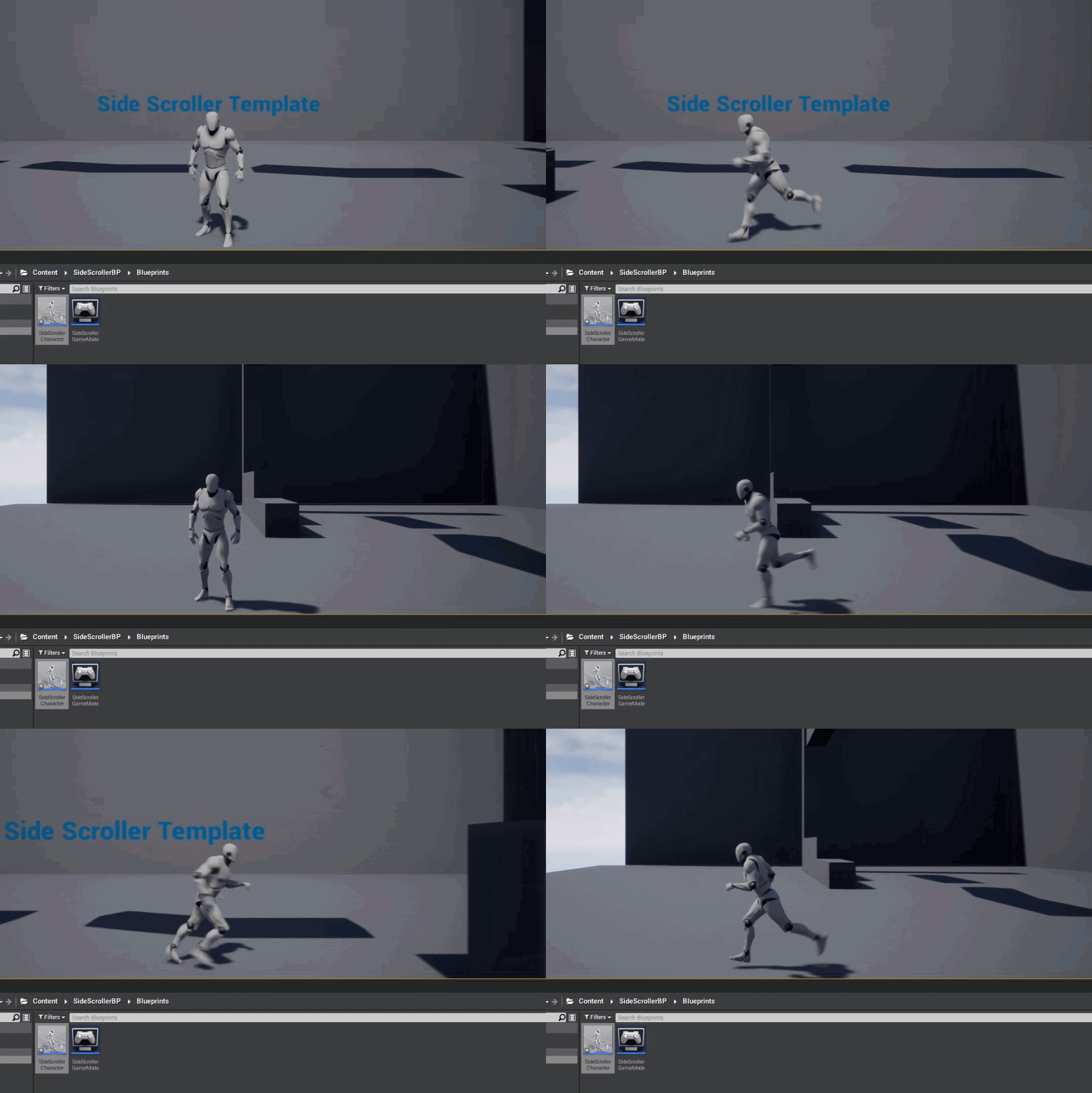
I am only using the left and right keys on the keyboard. I use the 2 key to test (trigger) the action. when it triggers it rotates the camera around the player so it is at another angle then constrains the player to a difference axis. The input which fires every frame just checks if the camera is rotated by a boolean and then feeds in the correct axis to move on based on that boolean https://i.gyazo.com/c5dd4a368bca5f30f442d2e2ce2343c4.gif @rocky hound
 mellow epoch
ya thats what im going to do, i was just wondering if its something i was doing wrong i was not aware, thanks for the help 😄
 proper stump
from within a blueprint, im calling AddChildActorComponent then SetChildActorClass, now I'd like to get the object of that class... how do i get it?
plush yew
@grim ore i love how fast you just code things out of nowhere lol
grim ore
you want the object you added? you have the return value from the add child actor component, you should be saving that
@plush yew lol I am pretty sure I had done that one before is why
plush yew
ohh haha
my coding consists of a whole bunch of booleans right now haha
it somehow works tho but its messy
rocky hound
@grim ore it's working ❤️
grim ore
@proper stump also I assume you are setting it to a class that can be different or else you would be setting it on the add child actor node itself?
plush yew
im trying to use functions but im not sure if i understand it yet
rocky hound
a quick question though, wouldn't removing the 'constraint to plane' option cause weird movements if the player collides with an object/enemy?
grim ore
it would which is why I changed the code to keep it enabled
you can see in the new code it doesnt turn it on or off, just changes the valid angle
plush yew
@grim ore what would be a smart way to make one variable for holding an item?
grim ore
that all depends on the project, the goals, what you need to do, etc.
grim ore
@proper stump if its always going to be the same class, click on the Add Child Actor Component node and set the class in the details panel
then the return value from the Add Child Actor Component you can save to a variable to use later
proper stump
@grim ore im generating a 100 tiles in a loop
grim ore
so you want to save 100 variables or what is the goal there?
there is nothing stopping you from just getting all child actor components later if you need them all for example
proper stump
no, I need to get the object and call setMaterial and so on
plush yew
say you have 3 different items, and you can only hold one at a time, you make a variable called ''holditem'' set it to boolean, set it so if you pick up any of the 3 its set to true, and make a branch that says, if ''holditem'' is true pick up item.
but what if you have 100 items?
rocky hound
@grim ore it seems like if i keep it on, the camera flips but the character just turns around in place. if i remove it, it works but afraid of accidental movements
(the controls flip but it seems that character cant move due to constraint)
grim ore
are you calling the set material on the item in the loop? basically are you working on all of these items in the loop or changing them later? if doing it in the loop then yeah you can save it in a variable and use it for the rest of that loop and then th next time the loop comes thru and saves the next tile it will replace the old reference and you will use the new one. Otherwise you can just drag off the add child actor component and re use it in the loop without saving it
rocky hound
grim ore
@rocky hound the bottom right of the 2nd screenshot shows me changing the contraint
I think your bottom right is the incorrect vectors perhaps
default for the side scroller project is 1,0,0 which constraints to the X but you are defaulting to constrain on the Y
rocky hound
how do you screen record?
grim ore
compare this to yours, look at the values
proper stump
@grim ore the issue is the type of object, it's child actor component, is it possible to cast it to TILE_BP ?
cant seem to pull a cast out of there
grim ore
@proper stump if you want the actual actor that the component holds, ask it for the child actor from the component
rocky hound
ahh my bad, didnt notice that, accidentally switched them
now it works like a charm, with it on
thanks again 😄
proper stump
thanks @grim ore
grim ore
yay
and @rocky hound I use gyazo gif for quick screen captures like that , otherwise you can use xbox game bar on windows to record and upload a mp4
rocky hound
okay 😄
grim ore
@rocky hound if you ever need to get fancy and use more than the 2 rotations you can look into the same setup but with something like an enumeration to define the rotation, or just get the rotation directly from the camera arm, then use the select to set the values you need. Could make a complete systme that would let you go around a cube if you wanted lol
even fancier would be locking the player in place for like 0.25 seconds and lerping the camera from one rotation to the other in that time all fancy like lol
rocky hound
yeah
i am hoping to do it with at most 2 possible rotations at a time (other than the current one, like at a fork or something)
with a camera transition
but i would need to mess with those later
by enumeration you mean like adding more pins to the select node and pick index based on direction
grim ore
yep but the basic system should work, just need to give it the correct contraint and axis to move on and the rest is done
basically yes, you could use an enumeration variable you set that defines the camera angle just to make it easier to read and understand but just getting the actual angle (since you set it at soem point) would work fine for the select index (can just get the Z since thats all you change pretty much)
rocky hound
okay
plush yew
my editor keeps crashing everytime i build lighting, why is it doing that?
grim ore
100s of reasons, any log for swarm or the editor?
plush yew

Pastebin
grim ore
out of memory according to the log
plush yew
if i turn the quality down will it help or will it still crash
grim ore
it should help but this seems like it is crashing trying to get it back into UE4, does lightmass finish?
plush yew
it finished building the lighting and then when it went to reimport it. it crashed
grim ore
yeah 8gb memory with what looks like 1000 lightmaps of 512 resolution is a bit much to ask of it
 digital anchor
in c++ you usually create a core redirector
 jagged salmon
Is there any way to get a height map from the normal map?
 opaque vector
@jagged salmon each normal pixel in a normal map represent a unit vector for light reflection. Not sure how that would work
 gentle gate
Probably like it works in Substance - https://docs.substance3d.com/sddoc/normal-to-height-159450591.html

Normal to Height
 signal minnow
jagged salmon
signal minnow
jagged salmon
yeah, in SD you have a node that converts a normal map into a height, but I can't seem to find one in ue4 :/ just the other way around
you also have that in shadergraph in Unity which has 100x less features then ue4, I was expecting it to have
gentle gate
@jagged salmon
I was looking for it also. It probably would be operation costly and suboptimal, do you need it working live with changing normal input?
opaque vector
@gentle gate thats neat, TIL.
jagged salmon
@gentle gate
yeah, I have a vertex paint material and it hit the texture limit, so Id like to use the normal map as the height info for the tesselation instead of uploading other 3 new maps
oh, maybe I can simply import the height maps and then convert to normal map 🤦♂️
 heady void
Hello! i was wondering... i had watched in the web, youtube, facebook etc fan art "games", like mos eisley, enterprise tng, etc etc Did they ask for permission? or as a fan art or tribute free game, its considered "fair use" and they didnt need it or they did it without asking? I was in a little local jam and i was tempted to make a mini game about a Disney cartoon. But my lawyer's side stopped me. I know that if i ask for permission to disney, i must wait at least 8 weeks. so every time i think of making something like that just for fun .. I end up not doing it. ( i hope this its the right channel to this comment)
plush yew
For Unrealfest, do they usually upload the segments online afterwards? A lot of subject i'm interested in are during the same time slots. I'll probably just screencap on another monitor lol
 frosty maple
So I've run into a slight hiccup
I've finished designing and seperating images for a hud
but when I import the pieces
into a ui widget
I can't seem to import them all at once the way it was
is it even possible to import a bunch of seperated textures at once into the slate editor?
gentle gate
oh, maybe I can simply import the height maps and then convert to normal map 🤦♂️
@jagged salmon its just one channel - maybe you can sqeeze it somwhere as alpha
plush yew
everybody. if you want a black ue4, enter this into cmd: Slate.ShowWireFrame 1
frosty maple
ouch
plush yew
XDDD
 abstract anvil
@frosty maple Not sure if it's possible, but that would be a nice feature. I'm pretty sure things like that are only available in the material editor
plush yew
@frosty maple you know how to undo right?
plush yew
try Slate.ShowBatching 1
frosty maple
also
plush yew
frosty maple
they each have been renamed
to image xxxx
hold on let me try something
nope
Back to illustrator I guess
plush yew
Slate.ShowBatching 0
hello
I figured it is best for me to ask this question here
if I make a game, the better the gpu and cpu I have will the game look better when it is finished?
frosty maple
Slate has antialiasing right?
 lilac dagger
As someone who currently knows no code should I start learning blueprints or C++? I’m looking at making a basic free roam car game
frosty maple
honestly if your working in unreal engine
blueprints are easier
at the same time they run equivalently to C++
plush yew
hello can someone help me with my question
frosty maple
matter of preference really
plush yew
dont mean to interupt it is a small question
frosty maple
I mean
plush yew
basically if I make a game, the better the gpu and cpu I have will the game look better when it is finished?
lilac dagger
No sort of limitations in blueprints?
frosty maple
To acheive certain game design elements by default
yes
It will help during design
plush yew
the gpu and cpu?
frosty maple
yes
if you want higher particle counts, enabled ray tracing, Better resolution
then yes
virtually anything you could achieve in C++ can be achieved using blueprints
that's kinda the beauty of it
Coding for the none coder
plush yew
@lilac dagger sorry to interupt just wanted to ask my question u can continue with ur conversation with QGoo
frosty maple
just the gpu
lilac dagger
No problem
frosty maple
a better cpu for faster loading times during testing
this is just my personal experience however
plush yew
ok so better gpu basically helps with the resolution of making the game ok thanks
frosty maple
yeah
plush yew
to refer to the question slsclrk was asking, is there limitations in blueprints?
plush yew
@lilac dagger yeah like blueprints is good
frosty maple
but you can pretty much extend the editor by a large just using blueprints in of itself
plush yew
@frosty maple what is better quality though, C++ or blueprints?
frosty maple
I mean there literally equivalent
Blueprint code is well C++ code in blueprint form
plush yew
doesnt c++ have better less lag connection?
sweet relic
There is a bit of overhead with blueprint but it is negligible in most circumstances
plush yew
what gpu and cpu is so good that it looks like real life?
frosty maple
Nvidia geforce 1080
dual that if you want an absolute champ
But just one of them
is more then enough
I use a 7th generation cpu
but like
plush yew
what gpu for sure looks like real life
plush yew
the gpu that gives the most beautiful display ever
frosty maple
games like final fantasy do that
plush yew
in the game
and on the computer
should the rtx 2080 ti for sure have beautiful graphics?
plush yew
like if I am going for as beautiful as real life
frosty maple
yeah for sure
frosty maple
It's the best out there
frosty maple
I mean the game will only be as good as your computer
in design anyway
once you publish to a platform
it will be reliant on that platforms hardware
plush yew
but is there a gpu that looks better than real life
does the titan rtx look better than real life
frosty maple
if your games graphics are designed well
geting a gpu doesn't = instant better then real life
just means you can take it further
plush yew
ok so if I get the titan rtx with the best cpu and design the game really really good, can it look better than real life?
frosty maple
yes
plush yew
wow, so a machine can make something look better than real life, could it be that a machine can produce a better image than our planet or our eyes.
frosty maple
I'm pretty sure I've seen entire planets being made in unreal
which is a feature being added in unreal engine soon
plush yew
but why is that a machine can make something look better than real life though
like how is that even possible lol
like are machines really that powerful
frosty maple
it's a game engine if it couldn't help you create entire worlds it wouldn't be a very good game engine
as a matter of fact
through allot of game development history the goal was to mimic real life
now were just pushing past that
thats progress for you
I feel like that could have been put better
 wheat hare
I'd rather mimic cartoons
Who wants to be in real life
jagged salmon
Thank you @gentle gate
dense aurora
Apparently the music bars moving into beat of music just be easy as I saw same effect with equalizer used in BL3
lilac dagger
Anybody know any food car game tutorials
wheat hare
Like the Oscar Meyer Wienermobile?
 fleet wraith
Why does my project's main menu with nothing but text in an empty level consume 98% of my GPU in task manager?
plush yew
how do I refresh the details panel
I updated a var in C++ and trying to get it to update in details panel, but its stuck to what it was before
 weary basalt
@fleet wraith Probably because you have an unbound frame rate. Therefore the GPU is trying to output as many frames as possible.
t.maxFPS 144 or something, you will see your GPU usage go down, assuming your GPU can handle outputting 144 frames.
fleet wraith
which actor has max fps in it?
fleet wraith
i meant is there somewhere ican set a default value or do I just have to console command it when the game starts?
fleet wraith
Hmm i found these in the project settings
I think i need to check Smooth Frame Rate and then use the sliders for min and max?
that doesn't seem to control max frame rate though, just when smoothing kicks in
weary basalt
No dont enable Smooth Frame Rate.
Or Fixed Frame Rate.
Usually for consoles as far as im aware.
fleet wraith
lol np

Overview of the Smooth Frame Rate option inside the Engine Settings.
By doing so, this means that even though your higher-end machines could run at a higher Frame Rate, for the best experience for all, you cap the Frame Rate at 60 FPS. Taking this a step further, if you have a user who is on a lower-end machine which is struggling at 40 FPS, the VSync hardware changes will probably limit the FPS of the application to 30 FPS after the Smooth Frame Rate shifts to a lower 40 FPS.
possibly?
Ill experiment
 tall hull
Hello. Can anybody help me with UE4? I be in voice chat.
fleet wraith
@weary basalt it is smooth frate rate. Just tested
weary basalt
👍
fleet wraith
ty for the help
 brazen cairn
 vocal flume
Does anyone here happen to have 3ds max? I bought a model online but then realized it’s a max file. I have maya 2020. If you have 3ds max, can any one of you convert the file to fbx format?
 vale radish
Is there a console comand to increase the scale of all distance fields in map so i don't have to open static mesh editor for each of my meshes? over a 1000 in map, not going to edit each one manuallly.
 silver crown
@vale radish Bulk edit the assets?
 brisk nimbus
Dumb question...I started working in unreal lately, just trying out things etc, only now I realized the project I´m working in doesn´t show any other modes in the modes panel but the place mode...
I guess I must have accidentally deactivated it at some point, so how do I get it back?
Couldn´t find anything in the docs...
Does anyone here happen to have 3ds max? I bought a model online but then realized it’s a max file. I have maya 2020. If you have 3ds max, can any one of you convert the file to fbx format?
@vocal flume I do. How big is the file though? My internet connection is crappy right now...
plush yew
I'm sry but why does this guy have a dildo picture on a SFW discord
brisk nimbus
Also...I´m at a point where I can start setting up my project. Its a fully cg animated shortfilm and I´m collaborating online with a bunch of people, so I wanna make sure we have a consistent setup.
Two questions:
- Is there a list of project settings for a high quality project like this, where framerate doesn´t matter? I know I can just use the quality slider, I´m thinking more about some hidden settings, or stuff that needs to be activated through the console. I´m gonna go through the rebirth tutorial again, as they mentioned a couple of settings, just wondering if there is an official guide.
- Also...are those settings then persistent for every collaboratour? And would I have to add a specific file to source control, so everyone has the same settings?
Or is it enough if I have those settings locally on my workstation, since I´ll do the final rendering anyways?
Dumb question...I started working in unreal lately, just trying out things etc, only now I realized the project I´m working in doesn´t show any other modes in the modes panel but the place mode...
I guess I must have accidentally deactivated it at some point, so how do I get it back?
Couldn´t find anything in the docs...
@brisk nimbus Found the answer:
- Go to “Edit”->”Editor preferences…”
- in the search field, type in “legacy”
- check “Enable legacy mode editor UI”
- Restart Unreal, your modes are back...
 frank oar
Does anyone here have experience with using virtual desktop to play their unreal engine games ?
frank oar
@plush yew
I have managed and it works fine,
With 1 major drawback.
My controllers aren't tracked when I am in my game.
You had any similar issues ?
lucid socket
@frank oar do you mean over remote desktop?
One method I know only seems to work with 360 controllers.

Well, it’s been over six years since I last wrote on this blog! The theme could do with updating, it’s screaming “2010” at me. So, I work from home a fair bit. Be it evenings, weekends, or sometimes during regular work hours. The setup
frank oar
@lucid socket I mean the vr app called virtual desktop :D
lucid socket
Oh right. No clue.
frank oar
@plush yew
I literally just had to open the exe file and it worked.. but as I walk around, my vr hands stay in the same place and do not move or rotate ( though the buttons still seem to work)
I can walk around in there though and the guardian works.
frank oar
does unreal engine happen to have any kind of online support so you can ask them questions directly ?
digital badger
@frank oar UDN
Though I think you need to have an enterprise license to access it
Other than that you have forums and answerhub
 zealous cloak
some unity person from work get confused by unreal without realising it was actually 3dmax and "what can you exspect from a artist software"^^
@plush yew its just funny, because he is always bashing unreal^^
since it is sooo limited
and you cant just use it, you have to learn this and that. Maybe a person that just designs or script level doesnt need all functions or th overwhelming stuff he never cares about
digital badger
open source
limited
how
zealous cloak
he was refererring to blueprints
digital badger
It looks limited as blueprints are designed for designers
Rather than actual gameplay
zealous cloak
Designers like scripting and prototyping?
If there are the ressources i would rebuilt it from scratch using c++, but if you just wann design and script stuff? you dont need to be a coding person
digital badger
Depends entirely on the team structure. But the way I see it the low-level logic( e.g quest system) is implemented in C++ with exposed blueprint assets and functions. And then a designer can use blueprints to do high-level stuff
Unity seems to be good for solo developers, while UE4 is geared towards establishing workflows and pipelines
zealous cloak
in a large team, you cant exspect that everyone has the same level of knowledge
 fallen marten
UE4 is best for solo Devs - unity... Eh probably is alright if you are a coder but for the rest - nope it's got nothing out of the box compared to unreal
 maiden stirrup
Unity deprecates things not even halfway through their lifespans, so understandable
 proud narwhal
Hi, I am just starting out with UE, I tried to import an fbx model but it seems to have split it into a load of individual pieces
 glad karma
Somebody know whyi haven't got sky sphere in my project? I've got only bp_skysphere but I need normal one
Or when can I get it?
I need sky sphere.
Yeah, but when I put bp_skysphere into a game I have a big wall and when I setting cloud opacity don't showing me on map this
 tender flume
Unity or Unreal. Both gets the job done at the end depending on your preference
 serene birch
check in the project plugins
it's a plugin that might not be enabled in your project I think
@glad karma
glad karma
Okay thanks, I'll check after shopping
 covert pollen
I have a high quality image which is getting pixelated when viewed as a scaled down version, does anyknow know if there anyway to smooth it out?
serene birch
check if you didn't disable mipmaps on the texture import settings
 summer verge
Does t.MaxFPS not save for anyone else in 4.25?
desert tangle
hey guys is there a way to scale all geometry on a world axis?
like so it doesnt scale on its own axis
i know theres the change world to local, but im selecting multiple objects at once and it wont give me the option
 rigid belfry
can event dispatchers have array inputs?
 exotic thicket
I don't think they have any limitations on what kind of data can be passed
 manic pawn
right click that thing and refresh nodes
manic pawn
it's a bug with the blueprint graph editor
rigid belfry
has it happened to you too? how did you know this?
manic pawn
you probably placed that node without clicking compile after adding the param to the event dispatcher
exotic thicket
yeah if you change parameters on events and event dispatchers and stuff, it sometimes does that
always look at the error :)
if it says it can't find a matching thing for it, you should usually refresh or delete the node and reinsert it
spring wigeon
I got a issue. In my project, when I open up my GamemodeBase Blueprint, it's completely empty.
Anyone know how I can go around fixing that?
Nvm, figured that out. God damnit, I am slow.
vocal flume
@brisk nimbus file size is less than 2MB
brisk nimbus
What filesize are you referring to?
plush yew
how to force ue4 to use raytracing and 12dx ?
ah nv got it
btw how to clear all light maps to use raytracing only
?
 limber mesa
can anyone help me with a problem, i have downloaded git lfs and went through the set up, but when i type in git lfs install it doesn't recognize the "git" command, any opinions?
brisk nimbus
You can just drag and drop it into the foliage painter.
frank oar
Hi,
I have an issue with my VR app,
it is packged and works perfectly when I open it normally.
How ever, when I open it in virtual desktop (through steam VR)
either the controllers do not track in game or the mesh does not attach to the controllers (one or the other)
I was wondering if any of you have experience with this ?
(asking here because the vr channel is silent)
brisk nimbus
Yeah, don´t select it, you drag and drop it. Had the same issue.
 shrewd rain
is there any way to render depth pass and id masks in UE like you do in maya or whatever to paint over in photoshop later?
 hasty wharf
Good Morning.. I have an asset im trying to place bins on the shelves. There is somthinh preventing me in game from placing items on the shelves.
is it some sort of collision
 frail mist
guys I struggle with recording game play to a sequence. I've watched all kinds of videos and read the documentation, but sometimes the behaviour seems to be random, i.e. sometimes the transforms are recorded sometimes not. Any suggestions on how to record a cinematic of the gameplay for a trailer?
fallen marten
@hasty wharf yeah delete all collision in the mesh editor tab and add your own boxes to encapsulate the shelves
frail mist
I also tried the take recorded - there at least my AI characters move correctly but I've got other issues, such as actors that don't spawn
plush yew
hm does anyone know why if i enable rootmotion, my character just like flies into the air and shit?


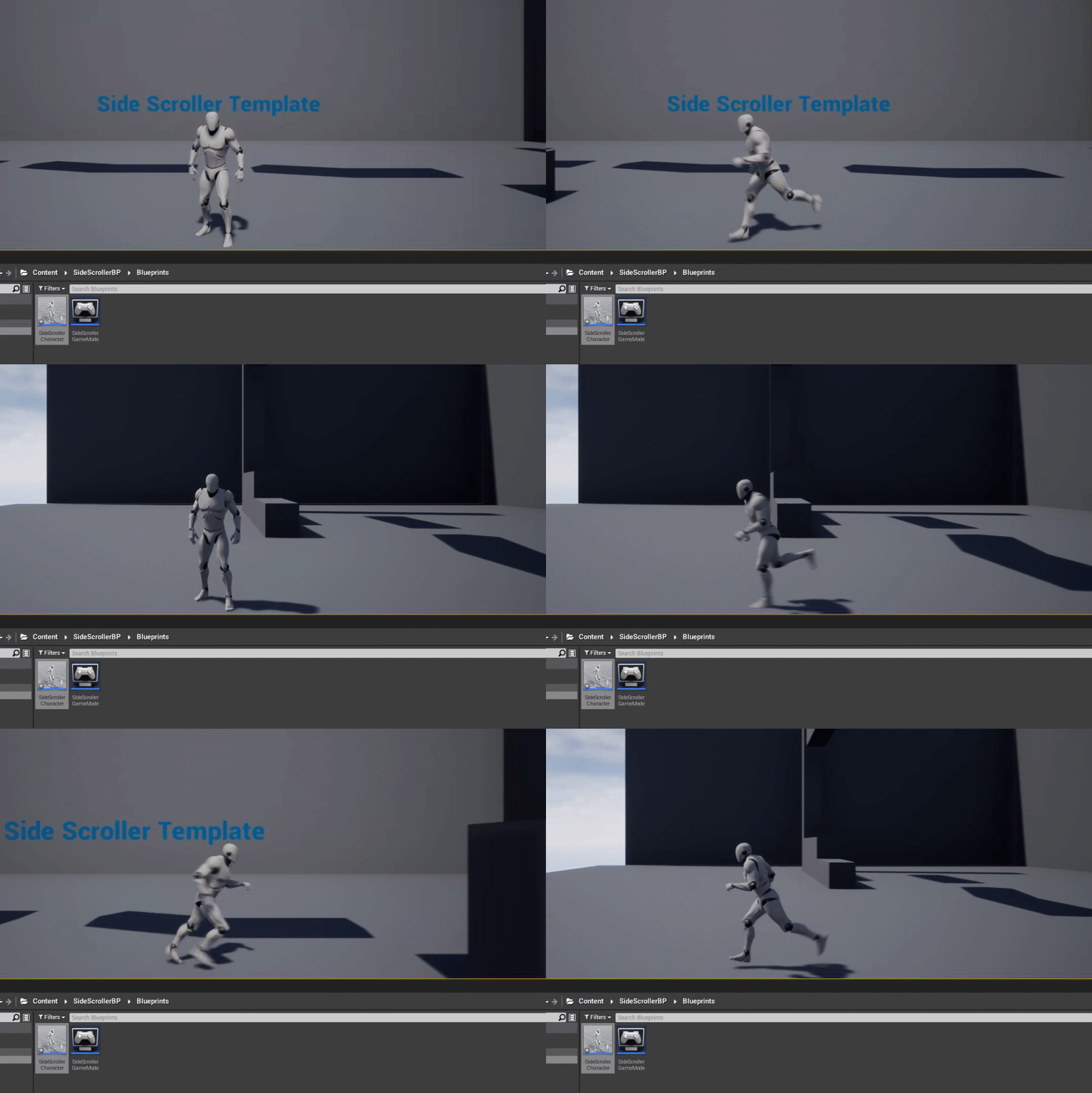
think im doing something wrong lmao
 dire dagger
Hiya guys, I'm just messing around with UE4, been testing maps using the Paragon characters and I've just come on today and I can't move any of them, can't move the camera too, but I can get them to attack, any help would be appreciated, thanks! (I haven't changed the BP of any of them too)
frank oar
Does anyone here have experience with VR ?
My project works fine while tethered to a PC.
but the moment I open the exe through virtual desktop (so I can play it wirelessly)
my hand mesh either doesn't attach to the motion controller or they are simply not tracking.
dire dagger
Hiya guys, I'm just messing around with UE4, been testing maps using the Paragon characters and I've just come on today and I can't move any of them, can't move the camera too, but I can get them to attack, any help would be appreciated, thanks! (I haven't changed the BP of any of them too)
Have I changed a setting by mistake and stopped myself from being able to use it?
rigid belfry
tips on collaboration in ue4? what were your experiences?
limber mesa
first time trying to add my repository to git lfs, can anyone help me out?
 radiant haven
why are the bones in UE so weirdly named?
I targeted them right but it doesnt work If I retarget anims
 marsh swallow
@radiant haven did u make a retarget rig?
wheat hare
How hard is it to get a vrchat avatar from blender into unreal?
radiant haven
@marsh swallow I tried using Mixamo, didnt work, I now used just the standart UE Rig (ugly af, never seen rigging this way) and well it kinda works, its still not good
grim ore
did you make a retarget rig like he asked? did you follow the retarget docs? does your skeleton bone names match the UE4 ones?
marsh swallow
retargeting anims will fudge it up
without any rig
because bone names need to be 100% identical in name and child structure
radiant haven
yes i did
plush yew
Hi,. Does anyone know how to lock the translation of spring arm component on a character, so it only rotates as they move?