#ue4-general
1 messages · Page 790 of 1
 grim ore
 plush yew
Oh that's nice
Right now I'm just looking through your wtf series and putting it in note form in a word document
Hopefully that will help me
If I struggle on anything in the series I can ask you and other people for help?
grim ore
you can ask in here or in a specific channel, people try to help when they can
plush yew
Oh that's nice
So if the examples don't work would I just have to open my own blank map and put the blueprints in there?
 carmine shell
@grim ore Thank you for the link! 🙂
grim ore
those specs would work at low settings but you wont be able to do much beyond the basic templates
 sleek solar
does it have gpu?
grim ore
that would have the vega iGPU
sleek solar
integrated GPU is... bad option most times
 maiden stirrup
Yeah, I can see why.
 bitter vigil
Is it bad practice to put your files directly into the content folder of the project? like, export textures directly into the textures folder and not "import" them from the engine?
grim ore
@plush yew what you want to do is look at the V-Enum widget and load it up that has all the code
the vega gpu isnt bad, its just you nly have 6GB ram in that machine usable for UE4 so it's gonna be rought. it will work, low settings default template
@plush yew if you load up the blank map, then go to the levelblueprint there is a node you can use to change the active widget to the V-Enum one. this would let you play the blank map and have it match the video
maiden stirrup
Well, how useful is that? I'm assuming this means no render heavy game making?
grim ore
correct but you can still learn the engine, the editor, the framework, blueprints, etc.
there is quite a bit of learning you can do, just dont expect to be able to import any quality assets or make larger scenes with it
maiden stirrup
Oooof. But hey, that's good enough I guess
Thanks for the info! Any recommended resources for taking the plunge into UE?
 dawn gull
Hey, sorry if I am interrupting you guys, but is there an event for when the character touches the ground and if not is there a boolean?
grim ore
@maiden stirrup look at the pinned message in this channel there are quite a few in there
maiden stirrup
Found it, thanks!
grim ore
@dawn gull
 abstract anvil
@maiden stirrup Look at the content packs that come with it (first person shooter, top down, etc) and see how they do stuff in blueprints. Download some of the example content (elemental demo, strategy game, etc) and do the same thing. Play around until you feel comfortable then try to make something really small.
dawn gull
AH thanks
maiden stirrup
Will my specs endure that tho
abstract anvil
@bitter vigil Not sure if it's a "bad practice" but it's something I wouldn't do because of things like source control picking those files up and packing making your final game larger than it needs to be.
bitter vigil
Yeah I was wondering if it just packs everything together then...
abstract anvil
@maiden stirrup Not well they won't. You can always set the engine scalability settings down. When creating your project you can set it to mobile and scalable 2d/3d. Honestly, with an integrated GPU, I wouldn't use UE4. It's a great engine, but it's not meant for integrated GPUs. You can pick up a 1050 ti for pretty cheap which will run things a lot better.
grim ore
they cant if they have a laptop, and they do
abstract anvil
oh
grim ore
just install the engine, and go thru the intro videos on learn.unrealengine.com. You will either cry based on how it runs or be content with it and keep going.
abstract anvil
Yeah, that's pretty much your options. If you're looking to make 2d games but can't run UE, I would look into Godot.
Also, hi @grim ore ! Your videos have been a real help.
 storm vapor
Hey, i dont understand screen size. It is 0,2 in LOD 1 so , is it have to upper than 0,2 on LOD2 or small from 0,2 ?
 plain terrace
is it not possible to create an animation inside of ue4?
maiden stirrup
Yeah, maybe after the pandemic I'll have to buy a new setup
storm vapor
i mean which is near to object, 0,5 or 0,01 ?
maiden stirrup
Thanks for the info~
abstract anvil
@storm vapor Yes, each higher LOD needs to have a smaller screen size than the one before it. That's basically saying "when the mesh is this small on the screen, switch to this LOD." You can find the current screen size in the upper left corner when you're viewing the mesh.
storm vapor
oh i see it , thanks
abstract anvil
@plain terrace It's possible, but it is so much of a pain that it really isn't worth it. It's better to take your mesh into Blender or something like that and create an animation.
 spring wigeon
I got a question. I am currently looking at two methods in regards to Camera panning. One is with a Gate and the other is done via the Branch with the "IsPressed" method. Is Gate more preferable? Which is more optimised?
Note: Ignore the spaghetti mess, I want to try and see what works before I clean it up fully.
grim ore
@plain terrace it depends on what you consider an animation. It is possible to keyframe skeletal meshes in the engine out of the box. The new Control Rig system can also allow you to rig characters in the engine. The new sequence animation system can be used as well.
plain terrace
mm cuz all i want to do is make a door in a skeletal mesh open and close
abstract anvil
@plain terrace In that case, I would just use BP to rotate the object when the door is supposed to open. This will only work if its pivot point is in the correct location though.
plain terrace
yes, the pivote point is correct
and im trying to make a car door open and close
so ill prob just use blender
phanks
grim ore
@spring wigeon either one works, the branch is probably the easiest as your basically just toggling on and off a code path in your mouse X and Y. the gate seems like extra work
spring wigeon
So I should just replace the Gate with a secondary branch for my X Axis then?
grim ore
it seems like you should, its the same code just cleaner if you use a branch
plush yew
can someone tell me how to make a change to my game that is ready? without me having to render again!
abstract anvil
@plush yew "without having to render again" Are you talking about baking the lightmaps again?
spring wigeon
Right. I see. Thanks for the tip. I'll give that a try!
 prisma plank
why particle is black? have alpha..
plush yew
that, like cell phone games, the game is already made and there is a person playing, but you forgot something and want to modify it without having to publish again, do everything online
Thanks Mathew I'll try it later
abstract anvil
That would be creating a patch, which is something I haven't done so I'm not going to be much help there. I know there's documentation on that though.
Creating updated content packages which allow you to update your project after release.
plush yew
thank you 🙂
 rigid belfry
how do i upload a game on itch.io? i am reading from their guide that i need a zip file which includes an "index.html" file. i zipped the project up pressing this button but there's not index.html in there edit : i found out unreal dropped support for html5? how do i package my game for itch.io then? https://docs.unrealengine.com/en-US/Platforms/HTML5/GettingStarted/index.html
Setting up UE4 for HTML5 development.
abstract anvil
@rigid belfry First off, the newer versions of UE no longer natively support HTML, so you'll have to build from source using the addon (I can't remember what it is, google is your friend), or use a version which does support it. Beyond that. it's an involved process which would take far too long to explain here, so I would look at YouTube and other places for tutorials.
grim ore
There is a .html file created, you just need to rename it to what itch expects
 maiden swift
@rigid belfry To add to what Pretend and Mathew said: Zip Up Project is for archiving/sharing the project files, not packaging the project for distribution. Itch is expecting you to manually create a zip of the packaged, playable files.
grim ore
I just looked thu my test itchi.io app and it's the packaged folder, with the .html renamed to index.html, zipped up and then uploaded to them. Works fine
maiden swift
Here's the plugin you need to build HTML5 games as of 4.24, along with updated docs on how to use it: https://github.com/UnrealEngineHTML5/Documentation
 hot pine
Any idea why MirrorByVector does absolutely nothing?
I have checked using the debugger
There is 0 difference between the initial vector and the mirrored one
plush yew
how do i cast an actors location to another actor/bp?
i got this
doesnt to work tho
rigid belfry

Unreal Engine
This video covers the Lighting Scenario and Level Streaming features in Unreal Engine. Learn about dynamic vs. static lighting, volumes, post processing, interacting with toggle switches, and scene structure.
plush yew
ah yeah that could work lol
hot pine
@plush yew there is no reason for this cast
hot pine
Nvm
 scarlet birch
HISMs will use the lod settings from what is set in the static mesh?
rigid belfry
it sems like i will need to download: Git; Python 3.x or above; CMake 3.12 or above and VS 2017 which i already have. seems like a lot of stuff to download. what if i use an older version of the engine (say 4.22)? or would it be better to upload the game as a downloadable?
 willow plank
 hollow briar
do you know what is the construction order of blueprints during game start? What BP is constructed firstly eg. gamemode, level BP etc. (I tested it already by printing string but I want the theory) xD
hollow briar
https://docs.unrealengine.com/en-US/Gameplay/Framework/GameFlow/index.html
@grim ore read it already, but it doesn't help me
 hidden aurora
Yikes, an unconnected node made all the logic not work
hollow briar
I mean, why Construction order looks like this: 1. GameMode 2. Level BP 3. PlayerController 4. HUD 5.PlayerCharacter
grim ore
for more order beyond what that docs page shows you would have to go thru the C++ code
it also changes based on single and multiplayer
and then generic loading order of non specific objects, objects in the world for example, can change from session to session and between PIE and standalone
hidden aurora
Been debugging for about 2 hours lol
grim ore
@plush yew I would assume you want to change the Hierarchy type to Actor?
scarlet birch
I'm creating custom volumes for placing foliage for interaction. With procedural foliage volumes I've used quite large sizes. Since HISMs can use per instance LODS and support culling distances is there a need to break up larger volumes? I'm wondering at what point I should divide these up. Other than the initial generation, the overhead is rather small on this. The heaviest part is meshes are replaced with physics actors but those actors become HISMs again after a few moments once the physics sleeps or gets close to it. Not really looking for an answer, just interested in hearing input from others.
grim ore
@plush yew you might want to look into using Datasmith to import it then as that will respect instances from the original program. If these are not instances there is not much UE4 can do, you can replace them manually
plush yew
my first 2/3 days of coding adventures

its so wacky and buggy but it all sort of works and it makes me happy haha
 brazen cairn
uh guys
im getting errors in ue4.25
after enabling dx12 + raytrace
by editing the target in properties menu
is there anything wrong with that method or something?
 storm venture
@brazen cairn you should share the specific errors
rigid belfry
could someone please help me understand how to upload a html5 packaged game to itch.io please?
 spiral flint
can someone help me out with retargeting
grim ore
package the game like normal, that will make a folder with all the files. rename the .html file in there to index.html. Use windows or another program to compress that folder to a .zip folder. Upload that folder to itch.
spring wigeon
Question again. Sorry for pestering. So I've added in the Branch version instead of the gate for the Camera Movement, I've also adjusted some minor things and added in a Shift-Key speed modifier so that the players can move around the map faster if they hold Shift.
I am now wondering, do people still use Edgescrolling when they play a RTS? Or should I just scrap it for now until it becomes a demand and keep the WASD and Arrow key format for now?
plush yew
i personally love edge scrolling
spring wigeon
So would it be best to just leave it out until there's a vocal majority that wants it back in?
plush yew
also, it doesnt hurt to add it, youll get experience and the more options in your game the better
rigid belfry
@grim ore do i compress the whole project folder or just the content folder?
spring wigeon
True, true.
 merry gazelle
I'm having issues with getting click events to work, it's so frustrating and I've done it many times with no issues.
I have a character selecting the controller to set show cursor, enable click events and enable touch events. I've also removed any project inputs that use left or right mouse click just to be safe.
When I click the left mouse button, I can get it to print a string but it doesn't fire a click event I'm actors (or UI)
Also if tried multiple different blueprints for click events with the mesh set to block
grim ore
@rigid belfry you would compress the pacakged html folder with all the files in it, the docs page linked to you earlier shows what would be in it
spring wigeon
I mean, how difficult is it to add it in? Can you add it in mid-way during development? Or would it be a problem later down the line?
plush yew
and im my experience playing dota2 for 2000 hours, 95% uses edge scrolling
spring wigeon
Really?
To be honest I don't play Dota. Lol
So I wouldn't know. I personally use WASD or Arrow keys simply because it's a bit quicker, more comfortable on my end. I'll note down to add it in later then when I get to the stage of pushing out a demo.
plush yew
i dont think itd be hard to add, you just need to figure out a way to sense the mouse near the edges
spring wigeon
Yeah.
I'll need to also get a idea on smoothening out the Camera movements, so people don't feel sick. I mean it's fine right now, but I might need to adjust it.
plush yew
edge scrolling is usually prefered cause you can use your hand for macro management
spring wigeon
True.
Though I don't think I'll get to the stage of doing Unit grouping yet.
That stuff is a little wild. XD
plush yew
ah yeah haha
spring wigeon
Just want to get one building down to produce units.
plush yew
if you get one building down you got them all down tbh
spring wigeon
Aye, but it's the complexity, stuff like Power Cores that give you power for turrets and buildings to be operational.
I am trying to aim for a Tron-esq style RTS game. So it's mostly fixated around vehicle combat and building production. But I might aim for a grid system for buildings as well, I feel it's cleaner.
plush yew
grid system is better yeah
less buggy too
sc2 uses a grid system too so no worries there
rigid belfry
@grim ore sorry for my ignorance but this is what i am doing, i compressed the whole html5 folder
renamed the html file to index
these are my itch.io settings
this is the result
spring wigeon
Hopefully there's some tutorials about A.I pathing, because my main concern is, I'll be setting up various areas on the map that should not be traversable by the AI or your units. So hopefully there's something like that to help me out. That, and then figuring out how to design the Tron-style level. I wonder if it be interesting to add Colour-gradient changes to the floor around your base structures, similar to the Creep for the Zerg.
grim ore
well for one thing its asking for a zip and you gave it a rar....
and 2nd how did you get the HTML5 folder?
grim ore
and chose that folder? inside your project?
rigid belfry
no it made it by itself
grim ore
when you package it asks you for a folder to package to, is that the folder you chose?
plush yew
@spring wigeon i think you need a nav mesh
rigid belfry
i packaged it this way and i saved in in the root folder. should i have saved in on the content folder? i doubt that matters
spring wigeon
Ah, but yeah, wait. Every game has some kind of Nav Mesh for the A.I. So surely I can just find a FPS or so tutorial on Nav meshes, noh?
plush yew
yeah, theres tons of ai/nav mesh tutorials
grim ore
You should have saved it somewhere else, not in the project, but for now that is fine.
plush yew
usually its for one pawn but it works for multiple aswell
grim ore
and yes a zip is not the same as a .rar, that is why it is not working. You also need to compress the files in the folder, not the folder
spring wigeon
Aight, I'll have to have a look at all of that later then once I get to the A.I stage.
grim ore
select the files, add to archive, then select .zip as the type
and once you upload the zip you get the correct options
rigid belfry
damn
its downloading
pretty sure it works now
youre a beast @grim ore
ah never mind it gave me an error
"Uncaught RuntimeError: memory access out of bounds"
grim ore
you have the process to make it work now, now to debug and figure out whats going bad
rigid belfry
i am using both chrome and microsoft edge and the download sizes are different
how is that possible
grim ore
might need a different runtime or interpreter depending on the browser
 fluid lance
Hey, is there any bool or event I could use to have more control over the init order? The thing is, I need some things from the level to be referenced at the time when actors get spawned in. How could I have an event/get a bool, something like "E_OnLevelFinishedLoading". Is there something like it?
I could make an init event on the actors ofc and use that instead of beginplay, but how/when would I call that?
dawn gull
In blueprints can I grab text from a web page, for example a raw paste bin link
spiral flint
nobody knows what to do with retargeting then?
dawn gull
@spiral flint retargeting what
grim ore
@spiral flint if you are talking about animations, #animation might be a better channel to ask in
@fluid lance can the actors not ask for the info when they are spawned in?
@dawn gull out of the box there is no REST or HTTP Get support so not really
dawn gull
Ok
fluid lance
@fluid lance can the actors not ask for the info when they are spawned in?
@grim ore They randomly get spawned in before the elements they should b referincing. In short, I"m using targets on the map Which i feed into an array of locations. The locations will be used by the npcs as patrol points. I could re-think the system but yea, that's what I had in mind back when I made this.
grim ore
the locations are in the map when the actors spawn in? the targets?
plush yew
is cast to the only way to grab variables from actor to actor?
fluid lance
everything is placed at design-time. I load and unload levels for every combat etc (you've helped me before with those GUIDs to ref design-time actors) 🙂
grim ore
@plush yew blueprint interfaces could be used as well, and casting is not "a way to grab variables", casting is how you help 2 specific items to talk to eachother
so the actors can't get their patrol points themselves, they need to ask something else?
fluid lance
lemme ss, sec
plush yew
Yeah but I just wanna grab a simple boolean from a different actor thats all
grim ore
then getting a reference to it and asking it for the variable is the basic way. If you need to cast that reference to a specific class then yes casting is needed. It's not abnormal and very usual, you don't need another way unless there is another problem
plush yew
how do you get the reference to it then? cast?
fluid lance
@grim ore
grim ore
no, casting is just treating one thing as another. You still need a reference to the one thing some how. How you get that reference is up to your code
fluid lance
plush yew
sexy looking code Duke
fluid lance
Now, the last bit allocates the target points into the array and gets called at some point in the beginplay exec wire
grim ore
off the top of my head the easiest thing I could think of without redoing your code is your patrol makes sure it has patrol points before patrolling. this fixes any issues with them doing stuff without any assigned points. Once your level loads and you have good patrol points you could then get all your patrollable actors and give them their patrol points so they can start patrolling
I am assuming that is the issue, the actors are spawned in without valid patrol points
fluid lance
wait...targets are actors? ...ofc they are. Not very smart solution then 😐 they eat up unnecessary resources
I am assuming that is the issue, the actors are spawned in without valid patrol points
@grim ore yes, they skip and go to world origin since the valid fails when they run their beginplay
grim ore
I mean the other option is when you spawn them in you give them the control points on spawn but the problem is the points are not valid then?
 worn granite
there are ways around that
plush yew
@grim ore how would you do it?
grim ore
@plush yew I have no way of knowing what you are trying to do or how you are trying to do it, I couldn't even guess.
worn granite
you can have an array of vectors and mark them for edit widgets
plush yew
its just a on overlap start trigger in the world
worn granite
its a checkbox on the property
worn granite
More for @fluid lance
grim ore
so when your trigger is overlapped you talk to the player and set a variable on the player?
worn granite
you could also have those targets editor only and store the actual locations in an array
plush yew
basicly its a campfire with a collison box around it. on the campfire actor it has the code that says when overlap start set boolean to true/false
fluid lance
Hm...so run populate the locations at design-time?@worn granite that's not a bad idea actually 😛
plush yew
i wanna get that boolean to make my character so when i can use it in my branch
if nearcampfire is true etc.
fluid lance
it should work on the construction script actually...
grim ore
so when your trigger is overlapped you want to talk to the player and set a variable on the player?
plush yew
yeah
worn granite
Nah something like that you'd want to do in PreSave
grim ore
what will overlap the trigger?
plush yew
the character
fluid lance
@worn granite well, the points don't change regardless of where the actor is when the world gets destroyed (for battle map, then come back)
grim ore
then in the overlap event, there is an Actor output that is the character. So you would Overlap -> Cast the actor that overlaps to the character -> if its the character set the variable. the Actor pin in the overlap is how you get your reference
@rigid belfry you should try a generic base third person template and see if that works. It is possible your projects has items that are not compatible with WEBGL in it
grim ore
is you are not setting the variable on the player
fluid lance
@worn granite Ok, let's say I go full procedural on the patrol points. Is there any way to make my actors patrol on the lines I want them to without writing and testing vector math for a whole day? 😄
plush yew
and this is one my player
like it works but I dont understand it and its just.. odd
there must be a better way
grim ore
what is odd about it?
and the cast in the last screenshot is not needed since it's already a campfire. The blue note should be telling you this
plush yew
because i can grab the get other variable
the orange one
without setting it to cast to
grim ore
what does the input pin say on the GetActorTransform?
Specifically the Target that it is being called on
plush yew
target self?
grim ore
correct, itself. It doesnt need a cast or anything put in there because epic is being nice and told this blueprint that by default it can ask itself for that info
you can of course always plug in something else if you need to ask something else that info as well
plain terrace
how can i make this not grab a certain pawn?
grim ore
by default it is a "reference to self" that is plugged into that node
plain terrace
woops asked in the middle of something
plush yew
I mean the SET campfiretransform node
why do i have to cast to test(wich is my character) from begin overlap?
grim ore
@plain terrace cast the hit actor and if its the wrong type, dont do anything. Alternately look into using blueprint interfaces to identify what you can and cannot pick up and you can check that.
the begin overlap is inside of your campfire correct?
plush yew
yes but so is the get actor transform
grim ore
GetActorTransform is not inside of your campfire, it's a generic node that targets any actor. any actor can call that function. its not specific to that campfire.
the overlap event IS because it is being called in that one campfire using that one component when it gets overlapped
plush yew
yeah but its set to a variable
grim ore
the campfiretransform variable? its a variable you created inside of that blueprint
plush yew
yeah
grim ore
so it knows about it when you set it from inside of that blueprint
plush yew
grim ore
when you overlap, your campfire has no idea what it overlapped with other than it's an actor. it could be a plane, it could be a train, it could be an automobile
plush yew
see the cast to test and SET obj reference
grim ore
its somehting OTHER than your campfire
plush yew
i dont understand why that is needed
grim ore
does your campfire know what is overlapping it?
plain terrace
so this?
plush yew
ehhh
grim ore
like in general how would it know, it knows about itself and whatever you told it
plain terrace
woops nvm
grim ore
for all it knows the death star collided with it
plain terrace
thinking skills are low today
grim ore
in general?
worn granite
@fluid lance No, no. You use targets as normal (or use the editor facilities to position vector data in the world, MakeEditWidget/something 3d widget?) but you just store off wherever the actors were at so you only pay that cost in editor.
plush yew
yeah if it overlapped with anything else
grim ore
@plain terrace if the "cast to actor" is casting to the specific one you do not want to pick up then yes
worn granite
@fluid lance If you were to make your patrol points dynamic/procgen, you'd have to spend more than a day IME to get something that feels right
grim ore
yes that event, the overlap event, will fire off if something overlaps it. but the "something" is just a "something" till you go "hey can we cast this to my character?"
plain terrace
mk yes i changed it, and it worked perfectly, thanks
grim ore
and once you cast to it you now know "hey that actor I overlapped, its my character. Let me talk to my character specifically and do something"
fluid lance
@worn granite I just realized I've designed the system like crap. I can't directly edit the array of targets for each child since the array is the parent's 😐
grim ore
your other code has no cast because its "hey I know about this variable, campfiretransform, so I am going to just go ahead and set it because I am a campfire and I know about this variable that I know about"
worn granite
It also kind of depends on what sort of pattern you'd like to see
grim ore
that should work assuming that variable is inside of that blueprint
worn granite
you might even be able to just do random point in radius
plush yew
it is, but i wanna grab that variable
grim ore
grab it from where? what wants to grab what and when
plush yew
my other bp(character)
grim ore
programming is very specific, without specific you get random.
so your character wants to get that variable from the campfire?
plush yew
yes
grim ore
when does it want to do this
fluid lance
@worn granite Yea, that would be the easiest one, but that won't do...I'll need patroling along the wall for instance and such so I'll need to figure out a fast way of storing the vectors I want into the locations array
grim ore
so when you press the space bar, it wants to talk to the campfire and see if that boolean is set up.
plush yew
is there an Android version of this facial animation app for Unreal? https://www.unrealengine.com/en-US/blog/new-live-link-face-ios-app-now-available-for-real-time-facial-capture-with-unreal-engine?sessionInvalidated=true

Unreal Engine
Virtual production and livestream-ready real time facial animation has never been easier and more accessible thanks to our new iOS app - Live Link Face for Unreal Engine
worn granite
@fluid lance I'd honestly just keep doing this until it shows up as a memory/performance bottleneck
fluid lance
@worn granite the target points you mean?
grim ore
in that case your code in the player has to talk to the campfire thru a reference (you are already setting it when you are near), then it can get that boolean.
worn granite
No reason to toss out what you know how to use already unless you want to spend a significant portion of time on it
fluid lance
@worn granite yea, but it ain't working really 😂 so what i "know" is flawed/wrong/poorly designed 😛
worn granite
But there's loads you could do, this might be a commandlet pass where you pick points that absolutely must be waypoints and then generate routes.... you could set up EQS to prioritize patrolling near walls
grim ore
@plush yew with that said if the code you are using for space bar is above, it's already accidently working you just need to "On End Overlap" in your campfire to set your campfire reference in your character back to nothing
worn granite
A lot of this is just going to be #gameplay-ai
fluid lance
@worn granite Not gonna use AI for simple patrols, it's a waste of time really. Just wanted some freedom with the target points to just put them there and tell the pawn to move sequentially from one to the next, then full circle. If two, becomes a line, if 3 a triangle etc.
grim ore
@plush yew if that code is in the player, you have a CampfireRef inside of your character you are setting when you overlap the campfire, you would just use that. Drag in the CampfireRef from your variables in the player and Get a reference to it. Then drag off that and get a reference to your CampfireCollision, then go from there. It does seem like you have variables duplicated across blueprints
plain terrace
so now how can i tell if a certain object inside of a pawn was clicked on?
worn granite
¯_(ツ)_/¯
fluid lance
worse case I could just feed in the vectors directly to the darn array but that is lame to say the least xD
grim ore
@plain terrace it would be the hit component from the hit result
plain terrace
how can i check if its the "cube"?
grim ore
depends on what "cube" is. You could get a component tag and compare it. You could cast it to the component type if its specific. You could look into interfaces if it's an actor component. uh... it could have unique properties like simulating physics? etc.
 smoky sonnet
hey guys, i want to add ingame purchases to my game and i would like to ask you something because i am kinda confused. I am on my google play console and found a tutorial to add ingame purchases but if i want to add/configure ingame products inside of my goggle play console i need to create a trader-account (i am german dont know whats händlerkonto in english) and my question is do i need to create a one-man business? Are there any laws i need to pay attention to as a student who tries to create a mobile app which includes ingame ads and ingame purchases. I would really appreciate some tips of you guys.
plain terrace
cube is a static mesh component
grim ore
is it the only static mesh component in that actor?
grim ore
you have no reason to be doing that, you are already setting the campfire reference on the character when you overlap it. you showed that earlier
define your problem and goals. Player near campfire and hits space and you do stuff. What is going to do the stuff? campfire or player.
plush yew
yeah but im just asking if that thats the code for setting the reference?
grim ore
that would be code for setting the reference but you have no target so you are just setting it on itself to itself which is pointless
plain terrace
there are other static meshes in the pawn
actually there is not at the moment, but i will add more
grim ore
then look into using component tags. You can get the hit component, check for if it has your tag like "grabbable" and go from there
plain terrace
okay thanks, youve been very helpful
grim ore
plain terrace
yup, okay imma have some lunch
 sage tree
Is it normal for the editor to not be utilizing my GPU? Taskmanager is showing 0% usage for UE4.
grim ore
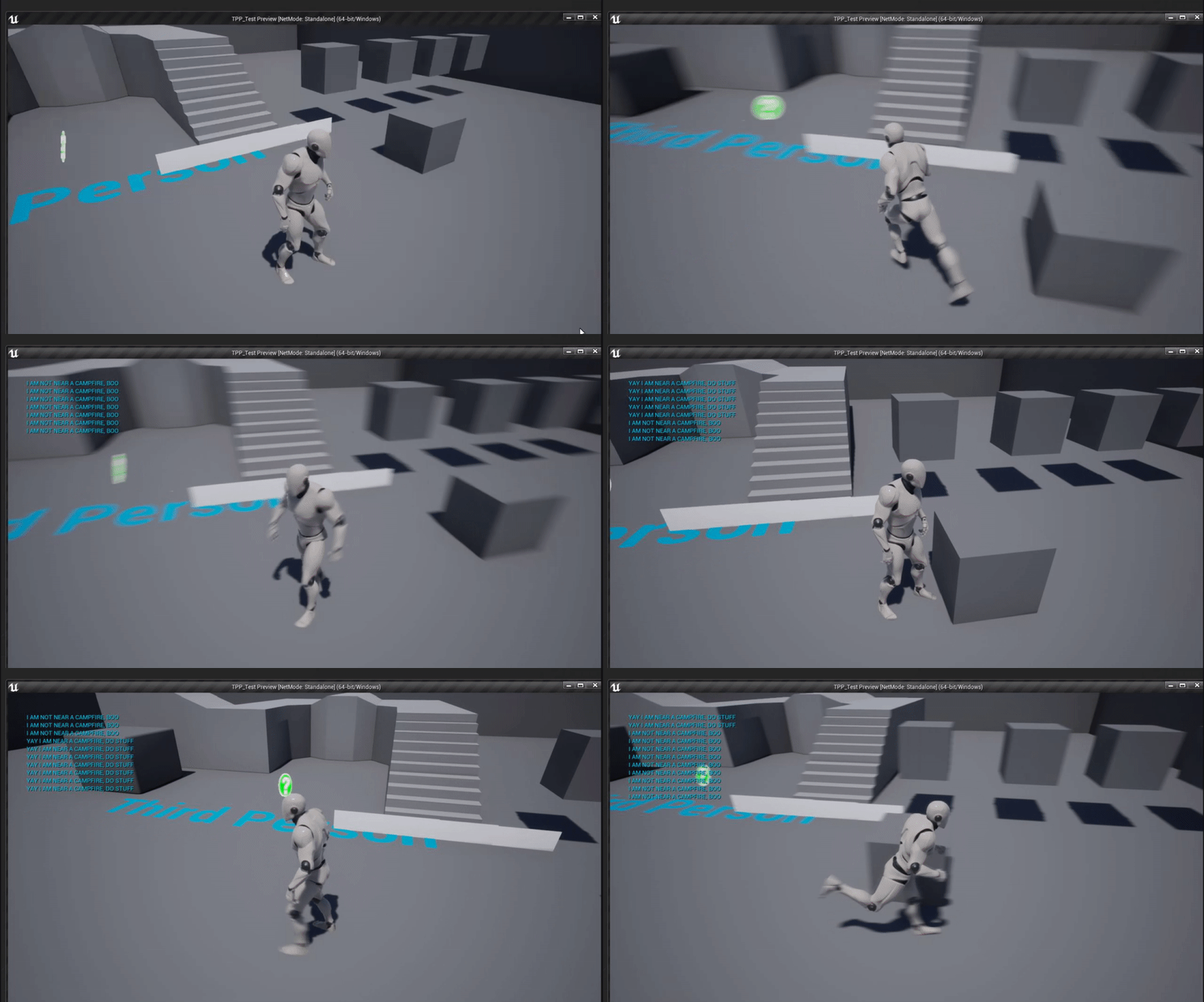
this would be an optimal way of doing it the way you are trying to do it. https://i.gyazo.com/214e096703f708f8eb921904c8e1b92f.gif
 sage tree
@plush yew its usually an actor reference of some kind.
grim ore
and that setup is exactly the way you showed you had it set up, just working
plush yew
but how does it know true from false?
sage tree
well, in code things are typically false unless set to true, 0 and 1.
plush yew
@grim ore thanks ill use it! 😄
 mint raptor
When you save an actor, what in save game object is actually saved? Do tags at least get saved and loaded back in or does the whole thing loaded back in come back null?
sage tree
@mint raptor how are you saving it?
grim ore
player has a reference to a campfire, it can be valid or not. good or bad. When the player is near the campfire, it overlaps it, and the campfire tells the player it is near the campfire by letting it know about itself (setting the campfire reference IN the player)
mint raptor
@sage tree Unreals native way of save game objects
grim ore
it does the opposite when you leave the campfire, it sets it to nothing. Now whenever you hit spacebar in the character it goes "do I know about a campfire" and does something
sage tree
@grim ore Love your WTF series!
plush yew
i see
fluid lance
@worn granite Wow wth...So, I found out the problem wasn't what I thought it was. I'm reffing/populating the targets array at design-time. I can only do it within the instance of the blueprint which is in the world (with that picker). So far so good. Now, the problem is that patrol the code runs in the parent (base class for npcs) and...unexpectedly enough, the parent's array is actually empty. It doesn't recognize the refs I've fed in to it's child (probably because it's only in the instance of that child which is in the world and not the bp itself). Just...wow wtf - guess I don't know how this engine is working afterall 😆
plush yew
i think im starting to understand abit
grim ore
this isnt the "best" way to do it, its just the way that works based on what you showed so far
plush yew
@sage tree hes the guy from the WTF is series? no wonder he knows so much haha
worn granite
@fluid lance you ought to be able to modify the data in a child or instance and have the parent logic actually use it
sage tree
@plush yew hah ya
fluid lance
@worn granite ikr...lemme show you xD
grim ore
you could just as easily have a boolean on the player instead of the campfire reference and use that (it would be cheaper) but what if you wanted to talk to the campfire itself? then you would use the reference to talk back to it. I cant assume what you are doing lol
worn granite
I don't know why you think this isn't the case, @fluid lance, it should 100% be using your child/instance data
fluid lance
@worn granite
plush yew
@grim ore ohh.. I guess ill use this for now 😄
fluid lance
debugged actor is the parent (since it holds the patrol code) and the only instance i have in the level is the one refing those target points in there
so, somehow, it doesn't fill in the array afterall
plush yew
sorry i ask so much, id rather try and understand HOW something works then to just someone show me how to do it and not learn from it
grim ore
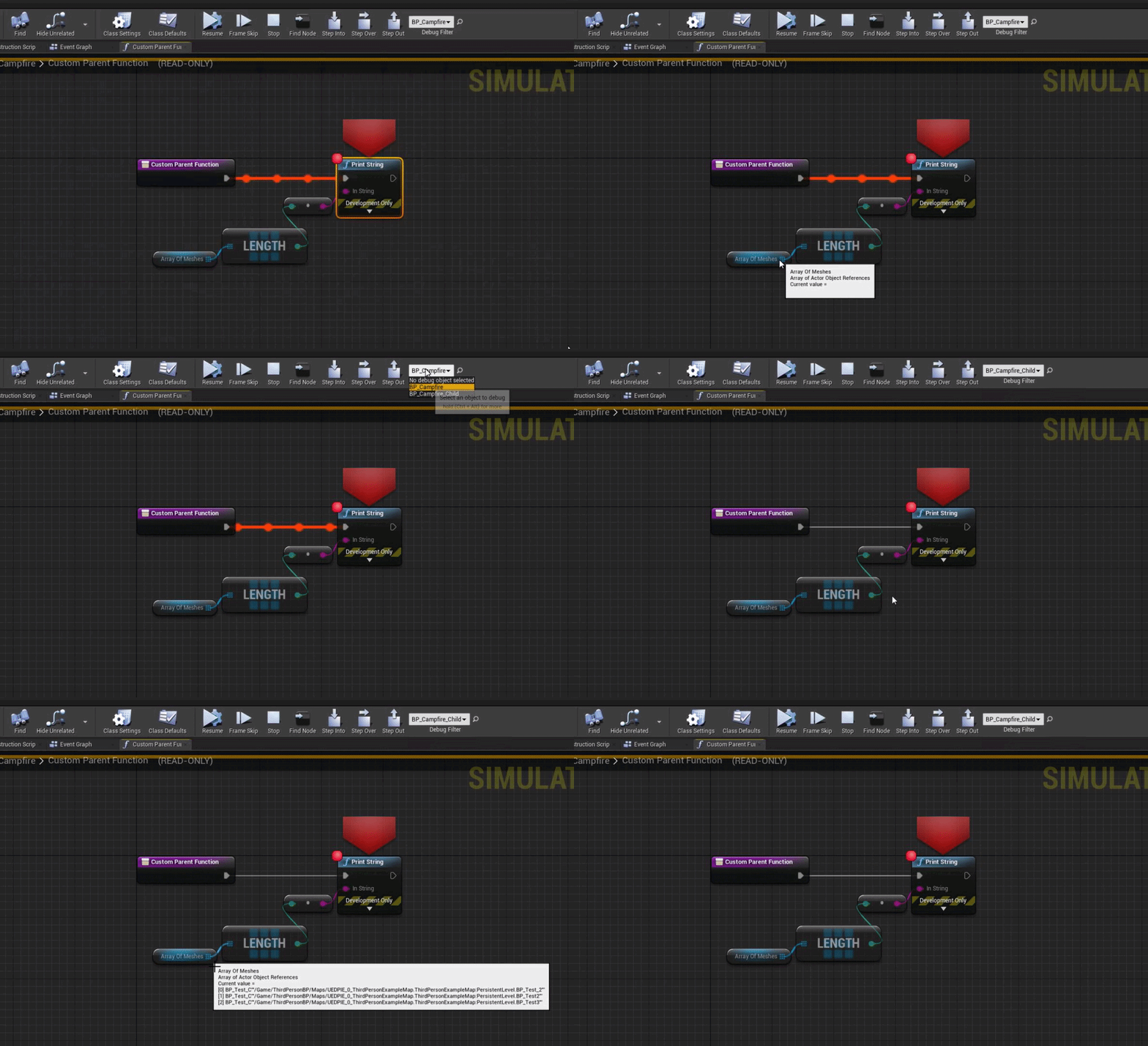
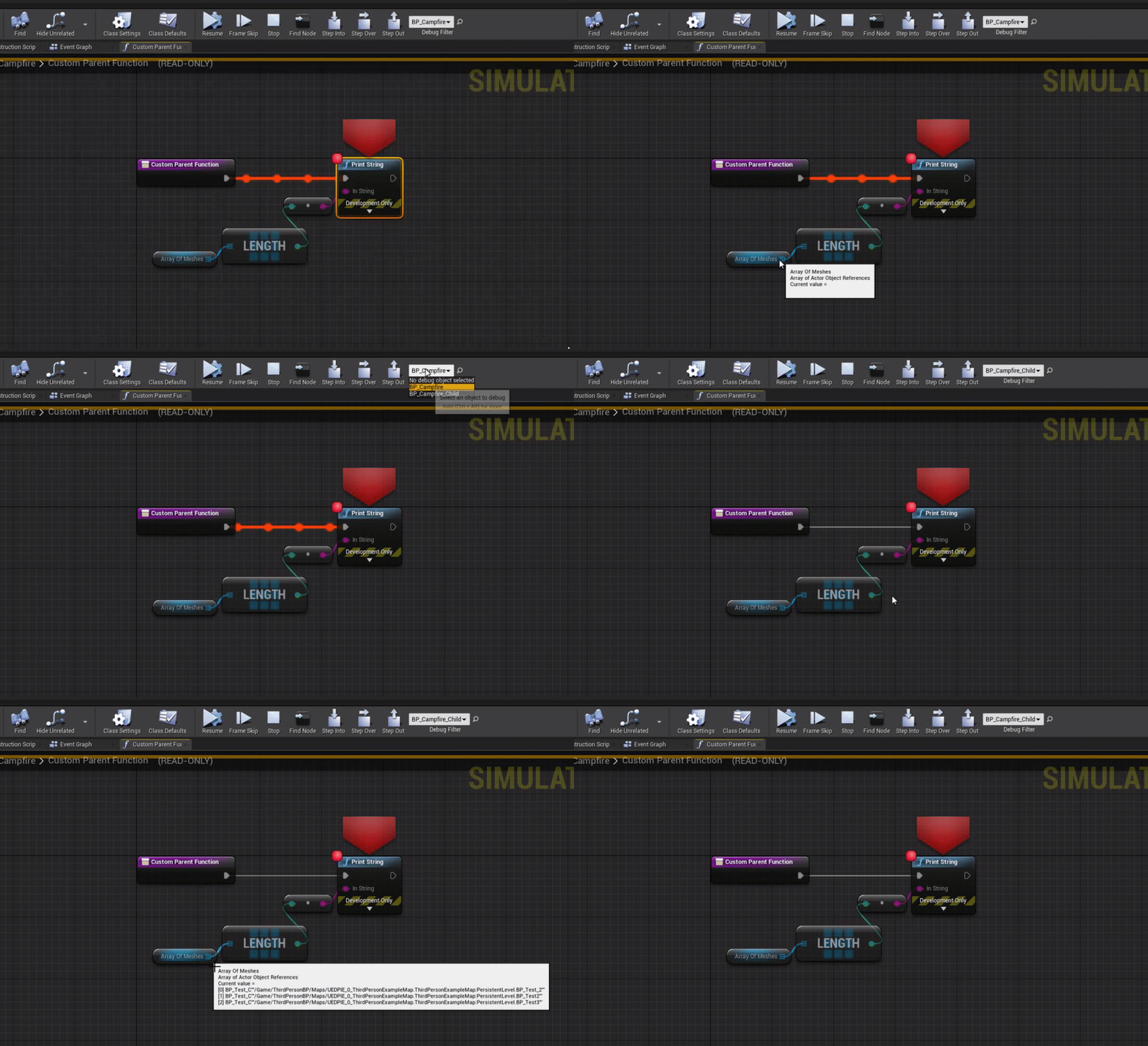
if you were to print string out the length of that variable, not debug it, does it return 0 or 3?
grim ore
yep that is expected
fluid lance
but but...how?! 😖
grim ore
well if you are debugging the parent but the child is the one with the variables it makes sense in my head
worn granite
you have two arrays
Your logic is using PatrolPoints, but you've populated PatrolTargetPoints
Actually, there's 3 distinct arrays?
😖
grim ore
so.. I just tested and I had no issues selecting my child as the debug filter even if the event was in the parent
fluid lance
but the only instance of that parent is the child in the level. That is the one returning accessed none for array 0 and the debug was set on it, not the parent, so I don't follow
fluid lance
omfg...Am i that retarded?! wrong array, lemme check -.-
grim ore
https://i.gyazo.com/18fcd43a86e392d8a5f23e6b329eff1f.gif , event is only in the parent and the child shows its instanced variables no problem
 worn granite
fluid lance
worn granite
fluid lance
@grim ore yes, that's expected behavior. Iguess Immutable is right and just filled in the wrong fkin array
Jesus...lemme check -,.,-
worn granite
happens to us all
grim ore
toooooooo many variables without descriptive enough names in descriptive categories!
if all else fails, follow the Objective C method of naming stuff....
worn granite
Had a friend who used to get me on a voice call to rant about the engine for 5 minutes, walk me through the system, and then open up a graph to describe the flow.... only to realize that he didn't connect half the logic @fluid lance
spiral flint
i need help retargeted animation to another mesh
fluid lance
awful...I'll check to see first wtf was in my brain making 3 arrays with the same name...one is vectors of the targets as a failsafe for the dummy nav AI (sometimes it fails for actor location in my experience so I just provide two: actual location and actor. But the third?! idk. I'll look into it, brb with results 😅
grim ore
so far you have asked for help multiple times with retargetting but never said what you need help with. I mean if you just need to know how to do it, https://docs.unrealengine.com/en-US/Engine/Animation/AnimationRetargeting/index.html as well as the videos https://www.youtube.com/watch?v=xy9aLbZLdeA @spiral flint
worn granite
Also you should be asking in #animation IMO
grim ore
he did but it was the same generic question, I need help...
then cam back when no one answered heh
worn granite
oh
well, dunno.
Maybe we can setup an autoresponder heh
@plush yew !response add "help retargeted animation" https://docs.unrealengine.com/en-US/Engine/Animation/AnimationRetargeting/index.html
Describes how retargeted animations can be used with multiple Skeletal Meshes, allowing you to share animations.
fluid lance
Ok...I was indeed retarded, would have wasted the whole night with this before deleting and remaking the whole code, so yea. Thank you hawk-eye @worn granite. The patrol was running from an old var which I tucked away in a category, then forgot I had it and made a fresh one which was running all the other code related to the system 🤦♂️
grim ore
oy
fluid lance
Thank you both @worn granite &@grim ore 🙂
spiral flint
I Know how to
fluid lance
@spiral flint Ok, what do you want to do? describe your situation a little...
grim ore
in before Mixamo animations
plush yew
people hate mixamo here? lol
spiral flint
AFTER THIS MATCH
grim ore
mixamo out of the box doesnt just work in UE4, you have to work at it to get it in right is the issue and most people get stuck
spiral flint
No idea what macimo is bruv
plush yew
i mean it kinda works its just iffy lol
 rugged raven
Mixamo just tends to be underwhelming
It can be good if you can't rig for your life, but
spiral flint
When i re target the animation only the top half of the body moves
and the parts that do move are deformed
wtf is mixamo
rugged raven
It's an Auto Rigging service
spiral flint
i already have a rig
rugged raven
Rigs a character model up to an auto generated one and lets you apply various animations
Good, you don't need it then
spiral flint
im tryna re target another animation to it
grim ore
@spiral flint is the skeleton structure the same, # of bones and names? it sounds like it's not
spiral flint
how to check
grim ore
open up the skeletal mesh, go to the skeleton section, and look at the bone names
you can also click on the retarget manager in there....
but... you read the docs and know how to do this so you should have done this
rugged raven
It's an automatic tool. It won't always make pretty looking results
But sometimes you get lucky and it works perfectly!
spiral flint
so i should do it manually
grim ore
are the skeleton bones the same between the 2?
same bone names and count, retarget manager should work out of the box. different structure, you need to match up to the closest bone between the 2 and make a retarget skeleton for it and let it use that.
grim ore
it wont, you have to compare. open the skeleton up
spiral flint
my rig has like 5 time more bones
grim ore
then you are definitely going to need to fix the original mesh, or set up a rig in the retarget manager to match as close as you can
spiral flint
is that gonna take a long time
grim ore
depends on your skill
plush yew
@grim ore how long have you been using unreal? how do you know all this stuff?
grim ore
it could yes, its probably going to be a large amount of trial and error
plush yew
who are you?!👀
spiral flint
it isnt hard to know this stuff when you use soemthing for a long time dude
grim ore
UE since 1, UE4 since public release. and just learning all the time
spiral flint
im the same with blender
grim ore
nothing personal that is out anymore, mostly contract work
plush yew
whats your most proudest piece of work?
spiral flint
what
grim ore
proudest work was a mobile slot machine from scratch using the UI system in Unity because why not and I like slot machines lol.
grim ore
nope, different language and design system but much lighter on mobile devices
plush yew
so you know unreal and unity? wow
grim ore
I am a programmer by trade, I know a few things. I am also old so that helps lol
@spiral flint when you use a retarget rig you have to match bone to bone. If you guess right and get it right the first time it won't take long, if you guess wrong or don't know how the mesh was designed it can take a while
spiral flint
lol
grim ore
my guess would be due to the fact that skeleton has "rig" for the root with a root below it which is not what UE4 likes or wants
plush yew
i would put that into blender and make my own rig
spiral flint
I HAVE MY OWN RIG IN BLENDER
plush yew
oh haha
spiral flint
plush yew
are those titties rigged? lmao
 fluid lance
gave up on this guy when he used caps to say "after this match". Idk why anyone would bother to hlp someone when they act like that but maybe I'm too harsh...Probably yelling and mocking ppl that you're asking to help you isn't the best strategy @spiral flint ?!
are you like 14?
spiral flint
what...?
plush yew
🍿
grim ore
I am not 100% on animation yet so I dont mind helping to learn more when figuring out stuff. I know blender -> UE4 retargeting is a huge headache and this is an example of it
plush yew
Hey guys how Can i make my own char model in ue4?
spiral flint
Who shit in this guys cereal
plush yew
@plush yew you cant
grim ore
@plush yew inside? not really. you need a separate DCC program for that like Blender
spiral flint
tru
dawn gull
How do I make a blur effect with a post process volume?
plush yew
Guys from where i Can use sfx?
fluid lance
@dawn gull You can distort the scene with a texture or simply add a constant offset to it
spiral flint
Oh grumpy is back
grim ore
@plush yew look in the marketplace at the free content, there is free content in the marketplace in the free section.
plush yew
ah, isnt it just a play sound node?
That i Can use and not get copyrighted
oh
free sound effects
grim ore
well if you use the free content from the epic marketplace for use in ue4 and you use it in ue4 for free then you are fine
plush yew
i tried to look for those too but all the websites suck ass
Doesnt it matter if other games alrdy using that?
no
fluid lance
@plush yew ofc. If the game is published.
there are tons of sfx on many websites but yea, most r kinda bad
plush yew
just if you steal stuff and publish your game and make money from it
you might get sued
but thatll never happen
grim ore
the doom barrel explosion. the everquest ding sound. SFX is recycled because who the hell wants to remake sounds.
plush yew
But what if i use something that i dont even know other games have it
the classic bear roar sound
fluid lance
if you have a DAW, you can make your own sfx and even find helpful VSTs
plush yew
Daw?
fluid lance
Ok, nvm 😛 I'm a sound engineer xD
grim ore
I mean if you want to go out and get a skeleton to cackle for you so it can sound different than every other rpg that has a skeleton then go for it. most people just use stock sound libraries and make their games.
fluid lance
DigitalAudioWorkstation (software like FruityLoops or Abedon)
spiral flint
How do you know someone is a sound engineer? Dont worry, they'll tell you
plush yew
lul
 plush yew
Tysm for everything guys!
 proper stump
I've craeted in new "Object" class in blueprint (not actor, actuall UObject).... i've added to it some functions and class variables. I'd like to get a instance of that class object.... how is that done? I hope the question is clear...
grim ore
Construct Object from Class?
proper stump
trying, thanks
plush yew
any help?
grim ore
go to your launcher library, click on the arrow next to launch, go to options, enable editor symbols, crash it again
 untold cipher
Why when I packaged my game there is no sound
grim ore
also more info might help, like when it happened etc. at the worst nuke all your intermediate/build/binaries folder and try to see if it crashes again
proper stump
@grim ore works great, thanks
 limber mesa
can anyone tell me if there is an easier way to do this, its not working. trying to make it so you have to hold shift and move for a deduction of stamina
proper stump
i've got something weird, actor that's placed in the scene, begin play is invoked, but the construction script is not invoked... is that how it should be?
grim ore
are you testing play in editor or standalone?
proper stump
in the editor
grim ore
try standalone
proper stump
ok
fluid lance
@limber mesa Why do you check if it's running already?
limber mesa
@fluid lance originally the user could just hold down shift to consume stamina, i was trying to make it so you had to hold down shift and move to consume stamina
fluid lance
@limber mesa the problem i see is that you are firing this whenever the key is struck which means that if i hit shift while standing still and THEN start running, it will not consume stamina since the velocity at that moment was 0
grim ore
why not move the consume stamina event to the movemement portion of the code
input -> if should be sprinting and have stamina then deduct stamina -> add input to the axis
fluid lance
oh, yea, it has built-in functionality for keyboard combos
limber mesa
@grim ore so on the inupt axis move forward and right?
grim ore
or whatever axis you want to allow them to sprint yep? I would think forward only but I dunno the game
grim ore
I guess forward and right might be safer lol
limber mesa
but how can i do it without it firing every single time
grim ore
you need a reference to it. You can search thru the attached actors then destroy it, or you can keep a reference to it after you create it and then destroy it
plush yew
okay let me try ill get back to you 😛
grim ore
@limber mesa well we dont know how you are handling sprinting as it right now
limber mesa
its a little messy sorry about that
agility is so he can upgrade his movement speed
fluid lance
@limber mesa
fluid lance
that's another way of doing it. You just map the "forward/wahtever" key and add the shift to it. It should create a separate event - not sure though, haven't dabbled in inputs in a long long while
maybe Matthew can confirm/infirm
limber mesa
i forgot about that
fluid lance
i know what you mean 😆
grim ore
I think it would fire both events eventually but that is a good question lol
I was just coding up a quick sprint system using timers since I like timers
fluid lance
I'm only doing top-down games, those are my thing so the last time i came in contact with stuff like this was when I was learning and making tutorials of all kinds to get acquainted to UE 🙂
limber mesa
@fluid lance it didnt work
i did this
idk if i did it wrong
wait nvm i think ik whats going on
@fluid lance it only works if i press w and shift at the same time, i deleted s,a, and d
plush yew
@grim ore duuude
wait a minute haha
still uploading
im surprised it all works haha
grim ore
yay
 ashen orbit
Hi, why cannot I rotate the skeleton? Thank you.
Ok
But like sure if I make a capsule around it I can rotate
But I cannot make the capsule bigger
Is there some other thing other than a capsule that's supposed to be a root?
smoky sonnet
hey guys i already asked it but there were many questions around so i ask it again, i want to add ingame purchases to my game and i would like to ask you something because i am kinda confused. I am on my google play console and found a tutorial to add ingame purchases but if i want to add/configure ingame products inside of my goggle play console i need to create a trader-account (i am german dont know whats händlerkonto in english) and my question is do i need to create a one-man business? Are there any laws i need to pay attention to as a student who tries to create a mobile app which includes ingame ads and ingame purchases. I would really appreciate some tips of you guys.
 rare ore
@ashen orbit scene component
rare ore
lol
limber mesa
@grim ore i tried it again normally and it works just fine idk why
wait, the z would have returned false because i didnt jump
ima find a better way to do this though
@plush yew savage
lol
 minor grove
Hi all, I am quite the smooth brain. Is there a resource online to help me learn how to have the default mannequin hold a gun with IK arms, such that the gun can aim in any direction with the arms moving dynamically? Cheers 🙂
limber mesa
@minor grove i think you would use sockets for that
i believe there are resources for that, idk sorry
 errant venture
hi. is there any way to tell if im playing thru the viewport or thru vr preview?
through code?
 cedar wave
When I'm editing the BSP level blockout stuff, is there a shortcut to ONLY select the edges of the geometry?
rugged raven
Bloody hell, i'm trying to use per poly collision for my characters instead of the capsule, but I can't get it to work. I know it's inefficient and all but I need it for something.
errant venture
Just out of curiosity, (no idea how to solve your problem) what do you need it for?
plush yew
is there any cheaper way of doing this facial animation, instead of spending a grand on an Iphone 11. ? https://www.unrealengine.com/en-US/blog/new-live-link-face-ios-app-now-available-for-real-time-facial-capture-with-unreal-engine?sessionInvalidated=true
Unreal Engine
Virtual production and livestream-ready real time facial animation has never been easier and more accessible thanks to our new iOS app - Live Link Face for Unreal Engine
rugged raven
It's kinda like. I want to have a small character stand on a large characters head. Or tail. Or such, using other characters bodies for creative platforming ideas
I guess you could buy a decent webcam Salvadorio
 lucid bolt
Hey, I have A massive problem. UE4 of mine, is missing the static mesh 'sphere' in general. I don't know how or what happened, I just need it get back can someone help me on how to fix this?
or could someone DM me the like the file with the mesh?
 toxic zephyr
When using show CollisionVisiblity, if an asset looks normal then it means it doesn't have a custom collision mesh for it then?
 tired merlin
hey, unsure if this is the section for this but i've been wanting to learn c++ (I have been working with blueprints for about a year now and previously java for about 4 years) for some time and i was wondering if anyone knew of any online courses that have possibly helped them or someone they know? i'm currently looking around but it would be nice to have some references from actual people 🙂
 nocturne slate
Hello everyone, I have a big issue with Unreal that's been bugging me for quite some time. I've been receiving this crash just about every day for the past month or so, I've scoured the internet trying every fix that pops up, none of them have worked. I have the latest drivers and windows version, have tried adjusting the page file up and down, and have updated my project to the most recent version of Unreal and this continues to happen. It would be greatly appreciated if someone can help me out in fixing this, because I'd like to actually be able to work on my game.
Here are my specs:
i7-6700K
GTX 1080 8GB
32GB DDR4 RAM
 mossy nymph
you can't start the editor at all, or it occasionally crashes?
@nocturne slate might be derived data cache related, if you can start the editor and it takes ages, you should probably allow it to take more disk space
deleting it and the intermediate folder in the project also might not hurt
nocturne slate
I can start and use the editor just fine, It takes an hour or two to crash. (Or an starting an intensive process like deleting a folder)
After it crashes the rest of my PC runs slowly until I restart it.
Also I was getting the warning that I don't have Shared data cache in use, because I'm using source control. But that wouldn't contribute to causing this crash though would it?
mossy nymph
i use source control, DDC should not be in it
 karmic nymph
Does anyone know how to reparent a component?
i cant find the button for it
Sorry if this is the wrong section for this
new to the discord 😄
nocturne slate
@mossy nymph As in the derived data cache should not be in the file repo?
Should the intermediate folder also not be in the repo?
nocturne slate
Really? Just those ones? Didn't know that.
 gaunt abyss
everything else gets created by the editor
cedar wave
So if you're editing a box by extending it or extruding it in version 4.25, and you switch the flag for "Hollow" to be true, it looks like it doesn't apply to the entire thing, just the original box. It also will remove all of your edits.
mossy nymph
you can include binaries if you have artists without VS installed or some such
Intermediate is the first thing you delete when really weird bugs start happening and let Ue rebuild it
nocturne slate
But when I push, It won't push the folders created by the editor unless I mark them for add correct? @mossy nymph
And just to be sure, before I go messing with things, are the following folders safe to delete from the repo and local project, without anything funky happening?
-Build
-Derived data cache
-Intermediate
-Saved
(Did some googling and they are.)
maiden stirrup
considering that the documentation of unreal is still pretty scarce vs unity, would it be possible to learn some logic from a few of unity's shader tutorial and apply it to unreal? I'm not asking about the language or the tools, just the logic (aka tools in unity can be approximately emulated in unreal)
 bitter orchid
I have some collectables that you can pick up in my levels. How would I go about saving them to my gamesaves so when they load I still have what progress i've made?
karmic nymph
@maiden stirrup im def no expert, but if logic is anything like programming languages (where skills from one language transfer ver to others), then I'd say go for it. At the end of the day, everything is just problem solving and asking for help
but does nobody know how to reparent a component i cant find anything on google that helps ;-;
maiden stirrup
Alrighty
 surreal steppe
Hi, how we record a realtime gameplay using sequencer? i mean the whole screen captured like we record using matinee (also with sound inside)
 frail mist
does anyone know why my frame rate is 50% higher in the editor compared to the packaged game, even if I press F11 to enter full screen
I switched off the monitor editor scalability
 vagrant iris
Say speaking of framerates, Anyone know of a way to toggle the fps counter in the New editor window? I want to test the framerate with different window resolutions but it looks like you can only use the selected viewport for fps tracking
nocturne slate
Still having the out of memory crash as mentioned before took a while to test but still having it in the same way.
Deleting the folders did not fix it.
frail mist
@vagrant iris open the console and type stat fps
 unreal comet
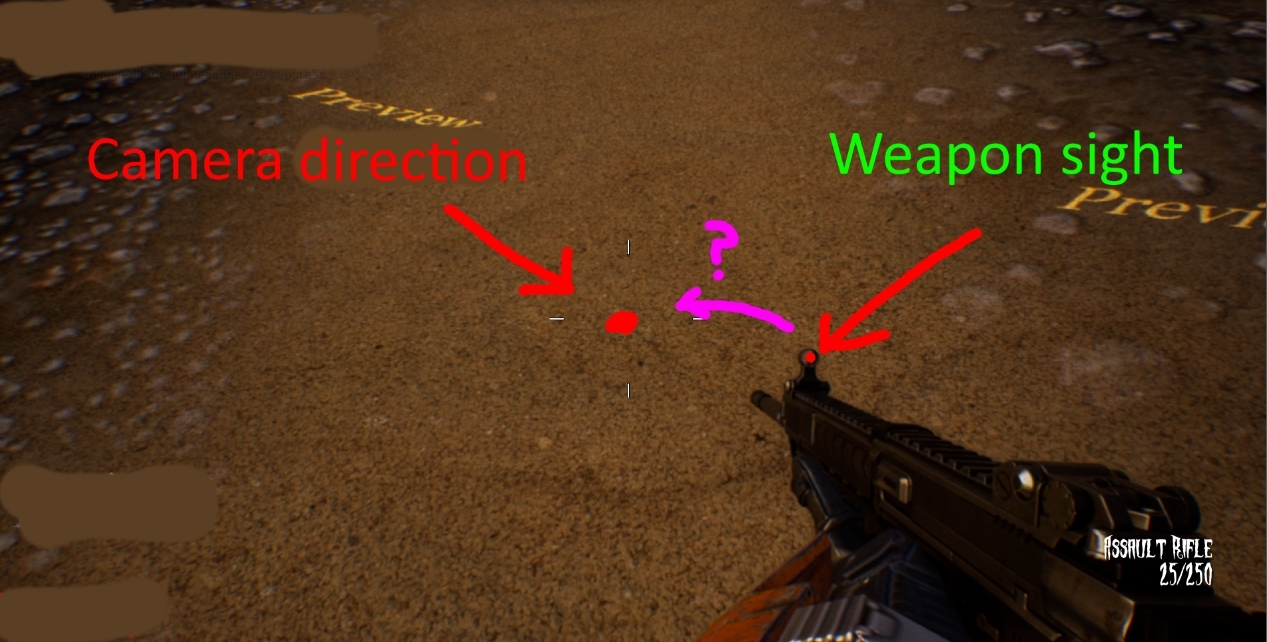
Does anyone know the correct way to handle first person aim down sights? Everyone on the web seems to use a 2nd camera and blends to that but that looks like the complete opposite of games like Call of duty. I know Call of duty hand tailors the ADS animation so it's lined up perfect when aiming. Is there a way you can just set a socket on your weapon and then move your weapon mesh or arms to the camera?
I'm just looking for a direction to go in. If I need to work inside the player blueprint or in the animation blueprint or both lol.
vagrant iris
What tutorials have you looked at?
unreal comet
Tons of them lol
They all either blend to weapon specific camera's, or they fine tune individual animations for each weapon, or they fine tune and mess with transforms for each weapon. The problem with that is it takes forever, and if you change something it breaks all of that hard work. I'm trying to come up with an easy way to do it that's more streamlined. I figured somehow I could use sockets and bit of math to pull it off, then just use some sort of IK for the hands so they stay attached to the weapon when moving or something.
I was just fishing for ideas. 🙂
vagrant iris
Not developing an fps myself but the process fascinates me
You'd think on paper it'd be easy
unreal comet
I know right lol. I have the locations of everything but I'm not sure how to move the arms/weapon. https://i.gyazo.com/1399058349b2c833884c20a316080fcb.jpg

 zinc basin
hey all
ok im new. newb question; good place for Unreal Engine basics?
i find the built in tutorials... don't quite do it for me
@unreal comet hey buddy, forgive me if I'm being foward, but I saw this yesterday; is it waht you wanted?
https://www.unrealengine.com/marketplace/en-US/product/gun-sight-auto-aligner?sessionInvalidated=true

For those who don't have time to align their gun sights by hand for First Person aiming down sights poses.
unreal comet
@zinc basin I didn't see that! That's exactly what I want hahahaha Well, I guess somebody figured it out already lol.
zinc basin
well honestly i was looking around, its' my first day in unity and i thought; oh that's something i hadnt thought of'
so i rememberd it and bookmarked it
unreal comet
From the description it sounds like he set it up the same way I was thinking of doing it.
That's cool. Now I know I'm not crazy lol
zinc basin
yeah so whatevs makes u happy glad i could help
unreal comet
Oh i still don't know how to do it hahahahaha But at least I know somebody did it already so I can keep working on it lol
zinc basin
there are 2 ways i can think of conceptually;
one is to animate the movement, the other is to simulate it;
I expect you're going for 'simulate'?
if that's the case i think the guns' mesh/ scope needs to be 'real' and you physically move the gun up into the camera view.
you also need to align the front and rear sights, so you'd need some kind of marker for each of them, then have a script that brings those markers into alingment; that would just require a lightly clever maths script that calculates the relative distance int he viewport form the front scop and the rear scope, each to the middle of the viewport, and sync's those differences (over time) as a contigious movemnt.
If that makes sense.
no hope in my coding that. i just understand the underlying ideas
you'd also need to pin the hands to the gun, and restrict the animation by those 'bones', i guess.
personally, i'd just buy the script, then use it to learn from. #butimrich
#notreally
unreal comet
lol I totally understand that. For $15 I I may just do it 🙂
 vale radish
Is there a way to control the brightness of SSGI?
zinc basin
@unreal comet i understand the underlying priciples, but don't ahve the skill to implement it.... at this time.
anyway, again i shall ask;
Newb Unreal Engine Tutorials?
reccomended?
unreal comet
Hmmm Epic just released a new learning portal with all sorts of classes: https://www.unrealengine.com/en-US/onlinelearning-courses

Unreal Engine
Unreal Online Learning is a free learning platform that offers hands-on video courses and guided learning paths.
 honest vale
umm
how do I change the language of https://learn.unrealengine.com/home/dashboard back to english?
I don't want machine translated shitty finnish 😐
half of the stuff isn't even translated
zinc basin
@unreal comet thanks I'll try it out I found one on Udemy that seems OK, or even pretty good, but I'd expect this engine to have some failry sold documentation TBH
thanks.
TBH i started with Unity; looked inot how thei MP shite works and...
Oh EFF THAT>
unreal comet
Everyone learns different. I followed a few of Epics tutorial series and made a few small games just to get a good feel for the engine and UI. Then even though everyone said not to, I started diving in deep with multiplayer and learning how it works. So far so good, I learned mostly by just doing and trying things. I do know what a lot of the YouTube videos on things do it all wrong. It "works" but isn't how you should do things lol. IDK I'm just rambling now.
zinc basin
nah you're right.
in fact most of hte tutorials show you one part, but not the others.
i have seen 'how to set up'... say 'inthe next vid we will...'
there is no next vid on their channel.
it happened too much. now I'm looking for a structured learning platform.
I' just checked out the link.
They don't have a step by step structured thing.
If im not happy by the end of tonight I'm buying that Udemy course
unreal comet
What kind of game are you looking to learn to make?
unreal comet
I'm not allowed to advertise but I made a multiplayer zombie survival template for the ue4 marketplace that works like that, minus the pvp lol. Took me about a year to get to that point but It's possible
So just don't give up and keep pushing forward and you'll be good
zinc basin
im wanting to go PVP, and I bought a template already, but I have no idea how to manipulate it
unreal comet
Yea that's the problem I had and lots of others had. They buy a template but it's so difficult to read and manipulate to the way you want
zinc basin
ready fire aim is better than ready.... ready.... ready.... ready.... ready.... ready.... ready....
I'm confident int he template; and it has a lot of support.
I just have no idea how to use Unreal. Yet.
I had to do something. SOMETHING.
doing nothing and continuing to look isn't what I consider winning.
WP on completing a store ready asset tho, i must say
unreal comet
It's a bit overwhelming at first. My warning on the most common headaches:
- character skeletons (having issues with animations etc)
- Collision (usually with linetraces and AI navigation)
I get questions on those all the time and I notice a lot of character artists on the UE4 marketplace getting a lot of hate because people don't understand how skeletons work
zinc basin
what's a linetrace?
as far as AI; either dont have any, or make environements and navmeshes correctly
and makesure your skeletons are smaller than your spaces/doors? i remember that particular collision in my old dev platforms being super clunky
unreal comet
hmmm a basic linetrace example would be shooting a non projectile weapon. That would be a linetrace that basically has a start point and a direction, whatever it hits is what you use to damage, play an impact fx, etc.
zinc basin
you had to be forgiving on things like arms and heads
that gets messy once you allow penetration in your projectiles
esp if you have a subtractive element that the elements collide with. that could be fun.
unreal comet
So skeletons are weird in UE4. You could have 5 asset packs full of animations that all use the same skeleton. But when you add them to your project the animations are using the skeleton that they came with. SO you'll have 5 skeletons called "UE4_Mannequin" that are identical but you only want to use one. But when you use that one skeleton, the animations for the other 4 asset packs don't work. lol It's an easy fix but most newcomers get frustrated and rage
UE4 has lots of references to things and people tend to forget that and that's when bad things start to happen lol
zinc basin
there is a thing that lest youtransfer skeletons to a 'UE4 Humanoid'.
I've seen it.
seems obvious
i think its the UE4 mannequin?
unreal comet
Yea so im my example you would basically delete the other 4 skeletons and then set your 1 skeleton as your skeleton for each animation. Basically open the anim you want and it'll ask you where your skeleton is because you deleted the one it was referencing. Easy to do but confusing to newcomers that just payed $60 for a character. They tend to get mad and say nasty things lol
But UE4 does have retargeting for skeletons. Like you said, anything that is humanoid can generally be retargeted. Meaning it can use animations that other skeletons use. REALLY COOL TOOL!!!!
But new people also get confused and frustrated with it as well lol. It takes a bit of time setting up bone references. IT's not a 1 click and it's automatically done thing. But it isn't too hard either. Especially when you get to use animations from one character to another.
zinc basin
@unreal comet someone just mentioned this in antoher thread; it may help point you to what you want?
https://docs.unrealengine.com/en-US/Engine/Animation/AnimHowTo/AimOffset/index.html
Using an Aim Offset, a character aims a weapon in the direction of your mouse or controller.
once the anims are set up tho, dropping new skins on them should be simple enough tho?
unreal comet
Oh I know how to make aim offsets already. Thanks though. 🙂
zinc basin
yeah the Market Asset is closer to what you want
unreal comet
it's spot on lol. I still can't believe it's already been done. I literally scoured the web looking for something like that. Sucks for him nothing popped up in my search. I feel like his product is the right approach to first person. But what do I know lol
@zinc basin Well it's late and I need to go to bed. My recommendation would be to learn the basics of blueprint and learn the UE4 interface. That way you can easily "talk the talk" on forums and also follow along with guides. By basics I mean, creating variables, custom events, functions, macros, timers, etc. Also (STAY AWAY FROM "EVENT TICK"!! Every Youtuber puts everything in tick because they are lazy horrible teachers lol) and (STAY AWAY FROM "GET ALL ACTORS OF CLASS") Those are my words of wisdom lol. I wish you well. Don't try multiplayer for your first project though. Make a tiny little singleplayer game in one day just to get your feet wet. Also try to narrow your focus to specific areas, it's easy to get sucked into rabbit holes such as UI, AI, multiplayer, etc. Those are areas that are beasts to learn all to themselves. Stick to the barebones and build up the foundation so you can keep expanding and learning more.
frail mist
does anyone know why my frame rate is 50% higher in the editor compared to the packaged game, even if I press F11 to enter full screen. I also made sure the 'monitor editor performance' setting is switched off.
 jaunty matrix
does it still lag in unlit mode?
frail mist
@jaunty matrix you mean me?
jaunty matrix
yes
frail mist
I don't have any issues with the performance in PIE, but the packed game
jaunty matrix
thats odd...
frail mist
I get stable 80 FPS in the editor and in the packed build it's around 50
while the editor is closed
and all other things shut down
jaunty matrix
no idea why that would happen. Probably a less high quality in PIE
frail mist
that was my first thought too, but everything is set to epic
also I checked off the 'monitor editor performance' which apparently adjuts the scalability in PIE if checked
 undone pollen
Does anyone know the reason why my .umap file is not showing up in the Content browser?
zinc basin
i have issues once the AI in my build start running around @frail mist
@unreal comet thansk for the advice.
all i can say about that script is:
1: buy it - support the guy
2: give him feedback - his SEO sucks, what you searched, etc.
frail mist
@zinc basin I will look into it - but I am sure my issue is GPU bound
 void barn
what does cast actually mean ?
the cast to something something
does it mean point to this character when you execute this function ?
honest vale
it changes the type of the object you're casting to some other type, but that can only happen if the object is a child class of the class you're casting to


 honest vale
it's a programming term
void barn
never done casting in my OOP life
mossy nymph
it doesn't change the object type
honest vale
type casting, type conversion
rigid belfry
@grim ore i figured out what the problem was. in my project settings, under the Maps and Modes option, i had both options set as none. so the game was trying to open a level that didnt exist. here's the finishing result https://chimiware.itch.io/dodge-the-cubes
honest vale
@mossy nymph yes but I'm not going to start writing a page long explanation here 😄
In computer science, type conversion, type casting, type coercion, and type juggling are different ways of changing an expression from one data type to another. An example would be the conversion of an integer value into a floating point value or its textual representation as ...
mossy nymph
YourCustomCharacter inherits from Character which inherits from Pawn which inherits from Actor, which inherits from Object
because of that YourCustomCharacter is also a Character, Pawn, Actor and Object
and a reference to it can fit into a Character ref, Pawn ref....
void barn

mossy nymph
an Actor reference can use all functions and members defined on Object and Actor
YourCustomCharacter can use all functions and members defined on YourCustomCharacter, Character, Pawn, Actor and Object
if you have a, for example, Actor refrence to YourCustomCharacter, Cast to YourCustomCharacter would interpret that reference as YourCustomCharacter type
allowing you to access Pawn, Character and YourCustomCharacter functions/members
mossy nymph
and there are many reasons why you'd want to not use a reference for the specific subtype
not knowing at compile type if your Actor reference is a Character, for example
void barn
like animal -> dog-> beagle( a type of dog ) , since all animal has the "eat" function , u can call eat function and all dog will eat but if u want the specific way of how they eat which only exist in beagle, u would need to "cast to" so only then u can access this specific way of this dog eating , am i correct ?
mossy nymph
you want to do something like when YourCharacter walks into a trigger volume, you want to change its mesh to purple, for example
you'd use OnBeginOverlap for the trigger volume, which gives you an Actor reference to the Actor that walked in
if you Cast that Actor reference to YourCharacter, and Cast is successful, you know that it was YourCharacter that walked into it
and from the reference provided by the Cast you can call a custom function you have on YourCharacter to turn the mesh purple
the function which doesn't exist on Actor
void barn
so in short , cast to let u access to child's function which doesnt exist in the parent class
to more specific function
is that correct
honest vale
only if the actual concrete type of the object you're casting is the child class you're casting to
void barn
alright
honest vale
if it isn't then the cast fails
honest vale
basically
void barn
alright thanks
ashen orbit
Hi anyone awake?
Having a weird issue with attaching actor to actor. It was working great until I set a new root in the actor that is going to be attached. How come?
 chilly gale
Not sure what's going on here I just opened an old 4.24 project and open the test building level I had for making buildings, and found me locked up like this
ashen orbit
Like I know it's not a lot to go on, but I'm attaching the actor as a whole so not really sure why it's not working anymore
 jolly void
The variable deprecated_var declared in bp_blueprint has an invalid type Map of Static Mesh Object References to Structures. Does anyone know how to fix this? Var doesnt show up anywhere and it's not referenced anywhere
ashen orbit
Refresh all nodes?
 tight prawn
that moment when you spend more than an hour with everything closed for UE to compile
then it gets stuck at the last step
ashen orbit
bro how big is your game
tight prawn
"UATHelper: Packaging (Android (ETC2)): [1069/1073] Module.Engine.2_of_47.cpp [x64]"
its not the game per se, the engine is compiling itself for mobile
arm and x64 architectures
tight prawn
it's fine, just cracking a joke here
ashen orbit
Maybe you can help me
zinc basin
@chilly gale kiwi?
enzedlander?
chilly gale
@zinc basin Yes
ashen orbit
so if my sword looks like this
it won't attach to my character using AttachActorToActor
if it looks like this though it works
The difference is the root
tight prawn
alright let me suggest something for you
go to your character skeleton, create a socket on his left or right arm
ashen orbit
Done
tight prawn
call it weaponSocket or whatever you want
undone pollen
GG EZ
ashen orbit
Trust me the attaching weapon works
it's just that before i only had the skeleton
now I wanted to add a scene component above it
and it doesn't work anymore
and I don't quite understand why
tight prawn
a scene component attached to skeletal mesh?
ashen orbit
well scene > skeleton
tight prawn
i can't open the full image, my browser is closed for the compilation
undone pollen
@ashen orbit Why dont you have a default scene root? The skeletal mesh should have a scene root.
undone pollen
You need a Default Scene Root Component dude
tight prawn
what do you want to do with a scene component ?
ashen orbit
I want to put the skeleton inside of it so I can rotate the skeleton
As I can't when it's the root
ashen orbit
How do I get this Default Scene Root Component
 visual sage
Hi! I'm a total neewbie, both to discord and to UE so please bare with me.
I have plowed through hours of tutorials and have a pretty good grasp of it so far. I think the project viewer template looks very interesting for the type of work I'm going to be using UE for to start off with. Now, in 4.25 I just can't find it. Any info on this is much appreciated. Thanks.
undone pollen
and the skeletal mesh should be a child of the root scene component
ashen orbit
sure but have I deleted it or something?
undone pollen
Looks like it yes
tight prawn
it's not required to have default scene root component tho
ashen orbit
Transforms in what sense
undone pollen
Rotation
ashen orbit
like is attaching a transform
undone pollen
location
ashen orbit
Oh yes
undone pollen
scale etc
ashen orbit
I need the rotation that's why I'm doing this
so you recommend I should create a new fresh blueprint
undone pollen
I think SM inherits some stuff but
undone pollen
Just make sure you have a Scene component as root
ashen orbit
Yeah well that's what I tried to do in pic 1
undone pollen
and rotate your Component
ashen orbit
Sure that works fine mate
But then it breaks my AttachActorToActor
like that's the whole dilemma
and I can't understand why
undone pollen
You need to probably set up attachment to rotate relative
or something
but you should be rotating the Scene Componenet
not the skeletel mesh
ashen orbit
But I cannot rotate the scene component as its the root
 timber minnow
Hi everybody , is there a way to spawn some foliage on static mesh on runtime as it's possible with the landscape grasstype ?
because i spawn a lot of moss on my rocks , but my scene gets bigger and bigger in file size so i wanted to try to spawn them with grasstype in runtime to limit the size of my scene
ashen orbit
@undone pollen Ok I remade everything so the character is picking up a completely new actor blueprint with default scene root etc
but the attaching still not working for some reason
if i make the skeleton root instead of the default root scene component
it works
tight prawn
that's because your weapon is not a child of the skeletal mesh
if you set your weapon as child
and then on the details you change the socket you'll find a list of your skeletal mesh bones and sockets
but if its attached to a default scene (not skeletal mesh) you won't be able to find any bones in the details pannel
setting the socket in the detail panel == blueprint function
just use it to debug if the socket exists or not 😉
ashen orbit
I'm not sure I'm following, I will tell you what I've done already
There is a socket in the right hand
I have a BP_Sword that has one root scene component
and a skeleton that is the Sword
The BP_sword is an actor
but when I do attach to my character it doesn't work. BUT if the skeleton in BP_sword is the ROOT it suddenly works
like the whole weapon attachement thing has been working for days, I just decided I need a parent to the skeleton of the sword and suddenly It won't attach anymore
tight prawn
yes i understand that
look
if your skeletal mesh of the sword, is attached to anything that is not a skeletal mesh
your function (Attach to Actor) will not work
ashen orbit
why?
tight prawn
because you are attaching to a scene component, while the function looks for a skeletal mesh
ashen orbit
sure
tight prawn
whether its another skeletal mesh, static mesh, actor whatever
ashen orbit
ah sorry
i messed up
I'm attaching actor to component yes correct
To the character mesh
tight prawn
no, you are attaching an actor to a socket in a skeletal mesh
when that happens and you go into preview, you see a mesh holding another mesh
 rocky hound
which is better, rotate the world or the player with flipping the control scheme? (if i want the player to move sideways in a different plane)
ashen orbit
Yeah technically but that's not what the function I'm using is called
@tight prawn Yes
tight prawn
@rocky hound depends on what you want to achieve
rocky hound
movement in another plane, side scroller style
tight prawn
@ashen orbit to test if the function will work, you just need to click on the sword actor, look for attachment socket in details, and see if it shows bones or your socket
if it does, the actor will be attached, if it doesn't then the actor won't be attached
@rocky hound endless or just a scroller game ?
rocky hound
just scroller
default movement, left right
other image uploading
flipping camera, now i want it to move left right of the current place
ashen orbit
@tight prawn I can't find attachment socket in details
tight prawn
it depends on your preference and the project goals, generally speaking, just rotate the actor
@ashen orbit then the function won't work
ashen orbit
how does that make any sense
tight prawn
you have a socket, you want to attach an actor to your socket
your actor can't find the socket to attach to, so it doesn't
rocky hound
@tight prawn rotating the actor only rotates the mesh, once i move it stays on the same plane as before
ashen orbit
Yeah but the function isn't even called so I don't understand how that can appear in details tab
of the sword blueprint
tight prawn
use SetActorRotation
ashen orbit
like the attachement function isn't in the sword blueprint
rocky hound
i did use that
tight prawn
because you can either attach it to the socket via the details panel without any use of functions
rocky hound
ashen orbit
Yeah but it's unaware of the character blueprint
rocky hound
i checked that it is executing that part, so no issues with the branch or the before elements
ashen orbit
so not sure what your point is
tight prawn
can you drag and drop your sword into the character bp and try using the details panel ?
@ashen orbit then its an issue with your input
use getforwardvector and then add input to it, that should make the character move forward according to its rotation
rather than the input button direction
ashen orbit
Yeah I can use 'Parent Socket'
 rustic imp
anyone know how come I get 2 source files for one image
and it imports the name without the _1024 or _2048 if I don't change it
rocky hound
an issue occurs with the transition, the character rotates by default when changing directions, the forward vector seems to change in that rotation mechanic making it stuck
ashen orbit
@tight prawn so I kind of figured it out, I used attach component to component instead, not really what I wanted but it fixes it for the moment at least
thanks mate for your patience
plush yew
Does anyone know why my camera jumps to the ceiling?
Idk but that street looks pretty nice. Also if you have the nvidia geforce program, you can record by doing Alt and F9
ah yeah ahah
thanks
Np
It's a 3D-scan with metashaper
took the photos myself
Oh
Nice
So that's a real location?
yes
What are you going to do with all those distortions?
Or is that part just going to be in the background so you don't notice it
part of the aesthetics hehe
Oh
its on purpose
I tried using obs studio for my fmp and I had to mess with the settings a lot
Because the video looked laggy