#ue4-general
1 messages · Page 788 of 1
 fierce forge
 rocky radish
of the option
@fierce forge anti-aliasing method
fierce forge
got it
rocky radish
just search anti-aliasing and it will show up
fierce forge
tnx
rocky radish
np
fierce forge
i still have big stars 😦
 rigid belfry
np, they look good anyway
rocky radish
can't you change their size?
rigid belfry
https://docs.unrealengine.com/en-US/Engine/Content/Types/StaticMeshes/HowTo/UVChannels/index.html @plush yew
The role of UV Channels for rendering Static Meshes, and how you can work with them in the Unreal Editor.
what made them bigger? @fierce forge
fierce forge
anti aliasing
fierce forge
yep
rocky radish
i don't think the big ones are part of the skybox...
doesn't make any sense the AA change the size of a texture
rigid belfry
yeah
fierce forge
with temporalAA the stars are small but i have the first problem
rocky radish
do you have any 3d stars in your level (that are not part of the skybox)?
fierce forge
nope
rigid belfry
doesnt anti aliasing smooth stuff basically?
basically it normally appears as it is, with bright stars, once the AA smooths the image you get not so bright looking stars
rocky radish
doesnt anti aliasing smooth stuff basically?
@rigid belfry yep, but TAA add some effects too i think wich may be what was causing the blurry stars
 austere scroll
if you notice, in the top left corner where it says "built -in", i have 297 plugins while you have only 187
@rigid belfry is there a way to get the beta plugins ?
rigid belfry
i havent been able to find an answer to that
you should be able to see them technically
austere scroll
what version are you using ?
rigid belfry
that wouldnt show
i only finds stuff based on their name
it ignores the description
what engine version are you using
austere scroll
im using 4.24.0
rigid belfry
64 bit windows?
 vernal thicket
@exotic thicket late reply but nah, I even set which levels to package, ue4 state there's no way for the editor to differentiate. Atleast they've got it set to warn you when you try to delete something otherwise I'd be in a world of shit lol
austere scroll
yea ofc @rigid belfry
rigid belfry
searched for the plugin using ue 4.22 and it was missing
maybe its avaible only for 4.25?
austere scroll
hmm
rigid belfry
allthought its a plug in used for static mesh editing and whatnot, and that came out 1 or 2 years ago
rigid belfry
i doubt
rocky radish
@austere scroll did you build the engine from source?
rigid belfry
if i could download 4.24 i would, but i currently have 200gbs of engine versions installed
but i am on 4.25 right now and i can see the polygon editing plug in
austere scroll
@austere scroll did you build the engine from source?
@rocky radish i dont know what that means
i just downlaoded it
can u send screenshot of the plugin @rigid belfry
rocky radish
@austere scroll you can't use chaos if you don't do that https://docs.unrealengine.com/en-US/Engine/Chaos/ChaosDestruction/ChaosDestructionOverview/index.html

Overview of the Chaos Destruction tools that are available, and how they work together to create destruction in UE4.
if thats what you want
 shell jacinth
Hello i don´t know if im correct here but i got some Problems since today all my Games running un UE are crashing Games not running on UE are working
austere scroll
i dont think that is what Righy ment @rocky radish
rigid belfry
shell jacinth
rigid belfry
gpu artifacts'
rocky radish
oh ok sorry my mistake
austere scroll
well for me , @shell jacinth fortnite and another game that was featured on the front page have these "mising dll" something like that
shell jacinth
ok
austere scroll
fortnite launches but the other one doesnt
shell jacinth
so what can i do`?
rigid belfry
ask the game support?
shell jacinth
ok i do thanks
rigid belfry
@shell jacinth https://forums.unrealengine.com/unreal-engine/feedback-for-epic/1574393-all-games-that-run-on-ue4-crash-on-startup/page3
Unreal Engine Forums
My Specs
OS:
Microsoft Software | Windows 10 Home 64 Bit
PSU: I've been told by several techs that my psu provides ample power to my system
EVGA SuperNOVA 650
 plush yew
hey, im trying to export from blender but it comes out as 2 seperate objects in ureal
anyone know i can import it as one?
this is what I mean
nvm i found it im dumb
 cyan crater
Hi, I have the wrong language set on https://learn.unrealengine.com/home/dashboard - how can I change the language there?
 jovial pollen
@jovial pollen Thanks for replying, I went into the inputs in project settings but I dont see options to unbind the default Q and E bindings there. The only action mapping that shows there is the one I created.
@devout swift dude. You press the X button on the binding you want to unbind....
 storm jasper
Does anyone have a tutorial for the game like Outlast, with c ++?
cyan crater
@rigid belfry You mean the "preferred communication language" under "Personal"? This doesn't change the language on the dashboard.
The menu items on the left are in Dutch
rigid belfry
are you dutch?
rigid belfry
well how did you do it in the first place
rigid belfry
how did you do it
cyan crater
Click on my name top right, as you said, but then not "Personal", but "Online Learning"
There's a separate language setting for Online Learning
 devout swift
@devout swift dude. You press the X button on the binding you want to unbind....
@jovial pollen I think you're not understanding. Do you know what the default pawn class is? The only bindings that show up in the project settings are the custom bindings you create. I don't want to unbind the ones I created. I want to unbind the ones from the default pawn class which I use in my custom pawn blueprint.
jovial pollen
Q and E arent even binded to anything. which template are you using...
devout swift
When I created the project I just chose "Blank > C++ Game". The default pawn I'm talking about is the one that gets instantiated in the game where you place player start. I replaced the instantiated pawn with my custom pawn that inherits from the default one
it's not even a character class like from the 3rd person example template, it's just a pawn. It's a sphere that you can move around with WASD, Q, and E
By default, this pawn can move up/down along the z axis with Q and E, like you can in teh viewport when editing a level. But I want to disable the ability to use Q/E to move up/down
rigid belfry
is it the cameraActor? @devout swift
devout swift
@rigid belfry No, it's the Default Pawn that I inherit from in my blueprint:
While the Pawn class provides only the essentials for creating a physical representation of a player or AI entity in the world, the DefaultPawn subclass comes with some additional Components and functionality.

The DefaultPawn class contains a native DefaultPawnMovementComponent, a spherical CollisionComponent, and a StaticMeshComponent. To control the DefaultPawnMovementComponent, as well as the camera, a Boolean to add default movement bindings is also present in the DefaultPawn class, and is set to true by default. ```The Pawn is the physical representation of a player within the world.
 turbid vigil
text doesnt get justified in the middle
 fiery mortar
guys how do people usually get rid of tiling on the landscape
I've tried two methods but they just don't work
turbid vigil
I've tried two methods but they just don't work
@fiery mortar did u try lod?
fiery mortar
how does that work excatly
turbid vigil
oh screw i was mentioning sth else sry
but a multiplier should help mate
if you have a simple texture get a copy of it and link them to the multiplier
fiery mortar
this is how it looks
left is same with sand right rock texture
it still looks like a square was put
 tight prawn
does disaster recovery even functions in UE ?
i never seem to be able to recover changes that get lost to sudden shutdown of pc
 plain terrace
how come my vehicle wheels are rotated 45% to the left?
vernal thicket
Just deleted 95000 items from my project equalling 20gb
plain terrace
dam
vernal thicket
needless to say next time I think a side project to hold items and need pull what i need from that project into my project next time xD
That was good English
*Needless to say next time I will make a side project to store possible assets, and just pull what I need as and when I need it
There we go
 tender jackal

Today we take a look at how we can set up the health and mana variables to use later on in the series.
In addition to the above, we also create UI bars for both the health & mana and get them displayed on the screen.
Unreal Engine 4 Beginner Tutorial Series:
https://www.yout...
The health and mana bar that are made in the video, will I be able to customize the bars later on?
vernal thicket
So if you use an asset it creates a uasset of the asset too? i,e texture
rigid belfry
@fiery mortar you can add a constant parameter here called "tiling" and change that in real time untill you find something that looks good
also why are you using the red channel only for those textures? what are you doing if i may ask
plush yew
Hi everyone! I recently made this sound effects library for unreal engine, check it out: https://www.unrealengine.com/marketplace/en-US/product/game-ui-sound-pack

The most powerful and essential library that every Game Devs must have in their tool box.
fiery mortar
@rigid belfry because of this tutorial https://www.youtube.com/watch?v=zUyl2MbcKuE&t=1009s

Full Blog Post with Videos and Notes: https://www.worldofleveldesign.com/categories/ue4/landscape-macro-tiling-variation.php
Here is how to solve obvious texture tiling on landscapes. Where your textures look good up-close, near the player but then it tiles very noticeably fa...
I did the same things but the result wasn't the same
rigid belfry
because you gotta blend the noise
BlueprintUE
@fiery mortar
when you click on the text file, its gets automatically downloaded. open it up, press ctrl+a to select all and then do ctrl+c to copy. in unreal, create a new material and call it whatever you like. in there, press ctrl+v to paste the whole material
the material should look something like this
i dont have any more pics of this project and i dont wanna change anything since its a WIP, but i am using that exact material in this scene
 hearty walrus
How can I fix this error?
rigid belfry
what are you trying to do
hearty walrus
third person preset
rigid belfry
or do you want to zoom in general
ok
so
since you're using third person camera, i wouldnt really mess with the FoV
hearty walrus
this image, to be precise
rigid belfry
let me show you something else
hearty walrus
yeah I learned the FOV one the hard way
rigid belfry
let me finish one thing real quick
fiery mortar
@rigid belfry thank you very very much
ıf I wanna change the texture I just need to change albedos right?
rigid belfry
yeah
you can also multiply the albedo with a vector3
so if you have forest mud for example, you multiply with green and it looks like forest moss
i do that in the material too i believe
i got a landscape project full of neat stuff
i have another small level set up i can show you that uses almost the same material, its compiling shaders right now
fiery mortar
I would love to check it out lol
rigid belfry
@hearty walrus this is how i am currently "zooming" in one of my current projects
hearty walrus
ok zoomer
sorry
@rigid belfry that's what I used to do, but it gives me really jagged movement, and it's really disorienting
rigid belfry
what do you mean by that?
hearty walrus
so it's stepped
also, how do I handle panning the camera around the player?
since each level is kinda floating in the void, I want a way to be able to see other angles that aren't obstructed by the camera
rigid belfry
well now that you say that it really doesnt feel that smooth
depending on what you're doing, you could try disabling collision in the cameraboom(SpringArm) component
oof
hearty walrus
the idea is to have objects that are in the way of the camera go semi-transparent
rigid belfry
kinda like a top down isometric game?
rigid belfry
are you good with maths?
hearty walrus
I'm good with calculators.
hearty walrus
knowing unreal this is probably going to end up with raytracing
rigid belfry
no
its just some math
and magic
https://www.youtube.com/watch?v=GXbE0IqbA7w&t=2301s go to 16:03 and see if that's what you're looking for

Announce Post: https://forums.unrealengine.com/showthread.php?84886
Alan Willard discusses different depth and location-based effects, like hiding objects that the player is behind relative to the camera.
i recommend watching the whole video as its a very detailed video
 azure cipher
hello
rigid belfry
i forgot i had static lighting disabled for a project and now i am compiling a crap ton of shaders
kinda unfortunate
fiery mortar
uupsi
tender jackal
If I make a character with Fuse, can I just download it and put it in ue4 after? I already have animations, just need a body
fiery mortar
I think you should be able to
tender jackal
Awesome
plush yew
how do i put a delay inside the blueprint without affecting the rest of it?
is there some sort of splitter or branch?
 exotic thicket
Sequence node
plush yew
thank you that worked ❤️
 lusty osprey
Hey guys i need some help so im creating a main menu to my game and my begin play is in my character blueprint so now i want that event begin play be an when on clicked playbutton (from main menu widget) i dont know if i was clear or if thats possible to do Thanks.
rigid belfry
on your widget, the buttons are variables that can fire events
such as on un/hovered, clicked and so on
i think i am misunderstanding
by a lot
you have logic in your character that fires on begin play
and your main menu logic is tied with your character?
 bold compass
I've searched a lot but didn't found any tutorials or examples of menu. I need Lobbymenu like Fortnite or Apex that views characters in 3D. Is there any tutorials for this kind of menus?
plush yew
shader compiling works fine when i open another window on top of UE4, but when i click on the UE4 window, it stops
but when i open another window on top again
shader compiling works again
how do i fix this?
rigid belfry
@bold compass https://www.youtube.com/watch?v=aO7_rrKwnGQ maybe this?

A few examples of 3D menu systems I've made for past game jams.
plush yew
@bold compass make a dedicated menu level and widget, with camera facing one position
 supple wyvern
How many collision boxes should I have on average for an AR styled rifle in vr? Nobody is on the vr channel
plush yew
you sure you are using cinematic engine scalability?
tender jackal
How can I make her fit in the red cilinder?
 kind mulch
Either scale up the mesh, or shrink the capsule
tender jackal
How do I scale up the mesh without scaling the capsule aswell
kind mulch
In the left panel is a property called mesh which should have some properties on the right when selected including scale
tender jackal
thanks
 proper hatch
How do you make a fixed camera rotate towards a moving actor?
tender jackal
Can't move now
 sonic pagoda
how would you get the spring arm's length value AFTER collision
printing the target arm length, will just give you the value you set it to before play
bold compass
Ty @plush yew
 tiny sonnet
can u use a blueprint actor as a foliage instance
 unique meadow
can anyone help me locating this city asset pack seen on this page?
This page provides an overview of Precomputed Lighting Scenarios in UE4.
im about the bottom one, which shows comparsion of night-day scene
scene can be seen in the amplify lutpack asset aswell
(uh maybe it shouldve been posted in the marketplace topic, but cant find it on the market)
tiny sonnet
blurry textures? i have scaled rocks from quixel to the size of mountains and it still looked great. the collision boxes were fked up, but it looked great
 prime pilot
Uncertain of where to ask this, but is it possible to split a mesh? E.g splitting an arm off the body? And if so, how?
tiny sonnet
@prime pilot cant u do this in a modeling software
and mesh splitting is possible
in ue4 as well
fat sec
prime pilot
Alright ^^
Well true, I could do that, but that would mean I'd have to throw away other work that I've done and redo everything as well :/
tiny sonnet

Project Files : https://www.patreon.com/posts/30934762
Hello Everyone in this tutorial I will show you how to do procedural mesh slicing in Unreal engine 4. Using the first person blueprint. You can also rotate which way the mesh gets cut using the scroll wheel of your mouse
...
it should work for static meshes, im pretty sure skeletal meshes need to be modular tho. I might be wrong
prime pilot
But like say if I want to remove the arm permanently off my person. Can I do that in UE4?
tiny sonnet
i dont think its possible in skeletal meshes
tiny sonnet
@fiery mortar 2 things, are u sure thats the highest res? thats prob 2k. second use the sandstone pack from the ue4 marketplace
fiery mortar
it says 8k yeah
is it really high resouliton
for you
even when its 100x100x100x
because it might have something to do with my computer maybe?
tiny sonnet
i made scale up pebbles from the bridge to be pretty big before, it worked fine
if your assets look fine when small, i doubt its your pc
tiny sonnet
idk then. ask someone who knows better
fiery mortar
allright thanks
 lean nymph
I'm still new, but from what I've seen when you scale them up too much they're going to be that way regardless, it shouldn't have anything to do with your computer. If you're using these rocks as the landscape or terrain or whatever I'd suggest putting a tileable stone material onto instead. If it's multiple rocks making up the terrain then make sure the materials are world aligned as well so they mesh up correctly.
Once again, new, so might not be the issue you're having.
fiery mortar
make sense I thought the same thanks
 barren flume
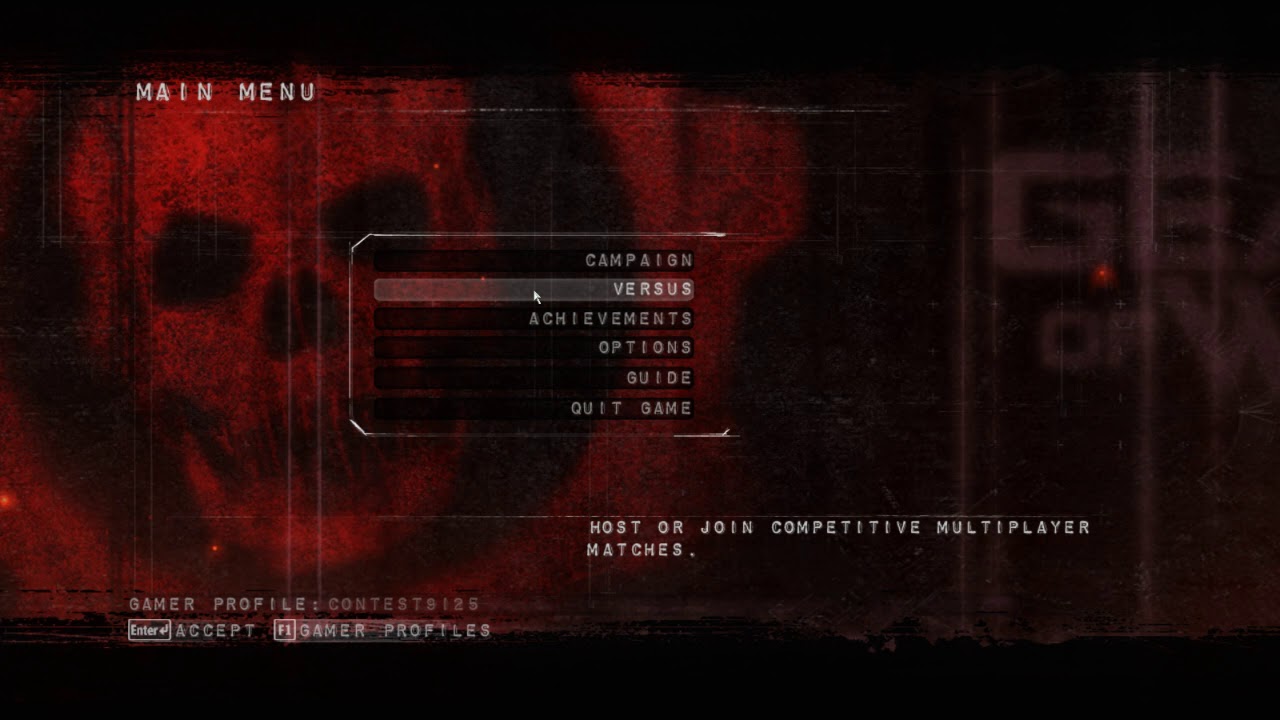
Hi, I wanted to ask again how I could get controllers to work with hovering correctly over the buttons. I was wondering how I could get it to work like how gears of war did it. When I press the down arrow key or move down or up the left joystick the mouse cursor will go to that button and hover over it. I'm not sure how I could do this but any help is appreciated. Here is what I mean: https://www.youtube.com/watch?v=DR_mPZFFdMo
 smoky sonnet
bruh converting a string which contains 1000 to a int results to a 1 why
how can i fix that
 limber mesa
can someone help me with an issue that im having?
smoky sonnet
explain the issue
 worn granite
@smoky sonnet lmao how are you doing the conversion
smoky sonnet
text widget get text to string to int
 thorny coral
why does steamvr keep opening when i open Unreal Engine 4
 worthy flame
 weak harness
Anyone know where to get a UE4 tshirt? I can't remember the official store link.
 marsh swallow
any ideas on how to change the mesh spawn rotation in Niagara? 😂
 weary basalt
Pretty sure the merch store isnt up at the moment. I remember a comment from @gleaming narwhal mentioning the merch store is being updated?
weak harness
Ah poop
 lucid socket
@thorny coral Disable the SteamVR plugin
@heavy lagoon Rotate the static mesh so that the front of the turret faces the +X direction
@smoky sonnet What's the text?
thorny coral
lmao
 sleek tinsel
guys do you think i can export a simple scene, to html 5 for webgl?
 wild cobalt
I read somewhere that plugins are specific for the engine version I have been working on a project in 4.22 which I have used https://www.unrealengine.com/marketplace/en-US/product/creature-2d-skeletal-and-mesh-animation
Which only supports up to 4.22 Does anyone know if I can update the plugin for 4.25 or will I just need to continue my project in 4.22

This project contains the Creature Animation Tool's Runtime plugin for Unreal Engine. It has a user controllable Fire Breathing Dragon as an example of how to use the plugin.
 fervent inlet
can someone help me with something easy in ue4?
im trying to make a hoop type object but i dont know anything about cutting objects as im brand new to ue4 so if someone could show me how to cut a circle shaped hole down the middle of a cylidner that'd be grand
wild cobalt
@fervent inlet you mean with the mesh editor in UE4?
wild cobalt
@fervent inlet I have never used the mesh editor in UE4 but have watched a couple videos. I typically have done my mesh edits in blender. However if you are talking about the mesheditor in UE4 here are 2 videos.
This one is for 4.25 - I have only watched the first 5 minutes of this one and he will walk you through how to set it up and how to access and use it.
https://www.youtube.com/watch?v=gBrF8bc6TsQ
This one is for 4.25 - I have watched the whole video and found it to be good
https://www.youtube.com/watch?v=FSzk2osk2Ms&t=506s
This one is for 4.24 - I have not watched this one
https://www.youtube.com/watch?v=7Ff0zZcHmaU

Complex tutorial on how to do 3D poly modeling in Unreal engine 4.25 with new modeling tools.
UE 4.25 is a new update which let you do basic (and advanced) poly modeling in editor. It can be very useful especially for level design or just prototyping levels.
You can use basic...
With Unreal Engine 4.25 Preview released, there are a full scoop of new features and today we would take a look at a walkthrough on how to get started with poly modelling in unreal engine, we would also take a look at some few tips.
Hey there.
Let me know what you think in th...

Need help? Grab free art resources here: https://www.artstation.com/mauriccio/store
In this video tutorial I will guide you on how to enable the Modeling tools inside Unreal Engine 4 in the new 4.24 version.
We will go through most of features to be able to:
Create primitive...
 little oyster
The general consensus seems to suggest using an always-on low-powered windows box for a Swarm Coordinator, however is there any reason to not run the Swarm Coordinator on the main UE4 Dev machine?
wild cobalt
@fervent inlet I hope the link helps aside from that I have no knowledge of it. You may want to post in the #graphics channel to get more answers
 hardy granite
So i need help, when i build lighting it removes shadows casted by objects, is there a way i can keep this in ?
that is an image with it built
and that is from a progress video i made while it was unbuilt
hardy granite
@winged crypt look at the bottom Boolean, its an option
 winged crypt
@hardy granite that's to destroy owner after fade (it kills the actor that spawned it), not the decal itself
the owner destroys self after spawning the decal so in my case, that bool is useless
I just don't want a bunch of faded decals left around without me knowing
but I doubt they're not being destroyed
 cosmic ice
Hi everyone, I'm using dot product to know if I'm facing enemy, and I want to know I'll still facing enemy if I move to the sphere location. Are there any ways to know before I move? Thank you in advance
 wet relic
i keep getting this error when i try to play my packaged game on android. any help please
 glad karma
Hey guys, I'm import a .wav sound to unreal engine but I can't hear anything.. in windows everything working perfect. Somebody know what is a problem it?
Okay fixed, I had muted ue :d
wet relic
ok
 sand nova
@cosmic ice if you're just moving in a straight line then your new facing direction would be (TargetSphereLocation - YourCurrentLocation).Normalize. If you're using navigation you could generate the path and look at the last section, but if the navmesh is dynamic or something gets in the way you could still end up facing a different direction
rigid belfry
i am trying to move a ball using impulse based on user input, but i am having lots of troubles making it work
pretty much the W/S and D key inputs make me roll backwards, while only the A key makes me go slightly forward
this is the code i wrote
i tried using the local location of the actor but it was behaving the same way as with the world location
plush yew
hey guys im new and this just happened, I should compile these shaders as well but it wont.....any help?
I also restarted the unreal engine but same issue
cosmic ice
@sand nova Oh it works! I did what you suggested and also divide enemy location with my new location. you saved me! I am so thankful for you in my life.
sand nova
@cosmic ice 😄 glad it worked!
 storm vapor
Hi im gonna reset my pc. I copied project file to usb disc, is there any thing that i have to do for protect my project ?
tight prawn
How can I register an Event in a blueprint Functions Library ?
storm vapor
pls help im gonna reseting now
tight prawn
I want to handle a specific Actor Begin Overlap in a BPFL
sand nova
@storm vapor keep the whole project folder, except Binaries, Intermediate and Saved
tight prawn
storm vapor
@sand nova i copied project folder , is it ok ?
sand nova
@storm vapor yep should be fine. You don't need those folders I mentioned, they'll be recreated. But if you have space to store them too it's fine
storm vapor
@sand nova ok thanks
tight prawn
any clues on binding events in a blueprint function library ?
sand nova
@tight prawn judging by the first error message, it isn't possible
tight prawn
any workaround ?
I have an event that happens in every level, copy pasting the code is redundant
sand nova
@tight prawn without knowing exactly what you're trying to do, my first thought is can you put it in a level blueprint from a shared sublevel?
tight prawn
it's an actor begin overlap event
with a trigger box
a goal, that would execute "level won" functionality
what's a shared sublevel ?
sand nova
@tight prawn actually in that case I'd make the trigger box part of an actor that ends the level
plush yew
ram usage spikes up to infinity when i save my project, is this normal?
sand nova
@plush yew I tend to find where the UE4 editor is concerned, 'normal' is relative 🙂
plush yew
i mean like,
in most UE4 related videos they don't really lag out as heavy as i do with my project
and i'm pretty sure that other devs aren't having this much performance issues
every workflow action lags out and i still don't have any clues
sand nova
@plush yew are you using source control?
sand nova
@plush yew if you use source control and have a bad connection to the server the editor will freeze whenever it e.g. checks file status, but that's obviously not your problem here. (Though I would always recommend using source control anyway!)
sand nova
@plush yew no
plush yew
and it isn't enough for my project
oh
alright then
then what about the extreme lag that comes with every single workflow action?
sand nova
@plush yew it's difficult to say without a loooot more info.. when you say workflow action, do you mean saving assets? Anything else?
plush yew
i said every single
even rotating the camera around causes lag
including placing actors, editing BPs etc.
literally every
sand nova
@plush yew that doesn't sound right... how does the rest of your PC match up against recommended specs?
plush yew
my PC is built to handle heavy workflows
Ryzen 7 3700x, 32G RAM, Quadro RTX 4000
is this not enough?
got any clue yet
tight prawn
I'm eyeing a quadro RTX 4000
it should handle it easily
just a curious question, PNY is the manufacturer of your Quadro ?
tight prawn
if you have a link to the product please share
@sand nova sorry to ping you, I went out to get some errands
tell me, in a puzzle game with lots of levels, is it better to have a persistent level, and all the puzzle maps are sublevels ?
sand nova
@tight prawn hmm... I wouldn't say so, no. It would make it more complicated to load into a specific level, for instance. Sublevels are useful to share small amounts of content between levels. A multiplayer game I worked on a while back had several arenas (different levels) but each arena had an identical area players would go to while waiting to respawn - so we made that area a shared sublevel
plush yew
the fun thing is that my Artworks project (which is an RTX-enabled, unoptimized and heavy project i'm using for making 3D art) performs almost the same compared to my game project
unless i place 1000 lights or so
may this be an optimization problem?
tight prawn
@plush yew can you monitor CPU GPU and Memory usage ?
also if your UE and project are placed in HDD expect to see performance hogs
plush yew
all seems fine, although disc usage spikes up randomly
plush yew
both of them
tight prawn
where are you placing UE and your project?
plush yew
D drive, which is my HDD
tight prawn
move them to SSD
tight prawn
Move the project to SSD
trust me
I had a similar issue, build times extremely slow
plush yew
actually, i'd be able to move the project once i clear up my UE temp files but i'm not sure where they are
tight prawn
turns out compiling C++ code on the HDD was a nightmarish slow operation
plush yew
4.94gb of space available
and my project is over 100gb
where are the UE temp files?
i mean,
my SSD storage gets nearly full when i run UE for a while
and when i close UE, the usage doesn't get washed away
tight prawn
are you using a source build ?
tight prawn
did you use epic games launcher to install UE, or did you build it from source code ?
plush yew
EGS
tight prawn
hummm
temp files isn't something you should touch
find another way to free up the space
plush yew
imma uninstall UE 4.24 then, since i ported my project to 4.25
tight prawn
that would free up around 43 gb
plush yew
but again, how does this explain the temp stack or anything that's making UE fill up the space on runtime?
now i have 36gb of space available, it cleaned up 31gb
and i'm using an ECC drive so i don't really think it's a file corruption problem either
just to make it clear, i always delete the Epic VaultCache after downloading assets
 tribal citrus
This might be a silly question but does anyone know how to fix this weird shadow that shows up when i turn on contact shadow? I'm completely new to unreal engine!
tribal citrus
also disable WorldSpace
@plush yew but that will get rid of contact shadow, right?
plush yew
nope
CS is meant to be a ScreenSpace Ray Tracing solution
so as long as the object is in your screen
it'll cast the contact shadow
smoky sonnet
hey is there a tutorial out there where i can create a progressbar which increases smoothly over a specific time period/duration? cant find one
 ivory lake
@smoky sonnet I need that same thing. I really can't find a proper one where progress bar is filling on button press.
vernal thicket
Anyone experienced using MSI Afterburner to record gameplay? was causing bad ue4 editor crashes for me
Literally had to uninstall it, even having it on my computer was completely destroying the editor
ivory lake
Any preference to afterburner for recording ?
vernal thicket
@smoky sonnet whats the progress bar for?
smoky sonnet
progressbar for music levels like piano tiles for example
there is a progressbar that you can see how far you already got in the level
but cant find a good tutorial for that
vernal thicket
I'd imagine it'd have something more to do with the information you're inputting, as an example if you're progressing from 0-1, and you go up in 0.1 increments it's going to jump from 0-0.1, 0.2 etc
@smoky sonnet you can use this tutorial, just recode it to fit your project. remember just because it says health, health is just an idea, the information behind it is universal in fit

If you liked the video maybe Support the Tutorials over on Patreon.
https://www.patreon.com/dollon
Also, let me know if you have wished for future tutorials.
Dualgm Discord for help or ideas:
https://discord.gg/hvaB7M
smoky sonnet
thats my attempt which isnt as smooth as i want but smoother as in the video dont know if this will work on android because delays are difficult but it works
vernal thicket
@smoky sonnet you don't need to loop the set parent to the delay like that, just set the delay after the set parent and then call the event again
 proud narwhal
in general are tesla cards better for developing with the unreal engine or standard gaming cards?
for example I have a gtx 1060 but can swap that out for a k40, would I see better performance when using the unreal editor and compile times with the k40?
 oblique tangle
Yo, can someone help me out with recreating this mechanic? Might seem pretty simple, but I'm struggling with it, in particular, handling the actual mission logic within the charBP. Essentially, it's a delivery mission based on the player reaching a point within a set amount of time! Any help/documentation would be greatly appreciated, cheers!

► There are a total of 20 'Pizza Delivery' missions in Spider-Man 2. This video will guide you through the fastest routes for all of them. Enjoy!
About: One of the side missions in Spider-Man 2 finds Parker delivering pizzas for his boss, Mr. Aziz. Parker must deliver the p...
 short thunder
Having an issue where I can not create c++ classes. I created a c++ character class through the content browser. Get error (pics from google cause i closed it)
tried rebuilding the thing but still no class, i cant even see it in win explorer or VS
rocky radish
@short thunder that happens when there's a compiling error somewhere in your VS solution, fix it and rebuild the c++ code and it will be fixed
like wrong includes or something else
short thunder
hmm ok, its a mirror from what i thought was a working git version of mine, maybe not
 verbal moon
I successfully build 4.25 with chaos enabled, but when i run the .exe I get error : Assertion Failed CookedMesh ! = 0 in physxsupport.cpp - anyone have any ideas ?
 sinful sage
Does someone know what could cause this? My player disappears when it hits a trigger and plays an animation. The animation plays for a second and then the mesh is invisible till i get out of the trigger
short thunder
got no errors and the project runs file, thats not annoying at all
 eager oak
How did everyone come up with their game ideas? I wanna make a unique game but have 0 ideas
 ruby folio
Anyone have any idea why the editor might crash when trying to convert a texture to a virtual texture?
Running 4.25. Basically a fresh project. Here is the error I get but its pretty generic https://pastebin.com/Txi0ja7K

 onyx glade
ive migrated my assets to a new project and my character doesnt move, any advice?
The gamemode settings match up to the previous project aswell
 storm yoke
Hi guys, where can I ask a procedural material question? Can I asked it here?
 cosmic matrix
Hello,
i got a project where class ref doesn t load when needed so yesterday i tried some correctives and by unknow reason that s work.
The is that i don t save changes to my bp cause that s not the reson od success and today i tried to redo it with a copy of base project (unpatched this one) but just can t resolve the problem anyone know if the engine or editor can do something that can solve that by validate asset or stuff like that i think i soved the problem yesterday by doing something with BPs but can t remember cause i did to much things. if anyone kknow how to load class ref and not class soft ref tell me plz
PS: class doesn t load in stand alone mode all run good in editor mode
 digital badger
Will the unreal fest online webinars be available to stream later after they have aired? Some of the sessions that will be beneficial run at the same time, which is inconvenient.
 left citrus
Is there an engine optimization to limit the update of material parameters if too many are being used? I've got a whole system of facial animation across several characters, updating around 200-300 scalar parameters through control blueprints. But they're SUPER unreliable..
Nevermind.. had all the control values as extra attributes on a control mesh which was being culled when you weren't looking at it, hence the animation doesn't update when it's offscreen, good ol' fashioned Bounds -> 100000000
tight prawn
how can i fix this animation which changes the Z position of the actor
Source is mixamo
 keen quartz
How can I re apply level states when sublevels get (un-)loaded? e.g. i enter a house in sublevel A, turn on a candle, and leave the house (and it's still lit, when i re-enter the house)
 copper mesa
Is there a way to import an object and have its origin/pivot point at the center of its volume?
verbal moon
@copper mesa open it up in blender and set origin to center of mass
plush yew
guys please help me
everytime I pain over the rock texture
it gives me these checker board texture in some areas
while in some places it works fine
guys please help
rocky radish
it's probably still loading the textures (thats usually what it means but i could be wrong)
 cosmic atlas
It is rendering, it will take time according your processor
plush yew
I have a Nvidea 1060 3G and it still wont compile
I mean it compiled everything else
but this is the only section it wont compile
oblique tangle
Anyone have a good idea on how to handle like multiple, small side quests without it getting messy in terms of the actual character's BP? Feel like everytime I go to do a small little mission, it ends up folding into an absolute shit show in BP
 pure yacht
Hi guys, I am trying the collab viewer template from a couple of days.
I have just built the sample scene without any modifications.
But the problem is once I host the session others cant join as the servers are not detected(We are not on the same network)
Tried putting the IP address manually, no luck! Any help is really appreciated...
 cyan robin
how would you reveal an area underground (example: to reveal resources), but in a curved pattern around the ground, so set the material to semi opacity on the terrain in a cut out pattern?
 vocal herald
Why dont I have Mobile HDR option in the project settings under Mobile tab. I have it only under VR tab.
verbal moon
@dense knoll create a widget, create a bp_actor, add a 3d widget - link it to your created widget
 shrewd pewter
Guys. There should be a simple answer to this. How can you drop imported meshes into an UE4 scene so they match the coordinates from yr 3D programme? As apposed to them landing wherever your mouse happens to be.
 dense knoll
ok
 wheat hare
@pure yacht whitelist your PC in your router
pure yacht
@wheat hare Im working on my office computer, what should I tell my network admin?
wheat hare
@shrewd pewter use fbx and place the mesh in an empty blueprint, is what I do. You can either move the mesh to 0,0,0 (what I do), or leave it and when you place your BP at 0,0,0 then your translate will be applied to the mesh
Uh oh
Ask him
S/He will tell you how to resolve this
pure yacht
Ok.. Will try that... Thank you @wheat hare
shrewd pewter
@wheat hare thanks, I'll give it a go. Cheers
 inner cloak
@ruby folio You probably using the wrong way to do it. A web search would probably help you find the proper way.
and maybe this could help you also: https://docs.unrealengine.com/en-US/BlueprintAPI/Rendering/ConvertRenderTargettoTexture2DEd-/index.html
Convert Render Target to Texture 2DEditor Only
 prisma plank
Hm.. I found that inderect light with distance field inderect shadow is better than build static light....
prisma plank
UE4 really mindblowing..
tight prawn
when picking a project quality, between maximum quality and scalable 2D/3D
what are the main differences, what would i gain switching to scalable?
 split wedge
whats up with july's assets on marketplace its still showing june's and its the 6th 😦
 waxen parcel
Assets appear at first tuesday of month
tiny sonnet
yeah, last tuesday was the last day of june, feels bad
also, it is possible to make it so changing something in game, permanently changes the level?
exotic thicket
If you mean across multiple plays of the game, you'd need to save the changes somehow
and then load on subsequent plays
split wedge
i seen them change it to the 5th of every month and that was 2 months ago haha
vernal thicket
@tiny sonnet To save something inside a level that replicates across levels you can create a custom Game Instance, set it inside your project settings and store wahtever it is you want to replicate inside there
tiny sonnet
@vernal thicket if i move a object while playing the game, it will save the location. saving and loading the location and rotation of every object seems not only tedious, but also performance heavy. is there a better way
vernal thicket
Why would it be performance heavy? just cast to game instance at the beginning and set a variable, use that variable to set and load information from the game instance
 bitter orchid
I just want to place a static footprint onto a rock in my level. How would I go about doing that?
vernal thicket
@bitter orchid https://www.youtube.com/watch?v=bNfRgGOfq1k

In this video I will show you how to make a footprint system with decals and normals map created using substance designer.This is a very simple and good way to give footprints to your unreal engine 4 character.
This video was brought to you by my patreon supporters.
*Impost...
bitter orchid
I don't exactly want a footprint system. I just need a single footprint. But I'll see if that video helps me.
vernal thicket
You could make a static mesh inside blender or whatever 3d application you use and import that?
bitter orchid
That is a possibility. Didn't think about doing it that way
 thick herald
Decals.
 midnight root
Why am I getting Derived Data Cache notices all of a sudden, the fix points to a url , so what is this all about
bitter orchid
I'm trying to get the decal to work. I can't seem to get decals to actually show up though. It's only giving me the default decal
I did. Translucent as well right?
This is what I have
Did this from a video tutorial.
The black is coming from the png I put on it.
It's supposed to be a footprint.
I've tried base color as well. Doesn't seem to make a difference.
You think it's something with the png i'm using?
This is what I get when I apply the same decal to the scene
bitter orchid
I'll see what I can figure out. Thank you @plush yew
 kindred crag
Whos excited for Unreal Fest later this month?
barren flume
I was wondering how I could have a door that I can move when I touch it? Simulate physics and constraining position and constraining all rotation except y works but the door will glitch out
plush yew
Some people have been building blueprints through Unreal Engine and using them in my game to trigger stuff I don't want to be triggered. Is there a way to avoid that kind of thing? I don't know exactly how it is done.
 ebon marlin
anyone ran into this issue with the 4.25.1 version?
 grim ore
@plush yew you would have to give way more info on this for people to help
 maiden sundial
What would be the best to select in the context of a Skybox generator ?
plush yew
I don't know exactly how it works, but they create their own project in the same Unreal Engine version, and the make a BP, cook it, and when placed in my own game they can call functions and other things.
Their BP includes calls to the my game BPs
I don't know how
 dire crescent
I am a begginer to ue4 and have some experiense with unity, i have just started on the tutorial A First Person Shooter (FPS) and i am currently on episode #8. I have done everything but my gun doesnt show
The tutorial is from Virtus
plush yew
@grim ore Doesn't each project have a different encryption or something to avoid that? Making a BP in the same UE version that can be used on any project.
When cooked
vernal thicket
Anyone here uploaded a game to steamworks?
grim ore
@plush yew by default no, there is no encryption. That is in your project settings under Crypto
plush yew
Really? That's a good thing to know then, I'll take a look at that. Thanks.
grim ore
it would be interesting to most people here if they knew how people were doing that in your project, if you have more info I am sure peple wont mind you sharing what you know
dire crescent
who?
 vale silo
4.25.2 - when?!
dire crescent
me?
 spring wigeon
I have a question, and it's more or less a issue. I want to install the new version of UE4, but the button is greyed out with "Not Installed." Clicking on the arrow beside it doesn't do anything. How do I go into the main window where I can install it?
EDit, never mind. I am a idiot. Had to go on library.
dire crescent
I was going to say
spring wigeon
I am a total moron. That's what happens when you don't touch UE for a decade. XD
spring wigeon
By the way, does it matter if you download the Royalty Free version or the Developer version where it says you'll pay 5% when your game succeeds?
grim ore
no, the download is the same.
spring wigeon
Since I did a full clean reinstall of everything, and on the website gave you two option.
grim ore
you could download the fortnite launcher and install UE4 if you wanted to
spring wigeon
Ah, alright. Thank's for clearing it up.
I mean I got the main launcher regardless. I just wanted to get UE back on my desk so I can start work again. Aha.
dire crescent
Where is the best place to release your game?
 stiff chasm
@dire crescent probably steam
might have a lot of competition but it is the center of pc gaming currently
@plush yew what kind of questions are they
plush yew
so first thing is i want to make 2.5D Fighting game is it possible, i mean theres 2 versions of ue4 when i was downloading there was free version and paid version (pls explain what is in free ver. And if paid ver is better), i need to know if i Can make a Fighting game in the free version Thx
plush yew
Ohhhh
thick herald
5
plush yew
And the other ver?
stiff chasm
I don't know what other version you are talking about
 lucid jetty
There is no other version. Only one.
plush yew
There are 2
stiff chasm
where are you downloading it
lucid jetty
There is one other version which is a Full Source Coded Unreal that you have to compile if you want to make very deep Engine edits etc.
The other one is what you download from Epic Games Store. Free.
thick herald
There is another, the custom license. You only need that if you know you need that 😉
plush yew
Epic games
lucid jetty
stiff chasm
they still have the full source license?
lucid jetty
Click and install. That's it.
lucid jetty
Nps
plush yew
Also Can i make game like guilty gear, Mortal kombat, fighterz..... The 2.5D Fighting Game?
lucid jetty
Considering those are actually made in Unreal 4 (and some 3), your question is answered. :p
lucid jetty
Np. Fighting Games are not easy as they seem though. Prepare a lot of pain and especially zero tutorials about it.
lucid jetty
You can if you use Epic Online Services. Someone else can answer better I am sure but that's all I know.
plush yew
REALLY??!??? I THOUGHT I NEED LICENSE FOR THE CHARS
lucid jetty
Ummm.
Let me be clear on one thing.
You can't use characters of other companies.
If you got a Dragonballs vs Street Fighter game idea, forget about it.
plush yew
fffgjudolxwsgywscnl
lucid jetty
Unreal 4 ain't Mugen, if you know what I mean.
plush yew
Yes but mugen Can make crossovers without license?
lucid jetty
Just because some companies doesn't care about it, doesn't mean it's okay to do so.
You can make a personal game, but you can't publish or sell it by any means, or companies will be after you.
Mugen can't package games, Unreal can. Aka making real games.
lucid jetty
Np. Be careful.
I know some companies actually really go hard when you make games, even when you showcase it.
Such as Hasbro, where they literally go aggressive if you are on the way of making any games with My Little Pony etc.
plush yew
If i pay them?
lucid jetty
Your intentions does not matter. Other people's work are not tolerated to be used.
Ehm... I don't think you can afford it lad.
lucid jetty
Millions and millions of dollars.
That's why companies does the crossover character things.
And even then sometimes money isn't everything.
plush yew
😫
lucid jetty
What you need to understand is, "Copyright Claim" starts when you use a 3D model of theirs. So using ripped character assets are already illegal.
You don't even need to make a game to get lawyers after you.
Please be careful.
That's all.
Unreal is... kinda serious business so.
 bright plume
where to ask anim related questions?
lucid jetty
ponkkis, go to file location in Windows Explorer
I believe you will see uassets that are like 1kb or 2kb
Sometimes fix redirector doesn't fix them all
@bright plume #animation
bright plume
thx
midnight root
Finally got error, read docs on it but not making alot of sense given stuff it says to put in ini file : shared data cache not in use, performance is impacted
ruby folio
@inner cloak I'm doing it in the way it was shown on the Unreal Engine channel.
Also. Not trying to convert a render target. Trying to convert a standard texture to a virtual texture.
Looking into the log file, it appears its some issue with missing references. But these missing references arent mentioned anywhere in the editor itself.
No errors in the master material, no missing references in the material instances either.
plush yew
yo guys do i still need the license if i make Chars that are from different games but not the right versions of them
lucid jetty
Liar, listen. You can't use other people's/companies property.
plush yew
By that i mean like zombie kazuya or something like that Its not rlly the same char
lucid jetty
No you can't do that okay?
lucid jetty
You can't use Street Fighter's Ryu because you named it "Slightly pissed off and drunk Ryu".
plush yew
i lost All my hopes
lucid jetty
Forget the Mugen's mindset.
plush yew
MY DREAM WILL NEVER BE TRUE
at this point
anyone can help me? my actor (snowball) is huge
lucid jetty
Well.. If your dream is using other people's stuff to make your own.. It better not be 😛
lucid jetty
If you are attaching it to your character, depending on the properties it gets larger or smaller.
lucid jetty
Change the scale in that Make Transform Node.
plush yew
oh that worked lol
And what if you create a character not named "Slightly pissed off and drunk Ryu" but "John" but still looks a bit like Ryu ? 😆
I mean, when you create a character, there will always be ressemblances with one or another known character, after all... 🙄
lucid jetty
Whatever floats your boat. I said what I needed to say.
lucid socket
Look up fair use laws. Might not stop them from sending a cease and desist.
There may also be trademark laws that apply as well
plush yew
@lucid jetty lol sorry to bother you ^^ I didn't read your entire conversation with liar zekku but your last sentences just aback me a bit 😉
@lucid jetty thanks man! figured it out
this stuff makes you feel smart lol
did it like this
guess the addition isnt needed
lucid jetty
Why do you have that + there with 0,0,0 values? :p
lucid jetty
👌
plush yew
this is really addicting
lucid jetty
Well you are technically coding. It's fun ^-^
 elfin rose
hello, i'm fairly new using UE4, i was just wondering if it's possible to use mobile shaders for a windows game, due my situation i'm working with a low end pc, so i just wanted to know if it's possible, thanks!
plush yew
just set the engine scalability to low, easy af
 solemn niche
Hi .guys, If anyone has experience with connecting aws (gamelift) and steam because we are getting this print string when trying to connect with our dedicated server instance of the game at aws gamelift. "The game session does not have capacity for 1 user." Tnx. in advance.
lucid socket
@elfin rose you can but it takes a little bit of hacking to do it. https://www.unrealengine.com/en-US/tech-blog/how-disc-jam-reached-60-fps-on-intel-processor-graphics-using-unreal-engine-4

Unreal Engine
Hi everyone! I’m Jay from High Horse Entertainment, a two-man team based out of Los Angeles. Our first project, Disc Jam, is an arcade action sport in which timing and reflexes are critical to succes, so maintaining a high frame rate is largely important for the game experienc...
plush yew
does ue4 render faces of a model which are not visible?
elfin rose
@lucid socket thanks i'll read it
 ocean badge
Anyone know of any good free tutorials? Also, if I make something in Unreal 4.1, can I transfer it to 4.25.1?
lucid jetty
Why not... make it in 4.25.1 ?
lucid socket
@plush yew i don't believe UE4 does per face culling but the GPU may do so.
ocean badge
@lucid jetty I’m watching a tutorial online on how to make an FPS in 4.1 and I did it in 4.25.1 and had some problems with blueprints
As the template was updated
For third person game / FPS
lucid jetty
I am sure there are free tutorials on youtube about FPS'es.
Unreal changed maybe beyond recognition in like what, 6 years?
 urban moss
does anyone know any good cel shading tutorials, i’m trying to master it and i can’t figure it out.
plush yew
@lucid socket u think :/
 radiant jasper
I was told I need to change this line of code to fix an issue I have, does anyone know how I would get to this in unreal?
 eager oak
How do I add a skeletal mesh for my character?
 pale ibex
Do you have a 3D model already?
plush yew
@lucid jetty yeah I should
eager oak
Amazing mesh
radiant jasper
can someone help me
plush yew
the only thing im stuck on is a good movement system
eager oak
Where do you adjust the movement?
plush yew
i know how a simple one works but i dont know if its good enough
radiant jasper
I was told I need to change this line of code to fix an issue I have, does anyone know how I would get to this in unreal?
 pale ibex
Oh yeah sure.
If you're just using a cube for now I'd add a static mesh component instead of a skeletal mesh component @eager oak
eager oak
Ah ok thanks
pale ibex
The movement can all be done in the charafter movement component.
eager oak
I'm super new and confused lol
plush yew
@pale ibex thank you! 😄
i only started yesterday it was pretty simple to make hehe
with some help ofcourse
radiant jasper
@pale ibex can u help me please
pale ibex
Yee what's up?
radiant jasper
I was told I need to change this line of code to fix an issue I have, does anyone know how I would get to this in unreal?
https://cdn.discordapp.com/attachments/225448446956404738/729819284699611236/305991-fixsunmaskes2.png
how do I do that
pale ibex
Ah sorry I have no idea about code in UE4, I just use blueprints
radiant jasper
yeah me too
eager oak
Where do I find the player movement thing?
radiant jasper
but apparently I have to change that somewhere
like its part of the source I think
I cant find it in visual studio tho
eager oak
Ah okie ty
pale ibex
And inside components it's the character movement
You won't see anything to represent your character yet, because you don't ahve a 3D model. So go to Add Component and click "Cube"
Or whatever shape you want
eager oak
Ok
pale ibex
eager oak
Yeah I now got a red cylinder in there
pale ibex
Perf!
eager oak
Where do I choose what keys do what?
pale ibex
You'll have to set up input in your project settings.
So let's say you want WASD to move, you'll have to create "Axis Mappings"
Under "Input" in your project settings.
eager oak
Ok
pale ibex
To be honest, I recommend you play around with the 3rd person template because there's kind of a lot to it.
eager oak
Ill probably do that then
plush yew
when looking directly at 19mil faces we have 40 fps. when i place camera under the whiet meshes we have something like 60 fps, but if i go back to the camera position of this image, and i turn camera to the opposite direction 180° we get 120 fps.
https://i.imgur.com/twvW3rP.jpg why dont i get 120 fps if i place camera under the meshes and the meshes are not visible?
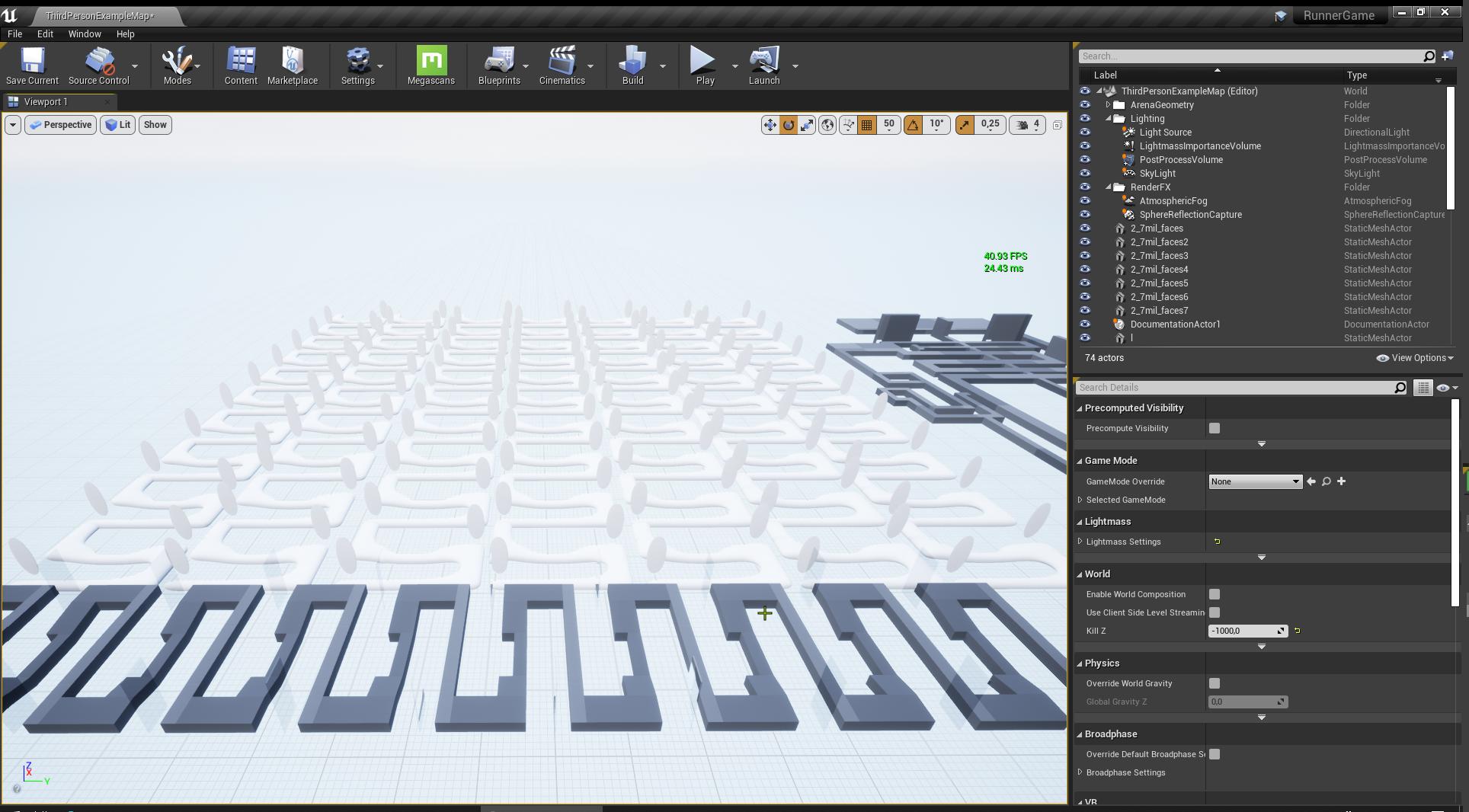


im just experimenting
Hello I am looking for a good 3D modeler to assist me in my unreal engine game development
Not sure if anyone is good at making car replicas of exact models
 still veldt
Anyone know how to supress these warnings from coming up in the Editor. Annoyingly I have these lights in my console buttons in BP's as you can see - the attenuations are not overlapping and all shadow casting for any lights in these BP's is already turned off all but I still get this warning. I have tried everything to fix them, I am assuming at this point it is a bug in recognizing the light states in my Child BP. For now I would be happy just to get the red warnings off my screen!
attenuations are nowhere near close and 'cast shadows' is turned off for each light but I still get the warnings
wheat hare
@plush yew a lot of people don't do car replicas of exact models because they get copyright claimed... There used to be one company that had the rights to most of them.
I rip them off asset packs
 ashen cape
I'd love to know what's causing that as well @still veldt
On some maps I got, it works fine with multiple lights. On others, placing 5 lights makes that thing appear sometimes.
 strong nest
I'm trying to use this to click on things in the world. It only works on objects in center screen. The same code works on other projects.
Insanely, I activated Click Events on the PC and tried clicking on objects that way instead. Same thing, it only works on objects currently in the center of the screen.
Anybody ever seen anything like this before?
ashen cape
Try using the draw debug line to see how it actually reacts.
Haven't tried using click events in-game before, so that's all I can suggest.
 abstract anvil
@strong nest
strong nest
The same problem persists for all 5 methods. Line tracing or GETHITRESULTUNDERCURSOR by both objects or channel, in addition to the PC's Click Events system all have the same outcome.
I can click on an object, but only if it is in the center of my screen. Is 4.25 broken? Is it possible the mouse cursor I see isn't my real mouse?
abstract anvil
Well, the cursor could be locked. If it's not showing on screen, make sure that's enabled, then make sure you can move the mouse around. Beyond that, make sure all events are firing. If that fails, check if the trace is hitting the player (it could be moving a very short distance). In addition, like 1-H above said, use the debug lines and set the time to something like 20 seconds then F8 out of your pawn and look at the line.
strong nest
Update : You're going to think I'm lying. Debug lines only show up if my mouse is actively moving, and only from certain camera angles. I think I got a haunted version of the engine or something, project is only 2 days old.
tiny sonnet
im pretty bad at landscape materials. Is it possible to make randomly generated sand/rock areas within the grass? without height maps or anything
strong nest
yes
texture sample (using PerlinNoise texture which most projects have) can be used to create patches. In this example, white would be Sand and black would be Rock
Here is a more robust example of the same approach
Note the check mark at the bottom left for USEMATERIALATTRIBUTES, which just adjusts the type of output pin
 soft fiber
When I make a plane face the camera, I notice its off by 90 degrees in the z direction... Curious, why that is?
Using Find Look at Rotation node...
tiny sonnet
@strong nest thank u!
soft fiber
The plane seems to be facing the y direction in the BP..
Is there anyway to take a print screen of a tab without cropping in PhotoShop?
 manic pawn
just use sharex
soft fiber
Ok, I'll have a look.
 low rock
Hi guys does anyone knows what cause this problem?
soft fiber
@manic pawn The apps good, but they need a few videos for Discord by someone who owns a mic.
manic pawn
hmm?
soft fiber
Just trying to figure out how to auto post to discord.
 versed raft
For some reason I can't get my character to turn run when I press a or d, here's my event graph
here's my animation graph
 cobalt stream
idk im new haha
eager oak
Why can't my character walk backwards? He has to change direction. Also the camera isn't perfectly snapped to his head. Any fixes?
Also how can I adjust jump height?
strong nest
@plush yew @abstract anvil After much deliberation and a horrible day, I seem to have solved the problem. All approaches you can use to try to click on things fail once the units away from the world origin get too high. I was in the millions doing some kinky space stuff.
abstract anvil
Unless you need the world bounds for some reason, you can disable them in the world settings
And yes, when things get outside the bounds, it gets weird. Even unticking the bounds check, you're still dealing with large numbers which the engine tends to math poorly
strong nest
@plush yew I told you it was paranormal phenomenon, stray too far from world origin and then it becomes UE TwilightZone
barren flume
Is there a video from the unreal engine youtube channel where they package a project
I don't know what the best way to package the project is
 tender flume
@versed raft Have you tried using blendspaces for that?
versed raft
What are blendspaces?
tender flume
It's like using state machines which you did
but much more easier is the way i'd put it
versed raft
Ok thanks
 restive vale
I'm working on a game where I place several Blueprints as map pieces. I would like to know if there is any way to duplicate this blueprints as instance over the map in orther to reduce draw calls
The map pieces are something similar to Minecraft cubes and maps are created manually in the editor
 rough finch
I'm uhhh
I'm new to Unreal and doing projects in general
and I closed the menu that you start with on the left that contains characters, blocks, shapes etc and I have no clue how to reopen it.
restive vale
window/modes
rough finch
ah ty
 blissful trail
i made a minimap but there are weird lines infront of the ai's
exotic thicket
@blissful trail check the UV's and textures, it looks like that line could be the texture repeating
 sonic gust
hey
I found this
File Utils
but I'm unable to call any of them inside a BP, the level BP, or a BP lib
are they BP callable ? (I'm guessing so since when you go inside their docs it shows a picture of a node)
proud narwhal
when you build a project where does it save the binary to?
plush yew
epics partnered with some company
to give us assets for free
I cant remember the name, can someone direct me
weary basalt
@plush yew Quixel?
tight prawn
can anyone direct me to optimizing assets for a mobile game?
 scenic spruce
hi
when l opened unreal project browser
l selected thir person and clicked next selected mobile platform
and create project
when editor opened play game
not game joystick {mobile ] BUT L WATCH YOUTUBE VIDEOS WITH JOYSTICK
maiden sundial
Anyone know when the new free assets are here ?
 sweet wagon
Should be today
Rerolls every first tuesday of the month
Time exactly no idea. But today
sweet wagon
I thought so too
Till a day ago
When I read in here that someone said every first tuesday ^^
maiden sundial
Sweet, hope this time i wont own already ~7 out of 10 asset packs XD
tight prawn
am i wrong to assume that reducing polygon count will reduce the packaged game size?
sweet wagon
I reduce polys alot, my file sizes stay the same however.
So no
Textures can be big in size however
So get rid of these you won't use
sweet wagon
should be fine
I would still check in the explorer how much space they take up and generally erase what you won'T need/use
 woeful wadi
when do the new monthly free assets come out
storm vapor
hi i opened my project from new pc, but it isnt opening about 30 minutes it is loading, is it normal ?
sweet wagon
"Should be today
Rerolls every first tuesday of the month
Time exactly no idea. But today"
sweet wagon
A mystery, yes
woeful wadi
what assets are eligible
because what are the odds two synty ones and two of those magic fx packs got on there
I really hope there is more synty assets on there, I love them
plush yew
i wish to get some animation assets for free this month
plush yew


i need the hit event not to be on the destructible but on the hitbox
how do i do that?
is the hit event always stuck to the root?
smoky sonnet
anyone know how i can test my app with goggle play console
i created an intern test track but dont know how i can test it now 😅
 grim tulip
Hi everyone, I'm a beginner at Unreal and was just wondering if anyone knows how to apply displacement maps? The first image is what it looks like in arnold renderer but I wanna get it into unreal.
abstract anvil
@grim tulip You have three basic options: parallax occlusion mapping, bump mapping, and tessellation. I'm not awake enough to explain anything, but there's good tutorials and documentation for each.
prisma plank
I have 1 big wall, and there some rooms extruded in.. How right to texture it? 1 mesh and multiply materials, or separate this rooms with different textures? How right ?
abstract anvil
@prisma plank It depends on how the UVs were unwrapped and if there was more than one material assigned to it during its creation. There isn't enough information to properly answer your question.
prisma plank
Because, when i separate room from mesh, there light not proper build...
abstract anvil
If you move the mesh after baking the lightmaps, you'll need to rebake the lightmaps.
prisma plank
I know about this. and not moving meshes
abstract anvil
Did you create the mesh?
prisma plank
OK. for now i have 1 room extruded.. Wall was with brush geometry- was more light. When put this wall mesh light become less...
grim tulip
@abstract anvil Ahh nicee cheers! 😁
prisma plank
This room extruded in wall...
Or, i have same room, but separated... when put in- there less light builded..
So- what right workflow on this? 1 big mesh with different materials? or separate them
abstract anvil
There are a few things to think about here. Typically, it's better to have less materials so you have less draw calls, so if you can make it a single mesh with a single material, that would be best. However, if you do that you need to make sure to increase your lightmap resolution since you're increasing the surface area. If this is going to exist in a small area, you can get away with having it as multiple meshes with multiple materials.
prisma plank
Problem when you have such big wall- there not good will show textures normals..
same room, but separated- less light...
and buggy.. UV proper
same..
abstract anvil
That's true. Even with a 4k texture, when placed on such a large surface it won't look great up close. A lot of this really depends on how the player is going to see the mesh.
prisma plank
Simply intresting how is proper workflow- 1 mesh with diff materials, or 3 meshes with diff materials... but you see ... strange light at last screenshot on eparated room ..
maiden sundial
That's true. Even with a 4k texture, when placed on such a large surface it won't look great up close.
Luckly we can scale the texture if we make it a material
 foggy berry
can i force discarding the baked lightmaps?
apart from setting everything to movable
abstract anvil
@foggy berry tick Force No Precomputed Lightmap (or something like that), in world settings at the end of lightmass settings
foggy berry
but that doesnt drop the already existing lightmaps
abstract anvil
You have to bake lightmaps once you check that
abstract anvil
@maiden sundial Yes, but that only works if your material is tilable. It doesn't work on something with a specific UV map.
maiden sundial
True, thought only about the tilable's
prisma plank
Left created mesh with extrusion, same material. Right with brush geometry......
but light differ..
abstract anvil
I generally try to stay away from using brush geometry unless I'm blocking out a level for these reasons.
vocal herald
why everything is black except ui if I turn on Mobile HDR?
 frank oar
Hi guys...
I am in the blueprints channel with a question about accessed none and the 'Is valid' node.
it would be awesome if anyone has a second to check it out...
 jagged zealot
Hey everyone.
I'm working on a small project that involves custom gravity physics and moving around smaller planetoids in 3D space. As such, the limits on the camera's angle are becoming a hassle--namely, the fact that you can't rotate it past straight up or straight down, which makes sense in most contexts, but the concept of "up/down" are totally arbitrary in this project, so the camera is just janky sometimes.
Is there a way to make the camera freely rotatable without those built-in limits?
abstract anvil
@nimble steeple Yeah, it has to do with the player camera manager. I don't remember it exactly, but that's where the constraints are handled.
jagged zealot
I'm guessing that's something you can mess with by making a custom PlayerController blueprint?
abstract anvil
Yes, in your player controller class
You'll have to create and assign a custom player controller then create and assign a player camera manager. Under these options you can change the mins and maxes
jagged zealot
yep, just made a PlayerCameraManager and found it there. Thanks! :D
 dawn gull
I'm trying to switch my unreal project's version for a source built after I changed the MyProject.Target.cs to support dedicated servers and I get this error:
c:\Users\TwistedWizard\Documents\Unreal Projects\MyProject\Source\MyProject.Target.cs(19,12) : error CS0246: The type or namespace name 'UEBuildBinaryConfiguration' could not be found (are you missing a using directive or an assembly reference?)
ERROR: Unable to compile source files.```
I'm following this tutorial. https://www.youtube.com/watch?v=94liD8Sfs8I
I know it means that UEBuildBinaryConfiguration does not exist but how can I fix that? ashen orbit
Does somebody know of one blood splatter particle effect that is free? Just to try out?
Because I'm tbh really not sure if I want to use such effects so I need to try it out.
abstract anvil
Mobile uses different shaders which don't support all of the SM5 options.
vocal herald
it looks perfectly fine on es3.1 mobile preview
abstract anvil
Not sure then. It could be using a different shader, it depends on what hardware you're using.
ashen orbit
I'm using a binding function to cast to get character health, how bad is that?
 fast hinge
There seems to be features in the latest UE version that arent documented, do we know who to contact to find out more information?
 ember star
Is there an easy way to construct an object by class, ref the class by string?
trying to load an inventory of saved items
exotic thicket
@fast hinge unless you're a big game studio the options seem to mostly be: read the source code
or post here or on the forums and hope that someone else knows
 late loom
any1 knows how to create a follow camera in sequencer??
plush yew
is there no unreal fest before 2020?
if there are, i wanna see the videos regarding gamies
oh i think its this https://www.unrealengine.com/en-US/events/unreal-fest-europe-2019

Unreal Engine
Unreal Engine is the world’s most open and advanced real-time 3D creation platform for photoreal visuals and immersive experiences.
fast hinge
@fast hinge unless you're a big game studio the options seem to mostly be: read the source code
@exotic thicket thanks mate, all this buzz around UE but very hard to develop and integrate with. Coming from a film perspective, not gaming
exotic thicket
yeah some parts of it are not super beginner friendly
limber mesa
is there a way i can use a timeline in a function
late loom
any1 knows how to create a follow camera in sequencer??
 thorn vector
the free of the month is here

Unreal Engine
From loungeable living rooms to craggy canyons, download the tools you need to create new worlds and experiences with July’s free Marketplace content.
limber mesa
thanks
wheat hare
Free content leggooo
late loom
this month free content is bad
wheat hare
Stylized character kit looks fun
And I like the idea of making dynamically generated interiors with that archviz pack
I have a game I've been grinding on that's set in an old house
 ionic hamlet
quick out of context question: is it safe to try overclocking a monitor?
rocky radish
i dont think it is
ionic hamlet
@late loom it doesn't seem that bad
 violet sparrow
might be a "its bad cause i can't use any of it" kind of bad
rocky radish
i think its kinda disappointing imo
ionic hamlet
I'm interested in the meadow and photorealistic landscape
violet sparrow
@ionic hamlet is the "overclocking" part of the functions of the monitor?
like Acer's XB271U is default 144hz but you can "overclock" it to 165? thats fine and dandy
violet sparrow
if you have the option, either in windows display settings, or nvidia control panel, or the monitor settings itself, its not a problem
 sleek solar
Make sure that drivers are up to date and hardware is compatible with the engine
 honest vale
what kind of a PC do you have?