#ue4-general
1 messages · Page 784 of 1
 hasty osprey
 honest pivot
BTW that ur project screenshot??
hasty osprey
just from the skeletal mesh editor
honest pivot
btw @plush yew thanx for the video
i see, but it goanna take a lot more time to finish that character, IMO you need to tweak the skin material
hasty osprey
yh its too glossy now
honest pivot
@plush yew it took me way to long to see the cat
hasty osprey
i think i could've doen a better job on the ripped part of the cape as well
hasty osprey
am not gonna work on that, just doing the model for now
honest pivot
@hasty osprey you dont use any Source Control ??
hasty osprey
no
 hasty osprey
i can just make my anims in 3ds max and then import them to the engine to see how the character moves
honest pivot
well i use blender
hasty osprey
havent dabbled that much into source control and stuff yet
honest pivot
oh so you also do BP/c++ ?
hasty osprey
no not that either haha, UE4 is more like a middle ground for me now where I just make the models import them apply AnimBP's, Physics and stuff for then to just post the model for others to use
honest pivot
ok
you have a very different workflow
i mean different than me
not in a weird way
honest pivot
oh, ok 3D artist?
honest pivot
as a hobby?
hasty osprey
yh more like that
honest pivot
oh ok, i am an indie dev using UE
hasty osprey
ah ok cool, so you work in the industry nice
honest pivot
well more like i like the freedom this medium have
hasty osprey
ahh understand
honest pivot
yeah, just wanna be free and develop games
hasty osprey
Noice doing what your happy with is a good policy, well we might have dragged for a bit. I can contact you when im done with my work tho, bye for now then, have a nice day:)
 vernal thicket
Is there a hotkey or smthn that hides everything thats not visible in game i,e triggerboxes?
I've pushed something and I have no idea what XD
I somehow hid UI and Collision?
Fk knows
And now all collisions are showing.. editor restart needed me thinkum
nvm use defaults. sorted
 plush yew
g for game view
will hide/show camera/triggerboxes etc
Hi guys, anyone know how can I determine how close the raycast is to an object?
honest pivot
Hi guys, anyone know how can I determine how close the raycast is to an object?
@plush yew what u mean?
 somber quail
well if the raycast hits something you should have access to a distance pin if you break the struct
 ancient lotus
question, has anyone ever had any sort of shakiness added to their animation from using layered blend per bone? im separating my upper/lower body for animation and i noticed my arms become shaky only from the layered blend per bone animation. if i bypass this node its fine. example of the shake https://gyazo.com/9580303ac3826b5ee122a60b74374d71
plush yew
well that's the thing, the ray cast will not hit the object yet
I want a UI to pop up before the item were hit by the raycast
there was a tutorial that would address this long time ago but I can't find it anymore
ancient lotus
what do you mean by how far the raycast is from the object? are you talking about where it starts?
somber quail
Well you have to define the vector the cast travels along so just do a trace back along that vector by the distance you want (which you could easily do with hit distance - the distance you want)
ancient lotus
the angle?
plush yew
Yeah
ancient lotus
do you know trig?
 runic iron
dot product
somber quail
Oh the angle
plush yew
So if A is small enough, I can POP up the UI
somber quail
I've not done trig since school so uh I can't help 😛
plush yew
well the tutorial I watched wasn;t about the angle it gave me a value betwen 0 to 1
but then this is the only way to illustrate it, with an angle
honest pivot
@plush yew simple vector math
somber quail
Just bought some maths courses in the udemy sale so hopefully getting back into it soon
plush yew
Oh wait....
i remember the tutorial only used vector length
will dig more tutorial see if i can find something
thx all
runic iron
If the vectors are normalized
honest pivot
@plush yew ill post a simple intro video for u
runic iron
Just dot product
and then you'll get the cos of the angle
If not divide by their magnitude beforehand
honest pivot
@plush yew for u https://www.youtube.com/watch?v=DPfxjQ6sqrc
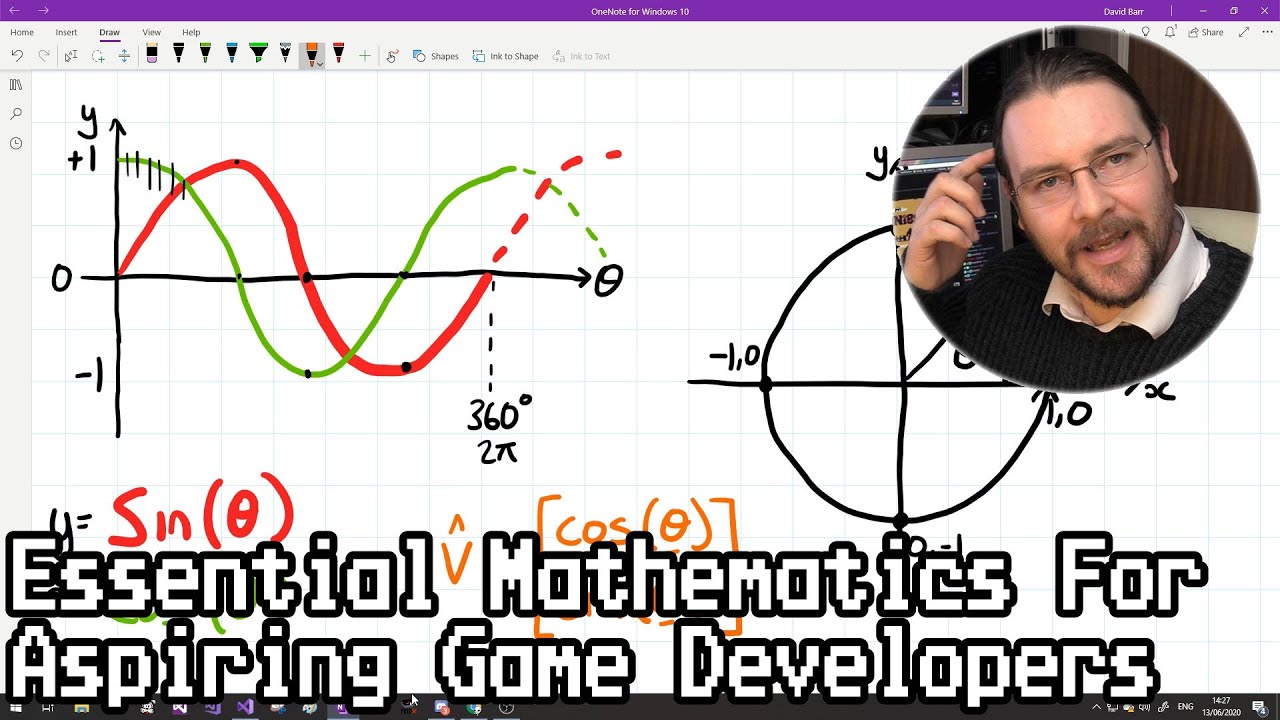
This video outlines what I believe are some of the core principles you need to understand to make dynamic computer games, covering vectors, angles and motion. I've tried to present it in such a way that highlights the relationships between these principles, so you can identify...
plush yew
ta
 dire coral
how do i stop the brightness change when i look at a building from upclose or at the groud
honest pivot
adaptive brightness
see in your top right hand side of viewport
or go to project settings
dire coral
cant find any adaptive brightness
honest pivot
it's called exposure
@somber quail thx mate, forgot the name of settings
ancient lotus
PostProcessVolume
honest pivot
what?
dire coral
its in project settings auto exposure
honest pivot
BTW does Steam VR + UE work with Discord Stream ??
dire coral
 somber quail
no reason why it couldn't
honest pivot
i'll try then
 tight prawn
why doesn't a Character's Capsule Component generate a collision on walkable terrain ?
honest pivot
@dire coral you created all assets ?
honest pivot
oh nice
dire coral
im still debating between using a level for my game or just cinematics
honest pivot
what u mean?
dire coral
Do i use this map that im making in my game or just as a showoff
honest pivot
well it need a lot of work both ways
 light lagoon
https://answers.unrealengine.com/questions/964896/view.html
Is it really possible that Epic won't release a fix for Windows 7 and Unreal 4.25?
plush yew
What is the Material: Dot Product Node in Unreal Engine 4
Source Files: https://github.com/MWadstein/wtf-hdi-files
dot product is the answer for my problem
honest pivot
dot product is the answer for my problem
@plush yew nice you found it, but i still recommend you do a basic vector study
 icy mulch
I'm having some problems with unreal engine editor I never had this problem as soon as I drag two or three foliage my fan starts up loud and freezes the pc and I get this message d3d being lost unreal engine editor
 wanton wadi
I'm sorry if this is not the right channel, I'm rather new in UE4 😅
I want to make a custom HUD, and for that I created a "Widget" blueprint. Now I can assign that one to the player via blueprints, but I know there's also a "HUD Class" setting in the project / default game mode settings. This one takes in a "HUD" class, so I made a new BP - Child of "HUD". I can select this one in the maps&modes, but this looks like a regular class with an event graph and such, it doesn't have the "designer" like my widget has. What am I doing wrong / what part did I miss? The documentation only writes about an example HUD but I can't find that
dire coral
just make a widget name it what ever add some stuff go to your character and to begin play add create widget and from that add to view port
and at create widget just select the widget that has you hud stuff
done for today
honest pivot
@dire coral NOICE
wanton wadi
Thanks Bagi, but I assume thats not the preferred solution, why else is there the HUD class selection in the default game modes? Isn't that the one that creates the "widget" for every player?
honest pivot
thats if you want to override the default HUD class. i think, not sure
wanton wadi
Yeah exactly, but thats what I want to do tho, right? Or is that a controller that manages a higher level hud, and should I still do the "attach widget to viewport" method?
I figured I'd have 1 HUD class per player / viewport, and that that was the selected HUD class
honest pivot
well u can change the default HUD class in project settings i believe
wanton wadi
yes exactly, but thats a HUD class that doesn't have a "design", like a widget blueprint does
left is the widget, right is the child class of HUD
I can select the right one in the default game modes;
honest pivot
well i never did HUDs so i am not sure
wanton wadi
wanton wadi
This is the widget one
(notice parent class User Widget)
this is the new HUD class
 ember star
i just filled up an SSD with appdata, can i delete that?
honest pivot
isn't that a windows specific issue ?
@wanton wadi Can you update when you figure out the HUD thing
wanton wadi
@honest pivot yes, like I said, the one is a widget and the other is a HUD 😅 I can only select HUD classes / interfaces in the maps&modes
honest pivot
yeah that i understand
i thought you were having problem with what the HUD class was attached to
wanton wadi
Well, not really, but I think my main question would actually be: what does the HUD class do?
honest pivot
@ember star I dont suggest u delete it lot of other program use that folder
@wanton wadi https://www.youtube.com/watch?v=TeXBkqrlAZI

What is the HUD Class in Unreal Engine 4.
Source Files: https://github.com/MWadstein/UnrealEngineProjects/tree/WTF-Examples
Note: You will need to be logged into your Epic approved GitHub account to access these examples files.
wanton wadi
Thanks! Watchig it now 🙂
wanton wadi
Aaah okay, so HUD's are outdated and I should be using Widgets anyway 😄
 next badger
no, it's a common practice when you don't care of managing those
wanton wadi
I do 😅 I want my code (BP's) to be clean and filled with good practices
next badger
if you do have multiplayer, split screen, etc...your option will probably be HUD
wanton wadi
So, should I make a child HUD class, and do this "spawn widget" inside of that class?
next badger
@wanton wadi read this discussion https://forums.unrealengine.com/development-discussion/blueprint-visual-scripting/30025-what-is-the-appropiate-relationship-between-hud-and-widgets
Unreal Engine Forums
Build powerful visual scripts without code.
wanton wadi
Ahhh that URL looks promising
next badger
@wanton wadi what i do, is i spawn custom Canvas in HUD and add widgets to it, but that may not work for everyone
wanton wadi
Allright 🙂 yeah I need something futureproof. This is going to be multiplayer
(this thread is a good read by the way, thanks)
Eventually its going to show the inventory of the player, which is lateron also accesible by other players
next badger
widgets and hud do not exist on server, only on clients, so your only way to update UI is by PlayerController, which HUD is a part of
viewport is higher level abstraction, and you only can access it via c++
 prisma plank
What soft you using for recording your screen?
wanton wadi
Allright, so I now have my new HUD_HUD class (child of HUD), and that event graph looks like this:
@prisma plank OBS
next badger
if you interested in use of Slate, or custom input handling, you may take a look on Shooter project example, from Epic...i find it a bit complicated however
 marble kayak
I think the Visual Studio Installer update progress bar is going to outlive the Corona virus.
wanton wadi
in my player "hover" event (when he's looking at a deployable to get its name), this is what happens:
is that correct?
I'm not sure why I don't have "get player controller" without inputs in this function tho, its running inside the BP_Player, which should have a controller assigned to it 🤔
next badger
@wanton wadi player controller is not assigned to anything, it possess...and it possess different things, and it may be different on client and server
wanton wadi
Right, I think thats what I mean.. The user spawns in and posesses a BP_Player instance
this "possesion" should be known by the pawn BP_Player, right?
next badger
GetController is what returns controller that possess current pawn..if any
 scarlet birch
I'd call it something other than HUD to avoid confusion.
wanton wadi
so this should be correct?
Thanks @scarlet birch 🙂 what would be a good name? Would I split up the widgets based on components? e.g. "hotbar", "inventory", "pause menu"? Or would that all go in 1 widget?
scarlet birch
I ussually go with "W_ "or "UI_"
next badger
@wanton wadi yes, but you can store casted HUD variable in your controller, so no need in casting it every time
scarlet birch
ugh
wanton wadi
@next badger yeah thanks that was going to be my next step 😅 these long lines look horrible
(and don't perform well)
scarlet birch
lol ok cant use underscores like that in discord
scarlet birch
I ussually just prefix with something that lets me know I'm using a widget. HUD implies it's a HUD
 tight shell
How does it take several times as long to delete a folder of assets than it does to download and import it xD
next badger
@scarlet birch you actually can by prefixing them with slash _
wanton wadi
I come from a very different engine where i'd call the users' interface (inventory, healthbar etc.) all part of the HUD 😄
so thats where that horrible reference comes from
scarlet birch
UI/_
wanton wadi
\_like\_so\_
 next badger
@scarlet birch backslash, my bad -_- you'll notice character turn darker
next badger
``` - the only reason i've learned how to use slash prefix
 wet sphinx
just tried to use version 4.14.3, is it normal that it wont show me created plugins in content browser ?
 urban quartz
Hello! I've been using blender for over a year and half now and I want to get into Unreal Engine. Are there any good tutorials on learning the basics and blender to unreal workflow?
 floral mesa
the basic workflow is simple
ue4 can use .obj & .fbx formatted models
blender exports in both those formats
when you export a model from blender as an .fbx make sure you check settings in the right pane of the export window. youll want to make the smoothing type "edge"
dont check the create tangets box make sure that is unchecked because Ue4 will compute the tangents
depending on what youre working on youll want to mix in the ue4 substance plugin and a manual substance workflow into your processes
like for mofular buildings id use the plugin so i can make material instances that are shareable between many assets, and ill send models into substance for detail painting
severly limit the amount of materials in blender, and paint as many details onto one material as you can or merge obejcts together in engine to merge their materials
this helps limits both drawcalls and material compiler instructions
@urban quartz
cgcookie are actually game dev focused blender tutorial authors. and they are very kind, helpful, and affordable. they also alow members to download the educational content
oh yeah, triangulate your final mesh before importing into substance or ue4
and you want to master uv mapping. you dont necessarily need to make lightmap uvs in blender ue4 will generate them so long as all your meshes uv shells have enough space between eachother.manual uv's actually take a bit of time whther you have the concept down or not
constant tweaking and stuff, so i guess i lied. nothing is simple. it seems simple after awhile
hopefully you actually read this and i didnt just waste my finger strength
urban quartz
Ok, thanks!
 thorn burrow
@floral mesa I'm not Oh Boi, but I found this helpful and I'm gonna save it on a word doc
floral mesa
glad i could help
 novel mauve
Hello guys, i keep getting this error message lately, does anyone knows the solution ?
knowing that i expanded the pagefile with a descent amount. it should work good, and it only happens to me now, on existing projects that have no problem before.
 mortal cedar
Boris Vorontsov published an article on normal map shadows
Normal Mapping Shadows article
I'm curious if we will see something like that in unreal
thorn burrow
No idea. More knowledgable people might be able to better help you if you noted the version, and what exactly you were doing before the crash.
mortal cedar
just strted to read
novel mauve
it's 4.25.1 the latest version of unreal
i also downloaded the latest version of nvidia drivers, didn't fix the problem, and i use the latest version of windows 10 too.
also made sure the RAM is near even the half consumed, only 13GB/32 the dedicated GPU memory also didn't change while monitoring this issue, as well as the GPU Memory.
i will try to verify the UE4 4.25.1 version now and give it a try. maybe the version is corrupted or something 😮
 hidden knoll
Does anyone know how to pause and resume Projectile Movement?
thorn burrow
There should be stop movement immediately node. You could also try activating and deactivating the component as needed.
 silver crown
@novel mauve video memory != system memory
system memory = RAM + pagefile
video memory = your gpu VRAM
What GPU do you have?
hidden knoll
k thx
floral mesa
@hidden knoll how are your projectile movements incorporated into the project? what mehtod was used?
method
oh you got an answer sorry
hidden knoll
I have a knife actor that is spawned when the character presses a button and it has some initial velocity to propel it
I just need to know how to resume the velocity
after it is stopped
floral mesa
im gonna fgo ahead and say, idk
novel mauve
@silver crown i have RTX 2060
novel mauve
the map is not even opening, it crashes on start, how can i edit the textures on meshes, maybe it's beyond the limit.
floral mesa
which is plenty for like most projects
novel mauve
yeah and also i was monitoring the VRAM while opening the project, it's nearly 10% usage
silver crown
Chrome in particular tends to be a VRAM hog too
novel mauve
i did close all other applications restarted multiple times.
 exotic thicket
I've heard that VRAM error can happen due to some other issues besides VRAM too which is kind of confusing
I've had it happen when I've had UE running for a long time so it seems like a bug really
novel mauve
@floral mesa it didn't give me any error messages except this one, i don't think it reverted to integrated Graphics
floral mesa
i had one of my rtx2080 super just die like 3 days after it got here i had to have it replaced
@novel mauve good thats good
silver crown
An OOM error is unlikely to be hardware related
exotic thicket
Worth trying to disable the integrated GPU from BIOS just as a test
multi GPU setups can sometimes cause random issues :P
floral mesa
@silver crown interesting, the first thing my mind went to was hardware
silver crown
Just check your log - it'll tell you what's happening
Maybe it's trying to create a huge texture
novel mauve
@floral mesa sounds like a relief 😄 lol
floral mesa
yeah that could be an issue
ue4 supports specific resolutions
if you have a weird texture it could the the entire issue
 gaunt vine
This one is for the Moderators or Rulers that be. . . What '#' chat group is my best bet, for questions regarding real time Ray Tracing for cinematics? I've been camping out in #cinematics. But doesn't seem to get as much traffic for ray tracing issues . . . Just want to make sure i'm in the right spot for my questions. Wasn't there a '#raytracing' chat before? 🤔 Thanks ahead of time. Any suggestions would be greatly appreciated.
novel mauve
@exotic thicket i'll try to see the log now and see what's causing the issue, can you tell me where can i find it ?
silver crown
Maybe try your chance in graphics @gaunt vine
floral mesa
so on a fresh project can this error be replicated?
because you could migrate folders until the problem occurs to figure out where it is as well if your project is huge
gaunt vine
@silver crown - Okay, cool. Thx!
novel mauve
@silver crown it happened with multiple projects, different ones, and recently i tried it with the Modern City Downtown that i've got from the marketplace
novel mauve
@floral mesa nope, really no, the Modern City Downtown project i used it as is,
floral mesa
wow. ok this issue is gonna bug me. as phy said, the only way to figure this out is to look at the error log
floral mesa
in engine, youe engine is crashing right and after which youll get a crash report
i wanna see that
silver crown
Saved/Logs
novel mauve
maybe it's a bug in the 4.25.1 version ?
silver crown
Quite possible actually
floral mesa
wait a sec
does your project have ray tracing enabled?
i did have issues everytime i had that enabled. weird... weird issues
and the issues were material & shader related crashes
but never the same error as you. i never ran out of memory
novel mauve
nope i didn't enable ray tracing,
but i will double check if it's enabled. i'm checking the log file now too
silver crown
Just send it here 🙂
novel mauve
Log File
[2020.06.30-01.02.26:902][ 1]LogSubstanceLiveLink: Warning: Unable to send data along socket, closing connection
[2020.06.30-01.03.35:535][206]LogSlate: Window 'Plugins' being destroyed
[2020.06.30-01.03.35:538][206]LogSlate: Window 'Plugins' being destroyed
[2020.06.30-01.03.35:538][206]LogDirectoryWatcher: A directory notification for '../../../Engine/Plugins/' was aborted.
is this the start of the problem 😄
hidden knoll
Does anyone know how to make everything black and white with a button press?
Like a widget or something
novel mauve
black and white in what exactly ?
hidden knoll
Well I want to make the saturation of everything to 0
novel mauve
i think you can use the post processing volume and switch it on and off
hidden knoll
oh awesome
novel mauve
you can add a post processing volume and there you can find a saturation control, you can play with it whatever you like,
Just make sure to turn on "infinite extend (unbound)" after placing the PP volume to affect the whole map and ignore the bounding of the PP Volume.
hidden knoll
okay
novel mauve
@hidden knoll good luck
hidden knoll
Okay thanks!
floral mesa
https://forums.unrealengine.com/community/general-discussion/1387976-crash-unreal-engine-4-18-1 this thread was conversing about that issue as well. idk if there is a solution. id stick with psy's advice first and then if its not resolved climb this thread
Unreal Engine Forums
I ask you to pay the most attention to my friends and who can help in solving the problem! The latest version of UE4 (4.18.1) I'm trying to start my project or
novel mauve
as long as you use "Kakashi" as a photo i would be glad to help lol 😄 big fan
hidden knoll
@novel mauve Wait so after I reference it in the bp, how do I set the saturation?
Oh wait! I figured it out! I added post proccessing to a physical object
and I had the object spawn when I pressed a button
epic
novel mauve
@hidden knoll you can add a set "Settings" node and edit the values in the BP
hidden knoll
Oh okay, thanks for the help though!
novel mauve
i guess spawning a post process volume is not a very good idea,
hidden knoll
oh
novel mauve
i prefer using a key to toggle a post process volume on and off is a better solution
hidden knoll
Cause of lag?
novel mauve
you can end up having lots of PPVolumes by spawning them, if that's even possible actually didn't try to spawn PPV before 😄
yeah it will mess up lots of things.
hidden knoll
Oh, would having a toggle that destroys the actor help?
novel mauve
you can just get a reference to the PPV and set enabled bool on toggle
hidden knoll
Oh epic
novel mauve
no problem, glad to help.
actually i didn't get the problem source from the log file, or didn't understand really 😄
could it really be the dust causing the GPU to act crazy?! i didn't clean the PC from quite a long time to be honest.
hidden knoll
@novel mauve Do you know how to have the post process only affect a certain area of the map?
novel mauve
yeah just disable the (infinite extend (unbound) and use the post process volume boundaries to adjust the affected area.
hidden knoll
okay
 left pelican
Can someone help me with figuring out how to make a layer of a widget move with the cursor?
Or is there a tutorial i can follow?
Nvm, may have just found something
silver crown
Size=2048x2048x120 PF=10 D3DFormat=DXGI_FORMAT_R16G16B16A16_FLOAT(0x0000000A), NumMips=12 @novel mauve
It's trying to allocate a huge 2048x2048 render target, and failing
silver crown
The question is why does it try to allocate the render target
Failing is expected in this case
novel mauve
so, is there any solution ?
silver crown
Try to reproduce in a new project, check that it works fine on 4.24, try on another pc
then make a bug report
novel mauve
okay, but that was an empty project btw, just added the marketplace project to it.
silver crown
LogD3D11RHI: Driver Version: Unknown (internal:Unknown, unified:Unknown)
that's no good
novel mauve
i will also try it with 4.24
silver crown
Reinstall your GPU drivers
novel mauve
i did,
silver crown
Using the official nvidia installer?
silver crown
Probably
novel mauve
okay then i will try that now.
could it be that the GPU is falling apart ?
it has not been used much really
silver crown
No, it's a software issue
silver crown
Try checking for windows updates as well
silver crown
well
novel mauve
only the last log report
silver crown
try again, but without being over RDP
silver crown
Because over RDP it makes sense for it to not find the GPU driver
silver crown
Sadly I won't have the time to help you much more - but check in the log if it finds the GPU driver correctly this time
If it doesn't, it's a GPU driver issue
novel mauve
new log
silver crown
Ok unreal bug then
novel mauve
you had helped me more than enough, and i'm really thankful
silver crown
although
mmm
1077.811MB total
So currently you have roughly 1GB of VRAM allocated by Unreal
novel mauve
what made unreal only allocate 1GB ?
silver crown
The render target it's allocating is max 1GB
so it should fit in memory
Might be a driver bug then
or even a GPU issue
Maybe try some GPU memcheckers
and rollbacking to a stable GPU driver
that stuff
novel mauve
okay i will try those
one by one
thank you so much, at least i have some work to do to know the problem, before your help i was clueless.
silver crown
Log files are always the answer 😄
novel mauve
if only i can understand what's written inside 😄 lol
silver crown
always start by the end - that's where the important stuff is
but ye it's tricky hehe
 bitter orchid
Maybe Phy can help me with something simple? lol
silver crown
I've already spent way too much time here - I'm out
bitter orchid
fair enough. See you friend.
novel mauve
@bitter orchid you can name your issue and anyone has the answer can help
bitter orchid
I want to create a curved ramp. Similar to the curved staircase. Is that something I can do in UE4 or do I need to take that to Blender?
 supple wyvern
im making an fps
is there a trick to making rounds deplete in the magazine without making 31 meshes
i wanna be able to look through the window and check my bullet count
novel mauve
@bitter orchid i think that can be achievable by making a spline based mesh, and control the spline points in the 3d space, x,y,x... but i thing for better results you can model them in blender if it's a single mesh.
@supple wyvern i think you don't have to make 31 meshes, make only one mesh for one bullet and all the others can be instances from that mesh i guess
 peak hare
is there a trick to making rounds deplete in the magazine without making 31 meshes
@supple wyvern I don't think you supposed to create 31 meshes....
that will be very unoptimised
hidden knoll
Does anyone know how to give an actor a tag in-game?
 gilded plinth
Evening all. I'm in the early stages of a game that has procedural tile spawning elements similar to infinite runners and randomized map dungeon crawlers (except the level constructs over time at run-time). Could anyone help me brainstorm where I should put my spawning logic, i.e. the functions to spawn tiles? I currently run the spawning functions in game mode and the tiles reach in to game mode to get their next spawn transform.
I'm pretty sure game mode is a bad choice because i would like to keep the possibility of adding some simple multiplayer and it seems a bit convoluted to even think about reaching into gamemode by way of passing variables to a client accessable class from game mode since there is no game mode on a client.
@hidden knoll you mean after you already are in play mode?
hidden knoll
yes
wait
I said that wrong
I mean when you press a button it assigns a tag to the actor
while you are playing
Or if I can't do that, I need to distinguish which character did what (in local multiplayer)
gilded plinth
ya i dunno lots of info here but not super clear
Gameplay Tags can be used to identify, categorize, match, and filter objects.
hidden knoll
k
supple wyvern
@supple wyvern I don't think you supposed to create 31 meshes....
@peak hare right now im not worried about optimization. the game is in very early stages
 dawn plume
thanks unreal
peak hare
As you requested, you supposed to create like 3-5 meshes then create instance of them.
thanks unreal
@dawn plume totally can related, my harddrive is getting butchered by Cod and unreal
😂
tight shell
If any new people want a project to see how to do some simple things in cpp and bp to get this basic single player thing going on from scratch, pm me.
Still has some animation bugs and not 100% perfect https://www.youtube.com/watch?v=vOdlLjbkHjA
bitter orchid
I've got a problem that when my Physics Ball rolls up a hill the "hit" sound I have for when it hits walls just spams super loud. For the life of me I can't fix it. Any tips?
exotic thicket
It's probably repeatedly getting hit events or whatever you're using to test for collision, which then triggers the sound to play
 fossil wigeon
Does any one have any reference or documentation or sample on how to make a pawn that does it’s own thing unless told or commanded otherwise
bitter orchid
I have it set up to reallow the sound when a hit event occurs.
I just don't know how to keep that setting and still allow for rolling up hills. Some way to stop it from generating hit events when going up a ramp?
exotic thicket
You could try checking for collision angle or something
or maybe collision force, since it might be different with the collision going up a ramp vs hitting a wall straight on
there's a few other things like you could check for what kind of object it's colliding with as well
bitter orchid
Heres the code for the sound.
I can change the "Compare with" in my Compare Float to a higher number and that helps to an extent. but if I go much higher than 200 it doesnt play the sound when hitting a wall unless its absolute full speed.
I've tried to set a volume multiplier so that the smaller hits will be quieter in hopes that it would help but the Z value from my Break Vectore node is still spiking into the 200s even 300s when going up a ramp. Note it only happens if I have any sort of speed when going up it.
hidden knoll
I'm making a game with local multiplayer, and I need help figuring out how to make it so when one person presses a button, the event fires for them and not player0
Or with nodes that require 'get player controller', it gets the player index of whoever pressed a button
I could just make a different character for each player but I don't want to change every character every time I fix a character bug
exotic thicket
@bitter orchid you might wanna try to compare the hit normal angle and/or hit location. If it's below and/or pointing somewhat up, you could ignore it for the impact sound effect if it happens repeatedly
bitter orchid
I'll try to see if that works. I knew there had to be way to do something like that. Some close to "If goin up ramp - Dont Play sound" lol
I appreciate you. I'll give it a try.
vernal thicket
@hidden knoll you need to watch a few tutorials on creating multiplayer, UE4 a short series on it which i'd advise you watch, but a lot of multiplayer involves writing blueprints inside the player controller etc
hidden knoll
k
vernal thicket
I'dve thought each player would be given there own controller anyway so as standard when one controller pushes a button it won't replicate
hidden knoll
Well when I use a get player controller node I don't know what to use as the player index
vernal thicket
You have to create one I think
hidden knoll
How do I do that?
vernal thicket
I'm no expert at creating multiplayer, hold on
hidden knoll
okay
exotic thicket
@hidden knoll by "button" you mean buttons on a controller or in the world?
hidden knoll
On a controller
exotic thicket
Are you handling your input in the player controller or in the pawn?
vernal thicket

In this video we take a look at the finished project and step through each of the features that will be covered in this series. We show our functional Main Menu and its options, a lobby where players can chat with one another and select their characters for the game, some serv...
exotic thicket
Right, so in the player controller you can just use "get reference to self" if you need a ref to the controller for some reason
vernal thicket
Ducky use that playlist
exotic thicket
in the pawn you can use "get controller"
vernal thicket
@exotic thicket would each player be given there own version of the base controller?
You don't have to create like 20 controllers do you..
it's all from one controller?
exotic thicket
each player has their own player controller
 mystic holly
Anyone want to make a game together?
hidden knoll
That self reference helped with the 'get player character stuff'!
tight shell
If anyone wants this basic test project for learning, pm me and I will give you the download link. It has a good bit of cpp and blueprint both in it, made from scratch. I just finished so feel like sharing. Will likely forget about it in a couple days. https://www.youtube.com/watch?v=vOdlLjbkHjA
 hidden knoll
@exotic thicket I have a 'play dynamic force feedback' node, how would I get the right player controller for it?
exotic thicket
it depends on where you're calling it
hidden knoll
In the character bp
exotic thicket
"get controller" should get the current controller of a pawn
exotic thicket
ah, it might be returning a controller which is the base class of player controller
try casting it to player controller
hidden knoll
Wait I found a node that says 'set player controller id'
might be useful
Casting worked!
@exotic thicket Another thing, I have a collision box that is spawned when I press a button (it is acting like it's freezing time because global time dilation caused too many issues) and whatever actor it hits, their custom time dilation is set to zero, do you know how I can exclude the player who spawned it from getting frozen?
I had the idea of adding a tag to the player, but I can't find a node that does it
exotic thicket
you might need to use get tags to get the tag array and then you can add into it
hidden knoll
k
 dark rune
How do you set the player roll in a way so that pitch and yaw controls change with it
If you just do AddControllerRollInput the pitch and yaw controls will be wrong, for instance if Roll=90 the pitch and yaw doesnt match up with vertical or horizontal rotation on screen
 void barn
does github store your texture and materials and mesh ?
im trying to do source control
which program i can use to store backup for texture materials and mesh?
hidden knoll
Is there a node that duplicates an actor and it's velocity?
 shut minnow
I think this is probably a quick one - I am experimenting with listen servers using a very basic setup that spawns a character for each new client, handles possession, etc. Works perfect in single player, but when I add additional clients, the clients work correctly (can move their toons, replicate correctly, etc) but the server seems totally frozen, as if it's not receiving any input. Debug shows server BPs to be firing movement vector adjustments constantly regardless of kbm input. Feels like I botched something suuuuuper basic, but no clue what it could be.
 stable garnet
How can I troubleshoot a problem I'm having in UE4 25 where all shiny objects especially water if flickering like crazy as I pan around. No problems in 4.23/24 across about 10 different projects - so I suspect it's the latest engine.
 molten kayak
Ive got an interesting question: Is there a way to develop in VR using UE4? as in using a VR space to interact with the engine itself, rather than making a VR title.
shut minnow
Aha . . . sorted it. Problem was that the character BP had auto possess player 0 enabled. Why that would break the server, I have no idea. But disabling it sorted me out.
 green sky
can someone tell me what is the console command for checking blueprint performance or whats ticking please
 rain knot
Guys I have some general questions regarding Vehicles in UE4, if someone has worked extensively with them care to PM me? Won't be more than 5 minutes
 rigid belfry
is the marketplace working for everybody? i am trying to buy something but its saying there's an error
green sky
can someone tell me what is the console command for checking blueprint performance or whats ticking in BP please I was told that there was a console command
 dim arch
you can use stat uobject to find the cpu time for the uobjects in the scene, or use the scene profiler to record it
unreal insights tool has the most info for each frame
vernal thicket
Is there anything worse than a slow working editor? While I'm waiting for it to load I could be getting so much done 😠
 static ingot
I watch in the forum. "Go into your project folder and delete the Saved, Intermediate, and Config folders, and restart your computer. After doing all of this, give it another try and let me know if that helps. " shoud i delete the config ? I am scared that my first game completly broke.
molten kayak
@rigid belfry https://twitter.com/EpicGames/status/1277873666135597056

We are investigating an issue with game purchases not completing successfully in the Epic Games Store. We are investigating and we will keep you updated once the issue is resolved.
Likes
1649
 Twitter
its resolved now
rigid belfry
yeah i was just able to purchuase some assets
but thanks for posting the link, that's good to know
 ember path
Hey I got a quick question about licensing and my game's credits:
I remember to be required to mention the game was made in unreal a while back but I can't really find anything about that anymore. I'm making a free to play game, not using the UE logo. I just don't want any legal trouble and of course I'd like to credit Unreal, but I really want to do it correctly
vernal thicket
@rigid belfry you ever set up a door using timeline?
Anybody ever set up door rota
rotation using timeline?
void barn
if u publish a game
and your chara uses the same animation
like walking
attacking
as the one from free epic store content
does that infringe the copyright
?
exotic thicket
epic store content can be used in UE projects
they are licensed by default to allow that
void barn

so if u publish a game that ur chara is based off the free content from epic store
they wont charge u any money?

 cosmic ice
Hi, anyone have problem open content example? I get stuck at 39% for 30 minutes now.
 storm jasper
For adventure game,who is better?c++ or blueprint?
 honest vale
@cosmic ice wait some more
rigid belfry
@vernal thicket no i haven't, but you could have the door open on an event instead
vernal thicket
I've sorted it mate was easy haha
vernal thicket
Kinda wished I hadn't wasted 6+ hours yesterday trying to use level sequencers
rigid belfry
i wanna learn how to use the sequencer at some point
its just that i have really no need to
maybe i will once i have to cinematics and stuff
vernal thicket
It's easy to use tbh
 azure shore
hey is there a way to make lights work in orthographic camera? Ive been searching but nothing seems to work
 vocal herald
how to make viewport size to be proportional to fullscreen?
rigid belfry
@plush yew https://www.youtube.com/watch?v=0Q53V-KreDg

We will be showing a concept of Different Shaped Progress Bars where we can make a circular progress bar or even a non linear bar similar to the health bar in Kingdom Hearts.
Source Files: https://github.com/MWadstein/wtf-hdi-files
@plush yew you want to change something based on a text variable? so if text variable says "on", the light in your room turns "on", right?
@vocal herald i dont really know, but you can enter into immersive mode by pressing f11 on your keyboard
and press that again to come out of it
plush yew
@rigid belfry thanks dude i did not see that video 🤦♂️ i will try that now
azure shore
😐
 grizzled pike
what should I do next? (bottom = concept art)
rigid belfry
is the bottom image the actual finished project or just the reference?
honest vale
he said "bottom = concept art"
azure shore
bloody hell I am SICK of every unreal engine tutorial ever being practically silent, I just blasted my ears out when playing music because of how loud I had to put it for a tutorial
like dont get me wrong its great that people make tutorials but why are they ALL SO quiet?
rigid belfry
i feel the same way about youtube videos in general
honest vale
I'm usually like "text article or gtfo"
rigid belfry
when i am just chilling playing games, i have to keep my in game audio at like 10-20% just to hear youtube in the background
azure shore
I often prefer text tbh but thats probably because Im impatient
honest vale
text is better in almost every way
icy mulch
Is there anyway I can fix the unreal editor was working fine for weeks I get 3 messages
d3d being lost unreal engine editor
Out of Video Memory and it turns on off my display adapters
rigid belfry
forgot to disable user input, though it was somewhat funny
grizzled pike
;-;
 copper mesa
Guys, Any tutorial on using CineCameraActor as a player's camera?
 rocky radish
Guys, Any tutorial on using CineCameraActor as a player's camera?
@copper mesa why don't you use a normal camera as the player's camera?
copper mesa
I'm working on a visualisation project. The team wanted to use CineCamera looks but also wanted to maintain some controls.
I assumed Camera Actor didn't have the same features set as CineCamera.
vernal thicket
@rigid belfry 😆 bro you create that map? that's insane
 thick loom
@rigid belfry That village looks very nice!
vernal thicket
@copper mesa create a Character and delete/hide the Mesh?
rigid belfry
i wish... its this pack right here https://www.unrealengine.com/marketplace/en-US/product/advanced-village-pack i'll be using it to learn about cinematics

Create great looking environments fast and easy.
rocky radish
it kinda looks like the village from a project from the unreal online learning but modified 🤔 (sorry if that sounded rude)
oh
 bitter iris
anyone know what causes this? looking online an seems to be various answers
rocky radish
the index is 6 but the array size is 1 @bitter iris (at least thats what the error message is saying)
rigid belfry
try doing array minus 1 when getting stuff from the array
bitter iris
what do i just go to that location and -1?
rigid belfry
is ultimately there should be a "is valid" check for arrays i believe?
try dragging off the array pin and type is valid
 narrow mauve
every online tutorial for c++ in unreal ever basically is this = (Person just says the word they are typing expecting it to somehow magically give meaning and understanding about what it is doing)
rocky radish
facts
next badger
@narrow mauve you mean c++ online multiplayer or?
 glass yarrow
every online tutorial for c++ in unreal ever basically is this = (Person just says the word they are typing expecting it to somehow magically give meaning and understanding about what it is doing)
@narrow mauve
so true, there needs to be a cherno equivalent for unreal. Clear concise and explains the reasoning behind something
 quick kelp
I want my empty space in the level to have a solid color, currently when i use atmospheric fog it has a sky instead of just a solid color, anyone know how i can do this?
 dry wedge
hello someone could ask me a question about assets that are on the internet that are paid and are on free sites for download I can use these assets to create a game normally or have some restriction or I can edit it so that it doesn't look the same as the original one on markteplace someone can answer this question because there are many assets that are paid for and they are on the internet for free and I don't really know if I can use them in a game for example.
 patent crater
you can't, what you are asking is if you can use stolen items
no, you can't, if you do, and people find out, you're a gonner
 gloomy ginkgo
@dry wedge if you edit it well you can lol
patent crater
it's still theft and you're still held accountable
azure shore
I dont see why youd want to make a game with someone elses assets tbh
it wouldnt be your own game anyway
patent crater
it's fine with assets you bought and you're licensed to use
a tree is still a tree for example
you don't have to do it again
long story short, buy the assets you plan to use for your game. if you can't afford, do something else until you can
gloomy ginkgo
but he can use the cracked asset to work some money and then buy those assets right?
gloomy ginkgo
an idiot?
 mighty badge
hi one qestion how to share project / create collab with my friend
patent crater
you don't use stolen assets to make some money with the stolen goods and then buy them. that's not how it works. you get hired at mcdonalds and work your way up until you can afford it.
gloomy ginkgo
there are bunch of producers who use cracked VSTs to work money and they then bought those VSTs
patent crater
end of discussion on my end
 uncut sky
Hey, how i can fix this?
gloomy ginkgo
Avicii did that on Synthlet 1
rocky radish
doing that is idiotic imo
gloomy ginkgo
okay dude drugs has nothing to do with cracked VSTs or Assets
if no one notices that he/she uses cracked assets its okay but then he/she should buy those assets after he makes money
patent crater
i'm not allowed to talk to thieves or people that encourage thievery. bye
gloomy ginkgo
i said i am encouraging thievery?
I clearly said he/she can buy those assets after he makes money from his/her game
hard to understand?
rocky radish
that doesnt stop it from being thievery
 idle dome
the cops are gonna bust us for using cracked assets 🤣
 midnight gate
where are the constraits
the yellow thingies?
i made a new physics asset but it didnt automaticly made the constraints
wtf ue4
mighty badge
@midnight gate because eu4 does not always do it with attomatsznie sometimes need to sit and after improve or connect.
btw wtf how many bones
mighty badge
and you shouldn't sometimes use cloth simulation for dresses
plush yew
This is in Blender
Its Jointed up
Yeah
I like to blender smoothies too xD
Ok
Ay Lorash btw thanks tho
 ashen orbit
Hello guys, I downloaded a medieval map with included assets, textures materials etc... But it's downloaded in a zip and the zip contains a folder where there is .uproject and all the files that normally are attached to an unreal project. So I try opening the project and the DemoLevel and everything displays beautifully. Now I want to port this map to my already existing project. To do this i dragged all of the content to my other project. Now if I open the DemoLevel in my own project, it only loads terrain and lightning but nothing else. Any reason why? What am I missing?
I tried that aswell with same result
Might try it again though
well the whole map is empty
 wraith wyvern
do any of you guys have a good tutorial to use if you are making a sandbox game?
ashen orbit
This is the project i got to download
what do you want me to migrate?
well I want all of it, should i include the startercontent or is it redundant
ah chief that's going to become a lot of work of transfering the other project to this one hihi
wait does the exported files need to be direclty under the Content folder of my other project?
so i cannot place the migrated files into my maps folder for instance?
ah ok
that might be the issue let me try
So it's telling me its migrating the "Game" folder
which is above the medicalVillage folder
should I include that aswell=?
ok
yes
ok i transferred everything
migrated*
BRUH IT WORKS
Thank you very much
 fierce crest
Hi people, i have a question regarding sequencer, how to add a camera to the cameracut which is inside a recorded blueprint. Lets say, i got 3 cameras in a blueprint, the blueprint got recorded in sequencer and i want to decide later which camera should be in the cameracut. Is that possible? Actually the cameras show up in the track but they dont show up in CameraCuts-Camera-ExistingBinding
 grim ore
so you have 1 blueprint in your level, and that blueprint is being referenced by your sequencer?
 vernal bramble
Hello everyone, newbie on UE here, but familiar with other engines and gamedev. I have a question regarding reusable stuff. Specially when it comes to versioning. Is it possible to reuse BPs / Scripts to other projects? Like creating a github repo and upload stuff there, once I have a good BP working and then in other projects just git clone those and work with it (even if they were not created in the same UE project)? What are the requirements for this workflow in terms of which files should be uploaded to the repo, just the BP file? Thanks in advance, best regards!
patent crater
hey, you can create plugins with blueprints only. And you can then copy those plugins from project to project.
vernal bramble
so a plugin is collection of BPs?
patent crater
It can be. You have the possibility to create a "Content Only" plugin that contains just blueprints
vernal bramble
and that is done via explorer like packing things up or thru the engine itself?
patent crater
You can create it in engine
vernal bramble
awesome
my plan is to start creating things in learning projects but if I get something useful I might keep it for a serious project
plush yew
wdym by local folder? the video is on folder and separately I put it in the content folder of the project @muted trail
 muted trail
go to windows file explorer and find your local files for the unreal engine project @plush yew
then make a new folder called movies and put the video your are trying to play inside that folder
patent crater
@vernal bramble in the engine go to Edit->Plugins and press New Plugin. It will then allow you to select Content Only and follow the steps.
i'm using plugins for reusable stuff
plush yew
find your local files for the unreal engine project??? @muted trail
I have this
here in one folder I put the video for the tv
plush yew
okay
but I need to make the folder movies when I am inside the unreal engine not now in the file explorer-right?
muted trail
yes
plush yew
okay good
fierce crest
so you have 1 blueprint in your level, and that blueprint is being referenced by your sequencer?
@grim ore YEs, in that blueprint are 3 cameras
grim ore
Then you will have to use an event track or something else to swap the cameras. The camera cuts will only see 1 item, so in a blueprint the current active camera, or in a camera actor itself the 1 camera.
so you can add an event track to the Blueprint that has the 3 cameras, have the blueprint as the camera cut, and just activate/deactivate cameras in the blueprint at the right time or you can create 3 camera blueprints and use those or create 3 cameras in the sequencer and use them.
fierce crest
oh ok, so i can switch the cameras by activating and deactivating the others?`How does it generate a preeview then in cameracutz?
grim ore
the preview doesnt work well, it will just show the default camera
fierce crest
gotcha, thank you MathewW
vernal bramble
@vernal bramble in the engine go to Edit->Plugins and press New Plugin. It will then allow you to select Content Only and follow the steps.
@patent crater
Thank you @patent crater , I was looking for a tutorial regarding this, but I guess it's not that hard
grim ore
you can see 3 events I can call in sequencer to enable 1 camera.
and you can see the event track where it fires the events when I want them. The camera cuts track at the top will always stay the same tho 😦
fierce crest
i was afraid, i t works that way, Its not very smart, hope they gonna change it in the future, every camera in the blueprints should be addable to the cameracutz from my expectation
grim ore
the camera cut track just addresses 1 item is the issue, you want it to address 1 item and a sub item
most of the time people would add the cameras directly to the sequencer as a new camera track and go from there
 wary sail
I have a question I haven't been able to figure out for a few months because I don't really know where to look
how would I make a UI like this, where the 3D viewport part of the screen is resized to the upper left boundary of the window to make room for a slate GUI?
like the view isn't just being covered up, it's being re-aspect-ratio'd
grim ore
You can change the aspect ratio of a camera so that wouldn't be an issue. the issue would be putting it in the top left, which off hand could be done in the UI (since the game is all UI) using a render texture/target and a material
wary sail
would there be a significant performance impact?
grim ore
there would be an impact yes, but I dont think 1 would be signifigant
wary sail
ok, thank you!
midnight gate
its the same as rendering the level should be the same with performance
grim ore
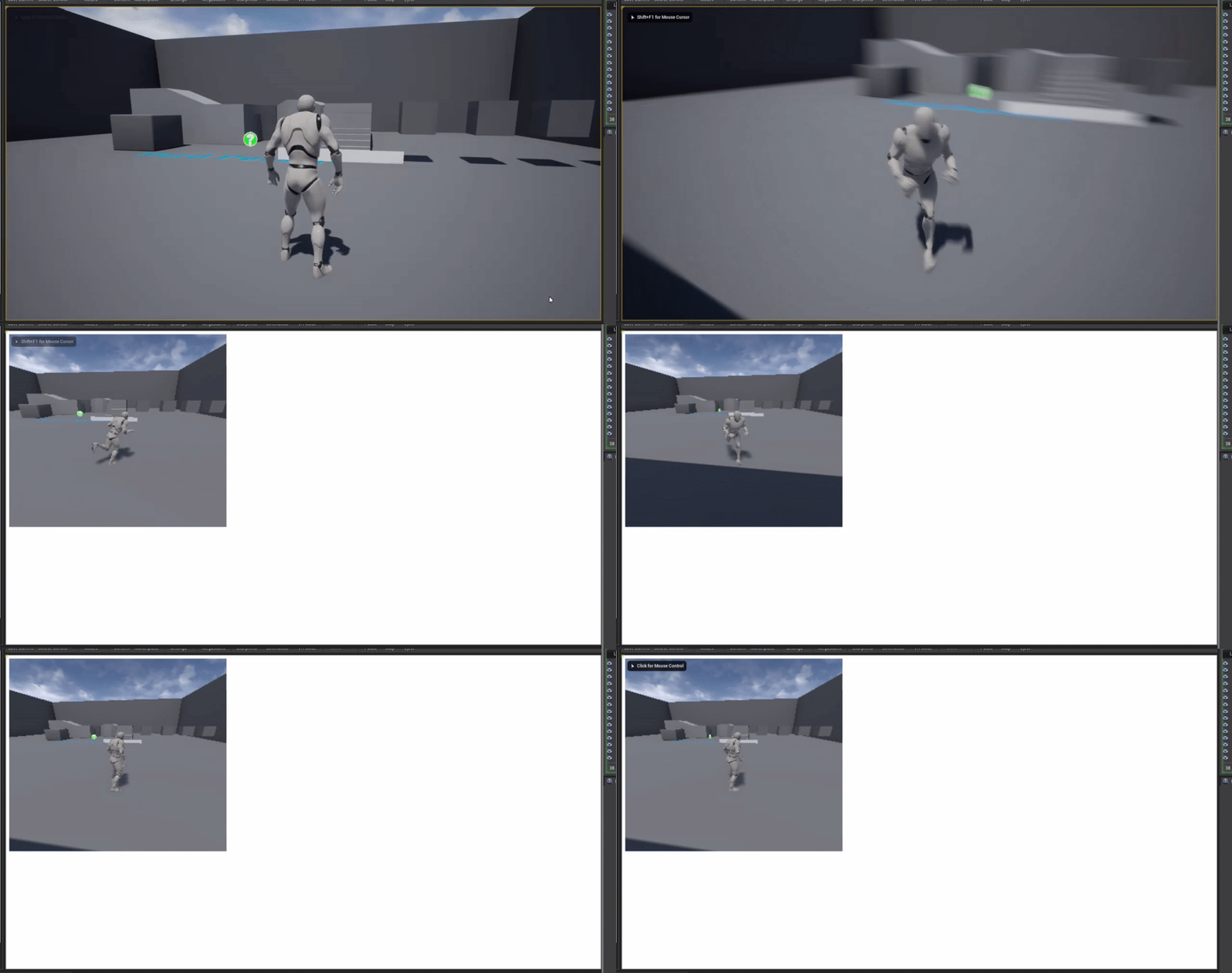
using a UMG widget to hold an image in the top left, the image has a material which is just a render target as the texture, the player has a scene capture component2d inside of it attached to the camera that targets that render target texture. profit
performance didnt seem to drop at all for me so yay for that
 light wagon
Has anyone used unreal's LLM (-LLMCSV command) to profile memory on windows? The .csv file doesn't get created in saved/profiling/llm/ . I have used memreport to generate memory map, was curious how llm compares with it.
 fast hinge
Hey guys, sorry to interrupt, there doesnt seem to be a channel to chat about this. I'm needing to do the following for a project we have coming up and wouldnt mind just picking up some pre-made tools as it seems pretty straight forward and I imagine someone has done this already. Save me figuring it out.
I'm pretty much after whats in this video: https://www.youtube.com/watch?v=M4Xy9vvpLvE&t=128s @2:00
I want to pickup a camera and walk around custom environments thats I'll feed in from Maya. Shoot takes/stills.
I've got a Valve Index to test with

Last Pixel created a VR previz and storyboarding tool during pre-production as well as completing 260 VFX shots for the film.
midnight gate
@fast hinge seems to be a ui widget on a actor bp quite simple
fast hinge
I'm a VFX guy, it does seem very simple but not knowing the backbone of UE I was wondering if someone had already done it
Having the ability to save takes would be another thing
I see there are tools for virtual cameras but they are all aimed at using an iPad or similar, not a camera in VR land
 zealous cloak
is ther a default Vive Controller mesh within the Unreal Engine?
 wheat hare
@fast hinge for me, getting the environments from Maya sounds like the challenging part of that
you could record the path of any object through a scene like you describe
I love this feature in VRChat and in games where you can move the non-vr player's camera
fast hinge
I did a quick test and it was pretty easy exporting an FBX into unreal. What was weird is that when re-opening the scene the links break and object disappears
I'm on day 2 of UE so its a whole new world for me really
Although very similar with the in depth stuff like blueprints etc that all makes sense to me, but just the general workings of UE seem unintuitive. Maybe I should watch a tutorial at some point
ashen orbit
So I've made so when my gamemode launches it picks a random player to become "EVIL". And I want this Evil trait which is currently expressed as a boolean in the player controller blueprint to make the player able to transform. My question to you veterans is if I should implement this button press in the player controller or in the character blueprint? As I want the character to be able to switch between the stances.
 calm crow
Hello, i have an issue, the site https://www.unrealengine.com/marketplace/en-US/ don't work proprely on firefox
Visit the Marketplace for free and paid assets for your next project.
 manic pawn
use chrome then
calm crow
that what i have to do, but i'm not connected and it's not easy to transfer bookmark from one browser to another
i don't know if i can found support or tell a manager of the website here
i have tried to disable my firefox addons (ublockorigin, idk about cookies, and facebook container and translate-this-page) but it doesn't change
the page work well, but when i search, it don't accept the words i use to search
bitter iris
anyone know how i can make a high res image of my map for an ingame map?
calm crow
create an ortographic camera and try render one big image resolution, or if you can't, animate the camera and make it follow a grid of the entire map, and try stich by hand using photoshop or gimp, or automated with autopano giga or something like that
bitter iris
was looking into it as
Squad has one in their mod kit
its an actor that with a click can do the entire map perfectly was awesome
ashen orbit
Ok I'm stuck on a very weird issue, would like to see if someone could figure it out.
This is my gamemode
it picks a random connected player and calls the PC
Now I've tested this, and it works
Then it goes here.
The problem is that, if the lobby host is the one randomly picked, it will set Can Evil Transform to True
but if any other player is picked it don't
So I'm thinking it has something to do with server/client side, but not sure how to troubleshoot any further.
vernal thicket
@ashen orbit check your BP Gameplay PC
 green prairie
Alright you beautiful people :-)
Question Time:
- I have a level, with doors that leads to shops and challenge rooms..
- The Player enters a "shop" door, and the shop level opens, the player buys stuff, and leaves through the shop exit door
- The problem is.. How do I spawn the player at the "enter shop" door out in the real level?
vernal thicket
Create an event on the exit and set the word location to a point just outside the door
green prairie
Everytime I exit the shop, I start at the levels player start location
But when entering the door, I load a new level.. So, how do I get that saved location to load, when the real level opens again?
makes sense?
vernal thicket
Yeah, you need to update the new location I suppose
Because your travelling between levels you'll need to use a game instance
So for instance, set a variable inside a game instance that says has entered shop and update the player start location
green prairie
I don't think I use game instance... Don't know what that is 😄
vernal thicket
A game instance is a blueprint thats accessible across all levels, any variables set in there are saved
green prairie
I was thinking about dropping a point (world location) out in the world, that saves with the level, and then loads again when the level loads? and then set player start location to that?.. Makes sense to me, just don't know how
ashen orbit
@vernal thicket well I've check it but I can't find a problem, there seems to be something with the host and the PC somehow
vernal thicket
I think you can drop a new player start into.the game and tell it to spawn at that player start but you will still need something that tells the player when he loads back in that he needs to spawn at this new location
ashen orbit
The host gets the variable set to True if he gets lucky enough to get picked at random but no other player gets that variable set to true when they get lucky
so I'm just hella confused as to what is causing this
vernal thicket
Yeah.. I'm not that experienced tbh but I'm assuming its playable as another character?
ashen orbit
well the idea is that when they get picked at random they can click F to do something
and only they can do so
but I feel like something is fundamentally wrong with how I'm doing it
I'm going to try to do it another way
brb
vernal thicket
Good luck
ashen orbit
thank you
green prairie
@vernal thicket Thanks #ScratchesHead
ashen orbit
Jesus christ I can't figure it out
OK this is the weirdest shit I've seen, must be a bug, but restarting Unreal Engine fixed it somehow...
vernal thicket
@ashen orbit what version you using? I've had issues on 4.25.1 with game instances being buggy
ashen orbit
Not sure, I'm kind of new to ue4
plush yew
If you released a UE4 game for free but accepted donations like on Itch.io, would the amount you received in donations be considered part of game revenue?
I should read the EULA but as far as I know this use case isn't covered.
ashen orbit
Ok something really weird has happened it sais I don't have unreal engine installed anymore
manic pawn
donations are revenue
plush yew
OK, thanks for the clarification.
manic pawn
but seems highly unlikely to exceed the amount required before any royalties are due with donations
if I remember right, it's $10000 each quarter and $1M total
if you're below that, no royalties
plush yew
Setting up donations at itch.io though is a PITA even though I live in the UK
Anyway ping me if you want to talk more, may try to get to sleep
ashen orbit
What's a fallback Struct Structure?
It happens when you project loads weirdly, just refresh all nodes
Thanks Varg really helpful!
 hybrid light
need help on how to stop sprint camera shake
grim ore
is your camera attached to something that is animating?
grim ore
so you want the camera to shake when not sprinting and stop shaking when sprinting?
just confused on what you want. Also your Stop Shaking node is not connected to anything so it will never run
hybrid light
stop shake when not sprinting
grim ore
go back 2 nodes from your Stop Camera Shake, look at the Branch, the Branch is not plugged into any execute on the left so it will never run
grim ore
well without anything running your Stop Camera Shake it will never shake if that is your goal
hybrid light
How do i use the branch now to stop the shake when not running
this is what i told
still new to unreal so i dont understand
is there a simpler way to do it
grim ore
When is your Sprint Event called?
hybrid light
when moving forward
grim ore
you have a sprint logic event, which seems to change your max walk speed.
you also have in your first pictures something called Sprint Event, when is that used? that is what is calling your shake
hybrid light
grim ore
so.. uh. I guess if your shake is working now, in the code that plays the camera shake, before that you can do a simple Branch checking if the Sprinting Camera Shaking is true and if so, stop the camera shake and set the Sprinting Camera shaking to false like you have now.
something like this, you are coming into the event, setting Sprint? then you are checking to see if the camera is currently shaking. If it is shaking you turn it off, if its not shaking you turn it on.
this is assuming you are swapping back and forth from sprint and not sprint and you cant be sprinting and hit the sprint again and keep sprinting (i cant tell, I cant see the code that calls this...)
 copper pike
Where can I ask about blend space
grim ore
#animation or in here
 keen moss
how can i control the distance at which cast shadows are visible on vegetation/cast by vegitation that is far away
the scene is being lit with only a skylight/hdri dome
 fiery fiber
You appear to have both a player start an a pawn in the level. On play, it appears to be spawning you into the player start position with a default pawn, rather than the one you've got the gun attached to
rocky radish
do you have auto possess player set to player 0 in your character? (if you're not using a player start)
rocky radish
left click your character in your level
in the details pannel search for 'auto possess player'
and see if its set to player 0
wraith wyvern
okay lemme see
yupp it worked
sweet thanks
now i need to figure out basic movement lol
rocky radish
np
keen moss
how can i control the distance at which cast shadows are visible on vegetation/cast by vegitation that is far away
the scene is being lit with only a skylight/hdri dome
fiery fiber
so i've imported a mesh from Rhino, and am attempting to set up primitive collisions on it, however the editor freezes for 20+ seconds every time i try to move/scale/rotate a collision primitive. is this just because i'm trying to do this on a model with 1.7m triangles, or could it be something else?
 glass dirge
I have a Day and Night cycle but the shadows its casts are extremely odd. Like when the sun goes under the horizon, it still casts light on the scene, causing missing spots in shadows
 harsh tiger
hello everyone. in 4.22 you can enable blutility like this, but in 4.23 this isn't here? does anyone know where to find it?
4.23
i thought that too. but even searching "Editor utility blueprint" under "all" it still doesnt show
 gilded portal
Is this the right channel to ask for help?
gilded portal
could you # the right chat pls
harsh tiger
the documentation for some features is shocking man
why has it been renamed but they dont tell you what its been renamed too or where to find it?
 stray notch
anybody know how to import an fbx object and have its textures transistion with it? i think this has something to do with the object not being optimized for unreal engine? is there a fix for this or a way to work around this? how can you make a model + its textures optimized for unreal?
harsh tiger
this is the message im getting for a actor that uses the blutility stuff. but i cant enable it to fix it?
stray notch
ah, so what do i have to do to work around that?
harsh tiger
searching for this class shows nothing. why would it have been removed?
stray notch
thats going to take ages. didnt want to hear that but that sounds like the only solution.
harsh tiger
maybe this is why
i have an it's fixed it. slightly annoying for anyone not using 4.22
 mint heath
my character spawns in as a spectator how do i fix it
 still moat
https://cdn.discordapp.com/attachments/696991693219692554/726595864507973643/369d4c0.jpg

I will frame this image on my wall
 mint heath
my character spawns in as a spectator how do i fix it
 kindred viper
select a pawn or make sure you don't have have "spawn as spectator" checked
 clear estuary
dude, did you need to spam every single channel for one question?
 plain terrace
Lol 8 times
mint heath
i needed an answer quickly
mint heath
ye but i checke dboth of those and it still didnt work
grim ore
@harsh tiger Editor Utility Blueprints still exist, and yes they are not experimental is why that is removed
narrow mauve
british broadcast channel
mint heath
hey
 wanton lotus
I do enjoy me some THIC british broadcasting 😝
narrow mauve
LMAO visual studio code
floral mesa
i assume its a script he wrote intended to be used in ue4@plush yew
 white cape
hey there! I'm trying to add a right-click on static mesh event but there is only an "On Clicked" event by default. How would you implement that?
thanks for any pointers you can give me!
wanton lotus
@white cape You didn't look at Button Pressed, hehe.
Sorry, just a bad pun on your name.
white cape
LOL! thanks!!
I thought that would be it but didn't know how to use it. And when I was googling it just gave me a bunch of differences between "on clicked" and "on pressed" which I didn't want. that screenshot is money! thanks so much
ancient lotus
question regarding collisions. im struggling to make my collisions work properly in engine as i need them to be very precise for the mesh. what i have is this in blender with everything named correctly
but this in UE4. they overlap and are not nearly how their setup in blender
white cape
when you imported the mesh, you might have allowed triangulation
 tribal seal
hey guys my unrealengine program crashed after building a code in VS and now whenever I open it I get this
white cape
however, UE wants the mesh to be triangulated so you're better off making you mesh into triangles in blender before import
ancient lotus
did not know there was an option for that, im just using this mesh for collisions for a physics body so the mesh itself will never actually be used
white cape
@wanton lotus I did the button pressed + branch setup you showed but it doesn't register the click on the static mesh. I'm going to keep digging, but let me know if you know why that might happen
 summer musk
Does anyone have recommendation what CPU would be a good choice focused on UE4 compiling speeds?
I have a i7 4770k 3.5ghz currenty only
ancient lotus
latest gen ryzen 5/7. core count helps quite a bit (from someone on a 4670k :/)
@white cape i triangulated in blender before hand with the same result
white cape
ah, I see. Sorry, that's my best guess to why that was happening.
white cape
ohp, found why - if anyone else has a problem with right clicking static meshes, you have to add it in your player controller as a click event key
 glad flax
Hi guys, can you tell me where you learned bps? I'm trying to help my friend :D
 dawn ember
search "ue4 blueprint tutorial" on youtube
see the official Unreal Engine channel or Ryan Laley
icy mulch
I need some help please
ancient lotus
then ask
 midnight root
Anyone else seeing this 504 Gateway Time-out , in launcher ?
Tried to do a clone of project not load stuck at 91% , and got that after a few moments
not loading....
learn tab same problem
wanton lotus
Yes, I got it by just opening it right now.
 fallen plaza
Same here
midnight root
First time I've ever seen it, maybe just lucky ;0-0
icy mulch
My pc keeps crashing when I add to much foliage or trees and it says display driver failed to start using Microsoft basic display a week ago it never done that
midnight root
I wonder if taht was causing project to get stuck at 91% ;0
wanton lotus
Not sure why the launcher would need to make a request to a server to copy something local.
midnight root
ya me either
fallen plaza
This is crazy
icy mulch
I still have the crash report client
midnight root
ITS a bit odd ,our local bank here in Iowa, the mobile part has been offline for a few days
icy mulch
I don't know what I'm doing wrong I used two different versions it still gives me the error
midnight root
basic display, doesnt sound GOOD at all
wanton lotus
Possibly something wrong with the foliage or trees you are adding?
fallen plaza
Well my game still open
icy mulch
No it's not that I used it before
wanton lotus
Ah
icy mulch
My pc is barley a week old i7 rtx2060
icy mulch
I never had any problems with it I can add landscapes it just when I add trees or to much grass my pc fans freak out amd start going loud and shuts off my monitor
And I'm using nvidia
midnight root
windows 10 ?
icy mulch
Yes
midnight root
did you have any problems with current driver that it defaulted to windwos basic driver ?
wanton lotus
Install any recent driver updates?
icy mulch
No I never had any problems last error log I was able to see was d3d being lost unreal engine editor
I installed the latest driver still does it
midnight root
lost ?
wanton lotus
I was asking since I would have told you to rollback driver if it was a recent update that started causing the problem.
plain terrace
Gateway timeout means that the proxy or watever 3rd party thing on top of the actual content is broken or something
midnight root
what I read seemed to indicated its on epics side
icy mulch
It was before the updated I had it start doing this yesterday
Rtx is my first graphics card I don't know if I delete something wrong with unreal engine
midnight root
ya something is way wrong
THAT card is massive, it should use nvidia without question 😉
not to worry im sure easily fixed
icy mulch
Crash report client says this
bHideLogFilesOption=false
bIsAllowedToCloseWithOutSending=true
CrashConfigPurgeDays=2
narrow mauve
..Udemy course said to make it my own..so
midnight root
dude SO wrong channel
narrow mauve
lmao
midnight root
read the rules Im not kidding
see me laughing ?
anyyyyway

NVIDIA
Download the latest official GeForce drivers to enhance your PC gaming experience and run apps faster.
uninstall your driver and get it again
icy mulch
I can walk around I'm the editor and it went off again my fan is going off to
icy mulch
Can I do it offline
midnight root
?
icy mulch
My pc cant connected to the wifi until my hotspot gets turned back on
icy mulch
Hopefully I can get to work I can play unreal engine games just fine
midnight root
Yes ive seen before where M$ resorts it the 'basic' driver , don't recall why Ive not seen that in literally ages
icy mulch
My rtx 2060 version is 27.21.14.5148
midnight root
I* doubt the version matters, its a 2060
https://www.nvidia.com/en-us/geforce/drivers/ < you look it up as such there
NVIDIA
Download the latest official GeForce drivers to enhance your PC gaming experience and run apps faster.
or ofc through gforce experience assuming it works there , not entirely sure I trust the app
icy mulch