#ue4-general
1 messages · Page 783 of 1
 void barn

downloaded the chara
i have 3 version of 2B downloaded
i tried 2
fail very hard
 wanton lotus
From which site? There are some retargeting documents depending on the site.
wanton lotus
You will just have a bigger bone in the wrong position
Mind linking the character model you downloaded. I can take a look. I'm not sure if deviant art community sticks to a consistent skeleton structure for 3D characters.
void barn
You will just have a bigger bone in the wrong position
@wanton lotus so technically it works but u need to be precise ?
 elder viper
Hi, I downloaded the Automotive Beach scene from the marketplace but the reflections seem really pixelate and bad quality. How do I fix them?
wanton lotus
@void barn size of bones does not affect retargeting animations. It is all about the bone hierarchy matching and their relative rotations matching. Imagine an actual human, we can all be different sizes (different sized bones), but since we all share a common skeleton, we can all do similar movements.
 wanton lotus
Show screenshots of your retarget manager window. Need to see what bones need to match up. Throw it in #animation to continue discussion there.
void barn
ok
 soft panther
Whats The VFX File Format Who Fits Good For Unreal Engine 4 ?
Does Someone Maybe Know ?
 open wadi
Is there a specific naming convention for widgets, akin to how Blueprint filenames are meant to start with BP?
 gloomy ginkgo
@elder viper thats a noise
 inner cloak
how do i remove (or dissolve) the select segment?
@open wadi dont believe there is a standard .. but i personally use W_
open wadi
Thank you @inner cloak
 rugged shadow
Hi, it is the first time I use Unreal for rendering. I have a little lighting issue in one of the meshes I exported from Maya. I'm using Ray tracing for global illumination and reflections. Is there a way to remove this issue?
gloomy ginkgo

hey guys i am trying to set value in my struct but after I close the widget it does not save
any help?
open wadi
I want to be able to do things like give my main menu navigation a glow effect onhover and the like - should I be using RichText blocks instead of normal Text blocks?
gloomy ginkgo
As far as I know you can't achieve that in UE4, u can use external programs such as photoshop for text glow and stuff like that
open wadi
Even with rich text? Hmm
open wadi
Ok.
Is there any disadvantage to using rich text for text blocks instead of standard text blocks?
gloomy ginkgo
to be honest I don't know since I only used regular text blocks
 cloud gyro
Hi guys, first time question. Can I copy a folder and all it's contents from the world outliner in one level to the world outliner in another?
wanton lotus
@cloud gyro Select all the contents in the folder, including folder itself, Ctrl+C, then open the new level and Ctrl+V in the world outliner.
 smoky imp
I should be able to open the console command in the editor right? I can only open it when i hit play. What can i do? i changed my key to tab. (Edited) finally fixed! Works only with US Keyboard Layout!
 ember raven
I would like to make a building Simulator(like Minecraft) based on Quixel Library and Mixer, any game developed there?
cloud gyro
@wanton lotus it causes the editor to crash when I do this. What do you think, a RAM issue?
wanton lotus
Try copying less at a time to give it a test.
cloud gyro
no joy
 willow plank
guys is it ok if my UV map is unwrapped but overlapping causing by two different materials?
like one UV map but two materials
 charred hound
Hello, I am new to this unreal engine. I need help with something and that is that I am left without internet and now I use the neighbor's wifi but it only reaches my labtop and it does not reach my pc so I need an installer without internet, please, does anyone know some would appreciate it very much
 vernal thicket
@plush yew Are you casting to the instance first? It looks like the property Save Game Object was never created
@charred hound could you not download UE4 onto a memory stick and transfer it that way?
@willow plank I think it's bad for performance but I've never ran into any complications with overlapping
willow plank
👌
 late loom
hello guys how do u prevent ragdoll bodies from intersecting each other. I have used capsule collider on my ponytail hair but still it seems to go inside my head collider
 hard steppe
Hello guys. I have hopefully a quick question. Is there a way to make InstancedFoliageActors? I am making a sequence scene where it shows buildings until an event happens then the camera blacks out and fades back in to the same map with no buildings but lush nature. I would like to use one foilage actor to have plants and grass with the buildings and other for the map after the camera fade in.
Any way to make multiple InstancedFoliageActors I mean
Think I just figured it out....There is a setting you click in the brush that says place in current level
 clever flare
did they change the vertex snapping in UE? whenever i try to snap the pivot to a vertex it's not working
 spice cliff
hey all, i just wanted to ask, is there any way i could make a reusable event 'on landed' node ??
@rigid belfry if your asking about which to use i like the text without the boxes
 rigid belfry
i like the first one more but
the thing is, the first one looks like something that would pop out when you press ESC you know
spice cliff
@rigid belfry or more i like the white colour for the test, makes for a cleaner and easier on the eyes menu
rigid belfry
like a pause button or something
spice cliff
ah yes i understand
mix them both together, with only what you like from both of them
wanton lotus
@rigid belfry the 2nd one has the better multiplayer button though
open wadi
Which source control provider does everyone in here use?
Assuming I want my source code to remain private?
wanton lotus
I'm using perforce on a personal dedicated server.
open wadi
I see.
wanton lotus
Small team and we are all local so fits for my needs.
 midnight gate
HOWE de fug
do i import custom characters into advanced locamotion?
 barren flume
I'm trying to change the unreal engine version of a project and I keep getting this error
works fine switching to 4.25
but not 4.23
 whole quarry
Did you went from a higher version to lower? @barren flume
barren flume
i think it was 4.24 first then i went to 4.25 and now i'm trying to use 4.23
 stiff mirage
Hi
barren flume
dang unreal engine is still making me loose space on my c drive just by opening it
even though it's installed on a different hard drive
and the vault is set to that hard drive
midnight gate
@barren flume i dont think its posible to downgrade
vernal thicket
Anyone know a simple way to make a texture pop a bit more when using emissive? the emissive is low but because the texture isn't very strong you can barely see it..
 scarlet birch
Multiply it by a scalar
rigid belfry
YES
hold down 1 and left click in the graph
or right click and search for constant
 torpid warren
yo can i ask here for help with ue4?
rigid belfry
you then right click it and promote that to a parameter
then create an instance of the material and use that to change the parameter in real time
 rocky radish
yo can i ask here for help with ue4?
@torpid warren yes
rocky radish
first time opening it?
torpid warren
had 4.24 and 4.21 before
it uses only 45MB of ram and 15% of my cpu
i think that's definitely not normal
no disk usage
rocky radish
its normal to take longer to open when its the first time opening a new version but 14+ hours is insanity
torpid warren
i don't think it's compiling shaders
very low usage
but very high power usage all the time
i even put it on realtime priority in task manager
nothing
rocky radish
and did you try re-opening it and see if it actually uses your cpu and disk?
torpid warren
if i try to open it without a project it gets stuck to 45%
yes
it doesn't
even now it uses 13.3% cpu and 45.0 mb ram
i have 8gb,i7-2600 3,40ghz quad core and a hdd
ok,here's another hour of nothing,still at 39%
i'll bet it won't start until the apocalypse
torpid warren
dang
wanton lotus
Wicked car crash, hehe.
 plain terrace
Just spins around, reminds me of this meme for some reason
okay now its spinning uncontrollably
ive found out why, just need to fix the collitions
 viscid mural
ball of floof
 plush yew
Hey there.
Couldn't found anything online about this : I want to create a Blueprint / Prefab like in Unity. To be more precise I want to create an asset that will spawn in other assets by keeping the parent - child relationship (...like in Unity. You drag and drop selected Actors into the Project Folder aka Content Browser and they turn into one instance that will copy the Actors part of it into the world)
 restive eagle
right click on it and create child
no idea how unity does it, but it sounds thats what you want
 exotic thicket
in unity you can create "actor trees" similar to how you can group scene components inside actors in UE
the exact behavior of how it works in unity is not really doable in UE by default at least
you can use child actor components to achieve it to some degree
plush yew
Hm , okay , thanks @exotic thicket :/
 misty owl
Gaze long into a blur, the blur also gazes into you.
plush yew
you can use child actor components to achieve it to some degree
@exotic thicket Just found out that there are Group Actors that can be duplicated... as you can't pull collections from the CB , I guess you could reference a group placed in the world and copy that ? Not directly related to your post though ._.
stiff mirage
Hi
I have a problem
When I right click to to to add a new folder it's all the way up there and I cant reach it
By the Modes. Menu is where its located
This is the first time I had this problem
 mystic holly
anyone want to make a game togeether?
plain terrace
get rejected
 brazen pier
In an animation BP, would it be better if i put idle state and run/walk state together?
willow plank
anyone want to make a game togeether?
@mystic holly ?
are u going to join or you need more guys
 hearty walrus
How do I hide objects that are in front of the camera?
so, if the camera gets too close to an object, it just becomes translucent
open wadi
I'm in the final stages of setting up source control on my own EC2 instance using p4v, everything is woking fine in terms of my ability to connect to the instance via the local client, but in my unreal prroject, every time I edit a file and try to save, it says:
"The asset failed to save", and it gives me the option to cancel or retry, and retry never works.
Also, in Content Browser > Source Control, "Check Out", "Mark for Add", and "Check In" are all greyed out - I can only select "Sync", which appears to do nothing.
 unique kraken
okey srsly
open wadi
If I click sync, I get "Theh following packages have been modified: <name of package> - Would you like to reload these packages? Thihs will revert any changes you have made"
open wadi
So essentially, I have no ability to save my project now that I've configured source control with perforce.
@unique kraken Have you googled that particular issue? If I google "where is the mesh editor in ue 4.25" there are multiple videos and unreal documentation pages on it.
Describes how to use the Edit Mode controls in the Static Mesh Editor to change the geometry of a Static Mesh Asset.
unique kraken
pls send me one bcs im researching for w hile
open wadi
I mean it's literally the first link that comes up.
unique kraken
yes dont have that
unique kraken
okey no, i have no idea how ppl accsess that
open wadi
And what's even more odd with this p4v issue, is I didn't complete setup in my UE4 project of the source control settings. But somehow, after manually creating the workspace and copying over the project files via the Perforce visual client, when I launch the project, I now cannot configure the source control settings.
plush yew
is there any open source game made by good publisher studio which i can clone and see how they realized things and organized everything?
open wadi
So somehow, by simply launching my UE4 project from a workspace synchronized via Perforce, it knows I'm using Perforce.
unique kraken
@plush yew paragon
plush yew
I would like to get more structured "code" in Blueprints and also in general
open wadi
Did you try this Blu? https://awesomeopensource.com/projects/unreal-engine-4
Browse The Most Popular 36 Unreal Engine 4 Open Source Projects
Also there are cheap courses on Udemy where they walk you through creating a game step by step.
plush yew
Yea there is a lot of open source things but as a "newbie" in that area i cant verify if thats good or not
open wadi
I've been through a couple of them, they're not bad, useful for getting the ball rolling.
@plush yew I'd start with the courses on Pluralsight, then move to Udemy since Udemy is more shit.
Pluralsight courses were better IMO.
Both are cheap.
unique kraken
pls srsly, anyone can try to find the mesh editor in 4.25?
open wadi
In fact Pluralsight is free for a good bit.
plush yew
i mean there is a huge difference between clean code in java (design pattern, maintainable etc.) and java beginners. So similiar to that situation i asked you guys for clean solutions 🙂
guess you are way more experienced in ue4 whats good and what not
open wadi
Me? I'm not way more experienced, I've been coding for decades but I'm relatively new to UE4. But I put myself through some courses, was useful.
Between that and @grim ore's YouTube tutorials you can certainly get the ball rolling for properly organized code.
Naming conventions, directory structure, etc.
Maybe someone else has a specific project for you in mind.
plush yew
Ah okay, so i will look into some videos of him 🙂
open wadi
Yes, his videos are quite useful. It seems as if he has a YouTube tutorial for everything.
wanton lotus
@rigid belfry Right here looks a bit off.
rigid belfry
i draw that using paint 3d so i couldnt quite get the edges
plush yew
Very nice! the more i look into, the better feeling i have about how clean my current code is and how i can improve it to prevent further problems with finding and updating Things :)
Thanks 🙂
open wadi
@unique kraken Try this post, perhaps there's some useful information here: https://www.reddit.com/r/unrealengine/comments/eorav4/where_are_mesh_editing_tools_424/
reddit
0 votes and 7 comments so far on Reddit
unique kraken
this guy has a mesh editor
rigid belfry
i mean more like in terms of positioning and what now
unique kraken
i just simply dont have one
open wadi
It appears there can be issues when assets are imported, or you might have to enable plugins. Granted this is 4.24, but might be some things.
Check the comments.
Might that be relevant?
unique kraken
wanton lotus
@rigid belfry maybe move the buttons down a bit so the top one isn't so close to the edge.
unique kraken
i want the simple plain build in edit mode literally everyone seems to ahve
wanton lotus
I think it looks pretty good though. The angled corner is pretty unique.
plush yew
@unique kraken is Paragon open source? Cant find it in their github repo
unique kraken
you can download all assets on ue4 itself
plush yew
yea but not the game itself
plush yew
i am looking for the project to see how everything is connected 🙂
open wadi
"kewl"
unique kraken
like where daheck is that suposed to be
open wadi
Anyone currently present using perforce for source control?
 manic pawn
many people
plush yew
afaik perforce is optimized for Ue4?
so lot of people prefer it instead of using git (which is also very good)
open wadi
@manic pawn So I've completed the perforce setup on a private EC2 instance and all appears functional, except for the fact that the UE4 project itself, when I attempt to save a modified asset, I get this error, and retrying has no impact.
I cannot save anything.
manic pawn
did you configure the perforce plugin
open wadi
I did not, that's what's particularly odd - I didn't even set up Perforce in the project itself, I set up the workspace and everything manually via the local p4v client, but when I launch the project in UE4 from the local directory (that is synced as a workspace via the p4v client), I no longer have the ability to configure the Perforce or Source Control settings in the project.
Or at least I can't find them. It's as if UE4 autodetected them.
open wadi
If I right click in the content browser, for example, and I go to where it said "Configure Source Control", it now gives me 3 options - "Check In", "Mark for Add", "Check Out" - all of which are greyed out, and "Sync" is the only option I can select - and if I sync, it simply tells me it's going to overwrite my updated files.
manic pawn
manic pawn
don't click sync in the editor
always close the editor and get latest from p4v
every single time I tried the sync feature (so once in every engine version since like 4.20) it has just crashed
open wadi
Interesting, noted.
Yes, I wasn't aware of that main nav souce control button in the primary viewport, thank you much @manic pawn
It appears to be configured correctly now.
So if I were to make changes locally, and push them to the server, what should I hit?
If sync crashes the editor?
manic pawn
open wadi
I'm only using source control to A) provide a backup of my project and B) so I can revert if I go off on a tangent making changes.
There are no other developers at this time.
Ok, so every time I want to save, simply submit to source control.
Very helpful @manic pawn, thank you much.
So to be clear - up until this point, I've been hitting Ctrl + Shift + S to save everything, for example, if I'm simply editing a widget.
So now, I no longer do that - I always, to save all files in the project, submit to source control, correct?
In the manner you specified?
manic pawn
submit is after you've checked out and saved files
if you try to save something the plugin should now ask you to check it out first
open wadi
Ok, so to be clear, since this is just for me, and I like saving all the time to be safe. So right now I'm editing a DataTable for use with these Rich Text Blocks. So I've edited the DataTable, first I click "Check out modified files", then I save them, then I "submit to source control"?
I'm new to source control so I'm still wrapping my head around the exact workflow.
manic pawn
you just save the data table like normal, and get a new popup asking you to check it out
so you click check out
open wadi
Gotcha. And that's it. When you check it out it automatically saves an updated version to the server.
manic pawn
well no
checking it out acquires a lock on the file so you are able to edit it
the plugin does this before saving
(automatically)
open wadi
So every time I edit a given asset and click save, it will automatically ask if I want to check it out. Which will then lock the file on the server.
wanton lotus
You can then edit and save many times over.
open wadi
Do I then need to click "submit to source control" to ensure the modified copy is pushed to the server?
wanton lotus
Then when you are done for the day, submit to source control.
open wadi
and I suppose I can check "keep file checked out" so I don't have to do this over and over, since I'm the only one working on this.
open wadi
Got it, super helpful @manic pawn, thank you much. And to be clear, say there's a power outage or some such before I submit to source control at the end of the day - will my work be lost?
manic pawn
so you probably want to do a reconcile with p4v every now and then
open wadi
Ok, is there a recommended way to reconcile?
manic pawn
right click the root folder in p4v and click reconcile offline work
requires ignore rules so be set up correctly
open wadi
Hmm, ok.
manic pawn
files you don't submit will not be on the server
open wadi
But they modifications will still exist locally?
Or they will be lost as well unless I submit to source control.
and / or reconcile.
Correct?
manic pawn
they will remain locally
open wadi
Gotcha, ok.
Great, incredibly helpful.
Looks like theoretically, since I'm the only one working on this, I could right click the root Content folder in Content Browser and check out the entire project.
And keep it checked out.
Is there a reason that's not recommended?
manic pawn
you can just do whatever when working alone
of course in a team environment that would not work
only one person can check out a file at a time
 errant venture
Hey, I'm having trouble getting my mesh from blender to ue4
unique kraken
who doesnt
wanton lotus
Haha, right?
unique kraken
i just literally had a breakdown bcs of that
and its not even a rigged mesh, something iv doen dozends of times 🤦♂️
wanton lotus
Importing to ue4 can be a nightmare.
errant venture
aight so i got this lad
and ue4 really does him dirty
by turning him into a sideways pill
and he falls thru the floor
any ideas as to why?
i think its because only spine_03 is showing up
 grim ore
did yoiu try regenerating the physics bodies? bottom right of the physics asset editor
errant venture
yes i did
manic pawn
that wouldn't help while the skeleton isn't imported correctly
errant venture
now hes a smaller sideways pill.
 ember star
I'm callin GetOwningPlayerState() and updating a property from c++ class, but it's not updating player state, what am i doing wrong?
manic pawn
it has only one bone there
 runic iron
Physics asset generation can be weird because of that 0.01 scale necessary to export from Blender, I remember having some issues with that stuff
But it was a while ago, don't really remember the specifics...
errant venture
I used 0.01 scale

Many of you asked me to make a video about my Blender to Unreal Engine 4 workflow. You ask, I make! Here it is!
In this video I explain how I set up my characters with materials in Blender. I take you through the entire export process and bring it all into Unreal Engine.
We ...
grim ore
based on the fact its ~120 high and you are telling ti to look for bones of about 20 its possible your bone size for generating the physics bodies is too large
errant venture
this video
grim ore
actually hell it might not even be 120 high, that might be his width
errant venture
where did you find that?
runic iron
Can't watch that vid but my workflow for Blender is here https://discordapp.com/channels/187217643009212416/225448446956404738/656123154820890636
grim ore
top left of the mesh display it says his size in units
runic iron
But I remember it broke the physics asset when I wanted to try Rigid bodies, I can't remember what I did to fix that, probably some overall scale on Blender's side or something
errant venture
is smthn supposed to check off when i apply scale and rotation
grim ore
im just curioous if you drop the min bone size down, or check "create body for all bones" if it grabs them all
runic iron
I can't remember sorry, slowly getting back to UE4 after a few months away from all that stuff
grim ore
at the least the create for all should make an asset for each bone and you can debug from there
ember star
Does player state clear when game state changes?
grim ore
you can see here that with my min bone size too high on the default mannequin I get a similar result to your issue
 frosty heron
when you import from any software package besides maya
errant venture
how do i change min bone size?
grim ore
first option on the bottom right in the Physics editor
grim ore
well that skeleton tree on the left is not bones, its physic assets/bodies
try checking the create body for all bones and generate again
errant venture
did that too :(
plush yew
@grim ore do you know a thing or two about patching games after release?
grim ore
I know nothing about that 😦
runic iron
This page describes how to create a patch for an existing project.
 brazen crow
@errant venture are u sure that u used complex collision
looks like ur just using a capsule collision
plush yew
@runic iron ta mate
brazen crow
and obviously hes not a capsule
errant venture
im not sure of anything
how could i check?
wait something might have started working
brazen crow
click the dropdown menu and check both simple and complex collision see what it shows
 safe jolt
https://gyazo.com/208fe015ad5acb4c8c69b464dbfa7147 Do any of you know why this tiling occurs everytime I paint down on my Landscape ? I can't find the issue

 drowsy tartan
whats is a good idea to do as a first game? I keep learnging fragments of ue4, but i want to find a simple but exciting idea that will allow me to apply my knowledge
brazen crow
bluej try making something like 3d pong
drowsy tartan
thanks
brazen crow
oh thats not the screen i anticipated nevermind i have no idea
lol ive been using unreal for like a week
idk
open wadi
Is it possible to remove specific widgets from the viewport on an event, instead of "remove all widgets"?
grim ore
"Remove from Parent"
open wadi
Perfect, thank you @grim ore
 clear cave
What is the console command in 4.25.1 to show stat fps / unit etc? Has it been removed?
open wadi
So here's the issue. Obviously, this code isn't correct. I have a main menu widget with two menu options - "program" and "community". Each of these two options have submenu widgets. When someone clicks "program", I want it to remove (if present) the "community" submenu widget from the viewport to ensure the user only sees the "program" submenu.
For the "remove from parent" node, when I search available nodes for the "community" submenu widget I want to ensure is removed from the viewport, the only option I see to specify which widget to remove in the "remove from parent" node is cast, but research isn't clear on what to do here or if this is even the correct approach.
If I isolate the cast node so that it's not part of the exec chain, it balks on compile because it isn't being executed. Is this the right approach? Apparently a lot of users complain about having issues with the "remove from parent" node, per the UE forums.
grim ore
@clear cave they are still there, same as previous versions. stat fps , stat unit, etc
clear cave
You're right. Thanks. Odd that they didn't show up in the console list! @grim ore
open wadi
Or should I simply remove everything from viewport and redraw the main menu widget as well? Redraw everything? Seems unnecessary.
grim ore
@open wadi You need to basically keep track of everything somehow, it seems like your main menu has 2 sub widgets?
open wadi
Yes, I have a main menu with 2 options - "Program" and "community", and I planned on, when users click one or the other, a submenu to come up for the relevant option.
So if they click "program", they get a list of options, and if they click "community", they get a different list of options.
And I placed those submenus in their own individual widgets as someone here had recommended previously.
grim ore
and it looks like you are creating that at runtime, these are not part of the main menu widget at design time and you are just toggling them on and off for visibility?
open wadi
The submenu widgets right now, at least the way I've got it here, are meant to be added to the viewport when the relevant option is clicked.
grim ore
yep. after the create widget, promote that to a variable called somelike like "current widget" and make sure its is of type user widget
so this way when you create a widget you will have a reference to it later to remove from parent
open wadi
I see. So the variables representing the submenu widgets will be generated when the relevant nav option is clicked by the user. That means that if a user hasn't clicked "Community" yet, the variable representing the community_submenu widget won't exist. I assume there's a way to error handle that?
Perhaps I'm not designing this correctly.
grim ore
something like this if you want to do it the way you are doing it
do we have a created widget reference? if so remove it from the parent then create the correct new widget and save that widget in our reference.
now if these sub widgets are going to be accessed often it might be smarter to have them as part of the parent main menu widget and just toggle visibility as needed. They will basically stay in memory as long as the main menu is in memory is the downside but the plus side is you are not making and removing widgets all the time
I uh.. kinda forgot that add to viewport part at the end there afer you save the variable reference
this is the downside to doing it that way as the widgets you create are still in memory until the garbage collector runs every 60s or so
and after a minute
 gaunt abyss
What you are doing there is basically trying to convent thin air into the widget object, for what you are trying to do you need to keep a reference to the widget you want to remove. MathewW gave you a pretty good solution
open wadi
@grim ore That makes more sense, toggle visibility. Provided multiple widgets can appear in the same location.
This is the general setup for main nav / subnav I'm emulating.
grim ore
sure, and if you want them to be in a specific order each parent slot should have a ZOrder property you can set as well
plus add to viewport has one as well for adding multiple parent widgets to a viewport
for navigation like that the engine has a built in widget, the Widget Switcher, that is designed to hold multiple children widgets and then you can toggle the active one
open wadi
Interesting, no kidding.
grim ore
but its more like a traditional nav bar where its instant and not animated like that
open wadi
So basically I need to hose the concept someone suggested of putting the subnavigation into their ownwidgets.
grim ore
you can and should put widets in widgets
open wadi
I would like a bit of animation once I get the core functionality going, yes.
grim ore
scroll down in the top left palette and you will find all your user created widgets
open wadi
Ok.
grim ore
yep you could do that, you could animate a transition for the opacity of a widget from one to the other. basically the old widget fades out while the new one fades in
open wadi
So given what I'm trying to do, this event graph you provided, this is the best to reference?
Since widget switching will be "instant" and not what I'm ultimately trying to accomplish?
grim ore
its kinda hard to say what I would do but I think having one main menu that has all the children loaded in would be better. Adding and removing like that could lead to memory issues
the animation part throws a kink into it as you can't use a timeline which is what I would cheat with inside of a widget
open wadi
Well keeping in mind, this project, I don't plan on loading some massive game with large assets, right now I'm literally just making a menu for playing some videos and maybe some music for training purposes.
So if the tradeoff is animations versus memory-efficient preloaded widget switching, I would hate to think that these little nav widgets would blow out users's RAM, but I don't know how UE works in that regard.
grim ore
its more what if a player clicked on buttons over and over rapidly as fast as they could for 60 seconds lol
open wadi
I see.
So what do major applications built in UE do? The widget switching you just described and toggling visibility?
To prevent users from going bananas with the menus and breaking a machine?
grim ore
lots of checking and if a widget is going to be re used more than likely just holding it in memory and re using it
open wadi
And holding it in memory would prevent said animations?
gaunt abyss
It could lead to hitching and freezing when pressing the button, just hiding the widget is way faster then creating an entirely new widget every time. I mean it won't from just 1 button but it could if there are more things going on in the background.
grim ore
nope, its just having random start and end animations just require more thinking is all
like if a player went from menu 1 to menu 7 you have to account for that, its not like you are just toggling between 1 - 2 and back
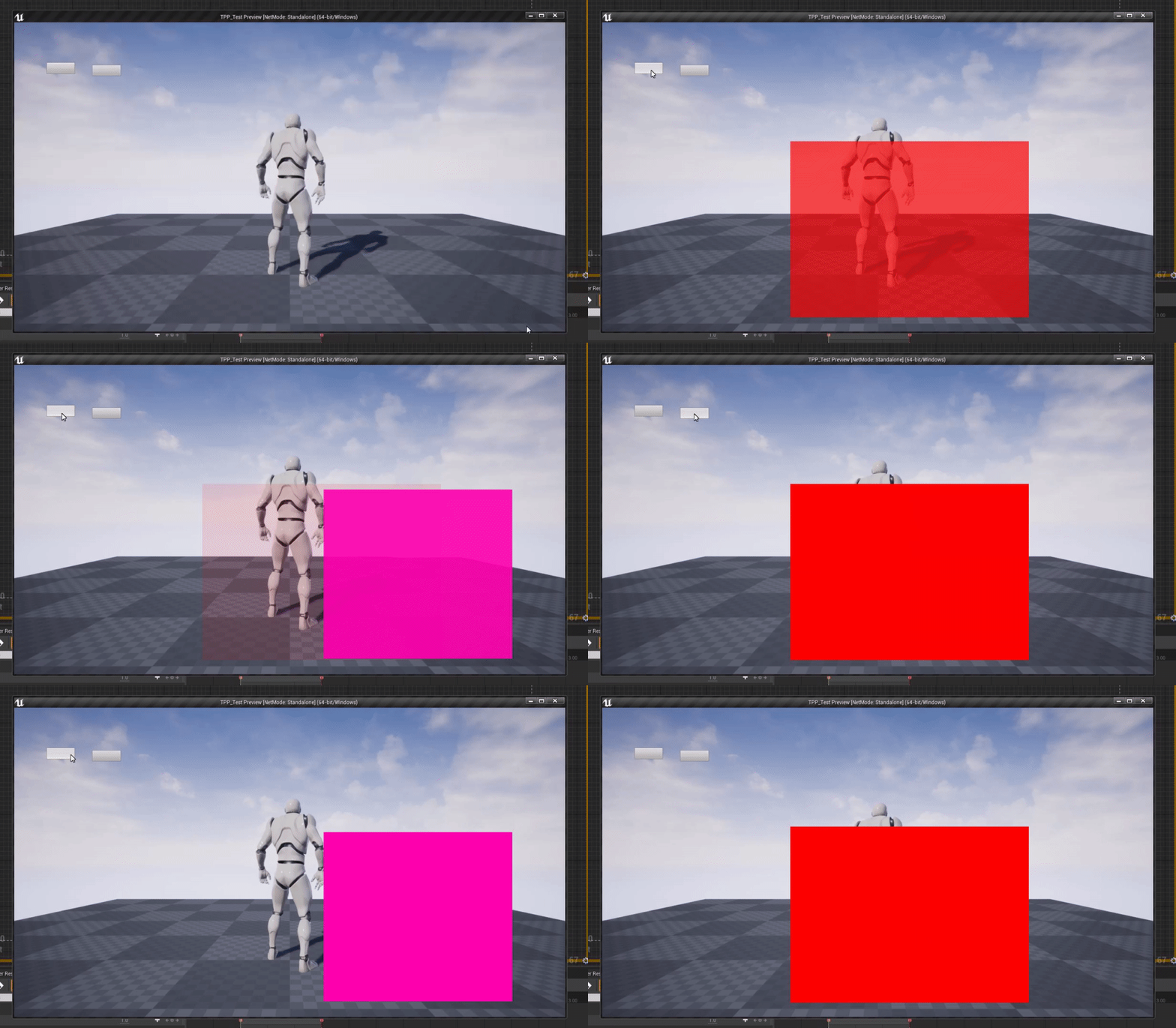
and i am not saying its impossible or even that hard, just requires engineering and planning and thinking lol. like I can whip together this quick 1-2 and back one you see here but accounting for randomness takes more thought. The red square and the pink square are both unique widgets https://i.gyazo.com/87f98cde60eb5f2edfde91d733a4862b.gif
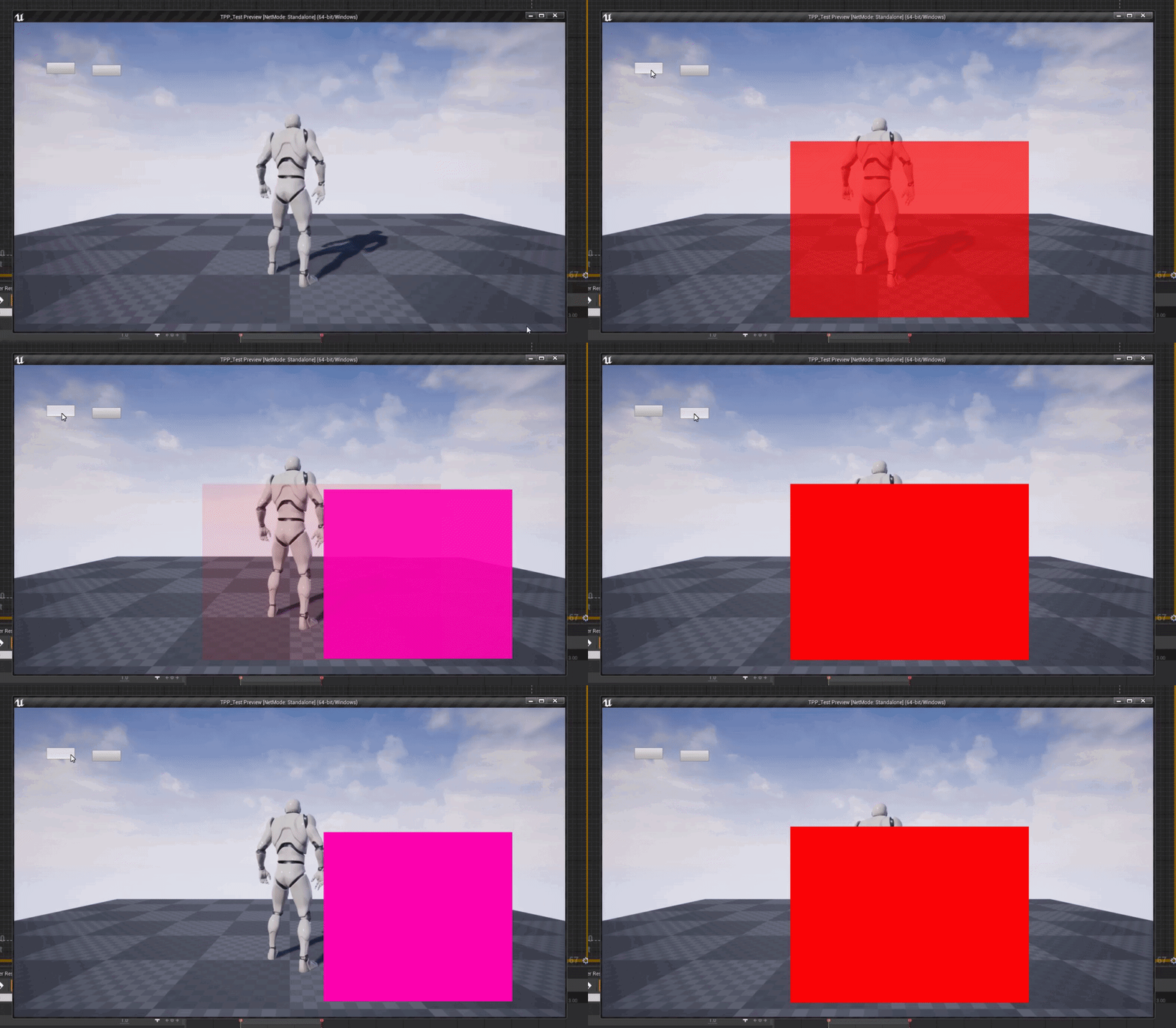
but off the top of my head without cheating and using a separate timeline that i could swap in the fade out and fade in widget or setting up the master widget to have panels I could swap in widgets then fade in and out I cant think of an easy way to animate dynamically out of the box
open wadi
Ok, so it is possible to have the desired animations while retaining the memory-efficient design you speak of, so it will keep the subnavigation widgets memory-resident and not destroy and re-create them over and over.
grim ore
so like for example a main menu with 5 options, going from main -> option 1 and animating it is super simple since its a 1 way path
yep it is possible just requires engineering
open wadi
Right now I was simply going to create the proper functionality with main menu / submenu and then go back and add the fanciness.
But I don't want to have to blow everything away and re-create it.
If not necessary.
grim ore
having 1 main menu widget with each "sub widget/panel" as children then just toggling visibility is the optimal way in the end.
making that work with fancy animations is just more work
open wadi
So either way, I would keep the submenus in their own widgets, but you're saying as children of the main menu widget. What's the difference in the way you would set up the event graph to achieve such?
grim ore
open wadi
I've yet to create a "child widget", right now per all the training I've been through I simply go to content browser, right click and create a new widget blueprint.
grim ore
open wadi
Ahhhh, I see. You quite literally add them to the Main Menu widget hierarchy.
grim ore
main menu which is just a canvas panel holding 2 buttons and 2 other user widgets
open wadi
Thus keeping them memory resident.
grim ore
yup and just hidden or visible as needed
open wadi
And with this design, I can go back and add the animations.
grim ore
that 2nd picture just plays an animation that changes opacity over time of the widgets
the problem is as far as I know you cannot dynamically change targets on a UMG Animation or this would be super simple
open wadi
Hmm.
So it is possible to achieve the desired functionality regarding animations with this approach, it's just not easy.
grim ore
yep
open wadi
Got it. That opacity animation you did is practical all the menu I'm modeling does, no?
 narrow mauve
Anyone good with shaders know where to start to produce a similar result? This is just applied to a mesh.
open wadi
grim ore
I can't tell for sure but maybe? ITs possible it also scales it down while the other fades in? really hard to tell
open wadi
It's a simple fade out / in when switching submenus.
grim ore
yeah than chances are opacity
open wadi
Yeah, there's some sort of shenanigans.
grim ore
but again all of that should be key frameable for example if using the existing animation system
open wadi
Maybe I can record this in a high framerate and slow it down.
grim ore
if this was sequencer it would be easy since you can dynamically change targets at runtime
grim ore
the top menu just seems like a simple instant swap
i mean for the sub menu header below it, the animation itself with the glow and such is separate
open wadi
I ripped the assets from the game, and the top menu is switching the background image to a "blue" version relative to the selected menu option.
And is adding a blue outline to the text.
A glow.
grim ore
oooh..
safe jolt
What are Add, Multiply, and Append Nodes what do they do ?
 tiny crescent
"iclone to unreal: Day 2, progress is slow but ongoing. I have no idea why my eyes will not transfer with the rest of the materials but the struggle must go on"
grim ore
@open wadi so I had an ah ha moment. I made a blueprint interface so I could have generic fade in and out events on each sub widget. then made the animations on the widgets themselves that I could call and tell them to fade in or out. Then my main widget just did something similar to before but instead of the main widget handling the animation it just told the current widget if one was visible to fade out, then told the one I wanted to fade in to fade in and stored that as the valid current visible one.
its not perfect or clean but its a way to dynamically do the animations now since the widgets themselves handle it not the parent
open wadi
And that's it? That simple?
Impressive work, I'm just surprised that event graph is so simple given the intelligence of the design.
grim ore
pretty much. each widget has 2 events and 2 animations I can call thru the interface
and it just uses a blueprint interface to allow any user widget to receive those fade in and out events generically
open wadi
And this technique allows the widgets to remain memory-resident?
Without the 60 second garbage collection issue?
That's terrific.
grim ore
yep they are all inside the main widget so they will stay loaded, you are just changing visibility
 fiery egret
hi im wondering if anyone can help me its my first time using unreal engine and i tried putting a animation onto a character i downloaded but keeps coming up with this error
grim ore
scroll the top message to the right to see the rest of what it says
 viscid pebble
Lol do I see dota.
open wadi
You do in fact see Dota2, specifically the main menu nav.
Attempting to replicate some of the Panorama / Source 2 navigation functionality in UMG.
 tiny crescent
Oh that’s iclone7. It’s a program to generate or sculpt unlimited 3d characters and also do animations
Although right now I’m taking a break from animations and testing the live-link feature
plush yew
Thanks 🙂
tiny crescent
No worries. You can try it for free for a couple of days but the program itself does cost!
plush yew
What is the difference between 3ds Max and Blender from iclone7 ?
fiery egret
nevermind i think i fixed it i redownloaded the character and animation together n it seemed to work
plush yew
Hi, I'd like to make custom clothes for my UE characters. I ckecked some tutos on YouTube but something is not clear to me... It's about the skinning/weight paint of the clothes. I see that some guys do it inside blender (or others modeling software) and some other guys do it inside UE4. Can I do it with either of the softwares ? or is it complementary ? ...
( I'm talking about the cloth physics only (the skinning/weight paint)... For the cloth itself, I know I must modeling it in blender or a cloth making program 😛 )
I understand ! I watched a video about iclone7 and understand 🙂
tiny crescent
Sorry I can’t say before I clone I@only ever used Source Filmmaker and MMD for animations
The does anyone know if we can export a map from unreal to another program?
plain terrace
not sure if u meant this or not, i dont really know wat im doing lol
plush yew
hi! I was hoping somebody might be able to point me to a doc/tutorial on how to embed unreal engine into existing mobile apps. akin to an iframe almost, I want to have a mix between UE4 content in my app as well as Swift and other native languages. one idea is to stream the experience from the backend and dynamically switch between swift / unreal engine. any help would be much appreciated
 bitter orchid
I have a sound for when my rolling ball comes in contact with something that it plays a hit noise and it's set up like this. I'm having a problem that when I go up a ramp the sound spams on repeat until I'm off of the ramp. Is there a way that anyone knows of that could solve this issue?
tiny crescent
Welp i think ima call it a day here XD dam wiggly arms and such
 jolly sage
open wadi
jolly sage
open wadi
Last time I saw one of those I was working on a 2019 MBP with a bad DIMM module. 🙂
One question remains - how do I create a reference to another widget within a widget?
I assume I don't have to leverage cast - can I generate a variable representing another widget?
plush yew
I'm trying to make a marble texture with quixel mixer
So far I could only apply a layer of a color map
nothing else
open wadi
@grim ore - FYI, I'm building out your example, quality work as always - one issue, even with context sensitivity off, I see no "fade out" node of any type other than audio. Why might I not see that node option?
Oh, I see. You created those FadeIn / FadeOut animations yourself. So it would probably be wise to style my widget properly before taking the time to do this.
safe jolt
https://gyazo.com/6a5ae53fb51de68e942550cc30d62d44 Trying to create my own Slopes,,, Any idea why it is doing this ?
 coral patio
Hey guys! :] Is there some kind of light tube that emits light in all directions? I have a long, stretched flame and want to make it shine through cloth with Subsurface Scattering - but just increasing the flame's emissive strength doesn't do it, i need a light source for that. So something like a cylindric light/a point light that can be stretched in one axis would be great for this!
 unique timber
Is it normal that a Blank C++ project can Play In Editor, but when I package it is black screen?
grim ore
if it's blank what map is it loading?
unique timber
Ok I guess there are different settings, in Project Settings Default maps there is Editor Startup Map and Game Default map
Editor Startup Map is Template_Default and Game Default Map is 'Entry'
grim ore
yep
you would and can set them to whatever you want and they can be different, and as you can see by default you get a blank map when playing the game and not in editor
unique timber
I saved the map but it won't run in packaged mode it says "The map specified on the command line /Temp/Untitled_1 could not be found. Exiting."
Even though I named the map "mymap"
grim ore
if the map is not in the maps folder it probably need to be added to the packaging settings in the project for the maps to package
unique timber
I don't see a maps folder, is it supposed to be in the content browser?
grim ore
there isnt one by default, you would create it. by default UE4 packages the Maps folder and any other maps/folders you specify in the packaging settings in project settings
it could also be an issue with needing to delete intermediate folder and recompiling since this is C++, or the map you change it to didnt save in the maps and modes and changing to another default then back might help. stuffl like that
unique timber
Should it be in Content/Maps? That didn't work now it says /Game/mymap could not be found
I don't see any maps folder in packaging settings
grim ore
unique timber
Oh i see it's a hidden setting 🙂
I think part of the problem was I tried packaging the project before saving the first time, when it asks you to save the map
I created a new blank project and saved the map first then it worked without having to mess with packaging settings
grim ore
ah yeah that makes sense
it was using the temp map name but the map itself didnt exist on disk since you had not saved it
 rigid scaffold
extremely active discord server eh
vernal thicket
@ebon linden if its a small game or somethin casting is fine, you need to cast to get the reference, in a larger game I think you'd like cast to all actors of class or somethjgn?
rigid scaffold
joshm94 is typing
vernal thicket
😂
rigid scaffold
lol
vernal thicket
@ebon linden are they all on the same map/level?
 visual belfry
Following up on my weird editor bug, here's a fun party trick: enter 1-1-1 into a numeric field of the editor
Answer according to Unreal is 1 🙃
vernal thicket
@ebon linden there is a better way to do this, you should have a look around. Casting to each individual actor will work, but is expensive. I'm not sure of the proper way to do this bud sorry
plush yew
so why is ue4 ~30gb when cryengine for example is like 1/10 of that? 🤔 10 times the features huh
 heady locust
 rain knot
Guys in a game like Rocket League, the ball is what exactly? A pawn, character or actor?
Note: I'll never need inputs to control the ball itself. I'll need a sphere component to handle collisions and hit events
New to UE
exotic thicket
If it's not something that will be controlled by either players or AI then it's just an actor
rain knot
great
 tight prawn
no
sound as in, stable, good
the puzzle game will contain hundreds of "levels"
i'm weary if I create a map for each level, the packaged game will be huge in size
My thought is to have a single map, serialize each level i have, and on runtime load the serialization and apply it on the map
this way the packaged size would be small
exotic thicket
If you can define the level as a simple data structure which is used to generate the actual level that would probably save some space
Not really sure how big levels are in general tbh, have you measured it?
tight prawn
well, just a basic level with couple of the components (prototype level) is around 600kb
so if i'm gonna have 100 levels that are extremely simple, it's already 60mb..
and yes, the idea is to define the level as a simple data structure, maybe a matrix of some sorts, and on runtime it loads the said data and applies it to a single level
however, I think this will be a hard and time consuming process,
so, is world serialization a good alternative?
meaning I create a level, serialize it, save the serialized data, then on runtime I load said data unto the level
this will allow for maximum dynamic level creation, because if I go with the create my own data structure path, i'll need to add a new type for each new element i create
so, is world serialization a feasible task, and will it generate a reasonable size for each level, and finally if all the above is yes, any resources to learn serialization ?
plush yew
@heady locust cool !
 umbral ferry
when i m on the platform
if i jump i m teleport somewhere else
i don't know why
maybe i collision issue ?
 trim silo
What is the best way to handle game saving??? All tutorials on youtube show saving where you save certain variables and that works. But how do i handle saving of multiple objects that are desstructible and collectible? How do i make the game remember that in level X i collected amount of Y collectibles and how do i make them no longer appear when reentering the level? Anyone has any good guides for that? Do i literally have to create a variable for each single object?? Isn't there a more automated way that the game remembers what was there when i started the level and then i can save the state of the level how it is in the present and load from that?? Any ideas?
 lost reef
@trim silo you need to setup unique id's for the interacted objects with a boolean stating whether or not they have been onteracted with, of course yiu would save these. Then you can determine what to do with the object upon loading such as destroy actor or set a chest to open and disable the ability to interact with it again.
trim silo
so if i have let's say 500 objects in game i have to create a variable for eeach object manually and then manually select what to ddo with it on load?
lost reef
@trim silo i suggest creating a parent class for interacting objects and then child classes for different types
@trim silo no, you would do a variable called unique ID with boolean inside of the parent class. Just that. When placing objects in level youd set the unique id in the details panel
When you interact with objects youd add them to an array checking the boolean state
Then when loadimg your save you vheck those objects and apply the state and it does whatever you had setup. Ill show you later on when i get off work. Dm me so i can remember your name
trim silo
im just wondering if it is not possible to take like a snapshot of how everything is in the world at once and save it someewhere
and then load the state of thee world
to make it quick and efficient, is this the only way?
 oblique granite
Hey guys, looking for ideas. I have a complex road system (single mesh, derived from OSM data). Road lines need to be accurate to how they are in real world. UVing in a logical manner is next to impossible. TriPlanar on asphalt works fine. How would you about adding road lines in specific places they need to be? As efficient and not time consuming if possible...
 light coyote
@oblique granite maybe spline based decals
 sick turret
anyone know why dis goin on?
with clothify
and anyone know how to make it maintain its girth and stifneess instead of turning into thin floppy strips? I tried editing stifness but no alteration
Like for the hair to maintain ots shape
Im considering spring joints, but it should be doable with clothify
lost reef
@trim silo when loading you just load the array and srt each boolean for everything in the array to true. Thats a quick snapcshot. Maybe youre overthinking what that looks like.
 hasty wharf
Having an issue. Probably not a big deal but running into a roadblock. I have a blueprint I’ve been using in a blank cube. It’s functional for what I need. I just tried to add in a static mesh and now the object disappears
 alpine leaf
General question,
Do we know if c# implementation is planned for the future at all for UE?
Have they spoken on it at all?
I've looked around a bit but can't seem to find much on it,
The main thing holding me back from really getting nitty-gritty is that I really don't want to go near cpp, let alone near cpp within UE where I have to do MUCH more work looking around inside many different files before being able to actually start making content.
 cerulean sandal
You could Learn blueprints then
They are not powerful as much as real coding but they Will do If you dont have time to learn cpp
alpine leaf
I'm familiar with them, but find they often have many holes in what they cover and require you to write cpp wrappers for the functions you want that are not already covered.
I'm curious to know if China has plans for Tencent to tell Epic to work on a c# version of all of their cpp functions available.
tight prawn
anyone here has used Input Gestures ?
I'm interested in flick but the value is in range of -1 to 1
how is it possible to detect swipe up or down with this input ?
alpine leaf
@tight prawn using bp or cpp?
Check out these channels #blueprint #cpp
tight prawn
either one is fine
 fast hinge
Hey peeps, I'm just jumping into UR for the first time, coming from 10 years of VFX. I'm currently setting up some virtual production workflows for a client. I have a valve index with me and I've started a virtual production template. I think I will be fine with figuring out most things as its all very similar to what I already know.
My first roadblock on the setup, which is what brings me here, is: how do I NOT set a starting camera position and just get that from the location of the headset/controllers in my room?
vernal thicket
@fast hinge I think you can alter than under world settings
Settings - World settings
 storm jasper
Hi
vernal thicket
Hi
storm jasper
I have the same problem like yesterday...
i create
a new character
but don't work
my character don't apper in blueprint edior
editor*
vernal thicket
Top right it says 'Parent Class', click that what happens>?
storm jasper
vernal thicket
So something is obviously wrong with the child
storm jasper
open vs 2019
storm jasper
i don't see
plush yew
Are there any tutorials for putting an unreal engine game on steam? Like how to incorporate the API
I don't really even need to make use the API but I believe the steamworks api needs to be linked to the project.
storm jasper

Virtus
In this course you'll learn to use the steam API inside of Unreal Engine 4 to bring your multiplayer games to life.
 maiden vector
Trying to build some anim montages using multiple animations in a sequence (eg. Sit_Start, Sit_Loop, Sit_End) but i would also like to add in upperbody only animations in between Sit_Loops and ensure that they blend smoothly. Do you know a good resource i can use to guide me through, if you do please send me the link. Thanks!
vernal thicket
@maiden vector Any tutorial on creating anim montages should help you, the idea is to blend between 2 animations using a specific bone, i.e Spine_01, so one half of the skeleton under spine_01 will follow 1 animation, and the other half above spine_01 will follow the 2nd animation
maiden vector
@vernal thicket 👍
plush yew
Hello guys, I packaged my project which has inside tv which plays a mp4 file but when I moved the package folder on other PC the tv doesn't play, I Mean this video doesn't run, idk why
 muted trail
did you make a local folder in the unreal project files and put the video there
if not it wont work
 dim merlin
Anyone knows what happened on 4.25 with spawning actors? my save system now will crash on SpawnActor when there's already same name in level...
rain knot
Hey guys, here's an interesting problem.
Is there any way I can attach a set of wheels to my third person character? Basically my third person character should be controllable like one of those Rocket League cars, (or the car from the Vehicle template)
 hot thistle
In a 2d platformer, what do you prefer?
Free aiming or horizontal and vertical aiming?
 serene birch
I'm old school so I don't like the free aiming too much
I like that your positioning is the thing you use to aim carefully 🙂
 soft lodge
I'm with Stof
rain knot
are there any skateboarding game tutorials?
Edit: How are skateboarding games even done? It's a Vehicle and a....third person character?
Ok it's probably just a possessed vehicle but..I wonder if it's possible to rig a vehicle to a regular third person skeleton? Cause then they could use a bunch of pre-existing animations for third person characters
plush yew
the video is on the pc and in the proejct content folder so? @muted trail
vernal thicket
Game instances are buggy on 4.25 o.O
 jolly kernel
there is a 4.25.1 if that helps?
storm jasper
Hi again
I searched on the internet how to solve this error in blueprint (the project is done in c ++) but i don't found a solution
https://gyazo.com/4764c55526b45685cb167d3ebbe4595a

 timber vale
I'm using ue4 4.21 right now with no c++ code. Are there any major engine changes i would be experiencing if converting to 4.24?
vernal thicket
I have no idea - I changed mine from 4.23 to 4.25 and it was fine, no real changes apart from removal of Matinee's, but they still play.
timber vale
isnt level sequencer the new method for stuff like that?
vernal thicket
Yeah I've just learned it, it's a bit more of a pain in the ass with certain things
 peak hare
4.25.1 has bunch of bugs urghhh
Just avoid it
I having problem with spring arm
i just do the same on 4.23.1 and it works fine
vernal thicket
I've had issues with the game instance
timber vale
i was intending on using 4.24
vernal thicket
I literally changed to 4.25.1 for the 'Groom' stuff, but it doesn't work anyway coz' it's laggy af xD
vernal thicket
I've finished my project in 4.25.1 tbh, Other than the game instance being a little buggy now and then it's fine
peak hare
I can't even do simple stuff like zooming in using spring arm lololol
did the same on 4.23.1 and it works fine =____=
elder viper
hi! I have a model that is made of multiple meshes that I combined inside Maya. All mesh UV's are separate though.
When I import this model inside Unreal, it comes in as one object which is okay but has only one Material slot - Element 0 which puts the same material on the whole object.
How can I assign different materials on different meshes based on the UV layout for a single object?
vernal thicket
@elder viper Although you've given it seperate UV's have you assigned different materials inside the editor to the different UV's? I don't use maya but I use blender and when you create seperate UV's you need to assign different materials too.
Also I'd name the Materials too, inside UE4 they're just named Element 0, Element 1 and so on
elder viper
@vernal thicket ah okay! by editor you mean the modeling editor aka Maya?
vernal thicket
@elder viper Yeah, so in blender you select the vertices you want to separate, separate the vertices from the object, UV unwrap and then assign a material, then just join it back to the mesh and the mesh will show 2 materials inside the editor
elder viper
@vernal thicket got it! thanks! Will try it now. I think in Maya if I assign materials by selecting the UV shells, it might work. I might be able to work out a script that automatically assigns materials to shells
thanks!
vernal thicket
No problem pal
 analog snow
I did some research. My video card supports 10.0 and the latest version is installed
grim ore
which video card?
grim ore
so DX10 is not the same as DX11, the engine wants DX 11 set 10.0
plush yew
that's direct X 10 maybe?
grim ore
its not that, your card only supports up to DX10. You cannot use the latest version of UE4
plush yew
Since Radeon HD 3450 does not support DirectX 11 or DirectX 12, it might not be able to run all the latest games.
Ur graphic card is potato sry to say

TechPowerUp
ATI RV620, 600 MHz, 40 Cores, 4 TMUs, 4 ROPs, 256 MB DDR2, 500 MHz, 64 bit
the website says ur gpu doesn't support DX 11 or 12
it's 2007 model
grim ore
Software and hardware are not the same
your hardware only supports up to DX10
you cannot get around that
you can install an older supported version of the engine that supports SM4/DX10 and use that
analog snow
Can you drop the Directx 10 download link
grim ore
you can install UE 4.18 as the last major supported version of SM4/DX10
the funny part is there is an actual thread on answehub about this EXACT issue, same video card and everything https://answers.unrealengine.com/questions/769844/ue4-versions-allowing-feature-level-4-graphics-car.html
analog snow
So it doesn't work
grim ore
Your video card will only work correctly on unreal engine 4.18 and older
analog snow
thanks for your help.
 vale silo
I wonder what's going on - haven't seen any commits to UE 4 github for 5 days in a row already
grim ore
I was thinking the same thing over the weekend. Vacation is not till the end of this week so it's odd
vale silo
or they are all in UE5 which isn't public yet
vernal thicket
^
vernal thicket
I'm wondering now
Can you set a variable and get the same variable at the same time from a game instance?
It seems to work, but then also not sometimes?
For example, I'm getting a random float, setting it inside a game instance, and then getting that same variable at the same time on a separate blueprint
Maybe it's after I make adjustments? I have to print string off the variable to get it to work again
But then I can remove the print string again
plush yew
game instance just store variables accross map isnt it
if u got a variable hp for instance on ur char bp
u want to have a Hp variable on game instance too
naturally u have to set it up in game instance ofc
when u travel to diff map the game instance variable stays
while the player one get reset
u want to call the print string after u set the variables
midnight gate
how do get a bone from mesh?
plush yew
dont c why u will have any problem
@midnight gate U are trying to target poseable mesh object reference
Try to write set bone location by name when u drag that mesh on an empty area
midnight gate
so ugh i just write the name of the bone?
but dont i need to plug a mesh refrence so it knows where to get that name
plush yew
forget about that set bone location by name
the target is posesable mesh component
not skeletal mesh
hence the error
now drag the mesh pin into empty field and look for set base location by name
plush yew
u are not getting me
u are plugging it not on the right target
i dont have my UE4 open now but if u dont want to try my suggestion then I dont know what else to say
restive eagle
i dont think that you can change bone location in the event graph
that should be done in anim graph
midnight gate
AAAAAAAAAA
FUCK LOCOMOTION ASSET
its fucked and bad
and its imposbile to change your mesh
its all broken
all i wanted to do is make the character go -90z deegress when crouching
cuz she stays in air
restive eagle
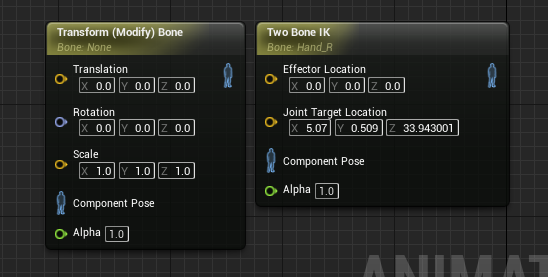 midnight gate
how do i do it in anim grapth?
hm ok this node
how the fuck do i use the anim graph with 10000+ layers
restive eagle
make it at the top "layer" 😄 ?
plush yew
why would u hav 10000 layers?
just checked in BP there is no node for set bone in Mesh Tsauken is right
and u want to do it on ur anim graph anyway, everything animation related
restive eagle
yeah you can only get socket location
but thats not the issue, his animation is messed up
he should reimport the crouch animation with correct location/rotation
midnight gate
WHERE THE HECK IS THE ANIMATION NODE?
you know the gold orange one??
that makes a float value animate?
WHERE IS IT
@plush yew because im using locomotion asset
its the worst asset ive ever used
imposible to change mesh
just disqusting
restive eagle
the ALS one?
restive eagle
oh yeah, that one is pretty good
because you dont know how to change a mesh it doesnt make it bad
i've been using it for a while and 0 problems
the guy even made a tutorial how to retarget to a new mesh
midnight gate
no its pretty bad ;-;
restive eagle
because?
midnight gate
because it cant read root bones
also the crouch animations are badly done
if you go into crouch animations it floats
but even if you fix them
it still flaots
and no there are 0 tutorials
restive eagle
its because you made it that way
midnight gate
I DID NOT CHANGE THE ANIMATION ASSETS THANK YOU VERY MUCH
they are just made like this
thats so stupid
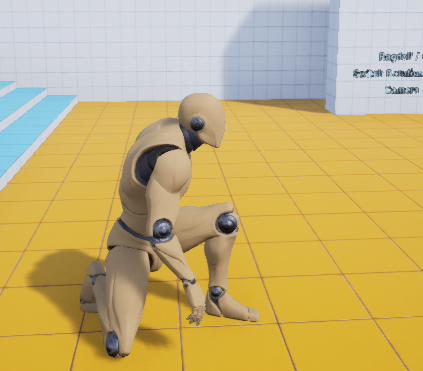 midnight gate
did i get a bugged version or smht
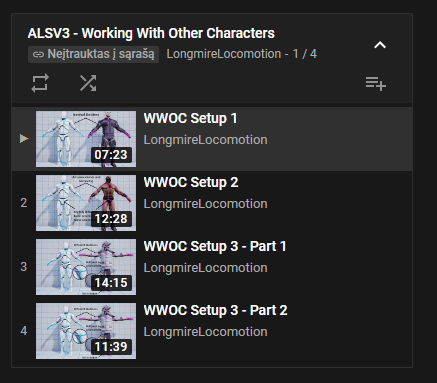 midnight gate
where the fuck did you get that playlsit from
restive eagle
internet
grim ore
its linked in the asset page and docs isnt it?
vernal thicket
Aye, maybe your question shoulda been "can anyone find a tutorial on this" XD
 hidden aurora
Is it possible to use attach actor to componeent with virutal bones?
I'll try thanks mate
 copper flicker
so I'm starting Unreal. I wanna start my game. Unreal be like.. hey, a BP errors. I'm like.. wtf. I'm looking at the BP. it's got 2 dead timelines. FOR NO REASON. Unreal simply erased my timelines. I still have them in the BP, with no corresponding component. empty objects I can't open. I can't believe Unreal can corrupt data like this.
but on the flipside... lesson learned. to always use simple timelines with 0-1 values
no I gotta remember my weird timeline values... O o
midnight gate
i had to set my retargeting stuff from skeleton to orient scale
i fixed it
are you proud
sorry for my angresion and negativity i was almost done with this bullshit
 radiant haven
Hello, I made custom Functionlibrary and it should run on tick, so it subtracts 1 from the current amount of the variablöe
sadly even if I have it on tick, it still only executes once
whole quarry
Where do you call that function?
radiant haven
on tick
whole quarry
Can you screenshot it
 atomic pewter
guy, i'm just starting to get into ue4 and i've been following a tutorial on youtube
atomic pewter
right now this shoots a projectile in the direction the player character is facing
but i want it to fire at the crossair
anyone knows how i can do this?
its third person btw
whole quarry
@radiant haven so you keep setting the 5 and 2 values?
radiant haven
ye
it works if I use it directly at tick
and not making an alonge library for it
midnight gate
@radiant haven maybe cuz its going though false?
or maybe cuz its a funcion node
try copy and pasting it after a custonm event
funcion nodes are less stable than custom event calls
i know that funcion nodes do not support delay nodes wich might be the problem why your time isnt ticking etc
whole quarry
The delay is in a bp actor and not in the function lib
radiant haven
to be sure, using only ints it works
I jsut tried using it without a library, it still doesnt work
ye casue you cant use delays in funcs
whole quarry
What exactly are you trying to do?
whole quarry
There is a timer in ue4 already?
radiant haven
I print the time
in Min and Sec
so not possible
or is there a convert seconds to h: m : s
 timber sundial
can anyone recommend me a good tutorial to get started ? or should i just go through learn.unrealengine.com
 jaunty cedar
Is there a way to do virtual camera stuff for cinematics without using an iPad?
 eternal umbra
You can use a vive puck as an input too. There's an enumerator in the virtual camera player controller to set this.
jaunty cedar
Okay, cool
Perfect, I have a vive
Can the controllers be used as pucks for this without flashing them?
eternal umbra
I don't know, TBH
grim ore
@atomic pewter that screenshot is impossible to read. Look up line trace tutorials for shooting from the first person perspective and that should be a good start. You basically want the forward direction of the player and you can go from there
 waxen raven
void barn
waxen raven
void barn
Fatal error: [File:D:/Build/++UE4/Sync/Engine/Source/Runtime/Core/Private/Serialization/Archive.cpp] [Line: 644] BulkData compressed header read error. This package may be corrupt!
anyone know what this is
atomic pewter
@atomic pewter that screenshot is impossible to read. Look up line trace tutorials for shooting from the first person perspective and that should be a good start. You basically want the forward direction of the player and you can go from there
@grim ore i used getworldrotation with follow camera as the target and used that value, might not be the best way but i guess it works for now
also how do i use the same variable within multiple blueprints?
 midnight gate
@void barn its just graphical drivers crashing dw
 midnight gate
you change ya graphics hard
ive been dealing with it for over a year now :3
constant crashes in ue4
midnight gate
what i can recomend is trying to make your pc not run 10000 tasks at the same time for example close browser and all the apps you can and disable wifi it will help
and try to be very careful and slow when using the engine
void barn

void barn
gosh
just
random crush
like wednesday for ue4
the thing is
when i select the file or anything
that is related to my project
 shrewd shuttle
hey guys quick question, can you refund asset packs bought on the marketplace?
midnight gate
just keep trying until you get there
void barn
no other solution?
midnight gate
ue4 is one painful mother fucker when it comes to crashes
i researched this alot its imposible
you could try to update your drivers
and update direct x
and get all the direct x coppies
but other than that it doesnt work
midnight gate
welcome to my world
void barn
with 32 GB ram
just for this stupid shit

just started ue4 2 weeks
then this shit
midnight gate
rip
it is tragic aint it
the engine is usable
sometimes it gets used to your project and crashes less
i think its something to do with how graphics card reads the files etc
but i aint an expert
midnight gate
just try updating your drivers and maybe let the engine run in hyper mode or smth gotta play around in intel graphic settings or whatever your using
helps a bit
but doesnt fix the problem compelty
 dense aurora
is this the moving into the beat done right ?
 hasty osprey
So i need to make a burning fire material and apply it to a skirt, basically recreate the skirt this character has

how would i go about making such a material?
 honest pivot
"https://giphy.com/embed/KnuGX7IV6cnu0
@hasty osprey Just Started Bleach yesterday
honest pivot
Have you looked at combining material and Niagraa ?
hasty osprey
i dont think i can utilize partical effect for this
it's be best if all were in one material
also enjoy th show👍
honest pivot
Yeah but Material wont affect like the black flame here
hasty osprey
hmm youre probably right
honest pivot
Although
If there is a big plane is behind the character then we can do a transparency in that big plane behind it and achieve the same in 2D atleast
I mean transparency controlled by the material
hasty osprey
hmm, interesting. my model is a skeletal mesh tho so would i have to rig a plane behind the chara for it to be there at all times?
honest pivot
BTW, hello guys. just joined the server

hmm, interesting. my model is a skeletal mesh tho so would i have to rig a plane behind the chara for it to be there at all times?
@hasty osprey That's one way
or you can do animated cloth and setup particle emission behind the character
depends on what you want to do with the character
if its 3d ill recommend using cloth/animation + particles
hasty osprey
hmm ok, thanks for the pointers. Now i atleast have somethings to go off from:)
whole quarry
@hasty osprey the final getsua 😎
honest pivot
joining the server today didn't expected to see final getsua after restarting bleach last night.
hasty osprey
that episode came out like 10 years ago, haha
honest pivot
Man i loved that show
@whole quarry SAME
whole quarry
I still watch it
hasty osprey
still one of the best anime moments
honest pivot
that episode came out like 10 years ago, haha
@hasty osprey i watch bleach every year
whole quarry
Aye, such a shame they didnt picked it up anymore
whole quarry
The last arc in the manga is sweet
honest pivot
@hasty osprey @whole quarry
new season coming soon
whole quarry
Really? Awesome!!
hasty osprey
yh just google it, dont think its right to post link here
whole quarry
The best episode so far, imho, is when ichigo learns his father is a shinigami captain
honest pivot
lol this chat gone from UE to General, idk how strict the mods are here
The best episode so far, imho, is when ichigo learns his father is a shinigami captain
@whole quarry My fav moment when he grabs aizen by the face
whole quarry
Yes that was a real goosebump moment
"Ha you suck, you lost all your spiritual power!"
whole quarry
The art style of the first arc is really rough 😅
Weirdly it was on par with Naruto, while they had all these weird camera angles
whole quarry
Kind of low poly I would think
Same with the old dragonball z first saga
Hard angles
 honest pivot
BTW, have you seen the Guilty Gear GDC conf
hasty osprey
or you could go the route of just making it look realistic
whole quarry
No :p
honest pivot
or you could go the route of just making it look realistic
@hasty osprey Like FF15??
hasty osprey
like the UE4 game JUMP FORCE does
whole quarry
I think anima in 3d is difficult to achieve because if you dont watch out you go into the realm of "looks real but somehow fake"
Inhuman human appearences
honest pivot
@whole quarry https://youtu.be/yhGjCzxJV3E
While the quality of photo-realistic real-time graphics in games is advancing daily to near feature-film quality, Arc System Works' RED team took a completely different approach with Guilty Gear Xrd in pursuit of an impressive art style that would stand out even in this compet...
hasty osprey
whole quarry
Looks nice, damm


 hasty osprey
made the chain in Zbrush but when u look at it from far away it looks too small haha
the face and the body i didnt make myself tho
honest pivot
oh