#ue4-general
1 messages · Page 781 of 1
 rigid belfry
it checks if there's an existing widget
if not, you create, if yes, you display it
helps with memory
 vernal thicket
Ah that's a good idea
rigid belfry
assuming this is what he's doing, basically : validated get will only return valid if the main menu variable is already set
so when you first load in, there is no main menu reference, so you create and set it
later on when you return, that variable has already been set, it exists. this means it is valid, since it is, no point in creating it again, we just add it to the viewport
 timber minnow
Hi everybody , i'm using world composition with 256 landscape . sadly when i hit play and play my game , i get huge lags when world compo is loading some scene ( village , forest zone etc ) is there a way to limit those lags ?
vernal thicket
@rigid belfry currently I've been removing from parent when no longer needed, and using game instance to store variables instead
 vocal copper
Hey all 🙂 I'd appreciate a piece of advice here 🙂
I'm struggling to find the proper use of BlueprintBaseOnly meta flag. I want my blueprint to have a populatable list of spawnable classes - their Blueprint implementations. Currently it is declared like following:
UPROPERTY(BlueprintReadWrite, EditDefaultsOnly, Category = "Spawn", meta = (BlueprintBaseOnly))
TArray<TSubclassOf<ABaseClass>> AvailableToSpawnClasses;
But the dropdown still shows all classes in hierarchy, instead of showing only Blueprint classes.
What do I do wrong? Please, @me on reply Thanks in advance 🙂
 soft panther
Where should i connect Diffuse Map And Glossiness Map ?
 vale silo
I don't think particle cutout works in 4.24.3 :/
I have the option enabled in the Project settings, I have texture specified in Required in Cascade and yet, in the wireframe view I see square billboards instead cutout ones.
 cyan robin
how do i go about getting a reference to the camera of a pawn, from the level blueprints?
soft panther
Btw Thx For Help
 jolly sage
Is it possible to make a crate system like pubg csgo
 pliant beacon
Short answer: Yes. Long answer: Yes, but.. Do you mean as in lootboxes? Awarding random items etc? The SteamAPI already supports this, so if your game is running on Steam it should be trivial. You will have to implement the UI and user feedback for it yourself though, using the callbacks Steamworks provides.
jolly sage
Uhh that steamwork part sounds hard
 analog blaze
 dusky token
Hi all, day two with Unreal and game dev in general... I'm trying to paint my landscape, but it's snapping to yellow boundaries creating harsh edges, does anyone know how to turn these off?
 umbral ferry
what is that blue / purple square
that i have on my editor
i don't know where he come from
yellow maybe
 midnight gate
so i need to get an index from that class variable
would it be posible to use a map?
to be like this is class 1 false class 2 true etc
and then from one of those 4 true variables in the map how do i convert pick random true boolean
i need to pick random true boolean
 grave briar
Hi all. I can't vertex paint and I suspect it has something to do with the brush; it's red and 90 degrees to the normals; Just doesn't paint. Any ideas?
 uneven bone
Literally the last 4 people are stacking questions on top of questions. 😐 some of them might have a response and some might be forgoten
 fierce forge
how i can make this to be in middle of the object ?
 whole quarry
by adjusting the pivot point in your modeling program
fierce forge
i can use it for skeleton mesh too ?
whole quarry
thats a different thing
fierce forge
and how i can do this ?
whole quarry
i guess its the same steps
 unkempt quartz
Center the mesh in your modeling program then export
whole quarry

How does a Pivot work in UE4 on a Mesh and how can I adjust it inside and outside of the engine.
try to google first before asking here
fierce forge
i did 🙂
but i didn't really know how it's the name
i didn't know about "pivot" word
whole quarry
it was the first result when searching for ue4 change pivot mesh
dusky token
I'm suspecting for my issue, it may be this, but I cannot find a checkbox like this anywhere...
unkempt quartz
@whole quarry don't think that silver platter can get any better 😑
 lost reef
Anybody using ue4 on an nvme m.2 drive? Hows performance?
dusky token
I am, never used it without one though, so nothing to compare to
 grim ore
nothing special compared to a normal sata SSD. you only have so fast you can go and most operations in UE4 are smaller, random io might be more important due to shader compiles and such.
but with that said if you can do a nvme, no real reason not to right now compared to a sata ssd
lost reef
I got the 970 evo plus just waiting for my project to transfer from my hard drive to test it out
 lapis bronze
im using the 970 evo m.2 with ue4
runs great
lost reef
@lapis bronze awesome! Thanks!
 ashen orbit
@rigid belfry that's exactly what i was doing before i changed it though and the bug persisted
 dark rune
how do i make it so that when my character is in flying movement mode (Character Movement) it has a better control (stops and turns more reactively, like walking on ground)
lapis bronze
flying has its own control settings in the character movement component
if its not there, you likely have to step inside C++
if what you want isnt there*
 exotic thicket
the character movement C++ code is such a freaking huge mess tho :X
maybe it's just because it does such a large amount of stuff and not because it's just a mess but it was definitely very complicated when I was trying to mess with it :D
dusky token
Still can't figure this out... does anyone know how to get rid of the yellow guidelines when painting landscapes?
dusky token
... oh, thanks so much XD
 sweet wagon
Open the mesh and hit on the collision button
Then look at simple and complex collision
It could be possible that the simple collision is making it fly, yes
umbral ferry
sweet wagon
Pardon, double click on the mesh to open up the editor
Then look at simple and complex collision
dark rune
@lapis bronze its fine i got it it was just Braking Friction Factor under General Settings
lapis bronze
 noice
noice
lapis bronze
i use flying movement during my grapplehook animation
it stops all that jitter from happening
@umbral ferry details panel on the right
(of that window)
umbral ferry
$
sweet wagon
Yes, basically this
lapis bronze
i wouldnt recommend doing this though, while it does work.. You dont want your whole game like that
umbral ferry
still flying
lapis bronze
that mesh doesnt look the same as the one you placed?
ashen orbit
Hi need help testing the online functionality of my game, it's a 250mb download if someone's up to it.
lapis bronze
you sure its the right one?
umbral ferry
yes it is
umbral ferry
lapis bronze
@ashen orbit id love to if i wasnt at work right now haha
if you DM me i can try it after work
@umbral ferry thats simple and complex
select "Use Complex as Simple"
ashen orbit
are you swedish
umbral ferry
ashen orbit
why you have swedish name
lapis bronze
oh is it? i didnt know
ashen orbit
well its a fine test you will have to change location on your steam though
umbral ferry
ty
lapis bronze
glad its working now
that said i wouldnt use that "use complex as simple" for the entire game
you should investigate making your own collision boxes inside your 3d editor, there's a naming convention for it
grim ore
https://docs.unrealengine.com/en-US/Engine/Content/Types/StaticMeshes/HowTo/SettingCollision/index.html as well to create your own custom collision in engine
lapis bronze
Setting up, exporting, and importing Static Meshes using the FBX content pipeline.
thats for the FBX naming convention
making it in engine works too! i just find keeping it in the fbx is easier for me ;P
dusky token
@sweet wagon so I thought those lines were causing the weird layering I'm getting... but apparently not, do you know how I can get rid of these weird boundaries when painting?
or I guess, what those yellow lines represent
sweet wagon
Well I never encountered that issue so I do not know, no.
My guess however, would be that it is treating the squares as individuals insteads of all together like a tiled landscape for example
dusky token
Hmm alright, thanks anyway 😛
definitely seems like squares... not sure why I can't paint across them 😦
vale silo
Is there a way to preload particle effects? Right now when I first spawn muzzle flash effect, my game freezes momentarily and then goes on smooth after initial spawn.
 storm venture
@vale silo there's definitely better ways than this, but maybe just drop an instance of your particle somewhere under the map to be spawned on level load?
vale silo
I'll try that @storm venture, thanks
 plain terrace
Is it possible to apply textures to an individual component in a skeletal mesh in the unreal engine?
grim ore
more than likely no, textures are applied in materials. materials are aplied in material slots. material slots are assigned in the mesh itself.
if the mesh is designed to allow you to change the texture on one part, then yes but if its just a normal texture without that in mind chances are you can't unless there is an easy way to isolate just that part (say the entire texture is brown but one part is white, you can isolate just the white and replace that color)
plain terrace
Mm yeah I’m probably gonna have to give all of these components textures in an external program
Oh maybe I can mess around with LOD
dusky token
Figured out my issue... rebuild the landscape with a denser resolution
wait... spoke too soon lol
plain terrace
Noice lol
dusky token
now it just happens with smaller squares
 hidden knoll
Does anyone know how to take a screenshot in-game while time is frozen
I'm trying to make it so when someone stops time then they can move but everyone else can't, and I want everyone else to only see what happened at the moment of the time stop
so when time resumes it looks like the person who stopped time teleported
 misty violet
Maybe you can put all other player in a temporary level which is the exact copy of the current level?
dusky token
why not just restrict movement for everyone but the player that froze time, clone that player and freeze it, and make the player invisible?
hidden knoll
hmm that is a good idea
dusky token
maybe boost their move speed too 😛
hidden knoll
Well I have the timestop figured out
I just need to make it so everyone can't see the person who stopped time so I might use your idea
I had the idea of taking a screenshot when time is stopped and then creating a widget of that screenshot for everyone who is frozen in time
and then when time is resumed the widget is destroyed
@dusky token So how would I duplicate a character?
hidden knoll
oh dang
 fleet wraith
Loading my map is crashing my editor. I can't even right click on it to do anything about it. Where do I start with this error?
is there a way to open a level in like safe mode so none of the blueprints trigger?
grim ore
not really but you could lose up the blueprints that are having the issue and fix them or change them?
misty violet
Is it possible to get an exact collision box for a player character, one that really sticks to the mesh?
fleet wraith
@grim ore i can't even see which ones they are. even selecting that map in my editor will crash the whole thing.
Hmm it seems to be the gamemode that the level is set to
i can't even delete it without it crashing
i've tried reverting
 jagged zealot
Anyone know why my Front and Left orthographic views aren't displaying the grid while the other ones (top, bottom, right, back) are?
grim ore
@fleet wraith you could always try going into your file explorer and pulling the .uasset out of the project so you can then get back into the other files
maybe you can figure out the issue or just remake the game mode if needed
 rocky radish
Anyone know why my Front and Left orthographic views aren't displaying the grid while the other ones (top, bottom, right, back) are?
@jagged zealot press the 'show' button and see if 'grid' is enabled
jagged zealot
it is, yeah. I can uncheck and recheck it in any of the views but it doesn't show up in Front or Left even after toggling. It toggles normally in the others
okay, scratch it y'all i restarted and it fixed it. shoulda tried that but i thought i hit a keybind by accident or something
good thing too--google results had a couple threads where people couldn't figure it out and it persisted through restarts. guess im lucky
oh wait.... it didn't fix... it's just working in the other bogus level, not the one I'm actually working on....
so it's still a problem but it's isolated to the level, which is strange.
 gaunt tide
So what’s the point of having a main character Bp than a separate child Bp for it?
grim ore
common "stuff" can be in the main character (such as base functions, mesh, etc.) and your children can have different "stuff" like one is blue, one is a hippo, one is an elephant but they all act the same
gaunt tide
Ahhh so use the child for a multiplayer setting and making the players and ai different colors but have the same functions
grim ore
and anytime you need to interact with your characters, even tho they look different and the hippo might moo when shot and the elephant might cluck when hit, they can all be treated the same
doesnt have to be multiplayer, consider the issue with an "enemy" and not your player
 plush yew
does UE come with a clean up function to delete all unused assets?
gaunt tide
^^^
grim ore
nothing built in, there are marketplace assets that can do that and possibly editor widgets that could be created. "technically" when building unused assets wont be packaged but it doesnt clean up the project.
and even then it's hard because items that are soft referenced or loaded in by string name might not appear to be "used' but are
gaunt tide
What you can do is export the part of your project you are working on into a new project but only pull the parts you need
grim ore
^^ yep thats a good start for sure since it should move over the referenced stuff!
gaunt tide
If something specific doesn’t work I usually open both up in separate windows and look around at what isn’t working
And copy it over
Like with the locomotion system someone else built I’m currently learning it and trying to add a stamina system to it
So what I’m doing is I have that project open on my other screen and my stamina system i want to integrate open on my main screen
gaunt tide
Post log?
 somber otter
Hi everyone how to install chaos please ?
gaunt tide

Outlines where to find learning resources for the Chaos Destruction system within Unreal Engine 4.
 radiant haven
can i get the rotation of my surface that I am looking at Line Trace by cahnnel?
somber otter
about chaos
radiant haven
interestomh
 dire coral
Do i need a source code ue edditor for chaos physics
gaunt tide
Look at the link I posted
dire coral
Yeah i started to set it up but can i just enable the plugins from the normal ue project
somber otter
404 error page not found
plush yew
my materials are all missing from the meshes
dire coral
You need to loin with epicgames email and link them the github and epicgames acount
plush yew
 fluid lance
Are SKM sampling regions not working? I created a region on the SKM with a simple material slot. When I select my region in niagara, it stops sampling the SKM
 proper stump
is it possible to perform a select on casting result? i need to compare object type to know what I'm overlapping
whole quarry
@plush yew Did you apply the material to the mesh?
plush yew
The material disappeared after I forced delete of another mesh
hidden knoll
Does anyone know how to exclude an actor from a Global Timestop?
whole quarry
@plush yew dont forcce delete, its a bad practice 😀
 ember star
can I inline execute something after a Play Anim Montage ends? Do i need to sleep() on the return delta time?
plush yew
am i being stupid, or does the viewport decrease how much you can see of the (masked) foliage at distance. If i'm not tripping, is there a way to disable this? I haven't actively turned on any LOD or culling settings
green and red axis are swapped. I change the scale of Y, it changes the mesh along X.
whole quarry
@plush yew is it in relative locatiom instead of world?
The option is in the top right of the viewport
 spare sun
ctrl+~ is the default bind to swap I believe
ember star
it feels cumbersome to have to cast my custom player state every time i call get player state. is there something i can do to automate this better?
plush yew
anyone able to clarify?
 prisma plank
how I know it's automatic lod
 wheat hare
I love to force delete
 west merlin
Hey all. I'm trying to convert a project in to VR, but having some trouble understanding how the VR base content actually works. Anyone that has some experience getting VR working from the UE4 template in a project?
 digital anchor
@plush yew as you move out mipmaps start kicking in, they being thinner means your opacity mask is getting more black, 2 ways to fix, 1: tweak the Opacity Mask Clip Threshold on your material, or 2: give a smoother blur on the edges of your mask
plush yew
Oooh, Thank you!
someone else mentioned the Opacity Mask Clip Value on reddit so ill check that first
good idea for the opacity mask blur
Opacity Mask Clip Value did the trick
thanks for the help
 teal tulip
@whole quarry scales are relative always
 open eagle
how can I do get all actors of class but for any children of a class
 sand gale
@XZ does get all actors of class not count children? You could add an interface or a tag to the parent class and then get them that way.
sand gale
It might, I'm not sure either but I think there is a good chance it does 🙂
tags are real easy way to do it also though
if the parent class thing doesn't work
I think parent class will work though
 viral oak
not sure where exactly ask question so will try here, is there a way to remove parameters form material?
grim ore
you can convert the parameter back to a constant if you want
 lilac lantern
When I use the multiplayer options, and the player controller displays a HUD, it doesnt show when the game is online?
Help?
grim ore
where is the code you are using to do this? UI stuff works different in multiplayer than single
same with player controllers
i am guessing you are using the player controller, which tends to exists on the server, to display the UI which does not exists on the server
lilac lantern
In the player controller, create the widget and add it to viewport?
grim ore
and are you sure that code is running? using a breakpoint or a print string?
lilac lantern
ok the code is not running in the player controller
everything is correct like the gamemode & stuff
and I am using Event Possessed
?
grim ore
try testing with print strings and see what happens. You will find that the possess event fires on the server only
lilac lantern
What about beginplay?
grim ore
viral oak
you can convert the parameter back to a constant if you want
@grim ore even though I converted everything to const it is still in material editor
grim ore
dedicated server, 2 clients. you can see the player controller begin play fires on server and client. you can see possess fires on server only
lilac lantern
What is an event that is run at the "start" of the player controller that is not also run on the server?
grim ore
you can have the possess event call a custom event on the clients
@viral oak where is the parameter showing up at?
viral oak
in Parameter Default windows
grim ore
@lilac lantern also just as an easy thing , the HUD class is only on the client side and personally I think is a good place to hold your UI stuff as yo ucan get it from pretty much anywhere
viral oak
in material editor
grim ore
did you compile, save, and re open the material? it should disappear
lilac lantern
I bound the text to a string from the gamemode
and it is not showing
the HUD is showing
but not the text
grim ore
welp game mode is server only as well, you need to read this http://cedric-neukirchen.net/Downloads/Compendium/UE4_Network_Compendium_by_Cedric_eXi_Neukirchen.pdf
systems in UE4 are different between single and multi
lilac lantern
Well, why wouldn't that work?
The hud is getting something from the server and displaying it
and its not working
grim ore
well it wont work since your client is going hey game mode I need this and the game mode is not there....
lilac lantern
How do you set the gamemode on the serveR?
I am new to this
and trying to make a br
a small br
just as a small project
viral oak
more less worked, but I had to delete one of functions nodes, probably something stay inside there
grim ore
welp you cant just make stuff work in UE4 if you dont know how stuff works. Read that doc, and check out the multiplayer stuff on the learning portal and youtube. @lilac lantern
lilac lantern
I just need to know how to reference the gamemode from the client
grim ore
your asking how you can ask the game mode for something as a client, and the client has no access to it
you CAN NOT DO THAT
lilac lantern
What is something the client can reference that can call stuff to the gamemode
grim ore
usually stuff like the player state and player controller can be used to store stuff that is player specific. if you need something that is not player specific your player can run a server event, then the server event can talk to the game mode, then the server event that is talking to the game mode can talk to the client with the info
but binding text is also not a very good thing to do so that should get looked at as well
grim ore
is the value that you are binding to changing every frame?
lilac lantern
Basically
grim ore
basically is not yes or no
lilac lantern
How do I create a server event?
grim ore
binding in UMG will update every frame, if the item you want to show is not changed every frame then binding is bad
 mossy nymph
you should really go to #multiplayer , check pinned messages and find the network compendium @lilac lantern
then read that 5-6 times
 hollow trench
Hello folks. Since I got stuck multiple times on creating a new camera system and having issues on actually getting all things explained here, I decided to open up a thread on the forums. Maybe some people might be interested on this one. https://forums.unrealengine.com/development-discussion/blueprint-visual-scripting/1781397-recreation-of-the-second-life-camera-system
Unreal Engine Forums
Hello,
in the past weeks, I was trying to recreate a camera system which is part of the old 3D Chat application called Second Life.
The reason for recreation is the idea to have it inside of a game project I am working on at the moment and having a very stable system for nav...
@grim ore Holy Jesus! I am fanboying right now. Thank you for all the videos. They're part of my daily golden source to learn and understand Blueprint nodes and interactions.
lilac lantern
omg i just realised who he is lol
 upper heart
Is there any way to make ue4 think I have less vram for testing purposes?
hollow trench
@upper heart How about running some application in the background. Like the 3dmark benchmarks or Unity with some stuff running.
lilac lantern
Is the level BP replicated on Clients & Servers?
upper heart
yeah was hoping there was a better way
hollow trench
From what I found on google for now, doesn't seems like there is a simple solution to that. Not without reprogramming the eeprom
@upper heart Oh what you could do is to setup a virtual machine?
Just a rough idea.
plush yew
the default light is too bright when close to walls or ceiling, what do I do?
hollow trench
@plush yew https://i.imgur.com/GoAAq21.png
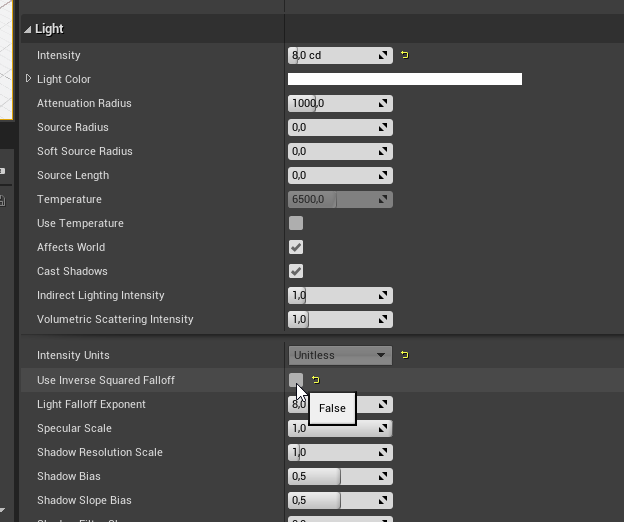
maybe you should try to turn off this checkbox and then play with the settings. Intensity vs attention radius vs light falloff exponent
And light color
Or leave the checkbox on and check if there are differences between these three options

@upper heart https://docs.unrealengine.com/en-US/Engine/Performance/StatCommands/index.html the "stat Memory" is not helping there I guess?

Console commands specific to displaying game statistics.
plush yew
 hollow trench
@plush yew With lightbake or do you want to go realtime?
If lightbake (which will be the more performant option), try to play with the settings mentioned above.
(And maybe add two sided materials / shadow on your lamp material)
(and look at your textures, they're tiling a lot)
plush yew
I'm unsure. The light is probably going to be static either way
hollow trench
Well, test it
I would actually add some character into the scene to get some proper "proportion scale" as well. Its hard to define the size of this hallway.
And within, the size of your lamps may change and so both light intensity and global illumination bounces
plush yew
500 units width
hollow trench
5 meter?
plush yew
500 units height
hollow trench
looks like 2.
Short tips: double the tiling of the floor and the yellow bricks, look at your UV's from the marmor stuff. They look "ok" on the bottom but squeezed on the top.
Lights: lower the intensity of the lamps a lot, then add lights for bake without shadows and very low intensity in the middle of the hallway to get some extra light
What you could do else is to think about using IES light profiles
They look like this: https://i.imgur.com/h505d0i.png
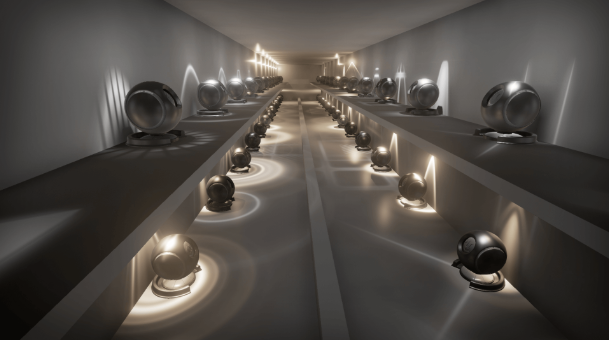 plush yew
I don't understand. It's 5 meters, but the FP blueprint makes it look as if was half of that
hollow trench
How tall is your character
plush yew
89 the default blueprint
grim ore
the character should be taller than 89
dusky token
How do I make it so this point light doesn't stop radiating at the end of a landscape square?
grim ore
ae you using static lighting and have not built, or using dynamic lighting?
dusky token
I'm using stationary and have built
 limpid quarry
I have UE4 from source and I want to disable multi-threading so all browsers can play my HTML5 game. Currently web browsers like chrome require you to enable experimental settings to let it play. How can I do this?
grim ore
ok so by landscape do you mean landscape or do you mean static meshes?
hollow trench
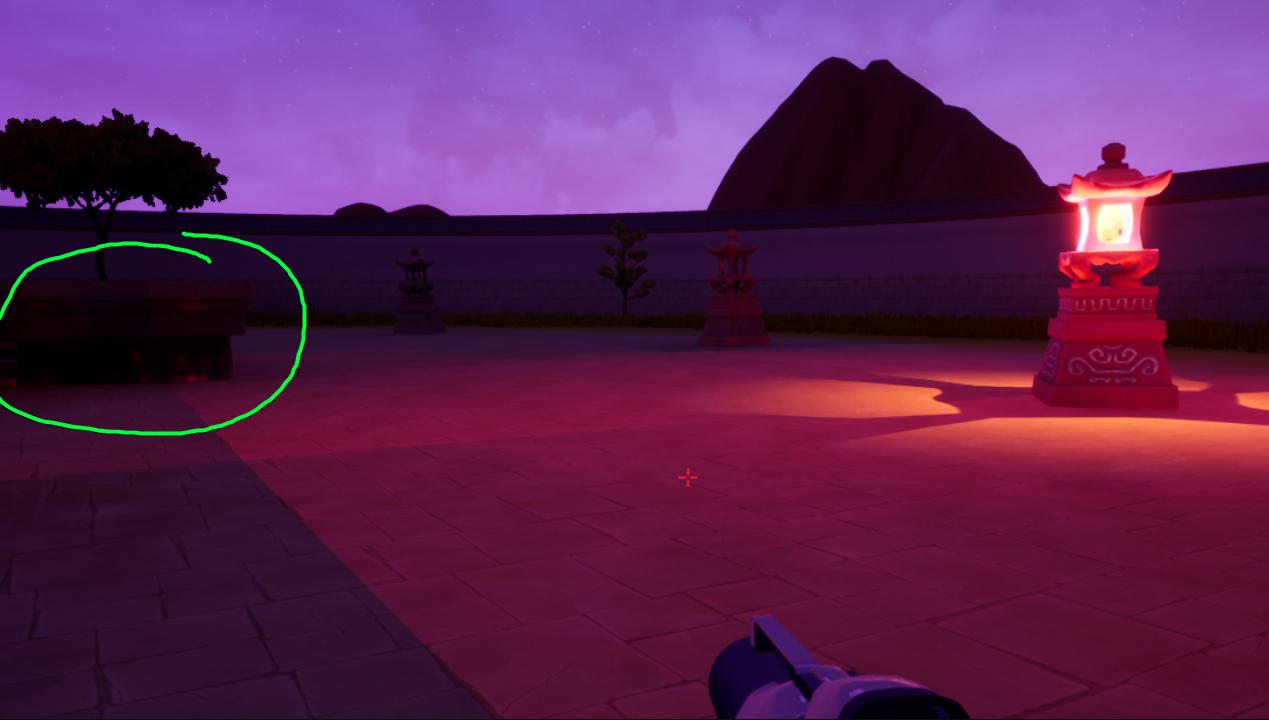
https://i.imgur.com/UwJffaa.jpg I have the feeling that you should check the lightmap size of the objects
 dusky token
landscape I think
hollow trench
looks a little bit low, maybe thats causing the issue of tiling. Just guessing
dusky token
well those objects are static meshes, and they light up fine when there's enough light reaching them, but the ground where the tiling is happening is just a painted landscape
hollow trench
Space flight simulation game


Kerbal Space Program is a space flight simulation video game developed and published by Squad for Microsoft Windows, macOS, Linux, PlayStation 4, and Xbox One. In the game, players direct a nascent space program, staffed and crewed by green humanoid aliens known as "Kerbals". ...
 autumn elbow
hmmm... what about besiege? if I wanted to look up these type of construction games, what would I look up?
hollow trench
sounds acurate, yeah actually its about building rockets
Besiege is a physics based building game
But more a strategy game
grim ore
@dusky token https://forums.unrealengine.com/development-discussion/rendering/4201-questions-about-lightmaps-and-dynamic-shadows?4019-Questions-about-lightmaps-and-dynamic-shadows=&highlight=landscape+seams , basically swap to dynamic or increase resolution
hollow trench
No worries, sometimes its hard to define
hollow trench
Because both Besiege and Kerbal are actually physics based sandbox construction games
But the one is more about accurate simulation while the other does have its focus on strategic gameplay
autumn elbow
Yea
dusky token
hmm @grim ore increasing the resolution made a big difference... do you know if there's a best practice in terms of stationary lights being static or dynamic? Also how high can the static res can go on a landscape without it impacting performance?
hollow trench
@dusky token lemme give you something
dusky token
Sure 🙂
hollow trench
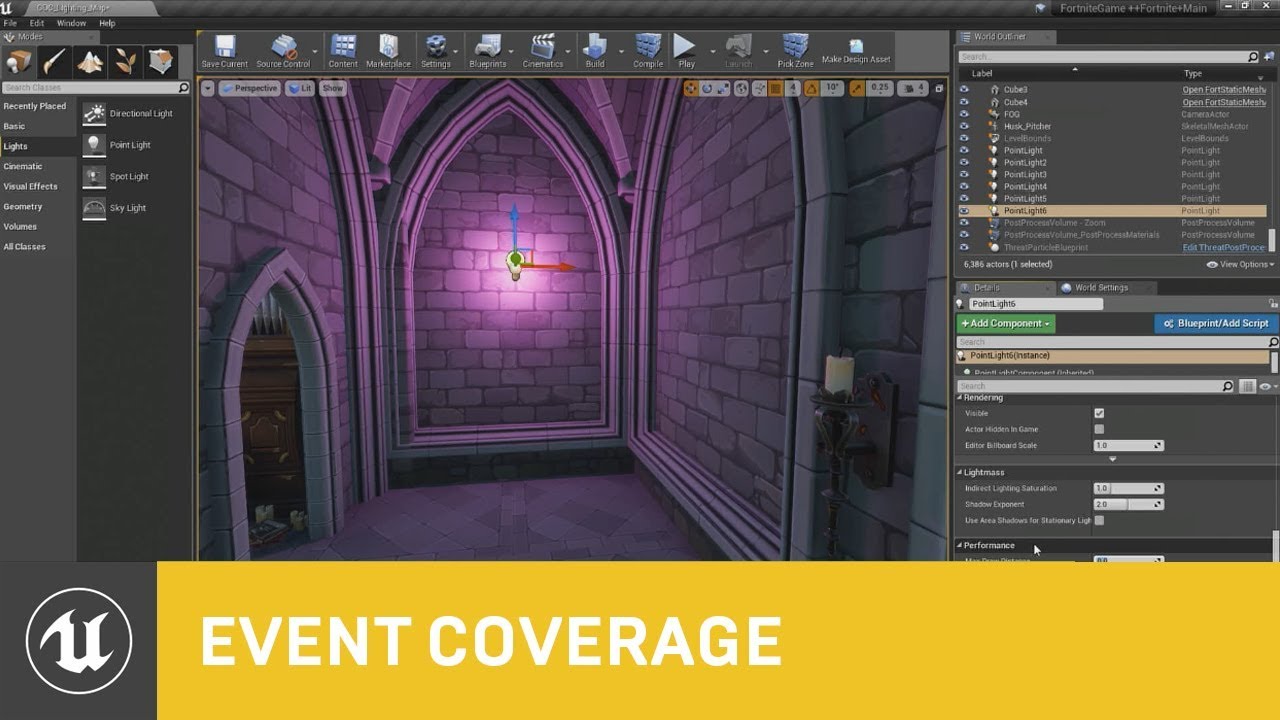
In this session presented by Epic's Zak Parrish, you will learn about some of the dynamic lighting features we use in Fortnite with Unreal Engine 4.
We'll take a look at how you can set these up, optimize them, and get the most out of your dynamically lit worlds to achieve t...
dusky token
Oh that looks interesting, ty
hollow trench
This tutorial here is a liiiittle bit older but it should have some nice parts about understanding some lightmass basics and yeah their approach

actually there are some good ones out there
Takes some time to get into, but worth every second
dusky token
well movie time
autumn elbow
Oooo... I like fortnight ones... there are a few videos where the presenter says "here it is... but don't use it cus it might be too expensive. "
hollow trench
Well yeah this was just an example.
There might be newer coverage videos out there that also takes new engine features into account.
autumn elbow
the roborecall ones I really liked
hollow trench
The 2018 Fortnite video might be outdated already.. or beta features are final and optimized now
autumn elbow
true true
the engine has grown so much
I'm still up to the Squencer in the playlist. 😂
plush yew
https://cdn.discordapp.com/attachments/726242037061517353/726249991772831744/unknown.png if the player is 96 units tall. Something is off. The walls have 2.5 m. How can the player be taller than the wall?
 hollow trench

look at this
and also try to alter your player camera inside your character blueprint
autumn elbow
Also, if you're importing ur box man from an fbx, be sure to uncheck convert unit scale in unreal import options. That screw me over a few times.
A 50x50x50 box in Max, will be 19x19x19 if it converts it.
plush yew
I didn't import a box, I placed the already included box and scaled it
grim ore
what box and how did you scale it?
plush yew
the scale is completely wrong, 5 meters is looking 2.5 m
grim ore
which box.... how did you scale it
hollow trench
This looks ok though
grim ore
that would be fine if your walls are 250 and your player is 100 in the top screen
hollow trench
How did you create the hallway
hollow trench

Blender for UE4:
This series is just a quick playlist I've put together of things I wish I'd known when I started using Blender and UE4. The aim is to
quickly get Blender setup and store some default settings to make creating things in Blender and getting them into the Unreal...
Take a look at export settings
for proper scaling
grim ore
you said you didnt import a box, you used the included one
hollow trench

Export FBX settings from Blender 3D to Unreal engine 4 is common question and there are several things good to remember to get this work correctly.
grim ore
well its all relative when you are in first person. If your character is smaller its not going to look realistic, if its larger its going to look too small. etc.
hollow trench
I am going to bed now, I think his problem is that his import setting were wrong.
just guessing
grim ore
well the ruler in ue4 seems fine, I think his character is wrong
autumn elbow
Night!
hollow trench
He said he used the First Person template
plush yew
it's the default blueprint
hollow trench
not sure
grim ore
the default FPS template character?
hollow trench
He said he just had arms, no body
plush yew
there is no mannequin in ue4
grim ore
i mean the default FPS template character is 96 half height so 192 total height, the camera looks to be about 160 units from the floor
so a 2.5m tall wall would put the camera about 3/4 of the way up?
drop a default cube into the scene next to the wall. it should be about 1/5th the width of the room if your room is 500 outer wall to outer wall
plush yew
maybe VR woul look different
plush yew
I'm sticking to this scale
changing the capsule makes the player feel a giant or a dwarf
grim ore
thats what it should be doing, you are making the character larger or smaller
its all relative to the rest of the world
plush yew
textures are all wrong
I searched for a texture in google and imported
the normals were hand drawn with vector art, then converted from black and white heightmap to normal map
 crisp fable
 forest zodiac
is it possible to make an online game for just friends to play?
wheat hare
that's the best kind
 distant totem
facebook was originally made for just friends on a college campus
grim ore
@wheat hare there is a time and sin/cosin function in materials that you can use for something that looks simple like this. might use them with a floor or ceil to simulate the alternating lights over time
wheat hare
I'd prefer something on a curve yeah...so it looks more like the lights are strobing instead of sort of winking in and out of existence
grim ore
@wheat hare otherwise if you want to drive it from blueprints you could make a looping timeline to call those material change events
yep sin and cosin are loops basically
wheat hare
lights don't just immediately turn off like that
I was more thinking if I'd made any gaffes driving that off Event Tick
like if that would cause the entire thing to self destruct in a finished game
imma go after that sin/cos thing, thanks man
plush yew
the scale seem to be right, it's just that for some reason, on a computer's screen, it looks half the real life scale.
grim ore
@wheat hare no it shouldnt cause an issue in a finished game but taking stuff off the tick when you can, moving it to a timer say or a timeline, is cleaner and recommended. doing it all in the material might be better as well since it's easier to re use and you can just plop it on anything without any hard requirement for it to be called
wheat hare
I thought about that. Would be a good learning exercise too 🤔
 fading moth
Is there a way to undo converting a BSP to Blocking Volume (I want back the Brush Type)? Thanks.
grim ore
doubtful, you would have to redo it if edit -> undo or ctrl-z doesnt work
 digital rover
Hello,
How do I make a patch with a new plugin that installed after initial package. It gives error 'install plugin perfectly' when game runs. Anyone know solution for this?
 stray smelt
is lumen in UE5 essentially epic's own way of realizing the same result as ray-tracing does?
dusky token
is building light supposed to take seemingly forever? been at 0% for a while...
stray smelt
@dusky token it's always slowest at start. if it's stuck for a long time it sounds like you've made it too demanding / too many actors with high lightmap res
are you using instanced meshes, e.g. trees, grass etc.?
stray smelt
good question. i dunno, but the default can definitely be too much for tons of instanced actors in my experience
try to reduce it. should help quite a lot
or even as a smoke test you could just disable cast shadows and see what happens with load
dusky token
11.4k instances, is that a lot? 😛
stray smelt
it's a lot, but doable afaik. but it definitely could affect the build time
try to disable cast shadows and see if it helps. then work your way down from there (after re-enabling and changing lightmap res)
depends on the instances i would guess, as well
dusky token
okay, I'll try that
dusky token
it's a small map to be fair
but I guess the lighting gets more complex with more shadows being cast
stray smelt
i'm gonna check a map i have with, what i think is, a lot of instances.
i had this exact issue 3-4 days ago
not so much the build time, but the massive built/lightmap data size
stray smelt
yeah and definitely use a lightmass importance volume. it's a simple thing to add
dusky token
how do I do that?
stray smelt
 dark depot
if your using 4.25 its under the place actors window ^
stray smelt
drag it in, scale it to the area that needs better lighting
dusky token
oh gotcha
stray smelt
ah ok this map only has 5k instanced actors 🙂
still 13k should be fine as far as i know. and the error hints that it's probably defaulting to some insane resolution
dark depot
in the end i would first check that swarm is running and doing stuff you can also build on preview lighting to get better speeds
light takes time
there is a section on the docs on how to work with lightmaps and what settings to use to look what is making it take longer
stray smelt
are these custom made assets @dusky token ?
dusky token
oh thanks @dark depot, opened the swarm and seems like it can't load a dll
well I purchased them
so yes
stray smelt
yeah ok most likely fine then, at least from my experience with marketplace so far
do you happen to remember which addon it was? i might have it myself
dusky token

Stylized Japanese Temple
grim ore
check task manager and see if swarmagent and lightmass are running, easiest way to see if its chugging along. and yes foliage with static lighting can be evil if its dense
dark depot
^
stray smelt
nice. very overwatch-ish. I can't imagine those assets being such a big trouble though
but mathew and read docs know this better than me
grim ore
foliage and static shadows... evil lol
I tried with some megascans foliage, ~100k and uh... it quickly filled up my 32gb memory and crashed my machine lol
dusky token
I should probably reduce the foliage and some of the lightmap res
dark depot
the start of it its transfering alot of data and takes a long time if i remember correctly
stray smelt
is it the grass that makes up the 13k?
dusky token
yeah
grim ore
but yeah importance volumes is a definite must do if you plan on using static lighting, at the worst it makes it faster
stray smelt
what is a good resolution for foliage like grass anyway? if you must have it cast shadows, and have the models/masked texture in that package
it looks like the kind of grass that might not benefit that much from casting shadows at all, but depends on your style i guess
dark depot
are you asking what a good lightmap res is? or something else
stray smelt
yeah lightmap res for this case
dark depot
depends on the size of the thing
and where it is how much detail you need etc
in the end lower then most people put it 😄
stray smelt
@dusky token the demo's do come with example/demo maps you could check and see what he has. looks like he doesn't have any shadows unless im blind
and yeah, i don't see any need for shadows since it's stylized like this
dusky token
will do once this is done building
it's building with the grass not casting shadows anyway
stray smelt
still takes a lot of time? do you have huge landscapes or assets like that?
dark depot
in the end there is a nice lightmap density view you can use to debug stuff
stray smelt
right good point. that was what solved my previous issue. enable the lightmap density view
dark depot
a long time is different to people too whats it been running for
like an hour
or less
dusky token
this is the whole map lol... I'm really just trying to learn more than make something
dark depot
its a cpu heavy task
stray smelt
whats the file size of the BuiltData.asset? @dusky token
dark depot
and if your using a hard drive it slows it down more
dusky token
I'm using an nvme with an i7 8086k, 6 core 5 GHz
dark depot
how long did it take
dusky token
seems like 13 minutes
stray smelt
also curious about the file size. might indicate something taking up a lot of data
dark depot
thats not that bad
dusky token
where is that file found @stray smelt ?
dark depot
it could be faster with optimization and checking setting
stray smelt
@dusky token it should be where your level/map is saved. It should have the same name as your level, but with _BuiltData postfix or something
dark depot
nahh it all depends on settings
dusky token
I was only doing it on high
dark depot
bounces or something else like if lighting isnt on preview
stray smelt
do you mean whether he used production settings?
dark depot
there you go
vernal thicket
how tf we do cinematic camera without matinee?
storm venture
on the left i have an InstancedFoliageActor, on the right i have a StaticMeshActor, they both use the same model but only the StaticMeshActor seems to allow me to use "Evaluate World Position Offset" which solves the shadow problem. anyone know how i can apply this setting to the InstancedFoliageActor
as far as im concerned, this must be a bug, and it prevents anyone from using RT with foliage
plush yew
My AI characters stop moving instantly once they reach their destination. Is there a way for me to fix that? In the past I'ev just had them lower their walk speed based on their distance to the target but that seems a little obtuse
 glacial lantern
The Detach from actor node is deleting the object I'm trying to detach
any idea on why that is happening?
 thorny plover
Hey guys, I am starting a long Udemy course on Unreal with c++, and want to know if there is any reason to not use MacOS. I have both mac and windows, but I loath windows for development, but I also want my game to work in Windows. Should I not use Mac if I want to make a that works in Windows, or can I still do that on Mac?
exotic thicket
Ugh I finally found a solution to positioning something in viewport space at the start of the game without requiring the usage of delays to position it correctly
Setting it up from "on possess" or "on become view target" was a no go - it still would position it totally wrong because apparently they somehow fired at the wrong time
I actually had to make a component which does the positioning on its tick, and set it to tick after physics... at that point it's actually in the correct position :P
 mossy tangle
Anyone know of some themes to go with this plugin?
 tight prawn
hey there
which is more performant:
I have multiple "AI" actors in the map, that will continuously move around until they reach a goal/fail state
to achieve this continuous movement, I either do a loop "begin play" or use "Event Tick"
which one of those options will have a better performance when you have 50 actors in the map for example
vernal thicket
@tight prawn if you use a behaviour tree, you don't need to do either i don't think
 hard minnow
What is the state of Ue4's encryption and datamining? Is it possible to unpack shipped ue4 projects that where packaged using native encryption?
(by "native" I mean this thing https://docs.unrealengine.com/en-US/Engine/Basics/Projects/Packaging/#signingandencryption )
Packaging Unreal game projects for distribution.
exotic thicket
Note that it says hinder
In order for the game to actually run, it would have to decrypt the data at some point
you can't really fully prevent decrypting things that are locally on the user's machine
tight prawn
what if the functionality is as simple as move forward
why would i need to use a behavior tree, if there isn't much behavior
dark rune
can i set the new editor window (PIE) level tester to be automatically fullscreen once it opens
 glacial umbra
Is this where i would ask for support in the #ue4-general ?
dire coral
can i get some help Im doing the ue4 from source when i go to start new instance i get this erors
it was built with no errors
vernal thicket
@tight prawn I would've thought it would be more in regards to the issue of using an event tick that many times - I'm pretty sure any large mmo would use behaviour tree for multiple ai
tight prawn
true
uneven bone
Hello everyone. This is my first time here asking for help so i apologize if my professional stupidity may confuse some of you. So i have a destructible mesh/wall that fractures when i hit it with a line trace. I have Accumulate damage and World support ticked and Debris lifetime Min and Max set to 0 since i want the debris to stay forever. But i encountered an issue. If i first hit a destructible wall than it functions like normal and no visual problems seem to happen, but if i hit another same wall than the World support and Debris seem to stop working on every destructible mesh/actor and the debris on the first wall that i hit De-spawned. After that no sort of convincing destruction is seen and I'm left with just bits of the destructible walls disappearing when hit. Anyone knows what might be causing this? Many, many thanks.
 granite spindle
what was the solution? just curious
uneven bone
I enabled Debris, set it's depth to 1 and set the Minimum fracture depth to 1 and i don't see bits dissapearing
And before i had the Cell site count to 2000 but i reduced it to 500 mainly cuz the game would freeze for a bit. but i'm not sure if the count is what fixed it
granite spindle
interesting, glad it worked anyhow
uneven bone
👍
 forest tree
@mossy tangle Not an answer to your question, but I personally use this: https://github.com/Sythenz/UE4Minimal

GitHub
My Minimal Dark Theme for Unreal Engine 4. Contribute to Sythenz/UE4Minimal development by creating an account on GitHub.
It's pretty sexy
 solemn fiber
@forest tree Does it cause any issues with the editor or anything unwanted? I wanted to get it but didn't just incase a bug occurred, but that's pretty unlikely since it's just adjusting theme
forest tree
@solemn fiber The only thing I have an issue with is that sometimes context menus start flickering, like here
But I'm not sure it's because of the skin or if it was already an issue
Just backup the files/folders you replace
You can easily restore
hollow trench
Wow I really like how the minimal looks like
 somber galleon
Not sure where to post this, but does anyone know if there is a simple way to access a landscape spline from blueprints? Or how to transfer the points of the landscape spline to another custom spline that I can access?
forest tree
Me too @hollow trench, it eliminates all the visual clutter. Way cleaner
somber galleon
It seems like it wouldn't be the most unusual usecase...
Setting up roads in the landscape and then having things follow said roads
forest tree
Yeah this is something I'd love to do as well, it would suck if the systems aren't compatible.
hollow trench
Soon, I will try a different approach
Actually painting the road directly on landscape and then adding borders around to define street sizes
spline-borders
But its for inner-city things
forest tree
@somber galleon https://answers.unrealengine.com/questions/564472/view.html
Trivial CPP, you might be able to implement this yourself. Let me know if you get it working, neat functionality.
hollow trench
My inner german got triggered for a second there...
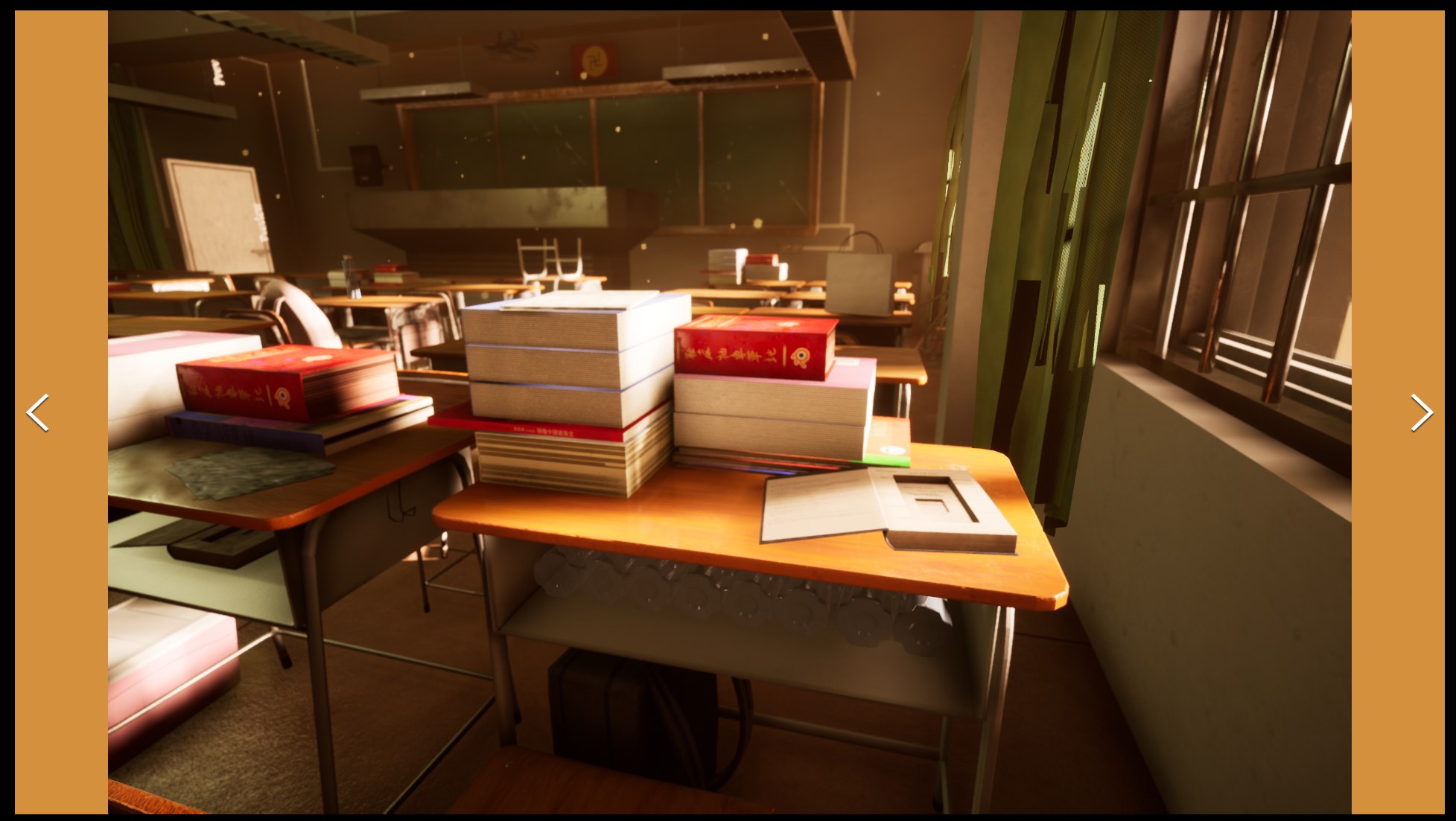

Well.. the price itself..okey..but the quality..jesus
And yeah..that..uh.. hindi..chinese..with german flag colors..swastika
Guess its allowed somehow but I wonder how it made its way into the marketplace ^^
forest tree
Oh, the sign?
Not sure if you're aware, but it has a different cultural significance in some countries
The nazis basically defaced that symbol
hollow trench
I am pretty aware of it, don't worry.
forest tree
(I hear Germany is extremely strict on anything that is related to nazi imagery, is that correct? Like, swastikas are highly illegal and all that jazz. Wounds of the war...)
hollow trench
It was a "huh..whats that" finding in the morning. Yeah actually this would be a thing that would probably not make its way into a german store. The swastika is going the mirrored way but the flag itself has the color-scheme and style as the third reich one
forest tree
I think it's more of a chinese traditional colour scheme, but it's indeed similar
Would be censored in a game in Germany I think then
(There's a lot of censorship in German media it seems like? Wasn't there also a thing about violence in games in general? Blood/Gore?)
hollow trench
Personally, I don't care - yeah that was the more important thing that came to my mind, that people may buy it, then get angry peeps and in the end he points to Epic store
Miiight be tricky, I don't know.
 austere hinge
Hi.. Anybody using iclone here ?
hollow trench
Yeah in the past 20 years of gaming in germany, it was a mixed fruit juice on whats allowed or what not. There are still things that get censored pretty quickly while bloody stuff went to "acceptable"
@austere hinge Not for a while, what do you want to know?
austere hinge
@hollow trench iam trying to export a climbing animation but rootmotion is not coming when i export walk etc root motion is coming
i mean z axis movement is unable to get rootmotion from iclone to unreal
hollow trench
Phew.. hard to say. Do other animations from iClone work inside UE4?
austere hinge
yes.. every animation works but rootmotion is coming only for ground animations
hollow trench
- What skeleton are you using inside UE4
- Does the skeleton comes with fitting root bone for this
- I remember there were some things need to take care of inside the skeleton to make it work. Did you checked the.. lemme look
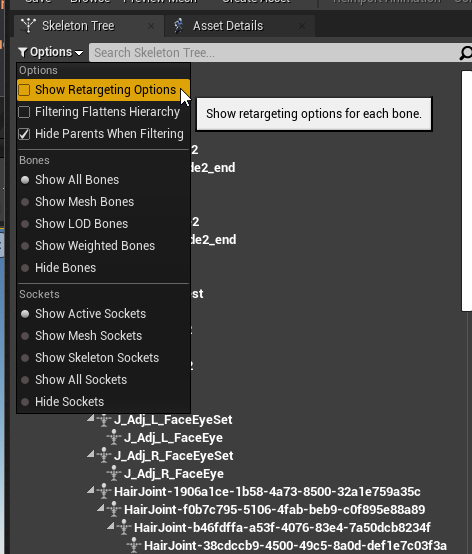 austere hinge
iam using default unreal skeleton
hollow trench
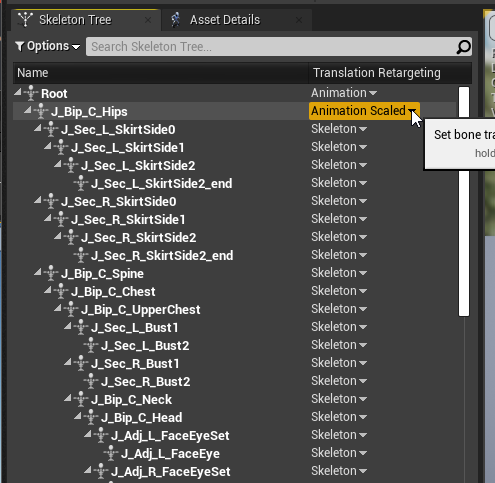
Maybe compare skeleton of UE4 with the one of iClone animations to make sure you don't miss a bone at the root somehow
and how the animations get carried by the skeleton
I am not an Animator, but thats where I would look first.
somber galleon
thanks @forest tree
austere hinge
iam using a free character from iclone and using unreal preset in iclone.. during import i untick import mesh and select unreal skeleton @hollow trench
hollow trench
ah i see
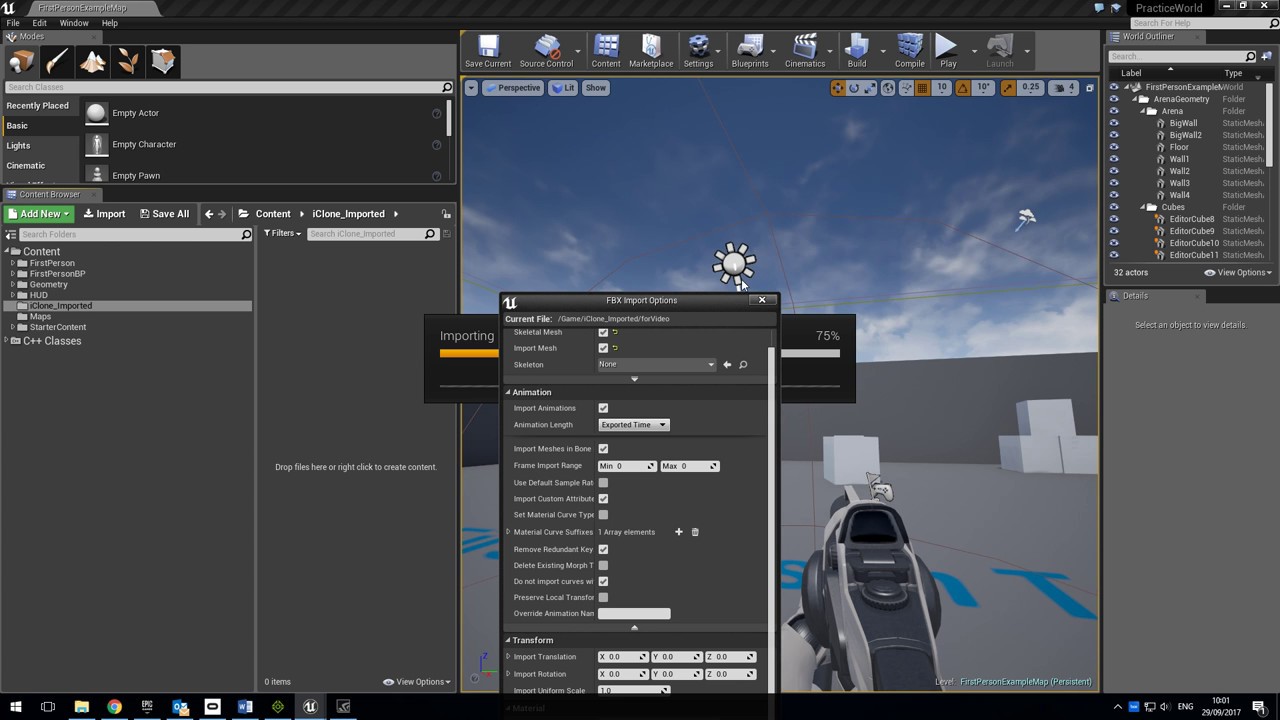
Reallusion feedback tracker:
https://www.reallusion.com/FeedBackTracker/Issue/Root-motion-is-not-exported-to-fbx-and-so-is-incompatible-with-Unreal-Engine-4
The issue is the same for 3DXchange, although that uses a different skeleton. The export function in CC2 also excludes ...
so literally that preset stuff right?
What you could try as well is one thing from the comments as test:
Sorry this is late but, Unreal is the culprit here. Unreal doesn't read the root motion from animations. A work around i've found is export out to Motionbuilder Preset instead of the Unreal Preset. As this will allow Unreal to read that data.
austere hinge
ok let me check
hollow trench
and maybe important..if missed
A look at how root-based animation is handled within Unreal Engine 4

That little part
austere hinge
tried bro but its not working.. can u check with this animation (https://www.mixamo.com/#/?page=1&query=climb) with this animation @hollow trench
 wraith wyvern
can some one link me a good youtube video to learn more aboutr blueprints
hollow trench
@austere hinge Sadly I would not have the time to check but what I could give you on hand is this little tool here

Free Download / Documentation: http://terribilisstudio.fr/products
Website : http://terribilisstudio.fr/
Discord : https://discord.gg/9wWj3sZ
Steam : https://store.steampowered.com/search/?developer=Terribilis St...
maybe it could help on your journey
forest tree
@wraith wyvern Is there a specific thing you want to build?
I'm doing survival so I just looked for basic survival tutorials. Easier to motivate yourself that way. Watch different people, see how they do things.
hollow trench
And check if the mixamo anim has root bone or root motion..they differ from ue4 skeleton.
wraith wyvern
@wraith wyvern Is there a specific thing you want to build?
@forest tree im also doing survival
i have got far
but im not learning it
forest tree

In this part we start setting up the project and our character for the survival game series.
If you have any questions or comments please let us know. If you like the video and want to see more, go ahead and subscribe. Or consider supporting us on patreon https://www.patreon....
Whole series
 rain vigil
Quick question, is it possible to create animations for a character in ue4 with a vr headset as motion capture device?
wraith wyvern
actually dean do you know any were to find out how to make like Frost effecrts .. i mean by this when you walk into a cold area on your map the player gets cold and if he can get too cold he can die?
austere hinge
@hollow trench tq bro ill check and let u know
forest tree
There's a temperature video in that playlist @wraith wyvern, check it out
forest tree
If you want it locational, maybe add triggers
wraith wyvern
game thing
https://www.youtube.com/playlist?list=PLL0cLF8gjBpqGJwEe5XL5mSL8UvwwVMKu i have been using this

YouTube
Ever wanted to create your own survival horror game from scratch? Well now's your chance, we go over how to create a terrifying survival horror game from the...
forest tree
I always liked Virtus videos
forest tree
Make sure you understand the concepts you learn, instead of just copying them. A good way is to extend the functionality that you've learned with things that are required for your particular usecase.
wraith wyvern
wonky
forest tree
It's more about learning from it than him making something pretty
You'll usually end up significantly modifying it yourself. Which is ok.
wraith wyvern
Make sure you understand the concepts you learn, instead of just copying them. A good way is to extend the functionality that you've learned with things that are required for your particular usecase.
yeah i do that.. when i was learning HTML i never copied i looked and i read it and used it untill i understood
i dont copy and paste and what ever
because i wont learn
how to do it
god damn using fuse sucks
its so hard
@forest tree sorry for @ ing you but have you got any tips for making charicters?
i dont think im good
HAHAHA
midnight gate
do you know how a real human looks like
wraith wyvern
he looks like a gobllin shark
guys dw
i made it alot better
@midnight gate i do good?
yeah
im a animator
austere hinge
@hollow trench plz check this video once
austere hinge
@wraith wyvern ill kill him bro or ill die 😆
wraith wyvern
yeah can you belive that i tryed to make him look real
forest tree
@wraith wyvern You can use the unreal mannequin for the initial prototype just fine
Could also just buy some characters from a marketplace
forest tree
Which sentence?
forest tree
Nah, you're just new 😄
forest tree
Helps if you say what it is you need help with 😛
wraith wyvern
yeah sorry
uhh i have a video acutally
nvm
too big
can i dm it to you? or wait actually gimme a sec
solemn fiber
@forest tree Thank you for letting me know, I'll give the theme a go


 forest tree
Maybe someone with more knowledge on this can chime in
tight prawn
TrueFPS camera ?
you need to setup an animation BP
with aim offsets on the 9 directions
idle, up, up left, left, down left, down, down right, right, up right
@wraith wyvern please refer to this blog post for exact details
https://www.froyok.fr/blog/2018-06-true-first-person-camera-in-unreal-engine-4/
I need help "organizing" my game flow
wraith wyvern
thanks ill dothis
tight prawn
Say I have multiple levels/maps in my game
Each level has its own set of rules (collect X number of stars)
I understand that these rules should be set in the GameMode, and keeping track of them would be in the GameState
how would one go about defining the rules for each map/level, do I need a game mode and gamestate for each level?
forest tree
Structs? I'd make a data structure that you can use to keep track of the information in each level
tight prawn
My initial thought is creating a blueprint interface with win and fail functions
and each level implements them according to the requirements
but I think that will render lots of the code redundant
many of these levels will be simple collect X number of something
a moderate number will have an extra condition, and very few would require custom win/fail states
any resource on libraries and interfaces and such ?
i'll check that, thank you
midnight gate
after an actor dies im spawning a new one and checking if its valid if yes then it should run those commands but it doesnt
it pretends that the first actor is still in the level and is valid
even tho i used destroy actor
 brave lance
So... ue4 doesnt use per-vertex normals, and normal map texture is part of material, is this correct?
midnight gate
how do i set destroyed actor to invalid?
tight prawn
so i figured i'd have multiple structs and datatables to define each level's rules and states dynamically
midnight gate
ok i figured out a method that works perfectly
tight prawn
and I'd simply implement a function or set a variable that corresponds to the ID of the data
so
how can I access current level blueprint from game mode ?
midnight gate
code :3
@tight prawn everything is acesable thought game mode if your level is set to it
tight prawn
I need to access variable in the level blueprint FROM the game mode
not the other way aroun
rocky radish
I need to access variable in the level blueprint FROM the game mode
@tight prawn you cant do that
tight prawn
hummm
so the only solution is to setup the functions to load the "ruleset" of each level on the game mode
and when the level starts, it sends an event to the game mode to update the rules based on the level id sent through the event dispatcher
however
for a mobile game that will probably have many levels, and probably some procedurally generated
is it really sane to create a new map for each level ?
maybe i should have a single map, that on start it reads from somewhere the map definition (where to put floor etc etc)
by this point i'm basically writing up what i think here just to organize my thoughts
so excuse me if i'm bothering you, and i hope these ideas may help someone here
so to have a dynamically generated level, i'd make it a grid, x,y position vector (z is optional to make for height or for depth) and would require a "tile"
that'd be a reference to a blueprint
so if i do this, i must make a tool that helps me save the data when i design the level
hummmmm
rocky radish
or you could make each level a map that is loaded with level streaming and unload the rest of the levels?
tight prawn
@ebon linden generally speaking no, but depends on your case
@rocky radish i don't know about that :/
 bitter iris
why does ue4 skeleton do this in blender?
tight prawn
well you can define a specific HUD in each gamemode
HUD class is there in the class defaults of each game mode
rocky radish
@ebon linden you can create the widget in the game mode graph though
yes, you can do that for each gamemode
and just change the widget you're creating
midnight gate
how do i change game mode on this level
ah yes i see now
that window was deleted for some reason
but i restored it
 next badger
@bitter iris blender (c)
i'm waiting for the fix for a few years
@bitter iris but as Adas said - it's "normal"
unkempt quartz
@soft panther place your character at 0,0,0 in the viewport and see what happens
midnight gate
there is such a big gap between how do i fix this
tight prawn
no level streaming doesn't fit
it's a mobile puzzle game
just a casual game with hundreds of levels
creating a map for each is just asking for trouble
rocky radish
ok
do you all think that rider for unreal engine would be a better choice than visual studio?
tight prawn
well for me yes
it's atleast free for one year
unlike VTassistX
which btw they allow you to install with visual studio, but never mention it's a paid product
had me working with it for a month, got hooked to their keymaps and hotkeys
then they hit me with "trial ended"
so yeah, rider is a very good alternative, and on the plus side it actually performs better, especially when it comes to indexing headers etc..
rocky radish
cool, i was thinking about using it instead of vs
 harsh tiger
does anyone know what could be causing my behaviour tree to do this?
https://gyazo.com/11ca8bca90d68fda174c73a7cd56b11b

its also flickering faster than it appears in the GIF due to frame rate
an my AI isn't moving
rocky radish
sorry for the dumb question F5, but did you put a nav mesh in your level?
harsh tiger
yuppp
he should just run to that point
it was working yesterday. i haven't any of the blueprints that work with AI. but i moved all of the stuff to the other side of a room and it stopped working
tight prawn
something doesn't add up either in your AI controller or the blackboard
harsh tiger
afaik the BT shouldn't leave the MoveTo node until it has reached that point should it?
but i think the BT thinks im at the move to location, when im not
tight prawn
check your blackboard variables
tight prawn
something is wrong between your sequence and getlocation
tight prawn
Honestly I don't know, i haven't used Behavior trees in a while
I have a different handmade approach to AI in my recent prototypes
harsh tiger
this is inside the BP_NPC. reason being is the location with a 3D widget, is a relative value. but need to make it into a world location
tight prawn
hope someone else can shine in and help
harsh tiger
so i add the loc offset to the mesh current to get the move to location
harsh tiger
i'll be honest mate, it seemed wrong
 obtuse pendant
@bitter iris Look into the blender mixamo plugin, it can rearrange/rename bones and stuff so its compatible with UE4, that's how my models' bones looked like before I had fed them through the tool
tight prawn
harsh tiger
the issue with the 3D widget was the value wasn't = to the world
tight prawn
use deproject screen to world, to get the the location of where you are aiming
 thin sluice
how do i enable the displacement bit in the final material node?
harsh tiger
will that word for a vector 3D widget?
tight prawn
well I used that to get the location of a crosshair (where i am aiming)
so basically using that, I can linetrace it or throw a bullet in that direction
harsh tiger
it's not a UMG widget though?
tight prawn
it is a umg widget
harsh tiger
mine isnt
harsh tiger
inside my AI bp i have a vector and i ticked the Show 3D Widget box
which is this
butttt
wraith wyvern
i give up with this god damn unreal engine This bug isnt stopping it stops for a second then it comes back
harsh tiger
the location in the bottom right is the offset of the 3D widget from the AI char on the left. but the position of the AI char is 22512 on the X. so if i just use the 3D widget value. then it will return 1225 which is way off in the distance
my work around was to get the current mesh world location and then add the location offset to that. which will give me the new move to loc. "Please Ignore" is a scene comp
tight prawn
I have no idea what you are trying to achieve
harsh tiger
to have the AI move from A to B
the node you mentioned seems to be for a 2D widget and asks for a player controller. so it unfortunately won't work in this case
tight prawn
you can simply do get actor location
in your GetLocation
just simply get a reference to the actor you want your ai to move to
there is a node called get actor location
set that to your vector in the blackboard
and that's it
harsh tiger
i dunno man, its fucked. it was working a couple days ago and its stopped working out the blue. the location its being told to move to is correct. but it just doesnt move for some reason
rocky radish
how do i enable the displacement bit in the final material node?
@thin sluice in the material details pannel change the 'd3d11 tessellation' option
thin sluice
alright lemme try that ty
rocky radish
np
tight prawn
what do you mean ?
wraith wyvern
i got a free firework FX from the market
and i wanted to mess about with it
is there a simple way i can make like a button or smhtn
smthn
 snow berry
hey all hope everyone's having a good day. I was hoping someone could point me in the right direction of progressively narrowing a mesh like this
tight prawn
let me find the node name sec
snow berry
This pic was taken from a YouTube video on the official Quixel channel.
wraith wyvern
yup that makes sence 😅
 jolly kernel
@snow berry is that the blood gutch thing?
tight prawn
google is your friend, and the documentation is extensive, good luck with your game
wraith wyvern
wait
safad
i have this big problem
and no one on here can fix it
i have asked alot
gimme asec lemme link my video
snow berry
@jolly kernel yessir !
wraith wyvern
tight prawn
yeah i gave you a good reference on how to achieve True FPS Camera
it's not as easy as it seems, there is lots of work to get it done properly, but the guide i gave you is extensive
if you are making a shooter game
wraith wyvern
oh yeah
tight prawn
use the Animation Starter Pack from the marketplace, it contains all the aim offsets you need to create the True Camera thing
wraith wyvern
thanks
tight prawn
it's free, and should cover most of your needs creating an fps game, or alteast creating a prototype
Good luck
 spice pond
I'm having an issue when I'm getting distance between two actors. The distance is counting fine, but in some frames it gets a random number that stays for a single frame and then return to the normal value. Like that (blue value is correct, red value appear in one frame):
wraith wyvern
Good luck
@tight prawn thank you
 narrow mauve
I need help with unwrapping. How would you go about unwrapping this?
 agile aurora
overclock your headphones
 visual belfry
am I the idiot here?
I can accept that I forgot how to do elementary school math.. but I don't think this is right 🤔
tight prawn
you forgot elementary math
the first one = 1/(128 * 128)
the second one is 1 * 128/128 == 1
so in the first one you are dividing 1/256
the second one you are doing 1 * 1
visual belfry
yeah but I've got python on my side
tight prawn
i think of it like a priority system in maths
division > power > - > +
so divisions always happen first, then * then - then +
tight prawn
something like that idk
i don't remember much from high school math, so now all i have is a bunch of "rules" i know by heart
visual belfry
are you trying to gaslight me 
tight prawn
don't know why they're that or how, they just are
Animation notification events only work on AnimBP ?
wraith wyvern
how do i get rid of thies boxses?
tight prawn
if I play an animation asset directly in blueprint, there is no way i get the animation notification
?
wraith wyvern
cant you see em
wraith wyvern
i did
vernal thicket
@visual belfry what elementary school did you go to to learn that XD
visual belfry
you're all kidding right?
1/128*128, go left to right applying multiplies and divides as they occur..
not all multiplies first, then all divides
vernal thicket
I meant like it's a bit advanced for elementary
visual belfry
obtuse pendant
this is why you have parentheses
visual belfry
sure you can fix it with parens, but it's a just plain wrong implementation o.O
obtuse pendant
no
obtuse pendant
whats the reason wolfram doesnt take the second 128 as the divisor aswell?
 hoary silo
^
visual belfry
because wolfram alpha knows order of operations 😛
hoary silo
or set the light to movable @wraith wyvern
obtuse pendant
its got nothing to do with the order
visual belfry
unreal is applying multiplication before division..
obtuse pendant
commutative
snow berry
love wolfram
visual belfry
🙏 someone sees the light
wraith wyvern
build lighting @wraith wyvern
@plush yew oh shit yeah thanks