#ue4-general
1 messages · Page 767 of 1
 rigid belfry
 vernal dock
yeah im gonna give up and just learn unity for iphone games...fuck it
im so annoyed cause i know ue4 pretty well
rigid belfry
@plush yew ok i understand. returning in topic, if you have a shit ton of money, something like this would last you a lot https://pcpartpicker.com/list/KbppvW
 plush yew
ummm I dont have shit ton of money but if that helps me get results like that ... I can make shit tonn money
rigid belfry
hold on, the motherboard is wrong
plush yew
i do walk throughs with 3ds max n its takes way too long
rigid belfry
anyway, i am no pc expert so i'd recomend you ask on something like https://www.reddit.com/r/buildapcforme/ for a specific build
reddit
those guys are legends
yeah dude youre gonna be rich
plush yew
damn .... all iwanted to know was 2070 and 2080 have similar bench marks but will the rtx cores help more in UE4
rigid belfry
@quiet swallow have you seen this? https://forums.unrealengine.com/community/released-projects/1769583-scene-swamplings-raltimedark-ambient
Unreal Engine Forums
Hey everyone,
So I recently got into UnrealEngine and creating this scene mostly by experimenting with the different tools and workflows like importing Megascans Assets and Speedtree models.
creating a sequence, exporting etc.
Originally I wanted a 4K HDR video, but in the end...
 lethal venture
Hey, where can I see my outputs?
 white relic
Is there a way to attach an actor or something to the spawn location of this emitter, to do something like increase the wind in the grass and or change the material of the landscape?
........any tutorials you'd recommend XD ...I've been at this..uhm..3 weeks now? That's all the experience I have
 fringe belfry
hi im new
 lusty osprey
can someone help me im getting this error:
Assertion failed: GD3D11RHI->GetQueryData(Query->Resource, &Query->Result, sizeof(Query->Result), Query->QueryType, true, false) [File:D:/Build/++UE4/Sync/Engine/Source/Runtime/Windows/D3D11RHI/Private/D3D11Query.cpp] [Line: 45]
 hoary silo
I get the same error too, but it randomly happens for me, and I have no idea why it happens
white relic
create a blueprint that changes the material instance of your grass
@plush yew Hmm. So I can change the wind parameters for example of the grass...but it does it globally. Is there math I can do that only changes based on a radius...I'm assuming I need to add something the material function of the wind in order to do that now...
I essentially want to accomplish a couple things; Change the wind from strongest to weakest from the center of the tornado (which is a niagara system) ...change the material of the landscape...
 hybrid light
i need help
how can i make it so
i can block using W and D inputs at the same time
i want to remove that sideway
if anyone provide me with an example Bp Pic
that would be very much appreciated
lusty osprey
I get the same error too, but it randomly happens for me, and I have no idea why it happens
@hoary silo some people say that if u reinstall ur drives it fixes but i didnt do that yet
 forest ingot
what is this random crash I'm getting in 4.25.1?
it happens randomly every 1-50 minutes, don't have to have any level loaded or anything
I verified my files and it ran fine for a day but after i closed the engine and reopened it's doing it again
can't verify my files everytime I wanna run
 mild belfry
Just wanted to be sure, is there any risk of getting my project stolen (data mining etc.) if i share a build of my game ?
 sleek solar
It is possible to modify packs and enable/unlock console, so yeah there is always a risk 😄
mild belfry
@sleek solar ok, then i wont share with people i dont trust. Gonna share videos rather than builds
Thanks for the answer
sleek solar
Honestly if you are not making some AAA online shooter, you should not worry
it's not possible to decompile the code, all people can do is rip some assets and open levels with console
mild belfry
got it
 quiet swallow
@rigid belfry No but im gonna take a look at it now
 vivid hawk
does quixel bridge not work for anyone else here?
hoary silo
@lusty osprey that would make sense because it is a graphics card related issue
 vocal flume
Does anyone know if animdynamics is supported in mobile? I have a small piece of clothing that needs to be simulated.. I don’t know how to setup animdynamics. Just read about it and trying to learn. I don’t want to be disappointed after I spend 2 weeks on this to find out it won’t work on mobile. Guys? Anyone?
hybrid light
anyone help
plush yew
No @mild belfry
 soft fiber
Does the Unreal Marketplace button work for you? It seems to do nothing for me?
plush yew
@hybrid light are you building upon default 3rd person project?
@forest zodiac visual studio will install regardless of the option you choose..
Just checkin the game development with c++ checkbox and install
plush yew
Does the Unreal Marketplace button work for you? It seems to do nothing for me?
@soft fiber see your vault
 forest zodiac
plush yew
forest zodiac
plush yew
Depends upon you.. i recommend the latest one..
forest zodiac
ok
soft fiber
@soft fiber Vault?
forest zodiac
do i need the desktop development option checkmarked or no
plush yew
@soft fiber Vault?
@soft fiber google epic marketplace vault
do i need the desktop development option checkmarked or no
@forest zodiac eh... no..
Later you may need .net sdk many unreal plugins require dotnet
forest zodiac
?
plush yew
For visual studio setup just checkin the gamedev with c++ option
You can download. Net later
forest zodiac
ok, thanks man. i appreciate it : )
plush yew
👍 👍
Does the Unreal Marketplace button work for you? It seems to do nothing for me?
@soft fiber did you get your stuff at the vault?
 chrome summit
Does anybody now how can i add footstep sounds? note that my character has no animation so i can not add it that way
plush yew
So I accidentally pressed
Launchin the editor. I'm trying to update my git repository and it's adding all these new files I've never seen before. They're all in aBuilddirectory. Can I just delete that directory or is it gonna screw some stuff up?
@plush yew use git ignore
Does anybody now how can i add footstep sounds? note that my character has no animation so i can not add it that way
@chrome summit script to play footstep sound in your character's blueprint
soft fiber
@plush yew Yes, I didn't realize the vault was just the hub/launcher. It redirects to the marketplace, but only if the launcher is open, which is kind of weird. Thanks
plush yew
Cool
 signal minnow
 exotic plover
Can someone here help me with allocating Virtual Memory?? I'm doing this for game development.
I have 2 Drives C: & D: and i am reading i can set my initial virtual memory to 1.5x and my maximum memory to 3x the size of my RAM (32GB). My question is do i need to "Halve" the allocation RAM per drive or can i set both Drives with the same allocation amount??
I appreciate all the help i can get 🙂
I looked online for information about allocation to 2 different drives and found nothing useful.
 sullen wraith
Is it just me, or is %95 of the time spent on unreal, spent using breakpoints to find where everything goes wrong 😂 and %5 adding new useful code.
exotic plover
Depends what kind of code your implementing. I'd say you you shouldn't spend 95%on breakpoints but at least your getting some good debugging practice. A skill i need to develop more
can anyone help please?
 uneven fractal
depends how big the codebase is too
you spend alot more time fixing things if there are more things that can break
 dire ether
Is it just me, or is %95 of the time spent on unreal, spent using breakpoints to find where everything goes wrong 😂 and %5 adding new useful code.
@sullen wraith 95% of my time was dealing with compile errors anytime I added a new C++ class or modified a macro. 🤣
 tiny sonnet
@sullen wraith its just you... its normally 99%
is there an alternative to move in an animation without rootmotion, while player input is blocked? Im on multiplayer, so i have root motion montage only, is making anims like that into montages a bad idea? plz @ me
soft fiber
How come when I step outside the post process volume the effects aren't disabled? If there is only one volume, is it global to the scene?
 open eagle
Search for "infinite extent"
If you have it enabled, it will make the post process limitless
soft fiber
@open eagle Ya, I just found that. I watched the epic tutorial and they didn't mention that setting.
 weak perch
pls help. Just tried building my lighting and I have ran into this issue.
white relic
Could someone do me a favor
I dont know how to 3d model..can someone make me a basic tornado mesh...lol
weak perch
I can for a small price 😉
whats it for?
actually I think thats against the rules lol pm if you want but otherwise dw
probs better than what mine would be too ^ lol
white relic
coffee addict
@plush yew You are a life saver you know that?
weak perch
no hes not 😠
white relic
O_O
weak perch
xd
 flint rover
Hey i imported a Proj from 3dmax to unreal but it imported everything alone like the floor is an item the each wall is a separate item
?
Thanks will try that 😄
Hahahaha
I usually use sketchup but when i import from it the collisions dose not work properly
i think 6-10k
i tried that, i couldn't walk through the doors
 lime gull
How can I continulously give an input into a branch until it goes through?
flint rover
well am not sure a i am new in Ue4
i used unity before i didn't have to go through collisions it automatically did them for me
ok i will try that
lime gull
flint rover
Ok thanks man 😄
lime gull
I want the branch to keep getting tested until it goes through
Idk if this works, maybe i set something up wrong but its not working
flint rover
Collisions are working now but there is not textures at all
lime gull
I used a Tick and it works fine
flint rover
the textures imported but they are all blank
plush yew
hello, I'm new to unreal engine 4. So i made a low polygonal character with blender and turned it into .tbx file but every time i import it the skeleton is always distorted and off, giving me an error report and i cant use my blender animations. Suggestions/Help?
soft fiber
@flint rover You have to set use complex collision as simple under collision.
flint rover
Yupe @plush yew Told me thanks 😄
soft fiber
ok, cool
@plush yew Good video here: https://www.youtube.com/watch?v=BNeLYCO4ssI

In this Blender 2.8 tutorial I explain how to export a low poly character model with animations as fbx and then import it into UE4. I use a simple demo project in UE 4.24 to import the models, create a material with a diffuse texture and add a model with an animation to the le...
flint rover
Hey guys
am trying to make a door/wall that slide down when a object is pressed
i couldn't find any videos on YouTube
 vernal thicket
@flint rover is Matinee still a thing on the new editor?
plush yew
Do you guys think it's easier to make animations in blender or in unreal
Ig 3D animation isn't my thing
Well yeah I am
Okay
vernal thicket
Is there a way to set up a box trigger inside an actor for the player? I tried to put begin and end overlap into a gate but it doesnt do anything
It seems like the box is overlapping fine but it's not receieving the Input key?
Well it's receiving the overlap and passing it to the gate but the Interaction key isn't even registering?
In Debug I can see pressing the key literally does nothing
Uhh.. it's my whole project? now the key isnt working on anything, fuckin ue4 xd
HERE WE GO AGAIN
 stray notch
plush yew
stray notch
plush yew
Is there a work around to the generate project file ? For Mac OS for 4.25.1
 cold nova
Do anyone know why visual studio debugger cannot access this class definition?
encountered this problem when I was messing around with custom plugin
but if I create a local variable now the debugger is able to resolve the class definition of this toolmenu thingy
it seems like I cannot access the member of any references or pointers
vernal thicket
Anyone had an issue where a simple begin overlap is happening twice or more times when walking into a box collision?
 fiery mortar
hey lads why is it when I make AI follow the player, walking animation doesn't trigger?
 floral knoll
very cool
 analog vessel
Wow!
vernal thicket
Im so confused, anybody had an issue where a box collision is colliding twice with the player? once around the edges and once in the middle? All I have is the scene component and box collision
Its definitely not an issue with the box collision, must be the character coz it happens across levels
 alpine laurel
if you have a big main menu would it be cleaner to make multiple widgets and open them with "onclick" event?
vernal thicket
I figured it out, I recently added an attachment to a weapon my character is holding, for some reason Generate overlap events was checked on the static mesh, that's what was causing the issue
That's a valuable piece of knowledge to have tbf lol
what a waste of 2 hours xD
alpine laurel
rip
vernal thicket
game design; 10% designing a game 90% bugs
Took me probably 2 minutes to get the attachement and place it, 2 hours to figure out why it broke my game xD
alpine laurel
fr though
 rapid viper
Im very new to Unreal, and I ran into a weird lighting issue
im making an enviroment for a short film shot and I decided to install Vray plugin, I believe it broke something something lighting related in my project and I cant fix it
my Ambiant Occlusion and my Global Illumination will not work in post process or cameras (with the priority set to the top)
I also tried bringing the level into a clean project with the Migrate tool to fix the issue, and everything but the level will open in the new project, I cant import or get the .umap file to open in any way
a solution to any of those would be very helpful!
 azure gazelle
Do anyone know why visual studio debugger cannot access this class definition?
@cold nova It‘s probably optimized away.. Add OptimizeCode= CodeOptimization.Never to the plugins/modules Build.cs. Just removed before final build or use #if
azure gazelle
 runic fern
its same but will ask there
 gilded igloo
Hey guys, anyone knows how can I install nvidia fleX library for ue, anyone knows how to?
cold nova
@azure gazelle Thanks, I just figured this out with some help from the #cpp channel, it turns out it is not compiler optimization. It is a problem with older versions of VS2019
I was at VS2019 Ver.16.2.4, upgrading to Ver.16.6.2 fixes the issue
I did think about compiler optimization so I built the editor with "Debug Editor". Just curious, if I use "Debug Editor", is it the same as OptimizeCode= CodeOptimization.Never?
flint rover
Hey guys how do i fix this "No importance volume found and the scene is so large that the automatically synthesized volume will not yield good results. Please add a tightly bounding lightmass importance volume to optimize your scene's quality and lighting build times."
azure gazelle
I did think about compiler optimization so I built the editor with "Debug Editor". Just curious, if I use "Debug Editor", is it the same as OptimizeCode= CodeOptimization.Never?
@cold nova More or less, but CodeOptimization.Never only targets that module.
cold nova
got it, thanks!
analog vessel
Hi guys!
I wonder if it is possible to add more triangles/polygon count to a default cube or box brush in Unreal? I am trying to build a brick wall system for a castle using megascans, but when I tessellate the megascan material upon the default cube, it looks odd, since the default Unreal cube (and box brush) has very few polygons.
vernal thicket
@analog vessel Doesn't adjusting the scale on the faces of the brush do that?
analog vessel
Hi josh! hmm, im not sure where to click to do that. I do see a remesh button here however
But it is greyed out though
this might be the way to increase triangles to the shape, just need to figure out why it is unclickable
vernal thicket
If you click a face and go to the details panel and scroll down to Surface Properties - Scale
You can increase the scale of the face to wahtever you want
It'll only affect a single face
analog vessel
Thx for your help @vernal thicket I could not find that setting, however to do a remesh on the regular cube, that seemed to work, and wasent greyed out
vernal thicket
Oh i'm glad you figured it out, for clarification I was talking about the box brush under geometry
 pure thunder
can someone help me snap out of the confusion?
I recently started trying to make a game in UE4, trying to look how it works and getting a bit used to game development
but I think my vocabulary is not in sync with UE4
Character (or actor)
    an entity in the game, such as a virtual human being

Player
    a participant in the game, which owns any number (0 or more) of Characters
    this could be an owner of units in an RTS (Real Time Strategy) or the controller of a character in an FPS (First Person Shooter)
    a player can be an AI (Artificial Intelligence) player

Client
    a physical device running an instance of the game
    with a User Interface to read user input (from a keyboard, mouse, controller, etc) to invoke Player actions
    Player actions can be invoked via RPCs (Remote Procedure Calls) or by setting a replicated variable
    this would keep all clients' games synchronized

Dedicated Server
    a physical device running an instance of the game
    without a User Interface
    messages from Clients are received by the Dedicated Server (then validated) and then broadcast to all the other clients

    bonus:
    if the validation failed, the Client which sent the message would be disconnected for security reasons
    (a failed validation would be caused when a Client sends a message requesting to do an action that is impossible according to the server's game instance
     if the Client considered it a valid action, that device probably uses cheats)
these are terms (and their definitions) I was familiar with coming from a modding community from an old game
but I think UE4 is doing stuff differently because I am a bit confused looking at guides and tutorials
especially for multiplayer support
one thing I am not really sure of what it is is a "PlayerController"
if someone can validate the following terms, I would appreciate it a lot (Character, Player, Client, Dedicated Server, PlayerController)
 exotic thicket
A character is typically a pawn which has a character movement component on it
The other definitions seem reasonable
There is terminology and explanations for actors, pawns, playercontrollers and such in the UE docs
 frank oar
where could I get some free sound effects that I can use in a possibly commercial project ?
I need something that sounds like a celabratory jungle, like the YAY sound you here in FNAF
I will look
thank you @plush yew
 oblique tangle
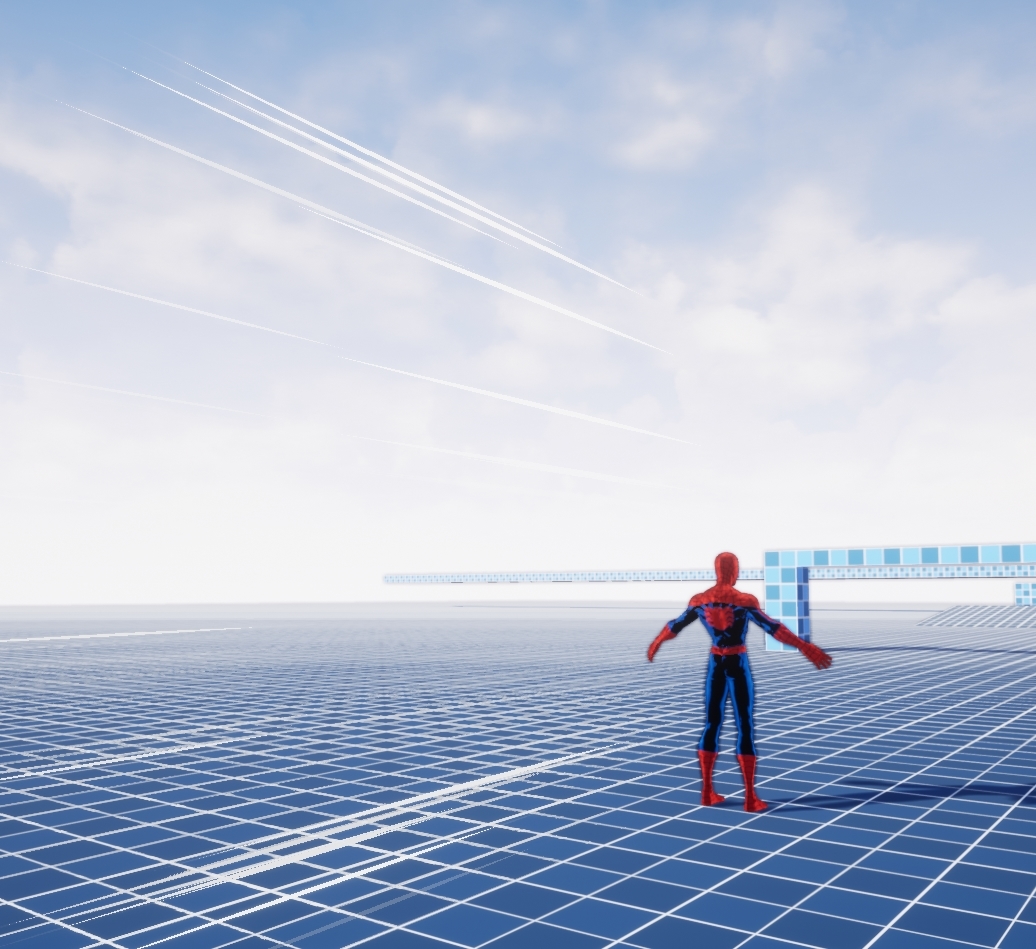
Yo, can someone help me out with spawning varying lengths in a particle mesh system? First one is mine, and I'm trying to replicate the second picture where there are varying lengths and positions at which they spawn, cheers!

 pure thunder
thanks zomg and subeki-scotty
hybrid light
@cinder pasture Yeah i did build upon it
 brisk nimbus
Not sure where this question belongs, but I´m trying to figure out how to best organise my project for unreal. Its a fully cg animated shortfilm.
There will be a bunch of different shots.
Since most of them use a different environment per shot, I thought I´d organise my project in levels per shot/environment. The shots/levels will probably share very few assets: The hero character rig and probably some master materials.
My main concerns are:
- Filesize. If the whole shortfilm is contained in one file, file size will grow siginficantly. Using version control on an online server might get pretty expensive and its just a passion project...
- Compile time. I don´t know how unreal compiles shaders for a project. Does it compile all shaders for each map separately, or ALL shaders for ALL levels?
- Shared settings. If its better to split up the project in several projects per shot (to save filesize when collaborating etc)...how do I ensure various visual settings stay consistent throughout the whole film?
- Another idea is using sublevels to separate the different areas in a collaborative project. So for example: I could have someone working on the scene assembly, someone on the animation and someone on shaders at the same time, without having issues with version control.
Would that work, or what could go wrong with that idea?
 vale bone
hi, possibly a dumb question but is there a way for the engine to remember the position of multiple standalone screens? I'm working on a multiplayer game and it's very time consuming to reposition the screens each time i do a test run
quiet swallow
Nice takes 20 min to create a project and then when it opens it crashes 8 times in a row then gives my pc a Black screen so I have to reboot the whole pc, oh yeah I can never use full screen. How unstable is the latest version jesus
nice
exotic thicket
Yeah sometimes I wonder how can UE be so freaking unstable
If I experience crashing pretty regularly even in my small project, how bad is it in a big game project?
 manic pawn
in a big game project you'll have someone experienced who can take care of the crashes so it's no issue
exotic thicket
You have to fix UE bugs because Epic didn't bother? :P
quiet swallow
and someone with a 20k$ to load the project in to a server and stream to more regular pc's
like cloud gaming but for unreal engine I guess
ok well good to know that you can not start a project with the movie preset in the latest version
quiet swallow
enough to run ue4 but i5, 1050ti and 12gb ddr4
 somber quail
12gb is a bit of a weird amount for ram
quiet swallow
well I have a prebuilt laptop so ye
and yes the cooling is fine and it does not take all my resources to run eu4 it's just that the engine is unstable
might go back one version since it seems much better
somber quail
Laptop? Dual GPU?
quiet swallow
ye
somber quail
There's your problem
Dual GPUs cause all sorts of issues
Have you disabled automatic switching?
quiet swallow
nope, where do you do that
I have tried so much so anything that might help would be amazing
also the bios is limited because of warranty so they hide settings xd
somber quail
I'm not sure, my laptop has been gathering dust for 4 years. What make is it?
somber quail
check Nvidia control panel 3D Settings
quiet swallow
Can't access it because of intel integrated graphics having full control over my display so I always get the error of try to connect your display to your Nvidia gpu so that's also really annoying
oh nvm now it works for some reason
it usually does not work
 sweet heron
Hello ! what is the best channel for newbie questions ?
somber quail
@sweet heron the one that best suits the topic of your question
quiet swallow
this seems to be the problem probably
somber quail
 void kraken
Can someone help me explain why some of these materials don't load on Mobile version
somber quail
Are your drivers up to date?
quiet swallow
yes
somber quail
@void kraken probably because you're using features that aren't supported on mobile.
 tender flume
as long as the 840M user here is surviving on UE4
everyones good.
i hope theres more lower/mid end users
quiet swallow
I mean I can use windowed mode fine but when I'm in full screen and hover over any text it just glitches out the program and then proceeds to crash and games preset works fine but not the film preset and the others I have not tested
somber quail
@void kraken read the documentation I guess
https://docs.unrealengine.com/en-US/Platforms/Mobile/Rendering/index.html
Information about rendering features on mobile platforms.
tender flume
try reinstalling yet @quiet swallow?
quiet swallow
yes
tender flume
to another drive?
tender flume
let me see if im able to load a project in fullscreen
i dont think people load projects in fullscreen though
thats where the editor comes in
give me a moment as the toaster starts to boot up the project
 unreal sable
Are these functions linked to frame tick or delta time?
-Timer By Function Name
-Wait Node
tender flume
okay works
@quiet swallow reinstall your drivers maybe
the 840M here is able to click on things in fullscreen
 civic crown
Timers are framerate independent, as in you don't need to use delta time with them. Not sure about wait nodes (unless you mean delay nodes in which case they're also independent)
quiet swallow
I have tried that..
I mean it's not to big of a problem
If I scale the windowed mode it's basically like full screen
unreal sable
@civic crown Cool thanks, that's the answer i was looking for. I was worried i'd have to rewrite a lot of stuff now 😄
tender flume
it's related to driver or either the settings on that application
might be utilising Intel HD instead of the graphic card
you never know
void kraken
How do I find what is wrong
 spare kernel
anyone know a good anaylytics solution ?
alpine laurel
probably pretty obvious fix, but I am unable to figure out how to get it to stop messing up like that. Any ideas?
spare kernel
Halo?
o_0
pretty sure that is already a game lol
anyway you cant put the image inside the horizontal box
and expect it to work
the horizontal box needs to go on top of the image
quiet swallow
anywhere you can find good free alpha heightmap brushes?
alpine laurel
pretty sure that is already a game lol
@spare kernel yeah i play it all the time. Recreating it on UE4
spare kernel
wouldn't use the name Halo tho
alpine laurel
not gonna
spare kernel
😄
alpine laurel
recreating the base game then modify from there
spare kernel
but you need to put the horizontal box over the image
alpine laurel
already talked with microsoft about all this. im good to go
spare kernel
not image inside horizontal box
 rigid spruce
is there a solution to choose default monitor in a multi monitor setup? 🧐
 fallen marten
@void kraken just open the material and see what node has a red line in it
@frozen pond looks like it's not just hair that needs attention. Singlet is disappearing inside the skin too
void kraken
@fallen marten Don't see red line in any of those
except for where it's using red channel
fallen marten
Add a color to the red channel. Try fudge the input to allow it to compile
 frozen pond
@fallen marten you mean near brests? yeah, learning weigh paiting
fallen marten
I'd skin weight the hair to some extra bones
Then simulate physics on it
Also by doing that, you can tweak the physics asset constraints to get good hair movement
quiet swallow
Going to create heightmaps that will hopefully help me sculpt terrain faster and make it more realistic using them in the alpha brush
If you could only get heightmaps from mars bruh that would be nice
 stiff hawk
is there a way to execute two console commands in the developer console in just one line?
i want to execute two commands in the editor from with in cmd
so by using -ExecCmds basically...
the two console commands are (for testing) help and quit_editor
i saw something like help;quit_editor but that apperently didnt work
frozen pond
what should i change to make my hairs (cloth painted) not move so much ?
 drifting ocean
FBX importer really needs a cancel command, I don't know how many times I've forgotten "Export selected" in Blender and ended up with a million things I don't want in the engine
 steel osprey
I keep getting ‘testA_BuildData.uasset failed to save’ any help?
 shrewd shuttle
anyone figure out how to get a ps4 controller working with ue4?
tender flume
you need it to be configured for controller
rigid belfry
early sketchup of a possible boss fight
thinking about using heightmaps for this. anyone knows a good read on that?
i am also gonna experiment a little on shaders, specifically stylized or toon shaders. training of the day is to set up a believable boss fight enviroment. tomorrow maybe i'll work on some niagara effects?
 shadow violet
why i cant see particle simulations in editor?
shrewd shuttle
@tender flume yeah that is what im trying to figure out
 celest creek
Heya, is there a way to re-activate a projectile movement once ‘onComponentStopped’ has been fired (which stops its physics)? Think someone throws a rock, goes to pick it up, then throws it again.
 prisma plank
hey guys) there will be 2nd wave of corona.. read news of Beijing )
 covert pollen
is there a blueprint/actor equivalent of this material node;
 distant bane
Hello. I wrote about a problem few days ago. Client asked me to build the mobile game i was working on for HTML5. At the moment there is no possible way with 4.25 cause github extension is for 4.24 so i need to downgrade. The biggest problem is when i open it in 4.23 (last version of ue4 that supports html5) i can open everything except assets created by me. Marketplace assets have no problem. Also maps are huge problem. So anyone can help me how can i work around this? Especially i need the blueprints and materials to be saved. Textures and meshes i can reimport
 ashen orbit
Hello guys, I made a game that has multiplayer functionality. When i test it locally it works well, but whenever i use Steam lobbies can be detected by all clients. But whenever someone joins the game they get a black screen and sometimes even get thrown back into the main menu
In the logs Steam gives out a lot of errors like: ```
[2020.06.13-14.24.09:510][478]LogOnlineSession: STEAM: Search result 0: LobbyId=Lobby[0x18600000B3BD75E], LobbyId.IsValid()=true, CSteamID(LobbyId).IsLobby()=true
[2020.06.13-14.24.09:510][478]LogOnlineSession: Warning: STEAM: Unknown or unsupported data type from Steam key data currentmembers 2
[2020.06.13-14.24.09:510][478]LogOnlineSession: Warning: STEAM: Failed to parse setting from key currentmembers value 2
[2020.06.13-14.24.09:510][478]LogOnlineSession: Warning: STEAM: Unknown or unsupported data type from Steam key data guid f742ebe1-d691-4844-ac97-4f91a8fe9692
[2020.06.13-14.24.09:510][478]LogOnlineSession: Warning: STEAM: Failed to parse setting from key guid value f742ebe1-d691-4844-ac97-4f91a8fe9692
[2020.06.13-14.24.09:510][478]LogOnlineSession: Warning: STEAM: Unknown or unsupported data type from Steam key data name Prezivljavanje balkan (crazyguys7070)
[2020.06.13-14.24.09:510][478]LogOnlineSession: Warning: STEAM: Failed to parse setting from key name value Prezivljavanje balkan (crazyguys7070)
[2020.06.13-14.24.09:510][478]LogOnlineSession: Warning: STEAM: Unknown or unsupported data type from Steam key data prefabdbversion E3C26D06F07B6AB14EC25F4823E9A30D6B4ED0450527C1E768739D96C9F061AE
[2020.06.13-14.24.09:510][478]LogOnlineSession: Warning: STEAM: Failed to parse setting from key prefabdbversion value E3C26D06F07B6AB14EC25F4823E9A30D6B4ED0450527C1E768739D96C9F061AE
@distant bane You could try to migrate it. But I don‘t think it will work. BP Nodes could possibly be copied.
But there is no good way to downgrade.
(Coping bp node networks is textbased) as long as their signature didn‘t change it should work.
distant bane
mmm what about all the variables references ?
its just too much. This project is from 4 months ago
constant work
azure gazelle
@distant bane Yeah.. it would be a huge amount of work. The migrate option is your best shot I guess. But other than that.. I don‘t know a way that could work.
distant bane
the other way is hope someone will make the extension on git for 4.25 or my project goes down together with my client. Thank you, i hope it will work, otherwise no chance i make it in time
 solemn orbit
hey
i have a question
i am having a problem and i dont know how to fix it
when i import a WAV sound file into ue4 its sounds really weird
this is the file i want to import
and the mp3 file is how it sounds in ue4
alpine laurel
is there a reason that whenever i start a level it shows the mouse y default and i have to click to be able to play the game
solemn orbit
when you start it in the engine or when you start it when your game is build or launched? @alpine laurel
because in the engine i think this is normal i have that too
alpine laurel
in the editor, on launch and on shipped version @solemn orbit
solemn orbit
hmm i think thats normal
alpine laurel
not normally
whenever i launch to a new level it makes me click before i can do anything. This is a new issue for me
 unborn matrix
Hello yes I need a mega grant pls
That is all
alpine laurel
good luck with that bud
unborn matrix
Imma just keep making awesome stuff :)
If I can get all 5 top spots on /r/UnrealEngine
It's like Exodia
tender flume
@shrewd shuttle theres alot for that on it in YouTube
hybrid light
am still looking for help
from yesterday
how can i block using W and D input
since my character does this side walk
a bp pic would be very much helpful
this is mine btw
 wary heart
Anyone know if it's possible to use Sync Groups between 2 different animation blueprints to have 2 characters in sync together? ex: rider and mount
hoary silo
@hybrid light
I meant to plug in the axis value of Move Right Event into the first Axis Value in "Input Action Move Right"
hybrid light
@hoary silo Thank you very much 😁
hoary silo
np
hybrid light
👍
 granite magnet
How can I disable an object in the hierarchy? Couldn't figure it out 😅
hoary silo
@granite magnet wdym
granite magnet
if for example I want to deactivate this object, how can I do that?
hoary silo
deactivate it meaning make it no longer visible?
granite magnet
yes without deleting it from the scene
hoary silo
there is an open eye icon next to the object
click that and it will make it not visible
granite magnet
that everything like the scripts etc. attached to that object is ignored
granite magnet
well if I have an object with a script attached that is not working yet, I would like to deactivate that object to still play the game
well if that doesn't work it's fine 😄
vernal thicket
Timer by function name better on performance than event tick?
 worldly stump
how do u get current pawn from the character
plush yew
I'm having trouble importing a model
hoary silo
@worldly stump
hoary silo
Are you doing online multiplayer or local?
worldly stump
online mult
 open gorge
Has anyone ever ran into this problem? https://i.gyazo.com/604541acc81cd6616440c3b271e6c79d.gif
 hoary silo
@open gorge WFT??
open gorge
I have no idea
hoary silo
I've never seen that before
hoary silo
try hitting shift f11?
open gorge
it doesn't occur in 4.24.3
hoary silo
i guess just reinstall the engine
open gorge
what does shift f11 do?
that seems to have fixed it
well temp
ok, so it appears to be just this project
how fun
 edgy pecan
Has anyone every tried starting a VR project in unreal and having the camera just be on constant spin mode?
 trim silo
Hey anyone good with materials and masks here? It's probably superrsimple but i'm stuck alittle
edgy pecan
Nope, put on the headset and almost instantly had to take it off -- love vr, but uncontrollable slow spinning just makes me sick
It's just weird because it's in the editor as well as the game
trim silo
My issue with VR was that my conntroller was awkward and it was spinning stuff with analog
check the controllers
trim silo
i had PS4 controller plugged in to my pc
and it was causing issues
becasue UE4 editor supportts controllers
might be an issue
open gorge
check if you have a controller plugged in
and make sure it's not being pressed in a direction, even slightly
I had that happen a few months ago, drove me batty
trim silo
Guys i have made a materials with spinning rift like this
I want to make the outlines gllow
any ideas?
how to make the outline of the mask glow
edgy pecan
@open gorge That would make sense if the game was playing, but this is literally when it is in the editor
Without pressing play
open gorge
yeah it can move in editor too
edgy pecan
The room just starts spinning
open gorge
check your controllers
trim silo
controllers work in editor too
edgy pecan
I press play, it stops spinning (although doesn't load on the headset, so I can't play it) -- I press eject to go to editor controls and the camera points up and starts spinning. Moving the headset has no effect
neither do the controllers.
open gorge
unplug them
edgy pecan
... My controllers?
trim silo
yeah
edgy pecan
... I mean I can take the batteries out.
 placid locust
Hi guys, how can I set default scalability settings for my packaged game?
trim silo
Why are you spawning character halfway through the floor
Put player start on the ground
Maybe this will fix
because at the moment it seems like the player is spawning halfway through tthe floor
open gorge
you have no other input devices plugged in other than your mouse and kb?
edgy pecan
Literally not me
trim silo
Did you try with playerstart?
edgy pecan
I've done absolutely 0 work on this -- I launched unreal engine, opened a new project, selected vr, and then loaded it
trim silo
It looks like it'sspawning character where the camera is
edgy pecan
I can't edit it because the spinning happens with the editor, too
edgy pecan
None of the normal controls work in editor mode, I can't click and WASD keys around
edgy pecan
This is me desperately trying to move around in the editor
I guess my only other option is to try a different version of unreal :/
open gorge
unplug your VR headset
edgy pecan
mf that worked
That's just... that's dumb. How am I supposed to edit a vr game without a vr headset plugged in.
open gorge
you may just need to recenter it
it appears to just always trend upwards
I don't work with VR though, I don't know the ins and outs
trim silo
recalibrate place it on desk facing forward
open gorge
I don't think it is
edgy pecan
I've worked with VR for a couple of years, but exclusively in Unity. I thought I'd try something different...
trim silo
steamVR
edgy pecan
SteamVR was running the whole time
trim silo
Yeah so recalibrate headset using steam VR
because it seems to always want to face upwards
edgy pecan
Thanks!
granite magnet
Hey! I have a small problem: I've added a capsule collider component to my gameobject but it won't collide. I've set it as the root of my Pawn but it still does not collide with other objects.
(trying to make a first person controller btw)
open gorge
did you enable collision for the capsule @granite magnet
granite magnet
uhm I've just added it and changed nothing. Do I first need to activate it manually?
open gorge
you need to setup collision options in the details panel
granite magnet
what do I need to change here?
open gorge
Try changing it to BlockAll
granite magnet
ah! alright thank you 😄 now it works
open gorge
^^
 runic yoke
Hello. I have a huge performance drop with rtx. With RTX on I have 15-35 FPS, but with rtx off I have 150-160 FPS. Is something wrong there or is it ok? My GPU-RTX 2080 max-Q
granite magnet
another Issue that I have.. I've added that to my blueprint code to rotate the camera with my mouse but it's not working
have I forgot something..?
or is the "code" itself wrong
 heady quarry
Did you set the controls in the project settings?
heady quarry
The nodes look correct so I'm not sure. Sorry.
Are the nodes in the level blueprint or the character blueprint?
granite magnet
in the character blueprint
heady quarry
Yeah sorry. I have no idea what wrong.
granite magnet
this is my whole character blueprint
and thats what it looks like in the viewport etc.
heady quarry
I just opened a new game file and the nodes are the same.
heady quarry
Oh ok.
alpine laurel
is anyone else having the issue with the editor constantly freezing when you build?
heady quarry
Yeah.
alpine laurel
every time i try and build it becomes unresponsive so I have to ctrl + alt + del it
then lose all my work
i mean i have 64 gb ram, 1050 ti, and a clock to 4.7 ghz cpu. this should not be happening
heady quarry
It usually works after I reset it about 3 or 4 times.
heady quarry
I looked it up and It seems to be crashing for others, but for different reasons.
 cyan pasture
Hey guys, does someone knows why, the lighting on android package is seems to be blown out?.. on preview mobile mode looks ok.. but on the actuall package it's all white.
 steep ferry
yo guys how do i send a working for job
 novel hawk
does anyone know if there is anyway to move the mouse cursor with gamepad thumbsticks when certain wisgets are open (like inventory)
 nocturne dock
my engine is broken, can't move anything and everything appears as flat planes (light sources and gamespawns)
i restarted it and it looks okay now
idk what was that
 vocal topaz
hey
i am making a unreal high-poly game with my team and we need poly water character etc. free and credits
if youre good high-poly creator or know a source please dm me ill give credits.
 hidden knoll
So I accidentally did something and now my character doesn't move, I put a print string out of the input axis move right, and it prints it like it's an event tick, does anyone know how to fix this?
I'm pretty sure it's constantly trying to move in all directions.
Now it's not printing the string but my character still doesn't move
Sow how do I fix it @plush yew ?
My character isn't moving at all
The only thing that I did, was change a Move Component To object from the character Capsule Component to a different character component, but then I changed it back so I have no idea what the heck is going on
Now it's not even reading that there is axis input
Okay
It is a 2d Sidescroller, and I did a bunch of debugging and it is accepting axis input, and there is flow out of the Add Movement Input, so I think I accidentally set something on my character that won't move
plush yew
Can someone help me with my 3D model
hidden knoll
@plush yew What part do you need help with?
plush yew
Let's talk in messaging
hidden knoll
Yes I finally figured out that dang bug, I deleted the character out of the world, but kept the asset and put it back at a different spot so maybe it was clipping into the floor lol
 cloud meadow
Hey guys, with 4.25 the modes panel seems to be gone. Anyone know why that is the case and what replaced it?
Ah... I see now. There's a new button in the top toolbar that opens them separately.
 untold pilot
Please guys help me with this. I am very disappointed. Why the lights aren't realistic ? I downloaded the model from the internet. I tried to make my own model in blender. but its the same thing
I tried to bake the light
white relic
I have followed this tutorial to a T. I have checked and checked and double checked and restarted and quadruple checked ..and it is exactly as it is here..and it does not work. Has something been changed since this demonstration? I need my 'tornado' to paint the ground in its path. The ONLY difference is I am using the NIAGARA system. He explains in the video just use the niagara particle system instead of cascade should not be any difference. Is there a box I need to check somewhere...I have b een playing around with it for hours and pulling my hair out https://www.youtube.com/watch?v=67z5u8ZcEcw

Epic's Chris Murphy explores how Unreal Engine's Blueprint allows developers to create high-end effects that impact many areas of the game environment without necessarily requiring in-depth knowledge in each discipline.
By leveraging Blueprint as a tool to connect particle s...
tiny sonnet
this is a general question, but is the gamemodes job only to hold all the other things like the gamestate and the player controler, or does it serve another purpose? If so, what is an example of something you would put inside the gamemode blueprint
azure gazelle
@tiny sonnet The Game Mode is meant to be the place where you check and enforce your games rules (Win-/Loose-Conditions). That‘s why in a replicated (network) environment it only exists on the server.
tiny sonnet
@azure gazelle so what if your making an endless mmo, would there be any purpose unless you have matchmaking?
azure gazelle
@tiny sonnet That‘s specific xD
Not sure epic games intended the game framework to be mmo compatible. You‘d probably build your own core game logic / framework in that case.
 whole quarry
There are multiple mmo's made with ue4
tiny sonnet
yeah
whole quarry
Just forget about the default onlinesubsystems
tiny sonnet
i just dont understand the functionality of a gamemode unless you have matchmaking
whole quarry
The gamemode is where you also set the default classes
Like pawn, player controller and HUD
tiny sonnet
thats it right?
whole quarry
It retains some of use :P
azure gazelle
@whole quarry Yeah, and altough I don‘t know any of those developers I highly doubt they just went with the default Game Framework. Maybe parts, but not in a way you would build a normal game.
whole quarry
Tho i think that for a MMO kind of game, the Game Instance gets more importance than the gamemode
tiny sonnet
game instance wut?
i dont need persistent data?
im mainly using game state and the player controller
whole quarry
But consider that ue4 main focus was FPS, then generalized more for more genres so everyone can start with it out of the box
Game instance is persistant througout the entire game session
azure gazelle
An mmo is on an entirely different scope. I don‘t think it makes much sense thinking about game framework classes in that context.
untold pilot
Can anyone help me please ?
#ue4-general message
azure gazelle
One thing you could do with game modes is in it‘s name.. You could create different game modes running in the same Map with only minimal or no changes to the map itself.
By switching one class you could change the entire goal of the game.
tiny sonnet
thats useful to know!
whole quarry
Gamemode should be server side tho
azure gazelle
@whole quarry well it always is in a networked game.
whole quarry
Other than local preset defaults, local gamemode has no point :P
Also, the client should only request, never decide, so the only thing the client does is listen and display and then some asking
tiny sonnet
i get all that, just didnt understand teh functionality of the gamemode
but i think i get it now. thank u
untold pilot
@untold pilot most likely busted (overlapping, non-existent) light maps or preview baked quality or autosmooth bug in blender.
@plush yew Thank You
 jade rivet
lol
how can anyone afford to use Maya
its STUPID expensive
$205 a month
get the fuk outta here
 pliant rose
night users, anyone online with knowledge of blueprints? need some advise, want to Private Chat
Mankind needs you
white relic
lol
@jade rivet The problem is as much as these programs are needed..they're highly specialty programs that overall very very very very very few people in the world will ever need or use. So in order to be profitable it has to be stupidly expensive
jade rivet
all i hear is the waves breaking against the hull of my freedom ship
sailing maya sweetly into my palms
mmmmm the 5 finger discount
azure gazelle
@jade rivet Try Blender then.
tiny sonnet
pirating is wrong if thats what u did
azure gazelle
@jade rivet I sure hope people will get your game for free too xD
tiny sonnet
the education edition is free for 3 years
jade rivet
pirating is wrong* lol
tiny sonnet
@jade rivet so you admit to pirating?
jade rivet
i wasnt going to buy it anyways, and its not exactly a physical object missing frm a store shelf
i admit to nothing
im just sharing a point of view
azure gazelle
@jade rivet it is if you try to earn money. Student licenses are free, maya lt is cheap and solid for indie dev
jade rivet
im just saying hypothetically its not "wrong" if someone wasnt going to buy it anyways
tiny sonnet
^
azure gazelle
@jade rivet No.. that is the point! You expect others to give you their knowledge and years of work for free so you can profit.
jade rivet
i expect to have access to an artistic tool so i can contribute to a community
a tool that is infinitely replicated with no physical loss
its not a physical object that goes missing or has a set limit to how many can have it
tiny sonnet
a tool that people worked on for many years, and you expect them not to be paid?
jade rivet
again, its not money missin from there pocket
i and many cannot afford the cost anyways
tiny sonnet
then dont use it?
jade rivet
i would have NEVER bought it anyhow
white relic
Anyone know how to enable chaos destruction?
 snow crown
simmer down folks
white relic
I enabled the plugin but dont see it anywhere
snow crown
this isn't a topic that needs to be fought about
tiny sonnet
so you bought it?
jade rivet
nah i used the student trick
snow crown
yes, maya costs money
snow crown
yes, there are ways to get it for free and some of them aren't ethical
white relic
😐
snow crown
no need to get into a fight about it
tiny sonnet
@snow crown so your saying piracy is fine.. great to know that ue4 moderators are advocating piracy, imma stop buying ue4 marketplace assets, and games from the epic games store and just go to the piratebay from now on! thanks for the heads up
azure gazelle
Not really a fight^^ just trying to explain to him why it doesn‘t make sense to pirate if you expect others to buy your product and pay for it^^
@tiny sonnet he didn‘t.
tiny sonnet
great
jade rivet
it is great!
snow crown
dont encourage piracy
jade rivet
for buying a student id?
snow crown
no, for acquiring software through less than legal means
jade rivet
i just registered for a very cheap 3rd party software program
so i am technically registered as a student
and i get a student number/email
theres nothing illegal about that
snow crown
and you are technically comitting fraud
jade rivet
software education*
im enrolled in a 3rd party software course*
sorry mispell
alright, i can see how this grey area doesnt sit well so ill stop talking
azure gazelle
Even so.. student licenses can not be used for profit (and you really hinted you didn‘t care about that).
tiny sonnet
if your not a student at a university or school, your committing fraud, AND admitting to it. but do wut u want
azure gazelle
Well have fun learning it 🙂 And remember MayaLT is great for indi devs that want to be able to sell their games but can‘t afford maya 😉
jade rivet
yo tidii ur the real mvp
im gonna try that
hahahahha the open uni comes with student credentials
this is amazing!
tiny sonnet
im doing those harvard courses lol, dont think they count
quarantine is boring as fck
snow crown
this is a better method of getting student access than purchasing fake student ids
jade rivet
omg it works
open uni for maya
lol
tidii u are amazing
im going to spread this amazing knowledge
@plush yew i found a guide that says u can make models in student then just port them over to blender and profit
lol
they restrict profitiability with it
so u have to port to blender to "clean it"
as far as im reading here
i like using maya cuz it "feels" expensive
yea ill look into that fingerprint issue later
azure gazelle
@jade rivet @light lintel The EULA still does not allowed that. It might not be trackable anymore and you could get away with, but you could still get a lawsuit if autodesk realises.
lusty osprey
can someone help im really struggling with this error [File:D:/Build/++UE4/Sync/Engine/Source/Runtime/Renderer/Private/ShaderBaseClasses.cpp] [Line: 383]
azure gazelle
@jade rivet then use blender because ubisoft switches to blender 🙂
azure gazelle
In the end it‘s more about skill then software.. it always is.
 still hemlock
Does anyone know how to add a time of day with the sky atmosphere component?
 inner cloak
@jade rivet can you paste link to that fingerprint scrub tutorial ?
jade rivet
ill dm u
snow crown
don't
still hemlock
Thankyou
jade rivet
( ͡° ͜ʖ ͡°) --- Today's Mystery Video - https://youtu.be/bjZE1fwAyJ4
iRoller (USA Link) - http://amzn.to/2awMLQZ
iRoller (International Link) - http://geni.us/kpvqoZE
The iRoller let's you roll away fingerprints from your various devices. Unlike the spray / cloth combo it lif...
this is a joke btw^
inner cloak
oh .. lol
snow crown
@jade rivet stop, this is your last warning
inner cloak
i have CC, it all depends on the package you pick
jade rivet
ok
snow crown
you are toeing the line and that is not appreciated
alpine laurel
i have 2 textures for th ground of my model. One is dirt with transparent gaps scattered around it and the other is grass. I want them to overlap in a material so the grass will be covering the transparent areas.
how do i do that?
frozen pond
question about skeleton: if i have skeleton mesh (human, got them already in unreal) and i make version with addional bones (wings in my case), will it fit or i need to add new skeleton ?
still hemlock
Okay
inner cloak
with CC3 you can create any character .. even monsters .. but some features need to be purchased from the market .. for example .. Vampire tooth ..etc
frozen pond
i dont have cc3, i do it in daz3d + blender
i was thinking about CC3 but i can't afford it atm
inner cloak
@frozen pond i was responding to @light lintel
frozen pond
ah sry xD
inner cloak
np
solemn orbit
hey
i have a question
is there a way i can turn the complex collision into a collision?
so this mesh has a collision?
so i just have to activate there?
how did make what
no
i selected all assets and made it in to one
no i fall through it
when i check complex collision
azure gazelle
@solemn orbit you could set the collision type in the mesh. Complex as simple. But that‘s not really great performance wise.
solemn orbit
@solemn orbit You mean this?
@plush yew i will try that
yes i know
i want that so the complex collision IS the collision
go check your collision settings
@light lintel where are these?
plush yew
I'm exporting a mesh in blender, for some reason it's flipped upside down in unreal
azure gazelle
@solemn orbit look at ponkkis screenshot.
@plush yew Blender and UE4 use different coordinate systems. Either change it during import or during export
plush yew
nevermind. I forgot that when a mesh is imported, it keeps the current properties
cloud meadow
Hey guys, just getting started, set up some walls from the starter content and applied a material and they don't line up - is there a setting or some trick I should know about for getting these to line up?
 lofty wave
yep
cloud meadow
Yeah, it's just default mesh & material from starter content
but I imagine there are tiling settings somewhere, I will take a look thank you
lofty wave
Or cheat a little bit by scaling one of the meshes by -1 on the right axis
Question: Is there a way to cast to the level blueprint?
Yeah I found that aswell but it didnt help much
Im trying to trigger an event in my level BP through an Actor
Ok I'll try to elaborate @plush yew
I want a custom Event (in the level Blueprint) to be triggered when a certain Actor is rendered for the first time
inner cloak
hey guys, i am currently doing a tutorial and i have like imported an fbx object mesh only, then created material and assigned it to my sphere. I get back scene and try to move the ball and only the origin is moving .. how can i move the sphere ?
lofty wave
I already got the WasRecentlyRendered part
I just dont know how to call an event in the level bp through an actor
Thanks I'll try
alpine laurel
how do you stop light from coming through your 3d models
yeah ive done that but it still comes through
alpine laurel
yes
lofty wave
Well then either build your light or make it stationary
alpine laurel
thanks
plush yew
with powers of two grid I can match the lenght and width of everything to powers of 2, like textures. But with lenght and width in multiples of 10, how do I avoid textures being stretched?
 mint umbra
Does any Epic Marketplace assets contain a nice library of growable vegetables? I.e carrots WITH the greens, or potato flowers etc?
plush yew
every material has specular by default?
plush yew
For program ps4 controller I need to use blueprint or c++ ?
 dark stag
anyone here ever deal with Xsens stuff?
white relic
fyi, "fingerprint scrubbing" of fbx and photoshop files doesn't work.
@plush yew btw. I still haven't figured out how to paint the terrain using the niagara emitter attached to an actor. I followed an awesome tutorial doing exactly what I need to do but it doesn't work. I went over it again and again and again and again and again for hours and it never works..so I have no idea what I am doing wrong
Epic's Chris Murphy explores how Unreal Engine's Blueprint allows developers to create high-end effects that impact many areas of the game environment without necessarily requiring in-depth knowledge in each discipline.
By leveraging Blueprint as a tool to connect particle s...
This is what I followed..it's literally exactly what I need to do but it will not work at all. I made sure I was masking it properly and the terrain was the right size and all that is 100% working ..but it refuses to paint the terrain
I am just not experienced enough
I spent my whole day working on it
the only difference is he is using cascade
I am using niagara
but he even says in the video though....
that it doesnt make a difference..jsut select niagara..which I did
and everything compiles
so I am pulling my hair out. I made sure everything was named properly no spaces or miss spellings.....
I downloaded different version of unreal..tried a new map ..just nothn...
ugh
 cedar wave
Is there a setting somewhere where I have new tabs open up in the same tabset as the engine? They always pop-out.
 sleek spear
where is the best place to ask for a feature for unreal engine?
plush yew
I need help importing a model
soft fiber
@sleek spear Church... lol
plush yew
This is what it says
soft fiber
@white relic The concept of the distance blend is very interesting.
plush yew
Is anyone available?
inner cloak
Says single root bone supported only .. that's what i would look for
that being said, i'm not an expert at it
 bitter iris
ue4 vector calculations are dumb af
inner cloak
i imported an fbx sphere and when i try to move it only the axes move ,, its like the mesh will not move at all .. how can i fix it ?
prisma plank
here somebody have fan project and search for mate?
white relic
I finally got the tornado to change the landscape... ..and then suddenly isnt working anymore
Well i give up..this method is broken
inner cloak
Can someone tell me why when i import an fbx i can't do anything with the model ?
floral knoll
how would one add roman numerals to ue4???
 marsh forge
hi guys
why when i import material from other project to my project
the material is missing link to the texture
is there any way to relink the material to the correct texture. Some of the materials are complex to know which texture to put in.
 sudden ferry
my log window doesnt appear in 4.25.1 on launch, how can i make it be enabled on startup by default?
 honest rune
Shouldn't the compiler be throwing an error if I use a forward declared type in a UE4 container property? Like:
class USomeClass;

UPROPERTY()
TArray<USomeClass*> SomeClassInstances;
The compiler should yell at me for this shouldn't it?
Because I swear this used to be something I couldn't do but its compiling fine for me, which seems odd.
vernal thicket
@floral knoll Do you mean for the widget?
floral knoll
like how would I make a function that would convert an integer into a roman numeral
vernal thicket
Can't say I've ever heard of it being attempted tbh lol
honest rune
you'd have to do some math for each segment
 rapid iris
Kklewi i would make a 'case' statement. If this digit has this number map it to this roman numal. Then make it a loop, if there will be multi digits
honest rune
this SO post gives the gist of what you'd need to do:
https://stackoverflow.com/questions/19266018/converting-integer-to-roman-numeral

Stack Overflow
I have a test due in about four hours and one of the questions asks us to convert a user-inputed integer up to 100 into a roman numeral. I think my code is very close (I found a youtube video that ...
thats about as pretty as it gets lol There's no language "culture" for roman numerals
you'd just need to convert that solution to UE4-slang. Like, use a TMap for your lookup table and obviously UE4 string types
honest rune
@hidden knoll do you have backup configured for restoring?
hidden knoll
I don't know
honest rune
check the recycle bin?
rapid iris
Is this the place to ask newbie questions about distribution of your UE4 packages? I think i have the correct terminology...
hidden knoll
I copied the AppData to a different drive and deleted the one in the main drive
honest rune
check your recycle bin
honest rune
lol gone
vernal thicket
Damn
honest rune
you can try a program like Recuva to recover them but you will wanna do it like now before you do stuff that overwrites the sectors
Recuva is free
vernal thicket
You could also try system restore? check fora restore point closest to you deleting the files?
floral knoll
thanks for all of the answers
honest rune
I'll PM you if you like with the link
I don't think we're allowed to link other software here
vernal thicket
Yo phantom
honest rune
si?
hidden knoll
Sure
vernal thicket
if i've got a branch > character movement > velocity > vector length > (> 0), why aint this workin?
hidden knoll
@honest rune Do you have a link to recover software??
vernal thicket
here look
this dont work for some reason
For detecting if the character is moving
It just returns false regardless
So according to that when the character is moving, it's still not moving?
honest rune
I don't do much in BP to be honest. Thats in the characters event graph yeah?
vernal thicket
yeah
honest rune
you need to hook up the switch
vernal thicket
I know the Character Movement returns a velocity because that's how the Anim speed is calculated
honest rune
there's no execution flow connecting to the switch
vernal thicket
Well i've disconnected it for a clean screenshot
vernal thicket
I can't figure it out, I wouldn't even know where to begin lmao
floral knoll
oblique tangle
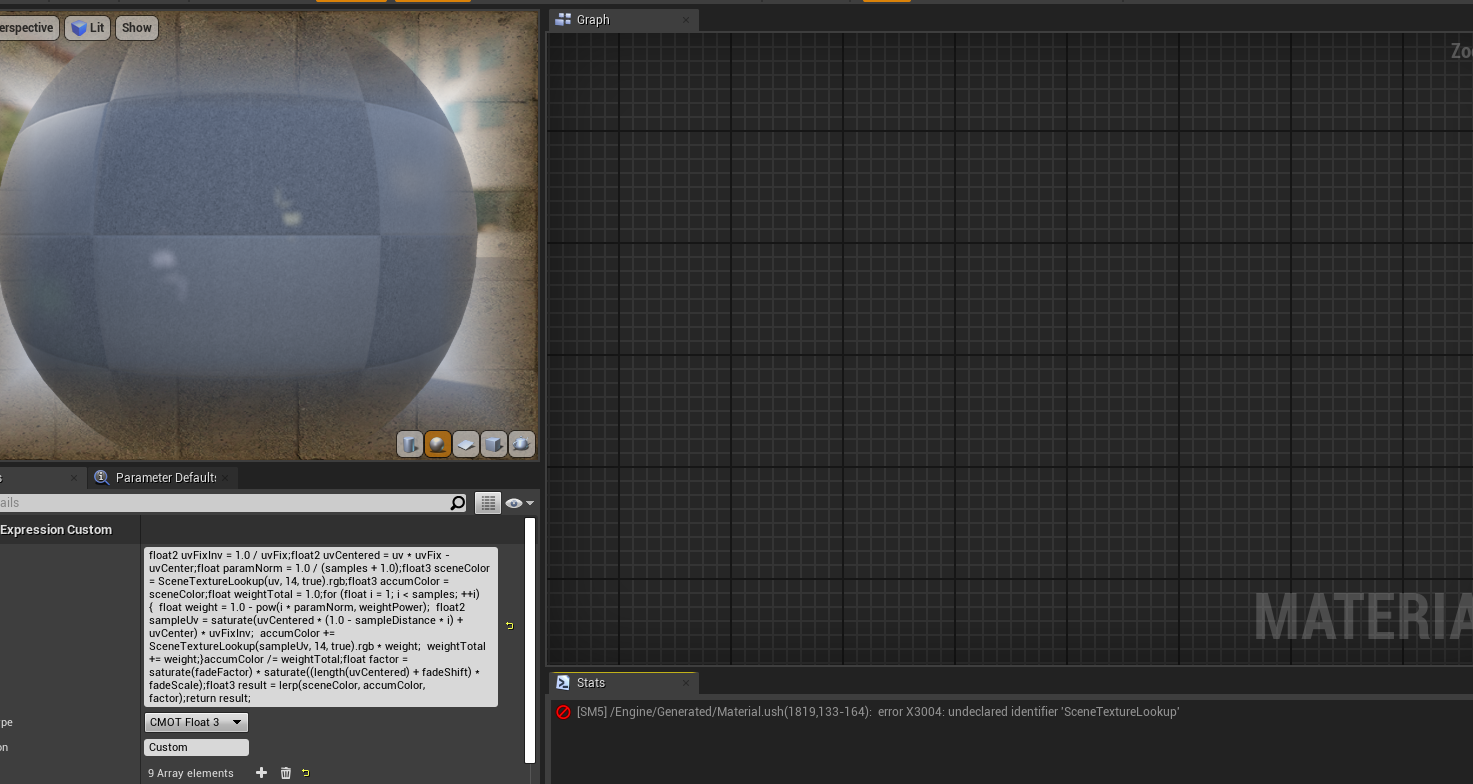
yo can someone help me out? keep getting a compilation error with a pp cmot float 3 custom node
floral knoll
image?
oblique tangle
 floral knoll
have no clue I'll take a closer look though
vernal thicket
According to print string it does work o.o
floral knoll
idk
hidden knoll
So that program didn't restore the files, but I did make a copy of the app data file, so I don't know how to open the engine using the copied file ;_;
YES I GOT IT BACK YES YES YES YES
OH MY HECK SORRY DEVS FOR THE CAPS I AM SO HAPPY
That was so smart of me to make a copy I am so glad I did
All I wanted was for my editor to stop crashing
 civic saddle
Unreal docs have dark mode 👀
 storm terrace
I'm using Rider for Unreal Engine and when I click it starts the indent where I click NOT where the indent should. Do any of you know the setting to fix this?
notice in the picture, I clicked where the cursor is and it didn't start right under "Super" like Visual-Studio would do.
also
if the cursor is at the end of a line and I press "down arrow" it doesn't backspace under super, it indents to under where you pressed the "down arrow".
any fix for the unreal-engine ide?
storm terrace
Learn how to work with multiple carets and multiple selection ranges (non-contiguous selection)
that is my solution
for "Rider for Unreal Engine" but I think works for other jetbrain products
uneven fractal
hmm thats an intresting restriction
you can't add the "add component" node in a components graph even if the target is an actor
azure gazelle
@storm terrace Rider for UE is still in beta, so if you can‘t find a setting and restart didn‘t work, I‘d suggest to contact jetbrains about it. I didn‘t get to use it yet, but a friend uses it and didn‘t mention such behaviour (he also used vs before), so I‘m not sure that‘s intended behaviour.
 bold lynx
question
how do i update the number on widget with a c++ class object?
currently it only shows the default number
 keen kiln
anything that moves is frozen in editor unless i am actively moving around in the viewport.. How do i fix this issue?
marsh forge
guys when i copied the material from other projects, the material misses the texture link. Is there anyway i could bind the link back ?
some materials are complex to know which texture to assign manually.
uneven fractal
gotta fix it manually
frank oar
I remember seeing a demo video of a vr world being rendered only in front of the player (and everything out of sight being culled until the are looking in that direction again)
Is this an automatic feature or something I need to look into ?
Sorry, still new to this!
azure gazelle
@frank oar Here‘s a great guide by intel on general optimization questions: https://software.intel.com/content/www/us/en/develop/articles/unreal-engine-4-optimization-tutorial-part-1.html
Section two should have info regarding occlusion culling (that‘s the thing you described).

Intel
Part 1 of 3 - This is a tutorial to help developers improve the performance of their games in Unreal Engine* 4 (UE4). In this tutorial, we go over a collection of tools to use within and outside of the engine, as well some best practices for the editor, and scripting to help i...
frank oar
Thank you @azure gazelle !
 austere scroll
i've seen people make amazing things in their first 4 months , i've started working in unreal 6-7 months ago and my game kinda look garbage .
what is the right/productive way to learn ue4 and make a game at the same time
sorry if this is the wrong chat
plush yew
how do I save a pose once I've moved my character model into position?
unreal sable
@austere scroll
This is just my opinion:
Think of the game and what you need to do to make it playable in the least amount of time.
Set priorities basicly.
 lucid socket
@austere scroll usually it has more to do with the creator than the use of the tool. This isn't a jab at you. I am personally terrible at art direction myself. But it is often about lighting, color use, proportions, etc.
plush yew
keyframe button is greyed out for me?!?
lucid socket
A bit like pixel art right, some people can make really good stuff in just 16px by 16px. I can barely do anything good with the same space.
austere scroll
@lucid socket @unreal sable thanks i'll work into that
azure gazelle
@austere scroll Not many people actually have the time, interest and skill to learn both, programming and art to create an entire great game alone. Actually that‘s pretty rare^^ Just focus on what you like the most and collaborate with others
unreal sable
@austere scroll
Another tip i can give, add sound effects.
It's really easy and fast to find a sound effect on something like zapsplat.com, add it to the game and the game will seem a lot better without doing any effort.
lucid socket
@austere scroll do you have a screenshot or video?
lucid socket
Yes.
azure gazelle
If you are interested in lighting and environment stuff -> search for unreal engine lighting academy. Best Resource in my opinion for this kind of work.
And lighting is pretty important in games. Almost as important as it is in movies.
lucid socket
Texturing isn't very uniform.
austere scroll
nope
lucid socket
Color usage isnt great.
austere scroll
what do you mean by color usage ?
lucid socket
Your color palette is all over the place. Nothing seems to fit together.
plush yew
can someone link me a guide on how to make a very simple idle animation from scratch?
I have the rigged asset
lucid socket
Grass on the landscape is bright, but the grass foliage is dark.
The trees don't match the detail density of the gun.
To be frank, it looks like a bunch of market place assets stuck together.
If that's the case, market place assets are great as fillers or prototypes; but to try to build a whole game out of them... It is hard to get them to fit together.
plush yew
https://discordapp.com/channels/187217643009212416/221799385611239424/721664704547782759
NEtwork question.. pls help)
For program ps4 controller I need to use blueprint or c++ ?
 maiden sundial
Both is possible
plush yew
Ok thanks
can you make an animation from scratch in unreal or do I need to do it in blender?
maiden sundial
Theoretically you can create a animation from scratch if you got your skeleton/mesh.
But i think UE wasn't really made for animation making
plush yew
ahh ok fair enoug
 tawdry mesa
Hello. I have been looking how to save "presets" for PostProcess volumes for levels. By now, i see it as "you can not". Can I ? I can copy/paste some config to a new level, yes. But how can I save nice favorites, instances, presets, call it whatever? Thank You.
 azure reef
Hello guys! I've finished a game for Android and now suddenly it's crashing when starting the game on the device. Can somebody help me to understand what it's the problem? Thank you!
 thick herald
@tawdry mesa I suspect you'll need to create that functionality yourself.
I know Pheenx has created such a system for the game he is working on, and it is probably going to be released in the Marketplace.
tawdry mesa
@thick herald , thanks. Funny that for years that has not been asked? Or heard. Same about single asset(s) favorites in Editor.
thick herald
There are many things in UE4 that are strange, from an end users point of view imo. 😄
 tight shell
It seems since 4.25 movement speed is tied to fps. Any info on how to get around that?
rigid belfry
which one do you prefer?
also, how do i draw gizmos in unreal? i wanna draw a small sphere and have this widget only pop up on player enter trigger
tawdry mesa
i prefer when nothing artificial is above enemies heads 🙂
rigid belfry
i think i agree with you
lets scrap this version
what do you prefer if i may ask?
 turbid wave

 tawdry mesa
i have flying enemy ai fighters, and i have (optional) healthbars, but those are sliding along the top edge of screen, accordingly to enemy's postion, but - on top of screen
rigid belfry
i am thinking about this, and at first i though to have the healthbar be displayed on the middle top part of the screen
problem with that is, i dont think you'll ever fight just 1 guy, so how would i do this? should i display 3-4 healthbars all on the top part of the screen? of course not
but then, if i dont show it, how would a player know wether the enemy is about to die or not
i think i'll just scrap the name alltogheter, make the progress bar drastically small
and eventually have an actual healthbar + name + eventual buffs/debuffs be displayed on the top middle screen, for any boss fight
tawdry mesa
also (i might experiemnt with this) might try to display bar at all for just some in your sight cone or something
 cloud bay
Hey guys! I'm having the problem that I cannot see a Debug Trace after I eject from the player. I checked all the Show Options with my dev partner who doesn't have the problem. Any ideas?