#ue4-general
1 messages · Page 752 of 1
 grim ore
@tropic jasper then use the set view target with blend node and use the built in interp function for it
your character is 6 feet wide?
 kind dew
mathewW solo carrying this discord server rn
grim ore
put your character in the scene next to the block, see how it looks as your reference.
@lime gull the best way to debug this is to debug it. Put a breakpoint on the remove node and when it triggers look at what it is trying to remove, look and make sure the code and what it is calling itself on is correct
 plush yew
my capsule radius is 32, and half height is 91
the box is that window is too skinny for 5 ft, considering the character is fps and standing at 6 ft so its obvious
grim ore
click on the remove from parent node an press F9 to set up a breakpoint then run it again, it should stop when it is called and you can look at your target and make sure its correct and being called at the correct time
@plush yew I don't really know what to say. All I see is a box on a plane in your scene and your settings are correct for units. Without another item for reference you literally have no point of reference for scale
 lime gull
Either im dumb or it didnt do anything
I set the print string back to say hello and it did that, but nothing else happene
grim ore
this is the default TPP character, the radius is 42 which puts the capsule at approximately 2.5 feet across. He certainly looks like he is in front of an item that is 5 feet across as he takes up half the space
 solemn orbit
hello i am new to ue4 and i am asking where i can find free auto landscape materials🤭 so like when i sculpt something up it looks like this
grim ore
@lime gull assuming your node had a red dot on it, any time it would be called it should be stopping and pausing the game
grim ore
then that code is not being called, are you sure you dont have that print string somewhere else?
lime gull
As far as I know thats the only time I wrote anything in a print string
grim ore
or you might need to select it as the debug object in the list once you start playing, it might not be getting auto selected. Do you have this one being used more that once? this widget?
lime gull
Yea I believe so. The main widget im in is an inventory, and the one im removing are individual items
Unless I misunderstand the question
grim ore
at the top of that screen it says debug filter, when the game is running it should automatically select the one that is running unless you have more than one then it might select the wrong one. based on the name I would assume you only have one Player Menu at a time so it should be selecting it
you could check once the menu is up tab back over to this blueprint and see what it shows in the debug filter
but if this widget when the game is running is selected in the filter and that node fires off it should be pausing the game so you can evaluate stuff
all I could think of is your Item Widget variable is bad when you call remove from widget, but it is definitely weird that its not being stopped if this code is running
lime gull
Debug Filter didnt change after running it through that node
But also, if I reload the widget it does delete the items im trying to remove, so maybe its entirelly visual
grim ore
so when the project is running and that player menu is loaded the debug filter doesnt show the created widget?
lime gull
It does not
grim ore
that is super weird. Maybe.... shut down the project, delete the intermediate folder, and start it back up just to clear out any weird compile issues
even if you were creating the menu more than once it should show up... more than once in that list lol
grim ore
yeah that is normal just hit compile
you should get something like this
where it shows the widget in the debug filter at the top, and when it triggers it stops execution and points to the stopping point
lime gull
grim ore
even when its not stopped the debug filter at the top should show all active created widgets
yeah if its round you need to hit compile
it also wont show in the list until the game is running
its an active list
lime gull
I did compile and nothing changed
grim ore
the circle is still hollow? try save then compile
grim ore
yep that is weird
you could try hitting F9 on it to remove it then try again
also I think I see why it didnt stop, it wont trigger in standalone mode
this is a play in editor only thing for debugging
lime gull
oooooooooohhhhhhhhhhhhhh
grim ore
yeah play in standalone basically makes a seperate running process with the game
Kinda forgot that was important, I rarely test in standalone lol
lime gull
I always do it just to see how it looks when I package it
grim ore
nope makes sense for most people I just tend to be in testing and breaking mode most of the time
grim ore
yep if it stopped you are good
mouse over the blue output pin from the item widget variable , or the input to the remove from parent and see what it says
grim ore
yep thats why
you dont have a valid widget to remove
so somewhere before then your item widget is being cleared out or you dont set it correctly
lime gull
Just got a whole bunch of errors
grim ore
so just start stepping backwards and see if you can figure it out lol
I wonder if you never noticed the errors since you were launching it in standalone
grim ore
well there we go, now you have a start
your grid slot looks like its invalid for that part of the code
which is possible if your item widget you are trying to get the grid slot from is invalid
lime gull
I ound something
Hold up lemme test this once more, and ill let you know if i spooted the problem
LMAO okay I never would have got it without you
I was setting "Get self" as "Get self"
Hence why it had no value omg
Thank you very much for always putting up with me lmao
 abstract plover
hi
 uneven fractal
how do you get rid of the preview text on objects when you've completly disabled static lighting?
abstract plover
this is unreal engine right
uneven fractal
yes?
 rancid lynx
if i want to increase terrain vertex resolution, you do that by dropping scale from 100 to a lower value ? because increasing the size or resolution doesnt actually add more vertex per area, it adds more area with the same distance between each vertex.
abstract plover
lightsaber you picture is very familiar... i saw that one on a tour on an art school once. this is siilar
rancid lynx
how do i increase terrain resolution (lower the distance between vertexes) ? lower the scale?
lime gull
Wait whats similar
abstract plover
your branches
abstract plover
i saw that one on the tour
grim ore
@uneven fractal how are you disbling the static lighting?
abstract plover
where this person/guide showed us this thing that connected to everything
and it was so weird that the character moved at w,a,s,d and space for jumping and punch on left click
grim ore
yep that is blueprints
abstract plover
🤔
abstract plover
btw im installing unreal engine 4.25
grim ore
When you clicked the checkbox it told you to rebuild lighting once @uneven fractal
uneven fractal
yes I rebuilt
grim ore
then it should be gone once that was finished, you should also see 0 lightmaps above that. if not maybe build lighting again?
you did turn all your lights to movable right?
uneven fractal
ah that was it
grim ore
yay
uneven fractal
'
grim ore
@rancid lynx its kinda multiplicative? The section size is how big each quad is then the sections per component determines how many of those sections are for each component then the nuber of components determines how large the entire thing is and then the scale is multiplicative of all of that
grim ore
decreases it if we want to be exact 🙂
uneven fractal
well I think ue4 uses the word resolution wrong tbh
grim ore
but then you need more sections to make it as large as before and its not as big and annoying
well if you click on the landscape and the details panel that is correct
uneven fractal
your right about resolution decreasing but regardless of scale the resolution value on the landscape stays the same
grim ore
true its just more dense so in theory your verts are closer together and its "higher resolution" lol
oooh.. I guess higher VPI lol
Verts per Inch
uneven fractal
it would be more accurate to call the resolution for landscapes in ue4 the amount of pixels in the heightmap
whereas the resolution your talking about is the pixels per meter or verts per inch
uneven fractal
I had to import heightmaps alot from world machine 🤷♂️
grim ore
so the key is to set it up to the highest "resolution" and subsections then scale down the scale and then scale down all of your meshes and make a level where you are ants
grim ore
Raaawr landscape for ants!
uneven fractal
amazing
rancid lynx
thank you. i just wanted to confirm that i wasnt missing something important or assuming the wrong thing. basically , lowering scale x y z makes "more verts" per area. 100 100 100 seems really decent but. i may go with 50 50 50
grim ore
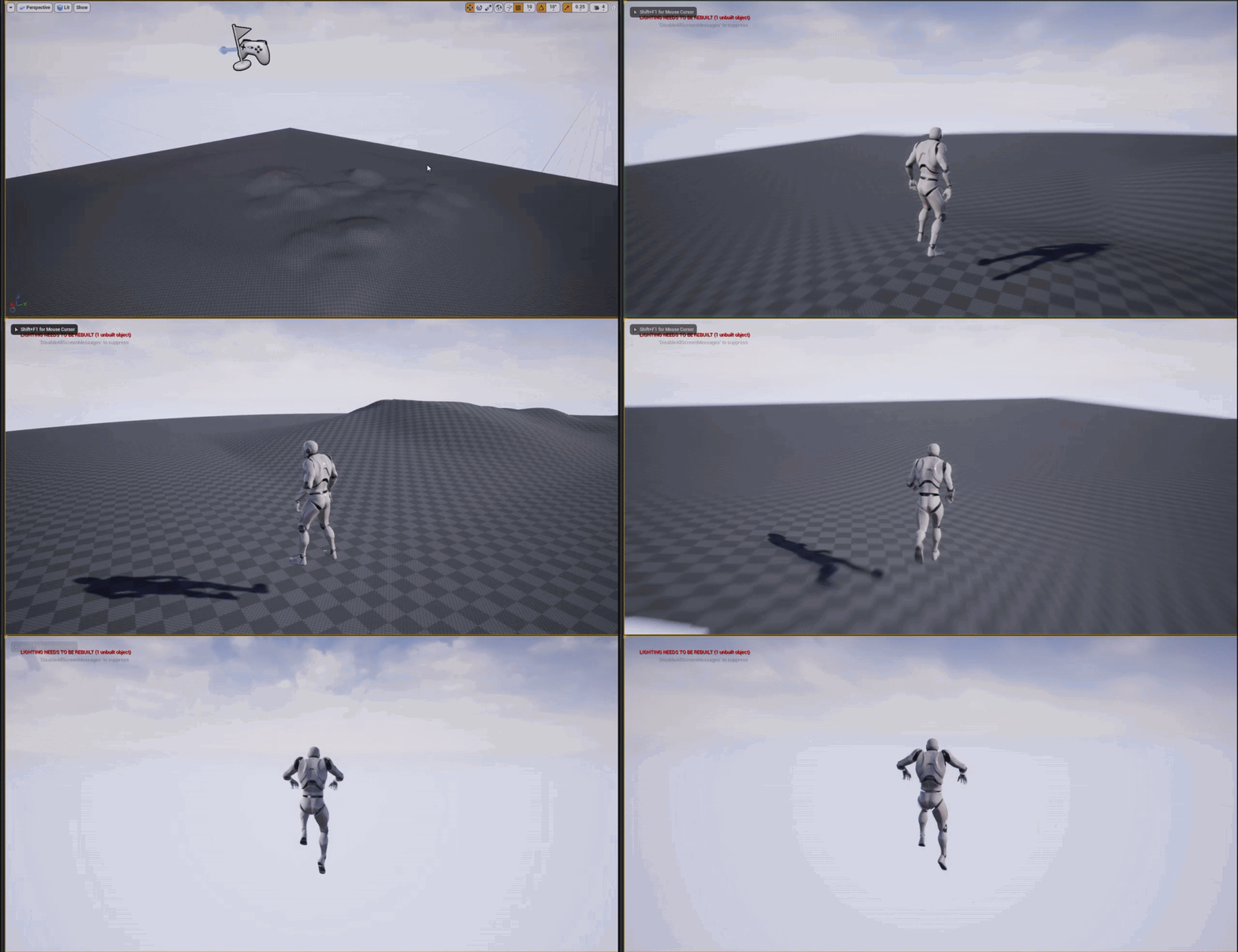
so scaling down the character and the terrain makes for some awesome high speed action lol https://i.gyazo.com/4eea76ea03aa73e2e53c9971431df679.gif
 grim ore
that is just the default third person template
grim ore
none of it matters, it can be changed. There are tutorials on the learn.unrealengine.com website that you can watch for all this info.
 modern sinew
How do you remove one specific widget
I want a widget to remove itself when it's done with its animation
grim ore
how are you playing the animation?
modern sinew
in the widget
grim ore
so the widget with the animation is handing its play animation call, or something else is talking to that widget and telling it to play the animation?
either way there is a callback for when the animation is done that you can bind to and then have the widget close itself
modern sinew
The former. Originally the latter, as the effect was part of a HUD UI, but turns out the reason the tutorial I was following made it its own widget is so that multiple of them could be there at the same time
 eternal rain
I have some basic first person controls set up; how would I make it so the camera resets to a front-facing, level position when a step forward or back is taken?
I'm guessing its values associated with the camera but I can't seem to find which event allows the pitch/yaw/roll to be set to values I specify
grim ore
this is if the animation is being played and called from the same widget, the same concept applies if not. binding to the Animation Finished event @modern sinew
 thorny locust
Would anyone know how to fix shadow distancing when I move further away my foliage starts to loose its shadow details
 warped marlin
playfab or gamesparks?
 open wadi
Well Hero, right now I'm shouting my own name.
But it's rare.
I consider it a form of self-involved Tourettes..
 frank pike
@thorny locust static lighting? just bake
thorny locust
its dynamic but I think I got it
open wadi
Question: I'm looking a skeleton animation in viewport, I've selected "skeleton" in the upper-rignt, how do get UE4 to display all the joints?
For example, I'm looking at this, and all the joints are listed on the left.
But I've seen it before, there's a way to show the actual skeleton underneath the mannequin - how do I show the skeleton itself?
All the bones, that is.
How do I get the viewport to display all the bones within the skeleton?
Without me clicking on each individual one?
 ripe saffron
hey all ... I am having difficulty in selecting objects in the viewport which have a dithered masked material applied ... is there an equivalent to "allow translucent selection" but for masked materials ?
open wadi
Not many questions get answered this late, best to ask back in the morning.
ripe saffron
It is the morning 😛
 worn granite
muricans only pl0x 
ripe saffron
hoo rahh
 lyric wedge
Hey all, today I've gotten a random crash. I've been trying out live coding (not sure if that matters) and now I've started to get an access exception in the unreal garbage collection.
Any one know what can cause this?
 thin tendon
I'm working on some game-pad support stuff. And I am just wondering if there is a way using Blueprint to figure out what Kind of game pad is in use? I can already swap button icons depending on gamepad or keyboard. But I wouldn't mind being able to swap for like xbox controller, ps4 controller or generic controller.
 swift tartan
So, I am maybe a bit ditzy. Anyway, I accidentally removed my viewport in the 3d model viewer....and I cannot seem to get it back. Anyone have a fix? Thanks.
thin tendon
Whats up with this error? Why can't I use xboxone in a file or folder name? I have been approved by microsoft already for a dev program.
ERROR: The following files are set to be staged, but contain restricted folder names ("XboxOne"):
 distant totem
@open wadi click character - bones - show bone names
 oak storm
Hi everyone, can you guys clear out my mind about UE5?
How UE5 can reader billion of triangle in realtime?
As I understand for now UE5 use streaming polygon technic to get the data of model before feed it to GPU to render it right? but how about memory to store that data?
If it reaching billion of triangle in must be A LOT of data to store in memory.
or UE5 just stream polygon data that I only see on screen?
For example, if I only see the hand of the human model is only stream the hand's polygon of the human model? I understand correctly, right?
 main folio
@oak storm I think it's like.. Loseless compression.. Thus reducing memory.. Like crunching down a billion triangles to 20 million... 50 times compressions without losing quality..
Since they were using highpoly megascans assets used for cinematics, I don't think the visual details are gonna be lost by the compression
Although I could be wrong.. Idk
 sharp kindle
Alright so I need help.. I can get my app to pack for android but when I try to start it up on my android or even different types of emulators bluestacks/nox/meme it says "This device only supports OpenGL ES 2/3 which is not supported, only supports ES 3.1+" I can't seem to find anything on the internet about it and yes these are compatable devices.. What am I doing wrong?
 surreal laurel
The material thumbnails in my content browser have all become square instead spheres... I can't figure out how to change them back. Anyone else have this problem?
they did it on their own, which is weird
main folio
@oak storm and as for the screen rendering.. I think that's how LOD's work.. The way how it switches to lod 0 if the object occupies most of the screen.. Idk
thin tendon
ERROR: The following files are set to be staged, but contain restricted folder names ("XboxOne"):
What I have found out is you can have XboxOne in a file name but not a folder name. And with the dev program stuff. Epic are supposed to give me access to restricted xbox related stuff but haven't done it.
surreal laurel
The material thumbnails in my content browser have all become square instead spheres... I can't figure out how to change them back. Anyone else have this problem?
@surreal laurel bump on this
 pallid talon
Question, when you select an animated object. How do you view the animation path in sequencer? Like a camera.
open wadi
I want to build a project in UE4 on Windows that will also compile on OS X (not iOS, only desktop). What is required to do such?
 frank oasis
sorry that i will say this buy jobany vrot blyat i did used some tutorial to build cpp for slate in c++ and make some fancy hp bar like diablos but with my own skin and colors and now my half ass game need to be rebuild and cant load while it asks me to do it manualy
now i deleted the project verify unreal engine gonna replace the files i changed yesterday
modern sinew
What does this mean and how do I fix it
frank oasis
well if i was trying i would remove the animation
where you made the mesh ?
and what it is biped ?
oak storm
Hi everyone, can you guys clear out my mind about UE5?
How UE5 can reader billion of triangle in realtime?
As I understand for now UE5 use streaming polygon technic to get the data of model before feed it to GPU to render it right? but how about memory to store that data?
If it reaching billion of triangle in must be A LOT of data to store in memory.
or UE5 just stream polygon data that I only see on screen?
For example, if I only see the hand of the human model is only stream the hand's polygon of the human model? I understand correctly, right?
@oak storm anyone?
 frank oar
Bit of a random thought but...
Since I started developing on my pc a couple of months back, having very long sessions on my pc working on my project.
I have noticed that my pc has slowed down and sometimes lags to the point that my mouse stops completely and has to catch up.
If I am grabbing an object when this happens the object gets stuck in a grabbed position and I have to re click the mouse to drop it.
Once this begins to happen, my pc stays jerky like that for a while, the effect bleeds into my games including my VR games
which is HORRENDOUS.
Just wondering if anyone else has experienced this on their game dev journey ?
 vocal flume
Wondering what’s the best way to add clothes to my mesh.. I’m not trying to do a inventory system or clothing system. Just want to add some clothes to my mesh that’ll be on all the time. Should I bring in the clothes as a different fbx and attach it to the mesh’s bone?
Or should I rig the clothes with the mesh in maya and then bring it into unreal as 1 fbx file?
 prime tulip
Does someone know how to disable this extremely annoying setting which always reverts to the settings you see here. This makes my viewport always very dark and hard to work with as I dont see the colors of my material. I can manually set it to -1 which makes the viewport exposure as it needs to be, but each time i reopen the asset or any other asset it reverts to these default superdark settings. It's driving me bonkers 😂
lyric wedge
Does anyone happen to know why Unreal might crash on PIE without an error when calling SomeTArray.Empty()?
[Note: The contents of the tarray being structs]
 fallen marten
@vocal flume if the clothes will never change, add them in maya, delete the mesh under them and have it the UV packed to have one material that contains all the textures. Will save on poly count, and drawcalls instead of mesh over mesh, and multiple textures being drawn to screen
surreal laurel
question went unanswered earlier so trying again - The material thumbnails in my content browser have all become square instead spheres... I can't figure out how to change them back. Anyone else have this problem?
 whole quarry
Unreal Tournament Forums
Is there a setting I can change which makes all materials in the content browser preview with a different model instead of Sphere? (for example, a cube) That
 honest vale
@lyric wedge do you get any sort of error log?
 wheat hare
@surreal laurel it switches to whatever you set it to in the material editor
surreal laurel
@whole quarry Thanks that thread solved it for me. I had to click on View Options in the corner of the Content Browser and edit thumbnails, which is a setting i've never used nor even seen before.. so it bewilders me how the thumbnail model suddenly changed in the first place. Well, thanks anyways!
whole quarry
It's useful to learn how to google
 lament yarrow
I'm wondering what is the correct way of checking type of SWidget apart from GetType() + string compare?
 hasty osprey
is it possible to reverse cook uasset and uexp files?
whole quarry
@hasty osprey why would you want to do that?
hasty osprey
modding purposes
whole quarry
arent those in the 'mod kit'?
hasty osprey
yeah well this would be more of a general modding technique tht woukd applly to all UE4 games
 oblique tangle
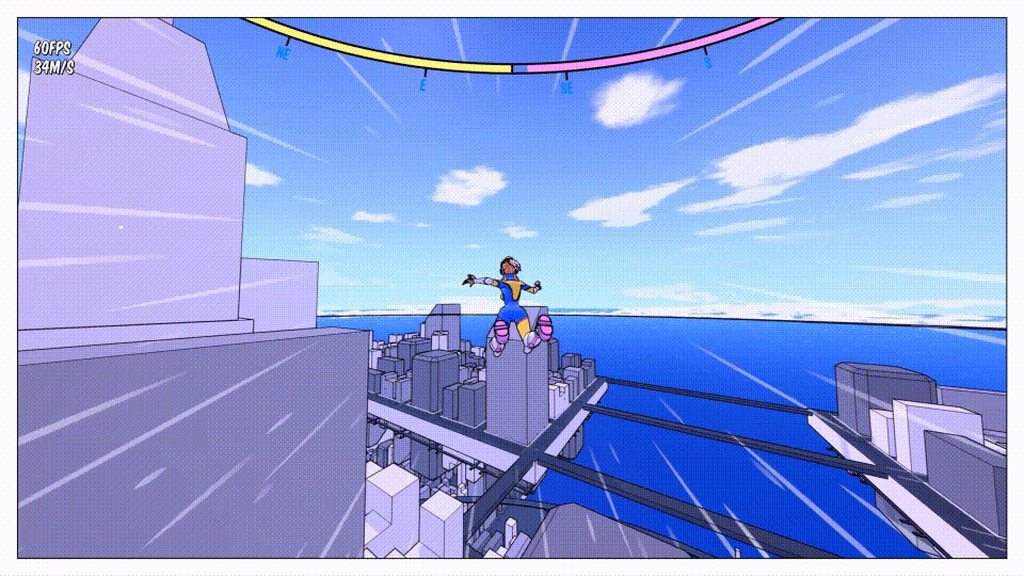
Might seem like a stupid question, but does anyone know how I can like block/mask out the center of a particle system? I can see the speed line effect in the gif linked is just a simple radial line squashed out, but I'm unsure as to how I can mask that center sphere where the player is
 whole quarry
@hasty osprey in that case, no. it's potentially ripping
 bold aurora
Hey there, when I spawn an object with enabled physics as it hits the ground it starts to shake and then eventually falls under the ground. Does anybody know what is the cause of such problem?
 sleek bridge
It should work like this:
- player approaches usable object
- player presses interaction key
- interaction widget is spawned (I only want it to spawn when he is interacting to reduce amount of actors in scene)
- if he clicks or stops interacting, interaction widget is destroyed
@wind oriole
Hi man! Or anyone else :)
Did you get this to work or does anyone have experience with showing a 3d widget only on a keypress/input action? thanks!!
modern sinew
Does anyone know what this means and how to get this to work?
 paper kernel
@oblique tangle should be doable in particle material, set masking to 0 when screen UV is near 0.5, 0,5
but that means it will under no circumstance render near the center of the screen
oblique tangle
@paper kernel Will that effect the particle system when it rotates like in the gif? So, for instance, if it rotates into the middle of the screen, will it block that out?

like that?
 soft panther
Where Do i connect Displacement map ?
paper kernel
yup, it wont show up around the reticle are then
lyric wedge
@honest vale Nope, no errors, no crash reports. The only reason I know it's the .Empty() line is because I put UE_LOGs before and after the line, it doesn't reach the second log.
It could be to do with the garbage collection error I was having earlier (see in chat above I posted an image of that one). But I don't know anything else since it just crashes when I press play.
 astral phoenix
does any1 know any good video tutorials about modular characters? cant seem to find any :/
oblique tangle
@paper kernel \damn, how would I go about achieving the effect they did where it still shows up?
paper kernel
I could think of few ways, but those are far beyond simple approaches
 native garden
Hi, I was wondering if there is a good explanation on how to move the HUD from the screen UI onto your arm in game to make the screen clean for the player and a give it a bit more realistic feeling. An example would be the Metro 2035 or http://blog.leapmotion.com/arm-hud-widget-like-smartwatch-entire-arm/ this link. Is it possible or do I want too much from life?

Introducing Arm HUD, a heads-up display that’s attached to your arm inside VR space, complete with button and slider controls.
paper kernel
like actually adjusting the emitter rotation to match the reticle direction while making it impossible to spawn any particles in the frontal cone(reticle area) and adjusting the particle shape to match the velocity
plan b is to fade out the particles while in slow motion
whole quarry
does it need to move or can it be static?
 rigid belfry
i am following the Grass quick start document to the letter but my grass is not spawning
thin tendon
I have a weird question. Keyboards in non-English speaking countries. Do they exclusively have the lettering of the native languages or do the have both native and English characters on them?
whole quarry
you mean like hebrew, arabic, mandarin?
or do you mean layouts, like qwerty/azerty?
rigid belfry
@rigid belfry just to let others know, you actually have to enter Play mode. the landscape grass tool does not work in the editor
 wary wave
it depends on the language and the keyboard
thin tendon
I mean like hebrew arabic etc
wary wave
I've seen arabic keyboards which just arabic keys, and I've seen them with both
also they're not 'English' keys, they're latin alphabet
whole quarry
@wary wave Not really, western world uses qwerty regardless of language, only exception is france with azerty. then there are mandarin and such
wary wave
France is not the exception and a number of countries have their own layouts, even in latin base alphabets
this is a Slovak layout, as an example;
https://www.colanguage.com/sites/default/files/u30837/1495095760.png
 whole quarry
which other countries than france use azerty, and what else then qwerty and azerty exist?
whole quarry
what the hell is that for blashemy!?
thin tendon
I already have multi language support. I'm replacing key names (which translate) to key icons. So I would need icons for each language?
rigid belfry
every country has their own keyboard layout @whole quarry
wary wave
you would need icon mapping for every locale you translate to, yes
thin tendon
thanks
thin tendon
This helps a ton thanks guys.
wary wave
Turkish is a good one too;
https://www.ibm.com/support/knowledgecenter/ssw_ibm_i_74/nls/kbg440.gif
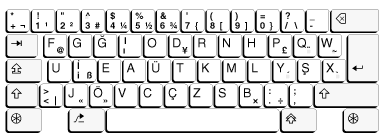
FGGIO
😄
thin tendon
So does that mean instead of wasd. It would be GUIE when they play games?
 frail flint
Hello, I am using a cinecamera in Unreal and trying to use the Focus Settings in it. So, in the Focus Method is in Manual but when I'm moving the Manual Focus Distance (using the Draw Debug Focus Plane), it didn't do anything at all and when I check in Show - Visualize - Depth of Field Layer, I don't see anything too. Nothing is in blue. Does anyone know what is the probleme ? Thank you ! 🙂
thin tendon
Yeah I'm just curios if Unreal translates the Key layout for them.
 worn peak
first time opening the editor, any1 knows what this yellow points are ?
wary wave
yeah, I'd assume that's what someone using that layout would adopt, but it's an odd one
and Unreal doesn't do anything that I'm aware of, you'd have to set up locale based mappings yourself
 keen hinge
Hey guys, I just renamed a class .h and .cpp in the source folder, I then deleted intermediate and said Generate Visual Studio project files. It seems to me that's what most people say you should do when refactoring.
However, opening the Unreal Editor, the old name of the file is still there, without the new one anywhere. I tried validating the assets, and nothing happened.
When I click "Show in Explorer" on the old C++ class name in the editor, it simply goes to my document folder rather than anywhere in the sources. The source folder however contains the correctly renamed files as does the VS project.
Does anyone have a way out of this pickle?
rigid belfry
@worn peak that does not look normal
 hard ruin
Hey guys, can some explain why are blueprints needed at all in UE4 programming?
I'm just entering the gameDev industry, I have decided to go with UE4, because not relevant reasons.
I know the whole thing about its easier to learn blueprints, but technically can I make a game of any complexity without touching blueprints? or are they required for development?
thin tendon
So if nothing happens right unless I set it up. What happens then if nothing is set up and someone from another country plays with a non US keyboard?
rigid belfry
@worn peak maybe gpu artifcats? what pc do you have? how old?
thin tendon
It doesn't work?
worn peak
@rigid belfry like rly old
wary wave
if you do nothing and someone tries to play with a different key layout, they'll have a hard time
rigid belfry
@worn peak do you know how to check your temperatures?
wary wave
e.g. on that Turkish layout, WASD are all over the show
worn peak
what program to check it ?
rigid belfry
@worn peak i like to use hwinfo64 because there is a lot of stuff but i think you can use the producer's own program
for example, the nvidia control panel
worn peak
and if I dont have a dedicated graphic card like nvidia
rigid belfry
then
you can use any program you like to monitor your CPU temps
your problem looks like graphics related artifacts, so it has nothing to do with the engine
worn peak
I see
rigid belfry
artifacts are real bad, just saying. your pc might be near its end
worn peak
guess its time to buy another one
rigid belfry
but it might just be due to the temperatures. you can check those and if they are too high, you can inform yourself more about a possible solution
plush yew
https://pcper.com/2008/03/john-carmack-on-id-tech-6-ray-tracing-consoles-physics-and-more/ epsarse voxel octree
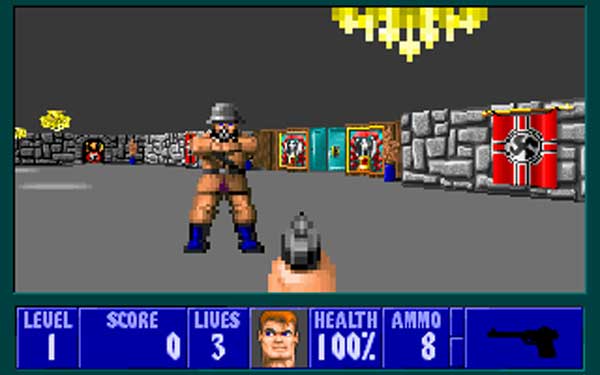
John Carmack on id Tech 6, Ray Tracing, Consoles, Physics and more John Carmack sat down to talk with us about the current world in graphics including all the d
rigid belfry
i am having troubles with the grass tool again
i think its because of how i set up the material for the grass but i just dont understand why
this is the preview
and this is in the editor/play mode
whole quarry
Did you set the material in the mesh?
rigid belfry
picture 1 is a static mesh
wait hold on
if i drag in the static mesh, it renders just fine, but when using the foliage tool or the landscape grass tool, it does not render it
honest vale
I wonder if UE 5 gets rid of traditional landscape 🤔
I mean, if it can do meshes with per pixel triangles why even have a special landscape actor in the first place
plush yew
Is there a free realistic water assasset you know
 midnight root
@honest vale be fine with me landscape are a pitb anyway, too restrictive and you can't alter resolution non destructively
unlike other engines
wary wave
well, yes? It contains the entire game without all the data compressed, plus all the additional bells and whistles associated with the editor?
 thin gate
how do you count apex destruction fractures
i want to tell how much of the structure is broken
astral phoenix
Does any1 know any good video tutorials about modular characters? cant seem to find any :/
plush yew
hey guys how could I dynamically fit some hat to a head mesh in unreal engine? because I have many hats which have different sizes but wat to fit them to different head meshes....
 opaque plover
What solution sounds the most performant:
-5000 actors, each one has a Procedural Mesh Component
-1 actor, 5000 PMCs
-1 actor, 1 PMC with many mesh sections
 twin adder
Guys, maybe someone was working with UE4 setup nDisplay + VRPN for LED walls to get movie production? I have a question about projection mesh setup, can't really find any info out there, really specific request but maybe someone was dealing with that
 vital cosmos
whats the difference between game mode and game mode base
 tender flume
i'm guessing that a gamemode is something which is used for different randomized modes (normally in multiplayer games with modes)
the base would probably be the one that explains the mode?
its a base so i guess thats it
 nova shuttle
Hi guys I’m a total beginner in unreal engine and I’m just opening it
 hoary locust
enjoy
wheat hare
It's by category
 echo blaze
alright thanks
solemn orbit
hello i have a question
 spiral marlin
Which channel would you think a question regarding how to use additive leaning animations would go? 🤔
Had looked over the various channels but am a bit unsure of where such a question would fall under.
hoary locust
#animation doesn't seem a good fit to you?
spiral marlin
Well since that was for content creation I wasn't sure if it'd apply there necessarily.
solemn orbit
can someone explain why i cant get an empty actor in to the widget graph?
here is my blueprint
but, i cant get a refference to the actor only in the map blueprint
or how can i find out location coordinates in ue4?
hoary locust
what's an empty actor?
whole quarry
Empty actor is empty
hoary locust
don't you just drag it to the level BP?
whole quarry
You need to connect an actor to the getActorLocation
Widget self is invalid for that
whole quarry
Yes you can
open wadi
Question: What do I need to know to be able to compile a UE4 project for OSX, if it was developed on Windows?
whole quarry
Get All Actors of Class or give it a tag and use Get All Actors With Tag
Check the "Blueprint Communications" video in the unreal engine youtube channel
hoary locust
exactly like you did
solemn orbit
are these the coordinates?
whole quarry
@open wadi to compile for OSX on Windows you need a OSX computer and forget to be able to compile it on Windows
open wadi
@whole quarry Ok, but I can dev the project in UE4 on windows, compile it there for Windows, then also use my Mac to compile it for OSX?
open wadi
Cool, that's fine, I have an OSX machine, I"m typing on it right now. Just wanted to make sure I could dev an entire project in UE4 on my Windows box, make it work for Windows, then port it to Mac.
I guess some people have pipelines for that?
Bigger companies literally have pipelines for just also compiling things on OSX
whole quarry
Im sure there are pipelines for that, you'll have to google it though 😛
open wadi
Is the same true for Linux?
Like Debian or Rhel or whatever?
You have to have a Debian or RHEL box to compile a Windows-based project?
whole quarry
open wadi
Just Curious.
whole quarry
it says here you can compile on windows for linux
open wadi
Ahh, well that's nice.
 arctic flame
anyone figured out a way to stop my character from bouncing off other characters when jumping on top of their capsule collision? I don't want to land on them, but the bouncing is way too strong and almost always sends me flying way off course.
whole quarry
use less force/impulse?
arctic flame
how? I jump on them I'm not specifying any force/impulse
it's the default behavior for jumping on top of a capsule collision
 harsh tiger
hello everyone. im trying to make a calculator using UMG. but like that gif when i click 123 it shows as 0.0123 because the default value is 0.0. how could i remove the 0.0 as the start and make it a whole number and not a decimal https://gyazo.com/b036c520c9baf3eac6f9f6c31bbfeef2
i feel like i should be using a different node from append. but i dont know the name of it
 barren flume
I'm so confused on how my main drive keeps running out of space
from unreal engine
when the project is in a separate drive
this is the drive the project is in
harsh tiger
have you removed local cache in your launcher?
uneven fractal
you can control the precision of a float by doing a convert to text node which has several options for that
then convert from text back to flot
harsh tiger
i'll give that a go. ty
harsh tiger
yeah
barren flume
I always thought that would delete everything
harsh tiger
nope, it will remain in your project. cleans up the space on your ssd
harsh tiger
just remove local content on all the packs that have the little yellow drop down next to them
harsh tiger
ahh
harsh tiger
nice
 modern juniper
How should I post in looking for work
 scarlet kiln
#work-in-progress message
The link above is for a post I did on the work in progress channel...needing lighting help. Please message me using the @ sign or DM directly.
Also out of curiosity, how many people have seen the UE 5 demo video for playstation yet?
astral phoenix
Hello is there any1 that can help me with some modular characters? im trying to change my equipment in game but i cant seem to get it to work, any help is welcome! 🙂
 astral sundial
is there a way to manualy make the editing window fullscreen, f11 is not working?
 swift flame
hey guys does anyone know if it's possible to have Sort Order for two meshes that are Z fighting?
one of them is a decal and it uses vertex painting as opacity, so I have to use a mesh and not Deferred Decal.
grim ore
what % is the editor showing it is loading at?
 analog sigil
@barren flume you can also edit the vault cache location in Epic Games Launcher Settings
plush yew
94%
analog sigil
@plush yew I'm pretty sure most here would have seen the UE5 stuff
plush yew
it must have crashed
wary wave
it's probably loading referenced assets or building shaders
the latter especially if you have never opened it before
plush yew
so it's compiling stuff
wary wave
quite likely
plush yew
compiling shader in task manager
wary wave
there it is
it'll do that the first time you open it, or make major changes to shaders
plush yew
why does it have to compile?
grim ore
why shouldnt it?
 modest tree
how can i learn how to use ue4?
grim ore
read the pinned messages in this channel
modest tree
thanks
plush yew
couldn't the editor come with pre compiled shaders?
grim ore
it could but it doesnt. It would bloat the download size and the shaders might not be for the platform you want to use
wary wave
(and then you'd have to compile them anyway, after having downloaded a massive file you didn't need)
 minor parcel
why cant i parent socket my camera to my player's head?
grim ore
does your players head have a socket?
minor parcel
yes
it says something about inherited
all i have done is loaded ue4 and gone into the blueprint for my character and tried to parent the camera
i have created 3 new projects and all have same outcome
minor parcel
.___________.
grim ore
so your screenshot doesnt show it's inherited, but you say its telling you it's inherited
minor parcel
yes
i will send a screenshot in one min when it loads up
im using the third person game type
 summer edge
im new to c++, I have done python in the past and I just finished this video https://www.youtube.com/watch?v=vLnPwxZdW4Y&list=PLWKjhJtqVAblfum5WiQblKPwIbqYXkDoC&index=9 what would be my next steps where my end goal is making my own games in in Unreal Engine?

This course will give you a full introduction into all of the core concepts in C++. Follow along with the videos and you'll be a C++ programmer in no time!
⭐️ Contents ⭐
⌨️ (0:00:00) Introduction
⌨️ (0:01:38) Windows Installation
⌨️ (0:04:54) Mac Installation
⌨️ (0:08:44) Set...
 keen moss
im having an issue with my glass material and raytracing, the material is not allowing a roughness map with anything in a gray value, only values of 1 or 0
grim ore
@minor parcel my guess is you were clicking on something else, or made a child of the third person character and are trying to change that. The screenshot you showed me should work fine for setting a parent if you have a socket on that mesh
minor parcel
plush yew
some materials are blank and it's still compiling
grim ore
@summer edge go to learn.unrealengine.com and start with the getting started videos. Also the pinned message in here has other tutorials to watch
summer edge
what are your thought on the udemy gameDev.tv course for Unreal Engine?
grim ore
its not showing what the parent is, or the list of sockets when you click on the eyeglass
grim ore
and what is in your drop down list for the parent socket on the follow camera?
grim ore
then something broke, maybe close the project and re open it
or you have no mesh assigned to your mesh
minor parcel
i have closed and re opened and mdade 4 different projects and nothing has fixed it
grim ore
that tooltip is just the default btw, it doesnt mean its accurate
grim ore
and clicking the eye glass has to show something
if it shows none its reading the skeleton
 dusky gate
if you get creators licence will you be able to use other licence?
grim ore
yes
dusky gate
ok good ty
minor parcel
omg im stupid
fml, you click the magnifying glass not the text bar
@grim ore sorry for wasting your time i should have figured myself
grim ore
not really your fault, I just looked and I cant see anywhere in the docs for sockets that mention how to use that picker
minor parcel
lol
plush yew
uh
since UT is not longer being developed, I might just create a new fps template with the scale of UT player
 dark stag
im kinda having a weird problem with a media texture if someone can lend some advice?
works fine in the editor, and when i play it... the media texture is just black until i stop and go back into editor... i think im missing something?
 thorny yoke
Could someone help me out with a problem related to visual studio? I just created a blank new 4.25 c++ project but inside visual studio #include isnt showing any engine files or project files. Ive already tryed to regenerate visual studio project files but this didnt fixed it.
minor parcel
im using the original 3rd person controller which ue4 provides and the controlls for it are messed up but i have not touched the controls.
issues i have. Random Spinning when pressing A or D. Mouse does not rotate character unless i am walking. This is now Fixed!
uneven fractal
huh I was just able to quintuple loading speed by changing how I fed data to the procedural mesh component
It seems the add section function for procedural meshes runs faster if you combine sections by only calling it once and feeding it all the verts and tris at once instead of calling it for every shape you want to add to the mesh
plush yew
how can i make it so that the player cant go outside the skybox?
 fathom agate
im hiring anyone who can install multiplayer functionality for a dedicated server to work on steam
 fickle ridge
@summer edge Sorry 4 the late response
I learned most of the experience i have with Unreal (I'm not a genius because i ended up moving to Unity) from just playing around.
There was originally modding support for this one game i played, so i ended up launching up Unreal, and messing around from there.
I then set myself goals, and continued, as it really gave me something to do, and entertained me.
So, try that i guess ^
Just set yourself some cool, small goals.
summer edge
@fickle ridge did you have a lot of experience with c++ before you started to use unreal?
fickle ridge
Negative
Had nothing but Python
And that didn't help at all imo. lol
I pretty much just used blueprints for what i needed, but the flexibility with both would be better.

I do have these, currently on the Unity ones, never used the Unreal ones, most likely never will. Anyways, off to the shop, back soon.
 pallid sage
Hey there, I've been learning how C++ in Unreal Engine works and have a couple questions maybe someone can answer
Are forward declarations necessary in header files? Can't I just include?
Include the header class defining that class ^^
 gritty marsh
Hello, I have a question regarding compilation in c ++ from visual studio. At the beginning of my project in c ++ the compilation took from 5 to 10 minutes maximum. After adding some classes and connecting my project to GitHub, the build has a minimum 15 minute delay. IT'S SOMETHING PRETTY TEDIOUS. Perhaps someone has some solution for this, although all the answers emerge to the same. COMPILATION IS SLOW. Solutions?
 sleek solar
You might need better PC, UE4 source code is pretty heavy...
 vale silo
do you happen to know when is 4.25.1 @gleaming narwhal, approximately?
plush yew
still compiling shaders
12k
So i know this is a stupid question but im new to Unreal.How can i fix the player being able to go outside the skybox?
gritty marsh
Nicolas: Yes,That is in process. Hdd solid and Ram 16gb are on the way. Even so, I doubt that this can solve this problem when my code begins to grow ... and it will grow
2>Total execution time: 1630,15 seconds
😩
sleek solar
the main factor of compilation time is mostly CPU
keen moss
i have to cameras in a scene, one at 30mm and one at 70mm, the 70mm camera seems to be blurring/distorting the reflections, is this fixable?
gritty marsh
hot reload? in the forum there is a publication of a plugin about that .. is it feasible? someone tried it? or has it nothing to do with this?
sleek solar
hot reload is a broken mess, there is "Live Coding" thingy which I heard is better
plush yew
man, trying to develop with 8 GB of RAM not good
 clear cave
I just got my new PC with 16GB. Hopefully it will make a little difference 😄
gritty marsh
ok looking about live coding i found this "LIVE CODING CHANGED MY LIFE " :DDDD
clear cave
By the way, does anyone know how big in GB the 4.25 UE4 source is, from Github?
sleek solar
16gb should be fine for a small project (unless it's some open world game, those 16gb would be gone in a minutes)
clear cave
That doesn't make much sense to me but alright
plush yew
at least for the maps that I want to make, 8 GB is good
gritty marsh
ryzen 3 2200 3.50 ghz 8 gb RAM ddr4 ..
134/5000
It is not the best, but it is what I have .. we are trying to improve our teams, but the Argentine economy does not last long .. 😦
plush yew
does the editor stream?
stream the game assets?
still 8k shaders left to go
is it compiling every shader in ut?
sleek solar
LhDungeons you can speed up general Visual Studio workflow/usage by disabling intellisense and replacing it with VAX addon, but it won't change the compilation times
gritty marsh
Nicolas: Yes, intellisense is disabled for now. not really necessary. But dealing with 20 minutes of compilation is frustrating, researching live coding
Visual Assist could help?
 karmic basalt
Anyone knowns how to find any recursive functions in Blueprint? I'm having problems with Nativization due to "RecursiveAllowed()" on a project I don't know all the blueprints and would prefer not to have to check every single functions.
 midnight bolt
How much data is sent to remote swarm machine? Just estimates. Let's say my level is 1gb total, 200m2 size
rigid belfry
i followed the landscape grass quick start and i was able to paint the grass. now how can i have multiple meshes that get painted only on a specifed landscape sample? for example, i'd like grass meshes on my Grass layer and rock meshes on my Rock layer. do i need to make a new landscape grass type or is there a better way?
plush yew
where does the engine save the maps in windows 10?
midnight bolt
In your content folder
plush yew
probably has to do with the nodes
plush yew
probably has to do with the nodes
something is not right. Loaded outpost 23 map from UT. All materials are missing, all textures are missing
gritty marsh
Unable to start live coding session. Some modules have already been hot reloaded. My gad!!!¡¡
 frank iron
Anyone know if it's possible to code hands free?
swift tartan
hey, so, in my blueprint viewer for a character class pawn, my viewport and other things seem to be missing. I've tried going to Window>Viewport (which doesn't exist), but I haven't had any luck. I'd appreciate some help >~<
grim ore
What is in your window list?
opaque plover
Is there a way to go beyond 120 fps in editor? I found a 2014 post saying no, but nothing more recent.
gritty marsh
Koward:
Try on the console " t.MaxFPS 240" I think it was the maximum
 rocky radish
Is there a way to go beyond 120 fps in editor? I found a 2014 post saying no, but nothing more recent.
@opaque plover t.MaxFps <FPS NUMBER> you can put any number you want (unless it has 10000000000000000000000000000000000 zeros)
opaque plover
Thanks guys
plush yew
so it is compiling shaders when you first load a map
 timber mountain
where is add matinee ?
rocky radish
where is add matinee ?
@timber mountain its been removed, use level sequence instead
its much better
in every way
closest u can get to a matinee is in a camera anim if i'm not mistaken
timber mountain
@rocky radish thanks
rocky radish
you're welcome
 timber trellis
Hi everyone, not exactly sure where to ask this but anyone knows how can i start a cook of my project but setting the log level to VeryVerbose?
timber mountain
@rocky radish is it common to use Level Sequence only for One object ? it seems is useful to create cutscenes.
rocky radish
i'm not sure if it is common to do that, i barely make cutscenes, i just know that it is much better than matinee
but sure, i guess that there won't be much of a problem
solemn orbit
hello i am very new to ue4, i downloaded a plugin and installed into my engine from the marketplace but i dont know how to use it it is this plugin :
it says it has 4 blueprints :
but how do i find them
and yes the plugin is enabled
grim ore
Click on the documentation link?
solemn orbit
oh thank you 😄
 spiral island
I have a projectile movement component, but when I set the initial speed or the velocity, neither affects
instead the bullet just falls from where it is spawned
if I change initial speed here it has no effect
if i change the velocity here it also has no effect
how can I give the projectile component a speed?
 final pagoda
If anyone is looking to get custom 3d models .I will create and rig it to the epic skeleton and put into a 3rd person project for you. message me if interested.
 ocean smelt
hi guys. is this the right channel to post an error that I get when starting up UE4?
rigid belfry
i am very new to materials. how could i make this material longer? this should represent some sorta cat tail field, but its at the same height as the grass
my material for reference
grim ore
@spiral island well we cant see what settings you tried, those are all defaults. What have you tried for initial and max speed?
rocky radish
If anyone is looking to get custom 3d models .I will create and rig it to the epic skeleton and put into a 3rd person project for you. message me if interested.
@final pagoda #looking-for-work
ocean smelt
I get this error when starting up the engine. This only started after updating to 4.25 (from 4.23) Has anyone else experienced this and did you find a fix? I am on Win 7 and I think that might be the problem. I have tried reinstalling my visual c++ packages with no change. Cheers
spiral island
@grim ore I tried 500 for the initial velocity and for the Y component in the velocity vector
i left max speed alone because it says zero = no maximum
grim ore
the velocity is a 0..1 normalized vector indicating direction so hopefully you just have that, say 0,1,0 if you want it to go to the right. 500 for initial should definitely work.
what does this blueprint look like?
spiral island
this is the hierarchy
the rootcollision is a sphere collision component with physics enabled
grim ore
that would be why I bet
the projectile movement doesnt use physics for the way it moves the object
unless you want physics to work and this is just an initial "push"
spiral island
I just want it to fly and i'll program it so when it hits something it removes itself
grim ore
yep then read the nodes when you mouse over the projectile movement, it mentions what happens when you have physics on
grim ore
you could still have the collision, just not with physics enabled
 ionic oxide
The Key argument in a LOCTEXT() has to be unique?
grim ore
usually the keys are unique yes for the lookup
 odd yarrow
what does a lerp do?
rigid belfry
interpolates between values
for a quick run down you can hover your mouse on the node and press ctrl+alt
@odd yarrow
for example, if you lerp between 0 and 1, you'll get 0.5
ionic oxide
Hm, so that explains why my array was having the same value for all items, thx @grim ore
 cold sluice
Guys, how to save the application scale?
 hard meteor
how to fix the bug when start the world compositional game shows?
open wadi
I have kind of a unique question - when I first started learning UE4, I took a course from Udemy where out of the gate, the guy had me switch from Visual Studio to Visual Studio Code as my default C++ editor.
I'm now going through the far better Pluralsight courses and of course, they have you using Visual Studio 2019 proper - how the heck do I change my default editor back to Visual Studio from VS Code?
I can't seem to find a good article on it.
I assume there's just a section in the project settings for it, but it's global, as ever since I made that change every new project uses Visual Studio Code.
lol, disregard, found it under editor preferences.
 timber river
does the chaos system have a feature for bits of damaged buildings with supports removed
to bend? and if the bending is enough, to break?
plush yew

Learn how to optimize your games by setting up and using the available culling methods available in UE4! In this introductory stream, Tim Hobson will go over the high-level use of these culling methods with some practical demonstration of how visibility and occlusion culling w...
yo check this out
how's ue5 in this regard even more efficient
 heady moon
using UnrealBuildTool;

public class RoomEscape : ModuleRules
{
    public RoomEscape(TargetInfo Target)
    {
        PublicDependencyModuleNames.AddRange(new string[] { "Core", "CoreUObject", "Engine", "InputCore", "UMG" });

        //PrivateDependencyModuleNames.AddRange(new string[] {  });

        // Uncomment if you are using Slate UI
        PrivateDependencyModuleNames.AddRange(new string[] { "Slate", "SlateCore" });

        // Uncomment if you are using online features
        // PrivateDependencyModuleNames.Add("OnlineSubsystem");
        // if ((Target.Platform == UnrealTargetPlatform.Win32) || (Target.Platform == UnrealTargetPlatform.Win64))
        // {
        //      if (UEBuildConfiguration.bCompileSteamOSS == true)
        //      {
        //          DynamicallyLoadedModuleNames.Add("OnlineSubsystemSteam");
        //      }
        // }
    }
}
Is this code correct to add UMG and Slate UI in my project?
im on ue4.24 btw
 vivid hawk
Hey guys I am coming to unreal engine from the godot game engine for the amazing 3D features such as how optimized it is and how awesome you can make the graphics look
do you guys have a recommended way to start learning? Should I take a Udemy course?
 lapis bronze
@plush yew right now you have to DM a moderator to get it removed
as far as im aware, i had a similar issue before
found someone right away, and the ad was there longer than i needed it haha
plush yew
how do i build a hotel with interior?/
 autumn elbow
I made my own 3rd person bp.. but when I rotate, the camera boom always ends up looking down on the character. Did I forget something ? The default 3rd person template doesnt do this
plush yew
@vivid hawk dont take udemy courses they are bad
keen moss
what part of a vehile bp controls the rotation speed of the tirres?
vivid hawk
@plush yew what do you reccomend to learn
rocky radish
trial and error is not a good way to learn, you'll just get confused
vivid hawk
do you guys use C++
 alpine laurel
i am using fairly small images for my main menu buttons, but for some reason the activation area around it is huge. IS there a way to shrink this?
 gleaming needle
Shrink the button itself and set the image to fill
vivid hawk
@rocky radish the way I learnt godot was I made a simple 3d version of a copy of flappy bird. Do you think that is doable in unreal
I was looking at the UI and it seems pretty intimidating
rocky radish
with 'that's doable' you mean learning like that or that it's doable in the engine
vivid hawk
the first one
rocky radish
sure, i'd recommend watching some tutorials and learning a bit first before doing that
then u can learn by ur experience doing that
rocky radish
idk tbh, its been a while since i last saw tutorials
plush yew
I use BPS
@vivid hawk https://www.youtube.com/user/VirtusEdu

YouTube
Ever wanted to be a game developer? Well now you can with our extensive library of FREE courses! On our channel you will find numerous courses teaching you h...
virtus is very helpful
alpine laurel
Shrink the button itself and set the image to fill
@gleaming needle the problem is they are in a box so they scale according to that
keen moss
how can i control the tire rotation speed of my vehicle?
 abstract frigate
Is there a tutorial about adding walking and running footsteps sounds for first person character?
 real mantle
Hi guys, I've this level editing question. Is there any way to nest actors inside actors so they are organized, and if I want, I can duplicate a root actor and will duplicate all the hierarchy, so I can move that copy around, etc?
I tried using grouping but it didn't work quite well.
gleaming needle
Not sure of anything like that but I would try to use tags
swift tartan
So, I am maybe a bit ditzy. Anyway, I accidentally removed my viewport in the 3d model viewer....and I cannot seem to get it back. Someone's gotta know how to fix this ;-;
 shell hinge
how long does it typically take to compile ue?
compiling right now, wondering if it's something I should sleep on or just an hour
 sweet relic
@shell hinge it can take quite a while depending on your hardware
rocky radish
So, I am maybe a bit ditzy. Anyway, I accidentally removed my viewport in the 3d model viewer....and I cannot seem to get it back. Someone's gotta know how to fix this ;-;
@swift tartan version?
rocky radish
if 4.25 or 4.24 u can just change back to default layout
how long does it typically take to compile ue?
@shell hinge hours. days. months. decades. centuries.
shell hinge
lol
I was happy to see that the make file at least is using all cores
I've... seen otherwise with projects, a very welcome surprise
💯 Anyhow, looks like I might have to leave it going over night
grim ore
I can say for a master branch compile on my 2700x at 4.0ghz locked I get a compile done in ~38 minutes. On my 4700u which averages about 3.7ghz it gets done in about 60 minutes.
 deep kestrel
Hello everyone! I am BRAND NEW to ue. I just started learning it yesterday, so forgive the newbie question. I am following a tutorial on yt and while painting in the landscape of my environment, any grid square that I have more than 3 textures painted in, won't compile and just shows the default gray grid. What am I missing/doing wrong? Thanks.
grim ore
You are using more texture samples than you have available, go into the texture samples in your material and change the sampler source type to one of the 2 shared options
deep kestrel
Ok, you said a lot of things there that sounded helpful... unfortunately I don't understand any of them....
grim ore
did you make the material you are painting?
deep kestrel
Yes
grim ore
open up that material
ripe saffron
hey all posted this yesterday thought i'd have another go... I am having difficulty in selecting objects in the viewport which have a dithered masked material applied ... is there an equivalent to "allow translucent selection" but for masked materials ?
deep kestrel
Ok opened
grim ore
Click on your Texture Sample(s)
In the details panel you will have a drop down next to "Sampler Source", change that to one of the 2 shared options
deep kestrel
oh! I see! Does it matter which?
grim ore
it does but you wont know which one is right until you run into an issue. Wrap is probably best for a landscape
deep kestrel
Do I need to do that for all of the samples?
grim ore
you should yep
deep kestrel
That did it!! Thank you so much!!
 lusty night
how do I fix this?
gleaming needle
the text box of death
take your computer, throw it outside and burn it. Then get a new one and you should be all set
 humble crow
Anyone know why the zen garden is no longer available? I've DL it in the past. https://www.unrealengine.com/marketplace/en-US/product/epic-zen-garden

First demonstrated at Apple’s WWDC 2014 keynote, Epic Zen Garden is a beautiful graphical environment showcasing the power of the Metal API on Apple’s iOS platform.
I know its old but I wanted to reference some techniques I remember from there. Ah well I guess its all good. Probably not supported anymore and they didn't want to deal with updating it.
 manic pawn
 silver crown
lmao, you can't add it to your vault anymore
but if you already had it it works fine?
midnight root
assume so
silver crown
@humble crow if you rly need it I can dl it and send it to ya
humble crow
@silver crown naw the moment past, lol. I remember it being better than it was after I really looked at the pictures. It ran on mobile and was so pretty, hah. all good. Thanks for the offer.
spiral island
I seem to have messed up my blueprint and now this child actor doesn't show up in the viewport and the details panel is blank - closing and reopening the editor or the blueprint does not fix the issue
how can I fix this?
the blueprint inherits from a C++ class
It used to show up but I used undo at some point and broke it
is there a way to "reset" the blueprint?
without removing everything?
swift tartan
@rocky radish 4.25, latest
And, I try to go Window>Default layout, but it doesn't change anything ;-;
 sleek spear
when i use a level sequence to render a movie, the preview window is small and shows only part of the frame that is captured. how can i fix this? (either make it bigger or at least make it show the whole frame scaled down)
 ruby surge
Quick question (hope everyone is doing well): Do i need to custom code if I want more than one player controller to spawn, or is there a config checkbox? it seems when i spawn multiple-windows in client mode movement and controls work but when i debug log no matter which window i am the engine thinks i'm 'client 1' whether i'm on client 1 window or client 2 window (PIE)
(currently, only one player controller is spawned)
open wadi
How many bytes are integers in UE4?
 trail grotto
Reposted cause I forgot to show the blueprints, but I have two questions. how can I stop my character running backward when I press "S"? He can go forward, left and right with no problem, but when it goes to going backward, he runs/walks backward, instead of just heading the other way. Also, with the camera movement part, how do I make the camera reset after they rotate it? I wanna make it so the camera can be reset back to its default angle using the middle mouse button. Can someone help me please? Here is the camera movement blueprints.
Here is an example of the running backward stuff.
https://streamable.com/dv0rhz
 worn granite
@trail grotto Uhm
wow yeah okay
There's not enough to really understand where to begin describing a solution
You talk about WASD, but I only see A/D (maybe!!!, you might have A handled differently than D)
I'd have to see how you handle W/D (Forward/Back)
Also you can have pressed/released on the same node for Right Mouse Button. You don't need to have two nodes to handle it
trail grotto
Yeah sorry been trying to learn UE4 for years but still a newbie to this, lol.
worn granite
The fact that you have three Right Mouse Button nodes probably makes things confusing.
Don't get me wrong. You can absolutely have all three present, and all three can work.
It's just a very confusing setup that you shouldn't do. And I'd bet that you don't have it set up properly.
Context: I'm very comfy with UE4. I've been doing it professionally for a couple of years.
what say we move this convo to #blueprint ?
trail grotto
Yeah sure,, or even DMs if you would rather.
worn granite
#blueprint is better. That way maybe people can search it?
open wadi
AIDS
trail grotto
Sure!
open wadi
Very basic question: I'm going through these various Blueprint tutorials, what is the general term for a given executable action, like a Print String, IsValid, For Loop, etc? The "boxes", so to speak? Is that referred to as an executable action? Do the different types have different general names, such as the fact that a "For Loop" is a macro?
Trying to ensure I'm suing the proper terminology.
For example, in the event graph there.
 floral ivy
how can I check object position when in play mode?
open wadi
Print String, For Loop, do those objects have a general term?
So for example in my notes I could write, "a blue pin in a _____ is a type of object or a reference to an object"
In insanely generic terms, is there a general term for the boxes in a blueprint event graph? I believe in a blueprint, a for loop is a type of macro. Is that correct? Would you call "print string" a macro? Or do all the boxes themselves in the event graph have a general, universal term?
Doing my best to ask this question correctly.
Is the term "a node"?
Separate question: Anyone here an old vi / vim user who has added the vim module to Visual Studio?
worn granite
@open wadi So I'm looking at your first "Very basic question" rn
As for your second question... Can't help you. Try #cpp
open wadi
Right, I'm just trying to find if there's a universal term for all blueprint "objects", so to speak, used in the event graph
worn granite
Do you want the driest possible vernacular?
open wadi
Or if they have different terms based on their type, such as a For Loop versus a Print String
it's just for my internal notes to ensure I'm using proper verbiage.
worn granite
Or do you want something more practical?
open wadi
Well, I'm an old coder who is very new to UE4 so I just want to make sure, when I'm asking a question in here with you UE4 pros, I'm using the proper terminology.
worn granite
So the terminology you'd use with me is going to confuse the #blueprint folk
open wadi
I see.
worn granite
At least, in some cases.
For instance, I'd describe the Begin Play as an entry point
open wadi
Right.
worn granite
There can be many entry points into any particular event graph
open wadi
Say I dropped a For Loop OR a Print String from Event Tick for example, just for the sake of argument - would either of those be referred to as a "node"?
open wadi
So basically you'd refer to them as their proper types.
worn granite
You have to, if you're being explicit.
open wadi
I"m aware a For Loop is referred to as a macro, correct?
open wadi
Right.
open wadi
What do you mean they don't really exist? You mean they're simply an encapsulation of various functions, so to speak, and therefore are a "shortcut" of sorts?
worn granite
So Print string would be an Impure node.
open wadi
Impure node, ok.
worn granite
yeah, technically that's an instance of K2Node_CallFunction which is invoking a function which is non-const
But Impure node is the nomenclature that makes the most sense.
open wadi
Fair enough, thank you.
worn granite
However....
Both of these
These are some sort of K2Node_CallFunction that do not require an execution wire...
these are often referred to as Pure Nodes
open wadi
I see, those are default type conversions from the Blueprint tutorial
Converting floats to strings for use in PrintString, for example.
worn granite
This is a member access. It is not technically Pure, but semantically it behaves as a pure node does.
open wadi
I see.
worn granite
This is best understood as an opcode.
worn granite
NO.
open wadi
So basically, proper terminology is to reference what it actually is, a given "box" so to speak within Blueprint.
One would reference its type, be it macro, impure node, etc.
There's no set universal term for "hey, this is a box here, and if the pin is blue, it means it's a object or reference to an object"
Very helpful, thank you.
worn granite
Well....
There actually is a user-facing "language" of UX
There are a few "core" types which have color coded pins & wires.
Object/Actor
Vector
Rotator
Transform
String
Text
Float
Int
Byte
Struct
open wadi
Yes.
worn granite
If you see a function call node, it'll be either blue or green. But you can tell based on execution pins whether it's pure or not.
The best way to describe something would be similar to....
"Input Pin labelled "Param", type Object, on the impure node "FunctionName""
open wadi
I see.
worn granite
But in strict technical terms?
Almost nobody knows them or cares to talk about instances of graphs as such.
open wadi
So there are pure and impure nodes, it appears pure nodes are used to parameterize functions, while impure nodes are the ones that have execution pins and are executing actions.
Well, I suppose as an old C / Pascal / ASM coder, I'm used to trying to actually figure out proper terminology so I can communicate properly with the people like yourself that I can discern know what they're talking about.
worn granite
Impure/Pure is the more important part I'd say.
Uh.

If you've ever wondered how blueprint determines the order of execution of your logic, this video will give you a quick rundown of how the two major types of nodes differ from each other.
twitter: https://twitter.com/KorkuVeren
twitch: https://www.twitch.tv/immutablelambda
open wadi
So I'll try my best to use the right terms, I really appreciate it.
worn granite
Here ya go
open wadi
Terrific, thank you.
worn granite
It's quite dense, you may have to rewatch a few times.
open wadi
No problem.
When I started learning UE4, I was biased against Blueprints in that as a purist, I wanted to code as much in C as possible, but I'm learning that it's good to leverage both Blueprint and C++ in many projects, would you agree?
worn granite
Absolutely
C++ and BP both have a role to play, for sure.
You could technically get away with either entirely C++ or entirely BP... but it'd be your own loss.
open wadi
Right
lol at "Death Maze Challenge" on your video.
Just can't win, can you.
There's always someone.
Political response you gave, I might have said something along the lines of "piss up a rope"
Yes sir you're 100% correct, you simply can't learn when text also appears on the screen. /s
Great video, very intelligent, thank you.
Here's something that's been on my mind: Is anyone using UE5? I know it was announced and is expected in 2021, are any betas available? Do we expect it to be a smooth transition, with much of the knowledge from UE4 translating?
open wadi
I obviously wasn't around for the UE3 to UE4 transition, but my understanding is it wasn't that smooth.
Brilliant response @dark depot, thank you.
I'll get right on that.
 solid glade
Hi everyone. First message in Unreal Discord 🥺
It is about the player/character
There seem to be (at least) three types
- Player Start
- Empty Character - allows possess
- ArchViz Character - allows possess
Questions
-
Why the three of them?
-
Why does Player Start not need possess, while the others do?
-
In the "ArchViz Interior" project (launcher > Learn) the character flies around but not through the floor (collision?) while in the "Realistic render" project, the character walks like in a game, ie doesnt fly around, walks on the floor: What defines those difference behaviours? Project settings? Player details/properties? Something else?
 dark depot
player start is the starting location for players
as for the other they are just templates for characters
worn granite
Yes sir you're 100% correct, you simply can't learn when text also appears on the screen. /s
@open wadi wot
Dude it was experimental
I'm sorry if it wasn't really helping
open wadi
No, I"m giving crap to the guy who wrote a paragraph "correcting" your video.
I found it very well-made.
worn granite
Oh, ok. Cheers!
open wadi
He was apparently unable to handle the fact that you also included text on the video as an alternate form of explanation for what was by far the best breakdown I've seen yet on the Blueprint execution path.
I've transcribed the video and added it to my notes, greatly appreciate you taking the time to create that.
solid glade
@dark depot
Can you please elaborate?
The PlayerStart is listed as PlayerStart in the World Outliner, Empty Character type:"Character", ArchViz Character = type:"ArchViz character".
Looking up "templates", it refers to eg first person template etc, not the character types I asked about.
So what are the differences? All of them can act as starting location for characters, not only Player Start
arctic flame
Honestly I'm expecting UE5 will just be UE4 with a brand new name and some extra features.
open wadi
Having trouble finding a proper result on Google - What does the naming convention BP_GM refer to? Blueprint what?
 clever niche
Gamemode
open wadi
@clever niche Much appreciated.
Question: Is it possible to slow down default viewport navigation movement? Q and E are flying around my scene, having trouble finding documentation on this.
It appears I can change camera speed in the viewport, that won't impact gameplay, correct?
 raw cedar
Default keybind for editor viewport speed change is scroll wheel as well as the number in the top right
No effect on gameplay
 inland granite
Is there a documentation about selling the source code of the project you made?
worn granite
@open wadi Oh gotcha. Yeah. I don't really handle sarcasm directed at comments that I already forgot existed.
Like yeah he has a point. Nobody else has that style.
I wasn't trying to be comfortable, I was trying to be terse.
Everybody and their brother has longform content and nobody actually ever explains what is happening at the base level.
It appears I can change camera speed in the viewport, that won't impact gameplay, correct?
Correct
that only influences editor cameras
 thin mantle
Hi there. I'm looking for a solution to get data from a Bluetooth Low Energy device to UE. The plugins available out there do not support building for windows. Any ideas? 🧐
 mint umbra
Is 4.26 still being released even though UE5 is on the horizon?
 teal tulip
modern sinew
teal tulip
modern sinew
Will this set the Status of the player which is the Hit Actor to "Alive"? Or will it set that of the player running this code? or??
Replication of Status is set to None, if that's useful info
 lament saddle
if the cast succeeds, yeah
(If the cast doesn't succeed you'll get errors? I haven't tried pure casts yet.)
the target pin on the set node means it's setting a variable on the object you're specifying
which is your hit actor provided it's a "0_player_Base" class
btw you should look into Blueprint Interfaces if you're finding yourself casting to a whole lot of classes just to do one thing
@modern sinew
modern sinew
Ok; well I'll try this; for some reason my project file is already 10 gb, which doesn't really make any sense but whatever
so I have to zip it whenever I want to move a copy to my laptop
lament saddle
did you install some quixel megascans or what
a project can easily be that size depending on the assets in it
modern sinew
Turns out it made 3 versions to run on 4.25
which I can't use because 4.25 CTDs
Ok, it says it will take 20 minutes to move the (now smaller) file to the flash drive
I'll just wait till tomorrow : /
 still moat
@modern sinew I would recomend using Enums for the status.
 winged crypt
anyone know why in a packaged build, I can't click ComboBoxes (widget)? works fine in PIE.
 dawn kelp
Hi guys.
How do I get a branch in material?
Or how to work with booleans and change the material based on it
I found out that this is what I wanted
dusky gate
i created a project in unreal and when i open it. after like 15 seconds it will close and not load.
vale silo
@teal tulip I think 4.26 might come out for Christmas and probably will be the last of UE4 releases
And most of VR/rendering issues slated to be fixed in 4.26 will be moved to UE5 😅
 reef torrent
 midnight gate
for some reason my material is stuck
and i cant seem to change it
this is the wrong material
help
dusky gate
never knew mc dungeons was made with ue4
oblique tangle
ik this is probably a stupid question, but how can I rotate my particle system in cascade 90 degrees?
dusky gate
what does raycasting do
honest vale
raycasting means you have a 3d point in space and then you throw (cast) it into some direction and see what it hits
aka a line trace in UE 4
dusky gate
ty
 tawdry lodge
Yes it's Minecraft Dungeons and it run on Unreal Engine
honest vale
😄
 swift arrow
anyone got any simple but expandable game ideas?
whole quarry
i have one, its very expandable and simple: "You're a player"
swift arrow
what
plush yew
I've found the blueprint for the fps char
but changing the height of the eye camera doesn't seem to affect the scale
the player feels taller or shorter, but not smaller or larger in comparison to the world
 supple totem
you change the capsule half height for that
or scale
up to you
i forget if its a character property or you adjust the component directly
plush yew
radius of 5 and capsule half height of 10 makes the player feels a dwarf, but the scale of the world seems unchanged
 rapid ridge
Hey guys, I'm trying to create a jumping slime npc. (As this is an interdisciplinary question, I'm asking it in this channel) It should have a simple AI, which jumps around (randomly), from point to point. How would I set that up? I mean normal walking animation just trigger when the character is moving. In this case, the slime needs to squish itself in order to bounce to another location. It can't be moving during that animation phase. Do I need to set up a whole character movement class? I never programmed in C++, but I programmed in other languages, so it wouldn't be a big pain inn the ***. Still, if there is an easy way, like setting up the ai, that it starts the jumping animation, then moves the character when its in the air, and stops it from moving when its on the ground again... Any help is welcome 😛
plush yew
https://postimg.cc/14HVvcGd this is UE4
 rapid ridge
This is the animation for better understanding
plush yew
https://postimg.cc/qgLFT9JJ in UT not only the player feels shorter, but smaller and world is larger

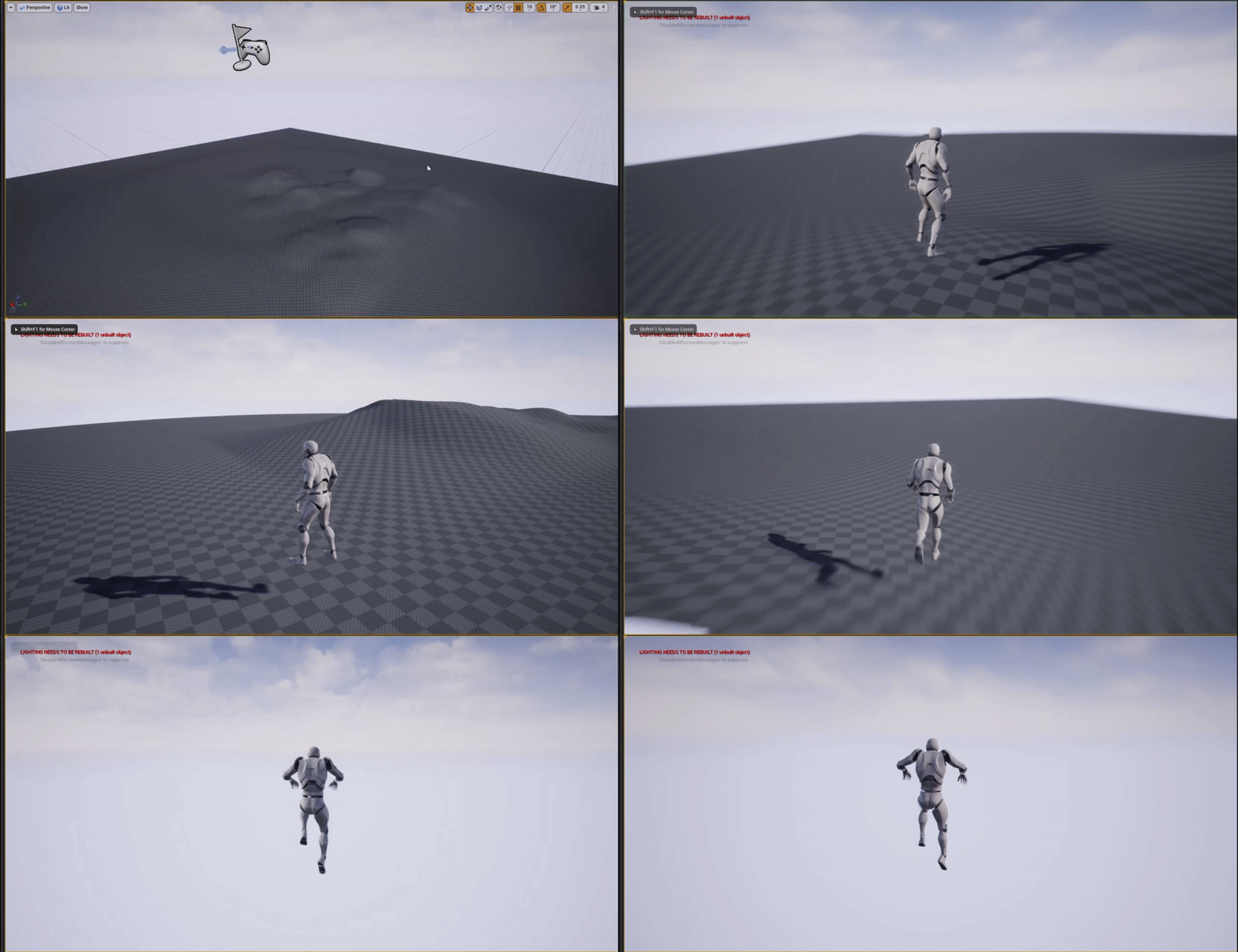

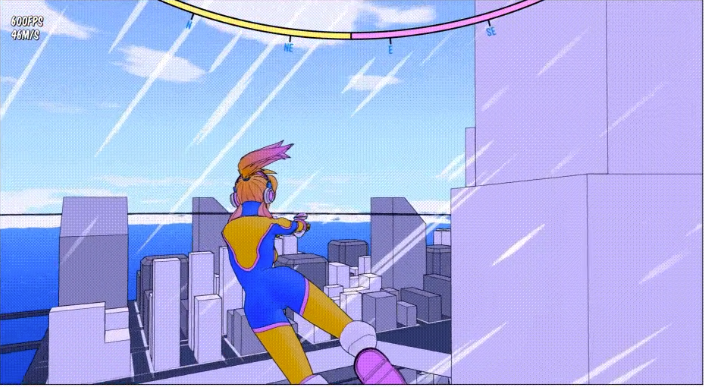
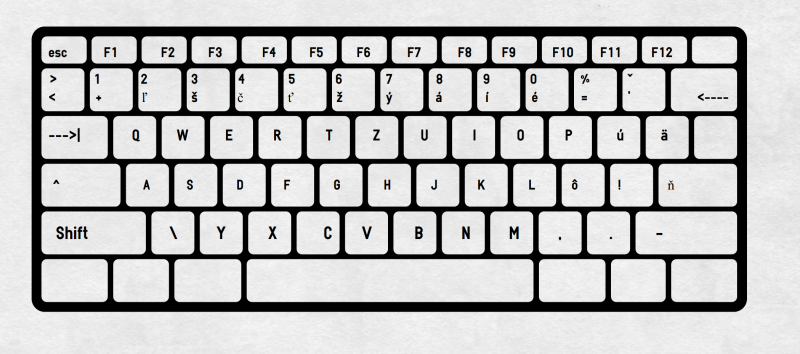

 digital anchor
@rapid ridge if you want the movement to be driven exactly by the animation, you could make it a root motion, google it
 slate basalt
i'm trying to detect when an object is selected/unselected in the editor.
i've managed to do this with:
USelection::SelectObjectEvent.AddUObject
USelection::SelectionChangedEvent.AddUObject
and i can detect fine when something is being selected but how do i detect that same object being unselected?
 chrome cedar
is there any overview in unreal of what takes how much performance? my scene is pretty small but with my 2080ti I get between 20 and 40fps even though I´m not even using raytracing. probably anything isn´t rlly optimized but I don´t know what exactly
 eternal scroll
An overview on the Profiler Tool used to monitor game performance.
chrome cedar
thanks a lot! 🙂
 molten rune
MFW only 8gb of ram
rapid ridge
@digital anchor You're a hero!! Thanks a lot ❤️
 atomic dagger
Yo, I'm importing txture from my folder where all files are named 001/002/003 etc etc, UE seems to be importing it as animation, does any1 know how I can tell it not to do it ?
can't find any tickbox/etc to control it o.o
 half panther
created an alpha brush texture (4k), does anyone want to rate it?
 obsidian nimbus
3k out of 4k
it kinda depends on what u wunna brush i guess
Bob Ross would be fine with it
half panther
general use for in-editor landscape creating
 quick kelp
I’m making a game that is heavily dependent on UI, what software would u guys recommend that can be used to make UI art ? Doesn’t matter if it’s paid or not.
 silver moth
HEy guys i need some help with custom collisions i want to build a grid system and my base type should be a triangle in ue4 i cannot create such a collision as there are only 2 types of collisions ? someone has any idea ?
or maybe how to work around ?
 lilac wedge
is there a fast and easy way of sending my packaged game to my friends? Im using google drive atm but the upload times are very long and every time i make a small update i need to reupload the whole project
modern sinew
So I have a variable that lists whether a player is "Alive" or "Downed", and I need the other players to be able to see that variable without it affecting their version of it. Currently, it seems that each player sees each other player's as the same as theirs, since everything that is based on it is mirrored. Alive players see all others, including Downed players, as Alive, and Downed players see all others, including Alive players, as Downed
anyone know how to fix that?
midnight gate
hey guys does anybody know how can i keep my destroyed actors destroyed when i restart the game? im not asking about how to save and load im asking how to make them delete properly on load game. i cant seem to get them to delete properly every time i reload it deletes sure but it deletes way more than needed too please link me some tutorials if you have any or just personally assist
please ive been struggling with this for months now
lament saddle
@modern sinew sounds like a #multiplayer replication issue... ?
modern sinew
@lament saddle Would just changing the replication setting fix that? Or would it make every player have the same value for that variable?
midnight gate
plz ;-;
lament saddle
@modern sinew sorry, I'm not that knowledgeable on multiplayer/replication stuff. Hopefully someone else can help. (Or try #multiplayer )
modern sinew
Anywhere but the main chat is pretty much dead
 ornate forge
Does anyone know what's going on with UE_to_Rigify, the official Blender integration plugin? Is it released yet?
dawn kelp
Is there a way to apply a material to multiple meshes?
I couldn't find a material tap in the multi edit matrix
(With multiple I mean as a default. Not by placing them into the scene and applying it there)
dawn kelp
I am sure I can only open one by one
midnight gate
@ornate forge also please tell me more about the rigify to unreal engine
ornate forge
@midnight gate I'm talking about the subject of this video: https://www.youtube.com/watch?v=c3_xUMQ6hhs

Blender is getting more powerful by the day, and to improve the Blender to Unreal Engine workflow we're developing a "Send to Unreal" add-on for Blender. Epic's Kaye Vassey and James Baber are the developers behind this tool, and they'll be joining us for this episode of Insid...

Skip intro [0:08:46]
This week on Inside Unreal, we’ll cover UE_to_Rigify, an upcoming tool from Epic, set to be released later this year. This new workflow allows you to map Blender's animation and rigging tool to the Unreal Mannequin, and we’ll also show how it integrates w...
plush yew
uh, is there convert bsp to mesh?