#ue4-general
1 messages · Page 750 of 1
 frank oar
 patent apex
basically each child of that panel will have its own index
frank oar
the widget that I want to oggle on/off vis/invis uses a widget switcher..
patent apex
you can put a widget switcher inside of a widget switcher
frank oar
one widget is the power button and the other is the tv which has several channels (one way to explain it)
patent apex
if you dont want to use a widget switcher, just call set visible to true on one and set visible to false on the other and switch when you can it again
frank oar
that's all I want to do, Use one widget to change the visibility of the other
how can I achieve that ?
patent apex
you have one button that is always visible and if you press it, it will display widget A and hides B, if you press it again, it hides A and shows B right?
 wintry silo
sounds like flip flop node
frank oar
@wintry silo I have been trying to use a flip flop the whole time 😄
its just that toggling visibility seems to be beyone my ability.
patent apex
you dont even need to use a flip flop node, just get the visibility of one of the widgets and toggle its visibility, than set the other one to use the reverse
frank oar
@patent apex the idea is that the top of this pedastall is a button, when pressed, the text above it will appear (as well as a static mesh I am using to look like a tv screen)
@patent apex I cant seem to get toggle visibility to work like that though, at least I dont know how, I have been trying so many different ways..
patent apex
but that button is umg or its an actor?
wintry silo
that event has nothing in the list.
frank oar
the button is a widget component on an actor placed in the level.
what do you mean @wintry silo if I can make it work then I would love to know how XD
 frozen pond
is here way to sculp landscape to look like floating island ?
 midnight root
Not sure, but I think voxel plugin could do that https://voxelplugin.com/#ptp-4754 , but not sure its non physics feature in free would allow that, BUT short of that plugin, no reason you couldn't place such an island in your world at a given 'z' , and no , no way to sculpt it to look like its floating , that I'm aware of

voxel plugin™
Create infinite terrains procedurally using in-engine tools. Edit landscapes in realtime. Join an active community and benefit from frequent updates!
 whole aspen
hey, im having some strange issues with my control rig in 4.25. Am I missing something?
midnight root
@frozen pond ya 'enable physics' is disabled there via 'basic' , free, but that still doesnt preclude you're using that anyway , or manually doing it yourself with stock ue4
This https://www.unrealengine.com/marketplace/en-US/product/voxel-plugin is cheaper by far , never used it, no free version

Generate, destroy and terraform the world, both in game and in editor.
 lapis ferry
Is there any benefit in using spawn points instead of just placing the characters in the editor
when not respawning anything
 reef fractal
I’m having an issue where builds are freezing my unreal engine instance. It freezes at 100% when trying to initialize swarm. Swarm is launched in the system tray, and this is why the swarm logs look like:
9:21:13 PM: Starting up SwarmAgent ...
9:21:13 PM: ... registering SwarmAgent with remoting service
9:21:13 PM: ... registering SwarmAgent network channels
9:21:13 PM: ... initializing SwarmAgent
9:21:13 PM: ......... certificate check has failed
9:21:13 PM: ...... initializing cache
9:21:13 PM: ......... using cache folder 'C:/Users/me/AppData/Local/UnrealEngine/4.25/Saved/Swarm\SwarmCache'
9:21:13 PM: ......... recreating SwarmAgent cache staging area
9:21:13 PM: ...... initializing connection to SwarmCoordinator
9:21:13 PM: ......... using SwarmCoordinator on RENDER-01
9:21:15 PM: ......... SwarmCoordinator failed to be initialized
9:21:15 PM: ...... initializing local performance monitoring subsystem
midnight root
permission issues by any chance ?
no direct help here necessarioly as I've never had those issues
also check swarm settings
 reef torrent
Sorry, are editor settings supposed to save between projects?
It never does for me
I searched this on google and just got dead ends
midnight root
don't think that would be the expected outcome
those settings are there for a reason, per project as necessary,,no clue if yo u can make them 'global', doubt it but never say never
@lapis ferry that offers flexiblity in allowing developer freedom to place spawn point anywhere to reflect game design
lapis ferry
"to reflect game design"?
lapis ferry
All that can be done in the editor tho
frozen pond
any good tutorial to retarget paragon characters to default skeleton mesh ?
for now i'm getting werid stuffs
lapis ferry
what do you mean by that
midnight root
if you need to translate google can do that
or bing
etc.
otherwise what is question specifically
lapis ferry
I mean what do you mean by plot points in this context
midnight root
well , player goes to found, says magic word, transports player to new spot
 modern ginkgo
guys what is c++ and blueprint used for in ue4?
 serene birch
EVERYTHING
midnight root
but URL shown prob. gives you a nice idea of why they are helpful
modern ginkgo
no really
lapis ferry
@modern ginkgo yes
midnight root
LOIL
modern ginkgo
i mean the differences
lapis ferry
other than that one is visual and one is a programming language little
serene birch
ok that's a different question
lapis ferry
subjective
modern ginkgo
E
midnight root
no
no its not
many avoid c++, most love bp's as they are easier entry to game dev
serene birch
you can basically do nearly everything without C++, aka full blueprints but experience seems to say it's not a good idea if your project isn't a small toy project
something like 90% C++ and 10% blueprint
blueprints make for the best "glue" for the gameplay code in C++
lapis ferry
there are those who already know c++ or c
midnight root
depends on project obviouslky
serene birch
so that you can tweak in editor parameters without recompiling and place everything you code in C++
the ratio between the two is up to you really
blueprints have the major issue that they can be pretty slow compared to C++ and they are horrible to edit with multiple coders at the same time since they are a binary file format
so as your team of coder gets bigger and bigger you'll tend to write more and more C++
midnight root
pros and cons always
serene birch
also I'm pretty sure it's impossible to use the GameplayAbilitySystem without C++ from what I see 😛
reef torrent
@midnight root ah okay, that sucks I guess, since in unity that was default behaviour. But I guess it's better for collaboration?
midnight root
please elaborate, not that 'familiar' with that part of Unity
wintry silo
can you do big projects with blueprints?
because it feels like to me that blueprints aint optimized when you compare them with games like rachet 'n' clank that run lighting fast speeds.
lapis ferry
@wintry silo yes, but don't do big projects alone or as a beginner
midnight root
Describe how to make a combination Blueprint/C++ game, and decisions you might make along the way.
lapis ferry
that goes for any engine
midnight root
he might have to , if he's solo 🙂
reef torrent
@midnight root in unity, the editor settings are per-computer, not per-project
midnight root
subjective therefore
midnight root
yhes
reef torrent
since editor settings includes things like preferred code editor, which is per-computer
reef torrent
is there any pros to ue's way of saving editor settings then?
or is it just something most people dislike
midnight root
@reef torrent ic
yes per project settings 😉
so you're not forced into one size fits ALL
reef torrent
yeah but that means i'll have to change my settings every time... :(
wait... there's export isn't it?
i guess i can do that HAHA
midnight root
🙂
reef torrent
😛
midnight root
lol
wintry silo
well i did get animated widgets working with movies. But it needs to be dynamically done through data table. I was thinking of having my party members in a mini chat system that pops in from time to time during the game.
and i don't know if we can create sub movie folders in the movie folder either.
midnight root
far from a bp expert,. but nothing coming up for you in right click menu ?
@plush yew again , I'm not using this yet, but does
makefloat2 etc do any good, to get you where yu want to be ?
 manic pawn
use the if node
midnight root
ah
manic pawn
it will be written that way in the hlsl then
 torn burrow
Hi, I have been having an issue with ue2.24 and up, could I ask it here?
wintry silo
hmm I put more than 1 movie widget on the screen and it plays the same movie in both of them instead of playing two different movies.
midnight root
of course
torn burrow
Okay so my unreal editor has been crashing on start up ever since 2.24, like it shows the window and then my gpu crashes (or something of the sort, my screens freeze but I can still hear audio if I am watching a video, or can still talk to a friend on discord), but after a couple more seconds my computer just gives up and nothing works anymore
midnight root
you mean 4.24 ?
midnight root
np at all
wintry silo
the engine has an undo feature that seems to capture everything in the engine, the problem is it allocates maybe too much memory and causes the engine to crash when it can't find enough space. Maybe its to do with paging file because i had the engine crash on me six times yesterday..
whatst he settings for that because i running an old graphics card.
lapis ferry
Are there any guidelines on how code should be split between gamemode, level blueprint and actors?
 cosmic matrix
modern ginkgo
cosmic matrix
modern ginkgo
how do i change the cameras position?
wintry silo
i can get animated little chat snippets with talking movies working, but only can have one movie showing at the same time.
How do I can different movies to pop up. Its not dynamic from the data table unfortunately. Its just a little mini simulated chat system to introduce the level..
modern ginkgo
why cant i put the camera in the mesh
 grim ore
it tells you why. The camera is part of the parent and it's setup in the parent and you can't change it because the parent controls it.
modern ginkgo
hhow do i disable it?
grim ore
disable the camera, disable the error, disable the parent?
modern ginkgo
the parent
grim ore
you don't, you would have to redo this blueprint with a different parent or change the parent itself to fit your needs
 frank oasis
hello im new in the scene of unreal engine and a completely noob creator so my target is to make an world enough big like the the skyrim map is there any random generator for such thing ? i saw some tool that can generate terain from a real world map
modern ginkgo
how?
grim ore
how what?
modern ginkgo
i mean how do i redo the blueprint
grim ore
you start it over from scratch, how did you create it in the first place?
 runic fern
Hello
midnight root
hi there
 opaque plover
I just solved all my loading problems with AsyncTask(ENamedThreads::AnyBackgroundThreadNormalTask. This thing is amazing. Game thread is left alone, everything is smooth most of the time.
modern ginkgo
i just clicked on
grim ore
you can see the parent class that is there, that is the one that you want to change if you want the camera to be somewhere else
otherwise remake the character using a parent that does not have the camera and then you can add it yourself wherever you want it
runic fern
Mr MathewW i sent you the Function of HP Bar but we went offline
wintry silo
all the constant restarts causing the engine to crash after a hour or two.
modern ginkgo
@grim ore this?
wintry silo
can't take the memory allocation of constant restarting pie all the time.
 plush yew
UE4 license permits free games but you can't redistribute the engine code with it? you can't distribute modding tools?
runic fern
This is the event called from Player Login from GameMode
its here
frank oasis
guys are there a terain generator big as skyrim map and automaticaly painted ?
wintry silo
it took unreal engine 670 seconds of time to load in a big landscape. And that's without all the meshes.
midnight root
o-0
frank oasis
well the 8kx8k is legit one that i loaded in some minute
midnight root
details
wintry silo
it took me 15-20 minutes to load it in.
midnight root
ya I hear KITE takes a bit, depending on system of course
wintry silo
its not Kite, kite is much more bigger than 4196 or 8192.
midnight root
hence why I quoted it :heh
wintry silo
I was loading alien landscape from the marketplace. My machine can't handle it, its slows everything down.
frank oasis
i can load it without problem
wintry silo
not the market generated one, it took too long to load. By the time it loaded it, the game was too slow.
frank oasis
here a 8k
wintry silo
oh and the CPU was reading really high and the HDD at 100%
the hdd is always stuck at 100 most of the time when working with unreal engine in editing things.
frank oasis
well
what you use ?
the most popular by today is an nvme ssd
which have 2k+ read and writes in mb/s
 wheat hare
I bought an ssd the day after I decided to use ue4 for a project
Couldn't deal
wintry silo
its an hp computer, i don't think its sutiable for unreal engine.
frank oasis
well if its an hp thats explains it
if you want performance i would not suggest less than an nvme ssd with with some ryzen 7 8core and some good gpu
wintry silo
i been having trouble with this computer. I don't think this brand is a games machine. Because everything is just too slow with the editor..
wintry silo
yes, loading windows up and then unreal engine on top of it chews up all the memory.
frank oasis
i see
for this problem you should have some fast memory if not big memory
the minimum would be 8gb in most engines
but the more you go on designing your game some 16gb would be more of an requirement
wintry silo
i'll just check the memory
midnight root
@frank oasis depends or project, my 8gb is doing fine'atm' hehe
but ya I'm looking decisively at getting a mtb that can do 64gb o_0
wintry silo
16 gb
midnight root
not for multitasking
frank oasis
well i remember when i had 8gb ddr3 was just fine in unreal
midnight root
yup
wintry silo
using windows 8
midnight root
lkorash this
wintry silo
don't have 32 gb
midnight root
ditto
wintry silo
and also unreal engine windows keep getting stuck behind each other. And won't always open up.
frank oasis
well atm i have 15 tabs on chrome using alot clients like steam etc etc and all this with 16gb also i just rebuilded the light in a 8k terain
midnight root
ya well your cpu /gpu areup to it is why
wintry silo
and sometimes when I click in the window the mouse don't work in it. the buttons don't work. and I have to hit Alt Tab and switch back to the window again and then click in and then the mouse works again.
midnight root
and 16 doesn't hurt 😉
otherwise you'd be waiting like hours , with me at 8gb and non HIGH end rig
🙂
frank oasis
thats true just someone mentioned the 32 gb to be honestly memory arent too pricey nowadays you can buy 16 for what 70$ ?
midnight root
tho i5-3570 is far from NON high end 'atm' anyway
midnight root
🙂
wintry silo
well ic an only put about 100 meshes in the map and then the level all starts to slow down.
frank oasis
i did hit the 2700x in christmas for 130$ while now its again somewhere at 250
frank oasis
oh
there will be new gen at 2022
just try to buy the most non expensive cpu you can
midnight root
I dont have much choice 🙂
frank oasis
even an am4+ probably will be compatible
frank oasis
no the socket
frank oasis
am4 and am4+ will be compatible so better buy now something cheap and later when the new architecture come
wintry silo
the gpu is 4 years old.
midnight root
sure enough,,plus my budget won't tolerate much more anyway
frank oasis
just look how her face look apart from her body
midnight root
ya mine is in there somewhere I guess
frank oasis
i think its problem of the cc3
cause it uses some dumb plugin its saying headshot to make some of the face details realistic
wintry silo
Geforce will run on Unreal Engine, but won't run well with it.
midnight root
just so you know what image is probably 2. No NSFW (Not Safe For Work) content of any kind, period.
.............................that
wintry silo
stalling frame rates is the result, so you can't put alot of stuff in the map.
 fallen wing
(I'm sorry for the hastle, but I accidentally posted looking for talent in the #looking-for-work channel, would one of the <@&213101288538374145> be able to delete it? thanks. and sorry again.)
 upper heart
fallen wing
upper heart
fallen wing
Thank you :)
runic fern
Guys anyone can help me with This Even Replication ?
idk i can see the animation just for server for somehow i want each client see the animation
 dense hatch
trying to get a noise or fractal like this (the ground) in a material. is there a name for this pattern or a material node i could use to generate this? https://gyazo.com/628b93f60b90fc93c46c69e9e1529108
frank oasis
pff i cant even export a normal char from the character creator 3
wintry silo
looks like a couple of panners with a perlin noise texture with transparency and blending maybe a sine wave is used in it..
frank oasis
reallusion have really confusing way of things
dense hatch
thanks @wintry silo I'll give that a shot
wintry silo
i didn't buy iclone.
frank oasis
neither i do i use the trial version for 30 days and i can export max 10 chars
but until now i have 2nd char and both of the first and this one is ugly despite i choose high quality etc
also im noob when its come to blender
wintry silo
I think for commercial projects you have to pay for the full license to that program I think trial periods are only avaliable for demonstration purposes only instead of commercial usage depends on the license.. But Crazy Talk gives me the creeps. It makes my game characters look more like midnight stalkers than friendly characters.
frank oasis
lol i dont do any commercial thing just a game for hobby
lol crazy talk sound crazy XD
here see its ultra hd the hairs arent the best point of the reallusion you must buy some if you want good hairs but as for me i dont want any ultra hd hairs like of final fantasy
wintry silo
i need to know how to get 3d animated models to lip synch in the game. I don't know how to do that with unreal engine yet. For when I import the lip synch in from Blender, the animation plays over and over in the engine, how do we stop it from looping?
how did you import the particle hair into unreal engine with the mesh? I've been always wanting to know how to do that.
frank oasis
pretty much anything you use in unreal is alway looping you just need to write bp for it to not loop im not sure also im noob in these matters just started making some beginer things
well its in the reallusion options that you can export the hairs clothes
into 1 fbx
wintry silo
I'm not sure how to do that yet. I'll get a pic of the model's hair I want to import.... Because when I try to import this guy into unreal engine, he ends up importing in bald.
frank oasis
the mixamo one can animate the models
lol show me what you have i go to smoke fast and will check whats going on unless someone else will help you before me
grim ore
@wintry silo is this a skeletal animation? if so how are you playing it
wintry silo
I imported it from Blender with F-Curves animation. Yeah I think it did import in as a skeletal mesh, but the problem is, I not sure how you can import lip synching in onto a fully animated rig without getting unreal engine saying that the skeleton has been changed if you try to import in the Blend Shape Keys if you add them to the rig.
So I got a problem I don't know how to solve because I don't have enough knowlede of this engine to do with this area.
So it imported it in as an animation along with the skeletal mesh. But my worry is, if I do all my animations of my commander, and then get someone to give him blend shape keys to his rig so he can be able to talk in the game and then import him back in, it could destroy all his animations in the engine. that's what I'm worried about..... Because Mixamo will not animate rigs with Blend Shape Keys or Face Bones because it deletes them when it auto rigs them.
grim ore
Might need to get some professional help in #animation then
wintry silo
Yep, beause I'm not sure how they did it in mass effect for the lip synching with fully animated rigs because you can't have a rig that only moves its mouth and not its limbs or you got South Park syndrome.
I can't do different camera shot angles for the dialog until I get talking rigs working in the game. Otherwise it just looks lifeless., so the alternative to this if you can't get the characters talking in real time with 3d rigs is use crazy talk with 2d pictures so you got animated talking pictures, but crazy talk makes the lip synching look unnatural. Its probably needs more tweaking in that program. And I also don't know if Unreal Engine supports sub movies folders in the movies folder, or just only recognizes only movies put into only the main movie folder and not sub folders. There's a lot I don't know about this engine, and not all the info is on google on these things because most of the info that is on google is to do with what the engine is best designed for, shooters..
 digital anchor
you can't have a rig that only moves its mouth and not its limbs
have it all in the rig, but blend mouth only
wintry silo
I don't know how to do that yet but it sounds like you have to add it to the actual existing animation but that's not gonna work as you have to drive the lip synching directly from the data table with the audio file, so you can't hard code the lip synching into the animation. You can, but if your game has alot of dialog, you end up with too many animation files. So it has to be driven from the data table.
digital anchor
not gonna work as you have to drive the lip synching directly from the data table with the audio file, so you can't hard code the lip synching into the animation.
i dont see a problem, thats possible
wintry silo
If we can drive all the text dialog with the data table using just one widget, without needing to create extra widgets for every single dialog of text , surely the same can be done with the lip synching. I'm not sure how though. The engine does not have a speech engine in it. .
 fast stratus
Hey everyone, I'm new to game engines and was wondering if anyone had any YouTube videos that they would recommend me to watch.
grim ore
Check out the pinned message at the top of this channel
 spice cliff
hello ive got a problem
 hidden knoll
So I'm making a camera that moves when you move your mouse, I used ConvertMouseLocationToWorldSpace and attached it to the camera rotation, but the problem is that when I move my mouse right, the camera goes left, and when I move my mouse up, the camera actor goes down.
 gleaming creek
Invert the movement speed
grim ore
It sounds like you could simply multiply the axis value from your mouse input and it will reverse it
wintry silo
Ok how do I import this guy out of blender without losing all his hair ?
 storm terrace
does the Modes tab still exist?
wintry silo
This is one of my game characters. But his hair is particle generated in Blender.
storm terrace
I don't see it for some reason...
grim ore
in .25 the modes tab is now a modes button on the toolbar
frank oasis
well blender export them as separate
you need either do it yourself on the unreal
or use some programm to attach the hairs so he stays like this permanently
wintry silo
hmm is that the only way we can do it to export the hair, it has to be exported separately from the mesh?
frank oasis
well i never used blenter so i cant say more prob you need to ask someone more experienced
spice cliff
ive just finished the bare minimum of a third person game mode with camera but i want to use my controller, UE4 does not know im using a controller, ive done the character blueprint with all the event stuff but im getting nothing, also i tried it with a keyboard and WSAD works find but not my controller, any reason why??
frank oasis
as i know blender is like some magic tool just you need to know how to do these things
frank oasis
also your controller need a blueprint and if im not mistaken you need to tweak the unreal settings for the project there are some thing that you assign keys but appart from it you need the bp either way
wait
wintry silo
check world settings to make sure you have selected your controller
frank oasis
have you this bp asside with the settings ? if yes then check the world settings as tozan said
wintry silo
when you make new player controller BP, you have to assign them to the world settings under game mode override or unreal engine will just use the default third person controller and just completely ignore all your changes in the new controller because its not linked up..
spice cliff
just to let you know i have put my inputs in for my controller also i mean game controll im using a Dual Shock 4 (sorry if i did not make thet clear)
wintry silo
Unreal Engine is like a thousand little islands, you have to make sure every link is connected before anything will work.
spice cliff
yes
frank oasis
firstly my concern now is the controller
spice cliff
could you tell my what driver please
frank oasis
yea dual shocks arent xbox plug and play
wintry silo
oh, so the drivers don't come with the engine.
spice cliff
one second
frank oasis
at the best you must install a prog that the pc translates the dual shock to the xbox 360
let me give you a link for a programm

SourceForge
Download ScpToolkit for free. Windows Driver and XInput Wrapper for Sony DualShock 3/4 Controllers. ScpToolkit is a free Windows Driver and XInput Wrapper for Sony DualShock 3/4 Controllers. Installation is fairly simple and straightforward, but does require a few things: Micr...
here
and what exastly it does ?
spice cliff
thanks
frank oasis
its just convert the dual shock into an xbox360
the dual shock arent actualy supposed to go in pcs sony never made any driver for windows
all these works are like unoficials
sony did some dumb marketing for money
they released some usb stick with bluetooth to work with dualshocks on pc
also do you use the cable right ?
spice cliff
yes i do
frank oasis
ok then you are good to go after you install the programm
dont modify anything just let the programm install and run it then try a game do you have a game now ?
spice cliff
so ive just got to install this program
spice cliff
is there anythink else i need to do after the installion ??
frank oasis
no you dont thats all
spice cliff
ok im still waiting for the installion
frank oasis
actualy do you have any game now that support the xbox gamepad ?
frank oasis
oh thats too bad cause even after installation maybe the ue wont work
and thats hard to define if its the controller or the ue itself
but continue install it try it and tell us
spice cliff
ok thanks
frank oasis
im sure its mostly the driver cause the pc never had any official drivers from sony for the controller
xbox on the other side is another story they are itself microsoft so they integrated the drivers anyway
 vital cosmos
is the skylight thats in a new level by default not turned on or something?
because I dont see the effect of a skylight unless I remove that skylight and add a new skylight in
frank oasis
well its a new level itself so you need to do new one i think unless you can still see the skylight from other level that you mention you remove and put a new one
but im not experienced to tell you
so did you install the drivers did they worked for your controller ?
spice cliff
i think im still wait for it to install
frank oasis
lol how big it is
spice cliff
not sure
vital cosmos
I mean when you create a new level from the file-> new level and select the one with the sky and stuff
spice cliff
im just going to restart my pc
 tribal lark
anybody have issues with Distance Field Ambient Occlusion? No matter what settings I change in my skylight, they seem to have no effect when I'm viewing the DFAO visualizer
spice cliff
im back
so ive restarted my pc
i wanted to say again @frank oasis id there anything else i mean to do
frank oasis
nope just make sure the scp tool work
and try now your unreal
if your project are rightly programmed etc
you should be fine
also bear in mind that the unreal engine reads only xbox gamepads and thats what is the scp tool
if its show you xbox buttons instead of ps controller dont freak up there is no other way
spice cliff
its werid tho cuz why to hell do i see PS4 input forthe touch pad??
frank oasis
well the touch pad is another story
spice cliff
like why so i have the go 3rd party just so i can use a ps4 controll
ah well got thing the pad is useless
frank oasis
yea
and for the games still you cant play or do anything without drivers
since most games read only xbox controllers they did it this way a driver that converts your controller
so did you try it its work in unreal now ?
spice cliff
ok
 compact halo
im trying to load my project but its stuck on 39%, i've left it on for hours but still nothing
compact halo
idk, all my projects aren't loading
compact halo
not really
spice cliff
nop nothing ...... :/
frank oasis
lol really ?
 somber quail
im trying to load my project but its stuck on 39%, i've left it on for hours but still nothing
@compact halo Have you checked task manager? Check to see if there are ShaderCompilerWorkers running under the UE4 process
compact halo
yeah there are
somber quail
how many?
compact halo
1
somber quail
Okay 2 secs I may have a fix
frank oasis
@spice cliff i send you a private message can we speak there ? try to upload some photos
somber quail
@compact halo Close UE4. Go to "Engine\Config" and open up ConsoleVariables.ini. Search for "XGEShaderCompile"
Uncomment the line ";r.XGEShaderCompile = 0" Reopen UE4
Then check task manager and tell me how many shadercompileworkers there are
plush yew
Um can anyone help me with something?
 tulip oak
hey first time on this channel still trying to find my way around if theres anyone on here that would like to chat I would like to meet new friends
compact halo
theres 3 @somber quail
plush yew
@tulip oak sure
somber quail
@compact halo That suggests you're CPU limited then. What CPU have you got?
compact halo
i7-7700
somber quail
i7-7700
@compact halo Hmm you should still have more than 3... What's your CPU useage % at?
 exotic thicket
I'm getting this warning when editing a CameraAnim - Are CameraAnims or shakes deprecated? I don't see a way to use a sequencer based animation with CameraShakes
compact halo
23% @somber quail
somber quail
can you send me a screenshot of your consolevariable.ini?
compact halo
somber quail
Hmm I guess you need to try changing the process priority in Task Manager. I'm not sure why it wouldn't be using all available CPU resources.. Unless you've got other stuff open in the background that has already claimed some of the CPU?
 modern sinew
I keep getting this error with 4.25, what does it mean?
exotic thicket
When do you get that error?
wintry silo
uh oh
compact halo
hey @somber quail its using 100% of the CPU, will it load now?
somber quail
should do
Shader compiling takes time
I have a 4790k and even with overclocking I still have to wait upwards of 30mins for only 2-3k shaders
My work PC can chew threw that in like 3 mins - it has a Ryzen
wintry silo
shaders are compiling..
1 hour later, Shaders are still compiling.
2 Hours, Shaders are still compiling.
modern sinew
@exotic thicket After clicking "Launch". I did the File Verify and I still got that error
exotic thicket
It could be a DirectX issue, try reinstalling or update those
modern sinew
how do you reinstall those (on Win7)
tulip oak
hey looking for an idea about witch would be more biginner friendly Unity or UE
 fallow cedar
Do you want to make 2D games or 3D games?
2D games are usually best for beginners, so in that case, Unity would be better
 heady moon
unreal is giving me a compiler error in this part of the file 'ApexDefs.h'
 digital cloud
Hey all, I'm having trouble getting OnClick events delivered to an Blueprint Actor subclass that contains a StaticMesh child actor. The mesh has collision, and I've tried both standard and custom block-all collision for the child actor. I've verified that hover and click events are enabled for my player controller during play. Does my parent actor need to somehow "adopt" the collision of its child actor in order to get click events?
heady moon
Ugh how doesn't it recognize DYNAMIC_CAST
digital cloud
Answering my own question: yes I needed to add a box collision to the parent actor. I should probably use a static mesh component rather than a child actor...
Yep, using a mesh component rather than a child actor worked without needing to duplicate the mesh collision.
hidden knoll
Anyone know how to have a camera actor display to a widget?
 heady quartz
How do i give the weapon its own FOV ? because when i increase the FOV the weapon looks weird?
hidden knoll
Nvm I got it
 cold sluice
Guys, I'm a beginner and I need some help, anyone is currently available for a small chat?
plush yew
for some reason my model is importing as a bunch of pieces rather than a single model, anyone know why?
heady quartz
import with an option called "Combine Mesh"
plush yew
it was an issue with my modeling program i figured it out
 eternal rain
Trying to use Animation Starter Pack only to discover it only supports 4.24 or older projects. how do I get a 4.24 project with only 4.25 installed?
 barren flume
still haven't been able to fix
 atomic forge
Do I need xcode to build for mac?
plush yew
Do any online summer classes exist with the focus on virtual production for UE4? I'm looking for more than the documentation and online training the site provides and don't mind paying. Also if anyone knows a experienced teacher/tutor in the field, feel free to tell me so I can get in contact with them!
 summer verge
Nanite geometry is streamed and scaled in real time so there are no more polygon count budgets, polygon memory budgets, or draw count budgets;
When they say "Draw count budgets" do they mean they are somehow eliminating draw calls?
barren flume
this seems like the most simple thing but i can't get it to work
been trying to fix for hours
I'm just trying to get it so when you press enter it opens a different widget
so it opens this widget
 ember cliff
Anywhere I should go to get quick help with a crash loop for a project?
(As in the editor is crashing)
Huh, fixed it by moving an uasset into and out of my content folder.
 humble ridge
Everytime i try package for linux it just directs me to the tool chain webpage even though i have installed the toolchain already, Anyone know what causes this?
 viscid bolt
installing UE4 now
and oh my lord
the verifying stage takes so long

the last 5% has taken longer than the 95% that preceded it
 digital rover
anyone know how to reduce the size of media plate in composure?
humble ridge
Anyone know what this is about also trying to compile U4.25 from source 65>E:\UnrealEngine-release\Engine\Source\Programs\UnrealInsightsCLI\Private\UnrealInsightsCLI.cpp(9): fatal error C1083: Cannot open include file: 'TraceServices/SessionService.h': No such file or directory
 wooden forge
Hi, i'm trying to import animations from blender to ue4 but this is how it looks like
this is how it should look like
 desert tangle
have you baked your animation?
wooden forge
yeah i have
desert tangle
the bones are messed up on the first picture, so whatever you've done there has stuffed it up
wooden forge
yeah the mannequin is still alive and moving but it seems rotation is messed up
desert tangle
check your bones in blender make sure its all zeroed out, ect. I havent imported animations from blender into Ue4, only maya.
wooden forge
i also uploaded mannequin skeleton to mixamo and downloaded an animation then directly imported it to UE4 it was still messed up like that
even tho all the bones has the right names
 kind dew
I'll try again!
any idea why this is happening when i try to play in mobile preview? 4.23
https://cdn.discordapp.com/attachments/221799368884355072/713483245420806295/unknown.png
 atomic forge
@plush yew Unreal Fast Track was a program started by Epic. You need to be in a college to apply though. Although at this point, I doubt if it that matters.
 ember raven
do i need engine source _?
atomic forge
@ember raven Do you plan on altering the engine? If not, then you don't need it.
 spiral schooner
Anyone know of UActorComponent version of APawn::IsLocallyControlled() ?
or Actor version
ember raven
@ember raven Do you plan on altering the engine? If not, then you don't need it.
@atomic forge im just beginning and following tutorials how to make realistic surround
atomic forge
You don't need it
ember raven
okay!
atomic forge
👍
reef fractal
my build is failing on any project, including the starter sample projects. i'm getting "unreal engine starting up swarm connection... (100%)" and then the editor freezes. swarm logs:
9:21:13 PM: Starting up SwarmAgent ...
9:21:13 PM: ... registering SwarmAgent with remoting service
9:21:13 PM: ... registering SwarmAgent network channels
9:21:13 PM: ... initializing SwarmAgent
9:21:13 PM: ......... certificate check has failed
9:21:13 PM: ...... initializing cache
9:21:13 PM: ......... using cache folder 'C:/Users/me/AppData/Local/UnrealEngine/4.25/Saved/Swarm\SwarmCache'
9:21:13 PM: ......... recreating SwarmAgent cache staging area
9:21:13 PM: ...... initializing connection to SwarmCoordinator
9:21:13 PM: ......... using SwarmCoordinator on RENDER-01
9:21:15 PM: ......... SwarmCoordinator failed to be initialized
9:21:15 PM: ...... initializing local performance monitoring subsystem
installing ue4 on a new computer and unable to build anything
 stuck linden
Does anyone know where u download shootergame template?
reef fractal
it comes built into ue4 if you start a blueprint project
stuck linden
is it any of these ? srry im new
reef fractal
First Person
or maybe Twin Stick Shooter depending on what kind of shootergame you're looking for
stuck linden
i thought shootergame was like this from some videos
reef fractal
go to the market place and type "shooter" and you can probably get a lot of assets related to shooting for free, including some maps and guns that are preloaded
stuck linden
thank u 😄
spiral schooner
That shooter looks nice
plush yew
Hello I want to make when I press F and I am on the trigger box to open the note, when I press F again will disappear but with animation
kind dew
Other than here and answer hub is there any other way to get support? I'm not getting my question answered :/
 alpine laurel
I am trying to import the halo ring into my project, but am running into a texture issue.
The ring is 2 pieces. one for each texture (inner and outer), the problem is that the textures will assign themselves to the wrong ring
You can see in the video that when I try to correct the textures, they will become warped. any ideas?
plush yew
hello I can't make 2 box collusions which are one over other
I made it
but I want to make on both of them actor begin overlap but for the second box collusion it doesn't see 😦
nvm
 sturdy star
what are you building there, looks nice
plush yew
note with more info about the virus
sturdy star
oh i mean the game itself
plush yew
first location in the game-lol
but having troubles with the stuff I want to create
someone can help me?
when I enter the location I can press F whenever I want but I want to can open the note info when I am in the trigger
frank oar
is it possible to change the shape of a widget button ?
Just from a square to a circle...
plush yew
with image or texture?
 versed yarrow
sup all
frank oar
well what ever is the most simple, at the moment i have it placed in a circle so when the rectangle (the button is transparent untill hovered, on hover and select the rectanle cuts through the object it is sat on @plush yew
like this.
 random grail
Little hs sorry but if it's can help youtube to get aware of his retard system. https://twitter.com/gamefromscratch/status/1265105083106295814

Please RT, this is broken!
Unfortunately GameFromScratch lost the ability to post to @YouTube because their systems can't defeat a script kiddy attack. Warned them after I was blackmailed, and now awaiting the long manual appeal process while locked out. Really @YTCreators...
Retweets
233
Likes
301

 Twitter
plush yew
Twitter
plush yew
have not idea-xD
plush yew
does someone know how to make a cutscene where u can interact with things? ping or pm me
 short stirrup
I installed unreal engine on my laptop and actually got surprisingly good performance (kudos unreal team!), but my gpu still goes to a 100% and my fan goes a little crazy haha, i wonder if there's something i can do to make it a little bit easier on my innocent laptop? 😄
 foggy jetty
Hi, we're planning to buy a server for our company - and I have a question:
Does Unreal use the GPU for packaging projects?
 oblique tangle
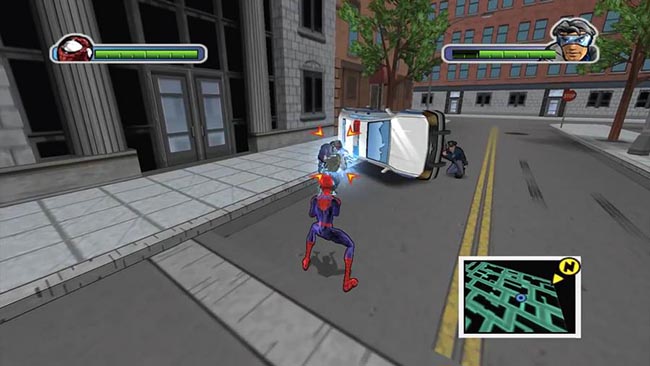
Yo, can I get some opinions/advice on this? I'm trying to emulate a cel-shaded comic style as seen in Ultimate Spider-Man, but I feel like the textures and my character model aren't really merging together well

 leaden dust
@oblique tangle I don't know much about art but what I can see is that your character is more emissive than surroundings
or its just the brightness
and the post process doesnt look right either
the contrast between environment and character is quite high
and the character seems to be glowing
unlike in the example you sent
@oblique tangle
oh sorry for pinging twice
reflex
oblique tangle
leaden dust
@oblique tangle do you need it exactly like the example?
I think it looks pretty alright now
altho the cel shaded shadows on the character are a little off-putting
this shadow seems a bit wonky to me
and the shadows on the legs aren't as dark in the example
these are like almost black
 late loom
guys can any1 tell me why does our animation gets messedup if i enable root motion
modern sinew
Is it possible to have a system where each player's spaceship is in their own worldspace, with their "location" relative to eachother tracked, and then when they get within physics range (IIRC 5 KM) of another ship, they both get dumped into a combined worldspace?
And would that be noticeable? Or could it be smooth?
 dim arch
I mean its possible, but the extent current UE systems can do that is limited
wooden forge
what's the best way to do melee attacks? should i use line traces or overlap events, performance and practical wise?
dim arch
you should look at : ue4 mmo, galaxia project, level streaming @modern sinew
generally overlap @wooden forge
modern sinew
would that work better @dim arch ? Because space is big, and forcing everyone into a 10 km sphere still feels not right
dim arch
attach hitbox to socket, on overlap even for said hitbox, update animation graphs and variables
wooden forge
aight thanks
dim arch
@modern sinew I dont know how to make a multiplayer space-sized object/scene manager in UE, There MMO template is probably the most robust solution for now
you probably need to make a custom server which can process large amounts of data and handle sharding, object streaming etc
modern sinew
I think level streaming would still give you a floating point limit, wouldn't it?
if I'm reading it right
dim arch
making umap files to represent a cube of space in a space-size sim would be the wrong way to do it
modern sinew
?
dim arch
you basically have one map and the objects move relative to the player
modern sinew
well yes, but that doesn't work with multiple players I would think
dim arch
it does, you just need to calculate the scene representation for those players when they are close enough together
modern sinew
Is it possible to have each client be the origin of their own version of the worldspace client-side?
dim arch
well yes, but the replication system isnt really made to run like that
basically space sims are an uphill battle in the engine
maybe someone else knows the best solution or if there is one already
reddit
4 votes and 8 comments so far on Reddit
 smoky crescent
Left.
wooden forge
guys if i use capsule collision to detect when the sword hits the target, how can i use different capsule collisions for different sword shapes? should i use actorbp for each sword instead using them as static mesh inside my character?
frank oar
anyone here have experience with the Materialize VFX that is currently free on the marketplace ?
please @ me
 steep verge
character keep spawning at 0,0,0 the spawn points a player start location or player camera the location im trying to spawn at is -13k z my kill z is set to -30k any ideas ?
 wanton lotus
@frank oar there is a support discord for Materialize VFX listed on the marketplace page.
frank oar
that sounds great but its absolutely dead in there, no reply what so ever :/
@wanton lotus
wanton lotus
Ah. I do plan to use it myself at some point, but haven't messed with it yet. Hopefully someone here knows something then.
frank oar
taking full days for me to figure out simple things they could tell me in moments XD
 ruby folio
@steep verge I assume you are using world composition?
ruby folio
Do you have sublevels?
steep verge
no
ruby folio
Youre gonna need to show us a screenshot me thinks
ruby folio
It could be something to do with world bound checks or kill z. But you said youve checked that
ruby folio
Why would you need it to spawn the player 13km below 0 anyway?
Max world bounds is 20
ruby folio
Yes. But you have a total altitude of 27km??
steep verge
i can check
ruby folio
Just as a reference, Mount Everest is 8k high
steep verge
-21870-21750
ruby folio
What is your landscapes z scale?
steep verge
thats the z
steep verge
100 100 68.74
ruby folio
OK. So your landscape cant possibly be below 13km on z
steep verge
i double the scaling for increased map size
ruby folio
When the Z scale of a landscape component is at 100%, the maximum elevation is 512 meters
So for example. If you wanted a maximum height range of 2048 (just over 2km) you would set the z % to 400
steep verge
dont think so
ruby folio
I know so
@steep verge
@steep verge I sculpted the landscape to its highest and lowest point. Then measured it. Its 256 meters above z, and 256 meters below. This is at 100% z scale
One thing to bear in mind is the total rangeof your landscape may not take up the total range of the heightmap.
steep verge
all good ue4 cant handle the map scale im after
ruby folio
Yeah it can
I'm currently working on a map that is 80km x 80km with an altitude of 4 km
steep verge
if i double my maps originl on import i spawn at 0,0,0
ruby folio
Thats most likely due to being outside of the world bounds
You will need to use world composition if you are planning on making a large map
World composition + origin rebasing.
@steep verge How big is the world you are trying to create?
steep verge
roughly 400km of land
ruby folio
400 x 400?
ruby folio
I'm sorry. But I think something is off with your math
ruby folio
well 8 x 3 is 24
Regardless, for a world that size, you will need to split it up into tiles
steep verge
8x8=64x3=204 i think x4 816km
its tiled just using 8x8 main sizes and tiling it off
working on a better alternative than world comp
ruby folio
There is no better.
steep verge
chunk loading is horrible though having massive chunks missing when i test in a seperate windows horrible
had it tiled in 1009 sections couldnt see anything except the flats none of the distant mountains
ruby folio
You need to tell it how to load the landscape
By default, levels are loaded in by distance, and the default distance is half a kilometer.
You can set that to whatever you want. But you will be much better off loading the levels in only when they are close to the player, and creating level LOD's for far off distances.
steep verge
will read more on it
ruby folio
I would yeah
Big worlds = You need world composition and origin rebasing
You will also need to look into multiplayer origin rebasing.
If you are planning on making a huge world AND have it work in multiplayer. You are going to struggle.
serene birch
you should be able to build a "long distance lod" version of your level to display when closer world chunks are missing
ruby folio
@serene birch You can
Thats what I use for my world.
The levels load in 1km from the player. But the level LOD's which are created automatically load in 1km + whatever number. Which I have set to 20km.
I just cleared my shader cache. Else I would show you.
 rigid belfry
hello everybody, i recently moved to unreal from unity. i was just wondering wether there's some good tutorials i could watch to kinda get me started on unreal and that maybe helps me familiarize with the engine
reef torrent
hi, i'm a new user too from unity
the ray weinderlich's tutorials are really good imo
also there's that official unity to unreal guide you can search up
built into the engine there's also that graduation hat you can click for interactive tutorials
 abstract frigate
Hi
Can i ask a question about migrating in here?
ruby folio
Sure
abstract frigate
I migrated a material from a project to another one
Thin i added the material on a mesh but the texture of the material has disappeared
Even though i opened the material editor and there is not texture
midnight root
Mordy, what is your world size must be huge to need such high #'s ?
but Im all for getting rid of level loading hickups
 upbeat lake
Is there an solution for transparency sort ordering on a large single mesh with many surfaces set to transparent materials? I get some surfaces drawing in front of others where they shouldn't be.
Custom Depth causes issues with shadowing no longer working..
so how do you even render objects with opacity set on them in their texture atlas? large objects like a building with windows etc..?
deferred renderer..
rigid belfry
can you guys recommend a tutorial for learning enviromental art using quixel?
ruby folio
@rigid belfry Quixel youtube channel
gleaming creek
Unreal Engine YouTube channel had one a few five days ago
Looked interesting but I haven't got around to watching it yet so I can't comment on how useful it is
ruby folio
@midnight root You can see in the corner of the world composition window. Its 70x80 km
Roughly
rigid belfry
@ruby folio maybe its just me, but i dont understand what they are doing in those videos. and if i do, then its a rest of the fucking owl kinda situation
they go from exporting a decal to building an entire level
gleaming creek
Not sure where to put this question, so I'll ask it here.
I'm wondering if there's a way to detect a decal on a surface when tracing?
ruby folio
@rigid belfry I don't know how to help really. You export assets from quixel bridge to unreal engine. Then drag those objects into the level
gleaming creek
I'm trying to think how to do this, I want to adjust footstep/collision sounds for surfaces with decals on them
ruby folio
@gleaming creek Normally you would use a physics asset. Not sure if they work for decals though
gleaming creek
I was thinking of that, but it has a weird edge case
rigid belfry
maybe a better question would be how to get started in level design in unreal?
i think thats more fitting
gleaming creek
Which is that if a decal is only half on a surface, the other half cut off by an edge
Then it should only have half as much physics
Otherwise you could stand on the decal in mid-air
ruby folio
@rigid belfry Avoid quixel until you understand the basics. There are tonnes of level design tutorials online. The unreal youtube channel has loads, as does the unreal academy
gleaming creek
Good way to start with level design is with boxes
Either using CSG geometry, or simple primitives
You want to get the playable space feeling right first, then you can worry about making it look pretty
rigid belfry
while we are on topic unreal academy, what do you guys think of the official learn.unreal webpage?
i think that must be still in the works?
ruby folio
@rigid belfry It is new yes. But it works very well
@rigid belfry If you are just starting out then look on the launcher. There are stacks of free assets you can grab to play about with
Take a look at the Infinity blade packs. Tonnes of assets in there, enough to start throwing about in a level to create a scene.
 covert pollen
how do i get the editor to recognise mouse clicks when setting "keyboard" shortcuts, not sure if thats an option or whether i would need to modify some ini file somwhere
i'd like to do ctrl + mousewheel up/down for some shortcuts
ruby folio
@covert pollen Set the mousewheel as an input.
Use ctrl as a modifier
@covert pollen
covert pollen
i mean like editor shortcuts 'Editor Preferences > Keyboard Shortcuts'
 unborn folio
every time i use world displacement and tessalation the material flickers in some angels anyne know how to fix that
ruby folio
@unborn folio What type of tesselation are you using? Does it flicker in the level, or just the material editor viewport?
@covert pollen Not sure about that one sorry.
unborn folio
the level
@unborn folio What type of tesselation are you using? Does it flicker in the level, or just the material editor viewport?
@ruby folio level
ruby folio
You using flat tesselation or PN?
Have you enabled crack free displacement?
midnight root
@ruby folio do you find that stops most of the load hickups
Im prob. not as optimized as I should be but ya
wheat hare
Whattup mane 
Can anyone here please recommend a guide or tutorial about how to use actor sequences inside blueprints?
ruby folio
@midnight root Im not sure what load hiccups you mean. I imagine you mean when its loading landscape tiles?
@wheat hare Check the docs
wheat hare
Seems like a really powerful feature to spawn an actor that auto-plays an animation and then disappears
Thanks man, I will definitely check the docs, but I was asking for tutorials, videos, etc.
midnight root
@ruby folio yes for lack of a better word
transitions whichever
you could call it lag
ruby folio
Yeah its a case of finding a balance. My landscape tiles are scaled up to 200% x and y. Which makes them 2 meters per pixel instead of 1.
Its lower quality but you can't tell. The textures on the landscape are world aligned anyway. So they stay the same scale.
My landscape tiles are 1009x1009, at 200% which makes them cover 2km each tile.
I only load in landscape tiles right next to the player. The composition layer is set to 2km distance. Then LOD's are created for all of those levels which load in 20km from the player. For distant landscapes.
The landscape levels only contain landscape and nothing else. All static meshes are in sub levels with a shorter streaming distance.
Then I have a layer for markers. Which loads in 20km from the player. But these levels only contain very simple actors.
midnight root
I chose badly as a new ued4 user few yrs ago , with terrain @5101x5101, doesn't seem '' to be causing me many issues, atm I think my i5-3570 is prob. doing the most damage tho it holds up reasonly well
not sure what you mean static mesh wize,,how are they in sub levels yet places on terrain where they need to be
I should read up on that obviously
oh , the markers do that,,another term I'm not familiar with at ll
all
you mean streaming distance ?
ruby folio
The markers are just blueprint actors that I place in levels that stream in miles away from the player. I use them for various gameplay stuff
midnight root
ah k
 vast pine
whats up with unreal source always having an error outa the box to compile :<
turning into bethesda
midnight root
heh
ruby folio
As for the static meshes. I drag and drop them all into the world. Then I create a new level using them. So the static meshes stream in independently of the landscape levels.
midnight root
Ive no idea how that even works but I believe you 🙂
oh..you mean they are in the distance
sublevel docs 😉
is this for collaboration or something else
wintry silo
whats the shortcut key for windows shutdown
midnight root
I need that one too as my new M$ keyboard has no such key that I know of just got it so who knows , the 4000 I had did
progress 2 steps back ;0-
mine are mostly useless
ruby folio
@wintry silo Alt+F4
unborn folio
@ruby folio flat tessalation and crack free enabled what do i do to stop flickering ?
ruby folio
@unborn folio I'm honestly not sure. Might be worth investigating on google.
unborn folio
okay thank you for helping
ruby folio
Anyone know if I can disable auto navmesh rebuild in editor?
plush yew
Anyone know what could be the problem?
I thought UE could build lightning with 32 ram :/
 thin tendon
Does anyone know why this provides a different 3 digit number each time I enter back into my game? According to documentation it should be providing the player's unique steam id which is consistent. I'm not using plugins and I am using the stuff built into Unreal 4.24 by default.
 errant lichen
hi I'm new here and new to all this.. I'm having a problem with a scene, where my streetlights cast weird shadows. I realized that it happens when 2 IES lights overlap. Since I'm focusing on a realistic light environment, I feel that I need the cast shadow option. Is there anyway to fix this issue?I am using UE 4.24
 sour slate
guys is possible to increase vertices of plane mesh inside ue4 to use vertex painting succesfully?
 rugged helm
Does anyone use unreal for video production rather then gaming? I am curious on pipeline.
ruby folio
@sour slate No. You need to crate it externally
frank oar
The materialize VFX I got from the MP is absolutely awesome but i cant seem to stop this band forming...
I was told to adjust my offset so I tried using the one here (see picture)
It only seems to move the band and doesnt get rid of it..
ruby folio
@rugged helm Kite Demo
frank oar
basically it looks as though the mesh is spawning in two halves when it should be all at once
rugged helm
I understand it's possible, again, it was more trying to figure out pipeline
like if I build a scene and want to get 4 angles of coverage in other software I would just setup a batch render to get those 4 scenes and have them render in the background, but unreal only seems to have a simple sequence exporter and it feels a bit clunky
so I am trying to see if anyone had some work arounds
ruby folio
Might be better asking in #cinematics ?
rugged helm
will try, thanks
sour slate
@sour slate No. You need to crate it externally
@ruby folio is it hard? i have very low knowledge of 3d modelling software
sour slate
oh i have blender on pc is too long to explain how?
 hard arrow
hi
ruby folio
@sour slate And you have the verts you need?
sour slate
i was trying to understand how to increase decrease them
ruby folio
In UE or blender?
 balmy rose
Hey there, does anyone had also problems with niagara by creating a package (generating playable .exe) - actually running 4.24.3 and iam getting an niagara compline error
ruby folio
ok. You know how to go into edit mode?
ruby folio
Ok. There are two ways of doing it. You can either add a modifier (best way) or in edit mode hover over the mesh, and click ctrl R
frank oar
I need to change the pivot point of a SM which I am spawning through a BP
Can I do this by simply dragging one of the SM into the view port and setting it ? (will it be changed in the BP too ?
barren flume
So I was able to get that on key down thing to work but how can I add another key to it since on key down can only take one node at a time
since I'm doing a prompt
enter to continue and esc to cancel
sour slate
Ok. There are two ways of doing it. You can either add a modifier (best way) or in edit mode hover over the mesh, and click ctrl R
@ruby folio for adding the modifier i must be in object mode?
using the ctrl+r i cutted in 100 slices
 vale silo
still no 4.25.1 in sight
barren flume
this works but i'm trying to add another key for a different option
but not sure how
since I can't add another node to the on key down
 flat spear
i'm having some trouble with importing (fbx), first time this problem occurs and no idea where to turn to. i have redone the model texture mapping in blender several times. to no avail. the textures focus on the hands and just tiles super small.
 signal jetty
Where are u exporting from
flat spear
Blender.
signal jetty
What the issue
flat spear
The texture is tiling multiple times on the hands and not over the entire model as its supposed to
 whole quarry
Did you UV the model?
flat spear
yes i did
 next ivy
Had to relearn differential equations but I finally got my custom pawn gravity and jumping code to work! Feels pretty good now that I can fully move the characters around - I feel like I can tackle things in any order I want to now that I have the essentials in.
flat spear
exporting it and importing it as fbx back into blender worked flawlessly.
signal jetty
Can I see ur export settings
flat spear
to note, i have made multiple models before with these settings working without problem.
signal jetty
Huh so why won’t it work now
flat spear
That's exactly the question i have, its specifically when i import to unreal as well.
flat spear
i can the problem is the texture seems to be locked on the uv maps of the hands only.
whole quarry
How does the UV look in ue4?
flat spear
looks normal
 near panther
Hey there, I need someone to help me link a lib / dll into my project, who's up?
 lavish perch
are you able to port forward a multi user session?
near panther
Nop, I was thinking just with discord share screen and chat
 thick herald
lol I think that was a seperate question
 desert jay
Where will they post the unreal engine maps from the video?
barren flume
i'm having some issues with using keyboard and gamepad on hovering over buttons
when I hover over with a mouse it shows the info widget
but when I just use the keyboard it doesn't show
I noticed in some gamaes
games
where when you use the arrow keys the mouse switches to the button
kind of like this


the mouse cursor switches to the next button
flat spear
Alright it took a bit but i figured to my problem, the problem was that i had 2 UV channels likely one created by accidental shortcut. It's all fixed now!
next ivy
Is a pawn this engine's version of a "dynamic" mesh or is there something more primitive that can still move around and has mass?
as opposed to static meshes which of course you can move dynamically but they are not designed to do so
 blissful trail
grim ore
blissful trail
grim ore
@blissful trail https://www.unrealengine.com/en-US/tech-blog/updates-to-required-setup-for-android-ndk-21-in-unreal-engine-4-25 and in the docs
If it's a default engine plugin yes, if not no
thin tendon
Using blueprint (without advanced sessions plugin, Ue4.24) is there a way I can query if steam is connected and working? I try using the is logged in but it just keeps saying true no matter what. I want to be able to set the players ID to thier steam name. But when Steam isn't available set it to the platform name.
 dire coral
so i have a hud made on start it makes all the widgets then sets the input mode to ui only and always lock. When you start it works but as soon as you click somewhere the mouse desapears help
grim ore
did you tell it to show the mouse cursor?
Get Player Controller -> Set Show Mouse Cursor (True) or edit your custom Player Controller and tick the Show Mouse Cursor checkbox in the details panel
next ivy
@plush yew It actually looks like mass isn't handled by any of the base classes before character. Kind of strange - you'd think they'd have a dynamic mesh class with mass and basic movement functions
The question is if I make my own dynamic class that extends static mesh will I have trouble later on with base behaviors not recognizing it as a static mesh...I would think it would be fine?
hidden knoll
Does anyone know how to cast to a UI?
 past pilot
This has gotten real old... Its been this way for months and no amount of clearing cache and cookies and shit fixes it. Can not load any epic web page properly. The top bar is completely missing in marketplace and cant see any images. The forums page has a login link that doesnt work.
dire coral
@grim ore thx fixed it
past pilot
Grrrr figured it out. If anyone else ever has this issue, it was privacy badger add on.
hidden knoll
@grim ore How can I have this trigger an event on a UI? (This is inside a UI and I have a rich text block checking to see if what the user typed is equal to a command, I need it to toggle something on another UI)
hidden knoll
That's what I was wondering too it's not anywhere on google
dire coral
i need this is selected to toggle if its already visibl in the main widget so it cant be toggoled twice and duplicated
grim ore
Whenever you create a widget you have a reference/variable you can save so you can talk to it later. You need some central point that keeps track of all of this if you need different items to talk between items.
so in the case of one UI to another what creates the 2 ui elements?
grim ore
and are these separate 100% widgets or different widgets placed into the same parent widget
grim ore
Duckyface was asking the questions about widget -> widget communication
dire coral
a bit russty
hidden knoll
@grim ore I don't understand how to do it, do I use casting?
I don't know what creates the two UI elements
plush yew
İ use 32 material function this is problem ?
any tutorial to make my first map in ue4?
I have no idea how to use ue4
ruby folio
@plush yew GIYF
 hushed kraken
Hi guys I followed this documentation (https://docs.unrealengine.com/en-US/Engine/Sequencer/HowTo/SequenceRecorder/index.html) to record a gameplay of my game. But when I render it to a video, don't know why but video rendered doesn't follow the rotation of camera actor. Instead in the sequecer work perfectly. Does someone know why? 😕
opaque plover
Some of my materials only differ by the texture file they use. Can I somehow merge them into one material to improve rendering?
Creating mesh sections (1/mat) is expensive.
ruby folio
@opaque plover Use material instances?
Oh no. You mean you have a mesh that uses multiple materials?
plush yew
I am using 32 material function. does it cause problems for the game
ruby folio
@plush yew 32 material functions where? In a single material?
plush yew
@ruby folio yes landscapd material
ruby folio
@plush yew It shouldnt matter really. But it depends how complex they are.
Is it a single function used 32 times?
opaque plover
@ruby folio Well yes, my mesh uses multiple materials. It is not a problem, but decreasing the number of materials would likely improve rendering speed.
And as many of my materials are very similar I thought there could be a way to do something like merging them and instead using an atlas of textures.
ruby folio
@opaque plover Afaik, you can use UV indexes for that
But you would be better off asking in #graphics
plush yew
@ruby folio I couldn't fully understand what you mean.
ruby folio
You have a material function. Are you using that single function 32 times. Or is each function within your material unique?
plush yew
Unique
ruby folio
I take it you are using them as material layers? Grass, Rock, Dirt etc?
 lusty pumice
Hi guys. How exactly do I go about masking flipbook texture?
Does the alpha node have to do anything with it or not? because I can't find information about it anywhere
ruby folio
@lusty pumice afaik, a texture is a texture is a texture. It will always be RGB and sometimes RGBA. Typically you store an opacity map in an alpha channel
lusty pumice
@ruby folio the thing is I'm trying to use noise node to mask it
but even with normal texture I don't get how except redoing the whole texture object
texture samples dont work on flipbook
ruby folio
Can you show the material graph?
lusty pumice
ruby folio
drag a multiply from your flipbook alpha. Then right click and preview it
lusty pumice
it's just white color
ruby folio
Does the texture sample youve plugged in have an alpha channel?
lusty pumice
I was creating these puddles and made them with noise texture
so I'm trying to not have normal maps outside the puddles
you mean the texture object? no
but since I masked everything with noise node it's not gonna match probably
ruby folio
Use the same mask to multiply the normal by 0,0,1
lusty pumice
is this what you meant?
still trying to fix it
this doesn't work either
figured it out this worked in the end
 hollow fjord
How do I get rid of this Black Ring that circles me. Only started showing up with textures. I cant Remember the way to get rid of it
 solemn drift
Is it true that Unreal Engine can run a multiplayer game like a Battle Royale? I am looking to make one to play primarily with friends and family. This means I will implement AI, thus not having 100 players networking to each other, but instead AI that are networked to the small amount of real players. Is the Unreal Engine multiplayer system able to handle that to run smoothly?
 frozen lake
so would it be P2P or a dedicated server?
serene birch
does Fortnite count as a multiplayer game like a Battle Royale? 😛
solemn drift
Benathen, I am guessing P2P would be faster than a dedicated server? Because I am not planning to publish this work, I don't care about server authority and would rather opt for the more performant option.
Stof, yes, but I don't know how they have implemented their multiplayer system.
frozen lake
Are you using blueprints or pure C++?
solemn drift
Pure C++.
frozen lake
hol on lemme look
frozen lake
@solemn drift All im finding is blueprints
 little falcon
I have checked the lightmap res, and think its not the problem..
anyone can help..?
😅
Here is the lightmap
res has set to 1024 already
double checked again, seems to be the reason of reflection sephere???
I only have skylight and reflection sphere now
 sour grail
Hello. There is no more single editor window for all editor modes in 4.25?
Can not get this window in 4.25..
sour grail
No only one separate window with current mode exists
And place actor window is also separate and not considered as editor mode.
 ashen ermine
I'll ask this again, maybe someone knows. Is there any way to mirror widget components/widgets?
ruby folio
@ashen ermine Scale -1
ashen ermine
@ruby folio I tried it, but some widgets behave weird. For instance, the one which is selected in the SS is a UniformGridPanel. If I use negatives as sizes, it stretches and children (which are added in runtime/change at runtime) don't follow alignment rules/any rules in fact 😦
 tiny sonnet
is quixel bridge down for anyone here?
ashen ermine
But you can probably see my problem. That panel contains buffs/debuffs which have icons which get added/removed according to game events. The Left side will get them from left to right and if not mirrored, the Right side will get them the same which is wrong
@tiny sonnet wanted to check but need update so sry 😛
tiny sonnet
k thx either ways
ashen ermine
@ruby folio wtf...sorry, it works but only with "scale" as you said, size destroys everything. Tyvm for ur help! You have no idea how much time I've wasted trying to find a solution for this! 🙂
frozen pond
is there anything like gravity vector ?
 fiery scroll
Hello mates! Anyone know how I can add an Avatar Picture on the UE4 Forums? 😄
 quiet token
is it possible to call editor functions in blueprint editor ?
better question how to draw points in blueprint editor in real time since Tick() does not run ?
i have this fire off during construction script and having to change something by 0.0001 just to draw the path is not ideal
 rugged rapids
Overview of the Replication Graph feature and Replication Graph Nodes.
 uneven fractal
voxels are hard
exotic thicket
Someone needs to teach Epic how to sort 
wanton lotus
You only need to follow step 14
compact halo
why dont the bullets destroy?
uneven fractal
because the event hit is on the bullet so the bullet destroys itself
compact halo
but the bullet doesn't destroy though
i want the bullet to be destroyed whenever it hits anything
exotic thicket
Are you sure the Hit event gets triggered?
You may need to use ActorBeginOverlap instead
compact halo
is there a way to check if the bullet is overlapping geometry?
 open wadi
What is the definition of a "channel" in UE4? I purchased this Menu from the UE4 marketplace, and in the manual it says "the main menu serves as a channel between the user and the game"
 worn granite
Dont assume things in the marketplace are using correct terminology