#ue4-general
1 messages · Page 729 of 1
 barren flume
 plush yew
Like dlc?
barren flume
i'm trying to create an update for my game without making people reinstall it
i fixed some bugs
barren flume
aw nevermind then
plush yew
Just reupload your game
i wasnt asking someone to build my fucking game for me.
@tribal delta so theres nothing to talk ahout then. Thanks for sharing that u can't make a texture
👍 🧐
Good luck with your game tho
I would prefer not to use C++. Trying to see if a BP only method is possible
@thin tendon i would create a fake mouse and control that with the other types of controllers
Unreal Engine Forums
This is the place to show, share, and link to your stuff!
Have a look at this
Quick google search
 tiny sonnet
does anyone know what this means, i was trying to split a struct array and it wont let me?
 thin tendon
@plush yew Thats exactly what I am doing. I just need to figure out how to create a pointer event that will trigger a buttons default on click
tiny sonnet
i think there is something wrong with stonedgamer5000 in the head
plush yew
Is it a c++ struct?
plush yew
Well you have to do bit more work in c++
I think theres a checkbox you missed in the struct editor
🤔
What kind of struct is that?
 raw elk
Has anyone else experienced the viewport flickering when running for a while in DirectX 12 with ray tracing enabled?
 short vector
quick question i made a character for the game but the problem is some textures are off, everything looks fine in unreal editor.
what am i doing wrong?
for a game*
plush yew
@short vector certainly you do something wrong
short vector
the texture of the model in game is there but some body parts of the model texture is like flip
plush yew
how about you show a picture
short vector
i will
plush yew
instead of letting us imagine what problems you could have?
short vector
sorry
plush yew
i have weird imagination and im sure you dont want to work with that
 fresh shuttle
Anyone knows how to add inertia to a pawn with characterMovement
plush yew
How to get a value from an FProperty?
raw elk
Anyone have an issue with flickering like this with ray tracing enabled?
It appears to be tied to global illumination
Just wondering if anyone else has experienced this/knows of an obvious fix that I'm missing or anything before I go filing a bug report. I've experienced this on a few different projects on 4.23 to 4.25
 vast anvil
Anyone else been getting RHI crashes on 4.25 (and 4.24 but not 4.23)? Really hoping I can move off 4.23, but can't seem to sort this issue..
made a more detailed forum post here https://forums.unrealengine.com/unreal-engine/feedback-for-epic/1756338-ue-4-24-and-4-25-constant-rhi-crashes-caused-by-tooltips-and-right-click-menu
 blissful trail
when i try and make a new c++ class ue4 says no
plush yew
Hello guys I opened new level and rendered all the shaders but I saw that it is not very good and I want to decrease the settings of the quality, i Mean textures and these stuff, but idk where is in the menus
can you help me?
you have not vs maybe? @blissful trail
blissful trail
hm works on 4.23 but not 4.25
plush yew
Hello guys I opened new level and rendered all the shaders but I saw that it is not very good and I want to decrease the settings of the quality, i Mean textures and these stuff, but idk where is in the menus
can you help me?
 lusty rampart
I am going through the tutorial to make a niagara emitter that spawns particles based on a skeletal mesh. I got it working pretty easily in 4.25, but when I set it to be a GPU system, when my dude (third person starter project) runs right, the systems disappear, when he runs left they show back up. With a CPU emitter, there's no problem. Presumably it's an orientation type of thing, but I can't really figure it out. Does that ring a bell with anyone?
 upbeat lake
is there a way to copy or move a directory in python with all internal references also pointing at the new locations? something like advanced_copy or move that you can execute when dragging folders in the content browser?
 fiery mortar
guys why doesn't skylight light the ceiling
 bold lintel
So my game requires UI input(clicking buttons) while keeping the movement going - Think construction in Fortnite. But as soon as I click on the UI button, movement stops and I need to release and press the key again. I've tried setting focus and everything, but nothings working. Any ideas how to resolve this ?
 warped tangle
I'm assuming you have input mode game and ui
@fiery mortar there's a setting on the sky sphere I believe for full or half hemisphere....something like that, I can't remember exactly. Change that and you should see a difference
bold lintel
@warped tangle yes
set the input mode to game and UI, called the SetFocus() function on the widget as well.
 late verge
excuse the amateur question, but for someone who has never delved into programming but wants to get into game dev in ue4, should i start with learning blueprints then going into c++, or just start out with c++?
 sturdy star
if you don't know programmign you can get by with blueprints
 abstract relic
Prefer introducing people through bp first personally. Even if your goal is cpp. Just makes for a good primer.
 honest vale
start with blueprints
especially if you have never done any kind of programming
even setting up the development environment without any kind of experience can be a hurdle even if you're just installing an application or two
late verge
@sturdy star @abstract relic @honest vale how steep is the BP learning curve? and what's the transition from BP to C++ like?
abstract relic
My dumbarse artist brain handled it well. All I can say on the subject.
 normal burrow
Lies lol
plush yew
I have to do landscape material.
I want this material to be professional.
Are there any resources you can recommend?
 soft panther
can someone help me
honest vale
@plush yew use material functions for defining layers and then just blend those mat funcs in the main landscape material
de-clutters the material really well
soft panther
i try to import obj from google and it doesent import me his textures
not at all so what i should do
honest vale
.obj files don't come with textures in the first place
import the model, then import the textures
plush yew
@honest vale Do you have a video or resource for this to help.
soft panther
ok thats new and i also tried to import it as fbx
honest vale
then make the material using the textures and then slap it on the mesh
soft panther
yea but how do i download his textures ?
 lavish garden
hello all, what's a good youtube series for unreal that i should watch right now.. anyone have suggestions for good FX tutorials??
soft panther
i try to download this but where his textures r ?
i download the fbx mesh but how do i download his textures ?
 young bobcat
Hello to everyone!
I’m going to create a game, this is kinda hard in solo, that’s why I’m looking for teammates, you don’t have to be super smart or something like this, all you need the passion of making games.
If you are interested - write to me 🙂
soft panther
maybe i contact with u
normal burrow
Or #game-jam-lfg because confusing
abstract relic
And read #more-resources for instructions
soft panther
so someone know how to help me solving my probkem ?
problem ?
i try to download this but where his textures r ?
i download the fbx mesh but how do i download his textures ?
plush yew
When preparing landscape material, they say do not pass 16 textures, is that true?
If it is true, I have more than 16 textures. What should I do?
normal burrow
Who’s they
plush yew
How do I create permanent animation
Such as lifting bags and walking while lifting them?
@plush yew blender
abstract relic
This is the witching hour or something. Run pat
soft panther
its witching hour now ?
 proper wren
@plush yew set the texture samplers to wrapping, instead of clamping
Then you can have way more
lavish garden
heh.. i'm looking for talent.. not like trying to hire anyone.. i'm just trying to learn some for me. 8D
plush yew
@plush yew
proper wren
I'm on phone rn, but yeah Azarus showed u
 chrome axle
So, this week i learned the hard way that pathfinding and character movement is extremely performance heavy, when you have a high number of characters. I'm building a simulation type game with a lot of ai characters and sadly I had to remove the scope of things
plush yew
@lavish garden good luck with that, no one knows how to make games here and if they do they are too busy to teach 😄
soft panther
Where do i connect AO_Texture ?
chrome axle
reduce*
soft panther
Where do i connect albedo_Texture ?
plush yew
Where do i connect AO_Texture ?
@soft panther https://gamedev.stackexchange.com/questions/14334/the-difference-between-diffuse-texture-and-ambient-occlusion-texture

Game Development Stack Exchange
is there any difference between diffuse texture which used in diffuse lighting and ambient occlusion map, or this is the same texture just different naming, because i see it mostly it looked the same?
proper wren
Albedo is the same as basecolor
plush yew
Maybe animation
Lift the bags I need put them in the pose? @plush yew
@plush yew i don't know what bags, and what pose you need, you asked for animation had no idea what kind of animations you want. Be more specific and you'll get more specific answers
soft panther
thx guys
plush yew
you can do animations in blender, in a curve, on timeline and many other places..
god dammit, it's been 5 years and we still don't have this anim blueprint nightmare sorted out
everytime you open a node in the graph editor it changes the tab instead of opening a new tab and it gets better... it opens a new tab everytime you open a state machine so at the end of the day you have this:
abstract relic
Going to tell you a secret to crashing your project. Undock one of the tabs. Have fun.
normal burrow
||dock animation graph into animation viewport 💥 ||
 forest tree
Had to share this
Going to tell you a secret to crashing your project. Undock one of the tabs. Have fun.
I'm not sure I've had that happen @abstract relic
Is it maybe version specific?
 manic pawn
open two tabs to the same blueprint function and then put them next to each other for multi user editing with yourself 
barren flume
i'm so confused
the fps is dropping without even doing anything


don't worry about the red
that's because i wasn't in the editor
i'm just talking about it went from 60fps to 50fps to 48 to 40 then down to around 30 then 15fps
nevermind fixed the issue
forest tree
I've had that problem before and I believe it was the result of a plugin. What was the issue in the end @barren flume ?
barren flume
i had a couple pawns in there that would always face the camera and would get actor rotation and worldlocation
and was constantly changing everytime it moved
and my fps dropped
after i deleted them
it fixed
i even have better framerate now
 zealous cloak
in a larger or experient team how are 3d assets handled
are all in a specific scale?
zealous cloak
i never done modelling, but i have a tiny man with mustache, a large woman and a huge man with a hat
sth seems weird
forest tree
Blender @zealous cloak ?
forest tree
This applies to any modelling software, but you have scales/units you can reference
Just make sure you use a consistent scale
zealous cloak
but its not my job since im not an 3d artist?
to keep all consistent?
to look for such stuff
forest tree
I mean, if you can delegate it to someone then go ahead. But if not, use a modelling suite to just scale it properly
It's not such a big deal to do really
You can also change the import scale in Unreal
But I would fix it at the root
zealous cloak
its more that i dont wanna edit 50 assets, that are wrong
forest tree
So you can import with a scale of 1 for each model
zealous cloak
i#m really bad realy bad at measuring stuff
i need the numbers then i could edit the fbx yes
forest tree
You don't have to measure much
zealous cloak
@forest tree thats the point i guess
forest tree
All 3D suites have an integrated scale/unit system
Yes, correct
Import uniform scale
You can modify that
But again, that's a workaround
And actually harder because you don't know what scale the original models were exported at
forest tree
You'd need to do it one by one
zealous cloak
thats what i have. looks super ugly
forest tree
Instead of just importing it in Blender for instance, setting the scale to something appropriate as per real life measurements in meters, exporting.
zealous cloak
its like 20 fbx
maybe 30
i ask the person who made the assets to do it
@forest tree found the error
thats the only existing fbx we have
so its allready wrong in the old project
 safe rapids
Should I learn blueprints or c++ ?
forest tree
They synergise @safe rapids, answer can actually be both
C++ is great when you need performance or your system becomes complex. Blueprints is great for concepting things or for simple systems.
It's very situational
There's a ton of questions like this on the subreddit, have a look through
They explain better than I can
safe rapids
Ok thx
 loud knoll
@safe rapids What are you trying to do as a game developer? Make great game play or optimize how well the game play runs, they can be done by the same person but what is your focus right now?
loud knoll
BP's will allow you to work in a sloppy experimental way to quickly "mine" for great game play that is why I like using them in the discovery of game play, but this is a personal thing to with my own reaction to seeing pages of code over seeing a fun looking node based system, when I see pages of code I go this is serious and I have to make sure I dot every i and cross every t for it to even work. Also I dont have compile code so the feedback loop on BP's is much faster to see a result. Now if something is running slowly and I hit the limit of what can done with BP's then redoing that same good game play in C++ seems much easier as I have already solved the harder problem of finding game play that find acceptable or worth having the world play.
safe rapids
Wow ok, thx
loud knoll
This is my own personal mental issue, its not how everyone sees everything or how everyone's mind reacts to the same situation so you have to figure out what works best for you.
loud knoll
paper 2d is the "2d version of the engine"
safe rapids
Where can I find a tutorial ?
loud knoll
go to the unreal site and they have a beginners section that will explain everything in detail and offer a link to tutorials, for most of these basic questions just google it and you will find EPic has covered all those bases at starting level, as you get deeper you will find tutorials for maybe what you are looking for outside of what Epic offers.
manic pawn
paper 2d is a fairly limited abandoned 2d plugin
safe rapids
Ok, thx
loud knoll
yeah one thing you might not realize yet Paper2d was sort of a marketing play to get people to use the engine for simpler games to bring over Unity users but it was never finished as the overhead of the entire engine and memory size was never going to compete or that is how I saw it.
manic pawn
using unreal engine for a 2d game is like building this
safe rapids
But I can make 2d games in the default engine too no ?
loud knoll
yes you can and should
forest tree
There's better engines for 2D though
loud knoll
just constrain the camera to 2d
safe rapids
I know there are others but I like to have 1 and a good 1
 safe rose
Just buy all the Paper2D extensions on the marketplace
loud knoll
yeah if you want to make a super small game that is focused only 2d then other engines might be better for you but if you want to be a well rounded game developer
forest tree
Godot comes to mind
Fantastic for 2D games
But sure, if you're set on learning Unreal, it's totally up to you
loud knoll
@safe rose How can you say that man, they are arent all tested or shipped together in a product so you dont they will work together or are updated.
loud knoll
@safe rapids opposite advice don't buy anything off the market place until you understand that you are taking a bunch of code / art / various other things that might have never shipped in anything written by a jackass. If you never plan on shipping anything market place assets can be used to kick start or speed up starting up but each element of the project needs to ship at some point and you will end up fixing all the bugs they never fixed to ship your own game.
safe rose
Opposite of that advice. Buy everything and just do what Ark & PUBG did..and make millions.
loud knoll
but they had a team of people to fix that stuff bro I love you mang but come on...
you are sounding like a bitter vet now.
🙂
safe rose
But I bet he'll just do whatever he wants anyway
forest tree
I come from a web background so I'm used to taking a "library" approach, which is how I approach a lot of my marketplace purchases. But you have to be confident you can actually integrate and modify where necessary. Don't do this as a beginner. Get comfortable first.
safe rose
But seriously, those Paper2D plugins are worth the buy
loud knoll
Ah Victor I have known you for years on forums as my real name is Victor so I always remember your posts and you are right but we must shepherd young developers not allow them to drive off the cliff, so offer the golden path if they choose not to take it then they can only blame themselves. I never listened to anyone but those brick walls you run into cause damage and look at me know I am damaged.
fiery mortar
guys what is the best way to light interiors skylight doesn't light the ceiling
loud knoll
I am coming up on 32 years of being a "pro" game developer I am getting old now, not much time left but I am gaining more wisdom finally.
 civic cobalt
@fiery mortar skylight with custom cubemap?
fiery mortar
@civic cobalt huh that was so much easier than I thought lol thanks
plush yew
How can scale primitives like plane or cube using centimeters? rather than xyz = 1,1,1
 tiny imp
I've recently started using UE4 forums. I had created a post there and a couple of people answered. Now, I'd like to close the post but I don't see that option. Does anyone know if I don't have access to it or if I couldn't locate where the option is?
plush yew
you can do the following:
forest tree
Don't delete, it sucks for others having the same issue later on who find your topic
tiny imp
I saw it but no why would I delete the topic?
plush yew
well why would you want to prevent people asking questions on a forum? 😄
tiny imp
It was a specific question that got answered
plush yew
well people may have similar problems and they may ask related questions there
tiny imp
Well, leaving it open seems more logical now
 obsidian nimbus
you might even forget it and get back to that question again 😛
tiny imp
Yeah, thanks for the heads up guys
 verbal jackal
How would one go to make TPS character slide down steep slopes, in unity I did it by first raycasting in 4 directions and down to check the slope, player migh be on if higher than certain amount I switched to the sliding mode(thats not a problem I can do something similiar in BP) but the next part I though of as spawning a physics sphere without renderer that rolled and player was just set location to its point, also I am sure this would work in MP, any ideas?
 robust cloak
Hey, i am having an issue with "failed to connect to swarm" I have tried everything I can find on the web inc. legacy wiki to fix it. I have tried uninstalling my firewall, I tried forwarding the ports in the firewall for the swarm agent and coordinator. I tried removing all traces of Unreal from my computer and registry and reinstalling, I tried verifying install. I tried a build from source code, I am still getting the error? Anyone have any other ideas?
@robust cloak
tiny imp
@robust cloak Did you build UnrealLightmass if you are building #engine-source ?
 sinful thorn
hi, I'm using a huge NavigationBoundsVolume and my loading times are terrible.. (3kmx3km, takes 20 secs to play on supercomputer). Would it perform better if I had multiple small ones covering the same area ?
or is my game just too large ?
robust cloak
@tiny imp Yeah I went into the sln and built it
I get the following in the logs: Starting up SwarmAgent ...
... registering SwarmAgent with remoting service
... registering SwarmAgent network channels
... initializing SwarmAgent
...... checking certificate
......... certificate check has failed
...... initializing cache
......... using cache folder 'C:\Program Files\Epic Games\UE_4.24\Engine\Binaries\DotNET/SwarmCache'
......... recreating SwarmAgent cache staging area
...... initializing connection to SwarmCoordinator
......... using SwarmCoordinator on RENDER-01
[PingCoordinator] Determined that we couldn't ping the coordinator
[PingCoordinator] Coordinator ping failed
......... SwarmCoordinator failed to be initialized
...... initializing local performance monitoring subsystem
...... local performance monitoring subsystem initialization failed
it just fails everything by the looks of it
tiny imp
Try using markdown and #engine-source channel
robust cloak
ok thanks
 gusty pendant
Howdy, I'm new to unreal and was just wondering if anyone here has any good tutorial suggestions?
 heady saddle
@gusty pendant it depends on what you want to do, for general gameplay I would suggest looking into blueprint tutorials
 gilded eagle
hello
i'm trying to install animation starter pack from the marketplace
when i try to add it to a project it says it's not compatible with that version
i' ve just installed the latest version .25
i don't understand why that resource is not compatible...
 rare thorn
Hey guys anyone know why the steam overlay isn't working in 4.25?
gilded eagle
maybe they have to update their compatibility version on the resource?
is there a way to download it directly?
fiery mortar
okay after I built the light it turned to what it used to be, which is just black ceiling so cubemap didn't work too why is this happening just curious
 karmic cipher
Hi, everyone,
Just curious of a possible way to speed up starting of the engine? It could stuck at 39% for a quite a long time. Any hints on this?
manic pawn
it will just take a while on first open as the ddc must be built
after that it becomes much faster.. the editor for my 4.25 test project opens in < 5 seconds
karmic cipher
Thanks, yes, i noticed that. Just wanted to know if we can actually speed it up.
Ok, then another one about speeding up - shaders compiling. It seems we need the Incredibuild (or similar?) to share compiling across the facility machines, right?
honest vale
only way to speed it up is to get a better CPU 😛
karmic cipher
How about my current box?
honest vale
sweet, it's better than my 9 years old i7 2600k 😄
manic pawn
would be good to upgrade to a ryzen 3900x or better
honest vale
personally I'm probably gonna get some AMD CPU with a ridiculous amount of cores 🤔
hot damn, my cpu was made with a 32 nm process
no wonder my apartment feels like a sauna during the summers
manic pawn
the new threadripper can use like 500W
honest vale
as long as it doesn't waste too much of it in the form of heat 😄
manic pawn
a cpu converts all of it to heat
tiny imp
it's processing electricity into heat. Neat
manic pawn
check the 3970x at 100% usage
honest vale
Default TDP / TDP: 280W
sweet
I could just pile rocks over the chassis and then use it as a stove in a sauna
4500 euros for that cpu over here
heady saddle
how do I instantiate a UObject class inside a blueprint? I'm already specificing UCLASS(BlueprintType, Blueprintable), also exposing properties and functions to blueprint with UPROPERTY. Basically I want a struct with functions so I thought UObject would do the trick
tiny imp
#blueprint or #cpp could be a better place for that
 supple totem
It's newobject in c++
karmic cipher
would be good to upgrade to a ryzen 3900x or better
@manic pawn
IT dep says that we're using only intel's stuff... 🙄
manic pawn

 karmic mason
Hello there 🙂
 karmic mason
Any good programmers here? 😛
 thick herald
no.
plush yew
Any good programmers here? 😛
@karmic mason i've only seen angry ones today
karmic mason
I want happy programmers 😄
 unique kraken
anyone know why this is so extremly slow/buggy? sometimes it shows on my mesh sometimes it doesnt?
 burnt ether
Is it possible for me to convert a project to 4.25 ?
 ruby folio
@storm terrace Glad I could help. And yes, leave "Game/" remove "Content/".
Sorry I went straight to bed immediately after posting that suggestion.
@burnt ether Yeah... of course.
But I would make a backup first. And ask yourself. Do you really need to update.
Haven't even had the first point release for 4.25
abstract relic
Wait for first hotfix. Always wait for first hotfix.
 pure stratus
Any good programmers here? 😛
@karmic mason I've just usedFVector::ProjectOnToNormal, discarding result 'cause I was sure it mutates argument.
I am a bad programmer today. Along with someone who've forgot to add[[nodiscard]]to mentioned function's declaration 🙄.
ruby folio
@unique kraken You cant multiply a texcoord like that
unique kraken
hmm
how could i strech it otherwhise?
i just want to strech my noise
I mean visually it works but sometimes it glitches out and is just plain white on my mesh
 charred stirrup
Hello! I want to create Level Sequence to demonstrate the characters from all angles, I need the camera to fly around the character. How to do it easily? Thanks!
abstract relic
Make a camera rail >> make a camera >> parent the camera to the camera rail >> set the camera to always orient to object in detail panel >> set the track percentage in sequencer >> render >> profit
ruby folio
@unique kraken
 winter gale
Anyone else having this issue with 4.25? Literally can't click anything.
honest vale
@winter gale which OS?
sinful thorn
why doesn't it tile correctly? I can't find anything online
winter gale
Issue only happens when the editor is focused. I have the setting Use Less CPU when in Background so when the editor is not focused and if I click the menu directly it works fine initially. Then it breaks because the editor is focused.
ruby folio
@unique kraken Just do what you were doing and multiply it by a constant 1
rare thorn
Steam on UE4.25 = 💩
 stuck hinge
hey im completely new to texturing in unreal, when i preview my textures they look fantastic
https://images.mgroeneveld.nl/images/21eb899c.jpg
but ingame or in the editor they look worse and especially flat, as if the normal map doesnt work


has this to do with the polycount of the meshes im applying them on? it's an imported map from source engine so the polycounts are very low
 rocky radish
Steam on UE4.25 = 💩
@rare thorn why (i didn't use steam in 4.25 and i just want to know why)
rocky radish
haven't really tried it out, so i just wanted to know
 sudden agate
@stuck hinge read the yellow warnings
plush yew
I followed a tutorial on how to keep the left hand attached to the weapon
but when I remove the weapon it does so
it is as if the hand is attached to the weapon even when they are empty-handed
but I don't know how to solve it
 rocky radish
it doesn't work it fails to load
@rare thorn maybe it's steamworks, i'm gonna try updating and i'll see if it works
stuck hinge
@stuck hinge read the yellow warnings
they are directly imported from quixel bridge tho
i shouldnt need to adjust anything right?
plush yew
help me please
rocky radish
@rare thorn maybe it's steamworks, i'm gonna try updating and i'll see if it works
updating steamworks doesn't fix the issue, it still won't show up
 split tundra
What's the proper way to handle different maps and transitions between one and another?
So far I've made a Level for each map of my game, but now I heard about Persistent Level and I'm getting quite confused on how to proceed, is the best way to just place all my maps on the Persistent level and stream through them?
 copper wedge
Im having an issue importing my DDS cubemap into ue4...as in i can i keep getting an error to import message
wondering if anyone could help
im using the NVIDIA dds Format exporter but there is no ARGB output only BRGB and it isnt having the same effect
ruby folio
@split tundra It depends how you want your levels to flow.
Is it an open world game for example? Or does each level have a beginning and an end?
split tundra
@ruby folio It would be a mix of both, to be honest
Some levels might be large enough to be seen as "open world" in that regard, but the game is not full open world
Mostly each level is per se, so to say
ruby folio
Well, if you are having levels load and unload as you walk around. You will need a persistent level to handle that.
split tundra
So I should go with level streaming while placing the only persistent stuff into the Persistent Level itself, is that so?
ruby folio
Yeah.
split tundra
Thank you!
ruby folio
Your persistent level doesnt need to contain anything.
split tundra
Alright, I'll see what I can do, thanks again
ruby folio
The documentation is really good for level streaming.
Also. If you are going to be loading most of your levels based on distance. Use World Composition.
I am still getting crashes with this error "Unhandled Exception: EXCEPTION_ACCESS_VIOLATION reading address 0x00000000"
Whenever running around my world.
No idea what to do to fix it.
I've made new projects with simple landscapes with no landscape layers. Still crashes.
 grim ore
did you get the full crash log? using crash symbols
ruby folio
I thought at first maybe the landscape was too large. Its a tiled world which is roughly 80km x 80km. Made up of 1km tiles
So I tried a smaller level, at 20km, again made up of 1km tiles. Still crashes. (Blank project)
I would need to install crash symbols right?
grim ore
if you want to see the full crash log yep
 topaz marten
anyone know if its possible to download an old game and modify it in unreal?
topaz marten
oh smackdown vs raw 2006 my brother wants to make a new menu thing for it and idk what im doing
ruby folio
ok
 latent moth
all, on a server MP game I have a character that goes ragdoll when dead. After a while I disable the physics on the mesh, but on the server (and server only) at that moment the character just... flies away...
ruby folio
Its a feature?
latent moth
what could it be?
lol
no
shouldn't this just stop the character? I see that it has a little histeric crysis and then disappears
ruby folio
I would suggest asking in #multiplayer
ruby folio
If it works in single player but not multiplayer I would say its a replication thing
 hoary locust
if you solve it send an email to the Generation Zero guys, that happens all the freaking time in that game but only in multiplayer
 brave pebble
Hey, i just reopened my blueprint and all tabs are missing, how can i restore to default? It's looking like this
 teal tulip
someone posted that same bug the other day
winter gale
Anyone else having this issue with 4.25? Literally can't click anything.
I found out the issue. It happens only if youEnable Window AnimationsunderGeneral - AppearanceinEditor Preferences. @honest vale
 lime girder
This may be a dumb question but
Can you generate spreadsheets out of Unreal? Sometimes I want to see a graph of how my blueprints will react overtime (I'm spawning X enemies every Y seconds, but if the player kills so many, Z more spawn). I'm just recreating things in Excel but... maybe Im doing it the hardway 😅
karmic mason
Landscape Tool crashing upon sculpting. Anyone got the same? 😦
Since 4.24 this happens
 worn granite
@lime girder You could generate a csv
maintain an array of snapshots for things you want to track. At end play, you could write it out to a text file
you know how frequently you snapshot, so that's the way you can view timing
 reef lava
Hey, I’ve an important question here. I’ve done some things about this in the past, but it was long ago, I’m not sure why when I bump into ai or an ai bumps into me at certain points I or the ai will go launching across the map, any good ways to prevent this?
Just a run down with my collision setup here: I have a custom ai channel and player channel. Ai blocks ai and player. Player blocks ai and player. And the ai channel is only applied on the ai mesh. And the player channel is applied on both the mesh and capsule of the player for use with my custom “trigger” channel.
unique kraken
hey, is there a way to sort my material parameter?
nvm im blind
different question, can i somehow apply my instance parameter to my base material as defaul values instead of changeing them all by hand
normal burrow
You make an instance of an instance yeah
unique kraken
lel
normal burrow
Set the parent of the instance to the instance with the defaults is what I mean
 opal portal
is there like a measuring tool in unreal lmao
normal burrow
you could model a ruler
i'd appreciate some sort of measuring tool in there though too, can't think of anything
karmic mason
Which channel is fitting to post "free test weekend" from our game? Giving out free keys to stress test "Stone Rage" 😄
 fluid bronze
So i am making a distance field for my font so i can use it for a text render but when i change the font type i can't find the font in the list. I don't know what i have done wrong.
abstract relic
Yes there’s a measuring tool. Go to any orthography window. Front, side, etc. Hold mouse button and drag from point A to B.
fluid bronze
Was that to me or to someone else? @abstract relic
abstract relic
@opal portal
fluid bronze
Okay.
opal portal
okay thanks yeah going into top view and dragging the middle mouse button did the trick @abstract relic
 worthy spindle
Skeletal mesh UV lost after export and re-import?!
I have a character that I want to edit using 3ds max but when I export the Skeletal mesh and re-import it even without editing it in 3ds max the UVs are lost and shown as solid color?? What is the problem??
I tested the texture in 3ds max it shows fine but also when exported back to unreal engine it is lost.
Original
Export
Then Re-import the same file
UV gets only solid colors no Textures??!
Any fix please
 lime quartz
Hey guys I was just wondering if there was a way to copy a house from a demo level to a landscape I made in a different level?
ruby folio
Copy paste not work?
lime quartz
how do I select the whole building?
ruby folio
With your mouse???
Using the scene outliner?
@deft salmon Not sure what you are trying to achieve. But using source control software sounds like your best bet
@plush yew Does that layer still exist in the material you are using?
Source control
Git + Gitlab is what I use
You will need to look into Git LFS. Setting up an attributes file and ignore file.
You should be able to find both on github or similar
normal burrow
damn nice on measuring tool
unique kraken
so i have a eye with 2 materials, one for the front, the lense, and the stuff behind.
i setup my refraction material but i cant see my eye texture behind, any reason why?
hoary locust
of all the things I've worked with in unreal, including navier-stokes equations for water simulation, setting up source control is by far the most complicated thing I've run into so far
 lyric timber
is there an easy way to switch the collision on the 3ed person mannequin to use his physics asset instead of a capsule?
ruby folio
@plush yew Sorry I misread. If you make a new streaming distance layer you can right click on a level and hit assign to layer
The actual layer itself wont disappear unless all levels are removed from it and you reload the persistent level.
So what? When you close the editor, any unused ones will disappear
https://docs.unrealengine.com/en-US/Engine/LevelStreaming/WorldBrowser/index.html
All the info you need about it is here
System for managing large worlds including origin shifting technology.
 ebon marlin
hey, do we know if the developer of Infinitesimals from Cubit Studios is somewhere here in the discord?
 rose wyvern
can i open two project?
normal burrow
try it
plush yew
hello my friend can't push update cus the project is more than 10gb-I didn't set the project to be max 10gb-we use gitlab-where is this setting?
split tundra
Something's odd with UE, sometimes when I change something in the level (mostly when placing new stuff), it works fine in editor mode but doesn't when launching.
Namely, the newly added stuff don't appear nor are the removed objects removed.
Any idea why? I need to restart the program for the changes to work.
 charred shoal
I forgot who recommended me Raywenderlich's tutorials but they are very good so far! Thank you
 wild cobalt
Does anyone know how I can see frames per second in UE4?
rocky radish
Does anyone know how I can see frames per second in UE4?
@wild cobalt CTRL+SHIFT+H
gilded eagle
but im not playing anything. not explicityle at least
what's going on?
ping me please if you can help me out
rocky radish
but im not playing anything. not explicityle at least
@gilded eagle it is playing, on the preview of the anim bp
gilded eagle
on the left?
i've paused and it keeps firing
and i've closed other tabs showing animations...
:/
i'm on latest build .25
rocky radish
i've paused and it keeps firing
@gilded eagle then that probally means it is still updating the animation even if the preview is paused
 frail sun
Modes panel disappeared, not seeing the option in the "Windows" drop down. Any other way to restore it?
normal burrow
loud knoll
@gleaming narwhal Hey man did you guys get any bug reports on Text3D failing to cook when it is component of BP in 4.25?
normal burrow
perhaps your not in the main window johnson?
frail sun
normal burrow
lol is that 4.25?
frail sun
Yes
normal burrow
could be a bug 🤷
frail sun
Uh oh
normal burrow
they reworked the modes panel, maybe forgot to put it back
frail sun
lol
normal burrow
have not tried 4.25
frail sun
Thanks for your time
 kindred tapir
am i the only one that preferred the old modes panel?
normal burrow
darn
i can't stand how big the icons are and modes panel stuff was. I dunno what they changed with it though tbh
rocky radish
@frail sun it's not a bug
there's a setting you can use to un-grey it out
but i can't remember what is it 🤦♂️
it's greyed out because only a few modes have these options available
for example, the modelling mode (requires the modeling tools editor mode's plugin)
rocky radish
Whats the best way to simulate my character's hair?
@mint umbra doesn't 4.24 have that fur simulation thing? (i never used it, i don't know if it is a great idea performance wise)
rare thorn
@rocky radish already tried that updating the SDK
 mint umbra
@rocky radish Hmmm cant use 4.24 sadly because it bugs my project :/
rocky radish
@rocky radish Hmmm cant use 4.24 sadly because it bugs my project :/
@mint umbra that's sad to hear
 trim granite
I heard something about volumetric clouds and 4.25, did this not come in?
mint umbra
I see there's the AnimDynamics, but that uses anim BP and my characters hair is a mesh, not a part of the skeletal asset. Not sure if that matters or not
split tundra
Seems like my actors aren't spawning after loading a streamed level in launch mode, how so?
rocky radish
I heard something about volumetric clouds and 4.25, did this not come in?
@trim granite i did not find where do i enable it, been looking for it for a while now
 vague robin
Does the unreal engine marketplace work in update 4.25
Because i cant import items that i bought from the marketplace to 4.25
rocky radish
Does the unreal engine marketplace work in update 4.25
@vague robin only the assets that have been updated
rocky radish
What are those assets
@vague robin you have to check if they are compatible (it's shown on the list of compatible versions)
vague robin
Ok
Thanks i guess
Btw in the megascan bridge app i don’t understand how do i bring those assets to unreal
Because i keep on trying but its not working and idk why
rocky radish
Btw in the megascan bridge app i don’t understand how do i bring those assets to unreal
@vague robin you need to install the ue4 plugin
also, its NOT released on 4.25
only 4.24 or previous
 frozen pond
how long reference blueprints deleting can take? its not responding over 10 minutes but CPU seems working
trim granite
@rocky radish not sure, it's just that it was a 4.25 beta feature and someone had it running in 4.24 already.
I think there even was a Epic video about it.
rocky radish
@rocky radish not sure, it's just that it was a 4.25 beta feature and someone had it running in 4.24 already.
@trim granite you're talking about the volumetric clouds right?
trim granite
yes
trim granite
ow, hmm, they might have post poned it then.
 fierce merlin
does anyone have any recommendations for tutorials or courses that take you through an entire game start to finish with multiplayer including either steam integration or how to launch a server/package the game and get other people connected? i feel like im piecing together 10 different tutorials that all have slightly different methods, and even the Udemy course I bought seems outdated (they keep running into things that just aren't there for me)
 glacial pecan
Do I need to do anything more than add a csv file to get a data table to fill out? Mine is still empty after doing this, and I see no errors in the Output Log
 unreal comet
Does UE 4.25 break Steam connection? I can't connect to friends now. Is there something I need to change?
barren flume
yay i got someone to test the multiplayer with steam
and it works
sad thing is i was sleeping
 rain moss
@barren flume Still need a tester? Also could use some advice if you are available.
barren flume
he said he was going to do it again
 frozen pollen
how could i make "drunk controls" where controls change randomly making the game really hard to control
 whole quarry
randomize the "add movement" inputs
rocky radish
Does UE 4.25 break Steam connection? I can't connect to friends now. Is there something I need to change?
@unreal comet the steam overlay doesn't work with 4.25, i'm disappointed with that
rare thorn
@unreal comet steam is broken all together in 4.25
rocky radish
hopefully that'll be fixed in a hotfix
unique kraken
is there a problem with haveing a part of a mesh refract the rest of the mesh?
 brisk urchin
Hey guys, I'm trying to package my current project for windows and I keep getting many "unable to load asset.. " and "error loading.." in the output log. Any tips??
unreal comet
@rocky radish Aww RIP. Thanks for letting me know. Glad to know it isn't something I did lol
 toxic zephyr
I'm trying to set the console variable OSS.SteamInitServerOnClient to 0 so I can run a steam server and a steam client in the same machine for testing, but no matter where I set the value at it doesn't appear to work. Any idea what the earliest place during loading is at where I can set it to 0 - which ini file, etc?
rare thorn
@toxic zephyr steam is broken in 4.25 so won't mater.
toxic zephyr
Luckily I'm still on 4.24 for now.
rare thorn
that change was only added in 4.25 it doesn't apply to 4.24.
4.24 will do that by default it was only disabled in 4.25
toxic zephyr
Ah, so there isn't a way to disable it in 4.24 using the cvar? It's in the code for 4.24.
rare thorn
you need to use a VM if you want to test running both on the same system.
toxic zephyr
Dang, that's inconvenient.
rare thorn
no I don't believe so change most likely was only finished in 4.25
toxic zephyr
Ok, thanks for the info.
vague robin
God damn it
I meant unplayable
God damn it
I cant play 4.24 for some reason
I cant do shit in this new update
Why epic
Why everytime you make an update you make the previous update unplayable
grim ore
the engines are installed separately, that should not be an issue
vague robin
Then why did 4.24 crash on me
rocky radish
Why everytime you make an update you make the previous update unplayable
@vague robin that is not what happens, the updates don't affect previous updates
Then why did 4.24 crash on me
@vague robin because its an issue on 4.24 itself
grim ore
it wont be fixed, the last binary version of .24 was released
rocky radish
Soooo when will 4.24 be fixed
@vague robin i don't think it will because 4.25 release, they already released their hotfixes
 wary rivet
So, what sort of values are you guys using for sunlight? Just looking for some up to date info, physically accurate is about 120000 lux, going by this, https://www.siliconstudio.co.jp/middleware/enlighten/en/blog/2019/20190322/ but i'm getting clipping to black in the highlights if i use that

At the Game Developers Conference 2018 we presented a technical talk sharing the results of our ongoing development of Enlighten.
barren flume
steam works fine in 4.25 @rare thorn
for me
oh shoot that was an old message
thought that was new
was trying to make procedural generation but ended up with this
rare thorn
@barren flume is it working for you can you show me your config files? have you changed anything from 4.24?
barren flume
i just changed the unreal engine version from my project
and i used that steam plugin
and added it to 4.25 when that update came out
ruby folio
@wary rivet The slider max value in UE4 is 150. And it makes any world look like a nuclear bomb just went off. So I dont understand that page at all.
rare thorn
@barren flume steamcore?
barren flume
no
advanced sessions
Unreal Engine Forums
Advanced Sessions Plugin
Updated 05/05/2020
Plugin now has two modules, one is AdvancedSessions and one is AdvancedSteamSessions, this will allow me to tie more Steam specific functions in without forcing the steam subsystem to be packaged out with projects that don't wan...
and used this
An overview of Online Subsystem Steam, including how to set up your project for distribution on Valve's Steam platform.
rare thorn
are you sure it works as multiply people have the issue, advance sessions is just extends from the engine so that doesn't affect anything
barren flume
steam servers work aswell
which is good since people can play with eachother now
woah
just noticed
barren flume
i'm not
all I did was change engine version of project to 4.25
downloaded the new version of advanced sessions
installed it
had a lot of issues with other plugins that didn't support 4.25
so i had to readd that to my plugins folder since i deleted it
and disabled it
rare thorn
are you sure your getting the overlay can you post up a GIF?
 gray raptor
Im getting a weird error when I launch 4.25 , its pops up with " The procedure entry point DXGIGetDebuginterface1 could not be located in the dynamic library dxgi.dll " I do not get this error when i launch 4.24 and I have tried uninstalling and reinstalling as well as re-downloading and installing C++ framework. I did get this https://docs.microsoft.com/en-us/windows/win32/api/dxgi1_3/nf-dxgi1_3-dxgigetdebuginterface1 as a sarting point for the issue. I am on windows 7 and beleive that is the issue. What I am really wondering is if this will effect 4.25 if I continue my project from there ? or will this only effect the Microsoft Apps stuff outside of the engine ? any solutions for this ?

Retrieves an interface that Windows Store apps use for debugging the Microsoft DirectX Graphics Infrastructure (DXGI).
barren flume
steam overlay?
ruby folio
@mint sequoia Whys that a problem?
normal burrow
it just launching software as it does is annoying af yeah
rare thorn
@barren flume Yes when starting in stand alone you can open the steam overlay
 mint sequoia
Because it interferes with people who have VR headsets connected but are not making a VR game every time we make a new project have to go in and disable them
mint sequoia
Then you hit play after forgetting they're enabled by default and it freezes while oculus store or whatever loads
Which happens every single time you play until you disable them then restart editor
We've been asking Epic to disable them by default and its clearly falling on deaf ears
rare thorn
@barren flume that's very strange it working for some, can you share your engine.ini
mint sequoia
VR games are clearly in the minority, the people who actually make them can enable them that rare time they make a VR project
 opaque vector
Is there a plugin that displays the current short git hash and branch next to the project's name?
unique kraken
im.. not really sure what happened.. i just closed and opened ue4 and my bg wasnt blue anymore
 sinful osprey
@unique kraken There's an option on your directional light to set color based on sun position or something like that. Try clicking or unclicking that. Can't remember which way it went
sinful osprey
It's on the SkySphere... my bad
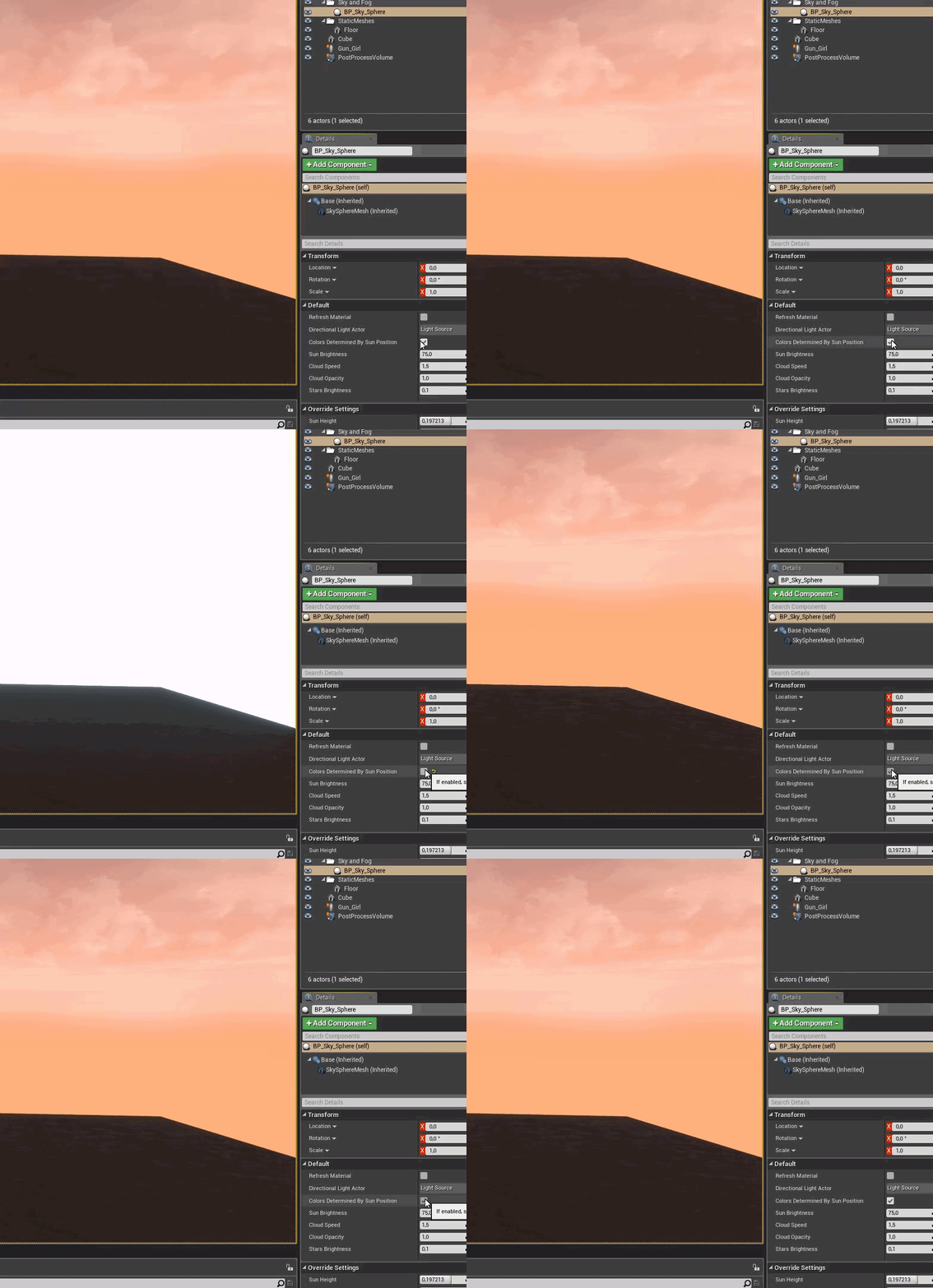 sinful osprey
whelp, you've exhausted my 'knowledge' 🙂 Sorry, can't help. Maybe see what options you have under the directional light actor? Maybe that's changed somehow?
grim ore
unchecking the colors determined by light seems right, thats what you would expect. You need to rotate your directional light that is linked back to the normal positions (looking down) if you want a blue sky
these are the default settings if it helps for the default new level rotation
btw that looks like the directional light was reset to 0,0,0 rotation to get that color
you might have reset it
then restarted and on the next start it refreshed the material
 limber light
umm... i need help
i don't know how to change the look of the mannequin
like, i know how to add the shaders
but is there a way i can sculpt the head
abstract relic
Use a 3D editing tool like Zbrush, blender, Maya, 3D studio, etc
limber light
i tried to use blender but i don't know where to get the 'send to unreal' addon
limber light
oh
normal burrow
it is for some reason in hype phase, where it is not material
normal burrow
drag and drop
 potent prism
Hi, Does anyone knows how the engine compiles Blueprints ? I'm trying to upgrade my project to 4.25 but i'am triggering a bnreak point when loading the editor ::CreatePersistentUberGraphFrame
plush yew
Can someone help me figure out why Unreal crashes everytime I open my project?
limber light
sometimes, when i use Unreal it makes a sudden stop and then i have to wait for a long amount of time for it 2 resume.
this usually happens when i am on the play mode
 devout fog
Where is a spot I can seek someone to provide me with help, specifically with Amazon Gamelift integration to UE4? it's fine if I have to pay. I'm tired of trying to get help by asking for free and no response. I have no idea where to go and am having frustrating issues.
worn granite
You'd typically post in #looking-for-talent
 thorn hazel
@devout fog .. if you want to hire someone, you can post in #looking-for-talent .. by messaging the @plush yew
worn granite
The trick then is making sure the person actually understands Gamelift
thorn hazel
or you can ask questions in #ue4-general .. if they don't fit elsewhere
describe, what needs to be done, check previous works, don't pay all the amount in advance ..
keep it simple & communicate
frozen pollen
im assuming this answer to this is going to be a resounding no, but is there a way to have an unreal engine game completely delete itself when something is triggered
frozen pollen
fair enough fair enough
but i want to do a sequence where the game "deletes" itself and the player has to actually reinstall it and im just curious if it's actually possible
worn granite
Basically you spawn off some kind of watchdog program (or it loads the game). When you wanna delete the game, that program shuts down the game process and waits for all the handles to close out, then nukes the install directory
frozen pollen
how difficult would it be to do that lol
worn granite
You'd be left with only the watchdog and any directories leading to it
to preserve the settings/state, you can just create some kind of save and it should survive (as Saves are typically under the appdata dir)
You can even pick up where the story should automatically
Also Steam might be annoyed if you're going that route
The software, not Valve
Total beginner to UE4/C++?
 weary basalt
@devout fog What questions do you have about GameLift?
devout fog
It's more that I need some personalized help/tutoring I suppose, I mainly do blueprints and the basics of setting this stuff up is a bit beyond me, I struggle with text based stuff. For example, I'm following the amazon guide and it says to do "msbuild" but I get an error that the project file doesn't exist. I've just been hit by basic stuff like this over and over and would love to have someone help me through it, and I'm willing to pay a fee for that (I see there's an appropriate spot to post about that now, so I'll do that, thanks for info!)
weary basalt
Ok
 obsidian horizon
I have a question for anybody if they have seen something looks like ghosting on materials
 lime sorrel
is it possible to make the player's camera's children follow it when it shakes?
limber light
Does anyone know how to add color to a sculpture in blender?
Because I don't know how to.
 split hawk
👋 Hi all, I'm working on setting up a multi-user server with some friends and we're almost there, but running into issues with sharing the session between all client machines. Is anyone versed in multi-user setup and willing to help?
 sly coyote
@frozen pollen you chances of doing that and getting even the weakest anti virus program to ignore that you're deleting files with a middle man script are very slim
frozen pollen
i figured
sly coyote
There's literally no code in engine that does that so you would need to code it yourself and it would then be the equivalent of coding a virus...
I don't even think you'd make it pass windows defender
 median tulip
Hello everyone, i am just new in this portal. i am working with broadcasting and live entertainment industry which is also new in my company industry. This software is our first recommended scale of video camera collaboration with other system and we found it very fascinating. we are very much interested to explore on it. thank you
sly coyote
Has a learning curve @median tulip but you guys are going to love it
Especially the augmented reality stuff you can do for video production
In real time
median tulip
👍 well said @sly coyote we are doing an experimental project this and it is really amazing
 mint raptor
hey i have a random question, but does anyone have any ideas/know of any cool things that exist for an immersive PC experience similar to AR/VR but on PC? for instance (doesnt exist) but hypothetically like a weird box mask thing that cuts your peripheral vision so the PC screen basically immerses u? also at that, is there a way with unreal to have audio as an input (i.e a spike in sound causes an event)?
sly coyote
@mint raptor there are some cheaper knock off vr headsets that allow what your talking about
To use as display instead of full vr mode
Theres also nvidias 3d glasses which look lile googles that can run as display mode also
But i havent seen those on the market in years
And not sure if you mean like "audio capture component" that has ways to access sound events and alter variables
mint raptor
ahhh cool as tho its kinda hard to word but im meaning more like use the actual ginormous PC monitor haha
 unique timber
in the FPS template is it possible to connect player input to the default Post Process Volume that exists?
sly coyote
@mint raptor yeah thats how i meant also
mint raptor
originally i was considering using google cardboard/google VR concept for iOS but $100 is a lot for a dev licence
sly coyote
I understand what you were saying
mint raptor
damm okay thats sick as
the catch is its for a presentation, theres only abt 10 ppl however vr headsets r kinda expensive thus i was gonna use PCs which are avaliable
sly coyote
Ild have to dig to find it..but prettt sure most of the cheapy knock off vr headsets have that mode
China brand knock off they're dirt cheap
I only knew what you were looking for cause i was recently hunting for some myself and i remembered reading one that had "display only" mode
sly coyote
Vr headset..
Then look through the knock offs under 80$ lol
mint raptor
most of the ones appear to be for phone slots etc
sly coyote
Its out there...i just looked this up like 2 weeks ago when i got my stimulus money 😂
Im looking for it now also
mint raptor
hahaha nice as and 👍
 desert lichen
wuz hopeing for asome Blueprint help in 4.24 I had a simple level blueprint that on event play went to a looping sequencer that had a camera in it - it played once then went ot another looping sequencer that played forever with no camera or cuttrack - this let me in VR ride with the camera for 1 loop then after that everything would keep animating but i could fly around free - now in 4.25 its not letting me fly around after first loop- if i disconnect the level blueprint i can fly around fine -?????
sly coyote
@mint raptor Virtual Av Video Glasses "sfx" - 52 Inch Virtual Screen, Av In - Oye Team
mint raptor
aye dam thats sick, a little pricy for a one-time presentation but def something id check out another time ty!!
sly coyote
The one im looking for was a cheap china knock off
Cant seem to find it now 😫
Though those glasses look awesome
Like ever see something when looking to buy stuff that you kind of regret not buying then can't find it later
 floral arrow
why when i search for a file in my world outliner that has a lot of files within it I cant open it in the world outliner to view its contents. I have to scroll through the whole world outliner to find it in order to view the files inside
mint raptor
ughhh all the time @sly coyote
then u have a weird existential moment where you wonder what branch ur life could have taken and life events may or may not have happened should u have just bought them
nahhh nw tho thank u for the helppp:)
hahaha i had this crazy idea of a foil tunnel and tbh i thought it could be interesting to try
lime girder
Question: I have al ot of unused nodes in my BP for the Gamemode, theyre not connected to anything. Should I be worried? wil tlhat affect performance?
sly coyote
Found it its by chinavision and its "out of stock and not returning" 😥 😥 😥 😥
 storm terrace
I renamed my project and I need to re-set my blueprint parent classes
but it can't see any of my project classes
why is that and how do I fix this?
thx for help
it can't even see just a plain actor
forget pawn or custom pawns or anything like that, any ideas to what is broken?
ruby folio
@storm terrace #blueprint
storm terrace
tx
 kindred viper
@storm terrace if you rename a project you generally have to use Active Redirects (or Core Redirects) to make sure it retains it's structure. You can read more about it with a quick google.
plush yew
can someone pls help? Im using the 4.25 version of ue. now i want to add layers and paint my landscape. i dont find any options to do that. pls help.
mint raptor
@sly coyote nooo 😭
bold lintel
can someone explain a noobish question for me. I'm just learning UE and multiplayer and reading up about replication. Says PlayerState is replicated on all clients automatically, so why is it that in every example, variables in the PlayerState are still explicitly needed to be marked replicated
 kind girder
The player state is an actor and is marked for replication.
However not every field in the actor and its components need to be replicated, so you need to explicitly tag each field you would like replicated.
@bold lintel
 ancient lotus
^. think about it, what if you wanted some variables replicated only between the server and the client, or some variables to not be replicated at all like total shots fired or something
plush yew
Skeletal Meshes don't fire Onhit events anyone?
bold lintel
Hmm...got it. Thanks for the replies!
ancient lotus
they should unless its the physics bodies that generate the events?
blissful trail
when i try and add a new C++ class on ue4 it gives me an error and if i try and close the editor or anything then i cant access my project after
pls help
ancient lotus
what version
blissful trail
4.25
ancient lotus
change the include path for the header in the .cpp of the calss
blissful trail
?
ancient lotus
open the .cpp and send me a screenshot of visual studio
blissful trail
ancient lotus
when it creates the class in a folder it doesnt include the .h file right so you have to change the path
i said of the .cpp
ancient lotus
is it in a folder?
blissful trail
the project ?
ancient lotus
the class, thats why i wanted to see the solution explorer so i can show you what to put in
for example i have this class in a folder called components, so i include the .h as
#include "Public/Components/ChatComponent.h"
the directory of the cpp file ?
ancient lotus
wait sorry one sec
#include "ProjectName/Public/FolderName/ClassName.h"
can i just see the solution explorer and it will answer it for us hopefully
blissful trail
i aint usin visual studio im usin notepad++
ancient lotus
i know just open it for the example or show me the path/screenshot of where the .cpp file is in your projects source folder
figured VS would be easier
blissful trail
G:\Unreal Projects 2\MyProject49\Source\MyProject49
ancient lotus
-_-
blissful trail
dat wat u needed ?
ancient lotus
the path of the .cpp of your class
ancient lotus
dude just open visual studio up to try and fix it, besides you shouldnt be compiling from the editor anyways you should be using VS to prevent issues. open up VS, open the .cpp file and take a screenshot of the entire VS
blissful trail
i cant
it freezes my pc
LogVSAccessor: Warning: Couldn't access Visual Studio
ancient lotus
well the only thing i can think to do is use an IDE to compile, outside of VS if VS wont work
blissful trail
ima just reinstall visual studio and see if that fixes it
 bitter siren
Can anyone point me in the direction of figuring out how to do something in ue4? I want to be able to go from my character's camera to a camera in the level (highlighting a door they unlocked, for example) then back to my character's camera. If you've played breath of the wild, then something like that system where when link defeats a guardian in a test of strength, the camera zooms to the door opening then back behind link. Any ideas how to achieve that?
ancient lotus
@plush yew first off, dont spam your question
@bitter siren interpolate between the two camera. so interpolate to the door camera, use a timer to wait X seconds and then interpolate back to your character camera for a smooth transition
plush yew
@ancient lotus answer me and I won't spam it
bitter siren
Lol this guy
Thanks Cody
What do you mean by interpolate though? Is that literally a function exposed to bp that I can use?
ancient lotus
@plush yew maybe i dont have an answer, your question was literally asked twice between a total of 3 messages, no need to have attitude
plush yew
okay
bitter siren
@ancient lotus actually never mind
ancient lotus
@bitter siren yes, pretty much interpolation is like a smooth movement or rotation. so to get from point A to point B smoothly you would interpolate (move in fractional amounts)
bitter siren
just the word interpolate has given me enough to google
Yeah gotcha
So I can just lerp between the two positions basically
That makes sense
I appreciate it! Thanks
ancient lotus
yep. but since you cant really interpolate between camera, use your character camera to interpolate to the doors cameras position (just make a socket and use it for location) and then back to your character
 soft tapir
can you add this bUpdateSkelWhenNotRendered to the S1Engine.ini file of the tera game in unreal engine 3?
if so how would be the correct way to add it?
plush yew
ERROR: The system was unable to find the specified registry key or value.
Android Studio not installed, please download Android Studio 3.5.3
^^^ has anyone gotten that error even though 3.5.3 is installed and resolved it?
 sweet acorn
Hello, is anyone familiar with umodel (unreal viewer) and could help me solve a problem I’m having?
plush yew
hello my friend can't push update cus the project is more than 10gb-I didn't set the project to be max 10gb-we use gitlab-where is this setting?
sinful osprey
Anyone know how to get the Fracture mode to show in 4.25? I followed the documentation, all the plugins are checked and I've restarted, but I don't have the traditional Modes bar, just the button at the top and Fracture isn't there
normal burrow
These are many tough questions lol
@plush yew try #source-control
Hatchet is that some sort of decompile or something?
normal burrow
Unlikely to find much help on reverse engineering here. We’re mostly all developers
sweet acorn
Oh ok, thanks anyway
plush yew
Is there any kind of destructible mesh support on mobile?
plush yew
in gitlab the free space is 10gb or more?
split tundra
Seems like my actors aren't spawning after loading a stream level.
They do show up in PIE but not in launch mode, how come?
storm terrace
@kindred viper Thanks, I found out the redirects go into the GameEngine.ini
It solved the issue
 dim arch
a lot of ways to do that, lighting quality is too low, lightmap UV density may be bad, position of the light means not enough rays are cast on the surface etc, for the light leaking, make sure the corners where the wall/ceiling align (ideally one continuous mesh) and you can put a shell around the exterior to prevent daylight from leaking in
check this thread @urban dirge https://forums.unrealengine.com/development-discussion/rendering/1395449-light-leaks-what-is-the-actual-solution
Unreal Engine Forums
Hi guys, so it seems no matter what I do, there seems to be no way to remove the light leaks in my small arch vis scene.
I've snapped lightmap UV's to grid,
normal burrow
@urban dirge https://discordapp.com/channels/187217643009212416/225448446956404738/677375973599084590 read the lot if this too
Portals may help you bring photons in
 urban dirge
@dim arch yes, the walls have no thickness. the mesh in those places is inextricable. there is a light portal in the doorway
 tacit cypress
i need help
unreal wont let me import
The following bones are missing from the bind pose:
YUGI_Poly
YUGI_SUIT
YUGI_FACE_Blendshape
SAKAZUKI
sakazuki
This can happen for bones that are not vert weighted. If they are not in the correct orientation after importing,
please set the "Use T0 as ref pose" option or add them to the bind pose and reimport the skeletal mesh.
this is what its saying when i try to import
urban dirge
@normal burrow thx, I didn’t think that adjusting the light would deliver so much headache.
 willow briar
When I add a skin in Unreal Engine, how much does shaders notice the cooldown time.
For example, I threw a big coating. This computer
https://www.notebookcheck.net/lenovo-legion-y730-17ıch-i7-8750h-gtx-1050-ti-laptop-review.337190.0.html
he threw the coating in twenty seconds.
So this computer
https://www.mediamarkt.com.tr/tr/product/_legion-y740-17ırhg-i7-9750h-16gb-ram-1tb-512gb-ssd-nvdia-rtx2060-6gb-17-fhd-144hz-w10- 81uj0057tx-laptop-1207413.html
How much does it do the same process?
In fact, I was wondering, if the first computer does it in twenty seconds, is it the second eighteen fifteen and thirteen or something?
Thanks in advance.
tacit cypress
I NEED HELP
 frozen mural
why my infinity blade has some twisted bone after retarget to paragon assets?
plush yew
soo
i want to use the HUD to draw stuff on the screen
but event receive draw hud is not overridable in c++
is there a C++ equivalent
urban dirge
@normal burrow light portals didnt help
honest vale
try regenerating project files
if all else fails, switch to intellij rider (the new beta with UE 4 support)
 royal dragon
Hi,
Has anyone else experienced this error:
Assertion failed: BlackboardDataToComponentsMap.FindPair(&BlackboardData, &BlackboardComp) == nullptr [File:D:/Build/++UE4+Licensee/Sync/Engine/Source/Runtime/AIModule/Private/AISystem.cpp] [Line: 220]
It happens on closing map populated with AI. Leads to engine crash.
 patent crater
@royal dragon with 4.25?
royal dragon
Yes
plush yew
lol yeah, trying to get a rectangle drawn for unit selection...
void AMyPlayerHUD::DrawLineRect(FVector2D topLeft, FVector2D bottomRight, FLinearColor color, float thickness) {
    FVector2D topRight(bottomRight.X, topLeft.Y);
    FVector2D bottomLeft(topLeft.X, bottomRight.Y);
    AHUD::DrawLine(topLeft.X, topLeft.Y, topRight.X, topRight.Y, color, thickness);
    AHUD::DrawLine(topRight.X, topRight.Y, bottomRight.X, bottomRight.Y, color, thickness);
    AHUD::DrawLine(bottomRight.X, bottomRight.Y, bottomLeft.X, bottomLeft.Y, color, thickness);
    AHUD::DrawLine(bottomLeft.X, bottomLeft.Y, topLeft.X, topLeft.Y, color, thickness);
}
hopefully it works
patent crater
not that particular error but some other error that might be related. created uobject disappears
even though it's UPROPERTY and prevented to be GCd
in 4.24 works perfectly fine
royal dragon
Yes 2.24 works fine.
patent crater
yeah, it's the main reason i can't send update for 4.25 for one of my plugins. i was trying all sorts of things but i believe is related to some engine bug
which i can't find tbh
plush yew
blackboard any good?
last time i tried it, i ended up just using C++ loop for AI decision making instead
honest vale
you mean behaviour trees?
royal dragon
I can live with it for a while. It could be related to changes. Will red more on that.
honest vale
they're a pretty standard way of doing ai behaviours
but they're just a tool, you can use whatever you want
patent crater
Edlin, if you find something and you don't forget about me, please let me know
royal dragon
Will post the findings here.
patent crater
yeah, i keep my eyes peeled anyways.
split tundra
After loading a stream level my character doesn't spawn at PlayerStart but at (0, 0, 0), why is that?
It spawns at its correct location if I run the map directly
The PlayerStart is into the streamed level, not in the persistent level
honest vale
this is basically porn https://www.youtube.com/watch?v=SeNM9zBPLCA

This hands-on presentation by Epic's Sjoerd De Jong explores the Sky Atmosphere system in Unreal Engine. Starting off with the basics, viewers learn how to render a beautiful and fully dynamic sky within seconds. From there, the session showcases how to create alien, dusty, o...
the realtime skylight recapture stuff is nice
1.4 ms for a 128px cubemap on a PS4
 green ridge
Does anybody have issues with the Megascans plugin for 4.25? After installing it and running my project, I'm getting error "The following modules are missing or build with a different engine version". The project has 4.25 version and Megascans plugin in MegascansPlugin.uplugin also has 4.25 version, so I don't know what's wrong.
 wary wave
they usually are lemons up until a few big fix releases
frozen mural
why my infinity blade has some twisted bone after retarget to paragon assets?
wary wave
I never bother with the latest version and usually stay one behind
 agile notch
i can't wait for the realtime skylight updating
 remote roost
loving rider for UE4 C++
loud knoll
@wary wave Yeah I am the same I keep 2 versions back until I finish testing the newest then I upgrade. Right now 4.25 seems to have shipped with a lot of bugs and I know they will fix them but right now I am not using anything that is provided by 4.25 and it only breaks things that worked in previous versions. Little bit bummed that Chaos wasn't on my default, but that is a huge change to move over to it. Engine has been using PhysX since it was started and it is a core component so it is expected to have a lot of bumps in the road. The good news is that they got it out and I am sure are all working on fixing it.
 vale bone
Hi, I'm learning about profiling for the first time so may have some questions 🙂 my FPS is dropping massively in a multiplayer game, and so far I've found a spike in "render query result" - does anyone know what that means?
vale bone
I found the issue - I had occlusion turned off
 dry delta
Hello there
i need a little help with ue4 scripting
What is signature in any descriptor file?
like: Signature=EF557A684495B53A794FF78E974C48CC
manic pawn
this doesn't seem like something you would normally need to touch
 lone fable
how does it look like with 4.25 is it safe to switch on it or are there any issues?
 lament saddle
I'd wait for the next hotfix at least.
I migrated my project and found bugs (and submitted replicate-able bug reports) in blueprints and audio
Of course, ymmv
 patent apex
hey, are you guys getting draw thread problems with 4.25, especially with directional lights involved?
 cosmic veldt
Guys can I get some support for feature request i made? https://forums.unrealengine.com/unreal-engine/feedback-for-epic/1757357-polygon-cut-tool-for-procedural-mesh-component
Unreal Engine Forums
I really enjoy the new Polygon Cut tool but it would be so cool if we could have the same tool in a similar fashion with the "Slice Procedural Mesh" node. I would've used it go make potholes for the road generator I'm working on and I can think of so many possible use cases.
split tundra
None of my actors appear in the newly loaded stream level, neither those spawned in the editor nor those spawned in BP.
Does anyone know why?
cosmic veldt
I think it would be dope to have Polygon Cut tool for procedural mesh
abstract relic
Would use this
https://voxelplugin.com

voxel plugin™
Create infinite terrains procedurally using in-engine tools. Edit landscapes in realtime. Join an active community and benefit from frequent updates!
cosmic veldt
i just want to cut some holes to road
abstract relic


Procedural voxel city destruction by @Ideoken using @voxelplugin in @UnrealEngine
#UnrealEngine #ue4 #gamedev #indiedev #voxel #physics #zombie #screenshotsaturday https://t.co/znF0SzOqHY
Retweets
119
Likes
516
 Twitter
cosmic veldt
Twitter
cosmic veldt
i can do it by converting to static mesh and use the poly cut tool
but it would be much more practical to do it in construction script
abstract relic
Chaos may get a steady 30fps when dropping a stack of objects in 5 years or so.
That actually looks like the old destructible mesh with particles
Give chaos a shot. High performance is something it’s definitely not at the moment.
plush yew
in 4.24 mobile preview doesn't seem to work? anyone had similar problem?
the window opens but everything is black 🤔
recompiling shaders 🧠
 grim juniper
On the topic of procedural meshes, there is that new modeling stuff which has stuff exposed to blueprints. I think it's the same stuff, but I'm not sure how well it works yet. https://docs.unrealengine.com/en-US/BlueprintAPI/MeshDescription/index.html
Mesh Description
No, volumetric clouds is a 4.26 thing
There might be something experimental. I think in 4.24 there was a very basic material version which wasn't any more than a mockup
unique kraken
hey, id like to place/ parent my eye point perfect in ue4, to my character can someone give me a hint where to do that
like, wich window
thick herald
@plush yew it's in engine content. Search Volumetric and you'll find it. Clouds are there in blueprint as a volume actor but it's very very heavy.
It's nice to look at, but it's not useable just now.
no, it's in engine content. Volumetric Content.
split tundra
While launching the game, none of my actors appear in the newly loaded stream level, neither those spawned in the editor nor those spawned in BP.
It works fine in PIE, what could be causing this?
urban dirge
@normal burrow light portals didnt help
@urban dirge i use gpu lighmass. the problem was solved by setting these parameters in BaseLightmass.ini file
before
after
split tundra
Make it a variable, in the HUD's Graph take the variable and use SetText() @barren flume
barren flume
still having trouble
plush yew
pls help me
barren flume
i don't know how to get a variable set to the text
i already had a thing to change text to username for text render
but i guess it's not the same in widget
 wet brook
What happened to the cloud stuff that was going to be in ue4.25?
manic pawn
it got moved to 4.26
wet brook
Oh ok
manic pawn
This hands-on presentation by Epic's Sjoerd De Jong explores the Sky Atmosphere system in Unreal Engine. Starting off with the basics, viewers learn how to render a beautiful and fully dynamic sky within seconds. From there, the session showcases how to create alien, dusty, o...
thick herald
Indeed, although you're a day late 🙂
 open gulch
where can i find realistic rendering content detail
thick herald
Megascans.
 hard cobalt
does anyone know why this map looks like this ? it's the dynamicgrasslite pack's demo map, i didn't touch anything. i'm on 4.24
grim ore
@hard cobalt do any of the icons in the viewport look wrong/flat? I cant see any to tell if that is happening
hard cobalt
@grim ore nope but this is what it looks like when i change the view mode to unlit
idk what's going on here 
 proper stump
Hey, how do you approach getting a custom character to work with the default mannequin skeleton? Im using blender, should I import the mannequin skeleton and try to attach it ?
barren flume
@proper stump all I did was rename the bones of the skeleton to the epic skeleton
i opened the mannequin skeleton and renamed the bones of the character to the mannequin bones
proper stump
so you used rigify first and renamed the bones?
barren flume
no
i just opened the armature
and renamed from there
i renamed those to match the mannequin skeleton
proper stump
my character is not rigged, do i need to rig it first?
oh, you used mixamo to rig first.
worth a try
barren flume
yeah
and you rename the mixamo bones to the epic skeleton
it takes like 15 mins
for me atleast
proper stump
thanks, will try
copper wedge
Im having an issue importing my DDS cubemap into ue4...as in i can i keep getting an error to import message wondering if anyone could help im using the NVIDIA dds Format exporter but there is no ARGB output only BRGB and it isnt having the same effect
mint umbra
How do I update the foliage being in the air? I lowered the spline meshes and applied them to the landscape, but the foliage that was painted onto the splines didn't follow. I tried reloading the map, but no effect.
grim ore
its the particle effects learn project