#ue4-general
1 messages · Page 722 of 1
 plush yew
@lilac wedge i need event tick anyway but its solved
 grim ore
ok so that is an engine module, if it is failing try to repair your engine
 winter fable
ok
grim ore
alternately start up the editor like normal, no project, and make an new project to see if it loads. If it loads then something else in your project is bad not the engine
winter fable
ok
plush yew
Marketplace down?
winter fable
i think its because the project is corrupt for mine
what happens if i delete my plugins folder
 thick herald
MP is fine here
plush yew
you would delete your plugins folder
 astral spindle
hi
I wonder how to make a material emisive channel "breath"
winter fable
would my project work
 kindred viper
@astral spindle you can add material parameters to control the input value externally, then use a timeline or timer to interpolate the value
 abstract relic
@ebon linden https://youtu.be/G_hLUkm7v44

What is a Blueprint Interface in Unreal Engine 4 Blueprints?
Source Files: https://github.com/MWadstein/wtf-hdi-files
grim ore
@astral spindle If you look at the SIN node in UE4 it basically goes from -1 to 1 over time so you can use that and multiply it against your emissive channel so the color of your emissive is basically black or nothing and fades to white or full color then back to nothing. you might have to look into clamping it tho as I dont know what -1 to an emissive does
 opaque vector
Is there a plugin that can replace all static mesh actors within a level with a blueprint, that is essentially the same mesh wrapped in a BP?
 bitter iris
how can i invert the scroll box so you get info from bottom to top instead of top to bottom?
kindred viper
@grim ore -1 shouldn't do anything to an emission. I believe its a positive only effect in this term
@opaque vector yuou dont need one. You should be able to select them all from the world outliner and do it there. Im pretty sure I've seen this but if I am mistake, then perhaps I should make the plugin as an apology :p
grim ore
it sounds like you want this
 shy jetty
has anyone gone through this tutorial? it does not say any time throughout the video what to do with the folders that are in the links provided or where to install them, it just jumps straight into the video
 timber birch
Ive got a question. Is it possible to check if a rock mesh collides with a river mesh and then apply a wetness to the rock where it intersects?
 pale forge
anyone know what this node is?
grim ore
@shy jetty that is a standard unreal engine project. If you are going to follow along you would download the project, uncompress it to somewhere on your drive, then open up the .uproject file from the editor window or from you file browser. the 2nds file, non project materials, are just extra files for later
plush yew
hello everybody, i came here to ask a question about physics, do you know if there's a way to prioritize one actor when a collision occurs between two physics actors ? i want two actors to collide but need one actor to be unmoved
shy jetty
@grim ore I see so i dont need to add it to a project or anyhting? I just open the file?
winter fable
does anyone know how to fix the thing where it says
it doesnt reconize the extension uasset
anyone
plush yew
drop it into the folder from the explorer
 frozen pond
got question about saving actors changes, if i'm right if i will save game object as actor reference it wont load my changes to it ?
grim ore
@shy jetty correct if you uncompress it the project is there completely, just open the .uproject like normal. I will mention to them that this might be something that could be explained better or mentioned somewhere
bitter iris
Wondering how I'd go abouts logging chat messages, print string works but what if i ship, id like to have the server create a log for chat also
grim ore
you would have to do something in C++ to log to disk as a text file or get a plugin that lets you write to disk
frozen pond
how to move actors beetwen levels? i mean i change something in actor on one level,and i want to see it on another one?
 scarlet birch
You'd have to use a persistent level and level streaming. Otherwise save and load.
frozen pond
if i want to use it after game restart i need to save it anyway ?
scarlet birch
That's the usual way of it.
frozen pond
as i have multiple actors that player can change, i probably would save it ? but can i just save whole actor as it is or i need to make some trick to save all changes and then reconstruct it on other level ?
scarlet birch
That's a broad topic. You're going to have to read up on it.
frozen pond
can't find anything usefull about saving whole actors :/
scarlet birch
Start with saving and loading, look into serialization, read the docs
grim ore
if just BP you need a plugin for entire actor serialization pretty much. C++ can do it with a little work. BP out of the box saves/restores what you tell it and it saves values
scarlet birch
I know there's a couple of plugins than can handle it. I think Rama had one and I know I've seen one or two on the marketplace.
grim ore
Might be smarter to see if you actually need the entire actor saved rather than just a few variables that change
frozen pond
i consider doing loop that saves all instance static mesh parameters like transform etc. problem is is there way to create variables dynamicly in save game ?
its the sims like build editor, i got special map with special rules etc where you design house, and then i want to have in on main level
scarlet birch
A lot of time I just use a struct that has everything that needs to be saved/loaded for an actor.
grim ore
^^
would be nice if you could serialize json out of the box but it's not really supported
bitter iris
@grim ore I solved it by rotating the angle by 180 lol, easy fix without c++
frozen pond
is my idea of doing loop for each component and saving it to struct array then reloading it is fine ?
grim ore
well you cant save an actual actor to a file so that will be an issue
scarlet birch
I gave up on getting source code to open from editor with a installer build. I know somewhere it's getting the wrong directory but everything I called or found had the right path for the source.
It's driving me nuts not solving it but I've got to move on.
astral spindle
@astral spindle If you look at the SIN node in UE4 it basically goes from -1 to 1 over time so you can use that and multiply it against your emissive channel so the color of your emissive is basically black or nothing and fades to white or full color then back to nothing. you might have to look into clamping it tho as I dont know what -1 to an emissive does
@grim ore thanks
plush yew
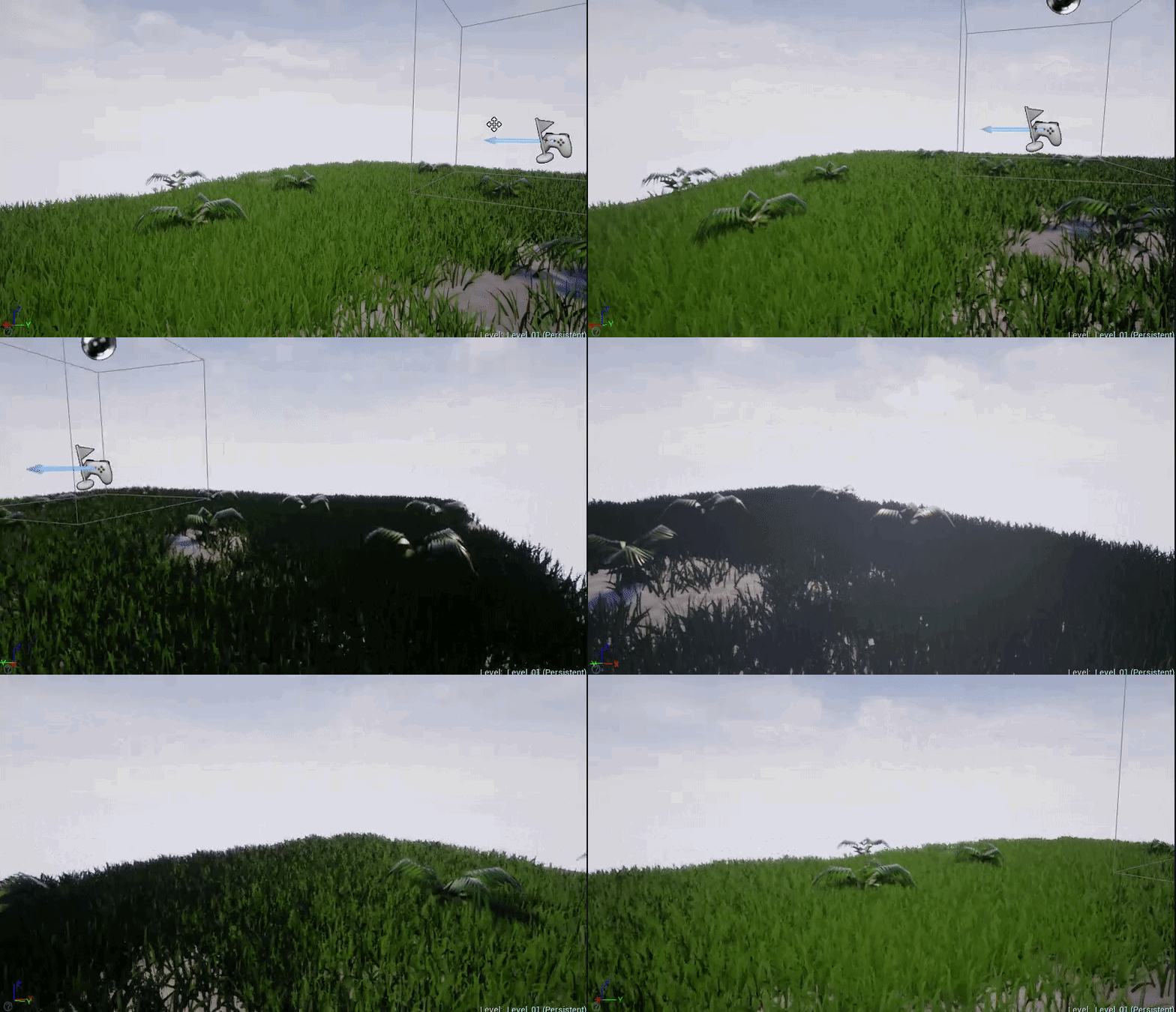
any idea what is causing this?
foliage goes super dark when looking in the same direction as the light source
been stuck on it and cant figure out what im doing wrong
 swift spindle
black subsurface ?
frozen pond
@scarlet birch can i make multiple save files and load multiple actors from multiple saves ? (like 5 building from 5 diffrent save files) ?
scarlet birch
Only on Tuesdays
plush yew
black subsurface 🤔 where would i find subsurface stuff, in my material?
scarlet birch
Yes.
scarlet birch
It's not uncommon to use multiple save files for some things.
plush yew
didnt have anything set in the subsurface input and the material file wasn't even set to subsurface
frozen pond
i wanted to do something like this:
scarlet birch
Don't do that.
frozen pond
?
 wispy wagon
Do anyone know how fix this? it look like lighting got through the wall.
scarlet birch
You'll need something unique to add unless there's only ever one instance of that class. I'd look at some examples and read up on it a bit, maybe just test some stuff out too.
I wouldn't do it that way, but no idea if it's ok. Probably is.
frozen pond
i got like pre made 10 slots of my building, so player can edit 1 of 10
by slot i mean same child actor with diffrent name
like house_1 house_2 house_3 etc.
scarlet birch
Saving and loading is something that really should get a lot of thought put into how it's going to be structured.
 honest mango
https://gyazo.com/916e2b17f4c5e4ca7dfeeba433939472 hey how can i get the boxcollision inside my "inspectableobject" please ? i would like that if it collide overlap so it play the animation ..

 warped tangle
drag off the blue "as" node, and "get boxcollision"
Then you're going to have to bind the beginoverlap to an event, and you'll want to be doing that on beginplay or whenever that actor is spawned
warped tangle
wait what
honest mango
hmm
warped tangle
ohhh, you're trying to trigger that timeline only if the box collision overlaps the inspectableobject?
honest mango
so the inspectableobject is what i want to overlap for my door
yes !
the inspectableobject is my key
i would like if my key get in overlap so it play timeline
😛
warped tangle
If you want it to work for ANY instance of the inspectableobject class, you'll want to drag off overlapped component, get class, and do a == check against "inspectableobject", then execute if true
warped tangle
get class
honest mango
i dont see get class when i get the node from overlap
warped tangle
basically you want to check to see if the overlapped actor is a specific class, if true, execute logic
honest mango
yep that it
warped tangle
honest mango
is it get all actor of class ?
warped tangle
no
 warped tangle
no, but if you want to cast, just plug it in directly, ignore my get class thing
honest mango
hm so what should i put in return value ?
warped tangle
just remove the get class, and plug other actor into the cast
if it's false, it's a different class, if the cast is true, execute
honest mango
i have to pick the blue inspectableobject not the purple one so ?
because when i plug to other actor it put get class
oh
it works like i show you in my screen
thanks you !
bitter iris
Does anyone here use "LoadingScreen" Plugin?
scarlet birch
The one that was free? I've looked at it.
scarlet birch
It uses streaming levels I think.
bitter iris
For some reason it like to load at start of the game, when im loading the map and does last long enough loading level streams
scarlet birch
You mean it dumps you into the level but not everything's loaded?
scarlet birch
Because the level is loaded. You'll have to manage that with the level itself.
 tame rose
I need help how do i erase foliage???
bitter iris
create a non weight blend paint
tame rose
in the foliage editor?
bitter iris
hang on we talkin landscape grass types of the foliage painter
the above is for "materials"
this is to delete using the foliage painter
@scarlet birch so like in the persistant level?
bitter iris
yeh so use the lasso tool
tame rose
i used the foliage editor thingy
bitter iris
screenshot above
tame rose
UM
scarlet birch
Maybe. Whatever you need to be loaded, pause the game and put something on the screen until it's loaded.
tame rose
oh whoops caps
frozen pond
@scarlet birch so my loop concept works, but where is save file now? lol
tame rose
ok you have to select the type of foliage to delete it what if i dont remember the type
bitter iris
yup @tame rose
tame rose
wym yup
scarlet birch
idk, there's a lot of ways to handle it. I've not really worked a lot with asset management yet and what I have done I'd have to look up again. You can disable the pawn and put something on the screen.
bitter iris
ill show you a gif
ahh np mike
whatever you want to remove make sure you have it ticked
scarlet birch
IF you're starting to get into that stuff it might be a good time to look into asset management and loading though.
tame rose
but i used an example map with grass already there
i cant delete the grass because its not there as a foliage type
tame rose
ok
tame rose
its not that
bitter iris
tame rose
its a foliage
bitter iris
i know if its not done with foliage painter its done with a grass type
honest mango
hey guys, quick question, do we have to replicate footsteps sounds ?
or its already 3D ?
scarlet birch
If it's one of the types in the screenshot you posted you should be able to just remove it from the brush, iirc. I'm not 100% I only really use the procedural foliage.
bitter iris
i think sounds dont need replicating atleast i havent
an other players can hear them
honest mango
ok thanks i trough cause when i walk on client i dont really hear it like 2d*
bitter iris
should be fine, as i said i have footsteps, jump an gun sounds, all players can hear them aslong as theyre in radius
scarlet birch
I would think it depends on how and where the sound is being played.
What do you mean by replicate, and 3D , 2D?
You mean as in playing for all connected players and falloff ?
How are you playing the sound?
honest mango
sound is already 3D but i dont think that i can hear the other person footstep, i cant tell because when i have 2 window i cant reduce sound of one
sound is in animBP
😄
 empty isle
Anyone know what collision filter settings would allow a ray/spherecast to detect the body parts in a physics skeleton?
scarlet birch
Should be fine if it's in animBP
tame rose
all my grass turned into this help!
ope
fixed it
ok @scarlet birch it is landscape but how do i remove the grass?
@bitter iris
bitter iris
heh?
bitter iris
its in one of these
look through them
its not in your foliage painter
so like i said before its in the grass types
looks like you have a few of them
also you're worring me with those rocks
please put them in the foliage painter
tame rose
I found it but it wont let me drag and drop it in
bitter iris
drag what
tame rose
the LGT spring one
bitter iris
you dont need to drag nothing
double click into it
then use the drop downs you can control the density etc
if the landscape material doesnt have the foliage removal layer then youll have to look into it very simple to do
 green sky
Hi im trying to add an offset but the offset isnt consistent, it changes can someone please help.
I want that if i offest to the left of the spline, it stay's to the left
scarlet birch
You need it to be relative to the spline point. So you'd need to use whatever function gives you a way to do that. I'd have to look to know what that is. Probably something like tangent, or point forward or something.
green sky
Ive tried but nothing
scarlet birch
I mean there's literally a node "get Tangent at spline point"
green sky
ok but how can i add the tangent to the location at distance along spline?
scarlet birch
green sky
Because i need the vector from Get location at distance along spline in order for it to work
scarlet birch
Take the location and add an offset multiplied by a normalized vector for the direction the offset should be in.
green sky
??
abstract relic
Tldr: you have the offset amount, now you need to get the direction in which to offset. Therefore, use the spline’s tangent
green sky
Can you please show a snippet, i dont seem to understand
scarlet birch
Take the tangent and rotate the vector by (I'm guessing +/- 90°) or use the right vector and rotate it. Multiple that vector by the offset amount and add it to the location.
green sky
Im sorry i dont get it
scarlet birch
You could probably just use the right vector.
It's relative. You want a point B that's relative to point A. Point A is the location along the spline. Point B is a point that is relative to that point by some amount left or right.
So the offset is the float value for how far from point A you want to be. You need to know what direction to go though. You find that by getting a vector for that direction that represents 1 unit in that direction.
You then multiply your offset by that vector and add the result to the location.
So Offset*RightVector + location = new location.
or -(rightVector)
abstract relic
Have a vague mathematical graph. N = normal, T= tangent
 polar hawk
binormal crosstangent
abstract relic
Flip that
polar hawk
who am I Missy Elliot?
green sky
it seems that the spline point are being created at world location when i get its point the right vector even if i get it locally it reads world
scarlet birch
Sure pull out the calculus and obliterate my remedial math explanation. 🤣
abstract relic
Don’t worry. Everyone ignore anything math related 😜
green sky
Dude when i saw the math i my brain took an internal shit
i guess im too stupid to understand
scarlet birch
It's a skill like anything else. It takes practice and time.
but Vector math is your friend or your hell in gamedev.
green sky
i got the object following fine just fine i just cant seem to get something so simple as an offset from the spline
All i really need as an offset i swear ive been screwing with this since yesterday, i mean i do know what a right and forward vector is but when it comes to damn splines it just isnt working for me
scarlet birch
green sky
This is the function i have and like i said it does what it should i just cant seem to be able to add an offset to it
polar hawk
a single value can not tell you direction
except if you're on a number line
you need to calculate an offset vector
abstract relic
tangent normals
polar hawk
distance signed vector projection
green sky
Ok ill give it a try
polar hawk
khan academy has a great series on vectors
and its free
specifically relevant to you atm: https://www.khanacademy.org/math/multivariable-calculus/greens-theorem-and-stokes-theorem/2d-divergence-theorem-ddp/v/constructing-a-unit-normal-vector-to-a-curve

Khan Academy
Figuring out a unit normal vector at any point along a curve defined by a position vector function
now most of this is done for you with the nodes @scarlet birch posted
green sky
I have no problems with vectors i have a custom navigation A* system which uses vectors extensively, its just something with splines that screwing me over but ill check everything you guys said
polar hawk

abstract relic
everything is math
green sky
Ok i added a draw debug to the spline creation and the points seem to be rotated all retarded could that have anything to do
abstract relic
to work with it, you must understand it
polar hawk
that doesn't sound like you tried the vector math suggestions
 green sky
lol
abstract relic
likewise 😛
 lucid egret
Am I doing this right? When I press the action key for MoveForward, I want to pass (Throw = 1) into the function MoveForward()...
scarlet birch
Normally you'd use an axis and make it negative for the reverse input key.
lucid egret
Oh I see, thank you
green sky
Thanks for your help guys i got it working i had to rotate vector, it now works, thanks again
By any chance anyone here live in Vegas area?
 terse pawn
Anyone have any solutions to a ERROR: Targets cannot be built in the Debug configuration with this engine distribution.? MacOS 10.14, Unreal 4.24.3, VSCode 1.44
plush yew
I have a decorator on my task. The decorator is checking to see if a variable is set. The variable is not set. The condition has a red line on it and the task isn't firing. That's how its supposed to work, right?
 digital anchor
right
kindred viper
binormal crosstangent sounds like a label Twitter users display to define themselves in profile. 😛
oh that was from ages ago my bad.
scarlet birch
isServer returns true if it's a non multiplayer game. Is there a simple method to determine if a game is single player or if the client is a listen server?
 vapid venture
Where can I find settings for the grid? Im used to progrids in unity, and want to be able to move the grid or make it always visible
rn i have a landscape centered on it and things like grass make it impossible to see ect
scarlet birch
snapping, it's under project settings I think or maybe editor preferences but you can change the grid sizes etc...
 limber mesa
could anyone tell me why this is not working
i just want the light to turn on and off based on the suns value
70 means beginning of night and 120 means end of night
nvm i fixed it, now to test further
 merry sapphire
Are we allowed to ask any questions in here regarding UE4?
 ruby folio
I have a slight issue trying to move a level and its sublevels within a project.
I get this error
'Can't save PROJECT PATH/Maps/Yesk/Ex/Ex_x22_y05.umap: Graph is linked to private object(s) in an external package.
External Object(s):
Texture2D_0_BaseColor
Texture2D_1_BaseColor
Texture2D_2_BaseColor
Texture2D_3_BaseColor
Try to find the chain of references to that object (may take some time)?'
What the jazz is going on?
@merry sapphire afaik, if it fits nowhere else then here is the place to ask
merry sapphire
It's pretty general
 rain saddle
Hello Everyine
merry sapphire
My character keeps sliding down angles higher than about 40 degrees. I have stairs that are equal in length and height making the hitbox ramp's angle exactly 45 degrees.
I can't find any settings to change this like the friction and walkable floor angle.
Been Googling for a good minute.
rain saddle
I just started UE4
Hello Everyine
@rain saddle
Any tips or tricks
I was gonna make something like ARMA 3
later on
Any help would be greatly Appreciated
Actually
Could anyone help me to insert
the
swift spindle
make something smaller first 😛
 livid walrus
If I send you guys a 360 panoramic photo, do you think you could convert it to a skybox for me and send it back?
I'll pay someone $5 to do it
rain saddle
make something smaller first 😛
@swift spindle i know
I cant figure out how to insert the MEgascans Forest Path into my project
limber mesa
what would be a good way to make all lights turn on at the same of different times without writing all the code?
ruby folio
@merry sapphire Open your pawn BP, click on the movement component in the components panel. Then in the details panel you will see loads of stuff related to max walk angle and such
rain saddle
I cant figure out how to insert the MEgascans Forest Path into my project
@rain saddle It is really bugging me
merry sapphire
@ruby folio Yeah I tried those things already
ruby folio
@rain saddle There are loads of videos on how to use Unreal + Megascans with the livelink plugin online
ruby folio
@limber mesa A miracle....
tame rose
anyone know how to change a character mesh?
 misty owl
Swap it out in the character blueprint?
limber mesa
lol @ruby folio i have this code but when i want to drag in another instance of the light the code doesnt work for the instance. is there a way that i could refer to a certain amount of lights?
lucid egret
@merry sapphire Make a Physics Material and apply to the stairs. You can change the friction that way.
limber mesa
yes, but this is only set up for one, im in the level blueprint
terse pawn
Seems things are a bit more active now than earlier; don't want to spam the thread so I'm only gonna repost this here once, at least for a while. Would love to get some insight, even just a thing to google, on this error: ERROR: Targets cannot be built in the Debug configuration with this engine distribution.
ruby folio
For starters. Create an actor BP
limber mesa
i did
ruby folio
You just said you are using a level BP.
limber mesa
i made a time variable in the level bp and idk if i can refer to it through an actor bp
i get what you are saying, i put all of this code in the actor
tame rose
i need help changing character can someone dm me the steps i dont wanna redo annims
limber mesa
but then i cant refrence the time
ruby folio
@tame rose #animation And giyf
@limber mesa You should do this in an actor blueprint. Not the level blueprint
tame rose
mordynak can you dm me?
limber mesa
ok @ruby folio but this is what my time is referencing to
ruby folio
@tame rose No. You need to google animation retargetting
limber mesa
but how can i refrence my time variable in the level bp to the actor, i dont think you can do that unless.......
ruby folio
@limber mesa I see what you are doing.
ruby folio
You cant reference a level BP afaik
limber mesa
ik
@ruby folio if i make my time included in a blank actor then refrence it to the level bp will it work?
plush yew
Is the blackboard/behavior tree system known to have some pretty egregious bugs in 2.24? Because I've been using it for a while outside of 2.24 and now I've got all kinds of messed up stuff happening. Like a service that has abolutely nothing to do with boolean X influencing what boolean X is set to. Made fresh keys just to test this
ruby folio
@limber mesa Yes. Always. If you can avoid using a level BP then avoid it.
Create a variable in your actor BP of directional light and another for a BP actor. Set them to be references
plush yew
Like, I've had some late nights working on AI but its now the middle of the day, and I am fully lucid. I have a simple one-task behavior tree that works just fine monitoring boolean X. But when I add a service that ONLY deals with boolean Y all of a sudden the entire tree starts freaking out
limber mesa
@ruby folio how can i open up the light source without making a blueprint?
plush yew
Yeah, me too. I thought I'd just figured them out but after switching to 4.24 I want to throw my computer out the window
ill go to ai
limber mesa
because i thought lightsource already has a bp
ruby folio
@limber mesa I have no idea what you mean.
limber mesa
the directional light
aka light source
i need to make a variable in it
idk how though
ruby folio
Create an actor. Create a variable of type directional light reference.
Place the new actor into your world, select it, and with a directional light also in the world. Set it as the actor to use in the details panel
limber mesa
ok i got it thanks
limber mesa
got it thanks
ruby folio
Make sure your light variable is set to Instance Editable
That being said. You could alternatively just add a directional light component to your Blueprint, instead of referencing the one in the level
I prefer this as its a simple drag and drop to add a day and night cycle to the level
livid walrus
?
ruby folio
Wrong channel
livid walrus
If I send you guys a 360 panoramic photo, do you think you could convert it to a skybox for me and send it back?
I'll pay someone $5 to do it
oh
limber mesa
@ruby folio im stuck lol
ruby folio
@livid walrus That would take 2 seconds in blender
ruby folio
@limber mesa Whats up?
livid walrus
lol
limber mesa
i tried to do it like this
then set it
but i cant find it
i tried to drag down from directional light as well
@livid walrus why cant you convert it to a sky box? im sure epic has some tutorials on it
livid walrus
Because I have serious work I need to get done
while I also have a science project due tomorrow
which involves unreal engine
ruby folio
There are skyboxes in UE that you can apply a texture to that are already mapped for what you need
limber mesa
you in college?
livid walrus
Nope, 11th grade.
limber mesa
im in 10th lol
limber mesa
ikr
livid walrus
But yeah, know it's an easy job I just really need a skybox photo converted.
ruby folio
@livid walrus Open up unreal editor. Find this mesh... Engine/Content/EditorMeshes/AssetViewer/Sphere_inversenormals.uasset
Create material. Add texture. Copy that mesh, apply material...
Done
livid walrus
All right thank you
limber mesa
@ruby folio i cant get what you did in the last picture
in the details panel
it wont let me open up that panel
ruby folio
@limber mesa You dont want to get all actors of class
limber mesa
nvm had to drag it in level
ruby folio
Yeah
Then you can see settings in the details panel
Other than this. It will be set up the exact same way as in the level BP
limber mesa
i cant get the light ref
ruby folio
Do you have a light in your level?
limber mesa
nvm
abstract relic
<@&213101288538374145>
 fallen marten
Hacking group? Lol
 weary basalt
@plush yew Read the #old-rules thanks, we do not allow Discord Server links.
weary basalt
Why bother, please dont @ me when i just posted above you...
limber mesa
my fault, i thought you wouldnt get this
but @ruby folio i dont know why i cant see the default tab
ruby folio
On the variable in your blueprint for the directional light. Click the eye. Then compile and check again
 quick kelp
I want to make a single object be “unlit” anyone know how to do that ?
ruby folio
@quick kelp Change it in the material properties
@limber mesa With both your BP and the directional light in the editor, select the BP. then find the details panel. You will find an option to pick from a dropdown menu any directional lights within the scene
ruby folio
limber mesa
ohh
ruby folio
Like I said. Its the exact same setup you created in the level BP
The only difference is where you are getting references n whatnot
 sage coral
Not entirely sure where to ask about this currently trying to get a inventory system to work with multiplayer main thing is each player not having their own inventory so when one player picks up anything its replicated to everyone itself of each player having an individual inventory like I need
ruby folio
Do you have an inventory system that you have started creating?
sage coral
Yes
ruby folio
C++ or BP?
sage coral
I'm following the slot based BP
ruby folio
then #blueprint
sage coral
Thank you
ruby folio
@limber mesa Likely not gonna be here for long so also continue in #blueprint
limber mesa
Ok thanks @ruby folio for all of the help
vapid venture
sorry i asked something similar to this earlier, but have been messing with grid settings, is there a way to make it visible above other objects? has anyone tried that?
ruby folio
People are dicks @plush yew
 normal burrow
#work-in-progress
 opal hornet
does anyone know if there is a relatively simple way to retrieve "light level" data in UE4? For example, in games like Lightmatter or Stealth genre games where mechanics rely on being in light or darkness. I could essentially use seemingly infinite collisions, but seems like a janky way of doing it.
plush yew
does anyone know if there is a relatively simple way to retrieve "light level" data in UE4? For example, in games like Lightmatter or Stealth genre games where mechanics rely on being in light or darkness. I could essentially use seemingly infinite collisions, but seems like a janky way of doing it.
@opal hornet
All Lights have radius and direction
Point light is essentialy a line trace
Spot lights are cone traces.
Simply check if the player is colliding using a trace.
Directional light is tricky but you could use a line trace there too. Just offset the trace compared to the player's position to the light source
You don't wanna check shadows. You wanna check lights. That's easier ;)
I would create custom light blueprints that have collision meshes attached to them and listen to overlap events
opal hornet
i was moreso hoping there would be an easier method when it comes to dynamic situations, like changes in movement, intensity, size, etc
plush yew
It's a collision mesh... use physics
opal hornet
how would that translate for things like light intensity?
fall off i could just do distance checks, but dynamic intensity itself may cause problems no
plush yew
Indirect lighting is unlikely to work (but u can fake it)
What do u want with lighting intensity? is it to turn on / off? Or?
And you can get that information once you have the collision even no?
opal hornet
well, if its dynamic, it wouldnt really be binary
plush yew
What is the behavior you want to achieve?
opal hornet
originally, a visibility percentage, like stealth in TES games. but now im leaning towards binary detection. Either you're visible or invisible.
abstract relic
God I hate auto generated doc. So going off memory here. This component should already have light sensing included.
Useless page
https://docs.unrealengine.com/en-US/BlueprintAPI/AI/Components/PawnSensing/index.html
Pawn Sensing
 plain bluff
Anyone knows how to import a texture that is not square but a rectangle to UE4?
Whenever I import a rectangle texture It gets tretched
abstract relic
Going to heavily advise against that. Texture should always follow the power of two rule. Otherwise you’re just grossly throwing away memory
 snow reef
Does anyone know why the node called "Remove All Widgets" doesn't actually remove them. Or atleast not for me.
plain bluff
@abstract relic so,i can't use for example 512x256 texture ?
scarlet birch
You can. It's not a good practice.
plush yew
@abstract relic i can't find any light sensing there and it's only used for AI no?
You can. It's not a good practice.
@scarlet birch
Why? It's power of 2
scarlet birch
It doesn't have it. Also AI perception is likely a better choice over pawn sensing.
plain bluff
Hm,then how to fix stretching in editor ?
plush yew
Wheres my message lol
plain bluff
original texture in 256x32 resolution
scarlet birch
It's fine. I'm only half paying attention.
plush yew
@plain bluff it's UVs and texture size
originally, a visibility percentage, like stealth in TES games. but now im leaning towards binary detection. Either you're visible or invisible.
@opal hornet there are some github repos with examples on light sensing check them out
 vocal flume
Can anyone explain what’s the difference between input touch mode and getting the get input touch state from the player controller? Both work the same. I can’t find the answer from searches
opal hornet
will do
plain bluff
@plush yew hm,ok.I checked this texture on bsp brush and with correct UVs it's workin
honest mango
hey can someone help me to cast an actor in my character bp please ?

hatlight is an actor variable
hatlightref is my object
nvm i find out
connected to traceline
 crimson vector
So I have 2 terrains. One of them I can drag actors onto it in the editor and they stick to it. The other one, when I drag actors onto it, they pass right through it. No idea why this is. How do I make the latter one more like the former?
They have the same collision
Can't figure out how they're different for the life of me
snow reef
Does anyone know why the node called "Remove All Widgets" doesn't actually remove them. Or atleast not for me.
misty owl
Watching a keynote, and the speaker mentions it's good to avoid too many "hard references" in blueprints, as it can cause the majority of your game to load every time the blueprint loads. I can't find many results for "ue4 blueprint hard reference". I guess my question is: Are there any comprehensive resources that teach how to avoid expensive blueprint mistakes? Things that would bog down performance in the game?
grim ore
Here is an example video of that https://vimeo.com/408603845
hard references basically have to load the item into memory in order to use it, so if your player can use say 10 weapons and you hard reference them all in the players blueprint even if the player is only every using one the others are loaded into memory as well.
misty owl
@grim ore Awesome, thank you!
honest mango
i like waffleee omg
grim ore
@plush yew yes that videos shows exactly that
that seems fine, watch the talk from borderlands 3 team on using the engine and they have re useable assets they swap in and out for time of day and stuff
bitter iris
anyway i can properly export the ue4 skeleton to blender?
 storm terrace
is there a way so I can render material texture quality further away?
there is a very narrow distance where my texture looks good
 solemn goblet
Guys I have a serious issue any time I edit the land scape in fucking 2.24 the collision on it gets messed up in the editor is shows flat ground but when playing and placed grass/foliage is still in place on the old collision float in air basically
how do I fix this?
storm terrace
3 questions, no answers yet...help
solemn goblet
@storm terrace Yea there is a way I've seen it done I dont know how to do it though but in materials I've bought its had them
storm terrace
ue4 is kinda mind blowing, so much to learn to make even a half-ass game
solemn goblet
it is a lot for one guy for sure

Project Files : https://www.patreon.com/CodeLikeMe/posts?tag=source code
Support my work on Patreon : https://www.patreon.com/CodeLikeMe
This is part 10 of the tutorial series I am doing on how to create an open world game with unreal engine.
In this episode, i'll explain h...
@storm terrace I think thats what you're looking for
storm terrace
no tiling issue, here is some samples to show you what I mean...
that is too close...
good distance
far and blurry
solemn goblet
Ok what you need to do is go into the the material and put a TexCord node connected to a Multiply node, with a scalar value connected to the UV input of your texture sample
then you can scale the texture size
abstract relic
You can swap out texture/scale uv using distance field
solemn goblet
then you can create a material instance of your landscape material, then put it as your landscape then open the material instance and you can adjust that parameter value till its the right size
storm terrace
using a 3rd party material (something I didn't make), but now I see this
so that is what I must adjust
solemn goblet
yep
 pulsar badge
Is there a way to tell Epic games that i have UE4 installed already
I reimaged my pc and its asking me to new install
fresh copy
storm terrace
never emailed them
thanks @solemn goblet, I applied it, I'm curious to see the effects after modification
 jaunty dagger
Hi. I'm working on melee attack for AI character I used Interface to play the montage of the attack animation the problem as i think it is the interface doesn't work proprley or I messed something else I'm not sure I'll send some screenshots

I used this in player character
 grim ore
Is your animation blueprint set up to play montages on it?
jaunty dagger
yes
grim ore
and your montage has a starting section called mAYA
jaunty dagger
yes
storm terrace
@solemn goblet Thanks m8, that works a lot better 👍
jaunty dagger
I'm confused I don't see anything wrong
grim ore
well first are you asure it's calling that event in the AI?
jaunty dagger
No
grim ore
hook up a print string right after the Event Melee Attack and see if it prints out
grim ore
well you should be able to breakpoint in the event execute AI or try another print string in it. Perhaps that is not being called in your BT
so this is less of a montage issue and more of an AI one
jaunty dagger
and I made sure that the interface is already added to the class in the character
well you should be able to breakpoint in the event execute AI or try another print string in it. Perhaps that is not being called in your BT
@grim ore It's working fint in the BT i checked that actually
grim ore
so when you breakpoint it, its going to the true and then calling the melee attack?
wait
are you calling that on the controller and not the pawn?
the Melee Event Attack
jaunty dagger
I called it in the pawn not the controller
so when you breakpoint it, its going to the true and then calling the melee attack?
@grim ore and yes
grim ore
That looks like you have it hooked up to the CONTROLLER not the PAWN
so you are calling the event on the controller not the pawn
unless the event is on the controller?
jaunty dagger
oh sorry i thought you were talking about something else .. yes It's connected to the controller
what shall I change?
grim ore
well... is the Melee Attack event on the AI character/pawn or is it on the Controller? Where is that blueprint interface at.
jaunty dagger
character
grim ore
so then why are you calling the interface event on the controller in that BP?
I would assume you meant to hook that up to the Controlled Pawn
jaunty dagger
I had a problem when i connected it to the pawn so assumed this is the way to do it
ok I'll try this
grim ore
well what was the problem and why would you assume that?
jaunty dagger
Yes finally it worked thank you
well what was the problem and why would you assume that?
@grim ore I was confused it wasn't working so I thought maybe I can fix it like this but I bet it was a bad decision
plush yew
https://www.youtube.com/watch?v=GATLQUn3810
I'm totally expecting to be called a dummy for misunderstanding something totally basic about behavior trees but I put together this video that showcases what I think is a bug with unreal's AI system? You could probably get through it on 1.75x speed

I've been having some pretty wacky issues with behavior trees in my projects so I decided to make a totally fresh project to see if the issue was replicatable, and it was.
storm terrace
This really frustrates me, I will have this...
and then after I compile my c++ code I get...
how do I prevent my C++ code from removing all my component configurations?
 golden condor
Hi guys
My player is spawning inside the floor
When I break the link on sequence 3 the player starts normal
Any idea?
 tardy hamlet
Hey guys, so I’m gonna be making a game, let’s say I wanna test with 6 other people in the middle of development, how would I do that?
plush yew
if I understand correctly the player spawns with the capsule at the center of a vector3. So is it possible that "player location" is set to the floor whereas it should be set to be a halfheight above the floor?
@golden condor
Have you made projects before with unreal @tardy hamlet
plush yew
Alright well it's a pretty nice system but its definitely gonna take a while to get used to it. Most tutorials on multiplayer are going to assume you're somewhat familiar with game dev. So I would follow some tutorials in order to create what you want to be able to do in multiplayer, in a singleplayer scenario
grim ore
@golden condor sounds like your loading up 0,0,0 as the location and not a real saved location
plush yew
if youre testing with friends you can straight up get them to connect with IP directly relatively quickly
tardy hamlet
How would I do that? @plush yew
plush yew
Load up some beginner tutorials and start watching. If you need a video on specific functionality of a node, check out MathewW's videos.
tardy hamlet
Oh, alright, what’s your yt @grim ore
abstract relic
Google it
tardy hamlet
Is it same as his discord?
plush yew
mathew wadstein. But his videos are typically for specific nodes
tardy hamlet
Oh ok
golden condor
How do I fix that?
abstract relic
Or look at his profile
plush yew

How do I use the Behavior Tree to create simple basic AI in Unreal Engine 4. We cover from a blank scene creating everything we need to have an AI chase down our player.
Source Files: https://github.com/MWadstein/wtf-hdi-files
tardy hamlet
Ok, thank you guys, is it ok if I come back to you if I don’t find anything?
plush yew
I mean this video is pretty fantastic but you should still have some familiarity with the engine first
I mean sure but try to come with specific questions. Stuff like "how do I do multiplayer" is gonna get shot down pretty fast lol
golden condor
I am not sure if I am doing that tbh
abstract relic
Look at pinned messages for further resources 😜
tardy hamlet
Ok
plush yew
Did anyone happen to take a look at my video? Am I jsut totally not getting it or is there actualyl something wrong there
golden condor
I am so confused, I have no idea why my character would start the level somewhere they shouldn't
plush yew
print where that start location is
it might confirm Mathew's suspicions that you're spawning at 0,0,0
@golden condor I hear its bad practice to debug with print strings but its the first thing I do if I have a value popping up that looks different to what I'd intended
golden condor
Not quite 0,0,0 but not where I want the player to spawn
plush yew
huh, would you be able to record what that value is when you store it? Or post the BP section where you set that variable maybe something small is being overlooked
plush yew
sure
golden condor
I am in the general voice chat channel
plush yew
If anyone was curious, the issue was definitely my fault. I was not assigning keys in my services or tasks so it was defaulting to the first variable of its type
vocal flume
Is there a way to reorder output pins on nodes?
merry sapphire
Is there another Discord like this but for Blender?
merry sapphire
Thank you
 fluid stone
there's one more but not as many people
 dim arch
man I wish the bug report form was simpler
I know it means qa can do their job easier, but I need to fill in like 10 different fields just to report some basic bug
 floral quarry
Trying to apply cloth physics to my character from blender. Any idea why the simulation normals are so far above the model?
 regal mulch
@fluid stone While I would have allowed it, please read the #old-rules .
Discord Invite Links are only allowed if previously discussed with a mod. (Unless you did that, which I can't know :D )
plush yew
idk this is the right channel or not but someone told me that there is software with which you can start it when you start working and the people use it for the paid positions i Mean the people that work and pay them hourly use them but I don't know the name-someone can tell me or explain me more about it?
fluid stone
oh damn. Sorry about that, @regal mulch. I'll remember next time 😅
 urban dirge
Hello everybody. Faced such a question. There is a menu level, in it a menu widget. in this widget is a play button. Background music plays in the menu. I would like the music to continue playing from the same place where it ended on the new lvl. I suppose i need to use a game instance. I don’t quite understand how to transfer music to the menu and to the level. Could you help me with this?
 tardy sandal
Unreal 4.24.3 is crashing a Lot in each 5-7 minutes of interval
Can anyone help to solve this?
I have updated the Geforce Nvidia Drivers
But did not work out
 rustic imp
is there way to easily copy editor layout and keybindings if I switch engine versions?
 mossy cloud
you should be able to use the same game if its relatively small with the new engine version
rustic imp
the game works fine, I'm talking editor settings
 rich reef
Can I create a cubemap from the capture the "Sky light" actor creates to use as exponential height fog inscattering texture?
(Please ping on reply ❤️ )
mossy cloud
ah
For some reason, the events i place in a level sequence wont execute whenever I open and close the project and not at all when i package it, anybody knows why?
 soft panther
How Do I Add An Collison To A Part Of My Mesh ?
mossy cloud
open the mesh and you can add collision there
soft panther
so how do i add the collison to the skeletal mesh ?
mossy cloud
open up the physics asset (or press hte physics icon at ttop right)
mossy cloud
right click on the joint where you want the collision, and then select which collision box you want
mossy cloud
that's all collision boxes
you can either remove them if you want to make your own by just deleting them
soft panther
oh ok cool
mossy cloud
they look like this in the editor
soft panther
thx bro
mossy cloud
nwnw
plush yew
idk this is the right channel or not but someone told me that there is software with which you can start it when you start working and the people use it for the paid positions i Mean the people that work and pay them hourly use them but I don't know the name-someone can tell me or explain me more about it?
Is this redundant? Or is it good practice to end loose ends with return nodes in functions
soft panther
Guys Can Someone Help me with something who is rly simple
and i will glad if he can call me on dis to help me
im stuck for 3 hours and thx for the someone who will help me
 heady quartz
 rustic shell
This is the question about russian online school for programmers. For russian users only. Кто нибудь пробовал курсы Skillbox "Разработчик на С++ с нуля", там просто скидrа и я думаю брать или нет? Посскажите может кто пробовал?
@everyone
dim arch
БЛЯДЬ
rustic shell
лол
 mellow hill
 hot haven
So I just noticed you can add multiple event graphs to one BP. Is there any reason not to do this? I want to use it for organization. Have movement in one, abilities and stuff in another and so on.
Just haven't run into anything that uses more than one so is it a bad practice and are there any issues. Do the different graphs behave like self contained units (think classes) or can they freely interact with functionality in another?
rustic imp
you can have multiple event graphs on the same blueprint? what? how?
rustic imp
oh damn, learn something new everyday, I don't use blueprint implementations that often though
 tacit onyx
@hot haven I've never had a graph big enough to test, but some people report that it helps with performance while designing. So if your editor is running a little slow in a large graph you could try splitting it up. The implementation is still the exact same, there's no difference with coding practice. It's just for organization and supposedly performance while editing.
plush yew
idk this is the right channel or not but someone told me that there is software with which you can start it when you start working and the people use it for the paid positions i Mean the people that work and pay them hourly use them but I don't know the name-someone can tell me or explain me more about it?
 prime tulip
I have a problem. I wanted to export a merged mesh i made in engine, i didnt save the mesh yet and during export i alt tabbed away to free up space somewhere. But when I came back to the editor i see the export loading bar thingy, but I can't get to the actual folder select which is opened by the export anymore. I don't want to force shut down the editor or I will lose my merged mesh 😦 Help how can I fix this?
here you can see the issue
i need to somehow manage to cancel the export
but there seems to be no way to do that
 fiery mortar
hey lads, is it possible to move the camera that's attached to head with animation? For example I got a swimming animation and I want camera to stay at head part but instead the swimming animation happens at the top of it if that's clear
ruby folio
Have an issue with a CTD when moving across a landscape in a level with world composition made up of landscape tiles using world origin rebasing.
'Assertion failed: BufferLayout.GetHash() == Shader->ShaderResourceTable.ResourceTableLayoutHashes[BufferIndex] [File:D:/Build/++UE4/Sync/Engine/Source/Runtime/Windows/D3D11RHI/Private/D3D11Commands.cpp] [Line: 1533] Uniform buffer bound to slot 4 is not what the shader expected: Bound: Uniform Buffer[FDrawRectangleParameters] with Hash[3145728] Expected: Uniform Buffer[LandscapeParameters] with Hash[100467976]
UE4Editor_Core
UE4Editor_Core
UE4Editor_D3D11RHI
UE4Editor_D3D11RHI
UE4Editor_D3D11RHI
UE4Editor_D3D11RHI
UE4Editor_RHI
UE4Editor_Renderer
UE4Editor_RHI
UE4Editor_RHI
UE4Editor_RHI
UE4Editor_RHI
UE4Editor_RHI
UE4Editor_RHI
UE4Editor_RHI
UE4Editor_RHI
UE4Editor_RHI
UE4Editor_Renderer
UE4Editor_Renderer
UE4Editor_Renderer
UE4Editor_Renderer
UE4Editor_Core
UE4Editor_Core
UE4Editor_RenderCore
UE4Editor_RenderCore
UE4Editor_Core
UE4Editor_Core
kernel32
ntdll'
hot haven
@tacit onyx Alright cool. Thanks. I'm not dealing with a super large graph or performance issues. I just wanted to use it for organization 😄
 burnt ether
Hey there. I wondered if theres some kind of "Button" to find or remove all the unused Assets in my Content Browser. I'm afraid of deleting used stuff
 rocky radish
Hey there. I wondered if theres some kind of "Button" to find or remove all the unused Assets in my Content Browser. I'm afraid of deleting used stuff
@burnt ether but i'm pretty sure the editor will warn you if you're deleting something that is being used, as far as i'm aware there is no clean up button in ue4 (I could be wrong though)
burnt ether
Yea but it's pretty exhausting to check every single item
rocky radish
i know, but i'm not sure if that button exists,
 barren flume
is there a way I can get the AI to follow the player through the behavior tree
 hasty osprey
whenever i import my mesh from 3ds max to UE4 the materials come with the diffuse and normal textures already hooked up, but i always have to do hook up the ORM texture myself. Is there a workaround for this?
 forest phoenix
My character appears to be snapping from 10 to 0 in velocity when starting and stopping. It makes my animation choppy looking. Does anyone know what could be causing this?
 brittle gulch
What's the command for tracing in insights?
tacit onyx
Tracing in insights?
brittle gulch
in unreal insights.
 sacred sluice
Good afternoon, gentlemen.
Does anybody know what the proportions are in Resident evil 2, 3, the evil within 2 and others. I see that there are more rooms than there are in life, and the doors are very large. I would like to read something about it or watch some video, but I can't find it on the Internet, because I can't do a good English search. Can someone help me with advice on what to look for or just share knowledge whith me?
pulsar badge
How do you make a road that’s painted on the ground and going the right direction
Without using splines if possible
 honest vale
render said splines to a runtime virtual texture and use that
 steady tree
@fiery mortar either Transform camera or Set View target blend with a different camera
 glacial pecan
when a plugin that previously compiled fine just says this, what do you do?
(yes, complete newbie here... had this handed to me on a platter before)
I know it's a plugin that's not essential that it works... but it seems I'm locked out of the entire project!
 hoary pilot
You can do two things.
- Compile from source code (visual studio) and there you can see the problem
- Go to your project folder and open Saved/Logs there is a file with information about the project so maybe there is more info about the error
glacial pecan
@hoary pilot 3. delete the plugin folder it seems 😄
Thanks, I tried opening the visual studio solutions file, but couldn't even find a compile button... 😅
glacial pecan
hmm... either remote desktop doesn't forward that particular keyboard shortcut, or that didn't do anything...
hoary pilot
Otherwise you can disable the plugin in the .uproject (open with the notepad)
glacial pecan
damn.. I've opened a .cs file... apparently I need to open a .sln file
hmm... that plugin doesn't have a .sln file it seems...
hoary pilot
in the project folder you have to look for this icon
if you didn't use C++ in the project you have to generate it (right click in the .uproject file and generate project)
glacial pecan
@hoary pilot I didn't use C++ and Unreal tells me it can't generate project files unless I add C++ files either (apparently, it doesn't count the plugin)
but thanks for the help, I bet it needs to be updated anyway (it's from 4.21)... I'll try to open the project without the plugin
limber mesa
is there any way i can promote a float var to a local var
i just want to make this a var
nvm i think i got it'
 vestal stone
Maybe someone can help me - i got this problem, then im running game and starting to shoot animation is playing but gun aint shooting.
The error pointing me to the Client Shooting, but this is server thing.
limber mesa
anyone know why im getting these errors
this is my code in the level bp
trying to refrence time to other bp
apparently is it something wrong with me setting the time, idk why
 paper tundra
is it possible to open the folder of the assets you download on epic games marketplace for unreal
paper tundra
i know that i wanna open it in a explorer window with all the files
but i dont know how
limber mesa
hey @ruby folio i tried to make a different approach by getting the time from a actor then saving it as a variable
but it wont work
 sly coyote
Get actors of class, isvalid, assign
limber mesa
really?
paper tundra
when you download assets in library how do you open them in windows explorer
limber mesa
so make a isvalid
sly coyote
Yes the one that has the ? In the list of options
sly coyote
You only want to assign element 0 if 0 is valid
limber mesa
ok
sly coyote
Right
limber mesa
thanks let me try it
sly coyote
Then plug in that get 0 array as the thing youre checking
paper tundra
@limber mesa in library it says add to project under the assets but i want to find the directory of the assets in file explorer
sly coyote
If its valid...set time
sly coyote
What are you trying to do here billiams
It looks like you're trying to get the current time and set it to a variable
abstract relic
Is Valid is also going to boost your performance. It’s a node you’ll love
sly coyote
I use isvalid on everything cause it helps avoid headaches
Nothing worse than crashing the engine when you know your ass did not save nothing since the last auto save
quick kelp
whats a good place to get fonts for unreal engine?
abstract relic
Google fonts. The site, not the search engine. Adobe fonts too
limber mesa
this is what i have @sly coyote, its not updating or printing out a string
sly coyote
If you're trying to get the time in the world...you dont cast to actors...you just "getworld---getime"
But no, thats not the correct isvalid
sly coyote
When you type isValid...one of them will have a icon of "?" Next to it
Thats the one you want
limber mesa
i dont see it
paper tundra
also on my game when i walk on my map the character walkes in air when i go down stairs how do i fix
limber mesa
im dragging off of the get actor
sly coyote
The get array element you had in the first screenshot
limber mesa
something like this?
sly coyote
Yup
limber mesa
now i need to make it a var, thanks
sly coyote
But i also notice your time line is not connected
Nothing is starting that timeline innthat second screenshot
limber mesa
its looping
sly coyote
Need to hook code to play or playfromstart or any entry to get this code to do printscreens
limber mesa
and auto plays
sly coyote
Without anything going into one of the left side pips of that timeline
vestal stone
So no one can help me
sly coyote
Nothing will ever use that code
vestal stone
Nice thanks
limber mesa
so what should i do, add a event begin play?
sly coyote
@vestal stone what is that node even part of?
You literally blocked out all the rest of the code...
How can you expect help?
sly coyote
You need to check if the weapon is valid before trying to check code on it...that node you blocked out has nothing to do with the error you blocked out
You are trying to run code for a weapon without checking if the weapon exist first
Billiam what are you trying to do?
limber mesa
the time line goes up to 360 as a value, i want to make a var called time as a float to access the value later. im trying to make lights turn on and off based on the suns position
@sly coyote so with that time var i can refer my lights to it
im trying not to make it in the level bp because i wont be able to refer it
sly coyote
Screenshot your code for me... Your other picture got buried
You definitely won't be using casting to actors of a class to get the time variable out of that
But I'll show you how you can
limber mesa
im just trying to make a ref to the timelines position so i can access it through other bp
im doing this through the level bp
abstract relic
Your timeline is also unconnected
normal burrow
timelines mystify me
abstract relic
Does it now
limber mesa
based on a certain time i want to do something
limber mesa
ok
sly coyote
Click add top left courner...add an event track
Call it time based events or something
Day...night...whatever
limber mesa
Ok
sly coyote
Now in the new event track
Rightclick and add a key
At the time you want whatever to happen
Save...close the timeline...youll see a new pip named whatever you called it
It will do that code at that exact moment it reachs the key
limber mesa
Ok
sly coyote
But again I cannot stress enough that none of the code that's coming off of this timeline is ever going to happen unless you have something hooked up to one of the left side pips
You have to play the timeline to make it start playing...
limber mesa
I have a question, so if I make multiple instances of lights will this work
sly coyote
You can have that thing fire off at the brand new "day" pip...and do any code you want, including turning on a bunch of lights
sly coyote
That initial plan is exactly what timeline event keys is for
Wherever you right click on the event track will make that fire at that exact moment that it hits that little point
If Auto plays a thing I never heard of it
And I've been fighting around with this engine for about going on two years now
limber mesa
I added a float track and it has auto loop
limber mesa
It’s in the timeline
sly coyote
Add event tracks for the different code you are wanting to run at different times
Make sure to give them nice names so to not confuse them
Like "new track 0" is a horrible name lol
limber mesa
So zethfox. I made two event keys, how can I refer to them through actors?
limber mesa
I’m not that experienced with bp interfaces
sly coyote
Theyre stupid easy
Once you get your various Time event set up at least a couple I can help walk you through it real quick only takes a minute
limber mesa
I got both set up, at 70 and 120
sly coyote
Ok...in content browser right click ...add a new blueprint---blueprint interface
limber mesa
One sec
sly coyote
Call it "timed events" or something
limber mesa
Ok
sly coyote
In the blueprint interface make a function called whatever is appropriate or generic enough cause it will be used with multiple... You can make it have multiple functions as well so different actors can have different functions fire off
We'll start with just one though
In the bp that has the timeline...under the class settings youll see a section for implemented interfaces
limber mesa
I’ll make it called time event
sly coyote
Add the newly created interface
sly coyote
Thats fine
limber mesa
Ok
sly coyote
Now drag off the 70 event pip
limber mesa
There is no 70event pip
sly coyote
And type the name of the interface function...you want to "call" it
You should have created event tracks for 70 and 120
sly coyote
No, not for different time of day events
sly coyote
You want night to fire off night at the 120 and day events to fire on days in the 70 track
You still want that curve
Cause thats your timer :)
limber mesa
70 is the beginning of the night and 120 is the end
sly coyote
So make 2 tracks
Event tracks ..day and night
Put a key at 70 in day
Put a key 120 at night
You can have another key on day at 120 if the items youre firing are just toggled
 sleek spear
can i sample a material layer to spawn grass on it? like we do with landscape layers but when using the new material layer
limber mesa
ok it casted it
sly coyote
You should end up with a blue function node with an envolope or icon in the top right
Now in the first item or light you want to effect with this
Go to its bp
limber mesa
dont see it
sly coyote
Go to its bp
limber mesa
i see this
 fierce forge
how i can make ai to stay at a distance of each other ?
sly coyote
Whatever bp you want to effect
limber mesa
ok one sec
sly coyote
Time event is actually a bad name for that btw... When I said generic I meant in the sense of if it's day related just call it day event... Because you'll be adding a function for the night event too
But you can change that after I show you how easy this is
sly coyote
Added the bpi to class
Class settings...add the bpi
Just like we did for level bp
Compile and save then it should appear on your component list
sly coyote
....click class settings...under implemented interface
limber mesa
Ok I got it
limber mesa
It’s not showing up
limber mesa
i just typed in the event
sly coyote
Likewise I think you can right-click the interface green function button on the components list and click implement function
limber mesa
i couldnt find bind event
sly coyote
How did you end up with that node?
limber mesa
oh
limber mesa
im right clicking and typing it in all actions for this bp and i cant find it
sly coyote
Type bind event...and sxreenshot it
limber mesa
i added the event
if i right click in my light post graph i cant find it
which bind event
there are multiple
sly coyote
Bind event time with the check out of context sensitive
sly coyote
Also after you implemented the interface does it appear on your components list
limber mesa
it doesnt
sly coyote
It will be in the implemented interfaces section you might have to hit the little drop down triangle
limber mesa