#ue4-general
1 messages · Page 710 of 1
 oblique stream
 left sphinx
yeah idk maybe im doing something wrong
im relighting the reflections map so its been bumped to the 4.24 engine
left sphinx
yeah, im not sure whats going on
oblique stream
do you have a screenshot of the folder that contains the build data?
left sphinx
 swift spindle
@left sphinx make sure you only have 1 copy of your project open.. you might have a stealth unreal running
oblique stream
hover over your unreal icon
left sphinx
yeah ive only got one project open
oblique stream
screenshot that too pls lol
swift spindle
check in task manager...
left sphinx
it just crashed so guess the gods intended me to do a hard reset of it
swift spindle
reboot just in case 😛
swift spindle
rebooting should never be painful
if it is.. your most likely running into issues because of it...
swift spindle
save a copy ?
left sphinx
i dont want to have to reboot and copy each time this error comes up
swift spindle
the error only pops up if your locking it somehow... ether a file lock or a system open lock
 earnest cape
is there a bool for the "Stat Fps" command? So I can add it as an option in a menu
swift spindle
you can role your own
 grim ore
if you really want you can execute a console command for it
no guarantee like mentioned it will work in shipping
left sphinx
i have no idea how im "locking" it i just try and save it works sometimes I change like one number then its "locked" ?
earnest cape
Yeah but then it'll be a button rather than a bool
earnest cape
Because sometimes when you restart, the engine will remember if stat fps was on or off
Or it'll always be off when you restart
It's inconsistent
oblique stream
try toggling read only for the parent most folder of your project floki
earnest cape
I'm going to try a few things
oblique stream
make all of your projects files be uncheck with read only
left sphinx
@oblique stream ok ill make sure they are all unchecked
grim ore
and you are sure task manager doesnt show a stuck copy of the editor running?
oblique stream
an option should come up asking if you would like all child files to uncheck also.
and to easily check task manager do ctrl+shift+escape
left sphinx
@oblique stream i unchecked and applied but it came back
left sphinx
i do have admin
oblique stream
and yea screenshot task manager
left sphinx
what part of task do you want
oblique stream
processes
left sphinx
grim ore
so uh...
I know its a bit late but ue4 really really doesnt like spaces or periods in your project folder or name and uh
 hollow ridge
*** STAGE COMMAND STARTED **********
LogPlayLevel: Error: ERROR: Stage Failed. Missing receipt white trying to launch on windows anyone know why?
left sphinx
its just called reflections
grim ore
no its not
left sphinx
is there a way to change it without corrupting the project ?
grim ore
just rename it
oblique stream
:/ i have been working on the same project for a couple years and its root folder is "Project Decay".
youre saying this space should be a problem?
grim ore
can be a problem. when you create a new project in the launcher it refuses to let you use spaces or .
there are reasons
left sphinx
ok rem oved the space lets see
grim ore
and the period?
hollow ridge
could someone help me?
left sphinx
well now its not appearing in the epic launcher haha so i guess it fixed it haha
hollow ridge
I am getting a lot of errors: Missing receipt, Missing UE$GAME Binary oh wait thats it
UE4Game
the only solutions I can find are to package the game but it doesnt fix anything
grim ore
@left sphinx it wont show up in there because its been renamed yep, you can open it up manually and it will re add it
left sphinx
@grim ore yeah just did that, thought it was just funny is all
grim ore
but again make sure the space and period is removed
grim ore
@oblique stream that is me yep
oblique stream
omg!
grim ore
@hollow ridge we would need way more info since we dont know what your target is, any project info, etc.
left sphinx
@grim ore @oblique stream thansk for teh help guys ❤️
hollow ridge
It is when I am trying to launch
 plush yew
can UNIGINE be used for a planetary open world game
grim ore
launch on device or in windows?
oblique stream
only because youre floki lol
hollow ridge
it happens with everything: windows, ios, mac, linux
grim ore
does play in editor work?
hollow ridge
yep
grim ore
and does it package correctly if you tell it to package?
hollow ridge
yep but I am getting a couple of warnings
grim ore
ok so how are you trying to launch it, the launch button or the drop down next to it and choosing your computers name
hollow ridge
I have tried both
LogPlayLevel: Error: ERROR: Stage Failed. Missing receipt 'C:\Users\Documents\Unreal Projects\MyProject3 4.24\Binaries\Win64\MyProject3-Win64-Test.target'. Check that this target has been built.
LogPlayLevel: (see C:\Users\AppData\Roaming\Unreal Engine\AutomationTool\Logs\D+UE4+UE_4.24\Log.txt for full exception trace)
LogPlayLevel: AutomationTool exiting with ExitCode=103 (Error_MissingExecutable)
LogPlayLevel: Completed Launch On Stage: Build Task, Time: 1.519229
LogPlayLevel: Completed Launch On Stage: Deploy Task, Time: 0.000069
LogPlayLevel: BUILD FAILED
PackagingResults: Error: Launch failed! Missing UE4Game binary.
You may have to build the UE4 project with your IDE. Alternatively, build using UnrealBuildTool with the commandline:
UE4Game <Platform> <Configuration>
there is the full error message
 blissful trail
https://gyazo.com/d0f33c4eb6b25e48e7eb305aa249d867
anyone have any idea on how to fix this
grim ore
ok cool I got it to do that to me as well finally so lets figure this out lol
oblique stream
@blissful trail looks fine to me.
grim ore
is this a C++ or BP only project? @hollow ridge
blissful trail
@oblique stream the line traces are not following the camera properly
oblique stream
are you getting the camera forward, or the playercharacter forward? @blissful trail it looks like you arent using the cameras forward with your trace. Even with the recoil, if you were using the camera forward, the trace should update.
blissful trail
grim ore
ok so I got it to crash on me due to the content not being packaged or cooked correctly. Go to File -> Cook Content for Windows (and make sure it says windows) @hollow ridge
also have you changed any of the default settings?
grim ore
well any of the packaging ones mainly
hollow ridge
not really I have messed around with remote build some tho
blissful trail
@oblique stream here is the linetrace (the + is just for at little randomness)
oblique stream
how does it behave without the + @blissful trail
hollow ridge
I dont think I have changed anything
grim ore
ok well after cooking try launching again from the icon on the bar
hollow ridge
nope same error
blissful trail
@oblique stream the same
grim ore
ok go to the project launcher settings under launch, and check advanced in there in the top right
change your data build to do not cook for the WindowsNoEditor option in there
and then hit launch next to it
oblique stream
and without the recoil? @blissful trail
grim ore
hollow ridge
yep I did it trying it now
blissful trail
@oblique stream the recoil is what im trying to get working xd
oblique stream
ok let me see the recoil script
blissful trail
grim ore
oh damnit
hollow ridge
it worked, but I need to get it to work for ios
oblique stream
What is inside that controller pitch input function?
grim ore
I think you have the same issue as the other person possibly as well which could contribute to this, your project name has a space and period
the period causes issues when compiling as it thinks the file is now "wahtever.reallylongextensionnow.target"
blissful trail
@oblique stream ??
oblique stream
double click that function? Im assuming its not a c++ function
oblique stream
ok nvm. Maybe remove that node, and instead apply a slight rotation diectly to the camera? instead of the controller?
blissful trail
tried that it doesn't do anything xd
oblique stream
what about a screenshake instead?
blissful trail
screenshake ?
grim ore
in your code before you do your line trace why are you adding to your end point?
why is it just not forward a distance like expected
blissful trail
?
oblique stream
grim ore
yeah that bottom part that we cant see
i assume you are trying to change the end point randomly?
grim ore
so you are expecting when you change your controller pitch for it to be changing the forward vector from the camera?
oblique stream
that is my understanding atm
blissful trail
any better way to do it ?
hollow ridge
when you are adding a device to the ue4 launch menu do you guys know what the "device identifier" is? I need to add my phone to it. It is not recognized when plugged in with usb
grim ore
well if you printed out your code you would find the camera forward would be the same even aftger changing the controller pitch like that
it might have to do with how you are doing the auto fire, not giving the engine time to update the values
oblique stream
so controller is not the same as root of pawn?
blissful trail
grim ore
I think it might be the code, for example if I change pitch in a loop it doesnt update the camera forward but if i do it in a timer with a small delay its fine
blissful trail
the delay is 0.5
hollow ridge
where would I find the device identifier for my iphone for ue4
 lusty rampart
I currently have an "ai" character that I can move to a goal using "ai move to" - but I was just using a boring static skeletal mesh (default first person shooter gun skeletal mesh). I imported the SK_Mannequin and made the character use that instead. But how do I get him to "walk" from place to place? I think it might have something to do with "simulate physics" and my choice of collision options, but when I mess with those, things generally get worse (it doesn't move at all, sometimes ragdolls and falls over) Thank you.
I looked at the third person project, but didn't see anything specific to setting animations, so I was thinking that was somehow "automagic" with a character, but really not sure
grim ore
yeah it has to be something odd with you code, I basically duplicated it and it works as expected. is Camera the correct camera?
oblique stream
I dont trust the weapon accuracy setup
grim ore
well this is how I tested with the default first person template
and I get what I am assuming you are expecting? https://i.gyazo.com/7e186b4c6e397dad4fce5218c74887bc.gif

the fire weapon event is just called on a timer every 0.1 seconds
@hollow ridge you shouldnt need to fill that in manually, the engine can find any devices connected if the software is set up correctly
oblique stream
my worry was that the way his randomness was setup might result in some offest of -1 and then -2 and then -5 and just keep adding to the recoil problem.
grim ore
@lusty rampart you would use an animation blueprint to tell it when its moving (velocity is not 0) it would play the walk animation. the default third person template is set up to do this automatically
nah the randomness is new every time the fire event is called so that shouldnt be an issue. What he has is sound if not weird but it should work as you can see
I would honestly not be surprised if he is checking his forward from the wrong camera or he changed his controller/pawn/character setup
lusty rampart
@grim ore Ok, it's the "charactermovement" component that is the "magic", I think.
grim ore
the use controller rotation X stuff for example might be off
oblique stream
yea
so now that its quiet in here lol
im having an issue with drag select not working after adding a menu system
grim ore
for moving it shouldnt be @lusty rampart , the anim bp for the TPP is using just the straight pawn velocity to set the speed for the animation to play
but that same BP does check the movement component before that so if you are using that on a pawn and not a character that anim bp might fail
oblique stream
I had visualized "draw rect" working. but after adding the menu system im not sure where things when wrong where I can drag the mouse on the screen but the box doesnt appear, and units are no longer being selected.
 limber mesa
anyone know how i can make lights automatically turn on while its night time and then turn off when its day time?
grim ore
yes, you code a system to do that for you and let it do it.
limber mesa
i figured that
limber mesa
the skybox
oblique stream
x then set light to off
limber mesa
but how can i make it refer to the suns position
grim ore
basically how do you know if its night or day? if its night call the light manager to turn off all lights, when it turns day reverse it
lusty rampart
use raytracing to see if there is light hitting your IR sensor 🙂
limber mesa
ir sensor?
oblique stream
since youre moving the sun yourself.. I would just get the y rotation value
find out what # that is to be night
print it
limber mesa
how do i find the rotation value? print string?
grim ore
this is the code that determines the sun height in the blueprint you are using
limber mesa
yes
grim ore
so get the sun height value might be the easiest thing to do and cheat from there
limber mesa
sorry brain is not working today, how can i get the sun height?
lusty rampart
is there any way to see what you've changed in a blueprint other than just hitting "undo" over and over then redoing it?
lusty rampart
fair enough
limber mesa
so @oblique stream i printed out the string and im confused on what p,y, and r mean
grim ore
the sun height is a variable in the skysphere blueprint
limber mesa
ok
grim ore
but it doesnt update the sun height at runtime so thats useless lol
blissful trail
@grim ore if this is what you meant the exact same thing happened
limber mesa
nvm mathew i see it
grim ore
do you have more than one camera in that blueprint?
blissful trail
grim ore
oof. in your player BP root what are the use controller rotation options set to?
grim ore
whoo for fix
limber mesa
hey @grim ore im trying to print out the string and its not working, i think this is right
grim ore
nope, no reason to do it in the skysphere and i hope you didnt do it in the skysphere in the engine
grim ore
in your level BP you already are doing the rotation and updating the sun direction. You have a reference to the sky spehre blueprint in your level already you can get the height from there
lusty rampart
@grim ore thanks again 🙂 TIL about animation blueprints.
grim ore
you already have one so yep
limber mesa
ok,
grim ore
or set active
limber mesa
now if i want to do "greater than but less than", what node would be good for that?
oblique stream
i used 2 branches for that
limber mesa
ok, trying to write better code
oblique stream
it might the only way to trigger 2 different events
or results
if the sun is high, do things, then if the sun is lwo/night do other things
limber mesa
ok thanks everyone 👍
 exotic cave
Question for anyone here: Does the size of a texture matter in terms of rendering speed if the texture is sampled and not directly blitted?
hollow ridge
is it odd that I have been cooking my game for 15 minutes? (It is a tiny mobile game)
exotic cave
Like, is sampling a 1k/2k texture faster than 4k/8k?
oblique stream
pretty sure smaller sizes will be faster
exotic cave
@oblique stream : I want to think that too
I'm trying to improve a grass texture by breaking it up and drawing it with smaller groups of blades and slightly more meshes
Nature Factory does per-blade rendering very quickly, has published a paper on how transparent overdraw actually kills speed far more than mesh count
grim ore
so this is not the way I would do it but... it works lol
oblique stream
If you are using a texture sheet for several models, vs several different texture sheets for the same amount of models.. not sure what that improves.
exotic cave
But, I'm worried about making the grass have half the number of blades per grass card
 exotic cave
It's really bizarre to me that there's increasing research that indicates that rendering foliage per-leaf or per-grass-blade can actually be faster than using giant cards
But it seems to be true. And that's mostly because giant cards have huge transparent overdraw problems both on the draw and on the shadowcast
oblique stream
interesting
exotic cave

Nils Arenz continues his vegetation studies in UE4 and speaks about creating dense grass for next-generation video games with minimal loss of performance.
limber mesa
anyone know how i can make nighttime longer on a day and night cycle?
my night activates when the sun is -88 and only lasts when the sun is -72
hollow ridge
what is currently the most recent version of ue4?
limber mesa
i think 4.3, idk
hollow ridge
ok these numbers are very confusing like I see a 4.5.1 but then it says t4.5 is coming out soon
limber mesa
ok, just pick a version that suites you then
grim ore
Major (4). Minor (24). Revision (3) is the latest RELEASE version of the engine
4.25.0 is in preview right now and will be out in a few weeks
hollow ridge
k also I still avent been able to fix the issue I was having before
It fixed for windows but doesnt work for ios
limber mesa
hey @grim ore sorry for this question, i feel like im annoying you. How can i make my night time last longer?
grim ore
@limber mesa since you are using tick and a speed variable you can change your speed variable to another number when your sun is between those 2 numbers
limber mesa
i tried that
even if i slow down the tick my daytime is still longer than my night time
grim ore
where do you determine its at -88 or -72 or whatever
limber mesa
i printed a sun height string
grim ore
and night might be subjective as the stars doesnt happen until later than half the cycle like normal
its not half day half stars
hollow ridge
@grim ore do you know how I could fix the issue for ios?
limber mesa
true, but the darkness doesnt kick in till the end
grim ore
I havent worked in IOS for years at this point so nope 😦
hollow ridge
k
grim ore
so when that darkness happens adjust your speed value to another number and it should then be slower since you rotate the light slower
hollow ridge
I have one question. Do you think if I re-installed it could fix it?
limber mesa
thanks
grim ore
reinstalled what?
hollow ridge
UE4
grim ore
probably not. You did go thru the IOS quick start guide and make sure your machine is setup right correct? also you have IOS as a valid platform for that engine in the launcher?
it might be good to make a new project and test it just like the quick start says to see if you have other issuues https://docs.unrealengine.com/en-US/Platforms/Mobile/iOS/QuickStart/index.html
 brave shard
Guys i haven't found anything on internet about how to make a new line in text render component. But i also mean a new line that takes the last word of the first
do i have to build it manually?
Probably there is a string function or something and i don't know
grim ore
what do you have now, it should be just using the <br> to add the split
grim ore
so give an example and how is the text going to be put into it?
hollow ridge
k
brave shard
i'd want to split a string after a certain number of character but without cutting the last word
grim ore
so an example would be...
grim ore
no i mean what is an input string and what do you expect
or is this happening in real time
grim ore
the entire string or as its being typed?
brave shard
if the lenght is greater than 50 i should do this new line
grim ore
IE "I Type this and then I process it after I hit enter" or after each letter
brave shard
process after enter
so the string is already finished
i just want to figure out how to split it : P
grim ore
will it do it more than once if needed? like 198 characters is split more than once?
grim ore
so never more than 2 lines?
hollow ridge
@grim ore have u ever done client side multiplayer?
limber mesa
can anyone help me with this code. trying to slow down the speed of the sun for night time and then im trying to set the speed back to normal for day time, to try and balance both
brave shard
why do u use the delta second of event tick??
brave shard
isn't a Timeline better?
limber mesa
that works but this is better, because it take in account the user's fps
grim ore
@brave shard the function being tested
brave shard
let me know ^^
grim ore
I do
brave shard
that's the issue
grim ore
but you just said 50 characters 😛
so is it X words then or split at 50 but not in a word?
grim ore
so if its over 50 does it split before or after 50? IE: can the first line ever be more than 50 characters
grim ore
or less?
grim ore
what if its over 50 on the second? does it just cut off the word
brave shard
yes i will delete it
the only thing i want to know is how to keep the "really" between the 2 sentences
and to not split it
: P
 hidden knoll
@grim ore How would I make a bunch of random integers at random times?
brave shard
u can use the random integer
brave shard
why would u need the fps of the user?
limber mesa
if they have horrible fps then the time will still be consistant
hidden knoll
@brave shard How would I have my game create and name a set amount of integers by itself though?
hidden knoll
oh
hollow ridge
how does my simple mobile game have 5k shaders?
hidden knoll
how does the array work?
grim ore
brave shard
what do u mean xDD
hidden knoll
with the different values
brave shard
yes @grim ore 😁
hidden knoll
I mean what do I put in the two different values in the array
Map elements and the value
hidden knoll
I got that
But when I double click on the array it has two different places to type numbers
grim ore
hidden knoll
ooh sweet
brave shard
in "Max" of random integer u put the max number that u want to get
grim ore
this is not the best code as it doesnt clip after 100 characters and if you have one really long line it gets mad but the concept is sound to start with
grim ore
but the jist is you get all the words in an array, you loop thru them making a new string and check to see if its under 50 and if so keep going until you get to 50 or above and at that point you split it and then put the rest on the next line
hidden knoll
@brave shard How would I hook the array to set text?
grim ore
in the appends on that code the C input is a literal space or else the string doesnt have spaces lol
grim ore
what is the goal you are trying to do @limber mesa ?
grim ore
well when you turn on your lights its night?
if so right after that set your speed variable to a smaller number
limber mesa
yes but not the darkest part of night
here is what i got
it wont print the hello string
the night starts out at -96 and lasts to -88
grim ore
ok so I am just going to go with what I would do, and that is use a curve asset so I can tell it what speed I want and when
so to use it you would get the value from the curve for your speed now, instead of your speed being a fixed number
and the value it would get would be based on your sun height or whatever your number is coming from, your -96 to -88
and then you would make a float curve asset with your range of values, I dont know what yours are mine are -1 to 1 when I was testing
limber mesa
thanks Mathew, ill try it later and let you know
 nova spruce
excuse me. is there an event that updates only when a variable changes? I have an integer that I'd like to connect to an event, and every time the integer changes, the event fires.
grim ore
this would be my curve, when its dark (-1 to 0) it will be slower than when it is day (0 to 1), it is always fast from 0 to 1 but you can see as it goes from 0 to -1 (the dusk to night and back part) it gradually slows down the speed value. doesnt help if i dont show the axis lol
@nova spruce built into the engine there is for multiplayer, for single player you would have to use C++ or create your own event
nova spruce
I wouldnt be able to make a custom event?
 bitter iris
hey, so ive just started messing with Nativized BPs, i seem to be getting this on 2 of the BPs Error: #include found after .generated.h file - the .generated.h file should always be the last #include in a header
should i just removed the .generated.h extension and repackage?
grim ore
that is one of the options I mentioned yes. you would implement the classic code version of a getter and setter basically
you should fix that error @bitter iris , the generated.h needs to be the last include
nova spruce
@grim ore essentially I have an array of widgets, every time you finish a scene, you load the newest widget. now that I think of it would it be easier to just instead of updating an array and then loading the scene, i just load the next scene?
and I meant can I create a custom event in BP
grim ore
you can yes and just call that event when you update instead of updating the value directly and then that custom event can set the value and do whatever else
nova spruce
i'm a bit confused on it
bitter iris
#include "WBP_Panel_Base__pf675512970.h"```so the menu base should be moved to the very bottom?
nova spruce
ill wait for jordan to finish, thank you for helping matt
hollow ridge
mathew is this all you do all day?
grim ore
any .generated.h should be the last include, they are generally the same class as the class they are in
hollow ridge
you are answering questions 24/7
grim ore
nah just when I am not working and with the virus I am not working 😛
 mighty copper
Is it possible to enlarge an object like a static mesh but keep the texture size the same to how it originally looked?
before enlarging the mesh I mean.
nova spruce
and the questions dont stop coming hahaha, should I wait matt, or just add extra questions?
we need a queue haha
grim ore
@nova spruce it sounds like you might have another way of doing what you want if that would work
nova spruce
Yeah, you have a lot on your plate right now, i'll just kinda struggle with it for a few hours
I'd go crazy trying to answer all these questions. thank you for helping the community
bitter iris
@nova spruce ask your questions dude, dw about others asking 😄
hollow ridge
MathewW I created a new project still didnt work I think i am missing ue4 files I might reinstall
grim ore
well I mean you have an array of stuff and you just want to load the next one? im confused on why you need to watch a variable
mighty copper
Anyone answer when you can I'll be back after a bit. Thanks in advance for any help. I can provide pics of what I'm trying to do if this would help.
nova spruce
i'm getting a little overwhelmed with all the people talking honestly....
thank you for trying
and once again, thanks again for helping Unreal Devs
mighty copper
Tinkertyler you could ask someone to private massage if that makes it easier for you.
just a thought. I'll be right back.
limber mesa
@grim ore cant get float value
for some reason its not popping up
nvm got it
what is speed curve being refered to?
grim ore
@mighty copper you can do what you want but not out of the box, the issue is when you scale it up your UV's scale up so you need to adjust your mesh material to either use world space coordinates or to allow you to manually scale the uv coordinates using texture coord node in the material.
its a curve float I created to hold your values
limber mesa
the speed curve is not being refrenced to any actor?
grim ore
its an object in your project, go to the content browser, right click to add, miscellaneous, and add a curve. select float for the type and name it
its like a mesh in your browser for example, you can select it in the drop down in the blueprint now
there is more info out there on curves if you want to do research and figure it out Like I said this is what I would do
lusty rampart
is there something in unreal that let's you associate a set of inputs and overlays and stuff with a state? Say you're an FPS with an inventory. When you're in "FPS mode" the mouse is aiming and shooting, but when you pull up your inventory, you want a mouse cursor, drag and drop, a full different set of commands (i.e. you can't left click to shoot). Is there "state machine" or something that encapsulates these behaviors and is easy to switch between modes?
limber mesa
what do you have after the actor rotation?
so i can tie it in the correct spot, thinking about a branch after it
grim ore
just my code, its different than yours. all this does is allow your Speed variable to change every time to want to use it based on the values in that curve
grim ore
@lusty rampart there is nothing specific to that, you would have to do it yourself. There are input modes (game, ui, both) that are intended to be used based on what you want to interact with and where you want input to go
lusty rampart
@grim ore thanks, I'll look into input modes
limber mesa
Mathew, i cant add add local actor, idk what is wrong
grim ore
There are tutorials out there on curves yes
 normal burrow

What are Curves in Unreal Engine 4.
Source Files: https://github.com/MWadstein/wtf-hdi-files
hollow ridge
He has a wtf is video for everything
mighty copper
@grim ore I'm going to upload a pic to show you what I'm trying to do and then if what your talking about still rings true as a good solution you have my attention, If something else works better. I'm all ears and you have my full attention either way...
@grim ore
 lime girder
I have a general pipeline question for anyone here
Would you:
A) Have an Assets/Weapon/Boop/Audio
or
B) an Assets/Audio/WeaponBoop
& Assets/Weapon/Boop/ (other files like Mats and Mesh)
grim ore
yep you probably want to look into adjusting your material to use world space so its consistent across the world and not based on the mesh size. @mighty copper
the other alternative is to use texture coordinates on each material so you can adjust them manually but that would require you to eyeball them
mighty copper
What if I'm only trying to enlarge that one tower just to make it bigger size...
limber mesa
hey Mathew, i made the float curve and i named it, when im trying to access it in the float curve, i cant, do you know why?
sorry for the interruption
mighty copper
no problems
grim ore
@lime girder https://www.tomlooman.com/ue4-naming-convention/, plus there is a wiki entry by allar that is lost to time out there and epic has it's own conventions. I:n the end what matters is what works for you and keep it consistent
@limber mesa What is your variable in the blueprint?
limber mesa
i just made a speed curve under the content section
grim ore
@mighty copper it doesnt really matter you have to do one of the 2 options. the material is based on the size of the mesh and when you make the mesh bigger the material has to stretch unless you tell the material to tile it smaller (texture coords) or tile it at a fixed size (world coords)
@limber mesa yes but in your blueprint what is your variable set to? what type. you need a variable in the blueprint to hold it
limber mesa
what type do i need to make it?
bitter iris
If I move the .generated.h to the bottom, then repackage in UE4 it just resets 😄
grim ore
Curve Float Object
limber mesa
ok
lime girder
Thanks @grim ore , I saw a Github version too, i wonder if theyre similar
grim ore
mighty copper
@grim ore won't having it world coord affect everything using that material or just the one mesh... or would having them as material instances matter in that regard?
limber mesa
got it now i just need to make the sun move lol
because the numbers are not changing
mighty copper
@grim ore I really appreciate you taking to the time to answer my some what noob questions...
grim ore
@mighty copper it would affect whatever meshes use that material yes but if it's all the same bricky thingy and you want it all the same size on the meshes that use it then that would work. otherwise use the texture coordinates, make a material instance, and adjust a specific material instance for just that tower
@limber mesa yep you probably need to make your actual curve in the curve object now
mighty copper
@grim ore Thanks a million.
grim ore
so the time input on the curve would be the value you are checking against, in your case your -88 and all of that
when you print out the value as it goes from all the way up in the sky to all the way down below what is your min and max values? your noon and midnight basically
grim ore
before we did this, before when it was working. you can just plug your speed back in and check
like for me 1.0 was noon and -1.0 was midnight
limber mesa
the sun rotates and the sky changes but the numbers dont
grim ore
are you checking the actual rotation of the light or the value from the sun height on the skysphere?
limber mesa
changing the rotation of the sun
grim ore
yes but this -88 number and such, is that the rotation of the light or the sun height value?
limber mesa
it is the rotation of the light, because i wanted it to be the darkest, and the sun is hooked up to that as well
grim ore
ah, well if you use the sun height value its between 1 and -1 , but the rotation should be fine as well
-1 to 1 would just make an easier to adjust curve
limber mesa
so confused sorry, ill brush up on the subject and ill get back to you
thanks for the help though
grim ore
in that screenshot it looks like it should be printing out the sun height if its running, it should be between 1 and -1
limber mesa
i made the cuve go down to -90 in 20 seconds
grim ore
in the curve the "time" is your rotation that you want to check, the value on the curve at that time is how much you want your "speed" to be
grim ore
you would add a key at that time and set it to the value you want it to rotate at (your old speed) yep
and just add keys for each point, like when it should slow or speed up again set a key there with its value
grim ore
so for me I set at time 0 (which is morning) for it to rotate at 10 speed (value) and when it got down to say -0.5 time (9pm) it told it to rotate at 1 speed (value)
I also set time 1 to be 10 speed so it would stay 10 speed from 1 to 0 (all day) for example and set it to 1 speed at -1.0 so it would stay slow from 0.5 to -1 (9pm to midnight then back again to 3am) basically
grim ore
yep yep
bitter iris
damn i just gcant get passed this error wtf
ive changed the vs file, repackaged and still the same no matter
grim ore
deleted intermediate and build then remade the solution and tried again?
bitter iris
tried that
just doesnt like it for some reason
the file itself isnt even nativized no more either
grim ore
😦
 honest vale
does it really matter? People generally don't make new projects every day
 mental oyster
Which channel should an IK question go in
 weary basalt
#legacy-physics or #animation i suppose.
 floral arrow
is there a way to make a material not reflect as much light as normal
I have this brick in a fireplace, but its reflecting too much light from the light source i gave for the fire and its drowning out the fire effect
i i might of figured it out
 thin tendon
@floral arrow Tried giving it less specular or gloss
 waxen narwhal
In which channel would I ask a question regarding Mesh creation ? 🤔
 tender flume
I'm curious, how is it that using duplicates of the same nodes around 10+ cause performance issues?
tender flume
Just like 5-10FPS drops each few minutes
It's terrain
I'm trying to place grass all over the entire terrain using the same node
So its like the same BP but copy and pasted 10 times in a row
I found out that was too unefficient though so when i redo'ed the entire thing. The performance was much more stable?
honest vale
are you talking about blueprints or materials?
tender flume
Blueprints
 runic fern
goodmorning guys
What im doing wrong in this function
when new player trying to join all the exist players will move with him to lobby i want just the new logged in player who going to lobby
i've tried to get a reference from new player controller from Onpostlogin and its throwing an error for spawning actor
floral arrow
why does unreal tend to have memory leaks? over time my ram usage will go up to like 10gb and if i save and restart itll drop to 3 gb
only does it while im working in the editor
tender flume
I'm sure thats because of the cache :p
floral arrow
like before i bake lighting i have to save and restart or itll just sit at huge ram usage and max my ram out at the end of the bake
why doesnt it clear cache on its own over time
tender flume
One more thing
Try to reinstall the engine too
and delete the cache folder when you do that
 paper kernel
question: how does one get axis values from mouse while cursor is visible?
paper kernel
this is actually intriguing issue, axis value can only be read if mouse button is pressed
reagardless of input mode
 bold lynx
question
in ue4, how do you access third person character object pointer in c++ from class?
need to make one of my variables in constructor a pointer to an object in world
cant edit uproperty on spawned objects
 kindred viper
that is spawned in the editor or realtime?
bold lynx
spawned in realtime when triggered
kindred viper
then it's an instance and you have to get it from the instance properties.
 twin orchid
Rendering a cinematic here. I need a preroll for particles. Is there any easy way to set it up? Curently i am using kinda kluky solution. Sequencer render pre warm up option.
bold lynx
then it's an instance and you have to get it from the instance properties.
do you mind giving an example?
the player that controls thrid person character triggers a scanner block
scanner block class checks on tick event spawnActor a sphere that chases the player aka third person character
the problem here is i don't know how to set follow target to thrid person character pointer in the constructor
instead of in the Uproperty
kindred viper
expose the variable that holds the character ref, then set it by getting the character ref.
bold lynx
🤔
expose the variable that holds the character ref, then set it by getting the character ref.
the variable is in another class tho
in spawner class
AActor* playerPawnTarget;```where the aactor is set
@kindred viper
 remote flame
Hey everyone, simple question - I'm creating roads via the spline tool. I have a placeholder mesh loaded and it works just fine, however if I load in an actual road mesh - it's 90 degrees turned. How do I fix this?
 hexed mango
I didn't get any bites in the #legacy-physics channel so maybe someone here will have an idea about my question.
Is there a way to manually simulate physics in Unreal? Unity has a similar function called Physics.Simulate() so I'm hoping Unreal has something similar. https://docs.unity3d.com/ScriptReference/Physics.Simulate.html. Basically a way to manually simulate physics in Tick.
I'm looking to make a mini golf game and it'd be super useful when it comes to showing the user the shot path. I could just simulate x seconds of physics to get the path. PredictProjectilePath seems close but it stops at the first hit where's I want to show the whole simulated path x seconds into the future. Also it seems better suited for projectile movement which this isn't exactly.
kindred viper
There is nothing in this engine that forces you to use physics unless you use components that rely on it. You can customise it however you want. I've seen work done entirely with custom physics
 grim juniper
@remote flame there's an option I think in the details panel to choose which axis if the mesh to make forward
hexed mango
I don't want to use custom physics, I'm totally happy using the built-in Unreal physics for my game. I was just hoping there was a way to manually simulate it x amount of times similar to that Unity method I posted to show the ball trajectory before shooting. But I didn't see anything in the API.
kindred viper
you mean like sub-stepping?
oh right I see
I recall there being something like that, but I would have to google-fu to get more info
hexed mango
Something like this is in Tick is the idea in pseudocode.
futurePositions = [];
for (i = 0; i < 60; i++) {
  simulatePhysics(.1); // Simulate .1 seconds of physics
  futurePositions[i] = actorPositionAfterSimulation;
}

resetActorPositionToBeforeManualSimulate();

drawLine(futurePositions);
yeah I there is an editor only simulate physics so I guess there is some hook you can use for runtime
hexed mango
Ya, I thought there might be something, but my Google fu has failed me.
kindred viper
https://docs.unrealengine.com/en-US/BlueprintAPI/Physics/SetSimulatePhysics/index.html is the setting, but how you get the info as a result I dunno
Set Simulate Physics
hexed mango
A less ideal solution that would be possible would be to shoot out an invisible clone ball to build that list of future positions, but it'd mean the line would take time to draw.
kindred viper
this might be one for the C++ channel in all honesty. That would be where more of the active physics devs hang out I presume
that and #legacy-physics
blissful trail
hi my weapon shoots 45 bullets every 4 seconds i need to know how many seconds it takes per bullet
 fierce tulip
45/4
 oblique void
is there an easy way to have the characters physics state "walking", "falling" shown as debug in the pie?
 cobalt scaffold
4/45
 half turtle
is there any expert about lights that could help me optimize a pointlight?
 hearty walrus
How do I squeeze out as much preformance out of a project as possible?
I feel like i'm missing a very important thing in my builds that's causing them to have trouble running well
It's just a simple rigid body simulator
half turtle
are you using the physics system or a custom build? overlaps? hit detection?
hearty walrus
Built in physics system
half turtle
how many objects?
 junior vessel
Is it impossible to customize the UMovementComponent in ACharacter? I have a derived class from ACharacter and I want to override the UMovementComponent in that class. However, the UMovementComponent pointer that is defined in ACharacter is private. Does this mean I will have to make it an APawn if I want to customize it?
kindred viper
you can change it with C++ if you have any trouble
 dense aurora
guys can someone help me with UE ?
kindred viper
@junior vessel you can also do what you presumed, make a new pawn and set it up yourself. ACharacter is merely a pawn with the movement comp and stuff anyway.
sorry not technically the right way to put it, but you know what I mean 🙂
junior vessel
@kindred viper Yeah I'm working in C++ only right now. Aah okay then. If that's all it is that would make a lot more sense to do, thanks
bold lynx
m guys can someone help me with UE?
how can we help you? what's the question
plush yew
@hexed mango > Something like this is in Tick is the idea in pseudocode.
futurePositions = [];
for (i = 0; i < 60; i++) {
  simulatePhysics(.1); // Simulate .1 seconds of physics
  futurePositions[i] = actorPositionAfterSimulation;
}

resetActorPositionToBeforeManualSimulate();

drawLine(futurePositions);
@hexed mango Ey, how you've done that code? =/ (I mean this style in Discord)
bold lynx
im pretty new to UE 😅
same, i dont even know what a specularity is
dense aurora
shine
bold lynx
i see
kindred viper
@plush yew you type 3x ` to open and close the formatting (like this)
@dense aurora you add a material, then you cna play with specularity
junior vessel
@dense aurora https://docs.unrealengine.com/en-US/Resources/ContentExamples/MaterialNodes/1_3/index.html
Overview of the samples provided in the Materials Content Examples.
bold lynx
question, in ue, how do you access another class?
for example accessing class a from class b both inheriting from aactor
 ancient tangle
Volumetric Clouds BETA v2.0 for Unreal Engine 4.24+ (FREE) Have a look at the latest iteration of the Volumetric Clouds for Unreal Engine, a lightweight volumetric solution that improves on any front compared to the old version!
https://youtu.be/UdBxn9b2DB8

We are back again to the Volumetric Clouds in Unreal Engine! This time with the latest BETA version 2.0 that brings a lot of improvements and ease of use compared to the previous one.
[Useful links]
Grab the content from here: https://gumroad.com/l/rBnfo
[Music]
Oh Wonder - ...
bold lynx
🤔 good question
kindred viper
tiling it
dense aurora
wat
kindred viper
you should do some basic material courses. Maybe some English too so you can learn how to spell "what" properly :p
kindred viper
you tile a texture in a material. By default it will place the texture on the UV as a 1:1 scale ratio. you can tile it to make it appear more often, or less often. It's like scaling for repeatable textures. Some basic material texturing tutorials will cover this. I highly recommend it
bold lynx
guys can someone help me with UE?
kindred viper
yeah thats why we are here. But you have to ask more than if we can help, as you only get two questions per hour :p
bold lynx
in ue4, how do you access one class in another class?
kindred viper
by getting a reference to it first. How you get that reference depends on the class and how it is instantiated. for eg. Lets say you have a function in the player controller class. First you would GetPlayerController. Then you would cast it to you class to make sure its the right one. Then you can use the casted reference to access the function/vars/properties
dense aurora
damn ue4 is hard
junior vessel
@modern dune
You can create a material using this script
Then right click on the material and create a material instance
The U and V texture scales will now be variables on the material instance that you can adjust
bold lynx
Lets say you have a function in the player controller class. First you would GetPlayerController. Then you would cast it to you class to make sure its the right one. Then you can use the casted reference to access the function/vars/properties
@kindred viper
do i have to make the member function static when invoking it using for example std::invoke
for example
TestClass1
int ATestClass1::do_something(const int somenum) {
    return 11 + somenum;
}
ooooh the livestream today is about houdini
bold lynx
TestClass2
void ATestClass2::passFromClass1() {
    TestClass1 s;
    int test = std::invoke(&TestClass1::do_something, s, 2);

}
however Identifier TestClass1 is undefined
did include #include "TestClass1.h" in testclass2
@kindred viper
 dark rune
Unreal Engine Forums
In October of 2014 I created my Randomized Dungeon System (https://forums.unrealengine.com/community/work-in-progress/21209-randomized-dungeon-system). After release it turned out to be flawed with bugs. Recently I discovered the level instance feature of UE4 and decided to tr...
has anyone else also used this dungeon generator
i have questions but i cannot post on the forums due to not having posted before
grim ore
You can post it just needs to be approved
 lapis narwhal
guys, i'd be very thankful if someone helped me clear this up.
i'm an audio guy, still learning BPs and their communication.
my 1stperson BP sets an integer when a key is pressed.
i want the animationBP to also recieve that buttonpress and grab that integer.
so im thinking - casting.
so this does not work:
https://i.imgur.com/bcNXFPy.jpg
and i end up havin to cast every frame from the animBP, which i would like to avoid, since there is a clear button-press-event that i want to access!
https://i.imgur.com/gz62dnE.jpg
how do i cast from first person char BP to anim BP to set that variable? :-/
thanks a ton!
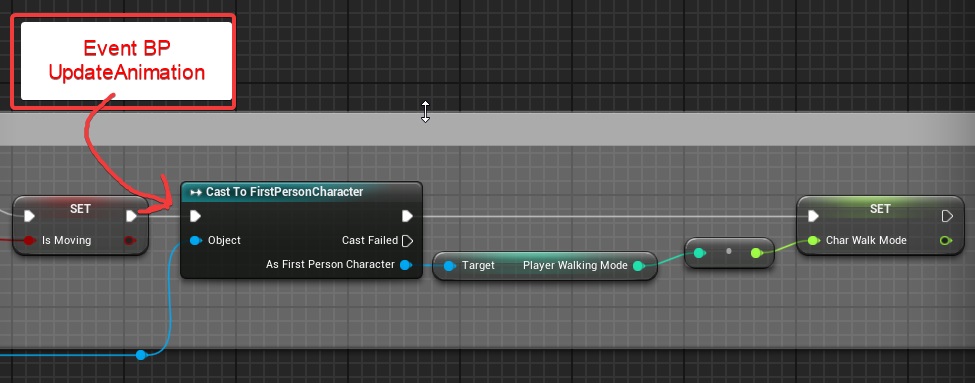 kindred viper
@bold lynx dont use std lib with UE4.
grim ore
have you looked at how the templates handle that situation @lapis narwhal ? they talk to the character and get any variables as needed when the animation is updated.
the other way works as well, which is your character telling the anim instance what the updated value is.
dark rune
@grim ore been waiting for a day, thought id try here
grim ore
@grim ore so it looks like you have the first way down which you are trying to avoid @lapis narwhal , for the second way you would access the anim instance off the mesh
lapis narwhal
have you looked at how the templates handle that situation @lapis narwhal ? they talk to the character and get any variables as needed when the animation is updated.
@grim ore hmm, actually no i have not looked at all the templates, the animation templates of 1p/3p dont do BP communication, the rules for state machine anim switching are simple and dont cast to the BPs of the character.
what template would you suggest for me to look at?
thanks for your response! 🙂
plush yew
Some cmd codes are not working by packaging someone know why?
bold lynx
@kindred viper
sry i am new to UE4
How would you do something like this with ue4 c++ classes
struct TestClass1
{
public :
    TestClass1(const TestClass1& T) = delete;

    static int do_something(const int i) {
        return 11 + i;
    }
};

struct TestClass2
{
public:
    TestClass2(const TestClass1& T) = delete;
protected:
    int passFromTestClass1() {
        //auto s = std::make_unique<TestClass1>();
        auto something = std::invoke(&TestClass1::do_something,  4);

        return something;
    }
};
where class 2 is invoking a member function from class1
grim ore
@lapis narwhal the third person would be fine but like I mentioned it looks like you have that method down (Anim BP -> Asking character for info on the update). This is the other way if you want to update less frequently. obviously setting it to your blueprint class and connecting all the wires as needed.
here is that code is actual use in my project where I swap weapons and then tell the anim BP the new blendspace to use for the character by setting a variable in the animation blueprint
lapis narwhal
@grim ore oh man thanks! i knew i had to grab the animation somehow for the cast but i had no idea how to do it.
totally works now and i have a good feeling of being a no-programmer-but-audioGuy-who-respects-sweet performance
thanks a ton man! :)))
grim ore
yep if its not a frame specific update you are wanting to do it the better way, kudos 🙂
lapis narwhal
yep if its not a frame specific update you are wanting to do it the better way, kudos 🙂
@grim ore yeah, no need for frame specific, just when buttons are pressed. 🙂
lime girder
Morning everyone!
bold lynx
Morning
dark rune
A dungeon generator I am using needs a static mesh for collision detection between parts. It will need to line up perfectly from the level when placed at level origin. How can I make this static mesh
It's just for collision it wont show up during gameplay
actually which channel is for asking this
lime girder
What's everyone going to work on today? 🙂
bold lynx
Learning ue4 and struggling
grim ore
@dark rune you would make it in your third party program like blender, get an asset pack from somewhere like the marketplace or kenney assets, or you could use the build in geometry tools to create brushes and turn them into meshes, or you can use the new mesh editor tools and create basic meshes
dark rune
@grim ore are the mesh editor tools in 4.22
lime girder
sdame here @bold lynx hehe
Actually I got a dumb question for anyone here...
We've been building our maps in Blender, but Im wondering if I should build it out of terrain and other UE4 tools first, then set dress it with items
dark rune
@grim ore alright thx
lime girder
Is there an advantage to one or the other? Underwater reef like, so some terrain, then of course things liek corals and such.
Maybe the sandy bottom is better in UE4's terrain tool? Just not sure
If there's a performance gain
grim ore
different systems, different advantages. #graphics would know better for sure but the terrain system is fairly optimized for terrain but trying to do something like a floating island with it would be more difficult. Same with say an overhanging cave, etc.
lime girder
That makes sense
grim ore
most of the time if your art style and graphics choices can benefit from a terrain as a base layer, the ground, and you build from that it would work well.
since you have the streaming/lod aspect of it built in, layered materials and painting, etc.
 rigid viper
This is a help section?
When my editor is open its give me this kind of bugs my ue4.23 version can any body help me to get out of this bug.https://youtu.be/D1LJIXQlnW0

 tired merlin
So I have this

It's meant to simulate a climb.
But it only goes up once. What happens if the players falls
I would like it to reset
How would I do this?
grim ore
@rigid viper are you trying to open the blueprint in that video?
 scarlet birch
I need to expose some math functions like FQuat::FindBetweenVectors to BP. Is there a good plugin that does this already?
normal burrow
No, but yeah: this is one of the first nonsenses I do in a project
scarlet birch
I need to just create a plugin project and start doing it right instead of recreating the same functions over again with each project.
normal burrow
That’s the spirit
Want to say that it’s usually such a quick task I just redo, but reality is all that ufunction markup and forward declaring adds up
Sometimes they actually implement the stuff too
Like rotator from axis angle etc
scarlet birch
I usually just migrate it from another project but It'd be better to do it as a plugin to keep it all updated in one place.
grim ore
this is what alot of the larger studios do and they end up just keeping it as part of the main source control as a new project template
normal burrow
I’d prefer just a completely inline header over a plugin tbh
scarlet birch
Yeah, I'm finding there's existing functions for stuff I've been recreating in BP.
grim ore
so new projects all start with the latest stuff all set up and ready to go and they put the important stuff in plugins and plugin content
normal burrow
Interesting they put the effort in to start new projects quick
grim ore
consistency!
scarlet birch
I do the same thing with a menu and input skeleton
grim ore
yep stuff like that or even common content packs that contain stuff like a height checked character and some level props for blocking out a level at realistic and consistent scale
scarlet birch
There's a lot of basic things that having them out of the way lets you get right to things specific to a project.
normal burrow
Working with multiple projects in ue is quite quite painful though
scarlet birch
Dammit, now I have to stop playing with this fun project and build some plugins.
grim ore
hell even just having a stubbed out file structure to start with in a team environment is smart
scarlet birch
We make a convincing argument.
normal burrow
The only thing I really miss coming from unity is their file system with guid and instance ids
normal burrow
Animation in unity is a black box
grim ore
it took a while for unity to get a good file setup in place dont forget tho, it used to not default to text assets which made it a pain for source control
scarlet birch
and the asset management from the vault, but that's a recent change on their part
grim ore
hopefully epic in UE6 gets that part right
normal burrow
Unreal Plus
scarlet birch
Yeah, I remember where Unity was even just 2.5 years ago.
grim ore
the new package manager system is really nice to be honest, the feature/content packs in UE4 is not a far cry off we just dont have the smaller stuff like file revisions and easily to add part
normal burrow
It’s a bit of a mess there. That animator component is kinda trash with ik
scarlet birch
get rid of the need for origin rebasing
normal burrow
But I’ve not bothered using it in three years
grim ore
I have a course on the templates and packs stuff, I wanted to add a plugin module to it as well but since that requires C++ I am not convinced it should be done
scarlet birch
I have no doubt it'll get there. They've been moving in a good direction on most things and the launcher is still a baby.
grim ore
not a full fledged plugin mind you just a plugin that you use for content
normal burrow
Would you agree with me that the mess of installing vs has way too many landmines matheww?
scarlet birch
Is that course up?
normal burrow
It’s part epics fault too. Like I should have to do more rhan just have incredibuild installed for unreal to assume I want to have it used
grim ore
uh... installing VS is super simple so i would disagree
making it the best is not easy lol
normal burrow
Really?
grim ore
i mean install launcher, click on ue4 tab, click the + button, choose a version, hit install
after that its done
normal burrow
The guide for what you have to pick is outdated
grim ore
now if you mean the C++ part then yeah its not the best
normal burrow
Yesh that’s what I mean by vs
grim ore
oh yeah it would help if i didnt confuse myself
and there are 2 parts to installing VS which presents an issue. Installing it to build source, and installing it to use C++ in UE4.
the source one is definitely a landmine of fuckery
normal burrow
Ah yeah
I see what you meant now
But still people see “incredibuild” and how you not press that button
scarlet birch
Really? I've found it to be straight forward.
grim ore
technically they are working on that tho the latest github stuff is updating it
normal burrow
Good
grim ore
if you just straight out install VS with defaults and try and compile UE4 from source it will fail
even if you install the Game Dev with C++ stuff it will fail
scarlet birch
What's the difficulty in setting VS up for building from source?
normal burrow
You won’t get past prereqs bat file yeah
grim ore
up until the latest source versions you had to have a specific VC++ toolchain installed or it would fail compiling
grim ore
and you need to have the correct .net SDK installed which is different based on the version you are compiling
grim ore
and half the time I need the SDK and the redist or it fails because Epic
normal burrow
Lol
grim ore
but i do not fault them completely this is real programming stuff here so I dont expect them to hand hold a noob
scarlet birch
I tried to get the UWP fork working and ran into a lot of issues with a mish mash of .net and windows SDKs being used.
plush yew
Hello guys so I asked yesterday morning about that I want to create loading screen with tips and tricks but they need to be randomised and they told me how to do it => make text variable, make it array and there to write them I will try to do it now but I also want on this loading screen to be randomised picture (we have not locaitons yet in the game), that's why I will use our concept arts, so how I can do this?
normal burrow
Then it’s like: ah let’s pull up the installer to adjust things... oh great the installer needs an update, of course
scarlet birch
A mess of different library versions too
grim ore
ahaha tell me about it, every time I open the installer for VS it needs an update or VS needs to update
normal burrow
Jfc lol
scarlet birch
@plush yew I'd probably do a material with a parameter or something.
There's a loading screen project that was free recently and the shooter game has one. You could look at those.
plush yew
ok what to look for and where? @scarlet birch
 severe ibex
I doubt anybody would have any input on how to mimic the google street view movement blur when it blends from one 360 to another?
grim ore
@plush yew you want something like this if this is a UMG
which i would assume it's a umg because why wouldn't it be
plush yew
Yup maybe something like this ^
normal burrow
I really gotta understand construct events in UMG
scarlet birch
Pay your invoice promptly.
normal burrow
Make checks out to: Tomatoes?
scarlet birch
Sounds legit
 plush yew
XD
scarlet birch
BSD for the win.
grim ore
since I dont work I am going to start streaming QA sessions again but with thursdays being epic day and fridays now an epic day I have to wait for next week lol
scarlet birch
You could make it a patrons thing or test the waters with something like that.
severe ibex
@grim ore that'd be sweet
grim ore
well unless I decide to not be cheap it wont be on twitch, will be on YT like normal. You have to pay for the stream rebroadcaster stuff now
normal burrow
I feel like agreeing to be an independent developer at Xbox is lame
“I publish independently, with Microsoft”
But yeah idk how that process works
scarlet birch
Idk, you get a lot of support these days. Using UE it's either deal with the mostly broken UWP forks or get a dev kit.
and right now the UWP forks need too much attention to be worth it.
normal burrow
Microsoft just puts a lot of effort into grooming people’s understanding of the difference between indie and professional that they’ve made up
grim ore
@scarlet birch depends on what you use but for the most part yeah. You stream from your machine and transcode it then push it to all the services. Since i doont want to transcode on this machine restream.io is what I used to use to do it for me
scarlet birch
It seems like they've put a lot of effort into making it easy to get on the platform. UWP even has received access to live services.
I see.
Oh I see $49/month or a watermark for 19
grim ore
dont get me wrong it works great, it aggregates all the chat into one app and no issues with the transcoding but It used to be free or super cheap lol
considering my channel is on YT and I really dont care about the money or the viewership numbers it's not like it bothers me to do it on one
scarlet birch
as much help as you dole out someone should pay for that.
plush yew
Ey, what are you two talking about?=/
normal burrow
unreal stuff
grim ore
yeah lol "Pro $3.99 1 25.01.2017 09:55" the last time I used the service I was paying $4
 fair storm
there's a way do make a migrate host system?
scarlet birch
Yeah, judging by the public views on even top content like yours it's hard to make any revenue from ads doing that type of stuff
 gleaming narwhal
@grim ore You can also stream to Twitch and upload the VOD to YouTube if you prefer Twitch as your live platform
grim ore
yep i make some ad money but YT is geared towards certain lengths of content and with most of my stuff being a few minutes it's very poorly monetized. I dont do it for the money so I just give games out to friends with the ad revenue lol
@gleaming narwhal yep yep but with 29k subs on YT and 147 followers on Twitch I might have more of an audience on YT 😛
gleaming narwhal
^
rigid viper
@grim orebyeah but can't
grim ore
@rigid viper open the Output Log (window -> developer -> output log) and see what it says in there
normal burrow
148*
grim ore
lol @normal burrow
rigid viper
You didn't se the full video nothing show
grim ore
that was not the output log
rigid viper
Oh! Wait
scarlet birch
dammit, sucked in again. I was setting up a plugin project
grim ore
not really worried about the streaming stuff yet tho as thats for future me and right now current me is doing other useless stuff lol
scarlet birch
Ugh, I should have looked closer. I reinstalled windows and installed VS just by clicking the link on the UE doc page. It installed 2017.
grim ore
all the template/feature pack changes they did in .25 are starting to get their translations pushed into github so that is a good sign that release might be in a week or 2 yay
scarlet birch
Nice. There's a bug fix in it I'm waiting for.
normal burrow
waiting for 4.25.1 but all these preview releases hopefully make .0 more stable
scarlet birch
I have two projects that need the origin rebasing bug fix it's supposed to have.
normal burrow
ah interesting
grim ore
nice!
 maiden flax
hi
rigid viper
scarlet birch
do what it says
maiden flax
do you not know how to take a screenshot?
normal burrow
am curious if that is a flash or a strong backlight on the lcd now yeah
maiden flax
i think flash
because its light in one place and dark on the other
actually no difference
normal burrow
yeah, it could be an instagram filter
maiden flax
i dont know lol
 golden magnet
i packaged my project on android but when i launch it the game is really bright compared to play mode, any idea why?
maiden flax
nope
golden magnet
checked my post process volume already, have min and max brightness set to 4.5
normal burrow
it could just be your device settings pinkiebarto
do you have other devices to test on?
rigid viper
maiden flax
aah that blinds me
golden magnet
hmm i do but i'd like to know what it is lol
normal burrow
you can start knowing what it is by testing on more devices
maiden flax
anyone has an idea what my profile pic is?
normal burrow
if they are all bright like this then you'll have a better idea of what it is
golden magnet
alright
maiden flax
test it on an android simulator for windows
grim ore
@rigid viper the first thing you should try is to fix your project name, projects should not have spaces or periods or start with numerals. Rename it to something like proj423 instead of 4.23 PROJ and open it again
maiden flax
oh i see you have don that
grim ore
rename it after you close it of course
maiden flax
you look familiar @grim ore
grim ore
It's the hat, it's super common
normal burrow
unreal hat
grim ore
I have 2 unreal beanies lol, one has a poofball on top
 hasty badger
maiden flax
hasty badger
maiden flax
thats him
grim ore
yeah that bastard stole my hat
normal burrow
a hat is an identity when worn correctly
 abstract relic
What an arse. Stealing the hat
grim ore
tried to open commits from a couple months ago in sourcetree from the ue4 github and it promptly gobbled up all my memory and crashed. This is not a productive day lol
rigid viper
normal burrow
lol
grim ore
Rename. Das. Projecto.
maiden flax
oh so you can take a screenshot @rigid viper
hasty badger
Unrelated, but after working for quite a while in Unity and picking up on Unreal just now, I have come to the conclusion that Unreal is way better.
rigid viper
normal burrow
appreciate the screenshots though
maiden flax
Rename. Das. Projecto.
grim ore
uh did you move stuff around? and not fix up redirectors? or uh move stuff around on the file browser or delete stuff from the file browser or pretty much do anything in the file browser
normal burrow
a redirecting chain of redirectors
grim ore
but ignoring that, project name bad
maiden flax
Mathew can you make a game in 1 hour
grim ore
I can make a game in 5 minutes if you just want a button that says you win 😉
normal burrow
how many clicks
hasty badger
0 clicks
abstract relic
Cookie clicker silly
 rigid viper
@grim oreyeah I copy from other proj anim and some stuff but in new project no need that pack so I ignore this warning and delete it inside BP actor which is connected that stuff
grim ore
I mean technically you could take say the side scroller template, put a blueprint up top with a trigger that says you win and ends the game and have a fully working "game" in a few minutes
 eternal gyro
hi
normal burrow
@rigid viper rename the folder please, like matheww says: your not allowed to have punctuation in the name and any given issue could be from this
maiden flax
oh ok
grim ore
damnit were were not just talking about this ****
grim ore
I literally updated it yesterday
normal burrow
pft lol
rigid viper
No means take it third person for new third person I don't want make animbp again so I just copy it and it connected char also
abstract relic
Come on now. Please don’t troll
maiden flax
oh its against the rules sorry
rigid viper
But it's works I work on this project from week ago there is not issues suddenly it's give me there is a char but you can't edit or do any thing with that char it full negligible char
normal burrow
@rigid viper you can't just copy things willy nilly
if you take something from another project you must migrate them with the originating project open
to the destination project
rigid viper
Oh! dude it's fully migrated content I already work two weeks in this proj suddenly this things are come
abstract relic
Confirm it. Describe how you migrate it step by step
rigid viper
Ok
 restive yarrow
@grim ore Hi Matt
Can anyone explain the difference between normal LOD from scratch and Hierarchical LODs? Do they work the same way and save performance equally?
normal burrow
uh so theres a InstancedStaticMeshComponent and an HierarchicalInstancedStaticMeshComponent nash
HISM will island out instances to LODs
other will not
i don't think there is a difference in LOD's on the models, if this is the question
normal burrow
yeah thats the proper way to migrate afaik 121
grim ore
that screenshot doesnt match your project tho
normal burrow
assuming thats the origin project (you've still gotta remove that punct)
grim ore
that says 4.23 PROJ/Y/ while your other one is 4.23 PROJ/lotsofwords/andmorewords
 hushed dagger
Hello, I am attempting to learn unreal and have tried a few projects so far but something I've been looking for but unable to find is some good (not even best) practices when it comes to what goes where. For example, getting inputs and acting on them; on the unreal website it will tell you to respond to input events in the character actor. I've also seen some other advice of input being handled in the player controller and passing that along to the character actor. If you are handling the events in the character actor then what is the player controller even for? Is there a compilation of "these are good ways to do things?" I understand that there can be multiple ways to handle things but it would be nice to have a jumping off point.
rigid viper
Yes because it's different proj for telling
normal burrow
oh my bad then
rigid viper
There is no punctuation
restive yarrow
@normal burrow if i add simple levels of LODS to my static meshes without any "instancing" that will work equally like HLOD or HISM?
rigid viper
I will show you my previous bugs
scarlet birch
For the most part it's better to use a controller. Even if it's a simple project it gives you more to work with if things change later.
normal burrow

Information on the Hierarchical Level of Detail system in Unreal Engine 4
I haven't heard of HLOD so idk if my answer was nonsense now, but there is some documentation
rigid viper
You can see date of recordhttps://youtu.be/KeTwHT30X9M
 hushed dagger
@scarlet birch That did sound more correct to me. But the input was just an example. I feel like I run into this a lot with respect to GameInstance vs. GameState vs. GameMode and I feel I get a bit paralyzed sometimes with what goes where
grim ore
@hushed dagger There is a simple test for where you should put it. If your input is in your player charcter and your character dies and you destroy that character..... will you still need to use the input that is in the charcter while it is gone?
scarlet birch
Core systems, such as game rules, player input and controls, cameras, and user interfaces.
grim ore
as for the rest just YOLO it and put it wherever, at some point you will figure out the best places for your project lol. Don't look at epic for help on that one they uh.... do whatever they want. About the only uses for the built in framework is the systems they are designed around and the functions they have available to you out of the box (like game mode handling spawning, game instance being a singleton, etc.)
rigid viper
Not all but in this project I will do same thing whatever on that old project but I will do some quickway to that long years of proje in a week so that's why anim pack is needed with char
But it's BP is not needed so I found his all variables reference and delete its
severe ibex
sorry to keep probing guys, but does anybody understand the movement in google street view? the method that creates that illusion of moving from one 360 to another?
hushed dagger
Thanks everyone
rigid viper
@grim ore yeah you right but I already this fix it my issue is not that this what you see previous

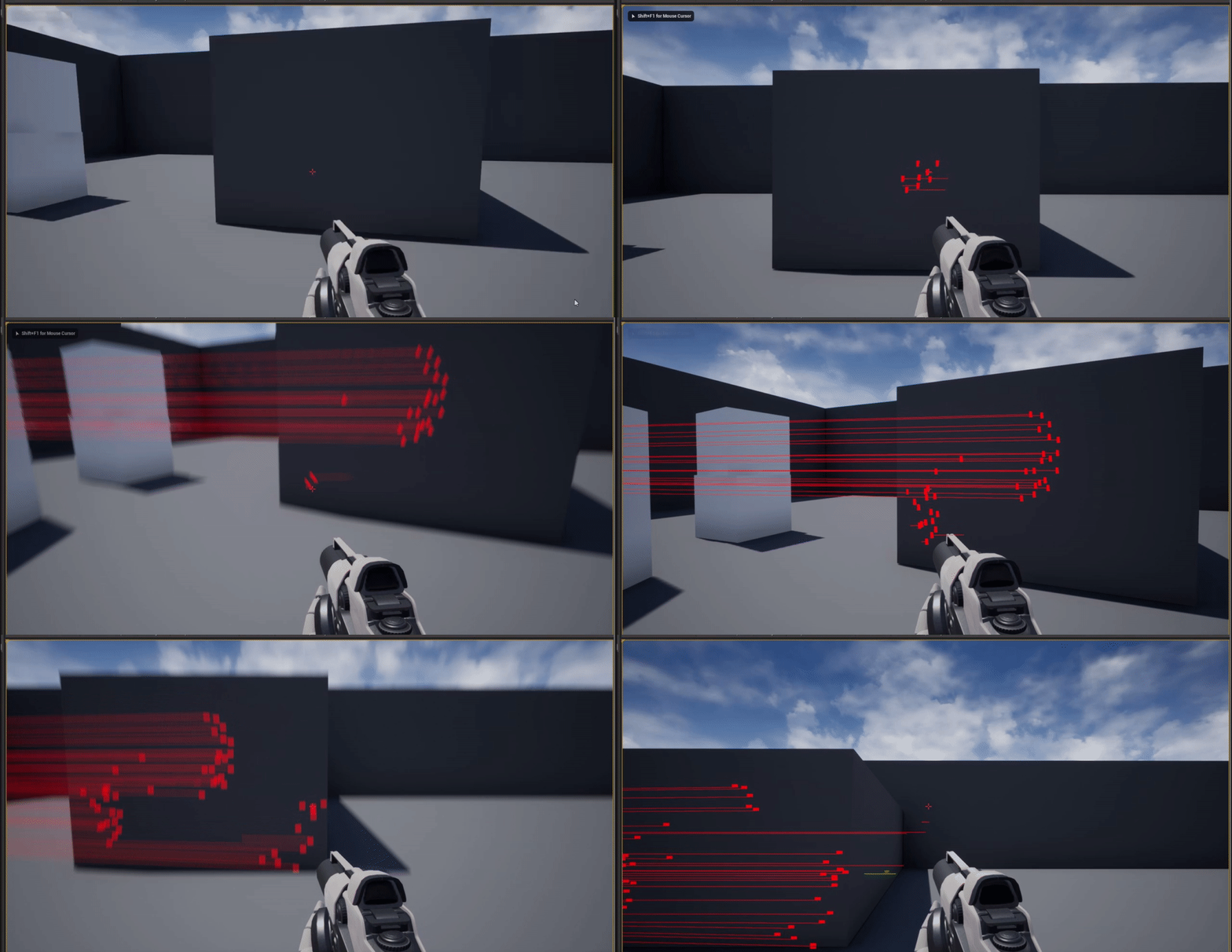


 grim ore
I dont know how much we can help, we suggested a few things but you dont seem to be trying them
rigid viper
Tell I will try it
grim ore
but its also just possible that file is bad, revert to an older save in your source control or if its not changed at all being it back in from the project you migrated from.
rigid viper
Did you say that I will do that migrate proj from real proj again to see that kind of errors get or not
Ok I show you
 silk lintel
There seems to be no way of setting a value in a map/dictionary. I tried values + set array elem, but it didn't 'carry over' to the map/dictionary.
normal burrow
talking about blueprints shogu?
silk lintel
Technically, but it could be for either bp or cpp.
normal burrow
for cpp you just assign
map["some_key"] = 24
that will introduce the key if it does not exist
normal burrow
different api entirely
silk lintel
cause there isn't a setter function?
normal burrow
there is