#ue4-general
1 messages · Page 704 of 1
 idle compass
yep, just tried it with a higher poly and it is lagging when I paint lol
and the result has a sharper edges
I guess it will be a must to use a "mid poly" meshes
ah I guess I can lower the strength and just use a low poly mesh and still got this result \
 hearty walrus
How do I change the default sky?
idle compass
I guess u can try using an editorskysphere @hearty walrus
https://www.youtube.com/watch?v=yFtxB5u6u5I I use this tutorial to use HDRI

How to create a material to control the hdr and how to use an hdr to illuminate in UE4 4.20
idle compass
https://www.unrealengine.com/en-US/blog/featured-free-marketplace-content---april-2020?lang=en-US damn this is soooo useful

Unreal Engine
Shape your worlds with breathtaking mountains, fill your landscapes with sprawling vegetation, and rest by soothing ocean waves—all with this month’s free content!
 tacit lark
Hello everyone I'm French and I want learning how to use unreal engine because I don't really understand all of the sentence then I don't understand at all. So I need someone for help me to found where I need to begin for learning. For information I want to make 2D game for beginning so I wait for your response. Thank you for reading.
 fierce tulip
@tacit lark not sure if its still active, but: https://forums.unrealengine.com/international/europe/112981-fr-ue4fr-français-french-discord-server
Unreal Engine Forums
Bonjour
En 2017, moi et un ami avons crée un discord d'entre-aide pour Unreal Engine 4.
Nous comptons aujourd'hui plus de 700 membres actifs et le serveur n'est
tacit lark
Thank you dude
fierce tulip
np :)
tacit lark
Thank that still active
 plush yew
Anyone tried to make a tower shooting enemies here?>
 lament slate
Hello guys Im a newbie in unreal
So today I made an actor and using Launch character i made it jump ,i made the z velocity as 500 . So i thought it could keep jumping
But after some 7 jumps it stops jumping
Someone plz help
fierce tulip
there is no first, we either are able to answer the questions, or we dont.
lament slate
But my character keeps jumping over it
So it automatically overlaps
So it jumps 7 - 11 times and stops
Thats my prob it stops after some jumps
And another one so what i created was a Box collission trigger. So i put a cube inside it.Now when i try to align the size of cube to that of the box the scales of both r different and i cant like make the cube perfectly align with the trigger box
So i just made a cube StaticMeshComponent instead of an empty actor and i just wrote the same BP into it ,but instead of OnComponentBeginOverlap it was Event BeginOverlap but my character doesnt jump on the staticmeshcomponent cube
How to record?
lament slate
@plush yew So what u did with the ZOverride
hearty walrus
thanks
lament slate
Ohkk
Thx
Someone plz answer @plush yew He is angry cuz i asked after him and got an answer
 worn granite
lament slate
worn granite
lament slate
He wants to upload his game into a file
@plush yew Thx man it works perfectly now , Also now if i move right or left it doesnnt stop always but like 1% of the time i turn.But it doesnt matter for the improvement it has got now
Lol
Well nice youtube channel name and nice legs for character
Yep my trigger box
Actually its the sixe of a cube
 lament slate
Like I added a cube to the box trigger
plush yew
anyone know which setting to make it keep going forward? and not going down
like the gravity thing off
any thoughts? and thanks
 civic lance
The free monthly content is absolutely crazy
Blows my mind how they give away such high quality and expensive stuff for free every month
lament slate
So , @plush yew
Idk how to make the box and cube the same size, the scales r weird and different for both
Nope
This is viewport
 next badger
@lament slate are they attached to each other?
lament slate
@next badger No
How to change box extent
I tried as much as i can to make their size comparable
Yeah i see that
So i make both box and cube's extent values to same
?
Well only box has it
So i reduce it?
Ok
 near monolith
quick question if i have a question regarding Materials (done a MM but i want to add the possibility to use Parallex mapping on it and quite stuck).
Where do i ask it?
plush yew
IS there a node
to slow down Event tick?
I dont want to use "tick settings" so it dosent slow down the hole thing
just want to slow down one thing any thoughts if there is a node to slow down event tick?
lament slate
Can someone tell why one of my assets is not saving
Its compiling perfectly
But says error saving
@plush yew Try blender
lol
Cuz i gave up too lol
I too wanted to make something in it
But twas hard
So just uninstalled ir
it*
Try asking on #design-chat
hearty walrus
Is there a linux release for unreal?
I was thinking of jumping ship to deepin linux, but idk if it's worth it
 distant flame
Developing games for the Linux platform.
Learn how to download, build, and run UE4 on Linux.
plush yew
Guys anyone know how to remove this blur look at the purple ball
The blur on the ball ;d
lament slate
Who is the most experienced one here ,i mean working in ue for the most years
And is there anyone from Epic or devs from AAA
fierce tulip
a few of us, me including, and yes there are a (few)aaa people and epic people here.
 gray tundra
Hello. I'm looking for any advice on doing screen wrapping in a space shooter. Does anyone have some resources they could share on how to achieve this effect? Just like in Asteroids except I only need the top and bottom to wrap and not the sides.
 novel summit
Can someone help me out?
I'm trying to transfer the code from the steam vr sample map to mine so I can have finger tracking
but when I do it says the left controller and right controller variables r wrong

 lament barn
Anyone know how you can make it so when you drop an item from inventory, it will do a short throw away from the player?
Kind of like Terraria but in 3D Space.
 tacit onyx
@lament barn Spawn it at a point in front of the player, and apply a force in the player's forward direction multiplied by intended force.
lament barn
Thank you :]
 lucid magnet
which game user setting will i use to setup a button that auto detects graphic settings?
hearty walrus
How long does it take for a game to compile?
 abstract relic
GetGameUserSettings >>> RunHardwareBenchmark >>> ApplyHardwareBenchmarkResults
lucid magnet
nice
 umbral ferry
https://youtu.be/LD1pETjurC4?t=235 do you know why he do the collision betwwen a sound trigger and not with the object himself for the collision ?

Today we create a pillar that will crush the player on impact, causing the player to have to traverse past it. We go over the matinee sequence, the blueprints behind it and how we can get it to kill the player.
► Sidescroller Resources - https://www.virtushub.com/game-dev
Un...
hearty walrus
It's compiled but won't launch. Any advice?
abstract relic
Considering that he is using matinee. I would drop that tutorial like a steamy potato
umbral ferry
yes ok but on my issue ? 😄
 hollow raven
Why is my direction got ignored?
abstract relic
You are using a mismatch skeletal mesh
hollow raven
Oh lul lemme check
Can't find my skeletal mesh T.T
From the direction @abstract relic
 rose hull
there's something super confusing about the orthographic view. It shows a ruler in the bottom saying '1m' which I suppose is one metre aka 100 UUs. But if I drag with the middle mouse along the same distance it shows 200 UU. How does that make any sense?
 astral phoenix
Hello!
Any1 that can help me? im trying to make a Character creator where i can switch between some hair styles and i got that to work but how do i play with the ''new'' character? 🙂
rose hull
 spare sun
@plush yew well, 'something' - yes. Especially in case of particles or materials.
no, not really
 normal burrow
@hollow raven the error message states the blendspace your using is for the wrong skeleton of the mesh. you can't mix animations between skeletons
lucid magnet
is there any way for me to get the current value of this sound class?
or i there a way to translate this text to a value?
 ashen ermine
Hey all, this might sound really stupid but: is there any way to convert 4.24 content to 4.23? So far 4.24 is really broken for me and hotfixes never addressed two fundamental problems on which I am supposed to work: Clothing on skinned meshes which is bugged and Niagara not sampling SKMs, so I pretty much can't go on with my project. Problem is I started the project in 4.24. Now I want to take 4.23 since I've heard it's the most stable of the last few, and just "remake" the project there.
abstract relic
There’s no backwards compatibility. Projects can’t revert unless you set up source control beforehand
 gritty rose
Hello everyone!!!!
or i there a way to translate this text to a value?
@lucid magnet try map variable type
lucid magnet
i actually tried string to value... but doew not work
the thing is i want the current amount to this value to set a slider start value
but cant seem to get the value
plush yew
@plush yew why do you still have the default discord avatar?
 frozen pond
hi, 2 questions:
- is there way to show static mesh thunbanail to HUD ?
2.Is there any way to input keys 1 2 3 4 5 6 7 8 9 0 from 1 node ? Or i just need to put key event for each of them ?
 cobalt scaffold
- yes, render to texture
umbral ferry
 limber mesa
i have a question, i made a health regen system but i dont know how to get the current health, can someone help me with that ?
cobalt scaffold
@light lintel GetActionMappingByName ?
abstract relic
<@&213101288538374145> let’s nip this in the bud
cobalt scaffold
yes
 novel vine
so i have a question if i were to get money off of my game would i only have to fill out a royalty form after i get 3000
also if yes then would i only have to fill it out each quarter i get 3000(say like i got 3100 my first quarter and then got 2900 the next would i still have to pay royalty fees on the 2nd one?)
abstract relic
It’s per quarter yes
novel vine
ok so i wouldn't have to pay the 2nd time? because that would be the only reason id think about changing to godot or something
abstract relic
No
 maiden swift
Hi @plush yew. This isn’t the place to discuss personal problems.
novel vine
ok thank you
abstract relic
lol
cobalt scaffold
@light lintel are you on a old version of the engine? the node was added a few versions back
limber mesa
i have a question, i made a health regen system but i dont know how to get the current health, can someone help me with that ?
novel vine
wdym?
cobalt scaffold
@limber mesa where did you implement the system?
novel vine
@light lintel i do have to pay royalty after i make 3000 once?
cobalt scaffold
drag a wire of the array and type get
abstract relic
novel vine
ok
limber mesa
i have a widget that has a progress bar to it and i added it to the players viewport, but i have the code in the character blueprint @cobalt scaffold
novel vine
Thanks
abstract relic
It doesn’t include deductible from other product/services yes
cobalt scaffold
@limber mesa one options is to use the GetUserPawn node, cast it to your player class and drag the health variable from it (from UMG)
novel vine
i thought so
frozen pond
any way to do it better ?
limber mesa
cant find it @cobalt scaffold
novel vine
i mean you could try and use a text box type thing?
cobalt scaffold
@light lintel there's a node that translates it to a name i think.. you can check out this tut for more info
https://www.youtube.com/watch?v=MzjEFJ0P4CU

What are the Get Action/Axis Mapping by Name Nodes in Unreal Engine 4 added in version 4.17
Source Files: https://github.com/MWadstein/UnrealEngineProjects/tree/WTF-Examples
Note: You will need to be logged into your Epic approved GitHub account to access these examples file...
@limber mesa my bad, it's called GetPlayerPawn
limber mesa
what do i do for a return node
cobalt scaffold
you cast the return value to your characters blueprint
limber mesa
im in the blueprint though
cobalt scaffold
and from there you can get to any variables.. or you can setup an event in the UMG, call that when you update your players health
limber mesa
so confused sorry
cobalt scaffold
actor is ue4 term for entitiy, object that is inside a level
everything that is placed inside as level is based on actor class
you need to look at what is calling the event and from where it gets the actor
 formal maple
Hey I know it might seem like a silly question, but I genuinely can't find a proper answer online and am unable to test it myself: does UE4 natively support PS4 controllers? Do they use the same inputs as 360 controllers?
 jaunty ridge
Soo. What's the best way to create a custom character? I know how to use blender, but getting the UE4 skeleton imported is kinda tricky it seems
cobalt scaffold
i saw a ps4 and xbox category when you do the action mappings.. so i guess it's natively supported?
formal maple
That's what I was hoping, para, but was afraid because PS4 only has the touchpad buttons
what's the trace and array for
and how are you adding to the array?
are you sure the actors you're trying to add are pawns?
frozen pond
is there any way to delete instanced static mesh instance using line by trace ? i mean one of X
formal maple
does the print string output the display name or nothing?
 frozen pollen
i asked in blueprints but it got overshadowed: is there a way to pause all sounds when the game is paused? right now whenever the game is paused it throws off dialogue with triggers and that's a problem
formal maple
@light lintel you're not adding anything to the array, you need to plug an actor into 'addunique'
👍
cobalt scaffold
i noticed your line trace start and end location are the same coordinates
formal maple
@frozen pollen not sure about that myself, but you could probably add currently playing sounds to an array, then use a for each loop to set them all to paused at once
frozen pollen
thanks for the suggestion
frozen pond
so there is input key down time node, but how to reset key hold time? (expect of dont hold it)
cobalt scaffold
empty the array before you add any overlaped actors
formal maple
@light lintel set up a custom event in the player controller and call it from your character
cobalt scaffold
yes, that's a better way to go about this
formal maple
hold on I'll try to make an example
cobalt scaffold
i can't read the name of the variable that you return
but you need to clear it basically
cobalt scaffold
.. the varible you set as your interactable actor which you use in return node.. set that to empty before the loop
formal maple
My first thought would be to figure out if it's firing. Add a breakpoint on the event
Then how doesn't it work? Is it not removing the actor from the array?
umbral ferry
formal maple
If not then one of those variables are empty
 crude robin
when i use my left mouse button and hover over enemy it kill them but when a new one spawn and i click it with the mouse button it tell me errror attempting to access apple but pending kill is there a way around this?
formal maple
@umbral ferry tried plugging the character into the trigger overlap?
crude robin
seem cause i am killing the first actor it doesnt reset it self
umbral ferry
@formal maple ?
formal maple
It'll be worth checking the object types and collision settings too
@crude robin are you destroying the actor or doing something else on kill?
crude robin
all i am doing is left mouse button press destory actor
and getting a reference to actor
formal maple
How are you handling the respawn?
crude robin
target point generation
umbral ferry
@formal maple ok audio work if i make the link but the link with the pillar don't work
do you know why
crude robin
formal maple
@umbral ferry Is the pillar a mesh?
crude robin
the spawning works but if i click the first actor that falls i wont be able to click the other one that spawn in
formal maple
@crude robin Are you sure that's the respawn? It's on beginplay
umbral ferry
formal maple
Oh is it respawning or are there multiple actors? @crude robin
 old elbow
Hello, do someone know how to use this plugin? https://unrealengine.com/marketplace/en-US/product/directional-planet-gravity I want to do an earth gravity with this but i dont know how

Free vector gravity for planets and directions. GravityMovementComponent allows you to control gravity direction and force for physics and movement.
crude robin
it a mobile game. but i was going to have actor spawn multiple of them falling down from the sky. and you have to click on them before time run out
formal maple
@umbral ferry I don't believe the overlapping event works on static meshes? Try looking for a "generate overlap events" checkbox in the mesh
formal maple
Yes
umbral ferry
crude robin
So, a new actor spawn every 2 seconds in a different target point location
old elbow
if someone can help me pls tag me
umbral ferry
@formal maple here?
 mossy spear
anyone knows how to solve random flickering of a shader on a geo?
formal maple
@crude robin Is there more than one actor on the screen at a time?
crude robin
well it one actor but it spawn multiple time so yea
formal maple
@umbral ferry Yeah use the search bar
formal maple
Yeah check that box
@crude robin I mean are there multiple instances of the apple on the screen at the same time or is there only 1 at a time?
crude robin
multiple
formal maple
How many are placed in your scene?
umbral ferry
@formal maple do you know why the tutorial used a trigger volume for collision ?
Today we create a pillar that will crush the player on impact, causing the player to have to traverse past it. We go over the matinee sequence, the blueprints behind it and how we can get it to kill the player.
► Sidescroller Resources - https://www.virtushub.com/game-dev
Un...
crude robin
i may be telling something wrong. So, what going on is that there 3 target points off screen. every two seconds a spawn actor appears falling down to floor. if it click on it destroy the actor but another one will reappear in two seconds falling down
nothing is place in the scene it just spawn in at level start
formal maple
@umbral ferry He's using it as a trigger, not collision
formal maple
Yes but it's not to block the player, it's used to check if the player touches that area so you can be killed
@crude robin So are you using the exact same spawn actor code every time or are you actually respawning the actor
formal maple
No, I mean where you spawn the actor in
 dark briar
anyone got an idea on how to stop camera clipping on enemies? when they swing their weapon it zooms my camera it because the cam things it's an object/wall thing to clip on
crude robin
no it different target point
formal maple
lol there's some miscommunication here
crude robin
formal maple
Can you show me the spawn actor code?
umbral ferry
@light lintel @formal maple yeah but why use a volume for check that the pillar itself can no ?
crude robin
formal maple
@umbral ferry because he only wants the bottom part of the pillar to kill the player
crude robin
that the full spawn code
formal maple
@crude robin Can you scroll to the right?
formal maple
What's above it?
formal maple
Wait you're doing it in the player controller?
crude robin
yeah because it a mouse click
there no character involve
and that where i read it need to be done
formal maple
I get it. Honestly I don't understand that setup, but I can see how to fix it I think
umbral ferry
@formal maple ok ty but use a volume is strange
crude robin
iim new with blueprint so the coding will look strange to ppl
formal maple
@crude robin You're getting the actors on beginplay, which only happens at the start of runtime. Any actors you spawn afterwards won't get put into your 'apple' variable
formal maple
Right click and make a new custom event in the controller
crude robin
ok.
formal maple
Then plug that into your "get all actors of class" node
Then in the map where you spawn the apples, cast to the player controller and call your custom event after you spawn the actor
crude robin
ok
old elbow
Do someone know how to use this plugin? https://unrealengine.com/marketplace/en-US/product/directional-planet-gravity pls help me, i want to replicate the earth gravity on a ball and walk there
Free vector gravity for planets and directions. GravityMovementComponent allows you to control gravity direction and force for physics and movement.
formal maple
@old elbow I believe you just add it as a component on your character just like charactermovement but I'm not sure
go into their test map and study the setup there
old elbow
i cant open the demo because i have UE4 4.24
fierce tulip
iirc the plugin comes with a demo-map you can open
old elbow
i cant open the demon
fierce tulip
@old elbow what version of the plugin did you download? and where?
formal maple
All I can say is try making sure it's up to date
old elbow
epic games
Free vector gravity for planets and directions. GravityMovementComponent allows you to control gravity direction and force for physics and movement.
the last one version
 regal shard
anyone know why pivot painted stuff only pivots in one direction?
 young steeple
How can I call a function in an actor component when it has been created and registers at runtime?
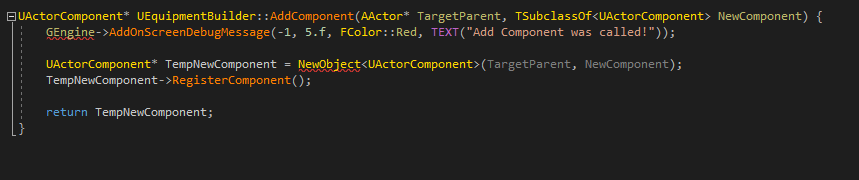
Ive got an array of actor component classes which is acting as the "loadout" or the spaceships in my game. The components hold code and variables relevant to their purpose, such as a laser gun. The array is on a pawn and I want to iterate through the array, create and register actor components on the pawn either in the constructor or at begin play (not sure which is better).
I think I got this working by writing this in an actor component on the pawn (not sure how to add a C++ function to an existing blueprint class such as the pawn here). https://i.imgur.com/Ducq9rj.png
This seems to be working in so far as it makes it and registers it and if I "hardcode" a cast and function in the pawns blueprint I can call functions inside the lasergun component I am testing with.
So here's the problem. I want to do this dynamically. As in, I wont know what actor components are in the array so I cant "hardcode" the cast to and function calls.
So I am struggling to figure out how I can actually call functions inside a newly made actor components. This wouldnt be a problem if I could just put input events inside the actor components but that doesnt seem possible.
Please @ me if you have any idea how to handle this. Thanks!
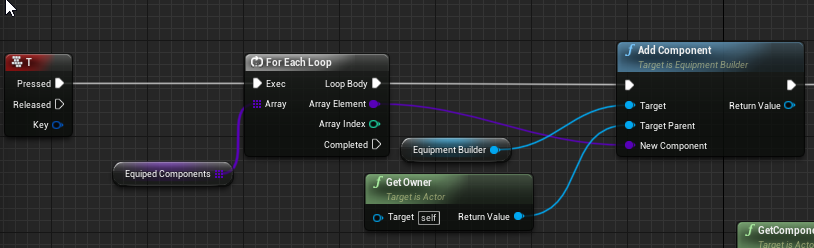
heres where that C++ function is actually being used in the BP: https://i.imgur.com/tAWnQBs.png

 grim ore
^^ the common base class or interface would be the easiest, common base class makes sense if these are all the same thing like a weapon or "equipment"
young steeple
they are all equipment, but very different kinds. Like thrusters, shields, weapons. Id have to put a lot of functions that only apply like 10% of the time if I made them all a big base class.
Im not very familiary with interfaces, can you point me to some documentation on their purpose/use?
 ancient lotus
anyone have any idea why im suddenly getting these when im launching the game outside of the editor via a batch file? i did a quick skim as i have to leave for a few minutes and didnt really see where the issue was but it sort of locks up the game while its loading for a few seconds and then continues when displaying these in the log
[2020.04.09-21.23.21:200][  0]LogOutputDevice: Error: === Handled ensure: ===
[2020.04.09-21.23.21:200][  0]LogOutputDevice: Error:
[2020.04.09-21.23.21:200][  0]LogOutputDevice: Error: Ensure condition failed: !NeedsInitialization() [File:D:/Build/++UE4/Sync/Engine/Source/Runtime/Engine/Private/Components/ActorComponent.cpp] [Line: 1741]
[2020.04.09-21.23.21:200][  0]LogOutputDevice: Error: SetReplicatedByDefault is preferred during Component Construction.
[2020.04.09-21.23.21:201][  0]LogOutputDevice: Error: Stack:
[2020.04.09-21.23.21:201][  0]LogOutputDevice: Error: [Callstack] 0x00007ffdd2b5ad99 UE4Editor-Engine.dll!DispatchCheckVerify<bool,<lambda_d12e58a5100ee198f8c571cc7c965500> >() [d:\build\++ue4\sync\engine\source\runtime\core\public\misc\assertionmacros.h:167]
[2020.04.09-21.23.21:202][  0]LogOutputDevice: Error: [Callstack] 0x00007ffdd170f21a UE4Editor-Engine.dll!UActorComponent::SetIsReplicated() [d:\build\++ue4\sync\engine\source\runtime\engine\private\components\actorcomponent.cpp:1741]
[2020.04.09-21.23.21:202][  0]LogOutputDevice: Error: [Callstack] 0x00007ffdb9833627 UE4Editor-Recall-0003.dll!UCharacterHealthComponent::UCharacterHealthComponent() [C:\Users\codyd\Documents\Unreal Projects\Recall\Source\Recall\Private\Components\CharacterHealthComponent.cpp:15]
[2020.04.09-21.23.21:202][  0]LogOutputDevice: Error: [Callstack] 0x00007ffdd415191a UE4Editor-CoreUObject.dll!UClass::CreateDefaultObject() [d:\build\++ue4\sync\engine\source\runtime\coreuobject\private\uobject\class.cpp:3142]
[2020.04.09-21.23.21:202][  0]LogOutputDevice: Error: [Callstack] 0x00007ffdd43e1ddf UE4Editor-CoreUObject.dll!UObjectLoadAllCompiledInDefaultProperties() [d:\build\++ue4\sync\engine\source\runtime\coreuobject\private\uobject\uobjectbase.cpp:933]
[2020.04.09-21.23.21:203][  0]LogOutputDevice: Error: [Callstack] 0x00007ffdd43c119f UE4Editor-CoreUObject.dll!ProcessNewlyLoadedUObjects() [d:\build\++ue4\sync\engine\source\runtime\coreuobject\private\uobject\uobjectbase.cpp:1022]
[2020.04.09-21.23.21:203][  0]LogOutputDevice: Error: [Callstack] 0x00007ffdd42f57b5 UE4Editor-CoreUObject.dll!TBaseStaticDelegateInstance<void __cdecl(FName,bool)>::ExecuteIfSafe() [d:\build\++ue4\sync\engine\source\runtime\core\public\delegates\delegateinstancesimpl.h:854]
[2020.04.09-21.23.21:203][  0]LogOutputDevice: Error: [Callstack] 0x00007ffdd49ac487 UE4Editor-Core.dll!TBaseMulticastDelegate<void,FName,bool>::Broadcast() [d:\build\++ue4\sync\engine\source\runtime\core\public\delegates\delegatesignatureimpl.inl:1013]
[2020.04.09-21.23.21:204][  0]LogOutputDevice: Error: [Callstack] 0x00007ffdd49caa1b UE4Editor-Core.dll!FModuleManager::LoadModuleWithFailureReason() [d:\build\++ue4\sync\engine\source\runtime\core\private\modules\modulemanager.cpp:493]
[2020.04.09-21.23.21:204][  0]LogOutputDevice: Error: [Callstack] 0x00007ffdd0f9af37 UE4Editor-Projects.dll!FModuleDescriptor::LoadModulesForPhase() [d:\build\++ue4\sync\engine\source\runtime\projects\private\moduledescriptor.cpp:554]
[2020.04.09-21.23.21:204][  0]LogOutputDevice: Error: [Callstack] 0x00007ffdd0f9b229 UE4Editor-Projects.dll!FProjectManager::LoadModulesForProject() [d:\build\++ue4\sync\engine\source\runtime\projects\private\projectmanager.cpp:63]
[2020.04.09-21.23.21:204][  0]LogOutputDevice: Error: [Callstack] 0x00007ff6a7cbf671 UE4Editor.exe!FEngineLoop::LoadStartupModules() [d:\build\++ue4\sync\engine\source\runtime\launch\private\launchengineloop.cpp:3517]
[2020.04.09-21.23.21:205][  0]LogOutputDevice: Error: [Callstack] 0x00007ff6a7cc204b UE4Editor.exe!FEngineLoop::PreInitPostStartupScreen() [d:\build\++ue4\sync\engine\source\runtime\launch\private\launchengineloop.cpp:2889]
[2020.04.09-21.23.21:205][  0]LogOutputDevice: Error: [Callstack] 0x00007ff6a7cbc17c UE4Editor.exe!GuardedMain() [d:\build\++ue4\sync\engine\source\runtime\launch\private\launch.cpp:131]
[2020.04.09-21.23.21:205][  0]LogOutputDevice: Error: [Callstack] 0x00007ff6a7cbc4ca UE4Editor.exe!GuardedMainWrapper() [d:\build\++ue4\sync\engine\source\runtime\launch\private\windows\launchwindows.cpp:134]
[2020.04.09-21.23.21:205][  0]LogOutputDevice: Error: [Callstack] 0x00007ff6a7ccceae UE4Editor.exe!WinMain() [d:\build\++ue4\sync\engine\source\runtime\launch\private\windows\launchwindows.cpp:263]
[2020.04.09-21.23.21:206][  0]LogOutputDevice: Error: [Callstack] 0x00007ff6a7ccfcbe UE4Editor.exe!__scrt_common_main_seh() [d:\agent\_work\2\s\src\vctools\crt\vcstartup\src\startup\exe_common.inl:288]
[2020.04.09-21.23.21:206][  0]LogOutputDevice: Error: [Callstack] 0x00007ffe0d627bd4 KERNEL32.DLL!UnknownFunction []
[2020.04.09-21.23.21:206][  0]LogOutputDevice: Error: [Callstack] 0x00007ffe0da4ced1 ntdll.dll!UnknownFunction []
[2020.04.09-21.23.21:206][  0]LogOutputDevice: Error:
sorry for hogging the page
young steeple
@grim ore ty
regal shard
Anyone know anything about pivot painting??
 marsh swallow
@grim ore that whole adding a trace channel and it changing defaults of all others, I did find it only changed ChannelTrace nodes that werent using built in engine channels. Very very odd. It didnt take to much time to fix and thankfully i only have 2 additional trace channels. Thanks for the help tho. ^^
grim ore
super duper weird
marsh swallow
So some more weirdness, we are using landscape materials to detect what we are walking on for battle encounters. It works well on all maps and its how to change walking sounds. Problem is that the ONLY map its not working on is our main overworld map. 😂
its just returning default for almost everything. I made a new landscape using the same materials and layers in the same level and it works no problem
is there some way to "rebuild materials/layers"?
grim ore
ok this is cool https://www.unrealengine.com/en-US/blog/join-the-unreal-fast-track-student-challenge-and-learn-unreal-engine-online-this-spring but... its for university students only.. 😦
is this in 4.24 ? @marsh swallow
marsh swallow
yeah
grim ore
as far as I know phyiscal materials are brokenish and dont return the correct type on landscapes
i think it was fine if you brought in the material but not if you make it in .24
marsh swallow
that was an issue in 4.24.1
and only if you started the project on it
this is from 4.16
we have kept on top of engine upgrades. only ever hit a few snags through the changes
 desert summit
Anyone with insight as to why a Destructible Object might not share the same physics-weight settings as a regular Physics object? I'm picking it up and setting mass to a billion, adjusting the linear velocity, etc - all that work for pickup-able physics props, and do jack and shit to a Destructible Physics object I want to pick up
marsh swallow
i mean if i have to rebuild... i have to rebuild
i would just rather not. its a HUGE map. 😂
marsh swallow
Unreal Engine Forums
Empty project BP:
- In project settings add new surface types
- Create physical materials and set up surface types
- Create blend layer landscape material
- Create landscape and use blend layer material at landscape
- Create layers info and set up phys materials
- ...
okay it looks like not. However full disclosure... i did resize this map
so maybe thats what caused it? 🤔
grim ore
weird if that is the case
marsh swallow
if i were to break these down into smaller levels and stitch them together, thats landscape composition correct?
that comes with a set of challenges does it not?
grim ore
well its only world composition if you use that system, its just level streaming if you stream them in and out
marsh swallow
so you can just place them against each other and sculpt them together still?
grim ore
I havent used it enough to answer that but the docs are fairly complete
marsh swallow
yeah ill take a look. just collecting ideas. ^^
mossy spear
hey @grim ore ever come across a geo having black flickers when you apply a shader to it?
and the black flickers get intense as you get closer to the geo
 frank oar
How do I permently change the pivot point of a static mesh to its centre ?
I need this sphere's pivot in the centre
frank oar
If you are the person who made that (and all those other tutorials like it) Thank you! they are brilliant!
mossy spear
@grim ore thats the weird flickering
mossy spear
even when i have one mesh
 swift spindle
are you 1000% sure ?
swift spindle
is it over 64k polys ?
mossy spear
my base project is the Digital Human project from epic
and their model does the same thing
mossy spear
so don't know why there is that flickering problem
swift spindle
video card ?
mossy spear
nvidia
swift spindle
well..
mossy spear
and i have worked on more complex mesh
swift spindle
are you running dx-12 enabled ?
astral phoenix
any1 that can help me with some Postprocess? 🙂
mossy spear
@swift spindle i am on MAC
swift spindle
small PP ?
 kindred viper
😄
swift spindle
your most likely running into shader errors then
young steeple
anyone know a BP way I can get all components on a parent and print string them, for debugging? Or just anyway to view current components at runtime?
mossy spear
@swift spindle well output window isn't showing me any errors
astral phoenix
@kindred viper after what? xD
mossy spear
metal
swift spindle
it's just very likely your card just can't handle that shader tbh
young steeple
@grim ore btw, interfaces seems to have been exactly what I needed. Thanks
swift spindle
apply a basic shader to the mesh... see if it still flickers @mossy spear
swift spindle
in "project Settings > Engine - Rendering" you most likely have something that is causing the issue... compare that to other projects that work.... also good chance it's needed for that skin shader anyways =/
grim ore
@young steeple you probably want "Get Children Components" targetting your root item
mossy spear
in "project Settings > Engine - Rendering" you most likely have something that is causing the issue... compare that to other projects that work.... also good chance it's needed for that skin shader anyways =/
@swift spindle yeah.......would just get my setup done and move it to another project
young steeple
@grim ore hmm, I would think so except that apparently only targets scene components? Im working in a pawn. it says it cant reference itself because its not a scene component
@grim ore oh shit I just realised who you are haha. Thanks for the videos. Best resource for learning UE4 ive found so far 🙂
 hidden knoll
My blueprint interface says it's a read only interface
young steeple
hmm, even weirder. Im trying to just verify the fact that my function that I thought was adding components is in fact doing that so I tried the get components by class node but that returned nothing. So to make sure IT was working I set it to give me a list of all the static meshes, which i have 1. I know that for a fact. But yet it STILL says I have nothing >.<
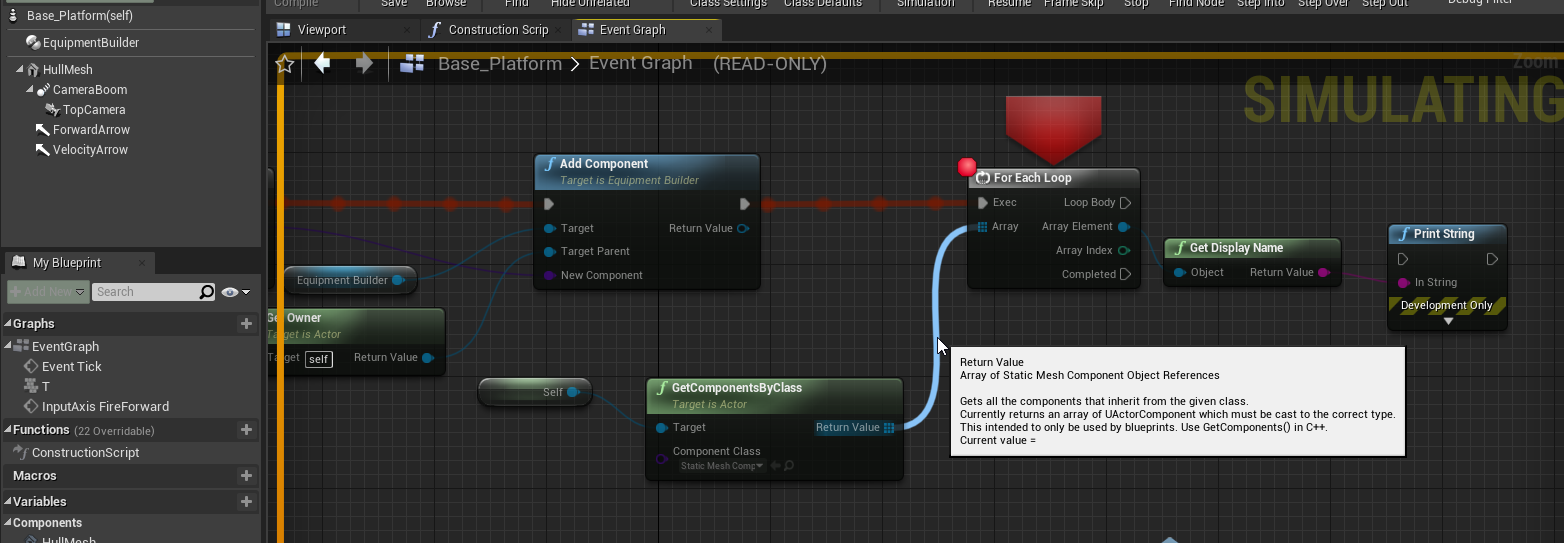
 torn shell
Does anyone know what happens when UE4 crashes due to RAM shortage?
I've been getting this issue where I set my environment to build the lights at preview quality. I have approx 4600 meshes in this level all set to 64 lightmap resolution which is only going to increase in the future. When it gets to the final part of the build the editor just dies, I don't get a crash report or anything.
Is this typical of a crash due to RAM shortage or does this sound like something else?
grim ore
well I can say that this code did this which is what I expect
abstract relic
[project]/saved/logs
normal burrow
@torn shell watch ram usage if you can.
hidden knoll
@torn shell Did you check task manager to see what was using your ram?
normal burrow
ditto
 velvet ravine
Hello Everyone, Just a quick quick Question. I have a Torch With A SFX. What i am wondering is it more Friendly to have a trigger Round it to Spawn the Sound in and out or just have it constant playing?. Hope you are all Safe and Well,
torn shell
I have 16gb, it uses about 9gb during building
does RAM usage spike near the end or something?
grim ore
@hidden knoll Blueprint interfaces are read only, the interface itself only declares the function/event definitions not the actual code. the code is in any item that implements that interface
normal burrow
it depends simonelliott
abstract relic
Remember. Memory leaks
normal burrow
if the program says hey i need 16 gb, and you've got 15gb, no.
young steeple
@grim ore Hmm. Is a static mesh not a scene component? puzzled face
velvet ravine
@torn shell Silly one i know, Did you have enough Space as i had the same problem
hidden knoll
@grim ore I need to call an event from my interface but I have no idea how
torn shell
@velvet ravine yes I'm fairly certain it's not disk space that I'm running out of, the swarm cache is directed to my 250gb ssd
velvet ravine
@torn shell Awesome i know its a silly one, I had that problem. kept crashing
torn shell
unless I'm undertanding that incorrectly
hidden knoll
@torn shell I also have 16gb and a while ago everything kept crashing, and it was all because of these windows services
abstract relic
Luckily he made a video https://youtu.be/G_hLUkm7v44

What is a Blueprint Interface in Unreal Engine 4 Blueprints?
Source Files: https://github.com/MWadstein/wtf-hdi-files
torn shell
@hidden knoll What did you do?
velvet ravine
Luckily he made a video https://youtu.be/G_hLUkm7v44
@abstract relic These Vids have been my saviour so many times
What is a Blueprint Interface in Unreal Engine 4 Blueprints?
Source Files: https://github.com/MWadstein/wtf-hdi-files
grim ore
@young steeple it depends on what you are asking. A static mesh component is a scene component, a static mesh actor is not, a static mesh is not
hidden knoll
@torn shell I found a video about it and it took me to device manager. Ill try to find it again
grim ore
just for future reference if you use the < and the > keys around a link it will hide the rollout
hidden knoll
@torn shell But if you want to look it up, try Windows Services taking up all my ram
grim ore
so it wont take up half the chat lol
velvet ravine
thank you
normal burrow
lol
velvet ravine
i did think
torn shell
@hidden knoll Okay I'll give that a go. At least now I know that it could also be a memory leak.
torn shell
@hidden knoll @velvet ravine Thanks guys 👍
hidden knoll
np
hidden knoll
Is it free?
velvet ravine
Most likely not Sorry
hidden knoll
hmm
I really want to make my game by the end of this year but I don't know how to make a lot of it
Like the parkour, combat, or character design and animations
velvet ravine
@hidden knoll Good luck i have been making mine 5 years lol
hidden knoll
nice
 tiny sonnet
is it possibe to use blueprints to integrate a sql database, or only with c++, if so, are there any good tutorials?
normal burrow
yeah
but probably not
would look into nosql, there might be something on marketplace for that
young steeple
LOL im dumb as a rock. I missed an exec line was broken. However, its still broken. Just in a different way lol
So now I can see that whatever Im doing in C++ is not properly adding the component as its not showing up in the list of all components. Im pretty new to C++ in unreal. Anyone see anything missing here?
https://i.imgur.com/MHjNtSr.png
https://i.imgur.com/1u6bDAA.png
https://i.imgur.com/JAz5Gdi.png << actually being called in bP. I know its getting that far because the debug print out from C++ is working.


I assume the NewObject function adds it, but tbh I have no idea
 lilac wedge
anyone have a good solution to ios push notifications? (not locally)
grim ore
@young steeple #cpp is the smart people in the discord, mucking about all that fancy code. They might have more actual help than us noobs in the main channel 😛
young steeple
ha, maybe. But slower too 😛
ill give it a shot
torn shell
When viewing Lightmap Density in the viewport, I'm guessing any mesh that is red is bad right? I have some meshes that are highlighted green that are 256, and some that are red and also at 256. What exactly does red indicate?
 still island
Is it possible to do mesh attachments in UE? I mean something that works like sockets but instead of being attached to bone, it would be attached to the surface of the mesh and would be snapped to that point and follow it even if mesh is animated(cryengine has something like this)
 grave nebula
Yes, it is called sockets.
normal burrow
ye, sockets can be put on static meshes too
still island
I thought sockets are only attached to skeleton. So is it possible to attach socket like this to animated surface of the mesh ?
swift spindle
@torn shell it correlates to the size of your mesh in the scene also
a larger object would normally need a higher lightmap... (if it's close..)
young steeple
@grim ore YESSSSSSSS IT WORKS AND IM AN IDIOT! lol
I did a get owner instead of a ref to self >.< so i was trying to add it to.. like the controller class?
still island
Yeah it is.
I need this socket to follow the surface, not bone
So is there currently a way to do that for animated, skeletal meshes ?
swift spindle
that would be more on how you rig it up
I don't belive you can attach to a vertex directly...
but you can attach a bone to one in your dcc
still island
That won't help. I am building attachment system where you could attach items that you have in inventory but bone sockets don't do the job, because I want items to be moving perfectly along with the surface. If I did it your way, it would require different bone for all clothes player can wear in all combinations for all animations
As different armors have attachments in different places
Cryengine has something that is called Face attachment that literally snaps to polygon no matter how you deform it with animations
mossy spear
still don't know why the Digital Human Project from Unreal Shows up weird
 spark cobalt
Hey everyone, just joined here. Quick question: how would one do skate physics in UE4? AddForce works ok until the character needs to turn, at which point they keep going in the direction they were traveling before. I thought about taking their LinearVelocity and applying it to their forward vector each frame, but then velocity (from jumping/falling) on the Z axis gets added as forward momentum.
still island
So if anyone wants to know about sockets on skeletal meshes surfaces. It can't be done. UE calculates animations of the skeleton on GPU so there is no way of accessing it from CPU. The only way to do that would be to recalculate the same flow on cpu. Since I only need this for a few selected vertices, it should not hot performance too much. I will try to code plugin like this
 golden condor
Hey
I am running into a problem joining the Unreal Fast Track server
Do you guys know anything about this?
abstract relic
Try editor preference
plush yew
where in there?
normal burrow
theres a text thing at the top type in audio or sound
plush yew
hmm, doesnt seem to have anything but enable game sound
i was hoping for something while i was in the preview editor
ive done it before i just cant remember where the volume slider is
normal burrow
notifies?
plush yew
i dont believe so
realtime audio i think it was
but it had a volume slider, iremember it being in the little arrow dropdown
abstract relic
looking
grim ore
@golden condor They have not given us any info on that unfortunately
 night bridge
speaking of animations, does anyone here know if its possible to play back an "OBJ Sequence" inside of unreal engine at a rate of 30 .obj files every second? I think the reason i can't do alembic is because each .obj has it's own seperate and unique UV map.
abstract relic
this @plush yew ?
abstract relic
the setting button
abstract relic
thought I was going crazy too
 spiral island
in terms of being crazy i think i'm losing my mind
VRPawn.h(50) : Error: Missing variable name
Line 50 of VRPawn.h
49|    UFUNCTION()
50|    void VRControllerEndTeleport(const FVector&);
I've tried a clean rebuild
spiral island
you want them to orbit?
plush yew
Yea
Any thoughts Ravbug?
Thought of using "Rotation Movement" but that will rotate them where they are i think
spiral island
you can parent them both to an empty object, parent this object to the player, and rotate the empty object
this will cause them to spin around the central emtpy object that they are attached to
plush yew
oh
that could work tbh
really thanks mate i will test it out now
I made a Bp
that has Scene Componenet with "Rotating Movement" tested it out with a cube and its working fine
i did put it as a "Child actor" in BP Player and placed the 2 balls in it
But still not rotating for some reason 🧐
@spiral island
oh
 sullen sonnet
how come in monolith sample characters fall through everything? Feels like the whole map is just a box with collision i don't understand
or Paragon Sample Map
 ionic lagoon
Anyone know of a tutorial video for seperate torso movement from the legs depending on mouse rotation?
young steeple
Anyone know how to get unreal to stop opening SteamVR?
ancient lotus
@young steeple go to settings->plugins->disable steam vr
young steeple
@ancient lotus that only helps if you launch the specific project directly or from the Epic Games Launcher, but I tend to launch Unreal Engine directly from a pinned taskbar icon. It always launches it that way
sullen sonnet
for my issue, fix was to delete sky floor
 restive arrow
Does anyone know how to make an infinite loop without crashing the game?
spark cobalt
@restive arrow Delay
spark cobalt
Where to put it depends on what your loop does, but even a small delay should stop the engine from throwing an exception
Why do you need an infinite loop?
restive arrow
Well, I'm new to stuff, so I just set a cube to move in a rectangular pattern, and I want it to continuously move in that patternn
pattern*
spark cobalt
Easy way would be to use a timeline. They have a checkbox for "loop"
restive arrow
Ok
ancient lotus
@restive arrow checkout timers as well
 floral arrow
do you guys know how to get subsurface scattering materials to work with static baked lighting
 thin thicket
People of unreal, is it possible for Unreal engine to truly instance objects? I am talking about instancing one object with 1 million polis 100 times without any performance hit.
Octane can do this easily. Even if I use the foliage brush, I still have performance hits, the same as if I just duplicated objects.
swift spindle
the issue is that it always costs performance to draw to screen buffers
even if the memory cost is not duplicated each time
if your using foliage system (not actors) just static meshs.. it will cluster objects together
thin thicket
But it shouldnt cost much performance if I'm just instancing... significantly less, and much less memory cost too.
I should be able to instance an object with millions of poligons many many times before I even get a hint of a performance hit
 keen moss
im having an issue with decals, up close they look fine, but at a distance in shadow they stand out more than they should, how can i fix that
floral arrow
does it have LOD's
 fast berry
Hey I’m 13 and I make games in unreal engine. Is there any ppl that wnana make a group chat so we can discuss and help eachother out?
floral arrow
hmm i dont really notice it
keen moss
the dirt in the gutter is a decal, it should not be that bright and should lose intensity over distance
its equal at all distance
floral arrow
might be lightmap resolution not sure
have you tested it in a well light section vs the shadowed area
keen moss
decals dont have anything that let me change lightmap resolution
floral arrow
maybe change the albedo of the material
keen moss
nothing is helping grrrr
 worthy flame
Hello! where is the "help" channel?
normal burrow
worthy flame
Oh yes but I have a question about the difference between the licenses can I ask about it here?
normal burrow
Yes
worthy flame
Okay
swift spindle
@keen moss there are different types of decals
@keen moss you want the DBuffer Translucent decal... you can set this on your material
but you will need Dbufffer enabled in your project
worthy flame
So the publishers license says "pay 5$ when you release a game for monetization" but the creators license says its normal. so im confusd I cant publish a game with the creators license? and with the publishers license whats the difference? (completely new to everything with no knowledge about coding all im interested in the visual scripting and I wanna make a game)
keen moss
i think i found the issue, it was the roughness in the material, certain ones need to be off
i already had the decals as dbuffer deals
swift spindle
ok
plush yew
vinterp to doesnt work in ue4.24
I'm not able to actually interp anything with vectors for some reason
even if i set the interp speed to 0 it doesnt work
Hi, how do people generally deal with very large meshes? I have a kind of greenhouse dome I want to encapsulate my level, it doesn't need to be that detailed as it won't be seen except mostly from a distance but last time I used a huge mesh it gave me a lot of lag
Just chop it up into separate but touching smaller meshes?
wait nvm got it
swift spindle
I'd separate it out.. .as when your render a part of anything.. you pay almost the whole cost of rendering even a small part of it
 thin tendon
I have a weird issue. My foliage works fine in the engine. And I can toggle high low etc and see grass appear and vanish. Once its packaged though. The grass just never shows and nothing toggles. And it was all working a week ago. I don't think I changed anything
limber mesa
Could anyone tell me what an off set it, I’m having mixed thoughts about it and need to clarify the true statement. Thanks
normal burrow
@limber mesa if something is moved to the right that is offsetting to the right
normal burrow
What is it @plush yew
plush yew
I have no clue, after building lighting
i got these shadows and it's wrong
there is no shadow caster object in the sky 😄
normal burrow
Could there be warnings about overlaps ?
Imo it looks like a repeating lightmap based on the grid
plush yew
@midnight gate fall damage is fairly easy i thought
yeah it seems like that but i have no idea how to debug this yet
 midnight gate
i guess its easy but im not too lazy for math
normal burrow
Do you want it to not be lightmapped azarus?
 shut lava
These are my PC specs
This is what I get when I try and Load the Paragon Sample Map
What gives?\
midnight gate
why is my math not working
is it cuz my fall damage value is usaly around -1400?
how do i convert it to something like 1400?
without the minus?
abstract relic
Health + fall damage
midnight gate
you are a very smart sir
abstract relic
Or not make fall damage a negative number so you can subtract it
idle compass
how do i optimize a scene in unreal engine ?this kinda scene only has 20fps on my 1050gtx, is it normal ?
idle compass
thanks ! @plush yew playing with unreal engine has been a wonderful experience for me in the past week ! the controls and the node graph is really powerful
well I spent 2 years to learn 3d prior to this post, so it was a long way
the scene isn't really complicated tho, only some vertex painted ground with puddles (used some AO map to control the depth of the puddle). and also some megascan assets
kindred viper
@idle compass check the Profiling system. Chances are it's material/draw call based. Unless you did something terrible wrong. Is it dynamically lit?
idle compass
it is only lit by a single point light @kindred viper
kindred viper
k. probably the material setup then
https://docs.unrealengine.com/en-US/Engine/Performance/index.html this will be your best friend
How to identify performance problems and fix them.
 shadow jolt
Hey everyone. Hope you're all doing well. I understand that cascade is not supported for Raytracing and I need an alternative to that for a snow particle system. I have done tests in Niagara but not really satisfied with the result.
Any alternative to that? What about importing an alembic system
?*
plush yew
Anyone can tell me how to fix these shadow artifacts and what causes them exactly?
kindred viper
@idle compass yeah GPU should be a good place to start. See what draw calls and frametime effectors are
@plush yew overlapping? Not sure tbh, it looks overlapped tho
 whole quarry
Iirc they are non-static objects
whole quarry
Yes
shadow jolt
Here's the scene as mentioned earlier
idle compass
Here's the scene as mentioned earlier
@shadow jolt blade runner ! sorry for not answering your question, but how is the floor vertex painted ?
shadow jolt
No worries! The floor is still WIP but it's quite the standard approach in a vertex blended material. I'll share a screenshot once I'm satisfied with the result. I wanted to use actual snow planes with dithering but it looked horrible in raytracing
idle compass
No worries! The floor is still WIP but it's quite the standard approach in a vertex blended material. I'll share a screenshot once I'm satisfied with the result. I wanted to use actual snow planes with dithering but it looked horrible in raytracing
@shadow jolt is the plane hi poly ?I recently learned vertex painting and realized if there's not enough vertecies, the result will be boxy
idle compass
if you are not busy, can I see a wireframe snap of the plane ?
I want to kinda make it as a reference
shadow jolt
Hahah working on my main workstation, Threadripper 2950x, RTX 2080ti, 64GB
No worries man, let me know if I can help in any other way
idle compass
holy smokes that is a beast
 young mirage


 grave nebula
Your plane is not high poly. It is tessellated.
idle compass
oops my bad, thanks !
grave nebula
vertex colors are stored on original vertices, so by tessellating it, you do not introduce any new data to make it smoother.
idle compass
I see, is it also the same with painting on landacape ?
I guess landscape doesn't use vertex weight
 floral hull
Friends, is there any way I can leave the object in this position and pivot return it to its original corner?
 wispy pasture
Optimisation question here: when producing static meshes for UE4, is it better to delete faces that will never be seen, even if it means the mesh will not be closed? I assumed that 2D meshes might cause an issue.
frozen pond
is this too much for 3d model? (its simple model. nor character or nothing detailed)
 bitter iris
Thinking on spending some cash to get characters made. Wondering what areas are trusted, going through looking for work, Fiverr etc
whole quarry
@wispy pasture removing unseen faces would be the default thing to do. No one cares if a mesh is closed or not. A face exists of 3 vertices. 2d meshes are usually just planes
@frozen pond depends on the scene
hearty walrus
Using the third person preset, how do I make the jumps glide less?
plush yew
so what is the common solution for shadow and light leaks when using modular meshes?
frozen pond
@whole quarry consider multiple instanced static meshes of this, but i solved problem reducing it to 6k without quality lost
whole quarry
@plush yew better lightmap UV"s
plush yew
yep, where do i get them? : ) or i have to buil them myself manually? 😦
wispy pasture
Thank you Remco
 somber crown
I have a couple of cameras in my scene and am switching to them using Snap View To Object or passing the CameraActor to TakeHighResScreenshot but when it goes to this one camera it always jumps to some other location. As you can see in the screenshot the camera preview is correct but the viewport has gone to some other location. Any clue as to why this is happening? This is in UE 4.24.3.
whole quarry
@plush yew you can make them yourself in i.e. Blender or make them from the static mesh editor in UE4 (double click on the mesh, then on the right side there is somewhere stuff for light maps)
plush yew
i don't feel like that the tools there are actual solution?
i mean there is just a few checkboxes that don't seem to do anything useful to aid this problem
and the lightmap resolution has performance implications AFAIK
So i'd like to keep that as low as possible
and there is no tool to create better UVs
 grim juniper
@floral hull I think you're asking to swap between world space and local space. Click on the globe in the top right of the viewport to swap to local space
 vast fulcrum
Hi guys, can anyone help me with this warning?
PackagingResults: Warning: You are compiling shaders for a deprecated platform 'PCD3D_SM4'
UATHelper: Packaging (Windows (64-bit)):   LogShaderCompilers: Warning: You are compiling shaders for a deprecated platform 'GLSL_430'
PackagingResults: Warning: You are compiling shaders for a deprecated platform 'GLSL_430'```how do I get rid of it?
fierce tulip
not sure, but reading that, and looking at some other info for 4.24, those platforms are just no longer supported
vast fulcrum
but how do I change those platforms? I read that PCD3D_SM4 was DX10 but where do I set this?
the project is 4.23 btw
fierce tulip
thats outside of my knowhow, you could try asking in #packaging ?
vast fulcrum
ah okay thanks!
 bleak widget
Hi guys! Is anybody know, why i get it trying load landscape with World Composition
empty project and 2+ landscapes crashing engine
it is only on 4.24 version
 elder moat
my HUD still appears during the main menu, is there a way of getting rid of it at the main menu and making it appear when play is clicked
hearty walrus
How do I modify the FOV of a camera, and add a target input to the set and get nodes?
elder moat
fixed it*
somber crown
I have a couple of cameras in my scene and am switching to them using Snap View To Object or passing the CameraActor to TakeHighResScreenshot but when it goes to this one camera it always jumps to some other location. As you can see in the screenshot the camera preview is correct but the viewport has gone to some other location. Any clue as to why this is happening? This is in UE 4.24.3.
@somber crown Could someone help with this?
astral phoenix
Can some1 please explain why 2 AtmosphericFog with the same ''Stats'' is different? O.o
 lofty forge
Hi there,
So I'm experiencing this weird issue. I'm trying to port an android AR app I made in UE4 to iOS. Works perfectly on Android, but causes this issue on iOS.
Assertion failed: Dimension <= GMaxTextureDimensions [File:/Users/build/Build/++UE4/Sync/Engine/Source/Runtime/Apple/MetalRHI/Private/MetalVertexBuffer.cpp] [Line: 171]
Note: The max dimension my textures have is 2048x2048.
Any kind of help would be appreciated.
hearty walrus
Okay, crazy dumb idea: Can I get a wii-u gamepad working in unrael
unreal*
i want to try and see how much controllers I can properly get working
Fit with dual-screen and everything
 heady moon
Does anybody know how advanced cursor usage works on Visual Studio 2019?
 quick star
guys, can I force window to appear without resetting layout?
Editor suddenly decided to hide it somewhere, or shrink to 1px
 jaunty horizon
hey guys. i have a question. i don't find a good answer in google so i ask it here. if i run the game in editor somtimes i have a lag for milisec and if i look the output log at the same time i get this warning massage
(whatever witch level or game mode or character i playing)
FLatentActionManager::ProcessLatentActions: Callback Target is None.
idk what it is. anybody some idea? btw the cooked version runs okay
frozen pond
any tutorial/tips how to set material in ue4 to make it look same as megascans ? (teselation)
 rocky pond
Does anyone know some series for ue4 where a guy makes /helps making some platformer game in type of piku niku or castle crashers i dont really see anything and no idea where to start etc. I would say that i;m a beginner
plush yew
@plush yew i am not doing archvis
I am trying to build lighting for a simple demo level for a game.
But seems like a long discussion om the lighting
I need high performance and good quality static lighting there.
lower lightmap resoluton = less quality
@whole quarry i thought that the lightmap resolution increases texture memory usage?
And there seems to be no information on these metrics... :/
whole quarry
a lightmap is a texture, so yes
higher res = higher quality = higher resource usage
hence the "thats the trade off"
plush yew
It's not an archvis project. So i can't just crank values to 100% and be done. I need solution that is safe and doesn't impact FPS
What stuff?
The person there is cranking values he doesn't even understand
🤦♂️
And after reading page 3 the conversation has not progressed anywhere there (still reading)
There is a single light source in my scene
just a single spot light
then i have these
imho should work with whatever light settings regardless
any other solution? or even if anyone knows the exact cause?
is there a way to have a look and debug the light map textures at least?
so i can figure out where the leaks come from
yes?
and how do i get the lightmap to show up in here?
yeah i need the texture to show up
i have 20 by now.
been messing with this thing for 16 hours now..
i want to debug and figure out the cause of these shadows.
"try setting xyz variable" doesn't seem to work for anyone
so how does one go about debugging this?
no one knows? 😄
sigh.....
thats exactly where i started 16 hours ago.
i know of a few notable engines where this has never been an issue 🤔
production
i am quite tired of shooting blindly to find the solution.
i wish to know and understand the cause of this
and then i would be able to fix it from there
it's a flat shaded model
I am not sure how that would affect the shadows bleeding on the lightmap texture?
whole quarry
@plush yew in a lightmap, the UVs are stick together, so no seperate islands
plush yew
@whole quarry the engine generated the islands 🤔
whole quarry
not all automation is a perfect solution
plush yew
buuut the engine always seem to create islands
 harsh tiger
aside from doing this in C++. would anyone recommend any changes to make this more performant?
fierce tulip
@plush yew the engine's lightmap gen cant create island/shells, so they where part of the UV you specified
hearty walrus
How do I make a way to zoom out a camera?
fierce tulip
all it does is look at the UV you assigned, and re-orders/resizes the uv island/shells. nothing more, nothing less.
fierce tulip
its not the problem, just telling you: "buuut the engine always seem to create islands" is a false statement
 half turtle
what can i do to watch values inside a function? (they show as out of scope)
harsh tiger
I added a minute int. Again, can anyone recommend any changes to make to this more performant (aside from using c++)
 glad karma
Its a possible make fire text?
whole quarry
@plush yew you can specify at the static mesh properties which UV channel contains the Lightmap UV
Usually the mesh UV is on channel 0 and the lightmap on UV channel 1
whole quarry
Gaps between UVs
 twin orchid
Heya! So i have animated camera in houdini. I import it via sequencer. Everything is cool except it is downscaled by 100. Is there a way to solve it?
I attached it to box. Scaled box. And trying to pt it into place. It's a nightmare.
So i need at least something like NULL or a DUMMIE. Is there something like it in Unreal?
So weird there is no standart solution for correct import of houdini cameras.
 wary wing
@harsh tiger The most performant code is the code you don't write. Could you use this instead and not use your timer at all?
limber mesa
Still confused @normal burrow, what does it do?
lament slate
So this is a cube with event hit , to launch my charcter.Now my character starts jumping even if it touches the cube. How do i make it to jump when i go on top of the cube
 pine siren
There are a few tutorials I'd like to read, but the entire wiki seems to be deleted and link to the forum post saying what's up. So I followed the instructions and downloaded the entire thing, only to get this
Are the tutorials actually completely unavailable at this point?
umbral ferry
can someone explain me the white sphere on the rock that desapear when i launch the game ?
what is this thing on my rock
 upbeat trench
@pine siren https://www.ue4community.wiki/Legacy copy of the old wiki can be found here
pine siren
yessss thank you
harsh tiger
@harsh tiger The most performant code is the code you don't write. Could you use this instead and not use your timer at all?
@wary wing
ahhh, i was thinking that would activate instantly, which would be an issue as i have a count down timer. but i guess i could spawn that actor when the count down hits 0?
upbeat trench
there may or may not be some pages missing, the counts are alittle off atm 🙂
harsh tiger
another possible issue is im not sure if i pause the game, will that time continue to count?
wary wing
Game Time does not continue, no
That node returns the game time since the actor was spawned
Which I think is the same as you had before?
plush yew
Is there a way to replace the capsule character collider to a cylinder collider?
Because the character keeps stucking on edges
harsh tiger
so if the timer was on 12 seconds and then i paused the game for 5 seconds and then unpaused again. would that time say 13 or 17?
wary wing
It would be 12 🙂 The same as when you paused
"... current game time, in seconds. This stops when the game is paused and is affected by slomo."
harsh tiger
that might be perfect then. i've already done the minutes and seconds in c++ now. but i've used that type of timer so many times in the past and just wondered if there was a better method
ty!
wary wing
The game has time-keeping built-in. In general, you should never need to keep track of time yourself
@plush yew There is no such thing as a cylinder collider, not one the same as the capsule collider. Can you tell us more about the edges your character is getting stuck on?
plush yew
basically I don't want the player to be able to stay on the ground like this
Is there a way to make him slide down or something?
lament slate
So this is a cube with event hit , to launch my charcter.Now my character starts jumping even if it touches the cube. How do i make it to jump when i go on top of the cube
@lament slate Someone plz help with this
wary wing
@plush yew Perhaps try changing the Perch settings on your CharacterMovementComponent. At the bottom of here
plush yew
ok
wary wing
@frozen pond What do you mean by "left node to right node"? Which node is left and which right? What is it you're trying to do?
frozen pond
nvm, looks like some bug or misclick, i deleted node and added it again and seems fine now
plush yew
I totally overlooked this option. Thanks
 karmic olive
Hey guys. I've hit a wall on a UMG problem and I'm not sure where else to look. The googles have failed me. I asked my question down in #umg but that seems like a quiet channel.
Basically, I'm adding child widgets to a scroll box dynamically, and I can't scroll the scroll box if my mouse cursor is hovered over any of the active child widgets (buttons, etc.) What's weird is I am doing almost this exact same thing elsewhere in the project and not having this issue. Do any UMG heroes out there have any suggestions? I am completely out of ideas on this. Visibility doesn't seem to be the issue.
harsh tiger
The game has time-keeping built-in. In general, you should never need to keep track of time yourself
@wary wing
so would i be okay to store that output as a variable and use it else where?
wary wing
@harsh tiger Do you even need to store it? I mean you could, sure, but you could also just use it from elsewhere
 cosmic matrix
Hello is there a bone used for ik elbow inside the ue4 mannequin skeleton?
I just found ik hand and ik food and both got parents and I don t understand what the parent are made for
 arctic flame
I've never played Fortnite before, but does anyone know if they use any Root Motion in their animations?
harsh tiger
@wary wing i want to use the time in the leader board. so ideally i'd store minutes and seconds and display it in the main menu
wary wing
@harsh tiger Why would you store minutes and seconds? Minutes is just Time / 60 and seconds is just Time % 60
You can do that little conversation while you're building the text to go into your leader board
harsh tiger
but i'd still need to store them to variables to the savegame so the players time doesnt reset when they close the game
wary wing
Why is that?
You can store some accumulated time, sure
But you just need to add that to the current game's time, right?
lament slate
So this is a cube with event hit , to launch my charcter.Now my character starts jumping even if it touches the cube. How do i make it to jump when i go on top of the cube
harsh tiger
i have 3 mini games. i want to save the time the player completes each level separately and then display that in a new widget in the main menu
wary wing
Ok sure
harsh tiger
So this is a cube with event hit , to launch my charcter.Now my character starts jumping even if it touches the cube. How do i make it to jump when i go on top of the cube
@lament slate
make it a blueprint and place a trigger on top
wary wing
@harsh tiger You can save one number though, right? Just Time - you can still do a tiny bit of math to display that time. I mean if you're saving it you can store minutes and seconds if you like, it's not like it will change. But a single value is much easier to deal with when you need to add a time to another time
harsh tiger
yeahhh, your time / 60 and time % 60 makes much more sense. i'll look into replacing it using that method in cpp
wary wing
Cool
harsh tiger
i just need to get this node in cpp and i should be good. thanks for the info!
lament slate
@harsh tiger I dont get u , i already made a bp with event hit . I also made another actor with a box trigger but prob with box trigger is i cant align a cube's size perfectly with that of the box trigger
So when my character jumps it kind of seems like he lands on air and jumps again
harsh tiger
you can position, rotate and scale the trigger box inside the bp view port
wary wing
@harsh tiger https://docs.unrealengine.com/en-US/API/Runtime/Engine/GameFramework/AActor/GetGameTimeSinceCreation/index.html
The number of seconds (in game time) since this Actor was created, relative to Get Game Time In Seconds.
harsh tiger
make the trigger box a child of the cube and then when you scale the cube the trigger box will move with it
floral hull
Guys, girls, how do I make the landscape flat?
lucid magnet
why does adding my sword model to a scene component fuck up the mesh?
whole quarry
@floral hull with the landscape tools
glad karma
young steeple
Is there some shortcut to place reroute nodes?
glad karma
How should I set it for close it with same button?
whole quarry
@young steeple double click the wire where you want it
@glad karma flip flop
Nodes that allow for controlling the flow of execution based on conditions.
actor1 vector - actor2 vector followed up by a VectorLength @light lintel
you can throw it in a function and call the function whenever you need it
when you want to know the distance?
so you constantly need to check it when one actor moves?
if 1 character is a player, you can do in from the Input Events
or from an AI when it does something
 lime girder
Is there a good place where people sell UE4 shaders? Mobile friendly woud be great. I imagine the marketplace has some
whole quarry
in this case its not that bad to do it on Event Tick, just add a boolean or check if the target reference in valid before calculating its distance
frank oar
Random question,
If you make a game/App and it has assets you purchased from the epic games market place.
do you need to pay royalties if this hypathetical game made money ?
 fiery mortar
heyo everybody so once again I am asking your non-financial aid. I am supposed to see CheckLocationObjective() here but I don't see it even though I made Objective array Instance Editable what do you think the reason is? btw I am following this tutorial https://youtu.be/6oGdwKhcf7k?t=143
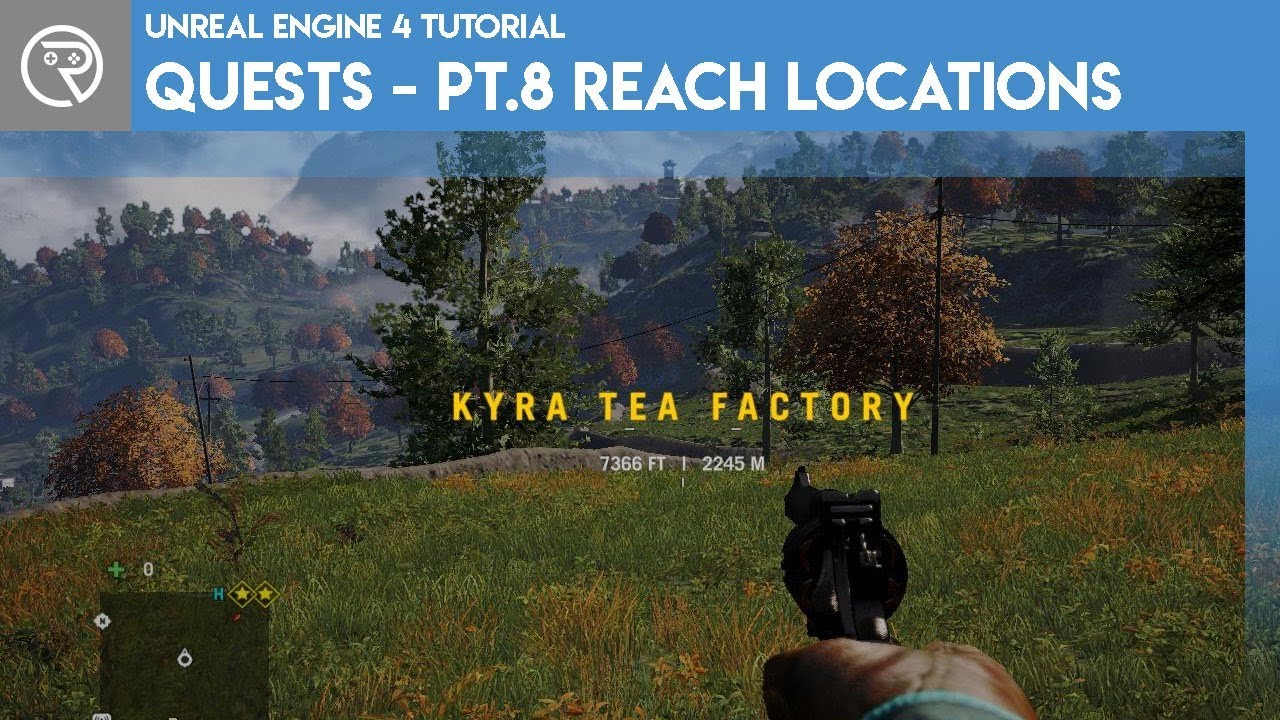
This episode finally has us completing objectives, starting off with the location based objectives.
Watch the next episode where we begin creating our quest system over at Patreon for as little as $1.
Support me on Patreon and get access to videos early, join our developer c...
whole quarry
@lime girder Well, the UE4 MP
lime girder
@whole quarry thats what i was thinking. In the Blender world there's lots of custom shader places/artists, so wondering if UE4 had something similar too
whole quarry
@fiery mortar You're looking for Custom Event
frank oar
thank you @light lintel I meant the guys you buy the assets from in the market place
fierce tulip
thats not allowed
quixel tried to do that and got kicked off the mp :p
marketplace eula is for all
so no, you dont have to pay the mp-sellers any additional royalties
which is why its now available on the marketplace yea. @light lintel
fiery mortar
@whole quarry I mean the video says create event and there is no function drop down in cutom event
whole quarry
If you can't get royalties, just get assimilated in to the hive
frank oar
thank you, i only got a couple of sounds and animations
 languid aurora
So this happens when I re target an animation
floral hull
@whole quarry Ok, and how?
 exotic cave
@floral hull : Learn to use the Landscape Sculpt tools.
Guide to the Landscape tool's Sculpt mode.
spark cobalt
@fierce tulip hey man just want to say I’m a big fan of your work
floral hull
Lol, i used. And you see result)))
exotic cave
Don't laugh at the people trying to help you, please.
You cannot have used the Flatten tool properly, or you would have a flat landscape. 😄
whole quarry
@floral hull so use the flatten tool..
 trim steeple
@floral hull If it doesn't work, that might mean it's not a landscape but a simple static mesh. Landscape tool work only on landscape and I have 6 years to back them up.
but not impossible right
whole quarry
Oh this going to be good
floral hull
Thanks All!!!
trim steeple
yeah, I felt like the guy needed something to realize his either not doing good or have this simple problem
floral hull
👍 👍 👍 @whole quarry @exotic cave @trim steeple
i change this, and my lanscape like a bettshet!!! Thanks all!!!!
trim steeple
You should consider looking the documentation or tutorial to get a better grasp over landscape tools functionality
whole quarry
Blender isnt that hard, it has all those new UI buttons now
 mystic talon
thank god they updated there horrible UI
floral hull
@trim steeple You have a lot of experience, can you tell me how to increase FPS in an open world game? At the moment, I've made a 4-digit LOD to every object. But still, I can't increase the FPS above 20. Although I'm not sure it's the right FPS.
trim steeple
This is a good start
How to identify performance problems and fix them.
profiling will help you understand what part of your game is consuming too much
also be aware that you run the editor engine, once your game package, you'll benefit from a couple of fps
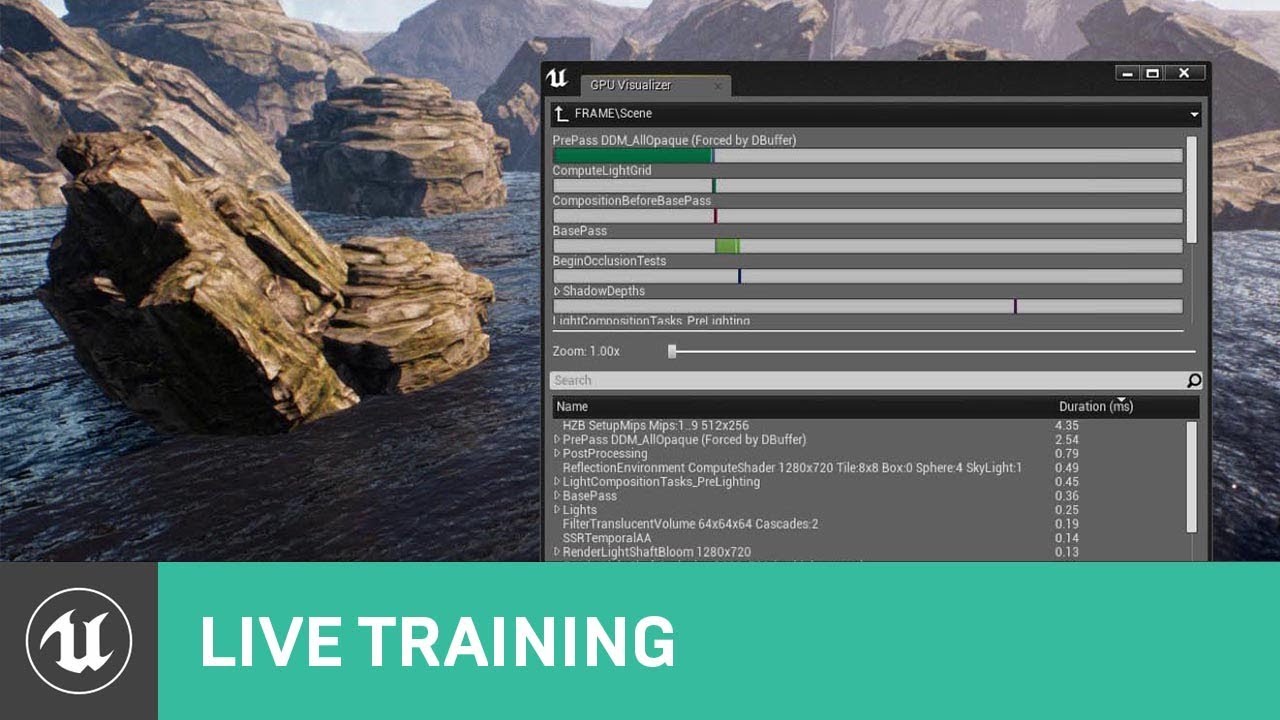
When developing any type of project in UE4, trying to maintain a target framerate of 30, 60 or even 90 FPS without sacrificing the quality of the visuals can be a real challenge. Epic Games' Sam Deiter shares some tips and tricks that you can use to make sure your UE4 projects...
This is also a good live training
didn't saw the next one, but it's more up to date:

This in-depth presentation from Unreal Indie Dev Days 2019 outlines CPU and GPU-related overheads, identifying bottlenecks, and how to plan optimization strategies and pipelines early and as a team. Learn the tools and how to employ them to identify key performance problems as...
fierce tulip
@spark cobalt aww, thanks :)
floral hull
@trim steeple Thank you, so much!
plush yew
OOF I broke water
floral hull
@trim steeple and one more question.
Here I have the landscape ready. There's grass. One grass is cleaned with a Foliage+Shift brush. But the other grass, like it's grown into the ground itself, there's no way to clean it up. Why would that be?
I can't get this weed out of here.
frozen pond
got problem with that node, it wont find any instanced static mesh
plush yew
How can i part the waters?
frozen pond
what you mean by part the waters ?
trim steeple
You can always try to select them all manually and increase/decrease their height, I recommend you to apply a good setting z-offset by default
@frozen pond You should make sure that the object type is respected and also that your instanced static mesh in question can overlap! (event generate overlap + the collision filter either on allOverlapDynamic or specifically on the channel you desire to overlap)
hidden knoll
How would you have a 3d sidescroller character turn all the way when you move
frozen pond
@trim steeple not sure if i'm sure but i thinki i'm doing something wrong, cuz this box find actors, and i need to get component
or more like is there anything in that box
floral hull
good setting z-offset by default, what do You mean? @trim steeple
The landscape material has these settings. Maybe there's some kind of grass that's on?
trim steeple
Sorry guys, I'm at work at the moment and the games won't get done by themselves, but here my last cue for you:
@frozen pond if you specifically need a component then you have boxOverlapComponent (you still should be able to do it with an actor)
@floral hull I highly recommend you to start "eating" unreal content documentation AND/OR tutorial so you understand better the editor engine and how games work in general, it will provide you keyword and multiple technique that are hard to get just by yourselves. (everything concerning level design will probably interest you if I follow well you)
floral hull
@trim steeple Thank You!
exotic cave
@floral hull : You're clearly using a pack that has an automatic grass material.
Let us presume, since I can see it in your assets, that you are using the lovely asset here that Epic has paid graciously to allow us all to experience free this month: 😄 https://www.unrealengine.com/marketplace/en-US/product/scanned-poplar-and-aspen-forest-with-seasons

Pack contains photorealistic, photoscanned poplar/aspen trees, foliages, ferns, shrubs, rocks models, photoscanned terrain textures and material sets. All for spring, summer, autumn and winter seasons with sample scenes.
You either need to define and then paint a layer for that material that has no grass (there may already be one), or else turn the grass off in the material itself.
@light lintel : You clearly need an automatic landscape material 😄
Learn how to add Grass textures to a landscape.
This is a good reference on what the automatic grass stuff does, though it may be beyond people who are seriously new to UE.
That I'm not an expert on, @light lintel , at least not yet 🙂
floral hull
@exotic cave The landscape itself has this coloring. Every color, it's either grass or flowers. It's like the landscape is painted by them. So how do I also draw a line without grass?
plush yew
guys idk it is for this chat or not but someone can send me link or some example how contract should look like for work in studio cus I need to do this but have no idea how to do it, I coudn't find good things in google
floral hull
exotic cave
Can I see what your Landscape Paint panel looks like, please?
So I can see how the developer has defined the terrain layers?
Many landscape materials have an option to paint a layer that turns off grass. If not, I'll show you how to add one.
 winged crypt
hey, I have 2 parts on a skeletal mesh that are cloth simulated, but for some reason I can only apply cloth data to one at a time, what's that all about? if I apply it to the second, the first one goes stiff and second simulates. If I do the first, the second goes stiff and so on
floral hull
plush yew
guys idk it is for this chat or not but someone can send me link or some example how contract should look like for work in studio cus I need to do this but have no idea how to do it, I coudn't find good things in google
plush yew
guys idk it is for this chat or not but someone can send me link or some example how contract should look like for work in studio cus I need to do this but have no idea how to do it, I coudn't find good things in google
exotic cave
@floral hull : You may have to edit the landscape material you're working with.
Give a moment and I can explain the basics of turning on and off mesh grass in an automatic landscape.
floral hull
Can you tell me how add mathrial in this panel?
exotic cave
@plush yew : Most devs here cannot give you advice on drawing up a legal contract. It carries liability. Best bet is either pay a lawyer one-time to get you an ironclad contract, or else do your best reading examples from the net.
@floral hull : Do you mean "material"? You may need to upgrade your English a bit.
plush yew
Can anyone help me figure out how to make changes to the landscape (like using the ramp tool) when an event occurs?
exotic cave
Click on the little magnifying glass next to "MF_sample_scene", @floral hull
That will take you to the material you're using, in the Content Browser, and you're going to have to learn to edit it.
exotic cave
You will need to find a node like that in the Material Editor for your landscape material.
If you just want the grass off, you can disconnect the pin leading to it. If you want to actually learn how to turn it on/off properly and do cool grass things, I can teach that too as I just had basically a monthlong deep dive on it myself. 🙂
Landscape materials can have what is called mesh grass, which is when the engine automatically spawns little grass meshes all over the terrain for you. It's very cool stuff but it's best when devs give an option to turn grass on/off properly.
It's also very possible that the developer has a parameter with which you could turn it on/off, and you'd find that out by creating a Material Instance from the main landscape material.
@plush yew : Unfortunately very hard, realtime terrain modification is not supported by current UE component as best I know. You'd have to make your own RuntimeMeshComponent and/or do another solution with making a realtime-deformable mesh, then add a landscape material to it.
frank oar
I use a Flipflop to switch between these two animation states.
how could I make it so it only plays the R_O_flic_BT_Anim_Retarg once through before returning to its idle pose ?


I have asked In animation, the channel seems totally asleep..
exotic cave
I mean, that's usually controlled at the Blueprint level as best I know, @frank oar
However, I'm not an expert on character animation graphs.
It might be possible to define a state that just plays an animation once and then selects another animation, is that what you're referring to? So that any time the character enters that state, that's what happens?
plush yew
@exotic cave, thanks, I will just find a way to not have to do that. maybe an object with the same texture as the ground?