#ue4-general
1 messages · Page 702 of 1
 grim ore
 frail sail
like one actor can run in other thread with c++ even it is in main thread?
grim ore
confusing question, you will have to look at what people have done to see what can be done.
 manic pawn
you can't just magically "run an actor on another thread"
 lucid magnet
@grim ore do you know how i can program a button to auto detect and set graphics?
 manic pawn
it doesn't work like that
frail sail
im not pro about hardwares sorry :D
grim ore
run run run run run on one thread, something else running on another... now I have to wait for the other to finish before I can do my stuff... yay multi threading makes it all magically better
you dont just go "run it on another thread" and its magically faster
lets put it this way, if it was faster and better one can assume Epic would be doing it
 limber mesa
i have a quick question. i checked Procedural Foliage in settings and when i right clicked under misc i cant find it. does anyone know why this is happening
grim ore
@lucid magnet I do and there are videos out there covering that
 marsh swallow
@grim ore might you have any idea why when i added a new trace channel to the project, that all line traces, sphere traces, etc changed to that as its default. I thought maybe it was an alphabetical thing so i changed it and still it defaulted all my traces. Is this normal? or an engine bug?
frail sail
i just wanted to release on another thread. not want to get anything that released actor, so dont need to wait finish stuff on this actor..
just have some high update rate tick in functions
and its impact to game thread
limber mesa
i have a quick question. i checked Procedural Foliage in settings and when i right clicked under misc i cant find it. does anyone know why this is happening
 zinc cave
mmmkay, so, I've jumped back in UE after a long break--and I don't remember ever having collisions issues. I go to the BP of the mesh, and create a complex collision, and it usually works...in this case, nothing I do matters...the mesh is taking the entire top face as the center face scene in the image. What am I doing wrong?
grim ore
@marsh swallow definitely weird. I made a new channel, named it weapons, refreshed an existing line trace and it was fine. Added a new line trace and it was default visibility
marsh swallow
@frail sail hard truth here, but you dont move to multithreading just because you have unoptimized code running in tick, instead of figuring out how to make it event driven, or only check for a small thing on tick and then fire your event. If you make your code performant, then you dont need to worry about that.
the trace it was set to, was a created trace. so i wonder if it changes only when its additional.
i mean if its a bug, nothing i can do but suck it up. haha
grim ore
must be a bug, its not in .24.3 that I can tell its working as expected. new trace by channels default to visibility and any existing ones stayed the same
frail sail
@marsh swallow i've already optimised well. just need to check all movable actors location for minimap icon draw.
its in array and ticking every 10 times to change location in minimap. but it looks jiggly because of low tick rate
 short echo
I think part of the reason Unreal is single threaded is it's focus on procedural Object Oriented programming and not doing too much hand-holding. Creating limitations allows developers to make assumptions about how the code is going to be run, but it also can stifle creativity and is harder to develop an effective system where you make assumptions like that.
I believe this is what Unity's DOTS system is focusing on. Creating a functional and declarative interface with a ton of limitations put in place in order to allow the compiler to make a bunch of assumptions about how the code will interact. This allows the compiler to do really excellent memory management and multi-threading.
 bronze cedar
is it possible to add touch button in touch interface, we can add virtual stick on left and right side, but i want to add two button on right side, for now i did it with widget, but want to know if it's possible in touch interface too, i tried but don't get it
marsh swallow
@grim ore i am running 4.24.3 🤔
grim ore
I dunno unless I am doing it differently it's working as expected
marsh swallow
@frail sail while that can be heavy, you can still make it cheap. keep all persistent actors off tick, and keep all dynamic movable actors on tick. i mean how many do u have? 30 or so? plus you can load them in on a minimap as you approach or add and remove them from the checked array based on distance. just a few ideas.
we do a bit of everything with the minimap for performance but its oddly crazy how heavy it can be.
 kindred viper
I have a lovely radar that pools things nicely and lets you have hundreds of objects on it. Took me a while to suss it out tho
marsh swallow
we once had a bug that replicated the minimap child widgets every 2 seconds. and after 5 minutes the game would all but halt.
😂
frail sail
but it still consume game thread to avoid getting more fps
i was thinking to make 300-400 fps like csgo
marsh swallow
i rly wish people understood fps a bit better in relation to playing. 😂 you cant see faster than your monitor can display.
frail sail
ehh true but better is better :D
marsh swallow
fps rates like that just cause more issues to allow for bugs like csgo or some other fps games.
frail sail
well thank you for infos
 spare sun
depends. Higher fps means your last displayed frame is more recent which leads to less perceived input lag
frail sail
plus point
 flat axle
Is it possible to add NavMesh to planes?
zinc cave
No idea guys? About complex collision? No matter how high I set it, my floor takes the top face and doesn't allow detailed info...
Image above,...
 astral phoenix
Can some1 help me when i try to test my game my texture/quality looks like this, but when im not testing it, it has good texture/quality.
What can i do?
zinc cave
Ok, thanks. Have a better one!
grim ore
@zinc cave my guess is you have a simple collision box around it
Open it up and look at the simple collision
@astral phoenix in your settings in the editor in the toolbar what is your scalability set at? Including the render scale.
astral phoenix
@grim ore Epic 100%
this is how it looks in testing mode
i mean where u ''build'' and stuff like that
@grim ore do u know what i can do?
grim ore
It's honestly hard for me to see the difference between the two
My only thought was the fact that you may have had lower scalability settings
Is this with play in editor or is this a package build
flat axle
Testing mode looks better imo-
astral phoenix
you really dont see the difference??
the first pic is when i play my game and the other pic is when i im the Unreal engine ''build'' mode
if u look at the rocks and the foliage u can really see the difference
grim ore
Ok so build isn't playing it's building lighting and other stuff
Do you mean it's getting darker or black?
astral phoenix
u see now?
now its really clear xD
i want the quality on the first pic when i play the game but idk why its shit like that :/
grim ore
So the 2nd one is playing how? The play button in the editor? Package and build? Standalone? Play in new windows?
astral phoenix
''alt + P'' idk whats called just when u play in the editor?
 runic fern
Editor mode full screen xD
astral phoenix
i guess? but how do i fix the quality? so it looks good?
 normal burrow
biebob is the first pic high res screenshot or something?
 tacit onyx
Does the camera have any post process effects going on?
astral phoenix
@normal burrow the first pic is normal like the rest
runic fern
He mean from his scene but before playing
normal burrow
ah okay so the drop in quality is on packaged builds?
tacit onyx
Even the mannequin hand is blurry. It looks like it's been resolution scaled, or blurred with a terrible DoF somehow.
runic fern
playing from editor viewer directly
its looks like motionblur is going on
or blurbackground is on
normal burrow
not sure i'm really seeing a problem tbh
astral phoenix
its only this map that is like that my other maps works fine
normal burrow
like i don't see a difference between these pictures. it could be texture streaming and low gpu memory
 sour sequoia
NEWB QUESTION ALERT
Hey guys, if i buy an animation pack from the asset store, how do i actually use it in a multiplayer game that i want to make? From my understanding, root motion templates such as ALS are not replicated so cant be used in multiplayer games. So how do i use this pack? https://www.unrealengine.com/marketplace/en-US/product/fpp-melee-animset

360 FPP animations for 5 medieval weapons - sword, spear, halberd etc.
runic fern
try to run it on standalone and check ?
astral phoenix
@runic fern standalone game is still shit quality
runic fern
go to your post process and disable it
normal burrow
yeah
yao is right i think, ifs its just in PIE or playing where it looks blured you've got some sort of pp setting going on doing it likely.
astral phoenix
the quality is better now but.. yeah.. xD
runic fern
Your pp settings have something wrong
normal burrow
if the other levels are okay
runic fern
check it you have something high that killing the quality
normal burrow
figure out what is different about the post process in that one level
perhaps you've got a post process volume somewhere
astral phoenix
i only have 1 post process volume in the map im checking if there anything wrong with it right now hold on 🙂
runic fern
ok i have an idea
make it smaller and spawn the player close to end of pp and go out if you will get better quality then delete it and set one with your own settings
flat axle
is your screen percentage less than 100? under viewport options? @astral phoenix
 ancient lotus
@sour sequoia use replicated variables to control the animations
limber mesa
i have a quick question. i checked Procedural Foliage in settings and when i right clicked under misc i cant find it. does anyone know why this is happening
astral phoenix
@runic fern it worked the quality is shit inside the PP but when i go out its good
runic fern
Then you have to reset the pp
astral phoenix
https://gyazo.com/75e3621eae0bc3886e325409a93d70e2 it looks like this now hope you guys can see the difference (background)
astral phoenix
it was my screen percentage...
runic fern
good
astral phoenix
Ty guys! 😄
runic fern
Welcome
@plush yew i think you need to make collision class from project settings specifing what to block and what to ignore
i think its working like this
 tired palm
Hello, is there a way to change the subtitle font?
I did see a method through "Engine Content", but if I understood correctly, the modification is postponed to the other projects, which is not very practical I find.
thanks 😺
normal burrow
are subtitles a built in feature pristio?
tired palm
no, I use the unreal engine system (integrated in "Sound Wave" or "Dialogue Wave")
normal burrow
does that involve blueprints ?
tired palm
For the "Sound Wave" the subtitles start as soon as I start the sound (even at the beginning of the game).
For "Dialogue Wave" you need a Blueprint yes, to call the dialogue only, after that it's done by itself.
normal burrow
i am not real familiar with any of that pristio, but if its blueprints perhaps you can make a child blueprint of the engine content, change font
easiest approach is to probably just make yourself a copy of the engine asset and modify it inside your project though
normal burrow
its unlikely that you can expect any updates from these projects regardless
 high jackal
Can I pay someone to make a script for me?
Or is there somewhere I can find something like that?
kindred viper
#looking-for-talent if you want to do it within this discord server
normal burrow
please read #more-resources and check pins there
 scarlet birch
If I have a bp that needs to set a static mesh from a predefined set of static meshes. Should I store them in an array of SM objects? or is there a better way? The set of meshes never changes and there's two of these objects existing. At semi random intervals the mesh will change to another mesh in the set.
high jackal
I did I can't find anywhere except for the job boards but those are locked
normal burrow
you read the part on how to use the job board?
high jackal
Well anyways maybe i can just do it myself, can I ask a question to get some guidance?
kindred viper
@scarlet birch dont see why not. What other ways would you use?
normal burrow
yeah mike it matters if you want all those to be loaded up or not
you've got the option of references to the meshes or soft references which are just paths
scarlet birch
I'm still a little ignorant about some of the stuff under the hood with UE. I don't know if I should worry about storing them in memory or not
kindred viper
what pat said
scarlet birch
I don't want hitches, but there's only 10 meshes right now so it's likely not a big deal to keep them around
normal burrow
if all 10 meshes will be in use it makes sense to just use references too
scarlet birch
It will switch between them every 30 seconds to 1 minute.
high jackal
I'm trying to have my AI guys 'carry' an object to a destination. Biggest concern is I only want it to carry if at least 2 guys are attached to sockets. I'm not really sure conceptually how I could go about this, I couldn't find any examples that helped beyond singular carry and attach methods. I thought about having the object count how many are attached and then allowing it to move? Seems like that might be the best approach.
scarlet birch
What about having two instances of the BP? Should I worry about trying to have each BP reference the same instance?
normal burrow
ye, i mean you could async load them from soft reference like 30 seconds before they are needed if you really wanted to be optimal mike
but array of references should be fine
scarlet birch
Thanks.
normal burrow
if the question of two relates to soft references, no need to worry
scarlet birch
I need to look more in depth at how soft references work.
normal burrow
they are just paths with a weak reference inside
scarlet birch
I meant if two BPs each have variables of static mesh objects set to the same mesh.
normal burrow
if you async load two of the same, it wont be seperate processes since the paths are identical
normal burrow
well consider garbage collection mike, when ue goes to collect garbage it iterates every object reference field.
that is the only overhead in having the collection stored twice, and its not a huge overhead
(beyond the memory use of course)
 oak swan
Does anyone know a clear/easy way to set your Unreal 4 Game to Steam, most videos I look at don't give any clear guids
scarlet birch
I'm looking at 20Mb total with both BPs. Thanks for covering some of this. I won't worry about it here but it will be helpful down the road.
normal burrow
if your going c++ at all, making a ufactory for a new uobject type to have it come up like assets do (material, texture etc) I find to be a nice way of storing shared data like this list of yours. there are also things like data tables but the overhead in operation of those would be much larger than just an array of references
scarlet birch
I'll keep it in mind. I'll likely stay with BP unless I need to expose something or find a performance issue.
kindred viper
I once went through the trouble of making a new asset, it was a great learning experience.
kindred viper
I think I dated her
 still granite
Hey I cant compile a .uasset file can someone look on why that is?
I can send you the file via DMs
 warm plume
Hello everyone... So I am bulidng lighting on my scenes but it take forever wich I do understand ...but my PC is powerful I am using
CPU I7
24g rams
2 gbu gtx 1080ti
But the light building take so long even tho I have 2gbu...
Is there a way to make rendering done by the gpus? Is there is a setting allow you to use gp as light building ...pls help
 lavish sapphire
I'm interested in learning Unreal for animation in film/tv. Anyone a tutor? Or have recommendations for courses specifically devoted to that subject?
grim ore
@still granite what do you mean by you cannot compile a .uasset?
@warm plume light building is CPU only, 0% GPU
still granite
When i try to open it my UE crashes
grim ore
how are you trying to open it?
@lavish sapphire There are courses on https://www.unrealengine.com/en-US/onlinelearning-courses that are aimed at film and tv
still granite
I put the file in the UE place
and the double clicking it
and then my thing crashes
grim ore
@still granite .uasset files are asets for use in UE4, they go in the project. They are not opened or imported.
still granite
But are you not supposed to edit them?
grim ore
you are not
files go into the unreal engine editor (fbx, wav, png, etc.) and epic converts them to an internal format and saves them as .uasset files
lavish sapphire
@grim ore They seem to deal more with VR, and less about a workflow from something like asset creation in a 3D program (C4D) to constructing the scene in Unreal for rendering
grim ore
did you scroll down and look thru them all? there are quite a few dealing with that
I mean you might not find a hand holding course from installing the engine to rendering out an image but the parts are all there for that
lavish sapphire
yeah i did and nothing really stood out. basically i wanted to avoid going through a bunch of them, and having to cherry pick bits and pieces. more than anything i'm looking for a teacher
high jackal
There a way to get 2d splines to render in gameplay?
Soon as I click play it dissappears
 umbral ferry
Hello any tips for know how to rewrite a blueprint code in c++?
 worldly minnow
ERROR: Could not find NetFxSDK install dir; this will prevent SwarmInterface from installing. Install a version of .NET Framework SDK at 4.6.0 or higher.
any ideas boys
 gilded igloo
Hey guys! a bit of a weird question.
I want to make an infinite 3d matrix of bools. not something visual, just something I can store in a variable. Now, obviously I dont have infinite memory in my computer, its too expensive currently... and I asked my father about this issue and he mentioned something called "Hashing" and "Spectial Hashing".
Anyone knows what it is? how it works? if I can implement it in bp or even in cpp (although not ideal). any other ways to make an infinite matrix? if you can explain or link a tutorial please do.
thanks a lot!
 fleet cedar
@umbral ferry What specifically? Every blueprint node has a C++ equivalent that helps
 sharp crest
Am I the only one disappointed there are barely any UE4 dev log videos?
I would do it but my English sounds shit so Idk if people would like it (accent)
but personally I'v very interested in watching these so if anyone is starting one/knows ones lemme know 😅
umbral ferry
@fleet cedar any one because auto convert put a ugly code to hard to understand.
fleet cedar
@umbral ferry there's an option to turn blueprints into C++ but that's for packaging, other than that there's no tools that i know of for a 1:1 conversion
 charred tapir
Guys, I am going crazy, where is the option to disable Auto Navmesh rebuild?
Im going to be editing the collisions for my world, and if I have to lag my PC for every tiny change it will take forever.
I am on 4.24
 modern sinew
Can someone help me with this error? UATHelper: Packaging (Windows (64-bit)): ERROR: System.IO.FileNotFoundException: Could not find file 'C:\Program Files\Epic Games\UE_4.21\Engine\Plugins\AdvancedSessions\Intermediate\Build\Win64\UE4\Development\AdvancedSessions\AdvancedSessions.precompiled'
grim ore
@charred tapir you are looking for this in Editor Preferences
normal burrow
would verify installation redpandaz
charred tapir
Thanks @grim ore
modern sinew
@normal burrow how
 trim pike
does anyone else have the problem where the screen will flicker and be tinted a light yellow or a deep purple for a second
usually happens when i am in the old atmosphereic fog, the sky atmosphere, or my atmosphere shader
havent seen it happen when im not in them
grim ore
@modern sinew is that plugin installed correctly? it says it should be in the project not the engine
normal burrow
ye that too matheww i didn't bother to check if advancedsessions is a epic plugin or not
grim ore
it is not
normal burrow
i dislike plugins that tell you to install there
or things like quixel bridge which just do it
So take that C:\Program Files\Epic Games\UE_4.21\Engine\Plugins\AdvancedSessions folder @modern sinew and put it inside of a new or existing folder called "Plugins" in your project
modern sinew
@normal burrow I did
@grim ore A forum post told me to have it in both the engine and the project
Oh wait,
You say I have to make a folder called Plugins in the project?
I can try that
normal burrow
you've got visual studio installed?
modern sinew
yea
umbral ferry
Any one know what that error mean ?
modern sinew
that's how I finally finished the uCRT error
normal burrow
yeah that should work then, plugins folder in porject
modern sinew
ok, let me try
 keen moss
im trying to implement a triplanar function in my scene, and for maybe 80% of the mesh surface it works but some random faces get fuzzy and weird
grim ore
from the web page
normal burrow
nice mathew, going the distance 😄
umbral ferry
and this
modern sinew
@normal burrow Well it's moved onto "compiling shaders", does that mean we're successful? It's never gotten that far before
normal burrow
lets wait a bit and see.
modern sinew
oh boy, I opened up the output log and there's a lot of red
trim pike
does anyone know why my problem happens
modern sinew
same error, just with different files, a bunch of times: ```PackagingResults: Error: Couldn't save package, filename is too long :C:/Users/----- Desktop/Documents/Unreal Projects/MultiplayerTutorial/Saved/Cooked/WindowsNoEditor/MultiplayerTutorial/Content/InfinityBladeWarriors/Character/CompleteCharacters/Textures_Materials/CharM_Standard/T_CharM_Standard_N.uasset
 radiant haven
modern sinew
radiant haven
modern sinew
aaa
normal burrow
the error is what it is, pandaz. could move the project folder to C:\ but idk if that'll save you
@trim pike i've not ran into that
modern sinew
but what does it mean "filename is too long:
trim pike
okay
normal burrow
C:/Users/----- Desktop/Documents/Unreal Projects/MultiplayerTutorial/Saved/Cooked/WindowsNoEditor/MultiplayerTutorial/Content/InfinityBladeWarriors/Character/CompleteCharacters/Textures_Materials/CharM_Standard/T_CharM_Standard_N.uasset
that is too long red pandaz
modern sinew
how is it too long
why is there a "too long"
And is it talking specifically about the file name, or does it include the path
grim ore
because DOS
normal burrow
reasons, but what matters is you shorten it
modern sinew
And is it talking specifically about the file name, or does it include the path
normal burrow
C:/Users/----- Desktop/Documents/Unreal Projects/ could be C:/Unreal Projects/
path
modern sinew
ok
grim ore
and if you move it out of your documents folder, which is a stupid stupid stupid place to put them, and put them somewhere else like projects near the root of a drive you would be ok
normal burrow
it is
grim ore
it is but its not any less stupid, epic just doesnt have a better option
modern sinew
Hmm, I think I might be here a while. It's still searching for files and it's passed 15 gigs
18.3g total
normal burrow
are you changing drives? shouldn't take that long
modern sinew
Moving it to E: because C: is almost full, so if I move it I might as well clear up space on the full one
normal burrow
that'd be why then
modern sinew
Eh, I can wait a few minutes if it means clearing 20 gigs from C
normal burrow
yeah world exists before player pawns are spawned in or assigned controllers
modern sinew
@normal burrow new error: UATHelper: Packaging (Windows (64-bit)): LogInit: Display: CookResults: Error: Unable to cook package for platform because it is unable to be loaded: E:/Unreal Projects/MultiplayerTutorial/Saved/Cooked/WindowsNoEditor/MultiplayerTutorial/Content/StarterContent/Maps/StarterMap_BuiltData.uasset
lucid magnet
so i have this check box to toggle on/off v-sync - but how can i make v-sync determine the state of the check box?
normal burrow
would blow away the saved/cooked directory and try again red pandas
modern sinew
@normal burrow how
normal burrow
take the cooked directory inside saved folder and move it somewhere else temporarily
or just delete it
 abstract relic
Would delete /intermediate and /saved to be honest
modern sinew
I'm trying Cooked first
 night bridge
uhm
abstract relic
Both folders will be rebuilt regardless
night bridge
why dont i have the Matinee option
abstract relic
Matinee has been finally wiped from existence
abstract relic
Because it was terrible
night bridge
and what am i supposed to use instead of it
abstract relic
And replaced with sequencer
night bridge
dangit
grim ore
@lucid magnet There is a "Is VSync Enabled" node that will tell you if it is enabled or not
you can go to 4.23 if you still want to use matinee
night bridge
because i wanted to use Matinee for a door opening Animation
abstract relic
Use timeline node
lucid magnet
ok, i found that actually - but does the checkbox only actually work if the game is being executed?
abstract relic
Or sequencer
grim ore
a checkbox is a checkbox, you are the one that determines what it does
night bridge
cant i also do that with Blueprints
grim ore
you can which is the Timeline that was suggested
abstract relic
That’s what timeline node is for
abstract relic
110% awesome
grim ore
it's been over 3 years since sequencer was introduced
night bridge
yeah but im trying tuts
abstract relic
Find better tuts
modern sinew
UATHelper: Packaging (Windows (64-bit)): ERROR: Failed to copy C:\Program Files\Epic Games\UE_4.21\Engine\Binaries\ThirdParty\Steamworks\Steamv148\Win64\steam_api64.dll to E:\Unreal Projects\MultiplayerTutorial\Saved\StagedBuilds\WindowsNoEditor\Engine\Binaries\ThirdParty\Steamworks\Steamv148\Win64\steam_api64.dll Can I just copy it manually?
grim ore
well dont use a tutorial that uses matinee for opening doors 😦
normal burrow

Sequencer allows us to set up a cinematic for our game but sometimes we just want a simple camera move to introduce our player. We look at how to do a basic camera move including adjusting it as needed and using events on start and stop to disable player movement while the se...
grim ore
thats just epiclike
 pulsar badge
How would u do a building system into the game
night bridge
yeah i already found a new tutorial
grim ore
oof my sequencer stuff is sooooo out of date lol
modern sinew
I'm working on that after I work on an inventory system
pulsar badge
I know how to do the building i just dont see how to do it so multiplayer people see it also
fleet cedar
@grim ore Thank you for making those videos, they've been super helpful ❤️
pulsar badge
Anyone know how?
modern sinew
@pulsar badge Wait, if you can do it for one person how would another person not see it? because my plan is for multiplayer too lol
but if it's in the worldspace
grim ore
if the client creates the stuff the other clients wont see it is why
basic MP
sooo.....
modern sinew
how do you send it to the server?
pulsar badge
I can place blocks but can another person see the blocked place also?
abstract relic
Y’all are e about to experience some growing pains 😜
normal burrow
lol, some unsavory realities
modern sinew
@abstract relic meanwhile, UATHelper: Packaging (Windows (64-bit)): ERROR: Failed to copy C:\Program Files\Epic Games\UE_4.21\Engine\Binaries\ThirdParty\Steamworks\Steamv148\Win64\steam_api64.dll to E:\Unreal Projects\MultiplayerTutorial\Saved\StagedBuilds\WindowsNoEditor\Engine\Binaries\ThirdParty\Steamworks\Steamv148\Win64\steam_api64.dll
Can I just copy it manually?
pulsar badge
I'm trying to do a minecraft type building system for me
and a friend
but when i place the block down they can't see it.
modern sinew
oh, mine'll be more like subnautica/planet coaster, just in first person
grim ore
its what I said... if the client creates the stuff the other clients wont see it. so the answer is?
pulsar badge
It needs to like send it to the server before it goes back to the other player
pulsar badge
Right how do i fix that?
modern sinew
because the server has the "true" version
grim ore
the clients dont create it, the client tells the server. the server creates it.
modern sinew
huh
grim ore
some livestream stuff but nothing official, I stay away from MP because its hard
pulsar badge
I'm just stuck on that
grim ore
welp its the basics of multiplayer, replication and server authoritatorship
worldly minnow
Fatal error: [File:D:/Build/++UE4/Sync/Engine/Source/Runtime/D3D12RHI/Private/D3D12Util.cpp] [Line: 266] Adapter->GetDXGIFactory2()->CreateSwapChain(pCommandQueue, &SwapChainDesc, SwapChain.GetInitReference()) failed at D:/Build/++UE4/Sync/Engine/Source/Runtime/D3D12RHI/Private/Windows/WindowsD3D12Viewport.cpp:200 with error E_INVALIDARG
do i need to download a fresh directx?
modern sinew
@grim ore Can inventory be client-side?
grim ore
sure if no one else needs to know about it including the server
modern sinew
oh. So for a trading system, you couldn't just have the server ask the client what's in the inventory? I guess also client-side inventory would make it easy to cheat
grim ore
^^^
modern sinew
How do you seperate clientside vs serverside tho? like if I put something in the player blueprint, which side is it on?
grim ore
hey server I have a billion coins, really. trust me I do.
you dont really separate if its the same blueprint
modern sinew
is it automatically server-side then?
grim ore
you just have different copies depending on where its at, who owns it, etc.
modern sinew
??
grim ore
server spawns something, that something is set to replicate. every client connected gets a copy of it locally.
grim ore
if I tell my client to destroy my copy then we now have an issue as only my copy is gone from my client while everyone else sees it for example
correct the client would tell the server to change their copy, their copy would then replicate the changes to everyone else if its set to do that
or your server side command would do something to every copy, or etc etc.
like for example on a server it has 2 players, each client has 2 players as well
on the server each player could be grey color, on my machine my local player is green and the enemy is red. On the other players machine his player is green and my player is red.
modern sinew
Say you have it set in the blueprint that when the player clicks an object, it adds it to their inventory. Is that the server-side inventory or the client-side one
grim ore
the client would tell the server they want to do something with that object, the server should make sure they can then do the something on it
if the inventory is a replicated object it might mean the server adds the item to the inventory and it then replicates it to the client
modern sinew
ok
high jackal
How can I make 2D splines render in-game?
grim ore
you might also have the inventory not be replicated and the server manually tells the client they have X and adds it to theirs locally
modern sinew
ok
UATHelper: Packaging (Windows (64-bit)): ERROR: Failed to copy C:\Program Files\Epic Games\UE_4.21\Engine\Binaries\ThirdParty\Steamworks\Steamv148\Win64\steam_api64.dll to E:\Unreal Projects\MultiplayerTutorial\Saved\StagedBuilds\WindowsNoEditor\Engine\Binaries\ThirdParty\Steamworks\Steamv148\Win64\steam_api64.dll
Can I just copy it manually?
I can't move on with my project until I can get it to launch, and apparently I have to package it to do that
but I keep getting package errors ;-;
modern sinew
I don't want to break anything so I want to check to make sure messing with files is a good idea
I can ty tho
*try
grim ore
copying a file is non destructive, if it doesnt work delete it
modern sinew
Oh, I think I found why it can't copy it. That path doesn't exist. one sec
wait
it might
agh, one sec
ok, it said Steamv139
trying again
WARNING: Skip copying file C:\Program Files\Epic Games\UE_4.21\Engine\Binaries\ThirdParty\Steamworks\Steamv148\Win64\steam_api64.dll because it doesn't exist. Well then what's this??
@grim ore Do you know why it's saying it doesn't exist, despite it being right there?
modern sinew
And then when I go to where it says it's trying to copy it too, the file is right there!!
 gritty thicket
In widgets there is an Image item. How do I put an image in this item
grim ore
@modern sinew I do not, I have not tried to use Steam with UE4
@gritty thicket If you look at the details panel for the Image Widget you will find the image is under the Brush section. You can set the brush on the Image Widget to change the image
gritty thicket
@grim ore thanks
 weary basalt
Does anyone know off the top of their heads what version Epic changed access modifiers for the network Roles?
 remote flame
Quick question - making an open world game with around 10 cities. Does it matter performance wise if I use ready - 1 part meshes or buildings that are made from modular parts?
kindred viper
depends on a few things really. Scale, draw calls, LOD, etc.
even the level streaming distances and such. The general plan would be to reduce draw calls but in some cases the modular approach can actually be a better option via the LOD and streaming distances.
remote flame
Thank you! Was thinking the same way but it's counter intuitive thinking - 1 building to load > 1 building to load made from 10 meshes
normal burrow
have you tried #multiplayer ?
 smoky sonnet
anyone know
why this doesnt work?
how can i apply them
ok found it lel
thanks
❤️
high jackal
Any idea how i can show splines in the game view?
 chrome swallow
Hello every one. I do not know if I am in the right area, but I will try here first. I like to ask some one here if they may help me to figure why I am totally unable to place any trees or rocks and such on my landscape using a procedural foliage. All the items seems to get placed onto every other thing like my buildings, boats etc., but not on the landscape. Any help would be more than appreciated. I been searching on every forum I can think of and video I can find and still no solution as of yet.
 plush yew
Is there a way to get and set the vertex locations of your map?
kindred viper
what do you mean by map? The landscape?
presuming that is what you mean, yes you can do it via shaders. If there is another way in-engine, Im not sure of it.
chrome swallow
Or are you trying to figure the vertex of map materials?
 tulip helm
Which engine version has had the most preview builds?
4.25 is on preview 6. Highest I've seen.
 golden condor
Hey guys, If I wanted multiple things to happen on Begin Play
Can I make have mutliple things connected to Begin Play?
chrome swallow
Am I in the wrong area for assistance with landscape issue using procedural foliage?
 warped sun
Question: Can i have the everything below the hips do an animation and have everything above the hips do another? like some type of override?
chrome swallow
Instead of Event Begin Play you can have OnComponentBeginOverlap and EndOverlap, but for your scene you just want it too trigger the text on. Connect them too your Toggle Visibility. Just like the very basic light setup really.
Sorry mt on that
plush yew
@kindred viper Yes the generated landscape
kindred viper
@golden condor depends. You can use a Sequence node, or if you need something to run asynchronously, then you can use the UE async task class stuff
golden condor
They both do different things.
golden condor
Lighting?
grim ore
@tulip helm 4.23 had preview 8
golden condor
@grim ore you sound like my professor
grim ore
@warped sun you would use the layered blend by bone node to do that in an anim graph
 knotty vessel
yeah it isnt lighting
golden condor
So, if there a way to break begin play into becoming attached to multiple things?
knotty vessel
everythings connected too
grim ore
are your textures on that material set to shared for the sampler type? for each texture
@golden condor Functions and events are unique and in a chain. You would want to connect at the end of the first part your 2nd part or as suggested use a sequence node to pretty it up
alternately put each of those sections in their own custom event and have the begin play call each event in a row
 mint umbra
How do I check if my (asset) mesh has a second fullbody UV lightmap with no overlaying UVs?
plush yew
@golden condor you can wedge a custom event in there or a sequence
grim ore
double click the mesh and look at the UV layout options
mint umbra
@grim ore Where do I find these options? https://gyazo.com/db983b894b0eb2d11d78e3824c5a301f
 grim ore
that is in a skeletal mesh, so open a skeletal mesh?
mint umbra
Its open :p
grim ore
so which options? each of those windows has a title you can open any of them from the windows menu
mint umbra
Hmm, cant find any UV related options
Like in this video's showcase for instance: https://gyazo.com/b3aa4aee8ca61b4e5a4af9cb6456b487
 grim ore
that would be a static mesh is why
mint umbra
So how would I view it for a skeletal mesh?
I legit must be missing something, can't find anything related to UVs for skel meshes in the persona
grim ore
well skeletal meshes are not static therefore overlapping uv doesnt matter
mint umbra
Oh okay
grim ore
overlapping uv is only an issue, same with lightmap uv channels when using lightmapping which is only for static meshes
mint umbra
Aaah, thanks for clarifying 🙂
 lusty rampart
anywhere good to go to find people to pay for UE tutoring?
normal burrow
#looking-for-talent @lusty rampart
 craggy perch
Whenever I play (from pie, standalone or packaged) get this warning for every AI that is placed on the map ->
"LogScript: Warning: Script Msg: No world was found for object (/Game/Maps/TestMaps/UEDPIE_0_TestMap_TMAP.TestMap_TMAP:PersistentLevel.AnimalTest_BP2) passed in to UEngine::GetWorldFromContextObject()"
what could cause this?
 chilly gale
Is there a way to reset the pivot on doors without having to export, it's really a bummer having a mix of some X forward, some Y forward and a lot with pivot in the next paddock (miles from the door) let alone not at the hinge side of the door
 half turtle
good morning, question how many bits are floats in unreal engine? and are they signed? i am having a blueprint crapping on my game suddenly and the only clue i have, is that my ships speed keeps being set to -1073741824
sour sequoia
Do animations effect game performance a lot?
half turtle
(this is related to a gravity field that applies force to the ship)
kindred viper
lots of them do @sour sequoia
you can optimise it tho with anim sharing and things
@half turtle that sounds like something went terrible wrong. All I know is UE works to 6 floating points really.
half turtle
yeah the terribly wrong is a gross udnerstament
now i am thinking maybe i should truncate every single value on my gravity field blueprint to prevent the physics engine from exploding on me
kindred viper
what kind of calcs are you doing?
half turtle
let me screenshot the blueprint section which i know is causing the issue
kindred viper
honestly it looks like a default value to a bad result. ie. not the expected type so it dumped a value
half turtle
this is the offending part
but i dont see at least in an evident way which exactly is giving up on me
i am thinking maybe i should change the gets for fixed variables set at eventbegin and switch as much as i can into ints to simplify the math where possible
kindred viper
I would debug it out. Make sure you can see which calc is going ski-whiff. Breakpoint it and see whats up. If it optimises the variables away so you can't read them, just add a couple of steps in between where you can add more breakpoints.
half turtle
this is going to be a nightmare isnt it.... this is part of a component that i slap onto multiple orbital objects and they apply their force upon the player ship, sometimes the ship can be under the influence of up to 4 of this...
(that is the edge case scenario)
trim pike
@normal burrow i was able to catch it mid flicker
it flashes to this color or a light yellow when looking at the light direction
hm i think i know why
its material specific
its caused by a mie scattering param i have
but it also happens in the sky atmosphere and the old atmospheric fog
 idle compass
what is the difference when painting a plane using vector painting and landscape painting ? isn't it basically the same ?
kindred viper
good question. I think you mean Vertex Painting though. Which I guess is a weighted process where a landscape painting could be pixel based on the material/shader without weighting.
 tiny sonnet
Is it possible to use buttons inside of a scroll box in UMG with input?
marsh swallow
yes
tiny sonnet
how
 last dove
is anyone here familiar with the OWI enhanced vehicle plugin?
oops sorry didn't know y'all were having a convo
marsh swallow
you create widget and connect the output pin to a add child with target of the Scroll box
half turtle
wanna hear something funny... if i print the values... then the game doesnt glitch
tiny sonnet
you create widget and connect the output pin to a add child with target of the Scroll box
@marsh swallow
i meant like keyboard input, if you press 1, it will use the the first thing in the scroll box, 2 for the second, 3 for third.....
half turtle
found it! (the specific actor that is being bogus
kindred viper
@half turtle cool. good job 🙂
 junior citrus
hi all im new to discord does anyone have experiance with samsung odyssey in unreal engine
plush yew
what vfx software can I use to export animations to ue4
like an explosion for example
is 3ds max best?
kindred viper
Blender is great. But yeah you can use 3dsmax, or Maya or Houdini. If you want super pro VFX, probably Houdini has the best workflow with UE. Blender can be an arse right now.
 narrow meteor
Does anyone know how to allow the player to set their own keybinds when playing?
kindred viper
@narrow meteor I haven't done that for a while but Rama had a decent remapping section in his Victory plugin, whether it's still relevant or not I can't say
idle compass
good question. I think you mean Vertex Painting though. Which I guess is a weighted process where a landscape painting could be pixel based on the material/shader without weighting.
@kindred viper yup sorry I meant vertex painting hahahaha, what does weight mean ? sorry I am kinda new to unreal
 ashen delta
Hi, odd question but I was chatting with a friend about UE4 and I’m sure I once read in the license of the software that you couldn’t develop certain products... like for the military... gambling... I’m probably wrong as I can’t find a reference to that anywhere now... is that still the case and if so what is the list of restricted context?
Ah should this question have been asked in the industry chat?
kindred viper
@idle compass if you imagine a set of vertexes, and the space between, then a weight would be how much it affects the space between the verts. Simply, how much influence the paint has between the vert locations etc.
@ashen delta It's still true but you can negate it by purchasing a custom license.
ashen delta
@kindred viper cheers! I can’t find that list anywhere.. can’t be looking in the right place.
kindred viper
should be in the EULA
ashen delta
Thanks again!
idle compass
ah I see so which would u suggest, vertex painting or lansdcape painting ? @kindred viper also another question, why does my teselation is stopping at this stage ? like it won't go more detailed
kindred viper
Im not a landscape guy, but I would guess the tessellation is based on the resolution of your original landscape. Not sure. As for which I would suggest for landscape painting, I simply goto the Editor Modes and start there. I don't really do it though, someone else could advise you better than I
ashen delta
Ah it’s in the change log... different now... quote: Removes restrictions on use of Licensed Technology (a) in lawful gambling-related Products/activities and (b) for operation of nuclear facilities, aircraft navigation, aircraft communication systems or air traffic control machines, or for military use in connection with live combat.
kindred viper
strange reversal. But I just made a slot machine so I ain't arguing.
 tiny vigil
does anyone have experience with the Tropical ocean tool from the marketplace and if so how do i make my thirdperson character appear floating when underwater not walking underwater
tiny sonnet
Is it possible to use buttons inside of a scroll box in UMG with input? meaning, , if you press 1, it will use the the first thing in the scroll box, 2 for the second, 3 for third.....
i couldnt rly find anything
kindred viper
@tiny sonnet Yes by over-riding the key event for it. Check the Over-ride functions in the left hand menu. You will find OnKeyDown and you can check which key was pressed and what to do with it. If you know the widget has focus, then do something. etc
tiny sonnet
over ride functions?
kindred viper
You can also go the C++ route and do some custom FNavigationConfig trickery
tiny sonnet
im sticking to bp for now
kindred viper
then check the left hand menu where the events/functions are and you will see a little drop-down for Over-Ride
kindred viper
well I could do it for you for £250
tiny sonnet
i will pass
kindred viper
thought you might 😄
tiny vigil
ok so where are the locations of the assets downloaded from the marketplace
tiny sonnet
epic games launcher- libaray -> scroll down
half turtle
what would be faster, to calculate a float - float, each tick or to read the value of a variable?
kindred viper
Once you are in the over-ride graph. You can check which key was pressed. You will want to keep track of which Widget has the current focus, and if its the focused widget, and the key pressed == "1", then do something otherwise just do nothing or something else
@half turtle read var
half turtle
okay
kindred viper
and use events, not tick. Unless you are doing some physics stuff of course
tiny sonnet
kk
kindred viper
hmm. I cant say for sure, but you can probably reduce it with some interpolation. I'm sure you're on the case tho
half turtle
i found the node that is giving me my bug, rather my 2 nodes that together are bugging out
pulsar badge
Can you not transfer blueprints?
to a different pc?
because its not coming up for friends pc
pulsar badge
why isnt it coming up
kindred viper
depends how you copied it
kindred viper
yeah but if the blueprint has dependencies with assets, you need those too etc. Migration is the key method
pulsar badge
forgot to save it lol
kindred viper
hahah
tiny sonnet
if your casting to a UMG as the player controller, wut would be the Object
plush yew
Lots of people asking about Chaos and if it works yet (myself included as of yesterday). Just FYI in case anyone is curious:
I compiled both 4.25 and master branches --
- chaos seems more stable when creating destructible meshes but still tends to crash occasionally.
- physics are useless -- i can place a cube in the air, watch it fall to the ground and then it just slides around erratically until it either falls through the floor or breaks into pieces... if it breaks into pieces the chunks slide around as if on ice (the ice cube effect people keep referring to)
I figured fortnite was using master which is why i attempted to get it to work there. Guess I'll have to keep waiting 🤷♂️
kindred viper
@plush yew the second issue sounds like physics assets problems to me. no friction.
plush yew
that's what it looks like -- I don't know if its a matter of playing with settings or if its just fundamentally broken right now
when i add a chaos solver to the scene and associate it to the object, the object just falls through the floor (ignores collision)
kindred viper
I heard it still crashes somewhat. Hence my reticence to use it right now
plush yew
yeah i started playing with various settings on the cube the engine crashed (multiple times).
i'm very curious how they got it to work in fortnite. i thought those fixes would have been rolled into a public branch but idk how the internal teams work... maybe its just a matter of finding the right settings for your objects? I'm going to mess with it more tomorrow
half turtle
the distance vector is giving me a value bigger than 50k, the radius of the collision sphere is 50k exactly, so obviously the game is reading a position of the actor even after it left the sphere it is overlapping. after this is done, it has to divide this value, but because its getting a value bigger than 50k, the division gives a value bigger than 1, then a subtraction afterwards turns negative and this number gets its squareroot... (Which blows up)
kindred viper
@plush yew Are you sure they use it in Fortnite? I mean, that would be a critically important decision at the very least.
plush yew
someone in another channel told me yesterday that this is the case @kindred viper -- I looked around on google and only saw people who play fortnite saying that it was added in a recent update... but i don't trust this info at this point
unless the internal team has fixed it and hasn't released the code -- but that seems unlikely to me. again, i'm not sure how they work -- maybe they work from private branches and merge back in to master eventually
kindred viper
Well it could be the case as Fortnite is gonna be a custom version of the engine, not the released one. Perhaps they have better luck with Chaos for that than in the generic build.
manic pawn
does fortnite even have any physics ?
normal burrow
Lol
All those structures and stuff it’s probably really good at sweeping and tracing. Haven’t played it though
normal burrow
Non simulated?
manic pawn
ye
plush yew
in the object's chaos physics > collisions > implicit type switching from "box" to "sphere" fixed the erratic bouncing around issue
normal burrow
I’d be surprised it it doesn’t just use mesh collision all the time in fortnite
manic pawn
I made 60 million colliders before and it still kind of worked
plush yew
"none" crashes the engine lol
manic pawn
but the memory usage was very silly
maybe chaos will need less than 1.5GB ram per million colliders?
manic pawn
6
insights still broken
I like the "chaos include level 1" stuff they added
someone noticed including the over engineered chaos template code in the engine kills the compile time so now doing that is a compile error, you may only include the template-less api wrappers
normal burrow
Oof, they don’t do templates right
manic pawn
ye the right way do templates is to not
kindred viper
never made a template myself. Never had to. But im interested in knowing
 spiral island
where should I ask about a problem with creating a material? #blueprint ?
kindred viper
I think dump them questions in #graphics but yeah its not apparent. You could ask here tho. Its a generalised unreal help chan so someone might know
 slim horizon
when adjusting the offset of a material's UV, how can I make sure it doesn't loop back on itself?
so if i'm doing it on an alpha for example I can push it in a direction leaving just blank area in it's wake
normal burrow
You can set the textures wrap mode to clamp
slim horizon
in the source texture?
normal burrow
Yeah
Could also clamp the coordinates with a. Clamp node but prettt sure wrapmode is more ideal
slim horizon
set that to the textures associated with these blinds but when i offset it upwards it still loops if you see what i mean?
normal burrow
Your trying to not draw blinds there?
slim horizon
yeah
so when I adjust the offset far enough upwards they'd dissapear alltogether in theory
normal burrow
Idk enough about the texture but if it’s set to clamp for repeat there it wouldn’t be looping
slim horizon
is this where you mean to clamp it?
normal burrow
Ye
slim horizon
idk then lol
normal burrow
What does the texture look like
normal burrow
You sure the uvs are offset in that picture?
slim horizon
in which one the one i drew on?
normal burrow
Point reacted to it
slim horizon
does the same when tiling the blinds
normal burrow
You have an modulo in there?
slim horizon
an fmod?
normal burrow
Yeah in the material, a thing that repeats numbers
slim horizon
not sure, the offset bit i just copied direct from a tutorial
normal burrow
Is the offset set to something not 0?
slim horizon
it's set to 0 by default I adjust it through the instance
normal burrow
Does it move?
slim horizon
Got it sorted, textures were clamped at their source but not in the material editor where i had them as Param2D
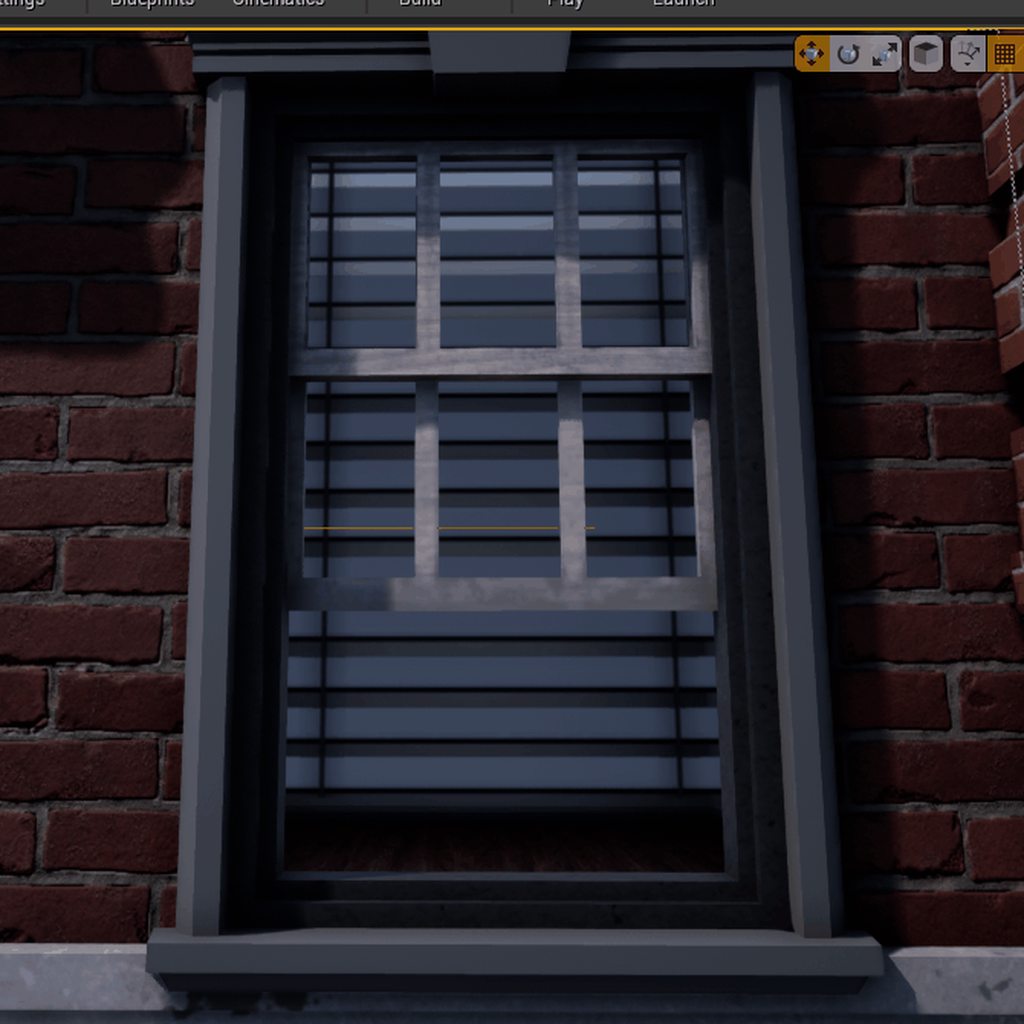
Thanks for the help

 hollow raven
Why is my N key not working for snapping to the ground?
fleet cedar
@hollow raven by default it's bound to "END", try restarting the editor as well
 obsidian nimbus
that window/ blinds shader looks dope 🙂
plush yew
The whole blackboard AI system is something I'm still learning. I've been storing variables on my AI blueprints, not in the blackboard. I assume that's inefficient? Because if the blackboard's intention is to store keys then I assume that must be the more efficient way to store data for the behavior tree, right? At the moment if I want to get something like, "is running" I cast to the AI blueprint from my behavior tree and read that variable on the blueprint. But would it be better to simply update the key on the blackboard every time the value changed?
I think I answered my own question, it's gotta be. Because casting is not very efficient. So right now I've got a decorator that is constantly casting to my AI blueprint checking a boolean, but it'd be better to have it simply check the value of the key on the blackboard
Is that right?
 merry pilot
Anyone have any MOCAP equipment
tacit onyx
@plush yew Just curious, how is casting not efficient?
plush yew
that's what I've been told. Rather than just reading a variable it's performing a cast and apparently casts are inherently inefficient compared to just grabbing a variable or using an interface
kindred viper
the variable would be typed though. Which means you are stuck with the type. So it's a case scenario. What if you use base objects to pass around and cast them as needed. That way you can save a lot of casting. Or using Interfaces. Casting is a necessary evil, if you think of it like that
plush yew
I've just been told to use interfaces instead of casting wherever possible, especially since I've got over 100 ai running around at a time so optimization is pretty important
tacit onyx
The only part about casting that should affect performance in any negligible way is an impure cast used to check if the cast succeeded or not. Even then, it takes a LOT of it to notice. One impure cast is worth about 0.0008ms on my machine. Takes casting 5000 times for me to lose a couple milliseconds.
plush yew
And in the cast of this blackboard I imagine setting a key once and then checking that key's value is cheaper than constantly casting and checking, right?
kindred viper
yeah if you end up chain casting to determine an object, then it can get messy. Thats why Interfaces are good for negating that. But if you are just casting once, expecting the type, its nothing
plush yew
Oh that's good to know
tacit onyx
In general, you should use the blackboard for constant checkup of information yes, but casting isn't nearly the issue performance wise as people make it out to be.
kindred viper
you probably find people who have discovered that they were casting too much, and optimised it away with some other method, but its all relative to your project. I just don't worry about it, in fact I cast more than I need often, just to ensure nothing breaks.
plush yew
Oh awesome, yeah that stuff normally goes over my head and a few months ago I was on here and everyone was discussing how casting was a crutch. Good to know I can go back to using it rather than bouncing stuff back and forth with interfaces
I'd much rather cast > run function than send an interface message, receive the message, and send info back its so tedious
kindred viper
its one of those things that gets people confused a lot too. It's a little confusing to people at first
it was with me too
@plush yew I prefer interfaces if I have many objects to deal with. Then I don't need to write the cast in my code. I can do it via the interface function. Which frees up my logic so if I change classes, I dont have to go digging around and refactoring all the cast class types
plush yew
ah yeah that seems like a pretty good scenario for using interfaces over casting
half turtle
personally i use a mixture of interfaces and casting, casting mostly if i need important references, otherwise i use interfaces
tacit onyx
You can test this yourself. Make an actor array, spawn thousands of a testclass actor and put them in their actor array. Get a variable from the actor class and set it in another array, then do the same thing with a useless cast to the test actor class before getting the same variable from that cast. Impure casts will be negligibly slower, pure casts won't touch the performance.
half turtle
i dont need to know what kind of spaceships i am applying gravity to, for example, so is ideal for an interface
plush yew
Yeah that's definitely good to know. I rarely ever have failed casts
kindred viper
I dont think many people have failed casts who know what they are doing. They tend to know its that class before, and only need the properties from the class type
plush yew
Here's something I'm not super confident on even though I just got it to work: I used a blackboard key variable for the first time. I named the variable after the key that I was using in my blackboard. Does it just automatically make that connection? Because I never set the value or anything. I just matched the name of the variable to the name of the key and my task started working
and here's a decorator doing the same thing
tacit onyx
That messed with me when I dabbled in AI too, never got far enough to go look for that answer and lazily just used names to set and get the values. Wouldn't mind knowing how the key selectors work, myself.
 fallen marten
@plush yew yeah keep the names the same and make them public. When you use services, you can assign your keys from the blackboard to use, to match to your key values in the service
golden condor
How do I get to reference a variable from a blueprint in another blueprint?
I want to get the current health from the player blueprint into a spikes blueprint
runic fern
in the other bluepront " get player character " then Cast to Your Character
from your charcter drag a wire and write " Get CurrentHealth "
golden condor
And it worked
I just needed to change all the "current health references" to the right one
From the new node
Thank you @runic fern
runic fern
Welcome no worry
golden condor
Now just gonna switch it around for a heal pickup lol
Just gonna add instead of substract
hollow raven
@fleet cedar Nope, can't even when I make new file
runic fern
get 2 nodes from third person character reference one of them " get Current Health "
and 2nd one " Set Current Health "
From get current health drag wire and add the amount you want to add
and from result of add connect it with set
tacit onyx
@golden condor I strongly caution against using a second class to change values in a first class when it's not completely necessary. Call an event or function TO the first class, FROM the second class's reference of the first class, and send the damage amount as an input, and let the class change it's own health.
 sweet thunder
Hey, I just started using UE 4. I created class that derives from component instead of actor. I tried to delete the file but ue 4 is generating that file every time, I tried to change the derived class but that does not work. How can I delete the c++ class in ue4?
runic fern
You can delete it many ways from Visual studio or from project files -> Source
but better to delete it from Visual studio and build and save
sweet thunder
I deleted rebuild and they are still shown in ue4 editor. (I deleted it while vs and ue4 closed). I even regenerated visual studio project files and the class is still present in editor
runic fern
try to delete saved file
sweet thunder
i think you might have to also delete the intermediate folder
@plush yew also did that. Forgot to mention
sweet thunder
I deleted both of them. Regenereted vs project opened it build and closed and opened the ue4 and the class is still shown there. The both .cpp and h files are deleted.
golden condor
Is there a way to cancel mark for add on PerForce?
Like, I marked for add an entire project by mistake
runic fern
Baski
Go to Source File and look for the data you want to delete
delete it and generate the project file again
sweet thunder
There are no cpp and h files now but they are still in ue4 editor when opened. I will try to remove everything that can be removed and restart everything. hope it works. I wonder why is not easy solution for this..
sweet thunder
there are not, Not on disk in trash or anywhere. Only thing that left is icon in ue4 editor that there is class like that but when i copy file location it says no path available because there is no file like that.
runic fern
you are not using any source control for this project right ?
 civic lance
Hey guys, is it possible to code up an event to happen in your current scene with c++? Like, I want my objects to become visible only if the firstpersoncharacter (the camera) is within a certain distance from it?
 green venture
When you click launch it cooks the game, is there a way to re-launch the resulting game, without re-cooking it ?
Even if I do no change it seems to need to re cook everytime
it rebuilds executable
 delicate needle
Got an issue. I have an sm that has a BP with an array of materials that can change. This works, and has always worked, switching the materials around. I've cooked to EXE before, and this has worked. Now it stopped working. I understand if there is a BP bug, you guys can't help, but is there ever any other reason why this wouldn't work on the cooked EXE (but does in editor)?
I should clarify as well. Some of the materials will show up on the SM, others will not. I am trying to rule out any non BP issues, before I go into full blow debug panic.
 rocky radish
idk where to ask this, but is there a way to have 2 different parent sockets in a single component?
half turtle
how are two dimensional arrays called in unreal engine?
half turtle
can someone clarified some questions to me about structures in unreal, if i change a structure somewhere, does it change for any actor that is using said structure?
are they like a shared inventory? or are they instanced?
 sly coyote
@half turtle I just made a character creation system that uses structures to store the costumes... Their instanced... Meaning you can use that structure on multiple things and they all have their own version of it
My character creation umg has a preview window that's a separate character model, I pass a structure around by reference and alter settings in that costume structure
golden condor
Why would the package manager say "file name is too long"
This is one of the weirdest issues I ran into
sly coyote
Once a player's happy with their costume.. I set the costume on the player character equal to the costume on the preview character
golden condor
Why would it care about the file name anyways?
sly coyote
Only time I've ever had that issue with file name was I put an entire directory path when I was fetching a file... And unreal engine wants to look in content folder so it's spit back that error
golden condor
I dont get the error
 midnight gate
is theres a node that sets actors position and rotation inside the level
sly coyote
Yes...pull off the actor and set transform
You can then split the pin
Or pull off and break
And it has scale, location and rotation
Or that
golden condor
Thank you @plush yew
sly coyote
Make sure you pull off the actor variable, or it might target something else and cause you grief hooking up
Or self, it it's altering itself
midnight gate
what kind of get rotation do i need to get these values
sly coyote
Transform
midnight gate
get transform?
i only need the rotation values tho
but get actor world rotation gives me 9. 0. 0.
sly coyote
Yeah...I use it as opposed to rotation and location node cause it gives me all 3
midnight gate
instead of 9 1.5 -17
 willow plank
hey guys is there a way to recompile all shaders again ?
abstract relic
Delete /intermediate this is where shaders are stored. It’ll force it to recompile
sly coyote
Gloria check that you're not accessing it as a int...should be a float where ever you are storing it
Int is whole numbers rounded up or down...floats allow decimal places
Any math that you do with it also has to be float...so if you do blah - blah...make sure it's doing it as floats cause otherwise it drops the decimals In the result..example if you grab that rotation and use a 'int - int' on the x value...then set it to another vector rotation...the x value will lose it's decimals and be set to a solid number @midnight gate
half turtle
thanks a lot @sly coyote (the video didnt help (i am in china youtube barely works here)) but the answer about them being instanced was what i needed to know
abstract relic
Out of curiosity. Is there an alternative to YouTube for you?
 fervent apex
Hello! I'm trying to make cinematic using the sequencer but I got an issue. Everything looks grainy while the video is playing, even after rendering. I tried all AA settings but nothing changed.
midnight gate
@sly coyote thank you for your tip i already know the difrence betwen floats and ints
sly coyote
:) I try to reply in a way that others who might not that stumbled on your question can learn
If you're always getting a whole number...somewhere in your code you probably used int -/+ int ....
midnight gate
thats true
i only recenly found out the difrence
also do you know why are my values of get world rotation difrent than in the object
sly coyote
You might want relative location and rotation
That's based on the exact location and rot that the actor it's called on is
The very bottom middle of the actor being 0/0/0
midnight gate
but i need actors location in the world
sly coyote
Instead of the world 0/0/0 which could be God knows where in your level
midnight gate
i dont need local rotation i need inside level rotation
sly coyote
If I'm thinking correctly you want to know which direction the character is facing based on how's it's rotated in the world?
If so that requires some vector math that uses both the relative and world transforms
Like coding a vehicle
ancient lotus
click the drop down box and use world instead of local?
sly coyote
I think they want to access it in code tho
Not just see it
Hard to figure out without know what exactly they're using it for
ancient lotus
get the root components rotation?
 torn shell
I'm having an issue where I can't finish any light builds because my editor just closes down the moment it's done (my scene is 3500 objects at 256). I'm fairly sure this is because I don't have enough disk space left on my SSD. Are there specific folders I can safely delete to free up space?
ancient lotus
the root should be world I'd think? wouldn't everything inside of it be relative? or is everything inside the actor relative
sly coyote
The relative rot is based on the root rot
Yes
When you grab the relative rot...it returns whatever the roots rot is..you are correct
ancient lotus
my mistake, what I meant was I thought the root component held rhe world rotation and everything inside was relative
sly coyote
It has access to the world yes...but it has its own relative... everything in it is relative to root
So you're not wrong
delicate needle
Got an issue. I have a static mesh that has a BP containing an array of materials that can be swapped for what appears on the SM. This works in the engine when played, but most of those materials no longer load when I cook into a windows EXE. It used to work 100% in the past, with previous cooks but it now has stopped working. Now, I understand if there is a BP bug, I’ll have to work it out, but is there ever any other reason why this wouldn't work on the cooked EXE (but does in editor)?
Also, I did rebuild by shaders, by deleteing my DDC and opening the project back up.
If I did, it would have been done by accident. How do I check that?
manic pawn
why would you need matinee in 2020
manic pawn
find a tutorial that isn't from the stone age
umbral ferry
it is virtus tutorial
grim ore
Matinee was removed in .24
umbral ferry
how i can do the animation now
abstract relic
Good riddance. Matinee was terrible
grim ore
if you are trying to rotate a door with Matinee first dont do that, 2nd look at using Sequencer if you really want to do that, or 3rd use Timelines or another system inside of blueprints to do it.
umbral ferry
sequencer is master sequence?
In today's episode we show you how to create a moving platform for our level inside Unreal Engine 4 to make things a bit more dynamic. We go over setting up the matinee sequence along with how we can use blueprints to loop & rewind it!
► Sidescroller Resources - https://www.v...
grim ore
If you are just trying to move an object in the world with that system then it would be a level sequence
abstract relic
(Some say don’t use virtus though I have nothing against the dude)
grim ore
almost all learning material has some merit even if it's to show you another way
grim ore
material you learn with. Video tutorial, documentation, written lessons, etc.
umbral ferry
how i can do i moving platform then
abstract relic
Bad approaches, misinformation, flawed systems. I’m of a philosophy of learning a topic from as many different resources as you can. Virtus is good at making something seem less scary, which is great for those dipping their toes into development. Not so good in instilling good practices however
keen moss
I am looking for info on how to host an unreal exe online and steam it thru a website, most documentation talks about creating a multiplayer server, that's not what I need. Is hosting an exe online and streaming it furioos style possible? Is there simple instructions somewhere?
And pixel streaming only seems to work on LAN
I'm not a web expert sadly
delicate needle
@grim ore Do you know if the editor does something, like cache materials and textures... but if there is something wrong they wont load on cook?
I'm having materials on an object not loading after cook, but showing up in playing in the editor.
grim ore
pixel streaming works fine over the internet if you set it up properly
@delicate needle by cook do you mean when packaging and playing the .exe?
delicate needle
@grim ore yes
keen moss
@grim ore is there some ELI5 type simple documentation somewhere on how?
plush yew
hello guys I have no enough space on my disk C to install vs 2018 on my pc, can I install it to other disk?
grim ore
Materials have permutations and optimizations and one of them is which items they are compiled to. By default its set to auto but it can get messed up if say you applied a material to a static mesh then tried to put it on a foliage actor. It editor it might look fine while in packaged it will be grey. Check the material and find that section and do something like make sure its checked for the type you want to use or uncheck auto then recheck it and re apply it on the item you want it on
@keen moss the documenation on the website should be fine. If using mobile or over the internet where a router is in the way you will need to use atleast a STUN server and possibly a TURN server if using mobile
@plush yew there is a part of VS that will want to live on the C drive, free up space or dont install it
plush yew
I need it, I have no more things to deinstall for free space @grim ore
grim ore
then you cant use it
https://docs.microsoft.com/en-us/visualstudio/install/change-installation-locations?view=vs-2019 you can follow this but some of it has to be on the C drive
delicate needle
@grim ore The materials exist in an array, part of an BP, that also references and applies those material choices to an BP. Specifically its 9 marble materials on a counter top. All other instances of this BP are doing their job proper, but this one instance is not, thus ruling out a BP error. I'm confident the issues is something to do with the materials, and not loading because they some how lost references to their texture components. They all look fine in editor, so I am confused.
grim ore
I've had VS, UE4, and windows installed on a 128gb SSD so its doable
@delicate needle look at that picture i posted, compare your materials and see if the broken one is different. or force it's usage
the other alternative is to remake it from scratch and see what happens or duplicate one of the other ones that you know works and change its textures
plush yew
ty I will try to do it
delicate needle
@grim ore The image showing "usage"?
grim ore
yes that is on the material
delicate needle
@grim ore I'm not seeing a usage rollout.
@grim ore Remaking it is a doable solution at this point, I'll test that now
grim ore
open the material, scroll down in the details, no usage?
@plush yew depends on what you are doing. if just working with C++ and not compiling the engine then the game dev with C++ stuff is fine
delicate needle
Nope, I think the I'm using a custom material thingy from someone else.
grim ore
are you look at the material instance?
plush yew
I need to package the game but it requires vs in future I will write code in C++ so what I need?
grim ore
packaging does not need VS, only if you work with C++ would you need a compiler like VS.
plush yew
I can't package the game
delicate needle
Actually, this might be a quixle material now that I think about it
plush yew
the game is only in bp-s
grim ore
if its only BP you dont need VS
delicate needle
AHHHH
delicate needle
I found the Use with skeletal mesh button was off on the master parent material. Have NO idea how that was off. I guess with that on I should recook? @grim ore
grim ore
Hopefully that fixes it
delicate needle
Fingers crossed
grim ore
yeah change it, apply and save it, then try again
@plush yew then it looks like you have something in there that uses C++
install the Game Dev with C++ stuff in VS and see if it fixes it I guess
runic fern
Hello Mathew GoodDay
 worldly axle
Hello, i want something to happens whenever my actor is clicked. I tried this, but either it gets printed every time, either it dont . doesnt matters if i click on my actor or not
grim ore
if you want the engine to stop working, yes
runic fern
xD
grim ore
go to the bottom right of your content browswer, go to the options there, uncheck show Engine content and show plugin content
delicate needle
@grim ore Thank you so much, 100 times. That worked. I have no idea how that got turned off.
runic fern
grim ore
@delicate needle it might not have been turned off. If you put a material on something it auto assigns it to that, say a static mesh. then in the future if you apply it to the skeletal mesh it sometimes forgets to assign it to that type
plush yew
runic fern
Yes but don't try to delete any folder exist in the engine its will break it
delicate needle
@grim ore Do you think that the "problem" occurred when I used quixel bridge to import?
plush yew
and I can't package the game now
grim ore
we dont know what you put in your project to cause that
plush yew
ok so what to show you?
grim ore
@delicate needle it might have, it might assume the quixel stuff is for static meshes
runic fern
you need the vs almost 99% when you package
plush yew
I added the xsolla plugin but nothing
runic fern
because maybe you have plugins that need to compile or you have other data need to be done with vs
plush yew
also I did this with random generating the name 🙂
I mean I want to get the old UI of the xsolla plugin but I saw it is for 4.21 version I have now 4.24.3-so what I can do to get this old design of the plugin?
I want this
not this:
grim ore
ask the designers of the plugin
plush yew
ok
grim ore
the Xsolla plugin says it requires Visual studio so I would guess it is a source code plugin and that is your issue
runic fern
Mr Mathew
i wanna bother you with small question
I have these function that running the gamemodes as we talked before one after one
but in the middle of sequence im getting the first mode its running again
the indexes like this 0,1,2,0,3,4 or 0,1,0,2,3,4
plush yew
ok so if I disable it now this plugin cus i can't setup it will I can package the game?
grim ore
@worldly axle you are telling it to print every tick, if you want something to happen when something is clicked your actor on clicked event is fine. You need to make sure in your player controller it is set to allow clicking
@plush yew we dont know, you have to try it.
grim ore
@runic fern you are inserting a 0 in your event begin play, any reason why? or inserting something in there any reason why?
pretty much on every begin play you are updating the array any reason why?
 dusty cypress
Hi, I am creating an interior sort of apartment (all a square) and for some reason, some of the walls are super bright. The room is supposed to be dark but when some of the walls are bright, it ruins it. I rebuilt the lighting many times, checked for cracks in the ceiling meeting the walls, etc. Any idea on how I can fix?
edit Solved, changed lighting quality when I built the lighting.
runic fern
Im Inserting the first gamemode will start
because the player can choose multiple mode and can choose which mode to start with
so the mode to start with im inserting that in 0 index
So i can Rearrange the array with this function
so the first mode to start with will be 0 index and the rest will work normal
grim ore
so its always supposed to be in order but the one you want to run first should be first?
runic fern
Yes
its working like this but 0 like running twice for somehow after 2 or 3 incrementing
grim ore
what blueprint is this begin play and code in?
 tranquil trench
What's the beat way to make a inventory system like fortnites (c++)?
runic fern
yes first im running this function without incrementing the index
and 2nd time will run with incrementing
1
2
4
grim ore
yeah i am slowly figuring it out, it just seems super complicated
runic fern
yes 😄
grim ore
but regardless if your original array is 0,1,2,3,4 and you just insert 0 at the beginning then your new array would be 0,0,1,2,3,4 right?
your first item would be your selected game mode, you never really removed that game mode from your array so it will repeat
grim ore
you need to debug it then between loads. watch the input array and step thru it as it goes thru
 gentle nebula
hey there all! i'm trying to get back into unreal after not using for for oh, two or three years or so. among other things i wanted to make a webgl app with it - imagine my surprise to see that the html5 export has been deprecated?! does anyone have any insight into what the status of that community module is? are people actively working on it / is there a community behind it or is it basically DOA?
grim ore
after your begin play when you insert, what does it look like before you update the game mode basically
runic fern
i will debug it
grim ore
https://github.com/UnrealEngineHTML5/ is the repo for it
runic fern
this is the result normal
i was thinking in this function the 3rd one because of clear node
grim ore
well that would be a local function that just turns your enum into an array right?
runic fern
Yes
But because im running enum switch so its taking the data from this function and run the specific function according to this information
So for somehow its switching to 0 index in the middle of loop
grim ore
then it shouldnt effect anything outside of it, it just sets your game mode and isnt your other array getting changed?
is your selected modes index array changing or the actual game itself is picking the wrong mode at random?
runic fern
it does i will show you the result how
this is how the player selecting the modes i've selected all the modes except runner because he will start with runner mode
grim ore
but thats correct isnt it?
runic fern
runner fired twice
grim ore
yes you told it to
try that again but check all of the modes including runner, what is the output?
 shadow depot
Hey, i'm new to UE4 and want to know, how i can change particles only been shown when facing the emitter... can anyone help me there?
grim ore
ok so ignoring that
why is FreeForAll an option?
its in your 2nd screenshot but not the first and I dont see it on the list
FreeForAll is in your 2nd list where it should be in your first but it says Runner instead
limber mesa
Is there an easy way of sharing a project so others can work on it. The only way I know is github
grim ore
welp I would figure out that free for all issue it might be point you to it. Thats not an option you have listed. I assume Deathmath is FreeForAll?
runic fern
oh nooooo i think i wrote it different in one of arrays
grim ore
@shadow depot #visual-fx or #niagara might have the info you need depending on if its niagara or cascade
runic fern
i will check it
grim ore
@limber mesa any source control could work, there are other such as Bitbucket, perforce, or setting up your own