#ue4-general
1 messages · Page 701 of 1
 keen parcel
 grim ore
does anything in the editor look weird? like flat
 mossy spear
let me see if i can grab that
 urban cipher
my biggest learning resource is the engine source
@placid arrow i did not know this was a thing. Thank you for telling me.
grim ore
is an option but it shouldnt make new items locked by default
keen parcel
Lol found solution myself, I accidentally set snap size to 10000 via some unknown keyboard shortcut. 😆 Thx anyway @grim ore MathewW
grim ore
oh.... that would make sense
 fair storm
https://i.gyazo.com/4847ffecf683416baf4a516ce254679f.gif
I tried to do skeleton retargeting with two meshes
But I have issues with the legs
Mixamo character btw*
@unique halo you have to

 unique halo
I have to?
 runic fern
oh btw guys If im using Self Hosted Sessions How can i save the server side values away from player's hand ?
are there any steam clouds i can save the data in it ?
fair storm
@unique halo you have to . pose on the retargeting menager the original mesh as yours mesh
manager
mossy spear
@grim ore can seem to find a repo for it
unique halo
what do you mean? @fair storm
fair storm
i show you
fair storm
so. where the animation come from?
unique halo
from the character you see on the screenshot ^
fair storm
in the bottom you can see there's a pose option. just move the bones as the closest possible as your character and use that pose
let me check if i can find a vide

In this video we take a look at how we can share animations between two Skeletal Meshes that are using different Skeleton assets. We go through the setup and retargeting process and pass an animation between two different Skeleton assets.
(00:05) - Recap
(01:14) - Creating & A...
unique halo
Yea, but it's the same skeleton
 plush yew
so I am here again and available to work so you saw what I did but I need to choose player frame not player @runic fern
unique halo
just not the same mesh
fair storm
no matter
unique halo
I tried to follow this :

Here we go through the import process for several different Skeletal Meshes and show when we can and cannot share Skeleton assets. We also show how we can share animations between two Skeletal Meshes that are sharing the same Skeleton asset. We also take a quick look at settin...
but the legs are like inverted, somehow :
 fair storm
oh. then you have to fix the orentation from the program you are using
i use blender so. idk how to in the others
unique halo
so weird lol, I use blender too, but it's the mixamo skeleton
unique halo
okok
 thin gate
i am trying to open a project that was built without bCompileChaos using a editor that was built with chaos, but keep getting this error
GameEditor modifies the value of bUseChaos. This is not allowed, as GameEditor has build products in common with UE4Editor. G:\Unreal Projects\Game\Intermediate\ProjectFiles\UnrealBuildTool 1
mossy spear
@grim ore can't find a repo for on their github
runic fern
you have to send it to Player Widget not to HUD
mossy spear
still whitelisted for win on their github
runic fern
Because Text block located in PlayerWidgetblueprint
plush yew
playerframe is the player widget
not the HUD
this is child of this:
@runic fern
grim ore
runic fern
Yes and did it workd or what ? Game Developer
mossy spear
@mossy spear https://github.com/EpicGames/UnrealEngine/tree/release/Engine/Plugins/Experimental/AlembicHairImporter
@grim ore still whitelisted there
grim ore
yes, you would have to download it and change it and then see if it compiles for you on mac
plush yew
it doesn't work 😦
@runic fern
we didn't make any script in the ui widget in the player frame
mossy spear
@grim ore would give it a shot
runic fern
ok you are using your Inventory character not ThirdpersonCharacter so that 1000% not gonna work
you need to do the function and the call from the inventory controller
 timid jacinth
Is there any way to make everything in a model into cube geometry
 placid arrow
@urban cipher you're welcome 👍 😁
 noble tapir
Hey there, got a quick question. If I'm doing a linetracesinglebychannel and using the impact normal, will a tessellated material affect this normal? Like if I have a flat landscape with slightly tessellated rock material, will the normal still be straight up? I assume it wouldn't be straight up and it would be the normal of rock material's tessellation
noble tapir
by no, do you mean no, it wouldn't be straight up or no the tessellation will not affect the normal
sorry, my question kind of asked both sides lmao
@simple pebble
 simple pebble
shouldnt effect the normal
 gilded igloo
Hey guys! I want to make an object to be global to the level, a bit like the level bp and like a static class in c++. I could make it an actor and just spawn it in every level but I would like it to be more organic. is there something like this in the engine?
noble tapir
@simple pebble awesome, thanks man
simple pebble
im assuming you have multiple levels that maybe are random?
grim ore
@gilded igloo The Game Instance is a singleton which exists from game start to game end. Otherwise you can look at making your own in C++ or using the new subsystems in C++
gilded igloo
hmm, sounds interestig. ill look it up, thx!
grim ore
if you just want it to be for that level the Game Mode is a level specific blueprint
simple pebble
i would need assistance getting my scroll to work, buttons work just not the scroll box.
 limber mesa
is there a way for me to stop a character completely. i used stop movement immediately but the character can still move
 acoustic wraith
Does anyone know how to grab the pixel color behind a translucent material?
Like, the color that the pixel uses before it applies the translucent part to it?
grim ore
There is a specific node called Disable Movement for disabling movement (it sets it to none)
 umbral ferry
What is difference if i start project with blueprint or c++?
what that change if i want use both?
 steep rampart
I watched this video and followed what it did, but sounds only come out when i set the default to a sound, It doesn't detect wood is wood: https://www.youtube.com/watch?v=LPtDqsMFFys Can anyone help?
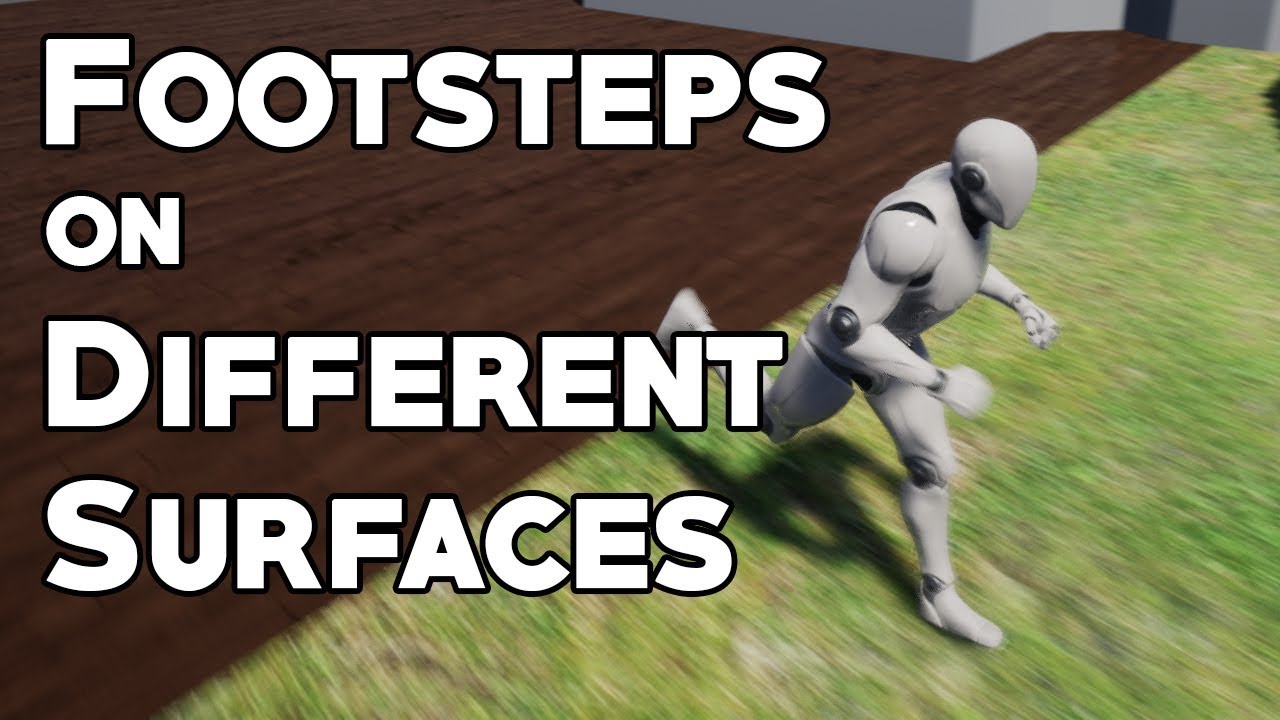
How to use physical materials and character animations to change the way footsteps sound based on which surface the player is on. Topics covered: Animation notifies, blueprint scripting, material graphs, physical materials.
Special thanks to NoKnowledge for the request!
LINK...
 silk plinth
how do I install Unreal Engine?
 fierce tulip
double click on the executionable
gilded igloo
ey guys! anyone knows a good tutorial for spatial hashing?
silk plinth
executionable?
gilded igloo
I mean, sure
silk plinth
I don't understand
I'm trying to figure out how to install this, and I can't figure it out.
gilded igloo
go to the epic games launcher -> click on the unreal engine tab on the left, go to library, and at the top right should be an "install engine" button
if not there then somewhere else
silk plinth
thank you!
gilded igloo
sure thing mate
 lucid magnet
do any of you have a great tutorial on how to make a graphics menu with all graphic options and apply/save button?
 fallen urchin
there is no specific channel for #virtualproduction ? <@&213101288538374145> may be we can add one
 maiden swift
@fallen urchin Thanks for the suggestion! Next time share your ideas in #server-feedback please. 🙂
fallen urchin
okay, thanks for the mention. I will do that 🙂
plush yew
So I have been trying to start up my UE4 learning journey and Im not sure where to start. My long term end goals are to make a game that is somewhat like star citizen. Does anyone have any recommendations as to where i should start?
fallen urchin
go to UE4 Blueprints section in learning tab
fierce tulip
@plush yew start with a lot of getting started tutorials.
And if you want to make something like Star Citizen, also try getting a few hundred million dollars :p
 hoary locust
and don't forget to never release it
 kindred viper
@light lintel export the mesh, then re-import it and select a new skeleton
 floral arrow
has anyone had the issue of trying to bake lighting but swarm just stays on "exporting to local cache" and never starts baking?
 novel vine
not sure ive never had an issue with my borders like that
are you using a custom texture?
timid jacinth
Ah weird
kindred viper
ahh cool
plush yew
How do I stop the camera in the viewport from being upside down
nvm, got it
Hey, how would I make it possible so that my player gets mud on them after they go prone in some mud
floral arrow
is there a way to find which mesh a texture is applied to without having to find the specific meshes in the view port
by maybe a setting from right clicking on the material or something
grim ore
@steep rampart if this is landscape and .24 its broken
steep rampart
so what can i do instead?
grim ore
downgrade to .23, upgrade to .25, integrate the fix yourself in a source version of .24
steep rampart
how easy is it to migrate projects up?
grim ore
usually just opening it in the new version or using the built in upgrader
 abstract relic
Just know that you can’t go back
 midnight root
Looking for OP's, what , given use of world comp,is the best if any lighting method(s) to use for as much realism as possible
static out of question given low ram state (8gb)
I'm happy with 'areas', but some areas are just full on white overexposed
 drifting geode
hey folks, any ideas whats happening here with that shadow gradation/bending?
umbral ferry
What is difference if i start project with blueprint or c++?
what that change if i want use both?
grim ore
what you start with is the only difference in the end
 fathom glade
Does anyone know of an example where the distance of a mesh along a spline can be controlled by a first person camera looking left and right?
 wise marsh
how i can pan and swipe a 3d model with gesture
pan and scale with android
umbral ferry
@grim ore i dont understand
floral arrow
has anyone gotten "lighting build failed, swarm failed to kick off" error when going to build lighting before
 rotund silo
When making a material what does plugging something into Normal do?
wise marsh
spring arm
is there a way to make the camera not go into the meshes of other characters
@light lintel set the arm at the head
floral arrow
@light lintel did you figure out how to fix it
fix "lighting build failed, swarm failed to kick off"
wise marsh
@light lintel did you figure out how to fix it
@floral arrow try out by seconf time
floral arrow
oh ive def done that
floral arrow
yeah ive tried multiple times and cleared swarm cache
and increased lighting level scale etc
wise marsh
some of my characters have big models and the camera goes into them
@light lintel or put a socket
and the child gona be the head
floral arrow
@wise marsh youve gotten this problem too?
wise marsh
yes and just tried again and its fixed
 normal burrow
restart comptuer jesus
the socket lightmass uses is probably in use by some zombie process
floral arrow
@normal burrow i have restarted, i was having the problem yesterday and have shut down computer over nigh
normal burrow
hm
floral arrow
i think you were there yesterday for it @normal burrow
normal burrow
how is your disk space doing
floral arrow
when i had to delete the saved and intermediate files
idk if that is doing it or not
normal burrow
ah yeah i didn't hear back, or got busy or something
floral arrow
oh no that issue was resolved
floral arrow
that was just because project wasnt opening
but lighting isnt building now
i tried clearning swam cache
floral arrow
200 gb
normal burrow
should be enough
wise marsh
@light lintel it should works
normal burrow
is it a github build?
floral arrow
nope, all the solutions i was finding were for source github builds
and to rebuild lightmass in visual studio
but i just have normal ue4
normal burrow
yeah that kickoff failure can be from lightmass not being built. i don't think using a source build would fix it though.
Have you gone through the logs?
may be something more descript in there
floral arrow
no i havent how do i open the logs
normal burrow
Saved folder then Logs folder
the most recent file in there should be relevant
you'll want to look if theres any message of the failure to kickoff, then any notices surrounding it of why
floral arrow
the saved filed i deleted yesteday?
wise marsh
you have seen this stuff and complexity? @floral arrow
floral arrow
@normal burrow maybe i can send to you or something
normal burrow
you can drop the entire file in here by dragging if you don't think theres anything you'd like to hide in it
floral arrow
nah i dont care
floral arrow
ill pm you
normal burrow
ok
LogLightmassSolver: Warning: Failed to open channel for material data for 1F616F664FB3D198D75EE9A43C2C0378
you get a lot of that
preceeding the failed kick off
normal burrow
do you have a template project you could try building lighting in quick?
floral arrow
when i open the project
yeah ill try
one thing is i did move this level to a new project from the parent project that had all the material parents so i could keep the file size down, idk if that would mess with it or not. all the materials show up fine however, the parents arent correct though unless the mesh had a parent on it to begin with and not an instance
@normal burrow yes the lighting builds normally in a different level in the same project file
 jaunty ridge
I have a question, hope someone knows how to solve this in C++.
I want my character to play an animation on mouse/key click, and then during a time in that animation i want it to trigger another function to spawn.
Think of it as mouse press -> Play nade throw animation -> At specific point in animation call a function to spawn the nade.
It's not exactly what I'm doing but close enough that the solutions are the same. I know how to spawn it with a right click, but I don't know how to trigger the animation via C++. And how to get a callback using the animation notify thing.
Anyone have some input, or better ways to do it? Everything but animation/blendspaces/locomotion is done via C++ so I hope to keep it that way
limber mesa
is there a node called enable character movement?
 tiny sonnet
why does the destroy actor (inside death function) only run on the server. It gives client xp and everything, just doesnt destroy the actor, i tried everything
@limber mesa set movement node
tiny sonnet
yes
limber mesa
thanks
noble tapir
Hey there, I'm trying to paint some of my landscape and when I use 2 of the layers of my landscape material, for some reason it causes the landscape to go gray in that section and never goes back to normal. The material works fine in my other test project
Anyone have any suggestions?
plush yew
build lighting?
grim ore
if you have too many textures being sampled you might have to adjust your texture sample nodes. Changes the sampler source to shared and try it
limber mesa
im trying to do a flip flop when you press a key and something shows and when pressed again it hides
i think i figured it out
 worn granite
you probably just want to set it invisible and then re-activate it
but removing it and recreating it will also work
worn granite
Set Visibility - Hidden or Collapsed
limber mesa
thanks
worn granite

Ever struggling with "Accessed None trying to read property..." error? Here is how you can fix those while keeping your code sane.
Going over different options for variable validation and why and when to use them.
Text version of this video available here: https://acheta.gam...
There's a thing called Validated Get which would help you spawn a widget if you didn't have one, or if you had a widget you would show the widget
normal burrow
lol the reverb on that video
limber mesa
ok ill look into it because the code that i wrote didnt work lol
normal burrow
good advice though
 cyan oak
Any idea how to get gravity to affect these skel mesh? they are boned, and instanced using niagara, which seems to not care they have gravity assigned - https://i.gyazo.com/885cc0ba430be8887b914bfd021badc7.mp4 and this is the skel mesh, assigned and working alone.... - https://i.gyazo.com/3b69ff8c2eac8d62c23c0de49d16b4a6.mp4
normal burrow
lol i feel bad for that last video for some reason, relatable
but i don't know what you mean by instanced by niagara there
is each one of those things a bone?
cyan oak
each mesh has 5 bones, and 36 tris... this is about 100, using a bp, spawned attached to niagara particles
the movement around is from niagara particles
so the 2nd vid is the same skeletal mesh alone, working with gravity.
but the cloned instances using a BP seem to not....
how can i assign gravity, wind, curl noise, etc
normal burrow
Add Force
its a niagara thing
use 0,0,-980
gravity isn't a function of mass, so you don't multiply it by mass, but you might have to if acceleration isn't an option on the add force node
cyan oak
sorry but these are not Mesh Renderer meshes
and im not asking how to put gravity on the particles
I want gravity on the skeletal meshes that ive attached to niagara particles
as the bottom vid shows, the skel mesh is affected by gravity when it is dropped into level
the instanced clones of it are not in the top vid
cyan oak
I did something like this - https://realtimevfx.com/t/alex-fedorov-sketch-33/12201
yes Alex made a killer tut
but, this was edited by Cultrarius to be components instead of multple BPs... either way
the instances seem to not have grav
rotund silo
What does the Normal attribute of a new material do?
kindred viper
gives a direction for the illusion of height. ie. makes a flat brick wall texture pop out in 3d as a kind of render illusion.
An overview of the Material Nodes example level, example 1.9: Normal.
 slim horizon
I'm trying to add an intro movie to my project, and when built and played the first time it runs fine and transitions into the scene as expected, but if i quit and then reopen the scene it almost entirely skips this intro and goes straight into the game. I'm assuming this is cause i've already loaded the game once so it can do it quicker the second time? Can i force the game to play the movie before doing anything else?
cyan oak
no cloth
just boned mesh with IK... i need to add gravity and maybe turbulence or curl noise to the bones... is that possible? 😄
plush yew
@plush yew
slim horizon
Never mind, I am completely 100% blind
normal burrow
not really howardm
i'm confused when you say instancing
but if you can run an animbp on each then you'd be able to enable anim dynamics or something to get them physically simulated
cyan oak
look at his tutorial - https://realtimevfx.com/t/alex-fedorov-sketch-33/12201
and you will not be confused
🙂
lucid magnet
so im working on making a blueprint for a combo box so it matches my buttons - in my buttons blueprint i can set the style of a button, but now i a combo box style blueprint... so what can i do?
 gilded plinth
Hey All, I'm trying to understand the limitations of sequencer vs a camera track. Is it possible to have player input while sequencer is running?
I assume it is but just wanna double check if there is any limitation on that
normal burrow
camera track?
 stiff sail
is this where i would ask for help?
gilded plinth
Ya the Camera Rig Rail
or even just having a camera following a spline
An example of how to set up and shoot from the Camera Rig Rail.
I suppose the distilled version of my question is does Sequencer restrict you from any type of gameplay driven events?
normal burrow
it does not impede gameplay
if you don't have a camera layer in the sequence it shouldn't take over
but i've not used it at runtime yet, #cinematics would probably be a good place to ask
like i've played with a sequence playing in editor, without issue. but not in a controlled way
gilded plinth
ah good idea thanks ya. Wonder if i can have a camera in an actor (the actor has a layer) and that'd be ok
i'm basically just looking to have a track for the player during runtime but still control the character who is moving along the track, i.e.e theirviewpoint out of a camera as well as interact with the environment via user input
so it's still a "game" and def not a cinematic
wondering if i should avoid sequencer for any reason
normal burrow
it should be doable https://www.youtube.com/watch?v=hY0jRfxPYnc these were recorded with sequencer and then camera modified within the sequence
so i think using sequencer to just drive camera movement should work fine
you can still use the rig rail with sequencer too, i think you just sequence track the percent or distance along the rail
gilded plinth
Ah cool. In the past I didn't have much luck with the rail. Is it still the preferred way to create a track for an actor to follow along?
normal burrow
i just key
gilded plinth
the rail rig tended to be jerky at certain curves
gilded plinth
and i couldn't fix
normal burrow
i've not used it personally, only seen it executed
normal burrow
Yep, HighTide and I. There's no way i could make the beautiful environment and characters there lol
gilded plinth
Nice well did. I'm working on some environment stuff rn
looking to meet some actual environment artists
gotta focus on crystal materials/geometry rn. not a lot of docs out there
gonna take that to graphics
plush yew
I want to create a timeline, with event triggers that would trigger a specific blueprint event.
I am looking to create an in-engine asset like this, or if there is anything similar to this. Anyone could give me directions where to look? Hopefully i don't have to create any editor customization for this 😄
I believe the animation system has something like this
limber mesa
Is it possible to import a rar file into ue4
 manic pawn
it's an equals node connected to an enum wire
manic pawn
something like Equal (Enum)
grim ore
@limber mesa no its not
manic pawn
you can only get it by actually dragging off an enum wire
limber mesa
Thanks matt
lucid magnet
@grim ore im following your tutorial on resolution change - i have setup the combo box + a function to the res's, but when clicking my apply button nothing happens... do you maybe have any idea why?
wait
i got i working
 weak stratus
Hey, I don't know if this is the right channel for my question but maybe someone can help me. I've had this problem since I changed something at Online Platform, I'd like to put it back but I can't because I can't open the project anymore. Is there any way to reset this via the file?
tiny sonnet
for handling melee damage, would u reccommend collision or traces, i found collision to be kinda unreliable which is why me asking
grim ore
@weak stratus if you are not going to use that plugin/module you can remove it from your .uproject
weak stratus
@grim ore How do I do that?
grim ore
open up your .uproject in a text editor and look for that module. If it's there you can remove that section
weak stratus
@grim ore I'll try that, thanks 🙂
 sage coral
Had a question for a player currency would I bind the interager to the players info, the player controller, or the menu widget itself?
Its ment to be an item like a key that you pick up in one game mode that will unlock another game mode based on how many of the items you have but you need to go to the main menu to switch game modes so im havin a hard time figuring this one out
midnight root
Can't find ' stop camera from going through terrain/object' in component under camera..was it removed/moved ?
2019.3.7f1
 weary basalt
@midnight root Cameras cant be told not to go through stuff, thats not how it works.
midnight root
not what Imean
weary basalt
SpringArms have that functionality though, which typically you attach a Camera to.
weary basalt
Most likely your not explaining what your looking for correctly..
weary basalt
Is your game 3rd person?
midnight root
yes
normal burrow
neighborlee your talking about unreal right?
midnight root
Yes sorry was just wondering there is a trick to make sure it never does
maybe its nothing to worry about, so far in 2 yrs it never has, just thinking of all issues that might come up
 vocal flume
I'm doing some experimentation with quality switch node in Materials.. Can I skip using a normal map if the quality is low?
is there a performance gain with skipping one of those maps?
 narrow meteor
Guys how could i do multiplayer functionality if the base player is a first person character?
and doesnt have no feet or head or anything
vocal flume
Also, if I create a material with quality switch for 3 levels of quality - 2k diffuse map for high, 1024 for medium and 512 for low.. Doesn't this increase the final size of the game?
Mine is a mobile game.. so if I have all materials setup this way.. can I package them differently based on the device? like low size package for the older hardware (because 512 textures).. high size package for newer hardware (high res textures)
kindred viper
@vocal flume You should be able to pass a material parameter and decide if you plug the normal in. If there isn't a regular node to do it, you can do it via custom node and some HLSL.
vocal flume
@kindred viper I got that done a few seconds back. Thanks for your attention 🙂
kindred viper
ahh coolbeans.
vocal flume
any idea about the texture sizes?
 empty arrow
what does this mean
 lapis tulip
Hello! there's always a CameraActor being spawned when I do SpawnActor node... but if I remove SpawnActor node in the Blueprint, the camera I set up for View Target will be viewed as target as what i would expect... Please help... Thanks... 🙂
empty arrow
Am using VS 2019 if it makes any different
plush yew
Simple question i'm trying to change the color of my sky box changing colors doesn't seem to do anything?
narrow meteor
@plush yew try turning off the node "colors determined by suns position"
plush yew
thxs
narrow meteor
np
 last dove
is there a console command for showing everything as wireframe when you actually play the game?
 regal shard
how would u keep legs planted when rotating the character movement component? (so I can do a turn animation on the lower half)
Ive been trying to figure out how to do a turn in place animation for days
 hollow ridge
hello everyone do you know if it is possible to embed websites in unreal?
kindred viper
@hollow ridge yeah its possible. You can either use the Web Browser widget (needs enabling in plugins probably) or you can scrape a website and feed it in via other methods such as PHP/VaREST or direct through C++
@last dove last time I tried to do that I ended up having to use materials as it's done via shaders now (it was built in with UE3 but they changed it years ago)
kindred viper
i might be out of date on that info though. It was ages ago when I did it
I did see this Mesh->bOverrideWireframeColor = true; Mesh->WireframeColorOverride = FColor::Red;
You might get away with doing it via Post Process Material too
perhaps the old command of "viewmode wireframe" is worth a shot. I dunno really
manic pawn
note that web browser plugin is trash
kindred viper
can't say I've used that web browser plugin for more than loading images, but then I found LoadURL so stopped using it. If I was going full webpage though, I'd probably scum it through some external stuff.
plush yew
so I need to do the function in the inventory controller or inventory character? @runic fern
I did it in the player controller and happened this:
😂
 worn pewter
hii everyone
plush yew
So I am having a 2 am thought and was wondering if such was possible: For a player to have a full human anatomy inside of them, and they could get damaged by bullets, force, etc all in game real-time. And depending on the organ that got hit, it would do different amounts of damage...
But it is location specific, so if you got hit in the chest... it would hit your heart. Or if you got hit in the side— maybe your kidney
 golden condor
If I made a mistake when importing a mesh into my scene by changing its rotation on the import dialogue screen, is that reversable?
reverseble*
golden condor
I am running into an issue where I have added a BP actor to said mesh and when I play the spline the rotation is messed up
 fleet cedar
@plush yew you could take a look into the "trasher" from skate 2/3 games
has something similiar
golden condor
I think its because of the first mistake I made when importing but I am not sure
 copper flicker
you can also reimport
golden condor
Although, Kenney assets specifically recommended a certain rotation when importing FBX files into Unreal
I tried reimporting but I didn't get that dialogue screen again
golden condor
When it comes to deleting it, I put a lot of work into this asset.
There is no other way?
copper flicker
don't delete the asset, just the imported mesh
or import another mesh, a duplicate
and then delete the original
mesh!
 reef frost
Does anyone know what could possibly cause this? I've tried everything.
[2020.04.07-05.54.16:291][671]LogWindows: Error: Rendering thread exception:
[2020.04.07-05.54.16:291][671]LogWindows: Error: Assertion failed: BufferLayout.GetHash() == Shader->ShaderResourceTable.ResourceTableLayoutHashes[BufferIndex] [File:D:/Build/++UE4/Sync/Engine/Source/Runtime/Windows/D3D11RHI/Private/D3D11Commands.cpp] [Line: 1533]
[2020.04.07-05.54.16:291][671]LogWindows: Error: Uniform buffer bound to slot 4 is not what the shader expected:
[2020.04.07-05.54.16:291][671]LogWindows: Error:     Bound:    Uniform Buffer[FPrimitiveUniformShaderParameters] with Hash[36700160]
[2020.04.07-05.54.16:291][671]LogWindows: Error: Expected: Uniform Buffer[LandscapeParameters] with Hash[100467976]```ok, my question. is there a way to access the contents of my persistent level, from BP?
say I have 5 basic 001... etc
fleet cedar
@copper flicker Are you familiar with the level blueprint?
fleet cedar
You want to see how many streamed levels are in the folder?
copper flicker
so what I need is to get the number of levels there
plush yew
it is error while you try to package or? @reef frost
copper flicker
like if I have 5 basic levels, I wanna get that number form code, not type it manually
I could also check the contents of a folder.....
fleet cedar
I may be wrong but I don't believe there is any way to do that in code
copper flicker
but it's better if I get the actual stream-ready ones
fleet cedar
You could look into editor utility widgets and see if that does it for you, but at runtime levels aren't going to be added or removed from that list of streamed levels
copper flicker
doesn't seem to be ... but I wonder how I could handle this, other than moronically/manually
reef frost
@plush yew Nope, It happens when open my map in editor, and click an object in the outliner
golden condor
That didn't work, when deleting the mesh all was gone with it, references I mean
golden condor
Need to restart maybe.
golden condor
What do you mean?
fleet cedar
Just right click on the folder that says "contents" and click fix up redirectors in folder
@copper flicker Since you can't add / remove at runtime for streamed levels (to my knowledge) from that folder, that's why I would think there's no way to easily do it in code
copper flicker
how about reading the contents of an Unreal folder
fleet cedar
You can do that in C++ or maybe an editor utility widget
copper flicker
I have to do it in BP
fleet cedar
You're better of just setting the value manually
copper flicker
it has to work at runtime
golden condor
That didn't work either, fixing redirectors I mean.
fleet cedar
@golden condor Can you post the problem you're having again?
golden condor
I had a problem with the rotation of an object when I play
copper flicker
but you can just change the rotations of that mesh
golden condor
So, I thought maybe the rotation I set when I imported the object was the problem
fleet cedar
If you open up the import settings there's an option that's called "import rotation"
Check that
golden condor
I now know deleting was a mistake
Because deleting and importing again has made the object lose all references to the blueprints that were on it
plush yew
ok, idk then @reef frost
golden condor
Since the new object is just that, a new object
Ow I hate myself so much right now
I am so so so stupid
fleet cedar
Do you have a previous commit you can go back to?
golden condor
Yes I do
The problem is not even a problem
Import Settings inside the mesh
You can reset all of them there
reef frost
@plush yew I just fixed it, disabling "Enable World Origin Rebase" fixed it. So if anyone uses World Comp, avoid that shit
golden condor
I am so dumb sometimes
golden condor
Its the little things that get you
Look at this really complicated blueprint that does so many things and is perfect, no problem.
Rotation problem, surprised pikachu face
Ow no
I didn't commit all day
This is not real
What have I done
copper flicker
you have a very simple problem Sofi, replacing or editing content is no need for drama
plush yew
I am confusing and gfight with this twhen the game start to start the player with random generated number
but now when I start the game I have 2 player bars-lol
copper flicker
and no need to get old commits
plush yew
copper flicker
so.. listing directory contents is only possible with C++?
golden condor
I already deleted my content
And excuse me but I just lost a lot of work by doing that
Anyways, thank you for the help. I need to sleep since I am really tired.
plush yew
the most important is that you fixed it
fleet cedar
@copper flicker What are you trying to do with the list of streamed levels?
plush yew
someone that can help me when I start the game to generate random name on the player cus now when I start the game i have 2 player bars-lol
^
fleet cedar
@plush yew How long have you used ue4 for?
fleet cedar
I generally just double check before helping people on different things to make sure they've got the basics down
plush yew
ok
yeah I have them 🙂
the problem is that now i can't find where is set the hud cus I use the inventory package with replication and there are a lot functions and stuff
fleet cedar
So the hud is being added without you knowing?
plush yew
no
I use the inventory package with replication and there are a lot functions and stuff
fleet cedar
2 ways to check, one is look at the reference viewer by right clicking on the hud asset in the content browser and following the assets that reference it. Another is double check in your game mode to see if a HUD is set by default in there
plush yew
ok
in the game mode nothing
thisis the hud
but here it is structured on different way
fleet cedar
Click on reference viewer
fleet cedar
Can you describe the issue again?
plush yew
ok
this is the function for the name generation
it is in the inventiry player controller function
here is the begin play again in the inventiry player controller-if I add this create widget the player the function to work, when I start the game I will have 2 players huds and one generates random name, other not
I hope now you understand it
?
fleet cedar
You're adding both of those widgets to the screen of player 1
plush yew
yup I know
but idk how to remove the other one
I need this widget to show because the function to work
fleet cedar
I'm not sure sorry
plush yew
about?
@plush yew Alt-click that arrow from nickname generation
and connect it to create player frame widget
then connect that to AddToViewport and connect the return value to addtoviewport
that will show it to your screen
 grave citrus
ayo, the square of my landscape is strangely highlighted when I add a new layer. wasn it something like rebuild lighning ?
plush yew
Rebuild your lighting. @grave citrus
ok I did it but it will show 2 players, I want only 1
grave citrus
mhh ok already tried it with high settings
plush yew
@plush yew do you have another create widget function somewhere else?
yup
idk where to find it
thats the issue
remove it
the problem is that I use inventory package with own setup
and then I want to create my stuff and it is mess-xD
it is setuped to show the hud on other way cus I looked for create widget and there is this only:
and the other one which is for the function
so this means that the hud is setuped with other way -idk what
so I need to remove the other hud and keep this new with the function to can do the generation the name
I don't quite understand...
ok I will try to explain it
do you want to move on dm to do not create spam here?
Well im quite busy right now but move it to #blueprint @plush yew
ok
 grim shale
Hey, So i have an anim BP on the ue4 mannequin that has a blend space in it that takes direction and speed, Anyway, When i play and move in any direction the character kinda ignores the camera and move forward of it's original place and then teleports back to it's original position, Any idea?
plush yew
@grim shale Did you set the animation to run in place?
Go to the animation sequence and in asset details check EnableRootMotion
Let me know if this works out for you.
grim shale
You mean when i downloaded the anim? No
plush yew
That probably explains it
plush yew
You mean it doesn't work?
grim shale
Yep.
plush yew
Uh, did you download it from a site like Mixamo?
Those sites have a option for runinplace
grim shale
Yeah
grim shale
I downloaded it as a pack so that option wasn't available,
plush yew
Can you name me the pack?
plush yew
Alright one sec
grim shale
Take your time.
plush yew
Sorry to be a bother here just trying to get you the inplace animation myself to save you effort but whats the name of the animation that is running out of place? @grim shale
grim shale
Yep lol
plush yew
and too early to be thanking me
grim shale
If there is no other way i will download them individually with the in place
grim shale
Alright then, i just gotto download them and redo my blend space... Pretty easy.
Thanks for the effort.
plush yew
No problem and sorry for not being able to help 😅
grim shale
Np.
 valid flax
Does anyone know what would be the best for rendering as I want to try some renders from my maya project, but I am unsure if rendering in maya is the best option or is it worth looking into say marmoset 3? I am quite new to rendering and would really appreciate any advice.
 heady quartz
when does free for the month usually drop?
plush yew
someone to suggest me tutorial for inventory system which is best at ? cus I followed the tutorial from gaime dev and I stucked some times and I gave up, that's why I used done inventory but idk how it works, how generates and I need to make my own
 warped sun
im missing my viewport in my blueprint, what do?
im also missing all the stuff inside of it.
plush yew
wdym you miss it?
warped sun
its gone.
plush yew
lol
warped sun
wow thanks
i made a new one, then played. and then closed the test and the blueprint was corrupted again
how tf does that even happen?
 whole quarry
@warped sun you could try this
plush yew
https://i.imgur.com/j8FioJS.png
character is not turning 90°
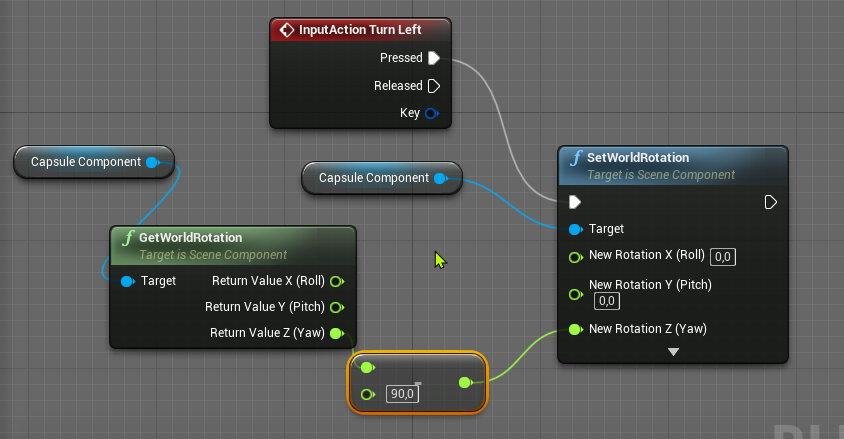
 idle compass
damn, is it actually possible to use displacement map on landscape ?been figuring it out for 2 hours and couldn't find any way. I tried applying it to a plane and it worked, but it doesn't work on a landscape
warped sun
@whole quarry tried that, doesnt work.
 fiery mortar
hey guys this might be a dumb question but I followed a dialogue tutorial on youtube and made it work however I can't add this to other npcs by just simply copying the actor and changing the dialogue tree, is there way to make this simply or am I supposed to create the system all over again every time I wanted to make a npc who talks?
 patent cobalt
@idle compass you probably need to apply some tessellation to the landscape. Look up "UE4 dynamic landscape tessellation" on YouTube, you should get a couple of good tutorials about it.
@fiery mortar it largely depends on how the dialogue system has been implemented. One way would be to take your original actor (BP), derive a Child Blueprint from it for each different actor, then adapt the dialogue for each one.
fiery mortar
@patent cobalt allright man thanks for the help
 polar viper
Idk if it's just hating me but I'm trying to load my project and it's just sticks at 93%
I've not even got to the editor
runic fern
try to delete saved and intermediate folders and try
whole quarry
@polar viper it can sometimes take some time, it can be compiling shaders and stuff
The other day it was stuck on me at 45%, took a hour to launch..
polar viper
@whole quarry it's a 12-13GB file. So maybe 2 hours?
whole quarry
could be
you can check in task manager to see if the ue4.exe proces is using CPU/RAM
as long it keeps changing, its all ok
this thingy
polar viper
The cpu bounces around 0.1-1% and the memory is at 587.9mb
This is going to be a long 10 days
whole quarry
Waiting is still doing something 😅
polar viper
Haha. My project is due in 10 days
polar viper
Yup
idle compass
so I can't just brute force and apply the tesselation on all parts of the lanscape ? @patent cobalt
polar viper
I just need to render 6 cameras and export the game once I've done the collisions of 3000 objects
 modern sinew
What hardware is most important for running a server? Storage space? RAM? Other?
 spare sun
depends on what ur server is gonna be doing I guess
runic fern
Goodmorning guys
whole quarry
@modern sinew Usually CPU/RAM
polar viper
@whole quarry look I'm a 3D artist using unreal for the first time this year
modern sinew
Running a multiplayer game if I ever manage to get UCRT on my computer so it stops crashing on build
*package
Not build
spare sun
how many players and how complicated? Database required or just a lobby kind of thing?
Id just bench the bottlenecks tbh, the more complicated it gets the more cpu power it needs. The more players the more ram (&cpu). The more it needs to store the more storage ofc.
modern sinew
Hmm. Well, I have a lot of features that I'm working on, although currently I've just gotten multiplayer to work with the Multiplayer tutorial. The eventual goal is like, a sorta space-fantasy game where you can build your own ship (and other stuff like robots, but it'd use the same system
Right now I keep getting this error tho LogPlayLevel: Error: ERROR: Stage Failed. Missing receipt 'C:\Users\myDesktop\Documents\Unreal Projects\MultiplayerTutorial\Binaries\Win64\MultiplayerTutorial.target'. Check that this target has been built. ... PackagingResults: Error: Launch failed! Missing UE4Game binary. You may have to build the UE4 project with your IDE. Alternatively, build using UnrealBuildTool with the commandline: UE4Game <Platform> <Configuration>
whole quarry
So you will be making a persistant only world/universe?
modern sinew
as in like, one world?
whole quarry
Not short game sessions like counter-strike but more MMORPG kind?
In the latter case you will also need DB work, then its CPU/RAM/SSD
modern sinew
oh yea; I thought you meant one-server like EVE, and while that would be nice, I'm willing to bet that gets expensive fast
whole quarry
It only gets expensive if your player base grows big
But by then you should generate enough money to finance that
And also you will need multiple servers by then
modern sinew
How many players do you think you could fit on one server, all with custom-built ships and robots and stuff, etc?
whole quarry
If a bit optimized, having a server that can handle 2500 players should be about 150 a month
(euros)
thats just running the server + db, nothing else
modern sinew
Hmm. That's less than I thought. But yea, the expensive bit is hardware
which that doesn't count
whole quarry
Its better to use cloud hosting instead of buying the hardware
modern sinew
I'm sure there's downsides
whole quarry
Its a lot of work for a one man or a few for such project, thats the downside 😄
modern sinew
That's not related to hosting
whole quarry
Hosting dont usually have much downside other than it costs money
modern sinew
I meant that I'm sure there's a downside to cloud hosting that isn't present in running your own server
 floral hull
Good afternoon, my colleagues. I'm new to game development, but my whole life I've dreamed of doing it as part of a hobby. Now it's quarantined and I was finally able to fulfill my dream. I already know a lot, but I can't figure out how to do such simple things as capturing a character by the enemy? How do you make it so that the enemy can capture the character and for example strangle him or throw him against a wall? I managed to make sure that the enemy had a sphere ahead of him, when he got into which he grabbed the character, but he always grabbed it for different parts or just for air. It's basically just playing different animations and turning off the character's movement. But I don't know how to add to all that to make the enemy reach out to his neck and grab him for it. Help me with a video lesson on the subject. I would really appreciate it if you could teach me how to do it. I speak very bad English, so I analyze the video lessons in my head to understand what the author does without translation. I would be glad if you could teach me that. Thank you to all those who will answer my question.
modern sinew
Well I got the uCRT file problem to go away, but turns out that I just got another error
UATHelper: Packaging (Windows (64-bit)): ERROR: System.IO.FileNotFoundException: Could not find file 'C:\Program Files\Epic Games\UE_4.21\Engine\Plugins\AdvancedSessions\Intermediate\Build\Win64\UE4\Development\AdvancedSessions\AdvancedSessions.precompiled'.
runic fern
Hello Guys can i set the Value on the left as a first index in the array on right ?
like when player select on of the strings on left its will set automatically 0 index on the array
the strings on left " Game Modestr " Its the first game type will player start ,
and the array on right side " ServerModes" its the modes player have added to his server
whole quarry
Well, set it to index 0?
Bit wierd to use an array for it as you only can run 1 gamemode 🤔
 worldly axle
Hello, i would like to check if a StaticMeshActor Is clicked . I know there is think like Left Mouse Button and Event Actor On clicked but it looks like i cat get it to work .
lucid magnet
anyone who can teach me how to set this text to be the current screen resolution?
whole quarry
@lucid magnet
whole quarry
for your next question, how to get supported resolutions, @lucid magnet
lucid magnet
already have that
whole quarry
ah ok 😛
drifting geode
anyone here who used the houdini engine and sucessfully imported "lightmap resolution" attributes? doesn't work for my, only names...
whole quarry
look at the screenshot I posted earlier
whole quarry
 whole quarry
np
 midnight gate
does anybody use the good sky asset from asset store? ive been trying to save day but for some reason set rotation of the sun actor does nothing it only reads the intial sun position and overwrites everything else
 half turtle
i accidentaly touched soimething and now every camera in my game is offset, but is not a transfor or something, its more like the viewport is offset
any idea?
lucid magnet
last one - how can i convert this float to text?
lucid magnet
is that it
whole quarry
yes :d
half turtle
so anyone knows what could be forcing my camera to be offset towards everything?
timid jacinth
ToText(float)
whole quarry
@half turtle Tried to restart the editor?
whole quarry
did you add a spring arm?
half turtle
but the coordinates for the transfor and everything are correct for every blueprint
the spring arm also has a transform o 0
whole quarry
If you're using the springarm for camera position, you dont want to change the camera transform (well maybe to adjust its angle but that about it, the rest is controlled from the springarm)
half turtle
the camera transform is to make an easy orbiting camera (just rotate the pivot of the spring arm
whole quarry
yes but like you say, its controlled from the springarm 😉
grave citrus
I rebuilded Lightning but still got the same problem (after adding new layer to landscape material)
I need any special settings?
lucid magnet
so. now im working on making a graphics menu... how would i be able to when selecting an option, then to keep that box highlighted so you know which option is on?
simple pebble
im looking for a simple way to change variables within an actor then spawn that actor once variables are set,
spare sun
master branch isn't guaranteed to compile
 rose quartz
so what what version do i need?
spare sun
try 4.25 or 4.25-plus
rose quartz
oke
spare sun
master often compiles but in some cases requires small edits like leaving a header out or editing a line or two of plugins you dont use anyway
rose quartz
oke ill try 25-plus
 worldly minnow
hey guys im new to unreal just booted it but is it worth learning C++ instead of using blueprints?
midnight root
No in time you'll likely need both depending on your project,,but I suspect, have heard, both is likely necesssary to some degree
worldly minnow
cheers man
spare sun
c++ is pretty useful but depending on the project you can do without
worldly minnow
similar to mgs pw
but more depth added survival and injury systems and verticality
and camo features
spare sun
and even if you learn c++ you'll end up integrating it partially through blueprints because they complement each other
 sinful thorn
What could cause my landscape to look like this? When I go near I can see all of the textures, but when I go further some dissappear
 floral lion
What could cause my landscape to look like this? When I go near I can see all of the textures, but when I go further some dissappear
@sinful thorn The 65k shaders still compiling
floral lion
Is it filled with weights there?
sinful thorn
what do you mean weights?
hmm I changed the material from the original to the instance one and it works now
 crimson vector
Super dumb newbie question, if I trigger an unhandled exception during PIE and it keeps triggering the debugger in visual studio, is there a convenient way to exit PIE without closing Unreal Editor (which would lose some changes I made to the map that I want to keep?)
worldly axle
Hello, i would like to check if my StaticMeshActor Is clicked . I know there is think like Left Mouse Button and Event Actor On clicked but it looks like i cant get it to work
crimson vector
Like it tells me I can edit the code, and when I hit continue, it just gets stuck on the same line (just derefing a null pointer), but it complains that it can't load the changes, and it won't let me skip the line in the debugger
idle compass
noob question. should I always bake lighting ? when should I bake and when should I not ? because I won't even know the result of it and as far as I know I can't delete a lightmass map. So how do I decide on the situation?
spare sun
you can edit but you cant recompile as the code is already running
crimson vector
like I must be missing something, the behaviour of an uncaught error in the code can't be "discard all work you have in the editor"
that would be completely stupid
the debugger is clearly catching it
I don't care about the PIE session, just the editor session
spare sun
@idle compass rebake whenever you want to see the visual results of static lighting appear or update, there's reasons as to why we have preview/medium/high/production quality baked lighting settings.
lucid magnet
so i have made this setting which displays the current FPS limit - but when its unlimited, it shows the text as ''0'', how can i define that to be a ''unlimited'' text instead?
spare sun
wdym always
idle compass
like can I do a project without ever pressing the build button at all ? @spare sun
spare sun
sure you can if you dont use static lighting
midnight gate
is there's a way to set the start rotation of an object inside the level just by blueprints?
spare sun
@lucid magnet something like this I suppose
but you'll have to edit the nodes for branch input and output, this is just an example
whole quarry
@lucid magnet
 dire sentinel
https://cdn.discordapp.com/attachments/371739937420345354/697084787176898680/unknown.png
https://cdn.discordapp.com/attachments/371739937420345354/697084841962897458/unknown.png
anyone here who uses agisoft photoscan can tell me why i cant see my workspace window?
The first is my image
second one is from a tutorial
and the left side of my UI looks different and I dont know how ot get it to be the same?

 whole quarry
@dire sentinel You should ask that at Agisoft, this is Unreal Engine only 🙂
dire sentinel
someone who used agisoft for unreal might know?
 stoic zodiac
How to make texture power of two without the padding ...
stoic zodiac
Yes, but I dont want that blue rects
whole quarry
So you either need to scale it in the material or edit the texture in an image editor like photoshop
lucid magnet
how can i connect this?
stoic zodiac
I want engine to resize the image instead of cropping
 atomic meadow
hello, someone knows why it doesn't work on foliage shadows and how to fix it https://i.gyazo.com/520cb562c674ed356609021b3b0cbf14.gif ue4 4.24.3 rtx 2070....
 lucid magnet
so if its 0 it should be ''unlimited''
stoic zodiac
thanks Remco
whole quarry
@lucid magnet
midnight gate
do lods apply to the whole object in level? or also in multiple meshes inside an actor blueprint
whole quarry
a LOD is per Mesh
stoic zodiac
Another Q: I have exported an image, edited it, then what should I do to import, replace and save references ?
whole quarry
you can import it like any texture
 nimble moat
is there an easy/efficient way to cast to an actor you're looking at (using line trace), atm I have it setup so theres a bunch of branches checking for tags but it seems super inefficient
whole quarry
or if you have the original overwritten which was imported, than you can just right click it in the editor and Reimport it
@nimble moat Yes, like you just described
nimble moat
thats the most efficient way?
whole quarry
It could be more efficient by using child actors
so you can just cast to the parent
nimble moat
ill look into it thanks
whole quarry
like NPC Actor > child Monster > cast to NPC with the Monster reference taken from the Hit result
Tho, if the Monster has stuff that the parent don't have, you wont be able to access that in this way
nimble moat
ill have a play around, im not to bothered that its messy using branches, it just seems ineffiecent and i wasnt sure if it was the correct way of doing it
whole quarry
For my project I just have Tag index 0 as main reference, then Tag index 1 used to specify it deeper
from there I cast to the proper actors
(i've only 6 different actor types in my game)
midnight gate
@whole quarry is theres a blueprint that can set work actor rotation in level?
instead of component rotation
whole quarry
There is a SetWorldTransform node
whole quarry
contains a Rotation
midnight gate
ok thank you
stoic zodiac
There is an option "Reimport with new file"
whole quarry
midnight gate
hey remco how do you keep answering all the questions one after another seems like alot of work
whole quarry
im trying to fix an issue with my android game which takes lots of packaging to find out what the fix is
so I awnser while I wait 😄
midnight gate
also is set world transform node only in the level blueprint or can it be on actor blueprints?
thats very helpful of you i thank you from all the ue4 noobs
whole quarry
WorldTransform is available in all BP's
midnight gate
wesome
whole quarry
this error is driving me nuts
Appearently this error has multiple causes and none of the awnsers I can find actually tell the awnser
midnight gate
that sounds annoying af
is theres any reason for the world transform set to not work?
it just seems to reset my object
every time i esc
@plush yew https://www.youtube.com/watch?v=HoWnfCoFdYs

Check out Mel's Latest Books:
- The 5 Second Rule: https://amzn.to/2Euonl4
- Stop Saying You're Fine: https://amzn.to/2GYPhmx
*Take Control of Your Life : https://amzn.to/2T6bRQT
The secret of self motivation One of the best speeches Ever (Mel Robbins)
Melanie "Mel" Robbi...
WHY WONT IT WORK
FUKEN SUNLAMPS
NOT WANTING TO SET TRANSFORMS
midnight gate
yes that is true
but im saving
every frame im saving position and it should load on event begin play
but its being overwriten by the custom sky bp i got from the market place
also im disqusing this in #blueprint
 pallid talon
Is there a TwinMotion discord page?
 heady moon
I crashed the engine twice in a row even after trying to edit my code 😄
lucid magnet
so im trying to found out the number which the resolution scaling goes trough... is it 0-100, or is it 0, 1, 2, 3, 4, 5?
limber mesa
i have a question. i enabled procedural foliage and when i go to misc i cant find it. does anyone know why this is happening?
plush yew
hi, i want to animate crowd for a project, is not for a game so doesn't need to be perfect, btw i need something to animate big crowd and/or a NPC system to make npc make animations and follow path, anyone know any asset tool for unreal engine?
whole quarry
Finally, I managed to fix the "Failed to open descriptor file" on my android game, only took 4,5 hours to solve... sigh
 frail sun
Anyone else having issues streaming unreal editor with OBS?
 next badger
i've seen some people having those and solving them later...many people are streaming ue4 with obs...so no issues with it in general
most common iirc were "flickering" when ue4 window starting to flick each other frame
frail sun
Do you know of anyone streaming it as in right this moment?
plush yew
Is there a node to focus rotation on a moving object?
Lets say tower focusing an enemy
is there a node to keep the rotation focused on that enemy?
grim ore
nothing to keep it, there is find look at rotation and set rotation. You can put those together in a function and call it on tick or on a timer
plush yew
Ok mate am looking in to it now thanks for the tip
polar viper
@whole quarry sooooo uh..... it still aint loaded
whole quarry
o0
 neon bough
stupid question, whats the best way to implement a crosshair? UMG or Decal in world space?
polar viper
@whole quarry my file
whole quarry
You could try to clear the temp folders, but it will definitly rebuild shaders upon next project launch
polar viper
In 10 years
whole quarry
IIRC, you can delete these 2 folders(better to rename them tho just to be save)
next badger
@neon bough umg...as crosshair will get a lot of issues from TAA
whole quarry
Wouldnt a decal require a surface to be projected on? 😛
neon bough
thanks, good that was my intention, just wasnt sure if it has any downsides
yea it would be a fixed plane if its in 3D space
but i only see disadvantages of that solution for now
 dire coral
so i just launched the project and my reload is a bit broken last nisht everything worked like its suposto but now the reload goes from playing a montage then does the correct thing by blending the reload animation with the blend space for moving the legs so i dont just glide on the surfice any fix
DM me if you could fix that
whole quarry
So, if I decrypted that right: You got a weapon reload animation with a blend space, causing the player feet to glide over the ground?
dire coral
no no
whole quarry
You can set animation to affect only certain bones
half turtle
what are the limits for objects in the physics engine ?
dire coral
the reload animation I made a montage that blend with from the spine_01 bone up so the walkin animation stays for the legs and changes for the upper body
half turtle
i am getting a strange ... case scenario where it seems my physics engine is just giving up, and the most evident symptom is that aside from objects freezing, a ship i am debugging is showing a speed of -1073741824 ...
dire coral
but today I press R for reload it plays the animation for Reloading like a normal animation then agein but with blending the two animations
half turtle
which seems to be an int value to -9?
 ruby robin
Guys. We cannot start a project from git because it cannot find module.
LogWindows: Failed to load 'D:/UE4/sheeps/Binaries/Win64/UE4Editor-DD_sheep_dog.dll' (GetLastError=126)
But there is this dll is in this folder. What may be the problem?
next badger
@half turtle may happen if FMath is used
ue4 implicitly converts some floats to signed ints in some operators
half turtle
taht certainly narrows down my issue... (to like... every single actor on my current level)
 covert ivy
Just wondering... Is there some techniques to mask/unmask some part of a big mesh (in order to keep good performances) ??
I know that just cut the mesh in multiple part would be a much more classic and probably better method but in some case, maybe I'd prefer to not cut the mesh so I'm asking this...
next badger
there are...those techniques called "culling" and there are several ones in ue4
dire coral
can anyone help
next badger
most of the time culling triangles costs more than just loading whole mesh
and yes, splitting the meshes is a commonly used technique to reduce drawing issues (especially for architecture)
but most of the time those are not performance related
covert ivy
Yeah but these culling techniques (like Occlusion Culling, Frustrum culling and all...) are automatic tehniques, no ? I mean it's the "default techniques" of the engine in some ways, I believe...
neon bough
isnt most culling covered by depth testing which happens anyways? nvm
covert ivy
Ah, you tell me it's not so expensive ?
@next badger Oh, really !?? Are you sure ?? 😮
Very intriguing and interesting... 🤔
oups my citation didn't work
I try again, sorry x)
 knotty vessel
can someone dm me a good character creation tutorial? something i can use to change a characters clothes skin color hair etc
next badger
there are cluster(group) culling, Precomputed Visibility Volumes, HZB, and many other stuff
i'm just not very familiar with it
covert ivy
most of the time culling triangles costs more than just loading whole mesh
@next badger Oh, really !?? Are you sure ?? Very intriguing and interesting... 🤔
next badger
@covert ivy yep, "triangle based" culling is more expensive than just loading whole mesh
"most of the time"
as you have to "figure out" the triangles you need to cull
there was a ticket https://trello.com/c/qi4Ox6PG/752-fine-grained-cluster-triangle-culling
you may ask #graphics on the current state of things
lucid magnet
is there a way i can set the start placement of the slider by a float?
covert ivy
@next badger "triangle based" -> "Distance Culling Volume", "Frustrum Culling", "Precomputed visibility" and "Occlusion Culling" are what you call "triangle based" culling, right ?
( I know this methods not so much, I'm just reading an article about this right now ^^ )
plush yew
Anyone tried making mobile game with BPs?
 astral phoenix
Can some1 help me when i try to test my game my texture/quality looks like this, but when im not testing it, it has good texture/quality.
What can i do?
plush yew
any news on when 4.25 will release?
fair storm
anyone can explain me why i cant connect to my gamelift server if im using steam?
and when it is closed i can
 stoic moon
Hi Guys,
one question: you suggest to upgrade project from 4.18 to 4.24?
We use an external plugin and the new version is compatible only from 4.21+ so we need to upgrade
however i've read in several forum post all the version after 4.19 have some issues (some major some minor) who huge affect the usability.
You think 4.24 is ok or maybe is better one of the lower version (from 4.21)
from your point of view what version is much more stable and reliable?
thanks!
 tiny vigil
quick qu so ue4 is set to the nvidia card but a project is set to the integrated gpu so how do i change it
fair storm
Hi Guys,
one question: you suggest to upgrade project from 4.18 to 4.24?
We use an external plugin and the new version is compatible only from 4.21+ so we need to upgrade
however i've read in several forum post all the version after 4.19 have some issues (some major some minor) who huge affect the usability.
You think 4.24 is ok or maybe is better one of the lower version (from 4.21)
from your point of view what version is much more stable and reliable?
thanks!
@stoic moon no at all
remember that once you upgrade your project you cant return back
abstract relic
Man I didn’t know you can still download ue2
 winged crypt
We used to be able to change the size of print strings via 'small font' in General Settings, but these are null now in 4.24 -- anyone know how to change the print string size now?
 inland shuttle
Hi, i have dynamic navmesh obstacles on my level. Im looking for any way to "refresh" navmesh when they are being destroyed.
plush yew
Are Gerstner waves the best type of wave to use in real-time for high realism?
Trying to find a way for my waves to collide realistically with rocks
 versed spear
@inland shuttle https://www.youtube.com/watch?v=UpbaCHTcNPA&feature=youtu.be maybe this?

In this tutorial we have a simple AI character moving from point A to B. Before he gets to point B, we will block him off and he will automatically figure out a way to get to point B. We do this by making use of the Rebuild at Runtime feature for Nav Mesh's.
 frail sail
@stoic moon just wait 4.25 version
it seem smooth than before versions
less bug
i think
astral phoenix
Can some1 help me with texture/quality while testing?
stoic moon
@frail sail what is the release date aprox.?
tiny vigil
quick qu so ue4 is set to the nvidia card but a project is set to the integrated gpu so how do i change it
idk if anyone saw it so i reposed it
inland shuttle
@versed spear Ye i watched that, these settings are from 2014 and they are gone by now. BUT i made me think again, and i solved that. All you need to do is set dynamic runtime generation on recast object on the scene. My AI agent tended to going crazy then but all i needed to do is turn off affect navigation on his meshes.
stoic moon
@frail sail good point ehehe 😄
inland shuttle
thanks
grim ore
@tiny vigil is this a laptop?
tiny vigil
yes
grim ore
you need to find your ue4editor.exe file, right click it, and tell it to use the dedicated graphics
 junior solstice
why ı cant join my server
tiny vigil
i’m useing the dell g7 with gtx 1060 maxq and the intigrated uhd
also where do i find the files
grim ore
wherever you installed the editor you want to update
tiny vigil
i’m kinda confused in the nvifia control panal the ue editor is set to the nvifia card but in the file explor the project file says the intigrated gpu is set to default
 short echo
Making a 3d fighting game similar to Tekken or Soul Caliber.
The camera system is going to be a whole thing, and what I am focusing on currently.
Do you friends have any books/tutorials/etc. you can recommend me for video game cameras? Not like, Unreal Engine component tutorials, but higher level / move advanced tutorials.
Additionally, what type of camera do you recommend for this work? I was thinking CineCamera made sense, but a normal camera may end up being smarter.
Any advice would be greatly appreciated!
tiny vigil
and the nvidia panal says it can only let me select exe files and the ue project file is not exe i think
grim ore
the ue4 project loads the ue4editor.exe, that is why you want to change that
tiny vigil
ohh okok
frail sail
guys all actors does run separately cpu cores?
like actor 1 is run core 1 and actor 2 run core 2 if core 1 is full
short echo
Pretty sure everything runs on main thread
frail sail
so the main thread works only single core?
grim ore
the main game thread is on one core yes, other systems may run on other cores as designed



 marsh swallow
So might anyone have an anwser as to why, upon creating a new trace channel, it gets set as the default on all Trace nodes in the project?