#ue4-general
1 messages · Page 667 of 1
 cursive dirge
 hollow tusk
guys what is the best way to get variables from one actor into the BP of another?
im getting this error
I can't use an overlap event since these ttwo actors dont really interact with each other
 placid arrow
if i have a umg widget component in world space (as opposed to screen space) attached to an actor, it casts a shadow. i dont want it to do this but there wasnt an obvious way to turn that off. how do i, please?
 mossy nymph
like component rendering section tickbox?
 fierce tulip
where can one change the sound device used by ue4? its trying to play sounds trough non-exis....
I did not have my headset plugged in
slaps myself
placid arrow
@mossy nymph thanks were you answering me? not sure where that is
hollow tusk
@light lintel they dont really interact with each other, one actor is the player, and im also using a simpleAI, bit I want to use the location of the player in the AI's BP, as well as using a variable used in the AI in the player's BP
ive been searching for solutions a lot online, most of them say i should make my vars instance editable, but that doesn't work..
 worthy flame
anyone have any good zombie AI tutorials I can watch
hollow tusk
no no, im trying to calculate the angle between the player and the AI
this is how I call it, but the bottom location isnt working
that's comming out as none / null
same issue here, I disconnected the functions, wasn;t working before that as well
its not reading anything 😛
 plush yew
@light lintel
if you are new and not willing to learn, then getting pre builts is not going to help you make anything cus you're just going to hit a dead end sooner or later or make something you dont like and give up move on
@light lintel the same would apply if would not copy paste others code and then edit it.
 carmine garnet
@hollow tusk dude
theres a node for that
its like
look at rotation
node
get look at rotation
thats the node
i have no idea what 3 of those words mean
carmine garnet
what issue?
hollow tusk
I can't acces the player's position for some reason, since i need to define it somewhere
carmine garnet
make a actor reference variable and set it to editable and set the variable in the main editor window
placid arrow
i found the answer to my umg widget component problem
its non-obvious, you have to set its render mode to translucent
that disables its shadow, even if the object isnt actually translucent
:/
 glass valley
hello everyone, I am pretty new to UE4, I am having this issues, when the light icons r visible the lighting comes a bit different than I turn it off. this picture the light icons r visible
in this picture lights icon are not visible but it has changed the lighting a bit
 rotund scroll
@hollow tusk do acos(dot(player.forwardvector, enemy.location.normalized))
that'll give you the angle
glass valley
@light lintel it comes when i take screenshot in high resolution
but in that case how will I set the camera angle ?
got it !
thanks a lot 😄 @light lintel
btw do I need to turn the GI on manually ?
rotund scroll
yep @hollow tusk
glass valley
it should be set to on by default unless u buged it
@light lintel exactly what I needed to know , thanks a tons !!!
rotund scroll
@hollow tusk you can do it without get control rotation, use GetActorForwardVector
@light lintel a vector has a multitude of utility. it can represent a distance, a speed and a direction
normalize sets the length to 1
this makes it a unit vector, which is a direction rather than a distance/speed
 forest totem
@weary basalt hi
 crimson lake
You're asking about what Dot is or what normalize does? @light lintel
 glad karma
Do you think when I'll download older version UE will be better with compiling shaders? My parameters of PC ist: geforce 940mx 2gb, Intel i5 6200u, 8gb ram ddr4
On this moments that's taking ages when I changing only one thing in landscape
On this moment I using latest version
fierce tulip
set up a lantern blueprint that has said light
 swift heart
Hello guys!
 swift heart
do you know how to switch via hotkeys this channels?
fierce tulip
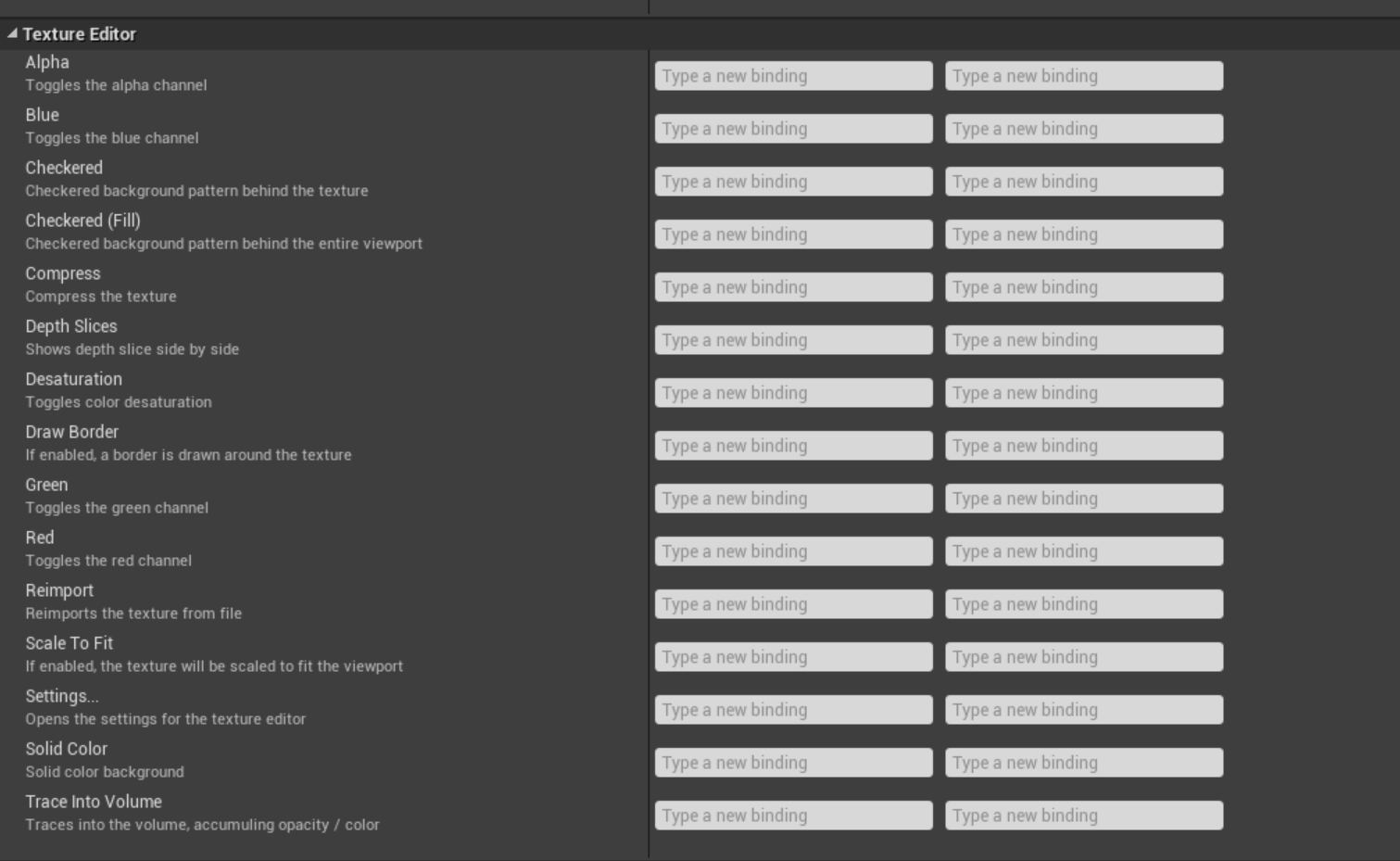
go to edit > editor preferences > keyboard shortcuts > write "texture" and you'll see empty but mappable bindings
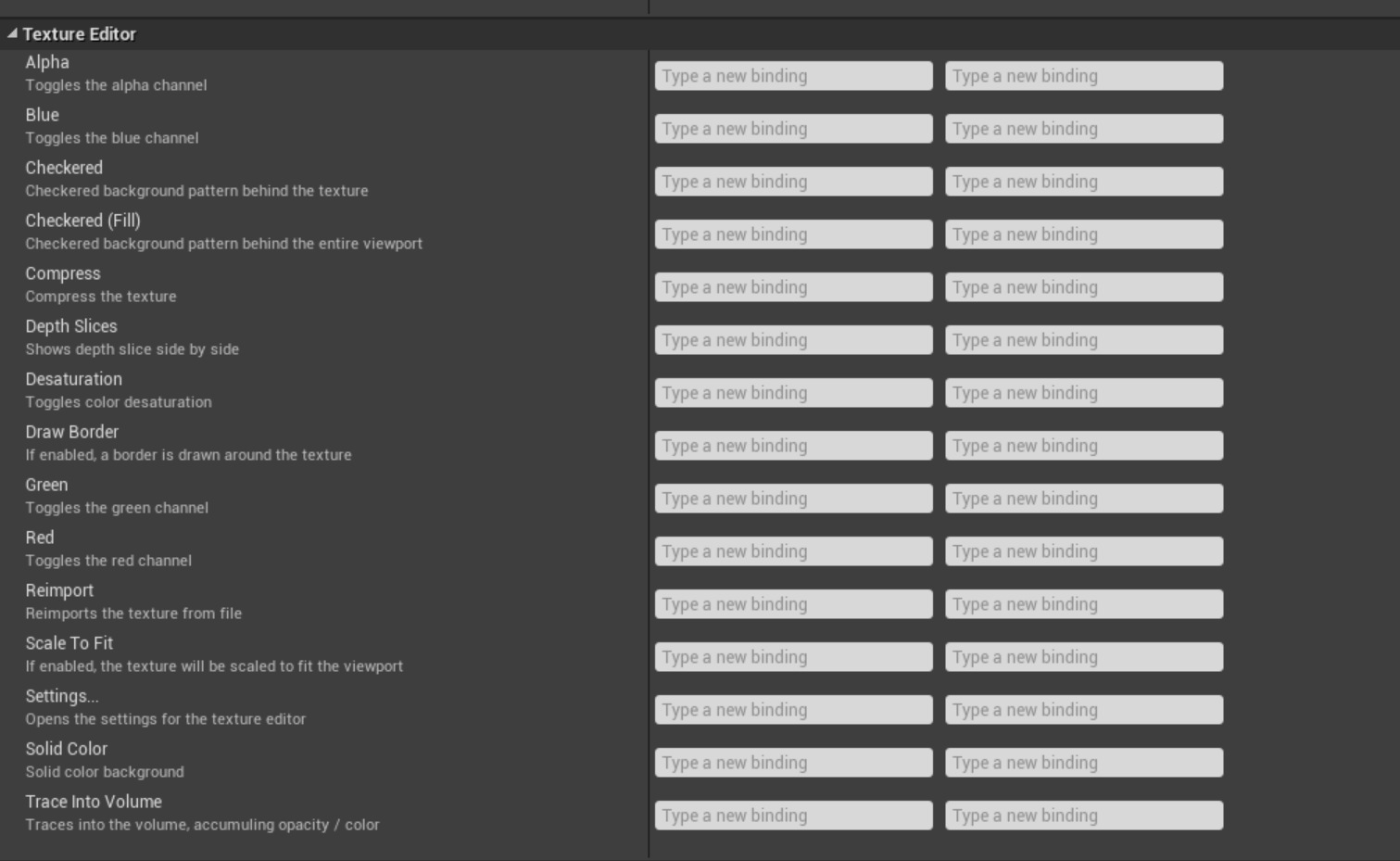
just drag the mesh into the blueprint thingy
 grim ore
@glad karma yes older versions may work better but that machine itself is going to be slow it does not have enough memory or CPU power to compile quickly.
 rancid lynx
is WorldStatic the only option for FoliageInstanceStaticMeshes ?
i tried to create a new foliageinstantSM file with the + icon in the foliage paint tool. but it doesnt seem to do much
glad karma
@grim ore amazing, which version would you like recommend me?
fierce tulip
4.4 is one of the fastest, but you'll lack significant new awesome tools.
4.16 is still rather fast, has some new features, but you'll still wont have access to some of the amazing new stuff.
glad karma
Hmm very difficult, I must find money for new pc 😅
 brave gate
guys, seriously? if someone's is not in big project requiring older versions, he should use the latest version
just decent hardware, 8GB RAM is not sufficient for any professional creative work - doesn't matter what software or version 😉
@glad karma you should get at least 16 GB RAM, but better 32 GB RAM if you're artist - for Unreal and other tools
SSD drive - if you don't have
and current-gen Ryzen with 12 threads - it's cheap nowadays and it gonna crush your i5 6200u which has modest 4 threads @ 2.3GHz base frequency
every beer you won't drink because you spent all money on new PC, will be worth it 😛
glad karma
Yeah, with beer ist okay, but I think must waiting like 1.5 year, because weeding coming 😅
 green blaze
Should I convert the whole building geometry to the one big static mesh? Or basic geometry is better? I will probably want to use building on other maps, but Im not sure if this wouldn't have impact on performance
brave gate
@glad karma cancel wedding, make it just for family - 5 people
1 - planning won't eat your time
2 - you gonna be less drunk
3 - you gonna love a new PC :p
2.5K in dollars?
and where's here? 😛
brave gate
we need hardware room 😛
fierce tulip
go linus's discord
glad karma
@brave gate haha that's good idea too but we had really big family xD from my sisters brothers children and everyone coming like 40+ and from she is similar xD
swift heart
@fierce tulip Thank you a lot, I tried to find there but couldn't find anything. Will take a look again
fierce tulip
need to open a texture first, then the option appear
its accurate, so you should be able to find it
@light lintel what panel?
no clue, i dont do bp
green blaze
So better to have buildings made from basic geometry BSP?
fierce tulip
never
fierce tulip
use meshes, not bsp
 jade ice
Hey guys quick question.
Using the same material on multiple object for the exact same looks.
Is that cost inefficient compared to applying the same instance.
Note i dont need a different look.
 upbeat trench
ewww bsp washes hands
fierce tulip
@jade ice basically, meh.
green blaze
I mean this, sorry I was mapping in hammer for a long time 😦
jade ice
Ok then i dont have to switch my materials.
Thanks!
 smoky sonnet
my mobile app closes automatically it loads the menu i see it for 2 seconds then it close the app
thats the only code i run at the start
anyone know why?
breakpoint?
that it doesnt run the code?
 fair hornet
Does anyone know how to fix this error when building lighting?
 sweet relic
@fair hornet you may need to make a firewall exception for swarm
An overview of Unreal Swarm, our task distribution system for computationally expensive applications, including Unreal Lightmass, the high-quality static global illumination solver in Unreal Engine 4.
fair hornet
ok
 normal burrow
#work-in-progress snacc
 mint umbra
Hey guys, how can I correctly export a World Machine's Water Output Mesh (river system mesh)? When I'm importing the river mesh I get an error saying it couldn't import since the .obj is full of degenerates.
 merry niche
How could I change the gamemode when a player interacts with something?
 pallid talon
Question - Let's say I've done a lightbuild at medium. Looks great. But then I add another light into the scene and I get the message, "Lighting Needs to be Rebuilt (50 unbuilt objects)." Is it possible to only rebuild those objects if I haven't changed the lighting quality settings? It appear that the entre scene gets rebuilt when it should only rebuild 50 objects. A huge waste of time.
fierce tulip
It was possible in ued 2.5 and 3, and I think ive read somewhere about this potentially being added in ue4, but not sure if its in, or if its ever going to be a thing.
pallid talon
Well are they working to implement a GPULightmass rendering option? Right now it's not officially supported.
Lightmass builds are the slowest and most painful process of developing in UE4.
When it appears solutions are possible.
fierce tulip
you might have outdated info
the person who made that "not official supported" gpulightmass now works for epic games
and its.. basically been official
grim ore
damn Unreal fest europe was cancelled as well
fierce tulip
@grim ore hug yea its bad
pallid talon
I hope they find a treatment soon...
smoky sonnet
my app closes everytime
LoginId:4902805c4d881b5ffa746380f1f6c2b2
EpicAccountId:84f9cbfb04fc46718d41c0a9e68393c1
Assertion failed: !"Enclosing block should never be called" [File:D:/Build/++UE4/Sync/Engine/Source/Runtime/Renderer/Private/MobileSceneCaptureRendering.cpp] [Line: 185]
UE4Editor_Core
UE4Editor_Core
UE4Editor_Renderer
UE4Editor_Renderer
UE4Editor_Renderer
UE4Editor_Renderer
UE4Editor_Renderer
UE4Editor_Core
UE4Editor_Core
UE4Editor_RenderCore
UE4Editor_RenderCore
UE4Editor_Core
UE4Editor_Core
kernel32
ntdll
this is my output if i try to start it with mobile viewer
it just crashes on mobile viewer and on my mobile phone
grim ore
install the Editor symbols for debugging and crash it again, it will give a more accurate crash log
 shy jetty
What's the best way to view / organize assets in my library? For example I would like to sort out assets into categories like "walls, placeables, floor, building, torch, window, trees, etc etc etc" is there something I can sort and easily view them , from all available assets I have ?
grim ore
you can have multiple content browsers, you can use filters and collections
fierce tulip
and favorites
so if you used proper naming conventions, filtering out should be easy
 dim arch
so I saw epic arent going to gdc this year bc of the Virus , any idea when/where they will do their talks
dim arch
Ok, Hope so
 obsidian spindle
Hello there @everyone !
I'm sorry to disturbing all of you !
But I have something to ask !
I'm new here so sorry for my bad english !
I want to start with Unreal Engine and i want to learn Blueprints Code and C++ Language !
But i don't know where i can learn this two things.
I search somes books that I want to buy in PDF for learn C++ and Blueprints in ways complet and detailed !
(In ways legal to !)
If somebody is french here, i need frenchs books if that possible !
Thanks you for all and have a nice night or day !
Cordially,
DamyNox
 vernal apex
Has anyone else run into this issue? It's driving me crazy and I can't seem to find anything anywhere about other people having it. UE4 hitches for 2 seconds every time I add a new actor or duplicate one https://www.youtube.com/watch?v=wzKQ9tYRzDE

Editor hitches every time I place a new actor in a level or duplicate an existing one.
shy jetty
@grim ore so I will have to sort through them , cant have all assets in one place?
@fierce tulip so I go through each asset pack in my library and mark things as favorites or rename them?
fierce tulip
you can drag to favorites iirc
 golden magnet
I have a keypad where the buttons are separate objects and are animated, what would be the best way to import an asset like that without causing a mess like this?
brave gate
@light lintel yes, especially that game UI is based on the same framework as editor UI - Slata
simply search for "OnDrag" events in UMG graph 😉
try harder or find more tutorials showing classic inventory implementation - I'm sure there's plenty
😉
they should something that would show you everything step by step
 scarlet birch
anybody using studio drivers and find better stability with 4.24.3?
I'm getting a few crashes that seem related to the editor UI and I'm wondering if they might make a difference
I'll just install them anyway, doubt it can hurt
 paper kernel
actors have owners
 wheat dirge
@light lintel "Actor" is the class the blueprint is derived from.....so whatever bp you have with actor as its "parent" is your parent that you can make children from ( if that makes sense)
scarlet birch
Click class settings at the top, the parent will be listed in the details panel.
Almost everything you put in the scene is a child of actor. You can just add your logic to the graph on the BP. You don't want to edit the actor class if you're asking these questions
sweet relic
@jagged locust yes you can export the mesh as fbx.
sweet relic
iirc: select the landscape > right click > asset actions > export
 jagged locust
dam waiting for it again. ill check that thanks also some one gave me a 4k heightmap but when i create landscape it is too large for VR work, so i tried a smaller overall size like 2017x2017 and 1009x1009 but then the hieightmap gets clipped
need the entire heightmap to be there
sweet relic
maybe reduce the heightmap's resolution?
jagged locust
not big a small golf course
scarlet birch
And what's the project purpose?
scarlet birch
I've always used the sizes listed in the guide or derived a size from them.
Technical Settings for Landscape.
jagged locust
i have that open
scarlet birch
I tend to shoot for 0.5 pix/m
jagged locust
4033x4033
63
4 (2x2)
126x126
1024 (32x32)
scarlet birch
with VR that might be overkill
jagged locust
but can i chose a smaller resolution land and still keep the extents of the heightmap
cause its clipping it
scarlet birch
You can scale it.
jagged locust
still would be 16million resolution
i need top open the raw16 heightmap
4k one but only have it like 2million
scarlet birch
I'd export it at a smaller rez when making it. Not sure how good the results would be just reducing its rez in an app
jagged locust
ic yea i think thats a one for one pixel thing
scarlet birch
I'd probably try rezising the heightmap texture to 4033*4033 or which ever size you go with and see how bad or good it is first. It might work.
unless you have Houdini, World Machine pro or something else to use
then I'd just use it as input and export one at the rez you want
jagged locust
photoshop wont open it
rar16
for landscape export its not in content browser and right click wont save as mesh
scarlet birch
What rez do you want it to be?
jagged locust
2k or 1.5k
also trying to save as mesh but cant
thanks btw
there is no asset actions on right click
scarlet birch
sec, looking at something. I think there's a free app that might do what you want
jagged locust
convert to static mesh
mabye i do that first
nope
i think have to save the heightmap out and use in displacments in in modeling program
scarlet birch
You might try using this:http://www.demenzunmedia.com/home/terresculptor/
scarlet birch
I've never used it, but it's free and the guy knows his stuff when it comes to landscapes. It might take the heightmap as an input and output a lower rez one.
Oh, it is pro?
jagged locust
but can do that kind of thing just wanted to save out from UE4 directly
ill check hat though
scarlet birch
If it's pro just take the heightmap as an generator input and output the new heightmap at the rez you want.
scarlet birch
If I use a staticBool and a switch like this in a material, is there any overhead in the Material Instance for the stuff that is on the truncated side of the switch?
I assume there isn't but I don't want to overuse them if there is.
 supple totem
Red is usually forwards
plush yew
It is on Red
supple totem
But red it backwards there
supple totem
No pls don't dm
 supple totem
Haha, it's more of a commitment than I'm ready to make
plush yew
Ok then not
supple totem
👍
 abstract relic
Seriously, why are cold dms for private help a thing?
 next badger
I'd rather ask for money right away.
 hidden knoll
Anyone here know how to use foot locking?
normal burrow
Would anyone like me to dm them a lucrative business opportunity?
 polar hawk
yes
fierce tulip
@scarlet birch not really, but its best to make an instance with both bool settings and derive new instances from that to avoid identical mutations that can cause quite a significant bloat in the long run
I often call those instances "master instances"
scarlet birch
That makes sense. Thanks.
I have one master , and then 3 or 4 possible variations of it . I'll create "base instances" for those.
Cold DMs for help get an invoice.
fierce tulip
if its from one of our users, dm me with info
 fading vector
So I'm using the engines built in physics on a pawn and some cubes. For some reason my cubes will go launching randomly, not always but sometimes. Also my pawn, which is a ball will do a glitch when moving and move forward more than it should, any idea as to what is causing this?
scarlet birch
With physics sometimes forces can get sent into extremes. I usually clamp forces an object will respond to to a min and max whenever working with physics.
fading vector
So clamp the speeds?
scarlet birch
That too.
fading vector
scarlet birch
something like if velocity > X then velocity = max
scarlet birch
are you using physics materials too?
scarlet birch
They'll help you tune it. You can adjust restitution, friction, and some other stuff. Control how two objects interact etc..
fading vector
Well my things are pretty simple
just a ball colliding with a wall or cube
where can I find/make this phys mat?
scarlet birch
right click in a content browser ->physics
grim ore
also most of the time if something has a drop down to select, at the top are the options of what can go in there and clicking that will create one
scarlet birch
@fading vector I don't think the way you're clamping the velocity will work the way you expect since it only allows positive values.
fading vector
Oh, should I clamp the way you suggest earlier?
scarlet birch
Idk, usually you want to preserve the direction of the force
fading vector
I should note my game is setup to only move in 3 direction
forward
and side to side
no going back
or up
scarlet birch
Ah,
fading vector
I suppose down is a direction lol
scarlet birch
I think in the past what I did was if the velocity vector legnth was greater than some number I multiplied by a fractional scalar until it was within the range I wanted.
so velocity = velocity * 0.8 or something
fading vector
I see
 celest creek
Looking at some python code and not sure how nested continues work
for x in listA:
for y in listB:
if x == y: //if this is True, will foo get printed?
continue
print foo
It seems to me that continue here should not matter because it's nothing else after it inside the same for loop (for y in listB)?
Or does the continue here mean that only if x==y then it will print foo?
 feral crow
Can someone help me with the hitbox?
jagged locust
what is the best way to move and scale a texture on a landscape
i tried about 6 tutorials but each kind of gets it half way there
 blissful trail
this goes up very fast would it cause any performance issues ?
fierce tulip
lol
fading vector
Okay, any suggestions for how I should clamp/limit the velocity in this secnario?
Physics is enabled
next badger
you need tick that bad?
fading vector
Well I want constant movement going forward
The player does not control the forward movement
next badger
@fading vector if you want to add velocity - use impulse, not force
fading vector
I thought impulse was more of a one time thing like jumping
next badger
also, instead of doing tick (it has a lot of issues) use times events, like 100ms steps
fading vector
Uhh, how would I do time events?
next badger

What are the Set Timer by Function and Event Name Nodes in Unreal Engine 4
Source Files: https://github.com/MWadstein/wtf-hdi-files
if you want to speed up - use fraction of target speed
like
current += (target-current)*0.1
fading vector
@next badger I'm not seeing exactly how I can use those, as the player does not use a button to move. It
It's automated*
They only control left and right movement nothing going forward
next badger
it's automated after some event...either you set it or you use event begin play
 mighty oak
Hello, I have a question about LOD group "Foliage". It seems it defaults to 0 LOD's... is this expected? For foliage type meshes? I would not have guessed so.
next badger
@mighty oak
Foliage=(NumLODs=1,MaxNumStreamedLODs=0,bSupportLODStreaming=0,Name=LOCTEXT("FoliageLOD","Foliage"))
@next badger So what is your suggestion for clamping or limiting the speed?
mighty oak
thanks, that's interesting... would that really be optimum through? I know most foliage assets and megascans foliage also come with multiple LOD's 3-4 levels... I feel like I'm given mixed messages
next badger
@fading vector the one i've showed is clamping itself (as when speed is higher than target difference will be negative)
fading vector
current += (target-current)*0.1
next badger
*stabilizing
next badger
you can do that with nodes
current speed is variable for your speed, you need to update it each cycle...
fading vector
Good point
next badger
sorry, i have to go, nap time
fading vector
haha thanks, I'll see if I can figure it out
 fleet cedar
The saga of Michael Allar trying to get GDC space is amazing
It’s evolved from asking for a small 10x10 radius to asking for the conference center
 pulsar badge
Hello, I just reimaged my PC and just installed epics games again but my project is on another hard drive without installing UE4 again
grim ore
the project is self contained, it can be anywhere
 novel vine
ok so can i create metaballs and check if a player is inside them or under them?
@ me if you know thank you in advance
 halcyon flame
what is the standard proper way to set level-based variables?
for example, if you had a pawn variable based on altitude, what would be the correct way to set the altitude differential for each level?
grim ore
there is no correct way. Is each level going to have a unique game mode? if so put it in there. you could make a blueprint that sits in each level that holds that data and then get data from it. You could have a data table that stores the data you want and get it on level load. etc.
technically you could put it in the level and have the level give it to the player when they spawn in but I don't think level blueprints should be used when you can avoid it.
 winged crypt
Why does my game look like this in a packaged build (all of a sudden)?
It looks like this in editor
My framerate in editor is stable 90, in packaged build with the weird lighting it's dropped significantly
 half barn
Anyone have tips for rendering in UE? I feel like everything looks great in blender, but it looks not great when used as a game asset
halcyon flame
@grim ore thanks. I guess I'll just do it by level name in my GM base class.
novel vine
does anybody know how to make metaballs? or even about a plugin?
normal burrow
you can convert meatballs to polgyons
plush yew
p@t how i can do it when i aim
novel vine
but how do i make metaballs?
 strong prairie
does anyone know how come my weapon is not properly socketed? tried rebuilding a few times
in play mode the weapon is not moving along with the right hand
plush yew
@strong prairie
Go to your wep blue print
press on skeletel mesh
On details type
socket
set it there
plush yew
Did you search for the right socket?
fading vector
Any idea why adding negative shapes to a positive geometry box would make a physics ball randomly bounce? Not when it collides with the circles but when its just rolling normally. If I take away the negatives then it doesn't happen.
 hollow kayak
Helle everyone, im having a small issue trying to replicate a rotation that was done on the server on the client side(im new to UE4)
For some reason, the rotation is visible on the server(from a different player window, i can see the rotation), however, on the client side, the rotation does not happen.. What is it that im missing?
I have the following 2 methods
{
   if (GetLocalRole() < ROLE_Authority)
   {
          FQuat QuatRotation = FQuat(FRotator(85, 0, 0));
           AddActorLocalRotation(QuatRotation, true, 0, ETeleportType::None);
            ServeWallWalk();
        }
    }
    //Super::Jump()
}

void AsurivivorCharacter::ServeWallWalk_Implementation()
{
    if (GetLocalRole() == ROLE_Authority)
    {

            FQuat QuatRotation = FQuat(FRotator(85, 0, 0));
            AddActorLocalRotation(QuatRotation, true, 0, ETeleportType::None);
   }
}
this is the header of the serverwallwalk
```    void ServeWallWalk ();
```    bool ServeWallWalk_Validate();
``` void ServeWallWalk_Implementation();For readability put three `at the beginning and end of that block of code
 tawdry storm
if you type in c++ after the first three `you'll also get syntax highlighting 🙂
pulsar badge
Someone please help getting this error "LogOnline: Warning: STEAM: Failed to initialize Steam, this could be due to a Steam server and client running on the same machine. Try running with -NOSTEAM on the cmdline to disable.
LogOnline: Warning: STEAM: Steam API failed to initialize!"
On a dedicated server
fleet cedar
I believe the issue with the replication code is in the UFUNCTION, instead of being Server it should be multicast
@pulsar badge you’re probably going to get better luck in #multiplayer
pulsar badge
Ok
 deep stump
@pulsar badge and I are working on the same project together, he works on the design and we're trying to work out this issue together -- Even when I create a blank project I get the same error
fleet cedar
@hollow kayak your RPC never runs on the client if I’m reading it correctly
deep stump
Wouldn't that reset if its a blank project?
fleet cedar
@deep stump one easy test is to make sure you have steam open
And signed in with an account
pulsar badge
We tried it on another PC with no steam also still same error.
deep stump
Yeah we tried it on a VM lol
fleet cedar
And this is for setting up a dedicated server?
deep stump
Yes
fleet cedar
https://allarsblog.com/2015/11/06/support-dedicated-servers/ give this a looksie, I don’t have any experience with setting up dedicated servers in unreal
Allar's Blog
This document covers the bare basics on how to get your Unreal Engine 4 game project able to build both Windows and Linux dedicated server builds, using just a Windows machine for compiling. Requirements For 4.9.X or older, you need Visual Studio Community Edition 2013 For ...
hollow kayak
@fleet cedar Doesnt this run on the client ?
   {
          FQuat QuatRotation = FQuat(FRotator(85, 0, 0));
           AddActorLocalRotation(QuatRotation, true, 0, ETeleportType::None);
            ServeWallWalk();
        }
}Allar’s blog is filled with great stuff
@hollow kayak the error is in the function declaration of UFUNCTION(Server,...)
What that is saying is to run that function on the server
So if it’s running on the server already then the client doesn’t know that
deep stump
@fleet cedar How would I check if the RPC runs on the client?
fleet cedar
The net role of the owning client is “Autonomous Proxy” if I’m remembering correctly
So you could do ‘’’GetRole() == ROLE_AutonomousProxy’’’
That’d need a bit of beautification since I just typed it on my phone
^GetLocalRole
That checks if it’s on the owning client, to check if it’s just on the client in general then it’s role != authority
http://cedric-neukirchen.net/Downloads/Compendium/UE4_Network_Compendium_by_Cedric_eXi_Neukirchen.pdf Is an extremely good resource
hollow kayak
so i tried NetMulticast for the method, but now it only shows on the client and not on the server
 tawdry narwhal
not sure where this belongs, but does anyone know how to set up a custom build step when building the engine?
fleet cedar
@tawdry narwhal you may find #engine-source to be helpful with that
tawdry narwhal
I usually find engine-source to be a dead pile of leaves
fleet cedar
That’s fair, maybe answer hub or unreal support then since that’s a pretty specialized question that I’m not sure how many people in the general chat would know sorry
tawdry narwhal
either custom build step or picking up .obj files from a custom directory
strong prairie
okay, so i just bought an asset pack with a weapon, that should be properly socketed
do you guys know how to interchange the characters?
the asset pack comes with this character in blueprints
so i just dragged "test_character" into the scene, and now i have two characters
fleet cedar
@strong prairie how long have you been working with unreal for?
strong prairie
i know this probably depends on how the asset pack is set up but since i'm new to unreal how should i go about swapping out the character for the test character?
not very long at all, but i've been doing unity for 2 years
fleet cedar
If you’re new to unreal I’d recommend doing some more structured tutorials since trying to make your own project off the bat puts you very far in the deep end
Since you’ve already done unity you’re probably familiar with general game programming techniques but it’s still a lot to take in
strong prairie
okay, sounds good
fleet cedar
👍
hollow kayak
@fleet cedar qq, since the method executed in the server, and the server is the authority, shouldnt the client reflect what the server is saying?
fleet cedar
Just because something changes on the server doesn’t mean that the client knows something changed
The server has to tell the client that
hollow kayak
oh i see
fleet cedar
If you’re new to networking I’d recommend doing a structured course on it though
https://www.udemy.com/course/unrealmultiplayer/ this is what I learned from, ignore the price it’s permanently $13 or less they just try to make you think it’s on sale

Udemy
Created in collaboration with Epic Games. Use Unreal for online game dev in C++. Covers LAN, VPN, Steam and more.
It gives you a really strong foundation to build from
strong prairie
thanks @fleet cedar
hollow kayak
lol, thank you! will definetly check it out
fleet cedar
@strong prairie Id recommend starting with a course different from that one for learning the basis of unreal
Real quick note so you don’t dive into that one haha, it’s a bit advanced so not everything is explained
strong prairie
oh yeah, that's for multiplayer
 lost tree
Is x y continuous across all maps when using world composition or does each tile have its own coordinates ?
normal burrow
across all maps
lost tree
so if understand this since the dedicated server has all tiles loaded I can spawn a character at any x y coordinate just as I would on a regular single map server?
normal burrow
yeah
lost tree
lifes good baby thank you
 dapper oak
Hey guys, so I i've seen a lot of these small, repetive mobile game ads on youtube (like the assassin one or the wood log one) and I wanted to make something like that. Would UE4 be good for making a small 3d game for mobile or would it be better to use something like Unity?
 keen shell
mobile support in both works great but usually for mobile, its unity.
 crystal ruin
so nobody knows what my problem is ?? .. wow
grim ore
I saw your pictures but unless you describe what the problem is for all we know that's correct
all I can see is you have a mesh with multiple materials and you don't have all the materials assigned it looks like there should be some for eyebrows and eyelashes that are using the default material
normal burrow
@crystal ruin verymuch dunno what the issue is. those screenshots are dark though
plush yew
@crystal ruin cant make out the pictures. Dont know the problem
keen shell
what is forward rendering?
normal burrow
forward rendering is when you draw all the pixels for the geometry in a single pass
instead of deferred rendering where you draw attributes to various pixels that are compositioned (deferred) to the end of the frame like a photoshop effect
forward rendering has to account for lighting information on the fly as it puts the pixels on the screen at the same time it draws the geometry, which makes it good for transparency. if you have very limited lighting or strange hardware restrictions it can be faster than deferred
abstract relic
Rename it using the original. Then rename it to whatever you wish
Or just map your input and replace the node
normal burrow
are you using motion controllers javin?
strong prairie
i don't see axis config
no motion controllers for vr
rename the original in the blueprints?
not sure how
normal burrow
what are you trying to do exactly javin?
strong prairie
the blueprints reference "turn_x" and "turn_y", so i'm trying to map those custom names
the documentation mentions "axis config" where i could change those names but i don't see that in settings
abstract relic
Looks like a really old version of unreal
abstract relic
Axis config = axis mapping
strong prairie
not sure how to split that up into turn x and turn y
abstract relic
Just hit the + next to axis mapping
strong prairie
okay, and then what do i do?
abstract relic
Add your inputs
strong prairie
isn't there a way to add default turn input
abstract relic
What are the Add Action/Axis Mapping Nodes in Unreal Engine 4 added in version 4.17
Source Files: https://github.com/MWadstein/UnrealEngineProjects/tree/WTF-Examples
Note: You will need to be logged into your Epic approved GitHub account to access these examples files. https...
strong prairie
to match what they have in these old blueprints
since the movement works fine with the xbox controller and keyboard but not with these old blueprints
something like this
abstract relic
Watch the video
strong prairie
okay
abstract relic
You’ll get it. I promise
strong prairie
i don't want to modify the settings
instead i want to edit these old blueprints which have the turn_x and turn_y custom names
abstract relic
It doesn’t exist in your project
So you will need to add them
It’s just an empty node with a name right now
strong prairie
can i replace the above with the below?
abstract relic
Sure
abstract relic
There’s nothing special about it
strong prairie
with the node going to the one above
strong prairie
is there a way that i can get ride of the top two components
and create a blueprint to replace those without changing settings
- get rid
normal burrow
the video really should explain this too javin
strong prairie
okay, the thing is i don't want want to change the settings because they are working fine for cross platform input currently
so can i just copy the blueprints from the standard third person controller and delete those old ones
like this:
 green sky
Can someone tell me what is up with this 4.24.3 Piece of Sh*t?
You know the stupid crashing for no apparent reason
strong prairie
ah
so they must have changed the pitch and yaw in an updated version of unreal
so look up is the other missing pair of turn from above
normal burrow
@green sky give us logs
green sky
Assertion failed: !bProcessed [File:D:/Build/++UE4/Sync/Engine/Source/Runtime/Engine/Private/Animation/AnimNodeBase.cpp] [Line: 209] Initialize already in progress, circular link for AnimInstance [ALS_AnimBP_C /Engine/Transient.World_1:PersistentLevel.AnimationEditorPreviewActor_0.DebugSkelMeshComponent_0.ALS_AnimBP_C_1] Blueprint [AnimBlueprintGeneratedClass /Game/AdvancedLocomotionV4/CharacterAssets/MannequinSkeleton/ALS_AnimBP.ALS_AnimBP_C]
UE4Editor_Core
UE4Editor_Core
UE4Editor_Engine
UE4Editor_Engine
UE4Editor_Engine
UE4Editor_Engine
UE4Editor_Engine
UE4Editor_Engine
UE4Editor_Engine
UE4Editor_Engine
UE4Editor_Engine
UE4Editor_Engine
UE4Editor_AnimGraphRuntime
UE4Editor_Engine
UE4Editor_Engine
UE4Editor_AnimGraphRuntime
UE4Editor_Engine
UE4Editor_AnimGraphRuntime
UE4Editor_Engine
UE4Editor_AnimGraphRuntime
UE4Editor_Engine
UE4Editor_AnimGraphRuntime
UE4Editor_Engine
UE4Editor_AnimGraphRuntime
UE4Editor_Engine
UE4Editor_AnimGraphRuntime
UE4Editor_Engine
UE4Editor_AnimGraphRuntime
UE4Editor_Engine
UE4Editor_Engine
UE4Editor_Engine
UE4Editor_Engine
UE4Editor_Engine
UE4Editor_Engine
UE4Editor_Engine
UE4Editor_UnrealEd
UE4Editor_UnrealEd
UE4Editor_UnrealEd
UE4Editor_Kismet
UE4Editor_Kismet
UE4Editor_Kismet
UE4Editor_UnrealEd
UE4Editor_Kismet
UE4Editor_AnimationBlueprintEditor
UE4Editor_Kismet
UE4Editor_Slate
UE4Editor_Slate
UE4Editor_Slate
UE4Editor_Slate
UE4Editor_Slate
UE4Editor_Slate
UE4Editor_Slate
UE4Editor_Slate
UE4Editor_Slate
UE4Editor_ApplicationCore
UE4Editor_ApplicationCore
UE4Editor_ApplicationCore
UE4Editor_ApplicationCore
user32
user32
UE4Editor_ApplicationCore
UE4Editor
UE4Editor
UE4Editor
UE4Editor
UE4Editor
kernel32
ntdll
abstract relic
Use pastebin next time
green sky
@normal burrow This is the error i get
all i was doing was adding a blend bone by layer node very simple, something i must have done a million times before in every other engine ver. but this version is making me really loose my Sh@t
normal burrow
Yeah I’m familiar with that code and bamboozled what it could mean
green sky
Hey HighTide i dont have paste Bin, if what i posted bothers then ill delete it ok /:
strong prairie
got em working : D
normal burrow
I have to sleep but if you want to post your graph in #animation I’ll look tomorrow porckchop
green sky
actually the anim graph is empty it was the only node i opened it and crash
theres no code inside
normal burrow
Pastebin is a site where you can post the log in it’s entirety
If it’s the only node I can’t explain it
Gotta go
green sky
the engine even crashes on my other dev machine which has an 28-Core Xeon W-3175X 512Gb Ram 4 SSD samsung drives and RTX 2080 Ti
so it sure isnt system related
So does anyone know of a better engine that isnt UE?
crystal ruin
@normal burrow @plush yew @grim ore oh yes ofc ... my bad am sorry .. its just the face texture it doesnt look normal .... ill send pics .. just a sec
so .. this is the face when it is in blender .. normal right ?? .. ofc it is
this is the face when i import it to UE
dont look at the eyebrows and lashes .. just the face
and this is the material i assigned it to ,,, its basic
i think its a UVS problem but i am new to unreal .. idk where to go or to do ...
 fierce rampart
Is the texture using SRGB?
crystal ruin
yes
abstract relic
Looks more like you’re mistaking shader with texture. Set viewing mode to texture in blender to view it without lightings to make sure the texture itself is to your liking. Next, make sure you output the texture to png (8bit), targa (rip memory), or .exr
If those are good, look at texture compression. Oh and also make sure your lightmaps are clean and using the right uv index. I’m off to slumber land. Goodluck
Taking a look what the different Texture Compression setting.
halcyon flame
does anyone have a hunch of why bounds adjustments made in persona wouldn't be reflected in the level?
I have set some pretty large positive bounds adjustments to a skeletal mesh but in the world its bounds are something like half its size
it looks like the bounds are being reset based on the physics asset that was generated when I imported the mesh. is there a setting for what is selected?
found it. you have to set it in the component settings of the actor it's placed in
have a good night.
keen shell
that material doesnt seem right but the solution is somewhere around the last reply so good luck
scarlet birch
@crystal ruin That can't be all the textures. In Blender it looks like it's masked but you don't have a mask inside the material in UE. You're going to have to rebuild the material in UE and make sure you have all the textures and masks. Are you sure it's all one material?
 violet yoke
if (TestPC && TestPC->IsLocalController()) {
TestPC->PlayerState->bIsSpectator = true;
TestPC->ChangeState(NAME_Spectating);
TestPC->ClientGotoState(NAME_Spectating);
} how to move to spectator class in bp
And how to move player controller to spectator mode?
 modern sinew
Is there a way to get Steam Name? The UE channel tutorial guy said he didn't know how, but that was 4 years ago
violet yoke
From ue4 pluging steam that is point.
modern sinew
Is there a tutorial for that?
violet yoke
https://www.youtube.com/watch?v=46Y8k3KfFWc start from setup steam

This video is the update from my previous tutorial for an older version of UE4. In this video you will learn how to get steam to work within your UE4 projects and show the Player Steam Username and The Unique Steam ID.
Advance Sessions Plugin : https://forums.unrealengine.co...
modern sinew
thanks
violet yoke
is provide false client developer. Do you use spectator class? Do you use spectator class? From game mode? @modern sinew
violet yoke
in game mode you have spectator. Do you try to use that?
modern sinew
should I?
violet yoke
Any help?
plush yew
Hi guys I really have tons of problems with my gun it shoots backwards even if I set the socket right, please help!
 orchid bough
hi! anyone here with any experience with Unreal Insights?
I'm on 4.24 and trying to use it for the 1st time. I watched the livestream and read the documentation, but I'm still not able to get any info.
I'm hooking it up to a standalone and I get 0 info, not sure why.
In the image you can see there's an expensive frame in the game thread (I'm filtering out the GPU info).
When I click on it, nothing shows up.
Can anyone help?
Thanks!
@frail sail I just saw in this thread that you have the exact same problem. Any clue what's going on?
ok, found the answer. Cheers!
 steep token
I sell tailored projects privately, anyone know if this is even allowed ?
cinematic presets, not games
Alright, hit me up.
@snow crown
 elder moat
I'm only able to add one piece of text for some reason, not two like I want to
when I try and add the second one it just has a symbol telling me i cant
 rocky hound
can someone please point me to some unreal tutorials that use low quality assets or low file size assets?
My issue with the official ones is that they use photorealistic or high res assets, which are hard to download on my crappy internet. I would prefer to use same assets as tutorial while learning (I'm a beginner; my second time opening the engine).
Thanks in advance!
elder moat
Fixed my issue, I didn't have a a canvas panel..
rancid lynx
There is a "Global illumination - indirect lighting option in the postprocessvolume. usually if i change it from 1 to 20 there is a drastic difference. i changed something, now the number makes no difference at all, even while the check mark is enabled. i have the sky sphere, directional light, post process volume , infinite bounds, and skylight all in the scene. X_x.
-- whats required for global illumnation to have effect, thats my question. i cant find whats dissabled, all my lighttypes are "show on" in the editor viewport
plush yew
Is there a built in setting for camera that can help me to rotate camera where bow aiming at?
rancid lynx
maybe you could just reposistion the spring arm to 15 feet in front of you while the bow is drawn., im not sure, thats probably a terrible idea
camera usually points toward a spring arm, if you add one. youtube ue4 springarm
may be a no math solution X_x
 civic iris
anyone have tutorial on listview?
 quiet timber
Unreal Engine Forums
The mesh is in right size, but the animations are pain to preview.
https://i.imgur.com/rozT3v0.png
Any ideas how to fix this?
 light abyss
Hi there, KT here. I'm an Executive Producer working on multiple projects for TV/Film. We're currently looking to develop a proof of concept for a possible Nintendo Animated movie and I am looking to work with a games company rather than a VFX studio to build the project from the ground up using the Unreal Engine. I was wondering if anyone could point me in the direction to a developer or someone in the discord that would be capable of such a feat as we have the means to get this done. Best,
KT
 south idol
Hi guys new to Unreal Engine learning how to do some basic things come across this problem when spawning on team selection anyone seen this before
the player looks like they are flat like a piece of paper
fierce tulip
I find it odd you cant preview blueprints in persona/skelmesh viewer
 hot grotto
how can I hide the playerable character during sequencer? because my sequencer's location is exactly at playerstart location, my character is always visible even during sequencer
plush yew
bruh i keep on getting this error LINK : fatal error LNK1181: cannot open input file 'wininet.lib'
i've downloaded and redownloaded windows sdk so many times
 barren lake
 spark sonnet
@plush yew Do you mean to rotate the camera with your character?
plush yew
Hello, I have got two different FP models, they are both working perfectly, just wondering if anyone know how I am able to switch to one and other by an input key, if you know please PM me
 frozen pollen
Hey, im using a door blueprint from a story template i got from the ue4 marketplace, and i want to make it open and close on a trigger instead of clicking on the door. However, I cant find a function or anything in the blueprint that would open the door, so im confused
plush yew
@spark sonnet yes
am trying to figure it out
its killing me meh
i dont want any animation for rotate just rotate it with camera
any thoughts?
plush yew
@spark sonnet that will match the mouse rotation yup?
plush yew
Thanks mate you saved me alot of time
quiet timber
@plush yew hmmm
plush yew


Am trying to spawn this Particle effect [Arrow]
To shoot forward which is not working
as i spawm the emitter it stay still wont move
am i doing it wrong?

Why Simulate physics is hidden?
cant press it 😄
green blaze
Any good tut for decals? I have downloaded some assets from shop, but they are In 8K and after placing them I have very bad visibility, almost none
Nvm, decals works on static mesh but not on my geometry
 inner yacht
Anyone know exact distance actors get destroyed or where I can read on this? Example Begin play will Fire when a Character first comes into view while playing in editor. something I noticed
Would like to know the measurements.
When I try to get the actor is Not valid at far distance.
or may be my scene component.
 nimble viper
Hey everyone, im trying something but im not sure in which direction i should be headed. I'm trying to make an 'army' follow my hero in formation. I found a way by making an arrow in my hero blueprint then casting the position to my 'rangedps' blueprint on a Event tick to make the the range dps character follow the arrow position. Is it a good way performance wise if i want a lot of army characters? Or is there better way to make an army following my character ? ps: im using ai moveto node. Thank you
 rich reef
Do you guys know how to enable V-Sync within the editor? (Like, not for the exported game, just the editor itself) (Please ping on reply ❤️ )
 austere scroll
Does anyone know/have a tutorial on how to make a door that only opens if the player has a certain item , or done something ?
rich reef
Im about to do that today actually Faris lol. I can ping you with my solution once I've got to it
keen shell
@rich reef Use ~ key
rich reef
My keyboard doesnt have that ;-;
violet yoke
v
keen shell
oh wait.
okay so you do this i think
option + n?
or its the alt on the right side + n
@rich reef
 fleet wraith
I'm making a heartstone style game for fun, is it worth upgrading my project from 4.22 to 4.24?
keen shell
if theres small changes to be made then sure. make a backup first though
fleet wraith
i didnt see any new features that would be particularly helpful but there's a lot of changes lol
keen shell
no harm in upgrading if you made a backup
 desert nacelle
I am having an error in Unreal saying "video driver crashed and was reset". Can someone help me?
 lusty surge
Hello, I don't know the best place to post this but I'm having a frequent crash. It appears to be a direct x crash. I'm having trouble finding information how to fix this issue. Has anyone had this issue or know how to fix it. It's always the same error:
Unreal Engine is exiting due to D3D device being lost. (Error: 0x887A0020 - 'INTERNAL_ERROR')
brave gate
@lusty surge try updating your drivers to newest ones
or if you have newest ones, to try any older version 😉
lusty surge
Yeah, I'm on the latest drivers. did a clean install with DDU the other day. This makes me sad 😩
polar hawk
@rich reef just a normal day
rich reef
👍🏻
scarlet birch
Increase TdrDelay, if you haven't already. @lusty surge @desert nacelle
rich reef
Work hard rest later 😉 xD
violet yoke
I need to understand spectator actor in game mode. That is specific class. The controller not posses that actor on beginning. And i can not do instance on map. You can move to that actor by this code. in c++.
```c++
TestPC->PlayerState->bIsSpectator = false;
TestPC->Possess(OriginalPawn);
TestPC->ChangeState(NAME_Playing);
TestPC->ClientGotoState(NAME_Playing);
But do i miss something and that is can not be change in bp or editor.

I can work with posses and move to other pawn. But spectator actor not create instance on map. Its a frame. How to approach code with that element of frame.means that you can edit them on an instance of the actor/object, expose on spawn means that if you use the spawn actor/construct object nodes you'll get those variables as input pins
@light lintel
 idle garden
Hi, I'm trying to do a widget who will display the name of one NPC
So inside widget I create a Bind
but Cast to that NPC always fails, some tips?
rotund scroll
@light lintel a lot of this you can read up on the documentation
spark sonnet
How are you referencing to the NPC @idle garden ?
rotund scroll
an instance is a version of the actor that exists in the world
so like if you drag in a blueprint into your level, that becomes an instance of that blueprint
spark sonnet
Is the NPC the player character?
abstract relic
Kinda ruins the definition of NPC 😜
normal burrow
Non playable player
abstract relic
I think you want Get owning pawn. Going off memory here.
normal burrow
Or character yeah
 opal berry
if someone hits the 3,00 Dollars per calender qaurter, do unreal ask you for a pay check automatically or do u have to go and submit the check if so than what happens if u dont pay
abstract relic

Thanks for considering Unreal Engine 4 for your development needs. Here you will find a list of common questions answered to make informed decisions with little guesswork.
fierce tulip
though the us/vs dutch , and . in numbers confuse me
normal burrow
Can you thousandth place notate decimals?
fierce tulip
3.000,00 and 3,000.00
opal berry
ik its typo
opal berry
so I have to do it manually then
rotund scroll
I try to avoid it
opal berry
that a bumer
rotund scroll
but I have most metric <-> imperial conversions ready in my head
normal burrow
Inches are more than centimeters
abstract relic
I no longer understand any unit of measurement
rotund scroll
just make up your own
normal burrow
Imma say pat feet then
rotund scroll
the imperial system seems to be based on such practice 😅
normal burrow
Foot measuring is handy
rotund scroll
punny
 fringe pivot
the guy who invented the imperial system is the biggest troll in the history
followed closely by the xml creator
rotund scroll
"hi I'm imperial and this is my system"
abstract relic
Blaming you for this @fierce tulip
fierce tulip
^
 gentle jasper
Hey guys, is it possible to apply decals on curved surfaces like balls or something ?
rotund scroll
what's the alternative
fierce tulip
whatever will replace it in the future
abstract relic
Preferably something that isn’t licensed
 craggy flax
Something with blockchain. Coders put that shii on everything now ;p
normal burrow
.Glhf
abstract relic
So we don’t have autodesk pulling that crap again
rotund scroll
yea I hate how shady they've become with their business practices
I miss the days of perpetual licenses
fierce tulip
@gentle jasper iunno, in such cases I might want the decal its uv to be stretch/warpable so it wont look bad. but perhaps a mesh decal might be better suited for a curved thingy
rotund scroll
you got fbx 2050?
fierce tulip
he's in 2050 while we peasans are in 2020
normal burrow
“What do I get for using the latest fbx?”
fierce tulip
fbx is okay-ish, but the fact max breaks vert color if you used the vert color modifier and export as fbx for the past decade is a big joke
abstract relic
Just more or less different encryption so the blender community have to sink time into reverse engineering it
craggy flax
Metallica - sad but true.mp3
rotund scroll
we should make a collective effort to ban y-up for 3d
fierce tulip
^
there was a y-up.xyz and z-up.xyz website that made fun of y-up
but sadly its down
rotund scroll
like I can't believe it's still a debate honestly
craggy flax
The logic is dumb too.
Y is up on a 2D graph so Z must not be up but forward
fierce tulip
sidescroller > Z turns to depth
top-down > z turns to height
abstract relic
Do you think the monitor was manufactured standing up? 😜
craggy flax
Oh no pat I’m totally z up team
normal burrow
Up is forward from eyes
craggy flax
I’m saying the logic behind y up is silly
rotund scroll
arguably depth is height
normal burrow
You grow away from the map in depth
rotund scroll
just negative height
what's the current workflow in blender that mimics extrusion workflows the most in something like max or maya?
fierce tulip
blender folder > ctrl + a > shift delete
doubleclick on 3dsmax.exe
 fierce tulip
(no clue, never used blender)
rotund scroll
trying to get into it, but man it's like an uphill struggle
abstract relic
It hasn’t crashed yet. Enough said
 autumn elbow
Any recommendations for Unreal Optimizations? (Things like draw calls, memory management, texture optimizing, lighting/shadows and other hidden secrets)
normal burrow
they've said 'later this year' since the stream ponkkis but yeah idk what the launcher says
 violet meadow
@autumn elbow are you a modeler?
autumn elbow
Im a programmer ..gameplay
keen shell
@autumn elbow lod is what you need
idle garden
@spark sonnet it's already working . Thank you
autumn elbow
I know what they are, just if there is a optimal way for setting them up
autumn elbow
now... Unreal has auto LODs...
keen shell
1 > 2 > 3 > 4 (1 > highest > 2 > high > 3 > med > 4 > low
its better to do it manually
keen shell
you can actually remove more triangles manually using the scale
and see if it affects your details
autumn elbow
gotcha
keen shell
if it does not then youre good
keen shell
i dont think texture matters that much considering theres virtual texture and all of that
and a texture is not that demanding unless its set to something like 4K
but it might help reduce memory usage
merry niche
Is it possible to have a trigger box that changes the gamemode of a player when they are in the trigger box?
keen shell
and try to make your blueprint code run efficiently if you are using blueprint
keen shell
youre welcome
theres a lot that can be done when it comes to optimization
after all its about making everything run smoother and efficiently at a lower cost
autumn elbow
Yea
 fierce tulip
drawcalls is not tri-count
merry niche
?
normal burrow
fillrate seems to be a thing today too
but yea triangles aren't really a hit anymore
to a point
spark sonnet
You are not changing anything with that code, but casting to your character and gamemode class @merry niche
merry niche
Well what I am trying to do is put a trigger box somewhere and once the player goes into it it changes their gamemode
spark sonnet
Why do you need to change the gamemode?
spark sonnet
Dont think you can change it during runtime without changing level @merry niche
merry niche
ah
spark sonnet
So you could open a new level and then have the new GameMode in that level
fierce tulip
mipmap already lowers res on distance
replacing materials can be handy if they are complex up close, but only need their basic visuals from far away
autumn elbow
I was just reading about mips
That's a good suggestion. So lower LOD can have simple materials
Draw calls are instructions sent to the gpu
Is it, 1 material, 1 draw call?
normal burrow
really depends
autumn elbow
1 mesh, 1 draw call
normal burrow
but drawcall costs vary too
fierce tulip
laments terms draw calls are (among things) how often a mesh needs to be rendered. multiple materials on one mesh generally means it needs to be drawn for each material
@plush yew unlit in distance might look odd
autumn elbow
So... I was watching the TechArt dude on YouTube, and he instance geometry
So... instance geos have 1 call? Assuming no materials
 zealous spear
Hello, I've been thinking of making a character in my game that looks like that, do you have any idea how I can do this in unreal engine?
autumn elbow
Darksiders did something similar. We used cloth sim and textured it will a wispy smoky material
You could use particles, but that's too expensive for in game
Also, check out death standing.. they have a similar look
zealous spear
So I've been thinking of taking a simple base mesh character, adding a invisible material and then adding the smoke
but I don't know how to add that smoke...
I never did that
autumn elbow
as a animated texture
fierce tulip
probably highly authored "smoke" material with a lot of motion on a skelmesh, and for smaller details they add smokey wisps particles
prolly custom depth or so, as transparency in ue4 doesnt know whats in front or behind transparency in specific cases
zealous spear
@fierce tulip @autumn elbow do you have any similar tutorials on youtube so I will make myself an idea...?
sorry for mention
autumn elbow

YouTube
Besides a few personal things, this channel will mostly be about pewpewpewparticle effects. 99% of those will be made within ue4 with the use of a variety of...
😂
Tons of alpha and particle goodies @zealous spear
plush yew

Am trying to cast this into player animation
as for the object
what should i put there?
zealous spear
Well, i think i found something that might help me for a little bit, maybe even change my mind and find some other nice effects for my character

Nesse vídeo mostrei como fazer o efeito Ghost Trails, aquele efeito de fantasma do personagem, e como aplicar ela em uma animação, tipo Dash, Corrida e outros.
O áudio não esta muito bom, meu microfone é acoplado a webcam, mas creio que de para entender de boa.
Para que quer ...
zealous spear
yea, It looks good
but I will use it like... every single time, not only when sprinting or whatever that was
in the clip
just for detail I am doing it
merry niche
http://prntscr.com/r9lsb9 is it possible to have a tunnel ?

That goes threw this mountain
 zealous spear
@merry niche I did that before in my game, i can help you
autumn elbow
@plush yew you need a ref to the sword or class
One is casting to the object , one to the class. Object can have certain values set, class is default values I think
plush yew
NIIKY
am using the normal one
i dk what to put in the object field
This one

@autumn elbow
autumn elbow
Where are you casting from? Character?
 autumn elbow
You need to have a reference to to the sword in your player
Is the sword something you pick up, or is it always attached to ur player?
spark sonnet
You can make a hole in the landscape with this: @merry niche
https://docs.unrealengine.com/en-US/Engine/Landscape/Editing/SculptMode/Visibility/index.html
https://docs.unrealengine.com/en-US/Engine/Landscape/Materials/index.html#creatinglandscapeholematerials
This is an overview of the Visibility painting tool.
Setting up materials to work with Landscape terrains.
 brisk wind
Hey guys, Umm, I have a weird issue, when i load a new level, my player controller doesn't map input , or at least doesn't call the functions mapped with my input 🙄🤔
autumn elbow
@plush yew can I see your player character's Component list
When you spawn, you attach it to your character right?
 brisk wind
Hmm wait a sec
autumn elbow
1 min... my laptop restarted lol
plush yew
oh okay
zealous spear
@spark sonnet I already explained him how to do that in DM but the squares are really big like 1/4 of the map and i don't remember how to make it little
i think the landscape was more big
isn't it?
autumn elbow
Cus when u spawn u can save the spawned obj as a variable
spark sonnet
You can adjust the size @zealous spear
zealous spear
No, the only size is 1 or bigger to clean more squares but to make it be more squares you have to make a bigger landscape i guess?
plush yew
UATHelper: Packaging (Windows (64-bit)): ERROR: Windows SDK must be installed in order to build this target.
PackagingResults: Error: Windows SDK must be installed in order to build this target.
What the fuck is this?
Never got it before
@light lintel Yup mate
Dont put it as static mesh
it will make you suffer after a while
USe sockets
 serene birch
@plush yew you need a working Visual 2017/2019 install
zealous spear
oh damn @spark sonnet it was Visibility
serene birch
to package your app since the engine will compile a custom .exe
plush yew
wtf
@light lintel am not going to make inventory system in my game so i dk 😄
You can do that
But later when you need to do damage to enemys
if you use static mesh on the player bp you will need to do collider for the sword it self and some times it will cause problem
and you need to visibltiy etc
sockets you can just destroy it
Yea well the sword is part of your body
it will overlap with your mesh
the whole body will do damage


when i press 1
The weapon shows up

when i press 2 it destroy it self
or you can use flip flop
Give me 10 mins i will come back and explain am doing something atm 😄
Try to read those as i come back
scarlet birch
Do I have to do something different to mask out a hole in a landscape in 4.24? The editor keeps saying I need the visibility node in the material even though it's already there. I've used the same material in the same project in 4.23 without issue.
plush yew
am doing it yup
scarlet birch
idk what the problem was, I removed and reset the material in the details pane a few times and now it works
 untold cobalt
Hello, there are 3 animations sitting and getting up 2 of them are anim montage sitting, why doesn't blueprint work?


 signal jetty
Hello
plush yew
Which i cant do to there is not object to attach to the Sword BP
Sword BP is an actor
any thoughts?
signal jetty
Anyone knows How do I Plugin quixel mixer
serene birch
using Quixel Bridge?
 thick herald
mixer isn't a plugin
signal jetty
But how do I export something to unreal
serene birch
I didn't mean that as a question but as an answer
thick herald
watch the mixer tutorials for a start.
signal jetty
Alright I guess and yes I use Bridge
 wintry thistle
Really sorry if this isn't the place to be asking these kind of questions (new here and to discord & unreal in general), but would anyone know why, when I drag a .mp4 into unreal engine (4.23), the file appears seemingly instantly and seems to just be an empty file containing nothing? - is there something I have to enable to my project recognises mp4?
 sinful osprey
@plush yew What is it you're trying to do? Can you share more of that BP?
wintry thistle
thats all that comes up 😩 . I just want to import a video file so then use as an animated texture (making a tv screen)
interestingly, this is greyed out when you right click
rich reef
Do you guys know how to make an object automatically rotate so the same side is always facing the player?
I wanna make like an icon letting people know something is interactable (Which will just be a floating plane that always face the player)
Would be awesome if you could make it so it will always render as if its always placing all players looking at it in the same time, as Im (probably) going to be adding multiplayer features to my game
(Please ping on reply ❤️ )
 teal oar
hey guys, how do you cast to a NPC in blueprints. I cant figure it out
sinful osprey
you need a reference to the NPC in the other BP, @teal oar How are you trying to do this?
@rich reef https://www.tomlooman.com/creating-actor-widgets-umg/ Try this? ScreenSpace is what you want for the widget

Today I’d like to quickly show how you can add UI for things like health bars, nameplates, interaction prompts and more in Unreal Engine. It’s quite simple to do, and I hear a lot of...
rich reef
I dont do C++
sinful osprey
the BP parts will work for you... I don't do C++ either
teal oar
like that but I can't reference to the "Enemy" character bp
sinful osprey
basically, add a widget component to your interactable object....
set it to be ScreenSpace, set the widget type (you need to create a new widget or use an existing one)
then you can cast to that widget using GetUserWidgetObject and do whatever you need to it
teal oar
the thing is I am trying to reach to two variables, are you sure that I need to have a widget component just for that?
Also how do I make it screenspace?
sinful osprey
@teal oar you need something coming into that cast node from the left... that's the reference to the NPC. Depends how you are doing this where you would get that reference
ScreenSpace was for @rich reef 🙂 Discord needs threading 🙂
@teal oar How are you getting the reference to your NPC? How does that BP you showed know that an Enemy exists or which one if there are multiple? You don't need the widget stuff for what you're talking about.
teal oar
Basically I made the player casting the simpliest possible way and I thought that I could do the same with the NPC, so i guess that is not possible
rich reef
Im a little confused about it, so do I create a physical blueprint class and then inside of a blueprint widget turn it into a widget somehow?
sinful osprey
that's the correct way for the player, but an NPC would need a different reference from the left instead of PlayerCharacter
teal oar
yeah, but I cant figure out what kind of reference should i shove in there.
sinful osprey
@rich reef If you have a lever on the wall that is a BP and you want an icon over it that always faces the player, you'd put the WidgetComponent in that BP. You then set that component to the type of widget you want to show up in-world. One sec, I'll show an example from a project of mine
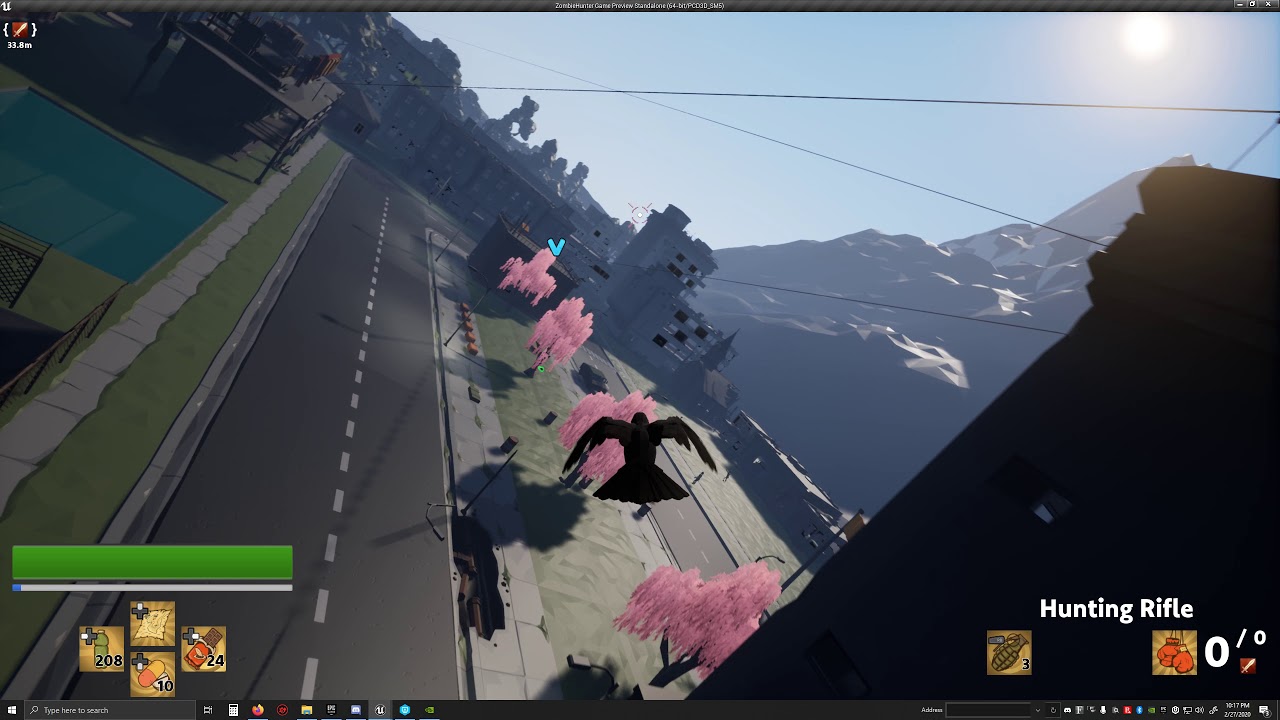
At 1:00 in this video, the sword over the zombie's head is using this method...
sinful osprey
yeah
sinful osprey
no, those assets come from a company called Synty Studios and a lot of people have used them
sinful osprey
WidgetComponent setup
@rich reef in my screenshot there, the Player_Health widget is a separate widget I had created in the Content Browser using UMG Widget class
rich reef
Is that little icon the only thing in that entire blueprint widget then?
sinful osprey
It can be, but I then cast to it from my NPC blueprint to hide/show it, add distance information below it, etc. So you can start with just the icon and add more to it as you go
rich reef
okay, I think Im starting to get it
crimson lake
Hey guys any advanced combat mechanics papers or tuts out there?
rich reef
So is it that set node at the end that makes the widget attach to the blueprint actor then?
Also will I not need a add to viewport (I believe that is what its called) node?
crimson lake
In here you're just calling the widget, ofc you have to create the widget at some point somewhere depending on what you need to do
sinful osprey
Yeah, that allows you to reference from one end or the other. No Viewport needed since it's in-world on the object. If it's WorldSpace, it will be tiny until up close. If it's ScreenSpace it's consistant no matter where you are and draws on top of everything so through walls, etc
rich reef
@crimson lake I just completed VirutsHubs fps tutorial series, it focuses mostly on weapon system, HUD and damage.
Its very basic, but with the methods he teaches you, you will be able to expand on it and add more weapon types that work differently by your self
He also demonstrates collision based melee when setting up the NPC AI
sinful osprey
@light lintel Sometimes they have some free stuff or 50% off sales https://syntystore.com/
Synty Store
We are a leading asset publisher making stylized art packs for Unity and Unreal game developers. These are easy to use, great for beginners, and fun for prototypes and game jams.
Also, Humble Bundle has a great deal right now worth checking out. https://www.humblebundle.com/software/best-of-polygon-game-dev?hmb_source=humble_home&hmb_medium=product_tile&hmb_campaign=mosaic_section_2_layout_index_3_layout_type_threes_tile_index_1_c_bestofpolygongamedev_softwarebundle

Humble Bundle
Create a polygonal style game with this bundle of low poly asset packs + support charity!
rich reef
(all Virtus hubs tutorials are free)
crimson lake
@rich reef Im working on isometric melee work but thanks a bunch I'll look into it