#ue4-general
1 messages · Page 666 of 1
 plush yew
Thanks mate that really helped
 grim ore
It's why I lke programming, 3 ways to do the same thing and I am sure I can find more lol
plush yew
You are a legend mate 😄
grim ore
nope just super bored
 kindred viper
random bool with weight. gg
 whole turtle
hey guys! sorry to be off topic but I just have a quick question: does anyone know if there is a way to properly export a blueprint derived from c++ class so that someone on the other side can easily import it (similar to other content in ue4, like static mesh or something drag and drop)
right now the only way I know of is to actually copy and paste the actual code and adjust it to fit the new project which is a bit of a mess :X
grim ore
you could migrate it to a new project, then let them open the new project and migrate it as well but I dont think migrating moves the source does it?
whole turtle
nope migrating doesn't work with c++ classes, so the derived bp won't be recognised 😦
grim ore
well what if you migrated it, then moved the source, then updated the .uproject, then compiled then shared 😦 no good ideas here really lol
whole turtle
I thought there should be a way to export almost like 'self-contained' packages that would work on the other side
grim ore
yeah that is what migrate then zip up project would do but It doesnt do the C++
nothing as clean as packages in Unity 😦
whole turtle
haha the issue is that migrating tool doesn't work for source/cpp classes swhich is needed for the dervied bluprint class to work, so what I currently have to do is to create a new cpp class in the new project, copy&paste the code, adjust includes, etc, compile and then open the blueprint and reparent it to the new cpp xD
hah yeah
well damn haha
thanks a lot for your feedback anyways
grim ore
yeah uh.... I would say sharing the project in source control or what about making a plugin that shares the code? the C++ code in the plugin and it can have content which contains your BP?
whole turtle
never looked into the plugin development stuff might look into that
can plugins be shared out of the epic games system? like in itch.io, gumroad and such?
grim ore
no idea if it's a good idea but it seems sound based on how Epic uses it now
they should be able to, you have source plugins out there now like the megascans plugin for bridge
whole turtle
yeah, I wonder if the license allows for it
kindred viper
as long as there is no editor code exported or shared, you can do that
grim ore
^^ what that smart person said
whole turtle
that's good news, so if I find out how to make it into a plugin it could be shared
 thin tendon
I'm having issue with world comp. Causing lag and small freezing between loading and unloading tiles. Is it possible to preload a map and just toggle visibility with world comp?
kindred viper
yes Slim
whole turtle
I'll search on the docs and webs how the plugin package works, thanks a lot for the suggestions and clarifications guys!
kindred viper
plugins are easy mode now. Just goto Plugin menu in editor, Create New Plugin, then add your C++ file, your blueprint, and you should be done
grim ore
Sounds like we need some video documentation on plugins!
kindred viper
there was a video on the unreal academy that was perhaps 2 years old. But its still relevant
grim ore
I do wish we had an easy way to share stuff tho like unitypackages
I mean technically there are feature packs and content packs you could make but its not easy
whole turtle
daaaamn just checked the docs they have presets! haha this might be nice to dive into!
yeah unity packages type of thing would be the best in my opinion
grim ore
that uh.. I forgot about that but a feature pack would have worked for what you want as well
whole turtle
you select the content, RMB > Packages, zip it upload, the other end just download drag into the editor and that's it
no idea what taht is or means in terms of ue4 xD
thin tendon
@kindred viper Do you know how I could set this up? Everything I look through online and in engine, I can't see any mention of preloading.
grim ore
in the content browser you click the green add button and add a feature pack. right now for example you can add in the third person, or first person, or vehicle to your existing project and it contains all the "crap" for that stuff like code and assets
its just a pain in the rear to set up
plus epic is changing the way it works in the near future, they started the changes with the new launcher setup
kindred viper
@thin tendon if its in the World Comp window, then its loaded, just not visible until told to (with streaming volume or manually). If you are loading dynamically, then you will have to find a suitable place to do the loading so it doesn't hitch. But you can load without Visibility true
whole turtle
oh I see, where does this get the list of packs from though? I only see default stuff
grim ore
it pulls all the packs out of the folder that they are stored in
kindred viper
UDK used to have a package system for that. Don't know why it never carried over
whole turtle
hah I see, I think I might give the plugin way of doing it a try, see how it works and then when they release the new version of content packs I'll check that
grim ore
I think the plugin would be alot smarter as you could just share the entire thing and its self contained. The feature pack stuff has to be packed and setup properly
plus I dont know what happens if you re import an existing pack lol
whole turtle
but judging by what they have in the engine defaults, this is more to import templates?
kindred viper
yeah you can disable a plugin safely (usually) too
whole turtle
like project templates
grim ore
it is by default yep becaues that is all epic used it for
whole turtle
yeah makes sense
grim ore
but there are content packs for example that have the starter content
whole turtle
I think the plugin option might be the better one as far as I can see right now 😄
grim ore
in a larger project a feature pack is nice because you might be like "bam we want this controller" and bam you add the controller pack and bam controller
whole turtle
yeah they have those as well..I'll stick with the plugin idea for now, seems more geared to what I'm aiming for
yeah makes sense
grim ore
or you break that out into a plugin and keep those in a repo and add the plugin lol
whole turtle
haha true, the packs seems to be more geared to 'workflow' stuff in terms of production, like 'we're a top-down shooter house' we make a lot of these types of games so we have these 3packs that just come into every new project to reuse code and assets
plush yew
MathewW you should sign up for discord job here tbh
whole turtle
eyah ncie! thanks a ton! really helpful info !! 😄
grim ore
yep yep, reusable stuffs
plush yew
You are online more than the mods 😄
 opal lark
Where should my object input go ? Im confused
plush yew
Daz you overlapping with something?
opal lark
yes
grim ore
is this blueprint in the coin blueprint?
opal lark
yep
plush yew
if it didnt work try actor
grim ore
if you are doing this in the blueprint you have no reason to try and cast, it's already that type. just get that component and set the visibility
 mental helm
Heh reported my first bug and it got turned into an official report https://issues.unrealengine.com/issue/UE-89624
mental helm
Surprised it was verified and reported on in less than a day
grim ore
welp Im lost then. This code, the code you pasted, what blueprint is it in
grim ore
so you have a BP that has this code, and when you overlap you want to talk to the player who overlapped it AND a completely different blueprint which is your coin?
grim ore
https://docs.unrealengine.com/en-US/Engine/Blueprints/UserGuide/Variables/index.html#publicvariables you want to either use a public variable and set it in the editor
or use someting like Get Actor of Class if there is only one of them
 honest rune
did something change in 4.24.3 with how modules are handled? When I try to create an editor module it creates a separate project file for it now
and says all code must reside in the "game" folder
kindred viper
wouldn't that break all previous modules?
honest rune
yup
grim ore
if doing the first one you would make a public variable of the Coin_1_Blueprint type and make it public/instance editable and use that as your object, then in the blueprint that has this overlap you would set it up to point to the one in your level. also doing this there is no reason to cast
kindred viper
thats odd. its like 3 projects under one solution
somethings deffo wrong there with the setup
honest rune
yeah, its creating a dummy project file for the editor module
and places the target file in it but nothing else
kindred viper
if thats a change thats meant to happen, I need to play catch up
honest rune
I hope not. anyone else know?
kindred viper
Bug Fix: Changed the order in which modules are mapped to Visual Studio projects. It is now Game to Mod to Program to Engine to Enterprise. This resolves issues where a Program in the game source root would take all the source code away from the Game project. In this case now, though the Program source is put into the Game project, it is best to have the program target in a Programs folder under the game source rather than at the same level as the game targets. all I can see about it in patch notes
 fringe pivot
how do you reduce foliage density in the procedural foliage spawner component?
honest rune
wtf are they doing? lol
So this is expected behavior? because that is exactly what is happening. all my editor module code is being put into my games project and theres a dummy editor module project folder containing only the targets file
that cant be right
kindred viper
yeah presumably its an optimisation routine to avoid collation of entire sections of code for determining compilation I guess.
Presumably the target will take care of the location change issues
I like to presume a lot because im doing 2 other things right now and its hard to study all 3 :p
honest rune
well, i'll try building this mutant solution and see what happens
kindred viper
best of luck
grim ore
by Program do they mean module?
honest rune
I'll sec, I'll post a screenie of what I'm getting
 opal hornet
my widget component thats set to be render in screen space is getting rendered over my HUD draw, how can I ensure HUD has render priority?
 next current
Uh should unreal take 3 hours to build when it finished in 40 mins before
honest rune
damn it, yeah its broke. Something must be messed up on my end because there is no way that is expected behavior
grim ore
@next current depending on your machine and what you meant be before it should be approximately the same result for the same task
next current
@grim ore I built 4.24 before and it was done in 40 mins, now I’m tryin to build 4.21 and it’s been 3 hours and still going. Shouldn’t be a performance issue, 8 cores and 16gb ram
grim ore
does your task manager show VS using all cores at 100% ish? Also did you build the editor only or the entire project?
40m sounds about right for that and is my experience with just the editor
honest rune
Ignore those previous posts. I'm 99.9% sure I screwed something up when recreating my new project. The original project behaves correctly when upgraded to 4.24.3
next current
I think I did just the editor, I just right clicked ue4 in visual studio and hit build
Task manager shows it at 30% cpu and 400mb ram
grim ore
did you install incredibuild when you installed VS?
next current
Ye
grim ore
ask it nicely to be removed and you will find your compile is back to normal
next current
Thanks :D
honest rune
lol shit. I'm an asshat. I forgot to register the editor module in the uproject file
grim ore
so before was it all in it's own project side by side with the game project or is that the part that is changed? Never used an editor module before
honest rune
it all sits under a single vs project file but in its own subdirectory.
grim ore
ah so it would have all been under classicfishing in this case?
honest rune
the vs file yeah
so physical file structure is like:
Source/MyGame
Source/MyGameEditor
its working fine though, I just forgot to declare the editor module in the uproject file this time. I'm surprised it got as far as it did lol
grim ore
gotcha, like it is now but now you have the extra project redirecting
 fading vector
Could I use killz to detect the player rather then destroy?
grim ore
by design no
fading vector
Is there a way to disable killz?
 rotund scroll
try setting it to 0
grim ore
checkbox in the world settings for the level
rotund scroll
or that I suppose
fading vector
so I need a way to check if the player reaches a certain z level, I dont want to use event tick. The only solution I can think of is an overlap of a very large cube or something.
kindred viper
Your players should never be getting close to Kill-Z tbh. It's there just in case. I have to ask, why are your players getting that far?
fading vector
My killz was -1000
kindred viper
why?
fading vector
It was a fail safe
I just going to use in case the player falls off
But since it destroys and no way to use it for detection, its now pointless.
kindred viper
yeah I would reassess that logic. Perhaps knowing the distance from world origin at systematic intervals would be more optimal. Or if you want to know if a player is falling, and you use a character, you can check bIsFalling for a duration and if they exceed falling time, just kill them.
 wheat dirge
anyone able to tell me why a timeline node would say paused above it because i sure dont see a pause option anywhere inside or outside of the node
fading vector
I'm actually not using the player movement due to the need of physics. So is falling sadly is not an option.
My player is a ball too
its a pawn, works well for the physics needs
 umbral trout
@wheat dirge They pause at the end instead of relooping
kindred viper
ok so you want to know if your ball is falling with physics applied. There might be something for that (an event for non-friction/collision timing). But you could check the velocity too as with gravity based falling, you speed up to terminal velocity
kindred viper
cool have fun 🙂
fading vector
ty
 rancid lynx
can i LINE TRACE to specific channels only ? like a custom colliion channel named "Rock" ?
oh. i promoted the trace pin to a variable. now i got it. nmsorry
plush yew

How i can do a hold at BowAim
Then when i press Left mouse button it dose the Bow Shoot
i want to him with my right mouse click i need to keep it on loop first animation?
am trying to figure it out
 worn granite
have a new anim which is the last frame of the bowaim animation
put it in a new section
loop that section in particular
then, when you're ready to fire, jump to BowShoot
and ask any follow up questions in #animation
thin tendon
I have this set up for changing sound class volume settings. It works. But how can I get the sound class volume level on construct? So the slider correctly represents the volume
grim ore
are you saving the value for volume anywhere?
thin tendon
I can't remember to be honest. Its something I implemented ages ago and I am trying to fix bugs. I think it might because the actually volume loads correctly. Just the slider doesn't show it correctly
grim ore
you will have to find it then, wherever you load it up from you can load it again and set the value or wherever you save it at
thin tendon
So there is no way I can just get the value directly from the sound class?
grim ore
it doesnt look like it, not that I can see, but it might be somewhere
plush yew
MathewW is there a way i can loop my animation if i am pressing Right mouse button
so if i release the right mouse it dont loop any more so it can stop
grim ore
you do what they suggested, you set that first clip to loop in the montage and the release clip as another track then you can jump to the release track when you want
or uh just play the loop clip as it's own clip then change to the release one when you release
plush yew
Yup iget what you trying to do
But i want to keep aiming as i shoot
that will hold it right>?
am testing it out
thanks for the tip
grim ore
hold button -> play animation ................. release button -> play animation?
otherwise the montage way that was suggested works as well if you want to keep it in one file, you just jump to the next section
worn granite
I mean, yeah that's how you do a lead in -> wait -> lead out montage
plush yew
Right mouse Hold -> play Aim animation ..... Left mouse button -> Shoot
thin tendon
It looks like you are correct. I'm not saving it anwhere
grim ore
this montage will loop the idle animation until you tell it to play the 2nd section, the jump section for example
 plush yew

MathewW am trying to do if i hold my right mouse click it will Aim
and if i release it animaion will go off
do you know how i can do that?
checking google sec 😄
 merry galleon
Any one interested in joining a project with a bunch of new people to make a game hmu
I am still learning the plat form
fading vector
Not having much luck with detecting if my pawn is falling.
Any suggestions? I cant use isfalling because it doesn't have character movement.
plush yew
What you trying to do?
fading vector
I have a ball
Its the player
When the ball falls off the edge I need it to "die"
Killz wont work because I dont want it to destroy the actor
opal lark
everythings working our . how do i call something in the level bp. camera actor from an actor bp ?
working out i mean
 crude furnace
hey, i need some help. my project crashed and now every time i try to load it, I get the error "The game module [project name] could not be loaded." After looking through the crash log, I found there was a dll file in the binaries that isnt loading properly. Does anyone know what I can do to fix this?
 abstract relic
You will most likely need to regenerate visual studio files and rebuild. But it doesn't hurt to Verify your current engine first.
abstract relic
You haven't seen crap docs 😛
rancid lynx
 💯 Can i limit a linetrace to specific collision channels ? it appears that i can not.
other than manually disabeling linetrace options in 100 meshes X_x
200bps and 100foliage X_x
abstract relic
Might be to your preference
https://docs.unrealengine.com/en-US/Engine/Physics/Tracing/HowTo/SingleLineTraceByObject/index.html
This how-to covers using a Single Line Trace by Object Blueprint node to return a the first World Dynamic Actor it hits, and prints its name.
rancid lynx
ty
abstract relic
That's how many software docs are, certainly annoying. Here's basically video form of the ue4 doc https://www.youtube.com/channel/UCOVfF7PfLbRdVEm0hONTrNQ

YouTube
This channel is dedicated to exploring Unreal Engine 4 and the Blueprint programming language that it uses. You can think of it as a companion to the API doc...
rancid lynx
Sorry to ask again, is it possible to get an instance element index from a ISM instancedStaticMesh using a BOXCollision OVERlap? i know how to do it with linetrace, but i would like to be able to do it on overlaps
specifically from the BeginOverlap node
 next badger
@rancid lynx linetrace by channel is not working for you?
you know you can add 18 custom channels in project settings?
 normal burrow
His issue is the hit result from overlap test returns -1 for index
 zenith flower
doesn't -1 mean no hit?
normal burrow
No the index is for instanced things
normal burrow
So if you get -1 and a hit it’s not and instanced thing
But sounds like overlap test maybe doesn’t populate it
next badger
what is index?
plush yew
I'm remaking a old version of the game "Hello Neighbour" and I'm remaking a mechanic where the AI can place cameras and there are multiple points where the AI can place the cameras (it goes to a random camera point that's set on the map and places a camera there) if i get the location off of the get a copy node it spawns a camera at a random camera point thats placed in the map instead of the one the AI is at, how can I make it so a camera spawns at the camera point the AI is at ? this is a picture of how it works.
zenith flower
@rancid lynx a good screenshot would worth a shot in the dark btw
normal burrow
Ye item
next badger
so if the channel is custom it does not work for isms?
btw, hisms seems have no simple collision
so only complex trace works
sorry, nap time...
rancid lynx
Isms , foliage paint tool cant select custom channels as an option, i think foliage defaults to world static, but you can set custom flags if you select world static as collision type. So, isms cant select a custom as a type, but they can toggle collisions checkboxes for custom types.
Ty everyone. I can make linetrace work. I just hoped i could do it with a moving sphere collision instead. The work around is to make a sphere collision mesh in my pawn, when the sphere begins overlap with foli, it fires a multisphere line trace matching the same diameter as the actors collision sphere. That way i can only line trace when a collision happenz.
Instead of trying to add to an array list 20 instances, and update that, i just use a 1 second timeline that fires, it flipflops foliage collision response false and true every other frame.. Basically pinging the collision , and stopping after 1 second
I did it this way because multitrace likes to add excessive hits if your foliage ever has 2-3 collisions per mesh. In my game, i only have rocks and trees every 5 foot apart. So the swap count is minimal.
Sorry spam off.
normal burrow
Blueprint interface?
rancid lynx
im not sure how i could convert foliage instances to actos with blueprint interfaces. i use interfaces to send custom event messages specifically between actorBps that i know want each call, like damage. im not sure what bpi means.
first i thought i need multisphere line trace. ill see if i can do it more effeciently with single linetraces that end on the foliage instance.
normal burrow
You can get the owner actor of the hit component and try interface from there.
But I’m surprised that overlap gives you -1 still, fbodyinstance* should be available for the hit instance
I’ll take a look at that tomorrow if you remind me
rancid lynx
100 instances of a foliage group, how could i get the instance index?
instance index is what makes it difficult
normal burrow
Hit index, but it’s not exposed?
rancid lynx
oops, yea, from line traces, sure.
normal burrow
Does overlap not give you hit results?
rancid lynx
it has a hit sweep, but those return -1
no matter which tree i hug
all -1 on collision
rancid lynx
yea, i ran around slappin for test puporses
abstract relic
Nap time for all of you
normal burrow
I agree, You too
rancid lynx
ha. i wish. its time to get on a train for me. i work in nagoya. but today is only 2 hours so, ill be back a little later, ty for the helps .
 frigid needle
Interpolations! I keep forgetting about Lerps and I have no idea why...
"How do I make this rotate at a specific speed? I swear I know this"
 scarlet birch
Overlaps do not generate hit results.
Only if the object that is overlapped is using sweep will you get the sweep result. So with foliage I would assume there is nothing there.
thin tendon
Anyone else had issue with calling exit on their games / projects once packaged? I have noticed with my own it will occasionally make the game become unresponsive and not actually close down
 unique kraken
anyone here who can help me with a small (in my oppinion) simple code?
i am here in a material using layered materials (old version)
and i want to output the material as rgb or float 3 so i can adjust the overall colors
 atomic onyx
Mask it 3 times with r g and b
atomic onyx
You want to get rgb of the test?
unique kraken
test is a material function
atomic onyx
Oh right
 cursive dirge
it still returns some type
unique kraken
i want to grab the whole material and lets say make it brighter or what ever
atomic onyx
Then you get the base color and multiply it with your values
unique kraken
point is that i cant just grap the base color. i have to grap it as is
atomic onyx
What goes in your base color?
atomic onyx
Can't you multiply that 1 with your values before putting it inside base color?
unique kraken
no, the point is to grab the whole material, everything it has as one "image" one "float 3"
however you wanna call it
so i can plug it into one, add or contrast or whatever
atomic onyx
Oh okay
unique kraken
i think with that should be rather easy, maybe? with hlsl coding. but i cant write such code
since i can use the curstom node output to plug it into what i want.
 hoary locust
@unique kraken why can't you just break the material and do whatever you want to the basecolor?
unique kraken
@hoary locust thats exacty what i dont want. i want the whole materials as it is, with shadows and specular everything. i want to grab that and adjust it. like some kind of imaginary image texture
there is something in blender called "shader to rgb" it takes everything thats pluged into and changes it into rgb values
not sure but what is a virtual texture in ue4?
hoary locust
i still don't understand, you're either way too advanced for me or confused somehow 🙂
i would use BreakMaterialAttributes then do whatever you want with BaseColor or anything else, then plug it back into a MakeMaterialAttributes
unique kraken
thats not a solution.
just imagine the whole shader/material would output a constante updateing image.
and this image is what i would need
 floral aspen
Hey peeps. Got a problem.. and it looks like according to google that alot of other people have the same problem.
In VR my character is about 20 cm/8 inches above the floor. If I move my collision down it affects my objects too. Any ideas to fix this issue?
hoary locust
@unique kraken sounds like you need a render target?
floral aspen
can you explain that a bit more?
unique kraken
okey, whats a render target?
hoary locust
a way to draw a material via BP/C++ onto a, well, render target, that you then can manipulate
floral aspen
sounds advanced
unique kraken
i am able to use bp rather okey. any idea/lead how i can approach that or maybe a tutorial?
hoary locust

raywenderlich.com
In this Unreal Engine 4 tutorial, you will learn how to paint various textures onto meshes using materials and render targets.
unique kraken
i see, seems to go in the right direction eventually
floral aspen
that tutorial does not look like it has anything to do with player height
unique kraken
bcs noone was talking to u yet in case u didnt realize, we had a discussion already
floral aspen
oh sorry that was not an answer to me 😉
hoary locust
@floral aspen (see, I tag your name, that means I'm speaking to you!) problems like that are usually due to bad IK setup, but if it's something VR specific I have no idea whatsoever
floral aspen
Yes I just dumped right into your chat sorry
plush yew
Can i ask all the people of unreal slackers to send me a personal message how you learnt c++ and what tutorials you were using, me myself uses udemy now, shal i use my tablet to notice everything , is there a app were u can learn beter with by writing it down ? main question, give me info of your road to a dev and please give me your best tutorials :D, if this is a succes i make a playlist out of all the good vids with my little team xD
thanks
Unreal has a guide for unity devs how UE4 works . Unity must hate them 😂 Very helpful though 👌
hoary locust
doesn't go through C++ though
 vernal relic
plush yew
vernal relic
plush yew
@hoary locust if you want to make a level up system with a formula u need to code for like 90 minutes with blueprints
with c++ u can do a single line of code and it does the same, i only noticed this after 2.5 years of blueprionting, this was my biggest mistake i ever made, call it a blunder
 upbeat trench
Lol one line after 2.5 yrs of C++ sounds bout right
hoary locust
yeah I haven't seen anyone choose C++ because it's fast to write before
plush yew
anyone here outsourcing the logic work to fiverr? how is your experience?
rotund scroll
lmao I wouldn't touch fiverr for anything you'd want done seriously or with forethought
plush yew
@rotund scroll hm. but that person could make the main work and i can just edit it and make it better
 civic iris
trying to use TileView widget, any reference materials available?
rotund scroll
@plush yew wishful thinking
plush yew
@rotund scroll and its work will be a lot better than mine
rotund scroll
very doubtful
plush yew
very likely
civic iris
where do i download samples and tutorials for unreal?
rotund scroll
lol really not though, @plush yew, but if you feel like throwing money away for free then go ahead
plush yew
@rotund scroll they have more exp. than me. how wouldnt their code be better than mine
rotund scroll
if they had more experience they wouldn't be on fiverr
 placid arrow
whats the easiest way to attach an arbitrary value (e.g. a pointer to an object, or similar) to an existing UObject without modifying its source or subclassing it?
i mean i can use tags to attach a simple string, but i wanted to attach a more complex arbitrary data type
to for example a static mesh actor
rotund scroll
not sure what you mean? you want to add variables to a class without subclassing it?
rancid lynx
Left click one time on a bp, in the folder. The info window will say
placid arrow
@rotund scroll exactly that
its not the most ortodox approach
the only thing that would need to access those new values would be the code that put them there
im pretty sure i can add a property using UStruct/UClass
as its how blueprints work internally
rotund scroll
https://tenor.com/view/why-huh-but-why-gif-13199396 @placid arrow
 placid arrow
it looks like what i need is UAssetUserData
i need to store arbitrary data against static mesh components themselves as an interim solution
placid arrow
something i could do with simply subclassing it 😄 thats what
more a learning exercise
rotund scroll
sounds like a hacky solution at best
placid arrow
yeah
rotund scroll
which is not what you want to be a learning exercise
placid arrow
but this seems to be what UAssetUserData is for, you subclass it to contain anything you like, then attach it to any arbitrary component with AddAssetUserData()
so im guessing someone had a legitimate need for this exact hack, other than the fact datasmith uses it
as usual with everything C++ theres no real docs
apart from 'rtfs'
rotund scroll
I think there's a misunderstanding in what it is for
you're not supposed to write to it
only read from it
just like data tables
it's for data driven development
placid arrow
then why provide a runtime non-editor 'add' method?
rotund scroll
because you can add data, just not modify it
placid arrow
well, if its only accepting a pointer to some arbitrary subclass, i could modify the data in that subclass so long as i have that pointer and in theory it shouldnt care either way
changed, not changed, its just a value
could be wrong though
rotund scroll
again I'm sure you can, but that's not its intended use case
placid arrow
theres only 8 results for googling that method, all useless
rotund scroll
if you need something written to a class dynamically I'd advise you to build your architecture around that
 gilded lichen
Hello, whats the best way to make a drag and drop function for a action bar? As I want for the player to hold shift and left click (Like world of warcraft) to move or remove different spells/abilities.
rotund scroll
@gilded lichen draggable widgets, look up at tutorial
gilded lichen
oh ok thanks
 half panther
How can I implement roughness maps into texture bombing?
 native cradle
Hi, can anyone help me look for animation packs for weapons except for the the Mocap+ packs?
Esp looking for single hand pistol animations for the character
 wraith saddle
I keep clicking something that makes the viewport get this grid and I cant interact with it. What am i doing ? XD
 fierce tulip
you are trying to move the viewport tab. Ithink you have to press enter, or spacebar or whatever
its been discussed before, but forgot what to press to undo it
 calm crow
Hello, back in 4.9 there was this level example : https://docs.unrealengine.com/en-US/Resources/ContentExamples/Blueprints/index.html
Do you know where to download it ? It's not in the store
Overview of the samples provided in the Blueprint Content Examples.
fierce tulip
learning tab
calm crow
🤔 ok, learning isn't only for beguinners that don't know how use computer with step by step to where are windows ?
this one or this one @fierce tulip ?
fierce tulip
the learning tab in the launcher, not those tutorial reminders (which you can disable if you want)
calm crow
oh, ok, i'll disable them.
Thanks ! I found it !
fierce tulip
yay
 smoky sonnet
if i disable my crystal at the bottom the other one activates why is this so?
wtf it worked if i made a copy of the image and select the duplicate one
 idle garden
Hi, how are you? What you use to organise your stuff like a "tree graph" ?There is some way to do that more efficiently or from scratch in paper?
 wanton lily
hi guys, qq: If I want to have a character that has a mount (e.g. Mario Kart characters) should I go for pawn blueprint or character blueprint?? I was thinking pawn blueprint but I don't know if it would allow me to play animations on the character (e.g. moving the arms, etc) ... what's the recommended approach here?
 vagrant pike
You're supposed to stay in a vehicle the whole time? Would maybe check out the WheeledVehicle. Never used it myself before, but it has a vehicle movement component built in. And a skeletalmesh for allowing animations
@wanton lily
wanton lily
ahhh cool, yes, you're in the vehicle the whole time
 lapis geyser
Hello
wanton lily
ty, I'll try that
lapis geyser
Is there a way to fire a custom event in the widget blueprint from an actor blueprint
Tried the get all widget of class but still not working
Any help is appreciated
vagrant pike
Is the actor you're trying to get the owner of the widget?
 sweet relic
I think with UMG widgets that it is best to use event dispatchers and implement blueprint specific stuff stuff in the blueprints themselves
civic iris
Guys is it possible to create an instance of Blueprint widget from c++?
vagrant pike
Yes, if your c++ class is a UUserWidget, you can inherit from it and make a blueprint
lapis geyser
No it's not
sweet relic
its more of a guideline than a rule
You could always implement an interface rather than casting
vagrant pike
What I usually do is to send the information I need with events from the actor. When I create the widget I just make them listen to the event and they will get the data each time the event is broadcasted
wanton lily
@vagrant pike what if I want the mounts not to be wheeled but let's say beasts? would I still use the wheeled vehicle?
vagrant pike
hmm, then I would maybe go for a character instead. Or even just make a empty blueprint and implements everything it needs myself
plush yew
Hello ! I'd like to clarify something about performances/optimization. We often say to avoid having too many textures or textures with too big resolution. But it is only a question of On Screen Display, right !? I mean... What if I have a reasonable number of texture in each areas, with repetitives tiles and all, in resume : well optimized... But if I have, in the other hand, a large amount of differents textures spread on all the level ? In this case, it's just a matter of data space, not of drawcall or not so much, right ?
vagrant pike
I always make c++ versions of the things I want to make, and setup everything there. But you would need to know c++ ofc. But everything is doable in blueprint too @wanton lily
wanton lily
yes, I'm still very new to this and maybe would do it in BP for now
vagrant pike
Well I would then try to use a character
 sly hare
@vagrant pike Doing things in code is actually less resource consuming.
However later on you can compile it in code anyway...
So.... O_O
IDK!
XD
vagrant pike
I know I do everything in c++. Like I only have blueprints to tweak settings
sly hare
Honestly I am still trying to get the hang of all the Blueprints myself.
I only am really good so far in certain aspects of the creation proccess.
atomic onyx
Array positions start from 0
So first position is number 0
0 is 0
And 2 is 2
In that case
Never tried it but will check and let you know
cant seem to work with dragging so you might just wanna search for someone who did this
plush yew
Hello ! Can we select all points of a spline with a shortcut :)?
Thanks in advance
plush yew
@plush yew
I'm new to unreal but maybe you could use a frame selection (like the B in Blender) and type in the axis of the vertices so you'd only select those 🤔
Just an idea 😬
I found that the option is available in Unreal 4.24 so we'll update the engine ah ah
But thanks
 glad karma
It's a sense using free colour in material by instance when I compiling shaders around 4k?
Three colours*
 restive mauve
What does mean exactly O.o LogBehaviorTree (Error) Execution path does NOT contain common parent node, restarting tree! AI:DefaultCharAIE_C_0
 drowsy turtle
i've got an error while importing FBX character Multiple roots are found in the bone hierarchy. We only support single root bone
how can i fix it
abstract relic
Make sure all bones except the root bone are parented to another bone
normal burrow
yeah, in blender unless you name your armature "Armature" the armature is the root bone, so its not possible to have multiple roots
But if you have empty parent objects, these count towards bones
placid arrow
what is it that causes steam_api64.dll to be copied to my projects dir on build?
because its not happening, so i cant start it
i put all the public dependency modules in the build.cs that i need
and it worked before with other builds of ue4, the only difference being this ones from github source
normal burrow
delete intermediate folder brain
it'll trigger a shader recompile
but may reset stuff that is copied to bin
abstract relic
Look into Paragon assets
 vernal apex
Anyone else experiencing hitches/lag when dragging new objects into a level or when duplocating objects? We recenrtly updated our project to 4.23 and this started happening. Any fix to it?
 tribal canyon
Regarding Sequence & Take Recorder: these tools can be used to record gameplay to be played back to the player, right? (For example, a recap of how the player completed a certain task in-game, or for an overwatch "play of the game" type of replay)
The wording used by Take Recorder's documentation confuses me slightly in this context
And I'm not sure what channel is best to ask in
sweet relic
@tribal canyon They are for pre-recording sequences to play back in the sequencer. ie recording mocap data, or a physics simulation. I don't believe they are intended to be used to record in-game stuff.
 manic pawn
sequencer can play back cutscenes at runtime but you can only create them in the editor
it's not for replays
plush yew
anyone here outsourcing the logic work to fiverr? how is your experience?
 pallid talon
Question - is it possible to have Foliage ignore Importance Volume? I have building in a forest. The importance volume reaches a few foliage trees. Those trees receive the skylight light bounce, but the neighboring trees do not. Revealing a severe color change in the leaves.
 frail sail
Guys that enable&disable smooth frame rate has any console code? i want to add in game option.
glad karma
Some idea what can I do to boost UE4 with processing and everything?
I mean my program using a lot of cpu and long time compiling shaders
 mossy spear
#issues so randomly my directional light give good shadows when mobility is movable, but soon as i turn mobility to stationary the sweet shadows do no build in the lightmap
grim ore
@glad karma get a faster machine. increase the priority on the compilers. Uninstall Incredibuild if you installed it.
@mossy spear movable lights will not be the same quality as lightmap baked lights. I assume you mean the shadows after you bake are now lower quality? If so there are a few options to change in the light itself and on the mesh to give higher quality lightmaps.
mossy spear
@grim ore the shadows appear to almost not exist
grim ore
@mossy spear if you move the object does the shadow come back? If so then yep you need to work with the setting to get what you want or keep it on movable
mossy spear
@grim ore trying some other funky trick, and hopefully it works
 primal furnace
Do you guys know if there's any way to add curve files in the curve editor, since it looks to be made for that purpose? Here, to be precise:
Trying to drag them doesn't work and I just can't find the option anywhere.
*Trying to drag and drop them
 kind temple
Sup sup everyone . SO I would like to permanintly reset the move/Rotate/scale gizzmo and lock it to a positon on a mesh . Is this possible?
primal furnace
@kind temple You can only do it permanently from your 3d modeling software. In the UE4 editor, you can ALT+Middle Mouse Click, mouse your pivot, then right click >Pivot > Set as Pivot offset
But it won't be permanent
kind temple
ahhh okay cool. Ya I was hoping I could edit it in unreal and not go back to the 3d program. Thanks for the help
primal furnace
I know, it's annoying!
kind temple
One would think it should be a thing
 digital anchor
Theres a group of actors that i want to place in a bunch of levels, and i dont want to go through each of them when making a change to one of those actors, however i cant have a blueprint for that cuz child actors cant be instance edited, any other solution for that?
 timber birch
Is there really an issue with 4.24 and shader compiling ? it increased so much
 sly coyote
@kind temple check out "pivot tool" on the market place...it allows you to place the pivot point anywhere you like and bake it into the asset without the hassle of going outside the engine to do it
Infact pivot tool is exactly what you are asking for
kindred viper
@digital anchor Property Matrix. Its for editing multiple values across multiple objects
 lost reef
Unreal Engine is exiting due to D3D device being lost. (Error: 0x887A0020 - 'INTERNAL_ERROR')
Anybody have any thoughts?
 swift spindle
could be windows killing your card due to it being hammered for to long
lost reef
nah pc has been off for about a week
swift spindle
need to increse tdrdelay and whatnot
lost reef
rtx 2070
swift spindle
your scene heavy ?
lost reef
nope
swift spindle
hmmm
rotund scroll
hey guys, anyone with behavior tree experience?
lost reef
happening with no scene loaded as well
swift spindle
^-*
lost reef
was on studio drivers, just switched back
sly coyote
My RTX 2080 TI was doing that... Turned out the card was dying and I ended up having to RMA haven't had that problem since
lost reef
nooooooooooooooooooo @sly coyote
swift spindle
clean out ya fans.. .might just be overheating
lost reef
ill give it a try, doesnt seem to have issue with anything else though
sly coyote
Yep after I started getting the d3d error on a week later my screen would just randomly turn black and I would only be able to get a display by restarting the computer with the power button
lost reef
@sly coyote its been happening for about a month but only since 4.24.2 came out, but no black screens or anything like that
sly coyote
It just drove me crazy because furmark and every other testing tool show nothing wrong with the card at all
Yeah the tdrdelay thing I tried that when I first started getting the error changing it to 10
And I still got the problem
swift spindle
you need to reboot after changing it.. don't forget that
grim ore
a few people have mentioned .24 started crashing the driver for them. No one seems to have any real fix. I can say i have a 2070 super and have had no issues on driver crashing with 436.30
sly coyote
LOL I'm pretty sure I reboot it about 100 times
swift spindle
4.24 has been the most unstable unreal 4 in years =/
dx12 mode basically kills it no matter what you try and use
sly coyote
And I would agree with you Matt it might be a common issue... However that wouldn't explain why when i rmaed the new card runs flawlessly with no driver crashes
swift spindle
everything from raytracing stuff to vertex color viewing mode... to displacments not working...
lost reef
@grim ore i did notice it only started right after updating
grim ore
not saying your old card was not bad, just saying that as of .24 quite a few people have mentioned the nvidia driver flat out crashing when using the engine (device lost) compared to previous versions
so theres something somewhere but no one who fixed it seems to tell us lol
sly coyote
😋 my fix was the rma... The mian crashes for me were happening when I would try to move anything in my level with Ray tracing turned on and then rebuild the lighting
It was 100% reproducible
grim ore
I do think its driver related tho as I have the latest drivers on a 1050ti at work no issues but the RTX at home seems to not like the latest
sly coyote
Move a couple objects build the lighting crash
In third person template move a couple of boxes build the lighting... Driver crash
Hopefully my information might help somebody that's tried everything else be prepared that it may be your card
kindred viper
@swift spindle increasing the delay won't fix the issue. It's a bandaid at best. This is probably either a. overheating, b. bad drivers or c. both.
sly coyote
I bought 32 gigs of new ram, I uninstalled and reinstalled drivers with driver cleaner, I did the tdrdelay thing.
And about a million other attempted fixes
Bought new cables... Bought a new power supply 1000w
Basically everything I can do to try and prove myself that it's not the card
grim ore
install the version I listed above, I know for sure it works for me in .24 with a rtx 2070 super
cant hurt, at the worst it crashes lol
 fierce forge
why when i was upgraded the ue4 4.24.2 to 4.24.3 , on my project i'm trying to play it on multiplayer , but now the camera are shaking , why ????
swift spindle
@kindred viper I did mention overheating.. other ppl said bad drivers... 🙂
kindred viper
yeah I tried that timing trick once when UE4 was having a bad day. Turned out to be Nvidia drivers being bad. So I rolled back and problem went away. Might be worth checking out studio drivers too for UE. They seem to be decent now
swift spindle
I personally have a duel boot system... studio drivers... everything minimal and for dev only... the other... latest and greatest for games / non dev work
rotund scroll
@kindred viper what's the difference between regular and studio drivers at this point?
scarlet birch
Any suggestions on what to look for to fix pixelized shadows and large horizontal banding after moving a project from 4.23 to 4.24
Building lighting now to see if that helps, removed post too
kindred viper
@rotund scroll optmisations mostly. Games run optimised assets, in editor you generally have raw assets. I guess the driver handles performance based on that state.
rotund scroll
so do you miss out on game performance?
or does it just add functionality on top of the standard functionality?
kindred viper
I would presume its one or the other, or they may as well just pack it all in one and expect the app devs to activate it
rotund scroll
I was gonna say
rancid lynx
0the only nvidia card ive personally had crash was a handmedown. Someone else used it for a few years, it worked great for me for a few more years, after like half a decade nvidia didnt complain, they replaced it for free with a very similar card.
But that was before esports ever happened. They would probably not be so kind today.
Nvidia cards are tough.
Thats the last piece i expect to break. Coming from a guy who runs machines with 12$ used powersupplies and 20$ motherboards. Haha.
But it did happen once
 crimson lake
Oi bois
can someone dummy101 explain to me what a dot product of two vectors is?
or what it means per se?
rotund scroll
the product of vector lengths in basic terms
but it has interesting properties when the length is 1
crimson lake
So I was checking the actual math behind what a dot is , and it was something along the lines of |x|.|y|.cos
 polar hawk
you don't need absolute values if you use normalized vectors I think
crimson lake
But like
what does it mean
so when I get a dot value that has the usual range from -1 to 1
what does it really mean
is it the deviation between both vectors?
polar hawk
yup, basically
1 = identical vectors
-1 = absolute opposite vectors
0 = perpendicular
I think
crimson lake
Man unreal is too damn sexy, why don't they teach us math like this in school
polar hawk
they do
polar hawk
I think dot products are covered in trig
grim ore
also https://www.youtube.com/playlist?list=PLW3Zl3wyJwWOpdhYedlD-yCB7WQoHf-My for maths for game devs
grim ore
but reading is hard
crimson lake
fuck meee why it always gotta go from simple game mechanic to a week's worth of damn maths
grim ore
holy crap you can rent textbooks
crimson lake
holy crap you can rent textbooks
@grim ore then rip them and keep them forever because we're horrible humans
polar hawk
spend the week learning the maths
next time you do a mechanic
you'll have to spend less than half a week
rinse and repeat
crimson lake
very true
I'm just very fascinated by how you can visualise math in unreal
how a washed out uni stud figured out some math by using some print strings
crimson lake
man where the hell is the main map for that
I downloaded it and ofc can't be bothered to go and watch the slow ass vids
and I can't find the first map with the basic examples 😆
crimson lake
its the fundamentalsclasses thing rite?
crimson lake
what the shit
kindred viper
Just want to point out, in my maths classes, they taught us nothing about dot product or any calculus. Just basic hypoteneuse trig stuff. In my country you don't do any of the good stuff until you leave school and only if you passed.
crimson lake
where is that
I think we learned dot let's be honest but I never knew what it meant outside of damn numbers yknow?
grim ore
go to the launcher, go to the learn tab, go to content examples, download, run, go to maps, go to math hall, profit
crimson lake
like ok get the dot value -> does dumb maths
ohmy
why is it so simple yet so hidden in plain sight
grim ore
I dunno.. It's the first sample you see when you go to the Learn tab
crimson lake
I'm just another millennial who would've never looked there if no one would've told me sobs in 2020
kindred viper
the way I learned it was kind of simple. Imagine a camera looking at an object. If you want to know the angle between an object and the direction the camera is facing, use dot product. This will give you a normalised number between -1 and 1 where, as Allar said, if its point exactly at the object, it will be 1. If its exactly the opposite direction, it will be -1. 0 if its 90deg to the side. You can then use this normalised value with ATan2 (iirc) to get degrees in radians for UE purposes etc. But it's been a while. I might have missed something
grim ore
my material dot product video actually shows that (looking at a cube you get the 1 value and looking away it starts to change colors) lol
crimson lake
Let me be honest
you got like 3 videos with Dot in them and this is because the dot function is used in many places
grim ore
yeppity yep
grim ore
dont forget cross product
crimson lake
and yoinked
grim ore
yeah the material one is the same math its just how the material uses it
crimson lake
I'd say your content scares off newbies big time
grim ore
oh I know it does
crimson lake
especially with 0 programming or math knowledge
grim ore
but its not for newbies, it's a "wtf does this do" and an answer. Still requires the desire to learn it and use it
grim ore
my intro to ue4 series is for newbies, it uses small words like add and subtract 😛
crimson lake
LMAO
kindred viper
eh? really? Not being a contrarian here but I find it explains things extremely simply and well. I think newbies are more scared of having to do some thinking myself. Instead of "press button make game lololol"
crimson lake
It's more of the grammar used
kindred viper
grammar is like latin. It's dead
grim ore
it might explain it simple and well but if you have no idea what you are doing its still intimidating
crimson lake
yess exactly
grim ore
like casting is simple, super duper simple but...... daily......
kindred viper
jumping in at dot products when you have no idea probably means the video wasn't for them tho
crimson lake
Like I'd go read some stuff and experiment with them first
then when I somewhat understand
I'd go to a video and go like
oohhhh shit that makes sense
kindred viper
heh casting. the king of visualisation problems.
grim ore
I did plan on doing videos on the math stuff I was missing, like Dot Product, and using the content examples as the backdrop but.... the examples are already there lol
crimson lake
ah unreal crashed, not v cash money of it
kindred viper
I remember when I never knew what casting was, and I read about 5 different analogies regarding what they were, from fishing to a town cryer. In the end, just getting stuck in and being hands on made me understand
grim ore
38 examples in the math hall, that;'s a good bit of content
crimson lake
screw mee
js wanna make a super complex game with super complex mechanics without learning math why the world gotta be like that
kindred viper
kidnap a savant
grim ore
the best parts in the content examples is the animation, the math stuff, and the materials stuff. There are other good things like the input and chaos but man that animation stuff is gold when learning
kindred viper
yeah chaos is a fun learning tool
crimson lake
I'm still trynna make an inventory and lock on system, I'll defo go there for the combat animations then :0
kindred viper
I have a 3d radar with lock on system for projectiles, which ironically enough, was where I did most of my dot product work
crimson lake
honestly learning what dot is just solved my backstab mechanic
grim ore
lockon was easy. line trace -> can lock on? -> save actor as variable -> event tick -> can I lock on? -> I can lock on so find look at rotation to target and set new rotation lol
kindred viper
I did it by re-using my radar data to feed the projectile vectors
crimson lake
Thing is I'm working with an isometric ish view like diablo
 bitter iris
Searched on google etc, says to clear temp an reload etc but nothing seems to be correct. Trying to setup the dedi stuff 🤷♂️
crimson lake
so my line traces focus on the character's forward vector rather than the camera's
And just because of that I'm getting lost in lots of math
kindred viper
@bitter iris I get them errors constantly but they don't do anything that I can tell
bitter iris
oh so im good to continue?
crimson lake
I'd just go to visual studio modify, go to individual files tab(or something like that) and redownload .net base sdk
crimson lake
it's 12mb worth of download from visual studio
crimson lake
dwd
 narrow plaza
Is it possible to setup a game that allows players to import their own FBX objects - has this been done, or is it a bad idea?
For example - decorating their house with their own objects
kindred viper
yeah you can do it as long as you don't include editor code with it. There is an AssetManager and AssetRegistry and methods to load assets and register them in realtime.
crimson lake
@grim ore @kindred viper Thanks a ton guys
Any combat system stuff to look at ?
going for something like isometric dark souls vibes
fierce tulip
its wherever you saved your project
 austere scroll
...
fierce tulip
but if you dont know that, its probably somewhere in your documents
austere scroll
THANK YOU SO MUCH
 merry niche
Does anyone know why it is not showing any paint materials that I could use? http://prntscr.com/r8rdwz

For example I want to use one of these: http://prntscr.com/r8re23
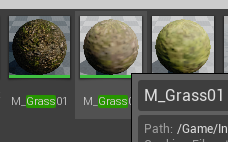 next badger
@merry niche it's not how landscape materials work
merry niche
?
next badger

Hey all,
in this tutorial im gonna show you how you can paint Textures on your landscape.
If you want to give me some Inspiratiosn for the next Videos, write me here:
PyroTutorialSubmission@gmail.com
_____________________...
merry niche
ty
plush yew
How can I debug a crash, is there a log somewhere?
zenith flower
infinite loop can be triggered by taking to long right? (rather than because of millions of loops)
worn granite
it's not strictly loops
the count you see is more like instructions, but that counter resets with certain conditions
zenith flower
The counter can reset itself?! O.O
Doesn't matter, this is just the c++ verification code to run against the shader to verify the calculations are correct
merry niche
Anyone know how I could prevent the main light source (the sun) from being able to put light in areas were it shouldn't be?
Because I have a cycle of light and underground you can see it when its night or dark
how could I prevent that light from being seen underground?
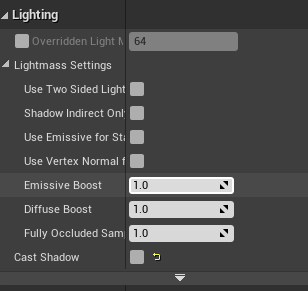 plush yew
@plush yew assuming you ran a debug or development packaging, there should be a log in your project folder, in a subfolder called saved or/and log
I am trying to find out why my games crashing on server travel
 deep stump
Does steam works require a SSN and Tax information on a game that's free?
plush yew
yea
when you are adding your game, they ask before you can even start on it
its for reasons of marketplace sales, etc
plush yew
Possibly if they changed it in the past 4 years
Use app id 480
its the testing app for steam
deep stump
Well I know that, I was just wanting to have other people be able to connect to it
plush yew
wym
deep stump
Like, I want something for friends can connect to and easily "update" the game instead of having me upload it to mediafire, then they having to download the entire packaged game again
I figured I might be able to add "beta testers" or something into steam
plush yew
I am trying to find out why my games crashing on server travel, anyone have any ideas?
grim ore
got to read the logs or the crash stack. if not start testing stuff at random
rancid lynx
i have 5 cactus, each has 3 box collisions, when i do this multisphere trace, each box gives a hit. thats fine. when I run a for each loop to destroy foliage instances, only 3or4 trees are removed, if i press the button again, it finishes the job. i suspect the extra hitboxes are making the array fail somehow. anyone know whats wrong with this bp node ?
5 foliage, 3 box collisions each, so i get 15 hits. thats ok, but the for loop doesnt remove all 5 cactus. it never removes the wrong instances, always the correct ones, but it neever deletes ALL, just "most"
next badger
@rancid lynx are you tracing against some ISM HISM?
rancid lynx
im guessing something with add unique.
well. both cast to nodes worked. so im not sure
im using the foliage paint tool, and i saw "foliage ism"
i think the paint foliage tool may use ism.
if i spam the line trace remove instance 2 or 3 times, it eventually mows down and removes all plants.
555diameter multisphere traces are probably cheap to spam 2 or 3 times. id just like to understand what the problem is. anyays sorry. spam X_x
next badger
@rancid lynx try to draw a debug points
rancid lynx
ok thanks. ill look at this stuff. i do indeed see the sphere trace hits, 3 appear on each cactus, 1 per each of the 3 box collisions on the cactus
idk what this is. ill check it out ty
 formal pebble
Hey guys! I know there's a way to select actors and turn them into one static mesh in the editor, but how I make this using hypothetically meshes in BP?
next badger
editor uses own code to do that, it's not shipped with games
but if you want to do that on runtime you can do similar stuff with procedural mesh component
rancid lynx
in the viewport, the game window, editor window, select the mesh from the level, right click, merge actors options.
or consider painting those same actors with a foliage paint tool, thatll reduce draw calls to 1 instance also, maayybe i think, i might have read somewhere. im not sure.
formal pebble
imagine I have an array with static meshes
so I want to merge this meshes into one
rancid lynx
this might be what your asking.
Enjoy the videos and music you love, upload original content, and share it all with friends, family, and the world on YouTube.
a few examples
basically, select the guys in the level, right click 1 of em. merge
- options
formal pebble
it's not in editor mode. I need this in game
next badger
i've already told...not possible w/o some coding
runtime mesh component (custom plugin) is a better alternative to procedural mesh component
next badger
you are not allowed to ship games with Editor code, that's why you can't do that out of the box
formal pebble
what do u mean?
honest rune
Is it possible to use a few different custom types of ALevelScriptActor for levels? I know you can re-parent the level blueprint like any other blueprint class but I read in a fairly old post that certain actions in the editor may cause the parent type for a level to be set to the LevelScriptActor base type set in the engine settings.
kindred viper
I think it should be possible if you derive/extend it as its design as a base class
seems to be something used when generating the LevelScriptBlueprint so I presume it derives from that as default
next badger
@formal pebble EULA prohibits any use of Editor code in shipped games
Merges SourceMesh into DestMesh, applying transforms along the way
is editor code
 short echo
Unreal dev makes my computer extremely not happy.
Computing shaders and lighting on:
- NVidia 970
- Intel 6600k
- 16 gigs of ram
xD
kindred viper
I ran with a 970 for a while and 16gb on a dual core. It was not nice. What was worse was I had a mechanical drive back then.
but I did manage to finish a dev cycle on a VR game, which only added to my hatred of VR sickness but hey ho
honest rune
ram
imo
32 gb is kinda the ideal minimum
6600k is plenty powerful
970 gtx is fine, just a bit dated
kindred viper
I wouldn't go with 970 anymore when rtx 2060 is cheap enough and kicks it's ass
honest rune
I run a 960 still on my dev machine and handles the engine perfect just no rtx. His bottleneck is definitely the ram
short echo
do i have to care about slamming mismatched ram into my machine? or can i just buy w/e
kindred viper
sure its fine for editor purposes. Even so, its way old now and its not even a target card anymore. min specs are exceeding it
short echo
binned?
honest rune
Same package
short echo
I'm not even on DDR4 I don't think haha
short echo
My mobo supports it: https://www.asus.com/us/Motherboards/Z170-AR/specifications/

ASUS USA
honest rune
https://docs.unrealengine.com/en-US/GettingStarted/RecommendedSpecifications/index.html
Your video card meets specs
Minimum and recommended hardware specifications and necessary software for developing with Unreal Engine.
I don't think the 6600k supports ddr4 though. Almost positive
short echo
Hmm, I'll keep that in mind
@honest rune it seems to: https://ark.intel.com/content/www/us/en/ark/products/88191/intel-core-i5-6600k-processor-6m-cache-up-to-3-90-ghz.html
Intel® Core™ i5-6600K Processor (6M Cache, up to 3.90 GHz) quick reference guide including specifications, features, pricing, compatibility, design documentation, ordering codes, spec codes and more.
Memory Types: DDR4-1866/2133, DDR3L-1333/1600 @ 1.35V
honest rune
Ah nice. Well then I'd suggest 32gb of ddr3 2133. Nice and cheap now too
short echo
❤️ Thanks, you were a ton of help!!
 lyric tusk
Has anyone gone through the the boy and his kite demo project files?
next badger
some people definitely
short echo
Can I program materials with C++ or python or a normal language?
I REALLY gave blueprints a try but I am just not a fan xD
next badger
you can use c++ and hlsl
lyric tusk
I m wondering if in the demo they have added the landscape map or it's just the assets
next badger
map, with some logic
 plush yew

i want it when i hold right mouse button it gose into Flip Flop A
When i let go of it
it go to B
How i can do that 😄
next badger
@winter zenith character was bound with bones rotated
 winter zenith
How would I fix?
next badger
rebind with 0 relative rotation
winter zenith
Can you explain, kinda confused
next badger
all animations are encoded with relative rotations, when you bind skeleton to mesh it will store the mesh position along with default bones orientation, and when animation is applied it will just rotate those joints relatively to their bind position
scarlet birch
It's a bad bind. You need to reskin it and weight it.
next badger
in your case it may be a twist joints
plush yew
Alex if you have time check my problem out 😄
winter zenith
Thank you!
next badger
@plush yew i can't see your bp, it's small
winter zenith
It's not rotated at all in my blender/miya software

 scarlet birch
get rid of the flip flop, and put b on released
winter zenith
It's not rotated at all in my blender/miya software
Where would I fix the rotation?
next badger
@winter zenith joints? not rotated?
winter zenith
 next badger
apply the same animation


 next badger
all animation can be exported as fbx
 novel vine
Ok so just asking since I want to use this is the future is there a way to use perlin noise to generate terrain without plugins?
I know there’s material noise and I’d want that but I’d like to be able to read that and convert it to a vector
next badger
4.24 has new tools for landscapes...
novel vine
Does this allow for perlin noise?
next badger
there was some noise, i can't recall which
novel vine
Would this allow me to generate terrain every time the game starts?
next badger
...probably no
honest rune
if you're looking for something voxel-based theres a plugin I found for that the other day.
Or are you wanting landscape-based?
abstract relic
cough

voxel plugin™
Create infinite terrains procedurally using in-engine tools. Edit landscapes in realtime. Join an active community and benefit from frequent updates!
next badger
phy for sure is popular...
novel vine
Dang I just figured since unity has it unreal would have it supported by default
honest rune
not out of the box no. that's a specialized procedural feature
it is heightmap based but not noise-generated
next badger
Unity has procedural landscapes?
honest rune
probably not in unity either without plugins
novel vine
Would I be able to convert the Voxel thing to smooth terrain?
honest rune
yeah check it out
novel vine
Ok thank you
honest rune
its not just block rendering. its pretty good
novel vine
Does it like have caves?
honest rune
oh yeah
next badger
landscape cant have caves
honest rune
its fully voxelated
novel vine
I may use the voxels then
honest rune
I concurr
novel vine
I may just shrink them quite a bit
honest rune
be bold. enlarge them! lol
honest rune
😉
novel vine
For some reason I was thinking blocky
honest rune
People usually do. I blame minecraft
novel vine
Yeah xd
honest rune
heh sorry caps
I'm still debating on whether to use multiple parent ALevelScriptActor types. Code-wise, the engine doesn't care what type of LevelScriptActor you throw at it, but the editor does. I think the editor only uses whatever type is set in the engine settings class at any given time. I can imagine some fighting between the editor and the engine happening.
screw it. dummy project time to test
well ain't that a pleasant surprise. The editor handles it just fine 🙂 saweet
handles the parent type exactly as it should for each map
novel vine
So the voxel plug in can randomly generate a world on game start in the free version?
honest rune
I think the generators provided by him are only in the free version but you could add your own generators
pro version has all the bells and whistles
bit of a price tag though but could be worth it depending on what you'r edoing
novel vine
I’m just making a simple game about a map flooding lol
So I’m probably just gonna stay with the free one
honest rune
pro will probably be overkill then unless you are really passionate about flooding lol
novel vine
Yeah XD
normal burrow
A flooding map?
honest rune
alright, I'm off to break some levels . good luck!
kindred viper
looks like its using rotated bones to me.
normal burrow
Where did the animation come from snack
winter zenith
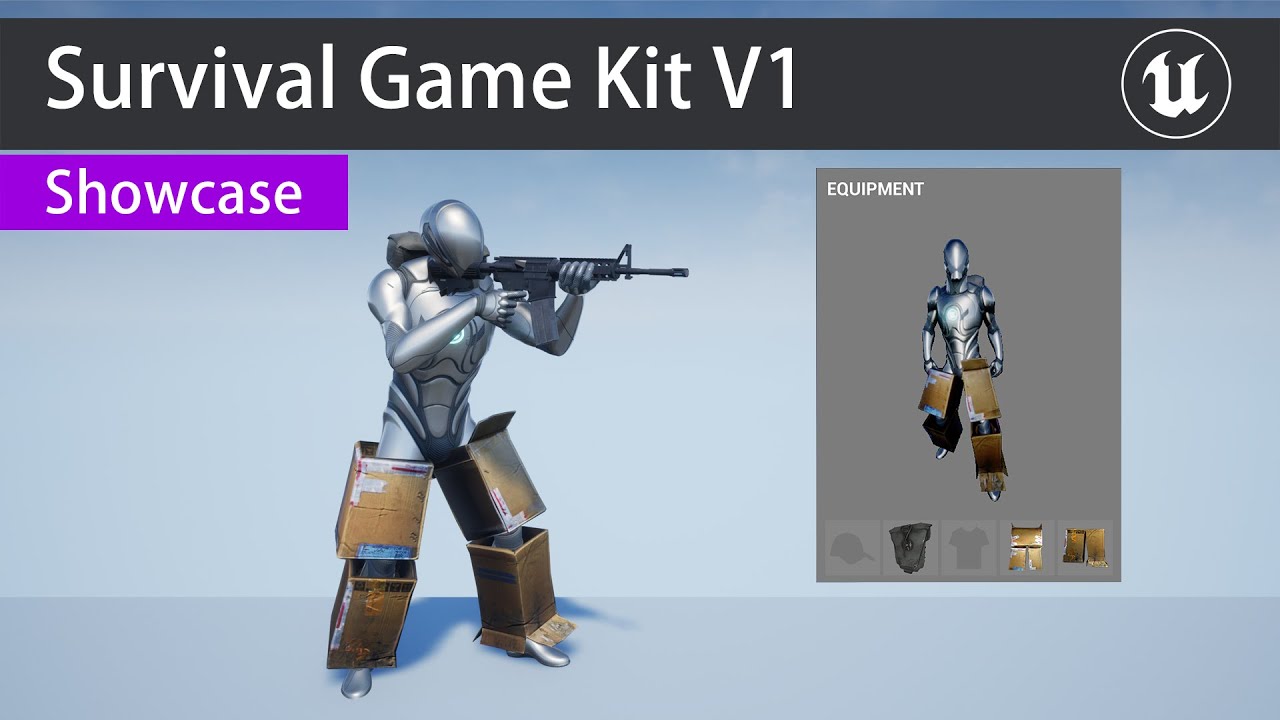
Available Now
https://www.unrealengine.com/marketplace/survival-game-kit
Discord:
https://discord.gg/KNCmQb6
Defuse Studios are pleased to present our latest project ready for release, Survival Game Kit. We are proud of our project and we believe it to be the best on the mar...
it's from this
normal burrow
I don’t think there is much that can be done for this fella
Would guess the animations were badly retargeting
Retargeted
You could retarget them yourself but the Skelton has issues. Not sure what that line to the spine is
normal burrow
There are more bones in fingers yeah
 tame bluff
 ivory sail
Has anyone had a level just go missing out of a project randomly?
normal burrow
No, try searching all the folders
There is a auto save folder in the saved folder
Which would probably contain files named the same as your missing level
I’m not sure on how to use the auto save but it should help you find it in content browser so long as it was saved
ivory sail
okay ill try that. also when i open up the blueprint window my ram usage goes from like 1GB to 10
not sure what thats about
maybe a memory leak?
placid arrow
in my game im using a character movement component for my character, and i support both keyboard and gamepad, with the inputs mapped to the same input axis name. A and D have the same min/max values as gamepad left and right, -1 and 1 respectively. however, when pressing A or D, the turn rate is like 10x that of the gamepad. if they both have the same min/max axis range, and use the same code, why would this be the case?
are keyboard inputs generated more frequently, causing more events?
 gilded plinth
Could anyone let me know. Do you HAVE to package to use NDisplay?
i have a project with a plugin that I can't get to package, but i want to use nDisplay.
rancid lynx
Put a math modifier in the keyboard line before the line gets to the move node.
Multiply by .1
Thatll work till ta figure it out
civic iris
guys, how to create an instance of a userwidget BluePrint from c++?
civic iris
guys, how to create an instance of a userwidget BluePrint from c++?
@civic iris i got it, CreateWidget<>(this);
fierce forge
why when i'm moving in my game the camera are shaking after upgrading from 4.24.2 to 4.24.3 ?
civic iris
@light lintel sorry buddy i am very new to unreal
atomic onyx
@fierce forge I have the same issues in addition to a ton of crashes
But my windows are resizing
If that's what you mean
fierce forge
i don't have crashes but i worked 2 months on a game and now the camera is shaking
and i don't know what i can do
placid arrow
does it or anything attached to it overlap the character's capsule?
youll get odd stuff like this, maybe accompanied by "can't move, penetrating position is..." etc in your log, if thats the case
 cosmic atlas
I make buttons for touch control but buttons act like virtual joystick, I mean when press button + drag then process execute but when I only press the button,it's not work after second in UE4.
Why buttons works like virtual joystick?
I found the problem, simply unchecked ' use mouse for touch'
Unreal Engine Forums
Hi, i used my mouse to make my character yaw and pitch... but i wanted to show my cursor on screen, to also be able to select things instead of using a centered
vagrant pike
quick question, how do I temporary change the pivot on a mesh in the viewport
nvm I figured it out ALT + Middle mouse button
placid arrow
hmmm
i changed my game mode to being derived from GameModeBase to GameMode... and now my match doesnt start. all my player characters that implement character movement just sit floating in the sky
they receive input, but dont move
i think its related to how its set up in that im not doing input thru the controller as i should be?
i copied originally from the vehicle example, which accepts input directly inside the pawn
(i think this is bad and wrong!)
i'll revert back to gamemodebase for now, and look into that later
hoary locust
GameMode doesn't handle input
but it sets the stuff that do
why do you think accepting input inside a pawn is wrong?
placid arrow
am i correct when i say accepting input and handling input in the character is wrong?
i meant character btw
just to be absolutely specific
the reason i expect its wrong is that a controller accepts input... either from AI blackboards etc, or from input devices and players, or network, yes? and that input is translated into velocities and commands on the pawn/character, which "does stuff" in world
hoary locust
no it's the most standard way, but there may be scenarios where you want to do it in the player controller (which is actually further down the stack in the engine side of things) or a mix
placid arrow
doing that in the pawn/character just seems wrong, like they gave us controllers for this reason
although, even knowing that ive not had time to change it in my game
because until i tried this it all just worked, and dont waste time fixing what works, right? 🙂
hoary locust
well if you're doing it for learning purposes that wouldn't be a waste of time
the only reason your gamemode messed up controls must be because it didn't set the player or controller correctly
placid arrow
well my character still appeared
and still accepted input, but didnt move, and didnt fall to the ground (my spawn points are slightly above ground level)
it looked like the settings were correct
in terms of the pawn class, controller class, etc in gamemode
hoary locust
so the old gamemode maybe unpaused the game or the new gamemode pauses it?
via timedilation
placid arrow
hmm, possibly. i have the game mode set as not pausable though, as its a network match
 brisk osprey
So after updating to 4.23 it crashes when I create a Blueprint Actor
Sorry 4.24.3
Any1 having the same issue ?
plush yew
do you think c# is easier to learn and to do then bp?
abstract relic
No. They all have their challenges
 blissful trail
is it hard to create volumetric weather systems ?
abstract relic
Read pinned message. I made a care package for beginners
plush yew
@abstract relic still ue4 has a lot less education material than unity
how am i, a noob, supposed to learn this without enough various education material?
abstract relic
There’s also udemy
plush yew
still not as much as unity
fi i wanna look up something, im more likely to find it on unity tuts
abstract relic
Ok?
plush yew
sry
thin tendon
There is only soo much documentation teaches you. Its up to you as a developer. To develop the ability to piece stuff together. For every single thing I have made there has been a bunch of ways to do it. And its up to you to figure out what works best. Documentation is only meant to give you the basics
plush yew
@thin tendon but if there are more code to see on the internet, im more likely to use that and edit it and make my game.
thin tendon
And by editing other people's code you won't learn as quickly or efficiently
plush yew
like if i see a xyz tutorial for unreal engine, i can start using that code for my game,
i am not even learning fast when not copy pasting.
abstract relic
That’s not the definition of learning, that’s just taking resources
plush yew
ok. then thats what i mean
abstract relic
Look in marketplace then. There are plenty of assets to use
plush yew
nothing i'd need
i dont need 3d objects. if you mean that with assets
just that in unity, you have 100x more stuff to see online. so you immediately know what to use. you don't have to do the work yourself
abstract relic
Plenty of systems https://www.unrealengine.com/marketplace/en-US/store
Visit the Marketplace for free and paid assets for your next project.
thin tendon
pre made Assets will only get you so far
 stone pilot
did the free stuff for the month already got announced?