#ue4-general
1 messages · Page 656 of 1
 normal burrow
Cast hit component to instanced static mesh component then use the get transform node where you pass the hit index
 loud flicker
hey guys. i'm building a spaceship!
so, what i have is a static mesh (my ship), a blueprint for my ship, and components. the ship blueprint uses some structs to define what object goes where in the ship (doors, lights, computers that can all theoretically be changed out and interacted with separately.
so... right now i'm using sockets. I'm using the literal socket names in the structs to call and spawn objects. However, it's starting to look like i may have a few dozen of them, even on my v0 ship. is there a better method?
 tiny sonnet
@normal burrow hey there again! i still have my problem but if i turn off pak file, it works. only problem is now my file is 20 GB
umm
 left citrus
Hey I made the mistake of turning up the resolution of the lightmaps on some foliage I use on a landscape, I have since reverted it to the default size, but my lightbake is taking forever and I'm getting warnings about the lightmap being too large..
Is there a way for me to work out what part of my light bake is taking so long? The errors I'm getting are about the instanced mesh foliage painted on the landscape.
normal burrow
Pee pee stencil settings are on the material settings. You define how the masking works there
Comparison mode and reference value
normal burrow
I got it wrong?
 plush yew
also can you show me what you mean
normal burrow
Moment
normal burrow
yep
plush yew
did they added that recently?cause i dont remember that option
normal burrow
don't think so
left citrus
This error message suggests I should be able to adjust the lightmap resolution for the instanced mesh component, but that doesn't seem to be an option
normal burrow
believe its talking about the baking resolution of the entire map
but maybe not
is redusing number of meshes out of the question?
the thing with instanced meshes is they all need to use same lightmap texture
so using one instanced mesh component for the entire world means you have a texture with all that lightmap data in it for the entire world (of those things)
plush yew
just noticed that custom stencil doesnt work
alright never mind,custom stencil works
but I have in mind what if it doesnt show the post process cause i get the area around the player
normal burrow
i think ideally you make another post process for that case
but not sure really, could ask in #graphics 
 vocal island
when you go from third person to first person camera, how do you get the body move with the camera?
right now only the camera moves
normal burrow
don't think this is how you are supposed to use stencils but i've been wrong before
stencils are pixel perfect in a sense
so its probably better to let the material hadnle the test/ operation than trying to read some back buffer
again though, i could be wrong
 wicked kettle
hey guys, any1 could help me for some minutes please? I cant really apply cloth simulation even though I did it from a little tutorial and i didnt miss any steps i feel like im missing something checked or unchecked
plush yew
aight nvm
left citrus
@normal burrow that's just the thing, this wasn't a problem until I fucked with the lightmap resolution, if i delete the existing instanced meshes and paint a bunch more, even more than I have right now, the error goes away and the build is fine
it's as though the high resolutions are locked on these existing meshes
and I'd obviously like to avoid redoing all the foliage..
normal burrow
does it refuse to lightmap catch2?
@wicked kettle you know that the distance goes over 100?
the paint value
if its a huge thing you have to use bigger values than 100
wicked kettle
its same size as ue4 mannequinn, also i exported it from blender with units set 0.001 = ue4 friendly
normal burrow
0.01 i hope you mean
what is the issue? it does not apply?
how are you testing ? you must close the paint window, don't dock it
wicked kettle
yea 0.01 sorry,
normal burrow
And if you still receive lightmaps catch2 the warning would be just informing you that the quality is lower than you set over the map i'd expect
wicked kettle
hold on for a sec
Do i need any specific weight paint outside of ue4? cuz I've heard it can be done in ue4 itself
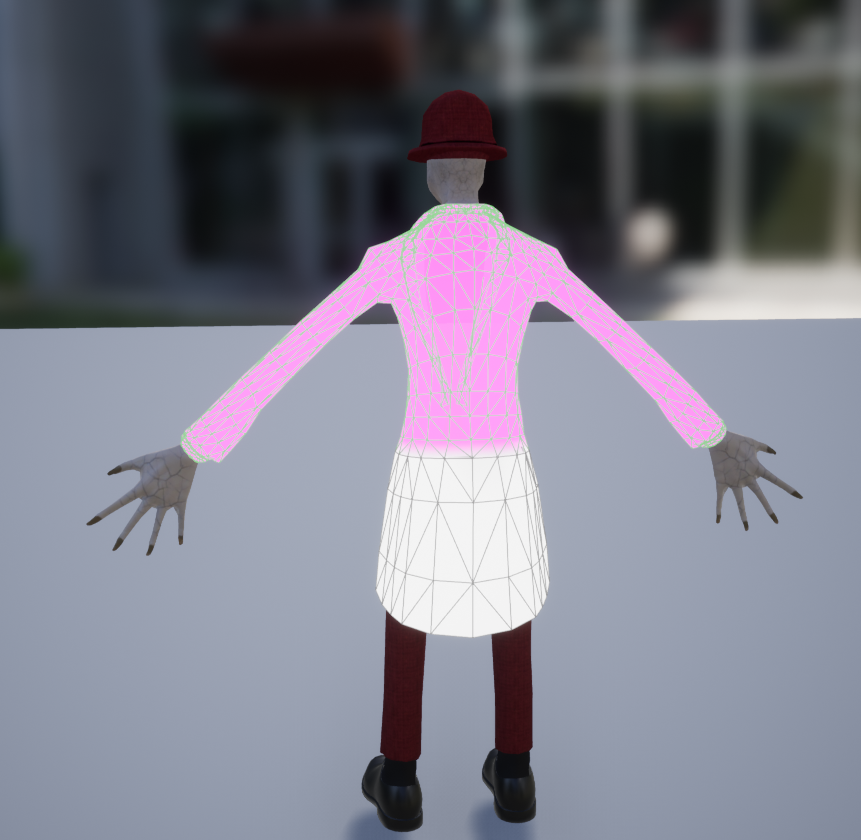
also if I paint this area white, it should be simulation driven and not weight driven anymore right?
its weird though cuz i tried with a static mesh too from a yt video and the guy made it work , i did the same but nothing happened
normal burrow
things are always weight driven
that distance value map your painting is measuring distance from the weighted position
when the simulation point is within that distance range then it's simulated, if that makes sense. So you do need good weights in general still
but if you could answer how your testing the weights, like you have to close that painting screen for them to simulate at all
left citrus
@normal burrow light bake goes through, but it takes half an hour and throws those errors
well.. warnings
wicked kettle
making some tests ill get back in some mins
normal burrow
may want to consider if you even want foliage to be lightmapped catch2. volumetric lightmap may be okay for it
normal burrow
the pink and white is not weight
its distance from weighted vertex
weighed vertex is still used in that sense
but its not an influence mask of sorts, its a distance lookup in cm.
pink means zero by default visibility range, which means no distance
with the physics asset the weights also matter because intersections at tested from the weighed vertex to the simulated one
so if the weighed vertex crosses into the physics asset its a problem
 craggy flax
Ive somehow hidden my cursor and cant track down how. Eff.
 forest tree
Has anyone ever set up collision/overlap events on a spline mesh actor?
Google results are a graveyard
Poor souls who also got slain by it, with little information as to how one should conquer this particular demon
plush yew
As i downloaded my animation like 1 month ago i deleted the physics that it came with it
i do have the animation FBX if i redownloaded it and took the pyhiscs they will auto apply again? 😄
Any thoughts?
 abstract relic
I’m going off super old memory. You can right click on the skeletal mesh and generate physic asset (?). If not, open the skeletal and the option to regenerate physic asset is in there
plush yew

HighTide
i can do it from here?>
cuz this is the on ly thing i got left from the animation
@abstract relic
 misty creek
Okay, so this is going to sound really funny, but does anyone know how to undo disaster recovery?
I crashed my project and hit yes to disaster recovery but it somehow loaded an old version that what the editor loaded originally
 austere scroll
Does anyone have a tutorial on how to make a changeable weapon skin ?
abstract relic

What are Material Instances in Unreal Engine 4?
Source Files: https://github.com/MWadstein/wtf-hdi-files
austere scroll
Thx
 late verge
does Unreal 4.23 support environmental destruction in runtime?
plush yew
yes i think so.
 drowsy compass
@plush yew
From the 4.23 release notes page
"...HTML5 platform support will be migrated to GitHub as a community-supported Platform Extension and no longer officially supported by Epic in upcoming releases..."
https://forums.unrealengine.com/unreal-engine/announcements-and-releases/1617783-attention-platform-changes-ahead
Unreal Engine Forums
Platform Extensions (and how they may impact you)
Background
Unreal has a rich history of multi-platform support. We have had various methods of separating out
 jolly steppe
imagine if Mathew actually made that vid
plush yew
oh thanks svv3d
 manic pawn
community supported platform = dead platform
plush yew
i mean it is still usable in the form it was originally released.
 indigo inlet
Hi all. I just found the server and its great to see so many fans of ue4 all in one place
indigo inlet
Im only here to warm up the crowd for the headliner
late verge
never mind, destruction in runtime still isn’t supported
abstract relic
Tis a love-hate relationship
abstract relic
Well there's a new physic engine
If you enable it from source
Outlines where to find learning resources for the Chaos Destruction system within Unreal Engine 4.
 rotund scroll
can't you enable it from plugins as well?
I saw it was version 0.1 or something
also why I'm not touching it
 ocean merlin
unreal engine compiles all files in project, even that is not used?
When I use Package project and he is starting building, a have a lot of comments like
UATHelper: Packaging (Windows (64-bit)): LogTexture: Display: Building textures: T_Leather_01_N (BC5, 2048X2048)
but i dont use that texture. So, do I need to remove all things that I dont use?
rotund scroll
I recall there was a way to mark stuff not to add to the cooked build
but I can't remember where
normal burrow
kind of makes sense that anything web related be community supported hah
@late verge believe 4.23 still has apex destruction
if not 4.24 as well
but you'd be committing to something that'll probably be removed soon at this point
plush yew
pls give me short 10 min UE4 to UNITY4D video

what is the name of this node?
its for material
abstract relic
Vector3
plush yew

@abstract relic This one?
am watching a spanish youtube tutorial and he is using short cuts 😄
abstract relic
vector1 converted to a parameter
Reference for all material expressions available for use in the Material Editor for creating complex node-based shader networks.
rotund scroll
readily available information on the documentation page
rotund scroll
^^^^^^^^
 sacred inlet
Whats the best learning source for blueprints? If I want to sit in a bathtub and watch videos?
rotund scroll
@sacred inlet depends
generally I don't recommend stacking up on knowledge
but rather look for solutions when a problem occurs
abstract relic

Unreal Engine is the world’s most open and advanced real-time 3D creation platform for photoreal visuals and immersive experiences.
sacred inlet
but I am no new
 rotund scroll
in the blueprint channel there's a bunch of pinned videos
sacred inlet
that I want to familiarize with the functions and shit in there since theres so many
plush yew
i think i found it
rotund scroll
I recommend going through those
plush yew
this is it right?
abstract relic

raywenderlich.com
In this Unreal Engine tutorial, you will be guided through installing the engine, navigating the interface and creating your first game object.
sacred inlet
I was learning C++ but not sure how helpful that will be?
rotund scroll
@sacred inlet yeah but nobody knows all of the functions in blueprints
there's too many
rotund scroll
what's your experience level
abstract relic
you already asked this question
rotund scroll
then use blueprints
abstract relic
Overview of using the Blueprint visual scripting system for gameplay.
sacred inlet
in the middle of this Udemy course
rotund scroll
look in the pinned videos
of the #blueprint channel
most of what you will need are those
blueprint communication chief among them
plush yew
whats a good tutorial for going from ue4 to unity?
 thick herald
What to know BP nodes are etc? https://www.youtube.com/channel/UCOVfF7PfLbRdVEm0hONTrNQ

YouTube
This channel is dedicated to exploring Unreal Engine 4 and the Blueprint programming language that it uses. You can think of it as a companion to the API doc...
@plush yew maybe ask on the Unity forums?
rotund scroll
@thick herald the general idea of accumulating knowledge isn't a good way of learning things
you'll forget what everything is before you learn to use it
thick herald
I know, but he asked so he got. lol
rotund scroll
the videos are good when you have a problem that can be specifically solved by certain nodes
abstract relic
Trial by fire Cranz. They'll figure it out eventually 😛
rotund scroll
I suppose
 grim ore
learn.unrealengine.com , go thru the getting started path so you can learn how the engine works at the minimum then find something to do and do it =0
mother.... my right shift broke
rotund scroll
explore, discover, divide and conquer
grim ore
what do I want to do? what exactly do I want to do? how do I do part of that? how do I do part of that part? whooo 1 of 239485834 tasks down!
normal burrow
find any more crap matheww?
grim ore
nothing major beyond what I posted. There is something called shallow water simulation plugin in Physics but I couldnt find it in editor
rotund scroll
@grim ore what's the issue?
grim ore
no issues, he was asking if I found anything new in the master branch release
rotund scroll
oh
craggy flax
What would be the best way to approach a group of soldiers as a single selectable unit, and handling their grouping formations?
Like hypothetical “build infantry” and a group of 5 come out as a single unit
rotund scroll
if it's just a single unit you can arrange them to always consider the same location
alternatively if they clip past each other it's probably not that much of an issue
craggy flax
It’s more their standing around positions. Box, line formation, etc
rotund scroll
depends on your grid type
box is the most compact, which usually makes it the preferred choice
 bright basin
Can someone explain, by the way of blueprint events, how can I make item go from the inventory that has a number of similar items to the socket, when player choses so? It's probably very easy?
rotund scroll
not sure what you mean, do you have a reference?
bright basin
I have an inventory, I looted and item, so I pick it from the inventory and it needs to attach itself to a socket and disappear from the inventory
rotund scroll
again it'd be easier to understand if you could show me a game that already has this? like diablo's inventory but if you equip something it disappears from inventory?
bright basin
i was just brainstorming on how I can do this in general, Blueprints and I don't go well together 😄
rotund scroll
well if you can't get your idea across it's really difficult to help you
bright basin
I mean every game has this functionality right? You loot something then you later equip it as a weapon in your hands
rotund scroll
I just gave you a counter example
diablo's items stay equipped when they are in your hands for instance, and are part of the inventory
plush yew
I am trying to import FBX model made with Daz to Unreal and I got this
but
Only unreal see double hip bone
 serene birch
this doesn't mean there isn't two "hip" bones in the exported FBX though
grim ore
also if you collapse the hip bone at the top does it show anything else next to it?
serene birch
not to mention you only showed like 1/4 of the bones 😛
serene birch
UE4 skeletal mesh I think only wants a single mesh inside a FBX file
plush yew
alright
thanks ^^
it's a standard ?
having one mesh inside FBX
tho, Daz can put two mesh inside FBX
weird
rotund scroll
fbx is a generic format
it's not specific to unreal
many applications can use it
some of which maybe allow for 2 meshes
plush yew
alright
Else I never know which version of FBX to choose, should I use 2018 version only ?
latest version
UE4 propose 2013 by default
abstract relic
hell, 2014 works
abstract relic
So it doesn't really matter. Never had an issue
rotund scroll
yeah but daz doesn't know you use unreal
abstract relic
test them out
plush yew
I still have the same option exportable, even in 2006
grim ore
https://docs.unrealengine.com/en-US/Engine/Content/Importing/FBX/Animations/index.html The UE4 FBX import pipeline uses FBX 2018. Using a different version during export may result in incompatibilities.
Setting up, exporting, and importing animations for Skeletal Meshes using the FBX content pipeline.
 unique kraken
hey anyone hase some info on how to use flowmaps for hair
 hidden aurora
Are there any updated videos on how to make standalone servers?
rotund scroll
@grim ore do you know what triggers the RMB camera function in the third person template? there is no input functionality by default, so I'm wondering where it stems from
 inner heath
Hey Guys!
I'm trying to do some cloth sim for this flag in UE4 but for some reason I can't get it to work, I have made it to this point but for some reason I can't make it sim the actual model, just the wireframe and in engine just doesn't move... any Idea about what could it be?
plush yew
@rotund scroll there is no RMB input in this template by default
rotund scroll
that's my point
plush yew
what it does ?
rotund scroll
but if you hold rmb you can move the camera
plush yew
lol
rotund scroll
so where does that functionality come from
plush yew
can you show the input ?
of the project
is it when you launch the game ?
or before
Did you click on this ?
rotund scroll
just forget it
 steep meadow
im trying to install ue and i've benn sitting at Verifying 94% for an hour and a half
what do i do, its not making any progress
 open eagle
can someone help me with DamageTypes
 wet brook
Is it possible to switch maps with out a loading screen? Like have a ship or an elevator or something stay loaded while you are switching maps?
 boreal plinth
So I see the emissive node, but I can't fully figure it out
Trying to illuminate these bulbs, I know to unlit for performancee
plush yew
can someone tell me how to start adding custom animations
im using alsv4 and nothing works or works but keeps going away when i restart the editor. all is saved though.
abstract relic
This? Contact the developer https://www.unrealengine.com/marketplace/en-US/product/advanced-locomotion-system-v1

An advanced bipedal locomotion and layering system focusing on high quality character animation with responsive movement. Built to be flexible, extendable, and to provide a solid starting point for new projects. Currently Singleplayer only. (100% BP)
plush yew
does anyone know how to fix this?
normal burrow
how much ram do you have luke?
rotund scroll
do you have a lot of lights
plush yew
64gb of ram
I have 1743 lights
Ive baked maps with 5k lights before so I dont understand what is different about this scene
plush yew
during?
normal burrow
yeah leading up to
plush yew
Normal in editor usage
oh
let me check
it gets up to about 600mb used then force quits
serene birch
access violation can be something else really
do a memtest on your computer for starter 😮
if it is that sudden
serene birch
it's unlikely it'd give you the same address for the memory of the heap is involved
plush yew
I know my memory is fine because lighting bakes fine on every other map
This is the only map that doesnt work
And Ive lit the scene the same way I light every other one
I did notice that removing the directional light fixes the light building but I need that light in
serene birch
engine version?
plush yew
4.24.2
serene birch
could be a simple bug you found
normal burrow
are many stationary?
normal burrow
is it just one stationary directional?
normal burrow
familiar with visual studio?
plush yew
barely
normal burrow
since its not giving the same address everytime, would probably say its a bug that should be reported
Wouldn't expect it to be your fault, if there is an issue preventing you from doing it, it should be presented better than a access critical
that said, you might find ways around it such as that directional light
hard to say
plush yew
Setting the light to movable works but again, Id prefer stationary
Its whatever though
normal burrow
lots of overhead in stationary yeah, may be overloading what its ready for or something. regardless it should do a better job of informing you and would report
plush yew
Okay
I just find it ironic and funny that I just did a map last night that literally had 3600 stationary lights and faced no issues
UE4 works in mysterious ways
normal burrow
yeah i wouldn't be able to connect those dots really, no idea what it is
abstract relic
Delete /intermediate 🥁
plush yew
Could try that but rebuilding shaders is a bitch lol
Theres so many maps in my project that rebuilding the shaders would take hours
drowsy compass
@plush yew
Sometimes the system requires expanding virtual memory. Also try to Clean and Validate the Swarm agent cache.
https://wiki.unrealengine.com/Swarm_Agent_Troubleshooting
abstract relic
Very much doubt it’ll help luke
normal burrow
yeah unlikely, but maybe
normal burrow
unreal will use all the ram
plush yew
UE4 only uses 32gb max
Atleast according to what I read
I've never seen it use more than 20 on my end though
serene birch
but UE4 lightmass computer seems to be a different exe than the editor anyway, there's no telling how much RAM it can use 🙂
normal burrow
where did you hear that it only uses up to 32gb?
serene birch
seems a weird limit anyway
plush yew
¯_(ツ)_/¯
abstract relic
Lies and slander Luke. You can never have too much ram
normal burrow
unreal will happily eat it all hah
manic pawn
is it too much ram when you run out of slots to plug it in?
plush yew
^^^
 jagged scroll
this is the weirdest thing ever.
I downloaded UE4.12 to look at an old project but non of the dropdown menus in engine open. No right click menus open. Nothing. Anyone has any idea?!
plush yew
I was actually going to pick up 128 originally but my mobo doesnt support it
 normal burrow
you need more computer then zeb
plush yew
K thats enough from me, I gotta model a star destroyer :))
manic pawn
you don't have enough computers until you have one core per job when compiling the engine
normal burrow
compiling shaders is way more of a payoff for cores than c++
plush yew
I just updated UnrealEnginePython and MotionMatching plugins on github to 4.24.2
https://github.com/20tab/UnrealEnginePython/pull/833
https://github.com/Hethger/UE4_MotionMatching-/pull/5
🙂 Hopefully someone find these useful, I know I did!
 thin tendon
So I just found an issue with creating a day and night and I'm wondering how other people have addressed it. The issue being that Unreal engine doesn't change to a night time scene unless your light that rotates is pointing directly up. And as soon as it moves it starts a dawn or dusk scene. Every tutorial I have seen. Doesn't account for this and they end up getting dusk from like 5pm all the way through to midnight.
I'm thinking of just putting a different set of rules for setting rotation during night time hours. But I'm curious how others have managed it.
 fierce tulip
https://www.youtube.com/watch?v=7UeApOIj0jY moar from frank
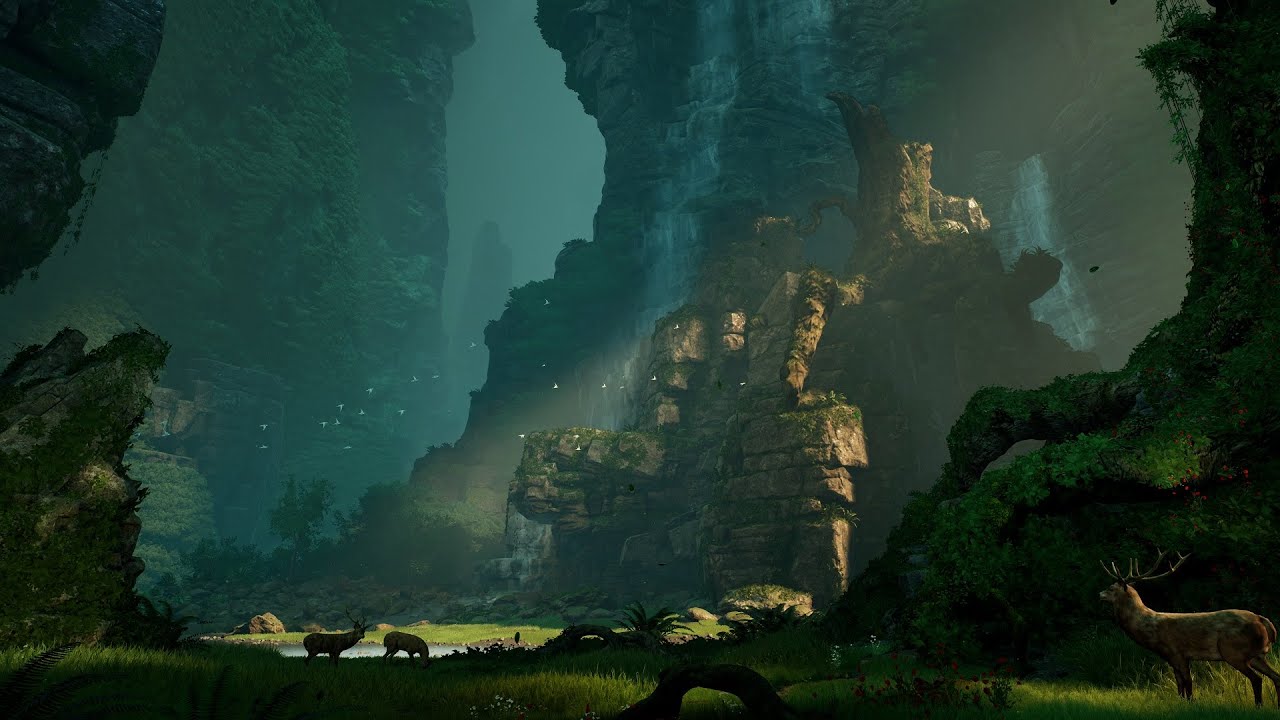
Wanted to try something a little different for this video and recreate a concept art piece that has inspired me for various different projects in the past. There were a few things I wanted to change/improve in the piece but I was hoping to stay as consistent with the original...
 crystal jackal
Hi all. Inside a blueprint component section, I'd like to group some items together.. but I'm struggling to find/identify some contrainer of sorts that simply has transforms as a parent and not much else. does anything like this actually exist in ue?
.. is that just a Scene component actually.. just saw this one
 blissful trail
https://gyazo.com/52735b91a470a65606b1356f05b2c558 idk how it took me soo long to figure out how to do this xd
 sharp crest
@spare kernel I like your status
It is very true
well rip should have gone to #lounge too late now Ig
thin tendon
Is the far view plane something that can be manipulated at runtime in a packaged game? Or does it only apply to the editor?
thin tendon
Thanks heaps.
normal burrow
@thin tendon I guess I was wrong on that
thin tendon
lol its all good it gave me somewhere to look. I just find it odd that the editor has a true render distance plane but I can't find a way to access it in game
normal burrow
There is a console variable for it, but it’s perplexing to me that it’s not exposed to blueprints
thin tendon
Yeah I can't wrap my head around it either. Because the different fogs all they do is add fog. But stuff is still rendered behind them. And the far view plane is the only thing I have seen that comes close to a true render distance plane.
 sacred sluice
if i took a character mesh from another project and put it on my already set up skeleton would everything work the same?
normal burrow
Thrown nodes
You could potentially modify the projection matrix in c++ waffle but sounds like that is tricky as well
thin tendon
@sacred sluice If they share a skeleton yes
@normal burrow Thanks I might put together something hacky like a sphere that occludes outside actors
sacred sluice
@thin tendon how can i make them share?
normal burrow
Assign skeleton by right clicking
sacred sluice
Where it says allow all animations blah blah?
normal burrow
Bone orientation must align between meshes otherwise you’ll get twisty characters
Hm not sure what your referring to, but if it’s a warning, probably
normal burrow
Mesh?
You assign a different skeleton to the mesh
Assign the skeleton with the animations you want to the character not using that skeleton
normal burrow
Close this
Then in content browser locate the mesh. Right click it and select assign skeleton
sacred sluice
trying that. hangon
thin tendon
The option to share a skeleton is also when you first import the character into unreal. Its good practice to make as many of your characters share skeletons as possible. So that you don't need a different set of animations for each character
sacred sluice
freak, yeah i have to redo anims for these guys
thin tendon
If all your characters share the 1 skeleton. You can have literally 1 set of animations used by them all. Its kind of awesome.
 merry gazelle
Does anyone know if there's an options in Unreal Editor to increase the size of the UI? I'm working from a distance on an ultra wide monitor and the text is tiny lol
 uncut vigil
Use the window scaling instead?
merry gazelle
window scaling in UE?
not sure what that means unless maybe you mean changing something in OS settings
merry gazelle
hmm that kinda helps actually, thanks
forest tree
I'm pretty impressed with the physics Unreal lets you do, TheIsle's devs are nailing it.
https://youtu.be/KMCnb6C4FMA

 floral arrow
hmm anyone ever have an issue with skylight radiosity baking taking forever. using the same ppv/lightmass/world settings as another project but it is taking like 100x longer to bake
 shell compass
Do you guys check in raw source assets to version control? Like models, textures, .psd files, audio etc?
Or how do you manage all that stuff on a company/project level? Would a shared Google Drive with all those better than checking it in with Git-LFS?
forest tree
Perforce is a big thing I think @shell compass
shell compass
Yeah, I think that's the de-facto standard for UE4. It's just that I'm not too keen on it. Too much hassle with the locks and all that
It's probably powerful if you know it
uncut vigil
You should, perforce or maybe svn are the easiest
Hassle is worth it when you have access to revision history
shell compass
I saw that Project Borealis used Git, but they did some custom setup with scripts etc.
Not sure why they didn't want P4 either.
@forest tree btw, I've always been disappointed with the physics in UE4. For me, it's always felt floaty, starts to jitter like mad when things are forced together, and there's been many times where small things fly through walls etc.
I think it has to do with floating point imprecision with small scale stuff, so what has helped for me when working with physics in small environments for VR for example, has been to simply scale everything up to like 10x. It's super hacky.
I wish UE4 just had some... world scale parameter or something, so you could get better small-scale floating points, but be limited to smaller world sizes.
Cause I very rarely need those 8x8km maps
But often need good physics right next to the player
forest tree
I'm using Git for now like yourself, did you encounter issues with it? @shell compass
btw, I've always been disappointed with the physics in UE4. For me, it's always felt floaty, starts to jitter like mad when things are forced together, and there's been many times where small things fly through walls etc.
Interesting. I haven't done much with it myself. I want to learn, but it's another huge rabbit hole to get into I feel like
Adds so much life to the game though, it's amazing shit when it works
 runic fern
Good Afternoon guys
When im trying to run 2 different game instance using PowerShell one of them working normally but 2nd one crashes show me this error
DXGI_ERROR_INVALID_CALL
DX11RHI
Im using now Version 24.2
 brave gate
@shell compass use proper source control, not a Google Drive
- there's no noticeable hassle using p4 - you click "check out" why saving asset initially, but that allows you to easily revert current work and you're not gonna have conflicts with other people
- you can easily go back in time with source control (going back with entire project, selected folder or file), track since when bug appeared or performance regressed
- you can always diff - compare changes between code/blueprint changes
if using Google Drive would be efficient, gamedev would use it
but p4 is common for Unreal teams and big boys - your repository size gonna grow quickly and that's where p4 shines (efficient with enormous amount of assets, file locking and easy-to-use client since forever)
Git is obviously preferred by programmers and because it always gonna be open source and free of charge, easy to find cloud services hosting Git - but it wasn't designed for huge binary datasets
forest tree
You can self host P4 for free, right? @brave gate
Up to a certain team-size?
I've been meaning to get into it, but so far as a single dev, I don't feel like I really need P4 yet? Git seems to do the job
brave gate
up to approx 20 people (free license is like 5 "users", 20 workspace) - "workspace" is what actually a single developer use (not "user"), user in p4 is account with password, it can be shared by many workspaces/persons since you don't "personal password" on source control really
shell compass
@forest tree no issues with Git other than the repo being rather large. But then again, I'm just working solo right now, so no conflicts of any kind are bound to happen.
brave gate
depends on needs, I'd use p4 on every game project, no matter of size
- no need for Git branches in this case and all the stuff what makes using Git annoying if we don't need branches all the time
- P4 plugin for VS automatically checks out edited files, so no usability disadvantage compared to the Git while coding
- still is useful to have p4 client - many "pending changelists", getting older revisions on specific folder/file easily, human-readable version numbers (integers growing from 1, 2, 3, 4) instead of Git hashes 😉
forest tree
Sounds like a cool tool, I'll probably set it up if I manage to scale up the project
Thanks for the info!
uncut vigil
@brave gate can you set up p4 on a NAS?
forest tree

Perforce Forums
perforce setup on a NAS - posted in P4V: Might be a bad question but was just curious if anyone has attempted to setup perforce on a NAS? I have a synology ds115j
I am considering just setting up perforce do scm from an external drive/NAS until I go to a cloud service.
NAS is just storage, so I can't imagine you can
Unless you built it yourself and have a capable OS running on it?
If not, I'd imagine a Raspberry-Pi would work, you'd have to check the sys requirements
But beware that you don't have an out of house backup then. And that means you just don't have a backup, really.
uncut vigil
I dont know, i was thinking about other options rather than renting a server
Yeah, true
forest tree

Vultr
Vultr Global Cloud Hosting - Brilliantly Fast SSD VPS Cloud Servers. 100% KVM Virtualization
Dirty cheap
You'd need some more storage probably, but yeah.
uncut vigil
That is pretty cheap
forest tree
Yeah, it's not so bad these days really.
uncut vigil
I was thinking of adding all my shit though, sources and all and it could be 500 gb or more. I have a 2x rack in raid, and a NAS would be cool to do. Ill search for options
forest tree
Don't know how comfortable you are with sysops, but it's very doable to learn. Plenty of resources.
I was thinking of adding all my shit though, sources and all and it could be 500 gb or more. I have a 2x rack in raid, and a NAS would be cool to do. Ill search for options
That's quite a bit yeah.
Hmm
uncut vigil
I wanted to get one of those mini intel sticks just for p4
forest tree
Looking for low cost cloud storage? Find out how the leaders in cloud storage compare by price and function.
Backblaze is great if you want only a place to backup
uncut vigil
Cool, thx
brave gate
@uncut vigil I had one Intel compute sticks for p4
it surprisingly worked... kinda... it was super-slow with uploading/downloading a huge number of files, even on WLAN
it wouldn't be enough if using custom engine, but then it's often efficient to set up a build machine - a single machine for p4, building code for a team, cooking, automation tests, etc
although netbooks with decent amount of RAM would be ok
P4 works fast thanks to putting its database journal into RAM, querying entire history blazing fast
2GB RAM on compute stick and some Atom CPU... well... not enough for efficient P4 machine 😉
uncut vigil
Hmmm I see..not doing that then 😄
thin tendon
Is there any option in Unreal that I can use to reduce the resolution of a texture? For example if I have an 4k or 8k texture and I want to make it 512 or 256
uncut vigil
@thin tendon lod bias, max texture size?
thin tendon
@uncut vigil Thanks it looks like max texture size is exactly what I wanted
forest tree
There's also this @thin tendon https://www.unrealengine.com/marketplace/en-US/product/imageresizuer

Resizes textures in Unreal Engine content directories to match or approach a requested target size.
Free
thin tendon
That looks really interesting. Looks like you can just hit a button and it does all your textures at once
 shut oxide
so just dont mind that thing ryt?
shell compass
Is it normal to have a 4.5GB sized precompiled headers folder for visual studio in a pretty much blank c++ code ue4 project?
(the .vs folder in the root of the project)
shell compass
You just create the custom event, then you call the custom event from the key event, and do the same thing on your overlap event
Right click and type in the name of your custom event, and it will show up
shell compass
Same custom event I guess, but 2 different call event nodes
Or the same, shouldn't matter
 rugged sparrow
i dont understand sorry ...what do I have to connect
thin tendon
Plug your custom event to the enter on the gate
rugged sparrow
and the e key?
thin tendon
Then from the E and overlap run the custom event
thin tendon
now drag out from "E" and type enterhaken
to get a blue version of your custom event
thin tendon
hold up
you also want your overlap plugged into the blue version
Then if it doesn't work try not using the enter and try open or toggle the gate
thin tendon
@forest tree That plugin just crashes when ever I try to use it
 fading nova
does anyone have troubleshooting for getting the Chaos Destruction Demo working? I tried compiling a 4.24 build from the github source, but it fails to compile and then slowly increases the CPU load and RAM usage of the windows antimalware service until it bricks my computer and i have to do a hard reboot
Im attempting a 4.23 compile now but im just up a creek over here
brave gate
@fading nova #engine-source room would be better for that
but probably you should turn off this antimalware crap or whitelist compiler process
compiling 4.24 with Chaos works for me, but Chaos is unstable in 4.24 version + most of the Chaos Demo doesn't work 😉
fading nova
that much is good to know, ill continue pressing forward in 4.23
but i cant really turn off the service since its Windows' antimalware
fading nova
yesterday i gave up when the memory hit about 4.5gb, and CPU at ~70%
uhhh 16gb ram, i5 recent gen @3.4ghz, 1070ti
earlier in the day i let it go until it stopped itself and it straight froze my whole computer, start menu/taskbar and all
brave gate
well, it should work nicely
Windows just betrayed you 😄
brave gate
dunno, it you want Chaos, wait at least for 4.25 - it won't be enabled by default, but guys say it's stable in the game
shut oxide
why does my particles look dull
brave gate
they just started testing/polishing it with Fortnite
fading nova
yeah i just wanna see if its something im interested in
shut oxide
i mean with soo much less light
fading nova
@brave gate where did you see that epic was testing chaos in fortnite?
brave gate
it's official

Epic Games' Fortnite
In v11.50, BR gets a new event, an unvaulted item, bug fixes, and migrates to the Chaos physics system.
fading nova
oh shit yeah, neat
i was looking for news in unreal engine articles, not fortnite
thanks man
rotund scroll
what are the advantages of chaos though?
anything worth mentioning in terms of design?
@brave gate
brave gate

Get a first look at the future of physics and destruction in Unreal Engine as Epic's Benn Gallagher and Jack Oakman walk through features that give content creators the tools they need to build highly interactive worlds that can be fractured, shattered, and demolished.
Learn ...
the most promoted for now: efficient and art-directable, controlled destruction
there are entire systems built around it, i.e. field system
rotund scroll
ah fair
brave gate
destruction simulated is pre-cached so it can be played in Sequencer, paused, rewinded
rotund scroll
people are gonna have a field day creating dynamic compositions with destruction then it seems
brave gate
plus lot of stuff better than PhysX: same cost for convex and non-convex collisions
rotund scroll
although the workflow might still be slower and less efficient than faking it
so idk
that's great
brave gate
it's just to just set explicitly the mass of object in Geometry Cache asset
rotund scroll
I can finally get some decent collisions on my concave stuff
fading nova
i like the idea of being able to break parts of an object rather than shattering a whole thing a la Apex destruction
thats my main draw
rotund scroll
I get that
brave gate
yep, all this thing could be properly replicated over the network some day
rotund scroll
does it relate to the simple collision in the engine at all?
 honest vale
in the video they mention that the goal is to be fully replicated
brave gate
Tim Sweeney already mentioned they want realtime FEM physics
Hollywood-grade fluids and other shit 😉
rotund scroll
because on more than one occasion I've had that fuck up
so if it fixes that I'll be a very happy chappy
brave gate
it does relate to every collision shape 😉
brave gate
with Perforce 😉
fierce tulip
perforce, svn, plastic, alienbrain, etc
fierce tulip
about as old as the others, but was used at bigger corps back in the day
Version Control
plush yew
Luos Which one you recommend the most?
fierce tulip
they are starting to focus on smaller/indies now
I personally prefer svn, but they all work fine
Plastic has imho the best branch overview
plush yew
As am going to learn one of those saving my project folder where it saved at
that count as a backup?
if something got missed up with my project?
fierce tulip
whut
plush yew
😄


This is my project called Game
if i saved it as a rar for backup
that works ? 😄
fierce tulip
its a very poor way of doing it, but it works
problem is that this way things can break more easily
plush yew
I will just go and learn svn i think that will save me
brave gate
so AlienBrain is even more expensive than Perforce, good luck with $250 per artist per year ;)
or $150 per programmer 😉
Houdini Indie costs $269year and it does provide value for that 😄
plush yew
Sorry this is gonna seem really bad of me, I am new to UE4, I am creating a world and I to landscape and then Paint, I see a tab called "Layers" but nothing is there. I have got lots of materials, but how to I add them as layers so i can paint with them
Kind Regards
Edward
thick herald
Getting up and running with the basics of the Landscape System in Unreal Engine.
plush yew
How could i create gas planet material
gas planet inside*
clouds in sphere shape moving fast
like this but planet
@thick herald When i assign the Landscape material nothing appears in the Layers. unlike the turtorial
thick herald
@plush yew Can you show me a picture of your landscape material?
shell compass
There is
The lowest left one for example
sticks to left side, full height
you just specify the width
to 50% instead of 33
plush yew
@thick herald Here
shell compass
Well the easiest thing for your scenario would be to just have those be 100% wide and set them as children under a horizontal box that's also 100% wide
Probably some DPI scaling issue you got there. Can disable that in the project settings
thick herald
@plush yew no, I meant the actual material graph, not pic of the landscape 🙂
shell compass
Not complicated. Just right click one of the widgets you got there > Wrap With > Horizontal Box. Drag the other one into it as well. Done.
plush yew
@thick herald Here
shell compass
ctrl+shift click the FULL anchor on the hor box to have it take up the entire screen.
thick herald
If you scroll down to the bottom of the page that I linked, you will learn how to add multiple textures to use in the landscape 😉
shell compass
It's just a wrapper for layout. Does nothing
It's just a box to place widgets in 😛
Anchors are only valid on children of Canvas widgets
rotund scroll
anchor is the 2d pivot
shell compass
np, gl, there's lot of documentation on UMG
No idea, sorry :/
No, that makes sense. It depends on what anchor type you set.
The one below will always have 960px to the left and stick to all other edges
The one above will always be 960px wide
Using Anchors to keep UI Widgets in fixed locations based on different aspect ratios.
That page explains everything you need to know
plush yew
hello guys I want to put progress bar in border but I can't-what to do now?
I want to put here progress bar for xp/level system but I can't
plush yew
no
plush yew
what is this :p ?
fierce tulip
well, while we prefer to keep the right topics in the right channel, many others should have been using #umg as well
plush yew
I post here because here all the people are talking for each theme and they don't keep the channels for the theme-that's why @fierce tulip
fierce tulip
even better if ya'all used em :p
its a gameplay abilities channel, for a specific tool in ue4
fierce tulip
i blame lazy people over discord :p
plush yew
I am not lazy to do it in the specific channel, the problem is that the other people do it and I follow them-xD also the most people are following this channel
 smoky sonnet
Hey is there a plugin for ue4 like a phone emulator to play your game instantly in a android environment
plush yew
and it is not a good idea one server to has 30 channels
......
you package the game for android and play it @smoky sonnet
fierce tulip
take it up to #server-feedback
smoky sonnet
@plush yew yeah but if you change some parts you need to package it everytime that isnt efficient isnt there a other way?
plush yew
yup but I don't think there is plugin for this-so that's why you finish the game and you package it-not to package when you add something new @smoky sonnet
boreal plinth
Only static lights are supported on this project
rotund scroll
a material function isn't a material
all problems should really go in their respective channels
it's only really issues that are hard to pinpoint that should go here
but people aren't smart, and they are lazy
smoky sonnet
am i stupid is there a way to adjust your objects ingame (2d) for phone devices
on some devices the screen is to small so its not fullscreen
other times its too big
i mean the entire playfield*
abstract relic
Why not adjust camera instead?
smoky sonnet
how to?
i want to set the playfield fullscreen
that the red bar at the bottom is barely visible as well as the left and right wall
this should be anchored to the device resolution
to provide fullscreen
but idk how
and on tutorials everyone is just talking about interfaces and widgets
abstract relic
Hmm
There’s a node called get screen resolution
You basically need to remake anchor point
abstract relic
Get Screen Resolution
smoky sonnet
which target do this node need
ok worked
any tips how i can set my playfield now to the screen resolution
abstract relic
Haven’t work on a mobile game in unreal. Wouldn’t know any tricks. But hopefully #mobile or here might. I’m curious myself
steep meadow
how would i add recoil to the starter gun to make the player get launched in the opposite direction the gun is firing?
grim ore
you can use the launch character node. You can get the forward vector of the character then multiply it by a negative to go backwards instead of forwards
this assumes you want them to go in a direction locked on the Z (parallel to the ground) and not a rocket jump. IF you want it to be camera facing plug in the First Person Camera, get the world rotation of it, and plug that into the get forward vector instead but.... thats weird
plush yew
i been searching lately if i can hit enemies and they can react with physics
Any1 tried that?
Like as i hit them i don t want a animation to happen its more like bones react
abstract relic
Look up physically based animation
 quick dirge
What could be the reason of not getting any DoF, vignette or chromatic aberration in a default map. Using either cinematic camera or volume.
4.24 and 4.23, both existing projects and new ones.
It's driving me nuts
grim ore
 drowsy turtle
how to make splitscreen?
plush yew
@abstract relic are you familiar with cloth simulation?
i did everything video says
but for some reason its not applying

Any thoughts why it isnt working?
@normal burrow @grim ore So thank you guys for doing your best to help me with my error, apparently you can't have non-latin characters as your PC name. 😂
normal burrow
appreciate the followup mei, this is something i can now add to the list of things to ask
 jaunty cedar
ripping my hair out here
What could cause the whole world to turn black at random points when playing?
I can still see the sun in the sky shining if i pan the camera up, but on unlit, literally nothing is being rendered to screen
nvm... i figured it out..
 placid arrow
plush yew
placid arrow
plush yew
:DDD
grim ore
@plush yew What was the issue that was caused due to that naming thing?
plush yew
C# consoles don't handle non-latin very well without the "" string markings
normal burrow
I assume that means you had some unicode character in the path to the project file
drowsy turtle
how to attach character to player start?
normal burrow
The game mode determines spawning blake
I think it just picks the first one by default
drowsy turtle
oh
abstract relic
If you only have one character then simply go to project settings >>> maps and modes >>> default pawn
drowsy turtle
i have 2 characters
abstract relic
Then follow what pat suggested
normal burrow
for that blake
you'd want to make a new player spawn type
then edit your game mode to pick the right one
or
change the pawn selection for spawn based on which it picks
(this is one way to do it, its not the only way)
 vapid coral
Hello everyone, can please anyone help me: when i attach some actor to my character's static mesh by using socket, character starts to move like he has a rocket in his hand, not sword, i press key to go right - he goes left, jumps throw him everywhere, etc. It happens only when i am moving character with attached actor, and i can't understand why
normal burrow
they might be colliding
vapid coral
they might be colliding
@normal burrow yep, they were XD thank you a lot!
 mossy cloud
question about optimization and stuff, i've heard from a not-so credible source that a masked material is better render-wise than a translucent material, is this true?
normal burrow
yes
to a point
but when you can use masked over translucent you should
it won't guarantee any one masked material will run better than any other one transparent material but masked is what you should prefer when you can
grim ore
mossy cloud
awesome, thanks @normal burrow & @grim ore
grim ore
actual factual google search results on the actual factual numbers from actual factual testing from actual factual companies
mossy cloud
yeah, searched for it and couldnt findi t, i guess i searched for the wrong thing
but thanks a lot
normal burrow
yeah actual factual actual facts
but yeah masking is not transparency/translucency so, you cant use masking when you need translucency
grim ore
don't change the shaders
normal burrow
is it when you use marketplace import hakujin?
 dusk brook
alt-f4
@plush yew very joke
normal burrow

dusk brook
not a joke, I am doing this if I want to stop it
@plush yew well, compilation will definitely stop
normal burrow
anyways, if its when you do an add to project in marketplace hakujin, always close the project first
dusk brook
There used to be a checkbox to disable automatic compilation in the build menu, but now it’s not there
normal burrow
add to project only when its closed, and it wont trigger shader rebuilds of everything inside
don't think so hakujin, could be wrong but don't know how the engine would do that
dusk brook
add to project only when its closed, and it wont trigger shader rebuilds of everything inside
@normal burrow I don’t add to the marketplace, I'm tired of waiting for the shaders to compile every time I save material
normal burrow
hmm in that case too, i don't know how the engine would be able to save the data layout without compilation
 wind abyss
how do i post a msg in #looking-for-talent and #looking-for-work
dusk brook
Where is it now? https://sun9-29.userapi.com/c205824/v205824903/6e7e6/njIIR5pQWGc.jpg
 dusk brook
hmm interesting
@normal burrow Previously, compilation could be turned off and saved as long as needed without compilation
normal burrow
It probably was removed hakujin 🤷
if you set your editor to load a blank level at startup and start editor fresh when you do material work, i'd think you'd be recompiling less
dusk brook
It probably was removed hakujin 🤷
@normal burrow I think so
plush yew
am trying to search for breaking wall stuff
cant find it is there a right way to google it?
 jagged violet
why does unreal engine completely freeze the engine and my pc when i add textures to stuff
 faint juniper
I am Exporting a character FBX from Maya. I have my "World Coordinate system" in Settings set as "Up Axis; Z" and on Export I have the same setting. However in Unreal my character is lying down on the ground. What do I need to do differently?
plush yew
I made a cape with cloth simulation
but i feel its too heavy
is there an option for that??
 neat rune
Hi guys you know how you can check for only positive numbers with ABS, is there a way to do the opposite, so that the number is always negative?
sacred inlet
So I made my .exe file with my program, how can I share this with a friend?
getting this error when I send out the .exe file
tiny sonnet
this might be really stupid, but i added settings into my game, however, i had a corrupted variable which crashes the game whenever i turn it on. How do I fix this now lmao
it was in game instance too btw
it was the fullscreen functionality
smoky sonnet
hey i want to adjust my playfield to the screen resolution of my phone
i got the screen resolution but dont know what to do next
any tiops?
want to adjust the red bars you can see to the phone edges
(fullscreen)
 sacred inlet
Can anyone help with my issue? I am trying to package my project. I packaged it and I ran run it from my machine. When I try to send it to a friend they get this error:
dusk brook
Can anyone help with my issue? I am trying to package my project. I packaged it and I ran run it from my machine. When I try to send it to a friend they get this error:
@sacred inlet all dlls attached?
and I see different slashes in filepath
sacred inlet
oh
no do I need to attach all the dlls?
I thought I just pop that .exe sucker in there
 green sky
Is ue 4.24.2 crashing for anyone when you try to import a character?
 lost reef
anybody else having issues still since 4.24 with consistent crashing
green sky
Me 4.24.2 is completely broken
lost reef
even on an unopened level and simply just checking a blueprint or a skeletal mesh it will crash at random
green sky
exactly
green sky
No your not alone, its happening to me actually on all 4 machines and there all extremely high end i mean i can play GTA 5 with Jesus there so beefy
lost reef
same
green sky
And theres no mention about a fix or nothing its so frustrating
by the way has anyone been able to export body morphs from Character creator 3 into ue4?
 glad karma
It's possible to get heightmaps from google map/earth?
green sky
Try this https://terrain.party/ for heightmaps
 fallen marten
@green sky with Jesus eh? I'd be worried he would run around in 'god' mode 😏
green sky
jaja good one 🙂
Hey is it possible to get ALS V4 for 4.23 since 4.23 also has Anim Layers and inertialization isnt really needed
 lean fractal
Why can't I change the light map coordinate index?
green sky
Dont tell me. Your using 4.24?
 naive comet
he who wanna see what ive done so far as an eleven year old
green sky
So does anyone know if 4.24.2 will be fixed soon? When? Anything
 brazen hull
https://gyazo.com/9f5691f29a18251ae4f2d1b3de3d397f cant select foliage

Ive tried select all but didnt work either
green sky
what engine version are you using?
brazen hull
4.22
fallen marten
Sample use single Instance mode and see if you can pick one
I had this trouble too
green sky
Maybe they dont like being touched
lean fractal
@green sky yes
green sky
I had an issue similar to that and it turned out to be a volume was obstructing the foliage, you could check that
fallen marten
Sample can you pick the foliage if you are in object mode or whatever it's called ie not in the foliage tool
brazen hull
cant touch it at all
lean fractal
Is there another way to change the light map coordinate index?
green sky
Yes your using 4.24 if thats the case 4.24 is broken
lean fractal
cool
green sky
Thats was for Moe
fallen marten
If you pick some other foliage does the shit you want to get rid of get selected too?
In object mode
brazen hull
figured it out it was under paint removing procedular
something in the landscape itself
fallen marten
Cool
lean fractal
If I make my own light maps and bring them into 4.24 would that work?
green sky
Hey Moe i just filled an entire paper with a list of bugs in 4.24.2 which doesnt make it worth even using
You can try it but your only going to come across more issues
lean fractal
So what version do you recommend?
fallen marten
Moe yes that's a good idea
lean fractal
I'll give it a try
green sky
Good Luck
fallen marten
Ue4 will import and use them
green sky
Hey ConFucious have you been experiencing crashes with 4.24.2?
glad karma
@green sky this terrain.party working good? I saw few opinions and people said about few landscape not working excellent. But when I came to home I'll check it
smoky sonnet
hey how can i use emissive color on android
with bloom and hdr activated everything is grey now
 half panther
quick (rather theoretical) question by a newbie:
how would you achieve an ingame-editable(/sculptable) landscape?
rotund scroll
use voxels or something like that
pretty sure the standard landscape doesn't have real time deformation
half panther
yeah, also heard this term a lot while looking up things.
could you try to expain what it roughly means and how it works?
rotund scroll
it's like a mesh built out of simple atomic shapes
like tiny squares
@abstract relic where you at with that voxel plugin
naive comet
who wanna join voice chat
fallen marten
@green sky nope cos I don't use it. I'm still on 4.21 launcher version, and for another guys project I use the 4.23 source version
 glossy shoal
Blueprint Runtime Error: "Accessed None trying to read property K2Node_DynamicCast_AsAgent_554GM". Blueprint: POI_Component Function: Execute Ubergraph POI Component Graph: EventGraph Node: Branch
what leads to this?
its not very clear
abstract relic
Add a is valid node before that branch
glossy shoal
do i do anything with the input object?
abstract relic
It’s likely empty when that bit of code is being run. Hence the error. Is valid node is a quick way to check that
glossy shoal
im just trying to change my game mode base to a normal game mode
its proving harder than i anticipated
steep meadow
so i have a mechanic set up for rocket jumping with a shotgun
but i only want the player to get launched when they are close enough to a solid surface
how would i implement that?
 carmine garnet
@steep meadow that would be very easy with a linetracebychannel
abstract relic

What is the Line Trace By Channel Node in Unreal Engine 4
Source Files: https://github.com/MWadstein/wtf-hdi-files
steep meadow
thanks
smoky sonnet
hey guys pls help, i want to spawn objects at a specific time of a track what is the best option to do this?
i thought to get every second out of the track where i want to spawn something and put it in an array and check in an if loop if the "get time seconds" function is equals with one of the elements of my array where i put all those numbers in
is there a better and efficient method?
green sky
What are you trying to spawn?
green sky
Ok, but what are you looking to accomplish
smoky sonnet
in my track there a sections where i want to spawn an object
i thought smth like this could work
green sky
A track like a train track
green sky
Oh i see, you know i saw something similar but it was done with Fmod, and they used Fmod because it allowed you to use something similar to anim notifies but with sound
abstract relic
There’s get audio time seconds. Assuming you’re going to use that once you have a track to test
steep meadow
how would i use line trace to make it so that recoil will only propel the player when they are close enough to a solid object
 ancient lotus
check the distance of the line trace (either by starting/hit point subtraction) or i think theres a function for the distance to the first hit on the HitResult it returns
green sky
Yeah you can use track time but take game time into acount. Which may or may not be consisten
abstract relic
Very true
smoky sonnet
yea but my problem is that my event tick runs randomly, it looks like that because if i save the adio time where it overlaps with my music track and if i then put it in my array it skips this second
what is track time @green sky
green sky
that's what i mean about game time, even the slightest lag or frame drop will skip. That's why i recommended looking into Fmod, im very positive that you can accomplish what you want to do with it and it's free. Also it's indepent to ue
Look i personally use Fmod, actually i did an entire replica of GTA 5's Radio staion mechanics with fmod and it ran flawlessly
smoky sonnet
so you mean i can accomplish what i want to do with fmod
green sky
It has events that can go off at certain tracks too
smoky sonnet
is there a function that calls another function at a specific second of the music track
green sky
It's also way lighter on the performance side than ue4's audio system both new and old
If you ever used programs such as froot loops it looks similar
smoky sonnet
i never used one of them
green sky
There are tons of tutorials on fmod
smoky sonnet
but is it possible ? to call a function at a specific second of my music track? @green sky
green sky
It's actually quite easy
green sky
Yes with Fmod at least
As for videos you would have to search i dont remember off the top of my head at the moment
Try searching for like fmod radio station and have a look, something should click
Oh you may want to check this out https://www.youtube.com/watch?v=zyT1k1GC9ns

What is the Get Audio Time Seconds Node in Unreal Engine 4.
Audio Time Seconds are the seconds of game time since the project starts that IS affected by Pausing and is NOT affected by Dilation.
Source Files: https://github.com/MWadstein/wtf-hdi-files
 marsh swallow
how might you apply a texture to each face of a cube?
right now the texture is wrapping itself around the cube
 polar hawk

 green sky
Hi Darinius , Unless your cube is UV'd for separate materials or a mask it's going to rap around, normally you would want to do this in maya, 3dmax or blender
steep meadow
how do i change the model used for the default fps gun
i made my own model and want to use it
marsh swallow
Yeah i just saw this. The default unreal one is unwrapped by each side
so i just created one using the unreal
 torpid badge
Is it possible to unparent the racket from the box collision, I am fairly new to Unreal
torpid badge
I see ppl on tutorials remove it
oh i see
is it a good practice to remove the defaultt root
marsh swallow
yeah without it, something else has to be the root. in this case you made you Collision box root
i often dont.
green sky
Well if your using UE's to create boxes you can select a face and apply a material to each face then you can create a staticmesh out of it
marsh swallow
depends on what its being used for
i need to create a destructible mesh
im making a transition screen like the kind you see in Final Fantasy or other similar games
with the screen shattering
i tried for months to get a screen shattering effect with materials and it just doesnt seem possible
thin tendon
So I'm starting to look into optimisation. And there are soo many different things that come into play. And I'm just wondering if anyone here had any success with large open world maps? And what things did you do that you felt made a huge difference to performance?
green sky
Lod, Lod Lod
 somber quail
HLOD specifically will help you immensely
thin tendon
Yeah I have LODS set up and world comp. FPS is still shoddy. been looking at lowering textures lately. Whats the difference from LOD to HLOD?
somber quail
HLOD combines actors to save on draw calls
so instead of a village being made up of 100 actors say, it gets proxied into one actor, but iteratively in clusters.
Furthest LOD will be one actor, but clusters will be made up based on objects distance relative to eachother. So like the fist stage of HLOD might group together a table and chairs into one mesh, then the next step up, the whole room and so on
thin tendon
Doing that am I able to still access individual things? Like if I combine a house but want to be able to loot a cupboard?
green sky
If you have alot of things that need to be lod, instead of doing them one by one this https://www.unrealengine.com/marketplace/en-US/product/easy-lod-maker will do the job for you all at once. We use it religiously on all our projects

Instantly generate Level of Detail for all of your assets including skeletal meshes at once in 3 easy steps well in reality only 2 steps.
somber quail
It's a LOD system, when you're up close the actors will be individual
thin tendon
ahh ok awesome
somber quail
it's only once you leave the area HLOD will kick in and swap out the actors for the merged variants
I'm not sure how you handle inventories in cases like that as I don't know if actors are actually destroyed or just made not not to render
HLOD isn't something I've really had to use so I don't know much about it in practice but I understand it's overall purpose
green sky
also use world composition and poll distance checks. As well as use culling where ever posible
somber quail
world composition can also proxy LOD an entire landscape component and everything on it
thin tendon
That looks like a great plugin but can't use it as I'm on 4.24.2 Atm I have everything handled just using LODs and render distances.
somber quail
so you could have a whole city still render from a distance except it's been proxied into only a handful of decimated meshes
thin tendon
That would actually be super helpful
somber quail
I'm sure the documentation shows how it's used in fortnite
thin tendon
So it kind of works like billboarding at a certain distance?
somber quail
even then you can boot up fornite and see it in action by looking at buildings in the distance, you'll see they're merged and the geo is really low poly. As you approach the buildings start turning into their individual pieces - the same thing can be spotted in a lot of UE4 titles such as insurgency
green sky
We are currently working on an open world apocalypse game which takes place in Manhatttan New York, Bronx, Queens, Brooklyn, Albany and NewJersey with ton's of fully detailed buildings, streets, Along with all of its detail, vehicles ect
somber quail
it's not really billboarding. I know Simplygon had a proxy function that would treat the mesh as if you could only ever see it from one direction and cull anything not visible. Afaik the only implementation for that in UE4 is for complex intersecting geo like that in CAD models
green sky
Are you using world composition?
thin tendon
I'm working on an open world Australian themed survival. Its hard to manage performance. Because of the very large amounts of open space with tons of foliage.
somber quail
HLOD is essential for open world
 idle cedar
Hi, I have a little question if anyone can help. I made a blue print so taht the input of my character movement moves him along a spline, I modified the third person character to do this. I also havea blueprint that used to work for a moving plat form, but since ive made the character follow the spline , he doesnt ''stick'' to the moving platform anymore. Anyone has any idea what could cause this ?
somber quail
thin tendon
Thanks. I'm going to do some research on HLOD. Does limiting texture resolutions have much impact?
green sky
Well we have accomplished that and our map is 3x bigger than gta 5
thin tendon
Mine's 36km2
green sky
Oh thats just Manhattan
somber quail
largest map I've ever done was 200km2 but that wasn't in UE4 😛
green sky
Where pushing a bit larger
somber quail
Good luck, hope it turns out to be what you need 🙂