#ue4-general
1 messages · Page 639 of 1
 mossy cloud
 novel mauve
😄
 austere scroll
try restarting
novel mauve
inside unreal too, everything is broken
austere scroll
pc
novel mauve
i tried, even i've reinstalled the launcher, nothing worked!
austere scroll
when was the update ?
novel mauve
it's only the Home tab that is all broken that way, when i click on any other tab it runs normal, but still the UE is broken
austere scroll
i haven't opened it today
novel mauve
it's the launcher 10.11 i think, it was today or yesterday, i've just restarted the launcher and everything happened after !
as an advice,,,,, don't update it 😄
austere scroll
@heady saddle tbh , i have not a single idea what u mean by "starting point" or even "vectors" i know how to get them , but no idea WHAT they are
thx for ur time and help anywa ys
and the character is moving , so there is NO fixed "end point"
novel mauve
@austere scroll where are you from 😄 ? Egypt ?
novel mauve
no that's actually me 😄
austere scroll
oh.
novel mauve
yeah, LOL i'm shocked 😄
novel mauve
thanks, 😄 so what's exactly your problem with unreal? if i can help
austere scroll
its a biig big problem
novel mauve
ohhh cool 😄 Jordan
 heady saddle
@austere scroll no problem, suggestion is reading up on vectors in unreal since this is the way to control where things spawn and in what angle/direction etc
novel mauve
okay, let me see the history
@austere scroll is that because of the projectile fire or you are not able to match the line trace of fire with the crosshair ?
I'm not expert with FPS games, but i think the problem might be the projectile travel.
novel mauve
does it fire up or down the crosshair ?
heady saddle
@austere scroll oh its actually accurate on close distance?
heady saddle
is your crosshair completely centered? ;)
austere scroll
heady saddle
can you physically see the projectile? would help if you could draw a line trace to determine where its actually shooting or wether is just aesthetics
austere scroll
i can see it yes
 thin hollow
UE noob here, Should I install UE with the epic launcher or download from interwebz?
heady saddle
@thin hollow definitely launcher
helps with managing versions, projects, assets imo @thin hollow
thin hollow
great! Thx @heady saddle
austere scroll
u can see it there
novel mauve
you can try to break the line trace >> pull out the impact point with a select vector node, >> then from the return value connect the boolean to the select vector node on "PickA" and then hook the B with the "Trace End"
@austere scroll
the break is out from the line trace node of course.
the return value should be connected to the "spawn emitter at location"
austere scroll
i dont.. have the line trace node
austere scroll
idk im following a tutorial
novel mauve
ummm,
austere scroll
IT JUST spawns there, i guess ?
novel mauve
you should make a line trace by channel and break the hit result before spawning the emitter or the rocket launcher, that's the way the engine knows where to fire the bullet or projectile
what tutorial are you following, can you share the link ? i might take a look
austere scroll

If you've ever wanted to create a first person shooter game but weren't sure where to start, this is the tutorial series for you. You'll learn everything you need to create an FPS from scratch using Unreal Engine 4.
You'll learn everything ranging from creating characters to...
ITS A BIT OLD
heady saddle
anyone know why my linetraces sometimes dont register a blocking hit? only happens at sharp angle
 honest vale
how far below the ground do they extend?
heady saddle
they dont, they just end there when they dont block
the blocking ones are multiplied by 5000
 cloud cobalt
Sounds like the trace is too short
heady saddle
yeah id think so but its the same vector used which is multiplied by 5000
 serene birch
make them 10% longer then?
I mean, does your trace stop at the end of the red lines?
heady saddle
if its a blocking hit, it doesnt stop and continues on for "5000 units"
serene birch
like, are you expecting a hit right at the end of the trace or close to it?
heady saddle
im expecting to always get blocking hits when shooting at the static meshes
yes, if it doesn't block the trace just stops right there
shooting into open space it continues on as expected without a blocking hit
honest vale
yea when I asked how far they extend below the ground I meant the trace in general, not the place where it blocks 😄
but anyway, if the trace is longer than the distance to the ground there it is odd
heady saddle
it's definitely longer than the distance to the ground
it might have to do with the way i get t he vectors
trying a different linetrace straight from the camera ill always get proper blocking hits
I solved it, I was calling my vector end function before my vector start function so i just switched the order
serene birch
I notice you have exactly one line in two that shows a hit
are you sure you are displaying the hits correctly?
by one in two I mean, one hits, then the next doesn't, hit, no hit, hit no hit
heady saddle
oh, not sure but it only happened at sharp angles (aiming down)
okay I thought I solved it.. I'm just gonna try some stuff out
@serene birch it's definitely not hit, no hit, it's at specific angles
serene birch
is your debug display affected by the depth buffer?
heady saddle
how can I check that?
cloud cobalt
F1
 timber minnow
Hi, is it possible to update heightmap when i use world composition ?
 thorn crown
So appearantly when you start the update to 4.24.2 but quit the launcher mid progress, it breaks the launcher and you can't update anymore.
 fierce tulip

My Unreal Engine 4 project renaming tool is now available for anyone who wants to grab it :)
@UnrealEngine @unrealslackers #UnrealEngine #UE4

 Twitter
@thorn crown might want to report that on the forums.
CC: @gleaming narwhal
 next badger
@light lintel ask on #multiplayer
 red prairie
Hey guys! Ive created a flickering torch, but i have a problem where the torch flickers in sync, is there some easy way to make them flicker out of sync without creating individual versions of the torch?
next badger
@fierce tulip can it rename c++ projects too?
thorn crown
Yeah will do.
fierce tulip
@next badger iunno
 plush yew
@red prairie there are 100's of tutorials for something like that please hit up google or youtube
red prairie
@plush yew Ive found a lot of tutorials on the subject of making a flickering light, but none of the ones ive found shows me how to make them not sync up
plush yew
@fierce tulip your a particle god I was wondering if you would recommend I use Local volumetric fog through a particle system in order to avoid making lower area's difficult to deal with like this example

@red prairie it's simple just make a randomization inside of it
fierce tulip
I dont do much with volumetric fog.
I'd probably use a setup quite like a water material, but make it look foggy
plush yew
ahh okay cause I wanna remove that fog but this is just being a dick lol
heady saddle
@serene birch you were right, it was the length of the line. what I do is draw a separate linetrace towards the center of the camera to compensate for the angle while shooting from thirdperson and if this trace hits something, I use the impact location as new end vector for the weapons linetrace. somehow it gets to short to not actually trigger a blocking hit at certain angles, so I just now to figure out how to extend the length of this vector now
heady saddle
its the "location" vector from a break hit result
serene birch
if your vector is from A to B though and you only have the coordinates of A and B you'll need to do something like "B2 = A + (B - A) * 1.1"
heady saddle
that's what I'm thinking
 uncut vigil
heady saddle
uncut vigil
heady saddle
@serene birch that formula works, thanks a ton
@uncut vigil thank you, appreciate it
serene birch
I like my version more btw because you don't need to compute a vector length for it
which costs 3 multiplications and a square root 😉
 lapis vine
VectorLengthSquared 🤘
serene birch
no no
you can't rescale cleanly that way !
also, reminder that the Get Unit Direction Vector node does it's own call to Length
so that method actually calls Length twice 😛
 tame delta
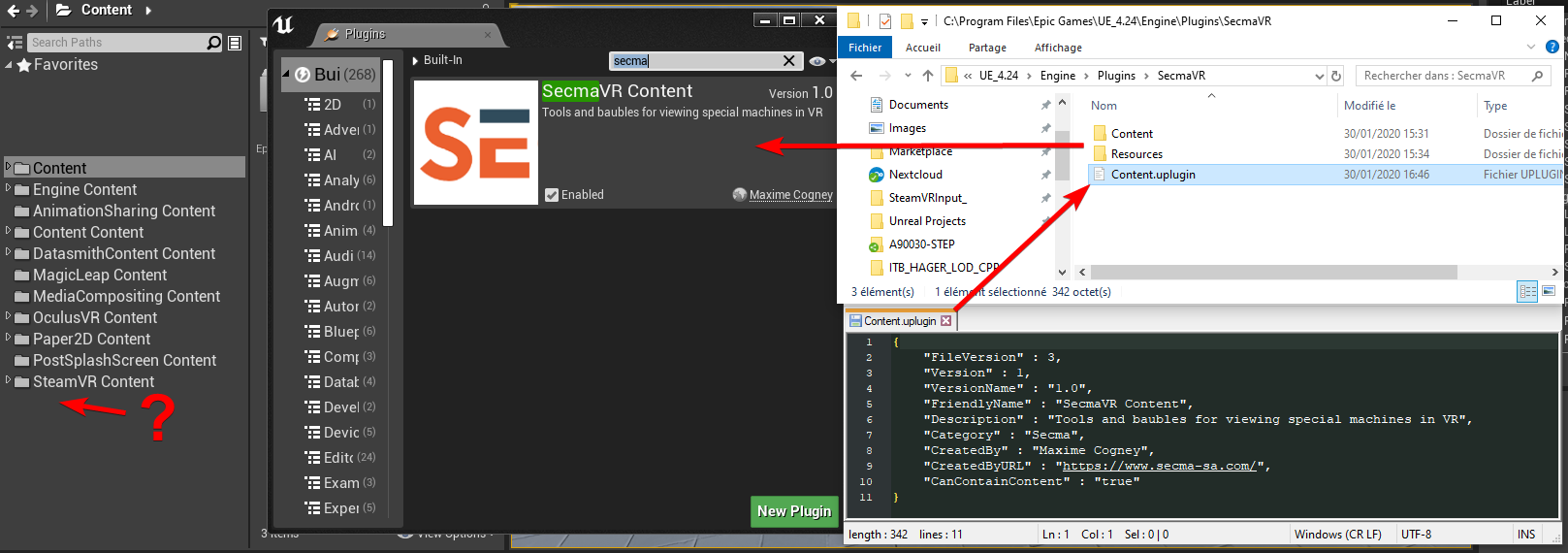
Can a good soul give me a clue as to why the content folder of my plugin isn't showing up in editor? https://i.imgur.com/Z2dOjnW.png
 brittle gulch
The red curve is game, so it's all that is related to CPU right? The yellow one is the GPU curve, I don't understand why both curves are so identical?
And what's the blue curve about, it's the draw curve, isn't that supposed to be the GPU curve then?
tame delta
@brittle gulch How many draw calls do you have?
brittle gulch
@tame delta Less than 100. Around 65
brittle gulch
No worries 😉
tame delta
@tame delta Nvm turns out the folder is there, it's the "Content Content" folder.
 verbal summit
Guys.. i need help.. i tried to retarget skeleton but the skeleton i need is not even visible
How can i fix it?
 rotund scroll
@verbal summit you need to use a different retarget window first
look online
there should be a guide
verbal summit
i have done it .. even i have duplicated skeleton and done it on the duplicates
still not working
rotund scroll
what have you done?
verbal summit
well i set up rig for new skeleton(like in guide)
rotund scroll
what guide
verbal summit

In this video we take a look at how we can share animations between two Skeletal Meshes that are using different Skeleton assets. We go through the setup and retargeting process and pass an animation between two different Skeleton assets.
(00:05) - Recap
(01:14) - Creating & ...
rotund scroll
did you set up bone comparison
verbal summit
yep
rotund scroll
then it should show up if it's done correctly
if there are bones missing it might not
verbal summit
do you suggest reimporting character ?
rotund scroll
no I suggest looking at the retarget manager
and seeing that all bones are set correctly
brittle gulch
@rotund scroll Excuse me I missed your message, So box collisions are more expensive right? If I want to build a HLOD system manually, It'd better to use sphere collision for proximity detection than box collision then?
verbal summit
only root is not assigned
 grim ore
uncheck show only compatible skeletons and see what happens
 jaunty haven
Hi , I have a question , i want to create something like a service , which will remain through out , even on level change , and can interact with the world actors.
How can that be possible ?
brittle gulch
@jaunty haven Do it in the Game Instance BP
rotund scroll
@brittle gulch yeah so generally using sphere collision is better when you can avoid box collision
use only box collision where you need the precision of a box
essentially
brittle gulch
Okay I see, like doors and such
rotund scroll
@light lintel why are you tagging me?
yea exactly
in terms of collision performance, the list is Sphere < Capsule < Box
jaunty haven
@brittle gulch okay thanks
brittle gulch
Oh so Box is even less efficient than a capsule! Didn't know that. I'll change some of my boxes to capsule then, thanks for the hint 😉
rotund scroll
no worries
the general formula for measuring performance for collision is the number of points required for its assembly
sphere has 1, capsule 3, box 8
it's the same also for complex collision
 tawdry storm
caspule is 3?
grim ore
@jaunty haven If you have experience with C++ you can also look at the Subsystem system
rotund scroll
2 spheres + 1 point to measure half size between them
jaunty haven
@grim ore Would i be able to add components from there ?
tawdry storm
oh interesting
rotund scroll
also why capsules have limited control compared to box
tawdry storm
would it make a difference if the radious of the two spheres in a capsule is different?
rotund scroll
yea, so the assertion is that both spheres are the same size
jaunty haven
Actually i want to create a location service which will keep getting the device location.
So i have this actor component which does the thing , but i was foolish to think that , i would be able to create the component from inside GameInstance.
I guess i need to move all the code from component to Game Instance to achieve the result. right ?
@grim ore where should i start with the sub system ?
rotund scroll
otherwise you'd need at least 4 more points to measure collision @tawdry storm
rotund scroll
capsule is one of the most efficient shapes all around
tawdry storm
that would explain why it's the default collision for the UE4 character
brittle gulch
That's very interesting, Cranz, I thought it was more about the number of "vertices" that would be required to make the shape
rotund scroll
@brittle gulch it's the control points
tawdry storm
well it's maths, you don't have any vertecies
rotund scroll
all you need for a sphere is a point + radius
tawdry storm
I learned that from my raymarching experiments 😄
rotund scroll
it might be actually 6 not 8 for the box, but it's still the most expensive by far
grim ore
@jaunty haven If you are using a component that is on a BP actor in the world then you need to look at something else as those options do not exist in the world. If you use level streaming you can have a main level that is persistent thru the lifetime of the run and then load/unload your other levels as normal around it
brittle gulch
Oh okay, they are just graphical representation but behind the hood it's only maths. Clever!
jaunty haven
@grim ore agreed
rotund scroll
@brittle gulch that's also why the collision sphere presentation is smooth in its visualization 😉
jaunty haven
@grim ore i would like to know about subsystem, where should i start ?
grim ore
https://docs.unrealengine.com/en-US/Programming/Subsystems/index.html and there is a livestream about it
tawdry storm
I man that's pretty much it, because it's easy to calculate if a sphere with a radius of 10 and a position at 0,0,0 is intersecting with another sphere with radius 5 and position 10,0,0.
If you'd do that same for every vertex you'd probably have some serious performance issues if your scene gets more complex
rotund scroll
exactly why complex collision is so much worse than simple collision
complex collision almost always traces per vertex
there might be some optimizations that are done on import, but in general it's very close to that
so you can consider how expensive a collision is then and compare it to how many simple collisions you could do it with
 jolly steppe
Hey all, I have a question. I am trying to control my characters fall acceleration. If I set the gravity to 2, she hits her max falling speed about when I want her to, but the initial start speed is way too slow. Is there a way I can adjust this with a curve of some sort?
brittle gulch
That's very nice! Then It's also better to have simple collisions made out of spheres and boxes than an imported UCX?
rotund scroll
almost always @brittle gulch
unless you can get away with some concessions by making single plane collisions
for instance
those should be 3
brittle gulch
I don't understand why those are 3 though
rotund scroll
because the last point can be inferred through knowing the other points
or actually
my bad
tawdry storm
couldn't you calculate a plane with just a point, a normal and an extend?
rotund scroll
yea exactly
rotund scroll
yes
rotund scroll
well it's all math
so if you're good at math
you will be good at collision optimization
tawdry storm
I'm really not, but I'm trying
jolly steppe
Here's her falling. She reaches 4000 (max fall speed) about when I want her to, but I'd like to make the fall startup faster. It's way too slow. raising the gravity makes her reach max speed way too fast. Anyone know how to fix this?
(if anyone knoes please pin me)
rotund scroll
well as long as you like messing with it it's enough
tawdry storm
I kinda need to be if I wanna be a shader wiz like some other people here
rotund scroll
yea
you need to do per pixel stuff as well
talk about expensive
that is the biggest oof
I made a kuwahara shader
for each pixel, 24 pixels around that pixel have to be taken into account
and you have to loop twice to get horizontal and vertical range
tawdry storm
@jolly steppe sounds like you might need to adjust something in your animation blueprint, maybe ask the guys in #animation ?
rotund scroll
= unusable in game
tawdry storm
oh yeah that sounds horrible
jolly steppe
pretty sure that has nothing to do with animation.
rotund scroll
but it was a fun experiment, and my word results look amazing
so I'm considering keeping it as a screenshot mode
tawdry storm
oh by startup you mean the fallspeed?
rotund scroll
😄
jolly steppe
Yeah
tawdry storm
sorry I interpetated that as the speed of the falling animation
sounds cool though Cranz
rotund scroll
if you want to get into shaders, I think it's a good entry point
making a gaussian blur shader and then building kuwahara from that
plus you can do it all in the custom node of the material editor
tawdry storm
funnily enough, that's exactly what I need right now
I'm currently looking at Ryan Bruck's GDC pack to take a look at how he manipulated render targets so that I can blur a render target texture and save that for more efficient rendering
at least more efficient than blurring it each frame
I never heard of kuwahara, so I guess I'll start looking that up first
rotund scroll
it's a filtering technique like you'd find in photoshop. you get some really nice painterly looks from it
rotund scroll
tawdry storm
oohh that looks like Zelda Twilight Princess
 mental cairn
Hi everyone. Since a couple of month ago, my teams is encountering a strange bug and it seems linked to perforce but i wonder if anyone encontered a similar problem.
At least one time a month, when we commit the DefaultInput.ini (The check out/modify/submit process is entirely made from unreal), it's traducted in chinese and the encoding goes to utf-8 to utf-16. Anyone ever heard about that ? It's not a huge problem but it's recurring and starts to become annoying. Thanks for any tips 🙂
rotund scroll
might be a P4 bug
I generally don't recommend P4 because it doesn't do checksums
so if your problem is related to that, then there isn't really a solution to your issue
but feel free to try #source-control
@tawdry storm yeah but it's filtered real time
screen space
tawdry storm
oh that was skyward sword I was thinking about. I always loved how they had this weird DOF effect that turned everything into colorful dots
 sweet relic
@mental cairn Check out this page for details on how to set up encoding for various files in unreal
https://docs.unrealengine.com/en-US/Programming/UnrealArchitecture/StringHandling/CharacterEncoding/index.html
Overview of character encodings used in Unreal Engine.
mental cairn
🤦♂️ I didn't see the channel source control. But thanks if it's a problem from perforce we will go with it.
tawdry storm
might even be a completely different technique, but it seems similar
jolly steppe
Skyward Sword in Dolphin at higher resolutions looks amazing
That dof thing doesn't show well on the Wii
rotund scroll
bokeh DOF also comes to mind
sweet relic
@mental cairn That was actually the wrong page. check this page for the P4 typemap:
https://docs.unrealengine.com/en-US/Engine/Basics/SourceControl/Perforce/index.html#p4typemap
How to setup Perforce so that you can share assets with other on your team.
rotund scroll
which is a whole lot cheaper
tawdry storm
probably a modified version of that
mental cairn
Ok, i'll check that up
 grave nebula
If you intend to blur reflections, it is pretty straight forward.
rotund scroll
@grave nebula do you know if there's any good approximation of kuwahara one could make happen during real time?
like maybe some weird screen space refaction map?
grave nebula
Small size kuwahara is pretty realtimable. As the kernel is not separable, larger sizes are prohibitive. Separable approximation of bilateral blur is quite close to kuwahara.
 gleaming narwhal
@thorn crown Were you able to get it resolved? If installation breaks you should be able to uninstall and install again (might have to manually delete the files)
rotund scroll
@grave nebula how small is small size? already with 5x5 it gets pretty expensive
but I suppose that's an exponential curve
grave nebula
3x3 is the highest you can realtime realistically.
tawdry storm
so what about blurring a render target texture and baking that back down into the texture?
grave nebula
Separable bilateral, where kernel is diced by sort of a texture map could work, but it suffers from camera movement and temporal stability.
rotund scroll
what's the running time per pixel for bilateral blur?
grave nebula
No clue, but separability bumps viable kernel sizes to 32x32 range.
jolly steppe
well, this is how I decided to solve my gravity issue. Don't know if this is a good solution...... it's on tick, lol.
tawdry storm
no like I said I want to capture a texture, then blur it once and bake that down for later use in the scene
but it has to happen in runtime
grave nebula
And what is the complication? Perform a capture, use draw material to render target to perform two pass Gaussian blur. @tawdry storm
 strong moss
Has anyone set up game lift?
tawdry storm
@grave nebula well the problem is that I still have to figure out how to do this, but I'm on it
like I said, the GDC examples from Ryan Brucks do way fancier stuff with this approach, so I'll just have to pick those apart and see how to actually do it
I guess that's the closest thing to a 'tutorial' I'll find for this 😄
 pallid talon
Question - In materials, a LinearGradient goes from black on one edge, to white on the other edge. Is it possible to go from black on one edge, white in the middle, and black again on the other edge?
plush yew
Is there anybody here who's working with machine learning using UE4?
@pallid talon that won't be very linear of it, would it now?
tawdry storm
@pallid talon multiply by 0.5 then put that into a sine
pallid talon
@tawdry storm Perfect, thanks buddy!
@plush yew See Seirei's response. That's how you should respond.
 abstract relic
They’re not wrong 😜
 normal burrow
Teriander a linear version of that would be
(min(X*2.f,1.f) - max((X*2.f)-1.f,0.f))
pallid talon
@normal burrow I'll give that a try.
@abstract relic Not all nodes are only used explicitly based on the node's name.
abstract relic
No shit
tawdry storm
@normal burrow is X the gradient in your example?
tawdry storm
oh wait I did something wrong
pallid talon
@abstract relic Well you said, "They're not wrong", I assumed you're referencing Vivraan who tells me it wont be linear if I don't keep it linear. No need to get vulgar.
tawdry storm
welp looks more linear, yes
abstract relic
No shit 😜
tawdry storm
I just wanted to see it 😦
tawdry storm
actually I just wanted to translate that bit you posted into nodes just for the heck of it 🙂
thorn crown
@gleaming narwhal Yes I got it resolved by uninstalling and installing it again.
normal burrow
looks good seirei
tawdry storm
lol thanks
plush yew
Where should I post my query?
 worthy flame
My character spawns under the landscape. No i havent set a spawn point in BP
How can I fix this?
abstract relic
Does it spawn normally on a fresh level?
worthy flame
i have another level it spawns normally
abstract relic
Gonna say the forbidden word. Check level bp. Print out character location if nothing sticks out for you. Next possible issue would be weird collision
normal burrow
Spawn points are a good option too
abstract relic
then check world setting
worthy flame
i added the print string there is a location
it spawns at player start, but the landscape isnt there
normal burrow
world composition ?
abstract relic
as in, the landscape doesn't load in on time?
worthy flame
the landscape always loaded before, last thing I did was change the landscape material and the player started spawning under
normal burrow
is player start above the landscape though?
normal burrow
is there something under the landscape that can be stood on?
normal burrow
can stand on it?
worthy flame
its standing on it
normal burrow
ok well the spawn code is likely tracing for a ground then
abstract relic
Do you have Allow Tick Before Begin Play enabled?
worthy flame
no i dont
normal burrow
i'm a little unsure why the landscape isn't loaded in at start time though, if your using world comp. maybe thats why
abstract relic
usually because there was something underneath the landscape
normal burrow
yeah, could you just check if you can actually stand on the landscape 3ler4never?
like after you spawn
select the character your playing as after hitting F8
set z to some big number above ground
then press F8 again on the viewport to regain control
worthy flame
world composition is False
normal burrow
yeah i figured
worthy flame
ok i press play, the landscape isnt loaded, I press F8 the landscape is there
its standing on it
worthy flame
i havent done anyhting yet
normal burrow
you may have hide in game enabled
er lemme find the right potion
is that checked on the landscape?
normal burrow
so you are actually standing on the landscape
you just don't see it, am i correct?
normal burrow
but you are standing on it yeah?
worthy flame
yes
normal burrow
how about this one?
worthy flame
set to false
 cursive salmon
Hi
abstract relic
In world setting
worthy flame
that is set to true
cursive salmon
How know if that's begin of the play. No the begin play for the actor but for the all the game . ?
normal burrow
you can use the level blueprint raylandspm
there might be a way to check if the actor is placed in the level as well
and not spawned at gameplay
worthy flame
how do you mean placed?
 swift hearth
Can anyone help me with an error I'm getting in unreal? The message log says "applying invalid scale V(X=31.50, Y=-26.35, 5.25) to body 🔎 (name of object)" and it says it twice
normal burrow
was referring to rayland's question, if you know tthat the actor is placed, its begin play would presumably be at the levels
swift hearth
I'm doing a level sequence, animating two objects, attaching a blocking volume to both, they both have the same animation (but inverted), yet that error log is saying only one has an invalid scale for some reason, and idk where those numbers even come from
normal burrow
tbh
I'd have to guess you can't have mixed sign scales
if its not just you can't have negative scales, i'm not sure really though
swift hearth
For some reason the scale of that blocking volume is changing whenever I attach it to the animated object (the other blocking volume works just fine tho)
normal burrow
so you aren't intentionally animating the scale?
swift hearth
@normal burrow My guess is that's the negative scale, but idk why it changes whenever it gets attached in the level sequence
@normal burrow nope
normal burrow
k open up the level sequence
and find that object by name in it
locate its transform channel/track, delete the scale keys
worthy flame
any way this could be fixed?
normal burrow
3Ler4never are you paying attention to the log?
swift hearth
🤔
cursive salmon
I have already To find a solution at my problem. thanks anyway
swift hearth
I deleted the scale keys, now I get a bunch of that same error. Like 20 times
normal burrow
what is the scale supposed to be?
swift hearth
X0.3, Y0.25, Z0.05
It's the same on both blocking volumes
normal burrow
and when its animated, what is it?
swift hearth
I tried manually writing them in the sequence, just gave me the same error but like 10 times now lol
Actually outside of the sequence the scales are 3, 2.5, and 0.5
They go to .3, .25 and .05 inside the sequence (for some reason)
normal burrow
is parenting a thing?
if you can set the scale to 1.0 and just manually type in the volume dimensions (if you can do this) it might alleviate things
swift hearth
I'm still fairly new to this, but I don't think parenting is a thing here (unless that's what attaching something to another thing inside the sequence is called)
normal burrow
did you save the sequence off?
I actually haven't worked with level sequences but i'm basing this off sequencer which may be the same thing?
swift hearth
I can literally delete both volumes from the sequence. They're the same in the level (just different location, but same scale), put them back in the sequence, attach them to one thing each, one works, and the other gets me the error. Tho it does work, the animation itself
What do you mean if I saved the sequence off? I saved it before hitting play, if that's what you mean 🤔
Btw, thanks for trying to help. I appreciate it
normal burrow
thats what i meant yes.
worthy flame
pay attention to what log? log in the editor?
normal burrow
yeah, any error messages, warnings etc, output log
swift hearth
Meh, I'll have to ask my college professor next time I see him. If I change the scale that's negative to positive, I get the same error still, but now it includes a new repeated one where the scale is different for some reason (which implies the scale is changing throughout the animation I would assume, but it's not changing)
I give up xD
worthy flame
dont have a output log
worthy flame
i found it
swift hearth
@normal burrow I have a few others, but they're totally unrelated to these objects
worthy flame
dont see any complaints there
swift hearth
I'm basically animating a boss similar to some old game platformer bosses where its disattached hands work as platforms while you fight it. So both hands are the same, just with different X and Z locations, I added blocking volumes to make those the actual platforms for the hands, and attached them. One hand works just fine, the other works but gives me that weird scaling error 😒
Anyway, thanks for the help. I'll work on other stuff in the meantime and check with my professor
normal burrow
@worthy flame i guess the only advice would be, go through your landscape actor, find all the things with this icon next to them and check that they aren't mistakes
 fading vector
So I have an NPC, when I kill this NPC I want him to slowly fade until nothing. I have been messing around with "Set sprite color" which is nice but I have no way to make him fade, is there a timer or something I can use to do so?
worthy flame
i havent found anything on google. so the main problem is the landscape isnt visible in the game
 craggy flax
Watching a tutorial and the person uses "Camera Pawn" as a variable type reference in blueprinting and I cant find that as an option in newer engine version. Is there a new variable type name?
worthy flame
and i searched through the histroy chat and i havent found anything
 gilded plinth
Can anyone share a thought on when public variables from GameInstance show up in any blueprint graph (when u uncheck context) and then why when you click them it creates the variable with an empty target? I totally understand GameInstance variables are meant to be global, but what confuses me is that it creates this variable with an empty target even though, to my limited understanding, you can't actually use or modify the variable without getting game instance and then casting to your custom game instance.
So is there any reason at all why when you select the variable from a right click, ue4 doesn't automatically create the GetGameInstance and a Cast node? Sorry if my question is unclear.
so basically just asking if there is any case in which you would have a target other than game instance and a cast to your custom game instance, not sure which channel this is suited for . kind of a general question
normal burrow
@worthy flame i've heard many of landscape problems. not one where its completely missing like this. but sometimes LODing of them has been an issue for others. I honestly dunno why its doing that to you in play mode. You could try #graphics
heady saddle
can anyone explain why I get innacurate tracelines to center of camera when using FollowCameras (from ThirdPersonShooter template) location and forward vectors as start/end, instead of the Camera Managers', which produces perfectly accurate tracelines?
 main fulcrum
I am not sure how to get a start on this but i want to build a map with multiple islands some bigger some smaller but 80% of this would be water/sea/ocean how do i adjust the landscape/terrain to achieve this?
abstract relic
increase z location of the landscape
rotund scroll
best way is to create a water plane then use that as a baseline for what you want
later you can make that into a water pizza if necessary
main fulcrum
Question is would that give me issues if lets say i want to build mountains on one of the islands
rotund scroll
no but consider you need a lot of landmass to make mountains
abstract relic
edit the heightmap then
main fulcrum
@abstract relic Not sure what to edit exacly
 keen moss
does anyone have any experience with Pixel Streaming? What is a good cloud hosting service to use for this?
main fulcrum
You want to have some depth of water so it's not just 2 feet if you sail off to a deeper sea
I just don't know what to aim for to not make one part hurt the other
rotund scroll
I mean that's the same process as making mountains
you can just lift the water plane
fading vector
Whats the easiest way to detect if a float changes value?
rotund scroll
print it
abstract relic
Creating and using custom Heightmaps and layers for your landscapes.
rotund scroll
@main fulcrum are you asking for process or for tools?
abstract relic
If you sculpt the landscape, it's editing the heightmap. If you edit the heightmap texture in photoshop... you're editing the heightmap. If you are using a middleware like gaia or worldmachine, it'll export a heightmap
main fulcrum
@rotund scroll process, so let's say i have one huge water plane, it's will be about 80% of the map if i want the oceant o be deep in most areas and then more shallow near land
grim ore
@keen moss it's been tested with AWS and the server files have accomodations for that, otherwise anything that can run node should be fine
rotund scroll
ok are you using a heightmap or manually sculpting?
abstract relic
ah, you haven't learned the fundamentals https://docs.unrealengine.com/en-US/Engine/Landscape/Creation/index.html
Guide to creating new Landscape terrains.
gaia is just a middleware
abstract relic
idk at this point
main fulcrum
I used gaia in unity previously
main fulcrum
i alwayes faced the same problem thatwhen ilifted the tarrain to make the water plane look deeper
rotund scroll
consider stuff like an ocean shelf and how that is relevant
main fulcrum
then when buliding mountians i would have been screwed
rotund scroll
like I said
rotund scroll
building mountains takes a LOT of landmass
abstract relic
don't know what to tell you, it's a matter of sculpting and generating
rotund scroll
you have to start with an idea of foothills then build that upwards
if you want stuff like a proper gradient out to deep water look at refs
man I feel like I'm just shouting into the abyss here
abstract relic
you might get an echo
rotund scroll
I just hate repeating myself
normal burrow
lol
rotund scroll
hello Pat
keen moss
thank you @grim ore
pallid talon
Question- When using a LinearGradient, it doesn't seem to follow the polygon's UV. It seems to apply on the object as a whole. Any recommendation on how the LinearGradient in a material follows the UVs?
 whole quarry
Using texture coordinate?
pallid talon
No, when I tried to Multiply a Text coord with a Linear Gradient, I got an error. What is the best way to force it to use Text coord?
whole quarry
Well, by plugging it into the UV pin
pallid talon
I'll try that! Thanks!
rotund scroll
UVs are just a number range
pallid talon
I completely missed the UV Channel input on the LinearGradient.. Thanks!
 tawdry heath
hey guys how could I remove this widget? It's basically a text that says "'R' Reload" when the player has no ammo left
the branch is connected to a event tick
or should I not use a widget for that?
 brave widget
Not 100% sure but I would think the idea would be, once your reload logic finishes running, grab the reference from the widget and "hide" it (if thats a thing) or destroy the widget.
I'd recommend getting that code of Tick as well. Maybe setup a delay sequence that runs every Nth seconds or so
I haven't done much for UI yet, so not sure how to destroy widgets. My assumption is there is a "destroy" node
brave widget
There is a remove all widgets, but I highly doubt thats what you want to do 😂
Um, someone with more experience will need to chime in as I'm not finding anything
tawdry heath
yes I'd like my other widgets to stay
brave widget
Remove from Parent might actually work 🤔
 languid aurora
So I'm trying to create a simple material and they keep coming out really shinny. Picture shows what I'm talking about. Can show my BP's if needed
languid aurora
Not using a metallic, lol should I add one?
tawdry heath
no if you set the constant to 1 it removes the shininess I believe
like that, you don't need to copy this image I just got it from google images
languid aurora
Ok great. Thank you so much for the help
tawdry heath
and click on the constant and on the left it shows the details, I believe 1 is no shiny and 0 is a mirror
brave widget
1 on Metallic makes it Metallic. Leave it at default which is 0.
Roughness is what you want to adjust. 1 is completely rough (no reflection/not shiny) and 0 is perfectly smooth (reflections/shiny)
Combining 0 roughness with 1 metallic will give you a "chrome/mirror" material
@languid aurora
languid aurora
@brave widget Thank you so much! @tawdry heath Thank you so much as well
brave widget
Np 🙂
tawdry heath
ye what he said
 midnight root
Watched video for 2.42.1 I deleted, and they mentioned a keypress for I think all axis that used a gadget I'd not seen before ,anyone know what it is, Ctrl something...I tried several but no gadget came up...
 sonic pagoda
@midnight root are you talking about 4.22.1 or just another software
midnight root
def. ue4
sonic pagoda
I know what you mean, they did it in the sunsky livestream but cant seem to find any posts as well... i usually seem to press it by mistake as well when i use the rotate option
brave widget
Oh, thats what were talking about?
Ctrl+L
midnight root
also anyone know about when fix is coming for big delay on play , it was on forum,cuz its not in.2
hm lets see
next badger
issue #?
midnight root
not doing anything
brave widget
Did you select the SunSky actor?
midnight root
sigh so its something that only works on that then
brave widget
It was made specifically for that, so yes, it only works on that
midnight root
alright ty
brave widget
Its only temporary as well, the moment you change a value, it resets
midnight root
hm
@next badger no idea,if you're referring to bug report
I simply saw something about it on forum, don't recall where is all
brave widget
If its not reported, then how could they fix it?
sonic pagoda
Yes EVERYTHING has been fixed in 4.24.2
brave widget
😂
midnight root
sad must just be my end then, andI knew it was reported,btw
brave widget
How? You said you only saw it on the forums. 🤔
midnight root
and
sonic pagoda
A delay on begin play?
next badger
"Wont fix"(c)
midnight root
?
brave widget
"Fairly sure" 🙄 😂
midnight root
yuppers
sonic pagoda
Graphics not optimized, too many textures loading at once....
midnight root
@brave widget im sure
midnight root
yuppers
brave widget
I've been **sure ** of a lot of things in my life too 😉 😂
sonic pagoda
Thats not an engine problem, thats your own design
midnight root
I really don't care, that much
never said, I did
curiosity
I have a fairly large world comp world, so not that surprised,HOPED it was bug that might help me is all ,,no biggie
sonic pagoda
Also, have you ran it in standalone. PIE is not a test scenario...
sonic pagoda
Well there you go..
brave widget
I thought you said it was confirmed to be a bug and a dev confirmed? 🤔 😛
midnight root
whatever dude
I thought it had been
about lag on start
wasn't aware it was about standalone
brave widget
I'm just trying to clarify. Accurate information is important when requesting help or asking questions. If the information is incorrect, the answers will be incorrect
brave widget
Interesting 😕
next badger
 craggy flax
Watching a tutorial where the guy sets a variable type to Camera Pawn, but I am not seeing that as an option in my newer UE4 engine. Anyone got any ideas?
standard pawn doesnt seem to behave the same way
next badger
it's hard to tell w/o context
there is no Camera Pawn class for sure
craggy flax

In this episode we create our camera pawn which we will use to view and move around in the world with. We also set up some basic functionality in our begin play node as well as setup our forward and backwards movement of our camera. We create a couple macros as well as a cu...
hes about to start the process
linked to time
brave widget
Looks like its just a Pawn reference that he named "CameraPawnRef"
next badger
@craggy flax https://youtu.be/MpKXKr9alqY?t=169
 vernal dock
hey guys im trying to include the websocket module.h but it isnt working
Module for web socket implementations
when i include this to my c++ class i get an error
#include "WebSocketsModule.h"
craggy flax
oh no sorry that is what he does with it that wont work currently with 'pawn' instead of camera pawn.
https://youtu.be/MpKXKr9alqY?t=495
In this episode we create our camera pawn which we will use to view and move around in the world with. We also set up some basic functionality in our begin play node as well as setup our forward and backwards movement of our camera. We create a couple macros as well as a cu...
i sent wrong time
 dim plover
Did you add WebSockets to your modules?
craggy flax
last link I promise 😛
vernal dock
how do i add the websocket ot the module?
dim plover
It's in your build.cs.
vernal dock
ahhh ok
next badger
@craggy flax i've sent you a link ... have you seen it?
vernal dock
public DatabaseProjectTarget(TargetInfo Target) : base(Target)
{
Type = TargetType.Game;
DefaultBuildSettings = BuildSettingsVersion.V2;
ExtraModuleNames.Add("DatabaseProject");
}
public DatabaseProjectTarget(TargetInfo Target) : base(Target)
{
Type = TargetType.Game;
DefaultBuildSettings = BuildSettingsVersion.V2;
ExtraModuleNames.Add("DatabaseProject");
}
how do i add it
ahh wrong file
my bad
craggy flax
@next badger Yeah I have been following that tutorial. I have the camera pawn actor , but the issue is when he makes CameraPawnRef he sets the variable type to camera pawn. Watch my second link its where he hits the dropdown
first link was incorrect time
vernal dock
public class DatabaseProject : ModuleRules
{
public DatabaseProject(ReadOnlyTargetRules Target) : base(Target)
{
PCHUsage = PCHUsageMode.UseExplicitOrSharedPCHs;
    PublicDependencyModuleNames.AddRange(new string[] { "Core", "CoreUObject", "Engine", "InputCore", "HeadMountedDisplay" });
    PrivateDependencyModuleNames.AddRange(new string[] { "Http", "Json", "JsonUtilities" });

}
}
next badger
@craggy flax exactly...if you make the class called "CameraPawn", you can reference it
craggy flax
oh I understand. My issue is the automatic spacing UE adds in names which is super handy but it makes me think the item is different than what I typed in camel case
ty
 maiden swift
@craggy flax I believe there’s a project setting to turn off friendly variable names of it becomes a problem for you.
 celest sleet
are u here ? @maiden swift
fading vector
How would one set a box collision to be disabled by default?
normal burrow
there are three settings for collision mode
one disables collision and overlaps
its odd because its not an option on the primitive.
fading vector
normal burrow
but i imagine you could set it in the constructor script to disabled
fading vector
hmm
celest sleet
I need help with UE4 Cinematic animation. Can anyone help me? 
normal burrow
@fading vector
sweet relic
@celest sleet try #cinematics?
fading vector
Oh, I see. Thank you
celest sleet
thank u bro @sweet relic
 celest vapor
Is there a math formula to reverse a Percent. basically turn 10% into 90% or 20% into 80%?
dim plover
Why not just 100 - number = inverse percent number. I can't imagine any other way.
celest vapor
the player's max health is 100. and I want to get a 0 to 1 value based on how far it is from 0 up to 35
to determine an opacity of something on a widget
 digital anchor
celest vapor
digital anchor
celest vapor
I get that. I'm getting the percent of what i'mm looking for. but I need to turn a 90% into a 10%
I want something to be less opaque the higher the percent
I figured it out. I'm sorry. I just took 1 - result
100 - 10 = 90, or 1 - 0.1 = 0.9
keen moss
Anyone having issues with the collab viewer template crashing on startup?
 sullen wraith
I'm wanting to make a large persistent world, obviously with large maps players will get lag? I'm assuming best way to go about this is to have a server host multiple maps?
rotund scroll
I think the question of player lag in regards to a large persistent world is a bridge you should deal with when you get to it
 wooden leaf
has anyone ever seen this or even used anything like this
I tried to do the same thing and this is how it comes out for me.
 manic burrow
is it possible to use the legacy sequencer in 2.24.1 ? or did they take it out?
next badger
@manic burrow Matinee ? Why?
you can convert old files by plugin (disabled by default), but probably cant edit them as is
and in 4.25 Matinee will be removed completely
manic burrow
because of csgo lol
next badger
csgo?
 manic pawn
brave widget
manic pawn
brave widget
What in the world would CSGO have to do with Unreal Engine? 🤔
next badger
@wooden leaf Datatables? I think most of the devs using them.
 humble oyster
For the love of god
I hate this server but damnit your the only one with people who actually talk
 swift spindle
that bad eh ?
humble oyster
Yea
swift spindle
its ok... we hate you to @humble oyster 
swift spindle
why the hate ?
swift spindle
just parroting you
humble oyster
YouTube ain’t working
Discord not helping
And it’s like I know the basics so I just wanna get straight to the point ya know
swift spindle
if your having a hard time getting help... you might wanna break down your problem into smaller bite sized chunks that people with very little context / lack of empathy / small amount of time can help with 😉
humble oyster
Like I wish I could just ask someone yo how do I do this and they tell me
swift spindle
we all want that
humble oyster
Like I know basic graphic design and landscape
But like I’m trying to paint and the YouTube says then it’ turns all black and like why doesn’t mine turn black I did everything you told me
And same with other tutorials
swift spindle
the simple rule is this.... "can you google it = don't ask in discord" and "does it take more then a paragraph to describe in it's entirety = don't ask discord"
humble oyster
I’ll search like how to do combat animation and stuff and all that comes up is other people’s games and no tutorials
swift spindle
well...
combat animation is no different then any other animation
unless your wanting physical interaction (which almost noone does)
and there are loads of animation examples on the learning tab
and free examples in the store
swift spindle
https://syntystore.com/collections/frontpage/products/polygon-modular-fantasy-hero-characters something like that has a lot of ways to use existing assets.. show setups.. and lets you add your own stuff into the mix

Synty Store
Epic 3D assets for Unity and Unreal Engine in a low-poly style, featuring modular character pieces to mix and match, creating thousands of unique character models for your fantasy style games. Polygon series 3D models by Synty Studios.
wooden leaf
@next badger Yes, i thought so, any idea why the video tutorial I'm watching doesn't look like the one I made.
next badger
@wooden leaf the only difference i see is row name...it is set on the right when row is selected
wooden leaf
The video does the list on exel and import the list into a datatable
Right so compare the screen shots. The one that has Row Name shouldn't be there
next badger
well, if you imported the CSV file you may exported it improperly
wooden leaf
that could be, I'm not using office for this. I'm using LibreOffice 6.3 and I never used it before. and when I save it, It's giving my more save options the MS Office exel
And I don't know how to use those
next badger
@wooden leaf https://www.youtube.com/watch?v=nMy6H1o1zO0

An example of how we would take a CSV file form an external program like Google Sheets or Microsoft Excel and bring it into Unreal Engine as a Data Table.
Source Files: https://github.com/MWadstein/UnrealEngineProjects/tree/WTF-Examples
Note: You will need to be logged into ...
wooden leaf
ok, thanks I'll watch it
wooden leaf
@next badger Thanks Man, the video tutorial I'm following is older and doesn't have this new setup. Thank you
swift spindle
@humble oyster its not if you actually get what you need from it
don't ask how much an actual dev costs per hour 😉
brave widget
@raven path The #more-resources would tell you to look in #looking-for-work
next badger
@brave widget have you seen what's on that link?
brave widget
Uh, mostly going off him saying "looking for a partner"
Seems like it still applies 🤔 Hard to tell with what little they've said
next badger
A game with unlockable achievements, where you play as a wind-up monster with a secret superpower who wants to escape from a gamer who is passionate about stamp-collecting.
 thin tendon
ue4.24 told me it needs to update. Does anyone know where I can find patch notes for the latest update?
next badger
Unreal Engine Forums
The 4.24.1 Hotfix is now live!
Feel free to discuss this release on the 4.24 forum thread. (https://forums.unrealengine.com/unreal-engine/announcements-and-releases/1695917)
If you experience a bug with the 4.24.2 Hotfix, please follow the How To Report a Bug Guide (https:/...
thin tendon
Thanks mate. I bookmarked the announcements section. So I can keep up to date
manic burrow
@next badger 3d csgo work
next badger
CSGO like Counter-Strike: Global Offensive? Source Engine one?
fading vector
Could someone assist me with my project, I started a new with no content (ported the ue4 default model with some animations but thats it). I created my gamemode, created my player controller, character and my camera attached to the character. Yet the camera does nothing and its as if I'm flying around, any idea?
 exotic thicket
Did you change the default pawn from the gamemode?
Sounds like it's spawning the spectator pawn or something like that
exotic thicket
Can you see what are the actors it spawns when you launch your game? It should be showing the spawned ones in the same panel where the other things in your world are
fading vector
I just renamed my character and its not showing it in the default pawn class...
give me a sec
Yeah even after a restart, nothing.
 summer zealot
Hi all. How Can I use plugins in source build? All my tries have failed
fading vector
summer zealot
I want to use source build to make dedicated server, but cant make plugins to work
exotic thicket
That's kinda weird it wouldn't show up there... makes me think there might be something wrong with it, but not really sure what that could be
manic burrow
@next badger yes

After like a year and a half since NEVERMORE was released, today I am proud to say that I'm done working on NEVERMORE 2, the second part for Apel's Fever Dream weapon collection!
I started this project over a year ago, sometime around late November 2017 if I'm correct (maybe ...
next badger
@manic burrow still don't get how it's related to ue4
fading vector
@exotic thicket So I guess empty character can't be put into that slot
But a pawn can, so I created a pawn from the gamemode, and put it on my character yet still nothing.
manic burrow
@next badger some of that was made In ue4 there are lots of people who do it
next badger
and? how it's related to lack of matinee?
manic burrow
U import a fbx camera movement, and when they took out legacy it’s never worked for me
next badger
You still ca import camera animation as before
manic burrow
but it never works for me now
next badger
then you doing something wrong

Hey guys! Here is a quick tutorial on how to export your FBX camera from Autodesk Maya to Unreal Engine 4. Making animated videos from scratch can be tough, so Animator's Resource is a great way to get a head start on making videos!
Here is the link with the add-on:
https://...
summer zealot
Do I need to rebuild my source engine every time I add new plugin from marketplace?
dim plover
I could be wrong, but I'm pretty sure you don't need to do that.
swift spindle
depends if they give compiled dlls or not
 halcyon flame
is there a risk with deleting an asset that has memory references, but no asset references?
is this typically just the undo history? I run into assets with clear reference viewers all the time which still have a handful of memory references, and I wish I didn't have to use the force delete option
sullen wraith
in all the multiplayer kits i've seen, hosting a server is dealt with locally, I'm wanting to make my game more like a MMO, with a dedicated server. is there any good tutorials on how to do this?
halcyon flame
@sullen wraith I don't have a helpful answer on tutorials, but I think generally dedicated servers work very similarly to hosted ones, they just aren't visualizing the game
sullen wraith
so is there a seperate "server hosting file" that can be generated or something?
 gray shuttle
I switched from CryEngine.. UE4 is really impressive. Awesome engine and awesome community.
 fathom glade
Why'd you start off with CryEngine?
gray shuttle
That was the first engine I used. And it didn't need light baking setup at the time.
Problem is,, you can never finish a game,, there are so many problems.
now with UE4,, everything is set up and read to go.
I'm actually impressed how good it is.
UE4 is so much better than it was 3 years ago. Lightmap UV and LOD are automatic..
Almost everything works as expected unlike cryengine where you have to hack through engine source for simple stuff.
normal burrow
welcome
dim plover
I think UE4 is underrated.
normal burrow
Yeah, I can see that. It is pretty popular though
It’s weird how many studios who traditionally do their own things, don’t and just use ue4 now
Given real modified and everything
halcyon flame
@sullen wraith I don't know man. have you read the entirety of the network compendium by eXi?
I don't know too much about it but if you haven't read that in its entirety (it's ~100 pages but in ppt presentation density so it's like a couple hours if you're paying attention/taking notes). absolutely necessary resource for networking. if you've already read that, I'd recommend trying to catch that dude online, and also seeing if you can find basic textual resources. I've learned that the further you get into the weeds the less likely there is to be a convenient and user friendly YT tutorial series.
in case you need a link to it, here it is: http://cedric-neukirchen.net/2017/02/14/multiplayer-network-compendium/


the guy posts on here, if you type @ and then eXi you should see him, but don't abuse that. exhaust your own research first.
jolly steppe
So I just had a frustrating moment
I have my character set up so when you press down, she crouches, and when you move, she crawls. and I put my turning logic in a node
but then I couldn't get back up after crouching. I spent like 20 mins trying to figure out why
thin tendon
Has anyone else experienced this issue? I created a spline for creating a fence. When I am dragging the points to increase the length of the fence. The editor starts running super slow and stutters its frame rate like its hanging up.
jolly steppe
turns out having everything in that node is messing with it. I don't get why : /
brave widget
@thin tendon Under your class defaults, uncheck "Run Construction Script on Drag"
That "should" help
normal burrow
It recreates all the fence when the construction script runs
jolly steppe
This is what's in the node
normal burrow
So any chugging would be from that
thin tendon
Yeah that makes perfect sense. I am soo glad there is an option to turn that off
brave widget
Np 🙂 I had that issue with my utility pole BP with cable actors and I discovered that 😛
jolly steppe
it works fine when all of that is connect and NOT in the node
normal burrow
The montage there
That sticks out to me as something that should live in event graph
jolly steppe
I can't put it in a function because there's a timeline
normal burrow
And extend output expects for play reverse
jolly steppe
I guess Macro can work.
normal burrow
Yeah timeline is what I meant
jolly steppe
wait what?
normal burrow
Not montage
jolly steppe
oh! I was wondering, lol. I thought you were talking to someone else for a sec.
normal burrow
Select everything to the left of the timeline
Then convert to macro
Do the same with the right side if you want
Put a sequence node at the front to simulate the output exec of a function
jolly steppe
hang on I have an idea.
jolly steppe
There we go : )
 ivory grove
Until I got to a lecture about timelines and such
brave widget
My eyes 😖
ivory grove
the lecture is about animating a glowing crystal which would be absorbed by my player pawn upon colliding with each other
for some reason when i absorb these crystals, my player pawn (a sphere) gets pretty much shot away from the impact of the crystal being absorbed into it
any ideas about a fix?
jolly steppe
Can someone troubleshould my blueprint for me 😂
brave widget
Nope 😂 😛
normal burrow
Hurray
jolly steppe
lol like it?
normal burrow
Hard to tell tbh
thin tendon
omg I laughed soo hard. Thats the best one I have seen in a while
jolly steppe
there's more pics like that? 
swift spindle
that's..... I don't feel well....
jolly steppe
lol
swift spindle
blerk
normal burrow

jolly steppe

plush yew
@jolly steppe MY EYES PLEASE
I actually had a co worker that did shit like that and it took me DAYS to fix it
jolly steppe
fix my BP!!! 😂
plush yew
You need to get on that bro
swift spindle
you could try an auto layout function...
jolly steppe
that exists?
jolly steppe
I didn't save xD
swift spindle
I'd treat yours like "ol yella"
jolly steppe
this is how my stuff looks.
swift spindle
better.....
jolly steppe
Hey I have a question. How do you create your own movement mode?
I tried looking for a vid but can't really find any.
swift spindle
look into enums
exotic thicket
I think the custom movement mode just means it won't do anything, so you would have to implement it in on tick or something yourself
swift spindle
ugh.... ticks are bad mmmkay
jolly steppe
what's cmc?
I have falling on tick because I wasn't sure how I could get a nice fall curve without it. I think C++ might be able to help.
swift spindle
you don't need to learn C++ to have your own movment type
jolly steppe
swift spindle
you can also use event bindings
jolly steppe
This is my temp solution. I'm sure I'll find a better way
what's that?
like custom events?
normal burrow
character movement component
swift spindle
so say if a variable changes in one place.. it runs something somewhere else
it's super powerful stuff
and it's actually how ue4 works for the most part
jolly steppe
well the way I'm doing it is I'm checking if the character is in air, then I'm checking if she's falling. then if the Z velocity hits 0 it resets the timeline.
idk how to do that without tick >_<
so like, could I fire the timeline if she's in air?
without tick?
swift spindle
Adding and removing events from an Event Dispatcher's events list.
its a tad confusing
normal burrow
tick is likely okay for your one character?
exotic thicket
I'm not sure why you would not want to use tick for a custom movement tbh
swift spindle
you can
exotic thicket
Assuming you want to move smoothly similar to how other movement works
normal burrow
yeah not having that pulse is nice
swift spindle
I rebuilt a whole virtual cam system to remove ticks =/
ugh... I have no idea how I even did that now
and it was only 6 months ago
yay for temporary learning work!
jolly steppe
https://www.youtube.com/watch?v=BcxtpSLMnH4&t=
I saw this video and I was trying to figure out my jumping physics.
Richard Hinckley, Sr. Learning Resource Engineer, returns to the livestream to discuss data-driven character movement. We'll demonstrate how to use curves to affect the feeling of your game's character controls. Friction, acceleration, jump arcs, and even gravity can all be a...
but I don't know C++ so I have no idea how he set that stuff up
I tried to follow along but my brain hurt : <
exotic thicket
I don't really know how doing movement off an event that fires say 60 fps is better than doing it from on tick which fires at 60 fps :P
normal burrow
its not, but i think they meant throttling tick
jolly steppe
So far that's the only thing I'm using tick for
that and testing stuff but that's different
Made this fancy Macro to test various variables x)
swift spindle
😐
jolly steppe
what?
swift spindle
sorry.... just.... remembering what my engineer used to tell me when I saw that...
my ears would be on fire afterwards
jolly steppe
haha
 fierce forge
that's spaghetti ? 😄
jolly steppe
Only the worse kind : )
fierce forge
why did you did this ?
fierce forge
😄
exotic thicket
It's not considered a bad practice to use component trees to define relationships between components right? :P
Trying to think of a slightly less cumbersome way to define certain things... currently I refer to the other component by name
exotic thicket
Yeah, basically what I'm doing is defining "part slots" on my actor :)
Certain other actors can be attached to specific slots on the actor, and this makes use of a collider to check when you're pointing at the right spot, and some other values to decide whether the thing you're trying to attach is even the right kind of thing
jolly steppe
ray tracing in UE4 is really nice.
usually that shine doesn't translate well in games.
fierce forge
what video card do you have ?
jolly steppe
2080ti
normal burrow
has gi gotten better at all?
exotic thicket
This component thing is another of these weird architectural questions that come to mind that seems pretty hard to find answers for lol
I suppose it could be a question of "if it works..." :P
normal burrow
the way components latch to properties on an actor is weird
it takes a fair abit of effort to get an array of components, can't really default
but it all ends up working of course
just what your doing sounds like it could be harder to deal with in terms of configuring things in blueprint editor
exotic thicket
Yeah my solution feels sort of complicated but it also seems like it works so ¯_(ツ)_/¯
Right now I have an array of structs which define the slots, but all of them basically have a transform and a collider, so using a scene component for the slot seems like it would make sense since it has a transform and you can associate other metadata with it
and in that case I could nest the relevant collider under the slot scene component, so I don't need to separately specify which is the correct collider for it
 potent violet
@jolly steppe you should make a test bool macro that takes in a name and bool and then convert to your debug string. Then add it into a container of strings. Then print all the strings later. You know, to save your sanity