#ue4-general
1 messages · Page 636 of 1
 mossy nymph
 worn granite
fair play then
 brave gate
camera management in the engine is simple basically, you have to script blends or camera focus manually every time, there's only one active view target at the same time + modifiers, that's all
mossy nymph
those with common workarounds "do not bind the delegates in a constructor" are mostly benign
i'd take a guess that when the Actor is instantiated from the BP template, the dynamic delegates that have any bindings in blueprint just overwrite the invocation list
brave gate
@rotund scroll blueprints here aren't that much limited or convoluted, it's the engine thing, really ;)
good night 🙂
 rotund scroll
@mossy nymph it just seems weird that you have to back and forth between controller and camera manager to do stuff like turn the camera and the fact that the camera in the camera manager isn't the same as the pawn camera by default
it's just needless complications
mossy nymph
there are some murky lines between pawn, controller and camera
rotund scroll
it's supposed to be based on the 3Cs, so it would make sense if it was a MVC
but it isn't because it seems like the camera manager is under developed for this purpose
brave gate
many things looks like needless complications, I understood lot of them finally when I started working on multiplayer - then it really makes sense, engine handles a lot of stuff for you and many cases out of the box
rotund scroll
and doesn't actually hold all the camera settings
sure but not every game is a MP game
brave gate
its not MVC actually, it's about how you would use things in different game
rotund scroll
I said it wasn't MVC
brave gate
yeah, but you can't make game framework to be multiplayer-ready and "single player simple" at the same time 😉
rotund scroll
I'm not asking for simplicity, I'm asking for one class to manage the camera, when currently 3 classes are managing the camera
I'm pretty sure it's multiplayer independent
brave gate
but you can't have it, for reasons pointed above 😉
nothing in gameplay is multiplayer independent 😉
rotund scroll
pretty sure putting all the logic for camera in the camera manager would have no effects on multiplayer
then again what do I know
brave gate
player character is just the actor to put camera component + sprint, not too much 😉
rotund scroll
yeah but then you also have set control rotation
brave gate
yes, you don't know - that's right, no offense in that 😉
i.e. you need a method to set view target through player controller since it's "game logic" and this needs to go through server who doesn't use renderer and doesn't need view target
rotund scroll
sure, but you don't need the class to be exposed to BP for that
you can just call the function
brave gate
what you mean?
rotund scroll
like set view target cannot be called inside the camera manager
set control rotation seems like a function taht should be a part of the camera manager
the camera manager should have a more exposed link to the camera in the pawn
brave gate
no, because set control rotation influences automatically player controller rotation and pawn rotation (if needed), so also rotating player collision capsule
yes, in many cases you don't use player controller rotation to rotate camera
you can disable it
and get rotation from pawn
it's really the engine ready for different kind of games
rotund scroll
yeah but that again doesn't invalidate anything I said
I'm not taking away functionality
I'm just saying there's 3 classes that all have an influence on the camera when there should be 1
or perhaps 2 if 1 isn't possible
brave gate
but what you said would make things more complicated (giving more options), not simpler in general
simpler in the given case 😉
but you can skip different parts depending on your game design!
rotund scroll
yeah but you can also write your entire game in the level blueprint
brave gate
and pawn != camera
rotund scroll
doesn't mean you should
brave gate
it just happens to provide camera pivot 😛
rotund scroll
even more the reason for camera manager to manage the camera
brave gate
no, I didn't say I wrote entire game in level bp 😛
rotund scroll
if it's independent from pawn
brave gate
yes and no 😄
rotund scroll
no I just took what you said to the extreme
brave gate
oh sorry, it's late, I misread 😄
what I'm trying to say: there are many different cases, so it's not like it would be simplify in game framework if we'd change to match your suggestion ;)
pawn can be destroyed/swapped/deactivated, so it can have camera managment
or you don't to pawn to be involved in any camera update (besides being an actor with camera component which is just glorified point in space with parameters), often you player controller to be part of the process
and everything gets much more complicated to manage in multiplayer game (like: singleplayer you can do shit in many ways, bad ways - and game works, in multi you have to carefully design every gameplay feature)
so the game framework is done in this way so it's possible to use for multiplayer and this alone enforces many solutions or "weird decisions"
I truly understand your confusion, but it's not like you can put shit in 1 class, it doesn't make sense
camera manager does collect all data provided and performs update of camera
it does what it should do
complications comes from supporting many game types out of box
brave gate
you could make it simpler if you would write game framework for a single game
yeah, but you can't see that from blueprint hence the confusion 😉
if you the code, it's easier too see things 😉
mossy nymph
but the core game framework doesn't get many upgrades because that would seriously break a lot of projects during versions upgrades
there are completely nonsensical functions in the core framework
ShouldStartAtStartSpot, or something like that in GM
= reason why blueprints can't force a respawn on different player starts
brave gate
actually that can make sense 😄
mossy nymph
and the function is largely useless
brave gate
but it's again - if you make games similar to Epic ones, you can appreciate 😄
or gets annoyed if not 😄
mossy nymph
you mean if you make UT?
rotund scroll
fortnite
brave gate
multiplayer shooter 😛
mossy nymph
the core framework is largely made to work for UT out of the box
brave gate
it's not that dumb, many parts of it - if you're testing game for single mode, listen server, dedicated server, server travel 😄
yep
for me more annoying is lack of explaining all the connections between things in game mode, player controller, world, etc
like spawning, possessing and activating pawn is super complex
if not documented
 brave gate
that itself is easy 😛
mossy nymph
its amazing it still had quite a few bugs
@cinder iron managed to break the shit out of the spawning system recently
brave gate
but then you have a long list of method called during start of game or server travel, so adding something to spawn mechanism - many types of behavior for different player starts
try to make it work in all game mode cases 😄
once you got it, you forgetting this after few days 😄
mossy nymph
you at least have a common point to override the entire default behavior
brave gate
mmmmm...
but try to do something custom while loading another world, like transition level with gameplay
or transferring player pawn to the next world 😄
it's all done with assumption "games uses loading screen with static background, that's all"
mossy nymph
second bit is at least easy
mossy nymph
you tick on seamless travel and travel to a level, it will work out of the box
brave gate
it appeared easy, but there were many traps
what will work, I'm not sure what you mean?
mossy nymph
mostly being too smart for your own good, for transferring a player pawn, at least
anything owned by PC will get dragged along
provided you didn't override any default behavior of the destination gamemode, or changed a GM/PC class
brave gate
well, actually, you can easily transfer pawn to the transition level, untouched almost and working
but reinitializing in the next world (actor with components itself) is already painful
mossy nymph
sure, there are few annoying caveats to that, like player falling through the TravelMap, being in running animation and playing footstep sounds
brave gate
there's nothing in engine logic to reinitialize transferred actors 😉
mossy nymph
(if you left everything default)
brave gate
oh, that I figured out, changing state in transition world - if you spend like 2 days on understanding game framework spaghetti 😄
mossy nymph
you can just call Reset on ServerNotifyLoadedWorld
brave gate
but initializing components... you'd have do it manually, and it would behaves differently on listen server, dedidacted server, single 😄
mossy nymph
if you want the PlayerPawn on default settings you should just reinstantiate it
brave gate
yeah, but at every step was some trap
mossy nymph
ofc it is, but most are extremely easy to avoid after you read the GameMode a dozen times
brave gate
I agree, mostly, yeah
mossy nymph
ofc, if you're doing blueprints, you're mostly screwed
brave gate
but given that this framework is almost untouched for years, they should add tons of documentation to classes and functions
it takes days from "why these morons did this" to "oh, I get this... it's useful in case XY-26" 😄
 mossy nymph
to be fair, most of the documentation is largely useless or even more confusing if you don't know the entire 10 function chain that gets called in some situations
brave gate
tru dat
I was even discussing with other programmer to try draw all connections and cases someday
but task was done and we moved forward with life 😄
ok, it's 2 AM here, time to go 😄
 vernal dock
hey guys i have a question
 swift spindle
the answer is "Boolean"
vernal dock
how do you set the animation instance class via c++?
example:
getMesh()->setanimclass()
when i pick up a weapon i need to change the animation class
i cant find anything on google
anyboddddy D:
swift spindle
sorry.... no clue via c++ 😦
 left citrus
when importing an fbx, are the vertex indices maintained? Or are the meshes split into sub meshes and re-indexed?
 fierce tulip
stay the same
left citrus
thank god for that
 ocean wind
I just managed to rotate my camera strangely, as in rolling it
Not sure how to do that again though lol
Probably a combination of keys I accidentally pressed
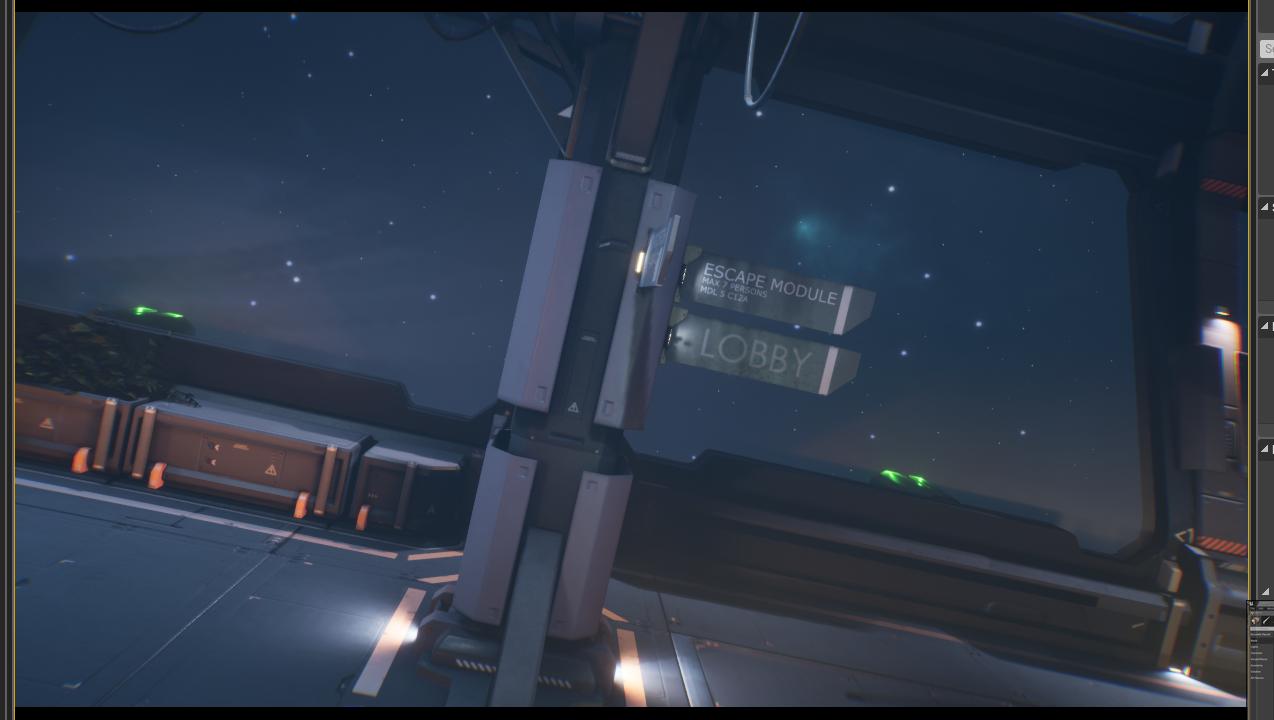
Like this instead of the following:
vernal dock
i figured it out!!!
fierce tulip
 exotic thicket
The camera in the editor can roll itself if you roll the camera in game mode
and after that it... just goes crazy because the camera doesn't support mouse controls unless it has the default orientation :P
thankfully it resets if you go into play again and just make sure you don't roll it in there
swift spindle
way to reset is select something and press F (does not always work) it's also called gimbling
exotic thicket
oh good to know that that might help with it
my game movement involves rolling on occasion so it's kinda annoying when it borks :D
ocean wind
How do you actually roll your camera? I've only done it accidentally so far 
exotic thicket
I have no idea, I think I actually looked in the shortcut list and I didn't see an option for it
ocean wind
I cant find anything about it either
swift spindle
you can create a camera and look thu that one and roll it
rotund scroll
is there any reason an array.contain would return false when the actor in question has just been passed into the array?
 dull hawk
Hey, new to the channel, so HI! I have a quick question. I have been trying to figure it out for over a week now. I have several landscapes in a world composition setting. All of them allow me to paint/edit flawlessly, except for one. I have deleted and reimported but to no avail. I created all of my landmasses in World Creator. So would anyone have any idea why a single landmass would be having this issue while the others don't? As a side note, I started a whole new project in World Creator and attempted that one. It is only the one that I Import for this landmass's purpose haha
dull hawk
I agree, I've never run into this issue before lol
 blissful trail
how do ye fix this ?
 uncut vigil
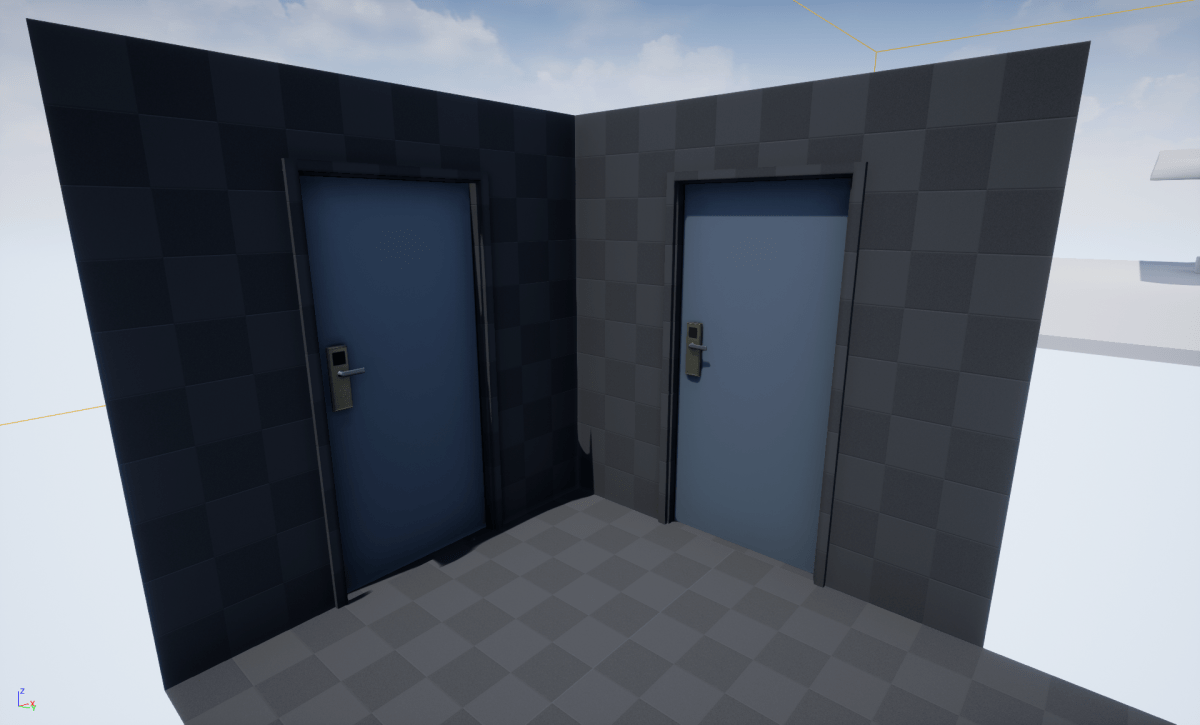
Intro Dynamic lights in UE4 Scene Setup Uv Matching Maya Blender Offset Summary Links/References Comments Dreaming of modular building? Big cities or just some interiors? But not sure how it would …
 unique kraken
is it possible to change the character collision to a custom collision or so?
 rancid lynx
Maybe if you make a new char from.scratch. im not sure.
rancid lynx
Capsule will look like sphere if its maxiumum shortness
 thin tendon
While using world composition is there a way I can get a sub-level (streaming tile) at a set location?
For example if I want to load the level manually before re-spawning the player
 marsh swallow
So we moved to UDS for our Sky, everything is great and initially when setting it up, we didnt have any issues but after working a bit on it we now have flickering lighting/shadows depending on camera angle etc. Its very odd. it happens during play and when moving about the scene.
Would this be something with shadow settings?
 plush yew
The laptop I tutor kids on got a virus so I backed up all of the kids' projects to my external HDD and my desktop. I'm going back to tutor my longest student tomorrow and remembered that I'd better re-copy all of his files back to my laptop. It looks like everything got copied except his project. Unreal doesn't happen to have some secret cloud storage that I've never heard of before, does it?
 normal burrow
unfortunately, I too am unaware of such thing existing, but I wouldn't expect there to be
normal burrow
No source control?
plush yew
but I have been awake for 30 hours
plush yew
Source control like on github? because I tried but it seemed like that was only for lines of code
Yep at 3pm. I think I'll cancel tomorrow. And they know I teach tuesday-thursday so I think I have until friday
normal burrow
its for everything, but yeah there is also perforce
plush yew
I think I found a data recovery program maybe that'll save me
normal burrow
was it ransomware or something?
plush yew
all I've done since the factory reset is install chrome, 10% of unreal4 and an nvidia driver
whatever it was it was obnoxious and in chinese
so I went and copied every personal file that I wanted to keep
I wonder if its because there were two projects with identical names
and it kept the one that was a year old or something
plush yew
yeah they're all here except his project
normal burrow
maybe its hiding inside another project or something
plush yew
his old project with the same name is here though
normal burrow
hm
marsh swallow
@plush yew (data recovery specialist here) is it SSD or HDD
plush yew
I believe my laptop is an ssd
plush yew
pretty small
he's also my youngest student so there weren't many blueprints and he was using my low poly placeholder assets
marsh swallow
you only installed windows and ue4
plush yew
like 20% of ue4 I cancelled the download when I realized recovery might be possible
marsh swallow
any windows updates?
plush yew
looks like everything on the drive is actually an HDD
marsh swallow
thats actually good!
plush yew
I hit the defrag menu to find out and it looks like there's a drive called "recovery"
marsh swallow
magnetic data has a decent chance of recovery.
plush yew
is there a program I should install on a flashdrive to try to recover the project
 fathom glade
I'm having a problem that's driving me nuts.
It should be the easiest thing... I'm trying to rotate my character up and down. This should happen through the function Add Controller Pitch Input, but my character won't do anything when I move my mouse up or down. I print the values and the values make sense, it just won't turn.
Every tutorial that I follow does the same thing, it implements it this way, I made sure my axis input is exactly the same also..
Anyone have any ideas?
normal burrow
probably a dd is what you'd want to do right Darinius?
thin tendon
When using world comp is there a way to let my level spawn before my player does? My player keeps dropping through the map
plush yew
Darinius gave me a lot of great advice. I'm probably going to just postpone until friday and try to recreate everything we did over the past year. if I can't do that by friday I'm going to try some data recovery services
uncut vigil
@fathom glade does left/right turning work?
fathom glade
Yes... I really am not sure what caused the problem, I got so frustrated I just deleted the whole blueprint and restarted... And voila it started working again.
I did it the exact same way, so something outside of the blueprints I think caused it.
 jovial pollen
Bazinga
plush yew
@fathom glade this is one of my biggest problems when starting a new project and setting up movement/ camera interaction. You need to enable inherit pitch or something on the character BP.
jovial pollen
Did you go into the camera itself and make sure the pitch thing was checked? @fathom glade
What he said
plush yew
that too. I have a custom camera setup that I do in all of my personal projects now but when I teach I always have to rake my brain for the random combinations of settings that need to be checked across all the character components
plush yew
have fun
fathom glade
Which pitch thing? Goodnight lol
OHH!! It's called "Use Pawn Control Rotation".
ahahah I see, so that was the problem. Thanks!
Hallelujah! I can move and look around like a real game now 😄
 pale yew
Btw, does twinmotion have real-time raytracing?
plush yew
Hello, Please may i have some help, I go to create a project in UE 2.40 and it says this
pale yew
or is that a future feature?
plush yew
@normal burrow Just did that and still got the same error
normal burrow
i'm unsure how to set the toolchain, one sec
this happened when you try to create a project @plush yew ?
plush yew
@normal burrow Yes
normal burrow
Oh no
 cinder iron
just got tagged about it @normal burrow XD
normal burrow
@normal burrow breaks the shit out of stuff sometimes too
 modern sinew
Ok, so my eventual plan once I finish the multiplayer tutorial is to allow players to build their own spaceships; one of the things I think would be cool is if players could generate gravity through centrifugal force instead of just a "This direction is down" marker in the ship editor.
A solution that I thought of that seems the simplest way is to get the rotation speed of that part, and say "Any object in this volume" (where the volume is the same one that keeps track of "oxygen level" and all that) falls towards the outside wall proportional to the rotation speed
Do you think that would work? is there an easier way to do it? etc?
normal burrow
That’d be fine
modern sinew
This is just sorta prototyping, as I haven't gotten near that far yet, but it's good to have a general plan for when you do
do you think it would be hard to implement?
or is it roughly as easy as it sounds in my head?
modern sinew
Gravity would be 0 by default, it's space
normal burrow
Or if you just add force every frame opposite of gravity
It’s the same exact thing with physx
So it should be very easy
Literally all you do is call add force every frame, tick use acceleration
modern sinew
Also, a more complicated topic- is it possible to have a multiplayer setup where every player is at Local World Origin, so you can handle large scales in much the same manner as Kerbal Space Program? Or not really?
 cloud cobalt
No
modern sinew
ok
cloud cobalt
The server will have to use one origin for everyone
So all server-side calculations will be inaccurate for other players
normal burrow
You could network peoples local transforms to their ship
cloud cobalt
Doesn't really matter - the server is still literally unable to compute accurately for them
modern sinew
Not sure how KSP2's planning to have multiplayer, (let alone the oft-talked point of time warping), if you can't do the same origin-shifting trick as KSP1
cloud cobalt
For what it's worth, KSP has the same limitation
normal burrow
Yeah though could retain relatively stable interiors this way, still
How much space you really need though?
modern sinew

I also am thinking maybe you could have each sealed ship be its own worldspace? but that seems like it would make its own problems, especially once you include combat
normal burrow
Have you heard of guns of icarus?
modern sinew
no, but I can look it up
normal burrow
They do a pretty seamless job of it
modern sinew
are the worlds large in it?
modern sinew
oh ok
normal burrow
Battling
modern sinew
but the ships aren't their own worldspaces, yea?
modern sinew
wym?
normal burrow
It does get pretty complicated when it comes to physx
modern sinew
ok
normal burrow
What do you mean world spaces?
normal burrow
Idk what you mean but if all the things in the ship are relative to the ship it’s fundamentally the same thing
modern sinew
You know how you have different worldspaces, right? like in a mario game, each level is a different worldspace
isolated from eachother, loading only what is in that world
normal burrow
Yeah dunno what you mean by sealed ship
If stranger says you can’t have multiple worlds networked though I’d believe it
 wary wave
It is possible to use origin shifting in a multiplayer environment
wary wave
Unreal cannot do it though
modern sinew
oh
normal burrow
It sounds like you’d be getting into multi server single instance
wary wave
The server needs to compartmentalise the world into discrete grids, and handle transitions between grids
Multiple servers is a good approach for it
modern sinew
Anyway, p@t, what I meant was that when a player makes a ship, the game makes a new level that is a copy of the inside of that ship, and when you open the door to the ship you get teleported to the inside-ship-level
wary wave
It's what systems like SpatialOS do
modern sinew
ok
Ambershee, do you know if creating a new world for the inside of each spaceship would cause more problems than it solves?
normal burrow
Sounds like erlang time to me
normal burrow
Heh yeah
modern sinew
it seems like it would reduce lag since you're loading in much less
only the outside of the ship for the main worldspace, and only the inside of the ship for the interior worldspace
Which would be especially helpful if someone decides to go super decorative and uses like 5000 props on the inside of their ship
normal burrow
It’s the same thing as parenting really
It would of course, take tons of effort to get unreal to not convert stuff to world space constantly
Allow for a cmc that isn’t up right etc
normal burrow
Limiting them
modern sinew
Well, sure, but I'd want the cap to be as high as I could make it without lagging, so I'd be happy to use some tricks here and there
I suppose you could take all the structural elements like floors and walls and stuff and turn it into one mesh, right?
that would help a bunch
normal burrow
It is more than individual renders you have to worry of though
modern sinew
It seems like turning 1000 small objects into one large object would certainly help
normal burrow
Like it sounds like your gonna need a physics engine specialized for this stuff, so the overhead in any one object isn’t really something that could be quantified or optimized
modern sinew
why would you need a specialized physics engine? space is suuper simple. No gravity, no friction, just "this engine adds x force in y direction"
normal burrow
How many centimeters per second will you be traveling?
modern sinew
Well, depends on how long they accelerate
base of nothing tho; if we don't have planets we won't have to have orbital speeds
normal burrow
Yeah but mass is still a thing and force is acceleration by mass. Physx in ue4 is cm per second per second
So you get insanely huge numbers
To have things inside it be stable, you’d need a separate physx sim entirely
modern sinew
ok, you'll only have insanely huge numbers if someone decides to constantly accellerate, yea?
they'll run out of fuel before it becomes a problem
normal burrow
Depending on the mass of the ship, you could be limited by representable numbers just to accelerate semi quick
If the ships mass was 10000kg to get it to speed up 100cm per second it’d take 1000000 force
That a meter per second per second, not real controllable
 ruby stratus
So sometimes my unreal engine 4 crashes becuase of a X problem.
Now when I go to open my project again, I find that the game engine has restored it self to a time way before the crash happen, meaning it has deleted so much work which shouldn't have been deleting.
Like one time I wanted to import a new enemy into my game and there was something wrong with the rigging or something with this new enemy, so my engine crashed, when I open my project again it had undone all the work I had done on my 2 character and deleted some file which had nothing to do with me importing a new assets?
ruby stratus
so the auto save doesn't save?
auto save is sat up for me to save every 10 min, but I've seen it go back way more then 2-3 hours
normal burrow
Auto save saves to the auto save directory as far as I know
It’s a fail safe I think.
Should still save all after you do anything
ruby stratus
so what should I be doing just hitting the "save current"?
normal burrow
There is also a button “save all”
ruby stratus
where? o.o
 normal burrow
Yeah that one
modern sinew
Completed the Host Menu Graph lesson for the multiplayer tutorial and made some improvements. Namely, Making LAN v WiFi a toggle button, and having the player number loop around at either cap instead of just stopping
Not sure why those weren’t default
 dark rune
How do I make a popup in a widget blueprint? I have prepared a popup widget that has a timeline where it will set visibility to 0 after some time.
It is kind of a 3d widget on an computer screen actor, but I want it to show sth when the player's health go down. How do I do that?
 mint thunder
Hey guys can someone explain to me something
I opened a forest environment to see how they made it, and it confused me when i saw all the rocks(only) as blueprints.
All the rocks have their own unique texture material, plus a dynamic cover. Is this technique better for drawcalls?
i mean , when using many meshes with multiple materials but 1 of the materials stays universally the same. If you use them in a blueprint it saves drawcalls?
 exotic cave
@mint thunder : Where are you seeing multiple materials there?
Unless the rock material is calling the grass material layer?
I would suggest that it's probably more about being able to customize the rock to share the same foliage cover as its surroundings than performance if so.
mint thunder
can't find it now, it's not in the materials used but it had a "dynamic cover" material ball in a section
so it's to change the textures and blend it better?
exotic cave
It's possible that the rock material calls the grass layer, do you know how material layers work?
mint thunder
very vaguely
exotic cave
Product documentation including reference and guides for Unreal Engine 4
plush yew
aye people,i think I'm not thinking straight about a macro
is there any way to set variables without them being exposed to the blueprint
macro library doesnt do that
You can't declare variables in function library either
exotic cave
@mint thunder : Material layers are, generally speaking, about reuse and customizability rather than performance. You can create that grass material once, then use it within other materials as a base or an accent without having to recreate the graph every time.
mint thunder
yes but that doesn't reduce the drawcalls right? i thought material layers are mostly used due to texture limitations from the shader
exotic cave
I would suggest not strictly focusing on the number of drawcalls as an indicator of graphics performance. 😄
Fillrate matters a lot.
Here's a lovely article I've been linking about next-gen grass rendering in UE, for instance. Describes a technique where the drawcalls increase by 47% and yet performance itself increases by 81%. https://80.lv/articles/creating-next-gen-grass-in-ue4/

Nils Arenz continues his vegetation studies in UE4 and speaks about creating dense grass for next-generation video games with minimal loss of performance.
plush yew
nvm,I found what the problem on my reasoning was
mint thunder
Well, i'm familiar with optimization techniques (lightmaps, texture size and modularity,shader complexity+quads, and culling) just trying to understand a bit more in depth, as i dont particularly use blueprints except from prefabs and some splines
thanks for the info though 🙂
already checking the articles
exotic cave
My experience as a graphics developer indicates to me that fillrate is huge, possibly the most important thing. Drawing 10,000 huge triangles (particularly with transparency or other expensive shaders) can be far more intensive than drawing 1m small ones.
mint thunder
Yes i know with foliage that's the worst thing, bcz graphic has to render twice (or more) to show what's behind the opacity card
exotic cave
Yup, that's part of why that article describes what it does. The developer found that rendering a huge number of highly optimized individual blades of grass with small triangles and not so many transparent pixels around them was actually less expensive than a smaller number of traditional transparent grass cards - likely because every transparent pixel that isn't drawn still has to be tested.
I wouldn't get too hung up on optimization until you have to. "Premature optimization is the root of all evil" --Knuth
mint thunder
i think epic has a cool livestream of that explaining exactly how it is working
exotic cave
Link me if you find it, would love to see
mint thunder
https://www.youtube.com/watch?v=kp3zcyZZBVY
it was gnomon

Presented at the Gnomon School of VFX in January 2018, part two of the class offers an in-depth look at the rendering pipeline in Unreal Engine, its terminology and best practices for rendering scenes in real-time. This course also presents guidelines and profiling techniques...
1:15:30 is the gbuffer
exotic cave
Seems neat! I'll have to absorb it all, one hypothetical day in the future when I have time.
 gilded lichen
Hello, Im having this issue. Dont know the best way to explain this so I'll just make a video.

 zealous cloak
still having huge problems with nDisplay :/
marsh swallow
So we moved to UDS for our Sky, everything is great and initially when setting it up, we didnt have any issues but after working a bit on it we now have flickering lighting/shadows depending on camera angle etc. Its very odd. it happens during play and when moving about the scene.
marsh swallow
Ultradynamicsky
exotic cave
Ah
marsh swallow
but i had this happen in the past with TrueSKY even.
exotic cave
I can't help, I have only used the UE base sky so far :>
Shadows seem stable with it generally
Gotta say I love UE!
rotund scroll
amazing, ship it
exotic cave
I need to add rocks, trees, a few more grass types, maybe some ruins 😄
But, I love that UE gives me a pretty clear path to doing all of these things, and that I know if it looks bad it's me and not the engine...because other people are doing things like this: https://www.youtube.com/watch?v=ecerIIClbMA&feature=emb_title
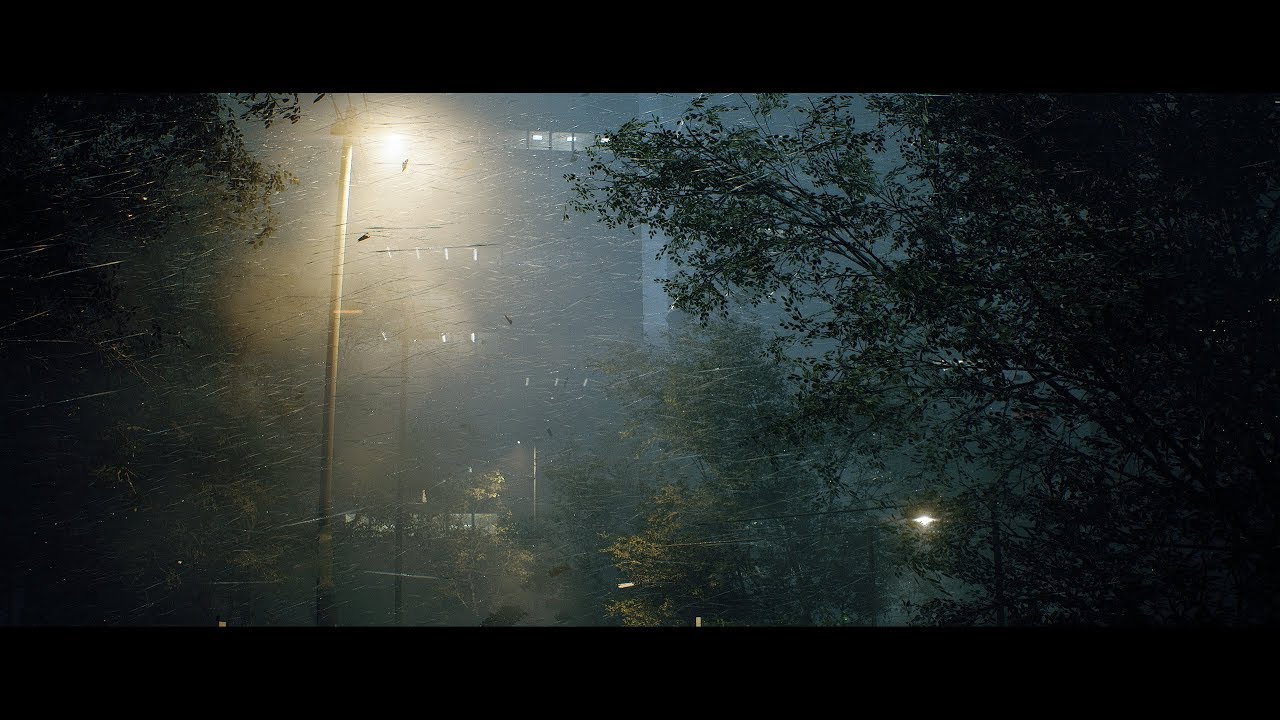
Unreal Engine 4.23 - Speedtree - Substance Designer
(Sorry, no audio)
UE4 Plugins :
- VICODynamics by VICO Game Studio LLC
- Custom Lens Flare VFX by Artyom Cheremisin
Honestly Epic should hire Koola because that video is just astonishing
cloud cobalt
What would he even do for them ?
 vale silo
Training
 tawdry storm
or make videos to promote the engine, but he kinda does that already anyway
 rose depot
Hello, i wanna my buttons change the apperance of the charcter when you select it in the menus.
How i'm suppose to do that ?
Menu-> Character selection "character Selected">Load specific map for this specific character
 fierce forge
how i can set the materials of each mesh from this array ?
 wide basalt
Do you know of an interesting tutorial to learn Unreal and C ++ properly? I am tired of seeing superficial tutorials that only use Blueprint. I want to use Unreal as my main engine (currently I only use Unity).
tawdry storm
foreach loop for the array and for every item, set the material would be my approach @fierce forge
 hasty stone
Hi, is there a way for us to create a character that has a 2d side rotation based on physics
fierce forge
i want a mesh from this array to have material 1 and a another mesh to have material 2 , how i can do this ? @tawdry storm
rose depot
@fierce forge But where i need to use it ? "Widget" ? "Blueprint Map" ? "Character"?
fierce forge
it is on blueprint map
rose depot
ok Thanks i will try @fierce forge
tawdry storm
you could have a separate array for the materials
fierce forge
?
wide basalt
Do you know of an interesting tutorial to learn Unreal and C ++ properly? I am tired of seeing superficial tutorials that only use Blueprint. I want to use Unreal as my main engine (currently I only use Unity).
@wide basalt This is the right place to put this question right? Or there's a better channel?
fierce forge
@tawdry storm that's a spline
tawdry storm
I don't see how that changes anything
cloud cobalt
When you also need to use C++ on top of Blueprint, and you've already learned C++, you can look at the beginner C++ tutorials for UE4 speciifcally
wide basalt
Hm I can't understand why everyone recommends blueprint ... With blueprint I don't have the same control that I would have with C ++, or would I?
anyway, thanks
cloud cobalt
@wide basalt Blueprint is required for UE4
There's just not any not using it
You will have to use it to some degree, and it exposes most of the C++ API
cloud cobalt
Yes, one complements the other. Doing a unique level script in C++ is stupid, doing your HUD in C++ is usually stupid
Doing physics simulations in Blueprint is stupid
Usually people use Blueprint to prototype for speed of iteration, then rewrite major systems in C++ for easier reusability, better tracking of changes, and performance
wide basalt
So these tutorials out there using Blueprint are a good start, right? Or you recommend some?
cloud cobalt
Blueprint tutorials are a great start
If you're fluent in C++ and want to move to that later, the official doc page has a lot of C++ considerations
If you aren't a C++ programmer already, you'll find that learning it just for a UE4 project is going to take you nowhere
 dusky drift
Hi, can anyone suggest a good beginner's tutorial for scene building using Quixel Mixer?
wide basalt
Thank you @cloud cobalt . I will start my studies today.
hasty stone
Hi, is there a way for us to create a character that has a 2d side rotation based on physics
@hasty stone
 hasty osprey
quick help i made a physics asset for cloth collisions but then i deleted the skeleton it was using
now it is assigned to a basic cube skeleton how can i assign it back to my original skeleton which i have reimported?
gilded lichen
Hello, Im having this issue. Dont know the best way to explain this so I'll just make a video.
I want maxhealth,name and progress bar but there not showing why is this?
exotic cave
@dusky drift : https://www.youtube.com/watch?v=FiE5SANBcAs
In this video I showcase how to take a material made in Quixel Mixer, export it to the Quixel Bridge Library, and then use Quixel Bridge to import said material into Unreal Engine 4 using the Megascans Live link Plugin. I also show off some layer effects to an extent within M...
dusky drift
@exotic cave thank you. This should help
exotic cave
He has a few of them, look like really nice work

In this video I show off a material I made using Quixel Mixer and then imported into Unreal Engine 4. Quixel Mixer & Bridge are both totally free for everyone. Megascans is also free to everyone using Unreal Engine 4 when you sign into Megascans library with your Epic Games L...
 real patrol
ok, so i have one plane, half is one material, half is another material. can i make it so they blend in the middle/fade into each other?
 serene quiver
Can someone take a look at a blueprint and tell me what I'm doing wrong?
 grim ore
you could try vertex painting the material for the smooth blending https://docs.unrealengine.com/en-US/Engine/UI/LevelEditor/Modes/MeshPaintMode/VertexColor/MaterialSetup/2Way/index.html @real patrol
otherwise if it's one material / mesh with the UV's set up correctly you can just try doing it in material using a lerp between the two based on the UV coords
 oblique tangle
is it possible to release my project without building lighting or anything?
grim ore
sure, your project is your project you can make it look like you want.
if you mean not use light building you can switch to movable lights instead of static lighting
oblique tangle
i dont really need any lighting currently, i just need to release it to get it to a playtester
grim ore
yep nothing odd about that, package it up and send it away
oblique tangle
okii, ill let you know how it goes
marsh swallow
thats.... not going to work. lol
BlueprintUE
BlueprintUE.com is a tool for sharing, rendering and rating blueprints for Unreal Engine 4. UE4 is a game engine which use visual scripting called blueprint.
 void kraken
Anyone know how I can fix this error
serene quiver
How do I copy paste the blueprint then?
marsh swallow
plus a description of whats NOT happening.
literally copy the nodes from the BP
its all plaintext.
 drowsy turtle
can someone help me with adding languages to my game?
I dont know how string table works
 paper crest
dayum, unreal should stop running twice when u run em
dat shiet can make people crazy 😄
paper crest
cant read, too smol
oblique tangle
It says I have 115 errors??? Kinda confused by that lmao
 wary dew
i'm not sure where to ask this specifically, but is it possible to have an unreal engine project run on xbox one without actually having to publish it to the store or something?
exotic cave
@oblique tangle : Not really sure, but I'd guess start with these lines I circled:
serene quiver
How would I make a pause system? For now I wanna just make it basic and make it that if you press P it freezes the game.
wary dew
@serene quiver there's a blueprint node that literally freezes game time, you can just do P Key > Flip Flop > Set Game Paused Y / N
 cosmic panther
@serene quiver he was showing you a flip flop makes it pop up and then you click the button again it closes
 sweet relic
@light lintel basically the gamemode is for defining the rules of the game or level. It lets you easily set things like what the default player pawn is etc
Overview of the Game Mode and Game State
serene quiver
I press the button I have bound to pause again and it does nothing
sweet relic
@sweet relic ya a gamemode is part of the base engine functionality, you dont actually have to do anything with it
you would want anything player related in the player controller/pawn, anything to do with the state of the game, you will want to track in the GameState
@serene quiver select the input node and check "execute while paused"
uncut vigil
Would you put save/load game functions in the gamemode?
serene quiver
Ah, thank you!
sweet relic
@light lintel for a single player game it doesn't really matter.
@light lintel player health, ammo, score: Player pawn
world time of day, global scoreboard, current wave: gamestate
 abstract relic
Isn’t game mode server side only anyways?
sweet relic
@light lintel and yes the gamemode only exists on the server
health ammo should be in the char bp
abstract relic
I’m assuming you mean for storing as an external for saving/loading
sweet relic
@light lintel it depends on the context but generally this is done via traces:
Overview of the Unreal Engine 4 tracing system.
serene quiver
How come it won't let me set the HUD... or any of these?
 brazen hull
https://gyazo.com/451b275774a21ed9926de33b8c0ed8a4 how can I hide target boxes?
 sweet relic
@serene quiver You have to set it in a game mode asset that you have created or by setting "GameMode Override" in the level World Settigs
@brazen hull Viewport top-left dropdown > "game view"
serene quiver
Ah, thank you!!!
sweet relic
@light lintel you can use regular collision as well (which is what you are describing)
An overview of how Collision and Collision Responses operate in Unreal Engine 4.
brazen hull
ty
sweet relic
An overlap/hit event will fire once for every object that hits. Or you can use a multitrace to get an array of all objects that hit and loop through them
 misty creek
@brazen hull Going back a few posts you can also press g when in the viewport to switch to game view
 knotty summit
when 4.24.2 will be released?
serene quiver
How would I make something that constantly pushes the player forward in the direction they’re facing?
 primal geyser
something, like an object or as in inputactions?
serene quiver
Inputaction
primal geyser
bind keys in project settings, i.e., W as inputaction moveforward
serene quiver
Yeah I have a key bound, my idea is like “You press G and then it turns on a flip flop that alternates between pushing the player forward and not”
primal geyser

Welcome to this Series.
In this Series we will work on an Open World Game from Scratch.
#1 Includes:
- Blank Project
- Skylight for the Map
- Character BP
- GameMode BP
- Move Forward, backward, left and right
If you want to get all the Latest Information:
Twitter: https:...
serene quiver
I can get them to move, I want something that constantly moves the player forward even if they're pressing nothing on their keyboard
plush yew
How come this code sometimes gives me 0 instead of -1 ?
i can't recreate it now, but i was using these exact nodes and settings, and it printed a 0, multiple times
abstract relic
Just out of curiosity. Why are you rounding for a print. Wouldn't that defeat the purpose of debugging?
plush yew
I was originally using the -1 in my jumping code
so since i was confused i made this specific sitaution to test if a -1 int would result in 0
abstract relic
You are giving yourself false report
brazen hull
Whats the best ways to optimize. Ive already made lods and optimized lights. Does material optimizing matter like really alot? currently all mats are at 2k
plush yew
@abstract relic how so?
normal burrow
oof
abstract relic
Printing is just that, printing. Doesn't affect the logic of your code.
plush yew
yes, clearly
normal burrow
abstract relic
so by add print specific logic, you are changing the report to something that doesn''t exist
 chrome ivy
Hello there!
abstract relic
imagine if I multiple the int by 7 for the print, but didn't apply it to the logic itself 😛
it with always print x * 7 instead of the actual number: x
plush yew
i'm not getting this at all
chrome ivy
When I aim, I am setting the use controller rotation yaw to true and my player roates to the control rotation instantly. I tried to RInterp, but had no luck. I am using C++, but I am just looking for ideas here. 😄
https://youtu.be/Ax5y5L9K-X4?t=7
 plush yew
it's a simple situation. the round gave me 0 an hour ago, and it's giving me a -1 now. Using the same code. The result has changed, the code hasn't
there is nothing that should make the end result change
 molten path
@plush yew are you sure the code hasnt changed?
plush yew
100%
normal burrow
frog
plush yew
int isn't being used by anything else either
plush yew
yes, it will result in -1
normal burrow
did you try it tho
molten path
@plush yew does it say anything when you try to compile it?
plush yew
no
molten path
quite weird indeed
normal burrow
have a feeling your gonna get zero with the direct print too
plush yew
nah, it's a -1
normal burrow
confirmed?
plush yew
yes
normal burrow
i'll look at the round node code
plush yew
abstract relic
here's an example of bad debugging
normal burrow
lol
plush yew
am i being japed?
@normal burrow can you screenshot me the code for the round? I don't have the stuff installed to open it
normal burrow
plush yew
oh, i figured you were going to look at the cpp code
normal burrow
i am 95% confident that you had a bad default saved in the level
plush yew
What's that about?
serene quiver
I made a widget for a pause screen, how would I make it go away after the player unpauses?
normal burrow
like your actor or whatever was saved for test int to have 0 instead of -1
plush yew
well, originally i was using another variable
and it got it's value from a player axis input, and converted that to either -1, 0, or 1
however in case of -1, it would also return 0
Kind stupid i didn't keep that code
normal burrow
can tell you
that would never happen
if were talking explicitly of -1 integer casting to float, then ran through the round node and converted to int
this will never be anything but -1
plush yew
that's so weird
plush yew
I did have a bunch of other variables I was using that had their name change on ocasion
normal burrow
so you definitely had some strange default issue or heirarchy
yeah zero
this is the default for int, when your dealing with hierarchies of parent classes and such
sometimes these things get stuck at zero
I don't know exactly how to trigger it, but can assure you that the math there does not work in the way your thinking it might
plush yew
So what is it like then?
also had this variable randomly add an extra "to" in the name. had it before in a totally different project
said, jump impulse defactoto
recreating the set node would solve it
abstract relic
Guarantee it's merely user error as pat said
plush yew
also, generally i feel like sometimes i get weird situations that don't make sense. i get result A, i change a variable, get result B, change variable back, i get result C. stuff like that
well i can't do much about it.
if it happens again, i'll be sure to record some proof
because there's no user error in making a print string with a rounded int, and using it again an hour later
normal burrow
well as HighTide also mentioned, don't complicate things with logging the wrong way
If you log only to find an error you expect is there, you very well may end up finding that the expected behaviour also fails
grim ore
what they were saying is if you are not testing your actual output value then you can introduce error
normal burrow
well not just that matheww
testing the round and not the int
like you want to test both things
grim ore
assuming he was rounding before then that would be fine it just seems like he is recreating it in another spot which was the issue being pointed out
plush yew
i did test the int by itself when it happened
grim ore
but yeah not testing input as well as output might be an issue
plush yew
no rounding
but i didn't set the value, no
i'm not seeing how that should make a difference
normal burrow
well you print int -> string and int -> float -> round -> string in the same line
and you know the values are different
shouldn't be paying attention to just the value, your looking for difference
just advice though
grim ore
if you have code in part A of the stuff then later you recreate the same code in part B for debugging purposes something could have happened between to give you unexpected results
grim ore
it's the same issue where you pull off a pure node twice and expect the same results not understanding a pure node is ran twice in that case uniquely and can return differing results.
random number nodes are notorious for that confusion lol
normal burrow
yeah, its just specific to -1, this is a value that is well represented by float
plush yew
well that one makes sense to me
normal burrow
like i showed, ceil -1 gives you -1
plush yew
doesn't ue4 keep automatic backups of old files?
grim ore
sometimes it will auto save
 finite grove
Would it be possible yo make a game in the ‘God Game’ genera, similar to something like Populous or Black & White with Unreal Engine 4?
 digital anchor
sure, but many things to take into consideration
 fading vector
In a 2d game, if I wanted to give the player options for player and weapon skins would I just need to create art for every possible combination and make animated sprite out of that? or is there another way?
Also please don't flame too hard, im pretty new to this 😛
rotund scroll
anyone had an issue with arrays in blueprint returning null even though there are actors in the array?
digital anchor
namely terrain, characters, pathfinding, and networking would be things that would need to be completely custom
 wicked hound
anyone have a diagram of button mappings on the oculus quest/rift s touch controller?
finite grove
I figured characters and Terrain would have to be custom... thing is, i hoped for a Black & White 3, but EA put the Kibosh to that. And no one has ever made a game like it sense.
No ‘Omauge’ or ‘Spiritual Successor’ has ever come.... i know i cant possibly be the only one that loved those games...
So i’m thinking about trying to make one myself..
abstract relic
As far as technical? Sure, nothing stopping you there
IP is a different story, best to make your own obviously
rotund scroll
omauge?... you mean homage?
plush yew
@finite grove From what I have seen up until now from the engine (I am practicing since some months) I would say it's absolutely possible. Doing this alone though is another thing since B&W with all it's freedome and godly feelings could be a lot of work (assuming you want to create an athmosphere which can address nowadays standards),
A lot more than a linear shooter that is.
finite grove
@plush yew I might as well try, no one else is going to do it... 🤷🏻♂️
plush yew
Sure, go ahead. I'm waiting for B&W3 anyway 😉
finite grove
@plush yew No promises.. 😂
plush yew
If you are going to start you may want to post some results in the unrealengine reddit sub. I'd like to see some impressions. Even if you don't finish it, it might spark some motivation in others.
So no pressure. ✌️
finite grove
@plush yew I found a thread recently on the BrightRock forums. Seems after finishing War for the Overworld(a Spiritual successor to Dungeon Keeper) they were playing around with the idea of tackling Black & White next, but there was a disturbingly low amount of interest in the project, so i dont think they’re going to pursue it...
Real shame, actually... i shared a link to the thread in a couple of B&W communities, but clicking the link, creating a free account, and making it known that you would be interested in them doing it would rake effort, and the internet generation hates putting effort into things.. 🤣😂🤣
plush yew
Looking at the one game BrightRock created until now I would not be sure if a Black & White is something they can pull off. Totally different art style and "reusing elements from a dungeon management" for a B&W successor might shruck people off. Maybe it's not lazyness but quiet criticism. Just my 2 ct.
finite grove
I considered that.. but my mindset is even murky water is worth trying in a drought... might kill me, but dehydration definitely will, so i’m take a lick... if you get my meaning..
plush yew
guys im too lazy to learn game dev. help me
I'm no native speaker so actually I don't get it 😅
grim ore
@plush yew hire someone to do your game dev for you
finite grove
@plush yew Youtube tutorials..
finite grove
@plush yew you’re lazier than me... thats an accomplishment..
finite grove
@plush yew its probably better than nothing, is my meaning. Worth rolling the dice..
@plush yew then hire someone. Doing the work yourself is cheaper though.... a lot cheaper..
plush yew
i am just a ppoooor kid
finite grove
@plush yew but i also liked War for the Overworld.. 🤷🏻♂️
@plush yew then you’re f***ed..
plush yew
@finite grove I understand. But can't relate. If there is a successor I would expect great graphics and a more developed gameplay than in B&W2 at least.
wanna switch from poor lazy guy to rich lazy game dev studio guy
finite grove
@plush yew OH! You wanna be CEO? Have you tried KickStarter?.. lol
plush yew
you need to show something for that
finite grove
@plush yew all you need is 15,000$
sweet relic
@plush yew gat a business degree
plush yew
kickstarter wants 15k?
I'm out so far. Btw don't feed the trolls.
trust me, no trolls here rn
finite grove
@plush yew nah, i thought you were referencing kid that started the B&W3 campaign...
plush yew
black and white 3?
finite grove
He wanted 15,000$ and to be CEO of his own company... and our reward for helping him achieve that dream would have been “a Black and white 3 game copy”.. but i wanted Black & White 3 so i didnt give him my money.
@plush yew Sorry, he looked hungry.
cosmic panther
Anyone know how to export a Render Target to a PNG
 brave widget
Should be able to right click, Asset Actions -> Export
May not save as a PNG, but at least some image format
cosmic panther
its a HDR format I want it as a PNG (There is function called Export Render Target, But its not working it exports but still as a HDR, even though i classified it as a PNG)
brave widget
Hmm, is this something you need to do this one time, or a feature for your game to save screenshots or something?
cosmic panther
because I want to download it as a transparent image
No, its capturing my character for the main menu, But I want to be able to export to PNG to put it on my website for a transparent look
brave widget
Oh, I see. The best idea I have is to save it as the HDR format. Then open it in photoshop and cut out the background. Unless its distorted 🤔 Not optimal, but could work
Or maybe put a green plane behind your character and save a high quality screenshot and chroma key out the green 🤔
cosmic panther
I've already done that, but it take out a lot of time to cut the background out on hundreds of weapons. Like if I add new weapons or character i want to be able to do a one click and upload it to my website
brave widget
Makes sense, but I think you may be out of options sadly. I think the export render target just does the same thing as a normal export. Specifying PNG in the filename doesn't tell it how to be a PNG unfortunately. Doing the greenscreen method will help save time cutting out the background. Unless someone else has an idea, I think this is your best bet 🤔
I'll keep thinking though
cosmic panther
On there website it says you can export it as a PNG but they dont explain
brave widget
Send the link to the page?
cosmic panther
Export Render Target
brave widget
" (depending on the format of the render target)"
So we need to figure out how to get the Render Target in PNG format and I don't know how to do that 🤔
 wary wing
You could convert it to a static texture then export that as a PNG
brave widget
Open the render target and you'll find "Render Target Format"
cosmic panther
it says it has to be in a LDR format to be able to export to PNG
brave widget
I think RTF RGBA8 is a good choice 🤔
wary wing
For reasons unknown to me even 8-bit (per pixel) RTs will only export as HDR
brave widget
Hmm, if thats the case, then there is either a bug or the website is wrong 😛
 stuck chasm
Does anybody have a updated version on how to get started with Oculus Go Development and Or the best version for Oculus Go Development?
wary wing
Or both 😄
brave widget
Yeah, or both 😂
wary wing
But converting to a static texture first may perhaps be an acceptable workaround?
Those can definitely export as PNG
(Provided they are an appropriate format, so the RT that creates them should be 8 bit per pixel)
rose depot
Hey, is it possible to change the current game mode in the same map ? Exemple: "Menu Game Mode" to -> "Play Game Mode"
sweet relic
@rose depot in world settings you can override the game mode for the map
 kindred viper
@rose depot no the game mode is static to the level. But what you can do is have a game mode with booleans to do different tasks on demand
unless you didn't mean at runtime, in which case, what urist999 said
rose depot
@sweet relic How can i do that ?
kindred viper
where your detail panel is in the Level Editor, there is another tab for World Settings
rose depot
I mean to overide the GameMode
normal burrow
may have to navigate to it in window thing at the top
ah the game mode is set where you see the blueprints button at the top of the level thing
you can set a game mode override per level as well as the default
kindred viper
on the right hand side at the top of the panel
normal burrow
ya might need to enable it first though too
kindred viper
oh yeah its disabled by default I forgot 😄
kindred viper
never noticed that before
rose depot
My thing is: On Clic> Play This character
But the problem still the default character is linked with game mode.
Per exemple in the game mode the character is a Male, but if i select in the menu character 2 "On Click" > i want to play the character 2 and the chara 2 is a female
kindred viper
you can't do that
GameMode is set in editor/code at design time. It can't be changed for a level at runtime without loading a new level
rose depot
i can only change the appearance of the rpg classes ? But how ?
rose depot
@normal burrow I Want a specific button to do job > Warrior-> Appereance Warrior, Button Mage Appeareance Mage
So this button better to be in the main menu
abstract relic
So make the button? 😜
rose depot
But my problem is. To spawn with a specific appearance.
 orchid marsh
Set the desired mesh as a variable in the game mode set by the button - have the pawn query the game mode in begin play for the correct mesh to use
abstract relic
Appearance wise. Here you go. As far as changing characters. You’ll want to look into possessing and unpossessing at least https://docs.unrealengine.com/en-US/Engine/Animation/WorkingwithModularCharacters/index.html
Describes the different methods you can use to create modular characters comprised of multiple Skeletal Meshes.
rotund scroll
does anyone know why I get variables and arrays from a class to return null even though they are set in the class?
rose depot
Well Thanks for the help btw
 wooden leaf
has anyone got this inventory system to work from this video tutorial. https://www.youtube.com/watch?v=yxqSkFNAzE0&t=535s

In this new series I go through a method of creating an inventory system, similar to a survival game. In this first part I introduce the system and go through the process of setting up some key assets that we will need going forward.
There are unlimited ways to create a tuto...
stuck chasm
Can someone help me with a vr launch error?
LogPlayLevel: Error: ERROR: Android toolchain NDK r18c not supported; please use NDK r14b to NDK r18b (NDK r14b recommended)
Oculus Go launch
abstract relic
Those are the best errors. The ones that tell you the problem and provide a solution off the bat.
normal burrow
It sounds like NDK r18c is not supported yeah. You probably need r14b to r18b. Would seem r14b is most preferrable.
rotund scroll
I'm having issues with a BP class whose variables are checked in another class are returning null instead of their set value
what could be causing this?
 scarlet birch
Are you getting the variable value from an instance or from class defaults?
rotund scroll
instance
scarlet birch
First thing I'd check is that the reference to the instance is valid.
rotund scroll
both are actor variables inside a component
it is
I'm literally checking that as the first thing in a helper function
the value returns false regardless
could it be because it's inside a component?
scarlet birch
Maybe. Without seeing it, it could be any number of things.
rotund scroll
I mean I found out during debug
so "seeing it" is only as far as seeing that a variable isn't set when checked when I do set it a few frames earlier
vernal dock
do you NEED a plugin to connect ue4 to a mysql database?
brave widget
It does not do it natively, so yes, you'd need some sort of 3rd party plugin/source change to do that @vernal dock
vernal dock
@brave widget u recommend any free plugins
brave widget
How could I? I haven't connected UE4 to a MySQL database. I don't even know if one exists. You may have to create it.
What about SQLite? I know there is a built in plugin for that I think.
exotic thicket
Curious why you'd want to use MySQL? If you plan to distribute your game/app you'd need to install MySQL on each user's computer too
(just wondering)
brave widget
You can't google how to setup SQLite?
vernal dock
im just curious about how to connect a game to a database and i am mosy comfortable using a mysql database
exotic thicket
Ah I see :)
vernal dock
i will @brave widget sorry im a little drunk
exotic thicket
Yeah SQLite is probably what you would use if you plan to distribute your game... It's basically a lightweight database which just uses a file as its backend
brave widget
SQLite usage is not that different from basic MySQL. You'll have more problems trying to get UE4 to work with MySQL than you will with SQLite
vernal dock
thanks guys ill check it out!
now with this sqlite will i be able to query a database i set up with xhampp on localhost
brave widget
You should be able to. SQLite can be used very similar to MySQL in terms of web stored data. Its just a matter of setting up your program to read SQLite databases.
And I think SQLite is server agnostic as well. In the sense that you don't install a SQLite program. I could be wrong on that last part though
wooden leaf
Yes, He is, that would mean that veryone running his game would have to have a web server on there pc
brave widget
You could setup the install to install one automatically, but I HIGHLY recommend never ever doing that. You open them to a host of security vulnerabilities. 😛
wooden leaf
The only way he could do it is reference the sqlite.dll file in the game program and I don't know if that's possible
 vernal dock
@brave widget beeeast
wooden leaf
Oh, ok, all you need is that plugin then
brave widget
The plugin comes with UE4
I have no idea if its enabled by default or if I did knowing I'd need it eventually
wooden leaf
I'm looking and I don't see that plugin
brave widget
Should be there, I never downloaded a plugin for SQLite.
Unless its leftover from pre-4.24
I think I started with UE4 around 4.16 or 4.17 so no idea if its still included
wooden leaf
I'm looking threw all the plugins and it's not in there
exotic thicket
@vernal dock SQLite doesn't use a server. It just directly accesses a database from a file, for example saved in your game's directory
brave widget
Did you try search with "Built In" selected?
exotic thicket
(It's effectively just a set of APIs which contain the full DB logic)
brave widget
Like zomg said, SQLite means no server required and thats why people use it. Since its just a file
Not unlike a complex CSV file really
wooden leaf
fount it
brave widget
😉
wooden leaf
So who ever wants this just add those 2 plugins and then you will need some tutorials on how to use it in unreal engine
brave widget
Yup, thats what we told them already 😛
wooden leaf
ok
 strong prairie
Hello i have problem with unlocked camera, can you help me? https://www.youtube.com/watch?v=FYtLXR4-VZc
When I touch the sides of my screen on unlocked camera my camera just goes far. You can see all blueprint in imgur. https://imgur.com/a/Zi0H5JE

One popular feature in modern MOBAs and Top-Down Games is unlocking the camera from your character to freely look around the map without putting it in danger of walking through specific areas. In today's video we'll learn a pretty easy and dynamic way to replicate such featur...
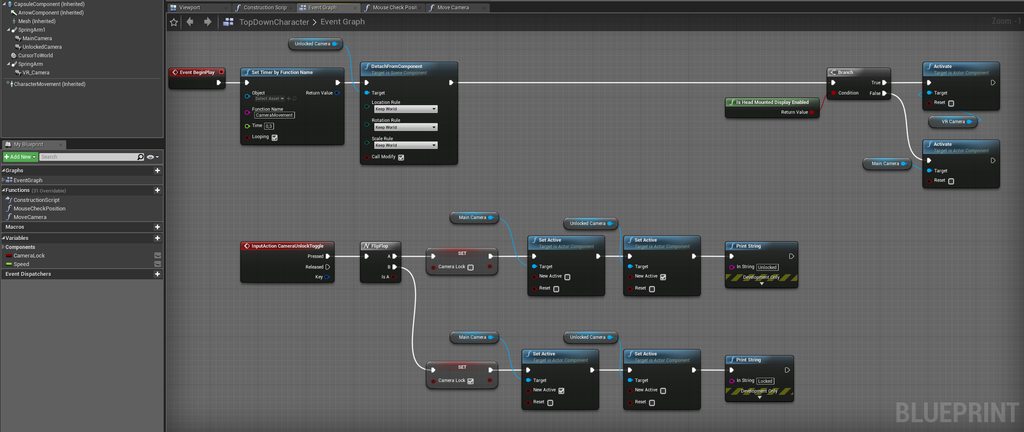


 halcyon flame
@strong prairie you should be able to isolate this issue with some testing, prints, messing around with the nodes, et cetera
because this is dealing with the camera it is inherently very easy to see that something is going wrong (obviously)
this also means it should be pretty easy to solve the issue. maybe rebuild your move camera from the very basics, and building it up from scratch ensuring it doesn't have any issues along the way
normal burrow
also explain what you mean far?
halcyon flame
@normal burrow there's a picture in his imgur albu
is it possible to change which GameMode loads with a map? as in, to use multiple different game modes in the same map?
normal burrow
it would likely be somewhere before UWorld in that list where you would override selection of gamemode
i'm not positive though
halcyon flame
would need to modify engine code I guess?
normal burrow
You would need likely a UGameInstance type
I'll check quick
looks like you would need to override this one
Does not appear to be something you can do in blueprints
so you'd need to write some minimal cpp
attempt two
Return the game mode subclass to use for a given map, options, and portal.
looks like i had a slash at the end my bad
halcyon flame
I hate being a brainlet
strong prairie
I did everything as in the tutorial, im not the best in this
normal burrow
what do you mean by far zateo
strong prairie
That's why I need help, with time it will get better
normal burrow
i see the one image, but i don't understand in what relation you mean far
halcyon flame
do you have OBS Studio?
strong prairie
No i dont have
halcyon flame
honestly that might be worth downloading so that you can capture a quick video of your issue
strong prairie
when i move cursor on left, right top or bottom side my camera is moving away. I will try wait a sec
halcyon flame
the honest truth is that you can probably learn more by rebuilding the move camera function from scratch, building toward the nodes you already have, and seeing when the issue arises
normal burrow
okay zateo i understand now
 bitter iris
anyway to make the shadows a bit better? theyre just to bloopy right now
normal burrow
@strong prairie kill this
then see if your camera still goes far
i think the mistake you might be making is your calling AddWorldOffset
everything in there looks like you want to set world location (including that line that i said to remove)
strong prairie
@normal burrow
I tried to do it faster but this not solve problem, does not work as it should
halcyon flame
@normal burrow found the answer, from @regal mulch (thanks!) over here:
https://forums.unrealengine.com/development-discussion/c-gameplay-programming/105142-changing-gamemode-at-runtime
you can specify aliases for GameModes to load through the options string in the Maps & Modes section of project settings
Unreal Engine Forums
For gameplay programmers writing C++ code.
normal burrow
very nice
halcyon flame
if you hover, it specifies what string to use in the options
normal burrow
veeery nice
halcyon flame
indeed. seriously wasn't expecting this to be possible
when it says URL does that mean the options string?
or does this still require C++ 
normal burrow
how are you loading the levels now?
halcyon flame
normal burrow
not sure tbh
halcyon flame
I will report back shortly...
fading vector
In a 2d game, if I wanted to give the player options for player and weapon skins would I just need to create art for every possible combination and make animated sprite out of that? or is there another way?
plush yew
so in the game "Hello Neighbor" (pre alpha version) this pops up before you start playing in a fan game of Hello neighbor this also pops up is this something included in UE4 or is it custom? (btw this happens when you launch the game)
halcyon flame
@plush yew I've never seen that particular thing included, but that is some very basic/vanilla UE4 functionality/motion graphics (UMG)
brave widget
Looks like they recreated the engine scalability settings. Whether they did it manually or somehow referenced the built in ones I think only they would know.
marsh swallow
So we are looking at using the CCG Toolkit and having a Dedicated server to handle Multiplayer, however it says I will need to use the Source Version of UE4. Why is this?
also the dedicated server.... would that handle multiple sessions? i was under the impression UE4 was single session only.
 cloud meadow
Does anyone know how I can change the default "Create Project" location? It keeps wanting to put it in a folder on my boot drive but I have a folder in another drive specifically for all UE4 projects. Just annoying to have to change that every time and I can't seem to find a place to change the default.
fading vector
Does event tick have any correlation with fps?
halcyon flame
@fading vector tick occurs every frame
fading vector
Ty
halcyon flame
@fading vector make sure to have anything gameplay relevant (that is happening consistently) on a timer
bitter iris
im using directional light for day an one for night, how can i stop this?
fading vector
Yeah, I'm watching a tutorial series on 2d game making. However I think this tutorial is for extremely new people as the creator has the stamina regen tied into event tick, so if you have higher fps then it regens faster. I put a 1 sec delay on it but later in the tutorial he changes some parts and my hands are tied only to do it his way.
halcyon flame
some of these tutorials teach bad habits
fading vector
Yeah, seems to be so
 fallen marten
@bitter iris delete a light and have it rotate on tick so it faces upwards at night.
I think that will work
marsh swallow
idk that i can trust his word with that face. 😂 your profile icon is creepy as hell. i like it! lol
Can you program in UE Binary and then just run your dedicated server build on the UE4 Source version?
Or do i need to setup my devs all to use Source UE4?
 solid whale
For the past few weeks I've been teaching myself unreal engine from scratch using some Udemy and Youtube courses. I'm enjoying every second of it. Can anyone recommend some good learning material that you have come across that you felt stood out above the rest as far as instructor competence and teaching skill? (I have no C++ knowledge and I'm not looking for any if I dont have to. for the time being I'm getting by with blueprints)
halcyon flame
if you're on Udemy you've probably already seen the Ben Tristem course. it's the best. wait till it's on sale for $15
solid whale
@halcyon flame yes! He is the exact reason I asked the question haha. Hes so much better than other instructors I've come across
halcyon flame
@solid whale I think if you do that whole tutorial you're off to the races and you'll only need specific info (instead of general tutorials) from there
normal burrow
solid whale
Thanks @halcyon flame, I appreciate that feedback. I'm almost finished with his crystal cavern portion and I love it
and thanks @normal burrow I appreciate you digging that far up to find that link for me
normal burrow
notepad 👍
solid whale
what will science think of next
 wintry otter
Hey guys, can I share pics of my level so far on here?
halcyon flame
damn. the strong arm of the law.
wintry otter
Ohhh okay. Thanks for quick response, sheriff.
normal burrow
them the rules tho
solid whale
I'm sure it looks great @abstract relic I cant wait to look at it in #work-in-progress lol
normal burrow
<@&213101288538374145>
halcyon flame
haha ban incoming
 weary basalt
@plush yew Read the #old-rules thanks. No Discord links that arent approved by Moderators.
solid whale
I feel like clicking on anything called "mr infection" is bad street smarts
plush yew
I don't wanna invite anyone I was just trying that any bot will recognize this or not
You should blacklist this invite.gg link
solid whale
well your virus seems to be working lol
normal burrow
there aren't bots for that here afaik
plush yew
Hmmm
halcyon flame
@normal burrow well, I got a bit distracted, but it totally works. so I guess URL is somewhat synonymous with the options string. ? is the delimiter in case anyone else is learning abt this
fallen marten
@bitter iris if you want a 24hr a day weather system then yeah something has to drive it. Or an event timer.... Idk man it depends what you want. But as for 2 directional lights for night and day - yeah probably not gonna work dude. And no, I'm not oblivious to putting everything on tick being a performance drag.
rancid lynx
how do i make my grass foliage appear only on specific layers ?
marsh swallow
you have to have each layer named in the Grass node
rancid lynx
my layers are named. ok ty. ill look on the paint tools
marsh swallow
the name in the grass must match the name of the layer exact
and then you just leave the layer null for nothing.
rancid lynx
you mean, paint zero foliage? to leave null?
marsh swallow
in the grass node in the material just leave that layer null
rancid lynx
and that will populate that terrains layer with a foliage of the same name? ok ty. ill look for those
fading vector
Any relative tutorials or courses for beginners learning Unreal engine?
weary basalt
Complete resources for learning to use Unreal Engine 4
 soft crescent
Search the world's information, including webpages, images, videos and more. Google has many special features to help you find exactly what you're looking for.
@weary basalt another useful pin for you
fading vector
Thank you!
 worldly dust
Hey man actually you should check out unreal new education hub. https://www.unrealengine.com/en-US/onlinelearning-courses
worldly dust
@fading vector they might still have a deal going where if you complete a whole section you get entered for a 1,000 dollar gift card
brave widget
Ends Feb 15th @worldly dust
worldly dust
Ahh yes thank you
rancid lynx
how do i create a deadzone for thumbsticks? message please. else ill miss it.
normal burrow
https://www.raywenderlich.com/771-unreal-engine-4-tutorial-for-beginners-getting-started
https://m.youtube.com/channel/UCOVfF7PfLbRdVEm0hONTrNQ @fading vector people like these too
plush yew
^ highly recommend that youtube channel, I refer to it regularly
 lapis vine
@normal burrow dud, are you even sleepin'?
lapis vine
Anytime, I open Discord you are around. Might be you are ghost in a shell?
normal burrow
Yeah, probably
lapis vine
Hold up there 👍
fading vector
Thanks @normal burrow
exotic cave
Thanks for the help the other day @normal burrow !
plush yew
Uh hello
exotic cave
@fading vector : What is your ultimate aim and objective with UE?
 still stag
heya folks, quick q, how do you go about making a spline mesh for Unreal? I'm a student in 3d( familiar with Maya and Zbrush) and I want to make something similar like IMM curves but straight in Unreal. I saw tuts about the blueprint etc but not how to make the actual mesh. morr specifically, I want to make a simple plant vein spline to place veins around my level. Thanks for your time ! 😁
exotic cave
Do you want to direct games in general (game director), direct the look of games (technical artist), direct the feel of games (engine/input programmer), direct the sound of games (musician/audio engineer), or another specialty?
UE has many great tutorials. But in all honesty one of the best things you can do is just try out the various Blueprint-based new project templates that UE ships with, then download some free Marketplace art assets and start dropping them in to make a starter level. 🙂
 distant marlin
weird question:
I'm looking for some new features apparently shipped with 4.24 but I cannae find them. Namely:
RoboMerge (should be in Engine/Extras/RoboMerge)
BuildAgent (Engine/Source/Programs/BuildAgent)
and AutoSDK(Engine/Extra/AutoSDK/HostPlatform/TargetPlatform)
https://docs.unrealengine.com/en-US/Support/Builds/ReleaseNotes/4_24/index.html#majorfeatures (ctrl-F for any of those, they're all next to each other)
Release notes say that's where they should be, but no dice. Am I missing something painfully obvious?
Release notes for Unreal Engine 4.24
abstract relic
For everyone's sake @distant marlin you can link headers by adding #[header] to the end of the url. An example
https://docs.unrealengine.com/en-US/Support/Builds/ReleaseNotes/4_24/index.html#majorfeatures
Release notes for Unreal Engine 4.24
normal burrow
those release notes are tough to navigate for sure
distant marlin
I had considered it honestly, but it's also halfway down that section. Subheaders would be nice, but ctrl-f works well for me
fading vector
@exotic cave I'm aiming to create some mobile games.
Long way to go and ngl the task seems rather daunting but I will persevere.
normal burrow
That’s the spirit
exotic cave
@fading vector : Then you need to study low-poly modeling certainly, as well as how to make quick and simple material graphs that still look good. Mobile games can be pretty complex on high-end phones. but even then you're going to want everything non-essential (i.e., not a primary character or gaze-centered effect) to be low-poly and your shaders to have as few instructions as possible.
This series from Virtus looks pretty good on getting started with mobile games in UE: https://www.youtube.com/watch?v=EOc5iExFfKI&list=PLL0cLF8gjBpoTwM62rvhgmsk_Xp1_G1Vn

If you've ever wanted to create an Endless Runner Platform game but weren't sure where to start, this is the tutorial series for you.
You'll learn everything you need to create it from scratch using Unreal Engine 4 covering everything from endless tiles, randomly spawning o...
fading vector
Thanks for all the info @exotic cave
I've been searching for something like this, wish me luck haha.
modern sinew
This tutorial asks to get player state, but it's not showing up. What do I do? https://www.youtube.com/watch?v=dFfWmalUr6o

If you liked this tutorial leave a like and subscribe if you haven't already. If you have any questions tell me that in the comments.
Music:
Tobu & Marcus Mouya - Running Away [NCSRelease]
-----------...
exotic cave
@fading vector : Study collision primitives also, you're not going to want to use a lot of mesh colliders, or really any if you can help it, in a mobile game. 😄 Good luck!
 stone citrus
So im new to UE4 and i dont know where to start, any tips?
modern sinew
*UE4
Pick up a tutorial series on the UE4 official channel
I started with the FPS tutorial
weary basalt
@stone citrus Look at the Pinned Messages in this Channel.
Also please read the #more-resources and #old-rules channels.
stone citrus
i did read those
modern sinew
@grim ore Do you know how you set the user's Player Name to their Epic Games account name?
grim ore
holy hell man
I was going to try and help but pinging people over and over is just rude
but to answer your question you cannot
modern sinew
Sorry)
And I wasn't pinging people over and over. Just once each, and then replaced
abstract relic
Dang, you know you’ve done goof if even Mathew gets irritated
normal burrow
He still comes through though
modern sinew
I said sorry. One ping each to three people is not "over and over"
abstract relic
stills answer question
grim ore
3 times would literally be the definition of over and over
once, again (over), and again (over)
abstract relic
😂
normal burrow
It makes logic
grim ore
but the fact you pinged the epic CM to ask a dev question and a forum mod was the icing
modern sinew
But that's not how it's used. It's used to mean "excessive", which 3 pings is not
normal burrow
You shouldn’t ping people like prods
abstract relic
1 ping is excessive
modern sinew
Whatever. I had a simple question that I thought would have a simple answer
grim ore
simple questions are answered on google
abstract relic
I didn’t know Mathew takes payment
grim ore
then it's not a simple question
normal burrow
I donated to your YouTube
modern sinew
Well I thought, "obviously there must be some way to link the names from the native platform"