#ue4-general
1 messages · Page 624 of 1
 brave widget
@plush yew Maybe accidentally got a Visualize settings enabled? Distance Field Ambient Occlusion, maybe?
 worthy flame
hey, how to set it when I press a button it stays active, and when I press it again it makes it off. I cannot find my file where I dont this before. if you know ping me pls
 dim merlin
Hi, anyone knows its possible to merge two or more render target textures using c++, or even blueprint?
brave widget
@tribal sphinx I'm all out of ideas, sorry
 plush yew
where would that be?
 tribal sphinx
@brave widget That's okay, Thanks for taking the time dude, if you maybe figure something out in future, please do tell me.
brave widget
@plush yew Show flags. Show -> Visualize -> Distance Field Ambient Occlusion (or possibly another one)
LightsOut, np 🙂 Yeah, I'll keep thinking about it and @ you if I think of something
 fervent sigil
@tribal sphinx I'm really just throwing it out there - but try to mess with the distance field bias?
tribal sphinx
@fervent sigil No, I appreciate your suggestion, but I'm a noob at unreal, so, the distance field bias, that's this right? https://docs.unrealengine.com/en-US/Engine/Rendering/LightingAndShadows/MeshDistanceFields/Reference/index.html
A reference page for all the Mesh Distance Field settings that can be found in the Project Settings, Light Components, Static Mesh Editor, and individual Actors.
fervent sigil
Yeah but I'm talking specifically about this:
plush yew
@brave widget
fervent sigil
Try to disable the distance field / adjust the bias and see if it changes something
plush yew
oh and it crashed
 wary wave
probably ran out of memory, judging by that crash
 thorn crown
I can't login to Quixel with my Epic account anymore, is anyone else having the same problem?
 thick herald
Bridge?
thorn crown
No through the website
I am loggin in on the Epic Games website, but whenever I click on log in through Epic blah blah, it processes the login and then it throws me back onto the quixel website without being logged in
thick herald
No issues here, try ctrl+F5 then sign in again
thorn crown
Ah that seemed to work, thank you 🙂
thick herald
your welcome 🙂
 tame delta
Why is there an arbitrary limit to how far you can zoom in on UE's orthographic views?
I'd want to zoom in quite a bit for some precision stuff, but I literally can't even zoom to 1:1 (where 10cm is actually 10cm on my screen)
(max zoom https://i.imgur.com/j825ctb.png)

 grave nebula
That is because default near clipping plane is exactly at 10 cm
tame delta
Right, still kind of sucks for people who change it
Didn't realize you have to do a clipping plane transform for orthographic view too
Actually I'm kind of doubting you do
Since there's no real camera position needed, just an angle and a shift on two axis
worthy flame
I want to have a universal variable for all things. I want to have a health variable and I want it to be on every character or AI. so I dont make it on every single thing again. How can I create it and then just plug it in, and just set a number. And if it takes damage its easier to set up
or global variable idk how this is said correctly
 hidden heart
make a base class and then parent your other classes from it
at least thats what I think you want?
 fierce forge
hello , how i can make a material more darker ?
 wispy comet
multiply by a const 3
 cloud cobalt
Depends what you mean by darker
wispy comet
well, that too ^
cloud cobalt
If your material appears too bright in a given lighting scenario compared to other materials that you consider to be finished, then lowering the albedo may be a solution
fierce forge
how i can lower the albedo ?
wispy comet
that's either done in like another program
fierce forge
divide ?
cloud cobalt
Either edit the albedo texture, or multiply if by a constant like Lukas suggested
wispy comet
and click while holding 3
set that to a dark grey/black
and then multiply your albedo with that
 fierce tulip
if its just gray values, multiplying with a scalar is enough
wispy comet
👍
worthy flame
@hidden heart how would I parent the class?
I make just a BP class and that would be a parrent class and how do I attach it to things?
nvm
fierce tulip
use actual normal and rougness maps
fierce forge
i don't have
 honest vale
make some
fierce forge
how ?
honest vale
megascans has oak textures too https://quixel.com/megascans/library?search=oak&search=leaf
Quixel
Discover a world of unbounded creativity. Explore a massive asset library, and Quixel’s powerful tools, plus free in-depth tutorials and resources.
fierce forge
i don't use megascans
cloud cobalt
You asked how, so we're giving you options
honest vale
why not use them? 🤔
 wary wing
Megascans is free for UE4 users, just in case you missed the announcement
fierce forge
i can't make a tree
fierce tulip
google "how to make normal maps" "how to make roughness maps" "ue4 how does pbr work"
fierce forge
i don't use megascans for tree but i use it for other things
fierce tulip
has a pc that can run ue4, claims 19 usd is a lot
fierce forge
in my country a salary is 200-400 dolars
cloud cobalt
Which content creation tools are you using right now ?
honest vale
that's a problem I suppose
wary wave
time to learn Blender, I guess
cloud cobalt
It's always time to learn Blender
cloud cobalt
Anyway, art is an iterative process. Here's my advice : give yourself a week or two on that tree, post regular updates on #work-in-progress and improve on what people tell you looks bad
Read up on other people who did trees
Check the trees in sample content
plush yew
hello guys my friend coded for our team custom launcher like epic games launcher but simpler but hit has some problem and I need gyuy who can fix the problem and the launcher works-if someone can help us I will really appreciate it-who can help us dm me
worthy flame
is there a way to show variables on the side? from a parent bp? so I dont have to access them or create new ones just to click them and set a value
fierce tulip
@plush yew doubt anybody is going to help unless you explain the problem in detail. preferably in the right channel.
plush yew
ok
the launcehr when you start it has log but the register is with hwid, it generates the codes(hwid) but you can't login and continue
now this problem @fierce tulip
cloud cobalt
Is that even C++ ?
fierce tulip
i even doubt its really ue4 related besides it launching ue4
plush yew
it is c# maybe-idk
wary wing
Pm incoming 🙂
plush yew
I saw
worthy flame
is there a way to set the variables in a child actor, without having to call them in BP?
honest vale
in the instance of some child actor class?
worthy flame
nvm i figured it out
 cosmic zenith
Has anybody had any luck with viewing a Pixel Stream from one UE4 application to another? I'm following this doc: https://docs.unrealengine.com/en-US/Platforms/PixelStreaming/Interaction/index.html at "Playing the Stream in the media Framework"
I've set up one UE4 application to use pixel streaming and that seems to work fine - I can view and control it from a browser.
But when I try to view the stream from within a separate UE4 application using a Stream Media Source and Media Player the application crashes.
Ways your Unreal Engine application can interact with the Pixel Streaming system at runtime.
wary wave
trying to log in today;
weee
can't sign in because I'm signed out - that's a new one
 dim plover
Epic's sign-in protocol for things is strangely not good.
 trim steeple
They had a fortnite update in that just finish (game was off for like 5 hours)
so all the kid are probably breaking it :p
wary wing
Well it's very secure, this requirement to be signed in before signing in 😄
dim plover
Even more secure if no one can sign in to any account.
wary wing
Oh the most secure!
trim steeple
The most secure one is the one not even connected to Internet 😉
wary wing
Take that, account fraudsters!
 rotund scroll
not connected to the internet? pfft, amateurs, try not connected to the power!
thick herald
Not connected to the power? Pfft. Try not even assembled!
rotund scroll
I haven't even mined the raw materials to create the disks that will store my data!
thick herald
Damn. You win 😄 😄
tame delta
Any way to filter out a selection? Say I have 300 actors selected, but I only want to keep the SMAs amongst them, is there any way to do that without going manually through the outliner?
rotund scroll
hmm, you can filter the outliner first and then select them?
not sure about the reverse order
tame delta
It's what I'm doing in this instance, but the outliner will keep every parent actor
When filtering out it doesn't just lay the hierarchy flat
and I've got some aggressively hierarchisized(?) scene
It's all CAD exports so it's a bit of an edge case
rotund scroll
so are you looking mesh actors or mesh components?
rotund scroll
all of those actors are child actors?
tame delta
(But I gotta do quite a few times so manually deselecting actors is a pain)
rotund scroll
big yikes if true
tame delta
Just regular parented actors
It's essentially a construction tree in CAD, if you're familiar with that
rotund scroll
I am not
tame delta
Well, that's what it comes out as
You're only seeing 300 actors out of 6800 mind you 🙂
rotund scroll
but I think in almost all cases what you have there in the outliner is not a desirable outcome
tame delta
I think all the parenting is doing is make the transform go through a couple extra hoops
I intend to merge them, but that's why I need to select the SMAs 🙂
rotund scroll
I would merge them before exporting them then
tame delta
This is horrible on my drawcall count, yes
wary wing
Are the parents also StaticMesh actors?
tame delta
Unfortunately that's not an option because :/
rotund scroll
it's like you created a skeleton but with actors instead of bones
wary wing
Or are they all Actors?
tame delta
Exactly ^
Bunch of empty actors for bones
The parents are always empty actors I think (which just act as transforms)
Never parented to another SMA
wary wing
Tried this?
tame delta
Yes but I need to select only the SMAs out of a number of filtered actors in the outliner
 digital anchor
a scripted action could do that, if you dont mind writing a script
tame delta
basically I want to get every SMA** that contains XYZ in their name
digital anchor
tame delta
@digital anchor I don't mind doing that at all, how do I get user input though?
I already got a bunch of script I made to help me out, but I couldn't figure out if/how to make a popup asking for user input
digital anchor
what kind of input? every function input on a scripted action will show up as a popup to fill in
rotund scroll
does it convert a selection of actors to an array of actors implicitly?
digital anchor
tame delta
@digital anchor Sorry I mean a popup whenever the script is started. I got a lot of names to look up
digital anchor
ye just add as an input, then you can fill on running the action
tame delta
@digital anchor Huh how did you do that?
Is that "Filter Selection" window coming from a script?
Are we talking about a BP utility script?
digital anchor
if you have the Editor scripting plugin, just create a EditorActorUtility, add a new function, and add the inputs you want
rotund scroll
Takain is a known wizard
rotund scroll
do not question his magic
tame delta
I need to question for replication purposes 😄
@digital anchor Ooooh I get you
Input to the function, roger, sounds painfully obvious now, thanks a bunch! 😄
digital anchor
i used this action script like two days ago and i already suggested it four times since, handy stuff lol
tame delta
Yeah this will be extremely useful. I use a lot of editor actions all the time, I'll get much more versatility now!
 warped tangle
recreating that as we speak! lol
 tropic horizon
What exactly is ECC_Visibility? Is it possible to define something not to be included with that? Basically I have a spaceship with a Box Collision as root component, then I have several static meshes making up the hull. When my character inside the ship does a linetrace with the ECC_Visibility channel it gets triggered by the Box Collision component. That component is only intended to be used for physics, is it any way to get it to be treated as not ECC_Visibility?
tame delta
@rotund scroll
- Batch actor deletion, I can now use a checkbox for recursive/not recursive
- Batch material merging, I can now math out an HSV distance to merge the material by
- Batch LODing, I can now manually enter the reduction settings
- Fast actor merging, I can now only expose the settings I want
Just for a couple of scripts I use daily off the top of my head 😄
rotund scroll
@tropic horizon sure you can just adjust the channel presets in your project settings to set stuff to ignore visibility
all the collision presets are just filters really, they have no real logic behind them
tame delta
(Also that batch actor deletion script is amazing. It's like 3 BP nodes but deletes actors up to 1000x faster than the engine, which sometimes takes up to 30 minutes)
rotund scroll
engine deletion handles redirectors though, not sure batch actor deletion does that
so potentially unsafe
tame delta
No it very purposefully doesn't do it 🙂
tropic horizon
@rotund scroll Ahh, that's what I was looking for, thanks! I was going around the presets looking for that but I must have been blind. 😛
tame delta
When I know there's no dangling references to be afraid off and I don't want to wait 5-30 minutes just to delete and reimport some stuff 😛
(Actually saying it's 1000x faster is a massive understatement since it's always pretty much instantaneous)
 rich reef
Where do you find this node/how do I add it?
wary wave
drag out from whatever the target was and type it's name
rich reef
Which is?
wary wave
it says on the node 'Is Dead'
rich reef
Well nothing shows up when I search for that
wary wave
..did you drag out from whatever the target was?
rich reef

Here is the node setup Im trying to recreate, I dragged out from As BP Muffin just like it is in the image
wary wave
if it doesn't come up, then it doesn't exist
rich reef
Could it of been renamed recently..?
wary wave
obviously I can't answer that because I have absolutely no idea what a 'BP_Muffin' is
warped tangle
@rich reef BP_Muffin must contain a bool variable named "IsDead" in order for it to show up when you drag off it's reference in whatever BP you screenshotted here.
rich reef
Aha okay, well I finished the rest of the nodes and then tried again and then it showed up, I might of just miss spelled Is Dead or something, sorry to disturb everyone 😛
tame delta
@digital anchor Works beautifully 😄 https://i.imgur.com/I3zeJy9.png You wouldn't happen to know if there's any way to give a default value to Actor Class by any chance?
 digital anchor
nice, but dunno
tame delta
Ah no I guess you can only pass a default value is some scenarios :/
digital anchor
well, just do a if is not valid, use a default one
tame delta
Yeah that's what I'm gonna do I reckon
 polar viper
i got a weird issue today while baking the lights
warped tangle
which iiiiiiiiiiiiiiiiiiiiiiis
polar viper
before baking the lighting it looked amazing but after baking the lighting everything turned black
like there was no lights in the scene
wary wing
Are there lights in the scene? 😄
polar viper
yes
warped tangle
Did you by chance have a bunch of BSPs that you converted to static meshes?
polar viper
nope no errors that caught my eye
wary wing
A fine question. Lightmaps on those things are trash by default
polar viper
it's the lighting setup what you get when you first create a project
wary wing
Is there no light at all in the scene after baking?
plush yew
hello guys I have problem with the inventory package-someone that can help me?
wary wing
Both your Directional Light and SkyLight are Stationary, yes?
plush yew
I get his error every time
polar viper
yup
plush yew
this is the bad node that makes problem
someone that can help me to tag me or write me DM
wary wing
And you have a sky sphere for the skylight to capture?
polar viper
yup. i opened the fps starter project and used the lighitng in that all i did was remove the boxes etc and imported my model
all my normals and tangents are fine
warped tangle
is it just the model that is black, or the entire scene
wary wing
@plush yew Is Inventory Manager a valid reference? Put a breakpoint (press F9) on the Branch and inspect your variables
plush yew
ok
polar viper
just the models. the skybox is fine and normal
plush yew
when I put f9 on the branch what's next
warped tangle
that's a lightmap index issue probably
warped tangle
@plush yew look at your BP graph now
it's greyed out because it's essentially "paused" right now
plush yew
which variable?
wary wing
Inventory Manager in particular
If not that then the Item that comes out of that broken struct
Or the struct itself, on the left side
@polar viper Does your mesh have UVs?
polar viper
@wary wing yeah. most of them do and no faces touch.
wary wing
Hmm have a look at the generated lightmap UVs in the mesh editor
See if they look sensible
polar viper
okay
plush yew
here is the variable-what about it?
wary wing
UV at the top, then UV Channel 1, most likely
plush yew
does it need to be instance editable and expose on spawn?
warped tangle
no, mouse over the actual variables in the graph, which will show you their values if they are in scope
 regal mulch
Anyone an idea why I can see Variable Categories of the Actor (but not the actual variables) in the DetailsPanel of a Component?
warped tangle
yeah that's how you can see the values of variables at this breakpoint. now you can look around and see if there is a "none" somewhere
4.24? lol
plush yew
4.24 is the version that I use yeah
warped tangle
I was responding to eXi
regal mulch
Na, 4.22 iirc.
warped tangle
There goes my "4.24 did it" finger pointing....
regal mulch
BP Actor, C++ Component. Added via "VisibleAnywhere" and "BlueprintReadOnly".
Visible Categories are from the BP Actor, cause the Component doesn't have them.
Also one variable + category just shows up twice.
It's like a huge mix of categories and variables instead of just the ones from the component.
plush yew
ok so the value is none-now what? how to fix it?
regal mulch
Really annoying
plush yew
warped tangle
Never seen that before
There you go fish, that reference is "none", which is why you're getting that nullptr error
warped tangle
You missed a step in setup I'm assuming
plush yew
I didn't setup it-lol
wary wing
BigFish do you want help here on in our private chat? It's just confusing doing both
warped tangle
Oh you got him Jette, have at it
wary wing
Ok cool
plush yew
🙂
wary wing
Not to take away from KHarvey, who was also being very helpful! 🙂
plush yew
yup 🙂
polar viper
@wary wing i'll try and fix it after i've slept. i've almost been awake for 24 hours. but when i don't bake the lights and package it it works fine i just get the "build lights you moron" error
warped tangle
Err we're just letting you know
plush yew
and I post it in bp cus there was teh correct place
 spare kernel
it isn't the first time tho is it 😛
 vague raptor
Hey, i need to create blocks using midi events: note on start creation of block and add velocity; note off end creation of block, but velocity remains. what would be a good way to do this? using particles? a block spawner?
ps.: sorry if this is the wrong channel for this
regal mulch
Soooo, removing the Category in the BP Variables, removes it from the Component Details Panel.
Adding it back adds it back to it. It also shows up in all components, even ue4 native ones. What a shitty bug.
spare kernel
@regal mulch i had a shitty bug yesterday
NavWalking on server is fine, (listen server), clients in our game also have navmesh. Simulated proxy runs NavWalking, ends up with AI entering and exiting falling mode
result of such bug
regal mulch
Uff
wary wing
@polar viper No problem! Get some rest! 24 hours 😬
warped tangle
@regal mulch I'm assuming it only does this with the c++ component added to the BP?
regal mulch
Could be, the Component is added to the c++ parent
Other actors don't have that problem. Seems to just be this one
Got told the categories got broken in this one in some previous revision
polar viper
@wary wing haha it's been a fun time XD it's for my honors project. my lecture talked me into it. i still need to get used to not using displacement maps
regal mulch
Guess i have to live with it
warped tangle
ah
spare kernel
incase anyone else hits this issue, the fix is this ```void UMonsterMovementComponent::InitCollisionParams(FCollisionQueryParams& OutParams, FCollisionResponseParams& OutResponseParam) const
{
Super::InitCollisionParams(OutParams, OutResponseParam);
OutResponseParam.CollisionResponse.SetResponse(ECC_WorldStatic, ECR_Block);
OutResponseParam.CollisionResponse.SetResponse(ECC_WorldDynamic, ECR_Block);
}``` well at least it fixed it for me 😄
 abstract relic

 crude robin
anyone know the best way to build like a minigame if i wanted to say use a computer to activate hacking mode. would that be use just by a widget?
 lapis vine
Depends on your minigame really. In some games its like whole new level you transition to.
crude robin
well i was just going to have it be like connect the dots to a circle before the time end
not too complicated
 grim ore
a widget would probably be fine, you can put them in your world if you want to interact with them as object or just pull up the widget and put it on the screen and interact with it. Nothing stopping you from creating it using meshes as well in the world if you want it to be more a part of it
grim ore
you probably do not want RGB into Roughness, the roughness is a 0-1 indicating roughness and is usually a single channel from a masked texture (so the R G or B, not all 3).
and you would want to put values into metallic and specular as they have defaults
fierce forge
what values ?
grim ore
whatever you want for your material
https://docs.unrealengine.com/en-US/Resources/ContentExamples/MaterialNodes/index.html for reference on what does what
after this stuff like opacity and translucency and how much light goes thru and 2 sided materials and the actual lighting in the level play a big part of how it looks
and of course affect performance
grim ore
it looks like nothing (0) according to the docs but who trusts them
fierce forge
i used but it is not so good
 wheat dirge
soooo... making changes in one project now affects all your projects????
warped tangle
What changes did you make?
wheat dirge
was following a tutorial dealing with dynamic sky and weather.....scrapped/deleted the project and went to another project and my sky is all messed up
warped tangle
Yeah if you changed engine content I would expect that to affect any project using that engine version...but otherwise no it wouldn't affect other projects
wary wing
Changes shouldn't affect other projects generally yeah
wheat dirge
would have been nice to get that warning trying to follow a tutorial.... 2 projects affected
thick herald
Just deleting the project shouldn't have removed it from the engine though. That usually only happens when you delete something while within the editor?
unless of course you made changes to the default sky_sphere, which would then affect everything that uses it
wheat dirge
yea and now i cant fix the problem because its not letting me make changes
thick herald
No idea of a quick fix for this. Reinstalling the engine would work.
 forest tree
I'm having some difficulty with collision with ProceduralFoliageSpawner. While the individual trees do have collision enabled (see image below), I can still walk through them. The only time I can get collision going is by turning on block all on the ProceduralFoliageSpawner itself. However, that leads to the whole brush being considered as 1 giant collisionbox, versus the individual trees.
Any thoughts on what I am screwing up here? 😄
thick herald
change the collision on the foliage actor, not the PFS
wheat dirge
if i reinstall engine.... will i lose current projects?
thick herald
no, your projects are saved in your projects folder - where ever you set that.
make backups to be sure though 😉
forest tree
Right @thick herald, that's actually shown on the screenshot.
It's on the tree itself that I changed it. I tried indeed on the PFS as a test, but I started out with the tree itself having collision enabled.
wheat dirge
actually..wouldnt backing the projects up include the messed up sky sphere that i cant correct
grim ore
it depends on what you changed. It sounds like you changed engine content and used it in your project. If that is the case reinstalling the engine should correct that content
you have project content and engine content and you can use both in your project
My guess is for the tutorial you should have copied the engine content you wanted into your project and started working on that copy so it left the original alone
wheat dirge
i added a collection parameter to a material....it will not let me delete that collection parameter and save the material
thick herald
@forest tree I didn't mean the SM, rather the foliage actor
but don't have access to my engine just now, it's busy importing stuff so can't double check for you
 solid sierra
Could anyone help me with collisions and replication in my multiplayer game? Pretty much, when the server host spawns an actor it casts to the other clients just fine and the collisions work. But, when the client does it, it doesn't replicate and the player is able to glitch through the object. I tried multicasting for remote players but for some reason that just causes two actors to spawn, with one of them being glitchable. I'm new to this and couldn't find others with the same problem
grim ore
the client should not spawn the item unless you want only the client to have it
solid sierra
so would I cast to the level blueprint or the server..?
grim ore
you would not cast to anything. If your client needs to cause something to spawn it would tell the server and the server would handle all logic
warped tangle
I highly recommend eXi's networking guide thingy. It's a good read
 mossy nymph
Stay away from level bp in MP
Collisions work separately on server and clients
And relies on accurate, or at least sufficiently good simulation
grim ore
https://docs.unrealengine.com/en-US/Gameplay/HowTo/Networking/ReplicateFunction/Blueprints/index.html is a pretty good example of the options
solid sierra
Ohh wait I just figured it out.
I was trying to get the server to use a multicast event, making each player spawn in a cube...
grim ore
the important thing to remember on these examples is the listen server is a server and client so if you are using dedicated servers it will handle it differently
 exotic thicket
maybe try using sizeof if no one knows the answer
iirc sizeof(TSubClassOf<USomething>) should return the size of that type in bytes (I think)
 cosmic matrix
is size of expose to Bp?
rotund scroll
lol no, there's no memory management in BP
mossy nymph
i would expect sizeof(TSubclass<T>) to return 8 bytes, since that is how much an UClass* takes
and its the only member of that class
 hushed hare
 normal burrow
I've always been curious if TSubclass is a soft ref?
pretty sure your right though zlo
Yeah its just a UClass*
rotund scroll
scene component has a 3D viewport attached to it, so it can work with meshes or collision
actor components are pure data
 sinful osprey
Can anyone point me in the right direction to understand why my vehicle is rocking back and forth when I start the level? It's from one of the Synty polygon packs and was rigged by them. It shows no problems when I simulate in the Physics object setup window. it drives fine for the most part, but when standing still it's rockin like I shouldn't come knockin
 lapis narwhal
hey guys,
i downloaded a free level to design audio for it and after working for a while i realized - man , i better organize world outliner into folders so its easier. duh.
so i did that. suddenly lighting needs to be rebuild and performance went to SHITE. from 90 FPS to 10. so im wondering - does putting things into folders affect performance? 😮
apparently, after rebuilding lighting performance is nice again.
wow, lesson learned.
forest tree
For all the fellow open world folks out there, I'm looking for some tips on creating rivers. Anyone that can nudge me in the right direction? As far as I could find, the river spline tool from boy and his kit is still the best option for those not wanting to break the bank?
 sweet relic
Splines for carving Landscape, modifying blendmask and deforming meshes into roads.
you can probably find a good water material example
thick herald
depends on what you want your water to do, if anything
 pseudo phoenix
Has anyone tried to compile on a hackintosh w amd processor
 polar hawk
yes
use a vm
vming a hackintosh is way easier than not
also
don't use anything hackintosh im not a lawyer
plush yew
so there is some rumors that say epic is wasting money...
or the folks at epic dont know what they are doing.
 forest tree
@sweet relic Thanks! I was thinking something along those lines yes
@thick herald Some low fidelity interaction would be nice, but not sure how performant things like this are
 polar shore
unreal just crashed
from this error
UE4Editor_ThePathOfHrornim_1301!AEnemyAI::OnPossess() [f:\development\games\unreal_engine\thepathofhrornim\source\thepathofhrornim\enemyai.cpp:22]
UE4Editor_Engine
EXCEPTION_STACK_OVERFLOW
 brittle remnant
Can anyone suggest a place to download an interface layout? I'm interested to see if theres a better layout some pro's might have figured out
thick herald
@forest tree perhaps try out Marvel Masters (youtube) water
 upbeat tendon
i was wondering, I want to pull data from contentful, that gives me some markdown, i could format it into something else, to display some sort of rich text, what formats should i use?
 crude vessel
Im dumb.... can I turn off all the mobile shader permutaiton reduction settings if i'm not developing for mobile?
fierce tulip
sounds fine
 upper crown
Hi. I have an editor question. I've been playing around with some modular packs to build some things. I know once I have a bunch of meshes attached and built I can convert them to a single static mesh.
Is there and easy method of selecting all the meshes in an area to do so? Like if I have a big building is there a tool I can use to make like a cube space that selects everything in it?
abstract relic
Yes
Overview of methods available for selecting Actors in the Level Editor viewports.
Marquee Selection
Also known as box selection
normal burrow
I did not know this was a thing 
fierce tulip
slaps @normal burrow
abstract relic

normal burrow
I'm  learning
 tender yoke
So what should be the specs of an ideal pc for unreal. My main work is in arch-viz, landscape designing(or whatever it is called), coding in c++ and a bit gaming
 rustic panther
anyone know why multiple projects won't load together on my computer, 4.24, 3600x, SteamVR
attempting to load another project it will stall at 0% until I close the other
upper crown
I read that doc several times and just didn't click Marquee was what I was looking for. Thank you
 chrome moss
I can't find my friends session when we are on a different internet connection. How can I fix this?
 gusty hare
Hey I'm pretty new to UE4 and I'm trying to add collision to a projectile but I can't get it to work for the life of me. I've even tried copying the settings from the default projectile in the FirstPerson preset. If anyone could help (I can screenshare so you can run me through it real-time if you need).
normal burrow
are you talking about multi user editing @chrome moss ?
plush yew
Is there any offline installer for unreal engine
plush yew
How
normal burrow
yeah what that page i sent you explains is how to make a installer of your custom engine to distribute to your team or whatever
you end up with an installer in the end i think.
 pallid talon
Quick question, when creating a character with a cape and adding the cloth in UE4, does the cape need to be weighted to a bone first?
normal burrow
yes
it needs some kind of weight
the weight you use determines the '0' position of the vertices
of which max distance is based on.
you could weigh it completely to the shoulders if you intend everything below that to be fully cloth
but if the '0' position from the weights push the vertices to the front fo the character some how, it'll fight.
pallid talon
@normal burrow Got it! Thanks!
 marsh swallow
Is there a way to continue playing sounds when paused?
chrome moss
Can I change the default port used on listen servers ( Default:7777) ?
 sullen wraith
what's the best way to do a "grand strategy map" or something like plague ink, just not sure how to manage each country, etc etc
 thin tendon
When making a toon shader. Is there a way I can make all the affected things (outlined objects) brighter and more vibrant? Like how borderlands do theirs.
I'd like to try and do it from the post material if possible so I can have toon shading as an option players can turn on and off
brittle remnant
Anyone know why my mesh mover (three color arrow move tool) that you move meshes around with is way far away from some meshes when I drag them in?
thin tendon
Point of origin on the mesh is where the transform tool appears
 exotic cave
@thin tendon : Sure, just do some basic saturation/value work in the shader, add some powers or multiplies to the diffuse, lots of ways 🙂
thin tendon
Thanks mate
brittle remnant
so somehow my point of origin is busted on these meshes
exotic cave
@brittle remnant : Usually that happens when a mesh is situated far away from its "handle", so to speak
Check your Transform values
 next badger
@brittle remnant ue4 imports meshes as they were saved in fbx
exotic cave
For myself, I'm a Unity refugee, I need help understanding what the "prefab" equivalent in Unreal is? The guide says it's a Blueprint, but that seems odd to me
thin tendon
Or when it was modelled they didn't adjust the origin. Or the used unreal merge actors incorrectly. Its easy enough to fix. Add the model to blender and move the origin to center of mass or wherever you wantit
brittle remnant
word thanks slim
next badger
@exotic cave there is no 1 to 1 matching to prefab...but actors are very similar to it
thin tendon
@exotic cave Yeah Ue4 prefab is basically a blueprint
exotic cave
What's the easiest way for me to take several meshes in Unreal and save them as a single larger object?
Can I just create a new Actor for that?
next badger
@thin tendon not just a BP, but an actor descendant, as only actor can be placed in world
thin tendon
The way I use most is just create an empty actor blueprint and then add each static mesh to it
exotic cave
That seems try-able. I just basically want a way to save the buildings or other constructions I'm making out of parts from kits as prefabs on their own
next badger
@exotic cave you want them to be separate? or merging is fine?
exotic cave
Merge should be fine, but I don't want to do it at the mesh level.
thin tendon
The great thing about using empty actor blueprint. Is you can have seperate settings (like render distance) for each part of the object
next badger
merging can be done only on the mesh level...otherwise it's not merging
exotic cave
I mean, I know I could just make nested objects and duplicate them, but I'd like a way that can be in the Content Browser too
thin tendon
Ohh yeah I got you now. You can place in world and then use a merge tool. But I couldn't walk you through it. I use blender when I want to do that kind of stuff
exotic cave
Unity actually is really good for this process, you can literally just drag any nested object into its content browser and make a new prefab
next badger
wellm you can do the same by clicking the assembly root and making a bp from it
exotic cave
That seems like the way to go, thank you @next badger 🙂
 late verge
amateur question: how do i reset the rotation of my viewport? it's tilted atm 😅
normal burrow
there is no way.
you have to enter play mode, reorient the camera upright and exit play mode.
(unless they've finally addressed this)
normal burrow
How? haha
late verge
i piloted a camera then stopped piloting it
normal burrow
I hope one day, there will be a button to do this lol
sullen wraith
for sale?
gusty hare
Can anyone help me understand how to reference actors that aren't the player character? I want my turret to rotate and look at "Exploder" but the only thing I get if I search for Exploder is "Cast to Exploder", whereas with my player character I can Get Actor Location and "Get Player Character" (Which just makes my turret look at me) is available. Here is my code if it helps any
Also it's offscreen but this is all connected to a "On Component Begin Overlap (Box)" Node
normal burrow
Do you have a exploder variable?
normal burrow
Add one to your actor with the turret
Variable type: Actor Reference
Poke the eyeball so that it is instance editable
Then in the level you can pick the other actor
Within the details panel
gusty hare
I'm doing something wrong. It rotates once but it's in the wrong direction and then it says it's accessing none trying to reference Exploder
I'm not seeing "Actor Reference" for Variable type, closest I've got is Actor
normal burrow
Is it instance editable?
gusty hare
Yeah
normal burrow
So in the level when you click the actor with the turret
Do you see the variable
In details
gusty hare
yes
normal burrow
Try setting that to another actor
normal burrow
Now just handle the case where there is no target to shoot at by checking “is valid” in the bp and branching off for different behavior there
And yeah, can set that exposed variable in other blueprints to change targets
Don’t need to do everything in details I mean
 oblique tangle

Finally got webslinging down, tower was nice surprise
SPIDER-MAN
https://store.playstation.com/#!/en-gb/tid=CUSA11995_00
Got a rough idea how to achieve this, but can I get someone else's opinion on how to recreate @0:55?
normal burrow
- Calculate the future given the constraints of swinging
- When future goes through water tower, take control from player
sinful osprey
I bet that's a canned animation... ^^ What P@t said 🙂
oblique tangle
Ye it is lol
plush yew
I can get an isolated gun in space to always point at the target, but I can't get a gun held by an entity to get the entity to adjust its spine so that the gun is pointed at the target
I guess I could make the gun rotate on its own and rely on IK bones but I'm trying to keep around 100 AI active at once and I imagine that IK can be pretty taxing on resources
plush yew
well right now I'm just having actors set their yaw to always face their target, but then you end up with this situation: https://i.imgur.com/ouSOGPE.png
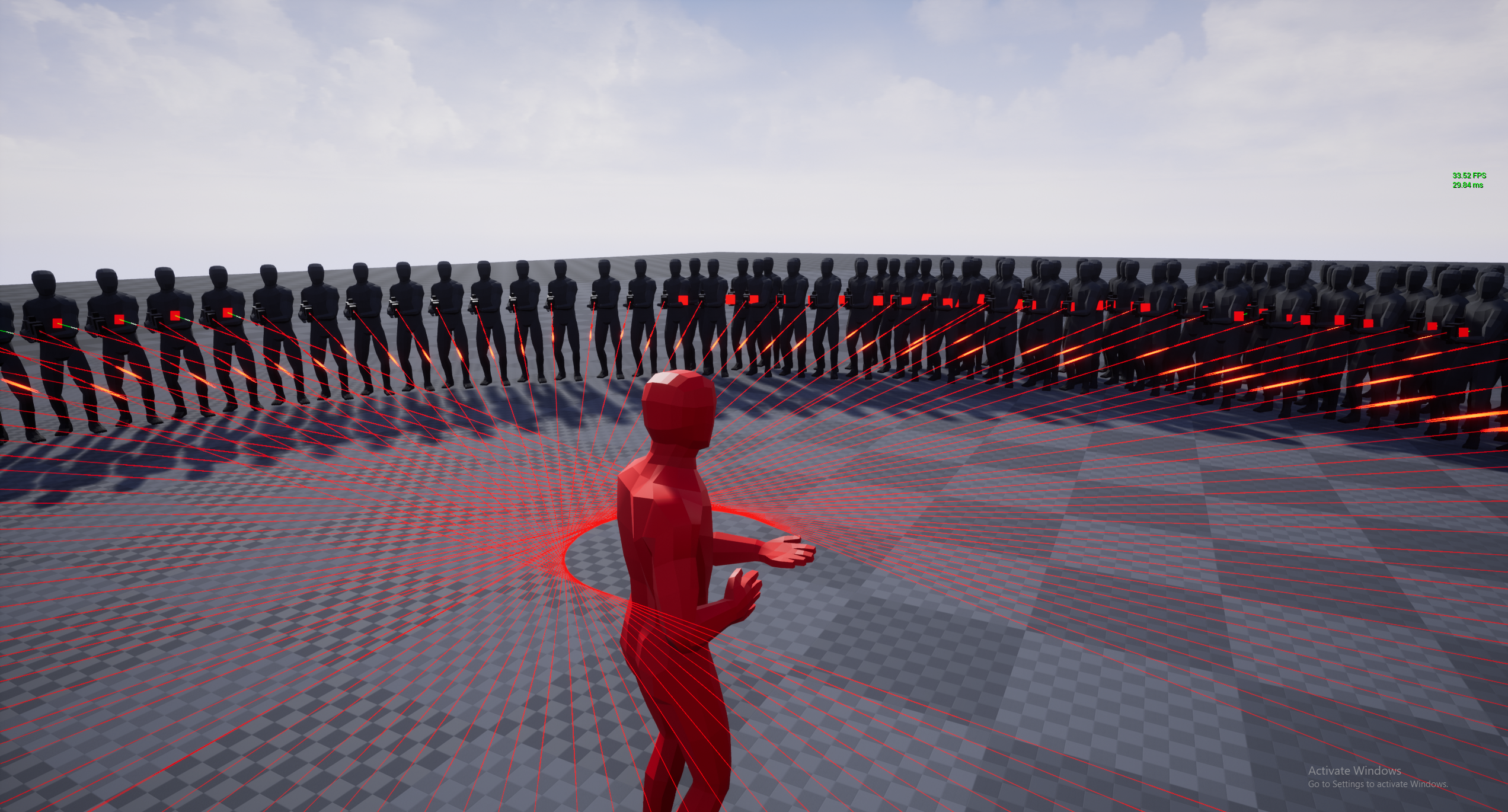
Where the gun is being held at the hip and therefore can never reach the target when they're at a certain distance. So I spent last night and tonight trying towork with those nodes I linked earlier to get the desired effect
normal burrow
If you author the animations to have a pivot point in mind of where the gun goes, how it points
You can drive it that way
plush yew
and use an aim offset?
normal burrow
Eh yeah probably, I’ve never used it though
But that does sound like what it is for
If you have an animation that goes aim down to aim up, can just slide time around
plush yew
thats what someone on a forum suggested. It might work but It'd be down to how well I can set up the animation system and then animate, and even if I was extremely talented it wouldn't be as accurate as what I'm trying to do now
normal burrow
https://www.youtube.com/watch?v=4MHVT1cBTMc for what it’s worth there is a secret point here the animations rely on
Animations are animated as aim down site then offset with ik to be hip fire
It makes aim down sights accurate, hipfire, what it is
plush yew
oh that's pretty cool
 wintry mural
yo, Im working on an online multiplayer game in ue4.23.1 and i cant seem to find where to change the default port, is there a way in blueprint or a setting I can change somewhere?
 rancid lynx
What node adds an actor tag to an actor at runtime? Is that possible?
gusty hare
hey so earlier p@t helped me get my turret to target my "exploder" through a public variable. Now I want it to target any enemy that walks in range, not just the Exploder. How can I do that? Right now on the turret I can only set "Zombie" to the Exploder, so if anything that isn't an Exploder walks in range, it doesn't turn to shoot at it.
plush yew
is this from a "begin overlap" event?
gusty hare
yessir
plush yew
I haven't used interfaces too much but this seems like an ideal situation for one
Like
I hope that does what I think it does
exotic thicket
Yeah that would be one way to do it :)
plush yew
You could just assign an interface called "targetable by turret" to anything you want to be targettable
or setup a "base enemy" class
then on the overlap event you could just cast to base enemy and if the cast was successtul you could store it as a variable and plug that in to your setup
gusty hare
Okay now how do you I get the location of something with the "targetable by turret" interface
plush yew
maybe something like a select node
ill screenshto
then you can get actor location of the select node
that might make unreal upset
maybe a branch?
that way it'll rotate towards the "other actor" only if it uses the interface
plush yew
np yeah its a pain
I'm staring at something that I think is pretty easy but I can't get a solution so I'm making a forum post
Like, if I knew more about rotators I could've spent these past two hours making progress in other areas
gusty hare
Dude I feel that
I keep getting stumped on what seems like pretty easy things and looking stuff up for them hasn't helped very much
 obtuse nest
Why does my UE initialize to 73% and then close and go back to the epic games launcher?
It was working perfectly and then just decided to start doing this
 floral aspen
Working on better shadows. Got two boxes standing on top of each other at the size of approx 200x400x800 mm. The top box got a 4096 lightmap and the bottom one got a 512. I really dont see much of a difference. I tought that lightmap size had to biggest influence on the shadows. Any help on this topic?
obtuse nest
Why does my UE initialize to 73% and then close and go back to the epic games launcher?
It was working perfectly and then just decided to start doing this
honest vale
check the log file and see what it says
obtuse nest
Where do I find the log file for the engine? its for all files both existing project and new ones
floral aspen
@cloud cobalt yes it is static
@honest vale 4096 may be a waste but I was trying to get better shadows. It is for archviz.
floral aspen
I will try that
honest vale
Light type that can change its color and brightness at runtime but cannot move, rotate or change influence size.
floral aspen
where do I enable area shadows then?
honest vale
In the 4.9, or later, release of Unreal Engine, Stationary Directional Lights have a new shadowing option located in the Lightmass options called Use Area Shadows for Stationary Lights.
I guess it should be there for all kinds of lights, not just directional? 🤔
oh wait
nevermind
I suck at reading apparently
floral aspen
yes
honest vale
oof
cloud cobalt
So this might be a start
honest vale
the tiny islands might bleed quite a bit with lower lightmap resolutions
floral aspen
this object is the one at 4096 that I tested on
cloud cobalt
For the record, static lights work perfectly well for shadowing - their main limitation is that they do not add specular highlights, and of course they don't light moving objects. Stationary lights should be used for the main lights in your scene, and the many smaller lights you have around should be static.
honest vale
yea that's a good rule of thumb
floral aspen
Thanks, that was useful information 🙂
Is that even if I never have anything moving in my scene?
It is afterall archviz, not a game.
cloud cobalt
You still want specular highlights, so you should use stationary lights. You're just limited to four overlapping such lights
Rest should be static
As to your issue, can you show us the "lighting only" view and the "lightmap density" view ?
floral aspen
The problem with that is that I got shops with maybe 300 spots in the ceiling, there will be alot of overlapping.
cloud cobalt
Most of these will have to be static. You can pick a few well-spaced ones to use as stationary
It might work out okay since it's a bit of a floodlit scenario
honest vale
yea that means there are too many overlaps
which in turn makes some of the lights fully dynamic iirc
floral aspen
guess if I turn down some attenuation it will help
@cloud cobalt @honest vale Thanks for helping out. Now Im gonna run a build. Hope it improves the shadows. Gonna let you know how it went.
gusty hare
Hey sorry to bother again but I'm having an issue with my turret when multiple actors overlap it. It seems like when one actors leaves, it sets it to "Is Overlapped" to false but if another actor enters at the same time the game stops and I get an error and I'm not sure how to resolve it
exotic thicket
You can use get overlapping actors or something like that
this should return all the actors that are currently overlapping, so you can check what the number of overlapping actors is to choose whether or not to turn off the bool
floral aspen
@cloud cobalt @honest vale not much happend to the shadows but it took halv the time to build.
honest vale
I guess that works too 😄
are the shadows cast by a static or a stationary light now?
cloud cobalt
What does "lightmap density" view look like ?
gusty hare
@exotic thicket hey I'm not really familiar with how to use the Overlapping Actors node, could you tell me how to use it or where I'd plug it in?
floral aspen
@honest vale half the lights in the ceiling is cast by stationary, the rest is static
exotic thicket
@gusty hare you can put it in your "end overlap" graph, it will give you an array of all the actors that are overlapping. You could compare the length of the array to see if there are any actors still overlapping or not
cloud cobalt
Well Jakob it doesn't look like the receiving mesh is the problem
floral aspen
@cloud cobalt Should my objects also be dynamic when I change the light to dynamic?
tame delta
@cloud cobalt Huh never realized static lights would have no specular
cloud cobalt
They can stay static
tame delta
Is there any work done to try and add them in?
cloud cobalt
Work ? On lighting ? In UE4 ? 😬
tame delta
😦
You could probably write the light direction with spherical harmonics in a texture 🤔
floral aspen
ah yes I meant statiionary not dynamic ofc :)@cloud cobalt
cloud cobalt
Dynamic and stationary lights light everything, static lights only static
honest vale
static lights bake specularity into a texture like what happened in UE 3 iirc
or does it?
anyway, stationary are way better quality wise
gusty hare
@exotic thicket Is this how it should be?
floral aspen
is cast deep shadow any improvement? I am open for suggestion to improve shadows.
exotic thicket
@gusty hare looks good to me :)
gusty hare
Detecting an infinite loop now D:
tame delta
Can I put emotes in a function name this is a legitimate question
honest vale
try it
tame delta
I will as soon as my editor unfreeze and report back
Not really, this is a massive oversight https://i.imgur.com/QDYtlCw.png

 exotic thicket
I've debated on occasion using ? on stuff that gives a boolean
in some languages that's actually a common pattern, but eh it feels a bit weird with BP nodes at least
tame delta
I reckon it'd be weird in most languages 🤔 What's wrong with "is" prefix?
exotic thicket
nothing I guess
tame delta
(or past participle)
exotic thicket
in Elixir for example you have String.contains?
(but you also have Kernel.is_list with no ?)
tame delta
I want emotes for my scripted actions, easier to parse at a glance because I don't have access to icons (I don't think?) https://i.imgur.com/it3HGOs.png
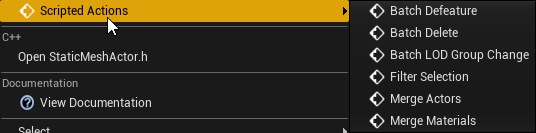
Interesting syntax, never seen that (or heard of Elixir)
 ashen kayak
Hello Everyone,
I have a question regarding custom shaders. Basically I want to be able to load mesh data from a file and load (custom) meshes. So I need a way to load index buffers and vertex buffers which constitute the mesh. As I am new and still learning the ways of doing UE4. Questions are :
-
Shader - VertexFactory and writing custom code
-- There are GlobalShader and MaterialShaders - I guess material shader allows you to have multiple instance and bound GPU resources.
-
Rendering - I will be using the Deferred shading pipeline. And then I cam across Shader Pipeline - Do I need to change or alter the pipeline stages to get custom shader working ?
-
Mesh Drawing Pipeline UE4 - Then I came across this in the docs - https://docs.unrealengine.com/en-US/Programming/Rendering/MeshDrawingPipeline/index.html
-- Any particular details or tutorial is this regard would be helpful.
Product documentation including reference and guides for Unreal Engine 4
fervent sigil
Anyone knows where is UE4 roadmap for 2020 / 4.25 ?
ashen kayak
@fervent sigil I guess here - https://trello.com/b/TTAVI7Ny/ue4-roadmap
Organize anything, together. Trello is a collaboration tool that organizes your projects into boards. In one glance, know what's being worked on, who's working on what, and where something is in a process.
fervent sigil
I looked at that, but notice the release targets; only 2019 and 4.25
some of the cards are also old (before 4.24), so I'm not really sure they are planned for 4.25 either
gusty hare
How can I get the location of the closest actor? Right now it keeps trying to rotate to the actor that last overlapped it. I've been trying to look it up on google but I'm still lost
exotic thicket
You would need to loop the overlapping actors and check their distance
gusty hare
I have this setup but I'm not sure how to plug it into my code
exotic thicket
That's the basic idea yeah, but you would loop over the overlapping actors, and save the actor with the shortest distance to a variable, which you would then use as the target
 naive mural
abstract relic
naive mural
abstract relic
That’d be a fast way to kill it
exotic thicket
It's probably also quite difficult to optimize for maximal CPU usage on modern systems especially when there are other things (like Windows) that mess with the program scheduling
honest vale
on my end it pretty much uses 100% of CPU when compiling shaders
everything screeches to a halt during compilation
 scenic hatch
does any1 have any idea about cloth in ue4?
ive made a flag and tried to get the cloth bit to work 500 times now and still nothing 😭
lapis vine
yeah, there is a need to control how much ue occupies the cpu. Want to do other thing meanwhile.
abstract relic
It’d be remarkably slower at 100% than 99%. With all the task pileup.
 whole quarry
You can always give the UE4Engine process a different priority or disallow it to use specified CPU's
gusty hare
@exotic thicket Sorry to bother again but I'm pretty new to this. I've been trying to understand your answer to my last question for over an hour now and I really don't understand. Could you explain it a little more in detail?
exotic thicket
@gusty hare what do you have now?
gusty hare
Bro I'm just googling stuff and hoping it works lmao I'm really strugging to understand right now
I've pretty much got the sameish
I tried replacing the "get all actors of class" with "get all actors with Tag" after I assigned a "Zombie" tag to the dudes I want my turret to shoot.
whole quarry
what should "GetAllActorsOfXXX" get for you?
gusty hare
It should get me an array of all the actors with that tag and then get the closest actor if I'm not mistaken
abstract relic
Boy I hope the default for that lowest float var isn’t 0
whole quarry
Imho, its better to use GetAllActorsOfClass than GetAllActorsWithTag (last one checks all actors in the world if it has a tag (it has a extra step that you can avoid)
exotic thicket
Right so the first thing
Don't use get actors with tag
Since you want to choose from the ones which are overlapping, use the result from get overlapping actors
whole quarry
Like you make a BP_Enemy, you code here all the basics that all enemies have (i.e. Health), then you make a child of this BP, i.e. BP_Enemy_Zombie
then you can just use GetAllActorsOfClass and set the asset to BP_Enemy, it will find the childs too (if spawned in the world)
exotic thicket
then, create a variable like "closest enemy" or something and set it as actor
and replace the "set lowest float" node with setting that new variable you created
save the array element into it
scenic hatch
no cloth experts here? im so hard stuck 😭
exotic thicket
this way you can save the closest overlapping actor
then you use that closest enemy variable for the get actor location node when you are calculating the rotation
tame delta
What is that grid like pattern on the shadows? Some sort of screenspace AO denoising or something? It only appears in the staticmesh editor, AO and all screenspace effects are disabled otherwise https://i.imgur.com/EWRpHkW.png
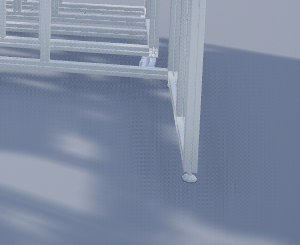


 whole quarry
usually artifacting due to bad lightmap
tame delta
Oh, but it appears on the ground aswell which isn't lightmapped (just a plane the editor slaps down)
tame delta
MSAA only
Definitely no TAA, and I don't think any FXAA either
(although the SM editor might have its own settings 🤷♂️ )
honest vale
Unreal Engine Forums
For discussions about Materials, Textures, Lighting, Particle Systems, and Post Process Effects.
probably that
tame delta
Yeah that looks similar I guess. I use a post processing volume to get rid of it in my scene, so I assume the SM editor disregards it. Was just curious, thanks 🙂
 cursive haven
Hey so I think I destroyed my pretty complex blueprint
I made a mistake In the construction script and now every time when I try to open it, it crashes
I can‘t access it or place it in the level without crashing the whole editor
Is there maybe a way to turn off the construction script firing?
Haven’t found one yet
dim merlin
@cursive haven u could try to restore backups of the blueprint..
thick herald
@scenic hatch have you tried this tutorial? https://youtu.be/kjOq8OB_3AQ

Creating cloth simulations has become very easy in Unreal Engine 4. In this video, I show you how to set up a cloth simulation for a simple flag. Topics covered: Exporting assets from Maya, cloth painting, simple wind.
LINKS:
Assets Download - http://www.mediafire.com/file/w...
scenic hatch
@thick herald i did follow it didnt work
plush yew
Hello, so im trying to make a dance vid on unreal engine 4, what should i learn when it comes to the coding aspect?
scenic hatch
must a setting inside ue4, i got no ideas
plush yew
Im really Noob like so yeah
cloud cobalt
You don't need any programming to do this
It would mostly be animation work in your animation software
plush yew
How would i change camera and scene? It confuses me
Im basically trying to make a movie
cloud cobalt
You would use Sequencer
plush yew
Yes please dude
cloud cobalt
Which is Unreal's cutscene tool
plush yew
Oh ok
cloud cobalt

Unreal Engine 4 tutorial for using the Sequencer to create cutscenes with animations. I also show how to render the cutscene as a video using the sequencer.
I used the Modular Swamp Shack Pack asset from matima-studio.com you can find here on the Unreal Marketplace:
https://...
 robust tree
Hey Everyone!
I made a tutorial where I show how to make an RGB texture in Paint and how to hook it up in UE4!
I hope you will enjoy it :)

Join me on Discord: https://discord.gg/Npd7TAJ
Paint: https://www.getpaint.net/
cloud cobalt
Yes
cloud cobalt
Sequencer is a cutscene tool, you can look it up here : https://docs.unrealengine.com/en-US/Engine/Sequencer/Overview/index.html
Sequencer is Unreal Engine 4's multi-track editor, used for creating and previewing cinematic sequences in real-time.
 clever fossil
i dont know if this is the right place to ask, but how did you guys start learning to use the engine? im in it for about 8 months on and off, and i seem to still know nothing. what do you consider a good resource for a beginner?
plush yew
Bro, i feel you but have no idea
Can i see some pics or something of your creations?
Id like to know because im rookie ty
cloud cobalt
@clever fossil Most people don't know "the engine" - just the parts they use for their particular job. Being a programmer, animator, environment artist, level designer or sound artist are all very different jobs, so you only need to know your part
Most people aren't good at 10 different jobs
clever fossil
there are not much, i'd say there's nothing actually. I did alot of tutorials, by different people, and they all have different ways of doing things, so i can never see "the full picture" i mostly 3dmodel, thats not hard for me, but blueprint communication is super alien to me, even though i understand a blueprint when i see it, i can never come up with stuff on my own..
exotic thicket
I pretty much jumped into building stuff that I wanted to build... but I have a background that probably made it easier for me to get straight to doing things
plush yew
Wait, whats the difference between a programmer and animater?
exotic thicket
Personally I still think the best way to learn things like UE or programming in general is actually trying to use it to make something
cloud cobalt
Animators create animation ? For characters etc ? That's completely unrelated to programming
exotic thicket
You can look at tutorials but if you never make anything, it won't really amount to much
plush yew
Ok @clever fossil
 tawdry storm
@clever fossil Technically blueprints are like programming, so you kinda have to approach them with a programming mindset to actually come up with stuff on your own and with you being a 3D Artist it's understandable that it's not intuitive for you, considering it's a completely new skillset.
as stupid as it sounds, the best way to learn is to just do stuff. Think of something you want to do, break it down into managable segments and try to figure those out until you have the desired result
clever fossil
yea i thought of that too, i'm doing just that now, but its so hard for me, i thought there might be like a course for something like "absolute zero beginner to a generic game with all the features of a real game" with consistent instructions and stuff..
cloud cobalt
Just to be clear, "generic game with all the features of a real game" is not something you can do alone
Not unless it's literally Pong, and still
wary wave
depending on the game such a course would be colossal, heh
exotic thicket
Pong would be a pretty good start though :)
tawdry storm
how to make World of Warcraft in UE4 over the weekend :^)
cloud cobalt
Pong would be a good end
wary wave
old school arcade games are usually good starting points, yeah
cloud cobalt
A complete modern-looking Pong is still a tall order
wary wave
*starting points for people with some programming experience
cloud cobalt
if we're honest
exotic thicket
who said anything about modern looking lol
anyway, I'd imagine there are tutorial series or courses that would show you the ropes of building some basic games, maybe like a simple platformer or something
clever fossil
i mean something simple, run jump collect stuff progress levels, mainmenu, opening cutscene, ending cutscene, pause menu, savegame, loadgame, i think its not THAT much, is it?
tawdry storm
at some point I wanna try to build my own tetris clone, but the more I learn about tetris the harder it sounds, there's so much going on under the hood that isn't immediately obvious
cloud cobalt
@clever fossil It is a lot more than you think, honestly
tawdry storm
well you could do whole coursed for each of those individual elements, so it kinda is
exotic thicket
I would say that doing a simple platformer is not like crazily complicated, or doing cutscenes (if we define cutscenes in the simplest possible way)
But for a total beginner it would take a while to do still
cloud cobalt
there's so much going on under the hood that isn't immediately obvious
This is the case for every game - no graphical game is really simple
exotic thicket
It's not an impossible feat is what I'm trying to say, but it will take some work :)
clever fossil
oh.. nvm then ahaha seeing how people do a fps in 20 minutes on youtube with shooting, and stuff to kill, moving and jumping , not superpolished, but i dont want super polished stuff, i want it to just work :D
tawdry storm
making a game is a toweing task, there's good reason why big titles have hundrets of people working on them, and even if it's a one man indie game, they're working on those for years. Stardew Valley was made by 1 guy over the course of 5 years and in the first 3 of them he pretty much worked on it every single day for 8+ hours
cloud cobalt
run jump collect stuff progress levels, mainmenu, opening cutscene, ending cutscene, pause menu, savegame, loadgame
This is probably just a few months for a beginner who's not doing any art by themself
So it's possible
It will also not look like a commercial game at all
clever fossil
zero art, i want it to work, functionality . everything is a cube and TimesNewRoman font
cloud cobalt
Just a few months then !
plush yew
Damn, imagine Stardew Valley being a failure lol
clever fossil
but i see what you're saying.. i thought in half a year i could have myself a game ahaha
exotic thicket
You probably could have something basic
Depends on how much time you have to spend on it daily I guess
plush yew
Happy wheels
tawdry storm
@plush yew I mean the dev thought it would be done in a year, the reason he kept pushing it for so long was because he announced it early and didn't want to dissapoint so he kept moving the release 🙂 that's no guarantee for success, but it worked out pretty well for him, guy's a millionaire now
cloud cobalt
Basically what I'm saying is, people dive into this thinking they'll do GTA or Fortnite, but more realistic goals after years of experience would be something like Besiege or Untitled Goose Game, assuming you have a small team.
Also realistic is the assumption that you will only lose money doing it
plush yew
Thats pretty sweet
tawdry storm
Blood, sweat and pixels, is a great book that talks about the development hurdles of some famous games. might wanna give it a read, or a listen if you're into audio books like myself 😄
it's really eyeopening at times
wary wave
he may have kept moving back, but he also basically sold off a fair chunk of his game to a publisher in order to keep himself funded
which is something most developers will need to accept
if it isn't a publisher, it'll be an investor
either way they want their cut, and they'll want as much as they know you can afford to give
tawdry storm
yeah the first few years his girlfriend supported both of them because he only worked on his game so she was the only one making money
cloud cobalt
Keep in mind Stardew Valley won't happen again either
Like Minecraft, it's a product of its time
tawdry storm
what I loved to hear was how down to earth he stayed. they still live in a small apartment and drive their old car around. the only thing that changed form them is that they don't have to worry about the money when they want to buy something
whole quarry
Isnt minecraft the most sold game of all (known) time though?
wary wave
well, he didn't earn that much money in the grand scheme of things
cloud cobalt
it is, Remco, and it won't happen again
tawdry storm
I bet there'll always be a game every now and then that was a passion project by one guy though
cloud cobalt
Not anytime soon
clever fossil
i learn everything on my own all the time, and so far its great, like im sure i can do SOME music, models, animations and art, but what escapes me is blueprint stuff.. its just always strange errors that noone had ever had, cuz everyone is smarter than me :D
Do you think that "Learning to program in general (which i can do to some extent)" will help that problem? or should i find something that is programming specifically for Unreal engine?
exotic thicket
I'm not sure if it's fair to say "It won't happen again"... but you definitely should not go into making a game thinking it will happen :)
tawdry storm
you say that like you know every small indie dev guy that's sitting in their apartment right now coding away the next big thing 😄
whole quarry
@clever fossil if you mean with smarter "more knowledgable", then yes
clever fossil
yes?
exotic thicket
I pretty much do all my "game" projects because I have some idea like "I wonder if I could do <some technical feature>" and then there's actually no actual game behind that and then that's it for that project lol
whole quarry
Weird errors exist due to lack of knowledge, not because of being smarter or dumb :P
exotic thicket
so you can certainly approach it from a learning perspective too I guess
tawdry storm
I just knew some very basic C# in terms of programming knowledge, and I feel it helped greatly with the mindset needed for blueprints
exotic thicket
Understanding program flow and such would definitely help with BP's I think
although it is an abstraction of sorts, it doesn't really hide how a program works in a sense
tawdry storm
basically what zomg said, just pick a topic. I for example want to build a little VR tech demo that has that handmirror thingy from the Timespy benchmark.
clever fossil
but where do i go if there's no youtube tutorial for the thing im stuck on, and documentation is... documentation? here? i kinda feel bad asking stupid stuff :D
whole quarry
You go to finding better keywords for your search :d
tawdry storm
like I said, break down the problem. you don't google "how do I make a full on jump and run" you might want to search for just jumping and running and then when you have both elements you put them together
whole quarry
Having an issue on something ue4 related and not finding it on the web is afaik nearly impossible
exotic thicket
Sometimes the answers don't really exist and you have to be able to apply some other thing into your specific problem which is probably hard for a beginner
wary wave
"Having an issue on something ue4 related and not finding it on the web is afaik nearly impossible"
...about that :p
tawdry storm
and if you're stuck on something, just ask here, there's really no stupid questions, the only stupid thing is to not ask if you need help
exotic thicket
Yeah I'm not even doing anything insanely complicated (I think) and I've had lots of things that I haven't found anything useful on google :p
There's probably checkboxes in the editor that aren't explained anywhere even if you google..
 kindred viper
I prefer to end up in the depths of something with no docs, just so I can beat it. It's like the best game ever. Challenge yourself to code diving the source and see where you end up
whole quarry
I can even find out how to do networking with encryption for Blueprint :E
tawdry storm
yeah I've never figured out what this button does. I haven't had to use it yet.
kindred viper
im also not a fan of it when I have no time tho
sullen wraith
when you have a "naked" character, whats the best way to manage clothing on them?
wanting to be able to change clothing
whole quarry
Arent clothing their own character mesh parts?
kindred viper
@whole quarry there is an encryption in the serialization part of the engine you can probably use. I swear I read about it on my travels
tawdry storm
switch the part of the body with one that has clothing on them, maybe?
so you don't have a naked torso with a shirt over it, you just switch the torso with one that has a shirt on
exotic thicket
whole quarry
@kindred viper i need XOR, RSA and Blowfish, its a bit different :P
tawdry storm
if that makes sense
exotic thicket
Sorry had to do it
tawdry storm
sound like my kind of project ( ͡° ͜ʖ ͡°)
 vale silo
do you think we'll see 4.24.2 any time soon ?
whole quarry
Yes
tawdry storm
yeah but normal soon, blizzard soon or valve soon?
whole quarry
The kind of "soon" a dad says just to make his kid stop asking for it 😁
I would guess febraury/march
~3 months update cycle?
kindred viper
@whole quarry that doesn't seem like something you would find info on with regards to blueprint. Definitely added in the backend. Don't forget you don't have to use the replication from UE at all. You can create your own socket servers and simulate that if you liked. Or use it as a middle man between the UE networking and server. It depends what you are encrypting though, the calls, signatures, etc, or actual uobject/uproperty etc. Either way, should be possible at least.
plush yew
PLEASE for the love of GOD Epic, add back in the feature to automatically check out maps when you save them
I just lost 5 hours of work because this feature no longer exists in ue4.24
kindred viper
the editor does know when you need to checkout so its upto you really
whole quarry
@kindred viper im doing the crazy thing, making a MMO (more for fun than anything serious). I started with searching for libraries and ended up finding an post by @polar hawk about CryptoPP being in the engine source. Next step was to expose it in Blueprint. For Socketing I just use the NetShield plugin from @vale halo
plush yew
I had to load up another map and when I clicked save it didnt save
Because of how maps save now on source control
whole quarry
Google is the best friend :P
plush yew
They dont save unless if you "triple save"
Which is incredibly stupid
Its anti-user friendly
kindred viper
I dunno. Mine dont need that. I make any edit, the editor pops up a message in the bottom right corner. So I checkout, then save, and its all good. Not submit at that point obv.
plush yew
this stuff
If you dont click make writeable it doesnt save
Before it would automatically check out the file
kindred viper
dude thats editing outside of source control
plush yew
What Im saying is in 4.23 and before it automatically made the file writeable
kindred viper
no it didnt
kindred viper
ive used perforce with UE4 for years mate. Unless you specifically told it to it did not
plush yew
Dont say it didnt because I wouldve bitched about it earlier
kindred viper
checkout = p4 knows to check in later. make writable = sets local file permissions so you can edit and checkout/in manually later
wary wave
I don't believe it's ever worked any other way
you have to specify whether you want to checkout or make writeable before it can be saved, which is more a perforce thing than a UE4 one
plush yew
then you get this crap
Okay I never had to specify before
Whenever I saved a file, it would always automatically check out
exotic thicket
is Perforce one of those that allows only one user to check out a file at a time?
wary wave
@exotic thicket - depends on how you've set it up
but best practice is to have exclusive checkout for binary files
exotic thicket
ah I see... I remember having fun times with Visual SourceSafe, coworker checks out a ton of stuff and then goes on holiday...
rotund scroll
also a really good idea to setup md5 checksums
since p4 doesn't checksum its own files
wary wave
text files wouldn't be exclusive, so less of an issue, hehe
if Epic would make the blueprint tools standalone, we could finally make blueprints non-exclusive too
plush yew
Okay but I swear to god
Beforehand it always automatically checked out files
I swear it did that
wary wave
if it was, it wasn't working
plush yew
No it did work though
And now since the engine upgrade all my team members have been bugging me about it
And now I see why
wary wave
by design it should ask - so if it isn't asking it's not working
it is nothing to do with your engine version
rotund scroll
yeah it's to do with perforce if anything?
wary wave
aye
rotund scroll
anyway I have had bad experiences with perforce in the past so I don't use it anymore for personal projects
wary wave
how so? P4 is usually pretty reliable compared to other options
rotund scroll
(see also: checksums)
plush yew
Ill deal with it
I just know now to click "make writeable"
But I just lost all this lighting progress
 worn cape
Hello !
I have to know something ... I managed to work through some tutorial quite well, and everything is working quite fine. I am flying around Jets and they have their PhysicsBody Component flying around, but that tut does move me around my physics component all the time.
If i review, and i am really not surprised about it, my actor stands still, so i loose quite a bit of good functionality, if i am going over more of this ...
But ! How would i now move the complete actor as like this physics body ???
It seems so clear and easy, but i am missing ... at least one logic, i think...
plush yew
And now I have to restart from blockout
kindred viper
plush yew
Where is that setting?
kindred viper
editor settings -> loading and saving -> source control
plush yew
Thank you
rotund scroll
@wary wave perforce managed to corrupt files across some networked connections, and since it did not checksum them the files ended up corrupted on the depot
wary wave
you should probably be using the default settings tbh
plush yew
Saves me a lot of time
wary wave
@rotund scroll - can't say I've ever seen that happen
kindred viper
I can see how that could happen with a bad network connection
rotund scroll
well since perforce doesn't checksum it can theoretically happen at any time
wary wave
but I'm not sure we've ever used it without using a checksum
even so, you can always revert
rotund scroll
that's why I'm all for md5 checksums
well if it becomes an issue where it happens consistently regardless of connectivity, then it's not solved by a revert
kindred viper
doesn't make sense to not use them. But then I've never thought about it. Bet its one of those things that will bite me in the ass
rotund scroll
take the advice vicariously @kindred viper , it's free 😉
solid sierra
Hullo, still trying to figure multiplayer stuff out.
I can't seem to get an actor to replicate properly. When the game starts and for a few seconds while a player is pushing it around, its location and rotation is replicated just fine, but after a while it just isn't, and both players see the actor in different locations. I'm using a hover blueprint that I followed a tutorial for in single player, if that matters.
kindred viper
honestly I try not to play with it if I can help it. But I was going to upgrade it as im on an old server version now. should probably upgrade stuff like that
plush yew
shit... i deleted UE4 after a rage but idk how to get it back
solid sierra
...
plush yew
i thought there were no stupid questions
so where is the download?
i literally have Epic Games running and yes im a bot
whole quarry
from the launcher
plush yew
yo i dont see it tho
whole quarry
np
tame delta
Oof there's a pretty massive bug in the engine regarding actors rotations
Even a translation completely screws up the rotate
tawdry storm
that sounds unlikely
tame delta
ikr
And this isn't even the worst offender. When rotating on an axis the actor will start to slowly drift on another (and not that slowly either, I was tuning one axis and another one gained 15°) https://puu.sh/F0uir/780e3d454e.mp4
Why would the pivot affect translation?
Well I agree, but shouldn't the translation not be affected by the pivot position?
Putting the pivot/gizmo at the center of the object makes no difference in this case
What do you mean by snap?
"Center on selection" just resets it to the origin (parent's position)
tawdry storm
yeah looks like a pivot issue, is the pivot of a parent rotated or maybe the one of the object itself? if you move it in world space it tries to account for that and rotates it accordingly
tame delta
Makes sense, but the parent is center at 0,0,0 world, and only has a 90.0° rotation on the X axis
@verbal oar Everytime I click that option the rotation changes
The object doesn't move visibly since it's gimbal locked, but still, that's just very odd behaviour
wary wave
the rotation is probably not actually changing
it's just the transform is going through a conversion in the background
tame delta
@wary wave That's what I'd think, just the calculation of the euler representation
tawdry storm
easiest way to find out would be to move it and set it to the previous rotation to see it it's actually changing
tame delta
Except when I rotate it it starts drifting on other angles, making me believe that's not just a reprensentation, but it's actually used iteratively...
wary wave
the rotation is probably still equivalent - but it is kinda annoying
tame delta
@verbal oar No no, just a dumb old static piece of SMA
It's all just CAD models, so I don't choose the pivot either
I use blender, not on those models though
I got millions of them 🤷♂️
tawdry storm
it's weird to see transforms on them at all. usually whenever we had CAD data all the pivots were at 0,0,0 with no transforms
 oak sequoia
hey is there a technical issue channel I can ask a question in?
wary wave
just pick the most relevant channel to your problem
oak sequoia
I guess that would be here, im importing an fbx model from a pack i got online, its low poly from quanternion, however when i try to import it my unreal engine crashes
wary wave
install debug symbols if you don't have them already installed, then post the crash report
best bet though would be to just re-export it from another application
oak sequoia
okay ill try that thanks!
tawdry storm
might want to open it in a 3D Modeling tool and check if there are duplicate names in there. That's usually what caused crashed on import for me
oak sequoia
this is the error i get when it crashes : LoginId:3c7345c24fbd80a81dfb84a721682db8
EpicAccountId:3da3cffb0a144be4ab6767d273afb075
Assertion failed: Resource [File:D:/Build/++UE4/Sync/Engine/Source/Runtime/Windows/D3D11RHI/Private/D3D11UniformBuffer.cpp] [Line: 265] Invalid resource entry creating uniform buffer, FLocalVertexFactoryUniformShaderParameters.Resources[0], ResourceType 0x6.
UE4Editor_Core
UE4Editor_Core
UE4Editor_D3D11RHI
UE4Editor_D3D11RHI
UE4Editor_Engine
UE4Editor_Engine
UE4Editor_Engine
UE4Editor_Engine
UE4Editor_Core
UE4Editor_Core
UE4Editor_RenderCore
UE4Editor_RenderCore
UE4Editor_Core
UE4Editor_Core
kernel32
ntdll
okay ill open it in blender and then check thanks 🙂