#ue4-general
1 messages · Page 601 of 1
 manic pawn
 normal burrow
cast the hit component to instanced static yada yada
 abstract relic
not even for something as simple as this?
normal burrow
I think the instanced static mesh component thing treats multiple meshes as a single actor
 gleaming lotus
Yeah, I dont think you're getting it High Tide
normal burrow
We wouldn't know you were even using a hit result grandma otherwise lol
gleaming lotus
And Zeblote, hit item doesnt give the instance index, or anything that can be used to get one
normal burrow
I think the hit result has the index in it
manic pawn
(it does, though)
gleaming lotus
What am I missing?
manic pawn
(assuming your hit result actually hit the instanced mesh)
gleaming lotus
Yeah its a line trace that is searching for instanced meshes
its just a regular ol' line trace
normal burrow
you were asking for an index no?
abstract relic
Hit item then
 chrome moss
How can I use nativized assets in-engine?
gleaming lotus
Okay, it is that. 'Hit Item' will return the index of the instance. Thats bloody useful but at the same time so misleading 😛 Thanks for the help @manic pawn @abstract relic @normal burrow
abstract relic
Indeed, the docs have their faults. Good luck, don't blow up the computer (unless you rigged some confetti to it) 👍
gleaming lotus
Oh earlier today my friend convinced me to load up a few hundred thousand instances with multiple materials to a button press
abstract relic
slap them
gleaming lotus
His reaction was 'I'm surprised your PC hasnt blown up' lol
kept that 100 fps.. I think I've done instancing correct so far!
normal burrow
instancing is cool, but its also automatic for static things i think?
but its good for your use case of randomness definitely.
gleaming lotus
I dont think its automatic
I don't understand it exactly, I just read up a little bit on it and heard its really good if you want a simple brick builder game
normal burrow

reddit
Posted in r/gamedev by u/vblanco • 572 points and 108 comments
gleaming lotus
Got the inspiration from a game I used to play called Blockland.
manic pawn
auto instancing of static meshes is better and worse
normal burrow
blockland you say?
gleaming lotus
Yeah, I believe Zeblote here used to play also
normal burrow
better and worse?
manic pawn
instanced meshes are the wrong approach for blockland bricks
gleaming lotus
Whys that?
manic pawn
better in that you don't have to mess with instanced static meshes (integration with the level editor is  ), you get lods and culling automatically
worse in that the auto instancing is more expensive than normal instancing
gleaming lotus
I see
I'm using a brick manager class to handle the instancing. The brick is converted in an ID using its type/mat and then compared to figure out if it should be a new HISM or an instance.
Essentially unlimited bricks but limited shapes/materials.
But thats not so much an issue for what I'm trying to do for my game, its a lot less sandboxy than Blockland - more gameplay focused in design.
 cunning raft
hey guys I'm trying to control 2 characters with only one controller but i cant seem to find anything useful so anything i can read to do that?
normal burrow
@chrome moss could you describe what you mean by nativized assets
gleaming lotus
Never heard of anyone doing that before - afaik the standard controller class can only have one pawn. You could use C++ to create your own controller class or maybe just have a 'secondary' pawn referenced and then put all the movement functionality to mirror to the second pawn? @cunning raft
cunning raft
i tried using a bp interface that migrates inputs from one controller to another character
but it wont work with action inputs
manic pawn
for controlling multiple characters, you will have to make everything from scratch
cunning raft
oh :c thats sad im terrible at coding hahaha
manic pawn
might have some success with an ai controller for the second character that repeats your inputs
abstract relic
wouldn't you just need to link the playercontroller to multiple pawns?
manic pawn
you can't possess more than one pawn at a time
cunning raft
maybe making a single pawn with two components ?
abstract relic
I remember doing mirrored input with pawns but that's as much as I can recall
normal burrow
Perhaps if you don't swallow the input on one pawn, and just don't posess the other, but have it read input regardless?
Force input from player 1 or whatever idk. More or less you'd be bypassing controller to do it
manic pawn
default player movement only works with character and controller working together
 thin tendon
What's the best way to make my clouds not so bright at night time?
normal burrow
right, forgot about rotation
cunning raft
i think the best shot i have at this is trying what zeblot was saying with an AI repeating inputs
normal burrow
bright clouds waffle?
 blissful trail
is there a way to detect if your mouse is hovering over a widget ?
normal burrow
as in, you are the widget and you want to know when you've been hovered on?
blissful trail
so i just need to detect if the mouse cursor is hovering over the widget
i did try a button but right mouse presses it
normal burrow
"Enable Mouse Over Events"?
blissful trail
nvm i fixed it
normal burrow
good
 tight needle
blissful trail
tight needle
blissful trail
can you linetrace from mouse position ?
blissful trail
nvm fixed that as well :/
 fathom glade
@hoary locust Thanks! Would there be a place I can see the actual number for 'size'? The cullDistance Volume just says 'size' is there a way to grab that from an actor?
blissful trail
ok so is there a way to allow the player to move when the game is paused ?
like look around use line traces but physics objects pause or somethin
 scarlet birch
You can sleep the physics objects
blissful trail
is there a way to sleep every physics object ?
cos i need to pause the game when you click the pause button but still be able to move around
like basically pause time
scarlet birch
I'm not sure if you can pause all physics with a built in method. I'm sure you could have your physics actors listen for an event and have that trigger them pausing their own physics.
You might look at time dilation though.
blissful trail
will it slow player movement tho ?
normal burrow
Slomo 0.01
in console?
scarlet birch
I haven't used it, but my understanding is it effects delta time. You still get the same number of ticks but delta is scaled, so if you use something other than delta (like a timer with a timer interval float) it shouldn't
But, I have no idea.
normal burrow
Allar might know a better console command to stop time.
blissful trail
yep it does
normal burrow
But slomo 0.01 should be near paused lol
blissful trail
it slows down player movement
normal burrow
True
scarlet birch
If it's due to delta time, and your movement is based on delta time then ...., so you'd have to untie it from delta
normal burrow
Or divide by dilation in bp yes
scarlet birch
That's a good idea, yeah. Just use the dilation and scale the delta back.
scarlet birch
It's just a personal preference that I first think to make a timer and use an interval. Habit.
normal burrow
Yea not all too different
 alpine zephyr
any idea why ? i've both vs 2019 and 2017 installed
i get this error whenevr i create a cpp project
 cloud cobalt
Have you tried opening them in the VS installer to confirm ?
alpine zephyr
what do u mean?
cloud cobalt
What happens if you open the VS installer ?
I mean the error message tells you this
alpine zephyr
it opens
cloud cobalt
Hit retry, wait for it and you'll be fine
cloud cobalt
Uninstall 2017
alpine zephyr
what if i want to keep both ?
cloud cobalt
Then you need to make UE4 opti in to 2019
There's a compiler setting in the project settings
And IIRC you also need to change the default for the editor somewhere
alpine zephyr
thanks @cloud cobalt
 severe ibex
Hey all, I'm looking at the hair and fur in UE4.24. Is there a way to export the 3ds max hair and fur groom as amelbic? All I see is Ornatrix when I google.
Hey all, I'm looking at the hair and fur in UE4.24. Is there a way to export the 3ds max hair and fur groom as amelbic? All I see is Ornatrix when I google.
 plush yew
my BT isn't executing after repossessing the AIcontroller after possessing by playercontroller, how comes?
 true plover
anyone know good rendering settings for most photorealistic look?
true plover
ive already done lighting and assets, i was just making sure it wouldnt be a heavy factor 😄
 honest vale

GPUOpen
FEMFX is a multithreaded CPU library for deformable material physics, using the Finite Element Method (FEM). Solid objects are represented as a mesh of tetrahedral ...
 wary wave
neat
 tidal wing
Hey Slackers,
don't really know if Ndisplay questions fit here but i didn't find any other channels suitable for this one. I am trying to setup Ndisplay on a single screen with multiple window instances. I created a config file according to my specs (IP, Resolution etc) and packed my project (ndisplaytemplatescene).
Ndisplay Launcher works as intended (no errors) and the the Listener receives my call to open the intended project file in the way its intended through my config file. Also the logs dont show any errors.
PROBLEM:
When I click run on the ndisplaylauncher a window in the right resolution which is described in the config file opens and then closes immediately afterwards. It doesnt launch my project as intended and there are no errors in the launcher window. If i start the project .exe manually it works perfectly fine.
Additional Info:
I found a thread in the Forum describing the same problem where they intend to open the ports 41000-41003 in the firewall (already did that) and Update your DirectX (already did that as well) there are also no spaces in my config and application paths.
Does anyone of you have any experience on this problem? Would be thankful for any potential hints.
 light thunder
Can anyone recommend a resource for understanding how tangent lines work when doing vectors and splines? I want to be able to understand the concept of what will happen when I change a tangent value to the start or end point of a spline
There are plenty of tangent videos on YouTube for calculus but nothing that applies to splines in unreal
@edgy moat I believe there's a find floor function for the character movement that should get you the location of the floor which you can then use the set your characters location
https://media.tenor.com/images/45c7b3c8cd1745962702ecf3b94c4e52/tenor.gif

 edgy moat
oh, thanks
 eager ice
Does anyone know how to create an overworld map, when i press M i want it to load a world map
edgy moat
for the capsule location would it be the players capsule component?
light thunder
Yes
edgy moat
then how could i use the 'floor result' to get a location for the actor to be instantiated
 dim merlin
Hi, anyone did terrain materials using Quixel ? any advise?
light thunder
If you break the results you should get the location if I remember correctly
honest vale
@dim merlin there isn't anything special to them
they're just textures and materials like any other
so usual techniques apply
edgy moat
@light thunder the break hit results are floor result blocking hit floor result walkable floor floor result line trace floor result floor distance floor result line distance and floor result hit result
light thunder
Try getting the floor distance and then adding that offset to the actors world offset
Essentially that find floor is a specialized line Trace that supposed to also help with AI navigation I think otherwise you essentially just want to do is to line Trace down from the players capsule till whatever it collides with which matches the ground, so you could make a collision channel that's just the actual things you want to be considered as ground and line Trace out until it hits that
There's probably something on YouTube for this
 dusky inlet
related question, since only the top collider can block, how is good hit detection in ue4 usually handled? Overlaps dont give you enough data (hit normal etc.). If you do a trace when an overlap triggers, results might be more accurate but the input data might be inaccurate (trace starting point etc.)
light thunder
What are the accuracy based on the frequency of update?
Sorry wouldn't the accuracy be based on the frequency of updates
dusky inlet
I was thinking of only doing one trace upon overlap to determine actual collision data
as in "was there a hit? If so, do a trace to get more accurate info about the hit, because we really only know about an overlap"
 mossy nymph
@light thunder if you're using navmesh walking, use projectpointtonavigation
it works in similar manner, it just stops when it hits navmesh
 light bone
Is there a way to move an object to the cursor just generally in the editor not at run time
I mean the editor is run time but you know what I mean 🙂
plush yew
Hi ! i have some invisible wall called english ! 😄 so im searching some people who can talk nederlands/dutch are here such people ?
 silver crown
Luos, another Dutch! 😱
 hoary silo
Why won't SSGI work on every level?
 fierce tulip
@plush yew im dutch, though practicing english is good practice :)
plush yew
@fierce tulip o thats so nice! wel im busy for 2.5 years to bad i only did the environment stuff , 6 months im trying to do the struture stuff , all without server specifications, im struggling with a stupid exp system, like level 1 health=100 hp / if u have 70 xp u got level 2 health=150 hp, struggling so hard that even my brain is pounding, i really need help of how i can do this , best in dutch to understand what i want and how i can do it, do you like to help me with right (richtlijnen) and not a video that hasnt the right stuff haha xD ?
fierce tulip
cant help you there, I dont know much code/blueprint, mainly material/particle person.
and exp systems are hard af
plush yew
yeah they are the mechanics of almost every good game
fierce tulip
that would be the gameplay loop itself. exp systems are often secondary or tertiary
plush yew
yup
fierce tulip
cant help you with this, doubt there is much available related to it in dutch
 sudden agate
Leveling up is just a simple check CurrentEXP >= NeededEXP what you do if this condition is met, is up to you
I recommend reading about DataTables in UE @plush yew
Driving gameplay elements using externally stored data.
plush yew
yes this i read lots of times bud its hard to put an ability into it, thats what im strugling with, most of the times i let my system crash ;/
 toxic quest
Hello guys, any idea about how to convert a Blueprint project to a C++ one ?
 lapis vine
Yeah. Start coding it down. Most BP funcs have analogy in c++.
toxic quest
Well I created a C++ class but Unreal failed to compile the game module
I tried to follow this guide : https://allarsblog.com/2015/11/05/converting-bp-project-to-cpp/.
lapis vine
Familiar name. If you stuck on a problem state where are you on this guide and what error you have.
I never use bp projects tho 🤔
toxic quest
Well, actually, to the 10th step. I don't find the build configuration drop down. I'm sorry, this seems really easy
So, it seems like you have to hit the "Build" drop down, and go to Configuration Manager, and then you have your projects build configurations
 slim gazelle
@tidal wing did your log of ndisplay launcher says anything about the error ?
 inland kettle
Hello together,
is there a simple BP way to move an actor from a to b without using a navmesh and a timeline?
- I want to use a A* system without a navmesh
plush yew
does a service run only once?
i have an interval of 0.5 but it only gets executed once
 gentle crypt
Is there a way to transform, rotate and scale without making the gizmo appear?
lapis vine
Yes. BP or C++ for example.
 craggy perch
any quick way to replace dead references inside existing asset? 😛 character bp has a reference to some old anim bp that doesn't seem to be anywhere in the bp itself, but it's still referenced to a thing that doesn't exist any more, and is giving warnings during packaging (want to get rid of those warnings).
dusky inlet
create any asset with the same name as the referenced one in the same place, then force delete that
 soft fiber
Hey guy... I seem to be running into an issue adding UStaticMeshComponent to a Blueprint. When I click on the UStaticMeshComponent is the hierarchy the details panel is empty?
I added a second Blueprint, which is inherited from the same CPP class, and the details panel is working for the new class?
 velvet fern
is there a way to export selected objects to a 3d program?
 grim ore
file -> exported selected?
inland kettle
Hello together,
is there a simple BP way to move an actor from a to b without using a navmesh or a timeline?
- I want to use a A* system without a navmesh
normal burrow
your A* isn't going to do this for you?
inland kettle
iam not doing well with vector math sooo 🙂
grim ore
define simple? A* is part of the engine if you want to dig into the C++ code
but there is nothing stopping you from doing it the old fashioned way. Get point A and B. get a direction to them. move them between a and b. repeat every tick. If you need actual obstacle avoidance tho why not use the included systems.
inland kettle
no obstacles... just from a to b
my problem is, that i dont know how to handle it with vector math
maby with get unit direction, set actor location and a timer?
grim ore
you can cheat if you know where forward is on your moving object. find look at direction will give you a rotation forward from A to B. then just move it forward X amount.
grim ore
There is a Get Unit Direction Vector node as well
inland kettle
wow...! thats it
normal burrow
that would literally just move the thing though, but that sounds like maybe what you want idk
normal burrow
it'll do that
inland kettle
iam trying it with a timer
i mean the same speed with speed 1 or 1000
dont get me wrong i want do have a constant speed thats ok
normal burrow
it gets tricky then. At the moment you decide to move somewhere, find the distance to the point, and divide by how many seconds you want to spend traveling. this is your speed
 gilded lichen
Hello, I need help with some VR testing Im doing (As Im a student, I thought I would try a VR puzzle). So Im using the VR Template but Im finding when you pick two items up, there don't collide with each other. Meaning two rings that werent interlocked are now interlocked. How can I fixes this?
This is the code for picking up the object
grim ore
the set simulate physics unchecked is doing that
gilded lichen
but if I was to check it, then it wouldnt attach?
grim ore
but thats going to end up being an issue when you carry it as well
gilded lichen
???
inland kettle
hm... it should be just a > look at direction add speed and thats ist. - per timer
step by step
 dense magnet
@spice scarab Did you figure out the landscape physical material issue? It seems like a huge bug to not have physical materials working. They always report "None" instead of the actual physical material. There are commits on github attempting to fix previous (editor) problems with it, but it seems entirely broken now for me on 2/3 of my landscapes, but not on one of the ones I have. Even in brand new sample projects I can recreate this without even using painted layer materials. No settings are different on my working vs broken landscape.
normal burrow
the A* thing is telling you the end point or something?
inland kettle
yeah... i know everything
my problem is just the simple movement from a to b
but i want no timeline and no nva mesh
 spice scarab
@dense magnet nope but @urban meadow had the same issue as well and he sent bugreports n' stuff about it. Still waiting for more info.
@dense magnet Epic contacted him (Juan) to send a sample project so at least someone is looking at it now.
dense magnet
@spice scarab thanks, I'll keep an eye out for that. I'm tempted to undo https://github.com/EpicGames/UnrealEngine/commit/47cce1fa087bc5faee0655b2fe29b3086e83d815 in my engine source and see if it fixes it..
inland kettle
@grim ore can you show me how i get it done with the get unit direction vector node
or someone else?
Actor straight from point A to B with pure vector math and a timer
that will save me the day 🙂
grim ore
the timer is going to be an issue as it won't be smooth
inland kettle
thats ok
normal burrow
your talking about pretty complicated stuff too tower.
if the intention is to drive a character
you likely want to be adding input, not translating like this
grim ore
Why would you not use existing tools designed to do what you want?
normal burrow
inclines and stuff tho
inland kettle
for performance reasons
 rocky slate
hi
normal burrow
might be doing yourself a non-favor by assuming limitations
rocky slate
im having a problem with my healthbar showing i wanted to fix it yesterday but i had to sleep
normal burrow
I somewhat doubt the overhead is going to be all path finding
rocky slate
inland kettle
you think 1000 actors moving at the same time with nav mesh on a huge map is doable?
normal burrow
and wouldn't assume some non built in solution to be faster
would recommend trying it
inland kettle
i thougt vector math at tick or timer is faster than the nav thing
normal burrow
1000 characters moving alone, without path finding, your talking about a considerable amount of work going on
fathom glade
@grim ore Thank you for your tutorials! I just finished two of the courses that had your voice through the online learning portal.
normal burrow
should come to the conclusion on what will work and wont by trying i'd suggest
grim ore
If you want a really really really silly way to do it without timeline or navmesh this will do it https://i.imgur.com/PSUVxHD.png
 neat rune
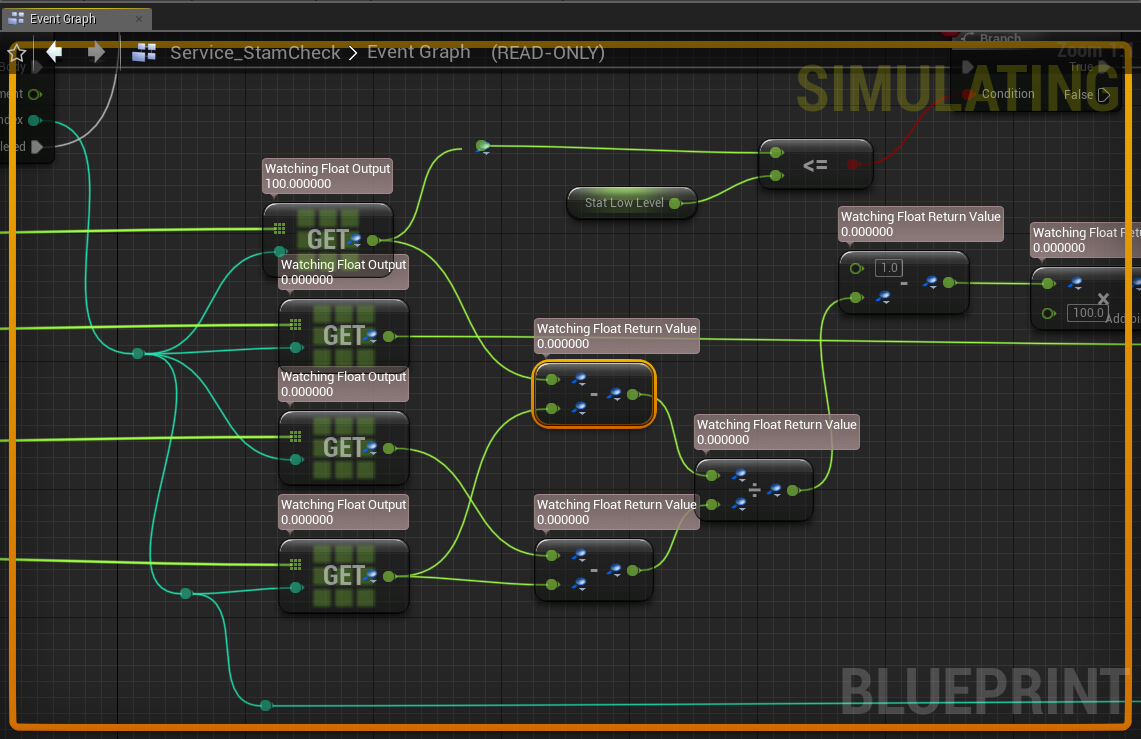 normal burrow
if you get 1000 characters using nav, and its too slow tower. you might find out that its not nav that is the slow part. so just try the easiest thing first
like getting to the place where it does what you want, but doesn't perform how you'd like it to, is still important to identify the bottlenecks
grim ore
@fathom glade awesome to hear, hopefully more in the future 😉
 tender cedar
Hey guys, do you know if it's possible to make a game moddable and use marketplace assets at the same time? I've been reading that it's not (legally) possible to share source files from the marketplace assets, but what if i generate a .pak file (or use the pak file from the game itself) and offer modders tools to just use the pak files to make mods with it?
Or maybe there's a better solution for offering mod support to a UE4 game?
grim ore
Is this on a TEXT or a SLIDER widget?
rocky slate
im having a problem with my healthbar showing. it shows as empty
inland kettle
@normal burrow @grim ore Thank you so much! i will try it. 🙂
inland kettle
i think i have to learn more about vector math too 😉
grim ore
yes and is your binding on a text or a slider widget
normal burrow
if you care about performance Tower, make sure to look into using Unreal Insights, its the profiler. When you get it doing what you want it to do, you can use it to find exactly what is slow and what is not
abstract relic
Add more print strings
 copper elk
I have a problem where my widget randomly disappears and I have no idea why. Any ideas?
grim ore
@rocky slate if you just disappear when people try and help you, you won't get much help in the future lol
grim ore
ok so it's on a slider
the PERCENT property on a slider is from 0 to 1
is your health variable from 0 to 1?
ffs I can't type today
rocky slate
i think i set it to 1 lemme have a quick check
copper elk
I normally just divide the health by a 100 usually
normal burrow
lol tis the season
grim ore
what I am saying is ^^^ if your health is 1 to 100 you need to make it smaller so it fits in the 0 to 1 range a slider is expecting
rocky slate
yep its 1
im doing it from a tuttorial 1 sec ill pull it up

Developer Relations Technical Artist Alan Noon shows you the basics of building a side-scroller, using Paper 2D. You'll cover creating sprites, flipbooks, tilemaps, basic movement/abilities, creating obstacles, and a simple UI using the UMG UI Designer.
Announcement Thread: ...
this one
grim ore
ok doesn't change what we are saying tho.
copper elk
I have a problem where my widget randomly disappears and I have no idea why. Any ideas?
grim ore
if the health on your character is 1 then you will see 100% full bar on the ui
if the health on your character is 0 then you will see 0% empty bar on the ui
grim ore
then you are seeing it full which is correct right?
abstract relic
[current hp] / [max hp] if you want the percentage
rocky slate
copper elk
I have a problem where my widget randomly disappears and I have no idea why. Any ideas? The time between the game starting and the widget disappearing is always random
grim ore
ok at this point you need to see if the event is being called, your binding. You can put a print string in there to see if it prints or use debugging to stop it and check the value
abstract relic
Please stop spamming. If someone knows, they will answer
copper elk
yes but I changed the text
grim ore
you have nothing removing the widget at all @copper elk ? anywhere in the code
normal burrow
added text
rocky slate
over here?
copper elk
@grim ore I do but only when a button is pressed and it disappears even if I dont do anything
abstract relic
Cool. Have a <@&213101288538374145> to remind you why that doesn’t matter.
normal burrow
timefree, when using print to find problems, don't print only on the problem
problem might be the whole thing doesn't get called
grim ore
@copper elk then put in a print string or debug there and see if it gets accidently pushed to eliminate that.
rocky slate
@normal burrow what else should i print this tutorial is pretty basic there are only movements and sprites that i have created so far
soft fiber
How to handle option UStaticMeshComponent for something like a tile where the walls are optional? It seems the static mesh is NOT assignable in BP if the UStaticMeshComponent is NOT part of the constructor?
rocky slate
not really sure tbh
grim ore
@rocky slate put a print string before the return node to see if it is actually calling this binding
abstract relic
Print to see if it’s binded, print the percentage
grim ore
man I really wish stuff would not use bindings, it just leads to problems like this 😦
thankfully the new UMG course on the learning portal doesn't use them 😉
rocky slate
@abstract relic like this?
abstract relic
The casting has been fixed in the recent versions at least
plush yew
I NEED URGENT HELP
normal burrow
tho, print a different string lol
abstract relic
You used to only be able to do it through bp interface
grim ore
if you delete a bound function from the editor it still thinks its bound in the designer view which causes hell as well lol
plush yew
I deleted this last night by accident how do I put it back. all my animations do not work
grim ore
undelete?
source control!
reinstall the third person feature pack
ask a neighbor for a floppy with that file on it
plush yew
.....
grim ore
all are perfectly valid answers
abstract relic
We’re not joking Riki
normal burrow
really, tho floppys are good
plush yew
i have back up auto saves but how do I use them
grim ore
uh I guess if I was in this situation I might make a new third person template, then copy the .uasset from it to this broken project
abstract relic
Always set up source control before starting your project
 regal mulch
If you don't have source control setup, do it now. One day you'll wreck your project and it's gone. Source control saves lifes
abstract relic
Out of lazy curiosity, do you have a source control video Mathew?
plush yew
ahh ok like I have a shiton on this project and i dont wanna loose ity all
copper elk
@grim ore I'm not sure if its fixed, it doesnt seem to happen anymore but I have had this in the past if it takes a long time for the widget to disappear then I would have to wait that long, I have done multiple test and so far nothing has happened.
normal burrow
do you have a video for this problem matheww
plush yew
so i should make a new thirdperson template?
abstract relic
(He probably has a video for this problem)
grim ore
@copper elk an option you can try is to override the destruct function on the widget and add a print string and set a breakpoint on it. Then when it breaks you can open up the blueprint debugger and look at the call stack to see what was happening when this was called
normal burrow
(Probably, yeah)
rocky slate
i got a vid for this problem 😉
plush yew
would it help me put the file back?
normal burrow
twood
plush yew
i don't wanna start again
grim ore
@abstract relic you mean the one that comes up as a suggested video when you type UE4 source control? https://youtu.be/74OfLMutOHE sure don't!
normal burrow
had you had source control in the first place yeah
plush yew
I did not know it was a thing I am just asking how I should fix this error
grim ore
@plush yew if I was in this situation I might make a new third person template, then copy the .uasset from it to this broken project
copper elk
I also have another issue where the edges of a widget dont go to the edges of my screen ingame, is this due to resolution?
rocky slate
ok so on the normal cast it says something different and on cast failed it does not say anything
grim ore
just make sure the broken project is closed before you copy the file
abstract relic
Sweet. Thanks for satisfying my laziness. I will slap that video on here every time this situation comes up.
grim ore
@rocky slate that means it is being called then correctly, the value is bad. Something somewhere might be changing it to 0. Check your other code your health is changing
plush yew
ok so make a new third perosn template project?
normal burrow
when you decide between htf or wtf is it just a matter of grammar matheww?
rocky slate
ok will do @grim ore
grim ore
@copper elk that would be your anchoring probably
 sweet relic
@plush yew You should be able to add the 3rd person template content to your existing project
soft fiber
@grim ore Do you think you could nudge me in the right direction when you get a second?
sweet relic
@plush yew in the content browser: go to "Add New" > "Add feature or content pack"
plush yew
i will update if its been fixed thx all
 sage tree
Not sure if anyone has said it here yet, but Advanced Locomotion System is going free for everyone, forever with the next update.
abstract relic
But seriously. Set up source control riki
plush yew
which one do i copy over and i will after I have fixed this thank you
grim ore
@soft fiber it sounds like you need C++ help?
plush yew
normal burrow
first riki, watch that video
plush yew
which one?
abstract relic

Using Sourcetree and Bitbucket how can we set up free private source control from scratch in a hopefully easy to follow way =) The video will show you from nothing how to get Sourcetree set up, creating a new repository for your files, moving a UE4 project over to the new re...
plush yew
which one @grim ore
grim ore
BTW anyone else notice they added in Plastic SCM as a plugin for the Editor in UE4. it's just a small footnote lol
sweet relic
@plush yew ThirdPersonBP (probably)
rocky slate
this is my healthcurrent bar anything pop out as wrong for this one?
grim ore
it tells you where, its in the Mannequin Animation section. look at the error @plush yew
soft fiber
@grim ore I'll try the other channel... Thanks
 thorn lichen
I feel dumb asking this but how on earth do I move folders like this in content browser?
abstract relic
Click and drag
thorn lichen
I do but nothing happens
grim ore
click the asset panel o nthe left if you dont see it @thorn lichen , its a little stacked set of lines
plush yew
when its fixed i will learn how do do that thing you said
grim ore
it opens the browser
abstract relic
Alternatively open up browser list and drag files into there
thorn lichen
@grim ore ah gotcha thanks
grim ore
@copper elk you can set them anchored or you can set them fixed. They might be fixed which looks fine at that resolution but when it's resized they will not be correct. If you anchor them they will be X/Y distance from an edge always.
abstract relic
Right click > move to is also an option
grim ore
so if you always want it on the side you can anchor it to that side with 0 offset and it will always stick to that side
copper elk
o ok
grim ore
I am super glad to see both of these UMG issues popping up today tho lol.. both are covered in the new UMG course whenever it goes up 🙂
normal burrow
more videos!
plush yew
its fixed it but its but all the animations to default
copper elk
@grim ore it doesnt solve the issue
grim ore
official videos to hopefully get people started in the right direction
plush yew
so i just need to add the custom ones back
grim ore
@copper elk show us the issue and widget layout maybe?
grim ore
so is this widget in another widget?
copper elk
no
grim ore
are we sure it's in the corner then? hard to tell from the dashed lines. What does the details panel show?
I mean if it is the other option is to offset it by -1 but that would be weird if that is needed
grim ore
ah there you go. is this a vertical box? maybe you have something below it
copper elk
overlay
grim ore
check the anchoring or the size options in the panel then
grim ore
why does it have padding
copper elk
I dont want it fullscreen
grim ore
but if your screen sizes it will be wrong, like what if its 4k screen
grim ore
we cant see the entire widget so I cant guess lol
is this a button supposed to be in the bottom left?
copper elk
its in an overlay thats a bar
like this
the entire bar is elevated not just the button
grim ore
that looks like it should be an overlay anchored to the bottom
then a horizontal widget inside of it with buttons or images for each spot
grim ore
ok so is the overlay set to be anchord to the bottom with a fixed Y size?
 next badger
@grim ore you know everything...
why is Property Matrix has more settings than Mesh editor?
grim ore
the parent controls the child, what is the parent for the overlay?
oh it's another overlay ouch
copper elk
yes
is that bad?
I just find it way easier to set up my widget nicely with an overlay as a parent
grim ore
no but it explains why you dont have size options so you can't really force the bar to a certain size
grim ore
yep
grim ore
thats what I was going to ask lol
copper elk
why does it do that?
copper elk
yes
Im sorry for asking so much
but
this isnt an issue as in an error
I just want to do something
so
a few months ago I believe
a mission system came out on the marketplace, and there is a button function in there which I would like to recreate, but I need an image which acts as a progress bar of sorts
plush yew
thank you it is all fixed now 🙂
grim ore
@next badger that is a really good question. I think the details panels just hides alot of that or removes the category headers if they are not adjustable
regal mulch
@grim ore Would be nice to have a version for Perforce.
next badger
But you can set those values
copper elk
are you talking to me?
normal burrow
svn too matheww
copper elk
if you are
I cannot copy this texture nor material into my project
also isnt that copyright?
grim ore
@copper elk look at this https://www.tomlooman.com/circular-progress-bar-for-umg/ but replace the circular circle that is created on the bottom with a texture you created and it should work
copper elk
I didnt create the texture
the problem is that I want to make the texture
unless
it isnt copyright
can I use the texture without any copyright
?
grim ore
well the actual texture might be if you are buying/taking it from someone else but making 2 squares is a few minutes work in paint
copper elk
but how can I make it into whatever it is
as in enable it to...
idk how to explain it
remove pixels?
grim ore
did you look at the link i linked? it has the material for a radial progress bar
copper elk
o ok
but can I use this texture and material without any problems
as in copyright
and legal issues
grim ore
we dont know where you got it from
sweet relic
ya you can use marketplace content for your project (as long as it is made in Unreal Engine)
copper elk
o ok
I have an issue again with the same ui @grim ore so sorry
the black is meant to cover the whole screen but ingame it doesnt
nvm fixed
lapis vine
@sweet relic nope
Can I use these products in other gaming engines, like Source or Unity?
Any Marketplace products that have not been created by Epic Games can be used in other engines. Please note that products purchased from the Marketplace cannot be sold back to the Marketplace after alteration.
Please refer to the Marketplace FAQ for such questions @copper elk
Or to them.
sweet relic
huh TIL
 fierce tulip
you have ants
 dry moon
I read it roughness problems but I checked all the materials, they all within 0-1
normal burrow
bad infestation
hard to tell by the picture but is that diagonal line to the corners of the viewport?
 tender flume
How can I use atlas textures in UE4?
dry moon
Its the direction of the light, not really viewport
only happens when enabling light bloom
normal burrow
so its not like the triangles of a quad on the viewport yea?
 thick herald
atmospheric fog or something mixing with your light?
dry moon
nope just the light shaft, some computational error I'm guessing
but not sure what in the scene would cause it
normal burrow
perhaps its division by zero
dry moon
all the values are in normal ranges, though, from the materials specular, roughness normals to the sky values
normal burrow
hmm wonder if unreal lets you save the output as float32
i'd be curious what those pixel values are
normal burrow
ah indeed, this sounds similar
strange they don't have pictures on these things lol
tender flume
Anything about atlas texture, welp.
dry moon
yea turning them off fixes the issue
tender flume
I'm stuck here
dry moon
What do you mean how do you use atlas textures?
tender flume
I have this one atlas texture, that i want to use on a character that has no textures in UE4 because of errors from importing.
dry moon
You should be UVing them to the places you'd want from a modeling editor, unless you're doing a 2D game with the 2D tools
then I wouldn't know
yea not sure if you are doing a 2D game or 3D, and what the set up you're going for
hard to give you the best answer
tender flume
3D
dry moon
Could you show the atlas and character?
tender flume
Sure
The texture blueprint/texture or character with texture blueprint?


@dry moon
dry moon
yea only way is to go into a modeling program and modify the UVs to fit
grim ore
no for what you want to do no
tender flume
Aw. But it already has a rig in the character.
dry moon
Keeping the rig is fine
dry moon
that's a skeleton, but you need to UV the areas onto the atlas you'd like
lapis vine
Plugged into Normal... 🤔
edgy moat
How could i make a system where the start screen is just 'press any key to continue' and has the environment in the background?
fierce tulip
doesnt matter much, but im using 2017
 dry merlin
I have had nothing but trouble with this Unreal Engine Build for version 24
tender flume
Is there any difference with the FBX selection?
grim ore
@edgy moat is the "environment" in the background the game itself? if not just make a new level and put a widget in front of it with the words. If it's the actual game then the same but also spawn the player and such after
dry merlin
Sketchfab and some other api doesn't build, is not included, I have the build.bat refusing to execute claiming lack of permissions.
NOw UE4 is crashing, so having to rebuild the development editor
grim ore
have your base game mode not spawn in the player then and you can spawn them in when the game starts but this is all guessing as I have no idea what type of game this is. You basically need to design around what you want. @edgy moat
tender flume
Is there any way i can swap skeletons?
dry merlin
Anyone know how to build the repo version error free with this Sketchfab issue?
tender flume
Like just swap, without retargetting
dry merlin
Anyone know why the build.bat claims lack of privilege on windows?
And why on Gods green earth this is still using Visual Studio 2017 and not 2019 at this point?
grim ore
are you supposed to be using build.bat?
grim ore
I have setup and generateprojectfiles
tender flume
What's the difference between create instanced material and material?
grim ore
and I have had no issues here building .24 from the repo with VS 2019
dry merlin
I do the setup, I generate project files then I open in MSVS 2017 and build solution in development. This builds everything but some damn sketchfab API is not present so that creates a lack of headers it's popping up
grim ore
are you downloading the .24 release branch or tag or the master?
grim ore
I would recommend it yes, usually the tag not the branch is better as well if you have a choice
normal burrow
think it goes straight to .25
dry merlin
Alright I'll give that a shot. Also, while it was working, when I create the project then open in C++ in MSVS when I build the program, I get a error with the build.bat in generating the headers claiming lack of permission so can't get the program built.
This has been a consistent problem.
grim ore
lack of permissions is normally a "generic" error due to something else failing upstream
dry merlin
Well damn
grim ore
the file failed to run because something else caused it to fail
missing compiler, bad setup, etc.
if you post the error log people might be able to help but that permission error is a false flag
dry merlin
Interesting, because it's just structs and general UPROPERTY with GENERATED standard and UPROPERTY stuff. Nothing profound. The only class is the basegamemode
I've lost so much time rebuilding this over and over, ticking me off. I guess I'll have to keep trying but I need to have the server target in the program for this
Also, I placed a post for help on the forum. Haven't seen it populate on here. I know nothing about Marvelous Designer or ZBrush, plenty about iClone, Blender and Substance. I need to get away from speed tree since this is a procedural generator for worlds with SRTM compatibility, and the licensing wont allow me to distribute Speed Tree Vegetation on Market Place. I need another alternative if anyone has one, I hate sappling gen in blender, grass cards are good.
plush yew
Don't know where to put my question so admins please redirect. How do I set my thumbnail for my project to be a custom image?
dry merlin
This is starting to suck, I need to put up the Company Website in JavaEE, I may just go ahead and develop a 3D Vegetation Program if I can't find a suitable one, and Unreal is being a pain in the build.
 abstract relic
@plush yew Edit > Project Setting
It'll take you to project description
plush yew
gottcha, thanks
normal burrow
I was curious about that too. knew there was a way
 cursive salmon
How to play an attack animation while walking?
tender flume
Question.
How can I make sure my model saves with my material instance textures?
Without having to reapply it manually?
normal burrow
make sure?
abstract relic
There's a save button in the asset
otherwise, sounds like you have an override hiding somewhere
cursive salmon
Who can answer at my question ?
abstract relic
Layered blend per bone
tender flume
But it doesnt save my instanced materials with textures.
When I import it, it became materials with no textures at all empty.
cursive salmon
explain a little more @abstract relic
abstract relic
A simple node. Basically a lerp
normal burrow
do you know what an animation blueprint is rayland?
dry merlin
So I wanted to make my fantasy undergarments for the Human Female Characters more realistic, I found out about the Girdle. Ever seen a 15th century girdle? I don't know how women survived and the fact they actually helped each other in and out of those things. First, they were considered modest, you look at some of those ladies, you are NOT hiding the woman, dont' care how modest you get. Second, those things were so tight, you even pull a string, heads had to be popping off. I also don't believe NASA has been honest, as tight as the girdles were, boobs were launching into space long before men got there. Those things make the Iron Maiden look like modern day acupuncture. Whatever possessed women to use them, I can't imagine. Truly medieval.
normal burrow
@tender flume what is your method of seeing if it saves with the mesh or not?
abstract relic
oh
fierce tulip
lol
abstract relic
yeah that's not transferable
cursive salmon
I already used this node but I did not know that it was used for that @abstract relic
normal burrow
why export fbx?
tender flume
Or else I can't import it in UE4
 loud knoll
@grim ore What is your take on this new Sky Atomsphere Entity? I am a bit confused why I would use it over what is already in the engine?
tender flume
Why? What should I export it as?
abstract relic
if you're moving from one unreal project to another. Go to Asset action >>> migrate
tender flume
But I just want it to copy the textures and materials then apply it automatically.
Not the entire project
abstract relic
if you're trying to import it to a 3rd party software, you are out of luck
 sleek spear
is landscape tessellation working in 4.24?
normal burrow
into the same project shin?
normal burrow
select it, press ctrl+w in unreal
tender flume
But will it apply those textures automatically by default?
abstract relic
yes
loud knoll
@sleek spear It is but things are different my previous setting are creating things I ifxed already
tender flume
Wait what does Ctrl+W do?
normal burrow
duplicate
abstract relic
no
normal burrow
you don't, can't
sleek spear
@loud knoll i cant get it to work. i enable tessellation in material and nothing happens
normal burrow
we don't understand why your exporting.
abstract relic
Asset action >>> migrate
abstract relic
kill me
normal burrow
lol
loud knoll
oh I thought you were talking about LOD type tess, for materials not sure. Did the material work in another version of the engine? @sleek spear
abstract relic
I give up
tender flume
It's material instance. @loud knoll
sleek spear
@loud knoll yes, every previous version
tender flume
Huh.
normal burrow
materials aren't interchangable between format, fbx does support embeding textures
but not unreal, it does not let you do this
normal burrow
grim ore
@loud knoll It's nice as an all in one drop in and set up solution. Taking existing separate parts and combining it into one accurate item was the goal.
abstract relic
Ban me @fierce tulip
deliver respite please
tender flume
?
fierce tulip
@tender flume this group is not a personal-private-tutorial group, please use google and find tutorials that help you understand the basics :)
tender flume
But google didnt really help me out.
fierce tulip
then try to find a google tutorial :)
loud knoll
@grim ore I am trying to use it for that purpose but keep finding that it is missing features I am using from the other ents and I end up putting them back in.
grim ore
😦
loud knoll
@grim ore I figure I am not understanding it well enough to flip all the switches on
grim ore
maybe they will add them in? can always bug report if it's something that should be there.
it's super complicated for sure, the docs page barely covers the new features. I think it's meant for more accurate simulation for simulation setups like architecture and movies
sleek spear
has anyone else tried landscape material tessellation in 4.24?
tender flume
Can't find any. @fierce tulip
normal burrow
lol shin cmon
sweet relic
@tender flume I think what you are asking isnt supported. the closest thing I can think is using substance-painter to create pbr textures
loud knoll
@grim ore Well I am using Atmospheric Fog, Skylight and Direction Light for a test level, and I am trying to replicate the Atmospheric Fog which I have to remove or get a warning with the new ent as a test, I found one cool thing where I can lower the sphere size and give the planet a more rounded horizon but as far as foging the ground plane into a color isn't happening.
normal burrow
export the textures and mesh. learn how to use these in blender
 thin gate
any idea why when i try to package my project it does this and says complete in like 1 second.
LogUObjectHash: Compacting FUObjectHashTables data took 1.25ms
no files are created
fierce tulip

This will blow your mind!
How to use google for basic ue4-related questions.
Yes, take this with a few grains of salt.
Spongebob is spongebob.
lmgtfy is lmgtfy.com
 bleak sparrow
new to unreal, having an issue where mycharacter seems to be firing from its center and not hitting the sights correctly, trying to find best way to resolve, would i move the cursor sights or the place the projectile spawns?
"crosshair"
normal burrow
@fierce tulip how do i use keyboard though
sweet relic

Unreal Engine 4
grim ore
@loud knoll that is super weird, the atmospheric fog should work with the sky atmosphere
tender flume
Still don't get it. There's nothing about it.
abstract relic
"how to export texture"?
fierce tulip
@tender flume you cannot export the material instance or its textures by exporting the model out of ue4. you will need to do the same one by one for the textures.
then import them into blender, and set up a material inside blender.
"ue4 export texture"
"blender import texture"
"blender create material"
abstract relic
fierce tulip
then you apply the material instance you made.
tender flume
Any alternative other than having to apply it in Blender?
normal burrow
oof.
loud knoll
@grim ore Ok let me try it again
 abstract relic
read harder
tender flume
I'm not really used to Blender's UI.
normal burrow
we all just told you the wrong way to do it yea.
fierce tulip
then go to a blender discord channel and ask them
tender flume
They said to ask UE discord about it
normal burrow
oof.
tender flume
since its imported from UE4
normal burrow
tell them "no you".
abstract relic
this isn't a blender discord. Only thing unreal related is the fact you want to import from it
normal burrow
^
normal burrow
its not exporting anything blender specific
tender flume
If so, i can change it
abstract relic
Do you actually want help?
normal burrow
just assume it does nothing with materials
think of materials as completely different things between the two softwares
tender flume
Yes. I'm quite confused if theres any alternatives that can be done
loud knoll
@grim ore SkyAtmosphere_1 A SkyAtmosphere and a legacy AtmosphericFog components are both active, we recommend to have only one enabled per world.
abstract relic
three people have told you repeatedly what can be done and why
tender flume
I want it to go like: If I export it from UE4, put it to Blender. There's textures on it still so i can reimport it back to UE4.
loud knoll
@grim ore That is the warning you get when you put both in the same level.
tender flume
Anything similar to that?
normal burrow
how do i say no
grim ore
I dont get the warning, is it in the log? @loud knoll
grim ore
@loud knoll ah it comes up when building, I was doing dynamic
tender flume

But now, how can i make it the same for Blender?
So when i export it to UE4, it still looks the same?
bleak sparrow
found it, cheers
abstract relic
<@&213101288538374145> spammer or troll.
tender flume
What spammer or troll?
I'm just trying to ask for help.
I didnt ask you to help if you didnt want to.
I'm just asking. You don't have to assume.
If you have no intention to give me an answer, you don't bash. I'm still new to UE.
next badger
@fierce tulip
edgy moat
İ said on beginplay add widget to viewport 'press any key to continue' and dragged off from that and said play level sequence. i also made an input event for 'AnyKey' for when anykey is pressed. When the cinematic starts once you start the game you get a message on the screen that says 'press any key to continue' but when you do press any key nothing happens, i made it so that once you press a key the cinematic ends and removes all widgets from the screen, but nothing happens. the level sequence keeps on playing
regal mulch
@next badger Offtopic? :P
next badger
@regal mulch it's from Luos's video he posted above
regal mulch
hmmmmm okay.
edgy moat
any help would be great guys
grim ore
@edgy moat is the ANY KEY event being fired? hook a print string up to it
sweet relic
"Where is the Any Key?" /homer
grim ore
where is the ANY KEY event at and what is the input mode set to
regal mulch
Are you changing InputMode when creating the Widget? @edgy moat
edgy moat
No just create widget and add to viewport
regal mulch
Please check if the event is actually firing, as Mathew suggested.
edgy moat
nope, nothing prints to the screen
all the blueprints are inside the level sequence
i created a blueprint for the level sequence and put the blueprints inside of that
i cant do it inside the players blueprints because there is no 'sequence player' node in it, it can only be found in the level sequence's blueprint
regal mulch
So the Input is not in a PlayerController or PlayerCharacter/Pawn?
edgy moat
However when i drag off the AnyKey İnput function inside the players blueprint it works and prints a string, but not if the AnyKey input function is inside the level sequence blueprint
regal mulch
Did you enable Input for your custom actor?
edgy moat
enable input -_- lemme try that out, seems like it will work
regal mulch
Yeah, without that, the actor won't be in the input stack and won't actually receive the event call.
sweet relic
@edgy moat to allow a blueprint to listen to player input: ClassDefaults > Input > Auto Receive Input = Player 0
edgy moat
Ok it prints a string now, but still doesnt end the sequence player
Or remove all widgets
regal mulch
I would not AutoReceiveInput. Do it via the Enable and DisableInput node. More control.
So the event calls now. Can you show what you are doing?
 grave canyon
if i set my pawn to default in the game mode should the game use its camera by default?
regal mulch
Theoretically yes.
edgy moat
Oh wait, still no print string. İ still had the print string in the players bp and after deleting it in the players bp and adding it into the level sequence's bp after having the enable input function it still doesnt print a string
 wary birch
Theorically
grave canyon
ok i'll double check if i'm not messing up the camra
regal mulch
@edgy moat Can you show how you are doing that?
edgy moat
the print string?
grave canyon
?
regal mulch
UE4 handles this stuff as ViewTargets. ViewTargets are Actors.
Your Pawn is the ViewTarget (most likely) and the CameraComponent is only used to offset the location and rotation.
Otherwise, without a CameraComponent, your "view" would sit in the center of the actor.
regal mulch
You need to specify a PlayerController on EnableInput.
That pin isn't for decoration
edgy moat
Ok it works
it removes the widget 'press any key to continue' but is still in the cinematic
 signal bone
Hello, i need some help
edgy moat
İ also set a play looping function after the play level sequence to get the cinematic to loop until the player presses something
regal mulch
I'm not sure about the LevelSequences (never used them).
At least the KeyPress works now
grave canyon
i get it the camera component offsets the view
regal mulch
@signal bone #animation
edgy moat
At Least
regal mulch
@grave canyon Yeah, so even if the CameraComponent wouldn't work, you should at least see the world through the center of your pawn.
loud knoll
@grim ore I got this result after some work but I had to use Environmental Fog along with the new Ent. Took about 20 mins to get rid of the hard line between the two ents.
regal mulch
If even that doesn't work, then something is odd.
regal mulch
So it's not part of the Pawn?
grave canyon
it is
wary birch
Guys, is it possible to do rendering in ue4, like cycles in blender?
edgy moat
Now it removes the widgets but i control the player from the cinematic, it doesnt cut to his camera
wary birch
I mean, high quality rendering
abstract relic
yes in a way Akarys
regal mulch
@grave canyon Well you never mentioned what issue you have. So can't really help :P
abstract relic
There's a built in high quality screenshot or you can use sequencer (this is more ideal)
edgy moat
İ control the player from the cinematic now
grave canyon
i just wanted to know how to tell the engine to use a camera as current if its possible
camera as in cameracomponent
semantics aside
edgy moat
Ok it works now sine i said destroy actor /level sequence) but only cuts to the players camera a few seconds after having any key pressed
grim ore
@grave canyon Set View Target with Blend is how you change the current camera if you need to change it. It should default to the current possessed pawn unless you change it.
@loud knoll yep I have been playing with it trying to figure it out as well but it's like super technical 😦 The docs are nice but missing real information on what does what especially with fog (only mentions using height fog)
grim ore
correct if it is using that as your default pawn it would use one of the cameras inside of it
grim ore
is it using that pawn?
in the world outliner when you hit play does it show the correct blueprint being used
loud knoll
@grim ore Yeah I agree, it is taking more work to get the same results and I am not seeing the benefit right now but I always assume I just don't know enough about it yet and need to dig deeper or I am not understanding the vision of how it is to be used. It could be an unfinished Ent and more is coming that will generate more benefits.
grim ore
you can hit shift-F1 to escape the viewport, then find that pawn in the outliner so you can see if its the correct one
we cant see your world settings, game mode, or the pawn so we can't guess at what is wrong
well we can, that is what I am doing lol
grave canyon
wait a minute, i think i got this
edgy moat
try making it movable
edgy moat
press on the light and it should say STATİC STATİONARY AND MOVABLE press on movable
Right at the top of the details
edgy moat

 dire parcel
you the goat @edgy moat
i been having that problem since yesterday
and now its fixed
less than 5 seconds
dire parcel
yeah for my first 3 days i think i am doing good
i was following a tutorial but then stopped because i wanted to revise things my way and not have a game that everyone has already
so i am pretty happy that for 3 days i am doing good
edgy moat
you could say build at the top, should be 3rd last button
if you have static or stationary lights you would have to bake them into your scene
edgy moat
since june, stuff like this has to go into the off topic section though
edgy moat
İ am still having trouble with ending the cinematic in my scene when any key is pressed, is there anyone experienced with cinematics here that can help me out?
 timid jacinth

This happens when I open my project
And when I press "yes" this happens

Happened when I created a c++ class for the first time
wary birch
You run a built from source engine?
timid jacinth
What do you mean
wary birch
You have just downloaded the engine from the launcher or you have built it from a local copy of the source code?
 frosty bloom
The error means you have an error in the C++ code. It's asking you to boot visual studio and fix it manually.
timid jacinth
I dont know what you mean sorry
Where are the c++ files located
\Source\projectrp?
frosty bloom
You want to open your project solution
timid jacinth
Im new to c++ is it the .h or .cpp file
Wait i think i found the error

Lemme try
nope
same error
grim ore
go into the project directory, open up the .sln file, compile the project, see what errors it shows
timid jacinth
theres no sln file
grim ore
right click the .uproject and generate SLN file
generate project file, solution file, generate something



 grim ore
yep so what does it say for the errors
timid jacinth
Can i delete it somehow
Discovering modules, targets and source code for project...
While compiling C:\Users\Administrator\Documents\Unreal Projects\projectrp\Intermediate\Build\BuildRules\projectrpModuleRules.dll:
c:\Users\Administrator\Documents\Unreal Projects\projectrp\Intermediate\Source\projectrp.Build.cs(3,14) : error CS0101: The namespace '<global namespace>' already contains a definition for 'projectrp'
c:\Users\Administrator\Documents\Unreal Projects\projectrp\Intermediate\Source\projectrp.Target.cs(3,14) : error CS0101: The namespace '<global namespace>' already contains a definition for 'projectrpTarget'
ERROR: UnrealBuildTool Exception: Unable to compile source files.
yep delete the source intermediate and binaries folders
open up the .uproject file in notepad and remove the modules section
timid jacinth
I have no binaries folder is that fine
grim ore
if you have no folders then that is fine since you can't delete them
edgy moat
Yes İ do come to @onyx crystalnge
edgy moat
-__-
dire parcel
i will meet you there
i am trying to make a door way
i changed it to submissive
but still not working
edgy moat
Does anybody here know how to end a level sequence in progress (AKA cinematic) when you press a certain key no matter where it is in the cinematic and cut to the players camera?
grim ore
@dire parcel is there another brush in the way? is the subtractive brush thick enough?
plush yew
Guys I have an issue
I cannot see where I move Geometry
my Geometry doesn't show me where I move it, it only shows me after i move it.
grim ore
that is normal for geometry brushes
plush yew
is there a way to make it move like others?
grim ore
no
they don't update in real time as they calculate what they look like when they are finished moving
plush yew
well idk how im gonna line up my walls
grim ore
the orange border is still there
If you don't see the outline hit "G" on the keyboard to toggle Game View
edgy moat
After İ press anykey i want the cinematic to stop/end and for it to cut to the players camera
but nothing seems to work
grim ore
does the cinematic stop?
I just tested it seemed to work fine as expected. Button presed -> Stop the sequence -> Set view target with blend targetting the player to control and the controller for the player.
assuming the player is already in the level of course. Enabling input as well if needed.
dire parcel
@grim ore the brush thick enough, how can i check that?
 crude tinsel
Hi UE4 Slackers ,
UE4 version 4.24 has implemented an awesome feature for USD(Universal Scene Description). This new format from Pixar offers robust support for Departmental Asset Assignment, Referencing, LOD, and Variant Management and much more!
This is not your GrandPa's FBX!
I am currently working on an USD pipeline workflow. My DCC Hub is Houdini 18 and UE4 will be my realtime app.
I recently discovered that the UE4 USD Plugin is broken for Mac users. I filed a bug report with Epic Games and today I received an email from Epic Games about my bug report. They have confirmed that the USD plugin is not working on the Mac or Linux and they have logged a report on the issue!
If you come across any UE4 users—can you have them go to the link posted below and click the vote button. This will expedite the bug fixing process.
https://issues.unrealengine.com/issue/UE-85966
Thanks!
Happy Holidays!
Dré 2.0
grim ore
@dire parcel it was just an idea, make it larger and see what happens. It looks like you have 2 brushes there it is trying to subtract from. Geometry does addition and subtraction in order so the subtractive brush has to be last or on top to subtract from the additive ones below it
dire parcel
i will play around with it
and see what happens
im still noobish on this
so i will try my best
grim ore
try taking the subtractive brush, cut it (CTRL-X), then paste it (CTRL-V) and it will be the top brush and see if that works
 pliant yoke
I have an issue (new engine bug?) I am tearing my hair out over.
I posted this elsewhere, am still looking for help. the "get surface type" node for retrieving landscape hit results seems broken in 4.24? It simply refuses to return anything other than "default" for layers with physical materials applied to them. this was working before I updated from 4.23 to 4.24. other reports I found here:
https://discordapp.com/channels/187217643009212416/225448446956404738/655869771056676865
Hello, I am using a linetrace to get the surface type for footsteps, all looks exactly like several graphs online, used to work some time ago, but now I always get "default" as a surface type?? Any idea why? sorry, its vague, but I am at a loss and am not finding anything online...
https://discordapp.com/channels/187217643009212416/225448446956404738/653992748554387505
in 4.24 it seems my footstep system breaks because there is no way to break the Phys Mat struct from a hit result to get the surface type. is this a bug or is there a new way to do this?
any ideas? where do I submit this if it's actually a bug?
grim ore
submit it to the bug reporting section https://www.unrealengine.com/en-US/support/report-a-bug
you can also get the landscape material itself from the hit actor and the material inside of it and get that physical material if you have it set up in the material itself... if that makes sense lol
pliant yoke
I will try this, thanks again
dire parcel
@grim ore thank you, i guess making it bigger worked?
grim ore
maybe? Atleast it looks right
dire parcel
thank you
i appreciate it
its a lot of goats on this server
idk what i would do without this server
grim ore
at some point you should look into making those brushes into meshes unless this will not be a permanent project or very detailed
dire parcel
does adding asset packs depends on your internet?
 swift spindle
what do u mean ?
once an asset pack is downloaded by the launcher it's stored locally
if you are getting them as part of a plugin... then you can install them manually whenever you want
pliant yoke
@grim ore sorry to bother again. the 'select' node for "get physical material" doesn't act as an index for the physical materials?
 bitter edge
I dont think so.