#ue4-general
1 messages · Page 593 of 1
 normal burrow
i mean in PIE
which is why i recommended trying more keys lol
your consuming every key?
 thin tendon
hey guys I'm having an issue with world composition. I can't change the size or position of each sub level in the world composition window
Its a bit hard to send a a pic. The issue is that it keeps resetting back to 0,0
And I can't find options to change size
 grim juniper
The size of a level in the world composition window is based on the level's bounds
I believe the level bounds automatically updates when you edit the level, so if you want to make it bigger you just add stuff to the level to make it bigger
thin tendon
@grim juniper Thanks mate I figured it out. The issue was that I needed to move each tile to its own sub level. And the size is controlled by the size of the landscape tile
 hard lintel
Is there a way to move content imported from Library to a different spot than Content folder without using the "move here" options. If I import some large assets into the Content folder and then try to move them to say, my Maps folder, my UE4 engine crashes 100% of the time since the file sizes are too big.
 swift spindle
try doing them in parts.. and consider migrating them to content plugins
this really only happens when your system is underpowered for unreal or you've added to many asset packs
 pulsar badge
If someone would make me a model house how much do you think it will be for that 1 model? or a good price
 plush yew
Depends on the quality. What exactly are you looking for?
Like a realistic model house, full scale, exterior and interior that's modern? Depending on how detailed, anywhere from $30-250
 merry thorn
Back in the day I did this for a student's project. It's not decently optimized and not looking good. I charged $150 us.
plush yew
@pulsar badge you could easily make a basic house with UE within minutes. Even less. So what is it for? Construction? Visualization? A game?
pulsar badge
Game
plush yew
Just check 3d model websites and compare quality and prices?
pulsar badge
o
merry thorn
Well to get a decent model for low price you should buy it from 3D sites like @plush yew said. Doing a decent model can take around 15-30 hours for a professional. So it will be expensive. As they can sell it multiple times 3D sites gave an cheap alternative with decent look. But you lose the uniqueness in your game with that so it's depends on what you looking for.
thin tendon
Is there a limit to the number of sub levels I can have using world composition? I want to split my map up into 120 sub levels
normal burrow
I think your okay slim waffle I’d have to look at the code to verify but I don’t see a limitation listed in the internet
thin tendon
Thanks mate. I wasn't sure because I couldn't find anything either. And I want each sub level to have the smallest amount of data to load possible
 desert vault
Hello is there anyway to add montage to anim bp?
I have two anim bp which were arm and weapon
the weapon anim has an animation that it's mag drop out and in while the arm anim has the arm animations
the demo level using montage in their player bp but it seems like doesn't work on my basecharacter bp
thin tendon
@desert vault Mine is set up like this
desert vault
My weapon maker just make his weapon with 2 anim seperate
he use 1 anim for almost his animation except the weapon mesh reload
for weapon mesh reload he uses montage play function in his demo
I try using his method but it doesn't work so far
 abstract relic
As a quick aside. Use the better Play Montage node 😜
normal burrow
Can you use negative position on it?
I’ve never worked with montages but delaying them would be cool
abstract relic
Can’t say I’ve tried
normal burrow
Hm ya does not look like you can delay.
normal burrow
Tbh I don’t think I’ve used a delay node before. Does it work between frames?
I’ve seen them but haven’t understood how accurate they are
abstract relic
If you want to delay between frames, you mark it in a notify and use that to trigger the delay logic in that case.
No idea how well the delay node works. Could be run by an upside potato with dental floss for all I know.
normal burrow
Hm yea that would be cool, had a hard time getting animations to replay faster than the frame rate before
Didn’t think to look into montages
 vernal thicket
UGH
It's good that there is a marketplace where someone somewhere created something for you to use, but omfg trying to combine it into a project when you don't even understand how half it works
normal burrow
It’ll get natural
vernal thicket
I know it's just the most infuriating thing. All it is, is an inventory system.. I just cannot get my head around it because they've chucked loads of other systems in which aren't really needed and I can't remove them simply as it breaks things elsewhere
normal burrow
“Just an inventory”
vernal thicket
LOL
vernal thicket
True, but even the bloke who made the pack had other creators adding into it
abstract relic
Well that sounds legally sketchy
normal burrow
Yea lol 😂
vernal thicket
Partially why I'm trying to remove parts haha
normal burrow
https://youtu.be/u3x0YmqEEIA inventories are evil too, don’t feel bad
vernal thicket
lol walking chest then
normal burrow
Trick is fun learning without legal sketchiness
merry thorn
I created this node setup from unreal engine docs. When I play my camera is turning but not my character. Is it the nodes or I did something wrong on another thing?
abstract relic
Going off memory here, you need to either enable "Orient Rotation to Movement" or "Use Controller Desired Rotation" in the movement component
merry thorn
@abstract relic thanks I'll give it a try.
abstract relic
Double checked. Use the latter
 granite spindle
virtual textures are really cool. I haven't messed with the runtime version yet but the improvement is dramatic.
plush yew
So I made a material I
And tried adding it to a blueprint of a hollow cylinder, it shows up in the viewport but not when the game is Run any Ideas why ( the whole mesh is invisble)
Hello guys. I'm new to unreal engine. Help me a bit. I'm struggling to even make the most basic action. I this case geometry editing. Every single youtube video shows people moving vertices around. But when I click a cube no vertices show up to move.
 gleaming creek
You need to be in geometry edit mode
Select it from the top of the panel on the left of the screen
 loud knoll
Pausing player movement > For dude on Reddit Sub
plush yew
I've got this float value which is great but I'd like to multiply this by a float. The problem with that is that these are rotator values so a straight multiplication won't work. What am I looking for in order to multiply the value of a rotator?
 summer verge
My experience has been that DX12 uses less of my GPU (like 50% less) but doesn't actually improve frame rate...
Any else experience the same?
plush yew
I think I was looking for Scale Rotator
I was.
Nevermind, scale rotator only works for values above 1
whole values above 1*
 uneven fractal
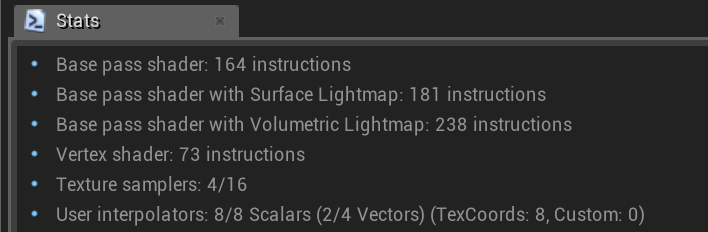
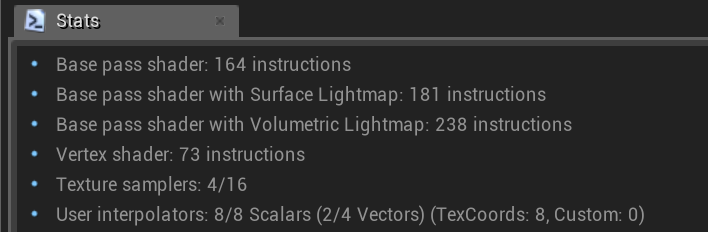
that flowers and plants pack has some hardcore material comments
 fierce tulip
lol
fierce tulip
for flowers and plants? imho it is
 regal yoke
how to make projectile to move to direction i shoot it
it always moves to same direction
uneven fractal
for comparsions sake this is the quixel foliage one that I've added my own bits into
fierce tulip
still feel like that is a bit expensive hehe
uneven fractal
probably this lovely function causing that
abstract relic
Yeah. The displacement isn’t needed for grass
uneven fractal
how are you adding velocity to your projectile sylack
fierce tulip
i mean, this is my cavepack shader
https://i.gyazo.com/fd8b6db610fe549604b51ef46715a71a.png
 uneven fractal
there are switches on that displacement it's normally turned off
abstract relic
Still bloating the material
uneven fractal
is it? I thought interally two different master materials are created for each switch
fierce tulip
does not matter much unless both are used
problem starts when each instance has tesselation enabled
while you should make one instance with it enabled, and instance from that one
else you quickly get massive bloat
switches are fine, but I barely see anyone use them correctly
uneven fractal
oh oops I forgot that I had two different functions for the snow system and I had only added the baked noise to the landscape one
it was originally using dynamic noise
2000 shaders later we shall see how much that optimizes the material
fierce tulip
i tend to copy master materials before tweaking them to reduce shader compilations of its instances, and replace its reference after I am done.
saves quite some time with heavy, massively used masters
uneven fractal
I do something similar when trying out new ideas by making a new material and trying it in there first before adding it to anything important
fierce tulip
yup. same with having some nice results when experimenting.. if I find something cool i duplicate the material in case I mess it up by tweaking it further :p
I also have a particle system I migrate emitters to when I make happy accidents that look cool.
regal yoke
How to make projectile go where i put my gun
uneven fractal
speaking of cool stuff I shall happily look at my auroras while the grass figures out it's shit
how are you adding velocity to the projectile
fierce tulip
@regal yoke please read the rules, re-asking questions is a bit of a nono unless an hour or two has passed
regal yoke
uneven fractal
you have 3000 X velocity
which means your projectile will always go in the X direction
regal yoke
do i put zero
uneven fractal
You give the projectile it's velocity when you shoot it
so default should be 0 yes
when you create the projectile you should have the gun determine what direction it's facing then use that to set the velocity on the projectile
I'm pretty sure a simple projectile shooty system is already setup in the first person shooter template
well that's akward
I cut it in half by removing the noise
fierce tulip
noise is nice, but evil
uneven fractal
it was even the cheap simplex too
I should be glad I didn't use the celluar noise or something
 sterile bison
I will never understand why you can't have events or timers inside Blueprint functions
 steep osprey
Anyone here owns the CCG Toolkit?
 sage bough
Sorry if i post not in the right place but "Hello, I'm looking for a person who can read two pages either in RUSSIAN I have translations but I would like to check, it's not huge but just the steam shop page and the tutorial has been translated. It's for my free game that's coming out on steam in a month, I hope. You'll be in the credits if you help me. Please contact me in MP if interested
. THANK YOU!"
 wary wave
events and timers are basically function declarations, and in sensible languages you can't declare functions inside of functions
glares at lua
vernal thicket
Is blend space by bool the best way to switch between anim states?
To save on over crowding a single state machine I mean lol
Sorry i mean blend poses by bool
plush yew
Who else cant wait to try the new SSS render in ue4.24?
vernal thicket
Anyone know how to add to a spine in viewport? UE say to right click on the free spline and add that way but I cant seem to right click on the empty spline?
 coral folio
Hola !! I'm trying to print some Boolean variable names using print string buut all I get is true false... How do I do that ??
Should be super simple but I can't find the right node
 thorn spoke
Making an entirely new project when receiving a project update is a bit crazy for nearly 2020 of unreal engine no? i won't use the name we do not speak of, but they implemented a sort of "search and swap" feature for updating files.. i think that would be cool, anyway 🛌
 brittle badger
I dont know why but I have 10 FPS in UE4 and my computer isnt bad
I cant do anything
Could anyone help please? ❤️
vernal thicket
What are your computer specs?
If you have lots of lighting this can hurt your FPS, or a very large map with lots of foliage (tree's grass etc), or lots of event tick checks? @brittle badger
plush yew
So i was having this problem yesterday. After downloading 4.22 from github and running the Setup.Bat And couse Unreal seemed had some server problemes downloading other stuff i thought it was related. Today the problem persist. So i tried from another computer of mine.
And from the other computer it works fine..
So am veeeery confused, couse i rarely touch the firewall settings.. so nothing fancy from my part. Can it be the Antivirus?
Will it work if i downloaded and update the dependencies from my PC02, then transfer the 16gb to a pen drive, and transfer it to my PC01 were i want to have it? or will not work either?
just to get by
 limber mantle
quixel bridge broken for ue4?
normal burrow
Custom engine?
plush yew
Which engine version are you using?
limber mantle
4.23
limber mantle
quixel website?
normal burrow
But do look at website for instructions lol
plush yew
Honestly hes best off watching a tutorial from quixel
They have one on youtube
Its super simple to set up
normal burrow
It’s borked for custom engine though
limber mantle
link?
normal burrow




Quixel
Megascans Plugin for Unreal Engine 4
Official documentation of the Megascans Plugin for Unreal Engine 4
Before proceeding with plugin installation, make sure that Unreal Engine is closed on your ma...
fierce tulip
Enjoy the videos and music you love, upload original content, and share it all with friends, family, and the world on YouTube.
 chrome cedar
does anyone else have the problem that unreal crashes when you switch from "lit" to "lighting only"?
 kindred viper
just to note. Quixel plugin wouldn't work for me in 4.23 either. Not sure why.
plush yew
hay everyone, I bought an asset from the store but when i open it and build all thw lighting etc. it's just way to bright light whise I cant see anything besides the light? 🤔
normal burrow
the quixel plugin doesn't ship with good source code
so for custom engine your sol, unless you fix the code like i did but i expect epic to replace it
kindred viper
yeah when 4.24 hits next week I'm hoping for a better result
normal burrow
whats the error marc
there are like 3 different errors i know how to fix with it lol
kindred viper
It says the plugin is installed. But when I try export from Bridge, it fails and the plugin doesn't appear on the Toolbar in my UE install. Ill get the error one min
oh... now it won't let me login with my Epic details
just my luck really. Another waste of time. Ill wait until 4.24
fierce tulip
@plush yew we cant do much without images, and sometimes its better to contact the seller if its a mp-pack issue
normal burrow
https://pastebin.com/DLPHdiQc @kindred viper
plush yew
hey guys Im new here and Im having a problem in unreal engine, can I discuss it here?
normal burrow
this is the big issue i see other people run into
if you don't see the quixel button it'll fix that
kindred viper
@normal burrow thanks. I had a feeling it was because of the py side. I had a couple of versions installed and it's happened before with other stuff that didn't like me having multiple versions for some reason :/
normal burrow
ye, it really likes 3.6
its what it tries to install
i mean it has a copy of 3.6 with these things in the bin folder
plush yew
any tips were to put a big big big city ? pm, every city has a citadal
normal burrow
and thats what causes the nightmares for people
kindred viper
yeah I thought that was odd as I have 3.6 installed
plush yew
guys plz help 😢
vernal thicket
Can anyone think of a way I can reference to a variable under the player character blueprint variables to the player anim blueprint for multiplayer? obv if not multiplayer you can just cast to the player but what about this case where it's using a pawn owner?
plush yew
I made a house in blender and saved it as fbx
I tried to import it in unreal engine 4
But the object is missing 2 walls 1 object 1 texture
1 is the errors while importing
2nd is the object in blender
3rd is the object imported in unreal engine
normal burrow
when you view the house from the inside do the walls appear? @plush yew
vernal thicket
Can you cast to a character in animation blueprint in multiplayer? or does it just need to be pawn owenr?
normal burrow
character is a pawn
when your given a pawn
it might be a character
cast will give you a character if you give it a pawn that is a character
when you look at the viewport in anim bp, you wont get a character because its not one. but when you play in the game, on the server or in the client, it'll be a character when it is one
pulsar badge
Does anyone know why my UE4 not working
vernal thicket
Right, thanks for that mate, I think I'm misreading the node tbf, my brain was saying if I cast to a character, if the player on the server is not that character then the cast would fail? but then technically everyone will use the same base character just different mesh lol
vernal thicket
I think I need to look at some articles on this sort of stuff can you recommend any pat?
kindred viper
yep. we can read your logs from here
 peak vessel
Ok, this is making me insane. Once, i removed all my local filepaths from all stuff in my content browser. So it did not show my full paths of my harddrive. But i cannot remember how to do it, and google is not helping
 merry gazelle
guys any idea what I'm doing wrong with my linetrace? I'm firing the trace down to a "Cargo_BP" (with hit events enabled). Print string tells me the linetrace is hitting the Cargo_BP, yet it also returns false "CargoNotDetected" print string at the same time
normal burrow
hm joshy, if i told you i was gonna give you an animal
i'd give you a box labeled animal.
cats are also animals, but all you know is that you've got an animal
to find out if its a cat, you have to cast it. if the cast succeeds the animal is a cat, if it fails its not a cat
the cat you get is the same animal though
vernal thicket
Right I get it lmao thanks bud, so if you had more than one type of character on one server though? is that even possible?
Not relevant
btw
normal burrow
different types of characters are still characters
vernal thicket
But your casting directly to a specific blueprint
normal burrow
just like characters are pawns and cats are animals
yea what i mean is when you work with the different characters as 'character' it doesn't matter waht specific type of character it is
just as in with animal stuff
vernal thicket
I think the reason im struggling to explain it is because it sound stupid to begin with but hear me out
If I had 2 characters, one called Character1, one called character 2, if I cast to my character 1 in the anim bp, but someone is using character 2 - theyre not going to get that variable reference to tell it to do something, right?
To be hones though
I dont even know why this even crossed my mind
normal burrow
i think the part your stuck on joshy is variable types and object types
if you have a variable of character type
you can to character things with it
normal burrow
if you have a super character object type that has character as a parent blueprint
vernal thicket
But character 2 doesnt, if I cast to character 1 that bool isnt going to be called on character 2
normal burrow
cast literally gives you the exact same object that you give it
it just gives you that same object as a different variable type
vernal thicket
You dont have 2 characters on 1 game, just change of mesh etc
yeah discord struggling lol##
normal burrow
well you might joshy, even just for change of mesh
vernal thicket
but i mean
there's no reason to need to cast to several characters under 1 animation bp, as each individual character could have its own
normal burrow
hm i think what you want here is a parent class for your own characters to share
BP_JoshyCharacter -> Character -> Pawn -> Actor -> Object
discord put these messages out of order lol
hm i think what you want here is a parent class for your own characters to share
you stick everything the anim bp could need custom to your game in BP_JoshyCharacter
you stick everything the anim bp could need custom to your game in BP_JoshyCharacter
you stick everything the anim bp could need custom to your game in BP_JoshyCharacter
vernal thicket
its not neccesarrily something im trying to do more than just to understand, if I have character1_BP with Character1_AnimBP, and a variable under character1_BP called Firing, I could then create character2_BP, use character1_AnimBP and still call that same variable coz its not under character2_BP its under character1_BP
normal burrow
you stick everything the anim bp could need custom to your game in BP_JoshyCharacter
thats right joshy
normal burrow
thats right joshy
discord be like someday i will send your message pat. for now retry
regal yoke
Hello
 vivid narwhal
I got a random question for ya'll
Is there anything you wish you were knew when you first started in UE4?
 silver crown
 bright cloud
I had a fun little surprise when my stand alone games as well as builds started to crash on load.
After some research I found this post that say that "Setting Fullscreen Mode to "Fullscreen" results in Crash when using 4.23 from source"
 hidden aurora
does anyone knows how to call that parent funcion from a child bp
wary wave
you want to call a function in the parent of the parent?
hidden aurora
in the child class
 sudden agate
Right Click on the Event/Function Node -> Add Parent call
hidden aurora
thanks a lot
 unique sonnet
I was messing around with the Level Editor - Play settings. If I play my project as a standalone game, the camera is just wrong. It goes inside my character's face. If I play in editor, it's the topdown view that I've setup.
vivid narwhal
That feeling when you fix a bug that stopped process 2 years ago
ooooff. The fact you have the select all nodes then right click and create comments that way instead of just highlighting and pressing C in AI is something I just discovered today
hidden aurora
I need to create a material that with a scalar parameter modify a value that controls the fill of the material. When its 1 its green (filled), when 0 empty(black)
This is my approach but doesnt work as intended
I get this result
It only works on one section of the spline, in the others it dont
vivid narwhal
I wish I knew material editor
 serene birch
cause your spline is made of small models each mapping their textures in 0-1 I suppose
hidden aurora
Does anyone knows how "unify" the spline meshes
serene birch
short of you having some material node that gives you the "position" of the fragment/vertex on the spline, I'm not sure
hidden aurora
It works
hidden aurora
Yep tho the material works but not exactly how i wanted
In the construction script, i have a for loop, in the loop body i add a mesh comp and then i create a dynamic material instance, then i add that one to an array of materials. Finally when i fire the event, i do a for each loop so that it affects all materials.
serene birch
if you want to be tricky, use only 3 material instances
fully lit, fully unlit and the transition one 😛
vivid narwhal
I fear I'm not able to articulate this question, which is making it hard to find out what to google.
Currently I've got the player's input, whether they're moving back/forward and left/right. Then dodging in that direction.
however, when I hit run backwards with my input, the character turns and faces the camera (as intended)
But, if I now hit my Dodge key, it dodges backwards, which is bad because it's not dodging the way the character is moving but rather the way the mesh is facing (since it's facing the camera when moving backwards)
hidden aurora
@serene birch
 nova spruce
i'm learning blueprints and just went over Enumerations
the guy said "change the enum to myenumerationasset" but I think that's outdated, whats the new name for it?>
kindred viper
in C++ terms you would always start an Enum with E. ie. EItemType
uneven fractal
it doesn't really matter what naming scheme you use just that it's consistent
kindred viper
well in C++ it does, but blueprint not so much
uneven fractal
btw anyone know how to convert a normal to a rotation
kindred viper
better you google that tbh. Not in the "im not doing it for you" but in the "have a read about it a little, break it down"
lots of examples, especially in UE4
nova spruce
no no no, in blueprints
hold on,

Enums allow you access to your own custom lists of settings or states. In this video we show how to set them up and use them within Blueprints. A link to the...
at the end of the video he says "you've made the list, now to show it in your blueprints, just change the var to myenumasset" but I can't find it in the search bar and I think it's because the video is old
kindred viper
I dont think that is meant literally. Its meant to be whatever you called your enum
it so happens his was called that.
uneven fractal
ah apprently just converting any vector to rotation will work even if it's specifically a normal type vector
I was thinking I needed a node that does the opposite of get foward vector
kindred viper
blueprint does some stuff under the hood but its a nice thing to learn how to use it when you want to optimise checks with some maths like that. Blueprint avoids quaternions as much as possible but knows when to use it along the way with certain functions. Its nice like that
of course you can do it manually too
uneven fractal
just the sound of the word makes me not want to do that
might be worth it optimize it by doing it manually though since its an on tick function
vivid narwhal
Are you trying to get somethings rotation?
uneven fractal
sort of
vivid narwhal
Solving my dodge is probably going to be an all day task for tomorrow sadly. Which is a shame since that's the only time I get the entire day to actually play games instead of trying to make one
uneven fractal
I have a building sytem and some structures need to be able to be placed on walls
kindred viper
its a simple issue. When you dodge, only dodge in the direction * -1
uneven fractal
So I got the wall normal and used that to get the rotation for the object
thought it would be difficult but apprently converting vector to rotation already solves that problem
kindred viper
When your actor is facing forward, it will have a forward vector. That is the opposite if your dodge direction.
when you rotate. the forward vector follows. The math stays the same
vivid narwhal
Yes but if the actor is moving backwards he's facing the camera and dodging causes him to dodge forwards from the perspective of the camera
kindred viper
the actor still has a forward vector. Your dodge needs to the opposite of that
oh I see
walking backwards but facing the camera and you want him to dodge backwards. It's still the opposite of the facing direction right?
vivid narwhal
The Dodges (to simplify) are basically >0 dodge forward. <0 dodge back
If he's facing the camera and moving backwards his forward vector will be -1. At least that's what my test is showing. Meaning the animation selected will be roll backwards, rather than towards the camera
@uneven fractal could you not also get the rotation of the actor? Or does that not help
uneven fractal
not really
complex meshes can have different normals at different spots
so getting the rotation of the entire mesh not just the placement surface isn't very useful
vivid narwhal
Makes sense
uneven fractal
well I say complex meshes but even a cube has 6 different surfaces
uneven fractal
why
vivid narwhal
Antichamber vibes there
kindred viper
its from a movie called Cube 2 : Hypercube
just rebuilding an old prototype I made years ago but with a couple of years VR experience added + a hell of a lot more experience with everything else in UE4.
my old code was spaghetti central 😄
uneven fractal
did someone say sphagetti
this is the function for checking if your allowed to place a structure in a spot
vivid narwhal
My uni blueprints were commented and documented incredibly well and I still find them to be spaghetti because I didn't know about reroute nodes or collapse to graph/function/macro
uneven fractal
it's not great
kindred viper
that was my problem Jack. I had 0 reroute nodes. Last version I pulled up was from 4.7
vivid narwhal
Material spaghetti from 2017
Commented with a technical document to support but messy as hell
uneven fractal
damn discord search is broken so I can't find the worst spagetti material I've ever seen
 open eagle
how can I use a BP enumeration in C++ for a base BP class
 fervent sigil
hi guys, I'm using Behavior Tree and I'm wondering when should I use Service vs Task?
for example, I was thinking on using a task to find nearby enemies (like the player). I just found an example where it's using a service for it though.
When should I use which then?
@open eagle you can't. You can't use BP created types in c++. The best you can do is your generics, depending on what you actually want to do
 oblique tangle
Yo could someone help me out with limiting the max velocity an actor can reach in a scene?
fervent sigil
you have max walking speed on a movement component
oblique tangle
Like max velocity while in the air
 exotic plank
What would be the best channel for material blueprints that are to be used for mobile vr, would it be #mobile, #virtual-reality, or #graphics?
questions on them that is
fervent sigil
probably depends on your actual issue you have with it. I would try #graphics if you're not sure.
exotic plank
ok thank you
 worn sparrow
New Atmospheric Fog Component in 4.24 😍
 jolly cairn
@grim ore I was on this website someone know where he work?
normal burrow
He works for the unreal learning gods
 halcyon flame
have any of you ever seen a physics actor return -nan(ind) for Center of Mass and Velocity?
for some reason this happens randomly with my vehicle, completely freezing the physics
 pulsar kraken
I have a tons of lighting.. however I can't get the light to make these static meshes brighter? any help?
normal burrow
@halcyon flame velocity yes
halcyon flame
@normal burrow do you remember what caused it?
normal burrow
Division by near zero
halcyon flame
I've seen supplying values slightly above 1 into acos
I'm not calling acos though
ok
normal burrow
FMath acos?
normal burrow
Ok yea larger than one on acos in bp shouldn’t nan either
normal burrow
Both of these have checks afisk
halcyon flame
did you just need to comb through everything and figure out where there might've been a ~/0?
normal burrow
The negative part isn’t really of value
normal burrow
Ah my eyes fail me
halcyon flame
and do you know a rough threshold of too close to 0?
 halcyon flame
do you see my dm? or just prefer this channel?
normal burrow
Would prefer to keep it here
halcyon flame
right
if I'm getting a ton of errors in the Output Log about dividing by 0, is it reasonable that one of those would eventually 'slip through' and cause this kind of issue with PhysX?
I forget these because I focus on the Msg Log
halcyon flame
like herpes from Vegas
normal burrow
As impulse, force, torque whatever. It’ll nan your vel
Just ran into it with diagnosing niagara stuff and wanted to toss self off building
halcyon flame
it detected divide by zero in a massive graph 😐
abstract relic
Go to sleep pat
halcyon flame
@High shhhh
normal burrow
Thanks 🙏 goodnight
halcyon flame
@normal burrow thanks, fr
 coarse turtle
I created my project in UE4.22 then moved to UE4.23. Is there anyway to move my project back to UE4.22?
halcyon flame
@coarse turtle ...you didn't back up your project did you?
abstract relic
There’s no backward compatibility
Always use source control to back up your versions
halcyon flame
you need to decide whether what you've added outweighs what you want to go back to 4.22 for
why do you want to go back?
coarse turtle
UE4.23 has bugs.
In world composition, the landscape layers in foliage type won't work if you move the level from the original location. My AI acts weird for the same reason in world composition levels.
I have 4 levels in world composition. The first one works fine if I don't move from its location but the other 3 levels, i have to move them. And if I do move them those two things won't work properly.
halcyon flame
how close is 4.24?
are they still ironing out a lot of issues with 4.23?
I don't know what to tell you man. porting most of your stuff manually probably wouldn't be too hard... as long as you're sure the problems are on UE and not your own stuff
coarse turtle
Yea that issue is all over the internet, if you search for it.
If I only copy the content not the maps. That should work right
Last time I tried, the maps were complaining. I was seeing blueprint missing code.
halcyon flame
if you can put up with it in development for now, maybe you should wait for a fix?
coarse turtle
If I could find the bug ticket number so that I could track it.
worn sparrow
@halcyon flame feels like we're on the last preview build of 4.24 maybe end of this week or next unless we go to preview 5
halcyon flame
@worn sparrow that's what I thought. I'm still on 4.22
I don't have much desire to update. there are more features than I can possibly keep track of. last update I did was for editor widgets I think
 coarse shale
hell, im new with UE, how can i reduce the lightmap resolution?
 autumn trout
there is no difference
Someone pressed Compline
The other one did not press
sudden agate
the one with the red line is currently running in play mode
autumn trout
yeah
desert vault
I do not play any of them
autumn trout
 heavy tide
So, yesterday I got the urge to try and start making a game I've been thinking about for about 2 years now, and I'm having a really hard time trying to get a good height map implemented into the editor, I'm not sure if this is the correct thing to start off with but anyway if anyone can help that would be great, I have been trying to import height maps but so far they are really bad and dont work at all... google maps 3d view is pretty much what im going for, the map is a real life island, please dm me, cheers.
 dreamy talon
hi! guys can you suggest how/where to add to wheels that car will less slide or drag during driving?
 loud valve
Hey guys, anyone added those soft curves for aiming (controller). So when you start turning the aim it starts slow and speeds up. I want to know how make that.
abstract relic
This is #ue4-general not general blender server
 radiant haven
oh sry I am stupid wrong server
dreamy talon
HI ! can you suggest how to add Trail line. i have car and when i driving it i want to create a line behind which is stay behind the car. in a way like a Tire drift trail but just a line.. thank you
 gloomy acorn
hey guys, i'm trying to migrate a full project c++ to a new c++ project. I have changed all the c++ classes content to how they should be (based on this https://wiki.unrealengine.com/Migrate_content_between_projects#Migrating_from_C.2B.2B_Project_to_C.2B.2B_Project)
And below is what i've added to the DefaultEngine.ini
[CoreRedirects]
+ClassRedirects=(MatchSubstring=True,OldName="MyOldProjectName",NewName="/Script/NewProjectName")
+EnumRedirects=(MatchSubstring=True,OldName="/Script/MyOldProjectName",NewName="/Script/NewProjectName")
+FunctionRedirects=(MatchSubstring=True,OldName="/Script/MyOldProjectName",NewName="/Script/NewProjectName")
+StructRedirects=(MatchSubstring=True,OldName="/Script/MyOldProjectName",NewName="/Script/NewProjectName")
;+PackageRedirects=(MatchSubstring=True,OldName="/Script/MyOldProjectName",NewName="/Script/NewProjectName")
+PropertyRedirects=(MatchSubstring=True,OldName="/Script/MyOldProjectName",NewName="/Script/NewProjectName")
+ObjectRedirects=(MatchSubstring=True,OldName="/Script/MyOldProjectName",NewName="/Script/NewProjectName")

[/Script/Engine.Engine]
+ActiveGameNameRedirects=(OldGameName="MyOldProjectName",NewGameName="/Script/NewProjectName")
;+ActiveGameNameRedirects=(OldGameName="/Script/MyOldProjectName",NewGameName="/Script/NewProjectName")
+ActiveClassRedirects=(OldClassName="BaseCharacter",NewClassName="/Script/CharacterBase")
+ActiveClassRedirects=(OldClassName="/Script/BaseCharacter",NewClassName="/Script/CharacterBase")
The commented lines (with ;) are giving me an error if i uncomment them (shown in the picture Error 1) when i try to open the project.
also if i keep them commented and i open the project (after rebuild of course) it opens successfully, but the blueprints that are parented to c++ classes give the same error (shown in the picture Error 2)
Are the above redirects written correctly? Is there anything else i need to do?
P.S: I'm using 4.22 if that helps
 dim plover
Lerp.
 sick escarp
Is it possible to make a character use multiple AAIContrrollers?
Or should I just use inheritance in that case?
 mossy nymph
it is possible to swap them at runtime
but usually its sufficient to just inject a different BT
sick escarp
I know and I am using both multiple BT's and swaping AAIControllers
Was just curious if it was possible to run multiple controllers simultaneously
mossy nymph
its not
sick escarp
Okay, I'll have to think if I'll want to solve it with BB's or controllers then
 foggy jetty
In a scene like this, I still just have 60-80 fps. I'm running on a 1080ti and i7-8700k and shadowplay overlay is not on.
Any clue why?
 cloud cobalt
What's the issue ?
 honest vale
because you're in editor
foggy jetty
I have 110-120fps at all times in other projects.
That have way more assets in scene.
cloud cobalt
First step is to compare outside editor
The editor performance is very unpredictable, since it literally depends on what's open in your editor, etc
 magic sluice
After importing a static mesh (without any materials attached), every material looks like this. Streched in some places. How to fix that?
sick escarp
Seems like it hasn't been UV mapped correctly
magic sluice
ok, thanks
normal burrow
Slyack you told it to die
 fossil gale
Hello, a friend and me want to do a project together, I do the environment and he do the chara and animation. we have finish and we want to mix our work. Do you know how he can transfered his work to my Unreal Engine? (In Unity, it's a package but I don't know in Unreal 😦 ) Thank you ! 😄
regal yoke
how to then make it fk alive
i have been fighting hours with this sound shit
@normal burrow
normal burrow
Destroy was called?
regal yoke
here is blueprint
it should make sound when i move and stop when i dont move
there is that "stop" stopping sound but it never comes back again
normal burrow
Is valid you need
After delays as well. Seems like component kills self after times up
normal burrow
After delays and before usage of your var
normal burrow
Yeah But after delay
normal burrow
Chill, you just need to not have a invalid target call. That branch should be used to avoid calling anything on something null or destroyed

 normal burrow
Yea try
regal yoke
i already jumped to sewer
normal burrow
Do the same thing for ST
vernal thicket
@regal yoke are you trying to crouch walk with sounds outside animbp?
fervent sigil
Is there a way to make some object together with the 3d model (such as in Blender) that contains a list of positions that I can query later in the engine?
A bit like how you can create collision shape for collision, but I need a list of vertices (rather than actual shape), and it's not used for physics nor rendering
 sullen rain
Guys while rendering i am getting the following error - does anyone know what this can be, i am trying to figure out from last 6 hours, but no luck 😫
Assertion failed: [File:D:\Build++UE4\Sync\Engine\Source\Runtime\Windows\D3D11RHI\Private\D3D11Util.cpp] [Line: 328] Direct3DDevice->CreateTexture3D(&TextureDesc, SubResData,TextureResource.GetInitReference()) failed at D:\Build++UE4\Sync\Engine\Source\Runtime\Windows\D3D11RHI\Private\D3D11Texture.cpp:1031 with error E_INVALIDARG, Size=2560x1080x128 Format=DXGI_FORMAT_R16G16B16A16_FLOAT(0x0000000A), NumMips=1, Flags=D3D11_BIND_RENDER_TARGET D3D11_BIND_SHADER_RESOURCE D3D11_BIND_UNORDERED_ACCESS , Usage:0x0, CPUFlags:0x0, MiscFlags:0x0, SampleCount:0x0, SampleQuality:0x0, SubresPtr:0x0000000000000000, SubresPitch:0, SubresSlicePitch:0
fervent sigil
If you didn't play with any of the c++ rendering code, restart your pc. I know, I hate that type of advice, but it works.
sullen rain
i have done that
dim plover
Maybe it's a graphics driver issue.
sullen rain
there is no path leading to this in my pc - D:\Build++UE4\Sync\Engine
i dont know what it is referring to
My unreal is in D/Epicgames
fervent sigil
Are you sure it's not some intermediate building directory?
sullen rain
nope
 vast fulcrum
"Size=2560x1080x128"
I'm not sure but isn't this supposed to be width x height x bpp ?
if so, it seems like something's trying to set up an 128bpp color environment xD
sullen rain
where do i change that, in the render settings ?
normal burrow
Float32 4 channel
vast fulcrum
I have no idea. when is this error popping up
oic
can anyone help me, since 4.23 I am facing some issues with loading times in the editor. when pressing Play in the editor window, loading takes a lot more time than in 4.22 (at least it feels like this is a version thing). is there a way to profile the memory during the loading of the project? so I can see what part of the project takes so long to load before opening the game.
Window->Statistics only shows pretty reasonable numbers
fervent sigil
that was a smooth change of issue
vast fulcrum
ugh sorry
plush yew
Hey so im new to unreal and should i start with 2d or 3d to start and as a beginner would it be better to start with blueprints or c++?
dim plover
There's pretty much no 2D, so 3d and Blueprints.
vast fulcrum
if you don't know C++, use Blueprint. it's much easier.
cloud cobalt
Even if you do know C++, still start with Blueprint
autumn trout
What is Vertex Color?
What are its benefits?
autumn trout
yes
normal burrow
It’s like that but with color
autumn trout
What are its benefits?
normal burrow
Per vertex color interpolation. It’s not a benefit over something else as it is just a utility at your disposal
cloud cobalt
It's a practical tool if you need additional information for your materials to encode something
For example, color-coding areas of a vehicle that would take damage
autumn trout
ok thank
cloud cobalt
Pong !
plush yew
3d pong?
cloud cobalt
Probably more of a 2D game, but you can do it in 3D and have the game on a plane.
normal burrow
Pong pong
 manic pawn
breakout but every time you hit a block you have to win a round of pong to actually break it
cloud cobalt
Was gonna add that Breakout is also a classic first game
normal burrow
Defender
cloud cobalt
One pretty famous presentation of making gameplay a bit funnier uses Breakout as an example
sullen rain
by any chance my render is failing because i am keeping the resolution too high ??
magic sluice
is it possible to change object's origin in unreal or should i go and try in some 3d software?
static mesh's origin^
sullen rain
5120 * 2160 output - GTX 1060 6GB 16 GB RAM i7 / 200 render scale
normal burrow
Short answer is, your better doing it in 3D software Donee
Long answer is, at the expense of a a scene component as root you can make a different pivot point
magic sluice
blender it is 😄
normal burrow
And there is also a way to set a pivot for placement of things but your better off making the pivot make sense in the 3D file
(Opinion)
magic sluice
but one thing i dont understand is in blender, the object has origin in it's center (as its supposed to be)
but not in unreal
i checked it just now
normal burrow
If you set 3D cursor to where you want the pivot to be in blender you can assign it
magic sluice
im too amateur for maya (too expensive)
sullen rain
u can use student version
magic sluice
in blender, the object has origin in correct place
but after exporting and importing it to unreal, it has different origin
sullen rain
anyways, i follow this process - center pivot - freeze transformation, delete history and then export
magic sluice
found "lock location/rotation/scale" in blender, gonna check if that works
 thick pulsar
The asset '/Game/CorridorMap_BuiltData' (CorridorMap_BuiltData.uasset) failed to save.
Cancel: Stop saving all assets and return to the editor.
Retry: Attempt to save the asset again.
Continue: Skip saving this asset only.
Any help with this error when i try to save ? ^
Asset '../../../../Corridor Environment/CorridorUE4 4.23/Content/CorridorMap_BuiltData.uasset' cannot be saved as it has only been partially loaded
I've tried deleting the build data file and re-building but doesn't fix it
cloud cobalt
How big is the data file ?
Corridor Environment/CorridorUE4 4.23/Content/CorridorMap_BuiltData.uasset
thick pulsar
37mb
thick pulsar
Problem seemed to occur after i bluescreened during a lighting build, now whenever i open the project the lighting is all unbuilt, it builds fine but doesn't save
thick pulsar
remove what exactly?
cloud cobalt
That asset
 unique kraken
i have a problem finding the calculate direction node
only finding that one
im in a slightly newer version of ue4 then in the course im doing
did this node change or something?
dim plover
Yup, it changed.
normal burrow
yes and your using the correct vector length there
the video you will run into and telling you to use the new version will tell you to use vectorlengthsquared
don't do it
 midnight bolt
Hello, I want to work on the lighting for my level, however my final project will be using forward renderer with all baked in lighting. for preview purposes, is it okay to work in another project on lighting and then transfer it to my final? will the lighting be quite comparable? just simple point/spot lights. my meshes have uv etc. i just want to avoid building every time i make a small change to preview
unique kraken
@normal burrow can you help me out here? im trying to wrap my head around this
normal burrow
whats wrong
unique kraken
sec
so this here is in this course
and obvoisly that doesnt work anymore like that
so i have no idea how to get them connected
normal burrow


that be a pure node
which means it doesn't need teh white exec line
just use that in place of the blue node, connect directly to the set following
unique kraken
?
normal burrow
perfect
unique kraken
thanks verüüü much
 lament star
UE4 needs a website for features suggested by it's users, kind of like Discord
 next badger
i think uservoice was requested dozens of times for past years
 autumn crystal
how can i get a keypress when the game is paused and a widget is open?
im trying to make it so that if you press Escape while in the pause screen it will take you to the main menu
but in the umg graph i cant add key press events
next badger
umg is not paused by default iirc
autumn crystal
ik
i pause the game then pull up the ui
it would be an ez fix because i could just do it in the level blueprint if the game wasnt paused, but it is.
next badger
you can unpause any actor you interacting with umg
autumn crystal
?
next badger
"tick when paused"
lament star
@next badger so what?
next badger
nothing...as always
lament star
Does Unity do that?
next badger
we got your disabled VR plugins just now...after five years
 plucky lily
Hi guys, I saw a video of Megascan and want to use it. The video shows a megascan plug in in unreal, but I cannot find a way to install it! can someone help?
plucky lily
how to get the plug in?
next badger
its an option in bridge iirc
plucky lily
what's "bridge iirc"?
autumn crystal
iirc == if i remember correctly
next badger
bridge is quixel bridge...iirc is if i recall correctly
plucky lily
i see
kindred viper
No. No. That is heretical routing. /grabs a ticket for the underground.
top tip. remove the array entry first. Then there won't be any accessed none/nullptr chances.
 frozen pond
but i also need to destroy actor from array entry
i'm saving my actor list into array and want to destory it
next badger
you also can use validated getter
kindred viper
the array is a reference to the object. Once the object is removed, the ref wont go on it's own because the object doesnt exist. It's still there, it just has an invalid pointer to the reference
kindred viper
yeah
think of the array content as shortcuts to executables. If you delete the exe, the shortcut will fail
frozen pond
k thanks
next badger
it can cause issues but probably only in async mode
kindred viper
it can cause issues in more places than async functionality as destroy technically instigates a Pending Kill state first until GC ticks over.
vivid narwhal
Thanks @normal burrow ! that calcuate direction node has given me an idea
didn't work but was worth a shot
loud valve
Someone please help me, I've been stuck for weeks on this "simple" issue:
I want to make the Character movement: start turning mouse/controller (aim) it starts slow and speeds up? So not just slower controls but slow start of turning.
An aiming Curve.
coarse shale
thinking to print some UE4 sticker for our meetups, anyone have UE logo with high quality? i did search from google but it quite low res
kindred viper
apex is static-prebuilt destruction. Compiled before play. Its tried and tested and works in a somewhat optimal way. Chaos is new, semi-dynamic, but comes with teething issues and isn't fully integrated yet. Still considered experimental I believe.
 thin gate
alright thaanks 🙂 guess ill use apex for now
kindred viper
if you are planning to release something in roughly a year-18months or more. It might be worth using now
thin gate
might give it a try
kindred viper
its beautiful.
thin gate
i want to add it to the buildings in this game

-New airplane controls -Rocket effects and sounds -Widget to show damage hits (red numbers) -Water and Outlines removed temporarily to speed up builds for te...
you will never be really near but i think the new one would be sweet
kindred viper
if you don't want anything too complex, ie. just falling down from impact points, its usable for sure. FPS wise it might be relative to your project, but you can optimise it to a degree
and nice btw. Looks cool
kindred viper
not yet but I would imagine someday
vivid narwhal
Not on traditional landscape but there's a way
kindred viper
landscapes being what they are (specifically tasked optimisation based objects) it's to be expected. But then we are getting towards more destructible landscapes in general thanks to it being wanted
thin gate
so can you make like all the foilage and buildings destructable with ease
or do you have to set each one individually
kindred viper
foliage might need something one step beyond current implementation, but if you were to replace with niagara particles instead of foliage (replacing instances isn't quick though) then sure
kindred viper
well yeah and no. You convert a static mesh to a destructible one and do the chaos magic with it. If you check out the Chaos Content Example in 4.23/4 it gives you a set of rooms explaining it all. Although not very well optimised versions :/
kindred viper
have fun 🙂
vivid narwhal
Right, try to take on this dodge function
 molten path
does anyone here know how I can stop a sound ?
for example once my character stops sprinting
thin gate
you can always volume 0
kindred viper
sound cues
molten path
yes
thin gate
maybe put the sound on the actual actor
thin gate
you can also attach it to the animation
molten path
alright thanks
abstract relic
Would attach it to the animation
thin gate
like split the foot hitting sounds into one
make a cue
that does a random one
or something
and play one when ever the foot hits the ground
vivid narwhal
So...
Getting the Input Axis that returns 1.0 or -1.0 depending on whether the player is moving back or forwards
Can't use that for dodge roll because if the player is running backwards, they're facing the camera, and thus if I dodge they roll the wrong direction.
Tried to use "get direction" from the animation graph but that doesn't work either.
Any ideas?
kindred viper
if you have a forward vector, its the opposite
there are many vectors you can base it from that are independent of the controller rotation and mesh rotation. You just have to pick the right one
mossy nymph
you can just Abs the InputAxis before calculating the dodge
vivid narwhal
why absolute it?
mossy nymph
then it will always be positive for dodge calculation
so it won't get inverted if you're facing toward the camera instead of away from it
vivid narwhal
Forward vector works
kindred viper
😮
 royal cobalt
Is there a reason ue4 doesn't remember my source control settings or last level loaded etc??
midnight bolt
any idea why i cant save my level? it always shows * next to the name, despite saving process
it just started happening, no real reason why, i did not do anything unusual
wary wave
you can't - work without the loop
frozen pond
so branch and go back from loop end ?
 inner vector
Hey, unreal mages. Quick question: anyone have much experience adjusting Time Dilation? "Set Global Time Dilation" seems to max out around 20x. Ideas on how to simulate at a quicker rate? Building a RTS style game and need + and - time dilation. Thanks!
molten path
I'm trying to get my start game button to work
But when I click on it, it simply loads the level and leaves the widget active
is there a way to make the main menu widget disappear once the level is opened?
As an example, here is what I see on my screen once the level is oppened
as you can see, the widget is still present
Figured out where the bug originates from, but idk how to fix it
Basically even if I start the game, the gamemode will remain that widget
 weak hemlock
Does anybody here have any experience with Nvidia Waveworks?
 grave nebula
depends.
 quasi obsidian
Guys Is UE4 easier or harder to use then Unity?
molten path
defienetly harder
 narrow charm
hey quick question, when you bind an action, is IE_Pressed only once when it is pressed, or every tick while the key is held down.
molten path
but it pays off
quasi obsidian
Why's that?
molten path
Basically, unreal has a better rendering way more options
I feel like they literally implemented everything I could ever wish for
and blueprint is pretty lit
narrow charm
The workflow is far more professional. Unity is easy but has a terrible professional workflow (.meta collaberation problems) so unreal is far better for industry standard work.
- ue4 is open source so if you have a workflow issue you can open it up in vs and change it.
quasi obsidian
Mhh
I have used both a little bit.
But It's that time where I have a characer, have the animations and want to start something.
narrow charm
Unity prototyping is far easier than UE4, but its also way easier to write unsustainable spaghetti code in Unity.
quasi obsidian
I have a lowpoly survival/rp game in the making.
So I have to figure out which engine I'd like to use.
narrow charm
How much experience do you have in prog?
quasi obsidian
HTML, CSS, JS is all ik
narrow charm
hmm
quasi obsidian
C# is what UE and Unity use
narrow charm
You're going to have a lot of problems with UE4 if you only have web lang esperience
no ue4 uses C++
narrow charm
All good
quasi obsidian
Mhh
Unity has a bunch of code online that could help me which is one thing I looked at.
narrow charm
How much language experience do you have with html/js/css
quasi obsidian
a lot
narrow charm
If you want, I could add you and dm you more about it.
to try and figure it out
let me get this straight aswell, you have models/anims but no engine experience?
narrow charm
hm
autumn crystal
why you bully me XD
i spend like 10 mins trying to figure something out and you are like wham, basic solution
molten path
yeet
autumn crystal
does something like this exist?
like an anti do once?
lets say the top one is hooked to event tick, and i want it to be closed until the bottom one gets at least 1 input
this is what im doing now for it
i dont like it tho
 rotund scroll
so real question, why isn't there an app on android for modifying blueprints
@autumn crystal use a timer
rotund scroll
cool, it wouldn't be mandatory to use it
honest vale
I'd rather have epic concentrate on something more worthwhile 😄
 thick herald
No, make everyone use it
rotund scroll
ok but if it's mandatory to use the UI should be atrocious at the very least
next badger
Android will be released right after OS/2 version
vivid narwhal
@kindred viper turns out my dodge was working the whole time I just had somethingelse bound to the dodge key that was moving the character to a new location '-_-
 lyric canopy
@autumn crystal It is called a Gate and what CranzEstebogen is saying is not the correct way to do what you want to do. Also tick should never be used for flow control
autumn crystal
wym flow control? @lyric canopy
rotund scroll
@lyric canopy you can omit the gate and have much more elegant design with a timer that requires no further work, whereas with a gate you need to take care of inputs for both opening and closing. plus in most cases you're forced to use tick anyway as a throughfare
so yeah, timers are correct and a more optimal solution across the board
@autumn crystal flow control is how the white thread flows through various checks
ideally you would want to never use tick if you can avoid it
autumn crystal
so how do i have an execution go as fast as possible?
rotund scroll
set a timer to run per delta seconds
rotund scroll
yeah but it fires execution that you have no control over
so it's easier to disable it permanently in classes where you can and use timers to create tick speed windows of execution
autumn crystal
i dont see the difference, if i dont need control over the tick
rotund scroll
the tick runs constantly
the timer you can turn off
it saves performance
it optimizes your code and it makes you write better blueprints
autumn crystal
i dont have to worry about it as i want it running the whole time, i never want it to turn off
not really it takes 1 node splits them into 2 and gives you more options
rotund scroll
ok well it seems like you know better
autumn crystal
but if you dont want/need them then it doesnt matter
rotund scroll
so good luck
lyric canopy
A timer can replace event tick, but he should not be using a timer or tick and should be making event based code. For his little screenshot you should not be using a timer to control that, that is what a gate is for.
autumn crystal
^
rotund scroll
if he needs to check something per frame, he either needs tick or a timer
you're not going to get around that
lyric canopy
Yes of course ^ but do you see his image? He wants two inputs and one output
and the second input opens it
autumn crystal
lyric canopy
No it is not.
rotund scroll
when else would you have it check for when to open?
rotund scroll
it does
you can turn it on and off
that is the flow control of a timer
that is why it works
autumn crystal
i never want it to turn off
thats what you are ignoring
ive said that thrice
the only time in which i would want it to turn of is when the level ends, and when you change a level it ends everything anyways so it doesnt matter
rotund scroll
I wasn't talking about your specific situation, I was talking about what timers do
like I said do what you want
you're not going to listen anyway
autumn crystal
🤦
rotund scroll
so I'm not sure why you're talking to me
thin tendon
@autumn crystal The best way to speed your code up is by simplifying it as much as possible. And by adding as many breaking statements as possible. The further in it has to read each time the longer it takes. This can get really noticeable when you have thousands of lines of code. Using a tick is a bad idea because it will read in to its first stop each frame. You want to have your events fire in 2 ways. Using timers or you have other events that call them only when needed. If you have to make an event on a tick its a good idea to add an if statement right at the start "the very first node". This way when its not needed it only reads as far as that first if statement. Make sense?
thin tendon
Not always. For example if you have an inventory and you want a feature to update. You might not need it to update every frame. But instead update it each time you toggle the inventory as open
autumn crystal
unless you know a way to do, this without event tick, please tell me
thin tendon
So you want it to fire if the set time is less the the game time in seconds?
autumn crystal
ye
also these nodes are in a function
the thing going into the branch is the exec start of the function
thin tendon
Is this something you could call on begin play instead and then just add a timer to make it re-fire every so many seconds?
rotund scroll
^
autumn crystal
no
thin tendon
Is the purpose of this to retrieve some value like health for example?
 swift hearth
Anyone know how I could make it so that only things inside a specific area are being rendered at a time? Like, I wanna make it so that while the player is inside a specific area/room, only that room is being rendered, instead of every asset in the level
thin tendon
@swift hearth World composition, rendering distance, Occlusing boxes all work
autumn crystal
i have this on a sequence node going into 3 functions they each do, spawning an enemy, changing the camera and changing the background
rotund scroll
level streams
swift hearth
@thin tendon I'll look into those, thanks
I figured I would have to divide the level into various levels, and make collision boxes that would teleport you from level to level.
thin tendon
The background and enemies could definately be done on begin play and with timers
The camera you could make a simple code set up that says at "X" seconds change to that at "Y" seconds change to this. Or even set it to button presses or anything you want really.
rotund scroll
@swift hearth it depends on the size of your levels or rooms
thin tendon
@swift hearth You could also use trigger volumes to hide and show
rotund scroll
level streams could also be used to create a continuous segue between levels
but if you want your levels to be discrete then your trigger boxes are the best solution
swift hearth
I'm making a sort of metroidvania style game for a project, so the rooms are the size of something you'd expect from those sorts of games. I'm still fairly new on how to optimize things in unreal
rotund scroll
2d or 3d?
swift hearth
@rotund scroll thanks, I'll look into those too then. And 3d btw
rotund scroll
I'd assume 2d but just to be sure
ah fair
well it might be a toss up between world compositions and level streaming now that world comp supports vertical levels
autumn crystal
swift hearth
I would've loved to make it 2d, but it's for a class, and I was mostly taught 3d throughout my studies.
autumn crystal
this is what i have for camera, pls do tell how to make this simple
autumn crystal
yes
rotund scroll
2 get all actors of class on tick
autumn crystal
yes
thin tendon
@autumn crystal If you have to use a tick. I reckon it would be better to make an empty actor. Have the actor hook up to a tick. Delay it for (how ever often you want it to update). The call a custom event inside call it something like "World Update". Then just add references to all the events and actors you want to update inside it. Doing this should in theory work the same as a timer event.
What this will do is still call every frame but it won't read past the delay while its being delayed
rotund scroll
I think the greater problem is going to be that the things that are updating aren't relegated correctly, since get all actors of class is used
timers would solve some of these issues, but they wouldn't make a dent in the performance black hole from 2 get all actors of class on tick
the code would have to be rewritten in a way so they wouldn't be needed, which frankly would take more time and effort than is worth for anyone on here
I appreciate you being a good samaritan though @thin tendon
thin tendon
ohh your right I didn't see those
autumn crystal
so is there a better way to change variables of another class
instead of using get actors of class?
thin tendon
Create an empty variable for the item you want to search for. Then on that items BP on begin play. Pass a copy of itself to the empty variable
rotund scroll
that's one way of doing it
autumn crystal
im not getting values im setting them
rotund scroll
yikes
normal burrow
doesn't really work this way
you could make an object blueprint that you feed all your instances of teh class to use
then you just change the values on that object
otherwise, going through every instance and changing the values is the way to do that
rotund scroll
event dispatchers that are implemented in each separate class would be better
observer pattern is a classic
plus you don't want a god object
rotund scroll
they don't have to
although you're right
if it's a global class already known then it works
e.g. game state
normal burrow
yea something like this
would reconsider why you need it to work this way 7000+. But with either approach its not real pretty
autumn crystal
i should just show you guys all of my code XD
you would be horrified
idk how to do alot of things then when i figure out ways to do things people freak out then are like, nope, no other way possible
rotund scroll
we do research when we don't know instead of opting for simple solutions
autumn crystal
i do too
rotund scroll
we also don't paint ourselves into a corner with statements like "IT ALWAYS HAS TO RUN"
autumn crystal
everyone just tells me something is impossible or they tell me something that i have no idea what they mean , then they dont explain it or they tell me somethings thats not even on topic at all
rotund scroll
well if this is what you do based on your research, you need to do better research
maybe just try and go with their advice but ask them to explain in detail how they want to implement it
instead of putting up a wall
autumn crystal
i do usually, and they just repeat themselves in the same wording 99% of the time
rotund scroll
I didn't see that at all when I was giving you advice
autumn crystal
"They tell me somethings thats not even on topic at all"
rotund scroll
it was on topic
autumn crystal
:/
rotund scroll
and it took someone else to explain you why, because you were being stubborn
in the end we're all volunteers here, and we want to help where possible
vivid narwhal
People have explained to you loads of times why something is impossible and you refuse to listen because you, and to quote yourself, "Don't take "No" for an answer"
autumn crystal
i gtg for a sec git is killing itself in the bg so i need to speed it up
@vivid narwhal hey the other day allar told me something was impossible many times, i found a possibility not long after
rotund scroll
did that solution happen to include 2 get all actors of class nodes running on a tick?
autumn crystal
ok im back, github killed itself
no actually
it said my project was 2+ bg so i re-wrote it
@rotund scroll can you just checkout my project? so many things are interlaced that just changing 1 thing wont work. because of the inter connectedness
rotund scroll
why would I
it would take time and effort, and you haven't exactly been a model citizen all this time
autumn crystal
because if i tried posting images of everything it would be a massive amount of space
abstract relic
Oh geez. Someone burnt bridges.
autumn crystal
what?
normal burrow
You just kinda act like the help we offer is wasting your time 7000+, when we take the time to give advice intention is to not get to a place where you are digging out of holes so frequently
abstract relic
apparently your past behavour has removed opportunities to get advise from some knowledgeable individuals
autumn crystal
p@t its because so many people tell me something is impossible, but then i find a possibility
abstract relic
Only passively observed this instance. These are the consequences: burned bridges.
autumn crystal
so all of the time that they were trying to convince me that it was impossible was a waste of time
abstract relic
you've been dismissive and disrespectful of other people's time.
It's hard to recover once you develop a foul reputation, this is a very small industry. Be careful and consider your actions from now on.
normal burrow
shouldn't enter every situation with this presumption though, it makes it sound like your not listening to the advice behind the reasoning