#ue4-general
1 messages · Page 540 of 1
 somber condor
 grim ore
that sounds about right for certain maps and certain file types, how large are the maps? every engine version has it's own cache so..... it could be caching lol
 tame delta
@vital cosmos Tried fixing the normals, and importing again as level with "compute normals" and "import normals and tangents" and I get the same result : https://i.imgur.com/JQUB3S8.png
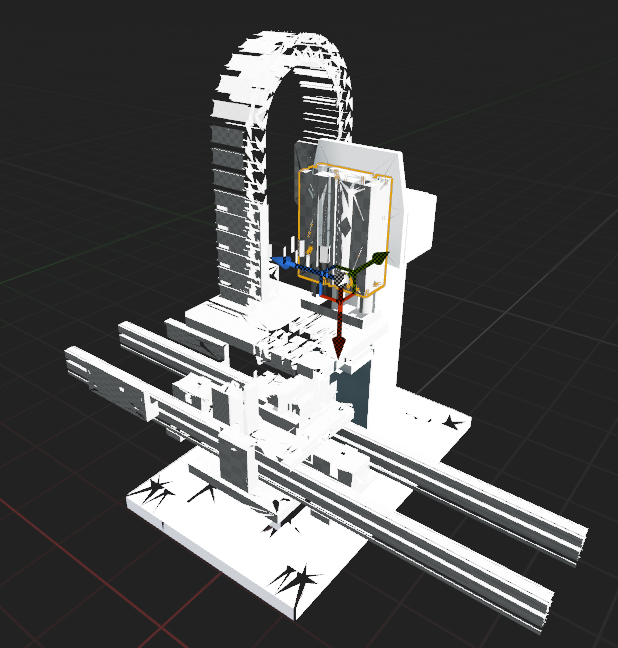
Broken mess of triangles :/
somber condor
@grim ore It's not that large of a level though : / I have larger levels that load just fine. I'm gonna give some good time and hope it caches by the end. I'm also speculating maybe I should try deleting all my derived data cache ?!
grim ore
well deleting the DDC won't hurt in the end, it just might take a while to rebuild it. worth a try.
even if it's not large, like say the open world sample level, it takes a while to open it in a new engine due to the size of the meshes
 vital cosmos
the only reason I see behind the invisible faces is due to incorrect normals
@tame delta in blender switch to face mode and turn on the view normals setting in blender#
tame delta
I think I might have fixed it, I disabled "remove degenerate triangles"
vital cosmos
in overlays
tame delta
And some other option somewhere
@vital cosmos Yeah that's the first thing I done, it did look good to me
I can spot bad normals instantly generally
But yeah, maybe UE and myself have a different definition of a degenerate triangles
but the one it removed (as you can see in the picture) I wouldn't qualify of degenerate.
Actually that didn't fix it either
It's just a bit less broke https://i.imgur.com/bhc76Jp.png
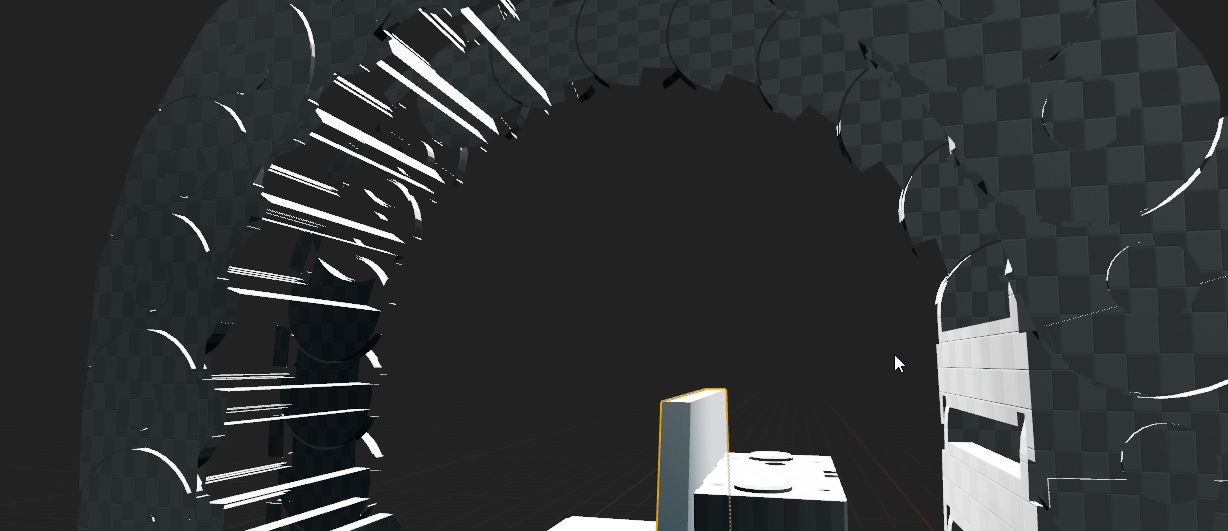
 versed cobalt
which channel should I go to for sprite issues?
tame delta
@vital cosmos Apologies, you were right, my normals are fucked. https://i.imgur.com/cJMlEDl.png
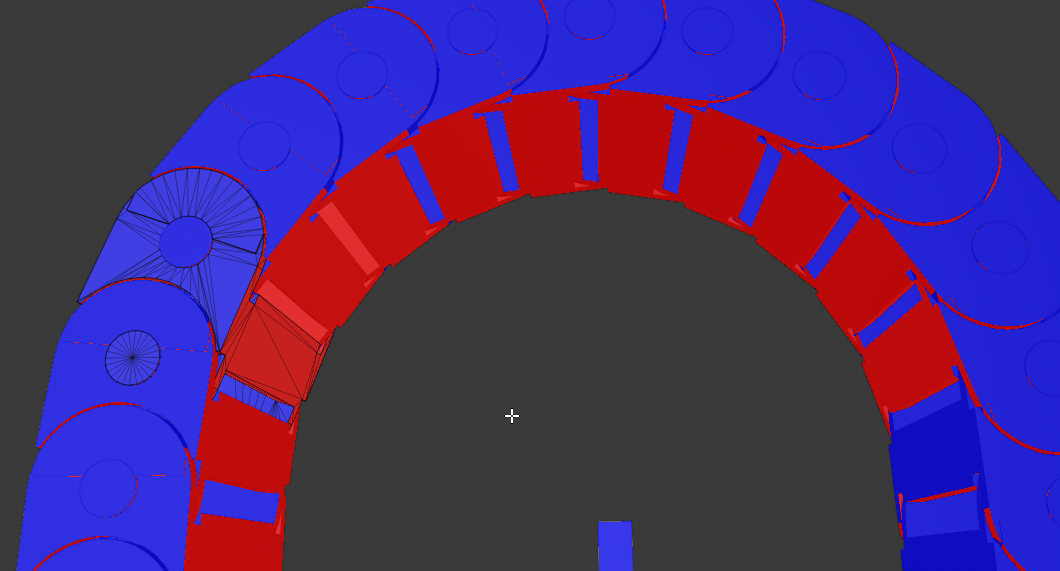
But blender doesn't want to fix it
Doing what you said earlier "recalculate outside" gives me this result ^
vital cosmos
wait can you display them as blue lines that poke out @tame delta
tame delta
I literally couldn't find that option in 2.8
But I found this one which seems even better 🤷
tame delta
Yeah I don't even have a scrollbar
tame delta
But either way, blender actually fucked the normals by trying to fix a model where the hard seams were cut, you can see the normals are screwed up in that previous menu
Yeah it doesn't work, I'm seeing the whole menu
 pale forge
Hey guys... I'm new to UE. I've done a decent amount of Unity and other javascript game engines like Phaser and Three.js.
I came to UE4 thinking I would have to learn C++... but the more time I spend with it I'm wondering if C++ is on it's way out.
Seems like everything is going to Blueprints. What do you guys think?
Personally I want to stick to C++. as I am not a fan of visual scripting. Deceptively simple but a nightmare to maintain.
vital cosmos
you are in edit mode right?
tame delta
@vital cosmos This is the model before trying to fix normals : https://i.imgur.com/NZn3LEa.png
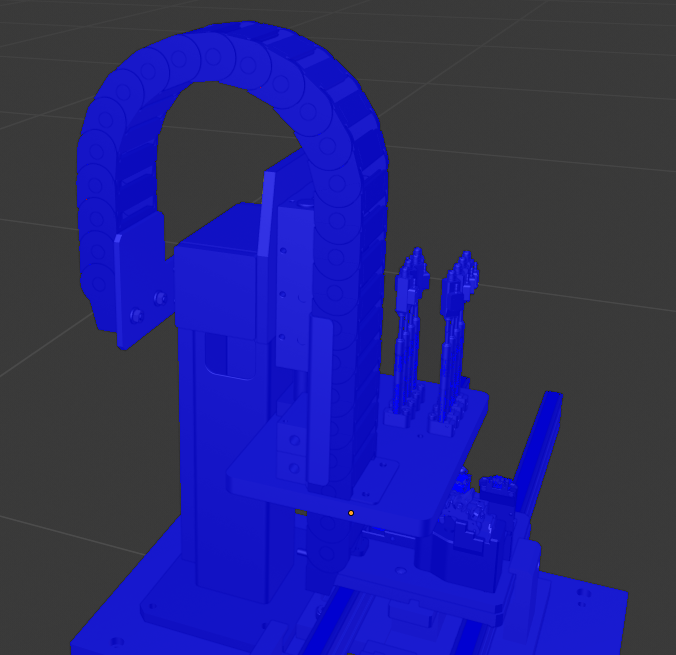
@vital cosmos Oh right, no I wasn't
yeah the normals match the colors
and their direction looks good to me too
Always hard to say though https://i.imgur.com/2orddNV.png
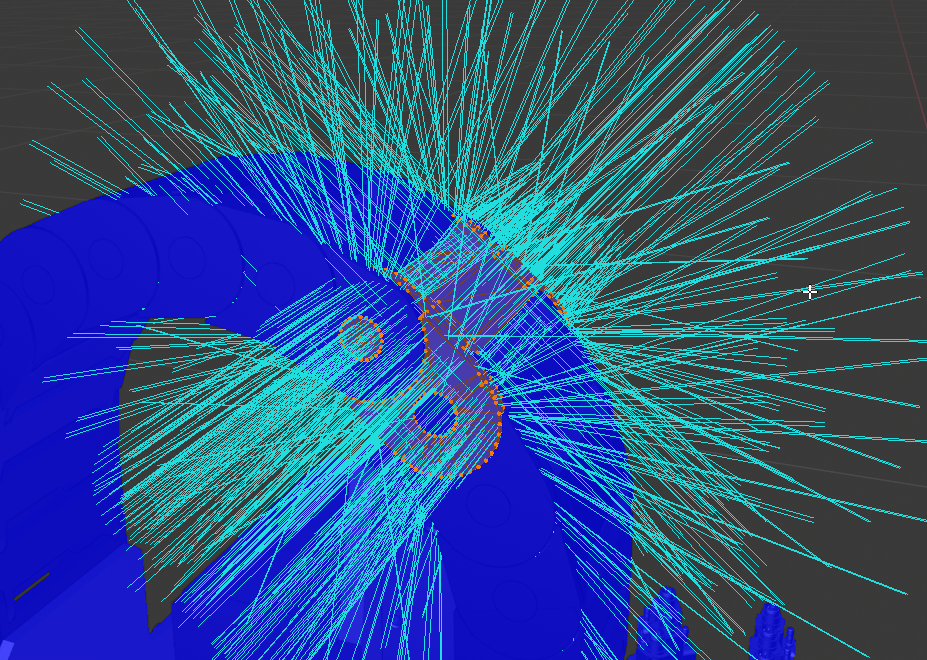
But anyway, the original exported normals by the fbx exporter plugin are fine
 vast anvil
weird, google links to ue4 forums keep resolving to https://status.epicgames.com/
Welcome to Epic Games Public's home for real-time and historical data on system performance.
oh, it says forums are down, nvm
grim ore
@pale forge if you plan on using UE4 use whatever you want, most larger projects end up with a mix of both. You can make a project using just C++ or BP but using the correct one tends to be the best choice as you go on. There are also certain systems that are designed around BP such as Niagara and UMG so keep that in mind.
I personally hate to use C++ but it has it's uses such as computationally heavy recursion and maths or to expose things to BP that are in the engine but not at that level yet.
pale forge
@grim ore Thanks.
 sleek spear
i am using level blueprints with keyboard input events that help me with testing the levels and taking screenshots etc. i want to do the same thing but without using level blueprints but another blueprint class instead, so i can easily add the same functionality to multiple levels. is it possible? i notice i cant use keyboard input in other blueprint classes. how would you people do this?
grim ore
you can use input if you tell the blueprint to take input
https://docs.unrealengine.com/en-US/Gameplay/HowTo/ActorInput/Blueprints/index.html or you can tell it to auto receive input in the details panel from a certain player controller
input in UE4 goes thru the Player Controller -> Pawn so if you want something else to use it outside this chain you would have to do the above or you should look into structuring input thru the controller as well.. it's the controller lol
sleek spear
awesome, thanks @grim ore
and what blueprint class is best suitable you think?
for example i tried scenecomponent but i cant drag it in a level for some reason
grim ore
depends on the input you are doing. Menu input? Controller. Player moving forward? Character. etc.. it's project specific
scene component need to be part of a blueprint, components are parts of blueprints
sleek spear
just some keyboard shortcuts that execute various console commands
thats what i am after
grim ore
so like cheats? I would say controller since the controller is always active and represents the player
but if you want it to be something re usable and not clutter the controller you can make a Blueprint Actor and put it in there
then you can just drop it into a level when you want to use it and remove it later
sleek spear
ok cool, thanks man
 radiant haven
Hey guys can someone help me with Android ads?
 meager copper
I am messing around trying to understand how to add force to my pawn. but the "add force" bp actions all take "primitive components" as target. I want my pawn to move as 1 unit, not move around individual pieces of geometry (I build the pawn with 3 basic shapes), but even if I did have a single mesh I wouldn't want it to move away from the other invisiable parts like the arrow or sound sources etc.
what am i missing? why does it make sense to add force to primitive components as oppose to the whole actor?
 scarlet birch
You use a root component primitive to drive the physics. It doesn't need to be visible.
meager copper
i just have the default thing. so I should add another basic shape and just disable it?
or use one of the ones i have?
scarlet birch
I'd use any of the primitives, like a sphere or a capsule.
meager copper
this rotated my cone and now it has lost the ability to rotate?
 plush yew
@fierce tulip Just saw your reply! Thanks for confirming to me that it actually was the windows update, I'll roll back tomorrow or later tonight 🙂
 next badger
can anyone give a me a hint on HISMs in #blueprint ?
meager copper
if I want a value to be 0.9 per tick, what can I do with that value and DeltaSeconds to adjust for variable tick length?
 digital anchor
if you want 0.9 per tick you just use it and ignore deltatime, if you want 54 per second you multiply by deltatime so you get aproximately 0.9 per tick (in a 60fps game)
grim ore
@winged crypt try \ key, It's a preview mesh and has a hotkey or else you can find it in the engine content folder. It's called the "SM_ColorCalibrator"
 rustic tiger
hmmm, im having this weird issue. I see an object in my viewport at a certain scale. but when i do a hi res screenshot. the object has scaled down. any ideas what this is about?
meager copper
is it possible to "set world location" on a pawn that is in motion from forces while keeping the force (it should continue to move with same velocity from new location)? When I tried to "SetWorldLocation" and selected the root node, it just seem to have exploded out of camera view
30k,15k,0 vector away from my expected 0,0,0
i tried with "teleport" enabled as that seem to be what I want
radiant haven
when EpicGames updates like plugins or so do they update them on all ue versions that contation this plugin or only NOW 4.23
 cloud cobalt
Plugins distributed with the engine are updated with the engine you installed
Plugins distributed on Github etc by third parties are updated when the author wants to
Plugins you buy on marketplace usually have versions starting from when they're released
 placid arrow
It's usually easy to backport or forwardport marketplace content yourself too
 ember notch
What i need to enter on the field "Title"???
grim ore
well Title is not required, so you would put your title or nothing if you have no title
somber condor
@grim ore You know what was freezing my editor ?! a single fucking HillTree I imported from Kite Demo!! it was freezing on levels that it was included. it's a known issue with Kite Demo Assets apparently smh
grim ore
oy 😦
cloud cobalt
Yeah, Kite assets are extremely heavy
Most free Epic assets are
They're free, they're a nice showoff, but they're not for production purposes
ember notch
What is a Swift code?
 normal burrow
swift is apples version of c#
digital anchor
assuming the context hes talking about bank code
ember notch
What is a routing number?
 dim dragon
Given that debug draw line is a debug feature, is there any alternative for actually drawing lines in 3D space when you're done?
I don't see any 3D line drawing features, unless UE4 keeps it on project export
meager copper
i am so confused. I add 1 directional light. I have a couple objects with light grey materials with no emissiveness. I hit play and it starts off dark (I set down the lum on the light), but then it becomes brighter and brighter and overexposed?!
placid arrow
That's auto exposure
dim dragon
Unreal Engine Forums
For discussions about Materials, Textures, Lighting, Particle Systems, and Post Process Effects.
Found something
placid arrow
It's pretending to be a camera
@meager copper look in the camera post processing options and turn off auto exposure
If it ends up too bright at the end though your lights are too strong
meager copper
there isnt a checkbox for that. should I change the mode away from automatic? then it becomes black. do I need to know how cameras work to get just a basic ... show me the world with the lights level like I have in the editor?!
grim ore
https://docs.unrealengine.com/en-US/Engine/Rendering/PostProcessEffects/AutomaticExposure/index.html , you can also change it in the project settings to disable it or force it to min 1.0 and max 1.0 to get it to a fixed value
if what you then see in game is not the same in the editor you might have something overriding it (post process/camera setting) or you have something else causing it in your character/pawn's camera
 obsidian fulcrum
Why does the lighting get darker whenever i go into landscape mode? it gets quite frustrating
it also changes sometimes while within landscape mode
sometimes makes the terrain really hard to see
meager copper
thanks. found it in Project settings
ember notch
I am Unreal Engine 4 marketplace publisher now ^^
 atomic pike
Noob BP x C++ question here, sorry.
Been learning UE4 C++ API trying to implement some non-default movements for an FPS character, like climbing ledge, double jump, etc. Lots of Blueprint tutorials online showing really decent results. I mean, it seems possible to largely expand Character funcionality using Blueprints only.
My questions are:
1- Why should I care to port my Blueprints to C++? Is BP performance really a problem in 2019 UE4?
2- Is it really feasible to implement my Character movement system in Blueprints and "port" it to C++ later? What people usually do?
cloud cobalt
BP performance is not a problem, and yes, it's possible to do lots of stuff in Blueprint
atomic pike
These questions are motivated by a lack of C++ learning resources, comparing to Blueprints. Or my ignorance about where these resources are.
cloud cobalt
The problem here might more be that, well, character movement component is a huge 5000-lines chunk of serious C++ and you'll need to understand it well for anything a bit complex
atomic pike
@cloud cobalt you said "performance" in italics is not a problem, meaning there is actually a problem (but not performance)? Which problem should it be then?
 frank escarp
@atomic pike cant put it into source control
cant merge it with work of other people
cloud cobalt
^
frank escarp
far more fragile than C++ when upgrading engine
and you are missing some hooks into the code that you can override in C++
cloud cobalt
You can put it in source control, really, it's just that text is a nicer format to track your changes over years, and C++ is text based
frank escarp
slower.. yes, but generally the slow parts of character movement is absolutely not the blueprint logic
cloud cobalt
Not much about Blueprint is significantly slower enough that it will be a concern
frank escarp
character movement is doing a bunch of physics checks and has to move the child meshes you have attached to the capsule. thats a lot slower than some basic input code in BPs
ember notch
Any idea what i could upload to UE4 marketplace? 😄
grim ore
low cost RPG models that are fully animated and articulated including synced up mouth movements to speech for cutscenes. It also has to support morph targets and layered meshes for armour and such. 😛
 abstract relic
Full MMO. Heard those are in high demand 😜
plush yew
Lol
My game if you press back button
it says the back to main menu function is disabled
😛
meager copper
I am teleporting a pawn into a collision box, is there some way to say "disable interacting with this box until I leave it?
obsidian fulcrum
working on a landscape material. however some of the materials in it causes the whole chunk to turn checkerboard
 azure shore
hey quick question, am I right in thinking lights that dont cast shadows practically dont affect performance at all?
 storm venture
does anyone know of a way i can test if my raytracing is working? just did a light build with RT on and nothing changed
grim ore
@obsidian fulcrum the bottom right shows it's compiling the shader you are using, you would have to wait
obsidian fulcrum
i've waited ten times over
nothing happened
its not showing it anymore and it's the same
@grim ore
grim ore
the next idea is your are using too many texture samples and need to change it to a shared sampler in the material for your textures
@storm venture ray tracing, if you mean RTX, is realtime it does not affect baked lighting.
the easiest test is to see if it's on is to go into a post process volume that is unbound, look at a shiny object with reflections, and turn on/off the raytraced reflections. There is a very obvious difference between screen space and raytraced
obsidian fulcrum
@grim ore this is how it looks
storm venture
ohhh awesome, i guess i missed that part! thanks :)
ill try the post process check right now
grim ore
yes, click on your texture and change the mode to shared for the sampler type
obsidian fulcrum
Which one? clamp or wrap?
 hollow frost
Can anybody help me implement my sliding and prone? I'm a noob at BP's
obsidian fulcrum
@grim ore oh cool, thanks
hollow frost
I'm trying to make a Call of Duty game with an Indiana Jones/LucasArts feel to it.
obsidian fulcrum
i dont suppose you can help me with my other issue?
it seems like my textures are being created on a weird grid
which makes it hard to control where things are etc
you can kind of see it there
with the straight lines
grim ore
I would assume that is your texture setup, maybe it doesn't tile or you need better macro variations
obsidian fulcrum
oh it does tile
the white there is one texture
the brown is another
but you can kind of see its jagged
instead of straight
hollow frost
Can anybody please help me, I have literally 0 tutorials to go off of.
grim ore
you have hundreds if not thousands of them, you will just have to break down your game into parts and learn to make each part.
hollow frost
Everything I've found has not been successful.
hollow frost
Especially with my current animations set, there's no dedicated tutorials for prone and slide animations out there.
obsidian fulcrum
@grim ore this should show you what i mean
hollow frost
Just a Virtus tutorial I was able to kinda slap some prone animations on.
That's about all I could find on YouTube, I'm really not good with text instructions.
There's a few pictures, from what I can see there.
grim ore
@obsidian fulcrum look at changing your tool settings, you have very low strength
hollow frost
But why do I have to go through so many loops and bounds to implement my features?
grim ore
because you are making a game
hollow frost
Obviously
grim ore
if you want you can pay someone else to do that for you, then its less loops
grim ore
then you have to go thru many loop and bounds to implement the features yourself
obsidian fulcrum
@grim ore that should have any say in this at all
grim ore
I guess you could look at using another engine that allows modding to skip most of that, like far cry 5?
obsidian fulcrum
you can see that its going in lines
hollow frost
It should be as simple as hooking everything up to the animation blueprint, then it works, this is just a simple Mixamo animation.
grim ore
@obsidian fulcrum did you happen to scale your landscape or any of those things so you have less verts to paint? or is your landscape very low poly
hollow frost
My prone appears to have functionality, but doesn't actually work.
When I press the button, it appears to try to work.
grim ore
the character explodes when they prone? the game shuts down? your cat dies? the capsule doesnt change position? uhm.... mars is in retrograde with venus and the tides wash away your plants?
"work" is subjective
hollow frost
What?
obsidian fulcrum
@grim ore i havnt scaled anything no
hollow frost
What does half of that have to do with anything?
grim ore
Prone does not "Work" for you. We do not know what "doesnt work" means for you.
hollow frost
Do you need an example?
What I mean by "doesn't work" is when I press the button, my character shakes.
grim ore
what does your code do when you push the button?
obsidian fulcrum
you can see my terrain settings on the right
hollow frost
Basically I copy pasted the Virtus code with prone animations and it did nothing.
Followed the whole thing like 5 times, then I get the player shaking when they try to prone
grim ore
ok so all that seems to do is toggle a few booleans poorly and change the walk speed. That shouldnt make it shake unless those booleans are also being used in your anim bp?
and by poorly i mean when you press and hold the input and sprint is set to try it's simply going to set it to false then back to true immediately from what I can see
even then when you release it will just set it back to false so I guess that should never trigger
hollow frost
Yeah, I'm not good at this.
Like I said, no prone tutorials on Youtube, and everything else I found had variables I didn't
And they didn't show the code of the rest of them
grim ore
well all this does is toggle a few things, it doesnt change the animations directly. I assume you have made changes to your animation blueprint
grim ore
so when you are standing (idle) and you press (and hold) the prone button it should go to the Prone state. What is the transition rule (the arrow going to the Prone from Idle) say?
then what does it look like in prone, then what is the transition rule back to idle from prone
my guess is the rule back to idle is bad if he is shaking
my guess is the rule is the same as the rule for the transition to instead of the opposite
grim ore
well that looks correct, is the rule for idle to prone the opposite (with it checked?)
wait
grim ore
thats the rule from walk to prone, not the idle to prone
hollow frost
Ok, sorry
 azure sierra
not sure if this is the right chat for this but has anyone used the plugin varest?
grim ore
the rules look correct, so the animation is set to not play or your event graph on the main blueprint is not getting the variable for some reason, or your animation is bad lol
you "should" be able to go back to the main graph and on the right are preview settings with options including check boxes and settings for your variables
if you click the checkbox for "Prone True" it should switch to your prone animation
https://i.imgur.com/LqNysZg.png this is the default third person anim bp. you can see on the right the options for preview and if i check the Is in Air? it makes the character on the left jump like he is in the air
so if your animation is correct (the transitions and the node) this should cause it to go prone. if it doesnt then your animation is wonky somewhere lol
grim ore
doesn't mean it's not wonky. It could be set for root motion, it could be set for the wrong skeleton, etc.
hollow frost
Maybe
grim ore
when you preview the animation in the editor (double clicking it in the content browser) does it look right?
hollow frost
Yeah
grim ore
ok so when you try the preview in the animation BP with the check box does it work?
hollow frost
Looks like the skeletal mesh is tposing
Not the animation though
That seems to work just fine
grim ore
ok so when you are in the preview it's at idle? and then when you click the checkbox it drops to prone? and then when you uncheck it the character goes back to idle?
grim ore
so when it's checked the prone is shaking?
grim ore
this sounds like it's a "go prone" animation not a "prone" animation then
hollow frost
No, it's definitely a prone animation
I've checked, and it doesn't try to go prone
It should just prone
grim ore
i dunno then at this point, what does your "Prone" node look like in the graph. someone else might be able to help in #animation at this point
hollow frost
I've been trying to get this to work for my next showcase
I'll see if animation can help
 manic pawn
ah, a blueprint from hell
 limpid isle
Hey guys I got a problem I'm trying to test my game and after packaging whenever i run the exe it opens then says map could not be found from command line. any idea what's wrong
 heady frost
first thing I would check is are you actually packaging the map
I know it sounds kinda silly but you'd be surprised how often it happens
next badger
@grim ore sorry to poke, do you have experience with HISMs?
grim ore
@next badger nothing beyond trying to use them once and never again 😦
next badger
;_; okay...i just can't make them work as ALL tutorials show
grim ore
oh thats odd then
next badger
yeah, the lod's not work
https://gyazo.com/7b1b0ef4f79c42d55cf9ddd96b65de2d

no hism groups
grim ore
😦
 vagrant pagoda
https://youtu.be/pz6w6vt5XnI got 120 fps in editor, when play in window getting 3fps. any suggestions getting to end of teather 😦

Present have a problem playing in editor is giving massive fps drop..l cant figure out whats the problem.
grim ore
do stat unit and see what is showing, also look into full profiling
the biggest difference here is you are not "playing" in the editor, you are just running around. You have no logic running at all
also test with play in standalone not Play in Editor and see if there is a difference
 waxen ingot
I want to try unreal engine and maybe use it, but I don't understand the whole Royalty thing that I must pay, 5%
grim ore
which part of the royalty thing is not understood
waxen ingot
When do I have to pay the said 5%? Can I send them on each purchase automatically, 5% from the purchase or at the end of the month
abstract relic
Same thing as Steam’s royalty. Just 80% cheaper
grim ore
There is a very large list of royalty answers in the EULA https://www.unrealengine.com/en-US/eula but it's done per quarter based on revenue for certain products
waxen ingot
And if I don't sell over 3.000$ I don't have to pay?
grim ore
basically it's up to your to figure out how much you owe them and to pay them
waxen ingot
1. The first $3,000.00 in gross revenue for each Product per calendar quarter;
grim ore
if your gross revenue is less than that amount per calendar quarter you have no royalty to pay them
abstract relic
waxen ingot
oh well, if I earn that much I'll get an attorney to sort out such things
grim ore
that link above has a form and such
fill in the blanks and all, if you make enough then kudos 🙂
 harsh tiger
i've looked for answers and nothing worked. i uninstalled an reinstalled and it still doesnt work. anyone know of a fix?
waxen ingot
Thanks @grim ore
I wanted to make a Text Adventure Game, UE4 is overkill for such a game which requires more text as visual but maybe I plan it somehow else including 3D and 2D and make it into somewhat a visual novel Like 80 days
plush yew
I was like why i keep getting kicked out of my server
Then i realise
Its trying to load a mod that the server doesnt have
There we go better 😂
storm venture
hey im looking for some criticism. i'm practicing rendering/post processing and im trying to make this look as real + high quality as possible
storm venture
thanks 😄 but there's always room for improvement
 polar hawk
shells are a little off
don't know how but
something with their material definition
they look like they feel different than the almost identical looking shells I own in real life
¯_(ツ)_/¯
heady frost
it looks great to me, the only suggestion I can think of is maybe a tiny bit more dirt on the gun
heady frost
maybe it's just me being super dirty in regular life, but it seems like a really clean and/or new weapon
 dry moon
Anyone know why adding levels to the Levels to be streamed won't add?
polar hawk
also maybe im crazy but
your trigger looks like it is in the squeezed state
maybe its just like that but it feels off
 visual belfry
End of the shells looks flat vs the bottom of an orange I usually think of
Not sure if the slight shadowing is because it is flat but attempted to pull it off with normals or what
dry moon
What's with this fucking editor dude
Creating new level in the levels window won't add it in
dragging the level into it doesn't work either
files aren't locked or anything
 half drum
anyone have a tut for the 4.23 multi-seat over WAN/VPN/hamachi ?
next badger
@dry moon disable the world composition in the world settings tab
dry moon
I added it before without world composition tho
next badger
no...you can't do that when it's enabled
next badger
dry moon
Nevermind figured it out
but ya you can
Make a new folder in the level asset root folder, add the level there
it'll auto populate into the levels window
next badger
um, yeah, that's how "auto-discovery" works
 uneven fractal
how do you prevent foliage in the foliage tool from basing on other foliage?
next badger
@uneven fractal like painting over other foliage? or painting on the surface but one instance is overlapping another?
uneven fractal
I'm putting down grass and some of it is basing on top of my trees
next badger
cause foliage is not always grass
dry moon
Some people paint larger rocks, and then want to paint on top of those as well.
uneven fractal
well I guess if it's static foliage you might want to have like moss on top of rocks and stuff
dry moon
Yeah
uneven fractal
my foliage is all destructible so it would be a bit weird if the foliage on top stuck around
next badger
i wonder if chaos can handle that...probably not
dry moon
Just a suggestion though I'm not sure it's something you would wanna invest in.
Actually never mind, would cause load time hangs
uneven fractal
speaking of grass how much is too much?
dry moon
Depends on the alpha over lap and triangles/verts
uneven fractal
what's alpha overlap?
dry moon
actually 600 might be bad
Mines is about 130, with 2 LODs bringing it down to
6 triangles
uneven fractal
mine has foliage culling bringing it down to 0 triangles
dry moon
ya you should always have culling on the grass
you should be able to see the overlap if you turn on shader complexity
uneven fractal
dry moon
does it not show alpha overlap in that mode anymore
anyway 600 might be a lot
try to bring that number down
uneven fractal
would that be under quad complexity view?
dry moon
yea probably
 sonic pagoda
how would you go about getting decal channels
for example
a grenade explodes with an enemy in it
and blood decal spawns to portray splatters on walls
but your player is also set to receive decals
next badger
@uneven fractal it looks so green, does early zpass transparency enabled?
sonic pagoda
would you instead run multiple lines traces
and spawn multiple decals at the walls, instead of 1 big box decal
next badger
@sonic pagoda it's not simple, but you may use custom stencil buffer to mask the decals
uneven fractal
how about a multilane trace that only adds decals to world static objects if it goes through a player first
what is early zpass transparency and how do I tell if it's enabled?
next badger
uneven fractal
is that on the material?
next badger
no, in project
uneven fractal
it's set to decide automatically for me
next badger
yeah, the default...the one in screenshot is "enabled"
uneven fractal
really? I haven't even been in the project settings for my project yet
next badger
not sure what "automatic" does
uneven fractal
next badger
yeah, but what features?
uneven fractal
kind of vague
the other options are opaque, opaque and masked, so I guess the opaqueness and maskness of the materials 🤷
next badger
well, it's up to you, this checkbox adds some instructions in shaders, so in general they cost more, but things like trees getting boost in performance due to early zpass masking
uneven fractal
I think I'll leave it as since it's green
next badger
yeah, that's why i've asked
uneven fractal
all the foliage is from the open world demo collection on the marketplace if your intrested
next badger
generally trees are red w.o this checkbox
dim dragon
Is there a way to update camerashake's properties as live values that play on loop or do you have to call them as events that play or loop once only (which is kinda weaksauce)?
Like I see a way of setting macros, variables and events, but there are no functions to drive the properties of camerashake within a camerashake blueprint.
You can only call the event.
storm venture
so raytracing is leading to this weird watery movement effect on shiny surfaces, anyone see this before?
plush yew
I don't need a whole explanation on what I'm looking for, just some key words to start searching. I need to store information locally on my computer and then get that information in my game. I guess like a saved game but not that specifically. I'm doing character customization like the kind in XCOM 2 and I just need to store those custom character variables in a list somewhere so that when that character appears in the campaign they can look like they're supposed to.
 pliant yoke
I have a UE4 question
this is my adaptation of the "top down" template
for some reason there's an empty space in the navmesh right below my pawn
not sure what I did to make this happen
grim ore
@plush yew is this pre made information? something that you want to make then use in the game. if so look at data tables, you can even import them in from csv files
plush yew
in the viewport are your feet touching the bottom of the capsule?
pliant yoke
okay that actually fixed the empty space in the navmesh
but it's still not moving for some reason, thanks lol
plush yew
@grim ore Yeah, so if you make a custom character in the main menu there's a chance they'll randomly appear in your campaign. So players themselves will set these characters up and then when the game needs to spawn an npc it will randomly select an item from a list of pre-made characters. Or if there are no more premade characters ill just have the character that pops up be randomized. Can data tables be edited?
@pliant yoke is it using an aicontroller?
pliant yoke
I think so? it is from the top down template using mouse control
I am just trying to figure out this navmesh stuff
plush yew
I haven't used that template unfortunately. With the little knowledge I have of navigation and AI, if something is using navmesh then it needs an AI controller? I could be wrong on that though. Is it like old runescape navigation where you click on the map and it moves to where you clicked?
pliant yoke
yes it's just like that
it was working before but i deleted a bunch of landscape elements and borked something up?
plush yew
does your navmesh encompass the entirety of the navigation area?
pliant yoke
yes, with extra
plush yew
darn thats what I do too. Is the image an example of it working or failing?
plush yew
one time I had an issue and deleting/remaking the nave mesh bounds thing solved it. I doubt that's whats wrong but it might be worth investigating
 leaden dust
My projectiles are not spawning if my player is not moving
What in the world
any idea why that could be happening
plush yew
do you have a screenshot of your projectile spawning code?
plush yew
and all that happened between it working and failing was you deleting terrain elements?
Did you create your character from scratch blueprint-wise? Or did you just modify the character that was already in the template
pliant yoke
I'm just using the template thing
guess I'll figure out how it works tomorrow lol
yeah I just deleted terrain elements
no idea what happened
grim ore
@plush yew ah then you need to use save game or your own custom database if you want this to be custom data in the game created in the game
pliant yoke
I did do some landscape terraforming but idk if that would affect anything either... mysterious
plush yew
Hmm I've never done terraforming. That's definitely something you could investigate. You could also try using print string nodes to see if the character is even trying to move/receiving your input
plush yew
@grim ore Awesome, thanks. I'll start looking into databases. I was hesitant to use save game since I wanted these custom characters to be able to be referenced in any playthrough of the game. I've got a bunch of resources pulled up now including your videos so hopefully I can get what I want moving in the right direction by the end of the night. Thanks again!
pliant yoke
those videos are incredible
plush yew
ikr
plush yew
could try having it print the location it thinks you want it to go?
pliant yoke
i dont think that's the problem, was working fine before
grim ore
There is nothing wrong with using Save Game, you can save your characters in a custom array or map or whatever in their own Slot like CustomStuffs and as long as the game doesn't get nuked you should be fine.
pliant yoke
alright i'm going to sleep, thanks for talking!
wait i just noticed something
when i run the game, the navmesh map is way above the player/where it appears in the preview?
in game:
preview:
plush yew
hmmmmmmmmmmmmmmmmmmmmmmmmmmmmm that doesn't look right to me
if I had to guess, is it possible that the nav mesh is transferring up to whatever that other box volume is?
pliant yoke
sure looks it!
those are the postprocess and lightmass volumes though
the navmesh is the flat one
I deleted those volumes and it's persisting
plush yew
Awesome, thanks Mathew!
 wraith socket
Hey guys, does anyone of you bake with GPU? Because everything bakes right but the landscape
GPU lightmass of Loushang
 rain coral
dim dragon
rain coral
dim dragon
Update: Set your camerashake as more than one instance and call it at a frequency of its duration using the network camerashake for local client which lets you scale the intensity of the shake -- then blend several camera-shakes together. Problem solved. Regular camerashake function won't let you drive any channels. Its a shame because if I could drive the channels of camerashake in realtime I can think of about 20 things I could do representing things - for example aerodynamic changes for my plane when it stalls in the cockpit or adding headlag to the movement, as if the pilot's head were being knocked around by g-forces.
 coral aspen
Can I expect Unreal to support the ECS pattern out of the box at some time or should I just write my own ECS implementation?
 regal mulch
Doubt it will be out of the box. UE4 is more build around inheritance
 ornate ice
Hey People
I've seen UE4 allows you to make variables, functions, macros all with spaces
like
Find Wall Location
is this a bad practice?
regal mulch
In blueprints it does
ornate ice
i know in the regular dev world it is
regal mulch
You can even out signs into it
regal mulch
Yeah up to you. I don't like it at all
regal mulch
bIsJumping
regal mulch
Well the node names are friendly names
regal mulch
Yeah but it's best practice to stick to the way the framework names its variables
regal mulch
You can do whatever you want as long as blueprints allow it. Cpp definitely won't allow that
regal mulch
I also see people name there stuff in their native language
Could barely work on specific clients cause of that
tame delta
When importing some fbx as a level, is there a way to create material instances of a single material rather than a bunch of different materials?
Or alternatively, a way for me to transform 185 materials into material instances?
ornate ice
@regal mulch well that's actually nasty
I believe Hell is full of that people
jajajaja
tame delta
Also dumb question that has me baffled
how do I move assets into a folder?
I can't drag-drop it because there's a lot of assets in the middle, and I can't seem to filder for folders (not that it would be a good solution either)
 light hornet
Hello. I'm not sure if this is the appropriate place; please correct me otherwise. But Microsoft Visual Studio seems to hang when unloading projects on exit. Any advice?
 silver crown
Welcome to VS
 ashen cape
Hi guys, can I ask for your help? For some reason when I import png file with transparent stuff (for UI purposes) it completely distorts it and I have no idea how to get it working :/ any thoughts?
regal mulch
@ashen cape What do you set the Compression mode of that texture to in UE4?
As well as TextureGroup
light hornet
@phy I assume this is normal then. Is it okay to force close it with Task Manager?
cloud cobalt
@ashen cape UI stuff with transparency needs "UI" compression
ashen cape
@cloud cobalt @regal mulch I have tried several compression modes with no huge effect :/
cloud cobalt
There is only one, which is UI
Import the texture, set to UI and it should work fine
 hasty osprey
Thanks it worked
 exotic thicket
Which chat that i can talk about materials ?
cloud cobalt
It's a bit unavoidable with the built-in Lightmass, but it can be made a bit better with extremely careful lightmapping
Mostly it's best to avoid seams alltogether
 gaunt raptor
So would it be better to make the entire tunnel as one piece ? instead of several small pieces ?
dim dragon
Could do it as a spline and extrude geometry
So it is seamless but also extendable and editable easily
There's a guide somewhere on YouTube for it but I'm on mobile that shows you how to make a road this way.
@gaunt raptor
Basically it's the easiest way to do any kind of procedural geometry.
cloud cobalt
The most obvious solution is to just hide the seams
Real-life objects aren't generally seamless
A concrete tunnel roof would have actual seams in geometry, which is where you can hide the seams
That way you don't change anything, except add some geometry on edges
 winged crypt
Is anybody else struggling with materials in 4.23 (source)? I get d3d compile errors if I use 'Multiply' nodes, etc. It only seems to compile if I hook textures directly into the final output. I'm hoping it's just me, it'd be a huge bug
gaunt raptor
allright ill have a go at it 🙂 thank you
 vale silo
please help https://forums.unrealengine.com/development-discussion/rendering/1668582-pom-material-only-works-on-the-floor-why 😊
Unreal Engine Forums
I followed this tutorial to make a POM material for my brick floor: https://www.youtube.com/watch?v=P8Ffmu5Cll4
Instead of feeding all that setup for UVs on
 wary wave
the problem with that post is that rather than posting your material graph, you've posted a 15 minute video that nobody wants to watch to try to guess your problem
cloud cobalt
At a glance it looks like you found the problem already tbh
... I'm going to be that guy and say that you might want to avoid using POM anyway
It's easy to use, but it has extreme limitations too, and it's costly
vale silo
@cloud cobalt well, I just wanted to test the look and performance of POM with small number of steps in VR..
if it's really bad, then I won't use it. If it works fine and looks okay'ish, I might just use it
bump offset looks as flat as normal maps 😦
 opaque salmon
Assertion failed: [File:D:\Build++UE4\Sync\Engine\Source\Runtime\RenderCore\Private\RenderResource.cpp] [Line: 151] A FRenderResource was deleted without being released first! I keep occasionally hitting this crash when a second player joins, anyone got any tips as to what could be causing it? not seeing anything obvious in the logs
vale silo
@cloud cobalt I think it would be almost impossible to do geometry with this kind of style / textures https://www.youtube.com/watch?v=pBhCaO3tCUw (especially if I make levels in Trenchbroom and import them into UE4)

or maybe I'll just keep it flat like that.. Gotta test more 🤷
dim dragon
Idk are they representing voxels or spline cages with geometry or something or a shader?
vale silo
@cloud cobalt because it's old school BSP level design - no meshes.
pliant yoke
@plush yew fixed the navmash. just had to make a new map. 
thanks again for your help!
 robust tree
I am not sure if this is the best channel for this but I am making UE 4 Minutes Tutorials for impatient people. In this episode I show how to create doors opening mechanics in Actor Blueprint with Timeline. Enjoy! https://youtu.be/veD-eAIaIBI
In this tutorial I show how to create mechanics of opening doors the proper way. In Actor Blueprint with Timeline.
 nimble steeple
Everyone!
I just have to share something here that may or may not be related to any UE4 versions specifically.
But i experience this using a SDK available in the launcher...
LogD3D11RHI: Error: C:\P4\SQ-A15\UnrealEngine\Engine\Source\Runtime\Windows\D3D11RHI\Private\D3D11Viewport.cpp:(238): BackBuffer->GetResource() has 2 refs, expected 1
This error for me was ONLY related to Discords GameOverlay mode.
Why is this affecting the engine??
Also! this may already be know! 😛 😳 ?!
grim ore
@robust tree my only feedback is it feels a bit quiet on the audio, YT is showing it at -12db which feels a little low to me and do we really need a floating head covering part of the editor? if it doesn't serve any purpose seeing you talk is it a benefit to the content? This is important because when you are inputting the values on the timeline that part of the editor is hidden 😦
robust tree
Thanks @grim ore I know your tutorials, they are great! I feel like my face making my tuts more personal. I always strugle where to place it. I thought I found a spot but this dman timeline...
grim ore
yep the face issue is a problem, if you can find a good spot or even have it on and off when it's not an issue (like in a corner at intro and outro?) then it should be ok but covering up editor stuff is a pain for the viewer 😦
Bottom right or left is normally not a bad place since you can scroll most of those windows up but you can see even epic struggles with that when doing the livestreams
 ripe saffron
Nobody wants to see your face mate...if they come, they come for the knowledge.
...tomatoes!
robust tree
I am gonna go cry right now...
ripe saffron
Heh...what do i know🙂
 subtle girder
Does anyone know if there's a way to get the high resolution screenshot tool to work on an orthographic scene?
 dense gate
Possessing a pawn with an ortho camera and using "HighResShot" command doesn't work?
 keen cave
Hello, I'm a new preson to unreal engine and I'm trying to discover its features via prototypes. The things is, I get soon confronted to problem that I can't resolve. I would like to now at wich level of difficulty is it ok to post a question on the channel ?
grim ore
as long as you tried or have an actual question I don't think anyone would mind trying to help if we can. "I want to make an MMO, how start" is not going to get much help.
subtle girder
@dense gate I know the original command was "rendertextures", there's a tool I was using instead. I'll try that and see shortly
visual belfry
is there a way to allow inherited components to be reordered? (I want to attach a component made in C++ to a socket on a mesh in the derived blueprint)
dense gate
You can't reorder things from the parent class/inherited sadly
visual belfry
😬 maybe I can put a function on the C++ class to reorder if it finds a mesh with suitable sockets 🤔
subtle girder
@dense gate nope - doesn't seem to work :/
dense gate
One megaoof
One thing I do is have a simple "cube" mesh for the parent and have a "universal" socket like hand_l @visual belfry though if you want to change sockets this might be tricky
Perhaps try to have a variable in the parent BP and have an "attach to socket" in the construction script to that variable
next badger
Can anyone verify if Answerhub attachment is work? I cant attach a file to the post.
 buoyant radish
wich is better unreal or unity?
next badger
@buoyant radish for what purposes?
buoyant radish
an mmo multiplayer online survival game
next badger
MMO - mass multiplayer online
visual belfry
a large team is better than both unreal or unity in that case >_>
buoyant radish
im solo
next badger
i'm not sure how unity's network subsystem changed for past years
buoyant radish
yea
next badger
there was no any iirc
next badger
why you need to use it?
buoyant radish
the multiplayer system in unreal, do i need to buy servers or free servers?
next badger
where you can get free servers not on unreal?
scarlet birch
I looked at Unity recently and was left with the impression there were only paid solutions.
subtle girder
My bad, I think I didn't actually highlight the correct issue - Orthographic views don't seem to light atm, so I'm wondering if there's a way to workaround that. I've been trying to use the RenderToTexture_LevelBP to see if there was a way around it there but it didn't work. I'm not experienced enough with BP yet to really dig in and see where the issue is though. I'm trying to use 3d models as sprites and am trying to not have to render in Maya if I can avoid it, but the game will be a single screen platform game without perspective, hence the need for orthographic captures.
(off-topic relating to my question above)
scarlet birch
for the subsytems not talking about server hosting
buoyant radish
wtf is subsytems?
next badger
@scarlet birch yeah, i think unity still has no networking solution out of the box
buoyant radish
yea
next badger
@buoyant radish it's a part of software that handles some task...like networking
buoyant radish
ah
ok
anyone of you here knows ark?
i want like to make a game like the idea of ARK
next badger
everyone does...ark is a poopy implementation of ue4 multiplayer game...
buoyant radish
wut do u mean?
well
im sorry
i gtg
now
bye
it was great to talk to you
bye
scarlet birch
It's slipshod
next badger
some may be genuinly interested in game dev, you can't treat everyone who asks silly questions as a troll
subtle girder
Wouldn't mind but it does kind of hide the production questions in the chat 🙂
next badger
at least making a WoW killer was not his goal
scarlet birch
I meant Ark is slipshod
next badger
ahahah
scarlet birch
@subtle girder I think none of the lighting works with orthographic. IIRC, You can achieve lighting effects with materials and PostProcessing though.
subtle girder
That was my worry, ah well. Thanks 🙂 I'm actually trying to put a pipeline together so some art students can use Unreal despite the coders using a really old 2d engine. Might still eb able to make something like what you're talking about by doing postwork on textures & planes then highresshotting those.
scarlet birch
There was a pretty good stream a while back about how to get lighting going with it, but I'm not finding it.
subtle girder
yeah I did a good few hours searching this afternoon and came up blank
next badger
so, hiresshot not works with ortho?
scarlet birch
I think it was a UE stream with Chris Wilson about "The Siege and the Sandfox" that I'm thinking about.
but not finding it, and I might be wrong
subtle girder
Alexey - it does but the lighting doesn't work in ortho. The screenshot just shows something like a depth pass.
Cheers for looking Mike and thanks for the HighResShot comment Alexey, I've got to make a move or I'm going to miss a meetup, but I'll probably stick my head back in here over the weekend and mention if that pans out or if I figure another workflow.
scarlet birch
@subtle girder I think this is it. https://www.youtube.com/watch?v=Tf9Qd4isHTM

Join Cardboard Sword’s lead designer, Chris Wilson, as he takes you from the Paper 2D starter project towards making your own game. With examples from their ...
I'm not sure if it will work for your needs though, since this is for sprites.
subtle girder
I'll give it a look, might do the trick!
Part of the issue is they've effectively stopped developing Paper2D >.<
next badger
they never started it...
scarlet birch
It does seem that way. I wish they had something like Box2D out of the box. Idk, I haven't looked at it much.
next badger
paper2d was a "free friday" project
i'm not sure Epic still does those for their devs
since Chaos is coming, they have to update paper2d as well
since no more physx
 ivory cradle
hi, on the Texture and Material Pipeline | Live Training youtube video there's a part where they talk about image projecting lips and eye parts onto the model. is this just taking a photo of said part then stretching that image over the uvs of the model? if not does anyone know a video or documentation that better describes this process?
vale silo
any speculations about why 4.23.1 isn't even close to being released ?
 thin hemlock
hey guys, one of my projects is currently messed up, I tried regenerating the project files and building it from source but everytime I go to build the project from visual studio it fails, also I noticed the folder is read-only but anytime I change it, it's only not read-only for a few seconds
grim ore
what is the failure error
thin hemlock
these are the errors I get when I try to build it in Visual Studio
grim ore
well the generated are because they didnt generate, which means another file didnt compile probably and I see an error there about an error
expected a ) needs to be fixed
thin hemlock
I believe that's an intellisense error, atomic.h is an unreal engine file not a project file
grim ore
ok then what about the 2 below it?
 serene birch
I wouldn't worry too much about the errors past the first with that list
fix the first error then try compiling again
look in the "Output" tab for the sequential compilation log to see the first error
thin hemlock
by first error are you referring to the no storage class or type specifier one?
ah I see now
grim ore
also you regenerated the solution file but did you clean out the intermediate and binaries to be safe?
thin hemlock
yes
@serene birch thank you, I never knew errors were listed in the output like that so that'll definitely help further down the line, it was an issue with uint32 and blueprints, I fixed the issue and am rebuilding now
 gilded igloo
Hey guys, I wanna learn how to use widget bps (at least the basics), anyone knows a good source? there was a livestream on this?
 mossy pike


 cloud cobalt
Not that I know, but there's the tonemapper sharpen in engine
And there's SMAA + forward
Since no sharpening will really correct TAA entirely
One of them but not the one I was talking about
Tonemapper sharpen has always been in engine
r.tonemapper.sharpen [0..1-2]
So try that first
And no, this PR hasn't been in engine
AFAIK
It's too massive a change and TAA being blurry is a fact of life in UE4 - you can't really sharpen it back in a convincing way because the sharpening won't be temporally stable
You're correct, not plugin friendly
My current game requires sharp images and I've just moved away from TAA
I love TAA, but it's unable to produce texture grain on surfaces
 ornate hamlet
I get quite good results with TAA
r.TemporalAASamples = 8 | r.TemporalAACurrentFrameWeight = 0.0
cloud cobalt
MSAA is pretty great, forward is okay but obviously introduces limitations. No SSR, raytracing, loss of many screenspace effects
ornate hamlet
I mean it isnt perfect..obviously
I suppose if you are making an indie game you might as well just render at a higher res and scale down
cloud cobalt
TAA is absolutely the best at performance & aliasing removal - completely outmatches anything else. That's what I love with it, you simply can't get aliasing with it
MSAA at same cost is slightly less good
The TAA problem is just that some renders will be impossible, period
ornate hamlet
Real men use FXAA and then Sharpen the hell out of the image 
cloud cobalt
Old MSAA/forward shot of a test mesh :
I've worked a lot with TAA and, basically you can't have this
Yup
ornate hamlet
One thing that would also be great is per object motion blur if we are discussing post processing...
 rustic panther
it looks for contrast and blurs it right
ornate hamlet
but oh well
cloud cobalt
It's way better than that, @rustic panther - TAA is a bit like FXAA, except it works like a motion blur
rustic panther
is it possible to render somethign after TAA pass
cloud cobalt
IIRC that's when post process runs
next badger
@cloud cobalt can you explain what exactly i can't have with TAA?
next badger
@cloud cobalt oh...you can..but probably will be puke in motion
cloud cobalt
Nope
 opaque vector

Please don't use this for your holy wars and arguments, TXAA has evolved since 2014.
cloud cobalt
Even still images with tonemapper sharpen, unless you dial TAA back considerably, will remove a lot of detail.
next badger
okay, i'll take a look on that...was not aware
cloud cobalt
It's entirely fine if you don't need close shots of grainy surfaces
rustic panther
Please don't use this for your holy wars and arguments, TXAA has evolved since 2014.
next badger
i still have issues with taa not respect motion vectors
rustic panther
is there not an AA Mask or anything
cloud cobalt
Nope
TAA is great if you have neither
- stuff like glass cockpits, transparent stuff over moving scenes... because incredibly bad ghosting
- third-person car style gameplay (racing games) because some ghosting (high qual) to incredibly bad ghosting (lolw qual)
- close shots of grainy surfaces
Or basically if you have motion blur, then you probably don't care about TAA at all
ornate hamlet
Have you guys played Squad?
That game and its AA....good lord
The only way to get even remotely decent results is to just Supersample
cloud cobalt
It is quite good, except it won't be temporally stable, so vegetation might look bad
Other than that, it's probably the least evil
Honestly it's quite game specific
next badger
yeah, vegetation, rain, snow, riding in a car...all of that
cloud cobalt
Crytek's TAA is great, overall
Driving games can get around TAA issues by depth-masking its intensity
I think their implementation is more focused
next badger
yeh, what about games that are not driving sims and just have cars in them, like PUBG
cloud cobalt
UE4 TAA works "okay" for most games in most conditions, removes any sliver of aliasing from scenes that are a complete nightmare from an aliasng POV
TAA in UE is also a gateway to many effects
It's a general-purpose temporal filter basically
I mean, you can exploit TAA to build transparency with masked materials
That's wild
next badger
taa for mask transparency kinda su*k...yeap it does work, but so horribly...i had to remove it cause of heavy ghosting
cloud cobalt
Sea of Thieves uses that extensively for LOD - every single game asset uses "transparency" at a low cost because of TAA. Power like that comes at the cost of not being the best variant of TAA
Screen-space reflections in UE4 also rely on UE4 to not suck
And so on
Well it's linearly more expensive to render
2x means your scene is 2x slower
Ignoring performance, you can use TAA with supersampling
Set the screen percentage to 150 and enjoy the sharp image
next badger
i'd love to see some examples of taa masked translucency
cloud cobalt
You can use supersampling with FXAA, too, but it won't ever be as good at removing aliasing, even at a ridiculous 2x larger res
We have the option in Helium Rain
154% upscale, basically twice the cost , and FXAA vs TAA - there's little reason to pick FXAA unless you really like sharpness, and aliasing
ember notch
Do someone have a idea how i make with a widget something like this? "https://youtu.be/9_YJnor4XH4?t=77"
cloud cobalt
https://www.youtube.com/watch?v=ieHpTG_P8Q0 @next badger
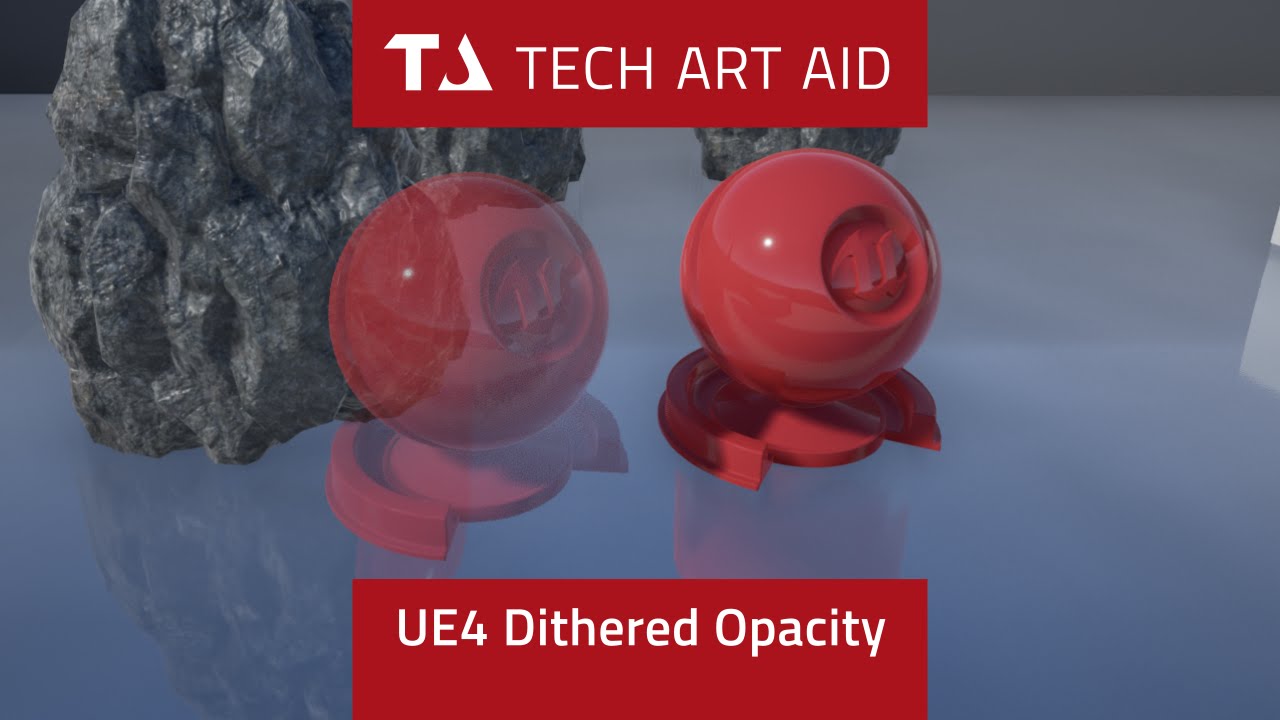
Learn how to replace translucency with a dithered mask. Get project files: http://cbr.sh/od53nz Material graph screenshot: http://imgur.com/rESne5i (sorry I ...
Or you can play Sea of Thieves, it has it everywhere
next badger
seen that. it doesnt work with moving objects/camera
rustic panther
you can surround a link with <> to remove the embed
cloud cobalt
It doesn't work as well as regular transparency, of course. It's also 50x faster to render 😛
cloud cobalt
Yes, it is
next badger
but 50 times...kinda nice
cloud cobalt
I'm joking about 50 times - but really, translucency is way, way, way more expensive
next badger
the main issue of translucency...it's rendering in the different pass...no depth, no decals...
cloud cobalt
Anyway, it's a tool, and it's a nice trick to have
next badger
ofc...i've used it few times
the issue, i don;t get why it samples TAA color when doing that...
rustic panther
theres no overdraw either
ember notch
How i can make a picture bigger with a event? (I mean widget)
rustic panther
Animation
ember notch
thanks
rustic panther
ember notch
How i can use a animation for image because i can't connect the target
 heady lynx
Is there a channel for AI or someone recommended for AI questions?
rustic panther
heady lynx
Thanx!
rustic panther
the animation contains the animation of the image
you play the animation not the image or whatever you're thinking
you should think of this abstractly though
you want to make an event that picks a random image and then the animation is just scaling and animating the opacity
and then everytime the animation ends play it again pick a new image
 grave nebula
@cloud cobalt I'd say that adjusting intensity(that being said, current frame weight), is a pretty misleading way to deal with TAA issues, as projection jitter remains. Also, regarding screen space-reflections... subjective, but those appear to work much.. much better without temporal AA. I mean temporal part of reflection itself, where hits are re projected to previous frames. This needs to die in agonizing flames. Temporal AA however cures SSR noise offsets pretty good.
heady lynx
I'll just throw it out here and you can ignore it if it's not interesting:
Why does AIPerception see through BlockAll to AIPerceptionStimuliSource and how can I stop it?
rustic panther
something liek this I think
note: never done this before
you might wanna pick a random image on construct too
oh and thats only gonna do it twice
ember notch
thank you
 vast fossil
when I rotate my character in the game, the inputs get reversed (180 degrees)
anyone know why and how to fix it ?
next badger
depends on logic for controls, probably forward vector is the issue
vast fossil
I mean rotating the position in the world outliner 180 degrees
then when I start game
the inputs are still from the original position
so I have to press back to run forward lol
scarlet birch
are you sure you're rotating the root component
vast fossil
well I click on the character and just rotate it
scarlet birch
Without seeing what you're using, all we can do is throw out guesses.
vast fossil
how to rotate root component ?
next badger
root component is rotated with the actor itself
scarlet birch
IF you click the actor in the level, it selects the root. If you then click the mesh, or something else you would be rotating that component.
vast fossil
yea I click the actor in the lvl
but I noticed
something weird
let me show
the fw vector now shows his back
hollow frost
Does anybody here know how I can add in my slide?
It's the default Mixamo animations for sliding
I wanted to rig it to my character
And didn't know how to code it
 wild spear
hey everyone wasnt sure what channel to ask this in, so I am trying to build lighting for my first scene and of course lightmass keeps crashing. I got all errors to go away but it is still crashing with the same error. any help would be amazing this is driving me nuts.
hollow frost
I'm kind of a noob at this blueprint thing
next badger
time to start learning then
hollow frost
That's why I'm here...
next badger
cause slide would require you to know animation blueprint interaction
hollow frost
I can provide some screenshots of what I have, if that would help you any?
next badger
if you have a problem you don't know how to solve - we will help you
if you want to implement some new functionality that is not in game - probably not
plush yew
I've got a wide range of units. I keep the melee attack events in the parent unit since they can all melee. But not all of them can make ranged attacks. Does it save performance to store all of the ranged attack functions in a new child? There's a lot of units, and a lot of unit types. Right now all my ranged attack events and functions are stored in the base unit but I could migrate them to a child of that, then all of my new ranged children would be children of that ranged parent, is that worth doing?
next badger
you having some memory issues?
plush yew
No but I'd like to optimize this as much as possible since I'd like the unit cap to be has high as possible
So even if the resource saving is miniscule I'd like to implement it now rather than later on
 serene sorrel
@plush yew there will be little difference performance wise, but code maintaining wise it could be beneficial to do that
plush yew
Awesome, thanks Ferris
@serene sorrel Just to be clear, the very little performance change will be for the better, correct?
serene sorrel
virtually zero cpu difference, if you have a lot of data attached to "ranged" units it could bloat memory wise the non ranged units
a virtual function call is the same whether its 10 levels deep or 1
if its just a couple bools, vectors, etc, you wont notice any real memory impact, but again it depends . many AAA games have gone ahead putting everything in the "base class"
 hearty raptor
Hey, anyone uses Quixel frequently here?
plush yew
Alright cool thanks again
serene sorrel
@plush yew are you going to have a lot of "on screen" units ?
youll run into a performance limitation with lots of actors, so maybe design with that in mind up front
you'll probably have to do a "windowing" system whereby actors pop in and out of the world based on the view frustrum, if you have thousands of units
next badger
@dry moon probably cause it's not required anymore
dry moon
Alright thanks makes sense now
 proud umbra
Does anybody know of a way to make a dynamically updated (every frame) start/end position for a beam in Niagara? Or do you know of a fix for "NO ASYNC TICK" in cascade after 4.21?
plush yew
@serene sorrel Yeah I'd like thousands to be a possibility but at the moment under a thousand is the goal. I'll implement LOD and probably some form of culling if unit count becomes an issue. I've been working with hundreds and haven't run into an issue yet which is nice
serene sorrel
yeah you wont notice it on a good cpu until you get over a couple thousand
plush yew
Awesome, I am also using a bunch of placeholder meshes and animations. Which also means that I'm spawning in actors and attaching them to my skeletons in order to make them hold weapons. But I'm planning on just implementing the weapons into the skeletal meshes themselves, that'll save some performance too, right?
serene sorrel
yeah, if the skeleton is a single thing its faster
plush yew
Alright cool. I don't know if having units drop their weapons on death is something worth pursuing to me but at the moment I'm totally fine with having the weapon meshes be welded to the skeletons.
I've also got mesh merging on my to-do list. That way I can have custom characters with custom heads without destroying my performance
My hair system right now is just premade hair actors that just get spawned and attached to the heads. that's definitely a placeholder system though. I imagine I'll just include hair meshes in the mesh merge system that Epic has on their site
serene sorrel
single mesh, single texture, single skeleton, fastest yeah
you can get away with not animating some stuff if its too far away from the camera too
hard to see 6 pixels animating
plush yew
hahaha thats true. I haven't settled on an art style yet but I don't think my typical style is going to fly, especially since the hands are fully rigged. The hands combined have more bones than the rest of the skeleton
plush yew
for solo source control: should i look into using git with LFS, subversion, or perforce?
solo source control as in source control for projects that i'm working on by myself
 sinful umbra
might want to ask that in #source-control
dry moon
God damn Control Rigs is broken in 4.23
Gets wrong transforms from bones, you cannot click on the transform in the sequencer
 slow hearth
what do the second [] brackets mean in a log entry, like "637" here?
[2019.09.28-00.55.27:465][637]
 barren coyote
Does the packaged game cache all INI files at startup, or does it read the file from disk every time it reads a value from an ini file?
 gilded plinth
@dire coral I did figure it all out with ai perception and multiple senses!
 sudden agate
Does the Render Graph System in UE allow us to write custom shaders without altering the Engine Build?
plush yew
I just do my ai behavior trees in blueprint, is it worth switching over to the blackboard system?
 thorn vector
yes
plush yew
I assume the performance is better? I'd be nativizing my blueprints anyway but right now I need to rework a lot of the tree and if it's noticeably better I might as well learn blackboard
thorn vector
doing stuff for ai in blackboard is much better and yeah better for performance for my experience
take what u learn in bp and apply them in blackboard and remember read lots of doc on the ai stuff
")
plush yew
Alright cool I'll redo my AI with blackboard. I'm going to do a little more research and just make sure that blackboard is faster than nativized blueprint code
 marsh cargo
Hi there ! Looking for help? Any ideas how to translate the standar default clouds on Y. Is possible I guess right? Sphere Sky basic translate do not work.
plush yew
I haven't worked with skyspheres in unreal engine but if I had to guess I'd say you'd need a new skysphere where the clouds are translated downward. Sorry its not much but thats all I know @marsh cargo
 rose glen
i have created the animation on Maya, 1st frame and last frame the same. but it has this thing, that it brief pause on last fraame on loop. if you look at the legs when it reaches the last frame to start the loop again, its not smooth walking
how to fix that :S
abstract relic
Just delete the last frame. The pause is because you have two identical keyframes back to back of one another
rose glen
oh
UE4 will interp to the first frame
how did i not think of that
but it would look wierd on Maya
plush yew
how are you interpolating your anim graphs or whatever
rose glen
Ref is working in Maya
plush yew
if you set it to linear does it work?
rose glen
let me try that
plush yew
if its set to linear itll look weird but if you animated it correctly it should be a perfect loop
 heady aurora
Hey guys , i have a question , i made my whole map navigable , so an enemy AI can effectively follow you anywhere , so i thought to myself , i can maybe use an origin point for the AI so when it's too far it will go back to that point but this method is easily exploitable and a player can use this to easily kill enemies , do you guys have any other ideas i can use? I thought maybe i can make the AI invincible during the time it's going back to its origin point or something of the sort.
rose glen
@plush yew u r correct linear works fine if i remove the last frame like @abstract relic said. but it looks robotic
plush yew
in WoW enemies become invinicible and regen health when running back to their main point. its called leashing and it'd be fine if you think it fits into your game
rose glen
Splinetangets and last frame remove, it looks great ! thanks guys
plush yew
Yeah I figured it'd look weird. @rose glen. I wish I could tell you I found a solution but since I'm using all my animations as placeholders anyway I keep it linear
wait WHAT
its not robotic and its a perfect loop?
rose glen
yeah
plush yew
ill put spline tangents in my notes but could you elaborate a little on what you did? Maybe I can replicate it on my end in blender and leave this robotic hell I've been trapped in for a year
plush yew
yeah but is it like, an option or something?
I've never seen it before. Do you remove spline tangents? Do you enable it?
plush yew
ohhhhhhhhhhhhhhh. I think I've seen that in blender, thank you! Maybe I can make my animations look better now
dense gate
(I'll be reposting in hopes someone has a solution)
I've been having an issue with adding items to an array of structs causing access violation error despite everything being done in BPs
I either get a "fatal error" when I add a new item, expand a second item or edit any property
This is what the struct is made of
I have no idea why an array of this struct causes an access violation past the first item and it's been confusing the hell out of me
I'm using the array generally for data-only BPs, but it happens even in full editing
Version 4.23, compiled from source with Chaos
The crash points to this line in Source/Runtime/CoreUObject/Private/UObject/PropertyBaseObject.cpp
The address it tries to read is usually 0xFFFFFFFFFFFFFFEF but I've seen it be different also
manic pawn
I've heard the property editor is quite unstable in 4.23, an array of a struct containing a map crashes it aswell
dense gate
Well that sucks majorly for my case then
ember notch
use 4.22.1
dense gate
I've been hoping to use Chaos for decorative destructibles among other things
ember notch
What do you think of this idea guys? So that you could also use Blueprint scripting on Android to work with his project or to test if they work well, so if you press play you should see how the Blueprints work and the 2nd option is the one with the PC remote play mode
dense gate
After removing the "Animation" field it doesn't throw access violations anymore
So it seems like a reference to a montage causes the crash
Readding the field seems to work now and I can add as many items as I want
Nevermind, changing what montage it is for the second item caused a crash again
But at least from that I can make a workaround
Making an additional array with the montages doesn't cause an access violation so it's only tied to structs containing references it seems
rose glen
@dense gate im not an expert or anything, but i had similar case and it was something to do with Init of objects. especially if u are assigning the object value from BP
dense gate
I'm not assigning any values to the struct's members, it's basically data-only and is never edited beyond editing properties manually
plush yew
i need help
i have big world and my character only spawns when it is close to center of world
but when i put into planet its doesnt spawn
what is problem?
Hey guys I was wondering, I am making my own game but I lack some basic knowledge to make mysteries, like put 3 meshes into the correct place so that it triggers a door opening or something like that, does anybody know where can I learn stuff like that?
 fierce tulip
you could try to google some ue4 blueprint puzzle tutorials until you have the knowhow to get what you want 🙂
 tall pendant
just make a mmo. ez pz
fierce tulip
or that
plush yew
oo, thank you, i didnt know how to exactly google something like that
I will check it out
I am going simple game with mysteries for my degree 😄
fierce tulip
generally "ue4 + tool + problem" helps.
for instance ue4 blueprint random spawn
dense gate
I generally tend to find a solution myself before anyone helps
But asking for some issues that are out of your control (like my array of structs) may lead to help here
fierce tulip
either nobody is around that knows how to solve it, or the question lacks information, or its not in the right channel.
In your case you might want to find out how your spawn locations work, and see/find out what the problem might be, and ask accordingly
dense gate
Also the question you asked seems to be incredibly abstract and I think we're missing context
Or I'm just gigadumb right now from tilting at my error
fierce tulip
i have been here for years, and generally many people here are willing to help, but its hard to help when a question is vague, and we dont always have the time to get to the bottom of a problem. and while it can be hard for beginners to ask the right questions, just like learning how to make a mesh, learning to ask good questions is something you/we learn along the way 🙂
 north monolith
I'm doing some work for some people who wants to go mobile first, then later move the game to PC. Ive mostly just worked on the PC platform, however, its still seems logically to me to do it the other way around. PC first, then mobile. Any insight or thoughts about this?
fierce tulip
if you just start out, i'd study about practical things that allow for both. example:
you have quality and shader level switches in the material editor that can disable certain branches for specific shading models or quality settings, the same can be done for blueprint/code.
If you preemptively apply this, you have a better time down the road.
north monolith
Thats sounds fair. But then again, you still build for PC in a way, and prepare for this, which is extra work. They wanted to go mobile to cut some costs.
fierce tulip
understandable, but if you down the road need to spend much more time to get the most out of pc, you might lose time > money in the long run
you dont have to go all out right away ofcourse, but some preparations can save time
tall pendant
usually you won't have success in just porting a game between those platforms. TA is too different and thus the biz model you choose.
Not that many games work well on both platforms
frank escarp
true, the business models are different
in mobile, you make F2P abusive garbage, or you dont earn pas 10 euros
in PC you want to sell a premium game
north monolith
They have an interesting idea, that branches. My suggestions has been to take just a small portion of the idea and launch a small game for mobile. This has a lot to do with getting enough income to pay people as well. Then work on a separate game, still the same idea, that is aimed at the PC-platform. Now I've just been listing in on the conversation, but they seem to go in circles and want to go mobile, then upgrade to pc later, and that dosent make much sense to me.
north monolith
ah, thank you, I've been thinking that the mobile market is harder, but I havent been sure
oversaturated and such
fierce tulip
i wont go into the marketing aspect, but it might be good to do some test and research on how to at least prepare certain aspects for easy porting
north monolith
@tall pendant They did port Fornite to mobile in the end. I've never tried it, my phone is an old s5, but how are these two platforms in comparison?
@fierce tulip Seems logical. Some PC-games do have just apsects of the game linked to the mobile as well, which in this case might be the best way to go about it.
fierce tulip
for mobile they had to implement new features and in some cases overhaul aspects.
Though knowing the team, once they knew they could go mobile, they made sure as much as possible could be shared between branches
north monolith
I also think they size if the idea is way to large for mobile at this stage, but this is what I know close to nothing about, since Ive mostly been focused on PC.
Appreciate all the input, everyone. It helps me think airing the issue like this.
fierce tulip
good luck, itll be a puzzle nonetheless.
And, you could always ask twitter things like, yo #gamedevs, what would you do in this situation.
oddly enough there are always people who like to give their 2 cents.
or see if you can contact dev's who did identical stuff
north monolith
Thanks Luos, good idea (s) 🙂