#ue4-general
1 messages · Page 538 of 1
 grim ore
If you plan on working with UE4 you will need to at least learn how blueprints work and the blueprint system within UE4. Even if you want to use just C++ for code a large part of the engine is Blueprint based such as Niagara and the Animation state system.
 ornate ice
by the way @grim ore is the one who made those 600+ videos so listen to him
 astral marsh
Does anyone know how to get this in launch of exe?
grim ore
you create it using UMG and the game user settings system
 runic iron
@ornate ice I'm not really sure to understand your problem. You don't want the character to teleport down ?
astral marsh
if yes, can you name it
ornate ice
@runic iron exactly I would like the animation to continue from the last frame it ended. Thats what happens in game but it seems to have a small jump in the game
runic iron
Ok this looks like a root motion problem. Do you use root motion for your anims ?
runic iron
Ok I see it now. Did you make the anims ?
ornate ice
no those are mixamo animations
but I converted them to have a root bone
with the Blender to Mixamo animation Converter
and for now it has worked great with other animations
runic iron
Oh before that try disabling root motion on the second anim
runic iron
Np lol
Selecting it in the skeleton pannel should display it
ornate ice
I removed the animation and looks much better hahaha
runic iron
Well that works too I guess lol
ornate ice
but still has a little snap
like from the animation change
that was what I wanted to soften
I added it back and looks smooth but has the animation jump now
so its really weird
if I let him go back to iddle from climbing
it will make a little snap
and if I add the animation
the movement perse looks find
but the animation has a little snap
not the movement
I hate dealing with animations
runic iron
I think that the problem comes from the first anim. As you can see the character is floating above the ground at the end, which means that the root is on the ground and the capsule is there too. Then the second one has the root bone on the ground too but starts with the character crouching near it
Maybe some blending could make the transition a bit smoother, otherwise I don't really know how to fix it other than changing the anims :/
 light lark
Can Anyone please tell me how Im able to create an .uasset file?
 plush yew
No
 scarlet birch
@gilded plinth If it's similar to AIperception you can do it by overriding GetActorEyesViewPoint() in C++
grim ore
the engine creates the .uasset file when you import or create it in the editor
light lark
Ah. So say I import an fbx and created a material and connected every node and made it look right. How do i "extract" that as an asset file? Like. I want someone to simply drag and drop the file into it
and everything should already be connected and working ^^
grim ore
when you import those into the editor it creates the .uasset in your project. You could share that exact .uasset file as long as they had the exact same engine version as you
they would just put those into their content folder in the project. Alternately you could just put those in a new blank project and give them the entire project to open
scarlet birch
Copying from a file manager will break references, if there are any. Some things you can move like that without issue, or if you have it all together. Other stuff you'll need to either use migrate, which will copy everything it needs (and more) , or export it first.
@ornate ice When you're troubleshooting something like that making the player capsule visible in game can help you see the issue. It will let you see when the mesh moves out of the capsule and snaps back into it.
ornate ice
I'll do that Mike
let me see whats going on with that capsuel
capsule looks fine
it's definitly when switching the animation
if you saw the first video in the montage you can see that the animation goes down
scarlet birch
I wasn't sure if you were using root motion there or not. If the mesh moving isn't an issue then a little blending should fix it.
 light coyote
Did you figure it out ?
plush yew
What should I learn before using ue4? I read online just learn how to use u4 then start learning modeling and programming but I want other peoplr thoughts. Yeah I got it
light coyote
Nicee
plush yew
I went to explorer files, delete from there, and refresh the ue4 home page
light coyote
If i where you i would start with 3d modeling a bit
It is a thing that can get very extense, but basics will allow you to do stuff.
I would say to you:
Do a door, with door handle.
And do the whole process.
Modeling high and low poly models, uv mapping, project Normal map and AmbientOclusion(optional) textures, and texturing in substance painter preferebly
And you would have completed your first project, still you will struggle a lot,,, and learn a lot
plush yew
So just learn that first? What about modeling and there any youtube channel that have tutorials
What free program you prefer? Ive got blender installed
light coyote
I edited last msg,,,
I dont know, but look up with keywords like,,, start to finish / low and high poly / from model to game,,, i went to shool and went trough a process,, you are by yourself, and that is harder
I use 3ds Max,,, In theory you could use any,,, but in the industry, they normaly ask you to know how to use 3d max or maya, they are comon requirements in the industry
But not obligatory
 gilded plinth
@scarlet birch thnx, I'll look into that, I might switch over to AIperception also. Haven't tried it yet
scarlet birch
If you search for it the code is on answer hub to do it.
scarlet birch
flippednormals
light coyote
¨yes¨
 cloud cobalt
Blender is a thing
 frank escarp
 burnt hatch
it's also just good in general
 ashen eagle
I have a json file that describes a mesh. Is it at all possible to import this json file and create an unreal mesh uasset? Not even sure as to where to start with this, any pointers would be appreciated.
 graceful coyote
good after noon all 🙂
anyone has an idea how to make swipe (8direction) for android project?
 fierce tulip
seriously, is today "we dont know what channels are, so lets ask everything in the main channel, regardless of it saying "General discussion about Unreal Engine that doesn't fit in other channels." ?
fierce tulip
add more polies, or live with it
light coyote
@fierce tulip XD
 radiant haven
wow
light coyote
@radiant haven
radiant haven
?
scarlet birch
He's not wrong.
radiant haven
ye ye
light coyote
ok
So those are the polys your sphere has.
Check if the sphere itself has any subdivision parameters
light coyote
i never use spheres from unreal
fierce tulip
if you zoom in close enough you can see it not being round. use the amount of polygons for the size they need to be without looking edgy
light coyote
yep
radiant haven
how I update these?
fierce tulip
in your 3d program of choice
light coyote
Note:
In terms of 3d max.
Turbo smoothing a cube gives you a nicer topology. Less streching, more even.
plush yew
yeah but topo shouldn't matter in this case
light coyote
or in other words, spherifyzing a cube with more divisions
fierce tulip
lol
plush yew
just the tops and bottoms might pinch
i'd just change the division parameters when you make the object
 unreal ice
General Question: I have a handful of TaskGraph stalls (indicated by "stat threading") which I believe are linked to some timers I have set up, some running, some paused. They interact with a FRunnable thread, as well.
What tools are available for investigating that further?
Apologies if this is not the correct place to ask (also asking on #cpp).
radiant haven
ow
it works
great thx
well if u look close it streches
yeah herea re the lines too
 clever niche
anyone have an idea why my game refuses to load vr properly in standalone
 hoary mason
he can also write a shader which smooths the edges
clever niche
The first picture is what happens if an hmd is not found and the second is if it is. If the hmd isn't found i can look around with the mouse but with the hmd enabled then i can't look around and the window size gets pretty big
unreal ice
@radiant haven If you are looking for pixel-accurate curves, the only ways I know of are to use GPU tesselation or a spline-based rendering, which I don't know if unreal has outside of basic curves. Basically, there has to be a calculation based on a math representation of your sphere (or object) versus the screen, to figure out what pixels are part of it or not. Otherwise, you will just be throwing a crazy number of triangles at the screen. (Also related: levels of detail)
scarlet birch
There's no way you need that sphere to have so many divisions. Did you look at it with the material before you started worrying about the mesh?
 hearty bluff
i got a question im working on a tank do the tracks have collision or is it just the wheels that have collision?
 warped tangle
Lol you need to rebuild lighting
clever niche
should there be any reason i can't activate vr using the default pie
does it have to be the vr preview
 cyan cargo
Is there a way to have a switch that chooses what to execute based on where a float falls within a range (example: if float is between 100 and 200 execute option one, if between 25 and 50 execute option 2, etc.)?
I dont want it to be a mess of branches if there is a better option
 carmine scroll
I have a text in UMG
I have a function to bind it to
when its not bind, it shows on play
when its bind, its gone
its simply showing a number on screen
nothing weird
anyone know, I've found nothing on this.
grim ore
what are you binding it to?
carmine scroll
its a stupidly simple bind, and I've done it millions of time
with no issues
but for some reason, this one is being a pain in my arse
grim ore
and are you sure the cast is not failing?
grim ore
at the worst delete the binding then from the text there and rebind it
grim ore
when you breakpoint then on the return node what is it trying to return?
 frank tapir
Return value is text maybe
carmine scroll
yes its text
int to text
I've done this a million times guys, this isnt new to me, its just being a complete prick for whatever reason
idk why it doesnt show the text at all
plush yew
add strings to everything
frank tapir
I have also done these methods before but not with game instance, i usually use player controller as i fetch my value from him
plush yew
debug
scarlet birch
Are you setting the text anywhere else at all? That can break bindings.
carmine scroll
no, not setting text anywhere else
grim ore
so when you breakpoint the return node what is it showing?
carmine scroll
it worked fine, before I closed down ue4
reload it today, and it dont do shit lol
even completely deleting the widget BP and remaking it
does nothing
scarlet birch
It's easy to get frustrated, but you have to be systematic and just go down the list until you find the thing that's broken.
Did you use a break point as Mathew suggested?
carmine scroll
never used a breakpoint in my life
carmine scroll
its got a red circle on it
scarlet birch
That's the break point indicator
carmine scroll
yee, like this
nothing regarding this comes up online either
its really confusing me
cos I do this all the time,
with no issue
literally the exact same setup
Can no-one help? Im completely stuck on this now.
grim ore
we tried lol
scarlet birch
I didn't want to get in the way if Matthew was still helping. To be honest, I wouldn't do it the way you're doing it at all. I'd use an event dispatcher when the coins value changes and bind an update function to that.
I didn't want to jump in and confuse the issue
grim ore
you can step in, I didn't get any feedback on what I was trying to do so shrug
carmine scroll
I know theres more ways to do it. But whats weird is how this setup, which always works
scarlet birch
I feel you
scarlet birch
Did it stop at the breakpoint?
carmine scroll
idk, did I have to run it with the breakpoint on ?
regardless, thats not doing anything for it, it seems
scarlet birch
If it's not stopping then the function isn't being called
grim ore
if you have a breakpoint on a node, and that breakpoint is not being hit (the entire program will pause, then ^^^
carmine scroll
how would I know
if its being stopped
so, put that break on, and then try to play?
carmine scroll
ok
hoary mason
@carmine scroll Maybe you would get better answers if you would write your question in the Blueprint channel, because I could assume that if anyone knows about anything very good he would rather look in the right channel than in this general channel here 😉
grim ore
it can't fail on the cast, he said it was fine
carmine scroll
its worked all the other times I've done this
I turned ue4 off
yesterday
and today
it dont work
yesterday, all was fine
no issues
scarlet birch
He said it wasn't making it to the breakpoint when it was on the next node
carmine scroll
idk if it was or wasnt
scarlet birch
😢
carmine scroll
I put breakpoint on the return node
theres no arrow above it
like on the cast node
when the cast was the breakpoint
grim ore
[11:48 AM]Please Google it First:yes
[11:49 AM]Please Google it First:its perfectly fine
[11:49 AM]Please Google it First:done it millions of times```but.....
carmine scroll
well yeah, I do this millions of times lol
scarlet birch
so much pain...
grim ore
if you put a print string on the cast failed does it print out?
grim ore
so then your project is not using that as the game instance for some reason, or you are calling it way way before it's valid.
 carmine scroll
so, how did it work yesterday, and on every other project?
but today
it dont
wtf ue4
grim ore
what does your project settings -> Maps and Modes show for it
carmine scroll
checking it now
cos I set it yesterday
cos it worked
it was set to None
WTF
I hate this software
with a passion
hoary mason
Wouldn't say that this is a UE thing
carmine scroll
it worked fine yesterday
saved an everything
no issues
so today, its set it to None, and doesnt work
thats not my fault lol
hoary mason
but not checking cast failed is everytime wrong 😉
scarlet birch
Just go branch by branch, node by node with breakpoints until you find where it's not doing what it's supposed to.
grim ore
Adding a print string or something else to every execute, even when not used, is a way to prevent this in the future and be aware of errors when they occur
carmine scroll
I didnt expect ue to reset my game inst, hence why its perfectly normal for me to believe the cast is fine
hoary mason
if you have anything that can fail, check if it fails
carmine scroll
cos technicly, it should have been
scarlet birch
I do that too. A simple "This thing, failed"
grim ore
This is just a good lesson in software engineering, error checking and validation is important
carmine scroll
True, it is
but regarding ue resetting my int, and it also reset my gamemode, should I ticket this?
cos thats annoying
scarlet birch
Troubleshooting is hard when you're frustrated since you need to just be systematic.
hoary mason
If this would be c++ and you would forget a valid check and I would review it I would mark every valid check you forgot and you have to run over your whole commit until there is no forgotten valid check anymore 😉
grim ore
If you can reproduce the issue, then yes ticket it.
hoary mason
And since BP is like visual coding, I would mark this in BP's too
carmine scroll
well the whole issue wasnt the BP, but ue resetting maps and modes
which I've never seen before
ever
scarlet birch
There's so many things you could have done to cause that. I wouldn't unless it happens again, and you know it's legitimate.
grim ore
If you can reproduce it, it might be an engine issue and they can fix it. If you can't reproduce it, it might be something else.
scarlet birch
Make sure your ini file is writeable
carmine scroll
Im not doing anything new from other projects so its weird it reset it
scarlet birch
if it happens again
hoary mason
I would assume that if that happens to you, if you would have just one developer more in your team this would frequently happen.
valid checks are really essential I had so much the case that I never had a problem with the value but on another PC it just throws nullptr exception cause there wen't anything wrong
carmine scroll
well reloading ue and the project hasnt changed anything
its all set as I set it
not reset
anyways, thanks you guys. Sorry it was so obvious but I turned it into madness lol. Was just confused and annoyed.
 brave salmon
how do you properly analyze that numbers? Gamethread is way too high but stat game shows nothing (or does it?)
gotta multiply to callcount or?
grim ore
the biggest items on that list, on the top, are ticks
brave salmon
can't argue with that... so I have to check aaaaall ticks in my project? or there is a better way?
scarlet birch
What engine version?
scarlet birch
There's still one there for 4.22
grim ore
you can use the profiler yep, that would be the "easiest" way besides going thru your stuff by hand and guessing
brave salmon
@scarlet birch elaborate please
scarlet birch
An overview on the Profiler Tool used to monitor game performance.
brave salmon
yeah I did that
scarlet birch
There's a really good video for it too
brave salmon
grim ore
are you testing this in PIE or in standalone?
grim ore
oh well stop that lol
scarlet birch
You can't profile in pie
brave salmon
nah man why do I have problems in a clean project, this in particular
grim ore
never test performance in PIE, it has all the overhead of the editor
plus we don't know what your system parts are, this could be normal
brave salmon
yeah but 30 FPS in quite an empty level?
only this project
there is an UI that might cause issues
I'm trying to narrow down the class
should I just go from the top?
and check every tick ?
I thought profiler should be helpful at this point 😄
grim ore
@kind dew I assume you mean why is the screen black? Where is your player at in the level
 kind dew
yes thats exactly what i mean, hes at the origin
tho i figured it out just now, at least whats causing it
if i change my hud class to the default, it works fine
grim ore
ah
scarlet birch
@brave salmon Profile it in standalone.
brave salmon
if editor affects game so much it would show big numbers in editor stat right?
grim ore
Slate is primarily the editor and that shows slate as a top number
It could be your UI in the game as well if you are using any heavy UI but you won't know for sure unless you profile in standalone without the editor.
 kindred crag
How do I change the setting of a particle effect to not to trigger immediately after I hit play? So I have the vfx grenade pack from the market place and the default one, which I need, immediately goes off when I hit play. Keep in mind that I want to use this for a small cinematic that I'm going to be doing.
grim ore
so this is a particle system dragged into the level? if so uncheck Auto Activate
grim ore
🙂
kindred crag
its such a simple trick but I completely missed it, thanks!
 half brook
Hey I want to ask, when we click start button in PUBG, it directly connect to lobby with other player no hosting at all,,,, however I found only host and join tutorials on YouTube, anyone knw what rocket science behind this 😒
kindred crag
I believe that question is best suited for the PUBG server/communities, no?
half brook
I am trying to make
That's systen
System for my game
But not able to figure it out how?
Otherwise host and join thing working fine..
kindred crag
ohh I see
half brook
I just want to remove that host button, only join or start connect people on internet
Anyone knw how to do please help
grim ore
it's going to be a custom system using a dedicated server, think of it as having someone else pressing host and it knowing where to connect to
 vast fossil
I havent been able to find this node here but only the one beneath it. How to get it ??
vast fossil
yea its the default 3p character
half brook
@MathewW can you explain more, or any tutorials you suggest or documentation
scarlet birch
@plush yew Layers
grim ore
you should be able to then right click and find that option assuming you have that animation and that skeleton for the anim BP you are in.
@half brook I cannot but searching for dedicated servers on google does return some results.
vast fossil
its not in the list for some reason, but the other one is. :S
half brook
@grim ore OK thanks
grim ore
one might be from an older version of the engine then perhaps, what version are you using
vast fossil
4.21
its weird because the node is there actually, but when I try to find it in the list I cant see it
grim ore
it's an old old template and yes it looks like it was changed because there is the actual time and ratio nodes now
 hollow anchor
Hello everyone, just fresh here o/ and question on multiplayer performance, hope right channel. If i have a ClientOne controlling BP_pawn, which has an active SceneCapture2D component, which renders to a target texture, which is used in an UI Material, which is source for a UMG widget image displayed on the screen of ClientTwo (i.e. like a spectator cam). Who would be impacted most in terms of performance cost ?
grim ore
@vast fossil yep just to confirm I checked the older versions and videos and the node you have is the same one internally it just looks different now. It's just been changed to be more inline with the "return value" being the output pin name like they are trying to do for all nodes like this.
vast fossil
@grim ore ah cool, thanks !
scarlet birch
Oh, I didn't read closely enough.
You can use layers to selectively hide/show specific actors.
 blissful willow
I've got an interesting question... So in the VR blueprint, if I have the default cubes you can pick up in my scene, I can pick them up and drop them easily. However, when I set up another object the same way, I can't drop the object. It stays stuck to my hand
Is there a reason for this?
All are set to keep world, just like the default cube
 nova shoal
Hey friends, got a question about releasing a game with UE4. How does Epic games keep track of revenue generating games built with UE4?
I see the release form on their website, but it seems its by the honor code.
 next badger
@blissful willow #virtual-reality
@nova shoal it is...but keep in mind, they have own sources
nova shoal
What do you mean by that?
next badger
the metrics of your sales, you may say it's just 10 copies, but they will find out if it was 10k
nova shoal
I can see how they can do that if its sold on the Epic Store, but what about if its on Steam? or on the developer's personal website? I suppose if the game gets big enough, the marketing of this new game build with UE4 will prompt an investigation into the sales
next badger
@nova shoal heard of steamspy? Know who's the author?
nova shoal
no, looking at it now
 twilit quest
Hey how do I rebuild the source manually for my UE4 project?
next badger
@twilit quest open solution and hit rebuild?
twilit quest
Wym?
next badger
well, you could trace a log back to error, if you're not aware what it is, copy log to the pastebin or other source and share the link along the question...better at #cpp
why are you making c++ project if you not aware how to rebuild it?
BPs are not bad
 static forge
newbie question: The documentation for the curve editor is OLD and they've overhauled the interface. Does anyone know how to scale individual axes now that "Zoom mode" isn't a thing?
next badger
which curve editor exactly ?...ue4 has many
i was thinking about the cascade one, but it still has the zoom mode
 limber sphinx
can you package the source version of UE4 trying not to have to build on every workstation
plush yew
Yep
It's just about as simple as deleting the "Saved", "Intermediate", and "Source" folders after building it once. Then just distribute the (roughly 6GB) folder through the system of your choice.
 knotty harness
Does anyone know how to go about restricting player movement to inside the camera view / frustum?
limber sphinx
@plush yew thats it? any other steps... what about the new machine i put it on?
do i still need visual studio on both?
isnt it like 89 gbs
gilded plinth
Quick Q. I'm switching over from PawnSensingComp to AIPerception. Do I need two AIPerception Components to have sight and hearing or can one do both?
plush yew
-
Build it on either PC
-
Delete the "Saved", "Intermediate", and "Source" folders - this will save you roughly 80GB. You can keep the "Source" folder on the builder if you intend to build it again later.
-
Copy the files to the other PC and run "Editor.exe"
You only need Visual Studio on the PC you initially build it on.
knotty harness
@gilded plinth You can do it with a single one. There is a struct in the details panel where you specify which senses are to be used, their parameters, which is the dominant one, etc.
gilded plinth
Ah ok shiz ya i noticed that but i'm trying to do sight and hearing in c++
 proper crane
How exactly do You prevent the "Visual studio is already installed, please uninstall" error when trying to install VS17?
because I've already used all the uninstall files
And I can't exactly reinstall and uninstall again because that's the problem
plush yew
Does anyone have any guides on setting up a VR player controller that:
Supports room scale - every guide I can find has the issue of leaving the player behind when you move in real life
Supports multiplayer - and therefore has a full body with IK
Supports smooth locomotion?
warped tangle
I dunno that "supports multiplayer" == "has full body with IK", but have you checked out the VR Expansion Plugin by Morendral (sp)? It has pretty much all that built in
 marsh swallow
Ahhhh i can never remember this when i want to. Arrays: Index = 0 is the first time, Length 1 = first item?
or length is Index+1 and if you try to get the length of a blank array it throws a warning correct?
and i am assuming it would round up
say i wanted to get length / 2 and length was 1. it would be 0.5 rounded to 1 correct?
scarlet birch
Depends on whether it's converted to a float
limber sphinx
@plush yew that gave me a bunch of run time errors
@plush yew I installed vc runtimes and direct x 12 and it launched not perfect but better than rebuilding on every machine thanks for the help. Really appreciate it.
 strong fossil
hey guys for some reason while im doing stuff in my project randomly my ran hits about 94% or higher then it went down to 40% then all of a sudden a few min after my UE4 crashes saying i ran out of ram even thought task manager says otherwise when i clicked ok on the message my graphics card spiked up to 100% at a tiny point
marsh swallow
i ended up getting it sorted. idk why i can never get that right in my head at first.
strong fossil
yes but why nothing caused it to do that
next badger
something does
strong fossil
it's 8gb of ram and not a very big project it has no reason too
next badger
no clue. maybe som memory leak...but never heard of such on GPUs
strong fossil
i think it randomly started happening when i added in truesky plugin but that is apparently well optimized
next badger
well, try to disable it and see if it still happens
strong fossil
will do
plush yew
when i push a button to create the widget how can i push it again ti remove that one widget
 mossy nymph
save a widget reference
when you push the button check if its valid
if it is remove the widget and clear the reference
if its not create widget and set it
either that, or put a boolean to track the state, then just hide/unhide it
plush yew
okay
mossy nymph
you'll need to save the widget reference either way
light coyote
@plush yew
After creating, right click output, and promote to variable.
That variable id your refference.
With that variable you can SetVisibility to colapsed/visible when needed.
If you want multiple removing, adding, widgets,, you want to save references to all those widgets you will be creating, and dragging from them, you will find two nodes like, addchild or removefromparentcanvas,, or something like that.
Another option you may like and is really really usefull, is the widgetswitcher in your widget editor, its really good, does the switching for you, you only have to set the index of the active widget.
frank tapir
Ugh guys, I have a query. Lets say I created a collectable object (coin) and created a bp actor that collects the coin when it collides with it. And now I have created one more bp actor and I want it to do the same thing, but I dont want to change the casting in coin bp everytime I change actor bp. Is there a way to avoid this? I am thinking of casting all actor on coin bp and chain them using their cast failed or sequence? But is there a way to do it without casting? Like some method in 'get player controller'?
 maiden swift
@frank tapir What are the actors that can collect the coin? Characters, I presume?
frank tapir
Yes, they both are characters
maiden swift
Then they likely share the same parent class, i.e. Character.
So you can just do one cast to the parent class and it will work on both of them. 🙂
maiden swift
No problem! 👍
 lavish eagle
hello Guys is there someone who dealing witn some BlackMagic Atem/recorders/cameras/DecLinks? and new version of unreal?
we trying to make some VirtualProduction tools for recording nad playing recorded stuff in sequencer in Unreal, to make changes after recording in studio.
BTW. maybe Admins can create new room Virtual Production ?
plush yew
what was that windows 10 update called again
fierce tulip

Forbes
Microsoft's new update just made things a lot worse for Windows 10 users...
plush yew
ah
dont u just hate it when u have a plugi nand it always fails ffs
do we need vs 2019 or 2017
https://couchlearn.com/how-to-use-discord-rich-presence-in-unreal-engine-4/ cause this wont complie

Many modern games are adopting Discord’s Rich Presence features to display stats about your current game session to friends. In this guide we will be working through how to use Discord Rich Presence in Unreal Engine 4 by downloading, installing and implementing Discord RPC ...
Running C:/Program Files/Epic Games/UE_4.23/Engine/Binaries/DotNET/UnrealBuildTool.exe -projectfiles -project="C:/Users/Maste/Documents/Unreal Projects/DynamiMagic/DynamiMagic.uproject" -game -rocket -progress -log="C:\Users\Maste\Documents\Unreal Projects\DynamiMagic/Saved/Logs/UnrealVersionSelector-2019.09.24-18.56.18.log"
Discovering modules, targets and source code for project...
While compiling C:\Program Files\Epic Games\UE_4.23\Engine\Intermediate\Build\BuildRules\UE4ProgramRules.dll:
c:\Program Files\Epic Games\UE_4.23\Engine\Source\UE4Editor.Target.cs(3,32) : error CS0246: The type or namespace name 'TargetRules' could not be found (are you missing a using directive or an assembly reference?)
c:\Program Files\Epic Games\UE_4.23\Engine\Source\UE4Editor.Target.cs(5,29) : error CS0246: The type or namespace name 'TargetInfo' could not be found (are you missing a using directive or an assembly reference?)
ERROR: Unable to compile source files.
sad asf
 serene birch
that looks like an error in the cs build script itself
 sly coyote
Are you maybe using a 4.22 plugin in 4.23 that has not been updated?
As in you started your project in 4.22, upgraded the engine to 4.23.
Otherwise ive seen that when trying to use a pre-iwyu plugin in a engine version after they moved to iwyu...
In which case you can try manually updating the plug in to the new build style, theres a few youtube vids on how to fix a old plug in for newer engines
Its not exactly going to be easy tho.
plush yew
im using 4.23
i can send hte github link
it might be older

GitHub
Contribute to discordapp/discord-rpc development by creating an account on GitHub.
im using that
and the master one
{
"FileVersion": 3,
"EngineAssociation": "4.23",
"Category": "",
"Description": "",
"Modules": [
{
"Name": "unrealstatus",
"Type": "Runtime",
"LoadingPhase": "Default"
}
],
"TargetPlatforms": [
"LinuxNoEditor",
"MacNoEditor",
"WindowsNoEditor",
"AllDesktop"
]
}
says 4.23
soo
oh nvm
it was 4,18 ........
that was a updated uplugin
 tame delta
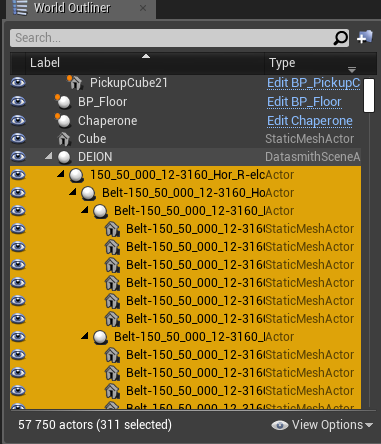
I'm trying real hard to import some big CAD assemblies in UE4, but struggling. Seems like using Datasmith with STEP is the best course of action (tried about a dozen formats and different paths/conversion step), but I think I ruined my project with 58k different assets created
Any idea on how to recover it?
I've tried removing it all from Content, removing Intermediate and Saved to no avail
cloud cobalt
Revert the changes in source control
tame delta
😦
It's a fresh project...
Still just testing out imports and stuff, it's only about a day's work but I'd like to recover it
and I haven't set up versioning yet...
 inner cloak
I have a plugin that wont update to next version .. tells me that plugin is already installed
cloud cobalt
Well, source control is the first thing to set up really
Anyway, if you've removed all of these, what happens ?
tame delta
Loading... 95%
Then I get in project after about half an hour, try to delete the assets from the scene and it freezes
for over a hour (at which point I killed it)
inner cloak
@tame delta Importing is not prefect with UE, you will see bunch of content that should have not made it !! at least it did for me
inner cloak
yes, i did the same
tame delta
a plugin to open CAD files
Ah
Well to be honest I reckon most of those should have made it
Those are just huge assemblies with each screw...etc
inner cloak
what is your cad app ?
tame delta
Importing takes a while but saving all those as assets (which UE seems to want to do) takes even way longer
Solidworks
inner cloak
same for me ... expect to have to cleanup
tame delta
I've tried 3Dxml, IGS, Step (213 and 217?), STL, VRML (through blender), asm, prt, sldasm, sldprt
None of those were satisfactory/functional
(at least half crashed or imported nothing)
inner cloak
i even tried with a cleaned model and there were import oddities
and yes, i do import step files now
making a disconnected copy of the model i want to import, then clean the assemblies and i still get odd thing in there
tame delta
Disconnected copy?
I assume in Step, Datasmith doesn't instanciate any mesh does it?
(as in make buffered instanced of the duplicate meshes)
inner cloak
yes, an expert here found a way to make a copy that is not connected to SW so i don't mess the original stuff
tame delta
Ah, well I've got engineers feeding me exports, I'm not too worried about messing that up
inner cloak
I dont have a SW background .. know so little of it lol
tame delta
Same, last time I touched it was in highschool
inner cloak
i had a datasmith channel added btw
tame delta
Ah! Didn't see that, thanks!
@inner cloak How big are the models/assemblies you're working with?
Did you find anyway to work with it without losing hours of loading/saving?
inner cloak
I load some models separately, and when i can i merge actors in a logic way dependent on how it will be use, like 2 parts for a piston
i could suggest to you 2-3 marketplace tools that could be helpful to you
inner cloak
Well, just look at what i'll suggest .. you decide if you need them:
tame delta
Issue is I don't know if I can go through the manual labor of grouping those object manually (Or perhaps I could, but then the question is where to do it since UE4 won't even import it properly)
inner cloak
i do pretty much all my work in UE, which is where those tools are nice, lemme get the names ...
- Mesh Tool from Mary Nate, 2) Pivot Tool from Mary Nate, last one is AssetBuilder Tool but not compatible with 4.23 yet
im still on 4.22 here
 leaden dust
how heavy is assigning values to about 100 variables per tick in c++
in a single function
tame delta
@inner cloak Thank you, I'll take a look
Now I need to find how to delete references...
https://i.imgur.com/VHBFPTe.png
You can see I've got 58k assets (managed to delete a few hundreds), but deleting a hundred or two takes minutes
 hoary mason
@leaden dust should be On. Or rather O100
tame delta
All the assets those references point to are deleted, but I don't know where the actual references are stored
I want to clean my world up
inner cloak
gimme a short .. restarted UE
and started a cloning to play safe
actually, cloning first
tame delta
I think i'm gonna have to give up on this previous project and start from scratch
Most of the work I did was in setting up some VR components, I could do it again in a few hours
 alpine hornet
Does anyone have any ideas why Desired Bound Radius has no effect in Hierarchical LOD when working on a sublevels, if i open the sublevel on its own it all works ok.
tame delta
Anyone knows why copying a project from a sane neutral base (Template VR project) still has it contain all the references that it had before, even after deleting AND renaming the new project (before first starting it?)
Well, the world/map is the same is what I mean
 calm widget
Reflection is all off when exporting from substance. Had the OpenGL normal exported to cycles in blender and it looks as should, but exporting the DirectX UE4 preset from substance into ue4 reflections are way too intense.
Any ideas?
hoary mason
@tame delta the .umap contains the references of objects inside the map. Even UPROPERTY's are saved there
tame delta
I just realized I was editing the map from the Template, and that this map is stored in the engine plugins folder...
@hoary mason But thanks, that's exactly what I was looking for
 azure shore
is there no way to have input to more than two actors?
if I enable input on two other actors than the player it only works for one of them
inner cloak
looks like i'm not even close to your count @tame delta i currently have 2342 actors in my main scene, just not sure how it counts blueprints
tame delta
Hmm yeah, I might not have had that many actors, but did have a bunch of staticmeshes though
Most of those are meshes
I decided to give up, start again, and am now facing a new problem where all the template content is located inside the plugin, and I've no idea how to clone and rereference it inside my project...
plush yew
Fucking bullshit
why is the physics asset undo queue connected with some level status?!
why after reloading a level it killed the undo queue of my phat editor?!
fucking bullshit joke
next badger
@alpine hornet may be a bug, not sure, you could report it and if its "by design" devs will tell you
undo queue is ... could be better in ue4...some things does not undo at all
this is #ue4-general ... not #lounge
plush yew
its a UE4 topic so it belongs in here
plush yew
I like to live on the edge yeah, thats why I use UE4 and not Unity
 manic pawn
undo has pretty much always been sketchy outside the bp editor
plush yew
which makes me wonder why, because in BP editor its actually really nice and stable
manic pawn
the best part is when you open the editor, press ctrl z and it undoes something in some random asset you opened yesterday
plush yew
cant be that hard to make context sensitive undo Qs for each individual editor window
given it already kinda works in some areas
next badger
@plush yew i was talking about "bull*hit" posts that were removed already...except yours
plush yew
got it, yeah I figured that was it, cheers
next badger
you have to implement UNDO by yourself, in each case and tool, there are no some global actions tacking system, that's why it's nor super useful
next badger
I always do. Trying. Was no anything special here.
warped tangle
lol
 dense gate
I'm at wit's end at this point
For some reason without changing any source files I get an error from Chaos
I downloaded the 4.23 source and it compiled smoothly, it was working fine
I started implementing the discord GameSDK to add rich presence to my game and started getting a fatal error
Upon trying to start a new debug instance from VS it rebuilt the engine only to end up with a "PBDCollisionConstraint.ispc.generated.h not found" error
And I can't seem to find any information on why this appears
next badger
can you find any information on Chaos at all?
dense gate
Such a file doesn't exist in the source and doesn't get generated during building
Thing is, it worked absolutely fine, it seems like something doesn't generate this header file
CompileChaos=true in the editor build, so everything is as should be
There's not much on Chaos but I've been working on implementing some destructibles in my project
So suddenly getting this random Chaos error after trying to add discord rich presence is beyond me
After the "not found" error there's a big bunch of "ispc not a class or namespace" errors which seems to be from that same header
next badger
i could not make Chaos work with cpp project, it always trying to compile editor
dense gate
Side note: I'm implementing rich presence as a plugin for the actual project, not as part of an engine or an engine plugin
It was working fine as it didn't try to recompile the editor, but trying to start a debug instance goofed the entire thing for me
And I need that debug instance as I have no idea what exactly causes this fatal error
Nearly everything in my project is BPs, there's only a C++ GameInstance class and a couple plugins I've ported from older versions
grim ore
Editor Utility Widgets were added in 4.22, has anyone used them and made something super useful or have any ideas on super useful ideas? Wanting to find a "that's really nice" widget I can use to show people how the system works and use it as an example. My brain is stuck on something simple like multi asset manipulation (translate/rotate/scale/etc) which is... simple lol 🙂
inner cloak
I'm having an issue with a marketplace plugin, the plugin refuses to upgrade to next version. In the marketplace displays compatible to 4.23 but when i click to upgrade it, it states that i have the latest version in the engine ...
 frosty copper
poke the guys in #plugin-dev maybe?
next badger
@grim ore is it possible to mass rename assets in the content browser using it?
even like simple example, get name, get type, add prefix based on type
grim ore
That's a very good question, you should be able to but I could never get rename working right. To the editor!
so maybe a tool that renames stuff appropriately based on naming conventions
next badger
well, if it can be customized anyway, yeah...like Allar's style guide, or Epic style guide
@grim ore i wonder if data tables could be used to pair types to prefixes
grim ore
let's see if I can get renaming to work and then go from there, I like that idea 🙂
vast fossil
Hello guys I need some help. There is this concept that Ive been searching for days now and I cant find an idea or solution for it. Basically I have a tennis swing animation but I need to be able to sync it with the incoming ball like in the video. How do I time the animation so it waits for the ball ? Also the sweetspot is the somewhere in the middle of the frames, so it needs to collide with the incoming ball. Does someone know or push me in the right direction ? Like, what keywords should I search for?

IKinema RunTime middleware is available for several platforms, get in touch today for free evaluation; Email info@ikinema.com; Further demo is available here...
grim ore
@next badger oh yeah... It's fixed... fantastic idea for a sample 🙂
next badger
@grim ore it's actually be fantastic to have this example, as many people need it
grim ore
yep yep I love it 🙂
I havent figured out how to do the naming styles yet but the basics work, selecting and renaming, so the rest should be easy.... yeah... should
and there is even a "Path" node that breaks apart the File Path and returns the parts... hug Epic
next badger
@vast fossil you need to make IK chain in the ue4, then target this chain to the target that will be tracking the ball
read about aim offset and ik in ue4
next badger
@granite heron it's world aligned, hit the globe icon on the top
vast fossil
@next badger thank you
 granite heron
Also, anyone know how I can control velocity for a static mesh?
vast fossil
cant this be done without IK ? I know a game which doesnt have IK at all
 dry moon
Anyone know why putting #include "UserWidget.h" causes all scripts to break?
during LoadingPhase PreLoadingScreen
vast fossil

#2 of my Tennis Elbow point compilations. Played in Tennis Elbow Manager 2 with the new ball physics and AI improvements.
this game for example, has no Ik
next badger
there are no velocity for a static mesh, as there are no motion controller for it
you may add speed by multiple ways, but it depends on how you want it to move
 regal mulch
Anyone know why putting #include "UserWidget.h" causes all scripts to break?
Could you explain what "all scripts to break" means?
@dry moon
dry moon
Adding that include for one of my plugins during the PreLoadScreen phase, will cause all my other plugins and main game compiled stuff to output the error
failed to load '/Script/....': Can't find file.
granite heron
Its just a ball with force added on either side to move it
regal mulch
@dry moon And you are adding it where exactly?
dry moon
Once I remove #include "UserWidget.h", its fine
regal mulch
So inside a cpp file hm
dry moon
inside the header file yea
regal mulch
Did you add UMG etc to your build.cs?
dry moon
yup
regal mulch
Inside the header?
dry moon
regal mulch
Why does it have to be inside that header
Can't you forward declare?
You should technically never need to include a header file despite some types (enum/struct) file or the class your class inherits from
regal mulch
All other header files go into the cpp file and their types are forward declared in the .h file
next badger
@granite heron so its a physics based movement, and what you want from this point?
dry moon
yea I am, gonna try it otu now
regal mulch
Also is this for a loading screen between maps?
dry moon
Yeah but the issue is that I also have streaming levels, so it'll load before the streaming levels are loaded
so I'm just trying some tests on it
and yeah same issue
failed to load '/Script/FreedomPuzzle': Can't find file.
granite heron
also to reset the velocity once the ball is moved back to it's original position.
tried stop movement and reset level but they wont accept a static mesh component
next badger
@granite heron
also angular velocity
max speed should be 4000
it's set in the project settings, called Terminal Velocity
granite heron
Yea, probably just need to mess with my ball settings
granite heron
Ill try that, thanks!
next badger
at location will apply it to some point, like if you poke object
you can hover the value to get some info on it
oh, also, impulse affected by mass
 meager copper
arg.. so frustrating. every tutorial I try to follow I end up spending a lot of time looking for why things are different for me than the presenter. I guess it is good that the engine keeps improveing, but so frustrating. anyone have any tips for a good video series with a current build of the engine ?
cloud cobalt
Making a good video, let alone a series, takes longer than some engine versions do
Adapt to changes
 simple heart
hey anyone interested in web browser + virtual keyboard
next badger
@meager copper i'm not aware of any...i guess it's all depends on topic
 toxic prairie
@abstract relic thought it had like live link or something
Or is that only for substance
cloud cobalt
You linked it yesterday
cloud cobalt
Yeah, only 5 times
simple heart
Yeah thank so mush
cloud cobalt
Literally your entire history here since you joined yesterday is your plugin thing
Please do not do that
Link it once in #released, don't bring it up another
meager copper
@next badger I am an experienced programmer. Made games in Unity and p5.js. I would be most interested in any that focuses on what is special to UE4 and Blueprints
next badger
"special to ue4" is quite vague...
meager copper
ofc 999/1000 tutorials aim to be introductionary. I kinda don't need to the kindergarten hand holding on general concepts 🙂
grim ore
@next badger Score 😉 https://i.gyazo.com/d4628dcc4e5591b13731295403182774.gif
cloud cobalt
Translate your Unity knowledge into UE4 so you can get up to speed quickly.
meager copper
oh nice. thanks Stranger
grim ore
I had undo transactions working but... they don't seem to work all the time lol
I just cheated and used an Object Class|String map variable inside the widget but this is super simple
grim ore
well the node says it will try and checkout the asset before renaming
next badger
ggggreat!
grim ore
it tries to check it out, loads it, marks it dirty, does a basic "move" operation on it
There are actually 2 nodes to rename stuff... someone went all out on adding functions to the editor scripting lol
 true finch
Hey guys! I'm trying to build a system where I can paint different materials on a plane. I want to paint stuff like grass, water, dirt, etc. but I want to limit which material can be painted on which. For example the user shouldn't be able to paint grass on water... (like in viva pinata for example :P)
The painting isn't the problem here, but the layers are. I can't think of a good way to limit what can be on top of what.
Currently I am using a Render Target setup for the painting.
Does anyone have an idea on how I could achieve this? If I didn't explain it properly I can try again 🙂
 jade hawk
Does anyone have experience with Oculus store Entitlement checks?
Need to find out how you do your entitlement check.
I am going insane here with their circular logic.
Oculus requires entitlement check within 10 seconds of starting. OK np
Add check to first line of code. If failed close game.
Oculus Review - Game not playable crash on load...
Not unless you failed entitlement check.
Ok fine move check to play game button. On fail turn button red and prevent level from loading but don't force close.
Oculus review - Game is not playable after pressing play.
Ok wtf oculus fine then move entitlement check back to start but no only print if passed or failed don't stop them playing the game.
Oculus review - You did not stop them playing the game on security check fail....
WTF seriously. Circular logic makes me so mad. It hurts me head lol
 hearty prawn
Question! How much effort is it to port ue4 game to console, when i already have PC stuff. Is it 1/4 of total dev time or more like 1/10? Assuming controlls dont have to be ported.
 tall pendant
hard to tell. it really depends on quite a few aspects.
hearty prawn
Lets assume gameplay logic does not need to be modified and performance should not be an issue. In theory should it be pressing compile button and outputting a console executable?
grim ore
in theory if you have the SDK and the correct entitlements and you have the controls set up properly then yes
but performance is always an issue as well as specific console handling (showing the correct buttons) and storage requirements
tall pendant
only in theory 😄
cloud cobalt
Yeah it really depends on the console
You might also have requirements on fixed IP addresses, incorporated business
And you may have to pay a few hundred dollars for the devkit
tall pendant
or thousands hehe
grim ore
well now I'm bored, I got that renaming Editor Utility Widget working and now what lol
scarlet birch
plus each console has its own list of things they expect to be done
tall pendant
yep. plus technical things to consider to make your build run on platform x and or y etc
it's not as easy as press build to xbox or whatever
grim ore
so... lets say you had a utility that would help you rename files to fit a naming convention, say all static meshes should start with SM_ , Would it be "better" to have it be a simple append such as "Append SM_ to the FILENAME so it becomes SM_FILENAME" or would it be nicer to have it be a fuzzy replace such as "SM_{FN}" where it just replaces the {FN} part with the FILENAME and the rest is kept as is to give more options? (easier prefix and suffix if waned for example)
manic pawn
how to not create a ui
grim ore
lol yeah I was wondering if I did the 2nd way I could add in more options, like say {PX} would output the X pixel value of the static mesh to the name so you could do like SM_{FN}_{PX}x{PY} and get something like SM_Rock_100x100
scarlet birch
@manic pawn not going to disagree, but it works
I'd much rather be able to have more control. Personally, I almost always use prefixes but not always.
Oh nice idea
That would rock
grim ore
time to see how hard this would be, I don't want to make this example super complicated but making it "oh wow" would be nice
scarlet birch
I build tools for making levels and some of them use meshes of different sizes for different things. That kind of functionality would be amazing
hearty prawn
Thanks guys
scarlet birch
Like that thing I did for stretching meshes like a 9 slice, needs to know the exact dimensions of the pieces. If it could get them from the filename then it would be easier to make it work with different meshses on the fly.
I guess it could just get them the same way though...
I'm looking at using procedural meshes and slicing though so it can make the pieces in the editor rather than having to edit them externally.
grim ore
yep yep. Doesnt look like I can get the size anyways so 😦
scarlet birch
That sucks. I was excited. I mean the editor gets them somehow
grim ore
I like the idea but there aren't exactly a ton of options I can use for getting data
yep at some point it might get exposed
damn I can get the bounding box but that isnt helping heh
scarlet birch
I think bounding box might be sufficient for what I was talking about, idk. It seems like it can be affected by things other than the mesh geometry. I'm not sure, and still a bit out of it from being sick.
scarlet birch
Nice
grim ore
I don't think it's supposed to but the numbers matched lol
 sinful bone
aight so Im an idiot who somehow managed to tilt their editor camera, how do I get back to a default view? just flying around in a Perspective viewport
grim ore
shut down the editor and restart it?
if not target another item in the engine that is the correct angle, right click it and pilot it then eject back out and see if it helped?
next badger
@jade hawk #virtual-reality
jade hawk
thanks
sinful bone
@grim ore hah yeah I just tried reseting my layout and that seems to have cleared it out
was confusing because it persisted thru restarts /shrug
grim ore
@scarlet birch 😉 https://i.imgur.com/r8sfbag.png replacement matching from a string https://i.gyazo.com/523fe98c9259f2636934bc50623eced6.gif and it worked 🙂 No real good use for this but I think this has potential heh
scarlet birch
Nice.
grim ore
this is alot easier since you can just make any format you want 🙂 I think this will be the final version I use as an example
scarlet birch
That looks useful. I haven't dived into any of the editor stuff you're using for that. I keep meaning to, but there's always something else that needs done. I'm surprised how few things have been done so far.
grim ore
heh
next badger
i like how flexible renamer works
it has grouping regex
ue4 uses same thing for strings
scarlet birch
I'd not seen it before.
radiant haven
Someone Android??
next badger
i.e
My_Amazing_{1}_with_size_{2}_by_{3}_and_{4}_channels
scarlet birch
@grim ore So the way that works, it preserves references? I assumed so, but you never know.
grim ore
I would assume so, lets find out lol. It uses the normal move function in the engine
seems to work, added a SM to a blueprint in the world, renamed it manually and it was fine. Used the tool and it was fine. the reference changed both times in the BP to the new name/object
right now I would like to figure out how to detect selected items without using tick heh
 vale silo
did UE4 forums just go down ?
grim ore
I never use the forums but yep it redirects for me, I was having issues with answehub earlier tho
next badger
AH works for me ATM
grim ore
It's the end of the world, the forums are gone!
 scarlet birch
Probably just an issue with redirection or something
vale silo
@wary wave any idea what's going on with forums ?
@copper haven @tough berry @kindred fable ^^
next badger
jss...what a desperate man to tag all the mods
 lethal linden
im also wondering about the forums
 wary wave
I've not been told anything
next badger
should we tag Victor?
wary wave
you can try I guess, but it's outside of Epic's working hours now
oh wait, not quite, it's getting on for 4pm
next badger
wait...what?
manic pawn
heh did someone accidentally delete the forum
next badger
Victor is offline...we know the culprit! Alex is back?
vale silo
none of the Epic's staff is online o.O
manic pawn
@gleaming narwhal what happened to the forum 
next badger
i think Sion is online
 tough berry
@vale silo Eh? Forums... no clue... still waking up.
 vale silo
🤷
azure shore
is there a way to give pawn sensing essentially 360 vision?
grim ore

The forums are currently down for unscheduled maintenance. We’ll update everyone as soon as we’re back up!
 Twitter
ok @next badger and @scarlet birch much love for the ideas, I think I have to stop now and it's a good example 🙂 Added in a preview option so you can see what it would rename it to heh https://i.gyazo.com/70d1ddfc2ab99b0847f3fe8b5b88aa89.gif
the video is supposed to be like 10 minutes long so this is gonna be fun lol
scarlet birch
@azure shore I think you can set half view angle or something, but you'd likely be better off just using AIPerception
next badger
@grim ore OOOOH, preview is smart
azure shore
oh I havent heard of perception
scarlet birch
I know I've set the view angle to a full circle with AI perception.
@grim ore Nice. Looking forward to seeing it.
azure shore
ok, it looks very confusion and I have no idea what to do with ai perception but Ill see
I am confusion
(yeah I meant it looks very confusing)
scarlet birch
It's not once you get the basics. Anytime perception of an actor changes an event is fired that can you can use. Anything you want to respond to needs a sense source component or whatever it's called.
For sounds you use a create noise event. You can use it for anything you want the AI perception to register though.
 hasty osprey
my mesh (not static) becomes blocky when I import to unreal, it looks ok in 3ds max
is there any fix for this?
 brave lark
Are the Forums down?
grim ore
nope
brave lark
the link on the website isn't working
grim ore
weird
 violet cove
Yeah forums are broken, very annoying right now
 prisma palm
Hey folks, sorry to hijack while the forums issue is overtaking. I tried asking in the animation channel but didn't seem to get any bites: I can't figure out how to get "post-roll" to work correctly in a LevelSequencer, not even in an empty project. Anyone know what I have to do to get it working to evaluate a track even after the sequence "ends"?
azure shore
@hasty osprey your skeleton mesh? does it use any modifiers or anything in 3ds
and what exactly do you mean by blocky
like low poly?
hasty osprey
it has a skin modifier
and yeah it looks kind of low poly
the issue might be with the smoothing groups when i export but how would i fix that....
dense gate
Aight, after downloading the source all over and following the guide for enabling Chaos, everything seems to run fine now
I still have the fatal error but I'm diagnosing it rn so that's done I say
I still have no idea why it suddenly didn't detect the generated header and I hoped there was a fix without reinstalling and rebuilding but alas
light coyote
@hasty osprey
If it looks good on 3d max, and what you mean by blocky is that the diffrent poligons are clearly visible where they where not in 3d max,, then yes,, you probably have unticked the option for exporting smoothing groups with your FBX,,,,, its set by default that way, and you will find it first setting of all they are when exporting
hasty osprey
it looks better in some areas now
the problem was the smoothing groups alright, only that i unticked for smoothing groups in the export settings and that made it look better in unreal
maybe this means my smoothing groups were bad to begin with
 gleaming narwhal
@manic pawn See tweet that @grim ore linked. @next badger I'm flying with spotty internet ;)
next badger
@gleaming narwhal with a forums server? 😛
grim ore
He stoled the internet!
gleaming narwhal
I meant in regards to being offline lol
next badger
well, safe trip
gleaming narwhal
But yeah right I got a task to migrate the server, so I grabbed it and am now migrating it the traditional way
Thanks! Anyone else at Oculus Connect or in San Jose should hit me up :)
next badger
i bet it's moving now like 100Gbit per second
grim ore
just plug the server into your phone so we can use it while it's in transit, gosh 🤣
gleaming narwhal
Ah crap I forgot my USB-C to Ethernet adapter (I actually did)
grim ore
oof 😦
next badger
@gleaming narwhal have you took your own VR gear to Connect event?
https://i.pinimg.com/originals/45/55/a0/4555a057a5ef597b0788bf36f5e751ce.jpg
 gilded plinth
Hey peeps, could anyone please pass me a quick tip. Why is it that if you create an AI Controller BP and add a static mesh component with a mesh it's not visible in the BP viewport or game?
I'm stumped 🤷
 weary basalt
Controllers are Invisible, they do not represent the Player or AI.
Pawns are the visual representation.
Controllers "possess" Pawns.
 abstract relic
 fresh oak
Hey, how's everyone doing? I'm trying to become more familiar with the unreal engine for a job and need to learn how to make set paths for VR playthrough and random player 1 spawn points. Does anyone have any helpful links/ chat groups I could get ahold of?
 urban gyro
no no
not version control
i mean
deploying
builds
like if u have dedi and client
and need 2-3 clients to connect
gotta deploy, but is there a way to just update version
of 1 build, rather then building the same thing over and over
or is patching the only way?>
gilded plinth
@weary basalt thanks I figured, but is there no way to make a controller visible?
gilded plinth
gotcha ok, back to the drawing board : ) I was hoping to add some visuals that I could easily control from my Ai controller bp without casting, but I will move it out : )
grim ore
have the AI Controller spawn what it wants to use for visuals!
move it all out of the controller and put it in a car and drive it around town
gilded plinth
all great ideas. I'm still learning so : P Basically I have a widget with some text on top of a character (an npc) and it changes based on what it's perceiving with the AI Percept Component.
I'm going to put the widget back into the character BP and figure out the best way to cast between the controller and character bp
 kindred jetty
Anyone have a link to the water material tutorial mention at last Unreal live stream?
grim ore
if you just cast once, say at creation of the character, and save the reference after it's cast you don't need to cast again
gilded plinth
yup yup! that's the plan. Just trying to figure out what functions I need in which BPs : P Like my enum with the different states for the widget (to determine what text to show) etc etc.I'm already binding a function in the controller to OnPerceptionUpdated of course so then I guess I gotta cast to get that function in my char bp
doin all this in c++... still learning as I mentioned : P
 rotund root
Is it feasible for a solo dev to make games with UE as a side gig or hobby?
rotund root
Cool.
I’ve started picking up UE kind of as a hobby and just trying to learn the ropes right now.
I picked up Ben Tristom and Tom Looman’s courses from Udemy. Kind of using that as a starting point.
gilded plinth
@grim ore Sorry to bother, but if you have a sec. If I remember correctly you do c++? Here's where I'm heading with my cast from my char to the ai controller. If I want to make the scope of this new variable global, I should first declare it in the header ya? ( i know this would work, i just wanna make sure im not abusing a bad implementation)
Right now in (let's say) begin play: AFPSAIController* AIController = Cast<AFPSAIController>(GetController());
gilded plinth
Will do thnx!
 wraith socket
hello guys, I have a question corcerning to Lighting. So I am doing an outdoor environment with a lot of foliage. Which presets for lighting should be the one with better results? Directional Light Movable and Skylight Static?
next badger
if foliage is animated - stationary
also, enable the early zpass translucency in project settings

Twitch: https://www.twitch.tv/stevestutorials ArtStation: https://www.artstation.com/stevenc94 Patreon: https://www.patreon.com/StevesTutorials Twitter: http...
next badger
@wraith socket set lights to stationary
wraith socket
the directional and skylight?
next badger
@wraith socket depends on how much you need dynamic shadows from moving objects, i think you can set skylight to static
also set trees to stationary as well
next badger
quality of bake only depends on ligtmaps and lighmass settings
baked lighting does not support animation
 digital anchor
next badger
digital anchor
next badger
@manic pawn maybe 3 letter words ignored?
wraith socket
@next badger so the thing its with painted foliage I cannot set it to stationary, only movable or static.
so has to be movable then
next badger
painted foliage is different, since it's instanced...use static
manic pawn
3 letters words aren't ignored, since "pro" works
ok maybe
turning that off is actually broken
that would be typical 
next badger
does work for me in 4.23
manic pawn
I'm on 4.22 🤔
next badger
sorry for tagging every time...habit
manic pawn
can you try in the ctrl-p search instead of content browser?


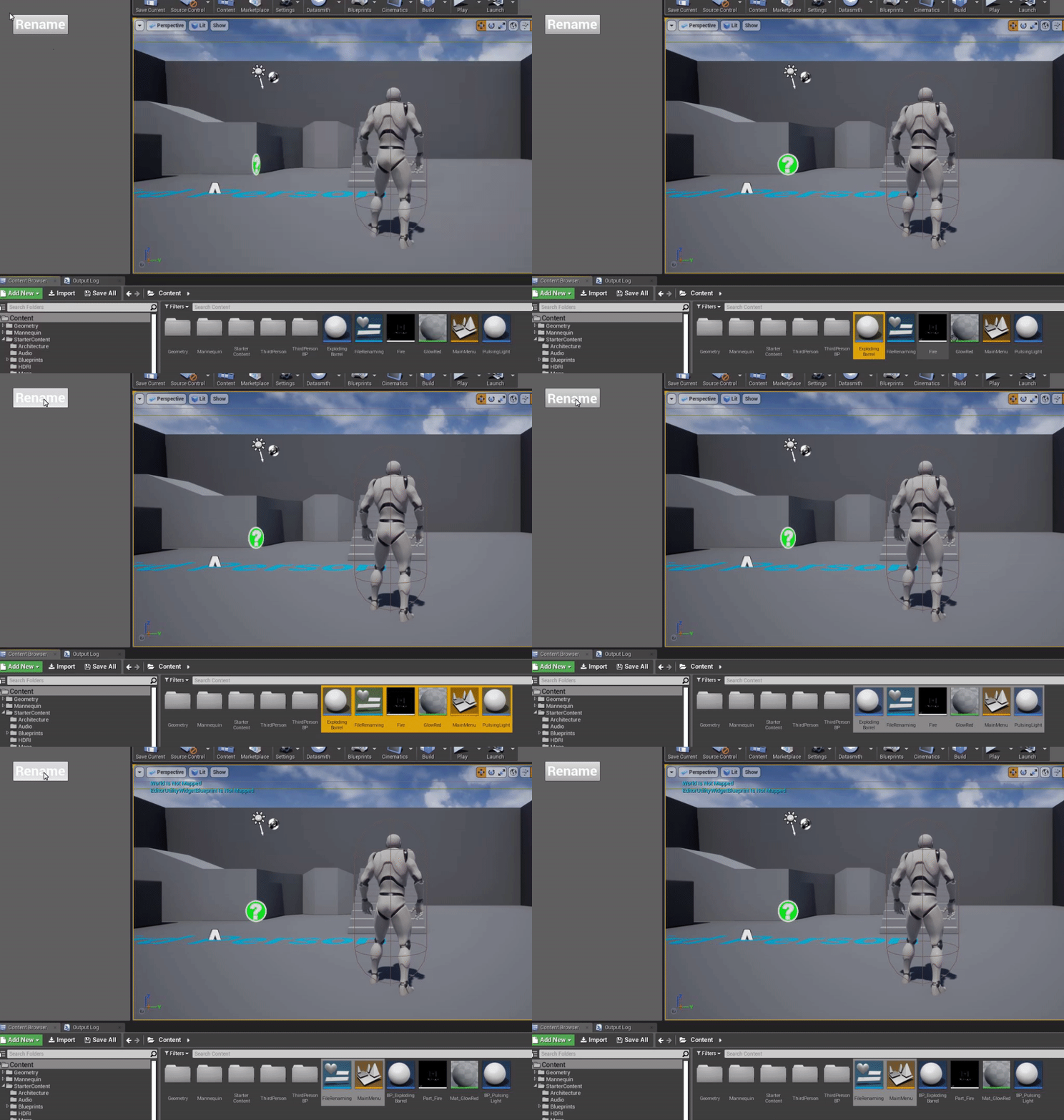

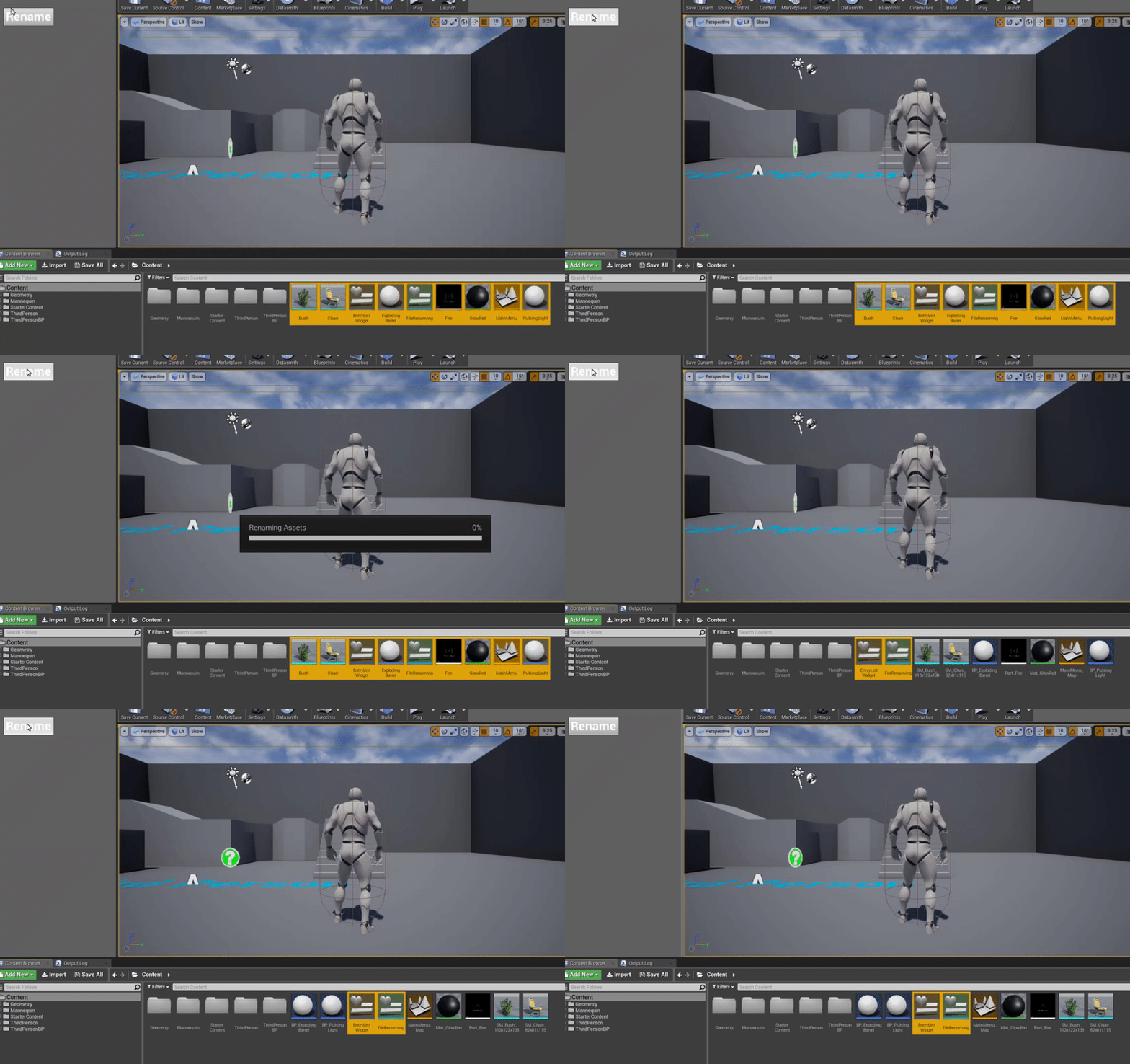

 wraith socket
would you use Ray Tracing? Or its sketchy at this very moment?
I feel it like a beta state
and translucencies are not working
manic pawn
that view is just entirely useless
next badger
oh...you can...it's just hard
manic pawn
yeah but it's useless
next badger
it's quite useful in content browser
manic pawn
that's basically a lame version of the property matrix
next badger
for this stuff
manic pawn
finally a use case for fullscreen content browser
next badger
ahaha, yeah, on one of my projects i'm working with sequencer, and i have to extend content browser on my 2nd monitor
but not as table
manic pawn
🤦 
... I think you meant != 0?
... and a && for the condition below...
err wait && doesn't make sense, that will make the option never work in the ctrl p menu
the bClassNamesProvided just doesn't belong in this condition at all
 normal burrow
looks to me like, if the filter doesn't have exactly one response, class names must be provided? or maybe the variables thing is plural important
next badger
@manic pawn can't you just copy logic from content browser?
manic pawn
content browser doesn't have the bClassNamesProvided thing
next badger
oh...sry
manic pawn
I just commented out that part and now it works perfectly fine

can turn the option on/off and it works
next badger
@manic pawn can you check one thing as well, until you're there, why there're two sets of shortcuts?
manic pawn