#ue4-general
1 messages · Page 532 of 1
 tall pendant
gpulightmass for 4.23: https://www.dropbox.com/sh/fjr63yeutafmip9/AAA54ghH1gCrd5VFnpYezFena?dl=0&lst=

 scarlet birch
^ ^^ and that's actually it
 sleek spear
@light coyote hey man, sorry, just noticed your reply (im in the process of doing a test for them) no he is not a friend, i am freelancer, we are actually an architecture studio and we offer services) what is A or B? im not an expert but i have experience with unreal engine, i am very bad at estimating time, i usually work on multiple projects at the same time, i work fast generally, hourly rates was never good for me, punishing for people working fast
scarlet birch
@clever flare Will switching to GPU have an affect on that?
 clever flare
i've heard so
scarlet birch
That surprises me. I'm curious as to the why. Do you have a link to anything that discuss that , I could look at?
scarlet birch
Thanks, I'll look into it.
scarlet birch
Thanks, I was searching for it with your username and by lightmass
clever flare
alright
 limber sphinx
ok so i built unreal engine 4.23 from source on my students pcs and placed it in the c drive but it cant be launched from their accounts only from the domain admin account any ideas?
do they need permissions? trying to get a fix for this
 inner cloak
https://trello.com/b/TTAVI7Ny/ue4-roadmap you can check Trello to know
Organize anything, together. Trello is a collaboration tool that organizes your projects into boards. In one glance, know what's being worked on, who's working on what, and where something is in a process.
Nevermind, i was too late i guess
 dire coral
a quick question
inner cloak
probably a stupid question but is it possible to constrain models in the editor ?
dire coral
where do i post for a game development project im looking for somebodey to help
tall pendant
 light coyote
@sleek spear
A or B is a way of sayin are you doing an official legal bill, or are you doing it in Black, so a not official legal one because you are starting, and you are not dealing with a big company.
B may be used when starting just as a help in developing the bussines,, but i am not recomending,,, is just how it is,,,same as if a friend wanted you to do do a project for him, and wants to pay you,,, you will probably not do an official bill.
About estimating time, that is allwais the issue,,, tends to take longer,,, i like to say, think how long something is going to take you, and multiply it by 10,,,, i dont mean it literaly, but as a reflexion,,,
(im in the same situation, where i have expirience, but not enough to be super confident about rates, in my case it tends to take longer due to learning along the way aswell)
Are you a real company ?(your studio) Or starting ?
What currency ? Where are you from ?
I will give you my opinion, others may give their,, but you still have to research.
In my case, spain, Euros.
On how things are here, hard to entrepenour. (300+ month just for beeing self employed,, no bills no nothing,,, just on that)
All the things you may consider could go from as low as 15E/h to 65E/h
inner cloak
is there a notion of "local" transform .. or local editing a mesh/model ?
 plush yew
@inner cloak you can cycle the transform gizmo in the viewport from world to local to get the gizmo to align itself to the object if it's rotated
inner cloak
Sweet, thanks a lot !
 dim plover
Probably the best option aside from a tutor.
 cloud cobalt
C++ is going to be years of learning, so whatever you pick, make sure you don't rush into it
 ember notch
Ok, but what I can do with C++ in UE4?
cloud cobalt
Everything
The full engine is C++, so the sky's the limit
Better question is what you'll have time for
ember notch
I heard if I learn C++ that I can better Blueprints it's that right?
dim plover
You should probably learn BPs first. Makes the overall learning process easier and maybe even faster.
ember notch
I can Blueprints
 next badger
@tall pendant are you using gpu lightmass?
Is it still monochrome? (last time it was not using color information from textures)
ember notch
I am not english but is this course worth?
 grim ore
It's a course if you want to learn c++ yes, there are other free ones out there to learn C++ and then you can learn UE4 C++
ember notch
But I am not sure. English is my third language and I am thinking if this a good for me
grim ore
It has good reviews
dim plover
You could try to get a tutor in your native language, if you can't find anything.
ember notch
@dim plover I found in my language good C++ courses but not Unreal Engine 4 courses. The best UE4 course have my language but with extra text 🤔
What do you think guys?
scarlet birch
I've used some stuff from him and recall it being useful.
ember notch
@scarlet birch Do you learned many things on his course?
scarlet birch
I don't think I used the course. I followed some tutorials he had posted and remember there was stuff in there I found useful.
Even so at ~$10US, and with a refund policy there's not much to lose trying them out. I've not enjoyed most of the Udemy stuff but a lot of people praise them.
ember notch
His course is really worth I think. Unreal Engine 4 + C++ and 42h course
for 12€ it is cheap
scarlet birch
Yeah, even if you only use a small part of it you're getting a value
ember notch
- a certificate that you are a developer
scarlet birch
I don't think those certs mean much to most people. If you do buy it clear your cookies and empty the cart first to get the best price.
ember notch
I think it is the best UE4 course
scarlet birch
I can see the appeal to having it all in one place and not having to search for tutorials and look through the docs.
 obsidian nimbus
there are a gazillion free tutorials and info aswell tho
next badger
a certificate that you are a developer
next badger
Can you actually? I mean, will you risk it?
obsidian nimbus
ill risk my gamedev carreer on it for sure
😛
the allways on discount thing makes it look more shady than a good deal if u ask me
but i never done the course, it might be good
stuff just dates really fast on unreal
udemy been here when i started dunno if they update it a lot or just spam adds everywhere
dunno how many ppl or who they are that make it
there are a lot of self appointed masters of unreal around
obsidian nimbus
develop something, point at it, i develop that, im a developer
value equals 0
still not hatin on the course never tried, could be good i dunno
scam alert on orange tho 😛
free stuff from ppl that know things scam alert on green 😛
every1 makes mistakes and there is a better way 90% of the time
scarlet birch
They're definitely not scams. The only reason I don't like them is the are too verbose for me and not in depth enough. For many people they are just right.
 spring imp
is there any way in the editor to control the rate time advances when playing (PIE)?
 warped tangle
global time dilation
 weak root
Can I force unreal to use regular char as TCHAR?
 manic pawn
you can, theoretically, somewhere in the core headers
but who knows how much that is going to break
 heavy notch
Hello guys, I wanted to ask the question here or create some kind of discussion about the landscape performance problem but it ended up being too robust so I have created a forum post.
I would be grateful if someone could help me find the answers
Link to the forum post:
https://forums.unrealengine.com/community/general-discussion/1663707-weird-landscape-performance-issues-on-android
Unreal Engine Forums
So I have been experimenting today with the landscape performance on Android and I have gotten some unintuitive results.
For this example, I have created 2 extreme
weak root
So I guess it wouldn't be advisable 😦 I have some large-ish xml files I want to parse. I guess I should avoid UE's standard library for reading/parsing those
Everything in UE uses wchar, it is weird. http loader, file reading, xml parser
 sinful umbra
why dont you just convert everything to TCHAR?
weak root
it is two bytes. Those are large xml files and parsing it will require a lot of string comparison
I would want to avoid wchar TCHARs if it was trivial to do so. I thought perhaps the engine would allow it in an easy way
 gilded plinth
shiz peoples, has anyone tried to build the Face AR Sample in 4.23? I build successfully, but app immediately crashes on my iphone arggg. I'm pretty sure this is a 4.23 and/or 4.22 issue!
my 4.21 build wouldn't connect via livelink to 4.23 ue4 on my pc so i tried to re-build a 4.23 version and now I'm left with nothing hehe
 drowsy ember
Hi!
What is gamebasemode for?
I guess there are some options that i dont understand , like that and spectator...
Looks like those options are usable for some specific type of game like fps isnt?
scarlet birch
The doc page covers most of it. https://docs.unrealengine.com/en-US/Gameplay/Framework/GameMode/index.html
Overview of the Game Mode and Game State
 serene sorrel
@weak root its because on windows the default unicode is 16bits and thats where unreal was built initially
as for speed of XML stuff, it varies based on the libraries used. UTF8 stuff isnt exactly performance orientated its size orientated. If its just pure ASCII text probably is best to find something optimized for that i guess but most stuff is UTF8 based these days ive seen
TinyXML2 seemed pretty performant to me a few years ago
 thin tendon
Is there a way to pause game game, Without using the node for set game paused? I have a loading screen between sublevels while level streaming. It works well. But Enemies can kill me while in the loading screen. I tried the set game paused node. Which worked, but it doesn't read the rest of the nodes and then unpause. It just gets stuck on paused.
serene sorrel
@thin tendon have a global in gameinstance class called PAUSE. Check that on every action/ontick and dont go forward if its true. Disable physics on all actors when paused, enable when unpaused. Dont know if thats what you want to do but its one way 😛
 ashen eagle
Imagine a 2d side scroller where the main camera is moved forward every frame by a set amount. My player can freely move sideways, however, i want to make it so that my player can only move sideways within the camera view. Currenly I can walk past what the camera sees. Any ideas?
I'm sure that is not enough info, but perhaps a pointer would help 🙂
 mighty copper
I have a noob UE4 question for you if anyone has a free moment. Do you know if it's possible to have more than one landscape in one scene/level/map?
serene sorrel
@ashen eagle like a single screen platformer?
ashen eagle
@serene sorrel Yup. Imaging a side scrolling shooter, where the camera is moved continuously and i can only fly inside of the view. Along with, let say i stop moving, the camera keeps advancing, and if the player was to reach the far left side of camera, the player would automatically be moved along with it.
thin tendon
@serene sorrel Sounds like it would be just as easy to loop the world grabbing all actors. Then disabling them. Then do the same in reverse to unpause
serene sorrel
@thin tendon yeah that could work too I guess
@ashen eagle yeah so your camera has a "Frustrum" or area which you can figure out a "2d plane" in that area. So every tick you make sure your main actor is within that X/Y/Z and if its not, put it in there
then basically just move your camera at the speed you want and the player will be forced to stay inside it-
ashen eagle
@serene sorrel That was my thought as well. This is how far I have gotten. This seems to work as i can do a printstring and it tells me if i'm inside or outside the viewport. the 100 value is a buffer. However, i'm having a hard time from here to incorporate it into my AddMovement Input.
serene sorrel
You can also then trigger events when the camera moves to certain parts of the "level" . But you have to keep in consideration that you shouldnt go too far from origin (0,0,0)
scarlet birch
Attach a rectangular collision volume to the camera and place it where you want the player to be forced to move forward. When the player overlaps with it push them forward, if when they exit the volume they are not in the view , kill them.
ashen eagle
@scarlet birch I was just thinking that...how simple would it be just to place an invisible box on both ends of the screen and check for collision ... 🙂
scarlet birch
fairly simple. I've used something similiar for sidescrollers and top down games with UE.
If its postion is determined relative to the camera , it will move with the camera
ashen eagle
I suppose I could attach a collision box to the camera, however since the came is the root component "sweep" wouldn't work on the collision mesh, am I correct? Perhaps the collision mesh should be an actor on its own, and move at the same rate as the camera?
scarlet birch
Just make the collision a child of the camera, set it to only trigger on overlaps with the player and use its overlap events.
@ashen eagle You might be right about it needing to be root. I'm not sure.
ashen eagle
@scarlet birch Going to test now, thanks
scarlet birch
I'd be interested to hear how it works out.
ashen eagle
So I have 2 collision boxes, one on each side of the screen. The player cannot pass it when pressing left or right. However, when staying stationary, and the camera moving sideways, the collision on the player is ignored by the box and just goes right through it.
Most likely because "sweep" is only on camera?
scarlet birch
Maybe. What channel are you using?
 polar hawk
Cartoon Network
scarlet birch
It could also be that player movement isn't reacting since the player isn't moving. I'd test with a print statement or by adding a launch character node to the overlap event.
ashen eagle
I have it set as blockall. Works great when i move into it and is blocked, movement is by "AddMovement Input" node.
scarlet birch
@polar hawk I'm slow tonight. It took an incredible amount of time for that to register.
It's a thing with character movement, it doesn't respond sometimes when the player isn't moving. You can overcome it by adding a low value launch character node to the overlap.
I'd recommend using the boundary collision as a trigger though, rather than a blocking volume, and then using the overlap events to choose whether to move the character or kill them.
 junior echo
Short load theory Q. If you load/async load classes, does that load things like textures/meshes into memory too, or does that only occur once you load the objects themselves ie from spawning
gilded plinth
I think face ar is broken in 4.23 anyone got the app working?
sleek spear
how can i increase the resolution of layer painting on landscapes?
thin tendon
@sleek spear
sleek spear
@thin tendon that fixes the aliasing of the paint brush? how come?
 errant spire
Hi everyone! I have a vehicle I am working on to replicate. I have the driver and shotgun passenger stuff working well. There is a turret I am attaching at runtime that is also replicated, when a client possess this, the variables that control the animations (which are replicated) do not replicate from any client to server or other clients, this does work from server to clients though. Any ideas?
thin tendon
All it actually does is allows you to set the size of the texture before it tiles again
sleek spear
@thin tendon i want to increase the resolution of the layer painting brush. how can i paint something with detail on a landscape?
layered landscape
thin tendon
From what I can gather you would need higher resolution textures when adding them into the materials. What I did to combat this. Was add hightmaps and normals and emissives etc to give it a more realistic look
This is the dirt I am using
thin tendon
your talking about the sharp blocky edges from the brush?
sleek spear
yes
thin tendon
Ohh man I have no idea I have also been trying to find a way for a pretty long time ( Months)
What I did to combat it a little. Was use smaller brush size on my edges and use a large falloff. So it blends a little between layers
thin tendon
yeah possible. I think it might be to do with the way Unreal generates UVs for the landscape mesh
 dry moon
@sleek spear Either use a height map with it
or just use plain when using the layer blend thing
So height blend = use height map
alpha = will be smooth but kinda unnatural blending
sleek spear
@dry moon i dont really get the workflow, can you suggest a tutorial that explains what this alpha to height connection does?
dry moon
- Weight Blend ensures you have some value (0-1) for each material. As you paint more value of one material, it reduces the underlying materials. This is usually the most common blend mode.
- Height Blend utilizes a height mask (sometimes stored in the Alpha channel of your baseColor map) to blend materials. This ensures that details defined by the white portions of your height mask show through other layers. For example, think something like rocks or dirt mounds popping through say a grass or sand layer.
- Alpha Blend TBH, isn't used all that often on multiple layers. Typically though, it's used for your base layer. In your layer setup, set your base layer to "LB Alpha Blend" and it's preview weight set to 1.0. This ensures that any black spots are removed when other layers are set to Height Blend.
You can continue to use alpha blend if you do not have a height map though
sleek spear
can i also use blending this way?
height blending i mean
@dry moon
with make and break attributes
dry moon
You can click on the layer blend node
and it should have an option yea
and yes you can, but if you set it to height blend
you'd still need to feed the texture into the layer 0 height
etc
sleek spear
@dry moon hmm i think i got it
so the height input controls how those two layers blend together at the edge of the brush?
dry moon
Yup
sleek spear
@dry moon ok, thanks a lot man
 cedar moon
My boss wants me to, after a year of work, explain the basics of ue4 to her as well as how all 2.4k lines of my code work. She is a psychology prof. Please advise
thin tendon
Explain it like you are explaining it to a child. eg This section does this, that section does that.
grim ore
Print out all of the blueprints with a color printer and book a conference room for a week
 strong crag
Hey all, I was wondering, can anybody recommend a good Tutorial for making Melee Combat in a 3d Metroidvania style game?
Or if this isn't the appropriate channel, the channel that it would be appropriate channel to ask this in?
 mint sequoia
@cedar moon Pretend she's your rubber duck
cedar moon
I can explain my code just fine, although it will take considerably more time than the 30 minutes she showed up to the meeting she scheduled today
Explaining the "basics" of ue4 is considerably more demanding imho. There are so many things that fall under basic information
mint sequoia
Sounds annoying but you should probably just write it up and go over it with her
Is she just curious or what?
Feels like missing some info there
cedar moon
She wants to understand the project's inner workings. Beyond that I don't know why. She has no practical use for the information beyond being able to have deeper understanding of my workflow
Honestly though not sure what to really cover as the "basics" what I consider the basics would probably account for700 hours of reading at the pace I read
mint sequoia
I'd just go for a brief overview, both of UE4 and your code, whatever you can cram into say 15 minutes, then use the other 15 for her questions and expanding on certain areas of interest (to her)
Tell her that if she wants to know more it'll take x time
It might be enough for her to realize that she doesn't need to know as much as she thought or w/e
Or maybe she just wants to replace you and needs to be able to explain to your replacement 😉
cedar moon
ha. ha. ha
I don't think I can field any of her questions in 15 minutes
nor could I explain anything more than the simplest class in 15 minutes
she wants to know all the interactions between classes
mint sequoia
So what does your code do that makes it so complicated to explain to a lay person
cedar moon
Maybe I should just make her diagrams
Leave the "why does this use that" to her.
Well it is a simulation environment she's aiming us towards. Most classes have several classes with which they interact. Probably the biggest factor though, is that in the middle of an explanation she likes to interrupt me, not with questions, but details on what I should be working on next and goes on tangents about how these things should work.
mint sequoia
Sounds like the real issue is an interpersonal one, rather than ue4/programming
plush yew
I really wish the engine launcher had a "lock/protect" option available for projects. For such a professional development tool, it feels far too easy to slip up and delete a project. I've not done it.. BUT I'VE BEEN CLOSE. Small addition for huge developer security
cedar moon
version control???
serene sorrel
version control? The best thing is a good undelete tool!!!
thin tendon
I wish that it wouldn't delete maps on me when there is a crash
serene sorrel
But I think UE should have version control built in, would make it more professional
You think guys just learning blueprints know about professional coding environments?
And why doesnt the "save all" button actually save all, you need to save all in the editor window too
mint sequoia
Oh no actually having to learn stuff! 😛
serene sorrel
"all" is a subjective word it seems
thin tendon
There is a lot of stuff I would like to see them add. One big one would be having an inbuilt save system that snapshots the entire current state of the game. So I could reshape terrain at runtime. Have an AI standing next to me in attack state. And load back up with the AI at the exact same point through the animation and the landscape looking the same.
mint sequoia
That sounds pretty game specific lol
Don't see how widely that would be used either
thin tendon
If you snapshot the current world state. It could be widely applied. For example a wave spawn game. You have real world issue need to exit. Load back up exact same point as where you left off.
 abstract relic

serene sorrel
@thin tendon so rather than the user do a save system, the engine does it for them?
mint sequoia
Sounds impractical tbh
Dumping all the memory to a file or something?
Bit excessive
serene sorrel
snapshots like that are interesting for debugging though, but yeah would be many GB on modern systems
thin tendon
Yeah have it so you just call it in the code. It is a bit excessive. But it would also be really cool to see games that let you return to game at the exact point you left.
serene sorrel
cant exactly expect average joe to send you a 10GB lump
thin tendon
yeah it would be pretty big you are right
serene sorrel
but for development purposes, might be alright yeah, if it worked nicely
 placid arrow
Just found a really nice way to connect two unrelated landscapes
Overlap them by a small amount, sculpt one downwards folding it under the other, and sculpt the other upwards and smooth it, you get some hills that cover the seam :)
And, you don't get z fighting
 honest vale
why do you have two landscapes?
 weary basalt
Or just extend the existing Landscape?
honest vale
different resolutions?
warped tangle
2 > 1 ...duh
placid arrow
what is the actual benefit of framerate smoothing? who does it benefit? the player? the developer? im taking a quick look at it.
plush yew
yo anyone use blender here?
 glacial pecan
sometimes
glacial pecan
ask on blenderartists.org
honest vale
@placid arrow one thing is that it prevents menus from running too fast
some people don't like if menus render at 999 fps or so and max out your GPU and cause the fan to run at 100% power
placid arrow
ah
because they like to idle the games im guessing 😉
my menu runs at the same speed as the rest of the game, because its full 3D and streamed into the game world
 unborn folio
hi anyone know how i can make a similar movment to cod 4 or battalion 1944 or quake just a simple movment. if i jump and crouch ill go further that type of stuff or like quake and csgo gain speed while jumping bhop or whatever its called is it even possible
placid arrow
@serene sorrel the last thing the majority of devs want is proprietary version control built into ue 4
They have massive infrastructure of stuff, continuous integration, deployment systems, that and stuff like GitHub, bitbucket, P4...
 low valve
Hey, everytime i try to launch a game in UE it crashes and just opens up the epic launcher again
no error or anything, just a strange glitchy noise and then it closes and opens up the launcher
honest vale
check the game logs under saved folder
plush yew
My game suddenly start without character
I start from the network player start
But in free camera mode
anyone know how to solve?
plush yew
maybe I understand, my actor has been removed from the network player start
how can i reset it?
 vernal relic
to all the people who said that to make atmosphere in Post Processing impossible
glacial pecan
@vernal relic is that done from the depth buffer only? and do I see clouds and mountains? looks amazing
cloud cobalt
Looks great
 left ridge
is there any way to show the normals for a mesh during runtime?
 calm widget
@vernal relic Oooh i do love me some atomospheric scattering. I need some more info about this piece
@left ridge You can apply a material that shows the normals, and it would be visible at runtime
left ridge
@calm widget Any help on what such a material would look like will be greatly appreciated
calm widget
@left ridge I think the vertex normal ws node is what you're looking for?
vernal relic
@glacial pecan there are surface and atmosphere
 winged crypt
does Epic have the term "lightmass" trademarked? can't seem to find
ember notch
Can i install it later because i am installing Visual Studio 2019
 serene birch
yes
 ivory lava
Am working on an Oculus Quest VR Game and inputs seem to be mapped to wrong buttons. Like pressing A on the controller fires the thumbstick event and so on.
Anyone experienced this as well?
 rotund scroll
are you inputs generic?
inner cloak
@vernal relic that looks very great, how big is the model in uu ?
 vocal flume
Hey guys! I was wondering if there is a way to do step by step debugging in unreal.. Like how we step into the code and go like by line in other languages. Is it possible with blueprints? I have a fairly complicated blueprint that is returning one value incorrectly and it’s kind of a pain to follow the wires to isolate the issue. Is there a way I can go step by step.. pin to pin..?
sleek spear
how do i get the landscape paint layer info inside a material so i can spawn specific grass on a layer?
 sturdy swift
Hey all. im new to UE4. i cant get this error to go away....any ideas on how to?
 spark sonnet
Could you show a screenshot of the blueprint that is failing?
sturdy swift
spark sonnet
Does it work if you unhook Owning Player?
spark sonnet
Np 🙂
ivory lava
@rotund scroll
I've used the "MotionController (L) FaceButton1" for example
Also when listening for the "AnyKey" event and printing the Key's display name I'm getting the same result
Are there specific inputs for the quest? On the Rift I'm not encountering this issue
I'm btw using 4.22
spark sonnet
Is this good enough @warped tangle ? :))
 old elbow
Hello, do someone know how to use this plugin? https://www.unrealengine.com/marketplace/en-US/slug/directional-planet-gravity

Free vector gravity for planets and directions. GravityMovementComponent allows you to control gravity direction and force for physics and movement.
vocal flume
My last one got buried among the rest.. I was wondering if there is a way to do step by step debugging in unreal.. Like how we step into the code and go like by line in other languages. Is it possible with blueprints? I have a fairly complicated blueprint that is returning one value incorrectly and it’s kind of a pain to follow the wires to isolate the issue. Is there a way I can go step by step.. pin to pin..?
sleek spear
can i paint landscape layers and spawn foliage on that layer?
 wary wave
@vocal flume - right click on any node and add a breakpoint...
vocal flume
@wary wave thanks a lot! God bless you!
 soft crescent
in terms of animation workflow, is it better to say make the rig and all the animations needed then get them set up once they're there, or do something thats like one animation done -> hook it up -> start on next anim
light coyote
@old elbow Thanks,, one day i want to do something related to space
This plugin literaly made my day 😄
@vernal relic Take a look at that plugin @old elbow just sent
you may be intrested, and able to help him
 timid pilot
Can we build only Installed Build Win64 in shipping mode, with Buildgraph?
 silk wave
Just curious, is TMap UPROPERTY support planned for a near future ?
tall pendant
@next badger No. My lowend GPU doesn't have enough vram to run it 😄
plush yew
where are marketplace plugins stored???
its not in the usual google spot 4.23 changed something
they did.. its stored with the engine now
how to be they
 coral talon
hmm
 valid root
Hi, is there a way to unbind mouse buttons in the engine? When I hover around the level with RMB pressed it too often selects an object when I stop moving
So basically I want to disable RMB from selecting stuff on the level.
 fervent shale
Are the roll, pitch, and yaw inside an FRotator always with respect to the World's axes?
light coyote
They are in respect to the relative ones,,, so with respect to the object
It would be a reall pain, if you wanted to roll an object,, having to add a bit of each to arcieve roll
Maybe i got it wrong FRotator ?
dim plover
FRotator doesn't correspond to the usual XYZ ordering, IIRC. The order is Pitch, Yaw, Roll. Lol.
light coyote
That is not really like that
Those are just really names
you can transform a color to a vector
RGB red green blue,, XYZ ,, yaw pitch roll etc..
fervent shale
So like for a given component, would I be correct to say that:
GetWorldRotation is with respect to the static world origin and its fixed axes
GetRelativeRotation is with respect to the root component of its Actor and its current axes (and not where they were originally)
GetLocalRotation is with respect to the component's own origin and its current axes (and not where they were originally)
?
I ask because I'm digging around in PlayerCameraManager and it does some clamping with pitch, yaw, and roll, which I assume is referring to world space.
Just trying to make sure I understand the difference.
light coyote
the clamping is probably to keep the float in a range
fervent shale
yeah, I'm more concerned about the reference frame its clamping to
fervent shale
oh, I'm reading the api wrong, there's an AddRelativeRotation
but I guess the same question applies
light coyote
i was also getting confused now xD
fervent shale
@next badger I actually stumbled into getting the camera to work like I wanted it to (mostly) with the screenshot you showed me about controlling the SpringArm, but now I'm just trying to figure out why the Pawn Control Rotation couldn't do it.
What is SetControlRotation relative to?
light coyote
@fervent shale
I dont know for sure, but i think is this: (last one)
-getworldrotation ,,, gets actor rotation with respect to world
-relative location ,,, adds or whatever you want to do, in relation to the object itself,,, so ignores the word its in,, does not consider anything in reference to it,,, so ad more to the left, turn 180 will turn arround, etc.. ,, no Set, cause it considers only it, with nothing else arround
-local rotation ,,, i belive it refers to when you have childs as an example,,, so, maybe something that turns in a weapon a character carries arround and does whatever
so what i mean is,,, it behaves like relative(no set, only it exists in terms of rotation), but takes in to account the ¨world¨ its in(in this analogy the world is the weapon,, and its onnly taken in to account in terms of location),, because the relative rotation of something as a child does not change regardles of its parent rotation
Im not really sure about the last one,, but it sort of makes sense that this feature is not nedded in relative cause the world is static
Did i explain myself well ? Or was it a little bit of a mess ?
light coyote
@fervent shale Reread local one,, i made clear what i mean now 🙂
fervent shale
Your explanation helped clear some things up for me, especially why relative rotation has no set function.
grim ore
@copper elk technically you can bind to the brush itself, it has the tint property, but binding it bad... always bad... never good... always bad. When you need to change the tint of the image, change the tint using a custom event on the blueprint widget
grim ore
it would be a custom event like this https://i.imgur.com/uUMfkWU.png (make sure to split the tin color struct) then you can call the DarkenImage event from anywhere that needs it (using a reference to that parent widget after you created it of course)
grim ore
yep that should work
scarlet birch
@grim ore Why do you say binding is always bad? I get it can be confusing and is easy to break, but I tend to use bindings a lot with UMG.
grim ore
does your variable update every frame? if not why update it every frame with a binding
yes I could see a good use for it with something precise like a timer, maybe something with 100 millisecond accuracy like a racing game. but health?
scarlet birch
I assumed it was like a broadcast when the value changed , but I recall seeing something that went along with what you are saying.
I do tend to use them for things like health bars
grim ore
it's not and a certain upcoming course on UMG on a certain website about UE4 might cover this in detail 😉
scarlet birch
Looking forward to it then
grim ore
but it's easy to check, take your binding and put a print string in the middle of it lol
dim plover
@light coyote I misunderstand the guy's earlier comment.
I was talking about FRotator( float InPitch, float InYaw, float InRoll ); which has a very bizarre ordering.
grim ore
and of course I exaggerate a bit, you can bind and you will be fine and the world won't end I just try not to support them 😛
grim ore
and yes most people assume binding is just setting up a broadcast or dispatcher, which would be freaking awesome to be honest, but considering when you bind you are making custom code that could be anything inside of it 😦
scarlet birch
I trust you at your word that's how it works. I also recall seeing that elsewhere. It's not that hard to work around that and I'd rather have control of when things update anyway so likely will make a mental note to not use them anymore unless that's the behavior I want. It's good to know.
grim ore
well it's easy to test, put a print string in the middle of your binding code and watch the output 🙂
as long as you don't set the value and you just let the binding set it, it should update each tick
tho.. I guess you could change the tick time on the widget so there is that
plush yew
does anyone know how i can make realistic looking glass that has specks and stuff on it?
scarlet birch
I was using them for things like binding a text variable to the text on a userwidget so it was exposed when added to a panel. That may be why I moved to using the variable to set the property directly in the preconstructer, and I just forgot the why of it.
grim ore
yep yep pre construct is so nice now 🙂
plush yew
Ha ha Cha Cha Cha ha
scarlet birch
It's a bit ridiculous how much I use it.
plush yew
No cri
grim ore
i used to be a super pain before pre construct to visually update children
scarlet birch
But it's really nice to see the changes in the UI editor even when the widget is added to another widget
 copper elk
In my MainMenu I have a bar on the right which is like a steam bar with your Icon and your friends list
I am trying to set the visibility of a button
on that bar, so that when its hovered, It sets the visibility to "Visible" but this button is in another widget
old elbow
do someone know what is happening? my ragdoll doesnt get revert
copper elk
grim ore
oy... using get all if you can avoid it is bad but uh.. whats the actual issue?
if you have the main menu widget, get your button variable from it and set it's visibility
grim ore
where is the button at, what widget?
copper elk
a different one
grim ore
super duper, ask the other one for the button and set it's visibility then
copper elk
?
I am confusion
but how will that widget know that its hovered
@grim ore Im confused
scarlet birch
Use mouse enter/leave to set the visibility of the bar. Set the other widgets to get visibility from the bar. If they are children of the bar (I think) you can set them to inherit visibility. If not, or even if they are, you can also use a reference to them and on the mouse enter/leave of the bar widget change their visibility.
I would probably have them as children of the bar though.
Not as in inheritance, but as in make them a part of the Blueprint for the bar.
spark sonnet
Why can't I get OnPostLogin from Get Game Mode? I can use it in the gamemode blueprint but can't find it from the Get Game Mode node
spark sonnet
Oh wait im retarded :))
 heady frost
hmm, does anyone have the view options in gamemode override broken when it comes to filtering developer folders? When set to 'None' all the results I see are from my personal developer folder, not the rest of the project
for instance, shouldn't the list be showing BP_MainMenuGameMode here, not the BP_DeveloperGameMode that's being displayed?
unborn folio
it wont let me import blueprints or is it for c++
obsidian nimbus
dont import uasset, you migrate or copy them
unborn folio
how do i do that ? @obsidian nimbus im new to this
obsidian nimbus
R mouse asset/migrate
or copy paste in explorer
you open the project you wunna take the asset from first if you want to migrate
unborn folio
there is no project there is only files like umm lets say clit.uAsset @obsidian nimbus
theres only that stuff @obsidian nimbus
obsidian nimbus
copy pste to ur project content folder
unborn folio
nope just and error comes up that its a unknow extension Uasset
wait did u mean through the engine or through the folders?????
it works thank you pal @obsidian nimbus
grim ore
@unborn folio the .uasset file is a compiled file that unreal creates from the original asset. This file has already been imported. Where did these files come from?
unborn folio
i paid for some blueprints
grim ore
and there were no instructions for installing them from the creator?
unborn folio
there is but it didnt specify that i had to put the content in through folder not drag to engine
grim ore
If you take your blueprints folder that has those files in it, copy the entire folder, and paste it into your Content folder in in your project in the file exporer the files might show up in your project
unborn folio
yeah they have
grim ore
but the .uasset files have version info that has to match the engine you are opening them in
obsidian nimbus
@grim ore this1 was mine dude, i won! 🙂
grim ore
oh lol I saw the it was still coming up with an error, I didnt see the it works part lol
obsidian nimbus
he said it worked, im his pal now 🙂
grim ore
been a long day at work lol
plush yew
Is it possible to un-build lighting? In the preview everything was lit fine but after I hit build all of my custom meshes turned jet black since they don't have light maps. I'd never experienced this issue before and I just figured I'd hit build before I take this off to a kid I'm tutoring in model creation
but now the entire map he worked on last week is black
scarlet birch
World settings, click force no precomputed lighting and hit build lighting
plush yew
awesome thanks. Yeah we're just going over basic model creation in blender and then importing it all to UE4. anything beyond base model generation is beyond the scope of our sessions
grim ore
you can also swap all your lights to movable then you have no light maps, you should do the ^^ first tho
and movable gets rid of the stupid red error lol
plush yew
Sick, thanks Mathew. I'll keep that in my notes that's probably going to be useful in my main project
grim ore
you are using movable anyways when your lighting needs to be rebuilt, most people don't realize that at first
plush yew
My notes are 50% info I find online/ in here, and 50% entirely info from Mathew
Hmmm, there's no shadows now though. Which isn't the biggest deal in the world but the lighting doesn't look like it did before I mistakenly hit build a few minutes ago
next badger
50% info I find in here from Mathew, and 50% entirely info from Mathew
next badger
dynamic shadows are expensive, probably won't have any issues on pc tho
plush yew
thats probably whats setting my laptop on fire actually
The people I tutor in Blender all live 30 minutes away so I just bring my laptop and recently a kid wanted to make a forest level and my 6 year old laptop is NOT enjoying it
dim plover
Consider a mobile desktop. 🙂
next badger
mobile desktop...is that a thing?
plush yew
I mainly teach Blender in a classroom so this is only a problem when I do individual tutoring. I could hook up teamviewer or something but until this forest level there hasn't been any issues
next badger
i'm talking about all the peripherals, like screen
dim plover
Oh, screen is mostly seperate. But, you could get some small screen.
Keyboard and mouse would be seperate too, though certain 2 in ones are not that big.
obsidian nimbus
like intel skullcandy thing
plush yew
If I teach two kids at a time I unhook my desktop. It's not that big of a deal since my second monitor is small and old but it does get pretty annoying
obsidian nimbus
will handle blender
i think they would run EU4
they make for decent servers
well not game servers
but run 24/7 for years
next badger
ue4 will melt i7 APU in that case
obsidian nimbus
i dunno the integrated aint that bad
next badger
 next badger
which makes no difference compared to NBook
obsidian nimbus
i can run gtaV on my desktop integrated
next badger
can you open Kite on it?
obsidian nimbus
helll no
i can open it tho
mayB run decent fps on low settings
opening it is mostly cpu
grim ore
This brings up an interesting question. Should the default templates included with the engine be aimed for lower spec/lower "fluff" or should they be pretty and fantasmic and full of fluff? or should there be 2 options
obsidian nimbus
kite is something else tho, its a tech demo, assets not meant for games as pubg does 😛
i would say there should be a minimal option, and not just settings
cut it all out
next badger
2 options obviously, like we have now "mobile" and "desktop" setting when you making a projects
but most importantly, DISABLE THE F-G VR PLUGINS!
obsidian nimbus
UE4 templates are made for : it just works, cuz all is active
next badger
Oh yeah, fps now has VR controls by default
obsidian nimbus
if i wunna do an unlit material only game it has a ton of stuff that doesnt need to be in there
next badger
I don't get why Windows UE4 build bundled with XCode plugin, and why it's enabled?
 carmine spruce
https://gyazo.com/4051685cce9503d3b2bd6c886e9bb124
Gyazo
Gyazo
https://gyazo.com/0489e550515dfefab7e3d43ec22079f6
Gyazo
Gyazo
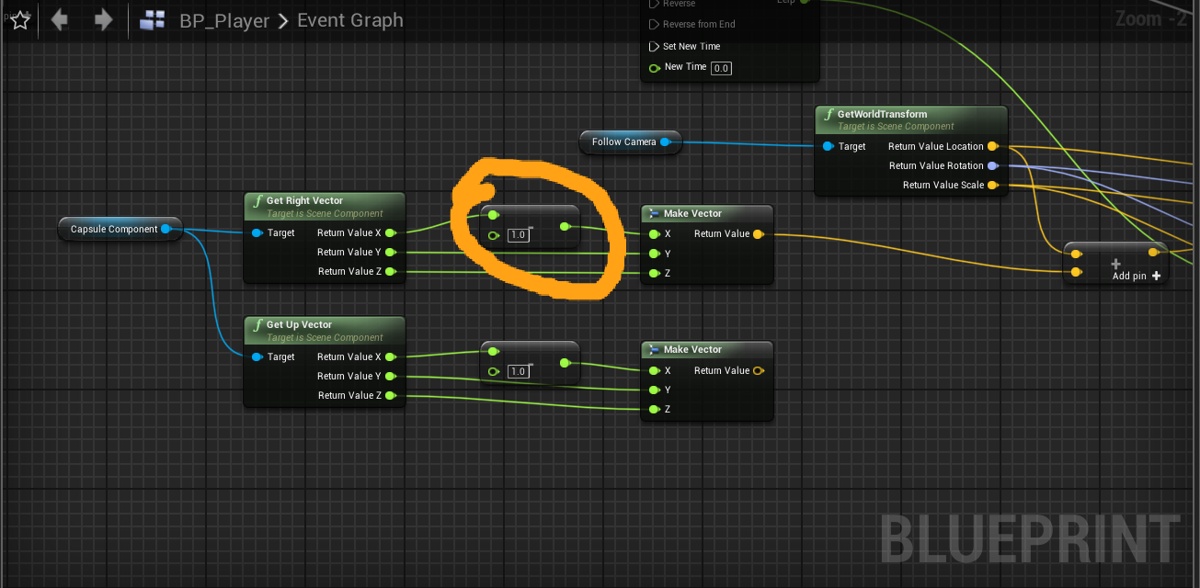
how come in game the x moves so many units to the right, when I only put minus 1 on the "X" of get right vector
 obsidian nimbus
move the pawn not the capsule?
next badger
@carmine spruce how it's triggered?
carmine spruce
im having trouble understanding the concept of a pawn
next badger
i see now
carmine spruce
triggered by a sphere trace by channel
grim ore
@next badger I actually did not think of that, the VR stuff is in the vehicle templates as well. Should template be segregated even more or is a one and done template that you use/disable what you don't want better (like it is now) ? or does that just cause more problems later
carmine spruce
next badger
@grim ore i think VR should be a component of some sort, not sure if it's possible to encapsulate that functionality...some people want to make VR game, and those will be Just VR games. Some want to make Game that may have VR in it in the future. Doubt there are devs that planning that it should work with VR and without from the start.
it's really hard to make a game that is good both with VR and w/o from the beginning
grim ore
So lets break it down with just a FPS template. Are we looking at a "Mobile" FPS template, similar to what it looks like now. A Desktop FPS template that is more robust with maybe landscape or other effects. a VR FPS template that is set to run on VR devices similar to the mobile just ready to go with VR controls. so FPS template might become 3 templates?
next badger
and i think people who can do that, won't use templates =)))
carmine spruce
obsidian nimbus
i dunno having some start to prototype is allways nice
next badger
@grim ore yep, i'd stick to 3...mobile for gamepad and touch only controls, desktop with main keyboard+mouse, and VR
consoles is kinda outsider here, unfortunately
grim ore
Thats a good question as well. Should a template be "bare bones" with a controller, pawn/character, etc. as "needed" or should it be more like a prototype setup with say 1 level with buttons switches enemeies etc for a FPS
obsidian nimbus
some checkboxes would be nice i guess
grim ore
Should epic stick with what they have now, templates being part of the engine and bare bones and "starter" stuff on the marketplace like the FPS shooter.
or should templates be more robust and part of the launcher/engine itself (optional of course like it is now)
obsidian nimbus
hmm i didnt like the gameplay system marketplace thing cuz it does so lil and set up in some weird way
next badger
@grim ore can we add custom templates to launch menu? iirc we can...
in that case i'd stick to content (the green button)
that let you add AI and levels later
@grim ore
grim ore
yep we can add feature packs and content packs to the add button, they can be part of the launcher download for example
obsidian nimbus
the GAS template looks like a bad game , not a starter prototype
next badger
Would be nice to have, UMG UI pack, for main menu at least
grim ore
hmm.. I didnt think of that tho. I wonder how modular you could make stuff. like the content packs now are mainly assets but can we add in stuff like yep
can we add in a menu pack for example
next badger
AI enemy pack with basic navigation
grim ore
could you actually make a FPS template, like we have now, and then have "addons" that you can drop in with that button for UI, AI, or uh... stuff like that lol
so you could make a FPS or TPS template project then add in AI
next badger
@grim ore imagine GameJam...you have 5 days to make a game from ground 0
obsidian nimbus
content examples is pretty neat tho, but im thinking more like forward shading, stripped render engine
next badger
it would be great if we could pick a Genre template (fps, tps, strategy, puzzle, vr...) with base controls and game mode
and add the content later
polar hawk
GAS? I could use a little fuel myself, and we could all use a little change
grim ore
so lets say you had 3 templates for FPS when you create a new project. One normal, similar to what we have now but marked as "Mobile" with settings appropriate like the rendering RHI layer set to opengl/vulkan and forward rendering and mobile hdr off. one desktop which is a flufflier template. one VR with VR controls. then you had green "addons" that would add basics to any template like UMG or AI.
obsidian nimbus
I never really used GAS cuz not in content examples 😛
next badger
i'd prefer this way over removing VR controls from existing template like it's now
 maiden swift
The items in that Feature Pack menu are separate from the Project Template menu.
They're packaged in .upack files.
So I'm not sure how to create custom ones.
next badger
oh, it's a plugin iirc
grim ore
its super simple to make a new .upack, I have a video on it (private for now)
maiden swift
@polar hawk 🚀
grim ore
well not "super" simple but its a 10 minute process
next badger
"I have a Private video"
maiden swift
Oh really?
next badger
i think Epic suggested to make them if you going to sell content on marketplace or share the content with others...on one of the streams at least
grim ore
the unrealpak program can pack/unpack the default content files in the engine. Its a simple case of unpacking something like the FPS feature pack, adding your own stuff (all it does is copy files to the content folder and it can import some .ini settings like input), then repacking it. the issue is there are a TON of optional options for the config file I have not figured out yet so I didnt want to finish the video till I get a handle on it
feature packs and content packs are similar except feature packs can do the .ini changes while content are straight copies
next badger
oh...sorry, i think i've mixed those...Epic was talking about content packs
which i think is the same in terms of install (except nave no ability to change ini)
plush yew
Im at a loss. project was fine last night. the update from launcher today, now nothing will open. i dont understand. im not getting errors. it acts like its going to open projects, then just stalls mid load with launcher open and a project window listed, but it never loads.
grim ore
yep yep content packs are just a content folder moved over. They can use existing files like you can share the dummy mannequin between packs which is what a lot of them do now (for the feature packs)
obsidian nimbus
sleep time for me, gn 😛
grim ore
I had the stupid video on the back burner since july when I did the new project template videos but half the stupid config commands are confusing to me still so I gave up lol
Like I really don't understand why you can't import other parts of the .ini but for some reason only input seems to work. It seems like it would make sense to allow other changes like rendering settings or default settings but nope 😦
next badger
@plush yew open the ue4 with -Log
grim ore
@plush yew when you try and open the project from the .uproject does it not start? and yep the log
next badger
the console window should pop when you run it
plush yew
ive tried just opening it from the library and also loading the engine first then trying the project
i can get it up to template/project selection, but the project just poops out
grim ore
try it from your .uproject in your project directory, or go into Saved/Logs in there and see what it says
or restart the Pc and try again if you have not lol
next badger
@plush yew use the log parameter...
you may also try -log=MyLog.txt
but generally console won't crash
ahah...
just found this parameter...
INSTALLGE: Add the game to the Game Explorer.
wonder what it does
grim ore
I know windows 10/8 used to have some central games hub but I think it's gone? - yep 7 and 8, they removed it lol
next badger
the shortcut for control looks like: com.epicgames.launcher://apps/Calluna?action=launch&silent=true
grim ore
interesting
 fringe drift
Ok, so, I'm setting up the movement for a (player-controllable) spaceship pawn. I would like the rotational motion to be dependent on the mass of the spaceship, but unchecking 'accel change' on 'add torque in degrees' doesn't seem to work.
next badger
and it worked when i could not launch the Launcher (doe to some network issue)
@fringe drift hover the node an read the description
If true, Torque is taken as a change in angular acceleration instead of a physical torque (i.e. mass will have no effect).
oh...you UNchecked
fringe drift
Yes, I want mass to have an effect, so I want that to be false. But making it false seems to break the ship's movement.
next badger
my bad
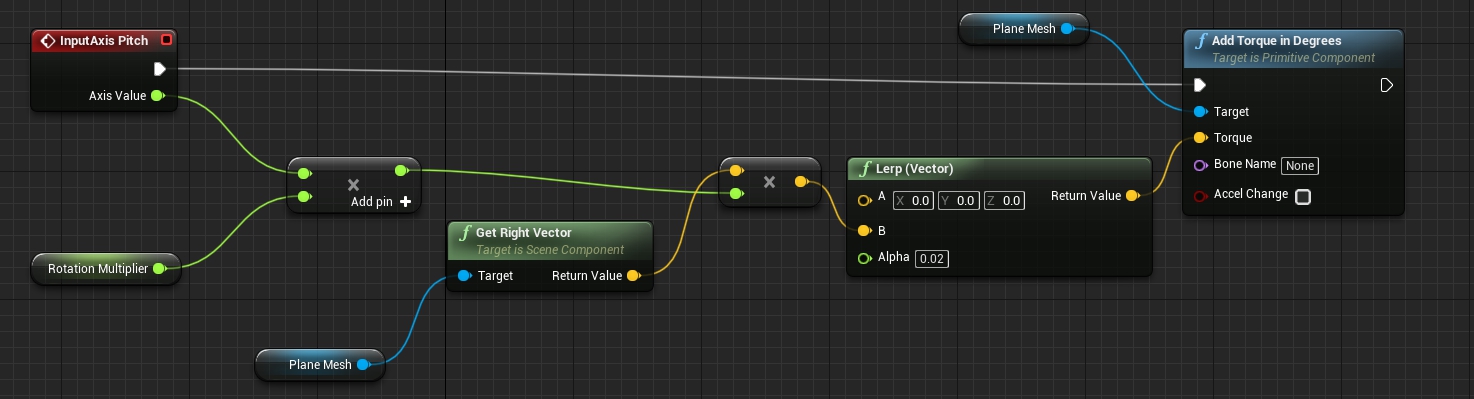 next badger
what's the mass and the shape of the ship?
 kind dew
any good equipment system tutorials that talk about off-hand weapons?
plush yew
[2019.09.12-21.48.16:964][ 0]LogLinker: Warning: Failed to load '/Game/FirstPersonBP/FirstPersonOverview': Can't find file.
[2019.09.12-21.48.16:971][ 0]LogLinker: Warning: Failed to load '/Game/FirstPersonBP/FirstPersonOverview': Can't find file.
[2019.09.12-21.48.16:972][ 0]LogUObjectGlobals: Warning: Failed to find object 'Class /Game/FirstPersonBP/FirstPersonOverview.FirstPersonOverview_C'
fringe drift
It's the default UFO static mesh, I set the mass to 5 kg in an attempt to make it low enough to easily move.
grim ore
that's just a warning and won't cause it to not load up @plush yew
next badger
default ufo was like 2m disk?
fringe drift
Yeah, it's pretty small.
IT IS WORKING, nvm. I just need to make the numbers bigger, the rotation is just snail-slow.
next badger
Moment of inertia, denoted by I, measures the extent to which an object resists rotational acceleration about a particular axis, and is the rotational analogue to mass. Mass moments of inertia have units of dimension ML2([mass] × [length]2). It should not be confused with th...
heres' math for calculating the inertia
plush yew
[2019.09.12-21.50.25:913][ 0]LogClass: Warning: In asset 'None', there is an enum property of type 'EDepthOfFieldMethod' with an invalid value of '('
fringe drift
Looks like I need to multiply my vector x float for the blueprint parts that slow down rotation too.
next badger
plush yew
[2019.09.12-21.50.31:810][ 0]LogPackageName: Warning: Asset path "FX_Test_LAN.Meshes.SM_IceWall01" is in short form, which is unsupported and -- even if valid -- resolving it will be really slow.
[2019.09.12-21.50.31:817][ 0]LogPackageName: Warning: Please consider resaving package in order to speed-up loading.
[2019.09.12-21.50.32:662][ 0]LogPackageName: SearchForPackageOnDisk took 0.845s, but failed to resolve FX_Test_LAN.
[2019.09.12-21.50.32:667][ 0]LogPackageName: Warning: Asset path "FX_Test_LAN.Meshes.SM_IceWall01" could not be resolved.
[2019.09.12-21.50.32:876][ 0]LogPackageName: Warning: Asset path "FX_Meshes.UI.SM_SelectionMesh_01" is in short form, which is unsupported and -- even if valid -- resolving it will be really slow.
[2019.09.12-21.50.32:881][ 0]LogPackageName: Warning: Please consider resaving package in order to speed-up loading.
[2019.09.12-21.50.33:720][ 0]LogPackageName: SearchForPackageOnDisk took 0.837s, but failed to resolve FX_Meshes.
[2019.09.12-21.50.33:725][ 0]LogPackageName: Warning: Asset path "FX_Meshes.UI.SM_SelectionMesh_01" could not be resolved.
[2019.09.12-21.50.33:739][ 0]LogPackageName: Warning: Asset path "JW_Ice_Mountain.Mesh.SM_SnowBoulder" is in short form, which is unsupported and -- even if valid -- resolving it will be really slow.
grim ore
If you paste the entire log to something like pastebin it might be easier
fringe drift
Oooo, thank you, the title in that link looks like exactly what I need!
My rotation multiplier is now one million (instead of 200, as I was using earlier) and I now have a spaceship that is legitimately agile.
grim ore
swift
unborn folio
Hey does anyone know how to export cod 4 maps and put it in unreal engine . Dunno if that’s possible I think it is because u can do other call of duty games or does anyone have any cod maps for download would make my day easier 😂
warped tangle
@spark sonnet hell yes....what is it
next badger
@unborn folio i doubt it's ue4 related...and anyone would help you to get copyrighted content
warped tangle
is that a real question?
spark sonnet
Its a monkey
warped tangle
That's what I thought. You can now be monkey
warped tangle
you're welcome. pay it forward
unborn folio
@next badger is it copyright if I remake it with my own twist ??
next badger
you need to learn how licenses work
unborn folio
Alright thank you @next badger
warped tangle
Yeah you need to do some serious research....
next badger
not much help, but you're welcome
fringe drift
I am pretty sure the makers of COD4 would be pissed if you made a game with their stuff.
unborn folio
Yeah but worth to ask before doing it and getting in trouble 😂 @next badger
True
Not for a game for a cinematic edit
plush yew

Pastebin
next badger
well, trouble it's when you got sued, or at least banned for sale the product you spent money on developing
warped tangle
There are some ways that you can use copyright material, but generally it's with the expressed consent/OK of the copyright holder
next badger
yeah, nintendo and disney are especially jer*s about it
 crisp fable
Idk wtf happened but on Monday my saved/tmppackages folder got filled with over 2 million empty files and it was crashing visual studio
unborn folio
So I can get sued for making a similar scene to that ?
next badger
no...
fringe drift
You would get sued if you used those assets.
next badger
i was talking about using the assets from game
warped tangle
They can't copyright a crashed helicopter in a village. They can copyright you taking assets from their game, repackaging it, and selling it
unborn folio
Fair enough but no I’m not a game maker or anything like that it’s just a hobby
next badger
even distribution for free may be sued -_-
scarlet birch
If it's an exact placement of things, so much so that it clearly resembles the source scene, it can get murky.
unborn folio
Damn
fringe drift
Maybe if it isn't an interactive media, and maybe if it's free? I mean, youtubers and streamers don't get into trouble for posting video to the internet. But they're not disseminating the game either.
Check first. With a lawyer.
unborn folio
😂😂😂
warped tangle
Yeah, @next badger theoretically, but from my understanding in practice it's not common unless the free distribution of something that's copyrighted is intended to cast a bad light on the original material or something
scarlet birch
Honestly, no one can tell you exactly what will cause a problem because a rights holder can sue for just about anything whether or not they have an actual winning case/claim.
or they can choose to just ignore it
unborn folio
So what if I make a game for my own fun not selling it just for me that resembles the original
fringe drift
Most AAA game developers are extremely anal when it comes to content licensing. If they could ban ppl from using youtube or twitch, they probably would.
warped tangle
lol
scarlet birch
Some have gone after people for streaming gameplay.
 misty creek
If you don't distribute it or share it with other people you can make whatever you want. The trouble starts when you sell/give it away
plush yew
this is crazy. it'll open the window, spins up my gfx, then just never displays
warped tangle
Eh yes and no @misty creek . What you're talking about is basically them not KNOWING that you did it. The fact that you took the assets/map/content is still an infringement
unborn folio
Well night guys thank you for the advice
fringe drift
Consider also that merely having it sitting around on your PC is a hazard. Suppose someone else steals your PC, and with it, activision's assets. You could get in trouble for that too.
warped tangle
Yep, good luck, don't do anything we wouldn't do
Yes, there is a level of bright line law and a level of ethics at play here.
fringe drift
Realistically speaking, most people don't even read EULA's. They just scroll through and click 'agree'. Even if they don't agree.
scarlet birch
I don't personally care what someone does at home ripping some assets or whatever, but when you're in a community like this you have to follow the rules and set a clear line to avoid repercussions on the whole community. I mean, I learned a lot as a kid using hex editors and cracking games, but I'm not going to promote that here.
fringe drift
^ This.
warped tangle
Agreed, have to set a standard
Back in the internet medieval times we all did some shit....lol
next badger
btw, OP, scumbagtadas have left
scarlet birch
Oh man, auto dialers and a 56k modem. I am so glad I didn't grow up in today's world.
warped tangle
Yeah I know @next badger
Still an interesting topic to have come up
We'd all be in jail nowadays lol
I remember when ISPs started sending notices and everybody was freaking out
next badger
i made maps for doom, hl1, and cs (original one)
digging info on hl1 modding was hell
scarlet birch
I made a trainer for the first diablo. It was mostly from other peoples work though. Use to teleport around in random games and hunt people down.
fringe drift
Maybe, if you're a hardline privacy fanatic, you can get away with doing some ethically justifiable but technically illegal things, on the basis that no one would ever observe you doing it, or care that you ever did it.
But I advise against it. Don't do it.
scarlet birch
bored, and immature
warped tangle
@fringe drift yeah that's kind of what I think we're all saying, just because they may not know doesn't make it ok to do.
fringe drift
What blueprint node do I need to do this:
Variable 1 = (Physics Angular Velocity x [constant]) ^ (other variable)
warped tangle
power?
fringe drift
Ah, it's called 'power'? Awesome!
Once I break a vector into X, Y, and Z floats, what blueprint node do I use to select only the highest of N input values (three, in this case)?
fringe drift
You are my hero! ❤
If I use 'Get Physics Angular Velocity in Degrees', and then break the vector into X, Y, and Z, are the floats in degrees/second?
Or is it some other unit of measurement?
warped tangle
I would assume so yes
scarlet birch
doc says per second
fringe drift
Yay!
scarlet birch
Hey, I have a function that reverses gravity on the player character. I want to keep the character at a certain max height from the ground and add a little variation to the maximum so that they kind of bob a little. Right now I'm doing it by actually setting the gravity scale to a negative and then a slight positive and back and forth. It's not really working out how I want. I'm wondering if anyone has any suggestions on how they might approach it? with or without changing gravity is fine.
warped tangle
so you don't really want to reverse gravity then? more like levitate the player?
scarlet birch
I mean, I don't really care how it works under the hood as long as the results are the same. I was thinking of trying a small launch character or something and adding a wind from underneath so the cloth and hair float a bit.
It works fine how I have it now, but the bobing bit kills it.
Because of momentum.
warped tangle
I mean....it may create other issues but could you add a blocking collision above the player? on reverse gravity?
scarlet birch
I don't think that would work.
heady frost
You could probably use a sine wave to put an offset on the height of the character
scarlet birch
I am using a sine for the variation
heady frost
clamp them to the max height before that and you'll be able to let them float just above and below that max height, depending on the magnitude of the wave
warped tangle
what are you doing to stop the upwards movement of the player when you reverse the gravity?
scarlet birch
The problem I run into is that on the down part of the bob, momentum tends to carry the player down
Nothing really, I experimented with clamping upward velocity
I think talking it out just gave me an idea.
heady frost
rubber ducky debugging is a great way to come up with ideas
scarlet birch
More often than not, just asking a question helps me find an answer, since you have to lay the problem out to ask anyway.
warped tangle
lol
fringe drift
This is my first time doing a function in UE4, and I'm not following a tutorial. Is this the correct syntax for calculating a 'rotation dampening' variable?

 marsh swallow
What is consensus on Nav Mesh Force Rebuild On Load. Should it be Set or unchecked? We have it loose nav mesh all the time and have to go back and rebuild it when packaging. Were getting to the point we have too many levels to check
unborn folio
Anyone got any maps to test Bhop on and ai death match
warped tangle
Bhop as in....
scarlet birch
Look in the free projects in the launcher
warped tangle
If you just want to play around with stuff why not just use one of the example content projects in the launcher
unborn folio
Okay thank you
fringe drift
OH, I need absolute value in here.
So, my rotational movement is ❤ . But now I need translational movement.
Between "InputAction Forward Thrust", and "Add Force", I'm not precisely sure what to insert. Forward thrust propels me in the direction of the world's X axis, not the front of the ship.
Take the axis value, multiply it by a reasonably large number (because 1.0 is tiny) then lerp it...but what do I do with the value that the lerp node emits? I'm not sure how to turn it into forward thrust. Maybe something with "Get Forward Vector?"
 compact oyster
Seems like Widget bindings from a parent are not kept in a child. Is there anyway to keep them or remake them?
EDIT: Solution found, issue was located between screen and chair.
scarlet birch
Ah, broken keyboard. Hate it when that happens.
compact oyster
coughs ah yes, damn mechanical chattering.
scarlet birch
Probably almost as bad as when the problem lies between keyboard and chair.
compact oyster
Yeah, having a broken desk can be a pain.
vocal flume
Is there a way to change the order of the pins? Like when I create a function.. can I make the first output pin the last ?
scarlet birch
I got the gravity thing working, but scrapped it. It would just take too much time to get it to feel just right for what I'm working on.
vocal flume
@scarlet birch Thank you sir!
warped tangle
@scarlet birch curious to see how you end up solving this
scarlet birch
I tried out with a couple of methods. Method one was two events with timers , one to increment and one to decrement gravity between a max and minimum gravity.
I then triggered the decrment when the ability was active but when the max distance was reached the increment timer would trigger and if z velocity was greater than 0 it would lerp to 0
The max distance was defined as a float but then scaled by the sine of Now.milliseconds mapped to 0 to 1.
I also tried using launch character and a similar clamping of velocity. Both methods worked , but the feel wasn't quite right and would take more tuning than I want to spend on it right now.
ashen eagle
I have a main blueprint actor which is meant to be spawned as a collectible item. The children of this blueprint are the different types of collectibles. Instead of adding all children blueprints to an array, is there a simpler way of spawning a random child of master blueprint class?
next badger
Am I blind? Cant see any links:
https://forums.unrealengine.com/community/work-in-progress/1656417-assets-cleaner-a-tool-to-manage-unused-assets
Unreal Engine Forums
When a project has been going on for a while, through several prototyping phases, a lot of assets get created but end up not being used and just take up space in
serene sorrel
@ashen eagle yeah bro
https://forums.unrealengine.com/development-discussion/blueprint-visual-scripting/83552-get-all-child-classes-of-a-blueprint-class-not-actors-but-the-classes
Unreal Engine Forums
Build powerful visual scripts without code.
You'll need to add a C++ to your project, unless theres some new BP way I'm unaware of
scarlet birch
@next badger I have a link to the file and it looks like he has removed it from the post and made the file non public
next badger
 serene sorrel
@next badger "This tool is now out of public testing, and will be sumitted to the marketplace in the next few days. Stay tuned!"
next badger
Eeh. Could be a good tool.


 next badger
Yeah. Can't blame author. Just Epic.
serene sorrel
Pretty much a feature that should be in unreal already
next badger
Well, it's not clear if it will be paid yet. Maybe he's a pure soul.
serene sorrel
Are you selling your project if it completes
next badger
depends...most my "projects" are free
serene sorrel
I'm lucky that most of my hobby projects never complete so i dont have to worry about it
next badger
you can't complete something in UE4...except game...
but most my games are free...cause most of my games are GJ submissions
plush yew
is there a way to see the box overlap actors box? On box tracing you can set the visibility but on overlap the option isnt there
next badger
@plush yew
plush yew
Yeah, so when you box trace that's an option. But I'm using the box overlap node
is there a way to see the box overlap actors box? On box tracing you can set the visibility but on overlap the option isnt there
next badger
ok, boxoverlap has no debug, but you can make one
vocal flume
Is it a bug if branch node fires true and false at the same time? Am I missing something here?
plush yew
I'm not sure how to make a debug for the boxoverlap node
plush yew
oh cool
next badger
@vocal flume show the graph...
actually, just place a break point on both, true and false
often it seems like they are triggered same time, but you can't test 10ms delay w/o breaking the cycle
vocal flume
serene sorrel
If you have an actor component attached to two different actors, how can you get "Per actor" default values for that component
Right now if you change it in one actor it changes it on all
warped tangle
@serene sorrel how are you referencing the parent actors?
serene sorrel
There are no parent actors, I just added an actorcomponent to two different actors
you select the component then, edit the default values and it applies to every actor that has that component, which i find a bit odd
its a c++ uactorcomponent if that matters, am I missing some flag
UPROPERTY(EditAnywhere, BlueprintReadWrite, Category = "Inventory")
int32 m_numslots;
vocal flume
@next badger Just fixed the issue. You’re right. It’s so damn fast. I was initializing my variable in event tick instead of event begin play. That kept the branch statements running forever and it looked like it was executing both at once. Now I see what’s happening. Thanks Alexey!
serene sorrel
Hmm if i create a blueprint with my c++ uactorcomponent as the parent, and then use THAT bp, i get per actor default values
strange i have to do that though
next badger
um...i think you have some misunderstanding about actors and components...
you may place actor based on BP to the world and change it, remove its components even, add new ones...but this it just an instance
same with actor component, it's not attached to any bp, it's instantiated
default values used on creation (construction)
but those can be overridden on runtime or on creation (construction script)
serene sorrel
if i add an actorcomponent to an actor, i assume its got its own copy of that actorcomponent and that if i edit default values of that component its only for that actor
now if i edit the original component default values i assume that will be applied to any not set
scarlet birch
You should have led with that. Is that the issue, that when you edit the defaults of the class its instances are reset?
serene sorrel
Nope, its that when editing the component in an actor it changes the defaults for all actors
serene sorrel
i have my numslots integer value in the uactorcomponent, i add this uactorcomponent to two different actors in blueprints using the "add component" button. If i click the component after its added and edit the defaults it changes the other actors defaults too
scarlet birch
There's something you're leaving out or something not right in what you're explaining. Editing a single instance in most cases won't do that. It would save a lot of time if you just shared what ever it is you're working on.
serene sorrel
It does do it for me at least. But it is somehow fixed if i create a blueprint with a parent of my c++ uactorcomponent, and then use that blueprint
rather than my c++ class itself
the uactorcomponent is a c++ class so what is the appropriate c++ flag
UCLASS(Blueprintable, ClassGroup=(Custom), meta=(BlueprintSpawnableComponent) ) class MYPROJECT_API UInvSystemC : public UActorComponent
with
UPROPERTY(EditAnywhere, BlueprintReadWrite, Category = "Inventory") int32 m_numslots;
next badger
i just told some blasphemy
scarlet birch
yeah,
serene sorrel
maybe its just a weird blueprint editor glitch i donno, but its fixed if i do the blueprint->parent work around
next badger
it's the opposite for spawned instances -_-
scarlet birch
I'm not sure what's going on. Maybe ask in cpp?
 restive vine
i want to learn how to animate a rig for a video game. Whats is the best way to animate a rig. Should i rig in blender, then import into unreal engine? or could i rig a mesh and animate it all in UE4? What do you guys think is the better option?
 honest ermine
I have an actor made up of a Sphere and a Cube. I want to change the scale of the Cube, but not the Sphere. How do I do that?
I also want to rotate only the Cube, but not the Sphere.
grim ore
the scene component should be the root, then it should have a cube and a sphere as children (so it has 2 children)
then you can rotate or scale things independently as children of the root
honest ermine
I mean more in the sense of scaling it through the blueprint.
Because the cube is a health bar, and I want it to scale when the sphere takes damage.
 burnt heath
would anyone be able to help with this error here i dont quite understand skeletons and stuff im trying to import a model and im getting this error...... Assertion failed: !bOnlyOneRootAllowed || (((BoneIndex == 0) && (BoneInfo.ParentIndex == INDEX_NONE)) || ((BoneIndex > 0) && RawRefBoneInfo.IsValidIndex(BoneInfo.ParentIndex) && (BoneInfo.ParentIndex < BoneIndex))) [File:D:\Build++UE4\Sync\Engine\Source\Runtime\Engine\Public\ReferenceSkeleton.h] [Line: 203]
these are the bones if it helps
kind dew
anyone know why when i possess a different character I can't move anymore?
warped tangle
what do you mean, like at runtime? or what
 latent flume
Does anyone know the best way to track a Signal 11 caught - segmentation fault? The current build of a game I'm doing runs through but I'm getting the error when closing. Last log.
My log says the following "[2019.09.13-05.05.39:167][566]LogExit: Exiting.
[2019.09.13-05.05.39:167][566]LogInit: Tearing down SDL.
[2019.09.13-05.05.39:174][566]Log file closed, 09/13/19 01:05:39"
plush yew
I have a visual effect issue in cascade i cant iron out. maybe someone can just take a quick look..? in #visual-fx
 fallen marten
@kind dew maybe because when you possess the new character the inputs aren't the same or connected or the reference to them isn't right
kind dew
hey thanks i was able to get it goin:) something i had a macro for getting movement vectors that i wasnt using on the pawn
fallen marten
Ahh lol well that s good news man 🙂
 tired oracle
nah
I have no clue what happened im not new to the engine
but every single actor i had in the foliage tool is gone
so all my trees, rocks, everything gone
from my level
i mean i can load a backup but still i'd like to know what happened
warped tangle
to clarify, the foliage instances that you have already spawned with the tool are still in the world, but the foliage actors in the foliage tool are gone?
tired oracle
no everything is gone
its as if I selected every foliage actor and deleted them
but i didnt do that
warped tangle
I think they went on strike man....
warped tangle
I've never experienced that
glacial pecan
great, unreal crashes when I do save as on my level!
fringe drift
Hey guys, how do I turn the vector of the "Get physics linear velocity" into a single float? I don't want to break the vector into three different floats, I just want one float with my linear speed.
glacial pecan
and it's repeatable
fringe drift
Would it be "Vector Length"?
honest vale
I wonder if Epic is shifting development more towards Unreal Studio
honest ermine
So I have enemy health bars which I believe I hooked up to the enemies, but the health is constantly being displayed as zero.
honest ermine
How do I fix this?
warped tangle
god where to start @honest ermine
Are you setting the value somewhere? where are you setting it?
placid arrow
so, years ago i put one of rami's victory plugins into my project, at the time i needed it. now, i can do everything it does as part of the editor without needing a plugin, or i have the knowedge to DIY, so im going to take it out, its hampering my ability to quickly upgrade the project to 4.23.
if i want to take out a plugin from my project, i cant just remove it, can i? am i right to assume i just need to delete any 'victory' based actors from my map and redo them as non-victory actors? basically, remove references to plugin data?
ive heard horror stories about people trying to remove that plugin from their project and it breaks their project
wary wave
you'd have to remove all that stuff, and it's not going to be fun
warped tangle
make a copy of your project first lol
placid arrow
as far as i can tell, i just have two actors in my world that are victory ones, and they can be basically exported as fbx, and then added back as simple static meshes
will version control be enough? 😛
if i push it to git, safely saved
wary wave
version control might be enough
warped tangle
I'm kinda anal about that, if I think I'm going to have to do a potentially project-breaking modification, I just duplicate the project so I can freely tinker and see how bad it's going to be to do
 ripe saffron
same as @warped tangle
 nocturne knot
What would you say the best project structure / styleguide to follow for big projects is?
 barren coyote
Hey, can anyone tell my what I did wrong, I attached the camera to the head socket and it became a giant camera, in this image you can just make out the capsule around my character mesh
nocturne knot
any recommendations?
warped tangle
@barren coyote is your head scaled up or something?
barren coyote
no, it's a Mixamo mesh, maybe thats why?
nocturne knot
@barren coyote either the scale of your mesh is off (i.e not modelled in cm) or the head socket has being scaled
barren coyote
ok, I'll look into that, thanks
nocturne knot
throw it into max/maya/blender whatever and put it next to a box that's 60x60x180cm
honest ermine
@warped tangle I'm setting the health in the enemy itself.
warped tangle
can you show code? it's impossible to tell what's wrong without knowing how you're doing things
placid arrow
what causes all assets to be greyed out in the world outliner?
warped tangle
locked persistent or sub level
placid arrow
nope theyre not locked
warped tangle
I'm outa ideas
warped tangle
share with the class
placid arrow
its stupid. being in foliage tab under 'modes' disables the ability to click anything in world outliner
even if youre not trying to click in the viewport
warped tangle
loooooooool. Didn't even think about that
placid arrow
im assuming terrain may do the same thing
warped tangle
dunno probably
plush yew
I thought the event tick ticks and world delta seconds were the same thing, are they not?
warped tangle
@honest ermine what are you using to display the health, a progress bar?
honest ermine
Yep.
warped tangle
oh yeah you are, are you taking in to account the progress bar wants a 0-1?
also how are you setting the evil sphere reference
honest ermine
Yeah, the Health is set to 1.0 default.
I think that's the main issue.
It's not getting a reference to the Evil Sphere.
warped tangle
lol you have to set a reference
honest ermine
How do I reference it?
plush yew
how do i merge a bunch of objects? im trying to make an interactable window and i need to make the frame one object and the movable parts each one object as well
warped tangle
@plush yew a simple way is to build the BP out, drag it into the world, right click and convert to static mesh
another way is the merge actor tool
plush yew
thanks
honest ermine
@warped tangle How do I reference it?
warped tangle
You need to figure out a way to set the reference....I don't use widget components much so I'm not sure the best way but you can get the widget component in the BP that houses it (the tower or whatever), get user widget object, cast to your widget class and you can access the widget that way
 blissful trail
can you get a blueprint from unreal and put it into blender
warped tangle
lol that makes no sense
You can export a static mesh from unreal and import it in to blender. Same with skeletal mesh, but blender has no concept of a blueprint
blissful trail
so if i convert a bp to a static mesh can i import it to blender if so how ?
warped tangle
Yes, do a little research, it's all possible
 severe ibex
any general tips on making baked shadows stronger? I get the feeling my GI is overpowering them or they just don't have much contrast.
abstract relic
Aside from post processing?
severe ibex
well any post processing tips might be good.
I'm using Vray for Unreal, I can see my directional lights baking reall nicely but then it looks like a GI pass is bleaching things
I only have two spotlights passing light into the room and a Sun/Sky but they're not passing directional light into the room.
abstract relic
Bumping down your sky light will help
Otherwise, throw down a post processing volume, you can adjust dark tones if you haven’t already
honest ermine
Can someone help me with getting a reference from my enemy to my progress bar?
inner cloak
@honest ermine Not sure i understand what you want !
spark sonnet
I think he wants to get a reference to an actor so he can get a variable from that actor to bind to the progress bar
inner cloak
without seeing how his things are set, we'll probably not be able to guide him well
honest ermine
@inner cloak Actually I may have figured it out. Thanks though.
Problem was each enemy had a health bar widget, but the health bar wasn't getting a reference to the individual enemy, so wouldn't display the health.
But it's working now.
spark sonnet
How did you solve it @honest ermine ?
wary wave
presumably by setting the reference when the widget is created
 dim merlin
so why would destroycomponent or deactivate still leaves some pref impact left. E.g. spawning 5k empty actors vs 5K actors with a skeletal mesh (destroyed) ?
wary wave
I don't understand the question
you mean why does destroying things have a performance impact?
dim merlin
nope, why would a empty actor have a much better performance than a actor with a single (removed) component
severe ibex
@abstract relic thanks for the tips
dim merlin
seems the component still leaves some data behind.. any idea @wary wave ?
wary wave
depends on what you mean by "performance" and what you mean by "removed"
dim merlin
'performance' just fps , removed 'DestroyComponent'
testing with 5k actors holding a skeletal mesh component(Destroyed or Deactivated) versus 5k actors with no sm component
wary wave
okay, and what's the context? Performance when?
because creating an actor with a mesh component means it needs to initialise that mesh component, even if you delete it right away (which is then a whole other action which in turn costs performance)
dim merlin
actually, the performance meaning all-time fps impact afterwards.. I dont mean anything regarding adding or removing as performance impact
actually, i just loop over all actors and remove the sm component by pressing a button
i'd expect that these are then as lightweight as a empty actor right?
also tried to collect garbage, but that aint doing much good
dim merlin
any idea @wary wave ?
wary wave
I would expect performance cost after garbage collection has run to be more or less the same
though 'cull movement' may well be the offender
if you really want to know where whatever performance cost is coming from, use the gameplay profiler
dim merlin
hhm yeah ok. its pretty odd as there's nothing else i could do...
ill give the profiler a try
 rocky mantle
hi guys, i am trying to detect an actor if it is falling. I used get velocity node but it just prints out zero. Why is that?
wary wave
presumably because it's velocity is zero
if it were falling under physics though, that should not be the case
rocky mantle
but it is falling
wary wave
then your problem may be elsewhere
it's really hard to say what's wrong knowing absolutely nothing about your code
dim merlin
@rocky mantle use the bool IsFalling() ?
wary wave
IsFalling is a character movement function?
dim merlin
yeah
Returns true if currently falling (not flying, in a non-fluid volume, and not on the ground)
wary wave
that would work, if the actor is falling under physics, it should return a value
I suspect the actor is actually not falling
dim merlin
ah, just thought it was for a character
wary wave
notably because it doesn't have a mesh component at the root, so it can't
rocky mantle
oh i see thats why the mesh is not the root thank you
rocky mantle
i get it know so what i need is component velocity, again thank you
and Mich for trying to help thank you.
dim merlin
so @wary wave run another test
actually just spawning empty actors in game, around 5000 by blueprint
thats not a big deal, can be 100k even
then, when i add a skeletal mesh component to each actor the fps drops obviously.
however, then when i destroy the mesh components again, the fps sticks around same as with component
seems i need to add something in c++ like update anything?
so, it would be very handy for me if i could make the actors be clean again to optimize my game... cant find any help 😢
note, i dont mean it as issue with adding and removing components, just mean the idle fps afterwards...
unborn folio
what do i click ?
unborn folio
ember notch
What is better to use C++ or Blueprints in UE4?
cloud cobalt
Both
dim merlin
@ember notch if ure new to unreal (and c++) try to learn blueprints first, then u could try to make the same code in c++
unborn folio
@dim merlin it says :project name: could not be compiled . try rebuilding from source manually
ember notch
I am learning C++ currently and I can good Blueprints and I heard if I can C++ that I can better use Blueprints. Is it possible to combine them?
dim merlin
@ember notch yeah u can combine. Mostly its good to prevent doing big calculations and vector stuff in blueprint and move it to c++
@unborn folio u should try to debug the project in visual studio and see whats wrong
dim merlin
have u installed visual studio for unreal yet @unborn folio ?
unborn folio
yes i have
dim merlin
so the docs have some nice info about it:
Compiling individual game projects using Visual Studio on Windows, or Xcode on Mac.
unborn folio
@dim merlin thank you