#ue4-general
1 messages · Page 517 of 1
 grim ore
*usually and this is Epic so for all we know there is an internal release date for someone that is Sunday lol
"My birthday is next week and I am taking the week off so ship .23 on Saturday!"
 stoic cobalt
please help me
how can i attach something to a bone/socket in a blueprint class
ive been trying to figure it out for an hour now
grim ore
what have you tried?
grim ore
so you are trying to attach a scope to a weapon?
stoic cobalt
yes i want a render target to be attached to a specific place
and not only the blueprint itself
grim ore
is this weapon part of the blueprint, a component, or where is this weapon at?
stoic cobalt
its just a skeletal mesh
inside a blueprint
the weapon
i have made a socket inside the skeleton
grim ore
ok so then the weapon is a component which is your first thing to remember
and this weapon is a skeletal mesh?
stoic cobalt
yes
grim ore
ok so that is the second thing to remember, what is the name of the socket on the weapon?
stoic cobalt
scope_socket
grim ore
what type of object is the SCOPE_2DRT
stoic cobalt
scene capture component 2d
grim ore
so the issue is there are different nodes for Attach To Component and Attach to Actor and you need to use the correct one like this https://i.imgur.com/nPj9S1C.png
your Weapon is a component so you want Attach to Component
grim ore
your Scene Capture is a Scene Component at the root so you want it to be the one that targets the Scene Component
stoic cobalt
i never did any blueprint related stuff so
yea i see
thanks going to try that now
 grave nebula
What was the highest preview number UE4 ever reached? 7 ?
grim ore
yeah the attach to one are super annoying as there are atleast 3 of them all different but the same lol
4.22 hit preview 7 as well
4.7 hit Preview 8 soo....
 neat forge
Im trying to adjust the first person camera in my game and when I click the arrows to translate the camera, it doesnt even matter if Im using the y axis or x axis camera it will just go where ever it wants when I try moving it
Anyone have any idea why?
grim ore
this is a first person template?
 harsh tiger
is it possible to have a regular fps project. an then you press a button an it spawns a VR pawn and works in the headset?
neat forge
Its attached the the head, its the original camera
stoic cobalt
do i have to loop it somehow? @grim ore
did this and still doesnt seem to work
oh wait
wtf
shouldnt this be inverted
yeah nevermind
its working now
thanks
grim ore
@neat forge so the original camera is attached to a spring arm and the camera is attached to that, did you just move the camera or how is it set up now?
grim ore
in the default third person project you have a CameraBoom component (spring arm) that the FollowCamera (camera) is attached to
neat forge
Sorry, Im a noob lol, Im following tutorials
grim ore
did you just drag the camera from the CameraBoom onto the Mesh for the player then change it's socket?
grim ore
ok so then it shouldnt be on the boom anymore, you should be able to move it around maybe your snap is too high?
neat forge
But Im trying to fine tune it and its all screwed up when I use the arrows
Its like the arrows dont matter and im just grabbing the whole thing
grim ore
the top right of the viewport has snapping options (looks like a grid with a number to the right of it)
neat forge
Yeah that was it lol.. I thought that was just snapping for intervals. Thanks!
grim ore
ah ha
 real hound
Anyone have any ideas for how to spawn terrain actors to keep my viewport full?
In a topdown
 latent fable
Okay, so I know i'm stupid, but I forgot how to make it so you spawn as a pawn already placed into the world instead of using PlayerStart, can anyone remind me?
grim ore
look for the auto possess option in the details panel for the pawn
latent fable
Thanks!
 mossy trail
Anybody know whats up with the shadows turning competely black in deep parts, its like the mesh swallows the light 🙂 normals have been checked btw.
of course I found the solution just after I posted, distance field was setup incorrectly...
 plush yew
Unreal Engine 4.23 final when ?
 tough marsh
Is it okay to delete a lot of the files in the derived data cache? Because its eating all of my disk space 😦 or at least I think thats what is doing it
tough marsh
okay cool thats fine if it gives me back over 400gbs of space 😛 thx for the quick answer btw @fierce tulip
 fierce tulip
np
 hallow compass
Hi guys, can someone please help me with the following? https://answers.unrealengine.com/questions/917011/how-do-i-stop-grass-from-overlapping-my-other-land.html Thanks
harsh tiger
does anyone know the date epic will be announcing the summer jam winners?
 misty creek
According to their Twitch page it should be the fifth of next month
harsh tiger
ah sorry, i'm from the UK. the america date format always throws me off haha
thank you
misty creek
No problem. 🙂
 dawn gull
Hey, does anybody know how to make a clay material like in this game?

➤➤➤ Donations: https://www.patreon.com/unrealyoutube Claybook http://store.steampowered.com/app/661920/Claybook/ PC Specs 6600K @ 4.5Ghz + GTX 970 PC Worklog...
Please tag me
hallow compass
How can I stop grass from overlapping my sand? I have them both as a landscape layer
 scarlet birch
@hallow compass If you're using procedural foliage you can set the required weight for any layer and set which layers to exclude. I would think you might be able to do the same while painting.
hallow compass
Doesn't work. So I have tried weight preview, height preview and alpha preview
It just looks a complete mess with the grass overlapping the sand like this
 static viper
the grass is very poorly done
you can literlly see the planes
and the grass brushes are too big for detail
and no variance
 wary wave
it's more because there's no change in material underneath the grass, so it looks jarring
 slim oxide
not sure yet myself how Unreal works but you should add a different material like sandy gravel and greener undertones. Most beaches have some form of ground under grass, since grass itself makes it more of a stable ground and it has to show in the model imo
real hound
Attach the grass to the material layer with a grass node
scarlet birch
I think I normally do it with procedural foliage. I blend my layers in World machine to make weight maps before importing to UE and set the grass to not grow if there's more than something like 0.2 sand to the location. I'd have to look to see if I've done it in the material or not.
Ok, I started out doing it in the material in the way the doc describes but had issues and moved to using procedural foliage and in there I set it to only place grass if the grass material layer had at least a weight of 0.5. This is how that looked on a lowpoly island map.
 inner cloak
I can't move anything in my scene .. no idea what is causing this. I can select any objects but can't do anything ... help !!!!
I have been using Mesh Tool from Mary Nate, i uninstalled it to see if it was related but still not working
 carmine spruce
where do you guys learn the most from about Unreal Engin 4?
inner cloak
mostly Youtube for me !
 manic pawn
this server
inner cloak
and yes, help from the nice people here !
inner cloak
looks good !
 steep ferry
Thank you
manic pawn
u failed then, cause I clearly see cylinder brushes there 🤔
manic pawn
steep ferry
I just used cylinders for the barriers
inner cloak
and the ladder ?
 fossil ore
grim ore
fossil ore
grim ore
it's the generic Window menu and you can dock a sequencer pretty much anywhere
 olive pendant
Hello - not sure if this is the correct channel or if I should ask in the Paper2d channel itself, but i was just curious if anyone has found any alternatives for texture packing and atlasing? I'm fine using paper2d, i just wanted to explore other options as well 🙂
stoic cobalt
any way to exclude a material from being ray traced?
i have a particle system which is basically a muzzle flash but it doesnt appear when i have raytracing translucency enabled
nvm got it
 rain venture
I have recently downloaded a plugin called "GLTF importer" plugin for unreal engine. And downloaded the stable version for 4.22
everything went ok installing the plugin
but when I tried importing the gltf file, with skeletal mesh, it crashed
why did that happen?
stoic cobalt
yea well my particle doesnt work while rt translucency is toggled
hallow compass
Guys im getting desperate. It has been literally 8 days and haven't found a fix. I feel like giving up with Unreal Engine for this 1 and only reason. Can anyone bring closure to this please? https://answers.unrealengine.com/questions/917011/view.html
 glacial pecan
must the post process volume be a rectangle? it appears to be a brush, but I can't figure out how to subdivide it...
 glacial yarrow
Hi, I'm trying to profile my game. I'm doing stat SceneRendering and I'm seeing "Cache Uniform Expressions" taking more than 1ms and is having more than 700 calls. What is it?
grim ore
glacial pecan
@grim ore thanks, apparently it works the way I thought, I just need to learn how to use the geometry editing panel... it's not exactly intuitive
grim ore
that it is not lol
glacial pecan
holy shit, what I thought was disabled and greyed out is actually selectable!
who designed this? 😛
plush yew
I have this really annoying problem
so I've been trying to recreate procedural animations, I have this BP that is literally just a 'cross' (two cylinder meshes intersected). I basically just want these rotate like a wheel (my plan is, on the tip of each of these cylinders, I'm going to have an overlap trigger that detects if it's touching the ground or not, and my character will interpolate between keyframes for each time the tip touches the ground)
however, I'm having problems with the rotating axis BP thing
basically, I put it into the center of my capsule component
but when I hit play and move forward, the BP axis rotates perfectly as intended, until about 45 degrees when the back rod reaches the head. Once that happens, it kinda just locks up then the axis that's pointin upwards just wiggles around alot
any solutions?
for reference, this 'X' thing. I'm trying to have that rotate like a wheel, but for some reason once the the back spoke reaches the head, it just wiggles out instead of rotating
I've turned collision off for the cylinder meshes, tried everything in the options, I really don't want those cylinders to interact with the world in any way other than rotating based on the players movement speed
olive pendant
are you using quaternions? it sounds like locking gimbals
plush yew
I'm just using BP rotators, but I did have that thought as well, I was wondering at one point i f maybe the rotational axis was changing in a way i didnt expect
olive pendant
@plush yew i think this might have your solution https://forums.unrealengine.com/unreal-engine/marketplace/1474525-blueprint-quaternion-library
Unreal Engine Forums
What is this?
Simple. Have you ever wanted to make something with a heavy focus on rotations? Think of something like a flight sim. Would you like to do so
dawn gull
Anybody about that last question of mine? Is it possible to replicate the clay effect from Claybook?
plush yew
im not sure if i have to do anything fancy with rotaters in BP to make them play nice
ok thanks, i'll do some reading
I also realized I know nothing about working qith quaternions
dawn gull
Oh, here is the steam link for a video

Claybook is a unique world made entirely of clay. Every inch of the environment can be shaped and molded. Everything has matter inside it, not just an outer shell. Clay can be liquid or solid, and it can be deformed and destroyed.In the game, you step into the shoes of brave ...
Price
$14.99
Recommendations
119
(sorry to interrupt) 😦
fierce tulip
just find the pbr values of clay, and model things to look like clay
done.
as for the liquidy stuff, kinda looks like nvidia fluid stuff
grim ore
Metaballs is also a solution to look at for connecty stuff
plush yew
huh found a solution sort of, so apparently, UE4 has a bug where you can't set a pitch rotation outside of the range of 90 and -90
grim ore
that and stuff like a render target for the deformation on the object itself in the material
plush yew
i just used addlocalrotation
 gentle crypt
Im using Blender and exporting fbx but for some reason when i import it into ue4 and certain geometries have been randomly rotated.
How can i fix this?
scarlet birch
Try applying all transforms before you export.
gentle crypt
I want use Pivot painter. wont applying the transform put it all in world origin?
scarlet birch
I have no idea.
gentle crypt
oh wait I applied the scale and that fixed everything! Thanks @scarlet birch I was stuck for a while
plush yew
I have 2 vector variables in a function that I am watching in BP, however once I subtract the 2 vectors, the difference is out of scope, any workarounds?
 broken parrot
I'm a ways away from dealing with this setup, but I'm laying the groundwork now. For a scene like this is there a preferred way to handle collisions? Is my intuition right that the metaballs are actually a stream of actors which apply a dynamic mesh paint and the floor would have a check on "collision" check on portal spawn to see if the area is covered by a render target which is recoloring the mesh?
 celest jackal
Anyone here set up a dedicated server before with steam?
 rain coral
How do i move up and down with the Ghost command line ?
grim ore
Try the q and e keys
 dim plover
How come sometimes I have to manually set bShowMouseCursor and other times not?
Usually when I set InputModeUIOnly/GameOnly, the MouseCursor will show or not show itself.
Sometimes not, in which case I have to manually set bShowMouseCursor.
dim plover
I'm in 4.21, but I don't quite understand what you mean.
static viper
what you are experiencing doesnt happen for me.
the mouse cursor cant just appear
you should not worry tho
just ALWAYS set the mouse cursor
and be done with it
dim plover
Hmm, alright. Unfortunate, cause I had just removed all the manually settings.
 bleak aspen
Hi. Can someone help me? There was some strange bug and I can’t find the reason. (
I have blueprint at the level with the objects of the trading shop, but when I build the project and start it, then half of the objects are simply not there. What could be the reason?
static viper
show some code n stuff
bleak aspen
its just a blueprint whit static meshes
static viper
show
bleak aspen
bleak aspen
yes
some same blueprints also looks normal in buid and in engine
just one of them
 dusk steppe
has anyone ran into this issue before? this cylinder I've stretched out here just for testing has normals facing the outside. Using a 2-sided material so I can see it from inside as well as the outside but for some reason the back face gets drawn in front of the front face. If that makes any sense..
static viper
translucency
dusk steppe
right, I want it to be see-through, but I don't want the back face to draw in front of the front face
I just set opaqueness to 1 just to make it stand out
bleak aspen
I have no idea what it could be. That I just didn’t try... Even duplicated the blueprint in the browser. Nothing helps...
 stable grail
any resources for a newbie? 😃
fierce tulip
@dusk steppe thats not gonna work with translucency.
either have the inside (slightly smaller, few pixels) and have that masked (not double sided) and outer hull translucent, or double sided with a masked material with dither (like the glass in roborecall)
plush yew
Anyone got tips on resources such as coal, Fuel, Wood, Stone and use for a survival game?
plush yew
Somone tell me why im getting this error in the packagin proccess i have delted saved folder intimediate folder config foler


Please help im stuck
wary wave
I assume there's more to the log than just that?
wary wave
but I assume this is happening because you've deleted things you shouldn't have done
plush yew
any suggestions
wary wave
undelete it?
plush yew
lol i dont have it anymore
wary wave
then you're probably screwed
plush yew
great advice
wary wave
sorry, but that's just the reality of it
it's hard to say what's actually missing, but it cannot find those packages
it could be just because configured paths that were stored in a config file are now missing
but restoring those by hand isn't exactly easy
if this is the only error, then removing that plugin from your project might work
fierce tulip
^
 sudden agate
"Hey, i deleted some things and now it doesnt work anymore!"
fierce tulip
^ me, the last hour trying to fix two blueprints
I managed to get a fire-related vfx blueprint to spawn water
even when the emitter-slots where in fact fire-related emitters
 cloud cobalt
@plush yew Use source control to revert to a working state
plush yew
not to worry figured it out
 fierce tulip
phew, unbreaks heart
 storm venture
does it make sense to use a BP Interface for interactable objects if there's only one event (Interact) in the Interface?
wary wave
doesn't seem unreasonable
 coral talon
hey wata fck
 teal tulip

probably happend like back in the time
when they gave something
and was stolen content
coral talon
no its ue4 free contetent
wary wave
it's clearly 3rd party (Dragon Motion)
if you search for their stuff, the pages have been removed
so it probably was copyright violations
teal tulip
That I mean
wary wave
ah wait, no, got redirected

This content is part of the content "Forest Trees Plants and Grass for Games" and includes all particles and a wind control system for particles.
it's right here
teal tulip
@coral talon that happened back in the time, Epic gave free content from a creator and was stolen, as result they shutdown and gave other thing
coral talon
ah got u!
wary wave
it's still there and available
coral talon
teal tulip
I can download it
teal tulip
lets see
storm venture
yeah
storm venture
coral talon
feel cursed
 unique lodge

New experience on UT4! Want more stuff like this?: https://utcc.unrealpugs.com/gamemode/1018-Monsters+
 high cedar
is it easy to go from unity to this engine?
 serene sorrel
Well unreal engine is pretty easy to use and has similar methodology as unity, ticks, actors, etc
but if youve got a lot of C# done youll hve to convert it obviously
high cedar
to cpp right?
serene sorrel
you can do pretty much everything in blueprints, up to you to decide which is better for you
high cedar
ok
 crystal wind
Someone's wanting to ask for advice about the engine's capabilities.
Anyone in this channel feel down to help?
It's in lounge.
dawn gull
Hey, anybody know how to replicate the clay effect from Claybook? Please tag me if you do
manic pawn
fierce tulip
@dawn gull we gave answers to that last night, thanks for listening to us
fierce tulip
but zeblotes link is prolly the best resource
fierce tulip
if you dont know, you are far from ready. start with easier things hehe
broken parrot
Is there a solid way to manually set a render target value? I am doing an additive scene capture and I have two render targets running from the same location and need to diff them when they overlap. Context for avoiding XY problems I need to keep track of collision for an Aperture tag gun.
dawn gull
No, it's just summer and I litterally woke up 3 minutes ago.
 placid arrow
if i rename a map thats part of a world, with level streaming volumes, will anything break?
broken parrot
I'm making progress, it's slow but feels good
placid arrow
i still have one of my ancient map parts named ThirdPersonExample :p
dawn gull
Ohhhhhhh, pbr I'm stupid. Physically based rendering.
I don't think I've ever used it in UE4.
fierce tulip
ue4 is a physically based renderer
you are using it even if you dont know about it :p
dawn gull
Ok
Wait it's that weird purple texture right?
(Also I can't find anything on what clay's pbr is) Also is it possible to just do it with a default cube?
wary wave
that Clay effect took an experienced engineer months to build
and a whole lot of engine and renderer modification
 next badger
@fierce tulip glad to see you're back
wary wave
I mean, it's in the PDF you were linked
but we're talking about something built by a top-tier rendering engineer with two decades of experience
fierce tulip
using resources and documentation from people who have had two or more decades of experience in their field
next badger
oh, gpu clay...quite incredible, SDF GPU is some kind of voodoo...i've made a raymarcher of metaballs and it was hard already
wary wave
Claybook is mad science
dawn gull
Yeah it is like, one of the coolest games in UE4 I have seen
next badger
This moment you realized this is some advanced tech:
next badger
@dawn gull
dawn gull
Ok
Thanks
I put in this link: https://twvideo01.udm-us.net/o1/vault/gdc2018/presentations/Aaltonen_Sebastian_GPU_Based_Clay.pdf and it says invalid link
fierce tulip
dawn gull
Ok thanks idk why the link I used did not work
manic pawn
you put a d instead of a b
next badger
you actually typed it???
manic pawn

manic pawn
this thing is completely insane anyway
dawn gull
? the pdf?
broken parrot
The tech inside it
dawn gull
Oh yeah, I don't even know how it's possible
next badger
I think only 0.1% of devs here can modify RHI
dawn gull
lol not me
manic pawn
modifying rhi to add one extra thing is like a minor side note compared to the rest of the pdf
wary wave
aye
plush yew
https://gyazo.com/583af6072459dba6e1c3576e19899e14.png Unknown error? anybody seen this before?
 manic pawn
the error is further up
next badger
the SDF thingy is similar to the Cloud Rendering stuff that Guerilla made for horizon, they have some papers afaik
manic pawn
 halcyon summit
hey can anyone point me in the direction of an example on how to implement a real money payment system using an external API? (desktop for now)
i can 'charge the account' with some kind of money/token on a website external to the game but looking for the best way to implement the connection to the server and display/spend in game...
sorry if this isnt the right topic for this - please feel free to point me somewhere else...
manic pawn
something is preventing it from writing the file
manic pawn
you don't just "activate" perforce, it's gotta be configured properly with type maps and ignores
broken parrot
Can I roll things back up for a new person question. Is it possible to reset a render target texture to a particular state. I know I can clear it to a color, but I am trying to keep track of two different painted textures and stop them from overlapping. Happy to break out C++ if needed and I am on the right path.
manic pawn
binaries should be writeable in workspace for example
broken parrot
Perforce scares me
manic pawn
or ignored if you're not syncing them
dawn gull
Dang why is Nvidia flex only up to 4.19.2 😆
next badger
dawn gull
Ooh :()
manic pawn
have yet to see any game make proper use of flex
I wonder if it was any more than a mad science experiment for nvidia
dawn gull
🤣
wary wave
3/4 of what Nvidia puts out seems to be limited to the realms of mad science
there were SPH fluids in Unreal Tournament 3 ffs
next badger
@dawn gull it's 0lento's fork, you always may ask him about it
wary wave
but the only game I've ever seen use them was Borderlands 2, 7 years ago
dawn gull
Ok
wary wave
Claybook has it's own custom implementation, lol
broken parrot
Also flexing on AMD
next badger
but not thanks to Flex
inner cloak
I'm having an issue with my UE 4.22.3, out of nowhere, i suddenly can't move any models/objects at all, i can scale, i can rotate but not translate ... ?!??!?!
Any of you ever had this happen ?
inner cloak
my setting
next badger
@inner cloak disable the surface snap
next badger
Is this unchecked for actors?
also check if you could set the position in the Location properties
inner cloak
lock actor movement is not set, and i can move items with the transform panel
but not by dragging the translate tool
my level is not locked
next badger
yeah, when level is locked you can't select actors
you tried to reload the editor right?
inner cloak
Yes, i did
inner cloak
i did, still no changes
going to try with a brand new project .. see if it still has issue
in a new project translation works
dawn gull
I am trying to add a component to VS but this shows up:
I am using Visual Studio 2017
Do I have to update?
next badger
@dawn gull probably...it's not update to 2019...it's minor update
next badger
well, you have to switch to it eventually
dawn gull
Yeah 😦
next badger
cause ue4 will
dawn gull
Where's the "NuGet Package Manager" ?
next badger
@dawn gull under Code Tools
next badger
@dawn gull switch to Packages tab
next badger
@dawn gull is your setup even opened?
next badger
 brazen hull
https://store.steampowered.com/app/1043390/FlowScape/ anyone tested this for UE4?

Ever wanted to effortlessly paint beautiful landscapes where there are no mistakes and only happy accidents? FlowScape offers that with its built-in selection of trees, houses, forts, mountains, flowers, wild critters and so much more, all at your immediate disposal. It’s e...
Price
$14.99
Recommendations
133
wary wave
what do you mean "tested for UE4"?
fierce tulip
lol, i bet most of those flowscape comments are from the not-so-artistically inclined.
"It's almost TOO easy to produce stunning artworks"
bob ross quality, not da vinci quality
brazen hull
xd
 serene birch
they set it up as a game instead of as a tool
makes it kinda weird to read the store page 😄
fierce tulip
cant export
serene birch
next step: adding achievements? 😛
fierce tulip
place 10k trees achievement get
brazen hull
dont see the point of making a game like that should just have been made a tool xd
wary wave
I mean, there's nothing there tool wise that isn't already in the UE4 editor really
it's basically a load of assets you can drag into a scene
grim ore
https://www.youtube.com/playlist?list=PLSlkDq2rO1t7eEyfF8eiTsGGGtFOBz1vb so my intro series is now 3 years old and 11 versions behind so I think it's time to update it 🙂 It's 17 videos but the feedback I have gotten so far has been to add more which worries me. Any opinions on just going gung ho with as many sections as needed and maybe making the entire flow longer or my thought was keep the "intro" part tight (even shorter than now) and then do the other stuff as "Now What?" type stuff that are optional but super important to know stuff like Source Control, Importing from DCC programs, C++, stuff like that.
Also if anyone has any important features that they think are "must know" for someone who is literally learning the engine for the first time feel free to toss the ideas out I am working on the outline now 🙂
 midnight sparrow
Hey guys, i have this ugly shadow on the table which copies the geometry underneeth, but isnt caused by a lightmap UV. Any idea? 😄
wary wave
ambient occlusion?
midnight sparrow
Yea, i think so but the geometry isnt even intersecting it.
Is there any way to find out or solve it?
Turning of AO in postprocess volume doesnt help. its baked into it
static viper
that looks baked 😮
it also looks like the light is bouncing through the ceiling.
it clearly from above somehow
and the light above the table isnt doing shit
midnight sparrow
yea its just a shader for now
that light.
but its in every room the same, so i doubt its from the ceiling
wary wave
and I assume the rooms are different layouts and lighting setups, more or less?
static viper
but what is above the ceiling
midnight sparrow
above my ceiling is the same ceiling scaled by -1 to block the shadows
i had some shadow bleeding. so prevention
static viper
but it is inverted so that light falls on it
not through it
if it were to be ao then it wouldnt be that sharp
and gi would need to be very high res
and then the table itself
it has no shadow on the floor
midnight sparrow
look at the geometry underneeth. it must be somehow related to it
static viper
oh i thought it was the lamp
lol
you can test that
drop a cube right under the table.
and bake
if thats true then clearly its AO
but the material is very thick
its odd
midnight sparrow
The building takes like 20 minutes so im not that flexible to experiment with it 😄 😄
So i guess you have no other idea right?
static viper
no other clues found
serene birch
FlowScape does look a lot like what you can do with TwinMotion btw
which is free right now reminder
 sly coyote
Quick question, im trying to use kitbash3d cyberpunk world assets but when i import it, every peice is blown apart and nothing is prefabbed , from any videos ive seen of the assets being used they seemed like prefab pieces....am i missing a step after import? Or forgetting something import i need to check at import for the pieces to import correctly?
midnight sparrow
I probably wont help you, but a screenshot would help to understand the issue
sly coyote
I'll ask again later when i am at my computer and get a screen shot...
grim ore
is this the free one from Kitbash3d? if so which format did you download it in
sly coyote
Yes, fbx
The kits make it seem like you'll be getting assembled building and items...my import is just basically every piece i have to lego together myself
grim ore
it looks like the fbx is just 271 different pieces so I don't think it's intended to come as premade prefabs
midnight sparrow
Its supposed to be like that. Its called "modular" you can build any city you like from it, its used all the times
sly coyote
They use some pretty deceptive advertising.... Anyways guess I'll wire into houdini then and call it a day 🙂
grim ore
yep about the only way I would think it would come in pre built sets is if you had a native package for Unity or UE4 but these are just the source files
midnight sparrow
Its supposed to loke like this. Picture from their website
sly coyote
That's what i expected... Not what i got
grim ore
thats not a picture from that kit tho
sly coyote
Its more like every single peice, windows, roof, each wall peice, ect
static viper
it looks like lego
wary wave
looking at that screenshot above, that shot is not the meshes
I can see the repeated mesh elements
that's just examples of meshes snapped together
grim ore
ok so I imported the file into Blender and it does indeed have 12 complete buildings, UE4 is just not respecting the groups
wary wave
heh
grim ore
but the groups are made up of the individual parts which UE4 is importing
sly coyote
That's the issue I'm having Matthew
static viper
you can make ue4 respect those.
if they are merged into a group
you can do combine meshes on import
it works that way in maya
 gleaming creek
You could always make nice blueprints to configure which part goes where
static viper
or use the prefab plugin
gleaming creek
That's probably a better idea
sly coyote
Nah if i have to peice it together myself ild rather just rig it in huodini instead
I'm sure it's just some stupid mistake on my part... Like a check box i am forgetting about
static viper
combine meshes is a box
grim ore
oof 8gb ram is not enough to import this kit in a timely manner lol
sly coyote
Yeah the import is brutal...
grim ore
the individual went fine, 271 meshes. I am trying the combine option to see if i get 1 mesh or 12 meshes now lol
 azure shore
can anyone help me, I dont know why the lighting is doing this
sly coyote
Thank you for clarifying that i wasnt just taking crazy pills matthew lol
azure shore
when I build lighting it just messes it up as I show there
the stairs literally use the same material as the other ground which looks just fine
grim ore
yep combine meshes pulls it all in as one mesh so that wont work. The better option I guess would be to use like blender to export out the individual buildings lol
grim ore
I don't know who you would blame in this case as groups and such are just containers in the modeling program and I don't know if UE4 should respect them lol
sly coyote
The shitty part here is those kits are 200$ each and in there faq they claim unreal and unity can use them
azure shore
🤦
grim ore
so there is a 3rd option, they are all respecting the pivot point so ifyou drag all the meshes in they reform to combine the buildings correctly.
you could then just convert that one building back into a blueprint and then wire up the materials
I mean technically it does work in the engine it's just not designed for it specifically so it requires some work https://i.imgur.com/Li0wScD.png you can see they all imported as buildings and the one in the front is a blueprint for just 1 building
@azure shore do you mean the solid black on the stairs? Does that item have a UV map to be used for static lighting?
midnight sparrow
@azure shore These issues might be caused by lightmap UV or a terrible topology.
If you doubleclick the mesh in content the window pops up and you can check the UV. Uv channel 1 is for textures and Uv channel 2 is for a baked lighting.
If its overlapping somehow it might be it.
azure shore
oooohh, so should I assign the UVs in blender?
midnight sparrow
But my UVs, topology, and normals are fine and its happening anyway. 😄 so i would like to know aswell
yes you can, it should be named like this
azure shore
ah it worked, thanks!
had this problem for so long as you can imagine, with no idea where to start to fix it, so glad its that simple
 grim ore
Is this just an actor in the world?
 lusty comet
Anyone know how to export models with their textures?
grim ore
 calm widget
works fine for me when exporting fbx with material and textures added
lusty comet
That's odd. Do you just click export on the static mesh?
calm widget
yupp
lusty comet
Hmm I don't know what's going on then. Doesn't help I know nothing about unreal yet. Just trying to get the character models into blender
grim ore
are you trying to export out a model from UE4 into blender?
lusty comet
Yes
grim ore
that will not work, UE4 won't export out meshes with textures. You will have to export out the mesh and the textures separately then recreate the material in blender
there might be plugins out there to help but I don't know
 cloud palm
Is it possible to create your custom skybox using pictures in photoshop?
 mint cedar
yeeeep, try this: https://evermotion.org/tutorials/show/10738/creating-custom-sky-from-hdr-image-in-unreal-engine
you don't always need an HDR but you're gonna have to work hard to cut up a big image and lay it out the way UE needs it

Evermotion.org
Use cubemaps to create custom sky in Unreal Engine 4.
 autumn elbow
Ahhhhh.... I'm stuck again! Using attach actor , I was able to attach a bunch of boxes to one main box, and to each other. Now I can't spawn them !! Nooo... ideas? Help?
Whats the best way to store, in an array of structs, a hierarchy of actors ??
wary wave
I'm going mad trying to do something very simple that I've done loads of times before - in a material I want to get an alpha value based on camera distance to pixel
How to do that? I can't seem to get it working
plush yew
Question, has something changed recently with Widgets?
https://gyazo.com/851d4f33478a4c7458aea4477fd56f59.gif
For some reason nothing will animate
 plush yew
@static viper pretty sure I set a key
inner cloak
is it normal that when i reload my project it does not open my last opened scene in 4.22.3?
static viper
yes
plush yew
4.22
static viper
the map that always opens is the in the project settings.
plush yew
Thats the way i have always animated my frames never had this issue before
inner cloak
were those comments for me or for Benjamin ?
plush yew
@static viper yeah sorted it, turns out you cant manually move them anymore you have to type the numbers in -_-
inner cloak
is it normal that when i reload my project it does not open my last opened scene in 4.22.3?
inner cloak
ok, guess its new or its my alzheimer kicking in !! lol
dim plover
Does setting FullscreenMode work in PIE or Standalone (from PIE)?
It's not doing anything for me, just wanted to make sure it's not a mistake on my part.
 quasi star
Any ideas on how I can smoothly animate back to idle here https://vimeo.com/355391854 The first 12 seconds shows moving forwards/backwards everything is fine while I hold down the movement input buttons, however after 12 seconds I tap the movement buttons which tweens between forward/backward and idle but looks pretty jarring.
I have a simple 1d blendspace for this pawn which I hook up to the pawns speed, this is the first time doing any animations in UE4 just looking for tips / tricks to make this smoother
grim ore
#animation might have smarter people but it definitely looks like it's not blending in and out of the animations very well
quasi star
I'm thinking the issue is with how I handle the pawn speed. Right now using the W and S keys toggle speed between 1, 0 and -1. The speed doesn't gradually increase/decrease (accelerate/decelerate) maybe I need to slowly increase and decrease speed as I hold down the keys?
grim ore
but even then unless you lock the animation to be played fully that might be expected
yep that's going to do it as well, check out the ue4 mannequin for the exact same issue
quasi star
@grim ore I'll check animation channel out and the mannequin too, I've tried to produce the simplest animation I could from the information I've gathered online but I should look at examples more 😄
To be honest, I'm surprised I was able to get this far 😄
grim ore
stutter stepping is sorta expected if you are literally just doing that with input tho
about all I could think of is making another in between animation that is very subtle, more like the idle, that is used for the lower speeds so if they do this its a different animation basically
quasi star
Yeah, that's what I'm thinking too. I'll see what it looks like if I accellerate and decelerate the pawns speed when pressing/releasing the keys. It would probably look/work pretty well with an analogue controller compared to keyboard.
grim ore
yep on a controller stuff like this always "feels" better but even then who the hell walks anywhere in a game 😛 it might be why most of these are designed around walking as the default speed and run has a hard cooldown on the animation when starting/stopping
quasi star
:p very true!
grim ore
this is probably why it takes weeks if not months for a character to properly be rigged and animated in games 😦
all us programmers have to do is push some buttons and type in some words and the rest of the game is done
autumn elbow
thoughts on saving objects in hierarchy ?
grim ore
no real clue here, figure out the data you need and store it. Vector3 for location and a class ? maybe a struct for that then an array of those structs or a list or something. it's all specific
autumn elbow
I have that system now.. the issue is when I load, it doesnt know how to construct the objects again
mostly because it spawns based on the class.
grim ore
store the class then respawn based on class?
autumn elbow
all the objects are off the same class.
grim ore
the hierarchy is the issue, what is attached to what?
autumn elbow
1 sec.. i'll show ya
glacial pecan
quick question: InputActions... in the Pawn or in the Controller?
grim ore
yes
grim ore
Controller generally unless there is a good reason for the pawn but you can always have it in the controller and pass it into the pawn if you want
glacial pecan
right, I suspected that too... because when you're in a menu the pawn doesn't do anything, right?
the controller can even take away input for the pawn then
grim ore
if you have the pawn set to take input it can
hell anything can take input soooo
well anything in the world lol, so actors
autumn elbow
grim ore
just find one place to keep input if possible would be the most sane idea
glacial pecan
hmm... that makes me almost want to leave inputactions in the pawn and then just have the controller take the input away when in a menu...
almost...
 tame star
speaking of input, is there a way to make something that is not a controller a source of input? I'm looking to get coordinates coming in from outside hardware to act as a sort of input? Maybe that sounds silly.
grim ore
a good question to ask on that one will be is there more than one pawn that takes input, if so the controller would make it easier
@tame star depending on the item sure, there is MIDI input for example
tame star
okay, great! just knowing there's something to go on is heartening, I'll look into the MIDI more to see how that works
grim ore
@autumn elbow yours is going to be tough. How are those blocks connected internally, like the hierarchy, or are they all just physically attached at some point without any real way of knowing what is what
autumn elbow
they are Attached via , Attach Actors
grim ore
hmm that's gonna be fun unless you start tracking it somehow
autumn elbow
i can use GetAttachedActors to get all the children.
grim ore
i mean you can walk thru using yep
autumn elbow
lol
grim ore
the issue I can see is not duplicating stuff. if A has B connected and B has C connected, when you spawn in A do you then spawn in B since it's connected or do you spawn in B since you stored that as an object as well or lol
oof.. your gonna need to do alot of looping and checking
autumn elbow
the alternative idea i have is to use 'Child Actor Component'
instead of AttachActors
grim ore
like A -> B -> C you could start with A, see who is attached, and record where it is attached relative to it and what class it is. You would then go to B, see that it's already been recognized so you know not to spawn it in but the issue is you need to know that C is attached lol
autumn elbow
Yea.. so spawn the parent, then spawn it's children, then spawn its children's children
grim ore
I really don't have a good idea for this one 😦
autumn elbow
me either 😄
grim ore
doing the locations and classes is easy, knowing the parental hierarchy and attachments is the issue
autumn elbow
yup
grim ore
ok so
stupid idea but an idea, give each item a unique ID
then you can store that ID when you save out and restore it when reloading and then use that in your save game mapping to know who has what for a parent for re attaching
so your save for each item might be something like "ID", "ParentID", "Transform", "Class"
then when you reload you would spawn everyone in, then you would be able to attach the children to the parent using the ID's
autumn elbow
ooo.. thats a good idea!
grim ore
you can use GUID for unique ID's but I dont know how big that might make the save
grim ore
it's a variable type
autumn elbow
ok.. i''l research that
grim ore
it's intended to be used when you want a unique identifier as it's supposed to be near impossible to get a duplicate in a reasonable amount of uses
if you somehow kept track of how many you had and just used 1,2,3,4, etc it would work but I don't know if you do that lol
glacial pecan
I love Enums in Blueprints, but is there a way to have them correspond to a value?
autumn elbow
ok Thanks again for your input. Its starting to turn on some lightbulbs 💗
I'll try the ID idea
grim ore
like Enum = 55?
if so in BP I don't think so they are all mapped at the base level to bytes
grim ore
it works tho lol
glacial pecan
I guess 😛
slightly cumbersome way to hide the implementation details from the controller, though
 lucid lagoon
@glacial pecan
Make yourself a function library which takes the enum as input and a float as an output.
(really any function, but a library is generally accessible)
The function takes the enum input and uses a node called a Select. The select goes to the float output.
OR you can do a Map (variable type like an array) of your enum to floats. Map -> Find (enum)
two decent ways.
glacial pecan
@lucid lagoon you first suggestion seems like what I did, except I didn't bake it into a function call...?
@lucid lagoon and Map variable type is not something I can have in the Content Browser though?
autumn elbow
I was going to sugguest Map also
cloud palm
Is it possible to make a mix of two skybox by using blueprint?
grim ore
there are a few 100 people online they are just all doing other stuff
grim ore
depends on the subject, ask the question in an appropriate channel and you might get help
 ripe chasm
ok
 obtuse lantern
Is there anyway to get the content examples for 4.23 before it is released?
lucid lagoon
@glacial pecan Nah its not an asset type.
ripe chasm
oh one question
grim ore
You can get hired by the content examples team at epic @obtuse lantern
obtuse lantern
Funny.
ripe chasm
if a map doesnt load and says it was saved in a newer version what do i do im on the latest version
grim ore
find the version of the engine it was saved in and load it in that?
ripe chasm
ok but how do i change it to the latest version
grim ore
well 4.22.3 is the latest unless you opened it in a custom version or the latest 4.23 preview
ripe chasm
ok ill try changing the version, thanks
glacial pecan
anyone know why this happens twice in my player controller?
if I remove the auto posses on my pawn in my level that I currently have, it still happens once, but the subsequent cast to my pawn fails
grim ore
once for the default pawn and once for the pawn in the level?
glacial pecan
well, I just set the default pawn class to none in the project settings, and it still does it twice...
grim ore
do you have your game mode overriden in the map as well?
cloud palm
@grim ore last time u were telling me how to draw lines, I just have one thing that I do not get, how do I know the position of the point that I need. For example, 0.0 means bottom, how did u get that 0.0 point?
glacial pecan
@grim ore no, I do not
anyway, minor "issue"... will find out one day when I do proper spawning, I guess
grim ore
😦 I just tested and I get 1 print string with the default pawn and player start setup and 2 print strings with the default pawn and player start and another pawn I put in the level with auto possess 0
@cloud palm lines on a material?
grim ore
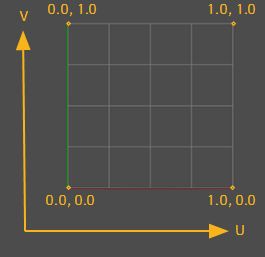
it's the UV Map, 0,0 is the bottom left in a UV and 1,1 is the top right
cloud palm
Is it possible to create line in the middle?
grim ore
that would be 0.5
cloud palm
emm how did u get that, that is what I am confuse about?
 cloud palm
kk thx
ripe chasm
guys wheres the best place to learn blueprints
cloud palm
virtue learning hub
cloud palm
bye
autumn elbow
Is there a way to save a component ref without the parent ?
This saves it as BP_Cube_03.SM_Snappoint_01 .. 02
I would like SM_Snappoint_01
real hound
Is there a way to essentially do a trace just at a point? I just want to know if a point is inside the collision of a specific type of actor.
Tracing some arbitrarily small distance seems like a waste
autumn elbow
you can try isOverlappingActor ?
dawn gull
Hey, just for future reference, how do you make liquids in Flex? I could never figure that out.
(Sorry to interrupt)
real hound
Hmm I could make that work, but I am not using a component with the querying actor that has collision. Right now I just generate a number of points to check at. My current method of checking is kinda computationally taxing, I could eliminate a lot of that if I could just do a trace/query to see if something is already present. I think. Versus converting every point to its hex coordinate and polling a tmap of currently spawned hexes.
autumn elbow
what about getActorBounds ?
grim ore
Get Closest Point on Collision seems to return back 0.0 if the point is inside the collider
it even says that in the tooltip for the Return Value which is why I tried it, it seems to work on a test sphere and testing inside the sphere
 cosmic matrix
Hi everyone,
I got a conception question i don t know if it s the greatest place to post but i don t find other solution .
My question is:
What s the greatest way between data table vs data blueprint to save items etc properties both seems to do the job?
real hound
Oh neat thanks @grim ore (tomatos?) I will try that.
The only thing is I am not really testing for a specific collision but all of a class
like not for a specific actor in the world but all of a class of actors
grim ore
oof... yeah testing inside the bounds of all of them is gonna be rough
oooh ok so there is a is point in box node and you should be able to get the bounds of all of your actors so perhaps?
I really dont know the use case or edge cases here so lol
cloud palm
@grim ore How much dose UV coordinates go by for each line?
since the mid line is 0.5, then Is the second line 0.25?
then 0.75 and 1
real hound
Here let me post a little vid showing whats up. Just ignore the horrible fps loss on having terrain spawned, I already know what I will do about that.
@grim ore
Just trying to get a light weight method of knowing where I need to spawn (or unhide, move from a pool of already spawned and hidden actors) with respect to the screen edge
The terrain is crazy and right now I have it on tick but its just for testing. I will change how often it updates based on a day night cycle (that also forces the camera in or out). Not to mention I will be throwing that on its own thread for vert calculations.
Think of it like reverse culling
Got to run out and grab some groceries. Be back in like 15
grim ore
@cloud palm that would be correct, you can think of it as percents of a whole (1) so 25% of 1 would be 0.25
cloud palm
kk
so if I want to create the second line, I will just type0.25 and 0.0 in the value right?
actually the UV coordinate map is exactly what I want, I want to make 4 track
thx for that picture
gentle crypt
Hi I've run into a problem with Pivot Painter. Has anyone here used Pivot Painter?
plush yew
Why does UE4 get super laggy when a recording software is used to record it?
I see it running over 60 fps but in the recording it is super laggy (using OBS)
 undone cape
@plush yew it happens if your recording software uses GPU
plush yew
Its using a software encoder 
 midnight timber
Are you refocusing the editor after beginning the recording?
undone cape
I use Nvidias Shadow Play Recorder because it doesnt cause any lag.
Or you can use the implemented windows 10 screen recorder
But with OBS I got lags too and I run witj 120 FPS
plush yew
Alright ill try Nvidia's recorder
real hound
back
undone cape
But I got the same issue many times. I tried recording the VR preview and it got laggy as hell. After I tried Nvidia and Windows implemented Screen Recorder both had no lags and all worked with 120fps.
plush yew
It even happens with packaged games for me
undone cape
Does it happen if you try any other game you own?
I believe it might be OBS issue, so I always would try a different software.🤷
plush yew
Happened with templates too, but it was smooth on official games... (I did only package it for development tho not for distrobution)
grim ore
I would suggest disabling the editor option to lower usage when it's not focused but if you tried it with a packaged game that is weird. I can say I have 0 issues with OBS and my setup using X264 encoding
overlay software can cause the issue you are mentioning, stuff like afterburner, but I haven't seen that with OBS unless its a laptop? or maybe you have it recording a window and not the display?
plush yew
It was recording the entire display... Ill just switch to Nvidia lol
grim ore
it can't hurt to try, you can even try the NVENC inside of OBS if you want
 fringe pivot
overlapping 2 meshes at the same height/Z level causes flickering at the point they join
does anyone know how to avoid that?
grim ore
that would be Z Fighting https://answers.unrealengine.com/questions/87970/how-do-i-avoid-z-fighting-on-my-meshes-when-viewed.html might help but the answer is to just not do that
midnight sparrow
Heyy 😄 it seems like my Lightmaps baked onto my first UV channel.. Does anyone has an experience with this?
grim ore
did you generate new lightmaps when they were importing or use existing ones?
grim ore
when you imported the meshes it has an option to generate lightmaps
sorry generate a lightmap uv
midnight sparrow
You are right i probably forgot to uncheck it, but anyway when i inspect the UV channels it looks as it should
thats the 2nd channel
and this is the first. just for textures
grim ore
in the details panel under general settings in the advanced part (the drop down arrow) does it show Light Map Coordinate Index as 1?
grim ore
yep change that to 1 and save and rebuild
thats telling it to use 0 (your funky one) for lightmapping
midnight sparrow
Well i have to rebake it and see if it works i guess but it should. That might have been an issue all along with my many other meshes so thanks
grim ore
🙂
usually if you tell it to build it's own lightmaps on import and you only have 1 it will build on channel 1 and set that to 1
midnight sparrow
I reimported every mesh like 150 times, so that had to happen i guess 😄
 quiet rampart
Hi there, i have a very basic question. Im working on a furniture piece right now and im using Maya. I have done the modeling and the two doors a separated.
Basicaly, i want each door to open on their respective axis. But the pivot is in the center of the world.
Thanks!
grim ore
lol
quiet rampart
sorry for the interruption :S
grim ore
@quiet rampart export the doors out separately or as 1 mesh and set the 0,0,0 coordinate in maya where you want the pivot
midnight sparrow
Well matheww was faster 😄
quiet rampart
well i hoped not to get this answer XD
midnight sparrow
You might rig it
grim ore
or you can put this all in a blueprint and use a scene component as a parent for the doors and move it so that the scene component is the part you rotate around
quiet rampart
so basicaly i have to set the pivot point as 0,0,0 in maya then place it in the blueprint ?
midnight sparrow
are you able to do a simple rig for it ?
fringe pivot
thanks @grim ore
midnight sparrow
My college told me its easier to work with that if you just rig it.
quiet rampart
yeah that is the approach i wanted to do
grim ore
0,0,0 is the pivot for any mesh you bring into the engine from an external program so yep you export it all separately or you fake a new root in a blueprint with a scene component
quiet rampart
like with controlers ?
grim ore
animate it? sure why not 😛
midnight sparrow
Controlers are not exported to unreal engine. Just put there 2 bones and set influence to 1
quiet rampart
im still beginner as about animation + rig in unreal
 warped tangle
as @grim ore said, just make a BP, add a scene component, and add the door as a child of the scene component. The scene component now becomes the pivot point, so you can move the door around so the pivot is at the correct location
quiet rampart
Yeah i am aware of this technique, i already done a door yet and i used it
midnight sparrow
Well its really simple, just put the bones where you want them select the vertices you would like to affect find a bone you like select whole column and type 1
*in component editor in maya
quiet rampart
i want wondering if it would be easier to rig and import the rig in order to have the mesh completely in a blueprint without having to actualy bring the mesh at the right place within an other one
im gonna try it
quiet rampart
@latent fable Do you have a blueprint with one editable vairable called Locsave that have no information ?
quiet rampart
The error is saying that this variable have no information, if you clic on the name on the error, it should bring you directly where you need
quiet rampart
If you look at the bottom of your blueprint editor, you should see the error
if you hover your mouse, over the Error! i think, you should see an explanation
 quiet rampart
On the node ?
quiet rampart
i mean, hovering the mouse over the ''ERROR!'' of the node
latent fable
on the node its the same thing
latent fable
I don't know what it means by CharacterPawn_C
I don't have anything in CharacterPawn Called CharacterPawn_C
midnight sparrow
Guys is here someone with a bit of experience in VR? im gonna be finishing VR project soon, i practicly just have to put it to glasses now and there is never anything without an issue so i need someone i could direct to save some time. I could even pay you some $ for paypall, but nothing huge
quiet rampart
not me sorry :S
@latent fable the information you are putting into your variable is empty, the error on the node is du to something attached to it so look around it
autumn elbow
I have a new rule for myself.... NEVER COPY AND PASTE. Just make the nodes manually. It will take alittle longer, but not as long as it would take if i copy and paste and forget to hook something up.
quiet rampart
Or, unless, you are VERY organized XD
quiet rampart
XD
quiet rampart
@midnight sparrow Say thank to your collegue... Joints works nicely 😛
midnight sparrow
Glad to hear that
quiet rampart
Sadly, im kind of alone on my project for now so i tend to understand pretty much everything i do, if not, then i try XD
autumn elbow
I'm alone aswel.
quiet rampart
@midnight sparrow But the vertices kind of way was a bit confusing, you dont have to do anything, only import the rig and you basicaly have a controler coming with it
midnight sparrow
Most of us are, thats why i joined this group so i wouldnt have to solve some stupid issues for hours and i could just ask 😄
autumn elbow
I've worked on many AAA games, and for my first solo game, I chose something terribly difficult. LOL
quiet rampart
Hey! There is worst 😛
midnight sparrow
What are you working on NIIKY? :]
quiet rampart
im an environment artist working for kid tv-show (and one cinematic for RB6: Outbreak) with no experience at all in the gaming side of it... And im building my very first game which is quite huge XD
autumn elbow
VR game, that has building components like Kerbal space program. The player can build weapons and tools out of anything they find
quiet rampart
The concept is great 😮
autumn elbow
Mathew has been a godsent! He has got me out of so many jams LoL @grim ore
quiet rampart
First time someone answer to me here to be honest XD
Not true... but im not really active usually XD
midnight sparrow
Nice, well a few scrolls above i was looking for someone understanding the VR, blueprints and this unreal engine kind of stuff {im a 3D artist, and i work in vfx not games so this is not my strong side}
Soon i will be finishing simple VR visualization for client and i would like to have someone to give me an advice in case something went wrong, so i could atleast know what to look for in order to save some time. I could even send you some $$ for coffee 😄
Could you be that someone ?
@autumn elbow
quiet rampart
@autumn elbow i think this message is toward you
autumn elbow
sure, i'll do what I can. add me as a friend here.
midnight sparrow
Great, thanks Thor, or Hermiod not sure
autumn elbow
i must say though.. I'm a programmer, but not in unreal engine api. I'm still learning 😄
Thor
I ordered my Index, but its not here yet. 😩
midnight sparrow
You said you worked on some AAA games, im courioous on which one
plush yew
I have an error saying mesh contains name as root bone but animation doesn't contain root track
quiet rampart
@plush yew Check your rig
plush yew
It has a root @quiet rampart
@autumn elbow
Difficult is good.
Good luck mayte
Sometimes, to retreat is the best strategy
😂
quiet rampart
NEVER!
autumn elbow
umm.. my very first game was Spyro: Enter the Dragonfly. (just to date myself) , then The Mummy, Army Men, Silent HIll, Uncharted, Darksiders, Red Faction, Homefront, Gothic 4... i have to check my linkedin @midnight sparrow
quiet rampart
I've took nearly 3 month to build a house XD the achievement is very rewarding XD
plush yew
👌 just for Darksiders, alone
plush yew
Red Faction? guerilla?
autumn elbow
4... maybe 5
plush yew
That's a nice list.
As a programmer?
autumn elbow
different stuff.. animation, programming, fx
it all sucked... I moved to Movies and TV lol
too much stress in game dev
midnight sparrow
If i copy this folder to another pc will it prevent compiling thousands of shaders?
quiet rampart
why would you do that ?
midnight sparrow
i work on multiple PCs
quiet rampart
you dont have a source control ?
midnight sparrow
Well we use it at work but i didnt have time to set it up {to learn it 😄 }
i use flashdrive for now
quiet rampart
you should get into it as fast as you can... have known, i would have started with that before even starting production
midnight sparrow
you are right, i didnt need it until now. Its just a one project in VR im focused on vfx
and niiky you said that game industry is much more stresfull, why so?
@autumn elbow
quiet rampart
Game industry have many more deadlines and crunch
 woeful wraith
does anyone know if it's possible to package in headless mode with no GUI window using the normal binary engine? the only way i can find is building dedicated servers.
autumn elbow
There so much crunch and deadlines. so much work.
 fading river
that's why I do this as a hobby and work in another industry for money
midnight sparrow
Well if you do a job that you enjoy whatever :D
quiet rampart
I work in tv show for money and on my game on the sideline... both are really usefull for one another
Anyone know Mighty Mike (Tv-show)
autumn elbow
me also
quiet rampart
?




 autumn elbow
LoL
autumn elbow
😄
quiet rampart
A psychological horror game (with an horror based on the Silent Hill serie)
midnight sparrow
are you planning to get it on steam or so.
And did you set some deadline to it? like a year, half..? :)
quiet rampart
Yeah i have all of it. I will probably go on steam but i don't know... i will see at this point
i plan to release the demo on january
and do a kickstarter at this point... but i do not go too fast about this... since many stuff can happen along the way
midnight sparrow
Well good luck with that. Can i see some screenshot atleast ? :D
quiet rampart
Hmm yeah i can show that
I did not do the furniture. They are only placeholders
fading river
hey speaking of architecture, pretty sure I know the answer but are there any plugins or anything that would let me enter dimensions in feet and inches and have it convert to cm?
midnight sparrow
its dynamicaly lit on the screenshot right?
quiet rampart
@fading river usualy, you have to set your grid in the 3d software the same as unreal
@midnight sparrow Yes, everything will be dynamic
Even the day/night
midnight sparrow
Really?? Im not sure if it can look good with all dynamic
No GI. And in horror game the feel of the game is pretty impirtant
quiet rampart
I'll find a way haha!... I searched but i have no other option to do it like this.
fading river
I wasn't going to use 3d software, just bsp stuff
midnight sparrow
past 2 weeks i suffered alot with lighting in unrral its pretty fucking hard :D
fading river
just to make a basic thing
otherwise I'll have to do it in fusion 360 or something and export
quiet rampart
@midnight sparrow I've spent nearly a month studying lighting in unreal to have it the more optimal as possible, there is ways to fake GI and those kind of stuff
its not AS good as baked GI... But it does the job... Look at the game "Visage" everything is dynamic
midnight sparrow
Im doing a visualization and client wanted me to simulate the light correctly as possible so it was and still is a bit of pain. 20 minutes for every bake. it kills a day like nothing
quiet rampart
Dynamic lighting in a VR simulation... i would say its a big no no...
maybe... MAYBE if the light do not cast shadow... but even then
midnight sparrow
Im using static only ofc
and forward shading
2ms for frame for now
but i have pretty powerful pc, it will go down alot
on oculus quest
quiet rampart
jeez, forward sahding in VR is not overkill ?
autumn elbow
The Unreal Paris Apartment is all baked and it looks amazing
 coarse wigeon
Hey does any one know If Virtual Texturing in Unreal 4.23 will support terrains?
quiet rampart
Yeah but you dont have the option to actuly move the light if its baked
i may mistaking then
i thought forward shader was very expensive
midnight sparrow

Gilbert Leung, Technical Marketing Specialist at Radeon Technologies Group, demonstrates how forward rendering, a new game development technique, improves yo...
quiet rampart
im gonna look at it thanks