#ue4-general
1 messages · Page 504 of 1
 magic scarab
Hello everyone! I was curious to see if anyone would be interested in a plugin and a web application in which you plugin your game information and can get the statistics of any/all game servers running, send commands, and keep track of player data. Essentially it would be an MMO backend but it can be used for individual player hosted servers as well.
 undone cape
@spark sonnet u need to rotate the player controller or turn off Pawn controlled rotation
 spark sonnet
Nvm. I think I just had to tick use controller rotation
Yeah. thanks figured it out @undone cape 😄
 plush yew
Where is the retarget manager? It's not in my window menu for the skeletal mesh
undone cape
@spark sonnet had the same issue as well once and I was thinking I am crazy 😁 so good you figured it out yourself you will never do this fault ever again believe me 😂
spark sonnet
Haha lets hope not 😃
spark sonnet
How can I make an actor move slowly towards another actor? Without using Ai move to
undone cape
@spark sonnet find path to location synchronously
spark sonnet
Oh. Does it need nav mesh bounds volume?
 light thunder
Can someone help me fix up this reference : C:\Program Files\Epic Games\UE_4.22\Engine\Plugins\VictoryBPPlugin\Source\VictoryBPLibrary\VictoryBPLibrary.Build.cs: warning: Referenced directory 'C:\Program Files\Epic Games\UE_4.22\Engine\Source\VictoryBPLibrary\Public' does not exist. The plugin works but when I updated it I manually installed it and probably chose the wrong file name
 mighty relic
I am so confused, I come from unity and exporting an fbx is simple but in unreal it separates all the objects I had from blender in unreal. Help please. How can I import my fbx file togther.
 rotund scroll
what do you mean it separates them?
light thunder
you have to group them in the import options
14
In UE, in the import window under the first tab "MESH", if you drop down the arrow to show more options, there's an option to "combine mesh" (by default it is unchecked). If checked, this will import the entire contents in the .FBX as a single static mesh.```surely blender has an equivalent of a grouping or selection set as well
mighty relic
Thanks I will give that a go. :3 I am used to unity just automatically detecting a collection.
light thunder
This way you have options in case you want to have unique functionality programmed on your objects
undone cape
@mighty relic if you import, expand all sections in the import settings . there is a point called "Combine mesh"
@spark sonnet Yes
spark sonnet
Then whats the differene between that and AI move to? @undone cape
mighty relic
It worked thanks x but how do I apply the materials. Seems to be missing. I made it from a gradient I created in photoshop, will the gradient transfer?
sorry for the trivial questions, just started on this and I am so confused with the UI and the system XD
undone cape
@spark sonnet its mostly used for root motions in AIs. So you can control the movement yourself instead of relying on rhe pre made move to
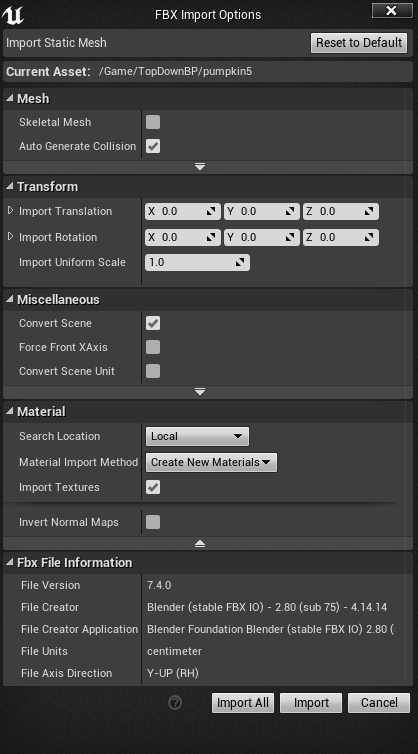
@mighty relic if you scroll to the end of the import setting window there are two ticks:
" Import Materials " &" Import Textures"
spark sonnet
Ah ok. Thanks @undone cape
mighty relic
@undone cape https://i.gyazo.com/54d08c07eb430285df3692ce9e893cbe.png this is what I see
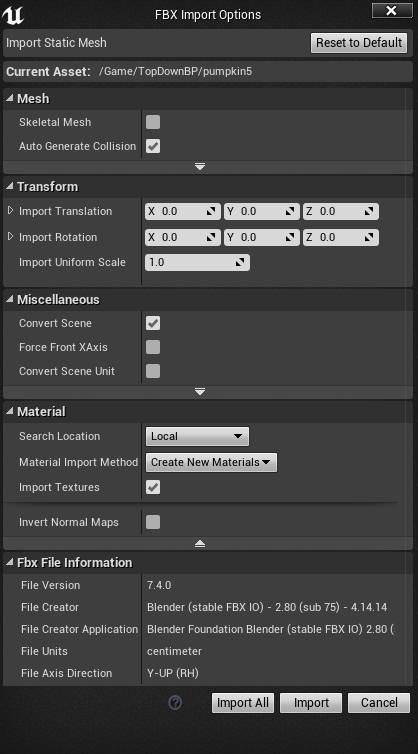
 undone cape
Alright the texture is there but it isnt applied in the materials.
Let me send you a video of how to setup a simple material. Would be too much to explain it by words 😁

Unreal Engine 4 Tutorial
mighty relic
Thank you @undone cape for your patience. Please look after me ^^ I appreciate your help.
undone cape
No problem feel free to ask me anytime 😁
mighty relic
Thanks again, I am going through the video ^^ ❤
 brisk osprey
Any1 experienced Light Proagation ?
I cant get it to work..
mighty relic
Omg the look around with the mouse is so clunky, is it possible to change it?
plush yew
@brisk osprey Light Propagation?
brisk osprey
LPV yes
plush yew
did you follow the wiki step by step?
brisk osprey
Yes
plush yew
on UE 4.9?
plush yew
👌
plush yew
That's what it's labeled as
 onyx cedar
What directory do you all store stuff like saved games and other data? Is there a particular place, or just anywhere I fancy? Is there anywhere I absolutely shouldn't put files I'm writing to disk?
plush yew
Never put them in the recycle bin
light thunder
What would cause a packaged build to start the player in a different spot than the editor? before I package, it works fine, when I package, I think it's dropping me into the origin....why would packaging change this?
brisk osprey
But Ambient Occlous is also labeled 4.9
plush yew
Probably because the wiki is updated to that point
check the wiki history for a 4.2 version
@brisk osprey
@onyx cedar put the save files somewhere sane
Is there a way to merge static meshes into an instanced static mesh automatically that works with 4.20? VictoryPlugin only goes to 4.16 and won't rebuild for 4.20.
 magic dune
If anyone is good with UIs and Widgets, perhaps you could check my question in the UI>UMG channel regarding mouse cursor disappearing during UI Input mode
 next pewter
is there a dedicated help channel ?
 dark depot
here and any channel that matches the subject that you need help with
next pewter
basically i just want to know how fix this, i used datasmith to import.
that facets i mean
 spark moth
Hey everyone!
I'm having a issue with the reverse node on my timeline, I assumed the way it worked was by reversing the value and outputting that but it doesn't seem to be the case.
I'm trying to add movement and then reverse that movement back to it's original location, the play from start node works fine and adds the correct amount of movement but when the reverse node is called it works in the exact same way the play node does and adds movement rather then subtract.
I tried doing just the reverse node rather then reverse from start but that didn't seem to help either.
 grim ore
what is the value of your "button compression" output?
all reverse does is go backwards on the tracks inside the timeline, your math is probably causing the issue that you are doing to that output
So if you are say going from 100 to 200 over 2 seconds, at 1 seconds in start and reverse will both output 150. The difference is start will go to 160 next while reverse will go to 140.
spark moth
This is my timeline, it's just a vector track that adds a negative value over time, I thought it would change to a positive value on the reverse track.
grim ore
lol
nope all reverse does it literally reverse it. So Reverse from end will start at your end value and go backwards till the first value and stop
to do what you want you would have to have fixed values inside of the timeline, say going from an X value of 100 to an X value of 200 and settings the location so when it reverses it is just doing the same thing backwards
the other alternative might be to determine if it is going backwards and instead of using an ADD node you use the SUBTRACT node for the value coming out
or multiply the output by -1 and still add it if going in reverse
spark moth
The second option would be much better, this is on a blueprint that could be placed anywhere in the map so having fixed values isn't going to work very well.
How could you detect if it's going backwards though? Would it be a better option to just create a new timeline and call that one instead of using the reverse node?
grim ore
it would certainly be easier to create a new timeline sure
otherwise you can set a boolean before you start the reverse and check that boolean after your timeline update and then use the Add or Subtract appropriately
creating a new time does mean having to keep track of 2 curves tho if you decide to change one
spark moth
Yeah, that's true.
I'll try out the bool idea first and if it's not working i'll just create a new timeline, thanks a bunch!
grim ore
ok I was trying to find the right function but you can skip all of that as well and use the Is Reversing function on the Timeline directly instead of using a separate boolean
skip all of the separate boolean part
 ripe tide
Hello, did someone manage to use Chaos in 4.23?
grim ore
as far as I know you still have to enable it in the source build
ripe tide
I did all the steps required but I can't start the engine :/
I don't know how to solve this error
light thunder
Why do items keep getting cloned in my levels (static meshes) ....... this is ridiculous and extremely frustrating...you can tell they are there because there is the flickering of "dual" items occupying the same space
they are static meshes

 brave lark
light thunder
brave lark
light thunder
it's like static mesh instances are doubling randomly
 storm venture
@brave lark SM_MatPreviewMesh_01
grim ore
@ripe tide did you build the editor itself? its the UE4 project on the right you can right click and build it
storm venture
does anyone know if i can add rotations onto certain bones of a skeleton which is following a master pose?
light thunder
Why the hell do the buildings copy onto themselves....this makes no sense, they are already placed, there's no construction stript or anything you can see there and then right underneath it is another copy....I updated from 4.19 to 4.22 (though this has happened before and NO ONE can explain why)
plush yew
anyone know where to get cinema 4d its not on the site for me
light thunder
that's the other copy
grim ore
well the X coord isnt exactly the same, did you accidently try and move it with the ALT key down?
light thunder
no, it's like there is a copy of the entire level, ontop of itself
grim ore
definitely weird, its off by 50 as well which is weird
light thunder
I'm going to check my 4.19 build and see if it is like that;.....what would it mean if updating to 4.22 is the culprit?
grim ore
It shouldnt, but you can always duplicate the map then update and open the duplicate and see what happens
light thunder
not a bad idea
 idle haven
Is this normal ? why my material are "wet" on the one side only?
idle haven
grim ore
rotate your directional light and what happens?
idle haven
in 0:04 the material does not look wet
plush yew
it looks plenty wet to me
idle haven
I think that puddles should be reflective on all sides
grim ore
did you rotate the directional light in the scene and see what happens to the reflection
idle haven
world outliner
plush yew
Put a PlanarReflectionComponent in.
https://docs.unrealengine.com/en-US/Engine/Rendering/LightingAndShadows/PlanarReflections/index.html
System for capturing and displaying local glossy reflections.
idle haven
plush yew
now play
 dull oyster
Anyone has an idea how to repair error which i get after building lights ?
i ve tried to google it. Most ppl say that - move all ur objects little bit , that will reset data. Tried it, didint work. Some say, go reset swarm agent cache - i go to the folder where i have that swarm agent, i try to open it, even open as administrator and i cant open it, it just doesnt watn to launch
plush yew
how did you manage this
and why are you hiding your world outliner
it looks like a very simple level
dull oyster
u mean why i cut screenshot? i didint know that this edge will be important ;p
ye my scene is small
dull oyster
u mean deleting all objects and place them again or make a new project ?
plush yew
what i'd do is i'd delete objects that i recently placed
and build lights every time i delete an object
but in your case i'd just make a new project
dull oyster
ok thx
plush yew
Everyone who uses this discord server should follow this video to set up and use OBS studio
That way we can share our problems in a competent fashion.
OBS (Open Broadcaster Software) is free and open source software for video recording and live streaming. Stream to Twitch, YouTube and many other providers or record your own videos with high quality H264 / AAC encoding.
grim ore
not everyone can do that, Laptops with Optimus are a huge pain in the ass to try and get OBS recording the main display
plush yew
Then they will fail.
That isn't our problem.
Our problem is that we get questions like
These are my favorite examples, but they are not the limit of the scope of the issue.
 abstract relic
Ignore silly questions. You’ll just become toxic
plush yew
All questions are silly to the person who knows the answer.
onyx cedar
So I've got modified version (4.22) of UE4 from Oculus that I compiled from scratch and am using for Oculus Quest development. Problem is I'm trying to add asset store content to the project, but it won't let me because it says that my version of UE4 is incompatible. Even though the content supports version 4.22. Is there anything I can do to get it to add the content to the project anyway?
plush yew
Video representation of issues describes the issues in a way that incompetent individuals would require hours to accurately describe using only words.
The person who knows the answer to problems can describe the problem in few words because they already understand the answer.
grim ore
@onyx cedar open the content up in the supported version of the engine (4.22 launcher) then migrate out the assets to your other project. I have done some quest dev and the mainline branches worked fine for me, no need for the special Oculus branches as of 4.22
 real hound
Can anyone tell me how to download this project/map they are using in this documentation page? I have seen it in a number of youtube videos on different subjects by people not with epic. I just dont know how to find it. https://docs.unrealengine.com/en-US/Resources/Showcases/Stylized/Landscape/index.html
An overview of the Landscape effects used in the Stylized Rendering showcase included with UE4.
grim ore
open the launcher, go the unreal engine section, go to the Learn tab
real hound
Wiat so its already downloaded on my machine?
plush yew
Nah, it's just free.,
real hound
ah yeha gotcha
plush yew
It's 200MB in the learning tab
real hound
Woot. Thanks.
 civic mantle
omfg, why did i enter git add -A... someone... kill me!
real hound
So I only wanted that example project to get to look at how they did their terrain material. I didnt expect it to do... everything. I mean. Holy shit.
I thought it was just a simple layer blend for grass and rock based on normal angles
Its running every type of terrain in the project
light thunder
WHY unreal, WHY
Ultra Dynamic sky, I updated the curve values I could find but don't know why this is happening
light thunder
it just pops in and out
onyx cedar
@grim ore I tried migrating the project to vanilla 4.22, but couldn't get it to build correctly for some reason.
 autumn elbow
@light thunder ur having a bad Unreal week, huh? LoL
light thunder
I'm the only professionally Firefighter in the world (that I know) who actively works in the engine, and I still after a few years:
have an international fire conference to showcase my simulator thursday and shit breaks, of course
autumn elbow
Well there's your problem... u have paws
What you simulating?
Like a learning video?
light thunder
Incident Command, Scene size up, Pump Hydraulics (fire truck),
escape from fire simulator for kids
I am the best developer in the firefighting world, which ranked with everyone else, puts me slightly above the grandma who just found out what unreal engine from her grandson playing fortnite
autumn elbow
LoL
idle haven
@plush yew that PlanarReflectionComponent did not help
light thunder
Someone want to help me figure out how to turn this shit off? I've put branches that should stop this stuff from happening via a loading variable but it doesn't seem to be working
I could use IsValid nodes but I don't want that later to setup me up for silent failures
light thunder
good point
it's a set by timer disorder problem I think .....
variable is set to control the calculation of actors that are no longer going to be there
guess I need the bool there
yeah that did it....man, i still don't know why putting branches after that didn't fix some of those issues
plush yew
which branches what issues
light thunder
goddamn it still has problems
pending kill....i don't know how else to control the garbage collection other than making a bool and giving it time to clear
plush yew
where are you destroying this actor
light thunder
right after that event
plush yew
can you show me the blueprint?
light thunder
some of these are redudant (like the destroy component, should not need if I destroy actor)
this is on the same BP - it is a timer that calculates all the lines (the actor getting destroyed)
plush yew
isValid doesnt fix anything by itself
you need to set a whole new state for the machine if the actor is not valid
light thunder
I'm not using it mainly, I'm using branches that stop all the calculations (or are supposed to)
plush yew
youre immediately making the actor invalid
light thunder
but before I do that, I set a boolean which the actor's calculations are based on
basically, the math that has been running stops checking for the actor
you know what, maybe a 1 second delay is in order
plush yew
where is the actor TankFillPlaceholder referenced down the line?
light thunder
give time for the iterations to finish
that's not even important, that's a minor point that I can probably delete even
still happening
plush yew
why not delete tankfillplaceholder at the end?
plush yew
this would be easier to accomplish in c++...
i still havent been able to find GPMToFillTank in your blueprint @light thunder
light thunder
don't worry that wasn't the culprit
i'm doublechecking now but I think i found the issue
well shit
Okay, I have these Valve actors, which the user opens up and they contain all the data blah blah..... the master panel gets the array of these valves (added to at their creation) and loops through to calculate all the values - there are a few control valves which are special cases (they aren't deleted)
I'm saving valves to an array and loading them
it's the loading from memory that is a problem
 vague vigil
looks like something from https://blueprintsfromhell.tumblr.com/
 light thunder
lol it's gotten better, but since I can't afford intellectual protection like patents , I make it so only I can comprehend my blueprints
@plush yew the problem comes with loading the valves from the array....ah, I think I know what to do now
plush yew
check each valve in the array every time its accessed?
light thunder
which it spawns the valve, the valves are still sending their data once they spawn
plush yew
i dont understand how you can destroy something and then ask for a reference for it
unless youre referencing it by name
light thunder
I'm not trying to
plush yew
i mean to say that youre referencing this actor by name, not by array
light thunder
look, this is set BEFORE they are destroyed
that's at the beginning of a calculation sequence
ignore the pins both being hooked up
that boolean is set Before they are destroyed, then they get destroyed, then there's a 1 second delay, then the valves are spawned again, then the "loading" variable is set off
plush yew
can you replace destroy actor with toggle visibility?
light thunder
no, that will break reality
basically, make sure I understand this
if I have events referencing an actor
if I put a boolean before those events, stopping them from running, there will be no errors becasue no reference is checked
light thunder
so if I get errors before this delay is finished, i know I didn't set the boolean is the correct places/order
because if they happen during (before the delay there) I know there is still some functions getting evaluated
plush yew
correct
light thunder
okay the errors come after, so it's a reference of the newly spawned actors that's the problem
plush yew
i need to get back to work, good luck man!
light thunder
thanks
light thunder
Well this is confusing :
light thunder
for what?
autumn elbow
Say I have a Lego block, and I want to attach it to another Lego block. I would like the target block to highlight
light thunder
oh, just swap out a material of it, one that glows, some of them even flex in and out
autumn elbow
umm.. true..what if it's a material instance ? Then all with the material wil glow
light thunder
Check out the "world position offset" node, I believe that's what does the effect
autumn elbow
@magic dune ur target is different
magic dune
its 2 diff projects, names are different
but its following the same steps. i had an bug with the Widget Input UI making my mouse disappear in the first project
autumn elbow
I mean the target is different
magic dune
rgr that i see i will try and adjust
autumn elbow
@light thunder I like that... seems cheap to process
light thunder
@autumn elbow others will know more, but my understand is the main reason to use a Material instance is that you can change it quicker and fine tune it, without changing the "original" material
I haven't performance tested it but yeah, it doens't seem to be expensive
autumn elbow
Thx.. I'll give it ago
 jovial venture
my unreal engine keeps getting stuck on processing sections when importing an fbx
magic dune
I was able to solve my cursor issue from earlier. There was an Event Tick linked to another Widget for a crosshair I made. It did not like UI Input Mode for another Widget
as soon as I deactivated the crosshair widget the cursor works as intended
plush yew
Can I do something with multiplayer where the client can smoothly disconnect from the host player and stay in their own game?
I have one mission that has to be played alone because it's all very cutscene-y and there are really specific battles etc that have to happen alone
Game is normally co-op
Can I have the player disconnect from the host, open the next level and just transition in as if they hadn't left the host?
How would I go about this?
undone cape
@plush yew you would probably need to switch to the single player mission and during transition just disconnect from the host and close all connections. You can probably define within the level that no coop connections can be send through and it should disconnect from alone during this.
during transition play a loading screen so you can disconnect correctly.
than load the level as you would do in singleplayer on client not server, that way every character will be loading in there own game
so basically just open level without any entry in the option section. but dont forget to clear all connections in the begin play of the new level or after the open level node
 arctic pecan
Hello, I have this water material that changes colour into foam around objects that intersect it, it displays normally on my other PC but on the one I'm currently on the foam doesn't display where it touches landscape, do you have any ideas what might be happening?
plush yew
Alright, thanks
And then I guess just store the old connection info in the gameinstance so once multiplayer is allowed again have it try to automatically join up?
undone cape
Yeah this could do it.
but in worst case you may need to connect again to the host. Warframe is handling it that way and it is only less annoying than thought
plush yew
Yeah, a lot of the stuff I'm doing in this game (more or less just a solo venture with some hands-off help from a friend) is a "test run" for a lot of the stuff that my team is doing in our co-op PvE shooter which is coincidentally pretty Warframe-esque in some ways
undone cape
so let me know if this works the way I explained once you tested
I m curious about it as well but didnt had time to try this. was just a guess snd the approach i would probably try out first 😁
plush yew
I'll test it out when we get the multiplayer per level working as flawlessly as we want it to, then we'll implement stuff like this and I'll make a note to get back to you then
 muted minnow
I've got two animations for a skeleton mesh, I expect this blue print to stop animations, and then play the one I need... what ends up happening is that the animations are never stopped, so eventually both are playing instead.
Is there a different way to stop an animation?
 hoary onyx
Yo I'm having a problem importing an animation/mesh from maya to unreal
I'm getting an error that "The following bones are missing from the bind pose:"
and "Mesh [Geometry have no name] in the fbx file is not reference by any hierarchy node."
anyone here who knows that problem? : S
muted minnow
Nevermind on mine... I'm not sure why my blueprint wasn't working, but I switched to an animation blue print + state machine and I'm getting better results.
undone cape
@muted minnow thats what i wanted to suggest rn😁 👍
hoary onyx
Also when I import animations for that skeletal mesh they are all fucked up
parts of the body randomly jumping around elsewhere
undone cape
@hoary onyx seems to be a rigging issue itself.
hoary onyx
but the animations work perfectly fine in Maya 😦
undone cape
Unreal has a specific bones hierarchy
undone cape
but i believe its mostly an export issue.
Maya and 3ds max have always issue with exporting straight away, at least on my end.
is this the mesh or just an animation which cause this issue?
hoary onyx
I imported just the mesh first (which gave me all the errors) but everythin seemed fine (hadn't turned on the bone display thing)
i then imported animation which didn't display properly
could the groups insinde the geometry hierarchy be a problem?
(when importing the same file into a maya scene instead of unreal)
undone cape
yes this seems to be an issue, but I am not so good with Autodesk software to help you out there sorry, I rather use specificly animation software to avoid this issues.
hoary onyx
no worries; something is fishy and i gotta try and find out what 😄
 fluid tide
Not sure if a 100ms is normal 
plush yew
hey, does anyone know if it's possible to load with a packged build from the Contentfolder instead of the pak files, or the otherway around, let the normal build load from pakfiles instead of the normal Content folder?
 wary wave
today's game is called "why are my spline meshes inside out?"
 cursive dirge
like, normals flipped?
cursive dirge
heh, sounds like mesh issue itself
I've played a lot with spline meshes in past (not with recent versions) and never had that happen
wary wave
well, I have a "blueprint actor" that you see before you place the object, and the actual placed object
the blueprint actor seems to be fine, and uses more or less the same logic to generate the spline meshes
the other actor is totally broken
it's a pipe mesh, with bit of extra geometry at one end
the pipe part is getting warped pretty badly, the additional geo is fine
 amber girder
Hi together.
I have a question regarding UMG. How can i (reliably) calculate screen space coordinates to player widget coordinates so i can use SetMousePosition to 'undo' a mouse move and effectively lock the mouse cursor at a position?
hoary onyx
Solved my previous problem but i'm here with a new one
I'm getting confused with the socketing system
how should i prepare objects for sockets so they are on the right spot immediately?
as en example i have this object here
I set it's pivot to the same place as the socket is in unreal
so i assumed if i import it into unreal and place it on the socket i'll be good to go
but it somehow does this
plush yew
Hey. Is there a way to get the vehicle from the one template into another project?
plush yew
Ah cool thanks 😃
 radiant haven
np
undone cape
@hoary onyx nope it isnt. Each mesh has its own pivot. and if you inport a mesh which is has not his pivot at 0.0.0 it wont be at 0.0.0 in unreal.
if u add a socket and want to add this mesh then the pivot of the mesh will be at the sockets pivot.
hoary onyx
Figured that one out; in the 3D-programm place your pivot on the joint where you create socket
and then move the object to 0
undone cape
Yes that works too
hoary onyx
this way the relative distance between object and 0.0.0 is the same as object to socket
but i couldn't enable the sockets for my animations because i'm working on a limited unreal project unfortunately
it's not Game but an interactive turntable
so i don't have a pawn with blueprint to work with
or i do have some pawn but i can't edit it
at least the sockets are working int he anim previews that's good enough though 😄
undone cape
u can create a new pawn 🤷
hoary onyx
the project is weird trust me 😄
i don't have a normal "scene"
everything is interlinked via blueprints somehow
undone cape
Sounds weird😂
 glacial pecan
how common/uncommon is it to use child actors?
wary wave
not very - they can be quite unreliable
glacial pecan
like, if I have a player pawn that I want to have a lot of floating UI around, it it ok to build that UI in a different actor and just add it to the pawn as a child actor?
hmm... ok, so what would be the preferred approach to the above scenario?
wary wave
spawning the actor manually, probably
glacial pecan
kinda defeats the purpose of the visual editor it seems...
 quaint swift
Hello guys! I wonder if UE4 is good for mobile development if my game is purely 2D and really light weight?
glacial pecan
@quaint swift if you need blueprints, then Unreal, if you want heaps of 2d features and community support, Unity
but that's just my opinion
quaint swift
Hmmm I wouldnt say my game is too feature demanding ...
I never used Unity before so I'm not sure which 2d feature are exclusive in Unity
 cloud cobalt
UE4 isn't really good for 2D
The 2D support is just not great and the base size is around 50MB with lots of effort
Unity is used to ship literally tens of thousands of 2D games, it's a pretty safe option
mighty relic
anyone know how i can change the control of looking around etc in unreal engine? i just find the wasd/arrows so unintutive in terms of up and down zooms it in and out instead of panning around the viewport
mighty relic
and i cannot navigate using wasd in the viewport v.v
 light coyote
You can plug a gamepad, or you are not looking for that ?
 native cradle
Has anyone worked with Facebook Online SubSystem?
mighty relic
Thanks. Also when I drop the directional light why does it say preview on the ground?
 next badger
@mighty relic "preview" is lightmap preview...it's gone once lighting is built
mighty relic
@next badger oh yeah it worked, thank you 😃
its weird coming from unity to unreal lol
everything has to be built
next badger
@native cradle https://www.unrealengine.com/marketplace/en-US/slug/extended-facebook-online-subsystem this?

Extended Facebook Online Subsystem plugin integrates Facebook social network for all platforms. It implements Online Subsystem so you can use available features exposed by this and/or special functions and Blueprint nodes designed only for Facebook.
mighty relic
when it's built btw is it baking it, is that what's happening?
next badger
@mighty relic yes, ue4 has 2 lighting ways...static and dynamic (also, stationary is somewhere between)...static is baked, called Lightmass
native cradle
thanks @next badger I'm looking into purchasing this. But the support on their discord server has been rather thing as of late.
It would help if someone has worked with it using the UE4 subsystem, without the plugin
light coyote
When you biuld light maps, if you had a box or something, the shadow would stay where the box used to be,, that is why, no dinamic objects(that move or will move) have to be on the scene when you biuld lights
next badger
@native cradle you may try https://forums.unrealengine.com/development-discussion/android-development/107055-plugin-free-facebook-for-android
Unreal Engine Forums
For Android developers to discuss development and ask questions.
also you may try asking on #multiplayer #cpp #plugin-dev
@light coyote no, you just need to set the object to a dynamic one... (movable/stationary)
Setting that controls whether an Actor will be allowed to move or change in some way during gameplay.
native cradle
Would take a look at it, thanks!
light coyote
@next badger yes, but you can transform position of a stationary object via blueprint
next badger
@light coyote yes, but stationary objects do not produce lightmaps (or affect them)
light coyote
you are telling the object if it will or not be afected dynamicaly
Stationary objects do afect lightmaps, all types do
wary wave
no, Alexey is correct
stationary objects don't contribute to, nor do they have lightmaps
light coyote
wary wave
they are dynamically lit, statically shadowed
next badger
@light coyote your cube is static...
light coyote
This is a build with directional light as stationary, and box as stationary aswell
wary wave
that cube is static
light coyote
i moved it to show the resoult
wary wave
in your screenshot it is static
mighty relic
does anyone know a good toon shader without the outlines?
next badger
@light coyote
light coyote
That is exactly why they do affect lightmaps
wary wave
static != stationary
static objects affect lightmaps and can have lightmaps, stationary objects do not affect lightmaps and do not have them
light coyote
Well i actualy didnt know that,,, but when you where saying stationary, i was thinking on static
And im like, of course they do, ive built tons and they do xD
next badger
@mighty relic i think this one has option to disable outlines https://www.unrealengine.com/marketplace/en-US/slug/ce2cda95e5f54180b2cf7df24566bdf7
 light coyote
@mighty relic no, check a youtube tut see if you can not do whatever makes the outlines
wary wave
yeah, the key difference between static and stationary is the lightmaps
both have static shadows, but only static has static lightmaps
they are not named sensibly, I must admit
mighty relic
@next badger thanks I will give that a go
btw I am really struggling to make an unlit object cast a shadow
is there a work around it?
https://i.gyazo.com/1314fca337bfa4c97589a75059f7248c.png this is what it is looking like

but now shadow v.v
it looks too flat
cloud cobalt
Unlit objects aren't shadowed
next badger
@mighty relic the issue is not about casting a shadow, it's about receiving one
wary wave
assuming it's unlit
it might be emissive
ah my bad, reading fail - yeah, an unlit object receives neither lighting nor shadowing
you can however cast a shadow with an invisible dummy object
 serene birch
stationary feels more like a term that applies to light sources than objects that cast shadows I guess
mighty relic
ok i will work on figuring that out @next badger ty
 quartz reef
Hey, so i'm trying to make an endless runner. My Character should walk forward in a straight line but the camera should be movable to the left and to the right, at the moment my character always follows the cameras direction thus not moving in a straight forward line. Someone know how to fix it?
 fallen flower
@quartz reef take a look at the 3d platformer sample
quartz reef
@fallen flower I'm using the 3rd Person Template and put the camera into First person view. In the Camera itself i checked the box for camera options -> use pawn control rotation and also in the ThirdPersonCharacter Pawn -> Use Controller Rotation Yaw
Also in the Third Person Template if you move the camera and press w the character will always follow the camera, which i dont want.
fallen flower
@quartz reef You should find a tutorial or something. If you're having trouble with something this simple, are you sure you're ready to do this yourself? I don't want you to get frustrated.
Anyway, in the thirdpersoncharacter character blueprint look for the moveforward event and feed it the level's forward vector
@quartz reef
 keen pawn
my dudes
why is this
we cant work it out
is it because landscape cant be copied over?
serene birch
funky stuff for sure, looks like something didn't copy deep enough when you copied the landscape 😃
try to assign a "material instance" to the landscape and not a "material" maybe
the engine will automatically make a "material instance" for you out of the "material" that cannot actually be used directly
this might be what's throwing it off
wary wave
it's a generated material instance
so it doesn't matter what the parent is
this is more likely happening because something has been physically moved
 ruby folio
Currently. My modular city assets wall pieces include the interior "plane" as well as the exterior. I can't decide if I should split them.
The way it is currently is really quick to snap a building together and have a complete shell of a building.
But I am thinking about LOD's and culling.
LOD 1 could have the interior piece removed. You would only see the exterior when far away anyway.
keen pawn
we have found a pretty simple workaround
we just removed the landscape before copying
and it all copies fine
luckily our landscape floor is flat
so not really helpful if its complex and you need to copy
next badger
@mighty relic i've managed to make a material that has shadows yet looks unlit
ruby folio
@next badger Someone was asking me about that the other day.
Can you not just set it to unlit, create a fake shadow in the material? Colour overlay using a mask?
next badger
Tangent space Normal - off
Fully Rough - on
Specular - 0
Emissive - 0
yeah, but your one relates on shadow vector...
it's a popular solution, nothing wrong with it
This approach
unlit has no self shadowing
ruby folio
Ahh yeah
next badger
Unlit
serene birch
I find it strange you need that normal input at all
is it because of "Tangent space Normal - off" ?
 novel summit
Hey guys
I've been using unreal engine for about 2 years now but have never really worried about textures
I'm making a big game and now I have to worry about textures XD
This is what I have so far but the textures if you look closely are very bad, could someone help me with displacement and getting rid of tiling?
light coyote
Textures look prety good
next badger
@serene birch if you switch tangent space to off and plug 0.0.1 it will flatten the normals against the screen (if my knowledge is not failing me)
novel summit
The assets look good but the hill side and grass material looks bad
serene birch
ah yeah
but that doesn't make it unlit?
more like "weirdlit" 😛
isn't it possible in UE4 to have an invisible object draw a shadow btw?
you could also trick it that way, by having two objects
next badger
@serene birch unlit is - rough, no specular, flat against screen...so yeah mostly unlit with shadows
light coyote
In photosho, put your textures and go to the filter tab, scroll down to other, press displacement
novel summit
I don't have Photoshop XD
serene birch
still doesn't really make it unlit I guess
novel summit
Is there a way to get it for free? Or an alternative
serene birch
like you'll still have dependencies on the hemisphère of the sky illuminating
next badger
in krita you just enable tiling...
light coyote
this generates a cross in the middle wich you can use clone tampon or any other means to clear,,,, and once the texture has no clear cut, is tileable
novel summit
I have no idea what any of this means XD
next badger
@novel summit same here -_-
novel summit
can we go to dms?
light coyote
@novel summit are you asking for this or only how to tile tileable textures in unreal ?
novel summit
I'm trying to make a hill texture and grass texture that will be automaticly placed depending on the height of the turrain. I need the textures to not have that tiling look and they need displacement to look realistic
I already did the automatic placement
light coyote
Now im going to displace it.
In other words, i am going to cut it in half verticaly, and swap them.
Cut in half verticaly, and swap them.
novel summit
Cut what in half
light coyote
Do you see any ugly cuts in terms of repetition of the texture ?
Or any cuts?
If so show cuts
grim ore
Show a screenshot of the exact issue so it is very clear to everyone what you mean by tiling
light coyote
grim ore
Tiling means different things to people, he needs to clearly show what he means by it. Even with a tiling texture it can still have patterns due to the tiling texture itself having a pattern in it.
grim ore
😃
light coyote
Thanks for your videos
grim ore
Glad you find them useful!
light coyote
They where very helpfull to me
next badger
@grim ore there's only one way i know to remove repetitions, w/o using low frequency layering - wang tiles
grim ore
yep we dont know if he wants macro/micro texture variation to break up something like a large grass landscape or if it's an actual bad texture
novel summit
@grim ore I just need to let the shaders compile then i can send a screenshot
light coyote
His textures look like real images, that is why i thoght what i was trying to explais, was what he was looking for
novel summit
This is what i mean by tiling
I mean ground textures under the grass
it tiles and you can see it in the distnace
distance
grim ore
looks like a little bit of both, you are going to need to fix the original texture probably as it has very visible seams and you need some common advanced stuff to tile and break up the 1 texture
novel summit
how do i do that tho XD Im very new to all of this
i mostly worked on mechanics first
grim ore
keep in mind something like that could look fine if each tile is huge and the player cannot see the variation unless they are up high, and most games are like this they just hide it lol
https://docs.unrealengine.com/udk/Three/TerrainAdvancedTextures.html is an older doc but it covers the theory behind upgrading a landscape to look less static
grim ore
grass, rocks, trees, houses, buildings
light coyote
You can do several things.
The texture turns bigger by distance, but not in an obvious manner, but to reduce tiling.
Mix other grass textures, maybe even 3 or 4, to break eavenness aswell.
Reduce the contrast in the original image from the things that really scream at the repetition.
novel summit
how do i do all that
grim ore
but hell if you take any game all the way back to a high vantage point and remove all the clutter it's going to look like crap lol
novel summit
has anyone here ever used brushify?
light coyote
XD
grim ore
There is a Procedural Nature Pack volume 1 that is in the permanently free section of the marketplace, might be a start for getting something better looking
novel summit
I already have that
ruby folio
@novel summit I wouldnt.
Take a look at the mountain landscape demo and the kite demo landscape materials. They both do a good job of removing repetitive looking textures in the distance as well as up close.
light coyote
-Reduce the contrast in the original image from the things that really scream at the repetition
Photoshop or similar program
-Mix other grass textures, maybe even 3 or 4, to break eavenness aswell.
Look up on google for multilayer material, or something along those lines.
There is more than one way to do this.
-The texture turns bigger by distance, but not in an obvious manner, but to reduce tiling.
I have to look it up, i cant remember.
Had it in a project but i deleted it.
I thought i would remember it.
ruby folio
Also, use material functions and save yourself from redoing everything.
 umbral comet
Hello, general question, do ue4 Data Assets function similairly to Scriptable Assets from unity?
next badger
@grim ore side question, do you know the magic number normal [0.22,0.22,1.0] for flat shading?
novel summit
@ruby folio what is material functions
grim ore
@next badger I do not, It's art related so I can barely tell the color blue from purple half the time and I can never find brown lol
next badger
@grim ore wait, you're color blind?
 dim plover
Colorblind bros.
umbral comet
Snippets of material graphs that can be saved in packages and reused across multiple materials.
light coyote

Hi guys! Today I will show you guys how to quickly make a distance based tilling system which will allow you to get rid of that tiling for good :)
I think this shows a bit how to do it.
As usual, there are more than one single way of doing things, and or, simpler, or more complex
@grim ore Hope you dont mix bool with string 😃
Pinki reddy
novel summit
@grim ore Can we talk in Dms?
 digital anchor
can i start a -game client with DebugGame config?
(for now im switching the dlls)
 worthy ginkgo
Hey! I am switching from Unity to Unreal and the Coordinates are quite confusing. This is what I've understood so far: Left-Handed System, Positive X-Axis is Forward, Positive Z is Up and Positive Y is Right. Is this correct or Am I wrong?
Because I am trying to generate Planes using Procedural Mesh Component and the X and Y Axes areFlipped.
next badger
@worthy ginkgo https://twitter.com/TimSweeneyEpic/status/952661474501111808

Sorry y’all I was young and this coordinate system stuff was confusing https://t.co/S2tkQRfAHr
Retweets
598
Likes
2293
 Twitter
worthy ginkgo
Twitter
worthy ginkgo
Thanks! I must be doing something wrong then.
serene birch
cleary the ones in the bottom right cell are the True Right Way
next badger
@worthy ginkgo for procedural meshes vertex numbering matters...
serene birch
(that's my RTS roots that show)
next badger
i.e. order of vertices added in to array will define the normal
worthy ginkgo
@next badger Yeah. I am checking those. Weirdly, If i multiply the Y Coordinates by -1, then all seems fixed.
serene birch
well if you don't provide a normal it's normal
grim ore
so wacky question is there any way to get a prop/static mesh into the Animation Editor in the engine? I am trying to animate sitting in a chair but I want the chair so I can use it to target lol
serene birch
you also need to know the winding of your polygon 😃
worthy ginkgo
@serene birch I am doing Clockwise. I hope its the Right way in Unreal as well.
next badger
@grim ore yes, you may add a sm to a root
serene birch
pretty sure UE4 will compute normals for you if you don't provide them
grim ore
oh yeah lol that might work thanks @next badger
except the rotation of the bone to add it to is...... rotated wrong lol
and you can't seem to adjust the preview meshes.. damned... good idea gone bad
next badger
@grim ore you may add a virtual bone, or a socket and add a preview mesh to it
socket ofc can be edited
grim ore
ah temp socket, smart!
worthy ginkgo
Okay. Looks like I should use X for vertical Axis and Y for Horizontal Axis. 🤔
light coyote
In case anyone is intrested, this is an easy way to parallax your difuse
TexCords is only to chose the tiling if needed.
Value 0.5 under texure is just a value in betwen 0 and 1 to chose amount of offset,, you need normal map plugged, and the smaller the value, the greater the effect
I may be wrong on something, but this is from an old project, where tessellation was a mess, but it works
 light coyote
I only showed the top cause if you se the rest of the mess is amazing XD
This was on my first year learning, forgoten all about it
plush yew
how do i make my character jump higher by holding the jump button?
civic mantle
either you charge up a stat while pressing the jump button and add it to jump power. or incase you mean mario style (jump higher WHILE pressed, no charge before) it gets abit more complicated
first one is the easy solution ;)
or maybe not, if you use basic unreal projects and character, there is a jump and stop jump function ^^

What are the Jump and Stop Jumping Nodes in Unreal Engine 4 Source Files: https://github.com/MWadstein/UnrealEngineProjects/tree/WTF-Examples Note: You will ...
autumn elbow
Is it possible to refactor this using less nodes?
I'm basically rounding the rotator values to the nearest 90
 heady frost
If I were you I would put the rounding nodes into a function
then you can just pass a rotator in and get the altered one out in what looks like a single node
autumn elbow
true.. but that's just hiding nodes.. lol
if there are built-in nodes to do what I am manually doing, I'd rather use that.
heady frost
I don't think the combine rotators with (0, 0, 0) is actually necessary
or the break rotator node if you right click on the rotator pin and click split struct
wary wave
also you could make the rotator, then multiply it by 'test'
same with dividing the rotator before separating the components to round them
heady frost
yeah good idea
wary wave
you might be able to just call the GridSnap function and ignore this entire function?
heady frost
well I'll be damned
plush yew
@civic mantle thanks
 cloud palm
Hi everyone
civic mantle
np
cloud palm
If I use a lots of blueprint nods in a game, would it has worse performance at the end?
wary wave
not sure if it's exposed to bp, but it does exist
 visual belfry
@cloud palm depends on how you use them 😃
autumn elbow
i saw it somewhere before...
grim ore
@cloud palm it will be worse performance than no nodes for sure!
visual belfry
technically it'll be worse than C++, but objectively not enough to matter
cloud palm
Is anyone experience in making level games?
grim ore
#level-design perhaps?
cloud palm
I am really confuse on how I should make my levels( game levels)
Do I suppose make them in separate maps or just in one large map that include every single level.
dark depot
depends on the game really
cloud palm
For example, many game consist of levels such as flappy bird
civic mantle
but usualy you'd go for multiple maps and load/unload em on the go. one big map has the potential to end in lag, unless you do a fighting game or something small
(map wise small ofc)
cloud palm
If I want to make a game like flappy bird, and I want to make for example 50 levels. Do i make all those 50 levels inside one map or each of them is separate?
visual belfry
try both approaches, see which works for you best 😃
cloud palm
kk
dark depot
different levels and you can load levels in
when everything is one level that means everything has to be loaded
cloud palm
yea, that is what I was thinking about
dark depot
for something small it might not matter much but in the end it will
 true leaf
Hey so when I load into my multiplayer server level the camera looks all weird like it renders a frame from 0,0,0 .. underground . Before snapping to the first camera from the level bp
How can I fix that
cloud palm
so I make them in separate small level, and load them when I need them
But how can I load them tho
Do I link them to my main menu
true leaf
It's your choice . You can also make them all in one level. And make it procedural .. that is how I'd do it dude. One unreal level
For flappy bird
Flappy bird is real low key
The levels are just built from pregenerated data which is computed automatically
Not hand placed on different loaded 'levels'
cloud palm
How? can u do that in blueprint
cloud palm
I ask that on unreal answerhub, and people told me it is really hard to make those bp
true leaf
And data structures , perhaps loaded from csv or something
cloud palm
So that blueprint will basically generate level itself
true leaf
Yes by spawning actors
Any actors. Walls monsters anything. At coordinates you specify
From a csv or other database
Or algo
true leaf
Make what
cloud palm
Those blueprint
cloud palm
kk
cloud palm
Let me try
true leaf
Just keep building around that bit by bit
cloud palm
thx
true leaf
Np also you can save the actor refs and then remove them later
To go to the next 'level'
cloud palm
kk
true leaf
Youd take the output of 'spawn actor' and add it to a big array variable. Yeah.. you'll figure it out lol
Oh .. One thing you will also want to do later is to be able to hand-place actors and run a BP script in the editor that exports a CSV or database of their locations . That's possible too . So you can build a layout then, export the csv so you aren't making the CSV files by hand 🤔 i think blutility can do that but I've never used it
That would be sick lol
But if you generate only based on a deterministic algo you can skip all that and that's prob how flappy Bird does it.
Thinking more Id honestly just try to gen levels based only on an algorithm, not CSV data. If you can.
autumn elbow
@wary wave @heady frost All that in one node. Great call on the snap to grid, Ambershee
wary wave
nice
 ornate hamlet
Just wondering, what problem were timelines made to solve? You can't drive them with external variables so I guess nothing that should in any way ever change or interact in any way with anything...doors?
was it made to make door blueprints?
wary wave
it's just a fancy wrapper for using curves
heady frost
why do you do combine rotators and not make rotator?
ornate hamlet
but you can't actually drive them with variables so why not just use lerps or interp
ive just answered my own question...
 cunning siren
So I'm binding a mouse camera lookup on the playerinputcomponent. How would the syntax look to clamp it to 45 degrees up and down?
......this, &Class::AddControllerPitchInput
autumn elbow
Clamps X to be between Min and Max, inclusive
cunning siren
I understand that lol. I don't understand the syntax inside the bindaxis command
brisk osprey
Not sure where to put this, any1 know why this is happening ? https://gyazo.com/c028bccdeaeda4637ee68263fa33b476
cunning siren
Snapping?
spark sonnet
Is there no way to get nearest actor to another actor?
plush yew
Well you want to exclude bstuff like skysphere right so if you can narrow the set of actors down use get all actors of class once or more
spark sonnet
The get all actors is no problem but how can I distinguish who is closest to my actor? With blueprints
wary wave
given most games have thousands of concurrent actors, this would not be adviseable
you should probably avoid being in this situation in the first place
spark sonnet
Lets say within a radius then from the main actor
 dawn gull
Hey, Is there a way to rename a project? I can't do a brand new one and move stuff, so I need to rename it so the compilations say my project name
please tag me
plush yew
Yes that's what I said surely you can narrow it down somewhat
@dawn gull there's a good tutorial for that
dawn gull
What is the video link or doc link?
plush yew
Unreal Engine 4 tutorial on how to rename your project to another name and have Unreal Engine Launcher recognize it and find it.
dawn gull
thanks
plush yew
@spark sonnet you want to get all actors in a certain radius and then find which is the closest? want to make sure i understand before i work it out.
spark sonnet
Yes. For example main actor surrounded by 5 actors and want to focus on the nearest one. So it needs to figure out which of the actors are closest
 loud knoll
you guys see that talk about the things to avoid and use from an engineer from an EU team? Was a youtube talk posted on reddit yesterday?
this is the link I like the talk https://www.youtube.com/watch?v=SGPleVfrPyo&feature=youtu.be

Join Ari as he recounts the pitfalls, tips and tricks learned during Housemarque's first year of using Unreal Engine 4 for AAA development.
play at 1.25 speed and you can get through it faster
plush yew
@spark sonnet should write a function to determine the closest, have BP call that function. shouldnt be too hard once you have your max radius to search (this will be a constant), get all actors in that radius, use the Pythagorean theorem on each actor to determine its distance from the center, find the smallest distance and have the function output that actor. or am i missing something?
autumn elbow
@spark sonnet use a sphere collision and the distance node
spark sonnet
I know how to get all the actors and get the distance, but how would I make a blueprint to determine which of them is closest?
plush yew
@spark sonnet Pythagrean theorem
spark sonnet
Is there a find lowest variable or something ? 😄
plush yew
you are given an x and y or x and z and you need to find the hypotenuse. I am assuming NIIK's sphere collision does that in 3D for you. but a sphere might pick up something in the air or underground i am guessing.
spark sonnet
Ok but we now have actor 1, 2, 3 ,4 and 5 and their distances to the main actor. How does the code know which of them is the lowest?
plush yew
I am a fan of switch statements, but most people i think use if/then. maybe there is a built in function in UE4.
spark sonnet
There would be many If's then, wouldnt it?
plush yew
that is why i am not a fan
its too buggy to go that route
i think niik had it better
autumn elbow
use the distance node and sort
plush yew
that is probably what the min function does yes
spark sonnet
Or maybe not 🤔
autumn elbow
plush yew
go with NIIK's first, seems like it has already been solved
although writing your own should always be better performance wise
spark sonnet
Thanks I'll check both
autumn elbow
Coolz
plush yew
one thing i will add is that if you ever do run into a time you are going to run a function with a float, especially many times, truncate it first.
 gentle crypt
i was watching this stream: https://www.youtube.com/watch?v=4gBAOB7b5Mg
I want to find out how the Spline based vine blueprint was made and I was just wondering where can i download this Blueprint.
Announce Post: https://forums.unrealengine.com/showthread.php?96257 To ring in the new year, Ryan Brucks came on the stream to explore more of the art of Par...
autumn elbow
Coolz
 steady owl
How does a game like Rocket League just work with PS4 controllers without the likes of DS4 needed?
Xbox controllers work fine out of the box with UE4 builds for me but not PS4 without DS4
 crisp arrow
Excuse my rudeness, but if anyone with any experience dealing with packaging bugs could try to help me out over in #packaging I'd appreciate the heck out of it ❤
 untold ravine
I saw that epic bought the skookumscript company a little while ago, which was then sunset - anybody know if/when a new scripting language is coming?
 weary basalt
No word at all. But yes they did buy them out.
Word on the street was that they are in charge of doing feasibility studies for possible scripting languages to be integrated with UE4.
untold ravine
Yeah no mention in any roadmaps I could find, but figured something like that
 ancient otter
I am going to die
lol
ue4 is crashing when trying to import an asset with a python script
 golden jungle
plush yew
golden jungle
plush yew
yeah but it can crash for all kinds of reasons. 😃
autumn elbow
@cunning siren https://forums.unrealengine.com/development-discussion/c-gameplay-programming/24749-c-how-to-clamp-a-camera
Unreal Engine Forums
For gameplay programmers writing C++ code.
how about this?
abstract relic
Use fbx
jovial venture
my unreal engine gets stuck on processing sections when importing a FBX file
autumn elbow
@ancient otter hmm.. just check obj.. for the first time. Works for me.
jovial venture
same for obj apparently
jovial venture
@ancient otter im getting the same problem
autumn elbow
The obj itself?
autumn elbow
ok cool
jovial venture
its obj and fbx for me
autumn elbow
@jovial venture how dense is the poly count?
autumn elbow
no, but it will take a min
jovial venture
its making progress
autumn elbow
i imported a tree once and it took like 2 hours
jovial venture
...
onyx cedar
Just got my .obj exporter for unreal working.
autumn elbow
just curious... why obj, and not fbx?
 burnt hatch
unreal is the first engine I've used where making a full game actually feels plausible on my own
especially the terrain editor and stuff omg
having fine-tuned control is great, but it saves so much time
 normal burrow
jovial venture
normal burrow
jovial venture
I was able to finally after extensive trial and error get the model into ue4 as a skeletal mesh, though for future reference... is there a way to import the textures on the material also? I had to make all of them from scratch again
 honest vale
redo the materials
I mean, UE 4 will never look the same as other third party 3d apps rendering wise
though I think .fbx should allow for importing the materials also 🤔
it just creates a simple material and plugs the textures into appropriate slots, that's it
 last sky
Hey guys! Could someone provide me with some information on animation re targeting and use with sockets. I've recently downloaded a animation combat pack which includes the blueprint configurations but I'm having a hard time figuring out how I would use that information with a new mesh. I cant access any of the sword animation in play, though unwielded animations work. I believe the blue prints are failing to call on any socket information to drive the animations. Not sure on what the work flow would be to get my new mesh that socket information to call on.
last sky
Found an answer! Have to copy the sockets from the mannequin over to my mesh than update the animation montages.
 midnight sparrow
Hey guys, i would like to create some sublevels, but i cant see any option to.
In every video the guy just has an option to create a sublevel when he right clicks.
How am i supposed to create one? Thanks :]
honest vale
the way you make normal levels
top left corner of editor, under file -> new level
or something
midnight sparrow
yea, but i want a sublevel so i would see it in levels window and i could organize my project
but my actual goal was to add just new objects to the layer and bake lighting for only that objects. However im not even sure if its a good way to do it
plush yew
how do i put c4d anims in ue4?
cloud cobalt
Export to FBX, import in UE4
plush yew
i done that
but i dont see no anims?
oh
When exporting FBX, make sure to select, Tracks and if its non skeletal mesh then "bake all frames"
would that help
i got it
i forgot to tick import anim
 junior solstice
 honest vale
input enabled on the character?
dawn gull
Hey @plush yew that game kinda looks like Journey
plush yew
@honest vale fixed it
@dawn gull apart from the red robe, i dont think journey has tree covered ruins and platforming
but thank you, the atmosphere of journey is an inspiration
 lusty carbon
Why is it that when I package my game the map won't load any more when clicked the button?
I got this menu. the tutorial is a new level I migrated from another project. I click it and it loads the same menu level again
To whom it may concern I fixed it : Had to include the levels in the list in Project Settings -> Packaging -> "List of maps to include [] "
 rustic imp
anyone know why my mesh doesn't show in the custom stencil buffer visualization even after turning on the custom depth rendering and giving a stencil value?
rustic imp
ah didn't know it had to be enabled in project settings
plush yew
Hello everyone ! Does anyone has already used OpenXR with Unreal Engine and can explain me how to set it up in the unreal platform?
rustic imp
is there a way to use different materials on different platforms easily?
cloud cobalt
I'm not sure about that, at least easily.
There is a graphics feature level switch in materials
And a quality switch
novel summit
Can i have a server invite link?
cloud cobalt
Right click the icon
dawn gull
Hey, I am making a b a l l character and I need help with the capsule. I can't get it to the right size. It won't let me. Any advice? :I
Please tag me
cloud cobalt
What's the problem ?
dawn gull
It won't get right to the correct size, so it looks like it is floating @cloud cobalt
wary wave
just make it smaller?
cloud cobalt
Have you tried reducing the radius ?
wary wave
^
capsule half height cannot be smaller than the radius
(mathematical impossibility)
dawn gull
@cloud cobalt As I said, it won't let me reduce the size of the capsule anymore
dawn gull
Both
light coyote
@midnight sparrow this is for him, i didnt se all the msg latter :/
dawn gull
It's a sphere
dawn gull
??? how would that help if they both need to be the same size so it rolls correctly
And as I said, it won't let me lower the sizes
wary wave
capsules don't roll
cloud cobalt
So you can't set the radius to like 40 ?
dawn gull
wait, my bad the mesh rolls
wary wave
it is possible to rotate them, but weird behaviour can happen in unexpected places
dawn gull
but it looks like it is floating and I can't get it to lower
Ahhhh I have to go be back later tight schedule
wary wave
damn, was sure I had a video of the capsule being rotated causing weird physics problems, but it must have been a gif the last time it came up on here
dawn gull
I am using the static mesh :I
light coyote
@midnight sparrow
as far as i know.
Sublevels are just like regular levels.
Any level can become a sublevel.
Any level can become a persistent one.
What you want to do is open the levels window.
Whatever level you have open at that moment, will be the only level in the levels window.
Now you can drag other levels from your content in there.
When you do that, they sort of become sublevels.
What you are esentialy doing now, making a level, be a child of another level.
That means that when you open the level that has child levels asiciated to it, you have the option to, during game, use load stream level node, and load them without having to actualy open them.
This means that if you have a building with many things, you can create new empthy levels, and select what stuff you want on each one, so you are not, for example, having loaded in memory a full flor of the building, or the eexterior walls of the building, that you are never going to see. you can load them, and unload them when ever you want, via blueprint.
dawn gull
Big text time
light coyote
The persistent level is whatever level is open at that moment.
you use the child levels asociated to it to optimize performance.
The more optimized, the better.
If you dont have other things in memory thet you are never going to see, means you can have more of what you will,, like higher res textures.
spark sonnet
How can I add a spline point to my spline actor? Right clicking it doesnt work
 ember cypress
Ctrl + Drag off the last spline point?
light coyote
You can delete levels from the levels window, and you will still have them in your content, dont worry, you dont actualy delete them.
spark sonnet
It just ignores that and moves. So there is always just two points
fallen flower
Does anyone here use nsight?
amber girder
Is there any 'easy' way to rename an existing ue4 project?
plush yew
Rename the uproject file
amber girder
does that also change the output exe name?
plush yew
Idk but i would creatw a new project and migrate all the levels to only have needed xontent then package
Create
Content
amber girder
kk, thx
plush yew
But it probably does change the exe name
amber girder
i'll try
crisp arrow
hey everyone, when I attempt to export my game and run it, I get this message
The UE4-Project Game has crashed and will close
---------------------------
LowLevelFatalError [File:D:\Engine\Source\Runtime\Engine\Private\Materials\MaterialShared.cpp] [Line: 1622]
Failed to find shader map for default material WorldGridMaterial! Please make sure cooking was successful.```this just started happening yesterday
but everything was fine before
I made some slight changes to defaultengine.ini that should be completely unrelated
it's really stressing me out because I was supposed to hand this project off yesterday
amber girder
@plush yew doesnt change the exe name 😦 w/e, have to migrate anyway
cloud cobalt
We did change our game name over here.
You need to rename everything
Basically search replace across every file in folder
I mean, the source file names or class names don't need to be renamed
midnight sparrow
Has anyone of you ever done interior scene with good looking dynamic lighting including GI? Im tired of baking over and over, but i wasnt able to get GI realtime
cloud cobalt
Anything else does
@midnight sparrow There's no dynamic GI worth anything right now, except raytracing
midnight sparrow
Thanks for straight forward answer atleast i dont have to keep trying to find out 😄
What about baking only lightmaps for a single object? So i wouldnt have to rebuild whole scene
cloud cobalt
Nah
midnight sparrow
also not possible ? 😦 😄
cloud cobalt
Do get GPU Lightmass if you're on a supported version and have a NVidia GPU
It's 10x faster and looks better
And it's free
midnight sparrow
cool its a plugin?
midnight sparrow
That might help me alot thanks 😃
plush yew
@amber girder The exe will run much better if you migrate to a new project anyways. So youre better of doing that
cloud cobalt
Why would it run better ?
cloud cobalt
There's no need to migrate to solve that
plush yew
Unnecessary
cloud cobalt
You can just fill in the list of levels you wish to package, and unneeded files will be removed at packaging
plush yew
Oh yeah, forgot about that
cloud cobalt
Plus, useless files don't make your game run slower in any way
It makes your game bigger to download the first time, and take up more place on disk
That's it
plush yew
Well it takes way longer to package
radiant haven
Why is a Billboard not visible in game
cloud cobalt
Not even that longer since cooking is cached
And again, there's a setting for that
There's no need to migrate anything
plush yew
Ok then
amber girder
export the pic with alpha enabled?
radiant haven
do u mean from ps ?
amber girder
yes. and if you have a white background layer, remove it
midnight sparrow
its fast as fuck.
Befofore the baking took like 15 minutes and now 15 seconds 😄
That gpu light mass
amber girder
😃
midnight sparrow
@plush yew Hey you said, that exe file of GPU lightmass works better. How did you mean it? I noticed that there is alot of shadow bleeed which didnt happen before i installed it.
 merry gazelle
I had the idea to use BP random seed to generate a secret redeemable coupon code by chance. I'm worried hackers might be able to break up the compiled files and somehow gain access to the code, is this possible and is there a good solution?
FYI my map is procedural and if the player reaches a specific seed they gain the code
midnight sparrow
oh alright 😄
then @cloud cobalt are you still here ?
did you experienced a problems with gpu lightmass?
its fast, but looks terrible 😄
plush yew
LogBlueprint: Error: [Compiler LinePuzzle] The property associated with Inside Puzzle could not be found in '/Game/Blueprints/Puzzles/LinePuzzle.LinePuzzle_C' LogBlueprint: Error: [Compiler LinePuzzle] The property associated with Line Puzzle could not be found in '/Game/Blueprints/Puzzles/LinePuzzle.LinePuzzle_C' LogBlueprint: Error: [Compiler LinePuzzle] The property associated with Puzzle Activate could not be found in '/Game/Blueprints/Puzzles/LinePuzzle.LinePuzzle_C' LoadErrors: Failed to load /Game/Enviroment/Props/None.Material_1 Referenced by Cylinderholder_low LoadErrors: Failed to load /Game/Enviroment/Props/None.Material_1 Referenced by Cylinderholder_low LoadErrors: Failed to load /Game/Enviroment/architecture/None.Material_0 Referenced by steps LoadErrors: Failed to load /Game/Enviroment/architecture/None.Material_0 Referenced by steps LoadErrors: Failed to load /Game/Enviroment/architecture/None.Material_0 Referenced by pillar LoadErrors: Failed to load /Game/Enviroment/architecture/None.Material_0 Referenced by pillar MapCheck: Map check complete: 0 Error(s), 0 Warning(s), took 0.586ms to complete. LoadErrors: New page: Loading map: ending.umap MapCheck: Map check complete: 0 Error(s), 0 Warning(s), took 0.102ms to complete. SourceControl: Error: Updated 0 paths from the index LogOutputDevice: Error: === Handled ensure: === LogOutputDevice: Error: Ensure condition failed: false [File:D:\Build\++UE4\Sync\Engine\Source\Editor\UnrealEd\Private\Kismet2\KismetDebugUtilities.cpp] [Line: 1156] LogOutputDevice: Error: Error: Invalid (but non-null) property associated with pin; cannot get variable value LogOutputDevice: Error: Stack: LogOutputDevice: Error: [Callstack] 0x00007ff895cbc0c9 UE4Editor-UnrealEd.dll!UnknownFunction []
whats causing my packaging to fail?
grim ore
have you opened up the LinePuzzle Blueprint and hit compile to see the errors?
plush yew
I deleted that file a long time ago @grim ore
grim ore
well the game doesn't seem to think so, maybe delete your intermediate and binaries folder in your project directory and try again
plush yew
Will give it a shot
grim ore
it's possible another blueprint is referencing it as well still so you can always use the blueprint find to look for linepuzzle and see what it comes back with.
spark moth
Hello, I seem to be having another issue with timelines.
I'm attempting to move a cube 10 units upwards in the Z direction using a timeline.
I added a vector curve that lasts 1 second with a value of 10, I thought that would be all there was too it.
It moved way too far and way too fast so I slowed the time to 3 seconds, I thought this would mean that it takes 3 seconds for it to move 10 units. Apparently that's not the case.
I left the value at 10 but when switching from 1 second to 3 seconds it seemed to move the cube at the same super fast speed however it will continue to move for the time specified.
Am I misunderstanding how the curves work or am I doing something wrong?