#ue4-general
1 messages · Page 490 of 1
 cloud cobalt
 brittle tundra
is replication easier through BP or CPP? 😃
 safe shoal
Are we talking about chaos :D?
Oh for PhysX yeah I think you can specify a way to handle the stepping of the physics system
although can't remember off the top of my head
cloud cobalt
@brittle tundra Doesn't really make a difference
brittle tundra
replication in BP tend to become hard to read
cloud cobalt
Though given how complex replication is, tbh, I'd rather use C++ if you already are good with the language
Yeah
brittle tundra
And I'm doing player replication on a planet
with a fake gravity ahah
I have no current documentation on C++ replication... and If I follow some tuto somewhere it never works 😃 deprecated stuff
cloud cobalt
C++ rep hasn't changed in years tbh
Mark property as replicated, add the lifetime function
Maybe add an UFUNCTION event on rep
 copper flicker
any idea why a new collision type, by default set to block.. would not work as player?
the player doens't die, but oges thru the ground, controls don't work..
goes *
all fine with any other type
I think one of the main reasons my AI was slow.. was overlaps. I was using tags, not types
so every AI would check every other AI, and ask it if it is Player
2 collisions generating overlaps per AI
- 100+ AIs..
so that's 200 collisions * 100 objects.. 20k overlaps?
if all AIs are close enough
I imagined overlaps would be nothing to compute
if they don't trigger actual code
 civic mantle
there are some reasons that might screw up collisions. for my actual project is was me, setting collision more than once, and the event that should only trigger sometimes, triggered every time in the false branch ^^
or maybe the objects are just set to ignore each other, check the collision object type too, not only it's value (mb blocking elements simply ignore vehicles for example)
civic mantle
i always prefer custom, and then setting it to block all
trust is good, control is better ;)
copper flicker
yeah, I wanna have a custom type called Player....
but it doesn't work for some obscure reason
😄
 dim plover
I'm pretty sure that,
the root component has to block the object type if you want a child component to also block that object type.
civic mantle
uh right, that thingie, i think the collision object actually needs to be root
didn't quite understand that yet. resulted in some unexpected behaviours for me too in the past
for example, i have an actor with a collision box (root) for the player, it just checks if the player hit the enemy or not, working fine af. got another collision sphere (not root), which i wanted to use for aggro range and stuff, and ... it did nothing ^^
might be me tho, not fully understanding the UE collision system yet, but i think having it as root fixes some probs
copper flicker
oh crap... let me see
well, the player's capsule is Root
and there is no other colision
the actor itself doesn't collide
civic mantle
ait, not that prob then, darn.
copper flicker
and again, I set it to Vehicle or anything BUT Player... and it works
what am I missing?
civic mantle
just drop in a cube, check if the player collides with it, and then compare the settings of the cube to your objects
mb you can figure it out, as said, collision could have some reason for it not to work. would just be guessing more from me now ^^
and if it still doesnt work, be happy, you are in the process of learning something :P (errors, main source for learning stuff)
copper flicker
yeah.. it's all fine for a simple cube
civic mantle
hm, there is also the enable physics setting, usualy you do not move with physics, people tend to like that option tho. if it's enabled, some movement types wont work. but you shouldn't drop through the world due to that.
simple solution would be just to add a cube with an invis material as collision blocker, but that's just a workaround, and you should find out what actually causes your prob now, or you will have it again sooner or later
copper flicker
this doesn't make any sense tho.. there should be some obscure setting somewhere that bugs it maybe?
but it's a super simple scenario
make new colision type, set to block
done
if my player is type Player, and everything blocks type Player..
oh wait, maybe it's some object in my world that blocks me O o
AMEN!
I had to update all the default collision settings
presets
 verbal carbon
I have a material that lerps between 4 different textures. At the moment the setup is texture 1+2 go into lerp node A. texture 3+4 go into lerp node B. A+B go into lerp node C to determine whether 12+ should be displayed or 3+4. Is there a more efficient/cleaner way of setting this up? Like, a node that let's you plug in multiple textures?
 dawn gull
Sorry to interrupt but, would you guys recommend that I use gog or itch.io?
For posting my game
cloud cobalt
@dawn gull This is a bit like asking if you'd rather get a bike or a luxury car
You don't 'post a game' on GOG, it's up to them to pick you
itch.io & Steam are the only platforms where you can put whatever you want
cloud cobalt
It's $100, but you'll also get literally 500 more sales than Itch
dawn gull
Mmmmmmmmm
cloud cobalt
itch is fine really, it's free, you can set it to get 95% of revenue, it's great for betas etc
 manic pawn
I've never bought a game on itch and don't know anyone who has
cloud cobalt
if you're going to sell the game, Steam is the only platform that matters
dawn gull
It is 100% now
dawn gull
Ah
cloud cobalt
95% of net price
dawn gull
Ok
cloud cobalt
Steam is 70% of net price
dawn gull
Oof
cloud cobalt
(55% of gross)
dawn gull
Eeeeeee
cloud cobalt
But really I think I actually have 300 times more sales on Steam than itch.io
Like, actual number
dawn gull
Would a good idea be to try and get myy game "selected" on got then have a backup
Because I can't do $ 100 for it yet Anne it is my first game
And it's gonna be for alpha
cloud cobalt
itch is fine for first games that (frankly put, no offense here) no one really wants to play anyway
Steam's a good experience, and you'll need it for serious games that you want to see sales for
dawn gull
Ok
cloud cobalt
But realistically even on Steam, many games sell 5 copies
dawn gull
Oof
cloud cobalt
If you start seeing people buy your game you can "invest" in a Steam version
Microtransactions don't really work on PC indie games
cloud cobalt
That's not an indie game
dawn gull
Ohhhhhhh
civic mantle
epic store should go "life" for indie devs this year too, or? just since you didn't mention it as plattform ;)
cloud cobalt
And that game made some 25 million free copies, so yeah, with these numbers, microtransactions work
cloud cobalt
Because indies usually make less than 1000 copies, and less than 1% of free players buy anything ever
Do the math
cloud cobalt
People also never, ever, buy skins in single-player games, or multiplayer games that don't have a large playerbase - because then, they have no one to show the skin to
That's not really a conversion rate really then
My game has almost only paid users, higher conversion rate there !
(the game's paid)
dawn gull
What is the game called
cloud cobalt
My point is, I've never heard of a free-to-play indie game doing well on PC
dawn gull
My game is not going to be free to play
manic pawn
robocraft maybe
dawn gull
f
manic pawn
it's free to play and doing well
cloud cobalt
Yeah, that'd be one example
cloud cobalt
Anyway, the general idea for indies is a modest price point that is consistent with the size, quality and genre of the game
If you're doing a game like Minecraft, other than the stupidity of that, you shouldn't sell it at a higher price than Minecraft
If you're doing a mobile-style puzzle game for PC, you probably can't sell it at double-digit prices
manic pawn
My First Card Game™ - $59.99
cloud cobalt
TBH, pricing can be be quite creative and whatever works for you, works for you
civic mantle
"15 bucks little man, put that shit, in ma hand!" worked for notch, decency.
but then, i guess none of us is notch ^^
dawn gull
I was thinking $5.00...
civic mantle
did it start that low? damn, remembering wrong then :)
uh you. yea 5 bucks is legit
tho there are cheaper games too, 5 bucks is something where people actually expect abit
deliver it, and you are set ^^
dawn gull
I have a much cheaper idea for the gaming idiots
$4.99
it makes people think it is cheaper
civic mantle
or mark green ^^
 hollow ore
Lol
 frank iron
When google asks if your app could unintentallionaly appeal to children under 13 what do you say?
 plush yew
Hi, is there a way to change the inventory widget without creating a new one? Like the player has 2 buttons on the inventory if he presses the second button it goes to a different invetory menu with different stuff.
 naive cairn
Hi everyone, is there a way to use Code:Blocks as an IDE with UE4 without needing to close and reopen editor every time we change a piece of code? I'm asking because I'm used to Code:Blocks for coding since I started learning coding years ago.
If it's too complicated I will stick with VS but was wondering if it was possible
 boreal topaz
somewhat new to unreal, is this a good idea. I found some functionality in the market place (blueprints) I want to use in one of my projects. should I merge the two projects?
boreal topaz
would this be the best method to merge them
https://wiki.unrealengine.com/Migrate_content_between_projects
or just copy/paste the folders
boreal topaz
yeah I was just going to copy/paste the directories into my current project via file explorer
copper flicker
so weird thing. Move to Location or Actor.. duplicated, is trouble
no, don't do it via explorer if you can avoid it..
boreal topaz
hmm okay.
copper flicker
I do it via explorer sometimes.. but then I have to fix things
anyway, I'm sure there are better ways
boreal topaz
maybe ill trim the fat out of the one im transferring over then to avoid conflicts
copper flicker
Move to Location or Actor.. duplicated creates errors. but not always.. so I don't get this. also, even weirder, I duplicated, disabled the previous, and enabled the duplicate.. whcih doesn't work
like there cannot be 2 moves in the same flow
I mean, I don't want that, I want a selector or branch
oh wow... crazy times. I think it needed a delay first
why??
I feel like I'm doing stupid stuff when I use a delay of 0 sec
 gilded osprey
Hey guys we are trying to create a realtime renderer using unreal engine. In short we want to use unreal with a more simplified interface that only allows us to use it like a render engine.
Such as Lumion, twinmotion etc
with the focus on VR archviz generation
is it possible? 🤔
 rotund linden
Bom dia. Algum BR?
cloud cobalt
@gilded osprey Probably not a great idea
 sudden agate
thats a stupid idea
cloud cobalt
I don't know about stupid, but the renderer isn't all that good by itself
It's quite inflexible
 radiant fable
is there a room here to report a possible bug?
cloud cobalt
No
We're not the engine's developers here
Use the bug report page
This channel is for getting help on your problems, not reporting bugs
(Also it's usually not a bug)
radiant fable
ok thanks
copper flicker
ha ha ... 'it's usually not a bug'. [Stranger 2019]
I guess you're right, but a lot of bugs come from Unreal being dense and all over the place and not always intuitive or easy to use..
it looks and feels like many engines in one
like every window was designed by someone else, who was not communicating with the others
cloud cobalt
I'm not claiming it's intuitive to use, just that it's usually not a bug
copper flicker
true
 honest rover
Go to build lighting only
Can't build because of a map check error.
Error: Map needs lighting rebuilt.
🤔
cloud cobalt
Does the log say anything ?
honest rover
A whole lotta warnings but only one error.
cloud cobalt
So what's the log ?
honest rover
Everything?
I have about 300 map check warnings, those aren't important right
Only about overridden materials
cloud cobalt
Just the end of the log after you pressed build
honest rover
Oh right, one moment
MapCheck: Map check complete: 1 Error(s), 313 Warning(s), took 166.97ms to complete.
LogSlate: FSceneViewport::OnFocusLost() reason 2
MapCheck: New page: Map Check
LogSlate: FSceneViewport::OnFocusLost() reason 2
LightingResults: New page: Lighting Build - Jul 12, 2019, 5:36:20 PM
LogSwarmInterface: [OpenConnection] Registering TCP channel ...
LogSwarmInterface: [OpenConnection] Connecting to agent ...
LogSwarmInterface: [TryOpenConnection] Testing the Agent
LogSwarmInterface: [TryOpenConnection] Opening Connection to Agent
LogSwarmInterface: [TryOpenConnection] Local Process ID is 16580
LogStaticLightingSystem: Running Lightmass w/ ImmediateImport mode ENABLED
LogStaticLightingSystem: Running Lightmass w/ ImmediateProcess mode ENABLED
LogStaticLightingSystem: Running Lightmass w/ Sorting mode ENABLED
LogStaticLightingSystem: Running Lightmass w/ Mapping paddings ENABLED
LogStaticLightingSystem: Running Lightmass w/ Mapping debug paddings DISABLED
LogEditorBuildUtils: Build time 0:00
LogStaticLightingSystem: Warning: Failed to build lighting!!! Lighting build failed. Swarm failed to kick off.  Compile Unreal Lightmass.
DumpUnbuiltLightIteractions```"Swarm failed to kick off. Compile Unreal Lightmass."
That's the real error here
If you're running from source, compile Lightmass
If not, check permissions etc
honest rover
From source meaning from code editor? This is in the UE4 editor itself.
cloud cobalt
From UE4 source code
Github
If you're using a launcher build, it's probably a permission issue
honest rover
I checked my firewall and SwarmAgent.exe is already allowed there.
cloud cobalt
And this really is a launcher build of the engine, right ?
cloud cobalt
Well that's weird. What happens if you trey to run UnrealSwarp directly ?
honest rover
You mean SwarmAgent.exe ?
honest rover
I'm running Swarm Coordinator now.
Nothing shows up. That's weird.
Even though there are three instances of Swarm Agents running 😅
cloud cobalt
Did you get it to run before or is it the first time ?
honest rover
I don't remember getting this many problems while trying to build lighting.
honest rover
Oh this is very weird
Apparently this project cloned itself, and now it is on version Other instead of 4.21
 shy silo
having an issue where when i hold right click in blueprint editor to pan it zooms and I cant drag pff nodes
 viral fractal
i think this is UE4s main feature, isnt it ?
trying toset up a basic project since 4h
3.9 are the engine compiling or baking random shit i didnt want it to do
shy silo
I think thats some initial setup
plush yew
can someone explain to me how in the world this is possible...
both objects are at scale 1
 pure stratus
Unit testing related question: Should I make unit tests for each function separatelly, or group them by eg class?
boreal topaz
I merged my current project into one of the monthly free projects because i wanted to use some functionality it has. for some reason I cannot select my items from my previous project with mouse. they wont interact
i use to be able to carry items and move them around. also click a book to open it
what should i be looking for that would have blocked or overwritten that
 boreal sun
Man that could be caused by anything
boreal topaz
interaction
boreal topaz
blueprint wont even activate from my previous project
boreal sun
it wont compile?
boreal sun
you talking about the player's bp or an objects?
boreal topaz
object
boreal sun
ah gotcha
boreal topaz
trying to pickup a box
boreal sun
using an interface?
I havent gotten to working with objects on my project yet so idk if i can help much lol
boreal topaz
im guessing merging wasnt the best option
boreal sun
probably better to isolate the functions you need before merging
boreal topaz
yeah ill probably try that next
plush yew
noone knows about why one object in my scene is only half as big despite having the same dimensions?
hmmm does box collider and billboard size use radius perhaps rather than diameter?
 vocal snow
OK so I am sorry if this is considered spam (I asked late last night and wanted to ask again incase there is now someone that can hopefully help me) When I am painting on my landscape only whole squares will be filled (image above) making these really jagged edges is there anyway to fix this. Under Landscape > paint, I have the paint tool selected with a circle brush and a smooth falloff I use tool strength .1 to .3 and with any brush size or fall off the results are the same , In my layer blend i have tried setting it to both LB Weight Blend and LB height Blend for both my normal and Regular textures but nothing seems to work again any help would be greatly appreciated.
boreal topaz
@plush yew try reimporting it
plush yew
@boreal topaz tried that already
 grim ore
@boreal topaz clicks won't register on objects or something else?
 primal prairie
idk much about landscapes in Unreal but it looks like its just a low res splat map or something? @vocal snow
copper flicker
ok, last dilemma for today. I hope..
so I'm drawing a line trace by CHANEL....
sometimes it hits/ sometimes it misses
and the out hit is zero
any idea why?....
mean it misses on a simple flat plane
grim ore
Trace complex being enabled and no complex collision on the object?
copper flicker
nope, I do have complex colisions on my objects... maybe not on the test plane
but most hits do register correctly
grim ore
Any reason you aren't using the out hit Boolean to check for hits?
copper flicker
I need the location
let me check..
btw, I tested with simple trace as well
same
grim ore
I gotcha, I just mean check if you got something then get the location if you did
copper flicker
oh you mean the fail test to be a bool?
grim ore
That's normally how it works. The hit is good or bad and then if good you do whatever.
copper flicker
it doesn't work well I think
which bool shoud I use?
I tried both blocking hit and overlap
both fail miserably
😄
grim ore
It sounds like it's something with your collision then and less with line Trace itself
copper flicker
meaning they won't show a failed hit, but the results of the overlap will be zero
grim ore
if you're un break the out hit result you'll find you get a Boolean for if it hit or not and then the hit result itself is the Boolean if it hit or not is what you check against
copper flicker
I just test this on a simple plane
 earnest pawn
hey
grim ore
Stupid speech to text
earnest pawn
does anyone know how to check if a position is inside a capsule?
grim ore
Collapse the hit result struct back to normal on the line Trace
copper flicker
ok.. but the options are the same after break hit result
what's wierd is that visually the lines do what I expect
vocal snow
@primal prairie Low res splat map? Ill look into this thanks I really hope this is the case and that its fixable
plush yew
when i crouch-walk towards the edge of a platform it doesn't fall off, is there a way i can make it so?
nvm, found it
hmm, i've enabled "can walk off ledges while crouching" and yet it still gets caught up on the edge sometimes?
pure stratus
Return Value is if movement occured. This is usually true if Time is non zero and preconditions didn't failed: eg running function on component before it was initialized.
For the very most of the time (until you make something very unusual, like trying to move actor before it was created), you can ignore this value and use other booleans, or Time itself only.
viral fractal
is there a way to remove UEs interface and make a useable one ?
so much space waste
and weirdness
 glad gulch
Is there a tut outside for this or a menu on the store?
Because i guess the menu stuff overhelme me a bit.
 rotund scroll
look on youtube, there should be plenty
glad gulch
But several ways - that doesnt bring me to a result. One way, the empty-main menu world and on the other, the "all-in-one"-widget. Hm.
rotund scroll
then take what you can from the tutorials and try on your own
that's how everyone starts
 marble pollen
Launcher just logged me out, and I've been waiting 10 minutes for the security verification email.... >.<
There needs to be a button to resend, smh..
 zealous cloak
I fixed my lighting issue
 elder crater
Hi, quick question. say I have a stack of skulls set up with physics, so when I hit play they fall where they may, make a nice natural pile. How do I save that end result, the locations of all the objects, so that next time they start out that way?
 loud knoll
@elder crater do you want them to still be phsyx objects or turn it into a static mesh
elder crater
Still physx objects
loud knoll
you could capture the locations and then spawn them in those locations
you need to store the transform for every skull then spawn each one using that data
elder crater
I think there's a way to just hit play in the editor and then save the locations of certain objects
But I haven't dug that up
 hushed hare
How would I rotate something relative to the camera instead of using it's absolute rotation? (By that I mean, if you right click and drag left, it will always turn left no matter it's current orientation)
actually ima go ask in blueprints
elder crater
@loud knoll This is what I was looking for https://docs.unrealengine.com/en-US/Engine/UI/LevelEditor/InEditorTesting/KeepSimulationChanges/index.html
Updates Actor properties from the simulated or in-game state.
although it only seemed to work once
loud knoll
oh that is interesting never used it
elder crater
The first time I used it, it saved my pile nicely. But when I made some adjustments and tried it again it just says no properties were copied
loud knoll
if you can call it from a bp and then put them to sleep maybe it will reduce the overhead
I always try to design physx use to be quick and hope to delete the items or worse case sleep them.
elder crater
an alternative to 'keep simulation changes' seems to be to copy the objects during the simulation and paste them after. Looks like they're fully 'settled' this way
loud knoll
anyone playing with 4.23 preview have any thoughts on it?
copper flicker
my AIs spawn sometimes.. don't spawn sometimes.. I tell them to NOT avoid collisions and just friggin spawn.. neah. they do whatever they want
there's some hidden nonsense in this engine that tries to do all sorts of stuff automatically..
I just don't understand it
maybe cuz it's not my code..
O o
i tried to spawn them with Spawn from AI. and with Spawn from Class
both have some sort of insane intelligent behavior.. that doesn't let me spawn reliably
😖
 lapis bronze
@copper flicker
The character class has its own protections against spawning inside objects too
where are you spawning them
viral fractal
how to make this engine useable for developing a game
everyone keeps telling me this is the best
but so far i havent seen much except loading bars
 severe venture
do u work on a atari?
viral fractal
yes
severe venture
its more likely a faulty windows installation or maybe a broken hard drive
viral fractal
it takes 15min to start everytime, 5min to load a empty scene, 15min to compile shaders until i can do the first moves
viral fractal
"empty scene"
viral fractal
its on a raid of 2 M.2 Nvme ssds
severe venture
hmm
viral fractal
this is capable of 5gb/s
severe venture
i would check with task manager see if u can spot a bottleneck
im runnin on a ssd
and its quite fast
severe venture
maybe overheated?
viral fractal
61°
severe venture
quite allright
check if u see if its 100% ue engine
maybe there is something else on background
viral fractal
it is 100% ue editor
 leaden perch
Hello, all. How can external contractors provide all assets (Materials, Material Instances, etc.) for a deliverable without giving them direct access to my project? If they make their own project to create a mesh, materials, material instances, and blueprints, how can they export all of those such that I can add them to my project with all of the correct references?
The "Migrate" option requires that both projects are on the same computer
viral fractal
its using all 32threads of my cpu lol
leaden perch
But UE4 projects are not what I would call "light-weight", so uploading, downloading, opening, and migrating is a very heavy process, imo
severe venture
wow
leaden perch
Is there a better way to receive assets from contractors (including Materials and whatnot)?
severe venture
post :0
gandalf is ue4 only causing a issue or u have some other weird stuff going on
 light thunder
I've placed a PDF in the content folder - What do I need to do to have Unreal execute a command to actually open that PDF (like if you clicked a hyperlink to a local file)
I'm looking for the local address I guess
Can you use local commands, like C:, like you can in the windows explorer bar?
viral fractal
everything else is perfectly fine
 little warren
Hi, anyone here building for IOS using windows (c++)?
copper flicker
@lapis bronze I fixed it.. I think. I was spawning a cylinder with variable scale.. I had to spawn in mid air, and then teleport on the ground, plus half height of the cyl
but if I dare to spawn too low.. I risk not being able to spawn a large creature
lapis bronze
ah i see
copper flicker
on the other hand, I can spawn on tree tops.. and roofs..
acidentally
I will have to think about this, it's just a matter of design I guess
I'll have some areas where it's safe to spawn
btw, can I add procedurally some objects that keep the navmesh from generating on rooftops?
and anything that has to have collision, but not be navmesh
well, anyway, for another day
night night
 graceful crescent
getting this on the epic games launcher, havent changed the file locations from the usual programs/epic games/unreal on C drive... any ideas?
(umpy thing from trying to install)
 serene birch
path probably his more constrained now for various reasons (though they should be able to ignore that issue mostly)
just install it in some folder in the root of your drive
graceful crescent
ah yeah! this is odd, because the error appears on already installed engines. for updates
 spark sonnet
Hey guys. Any ideas on why the Join sessions node fails in one widget blueprint but works in another? I havent changed anything but it still only works in one of them
 thorn vector
hey anyone can help me how do i make crafting system
rn im stuck on how to make them
rn im able to do linetrace and press z key to interact
the onmly thing is the ui and the crafting system mechanic istelf
i know it just bunch of array and such but im at lost here and really need help
lapis bronze
thats a deep question
thorn vector
the ui i can do bvut the crafting itself i dont know how to implement yet
plush yew
Hi, is there a way to change the inventory widget without creating a new one? Because if i create a new one, and then i open the 2 Tab of my inventory, the 1 tab of the inventory its still open.
light thunder
Can anyone advise - how do I package a project so that the file I have in my content folder can be used as a hyperlink to the relative folder? I have a PDF and am opening it by using it as a local hyperlink, I'm just not sure of the correct syntax to use for the launch URL
 brave birch
Hey - thanks to those of you guys that tried to help me out with my lighting error last night! You did set me on the right track and now the lighting looks smoother than it ever has! 😁
 proper crane
I could use a bit of help figuring something out in animation
plush yew
@proper crane Is it blender related?
proper crane
No
But Blender servers generally don't like it when You mention exporting to UE4 anyway
 placid arrow
if i wanted a plugin that would turn the last 5 seconds of gameplay into an animated gif which can then be shared to social media, is there an existing plugin for that to save me creating it myself?
proper crane
They really hate me there. They threaten to ban me when I put pictures of my discord bot in the memes channel
placid arrow
last 5 seconds is important, not next 5 seconds, because the game doesnt know that someones about to do something awesome till after theyve done it
proper crane
The problem is in an Animation blueprint
plush yew
What specifically is the issue
plush yew
is this file type a uproject?
placid arrow
no idea from that @plush yew
i advise turning on file extensions by default, and showing hidden/system files on dev machines.
iirc uproject icons are blue, though
plush yew
its a .exe
I almost have given up trying to upload to steam despite paying a deposit what a mistake
plush yew
when the tutorial says to edit .txt that for me are read only
placid arrow
are you using steamcmd?
plush yew
yes
placid arrow
ok
so you need to edit 2 files, the app_build_nnnn.vdf and the depot_build_nnn.vdf, yes?
plush yew
I undownloaded sdk and steamcmd and reinstalled
placid arrow
if you cant write to them, you should set the permissions on that whole dir to be writeable by your user
i have all mine in a dir called c:\steamworks_sdk, those two files are under: c:\steamworks_sdk\tools\ContentBuilder\scripts
the entire c:\steamworks_sdk is read/write full access to my username
plush yew
not editable
placid arrow
hmm, no security tab?
thats inside a zip file
you need to extract the zip file to your C: drive
also, once youve extracted it, youll need to change that name, app_build_1000 isnt correct, the 1000 should be your app id as in steamworks
it does take a little while to get all this setup, but once youve done it, its a simple matter of clicking a batch file (at least it is for me now) to deploy my cooked project up to steam
plush yew
I didn't know about the extraction thing I knew there was something wrong
plush yew
now the path is C:\sdk\sdk
plush yew
I know to rename them and stuff it was the fact stuff was read only was confusing me
placid arrow
the most important thing to set is the "buildoutput" line in the app_build file, which says where your cooked project is
plush yew
do you mean where the sdk cooks it? or where UE4 has cooked it
that's the input right?
placid arrow
where ue4 cooked it
can i pm you? i'll show you mine as examples
it'll save you a few minutes, just be sure to customise the paths and the app id
plush yew
yes thanks
 lime gull
Hey guys, can someone tell me the best starter options for the movement of a paper 2d character, or maybe show a tutorial explaining what each thing controls? I wanna get the movement to feel nice but its weird
 merry gazelle
I've create a map that procedurally generates in game via event graph. I'm having some issue capturing sequencer footage because I can't see the generated map without playing. Is there a way around this?
edit
Simulate appears to do the job
proper crane
the issue I mentioned. Is detailed in #animation
 hidden aurora
Has anyone tried 4.23 preview 1 yet?
 rain coral
How do i limit the speed of my character when going diagonal ?
 autumn elbow
Is there a way to disable a component, but not delete ???
 dark sparrow
noob question: i have a boolean in the character blueprint that triggers a transition in the animation state machine. is there a way i can use a notify instead? my problem with the boolean is that i have to set it back somehow or it wont work a second time.
proper crane
@dark sparrow I'm having the same problem, but a setup similar to this one seems to work with changing the bool (though, I haven't really been able to figure out if my issue is in this, or in the animation BP...), anyway, this kind of setup seems to activate the bool if the velocity of the character is higher than 0
I can't really say for certain if this works, but it just might if You're certain the issue is the bool. I have yet to either get a response or figure it out myself in the past six hours
plush yew
Can someone help? I'm stuck in a free-fly mode
 wicked sparrow
Hello. I hope this is the right place to ask questions about the Unreal Engine. I'm a bit of a newbie and thinking of using the Engine for personal fun / learning and enjoyment. I like to make myself a 2D Space game. I think the correct term is Paper 2D? As in 1 texture for the ship, 1 texture for a station. Not too complex especially for us with no graphic skills hehe.
I'm wondering if Unreal is suited for this these days I know a few years it was not as much from what I heard. I'm more of a hands on visual learner so trying use say Unity or another engine with a scripting language / programming language tends to be harder for me brain to handle and learn.
Thanks
 versed spear
For 2D you will want to make your graphics power of 2. You will want to learn how texture streaming works in Unreal Engine. Paper 2D has been left to collect dust so you will be limited in some aspects. There is no way to control mip map levels and your sprites will be blurry the first time they load into memory. There are hacky ways to get around this by loading sprites behind loading screens when loading a new map.
plush yew
Im just going to reinstall windows 10, hopefully that fixes that UE problem
since people dont wanna help
plush yew
Yes
versed spear
What character blue print are you using? First person? Check your project settings and world settings. Make sure they are all set up right.
plush yew
Made my own
versed spear
did you set it as the default in world settings?
plush yew
No only in project settings
versed spear
check your world settings for that map
make sure you have a player start in that map search player start in the top left and add one to the map if you don't have one
plush yew
I do
grim ore
your screenshot shows you as the default player, so that is why you can fly. it's your project not windows.
and it is using game mode base which means you are not using your custom game mode if you have one which means the default pawn will spawn and not your custom one
plush yew
Could someone help me get IK controls and a proper setup for animations with the default ue4 skeleton?
I can't figure out how to get this working in Maya
Ah
and ARTv1 doesn't seem to work with 4.22
grim ore
plush yew
But I already set my custom gamede and pawn in that gamemode @grim ore
Is it working with 4.22?
@grim ore
gamenode*
grim ore
@plush yew show me your custom game mode that you are using?
plush yew
I cant I have to reinstall
grim ore
okdoke
 late verge
bit of a different question: what do you all recommend i should do to get over the initial intimidation of the engine? everything is really overwhelming 😅
plush yew
watch the youtube videos from epic games
they have a nice tutorial series
and learn each one of these stuff step by step 😛
versed spear
Yea there is a lot. There are some important things to start with UMG, Actors and AI. Learn functions and variable types. Then learn how to set and get those variables from any blueprint. Use your player controller to hold important logic/variables that you need to load every time a new map is loaded that way it is all in one place and you don't have to set to much information in other places.
design your game around functions and use tick only when needed. your functions can have input and output pins. Use those so that you can pass variable values easily to other bluprints.
When accessing blueprints from another blueprint you will need to use a cast to node. It is best to make a reference variable of the type you are casting to that way you don't get in that habit of putting casts to everywhere instead you can use the reference made from the first cast to that you use. You can set these cast to and references up in the begin play of you actor blueprints
versed spear
first upgrade to 4.22
autumn elbow
OK, I found an annoying one.... Is there a way to list all the actors that implement a Interface? ... other than get a list at runtime ?
I find it really annoying that I can't see which Blueprint is using which interface
especially when I have child classes
versed spear
Yea i agree. I dislike interface. Going to have to keep track of that some way to make things easy on yourself.
autumn elbow
LoL
Another annoying thing....
Why doesn't a component have a DISABLE ?
I think all components should have a disable.
All Nodes should have a ByPass
autumn elbow
yea.. I was testing something that had a Physics Constraint Component, and I wanted to turn it off for just a second to test something... couldn't do it
add and remove will reset all the settings I setup on the component
LoL
versed spear
yep 😛
autumn elbow
Thats no way to live
versed spear
meh just have to write a function to handle that but i understand
autumn elbow
I used Nuke for several years now... and they have node based construction down! Its done so well.
when i came over to Unreal, i felt like it was soooo lacking...
versed spear
it is unreal fails unrealy
autumn elbow
I get that its a pretty complex piece of software, but a little UI improvements here and there would be awesome
versed spear
I hated working with it but it is fast to makes stuff with
autumn elbow
Yea... Give and Take I guess.
I went to unity for a month and came running back to Unreal
LoL
I just got used to the workflow here
versed spear
haha never tried unity but i hear its better for what i do 2D
versed spear
I mostly have issues with the texture streamer in ue
autumn elbow
You know what else... TOOLTIP... It doesn't work on components
versed spear
hmm only umg?
autumn elbow
i would like to put my mouse over something, and have the tooltip popup.
Something like... "Don't touch this shit! It will break everything!!"
versed spear
There is a hacky way im sure
versed spear
well it would be like a line trace from your mouse to the world based on camera angle and would hit the component.
versed spear
yea you would call the ui function on hit result
versed spear
lol well yea you could not use that tooltip you would make your own 😛
autumn elbow
I mean I want it to show here...
versed spear
ah
autumn elbow
see that balloon...
it needs to have the tooltip i set on the left side
like notes
its a sticky note
versed spear
i see what your saying its an editor thing
autumn elbow
yea yea
so I know what that physics constraint is doing
just a nothing system 😃
noting*
versed spear
yea can dedicate a section in the blueprint for you notes haha
versed spear
that dont work 😄
autumn elbow
but...meh.. life
autumn elbow
I'm sure they are somewhere
It's hard to offer help with Unreal.
I've seen some of the questions here... LoL.. It requires a sample scene to be sent.
uploaded.. else to send help without seeing things is very difficult
hushed hare
Is there a node that lets you choose which pin to execute based on an index
I swear there is one and I am just really stupid and tired
Like if the index is 4, then it runs the 5th execution pin
autumn elbow
Enum?
hushed hare
welp in a day I made a minecraft style building system with the 2 blocks that were in the original CaveGame
tomorrow ima make world generation somehow
versed spear
lol rip loading times
autumn elbow
Can we see? @hushed hare
autumn elbow
I was not at all productive today. After work, I came home to work on my VR project, and did nothing useful
hushed hare

I was limited to like 5 seconds so its not much of a demonstration
but it is a simple mechanic
so there isn't much to demonstrate
autumn elbow
nice... how did you make a hole?
hushed hare
right click
Each block is an actor
which
is bad
if I decide to go anywhere other than just messing around with this project
having each block as it's own actor is very bad
autumn elbow
why is it bad?
autumn elbow
Whats the alternative with this kinda design?
autumn elbow
hahaha
hushed hare
I don't know how they did it
autumn elbow
me either
 fathom void
they use voxels
hushed hare
world generation was a lot easier than I thought though
I just generated an 8x8 world
ez
just up the size now
fathom void
google is your friend
hushed hare
frig
a 16x16x16 world was a bad idea
why did I do this
I just said why it would be a bad idea
and I did it anyways
wait
unreal has auto optimization
bruh
I can see the actors respawning when I turn fast enough
thats pretty epic
fathom void
you are going to hit the limit pretty quick if you are using actors
hushed hare
yeah ik
I am just messing around
I know how much voxel plugins cost and its certainly not cheap enough for me
anything above $1 is too much for me
fathom void
learn to write your own
fathom void
ok nut
 cedar delta
From where should i learn unreal engine i am a beginner
plush yew
Matthew wadstein on YouTube
 open root
Dear everybody - Know someone shortcut for "use selected asser from content browser" ?please?
 mossy nymph
its the tiny arrow next to the tiny spyglass in editor
to the right of a variable/pin that takes an asset
 rough geyser
I am totally new to unreal can anyone explain me the pricing system of unreal multiplayer networking
🤔
 abstract relic
Thanks for considering Unreal Engine 4 for your development needs. here you will find a list of common questions answered to make informed decisions with little guesswork.
 cursive dirge

Speech description Composition, Light, Story. We will have a look of some examples of how you can tell a story or set a mood for your scene using lights and ...
plush yew
can anyone help me and my friend with game idea's ?
glad gulch
Hey Pro's. I look for the right keyword to combine my Mainmenu world (and the widgets) to switch into a new world (char selection, with game instance and a own widget) with switching the game mode so i can look in the documentation. Can somebody help me out?
 tall pendant
Unreal 4? Wow i must have missed Unreal 3 ... 
already the fourth game in the series. thats dang neat.
glad gulch
Uff. I meaned, switching a pawn/char via blueprint.
 scenic delta
Has anyone bought something from Synty Studios's site?
plush yew
Hi, is there a way (inside a widget) to click on a button and then text appear on a specific box?
plush yew
found a way, thanks anyway
plush yew
one more thing about text boxes. What do i do to make the text go down when he reaches the border of the text box?
 teal tulip
plush yew
teal tulip
plush yew
ye i thought of that, but i think there's a better way to do it
probably*
Anyone knows how's UE4 doing with P2P networking? Google search only provides me answers "think about the cheating" (Which is not really a problem for me at this point)
Is there any project or plugin available for this?
👀
cloud cobalt
@plush yew Not supported
It simply isn't a thing
However UE4 does support listen servers
And that works perfectly fine, provided you're not running 10 players on that, and if cheating isn't an issue and won't ever be
plush yew
Yeah i was afraid of this
was hoping there's some works done in this area hah
listen servers are pretty much the same thing as running dedicated servers from the networking point of view
I'd probably have to implement my own thing for this 🤔
manic pawn
🤔 what do you mean not running 10 players on that?
cloud cobalt
@plush yew They're the same except they run on a shitty PC with a shitty network connections
It's common to have like, a few Mbps upload speed
@manic pawn I mean don't run a Battle Royale game with a listen server
10 might be fine, but more than that ?
manic pawn
someone hosted a listen server with 50 players for my game and it worked mostly fine except for the replication with all default settings being 
cloud cobalt
I mean, it works fine if the host has a perfect connection, but every lag spike gets you 49 pissed of players
plush yew
@cloud cobalt i know
a nice P2P setup would allow to run larger amount of players to play together. And if someone is cheating the players could detect these things themselves disconnect from him.
it's just i don't really need any server authorized networking here
I'll see what i find
cloud cobalt
Yeah, UE4 doesn't have anything for that
Except if some third-party product sells that
manic pawn
that would have to be a huge 3rd party product because you couldn't use any of the standard replication stuff 🤔
copper flicker
Use Continuous Goal Tracking on Move to Location or Actor .. is it bugged? Or how does it work?
Cuz it doesn't seem to do anything
If I use Actor, the goal will be tracked continuously by default
If I use Location, it won't track continuously
plush yew
What do i do to make the text go down when he reaches the border of the text box?
found it, Thank anyway
hidden aurora
Blueprints are awesome
 silver crown
They should charge BPs on the number of nodes called per hour

 fiery leaf
Is there any way to do a live collaboration with a friend?
So that we can both be in the same "world" and edit at the same time?
plush yew
What does one go to ask questions about stuff
versed spear
It's best to ask here and get directed to the proper channel if you are unsure.
shy silo
all of a sudden a bp class of mine is failing to save, any idieas for what might cause this?
plush yew
Well im an idiot
I know why i was stuck as a spectator. I didnt have a spring arm or camera in my char bp class -_-
shy silo
what exactly causes a breakpoint to go off, becasue I have one on a node that I know fires every time, but it only breaks sometimes
honest rover
@cloud cobalt After one week, I think I finally managed to fix the Swarm failed to Kick off. Rebuild Lightmass error.
By running Unreal... in administrator mode.
Pretty good 10/10
cloud cobalt
Cool !
honest rover
😫 💦
manic pawn

 mild pulsar
I'm going through a course, teacher started editing static mesh and he doesn't have background:
 misty stone
he's set it to wireframe
abstract relic
You can adjust your preview scene in Preview Scene Setting
mild pulsar
Thanks it worked 
 charred tapir
I am looking for someone to playtest my game. I only require that you allow me to watch you play through discord 😃
abstract relic
 lunar ferry
how does Hot Reload work? my understanding is it works like this: click Build inside VS, after the build finishes, a Hot Reload Complete! box pops up and I can click Play. should it work this way? because if yes… then it doesn't :/
abstract relic
Use live++ for hot reload
 sick escarp
Only Enums/Structs becomes hot reloaded as far as I know and that heppens when you use the compile from the editor functionality
Whenever I edit Enums/Structs I restart UE
What would be the best way to access a widget that I use in multiple other widgets easily? Atm I'm thinking about using an interface
plush yew
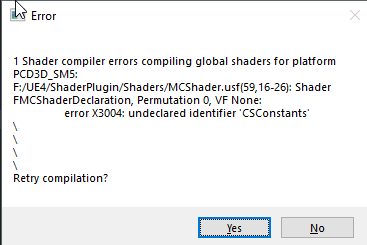
ugh i randomly got this error for a shader im working on
and it was fine before 🤔 anyone got any clue what could be the cause? 🤔
primal prairie
maybe just copy and paste all nodes to a new one and see if it works
plush yew
can somebody recommend a RPG turn based tutorial for Unreal engine?
https://www.youtube.com/watch?v=nsodCYKt_G8 something like this, with animation transactions

A quick look at a turn-based battle system I made in Unreal Engine 4 inspired heavily by Persona 5. Most visual and audio assets were either provided for fre...
maybe just copy and paste all nodes to a new one and see if it works it's aint the node system
it's usf and c++
@primal prairie
primal prairie
oh no clue then
plush yew
it was working like 30 minutes ago
primal prairie
ask in c++ ?
primal prairie
What is up with unreal engine crashing when maps are duplicated?
 harsh tiger
i need some help with the save game nodes. i have my set up working flawless in the editor and on mobile. but when i created a 64 bit windows build. the game doesnt load the save after closing and opening the game. whereas it does on mobile an in the editor
plush yew
@rotund scroll
primal prairie
and when are you setting the reference?
plush yew
event beginplay
plush yew
when hud creates
rotund scroll
and in the game mode as well
plush yew
 normal burrow
@lunar ferry hot reload works by rebuilding all the classes after code compilation. Exchanging data from old instance in memory to new instance. Using it properly is really a landmine field especially with native structs used in blueprints.
When it doesn't work, you'd need to describe how its not working really.. But it could perhaps be indicative of something improper probably.
You use live++ when you don't change headers at all (essentially). So it does no reloading of types or anything (thus why you can't change the layout of types one bit!) It just compiles and replaces things in memory without restarting editor.
Both of these are prone to issues though.
lunar ferry
@normal burrow ok, thanks! UE "Compile" is faster for me than VS "Build" right anyway, so just going to use that. also will look into live++, thanks!
normal burrow
Yep, your better off just closing editor down to make changes. But live++ is a life saver for things like making sure you call atan2 with the right arguments 😄
rotund scroll
yeah but inside which class is this
harsh tiger
rotund scroll
so you are creating the hud class... inside your hud?
sick escarp
@plush yew The dangerous part about tutorials is that you have quite a high risk of learning bad habits
The tutorial that I followed did a lot of things on tick that didn't need to be done through tick
plush yew
oh i know why this is not valid
Hud does not have time to create reference
i found this by this:
 waxen raven
The upside of tutorials is you can fix the bad habits later, often those habits will reveal why they are bad later on. The tick issue being a notorious one even in UE4 live training. Knowing the logic makes it much easier to recreate and move as appropriate, and when it's time using delegates etc will be a known option imo.
 stark kindle
Where do I go on this server to get help?
 spare kernel
depends what you need help wit
stark kindle
making this material not looking repetitive
harsh tiger
@stark kindle get a seamless texture
stark kindle
I'm not sure what that is, I'm very new to UEl and downloaded this material off of Quixel
 gentle moth
I'm posting this again because nobody was able to help me with this issue
I came back to my projexct, first time from few months and my nav mesh doesnt work
I have navMesh bounds volume but AI can't move
I already tried replacing navMesh bounds volume
stark kindle
I followed a tutorial on making seamless texture, not what I'm looking for; the general pattern of the texture is still there
@harsh tiger
harsh tiger
@stark kindle https://www.youtube.com/watch?v=X4aXXm8km3w that might help

www.Tesla-Dev.com In this tutorial we will take a look at how we can Scale textures and materials.
plush yew
I think I want to make game development with unreal my life but i get demotivated all the time 😦
gentle moth
Yeah I feel kinda same, stayinh motiwated in early part of creating process when you don't see results yet is hard task.
plush yew
Yeah you're also trying to make game dev your life @gentle moth ?
gentle moth
Who here isn't trying to? I'm making my first game
plush yew
whats it about?
stark kindle
@harsh tiger Im not trying to scale my material
stark kindle
what scares you?
gentle moth
idk it could be enemy, jumpscare or something long-term like building the tension or whole game atmosphere, creepy music
stark kindle
then do that, if that clearly will scare you then its bound to scare others
i like the building tension of a scary feel
gentle moth
Yeah what I mean is that now I'm in the process of making AI for game and I don't want to make eveyrthing like animations, models, programming etc at once
stark kindle
I mean, I believe that to make something scary the tone, setting, lighting all have to work together to form an eerie scene
dont make it all at once then...do it one by one
or do everything in an order for one certain AI
gentle moth
Sure, these things works best together and only then game could be scary if there is proper lighting, level design etc
plush yew
@sick escarp is because for me is the best way to learn, with something that I really want to do
If I have to read a book, or learn the basics and etc, I loose interesting very easy
sick escarp
Yeah I understand but be careful about the way they do stuff
plush yew
Yeah I know
sick escarp
It's easy to think that what you see someone do in a tutorial is a good way of solving the problem
plush yew
Yeah
autumn elbow
How do I move the pivot with the mesh when using Physics
 undone sinew
Where the hell are ARTv1 tools?
I hit install, and nothing happens

The Animation and Rigging Toolkit (ART) has shipped with Unreal Engine from the beginning. We are now making it available on the marketplace so we can more quickly roll out updates and have a centralized place to get the latest version.
anyone have a copy of this?
I need it, and I've been unable to download it for 2 months now.
 quiet rampart
Hey!
Im currently working on my mechanics, and my game will have a phone. How should i take these step ? Should i start with animation ?
gentle moth
There is huge space between wall and navmesh, I tried changing agent radius but there is no efect on navmesh
spark sonnet
Is it thirdperson @quiet rampart ?
quiet rampart
no, first person
spark sonnet
Singleplayer?
quiet rampart
yup
spark sonnet
Then you can just make a simple animations where he reaches for his pocket maybe?
then shows the phone
quiet rampart
i have already made a very simple animation, it is working. But then, i want that when the phone is up, the mouse stop moving the camera and move the thumb instead
spark sonnet
ah cool
quiet rampart
Pretty harsh tho... XD
spark sonnet
You can use bone transformation maybe
quiet rampart
for now, i can bring the phone, the mouse doesnt control the camera... but i cant find out how to switch the control
yeah but im very beggin in animation blueprint and skeletal...
*beginner
quiet rampart
yeah
spark sonnet
You can make it do that when the button for opening your phone is clicked
quiet rampart
yeah this is what i am trying to do XD
spark sonnet
So if phone button is press do this if not do this
spark sonnet
Im gonna try to make it now so I can show you
quiet rampart
When my phone is up, the mouse doesnt control the camera anymore, when he's down... the mouse control the camera again
Mind going in private chat for not spaming this channel ?
spark sonnet
Yes sure 😄
undone sinew
i dont understand why this is still on the marketplace
if you can't install or download
grim ore
have you tried artv2? and did you verify it doesnt show as a plugin for that version on the library page?
undone sinew
I'm trying ARTv2, so I'll see how it goes, but they really should retire ArtV1, if they aren't going to allow you to download it anymore
It wasn't obvious to me that there was even a v2, I had to google the issue of not being able to download it & someone in a thread mentioned v2.
and V2 isnt new either, it says it was last updated 2 years ago, so I'm baffled why either it isn't in the marketplace by now.
Anyway, its annoying because, I need it for the dummy rig to generate a UE4 skeleton for characters
And the alternative (doing it in Max) seems to be a nightmare 😮
grim ore
it looks like it's not an issue with the plugin and Epic but might be on your side, https://i.imgur.com/C1F7DMc.png
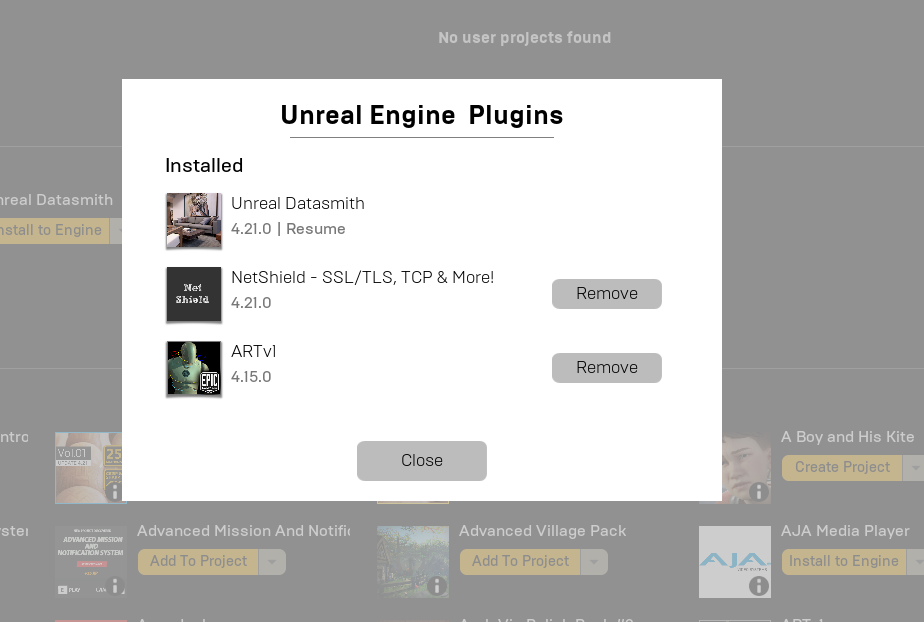
I just installed 4.21.2 and the artv1 plugin without issue
autumn elbow
so... does inherited events not work?
dim plover
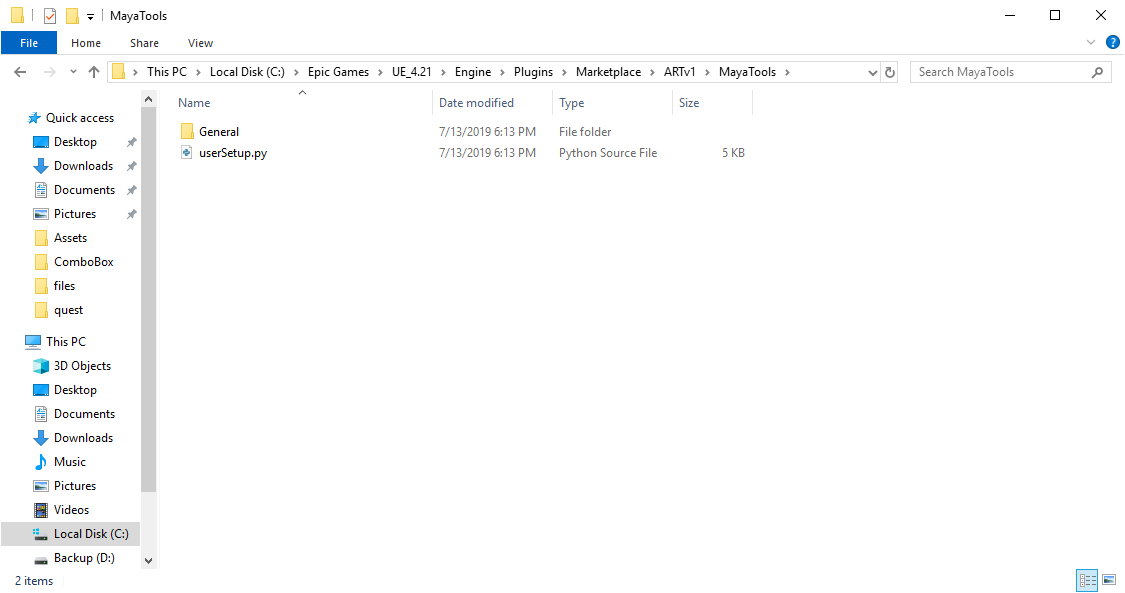
Are you in the right folder?
undone sinew
these are the only two folders specified
autumn elbow
Nevermind... it works
dim plover
The previous picture says 4.21, and the explorer shows 4.22.
undone sinew
right folder now
the official docs say its supposed to be under Extra
but when googling, sometime a year ago, people say it was moved to "marketplace"
well, now its in neither
Hopefully V2 works without problems cause it says its still in alpha
but they really should pull V1 off the marketplace
 halcyon flame
does anyone know if it's possible to add components to an entire class via blueprint? this is for editor widget functionality
it's easy enough to Add Static Mesh Component, but that only applies to a particular instance...
grim ore
https://i.imgur.com/hoQVy6G.png @undone sinew its showing up for me here


 undone sinew
grim ore
undone sinew
grim ore
I removed it from my 4.21 and re installed it and it showed up, dunno about yours 😦
grim ore
so you have your engines installed on C and D?
dim plover
Maybe restart the launcher or enable debug logging in the launcher?
Seems like a launcher issue, just refusing to download.
grim ore
can't really tell epic to remove it tho if it does work for people
undone sinew
then i guess a bug fix
😛
but, i know ive had this issue for 2 months now
I tried to download it in the past for 4.16
and my launcher got reinstalled
Because of Unreal Studio
so, i know its not that
maybe its the drive letter
but thats dumb
grim ore
nuke your launcher, nuke your engines (you have them in multiple places on multiple drives), and restart
undone sinew
nuke them?
do you mean uninstall everything?
if so, heck no, its 9:20 pm, maybe tomorrow.
xD
grim ore
maybe the launcher logging will help
undone sinew
would be nice to find a simple download link xD
to throw into my browser
and just skip the damn marketplace
😄
I'm trying V2 as we speak, then bed time
 dry cloak
Guys, do not work with @frank iron he says that he's working on the game, but when you ask for a screenshot or something, he literally says "Sorry I got nothing" and then leaves.
undone sinew
Context?
grim ore
yeah it looks like they are trying to replace v1 with v2 anyways
undone sinew
@grim ore btw, thank you for helping
I appreciate it
I'm fucking tired as hell xD
grim ore
not much help since we couldnt fix it for you lol
grim ore
😃
undone sinew
I couldn't sleep at all last night, and I had to lift 150 pavers, 50 sandbags, the following morning
And now I gotta see if I can get a UE4 skeleton applied to this character model, so I can give some good news to my coder 😛
Retargetting didn't workout too well
grim ore
retargetting is sooo fragile 😦
undone sinew
Yeah, it seems to screw up with the wrists
or the shoulders
it just does not compensate for proportion differences very well
and the manican's proportions are so, odd
 scarlet birch
I'm second guessing myself here. Am I correct that the joint placement on this should be closer to these red marks?
undone sinew
he has the body of the T800* in Terminator
autumn elbow
Unreal Array.. How do I get first index ?
I see Last Index, but not way to choose index 0
 civic saddle
Is there a way to do something like have a sprite, but add thickness to it to make it 3D? Like a cardboard cutout of something?
autumn elbow
Nevermind.. got it.. GET
grim ore
put the sprite on a mesh
scarlet birch
@civic saddle It's no longer a sprite if you add dimension. It's a model. So yeah, you can make a model of it. It could be as simple as extruding a plane in the shape of the sprite . Then texturing the sides with the carboard or whatever.
You might be able to do it with a shader or something as well.
civic saddle
Mhm, I for sure could with a model, I was make my workflow much easier if I could really just add an extra dimension to a sprite, haha
This has the best answer I've found so far

Game Development Stack Exchange
Is there a convenient way to have a 2D pixel art image with clip transparency (not partial transparency) rendered with thickness in Unreal Engine? Paper2D does exactly what I want, except it's a flat
I just haven't even touched the programming side of Unreal engine yet, lol, trying to figure out a decently still challenging to make first game going from making some pretty decent stuff in Unity
I like making pretty original stuff not using other people's models, but models take so much time, haha
Not that what I'm looking for would take forever
scarlet birch
It'd be fairly fast to model it, would suck to do it for each frame. If I was going to do something like that I'd probably try and break it up and animate like if it was dragon bones or spriter.
idk
The approach from that stackexhange seems interesting.
autumn elbow
Whats the best way to attach 2 objects together at a snappoint ?
 signal sun
I'm having an issue where everytime I restart my project, my Data Table is no longer able to find my structure
I am not renaming the struct or making any changes to it
hushed hare
Have you refreshed the nodes that reference it
I've had something similar happen and a refresh worked
@signal sun
signal sun
Nothing currently references it
@hushed hare , nevermind, it was being referenced somewhere I wasn't aware in a static way. I've added a mechanism of lazy loading and it doesn't hate me anymore. Thanks!
civic saddle
It's so cool that you can edit collision in engine, haha
 fringe pivot
Is there any built in method one should use to kill the player or it's 100% handled by the user?
 blissful trail
is it possible to make the player always facing the mouse location ?
plush yew
Is it possible to like remove every single thing related to UE and completely make a fresh install...? Like no traces or anything left behind?
I've been trying to export for android and used the android sdk and other things(related to android) from the launcher while installing the engine... but I accidentally deleted few files related to the android sdk... and since then I couldn't export on android... so I tried removing all the files related to android export like sdk, ndk, ant etc... and tried to make a reinstall through nvpack...
*it never exports it just keeps cooking an empty project forever...
:(
So I tried reinstalling after removing everything I could find related to the engine... and then tried to reinstall the android export stff from the launcher again... but looks like it downloads only half of the files...
*sowwy for a this really lengthy message...I've tried almost everything.. reinstalling over 7 times... but I can't figure out...
 hidden tendon
Is there a way to zoom in screen space like you can in 3ds Max?
 tall mist
I think you can do it with a numpad if youre on a Windows keyboard
 next badger
@plush yew use verify
plush yew
What's new in 4.22 guys
tall pendant
4.22 or 4.23? 🤔
plush yew
That in progress?
tall pendant
Unreal Engine Forums
PREVIEW!
Preview 1 of the upcoming 4.23 release is available now on the Launcher and GitHub. We are making this Preview available so that our developer community
if you mean 4.22: https://www.unrealengine.com/en-US/blog/unreal-engine-4-22-released
 primal escarp
Does anyone know why there seems to be an inconsistency between the docs and the engine, in reference to component/section sizes?: https://docs.unrealengine.com/en-US/Engine/Landscape/TechnicalGuide/index.html
Technical Settings for Landscape.
The docs refer to them as 126x126, whilst the engine is 127x127
 honest vale
docs refers to the number of quads
while in engine it shows the amount of vertices
number of vertices is the number of quads + 1
for example, if you have two quads side by side the total number of vertices on the long side is three
plush yew
@next badgerI tried verifying...
It now says you have missing components and read the quick start guide...
after verifying... and it says android is installed already...
:(
next badger
but android SDK is not a part of UE4